Gamify and
increase task
productivity
Guideline for
What is it? 3
Benefits 4
Registration 5
Choosing Templates 11
Explore your working area 15
Share 20
Help and tutorials 24
Reference 25
What is it?
This tool will bring into life attractive
presentations, infographics, dossiers,
CV’s, etc. You will create visuals that
inspire and will make an amazing
communication experience.
This work is licensed under the Attribution-NonCommercial 4.0 International
3
Benefits
• Lots of interactive contents.
• Easy-to-edit templates.
• Programming and designing skills are not
needed.
• Effective communication.
• Animation
• Interactivity
• Integration of digital providers
This work is licensed under the Attribution-NonCommercial 4.0 International
4
Registration
This work is licensed under the Attribution-NonCommercial 4.0 International
5
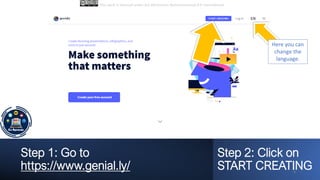
Step 1: Go to
https://www.genial.ly/
Step 2: Click on
START CREATING
This work is licensed under the Attribution-NonCommercial 4.0 International
6
Here you can
change the
language.
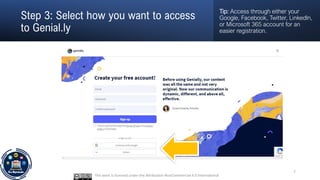
Step 3: Select how you want to access
to Genial.ly
Tip: Access through either your
Google, Facebook, Twitter, LinkedIn,
or Microsoft 365 account for an
easier registration.
This work is licensed under the Attribution-NonCommercial 4.0 International
7
Step 4: Choose your account and
usage.
This work is licensed under the Attribution-NonCommercial 4.0 International
8
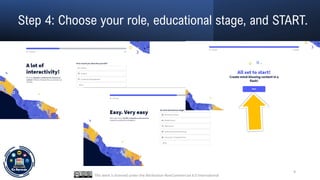
Step 4: Choose your role, educational stage, and START.
This work is licensed under the Attribution-NonCommercial 4.0 International
9
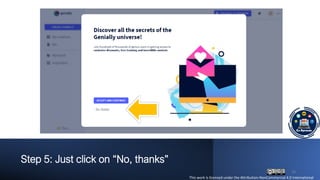
Step 5: Just click on “No, thanks”
This work is licensed under the Attribution-NonCommercial 4.0 International
10
Choosing templates
This work is licensed under the Attribution-NonCommercial 4.0 International
11
Step 1: Choose a type of design.
This work is licensed under the Attribution-NonCommercial 4.0 International
12
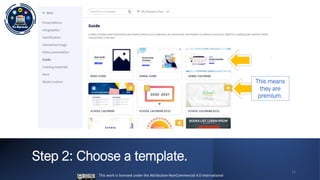
Step 2: Choose a template.
This work is licensed under the Attribution-NonCommercial 4.0 International
13
This means
they are
premium.
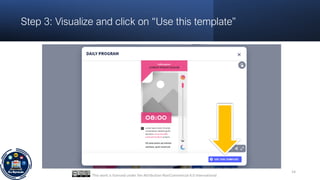
Step 3: Visualize and click on “Use this template”
This work is licensed under the Attribution-NonCommercial 4.0 International
14
Explore your working
area
This work is licensed under the Attribution-NonCommercial 4.0
International
15
This work is licensed under the Attribution-NonCommercial 4.0 International
16
Add page
Topic
Add images
Add interactive
elements
Add from your
device
See all pages
Add text
Add
resources
Add smart
blocks
Change
background
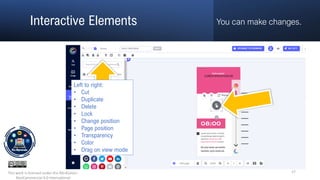
You can make changes.
Interactive Elements
This work is licensed under the Attribution-
NonCommercial 4.0 International
17
Left to right:
• Cut
• Duplicate
• Delete
• Lock
• Change position
• Page position
• Transparency
• Color
• Drag on view mode
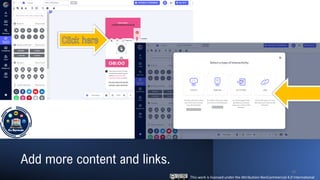
Add more content and links.
This work is licensed under the Attribution-NonCommercial 4.0 International
18
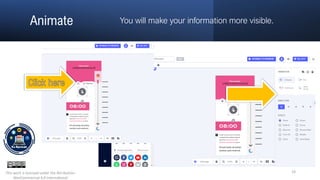
You will make your information more visible.
Animate
This work is licensed under the Attribution-
NonCommercial 4.0 International
19
Share
This work is licensed under the Attribution-NonCommercial 4.0
International
20
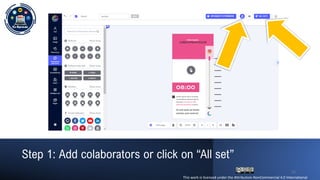
Step 1: Add colaborators or click on “All set”
This work is licensed under the Attribution-NonCommercial 4.0 International
21
Step 2: Add the description. Then, all set!
This work is licensed under the Attribution-
NonCommercial 4.0 International
22
Visualize or share the link!
This work is licensed under the Attribution-NonCommercial 4.0 International
23
Help and Tutorials
These official sources may be used along with a
translator for better results.
• Genially Help Center (English, French, and Spanish)
https://intercom.help/geniallysupport/en
• YouTube Genially Channel (English and Spanish)
https://www.youtube.com/channel/UCtq6w3zpUc5tQYE
C6Q8pImg
This work is licensed under the Attribution-NonCommercial 4.0
International
24
Reference
Genially. https://www.genial.ly/
This work is licensed under the Attribution-NonCommercial 4.0
International
25

Genial.ly - gamify and increase task productivity

  • 1.
  • 2.
    What is it?3 Benefits 4 Registration 5 Choosing Templates 11 Explore your working area 15 Share 20 Help and tutorials 24 Reference 25
  • 3.
    What is it? Thistool will bring into life attractive presentations, infographics, dossiers, CV’s, etc. You will create visuals that inspire and will make an amazing communication experience. This work is licensed under the Attribution-NonCommercial 4.0 International 3
  • 4.
    Benefits • Lots ofinteractive contents. • Easy-to-edit templates. • Programming and designing skills are not needed. • Effective communication. • Animation • Interactivity • Integration of digital providers This work is licensed under the Attribution-NonCommercial 4.0 International 4
  • 5.
    Registration This work islicensed under the Attribution-NonCommercial 4.0 International 5
  • 6.
    Step 1: Goto https://www.genial.ly/ Step 2: Click on START CREATING This work is licensed under the Attribution-NonCommercial 4.0 International 6 Here you can change the language.
  • 7.
    Step 3: Selecthow you want to access to Genial.ly Tip: Access through either your Google, Facebook, Twitter, LinkedIn, or Microsoft 365 account for an easier registration. This work is licensed under the Attribution-NonCommercial 4.0 International 7
  • 8.
    Step 4: Chooseyour account and usage. This work is licensed under the Attribution-NonCommercial 4.0 International 8
  • 9.
    Step 4: Chooseyour role, educational stage, and START. This work is licensed under the Attribution-NonCommercial 4.0 International 9
  • 10.
    Step 5: Justclick on “No, thanks” This work is licensed under the Attribution-NonCommercial 4.0 International 10
  • 11.
    Choosing templates This workis licensed under the Attribution-NonCommercial 4.0 International 11
  • 12.
    Step 1: Choosea type of design. This work is licensed under the Attribution-NonCommercial 4.0 International 12
  • 13.
    Step 2: Choosea template. This work is licensed under the Attribution-NonCommercial 4.0 International 13 This means they are premium.
  • 14.
    Step 3: Visualizeand click on “Use this template” This work is licensed under the Attribution-NonCommercial 4.0 International 14
  • 15.
    Explore your working area Thiswork is licensed under the Attribution-NonCommercial 4.0 International 15
  • 16.
    This work islicensed under the Attribution-NonCommercial 4.0 International 16 Add page Topic Add images Add interactive elements Add from your device See all pages Add text Add resources Add smart blocks Change background
  • 17.
    You can makechanges. Interactive Elements This work is licensed under the Attribution- NonCommercial 4.0 International 17 Left to right: • Cut • Duplicate • Delete • Lock • Change position • Page position • Transparency • Color • Drag on view mode
  • 18.
    Add more contentand links. This work is licensed under the Attribution-NonCommercial 4.0 International 18
  • 19.
    You will makeyour information more visible. Animate This work is licensed under the Attribution- NonCommercial 4.0 International 19
  • 20.
    Share This work islicensed under the Attribution-NonCommercial 4.0 International 20
  • 21.
    Step 1: Addcolaborators or click on “All set” This work is licensed under the Attribution-NonCommercial 4.0 International 21
  • 22.
    Step 2: Addthe description. Then, all set! This work is licensed under the Attribution- NonCommercial 4.0 International 22
  • 23.
    Visualize or sharethe link! This work is licensed under the Attribution-NonCommercial 4.0 International 23
  • 24.
    Help and Tutorials Theseofficial sources may be used along with a translator for better results. • Genially Help Center (English, French, and Spanish) https://intercom.help/geniallysupport/en • YouTube Genially Channel (English and Spanish) https://www.youtube.com/channel/UCtq6w3zpUc5tQYE C6Q8pImg This work is licensed under the Attribution-NonCommercial 4.0 International 24
  • 25.
    Reference Genially. https://www.genial.ly/ This workis licensed under the Attribution-NonCommercial 4.0 International 25