Geb 
very groovy browser automation 
http://www.gebish.org 1 / 19
Agenda 
1. Introduction to Geb 
WebDriver 
Test framework integrations 
Navigation API 
Page objects 
Module objects 
Content DSL 
Multiple Environments 
2. Our project-setup 
2 / 19
Introduction 
Automating the interaction between web browsers and web content 
Acceptance Testing Web Applications 
Screen scraping 
Great documentation: http://www.gebish.org/manual/current/ 
3 / 19
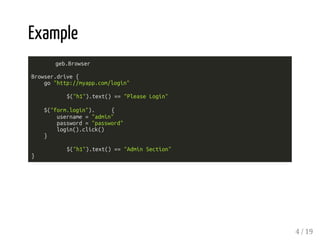
Example 
geb.Browser 
Browser.drive { 
go "http://myapp.com/login" 
$("h1").text() == "Please Login" 
$("form.login"). { 
username = "admin" 
password = "password" 
login().click() 
} 
$("h1").text() == "Admin Section" 
} 
4 / 19
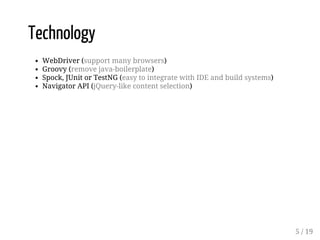
Technology 
WebDriver (support many browsers) 
Groovy (remove java-boilerplate) 
Spock, JUnit or TestNG (easy to integrate with IDE and build systems) 
Navigator API (jQuery-like content selection) 
5 / 19
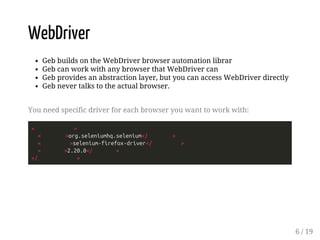
WebDriver 
Geb builds on the WebDriver browser automation librar 
Geb can work with any browser that WebDriver can 
Geb provides an abstraction layer, but you can access WebDriver directly 
Geb never talks to the actual browser. 
You need specific driver for each browser you want to work with: 
< > 
< >org.seleniumhq.selenium</ > 
< >selenium-firefox-driver</ > 
< >2.20.0</ > 
</ > 
6 / 19
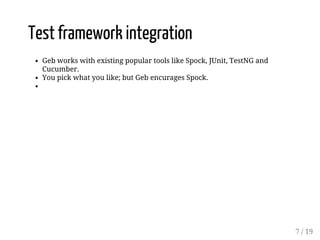
Test framework integration 
Geb works with existing popular tools like Spock, JUnit, TestNG and 
Cucumber. 
You pick what you like; but Geb encurages Spock. 
7 / 19
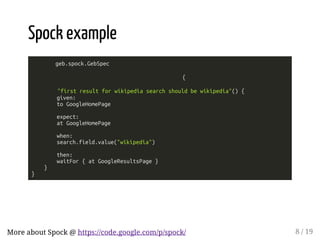
Spock example 
geb.spock.GebSpec 
{ 
"first result for wikipedia search should be wikipedia"() { 
given: 
to GoogleHomePage 
expect: 
at GoogleHomePage 
when: 
search.field.value("wikipedia") 
then: 
waitFor { at GoogleResultsPage } 
} 
} 
More about Spock @ https://code.google.com/p/spock/ 8 / 19
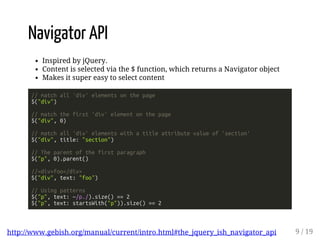
Navigator API 
Inspired by jQuery. 
Content is selected via the $ function, which returns a Navigator object 
Makes it super easy to select content 
// match all 'div' elements on the page 
$("div") 
// match the first 'div' element on the page 
$("div", 0) 
// match all 'div' elements with a title attribute value of 'section' 
$("div", title: "section") 
// The parent of the first paragraph 
$("p", 0).parent() 
//<div>foo</div> 
$("div", text: "foo") 
// Using patterns 
$("p", text: ~/p./).size() == 2 
$("p", text: startsWith("p")).size() == 2 
http://www.gebish.org/manual/current/intro.html#the_jquery_ish_navigator_api 9 / 19
Page Objects 
Less fragile code with better abstractions and modelling 
Promotes resuse 
Makes it easier to write tests 
Pages (and modules) can be arranged in inheritance hierarchies. 
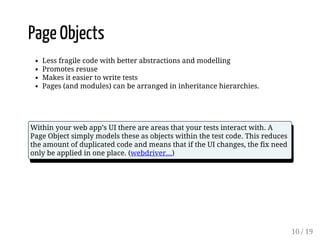
Within your web app’s UI there are areas that your tests interact with. A 
Page Object simply models these as objects within the test code. This reduces 
the amount of duplicated code and means that if the UI changes, the fix need 
only be applied in one place. (webdriver...) 
10 / 19
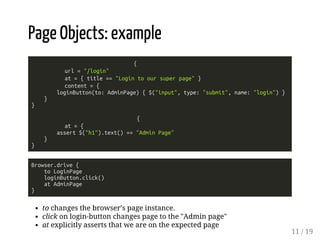
Page Objects: example 
{ 
url = "/login" 
at = { title == "Login to our super page" } 
content = { 
loginButton(to: AdminPage) { $("input", type: "submit", name: "login") } 
} 
} 
{ 
at = { 
assert $("h1").text() == "Admin Page" 
} 
} 
Browser.drive { 
to LoginPage 
loginButton.click() 
at AdminPage 
} 
to changes the browser’s page instance. 
click on login-button changes page to the "Admin page" 
at explicitly asserts that we are on the expected page 
11 / 19
Module Objects 
Reusable fragments that can be used across pages 
Useful for modelling things like UI widgets that are used across multiple 
pages 
We can define a Navigator context when including the module in a Page. 
Module will then only see "its own part" of the dom via the navigator api 
12 / 19
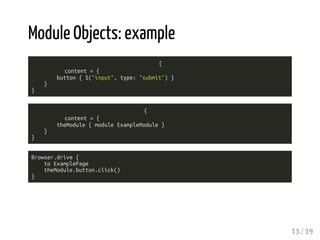
Module Objects: example 
{ 
content = { 
button { $("input", type: "submit") } 
} 
} 
{ 
content = { 
theModule { module ExampleModule } 
} 
} 
Browser.drive { 
to ExamplePage 
theModule.button.click() 
} 
13 / 19
Content DSL 
Content definitions can build upon each other. 
Content definitions are actually templates. 
{ 
content = { 
results { $("li.g") } 
result { i -> results[i] } 
resultLink { i -> result(i).find("a.l", 0) } 
firstResultLink { resultLink(0) } 
} 
} 
Optional Content 
{ 
content = { 
errorMsg(required: ) { $("p.errorMsg") } 
} 
} 
14 / 19
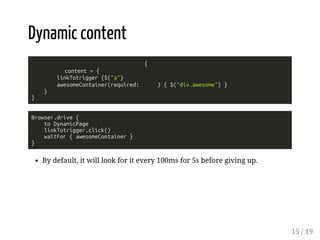
Dynamic content 
{ 
content = { 
linkTotrigger {$("a"} 
awesomeContainer(required: ) { $("div.awesome") } 
} 
} 
Browser.drive { 
to DynamicPage 
linkTotrigger.click() 
waitFor { awesomeContainer } 
} 
By default, it will look for it every 100ms for 5s before giving up. 
15 / 19
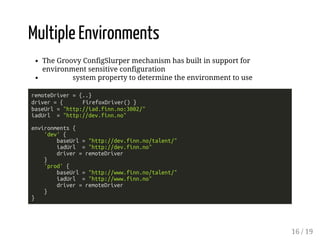
Multiple Environments 
The Groovy ConfigSlurper mechanism has built in support for 
environment sensitive configuration 
system property to determine the environment to use 
remoteDriver = {..} 
driver = { FirefoxDriver() } 
baseUrl = "http://iad.finn.no:3002/" 
iadUrl = "http://dev.finn.no" 
environments { 
'dev' { 
baseUrl = "http://dev.finn.no/talent/" 
iadUrl = "http://dev.finn.no" 
driver = remoteDriver 
} 
'prod' { 
baseUrl = "http://www.finn.no/talent/" 
iadUrl = "http://www.finn.no" 
driver = remoteDriver 
} 
} 
16 / 19
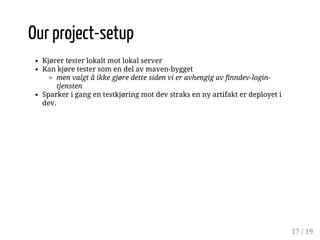
Our project-setup 
Kjører tester lokalt mot lokal server 
Kan kjøre tester som en del av maven-bygget 
men valgt å ikke gjøre dette siden vi er avhengig av finndev-login-tjensten 
Sparker i gang en testkjøring mot dev straks en ny artifakt er deployet i 
dev. 
17 / 19
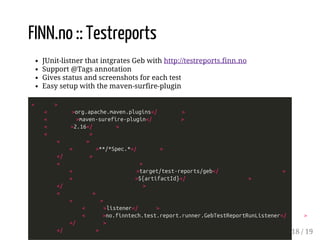
FINN.no :: Testreports 
JUnit-listner that intgrates Geb with http://testreports.finn.no 
Support @Tags annotation 
Gives status and screenshots for each test 
Easy setup with the maven-surfire-plugin 
< > 
< >org.apache.maven.plugins</ > 
< >maven-surefire-plugin</ > 
< >2.16</ > 
< > 
< > 
< >**/*Spec.*</ > 
</ > 
< > 
< >target/test-reports/geb</ > 
< >${artifactId}</ > 
</ > 
< > 
< > 
< >listener</ > 
< >no.finntech.test.report.runner.GebTestReportRunListener</ > 
</ > 
</ > 18 / 19
Demo time 
19 / 19

Geb presentation

  • 1.
    Geb very groovybrowser automation http://www.gebish.org 1 / 19
  • 2.
    Agenda 1. Introductionto Geb WebDriver Test framework integrations Navigation API Page objects Module objects Content DSL Multiple Environments 2. Our project-setup 2 / 19
  • 3.
    Introduction Automating theinteraction between web browsers and web content Acceptance Testing Web Applications Screen scraping Great documentation: http://www.gebish.org/manual/current/ 3 / 19
  • 4.
    Example geb.Browser Browser.drive{ go "http://myapp.com/login" $("h1").text() == "Please Login" $("form.login"). { username = "admin" password = "password" login().click() } $("h1").text() == "Admin Section" } 4 / 19
  • 5.
    Technology WebDriver (supportmany browsers) Groovy (remove java-boilerplate) Spock, JUnit or TestNG (easy to integrate with IDE and build systems) Navigator API (jQuery-like content selection) 5 / 19
  • 6.
    WebDriver Geb buildson the WebDriver browser automation librar Geb can work with any browser that WebDriver can Geb provides an abstraction layer, but you can access WebDriver directly Geb never talks to the actual browser. You need specific driver for each browser you want to work with: < > < >org.seleniumhq.selenium</ > < >selenium-firefox-driver</ > < >2.20.0</ > </ > 6 / 19
  • 7.
    Test framework integration Geb works with existing popular tools like Spock, JUnit, TestNG and Cucumber. You pick what you like; but Geb encurages Spock. 7 / 19
  • 8.
    Spock example geb.spock.GebSpec { "first result for wikipedia search should be wikipedia"() { given: to GoogleHomePage expect: at GoogleHomePage when: search.field.value("wikipedia") then: waitFor { at GoogleResultsPage } } } More about Spock @ https://code.google.com/p/spock/ 8 / 19
  • 9.
    Navigator API Inspiredby jQuery. Content is selected via the $ function, which returns a Navigator object Makes it super easy to select content // match all 'div' elements on the page $("div") // match the first 'div' element on the page $("div", 0) // match all 'div' elements with a title attribute value of 'section' $("div", title: "section") // The parent of the first paragraph $("p", 0).parent() //<div>foo</div> $("div", text: "foo") // Using patterns $("p", text: ~/p./).size() == 2 $("p", text: startsWith("p")).size() == 2 http://www.gebish.org/manual/current/intro.html#the_jquery_ish_navigator_api 9 / 19
  • 10.
    Page Objects Lessfragile code with better abstractions and modelling Promotes resuse Makes it easier to write tests Pages (and modules) can be arranged in inheritance hierarchies. Within your web app’s UI there are areas that your tests interact with. A Page Object simply models these as objects within the test code. This reduces the amount of duplicated code and means that if the UI changes, the fix need only be applied in one place. (webdriver...) 10 / 19
  • 11.
    Page Objects: example { url = "/login" at = { title == "Login to our super page" } content = { loginButton(to: AdminPage) { $("input", type: "submit", name: "login") } } } { at = { assert $("h1").text() == "Admin Page" } } Browser.drive { to LoginPage loginButton.click() at AdminPage } to changes the browser’s page instance. click on login-button changes page to the "Admin page" at explicitly asserts that we are on the expected page 11 / 19
  • 12.
    Module Objects Reusablefragments that can be used across pages Useful for modelling things like UI widgets that are used across multiple pages We can define a Navigator context when including the module in a Page. Module will then only see "its own part" of the dom via the navigator api 12 / 19
  • 13.
    Module Objects: example { content = { button { $("input", type: "submit") } } } { content = { theModule { module ExampleModule } } } Browser.drive { to ExamplePage theModule.button.click() } 13 / 19
  • 14.
    Content DSL Contentdefinitions can build upon each other. Content definitions are actually templates. { content = { results { $("li.g") } result { i -> results[i] } resultLink { i -> result(i).find("a.l", 0) } firstResultLink { resultLink(0) } } } Optional Content { content = { errorMsg(required: ) { $("p.errorMsg") } } } 14 / 19
  • 15.
    Dynamic content { content = { linkTotrigger {$("a"} awesomeContainer(required: ) { $("div.awesome") } } } Browser.drive { to DynamicPage linkTotrigger.click() waitFor { awesomeContainer } } By default, it will look for it every 100ms for 5s before giving up. 15 / 19
  • 16.
    Multiple Environments TheGroovy ConfigSlurper mechanism has built in support for environment sensitive configuration system property to determine the environment to use remoteDriver = {..} driver = { FirefoxDriver() } baseUrl = "http://iad.finn.no:3002/" iadUrl = "http://dev.finn.no" environments { 'dev' { baseUrl = "http://dev.finn.no/talent/" iadUrl = "http://dev.finn.no" driver = remoteDriver } 'prod' { baseUrl = "http://www.finn.no/talent/" iadUrl = "http://www.finn.no" driver = remoteDriver } } 16 / 19
  • 17.
    Our project-setup Kjørertester lokalt mot lokal server Kan kjøre tester som en del av maven-bygget men valgt å ikke gjøre dette siden vi er avhengig av finndev-login-tjensten Sparker i gang en testkjøring mot dev straks en ny artifakt er deployet i dev. 17 / 19
  • 18.
    FINN.no :: Testreports JUnit-listner that intgrates Geb with http://testreports.finn.no Support @Tags annotation Gives status and screenshots for each test Easy setup with the maven-surfire-plugin < > < >org.apache.maven.plugins</ > < >maven-surefire-plugin</ > < >2.16</ > < > < > < >**/*Spec.*</ > </ > < > < >target/test-reports/geb</ > < >${artifactId}</ > </ > < > < > < >listener</ > < >no.finntech.test.report.runner.GebTestReportRunListener</ > </ > </ > 18 / 19
  • 19.