Google API로 만드는

더욱 더 풍부한 백오피스
MooYeol Prescott Lee
Software Engineer @ Law&Company
발표자 소개
• 이무열

• Software Engineer @
LawCompany

• mooyoul@gmail.com

• https://github.com/mooyoul

• https://www.linkedin.com/
in/mooyoul
Google API를 통해
더 풍부한 백오피스를 만드는 방법
인증
인증
• 두 독립적인 웹앱이 존재한다고 가정
• 일반적인 사진 인화 웹사이트 (A) / 사진 공유 웹사이트 (B)
• 나는 (A)을 만드는 개발자
• (B)에는 사진을 올릴 수 있는 API가 있음

아이디/패스워드 조합의 인증만 가능한 상황
• 이번에 고객이 (B)에 올린 사진을 가져와 인화하는 기능을
추가하려고 함
인증
인증
• 만약 내가 악의적인 목적을 가지고 사용자의 비밀 정보를 수
집한다면?
• 유저 입장에서 신뢰할 수 없음
• 제 3자에게 비밀번호 노출 가능성 (하필 비밀번호가 공인
인증서 비밀번호라면?)
• 읽는 권한만 필요한데 모든 권한이 들어오네?
• 접근 제어가 불가능
OAuth
OAuth
• 표준
• 사용자의 비밀 정보를 입력받을 필요 없이 안전하게 인증 수
행
• Content Provider

컨텐츠 제공자, 이전 슬라이드의 사진 공유 웹사이트 (B)
• Content Consumer

컨텐츠 소비자, 이전 슬라이드의 사진 인화 웹사이트 (A)
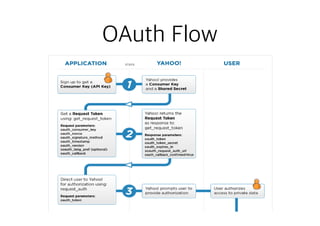
OAuth Flow
OAuth Flow
OAuth Flow
OAuth References
• OAuth

https://oauth.net/
• RFC5849 - The OAuth 1.0 Protocol

https://tools.ietf.org/html/rfc5849
• RFC6749 - The OAuth 2.0 Authorization Framework

https://tools.ietf.org/html/rfc6749
• Yahoo! Developer - OAuth Flow

https://developer.yahoo.com/oauth/guide/images/
oauth_graph.gif
Google Identity Platform
• 사용자 인증이 필요한 API에 접근하거나, 사용자 리소스에
접근이 필요한 경우 사용자 인증이 필요하다
• OAuth2 기반 인증 제공
• 일반적인 3-legged 형태의 인증 뿐만 아니라 Service
Account를 통해 2-legged (Server to Server)로도 인증 가
능
3-legged OAuth
• OAuth로 인증을 수행하는 대부분의 플랫폼에서 사용하는
인증 방식
• e.g.) Google ID로 로그인

=> 3-legged OAuth
• User Interaction 필요

Application에서

인증받고 싶은데..
Service Account
• Service Account는 가상의 Google ID를 생성하고,

각 서비스에서 권한 위임을 통해 리소스 접근
• mooyoul@gmail.com 계정에서

some-id@developer.gserviceaccount.com 라는 Service
Account를 생성하더라도,

some-id@developer.gserviceaccount.com 는
mooyoul@gmail.com 의 리소스에 접근 불가능
• 독립적인 계정이므로 서비스 계정에서 생성한 컨텐츠 (e.g.
Spreadsheet 문서) 역시 공유하거나 소유권을 변경하지 않으
면 mooyoul@gmail.com 에서 접근 불가능
Service Account
2-legged OAuth
3-legged vs 2-legged
Creating Service Account
• Service Account 생성은
API Console에서 가능


https://
console.developers.google.com/
permissions/serviceaccounts?hl=ko
Obtaining Access Token
• JSON Web Token (JWT) 생성

base64_encoded_header.base64_encoded_claim_set.bas
e64_encoded_signature
• 생성한 JWT로 Access Token 요청
• Access Token 응답 처리
without 

googleapi
module
vs
with googleapi module (built-in JWT based auth)
Identity Platform References
• Google Identity Platform

https://developers.google.com/identity/
• Google Identity Platform - OAuth 2.0 Overview

https://developers.google.com/identity/protocols/OAuth2
• Google Identity Platform - OAuth 2.0 for Server-side Web Apps

https://developers.google.com/identity/protocols/OAuth2WebServer
• Google Identity Platform - OAuth 2.0 API Scopes

https://developers.google.com/identity/protocols/googlescopes
• Google Identity Platform - OAuth 2.0 for Service Accounts

https://developers.google.com/identity/protocols/OAuth2ServiceAccount
• Google Identity Platform - Application Default Credentials

https://developers.google.com/identity/protocols/application-default-credentials
• Google API Node.js Client Library - Using JWT Service Tokens

https://github.com/google/google-api-nodejs-client/#using-jwt-service-tokens
(거의) 다 배웠습니다
Spreadsheets를 만드는 방법
• Google Drive API를 사용해서 CSV 업로드
• Google Apps Script
• Google Sheets API (구 Spreadsheets API)
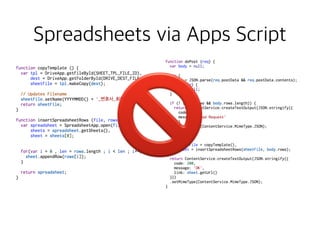
Spreadsheets via Apps Script
• Drive API를 통해 CSV 업로드를 했더니…
• 휴대폰번호 “01012341234” => 숫자로 인식해
1012341234로 자동 변환되는 문제 발생
• Sheets API v3에서 cell-based 로 데이터를 밀어넣으려
니…
• batch API에서 자꾸 문제가 발생
Spreadsheets via Apps Script
515행 출력하는데 1.2분…
Sheets API v4 의 등장
Spreadsheets via Apps Script
🚫🚫
Sheets API

(구. Spreadsheets API)
Sheets API를 언제 쓰지?
• 백오피스에서 회원 목록 CSV/Excel 출력되게 해주세요
• 매일 XX시에 YY를 한 유저의 리스트를 엑셀로 저장해주세요
• XXX 이벤트가 발생하면 지정한 엑셀파일에 추가(append) 해
주세요
• 휴대폰 주소가 들어있는 엑셀파일 읽어서 문자 보내주세요
• 메일 주소가 들어있는 엑셀파일 읽어서 메일 보내주세요
• …
Sheets API
• Google Spreadsheets를 내 마음대로
• Spreadsheet 조회/생성/삭제

- Drive API를 통해서도 가능
• Sheet 조회/생성/수정/삭제
• 시트 데이터 조회/추가/수정/삭제 (V3: Row-based & Cell-based,
V4: A1 Notation)
• 기능을 조합하면 templating도 가능
• formula 또한 기본 지원
Sheets API
• https://docs.google.com/spreadsheets/d/
SPREADSHEET_ID/edit?pli=1#gid=SHEET_ID
• https://docs.google.com/spreadsheets/d/
1s0bXZu6nf7l04TOunn4paiz0fJ2pMV2CK4WKyeo8L4Q/
edit?pli=1#gid=495715675
• Spreadsheet ID

1s0bXZu6nf7l04TOunn4paiz0fJ2pMV2CK4WKyeo8L4Q
• Sheet ID (V3: Worksheet ID)

495715675
A1 Notation
• Sheet1!A1:B2

Sheet1의 (첫번째 행, 첫번째 열)에서 (두번째 행, 두번째 열)까지의 모든 셀
• Sheet1!A:A 

Sheet1의 첫번째 열의 모든 셀
• Sheet1!1:2

Sheet1의 첫번째 행부터 두번째 행까지의 모든 셀
• Sheet1!A5:A

Sheet1의 첫번째 열의 다섯번째 행부터 마지막 행까지의 모든 셀
• A1:B2

스프레드시트 내 첫번째 시트 첫번째 행의 두 셀
• Sheet1

Sheet1의 모든 셀
List Spreadsheets
Create spreadsheet
‘my awesome spreadsheet’ 라는 이름을 가진

스프레드시트 생성
Append values
TARGET_SPREADSHEET_ID 스프레드시트의 emails 시트에 값 추가
Demo
References
• Google Sheets API Guide

https://developers.google.com/sheets/guides/concepts
• Google Sheets API - Reading & Writing Values

https://developers.google.com/sheets/guides/values
• Google Sheets API - REST Reference

https://developers.google.com/sheets/reference/rest/
Google Analytics

Core Reporting API
GA Core Reporting API
• Google Analytics Dashboard에서 보는 (거의 모든) 데이터를 가져올 수 있음
• 2016년 1월 1일 부터 오늘까지의 Users
• 2016년 10월의 총 PV
• 어제 /some-path/depth2 페이지에 방문한 User/PV 수
• 최근 7주간 awesome-event 이벤트 카테고리의

일 이벤트 수
• 기간별 PV 비교 (10월 1주차 PV, 10월 2주차 PV…)
• Segment, Cohort, … 기타 등등
Metrics & Dimensions
• 측정할 Metric과 Dimension은 미리 알아두면 좋음. 엄청 많기 때문에…
• Dimensions & Metrics Explorer 참고해 어느정도 눈에 익혀두면 좋음, 사
내 마케팅 팀의 도움을 받는것도 좋은 방법

https://developers.google.com/analytics/devguides/reporting/core/
dimsmets
• 개발시 reporting api를 매번 호출하는 것보다

Google Analytics Demos & Tools 에서 제공하는 Query Explorer를 사용
해 측정 대상 지표들을 점검하고 개발을 권장 (훨씬 더 빨리 개발할 수 있음)

https://ga-dev-tools.appspot.com/query-explorer/
• 단, 위 Query Explorer는 Version 3 API 이므로 Request Payload는
Version 4 API와는 다른 것에 주의
Demo
References
• Google Analytics Core Reporting API

https://developers.google.com/analytics/devguides/reporting/core/v4/
• Google Analytics Core Reporting REST Reference

https://developers.google.com/analytics/devguides/reporting/core/v4/rest/
v4/reports/batchGet
• Google Analytics Dimensions & Metrics Explorer

https://developers.google.com/analytics/devguides/reporting/core/dimsmets
• Google Analytics Demos & Tools

https://ga-dev-tools.appspot.com
• Google Analytics Query Explorer

https://ga-dev-tools.appspot.com/query-explorer/
Google Calendar API
Calendar API
• Google Calendar API 역시 Sheets API 와 비슷하게 제공되는
거의 모든 기능을 API로 제어할 수 있음
• 캘린더 리스트 조회
• 캘린더 내 일정 조회
• 특정 일정 조회
• 일정 추가 (반복되는 일정도 처리 가능)
• Push Notification (to registered server)
Demo
Use cases
Analytics Core Reporting API + Slack Webhook
Core Reporting API + Calendar API

PhantomJS + D3 + Slack Webhook
Core Reporting API + Sheets API
Q&A
감사합니다.

GDG Incheon Devfest 2016 - Google API로 만드는 더욱 더 풍부한 백오피스

  • 1.
    Google API로 만드는
 더욱더 풍부한 백오피스 MooYeol Prescott Lee Software Engineer @ Law&Company
  • 2.
    발표자 소개 • 이무열 •Software Engineer @ LawCompany • mooyoul@gmail.com • https://github.com/mooyoul • https://www.linkedin.com/ in/mooyoul
  • 3.
    Google API를 통해 더풍부한 백오피스를 만드는 방법
  • 4.
  • 5.
    인증 • 두 독립적인웹앱이 존재한다고 가정 • 일반적인 사진 인화 웹사이트 (A) / 사진 공유 웹사이트 (B) • 나는 (A)을 만드는 개발자 • (B)에는 사진을 올릴 수 있는 API가 있음
 아이디/패스워드 조합의 인증만 가능한 상황 • 이번에 고객이 (B)에 올린 사진을 가져와 인화하는 기능을 추가하려고 함
  • 6.
  • 7.
    인증 • 만약 내가악의적인 목적을 가지고 사용자의 비밀 정보를 수 집한다면? • 유저 입장에서 신뢰할 수 없음 • 제 3자에게 비밀번호 노출 가능성 (하필 비밀번호가 공인 인증서 비밀번호라면?) • 읽는 권한만 필요한데 모든 권한이 들어오네? • 접근 제어가 불가능
  • 8.
  • 9.
    OAuth • 표준 • 사용자의비밀 정보를 입력받을 필요 없이 안전하게 인증 수 행 • Content Provider
 컨텐츠 제공자, 이전 슬라이드의 사진 공유 웹사이트 (B) • Content Consumer
 컨텐츠 소비자, 이전 슬라이드의 사진 인화 웹사이트 (A)
  • 10.
  • 11.
  • 12.
  • 13.
    OAuth References • OAuth
 https://oauth.net/ •RFC5849 - The OAuth 1.0 Protocol
 https://tools.ietf.org/html/rfc5849 • RFC6749 - The OAuth 2.0 Authorization Framework
 https://tools.ietf.org/html/rfc6749 • Yahoo! Developer - OAuth Flow
 https://developer.yahoo.com/oauth/guide/images/ oauth_graph.gif
  • 14.
  • 15.
    Google Identity Platform •사용자 인증이 필요한 API에 접근하거나, 사용자 리소스에 접근이 필요한 경우 사용자 인증이 필요하다 • OAuth2 기반 인증 제공 • 일반적인 3-legged 형태의 인증 뿐만 아니라 Service Account를 통해 2-legged (Server to Server)로도 인증 가 능
  • 16.
    3-legged OAuth • OAuth로인증을 수행하는 대부분의 플랫폼에서 사용하는 인증 방식 • e.g.) Google ID로 로그인
 => 3-legged OAuth • User Interaction 필요

  • 17.
  • 18.
    Service Account • ServiceAccount는 가상의 Google ID를 생성하고,
 각 서비스에서 권한 위임을 통해 리소스 접근 • mooyoul@gmail.com 계정에서
 some-id@developer.gserviceaccount.com 라는 Service Account를 생성하더라도,
 some-id@developer.gserviceaccount.com 는 mooyoul@gmail.com 의 리소스에 접근 불가능 • 독립적인 계정이므로 서비스 계정에서 생성한 컨텐츠 (e.g. Spreadsheet 문서) 역시 공유하거나 소유권을 변경하지 않으 면 mooyoul@gmail.com 에서 접근 불가능
  • 19.
  • 20.
  • 21.
    Creating Service Account •Service Account 생성은 API Console에서 가능
 
 https:// console.developers.google.com/ permissions/serviceaccounts?hl=ko
  • 22.
    Obtaining Access Token •JSON Web Token (JWT) 생성
 base64_encoded_header.base64_encoded_claim_set.bas e64_encoded_signature • 생성한 JWT로 Access Token 요청 • Access Token 응답 처리
  • 23.
  • 24.
  • 25.
    with googleapi module(built-in JWT based auth)
  • 27.
    Identity Platform References •Google Identity Platform
 https://developers.google.com/identity/ • Google Identity Platform - OAuth 2.0 Overview
 https://developers.google.com/identity/protocols/OAuth2 • Google Identity Platform - OAuth 2.0 for Server-side Web Apps
 https://developers.google.com/identity/protocols/OAuth2WebServer • Google Identity Platform - OAuth 2.0 API Scopes
 https://developers.google.com/identity/protocols/googlescopes • Google Identity Platform - OAuth 2.0 for Service Accounts
 https://developers.google.com/identity/protocols/OAuth2ServiceAccount • Google Identity Platform - Application Default Credentials
 https://developers.google.com/identity/protocols/application-default-credentials • Google API Node.js Client Library - Using JWT Service Tokens
 https://github.com/google/google-api-nodejs-client/#using-jwt-service-tokens
  • 28.
  • 29.
    Spreadsheets를 만드는 방법 •Google Drive API를 사용해서 CSV 업로드 • Google Apps Script • Google Sheets API (구 Spreadsheets API)
  • 30.
    Spreadsheets via AppsScript • Drive API를 통해 CSV 업로드를 했더니… • 휴대폰번호 “01012341234” => 숫자로 인식해 1012341234로 자동 변환되는 문제 발생 • Sheets API v3에서 cell-based 로 데이터를 밀어넣으려 니… • batch API에서 자꾸 문제가 발생
  • 31.
  • 33.
  • 34.
    Sheets API v4의 등장
  • 36.
    Spreadsheets via AppsScript 🚫🚫
  • 37.
  • 38.
    Sheets API를 언제쓰지? • 백오피스에서 회원 목록 CSV/Excel 출력되게 해주세요 • 매일 XX시에 YY를 한 유저의 리스트를 엑셀로 저장해주세요 • XXX 이벤트가 발생하면 지정한 엑셀파일에 추가(append) 해 주세요 • 휴대폰 주소가 들어있는 엑셀파일 읽어서 문자 보내주세요 • 메일 주소가 들어있는 엑셀파일 읽어서 메일 보내주세요 • …
  • 39.
    Sheets API • GoogleSpreadsheets를 내 마음대로 • Spreadsheet 조회/생성/삭제
 - Drive API를 통해서도 가능 • Sheet 조회/생성/수정/삭제 • 시트 데이터 조회/추가/수정/삭제 (V3: Row-based & Cell-based, V4: A1 Notation) • 기능을 조합하면 templating도 가능 • formula 또한 기본 지원
  • 40.
    Sheets API • https://docs.google.com/spreadsheets/d/ SPREADSHEET_ID/edit?pli=1#gid=SHEET_ID •https://docs.google.com/spreadsheets/d/ 1s0bXZu6nf7l04TOunn4paiz0fJ2pMV2CK4WKyeo8L4Q/ edit?pli=1#gid=495715675 • Spreadsheet ID
 1s0bXZu6nf7l04TOunn4paiz0fJ2pMV2CK4WKyeo8L4Q • Sheet ID (V3: Worksheet ID)
 495715675
  • 41.
    A1 Notation • Sheet1!A1:B2
 Sheet1의(첫번째 행, 첫번째 열)에서 (두번째 행, 두번째 열)까지의 모든 셀 • Sheet1!A:A 
 Sheet1의 첫번째 열의 모든 셀 • Sheet1!1:2
 Sheet1의 첫번째 행부터 두번째 행까지의 모든 셀 • Sheet1!A5:A
 Sheet1의 첫번째 열의 다섯번째 행부터 마지막 행까지의 모든 셀 • A1:B2
 스프레드시트 내 첫번째 시트 첫번째 행의 두 셀 • Sheet1
 Sheet1의 모든 셀
  • 42.
  • 43.
    Create spreadsheet ‘my awesomespreadsheet’ 라는 이름을 가진
 스프레드시트 생성
  • 44.
  • 45.
  • 46.
    References • Google SheetsAPI Guide
 https://developers.google.com/sheets/guides/concepts • Google Sheets API - Reading & Writing Values
 https://developers.google.com/sheets/guides/values • Google Sheets API - REST Reference
 https://developers.google.com/sheets/reference/rest/
  • 47.
  • 48.
    GA Core ReportingAPI • Google Analytics Dashboard에서 보는 (거의 모든) 데이터를 가져올 수 있음 • 2016년 1월 1일 부터 오늘까지의 Users • 2016년 10월의 총 PV • 어제 /some-path/depth2 페이지에 방문한 User/PV 수 • 최근 7주간 awesome-event 이벤트 카테고리의
 일 이벤트 수 • 기간별 PV 비교 (10월 1주차 PV, 10월 2주차 PV…) • Segment, Cohort, … 기타 등등
  • 49.
    Metrics & Dimensions •측정할 Metric과 Dimension은 미리 알아두면 좋음. 엄청 많기 때문에… • Dimensions & Metrics Explorer 참고해 어느정도 눈에 익혀두면 좋음, 사 내 마케팅 팀의 도움을 받는것도 좋은 방법
 https://developers.google.com/analytics/devguides/reporting/core/ dimsmets • 개발시 reporting api를 매번 호출하는 것보다
 Google Analytics Demos & Tools 에서 제공하는 Query Explorer를 사용 해 측정 대상 지표들을 점검하고 개발을 권장 (훨씬 더 빨리 개발할 수 있음)
 https://ga-dev-tools.appspot.com/query-explorer/ • 단, 위 Query Explorer는 Version 3 API 이므로 Request Payload는 Version 4 API와는 다른 것에 주의
  • 50.
  • 51.
    References • Google AnalyticsCore Reporting API
 https://developers.google.com/analytics/devguides/reporting/core/v4/ • Google Analytics Core Reporting REST Reference
 https://developers.google.com/analytics/devguides/reporting/core/v4/rest/ v4/reports/batchGet • Google Analytics Dimensions & Metrics Explorer
 https://developers.google.com/analytics/devguides/reporting/core/dimsmets • Google Analytics Demos & Tools
 https://ga-dev-tools.appspot.com • Google Analytics Query Explorer
 https://ga-dev-tools.appspot.com/query-explorer/
  • 52.
  • 53.
    Calendar API • GoogleCalendar API 역시 Sheets API 와 비슷하게 제공되는 거의 모든 기능을 API로 제어할 수 있음 • 캘린더 리스트 조회 • 캘린더 내 일정 조회 • 특정 일정 조회 • 일정 추가 (반복되는 일정도 처리 가능) • Push Notification (to registered server)
  • 54.
  • 55.
  • 56.
    Analytics Core ReportingAPI + Slack Webhook
  • 57.
    Core Reporting API+ Calendar API
 PhantomJS + D3 + Slack Webhook
  • 58.
    Core Reporting API+ Sheets API
  • 59.
  • 60.