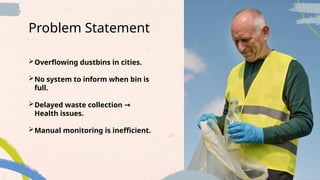
Overflowing dustbins incities.
No system to inform when bin is
full.
Delayed waste collection →
Health issues.
Manual monitoring is inefficient.
Problem Statement
5.
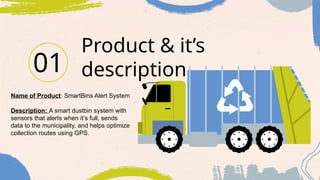
Product & it’s
description
01
Nameof Product: SmartBins Alert System
Description: A smart dustbin system with
sensors that alerts when it’s full, sends
data to the municipality, and helps optimize
collection routes using GPS.
6.
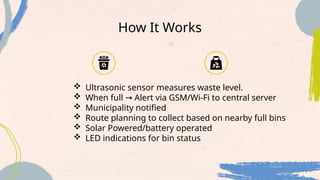
How It Works
Ultrasonic sensor measures waste level.
When full Alert via GSM/Wi-Fi to central server
→
Municipality notified
Route planning to collect based on nearby full bins
Solar Powered/battery operated
LED indications for bin status
7.
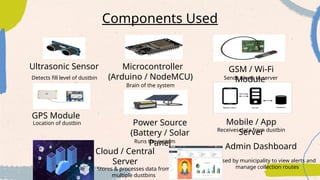
Components Used
Ultrasonic SensorMicrocontroller
(Arduino / NodeMCU)
Detects fill level of dustbin
Brain of the system
Sends alerts to server
GSM / Wi-Fi
Module
GPS Module
Power Source
(Battery / Solar
Panel
Mobile / App
Server
Cloud / Central
Server
Location of dustbin
Runs the system
Receives data from dustbin
Used by municipality to view alerts and
manage collection routes
Stores & processes data from
multiple dustbins
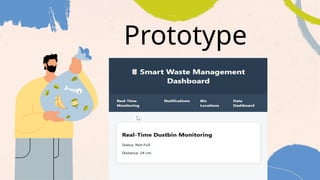
Admin Dashboard
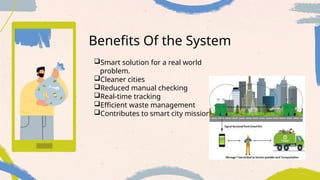
Benefits Of theSystem
Smart solution for a real world
problem.
Cleaner cities
Reduced manual checking
Real-time tracking
Efficient waste management
Contributes to smart city mission
CREDITS: This presentationtemplate was created by Slidesgo, and
includes icons by Flaticon, and infographics & images by Freepik
Thank You!
Thank you for your attention.
PAPER
12.
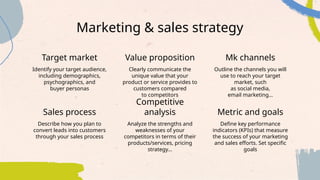
Marketing & salesstrategy
Identify your target audience,
including demographics,
psychographics, and
buyer personas
Clearly communicate the
unique value that your
product or service provides to
customers compared
to competitors
Describe how you plan to
convert leads into customers
through your sales process
Analyze the strengths and
weaknesses of your
competitors in terms of their
products/services, pricing
strategy…
Target market Value proposition Mk channels
Outline the channels you will
use to reach your target
market, such
as social media,
email marketing…
Define key performance
indicators (KPIs) that measure
the success of your marketing
and sales efforts. Set specific
goals
Sales process
Competitive
analysis Metric and goals
13.
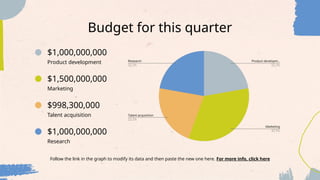
Budget for thisquarter
$1,000,000,000
$998,300,000
$1,500,000,000
$1,000,000,000
Follow the link in the graph to modify its data and then paste the new one here. For more info, click here
Research
Talent acquisition
Marketing
Product development
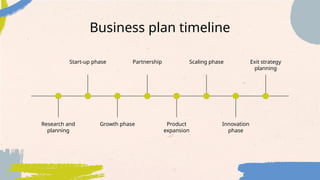
Business plan timeline
Researchand
planning
Start-up phase
Innovation
phase
Growth phase Product
expansion
Partnership Scaling phase Exit strategy
planning
16.
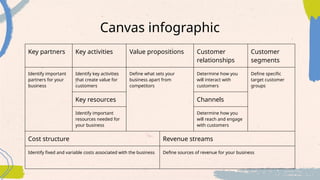
Canvas infographic
Key partnersKey activities Value propositions Customer
relationships
Customer
segments
Identify important
partners for your
business
Identify key activities
that create value for
customers
Define what sets your
business apart from
competitors
Determine how you
will interact with
customers
Define specific
target customer
groups
Key resources Channels
Identify important
resources needed for
your business
Determine how you
will reach and engage
with customers
Cost structure Revenue streams
Identify fixed and variable costs associated with the business Define sources of revenue for your business
17.
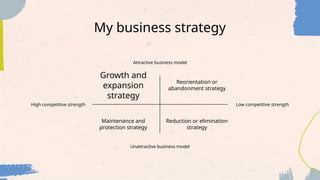
My business strategy
Attractivebusiness model
Unattractive business model
High competitive strength Low competitive strength
Growth and
expansion
strategy
Maintenance and
protection strategy
Reduction or elimination
strategy
Reorientation or
abandonment strategy
18.
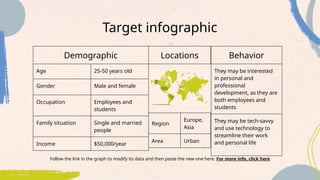
Target infographic
Follow thelink in the graph to modify its data and then paste the new one here. For more info, click here
Demographic
Age 25-50 years old
Gender Male and female
Occupation Employees and
students
Family situation Single and married
people
Income $50,000/year
Behavior
They may be interested
in personal and
professional
development, as they are
both employees and
students
They may be tech-savvy
and use technology to
streamline their work
and personal life
Locations
Region
Europe,
Asia
Area Urban
19.
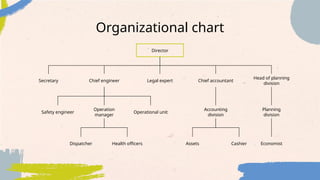
Organizational chart
Director
Chief engineerChief accountant
Accounting
division
Health officers
Dispatcher
Legal expert
Head of planning
division
Planning
division
Economist
Secretary
Assets Cashier
Operation
manager
Safety engineer Operational unit
20.
Market size infographic
"Withthe innovative approach
and unique features, we aim
to capture a significant
portion of the $100 million"
"The research indicates that
the market for
[product/service] is projected
to reach $20 million by next
year"
"The market for
[product/service] is currently
valued at $5 million"
$100M
$20M
$5M
Alternative resources
Here’s anassortment of alternative resources whose style fits the one of this template:
Vectors
● Recycle onboarding app screens set
23.
Resources
Vectors
● Hand drawnwelcome card template
● Flat world environment day vertical flyer te
mplate
● Flat recycling landing page template
● Garbage recycling color set of isolated com
positions with people collecting waste with
boat and sanitation truck vector
● People recycling concept
Photos
● Handcraft workshop instagram stories
● Man doing community service by collecting
trash
Icons
● Icon Pack: Recycling | Filled
Did you like the resources on this template? Get them for free at our other websites:
24.
Instructions for use
Ifyou have a free account, in order to use this template, you must credit Slidesgo by keeping the Thanks slide. Please
refer to the next slide to read the instructions for premium users.
As a Free user, you are allowed to:
● Modify this template.
● Use it for both personal and commercial projects.
You are not allowed to:
● Sublicense, sell or rent any of Slidesgo Content (or a modified version of Slidesgo Content).
● Distribute Slidesgo Content unless it has been expressly authorized by Slidesgo.
● Include Slidesgo Content in an online or offline database or file.
● Offer Slidesgo templates (or modified versions of Slidesgo templates) for download.
● Acquire the copyright of Slidesgo Content.
For more information about editing slides, please read our FAQs or visit our blog:
https://slidesgo.com/faqs and https://slidesgo.com/slidesgo-school
25.
As a Premiumuser, you can use this template without attributing Slidesgo or keeping the "Thanks" slide.
You are allowed to:
● Modify this template.
● Use it for both personal and commercial purposes.
● Hide or delete the “Thanks” slide and the mention to Slidesgo in the credits.
● Share this template in an editable format with people who are not part of your team.
You are not allowed to:
● Sublicense, sell or rent this Slidesgo Template (or a modified version of this Slidesgo Template).
● Distribute this Slidesgo Template (or a modified version of this Slidesgo Template) or include it in a database or in
any other product or service that offers downloadable images, icons or presentations that may be subject to
distribution or resale.
● Use any of the elements that are part of this Slidesgo Template in an isolated and separated way from this
Template.
● Register any of the elements that are part of this template as a trademark or logo, or register it as a work in an
intellectual property registry or similar.
For more information about editing slides, please read our FAQs or visit our blog:
https://slidesgo.com/faqs and https://slidesgo.com/slidesgo-school
Instructions for use (premium users)
26.
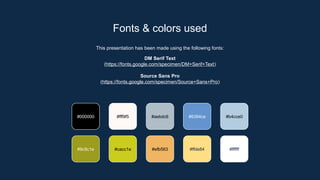
This presentation hasbeen made using the following fonts:
DM Serif Text
(https://fonts.google.com/specimen/DM+Serif+Text)
Source Sans Pro
(https://fonts.google.com/specimen/Source+Sans+Pro)
Fonts & colors used
#000000 #fff9f5 #aebdc6 #6394ce
#9c9c1e #cacc1e #efb563 #ffde84
#b4cce0
#ffffff
27.
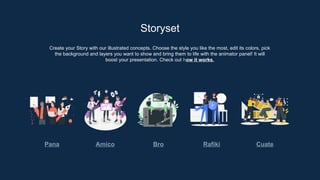
Create your Storywith our illustrated concepts. Choose the style you like the most, edit its colors, pick
the background and layers you want to show and bring them to life with the animator panel! It will
boost your presentation. Check out how it works.
Storyset
Pana Amico Bro Rafiki Cuate
28.
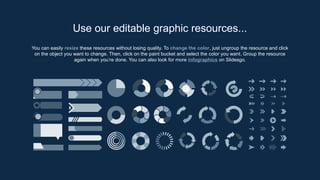
You can easilyresize these resources without losing quality. To change the color, just ungroup the resource and click
on the object you want to change. Then, click on the paint bucket and select the color you want. Group the resource
again when you’re done. You can also look for more infographics on Slidesgo.
Use our editable graphic resources...
31.
JANUARY FEBRUARY MARCHAPRIL MAY JUNE
PHASE 1
PHASE 2
Task 1
Task 2
Task 1
Task 2
JANUARY FEBRUARY MARCH APRIL
PHASE 1
Task 1
Task 2
34.
You can resizethese icons without losing quality.
You can change the stroke and fill color; just select the icon and click on the paint bucket/pen.
In Google Slides, you can also use Flaticon’s extension, allowing you to customize and add even more icons.
...and our sets of editable icons

![Market size infographic
"With the innovative approach
and unique features, we aim
to capture a significant
portion of the $100 million"
"The research indicates that
the market for
[product/service] is projected
to reach $20 million by next
year"
"The market for
[product/service] is currently
valued at $5 million"
$100M
$20M
$5M](https://image.slidesharecdn.com/garbagemanagementbusinessplanbyslidesgo-250925061347-5aaf35af/85/Garbage-Management-Business-Plan-by-Slidesgo-pptx-20-320.jpg)