Contacts API読んでみた
株式会社グローバルサイバーグループ
マネージャ
藪下 正美
はじめに
自己紹介
• 藪下 正美
• 株式会社グローバルサイバーグループというところから来ました
• Firefox OSコミュニティから来ました
• Codezineに記事乗りました!
– http://codezine.jp/article/detail/8540
今日のおはなし
• Contacts APIとは
• 手始めにfindメソッドを追ってみる
• getAllメソッドを見てみる
• まとめ
Contacts APIとは
• 使い方のおはなしは#11でやったのでslideshareとか参照
– http://www.slideshare.net/aoitan/meetup11-contacts-api
手始めにFINDメソッドを追ってみる
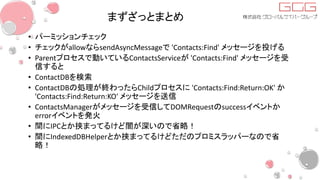
まずざっとまとめ
• パーミッションチェック
• チェックがallowならsendAsyncMessageで 'Contacts:Find' メッセージを投げる
• Parentプロセスで動いているContactsServiceが 'Contacts:Find' メッセージを受
信すると
• ContactDBを検索
• ContactDBの処理が終わったらChildプロセスに 'Contacts:Find:Return:OK' か
'Contacts:Find:Return:KO' メッセージを送信
• ContactsManagerがメッセージを受信してDOMRequestのsuccessイベントか
errorイベントを発火
• 間にIPCとか挟まってるけど闇が深いので省略!
• 間にIndexedDBHelperとか挟まってるけどただのプロミスラッパーなので省
略!
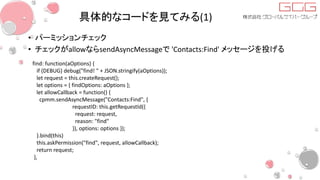
具体的なコードを見てみる(1)
• パーミッションチェック
• チェックがallowならsendAsyncMessageで 'Contacts:Find' メッセージを投げる
find: function(aOptions) {
if (DEBUG) debug("find! " + JSON.stringify(aOptions));
let request = this.createRequest();
let options = { findOptions: aOptions };
let allowCallback = function() {
cpmm.sendAsyncMessage("Contacts:Find", {
requestID: this.getRequestId({
request: request,
reason: "find"
}), options: options });
}.bind(this)
this.askPermission("find", request, allowCallback);
return request;
},
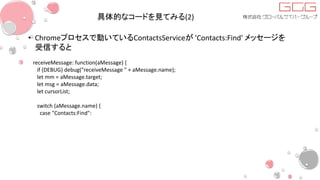
具体的なコードを見てみる(2)
• Chromeプロセスで動いているContactsServiceが 'Contacts:Find' メッセージを
受信すると
receiveMessage: function(aMessage) {
if (DEBUG) debug("receiveMessage " + aMessage.name);
let mm = aMessage.target;
let msg = aMessage.data;
let cursorList;
switch (aMessage.name) {
case "Contacts:Find":
具体的なコードを見てみる(3)
• ContactDBを検索
• ContactDBの処理が終わったらChildプロセスに 'Contacts:Find:Return:OK' か
'Contacts:Find:Return:KO' メッセージを送信
this._db.find(
function(contacts) {
for (let i in contacts) {
result.push(contacts[i]);
}
if (DEBUG) debug("result:" + JSON.stringify(result));
mm.sendAsyncMessage("Contacts:Find:Return:OK",
{requestID: msg.requestID, contacts: result});
}.bind(this),
function(aErrorMsg) {
mm.sendAsyncMessage("Contacts:Find:Return:KO", {
requestID: msg.requestID,
errorMsg: aErrorMsg });
}.bind(this), msg.options.findOptions);
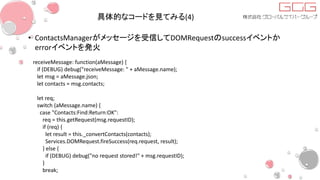
具体的なコードを見てみる(4)
• ContactsManagerがメッセージを受信してDOMRequestのsuccessイベントか
errorイベントを発火
receiveMessage: function(aMessage) {
if (DEBUG) debug("receiveMessage: " + aMessage.name);
let msg = aMessage.json;
let contacts = msg.contacts;
let req;
switch (aMessage.name) {
case "Contacts:Find:Return:OK":
req = this.getRequest(msg.requestID);
if (req) {
let result = this._convertContacts(contacts);
Services.DOMRequest.fireSuccess(req.request, result);
} else {
if (DEBUG) debug("no request stored!" + msg.requestID);
}
break;
GETALLメソッドを見てみる
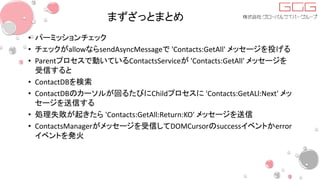
まずざっとまとめ
• パーミッションチェック
• チェックがallowならsendAsyncMessageで 'Contacts:GetAll' メッセージを投げる
• Parentプロセスで動いているContactsServiceが 'Contacts:GetAll' メッセージを
受信すると
• ContactDBを検索
• ContactDBのカーソルが回るたびにChildプロセスに 'Contacts:GetALl:Next' メッ
セージを送信する
• 処理失敗が起きたら 'Contacts:GetAll:Return:KO' メッセージを送信
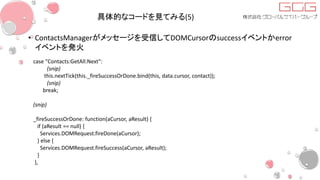
• ContactsManagerがメッセージを受信してDOMCursorのsuccessイベントかerror
イベントを発火
具体的なコードを見てみる(1)
• パーミッションチェック
• チェックがallowならsendAsyncMessageで 'Contacts:GetAll' メッセージを投げる
getAll: function CM_getAll(aOptions) {
if (DEBUG) debug("getAll: " + JSON.stringify(aOptions));
let [cursorId, cursor] = this.createCursor();
let allowCallback = function() {
cpmm.sendAsyncMessage("Contacts:GetAll", {
cursorId: cursorId, findOptions: aOptions});
}.bind(this);
this.askPermission("find", cursor, allowCallback);
return cursor;
},
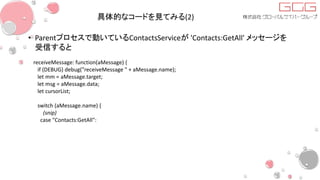
具体的なコードを見てみる(2)
• Parentプロセスで動いているContactsServiceが 'Contacts:GetAll' メッセージを
受信すると
receiveMessage: function(aMessage) {
if (DEBUG) debug("receiveMessage " + aMessage.name);
let mm = aMessage.target;
let msg = aMessage.data;
let cursorList;
switch (aMessage.name) {
(snip)
case "Contacts:GetAll":
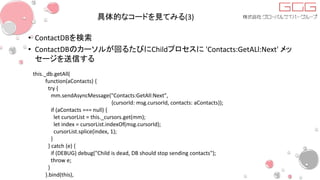
具体的なコードを見てみる(3)
• ContactDBを検索
• ContactDBのカーソルが回るたびにChildプロセスに 'Contacts:GetALl:Next' メッ
セージを送信する
this._db.getAll(
function(aContacts) {
try {
mm.sendAsyncMessage("Contacts:GetAll:Next",
{cursorId: msg.cursorId, contacts: aContacts});
if (aContacts === null) {
let cursorList = this._cursors.get(mm);
let index = cursorList.indexOf(msg.cursorId);
cursorList.splice(index, 1);
}
} catch (e) {
if (DEBUG) debug("Child is dead, DB should stop sending contacts");
throw e;
}
}.bind(this),
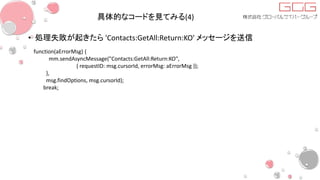
具体的なコードを見てみる(4)
• 処理失敗が起きたら 'Contacts:GetAll:Return:KO' メッセージを送信
function(aErrorMsg) {
mm.sendAsyncMessage("Contacts:GetAll:Return:KO",
{ requestID: msg.cursorId, errorMsg: aErrorMsg });
},
msg.findOptions, msg.cursorId);
break;
具体的なコードを見てみる(5)
• ContactsManagerがメッセージを受信してDOMCursorのsuccessイベントかerror
イベントを発火
case "Contacts:GetAll:Next":
(snip)
this.nextTick(this._fireSuccessOrDone.bind(this, data.cursor, contact));
(snip)
break;
(snip)
_fireSuccessOrDone: function(aCursor, aResult) {
if (aResult == null) {
Services.DOMRequest.fireDone(aCursor);
} else {
Services.DOMRequest.fireSuccess(aCursor, aResult);
}
},
具体的なコードを見てみる(6)
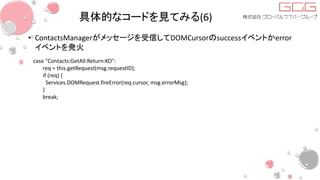
• ContactsManagerがメッセージを受信してDOMCursorのsuccessイベントかerror
イベントを発火
case "Contacts:GetAll:Return:KO":
req = this.getRequest(msg.requestID);
if (req) {
Services.DOMRequest.fireError(req.cursor, msg.errorMsg);
}
break;
他のメソッド
• どうやら基本は同じ
• 多少プロパティを詰め直したりとかしてるAPIはあるけどやることはfindと同じ
• getAllだけはDOMCursorを扱う都合で多少違った
まとめ
ちょっと寄り道
なぜsendAsyncMessageが挟まっているのか
(1)
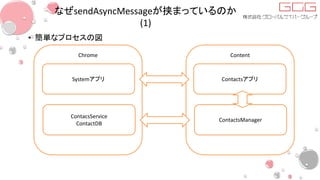
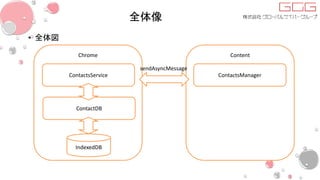
• 簡単なプロセスの図
Chrome Content
Systemアプリ Contactsアプリ
ContacsService
ContactDB
ContactsManager
なぜsendAsyncMessageが挟まっているのか
(2)
• こんな感じでFxOSのアプリはアプリのプロセスとシステムのプロセスがわかれ
ている
• なので基本的に子プロセスは権限の必要な作業は親プロセスに依頼しないと
いけない
– 非同期に動くメソッドは大体プロセス境界をまたいでいる
• そこでpostなんとかMessageやsendなんとかMessageの出番
• Gaiaで閉じているものだとiframe間の通信なのでpostMessageが使われる
• Gecko側に実体のあるものだとsendAsyncMessage
• 基本的に同じ使い勝手のもので文字列とかJSONオブジェクトしか投げられな
いのでコマンド文字列とかこねこねしていることが多い
全体像
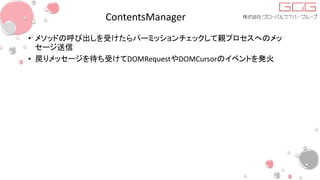
• 全体図
Chrome Content
ContactsService ContactsManager
ContactDB
IndexedDB
sendAsyncMessage
ContentsManager
• メソッドの呼び出しを受けたらパーミッションチェックして親プロセスへのメッ
セージ送信
• 戻りメッセージを待ち受けてDOMRequestやDOMCursorのイベントを発火
ContactsService
• 子プロセスからのメッセージを待ち受けてDB処理
– find/save/remove/clearは成功時と失敗時のコールバックを与えてDBのメソッドを呼ぶ
• コールバックの中身は子プロセスに対するsendAsyncMessage
• 成功時は元のメッセージに 'Return:OK' を付けて投げる
• 失敗時は元のメッセージに 'Return:KO' を付けて投げる
– getAllはカーソルが返るのでカーソル一つ回すごとに 'Contacts:GetAll:Next' メッセージ
をsendAsyncMessageで飛ばす
• sim入れ替えの監視
ContactDB
• 連絡帳用のDB処理をまとめている
• 単にIndexedDBラッパー

FxOSコードリーディングミートアップ#16 Contacts API読んでみた