'FUSE'ing Python for rapid development of
        storage efficient file-system


               PyCon APAC ‘12
          Singapore, Jun 07-09, 2012

        Chetan Giridhar, Vishal Kanaujia
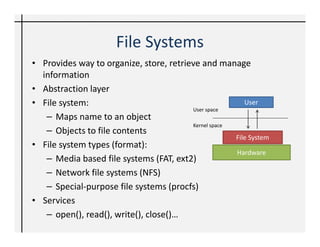
File Systems
• Provides way to organize, store, retrieve and manage
  information
• Abstraction layer
• File system:                                           User
                                         User space
   – Maps name to an object
                                         Kernel space
   – Objects to file contents
                                                      File System
• File system types (format):
                                                      Hardware
   – Media based file systems (FAT, ext2)
   – Network file systems (NFS)
   – Special-purpose file systems (procfs)
• Services
   – open(), read(), write(), close()…
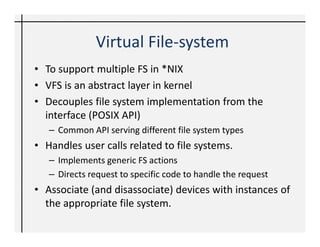
Virtual File-system
• To support multiple FS in *NIX
• VFS is an abstract layer in kernel
• Decouples file system implementation from the
  interface (POSIX API)
   – Common API serving different file system types
• Handles user calls related to file systems.
   – Implements generic FS actions
   – Directs request to specific code to handle the request
• Associate (and disassociate) devices with instances of
  the appropriate file system.
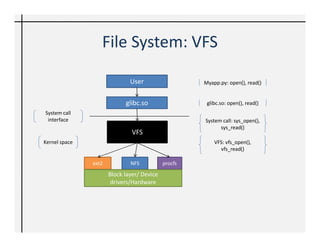
File System: VFS

                              User                   Myapp.py: open(), read()


                            glibc.so                  glibc.so: open(), read()
System call
 interface                                           System call: sys_open(),
                                                           sys_read()
                               VFS
Kernel space                                             VFS: vfs_open(),
                                                           vfs_read()

               ext2           NFS           procfs
                      Block layer/ Device
                       drivers/Hardware
Developing FS in *NIX
• In-kernel file-systems (traditionally)
• It is a complex task
     •   Understanding kernel libraries and modules
     •   Development experience in kernel space
     •   Managing disk i/o
     •   Time consuming and tedious development
          – Frequent kernel panic
          – Higher testing efforts
     • Kernel bloating and side effects like security
Solution: User space
• In user space:
  – Shorter development cycle
  – Easy to update fixes, test and distribute
  – More flexibility
     • Programming tools, debuggers, and libraries as you
       have if you were developing standard *NIX applications
• User-space file-systems
  – File systems become regular applications (as
    opposed to kernel extensions)
FUSE (Filesystem in USErspace)
• Implement a file system in user-space
   – no kernel code required!
• Secure, non-privileged mounts
• Useful to develop “virtual” file-systems
   – Allows you to imagine “anything” as a file ☺
   – local disk, across the network, from memory, or any other
     combination
• User operates on a mounted instance of FS:
   - Unix utilities
   - POSIX libraries
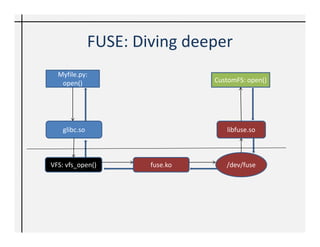
FUSE: Diving deeper
  Myfile.py:
   open()                        CustomFS: open()


    glibc.so                        libfuse.so


VFS: vfs_open()        fuse.ko      /dev/fuse
FUSE | develop
• Choices of development in C, C++, Java, … and of course
  Python!
• Python interface for FUSE
   – (FusePython: most popularly used)
• Open source project
   – http://fuse.sourceforge.net/
• For ubuntu systems:
   $sudo apt-get instatall python-fuse
   $mkdir ./mount_point
   $python myfuse.py ./mount_point
   $fusermount -u ./mount_point
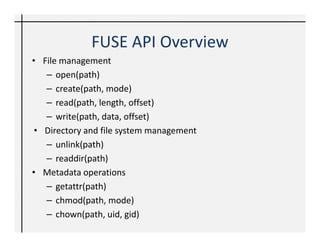
FUSE API Overview
• File management
   – open(path)
   – create(path, mode)
   – read(path, length, offset)
   – write(path, data, offset)
 • Directory and file system management
   – unlink(path)
   – readdir(path)
• Metadata operations
   – getattr(path)
   – chmod(path, mode)
   – chown(path, uid, gid)
seFS – storage efficient FS
• A prototype, experimental file system with:
   – Online data de-duplication (SHA1)
   – Compression (text based)
• SQLite
• Ubuntu 11.04, Python-Fuse Bindings
• Provides following services:
   open()           write()        chmod()
   create()         readdir()      chown()
   read()           unlink()
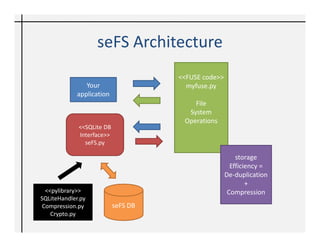
seFS Architecture
                                     <<FUSE code>>
               Your                    myfuse.py
            application
                                         File
                                       System
                                      Operations
             <<SQLite DB
             Interface>>
               seFS.py

                                                         storage
                                                       Efficiency =
                                                     De-duplication
                                                             +
  <<pylibrary>>                                       Compression
SQLiteHandler.py
 Compression.py            seFS DB
    Crypto.py
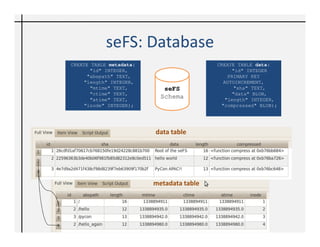
seFS: Database
CREATE TABLE metadata(                    CREATE TABLE data(
       "id" INTEGER,                           "id" INTEGER
      "abspath" TEXT,                         PRIMARY KEY
     "length" INTEGER,                      AUTOINCREMENT,
       "mtime" TEXT,        seFS                "sha" TEXT,
       "ctime" TEXT,                           "data" BLOB,
       "atime" TEXT,
                           Schema            "length" INTEGER,
     "inode" INTEGER);                     "compressed" BLOB);


                         data table


                         metadata table
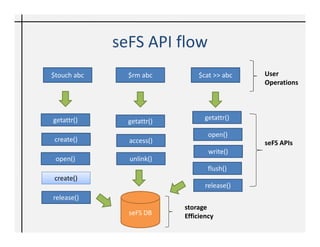
seFS API flow
$touch abc     $rm abc         $cat >> abc    User
                                              Operations


getattr()                         getattr()
               getattr()
                                   open()
 create()      access()                       seFS APIs
                                   write()
 open()        unlink()
                                   flush()
 create()
                                  release()
release()
                           storage
               seFS DB     Efficiency
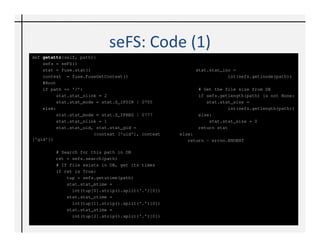
seFS: Code
def getattr(self, path):
    sefs = seFS()
    stat = fuse.stat()                                   stat.stat_ino =
    context = fuse.FuseGetContext()                                  int(sefs.getinode(path))
    #Root
    if path == '/':                                       # Get the file size from DB
         stat.stat_nlink = 2                              if sefs.getlength(path) is not None:
         stat.stat_mode = stat.S_IFDIR | 0755                stat.stat_size =
    else:                                                            int(sefs.getlength(path))
         stat.stat_mode = stat.S_IFREG | 0777             else:
         stat.stat_nlink = 1                                  stat.stat_size = 0
         stat.stat_uid, stat.stat_gid =                   return stat
                       (context ['uid'], context   else:
['gid'])                                              return - errno.ENOENT

        # Search for this path in DB
        ret = sefs.search(path)
        # If file exists in DB, get its times
        if ret is True:
            tup = sefs.getutime(path)
            stat.stat_mtime =
              int(tup[0].strip().split('.')[0])
            stat.stat_ctime =
              int(tup[1].strip().split('.')[0])
            stat.stat_atime =
              int(tup[2].strip().split('.')[0])
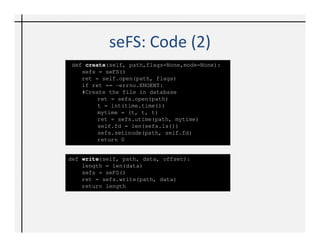
seFS: Code…
 def create(self, path,flags=None,mode=None):
    sefs = seFS()
    ret = self.open(path, flags)
    if ret == -errno.ENOENT:
    #Create the file in database
         ret = sefs.open(path)
         t = int(time.time())
         mytime = (t, t, t)
         ret = sefs.utime(path, mytime)
         self.fd = len(sefs.ls())
         sefs.setinode(path, self.fd)
         return 0


def write(self, path, data, offset):
    length = len(data)
    sefs = seFS()
    ret = sefs.write(path, data)
    return length
seFS: Learning
• Design your file system and define the
  objectives first, before development
• Database schema is crucial
• skip implementing functionality your file
  system doesn’t intend to support
• Knowledge on FUSE API is essential
  – FUSE APIs are look-alike to standard POSIX APIs
  – Limited documentation of FUSE API
• Performance?
Conclusion
• Development of FS is very easy with FUSE
• Python aids RAD with Python-Fuse bindings
• seFS: Thought provoking implementation
• Creative applications – your needs and
  objectives
• When are you developing your own File
  system?! ☺
Further Read
• Sample Fuse based File systems
  – Sshfs
  – YoutubeFS
  – Dedupfs
  – GlusterFS
• Python-Fuse bindings
  – http://fuse.sourceforge.net/
• Linux internal manual
Contact Us
• Chetan Giridhar
  – http://technobeans.com
  – cjgiridhar@gmail.com
• Vishal Kanaujia
  – http://freethreads.wordpress.com
  – vishalkanaujia@gmail.com
Backup
Agenda
• The motivation
• Intro to *NIX File Systems
• Trade off: code in user and kernel space
• FUSE?
• Hold on – What’s VFS?
• Diving into FUSE internals
• Design and develop your own File System with
  Python-FUSE bindings
• Lessons learnt
• Python-FUSE: Creative applications/ Use-cases
User-space and Kernel space
• Kernel-space
   – Kernel code including device drivers
   – Kernel resources (hardware)
   – Privileged user
• User-space
   – User application runs
   – Libraries dealing with kernel space
   – System resources
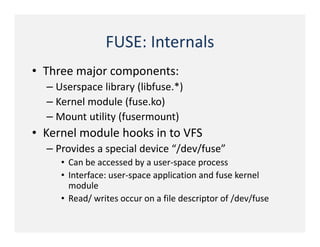
FUSE: Internals
• Three major components:
  – Userspace library (libfuse.*)
  – Kernel module (fuse.ko)
  – Mount utility (fusermount)
• Kernel module hooks in to VFS
  – Provides a special device “/dev/fuse”
     • Can be accessed by a user-space process
     • Interface: user-space application and fuse kernel
       module
     • Read/ writes occur on a file descriptor of /dev/fuse
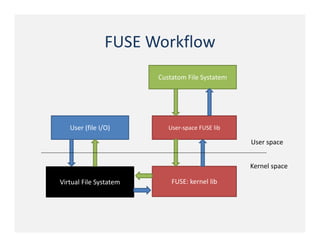
FUSE Workflow
                        Custatom File Systatem


   User (file I/O)         User-space FUSE lib

                                                 User space


                                                 Kernel space

Virtual File Systatem       FUSE: kernel lib
Facts and figures
• seFS – online storage efficiency
• De-duplication/ compression
   – Managed catalogue information (file meta-data rarely changes)
   – Compression encoded information
• Quick and easy prototyping (Proof of concept)
• Large dataset generation
   – Data generated on demand
Creative applications: FUSE based File
               systems
• SSHFS: Provides access to a remote file-system
  through SSH
• WikipediaFS: View and edit Wikipedia articles as
  if they were real files
• GlusterFS: Clustered Distributed Filesystem
  having capability to scale up to several petabytes.
• HDFS: FUSE bindings exist for the open
  source Hadoop distributed file system
• seFS: You know it already ☺
Fuse'ing python for rapid development of storage efficient FS

Fuse'ing python for rapid development of storage efficient FS

  • 1.
    'FUSE'ing Python forrapid development of storage efficient file-system PyCon APAC ‘12 Singapore, Jun 07-09, 2012 Chetan Giridhar, Vishal Kanaujia
  • 2.
    File Systems • Providesway to organize, store, retrieve and manage information • Abstraction layer • File system: User User space – Maps name to an object Kernel space – Objects to file contents File System • File system types (format): Hardware – Media based file systems (FAT, ext2) – Network file systems (NFS) – Special-purpose file systems (procfs) • Services – open(), read(), write(), close()…
  • 3.
    Virtual File-system • Tosupport multiple FS in *NIX • VFS is an abstract layer in kernel • Decouples file system implementation from the interface (POSIX API) – Common API serving different file system types • Handles user calls related to file systems. – Implements generic FS actions – Directs request to specific code to handle the request • Associate (and disassociate) devices with instances of the appropriate file system.
  • 4.
    File System: VFS User Myapp.py: open(), read() glibc.so glibc.so: open(), read() System call interface System call: sys_open(), sys_read() VFS Kernel space VFS: vfs_open(), vfs_read() ext2 NFS procfs Block layer/ Device drivers/Hardware
  • 5.
    Developing FS in*NIX • In-kernel file-systems (traditionally) • It is a complex task • Understanding kernel libraries and modules • Development experience in kernel space • Managing disk i/o • Time consuming and tedious development – Frequent kernel panic – Higher testing efforts • Kernel bloating and side effects like security
  • 6.
    Solution: User space •In user space: – Shorter development cycle – Easy to update fixes, test and distribute – More flexibility • Programming tools, debuggers, and libraries as you have if you were developing standard *NIX applications • User-space file-systems – File systems become regular applications (as opposed to kernel extensions)
  • 7.
    FUSE (Filesystem inUSErspace) • Implement a file system in user-space – no kernel code required! • Secure, non-privileged mounts • Useful to develop “virtual” file-systems – Allows you to imagine “anything” as a file ☺ – local disk, across the network, from memory, or any other combination • User operates on a mounted instance of FS: - Unix utilities - POSIX libraries
  • 8.
    FUSE: Diving deeper Myfile.py: open() CustomFS: open() glibc.so libfuse.so VFS: vfs_open() fuse.ko /dev/fuse
  • 9.
    FUSE | develop •Choices of development in C, C++, Java, … and of course Python! • Python interface for FUSE – (FusePython: most popularly used) • Open source project – http://fuse.sourceforge.net/ • For ubuntu systems: $sudo apt-get instatall python-fuse $mkdir ./mount_point $python myfuse.py ./mount_point $fusermount -u ./mount_point
  • 10.
    FUSE API Overview •File management – open(path) – create(path, mode) – read(path, length, offset) – write(path, data, offset) • Directory and file system management – unlink(path) – readdir(path) • Metadata operations – getattr(path) – chmod(path, mode) – chown(path, uid, gid)
  • 11.
    seFS – storageefficient FS • A prototype, experimental file system with: – Online data de-duplication (SHA1) – Compression (text based) • SQLite • Ubuntu 11.04, Python-Fuse Bindings • Provides following services: open() write() chmod() create() readdir() chown() read() unlink()
  • 12.
    seFS Architecture <<FUSE code>> Your myfuse.py application File System Operations <<SQLite DB Interface>> seFS.py storage Efficiency = De-duplication + <<pylibrary>> Compression SQLiteHandler.py Compression.py seFS DB Crypto.py
  • 13.
    seFS: Database CREATE TABLEmetadata( CREATE TABLE data( "id" INTEGER, "id" INTEGER "abspath" TEXT, PRIMARY KEY "length" INTEGER, AUTOINCREMENT, "mtime" TEXT, seFS "sha" TEXT, "ctime" TEXT, "data" BLOB, "atime" TEXT, Schema "length" INTEGER, "inode" INTEGER); "compressed" BLOB); data table metadata table
  • 14.
    seFS API flow $touchabc $rm abc $cat >> abc User Operations getattr() getattr() getattr() open() create() access() seFS APIs write() open() unlink() flush() create() release() release() storage seFS DB Efficiency
  • 15.
    seFS: Code def getattr(self,path): sefs = seFS() stat = fuse.stat() stat.stat_ino = context = fuse.FuseGetContext() int(sefs.getinode(path)) #Root if path == '/': # Get the file size from DB stat.stat_nlink = 2 if sefs.getlength(path) is not None: stat.stat_mode = stat.S_IFDIR | 0755 stat.stat_size = else: int(sefs.getlength(path)) stat.stat_mode = stat.S_IFREG | 0777 else: stat.stat_nlink = 1 stat.stat_size = 0 stat.stat_uid, stat.stat_gid = return stat (context ['uid'], context else: ['gid']) return - errno.ENOENT # Search for this path in DB ret = sefs.search(path) # If file exists in DB, get its times if ret is True: tup = sefs.getutime(path) stat.stat_mtime = int(tup[0].strip().split('.')[0]) stat.stat_ctime = int(tup[1].strip().split('.')[0]) stat.stat_atime = int(tup[2].strip().split('.')[0])
  • 16.
    seFS: Code… defcreate(self, path,flags=None,mode=None): sefs = seFS() ret = self.open(path, flags) if ret == -errno.ENOENT: #Create the file in database ret = sefs.open(path) t = int(time.time()) mytime = (t, t, t) ret = sefs.utime(path, mytime) self.fd = len(sefs.ls()) sefs.setinode(path, self.fd) return 0 def write(self, path, data, offset): length = len(data) sefs = seFS() ret = sefs.write(path, data) return length
  • 17.
    seFS: Learning • Designyour file system and define the objectives first, before development • Database schema is crucial • skip implementing functionality your file system doesn’t intend to support • Knowledge on FUSE API is essential – FUSE APIs are look-alike to standard POSIX APIs – Limited documentation of FUSE API • Performance?
  • 18.
    Conclusion • Development ofFS is very easy with FUSE • Python aids RAD with Python-Fuse bindings • seFS: Thought provoking implementation • Creative applications – your needs and objectives • When are you developing your own File system?! ☺
  • 19.
    Further Read • SampleFuse based File systems – Sshfs – YoutubeFS – Dedupfs – GlusterFS • Python-Fuse bindings – http://fuse.sourceforge.net/ • Linux internal manual
  • 20.
    Contact Us • ChetanGiridhar – http://technobeans.com – cjgiridhar@gmail.com • Vishal Kanaujia – http://freethreads.wordpress.com – vishalkanaujia@gmail.com
  • 21.
  • 22.
    Agenda • The motivation •Intro to *NIX File Systems • Trade off: code in user and kernel space • FUSE? • Hold on – What’s VFS? • Diving into FUSE internals • Design and develop your own File System with Python-FUSE bindings • Lessons learnt • Python-FUSE: Creative applications/ Use-cases
  • 23.
    User-space and Kernelspace • Kernel-space – Kernel code including device drivers – Kernel resources (hardware) – Privileged user • User-space – User application runs – Libraries dealing with kernel space – System resources
  • 24.
    FUSE: Internals • Threemajor components: – Userspace library (libfuse.*) – Kernel module (fuse.ko) – Mount utility (fusermount) • Kernel module hooks in to VFS – Provides a special device “/dev/fuse” • Can be accessed by a user-space process • Interface: user-space application and fuse kernel module • Read/ writes occur on a file descriptor of /dev/fuse
  • 25.
    FUSE Workflow Custatom File Systatem User (file I/O) User-space FUSE lib User space Kernel space Virtual File Systatem FUSE: kernel lib
  • 26.
    Facts and figures •seFS – online storage efficiency • De-duplication/ compression – Managed catalogue information (file meta-data rarely changes) – Compression encoded information • Quick and easy prototyping (Proof of concept) • Large dataset generation – Data generated on demand
  • 27.
    Creative applications: FUSEbased File systems • SSHFS: Provides access to a remote file-system through SSH • WikipediaFS: View and edit Wikipedia articles as if they were real files • GlusterFS: Clustered Distributed Filesystem having capability to scale up to several petabytes. • HDFS: FUSE bindings exist for the open source Hadoop distributed file system • seFS: You know it already ☺