© 2011-2024 Orangescrum Research Lab, San Jose, California | www.orangescrum.com 1
From Planning to Execution: How to
Manage a Project in Orangescrum?
Effective project management is the cornerstone of successful business operations. From the
initial planning stages to the final execution, a robust project management tool like Orangescrum is
essential to ensure seamless workflow, collaboration, and timely delivery.
In this blog, we'll explore the comprehensive flow of project management using the powerful Project
Management Software – Orangescrum, shedding light on its key features that make it an invaluable
asset for businesses.
Planning Phase:
1. Project Creation:
Orangescrum simplifies project initiation with its user-friendly interface. Create new projects
effortlessly, defining project goals, timelines, and key milestones.
© 2011-2024 Orangescrum Research Lab, San Jose, California | www.orangescrum.com 2
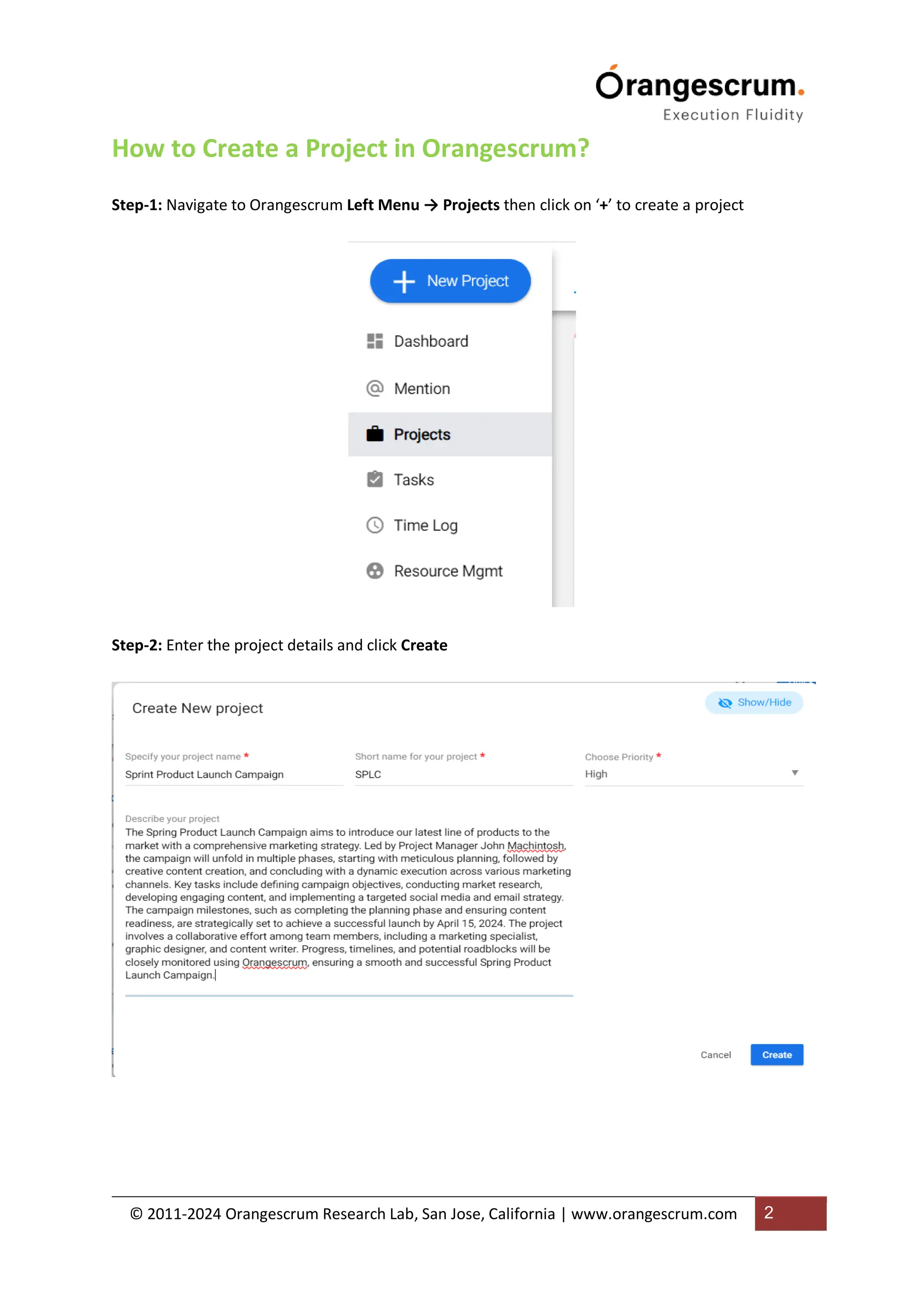
How to Create a Project in Orangescrum?
Step-1: Navigate to Orangescrum Left Menu → Projects then click on ‘+’ to create a project
Step-2: Enter the project details and click Create
© 2011-2024 Orangescrum Research Lab, San Jose, California | www.orangescrum.com 3
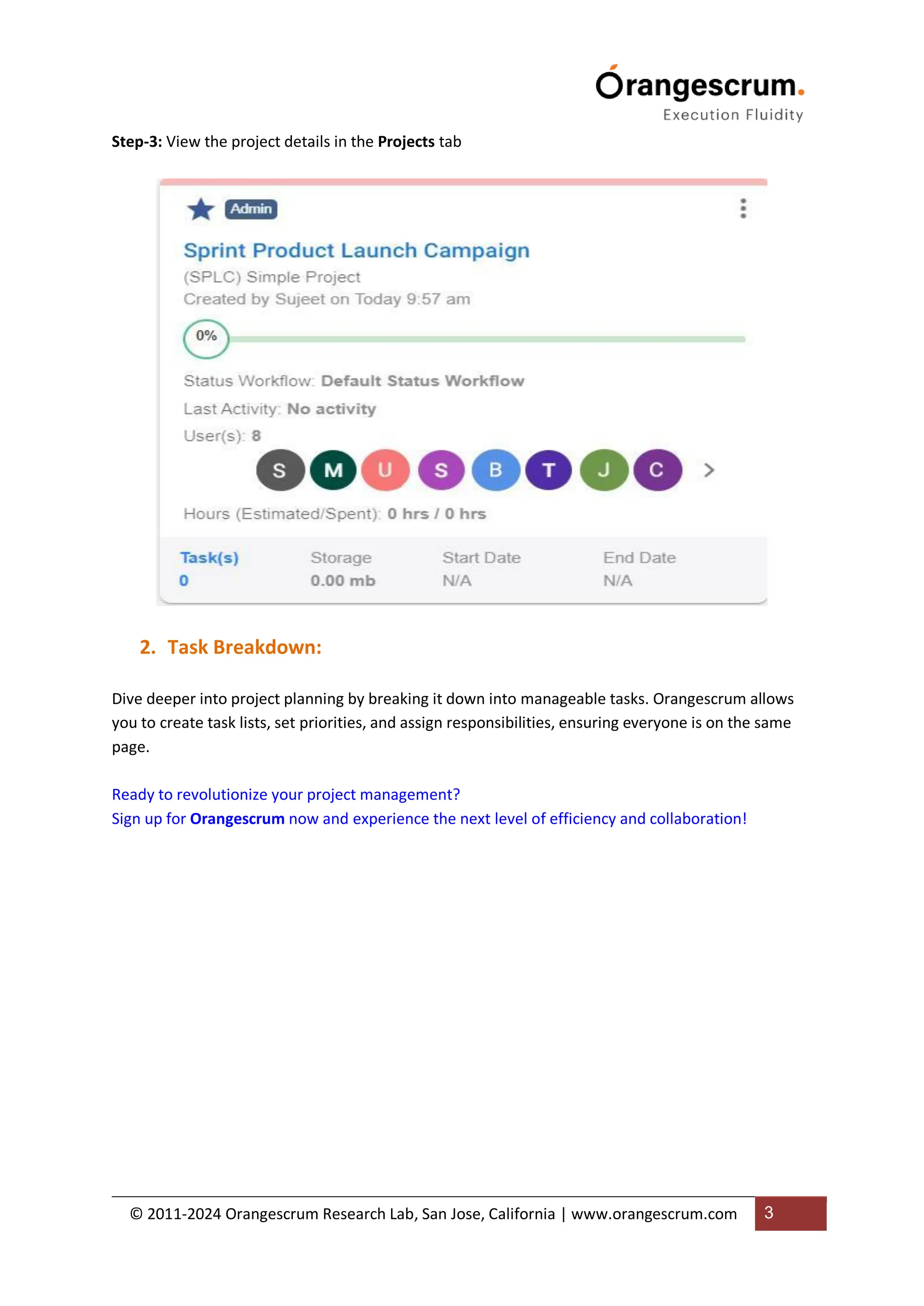
Step-3: View the project details in the Projects tab
2. Task Breakdown:
Dive deeper into project planning by breaking it down into manageable tasks. Orangescrum allows
you to create task lists, set priorities, and assign responsibilities, ensuring everyone is on the same
page.
Ready to revolutionize your project management?
Sign up for Orangescrum now and experience the next level of efficiency and collaboration!
© 2011-2024 Orangescrum Research Lab, San Jose, California | www.orangescrum.com 4
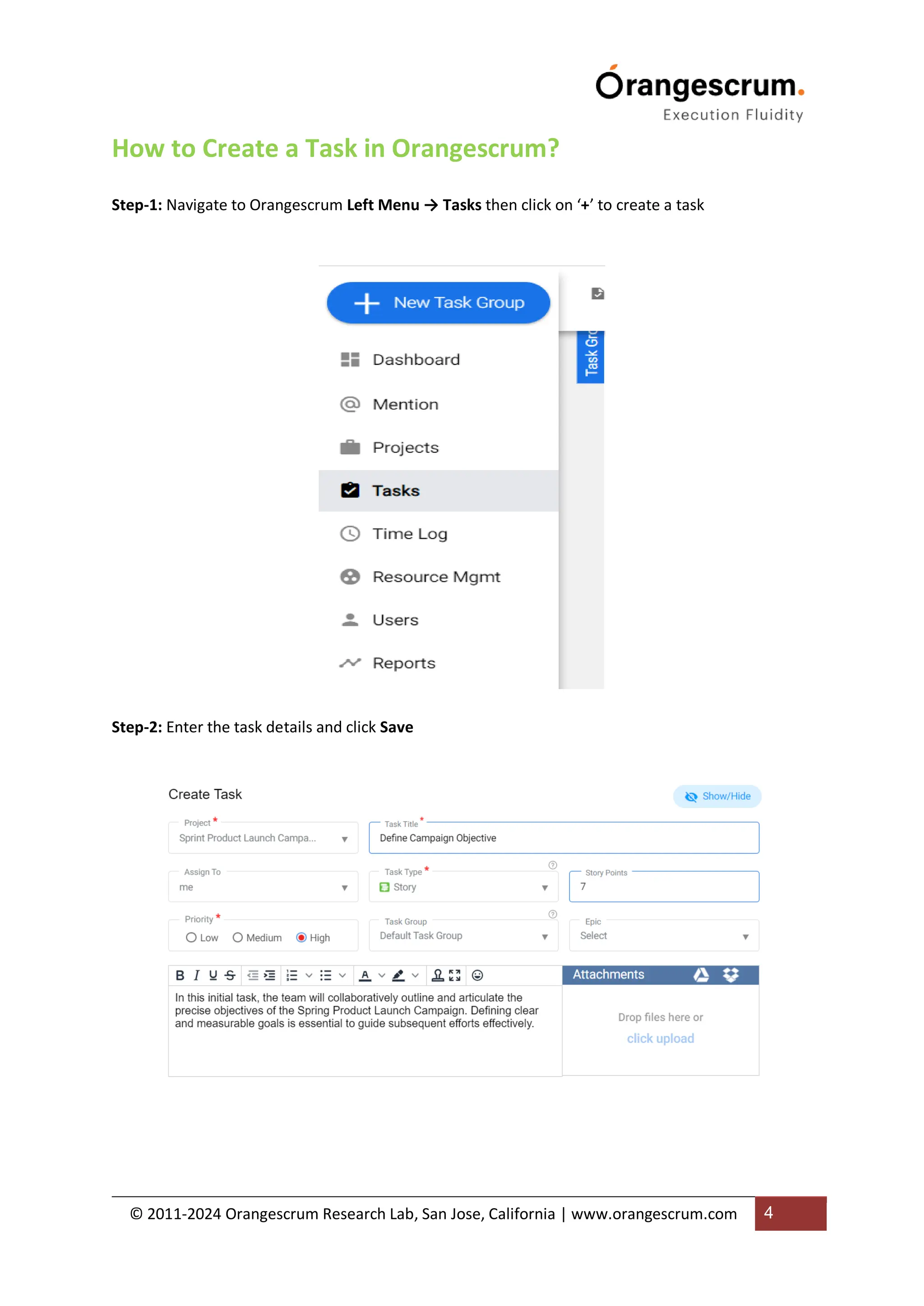
How to Create a Task in Orangescrum?
Step-1: Navigate to Orangescrum Left Menu → Tasks then click on ‘+’ to create a task
Step-2: Enter the task details and click Save
© 2011-2024 Orangescrum Research Lab, San Jose, California | www.orangescrum.com 5
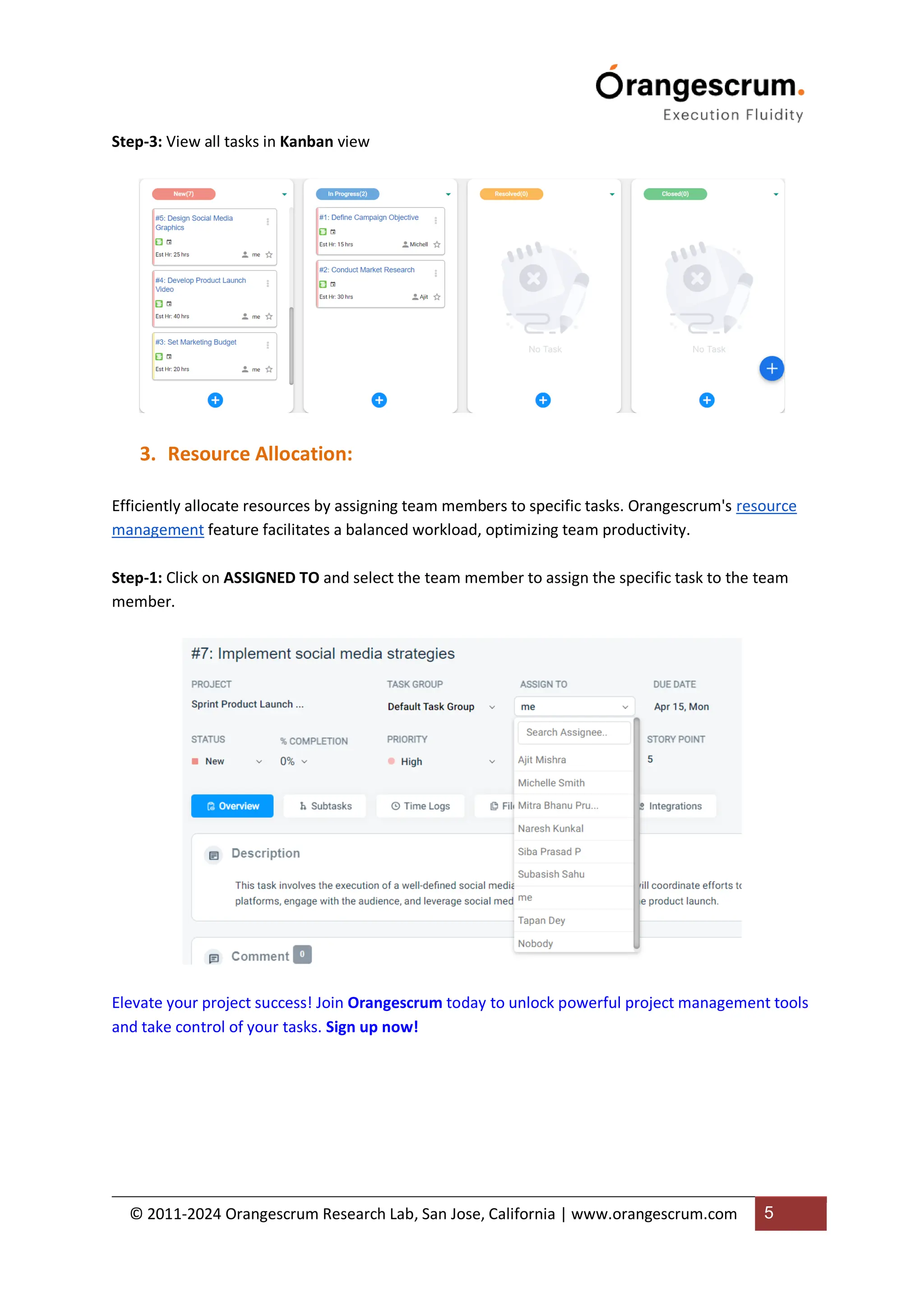
Step-3: View all tasks in Kanban view
3. Resource Allocation:
Efficiently allocate resources by assigning team members to specific tasks. Orangescrum's resource
management feature facilitates a balanced workload, optimizing team productivity.
Step-1: Click on ASSIGNED TO and select the team member to assign the specific task to the team
member.
Elevate your project success! Join Orangescrum today to unlock powerful project management tools
and take control of your tasks. Sign up now!
© 2011-2024 Orangescrum Research Lab, San Jose, California | www.orangescrum.com 6
Collaboration and Communication:
1. Real-Time Collaboration
Orangescrum fosters collaboration with real-time updates. Team members can comment, share
files, and provide feedback directly within the platform, streamlining communication.
How to Collaborate with Your Team Members?
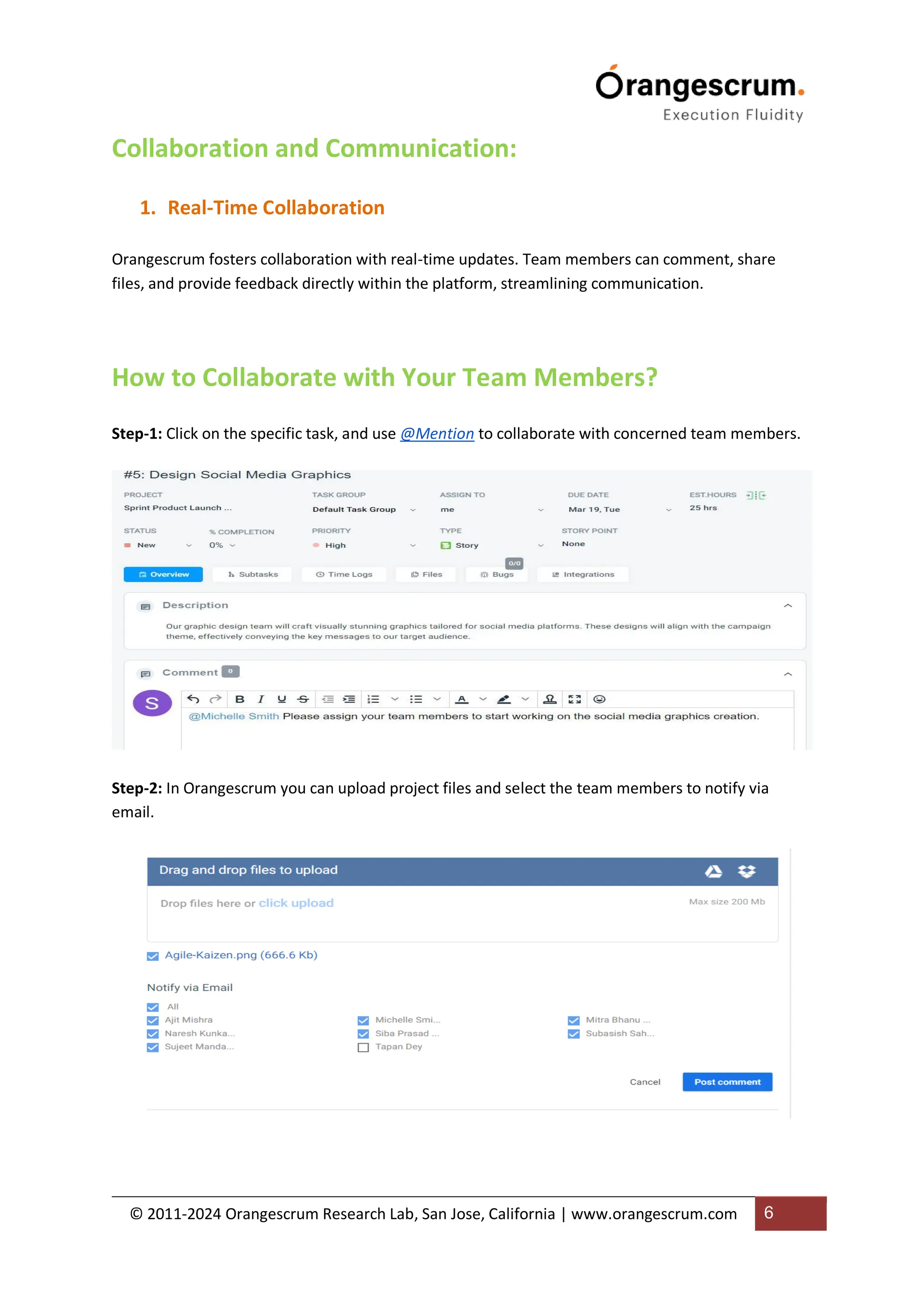
Step-1: Click on the specific task, and use @Mention to collaborate with concerned team members.
Step-2: In Orangescrum you can upload project files and select the team members to notify via
email.
© 2011-2024 Orangescrum Research Lab, San Jose, California | www.orangescrum.com 7
1. Task Dependencies:
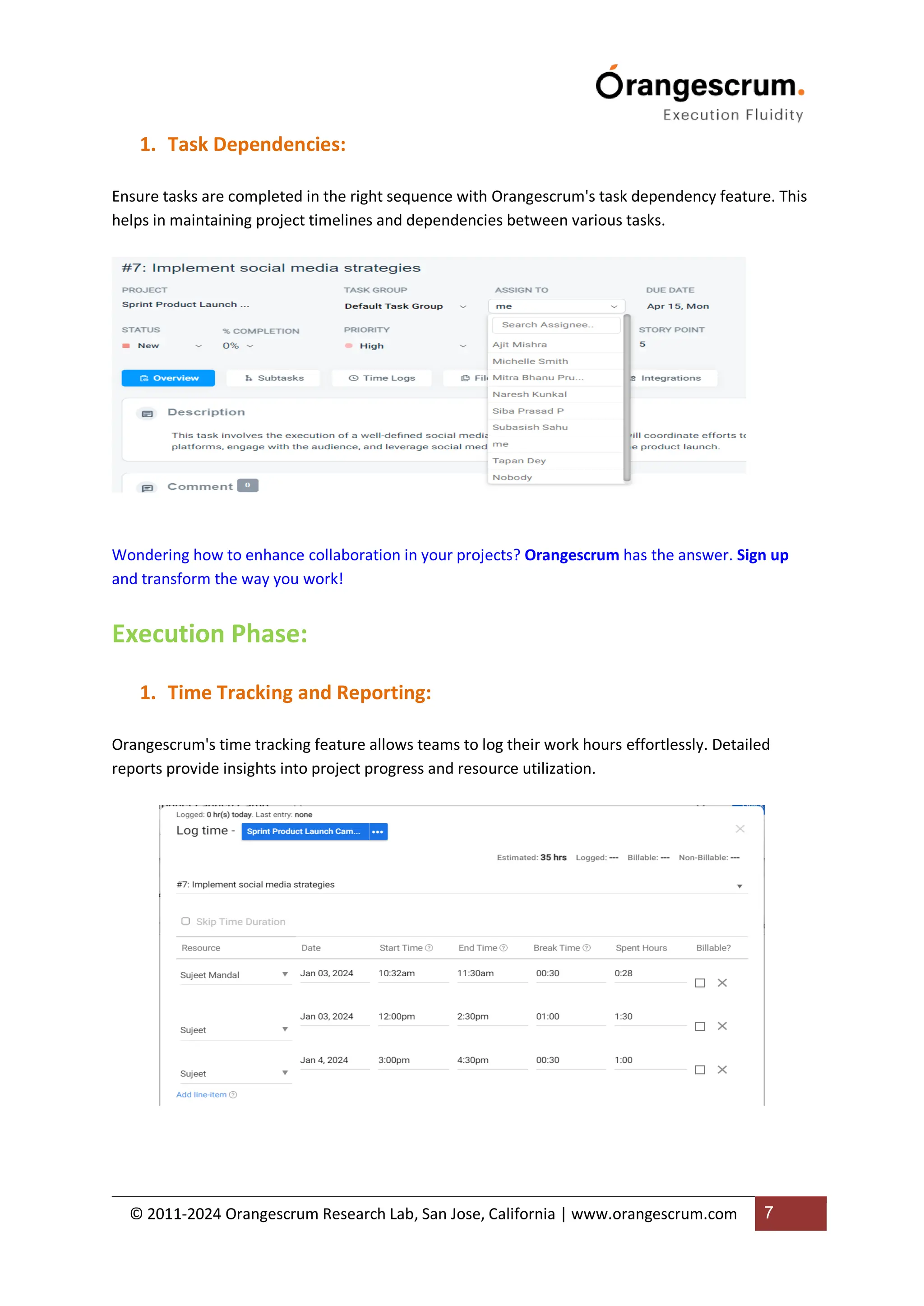
Ensure tasks are completed in the right sequence with Orangescrum's task dependency feature. This
helps in maintaining project timelines and dependencies between various tasks.
Wondering how to enhance collaboration in your projects? Orangescrum has the answer. Sign up
and transform the way you work!
Execution Phase:
1. Time Tracking and Reporting:
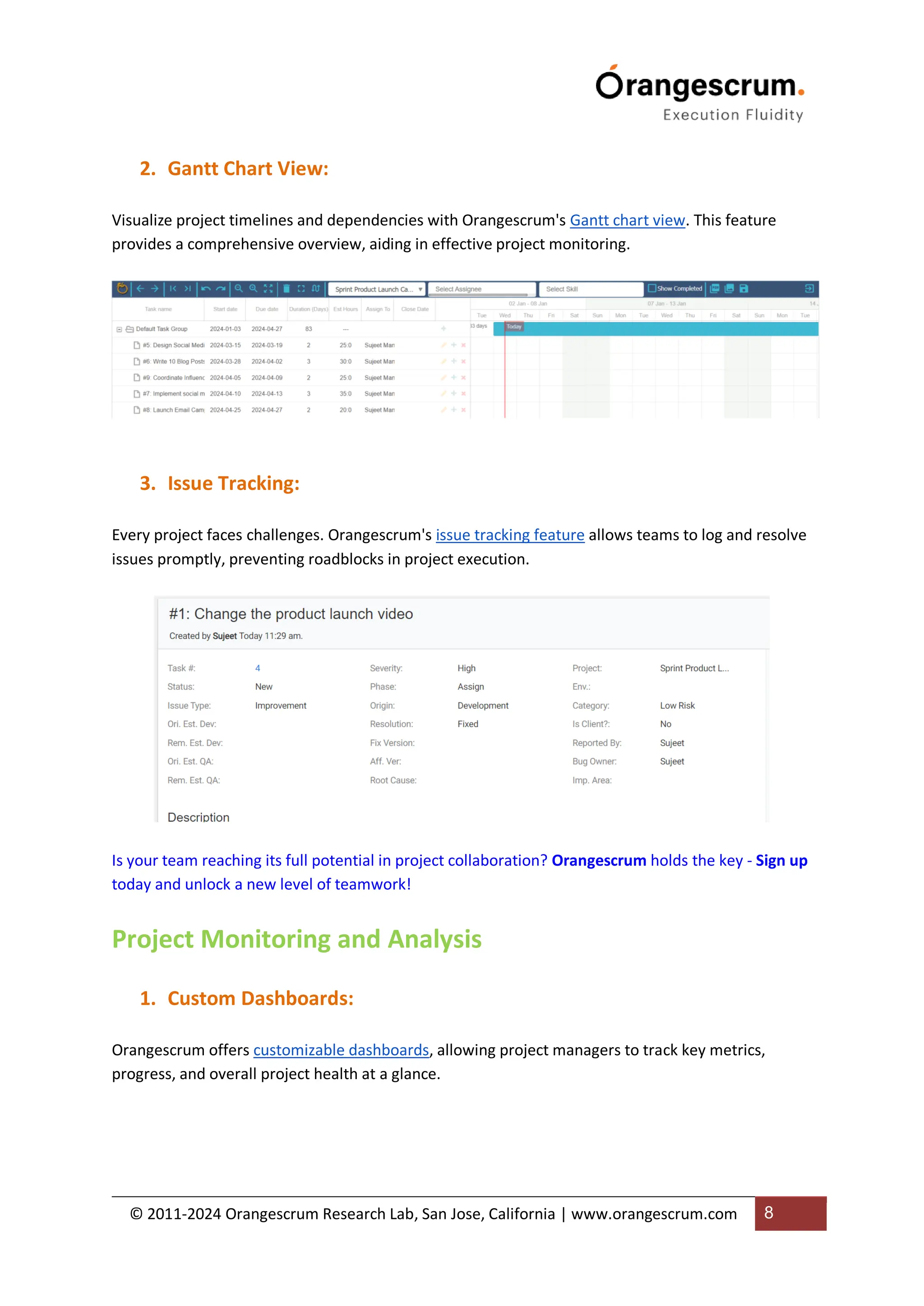
Orangescrum's time tracking feature allows teams to log their work hours effortlessly. Detailed
reports provide insights into project progress and resource utilization.
© 2011-2024 Orangescrum Research Lab, San Jose, California | www.orangescrum.com 8
2. Gantt Chart View:
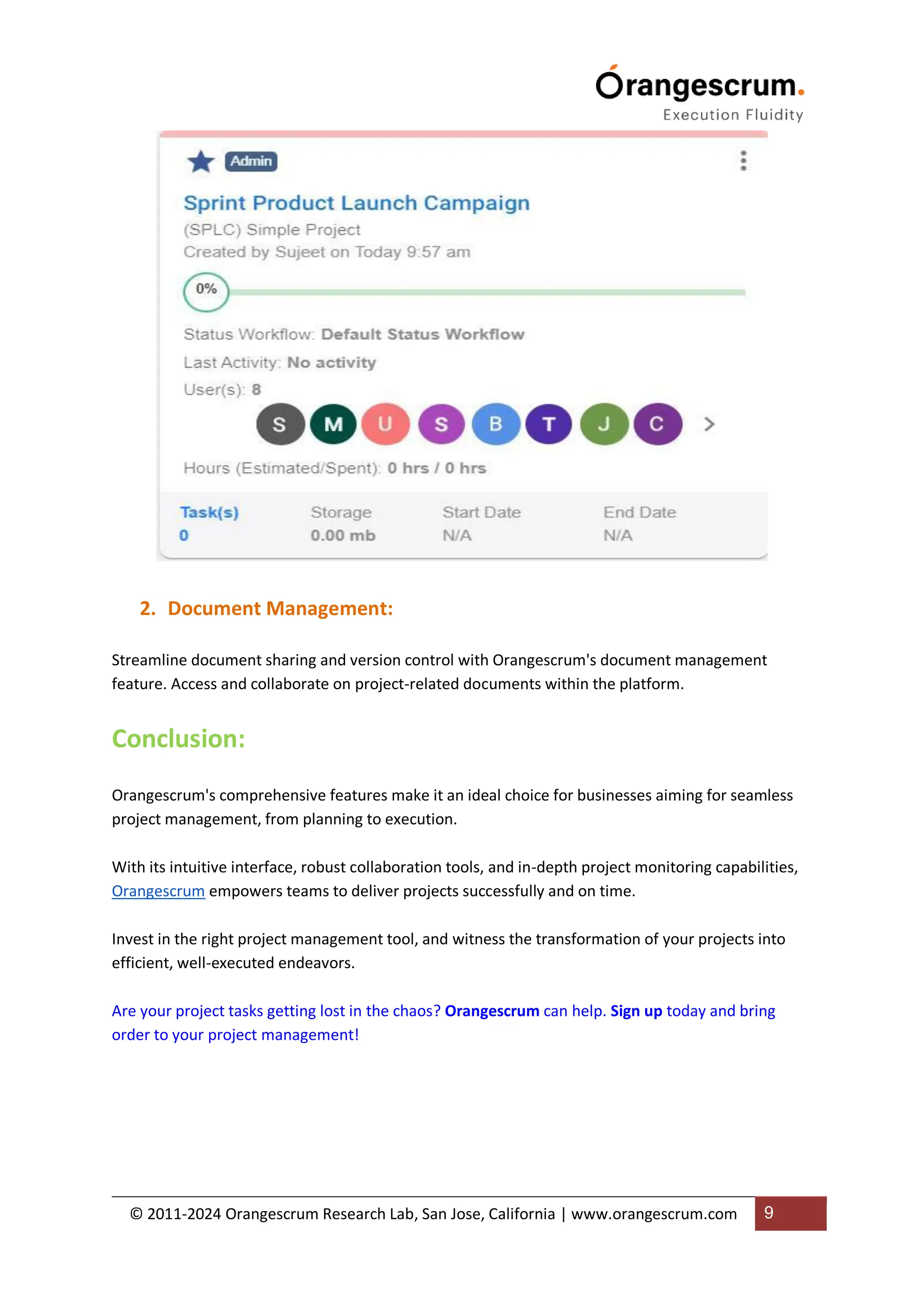
Visualize project timelines and dependencies with Orangescrum's Gantt chart view. This feature
provides a comprehensive overview, aiding in effective project monitoring.
3. Issue Tracking:
Every project faces challenges. Orangescrum's issue tracking feature allows teams to log and resolve
issues promptly, preventing roadblocks in project execution.
Is your team reaching its full potential in project collaboration? Orangescrum holds the key - Sign up
today and unlock a new level of teamwork!
Project Monitoring and Analysis
1. Custom Dashboards:
Orangescrum offers customizable dashboards, allowing project managers to track key metrics,
progress, and overall project health at a glance.
© 2011-2024 Orangescrum Research Lab, San Jose, California | www.orangescrum.com 9
2. Document Management:
Streamline document sharing and version control with Orangescrum's document management
feature. Access and collaborate on project-related documents within the platform.
Conclusion:
Orangescrum's comprehensive features make it an ideal choice for businesses aiming for seamless
project management, from planning to execution.
With its intuitive interface, robust collaboration tools, and in-depth project monitoring capabilities,
Orangescrum empowers teams to deliver projects successfully and on time.

Invest in the right project management tool, and witness the transformation of your projects into
efficient, well-executed endeavors.
Are your project tasks getting lost in the chaos? Orangescrum can help. Sign up today and bring
order to your project management!

From Planning to Execution - A Complete Flow of Project Management Using Orangescrum Project Management Tool.pdf

  • 1.
    © 2011-2024 OrangescrumResearch Lab, San Jose, California | www.orangescrum.com 1 From Planning to Execution: How to Manage a Project in Orangescrum? Effective project management is the cornerstone of successful business operations. From the initial planning stages to the final execution, a robust project management tool like Orangescrum is essential to ensure seamless workflow, collaboration, and timely delivery. In this blog, we'll explore the comprehensive flow of project management using the powerful Project Management Software – Orangescrum, shedding light on its key features that make it an invaluable asset for businesses. Planning Phase: 1. Project Creation: Orangescrum simplifies project initiation with its user-friendly interface. Create new projects effortlessly, defining project goals, timelines, and key milestones.
  • 2.
    © 2011-2024 OrangescrumResearch Lab, San Jose, California | www.orangescrum.com 2 How to Create a Project in Orangescrum? Step-1: Navigate to Orangescrum Left Menu → Projects then click on ‘+’ to create a project Step-2: Enter the project details and click Create
  • 3.
    © 2011-2024 OrangescrumResearch Lab, San Jose, California | www.orangescrum.com 3 Step-3: View the project details in the Projects tab 2. Task Breakdown: Dive deeper into project planning by breaking it down into manageable tasks. Orangescrum allows you to create task lists, set priorities, and assign responsibilities, ensuring everyone is on the same page. Ready to revolutionize your project management? Sign up for Orangescrum now and experience the next level of efficiency and collaboration!
  • 4.
    © 2011-2024 OrangescrumResearch Lab, San Jose, California | www.orangescrum.com 4 How to Create a Task in Orangescrum? Step-1: Navigate to Orangescrum Left Menu → Tasks then click on ‘+’ to create a task Step-2: Enter the task details and click Save
  • 5.
    © 2011-2024 OrangescrumResearch Lab, San Jose, California | www.orangescrum.com 5 Step-3: View all tasks in Kanban view 3. Resource Allocation: Efficiently allocate resources by assigning team members to specific tasks. Orangescrum's resource management feature facilitates a balanced workload, optimizing team productivity. Step-1: Click on ASSIGNED TO and select the team member to assign the specific task to the team member. Elevate your project success! Join Orangescrum today to unlock powerful project management tools and take control of your tasks. Sign up now!
  • 6.
    © 2011-2024 OrangescrumResearch Lab, San Jose, California | www.orangescrum.com 6 Collaboration and Communication: 1. Real-Time Collaboration Orangescrum fosters collaboration with real-time updates. Team members can comment, share files, and provide feedback directly within the platform, streamlining communication. How to Collaborate with Your Team Members? Step-1: Click on the specific task, and use @Mention to collaborate with concerned team members. Step-2: In Orangescrum you can upload project files and select the team members to notify via email.
  • 7.
    © 2011-2024 OrangescrumResearch Lab, San Jose, California | www.orangescrum.com 7 1. Task Dependencies: Ensure tasks are completed in the right sequence with Orangescrum's task dependency feature. This helps in maintaining project timelines and dependencies between various tasks. Wondering how to enhance collaboration in your projects? Orangescrum has the answer. Sign up and transform the way you work! Execution Phase: 1. Time Tracking and Reporting: Orangescrum's time tracking feature allows teams to log their work hours effortlessly. Detailed reports provide insights into project progress and resource utilization.
  • 8.
    © 2011-2024 OrangescrumResearch Lab, San Jose, California | www.orangescrum.com 8 2. Gantt Chart View: Visualize project timelines and dependencies with Orangescrum's Gantt chart view. This feature provides a comprehensive overview, aiding in effective project monitoring. 3. Issue Tracking: Every project faces challenges. Orangescrum's issue tracking feature allows teams to log and resolve issues promptly, preventing roadblocks in project execution. Is your team reaching its full potential in project collaboration? Orangescrum holds the key - Sign up today and unlock a new level of teamwork! Project Monitoring and Analysis 1. Custom Dashboards: Orangescrum offers customizable dashboards, allowing project managers to track key metrics, progress, and overall project health at a glance.
  • 9.
    © 2011-2024 OrangescrumResearch Lab, San Jose, California | www.orangescrum.com 9 2. Document Management: Streamline document sharing and version control with Orangescrum's document management feature. Access and collaborate on project-related documents within the platform. Conclusion: Orangescrum's comprehensive features make it an ideal choice for businesses aiming for seamless project management, from planning to execution. With its intuitive interface, robust collaboration tools, and in-depth project monitoring capabilities, Orangescrum empowers teams to deliver projects successfully and on time. Invest in the right project management tool, and witness the transformation of your projects into efficient, well-executed endeavors. Are your project tasks getting lost in the chaos? Orangescrum can help. Sign up today and bring order to your project management!