FOURSQUAREPRODUCT DEVELOPMENTBlackout
The Idea 	Foursquare creates an infrastructure that allows users to see images taken at the different locations they’ve checked-in.
Elevator PitchAn infrastructure that allows users to see images connected to check-ins. Currently, 4Square is text based and contains no images except for profile pictures and Google maps. Users have to search a number of sites like Flickr, Photobucket, YouTube, and Vimeo, etc for the pictures their friends took from their night out (and hope that they are tagged correctly so they show up). This add-on to 4square acts as an aggregator of images allowing users to re-live outings by seeing where they have been and any pictures taken, by them or their friends, at that location.This idea will add a new value layer to foursquare’scurrent users, increasing the brand loyalty to foursquare, as well as opening up new expansion possibilities and giving them an upper hand over competitors.
How it Works Users go to a location and check-in.Fourquareusers get the option to share/upload images to Foursquare.While there, any pictures (and eventually video) they take can be uploaded to Foursquare.The media object is uploaded to Foursquare’sservers and tagged under the correct location, userID, date and time.The images are then populated into the users history based on their tagging.After checking out, the users can later go back to their history and pick which pictures they want to leave in their history or remove. The user can see who was at the location with him and all the pictures taken then.
Value Proposition     Added value to service provided, translated into a larger, more loyal user baseA way to piece together drunken nights NostalgiaAn online memory scrapbookFoursquareUser
ResponsibilitiesWho does what?
Four SquareSummaryFoursquare is responsible for: Creating a new section in the Foursquare History Page called Images.Creating a program that receives images and tags them accordingly.This program takes different pictures uploaded by users and assigns them to a userID, tags them with the location currently checked in, the date,andthe time. Creating a program that sorts the uploaded objects and populates them in their correct locations.Give users capability to add captions to or remove images.
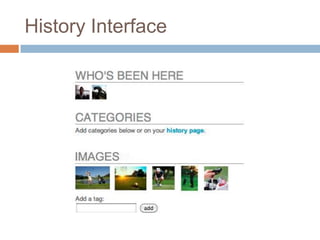
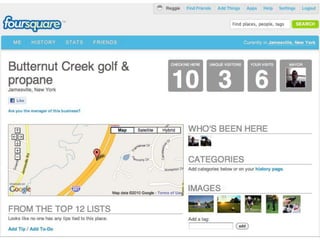
History Interface
UserSummaryThe user is responsible for: Checkin-in This is just like your usual check in. The user checks into a locationCreating mediaThe user is responsible for taking images and uploading them FoursquareManaging their imagesThe user is responsible for checking the history and taking down any of their pictures they don’t like.
User narrativeDid I tell you about my friend Joe?
Meet Joe “the Bro”
A day in the lifeIts Friday night and Joe and his friends plan to meet up for a night on the town in NYC.
A day in the lifeAfter meeting up with his friends, they decide to go to a lounge in the meat packing district.
A day in the lifeAt the lounge Joe is his usual brotastic self, and his friends have a surprise for him. They tip the bartender and tell him that if a guy comes up and orders an Apple martini, to ice him. They dare Joe to go to the bar and order an Apple martini, and pull out their phones to capture the moment.
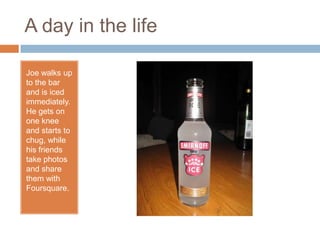
A day in the lifeJoe walks up to the bar and is iced immediately. He gets on one knee and starts to chug, while his friends take photos and share them with Foursquare.
A day in the lifeAs the night goes on Joe blacks out.
A day in the lifeThe next day, not remembering anything, he logs into the Foursquare website and checks his history to piece together the previous night. He sees the different places he visited, and the pictures taken at the venues.
A day in the lifeHe is mortified by the pictures of him stripping in public. He goes back to bed to nurse his hangover.
Target MarketThis application is for anybody and everybody who uses Foursquare.
Usage Summary     The user logins into his account and clicks on the history tab. He sees the usual list of places he has visited. He can click on an event and see the pictures he and his friends who were with him took at that location. He has the ability to remove or add any pictures that he took, but those taken by his friends can only be changed by them.     On the Foursquare side, they need to add a program to their app that allows users to upload images to a site that tags the images with the location they are currently checked into.  These images are then populated in their history under the set location and date for the user to see and remember. UserFoursquare
Take a picture.You can add a  title and tags.
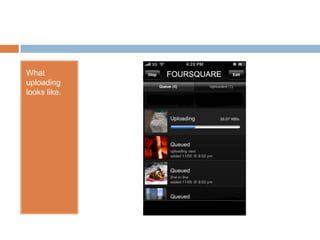
You can then upload them to Foursquare
What uploading looks like.
Current InfrastructureUserFoursquare
New InfrastructureUserFoursquareFoursquare NewThis database stores the images. Can be outsourced.New addition needed in Foursquare system.

Foursquare Blackout

  • 1.
  • 2.
    The Idea Foursquarecreates an infrastructure that allows users to see images taken at the different locations they’ve checked-in.
  • 3.
    Elevator PitchAn infrastructurethat allows users to see images connected to check-ins. Currently, 4Square is text based and contains no images except for profile pictures and Google maps. Users have to search a number of sites like Flickr, Photobucket, YouTube, and Vimeo, etc for the pictures their friends took from their night out (and hope that they are tagged correctly so they show up). This add-on to 4square acts as an aggregator of images allowing users to re-live outings by seeing where they have been and any pictures taken, by them or their friends, at that location.This idea will add a new value layer to foursquare’scurrent users, increasing the brand loyalty to foursquare, as well as opening up new expansion possibilities and giving them an upper hand over competitors.
  • 4.
    How it WorksUsers go to a location and check-in.Fourquareusers get the option to share/upload images to Foursquare.While there, any pictures (and eventually video) they take can be uploaded to Foursquare.The media object is uploaded to Foursquare’sservers and tagged under the correct location, userID, date and time.The images are then populated into the users history based on their tagging.After checking out, the users can later go back to their history and pick which pictures they want to leave in their history or remove. The user can see who was at the location with him and all the pictures taken then.
  • 5.
    Value Proposition Added value to service provided, translated into a larger, more loyal user baseA way to piece together drunken nights NostalgiaAn online memory scrapbookFoursquareUser
  • 6.
  • 7.
    Four SquareSummaryFoursquare isresponsible for: Creating a new section in the Foursquare History Page called Images.Creating a program that receives images and tags them accordingly.This program takes different pictures uploaded by users and assigns them to a userID, tags them with the location currently checked in, the date,andthe time. Creating a program that sorts the uploaded objects and populates them in their correct locations.Give users capability to add captions to or remove images.
  • 8.
  • 9.
    UserSummaryThe user isresponsible for: Checkin-in This is just like your usual check in. The user checks into a locationCreating mediaThe user is responsible for taking images and uploading them FoursquareManaging their imagesThe user is responsible for checking the history and taking down any of their pictures they don’t like.
  • 10.
    User narrativeDid Itell you about my friend Joe?
  • 11.
  • 12.
    A day inthe lifeIts Friday night and Joe and his friends plan to meet up for a night on the town in NYC.
  • 13.
    A day inthe lifeAfter meeting up with his friends, they decide to go to a lounge in the meat packing district.
  • 14.
    A day inthe lifeAt the lounge Joe is his usual brotastic self, and his friends have a surprise for him. They tip the bartender and tell him that if a guy comes up and orders an Apple martini, to ice him. They dare Joe to go to the bar and order an Apple martini, and pull out their phones to capture the moment.
  • 15.
    A day inthe lifeJoe walks up to the bar and is iced immediately. He gets on one knee and starts to chug, while his friends take photos and share them with Foursquare.
  • 16.
    A day inthe lifeAs the night goes on Joe blacks out.
  • 17.
    A day inthe lifeThe next day, not remembering anything, he logs into the Foursquare website and checks his history to piece together the previous night. He sees the different places he visited, and the pictures taken at the venues.
  • 18.
    A day inthe lifeHe is mortified by the pictures of him stripping in public. He goes back to bed to nurse his hangover.
  • 19.
    Target MarketThis applicationis for anybody and everybody who uses Foursquare.
  • 20.
    Usage Summary The user logins into his account and clicks on the history tab. He sees the usual list of places he has visited. He can click on an event and see the pictures he and his friends who were with him took at that location. He has the ability to remove or add any pictures that he took, but those taken by his friends can only be changed by them. On the Foursquare side, they need to add a program to their app that allows users to upload images to a site that tags the images with the location they are currently checked into. These images are then populated in their history under the set location and date for the user to see and remember. UserFoursquare
  • 23.
    Take a picture.Youcan add a title and tags.
  • 24.
    You can thenupload them to Foursquare
  • 25.
  • 26.
  • 27.
    New InfrastructureUserFoursquareFoursquare NewThisdatabase stores the images. Can be outsourced.New addition needed in Foursquare system.