FILE ENCRYPTION AND DECRYPTION
Presented by
Arka Halder
Amit Saha
Subrata Mahata
Sumanta Mete
Sudip Mandol
IT
DEPARTMENT
GOVT. COLLEGE OF ENGINEERING &TEXTILE
TECHNOLOGY,SERAMPORE
ACKNOWLEDGEMENT
In completing this project we have been fortunate to have help,
support and encouragement from many people. We would like to
thank them for their cooperation.
First, we would like to thank our mentor Mr. Mainak Basu Roy, for
guiding us through each and every step of the process with
knowledge and support.
Thank you for your advice, guidance and assistance.
CONTENTS
• Overview of the project
• Objectives
• Recommended Software requirements.
• Software interface
• Hardware Requirements
• Hardware interface
• Functional Requirements
• Non-Functional Requirements
• Data-Flow-Diagram.
• E-R Diagram.
• Database- Structure.
• Snapshots of project.
• Testing
• Future Scope.
• Conclusion
• References
OVERVIEW OF THE PROJECT
• A E-commerce application, a web site where users can store their files
(irrespective of type ) without horrifying by security threats.
• Depending on the context, it’s been names as ‘safedrop.com’.
• User facilities
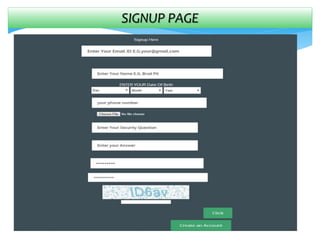
 A fresh user must sign up to create an account
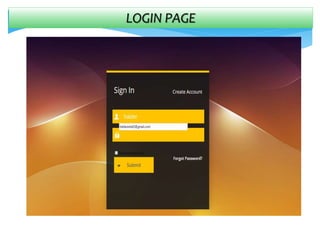
 One has to log in using account information to access the
uploading and downloading(if any) facility
 There is a scope for resetting password if anyone forgets
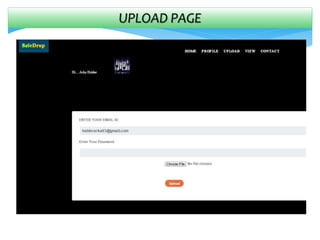
 Once uploaded ,a file will be stored in encrypted version
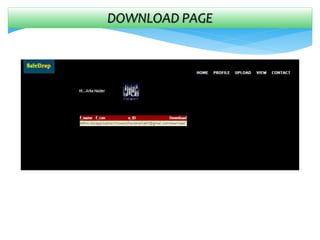
 One can download only files uploaded by oneself in decrypted
form
 There is also provision for changing password ,updating one’s
profile picture and deleting account
OBJECTIVE
• Making a file uploading and downloading site.
• Assuring safety as much as possible.
• Providing user the scope to store file irrespective of the file type.
• To facilitate user to change password, update profile image and delete
account.
RECOMMENDED SOFTWARE REQUIREMENTS
Operating system : windows 7
Framework : .NET (4.0)
Application software : Microsoft Visual Studio 2012
Programming language : C#
Database : SQL Server
Technology : ASP.NET
Web Server : IIS 6.0
SOFTWARE INTERFACE
SERVER
• Windows 7
• IDE-Visual Studio 2012
• SQL server 2008
CLIENT
• Windows XP or above
• .NET Framework
• Web Browser like Microsoft
Internet Explorer, Mozilla
Firefox etc.
HARDWARE REQUIREMENT
• Intel Pentium IV or above
• 2 GB RAM or above
• 10 GB hard disk or above
• Network Interface
HARDWARE INTERFACE
SERVER
• Intel Pentium IV or more
• 2 GB RAM
• 10 GB hard disk
• Network Interface
CLIENT
• Intel Pentium III or more
• 2 GB RAM
• Network Interface
FUNCTIONAL REQUIREMENTS
• Opening accounts
 A new user must have to sign up initially to get access to the
website. Old users can log in directly with their email Id, password.
• Password reset
 Users can reset password if required.
• Upload and download
 Users can upload files and view a list of their uploaded files. They
can download it by selecting corresponding file name.
• Change password and profile picture
 Users can change their password , profile picture
NON-FUNCTIONAL REQUIREMENTS
• The system is an Web Application.
• This is Browser Independent
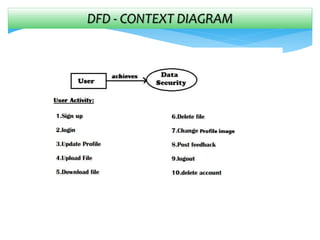
DFD - CONTEXT DIAGRAM
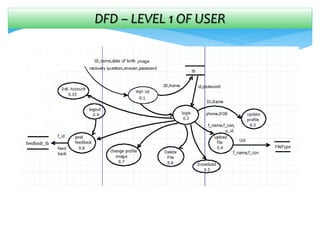
DFD – LEVEL 1 OF USER
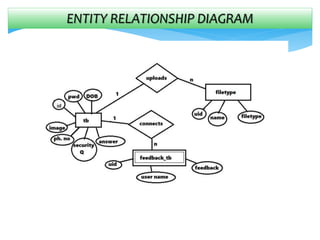
ENTITY RELATIONSHIP DIAGRAM
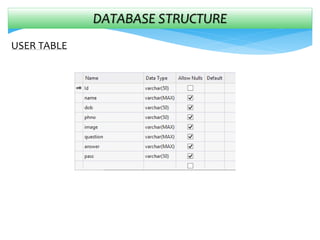
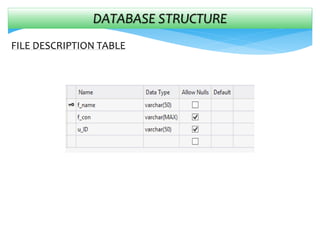
DATABASE STRUCTURE
USER TABLE
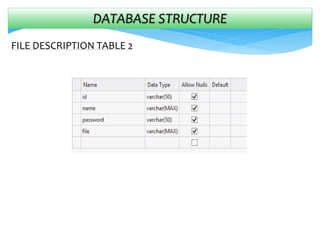
DATABASE STRUCTURE
FILE DESCRIPTION TABLE
DATABASE STRUCTURE
FILE DESCRIPTION TABLE 2
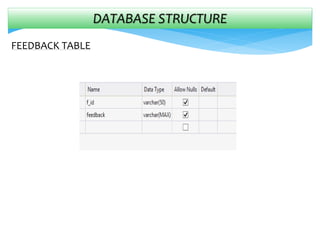
DATABASE STRUCTURE
FEEDBACK TABLE
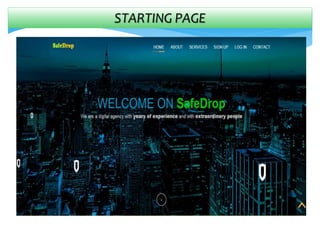
SNAPSHOTS OF PROJECT
HERE ARE SOME SNAPSHOTS OF
SAFEDROP.COM
STARTING PAGE
SIGNUP PAGE
LOGIN PAGE
HOME PAGE
DOWNLOAD PAGE
UPLOAD PAGE
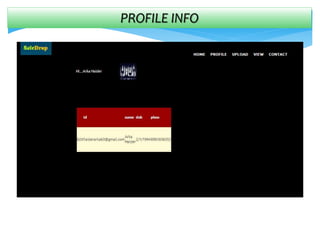
PROFILE INFO
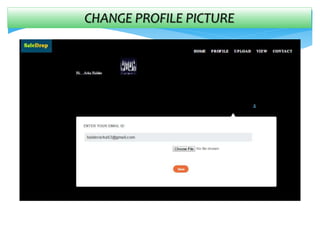
CHANGE PROFILE PICTURE
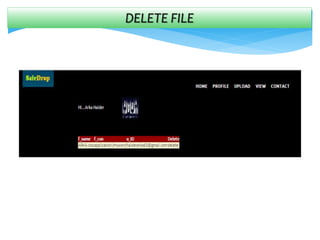
DELETE FILE
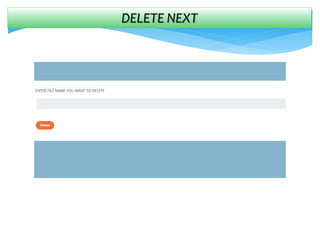
DELETE NEXT
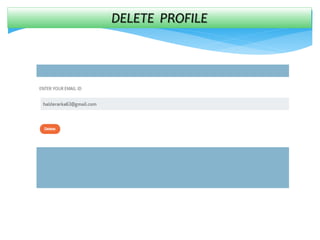
DELETE PROFILE
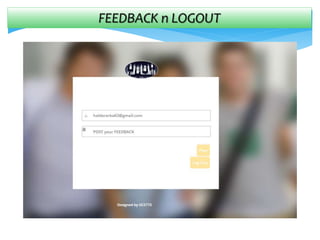
FEEDBACK n LOGOUT
FEEDBACKs on START page
TESTING
Testing is an investigation conducted to provide stakeholders with
information about the quality of the product or service under test. Software
testing also provides an objective, independent view of the software to
allow the business to appreciate and understand the risks at
implementation of the software.
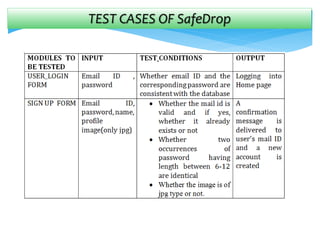
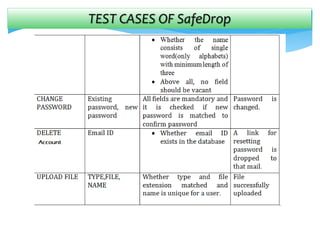
TEST CASES OF SafeDrop
FUTURE SCOPE
The interaction procedure of user and the web application can be
further more improved to make it interactive and user friendly .The web
page layout may be improved .we are trying to upgrade it into a file
storage site as well as a file sharing site so that more users can be
attracted .We think more flexibility and interactive features can make it
more bigger.
CONCLUSION
After developing the application we have got a clear idea on web
development, especially in ms.net features, got a clear idea on how the
encryption or decryption takes place. We have come to know the pros &
cons of ms.net, the scopes of it and how it differs from other web
development techniques. I hope, in future, the experience will help us in
developing any web application and in career.
REFERENCES
http://msdn.microsoft.com/library/default.asp
www.w3schools.com
http://www.wikipedia.org
http://www.cooltext.com
Grid view control.
http://www.codeproject.com/KB/Grid/RSS
File encryption decryption

File encryption decryption

  • 1.
    FILE ENCRYPTION ANDDECRYPTION Presented by Arka Halder Amit Saha Subrata Mahata Sumanta Mete Sudip Mandol IT DEPARTMENT GOVT. COLLEGE OF ENGINEERING &TEXTILE TECHNOLOGY,SERAMPORE
  • 2.
    ACKNOWLEDGEMENT In completing thisproject we have been fortunate to have help, support and encouragement from many people. We would like to thank them for their cooperation. First, we would like to thank our mentor Mr. Mainak Basu Roy, for guiding us through each and every step of the process with knowledge and support. Thank you for your advice, guidance and assistance.
  • 3.
    CONTENTS • Overview ofthe project • Objectives • Recommended Software requirements. • Software interface • Hardware Requirements • Hardware interface • Functional Requirements • Non-Functional Requirements • Data-Flow-Diagram. • E-R Diagram. • Database- Structure. • Snapshots of project. • Testing • Future Scope. • Conclusion • References
  • 4.
    OVERVIEW OF THEPROJECT • A E-commerce application, a web site where users can store their files (irrespective of type ) without horrifying by security threats. • Depending on the context, it’s been names as ‘safedrop.com’. • User facilities  A fresh user must sign up to create an account  One has to log in using account information to access the uploading and downloading(if any) facility  There is a scope for resetting password if anyone forgets  Once uploaded ,a file will be stored in encrypted version  One can download only files uploaded by oneself in decrypted form  There is also provision for changing password ,updating one’s profile picture and deleting account
  • 5.
    OBJECTIVE • Making afile uploading and downloading site. • Assuring safety as much as possible. • Providing user the scope to store file irrespective of the file type. • To facilitate user to change password, update profile image and delete account.
  • 6.
    RECOMMENDED SOFTWARE REQUIREMENTS Operatingsystem : windows 7 Framework : .NET (4.0) Application software : Microsoft Visual Studio 2012 Programming language : C# Database : SQL Server Technology : ASP.NET Web Server : IIS 6.0
  • 7.
    SOFTWARE INTERFACE SERVER • Windows7 • IDE-Visual Studio 2012 • SQL server 2008 CLIENT • Windows XP or above • .NET Framework • Web Browser like Microsoft Internet Explorer, Mozilla Firefox etc.
  • 8.
    HARDWARE REQUIREMENT • IntelPentium IV or above • 2 GB RAM or above • 10 GB hard disk or above • Network Interface
  • 9.
    HARDWARE INTERFACE SERVER • IntelPentium IV or more • 2 GB RAM • 10 GB hard disk • Network Interface CLIENT • Intel Pentium III or more • 2 GB RAM • Network Interface
  • 10.
    FUNCTIONAL REQUIREMENTS • Openingaccounts  A new user must have to sign up initially to get access to the website. Old users can log in directly with their email Id, password. • Password reset  Users can reset password if required. • Upload and download  Users can upload files and view a list of their uploaded files. They can download it by selecting corresponding file name. • Change password and profile picture  Users can change their password , profile picture
  • 11.
    NON-FUNCTIONAL REQUIREMENTS • Thesystem is an Web Application. • This is Browser Independent
  • 12.
  • 13.
    DFD – LEVEL1 OF USER
  • 14.
  • 15.
  • 16.
  • 17.
  • 18.
  • 19.
    SNAPSHOTS OF PROJECT HEREARE SOME SNAPSHOTS OF SAFEDROP.COM
  • 20.
  • 21.
  • 22.
  • 23.
  • 24.
  • 25.
  • 26.
  • 27.
  • 28.
  • 29.
  • 30.
  • 31.
  • 32.
  • 33.
    TESTING Testing is aninvestigation conducted to provide stakeholders with information about the quality of the product or service under test. Software testing also provides an objective, independent view of the software to allow the business to appreciate and understand the risks at implementation of the software.
  • 34.
    TEST CASES OFSafeDrop
  • 35.
    TEST CASES OFSafeDrop
  • 36.
    FUTURE SCOPE The interactionprocedure of user and the web application can be further more improved to make it interactive and user friendly .The web page layout may be improved .we are trying to upgrade it into a file storage site as well as a file sharing site so that more users can be attracted .We think more flexibility and interactive features can make it more bigger.
  • 37.
    CONCLUSION After developing theapplication we have got a clear idea on web development, especially in ms.net features, got a clear idea on how the encryption or decryption takes place. We have come to know the pros & cons of ms.net, the scopes of it and how it differs from other web development techniques. I hope, in future, the experience will help us in developing any web application and in career.
  • 38.