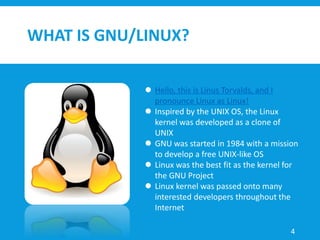
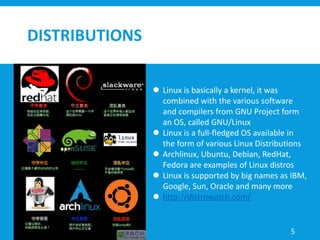
This document provides an overview of Linux and reverse engineering on Linux. It discusses what Linux is, how it was developed based on UNIX, and some popular Linux distributions. It also covers why Linux is useful, specifically mentioning its power, stability, and free licensing. The document then discusses setting up a virtual machine for safely conducting reverse engineering. It outlines basic Linux commands and concepts like files, permissions, and processes. Finally, it defines reverse engineering and covers approaches like static analysis, dynamic analysis, and common software vulnerabilities that can be exploited or protected against.

![BASIC COMMAND LINE
ls [path]
list directory contents
“ls -al /”
/bin, /boot, /dev, /etc, /home, /lib, /mnt, /proc, /root, /tmp, /usr
cd [path]
change the working directory
pwd
print the path of current/working directory
cat [file]
concatenate files and print on the standard output
“less”, “more”
12](https://image.slidesharecdn.com/fight-with-linux-reverse-171106052221/85/Fight-with-linux-reverse-12-320.jpg)
![BASIC COMMAND LINE
cp [file] [location]
copy the file/directory to the location
mv [file] [location]
move (rename) the file to the location
rm [file]
remove the file or directory
never do “sudo rm -rf /”
vim
command line text editors
“type :quit<Enter> to quit VIM”
13](https://image.slidesharecdn.com/fight-with-linux-reverse-171106052221/85/Fight-with-linux-reverse-13-320.jpg)
![BASIC COMMAND LINE
grep [pattern]
print lines matching a pattern
find
search for files in a directory hierarchy
man [command]
an interface to the on-line reference manuals
apropos [whatever]
search the manual page names and descriptions
[command] --help
display help pages
14](https://image.slidesharecdn.com/fight-with-linux-reverse-171106052221/85/Fight-with-linux-reverse-14-320.jpg)
![PIPES AND REDIRECTION
Redirection
/proc/[PID]/fd
0: stdin
1: stdout
2: stderr
“>”: take the standard output of the command on the left and
redirects it to the file on the right
“>>”: take the standard output of the command on the left and
appends it to the file on the right
“<”: takes the standard input from the file on the right and input
into the program on the left
Pipes - “|”
take the standard output of the program on the left and input into
the program on the right 15](https://image.slidesharecdn.com/fight-with-linux-reverse-171106052221/85/Fight-with-linux-reverse-15-320.jpg)
![LINUX TOOLS
ASCII readable hex
strings
print the strings of printable characters in files
“-a --all”: scan the entire file, not just the data section [default]
“-t --radix={o, d, x}”: print the location of the string in base 8, 10 or 16
“-e –encoding={s, S, b, l, B, L}”: select size and endianess
s = 7-bit, S = 8-bit, {b, l} = 16-bit, {B, L} = 32-bit
“strings -t x /lib32/libc-2.24.so | grep /bin/sh”
“strings [executable] | grep -i upx”
45](https://image.slidesharecdn.com/fight-with-linux-reverse-171106052221/85/Fight-with-linux-reverse-45-320.jpg)
![LINUX TOOLS
File format on disk
file
determine file type
“file -L [file]”: follow symlinks
readelf
displays information about ELF files
“-h --file-header”: display the ELF file header
“-l --program-headers”: display the program headers
“-S --section-headers”: display the sections’ header
“-e --headers”: Equivalent to: -h -l –S
“-s --relocs”: display the relocations (if present)
“-d --dynamic”: display the dynamic section (if present) 46](https://image.slidesharecdn.com/fight-with-linux-reverse-171106052221/85/Fight-with-linux-reverse-46-320.jpg)
![LINUX TOOLS
Display information from object files
objdump
“-d --disassemble”: display assembler contents of executable sections
“-R --dynamic-reloc”: display the dynamic relocation entries in the file
“objdump -d [executable] | grep -A 30 [function_name]”
ldd
print shared object dependencies
47](https://image.slidesharecdn.com/fight-with-linux-reverse-171106052221/85/Fight-with-linux-reverse-47-320.jpg)
![GDB
(b) break [file:]function
set a breakpoint at function (or file:function)
(i b) info breakpoints
show information about all declared breakpoints
(r) run [arglist]
start your program (with arglist)
(s) step
execute next program line; step into any function calls in the line
(n) next
execute next program line; step over any function calls in the line
(q) quit
exit from gdb 50](https://image.slidesharecdn.com/fight-with-linux-reverse-171106052221/85/Fight-with-linux-reverse-50-320.jpg)
![GDB
(bt) backtrace
display the program stack
(p) print [expr]
print the value of an expression
(c) continue
continue running your program
(fin) finish
execute until selected stack frame returns
(h) help [name]
show information about gdb command
51](https://image.slidesharecdn.com/fight-with-linux-reverse-171106052221/85/Fight-with-linux-reverse-51-320.jpg)
![GDB
gcc -g hello.c
the “-g” option will enable built-in debugging support
list [file:]function
list specified function or line
edit [file:]function
edit specified file or function
53](https://image.slidesharecdn.com/fight-with-linux-reverse-171106052221/85/Fight-with-linux-reverse-53-320.jpg)