PROF.
SHIV
VEER
SINGH
(DEPARTM
ENT
OF
CSE-IOT)
Exception Handling inJava
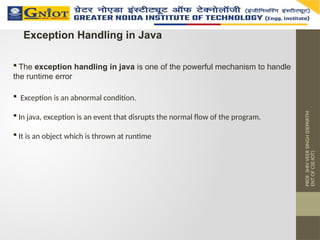
The exception handling in java is one of the powerful mechanism to handle
the runtime error
Exception is an abnormal condition.
In java, exception is an event that disrupts the normal flow of the program.
It is an object which is thrown at runtime
PROF.
SHIV
VEER
SINGH
(DEPARTM
ENT
OF
CSE-IOT)
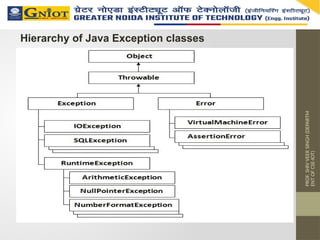
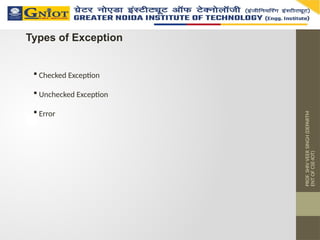
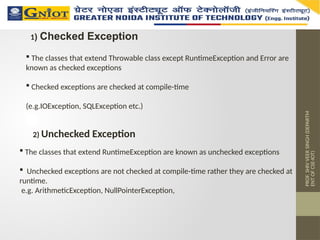
1) Checked Exception
The classes that extend Throwable class except RuntimeException and Error are
known as checked exceptions
Checked exceptions are checked at compile-time
(e.g.IOException, SQLException etc.)
2) Unchecked Exception
The classes that extend RuntimeException are known as unchecked exceptions
Unchecked exceptions are not checked at compile-time rather they are checked at
runtime.
e.g. ArithmeticException, NullPointerException,
PROF.
SHIV
VEER
SINGH
(DEPARTM
ENT
OF
CSE-IOT)
Problem without exceptionhandling
public class Testtrycatch1
{
public static void main(String args[])
{
int data=50/0;//may throw exception
System.out.println("rest of the code...");
}
}
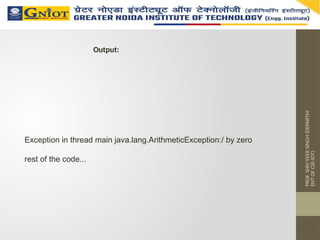
Output:
Exception in thread main java.lang.ArithmeticException:/ by zero
8.
PROF.
SHIV
VEER
SINGH
(DEPARTM
ENT
OF
CSE-IOT)
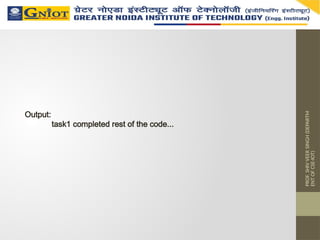
Solution by exceptionhandling
public class Testtrycatch2
{
public static void main(String args[])
{
try
{
int data=50/0;
}
catch(ArithmeticException e)
{
System.out.println(e);
}
System.out.println("rest of the code...");
}
}
PROF.
SHIV
VEER
SINGH
(DEPARTM
ENT
OF
CSE-IOT)
Java Nested tryblock
The try block within a try block is known as nested try block in java.
class Excep6
{
public static void main(String args[])
{
try
{
try
{
System.out.println("going to divide");
int b =39/0;
}
catch(ArithmeticException e)
{
System.out.println(e);
}
Example:-
PROF.
SHIV
VEER
SINGH
(DEPARTM
ENT
OF
CSE-IOT)
finally block
finallyblock is a block that is used to execute important code such as
closing connection, stream etc.
finally block is always executed whether exception is handled or not.
finally block must be followed by try or catch block.
PROF.
SHIV
VEER
SINGH
(DEPARTM
ENT
OF
CSE-IOT)
public class TestThrow1{
staticvoid validate(int age){
if(age<18)
throw new ArithmeticException("not valid");
else
System.out.println("welcome to vote");
}
public static void main(String args[]){
validate(13);
System.out.println("rest of the code...");
}
}
Example:-
Output:
Exception in thread main java.lang.ArithmeticException:not valid
17.
PROF.
SHIV
VEER
SINGH
(DEPARTM
ENT
OF
CSE-IOT)
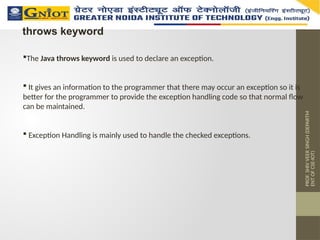
throws keyword
The Javathrows keyword is used to declare an exception.
It gives an information to the programmer that there may occur an exception so it is
better for the programmer to provide the exception handling code so that normal flow
can be maintained.
Exception Handling is mainly used to handle the checked exceptions.
18.
PROF.
SHIV
VEER
SINGH
(DEPARTM
ENT
OF
CSE-IOT)
example :-
import java.io.IOException;
classTestthrows1{
void m()throws IOException{
throw new IOException("device error");//checked exception
}
void n()throws IOException{
m();
}
void p(){
try{
n();
}catch(Exception e){System.out.println("exception handled");}
}
public static void main(String args[]){
Testthrows1 obj=new Testthrows1();
obj.p();
System.out.println("normal flow...");
}
} exception handled normal flow...
Output:
19.
PROF.
SHIV
VEER
SINGH
(DEPARTM
ENT
OF
CSE-IOT)
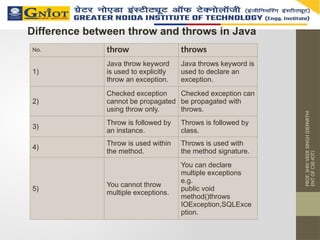
Difference between throwand throws in Java
No. throw throws
1)
Java throw keyword
is used to explicitly
throw an exception.
Java throws keyword is
used to declare an
exception.
2)
Checked exception
cannot be propagated
using throw only.
Checked exception can
be propagated with
throws.
3)
Throw is followed by
an instance.
Throws is followed by
class.
4)
Throw is used within
the method.
Throws is used with
the method signature.
5)
You cannot throw
multiple exceptions.
You can declare
multiple exceptions
e.g.
public void
method()throws
IOException,SQLExce
ption.
20.
PROF.
SHIV
VEER
SINGH
(DEPARTM
ENT
OF
CSE-IOT)
Difference between final,finally and finalize
No. final finally finalize
1)
Final is used to
apply restrictions
on class, method
and variable.
Final class can't
be inherited, final
method can't be
overridden and
final variable
value can't be
changed.
Finally is used to
place important
code, it will be
executed whether
exception is
handled or not.
Finalize is used to
perform clean up
processing just
before object is
garbage collected.
2) Final is a
keyword.
Finally is a block. Finalize is a method.
21.
PROF.
SHIV
VEER
SINGH
(DEPARTM
ENT
OF
CSE-IOT)
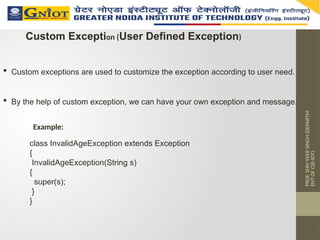
Custom Exception (UserDefined Exception)
Custom exceptions are used to customize the exception according to user need.
By the help of custom exception, we can have your own exception and message.
class InvalidAgeException extends Exception
{
InvalidAgeException(String s)
{
super(s);
}
}
Example:
22.
PROF.
SHIV
VEER
SINGH
(DEPARTM
ENT
OF
CSE-IOT)
class TestCustomException1{
static voidvalidate(int age)throws InvalidAgeException{
if(age<18)
throw new InvalidAgeException("not valid");
else
System.out.println("welcome to vote");
}
public static void main(String args[]){
try{
validate(13);
}catch(Exception m){System.out.println("Exception occured:
"+m);}
System.out.println("rest of the code...");
}
}
...
Output: Exception occured: InvalidAgeException:not valid
rest of the code
23.
PROF.
SHIV
VEER
SINGH
(DEPARTM
ENT
OF
CSE-IOT)
Multithreading isa process of executing multiple threads
simultaneously.
Thread is basically a lightweight sub-process, a smallest unit of
processing.
Multiprocessing and multithreading, both are used to achieve
multitasking.
we use multithreading than multiprocessing because threads share a
common memory area.
They don't allocate separate memory area so saves memory, and
context-switching between the threads takes less time than process.
Multithreading
24.
PROF.
SHIV
VEER
SINGH
(DEPARTM
ENT
OF
CSE-IOT)
It doesn'tblock the user because threads are independent and you
can perform multiple operations at same time.
1. You can perform many operations together so it saves time.
2. Threads are independent so it doesn't affect other threads if
exception occur in a single thread.
Advantage of Java Multithreading
25.
PROF.
SHIV
VEER
SINGH
(DEPARTM
ENT
OF
CSE-IOT)
Multitasking isa process of executing multiple tasks simultaneously.
We use multitasking to utilize the CPU.
Multitasking can be achieved by two ways:
Process-based Multitasking(Multiprocessing)
Thread-based Multitasking(Multithreading)
Multitasking
26.
PROF.
SHIV
VEER
SINGH
(DEPARTM
ENT
OF
CSE-IOT)
1) Process-based Multitasking(Multiprocessing)
Each process have its own address in memory i.e. each process
allocates separate memory area.
Process is heavyweight.
Cost of communication between the process is high.
.Switching from one process to another require some time for
saving and loading registers, memory maps, updating lists etc.
2) Thread-based Multitasking (Multithreading)
Threads share the same address space.
Thread is lightweight.
Cost of communication between the thread is low.
.
27.
PROF.
SHIV
VEER
SINGH
(DEPARTM
ENT
OF
CSE-IOT)
What is Threadin java?
A thread is a lightweight sub process, a smallest unit of processing. It is
a separate path of execution.
Threads are independent, if there occurs exception in one thread, it
doesn't affect other threads. It shares a common memory area.
28.
PROF.
SHIV
VEER
SINGH
(DEPARTM
ENT
OF
CSE-IOT)
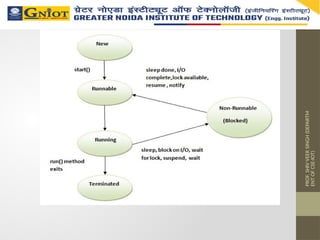
Life cycle ofa Thread (Thread States)
The life cycle of the thread in java is controlled by JVM. The java
thread states are as follows:
New
Runnable
Running
Non-Runnable (Blocked)
Terminated
PROF.
SHIV
VEER
SINGH
(DEPARTM
ENT
OF
CSE-IOT)
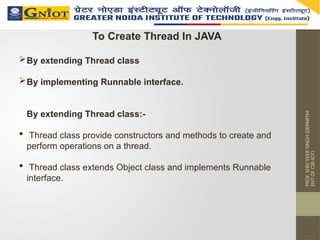
To Create ThreadIn JAVA
By extending Thread class
By implementing Runnable interface.
By extending Thread class:-
Thread class provide constructors and methods to create and
perform operations on a thread.
Thread class extends Object class and implements Runnable
interface.
31.
PROF.
SHIV
VEER
SINGH
(DEPARTM
ENT
OF
CSE-IOT)
Example to Createthread By extendingThread Class
class Multi extends Thread
{
public void run()
{
System.out.println("thread is running...");
}
public static void main(String args[])
{
Multi t1=new Multi();
t1.start();
}
}
32.
PROF.
SHIV
VEER
SINGH
(DEPARTM
ENT
OF
CSE-IOT)
Example To Createthread By implementing the
Runnable interface:
class Multi1 implements Runnable
{
public void run()
{
System.out.println("thread is running...");
}
public static void main(String args[])
{
Multi1 m1=new Multi1();
Thread t1 =new Thread(m1);
t1.start();
}
}
33.
PROF.
SHIV
VEER
SINGH
(DEPARTM
ENT
OF
CSE-IOT)
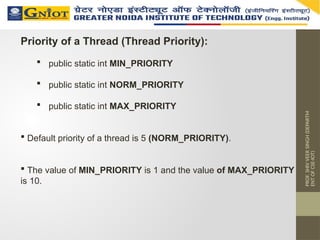
Priority of aThread (Thread Priority):
public static int MIN_PRIORITY
public static int NORM_PRIORITY
public static int MAX_PRIORITY
Default priority of a thread is 5 (NORM_PRIORITY).
The value of MIN_PRIORITY is 1 and the value of MAX_PRIORITY
is 10.
34.
PROF.
SHIV
VEER
SINGH
(DEPARTM
ENT
OF
CSE-IOT)
class TestMultiPriority1 extendsThread {
public void run(){
System.out.println("running thread name
is:"+Thread.currentThread().getName());
System.out.println("running thread priority
is:"+Thread.currentThread().getPriority());
}
public static void main(String args[]){
TestMultiPriority1 m1=new TestMultiPriority1();
TestMultiPriority1 m2=new TestMultiPriority1();
m1.setPriority(Thread.MIN_PRIORITY);
m2.setPriority(Thread.MAX_PRIORITY);
m1.start();
m2.start();
}
}
Example To Thread Priority In Java
35.
PROF.
SHIV
VEER
SINGH
(DEPARTM
ENT
OF
CSE-IOT)
Sleep method
class TestSleepMethod1extends Thread{
public void run(){
for(int i=1;i<5;i++){
try{Thread.sleep(1000);}catch(InterruptedException e)
{System.out.println(e);}
System.out.println(i);
}
}
public static void main(String args[]){
TestSleepMethod1 t1=new TestSleepMethod1();
TestSleepMethod1 t2=new TestSleepMethod1();
t1.start();
t2.start();
}
}
36.
PROF.
SHIV
VEER
SINGH
(DEPARTM
ENT
OF
CSE-IOT)
Java I/O(Input and Output) is used to process the input
and produce the output based on the input.
Java uses the concept of stream to make I/O operation
fast.
The java.io package contains all the classes required for
input and output operations.
We can perform file handling in java by java IO API.
JAVA I/O (Input/Output)
37.
PROF.
SHIV
VEER
SINGH
(DEPARTM
ENT
OF
CSE-IOT)
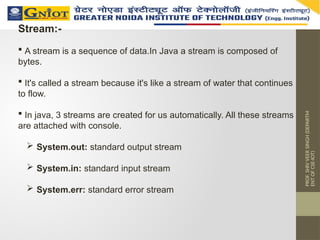
Stream:-
A streamis a sequence of data.In Java a stream is composed of
bytes.
It's called a stream because it's like a stream of water that continues
to flow.
In java, 3 streams are created for us automatically. All these streams
are attached with console.
System.out: standard output stream
System.in: standard input stream
System.err: standard error stream
PROF.
SHIV
VEER
SINGH
(DEPARTM
ENT
OF
CSE-IOT)
Commonly used methodsof OutputStream class
Method Description
1) public void write(int)throws
IOException:
is used to write a byte to the
current output stream.
2) public void
write(byte[])throws
IOException:
is used to write an array of byte to
the current output stream.
3) public void flush()throws
IOException:
flushes the current output stream.
4) public void close()throws
IOException:
is used to close the current output
stream.
PROF.
SHIV
VEER
SINGH
(DEPARTM
ENT
OF
CSE-IOT)
InputStream class:-
InputStreamclass is an abstract class.
It is the superclass of all classes representing an input stream of
bytes.
Method Description
1) public abstract int read()throws
IOException:
reads the next byte of data from the input
stream.It returns -1 at the end of file.
2) public int available()throws
IOException:
returns an estimate of the number of
bytes that can be read from the current
input stream.
3) public void close()throws IOException: is used to close the current input stream.
Commonly Used Method Of InputStream Class
PROF.
SHIV
VEER
SINGH
(DEPARTM
ENT
OF
CSE-IOT)
Examples of Readingthe data of current java file and
writing it into another file
import java.io.*;
class C
{
public static void main(String args[])throws Exception
{
FileInputStream fin=new FileInputStream("C.java");
FileOutputStream fout=new FileOutputStream("M.java");
int i=0;
while((i=fin.read())!=-1)
{
fout.write((byte)i);
}
fin.close();
}
}
44.
PROF.
SHIV
VEER
SINGH
(DEPARTM
ENT
OF
CSE-IOT)
FileWriter
Java FileWriterclass is used to write character-oriented
data to the file.
FileWriter class Example:-
import java.io.*;
class Simple{
public static void main(String args[]){
try{
FileWriter fw=new FileWriter("abc.txt");
fw.write("my name is SHIV VEER”);
fw.close();
}catch(Exception e){System.out.println(e);}
System.out.println("success");
}
}
45.
PROF.
SHIV
VEER
SINGH
(DEPARTM
ENT
OF
CSE-IOT)
Java FileReaderclass is used to read character-
oriented data from the file.
FileReader Class
FileReader Example:-
import java.io.*;
class Simple{
public static void main(String args[])throws
Exception{
FileReader fr=new FileReader("abc.txt");
int i;
while((i=fr.read())!=-1)
System.out.println((char)i);
fr.close();
}
}
![PROF.
SHIV
VEER
SINGH
(DEPARTM
ENT
OF
CSE-IOT)
Problem without exception handling
public class Testtrycatch1
{
public static void main(String args[])
{
int data=50/0;//may throw exception
System.out.println("rest of the code...");
}
}
Output:
Exception in thread main java.lang.ArithmeticException:/ by zero](https://image.slidesharecdn.com/exceptionhandlingandmultithreadinginjavaunit-2-250625180047-4d7f89e1/85/Exception-Handling-and-MultiThreading-in-Java-Unit-2-pptx-7-320.jpg)
![PROF.
SHIV
VEER
SINGH
(DEPARTM
ENT
OF
CSE-IOT)
Solution by exception handling
public class Testtrycatch2
{
public static void main(String args[])
{
try
{
int data=50/0;
}
catch(ArithmeticException e)
{
System.out.println(e);
}
System.out.println("rest of the code...");
}
}](https://image.slidesharecdn.com/exceptionhandlingandmultithreadinginjavaunit-2-250625180047-4d7f89e1/85/Exception-Handling-and-MultiThreading-in-Java-Unit-2-pptx-8-320.jpg)
![PROF.
SHIV
VEER
SINGH
(DEPARTM
ENT
OF
CSE-IOT)
catch multiple exceptions
public class TestMultipleCatchBlock{
public static void main(String args[]){
try{
int a[]=new int[5];
a[5]=30/0;
}
catch(ArithmeticException e)
{System.out.println("task1 is completed");}
catch(ArrayIndexOutOfBoundsException e)
{System.out.println("task 2 completed");}
catch(Exception e)
{
System.out.println("common task completed");
}
System.out.println("rest of the code...");
}
}](https://image.slidesharecdn.com/exceptionhandlingandmultithreadinginjavaunit-2-250625180047-4d7f89e1/85/Exception-Handling-and-MultiThreading-in-Java-Unit-2-pptx-10-320.jpg)
![PROF.
SHIV
VEER
SINGH
(DEPARTM
ENT
OF
CSE-IOT)
Java Nested try block
The try block within a try block is known as nested try block in java.
class Excep6
{
public static void main(String args[])
{
try
{
try
{
System.out.println("going to divide");
int b =39/0;
}
catch(ArithmeticException e)
{
System.out.println(e);
}
Example:-](https://image.slidesharecdn.com/exceptionhandlingandmultithreadinginjavaunit-2-250625180047-4d7f89e1/85/Exception-Handling-and-MultiThreading-in-Java-Unit-2-pptx-12-320.jpg)
![PROF.
SHIV
VEER
SINGH
(DEPARTM
ENT
OF
CSE-IOT)
try
{
int a[]=new int[5];
a[5]=4;
}
catch(ArrayIndexOutOfBoundsException e)
{
System.out.println(e);
}
System.out.println("other statement);
}
catch(Exception e)
{
System.out.println("handeled");
}
System.out.println("normal flow..");
}
}](https://image.slidesharecdn.com/exceptionhandlingandmultithreadinginjavaunit-2-250625180047-4d7f89e1/85/Exception-Handling-and-MultiThreading-in-Java-Unit-2-pptx-13-320.jpg)

![PROF.
SHIV
VEER
SINGH
(DEPARTM
ENT
OF
CSE-IOT)
public class TestThrow1{
static void validate(int age){
if(age<18)
throw new ArithmeticException("not valid");
else
System.out.println("welcome to vote");
}
public static void main(String args[]){
validate(13);
System.out.println("rest of the code...");
}
}
Example:-
Output:
Exception in thread main java.lang.ArithmeticException:not valid](https://image.slidesharecdn.com/exceptionhandlingandmultithreadinginjavaunit-2-250625180047-4d7f89e1/85/Exception-Handling-and-MultiThreading-in-Java-Unit-2-pptx-16-320.jpg)
![PROF.
SHIV
VEER
SINGH
(DEPARTM
ENT
OF
CSE-IOT)
example :-
import java.io.IOException;
class Testthrows1{
void m()throws IOException{
throw new IOException("device error");//checked exception
}
void n()throws IOException{
m();
}
void p(){
try{
n();
}catch(Exception e){System.out.println("exception handled");}
}
public static void main(String args[]){
Testthrows1 obj=new Testthrows1();
obj.p();
System.out.println("normal flow...");
}
} exception handled normal flow...
Output:](https://image.slidesharecdn.com/exceptionhandlingandmultithreadinginjavaunit-2-250625180047-4d7f89e1/85/Exception-Handling-and-MultiThreading-in-Java-Unit-2-pptx-18-320.jpg)

![PROF.
SHIV
VEER
SINGH
(DEPARTM
ENT
OF
CSE-IOT)
class TestCustomException1{
static void validate(int age)throws InvalidAgeException{
if(age<18)
throw new InvalidAgeException("not valid");
else
System.out.println("welcome to vote");
}
public static void main(String args[]){
try{
validate(13);
}catch(Exception m){System.out.println("Exception occured:
"+m);}
System.out.println("rest of the code...");
}
}
...
Output: Exception occured: InvalidAgeException:not valid
rest of the code](https://image.slidesharecdn.com/exceptionhandlingandmultithreadinginjavaunit-2-250625180047-4d7f89e1/85/Exception-Handling-and-MultiThreading-in-Java-Unit-2-pptx-22-320.jpg)


![PROF.
SHIV
VEER
SINGH
(DEPARTM
ENT
OF
CSE-IOT)
Example to Create thread By extendingThread Class
class Multi extends Thread
{
public void run()
{
System.out.println("thread is running...");
}
public static void main(String args[])
{
Multi t1=new Multi();
t1.start();
}
}](https://image.slidesharecdn.com/exceptionhandlingandmultithreadinginjavaunit-2-250625180047-4d7f89e1/85/Exception-Handling-and-MultiThreading-in-Java-Unit-2-pptx-31-320.jpg)
![PROF.
SHIV
VEER
SINGH
(DEPARTM
ENT
OF
CSE-IOT)
Example To Create thread By implementing the
Runnable interface:
class Multi1 implements Runnable
{
public void run()
{
System.out.println("thread is running...");
}
public static void main(String args[])
{
Multi1 m1=new Multi1();
Thread t1 =new Thread(m1);
t1.start();
}
}](https://image.slidesharecdn.com/exceptionhandlingandmultithreadinginjavaunit-2-250625180047-4d7f89e1/85/Exception-Handling-and-MultiThreading-in-Java-Unit-2-pptx-32-320.jpg)
![PROF.
SHIV
VEER
SINGH
(DEPARTM
ENT
OF
CSE-IOT)
class TestMultiPriority1 extends Thread {
public void run(){
System.out.println("running thread name
is:"+Thread.currentThread().getName());
System.out.println("running thread priority
is:"+Thread.currentThread().getPriority());
}
public static void main(String args[]){
TestMultiPriority1 m1=new TestMultiPriority1();
TestMultiPriority1 m2=new TestMultiPriority1();
m1.setPriority(Thread.MIN_PRIORITY);
m2.setPriority(Thread.MAX_PRIORITY);
m1.start();
m2.start();
}
}
Example To Thread Priority In Java](https://image.slidesharecdn.com/exceptionhandlingandmultithreadinginjavaunit-2-250625180047-4d7f89e1/85/Exception-Handling-and-MultiThreading-in-Java-Unit-2-pptx-34-320.jpg)
![PROF.
SHIV
VEER
SINGH
(DEPARTM
ENT
OF
CSE-IOT)
Sleep method
class TestSleepMethod1 extends Thread{
public void run(){
for(int i=1;i<5;i++){
try{Thread.sleep(1000);}catch(InterruptedException e)
{System.out.println(e);}
System.out.println(i);
}
}
public static void main(String args[]){
TestSleepMethod1 t1=new TestSleepMethod1();
TestSleepMethod1 t2=new TestSleepMethod1();
t1.start();
t2.start();
}
}](https://image.slidesharecdn.com/exceptionhandlingandmultithreadinginjavaunit-2-250625180047-4d7f89e1/85/Exception-Handling-and-MultiThreading-in-Java-Unit-2-pptx-35-320.jpg)


![PROF.
SHIV
VEER
SINGH
(DEPARTM
ENT
OF
CSE-IOT)
Commonly used methods of OutputStream class
Method Description
1) public void write(int)throws
IOException:
is used to write a byte to the
current output stream.
2) public void
write(byte[])throws
IOException:
is used to write an array of byte to
the current output stream.
3) public void flush()throws
IOException:
flushes the current output stream.
4) public void close()throws
IOException:
is used to close the current output
stream.](https://image.slidesharecdn.com/exceptionhandlingandmultithreadinginjavaunit-2-250625180047-4d7f89e1/85/Exception-Handling-and-MultiThreading-in-Java-Unit-2-pptx-39-320.jpg)


![PROF.
SHIV
VEER
SINGH
(DEPARTM
ENT
OF
CSE-IOT)
Examples of Reading the data of current java file and
writing it into another file
import java.io.*;
class C
{
public static void main(String args[])throws Exception
{
FileInputStream fin=new FileInputStream("C.java");
FileOutputStream fout=new FileOutputStream("M.java");
int i=0;
while((i=fin.read())!=-1)
{
fout.write((byte)i);
}
fin.close();
}
}](https://image.slidesharecdn.com/exceptionhandlingandmultithreadinginjavaunit-2-250625180047-4d7f89e1/85/Exception-Handling-and-MultiThreading-in-Java-Unit-2-pptx-43-320.jpg)
![PROF.
SHIV
VEER
SINGH
(DEPARTM
ENT
OF
CSE-IOT)
FileWriter
Java FileWriter class is used to write character-oriented
data to the file.
FileWriter class Example:-
import java.io.*;
class Simple{
public static void main(String args[]){
try{
FileWriter fw=new FileWriter("abc.txt");
fw.write("my name is SHIV VEER”);
fw.close();
}catch(Exception e){System.out.println(e);}
System.out.println("success");
}
}](https://image.slidesharecdn.com/exceptionhandlingandmultithreadinginjavaunit-2-250625180047-4d7f89e1/85/Exception-Handling-and-MultiThreading-in-Java-Unit-2-pptx-44-320.jpg)
![PROF.
SHIV
VEER
SINGH
(DEPARTM
ENT
OF
CSE-IOT)
Java FileReader class is used to read character-
oriented data from the file.
FileReader Class
FileReader Example:-
import java.io.*;
class Simple{
public static void main(String args[])throws
Exception{
FileReader fr=new FileReader("abc.txt");
int i;
while((i=fr.read())!=-1)
System.out.println((char)i);
fr.close();
}
}](https://image.slidesharecdn.com/exceptionhandlingandmultithreadinginjavaunit-2-250625180047-4d7f89e1/85/Exception-Handling-and-MultiThreading-in-Java-Unit-2-pptx-45-320.jpg)


![[Java concurrency]01.thread management](https://cdn.slidesharecdn.com/ss_thumbnails/javaconcurrency01-130927094151-phpapp02-thumbnail.jpg?width=640&height=640&fit=bounds)


