Photoshop
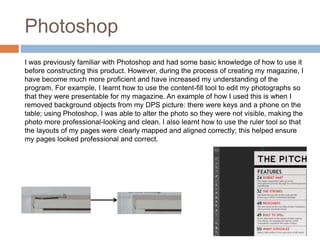
I was previously familiar with Photoshop and had some basic knowledge of how to use it
before constructing this product. However, during the process of creating my magazine, I
have become much more proficient and have increased my understanding of the
program. For example, I learnt how to use the content-fill tool to edit my photographs so
that they were presentable for my magazine. An example of how I used this is when I
removed background objects from my DPS picture: there were keys and a phone on the
table; using Photoshop, I was able to alter the photo so they were not visible, making the
photo more professional-looking and clean. I also learnt how to use the ruler tool so that
the layouts of my pages were clearly mapped and aligned correctly; this helped ensure
my pages looked professional and correct.
Slideshare
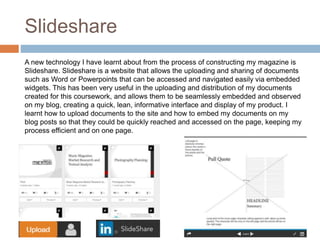
A new technology I have learnt about from the process of constructing my magazine is
Slideshare. Slideshare is a website that allows the uploading and sharing of documents
such as Word or Powerpoints that can be accessed and navigated easily via embedded
widgets. This has been very useful in the uploading and distribution of my documents
created for this coursework, and allows them to be seamlessly embedded and observed
on my blog, creating a quick, lean, informative interface and display of my product. I
learnt how to upload documents to the site and how to embed my documents on my
blog posts so that they could be quickly reached and accessed on the page, keeping my
process efficient and on one page.
InDesign
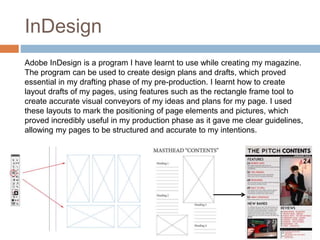
Adobe InDesign is a program I have learnt to use while creating my magazine.
The program can be used to create design plans and drafts, which proved
essential in my drafting phase of my pre-production. I learnt how to create
layout drafts of my pages, using features such as the rectangle frame tool to
create accurate visual conveyors of my ideas and plans for my page. I used
these layouts to mark the positioning of page elements and pictures, which
proved incredibly useful in my production phase as it gave me clear guidelines,
allowing my pages to be structured and accurate to my intentions.
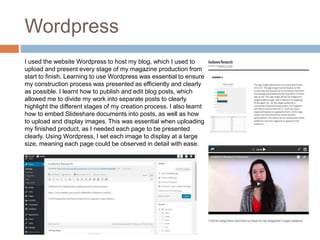
Wordpress
I used the website Wordpress to host my blog, which I used to
upload and present every stage of my magazine production from
start to finish. Learning to use Wordpress was essential to ensure
my construction process was presented as efficiently and clearly
as possible. I learnt how to publish and edit blog posts, which
allowed me to divide my work into separate posts to clearly
highlight the different stages of my creation process. I also learnt
how to embed Slideshare documents into posts, as well as how
to upload and display images. This was essential when uploading
my finished product, as I needed each page to be presented
clearly. Using Wordpress, I set each image to display at a large
size, meaning each page could be observed in detail with ease.

Evaluation Q6

  • 2.
    Photoshop I was previouslyfamiliar with Photoshop and had some basic knowledge of how to use it before constructing this product. However, during the process of creating my magazine, I have become much more proficient and have increased my understanding of the program. For example, I learnt how to use the content-fill tool to edit my photographs so that they were presentable for my magazine. An example of how I used this is when I removed background objects from my DPS picture: there were keys and a phone on the table; using Photoshop, I was able to alter the photo so they were not visible, making the photo more professional-looking and clean. I also learnt how to use the ruler tool so that the layouts of my pages were clearly mapped and aligned correctly; this helped ensure my pages looked professional and correct.
  • 3.
    Slideshare A new technologyI have learnt about from the process of constructing my magazine is Slideshare. Slideshare is a website that allows the uploading and sharing of documents such as Word or Powerpoints that can be accessed and navigated easily via embedded widgets. This has been very useful in the uploading and distribution of my documents created for this coursework, and allows them to be seamlessly embedded and observed on my blog, creating a quick, lean, informative interface and display of my product. I learnt how to upload documents to the site and how to embed my documents on my blog posts so that they could be quickly reached and accessed on the page, keeping my process efficient and on one page.
  • 4.
    InDesign Adobe InDesign isa program I have learnt to use while creating my magazine. The program can be used to create design plans and drafts, which proved essential in my drafting phase of my pre-production. I learnt how to create layout drafts of my pages, using features such as the rectangle frame tool to create accurate visual conveyors of my ideas and plans for my page. I used these layouts to mark the positioning of page elements and pictures, which proved incredibly useful in my production phase as it gave me clear guidelines, allowing my pages to be structured and accurate to my intentions.
  • 5.
    Wordpress I used thewebsite Wordpress to host my blog, which I used to upload and present every stage of my magazine production from start to finish. Learning to use Wordpress was essential to ensure my construction process was presented as efficiently and clearly as possible. I learnt how to publish and edit blog posts, which allowed me to divide my work into separate posts to clearly highlight the different stages of my creation process. I also learnt how to embed Slideshare documents into posts, as well as how to upload and display images. This was essential when uploading my finished product, as I needed each page to be presented clearly. Using Wordpress, I set each image to display at a large size, meaning each page could be observed in detail with ease.