EQUIPMENT
All equipment we will be using and what they
will be used for.
Camera gear
• Panasonic HC-X900M
• This will be used as our main camera during the
production of the documentary piece. We will be using
more than one of these cameras during our interviews for
multi-cam effect.
• Canon 100d with Additional lens
• This will be used to photograph the objects for the poster
pieces. The lens we will be using is a 17mm and this will
give us more area around the object for text.
Camera gear
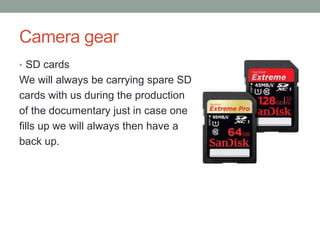
• SD cards
We will always be carrying spare SD
cards with us during the production
of the documentary just in case one
fills up we will always then have a
back up.
Tripod and attachments
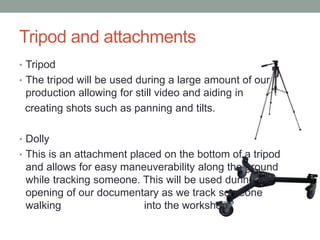
• Tripod
• The tripod will be used during a large amount of our
production allowing for still video and aiding in
creating shots such as panning and tilts.
• Dolly
• This is an attachment placed on the bottom of a tripod
and allows for easy maneuverability along the ground
while tracking someone. This will be used during the
opening of our documentary as we track someone
walking into the workshop
Tripod and attachments
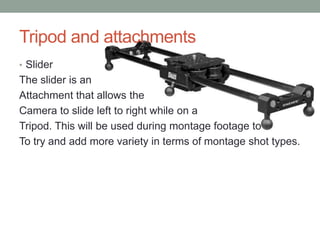
• Slider
The slider is an
Attachment that allows the
Camera to slide left to right while on a
Tripod. This will be used during montage footage to
To try and add more variety in terms of montage shot types.
Sound equipment
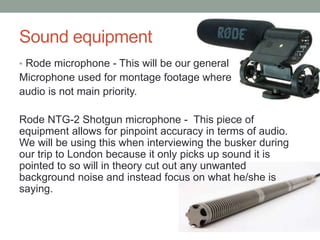
• Rode microphone - This will be our general
Microphone used for montage footage where
audio is not main priority.
Rode NTG-2 Shotgun microphone - This piece of
equipment allows for pinpoint accuracy in terms of audio.
We will be using this when interviewing the busker during
our trip to London because it only picks up sound it is
pointed to so will in theory cut out any unwanted
background noise and instead focus on what he/she is
saying.
Sound equipment
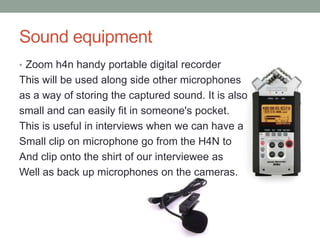
• Zoom h4n handy portable digital recorder
This will be used along side other microphones
as a way of storing the captured sound. It is also
small and can easily fit in someone's pocket.
This is useful in interviews when we can have a
Small clip on microphone go from the H4N to
And clip onto the shirt of our interviewee as
Well as back up microphones on the cameras.
External lights and white backboard
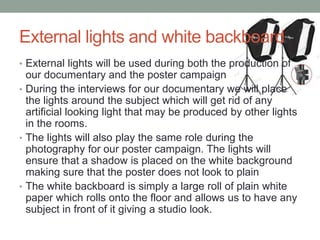
• External lights will be used during both the production of
our documentary and the poster campaign
• During the interviews for our documentary we will place
the lights around the subject which will get rid of any
artificial looking light that may be produced by other lights
in the rooms.
• The lights will also play the same role during the
photography for our poster campaign. The lights will
ensure that a shadow is placed on the white background
making sure that the poster does not look to plain
• The white backboard is simply a large roll of plain white
paper which rolls onto the floor and allows us to have any
subject in front of it giving a studio look.
Editing software
• Indesign
This will be the software we will use to produce our poster.
We have decided to use this because it is predominantly a
publishing piece of software which will allow for far greater
freedom in terms of document editing than something like
photoshop will provide.
Photoshop
We are going to use Photoshop as an editing software
where we will place our images for the poster onto. This
allows us to take any imperfections out before it gets
exported to indesign where the actual poster will be
created.
Editing software
• Final cut
This will be the editing software we use to create our
documentary piece. We are using final cut because it is
assessable for all of our team and is something we are all
comfortable with. Final cut allows us to manipulate any
video we import into the software in many different ways
making it the perfect editing software for us for our
documentary.
Where we will get access to this
equipment/software
All of this equipment (except the Canon equipment) we are
fortunate enough to have access to through the school
media department.

Equipment

  • 1.
    EQUIPMENT All equipment wewill be using and what they will be used for.
  • 2.
    Camera gear • PanasonicHC-X900M • This will be used as our main camera during the production of the documentary piece. We will be using more than one of these cameras during our interviews for multi-cam effect. • Canon 100d with Additional lens • This will be used to photograph the objects for the poster pieces. The lens we will be using is a 17mm and this will give us more area around the object for text.
  • 3.
    Camera gear • SDcards We will always be carrying spare SD cards with us during the production of the documentary just in case one fills up we will always then have a back up.
  • 4.
    Tripod and attachments •Tripod • The tripod will be used during a large amount of our production allowing for still video and aiding in creating shots such as panning and tilts. • Dolly • This is an attachment placed on the bottom of a tripod and allows for easy maneuverability along the ground while tracking someone. This will be used during the opening of our documentary as we track someone walking into the workshop
  • 5.
    Tripod and attachments •Slider The slider is an Attachment that allows the Camera to slide left to right while on a Tripod. This will be used during montage footage to To try and add more variety in terms of montage shot types.
  • 6.
    Sound equipment • Rodemicrophone - This will be our general Microphone used for montage footage where audio is not main priority. Rode NTG-2 Shotgun microphone - This piece of equipment allows for pinpoint accuracy in terms of audio. We will be using this when interviewing the busker during our trip to London because it only picks up sound it is pointed to so will in theory cut out any unwanted background noise and instead focus on what he/she is saying.
  • 7.
    Sound equipment • Zoomh4n handy portable digital recorder This will be used along side other microphones as a way of storing the captured sound. It is also small and can easily fit in someone's pocket. This is useful in interviews when we can have a Small clip on microphone go from the H4N to And clip onto the shirt of our interviewee as Well as back up microphones on the cameras.
  • 8.
    External lights andwhite backboard • External lights will be used during both the production of our documentary and the poster campaign • During the interviews for our documentary we will place the lights around the subject which will get rid of any artificial looking light that may be produced by other lights in the rooms. • The lights will also play the same role during the photography for our poster campaign. The lights will ensure that a shadow is placed on the white background making sure that the poster does not look to plain • The white backboard is simply a large roll of plain white paper which rolls onto the floor and allows us to have any subject in front of it giving a studio look.
  • 9.
    Editing software • Indesign Thiswill be the software we will use to produce our poster. We have decided to use this because it is predominantly a publishing piece of software which will allow for far greater freedom in terms of document editing than something like photoshop will provide. Photoshop We are going to use Photoshop as an editing software where we will place our images for the poster onto. This allows us to take any imperfections out before it gets exported to indesign where the actual poster will be created.
  • 10.
    Editing software • Finalcut This will be the editing software we use to create our documentary piece. We are using final cut because it is assessable for all of our team and is something we are all comfortable with. Final cut allows us to manipulate any video we import into the software in many different ways making it the perfect editing software for us for our documentary.
  • 11.
    Where we willget access to this equipment/software All of this equipment (except the Canon equipment) we are fortunate enough to have access to through the school media department.