Part # 2
2
StudyObjectives
Understand concepts of data modeling and its
purpose
Learn how relationships between entities are
defined and refined, and how such relationships
are incorporated into the database design
process
Learn how ERD components affect database
design and implementation
Learn how to interpret the modeling symbols
3.
Part # 2
DataModel
Model: an abstraction of a real-world
object or event
Useful in understanding complexities of the
real-world environment
Data model
A diagram that displays a set of tables and
the relationships between them
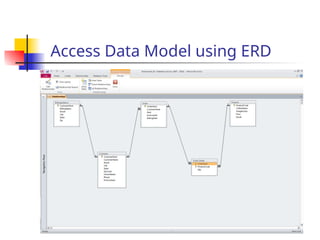
Next Slide: “Restaurant” Access data model
using Entity Relationship Diagram (ERD)
Part # 2
Whatis an Entity Relationship
Diagram (ERD)?
ERD is a data modeling technique used in
software engineering to produce a conceptual
data model of an information system.
So, ERDs illustrate the logical structure of
databases.
ERD development using a CASE tool
Powerdesigner by SAP
Data Modeler by Orcale
5
6.
Part # 2
TheImportance of Data Model
Blue print: official documentation
Blue print of house
Employee’s w/o DB knowledge can understand
a data model diagram vs. a list of tables
Used as an effective Communication Tool
Improve interaction among the managers, the
designers, and the end users
Independence from a particular DBMS
Network DB, Object-oriented DB, etc.
7.
Part # 2
7
The data modeling revolves around
discovering and analyzing organizational
and users data requirements.
Requirements based on policies, meetings,
procedures, system specifications, etc.
Identify what data is important
Identify what data should be maintained
Data Model (con’t)
8.
Part # 2
8
The major activity of this phase is identifying
entities, attributes, and their relationships to
construct model using the Entity Relationship
Diagram.
Entity table
Attribute column
Relationship line
Basics of Data Modeling Video
Until business rules # 3 (9:20)
ERD
9.
Part # 2
9
Howto find entities?
Entity:
"...anything (people, places, objects, events, etc.)
about which we store information (e.g. supplier,
machine tool, employee, utility pole, airline seat,
etc.).”
Tangible: customer, product
Intangible: order, accounting receivable
Look for singular nouns (beginner)
BUT a proper noun is not a good candidate….
10.
Part # 2
10
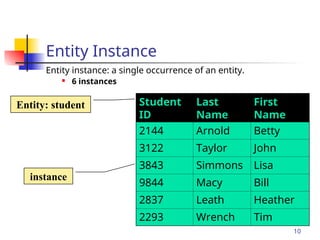
EntityInstance
Entity instance: a single occurrence of an entity.
6 instances
Student
ID
Last
Name
First
Name
2144 Arnold Betty
3122 Taylor John
3843 Simmons Lisa
9844 Macy Bill
2837 Leath Heather
2293 Wrench Tim
Entity: student
instance
11.
Part # 2
11
Howto find attributes?
Attribute:
Attributes are data objects that either identify or
describe entities (property of an entity).
In other words, it is a descriptor whose values
are associated with individual entities of a
specific entity type
The process for identifying attributes is similar except
now you want to look for and extract those names that
appear to be descriptive noun phrases.
12.
Part # 2
12
Howto find relationships?
Relationship:
Relationships are associations between entities.
Typically, a relationship is indicated by a verb
connecting two or more entities.
Employees are assigned to projects
Relationships should be classified in terms of
cardinality.
One-to-one, one-to-many, etc.
13.
Part # 2
13
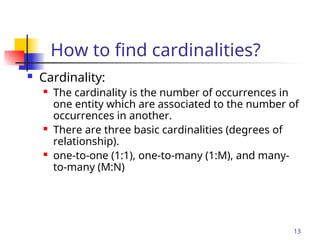
Howto find cardinalities?
Cardinality:
The cardinality is the number of occurrences in
one entity which are associated to the number of
occurrences in another.
There are three basic cardinalities (degrees of
relationship).
one-to-one (1:1), one-to-many (1:M), and many-
to-many (M:N)
14.
Part # 2
14
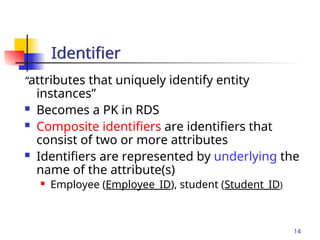
“attributesthat uniquely identify entity
instances”
Becomes a PK in RDS
Composite identifiers are identifiers that
consist of two or more attributes
Identifiers are represented by underlying the
name of the attribute(s)
Employee (Employee_ID), student (Student_ID)
Identifier
15.
Part # 2
Crow’sFoot Notation
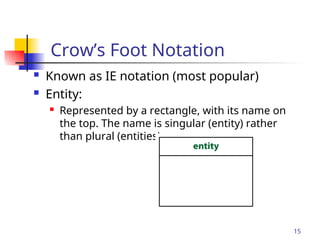
Known as IE notation (most popular)
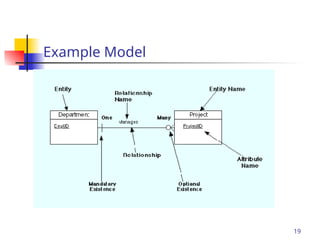
Entity:
Represented by a rectangle, with its name on
the top. The name is singular (entity) rather
than plural (entities).
15
16.
Part # 2
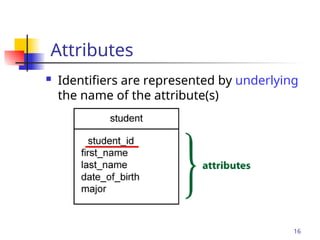
Attributes
Identifiers are represented by underlying
the name of the attribute(s)
16
17.
Part # 2
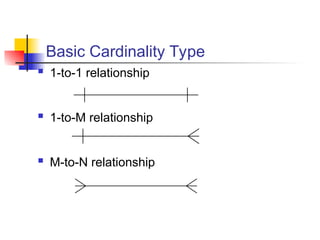
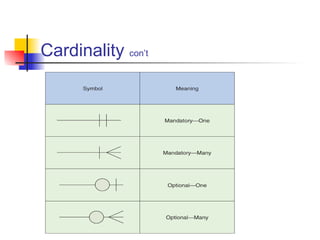
BasicCardinality Type
1-to-1 relationship
1-to-M relationship
M-to-N relationship
Part # 2
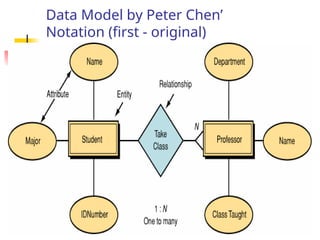
DataModel by Peter Chen’
Notation (first - original)
21.
Part # 2
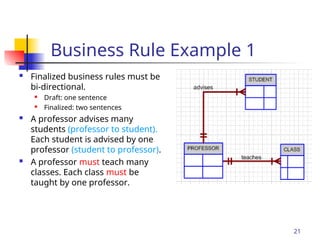
BusinessRule Example 1
Finalized business rules must be
bi-directional.
Draft: one sentence
Finalized: two sentences
A professor advises many
students (professor to student).
Each student is advised by one
professor (student to professor).
A professor must teach many
classes. Each class must be
taught by one professor.
21
22.
Part # 2
BusinessRule 1
Business Rules are used to define entities,
attributes, relationships and constraints.
Usually though they are used for the organization
that stores or uses data to be an explanation of a
policy, procedure, or principle.
The data can be considered significant only after
business rules are defined.
W/o them it cannot be considered as data for RDS but
just records.
22
23.
Part # 2
BusinessRule 2
When creating business rules, keep them simple,
easy to understand, and keep them broad.
so that everyone can have a similar understanding and
interpretation.
Sources of business rules:
Direct interviews with internal & external stakeholders
Site visitations (collect data) and observation of the work
process or procedure
Review and study of documents (Policies, Procedures,
Forms, Operation manuals, etc..)
23
24.
Part # 2
DiscoveringBusiness Rules
Real world example on the class website
After reviewing and studying the interview and
various forms, develop a draft business rules -
does not need to be bi-directional and less
precise wording…
Keep on going until “optimized”
Then, finalize Business Rules: bi-directional.
25.
Part # 2
BusinessRule Example 2
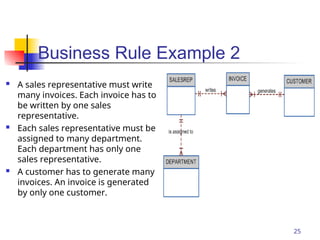
A sales representative must write
many invoices. Each invoice has to
be written by one sales
representative.
Each sales representative must be
assigned to many department.
Each department has only one
sales representative.
A customer has to generate many
invoices. An invoice is generated
by only one customer.
25
26.
Part # 2
26
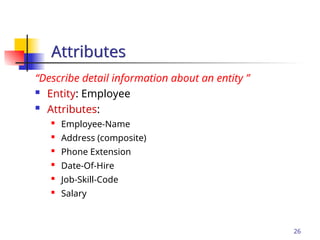
“Describedetail information about an entity ”
Entity: Employee
Attributes:
Employee-Name
Address (composite)
Phone Extension
Date-Of-Hire
Job-Skill-Code
Salary
Attributes
Part # 2
28
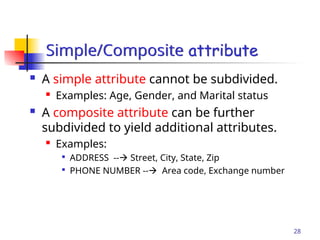
A simple attribute cannot be subdivided.
Examples: Age, Gender, and Marital status
A composite attribute can be further
subdivided to yield additional attributes.
Examples:
ADDRESS -- Street, City, State, Zip
PHONE NUMBER -- Area code, Exchange number
Simple/Composite attribute
29.
Part # 2
29
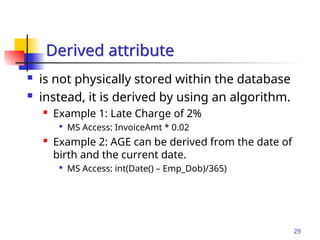
is not physically stored within the database
instead, it is derived by using an algorithm.
Example 1: Late Charge of 2%
MS Access: InvoiceAmt * 0.02
Example 2: AGE can be derived from the date of
birth and the current date.
MS Access: int(Date() – Emp_Dob)/365)
Derived attribute
30.
Part # 2
30
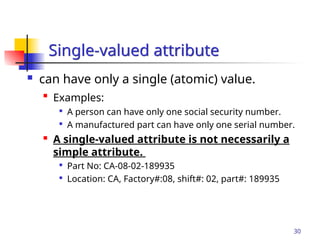
can have only a single (atomic) value.
Examples:
A person can have only one social security number.
A manufactured part can have only one serial number.
A single-valued attribute is not necessarily a
simple attribute.
Part No: CA-08-02-189935
Location: CA, Factory#:08, shift#: 02, part#: 189935
Single-valued attribute
31.
Part # 2
31
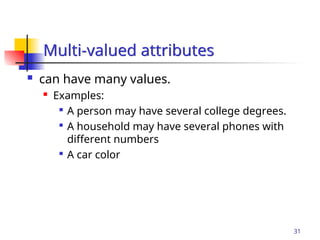
can have many values.
Examples:
A person may have several college degrees.
A household may have several phones with
different numbers
A car color
Multi-valued attributes
Part # 2
Procedureof ERD
Relatively simple representations of
complex real-world data structures
Data modeling is iterative process.
“complete” and “100% error free” model is
not possible!
Only “Optimized” model is possible….
33