Enterprise Applications in the Cloud:

                           Analysis of Pay-per-use Plans


               Leonid Grinshpan, Oracle Corporation (www.oracle.com)


The Cloud-computing paradigm is attractive to businesses not only because of its
technological, logistical, and environmental advantages over traditional IT frameworks.
For the most part its magnetic pull has its roots in economy—Clouds are also well
suited to save IT cost as they implement pay-per-use policies.

While relocating enterprise applications (EA) into the Cloud, the corporations have to
be aware of the cost associated with Cloud services and its dependence on dynamically
changing EA workloads. The same is true for Cloud providers: they have to know the
revenue derived from each hosted EA. This article provides guidance to Cloud users
and Cloud providers on cost/revenue estimates. It explores cost/revenue models for two
pay-per-use plans: pay-per-resource and pay-per-transaction. A modeling approach is
based on methodology described in the author’s book [Leonid Grinshpan. Solving
Enterprise Application Performance Puzzles: Queuing Models to the Rescue, Willey-IEEE
Press, 2012. http://www.amazon.com/Solving-Enterprise-Applications-Performance-
Puzzles/dp/1118061578/ref=ntt_at_ep_dpt_1].

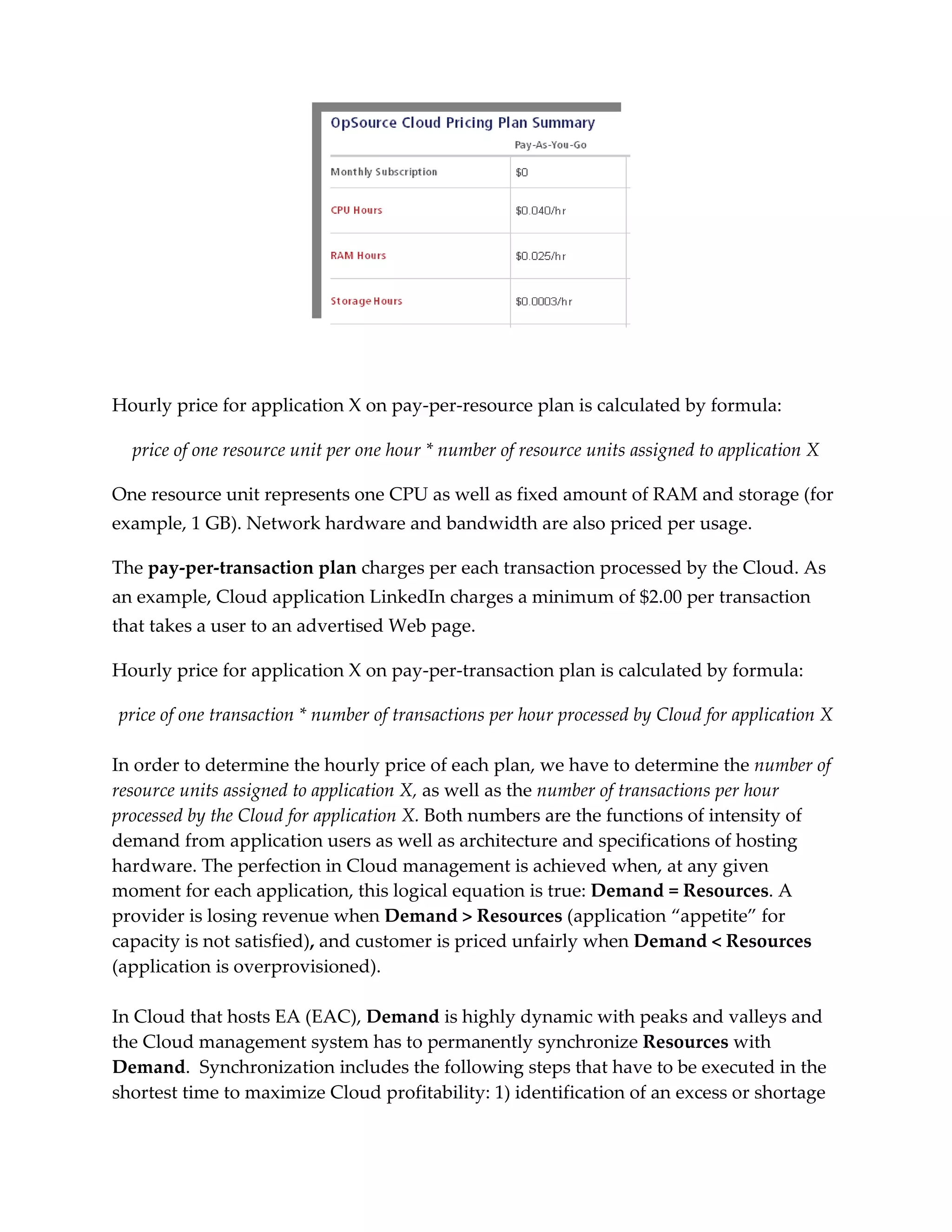
The pay-per-resource plan charges for the hardware capacity an EA uses at any given
time. Typically, resources are priced per hour; below is an excerpt from a price list by
OpSource, a company providing Cloud and managed hosting services:
[http://www.opsource.net/Services/Cloud-Hosting/Pricing]
Hourly price for application X on pay-per-resource plan is calculated by formula:

  price of one resource unit per one hour * number of resource units assigned to application X

One resource unit represents one CPU as well as fixed amount of RAM and storage (for
example, 1 GB). Network hardware and bandwidth are also priced per usage.

The pay-per-transaction plan charges per each transaction processed by the Cloud. As
an example, Cloud application LinkedIn charges a minimum of $2.00 per transaction
that takes a user to an advertised Web page.

Hourly price for application X on pay-per-transaction plan is calculated by formula:

price of one transaction * number of transactions per hour processed by Cloud for application X

In order to determine the hourly price of each plan, we have to determine the number of
resource units assigned to application X, as well as the number of transactions per hour
processed by the Cloud for application X. Both numbers are the functions of intensity of
demand from application users as well as architecture and specifications of hosting
hardware. The perfection in Cloud management is achieved when, at any given
moment for each application, this logical equation is true: Demand = Resources. A
provider is losing revenue when Demand > Resources (application “appetite” for
capacity is not satisfied), and customer is priced unfairly when Demand < Resources
(application is overprovisioned).

In Cloud that hosts EA (EAC), Demand is highly dynamic with peaks and valleys and
the Cloud management system has to permanently synchronize Resources with
Demand. Synchronization includes the following steps that have to be executed in the
shortest time to maximize Cloud profitability: 1) identification of an excess or shortage
of hardware resources; 2) forecasting the size of additional or excessive resources by
modeling; 3) using modeling to estimate an impact of resources reallocation (change
management); 4) effecting changes by reprovisioning resources.

Step 1 is implemented by monitoring usage of Cloud hardware and EA transaction
times. Steps 2 and 3 require modeling; Step 3 is a must-have in multi-tenant Clouds.
Step 4 can be executed quickly if it requires reprovisioning of resources within the
existing virtual machine (VM); the step is more complicated and lengthy if the new VM
has to be deployed and an additional instance of EA has to be installed on it.


Cost/Revenue Model

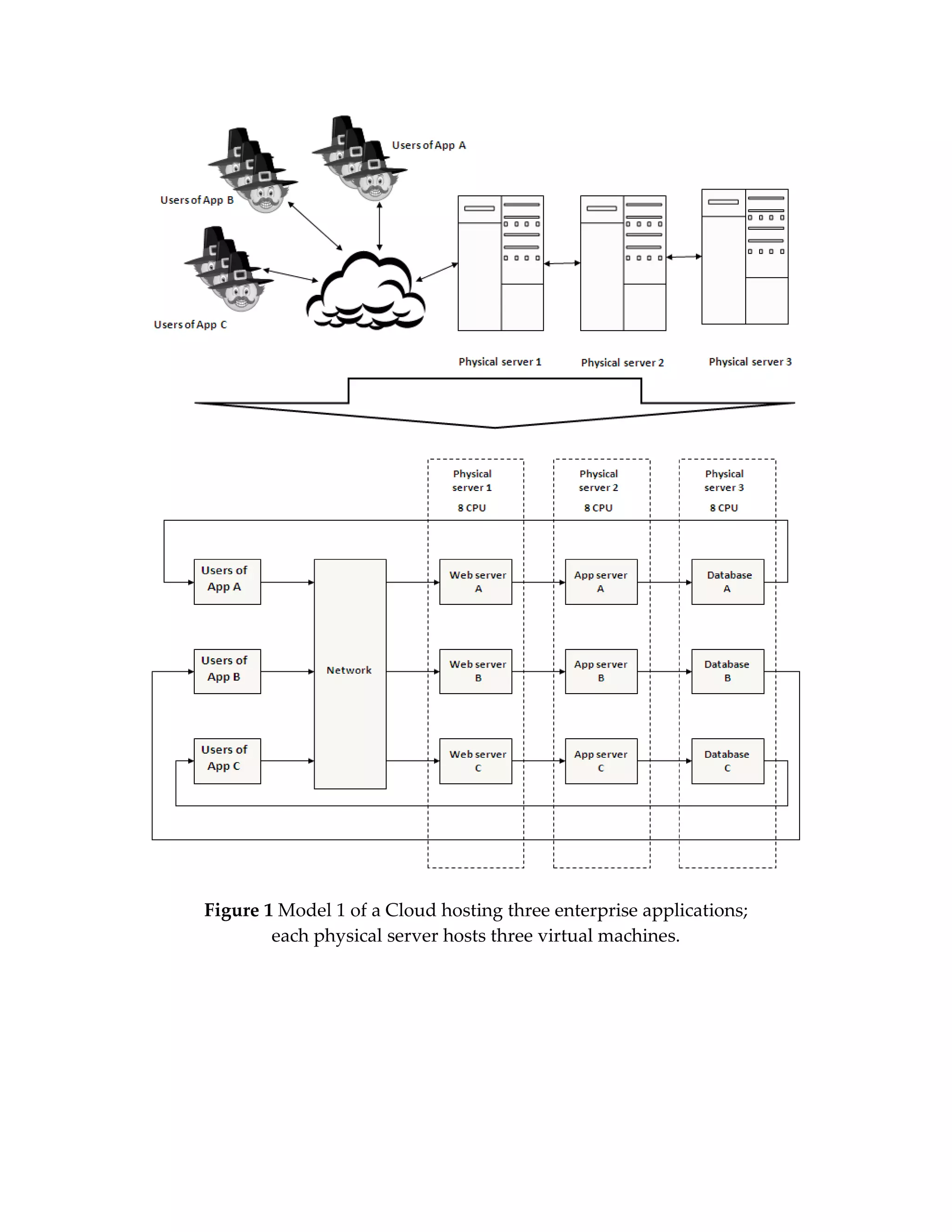
The queuing model on Figure 1 represents a Cloud hosting three EAs (App A, App B,
App C) on three physical servers. EAs have their own users accessing applications over
the network. Each Cloud’s physical server has 24 CPUs and is broken down by three
VMs with 8 CPUs. The users, network and VMs are modeled by dedicated nodes.

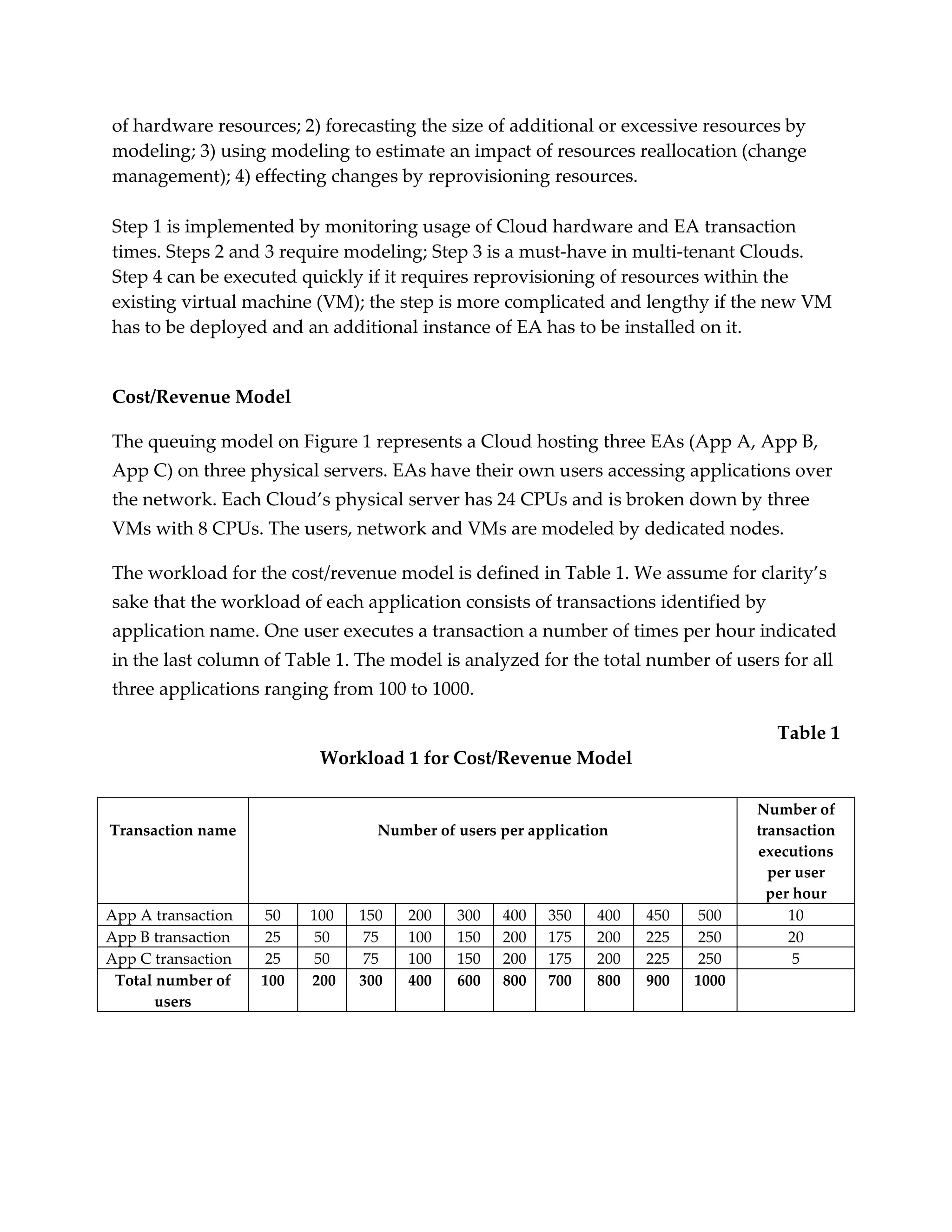
The workload for the cost/revenue model is defined in Table 1. We assume for clarity’s
sake that the workload of each application consists of transactions identified by
application name. One user executes a transaction a number of times per hour indicated
in the last column of Table 1. The model is analyzed for the total number of users for all
three applications ranging from 100 to 1000.

                                                                                    Table 1
                           Workload 1 for Cost/Revenue Model

                                                                                  Number of
Transaction name                  Number of users per application                 transaction
                                                                                  executions
                                                                                    per user
                                                                                    per hour
App A transaction    50   100   150   200   300   400   350    400   450   500         10
App B transaction    25   50     75   100   150   200   175    200   225   250         20
App C transaction    25   50    75    100   150   200   175    200   225   250          5
 Total number of    100   200   300   400   600   800   700    800   900   1000
       users
Figure 1 Model 1 of a Cloud hosting three enterprise applications;
        each physical server hosts three virtual machines.
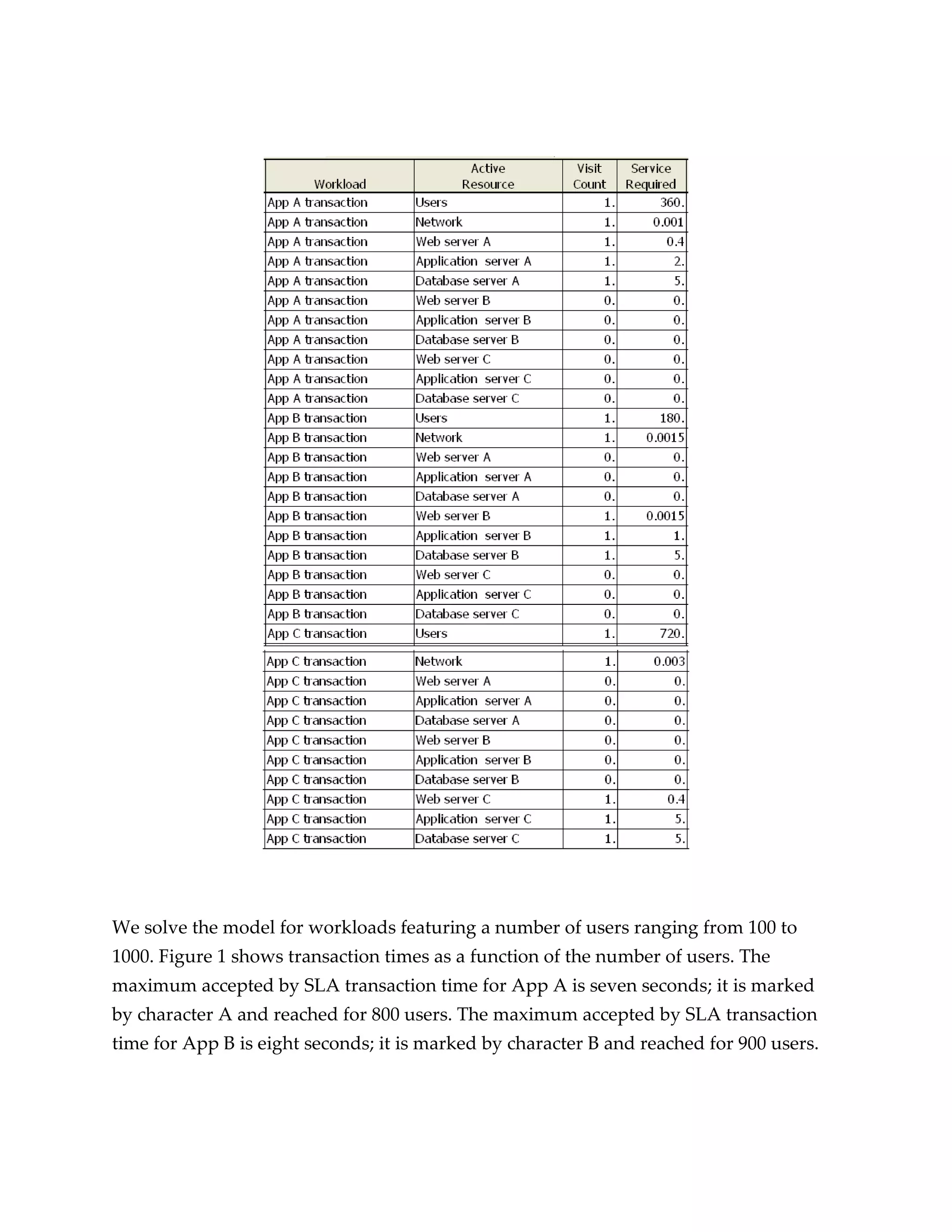
To solve the model we have to specify the profile of each transaction (Table 2). The
transaction profile is a set of time intervals (service demands) a transaction has spent in
all processing units it has visited while served by the application.
                                                                                    Table 2
                                Transaction Profiles (seconds)

                            Time in      Time in Web       Time in App   Time in Database
                         Network node    server node       server node     server node
     App A transaction       0.001             0.4              2.0            5.0
     App B transaction      0.0015             0.2              1.0            5.0
     App C transaction      0.003              0.4              5.0            5.0


The workload identifies an intensity of requests generated by application users, while
the transaction profile characterizes the time interval a single transaction will use Cloud
resources. Table 3 specifies maximum transaction times acceptable by Service Level
Agreements (SLA):

                                                                                            Table 3
             Maximum Acceptable Transaction Times per SLA (seconds)

                                                     Time (seconds)
                           App A transaction               8.0
                           App B transaction              7.00
                           App C transaction             12.00


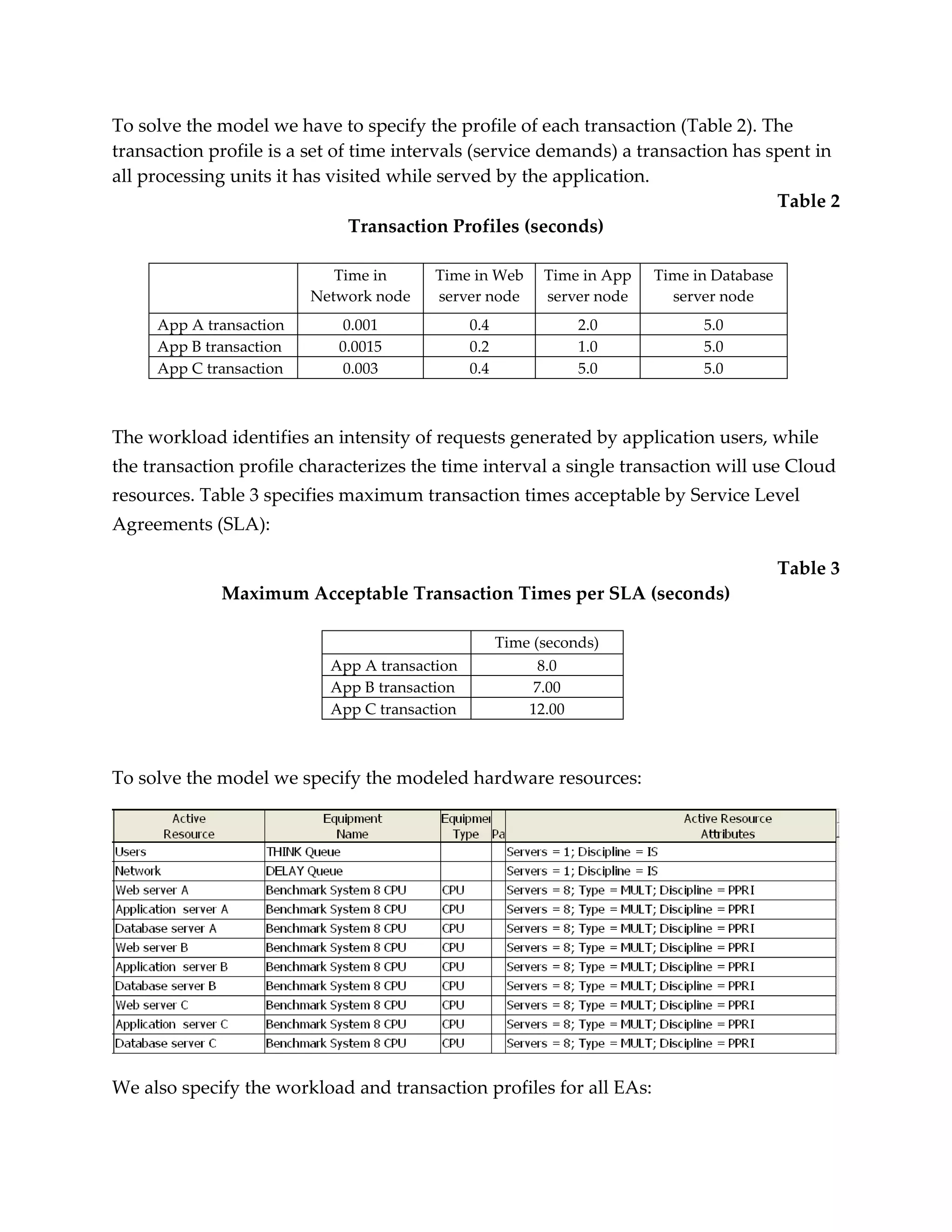
To solve the model we specify the modeled hardware resources:


We also specify the workload and transaction profiles for all EAs:
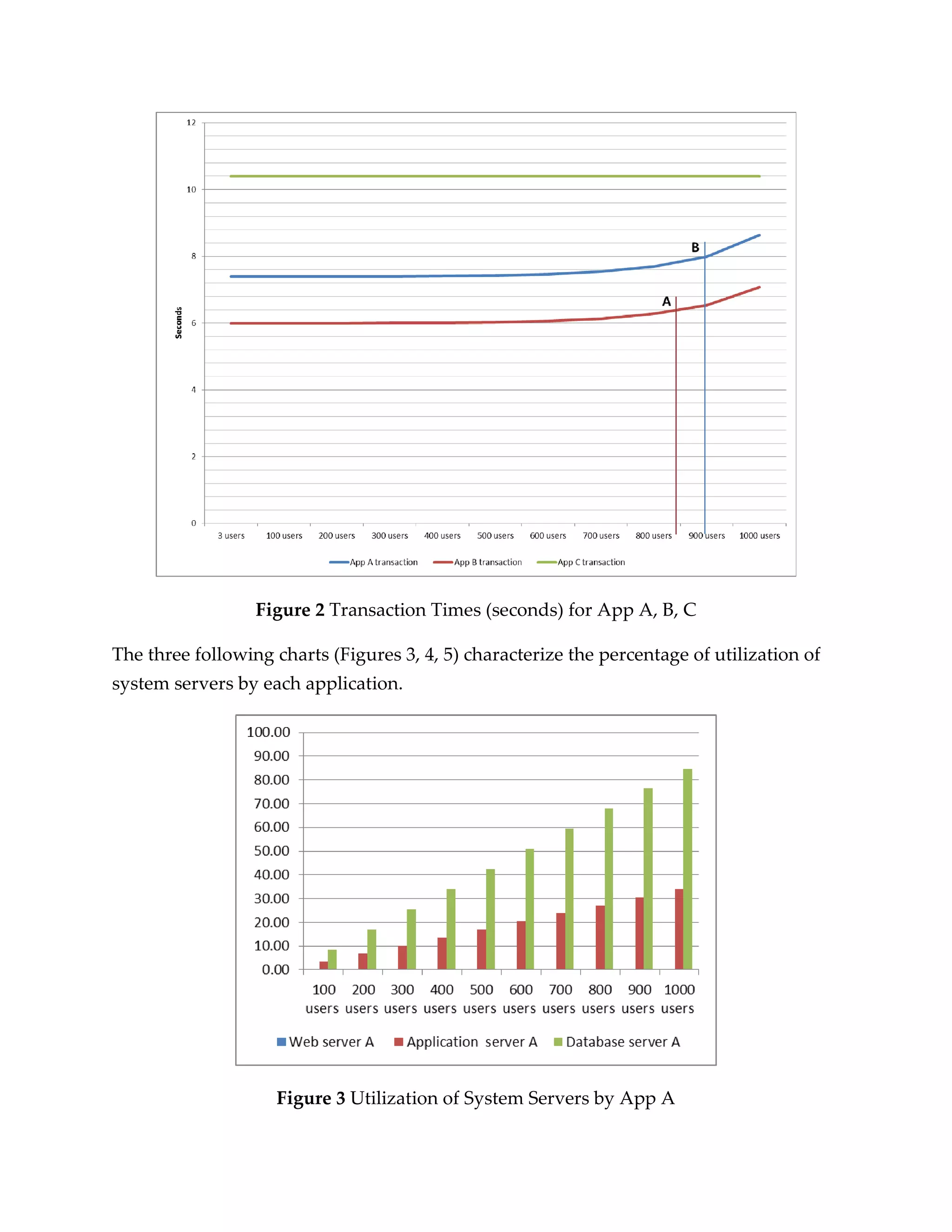
We solve the model for workloads featuring a number of users ranging from 100 to
1000. Figure 1 shows transaction times as a function of the number of users. The
maximum accepted by SLA transaction time for App A is seven seconds; it is marked
by character A and reached for 800 users. The maximum accepted by SLA transaction
time for App B is eight seconds; it is marked by character B and reached for 900 users.
Figure 2 Transaction Times (seconds) for App A, B, C

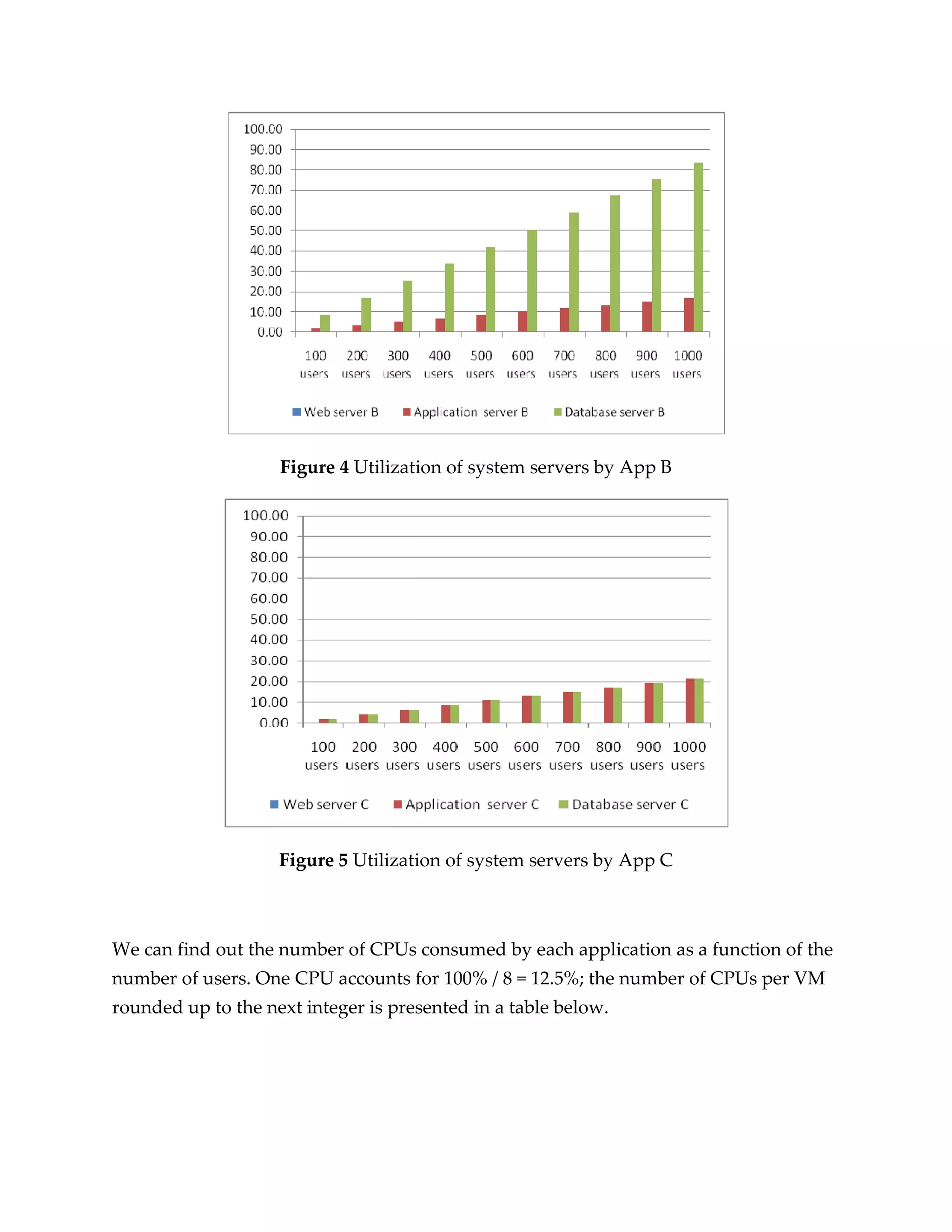
The three following charts (Figures 3, 4, 5) characterize the percentage of utilization of
system servers by each application.


                    Figure 3 Utilization of System Servers by App A
Figure 4 Utilization of system servers by App B


                    Figure 5 Utilization of system servers by App C


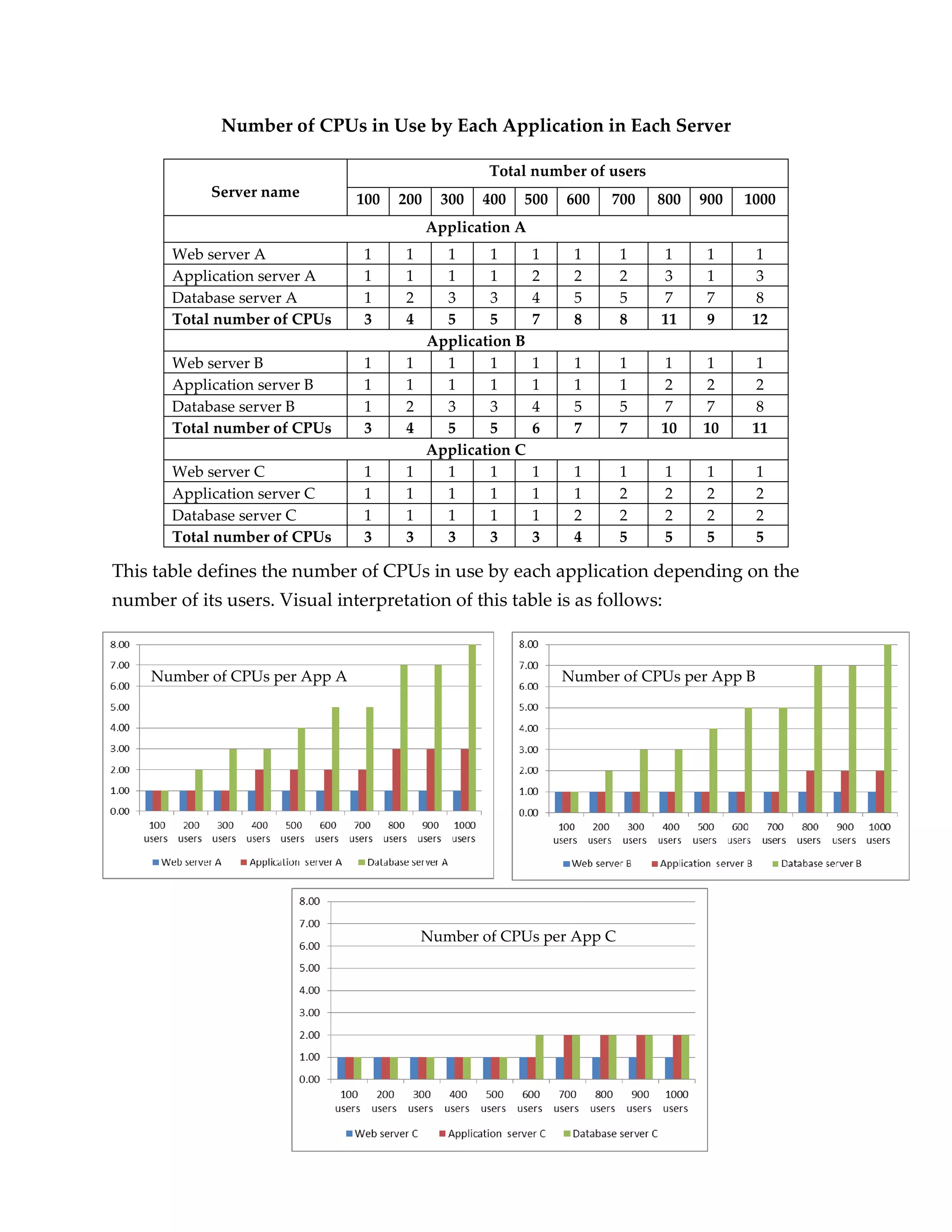
We can find out the number of CPUs consumed by each application as a function of the
number of users. One CPU accounts for 100% / 8 = 12.5%; the number of CPUs per VM
rounded up to the next integer is presented in a table below.
Number of CPUs in Use by Each Application in Each Server

                                                    Total number of users
            Server name         100   200    300   400   500    600   700   800   900   1000
                                            Application A
       Web server A             1     1       1      1      1    1     1    1     1       1
       Application server A     1     1       1      1      2    2     2    3     1       3
       Database server A        1     2       3      3      4    5     5    7     7       8
       Total number of CPUs     3     4       5      5      7    8     8    11    9      12
                                            Application B
       Web server B             1     1       1      1      1    1     1    1     1       1
       Application server B     1     1       1      1      1    1     1    2     2       2
       Database server B        1     2       3      3      4    5     5    7     7       8
       Total number of CPUs     3     4       5      5      6    7     7    10    10     11
                                            Application C
       Web server C             1     1       1      1      1    1     1    1     1        1
       Application server C     1     1       1      1      1    1     2    2     2        2
       Database server C        1     1       1      1      1    2     2    2     2        2
       Total number of CPUs     3     3       3      3      3    4     5    5     5        5

This table defines the number of CPUs in use by each application depending on the
number of its users. Visual interpretation of this table is as follows:


     Number of CPUs per App A                                   Number of CPUs per App B


                                          Number of CPUs per App C
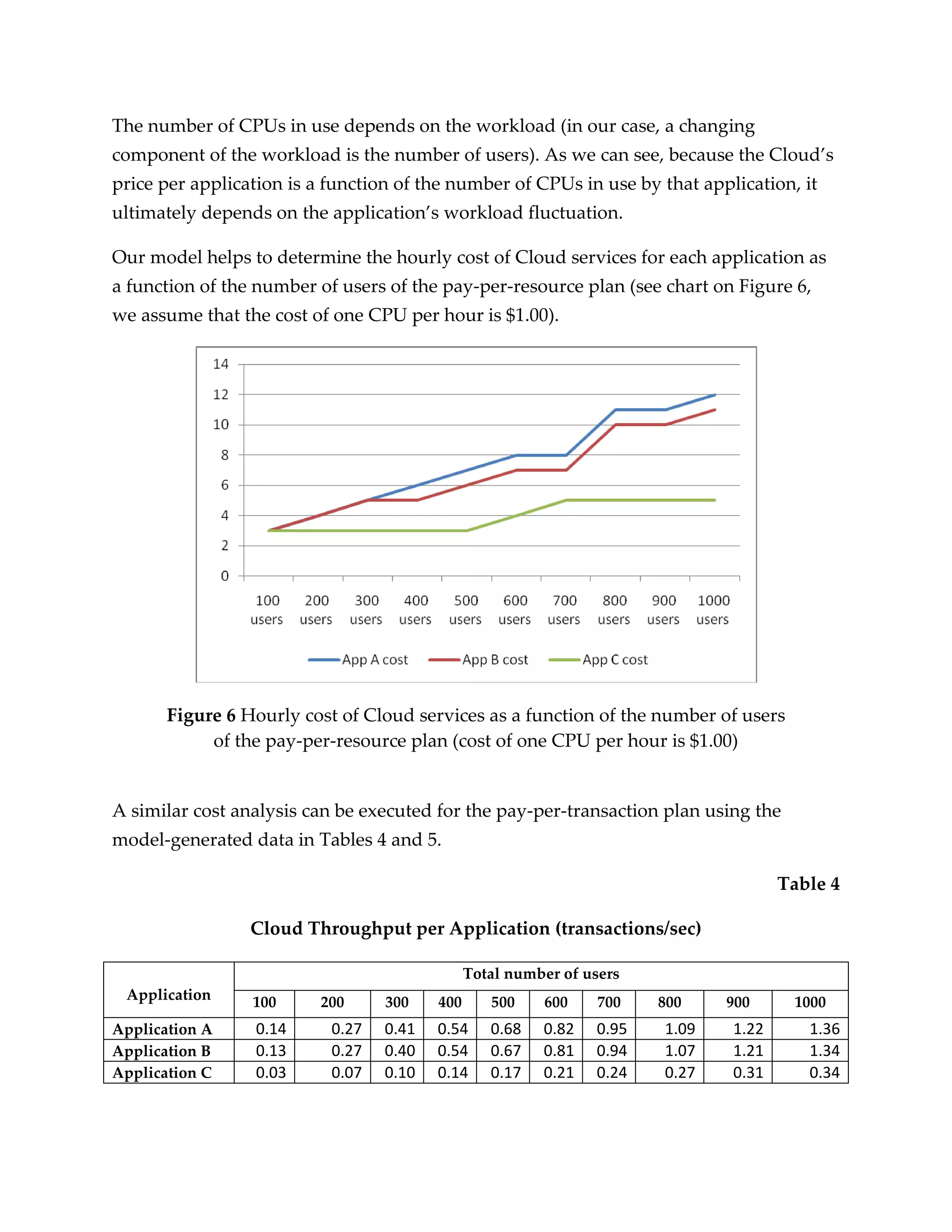
The number of CPUs in use depends on the workload (in our case, a changing
component of the workload is the number of users). As we can see, because the Cloud’s
price per application is a function of the number of CPUs in use by that application, it
ultimately depends on the application’s workload fluctuation.

Our model helps to determine the hourly cost of Cloud services for each application as
a function of the number of users of the pay-per-resource plan (see chart on Figure 6,
we assume that the cost of one CPU per hour is $1.00).


       Figure 6 Hourly cost of Cloud services as a function of the number of users
            of the pay-per-resource plan (cost of one CPU per hour is $1.00)


A similar cost analysis can be executed for the pay-per-transaction plan using the
model-generated data in Tables 4 and 5.

                                                                                     Table 4

                 Cloud Throughput per Application (transactions/sec)

                                               Total number of users
 Application     100      200     300    400      500    600     700   800    900     1000
Application A    0.14      0.27   0.41   0.54     0.68   0.82   0.95   1.09   1.22      1.36
Application B    0.13      0.27   0.40   0.54     0.67   0.81   0.94   1.07   1.21      1.34
Application C    0.03      0.07   0.10   0.14     0.17   0.21   0.24   0.27   0.31      0.34
Table 5

                   Cloud Throughput per Application (transactions/hour)

                                                  Total number of users
 Application        100      200     300    400      500    600     700   800    900     1000
Application A        504       972   1476   1944     2448   2952   3420   3924   4392      4896
Application B        468       972   1440   1944     2412   2916   3384   3852   4356      4824
Application C        108       252    360    504      612    756    864    972   1116      1224


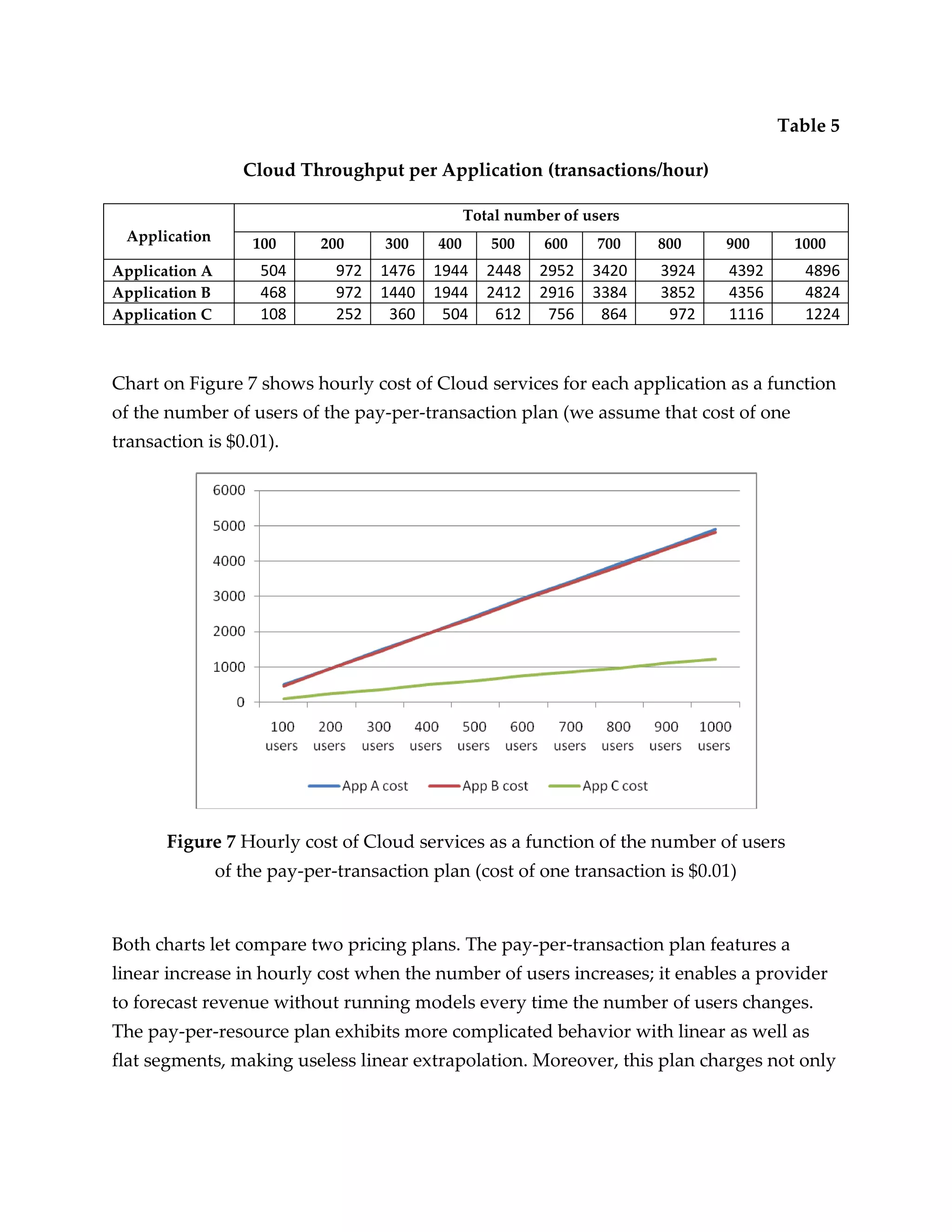
Chart on Figure 7 shows hourly cost of Cloud services for each application as a function
of the number of users of the pay-per-transaction plan (we assume that cost of one
transaction is $0.01).


       Figure 7 Hourly cost of Cloud services as a function of the number of users
                of the pay-per-transaction plan (cost of one transaction is $0.01)


Both charts let compare two pricing plans. The pay-per-transaction plan features a
linear increase in hourly cost when the number of users increases; it enables a provider
to forecast revenue without running models every time the number of users changes.
The pay-per-resource plan exhibits more complicated behavior with linear as well as
flat segments, making useless linear extrapolation. Moreover, this plan charges not only
for CPUs, but for other hardware assets, and calculation of its cost is more complicated
and requires monitoring of usage of all hardware components of the Cloud.

With cost-revenue models at hand, a provider can forecast the Cloud’s profit as a
function of the applications workload, pricing plan and Cloud’s maintenance expenses.

Takeaway from the Article


   1. The most popular pay-per-use plans offered by Cloud providers are pay-per-
      resource and pay-per-transaction.
   2. The pay-per-transaction plan is characterized by a linear increase in hourly cost
      when the number of users increases.
   3. The pay-per-resource plan demonstrates more complicated dependence of its
      cost from a number of users with linear as well as flat segments; that makes
      linear extrapolation misleading.
   4. Cost-revenue queuing models assist providers with forecasting the Cloud’s
      profit as a function of the application’s workloads, pricing plan and the Cloud’s
      maintenance expenses.


About the Author


Leonid Grinshpan has worked as an Oracle consultant for the last 15 years and was
hands-on engaged in performance tuning and sizing of enterprise applications for
various corporations (Dell, Citibank, Verizon, Clorox, Bank of America, AT&T, Best
Buy, Aetna, Halliburton, Pfizer, Astra Zeneca, Starbucks, etc.).

Enterprise applications in the cloud: analysis of pay-per-use plans

  • 1.
    Enterprise Applications inthe Cloud: Analysis of Pay-per-use Plans Leonid Grinshpan, Oracle Corporation (www.oracle.com) The Cloud-computing paradigm is attractive to businesses not only because of its technological, logistical, and environmental advantages over traditional IT frameworks. For the most part its magnetic pull has its roots in economy—Clouds are also well suited to save IT cost as they implement pay-per-use policies. While relocating enterprise applications (EA) into the Cloud, the corporations have to be aware of the cost associated with Cloud services and its dependence on dynamically changing EA workloads. The same is true for Cloud providers: they have to know the revenue derived from each hosted EA. This article provides guidance to Cloud users and Cloud providers on cost/revenue estimates. It explores cost/revenue models for two pay-per-use plans: pay-per-resource and pay-per-transaction. A modeling approach is based on methodology described in the author’s book [Leonid Grinshpan. Solving Enterprise Application Performance Puzzles: Queuing Models to the Rescue, Willey-IEEE Press, 2012. http://www.amazon.com/Solving-Enterprise-Applications-Performance- Puzzles/dp/1118061578/ref=ntt_at_ep_dpt_1]. The pay-per-resource plan charges for the hardware capacity an EA uses at any given time. Typically, resources are priced per hour; below is an excerpt from a price list by OpSource, a company providing Cloud and managed hosting services: [http://www.opsource.net/Services/Cloud-Hosting/Pricing]
  • 2.
    Hourly price forapplication X on pay-per-resource plan is calculated by formula: price of one resource unit per one hour * number of resource units assigned to application X One resource unit represents one CPU as well as fixed amount of RAM and storage (for example, 1 GB). Network hardware and bandwidth are also priced per usage. The pay-per-transaction plan charges per each transaction processed by the Cloud. As an example, Cloud application LinkedIn charges a minimum of $2.00 per transaction that takes a user to an advertised Web page. Hourly price for application X on pay-per-transaction plan is calculated by formula: price of one transaction * number of transactions per hour processed by Cloud for application X In order to determine the hourly price of each plan, we have to determine the number of resource units assigned to application X, as well as the number of transactions per hour processed by the Cloud for application X. Both numbers are the functions of intensity of demand from application users as well as architecture and specifications of hosting hardware. The perfection in Cloud management is achieved when, at any given moment for each application, this logical equation is true: Demand = Resources. A provider is losing revenue when Demand > Resources (application “appetite” for capacity is not satisfied), and customer is priced unfairly when Demand < Resources (application is overprovisioned). In Cloud that hosts EA (EAC), Demand is highly dynamic with peaks and valleys and the Cloud management system has to permanently synchronize Resources with Demand. Synchronization includes the following steps that have to be executed in the shortest time to maximize Cloud profitability: 1) identification of an excess or shortage
  • 3.
    of hardware resources;2) forecasting the size of additional or excessive resources by modeling; 3) using modeling to estimate an impact of resources reallocation (change management); 4) effecting changes by reprovisioning resources. Step 1 is implemented by monitoring usage of Cloud hardware and EA transaction times. Steps 2 and 3 require modeling; Step 3 is a must-have in multi-tenant Clouds. Step 4 can be executed quickly if it requires reprovisioning of resources within the existing virtual machine (VM); the step is more complicated and lengthy if the new VM has to be deployed and an additional instance of EA has to be installed on it. Cost/Revenue Model The queuing model on Figure 1 represents a Cloud hosting three EAs (App A, App B, App C) on three physical servers. EAs have their own users accessing applications over the network. Each Cloud’s physical server has 24 CPUs and is broken down by three VMs with 8 CPUs. The users, network and VMs are modeled by dedicated nodes. The workload for the cost/revenue model is defined in Table 1. We assume for clarity’s sake that the workload of each application consists of transactions identified by application name. One user executes a transaction a number of times per hour indicated in the last column of Table 1. The model is analyzed for the total number of users for all three applications ranging from 100 to 1000. Table 1 Workload 1 for Cost/Revenue Model Number of Transaction name Number of users per application transaction executions per user per hour App A transaction 50 100 150 200 300 400 350 400 450 500 10 App B transaction 25 50 75 100 150 200 175 200 225 250 20 App C transaction 25 50 75 100 150 200 175 200 225 250 5 Total number of 100 200 300 400 600 800 700 800 900 1000 users
  • 4.
    Figure 1 Model1 of a Cloud hosting three enterprise applications; each physical server hosts three virtual machines.
  • 5.
    To solve themodel we have to specify the profile of each transaction (Table 2). The transaction profile is a set of time intervals (service demands) a transaction has spent in all processing units it has visited while served by the application. Table 2 Transaction Profiles (seconds) Time in Time in Web Time in App Time in Database Network node server node server node server node App A transaction 0.001 0.4 2.0 5.0 App B transaction 0.0015 0.2 1.0 5.0 App C transaction 0.003 0.4 5.0 5.0 The workload identifies an intensity of requests generated by application users, while the transaction profile characterizes the time interval a single transaction will use Cloud resources. Table 3 specifies maximum transaction times acceptable by Service Level Agreements (SLA): Table 3 Maximum Acceptable Transaction Times per SLA (seconds) Time (seconds) App A transaction 8.0 App B transaction 7.00 App C transaction 12.00 To solve the model we specify the modeled hardware resources: We also specify the workload and transaction profiles for all EAs:
  • 6.
    We solve themodel for workloads featuring a number of users ranging from 100 to 1000. Figure 1 shows transaction times as a function of the number of users. The maximum accepted by SLA transaction time for App A is seven seconds; it is marked by character A and reached for 800 users. The maximum accepted by SLA transaction time for App B is eight seconds; it is marked by character B and reached for 900 users.
  • 7.
    Figure 2 TransactionTimes (seconds) for App A, B, C The three following charts (Figures 3, 4, 5) characterize the percentage of utilization of system servers by each application. Figure 3 Utilization of System Servers by App A
  • 8.
    Figure 4 Utilizationof system servers by App B Figure 5 Utilization of system servers by App C We can find out the number of CPUs consumed by each application as a function of the number of users. One CPU accounts for 100% / 8 = 12.5%; the number of CPUs per VM rounded up to the next integer is presented in a table below.
  • 9.
    Number of CPUsin Use by Each Application in Each Server Total number of users Server name 100 200 300 400 500 600 700 800 900 1000 Application A Web server A 1 1 1 1 1 1 1 1 1 1 Application server A 1 1 1 1 2 2 2 3 1 3 Database server A 1 2 3 3 4 5 5 7 7 8 Total number of CPUs 3 4 5 5 7 8 8 11 9 12 Application B Web server B 1 1 1 1 1 1 1 1 1 1 Application server B 1 1 1 1 1 1 1 2 2 2 Database server B 1 2 3 3 4 5 5 7 7 8 Total number of CPUs 3 4 5 5 6 7 7 10 10 11 Application C Web server C 1 1 1 1 1 1 1 1 1 1 Application server C 1 1 1 1 1 1 2 2 2 2 Database server C 1 1 1 1 1 2 2 2 2 2 Total number of CPUs 3 3 3 3 3 4 5 5 5 5 This table defines the number of CPUs in use by each application depending on the number of its users. Visual interpretation of this table is as follows: Number of CPUs per App A Number of CPUs per App B Number of CPUs per App C
  • 10.
    The number ofCPUs in use depends on the workload (in our case, a changing component of the workload is the number of users). As we can see, because the Cloud’s price per application is a function of the number of CPUs in use by that application, it ultimately depends on the application’s workload fluctuation. Our model helps to determine the hourly cost of Cloud services for each application as a function of the number of users of the pay-per-resource plan (see chart on Figure 6, we assume that the cost of one CPU per hour is $1.00). Figure 6 Hourly cost of Cloud services as a function of the number of users of the pay-per-resource plan (cost of one CPU per hour is $1.00) A similar cost analysis can be executed for the pay-per-transaction plan using the model-generated data in Tables 4 and 5. Table 4 Cloud Throughput per Application (transactions/sec) Total number of users Application 100 200 300 400 500 600 700 800 900 1000 Application A 0.14 0.27 0.41 0.54 0.68 0.82 0.95 1.09 1.22 1.36 Application B 0.13 0.27 0.40 0.54 0.67 0.81 0.94 1.07 1.21 1.34 Application C 0.03 0.07 0.10 0.14 0.17 0.21 0.24 0.27 0.31 0.34
  • 11.
    Table 5 Cloud Throughput per Application (transactions/hour) Total number of users Application 100 200 300 400 500 600 700 800 900 1000 Application A 504 972 1476 1944 2448 2952 3420 3924 4392 4896 Application B 468 972 1440 1944 2412 2916 3384 3852 4356 4824 Application C 108 252 360 504 612 756 864 972 1116 1224 Chart on Figure 7 shows hourly cost of Cloud services for each application as a function of the number of users of the pay-per-transaction plan (we assume that cost of one transaction is $0.01). Figure 7 Hourly cost of Cloud services as a function of the number of users of the pay-per-transaction plan (cost of one transaction is $0.01) Both charts let compare two pricing plans. The pay-per-transaction plan features a linear increase in hourly cost when the number of users increases; it enables a provider to forecast revenue without running models every time the number of users changes. The pay-per-resource plan exhibits more complicated behavior with linear as well as flat segments, making useless linear extrapolation. Moreover, this plan charges not only
  • 12.
    for CPUs, butfor other hardware assets, and calculation of its cost is more complicated and requires monitoring of usage of all hardware components of the Cloud. With cost-revenue models at hand, a provider can forecast the Cloud’s profit as a function of the applications workload, pricing plan and Cloud’s maintenance expenses. Takeaway from the Article 1. The most popular pay-per-use plans offered by Cloud providers are pay-per- resource and pay-per-transaction. 2. The pay-per-transaction plan is characterized by a linear increase in hourly cost when the number of users increases. 3. The pay-per-resource plan demonstrates more complicated dependence of its cost from a number of users with linear as well as flat segments; that makes linear extrapolation misleading. 4. Cost-revenue queuing models assist providers with forecasting the Cloud’s profit as a function of the application’s workloads, pricing plan and the Cloud’s maintenance expenses. About the Author Leonid Grinshpan has worked as an Oracle consultant for the last 15 years and was hands-on engaged in performance tuning and sizing of enterprise applications for various corporations (Dell, Citibank, Verizon, Clorox, Bank of America, AT&T, Best Buy, Aetna, Halliburton, Pfizer, Astra Zeneca, Starbucks, etc.).