Embrace the challenge of AI
work, creative workflows, and
daily to-do lists with higher
performance
Comparing the Lenovo ThinkPad T14s Gen 5 with an
Intel Core Ultra 7 processor 155U to the ThinkPad
T14s Gen 2
The last time you upgraded your laptop, what did you
look for in a new device? Maybe you needed a system
that could handle day-to-day office tasks on Microsoft
365 apps, or maybe you looked for something that could
handle more intensive graphics work on Adobe®
Creative
Cloud®
programs. If you upgraded even just a few years
ago, chances are you weren’t searching for a laptop to
tackle resource-hungry AI work. But with AI increasingly
becoming a part of our professional lives, you may
benefit from a new device that can meet its demands—
and help you accomplish the rest of your work—without
keeping you waiting.
We put two systems through their paces: a Lenovo®
ThinkPad®
T14s Gen 5 powered by an Intel®
Core™
Ultra
7 processor 155U and a three-year-old Lenovo ThinkPad
T14s Gen 2. Across the board, the ThinkPad T14s Gen 5
delivered stronger performance for AI workloads, creative
apps, and daily productivity tasks, and also provided longer
battery life. As the work you do changes, and especially in
an AI-centered world, upgrading to the ThinkPad T14s Gen
5 could help you get more done, faster.
Take on
resource-taxing
AI workloads
Up to 77% higher
performance on the
Procyon AI Computer
Vision Benchmark*
Quickly complete
complex renders
Up to 3x the Blender
benchmark score*
Experience more
responsive web
browsing
33% higher overall
WebXPRT 4 score*
Maximize
productivity
on the go
Over 18 hours of
battery life while
playing video
*with the Lenovo ThinkPad T14s Gen 5
vs. the Lenovo ThinkPad T14s Gen 2
Embrace the challenge of AI work, creative workflows, and daily to-do lists with higher performance August 2024
A Principled Technologies report: Hands-on testing. Real-world results.
Features of the Lenovo ThinkPad T14s Gen 5
This 14-inch ultrathin and lightweight laptop can enable “AI-
powered productivity driven by [an] Intel Core Ultra processor.”1
With up to 2.8K OLED display options, an ENERGY STAR®
8.0
certification, and Lenovo ThinkShield security, Lenovo says the
ThinkPad T14s Gen 5 also “prudently adapts to your workload
needs with an improved battery system.”2
f Learn more about the Lenovo ThinkPad T14s Gen 5 at
https://www.lenovo.com/us/en/p/laptops/thinkpad/
thinkpadt/lenovo-thinkpad-t14s-gen-5-(14-inch-
intel)/len101t0092.
Table 1: Feature comparison of the laptops we tested.
Lenovo ThinkPad T14s Gen 5
Intel Core Ultra 7 processor 155U
Lenovo ThinkPad T14s Gen 2
Intel Core i7-1165G7 processor
Graphics
Integrated Intel Arc™
graphics
and Intel AI Boost
Intel Iris®
Xe Graphics
Operating system Windows 11 Pro Windows 10 Pro
Display touchscreen Yes Yes
Ports
2 x Thunderbolt™
4
2 x USB-A
1 x HDMI 2.1
1 x headphone/mic combo
1 x Kensington Nano Security Slot™
1 x USB-C Thunderbolt 4/ power in
1 x USB-C Thunderbolt 4
2 x USB-A 3.2
1 x HDMI 2.0
1 x headphone/mic combo
1 x Kensington Nano Security Slot
Weight (lb.) 2.91 3.38
Intel vPro®
Yes Yes
Intel Unison™
Yes No
Wi-Fi and Bluetooth Intel Wi-Fi 6E (802.11ax) with Bluetooth 5.3 Wi-Fi 6 AX201 (802.11a/b/g) with Bluetooth 5.2
About the Intel Core Ultra 7 processor 155U
The Lenovo ThinkPad T14s Gen 5 we tested featured an Intel Core Ultra 7 processor 155U with integrated Intel
Arc graphics and Intel AI Boost. This processor incorporates three separate engines: a central processing unit
(CPU), a graphics processing unit (GPU), and a neural processing unit (NPU). This architectural shift, according
to Intel, makes Intel Core Ultra processors “the most AI-capable and power-efficient client processor in Intel’s
history.”3
Intel recommends Intel Core Ultra 7 processors for AI-enhanced video editing, among other tasks.4
f Learn more about Intel Core Ultra processors at
https://www.intel.com/content/www/us/en/products/docs/processors/core-ultra/core-ultra-series-1-product-brief.html.
Embrace the challenge of AI work, creative workflows, and daily to-do lists with higher performance August 2024 | 2
How we tested
We compared the Lenovo ThinkPad T14s Gen 5, powered by an Intel Core Ultra 7 processor 155U, to an
older Lenovo ThinkPad T14s Gen 2, powered by an Intel Core i7-1165G7 processor. The newer system
had 16 GB of LPDDR5X memory, while the older system had 16 GB of DDR4 memory. Both laptops had
512 GB of SSD storage.
We used a wide variety of tools, benchmarks, and assessments to obtain a multifaceted picture of both
devices’ performance for AI workloads, graphics-intensive tasks, and everyday work.
AI performance benchmarks and tools
AI is rapidly evolving and changing, but one thing
is clear: It’s not going away any time soon. To
take advantage of helpful AI tools now and into
the future, you’ll want a device with the ability to
handle this taxing work. We used two benchmarks
to look at the performance you might expect for a
number of AI tasks.
Š Procyon®
AI Computer Vision Benchmark (p4)
Š Topaz Video AI (p4)
Graphics-intensive performance
benchmarks and tools
Whether you’re a creative professional who
edits photos and videos or a technical worker
who renders 3D graphics, a system that easily
handles large files can help you save time in
your workflows. For a fuller look at how the
laptops process graphics-intensive workloads,
we used several different benchmarks to
measure performance.
Š 3DMark®
(p5)
Š Blender (p5)
Š Cinebench 2024 (p6)
Š HandBrake (p6)
Š Procyon Photo Editing Benchmark (p7)
Š Procyon Video Editing Benchmark (p7)
Š PugetBench for Creators (p7)
General performance
benchmarks
We also used benchmarks that gauge the
performance users might expect for their day-
to-day work. Rather than focusing on specialized
workloads, these benchmarks reflect common
productivity tasks for users across industries.
Š CrossMark™
(p8)
Š PassMark PerformanceTest 11 (p8)
Š SYSmark®
30 (p9)
Š Procyon Office Productivity Benchmark (p9)
Š WebXPRT 4 (p9)
Battery life, workflow, and
user experience tests
Our testing went beyond benchmarks: We
also performed hands-on tasks and assessed
elements of everyday user experience. These
tests measured:
Š Everyday productivity tasks (p10)
Š Content creation tasks (p11)
Š Real-world workflows (p11)
Š Battery life (p13)
Š Speaker volume (p14)
Š Camera quality (p14)
Embrace the challenge of AI work, creative workflows, and daily to-do lists with higher performance August 2024 | 3
Our testing aimed to gauge the AI capabilities of the Lenovo ThinkPad T14s Gen 5 and
the ThinkPad T14s Gen 2. We first ran the Procyon AI Computer Vision Benchmark,
which “gives insights into how AI inference engines perform on your [device], helping
you decide which engines to support to achieve the best performance” by using several
inference engines and popular neural network models.6
For a look at how the systems
might handle different types of work, we used three precision levels: float32, float16,
and int8. Different levels determine how precisely a model completes its work, so some
precision levels require more time to run than others.
As Figure 1 shows, the Intel Core Ultra 7 processor-powered Lenovo ThinkPad T14s Gen
5 outperformed the older system at each precision level, achieving up to 77.6 percent
higher performance. While your daily work might not require you to run inference
operations on large datasets, these results indicate that you could see improved
performance developing an AI model or testing a model’s accuracy.
Procyon AI Computer Vision Benchmark
Intel OpenVINO
Overall rating | Higher is better
Lenovo ThinkPad T14s
Gen 5 Gen 2
bar pt length = score /2
float32
114
136
float16
192
327
int8
318
565
Figure 1: Procyon AI Computer Vision Benchmark Intel OpenVINO™ overall scores. Higher is better.
Source: Principled Technologies.
The Topaz Labs™
Video AI application uses AI to make video enhancements, such as
steadying camera movement, upscaling resolution, and reducing noise;7
their benchmark
quantifies performance with the app. The newer Lenovo ThinkPad T14s Gen 5 performed
well on several Topaz Video AI tests—you can see these results in the science behind
the report—but the older ThinkPad T14s Gen 2 was unable to run the test at all. So,
when it comes to AI-based video editing, the Lenovo ThinkPad T14s Gen 5 is an
advantageous choice.
An intelligent choice for AI
Artificial intelligence is all around us. For the workplace, one
study estimates that over 77 percent of businesses are either
using or exploring the use of AI.5
Even if your team hasn’t yet
dipped its toe into the waters of this technology, many tools
and apps already leverage it, such as in predictive search
suggestions or background blurring during a video call. In
this AI revolution, you need a device that can keep up.
We also looked at Windows
Studio Effects, a new feature set
from Windows that “leverages
AI models built by Microsoft
and compiled/optimized for
devices with a Neural Processing
Unit (NPU) to deliver high-
fidelity, battery-friendly AI
effects.”8
These effects include
background blurs, background
noise minimization, adjustments
to framing and lighting, and fun
filters. We enabled Windows
Studio Effects on the Lenovo
ThinkPad T14s Gen 5 laptop
and found that they ran as we
anticipated. However, because
the ThinkPad T14s Gen 2 does
not have an NPU, it was not
compatible with Windows
Studio Effects.
f To learn more about
these effects and how
to enable them, visit
https://support.microsoft.
com/en-us/windows/
windows-studio-effects-
273c1fa8-2b3f-41b1-
a587-7cc7a24b62d8.
Embrace the challenge of AI work, creative workflows, and daily to-do lists with higher performance August 2024 | 4
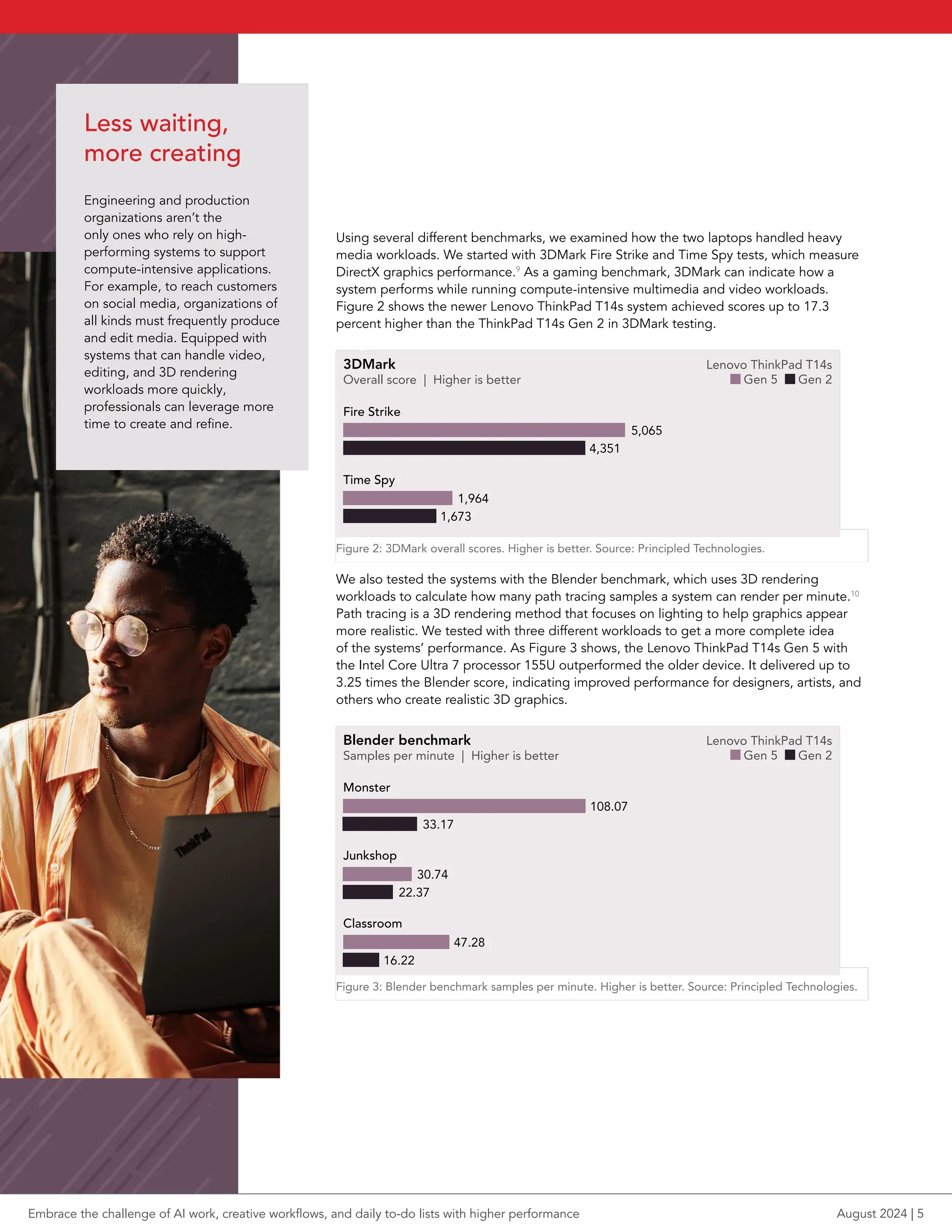
Using several different benchmarks, we examined how the two laptops handled heavy
media workloads. We started with 3DMark Fire Strike and Time Spy tests, which measure
DirectX graphics performance.9
As a gaming benchmark, 3DMark can indicate how a
system performs while running compute-intensive multimedia and video workloads.
Figure 2 shows the newer Lenovo ThinkPad T14s system achieved scores up to 17.3
percent higher than the ThinkPad T14s Gen 2 in 3DMark testing.
3DMark
Overall score | Higher is better
Fire Strike
5,065
4,351
Time Spy
1,964
1,673
Lenovo ThinkPad T14s
Gen 5 Gen 2
bar pt length = score /28
Figure 2: 3DMark overall scores. Higher is better. Source: Principled Technologies.
We also tested the systems with the Blender benchmark, which uses 3D rendering
workloads to calculate how many path tracing samples a system can render per minute.10
Path tracing is a 3D rendering method that focuses on lighting to help graphics appear
more realistic. We tested with three different workloads to get a more complete idea
of the systems’ performance. As Figure 3 shows, the Lenovo ThinkPad T14s Gen 5 with
the Intel Core Ultra 7 processor 155U outperformed the older device. It delivered up to
3.25 times the Blender score, indicating improved performance for designers, artists, and
others who create realistic 3D graphics.
Blender benchmark
Samples per minute | Higher is better
Monster
108.07
33.17
Junkshop
30.74
22.37
Classroom
47.28
16.22
Lenovo ThinkPad T14s
Gen 5 Gen 2
bar pt length = score *1.44
Figure 3: Blender benchmark samples per minute. Higher is better. Source: Principled Technologies.
Less waiting,
more creating
Engineering and production
organizations aren’t the
only ones who rely on high-
performing systems to support
compute-intensive applications.
For example, to reach customers
on social media, organizations of
all kinds must frequently produce
and edit media. Equipped with
systems that can handle video,
editing, and 3D rendering
workloads more quickly,
professionals can leverage more
time to create and refine.
Embrace the challenge of AI work, creative workflows, and daily to-do lists with higher performance August 2024 | 5
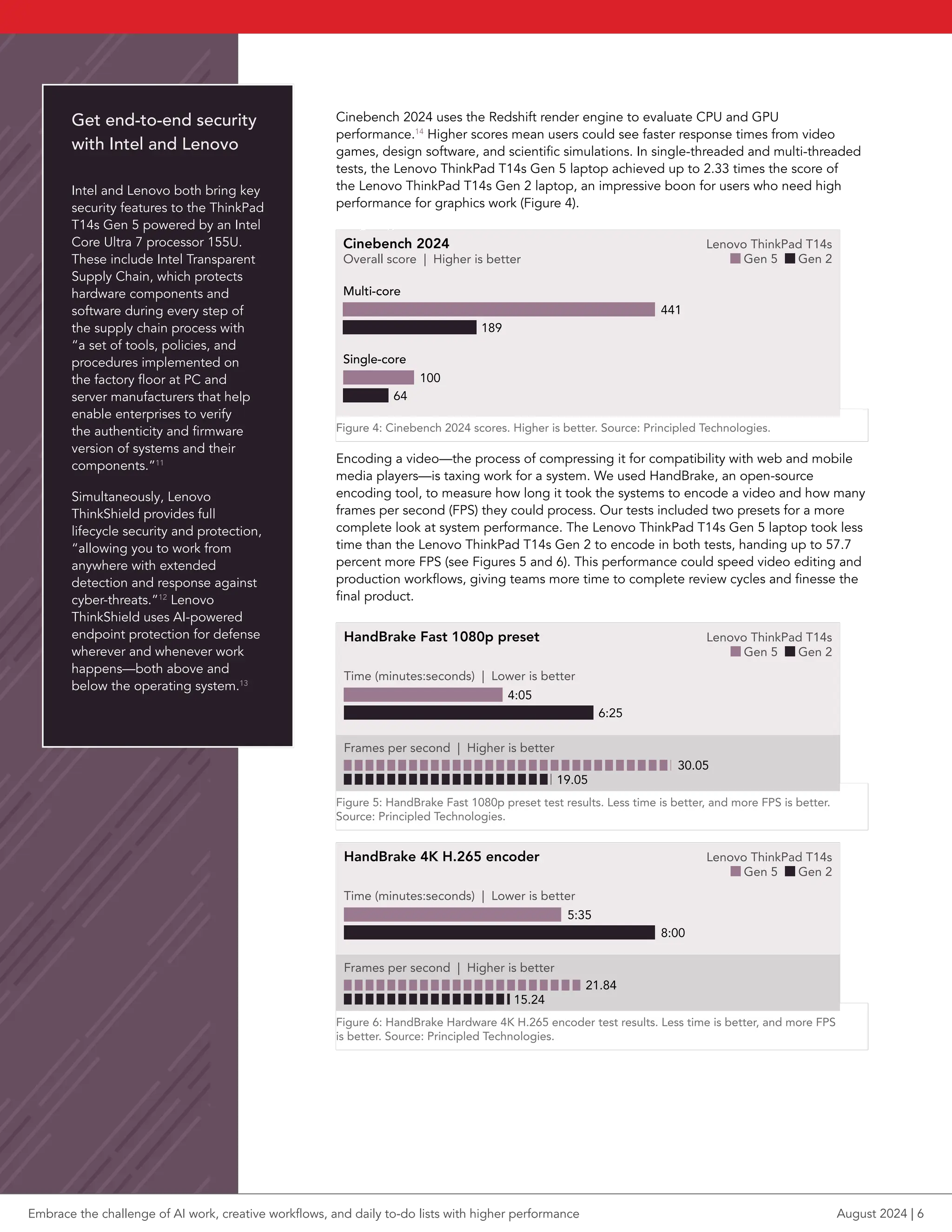
Cinebench 2024 uses the Redshift render engine to evaluate CPU and GPU
performance.14
Higher scores mean users could see faster response times from video
games, design software, and scientific simulations. In single-threaded and multi-threaded
tests, the Lenovo ThinkPad T14s Gen 5 laptop achieved up to 2.33 times the score of
the Lenovo ThinkPad T14s Gen 2 laptop, an impressive boon for users who need high
performance for graphics work (Figure 4).
Cinebench 2024
Overall score | Higher is better
Multi-core
441
189
Single-core
100
64
Lenovo ThinkPad T14s
Gen 5 Gen 2
bar pt length = score /2.2
Figure 4: Cinebench 2024 scores. Higher is better. Source: Principled Technologies.
Encoding a video—the process of compressing it for compatibility with web and mobile
media players—is taxing work for a system. We used HandBrake, an open-source
encoding tool, to measure how long it took the systems to encode a video and how many
frames per second (FPS) they could process. Our tests included two presets for a more
complete look at system performance. The Lenovo ThinkPad T14s Gen 5 laptop took less
time than the Lenovo ThinkPad T14s Gen 2 to encode in both tests, handing up to 57.7
percent more FPS (see Figures 5 and 6). This performance could speed video editing and
production workflows, giving teams more time to complete review cycles and finesse the
final product.
HandBrake Fast 1080p preset
Time (minutes:seconds) | Lower is better
4:05
6:25
Frames per second | Higher is better
30.05
19.05
Lenovo ThinkPad T14s
Gen 5 Gen 2
time: bar pt length = seconds /2.4 fps: bar pt length = seconds *7
Figure 5: HandBrake Fast 1080p preset test results. Less time is better, and more FPS is better.
Source: Principled Technologies.
HandBrake 4K H.265 encoder
Time (minutes:seconds) | Lower is better
5:35
8:00
Frames per second | Higher is better
21.84
15.24
Lenovo ThinkPad T14s
Gen 5 Gen 2
time: bar pt length = seconds /2.4 fps: bar pt length = seconds *7
Figure 6: HandBrake Hardware 4K H.265 encoder test results. Less time is better, and more FPS
is better. Source: Principled Technologies.
Get end-to-end security
with Intel and Lenovo
Intel and Lenovo both bring key
security features to the ThinkPad
T14s Gen 5 powered by an Intel
Core Ultra 7 processor 155U.
These include Intel Transparent
Supply Chain, which protects
hardware components and
software during every step of
the supply chain process with
“a set of tools, policies, and
procedures implemented on
the factory floor at PC and
server manufacturers that help
enable enterprises to verify
the authenticity and firmware
version of systems and their
components.”11
Simultaneously, Lenovo
ThinkShield provides full
lifecycle security and protection,
“allowing you to work from
anywhere with extended
detection and response against
cyber-threats.”12
Lenovo
ThinkShield uses AI-powered
endpoint protection for defense
wherever and whenever work
happens—both above and
below the operating system.13
Embrace the challenge of AI work, creative workflows, and daily to-do lists with higher performance August 2024 | 6
Adobe Creative Cloud applications—which include Adobe Photoshop®
, Adobe
Lightroom®
Classic, and Adobe Premiere®
Pro—are essential tools for many creative
professionals. We tested with different benchmarks that use realistic workflows in
these programs to gauge performance, starting with the Procyon Photo Editing
Benchmark and Procyon Video Editing Benchmark.15,16
Figures 7 and 8 show that the
Lenovo ThinkPad T14s Gen 5 laptop scored higher on both benchmarks, meaning
it can save time for designers, videographers, and others who regularly work in
Creative Cloud apps.
Procyon Photo Editing Benchmark
Overall score | Higher is better
Lenovo ThinkPad T14s
Gen 5 Gen 2
3,881
4,410
bar pt length = score /18
Figure 7: Procyon Photo Editing Benchmark overall scores. Higher is better.
Source: Principled Technologies.
Procyon Video Editing Benchmark
Overall score | Higher is better
Lenovo ThinkPad T14s
Gen 5 Gen 2
1,667
2,294
bar pt length = score /11
Figure 8: Procyon Video Editing Benchmark overall scores. Higher is better.
Source: Principled Technologies.
To get another look at the Adobe Creative Cloud performance the devices could
achieve, we tested with the PugetBench for Creators benchmarks. These tools run
real-world workflows in Adobe Photoshop and Adobe Premiere Pro to measure
performance.17
Once again, as Figure 9 shows, the Lenovo ThinkPad T14s Gen 5
laptop attained higher scores than the Gen 2 laptop, which could translate to a
smoother, more responsive experience in these apps.
PugetBench for Creators
Overall score | Higher is better
Adobe Photoshop
5,065
4,271
Adobe Premiere Pro
2,184
1,915
Lenovo ThinkPad T14s
Gen 5 Gen 2
bar pt length = score/23
Figure 9: PugetBench for Creators overall scores. Higher is better.
Source: Principled Technologies.
Embrace the challenge of AI work, creative workflows, and daily to-do lists with higher performance August 2024 | 7
CrossMark, an industry-standard benchmark, “measures the overall system performance and
system responsiveness using models of real-world applications”18
with workloads including
encryption, face recognition, file read/write, and more.19
The Lenovo ThinkPad T14s Gen 5,
with its Intel Core Ultra 7 processor 155U, achieved a score 29.7 percent higher than that of
the ThinkPad T14s Gen 2, as Figure 10 shows. For users checking off tasks from their to-do
lists, this might mean reaching the end of that list sooner.
CrossMark
Overall score | Higher is better
Lenovo ThinkPad T14s
Gen 5 Gen 2
1,136
1,474
bar pt length = score /6.25
Figure 10: CrossMark overall scores. Higher is better. Source: Principled Technologies.
We also used PassMark PerformanceTest 11 to assess the laptops’ performance. Higher scores
from PassMark PerformanceTest 11—which measures a system’s CPU, 2D and 3D graphics,
disk, and memory performance—can indicate more a streamlined experience when using your
system.20
The Intel Core Ultra 7 processor-powered Lenovo ThinkPad T14s Gen 5 proved to be
the winner again, achieving a 21.0 percent higher score (see Figure 11).
PassMark PerformanceTest 11
Overall rating | Higher is better
Lenovo ThinkPad T14s
Gen 5 Gen 2
3,939
4,767
bar pt length = score /24
Figure 11: PassMark PerformanceTest 11 results. Higher is better. Source: Principled Technologies.
Responsive performance for
everyday productivity
Next, we examined laptop performance for common office tasks and
scenarios. While not everyone relies on their laptop to edit graphics
in Photoshop or render complex 3D models, many laptop users
complete work on Microsoft 365 applications and web browsers every
day. The time you spend waiting on spreadsheets to load or browser
tabs to open—even if they’re just seconds—can quickly add up when
you perform these tasks often. And, if you consistently notice longer
wait times, you might find yourself distracted or frustrated. For a look
at how the Lenovo ThinkPad T14s Gen 5 and ThinkPad T14s Gen 2
handled these tasks, we put them to the test with several benchmarks.
Embrace the challenge of AI work, creative workflows, and daily to-do lists with higher performance August 2024 | 8
To assess the Microsoft 365 application performance users might expect from their
systems, we used the Procyon Office Productivity Benchmark. This tool simulates
how people use Microsoft 365 apps every day, completing real-world tasks in Word,
Excel, PowerPoint, and Outlook and switching between windows.24
With a 20.8
percent higher score than that of the Gen 2 system, the Lenovo ThinkPad T14s Gen 5
could deliver faster performance on these foundational apps (Figure 12).
Procyon Office Productivity Benchmark
Overall scores | Higher is better
5,063
Lenovo ThinkPad T14s
Gen 5 Gen 2
6,118
bar pt length = score /22
Figure 12: Procyon Office Productivity Benchmark overall scores. Higher is better.
Source: Principled Technologies.
We tested with the SYSmark 30 benchmark next. Running office tasks, media
workloads, and multitasking scenarios, SYSmark 30 “measures and compares system
performance using real-world applications and workloads.25
In these tests, as Figure
13 shows, the Lenovo ThinkPad T14s Gen 5 scored 19.9 percent higher overall,
indicating users could see faster, more responsive performance while multitasking.
SYSmark 30
Overall rating | Higher is better
1,256
Lenovo ThinkPad T14s
Gen 5 Gen 2
1,507
bar pt length = score /7
bar pt length = score /1.14
Figure 13: SYSmark 30 overall ratings. Higher is better. Source: Principled Technologies.
WebXPRT 4 is an industry-standard browser benchmark that uses HTML5, JavaScript,
and WebAssembly-based scenarios to simulate a range of real-world tasks.26
No
matter what industry you work in, browsing the web is likely a critical component
of your job. So, the way a system might handle web browsing is an important
consideration. Figure 14 shows that the Lenovo ThinkPad T14s Gen 5 with the Intel
Core Ultra 7 processor 155U delivered better web-browsing performance, achieving
a 33.3 percent higher overall score than the Think Pad T14s Gen 2 laptop.
WebXPRT 4 using Google Chrome
Overall score | Higher is better
Lenovo ThinkPad T14s
Gen 5 Gen 2
216
288
bar pt length = score /1.14
Figure 14: WebXPRT 4 overall scores with the Google Chrome browser. Higher is better.
Source: Principled Technologies.
Enhance your commitment
to sustainability
Sustainability is much more than a
buzzword. As we continue to feel
the effects of global climate change,
four out of five consumers are willing
to pay more for goods that are
sustainably sourced or produced.21
Lenovo maintains that the ThinkPad
T14s Gen 5 is TCO, ENERGY STAR®
,
EPEAT®
Gold, and Eyesafe®
certified
with these sustainability specs:22
f The packaging is 100 percent
plastic-free and recyclable
f The Luna Grey top cover contains
50 percent recycled aluminum
f The Eclipse Black top
cover contains 30 percent
recycled carbon fiber
f The keyboard frame contains 90
percent recycled magnesium
f The bottom cover contains 55
percent recycled aluminum
f The speaker enclosure, battery
enclosure, and power adapter
contain 90 percent post-consumer
content (PCC) recycled plastic
f The cable holders contain 95
percent PCC recycled plastic
f The non-backlit keycaps contain
70 percent PCC recycled plastic
Additionally, in the Lenovo
2023/24 Environmental, Social, and
Governance report, Lenovo outlines
its approaches to and goals for
sustainability, including targeting
net-zero greenhouse gas emissions by
2050. The report discusses the Lenovo
commitment to utilize post-consumer
recycled content in its products,
improve its products’ energy
efficiency, and utilize renewable and
bio-based materials in its packaging,
among other practices.23
f Learn more at https://investor.
lenovo.com/en/sustainability/
reports/FY2024-lenovo-
sustainability-report.pdf.
Embrace the challenge of AI work, creative workflows, and daily to-do lists with higher performance August 2024 | 9
We took another look at performance by timing how long it took both devices to
complete a variety of tasks in Microsoft 365 apps. From quick jobs such as starting a
PowerPoint presentation to more intensive tasks such as inserting a 3D chart in Excel, the
Lenovo ThinkPad T14s Gen 5 saved time completing each of the seven tasks (Figure 15).
For an everyday user, these time savings may add up to a noticeably more responsive
experience compared to the older ThinkPad T14s Gen 2.
bar pt length = score *3
Time to complete tasks in Microsoft 365
Seconds | Lower is better
Microsoft Word
Perform find/replace
1.0
1.5
Open 90MB document
0.8
1.0
Export PDF
4.1
5.0
Start slide show
0.7
0.8
Microsoft PowerPoint
Export 180MB
.PPTX to PDF
6.2
8.1
Microsoft Excel
Open 92MB spreadsheet
containing macro
13.2
18.1
Insert 3D 100% stacked
column chart
16.6
26.8
Lenovo ThinkPad T14s
Gen 5 Gen 2
Figure 15: Time to perform various tasks in Microsoft 365. Less time is better.
Source: Principled Technologies.
Going with the
(work)flow
For those who work with
Microsoft 365 applications, such
as Word, Excel, and PowerPoint,
responsive performance can be
key to a productive day. After
all, seemingly small wait times
can turn into considerable lost
time over the course of a day,
a month, or a year. When users
experience faster performance in
Microsoft 365 apps, they could
have more time to focus on
the task at hand.
Embrace the challenge of AI work, creative workflows, and daily to-do lists with higher performance August 2024 | 10
Adobe Creative Cloud applications are essential tools for many creatives, such as
photographers and graphic designers. Manipulating and editing large assets in these
applications taxes a system’s capabilities; a device that isn’t up to the task can cause
long loading times or even application crashes. When you’re in a creative flow, waiting
extra seconds or minutes can sometimes be enough to impede focus, resulting in lost
productivity on top of the additional effort to jumpstart the creative process. With faster
performance for common tasks in Adobe Creative Cloud apps, professionals may have a
better chance of remaining in a creative flow.
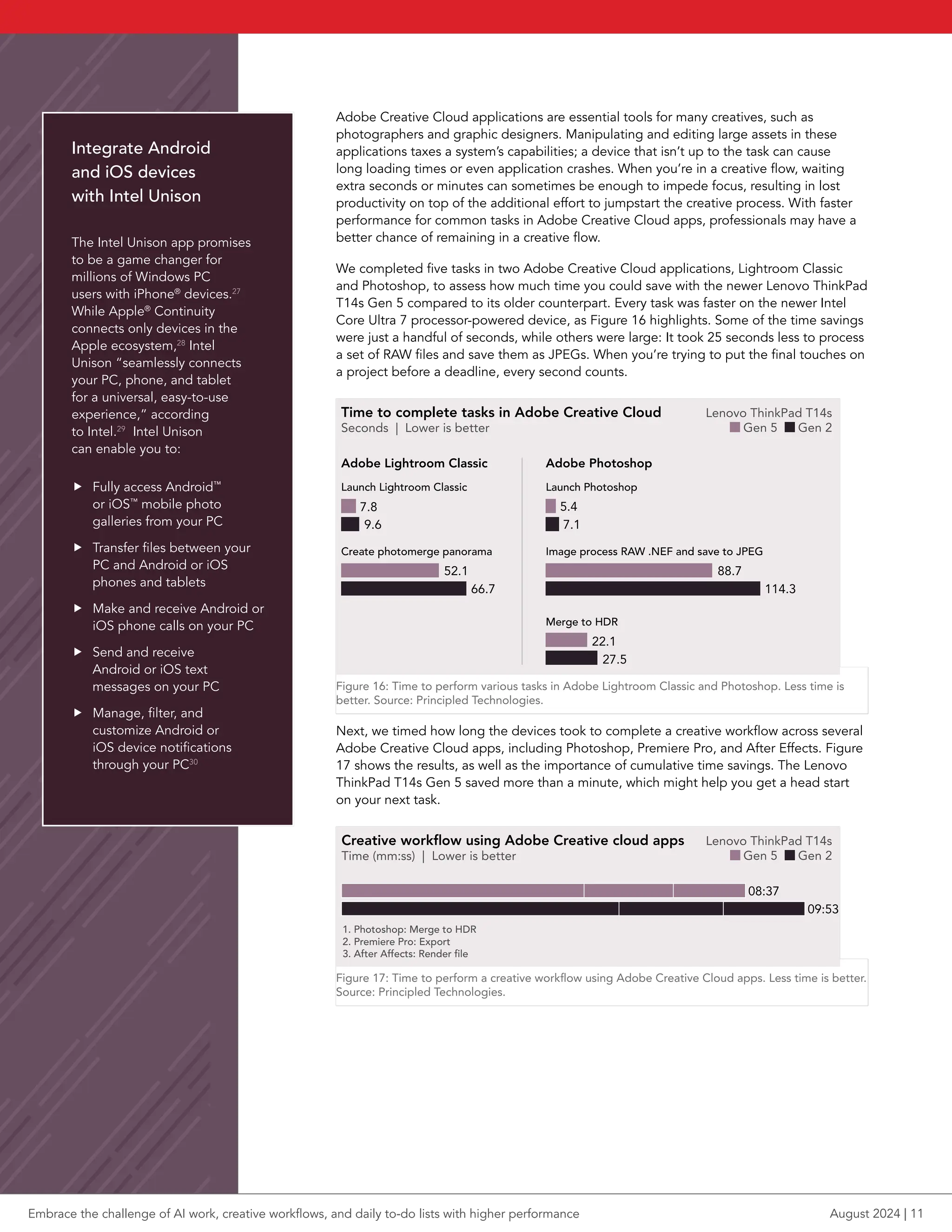
We completed five tasks in two Adobe Creative Cloud applications, Lightroom Classic
and Photoshop, to assess how much time you could save with the newer Lenovo ThinkPad
T14s Gen 5 compared to its older counterpart. Every task was faster on the newer Intel
Core Ultra 7 processor-powered device, as Figure 16 highlights. Some of the time savings
were just a handful of seconds, while others were large: It took 25 seconds less to process
a set of RAW files and save them as JPEGs. When you’re trying to put the final touches on
a project before a deadline, every second counts.
Time to complete tasks in Adobe Creative Cloud
Seconds | Lower is better
Launch Lightroom Classic
bar pt length = score *1.2
Adobe Lightroom Classic
7.8
9.6
Create photomerge panorama
52.1
66.7
Launch Photoshop
Adobe Photoshop
5.4
7.1
Image process RAW .NEF and save to JPEG
88.7
114.3
Merge to HDR
22.1
27.5
Lenovo ThinkPad T14s
Gen 5 Gen 2
Figure 16: Time to perform various tasks in Adobe Lightroom Classic and Photoshop. Less time is
better. Source: Principled Technologies.
Next, we timed how long the devices took to complete a creative workflow across several
Adobe Creative Cloud apps, including Photoshop, Premiere Pro, and After Effects. Figure
17 shows the results, as well as the importance of cumulative time savings. The Lenovo
ThinkPad T14s Gen 5 saved more than a minute, which might help you get a head start
on your next task.
bar pt length = score /2
Creative workflow using Adobe Creative cloud apps
Time (mm:ss) | Lower is better
1. Photoshop: Merge to HDR
2. Premiere Pro: Export
3. After Affects: Render file
08:37
09:53
Lenovo ThinkPad T14s
Gen 5 Gen 2
Figure 17: Time to perform a creative workflow using Adobe Creative Cloud apps. Less time is better.
Source: Principled Technologies.
Integrate Android
and iOS devices
with Intel Unison
The Intel Unison app promises
to be a game changer for
millions of Windows PC
users with iPhone®
devices.27
While Apple®
Continuity
connects only devices in the
Apple ecosystem,28
Intel
Unison “seamlessly connects
your PC, phone, and tablet
for a universal, easy-to-use
experience,” according
to Intel.29
Intel Unison
can enable you to:
f Fully access Android™
or iOS™
mobile photo
galleries from your PC
f Transfer files between your
PC and Android or iOS
phones and tablets
f Make and receive Android or
iOS phone calls on your PC
f Send and receive
Android or iOS text
messages on your PC
f Manage, filter, and
customize Android or
iOS device notifications
through your PC30
Embrace the challenge of AI work, creative workflows, and daily to-do lists with higher performance August 2024 | 11
3D modeling is another demanding task essential to many roles. These types of
applications can take an extremely long time to complete a job, especially on devices
with limited capabilities. We also performed a workflow in Agisoft Metashape, a
photogrammetry and 3D modeling software useful for gaming, geological, or agricultural
industries, among others. Our workflow involved creating a realistic 3D shape by opening
and aligning 148 photos and building a point cloud with mesh and texture.
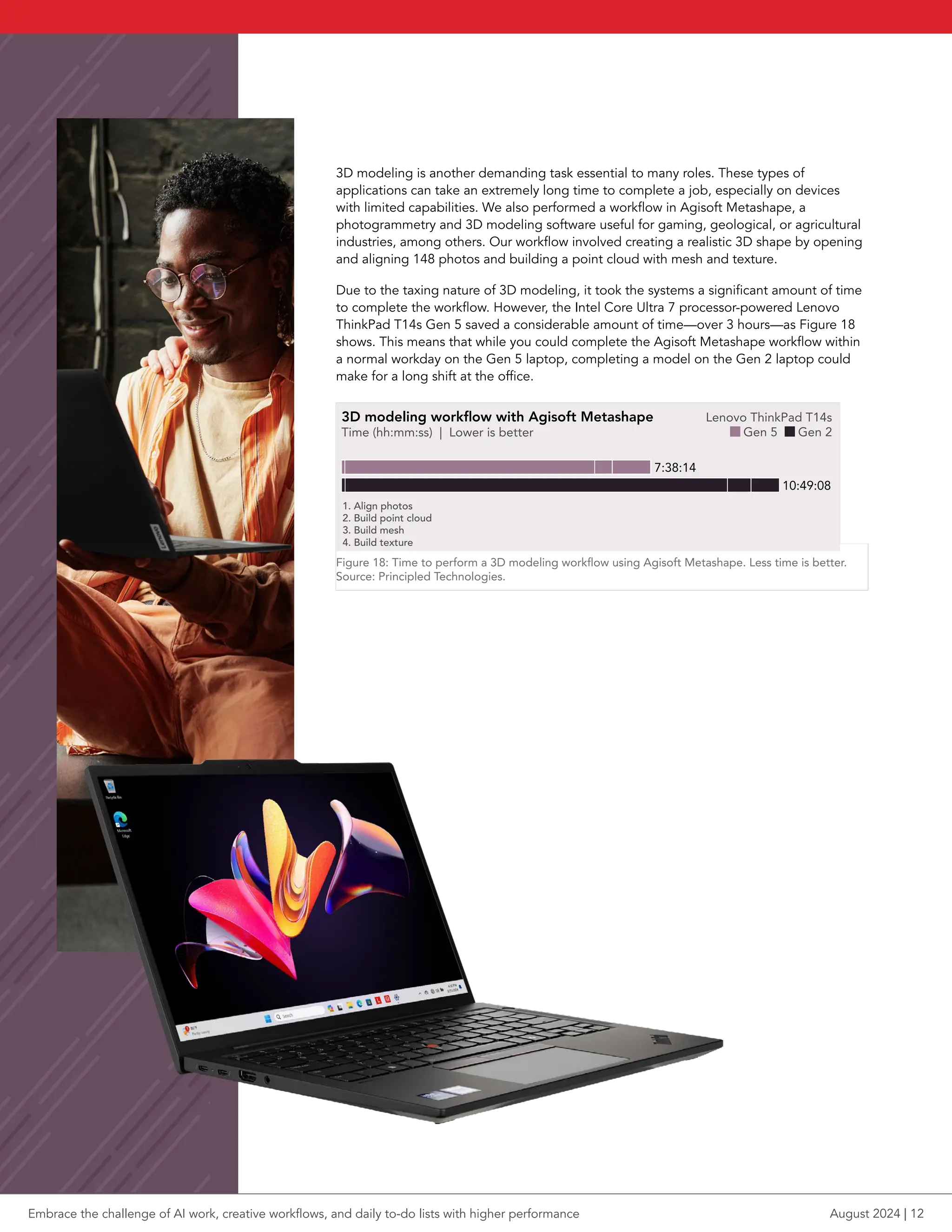
Due to the taxing nature of 3D modeling, it took the systems a significant amount of time
to complete the workflow. However, the Intel Core Ultra 7 processor-powered Lenovo
ThinkPad T14s Gen 5 saved a considerable amount of time—over 3 hours—as Figure 18
shows. This means that while you could complete the Agisoft Metashape workflow within
a normal workday on the Gen 5 laptop, completing a model on the Gen 2 laptop could
make for a long shift at the office.
3D modeling workflow with Agisoft Metashape
Time (hh:mm:ss) | Lower is better
1. Align photos
2. Build point cloud
3. Build mesh
4. Build texture
7:38:14
10:49:08
bar pt length = score /139
Lenovo ThinkPad T14s
Gen 5 Gen 2
Figure 18: Time to perform a 3D modeling workflow using Agisoft Metashape. Less time is better.
Source: Principled Technologies.
Embrace the challenge of AI work, creative workflows, and daily to-do lists with higher performance August 2024 | 12
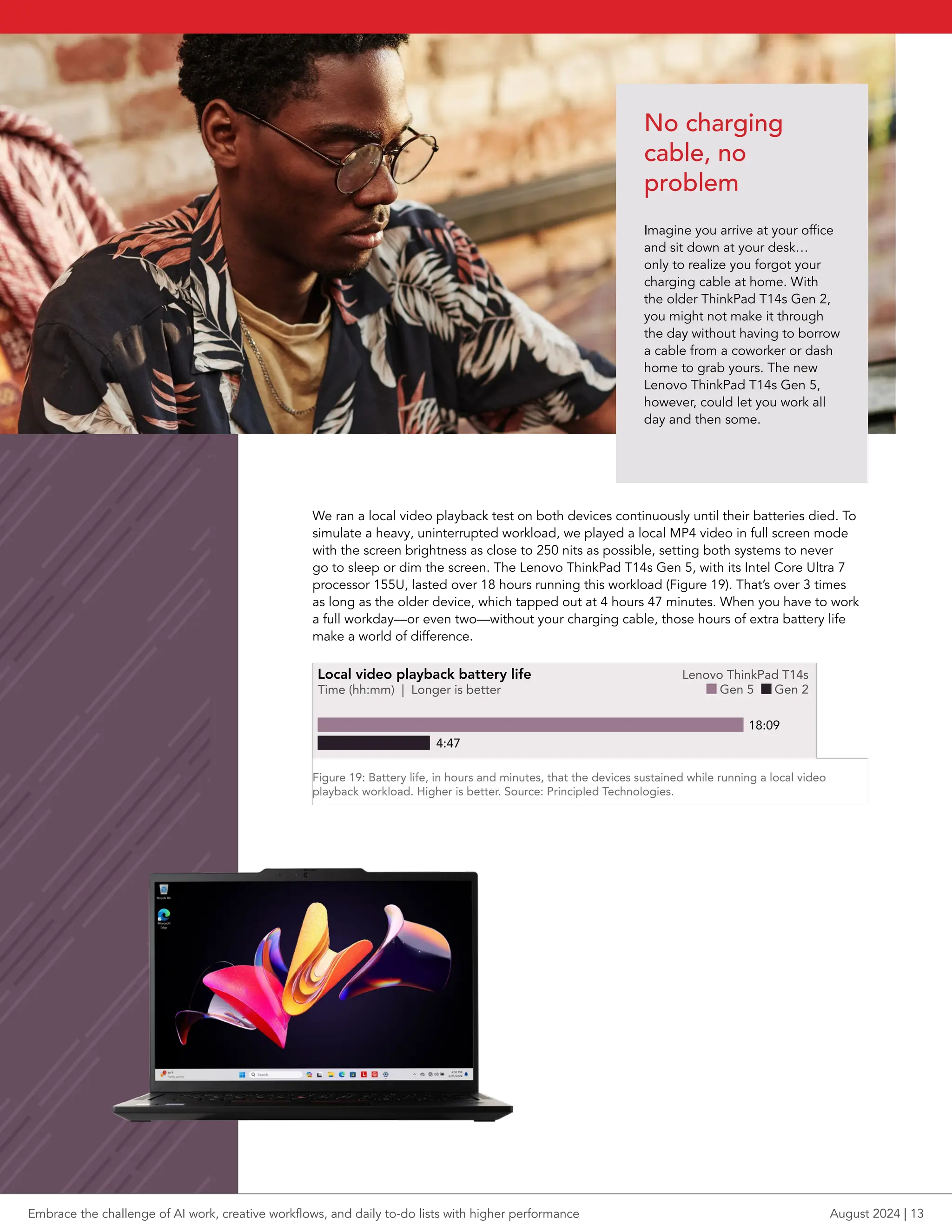
We ran a local video playback test on both devices continuously until their batteries died. To
simulate a heavy, uninterrupted workload, we played a local MP4 video in full screen mode
with the screen brightness as close to 250 nits as possible, setting both systems to never
go to sleep or dim the screen. The Lenovo ThinkPad T14s Gen 5, with its Intel Core Ultra 7
processor 155U, lasted over 18 hours running this workload (Figure 19). That’s over 3 times
as long as the older device, which tapped out at 4 hours 47 minutes. When you have to work
a full workday—or even two—without your charging cable, those hours of extra battery life
make a world of difference.
Local video playback battery life
Time (hh:mm) | Longer is better
18:09
4:47
Lenovo ThinkPad T14s
Gen 5 Gen 2
Figure 19: Battery life, in hours and minutes, that the devices sustained while running a local video
playback workload. Higher is better. Source: Principled Technologies.
No charging
cable, no
problem
Imagine you arrive at your office
and sit down at your desk…
only to realize you forgot your
charging cable at home. With
the older ThinkPad T14s Gen 2,
you might not make it through
the day without having to borrow
a cable from a coworker or dash
home to grab yours. The new
Lenovo ThinkPad T14s Gen 5,
however, could let you work all
day and then some.
Embrace the challenge of AI work, creative workflows, and daily to-do lists with higher performance August 2024 | 13
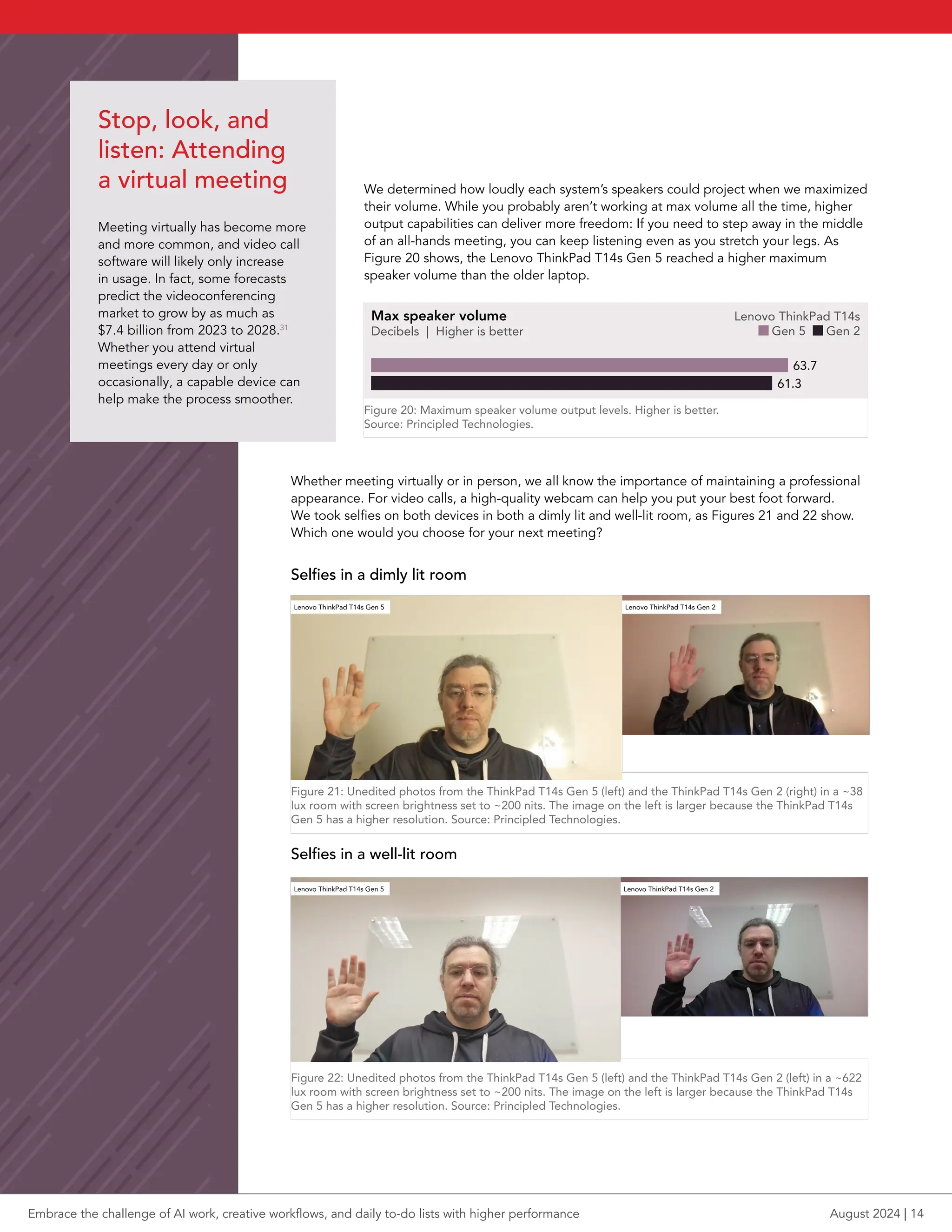
Whether meeting virtually or in person, we all know the importance of maintaining a professional
appearance. For video calls, a high-quality webcam can help you put your best foot forward.
We took selfies on both devices in both a dimly lit and well-lit room, as Figures 21 and 22 show.
Which one would you choose for your next meeting?
Selfies in a dimly lit room
Lenovo ThinkPad T14s Gen 5 Lenovo ThinkPad T14s Gen 2
Figure 21: Unedited photos from the ThinkPad T14s Gen 5 (left) and the ThinkPad T14s Gen 2 (right) in a ~38
lux room with screen brightness set to ~200 nits. The image on the left is larger because the ThinkPad T14s
Gen 5 has a higher resolution. Source: Principled Technologies.
Selfies in a well-lit room
Figure 22:
Lenovo ThinkPad T14s Gen 5 Lenovo ThinkPad T14s Gen 2
Unedited photos from the ThinkPad T14s Gen 5 (left) and the ThinkPad T14s Gen 2 (left) in a ~622
lux room with screen brightness set to ~200 nits. The image on the left is larger because the ThinkPad T14s
Gen 5 has a higher resolution. Source: Principled Technologies.
Stop, look, and
listen: Attending
a virtual meeting
Meeting virtually has become more
and more common, and video call
software will likely only increase
in usage. In fact, some forecasts
predict the videoconferencing
market to grow by as much as
$7.4 billion from 2023 to 2028.31
Whether you attend virtual
meetings every day or only
occasionally, a capable device can
help make the process smoother.
We determined how loudly each system’s speakers could project when we maximized
their volume. While you probably aren’t working at max volume all the time, higher
output capabilities can deliver more freedom: If you need to step away in the middle
of an all-hands meeting, you can keep listening even as you stretch your legs. As
Figure 20 shows, the Lenovo ThinkPad T14s Gen 5 reached a higher maximum
speaker volume than the older laptop.
bar pt length = score *4.2
Max speaker volume
Decibels | Higher is better
Lenovo ThinkPad T14s
Gen 5 Gen 2
61.3
63.7
Figure 20: Maximum speaker volume output levels. Higher is better.
Source: Principled Technologies.
Embrace the challenge of AI work, creative workflows, and daily to-do lists with higher performance August 2024 | 14
1. Lenovo, “ThinkPad T14s Gen 5 (14” Intel) Laptop,” accessed July 16, 2024,
https://www.lenovo.com/us/en/p/laptops/thinkpad/thinkpadt/lenovo-thinkpad-
t14s-gen-5-(14-inch-intel)/len101t0092.
2. Lenovo, “ThinkPad T14s Gen 5 (14” Intel) Laptop.”
3. Intel Newsroom, “Intel Core Ultra Ushers in the Age of the AI PC,” accessed July
16, 2024, https://www.intel.com/content/www/us/en/newsroom/news/core-ul-
tra-client-computing-news-1.html#gs.ak9lfs.
4. Intel, “Intel Core Ultra Processors Family,” accessed July 16, 2024, https://www.
intel.com/content/www/us/en/products/details/processors/core-ultra.html.
5. Anthony Cardillo, “How Many Companies Use AI? (New Data),” accessed July 18,
2024, https://explodingtopics.com/blog/companies-using-ai.
6. “UL Procyon AI Computer Vision Benchmark,” accessed July 15, 2024,
https://benchmarks.ul.com/procyon/ai-inference-benchmark-for-windows.
7. Topaz Labs, “Video AI,” accessed July 18, 2024,
https://www.topazlabs.com/topaz-video-ai.
8. Windows Studio Effects Overview (Preview),” accessed July 15, 2024,
https://learn.microsoft.com/en-us/windows/ai/studio-effects/.
9. UL Solutions, “3DMark,” accessed July 15, 2024,
https://benchmarks.ul.com/3dmark.
10. Blender, “Better in every way,” accessed July 15, 2024,
https://www.blender.org/download/releases/3-5/.
11. Intel, “Transparent Supply Chain,” accessed July 15, 2024, https://www.intel.
com/content/www/us/en/products/docs/servers/transparent-supply-chain.html.
12. Lenovo Tech Today, “Lenovo ThinkShield,” accessed July 15, 2024,
https://techtoday.lenovo.com/us/en/solutions/thinkshield.
Conclusion
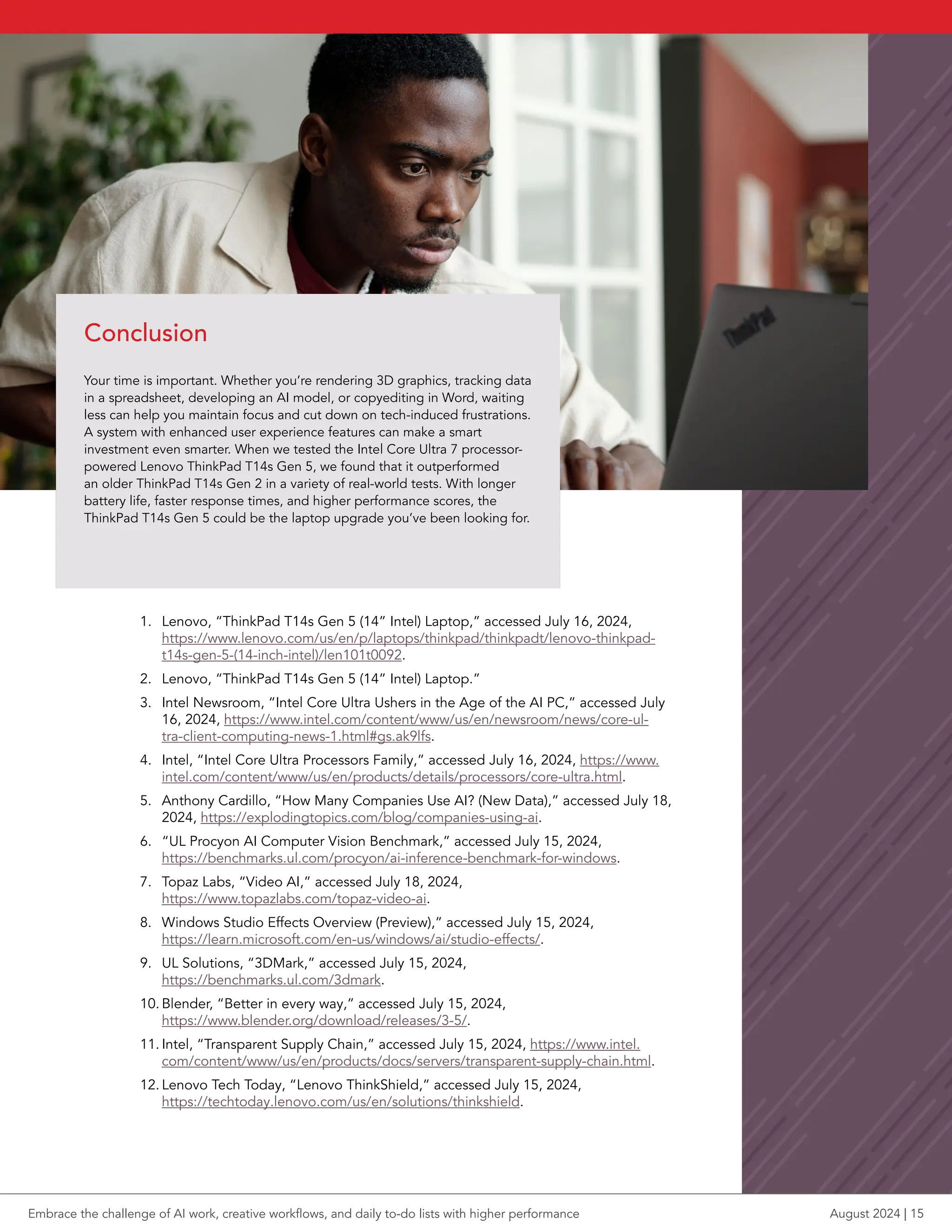
Your time is important. Whether you’re rendering 3D graphics, tracking data
in a spreadsheet, developing an AI model, or copyediting in Word, waiting
less can help you maintain focus and cut down on tech-induced frustrations.
A system with enhanced user experience features can make a smart
investment even smarter. When we tested the Intel Core Ultra 7 processor-
powered Lenovo ThinkPad T14s Gen 5, we found that it outperformed
an older ThinkPad T14s Gen 2 in a variety of real-world tests. With longer
battery life, faster response times, and higher performance scores, the
ThinkPad T14s Gen 5 could be the laptop upgrade you’ve been looking for.
Embrace the challenge of AI work, creative workflows, and daily to-do lists with higher performance August 2024 | 15
13. Lenovo Tech Today, “Lenovo ThinkShield.”
14. Maxon, “Cinebench,” accessed July 15, 2024,
https://www.maxon.net/en/tech-info-cinebench.
15. “Procyon Photo Editing Benchmark,” accessed July 15, 2024,
https://benchmarks.ul.com/procyon/photo-editing-benchmark.
16. “Overview of UL Procyon Video Editing Benchmark,” accessed July 15, 2024,
https://support.benchmarks.ul.com/support/solutions/articles/44002123509-over-
view-of-ul-procyon-video-editing-benchmark.
17. “PugetBench for Creators,” accessed July 15, 2024,
https://www.pugetsystems.com/pugetbench/creators/.
18. “CrossMark,” accessed July 15, 2024, https://bapco.com/crossmark/.
19. “CrossMark,” accessed July 15, 2024,
https://bapco.com/wp-content/uploads/2024/03/crossmark_white_paper_v1.2.pdf.
20. PassMark Software, “I don’t understand the results. What do all these numbers mean?”
accessed July 15, 2024, https://www.passmark.com/support/performancetest_faq/under-
standing-results.php.
21. “Consumers willing to pay 9.7% sustainability premium, even as cost-of-living and infla-
tionary concerns weigh: PwC 2024 Voice of the Consumer Survey,” accessed July 15,
2024, https://www.pwc.com/gx/en/news-room/press-releases/2024/pwc-2024-voice-of-
consumer-survey.html.
22. Lenovo, “ThinkPad T14s Gen 5 (14” Intel) Laptop,” accessed July 17, 2024,
https://www.lenovo.com/us/en/p/laptops/thinkpad/thinkpadt/lenovo-thinkpad-t14s-gen-5-
(14-inch-intel)/.
23. “Lenovo Group Limited 2023/24 Environmental, Social and Governance Report,” accessed
July 15, 2024, https://investor.lenovo.com/en/sustainability/reports/FY2024-lenovo-sus-
tainability-report.pdf.
24. “Procyon Office Productivity Benchmark,” accessed July 15, 2024,
https://benchmarks.ul.com/procyon/office-productivity-benchmark.
25. BAPCo, “SYSmark 30,” accessed July 15, 2024, https://bapco.com/sysmark-30/.
26. Principled Technologies, “WebXPRT FAQ,” accessed July 15, 2024,
https://www.principledtechnologies.com/benchmarkxprt/webxprt/faq.
27. Wonder, “iPhone Users with Windows PCs Research Outline,” accessed July 15, 2024,
https://start.askwonder.com/insights/apple-phone-consumers-use-windows-comput-
ers-xoa0ly0n6.
28. Apple, “macOS User guide,” accessed July 15, 2024, https://support.apple.com/guide/
mac-help/work-across-devices-using-continuity-mchl1d734309/mac.
29. Intel, “Intel®
Unison™
Application,” accessed July 15, 2024,
https://www.intel.com/content/www/us/en/products/docs/unison/overview.html.
30. Intel, “Intel®
Unison™
Application.”
31. PR Newswire, “Global Video Conferencing Market 2024-2028 - Market Forecasted to
Surge at a CAGR of 11.9% from 2023-2028,” accessed July 17, 2024, https://www.
prnewswire.com/news-releases/global-video-conferencing-market-2024-2028---market-
forecasted-to-surge-at-a-cagr-of-11-9-from-2023-2028--302094990.html.
Principled Technologies is a registered trademark of Principled Technologies, Inc.
All other product names are the trademarks of their respective owners.
For additional information, review the science behind this report.
Principled
Technologies®
Facts matter.®
Principled
Technologies®
Facts matter.®
This project was commissioned by Lenovo.
Read the science behind this report at https://facts.pt/38BBkmi
Embrace the challenge of AI work, creative workflows, and daily to-do lists with higher performance August 2024 | 16

Embrace the challenge of AI work, creative workflows, and daily to-do lists with higher performance

  • 1.
    Embrace the challengeof AI work, creative workflows, and daily to-do lists with higher performance Comparing the Lenovo ThinkPad T14s Gen 5 with an Intel Core Ultra 7 processor 155U to the ThinkPad T14s Gen 2 The last time you upgraded your laptop, what did you look for in a new device? Maybe you needed a system that could handle day-to-day office tasks on Microsoft 365 apps, or maybe you looked for something that could handle more intensive graphics work on Adobe® Creative Cloud® programs. If you upgraded even just a few years ago, chances are you weren’t searching for a laptop to tackle resource-hungry AI work. But with AI increasingly becoming a part of our professional lives, you may benefit from a new device that can meet its demands— and help you accomplish the rest of your work—without keeping you waiting. We put two systems through their paces: a Lenovo® ThinkPad® T14s Gen 5 powered by an Intel® Core™ Ultra 7 processor 155U and a three-year-old Lenovo ThinkPad T14s Gen 2. Across the board, the ThinkPad T14s Gen 5 delivered stronger performance for AI workloads, creative apps, and daily productivity tasks, and also provided longer battery life. As the work you do changes, and especially in an AI-centered world, upgrading to the ThinkPad T14s Gen 5 could help you get more done, faster. Take on resource-taxing AI workloads Up to 77% higher performance on the Procyon AI Computer Vision Benchmark* Quickly complete complex renders Up to 3x the Blender benchmark score* Experience more responsive web browsing 33% higher overall WebXPRT 4 score* Maximize productivity on the go Over 18 hours of battery life while playing video *with the Lenovo ThinkPad T14s Gen 5 vs. the Lenovo ThinkPad T14s Gen 2 Embrace the challenge of AI work, creative workflows, and daily to-do lists with higher performance August 2024 A Principled Technologies report: Hands-on testing. Real-world results.
  • 2.
    Features of theLenovo ThinkPad T14s Gen 5 This 14-inch ultrathin and lightweight laptop can enable “AI- powered productivity driven by [an] Intel Core Ultra processor.”1 With up to 2.8K OLED display options, an ENERGY STAR® 8.0 certification, and Lenovo ThinkShield security, Lenovo says the ThinkPad T14s Gen 5 also “prudently adapts to your workload needs with an improved battery system.”2 f Learn more about the Lenovo ThinkPad T14s Gen 5 at https://www.lenovo.com/us/en/p/laptops/thinkpad/ thinkpadt/lenovo-thinkpad-t14s-gen-5-(14-inch- intel)/len101t0092. Table 1: Feature comparison of the laptops we tested. Lenovo ThinkPad T14s Gen 5 Intel Core Ultra 7 processor 155U Lenovo ThinkPad T14s Gen 2 Intel Core i7-1165G7 processor Graphics Integrated Intel Arc™ graphics and Intel AI Boost Intel Iris® Xe Graphics Operating system Windows 11 Pro Windows 10 Pro Display touchscreen Yes Yes Ports 2 x Thunderbolt™ 4 2 x USB-A 1 x HDMI 2.1 1 x headphone/mic combo 1 x Kensington Nano Security Slot™ 1 x USB-C Thunderbolt 4/ power in 1 x USB-C Thunderbolt 4 2 x USB-A 3.2 1 x HDMI 2.0 1 x headphone/mic combo 1 x Kensington Nano Security Slot Weight (lb.) 2.91 3.38 Intel vPro® Yes Yes Intel Unison™ Yes No Wi-Fi and Bluetooth Intel Wi-Fi 6E (802.11ax) with Bluetooth 5.3 Wi-Fi 6 AX201 (802.11a/b/g) with Bluetooth 5.2 About the Intel Core Ultra 7 processor 155U The Lenovo ThinkPad T14s Gen 5 we tested featured an Intel Core Ultra 7 processor 155U with integrated Intel Arc graphics and Intel AI Boost. This processor incorporates three separate engines: a central processing unit (CPU), a graphics processing unit (GPU), and a neural processing unit (NPU). This architectural shift, according to Intel, makes Intel Core Ultra processors “the most AI-capable and power-efficient client processor in Intel’s history.”3 Intel recommends Intel Core Ultra 7 processors for AI-enhanced video editing, among other tasks.4 f Learn more about Intel Core Ultra processors at https://www.intel.com/content/www/us/en/products/docs/processors/core-ultra/core-ultra-series-1-product-brief.html. Embrace the challenge of AI work, creative workflows, and daily to-do lists with higher performance August 2024 | 2
  • 3.
    How we tested Wecompared the Lenovo ThinkPad T14s Gen 5, powered by an Intel Core Ultra 7 processor 155U, to an older Lenovo ThinkPad T14s Gen 2, powered by an Intel Core i7-1165G7 processor. The newer system had 16 GB of LPDDR5X memory, while the older system had 16 GB of DDR4 memory. Both laptops had 512 GB of SSD storage. We used a wide variety of tools, benchmarks, and assessments to obtain a multifaceted picture of both devices’ performance for AI workloads, graphics-intensive tasks, and everyday work. AI performance benchmarks and tools AI is rapidly evolving and changing, but one thing is clear: It’s not going away any time soon. To take advantage of helpful AI tools now and into the future, you’ll want a device with the ability to handle this taxing work. We used two benchmarks to look at the performance you might expect for a number of AI tasks. Š Procyon® AI Computer Vision Benchmark (p4) Š Topaz Video AI (p4) Graphics-intensive performance benchmarks and tools Whether you’re a creative professional who edits photos and videos or a technical worker who renders 3D graphics, a system that easily handles large files can help you save time in your workflows. For a fuller look at how the laptops process graphics-intensive workloads, we used several different benchmarks to measure performance. Š 3DMark® (p5) Š Blender (p5) Š Cinebench 2024 (p6) Š HandBrake (p6) Š Procyon Photo Editing Benchmark (p7) Š Procyon Video Editing Benchmark (p7) Š PugetBench for Creators (p7) General performance benchmarks We also used benchmarks that gauge the performance users might expect for their day- to-day work. Rather than focusing on specialized workloads, these benchmarks reflect common productivity tasks for users across industries. Š CrossMark™ (p8) Š PassMark PerformanceTest 11 (p8) Š SYSmark® 30 (p9) Š Procyon Office Productivity Benchmark (p9) Š WebXPRT 4 (p9) Battery life, workflow, and user experience tests Our testing went beyond benchmarks: We also performed hands-on tasks and assessed elements of everyday user experience. These tests measured: Š Everyday productivity tasks (p10) Š Content creation tasks (p11) Š Real-world workflows (p11) Š Battery life (p13) Š Speaker volume (p14) Š Camera quality (p14) Embrace the challenge of AI work, creative workflows, and daily to-do lists with higher performance August 2024 | 3
  • 4.
    Our testing aimedto gauge the AI capabilities of the Lenovo ThinkPad T14s Gen 5 and the ThinkPad T14s Gen 2. We first ran the Procyon AI Computer Vision Benchmark, which “gives insights into how AI inference engines perform on your [device], helping you decide which engines to support to achieve the best performance” by using several inference engines and popular neural network models.6 For a look at how the systems might handle different types of work, we used three precision levels: float32, float16, and int8. Different levels determine how precisely a model completes its work, so some precision levels require more time to run than others. As Figure 1 shows, the Intel Core Ultra 7 processor-powered Lenovo ThinkPad T14s Gen 5 outperformed the older system at each precision level, achieving up to 77.6 percent higher performance. While your daily work might not require you to run inference operations on large datasets, these results indicate that you could see improved performance developing an AI model or testing a model’s accuracy. Procyon AI Computer Vision Benchmark Intel OpenVINO Overall rating | Higher is better Lenovo ThinkPad T14s Gen 5 Gen 2 bar pt length = score /2 float32 114 136 float16 192 327 int8 318 565 Figure 1: Procyon AI Computer Vision Benchmark Intel OpenVINO™ overall scores. Higher is better. Source: Principled Technologies. The Topaz Labs™ Video AI application uses AI to make video enhancements, such as steadying camera movement, upscaling resolution, and reducing noise;7 their benchmark quantifies performance with the app. The newer Lenovo ThinkPad T14s Gen 5 performed well on several Topaz Video AI tests—you can see these results in the science behind the report—but the older ThinkPad T14s Gen 2 was unable to run the test at all. So, when it comes to AI-based video editing, the Lenovo ThinkPad T14s Gen 5 is an advantageous choice. An intelligent choice for AI Artificial intelligence is all around us. For the workplace, one study estimates that over 77 percent of businesses are either using or exploring the use of AI.5 Even if your team hasn’t yet dipped its toe into the waters of this technology, many tools and apps already leverage it, such as in predictive search suggestions or background blurring during a video call. In this AI revolution, you need a device that can keep up. We also looked at Windows Studio Effects, a new feature set from Windows that “leverages AI models built by Microsoft and compiled/optimized for devices with a Neural Processing Unit (NPU) to deliver high- fidelity, battery-friendly AI effects.”8 These effects include background blurs, background noise minimization, adjustments to framing and lighting, and fun filters. We enabled Windows Studio Effects on the Lenovo ThinkPad T14s Gen 5 laptop and found that they ran as we anticipated. However, because the ThinkPad T14s Gen 2 does not have an NPU, it was not compatible with Windows Studio Effects. f To learn more about these effects and how to enable them, visit https://support.microsoft. com/en-us/windows/ windows-studio-effects- 273c1fa8-2b3f-41b1- a587-7cc7a24b62d8. Embrace the challenge of AI work, creative workflows, and daily to-do lists with higher performance August 2024 | 4
  • 5.
    Using several differentbenchmarks, we examined how the two laptops handled heavy media workloads. We started with 3DMark Fire Strike and Time Spy tests, which measure DirectX graphics performance.9 As a gaming benchmark, 3DMark can indicate how a system performs while running compute-intensive multimedia and video workloads. Figure 2 shows the newer Lenovo ThinkPad T14s system achieved scores up to 17.3 percent higher than the ThinkPad T14s Gen 2 in 3DMark testing. 3DMark Overall score | Higher is better Fire Strike 5,065 4,351 Time Spy 1,964 1,673 Lenovo ThinkPad T14s Gen 5 Gen 2 bar pt length = score /28 Figure 2: 3DMark overall scores. Higher is better. Source: Principled Technologies. We also tested the systems with the Blender benchmark, which uses 3D rendering workloads to calculate how many path tracing samples a system can render per minute.10 Path tracing is a 3D rendering method that focuses on lighting to help graphics appear more realistic. We tested with three different workloads to get a more complete idea of the systems’ performance. As Figure 3 shows, the Lenovo ThinkPad T14s Gen 5 with the Intel Core Ultra 7 processor 155U outperformed the older device. It delivered up to 3.25 times the Blender score, indicating improved performance for designers, artists, and others who create realistic 3D graphics. Blender benchmark Samples per minute | Higher is better Monster 108.07 33.17 Junkshop 30.74 22.37 Classroom 47.28 16.22 Lenovo ThinkPad T14s Gen 5 Gen 2 bar pt length = score *1.44 Figure 3: Blender benchmark samples per minute. Higher is better. Source: Principled Technologies. Less waiting, more creating Engineering and production organizations aren’t the only ones who rely on high- performing systems to support compute-intensive applications. For example, to reach customers on social media, organizations of all kinds must frequently produce and edit media. Equipped with systems that can handle video, editing, and 3D rendering workloads more quickly, professionals can leverage more time to create and refine. Embrace the challenge of AI work, creative workflows, and daily to-do lists with higher performance August 2024 | 5
  • 6.
    Cinebench 2024 usesthe Redshift render engine to evaluate CPU and GPU performance.14 Higher scores mean users could see faster response times from video games, design software, and scientific simulations. In single-threaded and multi-threaded tests, the Lenovo ThinkPad T14s Gen 5 laptop achieved up to 2.33 times the score of the Lenovo ThinkPad T14s Gen 2 laptop, an impressive boon for users who need high performance for graphics work (Figure 4). Cinebench 2024 Overall score | Higher is better Multi-core 441 189 Single-core 100 64 Lenovo ThinkPad T14s Gen 5 Gen 2 bar pt length = score /2.2 Figure 4: Cinebench 2024 scores. Higher is better. Source: Principled Technologies. Encoding a video—the process of compressing it for compatibility with web and mobile media players—is taxing work for a system. We used HandBrake, an open-source encoding tool, to measure how long it took the systems to encode a video and how many frames per second (FPS) they could process. Our tests included two presets for a more complete look at system performance. The Lenovo ThinkPad T14s Gen 5 laptop took less time than the Lenovo ThinkPad T14s Gen 2 to encode in both tests, handing up to 57.7 percent more FPS (see Figures 5 and 6). This performance could speed video editing and production workflows, giving teams more time to complete review cycles and finesse the final product. HandBrake Fast 1080p preset Time (minutes:seconds) | Lower is better 4:05 6:25 Frames per second | Higher is better 30.05 19.05 Lenovo ThinkPad T14s Gen 5 Gen 2 time: bar pt length = seconds /2.4 fps: bar pt length = seconds *7 Figure 5: HandBrake Fast 1080p preset test results. Less time is better, and more FPS is better. Source: Principled Technologies. HandBrake 4K H.265 encoder Time (minutes:seconds) | Lower is better 5:35 8:00 Frames per second | Higher is better 21.84 15.24 Lenovo ThinkPad T14s Gen 5 Gen 2 time: bar pt length = seconds /2.4 fps: bar pt length = seconds *7 Figure 6: HandBrake Hardware 4K H.265 encoder test results. Less time is better, and more FPS is better. Source: Principled Technologies. Get end-to-end security with Intel and Lenovo Intel and Lenovo both bring key security features to the ThinkPad T14s Gen 5 powered by an Intel Core Ultra 7 processor 155U. These include Intel Transparent Supply Chain, which protects hardware components and software during every step of the supply chain process with “a set of tools, policies, and procedures implemented on the factory floor at PC and server manufacturers that help enable enterprises to verify the authenticity and firmware version of systems and their components.”11 Simultaneously, Lenovo ThinkShield provides full lifecycle security and protection, “allowing you to work from anywhere with extended detection and response against cyber-threats.”12 Lenovo ThinkShield uses AI-powered endpoint protection for defense wherever and whenever work happens—both above and below the operating system.13 Embrace the challenge of AI work, creative workflows, and daily to-do lists with higher performance August 2024 | 6
  • 7.
    Adobe Creative Cloudapplications—which include Adobe Photoshop® , Adobe Lightroom® Classic, and Adobe Premiere® Pro—are essential tools for many creative professionals. We tested with different benchmarks that use realistic workflows in these programs to gauge performance, starting with the Procyon Photo Editing Benchmark and Procyon Video Editing Benchmark.15,16 Figures 7 and 8 show that the Lenovo ThinkPad T14s Gen 5 laptop scored higher on both benchmarks, meaning it can save time for designers, videographers, and others who regularly work in Creative Cloud apps. Procyon Photo Editing Benchmark Overall score | Higher is better Lenovo ThinkPad T14s Gen 5 Gen 2 3,881 4,410 bar pt length = score /18 Figure 7: Procyon Photo Editing Benchmark overall scores. Higher is better. Source: Principled Technologies. Procyon Video Editing Benchmark Overall score | Higher is better Lenovo ThinkPad T14s Gen 5 Gen 2 1,667 2,294 bar pt length = score /11 Figure 8: Procyon Video Editing Benchmark overall scores. Higher is better. Source: Principled Technologies. To get another look at the Adobe Creative Cloud performance the devices could achieve, we tested with the PugetBench for Creators benchmarks. These tools run real-world workflows in Adobe Photoshop and Adobe Premiere Pro to measure performance.17 Once again, as Figure 9 shows, the Lenovo ThinkPad T14s Gen 5 laptop attained higher scores than the Gen 2 laptop, which could translate to a smoother, more responsive experience in these apps. PugetBench for Creators Overall score | Higher is better Adobe Photoshop 5,065 4,271 Adobe Premiere Pro 2,184 1,915 Lenovo ThinkPad T14s Gen 5 Gen 2 bar pt length = score/23 Figure 9: PugetBench for Creators overall scores. Higher is better. Source: Principled Technologies. Embrace the challenge of AI work, creative workflows, and daily to-do lists with higher performance August 2024 | 7
  • 8.
    CrossMark, an industry-standardbenchmark, “measures the overall system performance and system responsiveness using models of real-world applications”18 with workloads including encryption, face recognition, file read/write, and more.19 The Lenovo ThinkPad T14s Gen 5, with its Intel Core Ultra 7 processor 155U, achieved a score 29.7 percent higher than that of the ThinkPad T14s Gen 2, as Figure 10 shows. For users checking off tasks from their to-do lists, this might mean reaching the end of that list sooner. CrossMark Overall score | Higher is better Lenovo ThinkPad T14s Gen 5 Gen 2 1,136 1,474 bar pt length = score /6.25 Figure 10: CrossMark overall scores. Higher is better. Source: Principled Technologies. We also used PassMark PerformanceTest 11 to assess the laptops’ performance. Higher scores from PassMark PerformanceTest 11—which measures a system’s CPU, 2D and 3D graphics, disk, and memory performance—can indicate more a streamlined experience when using your system.20 The Intel Core Ultra 7 processor-powered Lenovo ThinkPad T14s Gen 5 proved to be the winner again, achieving a 21.0 percent higher score (see Figure 11). PassMark PerformanceTest 11 Overall rating | Higher is better Lenovo ThinkPad T14s Gen 5 Gen 2 3,939 4,767 bar pt length = score /24 Figure 11: PassMark PerformanceTest 11 results. Higher is better. Source: Principled Technologies. Responsive performance for everyday productivity Next, we examined laptop performance for common office tasks and scenarios. While not everyone relies on their laptop to edit graphics in Photoshop or render complex 3D models, many laptop users complete work on Microsoft 365 applications and web browsers every day. The time you spend waiting on spreadsheets to load or browser tabs to open—even if they’re just seconds—can quickly add up when you perform these tasks often. And, if you consistently notice longer wait times, you might find yourself distracted or frustrated. For a look at how the Lenovo ThinkPad T14s Gen 5 and ThinkPad T14s Gen 2 handled these tasks, we put them to the test with several benchmarks. Embrace the challenge of AI work, creative workflows, and daily to-do lists with higher performance August 2024 | 8
  • 9.
    To assess theMicrosoft 365 application performance users might expect from their systems, we used the Procyon Office Productivity Benchmark. This tool simulates how people use Microsoft 365 apps every day, completing real-world tasks in Word, Excel, PowerPoint, and Outlook and switching between windows.24 With a 20.8 percent higher score than that of the Gen 2 system, the Lenovo ThinkPad T14s Gen 5 could deliver faster performance on these foundational apps (Figure 12). Procyon Office Productivity Benchmark Overall scores | Higher is better 5,063 Lenovo ThinkPad T14s Gen 5 Gen 2 6,118 bar pt length = score /22 Figure 12: Procyon Office Productivity Benchmark overall scores. Higher is better. Source: Principled Technologies. We tested with the SYSmark 30 benchmark next. Running office tasks, media workloads, and multitasking scenarios, SYSmark 30 “measures and compares system performance using real-world applications and workloads.25 In these tests, as Figure 13 shows, the Lenovo ThinkPad T14s Gen 5 scored 19.9 percent higher overall, indicating users could see faster, more responsive performance while multitasking. SYSmark 30 Overall rating | Higher is better 1,256 Lenovo ThinkPad T14s Gen 5 Gen 2 1,507 bar pt length = score /7 bar pt length = score /1.14 Figure 13: SYSmark 30 overall ratings. Higher is better. Source: Principled Technologies. WebXPRT 4 is an industry-standard browser benchmark that uses HTML5, JavaScript, and WebAssembly-based scenarios to simulate a range of real-world tasks.26 No matter what industry you work in, browsing the web is likely a critical component of your job. So, the way a system might handle web browsing is an important consideration. Figure 14 shows that the Lenovo ThinkPad T14s Gen 5 with the Intel Core Ultra 7 processor 155U delivered better web-browsing performance, achieving a 33.3 percent higher overall score than the Think Pad T14s Gen 2 laptop. WebXPRT 4 using Google Chrome Overall score | Higher is better Lenovo ThinkPad T14s Gen 5 Gen 2 216 288 bar pt length = score /1.14 Figure 14: WebXPRT 4 overall scores with the Google Chrome browser. Higher is better. Source: Principled Technologies. Enhance your commitment to sustainability Sustainability is much more than a buzzword. As we continue to feel the effects of global climate change, four out of five consumers are willing to pay more for goods that are sustainably sourced or produced.21 Lenovo maintains that the ThinkPad T14s Gen 5 is TCO, ENERGY STAR® , EPEAT® Gold, and Eyesafe® certified with these sustainability specs:22 f The packaging is 100 percent plastic-free and recyclable f The Luna Grey top cover contains 50 percent recycled aluminum f The Eclipse Black top cover contains 30 percent recycled carbon fiber f The keyboard frame contains 90 percent recycled magnesium f The bottom cover contains 55 percent recycled aluminum f The speaker enclosure, battery enclosure, and power adapter contain 90 percent post-consumer content (PCC) recycled plastic f The cable holders contain 95 percent PCC recycled plastic f The non-backlit keycaps contain 70 percent PCC recycled plastic Additionally, in the Lenovo 2023/24 Environmental, Social, and Governance report, Lenovo outlines its approaches to and goals for sustainability, including targeting net-zero greenhouse gas emissions by 2050. The report discusses the Lenovo commitment to utilize post-consumer recycled content in its products, improve its products’ energy efficiency, and utilize renewable and bio-based materials in its packaging, among other practices.23 f Learn more at https://investor. lenovo.com/en/sustainability/ reports/FY2024-lenovo- sustainability-report.pdf. Embrace the challenge of AI work, creative workflows, and daily to-do lists with higher performance August 2024 | 9
  • 10.
    We took anotherlook at performance by timing how long it took both devices to complete a variety of tasks in Microsoft 365 apps. From quick jobs such as starting a PowerPoint presentation to more intensive tasks such as inserting a 3D chart in Excel, the Lenovo ThinkPad T14s Gen 5 saved time completing each of the seven tasks (Figure 15). For an everyday user, these time savings may add up to a noticeably more responsive experience compared to the older ThinkPad T14s Gen 2. bar pt length = score *3 Time to complete tasks in Microsoft 365 Seconds | Lower is better Microsoft Word Perform find/replace 1.0 1.5 Open 90MB document 0.8 1.0 Export PDF 4.1 5.0 Start slide show 0.7 0.8 Microsoft PowerPoint Export 180MB .PPTX to PDF 6.2 8.1 Microsoft Excel Open 92MB spreadsheet containing macro 13.2 18.1 Insert 3D 100% stacked column chart 16.6 26.8 Lenovo ThinkPad T14s Gen 5 Gen 2 Figure 15: Time to perform various tasks in Microsoft 365. Less time is better. Source: Principled Technologies. Going with the (work)flow For those who work with Microsoft 365 applications, such as Word, Excel, and PowerPoint, responsive performance can be key to a productive day. After all, seemingly small wait times can turn into considerable lost time over the course of a day, a month, or a year. When users experience faster performance in Microsoft 365 apps, they could have more time to focus on the task at hand. Embrace the challenge of AI work, creative workflows, and daily to-do lists with higher performance August 2024 | 10
  • 11.
    Adobe Creative Cloudapplications are essential tools for many creatives, such as photographers and graphic designers. Manipulating and editing large assets in these applications taxes a system’s capabilities; a device that isn’t up to the task can cause long loading times or even application crashes. When you’re in a creative flow, waiting extra seconds or minutes can sometimes be enough to impede focus, resulting in lost productivity on top of the additional effort to jumpstart the creative process. With faster performance for common tasks in Adobe Creative Cloud apps, professionals may have a better chance of remaining in a creative flow. We completed five tasks in two Adobe Creative Cloud applications, Lightroom Classic and Photoshop, to assess how much time you could save with the newer Lenovo ThinkPad T14s Gen 5 compared to its older counterpart. Every task was faster on the newer Intel Core Ultra 7 processor-powered device, as Figure 16 highlights. Some of the time savings were just a handful of seconds, while others were large: It took 25 seconds less to process a set of RAW files and save them as JPEGs. When you’re trying to put the final touches on a project before a deadline, every second counts. Time to complete tasks in Adobe Creative Cloud Seconds | Lower is better Launch Lightroom Classic bar pt length = score *1.2 Adobe Lightroom Classic 7.8 9.6 Create photomerge panorama 52.1 66.7 Launch Photoshop Adobe Photoshop 5.4 7.1 Image process RAW .NEF and save to JPEG 88.7 114.3 Merge to HDR 22.1 27.5 Lenovo ThinkPad T14s Gen 5 Gen 2 Figure 16: Time to perform various tasks in Adobe Lightroom Classic and Photoshop. Less time is better. Source: Principled Technologies. Next, we timed how long the devices took to complete a creative workflow across several Adobe Creative Cloud apps, including Photoshop, Premiere Pro, and After Effects. Figure 17 shows the results, as well as the importance of cumulative time savings. The Lenovo ThinkPad T14s Gen 5 saved more than a minute, which might help you get a head start on your next task. bar pt length = score /2 Creative workflow using Adobe Creative cloud apps Time (mm:ss) | Lower is better 1. Photoshop: Merge to HDR 2. Premiere Pro: Export 3. After Affects: Render file 08:37 09:53 Lenovo ThinkPad T14s Gen 5 Gen 2 Figure 17: Time to perform a creative workflow using Adobe Creative Cloud apps. Less time is better. Source: Principled Technologies. Integrate Android and iOS devices with Intel Unison The Intel Unison app promises to be a game changer for millions of Windows PC users with iPhone® devices.27 While Apple® Continuity connects only devices in the Apple ecosystem,28 Intel Unison “seamlessly connects your PC, phone, and tablet for a universal, easy-to-use experience,” according to Intel.29 Intel Unison can enable you to: f Fully access Android™ or iOS™ mobile photo galleries from your PC f Transfer files between your PC and Android or iOS phones and tablets f Make and receive Android or iOS phone calls on your PC f Send and receive Android or iOS text messages on your PC f Manage, filter, and customize Android or iOS device notifications through your PC30 Embrace the challenge of AI work, creative workflows, and daily to-do lists with higher performance August 2024 | 11
  • 12.
    3D modeling isanother demanding task essential to many roles. These types of applications can take an extremely long time to complete a job, especially on devices with limited capabilities. We also performed a workflow in Agisoft Metashape, a photogrammetry and 3D modeling software useful for gaming, geological, or agricultural industries, among others. Our workflow involved creating a realistic 3D shape by opening and aligning 148 photos and building a point cloud with mesh and texture. Due to the taxing nature of 3D modeling, it took the systems a significant amount of time to complete the workflow. However, the Intel Core Ultra 7 processor-powered Lenovo ThinkPad T14s Gen 5 saved a considerable amount of time—over 3 hours—as Figure 18 shows. This means that while you could complete the Agisoft Metashape workflow within a normal workday on the Gen 5 laptop, completing a model on the Gen 2 laptop could make for a long shift at the office. 3D modeling workflow with Agisoft Metashape Time (hh:mm:ss) | Lower is better 1. Align photos 2. Build point cloud 3. Build mesh 4. Build texture 7:38:14 10:49:08 bar pt length = score /139 Lenovo ThinkPad T14s Gen 5 Gen 2 Figure 18: Time to perform a 3D modeling workflow using Agisoft Metashape. Less time is better. Source: Principled Technologies. Embrace the challenge of AI work, creative workflows, and daily to-do lists with higher performance August 2024 | 12
  • 13.
    We ran alocal video playback test on both devices continuously until their batteries died. To simulate a heavy, uninterrupted workload, we played a local MP4 video in full screen mode with the screen brightness as close to 250 nits as possible, setting both systems to never go to sleep or dim the screen. The Lenovo ThinkPad T14s Gen 5, with its Intel Core Ultra 7 processor 155U, lasted over 18 hours running this workload (Figure 19). That’s over 3 times as long as the older device, which tapped out at 4 hours 47 minutes. When you have to work a full workday—or even two—without your charging cable, those hours of extra battery life make a world of difference. Local video playback battery life Time (hh:mm) | Longer is better 18:09 4:47 Lenovo ThinkPad T14s Gen 5 Gen 2 Figure 19: Battery life, in hours and minutes, that the devices sustained while running a local video playback workload. Higher is better. Source: Principled Technologies. No charging cable, no problem Imagine you arrive at your office and sit down at your desk… only to realize you forgot your charging cable at home. With the older ThinkPad T14s Gen 2, you might not make it through the day without having to borrow a cable from a coworker or dash home to grab yours. The new Lenovo ThinkPad T14s Gen 5, however, could let you work all day and then some. Embrace the challenge of AI work, creative workflows, and daily to-do lists with higher performance August 2024 | 13
  • 14.
    Whether meeting virtuallyor in person, we all know the importance of maintaining a professional appearance. For video calls, a high-quality webcam can help you put your best foot forward. We took selfies on both devices in both a dimly lit and well-lit room, as Figures 21 and 22 show. Which one would you choose for your next meeting? Selfies in a dimly lit room Lenovo ThinkPad T14s Gen 5 Lenovo ThinkPad T14s Gen 2 Figure 21: Unedited photos from the ThinkPad T14s Gen 5 (left) and the ThinkPad T14s Gen 2 (right) in a ~38 lux room with screen brightness set to ~200 nits. The image on the left is larger because the ThinkPad T14s Gen 5 has a higher resolution. Source: Principled Technologies. Selfies in a well-lit room Figure 22: Lenovo ThinkPad T14s Gen 5 Lenovo ThinkPad T14s Gen 2 Unedited photos from the ThinkPad T14s Gen 5 (left) and the ThinkPad T14s Gen 2 (left) in a ~622 lux room with screen brightness set to ~200 nits. The image on the left is larger because the ThinkPad T14s Gen 5 has a higher resolution. Source: Principled Technologies. Stop, look, and listen: Attending a virtual meeting Meeting virtually has become more and more common, and video call software will likely only increase in usage. In fact, some forecasts predict the videoconferencing market to grow by as much as $7.4 billion from 2023 to 2028.31 Whether you attend virtual meetings every day or only occasionally, a capable device can help make the process smoother. We determined how loudly each system’s speakers could project when we maximized their volume. While you probably aren’t working at max volume all the time, higher output capabilities can deliver more freedom: If you need to step away in the middle of an all-hands meeting, you can keep listening even as you stretch your legs. As Figure 20 shows, the Lenovo ThinkPad T14s Gen 5 reached a higher maximum speaker volume than the older laptop. bar pt length = score *4.2 Max speaker volume Decibels | Higher is better Lenovo ThinkPad T14s Gen 5 Gen 2 61.3 63.7 Figure 20: Maximum speaker volume output levels. Higher is better. Source: Principled Technologies. Embrace the challenge of AI work, creative workflows, and daily to-do lists with higher performance August 2024 | 14
  • 15.
    1. Lenovo, “ThinkPadT14s Gen 5 (14” Intel) Laptop,” accessed July 16, 2024, https://www.lenovo.com/us/en/p/laptops/thinkpad/thinkpadt/lenovo-thinkpad- t14s-gen-5-(14-inch-intel)/len101t0092. 2. Lenovo, “ThinkPad T14s Gen 5 (14” Intel) Laptop.” 3. Intel Newsroom, “Intel Core Ultra Ushers in the Age of the AI PC,” accessed July 16, 2024, https://www.intel.com/content/www/us/en/newsroom/news/core-ul- tra-client-computing-news-1.html#gs.ak9lfs. 4. Intel, “Intel Core Ultra Processors Family,” accessed July 16, 2024, https://www. intel.com/content/www/us/en/products/details/processors/core-ultra.html. 5. Anthony Cardillo, “How Many Companies Use AI? (New Data),” accessed July 18, 2024, https://explodingtopics.com/blog/companies-using-ai. 6. “UL Procyon AI Computer Vision Benchmark,” accessed July 15, 2024, https://benchmarks.ul.com/procyon/ai-inference-benchmark-for-windows. 7. Topaz Labs, “Video AI,” accessed July 18, 2024, https://www.topazlabs.com/topaz-video-ai. 8. Windows Studio Effects Overview (Preview),” accessed July 15, 2024, https://learn.microsoft.com/en-us/windows/ai/studio-effects/. 9. UL Solutions, “3DMark,” accessed July 15, 2024, https://benchmarks.ul.com/3dmark. 10. Blender, “Better in every way,” accessed July 15, 2024, https://www.blender.org/download/releases/3-5/. 11. Intel, “Transparent Supply Chain,” accessed July 15, 2024, https://www.intel. com/content/www/us/en/products/docs/servers/transparent-supply-chain.html. 12. Lenovo Tech Today, “Lenovo ThinkShield,” accessed July 15, 2024, https://techtoday.lenovo.com/us/en/solutions/thinkshield. Conclusion Your time is important. Whether you’re rendering 3D graphics, tracking data in a spreadsheet, developing an AI model, or copyediting in Word, waiting less can help you maintain focus and cut down on tech-induced frustrations. A system with enhanced user experience features can make a smart investment even smarter. When we tested the Intel Core Ultra 7 processor- powered Lenovo ThinkPad T14s Gen 5, we found that it outperformed an older ThinkPad T14s Gen 2 in a variety of real-world tests. With longer battery life, faster response times, and higher performance scores, the ThinkPad T14s Gen 5 could be the laptop upgrade you’ve been looking for. Embrace the challenge of AI work, creative workflows, and daily to-do lists with higher performance August 2024 | 15
  • 16.
    13. Lenovo TechToday, “Lenovo ThinkShield.” 14. Maxon, “Cinebench,” accessed July 15, 2024, https://www.maxon.net/en/tech-info-cinebench. 15. “Procyon Photo Editing Benchmark,” accessed July 15, 2024, https://benchmarks.ul.com/procyon/photo-editing-benchmark. 16. “Overview of UL Procyon Video Editing Benchmark,” accessed July 15, 2024, https://support.benchmarks.ul.com/support/solutions/articles/44002123509-over- view-of-ul-procyon-video-editing-benchmark. 17. “PugetBench for Creators,” accessed July 15, 2024, https://www.pugetsystems.com/pugetbench/creators/. 18. “CrossMark,” accessed July 15, 2024, https://bapco.com/crossmark/. 19. “CrossMark,” accessed July 15, 2024, https://bapco.com/wp-content/uploads/2024/03/crossmark_white_paper_v1.2.pdf. 20. PassMark Software, “I don’t understand the results. What do all these numbers mean?” accessed July 15, 2024, https://www.passmark.com/support/performancetest_faq/under- standing-results.php. 21. “Consumers willing to pay 9.7% sustainability premium, even as cost-of-living and infla- tionary concerns weigh: PwC 2024 Voice of the Consumer Survey,” accessed July 15, 2024, https://www.pwc.com/gx/en/news-room/press-releases/2024/pwc-2024-voice-of- consumer-survey.html. 22. Lenovo, “ThinkPad T14s Gen 5 (14” Intel) Laptop,” accessed July 17, 2024, https://www.lenovo.com/us/en/p/laptops/thinkpad/thinkpadt/lenovo-thinkpad-t14s-gen-5- (14-inch-intel)/. 23. “Lenovo Group Limited 2023/24 Environmental, Social and Governance Report,” accessed July 15, 2024, https://investor.lenovo.com/en/sustainability/reports/FY2024-lenovo-sus- tainability-report.pdf. 24. “Procyon Office Productivity Benchmark,” accessed July 15, 2024, https://benchmarks.ul.com/procyon/office-productivity-benchmark. 25. BAPCo, “SYSmark 30,” accessed July 15, 2024, https://bapco.com/sysmark-30/. 26. Principled Technologies, “WebXPRT FAQ,” accessed July 15, 2024, https://www.principledtechnologies.com/benchmarkxprt/webxprt/faq. 27. Wonder, “iPhone Users with Windows PCs Research Outline,” accessed July 15, 2024, https://start.askwonder.com/insights/apple-phone-consumers-use-windows-comput- ers-xoa0ly0n6. 28. Apple, “macOS User guide,” accessed July 15, 2024, https://support.apple.com/guide/ mac-help/work-across-devices-using-continuity-mchl1d734309/mac. 29. Intel, “Intel® Unison™ Application,” accessed July 15, 2024, https://www.intel.com/content/www/us/en/products/docs/unison/overview.html. 30. Intel, “Intel® Unison™ Application.” 31. PR Newswire, “Global Video Conferencing Market 2024-2028 - Market Forecasted to Surge at a CAGR of 11.9% from 2023-2028,” accessed July 17, 2024, https://www. prnewswire.com/news-releases/global-video-conferencing-market-2024-2028---market- forecasted-to-surge-at-a-cagr-of-11-9-from-2023-2028--302094990.html. Principled Technologies is a registered trademark of Principled Technologies, Inc. All other product names are the trademarks of their respective owners. For additional information, review the science behind this report. Principled Technologies® Facts matter.® Principled Technologies® Facts matter.® This project was commissioned by Lenovo. Read the science behind this report at https://facts.pt/38BBkmi Embrace the challenge of AI work, creative workflows, and daily to-do lists with higher performance August 2024 | 16