Recommended
PPTX
Semicolor transparent chameleon effect
PPT
Investir Com Qualidade Obter Rentabilidade Liquida Superior A Da Poupanca Dica2
PPT
Metas De Consumo Manter Se Fiel Ao Seu Planejamento Dica1
PDF
PDF
PDF
Take Action Bill of Rights
DOCX
Guía construyendo lecciones de innovación educativa
DOCX
PPTX
PPTX
Stylish icons for website or multimedia presentation
PPTX
XLSX
Potenciacion y multi todos
PDF
Guía construyendo lecciones de innovación educativa
PPTX
PDF
DOCX
PPTX
PDF
Baljin e learning dv effect
PDF
PPTX
Playing with timeline in photoshop cs6
PPTX
PPT
PPT
2.санамсаргүй хэлбэр дүрс бүтээх
PPT
PPT
PPT
PPT
Temdegt zohioh sambariin ajliin zaawar 1
More Related Content
PPTX
Semicolor transparent chameleon effect
PPT
Investir Com Qualidade Obter Rentabilidade Liquida Superior A Da Poupanca Dica2
PPT
Metas De Consumo Manter Se Fiel Ao Seu Planejamento Dica1
PDF
PDF
PDF
Take Action Bill of Rights
DOCX
Guía construyendo lecciones de innovación educativa
DOCX
Viewers also liked
PPTX
PPTX
Stylish icons for website or multimedia presentation
PPTX
XLSX
Potenciacion y multi todos
PDF
Guía construyendo lecciones de innovación educativa
PPTX
PDF
DOCX
More from baljaadsg
PPTX
PDF
Baljin e learning dv effect
PDF
PPTX
Playing with timeline in photoshop cs6
PPTX
PPT
PPT
2.санамсаргүй хэлбэр дүрс бүтээх
PPT
PPT
PPT
PPT
Temdegt zohioh sambariin ajliin zaawar 1
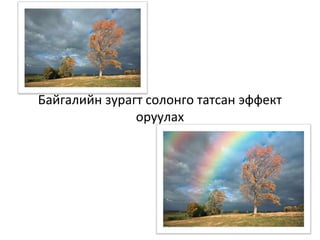
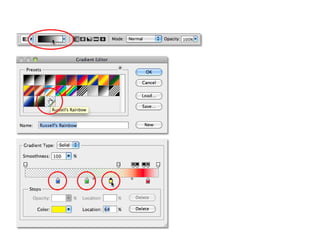
Effect rainbow 1. 2. 3. 5. 6. • Go to Filter > Blur >
Gaussian Blur.
7. 9. 16. 17. • Click on the triangle to twirl open the layer
group.
• Hold down Alt and drag the layer mask
thumbnail onto the top layer.
• The layer mask has been copied from one layer
to another.
18. • When a layer
or group is
hidden, the
eyeball in the
visibility icon is
also hidden.