Thursday, October 13, 11
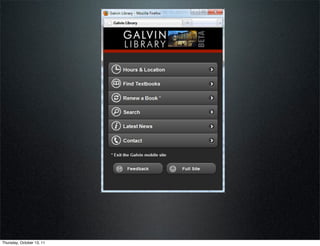
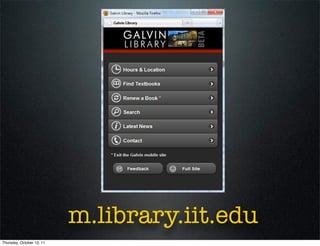
m.library.iit.edu
Thursday, October 13, 11
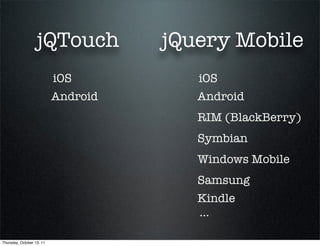
jQTouch           jQuery Mobile
                           iOS          iOS
                           Android      Android
                                        RIM (BlackBerry)
                                        Symbian
                                        Windows Mobile
                                        Samsung
                                        Kindle
                                        ...

Thursday, October 13, 11
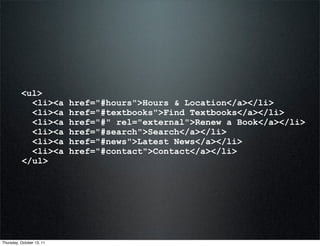
<ul>
            <li><a         href="#hours">Hours & Location</a></li>
            <li><a         href="#textbooks">Find Textbooks</a></li>
            <li><a         href="#" rel="external">Renew a Book</a></li>
            <li><a         href="#search">Search</a></li>
            <li><a         href="#news">Latest News</a></li>
            <li><a         href="#contact">Contact</a></li>
          </ul>


Thursday, October 13, 11
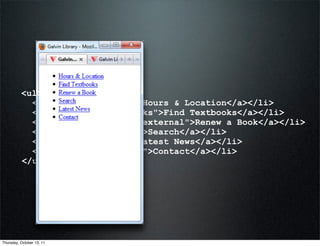
<ul>
            <li><a         href="#hours">Hours & Location</a></li>
            <li><a         href="#textbooks">Find Textbooks</a></li>
            <li><a         href="#" rel="external">Renew a Book</a></li>
            <li><a         href="#search">Search</a></li>
            <li><a         href="#news">Latest News</a></li>
            <li><a         href="#contact">Contact</a></li>
          </ul>


Thursday, October 13, 11
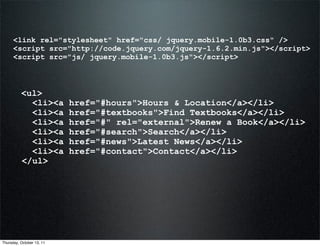
<link rel="stylesheet" href="css/ jquery.mobile-1.0b3.css" />
      <script src="http://code.jquery.com/jquery-1.6.2.min.js"></script>
      <script src="js/ jquery.mobile-1.0b3.js"></script>


          <ul>
            <li><a         href="#hours">Hours & Location</a></li>
            <li><a         href="#textbooks">Find Textbooks</a></li>
            <li><a         href="#" rel="external">Renew a Book</a></li>
            <li><a         href="#search">Search</a></li>
            <li><a         href="#news">Latest News</a></li>
            <li><a         href="#contact">Contact</a></li>
          </ul>


Thursday, October 13, 11
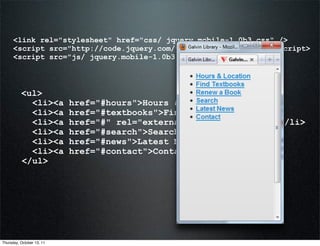
<link rel="stylesheet" href="css/ jquery.mobile-1.0b3.css" />
      <script src="http://code.jquery.com/jquery-1.6.2.min.js"></script>
      <script src="js/ jquery.mobile-1.0b3.js"></script>


          <ul>
            <li><a         href="#hours">Hours & Location</a></li>
            <li><a         href="#textbooks">Find Textbooks</a></li>
            <li><a         href="#" rel="external">Renew a Book</a></li>
            <li><a         href="#search">Search</a></li>
            <li><a         href="#news">Latest News</a></li>
            <li><a         href="#contact">Contact</a></li>
          </ul>


Thursday, October 13, 11
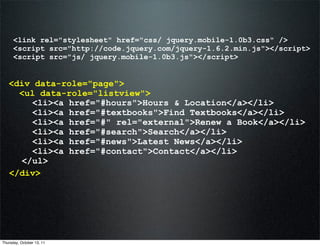
<link rel="stylesheet" href="css/ jquery.mobile-1.0b3.css" />
      <script src="http://code.jquery.com/jquery-1.6.2.min.js"></script>
      <script src="js/ jquery.mobile-1.0b3.js"></script>


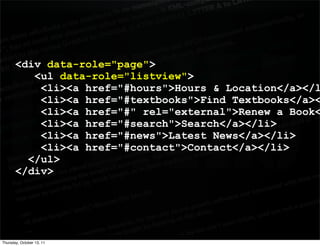
   <div data-role="page">
     <ul data-role="listview">
       <li><a href="#hours">Hours & Location</a></li>
       <li><a href="#textbooks">Find Textbooks</a></li>
       <li><a href="#" rel="external">Renew a Book</a></li>
       <li><a href="#search">Search</a></li>
       <li><a href="#news">Latest News</a></li>
       <li><a href="#contact">Contact</a></li>
     </ul>
   </div>


Thursday, October 13, 11
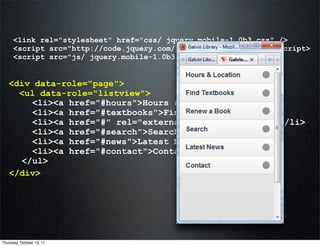
<link rel="stylesheet" href="css/ jquery.mobile-1.0b3.css" />
      <script src="http://code.jquery.com/jquery-1.6.2.min.js"></script>
      <script src="js/ jquery.mobile-1.0b3.js"></script>


   <div data-role="page">
     <ul data-role="listview">
       <li><a href="#hours">Hours & Location</a></li>
       <li><a href="#textbooks">Find Textbooks</a></li>
       <li><a href="#" rel="external">Renew a Book</a></li>
       <li><a href="#search">Search</a></li>
       <li><a href="#news">Latest News</a></li>
       <li><a href="#contact">Contact</a></li>
     </ul>
   </div>


Thursday, October 13, 11
<div data-role="page">
          <ul data-role="listview">
           <li><a href="#hours">Hours & Location</a></l
           <li><a href="#textbooks">Find Textbooks</a><
           <li><a href="#" rel="external">Renew a Book<
           <li><a href="#search">Search</a></li>
           <li><a href="#news">Latest News</a></li>
           <li><a href="#contact">Contact</a></li>
         </ul>
       </div>


Thursday, October 13, 11
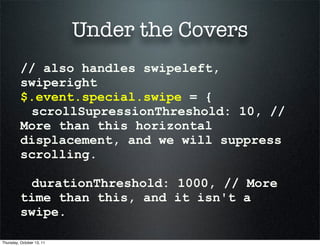
Under the Covers
          // also handles swipeleft,
          swiperight
          $.event.special.swipe = {
           scrollSupressionThreshold: 10, //
          More than this horizontal
          displacement, and we will suppress
          scrolling.

           durationThreshold: 1000, // More
          time than this, and it isn't a
          swipe.

Thursday, October 13, 11
Under the Covers
        $.mobile.ajaxBlacklist =
             // BlackBerry browsers, pre-webkit
             window.blackberry && !window.WebKitPoint
        ||
             // Opera Mini
             window.operamini &&
        Object.prototype.toString.call(
        window.operamini ) === "[object OperaMini]" ||
             // Symbian webkits pre 7.3
             nokiaLTE7_3;


Thursday, October 13, 11
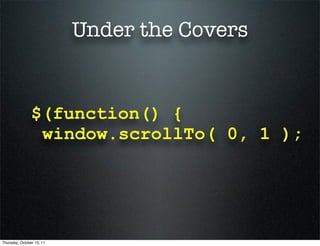
Under the Covers


                $(function() {
                 window.scrollTo( 0, 1 );


Thursday, October 13, 11
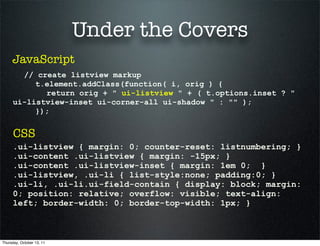
Under the Covers
     JavaScript
       // create listview markup
          t.element.addClass(function( i, orig ) {
            return orig + " ui-listview " + ( t.options.inset ? "
     ui-listview-inset ui-corner-all ui-shadow " : "" );
          });


      CSS
     .ui-listview { margin: 0; counter-reset: listnumbering; }
     .ui-content .ui-listview { margin: -15px; }
     .ui-content .ui-listview-inset { margin: 1em 0; }
     .ui-listview, .ui-li { list-style:none; padding:0; }
     .ui-li, .ui-li.ui-field-contain { display: block; margin:
     0; position: relative; overflow: visible; text-align:
     left; border-width: 0; border-top-width: 1px; }


Thursday, October 13, 11
Under the Covers

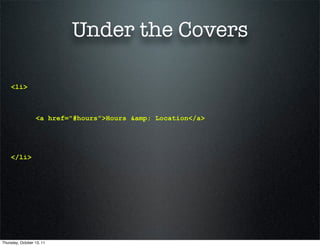
    <li>


                  <a href="#hours">Hours &amp; Location</a>


    </li>


Thursday, October 13, 11
Under the Covers

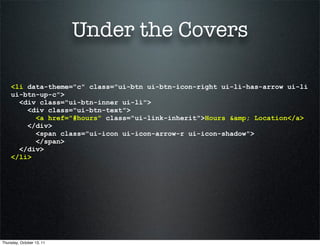
    <li data-theme="c" class="ui-btn ui-btn-icon-right ui-li-has-arrow ui-li
    ui-btn-up-c">
      <div class="ui-btn-inner ui-li">
        <div class="ui-btn-text">
          <a href="#hours" class="ui-link-inherit">Hours &amp; Location</a>
        </div>
          <span class="ui-icon ui-icon-arrow-r ui-icon-shadow">
          </span>
      </div>
    </li>


Thursday, October 13, 11
Adding More Pages
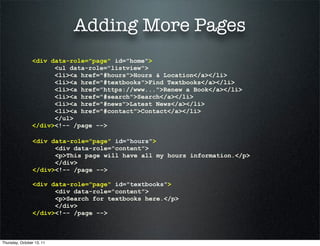
                <div data-role="page" id="home">
                      <ul data-role="listview">
                      <li><a href="#hours">Hours & Location</a></li>
                      <li><a href="#textbooks">Find Textbooks</a></li>
                      <li><a href="https://www...">Renew a Book</a></li>
                      <li><a href="#search">Search</a></li>
                      <li><a href="#news">Latest News</a></li>
                      <li><a href="#contact">Contact</a></li>
                      </ul>
                </div><!-- /page -->

                 <div data-role="page" id="hours">
                       <div data-role="content">
                       <p>This page will have all my hours information.</p>
                       </div>
                 </div><!-- /page -->

                 <div data-role="page" id="textbooks">
                       <div data-role="content">
                       <p>Search for textbooks here.</p>
                       </div>
                 </div><!-- /page -->


Thursday, October 13, 11
Adding More Pages
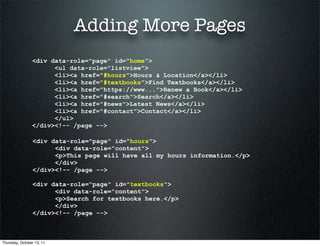
                <div data-role="page" id="home">
                      <ul data-role="listview">
                      <li><a href="#hours">Hours & Location</a></li>
                      <li><a href="#textbooks">Find Textbooks</a></li>
                      <li><a href="https://www...">Renew a Book</a></li>
                      <li><a href="#search">Search</a></li>
                      <li><a href="#news">Latest News</a></li>
                      <li><a href="#contact">Contact</a></li>
                      </ul>
                </div><!-- /page -->

                 <div data-role="page" id="hours">
                       <div data-role="content">
                       <p>This page will have all my hours information.</p>
                       </div>
                 </div><!-- /page -->

                 <div data-role="page" id="textbooks">
                       <div data-role="content">
                       <p>Search for textbooks here.</p>
                       </div>
                 </div><!-- /page -->


Thursday, October 13, 11
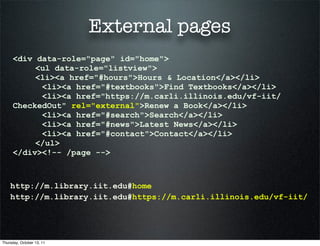
External pages
     <div data-role="page" id="home">
          <ul data-role="listview">
          <li><a href="#hours">Hours & Location</a></li>
           <li><a href="#textbooks">Find Textbooks</a></li>
           <li><a href="https://m.carli.illinois.edu/vf-iit/
     CheckedOut" rel="external">Renew a Book</a></li>
           <li><a href="#search">Search</a></li>
           <li><a href="#news">Latest News</a></li>
           <li><a href="#contact">Contact</a></li>
          </ul>
     </div><!-- /page -->


    http://m.library.iit.edu#home
    http://m.library.iit.edu#https://m.carli.illinois.edu/vf-iit/


Thursday, October 13, 11
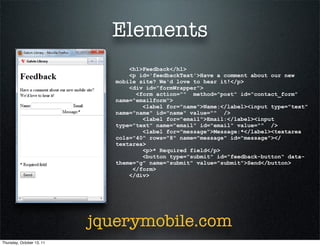
Elements
                                  <h1>Feedback</h1>
                                  <p id='feedbackText'>Have a comment about our new
                              mobile site? We'd love to hear it!</p>
                                  <div id="formWrapper">
                                    <form action="" method="post" id="contact_form"
                              name="emailform">
                                      <label for="name">Name:</label><input type="text"
                              name="name" id="name" value="" />
                                      <label for="email">Email:</label><input
                              type="text" name="email" id="email" value="" />
                                      <label for="message">Message:*</label><textarea
                              cols="40" rows="8" name="message" id="message"></
                              textarea>
                                      <p>* Required field</p>
                                      <button type="submit" id="feedback-button" data-
                              theme="g" name="submit" value="submit">Send</button>
                                   </form>
                                  </div>


                           jquerymobile.com
Thursday, October 13, 11
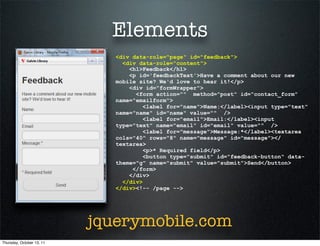
Elements
                              <div data-role="page" id="feedback">
                                <div data-role="content">
                                  <h1>Feedback</h1>
                                  <p id='feedbackText'>Have a comment about our new
                              mobile site? We'd love to hear it!</p>
                                  <div id="formWrapper">
                                    <form action="" method="post" id="contact_form"
                              name="emailform">
                                       <label for="name">Name:</label><input type="text"
                              name="name" id="name" value="" />
                                       <label for="email">Email:</label><input
                              type="text" name="email" id="email" value="" />
                                       <label for="message">Message:*</label><textarea
                              cols="40" rows="8" name="message" id="message"></
                              textarea>
                                       <p>* Required field</p>
                                       <button type="submit" id="feedback-button" data-
                              theme="g" name="submit" value="submit">Send</button>
                                   </form>
                                  </div>
                                </div>
                              </div><!-- /page -->


                           jquerymobile.com
Thursday, October 13, 11
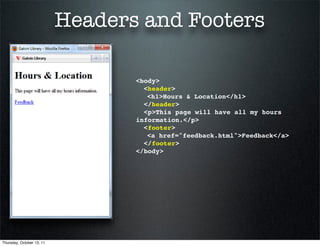
Headers and Footers

                                  <body>
                                    <header>
                                  " <h1>Hours & Location</h1>
                                    </header>
                                    <p>This page will have all my hours
                                  information.</p>
                                    <footer>
                                  " <a href="feedback.html">Feedback</a>
                                    </footer>
                                  </body>


Thursday, October 13, 11
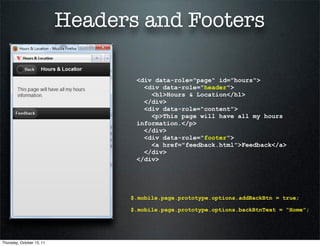
Headers and Footers

                                  <div data-role="page" id="hours">
                                    <div data-role="header">
                                      <h1>Hours & Location</h1>
                                    </div>
                                    <div data-role="content">
                                      <p>This page will have all my hours
                                  information.</p>
                                    </div>
                                    <div data-role="footer">
                                      <a href="feedback.html">Feedback</a>
                                    </div>
                                  </div>


                                 $.mobile.page.prototype.options.addBackBtn = true;

                                 $.mobile.page.prototype.options.backBtnText = “Home”;


Thursday, October 13, 11
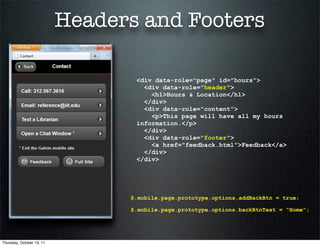
Headers and Footers

                                  <div data-role="page" id="hours">
                                    <div data-role="header">
                                      <h1>Hours & Location</h1>
                                    </div>
                                    <div data-role="content">
                                      <p>This page will have all my hours
                                  information.</p>
                                    </div>
                                    <div data-role="footer">
                                      <a href="feedback.html">Feedback</a>
                                    </div>
                                  </div>


                                 $.mobile.page.prototype.options.addBackBtn = true;

                                 $.mobile.page.prototype.options.backBtnText = “Home”;


Thursday, October 13, 11
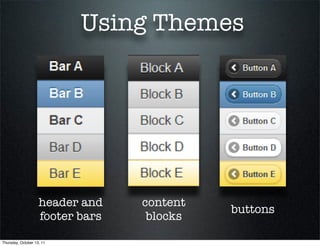
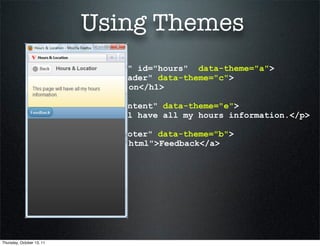
Using Themes


                    header and    content
                                            buttons
                    footer bars    blocks

Thursday, October 13, 11
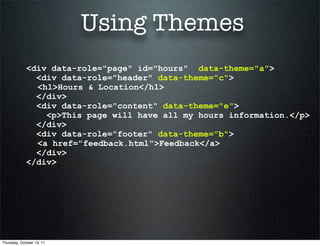
Using Themes
             <div data-role="page" id="hours" data-theme="a">
               <div data-role="header" data-theme="c">
               <h1>Hours & Location</h1>
               </div>
               <div data-role="content" data-theme="e">
                 <p>This page will have all my hours information.</p>
               </div>
               <div data-role="footer" data-theme="b">
               <a href="feedback.html">Feedback</a>
               </div>
             </div>


Thursday, October 13, 11
Using Themes
             <div data-role="page" id="hours" data-theme="a">
               <div data-role="header" data-theme="c">
               <h1>Hours & Location</h1>
               </div>
               <div data-role="content" data-theme="e">
                 <p>This page will have all my hours information.</p>
               </div>
               <div data-role="footer" data-theme="b">
               <a href="feedback.html">Feedback</a>
               </div>
             </div>


Thursday, October 13, 11
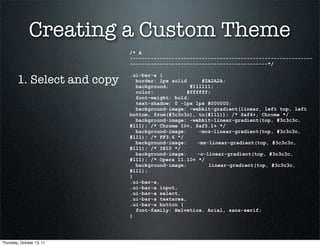
Creating a Custom Theme
                             /* A
                             -------------------------------------------------------------
                             ----------------------------------------------*/


        1. Select and copy
                             .ui-bar-a {
                               border: 1px solid      #2A2A2A;
                               background:        #111111;
                               color:            #ffffff;
                               font-weight: bold;
                               text-shadow: 0 -1px 1px #000000;
                               background-image: -webkit-gradient(linear, left top, left
                             bottom, from(#3c3c3c), to(#111)); /* Saf4+, Chrome */
                               background-image: -webkit-linear-gradient(top, #3c3c3c,
                             #111); /* Chrome 10+, Saf5.1+ */
                               background-image:     -moz-linear-gradient(top, #3c3c3c,
                             #111); /* FF3.6 */
                               background-image:    -ms-linear-gradient(top, #3c3c3c,
                             #111); /* IE10 */
                               background-image:    -o-linear-gradient(top, #3c3c3c,
                             #111); /* Opera 11.10+ */
                               background-image:        linear-gradient(top, #3c3c3c,
                             #111);
                             }
                             .ui-bar-a,
                             .ui-bar-a input,
                             .ui-bar-a select,
                             .ui-bar-a textarea,
                             .ui-bar-a button {
                               font-family: Helvetica, Arial, sans-serif;
                             }


Thursday, October 13, 11
Creating a Custom Theme
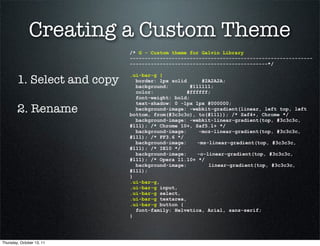
                             /* G - Custom theme for Galvin Library
                             -------------------------------------------------------------
                             ----------------------------------------------*/


        1. Select and copy
                             .ui-bar-g {
                               border: 1px solid      #2A2A2A;
                               background:        #111111;
                               color:            #ffffff;
                               font-weight: bold;
                               text-shadow: 0 -1px 1px #000000;
        2. Rename              background-image: -webkit-gradient(linear, left top, left
                             bottom, from(#3c3c3c), to(#111)); /* Saf4+, Chrome */
                               background-image: -webkit-linear-gradient(top, #3c3c3c,
                             #111); /* Chrome 10+, Saf5.1+ */
                               background-image:     -moz-linear-gradient(top, #3c3c3c,
                             #111); /* FF3.6 */
                               background-image:    -ms-linear-gradient(top, #3c3c3c,
                             #111); /* IE10 */
                               background-image:    -o-linear-gradient(top, #3c3c3c,
                             #111); /* Opera 11.10+ */
                               background-image:        linear-gradient(top, #3c3c3c,
                             #111);
                             }
                             .ui-bar-g,
                             .ui-bar-g input,
                             .ui-bar-g select,
                             .ui-bar-g textarea,
                             .ui-bar-g button {
                               font-family: Helvetica, Arial, sans-serif;
                             }


Thursday, October 13, 11
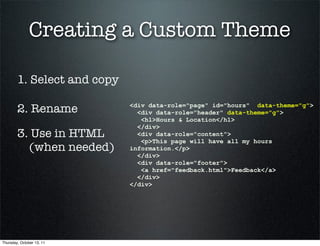
Creating a Custom Theme

        1. Select and copy

        2. Rename            <div data-role="page" id="hours" data-theme="g">
                               <div data-role="header" data-theme="g">
                                <h1>Hours & Location</h1>
                               </div>
        3. Use in HTML         <div data-role="content">
                                <p>This page will have all my hours
          (when needed)      information.</p>
                               </div>
                               <div data-role="footer">
                                <a href="feedback.html">Feedback</a>
                               </div>
                             </div>


Thursday, October 13, 11
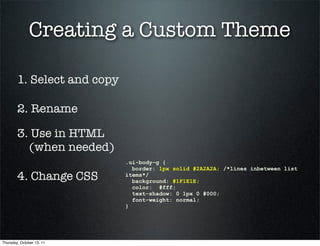
Creating a Custom Theme

        1. Select and copy

        2. Rename

        3. Use in HTML
          (when needed)
                             .ui-body-g {
                               border: 1px solid #2A2A2A; /*lines inbetween list
        4. Change CSS        items*/
                               background: #1F1E1E;
                               color: #fff;
                               text-shadow: 0 1px 0 #000;
                               font-weight: normal;
                             }


Thursday, October 13, 11
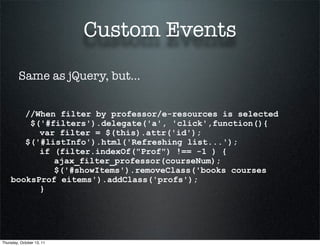
Custom Events

         Same as jQuery, but...


       //When filter by professor/e-resources is selected
        $('#filters').delegate('a', 'click',function(){
          var filter = $(this).attr('id');
       $('#listInfo').html('Refreshing list...');
          if (filter.indexOf("Prof") !== -1 ) {
             ajax_filter_professor(courseNum);
             $('#showItems').removeClass('books courses
    booksProf eitems').addClass('profs');
          }


Thursday, October 13, 11
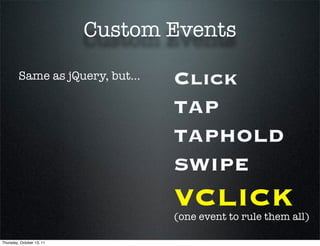
Custom Events

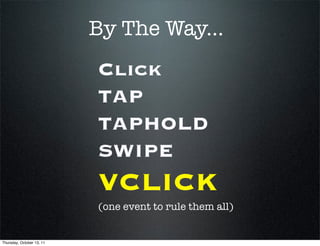
         Same as jQuery, but...   Click
                                  TAP
                                  TAPHOLD
                                  SWIPE
                                  VCLICK
                                  (one event to rule them all)

Thursday, October 13, 11
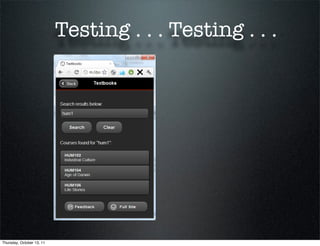
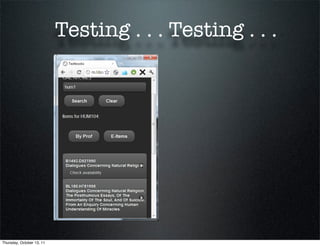
Testing . . . Testing . . .


Thursday, October 13, 11
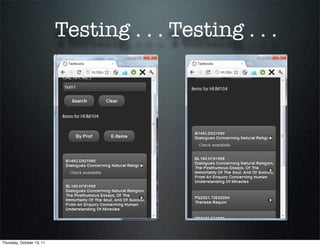
Testing . . . Testing . . .


Thursday, October 13, 11
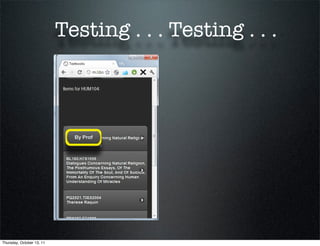
Testing . . . Testing . . .


Thursday, October 13, 11
Testing . . . Testing . . .


Thursday, October 13, 11
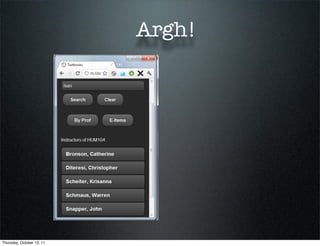
Argh!


Thursday, October 13, 11
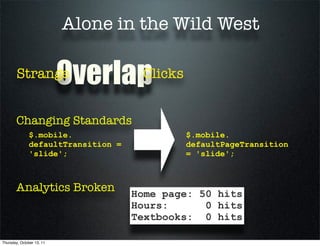
Alone in the Wild West

        Strange            Overlap   Clicks


       Changing Standards
              $.mobile.                       $.mobile.
              defaultTransition =             defaultPageTransition
              'slide';                        = 'slide';


       Analytics Broken             Home page: 50 hits
                                    Hours:      0 hits
                                    Textbooks: 0 hits

Thursday, October 13, 11
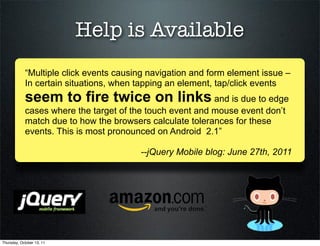
Help is Available
            “Multiple click events causing navigation and form element issue –
            In certain situations, when tapping an element, tap/click events
            seem to fire twice on links and is due to edge
            cases where the target of the touch event and mouse event don’t
            match due to how the browsers calculate tolerances for these
            events. This is most pronounced on Android 2.1”

                                        --jQuery Mobile blog: June 27th, 2011


Thursday, October 13, 11
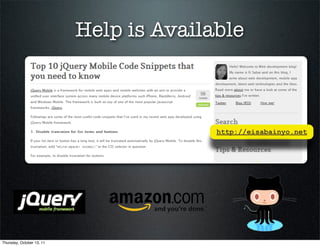
Help is Available
                           <!-- Google Analytics for JQM, part 2 -->
                           <script type="text/javascript">
                             $('[data-role=page]').live('pageshow',
                           function (event, ui) {
                               try {
                                 var pageTracker =
                           _gat._getTracker("UA-7129730-11");

                           pageTracker._trackPageview(event.target.id);
                               }
                               catch(err) {
                               }
                              });
                           </script>


Thursday, October 13, 11
Help is Available


                                         http://eisabainyo.net


Thursday, October 13, 11
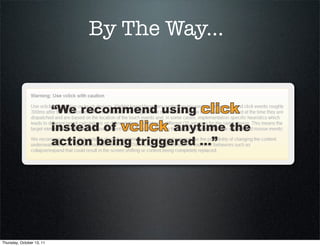
By The Way...


Thursday, October 13, 11
By The Way...
                           Click
                           TAP
                           TAPHOLD
                           SWIPE
                           VCLICK
                           (one event to rule them all)


Thursday, October 13, 11
By The Way...


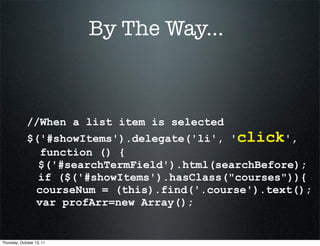
             //When a list item is selected
             $('#showItems').delegate('li', 'click',
               function () {
               $('#searchTermField').html(searchBefore);
               if ($('#showItems').hasClass("courses")){
              courseNum = (this).find('.course').text();
              var profArr=new Array();


Thursday, October 13, 11
Is JQM for You?


                           IIT’s McCormick Tribune Campus Center


Thursday, October 13, 11
Is JQM for You?


Thursday, October 13, 11
Is JQM for You?
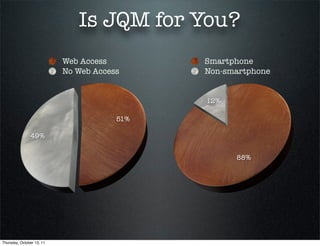
                           Web Access        Smartphone
                           No Web Access     Non-smartphone


                                             12%

                                       51%

               49%


                                                   88%


Thursday, October 13, 11
Christine McClure
                           Digital Services Librarian

                                 cmcclur1@iit.edu
                            slideshare.net/camcclure


Thursday, October 13, 11

edUI Conference: jQuery Mobile, Christine McClure

  • 1.
  • 2.
  • 3.
  • 4.
  • 5.
    jQTouch jQuery Mobile iOS iOS Android Android RIM (BlackBerry) Symbian Windows Mobile Samsung Kindle ... Thursday, October 13, 11
  • 6.
    <ul> <li><a href="#hours">Hours & Location</a></li> <li><a href="#textbooks">Find Textbooks</a></li> <li><a href="#" rel="external">Renew a Book</a></li> <li><a href="#search">Search</a></li> <li><a href="#news">Latest News</a></li> <li><a href="#contact">Contact</a></li> </ul> Thursday, October 13, 11
  • 7.
    <ul> <li><a href="#hours">Hours & Location</a></li> <li><a href="#textbooks">Find Textbooks</a></li> <li><a href="#" rel="external">Renew a Book</a></li> <li><a href="#search">Search</a></li> <li><a href="#news">Latest News</a></li> <li><a href="#contact">Contact</a></li> </ul> Thursday, October 13, 11
  • 8.
    <link rel="stylesheet" href="css/jquery.mobile-1.0b3.css" /> <script src="http://code.jquery.com/jquery-1.6.2.min.js"></script> <script src="js/ jquery.mobile-1.0b3.js"></script> <ul> <li><a href="#hours">Hours & Location</a></li> <li><a href="#textbooks">Find Textbooks</a></li> <li><a href="#" rel="external">Renew a Book</a></li> <li><a href="#search">Search</a></li> <li><a href="#news">Latest News</a></li> <li><a href="#contact">Contact</a></li> </ul> Thursday, October 13, 11
  • 9.
    <link rel="stylesheet" href="css/jquery.mobile-1.0b3.css" /> <script src="http://code.jquery.com/jquery-1.6.2.min.js"></script> <script src="js/ jquery.mobile-1.0b3.js"></script> <ul> <li><a href="#hours">Hours & Location</a></li> <li><a href="#textbooks">Find Textbooks</a></li> <li><a href="#" rel="external">Renew a Book</a></li> <li><a href="#search">Search</a></li> <li><a href="#news">Latest News</a></li> <li><a href="#contact">Contact</a></li> </ul> Thursday, October 13, 11
  • 10.
    <link rel="stylesheet" href="css/jquery.mobile-1.0b3.css" /> <script src="http://code.jquery.com/jquery-1.6.2.min.js"></script> <script src="js/ jquery.mobile-1.0b3.js"></script> <div data-role="page"> <ul data-role="listview"> <li><a href="#hours">Hours & Location</a></li> <li><a href="#textbooks">Find Textbooks</a></li> <li><a href="#" rel="external">Renew a Book</a></li> <li><a href="#search">Search</a></li> <li><a href="#news">Latest News</a></li> <li><a href="#contact">Contact</a></li> </ul> </div> Thursday, October 13, 11
  • 11.
    <link rel="stylesheet" href="css/jquery.mobile-1.0b3.css" /> <script src="http://code.jquery.com/jquery-1.6.2.min.js"></script> <script src="js/ jquery.mobile-1.0b3.js"></script> <div data-role="page"> <ul data-role="listview"> <li><a href="#hours">Hours & Location</a></li> <li><a href="#textbooks">Find Textbooks</a></li> <li><a href="#" rel="external">Renew a Book</a></li> <li><a href="#search">Search</a></li> <li><a href="#news">Latest News</a></li> <li><a href="#contact">Contact</a></li> </ul> </div> Thursday, October 13, 11
  • 12.
  • 13.
    <div data-role="page"> <ul data-role="listview"> <li><a href="#hours">Hours & Location</a></l <li><a href="#textbooks">Find Textbooks</a>< <li><a href="#" rel="external">Renew a Book< <li><a href="#search">Search</a></li> <li><a href="#news">Latest News</a></li> <li><a href="#contact">Contact</a></li> </ul> </div> Thursday, October 13, 11
  • 14.
    Under the Covers // also handles swipeleft, swiperight $.event.special.swipe = { scrollSupressionThreshold: 10, // More than this horizontal displacement, and we will suppress scrolling. durationThreshold: 1000, // More time than this, and it isn't a swipe. Thursday, October 13, 11
  • 15.
    Under the Covers $.mobile.ajaxBlacklist = // BlackBerry browsers, pre-webkit window.blackberry && !window.WebKitPoint || // Opera Mini window.operamini && Object.prototype.toString.call( window.operamini ) === "[object OperaMini]" || // Symbian webkits pre 7.3 nokiaLTE7_3; Thursday, October 13, 11
  • 16.
    Under the Covers $(function() { window.scrollTo( 0, 1 ); Thursday, October 13, 11
  • 17.
    Under the Covers JavaScript // create listview markup t.element.addClass(function( i, orig ) { return orig + " ui-listview " + ( t.options.inset ? " ui-listview-inset ui-corner-all ui-shadow " : "" ); }); CSS .ui-listview { margin: 0; counter-reset: listnumbering; } .ui-content .ui-listview { margin: -15px; } .ui-content .ui-listview-inset { margin: 1em 0; } .ui-listview, .ui-li { list-style:none; padding:0; } .ui-li, .ui-li.ui-field-contain { display: block; margin: 0; position: relative; overflow: visible; text-align: left; border-width: 0; border-top-width: 1px; } Thursday, October 13, 11
  • 18.
    Under the Covers <li> <a href="#hours">Hours &amp; Location</a> </li> Thursday, October 13, 11
  • 19.
    Under the Covers <li data-theme="c" class="ui-btn ui-btn-icon-right ui-li-has-arrow ui-li ui-btn-up-c"> <div class="ui-btn-inner ui-li"> <div class="ui-btn-text"> <a href="#hours" class="ui-link-inherit">Hours &amp; Location</a> </div> <span class="ui-icon ui-icon-arrow-r ui-icon-shadow"> </span> </div> </li> Thursday, October 13, 11
  • 20.
    Adding More Pages <div data-role="page" id="home"> <ul data-role="listview"> <li><a href="#hours">Hours & Location</a></li> <li><a href="#textbooks">Find Textbooks</a></li> <li><a href="https://www...">Renew a Book</a></li> <li><a href="#search">Search</a></li> <li><a href="#news">Latest News</a></li> <li><a href="#contact">Contact</a></li> </ul> </div><!-- /page --> <div data-role="page" id="hours"> <div data-role="content"> <p>This page will have all my hours information.</p> </div> </div><!-- /page --> <div data-role="page" id="textbooks"> <div data-role="content"> <p>Search for textbooks here.</p> </div> </div><!-- /page --> Thursday, October 13, 11
  • 21.
    Adding More Pages <div data-role="page" id="home"> <ul data-role="listview"> <li><a href="#hours">Hours & Location</a></li> <li><a href="#textbooks">Find Textbooks</a></li> <li><a href="https://www...">Renew a Book</a></li> <li><a href="#search">Search</a></li> <li><a href="#news">Latest News</a></li> <li><a href="#contact">Contact</a></li> </ul> </div><!-- /page --> <div data-role="page" id="hours"> <div data-role="content"> <p>This page will have all my hours information.</p> </div> </div><!-- /page --> <div data-role="page" id="textbooks"> <div data-role="content"> <p>Search for textbooks here.</p> </div> </div><!-- /page --> Thursday, October 13, 11
  • 22.
    External pages <div data-role="page" id="home"> <ul data-role="listview"> <li><a href="#hours">Hours & Location</a></li> <li><a href="#textbooks">Find Textbooks</a></li> <li><a href="https://m.carli.illinois.edu/vf-iit/ CheckedOut" rel="external">Renew a Book</a></li> <li><a href="#search">Search</a></li> <li><a href="#news">Latest News</a></li> <li><a href="#contact">Contact</a></li> </ul> </div><!-- /page --> http://m.library.iit.edu#home http://m.library.iit.edu#https://m.carli.illinois.edu/vf-iit/ Thursday, October 13, 11
  • 23.
    Elements <h1>Feedback</h1> <p id='feedbackText'>Have a comment about our new mobile site? We'd love to hear it!</p> <div id="formWrapper"> <form action="" method="post" id="contact_form" name="emailform"> <label for="name">Name:</label><input type="text" name="name" id="name" value="" /> <label for="email">Email:</label><input type="text" name="email" id="email" value="" /> <label for="message">Message:*</label><textarea cols="40" rows="8" name="message" id="message"></ textarea> <p>* Required field</p> <button type="submit" id="feedback-button" data- theme="g" name="submit" value="submit">Send</button> </form> </div> jquerymobile.com Thursday, October 13, 11
  • 24.
    Elements <div data-role="page" id="feedback"> <div data-role="content"> <h1>Feedback</h1> <p id='feedbackText'>Have a comment about our new mobile site? We'd love to hear it!</p> <div id="formWrapper"> <form action="" method="post" id="contact_form" name="emailform"> <label for="name">Name:</label><input type="text" name="name" id="name" value="" /> <label for="email">Email:</label><input type="text" name="email" id="email" value="" /> <label for="message">Message:*</label><textarea cols="40" rows="8" name="message" id="message"></ textarea> <p>* Required field</p> <button type="submit" id="feedback-button" data- theme="g" name="submit" value="submit">Send</button> </form> </div> </div> </div><!-- /page --> jquerymobile.com Thursday, October 13, 11
  • 25.
    Headers and Footers <body>  <header> " <h1>Hours & Location</h1>  </header>  <p>This page will have all my hours information.</p>  <footer> " <a href="feedback.html">Feedback</a>  </footer> </body> Thursday, October 13, 11
  • 26.
    Headers and Footers <div data-role="page" id="hours"> <div data-role="header"> <h1>Hours & Location</h1> </div> <div data-role="content"> <p>This page will have all my hours information.</p> </div> <div data-role="footer"> <a href="feedback.html">Feedback</a> </div> </div> $.mobile.page.prototype.options.addBackBtn = true; $.mobile.page.prototype.options.backBtnText = “Home”; Thursday, October 13, 11
  • 27.
    Headers and Footers <div data-role="page" id="hours"> <div data-role="header"> <h1>Hours & Location</h1> </div> <div data-role="content"> <p>This page will have all my hours information.</p> </div> <div data-role="footer"> <a href="feedback.html">Feedback</a> </div> </div> $.mobile.page.prototype.options.addBackBtn = true; $.mobile.page.prototype.options.backBtnText = “Home”; Thursday, October 13, 11
  • 28.
    Using Themes header and content buttons footer bars blocks Thursday, October 13, 11
  • 29.
    Using Themes <div data-role="page" id="hours" data-theme="a"> <div data-role="header" data-theme="c"> <h1>Hours & Location</h1> </div> <div data-role="content" data-theme="e"> <p>This page will have all my hours information.</p> </div> <div data-role="footer" data-theme="b"> <a href="feedback.html">Feedback</a> </div> </div> Thursday, October 13, 11
  • 30.
    Using Themes <div data-role="page" id="hours" data-theme="a"> <div data-role="header" data-theme="c"> <h1>Hours & Location</h1> </div> <div data-role="content" data-theme="e"> <p>This page will have all my hours information.</p> </div> <div data-role="footer" data-theme="b"> <a href="feedback.html">Feedback</a> </div> </div> Thursday, October 13, 11
  • 31.
    Creating a CustomTheme /* A ------------------------------------------------------------- ----------------------------------------------*/ 1. Select and copy .ui-bar-a { border: 1px solid #2A2A2A; background: #111111; color: #ffffff; font-weight: bold; text-shadow: 0 -1px 1px #000000; background-image: -webkit-gradient(linear, left top, left bottom, from(#3c3c3c), to(#111)); /* Saf4+, Chrome */ background-image: -webkit-linear-gradient(top, #3c3c3c, #111); /* Chrome 10+, Saf5.1+ */ background-image: -moz-linear-gradient(top, #3c3c3c, #111); /* FF3.6 */ background-image: -ms-linear-gradient(top, #3c3c3c, #111); /* IE10 */ background-image: -o-linear-gradient(top, #3c3c3c, #111); /* Opera 11.10+ */ background-image: linear-gradient(top, #3c3c3c, #111); } .ui-bar-a, .ui-bar-a input, .ui-bar-a select, .ui-bar-a textarea, .ui-bar-a button { font-family: Helvetica, Arial, sans-serif; } Thursday, October 13, 11
  • 32.
    Creating a CustomTheme /* G - Custom theme for Galvin Library ------------------------------------------------------------- ----------------------------------------------*/ 1. Select and copy .ui-bar-g { border: 1px solid #2A2A2A; background: #111111; color: #ffffff; font-weight: bold; text-shadow: 0 -1px 1px #000000; 2. Rename background-image: -webkit-gradient(linear, left top, left bottom, from(#3c3c3c), to(#111)); /* Saf4+, Chrome */ background-image: -webkit-linear-gradient(top, #3c3c3c, #111); /* Chrome 10+, Saf5.1+ */ background-image: -moz-linear-gradient(top, #3c3c3c, #111); /* FF3.6 */ background-image: -ms-linear-gradient(top, #3c3c3c, #111); /* IE10 */ background-image: -o-linear-gradient(top, #3c3c3c, #111); /* Opera 11.10+ */ background-image: linear-gradient(top, #3c3c3c, #111); } .ui-bar-g, .ui-bar-g input, .ui-bar-g select, .ui-bar-g textarea, .ui-bar-g button { font-family: Helvetica, Arial, sans-serif; } Thursday, October 13, 11
  • 33.
    Creating a CustomTheme 1. Select and copy 2. Rename <div data-role="page" id="hours" data-theme="g"> <div data-role="header" data-theme="g"> <h1>Hours & Location</h1> </div> 3. Use in HTML <div data-role="content"> <p>This page will have all my hours (when needed) information.</p> </div> <div data-role="footer"> <a href="feedback.html">Feedback</a> </div> </div> Thursday, October 13, 11
  • 34.
    Creating a CustomTheme 1. Select and copy 2. Rename 3. Use in HTML (when needed) .ui-body-g { border: 1px solid #2A2A2A; /*lines inbetween list 4. Change CSS items*/ background: #1F1E1E; color: #fff; text-shadow: 0 1px 0 #000; font-weight: normal; } Thursday, October 13, 11
  • 35.
    Custom Events Same as jQuery, but... //When filter by professor/e-resources is selected $('#filters').delegate('a', 'click',function(){ var filter = $(this).attr('id'); $('#listInfo').html('Refreshing list...'); if (filter.indexOf("Prof") !== -1 ) { ajax_filter_professor(courseNum); $('#showItems').removeClass('books courses booksProf eitems').addClass('profs'); } Thursday, October 13, 11
  • 36.
    Custom Events Same as jQuery, but... Click TAP TAPHOLD SWIPE VCLICK (one event to rule them all) Thursday, October 13, 11
  • 37.
    Testing . .. Testing . . . Thursday, October 13, 11
  • 38.
    Testing . .. Testing . . . Thursday, October 13, 11
  • 39.
    Testing . .. Testing . . . Thursday, October 13, 11
  • 40.
    Testing . .. Testing . . . Thursday, October 13, 11
  • 41.
  • 42.
    Alone in theWild West Strange Overlap Clicks Changing Standards $.mobile. $.mobile. defaultTransition = defaultPageTransition 'slide'; = 'slide'; Analytics Broken Home page: 50 hits Hours: 0 hits Textbooks: 0 hits Thursday, October 13, 11
  • 43.
    Help is Available “Multiple click events causing navigation and form element issue – In certain situations, when tapping an element, tap/click events seem to fire twice on links and is due to edge cases where the target of the touch event and mouse event don’t match due to how the browsers calculate tolerances for these events. This is most pronounced on Android 2.1” --jQuery Mobile blog: June 27th, 2011 Thursday, October 13, 11
  • 44.
    Help is Available <!-- Google Analytics for JQM, part 2 --> <script type="text/javascript"> $('[data-role=page]').live('pageshow', function (event, ui) { try { var pageTracker = _gat._getTracker("UA-7129730-11"); pageTracker._trackPageview(event.target.id); } catch(err) { } }); </script> Thursday, October 13, 11
  • 45.
    Help is Available http://eisabainyo.net Thursday, October 13, 11
  • 46.
  • 47.
    By The Way... Click TAP TAPHOLD SWIPE VCLICK (one event to rule them all) Thursday, October 13, 11
  • 48.
    By The Way... //When a list item is selected $('#showItems').delegate('li', 'click', function () { $('#searchTermField').html(searchBefore); if ($('#showItems').hasClass("courses")){ courseNum = (this).find('.course').text(); var profArr=new Array(); Thursday, October 13, 11
  • 49.
    Is JQM forYou? IIT’s McCormick Tribune Campus Center Thursday, October 13, 11
  • 50.
    Is JQM forYou? Thursday, October 13, 11
  • 51.
    Is JQM forYou? Web Access Smartphone No Web Access Non-smartphone 12% 51% 49% 88% Thursday, October 13, 11
  • 52.
    Christine McClure Digital Services Librarian cmcclur1@iit.edu slideshare.net/camcclure Thursday, October 13, 11