Download as PDF, PPTX


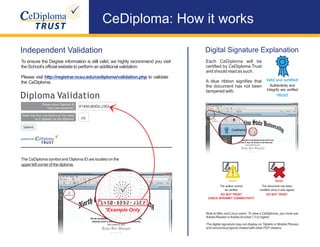

This document provides instructions for viewing and validating a CeDiploma, which is a digitally signed electronic diploma. It notes that Adobe Reader or Acrobat is required and that the digital signature may not appear on all devices. It emphasizes validating the CeDiploma by visiting the school's website and checking for a blue ribbon as signs of an authentic unsigned document. It also explains that the CeDiploma symbol and identification number are located in the top left corner.


