Analytics, Data Science and AI:
Systems for Decision Support
Eleventh Edition
Chapter 11
Group Decision Making,
Collaborative Systems, and AI
Support
Copyright © 2020, 2015, 2011 Pearson Education, Inc. All Rights Reserved
Slide in this Presentation Contain Hyperlinks.
JAWS users should be able to get a list of links by
using INSERT+F77
Copyright © 2020, 2015, 2011 Pearson Education, Inc. All Rights Reserved
Making Decisions in Groups:
Characteristics, Process, Benefits,
And Dysfunctions
• Groupwork: the work done by two or more people together
• A group performs a task
• Members may be located in different places
• Group members may work at different times
• Group members may work for the same organization or for
different organizations
• A group can be permanent or temporary
• A group can be at one managerial level or span several levels
…
Copyright © 2020, 2015, 2011 Pearson Education, Inc. All Rights Reserved
Why Groupwork / Collaborate?
Copyright © 2020, 2015, 2011 Pearson Education, Inc. All Rights Reserved
Characteristics of Group Work
• Group member located in different places/organizations
– Work at different times
• Group work can be permanent or temporary
• Group members can be from different managerial levels
• Group can create synergy (or not!)
– Process gains versus process losses
• Group work may lead to (or required to be completed in a
very short time (more people = less time to finish?)
• Physical meetings may be cost prohibitive, …. more
Copyright © 2020, 2015, 2011 Pearson Education, Inc. All Rights Reserved
Group Decision-Making Process
Types of Decisions Made by
Groups
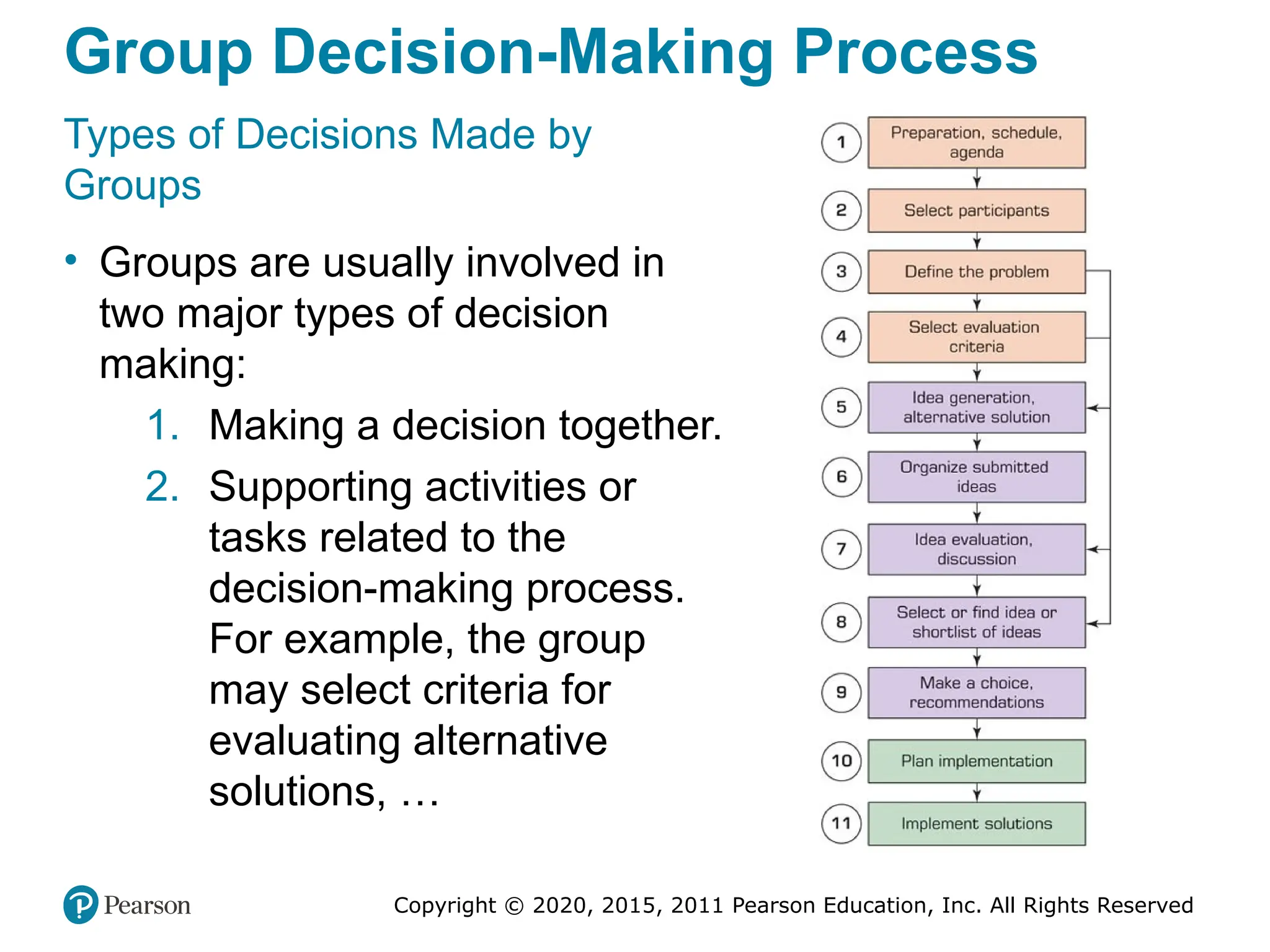
• Groups are usually involved in
two major types of decision
making:
1. Making a decision together.
2. Supporting activities or
tasks related to the
decision-making process.
For example, the group
may select criteria for
evaluating alternative
solutions, …
Copyright © 2020, 2015, 2011 Pearson Education, Inc. All Rights Reserved
Overview of Group Support Systems
• Technology that helps groups to collaborate effectively
• These technologies are called GS S (Group Support
Systems)
• GS S enablers: Internet and its derivatives (intranets,
internet of things [IoT], and extranets)
• The Web is the common infrastructure for GS S
• Recently communication and collaboration tools have
received more attention due to
– Their increased capabilities
– Save time and money
– Expedite decision making
Copyright © 2020, 2015, 2011 Pearson Education, Inc. All Rights Reserved
Time/Place Framework (1 of 2)
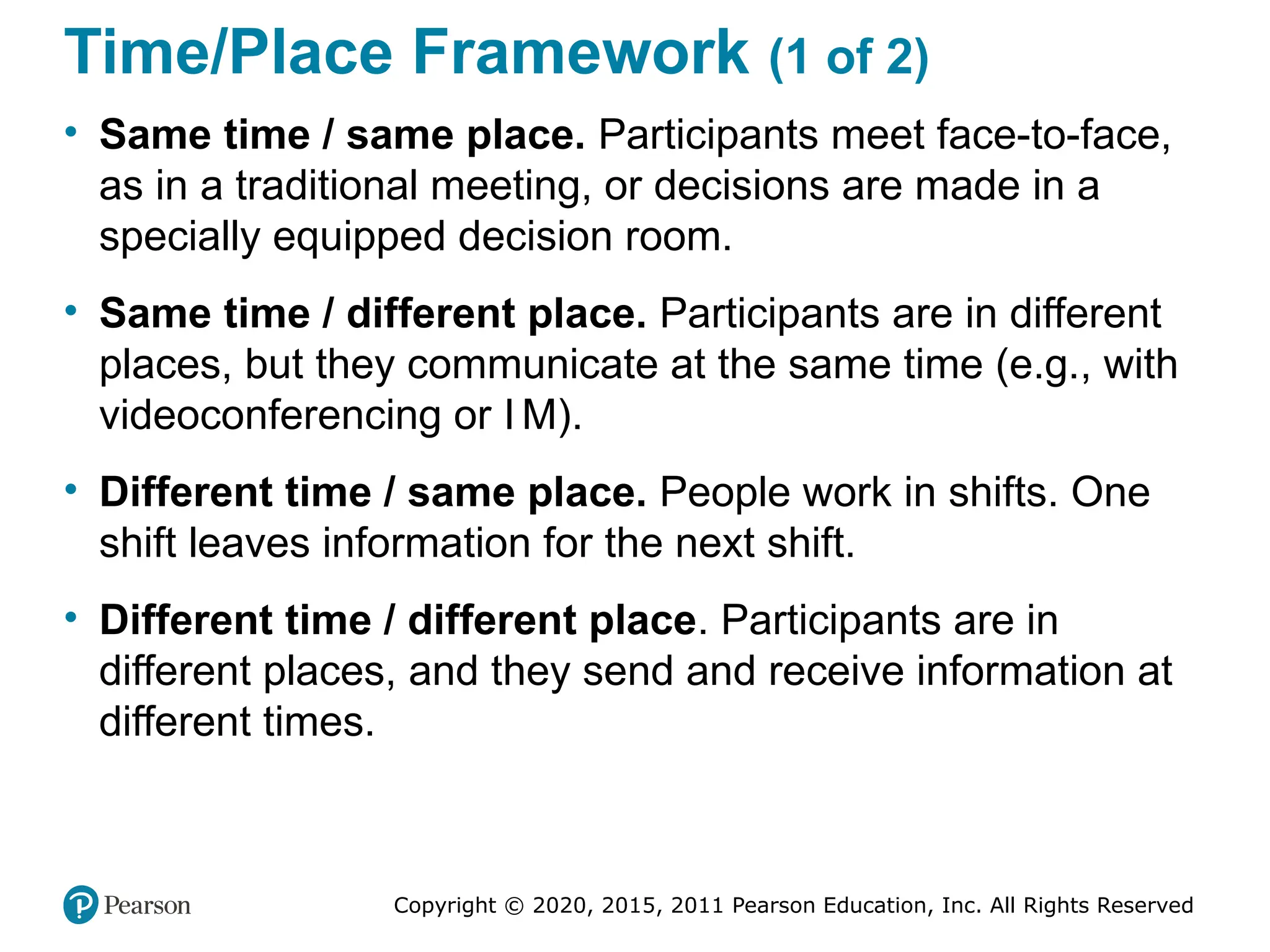
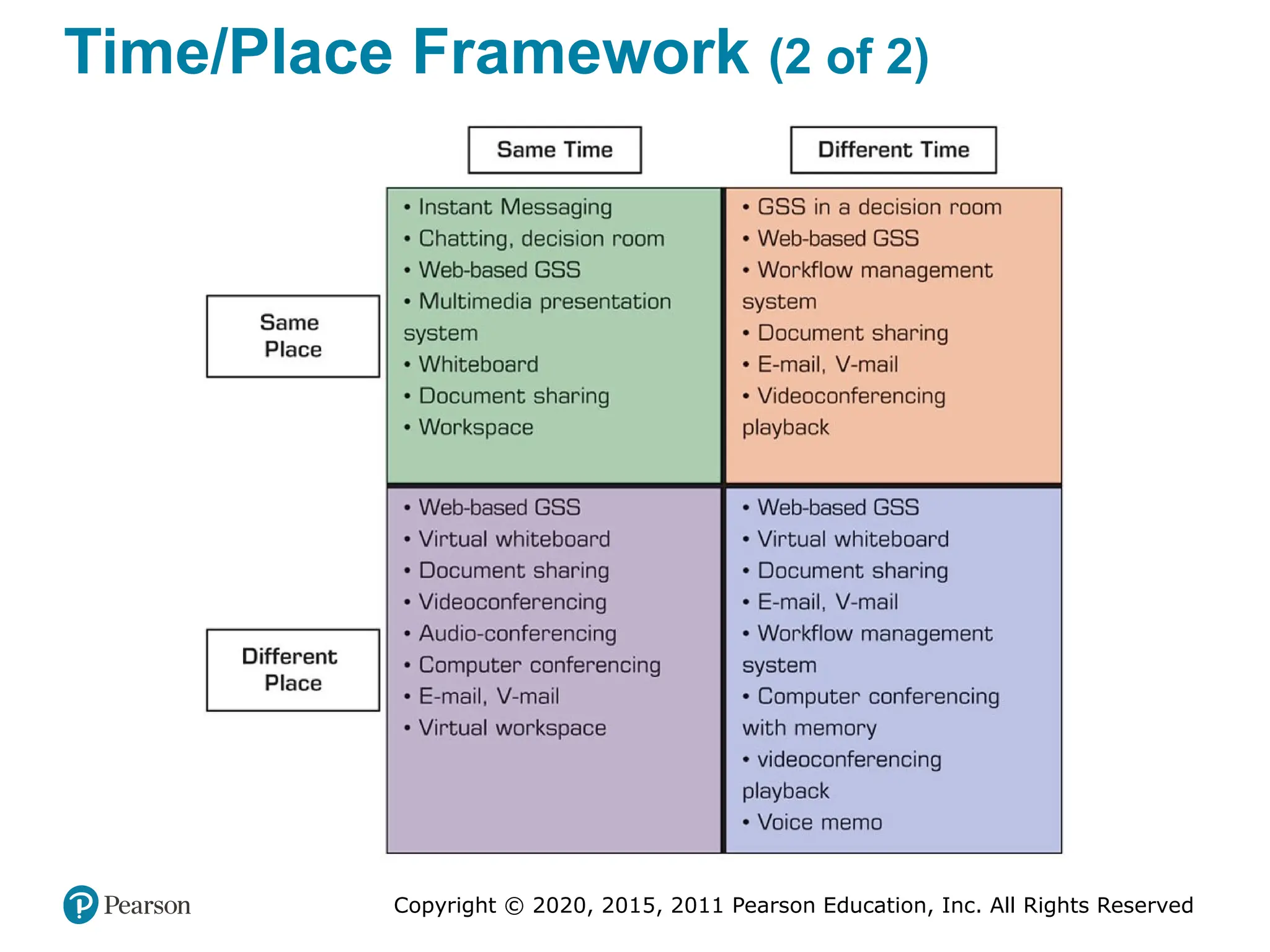
• Same time / same place. Participants meet face-to-face,
as in a traditional meeting, or decisions are made in a
specially equipped decision room.
• Same time / different place. Participants are in different
places, but they communicate at the same time (e.g., with
videoconferencing or I M).
• Different time / same place. People work in shifts. One
shift leaves information for the next shift.
• Different time / different place. Participants are in
different places, and they send and receive information at
different times.
Copyright © 2020, 2015, 2011 Pearson Education, Inc. All Rights Reserved
Time/Place Framework (2 of 2)
Copyright © 2020, 2015, 2011 Pearson Education, Inc. All Rights Reserved
Electronic Support for Group
Communication and Collaboration
• Groupware products provide a way for groups to share
resources and opinions
• Synchronous or Asynchronous
• Examples
– dropbox.com
– drive.google.com
– office.microsoft.com
– …
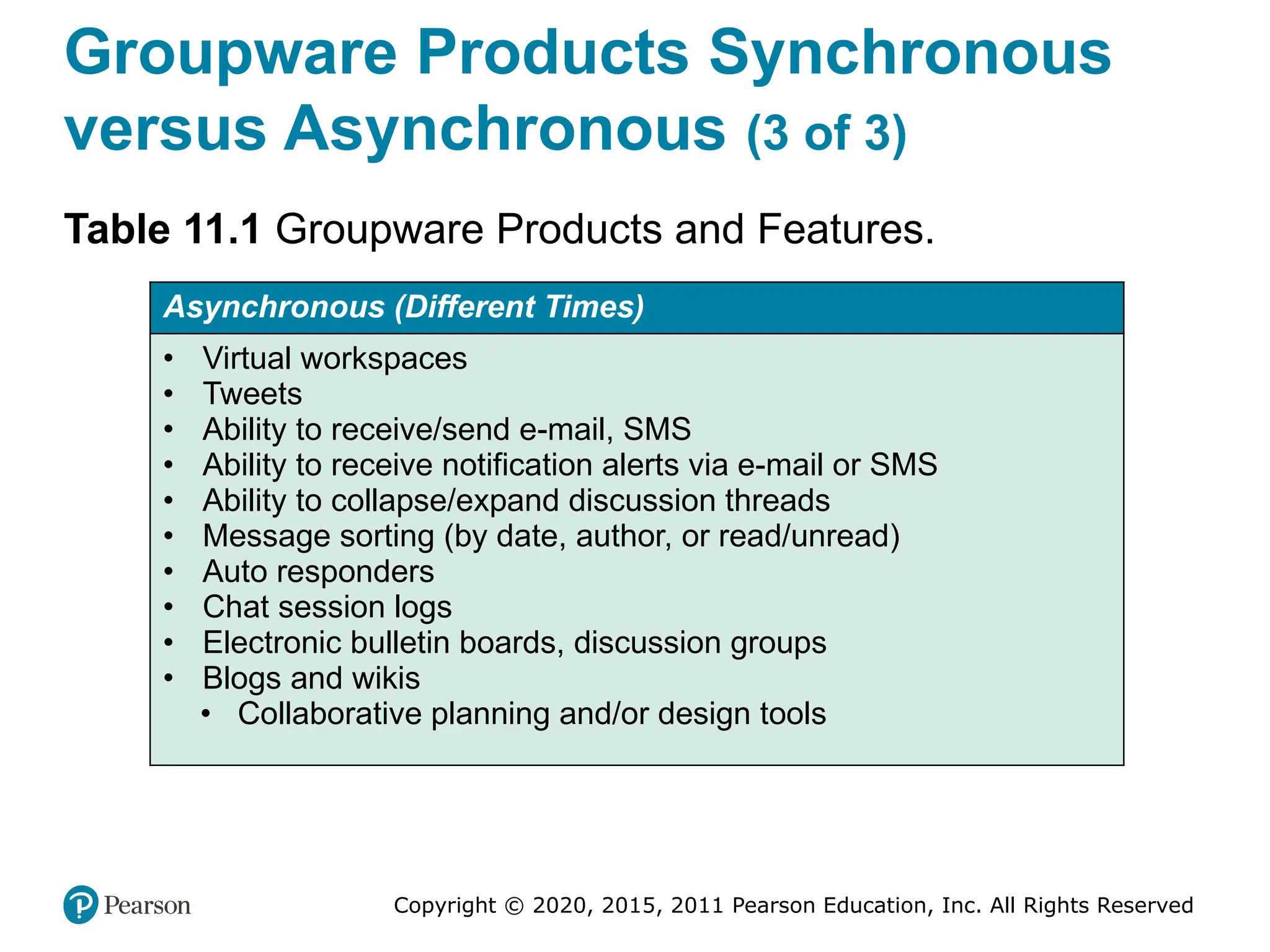
• See Table 11.1 for a list of examples
Copyright © 2020, 2015, 2011 Pearson Education, Inc. All Rights Reserved
Groupware
• Virtual Meeting Systems
– Webex.com, GoTomeeting.com, Skype.com, …
• GroupSystems (Groupsystems.com)
• Collaborative Workflow
• Web 2.0
– Search, links, authoring, tags, extensions, signals
• Collaborative Networks
• Synchronous versus asynchronous systems
Copyright © 2020, 2015, 2011 Pearson Education, Inc. All Rights Reserved
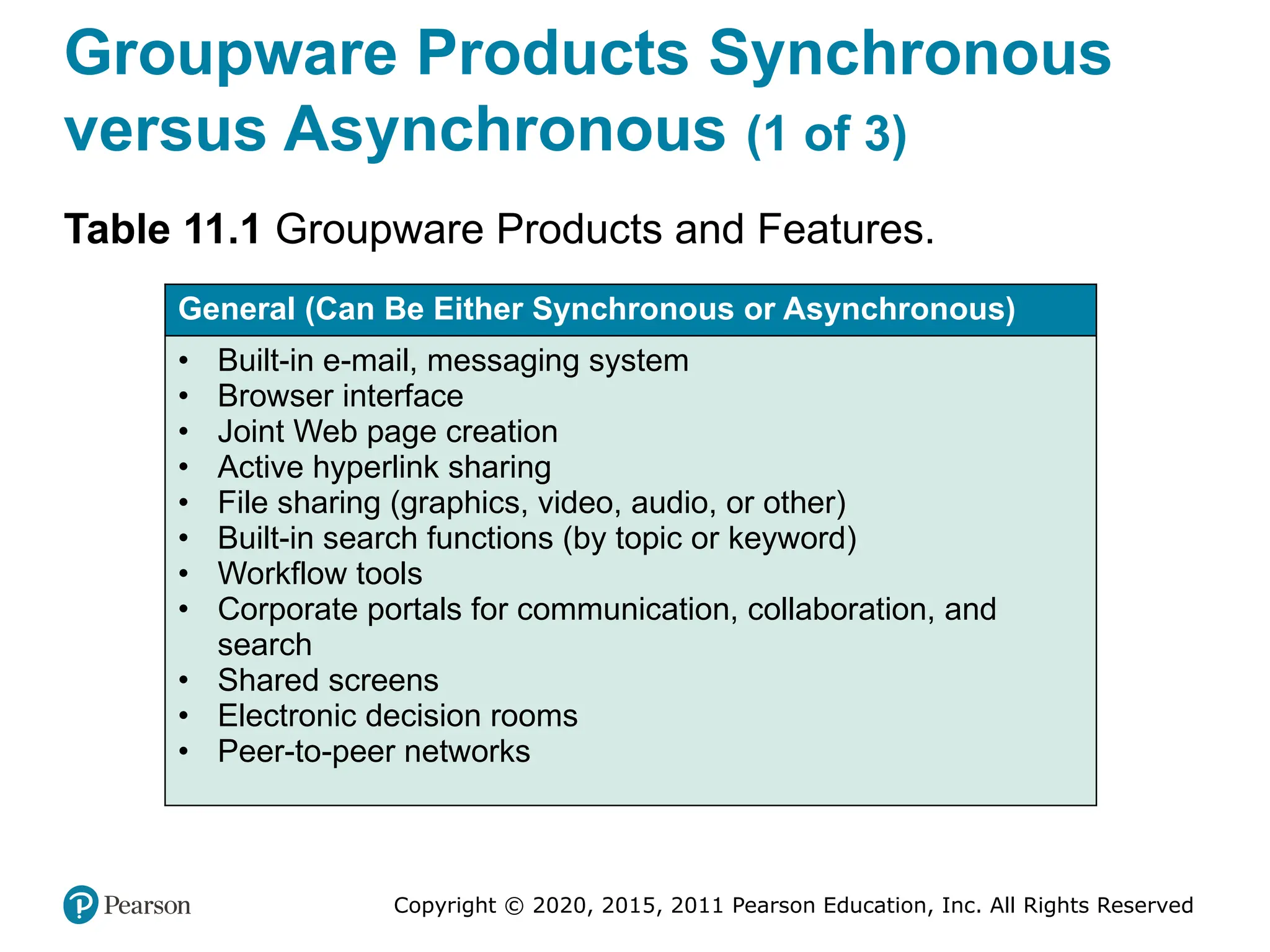
Groupware Products Synchronous
versus Asynchronous (1 of 3)
Table 11.1 Groupware Products and Features.
General (Can Be Either Synchronous or Asynchronous)
• Built-in e-mail, messaging system
• Browser interface
• Joint Web page creation
• Active hyperlink sharing
• File sharing (graphics, video, audio, or other)
• Built-in search functions (by topic or keyword)
• Workflow tools
• Corporate portals for communication, collaboration, and
search
• Shared screens
• Electronic decision rooms
• Peer-to-peer networks
Copyright © 2020, 2015, 2011 Pearson Education, Inc. All Rights Reserved
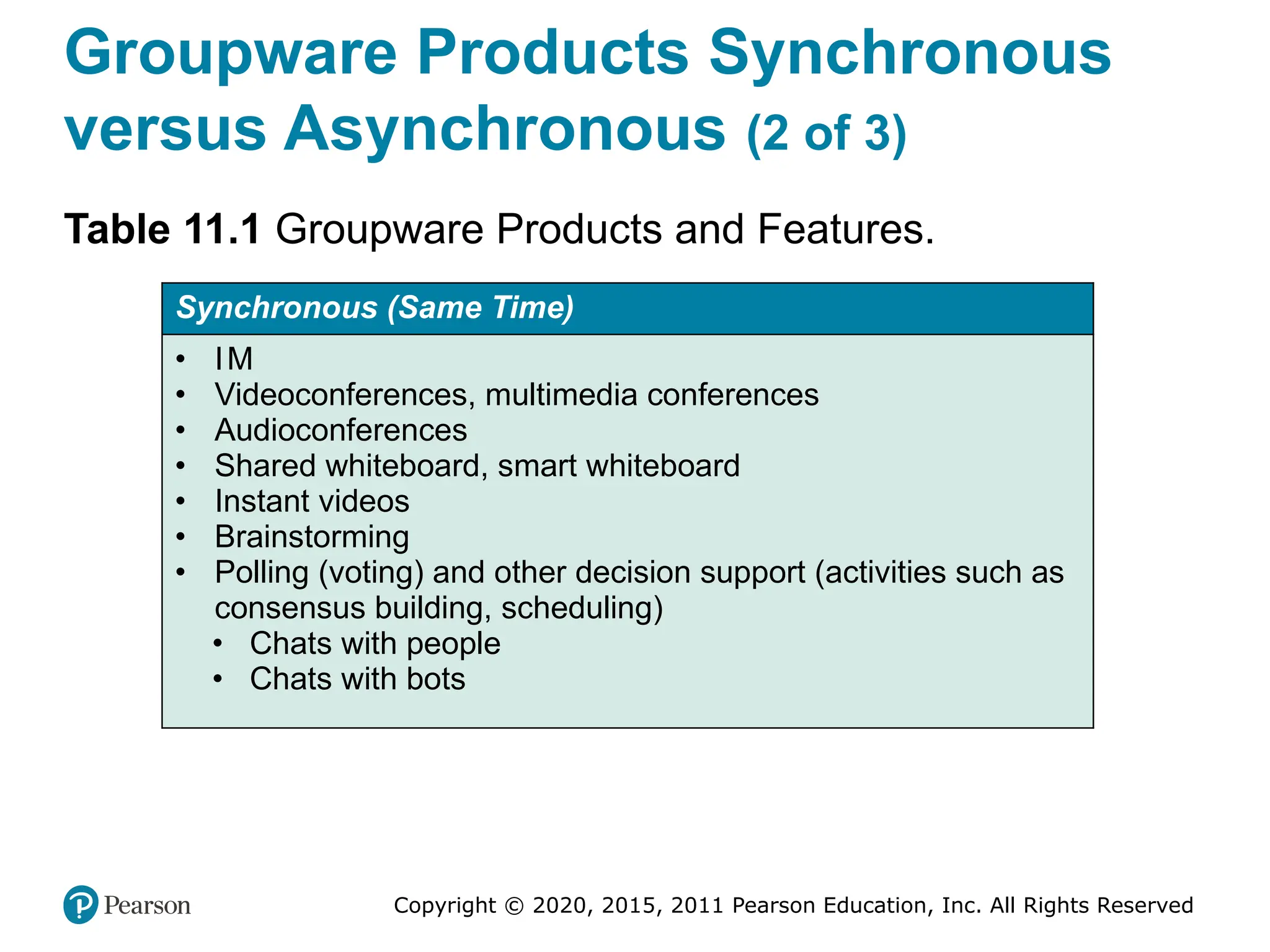
Groupware Products Synchronous
versus Asynchronous (2 of 3)
Table 11.1 Groupware Products and Features.
Synchronous (Same Time)
• IM
• Videoconferences, multimedia conferences
• Audioconferences
• Shared whiteboard, smart whiteboard
• Instant videos
• Brainstorming
• Polling (voting) and other decision support (activities such as
consensus building, scheduling)
• Chats with people
• Chats with bots
Copyright © 2020, 2015, 2011 Pearson Education, Inc. All Rights Reserved
Groupware Products Synchronous
versus Asynchronous (3 of 3)
Table 11.1 Groupware Products and Features.
Asynchronous (Different Times)
• Virtual workspaces
• Tweets
• Ability to receive/send e-mail, SMS
• Ability to receive notification alerts via e-mail or SMS
• Ability to collapse/expand discussion threads
• Message sorting (by date, author, or read/unread)
• Auto responders
• Chat session logs
• Electronic bulletin boards, discussion groups
• Blogs and wikis
• Collaborative planning and/or design tools
Copyright © 2020, 2015, 2011 Pearson Education, Inc. All Rights Reserved
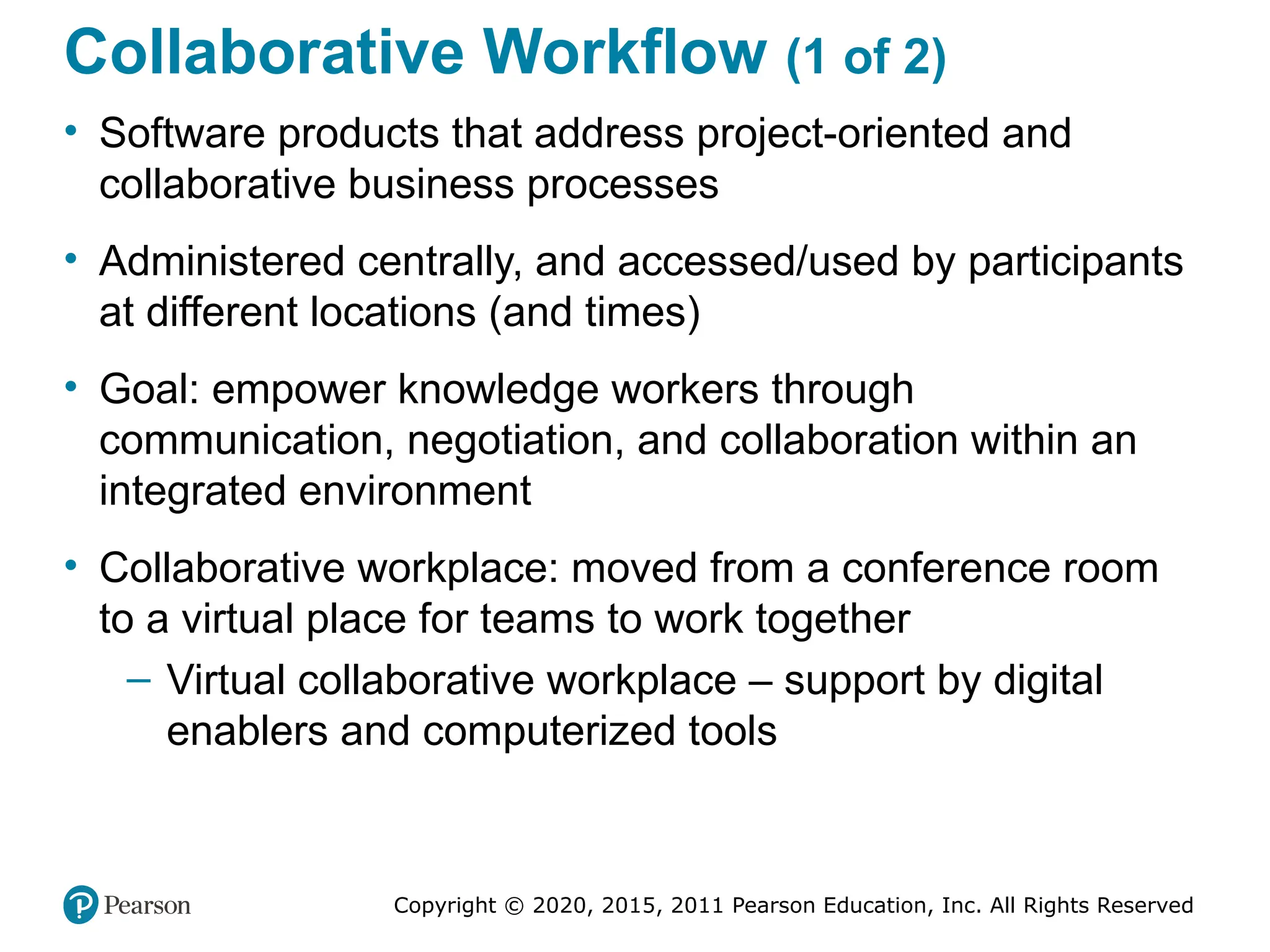
Collaborative Workflow (1 of 2)
• Software products that address project-oriented and
collaborative business processes
• Administered centrally, and accessed/used by participants
at different locations (and times)
• Goal: empower knowledge workers through
communication, negotiation, and collaboration within an
integrated environment
• Collaborative workplace: moved from a conference room
to a virtual place for teams to work together
– Virtual collaborative workplace – support by digital
enablers and computerized tools
Copyright © 2020, 2015, 2011 Pearson Education, Inc. All Rights Reserved
Collaborative Workflow (2 of 2)
Major Vendors of Virtual Workspace
• Google Cloud Platform (deployed on the “cloud,” so it is
offered as a platform-as-a-service (PaaS)
• Citrix Workspace Cloud (deployed on the “cloud” and Citrix is
known for its GoToMeeting collaboration tool)
• Microsoft Workspace (a part of Office 365)
• Cisco’s Webex (a popular collaboration package including
Meeting).
• Slack workspace (a very popular workspace)
– A digital space where teammates share, communicate, and
collaborate on work [supported with many components]
Copyright © 2020, 2015, 2011 Pearson Education, Inc. All Rights Reserved
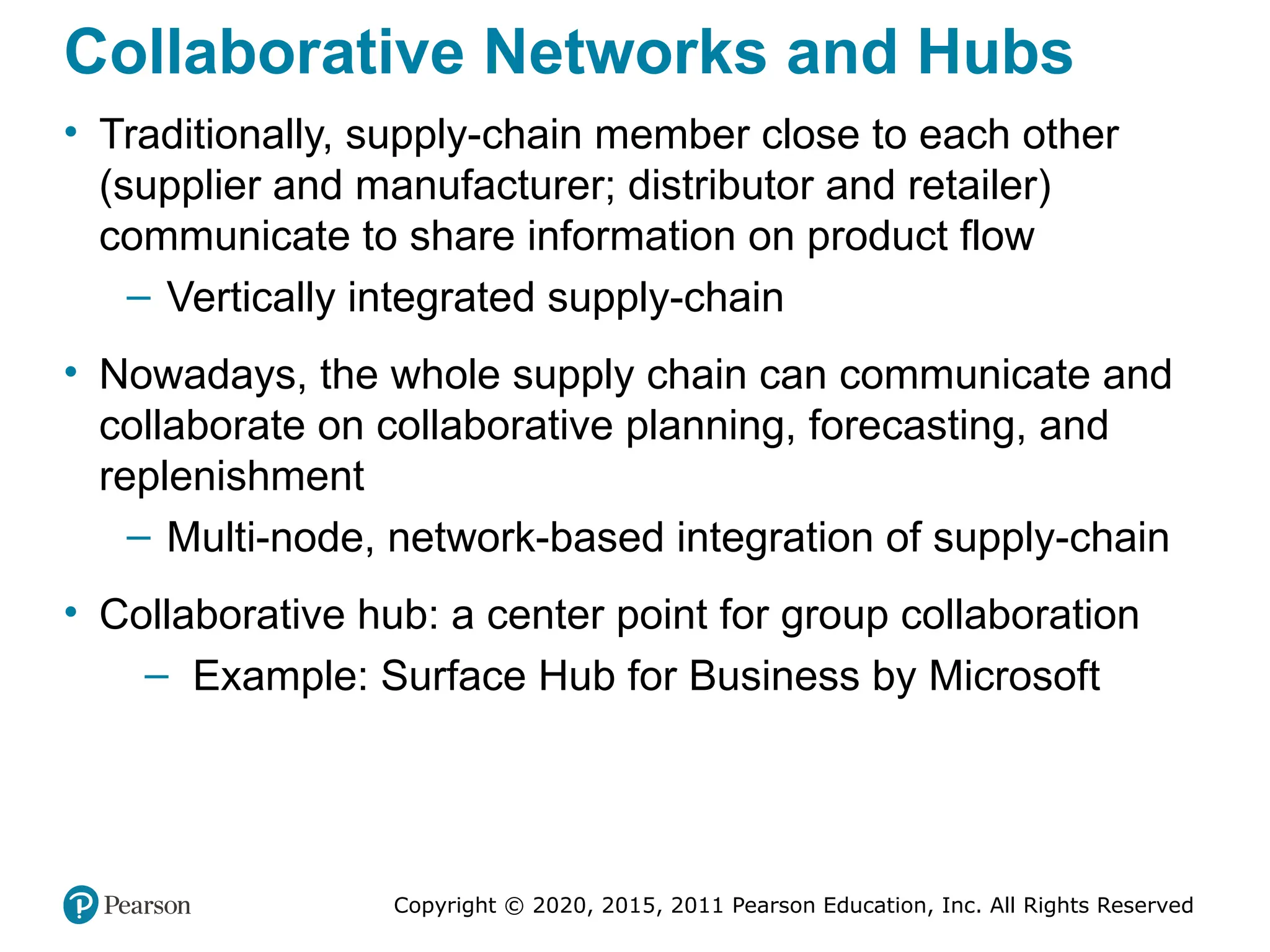
Collaborative Networks and Hubs
• Traditionally, supply-chain member close to each other
(supplier and manufacturer; distributor and retailer)
communicate to share information on product flow
– Vertically integrated supply-chain
• Nowadays, the whole supply chain can communicate and
collaborate on collaborative planning, forecasting, and
replenishment
– Multi-node, network-based integration of supply-chain
• Collaborative hub: a center point for group collaboration
– Example: Surface Hub for Business by Microsoft
Copyright © 2020, 2015, 2011 Pearson Education, Inc. All Rights Reserved
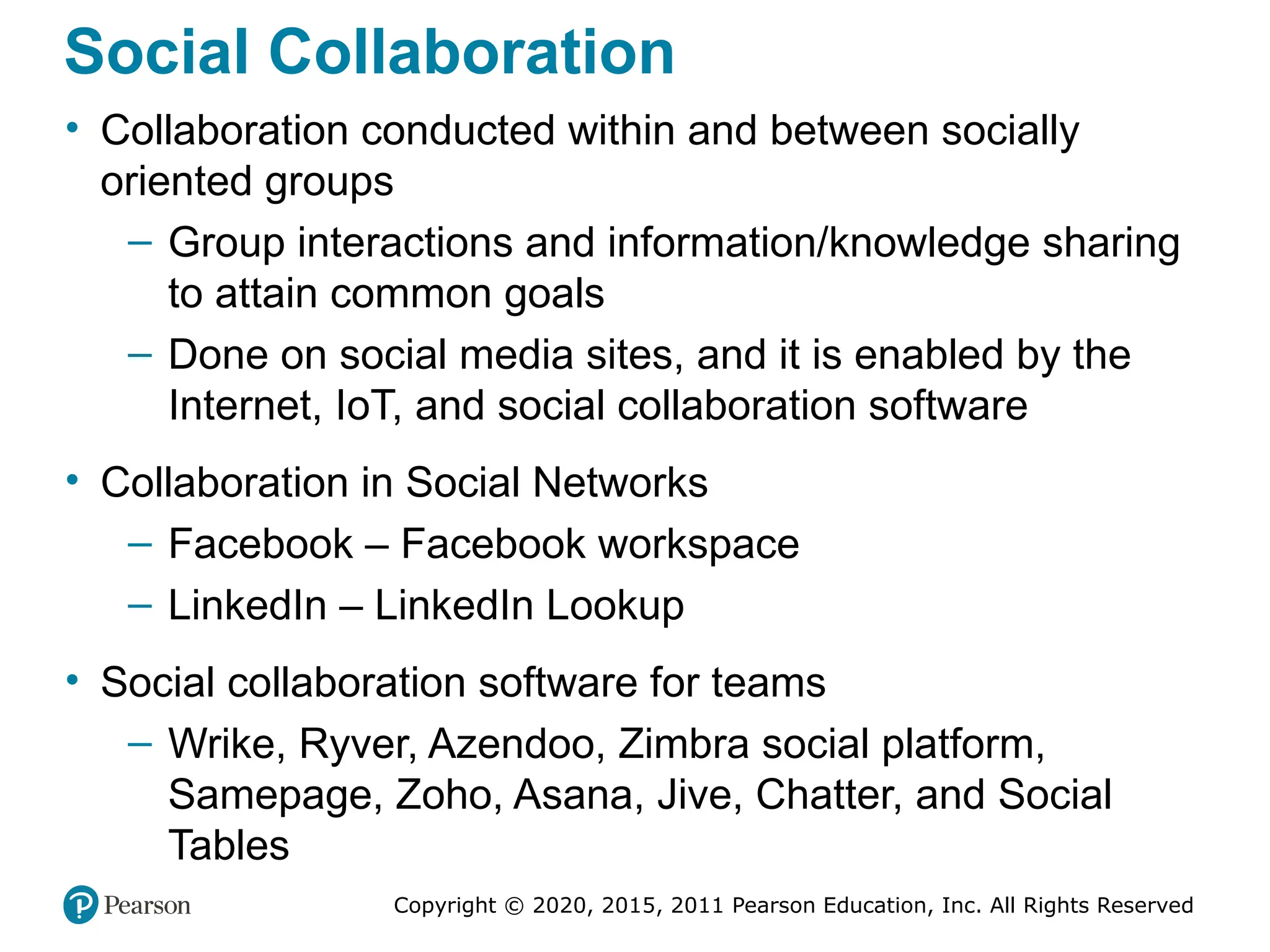
Social Collaboration
• Collaboration conducted within and between socially
oriented groups
– Group interactions and information/knowledge sharing
to attain common goals
– Done on social media sites, and it is enabled by the
Internet, IoT, and social collaboration software
• Collaboration in Social Networks
– Facebook – Facebook workspace
– LinkedIn – LinkedIn Lookup
• Social collaboration software for teams
– Wrike, Ryver, Azendoo, Zimbra social platform,
Samepage, Zoho, Asana, Jive, Chatter, and Social
Tables
Copyright © 2020, 2015, 2011 Pearson Education, Inc. All Rights Reserved
Popular Collaboration Software
• Communication tools: Yammer (social collaboration),
Slack, Skype, Google Hangouts, GoToMeeting
• Design tools: InVision, Mural, Red Pen, Logo Maker
• Documentation tools: Office Online, Google Docs, Zoho
• File-sharing tools: Google Drive, Dropbox, Box
• Project management tools: Asana, Podio, Trello,
WorkflowMax, Kanban Tool,
• Software tools: GitHub, Usersnap,Workflow tools:
Integrity, B P Logix
Copyright © 2020, 2015, 2011 Pearson Education, Inc. All Rights Reserved
Other Tools that Support
Collaboraiton and/or Communication
• Notejoy (makes collaborative notes for team)
• Kahootz (brings stakeholders together to form communities of interest)
• Nowbridge (offers team connectivity, ability to see participants)
• Walkabout Workplace (is a 3D virtual office for remote teams).
• RealtimeBoard (is a enterprise visual collaboration).
• Quora (is a popular place for posting questions to the crowd).
• Pinterest (allows collection of text and images on selected topics).
• IB M connection closed (offers a comprehensive communication and
collaboration tool set).
• Skedda (schedules space for coworking)
• Zinc (is a social collaboration tool)
• Scribblar (is an online collaboration room for virtual brainstorming)
• Collokia (is a machine learning platform for workflow)
Copyright © 2020, 2015, 2011 Pearson Education, Inc. All Rights Reserved
Direct Computerized Support for
Group Decision Making
• Decisions are frequently made at meetings
• Some are one-time critical/strategic decision
• Often complex and controversial decisions
• Process dysfunctions can significant affect the decision
outcomes
• Computerized support has often been suggested to
mitigate these controversies
– These systems are usually called group decision
support systems (GDS S), group support systems
(GS S), electronic meeting systems (EM S)
Copyright © 2020, 2015, 2011 Pearson Education, Inc. All Rights Reserved
Group Decision Support Systems
(GDS S)
• It is an interactive computer-based system that facilitates the
solution of semistructured or unstructured problems by a group
of decision makers
• Goal – support group decision making
• A specially designed I S to enhance collaborative decision
processes
• It encourages generation of ideas, freedom of expression, and
resolution of conflicts
• First generation GDSS: face-to-face in the same room
– Decision room
• Today’s GDSS: virtual, over the Web
Copyright © 2020, 2015, 2011 Pearson Education, Inc. All Rights Reserved
Decision Rooms
• Expensive, customized, purposeful facilities
• 12 to 30 networked computers
• Usually recessed into the desktop
• Server and special software
• Large-screen projection system
• Breakout rooms
• Need a trained facilitator for success
Copyright © 2020, 2015, 2011 Pearson Education, Inc. All Rights Reserved
Supporting the Entire Decision-
Making Process - Stormboard (1 of 2)
• Provides support for different brainstorming and group
decision-making configurations
• Sequence of activities
1. Define the problem and the users’ objectives
2. Brainstorm ideas
3. Organize the ideas in groups of similar flavor, look
for patterns, and select only viable ideas
4. Collaborate, refine concepts, and evaluate (using
criteria) the meeting’s objectives…
Copyright © 2020, 2015, 2011 Pearson Education, Inc. All Rights Reserved
Supporting the Entire Decision-
Making Process - Stormboard (2 of 2)
• Sequence of activities (cont.)
5. The software enables users to prioritize proposed
ideas by focusing on the selection criteria. It lets all
participants express their thinking and directs the
team to be cohesive.
6. It presents a short list of superior ideas
7. The software suggests the best idea and
recommends implementation
8. It plans the project implementation.
9. It manages the project.
10. It periodically reviews progress.
Copyright © 2020, 2015, 2011 Pearson Education, Inc. All Rights Reserved
Online Brainstorming Service and
Tool Providing Companies
• eZ Talks Meetings. Cloud-based tool for brainstorming and
idea sharing.
• Bubbl.us. Visual thinking machine that provides a graphical
representation of ideas and concepts, helps in idea generation,
and shows where ideas and thoughts overlap.
• Mindomo. Tool for real-time collaboration that offers integrated
chat capability.
• Mural. Tool that enables collecting and sorting of ideas in rich
media files. It is designed as a Pinboard that invites
participants.
• iMindQ. Cloud-based service that enables creating mind maps
and basic diagrams.
Copyright © 2020, 2015, 2011 Pearson Education, Inc. All Rights Reserved
Group Support Systems (GSS)
• Includes all forms of communication and collaborative
activities including collaborative computing
• It used to be a specialize software, now it is embedded
into standard I T productivity tools
– Microsoft Office 365 includes Microsoft Teams
(opening vignette)
• How GS S improves group work
– Improve productivity and effectiveness
– Streamline and speed-up the process
– Improving the quality of the outcomes
– Increase process gains and reduce process losses
• Helps in working simultaneously and with anonymity
Copyright © 2020, 2015, 2011 Pearson Education, Inc. All Rights Reserved
Collective Intelligence and
Collaborative Intelligence (1 of 4)
• Collective intelligence (C I) refers to the total intelligence of
a group.
– It is also refers to as the wisdom of the crowd
– MI T center for collective intelligence (cci.mit.edu)
– Benefits of C I, see 50Minutes.com
• Types of Collective Intelligence
– Cognition
– Cooperation, and
– Coordination
• Computerized support to collective intelligence
Copyright © 2020, 2015, 2011 Pearson Education, Inc. All Rights Reserved
Collective Intelligence and
Collaborative Intelligence (2 of 4)
• Example 1: The Carnegie University Foundation Supports
Network Collaboration
– Content is stored and shared in one place (the “cloud”)
– Asynchronous conversations using discussion boards
– Facilitating social collaboration and problem solving
• Example 2: How Governments Tap IoT for Collective
Intelligence
– Governments are using IoT to support decision making
and policy creation
– The IoT collect ideas and aspirations of the citizens
• How Collective Intelligence May Change Work and Life
Copyright © 2020, 2015, 2011 Pearson Education, Inc. All Rights Reserved
Collective Intelligence and
Collaborative Intelligence (3 of 4)
• Having people to collaborate is difficult
• Collaborative intelligence requires:
– (1) willingness to share, (2) knowing how to share, (3)
being willing to collaborate, (4) knowing what to share,
(5) knowing how to build trust, (6) understanding team
dynamics, (7) using correct hubs for networking, (8)
mentoring and coaching properly, (9) being open to
new ideas, and (10) using computerized tools and
technology.
– For another list of success factors, see
thebalancecareers.com/collaboration-skills-with-examp
les-2059686
Copyright © 2020, 2015, 2011 Pearson Education, Inc. All Rights Reserved
Collective Intelligence and
Collaborative Intelligence (4 of 4)
How to Create Business Value from Collaboration:
The IB M Study
• Groups and team members provide ideas and insights.
The study presents three major points:
1. Enhances organizational outcomes by correctly
tapping the knowledge and experience of working
groups (e.g., customers, partners, and employees).
2. It is crucial to target and motivate the appropriate
participants.
3. Needs to address the issue of participants’
resistance to change.
Copyright © 2020, 2015, 2011 Pearson Education, Inc. All Rights Reserved
Crowdsourcing as a Method for
Decision Support
• Crowdsourcing - outsourcing tasks to a large group of
people (crowd).
• Goal – to leverage the wisdom of a crowd
• Viewed as a method of collective intelligence
• Essentials of crowdsourcing…
– Tutorial on crowdsourcing and examples, watch the
video youtube.com/watch?v=lXhydxS SNO Y
Copyright © 2020, 2015, 2011 Pearson Education, Inc. All Rights Reserved
Major Types of Crowdsourcing
• Collective intelligence (or wisdom). People in crowds
are solving problems and providing new insights.
• Crowd creation. People are creating various types of
content and sharing it with others (for pay or free).
• Crowd voting. People are giving their opinions and
ratings on ideas, products, or services, as well as
evaluating and filtering information presented to them.
• Crowd support and funding. People are contributing
and supporting endeavors for social or business causes,
such as offering donations, and micro-financing new
ventures.
Copyright © 2020, 2015, 2011 Pearson Education, Inc. All Rights Reserved
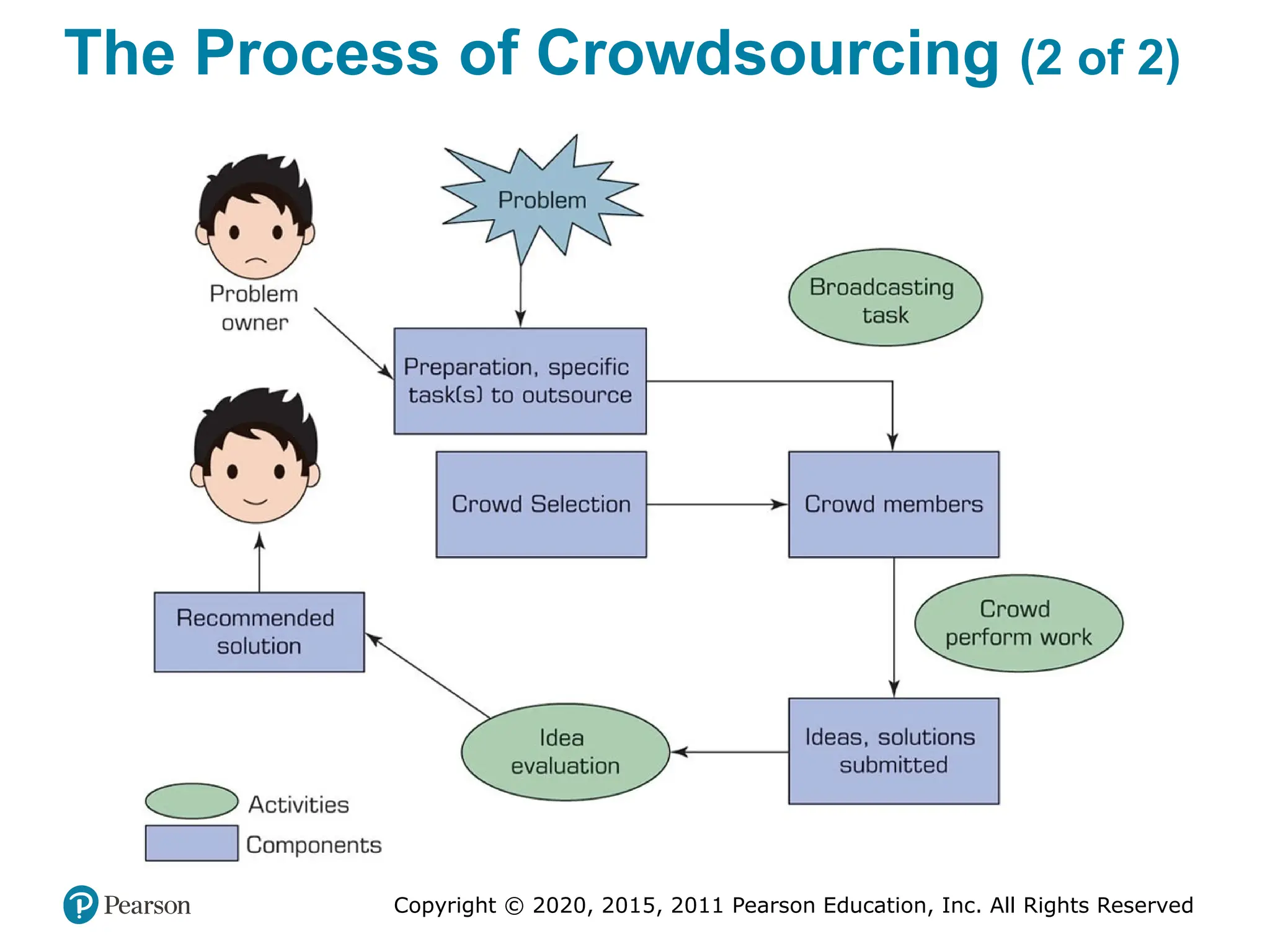
The Process of Crowdsourcing (1 of 2)
1. Identify the problem and the task(s) to be outsourced.
2. Select the target crowd (if not an open call).
3. Broadcast the task to the crowd.
4. Engage the crowd in accomplishing the task (e.g., idea
generation, problem solving).
5. Collect user-generated content.
6. Have the quality of submitted material evaluated by the
management, by experts, or by a crowd.
7. Select the best solution (or a short list).
8. Compensate the crowd (e.g., the winning proposal).
9. Implement the solution.
Copyright © 2020, 2015, 2011 Pearson Education, Inc. All Rights Reserved
The Process of Crowdsourcing (2 of 2)
Copyright © 2020, 2015, 2011 Pearson Education, Inc. All Rights Reserved
Making
• A major objective of AI is to automate decision making
and/or to support its process
• AI can help in the following steps in the process:
– Meeting preparation
– Problem identification
– Idea generation
– Idea organization
– Group interaction and collaboration
– Predictions
– Multilingual group communications
– …
Copyright © 2020, 2015, 2011 Pearson Education, Inc. All Rights Reserved
Swarm Intelligence and Swarm AI
(1 of 2)
• Swarm intelligence refers to the collective behavior of
decentralized, self organized systems, natural or artificial
– Such systems consist of things (e.g., ants, people)
interacting with each other and their environment
– A swarm’s actions are not centrally controlled, but they lead
to intelligent behavior
• In contrast with animals and other species whose interactions
among group members are natural, people need technology to
exhibit swarm intelligence
• Example - Oxford university study on english premier league
• Swarm AI technology
– Algorithms for creating the human swarm
Copyright © 2020, 2015, 2011 Pearson Education, Inc. All Rights Reserved
Swarm Intelligence and Swarm AI
(2 of 2)
• Swarm AI Predictions - Swarm AI was used by
Unanimous AI for making predictions in difficult-to-assess
situations. Examples include:
– Predicting Super Bowl #52 number of points scored
– Predicting winners in the regular NF L season.
– Predicting the top four finishers of the 2017 Kentucky
Derby.
– Predicting the top recipients of the Oscars in 2018.
Copyright © 2020, 2015, 2011 Pearson Education, Inc. All Rights Reserved
Human-Machine Collaboration and
Teams of Robots
• Human–Machine Collaboration in Cognitive Jobs
• Top Management Jobs
• Robots as coworkers – Challenges
– Designing a human–machine team that capitalizes on
the strength of each partner.
– Exchanging information between humans and robots.
– Preparing company employees for the collaboration
– Changing business processes to accommodate
human–robot collaboration
– Ensuring the safety of robots and employees that work
together.
Copyright © 2020, 2015, 2011 Pearson Education, Inc. All Rights Reserved
Human-Machine Collaboration and
Teams of Robots
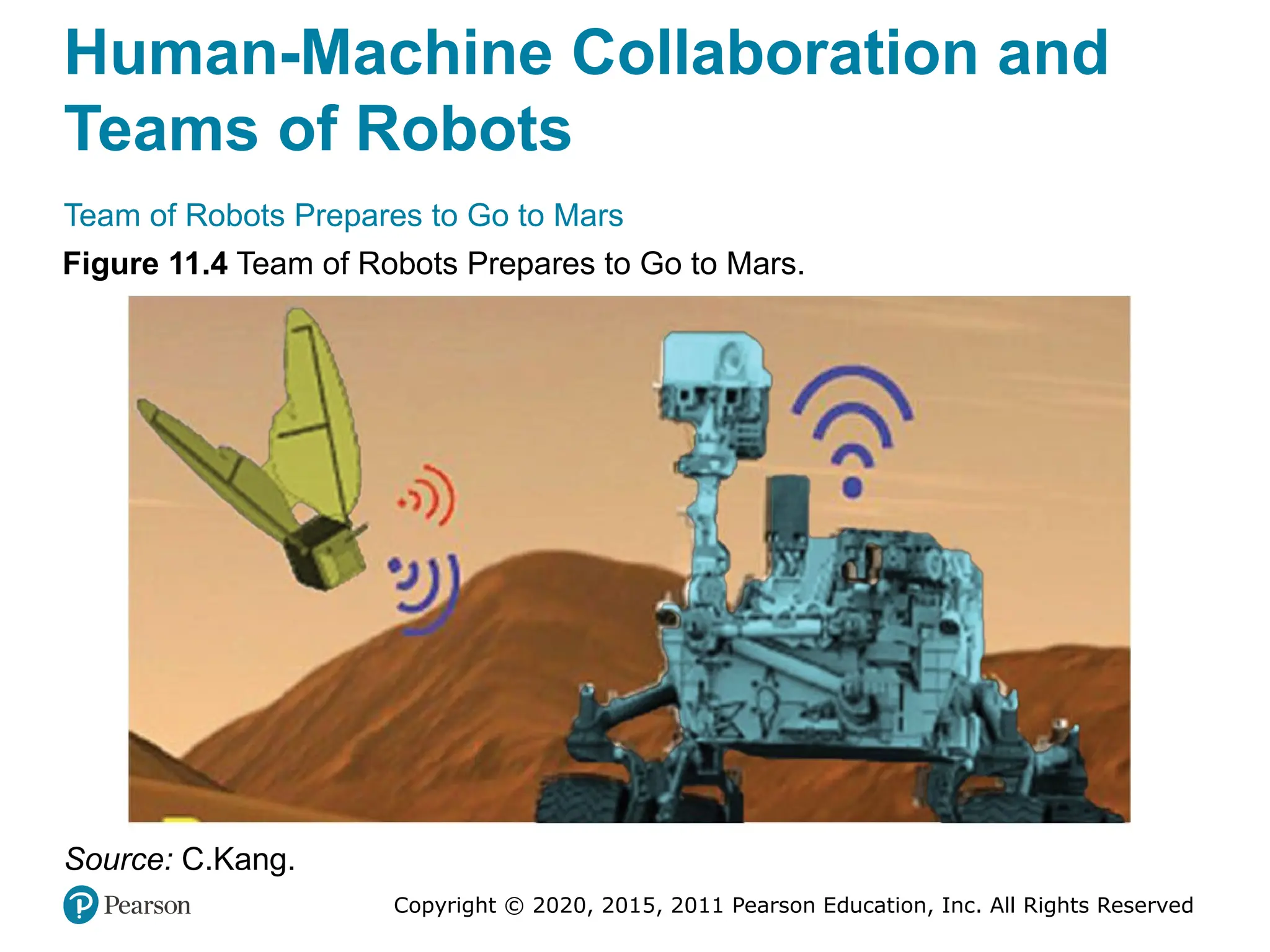
Team of Robots Prepares to Go to Mars
Figure 11.4 Team of Robots Prepares to Go to Mars.
Source: C.Kang.
Copyright © 2020, 2015, 2011 Pearson Education, Inc. All Rights Reserved
End of Chapter 11
Analytics, Data Science and AI:
Systems for Decision Support
Eleventh Edition
Chapter 12
Knowledge Systems: Expert
Systems, Recommenders,
Chatbots, Virtual Personal
Assistants, and Robo Advisors
Copyright © 2020, 2015, 2011 Pearson Education, Inc. All Rights Reserved
Concepts of Expert Systems (ES)
(1 of 6)
• E S is a computer-based information system
• Emulates the decision making and/or problem solving
abilities of human experts in complex areas
• One of the earliest success application areas of AI
– Expert systems use started in research institutions in
1960s
• Goal – help nonexperts to make decisions and solve
problems that usually require expertise
• Works well in narrowly defined domains
Copyright © 2020, 2015, 2011 Pearson Education, Inc. All Rights Reserved
Concepts of Expert Systems (ES)
(2 of 6)
• Expert - A person who has the special knowledge, judgment,
experience, and skills to provide sound advice and solve complex
problems in a narrowly defined area.
• To be called an expert, one must be able to solve a problem and
achieve a performance level that is significantly better than an
average person
• An expert at one time or in one region may not be an expert in
another time or region.
– E.g., a legal expert in New York is not a expert in Beijing
• Experts have expertise that can help solve problems and explain
certain obscure phenomena only within a specific domain
Copyright © 2020, 2015, 2011 Pearson Education, Inc. All Rights Reserved
Concepts of Expert Systems (ES)
(3 of 6)
• Typically, human experts are capable of doing the following:
– Recognizing and formulating a problem
– Solving a problem quickly and correctly
– Explaining a solution
– Learning from experience
– Restructuring knowledge
– Breaking rules and norms, if necessary
– Determining relevance and associations
• Can ES do these? Can a machine help a nonexpert perform
like an expert?
• Real experts are rare and hard to find
Copyright © 2020, 2015, 2011 Pearson Education, Inc. All Rights Reserved
Concepts of Expert Systems (ES)
(4 of 6)
• Expertise - The extensive, task-specific knowledge that
experts possess.
• The level of expertise determines the success of a
decision made by an expert.
• Expertise is often acquired through training, learning, and
experience in practice.
• Expertise includes explicit knowledge, such as theories
learned from a textbook or a classroom and implicit
knowledge gained from experience.
Copyright © 2020, 2015, 2011 Pearson Education, Inc. All Rights Reserved
Concepts of Expert Systems (ES)
(5 of 6)
• Knowledge types (expertise) used in ES applications
– Theories about the problem domain
– Rules and procedures regarding the general problem
domain
– Heuristics about what to do in a given problem situation
– Global strategies for solving of problems amenable to
expert systems
– Meta knowledge (i.e., knowledge about knowledge)
– Facts about the problem area
• These types of knowledge enable experts to make better and
faster decisions than nonexperts.
Copyright © 2020, 2015, 2011 Pearson Education, Inc. All Rights Reserved
Concepts of Expert Systems (ES)
(6 of 6)
• Expertise often includes the following characteristics:
– It is usually associated with a high degree of
intelligence, but it is not always associated with the
smartest person
– It is usually associated with a vast quantity of
knowledge
– It is based on learning from past successes and
mistakes
– It is based on knowledge that is well stored, organized,
and quickly retrievable from an expert who has
excellent recall of patterns from previous experiences.
Copyright © 2020, 2015, 2011 Pearson Education, Inc. All Rights Reserved
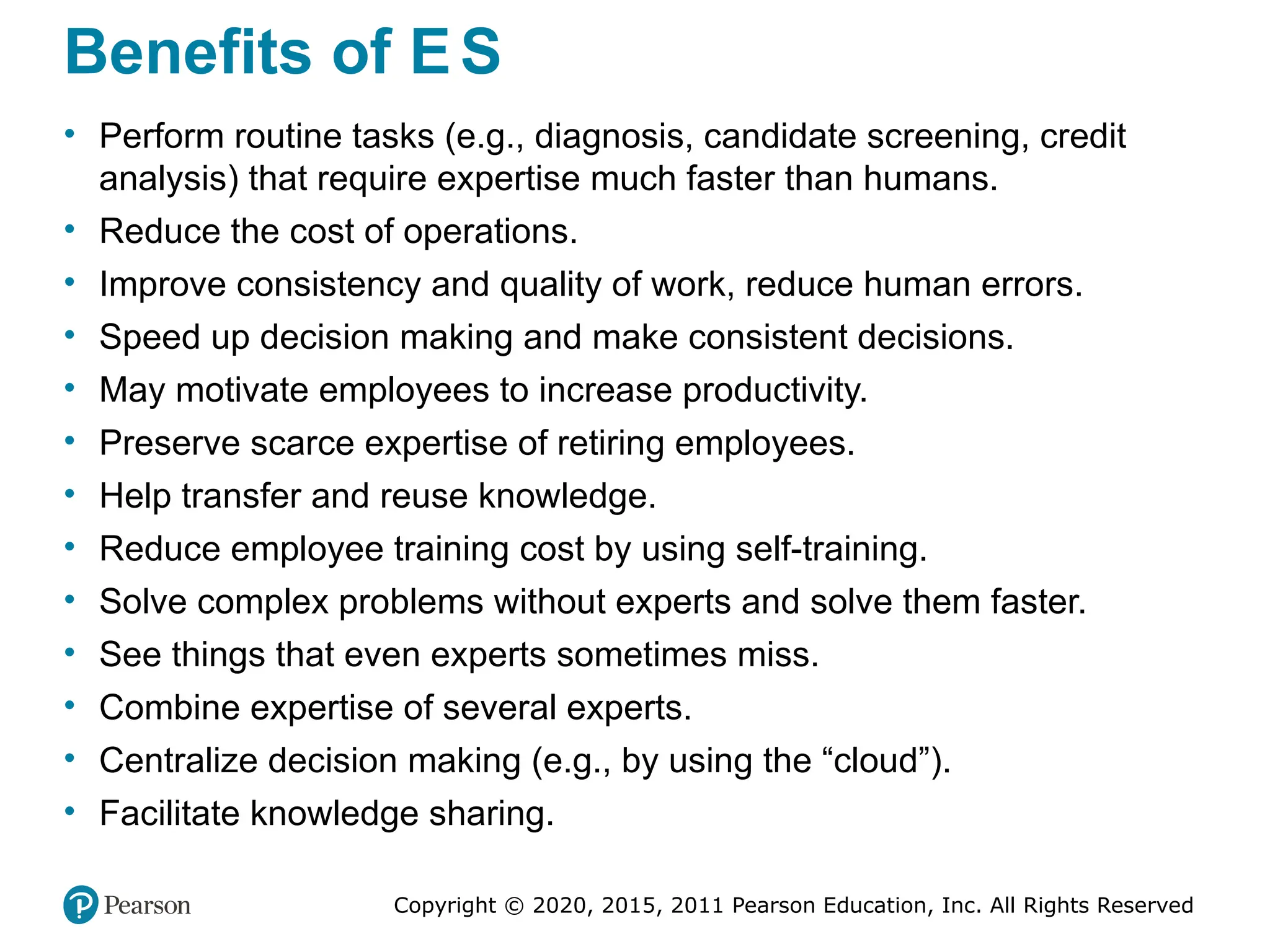
Benefits of ES
• Perform routine tasks (e.g., diagnosis, candidate screening, credit
analysis) that require expertise much faster than humans.
• Reduce the cost of operations.
• Improve consistency and quality of work, reduce human errors.
• Speed up decision making and make consistent decisions.
• May motivate employees to increase productivity.
• Preserve scarce expertise of retiring employees.
• Help transfer and reuse knowledge.
• Reduce employee training cost by using self-training.
• Solve complex problems without experts and solve them faster.
• See things that even experts sometimes miss.
• Combine expertise of several experts.
• Centralize decision making (e.g., by using the “cloud”).
• Facilitate knowledge sharing.
Copyright © 2020, 2015, 2011 Pearson Education, Inc. All Rights Reserved
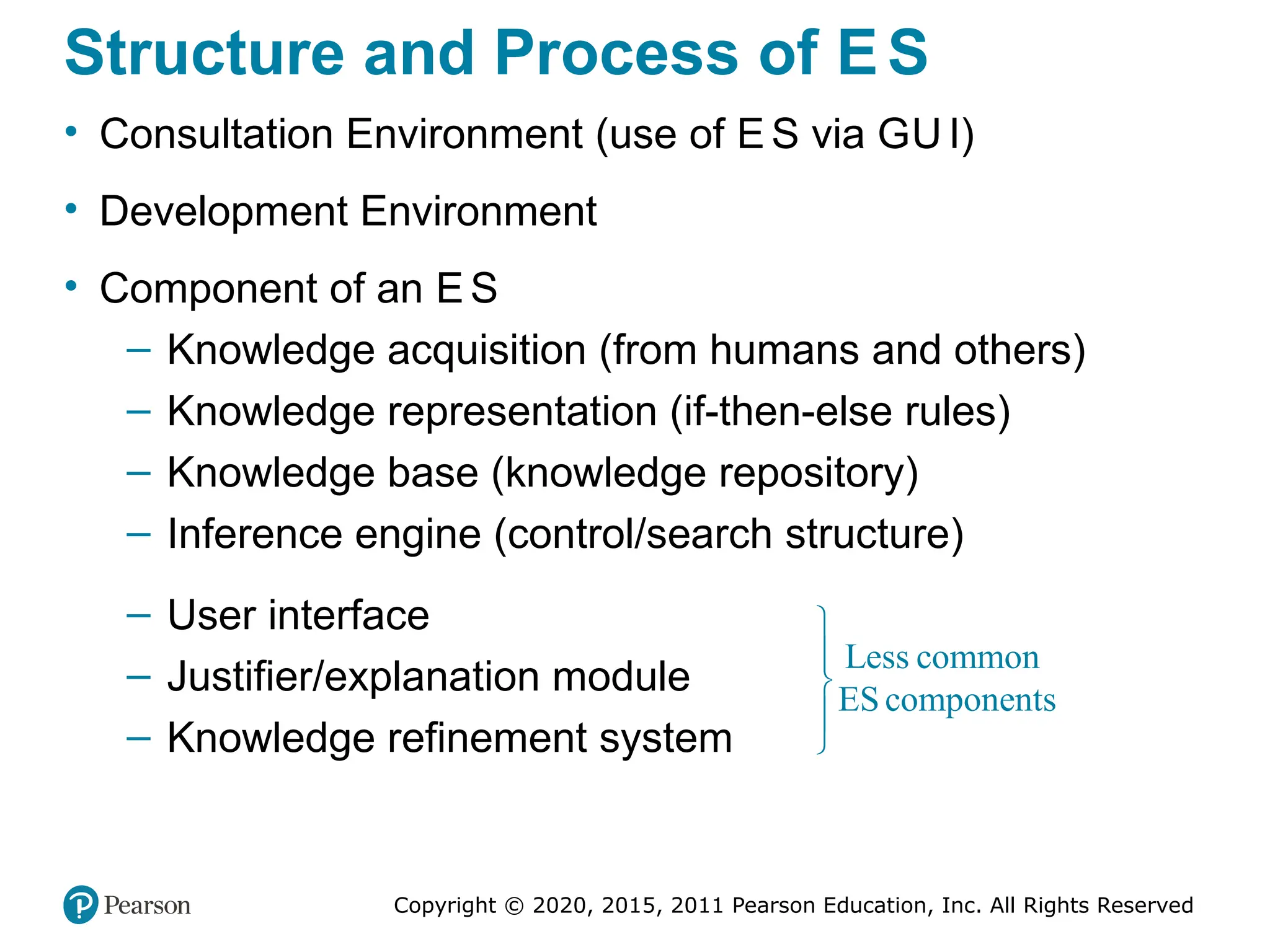
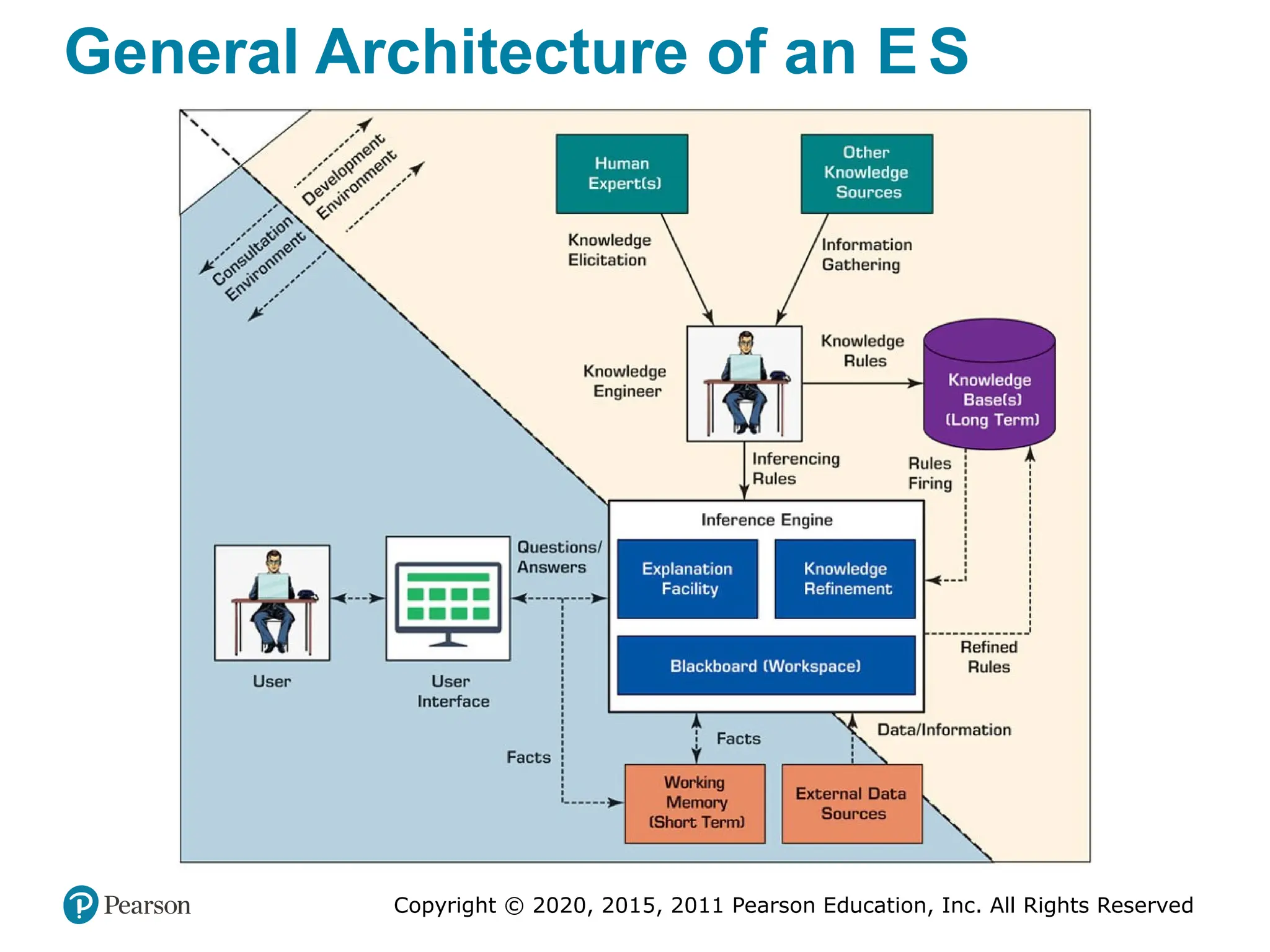
Structure and Process of ES
• Consultation Environment (use of E S via GU I)
• Development Environment
• Component of an ES
– Knowledge acquisition (from humans and others)
– Knowledge representation (if-then-else rules)
– Knowledge base (knowledge repository)
– Inference engine (control/search structure)
– User interface
– Justifier/explanation module
– Knowledge refinement system
Less common
ES components





Copyright © 2020, 2015, 2011 Pearson Education, Inc. All Rights Reserved
General Architecture of an E S
Copyright © 2020, 2015, 2011 Pearson Education, Inc. All Rights Reserved
Recommendation Systems
• Recommendation system, also known as recommender
system or recommendation engine
• Recommending/suggesting one-to-one targeted products
or services
• Predict the importance (rating or preference) that a user
will attach to a product or service
– Based on the prediction, specific products and
services are recommended to the user
– Top applications include movies, music, and books.
However, there are also systems for travel,
restaurants, insurance, and online dating.
Copyright © 2020, 2015, 2011 Pearson Education, Inc. All Rights Reserved
Benefits of Recommendation
Systems
• Benefits to customer:
– Personalization
– Discovery
– Customer satisfaction
– Reports
– Increased dialog with seller
• Benefits to seller:
– Higher conversion rate
– Increased cross-sell
– Increased customer loyalty
– Enabling mass customization
Copyright © 2020, 2015, 2011 Pearson Education, Inc. All Rights Reserved
Methods for Recommendation
Systems
• Collaborative filtering
– Building a model that summarizes the past behavior of
shoppers in a multi-dimensional manner
– Makes recommendations on the new customers based on
the similarity to previous shoppers
– Uses AI/machine learning to predict the preferences
• Content-based filtering
– Allows vendors to identify customer preferences by the
attributes of the product(s) that customers have bought
– Recommend new products with similar attributes
• Several other filtering methods also exists
Copyright © 2020, 2015, 2011 Pearson Education, Inc. All Rights Reserved
Chatbots
• Chatbots (chat robots) emerged in the last decade
• A computerized service that enables easy conversations
between humans and humanlike computerized robots or
image characters
• Some chatbots are equipped with NLP abilities for better
understanding, and some with AI/machine learning for
learning and improving
• Chatbot services are often available messaging services
such as Facebook Messenger or WeChat, and on Twitter
Copyright © 2020, 2015, 2011 Pearson Education, Inc. All Rights Reserved
Types of Bots
• Regular bots. These are essentially conversational intelligent
agents (Chapter 2).
– They can do simple, usually repetitive, tasks for their
owners, such as showing their bank’s debits, helping them
to purchase goods online, and to sell or buy stocks online.
• Chatbots. In this category, we include more capable bots, for
example, those that can stimulate conversations with people.
• Intelligent bots. These have a knowledge base that is improving
with experience.
– That is, these bots can learn, for example, a customer’s
preferences (e.g., like Alexa and some robo advisors).
Copyright © 2020, 2015, 2011 Pearson Education, Inc. All Rights Reserved
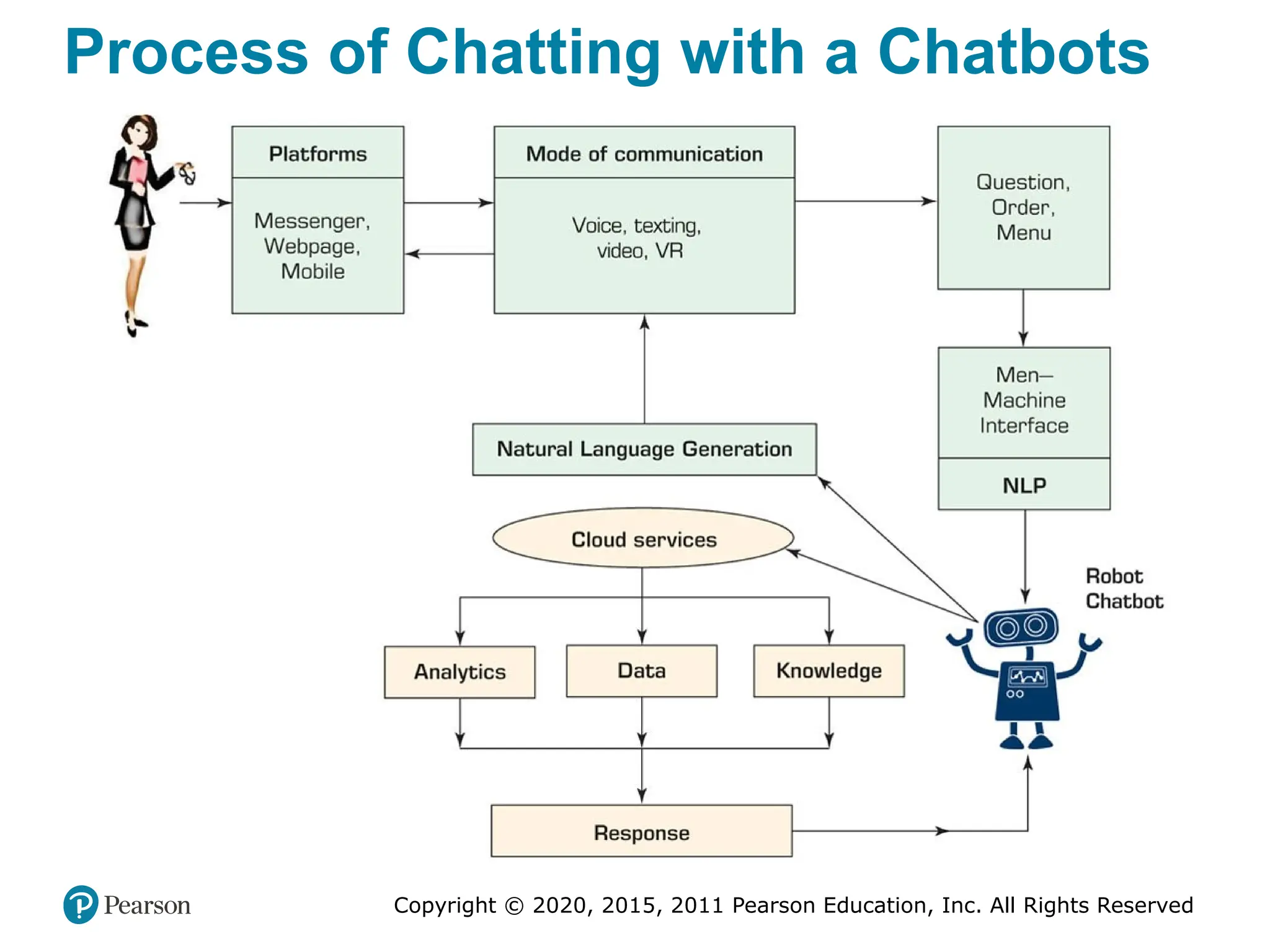
Process of Chatting with a Chatbots
Copyright © 2020, 2015, 2011 Pearson Education, Inc. All Rights Reserved
Chatbots
• Representative Chatbots from Around the World
– RoboCoke, Kip, Walnut, Taxi Bot, ShopiiBot, BO.T,
Hazie, Green Card, Zoom, Akita, …
– For more, please see chatbots.org/ and botlist.co/bots/
• Major Categories of Chatbots’ Applications
– Chatbots for enterprise activities, including
communication, collaboration, customer service, and
sales (such as in the opening vignette)
– Chatbots that act as personal assistants
– Chatbots that act as advisors, mostly on finance-
related topics
– These are explained in the following sections
Copyright © 2020, 2015, 2011 Pearson Education, Inc. All Rights Reserved
Technology Insights 12.1
Chatbots’ Platform Providers
• Popular vendors:
– ChettyPeople
– Kudi
– Twyla
• The most popular platforms:
– IB M Watson
– Microsoft’s Bot Framework
Copyright © 2020, 2015, 2011 Pearson Education, Inc. All Rights Reserved
Virtual Personal Assistants (1 of 2)
• Assistant for Information Search
• If You Were Mark Zuckerberg, Facebook CE O
– While Siri and Alexa were in development he develop
his own personal assistant to help him run his home
and his work
• Amazon’s Alexa and Echo
– Alexa can do many things…
– Alexa can be taught/customized for individualized
skills
– Amazon Echo, Echo Dot, and Echo Tap
– Alexa for Enterprise …
Copyright © 2020, 2015, 2011 Pearson Education, Inc. All Rights Reserved
Virtual Personal Assistants (2 of 2)
• Apple Siri
– Siri: Speech Interpretation and Recognition Interface
– VI V: developed in 2016, by Dag Kittlaus, the creator of
Siri, as “an intelligent Interface for everything”
• Goggle Assistant
• Other personal assistants
– Microsoft Cortana (Cortana with Bing)
– Samsung Bixby
• Competition Among Large Tech Companies
• Knowledge for Virtual Personal Assistants
Copyright © 2020, 2015, 2011 Pearson Education, Inc. All Rights Reserved
Chatbots Implementation Issues
• Technology issues
• Disadvantages and limitations of bots
– Inferior performance
– Virtual assistants under attack
• Quality of Chatbots
– Quality of robo advisors
– Microsoft’s Tay (Twitter based chatbot)
• Constructing Bots
– Using Microsoft’s Azure bot service
Copyright © 2020, 2015, 2011 Pearson Education, Inc. All Rights Reserved
End of Chapter 12
Analytics, Data Science and AI:
Systems for Decision Support
Eleventh Edition
Chapter 13
The Internet of Things as a
Platform for Intelligent Applications
Copyright © 2020, 2015, 2011 Pearson Education, Inc. All Rights Reserved
Slide in this Presentation Contain Hyperlinks.
JAWS users should be able to get a list of links by
using INSERT+F7
Copyright © 2020, 2015, 2011 Pearson Education, Inc. All Rights Reserved
Essentials of Internet of Things (IoT)
(1 of 2)
• IoT refers to a computerized network that connects many
objects (people, animals, devices, sensors, buildings,
items) each with embedded microprocessor
• Connections are made wirelessly via Internet
• IoT allows communication and exchange of data among
the object and their environment
• Connections are made anytime, anyplace
– IoT uses ubiquitous computing
Copyright © 2020, 2015, 2011 Pearson Education, Inc. All Rights Reserved
Essentials of Internet of Things (IoT)
(2 of 2)
• Analysts predicts that by 2025, more than 50 Billion
objects (devices) will be connected to the Internet,
creating the backbone of IoT applications
• It is a disruptive technology
– Changing the business models
– Join the conversations at iotcommunity.com
• Allows extensive communication and collaboration
between users and items
– Devices can connect each other directly
– Increasing productivity and automation
– Unlimited use cases…
Copyright © 2020, 2015, 2011 Pearson Education, Inc. All Rights Reserved
Definitions and Characteristics of IoT
(1 of 3)
• “The Internet of Things means sensors connected to the
Internet and behaving in an Internet-like way by making open,
ad hoc connections, sharing data freely, and allowing
unexpected applications, so computers can understand the
world around them and become humanity’s nervous system.”
– Kevin Ashton, Creator of the term Internet of Things
• “The IoT is a network of connected computing devices including
different types of objects (e.g., digital machines). Each object in
the network has a unique identifier (UID), and it is capable of
collecting and transferring data automatically across the
network.”
– Our working definition
Copyright © 2020, 2015, 2011 Pearson Education, Inc. All Rights Reserved
Definitions and Characteristics of IoT
(2 of 3)
• IoT allows people and things to interact and communicate at any time,
any place, regarding any business topic or service.
• IoT Characteristics (Miller, 2015)
– Large numbers of objects (things) can be connected.
– Each thing has a unique definition/ID (IP address).
– Each thing has the ability to receive, send, and store data
automatically.
– Each thing is delivered mostly over the wireless Internet.
– Each thing is built upon machine-to-machine (M2M)
communication.
• Internet connects people to each other using computing technology,
while IoT connects “things” (physical devices and people) to each
other and to sensors that collect data
Copyright © 2020, 2015, 2011 Pearson Education, Inc. All Rights Reserved
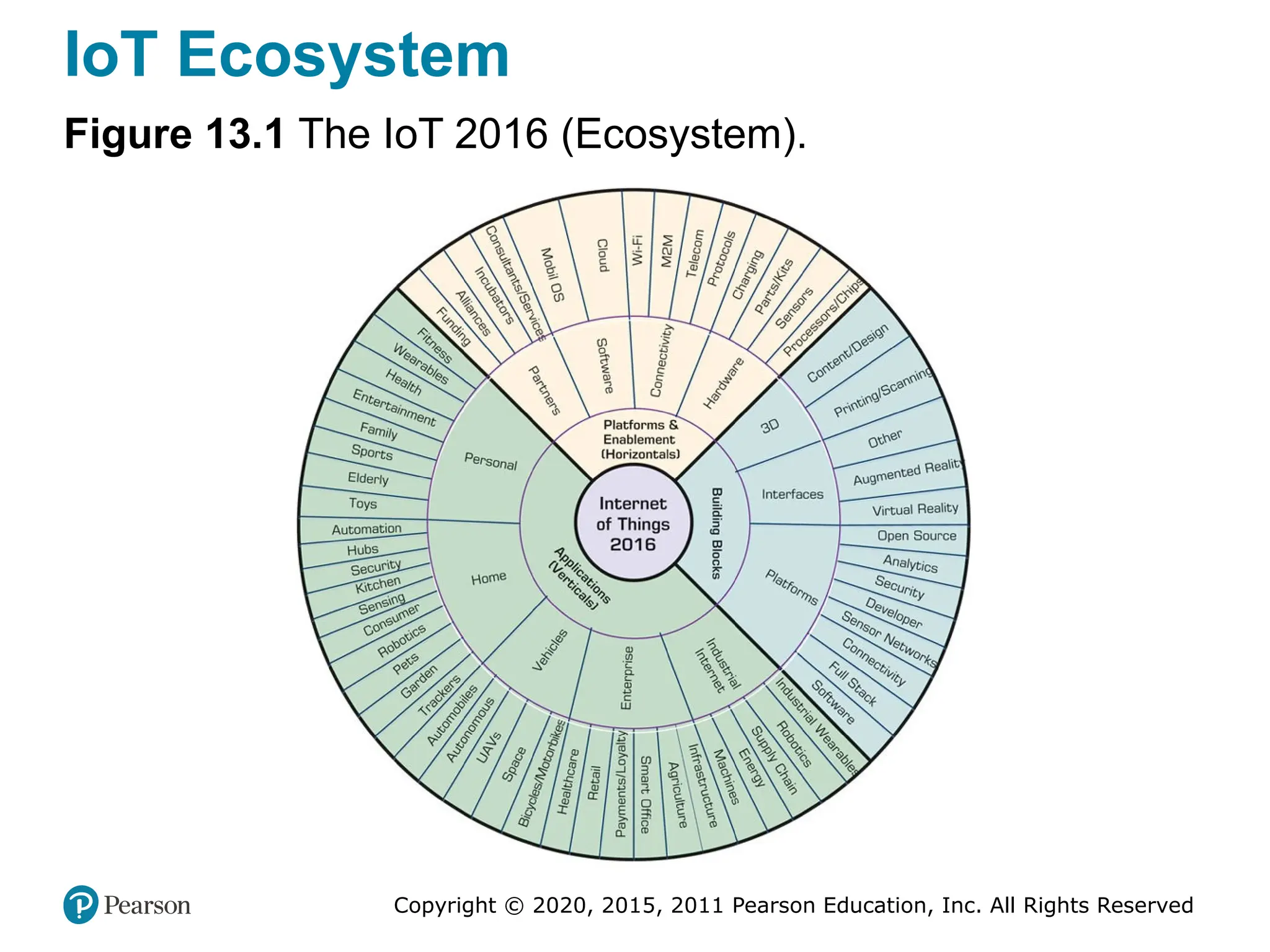
IoT Ecosystem
• The IoT ecosystem refers to all components that enable
users to create IoT applications
– E.g., gateways, analytics, AI algorithms, servers, data
storage, security, and connectivity devices
• Platforms
– Software, hardware, connectivity, …
• Building blocks
– Interfaces, platforms, 3D, …
• Applications
– Personal, home, vehicle, industrial, enterprise
• See Figure 13.1 for a full picture of the IoT ecosystem
Copyright © 2020, 2015, 2011 Pearson Education, Inc. All Rights Reserved
IoT Ecosystem
Figure 13.1 The IoT 2016 (Ecosystem).
Copyright © 2020, 2015, 2011 Pearson Education, Inc. All Rights Reserved
Structure of IoT Systems (1 of 2)
• IoT Technology Infrastructure (four major blocks)
• Hardware
– physical devices, sensors, and actuators where data are
produced and recorded
• Connectivity
– Via hubs, gateways and Internet/Cloud)
• Software backend
– The logic/process implementation that manages data, often
in the cloud)
• Applications
– The use of the generates data  information for some
specific of purposes
Copyright © 2020, 2015, 2011 Pearson Education, Inc. All Rights Reserved
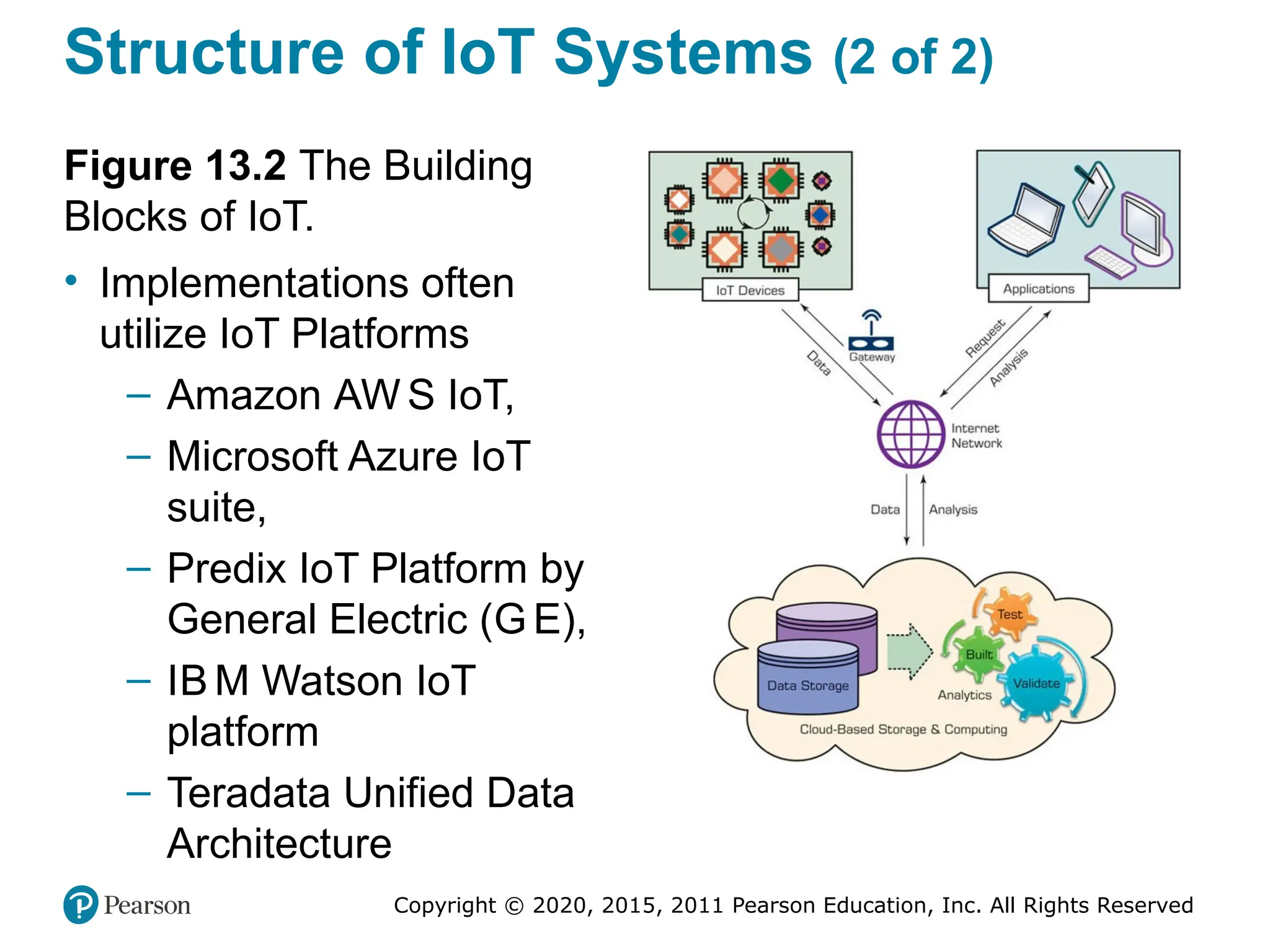
Structure of IoT Systems (2 of 2)
Figure 13.2 The Building
Blocks of IoT.
• Implementations often
utilize IoT Platforms
– Amazon AW S IoT,
– Microsoft Azure IoT
suite,
– Predix IoT Platform by
General Electric (G E),
– IB M Watson IoT
platform
– Teradata Unified Data
Architecture
Copyright © 2020, 2015, 2011 Pearson Education, Inc. All Rights Reserved
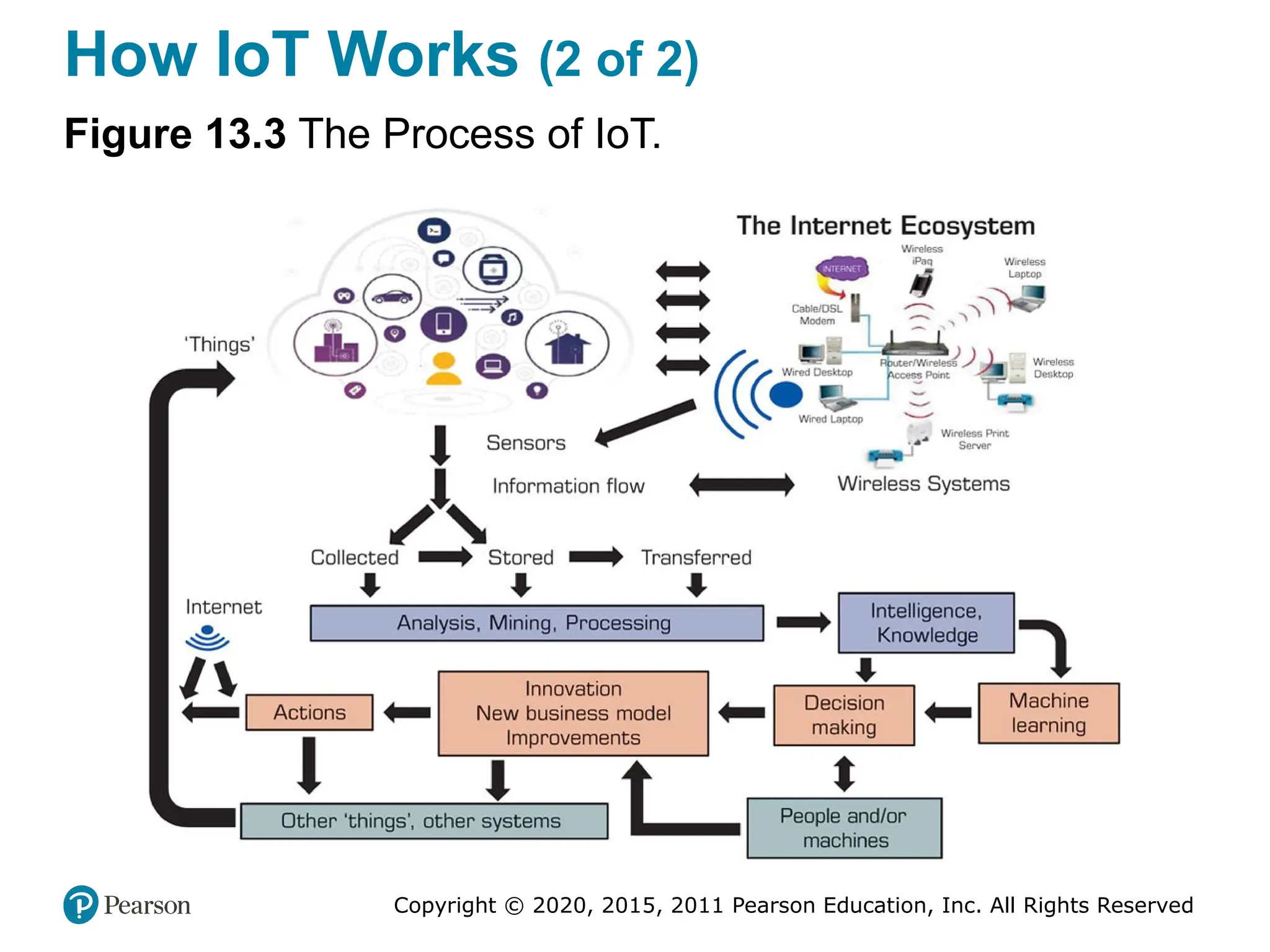
How IoT Works (1 of 2)
• IoT is not an application.
• It is an infrastructure, platform, or framework that is used to support
applications.
• A simple view to hot IoT works:
– The Internet ecosystem includes a large number of things
– Sensors and other devices collect information from the
ecosystem
– The collected information can be displayed, stored, and
processed analytically (e.g., by data mining)
 This analysis converts the information into knowledge and/or
intelligence
– Expert systems or machine learning may help in turning the
knowledge into decision support (made by people and/or
machines), which is evidenced by improved actions and results…
leading to new applications and use cases.
Copyright © 2020, 2015, 2011 Pearson Education, Inc. All Rights Reserved
How IoT Works (2 of 2)
Figure 13.3 The Process of IoT.
Copyright © 2020, 2015, 2011 Pearson Education, Inc. All Rights Reserved
Sensors and Their Role in IoT
• How Sensors Work with IoT
– In large-scale applications, sensors collect data that
are transferred to processing in the “cloud”
• Sensor Applications and Radio-Frequency Identification
(RFI D) Sensors
– Sensors can measure many things: humidity,
temperature, etc.
– A well-known type of sensor that plays an important
role in IoT is radio-frequency identification
• RFI D in conjunction with other sensors play a major role
in IoT applications
Copyright © 2020, 2015, 2011 Pearson Education, Inc. All Rights Reserved
Technology Insight 13.1
RFI D Sensors
• RFI D - a generic technology that uses of radio-frequency
waves to identify objects
• Part of a family of automatic identification technologies
that also includes ubiquitous barcodes and magnetic strips
– RFI S stores richer identification data
• Use of RFI D spread by retailers’ supply-chains
• RFI D works with tags and readers
– Active vs passive tags (long/short range)
Copyright © 2020, 2015, 2011 Pearson Education, Inc. All Rights Reserved
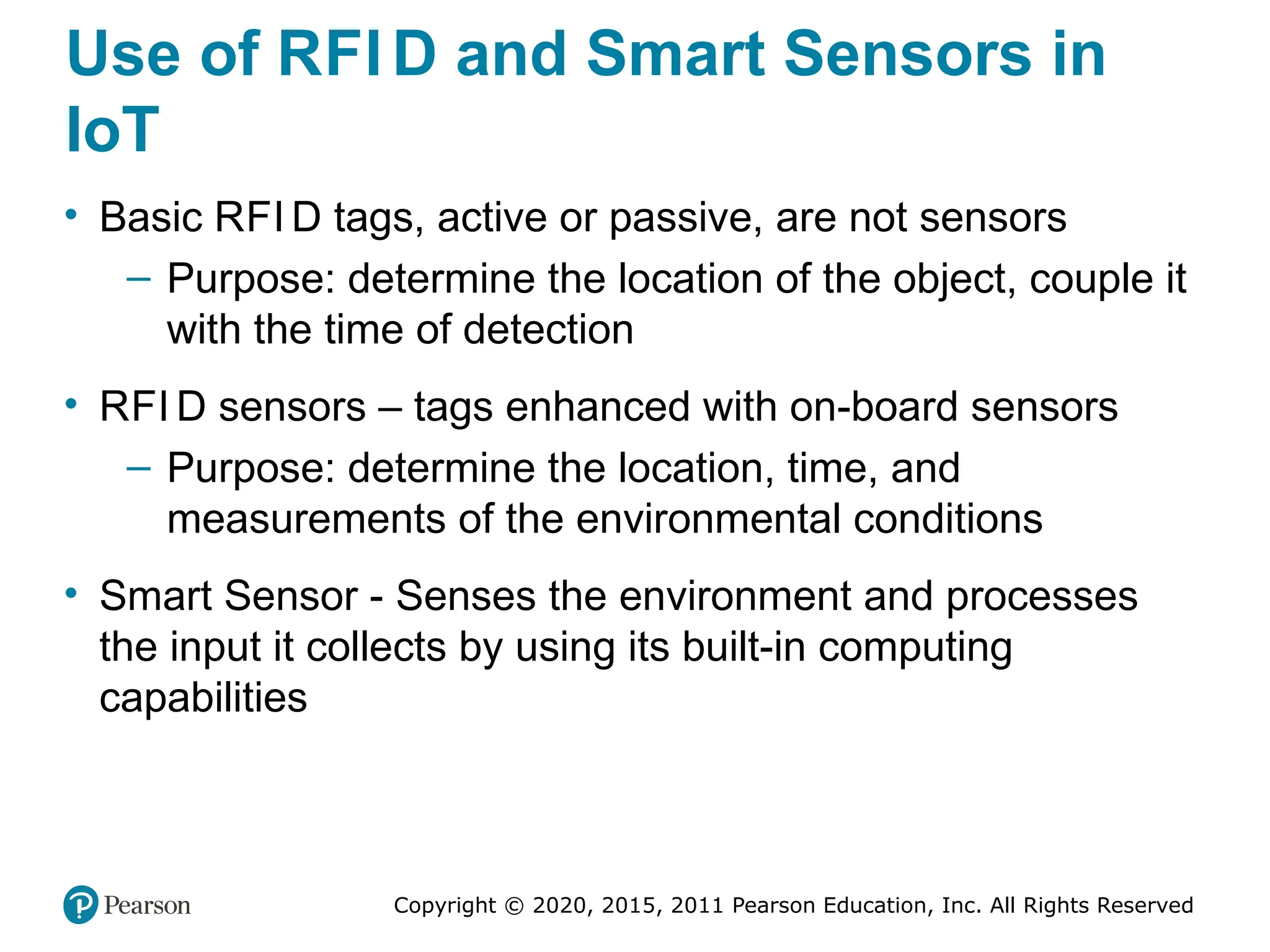
Use of RFI D and Smart Sensors in
IoT
• Basic RFI D tags, active or passive, are not sensors
– Purpose: determine the location of the object, couple it
with the time of detection
• RFI D sensors – tags enhanced with on-board sensors
– Purpose: determine the location, time, and
measurements of the environmental conditions
• Smart Sensor - Senses the environment and processes
the input it collects by using its built-in computing
capabilities
Copyright © 2020, 2015, 2011 Pearson Education, Inc. All Rights Reserved
Smart Homes and Appliances
• A smart home is a home with automated components that
are interconnected such as lights, appliances, security,
and entertainment that are able to communicate each
other
– Designed to provide their dwellers with comfort,
security, low energy cost, and convenience
– Most existing home are not smart, but the can
inexpensively be equipped with partial smartness
– See techterms.comdefinitionsmart_home
• Protocols: XI O, UPB, Z-Wave, EnOcean, …
– These products offer scalability, so more devices can
be connected
Copyright © 2020, 2015, 2011 Pearson Education, Inc. All Rights Reserved
Smart Homes and Appliances
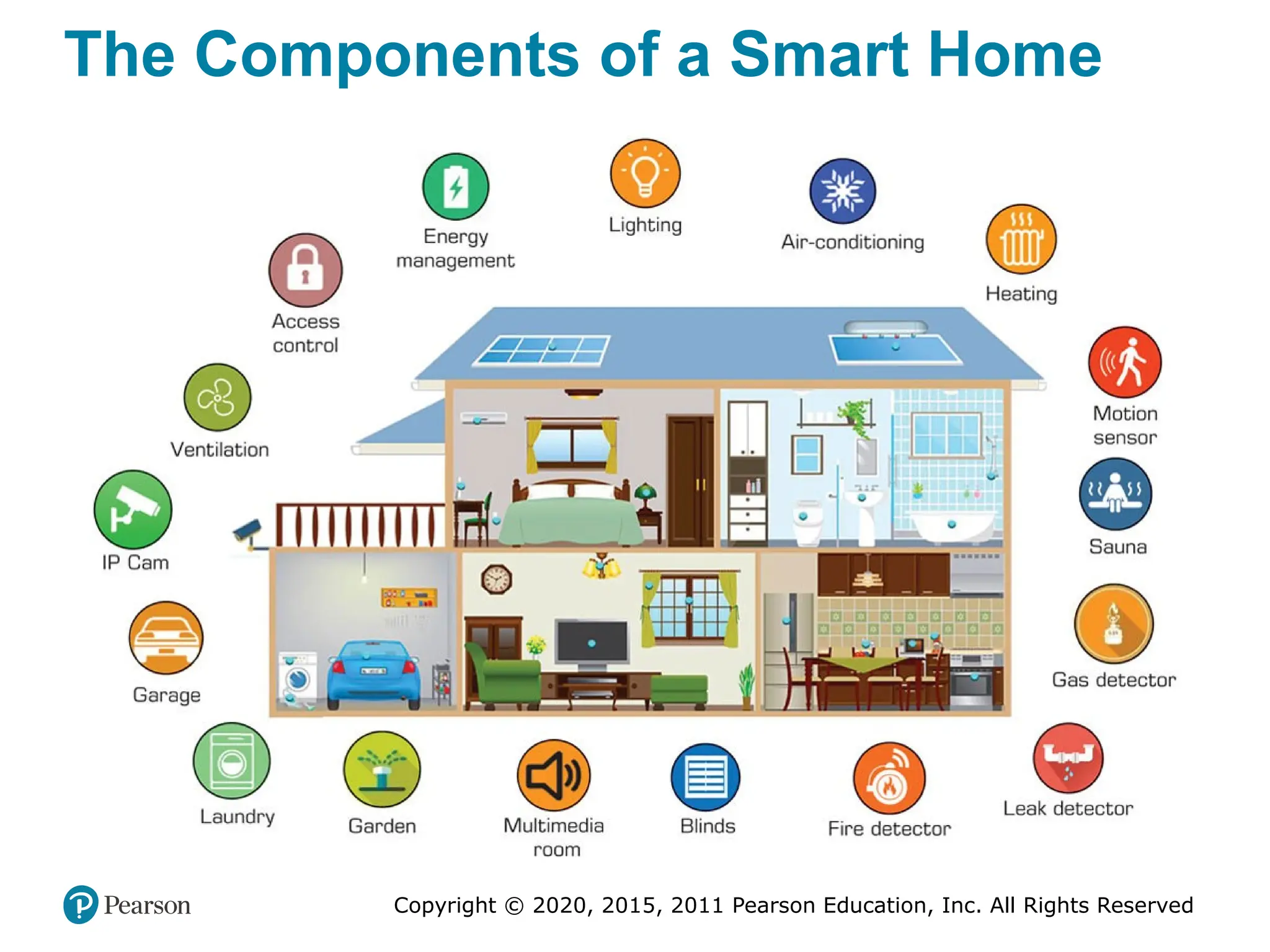
• Typical Components of Smart Homes
– Lighting and TV
– Energy management (e.g., Nest)
– Water control (watercop.com)
– Smart speaker and chatbots (e.g., Alexa)
– Home entertainment
– Alarm clock
– Vacuum cleaner
– Camera
– Refrigerator (and other appliances)
– Home security and safety
– …
Copyright © 2020, 2015, 2011 Pearson Education, Inc. All Rights Reserved
The Components of a Smart Home
Copyright © 2020, 2015, 2011 Pearson Education, Inc. All Rights Reserved
Smart Homes and Appliances
• Example: iHealthHome
– Provides real-time information to caregivers and
physicians (and loved ones)
– Reminds seniors of daily appointments and when to
take their medicine
• Smart appliances are appliances enhanced with sensor
and communication technologies
– They comminute with other devises and people
through the home network and Internet
– Google Nest, and other Nest products (nest.com)
– Popular kits for smart homes include Amazon Eco,
Google Home
Copyright © 2020, 2015, 2011 Pearson Education, Inc. All Rights Reserved
Smart Cities and Factories
• Smart cities use digital technologies (mostly mobile
based) to facilitate better public services for citizens,
better utilization of resources, and less negative
environmental impact.
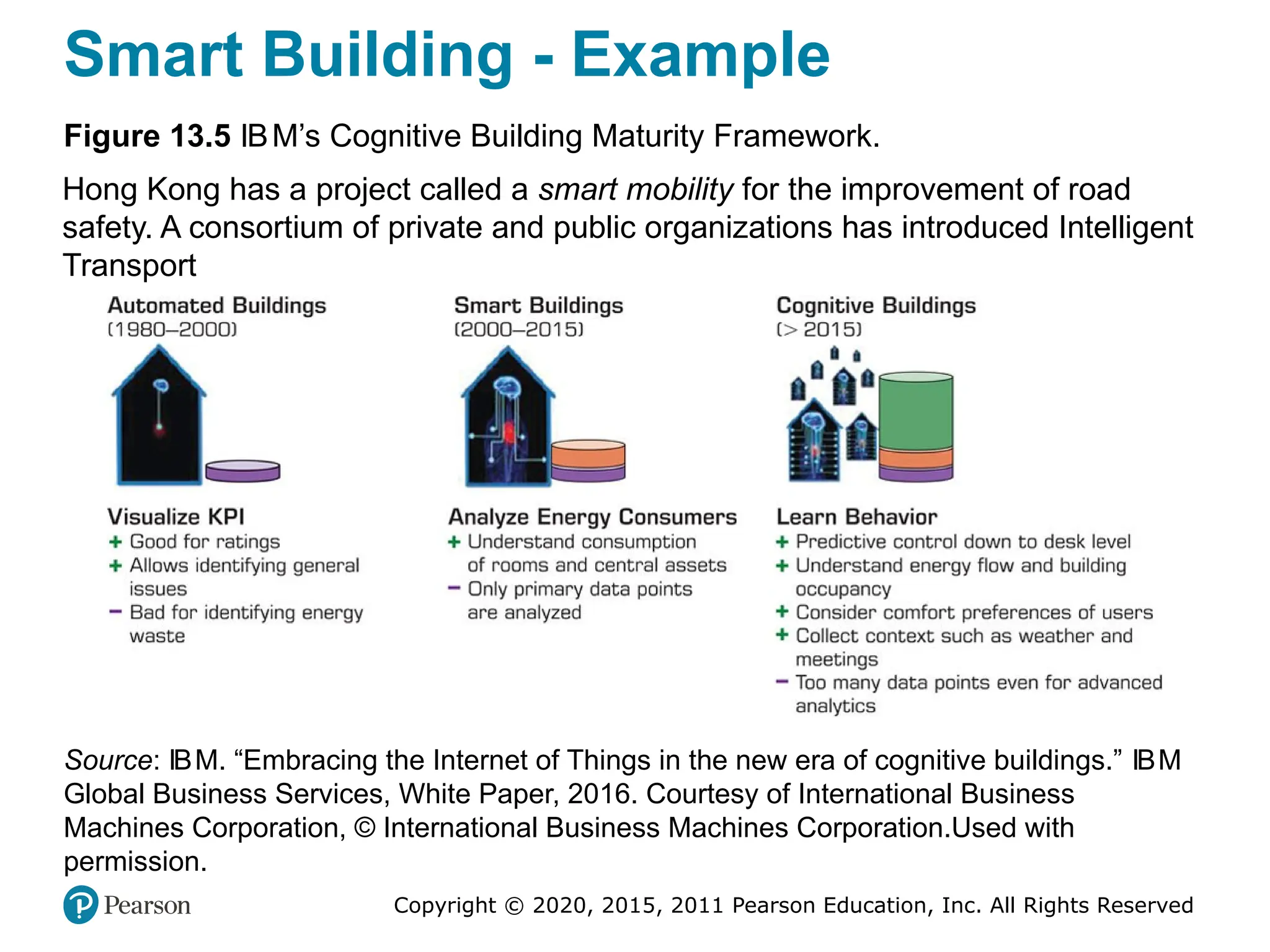
• Smart Buildings: From Automated to Cognitive Buildings
– IB M’s Cognitive Building learns the behavior of a
building’s system in order to optimize it
– Doing so autonomously by integrating with the IoT
devices and sensors
– Uses IoT and sensors to monitor, analytics to learn,
robots to act …
Copyright © 2020, 2015, 2011 Pearson Education, Inc. All Rights Reserved
Smart Building - Example
Figure 13.5 IBM’s Cognitive Building Maturity Framework.
Hong Kong has a project called a smart mobility for the improvement of road
safety. A consortium of private and public organizations has introduced Intelligent
Transport
Source: IBM. “Embracing the Internet of Things in the new era of cognitive buildings.” IBM
Global Business Services, White Paper, 2016. Courtesy of International Business
Machines Corporation, © International Business Machines Corporation.Used with
permission.
Copyright © 2020, 2015, 2011 Pearson Education, Inc. All Rights Reserved
Smart Factories
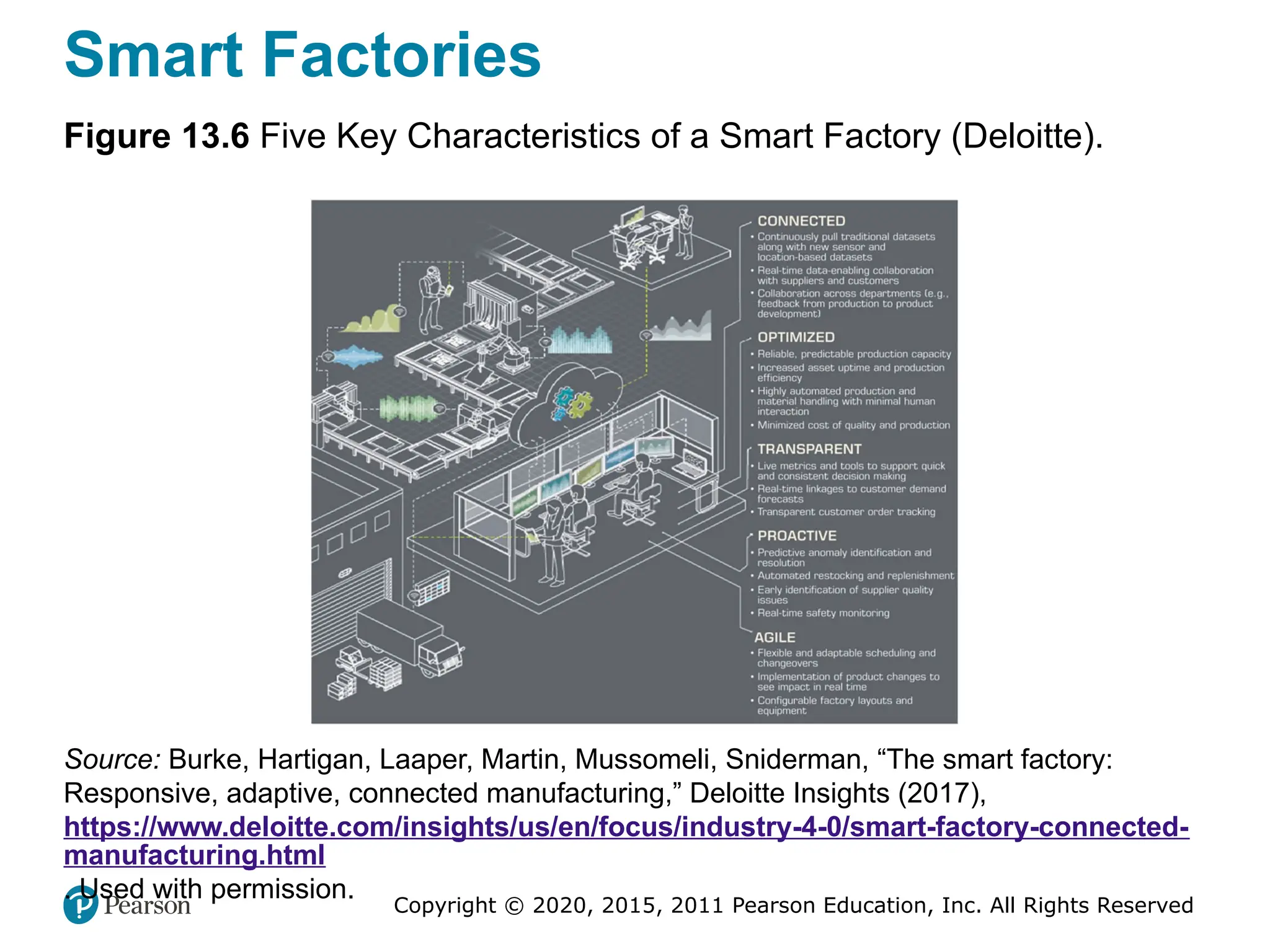
Figure 13.6 Five Key Characteristics of a Smart Factory (Deloitte).
Source: Burke, Hartigan, Laaper, Martin, Mussomeli, Sniderman, “The smart factory:
Responsive, adaptive, connected manufacturing,” Deloitte Insights (2017),
https://www.deloitte.com/insights/us/en/focus/industry-4-0/smart-factory-connected-
manufacturing.html
. Used with permission.
Copyright © 2020, 2015, 2011 Pearson Education, Inc. All Rights Reserved
Smart Cities (1 of 3)
• Improving Transportation in the Smart City
• A major problem in many cities is the increased number of
vehicles and the inability to accommodate all of them
effectively
– Solutions include building more roads, public
transportation, smart traffic via IoT+Sensors+Analytics
• Example 1
– Smart studs transmits information of what they sense
– Smart studs + autonomous vehicle = feature of traffic
• Example 2
– Hong Kong parking, collision warning, and alerts for
speeders and lane changing violators
Copyright © 2020, 2015, 2011 Pearson Education, Inc. All Rights Reserved
Smart Cities (2 of 3)
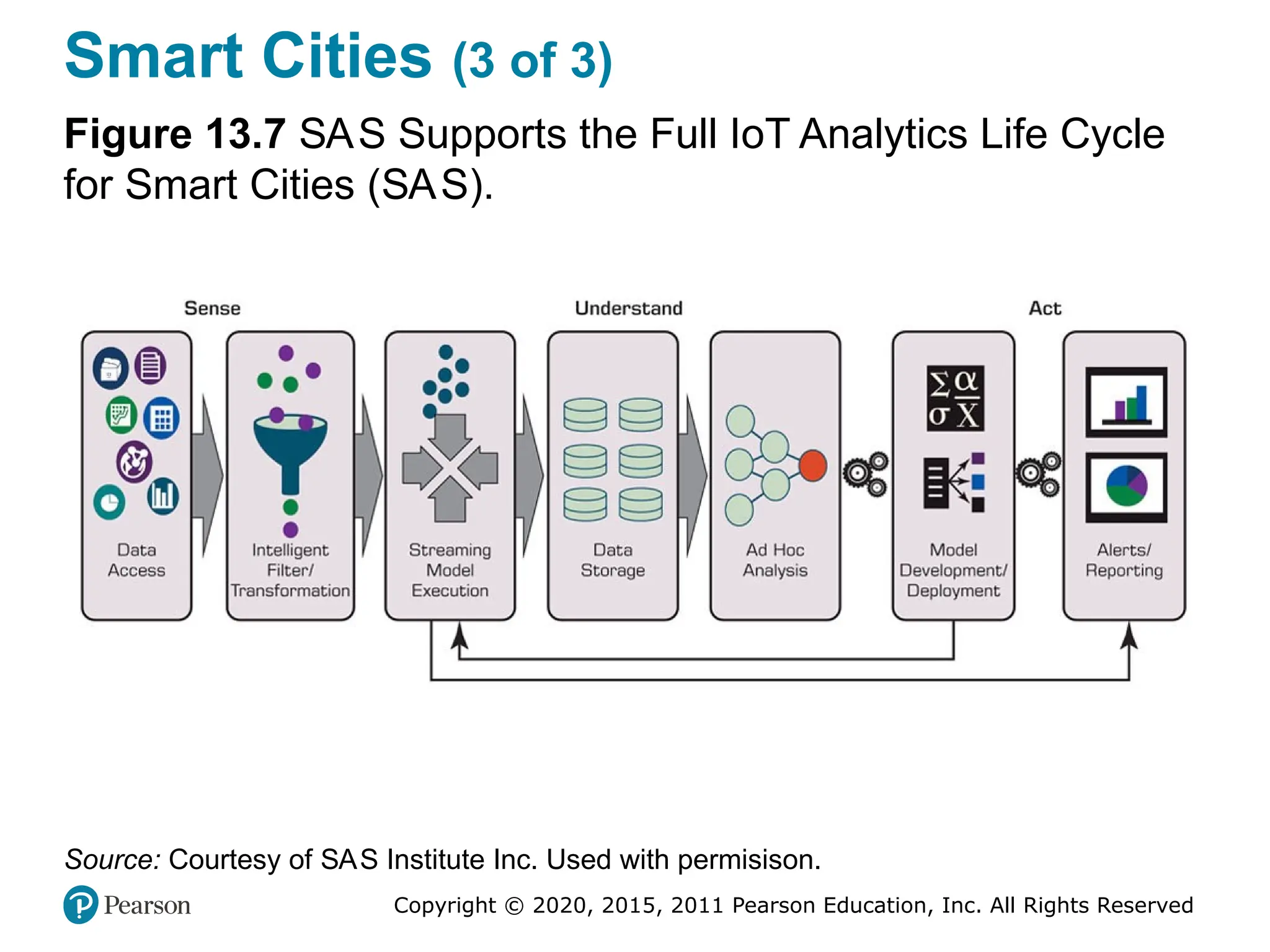
• Example: The SAS Analytics Model for Smart Cities
– Sense
– Understand the signals in the data
– Act
• Bill Gates’ Futuristic Smart City
– In November 2017, Bill Gates purchased 60,000 acres
of land west of Phoenix, Arizona, where he plans to
construct a futuristic city from scratch
• Technology Support for Smart Cities
• Technology support by Bosch Corp., and Others
Copyright © 2020, 2015, 2011 Pearson Education, Inc. All Rights Reserved
Smart Cities (3 of 3)
Figure 13.7 SAS Supports the Full IoT Analytics Life Cycle
for Smart Cities (SAS).
Source: Courtesy of SAS Institute Inc. Used with permisison.
Copyright © 2020, 2015, 2011 Pearson Education, Inc. All Rights Reserved
Autonomous Self-Driving Vehicles
• Autonomous vehicles (driverless cars, robot-driven cars,
self-driving cars, and autonomous cars) are already on the
roads in several places
• The Developments of Smart Vehicles
– Google in the 1990s – Waymo
• TECHNOLOGY INSIGHTS 13.2 Toyota and Nvidia Corp.
Plan to Bring Autonomous Driving to the Masses
– See blogs.nvidia.com/blog/2016/09/28/Xavier/.
• Flying Cars?
Copyright © 2020, 2015, 2011 Pearson Education, Inc. All Rights Reserved
Implementing IoT and Managerial
Considerations (1 of 2)
• Major Implementation Issues
– Organizational alignment
– Interoperability challenges
– Security
– Additionally …
 Privacy
 Connection of the silos of data
 Preparation of existing I T architectures
 Management
 Connected customers
Copyright © 2020, 2015, 2011 Pearson Education, Inc. All Rights Reserved
Implementing IoT and Managerial
Considerations (2 of 2)
• Strategy for Turning Industrial IoT into Competitive
Advantage
– Specify the business goals
– Express an analytic strategy
– Evaluate the needs for edge analytics
– Select appropriate analytics solutions
– Continues improvement closes the loop
• Future of IoT
– Larger, more connected/networked, smarter, …
• AI enhancement of IoT
Copyright © 2020, 2015, 2011 Pearson Education, Inc. All Rights Reserved
End of Chapter 13
Analytics, Data Science and AI:
Systems for Decision Support
Eleventh Edition
Chapter 14
Implementation Issues: From
Ethics and Privacy to
Organizational and Societal
Impacts
Copyright © 2020, 2015, 2011 Pearson Education, Inc. All Rights Reserved
Slide in this Presentation Contain Hyperlinks.
JAWS users should be able to get a list of links by
using INSERT+F77
Copyright © 2020, 2015, 2011 Pearson Education, Inc. All Rights Reserved
Implementing Intelligent Systems
• What can you do with the output of analytics?
– Implement them!
– Some results are “good to know” and done
– Most require perpetual use (as a DSS) in the
organizaiton
• Implementing AI/analytic solution is not easy...
– In addition to common issues related to any computer
based system implementation, AI/analytics
implementation has specific issues to deal with
• Before talking about the issues, let us first look at the
process…
Copyright © 2020, 2015, 2011 Pearson Education, Inc. All Rights Reserved
The Intelligent Systems
Implementation Process
Five major steps of implementation
• Step 1. Need assessment (business case)
• Step 2. Preparation (readiness)
• Step 3. System acquisition (in-house/outsource)
• Step 4. System development
• Step 5. Impact assessment
Copyright © 2020, 2015, 2011 Pearson Education, Inc. All Rights Reserved
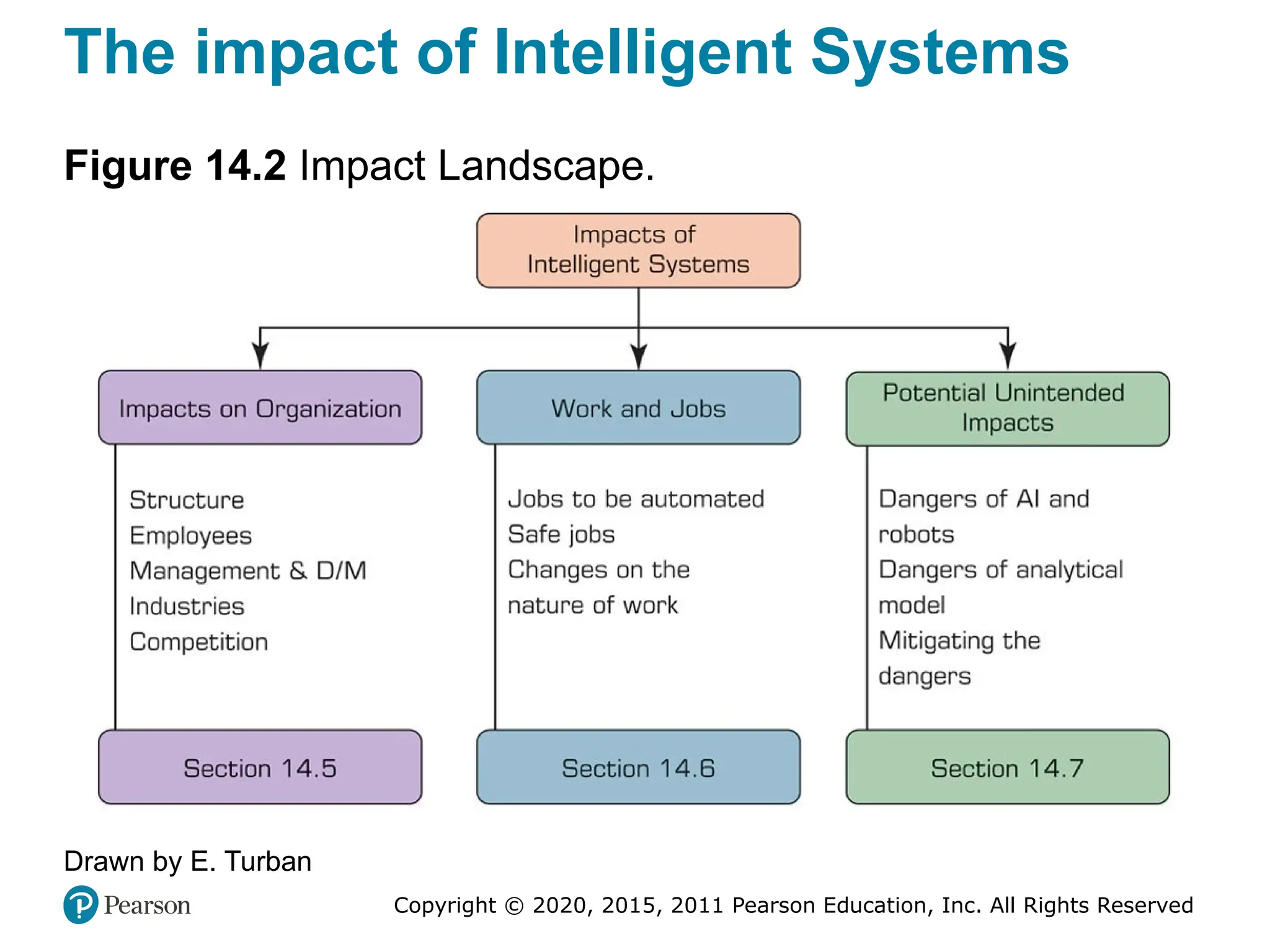
The impact of Intelligent Systems
Figure 14.2 Impact Landscape.
Drawn by E. Turban
Copyright © 2020, 2015, 2011 Pearson Education, Inc. All Rights Reserved
Legal, Privacy and Ethical Issues
(1 of 12)
• As data science, analytics, cognitive computing, and AI
grow in reach and pervasiveness, everyone may be
affected by these applications
• Just because something is doable through technology
does not make it appropriate, legal, or ethical
• Data science and AI professionals/manager must be
aware of these concerns
• Legality versus Privacy versus Ethics
– Something legal may not be ethical…
Copyright © 2020, 2015, 2011 Pearson Education, Inc. All Rights Reserved
Legal, Privacy and Ethical Issues
(2 of 12)
• Legal Issues
– What is the value of an expert opinion in court?
– Who is liable for wrong advice (or information)
provided by an intelligent application?
– What happens if a manager enters an incorrect
judgment value into an intelligent application and the
result is damage or a disaster?
– Who owns the knowledge in a knowledge base (e.g.,
the knowledge of a chatbot)?
– Can management force experts to contribute their
expertise to an intelligent system? …
– See the example on “Intellectual Property Protection”
Copyright © 2020, 2015, 2011 Pearson Education, Inc. All Rights Reserved
Legal, Privacy and Ethical Issues
(3 of 12)
AI and Law
• AI applications to the legal profession/problems
– Analyzing legal-related data (e.g., regulatory conflicts)
to detect pattern
– Providing legal advice to consumers (e.g., see
DoNotPay.com).
– Document review
– Analyzing contracts
– Supporting legal research
– Predicting results (e.g., likelihood to win)
– AI impact on the legal profession.
Copyright © 2020, 2015, 2011 Pearson Education, Inc. All Rights Reserved
Legal, Privacy and Ethical Issues
(4 of 12)
• Privacy Issues
– Privacy: the right to be left alone and the right to be free
from unreasonable personal intrusions
– Related to legal, ethical, and social issues in many
countries. It recognized today by federal government and
by every state in the U S either by statute or by common
law
– Two rules that applies to interpretation of privacy
1. The right of privacy is not absolute (needs to be
balanced against the needs of the society)
2. The public’s right to know is superior to the individual’s
right to privacy
– It is difficult to determine/enforce privacy regulations
Copyright © 2020, 2015, 2011 Pearson Education, Inc. All Rights Reserved
Legal, Privacy and Ethical Issues
(5 of 12)
• Privacy Issues
– Collecting information about individuals
 Target marketing…
 Internet is the enabler of new face of data collection
– Virtual personal assistants
 Amazon Echo/Alexa… listening all the time
– Mobile user privacy
 Tracking through the smartphones – not just the cell-phone
providers but potentially many apps on your phone
– Privacy in IoT networks
– Recent technology issues in privacy and analytics
 “What They Know” (WallStreetJournal.com, 2016).
 See Rapleaf, Qualia (qualia.com), reputation.com, …
Copyright © 2020, 2015, 2011 Pearson Education, Inc. All Rights Reserved
Legal, Privacy and Ethical Issues
(6 of 12)
• Privacy
– Example: Using Sensors and IoT to Observe Bankers
at Barclays Bank
 Using heat and motion sensors, Barclays tracks
how long its bankers are at their desks
– Other issues of potential privacy violation
 Delaware police are using AI dashcams to look
for fugitives in passing cars
 Facebook’s face recognition systems create
concerns regarding privacy protection
 Epicenter offers its employees a microchip
implant. It acts like a swipe card, …
Copyright © 2020, 2015, 2011 Pearson Education, Inc. All Rights Reserved
Legal, Privacy and Ethical Issues
(7 of 12)
• Privacy
– Who own our private data?
 You or the technology creators?
 A new car with sensors to collect data and connected
to the Internet to disseminate it …
 New battle between car manufacturer and Apple,
Google, … as to who can access this data
 Apps collect data abut the users
– Google’s Waze
– Yelp…
– Spotify…
– …
Copyright © 2020, 2015, 2011 Pearson Education, Inc. All Rights Reserved
Legal, Privacy and Ethical Issues
(8 of 12)
• Ethical Issues
– Not necessarily illegal, matter of personal values
– Example: Facebook’s experiment to present different News
Feeds to the users and monitor their emotional reactions as
measured by replies, likes, sentiment analysis, and so on.
…
 Running this experiment without the users’ informed
consent was viewed as unethical
– Transparency on what AI does for both vendors and
customers is needed in order to stay ethical
– This way people can stay honest and adhere to the goals of
AI, so it can play a significant role in our life and work.
Copyright © 2020, 2015, 2011 Pearson Education, Inc. All Rights Reserved
Legal, Privacy and Ethical Issues
(9 of 12)
• Ethical Issues of Intelligent Systems
– What are their impact on jobs?
– How do machines affect our behavior and interactions?
– How can wealth created by intelligent machines be
distributed?
– How can intelligent applications mistakes be guarded
against?
– Can intelligent systems be fair and unbiased? How can
bias in creation and operation of AI systems be eliminated?
– How can intelligent applications be keep safe from
adversaries?
– How can systems be protected against unintended
consequences (e.g., accidents in robot operations)? …
Copyright © 2020, 2015, 2011 Pearson Education, Inc. All Rights Reserved
Legal, Privacy and Ethical Issues
(10 of 12)
• Additional Ethical Issues of Intelligent Systems
– Electronic surveillance.
– Ethics in business intelligence (BI) and AI systems design.
– Software piracy.
– Invasion of individuals’ privacy.
– Use of proprietary databases and knowledge bases.
– Use of personal intellectual property, and benefits.
– Accuracy of data, information, and knowledge.
– Protection of the rights of users.
– Accessibility to information by AI users.
– The amount of decision making to delegate to intelligent
machines (how AI can fail due to inappropriate ethics).
Copyright © 2020, 2015, 2011 Pearson Education, Inc. All Rights Reserved
Legal, Privacy and Ethical Issues
(11 of 12)
• Other Topics in Intelligent Systems Ethics
– Machine ethics is a part of the ethics of AI that is concerned with
the moral behavior of artificially intelligent beings.
– Robotics is concerned with the moral behavior of designers,
builders, and users of robots.
– Microsoft’s Tay chatbot was closed due to its inability to
understand many irrelevant and offending comments.
– Some are afraid that algorithm-based technologies, including AI,
may become racists.
– Self-driving cars may one day face a decision of whom to save
and whom to kill.
– Voice technologies enable the identification of callers to AI
machines. Good, but also creates privacy concerns. …
Copyright © 2020, 2015, 2011 Pearson Education, Inc. All Rights Reserved
Impact on Jobs and Work (1 of 9)
• Generally agreed upon that
– Intelligent systems will create many new jobs as
automation always has.
– There will be a need to retrain many people.
– The nature of work will be changed.
• Polarization of the labor market (in the future)
– Most jobs lost will be in the middle—middle skills
• Are intelligent systems going to take jobs—my job?
• Example: Pilots at FedEx
– Three pilot operating 1000 airplanes by 2020
Copyright © 2020, 2015, 2011 Pearson Education, Inc. All Rights Reserved
Impact on Jobs and Work (2 of 9)
• Intelligent systems may create massive job losses
– They are moving very fast.
– They may take a large variety of jobs, including many
white-collar and nonphysical jobs.
– Their comparative advantage over manual labor is
very large and growing rapidly
– They are already taking some professional jobs
 Financial advisors, paralegals, medical
specialists...
– The capabilities of AI are growing rapidly.
 In Russia, robots are already teaching
mathematics in schools
Copyright © 2020, 2015, 2011 Pearson Education, Inc. All Rights Reserved
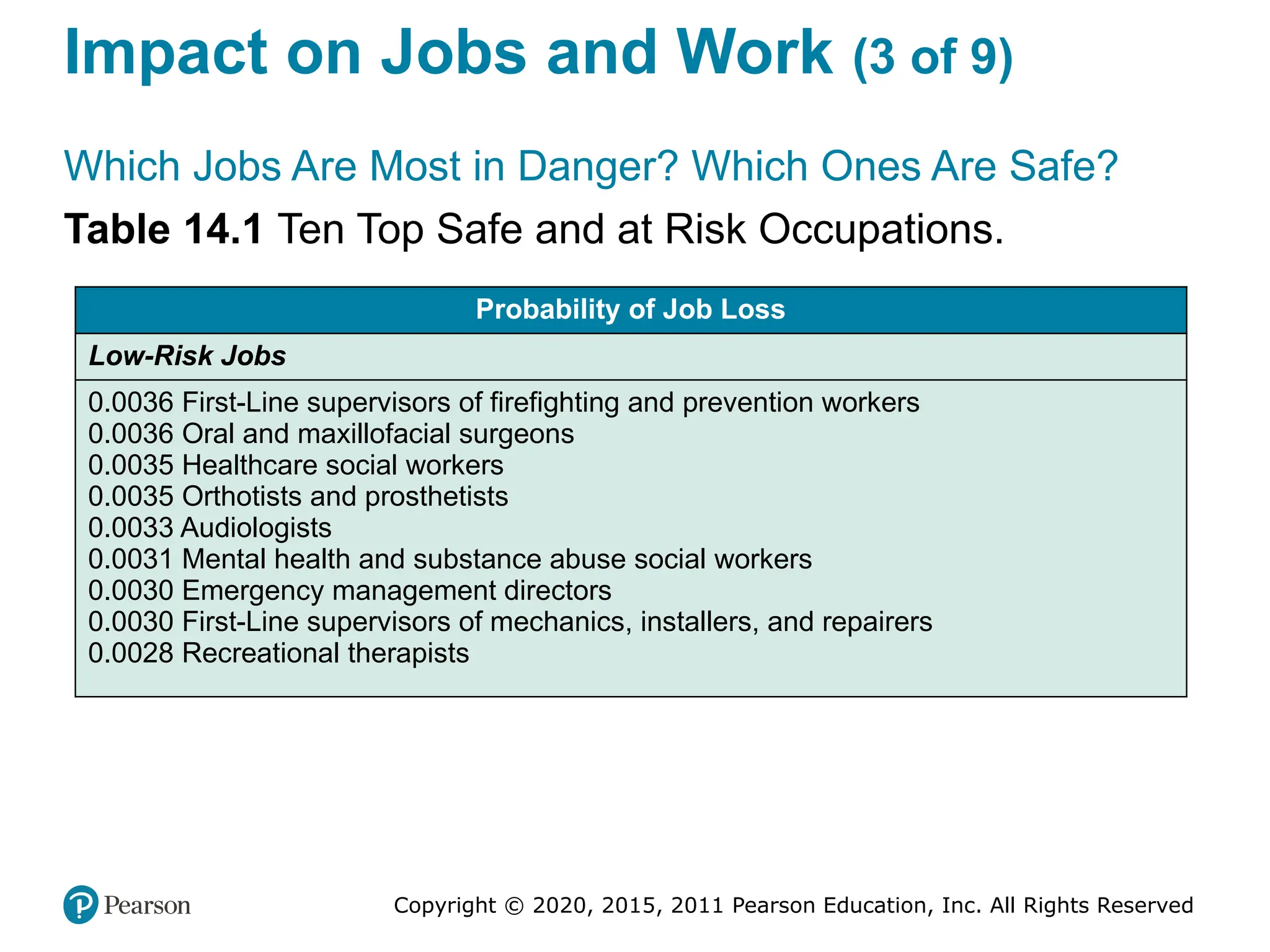
Impact on Jobs and Work (3 of 9)
Which Jobs Are Most in Danger? Which Ones Are Safe?
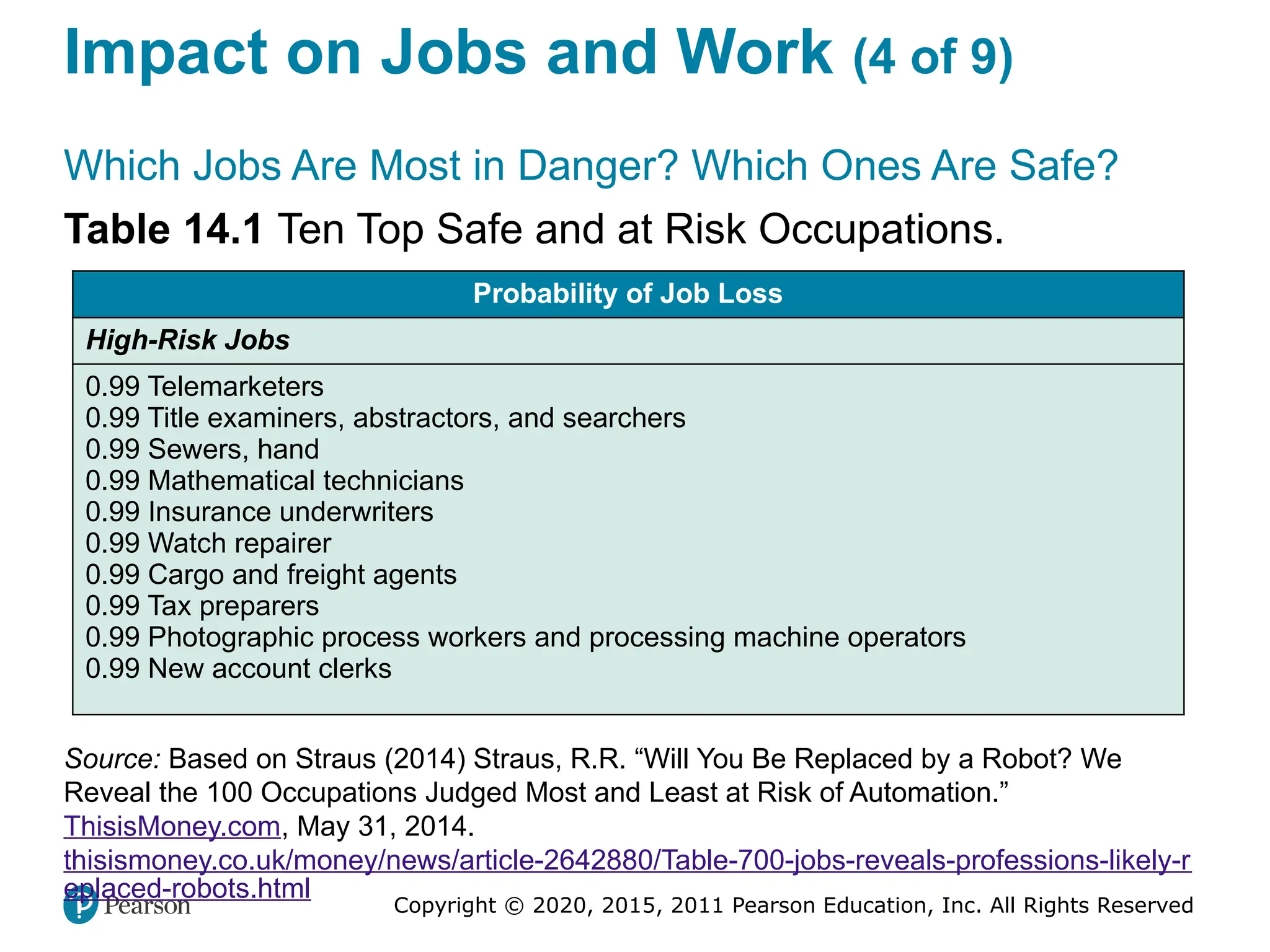
Table 14.1 Ten Top Safe and at Risk Occupations.
Probability of Job Loss
Low-Risk Jobs
0.0036 First-Line supervisors of firefighting and prevention workers
0.0036 Oral and maxillofacial surgeons
0.0035 Healthcare social workers
0.0035 Orthotists and prosthetists
0.0033 Audiologists
0.0031 Mental health and substance abuse social workers
0.0030 Emergency management directors
0.0030 First-Line supervisors of mechanics, installers, and repairers
0.0028 Recreational therapists
Copyright © 2020, 2015, 2011 Pearson Education, Inc. All Rights Reserved
Impact on Jobs and Work (4 of 9)
Which Jobs Are Most in Danger? Which Ones Are Safe?
Table 14.1 Ten Top Safe and at Risk Occupations.
Probability of Job Loss
High-Risk Jobs
0.99 Telemarketers
0.99 Title examiners, abstractors, and searchers
0.99 Sewers, hand
0.99 Mathematical technicians
0.99 Insurance underwriters
0.99 Watch repairer
0.99 Cargo and freight agents
0.99 Tax preparers
0.99 Photographic process workers and processing machine operators
0.99 New account clerks
Source: Based on Straus (2014) Straus, R.R. “Will You Be Replaced by a Robot? We
Reveal the 100 Occupations Judged Most and Least at Risk of Automation.”
ThisisMoney.com, May 31, 2014.
thisismoney.co.uk/money/news/article-2642880/Table-700-jobs-reveals-professions-likely-r
eplaced-robots.html
Copyright © 2020, 2015, 2011 Pearson Education, Inc. All Rights Reserved
Impact on Jobs and Work (5 of 9)
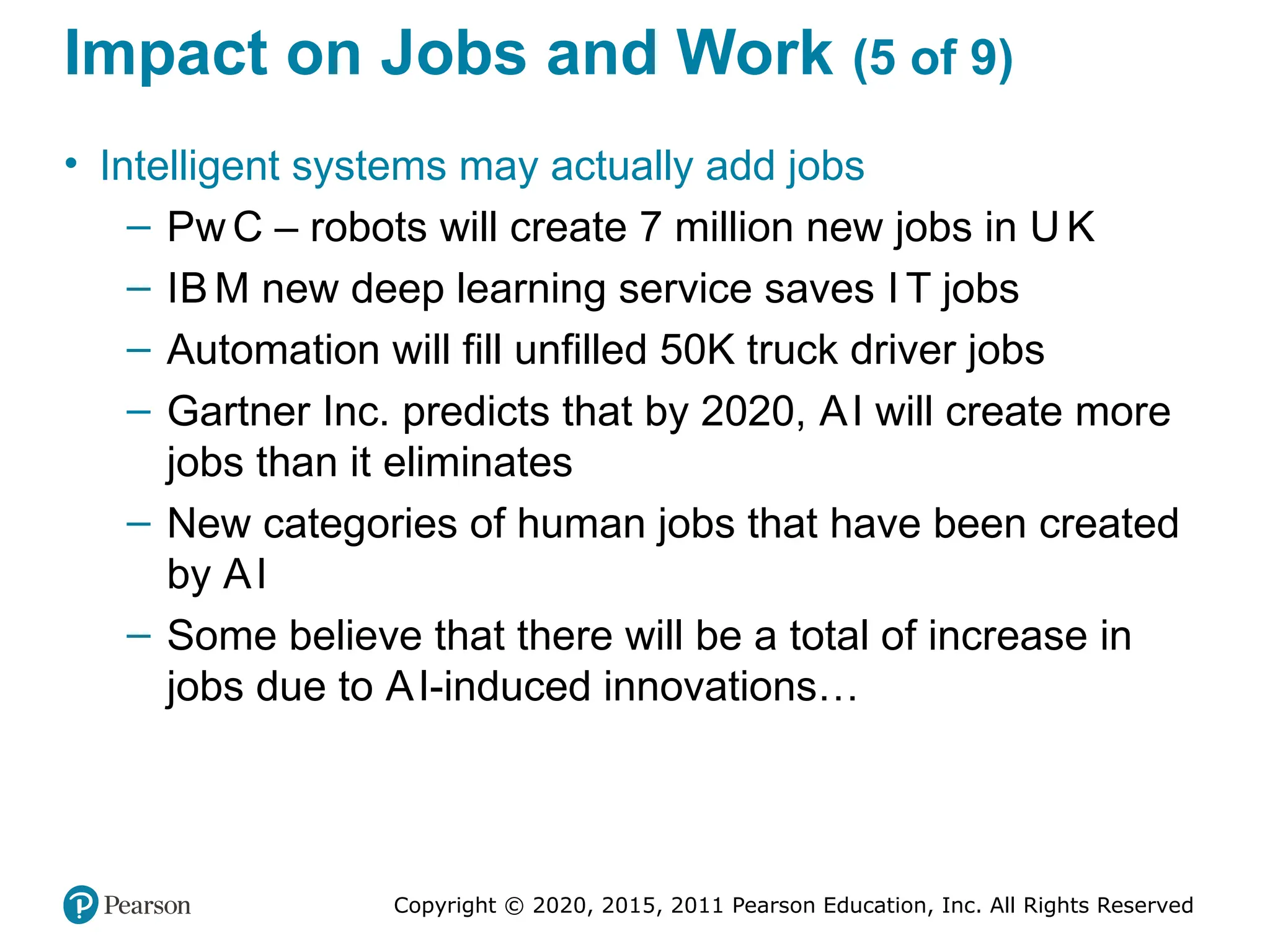
• Intelligent systems may actually add jobs
– Pw C – robots will create 7 million new jobs in U K
– IB M new deep learning service saves I T jobs
– Automation will fill unfilled 50K truck driver jobs
– Gartner Inc. predicts that by 2020, AI will create more
jobs than it eliminates
– New categories of human jobs that have been created
by AI
– Some believe that there will be a total of increase in
jobs due to AI-induced innovations…
Copyright © 2020, 2015, 2011 Pearson Education, Inc. All Rights Reserved
Impact on Jobs and Work (6 of 9)
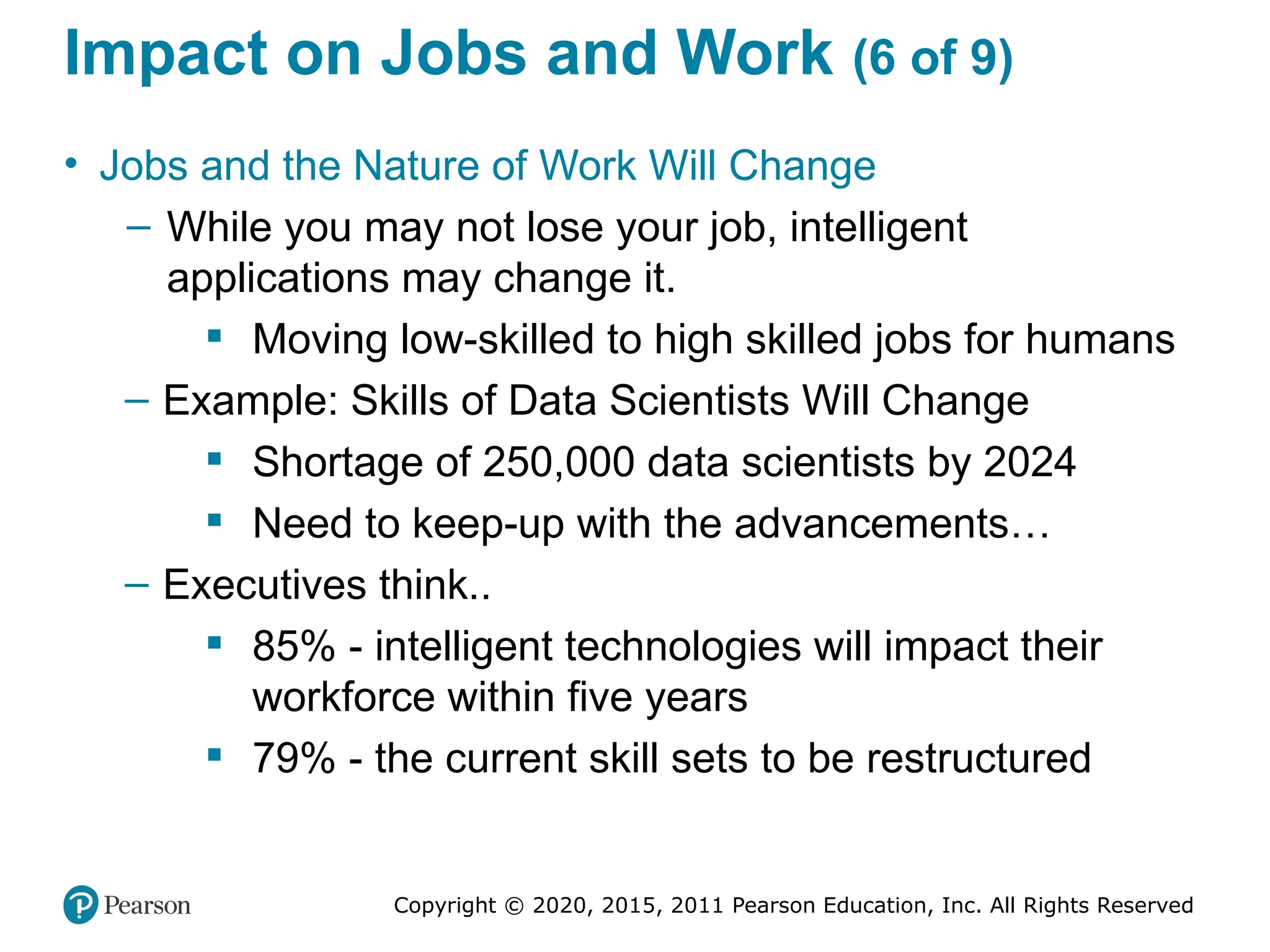
• Jobs and the Nature of Work Will Change
– While you may not lose your job, intelligent
applications may change it.
 Moving low-skilled to high skilled jobs for humans
– Example: Skills of Data Scientists Will Change
 Shortage of 250,000 data scientists by 2024
 Need to keep-up with the advancements…
– Executives think..
 85% - intelligent technologies will impact their
workforce within five years
 79% - the current skill sets to be restructured
Copyright © 2020, 2015, 2011 Pearson Education, Inc. All Rights Reserved
Impact on Jobs and Work (7 of 9)
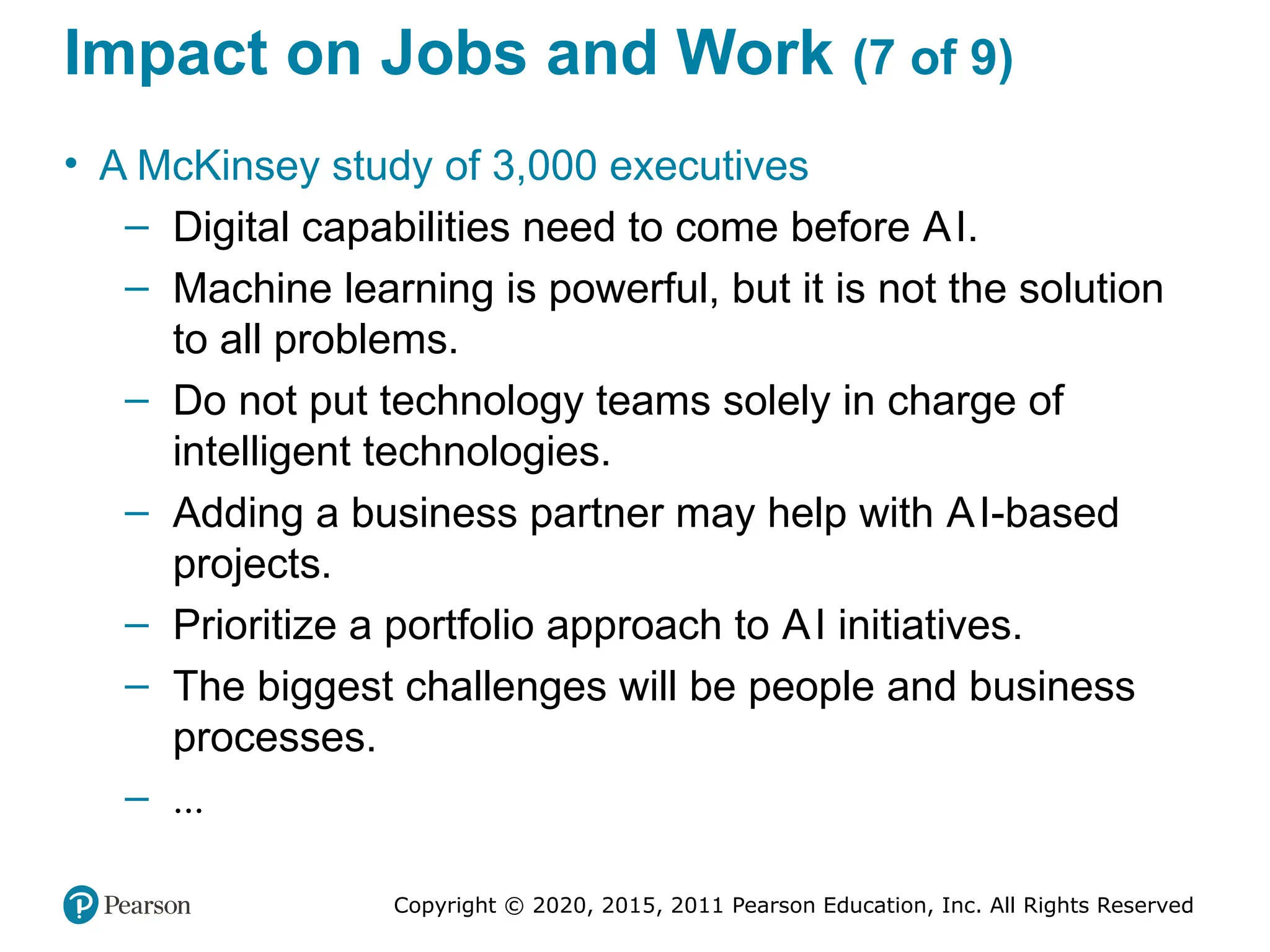
• A McKinsey study of 3,000 executives
– Digital capabilities need to come before AI.
– Machine learning is powerful, but it is not the solution
to all problems.
– Do not put technology teams solely in charge of
intelligent technologies.
– Adding a business partner may help with AI-based
projects.
– Prioritize a portfolio approach to AI initiatives.
– The biggest challenges will be people and business
processes.
– ...
Copyright © 2020, 2015, 2011 Pearson Education, Inc. All Rights Reserved
Impact on Jobs and Work (8 of 9)
• Dealing with the changes - suggestions
– Use learning and education to facilitate the change.
– Involve the private sector in enhancing retraining.
– Have governments provide incentives to the private
sector to improve human capital.
– Encourage private and public sectors to create
appropriate digital infrastructure.
– Innovative income and wage schemes need to be
developed.
– Carefully plan the transition to the new work. Deal
properly with displaced employees.
– ...
Copyright © 2020, 2015, 2011 Pearson Education, Inc. All Rights Reserved
Impact on Jobs and Work (9 of 9)
• Conclusion: Let’s Be Optimistic!..
– Replacing many human jobs and reducing wages are
[hopefully] exaggerated
 Yes, there will be some jobs replaced, but also
new jobs and job types will be created
 ...
– Instead, intelligent technologies will clearly contribute
to shorter work time for humans.
 Today, most people work long hours just for
survival.
 ...
Copyright © 2020, 2015, 2011 Pearson Education, Inc. All Rights Reserved
Potential Dangers f Robots, AI, and
Analytical Modeling (1 of 3)
• Position of AI Dystopia
– Elon Musk: “We need to be super careful with AI.
Potentially more dangerous than nukes.”
 See video at youtube.com/watch?v=SYqCbJ0AqR4
– Bill Gates: “I am in the camp that is concerned about super
intelligence. Musk and some others are on this and I don’t
understand why some people are not concerned.”
– Stephen Hawking: The late scientist stated, “The
development of full artificial intelligence could spell the end
of the human race.”
– Watch the TED: youtube.com/watch?v=MnT1xgZgkpk
– What do you think?
Copyright © 2020, 2015, 2011 Pearson Education, Inc. All Rights Reserved
Potential Dangers f Robots, AI, and
Analytical Modeling (2 of 3)
• The AI Utopia’s Position
– Watch the 26 min. documentary video on the future of AI at
youtube.com/watch?v=UzT3Tkwx17A
 Crime fighting in Santa Cruz, California
 Prediction of the probability that a song will be a hit
 Finding the perfect match for dating in a population of
30,000
– Idea: AI will partner and support humans to innovate
– Some issues related to utopia
 People will have a problem of what to do with their free time
 The road to AI Utopia could be rocky (impact on jobs)
 Everything will be different - one day we will not drive
anymore and there may not be human financial advisors
Copyright © 2020, 2015, 2011 Pearson Education, Inc. All Rights Reserved
Potential Dangers f Robots, AI, and
Analytical Modeling (3 of 3)
• The Open AI Project and the Friendly AI
– Open AI, a non-profit organization
 Created by Elon Mask and others to prepare against the
unintended action of robotics and AI
 Safe artificial general intelligence (AGI)
 See Open AI.com
– The friendly AI
 AI benefiting humans rather than harming them
 Watch youtube.com/watch?v=EUjc1WuyPT8
– The O’Neil Claim of Potential Analytics’ Dangers
 Book: “Weapons of Math Destruction: How Big Data
Increases Inequality and Threatens Democracy”
 See author’s blog site at mathbabe.org
Copyright © 2020, 2015, 2011 Pearson Education, Inc. All Rights Reserved
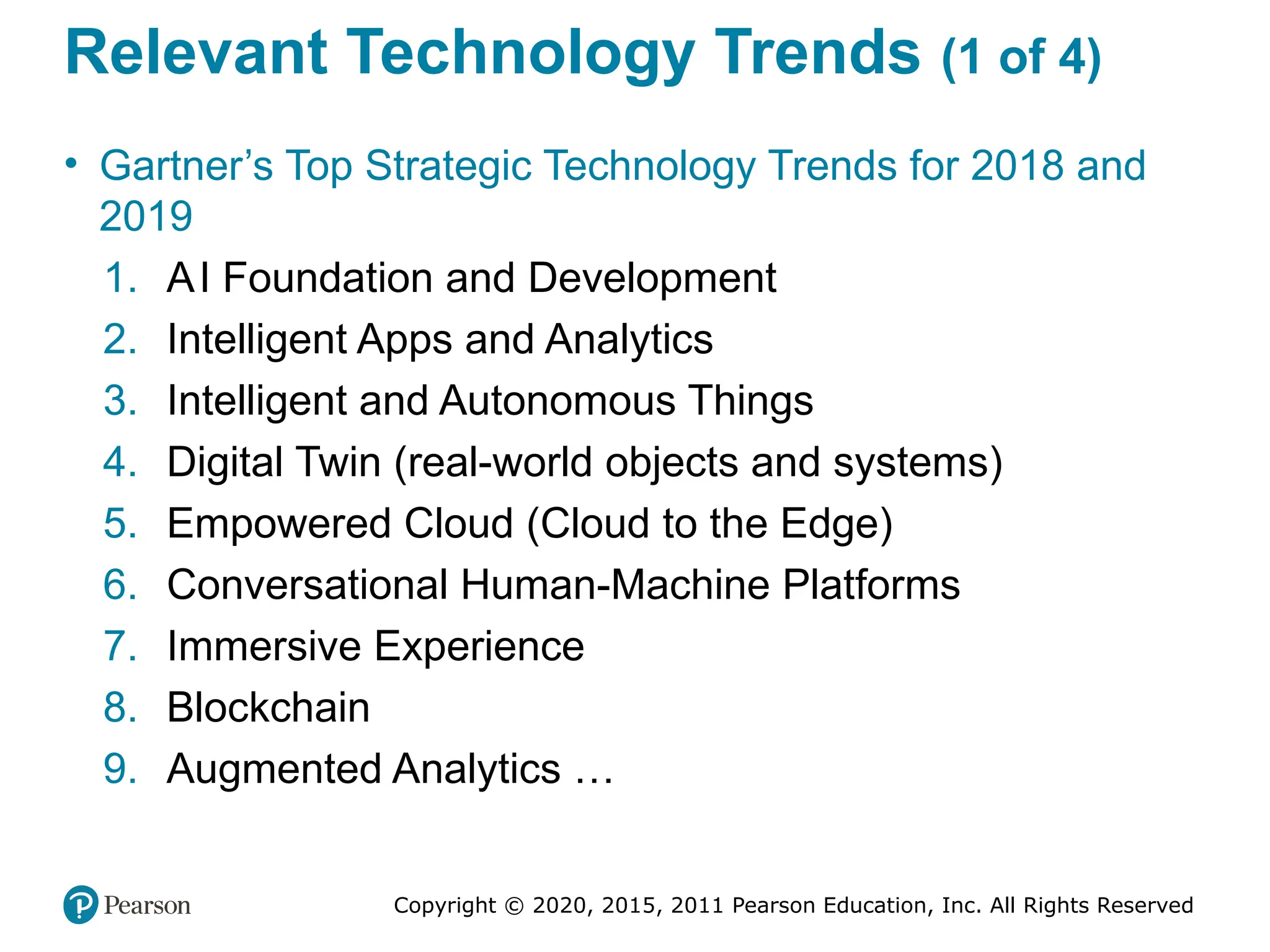
Relevant Technology Trends (1 of 4)
• Gartner’s Top Strategic Technology Trends for 2018 and
2019
1. AI Foundation and Development
2. Intelligent Apps and Analytics
3. Intelligent and Autonomous Things
4. Digital Twin (real-world objects and systems)
5. Empowered Cloud (Cloud to the Edge)
6. Conversational Human-Machine Platforms
7. Immersive Experience
8. Blockchain
9. Augmented Analytics …
Copyright © 2020, 2015, 2011 Pearson Education, Inc. All Rights Reserved
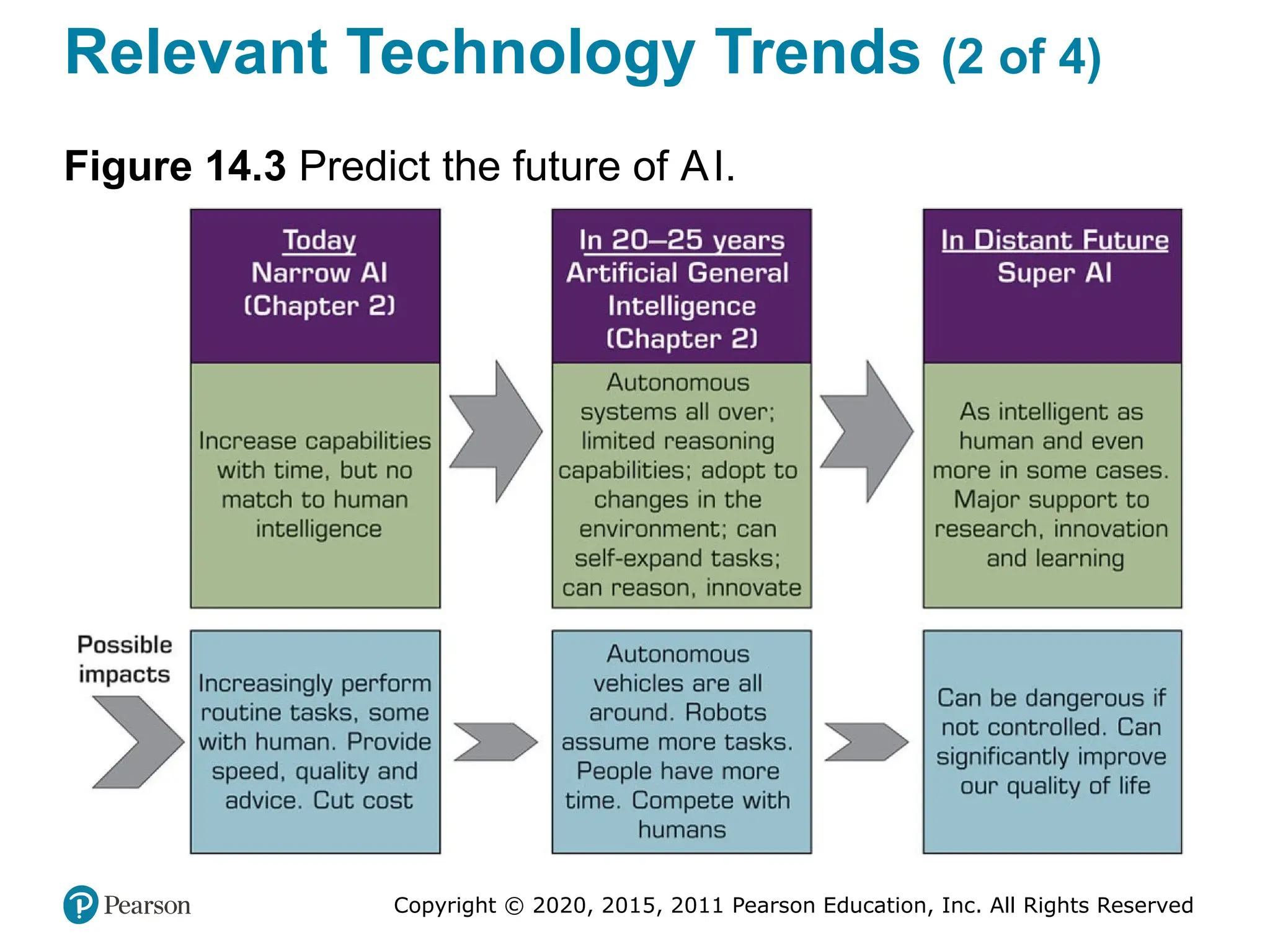
Relevant Technology Trends (2 of 4)
Figure 14.3 Predict the future of AI.
Copyright © 2020, 2015, 2011 Pearson Education, Inc. All Rights Reserved
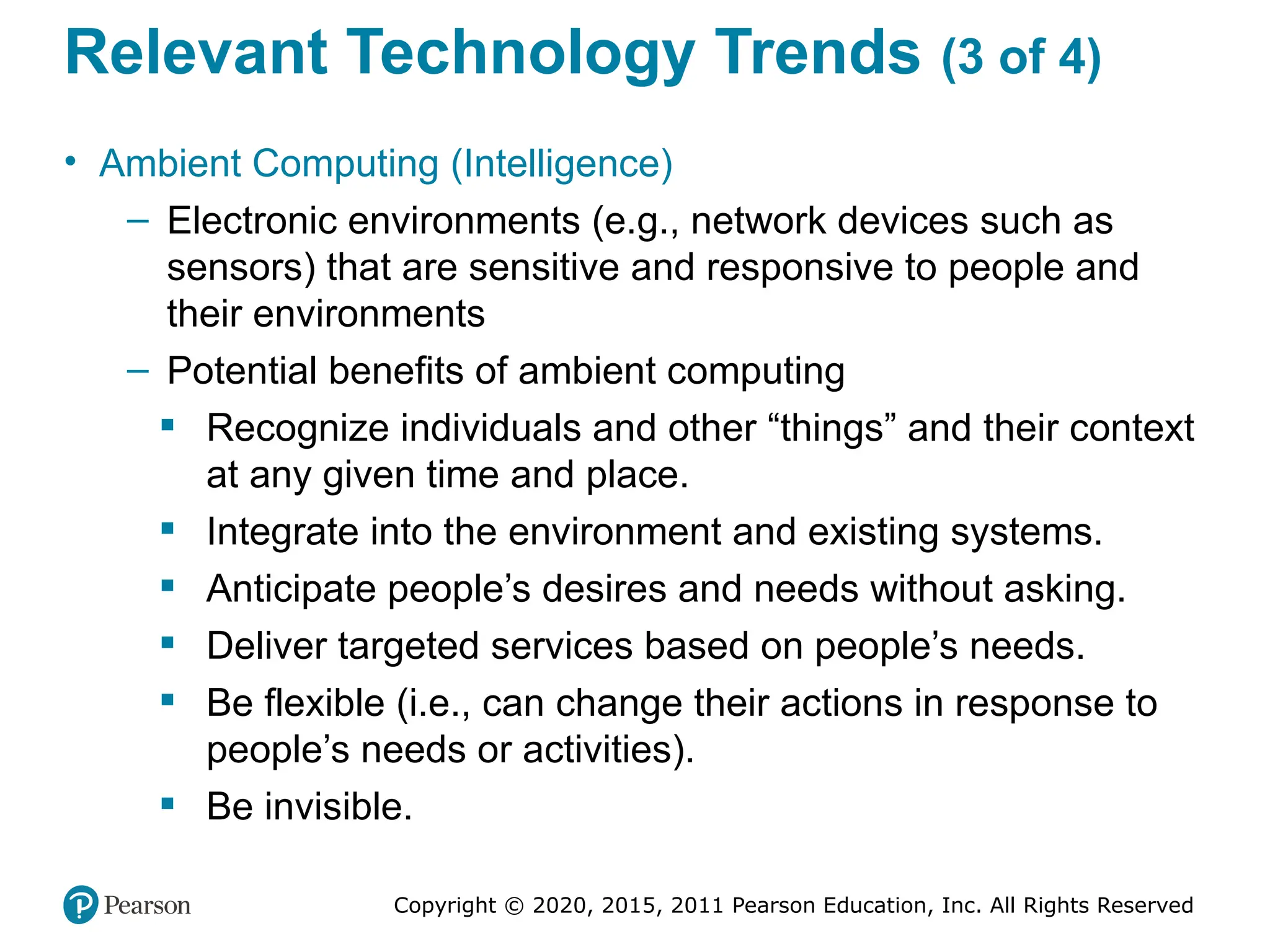
Relevant Technology Trends (3 of 4)
• Ambient Computing (Intelligence)
– Electronic environments (e.g., network devices such as
sensors) that are sensitive and responsive to people and
their environments
– Potential benefits of ambient computing
 Recognize individuals and other “things” and their context
at any given time and place.
 Integrate into the environment and existing systems.
 Anticipate people’s desires and needs without asking.
 Deliver targeted services based on people’s needs.
 Be flexible (i.e., can change their actions in response to
people’s needs or activities).
 Be invisible.
Copyright © 2020, 2015, 2011 Pearson Education, Inc. All Rights Reserved
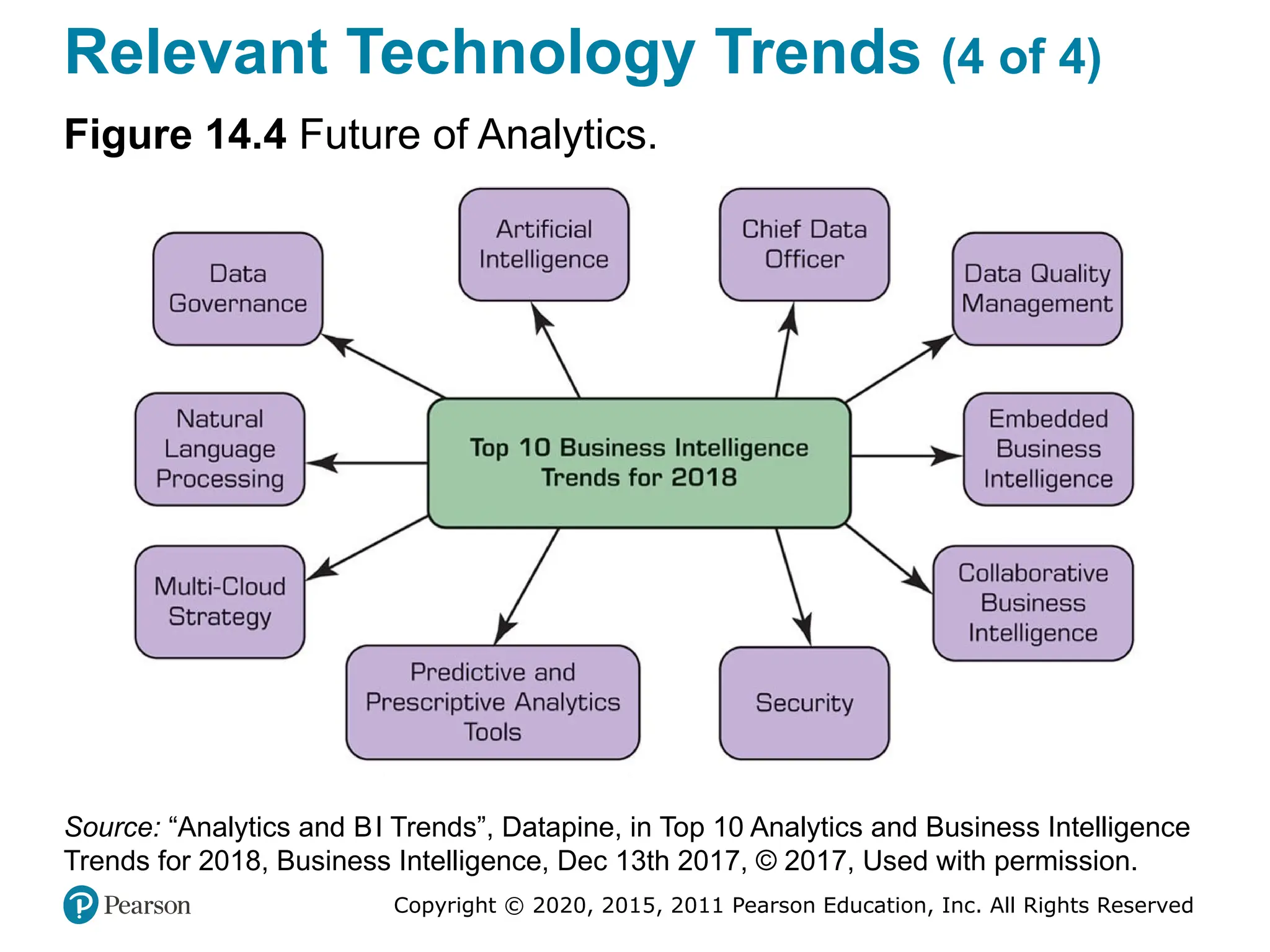
Relevant Technology Trends (4 of 4)
Figure 14.4 Future of Analytics.
Source: “Analytics and BI Trends”, Datapine, in Top 10 Analytics and Business Intelligence
Trends for 2018, Business Intelligence, Dec 13th 2017, © 2017, Used with permission.
Copyright © 2020, 2015, 2011 Pearson Education, Inc. All Rights Reserved
Future of Intelligent Systems (1 of 2)
• What Are the Major U.S. High-Tech Companies Doing in
the Intelligent Technologies Field?
– Google (Alphabet) …
– Apple …
– Facebook …
– Microsoft …
– IB M …
• AI Research Activities in China
– TENCENT
– BAIDU
– ALIBABA
Copyright © 2020, 2015, 2011 Pearson Education, Inc. All Rights Reserved
Future of Intelligent Systems (2 of 2)
• The U.S. – China Competition
– Who will control AI?
– At the moment, U.S. companies are ahead of Chinese
companies, but the future is anybody’s guess
• The Largest Opportunity in Business
– Tech companies has been the beneficiary of AI
– Despite their rivalry, Facebook, Amazon, Google, IB M,
and Microsoft partner to advance practices in AI
• Impact on Business
• Impact on Quality of Life

DSS Presentation.pptx DSS SLIDE FILE CHAPTER

  • 1.
    Analytics, Data Scienceand AI: Systems for Decision Support Eleventh Edition Chapter 11 Group Decision Making, Collaborative Systems, and AI Support Copyright © 2020, 2015, 2011 Pearson Education, Inc. All Rights Reserved Slide in this Presentation Contain Hyperlinks. JAWS users should be able to get a list of links by using INSERT+F77
  • 2.
    Copyright © 2020,2015, 2011 Pearson Education, Inc. All Rights Reserved Making Decisions in Groups: Characteristics, Process, Benefits, And Dysfunctions • Groupwork: the work done by two or more people together • A group performs a task • Members may be located in different places • Group members may work at different times • Group members may work for the same organization or for different organizations • A group can be permanent or temporary • A group can be at one managerial level or span several levels …
  • 3.
    Copyright © 2020,2015, 2011 Pearson Education, Inc. All Rights Reserved Why Groupwork / Collaborate?
  • 4.
    Copyright © 2020,2015, 2011 Pearson Education, Inc. All Rights Reserved Characteristics of Group Work • Group member located in different places/organizations – Work at different times • Group work can be permanent or temporary • Group members can be from different managerial levels • Group can create synergy (or not!) – Process gains versus process losses • Group work may lead to (or required to be completed in a very short time (more people = less time to finish?) • Physical meetings may be cost prohibitive, …. more
  • 5.
    Copyright © 2020,2015, 2011 Pearson Education, Inc. All Rights Reserved Group Decision-Making Process Types of Decisions Made by Groups • Groups are usually involved in two major types of decision making: 1. Making a decision together. 2. Supporting activities or tasks related to the decision-making process. For example, the group may select criteria for evaluating alternative solutions, …
  • 6.
    Copyright © 2020,2015, 2011 Pearson Education, Inc. All Rights Reserved Overview of Group Support Systems • Technology that helps groups to collaborate effectively • These technologies are called GS S (Group Support Systems) • GS S enablers: Internet and its derivatives (intranets, internet of things [IoT], and extranets) • The Web is the common infrastructure for GS S • Recently communication and collaboration tools have received more attention due to – Their increased capabilities – Save time and money – Expedite decision making
  • 7.
    Copyright © 2020,2015, 2011 Pearson Education, Inc. All Rights Reserved Time/Place Framework (1 of 2) • Same time / same place. Participants meet face-to-face, as in a traditional meeting, or decisions are made in a specially equipped decision room. • Same time / different place. Participants are in different places, but they communicate at the same time (e.g., with videoconferencing or I M). • Different time / same place. People work in shifts. One shift leaves information for the next shift. • Different time / different place. Participants are in different places, and they send and receive information at different times.
  • 8.
    Copyright © 2020,2015, 2011 Pearson Education, Inc. All Rights Reserved Time/Place Framework (2 of 2)
  • 9.
    Copyright © 2020,2015, 2011 Pearson Education, Inc. All Rights Reserved Electronic Support for Group Communication and Collaboration • Groupware products provide a way for groups to share resources and opinions • Synchronous or Asynchronous • Examples – dropbox.com – drive.google.com – office.microsoft.com – … • See Table 11.1 for a list of examples
  • 10.
    Copyright © 2020,2015, 2011 Pearson Education, Inc. All Rights Reserved Groupware • Virtual Meeting Systems – Webex.com, GoTomeeting.com, Skype.com, … • GroupSystems (Groupsystems.com) • Collaborative Workflow • Web 2.0 – Search, links, authoring, tags, extensions, signals • Collaborative Networks • Synchronous versus asynchronous systems
  • 11.
    Copyright © 2020,2015, 2011 Pearson Education, Inc. All Rights Reserved Groupware Products Synchronous versus Asynchronous (1 of 3) Table 11.1 Groupware Products and Features. General (Can Be Either Synchronous or Asynchronous) • Built-in e-mail, messaging system • Browser interface • Joint Web page creation • Active hyperlink sharing • File sharing (graphics, video, audio, or other) • Built-in search functions (by topic or keyword) • Workflow tools • Corporate portals for communication, collaboration, and search • Shared screens • Electronic decision rooms • Peer-to-peer networks
  • 12.
    Copyright © 2020,2015, 2011 Pearson Education, Inc. All Rights Reserved Groupware Products Synchronous versus Asynchronous (2 of 3) Table 11.1 Groupware Products and Features. Synchronous (Same Time) • IM • Videoconferences, multimedia conferences • Audioconferences • Shared whiteboard, smart whiteboard • Instant videos • Brainstorming • Polling (voting) and other decision support (activities such as consensus building, scheduling) • Chats with people • Chats with bots
  • 13.
    Copyright © 2020,2015, 2011 Pearson Education, Inc. All Rights Reserved Groupware Products Synchronous versus Asynchronous (3 of 3) Table 11.1 Groupware Products and Features. Asynchronous (Different Times) • Virtual workspaces • Tweets • Ability to receive/send e-mail, SMS • Ability to receive notification alerts via e-mail or SMS • Ability to collapse/expand discussion threads • Message sorting (by date, author, or read/unread) • Auto responders • Chat session logs • Electronic bulletin boards, discussion groups • Blogs and wikis • Collaborative planning and/or design tools
  • 14.
    Copyright © 2020,2015, 2011 Pearson Education, Inc. All Rights Reserved Collaborative Workflow (1 of 2) • Software products that address project-oriented and collaborative business processes • Administered centrally, and accessed/used by participants at different locations (and times) • Goal: empower knowledge workers through communication, negotiation, and collaboration within an integrated environment • Collaborative workplace: moved from a conference room to a virtual place for teams to work together – Virtual collaborative workplace – support by digital enablers and computerized tools
  • 15.
    Copyright © 2020,2015, 2011 Pearson Education, Inc. All Rights Reserved Collaborative Workflow (2 of 2) Major Vendors of Virtual Workspace • Google Cloud Platform (deployed on the “cloud,” so it is offered as a platform-as-a-service (PaaS) • Citrix Workspace Cloud (deployed on the “cloud” and Citrix is known for its GoToMeeting collaboration tool) • Microsoft Workspace (a part of Office 365) • Cisco’s Webex (a popular collaboration package including Meeting). • Slack workspace (a very popular workspace) – A digital space where teammates share, communicate, and collaborate on work [supported with many components]
  • 16.
    Copyright © 2020,2015, 2011 Pearson Education, Inc. All Rights Reserved Collaborative Networks and Hubs • Traditionally, supply-chain member close to each other (supplier and manufacturer; distributor and retailer) communicate to share information on product flow – Vertically integrated supply-chain • Nowadays, the whole supply chain can communicate and collaborate on collaborative planning, forecasting, and replenishment – Multi-node, network-based integration of supply-chain • Collaborative hub: a center point for group collaboration – Example: Surface Hub for Business by Microsoft
  • 17.
    Copyright © 2020,2015, 2011 Pearson Education, Inc. All Rights Reserved Social Collaboration • Collaboration conducted within and between socially oriented groups – Group interactions and information/knowledge sharing to attain common goals – Done on social media sites, and it is enabled by the Internet, IoT, and social collaboration software • Collaboration in Social Networks – Facebook – Facebook workspace – LinkedIn – LinkedIn Lookup • Social collaboration software for teams – Wrike, Ryver, Azendoo, Zimbra social platform, Samepage, Zoho, Asana, Jive, Chatter, and Social Tables
  • 18.
    Copyright © 2020,2015, 2011 Pearson Education, Inc. All Rights Reserved Popular Collaboration Software • Communication tools: Yammer (social collaboration), Slack, Skype, Google Hangouts, GoToMeeting • Design tools: InVision, Mural, Red Pen, Logo Maker • Documentation tools: Office Online, Google Docs, Zoho • File-sharing tools: Google Drive, Dropbox, Box • Project management tools: Asana, Podio, Trello, WorkflowMax, Kanban Tool, • Software tools: GitHub, Usersnap,Workflow tools: Integrity, B P Logix
  • 19.
    Copyright © 2020,2015, 2011 Pearson Education, Inc. All Rights Reserved Other Tools that Support Collaboraiton and/or Communication • Notejoy (makes collaborative notes for team) • Kahootz (brings stakeholders together to form communities of interest) • Nowbridge (offers team connectivity, ability to see participants) • Walkabout Workplace (is a 3D virtual office for remote teams). • RealtimeBoard (is a enterprise visual collaboration). • Quora (is a popular place for posting questions to the crowd). • Pinterest (allows collection of text and images on selected topics). • IB M connection closed (offers a comprehensive communication and collaboration tool set). • Skedda (schedules space for coworking) • Zinc (is a social collaboration tool) • Scribblar (is an online collaboration room for virtual brainstorming) • Collokia (is a machine learning platform for workflow)
  • 20.
    Copyright © 2020,2015, 2011 Pearson Education, Inc. All Rights Reserved Direct Computerized Support for Group Decision Making • Decisions are frequently made at meetings • Some are one-time critical/strategic decision • Often complex and controversial decisions • Process dysfunctions can significant affect the decision outcomes • Computerized support has often been suggested to mitigate these controversies – These systems are usually called group decision support systems (GDS S), group support systems (GS S), electronic meeting systems (EM S)
  • 21.
    Copyright © 2020,2015, 2011 Pearson Education, Inc. All Rights Reserved Group Decision Support Systems (GDS S) • It is an interactive computer-based system that facilitates the solution of semistructured or unstructured problems by a group of decision makers • Goal – support group decision making • A specially designed I S to enhance collaborative decision processes • It encourages generation of ideas, freedom of expression, and resolution of conflicts • First generation GDSS: face-to-face in the same room – Decision room • Today’s GDSS: virtual, over the Web
  • 22.
    Copyright © 2020,2015, 2011 Pearson Education, Inc. All Rights Reserved Decision Rooms • Expensive, customized, purposeful facilities • 12 to 30 networked computers • Usually recessed into the desktop • Server and special software • Large-screen projection system • Breakout rooms • Need a trained facilitator for success
  • 23.
    Copyright © 2020,2015, 2011 Pearson Education, Inc. All Rights Reserved Supporting the Entire Decision- Making Process - Stormboard (1 of 2) • Provides support for different brainstorming and group decision-making configurations • Sequence of activities 1. Define the problem and the users’ objectives 2. Brainstorm ideas 3. Organize the ideas in groups of similar flavor, look for patterns, and select only viable ideas 4. Collaborate, refine concepts, and evaluate (using criteria) the meeting’s objectives…
  • 24.
    Copyright © 2020,2015, 2011 Pearson Education, Inc. All Rights Reserved Supporting the Entire Decision- Making Process - Stormboard (2 of 2) • Sequence of activities (cont.) 5. The software enables users to prioritize proposed ideas by focusing on the selection criteria. It lets all participants express their thinking and directs the team to be cohesive. 6. It presents a short list of superior ideas 7. The software suggests the best idea and recommends implementation 8. It plans the project implementation. 9. It manages the project. 10. It periodically reviews progress.
  • 25.
    Copyright © 2020,2015, 2011 Pearson Education, Inc. All Rights Reserved Online Brainstorming Service and Tool Providing Companies • eZ Talks Meetings. Cloud-based tool for brainstorming and idea sharing. • Bubbl.us. Visual thinking machine that provides a graphical representation of ideas and concepts, helps in idea generation, and shows where ideas and thoughts overlap. • Mindomo. Tool for real-time collaboration that offers integrated chat capability. • Mural. Tool that enables collecting and sorting of ideas in rich media files. It is designed as a Pinboard that invites participants. • iMindQ. Cloud-based service that enables creating mind maps and basic diagrams.
  • 26.
    Copyright © 2020,2015, 2011 Pearson Education, Inc. All Rights Reserved Group Support Systems (GSS) • Includes all forms of communication and collaborative activities including collaborative computing • It used to be a specialize software, now it is embedded into standard I T productivity tools – Microsoft Office 365 includes Microsoft Teams (opening vignette) • How GS S improves group work – Improve productivity and effectiveness – Streamline and speed-up the process – Improving the quality of the outcomes – Increase process gains and reduce process losses • Helps in working simultaneously and with anonymity
  • 27.
    Copyright © 2020,2015, 2011 Pearson Education, Inc. All Rights Reserved Collective Intelligence and Collaborative Intelligence (1 of 4) • Collective intelligence (C I) refers to the total intelligence of a group. – It is also refers to as the wisdom of the crowd – MI T center for collective intelligence (cci.mit.edu) – Benefits of C I, see 50Minutes.com • Types of Collective Intelligence – Cognition – Cooperation, and – Coordination • Computerized support to collective intelligence
  • 28.
    Copyright © 2020,2015, 2011 Pearson Education, Inc. All Rights Reserved Collective Intelligence and Collaborative Intelligence (2 of 4) • Example 1: The Carnegie University Foundation Supports Network Collaboration – Content is stored and shared in one place (the “cloud”) – Asynchronous conversations using discussion boards – Facilitating social collaboration and problem solving • Example 2: How Governments Tap IoT for Collective Intelligence – Governments are using IoT to support decision making and policy creation – The IoT collect ideas and aspirations of the citizens • How Collective Intelligence May Change Work and Life
  • 29.
    Copyright © 2020,2015, 2011 Pearson Education, Inc. All Rights Reserved Collective Intelligence and Collaborative Intelligence (3 of 4) • Having people to collaborate is difficult • Collaborative intelligence requires: – (1) willingness to share, (2) knowing how to share, (3) being willing to collaborate, (4) knowing what to share, (5) knowing how to build trust, (6) understanding team dynamics, (7) using correct hubs for networking, (8) mentoring and coaching properly, (9) being open to new ideas, and (10) using computerized tools and technology. – For another list of success factors, see thebalancecareers.com/collaboration-skills-with-examp les-2059686
  • 30.
    Copyright © 2020,2015, 2011 Pearson Education, Inc. All Rights Reserved Collective Intelligence and Collaborative Intelligence (4 of 4) How to Create Business Value from Collaboration: The IB M Study • Groups and team members provide ideas and insights. The study presents three major points: 1. Enhances organizational outcomes by correctly tapping the knowledge and experience of working groups (e.g., customers, partners, and employees). 2. It is crucial to target and motivate the appropriate participants. 3. Needs to address the issue of participants’ resistance to change.
  • 31.
    Copyright © 2020,2015, 2011 Pearson Education, Inc. All Rights Reserved Crowdsourcing as a Method for Decision Support • Crowdsourcing - outsourcing tasks to a large group of people (crowd). • Goal – to leverage the wisdom of a crowd • Viewed as a method of collective intelligence • Essentials of crowdsourcing… – Tutorial on crowdsourcing and examples, watch the video youtube.com/watch?v=lXhydxS SNO Y
  • 32.
    Copyright © 2020,2015, 2011 Pearson Education, Inc. All Rights Reserved Major Types of Crowdsourcing • Collective intelligence (or wisdom). People in crowds are solving problems and providing new insights. • Crowd creation. People are creating various types of content and sharing it with others (for pay or free). • Crowd voting. People are giving their opinions and ratings on ideas, products, or services, as well as evaluating and filtering information presented to them. • Crowd support and funding. People are contributing and supporting endeavors for social or business causes, such as offering donations, and micro-financing new ventures.
  • 33.
    Copyright © 2020,2015, 2011 Pearson Education, Inc. All Rights Reserved The Process of Crowdsourcing (1 of 2) 1. Identify the problem and the task(s) to be outsourced. 2. Select the target crowd (if not an open call). 3. Broadcast the task to the crowd. 4. Engage the crowd in accomplishing the task (e.g., idea generation, problem solving). 5. Collect user-generated content. 6. Have the quality of submitted material evaluated by the management, by experts, or by a crowd. 7. Select the best solution (or a short list). 8. Compensate the crowd (e.g., the winning proposal). 9. Implement the solution.
  • 34.
    Copyright © 2020,2015, 2011 Pearson Education, Inc. All Rights Reserved The Process of Crowdsourcing (2 of 2)
  • 35.
    Copyright © 2020,2015, 2011 Pearson Education, Inc. All Rights Reserved Making • A major objective of AI is to automate decision making and/or to support its process • AI can help in the following steps in the process: – Meeting preparation – Problem identification – Idea generation – Idea organization – Group interaction and collaboration – Predictions – Multilingual group communications – …
  • 36.
    Copyright © 2020,2015, 2011 Pearson Education, Inc. All Rights Reserved Swarm Intelligence and Swarm AI (1 of 2) • Swarm intelligence refers to the collective behavior of decentralized, self organized systems, natural or artificial – Such systems consist of things (e.g., ants, people) interacting with each other and their environment – A swarm’s actions are not centrally controlled, but they lead to intelligent behavior • In contrast with animals and other species whose interactions among group members are natural, people need technology to exhibit swarm intelligence • Example - Oxford university study on english premier league • Swarm AI technology – Algorithms for creating the human swarm
  • 37.
    Copyright © 2020,2015, 2011 Pearson Education, Inc. All Rights Reserved Swarm Intelligence and Swarm AI (2 of 2) • Swarm AI Predictions - Swarm AI was used by Unanimous AI for making predictions in difficult-to-assess situations. Examples include: – Predicting Super Bowl #52 number of points scored – Predicting winners in the regular NF L season. – Predicting the top four finishers of the 2017 Kentucky Derby. – Predicting the top recipients of the Oscars in 2018.
  • 38.
    Copyright © 2020,2015, 2011 Pearson Education, Inc. All Rights Reserved Human-Machine Collaboration and Teams of Robots • Human–Machine Collaboration in Cognitive Jobs • Top Management Jobs • Robots as coworkers – Challenges – Designing a human–machine team that capitalizes on the strength of each partner. – Exchanging information between humans and robots. – Preparing company employees for the collaboration – Changing business processes to accommodate human–robot collaboration – Ensuring the safety of robots and employees that work together.
  • 39.
    Copyright © 2020,2015, 2011 Pearson Education, Inc. All Rights Reserved Human-Machine Collaboration and Teams of Robots Team of Robots Prepares to Go to Mars Figure 11.4 Team of Robots Prepares to Go to Mars. Source: C.Kang.
  • 40.
    Copyright © 2020,2015, 2011 Pearson Education, Inc. All Rights Reserved End of Chapter 11
  • 41.
    Analytics, Data Scienceand AI: Systems for Decision Support Eleventh Edition Chapter 12 Knowledge Systems: Expert Systems, Recommenders, Chatbots, Virtual Personal Assistants, and Robo Advisors Copyright © 2020, 2015, 2011 Pearson Education, Inc. All Rights Reserved
  • 42.
    Copyright © 2020,2015, 2011 Pearson Education, Inc. All Rights Reserved Concepts of Expert Systems (ES) (1 of 6) • E S is a computer-based information system • Emulates the decision making and/or problem solving abilities of human experts in complex areas • One of the earliest success application areas of AI – Expert systems use started in research institutions in 1960s • Goal – help nonexperts to make decisions and solve problems that usually require expertise • Works well in narrowly defined domains
  • 43.
    Copyright © 2020,2015, 2011 Pearson Education, Inc. All Rights Reserved Concepts of Expert Systems (ES) (2 of 6) • Expert - A person who has the special knowledge, judgment, experience, and skills to provide sound advice and solve complex problems in a narrowly defined area. • To be called an expert, one must be able to solve a problem and achieve a performance level that is significantly better than an average person • An expert at one time or in one region may not be an expert in another time or region. – E.g., a legal expert in New York is not a expert in Beijing • Experts have expertise that can help solve problems and explain certain obscure phenomena only within a specific domain
  • 44.
    Copyright © 2020,2015, 2011 Pearson Education, Inc. All Rights Reserved Concepts of Expert Systems (ES) (3 of 6) • Typically, human experts are capable of doing the following: – Recognizing and formulating a problem – Solving a problem quickly and correctly – Explaining a solution – Learning from experience – Restructuring knowledge – Breaking rules and norms, if necessary – Determining relevance and associations • Can ES do these? Can a machine help a nonexpert perform like an expert? • Real experts are rare and hard to find
  • 45.
    Copyright © 2020,2015, 2011 Pearson Education, Inc. All Rights Reserved Concepts of Expert Systems (ES) (4 of 6) • Expertise - The extensive, task-specific knowledge that experts possess. • The level of expertise determines the success of a decision made by an expert. • Expertise is often acquired through training, learning, and experience in practice. • Expertise includes explicit knowledge, such as theories learned from a textbook or a classroom and implicit knowledge gained from experience.
  • 46.
    Copyright © 2020,2015, 2011 Pearson Education, Inc. All Rights Reserved Concepts of Expert Systems (ES) (5 of 6) • Knowledge types (expertise) used in ES applications – Theories about the problem domain – Rules and procedures regarding the general problem domain – Heuristics about what to do in a given problem situation – Global strategies for solving of problems amenable to expert systems – Meta knowledge (i.e., knowledge about knowledge) – Facts about the problem area • These types of knowledge enable experts to make better and faster decisions than nonexperts.
  • 47.
    Copyright © 2020,2015, 2011 Pearson Education, Inc. All Rights Reserved Concepts of Expert Systems (ES) (6 of 6) • Expertise often includes the following characteristics: – It is usually associated with a high degree of intelligence, but it is not always associated with the smartest person – It is usually associated with a vast quantity of knowledge – It is based on learning from past successes and mistakes – It is based on knowledge that is well stored, organized, and quickly retrievable from an expert who has excellent recall of patterns from previous experiences.
  • 48.
    Copyright © 2020,2015, 2011 Pearson Education, Inc. All Rights Reserved Benefits of ES • Perform routine tasks (e.g., diagnosis, candidate screening, credit analysis) that require expertise much faster than humans. • Reduce the cost of operations. • Improve consistency and quality of work, reduce human errors. • Speed up decision making and make consistent decisions. • May motivate employees to increase productivity. • Preserve scarce expertise of retiring employees. • Help transfer and reuse knowledge. • Reduce employee training cost by using self-training. • Solve complex problems without experts and solve them faster. • See things that even experts sometimes miss. • Combine expertise of several experts. • Centralize decision making (e.g., by using the “cloud”). • Facilitate knowledge sharing.
  • 49.
    Copyright © 2020,2015, 2011 Pearson Education, Inc. All Rights Reserved Structure and Process of ES • Consultation Environment (use of E S via GU I) • Development Environment • Component of an ES – Knowledge acquisition (from humans and others) – Knowledge representation (if-then-else rules) – Knowledge base (knowledge repository) – Inference engine (control/search structure) – User interface – Justifier/explanation module – Knowledge refinement system Less common ES components     
  • 50.
    Copyright © 2020,2015, 2011 Pearson Education, Inc. All Rights Reserved General Architecture of an E S
  • 51.
    Copyright © 2020,2015, 2011 Pearson Education, Inc. All Rights Reserved Recommendation Systems • Recommendation system, also known as recommender system or recommendation engine • Recommending/suggesting one-to-one targeted products or services • Predict the importance (rating or preference) that a user will attach to a product or service – Based on the prediction, specific products and services are recommended to the user – Top applications include movies, music, and books. However, there are also systems for travel, restaurants, insurance, and online dating.
  • 52.
    Copyright © 2020,2015, 2011 Pearson Education, Inc. All Rights Reserved Benefits of Recommendation Systems • Benefits to customer: – Personalization – Discovery – Customer satisfaction – Reports – Increased dialog with seller • Benefits to seller: – Higher conversion rate – Increased cross-sell – Increased customer loyalty – Enabling mass customization
  • 53.
    Copyright © 2020,2015, 2011 Pearson Education, Inc. All Rights Reserved Methods for Recommendation Systems • Collaborative filtering – Building a model that summarizes the past behavior of shoppers in a multi-dimensional manner – Makes recommendations on the new customers based on the similarity to previous shoppers – Uses AI/machine learning to predict the preferences • Content-based filtering – Allows vendors to identify customer preferences by the attributes of the product(s) that customers have bought – Recommend new products with similar attributes • Several other filtering methods also exists
  • 54.
    Copyright © 2020,2015, 2011 Pearson Education, Inc. All Rights Reserved Chatbots • Chatbots (chat robots) emerged in the last decade • A computerized service that enables easy conversations between humans and humanlike computerized robots or image characters • Some chatbots are equipped with NLP abilities for better understanding, and some with AI/machine learning for learning and improving • Chatbot services are often available messaging services such as Facebook Messenger or WeChat, and on Twitter
  • 55.
    Copyright © 2020,2015, 2011 Pearson Education, Inc. All Rights Reserved Types of Bots • Regular bots. These are essentially conversational intelligent agents (Chapter 2). – They can do simple, usually repetitive, tasks for their owners, such as showing their bank’s debits, helping them to purchase goods online, and to sell or buy stocks online. • Chatbots. In this category, we include more capable bots, for example, those that can stimulate conversations with people. • Intelligent bots. These have a knowledge base that is improving with experience. – That is, these bots can learn, for example, a customer’s preferences (e.g., like Alexa and some robo advisors).
  • 56.
    Copyright © 2020,2015, 2011 Pearson Education, Inc. All Rights Reserved Process of Chatting with a Chatbots
  • 57.
    Copyright © 2020,2015, 2011 Pearson Education, Inc. All Rights Reserved Chatbots • Representative Chatbots from Around the World – RoboCoke, Kip, Walnut, Taxi Bot, ShopiiBot, BO.T, Hazie, Green Card, Zoom, Akita, … – For more, please see chatbots.org/ and botlist.co/bots/ • Major Categories of Chatbots’ Applications – Chatbots for enterprise activities, including communication, collaboration, customer service, and sales (such as in the opening vignette) – Chatbots that act as personal assistants – Chatbots that act as advisors, mostly on finance- related topics – These are explained in the following sections
  • 58.
    Copyright © 2020,2015, 2011 Pearson Education, Inc. All Rights Reserved Technology Insights 12.1 Chatbots’ Platform Providers • Popular vendors: – ChettyPeople – Kudi – Twyla • The most popular platforms: – IB M Watson – Microsoft’s Bot Framework
  • 59.
    Copyright © 2020,2015, 2011 Pearson Education, Inc. All Rights Reserved Virtual Personal Assistants (1 of 2) • Assistant for Information Search • If You Were Mark Zuckerberg, Facebook CE O – While Siri and Alexa were in development he develop his own personal assistant to help him run his home and his work • Amazon’s Alexa and Echo – Alexa can do many things… – Alexa can be taught/customized for individualized skills – Amazon Echo, Echo Dot, and Echo Tap – Alexa for Enterprise …
  • 60.
    Copyright © 2020,2015, 2011 Pearson Education, Inc. All Rights Reserved Virtual Personal Assistants (2 of 2) • Apple Siri – Siri: Speech Interpretation and Recognition Interface – VI V: developed in 2016, by Dag Kittlaus, the creator of Siri, as “an intelligent Interface for everything” • Goggle Assistant • Other personal assistants – Microsoft Cortana (Cortana with Bing) – Samsung Bixby • Competition Among Large Tech Companies • Knowledge for Virtual Personal Assistants
  • 61.
    Copyright © 2020,2015, 2011 Pearson Education, Inc. All Rights Reserved Chatbots Implementation Issues • Technology issues • Disadvantages and limitations of bots – Inferior performance – Virtual assistants under attack • Quality of Chatbots – Quality of robo advisors – Microsoft’s Tay (Twitter based chatbot) • Constructing Bots – Using Microsoft’s Azure bot service
  • 62.
    Copyright © 2020,2015, 2011 Pearson Education, Inc. All Rights Reserved End of Chapter 12
  • 63.
    Analytics, Data Scienceand AI: Systems for Decision Support Eleventh Edition Chapter 13 The Internet of Things as a Platform for Intelligent Applications Copyright © 2020, 2015, 2011 Pearson Education, Inc. All Rights Reserved Slide in this Presentation Contain Hyperlinks. JAWS users should be able to get a list of links by using INSERT+F7
  • 64.
    Copyright © 2020,2015, 2011 Pearson Education, Inc. All Rights Reserved Essentials of Internet of Things (IoT) (1 of 2) • IoT refers to a computerized network that connects many objects (people, animals, devices, sensors, buildings, items) each with embedded microprocessor • Connections are made wirelessly via Internet • IoT allows communication and exchange of data among the object and their environment • Connections are made anytime, anyplace – IoT uses ubiquitous computing
  • 65.
    Copyright © 2020,2015, 2011 Pearson Education, Inc. All Rights Reserved Essentials of Internet of Things (IoT) (2 of 2) • Analysts predicts that by 2025, more than 50 Billion objects (devices) will be connected to the Internet, creating the backbone of IoT applications • It is a disruptive technology – Changing the business models – Join the conversations at iotcommunity.com • Allows extensive communication and collaboration between users and items – Devices can connect each other directly – Increasing productivity and automation – Unlimited use cases…
  • 66.
    Copyright © 2020,2015, 2011 Pearson Education, Inc. All Rights Reserved Definitions and Characteristics of IoT (1 of 3) • “The Internet of Things means sensors connected to the Internet and behaving in an Internet-like way by making open, ad hoc connections, sharing data freely, and allowing unexpected applications, so computers can understand the world around them and become humanity’s nervous system.” – Kevin Ashton, Creator of the term Internet of Things • “The IoT is a network of connected computing devices including different types of objects (e.g., digital machines). Each object in the network has a unique identifier (UID), and it is capable of collecting and transferring data automatically across the network.” – Our working definition
  • 67.
    Copyright © 2020,2015, 2011 Pearson Education, Inc. All Rights Reserved Definitions and Characteristics of IoT (2 of 3) • IoT allows people and things to interact and communicate at any time, any place, regarding any business topic or service. • IoT Characteristics (Miller, 2015) – Large numbers of objects (things) can be connected. – Each thing has a unique definition/ID (IP address). – Each thing has the ability to receive, send, and store data automatically. – Each thing is delivered mostly over the wireless Internet. – Each thing is built upon machine-to-machine (M2M) communication. • Internet connects people to each other using computing technology, while IoT connects “things” (physical devices and people) to each other and to sensors that collect data
  • 68.
    Copyright © 2020,2015, 2011 Pearson Education, Inc. All Rights Reserved IoT Ecosystem • The IoT ecosystem refers to all components that enable users to create IoT applications – E.g., gateways, analytics, AI algorithms, servers, data storage, security, and connectivity devices • Platforms – Software, hardware, connectivity, … • Building blocks – Interfaces, platforms, 3D, … • Applications – Personal, home, vehicle, industrial, enterprise • See Figure 13.1 for a full picture of the IoT ecosystem
  • 69.
    Copyright © 2020,2015, 2011 Pearson Education, Inc. All Rights Reserved IoT Ecosystem Figure 13.1 The IoT 2016 (Ecosystem).
  • 70.
    Copyright © 2020,2015, 2011 Pearson Education, Inc. All Rights Reserved Structure of IoT Systems (1 of 2) • IoT Technology Infrastructure (four major blocks) • Hardware – physical devices, sensors, and actuators where data are produced and recorded • Connectivity – Via hubs, gateways and Internet/Cloud) • Software backend – The logic/process implementation that manages data, often in the cloud) • Applications – The use of the generates data  information for some specific of purposes
  • 71.
    Copyright © 2020,2015, 2011 Pearson Education, Inc. All Rights Reserved Structure of IoT Systems (2 of 2) Figure 13.2 The Building Blocks of IoT. • Implementations often utilize IoT Platforms – Amazon AW S IoT, – Microsoft Azure IoT suite, – Predix IoT Platform by General Electric (G E), – IB M Watson IoT platform – Teradata Unified Data Architecture
  • 72.
    Copyright © 2020,2015, 2011 Pearson Education, Inc. All Rights Reserved How IoT Works (1 of 2) • IoT is not an application. • It is an infrastructure, platform, or framework that is used to support applications. • A simple view to hot IoT works: – The Internet ecosystem includes a large number of things – Sensors and other devices collect information from the ecosystem – The collected information can be displayed, stored, and processed analytically (e.g., by data mining)  This analysis converts the information into knowledge and/or intelligence – Expert systems or machine learning may help in turning the knowledge into decision support (made by people and/or machines), which is evidenced by improved actions and results… leading to new applications and use cases.
  • 73.
    Copyright © 2020,2015, 2011 Pearson Education, Inc. All Rights Reserved How IoT Works (2 of 2) Figure 13.3 The Process of IoT.
  • 74.
    Copyright © 2020,2015, 2011 Pearson Education, Inc. All Rights Reserved Sensors and Their Role in IoT • How Sensors Work with IoT – In large-scale applications, sensors collect data that are transferred to processing in the “cloud” • Sensor Applications and Radio-Frequency Identification (RFI D) Sensors – Sensors can measure many things: humidity, temperature, etc. – A well-known type of sensor that plays an important role in IoT is radio-frequency identification • RFI D in conjunction with other sensors play a major role in IoT applications
  • 75.
    Copyright © 2020,2015, 2011 Pearson Education, Inc. All Rights Reserved Technology Insight 13.1 RFI D Sensors • RFI D - a generic technology that uses of radio-frequency waves to identify objects • Part of a family of automatic identification technologies that also includes ubiquitous barcodes and magnetic strips – RFI S stores richer identification data • Use of RFI D spread by retailers’ supply-chains • RFI D works with tags and readers – Active vs passive tags (long/short range)
  • 76.
    Copyright © 2020,2015, 2011 Pearson Education, Inc. All Rights Reserved Use of RFI D and Smart Sensors in IoT • Basic RFI D tags, active or passive, are not sensors – Purpose: determine the location of the object, couple it with the time of detection • RFI D sensors – tags enhanced with on-board sensors – Purpose: determine the location, time, and measurements of the environmental conditions • Smart Sensor - Senses the environment and processes the input it collects by using its built-in computing capabilities
  • 77.
    Copyright © 2020,2015, 2011 Pearson Education, Inc. All Rights Reserved Smart Homes and Appliances • A smart home is a home with automated components that are interconnected such as lights, appliances, security, and entertainment that are able to communicate each other – Designed to provide their dwellers with comfort, security, low energy cost, and convenience – Most existing home are not smart, but the can inexpensively be equipped with partial smartness – See techterms.comdefinitionsmart_home • Protocols: XI O, UPB, Z-Wave, EnOcean, … – These products offer scalability, so more devices can be connected
  • 78.
    Copyright © 2020,2015, 2011 Pearson Education, Inc. All Rights Reserved Smart Homes and Appliances • Typical Components of Smart Homes – Lighting and TV – Energy management (e.g., Nest) – Water control (watercop.com) – Smart speaker and chatbots (e.g., Alexa) – Home entertainment – Alarm clock – Vacuum cleaner – Camera – Refrigerator (and other appliances) – Home security and safety – …
  • 79.
    Copyright © 2020,2015, 2011 Pearson Education, Inc. All Rights Reserved The Components of a Smart Home
  • 80.
    Copyright © 2020,2015, 2011 Pearson Education, Inc. All Rights Reserved Smart Homes and Appliances • Example: iHealthHome – Provides real-time information to caregivers and physicians (and loved ones) – Reminds seniors of daily appointments and when to take their medicine • Smart appliances are appliances enhanced with sensor and communication technologies – They comminute with other devises and people through the home network and Internet – Google Nest, and other Nest products (nest.com) – Popular kits for smart homes include Amazon Eco, Google Home
  • 81.
    Copyright © 2020,2015, 2011 Pearson Education, Inc. All Rights Reserved Smart Cities and Factories • Smart cities use digital technologies (mostly mobile based) to facilitate better public services for citizens, better utilization of resources, and less negative environmental impact. • Smart Buildings: From Automated to Cognitive Buildings – IB M’s Cognitive Building learns the behavior of a building’s system in order to optimize it – Doing so autonomously by integrating with the IoT devices and sensors – Uses IoT and sensors to monitor, analytics to learn, robots to act …
  • 82.
    Copyright © 2020,2015, 2011 Pearson Education, Inc. All Rights Reserved Smart Building - Example Figure 13.5 IBM’s Cognitive Building Maturity Framework. Hong Kong has a project called a smart mobility for the improvement of road safety. A consortium of private and public organizations has introduced Intelligent Transport Source: IBM. “Embracing the Internet of Things in the new era of cognitive buildings.” IBM Global Business Services, White Paper, 2016. Courtesy of International Business Machines Corporation, © International Business Machines Corporation.Used with permission.
  • 83.
    Copyright © 2020,2015, 2011 Pearson Education, Inc. All Rights Reserved Smart Factories Figure 13.6 Five Key Characteristics of a Smart Factory (Deloitte). Source: Burke, Hartigan, Laaper, Martin, Mussomeli, Sniderman, “The smart factory: Responsive, adaptive, connected manufacturing,” Deloitte Insights (2017), https://www.deloitte.com/insights/us/en/focus/industry-4-0/smart-factory-connected- manufacturing.html . Used with permission.
  • 84.
    Copyright © 2020,2015, 2011 Pearson Education, Inc. All Rights Reserved Smart Cities (1 of 3) • Improving Transportation in the Smart City • A major problem in many cities is the increased number of vehicles and the inability to accommodate all of them effectively – Solutions include building more roads, public transportation, smart traffic via IoT+Sensors+Analytics • Example 1 – Smart studs transmits information of what they sense – Smart studs + autonomous vehicle = feature of traffic • Example 2 – Hong Kong parking, collision warning, and alerts for speeders and lane changing violators
  • 85.
    Copyright © 2020,2015, 2011 Pearson Education, Inc. All Rights Reserved Smart Cities (2 of 3) • Example: The SAS Analytics Model for Smart Cities – Sense – Understand the signals in the data – Act • Bill Gates’ Futuristic Smart City – In November 2017, Bill Gates purchased 60,000 acres of land west of Phoenix, Arizona, where he plans to construct a futuristic city from scratch • Technology Support for Smart Cities • Technology support by Bosch Corp., and Others
  • 86.
    Copyright © 2020,2015, 2011 Pearson Education, Inc. All Rights Reserved Smart Cities (3 of 3) Figure 13.7 SAS Supports the Full IoT Analytics Life Cycle for Smart Cities (SAS). Source: Courtesy of SAS Institute Inc. Used with permisison.
  • 87.
    Copyright © 2020,2015, 2011 Pearson Education, Inc. All Rights Reserved Autonomous Self-Driving Vehicles • Autonomous vehicles (driverless cars, robot-driven cars, self-driving cars, and autonomous cars) are already on the roads in several places • The Developments of Smart Vehicles – Google in the 1990s – Waymo • TECHNOLOGY INSIGHTS 13.2 Toyota and Nvidia Corp. Plan to Bring Autonomous Driving to the Masses – See blogs.nvidia.com/blog/2016/09/28/Xavier/. • Flying Cars?
  • 88.
    Copyright © 2020,2015, 2011 Pearson Education, Inc. All Rights Reserved Implementing IoT and Managerial Considerations (1 of 2) • Major Implementation Issues – Organizational alignment – Interoperability challenges – Security – Additionally …  Privacy  Connection of the silos of data  Preparation of existing I T architectures  Management  Connected customers
  • 89.
    Copyright © 2020,2015, 2011 Pearson Education, Inc. All Rights Reserved Implementing IoT and Managerial Considerations (2 of 2) • Strategy for Turning Industrial IoT into Competitive Advantage – Specify the business goals – Express an analytic strategy – Evaluate the needs for edge analytics – Select appropriate analytics solutions – Continues improvement closes the loop • Future of IoT – Larger, more connected/networked, smarter, … • AI enhancement of IoT
  • 90.
    Copyright © 2020,2015, 2011 Pearson Education, Inc. All Rights Reserved End of Chapter 13
  • 91.
    Analytics, Data Scienceand AI: Systems for Decision Support Eleventh Edition Chapter 14 Implementation Issues: From Ethics and Privacy to Organizational and Societal Impacts Copyright © 2020, 2015, 2011 Pearson Education, Inc. All Rights Reserved Slide in this Presentation Contain Hyperlinks. JAWS users should be able to get a list of links by using INSERT+F77
  • 92.
    Copyright © 2020,2015, 2011 Pearson Education, Inc. All Rights Reserved Implementing Intelligent Systems • What can you do with the output of analytics? – Implement them! – Some results are “good to know” and done – Most require perpetual use (as a DSS) in the organizaiton • Implementing AI/analytic solution is not easy... – In addition to common issues related to any computer based system implementation, AI/analytics implementation has specific issues to deal with • Before talking about the issues, let us first look at the process…
  • 93.
    Copyright © 2020,2015, 2011 Pearson Education, Inc. All Rights Reserved The Intelligent Systems Implementation Process Five major steps of implementation • Step 1. Need assessment (business case) • Step 2. Preparation (readiness) • Step 3. System acquisition (in-house/outsource) • Step 4. System development • Step 5. Impact assessment
  • 94.
    Copyright © 2020,2015, 2011 Pearson Education, Inc. All Rights Reserved The impact of Intelligent Systems Figure 14.2 Impact Landscape. Drawn by E. Turban
  • 95.
    Copyright © 2020,2015, 2011 Pearson Education, Inc. All Rights Reserved Legal, Privacy and Ethical Issues (1 of 12) • As data science, analytics, cognitive computing, and AI grow in reach and pervasiveness, everyone may be affected by these applications • Just because something is doable through technology does not make it appropriate, legal, or ethical • Data science and AI professionals/manager must be aware of these concerns • Legality versus Privacy versus Ethics – Something legal may not be ethical…
  • 96.
    Copyright © 2020,2015, 2011 Pearson Education, Inc. All Rights Reserved Legal, Privacy and Ethical Issues (2 of 12) • Legal Issues – What is the value of an expert opinion in court? – Who is liable for wrong advice (or information) provided by an intelligent application? – What happens if a manager enters an incorrect judgment value into an intelligent application and the result is damage or a disaster? – Who owns the knowledge in a knowledge base (e.g., the knowledge of a chatbot)? – Can management force experts to contribute their expertise to an intelligent system? … – See the example on “Intellectual Property Protection”
  • 97.
    Copyright © 2020,2015, 2011 Pearson Education, Inc. All Rights Reserved Legal, Privacy and Ethical Issues (3 of 12) AI and Law • AI applications to the legal profession/problems – Analyzing legal-related data (e.g., regulatory conflicts) to detect pattern – Providing legal advice to consumers (e.g., see DoNotPay.com). – Document review – Analyzing contracts – Supporting legal research – Predicting results (e.g., likelihood to win) – AI impact on the legal profession.
  • 98.
    Copyright © 2020,2015, 2011 Pearson Education, Inc. All Rights Reserved Legal, Privacy and Ethical Issues (4 of 12) • Privacy Issues – Privacy: the right to be left alone and the right to be free from unreasonable personal intrusions – Related to legal, ethical, and social issues in many countries. It recognized today by federal government and by every state in the U S either by statute or by common law – Two rules that applies to interpretation of privacy 1. The right of privacy is not absolute (needs to be balanced against the needs of the society) 2. The public’s right to know is superior to the individual’s right to privacy – It is difficult to determine/enforce privacy regulations
  • 99.
    Copyright © 2020,2015, 2011 Pearson Education, Inc. All Rights Reserved Legal, Privacy and Ethical Issues (5 of 12) • Privacy Issues – Collecting information about individuals  Target marketing…  Internet is the enabler of new face of data collection – Virtual personal assistants  Amazon Echo/Alexa… listening all the time – Mobile user privacy  Tracking through the smartphones – not just the cell-phone providers but potentially many apps on your phone – Privacy in IoT networks – Recent technology issues in privacy and analytics  “What They Know” (WallStreetJournal.com, 2016).  See Rapleaf, Qualia (qualia.com), reputation.com, …
  • 100.
    Copyright © 2020,2015, 2011 Pearson Education, Inc. All Rights Reserved Legal, Privacy and Ethical Issues (6 of 12) • Privacy – Example: Using Sensors and IoT to Observe Bankers at Barclays Bank  Using heat and motion sensors, Barclays tracks how long its bankers are at their desks – Other issues of potential privacy violation  Delaware police are using AI dashcams to look for fugitives in passing cars  Facebook’s face recognition systems create concerns regarding privacy protection  Epicenter offers its employees a microchip implant. It acts like a swipe card, …
  • 101.
    Copyright © 2020,2015, 2011 Pearson Education, Inc. All Rights Reserved Legal, Privacy and Ethical Issues (7 of 12) • Privacy – Who own our private data?  You or the technology creators?  A new car with sensors to collect data and connected to the Internet to disseminate it …  New battle between car manufacturer and Apple, Google, … as to who can access this data  Apps collect data abut the users – Google’s Waze – Yelp… – Spotify… – …
  • 102.
    Copyright © 2020,2015, 2011 Pearson Education, Inc. All Rights Reserved Legal, Privacy and Ethical Issues (8 of 12) • Ethical Issues – Not necessarily illegal, matter of personal values – Example: Facebook’s experiment to present different News Feeds to the users and monitor their emotional reactions as measured by replies, likes, sentiment analysis, and so on. …  Running this experiment without the users’ informed consent was viewed as unethical – Transparency on what AI does for both vendors and customers is needed in order to stay ethical – This way people can stay honest and adhere to the goals of AI, so it can play a significant role in our life and work.
  • 103.
    Copyright © 2020,2015, 2011 Pearson Education, Inc. All Rights Reserved Legal, Privacy and Ethical Issues (9 of 12) • Ethical Issues of Intelligent Systems – What are their impact on jobs? – How do machines affect our behavior and interactions? – How can wealth created by intelligent machines be distributed? – How can intelligent applications mistakes be guarded against? – Can intelligent systems be fair and unbiased? How can bias in creation and operation of AI systems be eliminated? – How can intelligent applications be keep safe from adversaries? – How can systems be protected against unintended consequences (e.g., accidents in robot operations)? …
  • 104.
    Copyright © 2020,2015, 2011 Pearson Education, Inc. All Rights Reserved Legal, Privacy and Ethical Issues (10 of 12) • Additional Ethical Issues of Intelligent Systems – Electronic surveillance. – Ethics in business intelligence (BI) and AI systems design. – Software piracy. – Invasion of individuals’ privacy. – Use of proprietary databases and knowledge bases. – Use of personal intellectual property, and benefits. – Accuracy of data, information, and knowledge. – Protection of the rights of users. – Accessibility to information by AI users. – The amount of decision making to delegate to intelligent machines (how AI can fail due to inappropriate ethics).
  • 105.
    Copyright © 2020,2015, 2011 Pearson Education, Inc. All Rights Reserved Legal, Privacy and Ethical Issues (11 of 12) • Other Topics in Intelligent Systems Ethics – Machine ethics is a part of the ethics of AI that is concerned with the moral behavior of artificially intelligent beings. – Robotics is concerned with the moral behavior of designers, builders, and users of robots. – Microsoft’s Tay chatbot was closed due to its inability to understand many irrelevant and offending comments. – Some are afraid that algorithm-based technologies, including AI, may become racists. – Self-driving cars may one day face a decision of whom to save and whom to kill. – Voice technologies enable the identification of callers to AI machines. Good, but also creates privacy concerns. …
  • 106.
    Copyright © 2020,2015, 2011 Pearson Education, Inc. All Rights Reserved Impact on Jobs and Work (1 of 9) • Generally agreed upon that – Intelligent systems will create many new jobs as automation always has. – There will be a need to retrain many people. – The nature of work will be changed. • Polarization of the labor market (in the future) – Most jobs lost will be in the middle—middle skills • Are intelligent systems going to take jobs—my job? • Example: Pilots at FedEx – Three pilot operating 1000 airplanes by 2020
  • 107.
    Copyright © 2020,2015, 2011 Pearson Education, Inc. All Rights Reserved Impact on Jobs and Work (2 of 9) • Intelligent systems may create massive job losses – They are moving very fast. – They may take a large variety of jobs, including many white-collar and nonphysical jobs. – Their comparative advantage over manual labor is very large and growing rapidly – They are already taking some professional jobs  Financial advisors, paralegals, medical specialists... – The capabilities of AI are growing rapidly.  In Russia, robots are already teaching mathematics in schools
  • 108.
    Copyright © 2020,2015, 2011 Pearson Education, Inc. All Rights Reserved Impact on Jobs and Work (3 of 9) Which Jobs Are Most in Danger? Which Ones Are Safe? Table 14.1 Ten Top Safe and at Risk Occupations. Probability of Job Loss Low-Risk Jobs 0.0036 First-Line supervisors of firefighting and prevention workers 0.0036 Oral and maxillofacial surgeons 0.0035 Healthcare social workers 0.0035 Orthotists and prosthetists 0.0033 Audiologists 0.0031 Mental health and substance abuse social workers 0.0030 Emergency management directors 0.0030 First-Line supervisors of mechanics, installers, and repairers 0.0028 Recreational therapists
  • 109.
    Copyright © 2020,2015, 2011 Pearson Education, Inc. All Rights Reserved Impact on Jobs and Work (4 of 9) Which Jobs Are Most in Danger? Which Ones Are Safe? Table 14.1 Ten Top Safe and at Risk Occupations. Probability of Job Loss High-Risk Jobs 0.99 Telemarketers 0.99 Title examiners, abstractors, and searchers 0.99 Sewers, hand 0.99 Mathematical technicians 0.99 Insurance underwriters 0.99 Watch repairer 0.99 Cargo and freight agents 0.99 Tax preparers 0.99 Photographic process workers and processing machine operators 0.99 New account clerks Source: Based on Straus (2014) Straus, R.R. “Will You Be Replaced by a Robot? We Reveal the 100 Occupations Judged Most and Least at Risk of Automation.” ThisisMoney.com, May 31, 2014. thisismoney.co.uk/money/news/article-2642880/Table-700-jobs-reveals-professions-likely-r eplaced-robots.html
  • 110.
    Copyright © 2020,2015, 2011 Pearson Education, Inc. All Rights Reserved Impact on Jobs and Work (5 of 9) • Intelligent systems may actually add jobs – Pw C – robots will create 7 million new jobs in U K – IB M new deep learning service saves I T jobs – Automation will fill unfilled 50K truck driver jobs – Gartner Inc. predicts that by 2020, AI will create more jobs than it eliminates – New categories of human jobs that have been created by AI – Some believe that there will be a total of increase in jobs due to AI-induced innovations…
  • 111.
    Copyright © 2020,2015, 2011 Pearson Education, Inc. All Rights Reserved Impact on Jobs and Work (6 of 9) • Jobs and the Nature of Work Will Change – While you may not lose your job, intelligent applications may change it.  Moving low-skilled to high skilled jobs for humans – Example: Skills of Data Scientists Will Change  Shortage of 250,000 data scientists by 2024  Need to keep-up with the advancements… – Executives think..  85% - intelligent technologies will impact their workforce within five years  79% - the current skill sets to be restructured
  • 112.
    Copyright © 2020,2015, 2011 Pearson Education, Inc. All Rights Reserved Impact on Jobs and Work (7 of 9) • A McKinsey study of 3,000 executives – Digital capabilities need to come before AI. – Machine learning is powerful, but it is not the solution to all problems. – Do not put technology teams solely in charge of intelligent technologies. – Adding a business partner may help with AI-based projects. – Prioritize a portfolio approach to AI initiatives. – The biggest challenges will be people and business processes. – ...
  • 113.
    Copyright © 2020,2015, 2011 Pearson Education, Inc. All Rights Reserved Impact on Jobs and Work (8 of 9) • Dealing with the changes - suggestions – Use learning and education to facilitate the change. – Involve the private sector in enhancing retraining. – Have governments provide incentives to the private sector to improve human capital. – Encourage private and public sectors to create appropriate digital infrastructure. – Innovative income and wage schemes need to be developed. – Carefully plan the transition to the new work. Deal properly with displaced employees. – ...
  • 114.
    Copyright © 2020,2015, 2011 Pearson Education, Inc. All Rights Reserved Impact on Jobs and Work (9 of 9) • Conclusion: Let’s Be Optimistic!.. – Replacing many human jobs and reducing wages are [hopefully] exaggerated  Yes, there will be some jobs replaced, but also new jobs and job types will be created  ... – Instead, intelligent technologies will clearly contribute to shorter work time for humans.  Today, most people work long hours just for survival.  ...
  • 115.
    Copyright © 2020,2015, 2011 Pearson Education, Inc. All Rights Reserved Potential Dangers f Robots, AI, and Analytical Modeling (1 of 3) • Position of AI Dystopia – Elon Musk: “We need to be super careful with AI. Potentially more dangerous than nukes.”  See video at youtube.com/watch?v=SYqCbJ0AqR4 – Bill Gates: “I am in the camp that is concerned about super intelligence. Musk and some others are on this and I don’t understand why some people are not concerned.” – Stephen Hawking: The late scientist stated, “The development of full artificial intelligence could spell the end of the human race.” – Watch the TED: youtube.com/watch?v=MnT1xgZgkpk – What do you think?
  • 116.
    Copyright © 2020,2015, 2011 Pearson Education, Inc. All Rights Reserved Potential Dangers f Robots, AI, and Analytical Modeling (2 of 3) • The AI Utopia’s Position – Watch the 26 min. documentary video on the future of AI at youtube.com/watch?v=UzT3Tkwx17A  Crime fighting in Santa Cruz, California  Prediction of the probability that a song will be a hit  Finding the perfect match for dating in a population of 30,000 – Idea: AI will partner and support humans to innovate – Some issues related to utopia  People will have a problem of what to do with their free time  The road to AI Utopia could be rocky (impact on jobs)  Everything will be different - one day we will not drive anymore and there may not be human financial advisors
  • 117.
    Copyright © 2020,2015, 2011 Pearson Education, Inc. All Rights Reserved Potential Dangers f Robots, AI, and Analytical Modeling (3 of 3) • The Open AI Project and the Friendly AI – Open AI, a non-profit organization  Created by Elon Mask and others to prepare against the unintended action of robotics and AI  Safe artificial general intelligence (AGI)  See Open AI.com – The friendly AI  AI benefiting humans rather than harming them  Watch youtube.com/watch?v=EUjc1WuyPT8 – The O’Neil Claim of Potential Analytics’ Dangers  Book: “Weapons of Math Destruction: How Big Data Increases Inequality and Threatens Democracy”  See author’s blog site at mathbabe.org
  • 118.
    Copyright © 2020,2015, 2011 Pearson Education, Inc. All Rights Reserved Relevant Technology Trends (1 of 4) • Gartner’s Top Strategic Technology Trends for 2018 and 2019 1. AI Foundation and Development 2. Intelligent Apps and Analytics 3. Intelligent and Autonomous Things 4. Digital Twin (real-world objects and systems) 5. Empowered Cloud (Cloud to the Edge) 6. Conversational Human-Machine Platforms 7. Immersive Experience 8. Blockchain 9. Augmented Analytics …
  • 119.
    Copyright © 2020,2015, 2011 Pearson Education, Inc. All Rights Reserved Relevant Technology Trends (2 of 4) Figure 14.3 Predict the future of AI.
  • 120.
    Copyright © 2020,2015, 2011 Pearson Education, Inc. All Rights Reserved Relevant Technology Trends (3 of 4) • Ambient Computing (Intelligence) – Electronic environments (e.g., network devices such as sensors) that are sensitive and responsive to people and their environments – Potential benefits of ambient computing  Recognize individuals and other “things” and their context at any given time and place.  Integrate into the environment and existing systems.  Anticipate people’s desires and needs without asking.  Deliver targeted services based on people’s needs.  Be flexible (i.e., can change their actions in response to people’s needs or activities).  Be invisible.
  • 121.
    Copyright © 2020,2015, 2011 Pearson Education, Inc. All Rights Reserved Relevant Technology Trends (4 of 4) Figure 14.4 Future of Analytics. Source: “Analytics and BI Trends”, Datapine, in Top 10 Analytics and Business Intelligence Trends for 2018, Business Intelligence, Dec 13th 2017, © 2017, Used with permission.
  • 122.
    Copyright © 2020,2015, 2011 Pearson Education, Inc. All Rights Reserved Future of Intelligent Systems (1 of 2) • What Are the Major U.S. High-Tech Companies Doing in the Intelligent Technologies Field? – Google (Alphabet) … – Apple … – Facebook … – Microsoft … – IB M … • AI Research Activities in China – TENCENT – BAIDU – ALIBABA
  • 123.
    Copyright © 2020,2015, 2011 Pearson Education, Inc. All Rights Reserved Future of Intelligent Systems (2 of 2) • The U.S. – China Competition – Who will control AI? – At the moment, U.S. companies are ahead of Chinese companies, but the future is anybody’s guess • The Largest Opportunity in Business – Tech companies has been the beneficiary of AI – Despite their rivalry, Facebook, Amazon, Google, IB M, and Microsoft partner to advance practices in AI • Impact on Business • Impact on Quality of Life

Editor's Notes

  • #1 If this PowerPoint presentation contains mathematical equations, you may need to check that your computer has the following installed: 1) Math Type Plugin 2) Math Player (free versions available) 3) NVDA Reader (free versions available)
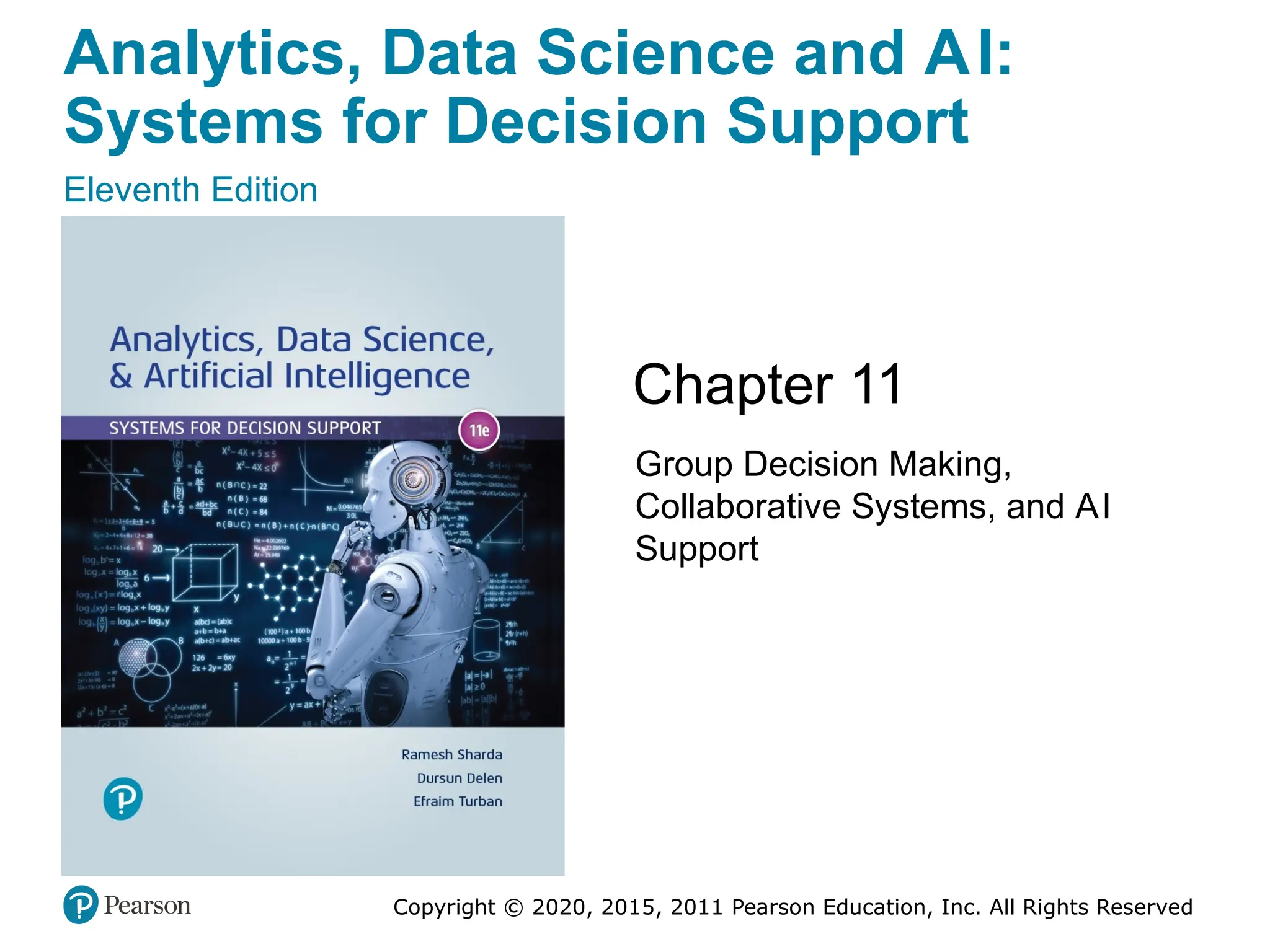
  • #41 If this PowerPoint presentation contains mathematical equations, you may need to check that your computer has the following installed: 1) Math Type Plugin 2) Math Player (free versions available) 3) NVDA Reader (free versions available)
  • #63 If this PowerPoint presentation contains mathematical equations, you may need to check that your computer has the following installed: 1) Math Type Plugin 2) Math Player (free versions available) 3) NVDA Reader (free versions available)
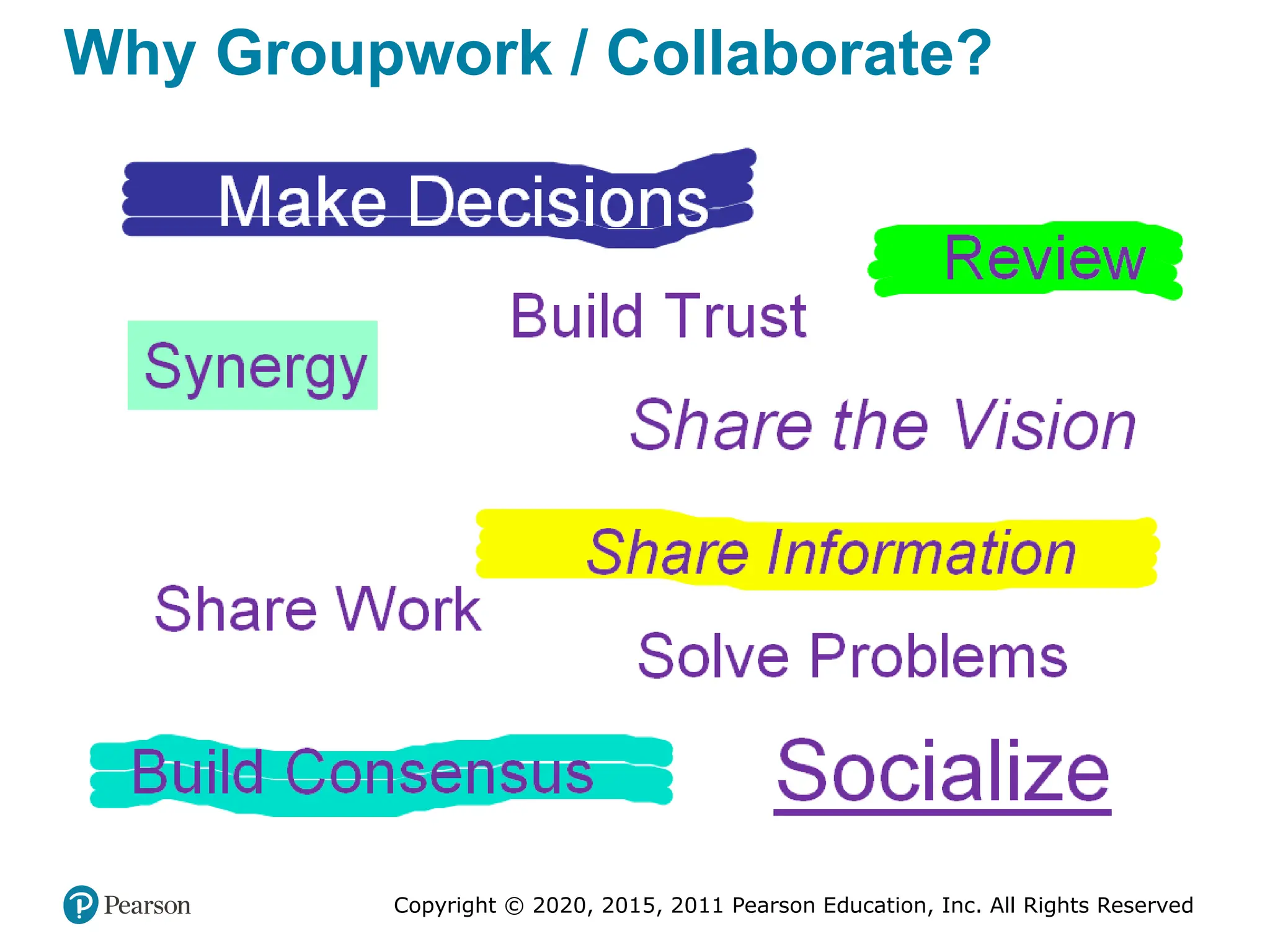
  • #91 If this PowerPoint presentation contains mathematical equations, you may need to check that your computer has the following installed: 1) Math Type Plugin 2) Math Player (free versions available) 3) NVDA Reader (free versions available)