DOCKER INTRODUCTION
JULIEN MAITREHENRY
Dev & Ops @PetalMD
@jmaitrehenry
https://github.com/jmaitrehenry
AGENDA
‣ The Challenge
‣ Docker as solution
‣ But What is Docker?
‣ What’s an image?
‣ What’s a container?
‣ Questions?
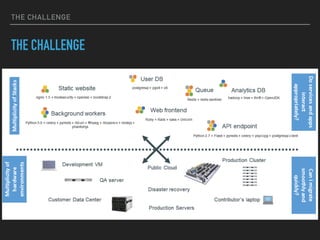
THE CHALLENGE
THE CHALLENGE
THE CHALLENGE
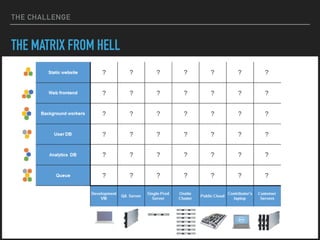
THE MATRIX FROM HELL
THE CHALLENGE
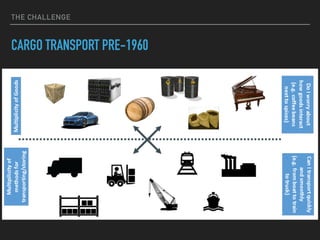
CARGO TRANSPORT PRE-1960
THE CHALLENGE
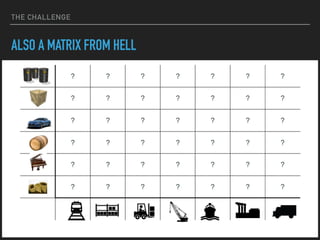
ALSO A MATRIX FROM HELL
DOCKER AS SOLUTION
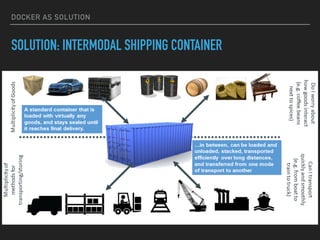
SOLUTION: INTERMODAL SHIPPING CONTAINER
DOCKER AS SOLUTION
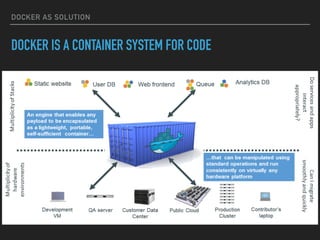
DOCKER IS A CONTAINER SYSTEM FOR CODE
DOCKER AS SOLUTION
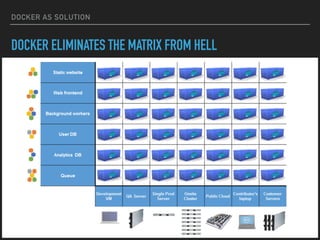
DOCKER ELIMINATES THE MATRIX FROM HELL
BUT WHAT IS
DOCKER?
BUT WHAT IT’S DOCKER?
Docker containers wrap a piece of software in a
complete filesystem that contains everything needed to
run: code, runtime, system tools, system libraries –
anything that can be installed on a server. This
guarantees that the software will always run the same,
regardless of its environment
BUT WHAT IT’S DOCKER?
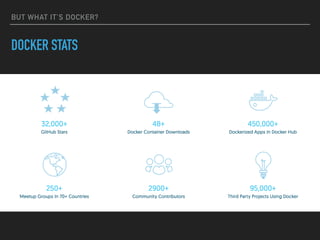
DOCKER STATS
BUT WHAT IT’S DOCKER?
DOCKER ENGINE
▸ Lightweight runtime and robust
tooling that:
▸ Build image
▸ Ship image
▸ Run containers
BUT WHAT IT’S DOCKER?
DOCKER COMPOSE
▸ Define multi-container app with
multiple dependencies in one file
▸ Hold structure and configuration in
a single place
▸ Spin application up (or down) with
a single command
BUT WHAT IT’S DOCKER?
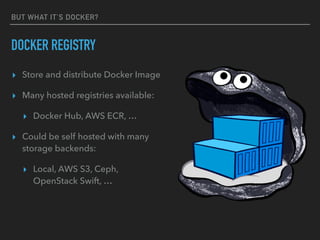
DOCKER REGISTRY
▸ Store and distribute Docker Image
▸ Many hosted registries available:
▸ Docker Hub, AWS ECR, …
▸ Could be self hosted with many
storage backends:
▸ Local, AWS S3, Ceph,
OpenStack Swift, …
BUT WHAT IT’S DOCKER?
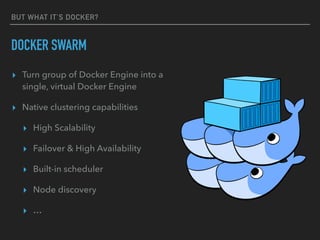
DOCKER SWARM
▸ Turn group of Docker Engine into a
single, virtual Docker Engine
▸ Native clustering capabilities
▸ High Scalability
▸ Failover & High Availability
▸ Built-in scheduler
▸ Node discovery
▸ …
WHY DOCKER?
SEPARATION OF CONCERNS: FRANCIS THE DEVELOPER
▸ Inside my container:
▸ My code
▸ My libraries
▸ My package manager
▸ My app
▸ My data
WHY DOCKER?
SEPARATION OF CONCERNS: JULIEN THE OPS GUY
▸ Outside the container:
▸ Logging
▸ Remote access
▸ Network configuration
▸ Monitoring
▸ High Availability
WHAT’S AN
IMAGE?
WHAT’S AN IMAGE
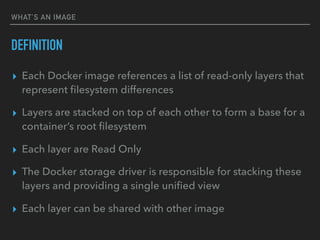
DEFINITION
▸ Each Docker image references a list of read-only layers that
represent filesystem differences
▸ Layers are stacked on top of each other to form a base for a
container’s root filesystem
▸ Each layer are Read Only
▸ The Docker storage driver is responsible for stacking these
layers and providing a single unified view
▸ Each layer can be shared with other image
WHAT’S AN IMAGE
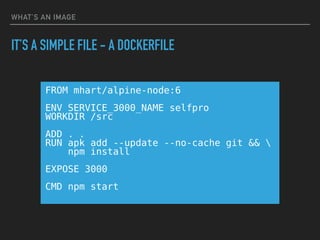
IT’S A SIMPLE FILE - A DOCKERFILE
FROM mhart/alpine-node:6
ENV SERVICE_3000_NAME selfpro
WORKDIR /src
ADD . .
RUN apk add --update --no-cache git && 

npm install
EXPOSE 3000
CMD npm start
WHAT’S AN IMAGE
BUILDING…
docker build -t petalmd/selfpro -f docker/Dockerfile.app .
Sending build context to Docker daemon 1.398 MB
Step 1 : FROM mhart/alpine-node:6
---> 2e8721f40082
Step 2 : ENV SERVICE_3000_NAME selfpro
---> Running in cd8e6156fbec
---> 9d9b1f86a696
Removing intermediate container cd8e6156fbec
[...]
Step 7 : CMD npm start
---> Running in 71bab8276b39
---> cce4c583c3a0
Removing intermediate container 71bab8276b39
Successfully built cce4c583c3a0
WHAT’S AN IMAGE
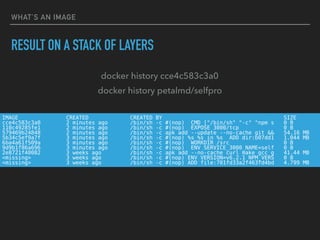
RESULT ON A STACK OF LAYERS
IMAGE CREATED CREATED BY SIZE
cce4c583c3a0 2 minutes ago /bin/sh -c #(nop) CMD ["/bin/sh" "-c" "npm s 0 B
110c49285fe1 2 minutes ago /bin/sh -c #(nop) EXPOSE 3000/tcp 0 B
579469b24848 2 minutes ago /bin/sh -c apk add --update --no-cache git && 54.16 MB
5b34c5ef9a7f 3 minutes ago /bin/sh -c #(nop) %s %s in %s ADD dir:b07dd1 1.044 MB
6ba4a61f509a 3 minutes ago /bin/sh -c #(nop) WORKDIR /src 0 B
9d9b1f86a696 3 minutes ago /bin/sh -c #(nop) ENV SERVICE_3000_NAME=self 0 B
2e8721f40082 3 weeks ago /bin/sh -c apk add --no-cache curl make gcc g 41.44 MB
<missing> 3 weeks ago /bin/sh -c #(nop) ENV VERSION=v6.2.1 NPM_VERS 0 B
<missing> 3 weeks ago /bin/sh -c #(nop) ADD file:701fd33a2f463fd4bd 4.799 MB
docker history cce4c583c3a0
docker history petalmd/selfpro
WHAT’S AN IMAGE
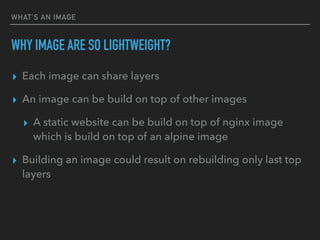
WHY IMAGE ARE SO LIGHTWEIGHT?
▸ Each image can share layers
▸ An image can be build on top of other images
▸ A static website can be build on top of nginx image
which is build on top of an alpine image
▸ Building an image could result on rebuilding only last top
layers
WHAT’S AN IMAGE
EXAMPLE
/bin/sh -c #(nop) ADD file:614a9122187935fccf 4.797 MB
addgroup -S redis && adduser -S -G […]
apk add --no-cache ‘su-exec>=0.2' […]
ENV REDIS_VERSION=3.2.1
CMD ["redis-server"]
[9 other layers]
MAINTAINER NGINX Docker Maintainers
ENV NGINX_VERSION=1.11.1
EXPOSE 443/tcp 80/tcp
CMD ["nginx" "-g" "daemon off;”] 0 B
[5 other layers]
alpine:3.3
redis:alpine nginx:alpine
WHAT’S A CONTAINER
WHAT’S A CONTAINER
▸ IT IS A RUNNING IMAGE
▸ WITH A R/W TOP LAYER
WHAT’S A CONTAINER
RUN EVERYWHERE
▸ Regardless of kernel version
▸ Regardless of host distribution
▸ Physical or virtual, cloud or not
▸ Container and host architecture should match
WHAT’S A CONTAINER
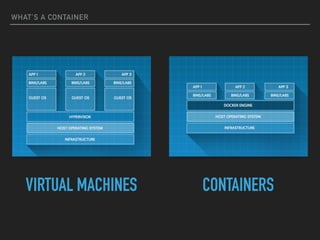
IT’S A LIGHTWEIGHT VM
▸ Own process space
▸ Own network interface
▸ Can run stuff as root or as any custom user
WHAT’S A CONTAINER
IT’S A CHROOT ON STEROIDS
▸ Container = isolated process
▸ Share kernel with host (linux and windows containers)
▸ No device emulation (neither HVM nor PV)
WHAT’S A CONTAINER
VIRTUAL MACHINES CONTAINERS
WHAT’S A CONTAINER
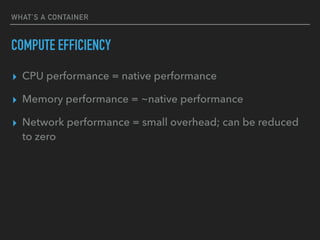
COMPUTE EFFICIENCY
▸ CPU performance = native performance
▸ Memory performance = ~native performance
▸ Network performance = small overhead; can be reduced
to zero
WHAT’S A CONTAINER
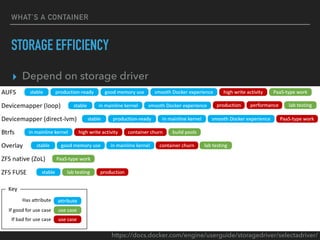
STORAGE EFFICIENCY
▸ Depend on storage driver
https://docs.docker.com/engine/userguide/storagedriver/selectadriver/
QUESTIONS?

Docker introduction

  • 1.
  • 2.
    JULIEN MAITREHENRY Dev &Ops @PetalMD @jmaitrehenry https://github.com/jmaitrehenry
  • 3.
    AGENDA ‣ The Challenge ‣Docker as solution ‣ But What is Docker? ‣ What’s an image? ‣ What’s a container? ‣ Questions?
  • 4.
  • 5.
  • 6.
  • 7.
    THE CHALLENGE ALSO AMATRIX FROM HELL
  • 8.
    DOCKER AS SOLUTION SOLUTION:INTERMODAL SHIPPING CONTAINER
  • 9.
    DOCKER AS SOLUTION DOCKERIS A CONTAINER SYSTEM FOR CODE
  • 10.
    DOCKER AS SOLUTION DOCKERELIMINATES THE MATRIX FROM HELL
  • 11.
  • 12.
    BUT WHAT IT’SDOCKER? Docker containers wrap a piece of software in a complete filesystem that contains everything needed to run: code, runtime, system tools, system libraries – anything that can be installed on a server. This guarantees that the software will always run the same, regardless of its environment
  • 13.
    BUT WHAT IT’SDOCKER? DOCKER STATS
  • 14.
    BUT WHAT IT’SDOCKER? DOCKER ENGINE ▸ Lightweight runtime and robust tooling that: ▸ Build image ▸ Ship image ▸ Run containers
  • 15.
    BUT WHAT IT’SDOCKER? DOCKER COMPOSE ▸ Define multi-container app with multiple dependencies in one file ▸ Hold structure and configuration in a single place ▸ Spin application up (or down) with a single command
  • 16.
    BUT WHAT IT’SDOCKER? DOCKER REGISTRY ▸ Store and distribute Docker Image ▸ Many hosted registries available: ▸ Docker Hub, AWS ECR, … ▸ Could be self hosted with many storage backends: ▸ Local, AWS S3, Ceph, OpenStack Swift, …
  • 17.
    BUT WHAT IT’SDOCKER? DOCKER SWARM ▸ Turn group of Docker Engine into a single, virtual Docker Engine ▸ Native clustering capabilities ▸ High Scalability ▸ Failover & High Availability ▸ Built-in scheduler ▸ Node discovery ▸ …
  • 18.
    WHY DOCKER? SEPARATION OFCONCERNS: FRANCIS THE DEVELOPER ▸ Inside my container: ▸ My code ▸ My libraries ▸ My package manager ▸ My app ▸ My data
  • 19.
    WHY DOCKER? SEPARATION OFCONCERNS: JULIEN THE OPS GUY ▸ Outside the container: ▸ Logging ▸ Remote access ▸ Network configuration ▸ Monitoring ▸ High Availability
  • 20.
  • 21.
    WHAT’S AN IMAGE DEFINITION ▸Each Docker image references a list of read-only layers that represent filesystem differences ▸ Layers are stacked on top of each other to form a base for a container’s root filesystem ▸ Each layer are Read Only ▸ The Docker storage driver is responsible for stacking these layers and providing a single unified view ▸ Each layer can be shared with other image
  • 22.
    WHAT’S AN IMAGE IT’SA SIMPLE FILE - A DOCKERFILE FROM mhart/alpine-node:6 ENV SERVICE_3000_NAME selfpro WORKDIR /src ADD . . RUN apk add --update --no-cache git && 
 npm install EXPOSE 3000 CMD npm start
  • 23.
    WHAT’S AN IMAGE BUILDING… dockerbuild -t petalmd/selfpro -f docker/Dockerfile.app . Sending build context to Docker daemon 1.398 MB Step 1 : FROM mhart/alpine-node:6 ---> 2e8721f40082 Step 2 : ENV SERVICE_3000_NAME selfpro ---> Running in cd8e6156fbec ---> 9d9b1f86a696 Removing intermediate container cd8e6156fbec [...] Step 7 : CMD npm start ---> Running in 71bab8276b39 ---> cce4c583c3a0 Removing intermediate container 71bab8276b39 Successfully built cce4c583c3a0
  • 24.
    WHAT’S AN IMAGE RESULTON A STACK OF LAYERS IMAGE CREATED CREATED BY SIZE cce4c583c3a0 2 minutes ago /bin/sh -c #(nop) CMD ["/bin/sh" "-c" "npm s 0 B 110c49285fe1 2 minutes ago /bin/sh -c #(nop) EXPOSE 3000/tcp 0 B 579469b24848 2 minutes ago /bin/sh -c apk add --update --no-cache git && 54.16 MB 5b34c5ef9a7f 3 minutes ago /bin/sh -c #(nop) %s %s in %s ADD dir:b07dd1 1.044 MB 6ba4a61f509a 3 minutes ago /bin/sh -c #(nop) WORKDIR /src 0 B 9d9b1f86a696 3 minutes ago /bin/sh -c #(nop) ENV SERVICE_3000_NAME=self 0 B 2e8721f40082 3 weeks ago /bin/sh -c apk add --no-cache curl make gcc g 41.44 MB <missing> 3 weeks ago /bin/sh -c #(nop) ENV VERSION=v6.2.1 NPM_VERS 0 B <missing> 3 weeks ago /bin/sh -c #(nop) ADD file:701fd33a2f463fd4bd 4.799 MB docker history cce4c583c3a0 docker history petalmd/selfpro
  • 25.
    WHAT’S AN IMAGE WHYIMAGE ARE SO LIGHTWEIGHT? ▸ Each image can share layers ▸ An image can be build on top of other images ▸ A static website can be build on top of nginx image which is build on top of an alpine image ▸ Building an image could result on rebuilding only last top layers
  • 26.
    WHAT’S AN IMAGE EXAMPLE /bin/sh-c #(nop) ADD file:614a9122187935fccf 4.797 MB addgroup -S redis && adduser -S -G […] apk add --no-cache ‘su-exec>=0.2' […] ENV REDIS_VERSION=3.2.1 CMD ["redis-server"] [9 other layers] MAINTAINER NGINX Docker Maintainers ENV NGINX_VERSION=1.11.1 EXPOSE 443/tcp 80/tcp CMD ["nginx" "-g" "daemon off;”] 0 B [5 other layers] alpine:3.3 redis:alpine nginx:alpine
  • 27.
    WHAT’S A CONTAINER WHAT’SA CONTAINER ▸ IT IS A RUNNING IMAGE ▸ WITH A R/W TOP LAYER
  • 28.
    WHAT’S A CONTAINER RUNEVERYWHERE ▸ Regardless of kernel version ▸ Regardless of host distribution ▸ Physical or virtual, cloud or not ▸ Container and host architecture should match
  • 29.
    WHAT’S A CONTAINER IT’SA LIGHTWEIGHT VM ▸ Own process space ▸ Own network interface ▸ Can run stuff as root or as any custom user
  • 30.
    WHAT’S A CONTAINER IT’SA CHROOT ON STEROIDS ▸ Container = isolated process ▸ Share kernel with host (linux and windows containers) ▸ No device emulation (neither HVM nor PV)
  • 31.
    WHAT’S A CONTAINER VIRTUALMACHINES CONTAINERS
  • 32.
    WHAT’S A CONTAINER COMPUTEEFFICIENCY ▸ CPU performance = native performance ▸ Memory performance = ~native performance ▸ Network performance = small overhead; can be reduced to zero
  • 33.
    WHAT’S A CONTAINER STORAGEEFFICIENCY ▸ Depend on storage driver https://docs.docker.com/engine/userguide/storagedriver/selectadriver/
  • 34.