Microservices Meetup – March 2015
2March 21, 2015
Agenda
• Docker Introduction
• Docker 1.5 Features
• Docker Networking
• Q & A
3March 21, 2015
Speakers
• Ritesh Patel
o Co-founder at Nirmata (@NirmataCloud)
o Previously at Brocade, Trapeze Networks
o @riteshdp
• Srini Seetharaman
o Cloud Platform Architect at Infinera
o Previously SDN at Deutsche Telekom and Stanford OpenFlow group
o @sdn_hub
4March 21, 2015
What is Docker?
• Open source technology to build, ship and run distributed
applications
• An application and its dependencies is packaged into Linux containers
• Provides efficient image management
o Multi layered images, shared across containers
o Image registry = Git for Docker images
Benefits:
• Ideal delivery vehicle for a microservices
• Clear separation of concerns
• Application runtime portability
DevOps
5March 21, 2015
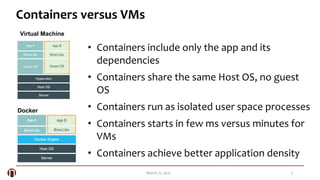
Containers versus VMs
Virtual Machine
Docker
• Containers include only the app and its
dependencies
• Containers share the same Host OS, no guest
OS
• Containers run as isolated user space processes
• Containers starts in few ms versus minutes for
VMs
• Containers achieve better application density
6March 21, 2015
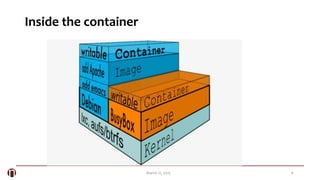
Inside the container
7March 21, 2015
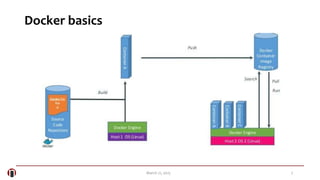
Docker basics
8March 21, 2015
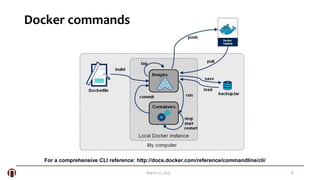
Docker commands
For a comprehensive CLI reference: http://docs.docker.com/reference/commandline/cli/
9March 21, 2015
Docker 1.5
10March 21, 2015
Key Features
• Read-only containers
• Container statistics
• Named Dockerfiles
• Full IPv6 support
• Other
o Container rename
o New version of registry http API
11March 21, 2015
Container statistics
docker stats CONTAINER [CONTAINER...]
• Returns a live stream of stats for running containers
• Can be run on multiple containers
• API endpoint provides more stats
$ sudo docker stats redis1 redis2
CONTAINER CPU % MEM USAGE/LIMIT MEM % NET I/O
redis1 0.07% 796 KiB/64 MiB 1.21% 788 B/648 B
redis2 0.07% 2.746 MiB/64 MiB 4.29% 1.266 KiB/648 B
12March 21, 2015
Read-only containers
--read-only
• Allows the container's root filesystem to be mounted as read only
• Can be used in combination with volumes to force a container's
process to only write to locations that will be persisted.
• Use case:
o Allow admins to control where they would like developers to write files and
error on any other locations.
13March 21, 2015
Named Dockerfiles
sudo docker build -f
• Allows the definition of multiple Dockerfiles for a single
project
$ sudo docker build -f dockerfiles/Dockerfile.debug –t app_debug .
$ sudo docker build -f dockerfiles/Dockerfile.prod -t app_prod .
14March 21, 2015
Docker exec
docker exec [OPTIONS] CONTAINER COMMAND [ARG...]
• Runs a new command in a running container
• Only works if the container is running (i.e. not paused/stopped)
• Does not restart if the container is restarted
$ sudo docker run –d –-name mongo mongo
$ sudo docker exec –it mongo /bin/bash
signup at http://nirmata.io
Multi-cloud container services for Enterprise DevOps

Docker 1.5 features - South Bay Microservices meetup March 2015

  • 1.
  • 2.
    2March 21, 2015 Agenda •Docker Introduction • Docker 1.5 Features • Docker Networking • Q & A
  • 3.
    3March 21, 2015 Speakers •Ritesh Patel o Co-founder at Nirmata (@NirmataCloud) o Previously at Brocade, Trapeze Networks o @riteshdp • Srini Seetharaman o Cloud Platform Architect at Infinera o Previously SDN at Deutsche Telekom and Stanford OpenFlow group o @sdn_hub
  • 4.
    4March 21, 2015 Whatis Docker? • Open source technology to build, ship and run distributed applications • An application and its dependencies is packaged into Linux containers • Provides efficient image management o Multi layered images, shared across containers o Image registry = Git for Docker images Benefits: • Ideal delivery vehicle for a microservices • Clear separation of concerns • Application runtime portability DevOps
  • 5.
    5March 21, 2015 Containersversus VMs Virtual Machine Docker • Containers include only the app and its dependencies • Containers share the same Host OS, no guest OS • Containers run as isolated user space processes • Containers starts in few ms versus minutes for VMs • Containers achieve better application density
  • 6.
  • 7.
  • 8.
    8March 21, 2015 Dockercommands For a comprehensive CLI reference: http://docs.docker.com/reference/commandline/cli/
  • 9.
  • 10.
    10March 21, 2015 KeyFeatures • Read-only containers • Container statistics • Named Dockerfiles • Full IPv6 support • Other o Container rename o New version of registry http API
  • 11.
    11March 21, 2015 Containerstatistics docker stats CONTAINER [CONTAINER...] • Returns a live stream of stats for running containers • Can be run on multiple containers • API endpoint provides more stats $ sudo docker stats redis1 redis2 CONTAINER CPU % MEM USAGE/LIMIT MEM % NET I/O redis1 0.07% 796 KiB/64 MiB 1.21% 788 B/648 B redis2 0.07% 2.746 MiB/64 MiB 4.29% 1.266 KiB/648 B
  • 12.
    12March 21, 2015 Read-onlycontainers --read-only • Allows the container's root filesystem to be mounted as read only • Can be used in combination with volumes to force a container's process to only write to locations that will be persisted. • Use case: o Allow admins to control where they would like developers to write files and error on any other locations.
  • 13.
    13March 21, 2015 NamedDockerfiles sudo docker build -f • Allows the definition of multiple Dockerfiles for a single project $ sudo docker build -f dockerfiles/Dockerfile.debug –t app_debug . $ sudo docker build -f dockerfiles/Dockerfile.prod -t app_prod .
  • 14.
    14March 21, 2015 Dockerexec docker exec [OPTIONS] CONTAINER COMMAND [ARG...] • Runs a new command in a running container • Only works if the container is running (i.e. not paused/stopped) • Does not restart if the container is restarted $ sudo docker run –d –-name mongo mongo $ sudo docker exec –it mongo /bin/bash
  • 15.
    signup at http://nirmata.io Multi-cloudcontainer services for Enterprise DevOps

Editor's Notes

  • #13  -The docker run command can take the --read-only flag to make the container’s root filesystem mounted as readonly, which can be used in combination with volumes to force a container’s processes to only write to locations that will be persisted.