Document Management System
(DMS) Flowchart
Technology & Engineering
January 2023
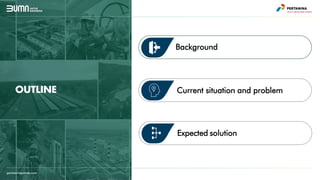
OUTLINE
Expected solution
Background
Current situation and problem
• Engage dengan
Manufacturer,
Vendor, Research
Department (RTI)
• Customer/End-User
requirement
• Technology /Design
Selection
• Power System
Analysis/Grid Study,
Soil
Test/Investigation
• Penyusunan Basic
Design
• Penyusunan
Engineering Estimate
• Penyiapan Kajian
Teknis/Due-diligence
• Technology
Improvement
• Penyusunan
Feasibility Study (FS)
• Kajian Risiko
• Review dokumen
laporan FS dan
Kajian Risiko
Konsultan
• Penyiapan &
Penyampaian
Proposal Teknis dan
Commercial
(Bersama tim BD) ke
Customer/End-User
• Negosiasi dengan
Customer/End-User
(Bersama tim BD)
• Penyiapan Kontrak
dengan
Customer/End-User
(Bersama tim BD)
Role in Customer Approach & Project Initiation Role in Project Execution
Survey Study/Pre FS FS
FEED &
Tender EPC
Detail Eng
& Proc
Construction
Commis
sioning
O&M
FID
G
a
t
e
R
e
v
I
e
w
• Approach
Customer /End-
User (Bersama
tim BD) untuk
Penawaran
Solusi Teknologi
PNRE
• Kunjungan
Lapangan
• Penjelasan
teknologi
kepada
Customer /End-
User
• Assessment
asset/Equipment
• Laporan Survey
• Menyusun Front
End Engineering
Design (FEED)
• Penyusunan
KAK/TOR dan
OE/HPS untuk
EPC pelaksana
eksekusi project
• Support
Pelaksanaan
Pengadaan
EPC/Vendor/
Material
• Technical
Evaluation,
Clarification, &
Negotiation
• Review
dokumen
detail
engineering
• Respon to
Technical
Query
• Approval
Material
Request
• Daily/Week
ly/ Monthly
Progress
Meeting
dengan
Kontraktor
• Inspeksi
pelaksanaan
Instalasi/Konstru
ksi
• SAT (Site
Acceptance Test)
• FAT (Factory
Acceptance Test)
• Review
pengajuan
CO/VO (Change
order) serta
evaluasi teknis
dan kewajaran
harga
• Review
Construction
Procedures
• QC Material
• Commsioning
• Review As
built
document
• Review
Commisioning
Procedures
• Menyediakan
ITP
• Berkoordinasi
dengan pihak
inspeksi
external dan
end-user
• Advise
Technical
O&M Problem
Solving &
Trouble
Shooting
• Re-design/Re-
engineering &
Modification
Request
• Penyiapan
Materi
untuk Final
Investment
Decision
(FID)
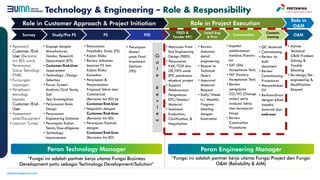
Technology & Engineering – Role & Responsibility
Role in
O&M
Peran Technology Manager Peran Engineering Manager
“Fungsi ini adalah partner kerja utama Fungsi Business
Development yaitu sebagai Technology Development/Solution”
“Fungsi ini adalah partner kerja utama Fungsi Project dan Fungsi
O&M (Reliability & AIM)
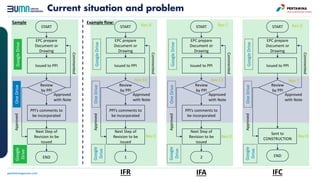
Current situation and problem
EPC prepare
Document or
Drawing
Issued to PPI
PPI’s comments to
be incorporated
Review
by PPI
Next Step of
Revision to be
issued
Approved
with Note
Commented
Approved
START
END
Google
Drive
One
Drive
Google
Drive
EPC prepare
Document or
Drawing
Issued to PPI
PPI’s comments to
be incorporated
Review
by PPI
Next Step of
Revision to be
issued
Approved
with Note
Commented
Approved
START
1
Google
Drive
Google
Drive
One
Drive
EPC prepare
Document or
Drawing
Issued to PPI
PPI’s comments to
be incorporated
Review
by PPI
Next Step of
Revision to be
issued
Approved
with Note
Commented
Approved
START
2
Google
Drive
Google
Drive
One
Drive
EPC prepare
Document or
Drawing
Issued to PPI
Sent to
CONSTRUCTION
Review
by PPI
Approved
with Note
Commented
Approved
START
END
Google
Drive
Google
Drive
One
Drive
Rev B
Rev B1
Rev C
Rev C
Rev 0
Rev C1
Rev 0
Rev 0
Rev 1
IFR IFA IFC
Sample Example flow:
Cluster 1
CIV
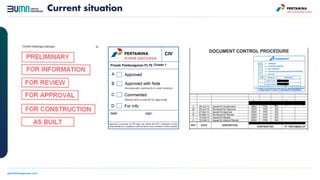
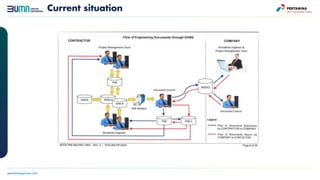
Current situation
Current situation
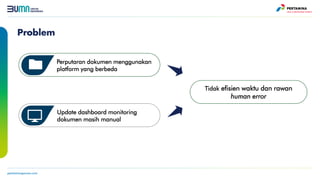
Problem
Tidak efisien waktu dan rawan
human error
Perputaran dokumen menggunakan
platform yang berbeda
Update dashboard monitoring
dokumen masih manual
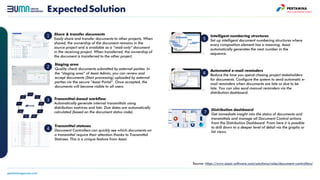
ExpectedSolution
Source: https://www.assai-software.com/solutions/roles/document-controllers/
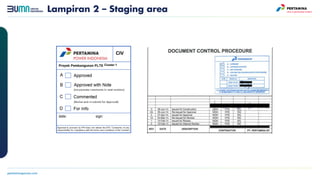
Staging area
Quality check documents submitted by external parties. In
the “staging area” of Assai Admin, you can review and
accept documents (Start processing) uploaded by external
parties via the secure “Assai Portal”. Once accepted, the
documents will become visible to all users.
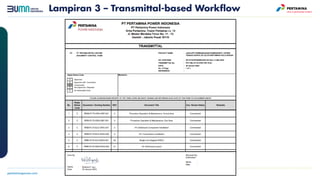
Transmittal-based workflow
Automatically generate internal transmittals using
distribution matrices and lists. Due dates are automatically
calculated (based on the document status code).
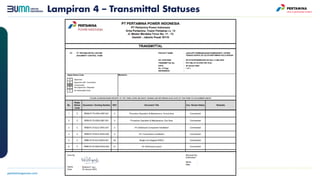
Transmittal statuses
Document Controllers can quickly see which documents on
a transmittal require their attention thanks to Transmittal
Statuses. This is a unique feature from Assai.
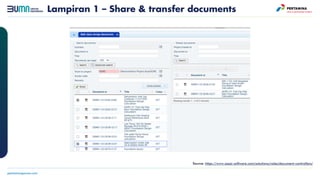
Share & transfer documents
Easily share and transfer documents to other projects. When
shared, the ownership of the document remains in the
source project and is available as a “read-only” document
in the receiving project. When transferred, the ownership of
the document is transferred to the other project.
1
2
3
4
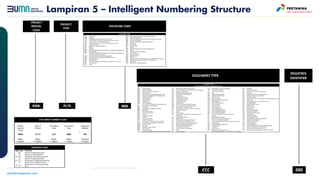
Intelligent numbering structures
Set up intelligent document numbering structures where
every composition element has a meaning. Assai
automatically generates the next number in the
sequence.
5
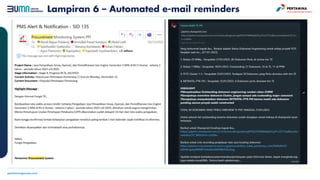
Automated e-mail reminders
Reduce the time you spend chasing project stakeholders
for documents. Configure the system to send automatic e-
mail reminders when documents are late or due to be
late. You can also send manual reminders via the
distribution dashboard.
6
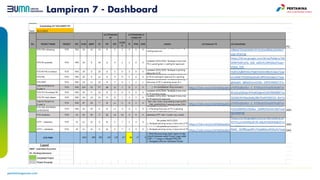
Distribution dashboard
Get immediate insight into the status of documents and
transmittals and manage all Document Control actions
from the Distribution Dashboard. From here it is possible
to drill down to a deeper level of detail via the graphs or
list views.
7
Lampiran 1 – Share & transfer documents
Source: https://www.assai-software.com/solutions/roles/document-controllers/
Lampiran 2 – Staging area
Cluster 1
CIV
Lampiran 3 – Transmittal-based Workflow
Lampiran 4 – Transmittal Statuses
Lampiran 5 – Intelligent Numbering Structure
Lampiran 6 – Automated e-mail reminders
Lampiran 7 - Dashboard
Doc management syatem flow chart  for business

Doc management syatem flow chart for business

  • 1.
    Document Management System (DMS)Flowchart Technology & Engineering January 2023
  • 2.
  • 3.
    • Engage dengan Manufacturer, Vendor,Research Department (RTI) • Customer/End-User requirement • Technology /Design Selection • Power System Analysis/Grid Study, Soil Test/Investigation • Penyusunan Basic Design • Penyusunan Engineering Estimate • Penyiapan Kajian Teknis/Due-diligence • Technology Improvement • Penyusunan Feasibility Study (FS) • Kajian Risiko • Review dokumen laporan FS dan Kajian Risiko Konsultan • Penyiapan & Penyampaian Proposal Teknis dan Commercial (Bersama tim BD) ke Customer/End-User • Negosiasi dengan Customer/End-User (Bersama tim BD) • Penyiapan Kontrak dengan Customer/End-User (Bersama tim BD) Role in Customer Approach & Project Initiation Role in Project Execution Survey Study/Pre FS FS FEED & Tender EPC Detail Eng & Proc Construction Commis sioning O&M FID G a t e R e v I e w • Approach Customer /End- User (Bersama tim BD) untuk Penawaran Solusi Teknologi PNRE • Kunjungan Lapangan • Penjelasan teknologi kepada Customer /End- User • Assessment asset/Equipment • Laporan Survey • Menyusun Front End Engineering Design (FEED) • Penyusunan KAK/TOR dan OE/HPS untuk EPC pelaksana eksekusi project • Support Pelaksanaan Pengadaan EPC/Vendor/ Material • Technical Evaluation, Clarification, & Negotiation • Review dokumen detail engineering • Respon to Technical Query • Approval Material Request • Daily/Week ly/ Monthly Progress Meeting dengan Kontraktor • Inspeksi pelaksanaan Instalasi/Konstru ksi • SAT (Site Acceptance Test) • FAT (Factory Acceptance Test) • Review pengajuan CO/VO (Change order) serta evaluasi teknis dan kewajaran harga • Review Construction Procedures • QC Material • Commsioning • Review As built document • Review Commisioning Procedures • Menyediakan ITP • Berkoordinasi dengan pihak inspeksi external dan end-user • Advise Technical O&M Problem Solving & Trouble Shooting • Re-design/Re- engineering & Modification Request • Penyiapan Materi untuk Final Investment Decision (FID) Technology & Engineering – Role & Responsibility Role in O&M Peran Technology Manager Peran Engineering Manager “Fungsi ini adalah partner kerja utama Fungsi Business Development yaitu sebagai Technology Development/Solution” “Fungsi ini adalah partner kerja utama Fungsi Project dan Fungsi O&M (Reliability & AIM)
  • 4.
    Current situation andproblem EPC prepare Document or Drawing Issued to PPI PPI’s comments to be incorporated Review by PPI Next Step of Revision to be issued Approved with Note Commented Approved START END Google Drive One Drive Google Drive EPC prepare Document or Drawing Issued to PPI PPI’s comments to be incorporated Review by PPI Next Step of Revision to be issued Approved with Note Commented Approved START 1 Google Drive Google Drive One Drive EPC prepare Document or Drawing Issued to PPI PPI’s comments to be incorporated Review by PPI Next Step of Revision to be issued Approved with Note Commented Approved START 2 Google Drive Google Drive One Drive EPC prepare Document or Drawing Issued to PPI Sent to CONSTRUCTION Review by PPI Approved with Note Commented Approved START END Google Drive Google Drive One Drive Rev B Rev B1 Rev C Rev C Rev 0 Rev C1 Rev 0 Rev 0 Rev 1 IFR IFA IFC Sample Example flow:
  • 5.
  • 6.
  • 7.
    Problem Tidak efisien waktudan rawan human error Perputaran dokumen menggunakan platform yang berbeda Update dashboard monitoring dokumen masih manual
  • 8.
    ExpectedSolution Source: https://www.assai-software.com/solutions/roles/document-controllers/ Staging area Qualitycheck documents submitted by external parties. In the “staging area” of Assai Admin, you can review and accept documents (Start processing) uploaded by external parties via the secure “Assai Portal”. Once accepted, the documents will become visible to all users. Transmittal-based workflow Automatically generate internal transmittals using distribution matrices and lists. Due dates are automatically calculated (based on the document status code). Transmittal statuses Document Controllers can quickly see which documents on a transmittal require their attention thanks to Transmittal Statuses. This is a unique feature from Assai. Share & transfer documents Easily share and transfer documents to other projects. When shared, the ownership of the document remains in the source project and is available as a “read-only” document in the receiving project. When transferred, the ownership of the document is transferred to the other project. 1 2 3 4 Intelligent numbering structures Set up intelligent document numbering structures where every composition element has a meaning. Assai automatically generates the next number in the sequence. 5 Automated e-mail reminders Reduce the time you spend chasing project stakeholders for documents. Configure the system to send automatic e- mail reminders when documents are late or due to be late. You can also send manual reminders via the distribution dashboard. 6 Distribution dashboard Get immediate insight into the status of documents and transmittals and manage all Document Control actions from the Distribution Dashboard. From here it is possible to drill down to a deeper level of detail via the graphs or list views. 7
  • 9.
    Lampiran 1 –Share & transfer documents Source: https://www.assai-software.com/solutions/roles/document-controllers/
  • 10.
    Lampiran 2 –Staging area Cluster 1 CIV
  • 11.
    Lampiran 3 –Transmittal-based Workflow
  • 12.
    Lampiran 4 –Transmittal Statuses
  • 13.
    Lampiran 5 –Intelligent Numbering Structure
  • 14.
    Lampiran 6 –Automated e-mail reminders
  • 15.
    Lampiran 7 -Dashboard