Thomas David Walker, MSc dissertation
- 1 -
Stepping into the Video
Thomas David Walker
Master of Science in Engineering
from the
University of Surrey
Department of Electronic Engineering
Faculty of Engineering and Physical Sciences
University of Surrey
Guildford, Surrey, GU2 7XH, UK
August 2016
Supervised by: A. Hilton
Thomas David Walker 2016
Thomas David Walker, MSc dissertation
- 2 -
DECLARATION OF ORIGINALITY
I confirm that the project dissertation I am submitting is entirely my own work and that any ma-
terial used from other sources has been clearly identified and properly acknowledged and referenced.
In submitting this final version of my report to the JISC anti-plagiarism software resource, I confirm
that my work does not contravene the university regulations on plagiarism as described in the Student
Handbook. In so doing I also acknowledge that I may be held to account for any particular instances
of uncited work detected by the JISC anti-plagiarism software, or as may be found by the project
examiner or project organiser. I also understand that if an allegation of plagiarism is upheld via an
Academic Misconduct Hearing, then I may forfeit any credit for this module or a more severe penalty
may be agreed.
Stepping Into The Video
Thomas David Walker
Date: 30/08/2016
Supervisor’s name: Pr. Adrian Hilton
Thomas David Walker, MSc dissertation
- 3 -
WORD COUNT
Number of Pages: 99
Number of Words: 19632
Thomas David Walker, MSc dissertation
- 4 -
ABSTRACT
The aim of the project is to create a set of tools for converting videos into an animated 3D
environment that can be viewed through a virtual reality headset. In order to provide an
immersive experience in VR, it will be possible to move freely about the scene, and the
model will contain all of the moving objects that were present in the original videos.
The 3D model of the location is created from a set of images using Structure from Motion.
Keypoints that can be matched between pairs of images are used to create a 3D point cloud
that approximates the structure of the scene. Moving objects do not provide keypoints that
are consistent with the movement of the camera, so they are discarded in the reconstruction.
In order to create a dynamic scene, a set of videos are recorded with stationary cameras,
which allows the moving objects to be more effectively separated from the scene. The static
model and the dynamic billboards are combined in Unity, from which the model can be
viewed and interacted with through a VR headset.
The entrance and the Great Court of the British Museum were modelled with Photosynth
to demonstrate both expansive outdoor and indoor environments that contain large crowds
of people. Two Matlab scripts were created to extract the dynamic objects, with one capable
of detecting any moving object and the other specialising in identifying people. The dynamic
objects were successfully implemented in Unity as billboards, which display the animation
of the object. However, having the billboards move corresponding to their position in the
original video was not able to be implemented.
Thomas David Walker, MSc dissertation
- 5 -
ACKNOWLEDGEMENTS
I would like to thank my supervisor Professor Adrian Hilton for all of his support in my work on this
dissertation. His encouragement and direction have been of immense help to me in my research and
writing. In addition, I would like to express my gratitude to other members of staff at the University
of Surrey who have also been of assistance to me in my studies, in particular Dr John Collomosse in
providing the OpenVR headset, and everyone who provided support from the Centre for Vision,
Speech and Signal Processing.
Thomas David Walker, MSc dissertation
- 6 -
TABLE OF CONTENTS
Declaration of originality......................................................................................................2
Word Count...........................................................................................................................3
Abstract.................................................................................................................................4
Acknowledgements...............................................................................................................5
Table of Contents ..................................................................................................................6
List of Figures.......................................................................................................................8
1 Introduction....................................................................................................................11
1.1 Background and Context........................................................................................11
1.2 Scope and Objectives .............................................................................................11
1.3 Achievements.........................................................................................................11
1.4 Overview of Dissertation .......................................................................................12
2 State-of-The-Art.............................................................................................................14
2.1 Introduction............................................................................................................14
2.2 Structure from Motion for Static Reconstruction...................................................14
2.3 Object Tracking......................................................................................................15
2.4 Virtual Reality........................................................................................................16
3 Camera Calibration........................................................................................................17
3.1 Capturing Still Images with the GoPro Hero3+.....................................................17
3.2 Capturing Video with the GoPro Hero3+...............................................................18
3.3 Calibration of the GoPro Hero3+ and the Sony Xperia Z3 Compact ....................19
4 Static Reconstruction.....................................................................................................22
4.1 Structure from Motion Software............................................................................22
4.1.1 VisualSFM ........................................................................................................22
4.1.2 Matlab ...............................................................................................................23
4.1.3 OpenCV ............................................................................................................24
4.1.4 Photoscan..........................................................................................................24
4.2 Creating a Static Model..........................................................................................26
5 Dynamic Reconstruction................................................................................................30
5.1 Tracking and Extracting Moving Objects ..............................................................30
5.1.1 Detecting People ...............................................................................................31
5.1.2 Temporal Smoothening.....................................................................................32
5.1.3 Detecting Moving Objects ................................................................................34
5.2 Creating Billboards of Dynamic Objects ...............................................................36
5.3 Implementing the Billboards in Unity....................................................................40
5.4 Virtual Reality........................................................................................................42
Thomas David Walker, MSc dissertation
- 7 -
6 Experiments...................................................................................................................45
6.1 Results....................................................................................................................45
6.2 Discussion of results ..............................................................................................46
7 Conclusion .....................................................................................................................47
7.1 Summary................................................................................................................47
7.2 Evaluation ..............................................................................................................47
7.3 Future Work ...........................................................................................................48
8 References......................................................................................................................49
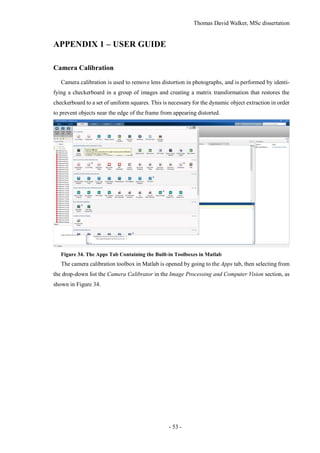
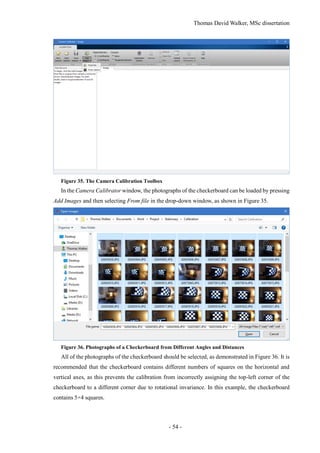
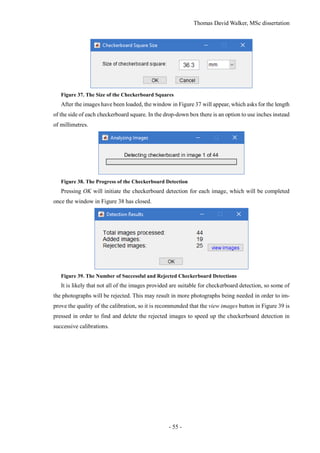
Appendix 1 – User guide ....................................................................................................53
Camera Calibration.........................................................................................................53
Static Reconstruction in Agisoft Photoscan....................................................................58
Appendix 2 – Installation guide..........................................................................................66
The Creation of a New Unity Project..............................................................................66
The Static Reconstruction...............................................................................................67
Control from the First Person Perspective......................................................................73
Lighting of the Model .....................................................................................................75
The Dynamic Billboards.................................................................................................82
Pathfinding AI (Optional) ...............................................................................................87
Advanced Lighting (Optional)........................................................................................88
Interaction with the Model (Optional) ............................................................................91
The Final Build ...............................................................................................................96
Thomas David Walker, MSc dissertation
- 8 -
LIST OF FIGURES
Figure 1. The Dynamic Reconstruction Workflow .......................................................................... 13
Figure 2. Demonstration of Lens Distortion in the GoPro Hero3+ Camera .................................... 17
Figure 3. Camera Calibration of the Sony Xperia Z3 Compact using Matlab................................. 20
Figure 4. Undistorted Image from Estimated Camera Parameters of the Sony Xperia Z3 Compact20
Figure 5. Camera Calibration of the GoPro Hero3+ using Matlab .................................................. 21
Figure 6. Undistorted Image from Estimated Camera Parameters of the GoPro Hero3+................ 21
Figure 7. Sparse Reconstruction of the Bedroom in VisualSFM ..................................................... 22
Figure 8. Image of a Globe used in the Matlab Structure from Motion Example............................ 23
Figure 9. Sparse and Dense Point Clouds created in Matlab ........................................................... 23
Figure 10. Photoscan Project without Colour Correction ................................................................ 25
Figure 11. Photoscan Project with Colour Correction ..................................................................... 26
Figure 12. Original Photograph of the Saint George Church in Kerkira, Greece ............................ 26
Figure 13. Sparse Point Cloud of SIFT Keypoints........................................................................... 27
Figure 14. Dense Point Cloud.......................................................................................................... 28
Figure 15. 3D Mesh Created from the Dense Point Cloud .............................................................. 28
Figure 16. Textured Mesh ................................................................................................................ 29
Figure 17. Multiple Pedestrians Identified and Tracked Using a Kalman Filter.............................. 31
Figure 18. Bounding Box Coordinates............................................................................................. 33
Figure 19. Detected People Using Connected Components ............................................................ 34
Figure 20. Alpha Mask Created Using Connected Components...................................................... 34
Figure 21. Billboards Created Using Connected Components......................................................... 35
Figure 22. Billboard and Alpha Transparency of Vehicles............................................................... 35
Figure 23. Median Image from a Static Camera .............................................................................. 36
Figure 24. Difference Image using the Absolute Difference of the RGB Components ................... 37
Figure 25. Normalised Difference Image using the RGB Components........................................... 38
Figure 26. Difference Image using the Chromaticity Components of the YUV Colour Space ....... 39
Figure 27. Non-linear Difference Image Between Frame 1 and the Median Image ........................ 39
Figure 28. Frame 1 with the Difference Image used as the Alpha Channel..................................... 40
Figure 29. Comparison of Billboards with and without Perspective Correction ............................. 41
Figure 30. Textures Downsampled to the Default Resolution of 2048 by 2048 Pixels ................... 43
Figure 31. Textures Imported at the Original Resolution of 8192 by 8192 pixels........................... 43
Figure 32. Static Reconstruction of the Interior of the British Museum.......................................... 45
Figure 33. Static Reconstruction of the Exterior of the British Museum......................................... 46
Figure 34. The Apps Tab Containing the Built-in Toolboxes in Matlab .......................................... 53
Figure 35. The Camera Calibration Toolbox.................................................................................... 54
Thomas David Walker, MSc dissertation
- 9 -
Figure 36. Photographs of a Checkerboard from Different Angles and Distances .......................... 54
Figure 37. The Size of the Checkerboard Squares ........................................................................... 55
Figure 38. The Progress of the Checkerboard Detection ................................................................. 55
Figure 39. The Number of Successful and Rejected Checkerboard Detections............................... 55
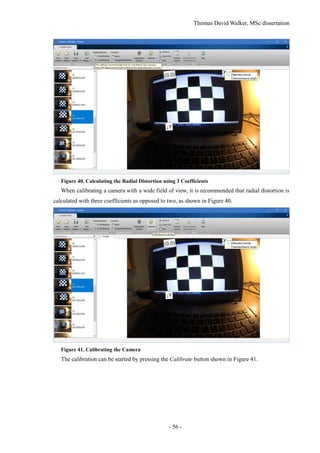
Figure 40. Calculating the Radial Distortion using 3 Coefficients .................................................. 56
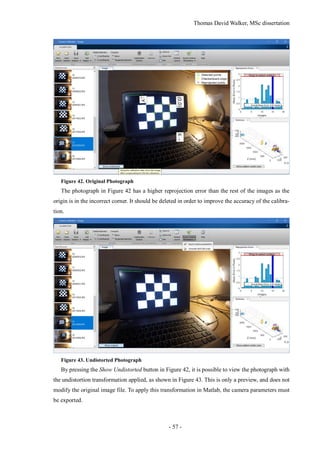
Figure 41. Calibrating the Camera................................................................................................... 56
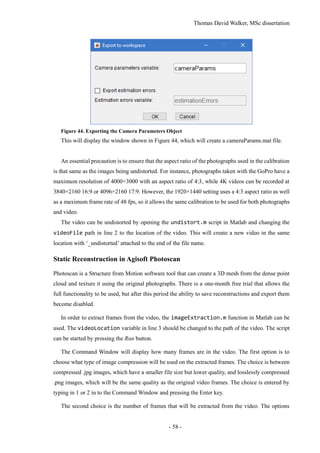
Figure 42. Original Photograph........................................................................................................ 57
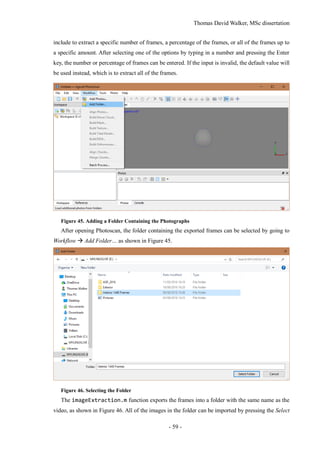
Figure 43. Undistorted Photograph.................................................................................................. 57
Figure 44. Exporting the Camera Parameters Object....................................................................... 58
Figure 45. Adding a Folder Containing the Photographs................................................................. 59
Figure 46. Selecting the Folder ........................................................................................................ 59
Figure 47. Loading the Photos ......................................................................................................... 60
Figure 48. Creating Individual Cameras for each Photo.................................................................. 60
Figure 49. Setting Up a Batch Process............................................................................................. 61
Figure 50. Saving the Project After Each Step................................................................................. 61
Figure 51. Aligning the Photos with Pair Preselection Set to Generic............................................. 62
Figure 52. Optimising the Alignment with the Default Settings...................................................... 62
Figure 53. Building a Dense Cloud.................................................................................................. 63
Figure 54. Creating a Mesh with a High Face Count....................................................................... 63
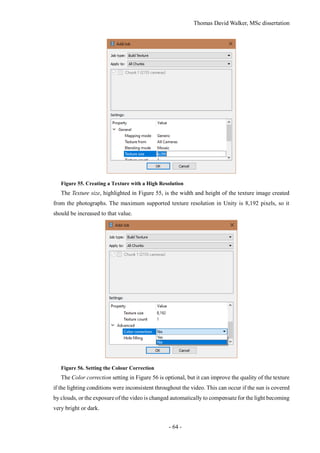
Figure 55. Creating a Texture with a High Resolution..................................................................... 64
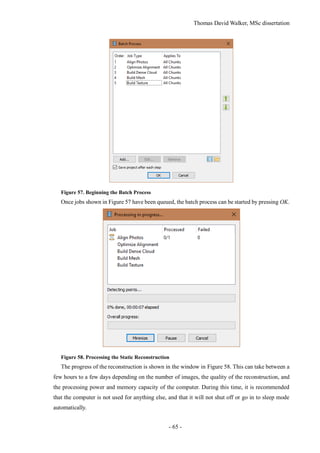
Figure 56. Setting the Colour Correction......................................................................................... 64
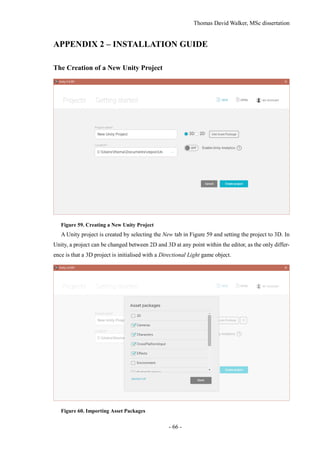
Figure 57. Beginning the Batch Process .......................................................................................... 65
Figure 58. Processing the Static Reconstruction.............................................................................. 65
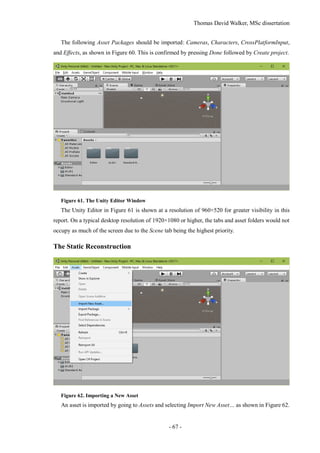
Figure 59. Creating a New Unity Project......................................................................................... 66
Figure 60. Importing Asset Packages............................................................................................... 66
Figure 61. The Unity Editor Window............................................................................................... 67
Figure 62. Importing a New Asset ................................................................................................... 67
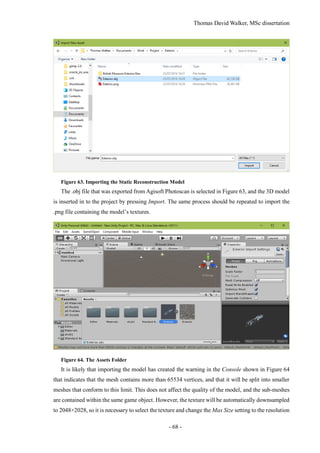
Figure 63. Importing the Static Reconstruction Model.................................................................... 68
Figure 64. The Assets Folder ........................................................................................................... 68
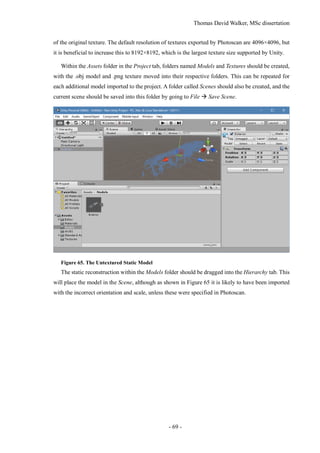
Figure 65. The Untextured Static Model.......................................................................................... 69
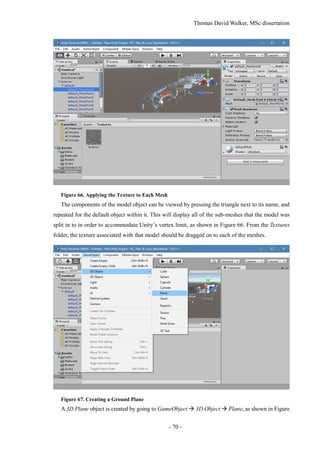
Figure 66. Applying the Texture to Each Mesh................................................................................ 70
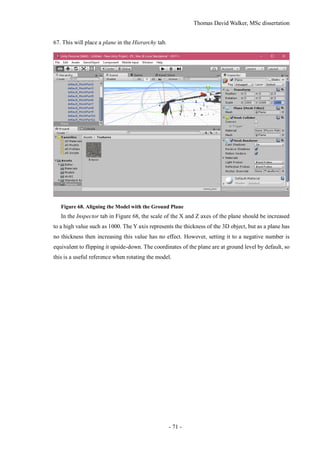
Figure 67. Creating a Ground Plane................................................................................................. 70
Figure 68. Aligning the Model with the Ground Plane.................................................................... 71
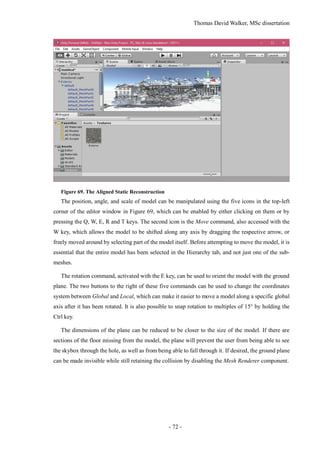
Figure 69. The Aligned Static Reconstruction ................................................................................. 72
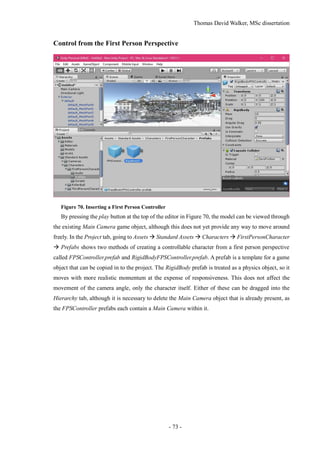
Figure 70. Inserting a First Person Controller.................................................................................. 73
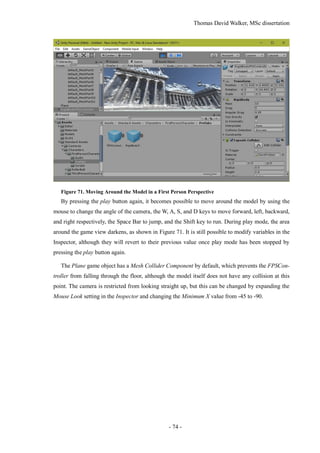
Figure 71. Moving Around the Model in a First Person Perspective............................................... 74
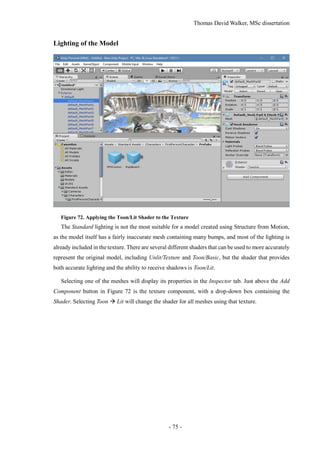
Figure 72. Applying the Toon/Lit Shader to the Texture.................................................................. 75
Thomas David Walker, MSc dissertation
- 10 -
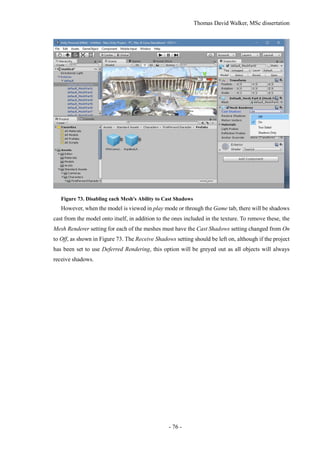
Figure 73. Disabling each Mesh's Ability to Cast Shadows............................................................. 76
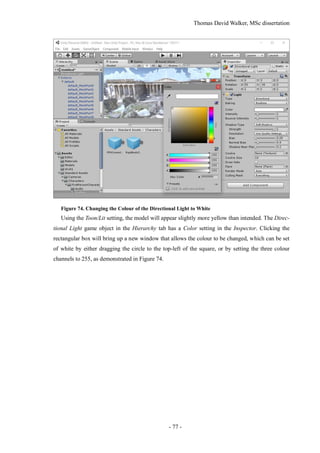
Figure 74. Changing the Colour of the Directional Light to White ................................................. 77
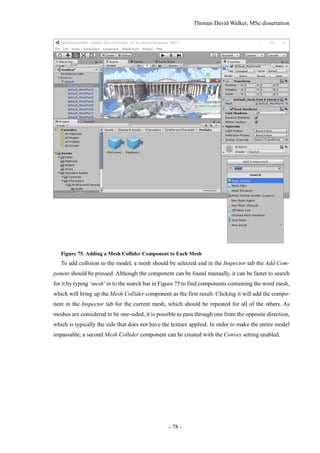
Figure 75. Adding a Mesh Collider Component to Each Mesh ....................................................... 78
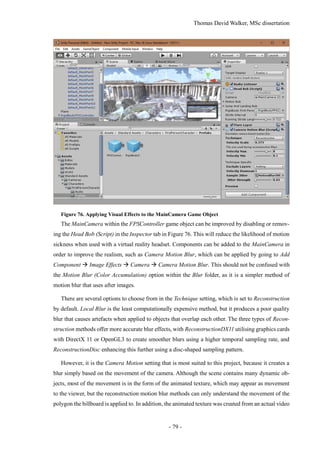
Figure 76. Applying Visual Effects to the MainCamera Game Object ............................................ 79
Figure 77. Lighting the Scene.......................................................................................................... 80
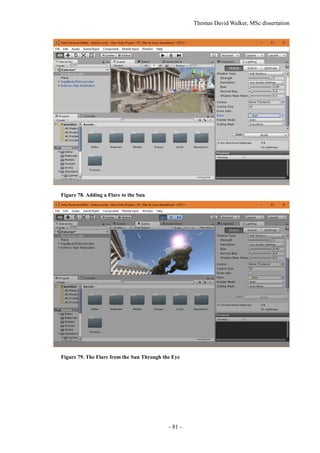
Figure 78. Adding a Flare to the Sun ............................................................................................... 81
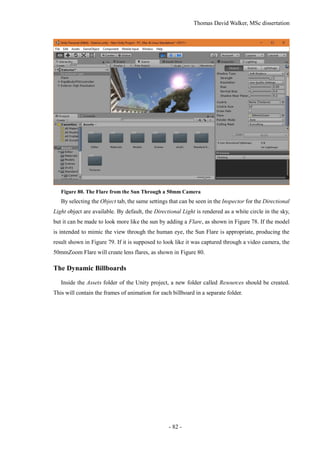
Figure 79. The Flare from the Sun Through the Eye ....................................................................... 81
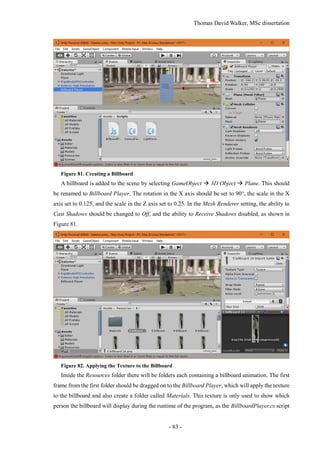
Figure 80. The Flare from the Sun Through a 50mm Camera ......................................................... 82
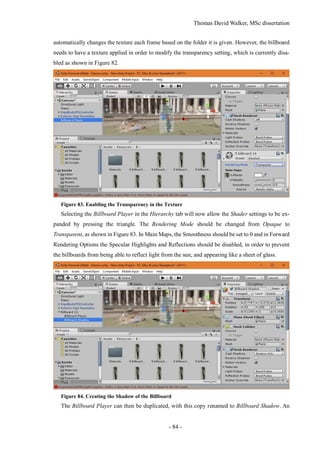
Figure 81. Creating a Billboard........................................................................................................ 83
Figure 82. Applying the Texture to the Billboard ............................................................................ 83
Figure 83. Enabling the Transparency in the Texture ...................................................................... 84
Figure 84. Creating the Shadow of the Billboard............................................................................. 84
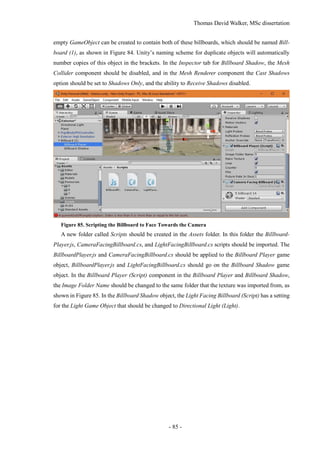
Figure 85. Scripting the Billboard to Face Towards the Camera ..................................................... 85
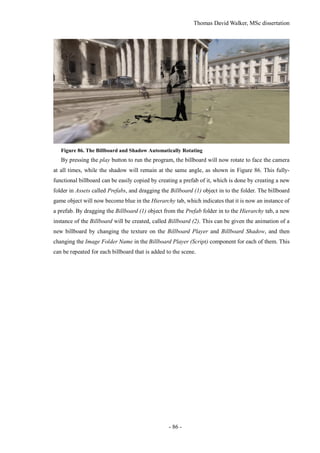
Figure 86. The Billboard and Shadow Automatically Rotating....................................................... 86
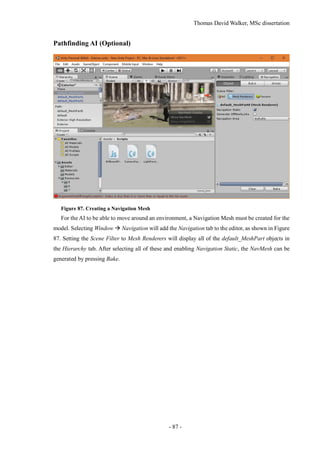
Figure 87. Creating a Navigation Mesh ........................................................................................... 87
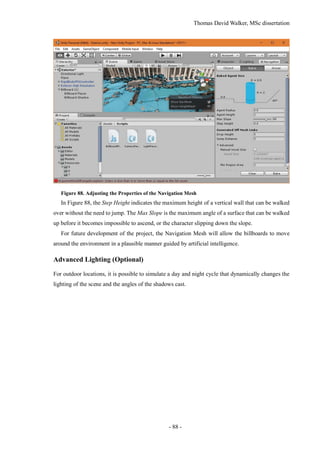
Figure 88. Adjusting the Properties of the Navigation Mesh........................................................... 88
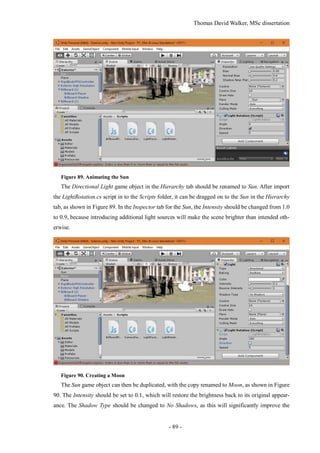
Figure 89. Animating the Sun .......................................................................................................... 89
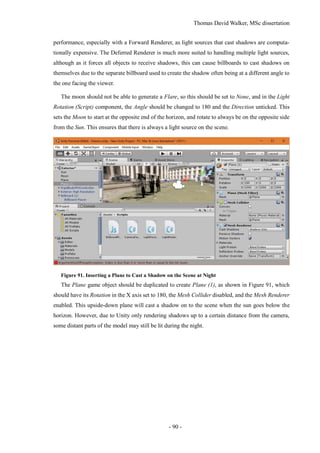
Figure 90. Creating a Moon ............................................................................................................. 89
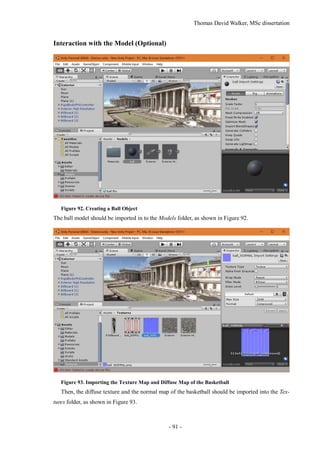
Figure 91. Inserting a Plane to Cast a Shadow on the Scene at Night ............................................. 90
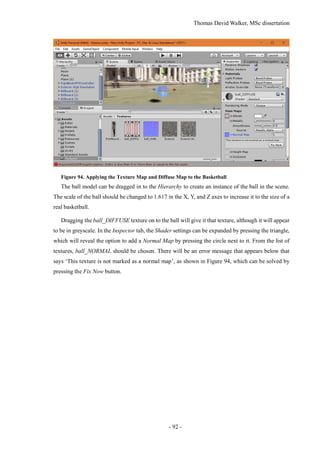
Figure 92. Creating a Ball Object .................................................................................................... 91
Figure 93. Importing the Texture Map and Diffuse Map of the Basketball ..................................... 91
Figure 94. Applying the Texture Map and Diffuse Map to the Basketball ...................................... 92
Figure 95. Changing the Colour of the Basketball........................................................................... 93
Figure 96. Adding Rubber Physics to the Basketball....................................................................... 93
Figure 97. Adding Collision to the Basketball................................................................................. 94
Figure 98. Creating a Prefab of the Basketball ................................................................................ 94
Figure 99. Adding a Script to Throw Basketballs ............................................................................ 95
Figure 100. Adding the Scene to the Build ...................................................................................... 96
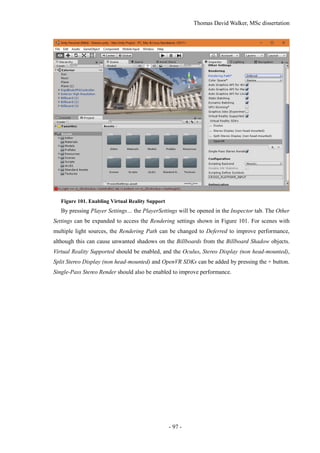
Figure 101. Enabling Virtual Reality Support.................................................................................. 97
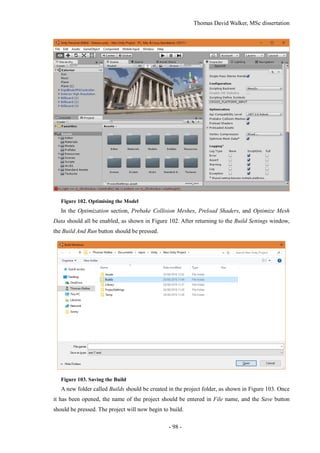
Figure 102. Optimising the Model................................................................................................... 98
Figure 103. Saving the Build ........................................................................................................... 98
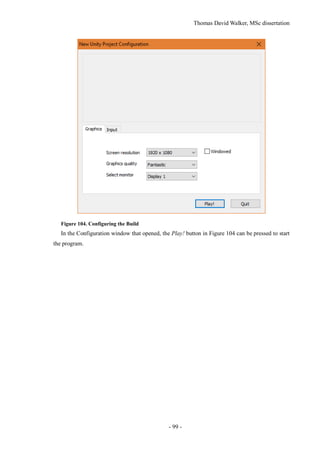
Figure 104. Configuring the Build................................................................................................... 99
Thomas David Walker, MSc dissertation
- 11 -
1 INTRODUCTION
1.1 Background and Context
Virtual reality has progressed to the point that consumer headsets can support realistic interactive
environments, due to advancements in 3D rendering, high resolution displays and positional tracking.
However, it is still difficult to create content for VR that is based on the real world. Omnidirectional
cameras such as those used by the BBC’s Click team [1] produce 360° videos from a stationary
position by stitching together the images from six cameras [2], but the lack of stereoscopy (depth
perception) and free movement make them inadequate for a full VR experience. These can only be
achieved by creating a 3D model that accurately depicts the location, including the moving objects
that are present in the video.
Astatic model of a scene can be produced from a set of photographs using Structure from Motion,
which creates a 3D point cloud by matching SIFT (Scale-Invariant Feature Transform) keypoints
between pairs of images taken from different positions [3]. Only stationary objects produce keypoints
that remain consistent as the camera pose is changed, so the keypoints of moving objects are dis-
carded from the reconstruction.
Many of the locations that can be modelled with this technique appear empty without any moving
objects, such as vehicles or crowds of people, so these are extracted with a separate program. Moving
objects can be removed from a video by recording it with a stationary camera, then averaging the
frames together to create a median image. This image is subtracted from each frame of the original
video to create a set of difference images that contain only the moving objects in the scene [4].
1.2 Scope and Objectives
The first objective of the project is to use Structure from Motion to create a complete 3D model of a
scene from a set of images. The second objective, which contains the most significant contribution
to the field of reconstruction, is to extract the dynamic objects from the scene such that each object
can be represented as a separate animated billboard. The final objective is to combine the static and
dynamic elements in Unity to allow the location to be viewed through a virtual reality headset.
1.3 Achievements
Two video cameras have been tested for the static reconstruction in the software packages VisualSFM
and Agisoft Photoscan, and scripts for object tracking have been written in Matlab. The model and
billboards have been implemented in Unity to allow the environment to be populated with billboards
that play animations of the people present in the original videos. A complete guide to using the soft-
ware and scripts have been written in the appendices.
Thomas David Walker, MSc dissertation
- 12 -
Test footage from locations such as a bedroom and the front of the University of Surrey’s Austin
Pearce building were used to highlight the strengths and weaknesses of the static reconstruction.
Large surfaces lacking in detail such as walls, floors, and clear skies do not generate keypoints that
can be matched between images, which leaves holes in the 3D model.
The aim of the dynamic reconstruction was to create a script that can identify, track, and extract
the moving objects in a video, and create an animation for a billboard that contains a complete image
of the object without including additional clutter. This required the ability to distinguish separate
moving objects as well as track them while they are occluded. Connected components were created
from the difference image, although this is a morphological operation that has no understanding on
the depth in the scene. This often resulted in overlapping objects being considered as a single object.
It is also unreliable for tracking an entire person as a single object, so a separate script was created
that specialises in identifying people.
Once all of the objects have been identified in the frame, tracking is performed in order to deter-
mine their movement over time. One of the biggest challenges in tracking is occlusion, which is the
problem of an object moving in front of another one, partially or completely obscuring it. This was
solved with the implementation of the Kalman filter [5], which is an object-tracking algorithm that
considers both the observed position and the estimated position of each object to allow it to predict
where an object is located during the frames where it cannot be visually identified.
The dynamic objects extracted from the video are only 2D, so they are applied to ‘billboards’that
rotate to face the viewer to provide the illusion of being 3D. They can also cast shadows on to the
environment by using a second invisible billboard that always faces towards the main light source.
Although the billboards are animated using their appearance from the video, their movement could
also be approximated to match their position in each video frame. In order to estimate the object’s
depth in the scene from a single camera, an assumption would be made that the object’s position is
at the point where the lowest pixel touches the floor of the 3D reconstruction. This would be an
adequate estimate for grounded objects such as people or cars, but not for anything airborne such as
birds or a person sprinting. However, this was not able to be implemented.
1.4 Overview of Dissertation
This dissertation contains a literature review that explains the established solutions for Structure from
Motion and object tracking, and an outline of the method that will allow these to be combined to
support dynamic objects. This is followed by an evaluation and discussion of the results and a sum-
mary of the findings and limitations of the study, with suggestions for future research. The appendices
contain a complete guide to use the software and scripts to replicate the work carried out in this
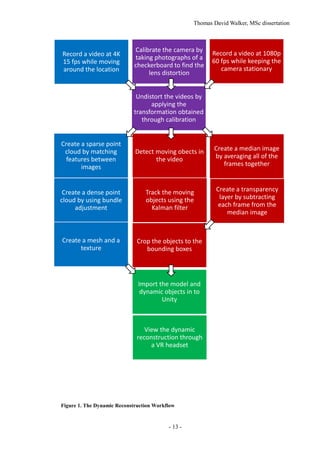
project, in order to allow it to be developed further. The workflow is shown in Figure 1.
Thomas David Walker, MSc dissertation
- 13 -
Figure 1. The Dynamic Reconstruction Workflow
Calibrate the camera by
taking photographs of a
checkerboard to find the
lens distortion
Record a video at 4K
15 fps while moving
around the location
Record a video at 1080p
60 fps while keeping the
camera stationary
Create a sparse point
cloud by matching
features between
images
Create a dense point
cloud by using bundle
adjustment
Create a mesh and a
texture
Undistort the videos by
applying the
transformation obtained
through calibration
Create a median image
by averaging all of the
frames together
Detect moving obects in
the video
Track the moving
objects using the
Kalman filter
Create a transparency
layer by subtracting
each frame from the
median image
Crop the objects to the
bounding boxes
Import the model and
dynamic objects in to
Unity
View the dynamic
reconstruction through
a VR headset
Thomas David Walker, MSc dissertation
- 14 -
2 STATE-OF-THE-ART
2.1 Introduction
The methods of applying Structure from Motion to create static models of real-world objects from
photographs has advanced significantly in recent years, but this project aims to expand the technique
to allow animated objects created from videos to be used alongside it. This requires the use of object
identification and tracking algorithms to effectively separate the moving objects from the back-
ground.
2.2 Structure from Motion for Static Reconstruction
The Structure from Motion pipeline is comprehensively covered in the books Digital Representations
of the Real World [6] and Computer Vision: Algorithms and Applications [7]. However, there are
many applications and modifications to the technique that have been published which contribute to
the aims of this project.
An early method of static reconstruction was achieved by Microsoft with Photosynth in 2008 [8].
Instead of creating a 3D mesh from the images, they are stitched together using the photographs that
are the closest match to the current view. This results in significant amounts of warping during cam-
era movement, and dynamic objects that were present in the original photographs remain visible at
specific angles. It also provides a poor reconstruction of views that were not similar to any contained
in the image set, such as from above.
The following year, the entire city of Rome was reconstructed as a point cloud in a project from
the University of Washington called ‘Building Rome in a Day’ [9]. This demonstrated the use of
Structure for Motion both for large-scale environments, as well as with the use of communally-
sourced photographs from uncalibrated cameras. However, the point cloud did not have a high
enough density to appear solid unless observed from very far away. A 3D mesh created from the
point cloud would be a superior reconstruction, although it would be difficult to create a texture from
photographs under many different lighting conditions that still looks consistent.
DTAM (Dense Tracking and Mapping in Real-Time) is a recent modification of Structure from
Motion that uses the entire image to estimate movement, instead of keypoint tracking [10]. This is
made feasible by the use of GPGPU (General-Purpose computing on Graphics Processing Units),
which allows programming to be performed on graphics cards with their support for many parallel
processes, as opposed to the CPU (Central Processing Unit) where the number of concurrent tasks is
limited to the number of cores and threads. DTAM is demonstrated to be more effective in scenes
with motion blur, as these create poor keypoints but high visual correspondence [11].
Thomas David Walker, MSc dissertation
- 15 -
2.3 Object Tracking
Tracking objects continues to be a challenge for computer vision, with changing appearance and
occlusion adding significant complexity. There have been many algorithms designed to tackle this
problem, with different objectives and constraints.
Long-term tracking requires the algorithm to be robust to changes in illumination and angle. LT-
FLOtrack (Long-Term FeatureLess Object tracker) is a technique that tracks edge-based features to
reduce the dependence on the texture of the object [12]. This incorporates unsupervised learning in
order to adapt the descriptor over time, as well as a Kalman filter to allow an object to be re-identified
if it becomes occluded. The position and identity of an object is determined by a pair of confidence
scores, the first from measuring the current frame, and the second being an estimate based on previ-
ous results. If the object is no longer present in the frame, the confidence score of its direct
observation becomes lower than the confidence of the tracker, so the estimated position is used in-
stead. If the object becomes visible again, and it is close to its predicted position, then it is determined
to be the same object.
The algorithm used in TMAGIC (Tracking, Modelling And Gaussian-process Inference Com-
bined) is designed to track and model the 3D structure of an object that is moving relative to the
camera and to the environment [13]. The implementation requires the user to create a bounding box
around the object on the first frame, so it would need to be modified to support objects that appear
during the video. Although this can create 3D dynamic objects instead of 2D billboards, the object
would need to be seen from all sides to create an adequate model, and it is only effective for rigid
objects such as vehicles, and not objects with more complex movements such as pedestrians.
Although one of the aims of the project is to detect and track arbitrary moving objects, incorpo-
rating pre-trained trackers for vehicles and pedestrians could benefit the reconstruction. ‘Meeting in
the Middle: A Top-down and Bottom-up Approach to Detect Pedestrians’ [14] explores the use of
fuzzy first-order logic as an alternative to the Kalman filter, and the MATLAB code from MathWorks
for tracking pedestrians from a moving car [15] is used as a template for the object tracking prior to
the incorporation of the static reconstruction.
Many of the video-tracking algorithms only track the location of an object in the two-dimensional
reference frame of the original video. Tracking the trajectory of points in three dimensions is
achieved in the paper ‘Joint Estimation of Segmentation and Structure from Motion’ [16]. Other re-
ports that relate to this project include ‘Exploring Causal Relationships in Visual Object Tracking’
[17], ‘Dense Rigid Reconstruction from Unstructured Discontinuous Video’ [18], and ‘Tracking the
Untrackable: How to Track When Your Object Is Featureless’ [19].
Thomas David Walker, MSc dissertation
- 16 -
2.4 Virtual Reality
2016 is the year that three major virtual reality headsets are released, which are the Oculus Rift, HTC
Vive, and PlayStation VR. These devices are capable of tracking the angle and position of the head
with less than a millisecond of delay, using both accelerometers within the headset, as well as posi-
tion-tracking cameras [20] [21]. The Vive headset allows the user to move freely anywhere within
the area covered by the position-tracking cameras, and have this movement replicated within the
game.
The HTC Vive was tested with a prototype build of a horror game called ‘A Chair in a Room’,
created in Unity by a single developer called Ryan Bousfield. In order to allow the player to move
between rooms without walking into a wall or out of the range of the tracking cameras, he developed
a solution where interacting with a door places the player in the next room but facing the door they
came in, so they’d turn around to explore the new room. This allows any number of rooms to be
connected together, making it possible to explore an entire building.
Unity is a game creation utility with support for many of the newest virtual reality headsets, al-
lowing it to render a 3D environment with full head and position tracking. The scene’s lighting and
scale would need to be adjusted in order to be fully immersive. Although the static reconstruction
can easily be imported into Unity, it is essential that the model is oriented correctly so that the user
is standing on the floor, and the model is not at an angle. In VR, it is important that the scale of the
environment is correct, which is most easily achieved by including an object of known size in the
video, such as a metre rule.
Thomas David Walker, MSc dissertation
- 17 -
3 CAMERA CALIBRATION
The accuracy of the static reconstruction is highly dependent on the quality of the photographs used
to create it, and therefore the camera itself is one of the most significant factors. Two different cam-
eras were tested for this project, with different strengths and weaknesses with regards to image and
video resolution, field of view and frame rate. These cameras must be calibrated to improve the
accuracy of both the static and dynamic reconstructions, by compensating for the different amount
of lens distortion present in their images. Although the models in this project were created from a
single camera, the use of multiple cameras would require calibration in order to increase the corre-
spondence between the images taken with them. The result of calibration is a ‘cameraParams.mat’
file that can be used in Matlab to undistort the images from that camera.
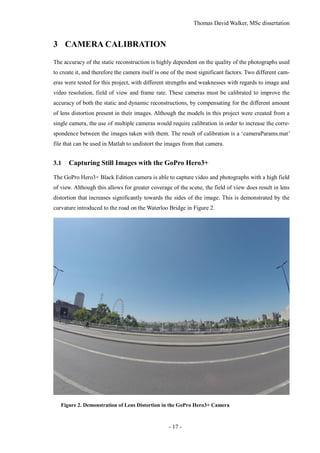
3.1 Capturing Still Images with the GoPro Hero3+
The GoPro Hero3+ Black Edition camera is able to capture video and photographs with a high field
of view. Although this allows for greater coverage of the scene, the field of view does result in lens
distortion that increases significantly towards the sides of the image. This is demonstrated by the
curvature introduced to the road on the Waterloo Bridge in Figure 2.
Figure 2. Demonstration of Lens Distortion in the GoPro Hero3+ Camera
Thomas David Walker, MSc dissertation
- 18 -
An advantage of using photographs is the ability to take raw images, which are unprocessed and
uncompressed, allowing a custom demosaicing algorithm and more advanced noise reduction tech-
niques to be used [22] [23]. The image sensor in a camera is typically overlaid with a set of colour
filters arranged in a Bayer pattern, which ensures that each sensor only detects either red, green or
blue light. Demosaicing is the method used to reconstruct a full colour image at the same resolution
as the original sensor, by interpolating the missing colour values. Unlike frames extracted from a
video, photographs also contain metadata that includes the intrinsic parameters of the camera, such
as the focal length and shutter speed, which allows calibration to be performed more accurately as
these would not need to be estimated.
Before the calibration takes place, the image enhancement features are disabled in order to obtain
images that are closer to what the sensor detected. These settings are typically designed to make the
images more appealing to look at, but also makes them less accuratefor use in Structure from Motion.
The colour correction and sharpening settings must be disabled, and the white balance should be set
to Cam RAW, which is an industry standard. The ISO limit, i.e. the gain, should be fixed at a specific
value determined by the scene, as the lowest value of 400 will have the least noise at the expense of
a darker image. Noise reduction is an essential precaution for Structure from Motion, but keypoints
can be missed entirely if the image is too dark.
The GoPro supports a continuous photo mode that can take photographs with a resolution of 12.4
Megapixels at up to 10 times per second, but the rate at which the images are taken is bottlenecked
by the transfer speed of the microSD card. In a digital camera, the data from the image sensor is held
in RAM before it is transferred to the microSD card, in order to allow additional processing to be
performed such as demosaicing and compression. However, raw images have no compression and
therefore a much higher file size, which means they will take longer to transfer to the microSD card
than the rate at which they can be taken. Therefore, the camera can only take photographs at a rate
of 10 images per second before the RAM has been filled, at which point the rate of capture becomes
significantly reduced. However, as the read and write speed of microSD cards are continually in-
creasing, the use of high resolution raw images will be possible for future development.
3.2 Capturing Video with the GoPro Hero3+
For the static reconstruction, resolution is a higher priority than frame rate, as it allows for smaller
and more distant keypoints to be distinguished. Only a fraction of the frames from a video can be
used in Photoscan as it slows down considerably if the image set cannot fit within the computer’s
memory [24]. It is not possible to record video at both the highest resolution and frame rate supported
by the camera, due to limitations in the speed of the CMOS (Complementary metal–oxide–semicon-
ductor) sensor, the data transfer rate of the microSD card, and the processing power required to
compress the video. However, separating the static and dynamic reconstructions allowed the most
Thomas David Walker, MSc dissertation
- 19 -
suitable setting to be used for each recording. For the static reconstruction, the video was recorded
at 3860×2160 pixels at 15 frames per second. At this aspect ratio the field of view is 69.5° vertically,
125.3° horizontally, and 139.6° diagonally, due to the focal length being only 14 mm.
There are several disadvantages to recording the footage as a video compared to a set of photo-
graphs. It is impossible to obtain the raw images from a video, before any post-processing such as
white balancing, gamma correction, or noise reduction has been performed, and the images extracted
from the video have also been heavily compressed. The coding artefacts may not be visible to a
person when played back at full speed, but each frame has spatial and temporal artefacts that can
negatively affect the feature detection. While video footage is being recorded, the focus and exposure
are automatically adjusted to improve the visibility, although this inconsistency also leads to poor
matching between images. Colour correction can be used in Photoscan to account for this, by nor-
malising the brightness of every image in the dataset.
The image sensor used in the GoPro camera is a CMOS sensor with a pixel pitch of 1.55 µm. One
of the disadvantages of this type of sensor is the rolling shutter effect, where rows of pixels are
sampled sequentially, resulting in a temporal distortion if the camera is moved during the capture of
the image. This can manifest even at walking speed, and unless the camera is moving at a consistent
speed and at the same height and orientation, it is not possible to counteract the exact amount of
distortion. The same effect occurs in the Sony Xperia Z3 Compact camera, which suggests that it
also uses a CMOS sensor.
3.3 Calibration of the GoPro Hero3+ and the Sony Xperia Z3 Compact
In addition to the GoPro, the camera within the Sony Xperia Z3 Compact mobile phone was used
in testing for its ability to record 4K video at 30 fps. This could be used to create higher resolution
dynamic objects, although the smaller field of view would require more coverage of the scene to
make the static reconstruction. It is also possible to take up to 20.7 Megapixel photographs with an
ISO limit of 12,800 [25], although it cannot take uncompressed or raw images.
The most significant difference between the two cameras is the GoPro’s wide field of view, which
is an attribute that causes barrel distortion that increases towards the sides of the frame. This requires
pincushion distortion to straighten the image, although the Sony Xperia Z3 Compact’s camera suffers
from the opposite problem as its photographs feature pincushion distortion, which requires barrel
distortion to be performed.
Thomas David Walker, MSc dissertation
- 20 -
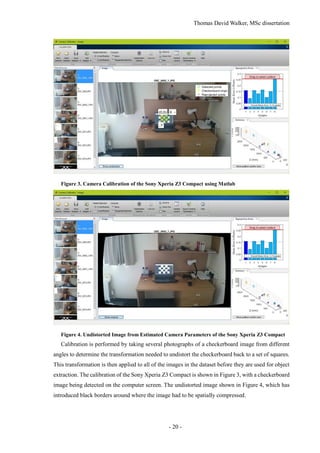
Figure 3. Camera Calibration of the Sony Xperia Z3 Compact using Matlab
Figure 4. Undistorted Image from Estimated Camera Parameters of the Sony Xperia Z3 Compact
Calibration is performed by taking several photographs of a checkerboard image from different
angles to determine the transformation needed to undistort the checkerboard back to a set of squares.
This transformation is then applied to all of the images in the dataset before they are used for object
extraction. The calibration of the Sony Xperia Z3 Compact is shown in Figure 3, with a checkerboard
image being detected on the computer screen. The undistorted image shown in Figure 4, which has
introduced black borders around where the image had to be spatially compressed.
Thomas David Walker, MSc dissertation
- 21 -
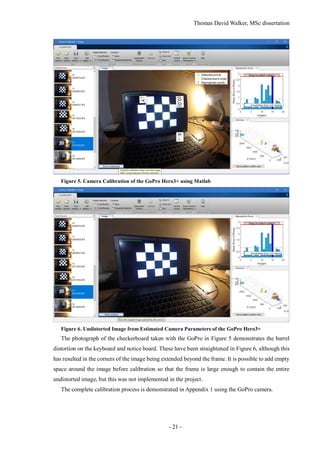
Figure 5. Camera Calibration of the GoPro Hero3+ using Matlab
Figure 6. Undistorted Image from Estimated Camera Parameters of the GoPro Hero3+
The photograph of the checkerboard taken with the GoPro in Figure 5 demonstrates the barrel
distortion on the keyboard and notice board. These have been straightened in Figure 6, although this
has resulted in the corners of the image being extended beyond the frame. It is possible to add empty
space around the image before calibration so that the frame is large enough to contain the entire
undistorted image, but this was not implemented in the project.
The complete calibration process is demonstrated in Appendix 1 using the GoPro camera.
Thomas David Walker, MSc dissertation
- 22 -
4 STATIC RECONSTRUCTION
4.1 Structure from Motion Software
In order to create a static 3D reconstruction with Structure from Motion, several different software
packages and scripts were tested.
4.1.1 VisualSFM
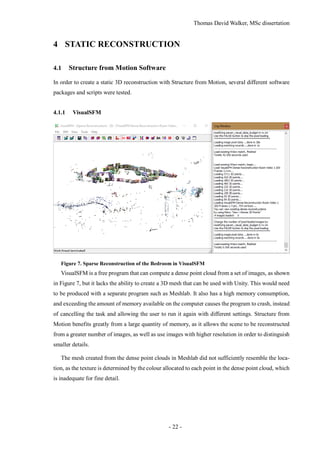
Figure 7. Sparse Reconstruction of the Bedroom in VisualSFM
VisualSFM is a free program that can compute a dense point cloud from a set of images, as shown
in Figure 7, but it lacks the ability to create a 3D mesh that can be used with Unity. This would need
to be produced with a separate program such as Meshlab. It also has a high memory consumption,
and exceeding the amount of memory available on the computer causes the program to crash, instead
of cancelling the task and allowing the user to run it again with different settings. Structure from
Motion benefits greatly from a large quantity of memory, as it allows the scene to be reconstructed
from a greater number of images, as well as use images with higher resolution in order to distinguish
smaller details.
The mesh created from the dense point clouds in Meshlab did not sufficiently resemble the loca-
tion, as the texture is determined by the colour allocated to each point in the dense point cloud, which
is inadequate for fine detail.
Thomas David Walker, MSc dissertation
- 23 -
4.1.2 Matlab
Figure 8. Image of a Globe used in the Matlab Structure from Motion Example
Figure 9. Sparse and Dense Point Clouds created in Matlab
The Structure from Motion scripts Matlab and OpenCV are both capable of calculating sparse
and dense point clouds like VisualSFM. Figure 9 shows the sparse and dense point clouds produced
by the Structure from Motion example in Matlab [26], created from five photographs of the globe in
Figure 8 from different angles, but attempting to use the same code for a large number of high reso-
lution photographs would cause the program to run out of memory. However, Matlab is less memory
efficient, so it cannot load and process as many images before the computer runs out of memory.
OpenCV can also support a dedicated graphics card to increase the processing speed, as opposed to
running the entire program on the CPU (Central Processing Unit).
Thomas David Walker, MSc dissertation
- 24 -
4.1.3 OpenCV
The Structure from Motion libraries in OpenCV and Matlab allow for better integration of the
dynamic elements, as having access to the source code provides the ability to output the coordinates
of each camera position. OpenCV is faster and more memory efficient than Matlab, as the memory
management is much more suited for copying and editing large images. For instance, copying an
image in OpenCV does not create an exact duplicate in the memory, it simply allocates a pointer to
it, and stores the changes. Only when the output image is created is there the need to allocate the
array, and populate it with the changed and unchanged pixel values [27].
The Structure from Motion module in OpenCV requires several open source libraries that are only
supported on Linux [28], so several distributions of Linux were tested on a laptop. There is no dif-
ference in OpenCV’s compatibility between distributions of Linux, but Ubuntu 14.04 LTS was the
first one to be used due to the wide range of support available. It is also the distribution used on the
Linux computers at the University of Surrey, which have OpenCV installed on them. Due to unfa-
miliarity with the interface, a derivative of Ubuntu called Ubuntu MATE was installed in on the
laptop in its place, as the desktop environment can be configured to be very similar to Windows.
However, this version suffered from crashes that would leave the laptop completely unresponsive,
so a similar distribution called Linux Mint was used instead. Like Ubuntu MATE, it is derived from
Ubuntu and can be installed with the MATE desktop environment, although it has better support for
laptop graphics cards, which is likely to have been the cause of the crashes.
Installing OpenCV on Linux Mint was straightforward with the help of the guides provided in the
OpenCV documentation [29], however the installation of the Structure from Motion modules was
not. Despite having the required dependencies installed and ensuring that the contrib modules were
included in the compiling of OpenCV [30], the required header files for the reconstruction such as
sfm.hpp and viz.hpp were not installed in the usr/local/include/opencv2 folder. Neither man-
ually moving the header files to this folder nor changing the path that they are looked for allowed the
scripts to compile. Although the Linux computers in the University of Surrey’s CVSSP (Centre for
Vision, Speech and Signal Processing) did have OpenCV installed with the contrib modules, the
ability to develop the project outside of campus during working hours was necessary to achieve pro-
gress.
4.1.4 Photoscan
A commercial program called Agisoft Photoscan was used for the static reconstruction as it is
capable of creating a textured 3D mesh, and has significantly more options to allow for a higher
quality reconstruction. It was initially used for the duration of the free trial period of one month, but
the University generously purchased a license to have it installed on one of the Linux computers in
Thomas David Walker, MSc dissertation
- 25 -
the CVSSP building. The reconstruction process takes many hours to complete, but the ability to
queue tasks enables the entire static reconstruction pipeline to be performed without user interven-
tion, provided the ideal settings are chosen at the start. However, if any procedure requires more
memory than the computer has available, then on a Windows operating system it will cancel the task
and will likely cause the following steps to fail, as they typically require information from the previ-
ous one. On Linux distributions such as Ubuntu 14.04 LTS, a portion of the hard drive can be
allocated as swap space, which allows it to be used as a slower form of memory once the actual RAM
has been filled. This enables much higher quality reconstructions to be created, but at a significantly
slower rate. The first step of static reconstruction, matching images, would have required over 117
days to complete on the highest quality setting. This involves upscaling the images to four times the
original resolution in order to increase the accuracy of matched key points between images, but at
the expense of requiring four times as much memory and a higher processing time. The pair prese-
lection feature was also disabled, which is used to estimate which images are likely to be similar by
comparing downsampled versions so that the key point matching is not performed between every
permutation of images in the data set.
On Windows, a compromise between quality and guarantee of success is to queue up multiple
copies of the same task, but with successively higher quality settings. Should one of the processes
fail due to running out of memory, the following step will continue with the highest quality version
that succeeded.
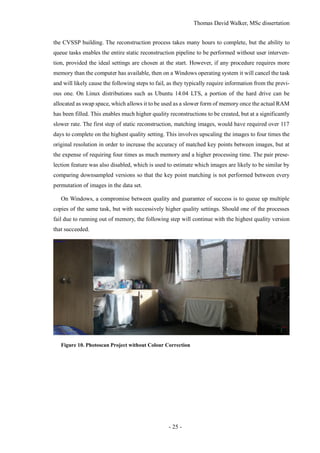
Figure 10. Photoscan Project without Colour Correction
Thomas David Walker, MSc dissertation
- 26 -
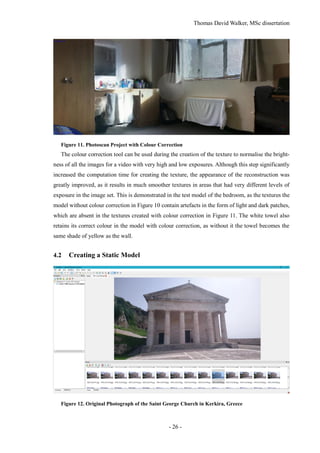
Figure 11. Photoscan Project with Colour Correction
The colour correction tool can be used during the creation of the texture to normalise the bright-
ness of all the images for a video with very high and low exposures. Although this step significantly
increased the computation time for creating the texture, the appearance of the reconstruction was
greatly improved, as it results in much smoother textures in areas that had very different levels of
exposure in the image set. This is demonstrated in the test model of the bedroom, as the textures the
model without colour correction in Figure 10 contain artefacts in the form of light and dark patches,
which are absent in the textures created with colour correction in Figure 11. The white towel also
retains its correct colour in the model with colour correction, as without it the towel becomes the
same shade of yellow as the wall.
4.2 Creating a Static Model
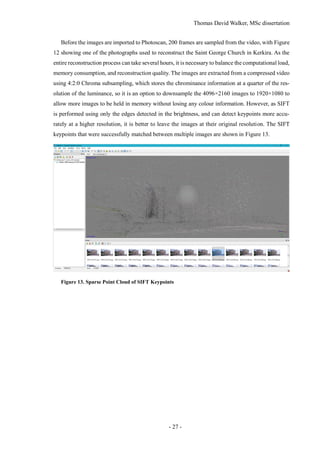
Figure 12. Original Photograph of the Saint George Church in Kerkira, Greece
Thomas David Walker, MSc dissertation
- 27 -
Before the images are imported to Photoscan, 200 frames are sampled from the video, with Figure
12 showing one of the photographs used to reconstruct the Saint George Church in Kerkira. As the
entire reconstruction process can take several hours, it is necessary to balance the computational load,
memory consumption, and reconstruction quality. The images are extracted from a compressed video
using 4:2:0 Chroma subsampling, which stores the chrominance information at a quarter of the res-
olution of the luminance, so it is an option to downsample the 4096×2160 images to 1920×1080 to
allow more images to be held in memory without losing any colour information. However, as SIFT
is performed using only the edges detected in the brightness, and can detect keypoints more accu-
rately at a higher resolution, it is better to leave the images at their original resolution. The SIFT
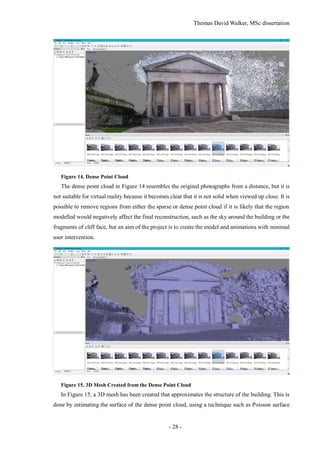
keypoints that were successfully matched between multiple images are shown in Figure 13.
Figure 13. Sparse Point Cloud of SIFT Keypoints
Thomas David Walker, MSc dissertation
- 28 -
Figure 14. Dense Point Cloud
The dense point cloud in Figure 14 resembles the original photographs from a distance, but it is
not suitable for virtual reality because it becomes clear that it is not solid when viewed up close. It is
possible to remove regions from either the sparse or dense point cloud if it is likely that the region
modelled would negatively affect the final reconstruction, such as the sky around the building or the
fragments of cliff face, but an aim of the project is to create the model and animations with minimal
user intervention.
Figure 15. 3D Mesh Created from the Dense Point Cloud
In Figure 15, a 3D mesh has been created that approximates the structure of the building. This is
done by estimating the surface of the dense point cloud, using a technique such as Poisson surface
Thomas David Walker, MSc dissertation
- 29 -
reconstruction. Many of the points from the cliff face had too few neighbours to determine a surface
from, although the sky above and to the right of the building has introduced a very uneven surface.
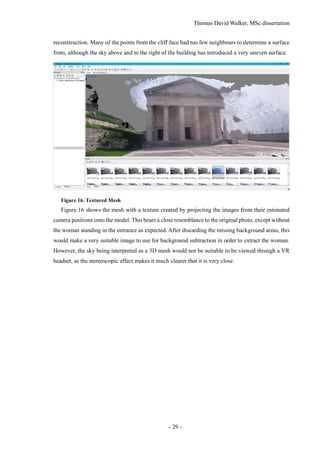
Figure 16. Textured Mesh
Figure 16 shows the mesh with a texture created by projecting the images from their estimated
camera positions onto the model. This bears a close resemblance to the original photo, except without
the woman standing in the entrance as expected. After discarding the missing background areas, this
would make a very suitable image to use for background subtraction in order to extract the woman.
However, the sky being interpreted as a 3D mesh would not be suitable to be viewed through a VR
headset, as the stereoscopic effect makes it much clearer that it is very close.
Thomas David Walker, MSc dissertation
- 30 -
5 DYNAMIC RECONSTRUCTION
Dynamic elements in a scene, such as pedestrians, cannot easily be modelled as animated 3D objects.
This is because they cannot be seen from all sides simultaneously with a single camera, and their
shape changes with each frame. There has been success in modelling rigid objects such as vehicles
in 3D, but it is only possible because their shape remains consistent over time [18]. Approximating
a 3D model of a person from a video and mapping their movement to it is possible, but the quality
of the model and the accuracy of the animation are limited, and the implementation is beyond the
scope of this project.
The dynamic objects are implemented as animated ‘billboards’, which are 2D planes that display
an animation of the moving object. To extract these from the video, it is necessary to track objects
even when they have been partially or fully occluded, so that they can be recognised once they be-
come visible again. The billboards are created by cropping the video to a bounding box around the
moving object, but in order to remove the clutter around the object, a transparency layer is created
using background subtraction. The aim is to create a set of folders that each contain the complete
animation of a single object, which can then be imported in to Unity.
It is possible to track people from a moving camera, allowing the same video to be used for the
static and dynamic reconstructions. However, the creation of a transparency layer significantly more
challenging, as it is not possible to average the frames together to make a median image for back-
ground subtraction. The static reconstruction could be aligned with the model in each frame, but the
inaccuracy of the model prevents the background subtraction from being as effective. The quality of
the billboards would also be reduced, as they are more convincing when the billboard animation is
created from a fixed position.
One method that would allow tracking to be improved would be to perform a second pass on the
video, with the frames played in reverse. This would allow objects to be tracked before they are
visible in the video, which would improve the dynamic 3D reconstruction as it would prevent them
from suddenly appearing. This is a consideration for future work.
5.1 Tracking and Extracting Moving Objects
Two different object tracking algorithms were implemented in the project, with one specialising in
detecting people and the other used to detect any form of movement and track connected components.
The problem with using motion detection for tracking people is that it often fails to extract the entire
person, and objects that occlude each other temporarily are merged into a single component. This is
because the morphological operation for connecting regions has no information on the depth of the
scene, so it cannot easily separate two different moving objects that have any amount of overlap.
Thomas David Walker, MSc dissertation
- 31 -
5.1.1 Detecting People
Figure 17. Multiple Pedestrians Identified and Tracked Using a Kalman Filter
The output of the Matlab script for tracking people with the Kalman filter is shown in Figure 17.
The number above each bounding box displays the confidence score of the track, which indicates the
certainty of the bounding box containing a person. This score is used to discard a tracked object if it
is below the specified threshold value.
This script is a modification of one of the examples in the Matlab documentation called ‘Tracking
Pedestrians from a Moving Car’ [15], which uses a function called detectPeopleACF() to create
bounding boxes around the people detected in each frame [31]. This utilises aggregate channel fea-
tures [32], which comprise of HOG descriptors (Histogram of Oriented Gradients) [33] and gradient
magnitude, in order to match objects to a training set while being robust to changes in illumination
and scale.
Matlab has support for two data sets for pedestrian detection called the Caltech Pedestrian Dataset
[34] and the INRIA (Institut National de Recherche en Informatique et en Automatique) Person Da-
taset [35]. Caltech uses a set of six training sets and five test sets of approximately 1 Gigabyte in size
each, while the total size of the training and test data for INRIA is only 1 Gigabyte. Caltech was also
created more recently, so it was used for this project. Both sets are only trained on people who are
standing upright, which has resulted in some people in the bottom-left corner of the Figure 17 not
being detected. Due to the lack of a tripod, the GoPro camera had to be placed on the bannister of
the stairs, which slopes downwards to the centre of the Great Hall. Therefore, it is essential that either
the camera is correctly oriented or the video is rotated in order to improve the detection of people.
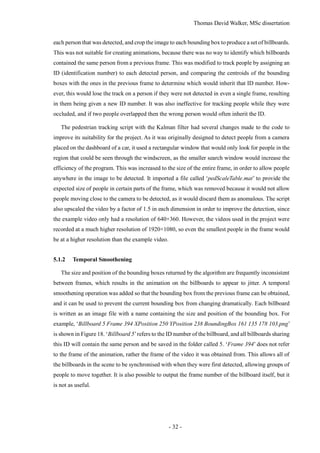
The first attempt to create billboards of people with the detectPeopleACF() function simply
called it on each frame without applying any tracking. This was able to create bounding boxes around
Thomas David Walker, MSc dissertation
- 32 -
each person that was detected, and crop the image to each bounding box to produce a set of billboards.
This was not suitable for creating animations, because there was no way to identify which billboards
contained the same person from a previous frame. This was modified to track people by assigning an
ID (identification number) to each detected person, and comparing the centroids of the bounding
boxes with the ones in the previous frame to determine which would inherit that ID number. How-
ever, this would lose the track on a person if they were not detected in even a single frame, resulting
in them being given a new ID number. It was also ineffective for tracking people while they were
occluded, and if two people overlapped then the wrong person would often inherit the ID.
The pedestrian tracking script with the Kalman filter had several changes made to the code to
improve its suitability for the project. As it was originally designed to detect people from a camera
placed on the dashboard of a car, it used a rectangular window that would only look for people in the
region that could be seen through the windscreen, as the smaller search window would increase the
efficiency of the program. This was increased to the size of the entire frame, in order to allow people
anywhere in the image to be detected. It imported a file called ‘pedScaleTable.mat’ to provide the
expected size of people in certain parts of the frame, which was removed because it would not allow
people moving close to the camera to be detected, as it would discard them as anomalous. The script
also upscaled the video by a factor of 1.5 in each dimension in order to improve the detection, since
the example video only had a resolution of 640×360. However, the videos used in the project were
recorded at a much higher resolution of 1920×1080, so even the smallest people in the frame would
be at a higher resolution than the example video.
5.1.2 Temporal Smoothening
The size and position of the bounding boxes returned by the algorithm are frequently inconsistent
between frames, which results in the animation on the billboards to appear to jitter. A temporal
smoothening operation was added so that the bounding box from the previous frame can be obtained,
and it can be used to prevent the current bounding box from changing dramatically. Each billboard
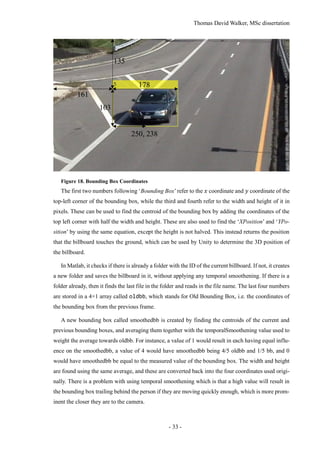
is written as an image file with a name containing the size and position of the bounding box. For
example, ‘Billboard 5 Frame 394 XPosition 250 YPosition 238 BoundingBox 161 135 178 103.png’
is shown in Figure 18. ‘Billboard 5’refers to the ID number of the billboard, and all billboards sharing
this ID will contain the same person and be saved in the folder called 5. ‘Frame 394’ does not refer
to the frame of the animation, rather the frame of the video it was obtained from. This allows all of
the billboards in the scene to be synchronised with when they were first detected, allowing groups of
people to move together. It is also possible to output the frame number of the billboard itself, but it
is not as useful.
Thomas David Walker, MSc dissertation
- 33 -
Figure 18. Bounding Box Coordinates
The first two numbers following ‘Bounding Box’refer to the 𝑥 coordinate and 𝑦 coordinate of the
top-left corner of the bounding box, while the third and fourth refer to the width and height of it in
pixels. These can be used to find the centroid of the bounding box by adding the coordinates of the
top left corner with half the width and height. These are also used to find the ‘XPosition’ and ‘YPo-
sition’ by using the same equation, except the height is not halved. This instead returns the position
that the billboard touches the ground, which can be used by Unity to determine the 3D position of
the billboard.
In Matlab, it checks if there is already a folder with the ID of the current billboard. If not, it creates
a new folder and saves the billboard in it, without applying any temporal smoothening. If there is a
folder already, then it finds the last file in the folder and reads in the file name. The last four numbers
are stored in a 4×1 array called oldbb, which stands for Old Bounding Box, i.e. the coordinates of
the bounding box from the previous frame.
A new bounding box called smoothedbb is created by finding the centroids of the current and
previous bounding boxes, and averaging them together with the temporalSmoothening value used to
weight the average towards oldbb. For instance, a value of 1 would result in each having equal influ-
ence on the smoothedbb, a value of 4 would have smoothedbb being 4/5 oldbb and 1/5 bb, and 0
would have smoothedbb be equal to the measured value of the bounding box. The width and height
are found using the same average, and these are converted back into the four coordinates used origi-
nally. There is a problem with using temporal smoothening which is that a high value will result in
the bounding box trailing behind the person if they are moving quickly enough, which is more prom-
inent the closer they are to the camera.
161
135
178
103
250, 238
Thomas David Walker, MSc dissertation
- 34 -
5.1.3 Detecting Moving Objects
Figure 19. Detected People Using Connected Components
In order to allow billboards to be created of any type of moving object, and not just pedestrians,
the Matlab example called ‘Motion-Based Multiple Object Tracking’ [36] was modified to export
billboards. Although it has successfully tracked several people in Figure 19, there are many more
people who have much larger bounding boxes than they require, and others who are being tracked as
multiple objects. The number above the bounding boxes indicates the ID number of the tracked ob-
ject, which can also display ‘predicted’ when it is using the estimated position provided by the
Kalman filter.
Figure 20. Alpha Mask Created Using Connected Components
The main issue of using connected components is shown in Figure 20, where two people have a
slight overlap in their connected components, resulting in them being identified as a single object.
The connected component of the woman with the ID of 22 in Figure 19 has become merged with the
Thomas David Walker, MSc dissertation
- 35 -
woman with the ID of 46, although her left leg is still considered to be a separate object with the ID
of 6.
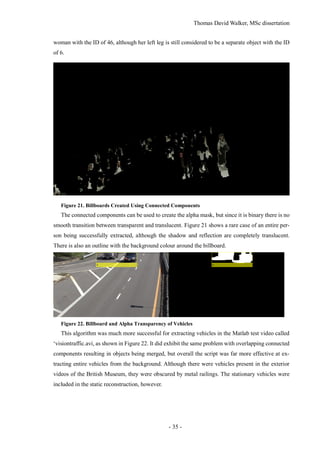
Figure 21. Billboards Created Using Connected Components
The connected components can be used to create the alpha mask, but since it is binary there is no
smooth transition between transparent and translucent. Figure 21 shows a rare case of an entire per-
son being successfully extracted, although the shadow and reflection are completely translucent.
There is also an outline with the background colour around the billboard.
Figure 22. Billboard and Alpha Transparency of Vehicles
This algorithm was much more successful for extracting vehicles in the Matlab test video called
‘visiontraffic.avi, as shown in Figure 22. It did exhibit the same problem with overlapping connected
components resulting in objects being merged, but overall the script was far more effective at ex-
tracting entire vehicles from the background. Although there were vehicles present in the exterior
videos of the British Museum, they were obscured by metal railings. The stationary vehicles were
included in the static reconstruction, however.
Thomas David Walker, MSc dissertation
- 36 -
5.2 Creating Billboards of Dynamic Objects
Figure 23. Median Image from a Static Camera
In order to produce a semi-transparent layer that contains only the moving objects, the first step
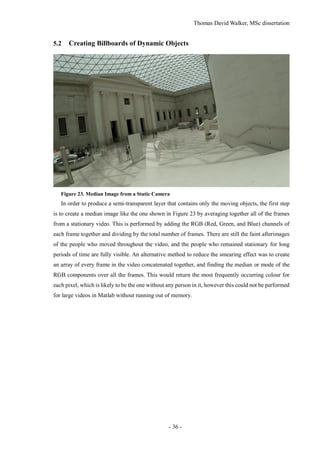
is to create a median image like the one shown in Figure 23 by averaging together all of the frames
from a stationary video. This is performed by adding the RGB (Red, Green, and Blue) channels of
each frame together and dividing by the total number of frames. There are still the faint afterimages
of the people who moved throughout the video, and the people who remained stationary for long
periods of time are fully visible. An alternative method to reduce the smearing effect was to create
an array of every frame in the video concatenated together, and finding the median or mode of the
RGB components over all the frames. This would return the most frequently occurring colour for
each pixel, which is likely to be the one without any person in it, however this could not be performed
for large videos in Matlab without running out of memory.
Thomas David Walker, MSc dissertation
- 37 -
Figure 24. Difference Image using the Absolute Difference of the RGB Components
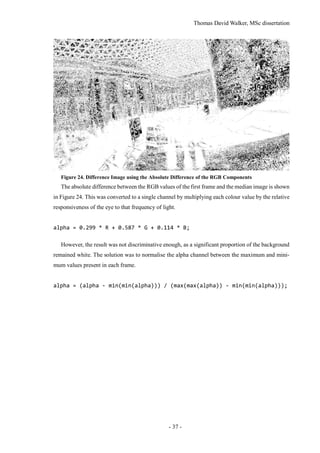
The absolute difference between the RGB values of the first frame and the median image is shown
in Figure 24. This was converted to a single channel by multiplying each colour value by the relative
responsiveness of the eye to that frequency of light.
alpha = 0.299 * R + 0.587 * G + 0.114 * B;
However, the result was not discriminative enough, as a significant proportion of the background
remained white. The solution was to normalise the alpha channel between the maximum and mini-
mum values present in each frame.
alpha = (alpha - min(min(alpha))) / (max(max(alpha)) - min(min(alpha)));
Thomas David Walker, MSc dissertation
- 38 -
Figure 25. Normalised Difference Image using the RGB Components
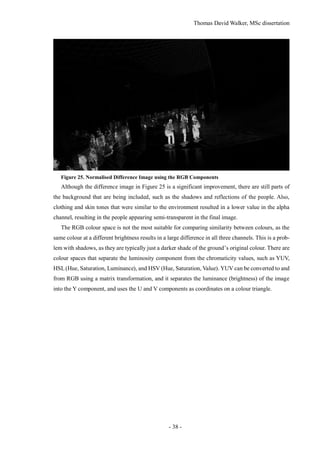
Although the difference image in Figure 25 is a significant improvement, there are still parts of
the background that are being included, such as the shadows and reflections of the people. Also,
clothing and skin tones that were similar to the environment resulted in a lower value in the alpha
channel, resulting in the people appearing semi-transparent in the final image.
The RGB colour space is not the most suitable for comparing similarity between colours, as the
same colour at a different brightness results in a large difference in all three channels. This is a prob-
lem with shadows, as they are typically just a darker shade of the ground’s original colour. There are
colour spaces that separate the luminosity component from the chromaticity values, such as YUV,
HSL(Hue, Saturation, Luminance), and HSV (Hue, Saturation, Value). YUV can be converted to and
from RGB using a matrix transformation, and it separates the luminance (brightness) of the image
into the Y component, and uses the U and V components as coordinates on a colour triangle.
Thomas David Walker, MSc dissertation
- 39 -
Figure 26. Difference Image using the Chromaticity Components of the YUV Colour Space
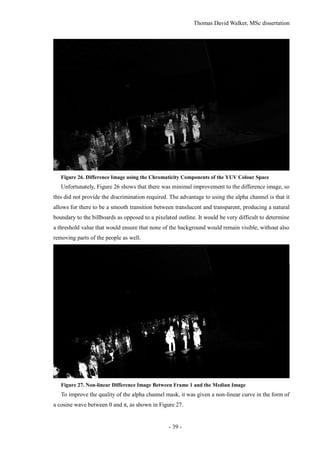
Unfortunately, Figure 26 shows that there was minimal improvement to the difference image, so
this did not provide the discrimination required. The advantage to using the alpha channel is that it
allows for there to be a smooth transition between translucent and transparent, producing a natural
boundary to the billboards as opposed to a pixelated outline. It would be very difficult to determine
a threshold value that would ensure that none of the background would remain visible, without also
removing parts of the people as well.
Figure 27. Non-linear Difference Image Between Frame 1 and the Median Image
To improve the quality of the alpha channel mask, it was given a non-linear curve in the form of
a cosine wave between 0 and π, as shown in Figure 27.
Thomas David Walker, MSc dissertation
- 40 -
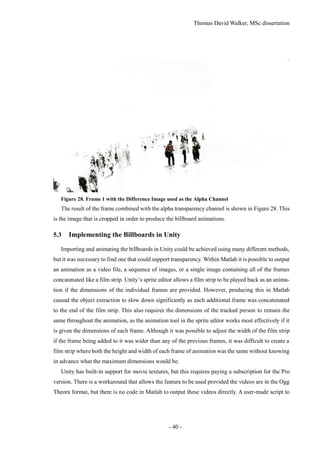
Figure 28. Frame 1 with the Difference Image used as the Alpha Channel
The result of the frame combined with the alpha transparency channel is shown in Figure 28. This
is the image that is cropped in order to produce the billboard animations.
5.3 Implementing the Billboards in Unity
Importing and animating the billboards in Unity could be achieved using many different methods,
but it was necessary to find one that could support transparency. Within Matlab it is possible to output
an animation as a video file, a sequence of images, or a single image containing all of the frames
concatenated like a film strip. Unity’s sprite editor allows a film strip to be played back as an anima-
tion if the dimensions of the individual frames are provided. However, producing this in Matlab
caused the object extraction to slow down significantly as each additional frame was concatenated
to the end of the film strip. This also requires the dimensions of the tracked person to remain the
same throughout the animation, as the animation tool in the sprite editor works most effectively if it
is given the dimensions of each frame. Although it was possible to adjust the width of the film strip
if the frame being added to it was wider than any of the previous frames, it was difficult to create a
film strip where both the height and width of each frame of animation was the same without knowing
in advance what the maximum dimensions would be.
Unity has built-in support for movie textures, but this requires paying a subscription for the Pro
version. There is a workaround that allows the feature to be used provided the videos are in the Ogg
Theora format, but there is no code in Matlab to output these videos directly. A user-made script to
Thomas David Walker, MSc dissertation
- 41 -
output QuickTime’s .mov format, which supports an alpha channel for transparency, was success-
fully integrated into the code, but the decision was made to use a sequence of .png images instead.
An advantage to using images is that the dimensions can be different for each frame.
In Unity a script was used to assign the texture of a billboard to the first image in a specific folder,
and have the index of the image updated 60 times a second [37]. There is also an option to repeat the
animation once it completes, so the scene does not become empty once all of the billboard’s anima-
tions have played once. The billboards include a timecode that indicates the frame it was taken from
in the original video, which could be used to delay the start of a billboard’s animation in order to
synchronise groups of people moving together, but this was not implemented in the project.
Figure 29. Comparison of Billboards with and without Perspective Correction
Once it was possible to display an animated texture in Unity, it was necessary to have the billboard
face the camera at all times in order to prevent the object from being seen from the side and appearing
two-dimensional [38]. The first script that was used would adjust the angle of the billboard each
frame in order to always be facing towards the camera, including tilting up or down when seen from
above or below. This prevented the billboard from appearing distorted, but it would also cause the
billboard to appear to float in the air or drop below the floor. By restricting the rotation to only be
along the vertical axis, the billboards would retain their correct position in 3D space. In Figure 29,
the same object is represented using two different methods for facing the camera, with the object on
the left tilting towards the viewer as it is being seen from below, while the object on the right remains
vertical. This script was modified to be able to face the main light source in the scene, which was
applied to a copy of the billboard that could not be seen by the viewer but could cast shadows. This
ensures that the shadow is always cast from the full size of the billboard, and does not become two-
dimensional if the billboard has been rotated perpendicularly to the light source. However, the
shadow does disappear if the light source is directly above the billboard.
Thomas David Walker, MSc dissertation
- 42 -
5.4 Virtual Reality
To create the static reconstruction, a video recorded at 4K at 15 frames per second was taken while
walking around the building, while the videos used for the dynamic reconstruction were recorded at
1080p at 60 frames per second while the camera was placed on the stairs. In a virtual reality headset,
a high frame rate is necessary to improve spatial perception, reduce latency in head tracking, and
minimise motion sickness, so headsets typically operate at 60 frames per second or above [39]. Alt-
hough the frame rate of a Unity program is only limited by the processing power of the computer
and the refresh rate of the VR headset, if the object tracking was performed at a low frame rate such
as 15 frames per second, then the animation would be noticeably choppy compared to the movement
of the viewer. This would also limit the precision of the 3D position of the billboards.
It is possible to interpolate a video to a higher frame rate using motion prediction, although the
quality is dependent on how predictable the movement is. VR headsets typically operate at 90 or 120
frames per second, so it would be possible to interpolate the 60 fps footage to match the desired
frame rate. Although this could be done for the 4K 15 fps footage as well, this would only look
acceptable for simple translational movement such as a vehicle moving along a road, while the com-
plex motion of a human body walking, comprised of angular motions and self-occlusion, would
create visible artefacts [40].
Unity is a game engine that can be used to create interactive 3D environments that can be viewed
through a VR headset. The version of Unity used in this project is 5.4.0f3, which features improve-
ments in several aspects related to virtual reality [41]. This includes optimisation of the single-pass
stereo rendering setting, which allows the views for each eye to be computed more quickly and effi-
ciently, resulting in a higher frame rate, as well as providing native support for the OpenVR format
used in the headset owned by the University of Surrey.
In addition to running the virtual reality application on a computer through a VR headset, it is
also possible to compile the project for a mobile phone and view it through a headset adapter such
as Google cardboard. The model is rendered entirely with the phone, as opposed to acting as a display
for a computer. The Google cardboard use lenses to magnify each half of the phone’s screen to take
up the entire field of view, while the phone uses its accelerometers to determine the angle of the head.
Unity provides asset packages that allow controllable characters or visual effects to be added to
the project. These take the form of prefabs, which are templates for game objects as well as compo-
nents that can be attached to game objects. Virtual reality is typically experienced through the
viewpoint of the character, and two of the controllable character prefabs allow for the scene to be
explored with this perspective. These are the FPSController.prefab and RigidBodyFPSControl-
ler.prefab game objects. Rigid Body is a component in Unity that allows a game object to be treated
as a physics object, so it moves with more realistic momentum at the expense of responsiveness. This
Thomas David Walker, MSc dissertation
- 43 -
does not affect the movement of the camera angle, only the character itself.
The 3D textured mesh created by Photoscan can be imported in to Unity, although due to the high
polygon count, the model is automatically split up into sub-meshes to conform to the maximum
number of vertices being 65534. This does not reduce the quality of the model, but it does require
some steps including applying the texture map and the collision to be repeated for each sub-mesh.
Figure 30. Textures Downsampled to the Default Resolution of 2048 by 2048 Pixels
Figure 31. Textures Imported at the Original Resolution of 8192 by 8192 pixels
By default, Unity downsamples all imported textures to 2048×2028, so it is essential that the
resolution of the texture map is changed to match the resolution it was created at in Photoscan. The
largest texture size supported by unity is 8192×8192 pixels, so it is unnecessary to create a larger
texture in Photoscan. It is not possible to see the fluting in the Ionic columns with the downsampled
texture in Figure 30, but they are clearly visible in Figure 31.
It is possible to adjust the static reconstruction either before the model is exported from Photoscan
or after it has been imported into Unity. These adjustments include setting the orientation and scale
Thomas David Walker, MSc dissertation
- 44 -
of the model. Photoscan contains a set of tools that allow distances in the model to be measured, and
allow the model to be scaled up or down if that distance is known to be incorrect. If there are no
known distances in the model, it can be scaled in Unity using estimation. The FPS Controller has a
height of 1.6 metres, so it allows the model to be viewed at the scale of a typical person. The orien-
tation of the local axes can also be changed in Photoscan, but are just as easily adjusted in Unity.
There are many advanced lighting methods available in Unity, although it is better to use a simple
method due to the lighting of the scene being already present in the texture of the model. In order for
the scene to resemble the model exported from Photoscan, the Toon/Lit setting is used for the texture.
This ensures that the bumpy and inaccurate mesh does not introduce additional shadows on to the
scene, but does allow for other objects to cast shadows on to the model.
Thomas David Walker, MSc dissertation
- 45 -
6 EXPERIMENTS
6.1 Results
Although the initial tests with the bedroom in Figure 11 and the St. George Church in Figure 16
demonstrated that a small, enclosed space was more suitable for recreation with Structure from Mo-
tion than an outdoor location, this would not achieve the main aim of the project to support many
dynamic objects. The British Museum’s Great Court proved to be an ideal location to use, due to it
being an indoor room that is both large and densely populated. The stairs around the Reading Room
made it possible to record the floor from several metres above it, which allowed the object tracking
and extraction to be more effective than at ground level, as people were less likely to occlude each
other. The entrance to the British Museum was also captured in order to demonstrate an outdoor
location, although the quality of the building was sufficient, the surrounding area was visibly incom-
plete.
Figure 32. Static Reconstruction of the Interior of the British Museum
The first recording session took place on the 13th
July 2016, using the GoPro camera to record
moving and stationary footage of the interior. Throughout the day, clouds occasionally blocked out
the sun and changed the lighting of the scene, which removed the shadows cast by the glass roof.
This was not an issue for the second recording session on the 19th
July 2016, which remained sunny
throughout the entire day. This also cast shadows of the gridshell glass roof on to the walls and floor,
as seen in Figure 32, which ensured that there would not be gaps in the reconstruction due to a lack
of distinct keypoints.
Thomas David Walker, MSc dissertation
- 46 -
Figure 33. Static Reconstruction of the Exterior of the British Museum
This was also beneficial for recording the exterior of the British Museum, as clouds have been
shown to interfere with the modelling of buildings in the previous experiment with the St. George
Church. As it shared similar architecture with the British Museum, particularly with the use of col-
umns, it was necessary to capture footage from the other side of the columns to ensure that they were
complete in the reconstruction. As Figure 33 demonstrates, the columns are separate from the build-
ing, allowing the main entrance to be seen between them.
6.2 Discussion of results
The initial model of the Great Court highlighted an issue with Structure from Motion, which is loop
closure [42]. Due to the rotational symmetry of the interior, photographs from the opposite sides of
the building were being incorrectly matched, resulting in a model that was missing one half. There
is a technique called ‘similarity averaging’ that creates correspondences between images simultane-
ously as opposed to incrementally in bundle adjustment [43].
Thomas David Walker, MSc dissertation
- 47 -
7 CONCLUSION
7.1 Summary
The project managed to achieve most of the original aims, with the exception of having the bill-
boards move in accordance with their position in the original video. Several static reconstructions
were created to gain understanding of the abilities and limitations of Structure from Motion, and this
knowledge was used to create the dynamic reconstructions of the interior and exterior of the British
Museum.
The dynamic object extraction was split in to two scripts in order to improve the tracking of people
beyond what could be achieved with motion detection and connected components. Two months of
the project were dedicated to learning the Unity program to the extent that the dynamic reconstruction
could be implemented in it. A complete guide to achieving everything that was accomplished in this
project is provided in the appendices, in order to allow for a thorough understanding of the method-
ology and the ability to continue of the project in the future.
7.2 Evaluation
For the static reconstruction, the GoPro camera should have been used to capture raw images instead
of videos. This would have allowed for higher resolution photographs to have been used for the static
reconstruction, and these photographs would have not had any compression reducing the image qual-
ity. This would have required moving much more slowly through the environments in order to allow
the camera to take enough pictures close together due to the slow transfer rate of the microSD card.
However, as it was intended to originally use the same video for the static and dynamic reconstruc-
tions, video was still used for the static reconstruction.
Initially, it was intended to create an object detection algorithm that would allow the objects to
be extracted from the same video used to create the static reconstruction. This would have used both
the original video and the static reconstruction to identify and separate objects without the use of pre-
training. Background subtraction is typically only possible on a video with a stationary camera, but
aligning the static reconstruction with each frame of the video could have allowed the same location
to be compared with and without the moving objects, although the difficulty in matching the angle
and lighting conditions proved this to be ineffective.
The billboards created from object tracking suffered from very jittery animations, due to the
bounding boxes changing size in each frame. This was reduced with the implementation of temporal
smoothening, but the issue still remains. The background subtraction could have used further devel-
opment to identify the colours that are only present in the moving objects using a technique such as
a global colour histogram, and creating the alpha channel using the Mahalanobis distance.
Thomas David Walker, MSc dissertation
- 48 -
7.3 Future Work
Future research programmes could investigate the effects of higher resolution cameras in producing
denser point clouds, and improvements in the software would allow for better discrimination of the
features to be extracted for more precise billboards. These would allow developers to construct and
incorporate real scenes in a more naturalistic way into their environments.
The billboards created by the object-tracking scripts include the coordinates of the billboard in
the frame, which will enable the implementation of the billboards being positioned according to their
location in the video.
Thomas David Walker, MSc dissertation
- 49 -
8 REFERENCES
[1] BBC, “Click goes 360 in world first,” BBC, 23 February 2016. [Online]. Available:
http://www.bbc.co.uk/mediacentre/worldnews/2016/click-goes-360-in-world-first.
[Accessed 18 August 2016].
[2] C. Mei and P. Rives, “Single View Point Omnidirectional Camera Calibration from
Planar Grids,” INRIA, Valbonne, 2004.
[3] D. G. Lowe, “Distinctive Image Features from Scale-Invariant Keypoints,”
International Journal of Computer Vision, 5 January 2004.
[4] S. Perreault and P. Hébert, “Median Filtering in Constant Time,” IEEE
TRANSACTIONS ON IMAGE PROCESSING, vol. 16, no. 7, September 2007.
[5] J. Civera, A. J. Davison and J. M. M. Montiel, “Structure from Motion Using the
Extended Kalman Filter,” Springer Tracts in Advanced Robotics, vol. 75, 2012.
[6] M. A. Magnor, O. Grau, O. Sorkine-Hornung and C. Theobalt, Digital Representations
of the Real World, Boca Raton: Taylor & Francis Group, LLC, 2015.
[7] R. Szeliski, Computer Vision: Algorithms and Applications, Springer, 2010, pp. 343-
380.
[8] Microsoft, “Photosynth Blog,” Microsoft, 10 July 2015. [Online]. Available:
https://blogs.msdn.microsoft.com/photosynth/. [Accessed 29 April 2016].
[9] S. Agarwal, N. Snavely, I. Simon, S. M. Seitz and R. Szeliski, “Building Rome in a
Day,” in International Conference on Computer Vision, Kyoto, 2009.
[10] R. A. Newcombe, S. J. Lovegrove and A. J. Davison, “DTAM: Dense Tracking and
Mapping in Real-Time,” Imperial College, London, 2011.
[11] R. Newcombe, “Dense Visual SLAM: Greedy Algorithms,” in Field Robotics Centre,
Pittsburgh, 2014.
[12] K. Lebeda, S. Hadfield and R. Bowden, “Texture-Independent Long-Term Tracking
Using Virtual Corners,” IEEE Transactions on Image Processing, 2015.
[13] K. Lebeda, S. Hadfield and R. Bowden, “2D Or Not 2D: Bridging the Gap Between
Tracking and Structure from Motion,” Guildford, 2015.
[14] A. Shaukat, A. Gilbert, D. Windridge and R. Bowden, “Meeting in the Middle: A Top-
down and Bottom-up Approach to Detect Pedestrians,” in 21st International Conference
on Pattern Recognition, Tsukuba, 2012.
[15] MathWorks, “Tracking Pedestrians from a Moving Car,” MathWorks, 2014. [Online].
Thomas David Walker, MSc dissertation
- 50 -
Available: http://uk.mathworks.com/help/vision/examples/tracking-pedestrians-from-a-
moving-car.html. [Accessed 12 March 2016].
[16] L. Zappellaa, A. D. Bueb, X. Lladóc and J. Salvic, “Joint Estimation of Segmentation
and Structure from Motion,” Computer Vision and Image Understanding, vol. 117, no. 2,
pp. 113-129, 2013.
[17] K. Lebeda, S. Hadfield and R. Bowden, “Exploring Causal Relationships in Visual
Object Tracking,” in International Conference on Computer Vision, Santiago, 2015.
[18] K. Lebeda, S. Hadfield and R. Bowden, “Dense Rigid Reconstruction from
Unstructured Discontinuous Video,” in 3D Representation and Recognition, Santiago,
2015.
[19] K. Lebeda, J. Matas and R. Bowden, “Tracking the Untrackable: How to Track When
Your Object Is Featureless,” in ACCV 2012 Workshops, Berlin, 2013.
[20] P. Halarnkar, S. Shah, H. Shah, H. Shah and A. Shah, “A Review on Virtual Reality,”
International Journal of Computer Science Issues, vol. 9, no. 6, pp. 325-330, November
2012.
[21] V. Kamde, R. Patel and P. K. Singh, “A Review on Virtual Reality and its Impact on
Mankind,” International Journal for Research in Computer Science, vol. 2, no. 3, pp. 30-
34, March 2016.
[22] H. S. Malvar, L.-w. He and R. Cutler, “High-Quality Linear Interpolation for
Demosaicing of Bayer-Patterned Color Images,” Microsoft Research, Redmond, 2004.
[23] D. Khashabi, S. Nowozin, J. Jancsary and A. Fitzgibbon, “Joint Demosaicing and
Denoising via Learned Non-parametric Random Fields,” Microsoft Research, Redmond,
2014.
[24] GoPro, “Hero3+ Black Edition User Manual,” 28 October 2013. [Online]. Available:
http://cbcdn1.gp-
static.com/uploads/product_manual/file/202/HERO3_Plus_Black_UM_ENG_REVD.pdf
. [Accessed 20 February 2016].
[25] Sony, “Xperia™ Z3 Compact Specifications,” Sony, September 2014. [Online].
Available: http://www.sonymobile.com/global-en/products/phones/xperia-z3-
compact/specifications/. [Accessed 22 February 2016].
[26] MathWorks, “Structure From Motion From Multiple Views,” MathWorks, 21 August
2016. [Online]. Available: http://uk.mathworks.com/help/vision/examples/structure-from-
motion-from-multiple-views.html. [Accessed 21 August 2016].
[27] OpenCV Development Team, “OpenCV API Reference,” Itseez, 12 August 2016.
Thomas David Walker, MSc dissertation
- 51 -
[Online]. Available: http://docs.opencv.org/2.4/modules/core/doc/intro.html. [Accessed
12 August 2016].
[28] OpenCV, “SFM module installation,” itseez, 28 February 2016. [Online]. Available:
http://docs.opencv.org/trunk/db/db8/tutorial_sfm_installation.html. [Accessed 28
February 2016].
[29] OpenCV Tutorials, “Installation in Linux,” itseez, 21 August 2016. [Online]. Available:
http://docs.opencv.org/2.4/doc/tutorials/introduction/linux_install/linux_install.html#linu
x-installation. [Accessed 21 August 2016].
[30] OpenCV, “Build opencv_contrib with dnn module,” itseez, 21 August 2016. [Online].
Available: http://docs.opencv.org/trunk/de/d25/tutorial_dnn_build.html. [Accessed 21
August 2016].
[31] MathWorks, “Detect people using aggregate channel features (ACF),” MathWorks,
2014. [Online]. Available: http://uk.mathworks.com/help/vision/ref/detectpeopleacf.html.
[Accessed 24 August 2016].
[32] B. Yang, J. Yan, Z. Lei and S. Z. Li, “Aggregate Channel Features for Multi-view Face
Detection,” in International Joint Conference on Biometrics, Beijing, 2014.
[33] N. Dalal and B. Triggs, “Histograms of Oriented Gradients for Human Detection,”
CVPR, Montbonnot-Saint-Martin, 2005.
[34] P. Dollár, “Caltech Pedestrian Detection Benchmark,” Caltech, 26 July 2016. [Online].
Available: http://www.vision.caltech.edu/Image_Datasets/CaltechPedestrians/. [Accessed
28 August 2016].
[35] N. Dalal, “INRIA Person Dataset,” 17 July 2006. [Online]. Available:
http://pascal.inrialpes.fr/data/human/. [Accessed 28 August 2016].
[36] MathWorks, “Motion-Based Multiple Object Tracking,” MathWorks, 2014. [Online].
Available: http://uk.mathworks.com/help/vision/examples/motion-based-multiple-object-
tracking.html. [Accessed 24 August 2016].
[37] arky25, “Unity Answers,” 30 August 2016. [Online]. Available:
http://answers.unity3d.com/questions/55607/any-possibility-to-play-a-video-in-unity-
free.html. [Accessed 30 August 2016].
[38] N. Carter and H. Scott-Baron, “CameraFacingBillboard,” 30 August 2016. [Online].
Available: http://wiki.unity3d.com/index.php?title=CameraFacingBillboard. [Accessed
30 August 2016].
[39] D. J. Zielinski, H. M. Rao, M. A. Sommer and R. Kopper, “Exploring the Effects of
Image Persistence in Low Frame Rate Virtual Environments,” IEEE VR, Los Angeles,
Thomas David Walker, MSc dissertation
- 52 -
2015.
[40] D. D. Vatolin, K. Simonyan, S. Grishin and K. Simonyan, “AviSynth MSU Frame Rate
Conversion Filter,” MSU Graphics & Media Lab (Video Group), 10 March 2011. [Online].
Available: http://www.compression.ru/video/frame_rate_conversion/index_en_msu.html.
[Accessed 5 August 2016].
[41] Unity, “Unity - What's new in Unity 5.4,” Unity, 28 July 2016. [Online]. Available:
https://unity3d.com/unity/whats-new/unity-5.4.0. [Accessed 9 August 2016].
[42] D. Scaramuzza, F. Fraundorfer, M. Pollefeys and R. Siegwart, “Closing the Loop in
Appearance-Guided Structure-from-Motion for Omnidirectional Cameras,” HAL,
Marseille, 2008.
[43] Z. Cui and P. Tan, “Global Structure-from-Motion by Similarity Averaging,” in IEEE
International Conference on Computer Vision (ICCV), Burnaby, 2015.
[44] Unity, “Unity - Manual: Camera Motion Blur,” Unity, 28 July 2016. [Online].
Available: https://docs.unity3d.com/Manual/script-CameraMotionBlur.html. [Accessed 9
August 2016].
Thomas David Walker, MSc dissertation
- 53 -
APPENDIX 1 – USER GUIDE
Camera Calibration
Camera calibration is used to remove lens distortion in photographs, and is performed by identi-
fying a checkerboard in a group of images and creating a matrix transformation that restores the
checkerboard to a set of uniform squares. This is necessary for the dynamic object extraction in order
to prevent objects near the edge of the frame from appearing distorted.
Figure 34. The Apps Tab Containing the Built-in Toolboxes in Matlab
The camera calibration toolbox in Matlab is opened by going to the Apps tab, then selecting from
the drop-down list the Camera Calibrator in the Image Processing and Computer Vision section, as
shown in Figure 34.
Thomas David Walker, MSc dissertation
- 54 -
Figure 35. The Camera Calibration Toolbox
In the Camera Calibrator window, the photographs of the checkerboard can be loaded by pressing
Add Images and then selecting From file in the drop-down window, as shown in Figure 35.
Figure 36. Photographs of a Checkerboard from Different Angles and Distances
All of the photographs of the checkerboard should be selected, as demonstrated in Figure 36. It is
recommended that the checkerboard contains different numbers of squares on the horizontal and
vertical axes, as this prevents the calibration from incorrectly assigning the top-left corner of the
checkerboard to a different corner due to rotational invariance. In this example, the checkerboard
contains 5×4 squares.
Thomas David Walker, MSc dissertation
- 55 -
Figure 37. The Size of the Checkerboard Squares
After the images have been loaded, the window in Figure 37 will appear, which asks for the length
of the side of each checkerboard square. In the drop-down box there is an option to use inches instead
of millimetres.
Figure 38. The Progress of the Checkerboard Detection
Pressing OK will initiate the checkerboard detection for each image, which will be completed
once the window in Figure 38 has closed.
Figure 39. The Number of Successful and Rejected Checkerboard Detections
It is likely that not all of the images provided are suitable for checkerboard detection, so some of
the photographs will be rejected. This may result in more photographs being needed in order to im-
prove the quality of the calibration, so it is recommended that the view images button in Figure 39 is
pressed in order to find and delete the rejected images to speed up the checkerboard detection in
successive calibrations.
Thomas David Walker, MSc dissertation
- 56 -
Figure 40. Calculating the Radial Distortion using 3 Coefficients
When calibrating a camera with a wide field of view, it is recommended that radial distortion is
calculated with three coefficients as opposed to two, as shown in Figure 40.
Figure 41. Calibrating the Camera
The calibration can be started by pressing the Calibrate button shown in Figure 41.
Thomas David Walker, MSc dissertation
- 57 -
Figure 42. Original Photograph
The photograph in Figure 42 has a higher reprojection error than the rest of the images as the
origin is in the incorrect corner. It should be deleted in order to improve the accuracy of the calibra-
tion.
Figure 43. Undistorted Photograph
By pressing the Show Undistorted button in Figure 42, it is possible to view the photograph with
the undistortion transformation applied, as shown in Figure 43. This is only a preview, and does not
modify the original image file. To apply this transformation in Matlab, the camera parameters must
be exported.
Thomas David Walker, MSc dissertation
- 58 -
Figure 44. Exporting the Camera Parameters Object
This will display the window shown in Figure 44, which will create a cameraParams.mat file.
An essential precaution is to ensure that the aspect ratio of the photographs used in the calibration
is that same as the images being undistorted. For instance, photographs taken with the GoPro have a
maximum resolution of 4000×3000 with an aspect ratio of 4:3, while 4K videos can be recorded at
3840×2160 16:9 or 4096×2160 17:9. However, the 1920×1440 setting uses a 4:3 aspect ratio as well
as a maximum frame rate of 48 fps, so it allows the same calibration to be used for both photographs
and video.
The video can be undistorted by opening the undistort.m script in Matlab and changing the
videoFile path in line 2 to the location of the video. This will create a new video in the same
location with ‘_undistorted’ attached to the end of the file name.
Static Reconstruction in Agisoft Photoscan
Photoscan is a Structure from Motion software tool that can create a 3D mesh from the dense point
cloud and texture it using the original photographs. There is a one-month free trial that allows the
full functionality to be used, but after this period the ability to save reconstructions and export them
become disabled.
In order to extract frames from the video, the imageExtraction.m function in Matlab can be
used. The videoLocation variable in line 3 should be changed to the path of the video. The script
can be started by pressing the Run button.
The Command Window will display how many frames are in the video. The first option is to
choose what type of image compression will be used on the extracted frames. The choice is between
compressed .jpg images, which have a smaller file size but lower quality, and losslessly compressed
.png images, which will be the same quality as the original video frames. The choice is entered by
typing in 1 or 2 in to the Command Window and pressing the Enter key.
The second choice is the number of frames that will be extracted from the video. The options
Thomas David Walker, MSc dissertation
- 59 -
include to extract a specific number of frames, a percentage of the frames, or all of the frames up to
a specific amount. After selecting one of the options by typing in a number and pressing the Enter
key, the number or percentage of frames can be entered. If the input is invalid, the default value will
be used instead, which is to extract all of the frames.
Figure 45. Adding a Folder Containing the Photographs
After opening Photoscan, the folder containing the exported frames can be selected by going to
Workflow  Add Folder… as shown in Figure 45.
Figure 46. Selecting the Folder
The imageExtraction.m function exports the frames into a folder with the same name as the
video, as shown in Figure 46. All of the images in the folder can be imported by pressing the Select
Thomas David Walker, MSc dissertation
- 60 -
Folder button.
Figure 47. Loading the Photos
The window in Figure 47 will display the progress of the images being loaded in to the project.
Figure 48. Creating Individual Cameras for each Photo
Although the photographs were taken from a video, the multiframe camera option is designed for
reconstructing a scene from multiple stationary video cameras. Recording a video while moving
around the environment is equivalent to taking a single photograph from many cameras in different
locations, so the option to Create camera from each file should be selected, as in Figure 48.
Thomas David Walker, MSc dissertation
- 61 -
Figure 49. Setting Up a Batch Process
The photographs are now visible in the Photos tab at the bottom of the window. Additional folders
can be imported with the same method. Selecting Workflow  Batch Process… as shown in Figure
49 will allow the static reconstruction to be automated.
Figure 50. Saving the Project After Each Step
Before adding a job to the queue, ensure that Save project after each step has been selected, as
shown in Figure 50. If the project has not already been saved, then there will be a window that allows
the project name and location to be entered once all of the jobs have been queued and the OK button
has been pressed.
Thomas David Walker, MSc dissertation
- 62 -
Figure 51. Aligning the Photos with Pair Preselection Set to Generic
Pressing Add… will bring up the Add Job window. The first step in the static reconstruction is to
align the photos, which can be performed significantly faster if Pair preselection is set to Generic, as
shown in Figure 51. Instead of comparing every possible pair of images, this determines which are
the most likely to have visual correspondence by comparing downsampled copies of the photographs
first.
Figure 52. Optimising the Alignment with the Default Settings
The next job to be added is Optimize Alignment, as shown in Figure 52. There is nothing that
needs to be configured, so the settings can be left at their default values.
Thomas David Walker, MSc dissertation
- 63 -
Figure 53. Building a Dense Cloud
Creating the dense point cloud is one of the most time-consuming steps of the reconstruction, so
it is not recommended to use the higher quality settings unless the computer has over 8 Gigabytes of
RAM, or the image set contains fewer than 500 images. The Depth filtering is set to Aggressive as in
Figure 53 to improve the visual appearance of the model.
Figure 54. Creating a Mesh with a High Face Count
In order to preserve as much of the detail from the dense point cloud in the mesh, the Face count
should be set to High, as shown in Figure 54. The Arbitrary Surface type is appropriate for the static
reconstruction, as the Height field setting is designed for creating terrain from aerial photography.
Thomas David Walker, MSc dissertation
- 64 -
Figure 55. Creating a Texture with a High Resolution
The Texture size, highlighted in Figure 55, is the width and height of the texture image created
from the photographs. The maximum supported texture resolution in Unity is 8,192 pixels, so it
should be increased to that value.
Figure 56. Setting the Colour Correction
The Color correction setting in Figure 56 is optional, but it can improve the quality of the texture
if the lighting conditions were inconsistent throughout the video. This can occur if the sun is covered
by clouds, or the exposure of the video is changed automatically to compensate for the light becoming
very bright or dark.
Thomas David Walker, MSc dissertation
- 65 -
Figure 57. Beginning the Batch Process
Once jobs shown in Figure 57 have been queued, the batch process can be started by pressing OK.
Figure 58. Processing the Static Reconstruction
The progress of the reconstruction is shown in the window in Figure 58. This can take between a
few hours to a few days depending on the number of images, the quality of the reconstruction, and
the processing power and memory capacity of the computer. During this time, it is recommended
that the computer is not used for anything else, and that it will not shut off or go in to sleep mode
automatically.
Thomas David Walker, MSc dissertation
- 66 -
APPENDIX 2 – INSTALLATION GUIDE
The Creation of a New Unity Project
Figure 59. Creating a New Unity Project
A Unity project is created by selecting the New tab in Figure 59 and setting the project to 3D. In
Unity, a project can be changed between 2D and 3D at any point within the editor, as the only differ-
ence is that a 3D project is initialised with a Directional Light game object.
Figure 60. Importing Asset Packages
Thomas David Walker, MSc dissertation
- 67 -
The following Asset Packages should be imported: Cameras, Characters, CrossPlatformInput,
and Effects, as shown in Figure 60. This is confirmed by pressing Done followed by Create project.
Figure 61. The Unity Editor Window
The Unity Editor in Figure 61 is shown at a resolution of 960×520 for greater visibility in this
report. On a typical desktop resolution of 1920×1080 or higher, the tabs and asset folders would not
occupy as much of the screen due to the Scene tab being the highest priority.
The Static Reconstruction
Figure 62. Importing a New Asset
An asset is imported by going to Assets and selecting Import New Asset… as shown in Figure 62.
Thomas David Walker, MSc dissertation
- 68 -
Figure 63. Importing the Static Reconstruction Model
The .obj file that was exported from Agisoft Photoscan is selected in Figure 63, and the 3D model
is inserted in to the project by pressing Import. The same process should be repeated to import the
.png file containing the model’s textures.
Figure 64. The Assets Folder
It is likely that importing the model has created the warning in the Console shown in Figure 64
that indicates that the mesh contains more than 65534 vertices, and that it will be split into smaller
meshes that conform to this limit. This does not affect the quality of the model, and the sub-meshes
are contained within the same game object. However, the texture will be automatically downsampled
to 2048×2028, so it is necessary to select the texture and change the Max Size setting to the resolution
Thomas David Walker, MSc dissertation
- 69 -
of the original texture. The default resolution of textures exported by Photoscan are 4096×4096, but
it is beneficial to increase this to 8192×8192, which is the largest texture size supported by Unity.
Within the Assets folder in the Project tab, folders named Models and Textures should be created,
with the .obj model and .png texture moved into their respective folders. This can be repeated for
each additional model imported to the project. A folder called Scenes should also be created, and the
current scene should be saved into this folder by going to File  Save Scene.
Figure 65. The Untextured Static Model
The static reconstruction within the Models folder should be dragged into the Hierarchy tab. This
will place the model in the Scene, although as shown in Figure 65 it is likely to have been imported
with the incorrect orientation and scale, unless these were specified in Photoscan.
Thomas David Walker, MSc dissertation
- 70 -
Figure 66. Applying the Texture to Each Mesh
The components of the model object can be viewed by pressing the triangle next to its name, and
repeated for the default object within it. This will display all of the sub-meshes that the model was
split in to in order to accommodate Unity’s vertex limit, as shown in Figure 66. From the Textures
folder, the texture associated with that model should be dragged on to each of the meshes.
Figure 67. Creating a Ground Plane
A 3D Plane object is created by going to GameObject  3D Object  Plane, as shown in Figure
Thomas David Walker, MSc dissertation
- 71 -
67. This will place a plane in the Hierarchy tab.
Figure 68. Aligning the Model with the Ground Plane
In the Inspector tab in Figure 68, the scale of the X and Z axes of the plane should be increased
to a high value such as 1000. The Y axis represents the thickness of the 3D object, but as a plane has
no thickness then increasing this value has no effect. However, setting it to a negative number is
equivalent to flipping it upside-down. The coordinates of the plane are at ground level by default, so
this is a useful reference when rotating the model.
Thomas David Walker, MSc dissertation
- 72 -
Figure 69. The Aligned Static Reconstruction
The position, angle, and scale of model can be manipulated using the five icons in the top-left
corner of the editor window in Figure 69, which can be enabled by either clicking on them or by
pressing the Q, W, E, R and T keys. The second icon is the Move command, also accessed with the
W key, which allows the model to be shifted along any axis by dragging the respective arrow, or
freely moved around by selecting part of the model itself. Before attempting to move the model, it is
essential that the entire model has been selected in the Hierarchy tab, and not just one of the sub-
meshes.
The rotation command, activated with the E key, can be used to orient the model with the ground
plane. The two buttons to the right of these five commands can be used to change the coordinates
system between Global and Local, which can make it easier to move a model along a specific global
axis after it has been rotated. It is also possible to snap rotation to multiples of 15° by holding the
Ctrl key.
The dimensions of the plane can be reduced to be closer to the size of the model. If there are
sections of the floor missing from the model, the plane will prevent the user from being able to see
the skybox through the hole, as well as from being able to fall through it. If desired, the ground plane
can be made invisible while still retaining the collision by disabling the Mesh Renderer component.
Thomas David Walker, MSc dissertation
- 73 -
Control from the First Person Perspective
Figure 70. Inserting a First Person Controller
By pressing the play button at the top of the editor in Figure 70, the model can be viewed through
the existing Main Camera game object, although this does not yet provide any way to move around
freely. In the Project tab, going to Assets  Standard Assets  Characters  FirstPersonCharacter
 Prefabs shows two methods of creating a controllable character from a first person perspective
called FPSController.prefab and RigidBodyFPSController.prefab. A prefab is a template for a game
object that can be copied in to the project. The RigidBody prefab is treated as a physics object, so it
moves with more realistic momentum at the expense of responsiveness. This does not affect the
movement of the camera angle, only the character itself. Either of these can be dragged into the
Hierarchy tab, although it is necessary to delete the Main Camera object that is already present, as
the FPSController prefabs each contain a Main Camera within it.
Thomas David Walker, MSc dissertation
- 74 -
Figure 71. Moving Around the Model in a First Person Perspective
By pressing the play button again, it becomes possible to move around the model by using the
mouse to change the angle of the camera, the W, A, S, and D keys to move forward, left, backward,
and right respectively, the Space Bar to jump, and the Shift key to run. During play mode, the area
around the game view darkens, as shown in Figure 71. It is still possible to modify variables in the
Inspector, although they will revert to their previous value once play mode has been stopped by
pressing the play button again.
The Plane game object has a Mesh Collider Component by default, which prevents the FPSCon-
troller from falling through the floor, although the model itself does not have any collision at this
point. The camera is restricted from looking straight up, but this can be changed by expanding the
Mouse Look setting in the Inspector and changing the Minimum X value from -45 to -90.
Thomas David Walker, MSc dissertation
- 75 -
Lighting of the Model
Figure 72. Applying the Toon/Lit Shader to the Texture
The Standard lighting is not the most suitable for a model created using Structure from Motion,
as the model itself has a fairly inaccurate mesh containing many bumps, and most of the lighting is
already included in the texture. There are several different shaders that can be used to more accurately
represent the original model, including Unlit/Texture and Toon/Basic, but the shader that provides
both accurate lighting and the ability to receive shadows is Toon/Lit.
Selecting one of the meshes will display its properties in the Inspector tab. Just above the Add
Component button in Figure 72 is the texture component, with a drop-down box containing the
Shader. Selecting Toon  Lit will change the shader for all meshes using that texture.
Thomas David Walker, MSc dissertation
- 76 -
Figure 73. Disabling each Mesh's Ability to Cast Shadows
However, when the model is viewed in play mode or through the Game tab, there will be shadows
cast from the model onto itself, in addition to the ones included in the texture. To remove these, the
Mesh Renderer setting for each of the meshes must have the Cast Shadows setting changed from On
to Off, as shown in Figure 73. The Receive Shadows setting should be left on, although if the project
has been set to use Deferred Rendering, this option will be greyed out as all objects will always
receive shadows.
Thomas David Walker, MSc dissertation
- 77 -
Figure 74. Changing the Colour of the Directional Light to White
Using the Toon/Lit setting, the model will appear slightly more yellow than intended. The Direc-
tional Light game object in the Hierarchy tab has a Color setting in the Inspector. Clicking the
rectangular box will bring up a new window that allows the colour to be changed, which can be set
of white by either dragging the circle to the top-left of the square, or by setting the three colour
channels to 255, as demonstrated in Figure 74.
Thomas David Walker, MSc dissertation
- 78 -
Figure 75. Adding a Mesh Collider Component to Each Mesh
To add collision to the model, a mesh should be selected and in the Inspector tab the Add Com-
ponent should be pressed. Although the component can be found manually, it can be faster to search
for it by typing ‘mesh’in to the search bar in Figure 75 to find components containing the word mesh,
which will bring up the Mesh Collider component as the first result. Clicking it will add the compo-
nent in the Inspector tab for the current mesh, which should be repeated for all of the others. As
meshes are considered to be one-sided, it is possible to pass through one from the opposite direction,
which is typically the side that does not have the texture applied. In order to make the entire model
impassable, a second Mesh Collider component can be created with the Convex setting enabled.
Thomas David Walker, MSc dissertation
- 79 -
Figure 76. Applying Visual Effects to the MainCamera Game Object
The MainCamera within the FPSController game object can be improved by disabling or remov-
ing the Head Bob (Script) in the Inspector tab in Figure 76. This will reduce the likelihood of motion
sickness when used with a virtual reality headset. Components can be added to the MainCamera in
order to improve the realism, such as Camera Motion Blur, which can be applied by going to Add
Component  Image Effects  Camera  Camera Motion Blur. This should not be confused with
the Motion Blur (Color Accumulation) option within the Blur folder, as it is a simpler method of
motion blur that uses after images.
There are several options to choose from in the Technique setting, which is set to Reconstruction
by default. Local Blur is the least computationally expensive method, but it produces a poor quality
blur that causes artefacts when applied to objects that overlap each other. The three types of Recon-
struction methods offer more accurate blur effects, with ReconstructionDX11 utilising graphics cards
with DirectX 11 or OpenGL3 to create smoother blurs using a higher temporal sampling rate, and
ReconstructionDisc enhancing this further using a disc-shaped sampling pattern.
However, it is the Camera Motion setting that is most suited to this project, because it creates a
blur simply based on the movement of the camera. Although the scene contains many dynamic ob-
jects, most of the movement is in the form of the animated texture, which may appear as movement
to the viewer, but the reconstruction motion blur methods can only understand the movement of the
polygon the billboard is applied to. In addition, the animated texture was created from an actual video
Thomas David Walker, MSc dissertation
- 80 -
recording, which inherently contains motion blur, so there is no need to apply it to the polygon. Also,
by calculating motion blur just for the camera and not for each object, there is less impact on perfor-
mance, which is essential for achieving the high frame rate needed to virtual reality. Further
information on the motion blur settings can be found in the Unity documentation [44].
Figure 77. Lighting the Scene
The lighting of the scene can be configured by selecting Window  Lighting, which will bring
up the Lighting tab in a separate window. This can be snapped in to the editor window next to the
Inspector tab as shown in Figure 77. In the Environment Lighting section, the Sun will be set to None
(Light) by default, although Unity will automatically select the light source with the greatest intensity
if there is no light source selected. This can be specified as the Directional Light in case additional
light sources are introduced, such as a moon.
If the lighting of the scene is considered too bright, the Ambient Intensity can be reduced to 0, as
this removes the light reflected from the skybox. This results in the textures looking much closer to
the model that was exported from Photoscan. However, this does prevent the colour of the scene
from changing if a day and night cycle is implemented.
Thomas David Walker, MSc dissertation
- 81 -
Figure 78. Adding a Flare to the Sun
Figure 79. The Flare from the Sun Through the Eye
Thomas David Walker, MSc dissertation
- 82 -
Figure 80. The Flare from the Sun Through a 50mm Camera
By selecting the Object tab, the same settings that can be seen in the Inspector for the Directional
Light object are available. By default, the Directional Light is rendered as a white circle in the sky,
but it can be made to look more like the sun by adding a Flare, as shown in Figure 78. If the model
is intended to mimic the view through the human eye, the Sun Flare is appropriate, producing the
result shown in Figure 79. If it is supposed to look like it was captured through a video camera, the
50mmZoom Flare will create lens flares, as shown in Figure 80.
The Dynamic Billboards
Inside the Assets folder of the Unity project, a new folder called Resources should be created.
This will contain the frames of animation for each billboard in a separate folder.
Thomas David Walker, MSc dissertation
- 83 -
Figure 81. Creating a Billboard
A billboard is added to the scene by selecting GameObject  3D Object  Plane. This should
be renamed to Billboard Player. The rotation in the X axis should be set to 90°, the scale in the X
axis set to 0.125, and the scale in the Z axis set to 0.25. In the Mesh Renderer setting, the ability to
Cast Shadows should be changed to Off, and the ability to Receive Shadows disabled, as shown in
Figure 81.
Figure 82. Applying the Texture to the Billboard
Inside the Resources folder there will be folders each containing a billboard animation. The first
frame from the first folder should be dragged on to the Billboard Player, which will apply the texture
to the billboard and also create a folder called Materials. This texture is only used to show which
person the billboard will display during the runtime of the program, as the BillboardPlayer.cs script
Thomas David Walker, MSc dissertation
- 84 -
automatically changes the texture each frame based on the folder it is given. However, the billboard
needs to have a texture applied in order to modify the transparency setting, which is currently disa-
bled as shown in Figure 82.
Figure 83. Enabling the Transparency in the Texture
Selecting the Billboard Player in the Hierarchy tab will now allow the Shader settings to be ex-
panded by pressing the triangle. The Rendering Mode should be changed from Opaque to
Transparent, as shown in Figure 83. In Main Maps, the Smoothness should be set to 0 and in Forward
Rendering Options the Specular Highlights and Reflections should be disabled, in order to prevent
the billboards from being able to reflect light from the sun, and appearing like a sheet of glass.
Figure 84. Creating the Shadow of the Billboard
The Billboard Player can then be duplicated, with this copy renamed to Billboard Shadow. An
Thomas David Walker, MSc dissertation
- 85 -
empty GameObject can be created to contain both of these billboards, which should be named Bill-
board (1), as shown in Figure 84. Unity’s naming scheme for duplicate objects will automatically
number copies of this object in the brackets. In the Inspector tab for Billboard Shadow, the Mesh
Collider component should be disabled, and in the Mesh Renderer component the Cast Shadows
option should be set to Shadows Only, and the ability to Receive Shadows disabled.
Figure 85. Scripting the Billboard to Face Towards the Camera
A new folder called Scripts should be created in the Assets folder. In this folder the Billboard-
Player.js, CameraFacingBillboard.cs, and LightFacingBillboard.cs scripts should be imported. The
BillboardPlayer.js and CameraFacingBillboard.cs should be applied to the Billboard Player game
object, BillboardPlayer.js and LightFacingBillboard.cs should go on the Billboard Shadow game
object. In the Billboard Player (Script) component in the Billboard Player and Billboard Shadow,
the Image Folder Name should be changed to the same folder that the texture was imported from, as
shown in Figure 85. In the Billboard Shadow object, the Light Facing Billboard (Script) has a setting
for the Light Game Object that should be changed to Directional Light (Light).
Thomas David Walker, MSc dissertation
- 86 -
Figure 86. The Billboard and Shadow Automatically Rotating
By pressing the play button to run the program, the billboard will now rotate to face the camera
at all times, while the shadow will remain at the same angle, as shown in Figure 86. This fully-
functional billboard can be easily copied by creating a prefab of it, which is done by creating a new
folder in Assets called Prefabs, and dragging the Billboard (1) object in to the folder. The billboard
game object will now become blue in the Hierarchy tab, which indicates that it is now an instance of
a prefab. By dragging the Billboard (1) object from the Prefab folder in to the Hierarchy tab, a new
instance of the Billboard will be created, called Billboard (2). This can be given the animation of a
new billboard by changing the texture on the Billboard Player and Billboard Shadow, and then
changing the Image Folder Name in the Billboard Player (Script) component for each of them. This
can be repeated for each billboard that is added to the scene.
Thomas David Walker, MSc dissertation
- 87 -
Pathfinding AI (Optional)
Figure 87. Creating a Navigation Mesh
For the AI to be able to move around an environment, a Navigation Mesh must be created for the
model. Selecting Window  Navigation will add the Navigation tab to the editor, as shown in Figure
87. Setting the Scene Filter to Mesh Renderers will display all of the default_MeshPart objects in
the Hierarchy tab. After selecting all of these and enabling Navigation Static, the NavMesh can be
generated by pressing Bake.
Thomas David Walker, MSc dissertation
- 88 -
Figure 88. Adjusting the Properties of the Navigation Mesh
In Figure 88, the Step Height indicates the maximum height of a vertical wall that can be walked
over without the need to jump. The Max Slope is the maximum angle of a surface that can be walked
up before it becomes impossible to ascend, or the character slipping down the slope.
For future development of the project, the Navigation Mesh will allow the billboards to move
around the environment in a plausible manner guided by artificial intelligence.
Advanced Lighting (Optional)
For outdoor locations, it is possible to simulate a day and night cycle that dynamically changes the
lighting of the scene and the angles of the shadows cast.
Thomas David Walker, MSc dissertation
- 89 -
Figure 89. Animating the Sun
The Directional Light game object in the Hierarchy tab should be renamed to Sun. After import
the LightRotation.cs script in to the Scripts folder, it can be dragged on to the Sun in the Hierarchy
tab, as shown in Figure 89. In the Inspector tab for the Sun, the Intensity should be changed from 1.0
to 0.9, because introducing additional light sources will make the scene brighter than intended oth-
erwise.
Figure 90. Creating a Moon
The Sun game object can then be duplicated, with the copy renamed to Moon, as shown in Figure
90. The Intensity should be set to 0.1, which will restore the brightness back to its original appear-
ance. The Shadow Type should be changed to No Shadows, as this will significantly improve the
Thomas David Walker, MSc dissertation
- 90 -
performance, especially with a Forward Renderer, as light sources that cast shadows are computa-
tionally expensive. The Deferred Renderer is much more suited to handling multiple light sources,
although as it forces all objects to receive shadows, this can cause billboards to cast shadows on
themselves due to the separate billboard used to create the shadow often being at a different angle to
the one facing the viewer.
The moon should not be able to generate a Flare, so this should be set to None, and in the Light
Rotation (Script) component, the Angle should be changed to 180 and the Direction unticked. This
sets the Moon to start at the opposite end of the horizon, and rotate to always be on the opposite side
from the Sun. This ensures that there is always a light source on the scene.
Figure 91. Inserting a Plane to Cast a Shadow on the Scene at Night
The Plane game object should be duplicated to create Plane (1), as shown in Figure 91, which
should have its Rotation in the X axis set to 180, the Mesh Collider disabled, and the Mesh Renderer
enabled. This upside-down plane will cast a shadow on to the scene when the sun goes below the
horizon. However, due to Unity only rendering shadows up to a certain distance from the camera,
some distant parts of the model may still be lit during the night.
Thomas David Walker, MSc dissertation
- 91 -
Interaction with the Model (Optional)
Figure 92. Creating a Ball Object
The ball model should be imported in to the Models folder, as shown in Figure 92.
Figure 93. Importing the Texture Map and Diffuse Map of the Basketball
Then, the diffuse texture and the normal map of the basketball should be imported into the Tex-
tures folder, as shown in Figure 93.
Thomas David Walker, MSc dissertation
- 92 -
Figure 94. Applying the Texture Map and Diffuse Map to the Basketball
The ball model can be dragged in to the Hierarchy to create an instance of the ball in the scene.
The scale of the ball should be changed to 1.617 in the X, Y, and Z axes to increase it to the size of a
real basketball.
Dragging the ball_DIFFUSE texture on to the ball will give it that texture, although it will appear
to be in greyscale. In the Inspector tab, the Shader settings can be expanded by pressing the triangle,
which will reveal the option to add a Normal Map by pressing the circle next to it. From the list of
textures, ball_NORMAL should be chosen. There will be an error message that appears below that
says ‘This texture is not marked as a normal map’, as shown in Figure 94, which can be solved by
pressing the Fix Now button.
Thomas David Walker, MSc dissertation
- 93 -
Figure 95. Changing the Colour of the Basketball
The colour of the basketball can be changed to orange by clicking the rectangle to the right of
Albedo and setting Red to 255, Green to 127, and Blue to 0, as shown in Figure 95.
Figure 96. Adding Rubber Physics to the Basketball
The basketball should be given a Sphere Collider component and have its Material changed to
Rubber, as shown in Figure 96. The Bouncy Material would cause the basketball to rebound to nearly
the same height it was dropped at, so the Rubber Material is more accurate to how a real basketball
would behave.
Thomas David Walker, MSc dissertation
- 94 -
Figure 97. Adding Collision to the Basketball
In order for the basketball to interact with the model as a physics object, it must have a Rigidbody
component added to it, as shown in Figure 97.
Figure 98. Creating a Prefab of the Basketball
Although it is possible to interact with the basketball by running in to it, the ability to throw a
basketball requires that a prefab of one is created first. This is done by dragging the Basketball game
object from the Hierarchy tab in to the Prefabs folder, as shown in Figure 98. The Basketball can
now be deleted from the Hierarchy.
Thomas David Walker, MSc dissertation
- 95 -
Figure 99. Adding a Script to Throw Basketballs
The BallLauncher.cs should be imported in to the Scripts folder. After expanding the Rigid-
BodyFPSController game object in the Hierarchy to reveal the MainCamera, the BallLauncher.cs
script can be dragged on to it. In the Inspector tab, the Ball Prefab setting should be set to Basketball,
as shown in Figure 99.
By pressing the Play button, it is now possible to throw basketballs by pressing the left mouse
button. They will rebound off the model and the billboards due to the collision.
Thomas David Walker, MSc dissertation
- 96 -
The Final Build
Figure 100. Adding the Scene to the Build
To export the project as an executable file, the build settings can be accessed by going to File 
Build Settings... The scene should be dragged in to the Scenes In Build window, as shown in Figure
100. The Architecture can be changed to x86_64 in order to take advantage of computers with 64-bit
processors and over 4 Gigabytes of RAM. It is also possible to create an Android build that allows
the model to be viewed through a Google Cardboard headset.
Thomas David Walker, MSc dissertation
- 97 -
Figure 101. Enabling Virtual Reality Support
By pressing Player Settings… the PlayerSettings will be opened in the Inspector tab. The Other
Settings can be expanded to access the Rendering settings shown in Figure 101. For scenes with
multiple light sources, the Rendering Path can be changed to Deferred to improve performance,
although this can cause unwanted shadows on the Billboards from the Billboard Shadow objects.
Virtual Reality Supported should be enabled, and the Oculus, Stereo Display (non head-mounted),
Split Stereo Display (non head-mounted) and OpenVR SDKs can be added by pressing the + button.
Single-Pass Stereo Render should also be enabled to improve performance.
Thomas David Walker, MSc dissertation
- 98 -
Figure 102. Optimising the Model
In the Optimization section, Prebake Collision Meshes, Preload Shaders, and Optimize Mesh
Data should all be enabled, as shown in Figure 102. After returning to the Build Settings window,
the Build And Run button should be pressed.
Figure 103. Saving the Build
A new folder called Builds should be created in the project folder, as shown in Figure 103. Once
it has been opened, the name of the project should be entered in File name, and the Save button
should be pressed. The project will now begin to build.
Thomas David Walker, MSc dissertation
- 99 -
Figure 104. Configuring the Build
In the Configuration window that opened, the Play! button in Figure 104 can be pressed to start
the program.

Dissertation

  • 1.
    Thomas David Walker,MSc dissertation - 1 - Stepping into the Video Thomas David Walker Master of Science in Engineering from the University of Surrey Department of Electronic Engineering Faculty of Engineering and Physical Sciences University of Surrey Guildford, Surrey, GU2 7XH, UK August 2016 Supervised by: A. Hilton Thomas David Walker 2016
  • 2.
    Thomas David Walker,MSc dissertation - 2 - DECLARATION OF ORIGINALITY I confirm that the project dissertation I am submitting is entirely my own work and that any ma- terial used from other sources has been clearly identified and properly acknowledged and referenced. In submitting this final version of my report to the JISC anti-plagiarism software resource, I confirm that my work does not contravene the university regulations on plagiarism as described in the Student Handbook. In so doing I also acknowledge that I may be held to account for any particular instances of uncited work detected by the JISC anti-plagiarism software, or as may be found by the project examiner or project organiser. I also understand that if an allegation of plagiarism is upheld via an Academic Misconduct Hearing, then I may forfeit any credit for this module or a more severe penalty may be agreed. Stepping Into The Video Thomas David Walker Date: 30/08/2016 Supervisor’s name: Pr. Adrian Hilton
  • 3.
    Thomas David Walker,MSc dissertation - 3 - WORD COUNT Number of Pages: 99 Number of Words: 19632
  • 4.
    Thomas David Walker,MSc dissertation - 4 - ABSTRACT The aim of the project is to create a set of tools for converting videos into an animated 3D environment that can be viewed through a virtual reality headset. In order to provide an immersive experience in VR, it will be possible to move freely about the scene, and the model will contain all of the moving objects that were present in the original videos. The 3D model of the location is created from a set of images using Structure from Motion. Keypoints that can be matched between pairs of images are used to create a 3D point cloud that approximates the structure of the scene. Moving objects do not provide keypoints that are consistent with the movement of the camera, so they are discarded in the reconstruction. In order to create a dynamic scene, a set of videos are recorded with stationary cameras, which allows the moving objects to be more effectively separated from the scene. The static model and the dynamic billboards are combined in Unity, from which the model can be viewed and interacted with through a VR headset. The entrance and the Great Court of the British Museum were modelled with Photosynth to demonstrate both expansive outdoor and indoor environments that contain large crowds of people. Two Matlab scripts were created to extract the dynamic objects, with one capable of detecting any moving object and the other specialising in identifying people. The dynamic objects were successfully implemented in Unity as billboards, which display the animation of the object. However, having the billboards move corresponding to their position in the original video was not able to be implemented.
  • 5.
    Thomas David Walker,MSc dissertation - 5 - ACKNOWLEDGEMENTS I would like to thank my supervisor Professor Adrian Hilton for all of his support in my work on this dissertation. His encouragement and direction have been of immense help to me in my research and writing. In addition, I would like to express my gratitude to other members of staff at the University of Surrey who have also been of assistance to me in my studies, in particular Dr John Collomosse in providing the OpenVR headset, and everyone who provided support from the Centre for Vision, Speech and Signal Processing.
  • 6.
    Thomas David Walker,MSc dissertation - 6 - TABLE OF CONTENTS Declaration of originality......................................................................................................2 Word Count...........................................................................................................................3 Abstract.................................................................................................................................4 Acknowledgements...............................................................................................................5 Table of Contents ..................................................................................................................6 List of Figures.......................................................................................................................8 1 Introduction....................................................................................................................11 1.1 Background and Context........................................................................................11 1.2 Scope and Objectives .............................................................................................11 1.3 Achievements.........................................................................................................11 1.4 Overview of Dissertation .......................................................................................12 2 State-of-The-Art.............................................................................................................14 2.1 Introduction............................................................................................................14 2.2 Structure from Motion for Static Reconstruction...................................................14 2.3 Object Tracking......................................................................................................15 2.4 Virtual Reality........................................................................................................16 3 Camera Calibration........................................................................................................17 3.1 Capturing Still Images with the GoPro Hero3+.....................................................17 3.2 Capturing Video with the GoPro Hero3+...............................................................18 3.3 Calibration of the GoPro Hero3+ and the Sony Xperia Z3 Compact ....................19 4 Static Reconstruction.....................................................................................................22 4.1 Structure from Motion Software............................................................................22 4.1.1 VisualSFM ........................................................................................................22 4.1.2 Matlab ...............................................................................................................23 4.1.3 OpenCV ............................................................................................................24 4.1.4 Photoscan..........................................................................................................24 4.2 Creating a Static Model..........................................................................................26 5 Dynamic Reconstruction................................................................................................30 5.1 Tracking and Extracting Moving Objects ..............................................................30 5.1.1 Detecting People ...............................................................................................31 5.1.2 Temporal Smoothening.....................................................................................32 5.1.3 Detecting Moving Objects ................................................................................34 5.2 Creating Billboards of Dynamic Objects ...............................................................36 5.3 Implementing the Billboards in Unity....................................................................40 5.4 Virtual Reality........................................................................................................42
  • 7.
    Thomas David Walker,MSc dissertation - 7 - 6 Experiments...................................................................................................................45 6.1 Results....................................................................................................................45 6.2 Discussion of results ..............................................................................................46 7 Conclusion .....................................................................................................................47 7.1 Summary................................................................................................................47 7.2 Evaluation ..............................................................................................................47 7.3 Future Work ...........................................................................................................48 8 References......................................................................................................................49 Appendix 1 – User guide ....................................................................................................53 Camera Calibration.........................................................................................................53 Static Reconstruction in Agisoft Photoscan....................................................................58 Appendix 2 – Installation guide..........................................................................................66 The Creation of a New Unity Project..............................................................................66 The Static Reconstruction...............................................................................................67 Control from the First Person Perspective......................................................................73 Lighting of the Model .....................................................................................................75 The Dynamic Billboards.................................................................................................82 Pathfinding AI (Optional) ...............................................................................................87 Advanced Lighting (Optional)........................................................................................88 Interaction with the Model (Optional) ............................................................................91 The Final Build ...............................................................................................................96
  • 8.
    Thomas David Walker,MSc dissertation - 8 - LIST OF FIGURES Figure 1. The Dynamic Reconstruction Workflow .......................................................................... 13 Figure 2. Demonstration of Lens Distortion in the GoPro Hero3+ Camera .................................... 17 Figure 3. Camera Calibration of the Sony Xperia Z3 Compact using Matlab................................. 20 Figure 4. Undistorted Image from Estimated Camera Parameters of the Sony Xperia Z3 Compact20 Figure 5. Camera Calibration of the GoPro Hero3+ using Matlab .................................................. 21 Figure 6. Undistorted Image from Estimated Camera Parameters of the GoPro Hero3+................ 21 Figure 7. Sparse Reconstruction of the Bedroom in VisualSFM ..................................................... 22 Figure 8. Image of a Globe used in the Matlab Structure from Motion Example............................ 23 Figure 9. Sparse and Dense Point Clouds created in Matlab ........................................................... 23 Figure 10. Photoscan Project without Colour Correction ................................................................ 25 Figure 11. Photoscan Project with Colour Correction ..................................................................... 26 Figure 12. Original Photograph of the Saint George Church in Kerkira, Greece ............................ 26 Figure 13. Sparse Point Cloud of SIFT Keypoints........................................................................... 27 Figure 14. Dense Point Cloud.......................................................................................................... 28 Figure 15. 3D Mesh Created from the Dense Point Cloud .............................................................. 28 Figure 16. Textured Mesh ................................................................................................................ 29 Figure 17. Multiple Pedestrians Identified and Tracked Using a Kalman Filter.............................. 31 Figure 18. Bounding Box Coordinates............................................................................................. 33 Figure 19. Detected People Using Connected Components ............................................................ 34 Figure 20. Alpha Mask Created Using Connected Components...................................................... 34 Figure 21. Billboards Created Using Connected Components......................................................... 35 Figure 22. Billboard and Alpha Transparency of Vehicles............................................................... 35 Figure 23. Median Image from a Static Camera .............................................................................. 36 Figure 24. Difference Image using the Absolute Difference of the RGB Components ................... 37 Figure 25. Normalised Difference Image using the RGB Components........................................... 38 Figure 26. Difference Image using the Chromaticity Components of the YUV Colour Space ....... 39 Figure 27. Non-linear Difference Image Between Frame 1 and the Median Image ........................ 39 Figure 28. Frame 1 with the Difference Image used as the Alpha Channel..................................... 40 Figure 29. Comparison of Billboards with and without Perspective Correction ............................. 41 Figure 30. Textures Downsampled to the Default Resolution of 2048 by 2048 Pixels ................... 43 Figure 31. Textures Imported at the Original Resolution of 8192 by 8192 pixels........................... 43 Figure 32. Static Reconstruction of the Interior of the British Museum.......................................... 45 Figure 33. Static Reconstruction of the Exterior of the British Museum......................................... 46 Figure 34. The Apps Tab Containing the Built-in Toolboxes in Matlab .......................................... 53 Figure 35. The Camera Calibration Toolbox.................................................................................... 54
  • 9.
    Thomas David Walker,MSc dissertation - 9 - Figure 36. Photographs of a Checkerboard from Different Angles and Distances .......................... 54 Figure 37. The Size of the Checkerboard Squares ........................................................................... 55 Figure 38. The Progress of the Checkerboard Detection ................................................................. 55 Figure 39. The Number of Successful and Rejected Checkerboard Detections............................... 55 Figure 40. Calculating the Radial Distortion using 3 Coefficients .................................................. 56 Figure 41. Calibrating the Camera................................................................................................... 56 Figure 42. Original Photograph........................................................................................................ 57 Figure 43. Undistorted Photograph.................................................................................................. 57 Figure 44. Exporting the Camera Parameters Object....................................................................... 58 Figure 45. Adding a Folder Containing the Photographs................................................................. 59 Figure 46. Selecting the Folder ........................................................................................................ 59 Figure 47. Loading the Photos ......................................................................................................... 60 Figure 48. Creating Individual Cameras for each Photo.................................................................. 60 Figure 49. Setting Up a Batch Process............................................................................................. 61 Figure 50. Saving the Project After Each Step................................................................................. 61 Figure 51. Aligning the Photos with Pair Preselection Set to Generic............................................. 62 Figure 52. Optimising the Alignment with the Default Settings...................................................... 62 Figure 53. Building a Dense Cloud.................................................................................................. 63 Figure 54. Creating a Mesh with a High Face Count....................................................................... 63 Figure 55. Creating a Texture with a High Resolution..................................................................... 64 Figure 56. Setting the Colour Correction......................................................................................... 64 Figure 57. Beginning the Batch Process .......................................................................................... 65 Figure 58. Processing the Static Reconstruction.............................................................................. 65 Figure 59. Creating a New Unity Project......................................................................................... 66 Figure 60. Importing Asset Packages............................................................................................... 66 Figure 61. The Unity Editor Window............................................................................................... 67 Figure 62. Importing a New Asset ................................................................................................... 67 Figure 63. Importing the Static Reconstruction Model.................................................................... 68 Figure 64. The Assets Folder ........................................................................................................... 68 Figure 65. The Untextured Static Model.......................................................................................... 69 Figure 66. Applying the Texture to Each Mesh................................................................................ 70 Figure 67. Creating a Ground Plane................................................................................................. 70 Figure 68. Aligning the Model with the Ground Plane.................................................................... 71 Figure 69. The Aligned Static Reconstruction ................................................................................. 72 Figure 70. Inserting a First Person Controller.................................................................................. 73 Figure 71. Moving Around the Model in a First Person Perspective............................................... 74 Figure 72. Applying the Toon/Lit Shader to the Texture.................................................................. 75
  • 10.
    Thomas David Walker,MSc dissertation - 10 - Figure 73. Disabling each Mesh's Ability to Cast Shadows............................................................. 76 Figure 74. Changing the Colour of the Directional Light to White ................................................. 77 Figure 75. Adding a Mesh Collider Component to Each Mesh ....................................................... 78 Figure 76. Applying Visual Effects to the MainCamera Game Object ............................................ 79 Figure 77. Lighting the Scene.......................................................................................................... 80 Figure 78. Adding a Flare to the Sun ............................................................................................... 81 Figure 79. The Flare from the Sun Through the Eye ....................................................................... 81 Figure 80. The Flare from the Sun Through a 50mm Camera ......................................................... 82 Figure 81. Creating a Billboard........................................................................................................ 83 Figure 82. Applying the Texture to the Billboard ............................................................................ 83 Figure 83. Enabling the Transparency in the Texture ...................................................................... 84 Figure 84. Creating the Shadow of the Billboard............................................................................. 84 Figure 85. Scripting the Billboard to Face Towards the Camera ..................................................... 85 Figure 86. The Billboard and Shadow Automatically Rotating....................................................... 86 Figure 87. Creating a Navigation Mesh ........................................................................................... 87 Figure 88. Adjusting the Properties of the Navigation Mesh........................................................... 88 Figure 89. Animating the Sun .......................................................................................................... 89 Figure 90. Creating a Moon ............................................................................................................. 89 Figure 91. Inserting a Plane to Cast a Shadow on the Scene at Night ............................................. 90 Figure 92. Creating a Ball Object .................................................................................................... 91 Figure 93. Importing the Texture Map and Diffuse Map of the Basketball ..................................... 91 Figure 94. Applying the Texture Map and Diffuse Map to the Basketball ...................................... 92 Figure 95. Changing the Colour of the Basketball........................................................................... 93 Figure 96. Adding Rubber Physics to the Basketball....................................................................... 93 Figure 97. Adding Collision to the Basketball................................................................................. 94 Figure 98. Creating a Prefab of the Basketball ................................................................................ 94 Figure 99. Adding a Script to Throw Basketballs ............................................................................ 95 Figure 100. Adding the Scene to the Build ...................................................................................... 96 Figure 101. Enabling Virtual Reality Support.................................................................................. 97 Figure 102. Optimising the Model................................................................................................... 98 Figure 103. Saving the Build ........................................................................................................... 98 Figure 104. Configuring the Build................................................................................................... 99
  • 11.
    Thomas David Walker,MSc dissertation - 11 - 1 INTRODUCTION 1.1 Background and Context Virtual reality has progressed to the point that consumer headsets can support realistic interactive environments, due to advancements in 3D rendering, high resolution displays and positional tracking. However, it is still difficult to create content for VR that is based on the real world. Omnidirectional cameras such as those used by the BBC’s Click team [1] produce 360° videos from a stationary position by stitching together the images from six cameras [2], but the lack of stereoscopy (depth perception) and free movement make them inadequate for a full VR experience. These can only be achieved by creating a 3D model that accurately depicts the location, including the moving objects that are present in the video. Astatic model of a scene can be produced from a set of photographs using Structure from Motion, which creates a 3D point cloud by matching SIFT (Scale-Invariant Feature Transform) keypoints between pairs of images taken from different positions [3]. Only stationary objects produce keypoints that remain consistent as the camera pose is changed, so the keypoints of moving objects are dis- carded from the reconstruction. Many of the locations that can be modelled with this technique appear empty without any moving objects, such as vehicles or crowds of people, so these are extracted with a separate program. Moving objects can be removed from a video by recording it with a stationary camera, then averaging the frames together to create a median image. This image is subtracted from each frame of the original video to create a set of difference images that contain only the moving objects in the scene [4]. 1.2 Scope and Objectives The first objective of the project is to use Structure from Motion to create a complete 3D model of a scene from a set of images. The second objective, which contains the most significant contribution to the field of reconstruction, is to extract the dynamic objects from the scene such that each object can be represented as a separate animated billboard. The final objective is to combine the static and dynamic elements in Unity to allow the location to be viewed through a virtual reality headset. 1.3 Achievements Two video cameras have been tested for the static reconstruction in the software packages VisualSFM and Agisoft Photoscan, and scripts for object tracking have been written in Matlab. The model and billboards have been implemented in Unity to allow the environment to be populated with billboards that play animations of the people present in the original videos. A complete guide to using the soft- ware and scripts have been written in the appendices.
  • 12.
    Thomas David Walker,MSc dissertation - 12 - Test footage from locations such as a bedroom and the front of the University of Surrey’s Austin Pearce building were used to highlight the strengths and weaknesses of the static reconstruction. Large surfaces lacking in detail such as walls, floors, and clear skies do not generate keypoints that can be matched between images, which leaves holes in the 3D model. The aim of the dynamic reconstruction was to create a script that can identify, track, and extract the moving objects in a video, and create an animation for a billboard that contains a complete image of the object without including additional clutter. This required the ability to distinguish separate moving objects as well as track them while they are occluded. Connected components were created from the difference image, although this is a morphological operation that has no understanding on the depth in the scene. This often resulted in overlapping objects being considered as a single object. It is also unreliable for tracking an entire person as a single object, so a separate script was created that specialises in identifying people. Once all of the objects have been identified in the frame, tracking is performed in order to deter- mine their movement over time. One of the biggest challenges in tracking is occlusion, which is the problem of an object moving in front of another one, partially or completely obscuring it. This was solved with the implementation of the Kalman filter [5], which is an object-tracking algorithm that considers both the observed position and the estimated position of each object to allow it to predict where an object is located during the frames where it cannot be visually identified. The dynamic objects extracted from the video are only 2D, so they are applied to ‘billboards’that rotate to face the viewer to provide the illusion of being 3D. They can also cast shadows on to the environment by using a second invisible billboard that always faces towards the main light source. Although the billboards are animated using their appearance from the video, their movement could also be approximated to match their position in each video frame. In order to estimate the object’s depth in the scene from a single camera, an assumption would be made that the object’s position is at the point where the lowest pixel touches the floor of the 3D reconstruction. This would be an adequate estimate for grounded objects such as people or cars, but not for anything airborne such as birds or a person sprinting. However, this was not able to be implemented. 1.4 Overview of Dissertation This dissertation contains a literature review that explains the established solutions for Structure from Motion and object tracking, and an outline of the method that will allow these to be combined to support dynamic objects. This is followed by an evaluation and discussion of the results and a sum- mary of the findings and limitations of the study, with suggestions for future research. The appendices contain a complete guide to use the software and scripts to replicate the work carried out in this project, in order to allow it to be developed further. The workflow is shown in Figure 1.
  • 13.
    Thomas David Walker,MSc dissertation - 13 - Figure 1. The Dynamic Reconstruction Workflow Calibrate the camera by taking photographs of a checkerboard to find the lens distortion Record a video at 4K 15 fps while moving around the location Record a video at 1080p 60 fps while keeping the camera stationary Create a sparse point cloud by matching features between images Create a dense point cloud by using bundle adjustment Create a mesh and a texture Undistort the videos by applying the transformation obtained through calibration Create a median image by averaging all of the frames together Detect moving obects in the video Track the moving objects using the Kalman filter Create a transparency layer by subtracting each frame from the median image Crop the objects to the bounding boxes Import the model and dynamic objects in to Unity View the dynamic reconstruction through a VR headset
  • 14.
    Thomas David Walker,MSc dissertation - 14 - 2 STATE-OF-THE-ART 2.1 Introduction The methods of applying Structure from Motion to create static models of real-world objects from photographs has advanced significantly in recent years, but this project aims to expand the technique to allow animated objects created from videos to be used alongside it. This requires the use of object identification and tracking algorithms to effectively separate the moving objects from the back- ground. 2.2 Structure from Motion for Static Reconstruction The Structure from Motion pipeline is comprehensively covered in the books Digital Representations of the Real World [6] and Computer Vision: Algorithms and Applications [7]. However, there are many applications and modifications to the technique that have been published which contribute to the aims of this project. An early method of static reconstruction was achieved by Microsoft with Photosynth in 2008 [8]. Instead of creating a 3D mesh from the images, they are stitched together using the photographs that are the closest match to the current view. This results in significant amounts of warping during cam- era movement, and dynamic objects that were present in the original photographs remain visible at specific angles. It also provides a poor reconstruction of views that were not similar to any contained in the image set, such as from above. The following year, the entire city of Rome was reconstructed as a point cloud in a project from the University of Washington called ‘Building Rome in a Day’ [9]. This demonstrated the use of Structure for Motion both for large-scale environments, as well as with the use of communally- sourced photographs from uncalibrated cameras. However, the point cloud did not have a high enough density to appear solid unless observed from very far away. A 3D mesh created from the point cloud would be a superior reconstruction, although it would be difficult to create a texture from photographs under many different lighting conditions that still looks consistent. DTAM (Dense Tracking and Mapping in Real-Time) is a recent modification of Structure from Motion that uses the entire image to estimate movement, instead of keypoint tracking [10]. This is made feasible by the use of GPGPU (General-Purpose computing on Graphics Processing Units), which allows programming to be performed on graphics cards with their support for many parallel processes, as opposed to the CPU (Central Processing Unit) where the number of concurrent tasks is limited to the number of cores and threads. DTAM is demonstrated to be more effective in scenes with motion blur, as these create poor keypoints but high visual correspondence [11].
  • 15.
    Thomas David Walker,MSc dissertation - 15 - 2.3 Object Tracking Tracking objects continues to be a challenge for computer vision, with changing appearance and occlusion adding significant complexity. There have been many algorithms designed to tackle this problem, with different objectives and constraints. Long-term tracking requires the algorithm to be robust to changes in illumination and angle. LT- FLOtrack (Long-Term FeatureLess Object tracker) is a technique that tracks edge-based features to reduce the dependence on the texture of the object [12]. This incorporates unsupervised learning in order to adapt the descriptor over time, as well as a Kalman filter to allow an object to be re-identified if it becomes occluded. The position and identity of an object is determined by a pair of confidence scores, the first from measuring the current frame, and the second being an estimate based on previ- ous results. If the object is no longer present in the frame, the confidence score of its direct observation becomes lower than the confidence of the tracker, so the estimated position is used in- stead. If the object becomes visible again, and it is close to its predicted position, then it is determined to be the same object. The algorithm used in TMAGIC (Tracking, Modelling And Gaussian-process Inference Com- bined) is designed to track and model the 3D structure of an object that is moving relative to the camera and to the environment [13]. The implementation requires the user to create a bounding box around the object on the first frame, so it would need to be modified to support objects that appear during the video. Although this can create 3D dynamic objects instead of 2D billboards, the object would need to be seen from all sides to create an adequate model, and it is only effective for rigid objects such as vehicles, and not objects with more complex movements such as pedestrians. Although one of the aims of the project is to detect and track arbitrary moving objects, incorpo- rating pre-trained trackers for vehicles and pedestrians could benefit the reconstruction. ‘Meeting in the Middle: A Top-down and Bottom-up Approach to Detect Pedestrians’ [14] explores the use of fuzzy first-order logic as an alternative to the Kalman filter, and the MATLAB code from MathWorks for tracking pedestrians from a moving car [15] is used as a template for the object tracking prior to the incorporation of the static reconstruction. Many of the video-tracking algorithms only track the location of an object in the two-dimensional reference frame of the original video. Tracking the trajectory of points in three dimensions is achieved in the paper ‘Joint Estimation of Segmentation and Structure from Motion’ [16]. Other re- ports that relate to this project include ‘Exploring Causal Relationships in Visual Object Tracking’ [17], ‘Dense Rigid Reconstruction from Unstructured Discontinuous Video’ [18], and ‘Tracking the Untrackable: How to Track When Your Object Is Featureless’ [19].
  • 16.
    Thomas David Walker,MSc dissertation - 16 - 2.4 Virtual Reality 2016 is the year that three major virtual reality headsets are released, which are the Oculus Rift, HTC Vive, and PlayStation VR. These devices are capable of tracking the angle and position of the head with less than a millisecond of delay, using both accelerometers within the headset, as well as posi- tion-tracking cameras [20] [21]. The Vive headset allows the user to move freely anywhere within the area covered by the position-tracking cameras, and have this movement replicated within the game. The HTC Vive was tested with a prototype build of a horror game called ‘A Chair in a Room’, created in Unity by a single developer called Ryan Bousfield. In order to allow the player to move between rooms without walking into a wall or out of the range of the tracking cameras, he developed a solution where interacting with a door places the player in the next room but facing the door they came in, so they’d turn around to explore the new room. This allows any number of rooms to be connected together, making it possible to explore an entire building. Unity is a game creation utility with support for many of the newest virtual reality headsets, al- lowing it to render a 3D environment with full head and position tracking. The scene’s lighting and scale would need to be adjusted in order to be fully immersive. Although the static reconstruction can easily be imported into Unity, it is essential that the model is oriented correctly so that the user is standing on the floor, and the model is not at an angle. In VR, it is important that the scale of the environment is correct, which is most easily achieved by including an object of known size in the video, such as a metre rule.
  • 17.
    Thomas David Walker,MSc dissertation - 17 - 3 CAMERA CALIBRATION The accuracy of the static reconstruction is highly dependent on the quality of the photographs used to create it, and therefore the camera itself is one of the most significant factors. Two different cam- eras were tested for this project, with different strengths and weaknesses with regards to image and video resolution, field of view and frame rate. These cameras must be calibrated to improve the accuracy of both the static and dynamic reconstructions, by compensating for the different amount of lens distortion present in their images. Although the models in this project were created from a single camera, the use of multiple cameras would require calibration in order to increase the corre- spondence between the images taken with them. The result of calibration is a ‘cameraParams.mat’ file that can be used in Matlab to undistort the images from that camera. 3.1 Capturing Still Images with the GoPro Hero3+ The GoPro Hero3+ Black Edition camera is able to capture video and photographs with a high field of view. Although this allows for greater coverage of the scene, the field of view does result in lens distortion that increases significantly towards the sides of the image. This is demonstrated by the curvature introduced to the road on the Waterloo Bridge in Figure 2. Figure 2. Demonstration of Lens Distortion in the GoPro Hero3+ Camera
  • 18.
    Thomas David Walker,MSc dissertation - 18 - An advantage of using photographs is the ability to take raw images, which are unprocessed and uncompressed, allowing a custom demosaicing algorithm and more advanced noise reduction tech- niques to be used [22] [23]. The image sensor in a camera is typically overlaid with a set of colour filters arranged in a Bayer pattern, which ensures that each sensor only detects either red, green or blue light. Demosaicing is the method used to reconstruct a full colour image at the same resolution as the original sensor, by interpolating the missing colour values. Unlike frames extracted from a video, photographs also contain metadata that includes the intrinsic parameters of the camera, such as the focal length and shutter speed, which allows calibration to be performed more accurately as these would not need to be estimated. Before the calibration takes place, the image enhancement features are disabled in order to obtain images that are closer to what the sensor detected. These settings are typically designed to make the images more appealing to look at, but also makes them less accuratefor use in Structure from Motion. The colour correction and sharpening settings must be disabled, and the white balance should be set to Cam RAW, which is an industry standard. The ISO limit, i.e. the gain, should be fixed at a specific value determined by the scene, as the lowest value of 400 will have the least noise at the expense of a darker image. Noise reduction is an essential precaution for Structure from Motion, but keypoints can be missed entirely if the image is too dark. The GoPro supports a continuous photo mode that can take photographs with a resolution of 12.4 Megapixels at up to 10 times per second, but the rate at which the images are taken is bottlenecked by the transfer speed of the microSD card. In a digital camera, the data from the image sensor is held in RAM before it is transferred to the microSD card, in order to allow additional processing to be performed such as demosaicing and compression. However, raw images have no compression and therefore a much higher file size, which means they will take longer to transfer to the microSD card than the rate at which they can be taken. Therefore, the camera can only take photographs at a rate of 10 images per second before the RAM has been filled, at which point the rate of capture becomes significantly reduced. However, as the read and write speed of microSD cards are continually in- creasing, the use of high resolution raw images will be possible for future development. 3.2 Capturing Video with the GoPro Hero3+ For the static reconstruction, resolution is a higher priority than frame rate, as it allows for smaller and more distant keypoints to be distinguished. Only a fraction of the frames from a video can be used in Photoscan as it slows down considerably if the image set cannot fit within the computer’s memory [24]. It is not possible to record video at both the highest resolution and frame rate supported by the camera, due to limitations in the speed of the CMOS (Complementary metal–oxide–semicon- ductor) sensor, the data transfer rate of the microSD card, and the processing power required to compress the video. However, separating the static and dynamic reconstructions allowed the most
  • 19.
    Thomas David Walker,MSc dissertation - 19 - suitable setting to be used for each recording. For the static reconstruction, the video was recorded at 3860×2160 pixels at 15 frames per second. At this aspect ratio the field of view is 69.5° vertically, 125.3° horizontally, and 139.6° diagonally, due to the focal length being only 14 mm. There are several disadvantages to recording the footage as a video compared to a set of photo- graphs. It is impossible to obtain the raw images from a video, before any post-processing such as white balancing, gamma correction, or noise reduction has been performed, and the images extracted from the video have also been heavily compressed. The coding artefacts may not be visible to a person when played back at full speed, but each frame has spatial and temporal artefacts that can negatively affect the feature detection. While video footage is being recorded, the focus and exposure are automatically adjusted to improve the visibility, although this inconsistency also leads to poor matching between images. Colour correction can be used in Photoscan to account for this, by nor- malising the brightness of every image in the dataset. The image sensor used in the GoPro camera is a CMOS sensor with a pixel pitch of 1.55 µm. One of the disadvantages of this type of sensor is the rolling shutter effect, where rows of pixels are sampled sequentially, resulting in a temporal distortion if the camera is moved during the capture of the image. This can manifest even at walking speed, and unless the camera is moving at a consistent speed and at the same height and orientation, it is not possible to counteract the exact amount of distortion. The same effect occurs in the Sony Xperia Z3 Compact camera, which suggests that it also uses a CMOS sensor. 3.3 Calibration of the GoPro Hero3+ and the Sony Xperia Z3 Compact In addition to the GoPro, the camera within the Sony Xperia Z3 Compact mobile phone was used in testing for its ability to record 4K video at 30 fps. This could be used to create higher resolution dynamic objects, although the smaller field of view would require more coverage of the scene to make the static reconstruction. It is also possible to take up to 20.7 Megapixel photographs with an ISO limit of 12,800 [25], although it cannot take uncompressed or raw images. The most significant difference between the two cameras is the GoPro’s wide field of view, which is an attribute that causes barrel distortion that increases towards the sides of the frame. This requires pincushion distortion to straighten the image, although the Sony Xperia Z3 Compact’s camera suffers from the opposite problem as its photographs feature pincushion distortion, which requires barrel distortion to be performed.
  • 20.
    Thomas David Walker,MSc dissertation - 20 - Figure 3. Camera Calibration of the Sony Xperia Z3 Compact using Matlab Figure 4. Undistorted Image from Estimated Camera Parameters of the Sony Xperia Z3 Compact Calibration is performed by taking several photographs of a checkerboard image from different angles to determine the transformation needed to undistort the checkerboard back to a set of squares. This transformation is then applied to all of the images in the dataset before they are used for object extraction. The calibration of the Sony Xperia Z3 Compact is shown in Figure 3, with a checkerboard image being detected on the computer screen. The undistorted image shown in Figure 4, which has introduced black borders around where the image had to be spatially compressed.
  • 21.
    Thomas David Walker,MSc dissertation - 21 - Figure 5. Camera Calibration of the GoPro Hero3+ using Matlab Figure 6. Undistorted Image from Estimated Camera Parameters of the GoPro Hero3+ The photograph of the checkerboard taken with the GoPro in Figure 5 demonstrates the barrel distortion on the keyboard and notice board. These have been straightened in Figure 6, although this has resulted in the corners of the image being extended beyond the frame. It is possible to add empty space around the image before calibration so that the frame is large enough to contain the entire undistorted image, but this was not implemented in the project. The complete calibration process is demonstrated in Appendix 1 using the GoPro camera.
  • 22.
    Thomas David Walker,MSc dissertation - 22 - 4 STATIC RECONSTRUCTION 4.1 Structure from Motion Software In order to create a static 3D reconstruction with Structure from Motion, several different software packages and scripts were tested. 4.1.1 VisualSFM Figure 7. Sparse Reconstruction of the Bedroom in VisualSFM VisualSFM is a free program that can compute a dense point cloud from a set of images, as shown in Figure 7, but it lacks the ability to create a 3D mesh that can be used with Unity. This would need to be produced with a separate program such as Meshlab. It also has a high memory consumption, and exceeding the amount of memory available on the computer causes the program to crash, instead of cancelling the task and allowing the user to run it again with different settings. Structure from Motion benefits greatly from a large quantity of memory, as it allows the scene to be reconstructed from a greater number of images, as well as use images with higher resolution in order to distinguish smaller details. The mesh created from the dense point clouds in Meshlab did not sufficiently resemble the loca- tion, as the texture is determined by the colour allocated to each point in the dense point cloud, which is inadequate for fine detail.
  • 23.
    Thomas David Walker,MSc dissertation - 23 - 4.1.2 Matlab Figure 8. Image of a Globe used in the Matlab Structure from Motion Example Figure 9. Sparse and Dense Point Clouds created in Matlab The Structure from Motion scripts Matlab and OpenCV are both capable of calculating sparse and dense point clouds like VisualSFM. Figure 9 shows the sparse and dense point clouds produced by the Structure from Motion example in Matlab [26], created from five photographs of the globe in Figure 8 from different angles, but attempting to use the same code for a large number of high reso- lution photographs would cause the program to run out of memory. However, Matlab is less memory efficient, so it cannot load and process as many images before the computer runs out of memory. OpenCV can also support a dedicated graphics card to increase the processing speed, as opposed to running the entire program on the CPU (Central Processing Unit).
  • 24.
    Thomas David Walker,MSc dissertation - 24 - 4.1.3 OpenCV The Structure from Motion libraries in OpenCV and Matlab allow for better integration of the dynamic elements, as having access to the source code provides the ability to output the coordinates of each camera position. OpenCV is faster and more memory efficient than Matlab, as the memory management is much more suited for copying and editing large images. For instance, copying an image in OpenCV does not create an exact duplicate in the memory, it simply allocates a pointer to it, and stores the changes. Only when the output image is created is there the need to allocate the array, and populate it with the changed and unchanged pixel values [27]. The Structure from Motion module in OpenCV requires several open source libraries that are only supported on Linux [28], so several distributions of Linux were tested on a laptop. There is no dif- ference in OpenCV’s compatibility between distributions of Linux, but Ubuntu 14.04 LTS was the first one to be used due to the wide range of support available. It is also the distribution used on the Linux computers at the University of Surrey, which have OpenCV installed on them. Due to unfa- miliarity with the interface, a derivative of Ubuntu called Ubuntu MATE was installed in on the laptop in its place, as the desktop environment can be configured to be very similar to Windows. However, this version suffered from crashes that would leave the laptop completely unresponsive, so a similar distribution called Linux Mint was used instead. Like Ubuntu MATE, it is derived from Ubuntu and can be installed with the MATE desktop environment, although it has better support for laptop graphics cards, which is likely to have been the cause of the crashes. Installing OpenCV on Linux Mint was straightforward with the help of the guides provided in the OpenCV documentation [29], however the installation of the Structure from Motion modules was not. Despite having the required dependencies installed and ensuring that the contrib modules were included in the compiling of OpenCV [30], the required header files for the reconstruction such as sfm.hpp and viz.hpp were not installed in the usr/local/include/opencv2 folder. Neither man- ually moving the header files to this folder nor changing the path that they are looked for allowed the scripts to compile. Although the Linux computers in the University of Surrey’s CVSSP (Centre for Vision, Speech and Signal Processing) did have OpenCV installed with the contrib modules, the ability to develop the project outside of campus during working hours was necessary to achieve pro- gress. 4.1.4 Photoscan A commercial program called Agisoft Photoscan was used for the static reconstruction as it is capable of creating a textured 3D mesh, and has significantly more options to allow for a higher quality reconstruction. It was initially used for the duration of the free trial period of one month, but the University generously purchased a license to have it installed on one of the Linux computers in
  • 25.
    Thomas David Walker,MSc dissertation - 25 - the CVSSP building. The reconstruction process takes many hours to complete, but the ability to queue tasks enables the entire static reconstruction pipeline to be performed without user interven- tion, provided the ideal settings are chosen at the start. However, if any procedure requires more memory than the computer has available, then on a Windows operating system it will cancel the task and will likely cause the following steps to fail, as they typically require information from the previ- ous one. On Linux distributions such as Ubuntu 14.04 LTS, a portion of the hard drive can be allocated as swap space, which allows it to be used as a slower form of memory once the actual RAM has been filled. This enables much higher quality reconstructions to be created, but at a significantly slower rate. The first step of static reconstruction, matching images, would have required over 117 days to complete on the highest quality setting. This involves upscaling the images to four times the original resolution in order to increase the accuracy of matched key points between images, but at the expense of requiring four times as much memory and a higher processing time. The pair prese- lection feature was also disabled, which is used to estimate which images are likely to be similar by comparing downsampled versions so that the key point matching is not performed between every permutation of images in the data set. On Windows, a compromise between quality and guarantee of success is to queue up multiple copies of the same task, but with successively higher quality settings. Should one of the processes fail due to running out of memory, the following step will continue with the highest quality version that succeeded. Figure 10. Photoscan Project without Colour Correction
  • 26.
    Thomas David Walker,MSc dissertation - 26 - Figure 11. Photoscan Project with Colour Correction The colour correction tool can be used during the creation of the texture to normalise the bright- ness of all the images for a video with very high and low exposures. Although this step significantly increased the computation time for creating the texture, the appearance of the reconstruction was greatly improved, as it results in much smoother textures in areas that had very different levels of exposure in the image set. This is demonstrated in the test model of the bedroom, as the textures the model without colour correction in Figure 10 contain artefacts in the form of light and dark patches, which are absent in the textures created with colour correction in Figure 11. The white towel also retains its correct colour in the model with colour correction, as without it the towel becomes the same shade of yellow as the wall. 4.2 Creating a Static Model Figure 12. Original Photograph of the Saint George Church in Kerkira, Greece
  • 27.
    Thomas David Walker,MSc dissertation - 27 - Before the images are imported to Photoscan, 200 frames are sampled from the video, with Figure 12 showing one of the photographs used to reconstruct the Saint George Church in Kerkira. As the entire reconstruction process can take several hours, it is necessary to balance the computational load, memory consumption, and reconstruction quality. The images are extracted from a compressed video using 4:2:0 Chroma subsampling, which stores the chrominance information at a quarter of the res- olution of the luminance, so it is an option to downsample the 4096×2160 images to 1920×1080 to allow more images to be held in memory without losing any colour information. However, as SIFT is performed using only the edges detected in the brightness, and can detect keypoints more accu- rately at a higher resolution, it is better to leave the images at their original resolution. The SIFT keypoints that were successfully matched between multiple images are shown in Figure 13. Figure 13. Sparse Point Cloud of SIFT Keypoints
  • 28.
    Thomas David Walker,MSc dissertation - 28 - Figure 14. Dense Point Cloud The dense point cloud in Figure 14 resembles the original photographs from a distance, but it is not suitable for virtual reality because it becomes clear that it is not solid when viewed up close. It is possible to remove regions from either the sparse or dense point cloud if it is likely that the region modelled would negatively affect the final reconstruction, such as the sky around the building or the fragments of cliff face, but an aim of the project is to create the model and animations with minimal user intervention. Figure 15. 3D Mesh Created from the Dense Point Cloud In Figure 15, a 3D mesh has been created that approximates the structure of the building. This is done by estimating the surface of the dense point cloud, using a technique such as Poisson surface
  • 29.
    Thomas David Walker,MSc dissertation - 29 - reconstruction. Many of the points from the cliff face had too few neighbours to determine a surface from, although the sky above and to the right of the building has introduced a very uneven surface. Figure 16. Textured Mesh Figure 16 shows the mesh with a texture created by projecting the images from their estimated camera positions onto the model. This bears a close resemblance to the original photo, except without the woman standing in the entrance as expected. After discarding the missing background areas, this would make a very suitable image to use for background subtraction in order to extract the woman. However, the sky being interpreted as a 3D mesh would not be suitable to be viewed through a VR headset, as the stereoscopic effect makes it much clearer that it is very close.
  • 30.
    Thomas David Walker,MSc dissertation - 30 - 5 DYNAMIC RECONSTRUCTION Dynamic elements in a scene, such as pedestrians, cannot easily be modelled as animated 3D objects. This is because they cannot be seen from all sides simultaneously with a single camera, and their shape changes with each frame. There has been success in modelling rigid objects such as vehicles in 3D, but it is only possible because their shape remains consistent over time [18]. Approximating a 3D model of a person from a video and mapping their movement to it is possible, but the quality of the model and the accuracy of the animation are limited, and the implementation is beyond the scope of this project. The dynamic objects are implemented as animated ‘billboards’, which are 2D planes that display an animation of the moving object. To extract these from the video, it is necessary to track objects even when they have been partially or fully occluded, so that they can be recognised once they be- come visible again. The billboards are created by cropping the video to a bounding box around the moving object, but in order to remove the clutter around the object, a transparency layer is created using background subtraction. The aim is to create a set of folders that each contain the complete animation of a single object, which can then be imported in to Unity. It is possible to track people from a moving camera, allowing the same video to be used for the static and dynamic reconstructions. However, the creation of a transparency layer significantly more challenging, as it is not possible to average the frames together to make a median image for back- ground subtraction. The static reconstruction could be aligned with the model in each frame, but the inaccuracy of the model prevents the background subtraction from being as effective. The quality of the billboards would also be reduced, as they are more convincing when the billboard animation is created from a fixed position. One method that would allow tracking to be improved would be to perform a second pass on the video, with the frames played in reverse. This would allow objects to be tracked before they are visible in the video, which would improve the dynamic 3D reconstruction as it would prevent them from suddenly appearing. This is a consideration for future work. 5.1 Tracking and Extracting Moving Objects Two different object tracking algorithms were implemented in the project, with one specialising in detecting people and the other used to detect any form of movement and track connected components. The problem with using motion detection for tracking people is that it often fails to extract the entire person, and objects that occlude each other temporarily are merged into a single component. This is because the morphological operation for connecting regions has no information on the depth of the scene, so it cannot easily separate two different moving objects that have any amount of overlap.
  • 31.
    Thomas David Walker,MSc dissertation - 31 - 5.1.1 Detecting People Figure 17. Multiple Pedestrians Identified and Tracked Using a Kalman Filter The output of the Matlab script for tracking people with the Kalman filter is shown in Figure 17. The number above each bounding box displays the confidence score of the track, which indicates the certainty of the bounding box containing a person. This score is used to discard a tracked object if it is below the specified threshold value. This script is a modification of one of the examples in the Matlab documentation called ‘Tracking Pedestrians from a Moving Car’ [15], which uses a function called detectPeopleACF() to create bounding boxes around the people detected in each frame [31]. This utilises aggregate channel fea- tures [32], which comprise of HOG descriptors (Histogram of Oriented Gradients) [33] and gradient magnitude, in order to match objects to a training set while being robust to changes in illumination and scale. Matlab has support for two data sets for pedestrian detection called the Caltech Pedestrian Dataset [34] and the INRIA (Institut National de Recherche en Informatique et en Automatique) Person Da- taset [35]. Caltech uses a set of six training sets and five test sets of approximately 1 Gigabyte in size each, while the total size of the training and test data for INRIA is only 1 Gigabyte. Caltech was also created more recently, so it was used for this project. Both sets are only trained on people who are standing upright, which has resulted in some people in the bottom-left corner of the Figure 17 not being detected. Due to the lack of a tripod, the GoPro camera had to be placed on the bannister of the stairs, which slopes downwards to the centre of the Great Hall. Therefore, it is essential that either the camera is correctly oriented or the video is rotated in order to improve the detection of people. The first attempt to create billboards of people with the detectPeopleACF() function simply called it on each frame without applying any tracking. This was able to create bounding boxes around
  • 32.
    Thomas David Walker,MSc dissertation - 32 - each person that was detected, and crop the image to each bounding box to produce a set of billboards. This was not suitable for creating animations, because there was no way to identify which billboards contained the same person from a previous frame. This was modified to track people by assigning an ID (identification number) to each detected person, and comparing the centroids of the bounding boxes with the ones in the previous frame to determine which would inherit that ID number. How- ever, this would lose the track on a person if they were not detected in even a single frame, resulting in them being given a new ID number. It was also ineffective for tracking people while they were occluded, and if two people overlapped then the wrong person would often inherit the ID. The pedestrian tracking script with the Kalman filter had several changes made to the code to improve its suitability for the project. As it was originally designed to detect people from a camera placed on the dashboard of a car, it used a rectangular window that would only look for people in the region that could be seen through the windscreen, as the smaller search window would increase the efficiency of the program. This was increased to the size of the entire frame, in order to allow people anywhere in the image to be detected. It imported a file called ‘pedScaleTable.mat’ to provide the expected size of people in certain parts of the frame, which was removed because it would not allow people moving close to the camera to be detected, as it would discard them as anomalous. The script also upscaled the video by a factor of 1.5 in each dimension in order to improve the detection, since the example video only had a resolution of 640×360. However, the videos used in the project were recorded at a much higher resolution of 1920×1080, so even the smallest people in the frame would be at a higher resolution than the example video. 5.1.2 Temporal Smoothening The size and position of the bounding boxes returned by the algorithm are frequently inconsistent between frames, which results in the animation on the billboards to appear to jitter. A temporal smoothening operation was added so that the bounding box from the previous frame can be obtained, and it can be used to prevent the current bounding box from changing dramatically. Each billboard is written as an image file with a name containing the size and position of the bounding box. For example, ‘Billboard 5 Frame 394 XPosition 250 YPosition 238 BoundingBox 161 135 178 103.png’ is shown in Figure 18. ‘Billboard 5’refers to the ID number of the billboard, and all billboards sharing this ID will contain the same person and be saved in the folder called 5. ‘Frame 394’ does not refer to the frame of the animation, rather the frame of the video it was obtained from. This allows all of the billboards in the scene to be synchronised with when they were first detected, allowing groups of people to move together. It is also possible to output the frame number of the billboard itself, but it is not as useful.
  • 33.
    Thomas David Walker,MSc dissertation - 33 - Figure 18. Bounding Box Coordinates The first two numbers following ‘Bounding Box’refer to the 𝑥 coordinate and 𝑦 coordinate of the top-left corner of the bounding box, while the third and fourth refer to the width and height of it in pixels. These can be used to find the centroid of the bounding box by adding the coordinates of the top left corner with half the width and height. These are also used to find the ‘XPosition’ and ‘YPo- sition’ by using the same equation, except the height is not halved. This instead returns the position that the billboard touches the ground, which can be used by Unity to determine the 3D position of the billboard. In Matlab, it checks if there is already a folder with the ID of the current billboard. If not, it creates a new folder and saves the billboard in it, without applying any temporal smoothening. If there is a folder already, then it finds the last file in the folder and reads in the file name. The last four numbers are stored in a 4×1 array called oldbb, which stands for Old Bounding Box, i.e. the coordinates of the bounding box from the previous frame. A new bounding box called smoothedbb is created by finding the centroids of the current and previous bounding boxes, and averaging them together with the temporalSmoothening value used to weight the average towards oldbb. For instance, a value of 1 would result in each having equal influ- ence on the smoothedbb, a value of 4 would have smoothedbb being 4/5 oldbb and 1/5 bb, and 0 would have smoothedbb be equal to the measured value of the bounding box. The width and height are found using the same average, and these are converted back into the four coordinates used origi- nally. There is a problem with using temporal smoothening which is that a high value will result in the bounding box trailing behind the person if they are moving quickly enough, which is more prom- inent the closer they are to the camera. 161 135 178 103 250, 238
  • 34.
    Thomas David Walker,MSc dissertation - 34 - 5.1.3 Detecting Moving Objects Figure 19. Detected People Using Connected Components In order to allow billboards to be created of any type of moving object, and not just pedestrians, the Matlab example called ‘Motion-Based Multiple Object Tracking’ [36] was modified to export billboards. Although it has successfully tracked several people in Figure 19, there are many more people who have much larger bounding boxes than they require, and others who are being tracked as multiple objects. The number above the bounding boxes indicates the ID number of the tracked ob- ject, which can also display ‘predicted’ when it is using the estimated position provided by the Kalman filter. Figure 20. Alpha Mask Created Using Connected Components The main issue of using connected components is shown in Figure 20, where two people have a slight overlap in their connected components, resulting in them being identified as a single object. The connected component of the woman with the ID of 22 in Figure 19 has become merged with the
  • 35.
    Thomas David Walker,MSc dissertation - 35 - woman with the ID of 46, although her left leg is still considered to be a separate object with the ID of 6. Figure 21. Billboards Created Using Connected Components The connected components can be used to create the alpha mask, but since it is binary there is no smooth transition between transparent and translucent. Figure 21 shows a rare case of an entire per- son being successfully extracted, although the shadow and reflection are completely translucent. There is also an outline with the background colour around the billboard. Figure 22. Billboard and Alpha Transparency of Vehicles This algorithm was much more successful for extracting vehicles in the Matlab test video called ‘visiontraffic.avi, as shown in Figure 22. It did exhibit the same problem with overlapping connected components resulting in objects being merged, but overall the script was far more effective at ex- tracting entire vehicles from the background. Although there were vehicles present in the exterior videos of the British Museum, they were obscured by metal railings. The stationary vehicles were included in the static reconstruction, however.
  • 36.
    Thomas David Walker,MSc dissertation - 36 - 5.2 Creating Billboards of Dynamic Objects Figure 23. Median Image from a Static Camera In order to produce a semi-transparent layer that contains only the moving objects, the first step is to create a median image like the one shown in Figure 23 by averaging together all of the frames from a stationary video. This is performed by adding the RGB (Red, Green, and Blue) channels of each frame together and dividing by the total number of frames. There are still the faint afterimages of the people who moved throughout the video, and the people who remained stationary for long periods of time are fully visible. An alternative method to reduce the smearing effect was to create an array of every frame in the video concatenated together, and finding the median or mode of the RGB components over all the frames. This would return the most frequently occurring colour for each pixel, which is likely to be the one without any person in it, however this could not be performed for large videos in Matlab without running out of memory.
  • 37.
    Thomas David Walker,MSc dissertation - 37 - Figure 24. Difference Image using the Absolute Difference of the RGB Components The absolute difference between the RGB values of the first frame and the median image is shown in Figure 24. This was converted to a single channel by multiplying each colour value by the relative responsiveness of the eye to that frequency of light. alpha = 0.299 * R + 0.587 * G + 0.114 * B; However, the result was not discriminative enough, as a significant proportion of the background remained white. The solution was to normalise the alpha channel between the maximum and mini- mum values present in each frame. alpha = (alpha - min(min(alpha))) / (max(max(alpha)) - min(min(alpha)));
  • 38.
    Thomas David Walker,MSc dissertation - 38 - Figure 25. Normalised Difference Image using the RGB Components Although the difference image in Figure 25 is a significant improvement, there are still parts of the background that are being included, such as the shadows and reflections of the people. Also, clothing and skin tones that were similar to the environment resulted in a lower value in the alpha channel, resulting in the people appearing semi-transparent in the final image. The RGB colour space is not the most suitable for comparing similarity between colours, as the same colour at a different brightness results in a large difference in all three channels. This is a prob- lem with shadows, as they are typically just a darker shade of the ground’s original colour. There are colour spaces that separate the luminosity component from the chromaticity values, such as YUV, HSL(Hue, Saturation, Luminance), and HSV (Hue, Saturation, Value). YUV can be converted to and from RGB using a matrix transformation, and it separates the luminance (brightness) of the image into the Y component, and uses the U and V components as coordinates on a colour triangle.
  • 39.
    Thomas David Walker,MSc dissertation - 39 - Figure 26. Difference Image using the Chromaticity Components of the YUV Colour Space Unfortunately, Figure 26 shows that there was minimal improvement to the difference image, so this did not provide the discrimination required. The advantage to using the alpha channel is that it allows for there to be a smooth transition between translucent and transparent, producing a natural boundary to the billboards as opposed to a pixelated outline. It would be very difficult to determine a threshold value that would ensure that none of the background would remain visible, without also removing parts of the people as well. Figure 27. Non-linear Difference Image Between Frame 1 and the Median Image To improve the quality of the alpha channel mask, it was given a non-linear curve in the form of a cosine wave between 0 and π, as shown in Figure 27.
  • 40.
    Thomas David Walker,MSc dissertation - 40 - Figure 28. Frame 1 with the Difference Image used as the Alpha Channel The result of the frame combined with the alpha transparency channel is shown in Figure 28. This is the image that is cropped in order to produce the billboard animations. 5.3 Implementing the Billboards in Unity Importing and animating the billboards in Unity could be achieved using many different methods, but it was necessary to find one that could support transparency. Within Matlab it is possible to output an animation as a video file, a sequence of images, or a single image containing all of the frames concatenated like a film strip. Unity’s sprite editor allows a film strip to be played back as an anima- tion if the dimensions of the individual frames are provided. However, producing this in Matlab caused the object extraction to slow down significantly as each additional frame was concatenated to the end of the film strip. This also requires the dimensions of the tracked person to remain the same throughout the animation, as the animation tool in the sprite editor works most effectively if it is given the dimensions of each frame. Although it was possible to adjust the width of the film strip if the frame being added to it was wider than any of the previous frames, it was difficult to create a film strip where both the height and width of each frame of animation was the same without knowing in advance what the maximum dimensions would be. Unity has built-in support for movie textures, but this requires paying a subscription for the Pro version. There is a workaround that allows the feature to be used provided the videos are in the Ogg Theora format, but there is no code in Matlab to output these videos directly. A user-made script to
  • 41.
    Thomas David Walker,MSc dissertation - 41 - output QuickTime’s .mov format, which supports an alpha channel for transparency, was success- fully integrated into the code, but the decision was made to use a sequence of .png images instead. An advantage to using images is that the dimensions can be different for each frame. In Unity a script was used to assign the texture of a billboard to the first image in a specific folder, and have the index of the image updated 60 times a second [37]. There is also an option to repeat the animation once it completes, so the scene does not become empty once all of the billboard’s anima- tions have played once. The billboards include a timecode that indicates the frame it was taken from in the original video, which could be used to delay the start of a billboard’s animation in order to synchronise groups of people moving together, but this was not implemented in the project. Figure 29. Comparison of Billboards with and without Perspective Correction Once it was possible to display an animated texture in Unity, it was necessary to have the billboard face the camera at all times in order to prevent the object from being seen from the side and appearing two-dimensional [38]. The first script that was used would adjust the angle of the billboard each frame in order to always be facing towards the camera, including tilting up or down when seen from above or below. This prevented the billboard from appearing distorted, but it would also cause the billboard to appear to float in the air or drop below the floor. By restricting the rotation to only be along the vertical axis, the billboards would retain their correct position in 3D space. In Figure 29, the same object is represented using two different methods for facing the camera, with the object on the left tilting towards the viewer as it is being seen from below, while the object on the right remains vertical. This script was modified to be able to face the main light source in the scene, which was applied to a copy of the billboard that could not be seen by the viewer but could cast shadows. This ensures that the shadow is always cast from the full size of the billboard, and does not become two- dimensional if the billboard has been rotated perpendicularly to the light source. However, the shadow does disappear if the light source is directly above the billboard.
  • 42.
    Thomas David Walker,MSc dissertation - 42 - 5.4 Virtual Reality To create the static reconstruction, a video recorded at 4K at 15 frames per second was taken while walking around the building, while the videos used for the dynamic reconstruction were recorded at 1080p at 60 frames per second while the camera was placed on the stairs. In a virtual reality headset, a high frame rate is necessary to improve spatial perception, reduce latency in head tracking, and minimise motion sickness, so headsets typically operate at 60 frames per second or above [39]. Alt- hough the frame rate of a Unity program is only limited by the processing power of the computer and the refresh rate of the VR headset, if the object tracking was performed at a low frame rate such as 15 frames per second, then the animation would be noticeably choppy compared to the movement of the viewer. This would also limit the precision of the 3D position of the billboards. It is possible to interpolate a video to a higher frame rate using motion prediction, although the quality is dependent on how predictable the movement is. VR headsets typically operate at 90 or 120 frames per second, so it would be possible to interpolate the 60 fps footage to match the desired frame rate. Although this could be done for the 4K 15 fps footage as well, this would only look acceptable for simple translational movement such as a vehicle moving along a road, while the com- plex motion of a human body walking, comprised of angular motions and self-occlusion, would create visible artefacts [40]. Unity is a game engine that can be used to create interactive 3D environments that can be viewed through a VR headset. The version of Unity used in this project is 5.4.0f3, which features improve- ments in several aspects related to virtual reality [41]. This includes optimisation of the single-pass stereo rendering setting, which allows the views for each eye to be computed more quickly and effi- ciently, resulting in a higher frame rate, as well as providing native support for the OpenVR format used in the headset owned by the University of Surrey. In addition to running the virtual reality application on a computer through a VR headset, it is also possible to compile the project for a mobile phone and view it through a headset adapter such as Google cardboard. The model is rendered entirely with the phone, as opposed to acting as a display for a computer. The Google cardboard use lenses to magnify each half of the phone’s screen to take up the entire field of view, while the phone uses its accelerometers to determine the angle of the head. Unity provides asset packages that allow controllable characters or visual effects to be added to the project. These take the form of prefabs, which are templates for game objects as well as compo- nents that can be attached to game objects. Virtual reality is typically experienced through the viewpoint of the character, and two of the controllable character prefabs allow for the scene to be explored with this perspective. These are the FPSController.prefab and RigidBodyFPSControl- ler.prefab game objects. Rigid Body is a component in Unity that allows a game object to be treated as a physics object, so it moves with more realistic momentum at the expense of responsiveness. This
  • 43.
    Thomas David Walker,MSc dissertation - 43 - does not affect the movement of the camera angle, only the character itself. The 3D textured mesh created by Photoscan can be imported in to Unity, although due to the high polygon count, the model is automatically split up into sub-meshes to conform to the maximum number of vertices being 65534. This does not reduce the quality of the model, but it does require some steps including applying the texture map and the collision to be repeated for each sub-mesh. Figure 30. Textures Downsampled to the Default Resolution of 2048 by 2048 Pixels Figure 31. Textures Imported at the Original Resolution of 8192 by 8192 pixels By default, Unity downsamples all imported textures to 2048×2028, so it is essential that the resolution of the texture map is changed to match the resolution it was created at in Photoscan. The largest texture size supported by unity is 8192×8192 pixels, so it is unnecessary to create a larger texture in Photoscan. It is not possible to see the fluting in the Ionic columns with the downsampled texture in Figure 30, but they are clearly visible in Figure 31. It is possible to adjust the static reconstruction either before the model is exported from Photoscan or after it has been imported into Unity. These adjustments include setting the orientation and scale
  • 44.
    Thomas David Walker,MSc dissertation - 44 - of the model. Photoscan contains a set of tools that allow distances in the model to be measured, and allow the model to be scaled up or down if that distance is known to be incorrect. If there are no known distances in the model, it can be scaled in Unity using estimation. The FPS Controller has a height of 1.6 metres, so it allows the model to be viewed at the scale of a typical person. The orien- tation of the local axes can also be changed in Photoscan, but are just as easily adjusted in Unity. There are many advanced lighting methods available in Unity, although it is better to use a simple method due to the lighting of the scene being already present in the texture of the model. In order for the scene to resemble the model exported from Photoscan, the Toon/Lit setting is used for the texture. This ensures that the bumpy and inaccurate mesh does not introduce additional shadows on to the scene, but does allow for other objects to cast shadows on to the model.
  • 45.
    Thomas David Walker,MSc dissertation - 45 - 6 EXPERIMENTS 6.1 Results Although the initial tests with the bedroom in Figure 11 and the St. George Church in Figure 16 demonstrated that a small, enclosed space was more suitable for recreation with Structure from Mo- tion than an outdoor location, this would not achieve the main aim of the project to support many dynamic objects. The British Museum’s Great Court proved to be an ideal location to use, due to it being an indoor room that is both large and densely populated. The stairs around the Reading Room made it possible to record the floor from several metres above it, which allowed the object tracking and extraction to be more effective than at ground level, as people were less likely to occlude each other. The entrance to the British Museum was also captured in order to demonstrate an outdoor location, although the quality of the building was sufficient, the surrounding area was visibly incom- plete. Figure 32. Static Reconstruction of the Interior of the British Museum The first recording session took place on the 13th July 2016, using the GoPro camera to record moving and stationary footage of the interior. Throughout the day, clouds occasionally blocked out the sun and changed the lighting of the scene, which removed the shadows cast by the glass roof. This was not an issue for the second recording session on the 19th July 2016, which remained sunny throughout the entire day. This also cast shadows of the gridshell glass roof on to the walls and floor, as seen in Figure 32, which ensured that there would not be gaps in the reconstruction due to a lack of distinct keypoints.
  • 46.
    Thomas David Walker,MSc dissertation - 46 - Figure 33. Static Reconstruction of the Exterior of the British Museum This was also beneficial for recording the exterior of the British Museum, as clouds have been shown to interfere with the modelling of buildings in the previous experiment with the St. George Church. As it shared similar architecture with the British Museum, particularly with the use of col- umns, it was necessary to capture footage from the other side of the columns to ensure that they were complete in the reconstruction. As Figure 33 demonstrates, the columns are separate from the build- ing, allowing the main entrance to be seen between them. 6.2 Discussion of results The initial model of the Great Court highlighted an issue with Structure from Motion, which is loop closure [42]. Due to the rotational symmetry of the interior, photographs from the opposite sides of the building were being incorrectly matched, resulting in a model that was missing one half. There is a technique called ‘similarity averaging’ that creates correspondences between images simultane- ously as opposed to incrementally in bundle adjustment [43].
  • 47.
    Thomas David Walker,MSc dissertation - 47 - 7 CONCLUSION 7.1 Summary The project managed to achieve most of the original aims, with the exception of having the bill- boards move in accordance with their position in the original video. Several static reconstructions were created to gain understanding of the abilities and limitations of Structure from Motion, and this knowledge was used to create the dynamic reconstructions of the interior and exterior of the British Museum. The dynamic object extraction was split in to two scripts in order to improve the tracking of people beyond what could be achieved with motion detection and connected components. Two months of the project were dedicated to learning the Unity program to the extent that the dynamic reconstruction could be implemented in it. A complete guide to achieving everything that was accomplished in this project is provided in the appendices, in order to allow for a thorough understanding of the method- ology and the ability to continue of the project in the future. 7.2 Evaluation For the static reconstruction, the GoPro camera should have been used to capture raw images instead of videos. This would have allowed for higher resolution photographs to have been used for the static reconstruction, and these photographs would have not had any compression reducing the image qual- ity. This would have required moving much more slowly through the environments in order to allow the camera to take enough pictures close together due to the slow transfer rate of the microSD card. However, as it was intended to originally use the same video for the static and dynamic reconstruc- tions, video was still used for the static reconstruction. Initially, it was intended to create an object detection algorithm that would allow the objects to be extracted from the same video used to create the static reconstruction. This would have used both the original video and the static reconstruction to identify and separate objects without the use of pre- training. Background subtraction is typically only possible on a video with a stationary camera, but aligning the static reconstruction with each frame of the video could have allowed the same location to be compared with and without the moving objects, although the difficulty in matching the angle and lighting conditions proved this to be ineffective. The billboards created from object tracking suffered from very jittery animations, due to the bounding boxes changing size in each frame. This was reduced with the implementation of temporal smoothening, but the issue still remains. The background subtraction could have used further devel- opment to identify the colours that are only present in the moving objects using a technique such as a global colour histogram, and creating the alpha channel using the Mahalanobis distance.
  • 48.
    Thomas David Walker,MSc dissertation - 48 - 7.3 Future Work Future research programmes could investigate the effects of higher resolution cameras in producing denser point clouds, and improvements in the software would allow for better discrimination of the features to be extracted for more precise billboards. These would allow developers to construct and incorporate real scenes in a more naturalistic way into their environments. The billboards created by the object-tracking scripts include the coordinates of the billboard in the frame, which will enable the implementation of the billboards being positioned according to their location in the video.
  • 49.
    Thomas David Walker,MSc dissertation - 49 - 8 REFERENCES [1] BBC, “Click goes 360 in world first,” BBC, 23 February 2016. [Online]. Available: http://www.bbc.co.uk/mediacentre/worldnews/2016/click-goes-360-in-world-first. [Accessed 18 August 2016]. [2] C. Mei and P. Rives, “Single View Point Omnidirectional Camera Calibration from Planar Grids,” INRIA, Valbonne, 2004. [3] D. G. Lowe, “Distinctive Image Features from Scale-Invariant Keypoints,” International Journal of Computer Vision, 5 January 2004. [4] S. Perreault and P. Hébert, “Median Filtering in Constant Time,” IEEE TRANSACTIONS ON IMAGE PROCESSING, vol. 16, no. 7, September 2007. [5] J. Civera, A. J. Davison and J. M. M. Montiel, “Structure from Motion Using the Extended Kalman Filter,” Springer Tracts in Advanced Robotics, vol. 75, 2012. [6] M. A. Magnor, O. Grau, O. Sorkine-Hornung and C. Theobalt, Digital Representations of the Real World, Boca Raton: Taylor & Francis Group, LLC, 2015. [7] R. Szeliski, Computer Vision: Algorithms and Applications, Springer, 2010, pp. 343- 380. [8] Microsoft, “Photosynth Blog,” Microsoft, 10 July 2015. [Online]. Available: https://blogs.msdn.microsoft.com/photosynth/. [Accessed 29 April 2016]. [9] S. Agarwal, N. Snavely, I. Simon, S. M. Seitz and R. Szeliski, “Building Rome in a Day,” in International Conference on Computer Vision, Kyoto, 2009. [10] R. A. Newcombe, S. J. Lovegrove and A. J. Davison, “DTAM: Dense Tracking and Mapping in Real-Time,” Imperial College, London, 2011. [11] R. Newcombe, “Dense Visual SLAM: Greedy Algorithms,” in Field Robotics Centre, Pittsburgh, 2014. [12] K. Lebeda, S. Hadfield and R. Bowden, “Texture-Independent Long-Term Tracking Using Virtual Corners,” IEEE Transactions on Image Processing, 2015. [13] K. Lebeda, S. Hadfield and R. Bowden, “2D Or Not 2D: Bridging the Gap Between Tracking and Structure from Motion,” Guildford, 2015. [14] A. Shaukat, A. Gilbert, D. Windridge and R. Bowden, “Meeting in the Middle: A Top- down and Bottom-up Approach to Detect Pedestrians,” in 21st International Conference on Pattern Recognition, Tsukuba, 2012. [15] MathWorks, “Tracking Pedestrians from a Moving Car,” MathWorks, 2014. [Online].
  • 50.
    Thomas David Walker,MSc dissertation - 50 - Available: http://uk.mathworks.com/help/vision/examples/tracking-pedestrians-from-a- moving-car.html. [Accessed 12 March 2016]. [16] L. Zappellaa, A. D. Bueb, X. Lladóc and J. Salvic, “Joint Estimation of Segmentation and Structure from Motion,” Computer Vision and Image Understanding, vol. 117, no. 2, pp. 113-129, 2013. [17] K. Lebeda, S. Hadfield and R. Bowden, “Exploring Causal Relationships in Visual Object Tracking,” in International Conference on Computer Vision, Santiago, 2015. [18] K. Lebeda, S. Hadfield and R. Bowden, “Dense Rigid Reconstruction from Unstructured Discontinuous Video,” in 3D Representation and Recognition, Santiago, 2015. [19] K. Lebeda, J. Matas and R. Bowden, “Tracking the Untrackable: How to Track When Your Object Is Featureless,” in ACCV 2012 Workshops, Berlin, 2013. [20] P. Halarnkar, S. Shah, H. Shah, H. Shah and A. Shah, “A Review on Virtual Reality,” International Journal of Computer Science Issues, vol. 9, no. 6, pp. 325-330, November 2012. [21] V. Kamde, R. Patel and P. K. Singh, “A Review on Virtual Reality and its Impact on Mankind,” International Journal for Research in Computer Science, vol. 2, no. 3, pp. 30- 34, March 2016. [22] H. S. Malvar, L.-w. He and R. Cutler, “High-Quality Linear Interpolation for Demosaicing of Bayer-Patterned Color Images,” Microsoft Research, Redmond, 2004. [23] D. Khashabi, S. Nowozin, J. Jancsary and A. Fitzgibbon, “Joint Demosaicing and Denoising via Learned Non-parametric Random Fields,” Microsoft Research, Redmond, 2014. [24] GoPro, “Hero3+ Black Edition User Manual,” 28 October 2013. [Online]. Available: http://cbcdn1.gp- static.com/uploads/product_manual/file/202/HERO3_Plus_Black_UM_ENG_REVD.pdf . [Accessed 20 February 2016]. [25] Sony, “Xperia™ Z3 Compact Specifications,” Sony, September 2014. [Online]. Available: http://www.sonymobile.com/global-en/products/phones/xperia-z3- compact/specifications/. [Accessed 22 February 2016]. [26] MathWorks, “Structure From Motion From Multiple Views,” MathWorks, 21 August 2016. [Online]. Available: http://uk.mathworks.com/help/vision/examples/structure-from- motion-from-multiple-views.html. [Accessed 21 August 2016]. [27] OpenCV Development Team, “OpenCV API Reference,” Itseez, 12 August 2016.
  • 51.
    Thomas David Walker,MSc dissertation - 51 - [Online]. Available: http://docs.opencv.org/2.4/modules/core/doc/intro.html. [Accessed 12 August 2016]. [28] OpenCV, “SFM module installation,” itseez, 28 February 2016. [Online]. Available: http://docs.opencv.org/trunk/db/db8/tutorial_sfm_installation.html. [Accessed 28 February 2016]. [29] OpenCV Tutorials, “Installation in Linux,” itseez, 21 August 2016. [Online]. Available: http://docs.opencv.org/2.4/doc/tutorials/introduction/linux_install/linux_install.html#linu x-installation. [Accessed 21 August 2016]. [30] OpenCV, “Build opencv_contrib with dnn module,” itseez, 21 August 2016. [Online]. Available: http://docs.opencv.org/trunk/de/d25/tutorial_dnn_build.html. [Accessed 21 August 2016]. [31] MathWorks, “Detect people using aggregate channel features (ACF),” MathWorks, 2014. [Online]. Available: http://uk.mathworks.com/help/vision/ref/detectpeopleacf.html. [Accessed 24 August 2016]. [32] B. Yang, J. Yan, Z. Lei and S. Z. Li, “Aggregate Channel Features for Multi-view Face Detection,” in International Joint Conference on Biometrics, Beijing, 2014. [33] N. Dalal and B. Triggs, “Histograms of Oriented Gradients for Human Detection,” CVPR, Montbonnot-Saint-Martin, 2005. [34] P. Dollár, “Caltech Pedestrian Detection Benchmark,” Caltech, 26 July 2016. [Online]. Available: http://www.vision.caltech.edu/Image_Datasets/CaltechPedestrians/. [Accessed 28 August 2016]. [35] N. Dalal, “INRIA Person Dataset,” 17 July 2006. [Online]. Available: http://pascal.inrialpes.fr/data/human/. [Accessed 28 August 2016]. [36] MathWorks, “Motion-Based Multiple Object Tracking,” MathWorks, 2014. [Online]. Available: http://uk.mathworks.com/help/vision/examples/motion-based-multiple-object- tracking.html. [Accessed 24 August 2016]. [37] arky25, “Unity Answers,” 30 August 2016. [Online]. Available: http://answers.unity3d.com/questions/55607/any-possibility-to-play-a-video-in-unity- free.html. [Accessed 30 August 2016]. [38] N. Carter and H. Scott-Baron, “CameraFacingBillboard,” 30 August 2016. [Online]. Available: http://wiki.unity3d.com/index.php?title=CameraFacingBillboard. [Accessed 30 August 2016]. [39] D. J. Zielinski, H. M. Rao, M. A. Sommer and R. Kopper, “Exploring the Effects of Image Persistence in Low Frame Rate Virtual Environments,” IEEE VR, Los Angeles,
  • 52.
    Thomas David Walker,MSc dissertation - 52 - 2015. [40] D. D. Vatolin, K. Simonyan, S. Grishin and K. Simonyan, “AviSynth MSU Frame Rate Conversion Filter,” MSU Graphics & Media Lab (Video Group), 10 March 2011. [Online]. Available: http://www.compression.ru/video/frame_rate_conversion/index_en_msu.html. [Accessed 5 August 2016]. [41] Unity, “Unity - What's new in Unity 5.4,” Unity, 28 July 2016. [Online]. Available: https://unity3d.com/unity/whats-new/unity-5.4.0. [Accessed 9 August 2016]. [42] D. Scaramuzza, F. Fraundorfer, M. Pollefeys and R. Siegwart, “Closing the Loop in Appearance-Guided Structure-from-Motion for Omnidirectional Cameras,” HAL, Marseille, 2008. [43] Z. Cui and P. Tan, “Global Structure-from-Motion by Similarity Averaging,” in IEEE International Conference on Computer Vision (ICCV), Burnaby, 2015. [44] Unity, “Unity - Manual: Camera Motion Blur,” Unity, 28 July 2016. [Online]. Available: https://docs.unity3d.com/Manual/script-CameraMotionBlur.html. [Accessed 9 August 2016].
  • 53.
    Thomas David Walker,MSc dissertation - 53 - APPENDIX 1 – USER GUIDE Camera Calibration Camera calibration is used to remove lens distortion in photographs, and is performed by identi- fying a checkerboard in a group of images and creating a matrix transformation that restores the checkerboard to a set of uniform squares. This is necessary for the dynamic object extraction in order to prevent objects near the edge of the frame from appearing distorted. Figure 34. The Apps Tab Containing the Built-in Toolboxes in Matlab The camera calibration toolbox in Matlab is opened by going to the Apps tab, then selecting from the drop-down list the Camera Calibrator in the Image Processing and Computer Vision section, as shown in Figure 34.
  • 54.
    Thomas David Walker,MSc dissertation - 54 - Figure 35. The Camera Calibration Toolbox In the Camera Calibrator window, the photographs of the checkerboard can be loaded by pressing Add Images and then selecting From file in the drop-down window, as shown in Figure 35. Figure 36. Photographs of a Checkerboard from Different Angles and Distances All of the photographs of the checkerboard should be selected, as demonstrated in Figure 36. It is recommended that the checkerboard contains different numbers of squares on the horizontal and vertical axes, as this prevents the calibration from incorrectly assigning the top-left corner of the checkerboard to a different corner due to rotational invariance. In this example, the checkerboard contains 5×4 squares.
  • 55.
    Thomas David Walker,MSc dissertation - 55 - Figure 37. The Size of the Checkerboard Squares After the images have been loaded, the window in Figure 37 will appear, which asks for the length of the side of each checkerboard square. In the drop-down box there is an option to use inches instead of millimetres. Figure 38. The Progress of the Checkerboard Detection Pressing OK will initiate the checkerboard detection for each image, which will be completed once the window in Figure 38 has closed. Figure 39. The Number of Successful and Rejected Checkerboard Detections It is likely that not all of the images provided are suitable for checkerboard detection, so some of the photographs will be rejected. This may result in more photographs being needed in order to im- prove the quality of the calibration, so it is recommended that the view images button in Figure 39 is pressed in order to find and delete the rejected images to speed up the checkerboard detection in successive calibrations.
  • 56.
    Thomas David Walker,MSc dissertation - 56 - Figure 40. Calculating the Radial Distortion using 3 Coefficients When calibrating a camera with a wide field of view, it is recommended that radial distortion is calculated with three coefficients as opposed to two, as shown in Figure 40. Figure 41. Calibrating the Camera The calibration can be started by pressing the Calibrate button shown in Figure 41.
  • 57.
    Thomas David Walker,MSc dissertation - 57 - Figure 42. Original Photograph The photograph in Figure 42 has a higher reprojection error than the rest of the images as the origin is in the incorrect corner. It should be deleted in order to improve the accuracy of the calibra- tion. Figure 43. Undistorted Photograph By pressing the Show Undistorted button in Figure 42, it is possible to view the photograph with the undistortion transformation applied, as shown in Figure 43. This is only a preview, and does not modify the original image file. To apply this transformation in Matlab, the camera parameters must be exported.
  • 58.
    Thomas David Walker,MSc dissertation - 58 - Figure 44. Exporting the Camera Parameters Object This will display the window shown in Figure 44, which will create a cameraParams.mat file. An essential precaution is to ensure that the aspect ratio of the photographs used in the calibration is that same as the images being undistorted. For instance, photographs taken with the GoPro have a maximum resolution of 4000×3000 with an aspect ratio of 4:3, while 4K videos can be recorded at 3840×2160 16:9 or 4096×2160 17:9. However, the 1920×1440 setting uses a 4:3 aspect ratio as well as a maximum frame rate of 48 fps, so it allows the same calibration to be used for both photographs and video. The video can be undistorted by opening the undistort.m script in Matlab and changing the videoFile path in line 2 to the location of the video. This will create a new video in the same location with ‘_undistorted’ attached to the end of the file name. Static Reconstruction in Agisoft Photoscan Photoscan is a Structure from Motion software tool that can create a 3D mesh from the dense point cloud and texture it using the original photographs. There is a one-month free trial that allows the full functionality to be used, but after this period the ability to save reconstructions and export them become disabled. In order to extract frames from the video, the imageExtraction.m function in Matlab can be used. The videoLocation variable in line 3 should be changed to the path of the video. The script can be started by pressing the Run button. The Command Window will display how many frames are in the video. The first option is to choose what type of image compression will be used on the extracted frames. The choice is between compressed .jpg images, which have a smaller file size but lower quality, and losslessly compressed .png images, which will be the same quality as the original video frames. The choice is entered by typing in 1 or 2 in to the Command Window and pressing the Enter key. The second choice is the number of frames that will be extracted from the video. The options
  • 59.
    Thomas David Walker,MSc dissertation - 59 - include to extract a specific number of frames, a percentage of the frames, or all of the frames up to a specific amount. After selecting one of the options by typing in a number and pressing the Enter key, the number or percentage of frames can be entered. If the input is invalid, the default value will be used instead, which is to extract all of the frames. Figure 45. Adding a Folder Containing the Photographs After opening Photoscan, the folder containing the exported frames can be selected by going to Workflow  Add Folder… as shown in Figure 45. Figure 46. Selecting the Folder The imageExtraction.m function exports the frames into a folder with the same name as the video, as shown in Figure 46. All of the images in the folder can be imported by pressing the Select
  • 60.
    Thomas David Walker,MSc dissertation - 60 - Folder button. Figure 47. Loading the Photos The window in Figure 47 will display the progress of the images being loaded in to the project. Figure 48. Creating Individual Cameras for each Photo Although the photographs were taken from a video, the multiframe camera option is designed for reconstructing a scene from multiple stationary video cameras. Recording a video while moving around the environment is equivalent to taking a single photograph from many cameras in different locations, so the option to Create camera from each file should be selected, as in Figure 48.
  • 61.
    Thomas David Walker,MSc dissertation - 61 - Figure 49. Setting Up a Batch Process The photographs are now visible in the Photos tab at the bottom of the window. Additional folders can be imported with the same method. Selecting Workflow  Batch Process… as shown in Figure 49 will allow the static reconstruction to be automated. Figure 50. Saving the Project After Each Step Before adding a job to the queue, ensure that Save project after each step has been selected, as shown in Figure 50. If the project has not already been saved, then there will be a window that allows the project name and location to be entered once all of the jobs have been queued and the OK button has been pressed.
  • 62.
    Thomas David Walker,MSc dissertation - 62 - Figure 51. Aligning the Photos with Pair Preselection Set to Generic Pressing Add… will bring up the Add Job window. The first step in the static reconstruction is to align the photos, which can be performed significantly faster if Pair preselection is set to Generic, as shown in Figure 51. Instead of comparing every possible pair of images, this determines which are the most likely to have visual correspondence by comparing downsampled copies of the photographs first. Figure 52. Optimising the Alignment with the Default Settings The next job to be added is Optimize Alignment, as shown in Figure 52. There is nothing that needs to be configured, so the settings can be left at their default values.
  • 63.
    Thomas David Walker,MSc dissertation - 63 - Figure 53. Building a Dense Cloud Creating the dense point cloud is one of the most time-consuming steps of the reconstruction, so it is not recommended to use the higher quality settings unless the computer has over 8 Gigabytes of RAM, or the image set contains fewer than 500 images. The Depth filtering is set to Aggressive as in Figure 53 to improve the visual appearance of the model. Figure 54. Creating a Mesh with a High Face Count In order to preserve as much of the detail from the dense point cloud in the mesh, the Face count should be set to High, as shown in Figure 54. The Arbitrary Surface type is appropriate for the static reconstruction, as the Height field setting is designed for creating terrain from aerial photography.
  • 64.
    Thomas David Walker,MSc dissertation - 64 - Figure 55. Creating a Texture with a High Resolution The Texture size, highlighted in Figure 55, is the width and height of the texture image created from the photographs. The maximum supported texture resolution in Unity is 8,192 pixels, so it should be increased to that value. Figure 56. Setting the Colour Correction The Color correction setting in Figure 56 is optional, but it can improve the quality of the texture if the lighting conditions were inconsistent throughout the video. This can occur if the sun is covered by clouds, or the exposure of the video is changed automatically to compensate for the light becoming very bright or dark.
  • 65.
    Thomas David Walker,MSc dissertation - 65 - Figure 57. Beginning the Batch Process Once jobs shown in Figure 57 have been queued, the batch process can be started by pressing OK. Figure 58. Processing the Static Reconstruction The progress of the reconstruction is shown in the window in Figure 58. This can take between a few hours to a few days depending on the number of images, the quality of the reconstruction, and the processing power and memory capacity of the computer. During this time, it is recommended that the computer is not used for anything else, and that it will not shut off or go in to sleep mode automatically.
  • 66.
    Thomas David Walker,MSc dissertation - 66 - APPENDIX 2 – INSTALLATION GUIDE The Creation of a New Unity Project Figure 59. Creating a New Unity Project A Unity project is created by selecting the New tab in Figure 59 and setting the project to 3D. In Unity, a project can be changed between 2D and 3D at any point within the editor, as the only differ- ence is that a 3D project is initialised with a Directional Light game object. Figure 60. Importing Asset Packages
  • 67.
    Thomas David Walker,MSc dissertation - 67 - The following Asset Packages should be imported: Cameras, Characters, CrossPlatformInput, and Effects, as shown in Figure 60. This is confirmed by pressing Done followed by Create project. Figure 61. The Unity Editor Window The Unity Editor in Figure 61 is shown at a resolution of 960×520 for greater visibility in this report. On a typical desktop resolution of 1920×1080 or higher, the tabs and asset folders would not occupy as much of the screen due to the Scene tab being the highest priority. The Static Reconstruction Figure 62. Importing a New Asset An asset is imported by going to Assets and selecting Import New Asset… as shown in Figure 62.
  • 68.
    Thomas David Walker,MSc dissertation - 68 - Figure 63. Importing the Static Reconstruction Model The .obj file that was exported from Agisoft Photoscan is selected in Figure 63, and the 3D model is inserted in to the project by pressing Import. The same process should be repeated to import the .png file containing the model’s textures. Figure 64. The Assets Folder It is likely that importing the model has created the warning in the Console shown in Figure 64 that indicates that the mesh contains more than 65534 vertices, and that it will be split into smaller meshes that conform to this limit. This does not affect the quality of the model, and the sub-meshes are contained within the same game object. However, the texture will be automatically downsampled to 2048×2028, so it is necessary to select the texture and change the Max Size setting to the resolution
  • 69.
    Thomas David Walker,MSc dissertation - 69 - of the original texture. The default resolution of textures exported by Photoscan are 4096×4096, but it is beneficial to increase this to 8192×8192, which is the largest texture size supported by Unity. Within the Assets folder in the Project tab, folders named Models and Textures should be created, with the .obj model and .png texture moved into their respective folders. This can be repeated for each additional model imported to the project. A folder called Scenes should also be created, and the current scene should be saved into this folder by going to File  Save Scene. Figure 65. The Untextured Static Model The static reconstruction within the Models folder should be dragged into the Hierarchy tab. This will place the model in the Scene, although as shown in Figure 65 it is likely to have been imported with the incorrect orientation and scale, unless these were specified in Photoscan.
  • 70.
    Thomas David Walker,MSc dissertation - 70 - Figure 66. Applying the Texture to Each Mesh The components of the model object can be viewed by pressing the triangle next to its name, and repeated for the default object within it. This will display all of the sub-meshes that the model was split in to in order to accommodate Unity’s vertex limit, as shown in Figure 66. From the Textures folder, the texture associated with that model should be dragged on to each of the meshes. Figure 67. Creating a Ground Plane A 3D Plane object is created by going to GameObject  3D Object  Plane, as shown in Figure
  • 71.
    Thomas David Walker,MSc dissertation - 71 - 67. This will place a plane in the Hierarchy tab. Figure 68. Aligning the Model with the Ground Plane In the Inspector tab in Figure 68, the scale of the X and Z axes of the plane should be increased to a high value such as 1000. The Y axis represents the thickness of the 3D object, but as a plane has no thickness then increasing this value has no effect. However, setting it to a negative number is equivalent to flipping it upside-down. The coordinates of the plane are at ground level by default, so this is a useful reference when rotating the model.
  • 72.
    Thomas David Walker,MSc dissertation - 72 - Figure 69. The Aligned Static Reconstruction The position, angle, and scale of model can be manipulated using the five icons in the top-left corner of the editor window in Figure 69, which can be enabled by either clicking on them or by pressing the Q, W, E, R and T keys. The second icon is the Move command, also accessed with the W key, which allows the model to be shifted along any axis by dragging the respective arrow, or freely moved around by selecting part of the model itself. Before attempting to move the model, it is essential that the entire model has been selected in the Hierarchy tab, and not just one of the sub- meshes. The rotation command, activated with the E key, can be used to orient the model with the ground plane. The two buttons to the right of these five commands can be used to change the coordinates system between Global and Local, which can make it easier to move a model along a specific global axis after it has been rotated. It is also possible to snap rotation to multiples of 15° by holding the Ctrl key. The dimensions of the plane can be reduced to be closer to the size of the model. If there are sections of the floor missing from the model, the plane will prevent the user from being able to see the skybox through the hole, as well as from being able to fall through it. If desired, the ground plane can be made invisible while still retaining the collision by disabling the Mesh Renderer component.
  • 73.
    Thomas David Walker,MSc dissertation - 73 - Control from the First Person Perspective Figure 70. Inserting a First Person Controller By pressing the play button at the top of the editor in Figure 70, the model can be viewed through the existing Main Camera game object, although this does not yet provide any way to move around freely. In the Project tab, going to Assets  Standard Assets  Characters  FirstPersonCharacter  Prefabs shows two methods of creating a controllable character from a first person perspective called FPSController.prefab and RigidBodyFPSController.prefab. A prefab is a template for a game object that can be copied in to the project. The RigidBody prefab is treated as a physics object, so it moves with more realistic momentum at the expense of responsiveness. This does not affect the movement of the camera angle, only the character itself. Either of these can be dragged into the Hierarchy tab, although it is necessary to delete the Main Camera object that is already present, as the FPSController prefabs each contain a Main Camera within it.
  • 74.
    Thomas David Walker,MSc dissertation - 74 - Figure 71. Moving Around the Model in a First Person Perspective By pressing the play button again, it becomes possible to move around the model by using the mouse to change the angle of the camera, the W, A, S, and D keys to move forward, left, backward, and right respectively, the Space Bar to jump, and the Shift key to run. During play mode, the area around the game view darkens, as shown in Figure 71. It is still possible to modify variables in the Inspector, although they will revert to their previous value once play mode has been stopped by pressing the play button again. The Plane game object has a Mesh Collider Component by default, which prevents the FPSCon- troller from falling through the floor, although the model itself does not have any collision at this point. The camera is restricted from looking straight up, but this can be changed by expanding the Mouse Look setting in the Inspector and changing the Minimum X value from -45 to -90.
  • 75.
    Thomas David Walker,MSc dissertation - 75 - Lighting of the Model Figure 72. Applying the Toon/Lit Shader to the Texture The Standard lighting is not the most suitable for a model created using Structure from Motion, as the model itself has a fairly inaccurate mesh containing many bumps, and most of the lighting is already included in the texture. There are several different shaders that can be used to more accurately represent the original model, including Unlit/Texture and Toon/Basic, but the shader that provides both accurate lighting and the ability to receive shadows is Toon/Lit. Selecting one of the meshes will display its properties in the Inspector tab. Just above the Add Component button in Figure 72 is the texture component, with a drop-down box containing the Shader. Selecting Toon  Lit will change the shader for all meshes using that texture.
  • 76.
    Thomas David Walker,MSc dissertation - 76 - Figure 73. Disabling each Mesh's Ability to Cast Shadows However, when the model is viewed in play mode or through the Game tab, there will be shadows cast from the model onto itself, in addition to the ones included in the texture. To remove these, the Mesh Renderer setting for each of the meshes must have the Cast Shadows setting changed from On to Off, as shown in Figure 73. The Receive Shadows setting should be left on, although if the project has been set to use Deferred Rendering, this option will be greyed out as all objects will always receive shadows.
  • 77.
    Thomas David Walker,MSc dissertation - 77 - Figure 74. Changing the Colour of the Directional Light to White Using the Toon/Lit setting, the model will appear slightly more yellow than intended. The Direc- tional Light game object in the Hierarchy tab has a Color setting in the Inspector. Clicking the rectangular box will bring up a new window that allows the colour to be changed, which can be set of white by either dragging the circle to the top-left of the square, or by setting the three colour channels to 255, as demonstrated in Figure 74.
  • 78.
    Thomas David Walker,MSc dissertation - 78 - Figure 75. Adding a Mesh Collider Component to Each Mesh To add collision to the model, a mesh should be selected and in the Inspector tab the Add Com- ponent should be pressed. Although the component can be found manually, it can be faster to search for it by typing ‘mesh’in to the search bar in Figure 75 to find components containing the word mesh, which will bring up the Mesh Collider component as the first result. Clicking it will add the compo- nent in the Inspector tab for the current mesh, which should be repeated for all of the others. As meshes are considered to be one-sided, it is possible to pass through one from the opposite direction, which is typically the side that does not have the texture applied. In order to make the entire model impassable, a second Mesh Collider component can be created with the Convex setting enabled.
  • 79.
    Thomas David Walker,MSc dissertation - 79 - Figure 76. Applying Visual Effects to the MainCamera Game Object The MainCamera within the FPSController game object can be improved by disabling or remov- ing the Head Bob (Script) in the Inspector tab in Figure 76. This will reduce the likelihood of motion sickness when used with a virtual reality headset. Components can be added to the MainCamera in order to improve the realism, such as Camera Motion Blur, which can be applied by going to Add Component  Image Effects  Camera  Camera Motion Blur. This should not be confused with the Motion Blur (Color Accumulation) option within the Blur folder, as it is a simpler method of motion blur that uses after images. There are several options to choose from in the Technique setting, which is set to Reconstruction by default. Local Blur is the least computationally expensive method, but it produces a poor quality blur that causes artefacts when applied to objects that overlap each other. The three types of Recon- struction methods offer more accurate blur effects, with ReconstructionDX11 utilising graphics cards with DirectX 11 or OpenGL3 to create smoother blurs using a higher temporal sampling rate, and ReconstructionDisc enhancing this further using a disc-shaped sampling pattern. However, it is the Camera Motion setting that is most suited to this project, because it creates a blur simply based on the movement of the camera. Although the scene contains many dynamic ob- jects, most of the movement is in the form of the animated texture, which may appear as movement to the viewer, but the reconstruction motion blur methods can only understand the movement of the polygon the billboard is applied to. In addition, the animated texture was created from an actual video
  • 80.
    Thomas David Walker,MSc dissertation - 80 - recording, which inherently contains motion blur, so there is no need to apply it to the polygon. Also, by calculating motion blur just for the camera and not for each object, there is less impact on perfor- mance, which is essential for achieving the high frame rate needed to virtual reality. Further information on the motion blur settings can be found in the Unity documentation [44]. Figure 77. Lighting the Scene The lighting of the scene can be configured by selecting Window  Lighting, which will bring up the Lighting tab in a separate window. This can be snapped in to the editor window next to the Inspector tab as shown in Figure 77. In the Environment Lighting section, the Sun will be set to None (Light) by default, although Unity will automatically select the light source with the greatest intensity if there is no light source selected. This can be specified as the Directional Light in case additional light sources are introduced, such as a moon. If the lighting of the scene is considered too bright, the Ambient Intensity can be reduced to 0, as this removes the light reflected from the skybox. This results in the textures looking much closer to the model that was exported from Photoscan. However, this does prevent the colour of the scene from changing if a day and night cycle is implemented.
  • 81.
    Thomas David Walker,MSc dissertation - 81 - Figure 78. Adding a Flare to the Sun Figure 79. The Flare from the Sun Through the Eye
  • 82.
    Thomas David Walker,MSc dissertation - 82 - Figure 80. The Flare from the Sun Through a 50mm Camera By selecting the Object tab, the same settings that can be seen in the Inspector for the Directional Light object are available. By default, the Directional Light is rendered as a white circle in the sky, but it can be made to look more like the sun by adding a Flare, as shown in Figure 78. If the model is intended to mimic the view through the human eye, the Sun Flare is appropriate, producing the result shown in Figure 79. If it is supposed to look like it was captured through a video camera, the 50mmZoom Flare will create lens flares, as shown in Figure 80. The Dynamic Billboards Inside the Assets folder of the Unity project, a new folder called Resources should be created. This will contain the frames of animation for each billboard in a separate folder.
  • 83.
    Thomas David Walker,MSc dissertation - 83 - Figure 81. Creating a Billboard A billboard is added to the scene by selecting GameObject  3D Object  Plane. This should be renamed to Billboard Player. The rotation in the X axis should be set to 90°, the scale in the X axis set to 0.125, and the scale in the Z axis set to 0.25. In the Mesh Renderer setting, the ability to Cast Shadows should be changed to Off, and the ability to Receive Shadows disabled, as shown in Figure 81. Figure 82. Applying the Texture to the Billboard Inside the Resources folder there will be folders each containing a billboard animation. The first frame from the first folder should be dragged on to the Billboard Player, which will apply the texture to the billboard and also create a folder called Materials. This texture is only used to show which person the billboard will display during the runtime of the program, as the BillboardPlayer.cs script
  • 84.
    Thomas David Walker,MSc dissertation - 84 - automatically changes the texture each frame based on the folder it is given. However, the billboard needs to have a texture applied in order to modify the transparency setting, which is currently disa- bled as shown in Figure 82. Figure 83. Enabling the Transparency in the Texture Selecting the Billboard Player in the Hierarchy tab will now allow the Shader settings to be ex- panded by pressing the triangle. The Rendering Mode should be changed from Opaque to Transparent, as shown in Figure 83. In Main Maps, the Smoothness should be set to 0 and in Forward Rendering Options the Specular Highlights and Reflections should be disabled, in order to prevent the billboards from being able to reflect light from the sun, and appearing like a sheet of glass. Figure 84. Creating the Shadow of the Billboard The Billboard Player can then be duplicated, with this copy renamed to Billboard Shadow. An
  • 85.
    Thomas David Walker,MSc dissertation - 85 - empty GameObject can be created to contain both of these billboards, which should be named Bill- board (1), as shown in Figure 84. Unity’s naming scheme for duplicate objects will automatically number copies of this object in the brackets. In the Inspector tab for Billboard Shadow, the Mesh Collider component should be disabled, and in the Mesh Renderer component the Cast Shadows option should be set to Shadows Only, and the ability to Receive Shadows disabled. Figure 85. Scripting the Billboard to Face Towards the Camera A new folder called Scripts should be created in the Assets folder. In this folder the Billboard- Player.js, CameraFacingBillboard.cs, and LightFacingBillboard.cs scripts should be imported. The BillboardPlayer.js and CameraFacingBillboard.cs should be applied to the Billboard Player game object, BillboardPlayer.js and LightFacingBillboard.cs should go on the Billboard Shadow game object. In the Billboard Player (Script) component in the Billboard Player and Billboard Shadow, the Image Folder Name should be changed to the same folder that the texture was imported from, as shown in Figure 85. In the Billboard Shadow object, the Light Facing Billboard (Script) has a setting for the Light Game Object that should be changed to Directional Light (Light).
  • 86.
    Thomas David Walker,MSc dissertation - 86 - Figure 86. The Billboard and Shadow Automatically Rotating By pressing the play button to run the program, the billboard will now rotate to face the camera at all times, while the shadow will remain at the same angle, as shown in Figure 86. This fully- functional billboard can be easily copied by creating a prefab of it, which is done by creating a new folder in Assets called Prefabs, and dragging the Billboard (1) object in to the folder. The billboard game object will now become blue in the Hierarchy tab, which indicates that it is now an instance of a prefab. By dragging the Billboard (1) object from the Prefab folder in to the Hierarchy tab, a new instance of the Billboard will be created, called Billboard (2). This can be given the animation of a new billboard by changing the texture on the Billboard Player and Billboard Shadow, and then changing the Image Folder Name in the Billboard Player (Script) component for each of them. This can be repeated for each billboard that is added to the scene.
  • 87.
    Thomas David Walker,MSc dissertation - 87 - Pathfinding AI (Optional) Figure 87. Creating a Navigation Mesh For the AI to be able to move around an environment, a Navigation Mesh must be created for the model. Selecting Window  Navigation will add the Navigation tab to the editor, as shown in Figure 87. Setting the Scene Filter to Mesh Renderers will display all of the default_MeshPart objects in the Hierarchy tab. After selecting all of these and enabling Navigation Static, the NavMesh can be generated by pressing Bake.
  • 88.
    Thomas David Walker,MSc dissertation - 88 - Figure 88. Adjusting the Properties of the Navigation Mesh In Figure 88, the Step Height indicates the maximum height of a vertical wall that can be walked over without the need to jump. The Max Slope is the maximum angle of a surface that can be walked up before it becomes impossible to ascend, or the character slipping down the slope. For future development of the project, the Navigation Mesh will allow the billboards to move around the environment in a plausible manner guided by artificial intelligence. Advanced Lighting (Optional) For outdoor locations, it is possible to simulate a day and night cycle that dynamically changes the lighting of the scene and the angles of the shadows cast.
  • 89.
    Thomas David Walker,MSc dissertation - 89 - Figure 89. Animating the Sun The Directional Light game object in the Hierarchy tab should be renamed to Sun. After import the LightRotation.cs script in to the Scripts folder, it can be dragged on to the Sun in the Hierarchy tab, as shown in Figure 89. In the Inspector tab for the Sun, the Intensity should be changed from 1.0 to 0.9, because introducing additional light sources will make the scene brighter than intended oth- erwise. Figure 90. Creating a Moon The Sun game object can then be duplicated, with the copy renamed to Moon, as shown in Figure 90. The Intensity should be set to 0.1, which will restore the brightness back to its original appear- ance. The Shadow Type should be changed to No Shadows, as this will significantly improve the
  • 90.
    Thomas David Walker,MSc dissertation - 90 - performance, especially with a Forward Renderer, as light sources that cast shadows are computa- tionally expensive. The Deferred Renderer is much more suited to handling multiple light sources, although as it forces all objects to receive shadows, this can cause billboards to cast shadows on themselves due to the separate billboard used to create the shadow often being at a different angle to the one facing the viewer. The moon should not be able to generate a Flare, so this should be set to None, and in the Light Rotation (Script) component, the Angle should be changed to 180 and the Direction unticked. This sets the Moon to start at the opposite end of the horizon, and rotate to always be on the opposite side from the Sun. This ensures that there is always a light source on the scene. Figure 91. Inserting a Plane to Cast a Shadow on the Scene at Night The Plane game object should be duplicated to create Plane (1), as shown in Figure 91, which should have its Rotation in the X axis set to 180, the Mesh Collider disabled, and the Mesh Renderer enabled. This upside-down plane will cast a shadow on to the scene when the sun goes below the horizon. However, due to Unity only rendering shadows up to a certain distance from the camera, some distant parts of the model may still be lit during the night.
  • 91.
    Thomas David Walker,MSc dissertation - 91 - Interaction with the Model (Optional) Figure 92. Creating a Ball Object The ball model should be imported in to the Models folder, as shown in Figure 92. Figure 93. Importing the Texture Map and Diffuse Map of the Basketball Then, the diffuse texture and the normal map of the basketball should be imported into the Tex- tures folder, as shown in Figure 93.
  • 92.
    Thomas David Walker,MSc dissertation - 92 - Figure 94. Applying the Texture Map and Diffuse Map to the Basketball The ball model can be dragged in to the Hierarchy to create an instance of the ball in the scene. The scale of the ball should be changed to 1.617 in the X, Y, and Z axes to increase it to the size of a real basketball. Dragging the ball_DIFFUSE texture on to the ball will give it that texture, although it will appear to be in greyscale. In the Inspector tab, the Shader settings can be expanded by pressing the triangle, which will reveal the option to add a Normal Map by pressing the circle next to it. From the list of textures, ball_NORMAL should be chosen. There will be an error message that appears below that says ‘This texture is not marked as a normal map’, as shown in Figure 94, which can be solved by pressing the Fix Now button.
  • 93.
    Thomas David Walker,MSc dissertation - 93 - Figure 95. Changing the Colour of the Basketball The colour of the basketball can be changed to orange by clicking the rectangle to the right of Albedo and setting Red to 255, Green to 127, and Blue to 0, as shown in Figure 95. Figure 96. Adding Rubber Physics to the Basketball The basketball should be given a Sphere Collider component and have its Material changed to Rubber, as shown in Figure 96. The Bouncy Material would cause the basketball to rebound to nearly the same height it was dropped at, so the Rubber Material is more accurate to how a real basketball would behave.
  • 94.
    Thomas David Walker,MSc dissertation - 94 - Figure 97. Adding Collision to the Basketball In order for the basketball to interact with the model as a physics object, it must have a Rigidbody component added to it, as shown in Figure 97. Figure 98. Creating a Prefab of the Basketball Although it is possible to interact with the basketball by running in to it, the ability to throw a basketball requires that a prefab of one is created first. This is done by dragging the Basketball game object from the Hierarchy tab in to the Prefabs folder, as shown in Figure 98. The Basketball can now be deleted from the Hierarchy.
  • 95.
    Thomas David Walker,MSc dissertation - 95 - Figure 99. Adding a Script to Throw Basketballs The BallLauncher.cs should be imported in to the Scripts folder. After expanding the Rigid- BodyFPSController game object in the Hierarchy to reveal the MainCamera, the BallLauncher.cs script can be dragged on to it. In the Inspector tab, the Ball Prefab setting should be set to Basketball, as shown in Figure 99. By pressing the Play button, it is now possible to throw basketballs by pressing the left mouse button. They will rebound off the model and the billboards due to the collision.
  • 96.
    Thomas David Walker,MSc dissertation - 96 - The Final Build Figure 100. Adding the Scene to the Build To export the project as an executable file, the build settings can be accessed by going to File  Build Settings... The scene should be dragged in to the Scenes In Build window, as shown in Figure 100. The Architecture can be changed to x86_64 in order to take advantage of computers with 64-bit processors and over 4 Gigabytes of RAM. It is also possible to create an Android build that allows the model to be viewed through a Google Cardboard headset.
  • 97.
    Thomas David Walker,MSc dissertation - 97 - Figure 101. Enabling Virtual Reality Support By pressing Player Settings… the PlayerSettings will be opened in the Inspector tab. The Other Settings can be expanded to access the Rendering settings shown in Figure 101. For scenes with multiple light sources, the Rendering Path can be changed to Deferred to improve performance, although this can cause unwanted shadows on the Billboards from the Billboard Shadow objects. Virtual Reality Supported should be enabled, and the Oculus, Stereo Display (non head-mounted), Split Stereo Display (non head-mounted) and OpenVR SDKs can be added by pressing the + button. Single-Pass Stereo Render should also be enabled to improve performance.
  • 98.
    Thomas David Walker,MSc dissertation - 98 - Figure 102. Optimising the Model In the Optimization section, Prebake Collision Meshes, Preload Shaders, and Optimize Mesh Data should all be enabled, as shown in Figure 102. After returning to the Build Settings window, the Build And Run button should be pressed. Figure 103. Saving the Build A new folder called Builds should be created in the project folder, as shown in Figure 103. Once it has been opened, the name of the project should be entered in File name, and the Save button should be pressed. The project will now begin to build.
  • 99.
    Thomas David Walker,MSc dissertation - 99 - Figure 104. Configuring the Build In the Configuration window that opened, the Play! button in Figure 104 can be pressed to start the program.