(Digital) Literacy
     Library Department


 Rachael Guy - Head of Learning Resources
                      &
   Dr Philippa Ireland - Assistant Librarian
(Digital) Literacy

• What is it?
• Other terms?
• Why the brackets?
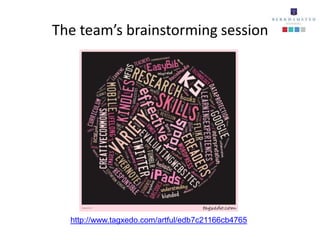
The team’s brainstorming session


  http://www.tagxedo.com/artful/edb7c21166cb4765
A definition may help us
  Ability to locate, organise, understand, evaluate and analyse
          information using digital technology and tools


        Should it also include the following?

• To identify the correct tool and technology for the
  purpose/activity/learning outcome

• To include guidelines on internet safety, control and the ethics
  of content
Other terms which have been used in place of
                  digital literacy

•   Multi-literacies
•   Information literacy
•   Lateral literacy
•   ICT
•   e–Learning
•   Digital fluency
•   Blended learning
Why the brackets?

• The digital part must not be looked at in isolation
• It must be embedded within the key principles of research and
  within the curriculum


                   Our approach
                    BLENDED
        Build on these core skills, principles and
                experiences across KS3
Encouraging effective
digital research from Year 7
      http://bit.ly/yhdFET
Encouraging correct usage of content

“Google images are viewable but not always usable”
                 Berkhamsted School Library


    Introducing the Creative Commons Licence


                http://creativecommons.org/
Next steps

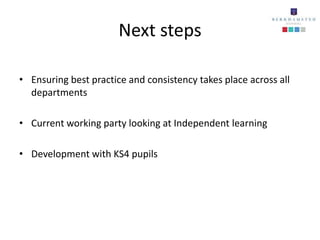
• Ensuring best practice and consistency takes place across all
  departments

• Current working party looking at Independent learning

• Development with KS4 pupils
Kindles – a case study
RATIONALE
• a natural extension of our existing provision
• intended that the Kindles would give students
  teachers the opportunity to try a different
  way of reading
• fit in with our reader development
  programme
• purchased 2 devices in 2001
  (Castle Library (boys) & Kings Library (girls))
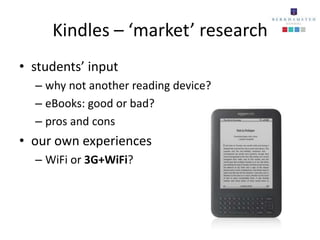
Kindles – ‘market’ research
• students’ input
  – why not another reading device?
  – eBooks: good or bad?
  – pros and cons
• our own experiences
  – WiFi or 3G+WiFi?
Kindles – purchasing books
• Which books?
  – only fiction and auto/biographies
  – requests, recommendations, book group reading choices,
    staff suggestions, library lessons (e.g. biographies)
  – same decision making process as with rest of book
    collection
  – great if a book is needed in a hurry
• eBooks
  – treated the same as rest of book collection
  – catalogued using Library Management System (HERITAGE)
Kindles – loaning out
• tighter controls in place
• set of protocols written specifically for the use
  of Kindles in a school library environment on
  the Internet
  – permission granted to tailor and use here
  – include acceptable use form, eBook tracking form,
    checking out form
  – hard copies kept in each Library
Kindles – loaning out cont.
• acceptable use form
  – signed by pupil
  – signed by parent/guardian
• understand that borrowing the Kindle
  – is a privilege
  – requires extra caution and responsibility
  – is for reading books only
     • content cannot be added, deleted or changed
Kindles – loaning out cont.
• signed form returned to Library
• Kindle loaned either Mon-Thurs OR Thurs-Fri
• each made borrower aware that the books on
  the Kindles are suitable for a range of reading
  abilities and interests
• usually borrowed to read a specific title which
  has been requested in advance
Kindles – the story so far
• an extension of our library service
• expose young readers to new and exciting
  developments in digital technology
• do not expect that they will replace the book
  collection
• just one aspect of the work we do around
  reader development
- a case study
• Revision podcasts
   – anywhere, anytime: revising is more mobile and accessible in
     different situations
   – listen via PC at school or home
   – download to any mobile device via iTunes

• Year 11 trial
   – we want student feedback

• new and exciting way of revising
   – podcasts: knowledge, skills and experience developed in a social
     context transferred into educational world
   – will suit some, but not others
Sixth form digital literacy

                            JISC report

 “90% of new jobs will require excellent digital skills … it is
  imperative that we equip our young adults with digital
                competency and skills….”


http://www.jisc.ac.uk/supportingyourinstitution/studentjourney/digilit.aspx
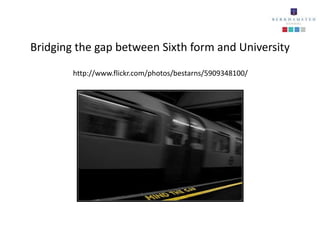
Bridging the gap between Sixth form and University
        http://www.flickr.com/photos/bestarns/5909348100/
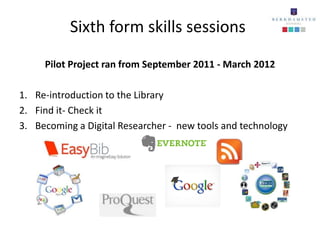
Sixth form skills sessions
     Pilot Project ran from September 2011 - March 2012

1. Re-introduction to the Library
2. Find it- Check it
3. Becoming a Digital Researcher - new tools and technology
Challenges

• Achieving the right level of content and
  delivery
• Timing of sessions
• Changing Sixth formers thinking
• Pupil feedback and evaluation
Staff Expertise
• Sharing our experimentation and best practice with pupils
   ― our experiences of using a range of tools and technologies including user
     generated content and other social media, the cloud, bookmarking, photo
     management, blogging, organisational tools, Twitter, QR codes, e reading
     devices, ipads, apps - we could go on!


• Internet safety talks and presentations empowering young people
  to be safe and in-control online, alongside helping parents to
  understand social media tools.
Concluding Remarks
In the Library we

•   believe that
      – digital literacy should begin in school, be cross curricular and then extend into
         further education and the workplace
      – it is important that we do not make assumptions about students’ pre-existing
         skills and knowledge
•   integrate a variety of digital strategies into our provision to help promote literacy
•   endeavour to make this as natural as possible
•   draw on and develop the skills students have acquired outside of school
•   help to equip students for future study and to enhance their learning experiences
•   highlight issues associated with using digital technology in the C21st
•   give pupils access to information through a variety of sources: books and beyond!
•   help them to use information in a responsible, appropriate and relevant way.
Get in touch via

           Library Blog
http://berkschlibr.wordpress.com/

   Twitter - @berkholibrarian

(Digital) literacy

  • 1.
    (Digital) Literacy Library Department Rachael Guy - Head of Learning Resources & Dr Philippa Ireland - Assistant Librarian
  • 2.
    (Digital) Literacy • Whatis it? • Other terms? • Why the brackets?
  • 3.
    The team’s brainstormingsession http://www.tagxedo.com/artful/edb7c21166cb4765
  • 4.
    A definition mayhelp us Ability to locate, organise, understand, evaluate and analyse information using digital technology and tools Should it also include the following? • To identify the correct tool and technology for the purpose/activity/learning outcome • To include guidelines on internet safety, control and the ethics of content
  • 5.
    Other terms whichhave been used in place of digital literacy • Multi-literacies • Information literacy • Lateral literacy • ICT • e–Learning • Digital fluency • Blended learning
  • 6.
    Why the brackets? •The digital part must not be looked at in isolation • It must be embedded within the key principles of research and within the curriculum Our approach BLENDED Build on these core skills, principles and experiences across KS3
  • 7.
    Encouraging effective digital researchfrom Year 7 http://bit.ly/yhdFET
  • 8.
    Encouraging correct usageof content “Google images are viewable but not always usable” Berkhamsted School Library Introducing the Creative Commons Licence http://creativecommons.org/
  • 9.
    Next steps • Ensuringbest practice and consistency takes place across all departments • Current working party looking at Independent learning • Development with KS4 pupils
  • 10.
    Kindles – acase study RATIONALE • a natural extension of our existing provision • intended that the Kindles would give students teachers the opportunity to try a different way of reading • fit in with our reader development programme • purchased 2 devices in 2001 (Castle Library (boys) & Kings Library (girls))
  • 11.
    Kindles – ‘market’research • students’ input – why not another reading device? – eBooks: good or bad? – pros and cons • our own experiences – WiFi or 3G+WiFi?
  • 12.
    Kindles – purchasingbooks • Which books? – only fiction and auto/biographies – requests, recommendations, book group reading choices, staff suggestions, library lessons (e.g. biographies) – same decision making process as with rest of book collection – great if a book is needed in a hurry • eBooks – treated the same as rest of book collection – catalogued using Library Management System (HERITAGE)
  • 13.
    Kindles – loaningout • tighter controls in place • set of protocols written specifically for the use of Kindles in a school library environment on the Internet – permission granted to tailor and use here – include acceptable use form, eBook tracking form, checking out form – hard copies kept in each Library
  • 14.
    Kindles – loaningout cont. • acceptable use form – signed by pupil – signed by parent/guardian • understand that borrowing the Kindle – is a privilege – requires extra caution and responsibility – is for reading books only • content cannot be added, deleted or changed
  • 15.
    Kindles – loaningout cont. • signed form returned to Library • Kindle loaned either Mon-Thurs OR Thurs-Fri • each made borrower aware that the books on the Kindles are suitable for a range of reading abilities and interests • usually borrowed to read a specific title which has been requested in advance
  • 16.
    Kindles – thestory so far • an extension of our library service • expose young readers to new and exciting developments in digital technology • do not expect that they will replace the book collection • just one aspect of the work we do around reader development
  • 17.
    - a casestudy • Revision podcasts – anywhere, anytime: revising is more mobile and accessible in different situations – listen via PC at school or home – download to any mobile device via iTunes • Year 11 trial – we want student feedback • new and exciting way of revising – podcasts: knowledge, skills and experience developed in a social context transferred into educational world – will suit some, but not others
  • 18.
    Sixth form digitalliteracy JISC report “90% of new jobs will require excellent digital skills … it is imperative that we equip our young adults with digital competency and skills….” http://www.jisc.ac.uk/supportingyourinstitution/studentjourney/digilit.aspx
  • 19.
    Bridging the gapbetween Sixth form and University http://www.flickr.com/photos/bestarns/5909348100/
  • 20.
    Sixth form skillssessions Pilot Project ran from September 2011 - March 2012 1. Re-introduction to the Library 2. Find it- Check it 3. Becoming a Digital Researcher - new tools and technology
  • 21.
    Challenges • Achieving theright level of content and delivery • Timing of sessions • Changing Sixth formers thinking • Pupil feedback and evaluation
  • 22.
    Staff Expertise • Sharingour experimentation and best practice with pupils ― our experiences of using a range of tools and technologies including user generated content and other social media, the cloud, bookmarking, photo management, blogging, organisational tools, Twitter, QR codes, e reading devices, ipads, apps - we could go on! • Internet safety talks and presentations empowering young people to be safe and in-control online, alongside helping parents to understand social media tools.
  • 23.
    Concluding Remarks In theLibrary we • believe that – digital literacy should begin in school, be cross curricular and then extend into further education and the workplace – it is important that we do not make assumptions about students’ pre-existing skills and knowledge • integrate a variety of digital strategies into our provision to help promote literacy • endeavour to make this as natural as possible • draw on and develop the skills students have acquired outside of school • help to equip students for future study and to enhance their learning experiences • highlight issues associated with using digital technology in the C21st • give pupils access to information through a variety of sources: books and beyond! • help them to use information in a responsible, appropriate and relevant way.
  • 24.
    Get in touchvia Library Blog http://berkschlibr.wordpress.com/ Twitter - @berkholibrarian