Development of Security
Architecture
Security Policies,
Logical Security Architecture &
Physical Security Architecture


                                  By: Imran Ahmed Khan ( University of Texas at Tyler )
Security Policies


• Awareness and Training
  Conduct “Computer Security awareness” sessions once in a month to
  educate users about the security risk associated with their activities and
  of the applicable laws, regulation and policies related to the security of
  organizational information system.


• Policy regarding software Installations
  Employees should not allowed to install any software on their PC whether
  for business or entertainment purposes without getting approval from
  the manager in charge of such activities.
Security Policies


• Password selection
  This policy is to help keep user accounts secure. It defines how often
  users must change their passwords, how long they must be, complexity
  rules (types of characters used such as lower case letters, upper case
  letters, numbers, and special characters), and other items.


• Policy regarding Instant messengers
  Instant messenger may help attacker to exploit the vulnerability
  and send some infected file through messenger. Through chatting
  attacker will gather information about user which may result in
  account hacking.
Security Policies


• Email communication
  Electronic mail must not be used to communicate confidential or
  sensitive information. Sometimes email received by the user is crafted to
  specifically suit its recipient, often quoting a range of information to
  convince them of its authenticity. So it is always a good practice to make
  sure that the sender is an authentic person.


• Up to date System
  Every employee must ensure that software patches and updates are
  applied in a timely fashion.
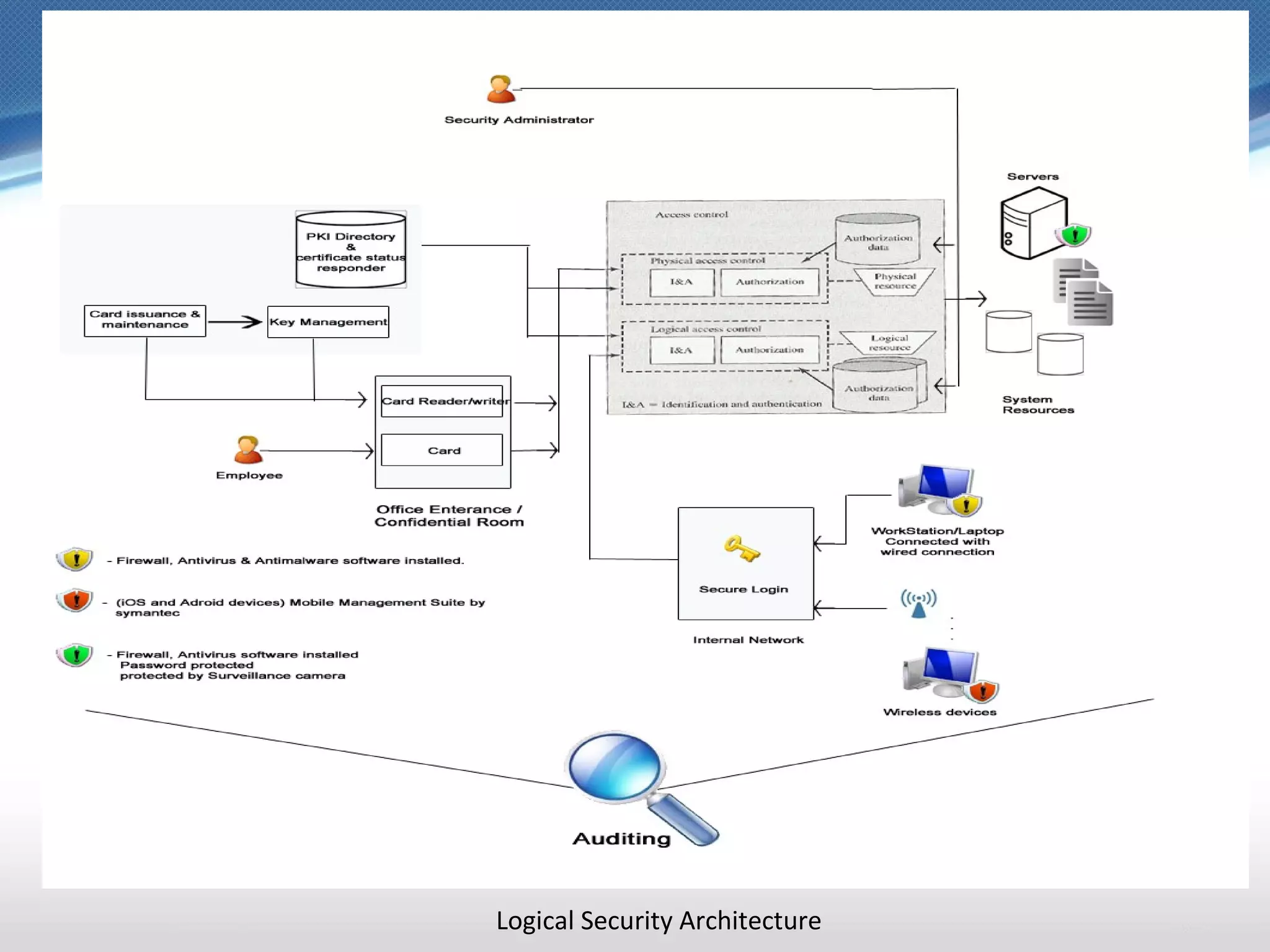
Logical Security Architecture


• Appoint Security Administrator
  A Security administrator maintains an authorization database that
  specifies what type of access to which resources is allowed for the user.
  Employees should be given the minimum necessary level of access of
  data and systems to perform their jobs.


• Authentication and Verification
  Combining physical and logical access, it is a core requirement that one
  single company ID-card is used for both purposes. With his combined
  card, the user enters the company building in the morning and uses his ID
  card to open the door to his office.
Logical Security Architecture


• Auditing
  All users should be authenticated individually to allow for the auditing of
  their actions with computer resources.


• Role-based access control policy
  Role based model will be effective for this company. Instead of giving
  rights to each user, Security administrator will describe the roles and then
  those roles will be assigned to the employees
Logical Security Architecture


• Logging
  Security administrator should maintain logs of logon attempts to
  ascertain if there were unauthorized attempts to access servers. It will
  help in Anomaly and signature detection techniques.


• Accessing data physically
  System administrators has to identify themselves at the physical entrance
  before being allowed to access the console can prevent users who are
  authorized to access the physical space from using another user’s
  credentials to access systems to which they themselves do not have
  access.
Logical Security Architecture


• Malware Protection
  Install firewall, anti-virus and anti-malware software on all computers.


• Data and Software Availability
  Back up, encrypt and store important records and programs on a regular
  schedule.
  Check data and software integrity against original files.
Logical Security Architecture


• Confidential Information
  Accounts files and company confidential and sensitive files must be
  encrypted
  When deleting sensitive files on fixed disks, floppy disks, or cartridges,
  over-write the remaining space with software that writes a random bit-
  pattern (e.g., "SDelete" from SysInternals at
  http://www.sysinternals.com, PGP (Pretty Good Privacy), by NAI, also has
  similar functionality in its tool kit).
Logical Security Architecture
Physical Security Architecture


• Protection from DoS (Denial of Services):
  Install appropriate filters such as:
  –“access-list number deny icmp any any redirect” . This disallows ICPM
  packets/
  –“Anti-spoofing”. This will control access through router and would stop
  packets with source address with internal IP addresses from coming in.
  –“no ip directed-broadcast”. This will stop packets broadcasts.
  –Test filters to ensure that the rules are still working (Periodically, Break
  testing)
Physical Security Architecture


• Secure Server Hardware
  –   Place your servers and communication equipment in a secure room.
  –   Give restricted access to server/communication room.
  –   Avoid using server consoles as much as possible.
  –   Match hardware compatibility while buying/installing the server
  –   Disable CD-ROM or floppy disk boot.
  –   Only authorized user to enter in that room.
  –   Must have Surveillance camera inside and outside the room
Physical Security Architecture


• Host Protection
  – Install Anti-virus software and update it regularly on all the
    workstations.
  – Ensure workstation data is included in daily nightly backups.
  – Have a personal firewall installed on all (if possible) workstations. My
    recommendation is to use “Windows Firewall” or “Zone Alarm”.


• Intrusion Detection system
  – Deploy passive network sensors to monitor a copy of network traffic.
    This will help in detecting intrusion.
  – This sensor will analyze network, transport and application protocols
    to identify suspicious activity.
Physical Security Architecture


• Critical Resources / Securing the Facility:
  – Must have access restricted to authorized person also required them
    to Identify them before entering and exiting.
  – Must have Surveillance camera inside and outside the room.
  – Locked doors of server room even during normal business hours
  – Adequate electric wiring.
  – Should not have windows to the outdoors.
  – Must be located in areas that are not subject to flooding.
  – Only authorize persons can enter the building after normal office
    hours.
Physical Security Architecture

Development of security architecture

  • 1.
    Development of Security Architecture SecurityPolicies, Logical Security Architecture & Physical Security Architecture By: Imran Ahmed Khan ( University of Texas at Tyler )
  • 2.
    Security Policies • Awarenessand Training Conduct “Computer Security awareness” sessions once in a month to educate users about the security risk associated with their activities and of the applicable laws, regulation and policies related to the security of organizational information system. • Policy regarding software Installations Employees should not allowed to install any software on their PC whether for business or entertainment purposes without getting approval from the manager in charge of such activities.
  • 3.
    Security Policies • Passwordselection This policy is to help keep user accounts secure. It defines how often users must change their passwords, how long they must be, complexity rules (types of characters used such as lower case letters, upper case letters, numbers, and special characters), and other items. • Policy regarding Instant messengers Instant messenger may help attacker to exploit the vulnerability and send some infected file through messenger. Through chatting attacker will gather information about user which may result in account hacking.
  • 4.
    Security Policies • Emailcommunication Electronic mail must not be used to communicate confidential or sensitive information. Sometimes email received by the user is crafted to specifically suit its recipient, often quoting a range of information to convince them of its authenticity. So it is always a good practice to make sure that the sender is an authentic person. • Up to date System Every employee must ensure that software patches and updates are applied in a timely fashion.
  • 5.
    Logical Security Architecture •Appoint Security Administrator A Security administrator maintains an authorization database that specifies what type of access to which resources is allowed for the user. Employees should be given the minimum necessary level of access of data and systems to perform their jobs. • Authentication and Verification Combining physical and logical access, it is a core requirement that one single company ID-card is used for both purposes. With his combined card, the user enters the company building in the morning and uses his ID card to open the door to his office.
  • 6.
    Logical Security Architecture •Auditing All users should be authenticated individually to allow for the auditing of their actions with computer resources. • Role-based access control policy Role based model will be effective for this company. Instead of giving rights to each user, Security administrator will describe the roles and then those roles will be assigned to the employees
  • 7.
    Logical Security Architecture •Logging Security administrator should maintain logs of logon attempts to ascertain if there were unauthorized attempts to access servers. It will help in Anomaly and signature detection techniques. • Accessing data physically System administrators has to identify themselves at the physical entrance before being allowed to access the console can prevent users who are authorized to access the physical space from using another user’s credentials to access systems to which they themselves do not have access.
  • 8.
    Logical Security Architecture •Malware Protection Install firewall, anti-virus and anti-malware software on all computers. • Data and Software Availability Back up, encrypt and store important records and programs on a regular schedule. Check data and software integrity against original files.
  • 9.
    Logical Security Architecture •Confidential Information Accounts files and company confidential and sensitive files must be encrypted When deleting sensitive files on fixed disks, floppy disks, or cartridges, over-write the remaining space with software that writes a random bit- pattern (e.g., "SDelete" from SysInternals at http://www.sysinternals.com, PGP (Pretty Good Privacy), by NAI, also has similar functionality in its tool kit).
  • 10.
  • 11.
    Physical Security Architecture •Protection from DoS (Denial of Services): Install appropriate filters such as: –“access-list number deny icmp any any redirect” . This disallows ICPM packets/ –“Anti-spoofing”. This will control access through router and would stop packets with source address with internal IP addresses from coming in. –“no ip directed-broadcast”. This will stop packets broadcasts. –Test filters to ensure that the rules are still working (Periodically, Break testing)
  • 12.
    Physical Security Architecture •Secure Server Hardware – Place your servers and communication equipment in a secure room. – Give restricted access to server/communication room. – Avoid using server consoles as much as possible. – Match hardware compatibility while buying/installing the server – Disable CD-ROM or floppy disk boot. – Only authorized user to enter in that room. – Must have Surveillance camera inside and outside the room
  • 13.
    Physical Security Architecture •Host Protection – Install Anti-virus software and update it regularly on all the workstations. – Ensure workstation data is included in daily nightly backups. – Have a personal firewall installed on all (if possible) workstations. My recommendation is to use “Windows Firewall” or “Zone Alarm”. • Intrusion Detection system – Deploy passive network sensors to monitor a copy of network traffic. This will help in detecting intrusion. – This sensor will analyze network, transport and application protocols to identify suspicious activity.
  • 14.
    Physical Security Architecture •Critical Resources / Securing the Facility: – Must have access restricted to authorized person also required them to Identify them before entering and exiting. – Must have Surveillance camera inside and outside the room. – Locked doors of server room even during normal business hours – Adequate electric wiring. – Should not have windows to the outdoors. – Must be located in areas that are not subject to flooding. – Only authorize persons can enter the building after normal office hours.
  • 15.