Developing a Mobile Application Curriculum
Which Empowers Authentic & Personalized
Learning Experiences
Daniel Downs
Andover Public Schools
Adjunct BHCC/NECC
@danieldowns
danieldownsphotography@gmail.com
www.projectbasedlearningonline.com
Why Mobile App Curriculum?
Planning (Context, Content &
User Interface Design Of
Application)
► Graphic Design/Layout Skills
(icons, buttons)
► Coding/Programming
Language Skills (HTML, CSS,
Action Script 3.0 , Java)
► Real World Application To
Devices & Markets (Google
Play, App Store )
►

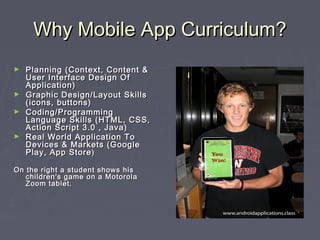
On the right a student shows his
children's game on a Motorola
Zoom tablet.
Current Popular Platforms
►

App Inventor(Android)
http://beta.appinventor.mit.edu

►

Android SDK/Eclipse IDE (Open
Source, Java,Android)

►

PhoneGap (HTML/CSS Based,
Integrates With
Dreamweaver,Android,IOS)

►

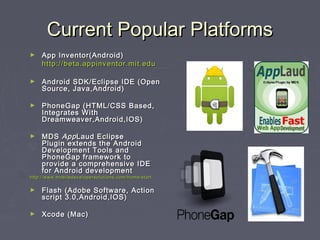
MDS  App Laud Eclipse
Plugin extends the Android
Development Tools and
PhoneGap framework to
provide a comprehensive IDE
for Android development

http://www.mobiledevelopersolutions.com/home/start

►

Flash (Adobe Software, Action
script 3.0,Android,IOS)

►

Xcode (Mac)
Curriculum/Instructional
Strategies
Authentic Learning Experiences
Professionals In The Classroom
High Level Project Conceptualization
►

Project/Problem Based
Long Range Projects/Phased Instruction
Variety of Approaches To Addressing Needs of Project
►

Collaborative
Group Work/ Skill Fluency Building/Project Ownership
Team Building & Leadership Skills
►

Problem Solving
21st Century Connections
Cross Curricular Connections
►

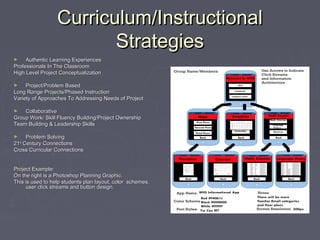
Project Example:
On the right is a Photoshop Planning Graphic.
This is used to help students plan layout, color schemes,
user click streams and button design.
A Review Of 2 Group Authentic Learning
Approaches With Mobile Applications
Designing, Implementing
Technology & Testing A
Mobile Application Project
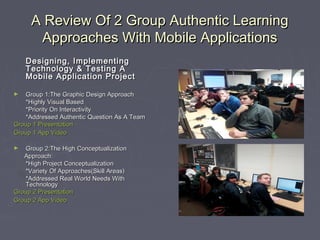
Group 1:The Graphic Design Approach
*Highly Visual Based
*Priority On Interactivity
*Addressed Authentic Question As A Team
Group 1 Presentation
Group 1 App Video
►

Group 2:The High Conceptualization
Approach:
*High Project Conceptualization
*Variety Of Approaches(Skill Areas)
*Addressed Real World Needs With
Technology
Group 2 Presentation
Group 2 App Video
►
3 Strategies For Aligning App
Curriculum In Your Setting
►

Choose A Platform
(Android/IOS, Windows)
Based On Resources &
Current Curriculum Alignment

-Web Development or Programming Base?
-PC or Mac?
-Web or Native Apps(App in browser
or added to a device and downloaded)

►

Align Tools With Classroom
Level Goals

- Elementary, High School
- Testing Tools( Devices, Platforms,
Skill/Learning Level)

►

Develop A Unit With Open
Source Tools

- Pair with a web development or business based
unit.
Direct Student Benefits &
Outcomes
►
►

►
►
►
►

Create Hypermedia
Experiences
Curriculum of Design,
Implement and
Debug( Project Based)
Game Design/Layout Skills
Real World Application Of
Projects
Curriculum easily modified
for learners of all levels
Students motivated
through ownership of their
projects.
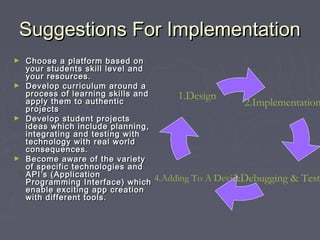
Suggestions For Implementation
Choose a platform based on
your students skill level and
your resources.
► Develop curriculum around a
process of learning skills and
apply them to authentic
projects
► Develop student projects
ideas which include planning,
integrating and testing with
technology with real world
consequences.
► Become aware of the variety
of specific technologies and
API ’s (Application
Programming Interface) which
enable exciting app creation
with different tools.
►

1.Design

2.Implementation

4.Adding To A Device
3.Debugging & Test
Recent Curriculum
Developments
Jquery Web App Layouts
Sample Introductory Lesson
► Additional Teaching Resources For Java For Android
Android SDK Tools
Android I Lesson 1
► Dreamweaver App Functionality
Adobe Press From Pearson CS5.5 (Updates For Jquery
native app development in CS6)
In Dreamweaver “Site>Mobile Applications>Configure Mobile
Applications Framework”
►
Closing Considerations In PBL
Environments
Consider Authentic Rubrics
Page 118 (Show charts,learning words and graphics)
PBL Research Daniel Downs
►

►

Allow students to reflect on the process of creating the
application and the context in which it will be used.

►

Allow students to dream big, conceptualize and research
solutions. Technology is moving as quickly as projects are
developed!!

Developing a mobile application curriculum which empowers authentic

  • 1.
    Developing a MobileApplication Curriculum Which Empowers Authentic & Personalized Learning Experiences Daniel Downs Andover Public Schools Adjunct BHCC/NECC @danieldowns danieldownsphotography@gmail.com www.projectbasedlearningonline.com
  • 2.
    Why Mobile AppCurriculum? Planning (Context, Content & User Interface Design Of Application) ► Graphic Design/Layout Skills (icons, buttons) ► Coding/Programming Language Skills (HTML, CSS, Action Script 3.0 , Java) ► Real World Application To Devices & Markets (Google Play, App Store ) ► On the right a student shows his children's game on a Motorola Zoom tablet.
  • 3.
    Current Popular Platforms ► AppInventor(Android) http://beta.appinventor.mit.edu ► Android SDK/Eclipse IDE (Open Source, Java,Android) ► PhoneGap (HTML/CSS Based, Integrates With Dreamweaver,Android,IOS) ► MDS  App Laud Eclipse Plugin extends the Android Development Tools and PhoneGap framework to provide a comprehensive IDE for Android development http://www.mobiledevelopersolutions.com/home/start ► Flash (Adobe Software, Action script 3.0,Android,IOS) ► Xcode (Mac)
  • 4.
    Curriculum/Instructional Strategies Authentic Learning Experiences ProfessionalsIn The Classroom High Level Project Conceptualization ► Project/Problem Based Long Range Projects/Phased Instruction Variety of Approaches To Addressing Needs of Project ► Collaborative Group Work/ Skill Fluency Building/Project Ownership Team Building & Leadership Skills ► Problem Solving 21st Century Connections Cross Curricular Connections ► Project Example: On the right is a Photoshop Planning Graphic. This is used to help students plan layout, color schemes, user click streams and button design.
  • 5.
    A Review Of2 Group Authentic Learning Approaches With Mobile Applications Designing, Implementing Technology & Testing A Mobile Application Project Group 1:The Graphic Design Approach *Highly Visual Based *Priority On Interactivity *Addressed Authentic Question As A Team Group 1 Presentation Group 1 App Video ► Group 2:The High Conceptualization Approach: *High Project Conceptualization *Variety Of Approaches(Skill Areas) *Addressed Real World Needs With Technology Group 2 Presentation Group 2 App Video ►
  • 6.
    3 Strategies ForAligning App Curriculum In Your Setting ► Choose A Platform (Android/IOS, Windows) Based On Resources & Current Curriculum Alignment -Web Development or Programming Base? -PC or Mac? -Web or Native Apps(App in browser or added to a device and downloaded) ► Align Tools With Classroom Level Goals - Elementary, High School - Testing Tools( Devices, Platforms, Skill/Learning Level) ► Develop A Unit With Open Source Tools - Pair with a web development or business based unit.
  • 7.
    Direct Student Benefits& Outcomes ► ► ► ► ► ► Create Hypermedia Experiences Curriculum of Design, Implement and Debug( Project Based) Game Design/Layout Skills Real World Application Of Projects Curriculum easily modified for learners of all levels Students motivated through ownership of their projects.
  • 8.
    Suggestions For Implementation Choosea platform based on your students skill level and your resources. ► Develop curriculum around a process of learning skills and apply them to authentic projects ► Develop student projects ideas which include planning, integrating and testing with technology with real world consequences. ► Become aware of the variety of specific technologies and API ’s (Application Programming Interface) which enable exciting app creation with different tools. ► 1.Design 2.Implementation 4.Adding To A Device 3.Debugging & Test
  • 9.
    Recent Curriculum Developments Jquery WebApp Layouts Sample Introductory Lesson ► Additional Teaching Resources For Java For Android Android SDK Tools Android I Lesson 1 ► Dreamweaver App Functionality Adobe Press From Pearson CS5.5 (Updates For Jquery native app development in CS6) In Dreamweaver “Site>Mobile Applications>Configure Mobile Applications Framework” ►
  • 10.
    Closing Considerations InPBL Environments Consider Authentic Rubrics Page 118 (Show charts,learning words and graphics) PBL Research Daniel Downs ► ► Allow students to reflect on the process of creating the application and the context in which it will be used. ► Allow students to dream big, conceptualize and research solutions. Technology is moving as quickly as projects are developed!!