
DEFINE COMPUTER
SYSTEM
 A computer system is one that is able to take
a set of inputs, process them and create a set
of outputs.This is done by a combination of
hardware and software.
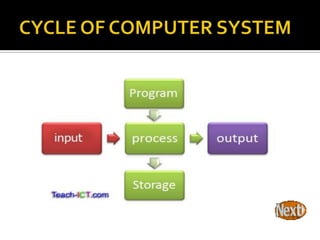
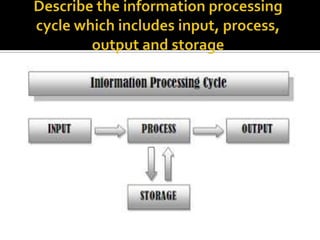
 The diagram below shows you the idea of a
computer system in its most basic form
 The computer system has one or more inputs to provide data.This
data is then processed in some way.The outcome of the processing is
sent to an output or it may be stored until some event happens to
cause it to be output.
 For processing to take place, there needs to be a set of instructions of
what needs to be done.This set of instructions is called a program.
 This system is called a stored-program computer.
 The very first commercial computer in the entire world of this type
was built in Britain in 1949 and was called the Manchester (Ferranti)
Mark 1, see below.
 The beauty of this type of computer system is that it is flexible - the
machine performs a different task by simply loading a different
program from storage.
 "Input/Output" and is pronounced simply "eye-oh."
Computers are based on the fundamental idea that
every input results in an output. For example, if you
are running a word processor program and type a
sentence on your keyboard, the text will appear on
the screen.The keyboard is an input device and the
screen is an output device.You might also print the
text using a printer, which is another output device.
The computer's CPU handles all the I/O operations,
sending the data it receives to the correct path.The
path may be to the video card, to the hard drive, or to
the RAM, just to name a few.
 The ports on the outside of a computer are
commonly referred to as "I/O ports" because
they are what connect input and output devices
to the computer. Software developers use I/O to
describe how a program will function, depending
on what a user enters. For example, if the user
presses the space bar key in a game, say "Super
Jumper Man," the character on the screen will
jump. Multiply that by several thousand other
scenarios of user input and you have yourself a
computer game.
 A processor, or "microprocessor," is a small chip that resides in
computers and other electronic devices. Its basic job is to receive
input and provide the appropriate output.While this may seem
like a simple task, modern processors can handle trillions of
calculations per second.

The central processor of a computer is also known as the CPU, or
"central processing unit."This processor handles all the basic
system instructions, such as processing mouse and keyboard input
and running applications. Most desktop computers contain a CPU
developed by either Intel or AMD, both of which use the x86
processor architecture. Mobile devices, such as laptops and tablets
may use Intel andAMD CPUs, but can also use specific mobile
processors developed by companies like ARM or Apple.
 Modern CPUs often include multiple processing cores, which work together to
process instructions. While these "cores" are contained in one physical unit,
they are actually individual processors. In fact, if you view your computer's
performance with a system monitoring utility like WindowsTask Manager
(Windows) or Activity Monitor (Mac OS X), you will see separate graphs for
each processor. Processors that include two cores are called dual-core
processors, while those with four cores are called quad-core processors. Some
high-end workstations contain multiple CPUs with multiple cores, allowing a
single machine to have eight, twelve, or even more processing cores.

 Besides the central processing unit, most desktop and laptop computers also
include a GPU.This processor is specifically designed for rendering graphics
that are output on a monitor. Desktop computers often have a video card
that contains the GPU, while mobile devices usually contain a graphics chip
that is integrated into the motherboard. By using separate processors for
system and graphics processing, computers are able to handle graphic-
intensive applications more efficiently.
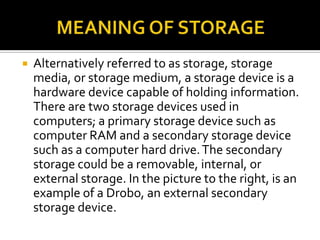
 Alternatively referred to as storage, storage
media, or storage medium, a storage device is a
hardware device capable of holding information.
There are two storage devices used in
computers; a primary storage device such as
computer RAM and a secondary storage device
such as a computer hard drive.The secondary
storage could be a removable, internal, or
external storage. In the picture to the right, is an
example of a Drobo, an external secondary
storage device.
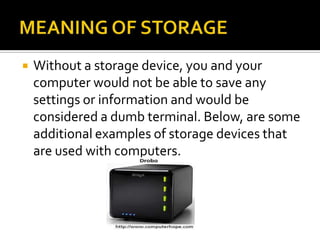
 Without a storage device, you and your
computer would not be able to save any
settings or information and would be
considered a dumb terminal. Below, are some
additional examples of storage devices that
are used with computers.
 Floppy diskette
 CD-ROM disc
 CD-R and CD-RW disc
 Cloud storage
 DVD-R, DVD+R, DVD-RW, and DVD+RW disc
 Jump drive and USB flash drive
 Hard drive
 LS-120
 Tape cassette
 Zip diskette
 When saving anything on the computer, you will be asked for the
storage location, which is where you want to save the information.
By default most of the information you save will be saved to your
computer hard drive, however, if you want to move the
information to another computer you would want to save it to a
removable storage device such as a Jump drive.
 INPUT
 Users input data or instruction into the computer
system to be process. Input could be either
text, graphic, audio or video. Input devices are used
by users to input data. Input devices are any
electronic device connected to a computer and
produces input signals.
Data or instruction being input into the computer
system is then processed by the CPU which controls all
activities within the system.The results of the processed
data are then sent to an output device as usable data.
A CPU consists of two subcomponents; the Control Unit
(CU) and the Arithmetic Logic Unit (ALU). CU’s main
function is to direct the CPU to process data by
extracting instructions from memory and decodes and
executes them.The CU manages a four-step basic
operation which is called a machine cycle.The steps are
Fetching, Decoding, Executing & Storing:
 Computer storage is important to help users
store programs and data to be used at a later
time. It is also useful to keep current data
while being processed by the processor until
the information is saved in a storage media
such as a hard disk or a diskette. Computer
storage also stores instructions from a
computer program.There are two type of
computer storage; primary storage and
secondary storage.
Is known as the main memory of a
computer, including RAM (Random-Access
Memory) and ROM (Read-Only Memory). It is
an internal memory (inside the CPU) that can
be accessed directly by the processor.
 An external storage that refers to various
ways a computer can store program and
data. Many complex functions, such as
translators for high-level languages and
operating systems are placed in primary
storage. Secondary storage is an alternative
storage. It is very useful to store programs
and data for future use.
 Output is the result of data processing
activity when it is presented external to the
system.The output from a computer can be
in a form for use by people, for example,
printed or displayed.There are four types of
output, which are texts, graphics, audio and
video.
DEFINE COMPUTER SYSTEM

DEFINE COMPUTER SYSTEM

  • 1.
  • 2.
     A computersystem is one that is able to take a set of inputs, process them and create a set of outputs.This is done by a combination of hardware and software.  The diagram below shows you the idea of a computer system in its most basic form
  • 4.
     The computersystem has one or more inputs to provide data.This data is then processed in some way.The outcome of the processing is sent to an output or it may be stored until some event happens to cause it to be output.  For processing to take place, there needs to be a set of instructions of what needs to be done.This set of instructions is called a program.  This system is called a stored-program computer.  The very first commercial computer in the entire world of this type was built in Britain in 1949 and was called the Manchester (Ferranti) Mark 1, see below.  The beauty of this type of computer system is that it is flexible - the machine performs a different task by simply loading a different program from storage.
  • 5.
     "Input/Output" andis pronounced simply "eye-oh." Computers are based on the fundamental idea that every input results in an output. For example, if you are running a word processor program and type a sentence on your keyboard, the text will appear on the screen.The keyboard is an input device and the screen is an output device.You might also print the text using a printer, which is another output device. The computer's CPU handles all the I/O operations, sending the data it receives to the correct path.The path may be to the video card, to the hard drive, or to the RAM, just to name a few.
  • 6.
     The portson the outside of a computer are commonly referred to as "I/O ports" because they are what connect input and output devices to the computer. Software developers use I/O to describe how a program will function, depending on what a user enters. For example, if the user presses the space bar key in a game, say "Super Jumper Man," the character on the screen will jump. Multiply that by several thousand other scenarios of user input and you have yourself a computer game.
  • 7.
     A processor,or "microprocessor," is a small chip that resides in computers and other electronic devices. Its basic job is to receive input and provide the appropriate output.While this may seem like a simple task, modern processors can handle trillions of calculations per second.  The central processor of a computer is also known as the CPU, or "central processing unit."This processor handles all the basic system instructions, such as processing mouse and keyboard input and running applications. Most desktop computers contain a CPU developed by either Intel or AMD, both of which use the x86 processor architecture. Mobile devices, such as laptops and tablets may use Intel andAMD CPUs, but can also use specific mobile processors developed by companies like ARM or Apple.
  • 8.
     Modern CPUsoften include multiple processing cores, which work together to process instructions. While these "cores" are contained in one physical unit, they are actually individual processors. In fact, if you view your computer's performance with a system monitoring utility like WindowsTask Manager (Windows) or Activity Monitor (Mac OS X), you will see separate graphs for each processor. Processors that include two cores are called dual-core processors, while those with four cores are called quad-core processors. Some high-end workstations contain multiple CPUs with multiple cores, allowing a single machine to have eight, twelve, or even more processing cores.   Besides the central processing unit, most desktop and laptop computers also include a GPU.This processor is specifically designed for rendering graphics that are output on a monitor. Desktop computers often have a video card that contains the GPU, while mobile devices usually contain a graphics chip that is integrated into the motherboard. By using separate processors for system and graphics processing, computers are able to handle graphic- intensive applications more efficiently.
  • 9.
     Alternatively referredto as storage, storage media, or storage medium, a storage device is a hardware device capable of holding information. There are two storage devices used in computers; a primary storage device such as computer RAM and a secondary storage device such as a computer hard drive.The secondary storage could be a removable, internal, or external storage. In the picture to the right, is an example of a Drobo, an external secondary storage device.
  • 10.
     Without astorage device, you and your computer would not be able to save any settings or information and would be considered a dumb terminal. Below, are some additional examples of storage devices that are used with computers.
  • 11.
     Floppy diskette CD-ROM disc  CD-R and CD-RW disc  Cloud storage  DVD-R, DVD+R, DVD-RW, and DVD+RW disc  Jump drive and USB flash drive  Hard drive  LS-120  Tape cassette  Zip diskette  When saving anything on the computer, you will be asked for the storage location, which is where you want to save the information. By default most of the information you save will be saved to your computer hard drive, however, if you want to move the information to another computer you would want to save it to a removable storage device such as a Jump drive.
  • 13.
     INPUT  Usersinput data or instruction into the computer system to be process. Input could be either text, graphic, audio or video. Input devices are used by users to input data. Input devices are any electronic device connected to a computer and produces input signals.
  • 14.
    Data or instructionbeing input into the computer system is then processed by the CPU which controls all activities within the system.The results of the processed data are then sent to an output device as usable data. A CPU consists of two subcomponents; the Control Unit (CU) and the Arithmetic Logic Unit (ALU). CU’s main function is to direct the CPU to process data by extracting instructions from memory and decodes and executes them.The CU manages a four-step basic operation which is called a machine cycle.The steps are Fetching, Decoding, Executing & Storing:
  • 15.
     Computer storageis important to help users store programs and data to be used at a later time. It is also useful to keep current data while being processed by the processor until the information is saved in a storage media such as a hard disk or a diskette. Computer storage also stores instructions from a computer program.There are two type of computer storage; primary storage and secondary storage.
  • 16.
    Is known asthe main memory of a computer, including RAM (Random-Access Memory) and ROM (Read-Only Memory). It is an internal memory (inside the CPU) that can be accessed directly by the processor.
  • 17.
     An externalstorage that refers to various ways a computer can store program and data. Many complex functions, such as translators for high-level languages and operating systems are placed in primary storage. Secondary storage is an alternative storage. It is very useful to store programs and data for future use.
  • 18.
     Output isthe result of data processing activity when it is presented external to the system.The output from a computer can be in a form for use by people, for example, printed or displayed.There are four types of output, which are texts, graphics, audio and video.