DEBUGGING IN VISUAL STUDIO
(BASIC LEVEL)
Larry Nung
AGENDA
Break Point & Trace Point
Code Stepping
Edit variable value
Debug with Object ID
Set the Next Statement
Edit and continue
Q & A
2
BREAK POINT & TRACE POINT
3
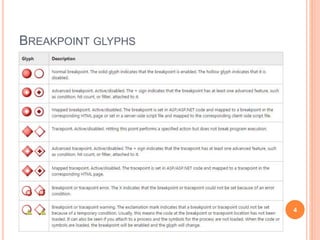
BREAKPOINT GLYPHS
4
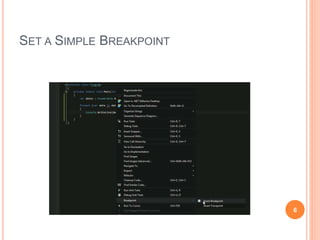
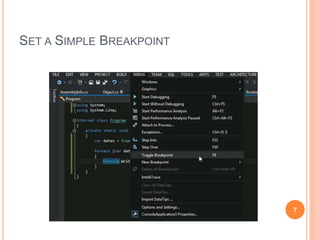
SET A SIMPLE BREAKPOINT
1. [Debug | Toggle Breakpoint]
2. [Breakpoint | Insert Breakpoint] from context
menu in source window.
3. Click on left margin
4. Shortcut
 F9
5
SET A SIMPLE BREAKPOINT
6
SET A SIMPLE BREAKPOINT
7
SET A BREAKPOINT ON A FUNCTION CALL
FROM THE CALL STACK WINDOW
 [Breakpoint | Insert Breakpoint] from context
menu in Call Stack window.
8
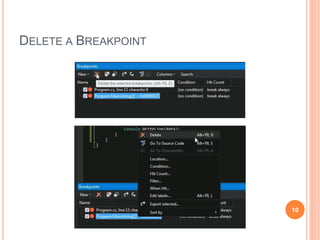
DELETE A BREAKPOINT
 In the Breakpoints window, choose a breakpoint,
and click Delete button from the toolbar
 In the Breakpoints window, right-click on a
breakpoint, and choose [Delete] from context menu.
 In a source window or Disassembly window, click
on the breakpoint glyph.
 Shortcut
 F9
9
DELETE A BREAKPOINT
10
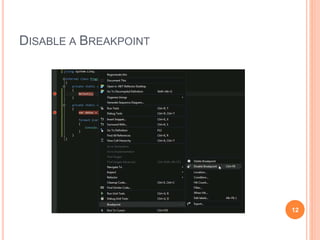
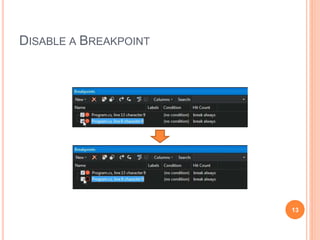
DISABLE A BREAKPOINT
 In a source, Disassembly, or Call Stack window,
right-click on a line containing an enabled
breakpoint glyph and choose [Breakpoint |
Disable Breakpoint] from the shortcut menu.
 In the Breakpoints window, clear the checkbox
next to an enabled breakpoint.
 Shortcut
 Ctrl + F9
11
DISABLE A BREAKPOINT
12
DISABLE A BREAKPOINT
13
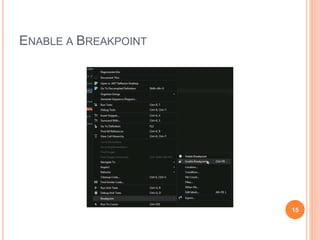
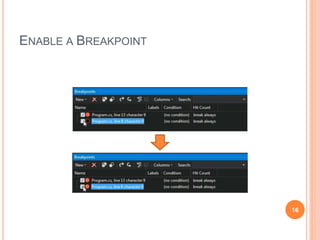
ENABLE A BREAKPOINT
 In a source, Disassembly, or Call Stack window,
right-click on a line containing a disabled
breakpoint glyph and choose [Breakpoint |
Enable Breakpoint] from the shortcut menu.
 In the Breakpoints window, set the checkbox next
to a disabled breakpoint.
 Shortcut
 Ctrl + F9
14
ENABLE A BREAKPOINT
15
ENABLE A BREAKPOINT
16
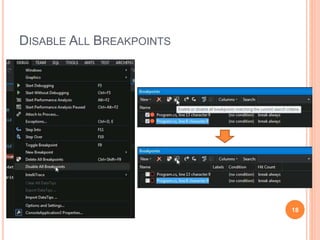
DISABLE ALL BREAKPOINTS
 [Debug | Disable All Breakpoints]
 In the Breakpoints window, click disable-all button
in toolbar.
17
DISABLE ALL BREAKPOINTS
18
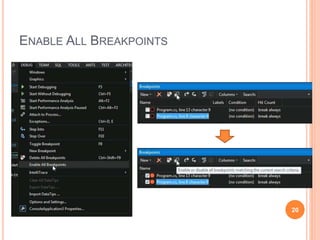
ENABLE ALL BREAKPOINTS
 [Debug | Enable All Breakpoints]
 In the Breakpoints window, click enable-all button
in toolbar.
19
ENABLE ALL BREAKPOINTS
20
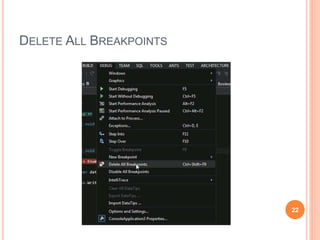
DELETE ALL BREAKPOINTS
 [Debug | Delete All Breakpoints]
21
DELETE ALL BREAKPOINTS
22
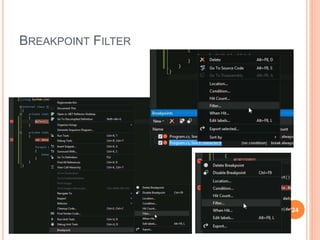
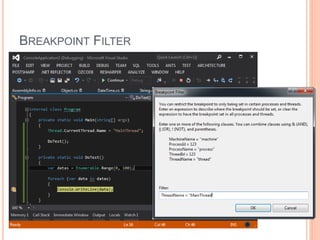
BREAKPOINT FILTER
 Function
 Limit the behavior of a breakpoint to specified machines,
processes, and threads.
 [Filter] from the context menu in the Breakpoints
window.
 In a source, Disassembly, or Call Stack, right-click a
line containing a breakpoint glyph and
choose Filter from Breakpoints in the shortcut
menu.
 [Filter] from context menu in breakpoint glyph.
23
BREAKPOINT FILTER
24
BREAKPOINT FILTER
25
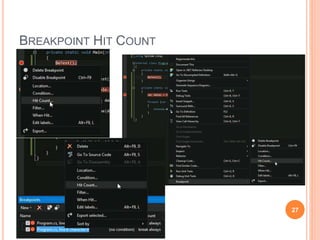
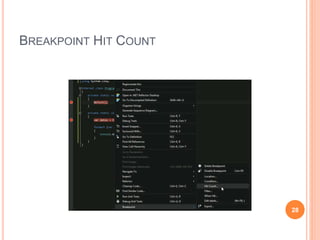
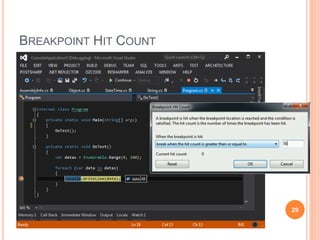
BREAKPOINT HIT COUNT
 Function
 Keep track of how many times a breakpoint is hit.
 In the Breakpoints window, right-click on a
breakpoint and choose Hit Count from the shortcut
menu.
 [Hit Count…] from context menu in breakpoint
glyph.
 In a source, Disassembly, or Call Stack window,
right-click on a line containing a breakpoint and
choose [Breakpoints | Hit Count] in the shortcut
menu.
26
BREAKPOINT HIT COUNT
27
BREAKPOINT HIT COUNT
28
BREAKPOINT HIT COUNT
29
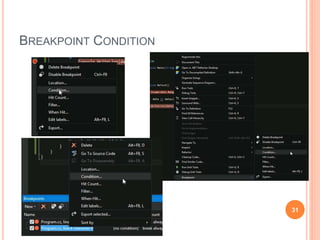
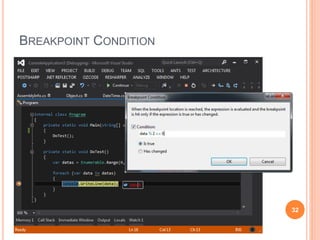
BREAKPOINT CONDITION
 Function
 An expression that the debugger evaluates when a
breakpoint is reached.
 In the Breakpoints window, right-click the line
containing a breakpoint glyph and
choose Condition from the shortcut menu.
 In a source, Disassembly, or Call Stack, right-click a
line containing a breakpoint glyph and
choose Condition from Breakpoints in the
shortcut menu.
 [Condition…] from context menu in breakpoint
glyph. 30
BREAKPOINT CONDITION
31
BREAKPOINT CONDITION
32
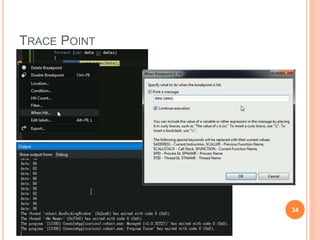
TRACE POINT
 Function
 A tracepoint is a breakpoint with a custom action
associated with it.
 In a source window, click a line where you want to
set a tracepoint and choose Insert
Tracepoint from Breakpoints in the shortcut menu.
 In a source, Disassembly, or Call Stack window,
right-click a breakpoint glyph and choose When Hit.
 In the Breakpoints window, right-click a breakpoint
glyph and choose When Hit.
33
TRACE POINT
34
CODE STEPPING
35
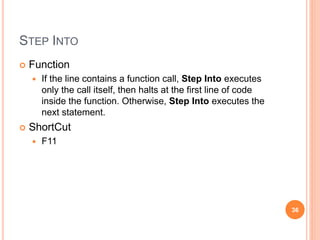
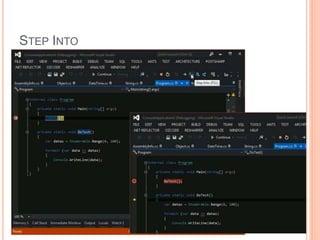
STEP INTO
 Function
 If the line contains a function call, Step Into executes
only the call itself, then halts at the first line of code
inside the function. Otherwise, Step Into executes the
next statement.
 ShortCut
 F11
36
STEP INTO
37
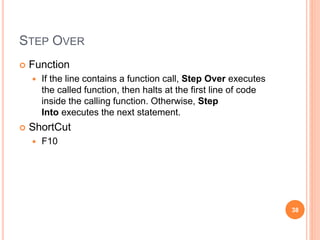
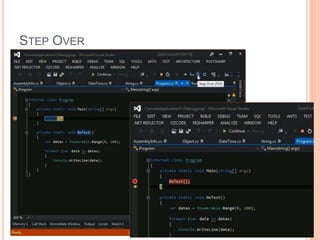
STEP OVER
 Function
 If the line contains a function call, Step Over executes
the called function, then halts at the first line of code
inside the calling function. Otherwise, Step
Into executes the next statement.
 ShortCut
 F10
38
STEP OVER
39
STEP OUT
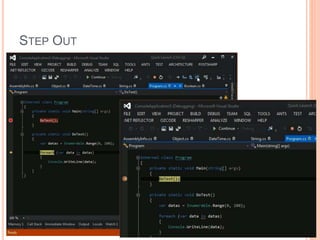
 Function
 Step Out resumes execution of your code until the
function returns, then breaks at the return point in the
calling function.
 ShortCut
 Shift + F11
40
STEP OUT
41
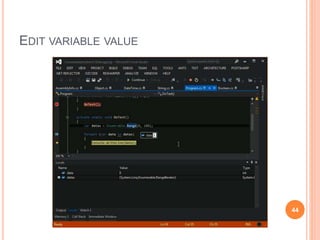
EDIT VARIABLE VALUE
42
EDIT VARIABLE VALUE
43
EDIT VARIABLE VALUE
44
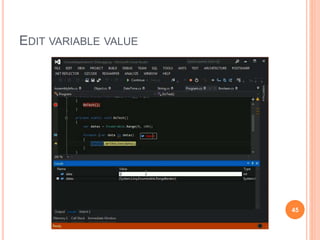
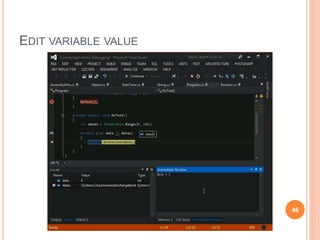
EDIT VARIABLE VALUE
45
EDIT VARIABLE VALUE
46
DEBUG WITH OBJECT ID
47
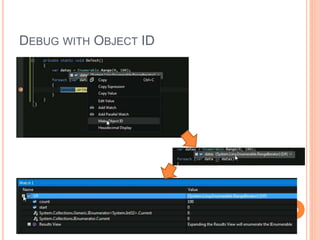
DEBUG WITH OBJECT ID
 Function
 Identify debugging object
48
DEBUG WITH OBJECT ID
49
SET THE NEXT STATEMENT
50
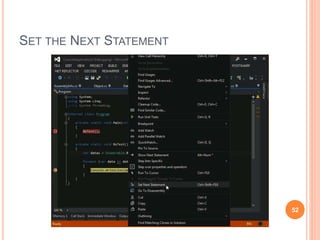
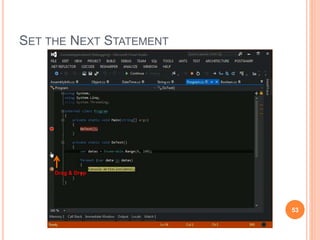
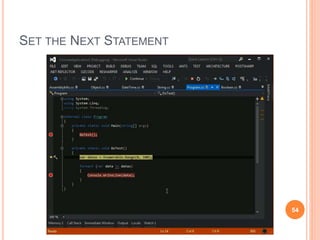
SET THE NEXT STATEMENT
 Function
 Move the execution point to set the next statement of
code to be executed
 In a source window, click the yellow arrowhead and
drag it to a location where you want to set the next
statement (in the same source file), or
 In a source window, right-click on the statement you
want to execute next and choose Set Next
Statement from the shortcut menu.
 In the Disassembly window, right-click the
assembly-language instruction that you want to
execute next and choose Set Next Statement from
the shortcut menu. 51
SET THE NEXT STATEMENT
52
SET THE NEXT STATEMENT
53
Drag & Drop
SET THE NEXT STATEMENT
54
EDIT AND CONTINUE
55
EDIT AND CONTINUE
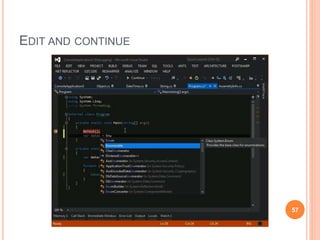
 Function
 A time-saving feature that enables you to make changes
to your source code while your program is in break
mode
56
EDIT AND CONTINUE
57
EDIT AND CONTINUE
58
REFERENCE
59
REFERENCE
 Breakpoints and Tracepoints
 https://msdn.microsoft.com/en-
us/library/ktf38f66(v=vs.90).aspx
 Edit and Continue
 https://msdn.microsoft.com/en-us/library/bcew296c.aspx
 Debugger Tips, Tricks and Tools #6 - Gooey Bugs -
Site Home - MSDN Blogs
 http://blogs.msdn.com/b/jimgries/archive/2005/11/16/49
3431.aspx
 [C#][Visual Studio]Debug With Object ID - Level
Up- 點部落
 http://www.dotblogs.com.tw/larrynung/archive/2011/05/0
5/24296.aspx 60
REFERENCE
 [Visual Studio]追蹤點(Tracepoint)的使用 - Level Up-
點部落
 http://www.dotblogs.com.tw/larrynung/archive/2009/11/0
4/11399.aspx
 How to: Set the Next Statement
 https://msdn.microsoft.com/en-
us/library/09yze4a9%28VS.80%29.aspx
 Start, Break, Step, Run through Code, and Stop
Debugging in Visual Studio
 https://msdn.microsoft.com/en-us/library/y740d9d3.aspx
61
Q & A
62
QUESTION & ANSWER
63

Debugging in visual studio (basic level)

  • 1.
    DEBUGGING IN VISUALSTUDIO (BASIC LEVEL) Larry Nung
  • 2.
    AGENDA Break Point &Trace Point Code Stepping Edit variable value Debug with Object ID Set the Next Statement Edit and continue Q & A 2
  • 3.
    BREAK POINT &TRACE POINT 3
  • 4.
  • 5.
    SET A SIMPLEBREAKPOINT 1. [Debug | Toggle Breakpoint] 2. [Breakpoint | Insert Breakpoint] from context menu in source window. 3. Click on left margin 4. Shortcut  F9 5
  • 6.
    SET A SIMPLEBREAKPOINT 6
  • 7.
    SET A SIMPLEBREAKPOINT 7
  • 8.
    SET A BREAKPOINTON A FUNCTION CALL FROM THE CALL STACK WINDOW  [Breakpoint | Insert Breakpoint] from context menu in Call Stack window. 8
  • 9.
    DELETE A BREAKPOINT In the Breakpoints window, choose a breakpoint, and click Delete button from the toolbar  In the Breakpoints window, right-click on a breakpoint, and choose [Delete] from context menu.  In a source window or Disassembly window, click on the breakpoint glyph.  Shortcut  F9 9
  • 10.
  • 11.
    DISABLE A BREAKPOINT In a source, Disassembly, or Call Stack window, right-click on a line containing an enabled breakpoint glyph and choose [Breakpoint | Disable Breakpoint] from the shortcut menu.  In the Breakpoints window, clear the checkbox next to an enabled breakpoint.  Shortcut  Ctrl + F9 11
  • 12.
  • 13.
  • 14.
    ENABLE A BREAKPOINT In a source, Disassembly, or Call Stack window, right-click on a line containing a disabled breakpoint glyph and choose [Breakpoint | Enable Breakpoint] from the shortcut menu.  In the Breakpoints window, set the checkbox next to a disabled breakpoint.  Shortcut  Ctrl + F9 14
  • 15.
  • 16.
  • 17.
    DISABLE ALL BREAKPOINTS [Debug | Disable All Breakpoints]  In the Breakpoints window, click disable-all button in toolbar. 17
  • 18.
  • 19.
    ENABLE ALL BREAKPOINTS [Debug | Enable All Breakpoints]  In the Breakpoints window, click enable-all button in toolbar. 19
  • 20.
  • 21.
    DELETE ALL BREAKPOINTS [Debug | Delete All Breakpoints] 21
  • 22.
  • 23.
    BREAKPOINT FILTER  Function Limit the behavior of a breakpoint to specified machines, processes, and threads.  [Filter] from the context menu in the Breakpoints window.  In a source, Disassembly, or Call Stack, right-click a line containing a breakpoint glyph and choose Filter from Breakpoints in the shortcut menu.  [Filter] from context menu in breakpoint glyph. 23
  • 24.
  • 25.
  • 26.
    BREAKPOINT HIT COUNT Function  Keep track of how many times a breakpoint is hit.  In the Breakpoints window, right-click on a breakpoint and choose Hit Count from the shortcut menu.  [Hit Count…] from context menu in breakpoint glyph.  In a source, Disassembly, or Call Stack window, right-click on a line containing a breakpoint and choose [Breakpoints | Hit Count] in the shortcut menu. 26
  • 27.
  • 28.
  • 29.
  • 30.
    BREAKPOINT CONDITION  Function An expression that the debugger evaluates when a breakpoint is reached.  In the Breakpoints window, right-click the line containing a breakpoint glyph and choose Condition from the shortcut menu.  In a source, Disassembly, or Call Stack, right-click a line containing a breakpoint glyph and choose Condition from Breakpoints in the shortcut menu.  [Condition…] from context menu in breakpoint glyph. 30
  • 31.
  • 32.
  • 33.
    TRACE POINT  Function A tracepoint is a breakpoint with a custom action associated with it.  In a source window, click a line where you want to set a tracepoint and choose Insert Tracepoint from Breakpoints in the shortcut menu.  In a source, Disassembly, or Call Stack window, right-click a breakpoint glyph and choose When Hit.  In the Breakpoints window, right-click a breakpoint glyph and choose When Hit. 33
  • 34.
  • 35.
  • 36.
    STEP INTO  Function If the line contains a function call, Step Into executes only the call itself, then halts at the first line of code inside the function. Otherwise, Step Into executes the next statement.  ShortCut  F11 36
  • 37.
  • 38.
    STEP OVER  Function If the line contains a function call, Step Over executes the called function, then halts at the first line of code inside the calling function. Otherwise, Step Into executes the next statement.  ShortCut  F10 38
  • 39.
  • 40.
    STEP OUT  Function Step Out resumes execution of your code until the function returns, then breaks at the return point in the calling function.  ShortCut  Shift + F11 40
  • 41.
  • 42.
  • 43.
  • 44.
  • 45.
  • 46.
  • 47.
  • 48.
    DEBUG WITH OBJECTID  Function  Identify debugging object 48
  • 49.
  • 50.
    SET THE NEXTSTATEMENT 50
  • 51.
    SET THE NEXTSTATEMENT  Function  Move the execution point to set the next statement of code to be executed  In a source window, click the yellow arrowhead and drag it to a location where you want to set the next statement (in the same source file), or  In a source window, right-click on the statement you want to execute next and choose Set Next Statement from the shortcut menu.  In the Disassembly window, right-click the assembly-language instruction that you want to execute next and choose Set Next Statement from the shortcut menu. 51
  • 52.
    SET THE NEXTSTATEMENT 52
  • 53.
    SET THE NEXTSTATEMENT 53 Drag & Drop
  • 54.
    SET THE NEXTSTATEMENT 54
  • 55.
  • 56.
    EDIT AND CONTINUE Function  A time-saving feature that enables you to make changes to your source code while your program is in break mode 56
  • 57.
  • 58.
  • 59.
  • 60.
    REFERENCE  Breakpoints andTracepoints  https://msdn.microsoft.com/en- us/library/ktf38f66(v=vs.90).aspx  Edit and Continue  https://msdn.microsoft.com/en-us/library/bcew296c.aspx  Debugger Tips, Tricks and Tools #6 - Gooey Bugs - Site Home - MSDN Blogs  http://blogs.msdn.com/b/jimgries/archive/2005/11/16/49 3431.aspx  [C#][Visual Studio]Debug With Object ID - Level Up- 點部落  http://www.dotblogs.com.tw/larrynung/archive/2011/05/0 5/24296.aspx 60
  • 61.
    REFERENCE  [Visual Studio]追蹤點(Tracepoint)的使用- Level Up- 點部落  http://www.dotblogs.com.tw/larrynung/archive/2009/11/0 4/11399.aspx  How to: Set the Next Statement  https://msdn.microsoft.com/en- us/library/09yze4a9%28VS.80%29.aspx  Start, Break, Step, Run through Code, and Stop Debugging in Visual Studio  https://msdn.microsoft.com/en-us/library/y740d9d3.aspx 61
  • 62.
  • 63.