Jason Warren
• Bonzai Intranet for SharePoint
• Microsoft Office Servers and Services MVP
Infrastructure Architect
@jaspnwarren
jason@dynamicowl.com
Jasonwarren.ca
Today’s Agenda
Hardware Requirements
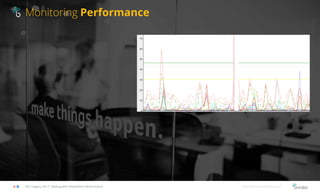
Monitoring Performance
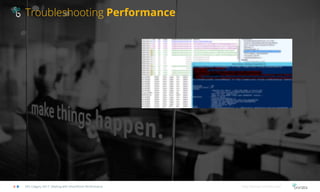
Troubleshooting Performance
Q&A
SPS Calgary 2017: Dealing with SharePoint Performance http://bonzai-intranet.com/
Intended Audience
SPS Calgary 2017: Dealing with SharePoint Performance http://bonzai-intranet.com/
• SharePoint Administrators
• Server Administrators
• Developers
• Anyone who is asked “Why is SharePoint slow?”
Hardware Requirements
SPS Calgary 2017: Dealing with SharePoint Performance Hardware Requirements http://bonzai-intranet.com/
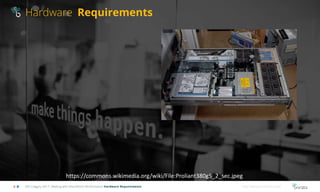
https://commons.wikimedia.org/wiki/File:Proliant380g5_2_sec.jpeg
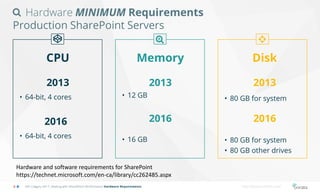
Hardware MINIMUM Requirements
Production SharePoint Servers
CPU
2013
• 64-bit, 4 cores
2016
• 64-bit, 4 cores
Memory
2013
2016
• 12 GB
• 16 GB
Disk
2013
2016
SPS Calgary 2017: Dealing with SharePoint Performance Hardware Requirements http://bonzai-intranet.com/
• 80 GB for system
• 80 GB for system
• 80 GB other drives
Hardware and software requirements for SharePoint
https://technet.microsoft.com/en-ca/library/cc262485.aspx
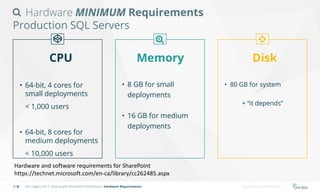
Hardware MINIMUM Requirements
Production SQL Servers
CPU
• 64-bit, 4 cores for
small deployments
< 1,000 users
• 64-bit, 8 cores for
medium deployments
< 10,000 users
Memory
• 8 GB for small
deployments
• 16 GB for medium
deployments
Disk
SPS Calgary 2017: Dealing with SharePoint Performance Hardware Requirements http://bonzai-intranet.com/
• 80 GB for system
+ “it depends”
Hardware and software requirements for SharePoint
https://technet.microsoft.com/en-ca/library/cc262485.aspx
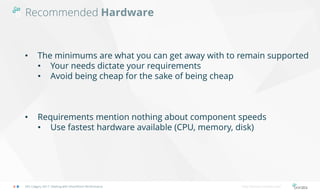
Recommended Hardware
SPS Calgary 2017: Dealing with SharePoint Performance http://bonzai-intranet.com/
• The minimums are what you can get away with to remain supported
• Your needs dictate your requirements
• Avoid being cheap for the sake of being cheap
• Requirements mention nothing about component speeds
• Use fastest hardware available (CPU, memory, disk)
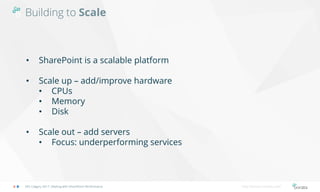
Building to Scale
SPS Calgary 2017: Dealing with SharePoint Performance http://bonzai-intranet.com/
• SharePoint is a scalable platform
• Scale up – add/improve hardware
• CPUs
• Memory
• Disk
• Scale out – add servers
• Focus: underperforming services
Monitoring Performance
SPS Calgary 2017: Dealing with SharePoint Performance http://bonzai-intranet.com/
Performance Monitoring
SPS Calgary 2017: Dealing with SharePoint Performance http://bonzai-intranet.com/
• You want to see how your hardware and applications are
performing
• Identify performance issues before they cause problems
• Tools available in Windows + 3rd party
• Create a performance baseline
• Look at performance in a measurable and quantified way
Monitoring
Performance
Live Demo
2013 2016
Monitoring Recap
SPS Calgary 2017: Dealing with SharePoint Performance http://bonzai-intranet.com/
• Be proactive: use performance monitor
• Create a performance baseline
• Ask the business for hardware before you can’t live without it
Troubleshooting Performance
SPS Calgary 2017: Dealing with SharePoint Performance http://bonzai-intranet.com/
Troubleshooting
Performance
Live Demo
2013 2016
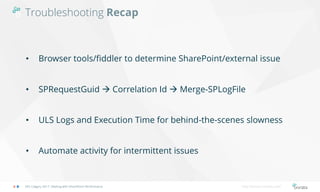
Troubleshooting Recap
SPS Calgary 2017: Dealing with SharePoint Performance http://bonzai-intranet.com/
• Browser tools/fiddler to determine SharePoint/external issue
• SPRequestGuid  Correlation Id  Merge-SPLogFile
• ULS Logs and Execution Time for behind-the-scenes slowness
• Automate activity for intermittent issues
Questions?
Q&A
2013 2016
18 | SharePoint Saturday Calgary – 01 APRIL 2017
Sponsors
 Special Thanks:
19 | SharePoint Saturday Calgary – 01 APRIL 2017
Housekeeping




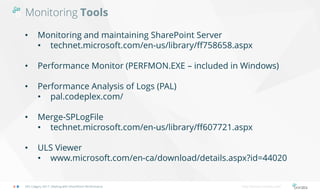
Monitoring Tools
SPS Calgary 2017: Dealing with SharePoint Performance http://bonzai-intranet.com/
• Monitoring and maintaining SharePoint Server
• technet.microsoft.com/en-us/library/ff758658.aspx
• Performance Monitor (PERFMON.EXE – included in Windows)
• Performance Analysis of Logs (PAL)
• pal.codeplex.com/
• Merge-SPLogFile
• technet.microsoft.com/en-us/library/ff607721.aspx
• ULS Viewer
• www.microsoft.com/en-ca/download/details.aspx?id=44020
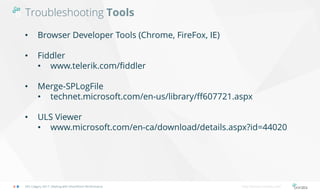
Troubleshooting Tools
SPS Calgary 2017: Dealing with SharePoint Performance http://bonzai-intranet.com/
• Browser Developer Tools (Chrome, FireFox, IE)
• Fiddler
• www.telerik.com/fiddler
• Merge-SPLogFile
• technet.microsoft.com/en-us/library/ff607721.aspx
• ULS Viewer
• www.microsoft.com/en-ca/download/details.aspx?id=44020
bonzai-intranet.com
@bonzaiintranet
sales@bonzai-intranet.com
+1 (844)-547-2662
675 W.Hastings,
Vancouver B.C. V6B 1N2
Thank You!

Dealing with Performance in SharePoint Server

  • 2.
    Jason Warren • BonzaiIntranet for SharePoint • Microsoft Office Servers and Services MVP Infrastructure Architect @jaspnwarren jason@dynamicowl.com Jasonwarren.ca
  • 3.
    Today’s Agenda Hardware Requirements MonitoringPerformance Troubleshooting Performance Q&A SPS Calgary 2017: Dealing with SharePoint Performance http://bonzai-intranet.com/
  • 4.
    Intended Audience SPS Calgary2017: Dealing with SharePoint Performance http://bonzai-intranet.com/ • SharePoint Administrators • Server Administrators • Developers • Anyone who is asked “Why is SharePoint slow?”
  • 5.
    Hardware Requirements SPS Calgary2017: Dealing with SharePoint Performance Hardware Requirements http://bonzai-intranet.com/ https://commons.wikimedia.org/wiki/File:Proliant380g5_2_sec.jpeg
  • 6.
    Hardware MINIMUM Requirements ProductionSharePoint Servers CPU 2013 • 64-bit, 4 cores 2016 • 64-bit, 4 cores Memory 2013 2016 • 12 GB • 16 GB Disk 2013 2016 SPS Calgary 2017: Dealing with SharePoint Performance Hardware Requirements http://bonzai-intranet.com/ • 80 GB for system • 80 GB for system • 80 GB other drives Hardware and software requirements for SharePoint https://technet.microsoft.com/en-ca/library/cc262485.aspx
  • 7.
    Hardware MINIMUM Requirements ProductionSQL Servers CPU • 64-bit, 4 cores for small deployments < 1,000 users • 64-bit, 8 cores for medium deployments < 10,000 users Memory • 8 GB for small deployments • 16 GB for medium deployments Disk SPS Calgary 2017: Dealing with SharePoint Performance Hardware Requirements http://bonzai-intranet.com/ • 80 GB for system + “it depends” Hardware and software requirements for SharePoint https://technet.microsoft.com/en-ca/library/cc262485.aspx
  • 8.
    Recommended Hardware SPS Calgary2017: Dealing with SharePoint Performance http://bonzai-intranet.com/ • The minimums are what you can get away with to remain supported • Your needs dictate your requirements • Avoid being cheap for the sake of being cheap • Requirements mention nothing about component speeds • Use fastest hardware available (CPU, memory, disk)
  • 9.
    Building to Scale SPSCalgary 2017: Dealing with SharePoint Performance http://bonzai-intranet.com/ • SharePoint is a scalable platform • Scale up – add/improve hardware • CPUs • Memory • Disk • Scale out – add servers • Focus: underperforming services
  • 10.
    Monitoring Performance SPS Calgary2017: Dealing with SharePoint Performance http://bonzai-intranet.com/
  • 11.
    Performance Monitoring SPS Calgary2017: Dealing with SharePoint Performance http://bonzai-intranet.com/ • You want to see how your hardware and applications are performing • Identify performance issues before they cause problems • Tools available in Windows + 3rd party • Create a performance baseline • Look at performance in a measurable and quantified way
  • 12.
  • 13.
    Monitoring Recap SPS Calgary2017: Dealing with SharePoint Performance http://bonzai-intranet.com/ • Be proactive: use performance monitor • Create a performance baseline • Ask the business for hardware before you can’t live without it
  • 14.
    Troubleshooting Performance SPS Calgary2017: Dealing with SharePoint Performance http://bonzai-intranet.com/
  • 15.
  • 16.
    Troubleshooting Recap SPS Calgary2017: Dealing with SharePoint Performance http://bonzai-intranet.com/ • Browser tools/fiddler to determine SharePoint/external issue • SPRequestGuid  Correlation Id  Merge-SPLogFile • ULS Logs and Execution Time for behind-the-scenes slowness • Automate activity for intermittent issues
  • 17.
  • 18.
    18 | SharePointSaturday Calgary – 01 APRIL 2017 Sponsors  Special Thanks:
  • 19.
    19 | SharePointSaturday Calgary – 01 APRIL 2017 Housekeeping    
  • 20.
    Monitoring Tools SPS Calgary2017: Dealing with SharePoint Performance http://bonzai-intranet.com/ • Monitoring and maintaining SharePoint Server • technet.microsoft.com/en-us/library/ff758658.aspx • Performance Monitor (PERFMON.EXE – included in Windows) • Performance Analysis of Logs (PAL) • pal.codeplex.com/ • Merge-SPLogFile • technet.microsoft.com/en-us/library/ff607721.aspx • ULS Viewer • www.microsoft.com/en-ca/download/details.aspx?id=44020
  • 21.
    Troubleshooting Tools SPS Calgary2017: Dealing with SharePoint Performance http://bonzai-intranet.com/ • Browser Developer Tools (Chrome, FireFox, IE) • Fiddler • www.telerik.com/fiddler • Merge-SPLogFile • technet.microsoft.com/en-us/library/ff607721.aspx • ULS Viewer • www.microsoft.com/en-ca/download/details.aspx?id=44020
  • 22.