3/19/2018	 Copyright	©	2018		OMG.	All	rights	reserved.	 1	
DDS	Security	Interoperability	Demo	
DDS™	–	The	Proven	Data	Connec9vity	Standard	for	IIoT™
dds/2018-03-01	
Reston, March 2018
DDS	Security	Demo	—	Overview	
12/06/17	 2	
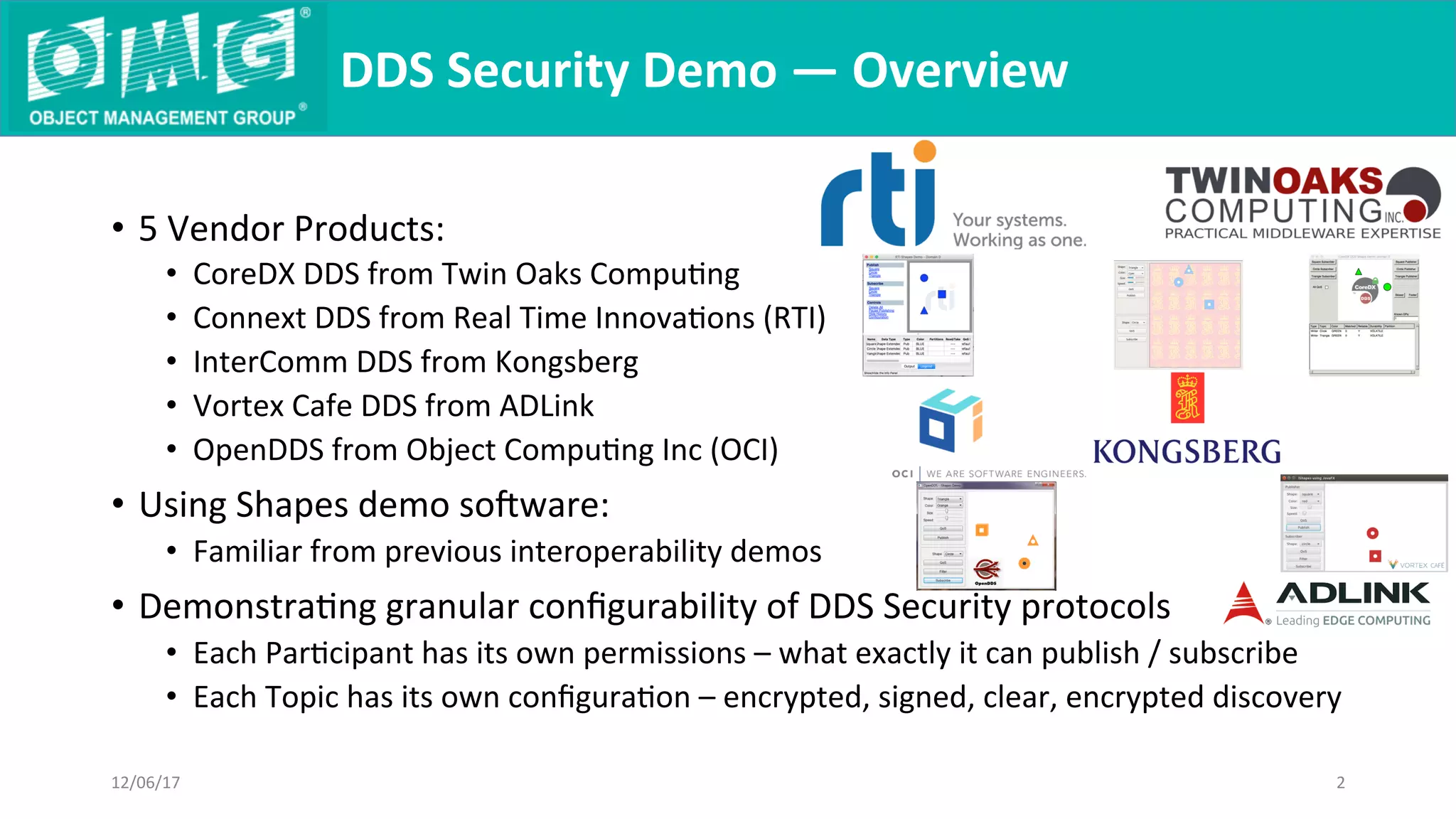
•  5	Vendor	Products:	
•  CoreDX	DDS	from	Twin	Oaks	CompuQng	
•  Connext	DDS	from	Real	Time	InnovaQons	(RTI)	
•  InterComm	DDS	from	Kongsberg	
•  Vortex	Cafe	DDS	from	ADLink	
•  OpenDDS	from	Object	CompuQng	Inc	(OCI)	
•  Using	Shapes	demo	soware:	
•  Familiar	from	previous	interoperability	demos	
•  DemonstraQng	granular	configurability	of	DDS	Security	protocols	
•  Each	ParQcipant	has	its	own	permissions	–	what	exactly	it	can	publish	/	subscribe	
•  Each	Topic	has	its	own	configuraQon	–	encrypted,	signed,	clear,	encrypted	discovery
DDS	Security	Demo	—	Topics	
12/06/17	 3	
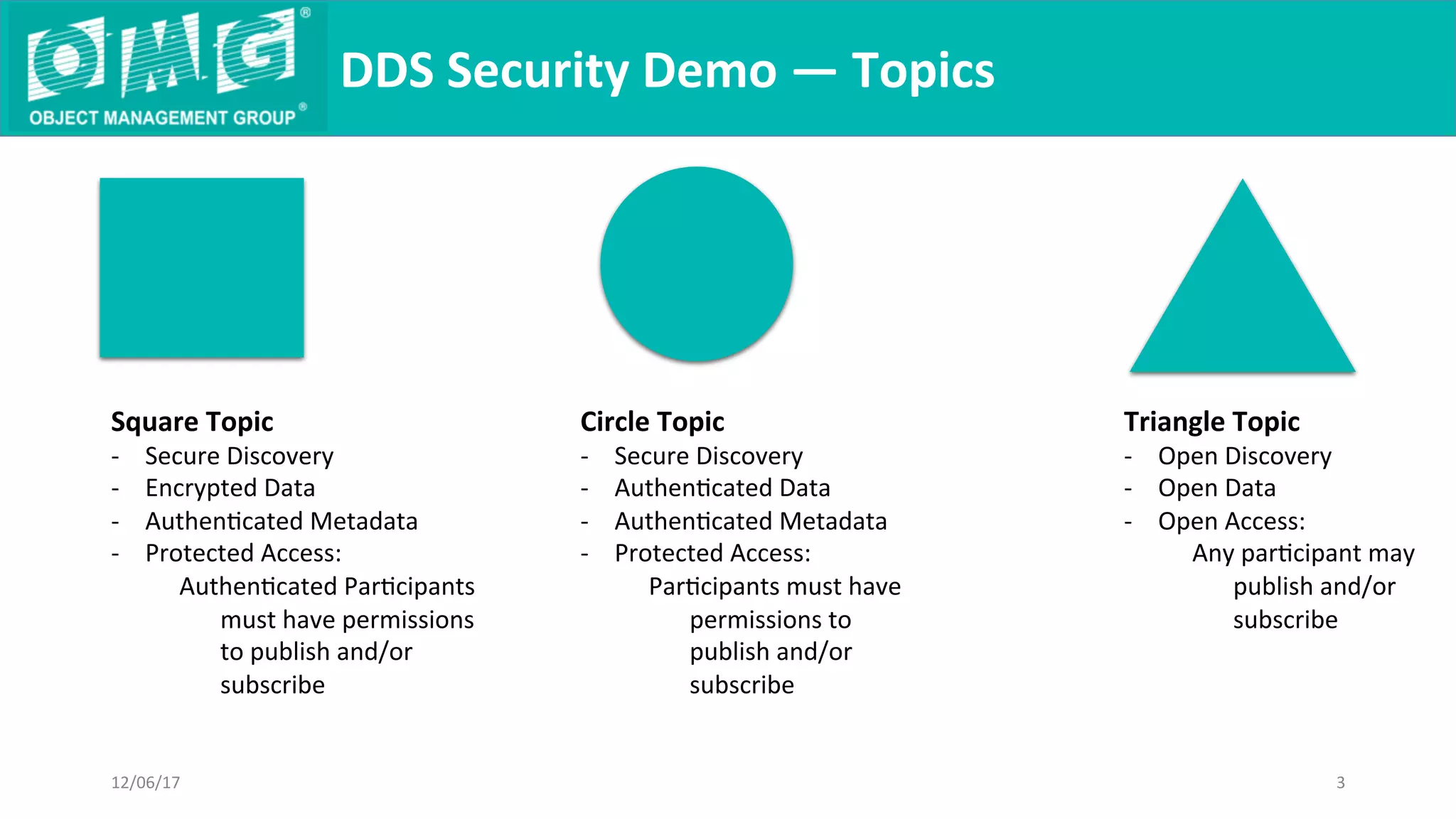
Square	Topic
-  Secure	Discovery
-  Encrypted	Data
-  AuthenQcated	Metadata
-  Protected	Access:
AuthenQcated	ParQcipants	
must	have	permissions	
to	publish	and/or	
subscribe
	
Circle	Topic
-  Secure	Discovery
-  AuthenQcated	Data
-  AuthenQcated	Metadata
-  Protected	Access:
ParQcipants	must	have	
permissions	to	
publish	and/or	
subscribe
	
Triangle	Topic	
-  Open	Discovery
-  Open	Data
-  Open	Access:
Any	parQcipant	may	
publish	and/or	
subscribe
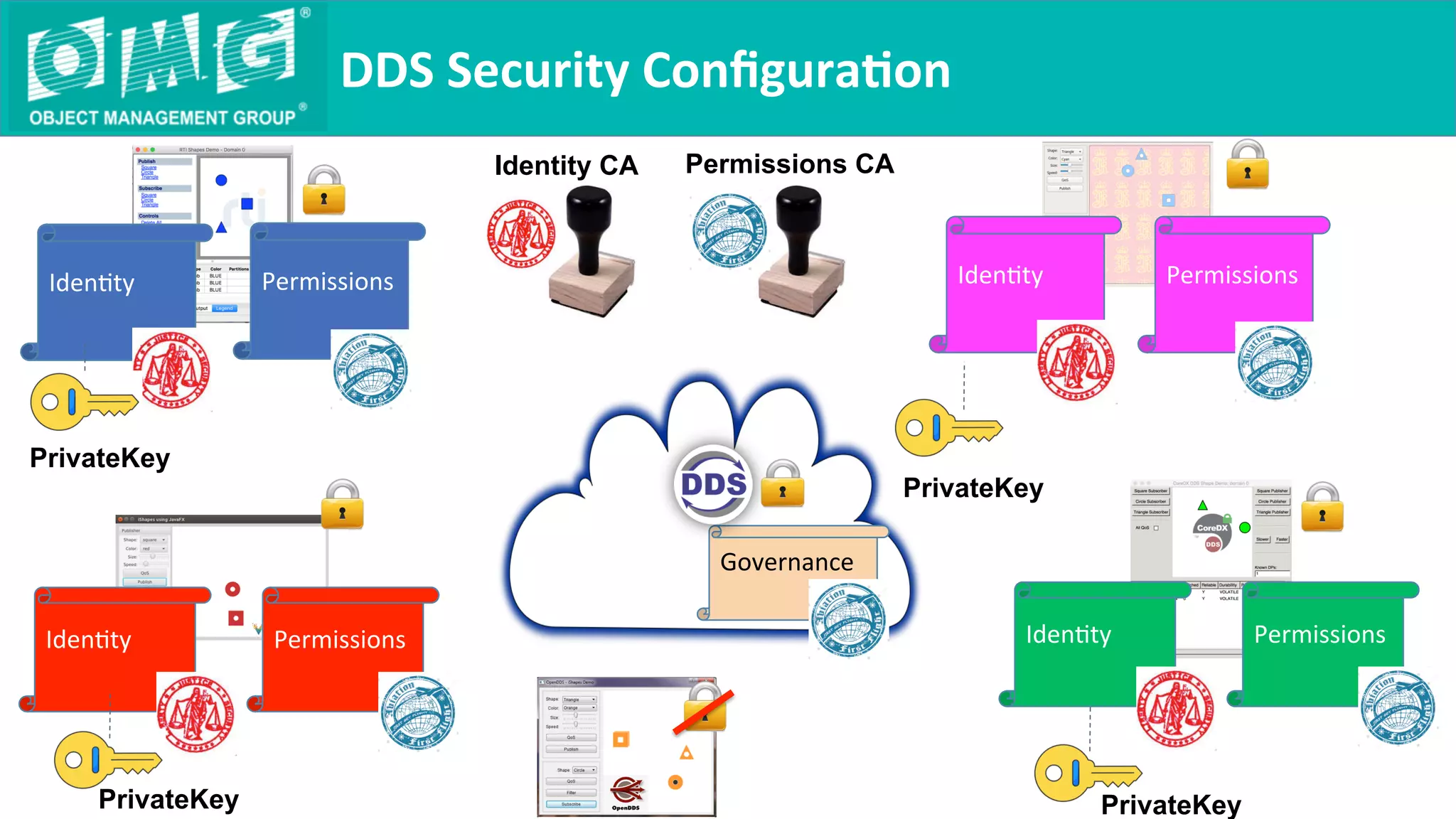
DDS	Security	Configura9on	
Permissions
	
IdenQty
	
Governance
	
Permissions
	
IdenQty
	
Permissions
	
IdenQty
	
PrivateKey
PrivateKey
PrivateKey
Identity CA Permissions CA
Permissions
	
IdenQty
	
PrivateKey
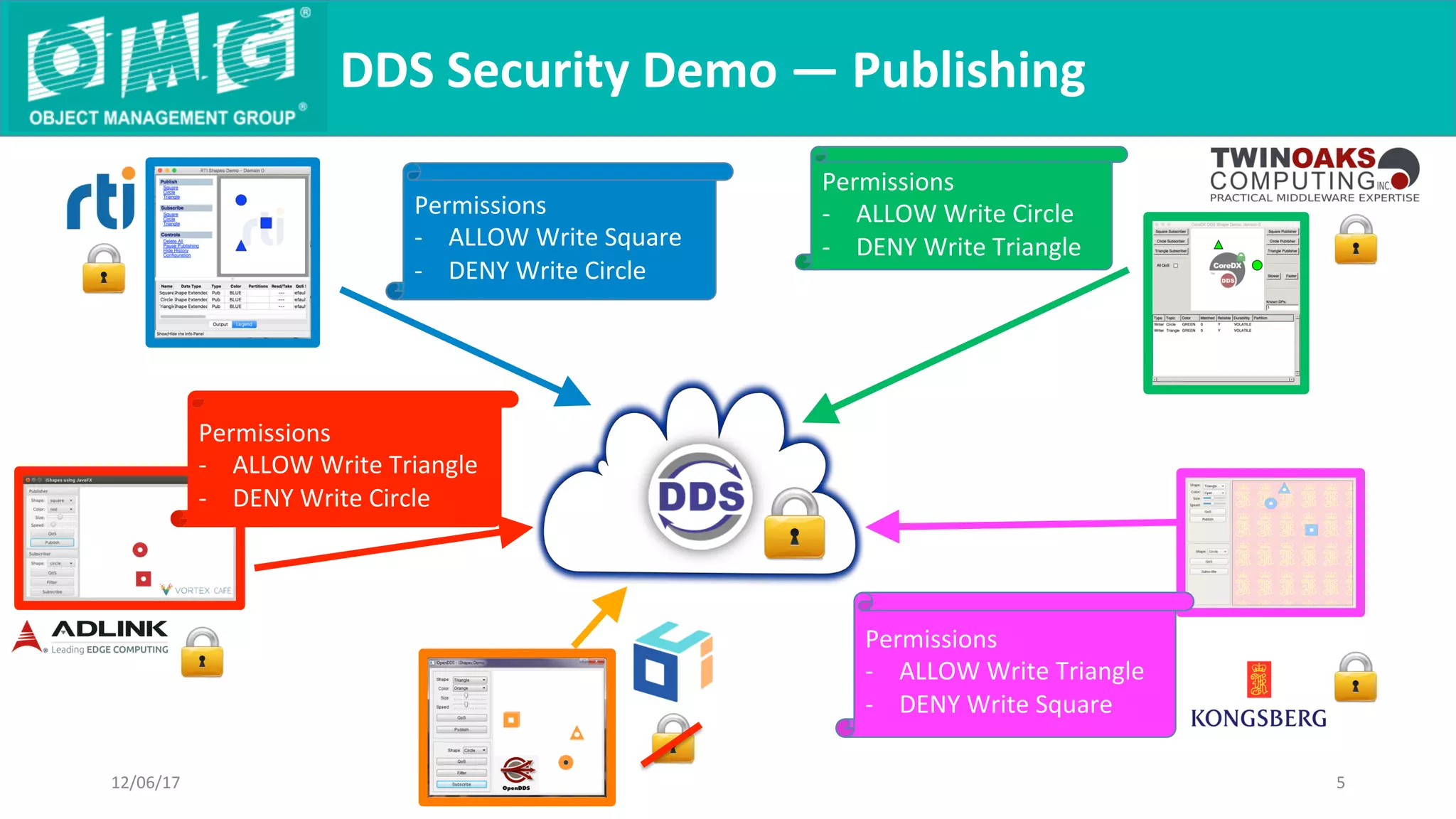
DDS	Security	Demo	—	Publishing	
12/06/17	 5	
Permissions
-  ALLOW	Write	Square
-  DENY	Write	Circle
Permissions
-  ALLOW	Write	Circle	
-  DENY	Write	Triangle
Permissions
-  ALLOW	Write	Triangle
-  DENY	Write	Square
Permissions
-  ALLOW	Write	Triangle	
-  DENY	Write	Circle
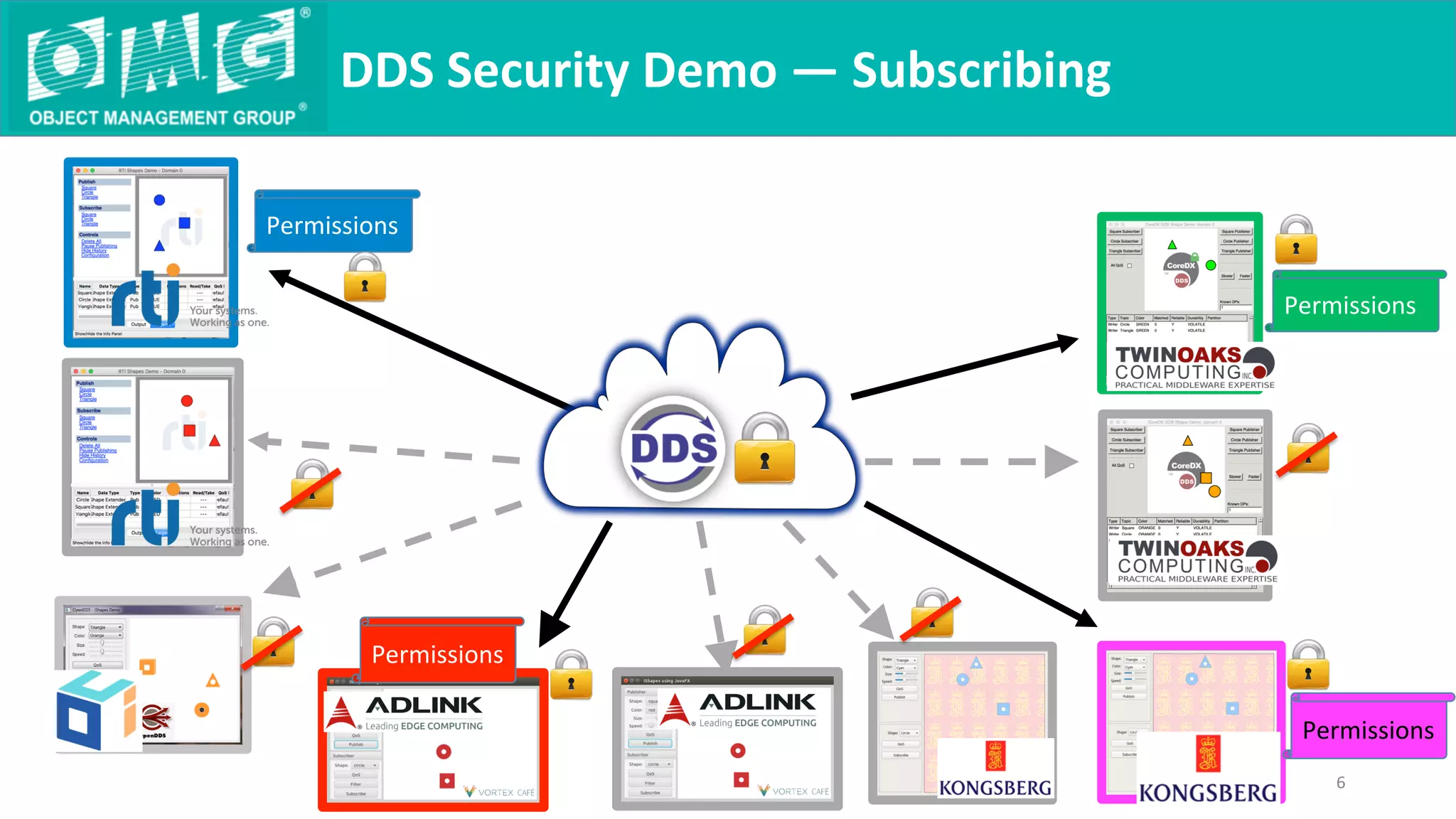
DDS	Security	Demo	—	Subscribing	
6	
Permissions	
Permissions	
Permissions	
Permissions
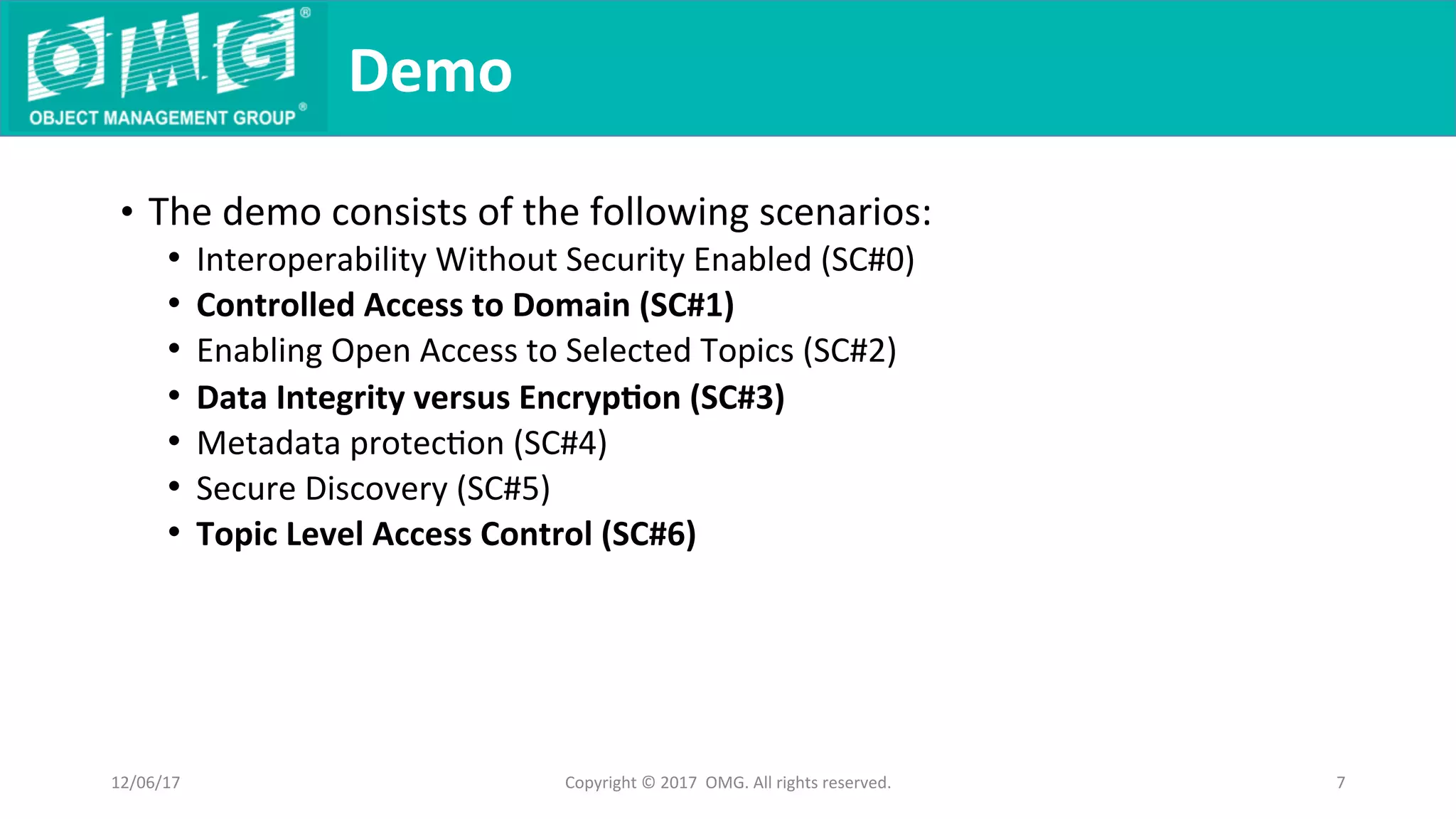
•  The	demo	consists	of	the	following	scenarios:	
•  Interoperability	Without	Security	Enabled	(SC#0)	
•  Controlled	Access	to	Domain	(SC#1)	
•  Enabling	Open	Access	to	Selected	Topics	(SC#2)	
•  Data	Integrity	versus	Encryp9on	(SC#3)	
•  Metadata	protecQon	(SC#4)	
•  Secure	Discovery	(SC#5)	
•  Topic	Level	Access	Control	(SC#6)	
Demo	
12/06/17	 Copyright	©	2017		OMG.	All	rights	reserved.	 7
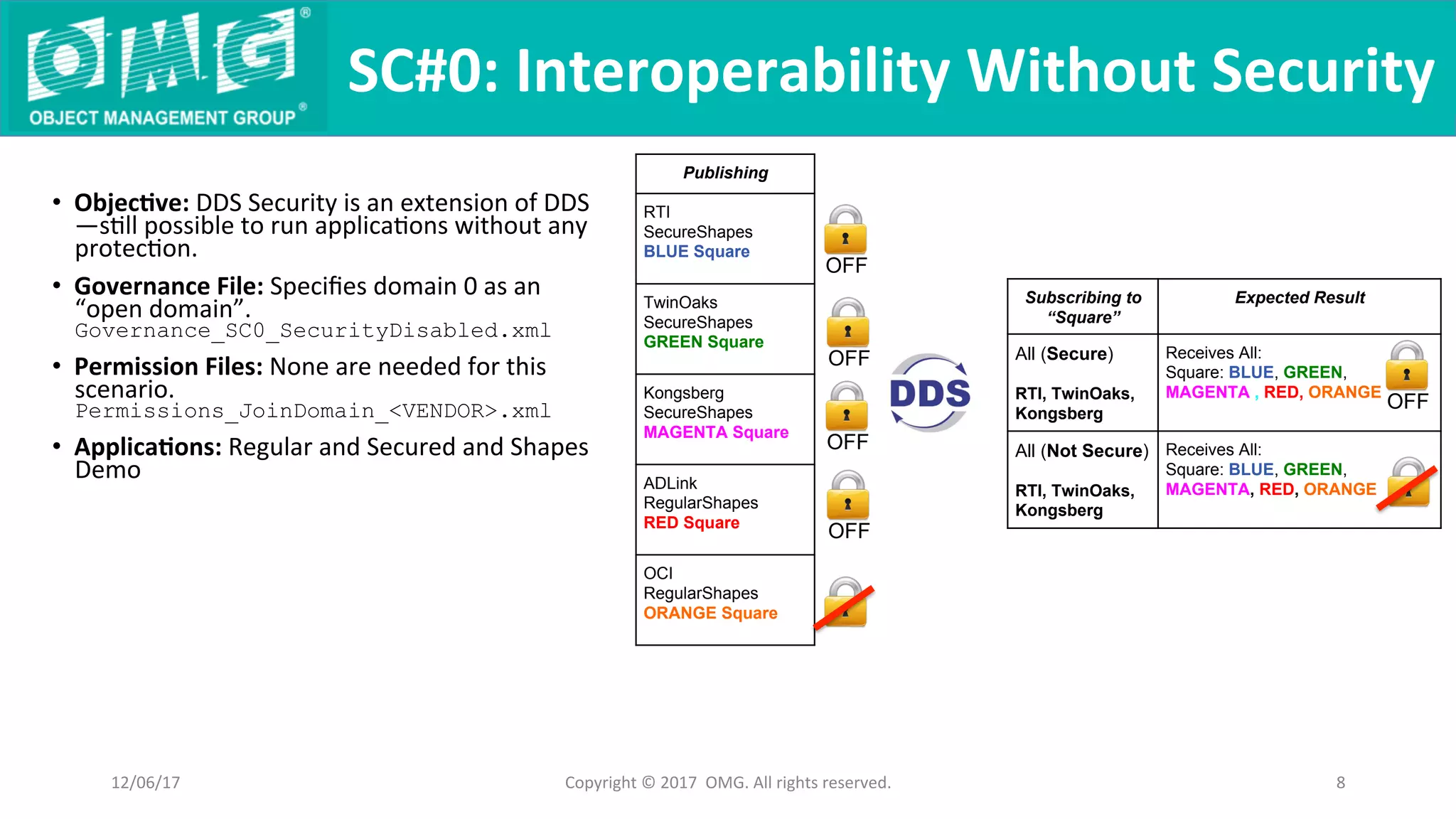
•  Objec9ve:	DDS	Security	is	an	extension	of	DDS
—sQll	possible	to	run	applicaQons	without	any	
protecQon.	
•  Governance	File:	Specifies	domain	0	as	an	
“open	domain”.	
Governance_SC0_SecurityDisabled.xml
•  Permission	Files:	None	are	needed	for	this	
scenario.	
Permissions_JoinDomain_<VENDOR>.xml	
•  Applica9ons:	Regular	and	Secured	and	Shapes	
Demo	
SC#0:	Interoperability	Without	Security		
Copyright	©	2017		OMG.	All	rights	reserved.	 8	
Subscribing to
“Square”
Expected Result
All (Secure)
RTI, TwinOaks,
Kongsberg
Receives All:
Square: BLUE, GREEN,
MAGENTA , RED, ORANGE
All (Not Secure)
RTI, TwinOaks,
Kongsberg
Receives All:
Square: BLUE, GREEN,
MAGENTA, RED, ORANGE
12/06/17	
Publishing
RTI
SecureShapes
BLUE Square
TwinOaks
SecureShapes
GREEN Square
Kongsberg
SecureShapes
MAGENTA Square
ADLink
RegularShapes
RED Square
OCI
RegularShapes
ORANGE Square
OFF
OFF
OFF
OFF
OFF
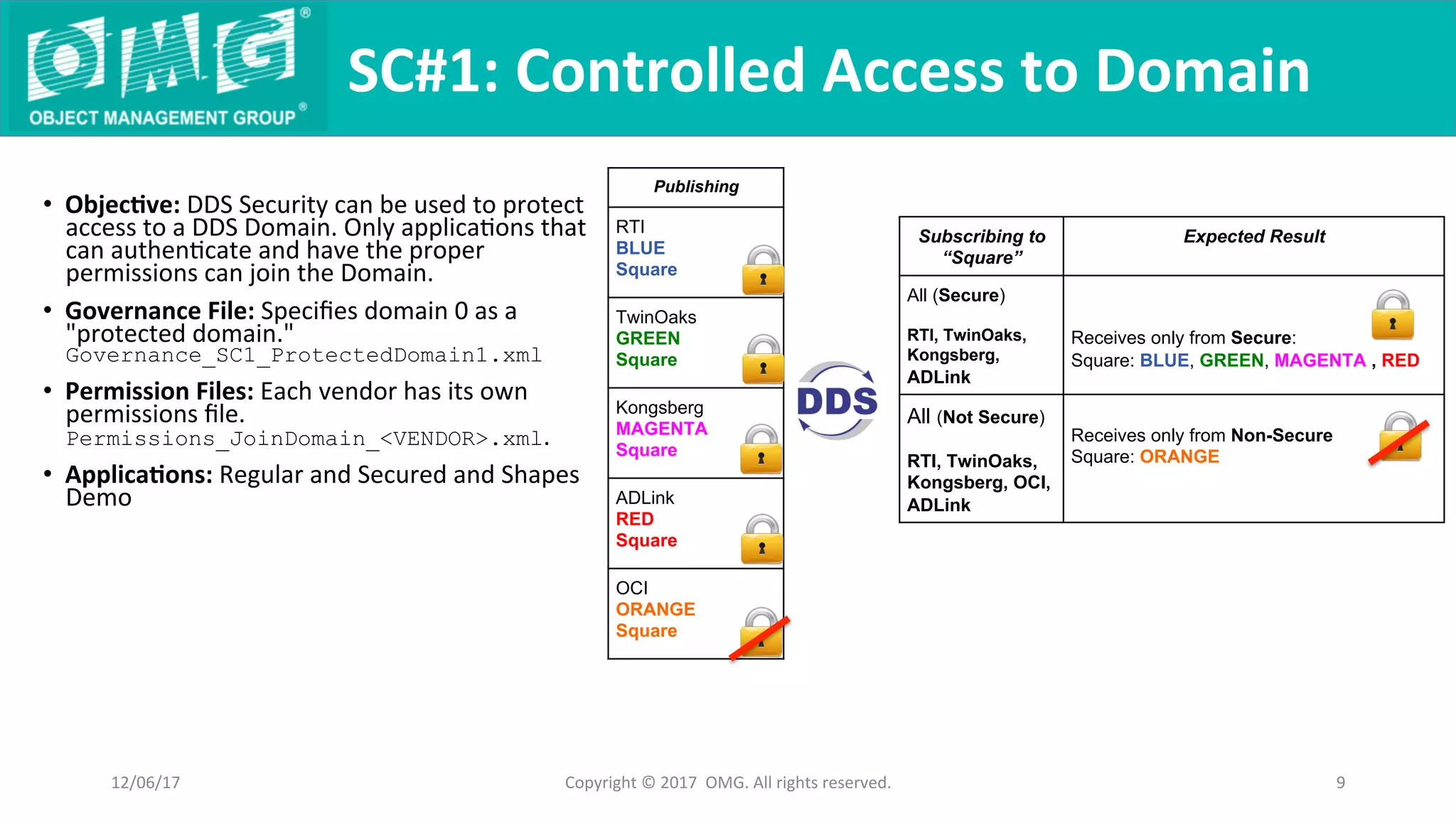
•  Objec9ve:	DDS	Security	can	be	used	to	protect	
access	to	a	DDS	Domain.	Only	applicaQons	that	
can	authenQcate	and	have	the	proper	
permissions	can	join	the	Domain.		
•  Governance	File:	Specifies	domain	0	as	a	
"protected	domain."	
Governance_SC1_ProtectedDomain1.xml
•  Permission	Files:	Each	vendor	has	its	own	
permissions	file.	
Permissions_JoinDomain_<VENDOR>.xml.	
•  Applica9ons:	Regular	and	Secured	and	Shapes	
Demo	
SC#1:	Controlled	Access	to	Domain	
Copyright	©	2017		OMG.	All	rights	reserved.	 9	
Subscribing to
“Square”
Expected Result
All (Secure)
RTI, TwinOaks,
Kongsberg,
ADLink
Receives only from Secure:
Square: BLUE, GREEN, MAGENTA , RED
All (Not Secure)
RTI, TwinOaks,
Kongsberg, OCI,
ADLink
Receives only from Non-Secure
Square: ORANGE
12/06/17	
Publishing
RTI
BLUE
Square
TwinOaks
GREEN
Square
Kongsberg
MAGENTA
Square
ADLink
RED
Square
OCI
ORANGE
Square
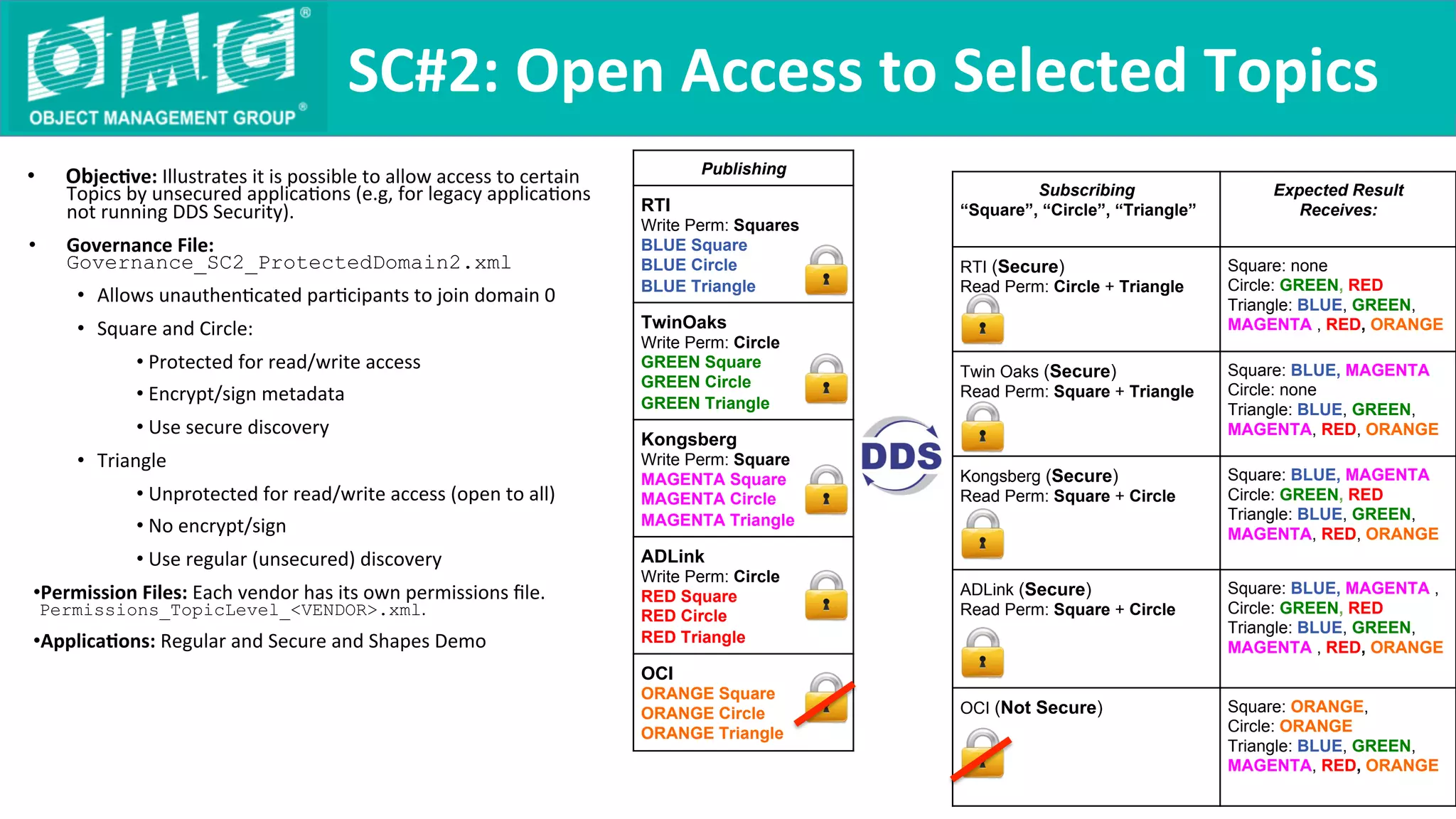
Subscribing
“Square”, “Circle”, “Triangle”
Expected Result
Receives:
RTI (Secure)
Read Perm: Circle + Triangle
Square: none
Circle: GREEN, RED
Triangle: BLUE, GREEN,
MAGENTA , RED, ORANGE
Twin Oaks (Secure)
Read Perm: Square + Triangle
Square: BLUE, MAGENTA
Circle: none
Triangle: BLUE, GREEN,
MAGENTA, RED, ORANGE
Kongsberg (Secure)
Read Perm: Square + Circle
Square: BLUE, MAGENTA
Circle: GREEN, RED
Triangle: BLUE, GREEN,
MAGENTA, RED, ORANGE
ADLink (Secure)
Read Perm: Square + Circle
Square: BLUE, MAGENTA ,
Circle: GREEN, RED
Triangle: BLUE, GREEN,
MAGENTA , RED, ORANGE
OCI (Not Secure) Square: ORANGE,
Circle: ORANGE
Triangle: BLUE, GREEN,
MAGENTA, RED, ORANGE
•  Objec9ve:	Illustrates	it	is	possible	to	allow	access	to	certain	
Topics	by	unsecured	applicaQons	(e.g,	for	legacy	applicaQons	
not	running	DDS	Security).		
•  Governance	File:	
Governance_SC2_ProtectedDomain2.xml
•  Allows	unauthenQcated	parQcipants	to	join	domain	0	
•  Square	and	Circle:	
• Protected	for	read/write	access	
• Encrypt/sign	metadata	
• Use	secure	discovery	
•  Triangle	
• Unprotected	for	read/write	access	(open	to	all)	
• No	encrypt/sign	
• Use	regular	(unsecured)	discovery	
• Permission	Files:	Each	vendor	has	its	own	permissions	file.	
Permissions_TopicLevel_<VENDOR>.xml.	
• Applica9ons:	Regular	and	Secure	and	Shapes	Demo	
SC#2:	Open	Access	to	Selected	Topics	
Publishing
RTI
Write Perm: Squares
BLUE Square
BLUE Circle
BLUE Triangle
TwinOaks
Write Perm: Circle
GREEN Square
GREEN Circle
GREEN Triangle
Kongsberg
Write Perm: Square
MAGENTA Square
MAGENTA Circle
MAGENTA Triangle
ADLink
Write Perm: Circle
RED Square
RED Circle
RED Triangle
OCI
ORANGE Square
ORANGE Circle
ORANGE Triangle
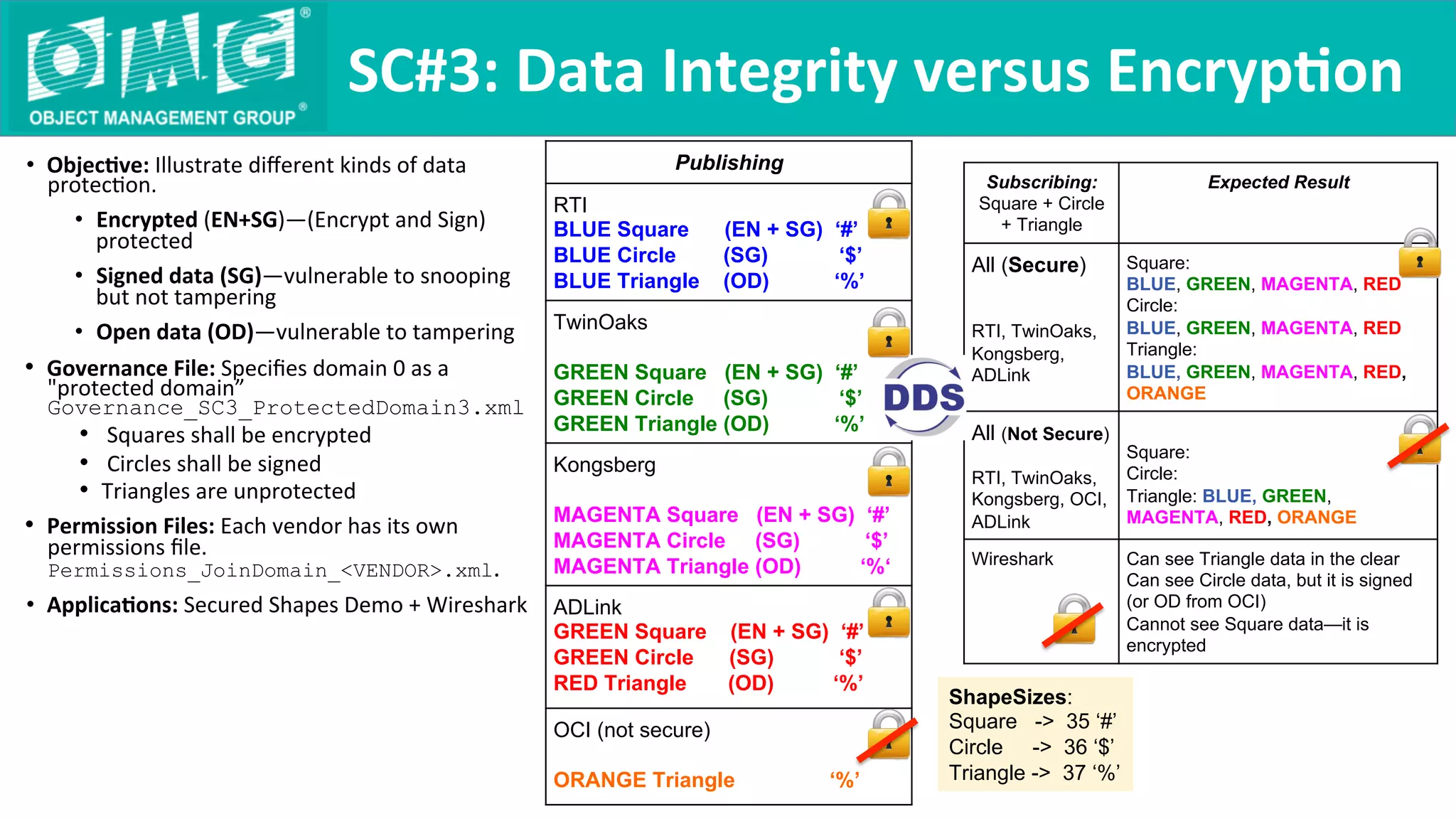
•  Objec9ve:	Illustrate	different	kinds	of	data	
protecQon.		
•  Encrypted	(EN+SG)—(Encrypt	and	Sign)	
protected	
•  Signed	data	(SG)—vulnerable	to	snooping	
but	not	tampering	
•  Open	data	(OD)—vulnerable	to	tampering	
•  Governance	File:	Specifies	domain	0	as	a	
"protected	domain”
Governance_SC3_ProtectedDomain3.xml	
•  	Squares	shall	be	encrypted	
•  	Circles	shall	be	signed	
•  Triangles	are	unprotected
•  Permission	Files:	Each	vendor	has	its	own	
permissions	file.	
Permissions_JoinDomain_<VENDOR>.xml.	
•  Applica9ons:	Secured	Shapes	Demo	+	Wireshark	
SC#3:	Data	Integrity	versus	Encryp9on	
Subscribing:
Square + Circle
+ Triangle
Expected Result
All (Secure)
RTI, TwinOaks,
Kongsberg,
ADLink
Square:
BLUE, GREEN, MAGENTA, RED
Circle:
BLUE, GREEN, MAGENTA, RED
Triangle:
BLUE, GREEN, MAGENTA, RED,
ORANGE
All (Not Secure)
RTI, TwinOaks,
Kongsberg, OCI,
ADLink
Square:
Circle:
Triangle: BLUE, GREEN,
MAGENTA, RED, ORANGE
Wireshark Can see Triangle data in the clear
Can see Circle data, but it is signed
(or OD from OCI)
Cannot see Square data—it is
encrypted
Publishing
RTI
BLUE Square (EN + SG) ‘#’
BLUE Circle (SG) ‘$’
BLUE Triangle (OD) ‘%’
TwinOaks
GREEN Square (EN + SG) ‘#’
GREEN Circle (SG) ‘$’
GREEN Triangle (OD) ‘%’
Kongsberg
MAGENTA Square (EN + SG) ‘#’
MAGENTA Circle (SG) ‘$’
MAGENTA Triangle (OD) ‘%‘
ADLink
GREEN Square (EN + SG) ‘#’
GREEN Circle (SG) ‘$’
RED Triangle (OD) ‘%’
OCI (not secure)
ORANGE Triangle ‘%’
ShapeSizes:
Square -> 35 ‘#’
Circle -> 36 ‘$’
Triangle -> 37 ‘%’
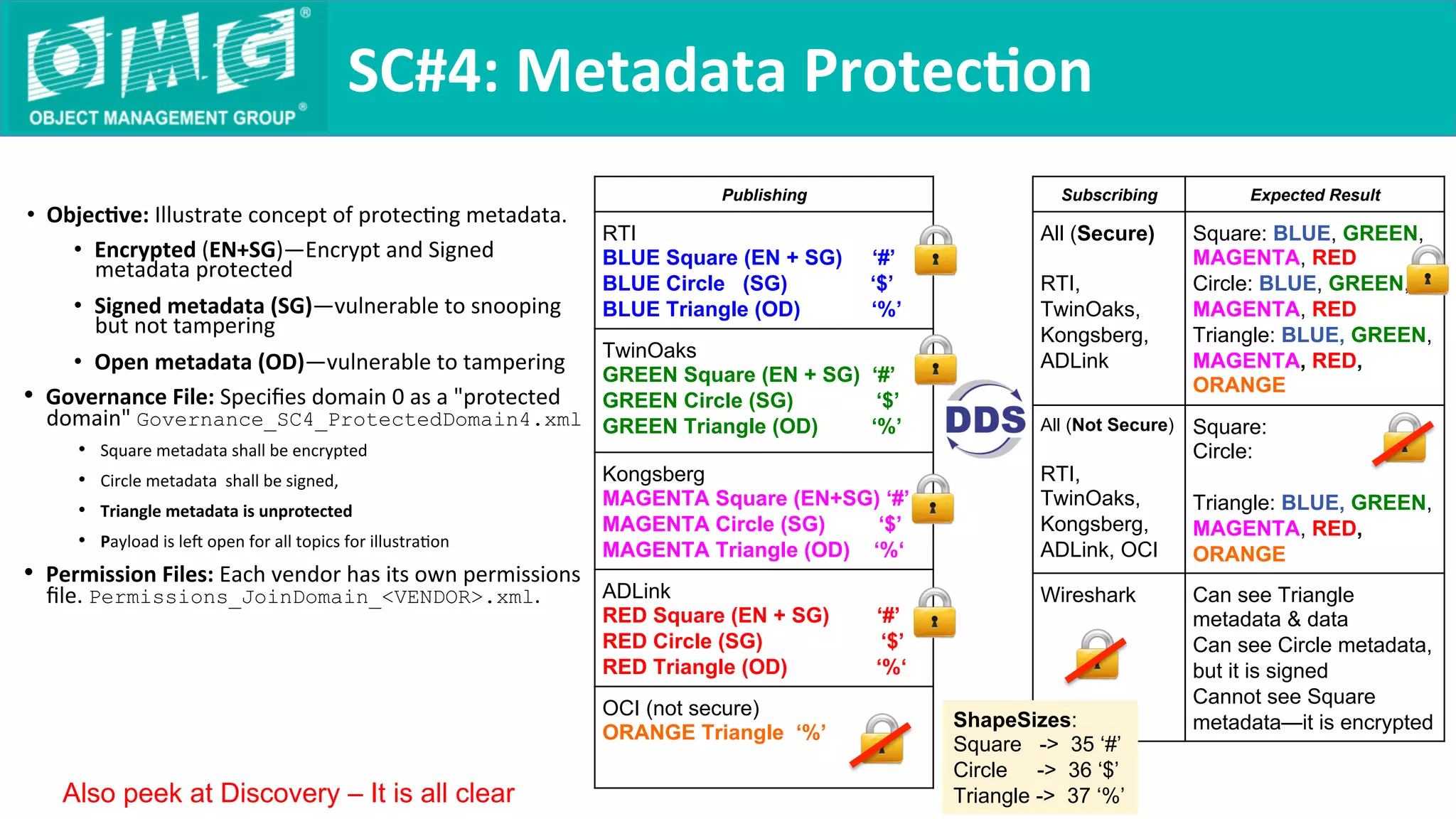
•  Objec9ve:	Illustrate	concept	of	protecQng	metadata.		
•  Encrypted	(EN+SG)—Encrypt	and	Signed	
metadata	protected	
•  Signed	metadata	(SG)—vulnerable	to	snooping	
but	not	tampering	
•  Open	metadata	(OD)—vulnerable	to	tampering	
•  Governance	File:	Specifies	domain	0	as	a	"protected	
domain"	Governance_SC4_ProtectedDomain4.xml
•  Square	metadata	shall	be	encrypted	
•  Circle	metadata		shall	be	signed,	
•  Triangle	metadata	is	unprotected	
•  Payload	is	le	open	for	all	topics	for	illustraQon	
•  Permission	Files:	Each	vendor	has	its	own	permissions	
file.	Permissions_JoinDomain_<VENDOR>.xml.	
SC#4:	Metadata	Protec9on	
Publishing
RTI
BLUE Square (EN + SG) ‘#’
BLUE Circle (SG) ‘$’
BLUE Triangle (OD) ‘%’
TwinOaks
GREEN Square (EN + SG) ‘#’
GREEN Circle (SG) ‘$’
GREEN Triangle (OD) ‘%’
Kongsberg
MAGENTA Square (EN+SG) ‘#’
MAGENTA Circle (SG) ‘$’
MAGENTA Triangle (OD) ‘%‘
ADLink
RED Square (EN + SG) ‘#’
RED Circle (SG) ‘$’
RED Triangle (OD) ‘%‘
OCI (not secure)
ORANGE Triangle ‘%’
Subscribing Expected Result
All (Secure)
RTI,
TwinOaks,
Kongsberg,
ADLink
Square: BLUE, GREEN,
MAGENTA, RED
Circle: BLUE, GREEN,
MAGENTA, RED
Triangle: BLUE, GREEN,
MAGENTA, RED,
ORANGE
All (Not Secure)
RTI,
TwinOaks,
Kongsberg,
ADLink, OCI
Square:
Circle:
Triangle: BLUE, GREEN,
MAGENTA, RED,
ORANGE
Wireshark Can see Triangle
metadata & data
Can see Circle metadata,
but it is signed
Cannot see Square
metadata—it is encrypted
Also peek at Discovery – It is all clear
ShapeSizes:
Square -> 35 ‘#’
Circle -> 36 ‘$’
Triangle -> 37 ‘%’
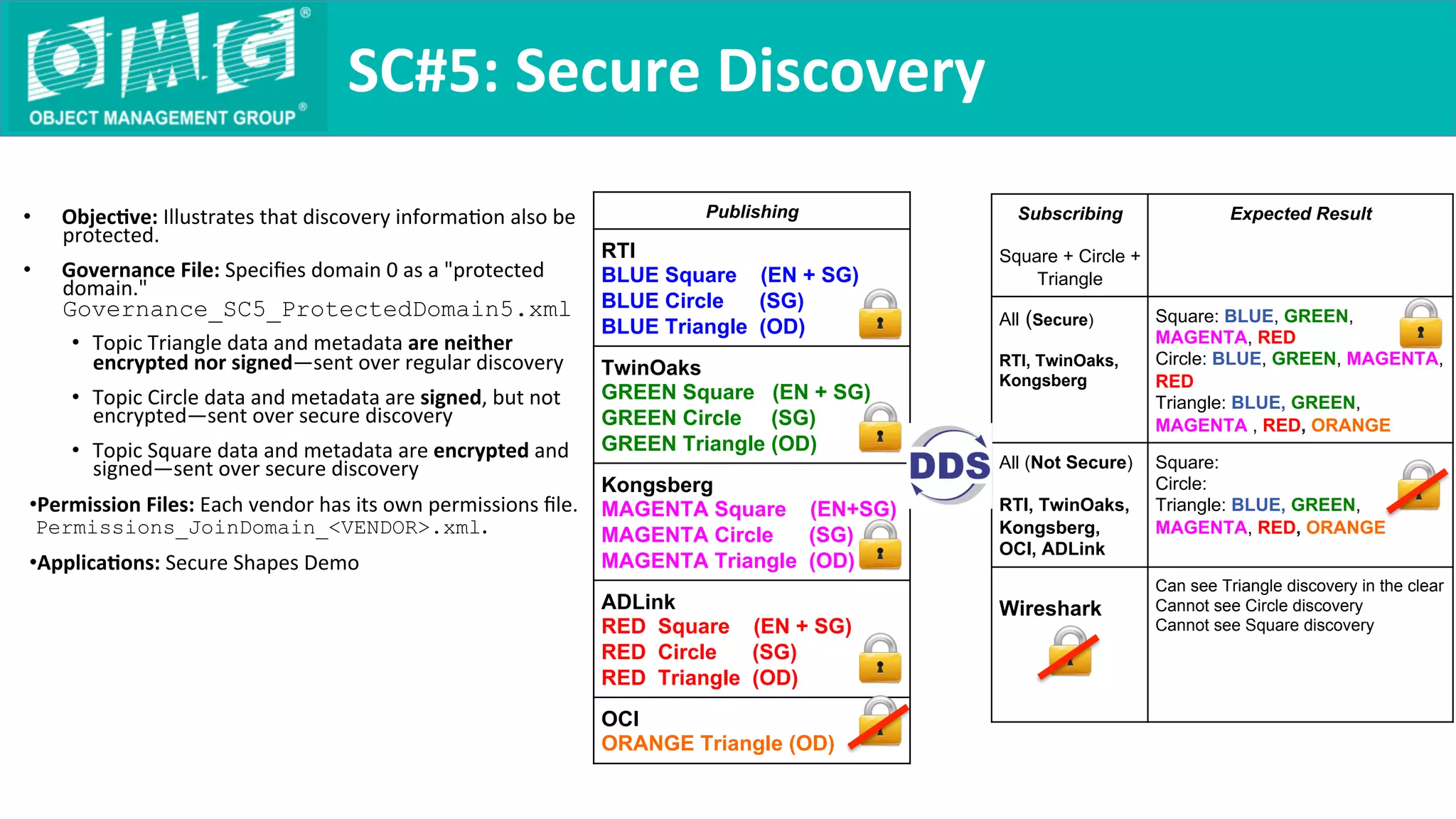
•  Objec9ve:	Illustrates	that	discovery	informaQon	also	be	
protected.		
•  Governance	File:	Specifies	domain	0	as	a	"protected	
domain."	
Governance_SC5_ProtectedDomain5.xml	
•  Topic	Triangle	data	and	metadata	are	neither	
encrypted	nor	signed—sent	over	regular	discovery	
•  Topic	Circle	data	and	metadata	are	signed,	but	not	
encrypted—sent	over	secure	discovery	
•  Topic	Square	data	and	metadata	are	encrypted	and	
signed—sent	over	secure	discovery	
• Permission	Files:	Each	vendor	has	its	own	permissions	file.	
Permissions_JoinDomain_<VENDOR>.xml.	
• Applica9ons:	Secure	Shapes	Demo	
SC#5:	Secure	Discovery	
Publishing
RTI
BLUE Square (EN + SG)
BLUE Circle (SG)
BLUE Triangle (OD)
TwinOaks
GREEN Square (EN + SG)
GREEN Circle (SG)
GREEN Triangle (OD)
Kongsberg
MAGENTA Square (EN+SG)
MAGENTA Circle (SG)
MAGENTA Triangle (OD)
ADLink
RED Square (EN + SG)
RED Circle (SG)
RED Triangle (OD)
OCI
ORANGE Triangle (OD)
Subscribing
Square + Circle +
Triangle
Expected Result
All (Secure)
RTI, TwinOaks,
Kongsberg
Square: BLUE, GREEN,
MAGENTA, RED
Circle: BLUE, GREEN, MAGENTA,
RED
Triangle: BLUE, GREEN,
MAGENTA , RED, ORANGE
All (Not Secure)
RTI, TwinOaks,
Kongsberg,
OCI, ADLink
Square:
Circle:
Triangle: BLUE, GREEN,
MAGENTA, RED, ORANGE
Wireshark
Can see Triangle discovery in the clear
Cannot see Circle discovery
Cannot see Square discovery
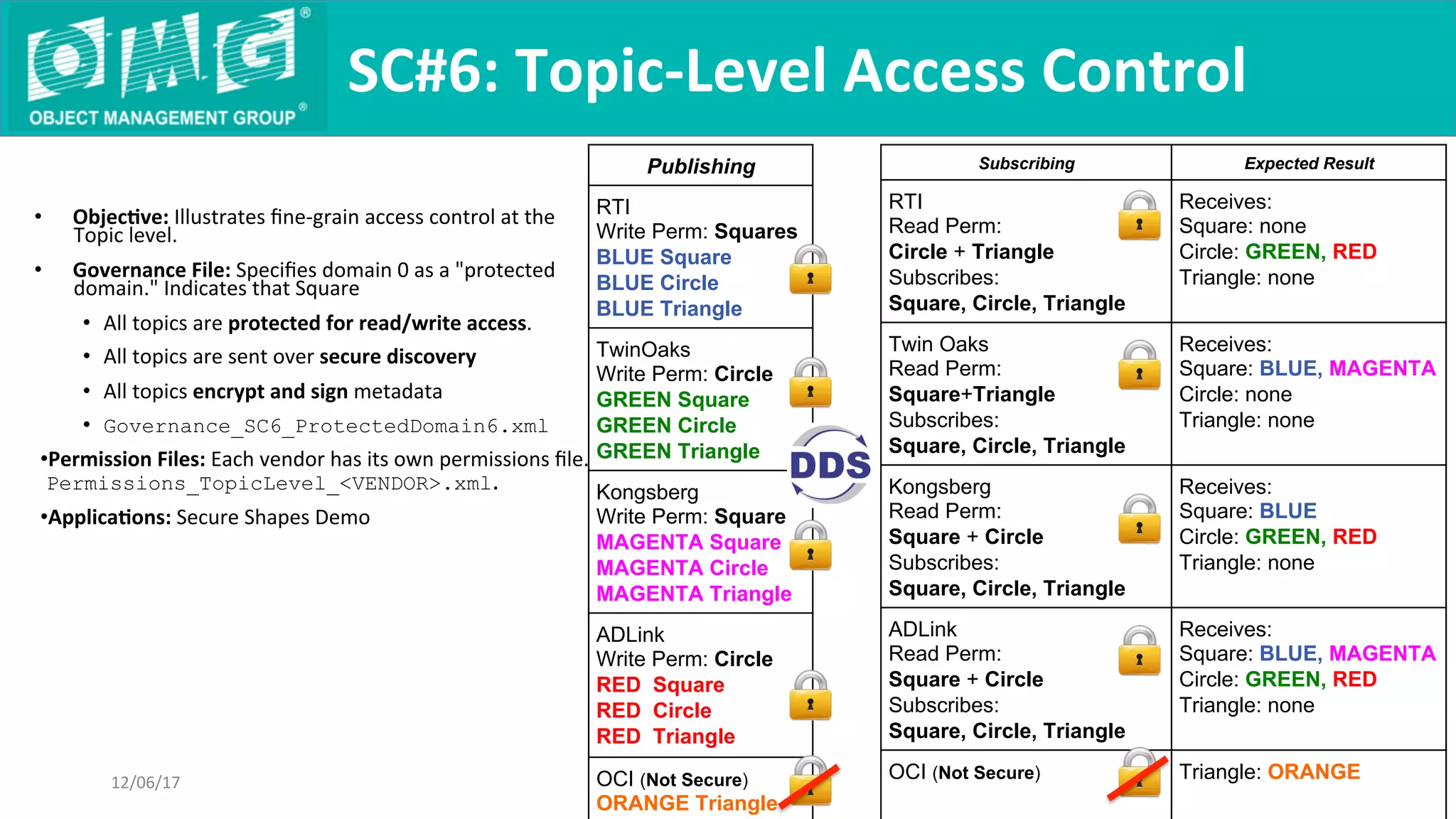
Subscribing Expected Result
RTI
Read Perm:
Circle + Triangle
Subscribes:
Square, Circle, Triangle
Receives:
Square: none
Circle: GREEN, RED
Triangle: none
Twin Oaks
Read Perm:
Square+Triangle
Subscribes:
Square, Circle, Triangle
Receives:
Square: BLUE, MAGENTA
Circle: none
Triangle: none
Kongsberg
Read Perm:
Square + Circle
Subscribes:
Square, Circle, Triangle
Receives:
Square: BLUE
Circle: GREEN, RED
Triangle: none
ADLink
Read Perm:
Square + Circle
Subscribes:
Square, Circle, Triangle
Receives:
Square: BLUE, MAGENTA
Circle: GREEN, RED
Triangle: none
OCI (Not Secure) Triangle: ORANGE
•  Objec9ve:	Illustrates	fine-grain	access	control	at	the	
Topic	level.		
•  Governance	File:	Specifies	domain	0	as	a	"protected	
domain."	Indicates	that	Square		
•  All	topics	are	protected	for	read/write	access.	
•  All	topics	are	sent	over	secure	discovery	
•  All	topics	encrypt	and	sign	metadata	
•  Governance_SC6_ProtectedDomain6.xml
• Permission	Files:	Each	vendor	has	its	own	permissions	file.	
Permissions_TopicLevel_<VENDOR>.xml.	
• Applica9ons:	Secure	Shapes	Demo	
SC#6:	Topic-Level	Access	Control	
12/06/17	
Publishing
RTI
Write Perm: Squares
BLUE Square
BLUE Circle
BLUE Triangle
TwinOaks
Write Perm: Circle
GREEN Square
GREEN Circle
GREEN Triangle
Kongsberg
Write Perm: Square
MAGENTA Square
MAGENTA Circle
MAGENTA Triangle
ADLink
Write Perm: Circle
RED Square
RED Circle
RED Triangle
OCI (Not Secure)
ORANGE Triangle
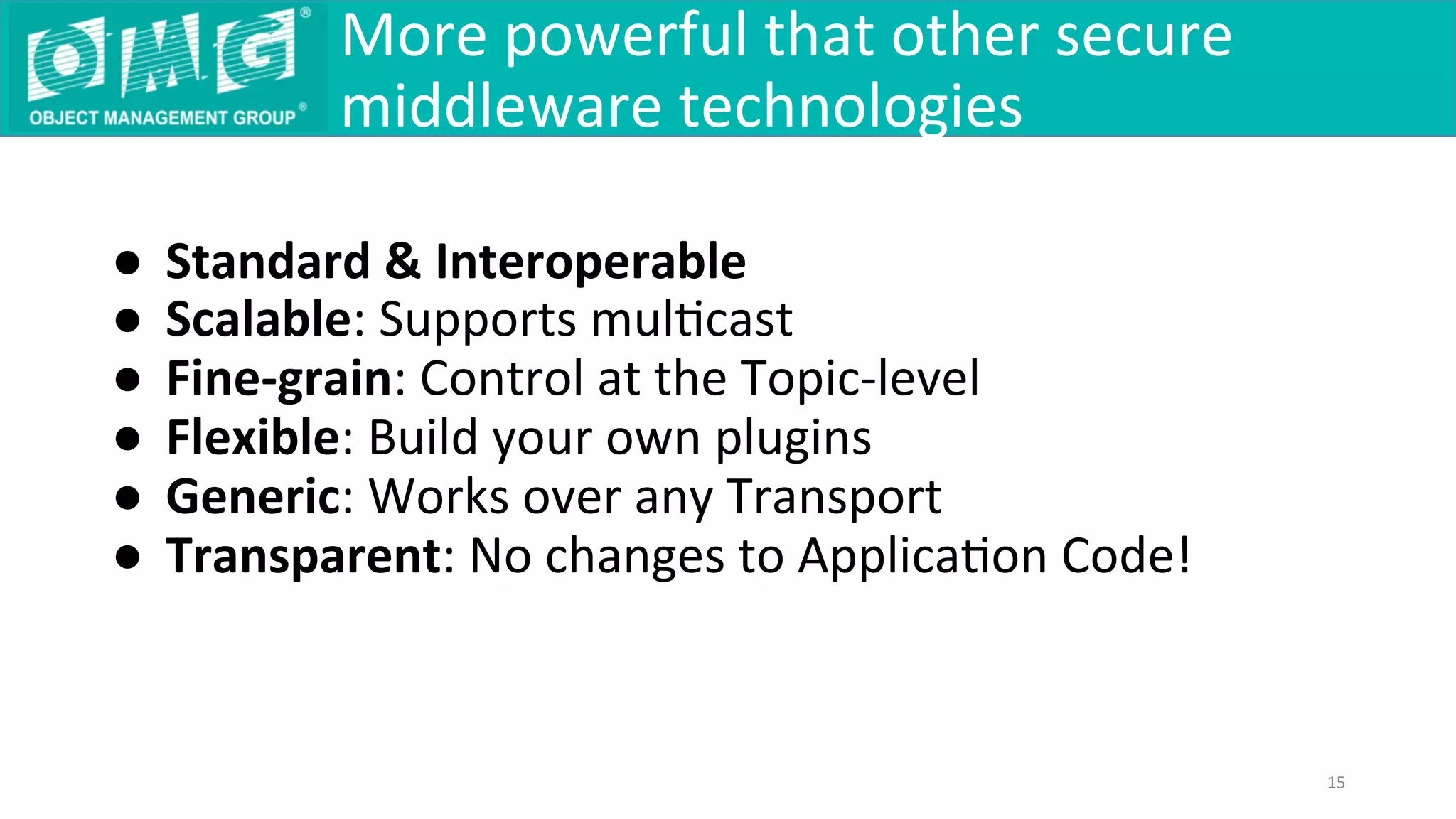
●  Standard	&	Interoperable	
●  Scalable:	Supports	mulQcast	
●  Fine-grain:	Control	at	the	Topic-level	
●  Flexible:	Build	your	own	plugins	
●  Generic:	Works	over	any	Transport	
●  Transparent:	No	changes	to	ApplicaQon	Code!	
	
More	powerful	that	other	secure	
middleware	technologies	
15
Ques9ons?

DDS-Security Interoperability Demo - March 2018

  • 1.
  • 2.
    DDS Security Demo — Overview 12/06/17 2 •  5 Vendor Products: • CoreDX DDS from Twin Oaks CompuQng •  Connext DDS from Real Time InnovaQons (RTI) •  InterComm DDS from Kongsberg •  Vortex Cafe DDS from ADLink •  OpenDDS from Object CompuQng Inc (OCI) •  Using Shapes demo soware: •  Familiar from previous interoperability demos •  DemonstraQng granular configurability of DDS Security protocols •  Each ParQcipant has its own permissions – what exactly it can publish / subscribe •  Each Topic has its own configuraQon – encrypted, signed, clear, encrypted discovery
  • 3.
    DDS Security Demo — Topics 12/06/17 3 Square Topic -  Secure Discovery - Encrypted Data -  AuthenQcated Metadata -  Protected Access: AuthenQcated ParQcipants must have permissions to publish and/or subscribe Circle Topic -  Secure Discovery -  AuthenQcated Data -  AuthenQcated Metadata -  Protected Access: ParQcipants must have permissions to publish and/or subscribe Triangle Topic -  Open Discovery -  Open Data -  Open Access: Any parQcipant may publish and/or subscribe
  • 4.
  • 5.
    DDS Security Demo — Publishing 12/06/17 5 Permissions -  ALLOW Write Square - DENY Write Circle Permissions -  ALLOW Write Circle -  DENY Write Triangle Permissions -  ALLOW Write Triangle -  DENY Write Square Permissions -  ALLOW Write Triangle -  DENY Write Circle
  • 6.
  • 7.
    •  The demo consists of the following scenarios: •  Interoperability Without Security Enabled (SC#0) • Controlled Access to Domain (SC#1) •  Enabling Open Access to Selected Topics (SC#2) •  Data Integrity versus Encryp9on (SC#3) •  Metadata protecQon (SC#4) •  Secure Discovery (SC#5) •  Topic Level Access Control (SC#6) Demo 12/06/17 Copyright © 2017 OMG. All rights reserved. 7
  • 8.
    •  Objec9ve: DDS Security is an extension of DDS —sQll possible to run applicaQons without any protecQon. •  Governance File: Specifies domain 0 as an “open domain”. Governance_SC0_SecurityDisabled.xml • Permission Files: None are needed for this scenario. Permissions_JoinDomain_<VENDOR>.xml •  Applica9ons: Regular and Secured and Shapes Demo SC#0: Interoperability Without Security Copyright © 2017 OMG. All rights reserved. 8 Subscribing to “Square” Expected Result All (Secure) RTI, TwinOaks, Kongsberg Receives All: Square: BLUE, GREEN, MAGENTA , RED, ORANGE All (Not Secure) RTI, TwinOaks, Kongsberg Receives All: Square: BLUE, GREEN, MAGENTA, RED, ORANGE 12/06/17 Publishing RTI SecureShapes BLUE Square TwinOaks SecureShapes GREEN Square Kongsberg SecureShapes MAGENTA Square ADLink RegularShapes RED Square OCI RegularShapes ORANGE Square OFF OFF OFF OFF OFF
  • 9.
    •  Objec9ve: DDS Security can be used to protect access to a DDS Domain. Only applicaQons that can authenQcate and have the proper permissions can join the Domain. •  Governance File: Specifies domain 0 as a "protected domain." Governance_SC1_ProtectedDomain1.xml • Permission Files: Each vendor has its own permissions file. Permissions_JoinDomain_<VENDOR>.xml. •  Applica9ons: Regular and Secured and Shapes Demo SC#1: Controlled Access to Domain Copyright © 2017 OMG. All rights reserved. 9 Subscribing to “Square” Expected Result All (Secure) RTI, TwinOaks, Kongsberg, ADLink Receives only from Secure: Square: BLUE, GREEN, MAGENTA , RED All (Not Secure) RTI, TwinOaks, Kongsberg, OCI, ADLink Receives only from Non-Secure Square: ORANGE 12/06/17 Publishing RTI BLUE Square TwinOaks GREEN Square Kongsberg MAGENTA Square ADLink RED Square OCI ORANGE Square
  • 10.
    Subscribing “Square”, “Circle”, “Triangle” ExpectedResult Receives: RTI (Secure) Read Perm: Circle + Triangle Square: none Circle: GREEN, RED Triangle: BLUE, GREEN, MAGENTA , RED, ORANGE Twin Oaks (Secure) Read Perm: Square + Triangle Square: BLUE, MAGENTA Circle: none Triangle: BLUE, GREEN, MAGENTA, RED, ORANGE Kongsberg (Secure) Read Perm: Square + Circle Square: BLUE, MAGENTA Circle: GREEN, RED Triangle: BLUE, GREEN, MAGENTA, RED, ORANGE ADLink (Secure) Read Perm: Square + Circle Square: BLUE, MAGENTA , Circle: GREEN, RED Triangle: BLUE, GREEN, MAGENTA , RED, ORANGE OCI (Not Secure) Square: ORANGE, Circle: ORANGE Triangle: BLUE, GREEN, MAGENTA, RED, ORANGE •  Objec9ve: Illustrates it is possible to allow access to certain Topics by unsecured applicaQons (e.g, for legacy applicaQons not running DDS Security). •  Governance File: Governance_SC2_ProtectedDomain2.xml •  Allows unauthenQcated parQcipants to join domain 0 •  Square and Circle: • Protected for read/write access • Encrypt/sign metadata • Use secure discovery •  Triangle • Unprotected for read/write access (open to all) • No encrypt/sign • Use regular (unsecured) discovery • Permission Files: Each vendor has its own permissions file. Permissions_TopicLevel_<VENDOR>.xml. • Applica9ons: Regular and Secure and Shapes Demo SC#2: Open Access to Selected Topics Publishing RTI Write Perm: Squares BLUE Square BLUE Circle BLUE Triangle TwinOaks Write Perm: Circle GREEN Square GREEN Circle GREEN Triangle Kongsberg Write Perm: Square MAGENTA Square MAGENTA Circle MAGENTA Triangle ADLink Write Perm: Circle RED Square RED Circle RED Triangle OCI ORANGE Square ORANGE Circle ORANGE Triangle
  • 11.
    •  Objec9ve: Illustrate different kinds of data protecQon. •  Encrypted (EN+SG)—(Encrypt and Sign) protected • Signed data (SG)—vulnerable to snooping but not tampering •  Open data (OD)—vulnerable to tampering •  Governance File: Specifies domain 0 as a "protected domain” Governance_SC3_ProtectedDomain3.xml •  Squares shall be encrypted •  Circles shall be signed •  Triangles are unprotected •  Permission Files: Each vendor has its own permissions file. Permissions_JoinDomain_<VENDOR>.xml. •  Applica9ons: Secured Shapes Demo + Wireshark SC#3: Data Integrity versus Encryp9on Subscribing: Square + Circle + Triangle Expected Result All (Secure) RTI, TwinOaks, Kongsberg, ADLink Square: BLUE, GREEN, MAGENTA, RED Circle: BLUE, GREEN, MAGENTA, RED Triangle: BLUE, GREEN, MAGENTA, RED, ORANGE All (Not Secure) RTI, TwinOaks, Kongsberg, OCI, ADLink Square: Circle: Triangle: BLUE, GREEN, MAGENTA, RED, ORANGE Wireshark Can see Triangle data in the clear Can see Circle data, but it is signed (or OD from OCI) Cannot see Square data—it is encrypted Publishing RTI BLUE Square (EN + SG) ‘#’ BLUE Circle (SG) ‘$’ BLUE Triangle (OD) ‘%’ TwinOaks GREEN Square (EN + SG) ‘#’ GREEN Circle (SG) ‘$’ GREEN Triangle (OD) ‘%’ Kongsberg MAGENTA Square (EN + SG) ‘#’ MAGENTA Circle (SG) ‘$’ MAGENTA Triangle (OD) ‘%‘ ADLink GREEN Square (EN + SG) ‘#’ GREEN Circle (SG) ‘$’ RED Triangle (OD) ‘%’ OCI (not secure) ORANGE Triangle ‘%’ ShapeSizes: Square -> 35 ‘#’ Circle -> 36 ‘$’ Triangle -> 37 ‘%’
  • 12.
    •  Objec9ve: Illustrate concept of protecQng metadata. •  Encrypted (EN+SG)—Encrypt and Signed metadata protected • Signed metadata (SG)—vulnerable to snooping but not tampering •  Open metadata (OD)—vulnerable to tampering •  Governance File: Specifies domain 0 as a "protected domain" Governance_SC4_ProtectedDomain4.xml •  Square metadata shall be encrypted •  Circle metadata shall be signed, •  Triangle metadata is unprotected •  Payload is le open for all topics for illustraQon •  Permission Files: Each vendor has its own permissions file. Permissions_JoinDomain_<VENDOR>.xml. SC#4: Metadata Protec9on Publishing RTI BLUE Square (EN + SG) ‘#’ BLUE Circle (SG) ‘$’ BLUE Triangle (OD) ‘%’ TwinOaks GREEN Square (EN + SG) ‘#’ GREEN Circle (SG) ‘$’ GREEN Triangle (OD) ‘%’ Kongsberg MAGENTA Square (EN+SG) ‘#’ MAGENTA Circle (SG) ‘$’ MAGENTA Triangle (OD) ‘%‘ ADLink RED Square (EN + SG) ‘#’ RED Circle (SG) ‘$’ RED Triangle (OD) ‘%‘ OCI (not secure) ORANGE Triangle ‘%’ Subscribing Expected Result All (Secure) RTI, TwinOaks, Kongsberg, ADLink Square: BLUE, GREEN, MAGENTA, RED Circle: BLUE, GREEN, MAGENTA, RED Triangle: BLUE, GREEN, MAGENTA, RED, ORANGE All (Not Secure) RTI, TwinOaks, Kongsberg, ADLink, OCI Square: Circle: Triangle: BLUE, GREEN, MAGENTA, RED, ORANGE Wireshark Can see Triangle metadata & data Can see Circle metadata, but it is signed Cannot see Square metadata—it is encrypted Also peek at Discovery – It is all clear ShapeSizes: Square -> 35 ‘#’ Circle -> 36 ‘$’ Triangle -> 37 ‘%’
  • 13.
    •  Objec9ve: Illustrates that discovery informaQon also be protected. •  Governance File: Specifies domain 0 as a "protected domain." Governance_SC5_ProtectedDomain5.xml • Topic Triangle data and metadata are neither encrypted nor signed—sent over regular discovery •  Topic Circle data and metadata are signed, but not encrypted—sent over secure discovery •  Topic Square data and metadata are encrypted and signed—sent over secure discovery • Permission Files: Each vendor has its own permissions file. Permissions_JoinDomain_<VENDOR>.xml. • Applica9ons: Secure Shapes Demo SC#5: Secure Discovery Publishing RTI BLUE Square (EN + SG) BLUE Circle (SG) BLUE Triangle (OD) TwinOaks GREEN Square (EN + SG) GREEN Circle (SG) GREEN Triangle (OD) Kongsberg MAGENTA Square (EN+SG) MAGENTA Circle (SG) MAGENTA Triangle (OD) ADLink RED Square (EN + SG) RED Circle (SG) RED Triangle (OD) OCI ORANGE Triangle (OD) Subscribing Square + Circle + Triangle Expected Result All (Secure) RTI, TwinOaks, Kongsberg Square: BLUE, GREEN, MAGENTA, RED Circle: BLUE, GREEN, MAGENTA, RED Triangle: BLUE, GREEN, MAGENTA , RED, ORANGE All (Not Secure) RTI, TwinOaks, Kongsberg, OCI, ADLink Square: Circle: Triangle: BLUE, GREEN, MAGENTA, RED, ORANGE Wireshark Can see Triangle discovery in the clear Cannot see Circle discovery Cannot see Square discovery
  • 14.
    Subscribing Expected Result RTI ReadPerm: Circle + Triangle Subscribes: Square, Circle, Triangle Receives: Square: none Circle: GREEN, RED Triangle: none Twin Oaks Read Perm: Square+Triangle Subscribes: Square, Circle, Triangle Receives: Square: BLUE, MAGENTA Circle: none Triangle: none Kongsberg Read Perm: Square + Circle Subscribes: Square, Circle, Triangle Receives: Square: BLUE Circle: GREEN, RED Triangle: none ADLink Read Perm: Square + Circle Subscribes: Square, Circle, Triangle Receives: Square: BLUE, MAGENTA Circle: GREEN, RED Triangle: none OCI (Not Secure) Triangle: ORANGE •  Objec9ve: Illustrates fine-grain access control at the Topic level. •  Governance File: Specifies domain 0 as a "protected domain." Indicates that Square •  All topics are protected for read/write access. •  All topics are sent over secure discovery •  All topics encrypt and sign metadata •  Governance_SC6_ProtectedDomain6.xml • Permission Files: Each vendor has its own permissions file. Permissions_TopicLevel_<VENDOR>.xml. • Applica9ons: Secure Shapes Demo SC#6: Topic-Level Access Control 12/06/17 Publishing RTI Write Perm: Squares BLUE Square BLUE Circle BLUE Triangle TwinOaks Write Perm: Circle GREEN Square GREEN Circle GREEN Triangle Kongsberg Write Perm: Square MAGENTA Square MAGENTA Circle MAGENTA Triangle ADLink Write Perm: Circle RED Square RED Circle RED Triangle OCI (Not Secure) ORANGE Triangle
  • 15.
    ●  Standard & Interoperable ●  Scalable: Supports mulQcast ● Fine-grain: Control at the Topic-level ●  Flexible: Build your own plugins ●  Generic: Works over any Transport ●  Transparent: No changes to ApplicaQon Code! More powerful that other secure middleware technologies 15
  • 16.