Page 1
S.Y.BSc.IT
SEMESTER-III
PYTHON PROGRAMMING
PRACTICAL
MANUAL
2017-2018
https://E-next.in
Page 2
Installation Step for Python 3.4.x and MySQL Connectivity to Python 3.4.x
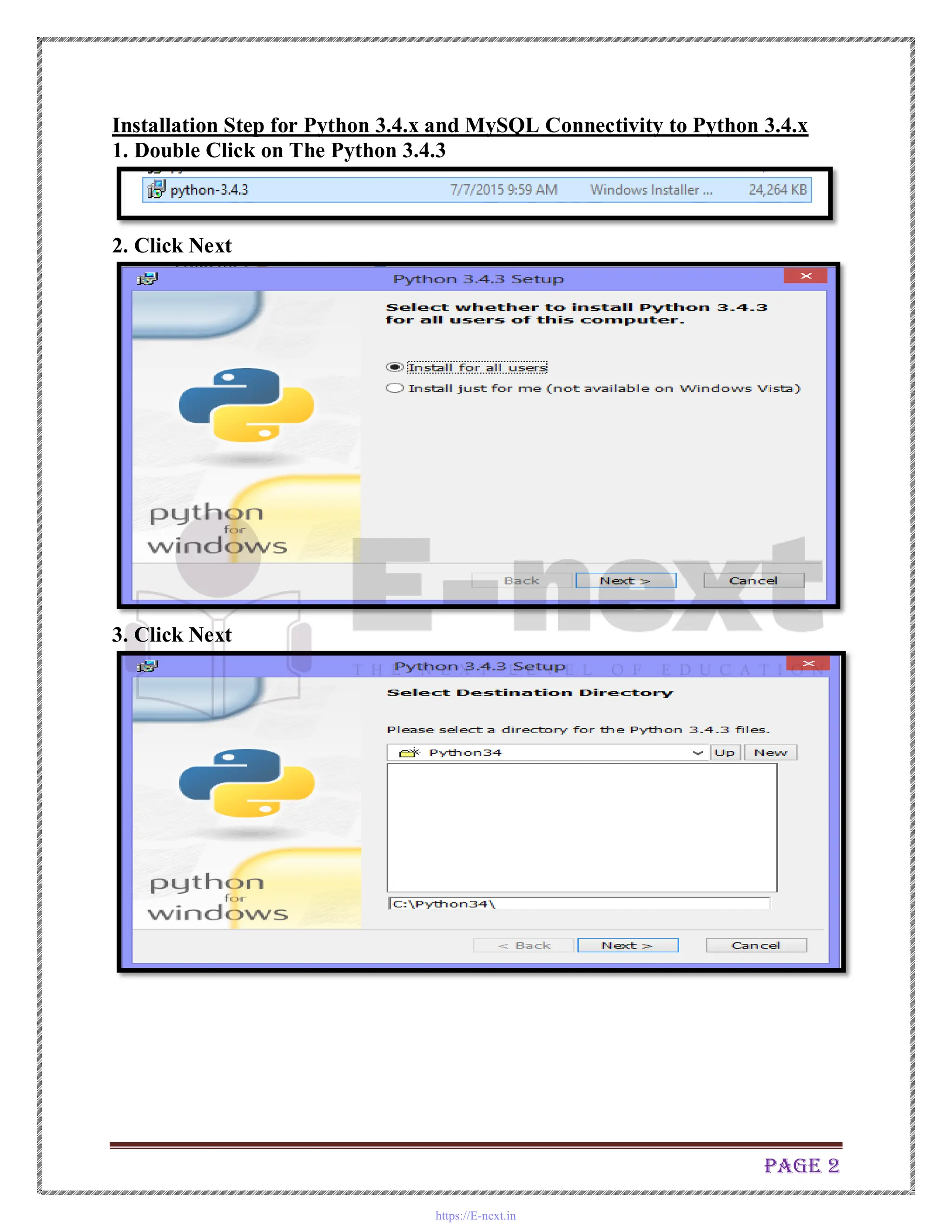
1. Double Click on The Python 3.4.3
2. Click Next
3. Click Next
https://E-next.in
Page 3
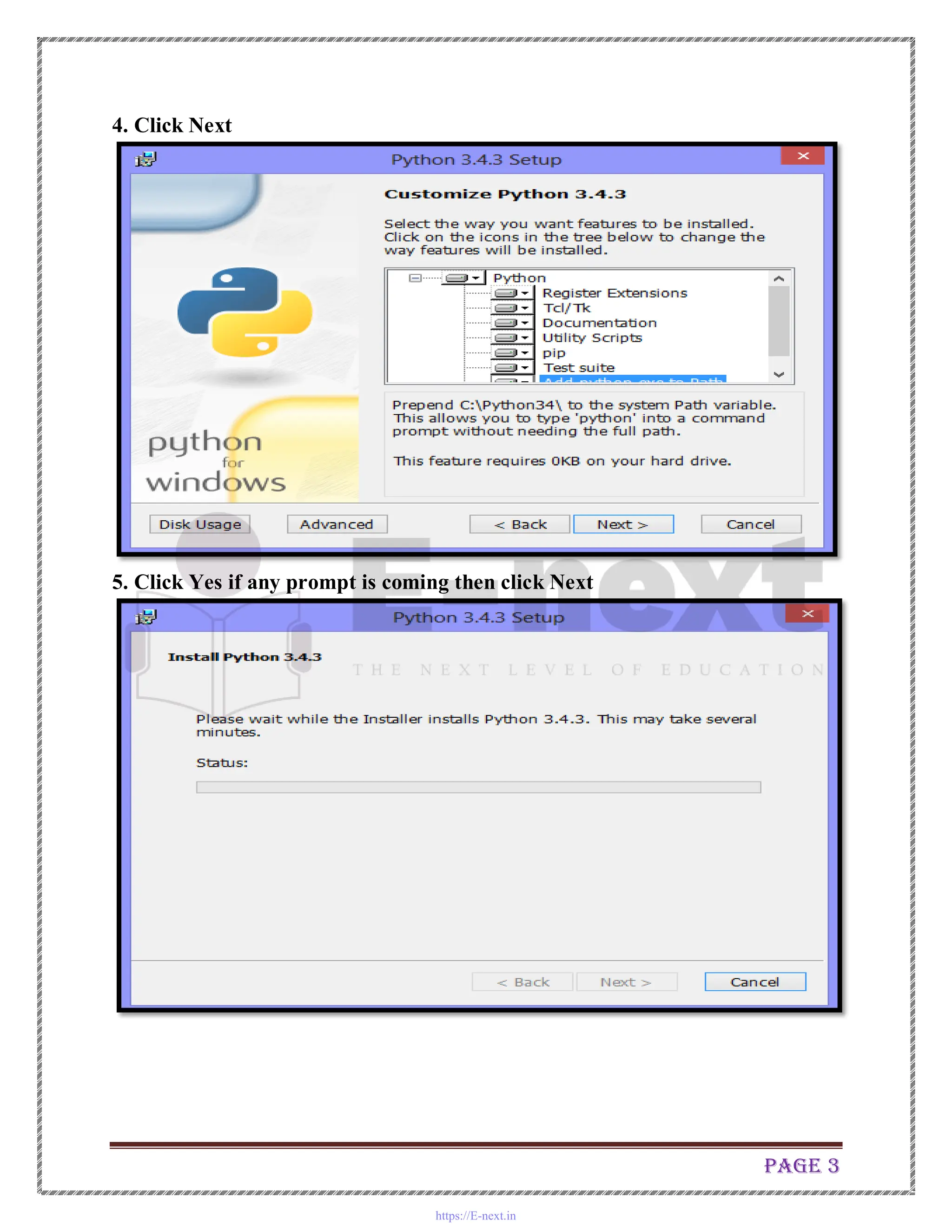
4. Click Next
5. Click Yes if any prompt is coming then click Next
https://E-next.in
Page 4
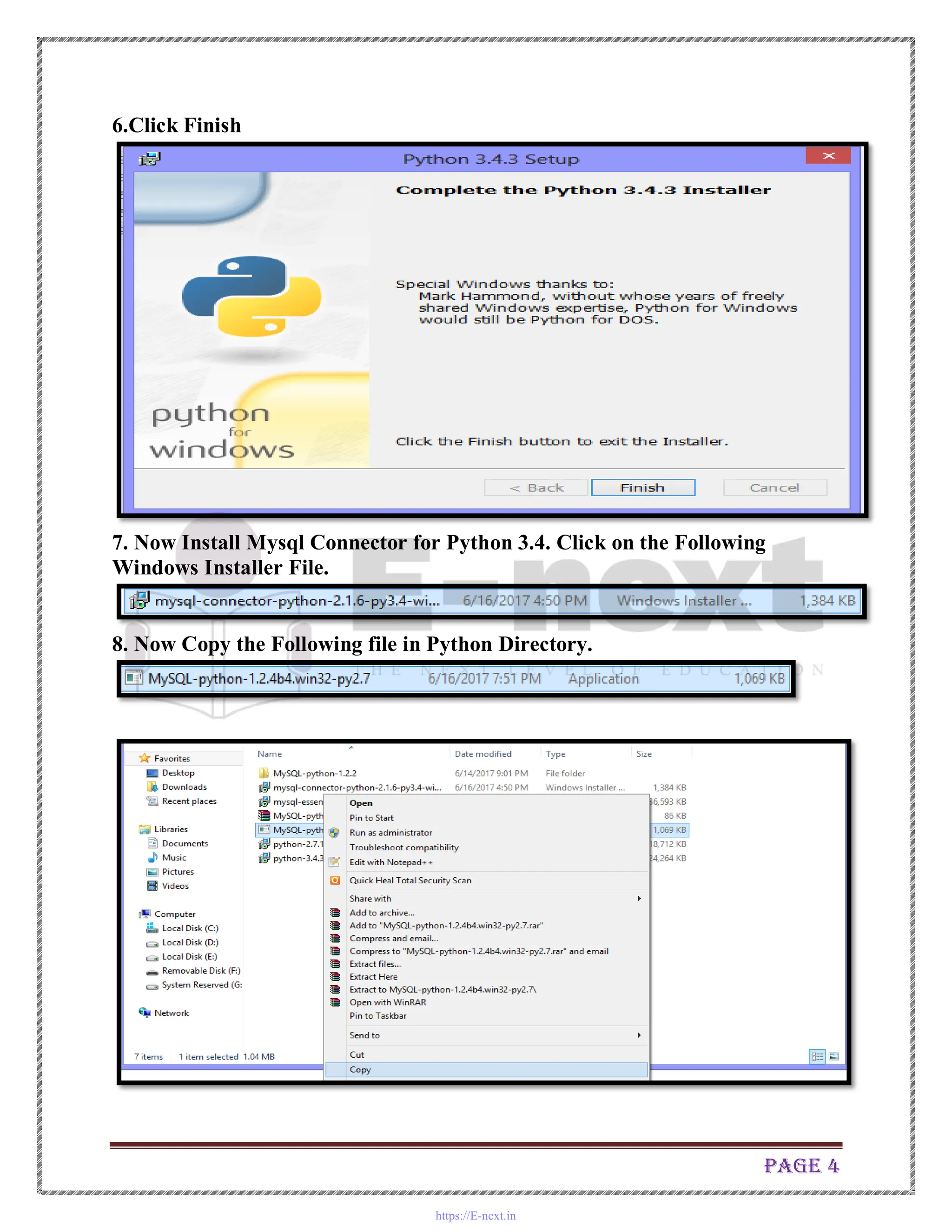
6.Click Finish
7. Now Install Mysql Connector for Python 3.4. Click on the Following
Windows Installer File.
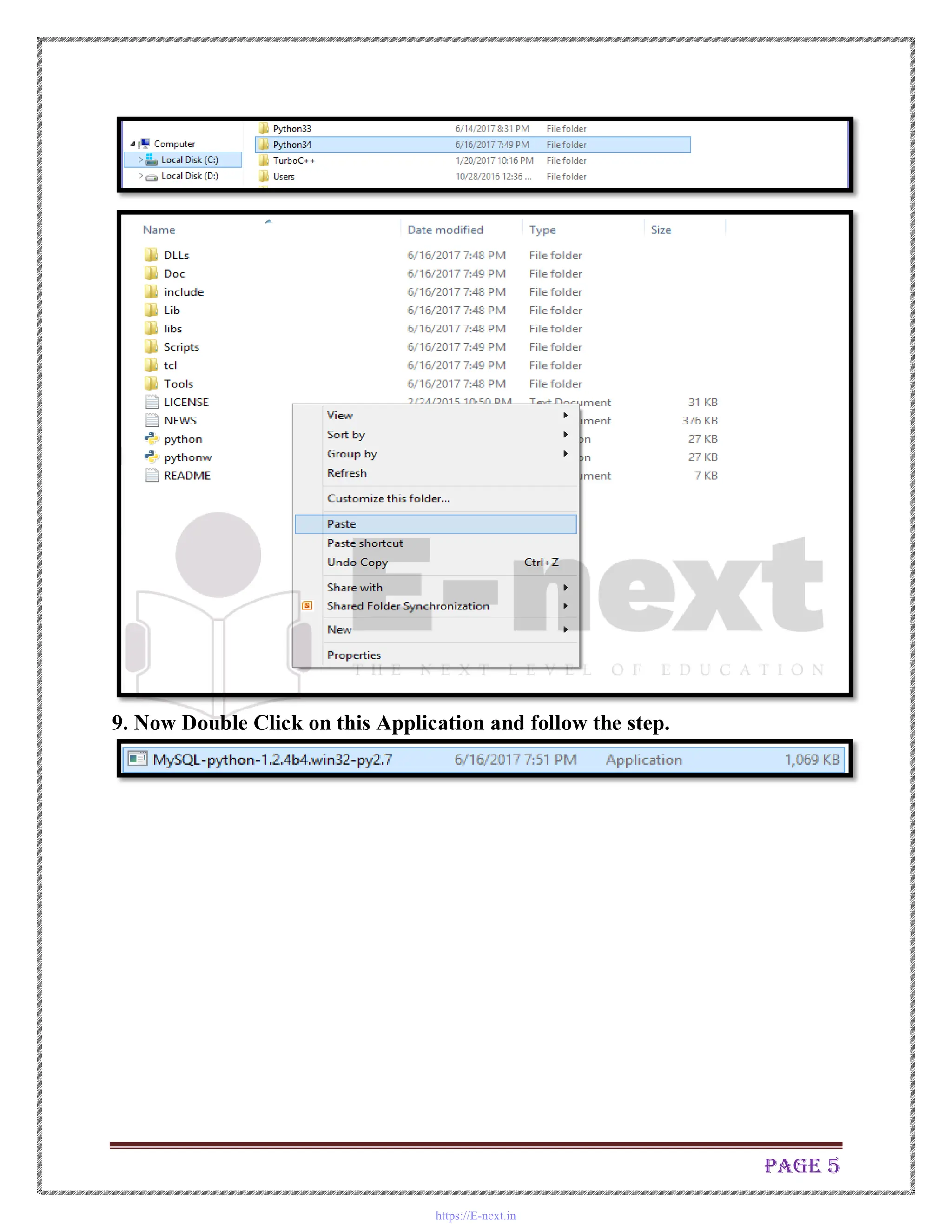
8. Now Copy the Following file in Python Directory.
https://E-next.in
Page 5
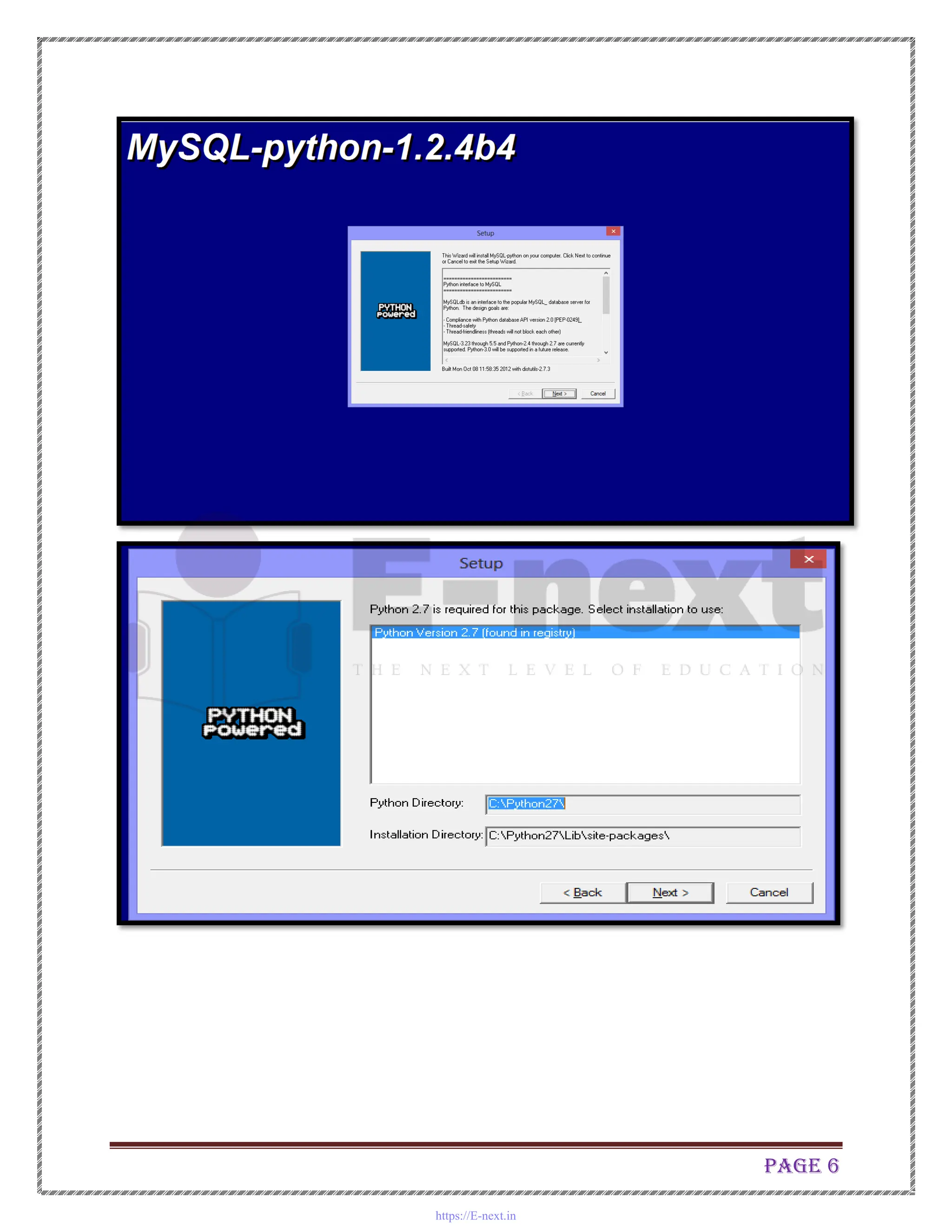
9. Now Double Click on this Application and follow the step.
https://E-next.in
Page 6
https://E-next.in
Page 7
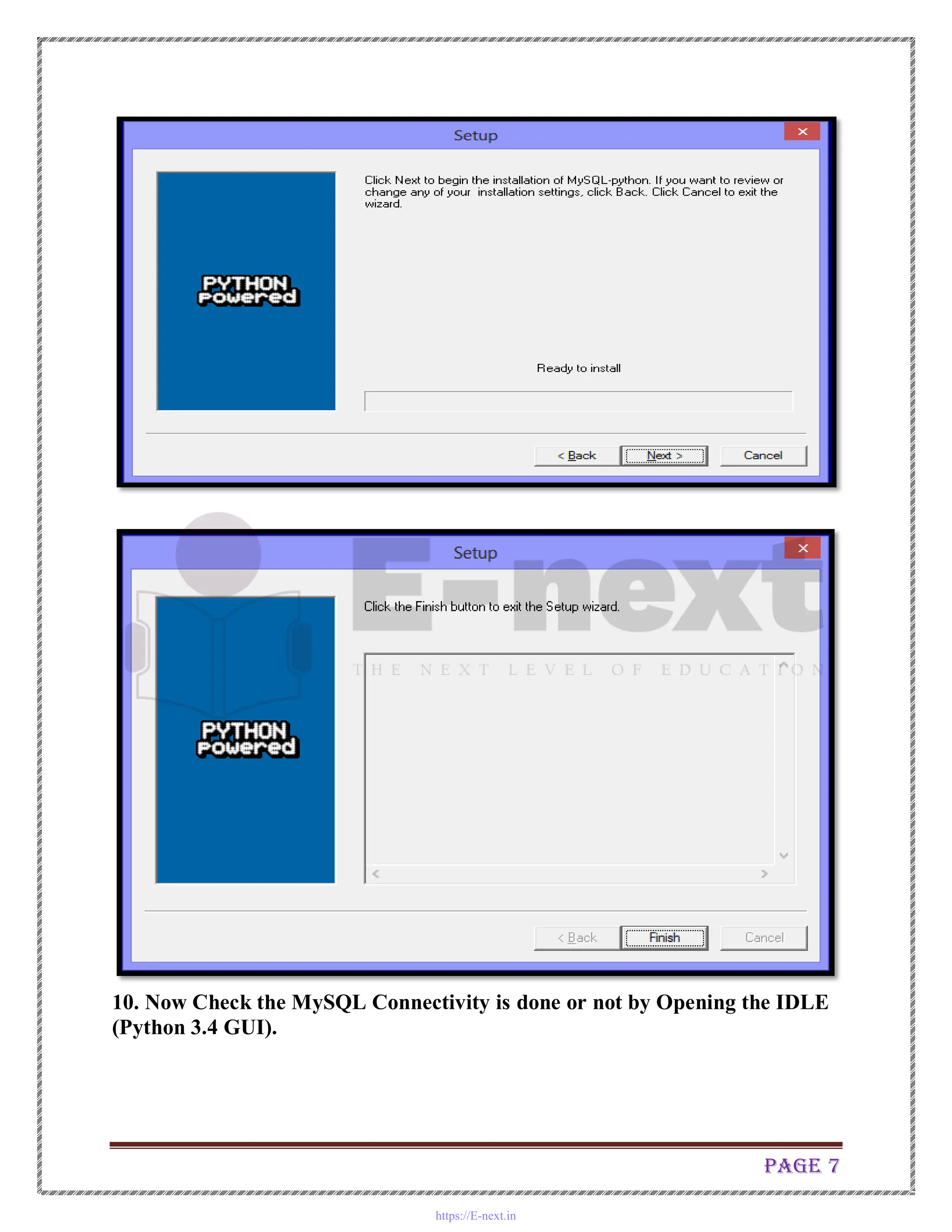
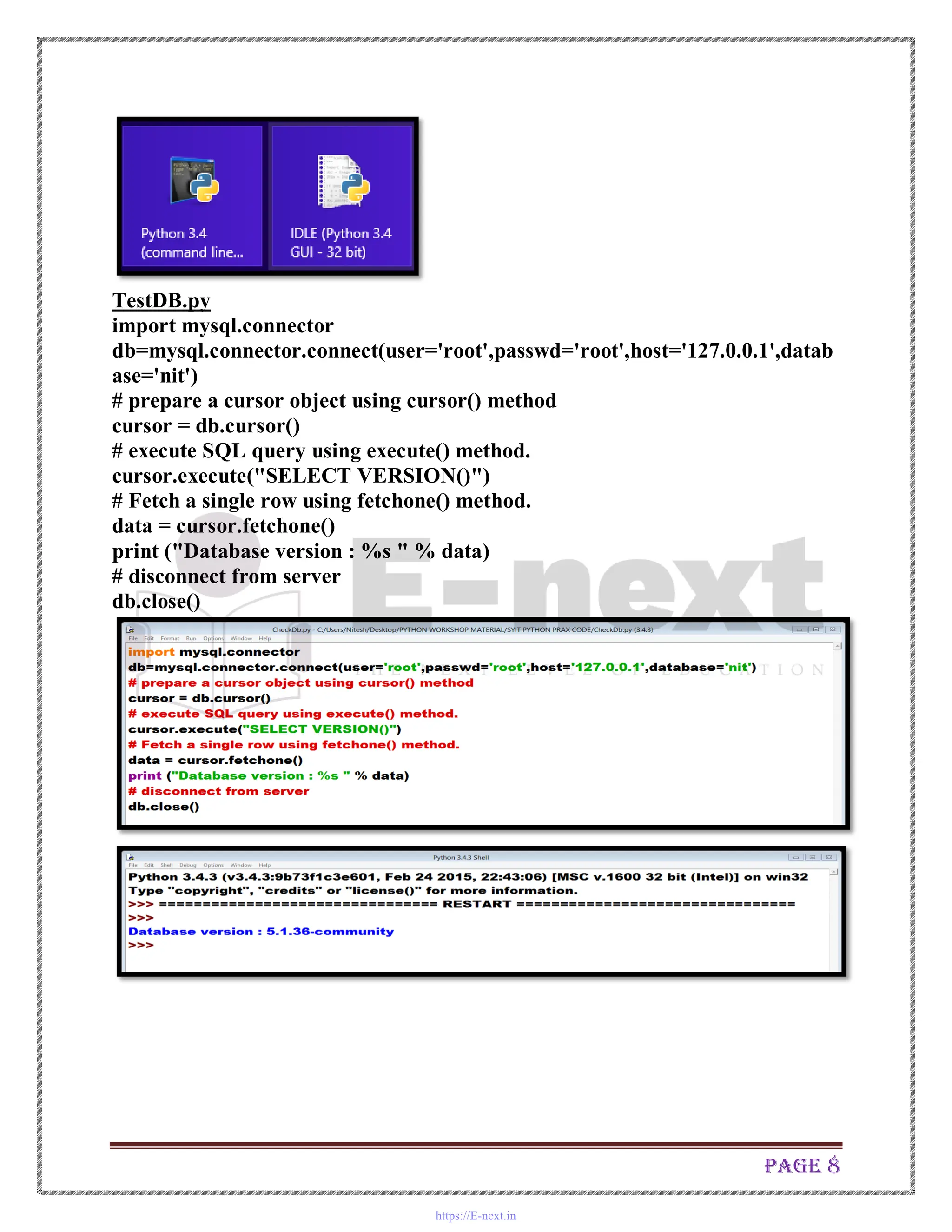
10. Now Check the MySQL Connectivity is done or not by Opening the IDLE
(Python 3.4 GUI).
https://E-next.in
Page 8
TestDB.py
import mysql.connector
db=mysql.connector.connect(user='root',passwd='root',host='127.0.0.1',datab
ase='nit')
# prepare a cursor object using cursor() method
cursor = db.cursor()
# execute SQL query using execute() method.
cursor.execute("SELECT VERSION()")
# Fetch a single row using fetchone() method.
data = cursor.fetchone()
print ("Database version : %s " % data)
# disconnect from server
db.close()
https://E-next.in
Page 9
Practical No.1
1. Write the program for the following: (by using control statements and
control structure)
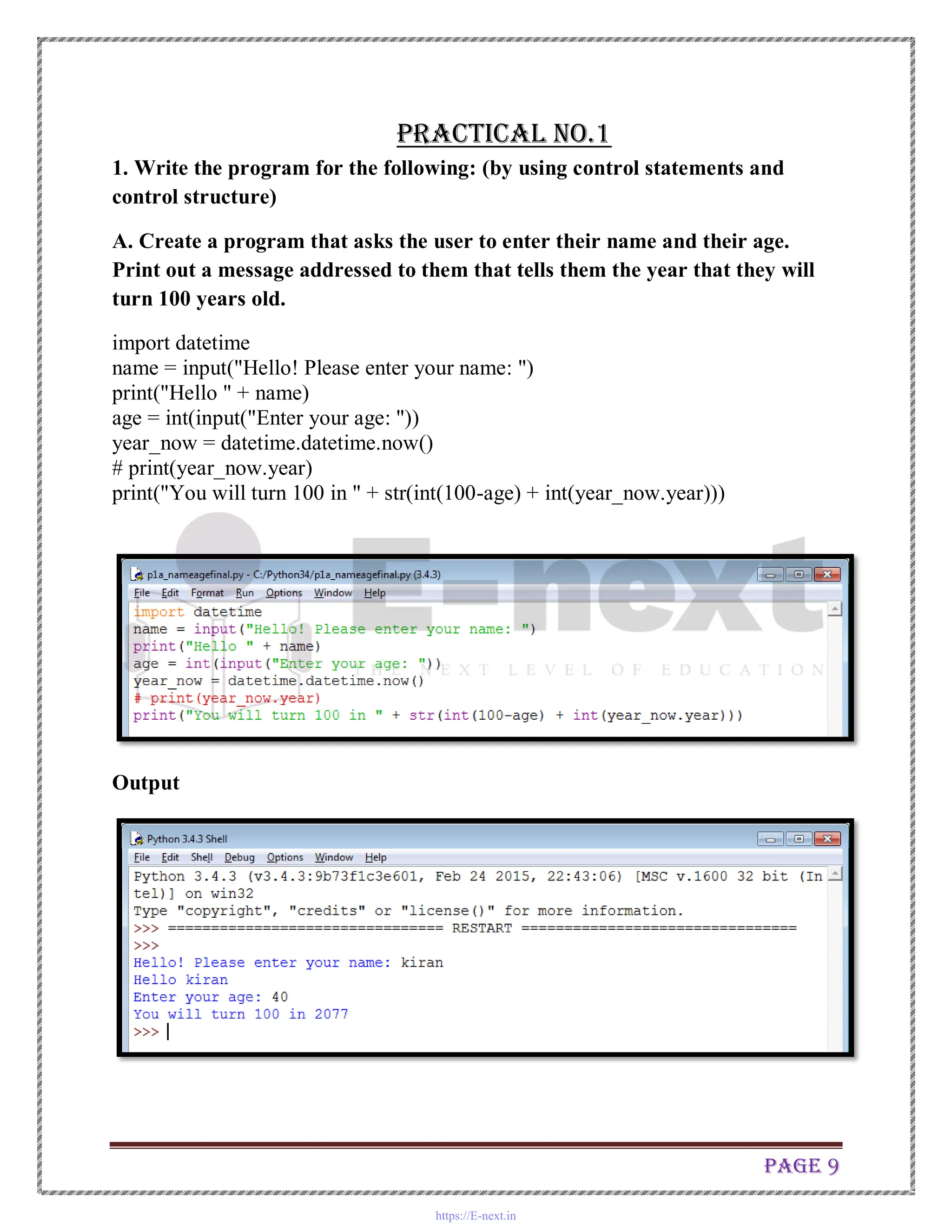
A. Create a program that asks the user to enter their name and their age.
Print out a message addressed to them that tells them the year that they will
turn 100 years old.
import datetime
name = input("Hello! Please enter your name: ")
print("Hello " + name)
age = int(input("Enter your age: "))
year_now = datetime.datetime.now()
# print(year_now.year)
print("You will turn 100 in " + str(int(100-age) + int(year_now.year)))
Output
https://E-next.in
Page 10
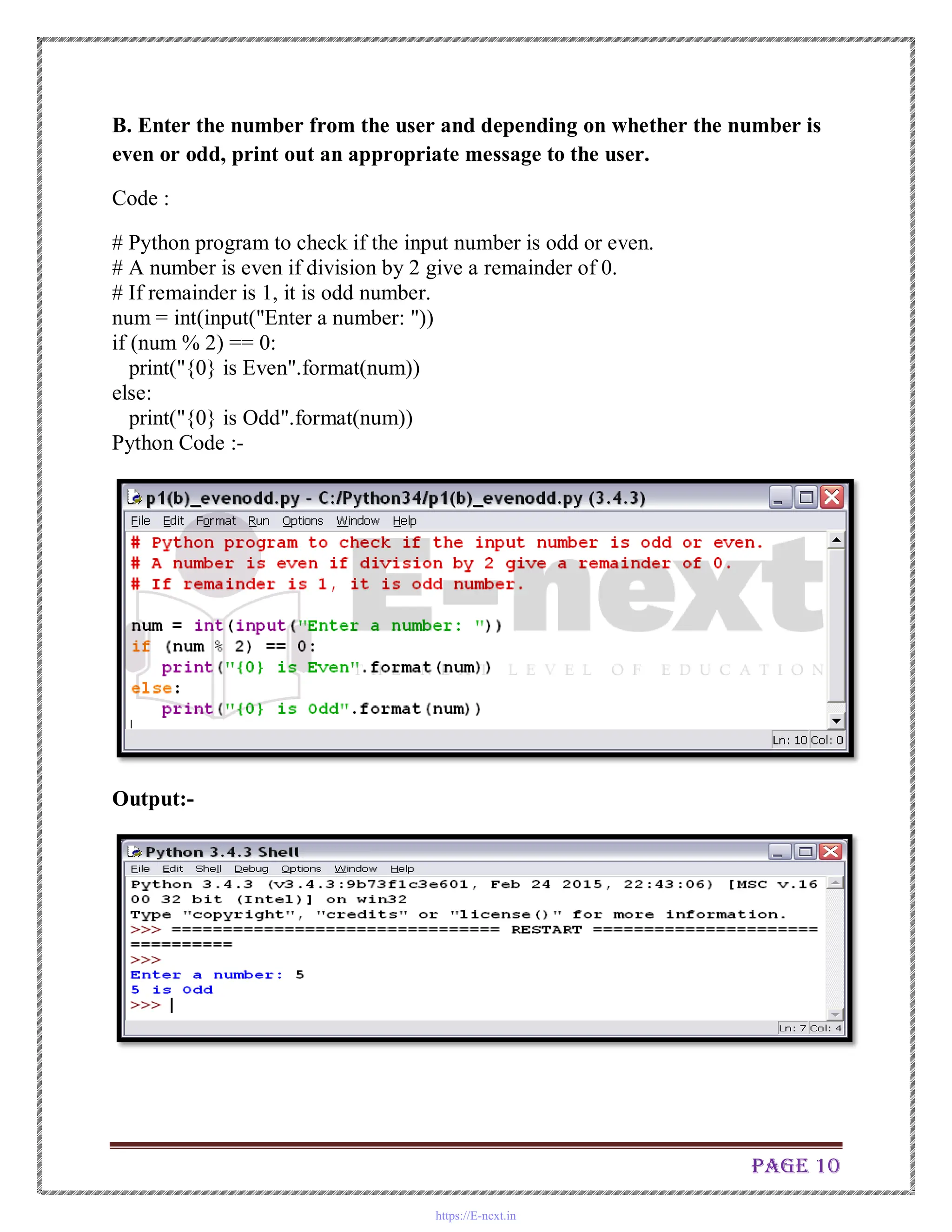
B. Enter the number from the user and depending on whether the number is
even or odd, print out an appropriate message to the user.
Code :
# Python program to check if the input number is odd or even.
# A number is even if division by 2 give a remainder of 0.
# If remainder is 1, it is odd number.
num = int(input("Enter a number: "))
if (num % 2) == 0:
print("{0} is Even".format(num))
else:
print("{0} is Odd".format(num))
Python Code :-
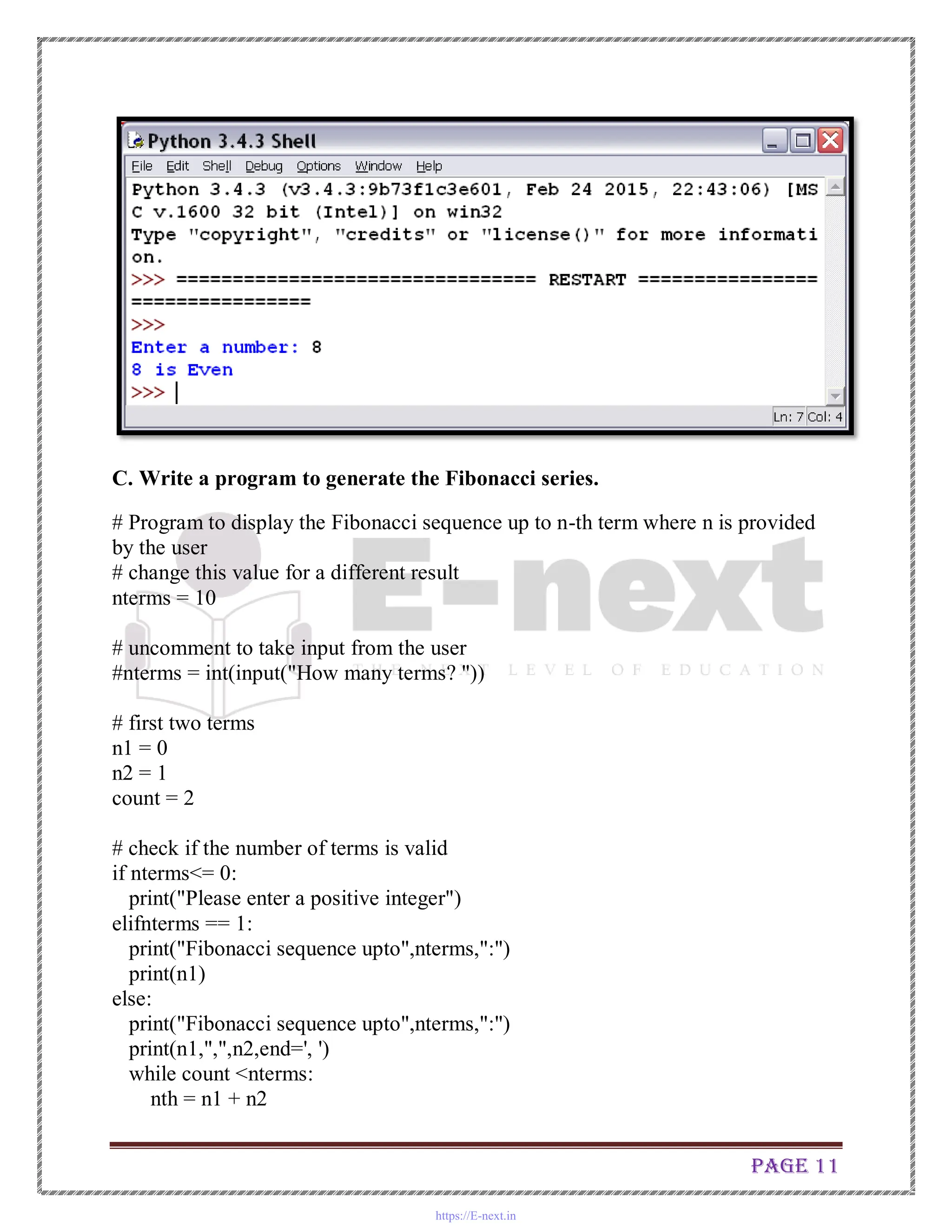
Output:-
https://E-next.in
Page 11
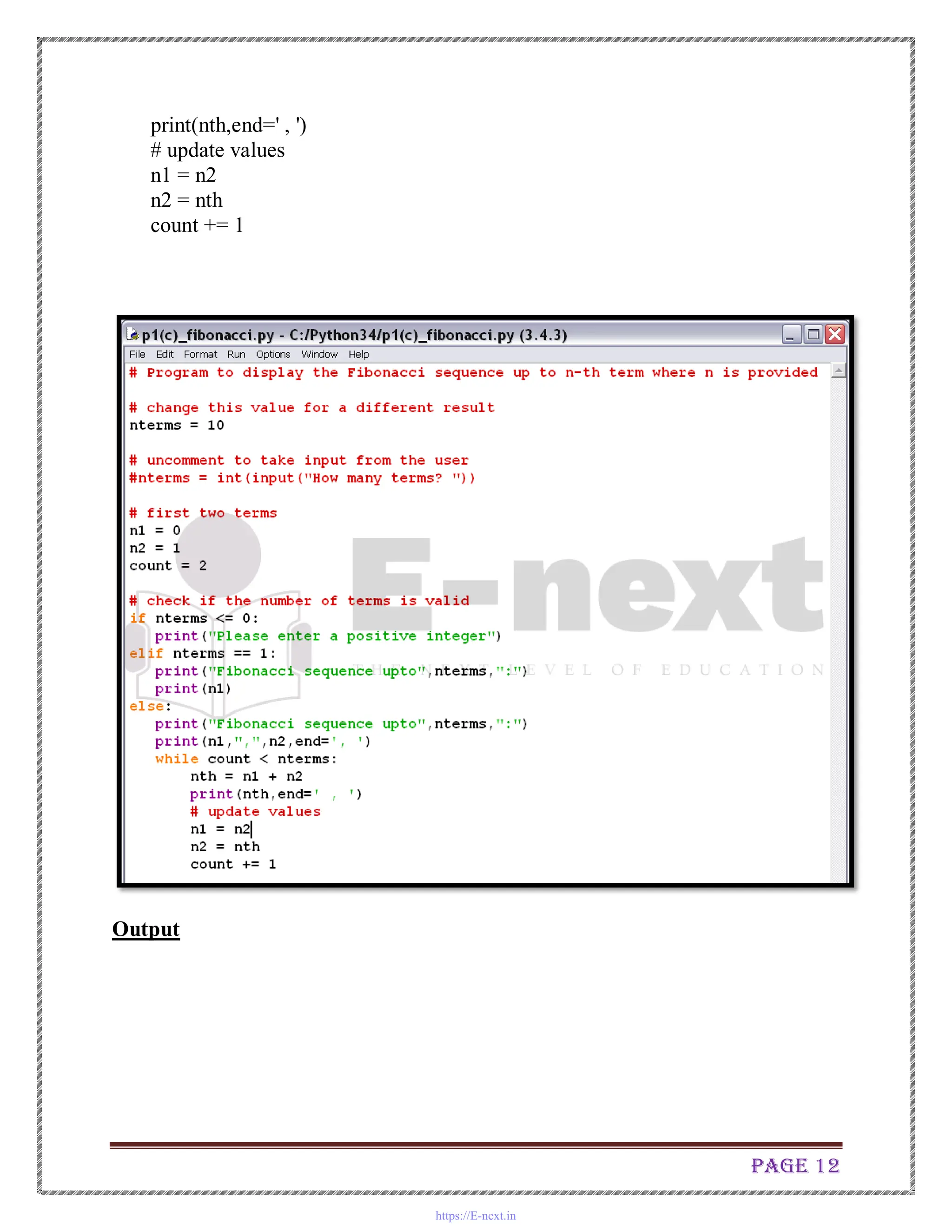
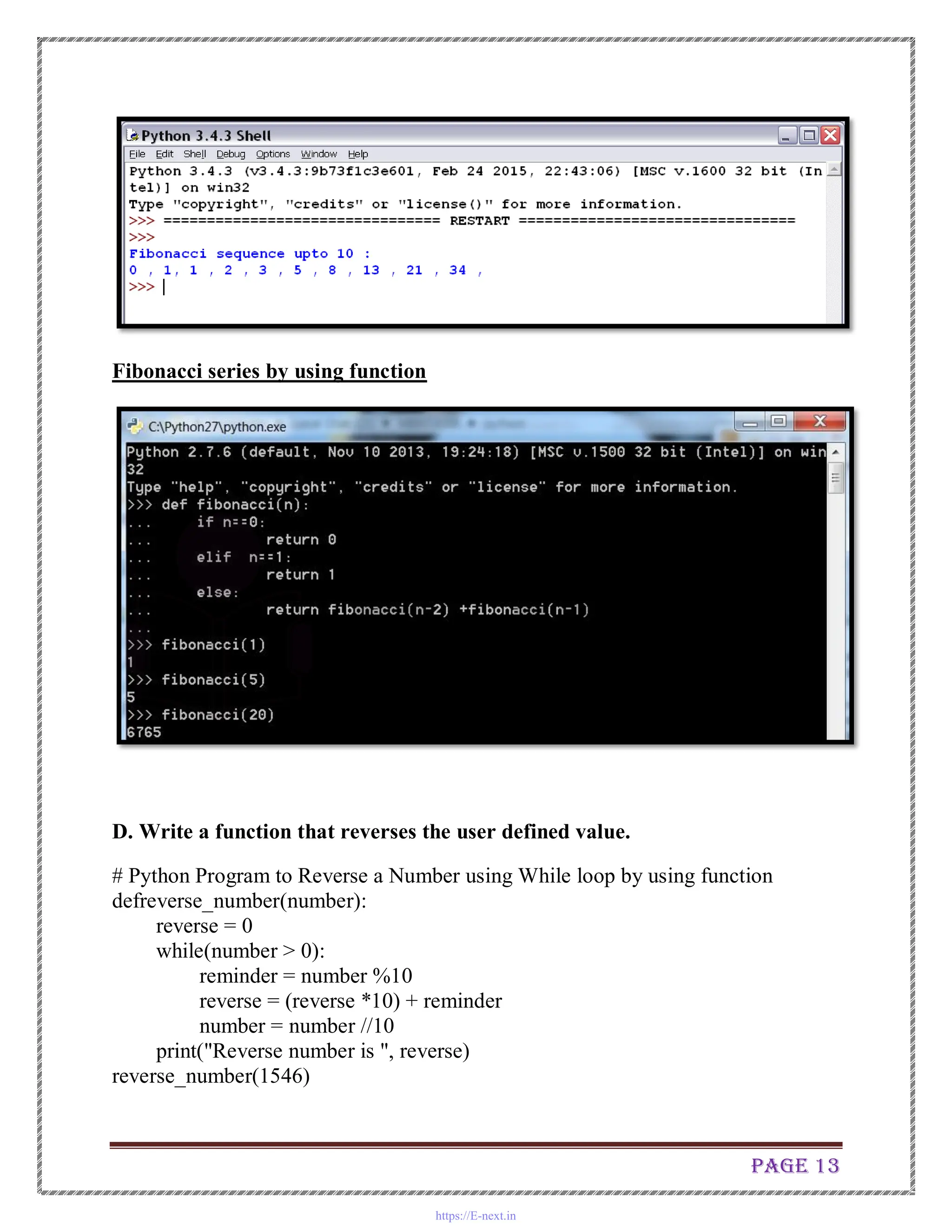
C. Write a program to generate the Fibonacci series.
# Program to display the Fibonacci sequence up to n-th term where n is provided
by the user
# change this value for a different result
nterms = 10
# uncomment to take input from the user
#nterms = int(input("How many terms? "))
# first two terms
n1 = 0
n2 = 1
count = 2
# check if the number of terms is valid
if nterms<= 0:
print("Please enter a positive integer")
elifnterms == 1:
print("Fibonacci sequence upto",nterms,":")
print(n1)
else:
print("Fibonacci sequence upto",nterms,":")
print(n1,",",n2,end=', ')
while count <nterms:
nth = n1 + n2
https://E-next.in
Page 12
print(nth,end=' , ')
# update values
n1 = n2
n2 = nth
count += 1
Output
https://E-next.in
Page 13
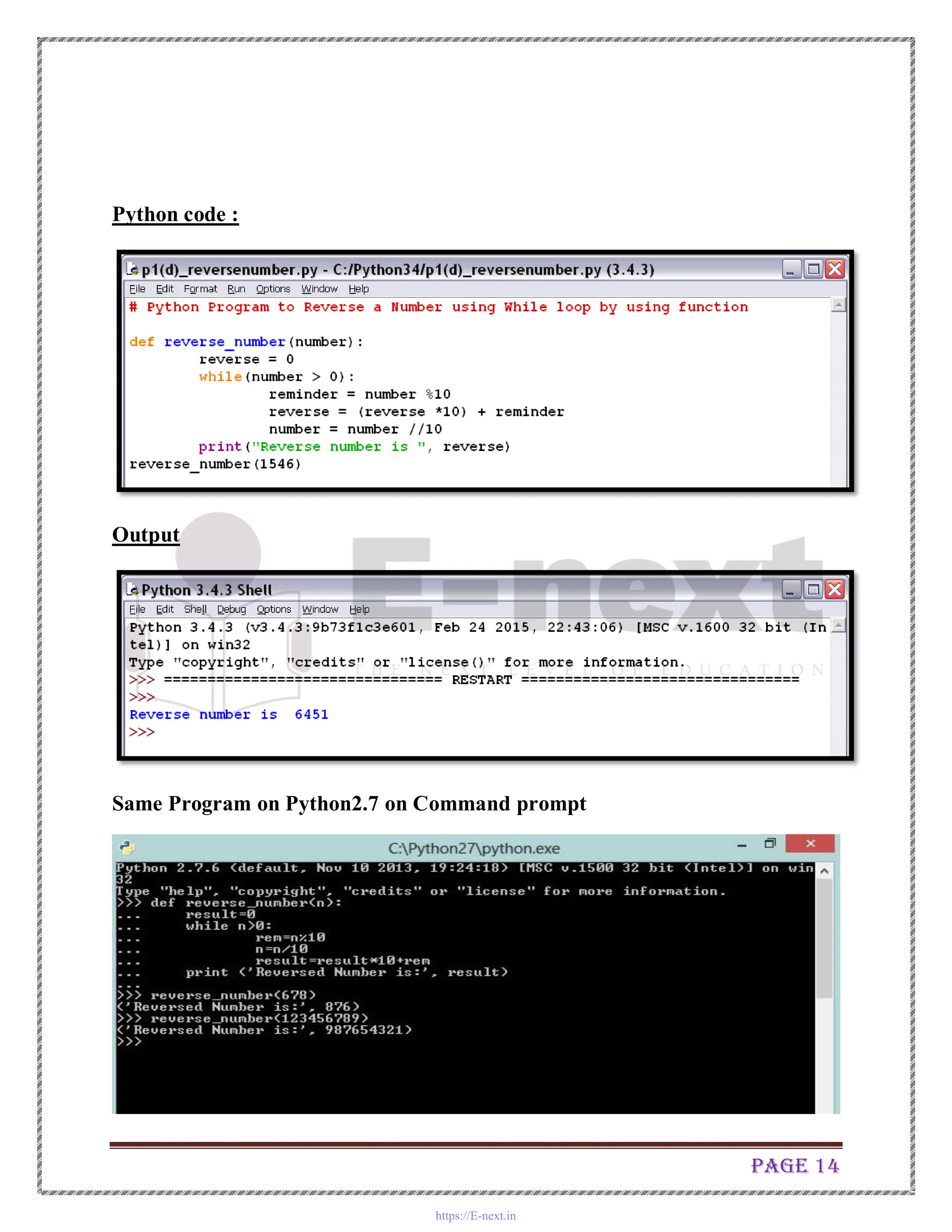
Fibonacci series by using function
D. Write a function that reverses the user defined value.
# Python Program to Reverse a Number using While loop by using function
defreverse_number(number):
reverse = 0
while(number > 0):
reminder = number %10
reverse = (reverse *10) + reminder
number = number //10
print("Reverse number is ", reverse)
reverse_number(1546)
https://E-next.in
Page 14
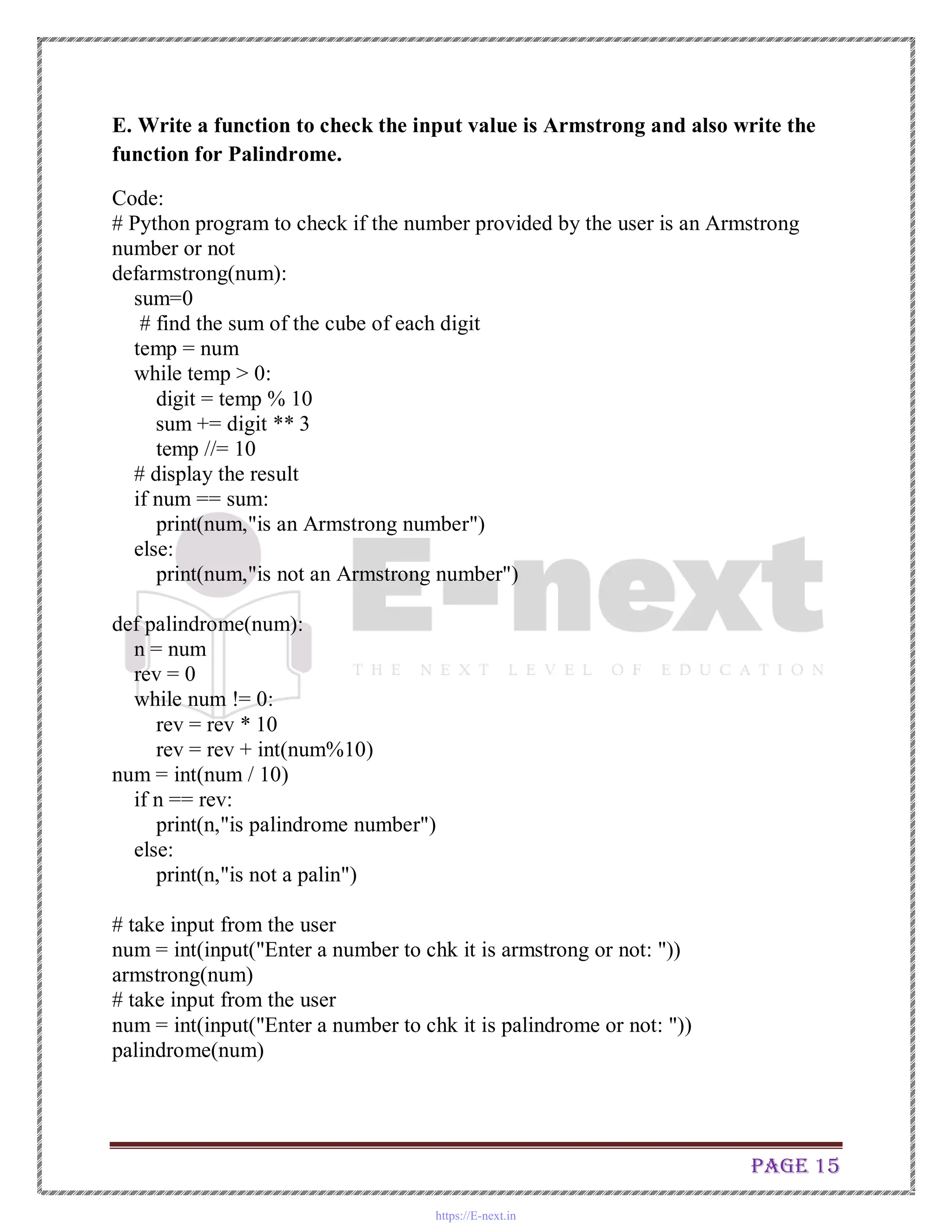
Python code :
Output
Same Program on Python2.7 on Command prompt
https://E-next.in
Page 15
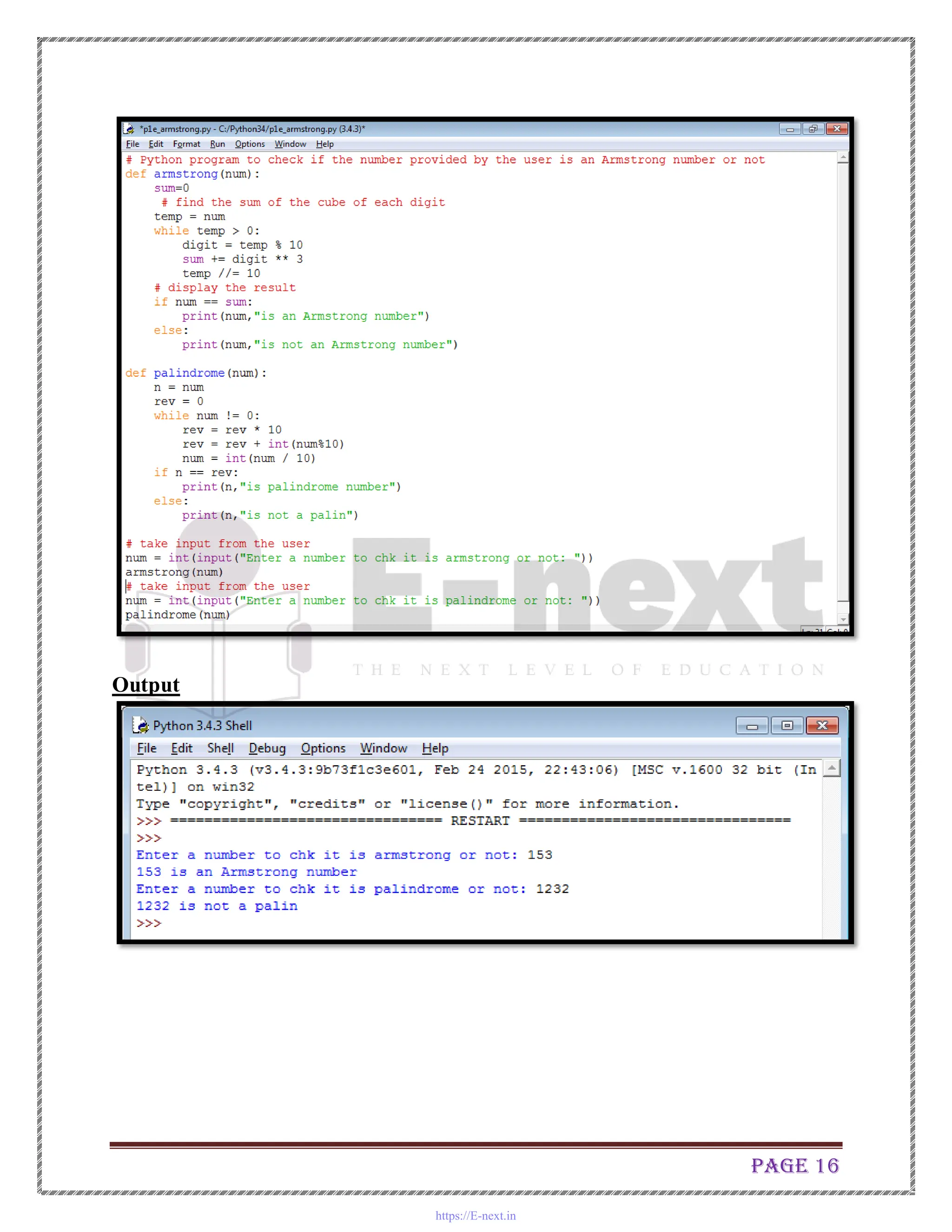
E. Write a function to check the input value is Armstrong and also write the
function for Palindrome.
Code:
# Python program to check if the number provided by the user is an Armstrong
number or not
defarmstrong(num):
sum=0
# find the sum of the cube of each digit
temp = num
while temp > 0:
digit = temp % 10
sum += digit ** 3
temp //= 10
# display the result
if num == sum:
print(num,"is an Armstrong number")
else:
print(num,"is not an Armstrong number")
def palindrome(num):
n = num
rev = 0
while num != 0:
rev = rev * 10
rev = rev + int(num%10)
num = int(num / 10)
if n == rev:
print(n,"is palindrome number")
else:
print(n,"is not a palin")
# take input from the user
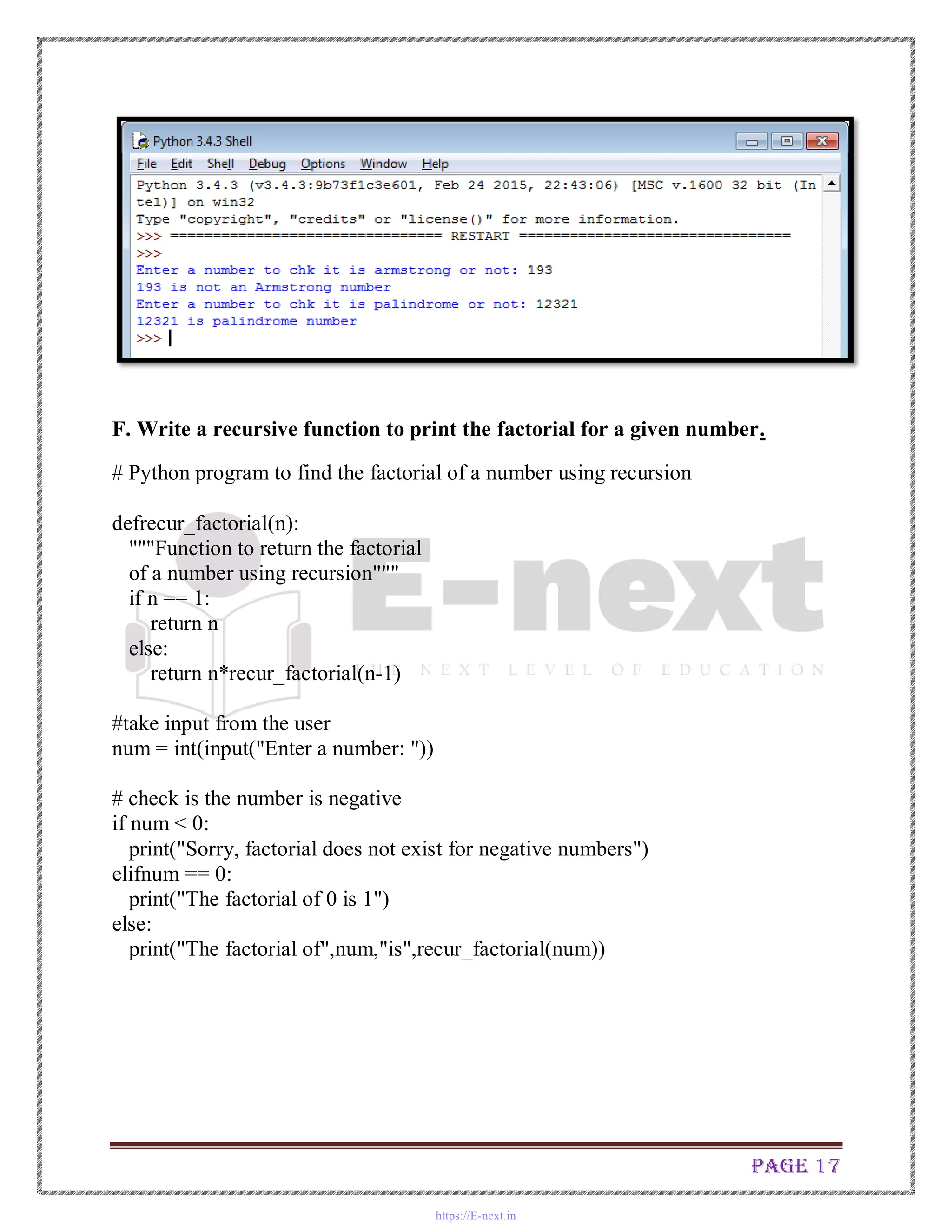
num = int(input("Enter a number to chk it is armstrong or not: "))
armstrong(num)
# take input from the user
num = int(input("Enter a number to chk it is palindrome or not: "))
palindrome(num)
https://E-next.in
Page 16
Output
https://E-next.in
Page 17
F. Write a recursive function to print the factorial for a given number.
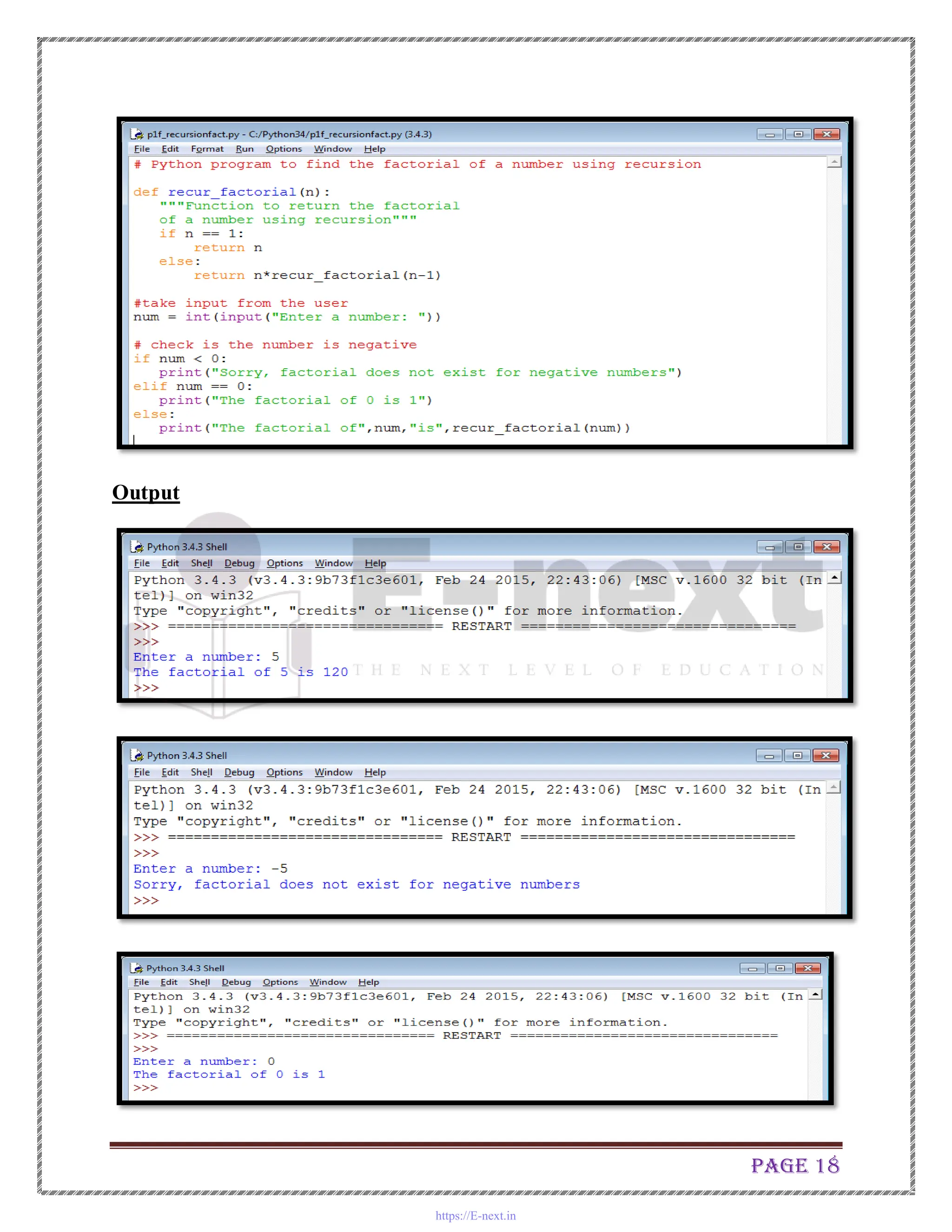
# Python program to find the factorial of a number using recursion
defrecur_factorial(n):
"""Function to return the factorial
of a number using recursion"""
if n == 1:
return n
else:
return n*recur_factorial(n-1)
#take input from the user
num = int(input("Enter a number: "))
# check is the number is negative
if num < 0:
print("Sorry, factorial does not exist for negative numbers")
elifnum == 0:
print("The factorial of 0 is 1")
else:
print("The factorial of",num,"is",recur_factorial(num))
https://E-next.in
Page 18
Output
https://E-next.in
Page 19
Practical No.2
Write the program for the following: ( by using functions)
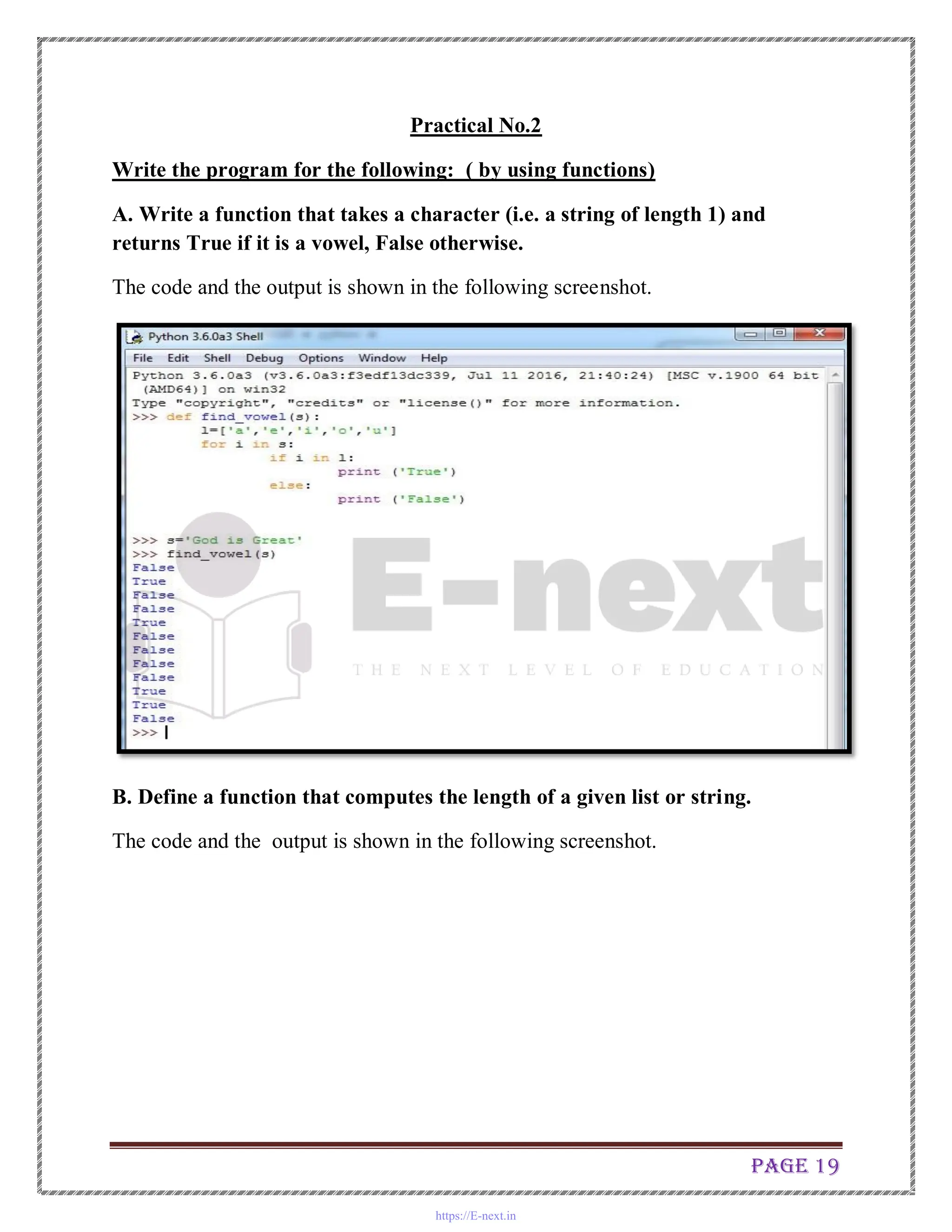
A. Write a function that takes a character (i.e. a string of length 1) and
returns True if it is a vowel, False otherwise.
The code and the output is shown in the following screenshot.
B. Define a function that computes the length of a given list or string.
The code and the output is shown in the following screenshot.
https://E-next.in
Page 20
C. Define a procedure histogram() that takes a list of integers and prints a
histogram to the screen. For example, histogram([4, 9, 7]) should print the
following:
****
*******
** *
******
The code and the corresponding output is shown in the following screen shot.
https://E-next.in
Page 21
Practical No.-3
Write the program for the following: ( by using list)
A. A pangram is a sentence that contains all the letters of the English alphabet
at least once, for example: The quick brown fox jumps over the lazy dog.
Your task here is to write a function to check a sentence to see if it is a
pangram or not.
import string, sys
if sys.version_info[0] < 3:
input = raw_input
defispangram(sentence, alphabet=string.ascii_lowercase):
alphaset = set(alphabet)
return alphaset<= set(sentence.lower())
print ( ispangram(input('Sentence: ')) )
Output
https://E-next.in
Page 22
B. Take a list, say for example this one: a = [1, 1, 2, 3, 5, 8, 13, 21, 34, 55, 89]
and write a program that prints out all the elements of the list that are less
than 5.
# Program to trim list list_trim.py
l1=[1,1,2,3,5,8,13,21,34,55,89]
l2=[]
for i in l1:
if i <5:
l2.append(i)
print (l2)
https://E-next.in
Page 23
Practical No.4
Write the program for the following: ( by using list)
A. Write a program that takes two lists and returns True if they have at least
one common member.
Code :
l1=[1,2,3,4,5,6,]
l2=[11,12,13,14,15,6]
for i in l1:
for j in l2:
if i==j:
print ('The 2 list have at least one common element')
Output
B. Write a Python program to print a specified list after removing the 0th,
2nd, 4th and 5th elements.
#print list after removing the 0th, 2nd, 4th and 5th elements.
l1=[1,2,3,4,5,6,7,8,9,0]
print("Original List is",l1)
https://E-next.in
Page 24
print("According to question we have to remove 0th->1,2nd->3,4th->5,5th->6")
l1.remove(l1[0]) #this line will remove 1 from the list, Therefore l1[0]=2
print("After Removal of 0th element Now List is",l1)
print("Now we have to remove 3 from list which is at 1th position of index")
l1.remove(l1[1])
print("After Removal of 1st element of New List (original 2nd index element)
is",l1)
print("Now we have to remove 5 from list which is at 2nd position of index")
l1.remove(l1[2])
print("After Removal of 3rd element of New List (original 4th index element)
is",l1)
print("Now we have to remove 6 from list which is at 2nd position of index")
l1.remove(l1[2])
print (l1)
Output
https://E-next.in
Page 25
You can try without print statements
Output
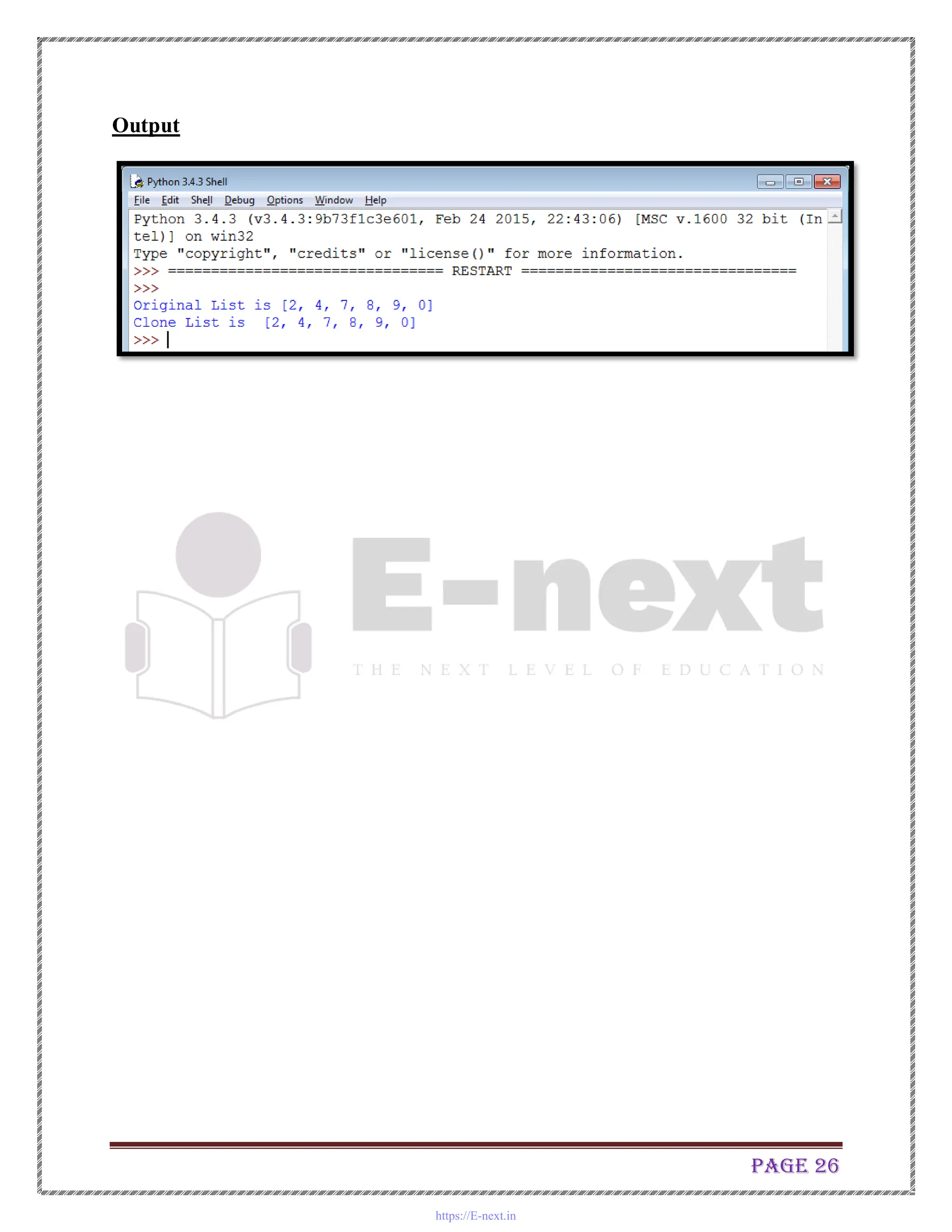
C. Write a Python program to clone or copy a list
l1=[2, 4, 7, 8, 9, 0]
print ("Original List is", l1)
l2=l1
print ("Clone List is ",l2)
https://E-next.in
Page 26
Output
https://E-next.in
Page 27
Practical No.5
Write the program for the following: ( by using Dictionary)
A. Write a Python script to sort (ascending and descending) a dictionary by
value.
>>> released={'Python 3.6': 2017,'Python 1.0': 2002, 'Python 2.3': 2010}
>>> for key,value in sorted(released.items()):
print (key,value)
Output:
Python 1.0 2002
Python 2.3 2010
Python 3.6 2017
Only keys sorted:
>>> print (sorted(released))
['Python 1.0', 'Python 2.3', 'Python 3.6']
B. Write a Python script to concatenate following dictionaries to create a new
one.
Sample Dictionary : dic1={1:10, 2:20} dic2={3:30, 4:40} dic3={5:50,6:60}
Expected Result : {1: 10, 2: 20, 3: 30, 4: 40, 5: 50, 6: 60}
Output:
>>> dic1={1:10,2:20}
>>> dic2={3:30,4:40}
>>> dic3={5:50,6:60}
>>> dic1.update(dic2)
>>> print (dic1)
{1: 10, 2: 20, 3: 30, 4: 40}
>>> dic1.update(dic3)
>>> print (dic1)
{1: 10, 2: 20, 3: 30, 4: 40, 5: 50, 6: 60}
https://E-next.in
Page 28
C. Write a Python program to sum all the items in a dictionary.
>>> d= {'One':10,'Two':20,'Three':30}
>>> sum(d.values())
60
Practical No.6
Write the program for the following: ( File handling)
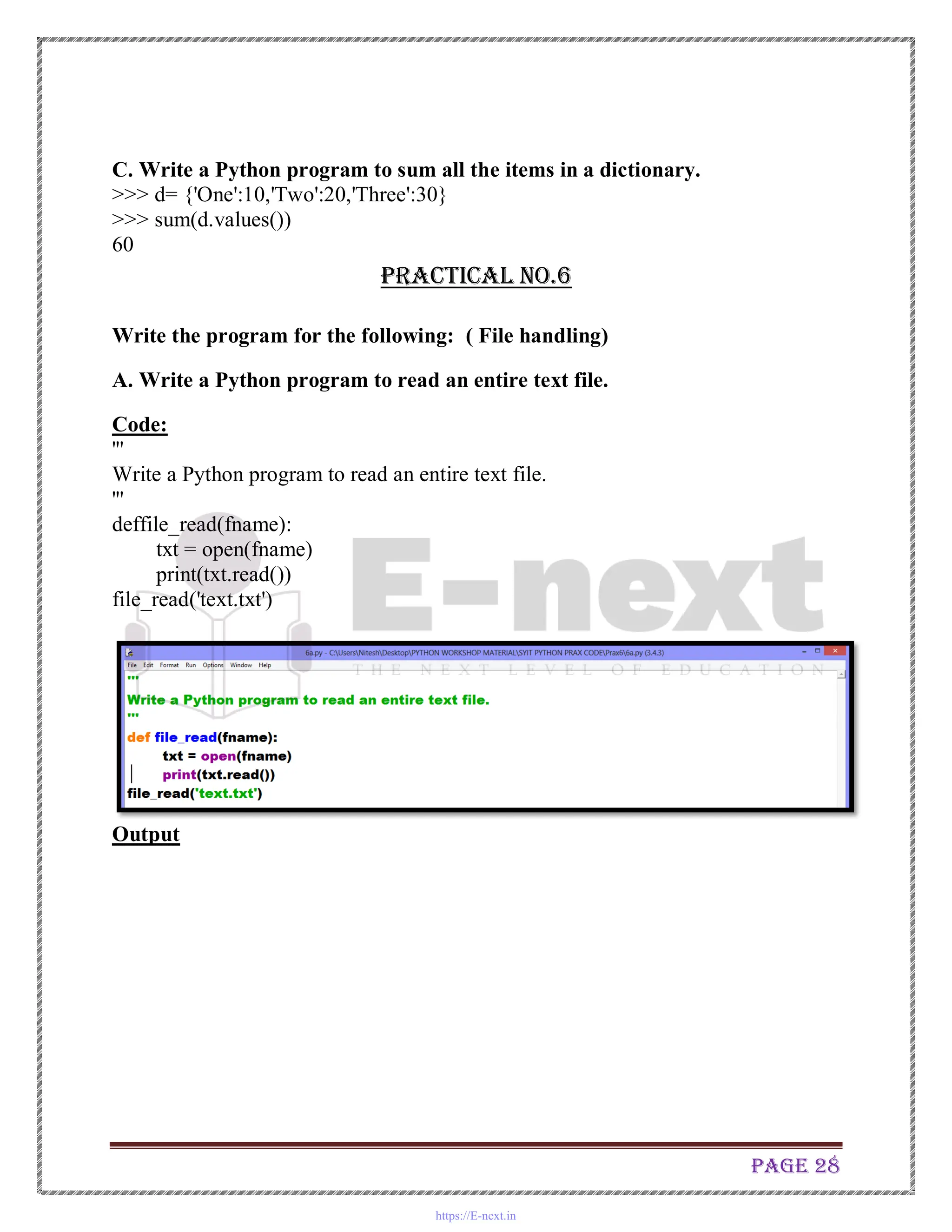
A. Write a Python program to read an entire text file.
Code:
'''
Write a Python program to read an entire text file.
'''
deffile_read(fname):
txt = open(fname)
print(txt.read())
file_read('text.txt')
Output
https://E-next.in
Page 29
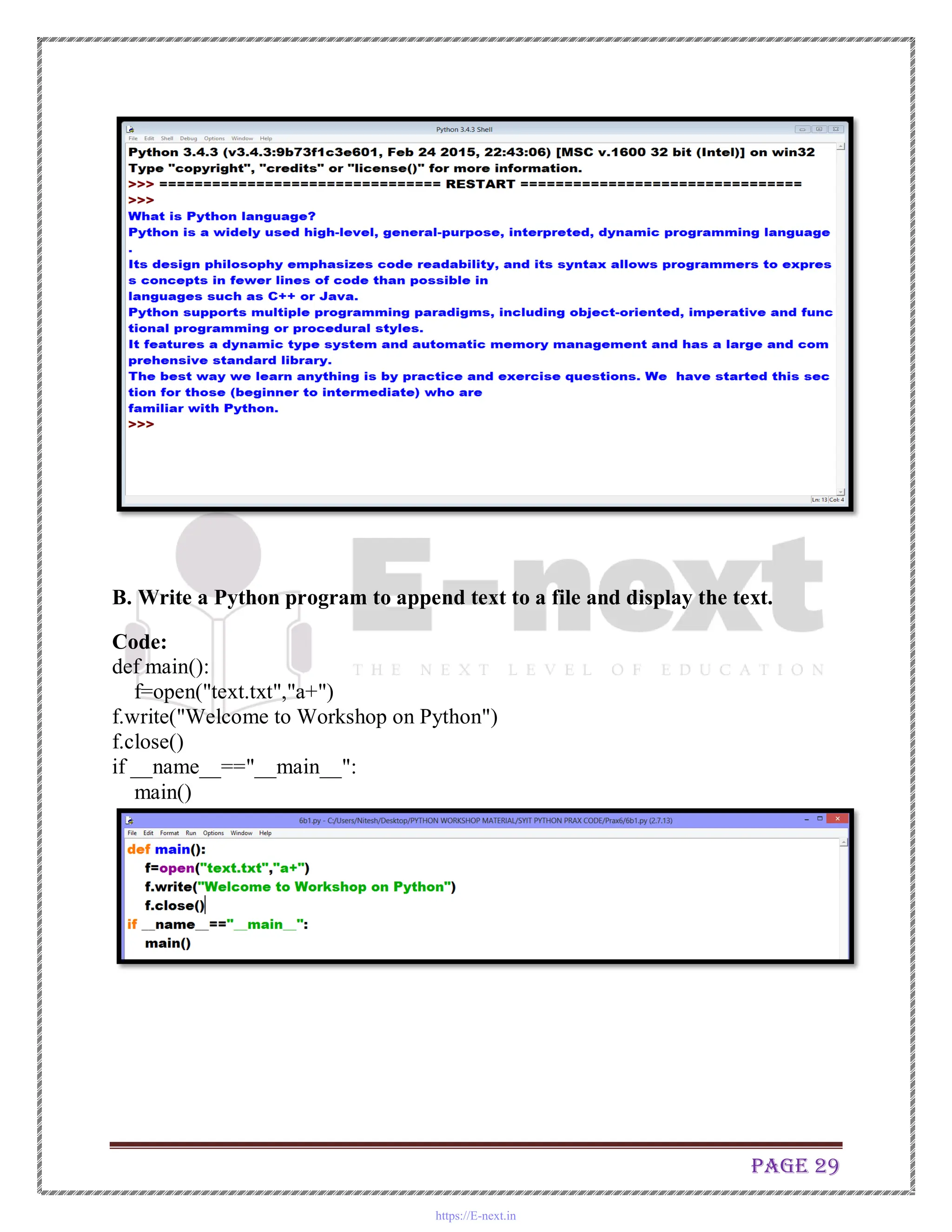
B. Write a Python program to append text to a file and display the text.
Code:
def main():
f=open("text.txt","a+")
f.write("Welcome to Workshop on Python")
f.close()
if __name__=="__main__":
main()
https://E-next.in
Page 30
Output:
C. Write a Python program to read last n lines of a file.
Code:
'''
Write a Python program to read last n lines of a file.
'''
import sys
import os
deffile_read_from_tail(fname,lines):
bufsize = 8192
fsize = os.stat(fname).st_size
iter = 0
with open(fname) as f:
if bufsize>fsize:
bufsize = fsize-1
data = []
while True:
iter +=1
f.seek(fsize-bufsize*iter)
data.extend(f.readlines())
if len(data) >= lines or f.tell() == 0:
https://E-next.in
Page 31
print(''.join(data[-lines:]))
break
file_read_from_tail('text.txt',2)
Output:
https://E-next.in
Page 32
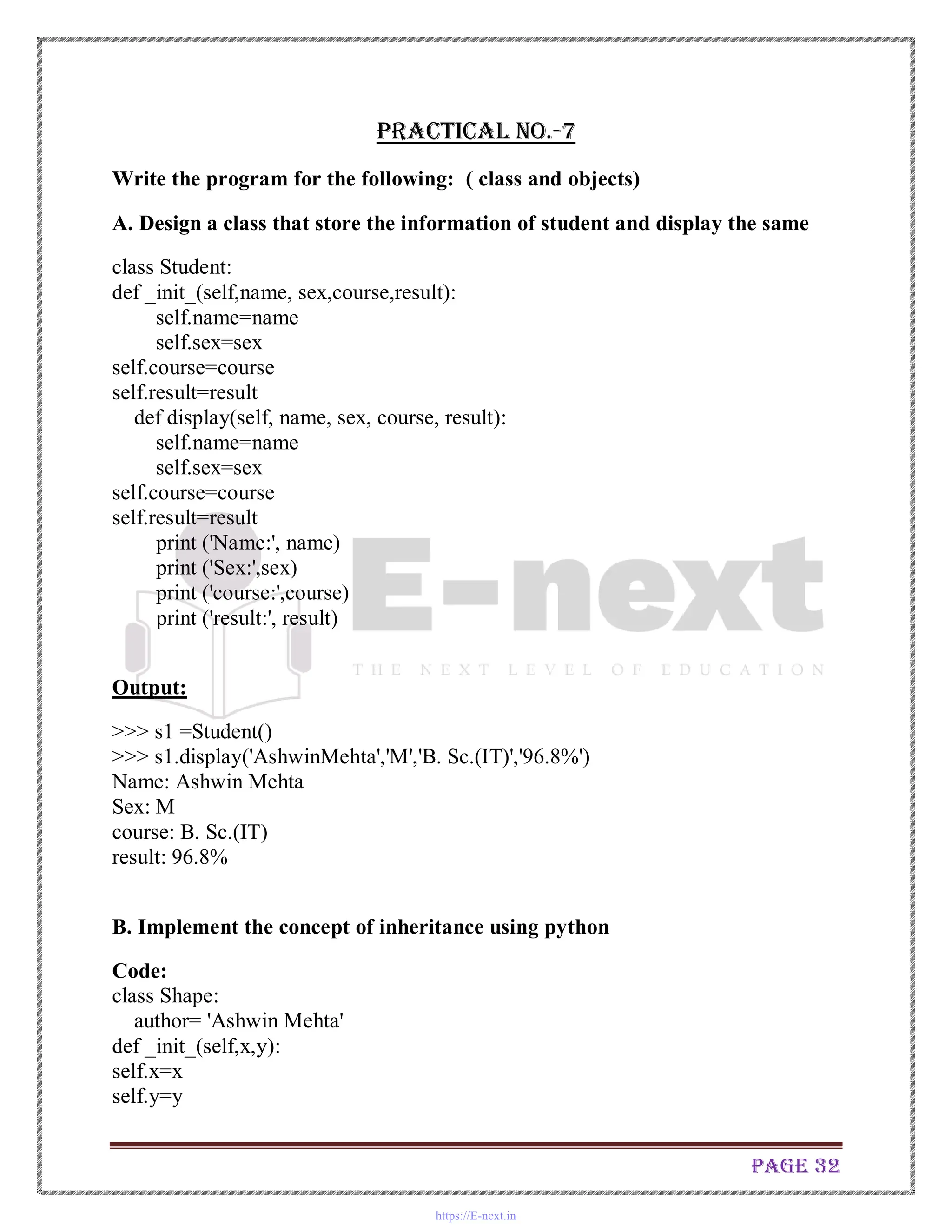
Practical No.-7
Write the program for the following: ( class and objects)
A. Design a class that store the information of student and display the same
class Student:
def _init_(self,name, sex,course,result):
self.name=name
self.sex=sex
self.course=course
self.result=result
def display(self, name, sex, course, result):
self.name=name
self.sex=sex
self.course=course
self.result=result
print ('Name:', name)
print ('Sex:',sex)
print ('course:',course)
print ('result:', result)
Output:
>>> s1 =Student()
>>> s1.display('AshwinMehta','M','B. Sc.(IT)','96.8%')
Name: Ashwin Mehta
Sex: M
course: B. Sc.(IT)
result: 96.8%
B. Implement the concept of inheritance using python
Code:
class Shape:
author= 'Ashwin Mehta'
def _init_(self,x,y):
self.x=x
self.y=y
https://E-next.in
Page 33
def area(self,x,y):
self.x=x
self.y=y
a=self.x*self.y
print ('Area of a rectangle',a)
print (author)
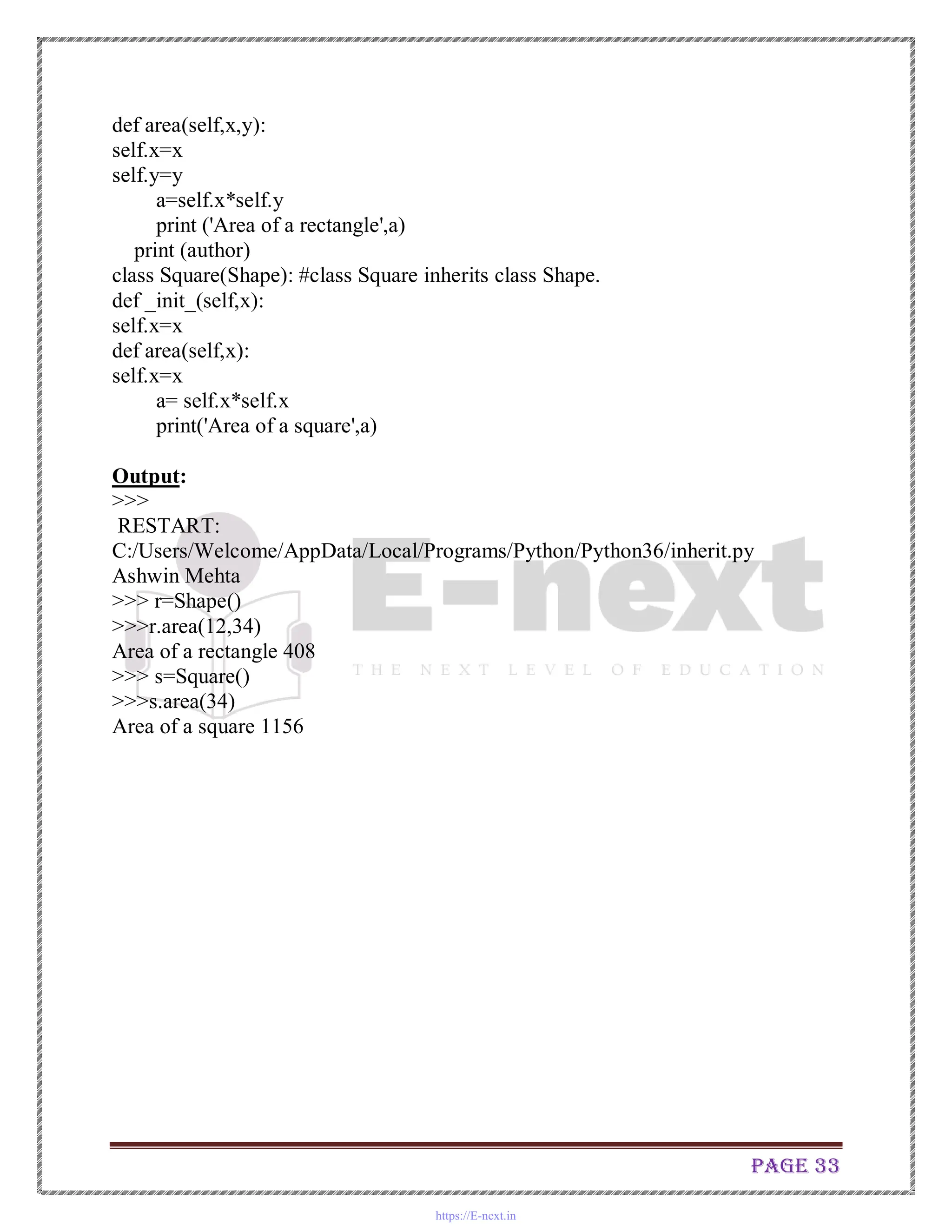
class Square(Shape): #class Square inherits class Shape.
def _init_(self,x):
self.x=x
def area(self,x):
self.x=x
a= self.x*self.x
print('Area of a square',a)
Output:
>>>
RESTART:
C:/Users/Welcome/AppData/Local/Programs/Python/Python36/inherit.py
Ashwin Mehta
>>> r=Shape()
>>>r.area(12,34)
Area of a rectangle 408
>>> s=Square()
>>>s.area(34)
Area of a square 1156
https://E-next.in
Page 34
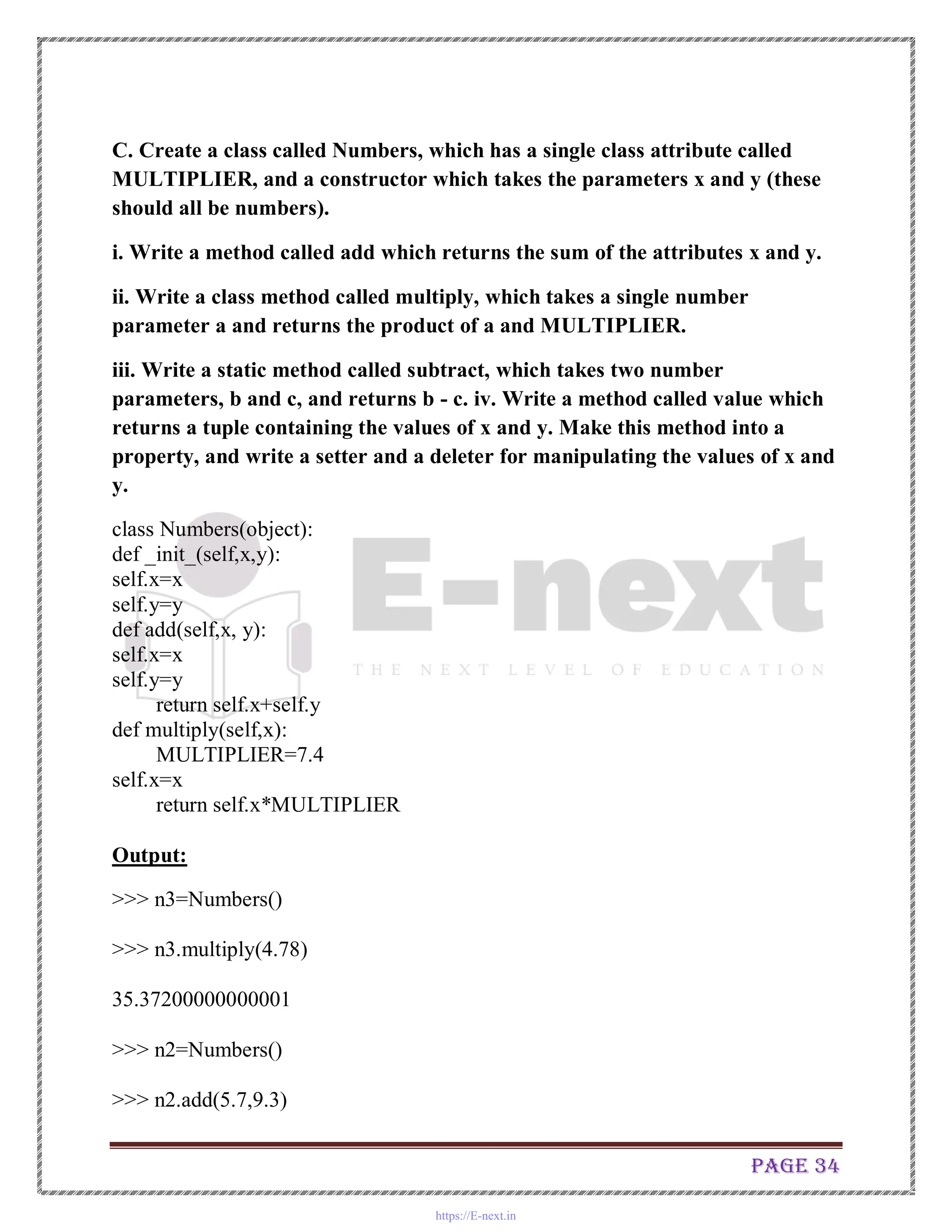
C. Create a class called Numbers, which has a single class attribute called
MULTIPLIER, and a constructor which takes the parameters x and y (these
should all be numbers).
i. Write a method called add which returns the sum of the attributes x and y.
ii. Write a class method called multiply, which takes a single number
parameter a and returns the product of a and MULTIPLIER.
iii. Write a static method called subtract, which takes two number
parameters, b and c, and returns b - c. iv. Write a method called value which
returns a tuple containing the values of x and y. Make this method into a
property, and write a setter and a deleter for manipulating the values of x and
y.
class Numbers(object):
def _init_(self,x,y):
self.x=x
self.y=y
def add(self,x, y):
self.x=x
self.y=y
return self.x+self.y
def multiply(self,x):
MULTIPLIER=7.4
self.x=x
return self.x*MULTIPLIER
Output:
>>> n3=Numbers()
>>> n3.multiply(4.78)
35.37200000000001
>>> n2=Numbers()
>>> n2.add(5.7,9.3)
https://E-next.in
Page 35
15.0
Practical No.-8
8. Write the program for the following: (IDLE and exception handling)
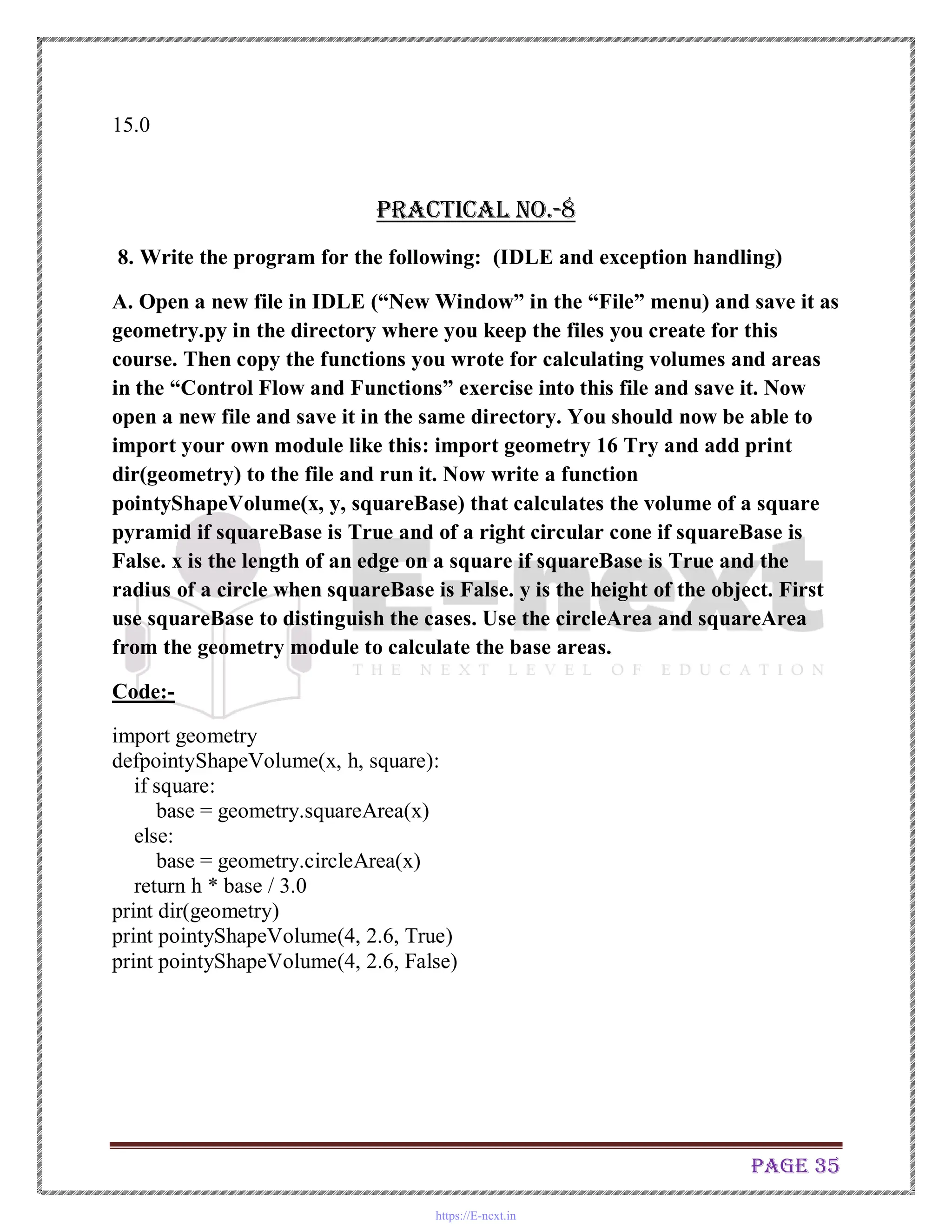
A. Open a new file in IDLE (“New Window” in the “File” menu) and save it as
geometry.py in the directory where you keep the files you create for this
course. Then copy the functions you wrote for calculating volumes and areas
in the “Control Flow and Functions” exercise into this file and save it. Now
open a new file and save it in the same directory. You should now be able to
import your own module like this: import geometry 16 Try and add print
dir(geometry) to the file and run it. Now write a function
pointyShapeVolume(x, y, squareBase) that calculates the volume of a square
pyramid if squareBase is True and of a right circular cone if squareBase is
False. x is the length of an edge on a square if squareBase is True and the
radius of a circle when squareBase is False. y is the height of the object. First
use squareBase to distinguish the cases. Use the circleArea and squareArea
from the geometry module to calculate the base areas.
Code:-
import geometry
defpointyShapeVolume(x, h, square):
if square:
base = geometry.squareArea(x)
else:
base = geometry.circleArea(x)
return h * base / 3.0
print dir(geometry)
print pointyShapeVolume(4, 2.6, True)
print pointyShapeVolume(4, 2.6, False)
https://E-next.in
Page 36
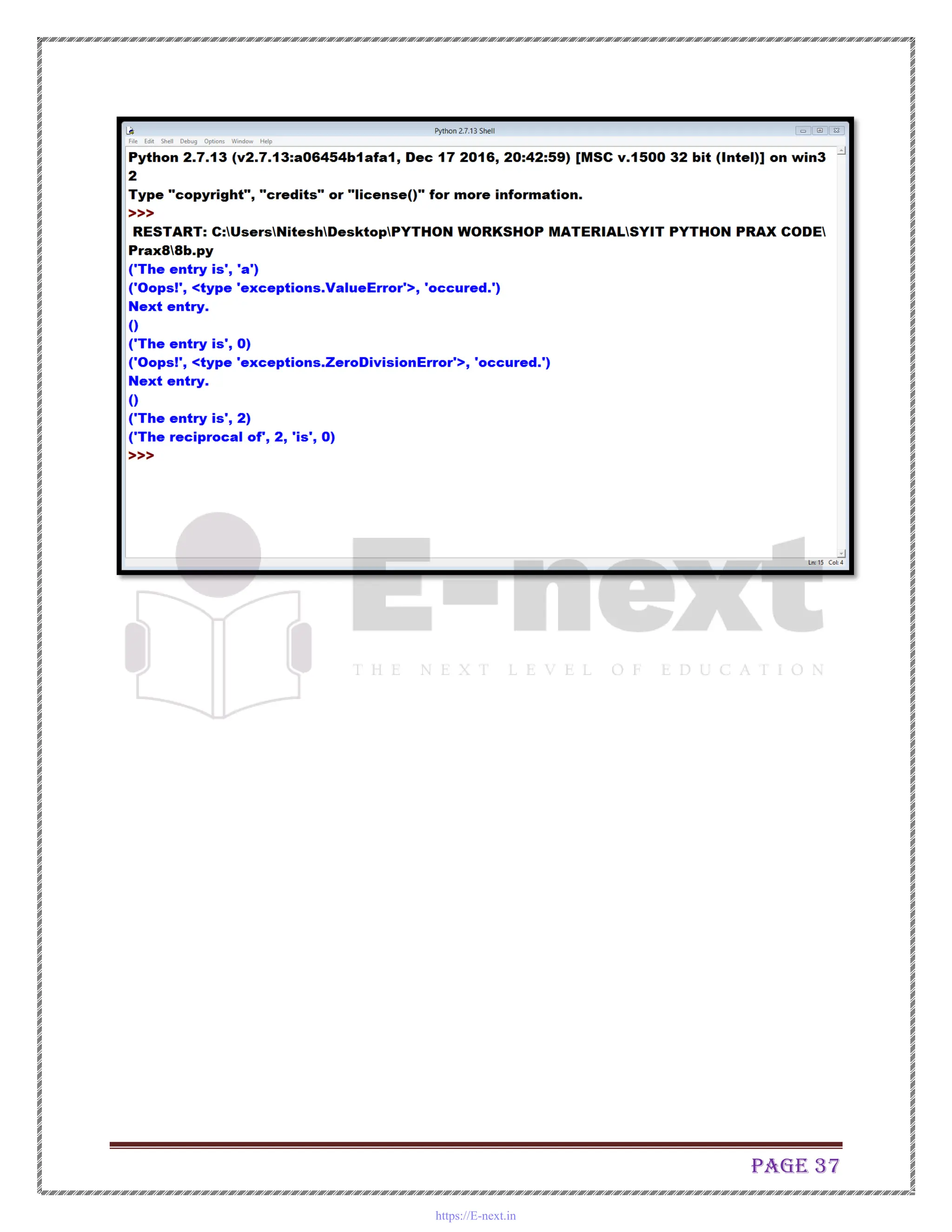
B. Write a program to implement exception handling.
import sys
randomList = ['a', 0, 2]
for entry in randomList:
try:
print("The entry is", entry)
r = 1/int(entry)
break
except:
print("Oops!",sys.exc_info()[0],"occured.")
print("Next entry.")
print()
print("The reciprocal of",entry,"is",r)
Output:
https://E-next.in
Page 37
https://E-next.in
Page 38
Practical No.9
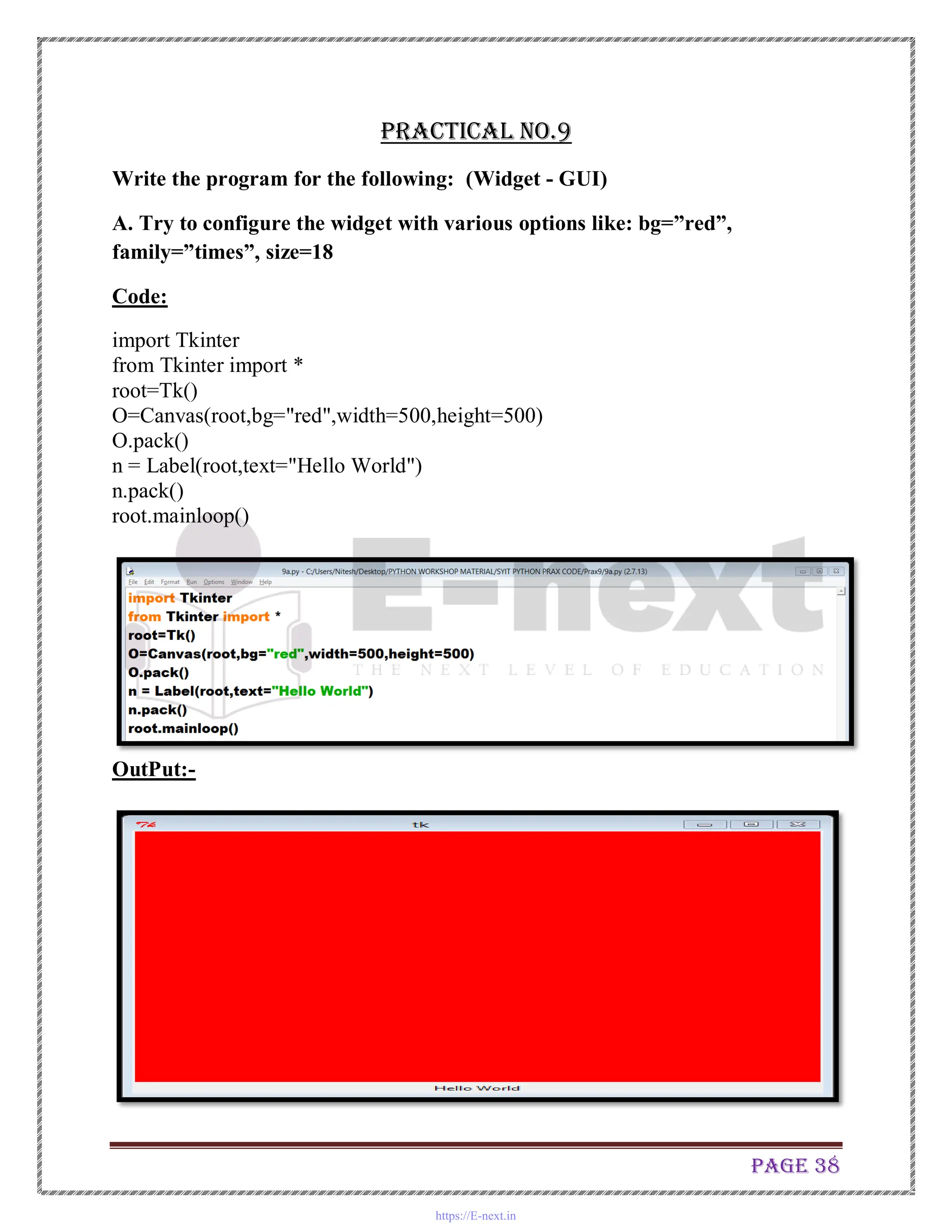
Write the program for the following: (Widget - GUI)
A. Try to configure the widget with various options like: bg=”red”,
family=”times”, size=18
Code:
import Tkinter
from Tkinter import *
root=Tk()
O=Canvas(root,bg="red",width=500,height=500)
O.pack()
n = Label(root,text="Hello World")
n.pack()
root.mainloop()
OutPut:-
https://E-next.in
Page 39
B. Try to change the widget type and configuration options to experiment with
other widget types like Message, Button, Entry, Checkbutton, Radiobutton,
Scale etc.
Code:
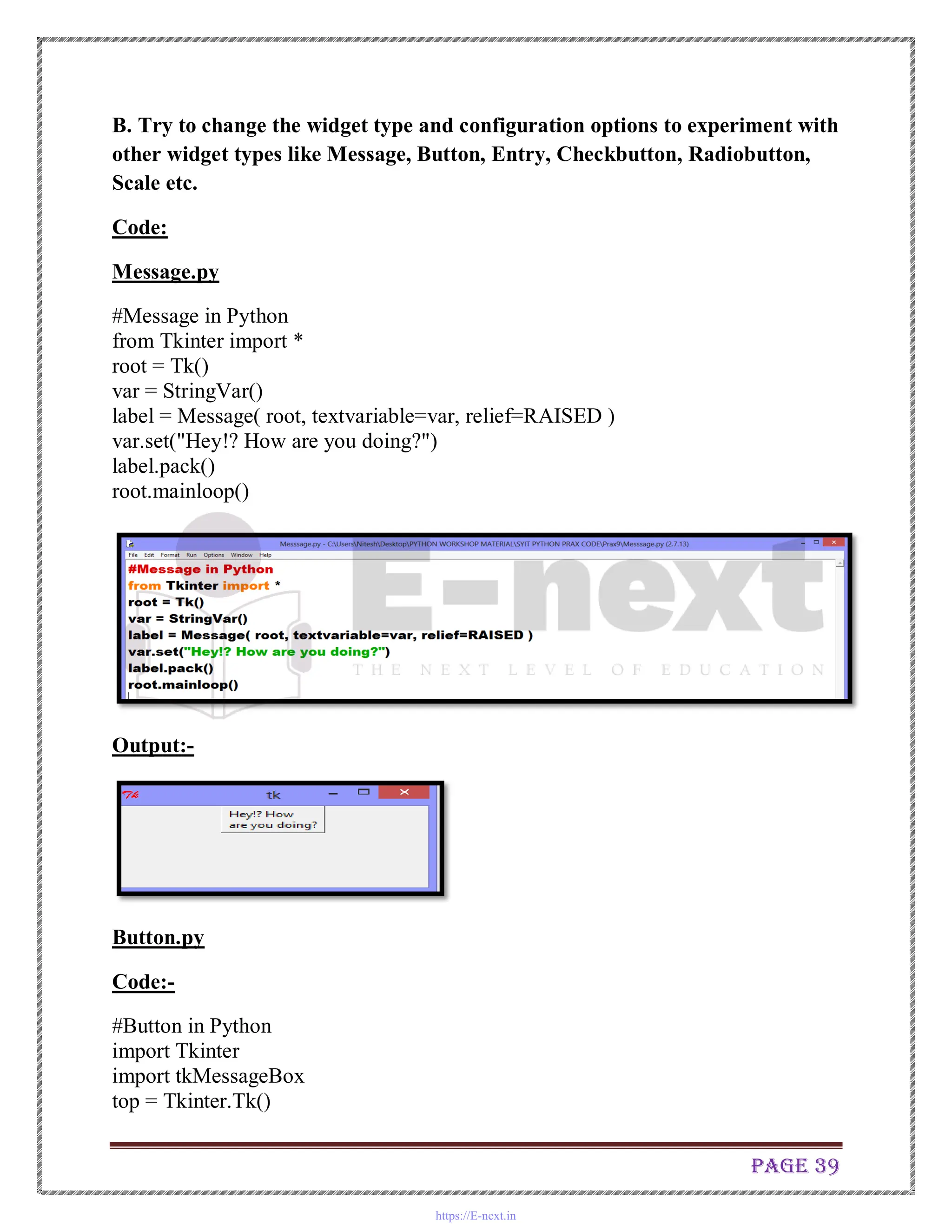
Message.py
#Message in Python
from Tkinter import *
root = Tk()
var = StringVar()
label = Message( root, textvariable=var, relief=RAISED )
var.set("Hey!? How are you doing?")
label.pack()
root.mainloop()
Output:-
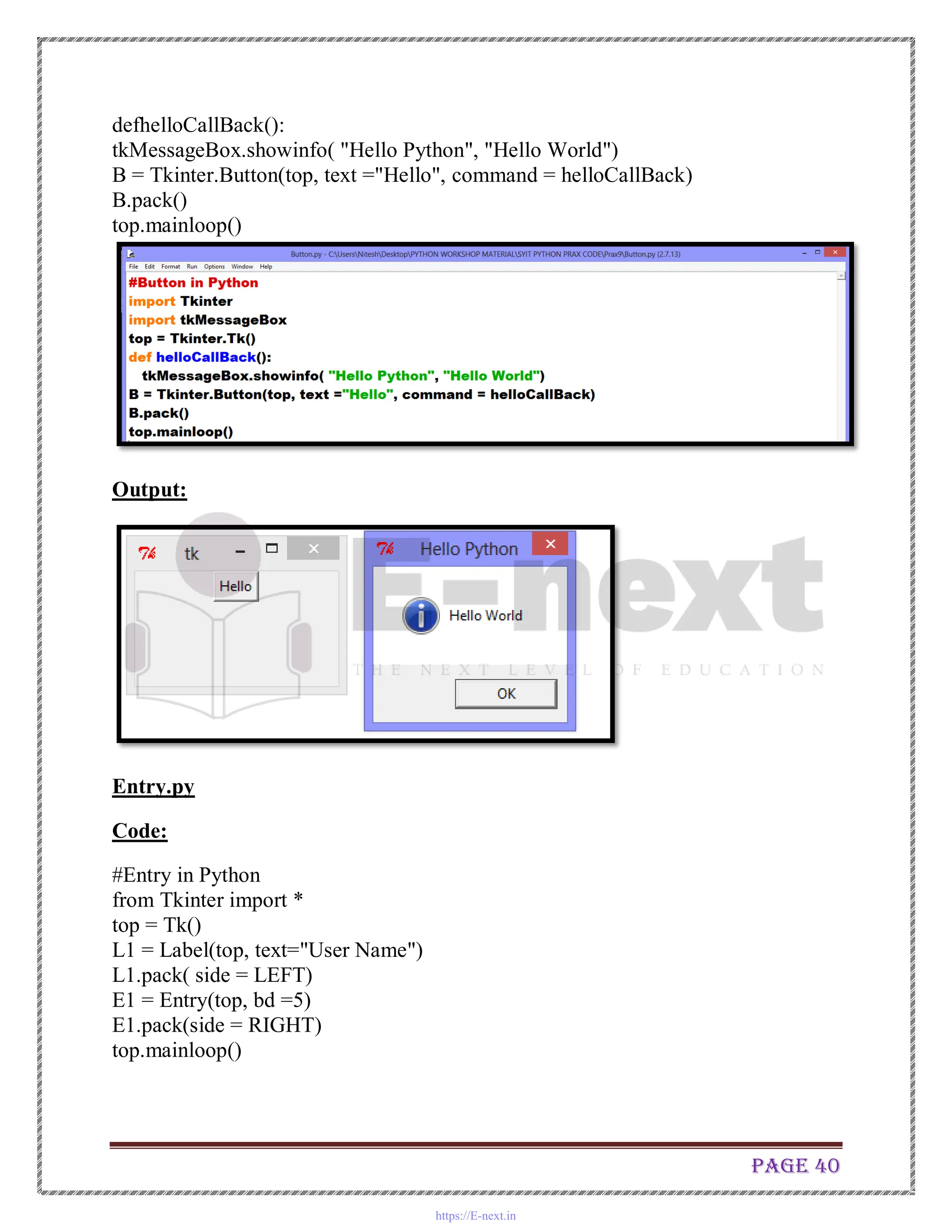
Button.py
Code:-
#Button in Python
import Tkinter
import tkMessageBox
top = Tkinter.Tk()
https://E-next.in
Page 40
defhelloCallBack():
tkMessageBox.showinfo( "Hello Python", "Hello World")
B = Tkinter.Button(top, text ="Hello", command = helloCallBack)
B.pack()
top.mainloop()
Output:
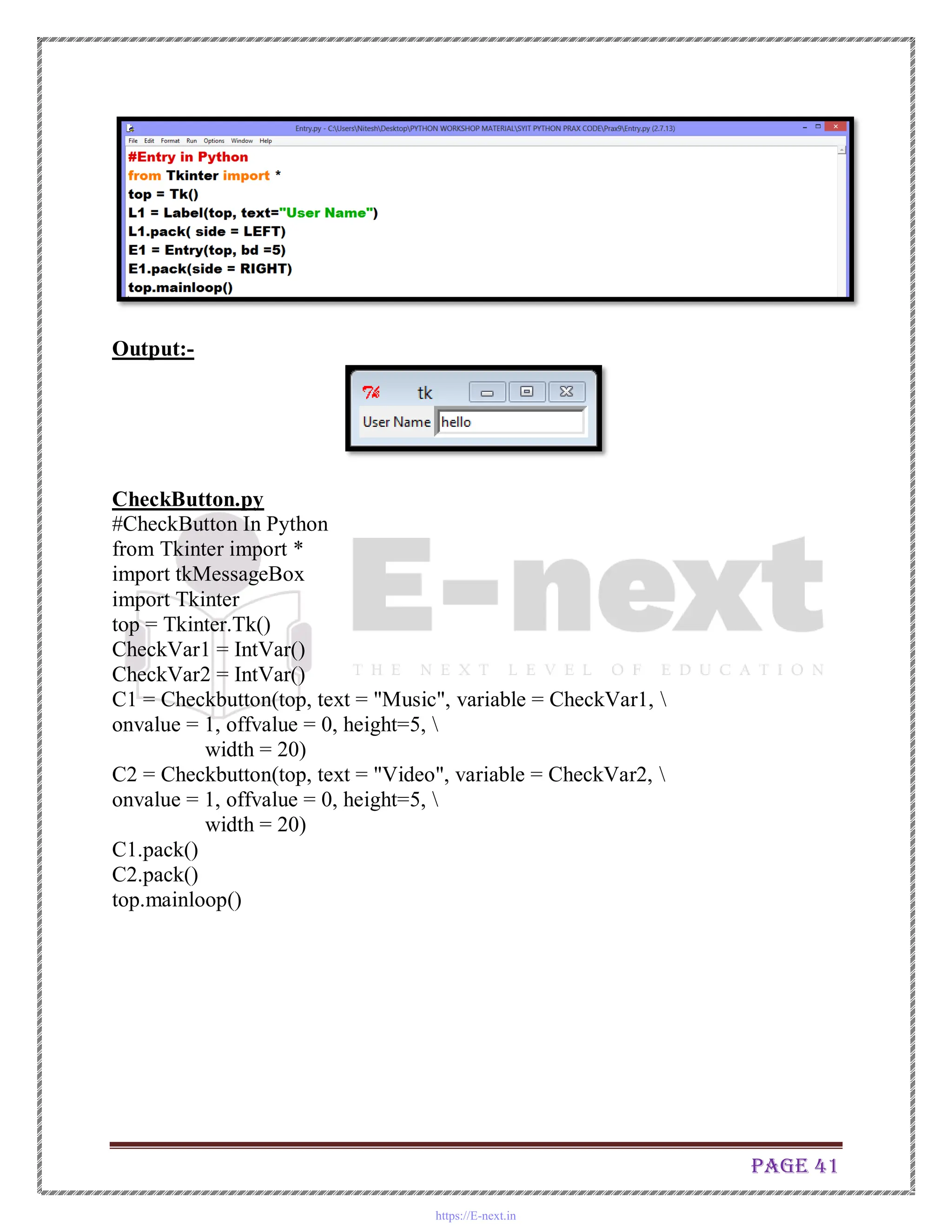
Entry.py
Code:
#Entry in Python
from Tkinter import *
top = Tk()
L1 = Label(top, text="User Name")
L1.pack( side = LEFT)
E1 = Entry(top, bd =5)
E1.pack(side = RIGHT)
top.mainloop()
https://E-next.in
Page 41
Output:-
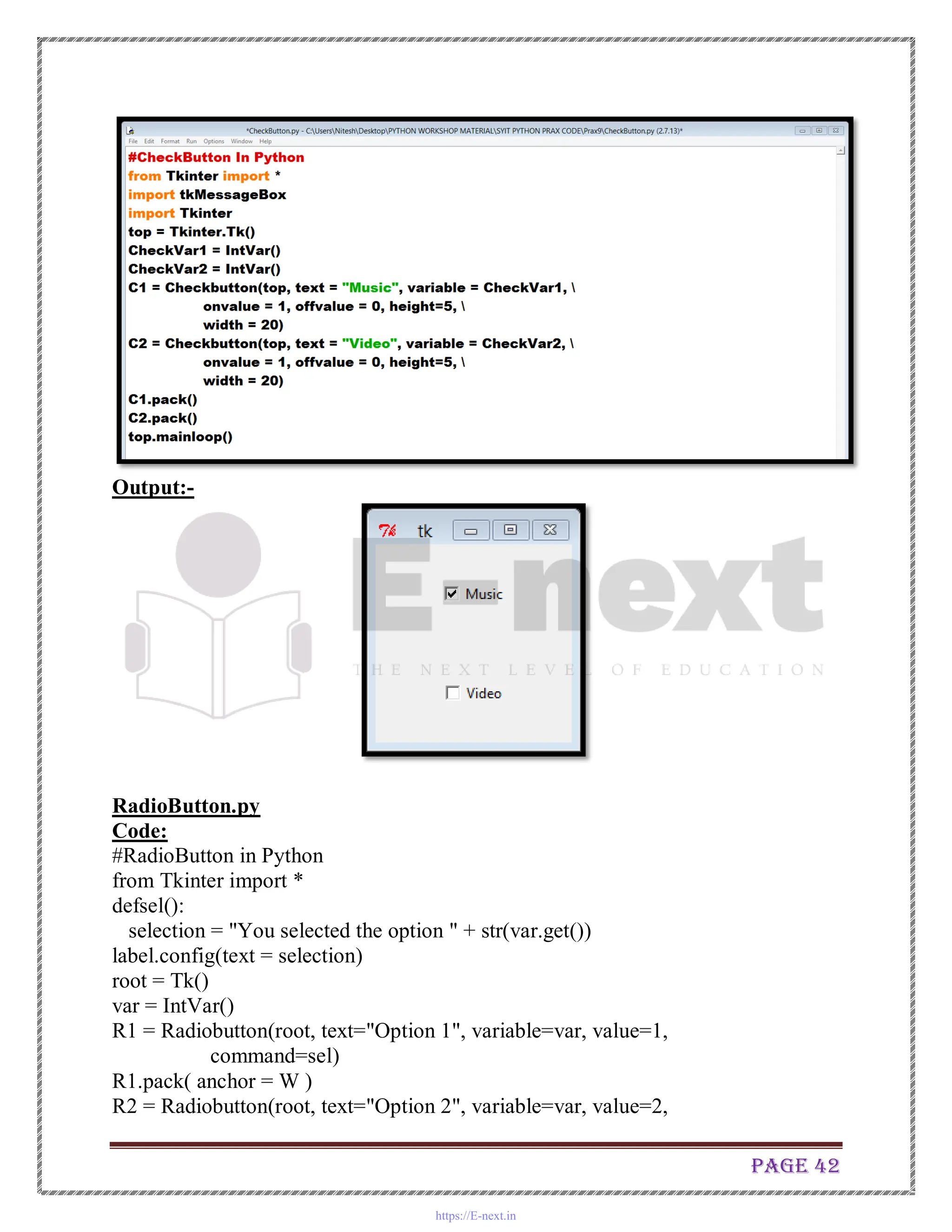
CheckButton.py
#CheckButton In Python
from Tkinter import *
import tkMessageBox
import Tkinter
top = Tkinter.Tk()
CheckVar1 = IntVar()
CheckVar2 = IntVar()
C1 = Checkbutton(top, text = "Music", variable = CheckVar1, 
onvalue = 1, offvalue = 0, height=5, 
width = 20)
C2 = Checkbutton(top, text = "Video", variable = CheckVar2, 
onvalue = 1, offvalue = 0, height=5, 
width = 20)
C1.pack()
C2.pack()
top.mainloop()
https://E-next.in
Page 42
Output:-
RadioButton.py
Code:
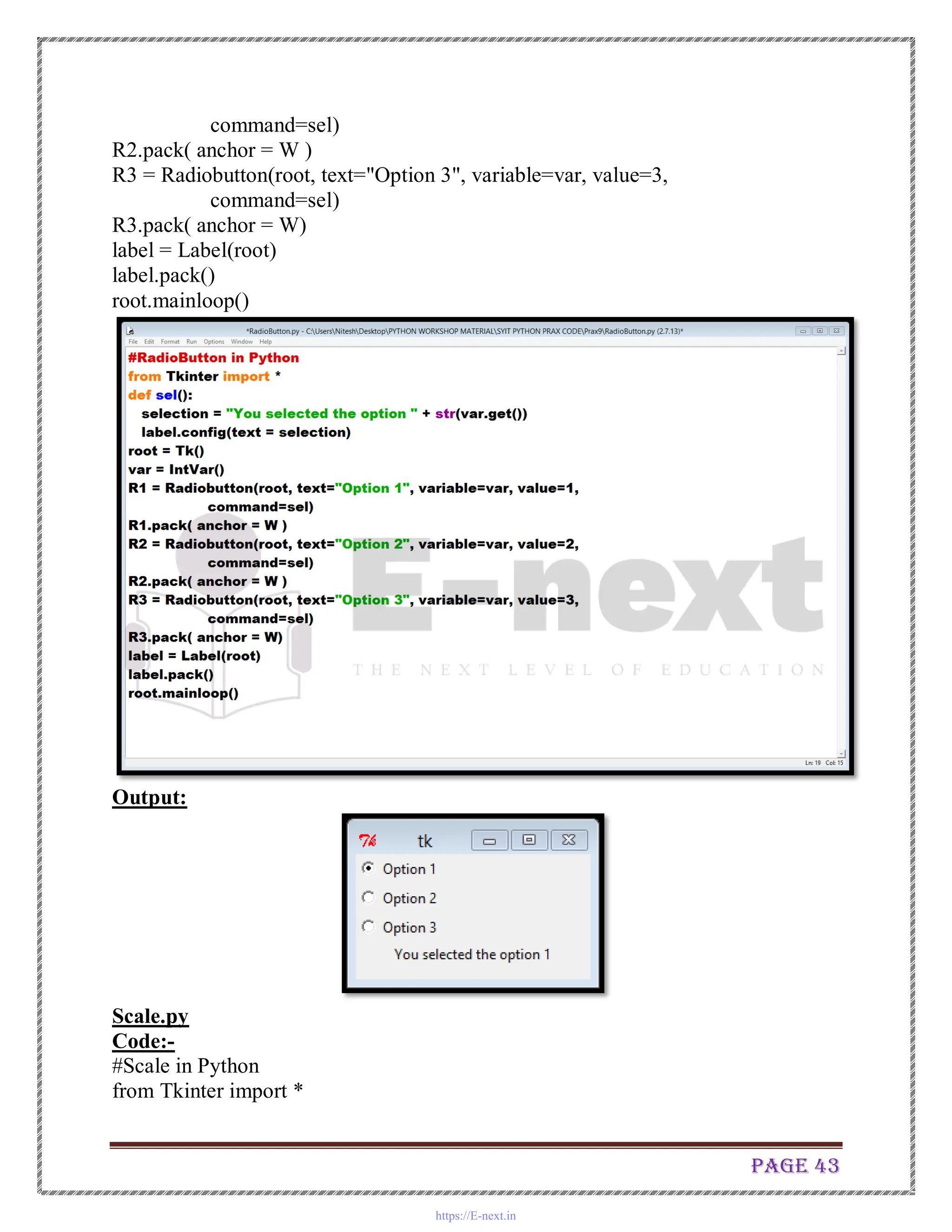
#RadioButton in Python
from Tkinter import *
defsel():
selection = "You selected the option " + str(var.get())
label.config(text = selection)
root = Tk()
var = IntVar()
R1 = Radiobutton(root, text="Option 1", variable=var, value=1,
command=sel)
R1.pack( anchor = W )
R2 = Radiobutton(root, text="Option 2", variable=var, value=2,
https://E-next.in
Page 43
command=sel)
R2.pack( anchor = W )
R3 = Radiobutton(root, text="Option 3", variable=var, value=3,
command=sel)
R3.pack( anchor = W)
label = Label(root)
label.pack()
root.mainloop()
Output:
Scale.py
Code:-
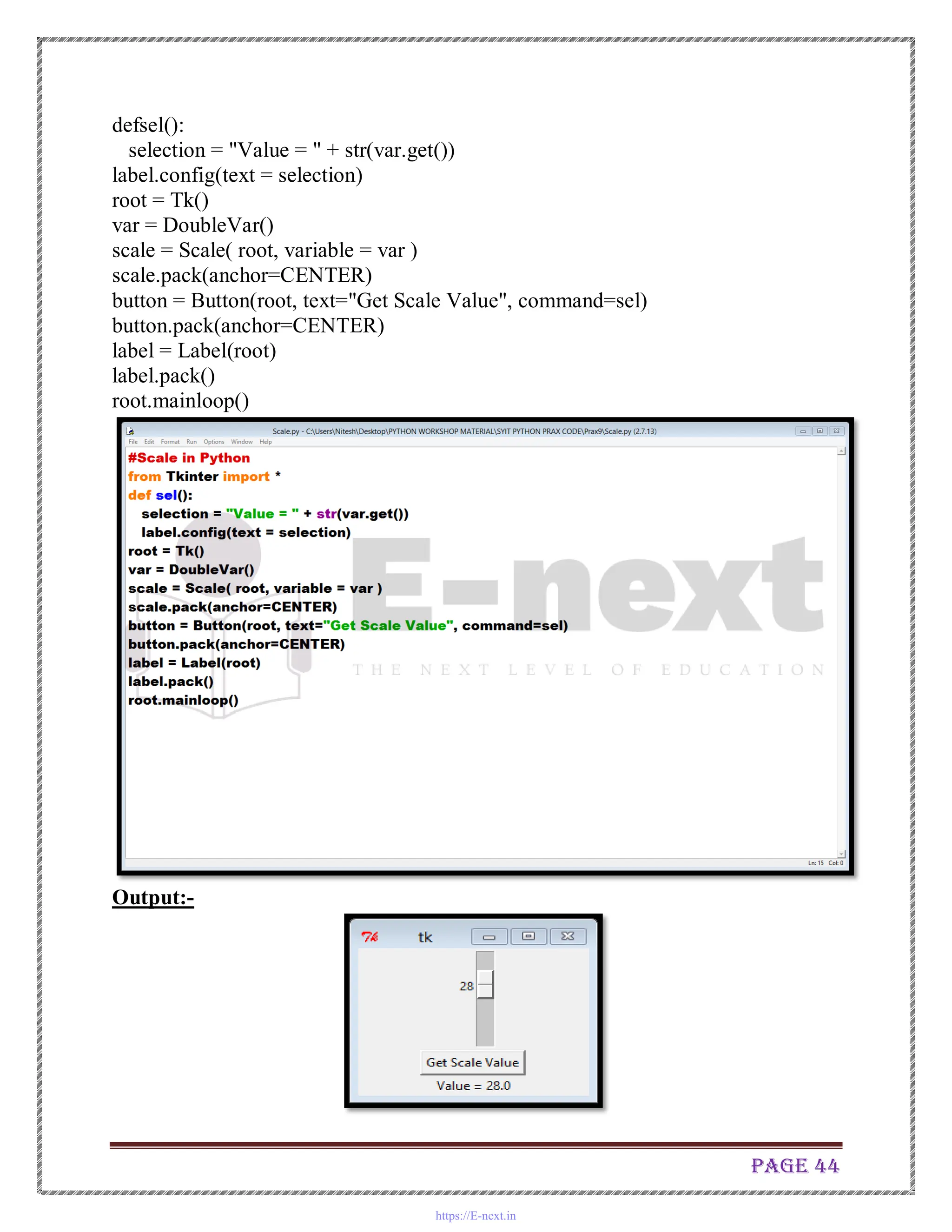
#Scale in Python
from Tkinter import *
https://E-next.in
Page 44
defsel():
selection = "Value = " + str(var.get())
label.config(text = selection)
root = Tk()
var = DoubleVar()
scale = Scale( root, variable = var )
scale.pack(anchor=CENTER)
button = Button(root, text="Get Scale Value", command=sel)
button.pack(anchor=CENTER)
label = Label(root)
label.pack()
root.mainloop()
Output:-
https://E-next.in
Page 45
Practical No.10
Design the database applications for the following: (Refer database Chapter)
A. Design a simple database application that stores the records and retrieve
the same.
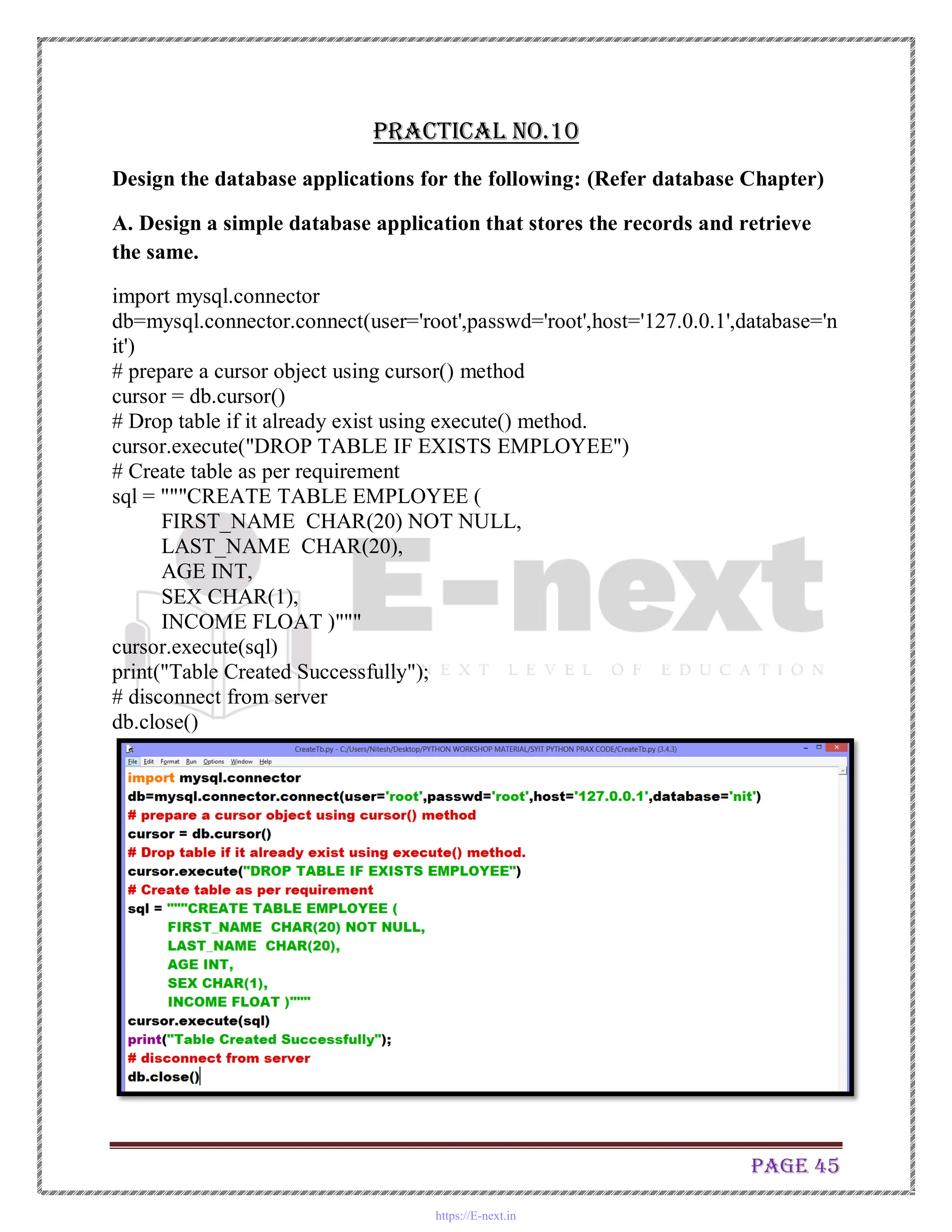
import mysql.connector
db=mysql.connector.connect(user='root',passwd='root',host='127.0.0.1',database='n
it')
# prepare a cursor object using cursor() method
cursor = db.cursor()
# Drop table if it already exist using execute() method.
cursor.execute("DROP TABLE IF EXISTS EMPLOYEE")
# Create table as per requirement
sql = """CREATE TABLE EMPLOYEE (
FIRST_NAME CHAR(20) NOT NULL,
LAST_NAME CHAR(20),
AGE INT,
SEX CHAR(1),
INCOME FLOAT )"""
cursor.execute(sql)
print("Table Created Successfully");
# disconnect from server
db.close()
https://E-next.in
Page 46
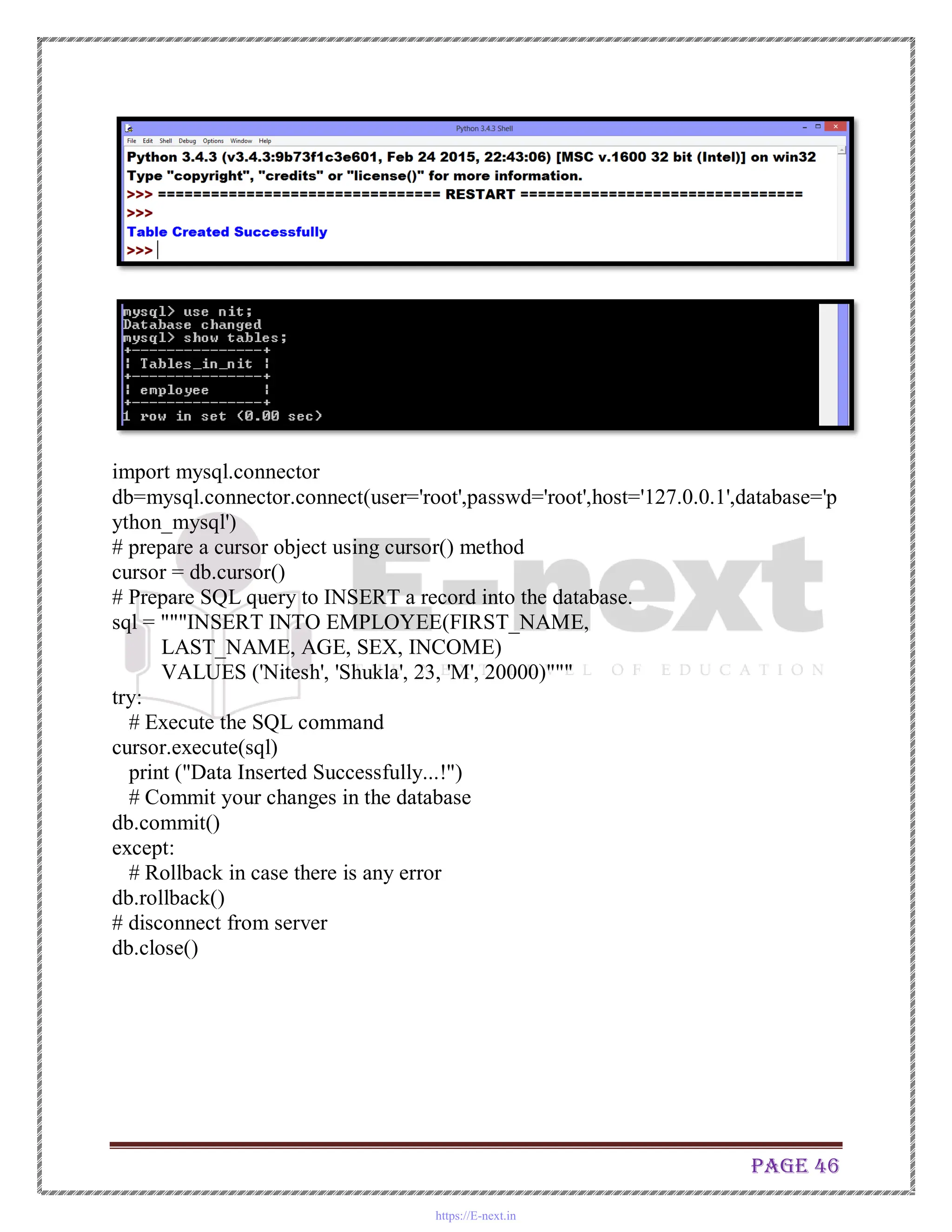
import mysql.connector
db=mysql.connector.connect(user='root',passwd='root',host='127.0.0.1',database='p
ython_mysql')
# prepare a cursor object using cursor() method
cursor = db.cursor()
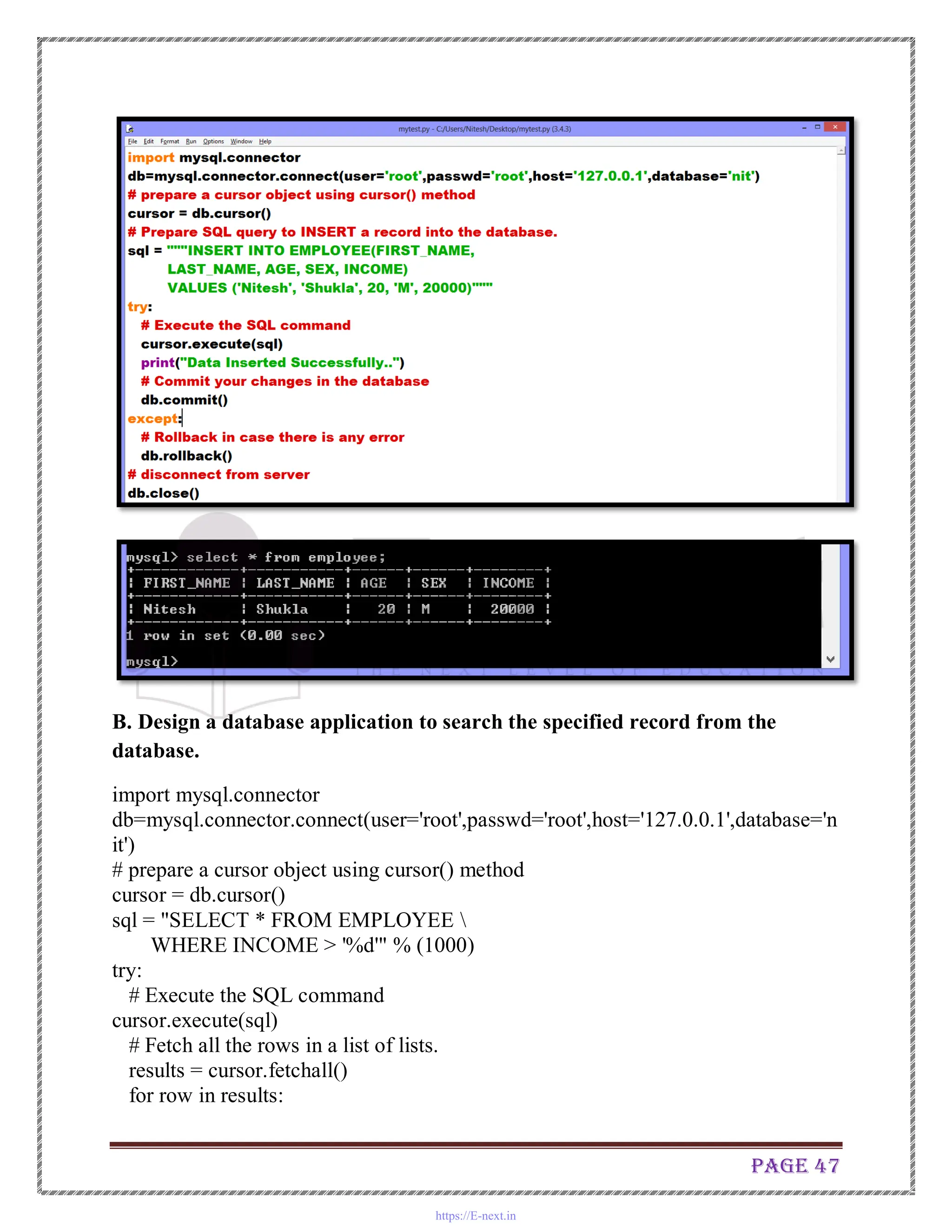
# Prepare SQL query to INSERT a record into the database.
sql = """INSERT INTO EMPLOYEE(FIRST_NAME,
LAST_NAME, AGE, SEX, INCOME)
VALUES ('Nitesh', 'Shukla', 23, 'M', 20000)"""
try:
# Execute the SQL command
cursor.execute(sql)
print ("Data Inserted Successfully...!")
# Commit your changes in the database
db.commit()
except:
# Rollback in case there is any error
db.rollback()
# disconnect from server
db.close()
https://E-next.in
Page 47
B. Design a database application to search the specified record from the
database.
import mysql.connector
db=mysql.connector.connect(user='root',passwd='root',host='127.0.0.1',database='n
it')
# prepare a cursor object using cursor() method
cursor = db.cursor()
sql = "SELECT * FROM EMPLOYEE 
WHERE INCOME > '%d'" % (1000)
try:
# Execute the SQL command
cursor.execute(sql)
# Fetch all the rows in a list of lists.
results = cursor.fetchall()
for row in results:
https://E-next.in
Page 48
fname = row[0]
lname = row[1]
age = row[2]
sex = row[3]
income = row[4]
# Now print fetched result
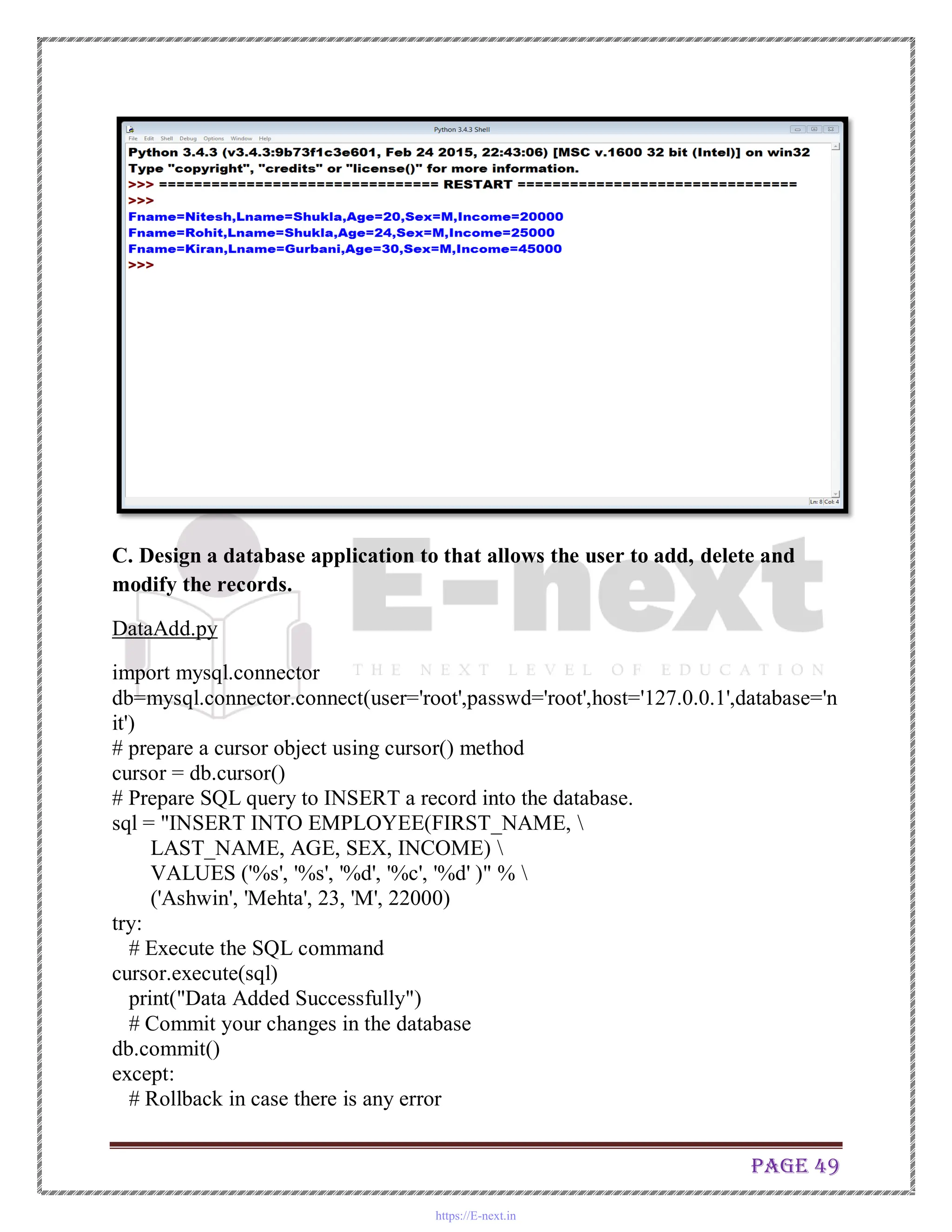
print ("Fname=%s,Lname=%s,Age=%d,Sex=%s,Income=%d" % 
(fname, lname, age, sex, income ))
except:
print ("Error: unable to fecth data")
# disconnect from server
db.close()
https://E-next.in
Page 49
C. Design a database application to that allows the user to add, delete and
modify the records.
DataAdd.py
import mysql.connector
db=mysql.connector.connect(user='root',passwd='root',host='127.0.0.1',database='n
it')
# prepare a cursor object using cursor() method
cursor = db.cursor()
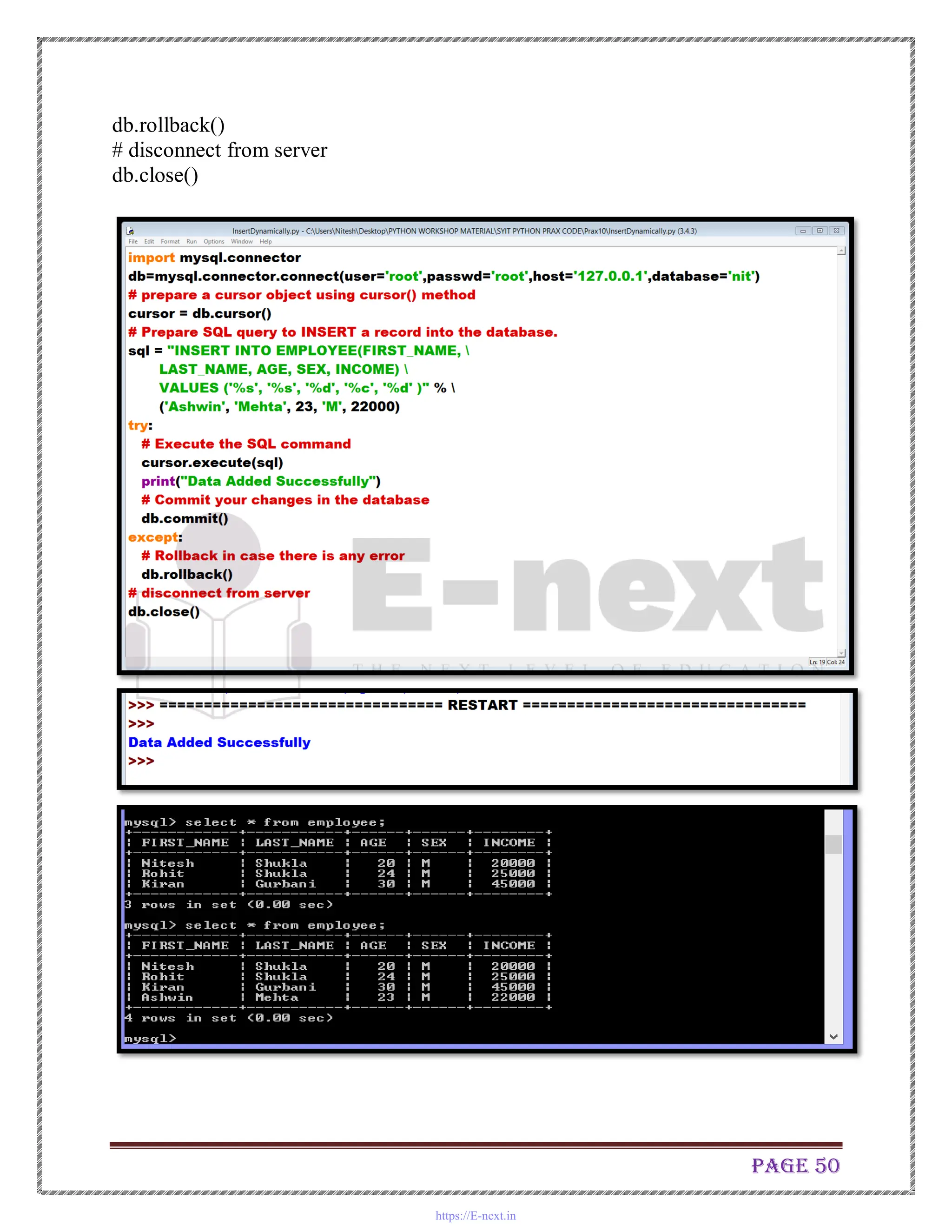
# Prepare SQL query to INSERT a record into the database.
sql = "INSERT INTO EMPLOYEE(FIRST_NAME, 
LAST_NAME, AGE, SEX, INCOME) 
VALUES ('%s', '%s', '%d', '%c', '%d' )" % 
('Ashwin', 'Mehta', 23, 'M', 22000)
try:
# Execute the SQL command
cursor.execute(sql)
print("Data Added Successfully")
# Commit your changes in the database
db.commit()
except:
# Rollback in case there is any error
https://E-next.in
Page 50
db.rollback()
# disconnect from server
db.close()
https://E-next.in
Page 51
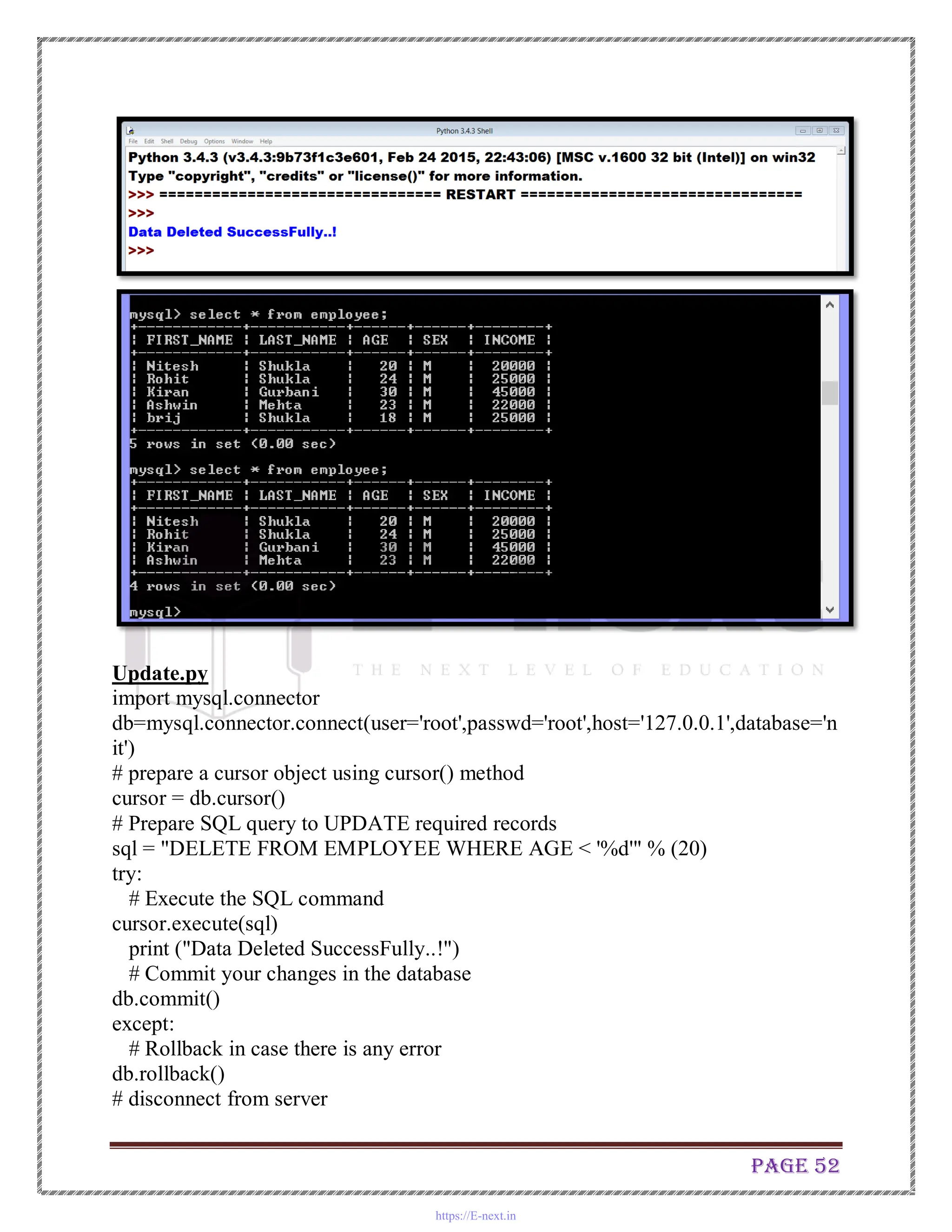
Delete.py
import mysql.connector
db=mysql.connector.connect(user='root',passwd='root',host='127.0.0.1',database='n
it')
# prepare a cursor object using cursor() method
cursor = db.cursor()
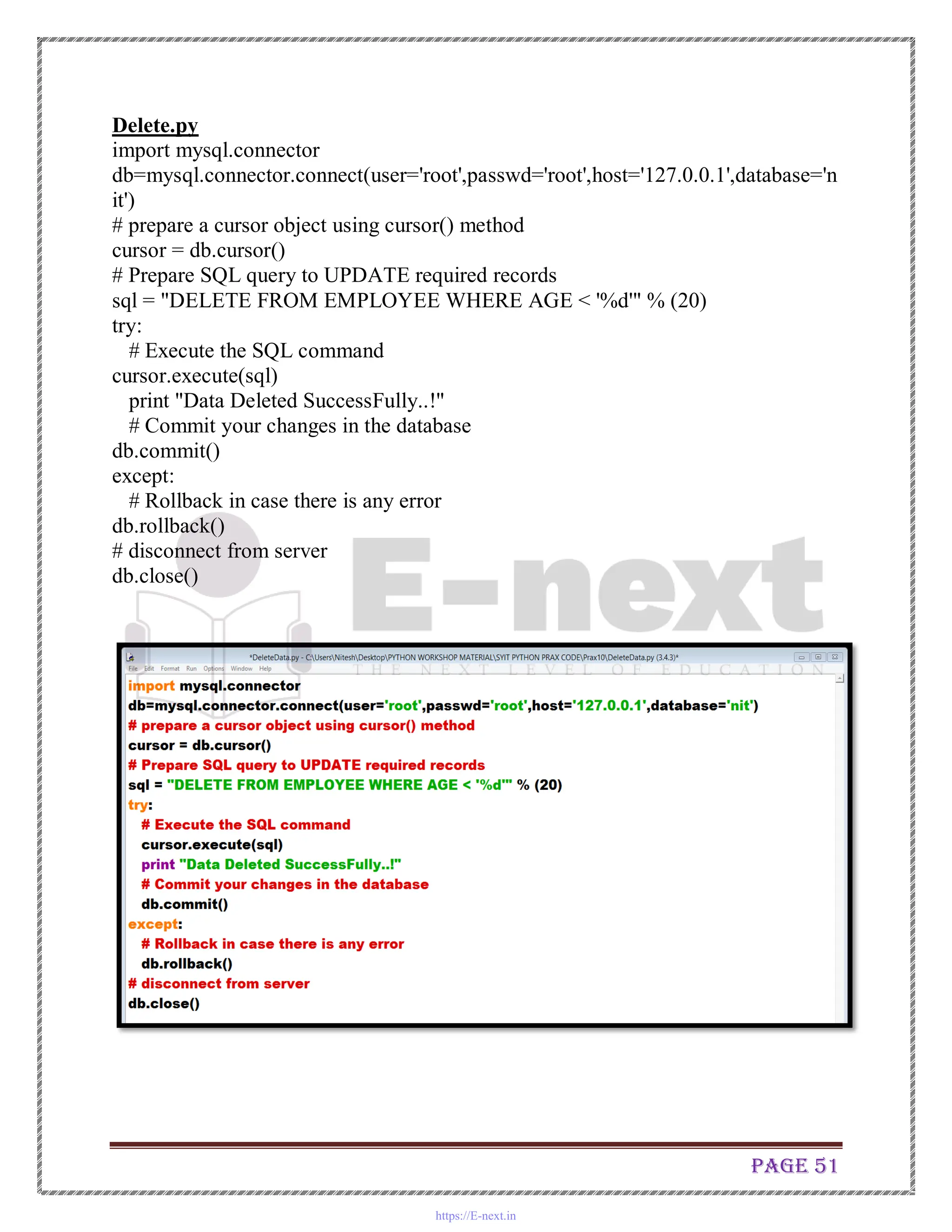
# Prepare SQL query to UPDATE required records
sql = "DELETE FROM EMPLOYEE WHERE AGE < '%d'" % (20)
try:
# Execute the SQL command
cursor.execute(sql)
print "Data Deleted SuccessFully..!"
# Commit your changes in the database
db.commit()
except:
# Rollback in case there is any error
db.rollback()
# disconnect from server
db.close()
https://E-next.in
Page 52
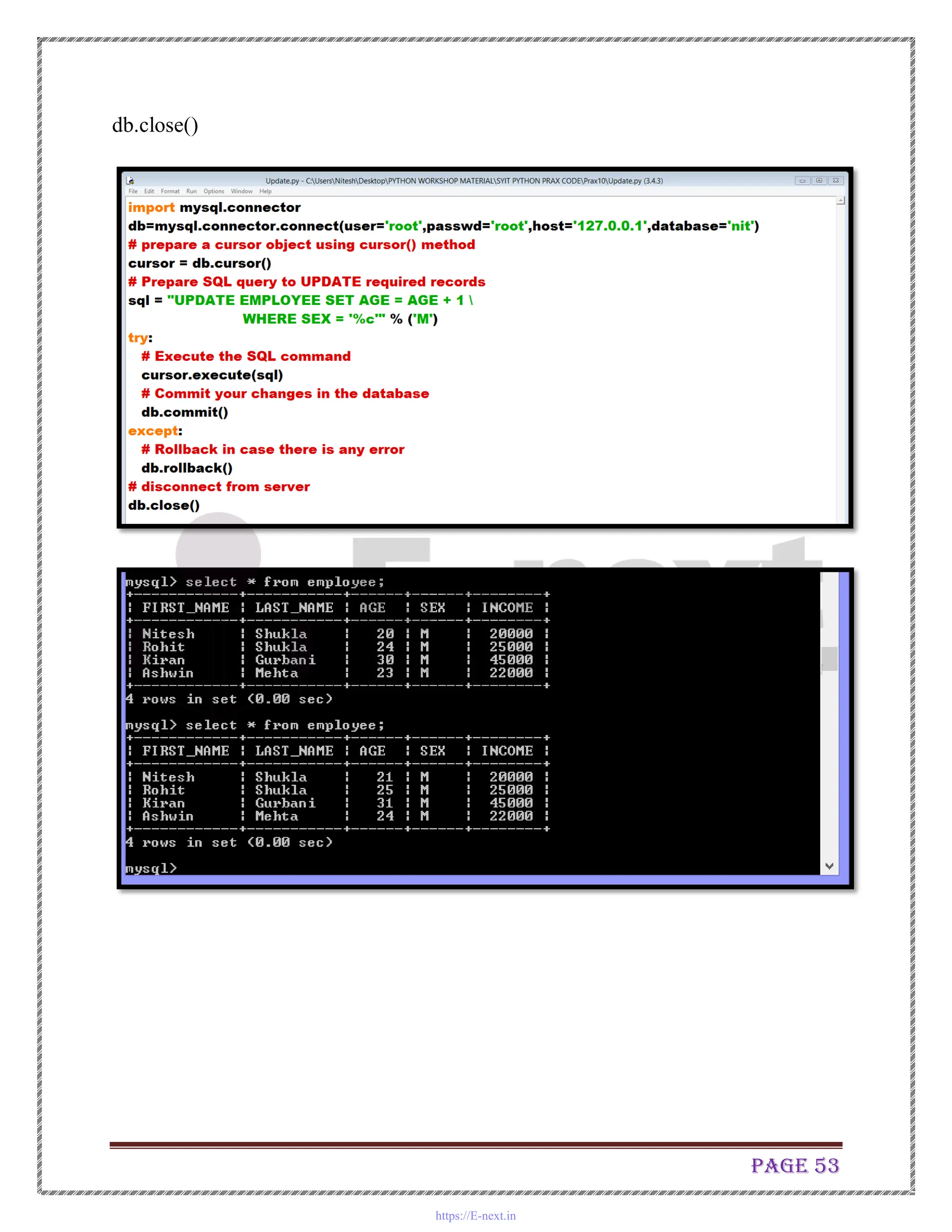
Update.py
import mysql.connector
db=mysql.connector.connect(user='root',passwd='root',host='127.0.0.1',database='n
it')
# prepare a cursor object using cursor() method
cursor = db.cursor()
# Prepare SQL query to UPDATE required records
sql = "DELETE FROM EMPLOYEE WHERE AGE < '%d'" % (20)
try:
# Execute the SQL command
cursor.execute(sql)
print ("Data Deleted SuccessFully..!")
# Commit your changes in the database
db.commit()
except:
# Rollback in case there is any error
db.rollback()
# disconnect from server
https://E-next.in
Page 53
db.close()
https://E-next.in

datastructure-1 lab manual journals practical

  • 1.
  • 2.
    Page 2 Installation Stepfor Python 3.4.x and MySQL Connectivity to Python 3.4.x 1. Double Click on The Python 3.4.3 2. Click Next 3. Click Next https://E-next.in
  • 3.
    Page 3 4. ClickNext 5. Click Yes if any prompt is coming then click Next https://E-next.in
  • 4.
    Page 4 6.Click Finish 7.Now Install Mysql Connector for Python 3.4. Click on the Following Windows Installer File. 8. Now Copy the Following file in Python Directory. https://E-next.in
  • 5.
    Page 5 9. NowDouble Click on this Application and follow the step. https://E-next.in
  • 6.
  • 7.
    Page 7 10. NowCheck the MySQL Connectivity is done or not by Opening the IDLE (Python 3.4 GUI). https://E-next.in
  • 8.
    Page 8 TestDB.py import mysql.connector db=mysql.connector.connect(user='root',passwd='root',host='127.0.0.1',datab ase='nit') #prepare a cursor object using cursor() method cursor = db.cursor() # execute SQL query using execute() method. cursor.execute("SELECT VERSION()") # Fetch a single row using fetchone() method. data = cursor.fetchone() print ("Database version : %s " % data) # disconnect from server db.close() https://E-next.in
  • 9.
    Page 9 Practical No.1 1.Write the program for the following: (by using control statements and control structure) A. Create a program that asks the user to enter their name and their age. Print out a message addressed to them that tells them the year that they will turn 100 years old. import datetime name = input("Hello! Please enter your name: ") print("Hello " + name) age = int(input("Enter your age: ")) year_now = datetime.datetime.now() # print(year_now.year) print("You will turn 100 in " + str(int(100-age) + int(year_now.year))) Output https://E-next.in
  • 10.
    Page 10 B. Enterthe number from the user and depending on whether the number is even or odd, print out an appropriate message to the user. Code : # Python program to check if the input number is odd or even. # A number is even if division by 2 give a remainder of 0. # If remainder is 1, it is odd number. num = int(input("Enter a number: ")) if (num % 2) == 0: print("{0} is Even".format(num)) else: print("{0} is Odd".format(num)) Python Code :- Output:- https://E-next.in
  • 11.
    Page 11 C. Writea program to generate the Fibonacci series. # Program to display the Fibonacci sequence up to n-th term where n is provided by the user # change this value for a different result nterms = 10 # uncomment to take input from the user #nterms = int(input("How many terms? ")) # first two terms n1 = 0 n2 = 1 count = 2 # check if the number of terms is valid if nterms<= 0: print("Please enter a positive integer") elifnterms == 1: print("Fibonacci sequence upto",nterms,":") print(n1) else: print("Fibonacci sequence upto",nterms,":") print(n1,",",n2,end=', ') while count <nterms: nth = n1 + n2 https://E-next.in
  • 12.
    Page 12 print(nth,end=' ,') # update values n1 = n2 n2 = nth count += 1 Output https://E-next.in
  • 13.
    Page 13 Fibonacci seriesby using function D. Write a function that reverses the user defined value. # Python Program to Reverse a Number using While loop by using function defreverse_number(number): reverse = 0 while(number > 0): reminder = number %10 reverse = (reverse *10) + reminder number = number //10 print("Reverse number is ", reverse) reverse_number(1546) https://E-next.in
  • 14.
    Page 14 Python code: Output Same Program on Python2.7 on Command prompt https://E-next.in
  • 15.
    Page 15 E. Writea function to check the input value is Armstrong and also write the function for Palindrome. Code: # Python program to check if the number provided by the user is an Armstrong number or not defarmstrong(num): sum=0 # find the sum of the cube of each digit temp = num while temp > 0: digit = temp % 10 sum += digit ** 3 temp //= 10 # display the result if num == sum: print(num,"is an Armstrong number") else: print(num,"is not an Armstrong number") def palindrome(num): n = num rev = 0 while num != 0: rev = rev * 10 rev = rev + int(num%10) num = int(num / 10) if n == rev: print(n,"is palindrome number") else: print(n,"is not a palin") # take input from the user num = int(input("Enter a number to chk it is armstrong or not: ")) armstrong(num) # take input from the user num = int(input("Enter a number to chk it is palindrome or not: ")) palindrome(num) https://E-next.in
  • 16.
  • 17.
    Page 17 F. Writea recursive function to print the factorial for a given number. # Python program to find the factorial of a number using recursion defrecur_factorial(n): """Function to return the factorial of a number using recursion""" if n == 1: return n else: return n*recur_factorial(n-1) #take input from the user num = int(input("Enter a number: ")) # check is the number is negative if num < 0: print("Sorry, factorial does not exist for negative numbers") elifnum == 0: print("The factorial of 0 is 1") else: print("The factorial of",num,"is",recur_factorial(num)) https://E-next.in
  • 18.
  • 19.
    Page 19 Practical No.2 Writethe program for the following: ( by using functions) A. Write a function that takes a character (i.e. a string of length 1) and returns True if it is a vowel, False otherwise. The code and the output is shown in the following screenshot. B. Define a function that computes the length of a given list or string. The code and the output is shown in the following screenshot. https://E-next.in
  • 20.
    Page 20 C. Definea procedure histogram() that takes a list of integers and prints a histogram to the screen. For example, histogram([4, 9, 7]) should print the following: **** ******* ** * ****** The code and the corresponding output is shown in the following screen shot. https://E-next.in
  • 21.
    Page 21 Practical No.-3 Writethe program for the following: ( by using list) A. A pangram is a sentence that contains all the letters of the English alphabet at least once, for example: The quick brown fox jumps over the lazy dog. Your task here is to write a function to check a sentence to see if it is a pangram or not. import string, sys if sys.version_info[0] < 3: input = raw_input defispangram(sentence, alphabet=string.ascii_lowercase): alphaset = set(alphabet) return alphaset<= set(sentence.lower()) print ( ispangram(input('Sentence: ')) ) Output https://E-next.in
  • 22.
    Page 22 B. Takea list, say for example this one: a = [1, 1, 2, 3, 5, 8, 13, 21, 34, 55, 89] and write a program that prints out all the elements of the list that are less than 5. # Program to trim list list_trim.py l1=[1,1,2,3,5,8,13,21,34,55,89] l2=[] for i in l1: if i <5: l2.append(i) print (l2) https://E-next.in
  • 23.
    Page 23 Practical No.4 Writethe program for the following: ( by using list) A. Write a program that takes two lists and returns True if they have at least one common member. Code : l1=[1,2,3,4,5,6,] l2=[11,12,13,14,15,6] for i in l1: for j in l2: if i==j: print ('The 2 list have at least one common element') Output B. Write a Python program to print a specified list after removing the 0th, 2nd, 4th and 5th elements. #print list after removing the 0th, 2nd, 4th and 5th elements. l1=[1,2,3,4,5,6,7,8,9,0] print("Original List is",l1) https://E-next.in
  • 24.
    Page 24 print("According toquestion we have to remove 0th->1,2nd->3,4th->5,5th->6") l1.remove(l1[0]) #this line will remove 1 from the list, Therefore l1[0]=2 print("After Removal of 0th element Now List is",l1) print("Now we have to remove 3 from list which is at 1th position of index") l1.remove(l1[1]) print("After Removal of 1st element of New List (original 2nd index element) is",l1) print("Now we have to remove 5 from list which is at 2nd position of index") l1.remove(l1[2]) print("After Removal of 3rd element of New List (original 4th index element) is",l1) print("Now we have to remove 6 from list which is at 2nd position of index") l1.remove(l1[2]) print (l1) Output https://E-next.in
  • 25.
    Page 25 You cantry without print statements Output C. Write a Python program to clone or copy a list l1=[2, 4, 7, 8, 9, 0] print ("Original List is", l1) l2=l1 print ("Clone List is ",l2) https://E-next.in
  • 26.
  • 27.
    Page 27 Practical No.5 Writethe program for the following: ( by using Dictionary) A. Write a Python script to sort (ascending and descending) a dictionary by value. >>> released={'Python 3.6': 2017,'Python 1.0': 2002, 'Python 2.3': 2010} >>> for key,value in sorted(released.items()): print (key,value) Output: Python 1.0 2002 Python 2.3 2010 Python 3.6 2017 Only keys sorted: >>> print (sorted(released)) ['Python 1.0', 'Python 2.3', 'Python 3.6'] B. Write a Python script to concatenate following dictionaries to create a new one. Sample Dictionary : dic1={1:10, 2:20} dic2={3:30, 4:40} dic3={5:50,6:60} Expected Result : {1: 10, 2: 20, 3: 30, 4: 40, 5: 50, 6: 60} Output: >>> dic1={1:10,2:20} >>> dic2={3:30,4:40} >>> dic3={5:50,6:60} >>> dic1.update(dic2) >>> print (dic1) {1: 10, 2: 20, 3: 30, 4: 40} >>> dic1.update(dic3) >>> print (dic1) {1: 10, 2: 20, 3: 30, 4: 40, 5: 50, 6: 60} https://E-next.in
  • 28.
    Page 28 C. Writea Python program to sum all the items in a dictionary. >>> d= {'One':10,'Two':20,'Three':30} >>> sum(d.values()) 60 Practical No.6 Write the program for the following: ( File handling) A. Write a Python program to read an entire text file. Code: ''' Write a Python program to read an entire text file. ''' deffile_read(fname): txt = open(fname) print(txt.read()) file_read('text.txt') Output https://E-next.in
  • 29.
    Page 29 B. Writea Python program to append text to a file and display the text. Code: def main(): f=open("text.txt","a+") f.write("Welcome to Workshop on Python") f.close() if __name__=="__main__": main() https://E-next.in
  • 30.
    Page 30 Output: C. Writea Python program to read last n lines of a file. Code: ''' Write a Python program to read last n lines of a file. ''' import sys import os deffile_read_from_tail(fname,lines): bufsize = 8192 fsize = os.stat(fname).st_size iter = 0 with open(fname) as f: if bufsize>fsize: bufsize = fsize-1 data = [] while True: iter +=1 f.seek(fsize-bufsize*iter) data.extend(f.readlines()) if len(data) >= lines or f.tell() == 0: https://E-next.in
  • 31.
  • 32.
    Page 32 Practical No.-7 Writethe program for the following: ( class and objects) A. Design a class that store the information of student and display the same class Student: def _init_(self,name, sex,course,result): self.name=name self.sex=sex self.course=course self.result=result def display(self, name, sex, course, result): self.name=name self.sex=sex self.course=course self.result=result print ('Name:', name) print ('Sex:',sex) print ('course:',course) print ('result:', result) Output: >>> s1 =Student() >>> s1.display('AshwinMehta','M','B. Sc.(IT)','96.8%') Name: Ashwin Mehta Sex: M course: B. Sc.(IT) result: 96.8% B. Implement the concept of inheritance using python Code: class Shape: author= 'Ashwin Mehta' def _init_(self,x,y): self.x=x self.y=y https://E-next.in
  • 33.
    Page 33 def area(self,x,y): self.x=x self.y=y a=self.x*self.y print('Area of a rectangle',a) print (author) class Square(Shape): #class Square inherits class Shape. def _init_(self,x): self.x=x def area(self,x): self.x=x a= self.x*self.x print('Area of a square',a) Output: >>> RESTART: C:/Users/Welcome/AppData/Local/Programs/Python/Python36/inherit.py Ashwin Mehta >>> r=Shape() >>>r.area(12,34) Area of a rectangle 408 >>> s=Square() >>>s.area(34) Area of a square 1156 https://E-next.in
  • 34.
    Page 34 C. Createa class called Numbers, which has a single class attribute called MULTIPLIER, and a constructor which takes the parameters x and y (these should all be numbers). i. Write a method called add which returns the sum of the attributes x and y. ii. Write a class method called multiply, which takes a single number parameter a and returns the product of a and MULTIPLIER. iii. Write a static method called subtract, which takes two number parameters, b and c, and returns b - c. iv. Write a method called value which returns a tuple containing the values of x and y. Make this method into a property, and write a setter and a deleter for manipulating the values of x and y. class Numbers(object): def _init_(self,x,y): self.x=x self.y=y def add(self,x, y): self.x=x self.y=y return self.x+self.y def multiply(self,x): MULTIPLIER=7.4 self.x=x return self.x*MULTIPLIER Output: >>> n3=Numbers() >>> n3.multiply(4.78) 35.37200000000001 >>> n2=Numbers() >>> n2.add(5.7,9.3) https://E-next.in
  • 35.
    Page 35 15.0 Practical No.-8 8.Write the program for the following: (IDLE and exception handling) A. Open a new file in IDLE (“New Window” in the “File” menu) and save it as geometry.py in the directory where you keep the files you create for this course. Then copy the functions you wrote for calculating volumes and areas in the “Control Flow and Functions” exercise into this file and save it. Now open a new file and save it in the same directory. You should now be able to import your own module like this: import geometry 16 Try and add print dir(geometry) to the file and run it. Now write a function pointyShapeVolume(x, y, squareBase) that calculates the volume of a square pyramid if squareBase is True and of a right circular cone if squareBase is False. x is the length of an edge on a square if squareBase is True and the radius of a circle when squareBase is False. y is the height of the object. First use squareBase to distinguish the cases. Use the circleArea and squareArea from the geometry module to calculate the base areas. Code:- import geometry defpointyShapeVolume(x, h, square): if square: base = geometry.squareArea(x) else: base = geometry.circleArea(x) return h * base / 3.0 print dir(geometry) print pointyShapeVolume(4, 2.6, True) print pointyShapeVolume(4, 2.6, False) https://E-next.in
  • 36.
    Page 36 B. Writea program to implement exception handling. import sys randomList = ['a', 0, 2] for entry in randomList: try: print("The entry is", entry) r = 1/int(entry) break except: print("Oops!",sys.exc_info()[0],"occured.") print("Next entry.") print() print("The reciprocal of",entry,"is",r) Output: https://E-next.in
  • 37.
  • 38.
    Page 38 Practical No.9 Writethe program for the following: (Widget - GUI) A. Try to configure the widget with various options like: bg=”red”, family=”times”, size=18 Code: import Tkinter from Tkinter import * root=Tk() O=Canvas(root,bg="red",width=500,height=500) O.pack() n = Label(root,text="Hello World") n.pack() root.mainloop() OutPut:- https://E-next.in
  • 39.
    Page 39 B. Tryto change the widget type and configuration options to experiment with other widget types like Message, Button, Entry, Checkbutton, Radiobutton, Scale etc. Code: Message.py #Message in Python from Tkinter import * root = Tk() var = StringVar() label = Message( root, textvariable=var, relief=RAISED ) var.set("Hey!? How are you doing?") label.pack() root.mainloop() Output:- Button.py Code:- #Button in Python import Tkinter import tkMessageBox top = Tkinter.Tk() https://E-next.in
  • 40.
    Page 40 defhelloCallBack(): tkMessageBox.showinfo( "HelloPython", "Hello World") B = Tkinter.Button(top, text ="Hello", command = helloCallBack) B.pack() top.mainloop() Output: Entry.py Code: #Entry in Python from Tkinter import * top = Tk() L1 = Label(top, text="User Name") L1.pack( side = LEFT) E1 = Entry(top, bd =5) E1.pack(side = RIGHT) top.mainloop() https://E-next.in
  • 41.
    Page 41 Output:- CheckButton.py #CheckButton InPython from Tkinter import * import tkMessageBox import Tkinter top = Tkinter.Tk() CheckVar1 = IntVar() CheckVar2 = IntVar() C1 = Checkbutton(top, text = "Music", variable = CheckVar1, onvalue = 1, offvalue = 0, height=5, width = 20) C2 = Checkbutton(top, text = "Video", variable = CheckVar2, onvalue = 1, offvalue = 0, height=5, width = 20) C1.pack() C2.pack() top.mainloop() https://E-next.in
  • 42.
    Page 42 Output:- RadioButton.py Code: #RadioButton inPython from Tkinter import * defsel(): selection = "You selected the option " + str(var.get()) label.config(text = selection) root = Tk() var = IntVar() R1 = Radiobutton(root, text="Option 1", variable=var, value=1, command=sel) R1.pack( anchor = W ) R2 = Radiobutton(root, text="Option 2", variable=var, value=2, https://E-next.in
  • 43.
    Page 43 command=sel) R2.pack( anchor= W ) R3 = Radiobutton(root, text="Option 3", variable=var, value=3, command=sel) R3.pack( anchor = W) label = Label(root) label.pack() root.mainloop() Output: Scale.py Code:- #Scale in Python from Tkinter import * https://E-next.in
  • 44.
    Page 44 defsel(): selection ="Value = " + str(var.get()) label.config(text = selection) root = Tk() var = DoubleVar() scale = Scale( root, variable = var ) scale.pack(anchor=CENTER) button = Button(root, text="Get Scale Value", command=sel) button.pack(anchor=CENTER) label = Label(root) label.pack() root.mainloop() Output:- https://E-next.in
  • 45.
    Page 45 Practical No.10 Designthe database applications for the following: (Refer database Chapter) A. Design a simple database application that stores the records and retrieve the same. import mysql.connector db=mysql.connector.connect(user='root',passwd='root',host='127.0.0.1',database='n it') # prepare a cursor object using cursor() method cursor = db.cursor() # Drop table if it already exist using execute() method. cursor.execute("DROP TABLE IF EXISTS EMPLOYEE") # Create table as per requirement sql = """CREATE TABLE EMPLOYEE ( FIRST_NAME CHAR(20) NOT NULL, LAST_NAME CHAR(20), AGE INT, SEX CHAR(1), INCOME FLOAT )""" cursor.execute(sql) print("Table Created Successfully"); # disconnect from server db.close() https://E-next.in
  • 46.
    Page 46 import mysql.connector db=mysql.connector.connect(user='root',passwd='root',host='127.0.0.1',database='p ython_mysql') #prepare a cursor object using cursor() method cursor = db.cursor() # Prepare SQL query to INSERT a record into the database. sql = """INSERT INTO EMPLOYEE(FIRST_NAME, LAST_NAME, AGE, SEX, INCOME) VALUES ('Nitesh', 'Shukla', 23, 'M', 20000)""" try: # Execute the SQL command cursor.execute(sql) print ("Data Inserted Successfully...!") # Commit your changes in the database db.commit() except: # Rollback in case there is any error db.rollback() # disconnect from server db.close() https://E-next.in
  • 47.
    Page 47 B. Designa database application to search the specified record from the database. import mysql.connector db=mysql.connector.connect(user='root',passwd='root',host='127.0.0.1',database='n it') # prepare a cursor object using cursor() method cursor = db.cursor() sql = "SELECT * FROM EMPLOYEE WHERE INCOME > '%d'" % (1000) try: # Execute the SQL command cursor.execute(sql) # Fetch all the rows in a list of lists. results = cursor.fetchall() for row in results: https://E-next.in
  • 48.
    Page 48 fname =row[0] lname = row[1] age = row[2] sex = row[3] income = row[4] # Now print fetched result print ("Fname=%s,Lname=%s,Age=%d,Sex=%s,Income=%d" % (fname, lname, age, sex, income )) except: print ("Error: unable to fecth data") # disconnect from server db.close() https://E-next.in
  • 49.
    Page 49 C. Designa database application to that allows the user to add, delete and modify the records. DataAdd.py import mysql.connector db=mysql.connector.connect(user='root',passwd='root',host='127.0.0.1',database='n it') # prepare a cursor object using cursor() method cursor = db.cursor() # Prepare SQL query to INSERT a record into the database. sql = "INSERT INTO EMPLOYEE(FIRST_NAME, LAST_NAME, AGE, SEX, INCOME) VALUES ('%s', '%s', '%d', '%c', '%d' )" % ('Ashwin', 'Mehta', 23, 'M', 22000) try: # Execute the SQL command cursor.execute(sql) print("Data Added Successfully") # Commit your changes in the database db.commit() except: # Rollback in case there is any error https://E-next.in
  • 50.
    Page 50 db.rollback() # disconnectfrom server db.close() https://E-next.in
  • 51.
    Page 51 Delete.py import mysql.connector db=mysql.connector.connect(user='root',passwd='root',host='127.0.0.1',database='n it') #prepare a cursor object using cursor() method cursor = db.cursor() # Prepare SQL query to UPDATE required records sql = "DELETE FROM EMPLOYEE WHERE AGE < '%d'" % (20) try: # Execute the SQL command cursor.execute(sql) print "Data Deleted SuccessFully..!" # Commit your changes in the database db.commit() except: # Rollback in case there is any error db.rollback() # disconnect from server db.close() https://E-next.in
  • 52.
    Page 52 Update.py import mysql.connector db=mysql.connector.connect(user='root',passwd='root',host='127.0.0.1',database='n it') #prepare a cursor object using cursor() method cursor = db.cursor() # Prepare SQL query to UPDATE required records sql = "DELETE FROM EMPLOYEE WHERE AGE < '%d'" % (20) try: # Execute the SQL command cursor.execute(sql) print ("Data Deleted SuccessFully..!") # Commit your changes in the database db.commit() except: # Rollback in case there is any error db.rollback() # disconnect from server https://E-next.in
  • 53.