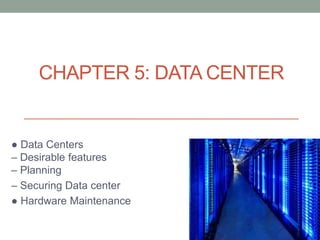
CHAPTER 5: DATA CENTER
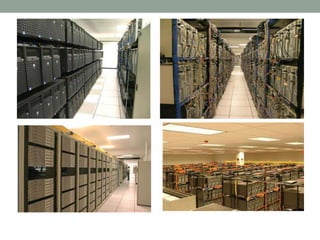
● Data Centers
– Desirable features
– Planning
– Securing Data center
● Hardware Maintenance
Desirable features of a data center
– Air conditioning, humidity control
– Access to building-wide reliable (uninterruptable) power
supply and raw power
– Elimination of single points of failure (e.g., network cable)
– Provision of hot standby equipment
– Hot-swappable parts
● Hard drives, power supplies, UPS batteries
– Protection from natural disasters like fire and floods
● Server room should be its own 'fire cell'
Desirable features of a data center
– Secure – both the facility (also not easily seen), and
individual spaces when multiple organizations use
same facility
– Easy access to cabling
– No flooring that generates static electricity
– Well organized – equipment marked, tagged, and
mapped
Data Center Needs
– Temperature: 64-80F
● Ambient temperature (in room) is usually 40+ degrees
lower than inside of computer
● When chips reach ~120F, they may not work correctly; at
~160F, they break (some CPUs can operate up to ~200F)
– Humidity: 30-55%
● Too high – condensation, short circuits
● Too low – static electricity, jamming of printers, etc.
– Security (theft, vandalism, disaster)
– Space for equipment, people (to work on equipment)
Data Center Planning
● What are your present and future needs?
– We would like to tire out all resources at the
same time
● Security requirements
● Fire/other hazard protection
● How much Heating and Air Conditioning?
● How much raw power? Back-up power?
● How much space?
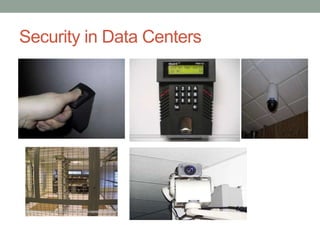
Security in Data Centers
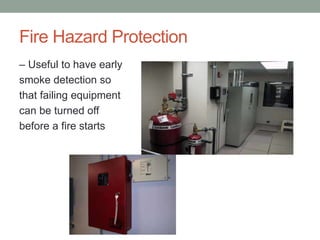
Fire Hazard Protection
– Useful to have early
smoke detection so
that failing equipment
can be turned off
before a fire starts
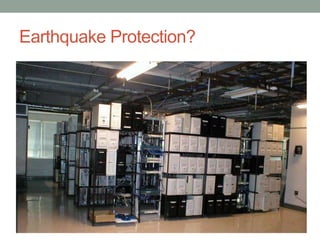
Earthquake Protection?
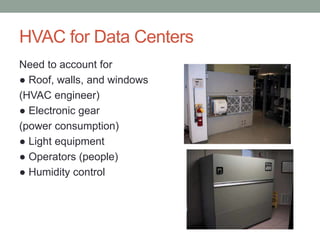
HVAC for Data Centers
Need to account for
● Roof, walls, and windows
(HVAC engineer)
● Electronic gear
(power consumption)
● Light equipment
● Operators (people)
● Humidity control
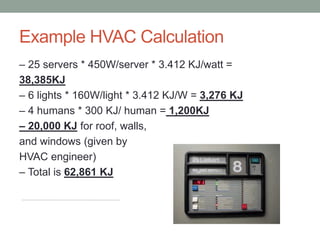
Example HVAC Calculation
– 25 servers * 450W/server * 3.412 KJ/watt =
38,385KJ
– 6 lights * 160W/light * 3.412 KJ/W = 3,276 KJ
– 4 humans * 300 KJ/ human = 1,200KJ
– 20,000 KJ for roof, walls,
and windows (given by
HVAC engineer)
– Total is 62,861 KJ
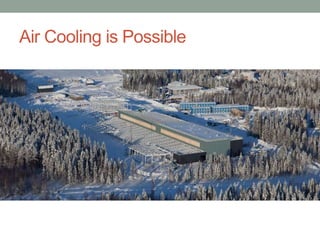
Air Cooling is Possible
• Facebook data center in Sweden
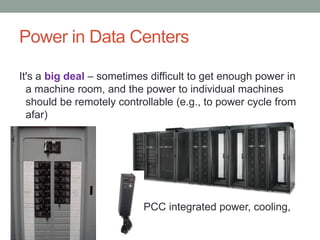
Power in Data Centers
It's a big deal – sometimes difficult to get enough power in
a machine room, and the power to individual machines
should be remotely controllable (e.g., to power cycle from
afar)
APCC integrated power, cooling,
management
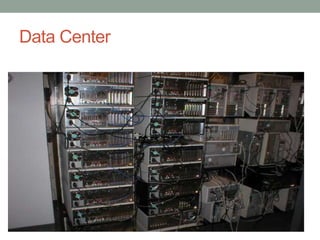
Data Center
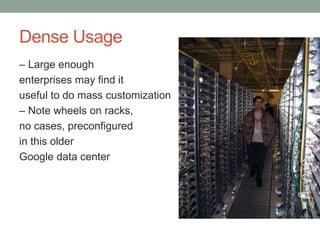
Dense Usage
– Large enough
enterprises may find it
useful to do mass customization
– Note wheels on racks,
no cases, preconfigured
in this older
Google data center
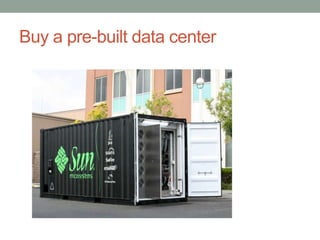
Buy a pre-built data center
Easy transport by truck or ship
• [Rackable is now called SGI...]
Maintenance of Systems
● Keep a log book of failures and replacements
● Shop around for good warranties
● Keep spare replacement systems
● Consider maintenance contracts
– For equipment too expensive for holding spares
– 4-48 hour response times; often function like an
extended warranty
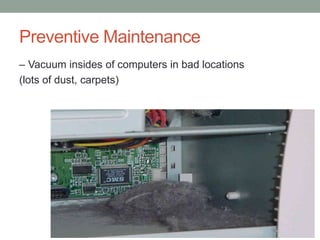
Preventive Maintenance
– Vacuum insides of computers in bad locations
(lots of dust, carpets)
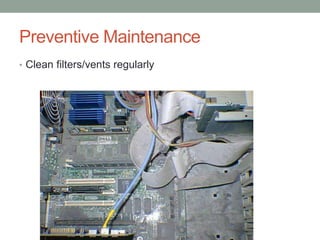
Preventive Maintenance
• Clean filters/vents regularly
Preventive Maintenance
– Avoid static electricity
● Be grounded when handling electronics
– Periodically check servers for failed fan and power
Supplies
– Add temperature monitors (internal and external)
and water sensors under raised floors
– Attach additional fans if noise is not an issue
SECTION 2
Networking
System and Network Administration
Networking
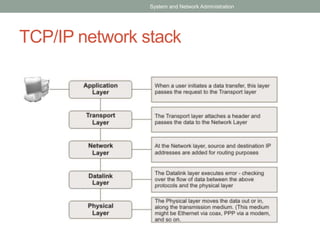
● TCP/IP Networking
– We will cover just some of the practical issues
– Highly recommend taking a networking course
● What is TCP/IP?
● Layers, addresses, NAT
● Protocols: ARP, DHCP
System and Network Administration
TCP/IP
● Most common networking protocol suite
● Foundation of the Internet
– 2.8B+ users online worldwide (Dec 2013)
– 1.01B+ hosts online (Jan 2014)
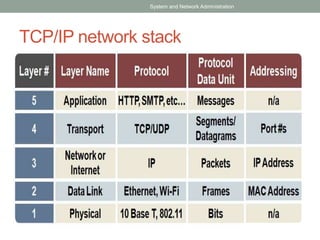
● Network applications typically use one of two
transport protocols:
– TCP – Transmission Control Protocol
– UDP – User Datagram Protocol
● All traffic carried by IP – Internet Protocol
System and Network Administration
Protocols
– IP
● Packet-oriented (routers don't care what is in packets or
what came before)
– TCP
● Connection-oriented, two-way, reliable, in-order
transport of stream of bytes.
● Congestion control – slow down when congestion is
noticed, speed up when resources available.
● Flow control – don't overwhelm receiver.
– UDP: is not connection oriented.
System and Network Administration
TCP/IP network stack
System and Network Administration
TCP/IP network stack
System and Network Administration
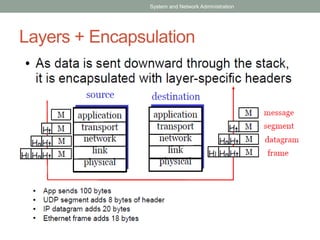
Layers + Encapsulation
System and Network Administration
Addressing
● Different layers use different addressing
– App. layer allows people to use hostnames
– IP (network) layer requires IP addresses
– Link layer requires MAC addresses
● Ports identify process or service on a host
– List of well-known ports in /etc/services
– Ports <= 1024 are privileged ports (req. root)
System and Network Administration
Address types
● IP layer and link layer have multiple address
types
– Unicast – single host (network interface)
– Broadcast – addresses that include all hosts on a
particular network
● All bits in host part of address are ones
– Multicast – addresses that identify a group of hosts
● IPv4 addresses with first byte in 224-239
System and Network Administration
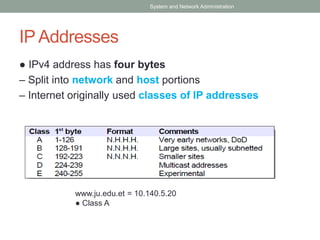
IP Addresses
● IPv4 address has four bytes
– Split into network and host portions
– Internet originally used classes of IP addresses
System and Network Administration
www.ju.edu.et = 10.140.5.20
● Class A
Address Shortage
● Before CIDR, concern for enough addresses
– Class Bs would be gone by 1995
– Router tables were exploding (growing beyond
router capacities)
● CIDR + NAT + name-based virtual hosting
greatly slowed down IP allocations
● IPv6 solves this (16 byte addresses!)
System and Network Administration
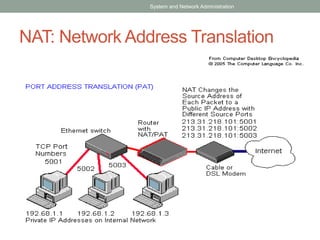
NAT
● Network Address Translation
– Router intercepts packets, replaces internal
network addresses and ports with externally
visible addresses and ports
– Maintains mapping so that external packets are
directed to the right internal host
– Typically uses a single public IP address, many
ports, but can (in theory) map arbitrary hosts/ports
System and Network Administration
NAT: Network Address Translation
System and Network Administration
Private Addresses
● While a NAT can protect your internal
addresses from being visible in IP headers, it
isn't perfect
– Some apps will encode addresses in data
– What if you really want to connect to the external host with an IP
address same as an internal host?
● Most use private address space (unroutable)
System and Network Administration
ARP: Address Resolution Protocol
– Once the routing of a packet has been determined,
it must be transmitted to the next gateway or host
on the local network
– LAN transmissions use LAN (MAC) addresses
– ARP is used to discover the hardware address of
the target IP address
– ARP sends a LAN broadcast asking who has the
desired IP address; the owner responds with a
unicast message with answer
● Results cached in a table (also collected via snooping)
System and Network Administration
Sample ARP table
% /sbin/arp –a
davison.cse.lehigh.edu (128.180.121.225) at 00:11:43:A0:0F:D8 [ether] on eth0
wume2.cse.lehigh.edu (128.180.121.222) at 00:08:54:1E:44:D4 [ether] on eth0
pan.cse.lehigh.edu (128.180.120.90) at 00:14:4F:0F:9C:1A [ether] on eth0
wume1.cse.lehigh.edu (128.180.121.221) at 00:08:54:1E:44:D0 [ether] on eth0
chiron.cse.lehigh.edu (128.180.120.87) at 00:14:4F:21:44:D8 [ether] on eth0
xena.cse.lehigh.edu (128.180.120.86) at 00:14:4F:21:52:E0 [ether] on eth0
hydra.cse.lehigh.edu (128.180.120.89) at 00:14:4F:21:53:F2 [ether] on eth0
kato.eecs.lehigh.edu (128.180.120.6) at 08:00:20:C4:20:08 [ether] on eth0
noon.cse.lehigh.edu (128.180.121.219) at 00:0F:1F:F9:C1:68 [ether] on eth0
wume-lab2.cse.lehigh.edu (128.180.122.153) at 00:18:8B:24:5A:F4 [ether] on eth0
lu-gw.eecs.lehigh.edu (128.180.123.254) at 00:00:0C:07:AC:00 [ether] on eth0
nix.cse.lehigh.edu (128.180.120.88) at 00:14:4F:21:44:C4 [ether] on eth0
ceres.cse.lehigh.edu (128.180.120.91) at 00:14:4F:23:F9:80 [ether] on eth0
rosie.eecs.lehigh.edu (128.180.120.4) at 08:00:20:B1:FC:F3 [ether] on eth0
wume-lab1.cse.lehigh.edu (128.180.122.152) at 00:18:8B:24:5D:E2 [ether] on eth0
morning.cse.lehigh.edu (128.180.120.43) at 00:C0:9F:38:CD:51 [ether] on eth0
wume-lab6.cse.lehigh.edu (128.180.122.157) at 00:0A:E6:5D:48:03 [ether] on eth0
System and Network Administration
Network Configuration
– Adding a machine to a LAN
● Assign unique IP address and hostname (per interface)
● Set up host to configure network interfaces at boot time
● Set up default route
● Point to DNS name server (resolver)
– Files
● /etc/sysconfig/network-scripts/ifcfg-eth0
● Hostname, default route, IP address, netmask, broadcast
– DHCP could do all of this automatically
System and Network Administration
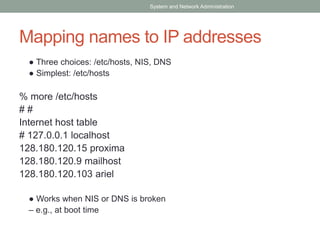
Mapping names to IP addresses
● Three choices: /etc/hosts, NIS, DNS
● Simplest: /etc/hosts
% more /etc/hosts
# #
Internet host table
# 127.0.0.1 localhost
128.180.120.15 proxima
128.180.120.9 mailhost
128.180.120.103 ariel
● Works when NIS or DNS is broken
– e.g., at boot time
System and Network Administration
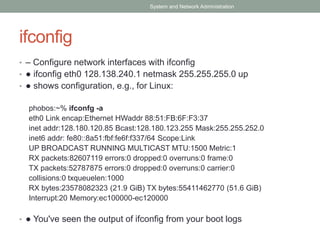
ifconfig
• – Configure network interfaces with ifconfig
• ● ifconfig eth0 128.138.240.1 netmask 255.255.255.0 up
• ● shows configuration, e.g., for Linux:
phobos:~% ifconfg -a
eth0 Link encap:Ethernet HWaddr 88:51:FB:6F:F3:37
inet addr:128.180.120.85 Bcast:128.180.123.255 Mask:255.255.252.0
inet6 addr: fe80::8a51:fbf:fe6f:f337/64 Scope:Link
UP BROADCAST RUNNING MULTICAST MTU:1500 Metric:1
RX packets:82607119 errors:0 dropped:0 overruns:0 frame:0
TX packets:52787875 errors:0 dropped:0 overruns:0 carrier:0
collisions:0 txqueuelen:1000
RX bytes:23578082323 (21.9 GiB) TX bytes:55411462770 (51.6 GiB)
Interrupt:20 Memory:ec100000-ec120000
• ● You've seen the output of ifconfig from your boot logs
System and Network Administration
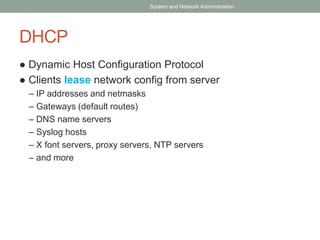
DHCP
● Dynamic Host Configuration Protocol
● Clients lease network config from server
– IP addresses and netmasks
– Gateways (default routes)
– DNS name servers
– Syslog hosts
– X font servers, proxy servers, NTP servers
– and more
System and Network Administration
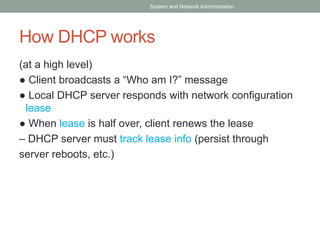
How DHCP works
(at a high level)
● Client broadcasts a “Who am I?” message
● Local DHCP server responds with network configuration
lease
● When lease is half over, client renews the lease
– DHCP server must track lease info (persist through
server reboots, etc.)
System and Network Administration
??????????

Data center security

  • 1.
    CHAPTER 5: DATACENTER ● Data Centers – Desirable features – Planning – Securing Data center ● Hardware Maintenance
  • 2.
    Desirable features ofa data center – Air conditioning, humidity control – Access to building-wide reliable (uninterruptable) power supply and raw power – Elimination of single points of failure (e.g., network cable) – Provision of hot standby equipment – Hot-swappable parts ● Hard drives, power supplies, UPS batteries – Protection from natural disasters like fire and floods ● Server room should be its own 'fire cell'
  • 3.
    Desirable features ofa data center – Secure – both the facility (also not easily seen), and individual spaces when multiple organizations use same facility – Easy access to cabling – No flooring that generates static electricity – Well organized – equipment marked, tagged, and mapped
  • 4.
    Data Center Needs –Temperature: 64-80F ● Ambient temperature (in room) is usually 40+ degrees lower than inside of computer ● When chips reach ~120F, they may not work correctly; at ~160F, they break (some CPUs can operate up to ~200F) – Humidity: 30-55% ● Too high – condensation, short circuits ● Too low – static electricity, jamming of printers, etc. – Security (theft, vandalism, disaster) – Space for equipment, people (to work on equipment)
  • 5.
    Data Center Planning ●What are your present and future needs? – We would like to tire out all resources at the same time ● Security requirements ● Fire/other hazard protection ● How much Heating and Air Conditioning? ● How much raw power? Back-up power? ● How much space?
  • 6.
  • 7.
    Fire Hazard Protection –Useful to have early smoke detection so that failing equipment can be turned off before a fire starts
  • 8.
  • 9.
    HVAC for DataCenters Need to account for ● Roof, walls, and windows (HVAC engineer) ● Electronic gear (power consumption) ● Light equipment ● Operators (people) ● Humidity control
  • 10.
    Example HVAC Calculation –25 servers * 450W/server * 3.412 KJ/watt = 38,385KJ – 6 lights * 160W/light * 3.412 KJ/W = 3,276 KJ – 4 humans * 300 KJ/ human = 1,200KJ – 20,000 KJ for roof, walls, and windows (given by HVAC engineer) – Total is 62,861 KJ
  • 11.
    Air Cooling isPossible • Facebook data center in Sweden
  • 12.
    Power in DataCenters It's a big deal – sometimes difficult to get enough power in a machine room, and the power to individual machines should be remotely controllable (e.g., to power cycle from afar) APCC integrated power, cooling, management
  • 13.
  • 15.
    Dense Usage – Largeenough enterprises may find it useful to do mass customization – Note wheels on racks, no cases, preconfigured in this older Google data center
  • 16.
    Buy a pre-builtdata center
  • 17.
    Easy transport bytruck or ship • [Rackable is now called SGI...]
  • 18.
    Maintenance of Systems ●Keep a log book of failures and replacements ● Shop around for good warranties ● Keep spare replacement systems ● Consider maintenance contracts – For equipment too expensive for holding spares – 4-48 hour response times; often function like an extended warranty
  • 19.
    Preventive Maintenance – Vacuuminsides of computers in bad locations (lots of dust, carpets)
  • 20.
    Preventive Maintenance • Cleanfilters/vents regularly
  • 21.
    Preventive Maintenance – Avoidstatic electricity ● Be grounded when handling electronics – Periodically check servers for failed fan and power Supplies – Add temperature monitors (internal and external) and water sensors under raised floors – Attach additional fans if noise is not an issue
  • 22.
    SECTION 2 Networking System andNetwork Administration
  • 23.
    Networking ● TCP/IP Networking –We will cover just some of the practical issues – Highly recommend taking a networking course ● What is TCP/IP? ● Layers, addresses, NAT ● Protocols: ARP, DHCP System and Network Administration
  • 24.
    TCP/IP ● Most commonnetworking protocol suite ● Foundation of the Internet – 2.8B+ users online worldwide (Dec 2013) – 1.01B+ hosts online (Jan 2014) ● Network applications typically use one of two transport protocols: – TCP – Transmission Control Protocol – UDP – User Datagram Protocol ● All traffic carried by IP – Internet Protocol System and Network Administration
  • 25.
    Protocols – IP ● Packet-oriented(routers don't care what is in packets or what came before) – TCP ● Connection-oriented, two-way, reliable, in-order transport of stream of bytes. ● Congestion control – slow down when congestion is noticed, speed up when resources available. ● Flow control – don't overwhelm receiver. – UDP: is not connection oriented. System and Network Administration
  • 26.
    TCP/IP network stack Systemand Network Administration
  • 27.
    TCP/IP network stack Systemand Network Administration
  • 28.
    Layers + Encapsulation Systemand Network Administration
  • 29.
    Addressing ● Different layersuse different addressing – App. layer allows people to use hostnames – IP (network) layer requires IP addresses – Link layer requires MAC addresses ● Ports identify process or service on a host – List of well-known ports in /etc/services – Ports <= 1024 are privileged ports (req. root) System and Network Administration
  • 30.
    Address types ● IPlayer and link layer have multiple address types – Unicast – single host (network interface) – Broadcast – addresses that include all hosts on a particular network ● All bits in host part of address are ones – Multicast – addresses that identify a group of hosts ● IPv4 addresses with first byte in 224-239 System and Network Administration
  • 31.
    IP Addresses ● IPv4address has four bytes – Split into network and host portions – Internet originally used classes of IP addresses System and Network Administration www.ju.edu.et = 10.140.5.20 ● Class A
  • 32.
    Address Shortage ● BeforeCIDR, concern for enough addresses – Class Bs would be gone by 1995 – Router tables were exploding (growing beyond router capacities) ● CIDR + NAT + name-based virtual hosting greatly slowed down IP allocations ● IPv6 solves this (16 byte addresses!) System and Network Administration
  • 33.
    NAT ● Network AddressTranslation – Router intercepts packets, replaces internal network addresses and ports with externally visible addresses and ports – Maintains mapping so that external packets are directed to the right internal host – Typically uses a single public IP address, many ports, but can (in theory) map arbitrary hosts/ports System and Network Administration
  • 34.
    NAT: Network AddressTranslation System and Network Administration
  • 35.
    Private Addresses ● Whilea NAT can protect your internal addresses from being visible in IP headers, it isn't perfect – Some apps will encode addresses in data – What if you really want to connect to the external host with an IP address same as an internal host? ● Most use private address space (unroutable) System and Network Administration
  • 36.
    ARP: Address ResolutionProtocol – Once the routing of a packet has been determined, it must be transmitted to the next gateway or host on the local network – LAN transmissions use LAN (MAC) addresses – ARP is used to discover the hardware address of the target IP address – ARP sends a LAN broadcast asking who has the desired IP address; the owner responds with a unicast message with answer ● Results cached in a table (also collected via snooping) System and Network Administration
  • 37.
    Sample ARP table %/sbin/arp –a davison.cse.lehigh.edu (128.180.121.225) at 00:11:43:A0:0F:D8 [ether] on eth0 wume2.cse.lehigh.edu (128.180.121.222) at 00:08:54:1E:44:D4 [ether] on eth0 pan.cse.lehigh.edu (128.180.120.90) at 00:14:4F:0F:9C:1A [ether] on eth0 wume1.cse.lehigh.edu (128.180.121.221) at 00:08:54:1E:44:D0 [ether] on eth0 chiron.cse.lehigh.edu (128.180.120.87) at 00:14:4F:21:44:D8 [ether] on eth0 xena.cse.lehigh.edu (128.180.120.86) at 00:14:4F:21:52:E0 [ether] on eth0 hydra.cse.lehigh.edu (128.180.120.89) at 00:14:4F:21:53:F2 [ether] on eth0 kato.eecs.lehigh.edu (128.180.120.6) at 08:00:20:C4:20:08 [ether] on eth0 noon.cse.lehigh.edu (128.180.121.219) at 00:0F:1F:F9:C1:68 [ether] on eth0 wume-lab2.cse.lehigh.edu (128.180.122.153) at 00:18:8B:24:5A:F4 [ether] on eth0 lu-gw.eecs.lehigh.edu (128.180.123.254) at 00:00:0C:07:AC:00 [ether] on eth0 nix.cse.lehigh.edu (128.180.120.88) at 00:14:4F:21:44:C4 [ether] on eth0 ceres.cse.lehigh.edu (128.180.120.91) at 00:14:4F:23:F9:80 [ether] on eth0 rosie.eecs.lehigh.edu (128.180.120.4) at 08:00:20:B1:FC:F3 [ether] on eth0 wume-lab1.cse.lehigh.edu (128.180.122.152) at 00:18:8B:24:5D:E2 [ether] on eth0 morning.cse.lehigh.edu (128.180.120.43) at 00:C0:9F:38:CD:51 [ether] on eth0 wume-lab6.cse.lehigh.edu (128.180.122.157) at 00:0A:E6:5D:48:03 [ether] on eth0 System and Network Administration
  • 38.
    Network Configuration – Addinga machine to a LAN ● Assign unique IP address and hostname (per interface) ● Set up host to configure network interfaces at boot time ● Set up default route ● Point to DNS name server (resolver) – Files ● /etc/sysconfig/network-scripts/ifcfg-eth0 ● Hostname, default route, IP address, netmask, broadcast – DHCP could do all of this automatically System and Network Administration
  • 39.
    Mapping names toIP addresses ● Three choices: /etc/hosts, NIS, DNS ● Simplest: /etc/hosts % more /etc/hosts # # Internet host table # 127.0.0.1 localhost 128.180.120.15 proxima 128.180.120.9 mailhost 128.180.120.103 ariel ● Works when NIS or DNS is broken – e.g., at boot time System and Network Administration
  • 40.
    ifconfig • – Configurenetwork interfaces with ifconfig • ● ifconfig eth0 128.138.240.1 netmask 255.255.255.0 up • ● shows configuration, e.g., for Linux: phobos:~% ifconfg -a eth0 Link encap:Ethernet HWaddr 88:51:FB:6F:F3:37 inet addr:128.180.120.85 Bcast:128.180.123.255 Mask:255.255.252.0 inet6 addr: fe80::8a51:fbf:fe6f:f337/64 Scope:Link UP BROADCAST RUNNING MULTICAST MTU:1500 Metric:1 RX packets:82607119 errors:0 dropped:0 overruns:0 frame:0 TX packets:52787875 errors:0 dropped:0 overruns:0 carrier:0 collisions:0 txqueuelen:1000 RX bytes:23578082323 (21.9 GiB) TX bytes:55411462770 (51.6 GiB) Interrupt:20 Memory:ec100000-ec120000 • ● You've seen the output of ifconfig from your boot logs System and Network Administration
  • 41.
    DHCP ● Dynamic HostConfiguration Protocol ● Clients lease network config from server – IP addresses and netmasks – Gateways (default routes) – DNS name servers – Syslog hosts – X font servers, proxy servers, NTP servers – and more System and Network Administration
  • 42.
    How DHCP works (ata high level) ● Client broadcasts a “Who am I?” message ● Local DHCP server responds with network configuration lease ● When lease is half over, client renews the lease – DHCP server must track lease info (persist through server reboots, etc.) System and Network Administration
  • 43.

Editor's Notes

  • #10 heating, ventilation, and air conditioning. The system is used to provide heating and cooling services to buildings. HVAC systems have become the required industry standard for construction of new buildings.