Cute Autumn
Interactive
Lesson Plan
Elementary Presentation
How to Use This Presentation
Click on the "Google Slides" button below
this presentation preview. Make sure to sign
in to your Google account. Click on "Make a
copy." Start editing your presentation.
Alternative: Click on the "Share" button on
the top right corner in Canva and click on
"More" at the bottom of the menu. Enter
"Google Drive" in the search bar and click on
the GDrive icon to add this design as a
Google slide in your GDrive.
Google Slides
Click on the "PowerPoint" button below
this presentation preview. Start editing
your presentation.
Alternative: From Canva template file,
Click on the "Share" button on the top
right corner in Canva and click on
"More" at the bottom of the menu. Enter
"PowerPoint" in the search bar and click
on the PowerPoint icon to download.
PowerPoint
Click on the "Canva" button under this
presentation preview. Start editing
your presentation. You need to sign in
to your Canva account.
Canva
Welcome
Students!
I'm Rain, and I'll be sharing with you
my beautiful ideas. Follow me at
@reallygreatsite to learn more.
Hi, I’m teacher
Amanda Smith!
Presentations are communication tools that
can be used as demonstrations, lectures,
speeches, reports, and more. It is mostly
presented before an audience.
Reminders for this class
Lorem ipsum dolor sit amet, consectetur adipiscing elit.
Lorem ipsum dolor sit amet,
consectetur adipiscing elit, sed do
eiusmod tempor incididunt ut
labore et dolore magna aliqua.
#1
Lorem ipsum dolor sit amet,
consectetur adipiscing elit, sed do
eiusmod tempor incididunt ut
labore et dolore magna aliqua.
#2
Lorem ipsum dolor sit amet,
consectetur adipiscing elit, sed do
eiusmod tempor incididunt ut
labore et dolore magna aliqua.
#3
Agenda Page
Lorem ipsum dolor sit amet, consectetur adipiscing elit.
Agenda 1
Lorem ipsum dolor sit
amet, consectetur
adipiscing elit, sed do
eiusmod tempor.
Agenda 2
Lorem ipsum dolor sit
amet, consectetur
adipiscing elit, sed do
eiusmod tempor.
Agenda 3
Lorem ipsum dolor sit
amet, consectetur
adipiscing elit, sed do
eiusmod tempor.
Agenda 4
Lorem ipsum dolor sit
amet, consectetur
adipiscing elit, sed do
eiusmod tempor.
Add Topic Here
Presentations are communication tools
that can be used as demonstrations,
lectures, speeches, reports, and more. It
is mostly presented before an audience.
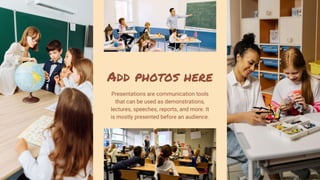
Add photos here
Presentations are communication tools
that can be used as demonstrations,
lectures, speeches, reports, and more. It
is mostly presented before an audience.
It’s Activity Time!
Presentations are communication tools that
can be used as demonstrations, lectures,
speeches, reports, and more. It is mostly
presented before an audience.
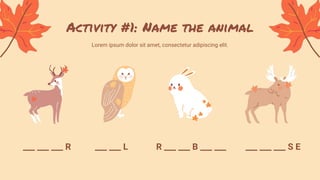
Activity #1: Name the animal
Lorem ipsum dolor sit amet, consectetur adipiscing elit.
___ ___ ___ R ___ ___ L R ___ ___ B ___ ___ ___ ___ ___ S E
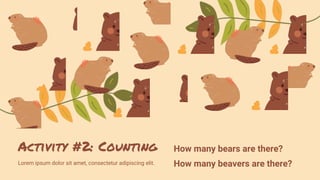
Activity #2: Counting
Lorem ipsum dolor sit amet, consectetur adipiscing elit.
How many bears are there?
How many beavers are there?
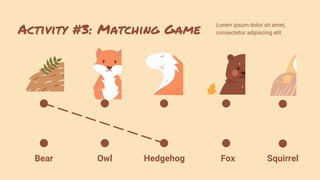
Activity #3: Matching Game
Lorem ipsum dolor sit amet,
consectetur adipiscing elit.
Hedgehog
Owl
Bear Fox Squirrel
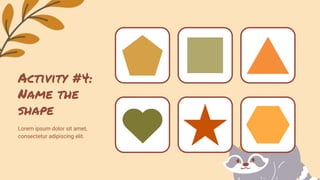
Activity #4:
Name the
shape
Lorem ipsum dolor sit amet,
consectetur adipiscing elit.
Lorem ipsum dolor sit amet,
consectetur adipiscing elit, sed
do eiusmod tempor.
Break time
with bear!
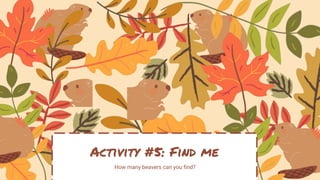
How many beavers can you find?
Activity #5: Find me
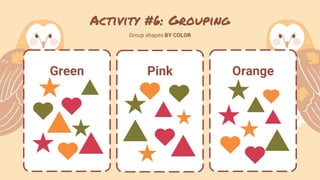
Activity #6: Grouping
Group shapes BY COLOR
Green Pink Orange
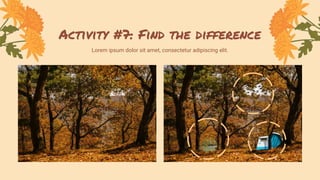
Activity #7: Find the difference
Lorem ipsum dolor sit amet, consectetur adipiscing elit.
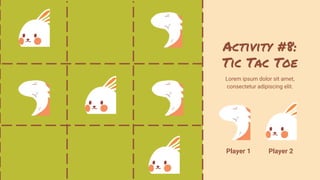
Activity #8:
Tic Tac Toe
Lorem ipsum dolor sit amet,
consectetur adipiscing elit.
Player 1 Player 2
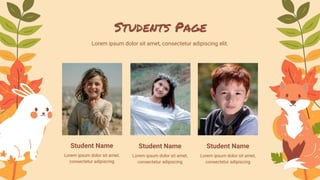
Students Page
Lorem ipsum dolor sit amet, consectetur adipiscing elit.
Student Name
Lorem ipsum dolor sit amet,
consectetur adipiscing
Student Name
Lorem ipsum dolor sit amet,
consectetur adipiscing
Student Name
Lorem ipsum dolor sit amet,
consectetur adipiscing
Lorem ipsum dolor sit amet, consectetur
adipiscing elit, sed do eiusmod tempor.
See you Next time!
Resource
Page
Use these design resources in your
Canva Presentation.
This presentation template uses the
following free fonts:
Titles: Permanent Marker
Headers: Roboto Bold
Body Copy: IRoboto Regular
You can find these fonts online too.
Happy designing!
Don't forget to delete this page
before presenting.
Resource
Page
Use these design resources in your
Canva Presentation.
This presentation template uses the
following free fonts:
Titles: Permanent Marker
Headers: Roboto Bold
Body Copy: IRoboto Regular
You can find these fonts online too.
Happy designing!
Don't forget to delete this page
before presenting.
Credits
This presentation template is free for everyone to
use thanks to the following:
SlidesCarnival for the presentation template
Pexels and Pixabay for the photos
Happy designing!

Cute Autumn Interactive Lesson Plan for Elementary Presentation.pptx

  • 1.
  • 2.
    How to UseThis Presentation Click on the "Google Slides" button below this presentation preview. Make sure to sign in to your Google account. Click on "Make a copy." Start editing your presentation. Alternative: Click on the "Share" button on the top right corner in Canva and click on "More" at the bottom of the menu. Enter "Google Drive" in the search bar and click on the GDrive icon to add this design as a Google slide in your GDrive. Google Slides Click on the "PowerPoint" button below this presentation preview. Start editing your presentation. Alternative: From Canva template file, Click on the "Share" button on the top right corner in Canva and click on "More" at the bottom of the menu. Enter "PowerPoint" in the search bar and click on the PowerPoint icon to download. PowerPoint Click on the "Canva" button under this presentation preview. Start editing your presentation. You need to sign in to your Canva account. Canva
  • 3.
    Welcome Students! I'm Rain, andI'll be sharing with you my beautiful ideas. Follow me at @reallygreatsite to learn more.
  • 4.
    Hi, I’m teacher AmandaSmith! Presentations are communication tools that can be used as demonstrations, lectures, speeches, reports, and more. It is mostly presented before an audience.
  • 5.
    Reminders for thisclass Lorem ipsum dolor sit amet, consectetur adipiscing elit. Lorem ipsum dolor sit amet, consectetur adipiscing elit, sed do eiusmod tempor incididunt ut labore et dolore magna aliqua. #1 Lorem ipsum dolor sit amet, consectetur adipiscing elit, sed do eiusmod tempor incididunt ut labore et dolore magna aliqua. #2 Lorem ipsum dolor sit amet, consectetur adipiscing elit, sed do eiusmod tempor incididunt ut labore et dolore magna aliqua. #3
  • 6.
    Agenda Page Lorem ipsumdolor sit amet, consectetur adipiscing elit. Agenda 1 Lorem ipsum dolor sit amet, consectetur adipiscing elit, sed do eiusmod tempor. Agenda 2 Lorem ipsum dolor sit amet, consectetur adipiscing elit, sed do eiusmod tempor. Agenda 3 Lorem ipsum dolor sit amet, consectetur adipiscing elit, sed do eiusmod tempor. Agenda 4 Lorem ipsum dolor sit amet, consectetur adipiscing elit, sed do eiusmod tempor.
  • 7.
    Add Topic Here Presentationsare communication tools that can be used as demonstrations, lectures, speeches, reports, and more. It is mostly presented before an audience.
  • 8.
    Add photos here Presentationsare communication tools that can be used as demonstrations, lectures, speeches, reports, and more. It is mostly presented before an audience.
  • 9.
    It’s Activity Time! Presentationsare communication tools that can be used as demonstrations, lectures, speeches, reports, and more. It is mostly presented before an audience.
  • 10.
    Activity #1: Namethe animal Lorem ipsum dolor sit amet, consectetur adipiscing elit. ___ ___ ___ R ___ ___ L R ___ ___ B ___ ___ ___ ___ ___ S E
  • 11.
    Activity #2: Counting Loremipsum dolor sit amet, consectetur adipiscing elit. How many bears are there? How many beavers are there?
  • 12.
    Activity #3: MatchingGame Lorem ipsum dolor sit amet, consectetur adipiscing elit. Hedgehog Owl Bear Fox Squirrel
  • 13.
    Activity #4: Name the shape Loremipsum dolor sit amet, consectetur adipiscing elit.
  • 14.
    Lorem ipsum dolorsit amet, consectetur adipiscing elit, sed do eiusmod tempor. Break time with bear!
  • 15.
    How many beaverscan you find? Activity #5: Find me
  • 16.
    Activity #6: Grouping Groupshapes BY COLOR Green Pink Orange
  • 17.
    Activity #7: Findthe difference Lorem ipsum dolor sit amet, consectetur adipiscing elit.
  • 18.
    Activity #8: Tic TacToe Lorem ipsum dolor sit amet, consectetur adipiscing elit. Player 1 Player 2
  • 19.
    Students Page Lorem ipsumdolor sit amet, consectetur adipiscing elit. Student Name Lorem ipsum dolor sit amet, consectetur adipiscing Student Name Lorem ipsum dolor sit amet, consectetur adipiscing Student Name Lorem ipsum dolor sit amet, consectetur adipiscing
  • 20.
    Lorem ipsum dolorsit amet, consectetur adipiscing elit, sed do eiusmod tempor. See you Next time!
  • 21.
    Resource Page Use these designresources in your Canva Presentation. This presentation template uses the following free fonts: Titles: Permanent Marker Headers: Roboto Bold Body Copy: IRoboto Regular You can find these fonts online too. Happy designing! Don't forget to delete this page before presenting.
  • 22.
    Resource Page Use these designresources in your Canva Presentation. This presentation template uses the following free fonts: Titles: Permanent Marker Headers: Roboto Bold Body Copy: IRoboto Regular You can find these fonts online too. Happy designing! Don't forget to delete this page before presenting.
  • 23.
    Credits This presentation templateis free for everyone to use thanks to the following: SlidesCarnival for the presentation template Pexels and Pixabay for the photos Happy designing!