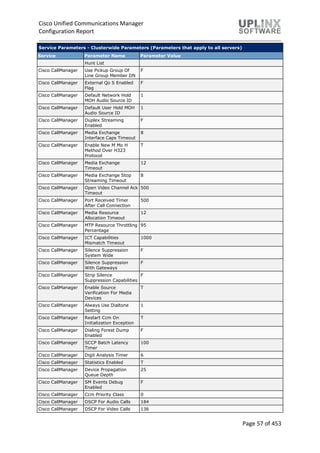
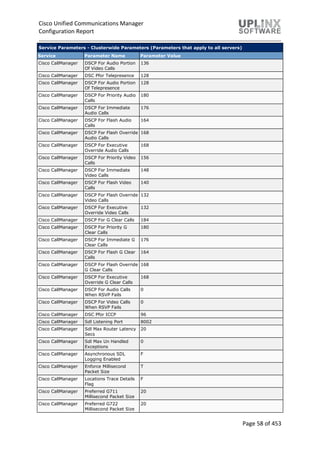
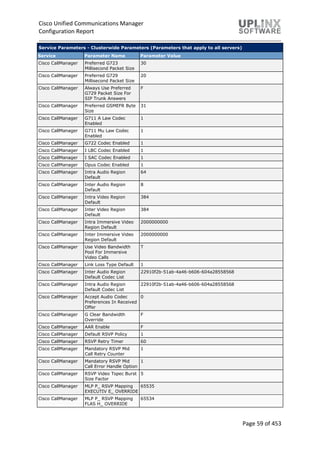
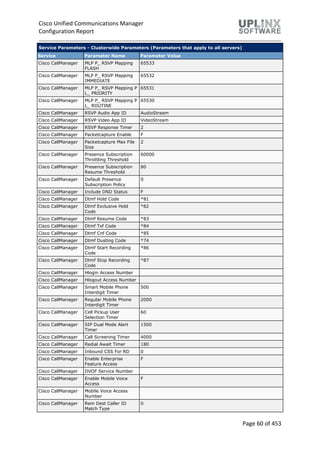
October 3, 2019
Cisco Unified Communications Manager
Configuration Report
CustomerA
As-Built Documentation for project
Cisco Unified Communications Manager
Configuration Report
Page 2 of 453
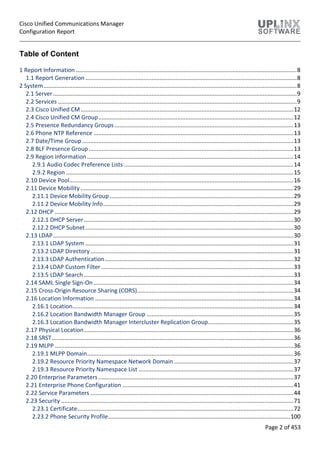
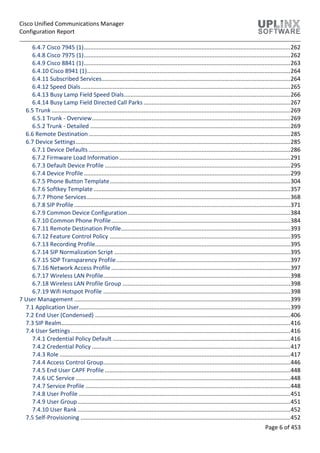
Table of Content
1 Report Information .........................................................................................................................................8
1.1 Report Generation ...................................................................................................................................8
2 System.............................................................................................................................................................8
2.1 Server.......................................................................................................................................................9
2.2 Services ....................................................................................................................................................9
2.3 Cisco Unified CM....................................................................................................................................12
2.4 Cisco Unified CM Group.........................................................................................................................12
2.5 Presence Redundancy Groups...............................................................................................................13
2.6 Phone NTP Reference ............................................................................................................................13
2.7 Date/Time Group ...................................................................................................................................13
2.8 BLF Presence Group...............................................................................................................................13
2.9 Region Information................................................................................................................................14
2.9.1 Audio Codec Preference Lists .........................................................................................................14
2.9.2 Region .............................................................................................................................................15
2.10 Device Pool...........................................................................................................................................16
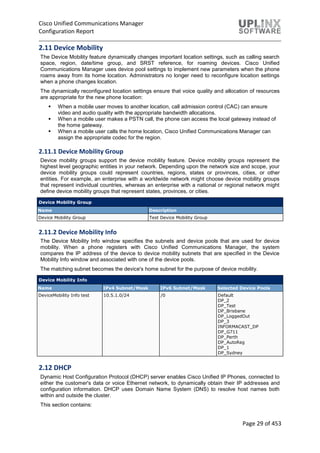
2.11 Device Mobility ....................................................................................................................................29
2.11.1 Device Mobility Group..................................................................................................................29
2.11.2 Device Mobility Info......................................................................................................................29
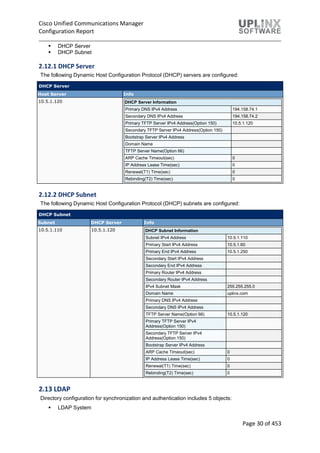
2.12 DHCP ....................................................................................................................................................29
2.12.1 DHCP Server..................................................................................................................................30
2.12.2 DHCP Subnet.................................................................................................................................30
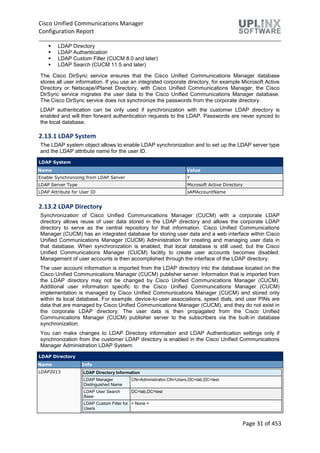
2.13 LDAP.....................................................................................................................................................30
2.13.1 LDAP System .................................................................................................................................31
2.13.2 LDAP Directory..............................................................................................................................31
2.13.3 LDAP Authentication.....................................................................................................................32
2.13.4 LDAP Custom Filter .......................................................................................................................33
2.13.5 LDAP Search ..................................................................................................................................33
2.14 SAML Single Sign-On............................................................................................................................34
2.15 Cross-Origin Resource Sharing (CORS).................................................................................................34
2.16 Location Information ...........................................................................................................................34
2.16.1 Location.........................................................................................................................................34
2.16.2 Location Bandwidth Manager Group ...........................................................................................35
2.16.3 Location Bandwidth Manager Intercluster Replication Group.....................................................35
2.17 Physical Location..................................................................................................................................36
2.18 SRST......................................................................................................................................................36
2.19 MLPP ....................................................................................................................................................36
2.19.1 MLPP Domain................................................................................................................................36
2.19.2 Resource Priority Namespace Network Domain ..........................................................................37
2.19.3 Resource Priority Namespace List ................................................................................................37
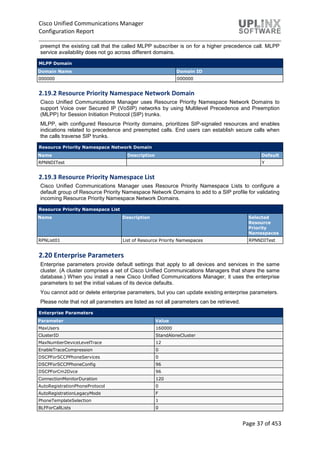
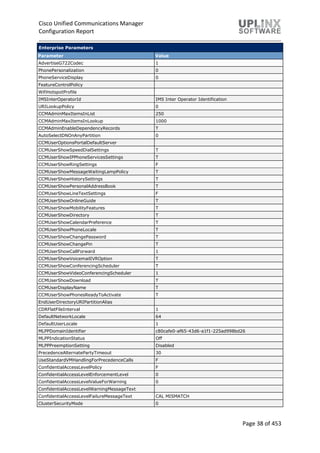
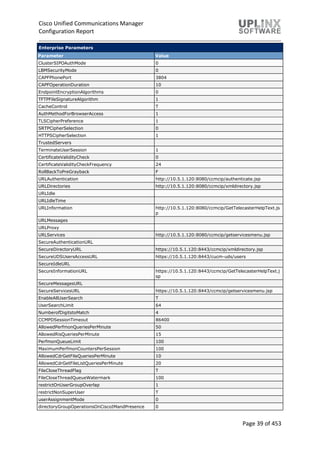
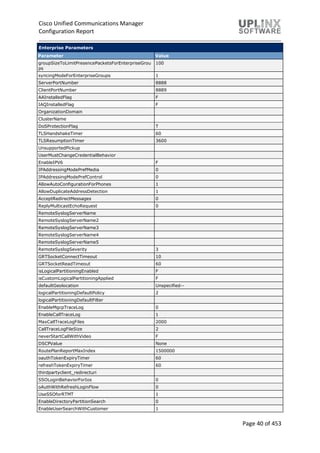
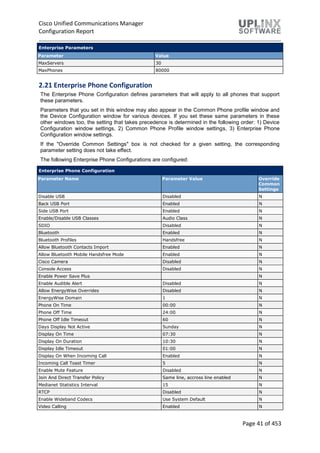
2.20 Enterprise Parameters.........................................................................................................................37
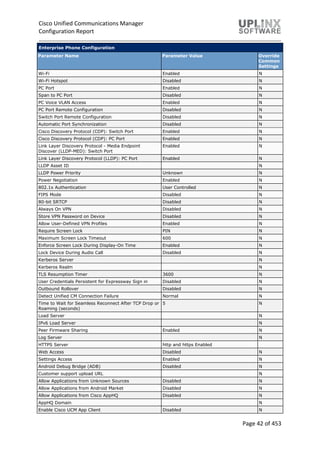
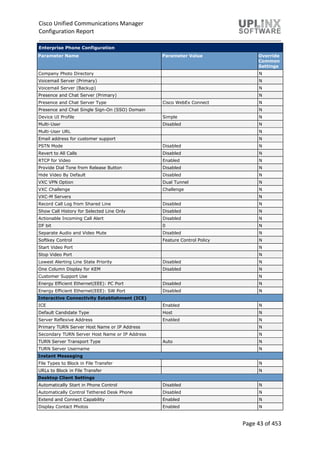
2.21 Enterprise Phone Configuration ..........................................................................................................41
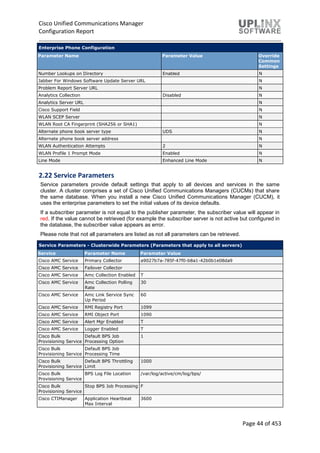
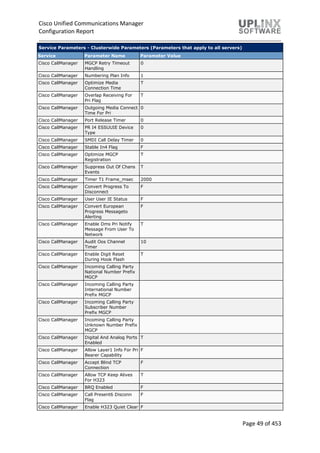
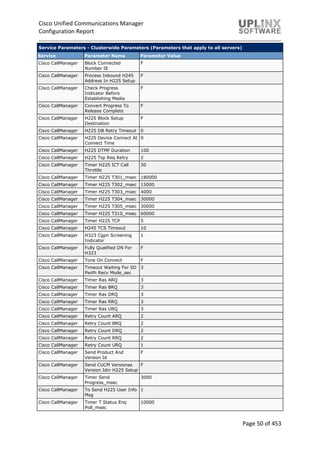
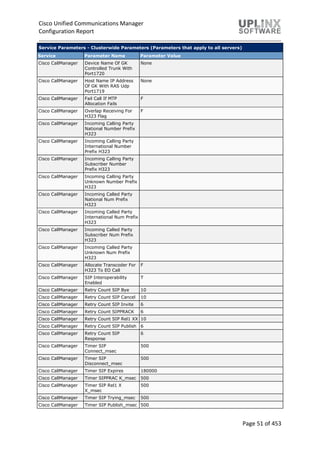
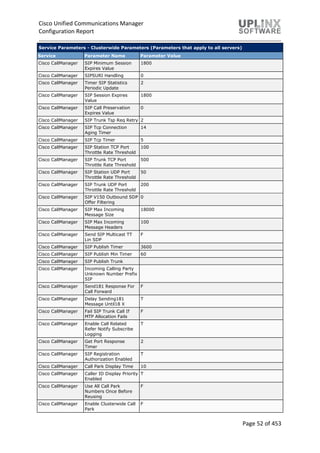
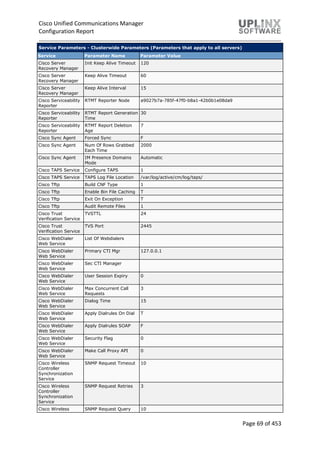
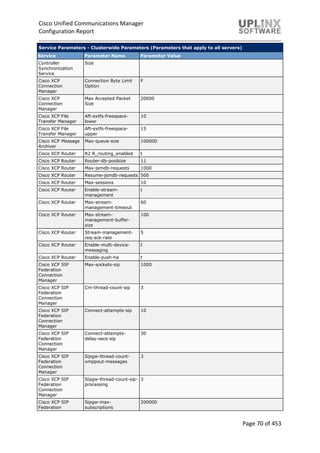
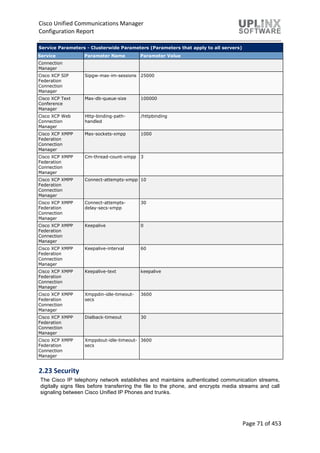
2.22 Service Parameters ..............................................................................................................................44
2.23 Security ................................................................................................................................................71
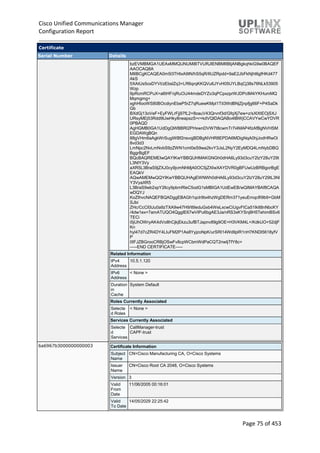
2.23.1 Certificate......................................................................................................................................72
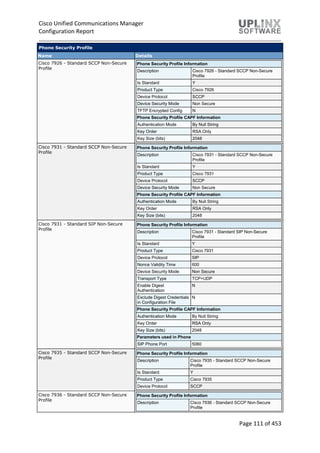
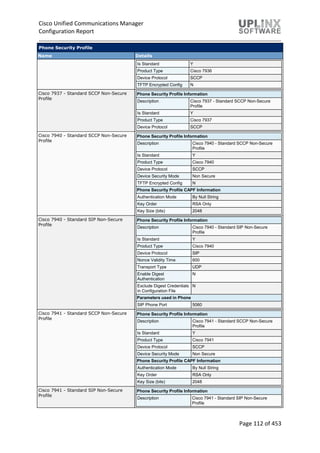
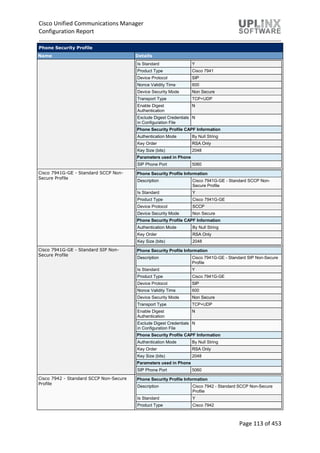
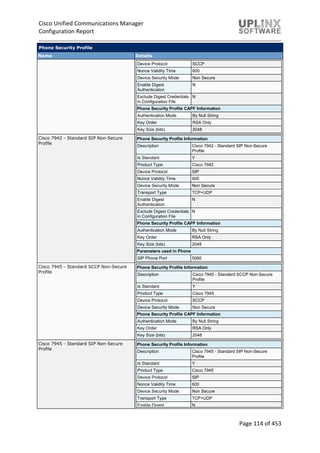
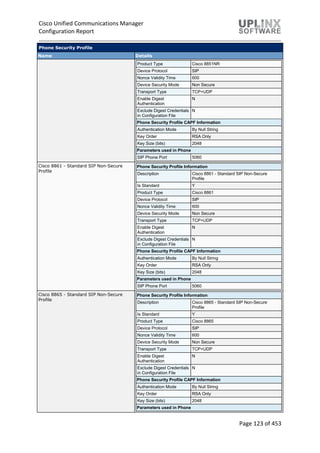
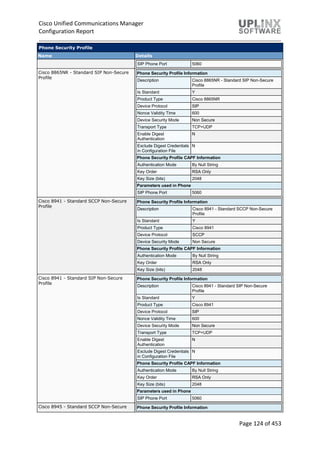
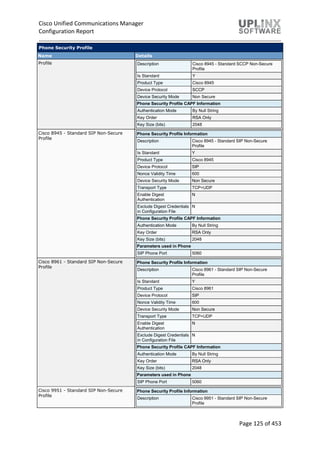
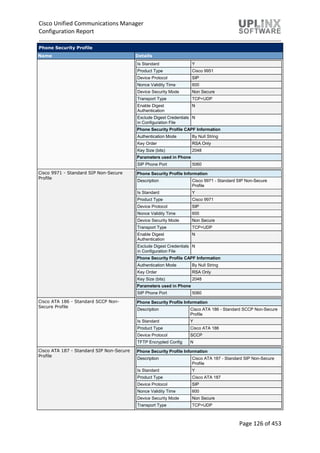
2.23.2 Phone Security Profile.................................................................................................................100
Cisco Unified Communications Manager
Configuration Report
Page 3 of 453
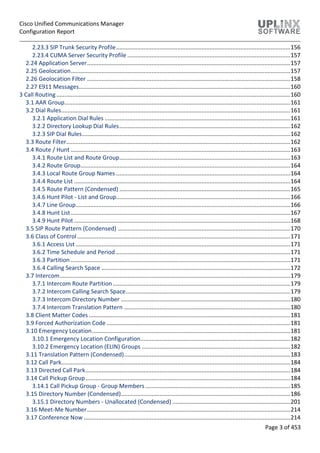
2.23.3 SIP Trunk Security Profile............................................................................................................156
2.23.4 CUMA Server Security Profile .....................................................................................................157
2.24 Application Server..............................................................................................................................157
2.25 Geolocation........................................................................................................................................157
2.26 Geolocation Filter ..............................................................................................................................158
2.27 E911 Messages...................................................................................................................................160
3 Call Routing .................................................................................................................................................160
3.1 AAR Group............................................................................................................................................161
3.2 Dial Rules..............................................................................................................................................161
3.2.1 Application Dial Rules ...................................................................................................................161
3.2.2 Directory Lookup Dial Rules..........................................................................................................162
3.2.3 SIP Dial Rules.................................................................................................................................162
3.3 Route Filter...........................................................................................................................................162
3.4 Route / Hunt ........................................................................................................................................163
3.4.1 Route List and Route Group..........................................................................................................163
3.4.2 Route Group..................................................................................................................................164
3.4.3 Local Route Group Names ............................................................................................................164
3.4.4 Route List ......................................................................................................................................164
3.4.5 Route Pattern (Condensed) ..........................................................................................................165
3.4.6 Hunt Pilot - List and Group............................................................................................................166
3.4.7 Line Group.....................................................................................................................................166
3.4.8 Hunt List........................................................................................................................................167
3.4.9 Hunt Pilot ......................................................................................................................................168
3.5 SIP Route Pattern (Condensed) ...........................................................................................................170
3.6 Class of Control ....................................................................................................................................171
3.6.1 Access List .....................................................................................................................................171
3.6.2 Time Schedule and Period ............................................................................................................171
3.6.3 Partition ........................................................................................................................................171
3.6.4 Calling Search Space .....................................................................................................................172
3.7 Intercom...............................................................................................................................................179
3.7.1 Intercom Route Partition..............................................................................................................179
3.7.2 Intercom Calling Search Space......................................................................................................179
3.7.3 Intercom Directory Number .........................................................................................................180
3.7.4 Intercom Translation Pattern .......................................................................................................180
3.8 Client Matter Codes.............................................................................................................................181
3.9 Forced Authorization Code..................................................................................................................181
3.10 Emergency Location...........................................................................................................................181
3.10.1 Emergency Location Configuration.............................................................................................182
3.10.2 Emergency Location (ELIN) Groups ............................................................................................182
3.11 Translation Pattern (Condensed).......................................................................................................183
3.12 Call Park..............................................................................................................................................184
3.13 Directed Call Park...............................................................................................................................184
3.14 Call Pickup Group...............................................................................................................................184
3.14.1 Call Pickup Group - Group Members..........................................................................................185
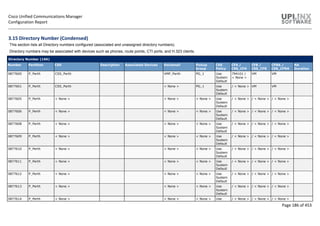
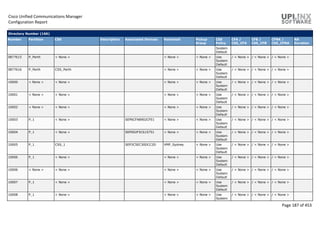
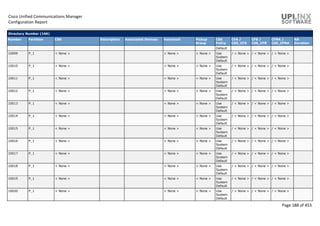
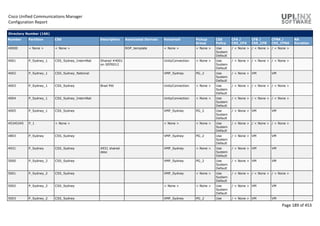
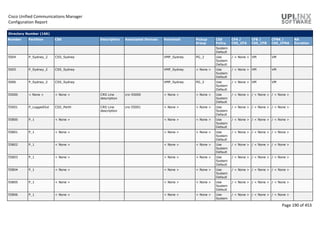
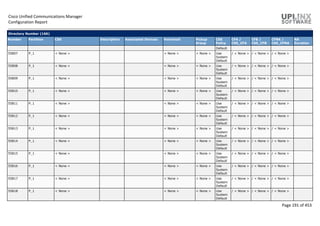
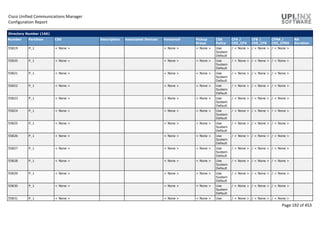
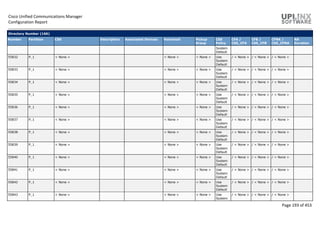
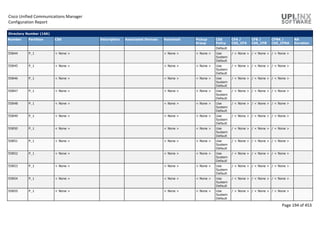
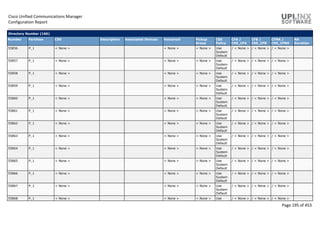
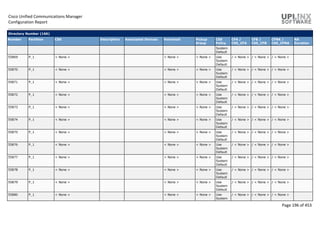
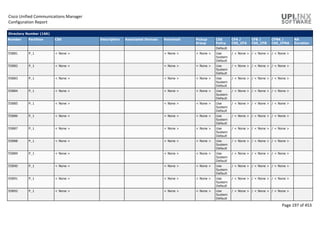
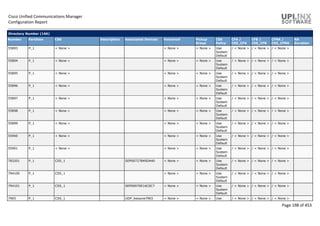
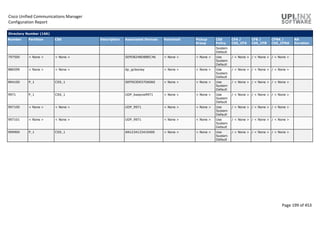
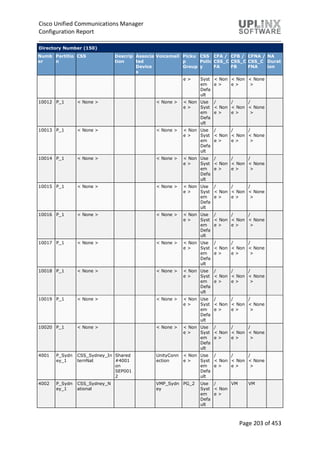
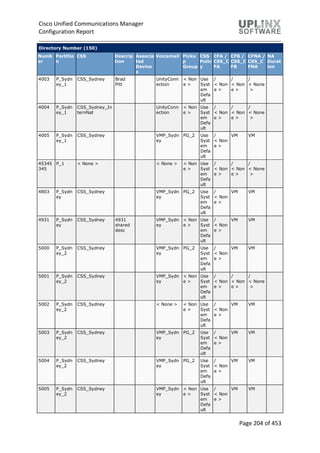
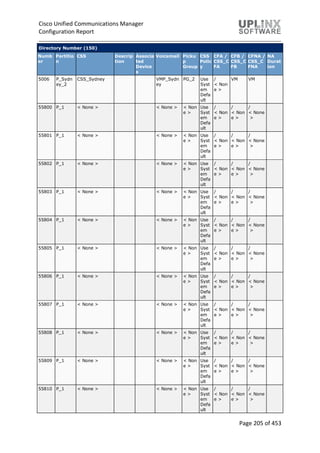
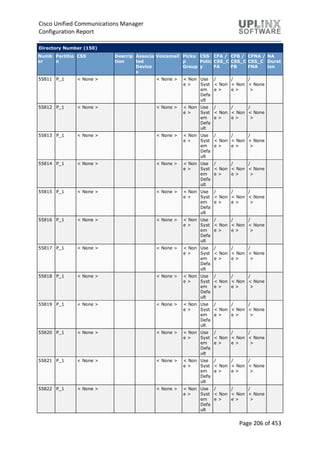
3.15 Directory Number (Condensed).........................................................................................................186
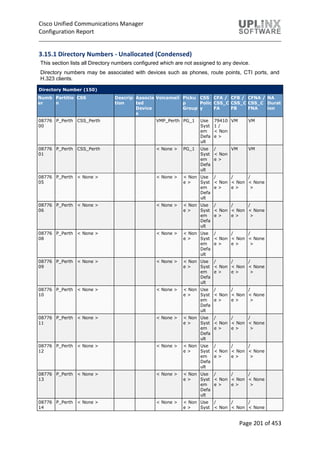
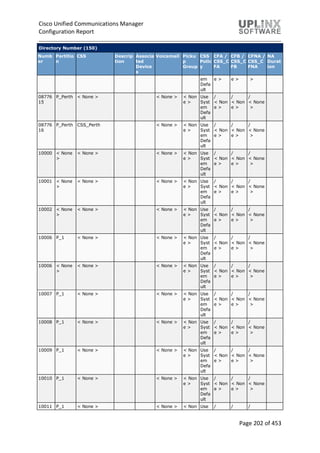
3.15.1 Directory Numbers - Unallocated (Condensed) .........................................................................201
3.16 Meet-Me Number..............................................................................................................................214
3.17 Conference Now ................................................................................................................................214
Cisco Unified Communications Manager
Configuration Report
Page 4 of 453
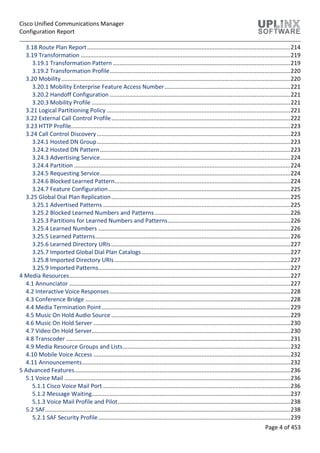
3.18 Route Plan Report..............................................................................................................................214
3.19 Transformation ..................................................................................................................................219
3.19.1 Transformation Pattern ..............................................................................................................219
3.19.2 Transformation Profile................................................................................................................220
3.20 Mobility..............................................................................................................................................220
3.20.1 Mobility Enterprise Feature Access Number..............................................................................221
3.20.2 Handoff Configuration ................................................................................................................221
3.20.3 Mobility Profile ...........................................................................................................................221
3.21 Logical Partitioning Policy..................................................................................................................221
3.22 External Call Control Profile...............................................................................................................222
3.23 HTTP Profile........................................................................................................................................223
3.24 Call Control Discovery........................................................................................................................223
3.24.1 Hosted DN Group........................................................................................................................223
3.24.2 Hosted DN Pattern......................................................................................................................223
3.24.3 Advertising Service......................................................................................................................224
3.24.4 Partition ......................................................................................................................................224
3.24.5 Requesting Service......................................................................................................................224
3.24.6 Blocked Learned Pattern.............................................................................................................224
3.24.7 Feature Configuration.................................................................................................................225
3.25 Global Dial Plan Replication...............................................................................................................225
3.25.1 Advertised Patterns ....................................................................................................................225
3.25.2 Blocked Learned Numbers and Patterns ....................................................................................226
3.25.3 Partitions for Learned Numbers and Patterns............................................................................226
3.25.4 Learned Numbers .......................................................................................................................226
3.25.5 Learned Patterns.........................................................................................................................226
3.25.6 Learned Directory URIs...............................................................................................................227
3.25.7 Imported Global Dial Plan Catalogs ............................................................................................227
3.25.8 Imported Directory URIs.............................................................................................................227
3.25.9 Imported Patterns.......................................................................................................................227
4 Media Resources.........................................................................................................................................227
4.1 Annunciator .........................................................................................................................................227
4.2 Interactive Voice Responses................................................................................................................228
4.3 Conference Bridge ...............................................................................................................................228
4.4 Media Termination Point.....................................................................................................................229
4.5 Music On Hold Audio Source ...............................................................................................................229
4.6 Music On Hold Server ..........................................................................................................................230
4.7 Video On Hold Server...........................................................................................................................230
4.8 Transcoder ...........................................................................................................................................231
4.9 Media Resource Groups and Lists........................................................................................................232
4.10 Mobile Voice Access ..........................................................................................................................232
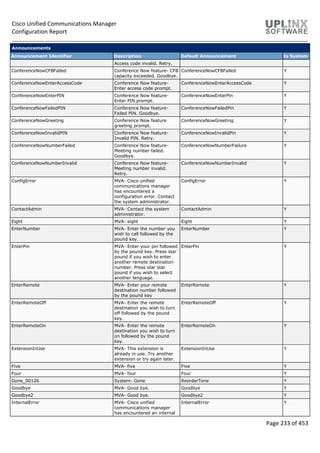
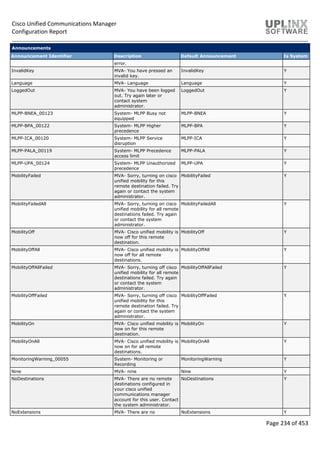
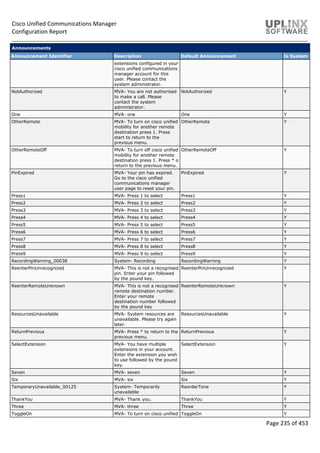
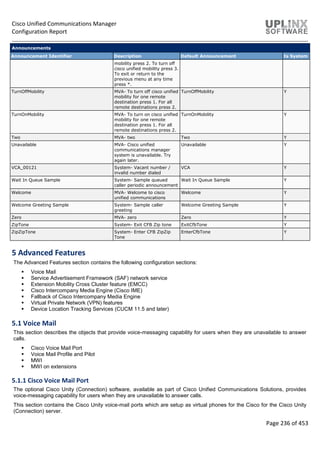
4.11 Announcements.................................................................................................................................232
5 Advanced Features......................................................................................................................................236
5.1 Voice Mail ............................................................................................................................................236
5.1.1 Cisco Voice Mail Port ....................................................................................................................236
5.1.2 Message Waiting...........................................................................................................................237
5.1.3 Voice Mail Profile and Pilot...........................................................................................................238
5.2 SAF........................................................................................................................................................238
5.2.1 SAF Security Profile.......................................................................................................................239
Cisco Unified Communications Manager
Configuration Report
Page 5 of 453
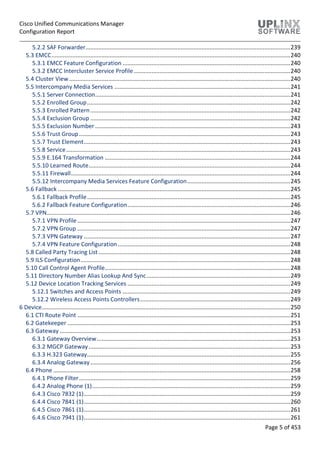
5.2.2 SAF Forwarder...............................................................................................................................239
5.3 EMCC....................................................................................................................................................240
5.3.1 EMCC Feature Configuration ........................................................................................................240
5.3.2 EMCC Intercluster Service Profile.................................................................................................240
5.4 Cluster View .........................................................................................................................................240
5.5 Intercompany Media Services .............................................................................................................241
5.5.1 Server Connection.........................................................................................................................241
5.5.2 Enrolled Group..............................................................................................................................242
5.5.3 Enrolled Pattern............................................................................................................................242
5.5.4 Exclusion Group ............................................................................................................................242
5.5.5 Exclusion Number .........................................................................................................................243
5.5.6 Trust Group...................................................................................................................................243
5.5.7 Trust Element................................................................................................................................243
5.5.8 Service...........................................................................................................................................243
5.5.9 E.164 Transformation ...................................................................................................................244
5.5.10 Learned Route.............................................................................................................................244
5.5.11 Firewall........................................................................................................................................244
5.5.12 Intercompany Media Services Feature Configuration................................................................245
5.6 Fallback ................................................................................................................................................245
5.6.1 Fallback Profile..............................................................................................................................245
5.6.2 Fallback Feature Configuration.....................................................................................................246
5.7 VPN.......................................................................................................................................................246
5.7.1 VPN Profile....................................................................................................................................247
5.7.2 VPN Group ....................................................................................................................................247
5.7.3 VPN Gateway ................................................................................................................................247
5.7.4 VPN Feature Configuration...........................................................................................................248
5.8 Called Party Tracing List.......................................................................................................................248
5.9 ILS Configuration..................................................................................................................................248
5.10 Call Control Agent Profile...................................................................................................................248
5.11 Directory Number Alias Lookup And Sync.........................................................................................249
5.12 Device Location Tracking Services .....................................................................................................249
5.12.1 Switches and Access Points ........................................................................................................249
5.12.2 Wireless Access Points Controllers.............................................................................................249
6 Device..........................................................................................................................................................250
6.1 CTI Route Point ....................................................................................................................................251
6.2 Gatekeeper ..........................................................................................................................................253
6.3 Gateway ...............................................................................................................................................253
6.3.1 Gateway Overview........................................................................................................................253
6.3.2 MGCP Gateway.............................................................................................................................253
6.3.3 H.323 Gateway..............................................................................................................................255
6.3.4 Analog Gateway............................................................................................................................256
6.4 Phone ...................................................................................................................................................258
6.4.1 Phone Filter...................................................................................................................................259
6.4.2 Analog Phone (1)...........................................................................................................................259
6.4.3 Cisco 7832 (1)................................................................................................................................259
6.4.4 Cisco 7841 (1)................................................................................................................................260
6.4.5 Cisco 7861 (1)................................................................................................................................261
6.4.6 Cisco 7941 (1)................................................................................................................................261
Cisco Unified Communications Manager
Configuration Report
Page 6 of 453
6.4.7 Cisco 7945 (1)................................................................................................................................262
6.4.8 Cisco 7975 (1)................................................................................................................................262
6.4.9 Cisco 8841 (1)................................................................................................................................263
6.4.10 Cisco 8941 (1)..............................................................................................................................264
6.4.11 Subscribed Services.....................................................................................................................264
6.4.12 Speed Dials..................................................................................................................................265
6.4.13 Busy Lamp Field Speed Dials.......................................................................................................266
6.4.14 Busy Lamp Field Directed Call Parks ...........................................................................................267
6.5 Trunk ....................................................................................................................................................269
6.5.1 Trunk - Overview...........................................................................................................................269
6.5.2 Trunk - Detailed ............................................................................................................................269
6.6 Remote Destination.............................................................................................................................285
6.7 Device Settings.....................................................................................................................................285
6.7.1 Device Defaults .............................................................................................................................286
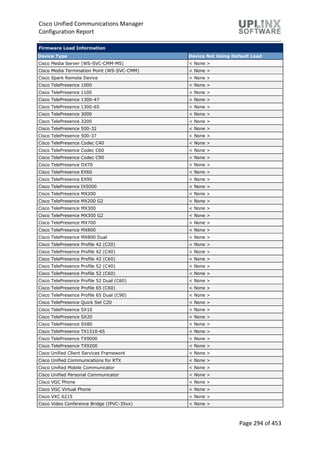
6.7.2 Firmware Load Information..........................................................................................................291
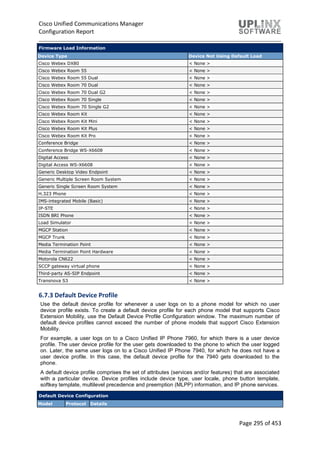
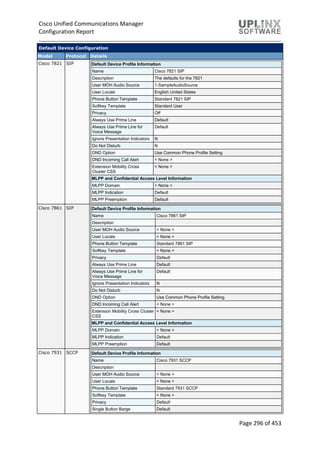
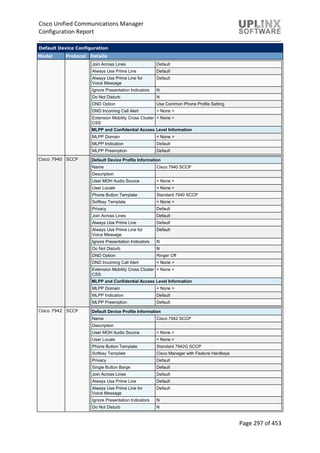
6.7.3 Default Device Profile ...................................................................................................................295
6.7.4 Device Profile................................................................................................................................299
6.7.5 Phone Button Template................................................................................................................304
6.7.6 Softkey Template..........................................................................................................................357
6.7.7 Phone Services..............................................................................................................................368
6.7.8 SIP Profile......................................................................................................................................371
6.7.9 Common Device Configuration.....................................................................................................384
6.7.10 Common Phone Profile...............................................................................................................384
6.7.11 Remote Destination Profile.........................................................................................................393
6.7.12 Feature Control Policy ................................................................................................................395
6.7.13 Recording Profile.........................................................................................................................395
6.7.14 SIP Normalization Script .............................................................................................................395
6.7.15 SDP Transparency Profile............................................................................................................397
6.7.16 Network Access Profile ...............................................................................................................397
6.7.17 Wireless LAN Profile....................................................................................................................398
6.7.18 Wireless LAN Profile Group ........................................................................................................398
6.7.19 Wifi Hotspot Profile ....................................................................................................................398
7 User Management ......................................................................................................................................399
7.1 Application User...................................................................................................................................399
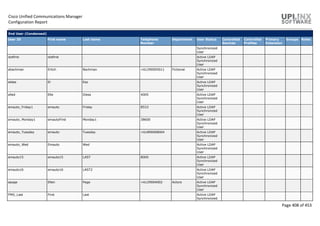
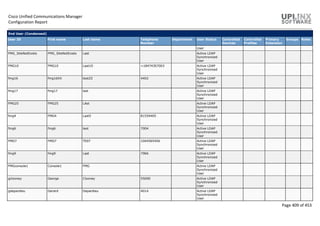
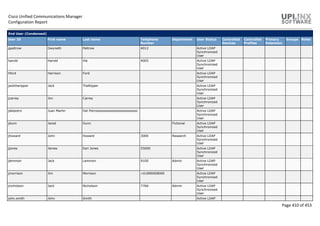
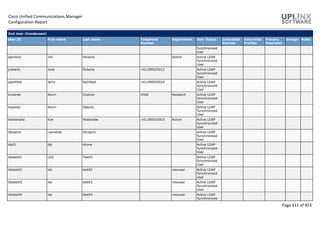
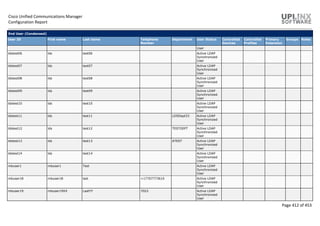
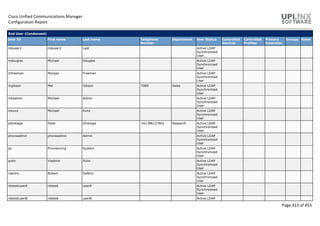
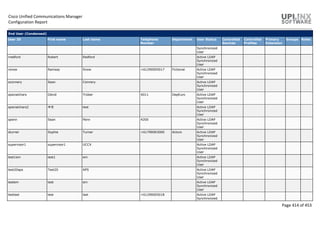
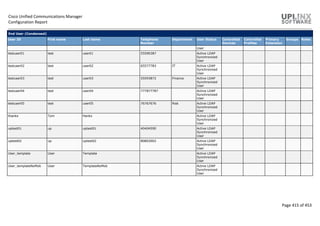
7.2 End User (Condensed) .........................................................................................................................406
7.3 SIP Realm..............................................................................................................................................416
7.4 User Settings ........................................................................................................................................416
7.4.1 Credential Policy Default ..............................................................................................................416
7.4.2 Credential Policy ...........................................................................................................................417
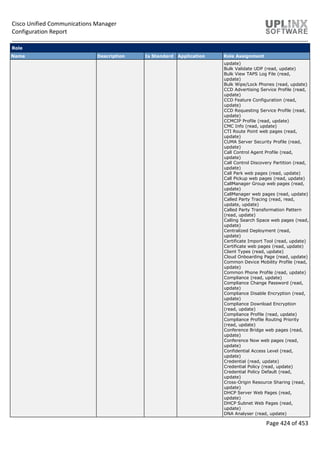
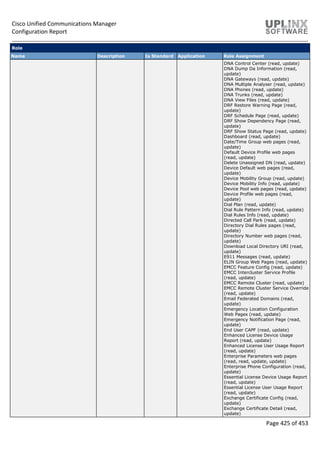
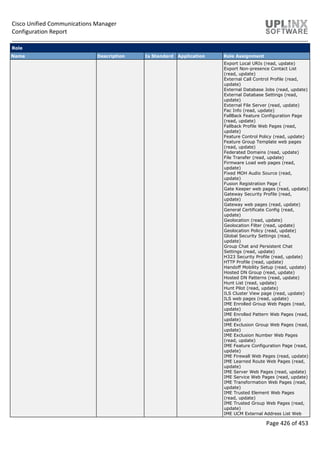
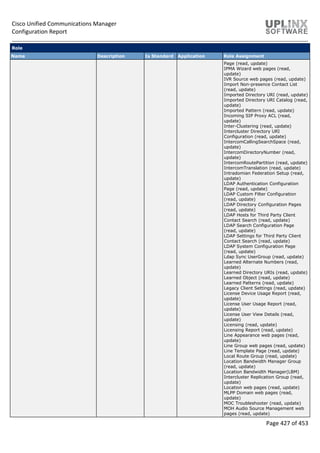
7.4.3 Role ...............................................................................................................................................417
7.4.4 Access Control Group....................................................................................................................446
7.4.5 End User CAPF Profile ...................................................................................................................448
7.4.6 UC Service .....................................................................................................................................448
7.4.7 Service Profile ...............................................................................................................................448
7.4.8 User Profile ...................................................................................................................................451
7.4.9 User Group....................................................................................................................................451
7.4.10 User Rank....................................................................................................................................452
7.5 Self-Provisioning ..................................................................................................................................452
Cisco Unified Communications Manager
Configuration Report
Page 7 of 453
Cisco Unified Communications Manager
Configuration Report
Page 8 of 453
1 Report Information
1.1 Report Generation
This configuration report for the Cisco Unified Communications Manager (CUCM) cluster has the
following details:
Report Info
Report Date 3/10/2019 10:01:26
Report generated for CustomerA
Description As-Built Documentation for project
Server Info
CUCM version 12.5.1.10000(22)
CUCM IP 10.5.1.120
Report Settings
Report Type Direct Report
Visual Style Blu Light.css
Report Content Most Complete
Template HTML CCMreportTemplate.htm
Template Word Gears-Blue-universal.doc
Report Tool Info
Report Tool Version 12.0.18 / 23 Aug 2019
Report Tool License Licensed [Prof all]
2 System
The following chapters describe the configuration items in the Cisco Unified Communications
Manager Administration System menu:
 Server
 Service Status
 Cisco Unified Communications Manager
 Cisco Unified Communications Manager Group
 Presence Redundancy Groups (in CUCM 10.0 and later)
 Phone NTP Reference
 Date-Time Group
 Presence Group
 Regions
 Audio Codec Preference (in CUCM 9.0 and later)
 Device Pool
 Device Mobility Group
 Device Mobility Info
 DHCP Server
 DHCP Subnet
 Location (in CUCM 9.0 and later)
 Location Bandwidth Manager Group (in CUCM 9.0 and later)
 Location Bandwidth Manager Hub Group (in CUCM 9.0 and later)
 LDAP System
 LDAP Directory
 LDAP Authentication
 LDAP Custom Filter (in CUCM 9.0 and later)
 Presence Redundancy Groups (in CUCM 10.0 and later)
 Location
 Physical Location
 Survivable Remote Site Telephony
Cisco Unified Communications Manager
Configuration Report
Page 9 of 453
 MLPP Domain
 Enterprise Parameters
 Enterprise Phone Configuration (in CUCM 8.0 and later)
 Service Parameters
 Certificate
 Phone Security Profile
 SIP Trunk Security Profile
 Application Server
 License Unit Report
 Geo Location (in CUCM 9.0 and later)
 E911 (in CUCM 9.0 and later)
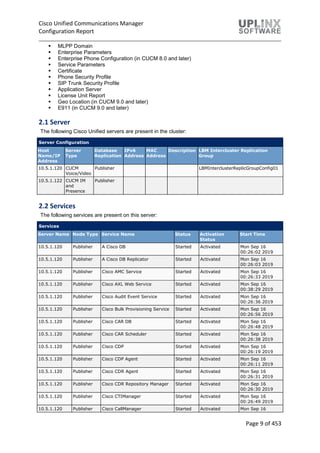
2.1 Server
The following Cisco Unified servers are present in the cluster:
Server Configuration
Host
Name/IP
Address
Server
Type
Database
Replication
IPv6
Address
MAC
Address
Description LBM Intercluster Replication
Group
10.5.1.120 CUCM
Voice/Video
Publisher LBMInterclusterReplicGroupConfig01
10.5.1.122 CUCM IM
and
Presence
Publisher
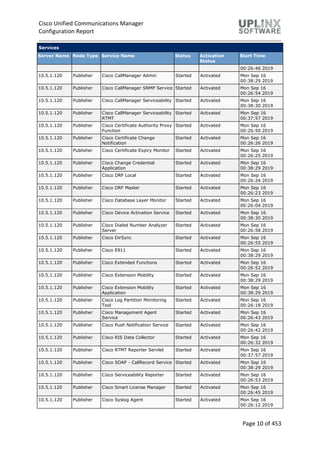
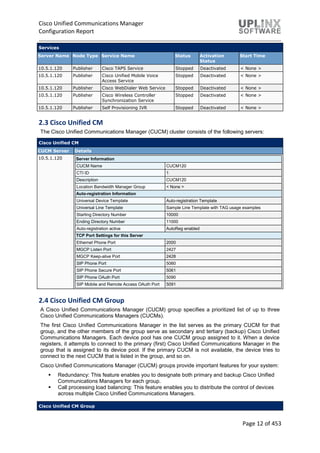
2.2 Services
The following services are present on this server:
Services
Server Name Node Type Service Name Status Activation
Status
Start Time
10.5.1.120 Publisher A Cisco DB Started Activated Mon Sep 16
00:26:02 2019
10.5.1.120 Publisher A Cisco DB Replicator Started Activated Mon Sep 16
00:26:03 2019
10.5.1.120 Publisher Cisco AMC Service Started Activated Mon Sep 16
00:26:33 2019
10.5.1.120 Publisher Cisco AXL Web Service Started Activated Mon Sep 16
00:38:29 2019
10.5.1.120 Publisher Cisco Audit Event Service Started Activated Mon Sep 16
00:26:36 2019
10.5.1.120 Publisher Cisco Bulk Provisioning Service Started Activated Mon Sep 16
00:26:56 2019
10.5.1.120 Publisher Cisco CAR DB Started Activated Mon Sep 16
00:26:48 2019
10.5.1.120 Publisher Cisco CAR Scheduler Started Activated Mon Sep 16
00:26:38 2019
10.5.1.120 Publisher Cisco CDP Started Activated Mon Sep 16
00:26:19 2019
10.5.1.120 Publisher Cisco CDP Agent Started Activated Mon Sep 16
00:26:11 2019
10.5.1.120 Publisher Cisco CDR Agent Started Activated Mon Sep 16
00:26:31 2019
10.5.1.120 Publisher Cisco CDR Repository Manager Started Activated Mon Sep 16
00:26:30 2019
10.5.1.120 Publisher Cisco CTIManager Started Activated Mon Sep 16
00:26:49 2019
10.5.1.120 Publisher Cisco CallManager Started Activated Mon Sep 16
Cisco Unified Communications Manager
Configuration Report
Page 10 of 453
Services
Server Name Node Type Service Name Status Activation
Status
Start Time
00:26:46 2019
10.5.1.120 Publisher Cisco CallManager Admin Started Activated Mon Sep 16
00:38:29 2019
10.5.1.120 Publisher Cisco CallManager SNMP Service Started Activated Mon Sep 16
00:26:54 2019
10.5.1.120 Publisher Cisco CallManager Serviceability Started Activated Mon Sep 16
00:38:30 2019
10.5.1.120 Publisher Cisco CallManager Serviceability
RTMT
Started Activated Mon Sep 16
00:37:57 2019
10.5.1.120 Publisher Cisco Certificate Authority Proxy
Function
Started Activated Mon Sep 16
00:26:50 2019
10.5.1.120 Publisher Cisco Certificate Change
Notification
Started Activated Mon Sep 16
00:26:26 2019
10.5.1.120 Publisher Cisco Certificate Expiry Monitor Started Activated Mon Sep 16
00:26:25 2019
10.5.1.120 Publisher Cisco Change Credential
Application
Started Activated Mon Sep 16
00:38:29 2019
10.5.1.120 Publisher Cisco DRF Local Started Activated Mon Sep 16
00:26:24 2019
10.5.1.120 Publisher Cisco DRF Master Started Activated Mon Sep 16
00:26:23 2019
10.5.1.120 Publisher Cisco Database Layer Monitor Started Activated Mon Sep 16
00:26:04 2019
10.5.1.120 Publisher Cisco Device Activation Service Started Activated Mon Sep 16
00:38:30 2019
10.5.1.120 Publisher Cisco Dialed Number Analyzer
Server
Started Activated Mon Sep 16
00:26:58 2019
10.5.1.120 Publisher Cisco DirSync Started Activated Mon Sep 16
00:26:55 2019
10.5.1.120 Publisher Cisco E911 Started Activated Mon Sep 16
00:38:29 2019
10.5.1.120 Publisher Cisco Extended Functions Started Activated Mon Sep 16
00:26:52 2019
10.5.1.120 Publisher Cisco Extension Mobility Started Activated Mon Sep 16
00:38:29 2019
10.5.1.120 Publisher Cisco Extension Mobility
Application
Started Activated Mon Sep 16
00:38:29 2019
10.5.1.120 Publisher Cisco Log Partition Monitoring
Tool
Started Activated Mon Sep 16
00:26:18 2019
10.5.1.120 Publisher Cisco Management Agent
Service
Started Activated Mon Sep 16
00:26:43 2019
10.5.1.120 Publisher Cisco Push Notification Service Started Activated Mon Sep 16
00:26:42 2019
10.5.1.120 Publisher Cisco RIS Data Collector Started Activated Mon Sep 16
00:26:32 2019
10.5.1.120 Publisher Cisco RTMT Reporter Servlet Started Activated Mon Sep 16
00:37:57 2019
10.5.1.120 Publisher Cisco SOAP - CallRecord Service Started Activated Mon Sep 16
00:38:29 2019
10.5.1.120 Publisher Cisco Serviceability Reporter Started Activated Mon Sep 16
00:26:53 2019
10.5.1.120 Publisher Cisco Smart License Manager Started Activated Mon Sep 16
00:26:45 2019
10.5.1.120 Publisher Cisco Syslog Agent Started Activated Mon Sep 16
00:26:12 2019
Cisco Unified Communications Manager
Configuration Report
Page 11 of 453
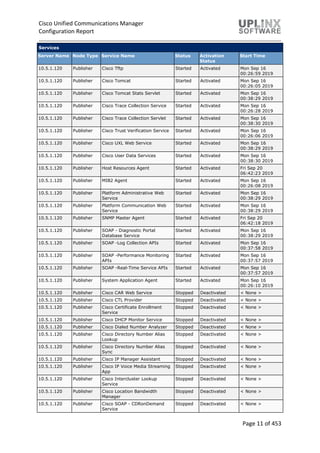
Services
Server Name Node Type Service Name Status Activation
Status
Start Time
10.5.1.120 Publisher Cisco Tftp Started Activated Mon Sep 16
00:26:59 2019
10.5.1.120 Publisher Cisco Tomcat Started Activated Mon Sep 16
00:26:05 2019
10.5.1.120 Publisher Cisco Tomcat Stats Servlet Started Activated Mon Sep 16
00:38:29 2019
10.5.1.120 Publisher Cisco Trace Collection Service Started Activated Mon Sep 16
00:26:28 2019
10.5.1.120 Publisher Cisco Trace Collection Servlet Started Activated Mon Sep 16
00:38:30 2019
10.5.1.120 Publisher Cisco Trust Verification Service Started Activated Mon Sep 16
00:26:06 2019
10.5.1.120 Publisher Cisco UXL Web Service Started Activated Mon Sep 16
00:38:29 2019
10.5.1.120 Publisher Cisco User Data Services Started Activated Mon Sep 16
00:38:30 2019
10.5.1.120 Publisher Host Resources Agent Started Activated Fri Sep 20
06:42:23 2019
10.5.1.120 Publisher MIB2 Agent Started Activated Mon Sep 16
00:26:08 2019
10.5.1.120 Publisher Platform Administrative Web
Service
Started Activated Mon Sep 16
00:38:29 2019
10.5.1.120 Publisher Platform Communication Web
Service
Started Activated Mon Sep 16
00:38:29 2019
10.5.1.120 Publisher SNMP Master Agent Started Activated Fri Sep 20
06:42:18 2019
10.5.1.120 Publisher SOAP - Diagnostic Portal
Database Service
Started Activated Mon Sep 16
00:38:29 2019
10.5.1.120 Publisher SOAP -Log Collection APIs Started Activated Mon Sep 16
00:37:58 2019
10.5.1.120 Publisher SOAP -Performance Monitoring
APIs
Started Activated Mon Sep 16
00:37:57 2019
10.5.1.120 Publisher SOAP -Real-Time Service APIs Started Activated Mon Sep 16
00:37:57 2019
10.5.1.120 Publisher System Application Agent Started Activated Mon Sep 16
00:26:10 2019
10.5.1.120 Publisher Cisco CAR Web Service Stopped Deactivated < None >
10.5.1.120 Publisher Cisco CTL Provider Stopped Deactivated < None >
10.5.1.120 Publisher Cisco Certificate Enrollment
Service
Stopped Deactivated < None >
10.5.1.120 Publisher Cisco DHCP Monitor Service Stopped Deactivated < None >
10.5.1.120 Publisher Cisco Dialed Number Analyzer Stopped Deactivated < None >
10.5.1.120 Publisher Cisco Directory Number Alias
Lookup
Stopped Deactivated < None >
10.5.1.120 Publisher Cisco Directory Number Alias
Sync
Stopped Deactivated < None >
10.5.1.120 Publisher Cisco IP Manager Assistant Stopped Deactivated < None >
10.5.1.120 Publisher Cisco IP Voice Media Streaming
App
Stopped Deactivated < None >
10.5.1.120 Publisher Cisco Intercluster Lookup
Service
Stopped Deactivated < None >
10.5.1.120 Publisher Cisco Location Bandwidth
Manager
Stopped Deactivated < None >
10.5.1.120 Publisher Cisco SOAP - CDRonDemand
Service
Stopped Deactivated < None >
Cisco Unified Communications Manager
Configuration Report
Page 12 of 453
Services
Server Name Node Type Service Name Status Activation
Status
Start Time
10.5.1.120 Publisher Cisco TAPS Service Stopped Deactivated < None >
10.5.1.120 Publisher Cisco Unified Mobile Voice
Access Service
Stopped Deactivated < None >
10.5.1.120 Publisher Cisco WebDialer Web Service Stopped Deactivated < None >
10.5.1.120 Publisher Cisco Wireless Controller
Synchronization Service
Stopped Deactivated < None >
10.5.1.120 Publisher Self Provisioning IVR Stopped Deactivated < None >
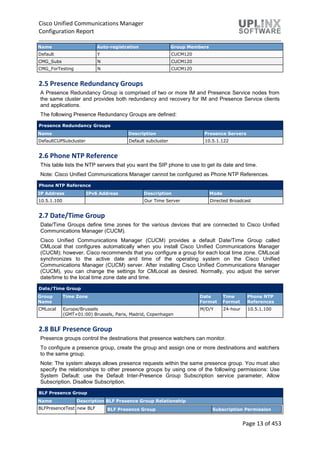
2.3 Cisco Unified CM
The Cisco Unified Communications Manager (CUCM) cluster consists of the following servers:
Cisco Unified CM
CUCM Server Details
10.5.1.120 Server Information
CUCM Name CUCM120
CTI ID 1
Description CUCM120
Location Bandwidth Manager Group < None >
Auto-registration Information
Universal Device Template Auto-registration Template
Universal Line Template Sample Line Template with TAG usage examples
Starting Directory Number 10000
Ending Directory Number 11000
Auto-registration active AutoReg enabled
TCP Port Settings for this Server
Ethernet Phone Port 2000
MGCP Listen Port 2427
MGCP Keep-alive Port 2428
SIP Phone Port 5060
SIP Phone Secure Port 5061
SIP Phone OAuth Port 5090
SIP Mobile and Remote Access OAuth Port 5091
2.4 Cisco Unified CM Group
A Cisco Unified Communications Manager (CUCM) group specifies a prioritized list of up to three
Cisco Unified Communications Managers (CUCMs).
The first Cisco Unified Communications Manager in the list serves as the primary CUCM for that
group, and the other members of the group serve as secondary and tertiary (backup) Cisco Unified
Communications Managers. Each device pool has one CUCM group assigned to it. When a device
registers, it attempts to connect to the primary (first) Cisco Unified Communications Manager in the
group that is assigned to its device pool. If the primary CUCM is not available, the device tries to
connect to the next CUCM that is listed in the group, and so on.
Cisco Unified Communications Manager (CUCM) groups provide important features for your system:
 Redundancy: This feature enables you to designate both primary and backup Cisco Unified
Communications Managers for each group.
 Call processing load balancing: This feature enables you to distribute the control of devices
across multiple Cisco Unified Communications Managers.
Cisco Unified CM Group
Cisco Unified Communications Manager
Configuration Report
Page 13 of 453
Name Auto-registration Group Members
Default Y CUCM120
CMG_Subs N CUCM120
CMG_ForTesting N CUCM120
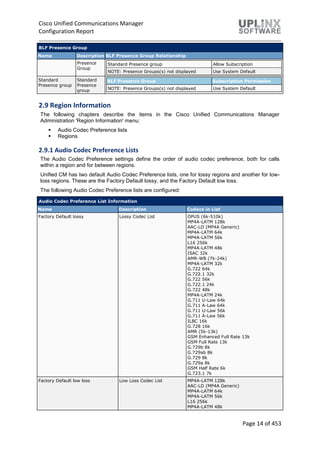
2.5 Presence Redundancy Groups
A Presence Redundancy Group is comprised of two or more IM and Presence Service nodes from
the same cluster and provides both redundancy and recovery for IM and Presence Service clients
and applications.
The following Presence Redundancy Groups are defined:
Presence Redundancy Groups
Name Description Presence Servers
DefaultCUPSubcluster Default subcluster 10.5.1.122
2.6 Phone NTP Reference
This table lists the NTP servers that you want the SIP phone to use to get its date and time.
Note: Cisco Unified Communications Manager cannot be configured as Phone NTP References.
Phone NTP Reference
IP Address IPv6 Address Description Mode
10.5.1.100 Our Time Server Directed Broadcast
2.7 Date/Time Group
Date/Time Groups define time zones for the various devices that are connected to Cisco Unified
Communications Manager (CUCM).
Cisco Unified Communications Manager (CUCM) provides a default Date/Time Group called
CMLocal that configures automatically when you install Cisco Unified Communications Manager
(CUCM); however, Cisco recommends that you configure a group for each local time zone. CMLocal
synchronizes to the active date and time of the operating system on the Cisco Unified
Communications Manager (CUCM) server. After installing Cisco Unified Communications Manager
(CUCM), you can change the settings for CMLocal as desired. Normally, you adjust the server
date/time to the local time zone date and time.
Date/Time Group
Group
Name
Time Zone Date
Format
Time
Format
Phone NTP
References
CMLocal Europe/Brussels
(GMT+01:00) Brussels, Paris, Madrid, Copenhagen
M/D/Y 24-hour 10.5.1.100
2.8 BLF Presence Group
Presence groups control the destinations that presence watchers can monitor.
To configure a presence group, create the group and assign one or more destinations and watchers
to the same group.
Note: The system always allows presence requests within the same presence group. You must also
specify the relationships to other presence groups by using one of the following permissions: Use
System Default: use the Default Inter-Presence Group Subscription service parameter, Allow
Subscription, Disallow Subscription.
BLF Presence Group
Name Description BLF Presence Group Relationship
BLFPresenceTest new BLF BLF Presence Group Subscription Permission
Cisco Unified Communications Manager
Configuration Report
Page 14 of 453
BLF Presence Group
Name Description BLF Presence Group Relationship
Presence
Group
Standard Presence group Allow Subscription
NOTE: Presence Groups(s) not displayed Use System Default
Standard
Presence group
Standard
Presence
group
BLF Presence Group Subscription Permission
NOTE: Presence Groups(s) not displayed Use System Default
2.9 Region Information
The following chapters describe the items in the Cisco Unified Communications Manager
Administration 'Region Information' menu:
 Audio Codec Preference lists
 Regions
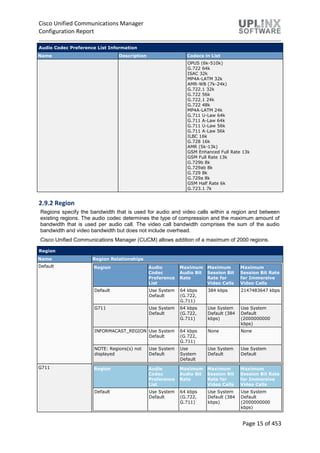
2.9.1 Audio Codec Preference Lists
The Audio Codec Preference settings define the order of audio codec preference, both for calls
within a region and for between regions.
Unified CM has two default Audio Codec Preference lists, one for lossy regions and another for low-
loss regions. These are the Factory Default lossy, and the Factory Default low loss.
The following Audio Codec Preference lists are configured:
Audio Codec Preference List Information
Name Description Codecs in List
Factory Default lossy Lossy Codec List OPUS (6k-510k)
MP4A-LATM 128k
AAC-LD (MP4A Generic)
MP4A-LATM 64k
MP4A-LATM 56k
L16 256k
MP4A-LATM 48k
ISAC 32k
AMR-WB (7k-24k)
MP4A-LATM 32k
G.722 64k
G.722.1 32k
G.722 56k
G.722.1 24k
G.722 48k
MP4A-LATM 24k
G.711 U-Law 64k
G.711 A-Law 64k
G.711 U-Law 56k
G.711 A-Law 56k
ILBC 16k
G.728 16k
AMR (5k-13k)
GSM Enhanced Full Rate 13k
GSM Full Rate 13k
G.729b 8k
G.729ab 8k
G.729 8k
G.729a 8k
GSM Half Rate 6k
G.723.1 7k
Factory Default low loss Low Loss Codec List MP4A-LATM 128k
AAC-LD (MP4A Generic)
MP4A-LATM 64k
MP4A-LATM 56k
L16 256k
MP4A-LATM 48k
Cisco Unified Communications Manager
Configuration Report
Page 15 of 453
Audio Codec Preference List Information
Name Description Codecs in List
OPUS (6k-510k)
G.722 64k
ISAC 32k
MP4A-LATM 32k
AMR-WB (7k-24k)
G.722.1 32k
G.722 56k
G.722.1 24k
G.722 48k
MP4A-LATM 24k
G.711 U-Law 64k
G.711 A-Law 64k
G.711 U-Law 56k
G.711 A-Law 56k
ILBC 16k
G.728 16k
AMR (5k-13k)
GSM Enhanced Full Rate 13k
GSM Full Rate 13k
G.729b 8k
G.729ab 8k
G.729 8k
G.729a 8k
GSM Half Rate 6k
G.723.1 7k
2.9.2 Region
Regions specify the bandwidth that is used for audio and video calls within a region and between
existing regions. The audio codec determines the type of compression and the maximum amount of
bandwidth that is used per audio call. The video call bandwidth comprises the sum of the audio
bandwidth and video bandwidth but does not include overhead.
Cisco Unified Communications Manager (CUCM) allows addition of a maximum of 2000 regions.
Region
Name Region Relationships
Default Region Audio
Codec
Preference
List
Maximum
Audio Bit
Rate
Maximum
Session Bit
Rate for
Video Calls
Maximum
Session Bit Rate
for Immersive
Video Calls
Default Use System
Default
64 kbps
(G.722,
G.711)
384 kbps 2147483647 kbps
G711 Use System
Default
64 kbps
(G.722,
G.711)
Use System
Default (384
kbps)
Use System
Default
(2000000000
kbps)
INFORMACAST_REGION Use System
Default
64 kbps
(G.722,
G.711)
None None
NOTE: Regions(s) not
displayed
Use System
Default
Use
System
Default
Use System
Default
Use System
Default
G711 Region Audio
Codec
Preference
List
Maximum
Audio Bit
Rate
Maximum
Session Bit
Rate for
Video Calls
Maximum
Session Bit Rate
for Immersive
Video Calls
Default Use System
Default
64 kbps
(G.722,
G.711)
Use System
Default (384
kbps)
Use System
Default
(2000000000
kbps)
Cisco Unified Communications Manager
Configuration Report
Page 16 of 453
Region
Name Region Relationships
INFORMACAST_REGION Use System
Default
64 kbps
(G.722,
G.711)
None None
NOTE: Regions(s) not
displayed
Use System
Default
Use
System
Default
Use System
Default
Use System
Default
INFORMACAST_REGION Region Audio Codec
Preference
List
Maximum
Audio Bit
Rate
Maximum
Session Bit
Rate for Video
Calls
Maximum Session
Bit Rate for
Immersive Video
Calls
G711 Use System
Default
64 kbps
(G.722,
G.711)
None None
Default Use System
Default
64 kbps
(G.722,
G.711)
None None
NOTE:
Regions(s)
not displayed
Use System
Default
Use System
Default
Use System
Default
Use System Default
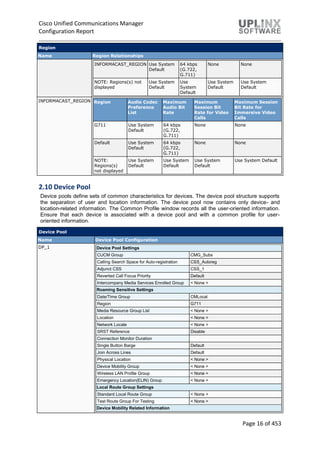
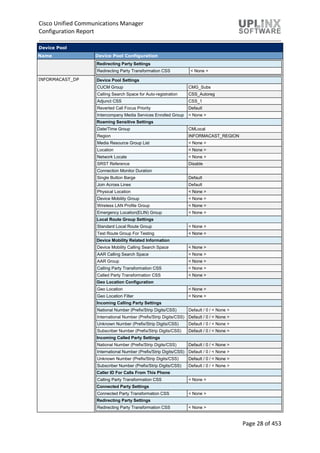
2.10 Device Pool
Device pools define sets of common characteristics for devices. The device pool structure supports
the separation of user and location information. The device pool now contains only device- and
location-related information. The Common Profile window records all the user-oriented information.
Ensure that each device is associated with a device pool and with a common profile for user-
oriented information.
Device Pool
Name Device Pool Configuration
DP_1 Device Pool Settings
CUCM Group CMG_Subs
Calling Search Space for Auto-registration CSS_Autoreg
Adjunct CSS CSS_1
Reverted Call Focus Priority Default
Intercompany Media Services Enrolled Group < None >
Roaming Sensitive Settings
Date/Time Group CMLocal
Region G711
Media Resource Group List < None >
Location < None >
Network Locale < None >
SRST Reference Disable
Connection Monitor Duration
Single Button Barge Default
Join Across Lines Default
Physical Location < None >
Device Mobility Group < None >
Wireless LAN Profile Group < None >
Emergency Location(ELIN) Group < None >
Local Route Group Settings
Standard Local Route Group < None >
Test Route Group For Testing < None >
Device Mobility Related Information
Cisco Unified Communications Manager
Configuration Report
Page 17 of 453
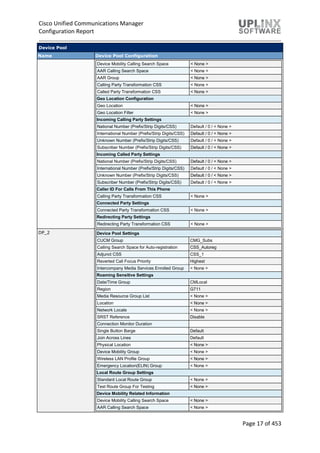
Device Pool
Name Device Pool Configuration
Device Mobility Calling Search Space < None >
AAR Calling Search Space < None >
AAR Group < None >
Calling Party Transformation CSS < None >
Called Party Transformation CSS < None >
Geo Location Configuration
Geo Location < None >
Geo Location Filter < None >
Incoming Calling Party Settings
National Number (Prefix/Strip Digits/CSS) Default / 0 / < None >
International Number (Prefix/Strip Digits/CSS) Default / 0 / < None >
Unknown Number (Prefix/Strip Digits/CSS) Default / 0 / < None >
Subscriber Number (Prefix/Strip Digits/CSS) Default / 0 / < None >
Incoming Called Party Settings
National Number (Prefix/Strip Digits/CSS) Default / 0 / < None >
International Number (Prefix/Strip Digits/CSS) Default / 0 / < None >
Unknown Number (Prefix/Strip Digits/CSS) Default / 0 / < None >
Subscriber Number (Prefix/Strip Digits/CSS) Default / 0 / < None >
Caller ID For Calls From This Phone
Calling Party Transformation CSS < None >
Connected Party Settings
Connected Party Transformation CSS < None >
Redirecting Party Settings
Redirecting Party Transformation CSS < None >
DP_2 Device Pool Settings
CUCM Group CMG_Subs
Calling Search Space for Auto-registration CSS_Autoreg
Adjunct CSS CSS_1
Reverted Call Focus Priority Highest
Intercompany Media Services Enrolled Group < None >
Roaming Sensitive Settings
Date/Time Group CMLocal
Region G711
Media Resource Group List < None >
Location < None >
Network Locale < None >
SRST Reference Disable
Connection Monitor Duration
Single Button Barge Default
Join Across Lines Default
Physical Location < None >
Device Mobility Group < None >
Wireless LAN Profile Group < None >
Emergency Location(ELIN) Group < None >
Local Route Group Settings
Standard Local Route Group < None >
Test Route Group For Testing < None >
Device Mobility Related Information
Device Mobility Calling Search Space < None >
AAR Calling Search Space < None >
Cisco Unified Communications Manager
Configuration Report
Page 18 of 453
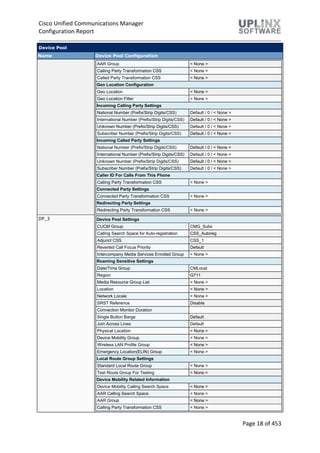
Device Pool
Name Device Pool Configuration
AAR Group < None >
Calling Party Transformation CSS < None >
Called Party Transformation CSS < None >
Geo Location Configuration
Geo Location < None >
Geo Location Filter < None >
Incoming Calling Party Settings
National Number (Prefix/Strip Digits/CSS) Default / 0 / < None >
International Number (Prefix/Strip Digits/CSS) Default / 0 / < None >
Unknown Number (Prefix/Strip Digits/CSS) Default / 0 / < None >
Subscriber Number (Prefix/Strip Digits/CSS) Default / 0 / < None >
Incoming Called Party Settings
National Number (Prefix/Strip Digits/CSS) Default / 0 / < None >
International Number (Prefix/Strip Digits/CSS) Default / 0 / < None >
Unknown Number (Prefix/Strip Digits/CSS) Default / 0 / < None >
Subscriber Number (Prefix/Strip Digits/CSS) Default / 0 / < None >
Caller ID For Calls From This Phone
Calling Party Transformation CSS < None >
Connected Party Settings
Connected Party Transformation CSS < None >
Redirecting Party Settings
Redirecting Party Transformation CSS < None >
DP_3 Device Pool Settings
CUCM Group CMG_Subs
Calling Search Space for Auto-registration CSS_Autoreg
Adjunct CSS CSS_1
Reverted Call Focus Priority Default
Intercompany Media Services Enrolled Group < None >
Roaming Sensitive Settings
Date/Time Group CMLocal
Region G711
Media Resource Group List < None >
Location < None >
Network Locale < None >
SRST Reference Disable
Connection Monitor Duration
Single Button Barge Default
Join Across Lines Default
Physical Location < None >
Device Mobility Group < None >
Wireless LAN Profile Group < None >
Emergency Location(ELIN) Group < None >
Local Route Group Settings
Standard Local Route Group < None >
Test Route Group For Testing < None >
Device Mobility Related Information
Device Mobility Calling Search Space < None >
AAR Calling Search Space < None >
AAR Group < None >
Calling Party Transformation CSS < None >
Cisco Unified Communications Manager
Configuration Report
Page 19 of 453
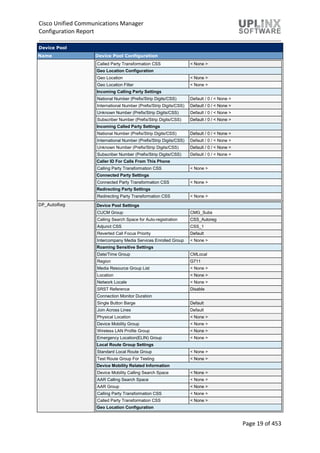
Device Pool
Name Device Pool Configuration
Called Party Transformation CSS < None >
Geo Location Configuration
Geo Location < None >
Geo Location Filter < None >
Incoming Calling Party Settings
National Number (Prefix/Strip Digits/CSS) Default / 0 / < None >
International Number (Prefix/Strip Digits/CSS) Default / 0 / < None >
Unknown Number (Prefix/Strip Digits/CSS) Default / 0 / < None >
Subscriber Number (Prefix/Strip Digits/CSS) Default / 0 / < None >
Incoming Called Party Settings
National Number (Prefix/Strip Digits/CSS) Default / 0 / < None >
International Number (Prefix/Strip Digits/CSS) Default / 0 / < None >
Unknown Number (Prefix/Strip Digits/CSS) Default / 0 / < None >
Subscriber Number (Prefix/Strip Digits/CSS) Default / 0 / < None >
Caller ID For Calls From This Phone
Calling Party Transformation CSS < None >
Connected Party Settings
Connected Party Transformation CSS < None >
Redirecting Party Settings
Redirecting Party Transformation CSS < None >
DP_AutoReg Device Pool Settings
CUCM Group CMG_Subs
Calling Search Space for Auto-registration CSS_Autoreg
Adjunct CSS CSS_1
Reverted Call Focus Priority Default
Intercompany Media Services Enrolled Group < None >
Roaming Sensitive Settings
Date/Time Group CMLocal
Region G711
Media Resource Group List < None >
Location < None >
Network Locale < None >
SRST Reference Disable
Connection Monitor Duration
Single Button Barge Default
Join Across Lines Default
Physical Location < None >
Device Mobility Group < None >
Wireless LAN Profile Group < None >
Emergency Location(ELIN) Group < None >
Local Route Group Settings
Standard Local Route Group < None >
Test Route Group For Testing < None >
Device Mobility Related Information
Device Mobility Calling Search Space < None >
AAR Calling Search Space < None >
AAR Group < None >
Calling Party Transformation CSS < None >
Called Party Transformation CSS < None >
Geo Location Configuration
Cisco Unified Communications Manager
Configuration Report
Page 20 of 453
Device Pool
Name Device Pool Configuration
Geo Location < None >
Geo Location Filter < None >
Incoming Calling Party Settings
National Number (Prefix/Strip Digits/CSS) Default / 0 / < None >
International Number (Prefix/Strip Digits/CSS) Default / 0 / < None >
Unknown Number (Prefix/Strip Digits/CSS) Default / 0 / < None >
Subscriber Number (Prefix/Strip Digits/CSS) Default / 0 / < None >
Incoming Called Party Settings
National Number (Prefix/Strip Digits/CSS) Default / 0 / < None >
International Number (Prefix/Strip Digits/CSS) Default / 0 / < None >
Unknown Number (Prefix/Strip Digits/CSS) Default / 0 / < None >
Subscriber Number (Prefix/Strip Digits/CSS) Default / 0 / < None >
Caller ID For Calls From This Phone
Calling Party Transformation CSS < None >
Connected Party Settings
Connected Party Transformation CSS < None >
Redirecting Party Settings
Redirecting Party Transformation CSS < None >
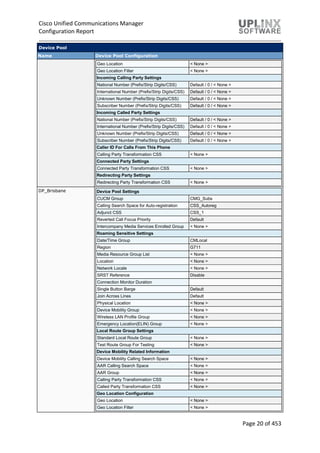
DP_Brisbane Device Pool Settings
CUCM Group CMG_Subs
Calling Search Space for Auto-registration CSS_Autoreg
Adjunct CSS CSS_1
Reverted Call Focus Priority Default
Intercompany Media Services Enrolled Group < None >
Roaming Sensitive Settings
Date/Time Group CMLocal
Region G711
Media Resource Group List < None >
Location < None >
Network Locale < None >
SRST Reference Disable
Connection Monitor Duration
Single Button Barge Default
Join Across Lines Default
Physical Location < None >
Device Mobility Group < None >
Wireless LAN Profile Group < None >
Emergency Location(ELIN) Group < None >
Local Route Group Settings
Standard Local Route Group < None >
Test Route Group For Testing < None >
Device Mobility Related Information
Device Mobility Calling Search Space < None >
AAR Calling Search Space < None >
AAR Group < None >
Calling Party Transformation CSS < None >
Called Party Transformation CSS < None >
Geo Location Configuration
Geo Location < None >
Geo Location Filter < None >
Cisco Unified Communications Manager
Configuration Report
Page 21 of 453
Device Pool
Name Device Pool Configuration
Incoming Calling Party Settings
National Number (Prefix/Strip Digits/CSS) Default / 0 / < None >
International Number (Prefix/Strip Digits/CSS) Default / 0 / < None >
Unknown Number (Prefix/Strip Digits/CSS) Default / 0 / < None >
Subscriber Number (Prefix/Strip Digits/CSS) Default / 0 / < None >
Incoming Called Party Settings
National Number (Prefix/Strip Digits/CSS) Default / 0 / < None >
International Number (Prefix/Strip Digits/CSS) Default / 0 / < None >
Unknown Number (Prefix/Strip Digits/CSS) Default / 0 / < None >
Subscriber Number (Prefix/Strip Digits/CSS) Default / 0 / < None >
Caller ID For Calls From This Phone
Calling Party Transformation CSS < None >
Connected Party Settings
Connected Party Transformation CSS < None >
Redirecting Party Settings
Redirecting Party Transformation CSS < None >
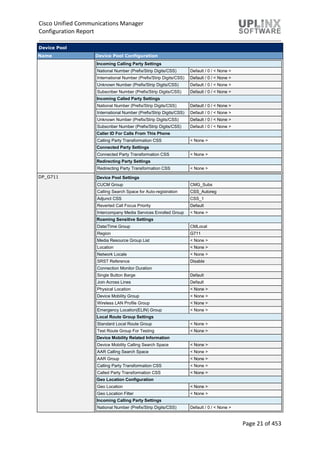
DP_G711 Device Pool Settings
CUCM Group CMG_Subs
Calling Search Space for Auto-registration CSS_Autoreg
Adjunct CSS CSS_1
Reverted Call Focus Priority Default
Intercompany Media Services Enrolled Group < None >
Roaming Sensitive Settings
Date/Time Group CMLocal
Region G711
Media Resource Group List < None >
Location < None >
Network Locale < None >
SRST Reference Disable
Connection Monitor Duration
Single Button Barge Default
Join Across Lines Default
Physical Location < None >
Device Mobility Group < None >
Wireless LAN Profile Group < None >
Emergency Location(ELIN) Group < None >
Local Route Group Settings
Standard Local Route Group < None >
Test Route Group For Testing < None >
Device Mobility Related Information
Device Mobility Calling Search Space < None >
AAR Calling Search Space < None >
AAR Group < None >
Calling Party Transformation CSS < None >
Called Party Transformation CSS < None >
Geo Location Configuration
Geo Location < None >
Geo Location Filter < None >
Incoming Calling Party Settings
National Number (Prefix/Strip Digits/CSS) Default / 0 / < None >
Cisco Unified Communications Manager
Configuration Report
Page 22 of 453
Device Pool
Name Device Pool Configuration
International Number (Prefix/Strip Digits/CSS) Default / 0 / < None >
Unknown Number (Prefix/Strip Digits/CSS) Default / 0 / < None >
Subscriber Number (Prefix/Strip Digits/CSS) Default / 0 / < None >
Incoming Called Party Settings
National Number (Prefix/Strip Digits/CSS) Default / 0 / < None >
International Number (Prefix/Strip Digits/CSS) Default / 0 / < None >
Unknown Number (Prefix/Strip Digits/CSS) Default / 0 / < None >
Subscriber Number (Prefix/Strip Digits/CSS) Default / 0 / < None >
Caller ID For Calls From This Phone
Calling Party Transformation CSS < None >
Connected Party Settings
Connected Party Transformation CSS < None >
Redirecting Party Settings
Redirecting Party Transformation CSS < None >
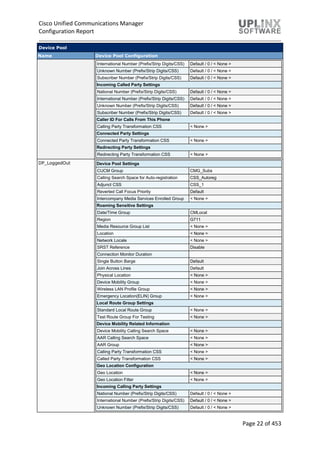
DP_LoggedOut Device Pool Settings
CUCM Group CMG_Subs
Calling Search Space for Auto-registration CSS_Autoreg
Adjunct CSS CSS_1
Reverted Call Focus Priority Default
Intercompany Media Services Enrolled Group < None >
Roaming Sensitive Settings
Date/Time Group CMLocal
Region G711
Media Resource Group List < None >
Location < None >
Network Locale < None >
SRST Reference Disable
Connection Monitor Duration
Single Button Barge Default
Join Across Lines Default
Physical Location < None >
Device Mobility Group < None >
Wireless LAN Profile Group < None >
Emergency Location(ELIN) Group < None >
Local Route Group Settings
Standard Local Route Group < None >
Test Route Group For Testing < None >
Device Mobility Related Information
Device Mobility Calling Search Space < None >
AAR Calling Search Space < None >
AAR Group < None >
Calling Party Transformation CSS < None >
Called Party Transformation CSS < None >
Geo Location Configuration
Geo Location < None >
Geo Location Filter < None >
Incoming Calling Party Settings
National Number (Prefix/Strip Digits/CSS) Default / 0 / < None >
International Number (Prefix/Strip Digits/CSS) Default / 0 / < None >
Unknown Number (Prefix/Strip Digits/CSS) Default / 0 / < None >
Cisco Unified Communications Manager
Configuration Report
Page 23 of 453
Device Pool
Name Device Pool Configuration
Subscriber Number (Prefix/Strip Digits/CSS) Default / 0 / < None >
Incoming Called Party Settings
National Number (Prefix/Strip Digits/CSS) Default / 0 / < None >
International Number (Prefix/Strip Digits/CSS) Default / 0 / < None >
Unknown Number (Prefix/Strip Digits/CSS) Default / 0 / < None >
Subscriber Number (Prefix/Strip Digits/CSS) Default / 0 / < None >
Caller ID For Calls From This Phone
Calling Party Transformation CSS < None >
Connected Party Settings
Connected Party Transformation CSS < None >
Redirecting Party Settings
Redirecting Party Transformation CSS < None >
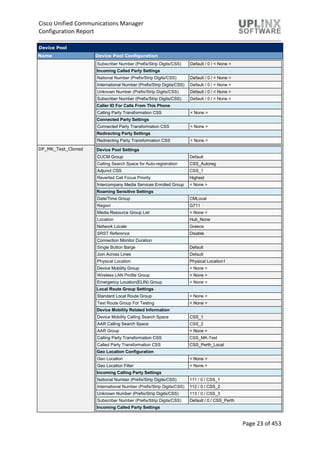
DP_MK_Test_Cloned Device Pool Settings
CUCM Group Default
Calling Search Space for Auto-registration CSS_Autoreg
Adjunct CSS CSS_1
Reverted Call Focus Priority Highest
Intercompany Media Services Enrolled Group < None >
Roaming Sensitive Settings
Date/Time Group CMLocal
Region G711
Media Resource Group List < None >
Location Hub_None
Network Locale Greece
SRST Reference Disable
Connection Monitor Duration
Single Button Barge Default
Join Across Lines Default
Physical Location Physical Location1
Device Mobility Group < None >
Wireless LAN Profile Group < None >
Emergency Location(ELIN) Group < None >
Local Route Group Settings
Standard Local Route Group < None >
Test Route Group For Testing < None >
Device Mobility Related Information
Device Mobility Calling Search Space CSS_1
AAR Calling Search Space CSS_2
AAR Group < None >
Calling Party Transformation CSS CSS_MK-Test
Called Party Transformation CSS CSS_Perth_Local
Geo Location Configuration
Geo Location < None >
Geo Location Filter < None >
Incoming Calling Party Settings
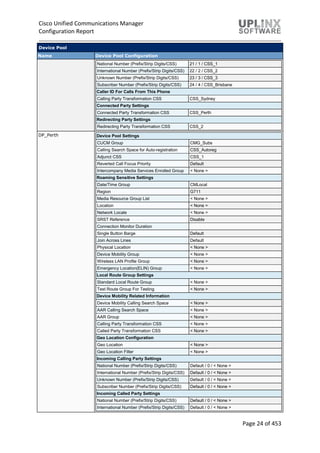
National Number (Prefix/Strip Digits/CSS) 111 / 0 / CSS_1
International Number (Prefix/Strip Digits/CSS) 112 / 0 / CSS_2
Unknown Number (Prefix/Strip Digits/CSS) 113 / 0 / CSS_3
Subscriber Number (Prefix/Strip Digits/CSS) Default / 0 / CSS_Perth
Incoming Called Party Settings
Cisco Unified Communications Manager
Configuration Report
Page 24 of 453
Device Pool
Name Device Pool Configuration
National Number (Prefix/Strip Digits/CSS) 21 / 1 / CSS_1
International Number (Prefix/Strip Digits/CSS) 22 / 2 / CSS_2
Unknown Number (Prefix/Strip Digits/CSS) 23 / 3 / CSS_3
Subscriber Number (Prefix/Strip Digits/CSS) 24 / 4 / CSS_Brisbane
Caller ID For Calls From This Phone
Calling Party Transformation CSS CSS_Sydney
Connected Party Settings
Connected Party Transformation CSS CSS_Perth
Redirecting Party Settings
Redirecting Party Transformation CSS CSS_2
DP_Perth Device Pool Settings
CUCM Group CMG_Subs
Calling Search Space for Auto-registration CSS_Autoreg
Adjunct CSS CSS_1
Reverted Call Focus Priority Default
Intercompany Media Services Enrolled Group < None >
Roaming Sensitive Settings
Date/Time Group CMLocal
Region G711
Media Resource Group List < None >
Location < None >
Network Locale < None >
SRST Reference Disable
Connection Monitor Duration
Single Button Barge Default
Join Across Lines Default
Physical Location < None >
Device Mobility Group < None >
Wireless LAN Profile Group < None >
Emergency Location(ELIN) Group < None >
Local Route Group Settings
Standard Local Route Group < None >
Test Route Group For Testing < None >
Device Mobility Related Information
Device Mobility Calling Search Space < None >
AAR Calling Search Space < None >
AAR Group < None >
Calling Party Transformation CSS < None >
Called Party Transformation CSS < None >
Geo Location Configuration
Geo Location < None >
Geo Location Filter < None >
Incoming Calling Party Settings
National Number (Prefix/Strip Digits/CSS) Default / 0 / < None >
International Number (Prefix/Strip Digits/CSS) Default / 0 / < None >
Unknown Number (Prefix/Strip Digits/CSS) Default / 0 / < None >
Subscriber Number (Prefix/Strip Digits/CSS) Default / 0 / < None >
Incoming Called Party Settings
National Number (Prefix/Strip Digits/CSS) Default / 0 / < None >
International Number (Prefix/Strip Digits/CSS) Default / 0 / < None >
Cisco Unified Communications Manager
Configuration Report
Page 25 of 453
Device Pool
Name Device Pool Configuration
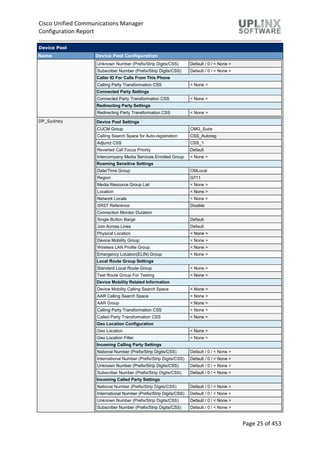
Unknown Number (Prefix/Strip Digits/CSS) Default / 0 / < None >
Subscriber Number (Prefix/Strip Digits/CSS) Default / 0 / < None >
Caller ID For Calls From This Phone
Calling Party Transformation CSS < None >
Connected Party Settings
Connected Party Transformation CSS < None >
Redirecting Party Settings
Redirecting Party Transformation CSS < None >
DP_Sydney Device Pool Settings
CUCM Group CMG_Subs
Calling Search Space for Auto-registration CSS_Autoreg
Adjunct CSS CSS_1
Reverted Call Focus Priority Default
Intercompany Media Services Enrolled Group < None >
Roaming Sensitive Settings
Date/Time Group CMLocal
Region G711
Media Resource Group List < None >
Location < None >
Network Locale < None >
SRST Reference Disable
Connection Monitor Duration
Single Button Barge Default
Join Across Lines Default
Physical Location < None >
Device Mobility Group < None >
Wireless LAN Profile Group < None >
Emergency Location(ELIN) Group < None >
Local Route Group Settings
Standard Local Route Group < None >
Test Route Group For Testing < None >
Device Mobility Related Information
Device Mobility Calling Search Space < None >
AAR Calling Search Space < None >
AAR Group < None >
Calling Party Transformation CSS < None >
Called Party Transformation CSS < None >
Geo Location Configuration
Geo Location < None >
Geo Location Filter < None >
Incoming Calling Party Settings
National Number (Prefix/Strip Digits/CSS) Default / 0 / < None >
International Number (Prefix/Strip Digits/CSS) Default / 0 / < None >
Unknown Number (Prefix/Strip Digits/CSS) Default / 0 / < None >
Subscriber Number (Prefix/Strip Digits/CSS) Default / 0 / < None >
Incoming Called Party Settings
National Number (Prefix/Strip Digits/CSS) Default / 0 / < None >
International Number (Prefix/Strip Digits/CSS) Default / 0 / < None >
Unknown Number (Prefix/Strip Digits/CSS) Default / 0 / < None >
Subscriber Number (Prefix/Strip Digits/CSS) Default / 0 / < None >
Cisco Unified Communications Manager
Configuration Report
Page 26 of 453
Device Pool
Name Device Pool Configuration
Caller ID For Calls From This Phone
Calling Party Transformation CSS < None >
Connected Party Settings
Connected Party Transformation CSS < None >
Redirecting Party Settings
Redirecting Party Transformation CSS < None >
DP_Test Device Pool Settings
CUCM Group CMG_Subs
Calling Search Space for Auto-registration CSS_Autoreg
Adjunct CSS CSS_1
Reverted Call Focus Priority Highest
Intercompany Media Services Enrolled Group < None >
Roaming Sensitive Settings
Date/Time Group CMLocal
Region G711
Media Resource Group List MRGL1
Location Phantom
Network Locale Denmark
SRST Reference Disable
Connection Monitor Duration
Single Button Barge Barge
Join Across Lines Default
Physical Location LocalArea
Device Mobility Group Device Mobility Group
Wireless LAN Profile Group WifiLANProfGroup01
Emergency Location(ELIN) Group < None >
Local Route Group Settings
Standard Local Route Group RouteGroupTest
Test Route Group For Testing RouteGroupTest
Device Mobility Related Information
Device Mobility Calling Search Space CSS_1
AAR Calling Search Space CSS_2
AAR Group < None >
Calling Party Transformation CSS CSS_Brisbane
Called Party Transformation CSS CSS_Brisbane_Local
Geo Location Configuration
Geo Location Local Town
Geo Location Filter Country
Incoming Calling Party Settings
National Number (Prefix/Strip Digits/CSS) 111 / 0 / CSS_1
International Number (Prefix/Strip Digits/CSS) 112 / 0 / CSS_2
Unknown Number (Prefix/Strip Digits/CSS) 113 / 0 / CSS_3
Subscriber Number (Prefix/Strip Digits/CSS) 114 / 0 / CSS_Brisbane
Incoming Called Party Settings
National Number (Prefix/Strip Digits/CSS) 21 / 1 / CSS_1
International Number (Prefix/Strip Digits/CSS) 22 / 2 / CSS_2
Unknown Number (Prefix/Strip Digits/CSS) 23 / 3 / CSS_3
Subscriber Number (Prefix/Strip Digits/CSS) 24 / 4 / CSS_Brisbane
Caller ID For Calls From This Phone
Calling Party Transformation CSS CSS_MK-Test
Cisco Unified Communications Manager
Configuration Report
Page 27 of 453
Device Pool
Name Device Pool Configuration
Connected Party Settings
Connected Party Transformation CSS CSS_MK-Test
Redirecting Party Settings
Redirecting Party Transformation CSS CSS_Perth
Default Device Pool Settings
CUCM Group Default
Calling Search Space for Auto-registration < None >
Adjunct CSS < None >
Reverted Call Focus Priority Default
Intercompany Media Services Enrolled Group < None >
Roaming Sensitive Settings
Date/Time Group CMLocal
Region Default
Media Resource Group List < None >
Location < None >
Network Locale < None >
SRST Reference Disable
Connection Monitor Duration
Single Button Barge Default
Join Across Lines Default
Physical Location < None >
Device Mobility Group < None >
Wireless LAN Profile Group < None >
Emergency Location(ELIN) Group < None >
Local Route Group Settings
Standard Local Route Group < None >
Test Route Group For Testing < None >
Device Mobility Related Information
Device Mobility Calling Search Space < None >
AAR Calling Search Space < None >
AAR Group < None >
Calling Party Transformation CSS < None >
Called Party Transformation CSS < None >
Geo Location Configuration
Geo Location < None >
Geo Location Filter < None >
Incoming Calling Party Settings
National Number (Prefix/Strip Digits/CSS) Default / 0 / < None >
International Number (Prefix/Strip Digits/CSS) Default / 0 / < None >
Unknown Number (Prefix/Strip Digits/CSS) Default / 0 / < None >
Subscriber Number (Prefix/Strip Digits/CSS) Default / 0 / < None >
Incoming Called Party Settings
National Number (Prefix/Strip Digits/CSS) Default / 0 / < None >
International Number (Prefix/Strip Digits/CSS) Default / 0 / < None >
Unknown Number (Prefix/Strip Digits/CSS) Default / 0 / < None >
Subscriber Number (Prefix/Strip Digits/CSS) Default / 0 / < None >
Caller ID For Calls From This Phone
Calling Party Transformation CSS < None >
Connected Party Settings
Connected Party Transformation CSS < None >
Cisco Unified Communications Manager
Configuration Report
Page 28 of 453
Device Pool
Name Device Pool Configuration
Redirecting Party Settings
Redirecting Party Transformation CSS < None >
INFORMACAST_DP Device Pool Settings
CUCM Group CMG_Subs
Calling Search Space for Auto-registration CSS_Autoreg
Adjunct CSS CSS_1
Reverted Call Focus Priority Default
Intercompany Media Services Enrolled Group < None >
Roaming Sensitive Settings
Date/Time Group CMLocal
Region INFORMACAST_REGION
Media Resource Group List < None >
Location < None >
Network Locale < None >
SRST Reference Disable
Connection Monitor Duration
Single Button Barge Default
Join Across Lines Default
Physical Location < None >
Device Mobility Group < None >
Wireless LAN Profile Group < None >
Emergency Location(ELIN) Group < None >
Local Route Group Settings
Standard Local Route Group < None >
Test Route Group For Testing < None >
Device Mobility Related Information
Device Mobility Calling Search Space < None >
AAR Calling Search Space < None >
AAR Group < None >
Calling Party Transformation CSS < None >
Called Party Transformation CSS < None >
Geo Location Configuration
Geo Location < None >
Geo Location Filter < None >
Incoming Calling Party Settings
National Number (Prefix/Strip Digits/CSS) Default / 0 / < None >
International Number (Prefix/Strip Digits/CSS) Default / 0 / < None >
Unknown Number (Prefix/Strip Digits/CSS) Default / 0 / < None >
Subscriber Number (Prefix/Strip Digits/CSS) Default / 0 / < None >
Incoming Called Party Settings
National Number (Prefix/Strip Digits/CSS) Default / 0 / < None >
International Number (Prefix/Strip Digits/CSS) Default / 0 / < None >
Unknown Number (Prefix/Strip Digits/CSS) Default / 0 / < None >
Subscriber Number (Prefix/Strip Digits/CSS) Default / 0 / < None >
Caller ID For Calls From This Phone
Calling Party Transformation CSS < None >
Connected Party Settings
Connected Party Transformation CSS < None >
Redirecting Party Settings
Redirecting Party Transformation CSS < None >
Cisco Unified Communications Manager
Configuration Report
Page 29 of 453
2.11 Device Mobility
The Device Mobility feature dynamically changes important location settings, such as calling search
space, region, date/time group, and SRST reference, for roaming devices. Cisco Unified
Communications Manager uses device pool settings to implement new parameters when the phone
roams away from its home location. Administrators no longer need to reconfigure location settings
when a phone changes location.
The dynamically reconfigured location settings ensure that voice quality and allocation of resources
are appropriate for the new phone location:
 When a mobile user moves to another location, call admission control (CAC) can ensure
video and audio quality with the appropriate bandwidth allocations.
 When a mobile user makes a PSTN call, the phone can access the local gateway instead of
the home gateway.
 When a mobile user calls the home location, Cisco Unified Communications Manager can
assign the appropriate codec for the region.
2.11.1 Device Mobility Group
Device mobility groups support the device mobility feature. Device mobility groups represent the
highest level geographic entities in your network. Depending upon the network size and scope, your
device mobility groups could represent countries, regions, states or provinces, cities, or other
entities. For example, an enterprise with a worldwide network might choose device mobility groups
that represent individual countries, whereas an enterprise with a national or regional network might
define device mobility groups that represent states, provinces, or cities.
Device Mobility Group
Name Description
Device Mobility Group Test Device Mobility Group
2.11.2 Device Mobility Info
The Device Mobility Info window specifies the subnets and device pools that are used for device
mobility. When a phone registers with Cisco Unified Communications Manager, the system
compares the IP address of the device to device mobility subnets that are specified in the Device
Mobility Info window and associated with one of the device pools.
The matching subnet becomes the device's home subnet for the purpose of device mobility.
Device Mobility Info
Name IPv4 Subnet/Mask IPv6 Subnet/Mask Selected Device Pools
DeviceMobility Info test 10.5.1.0/24 /0 Default
DP_2
DP_Test
DP_Brisbane
DP_LoggedOut
DP_3
INFORMACAST_DP
DP_G711
DP_Perth
DP_AutoReg
DP_1
DP_Sydney
2.12 DHCP
Dynamic Host Configuration Protocol (DHCP) server enables Cisco Unified IP Phones, connected to
either the customer's data or voice Ethernet network, to dynamically obtain their IP addresses and
configuration information. DHCP uses Domain Name System (DNS) to resolve host names both
within and outside the cluster.
This section contains:
Cisco Unified Communications Manager
Configuration Report
Page 30 of 453
 DHCP Server
 DHCP Subnet
2.12.1 DHCP Server
The following Dynamic Host Configuration Protocol (DHCP) servers are configured:
DHCP Server
Host Server Info
10.5.1.120 DHCP Server Information
Primary DNS IPv4 Address 194.158.74.1
Secondary DNS IPv4 Address 194.158.74.2
Primary TFTP Server IPv4 Address(Option 150) 10.5.1.120
Secondary TFTP Server IPv4 Address(Option 150)
Bootstrap Server IPv4 Address
Domain Name
TFTP Server Name(Option 66)
ARP Cache Timeout(sec) 0
IP Address Lease Time(sec) 0
Renewal(T1) Time(sec) 0
Rebinding(T2) Time(sec) 0
2.12.2 DHCP Subnet
The following Dynamic Host Configuration Protocol (DHCP) subnets are configured:
DHCP Subnet
Subnet DHCP Server Info
10.5.1.110 10.5.1.120 DHCP Subnet Information
Subnet IPv4 Address 10.5.1.110
Primary Start IPv4 Address 10.5.1.60
Primary End IPv4 Address 10.5.1.250
Secondary Start IPv4 Address
Secondary End IPv4 Address
Primary Router IPv4 Address
Secondary Router IPv4 Address
IPv4 Subnet Mask 255.255.255.0
Domain Name uplinx.com
Primary DNS IPv4 Address
Secondary DNS IPv4 Address
TFTP Server Name(Option 66) 10.5.1.120
Primary TFTP Server IPv4
Address(Option 150)
Secondary TFTP Server IPv4
Address(Option 150)
Bootstrap Server IPv4 Address
ARP Cache Timeout(sec) 0
IP Address Lease Time(sec) 0
Renewal(T1) Time(sec) 0
Rebinding(T2) Time(sec) 0
2.13 LDAP
Directory configuration for synchronization and authentication includes 5 objects:
 LDAP System
Cisco Unified Communications Manager
Configuration Report
Page 31 of 453
 LDAP Directory
 LDAP Authentication
 LDAP Custom Filter (CUCM 8.0 and later)
 LDAP Search (CUCM 11.5 and later)
The Cisco DirSync service ensures that the Cisco Unified Communications Manager database
stores all user information. If you use an integrated corporate directory, for example Microsoft Active
Directory or Netscape/iPlanet Directory, with Cisco Unified Communications Manager, the Cisco
DirSync service migrates the user data to the Cisco Unified Communications Manager database.
The Cisco DirSync service does not synchronize the passwords from the corporate directory.
LDAP authentication can be only used if synchronization with the customer LDAP directory is
enabled and will then forward authentication requests to the LDAP. Passwords are never synced to
the local database.
2.13.1 LDAP System
The LDAP system object allows to enable LDAP synchronization and to set up the LDAP server type
and the LDAP attribute name for the user ID.
LDAP System
Name Value
Enable Synchronizing from LDAP Server Y
LDAP Server Type Microsoft Active Directory
LDAP Attribute for User ID sAMAccountName
2.13.2 LDAP Directory
Synchronization of Cisco Unified Communications Manager (CUCM) with a corporate LDAP
directory allows reuse of user data stored in the LDAP directory and allows the corporate LDAP
directory to serve as the central repository for that information. Cisco Unified Communications
Manager (CUCM) has an integrated database for storing user data and a web interface within Cisco
Unified Communications Manager (CUCM) Administration for creating and managing user data in
that database. When synchronization is enabled, that local database is still used, but the Cisco
Unified Communications Manager (CUCM) facility to create user accounts becomes disabled.
Management of user accounts is then accomplished through the interface of the LDAP directory.
The user account information is imported from the LDAP directory into the database located on the
Cisco Unified Communications Manager (CUCM) publisher server. Information that is imported from
the LDAP directory may not be changed by Cisco Unified Communications Manager (CUCM).
Additional user information specific to the Cisco Unified Communications Manager (CUCM)
implementation is managed by Cisco Unified Communications Manager (CUCM) and stored only
within its local database. For example, device-to-user associations, speed dials, and user PINs are
data that are managed by Cisco Unified Communications Manager (CUCM), and they do not exist in
the corporate LDAP directory. The user data is then propagated from the Cisco Unified
Communications Manager (CUCM) publisher server to the subscribers via the built-in database
synchronization.
You can make changes to LDAP Directory information and LDAP Authentication settings only if
synchronization from the customer LDAP directory is enabled in the Cisco Unified Communications
Manager Administration LDAP System.
LDAP Directory
Name Info
LDAP2013 LDAP Directory Information
LDAP Manager
Distinguished Name
CN=Administrator,CN=Users,DC=lab,DC=test
LDAP User Search
Base
DC=lab,DC=test
LDAP Custom Filter for
Users
< None >
Cisco Unified Communications Manager
Configuration Report
Page 32 of 453
LDAP Directory
Name Info
Synchronize Users Only
LDAP Custom Filter for
Groups
< None >
LDAP Directory Synchronization Schedule
Perform Sync Just
Once
N
Perform a Re-sync
Every
6 HOUR
Next Re-sync Time
(YYYY-MM-DD hh:mm)
2019-10-03 04:00
Standard User Fields To Be Synchronized
User Fields CUCM User Fields LDAP Attribute
UserId sAMAccountName
FirstName givenName
MiddleName middleName
LastName sn
Manager manager
Department department
TelephoneNumber telephoneNumber
Mailid mail
Title title
HomePhone homephone
Mobile mobile
Pager pager
DirectoryURI msRTCSIP-primaryuseraddress
DisplayName displayName
Custom User Fields To Be Synchronized
User Fields < No records found >
Group Information
Access Control Groups
Feature Group
Template
Apply Mask N
Mask < None >
Assign New Line N
Pool list Values < No records found >
LDAP Server Information
Server Info Host Name/IP for Server LDAP Port Use TLS
10.5.1.166 389 N
2.13.3 LDAP Authentication
The LDAP authentication feature enables Cisco Unified Communications Manager (CUCM) to
authenticate end user passwords against a corporate LDAP directory instead of using the embedded
database. This authentication is accomplished with an LDAPv3 connection established between the
IMS module within Cisco Unified Communications Manager (CUCM) and a corporate directory
server.
You can make changes to LDAP Directory information and LDAP Authentication settings only if
synchronization from the customer LDAP directory is enabled in the Cisco Unified Communications
Manager Administration LDAP System.
Cisco Unified Communications Manager
Configuration Report
Page 33 of 453
The following statements describe Cisco Unified Communications Manager (CUCM)'s behavior
when authentication is enabled:
 End user passwords are authenticated against the corporate directory.
 Application user passwords are authenticated against the Cisco Unified Communications
Manager (CUCM) database.
 End user PINs are authenticated against the Cisco Unified Communications Manager
(CUCM) database.
LDAP Authentication
LDAP Authentication for End Users
Use LDAP
Authentication
for End Users
Y
LDAP
Manager
Distinguished
Name
CN=Administrator,CN=Users,DC=lab,DC=test
LDAP User
Search Base
DC=lab,DC=test
LDAP Server Information
Server Info Host Name or IP Address for Server LDAP Port Use TLS
10.5.1.166 389 N
2.13.4 LDAP Custom Filter
The LDAP filter filters the results of LDAP searches when Cisco DirSync is in use. LDAP users that
match the filter get imported into the Cisco Unified Communications Manager database, while LDAP
users that do not match the filter do not get imported.
The filter must comply with the regular LDAP search filter standards specified in RFC 4515. Enclose
the filter text within parentheses (). It is recommended to verify the LDAP search filter against the
LDAP directory-searchbase by using the ldapsearch command.
You apply LDAP filters to LDAP directories. Before you can synchronize the LDAP directory, you
must activate the Cisco DirSync service.
The following LDAP filters are defined:
LDAP Custom Filter
Filter
Name
Filter
TestFilter (&(objectclass=user)(!(objectclass=Computer))(!(UserAccountControl:1.2.840.113556.1.4.80
3:=2)))
2.13.5 LDAP Search
LDAP Search allows the configuration of LDAP search filters for users and groups.
LDAP Search
LDAP Search for enterprise users through UDS
Enable user search to Enterprise Directory Server N
LDAP Manager Distinguished Name
LDAP User Search Base 1
LDAP User Search Base 2
LDAP User Search Base 3
LDAP Custom Filter for Users < None >
Recursive Search on All Search Bases Y
UDS Tag to LDAP Attribute Mapping
User Fields < No records found >
Cisco Unified Communications Manager
Configuration Report
Page 34 of 453
UC Service Directory Information
Primary Server < None >
Secondary Server < None >
Tertiary Server < None >
2.14 SAML Single Sign-On
The single sign on feature allows end users to log into a Windows client machine on a Windows
domain, and to then use certain Cisco Unified Communications Manager applications without having
to sign on again.
SAML Single Sign-On
Name SSO Status Description
10.5.1.120 Disable
10.5.1.122 Disable
2.15 Cross-Origin Resource Sharing (CORS)
Cross-Origin Resource Sharing (CORS) is a mechanism to allow code running in a browser
(JavaScript for example) to make requests to a domain other than the one from where it originated.
The following CORS domains are configured:
Cross-Origin Resource Sharing (CORS)
Domain Description Type
https://domain1.lab.test Desc https://domain1.lab.test Read-Only
https://domain2.lab.test Desc https://domain2.lab.test Full-Access
2.16 Location Information
Enhanced Location Call Admission Control (CAC) is a model-based CAC mechanism. The
administrator creates a model of the network and how the network infrastructure handles the media.
Through the Cisco Unified Communications Manager interface the administrator configures the
Enhanced Location CAC mechanism based on the network model.
The following chapters describe the items in the Cisco Unified Communications Manager
Administration 'Location Information' menu:
 Location
 Location Bandwidth Manager Group
 Location Bandwidth Manager Hub Group
2.16.1 Location
Locations are used to implement call admission control in a centralized call-processing system. Call
admission control enables you to regulate audio quality and video availability by limiting the amount
of bandwidth that is available for audio and video calls over links between the locations.
If you do not use call admission control to limit the audio and video bandwidth on an IP WAN link, an
unlimited number of calls can be active on that link at the same time. This situation can cause the
audio quality of each audio call and the video quality of each video call to degrade as the link
becomes oversubscribed.
In a centralized call-processing system, a single Cisco Unified Communications Manager (CUCM)
cluster provides call processing for all locations on the IP telephony network. The Cisco Unified
Communications Manager (CUCM) cluster usually resides at the main (or central) location, along
with other devices such as phones and gateways. The remote locations contain additional devices,
but no Cisco Unified Communications Manager (CUCM). IP WAN links connect the remote locations
to the main location.
Location
Cisco Unified Communications Manager
Configuration Report
Page 35 of 453
Name Bandwidth
Between
Adjacent
Locations
Audio
Bandwidth
[kbps]
Video
Bandwidth
[kbps]
Immersive
Video
Bandwidth
[kbps]
Location RSVP Settings
Hub_None
(S)
< No records
found >
Unlimited 128 Unlimited Location RSVP Setting
Hub_None No Reservation
Phantom No Reservation
NOTE: Location(s) not
displayed
Use System
Default
Phantom
(S)
< No records
found >
Unlimited Unlimited Unlimited Location RSVP Setting
Phantom No Reservation
Hub_None No Reservation
NOTE: Location(s) not
displayed
Use System
Default
Shadow
(S)
< No records
found >
Unlimited Unlimited Unlimited Location RSVP Setting
Phantom No Reservation
Hub_None No Reservation
NOTE: Location(s) not
displayed
Use System
Default
2.16.2 Location Bandwidth Manager Group
The Location Bandwidth Manager Groups set the Location Bandwidth Manager (LBM) services that
each Cisco Callmanager service communicates with.
Each Cisco Callmanager service must communicate with an LBM service to determine the
availability of bandwidth for each call, and to deduct bandwidth for the duration of each call that is
admitted.
The LBM Group Page allows the Cisco Callmanger service to communicate with selected LBM
services, instead of communicating with the local LBM service.
Location Bandwidth Manager Group
Name Description Active Member Standby Member
BandwidthmanagergroupTest just a test bmg 10.5.1.120
2.16.3 Location Bandwidth Manager Intercluster Replication Group
Location Bandwidth Manager Hub Group configuration enables an LBM service to participate directly
in inter-cluster replication of configured and dynamic Location Bandwidth data. LBMs assigned an
LBM Hub Group discover each other through their common connections and form a fully-meshed
replication network. Other LBM services in a cluster with an LBM Hub participate indirectly in inter-
cluster replication through the LBM Hubs in their cluster.
Use the LBM Hub Group Page to configure the LBM Hub service to find a location in the remote
clusters to establish external communication
Location Bandwidth Manager Intercluster Replication Group
Name Descriptio
n
Server 1 Serve
r 2
Serve
r 3
LBM Services Assigned to Hub
Role
LBMInterclusterReplicGroupConfi
g01
LBM
Intercluste
r
Replication
Group test
10.5.255.25
4
10.5.1.120(hub, active)
(LBMInterclusterReplicGroupConfig
01)
Cisco Unified Communications Manager
Configuration Report
Page 36 of 453
2.17 Physical Location
Physical locations support the Device Mobility feature. Physical locations provide a means of
distinguishing the parameters that relate to a specific geographical location from other parameters.
For example, a media resources server may serve a specific office or campus within the enterprise.
When a device roams to another office or campus and reregisters with Cisco Unified
Communications Manager, you want to have the media resources server at the roaming location
serve the device. By defining the physical location according to availability of media services, you
can assure efficient and cost-effective reassignment of services as devices move from one physical
location to another. Depending upon the network structure and allocation of services, you may
define physical locations based upon a city, enterprise campus, or building.
Physical Location
Name Description
LocalArea
Australia
Physical Location1 Test Location
2.18 SRST
A survivable remote site telephony (SRST) reference comprises the gateway that can provide limited
Cisco Unified Communications Manager (CUCM) functionality when all other Cisco Unified
Communications Manager (CUCM) servers for a device are unreachable.
Typically assigned to device pools, SRST references determine the gateways where calling devices
search when they attempt to complete a call if Cisco Unified Communications Manager (CUCM) is
unavailable.
SRST
Name Port IP
Address
SIP Network/IP
Address
SIP
Port
SRST Certificate
Provider Port
SRST is
Secure
Disable 2000 5060 2445 N
Use Default
Gateway
2000 5060 2445 N
2.19 MLPP
The Multilevel Precedence and Preemption (MLPP) service allows properly validated users to place
priority calls. If necessary, users can preempt lower priority phone calls.
Precedence designates the priority level that is associated with a call. Preemption designates the
process of terminating lower precedence calls that are currently using the target device, so a call of
higher precedence can be extended to or through the device.
An authenticated user can preempt calls either to targeted stations or through fully subscribed time-
division-multiplexing (TDM) trunks. This capability assures high-ranking personnel of communication
to critical organizations and personnel during network stress situations, such as a national
emergency or degraded network situations.
This chapter covers the following topics:
 MLPP Domain
 Resource Priority Namespace Network Domains
 Resource Priority Namespace Lists
2.19.1 MLPP Domain
An MLPP domain specifies the collection of devices and resources that are associated with an
MLPP subscriber. When an MLPP subscriber that belongs to a particular domain places a
precedence call to another MLPP subscriber that belongs to the same domain, MLPP service can
Cisco Unified Communications Manager
Configuration Report
Page 37 of 453
preempt the existing call that the called MLPP subscriber is on for a higher precedence call. MLPP
service availability does not go across different domains.
MLPP Domain
Domain Name Domain ID
000000 000000
2.19.2 Resource Priority Namespace Network Domain
Cisco Unified Communications Manager uses Resource Priority Namespace Network Domains to
support Voice over Secured IP (VoSIP) networks by using Multilevel Precedence and Preemption
(MLPP) for Session Initiation Protocol (SIP) trunks.
MLPP, with configured Resource Priority domains, prioritizes SIP-signaled resources and enables
indications related to precedence and preempted calls. End users can establish secure calls when
the calls traverse SIP trunks.
Resource Priority Namespace Network Domain
Name Description Default
RPNNDITest Y
2.19.3 Resource Priority Namespace List
Cisco Unified Communications Manager uses Resource Priority Namespace Lists to configure a
default group of Resource Priority Namespace Network Domains to add to a SIP profile for validating
incoming Resource Priority Namespace Network Domains.
Resource Priority Namespace List
Name Description Selected
Resource
Priority
Namespaces
RPNList01 List of Resource Priority Namespaces RPNNDITest
2.20 Enterprise Parameters
Enterprise parameters provide default settings that apply to all devices and services in the same
cluster. (A cluster comprises a set of Cisco Unified Communications Managers that share the same
database.) When you install a new Cisco Unified Communications Manager, it uses the enterprise
parameters to set the initial values of its device defaults.
You cannot add or delete enterprise parameters, but you can update existing enterprise parameters.
Please note that not all parameters are listed as not all parameters can be retrieved.
Enterprise Parameters
Parameter Value
MaxUsers 160000
ClusterID StandAloneCluster
MaxNumberDeviceLevelTrace 12
EnableTraceCompression 0
DSCPForSCCPPhoneServices 0
DSCPForSCCPPhoneConfig 96
DSCPForCm2Dvce 96
ConnectionMonitorDuration 120
AutoRegistrationPhoneProtocol 0
AutoRegistrationLegacyMode F
PhoneTemplateSelection 1
BLFForCallLists 0
Cisco Unified Communications Manager
Configuration Report
Page 38 of 453
Enterprise Parameters
Parameter Value
AdvertiseG722Codec 1
PhonePersonalization 0
PhoneServiceDisplay 0
FeatureControlPolicy
WifiHotspotProfile
IMSInterOperatorId IMS Inter Operator Identification
URILookupPolicy 0
CCMAdminMaxItemsInList 250
CCMAdminMaxItemsInLookup 1000
CCMAdminEnableDependencyRecords T
AutoSelectDNOnAnyPartition 0
CCMUserOptionsPortalDefaultServer
CCMUserShowSpeedDialSettings T
CCMUserShowIPPhoneServicesSettings T
CCMUserShowRingSettings F
CCMUserShowMessageWaitingLampPolicy T
CCMUserShowHistorySettings T
CCMUserShowPersonalAddressBook T
CCMUserShowLineTextSettings F
CCMUserShowOnlineGuide T
CCMUserShowMobilityFeatures T
CCMUserShowDirectory T
CCMUserShowCalendarPreference T
CCMUserShowPhoneLocale T
CCMUserShowChangePassword T
CCMUserShowChangePin T
CCMUserShowCallForward 1
CCMUserShowVoicemailIVROption T
CCMUserShowConferencingScheduler T
CCMUserShowVideoConferencingScheduler 1
CCMUserShowDownload T
CCMUserDisplayName T
CCMUserShowPhonesReadyToActivate T
EndUserDirectoryURIPartitionAlias
CDRFlatFileInterval 1
DefaultNetworkLocale 64
DefaultUserLocale 1
MLPPDomainIdentifier c80cafe0-af65-43d6-a1f1-225ad998bd26
MLPPIndicationStatus Off
MLPPPreemptionSetting Disabled
PrecedenceAlternatePartyTimeout 30
UseStandardVMHandlingForPrecedenceCalls F
ConfidentialAccessLevelPolicy F
ConfidentialAccessLevelEnforcementLevel 0
ConfidentialAccessLevelValueForWarning 0
ConfidentialAccessLevelWarningMessageText
ConfidentialAccessLevelFailureMessageText CAL MISMATCH
ClusterSecurityMode 0
Cisco Unified Communications Manager
Configuration Report
Page 39 of 453
Enterprise Parameters
Parameter Value
ClusterSIPOAuthMode 0
LBMSecurityMode 0
CAPFPhonePort 3804
CAPFOperationDuration 10
EndpointEncryptionAlgorithms 0
TFTPFileSignatureAlgorithm 1
CacheControl T
AuthMethodForBrowserAccess 1
TLSCipherPreference 1
SRTPCipherSelection 0
HTTPSCipherSelection 1
TrustedServers
TerminateUserSession 1
CertificateValidityCheck 0
CertificateValidityCheckFrequency 24
RollBackToPreGrayback F
URLAuthentication http://10.5.1.120:8080/ccmcip/authenticate.jsp
URLDirectories http://10.5.1.120:8080/ccmcip/xmldirectory.jsp
URLIdle
URLIdleTime
URLInformation http://10.5.1.120:8080/ccmcip/GetTelecasterHelpText.js
p
URLMessages
URLProxy
URLServices http://10.5.1.120:8080/ccmcip/getservicesmenu.jsp
SecureAuthenticationURL
SecureDirectoryURL https://10.5.1.120:8443/ccmcip/xmldirectory.jsp
SecureUDSUsersAccessURL https://10.5.1.120:8443/cucm-uds/users
SecureIdleURL
SecureInformationURL https://10.5.1.120:8443/ccmcip/GetTelecasterHelpText.j
sp
SecureMessagesURL
SecureServicesURL https://10.5.1.120:8443/ccmcip/getservicesmenu.jsp
EnableAllUserSearch T
UserSearchLimit 64
NumberofDigitstoMatch 4
CCMPDSessionTimeout 86400
AllowedPerfmonQueriesPerMinute 50
AllowedRisQueriesPerMinute 15
PerfmonQueueLimit 100
MaximumPerfmonCountersPerSession 100
AllowedCdrGetFileQueriesPerMinute 10
AllowedCdrGetFileListQueriesPerMinute 20
FileCloseThreadFlag T
FileCloseThreadQueueWatermark 100
restrictOnUserGroupOverlap 1
restrictNonSuperUser T
userAssignmentMode 0
directoryGroupOperationsOnCiscoIMandPresence 0
Cisco Unified Communications Manager
Configuration Report
Page 40 of 453
Enterprise Parameters
Parameter Value
groupSizeToLimitPresencePacketsForEnterpriseGrou
ps
100
syncingModeForEnterpriseGroups 1
ServerPortNumber 8888
ClientPortNumber 8889
AAInstalledFlag F
IAQInstalledFlag F
OrganizationDomain
ClusterName
DoSProtectionFlag T
TLSHandshakeTimer 60
TLSResumptionTimer 3600
UnsupportedPickup
UserMustChangeCredentialBehavior
EnableIPV6 F
IPAddressingModePrefMedia 0
IPAddressingModePrefControl 0
AllowAutoConfigurationForPhones 1
AllowDuplicateAddressDetection 1
AcceptRedirectMessages 0
ReplyMulticastEchoRequest 0
RemoteSyslogServerName
RemoteSyslogServerName2
RemoteSyslogServerName3
RemoteSyslogServerName4
RemoteSyslogServerName5
RemoteSyslogSeverity 3
GRTSocketConnectTimeout 10
GRTSocketReadTimeout 60
isLogicalPartitioningEnabled F
isCustomLogicalPartitioningApplied F
defaultGeolocation Unspecified--
logicalPartitioningDefaultPolicy 2
logicalPartitioningDefaultFilter
EnableMgcpTraceLog 0
EnableCallTraceLog 1
MaxCallTraceLogFiles 2000
CallTraceLogFileSize 2
neverStartCallWithVideo F
DSCPValue None
RoutePlanReportMaxIndex 1500000
oauthTokenExpiryTimer 60
refreshTokenExpiryTimer 60
thirdpartyclient_redirecturi
SSOLoginBehaviorForIos 0
oAuthWithRefreshLoginFlow 0
UseSSOforRTMT 1
EnableDirectoryPartitionSearch 0
EnableUserSearchWithCustomer 1
Cisco Unified Communications Manager
Configuration Report
Page 41 of 453
Enterprise Parameters
Parameter Value
MaxServers 30
MaxPhones 80000
2.21 Enterprise Phone Configuration
The Enterprise Phone Configuration defines parameters that will apply to all phones that support
these parameters.
Parameters that you set in this window may also appear in the Common Phone profile window and
the Device Configuration window for various devices. If you set these same parameters in these
other windows too, the setting that takes precedence is determined in the following order: 1) Device
Configuration window settings, 2) Common Phone Profile window settings, 3) Enterprise Phone
Configuration window settings.
If the "Override Common Settings" box is not checked for a given setting, the corresponding
parameter setting does not take effect.
The following Enterprise Phone Configurations are configured:
Enterprise Phone Configuration
Parameter Name Parameter Value Override
Common
Settings
Disable USB Disabled N
Back USB Port Enabled N
Side USB Port Enabled N
Enable/Disable USB Classes Audio Class N
SDIO Disabled N
Bluetooth Enabled N
Bluetooth Profiles Handsfree N
Allow Bluetooth Contacts Import Enabled N
Allow Bluetooth Mobile Handsfree Mode Enabled N
Cisco Camera Disabled N
Console Access Disabled N
Enable Power Save Plus N
Enable Audible Alert Disabled N
Allow EnergyWise Overrides Disabled N
EnergyWise Domain 1 N
Phone On Time 00:00 N
Phone Off Time 24:00 N
Phone Off Idle Timeout 60 N
Days Display Not Active Sunday N
Display On Time 07:30 N
Display On Duration 10:30 N
Display Idle Timeout 01:00 N
Display On When Incoming Call Enabled N
Incoming Call Toast Timer 5 N
Enable Mute Feature Disabled N
Join And Direct Transfer Policy Same line, accross line enabled N
Medianet Statistics Interval 15 N
RTCP Disabled N
Enable Wideband Codecs Use System Default N
Video Calling Enabled N
Cisco Unified Communications Manager
Configuration Report
Page 42 of 453
Enterprise Phone Configuration
Parameter Name Parameter Value Override
Common
Settings
Wi-Fi Enabled N
Wi-Fi Hotspot Disabled N
PC Port Enabled N
Span to PC Port Disabled N
PC Voice VLAN Access Enabled N
PC Port Remote Configuration Disabled N
Switch Port Remote Configuration Disabled N
Automatic Port Synchronization Disabled N
Cisco Discovery Protocol (CDP): Switch Port Enabled N
Cisco Discovery Protocol (CDP): PC Port Enabled N
Link Layer Discovery Protocol - Media Endpoint
Discover (LLDP-MED): Switch Port
Enabled N
Link Layer Discovery Protocol (LLDP): PC Port Enabled N
LLDP Asset ID N
LLDP Power Priority Unknown N
Power Negotiation Enabled N
802.1x Authentication User Controlled N
FIPS Mode Disabled N
80-bit SRTCP Disabled N
Always On VPN Disabled N
Store VPN Password on Device Disabled N
Allow User-Defined VPN Profiles Enabled N
Require Screen Lock PIN N
Maximum Screen Lock Timeout 600 N
Enforce Screen Lock During Display-On Time Enabled N
Lock Device During Audio Call Disabled N
Kerberos Server N
Kerberos Realm N
TLS Resumption Timer 3600 N
User Credentials Persistent for Expressway Sign in Disabled N
Outbound Rollover Disabled N
Detect Unified CM Connection Failure Normal N
Time to Wait for Seamless Reconnect After TCP Drop or
Roaming (seconds)
5 N
Load Server N
IPv6 Load Server N
Peer Firmware Sharing Enabled N
Log Server N
HTTPS Server http and https Enabled
Web Access Disabled N
Settings Access Enabled N
Android Debug Bridge (ADB) Disabled N
Customer support upload URL N
Allow Applications from Unknown Sources Disabled N
Allow Applications from Android Market Disabled N
Allow Applications from Cisco AppHQ Disabled N
AppHQ Domain N
Enable Cisco UCM App Client Disabled N
Cisco Unified Communications Manager
Configuration Report
Page 43 of 453
Enterprise Phone Configuration
Parameter Name Parameter Value Override
Common
Settings
Company Photo Directory N
Voicemail Server (Primary) N
Voicemail Server (Backup) N
Presence and Chat Server (Primary) N
Presence and Chat Server Type Cisco WebEx Connect N
Presence and Chat Single Sign-On (SSO) Domain N
Device UI Profile Simple N
Multi-User Disabled N
Multi-User URL N
Email address for customer support N
PSTN Mode Disabled N
Revert to All Calls Disabled N
RTCP for Video Enabled N
Provide Dial Tone from Release Button Disabled N
Hide Video By Default Disabled N
VXC VPN Option Dual Tunnel N
VXC Challenge Challenge N
VXC-M Servers N
Record Call Log from Shared Line Disabled N
Show Call History for Selected Line Only Disabled N
Actionable Incoming Call Alert Disabled N
DF bit 0 N
Separate Audio and Video Mute Disabled N
Softkey Control Feature Control Policy N
Start Video Port N
Stop Video Port N
Lowest Alerting Line State Priority Disabled N
One Column Display for KEM Disabled N
Customer Support Use N
Energy Efficient Ethernet(EEE): PC Port Disabled N
Energy Efficient Ethernet(EEE): SW Port Disabled N
Interactive Connectivity Establishment (ICE)
ICE Enabled N
Default Candidate Type Host N
Server Reflexive Address Enabled N
Primary TURN Server Host Name or IP Address N
Secondary TURN Server Host Name or IP Address N
TURN Server Transport Type Auto N
TURN Server Username N
Instant Messaging
File Types to Block in File Transfer N
URLs to Block in File Transfer N
Desktop Client Settings
Automatically Start in Phone Control Disabled N
Automatically Control Tethered Desk Phone Disabled N
Extend and Connect Capability Enabled N
Display Contact Photos Enabled N
Cisco Unified Communications Manager
Configuration Report
Page 44 of 453
Enterprise Phone Configuration
Parameter Name Parameter Value Override
Common
Settings
Number Lookups on Directory Enabled N
Jabber For Windows Software Update Server URL N
Problem Report Server URL N
Analytics Collection Disabled N
Analytics Server URL N
Cisco Support Field N
WLAN SCEP Server N
WLAN Root CA Fingerprint (SHA256 or SHA1) N
Alternate phone book server type UDS N
Alternate phone book server address N
WLAN Authentication Attempts 2 N
WLAN Profile 1 Prompt Mode Enabled N
Line Mode Enhanced Line Mode N
2.22 Service Parameters
Service parameters provide default settings that apply to all devices and services in the same
cluster. A cluster comprises a set of Cisco Unified Communications Managers (CUCMs) that share
the same database. When you install a new Cisco Unified Communications Manager (CUCM), it
uses the enterprise parameters to set the initial values of its device defaults.
If a subscriber parameter is not equal to the publisher parameter, the subscriber value will appear in
red. If the value cannot be retrieved (for example the subscriber server is not active but configured in
the database, the subscriber value appears as error.
Please note that not all parameters are listed as not all parameters can be retrieved.
Service Parameters - Clusterwide Parameters (Parameters that apply to all servers)
Service Parameter Name Parameter Value
Cisco AMC Service Primary Collector a9027b7a-785f-47f0-b8a1-42b0b1e08da9
Cisco AMC Service Failover Collector
Cisco AMC Service Amc Collection Enabled T
Cisco AMC Service Amc Collection Polling
Rate
30
Cisco AMC Service Amc Link Service Sync
Up Period
60
Cisco AMC Service RMI Registry Port 1099
Cisco AMC Service RMI Object Port 1090
Cisco AMC Service Alert Mgr Enabled T
Cisco AMC Service Logger Enabled T
Cisco Bulk
Provisioning Service
Default BPS Job
Processing Option
1
Cisco Bulk
Provisioning Service
Default BPS Job
Processing Time
Cisco Bulk
Provisioning Service
Default BPS Throttling
Limit
1000
Cisco Bulk
Provisioning Service
BPS Log File Location /var/log/active/cm/log/bps/
Cisco Bulk
Provisioning Service
Stop BPS Job Processing F
Cisco CTIManager Application Heartbeat
Max Interval
3600
Cisco Unified Communications Manager
Configuration Report
Page 45 of 453
Service Parameters - Clusterwide Parameters (Parameters that apply to all servers)
Service Parameter Name Parameter Value
Cisco CTIManager Application Heartbeat
Min Interval
5
Cisco CTIManager Hunt Call Clear Delay
Timer
200
Cisco CTIManager Max SSO Token Size 8192
Cisco CTIManager Max Devices Per
Provider
2000
Cisco CTIManager Max Devices Per Node 800
Cisco CTIManager Require Public Key
Encryption
F
Cisco CTIManager Default IP Addr Mode 2
Cisco CTIManager DSCP For ICCP 96
Cisco CTIManager DSCP For CT I2 Apps 96
Cisco CTIManager Sdl Listening Port 8003
Cisco CTIManager Sdl Max Router Latency 20
Cisco CTIManager Sdl Max Un Handled
Exceptions
0
Cisco CallManager Call Diagnostics Enabled 0
Cisco CallManager Display FAC In CDR F
Cisco CallManager Show Member D Ninfinal
Called Party Number
F
Cisco CallManager Show Member DN Non
Maskinfinal Called Party
Number
F
Cisco CallManager CTI New Call Accept
Timeout
4
Cisco CallManager CTI Generate Digits
Interval
250
Cisco CallManager CTI Dial Digits Interval 250
Cisco CallManager CTI Await Further Digits F
Cisco CallManager CTI Wild Card DN As
Called Party
F
Cisco CallManager CTI Send Fake Ringback
On183 SDP
T
Cisco CallManager Disable Non Registered
SCCP Keep Alives
F
Cisco CallManager Call Forward Notification
All Lines
F
Cisco CallManager Retain Media On
Disconnect With PI For
Active Call
F
Cisco CallManager Station2nd Keepalive
Interval
60
Cisco CallManager Station Keepalive
Interval
30
Cisco CallManager Status Enq Poll Flag F
Cisco CallManager Strip Pound Called Party
Flag
T
Cisco CallManager Timer Dusting_sec 10
Cisco CallManager Timer T301_msec 180000
Cisco CallManager Timer T302_msec 15000
Cisco CallManager Timer T303_msec 4000
Cisco CallManager Timer T304_msec 30000
Cisco CallManager Timer T305_msec 30000
Cisco Unified Communications Manager
Configuration Report
Page 46 of 453
Service Parameters - Clusterwide Parameters (Parameters that apply to all servers)
Service Parameter Name Parameter Value
Cisco CallManager Timer T306_msec 30000
Cisco CallManager Timer T308_msec 4000
Cisco CallManager Timer T309_msec 90000
Cisco CallManager Timer T310_msec 60000
Cisco CallManager Timer T313_msec 4000
Cisco CallManager Timer T316_msec 120000
Cisco CallManager Timer T317_msec 100000
Cisco CallManager Timer T321_msec 30000
Cisco CallManager Timer T322_msec 4000
Cisco CallManager Tone On Hold Time 10
Cisco CallManager Unknown Caller Id
Cisco CallManager Unknown Caller Id Flag T
Cisco CallManager Unknown Caller Id Text
Cisco CallManager Call Classification 1
Cisco CallManager Always Display Orignal
Dialed Number
F
Cisco CallManager Name Display For
Original Dialed Number
When Translated
T
Cisco CallManager Always Use Pis With
Original Dialed Number
F
Cisco CallManager Out Of Bandwidth Cause
Value
34
Cisco CallManager Strip Plus For Outgoing
Calls Through Gateway
F
Cisco CallManager Fail Call If TRP
Allocation Fails
T
Cisco CallManager Allow Party ID Display If
P Iis NA
F
Cisco CallManager Transit Counter Enabled
For QSIG Trunks
F
Cisco CallManager Egress Facility IE Count 6
Cisco CallManager Enable Device
Mobilityfor Trunks
F
Cisco CallManager Alway Use Prime Line F
Cisco CallManager Alway Use Prime Line
For Voice Mail
F
Cisco CallManager Bib Enable 0
Cisco CallManager Device Mobility Mode 0
Cisco CallManager Display Device Mobility
Location
1
Cisco CallManager Timer For Auto Answer 1
Cisco CallManager Extension Display
On7910
F
Cisco CallManager Alternate Idle Phone
Auto Answer Behavior
F
Cisco CallManager Hold Type F
Cisco CallManager Line State Update
Enabled
T
Cisco CallManager Timer_ Offhook_ To_
First_ Digit_msec
15000
Cisco CallManager Override Auto Answer If
Disable Speaker Flag
T
Cisco Unified Communications Manager
Configuration Report
Page 47 of 453
Service Parameters - Clusterwide Parameters (Parameters that apply to all servers)
Service Parameter Name Parameter Value
Cisco CallManager Out Of Bandwidth Text Not Enough Bandwidth
Cisco CallManager Enter FAC Text Enter Authorization Code
Cisco CallManager Enter CMC Text Enter Client Matter Code
Cisco CallManager AAR Network
Congestion Re Routing
Text
Network Congestion. Rerouting.
Cisco CallManager Consecutive Ring Option 0
Cisco CallManager Transfer Onhook
Enabled
F
Cisco CallManager Device Ring Setting 5
Cisco CallManager Line Ring Setting 4
Cisco CallManager Call Pickup Ring Setting
Idle Station
2
Cisco CallManager Call Pickup Ring Setting
Busy Station
2
Cisco CallManager BLF Audible Alert
Setting Idle Station
0
Cisco CallManager BLF Audible Alert
Setting Busy Station
0
Cisco CallManager Privacy Setting T
Cisco CallManager Preserve Privacy Setting
On Held Calls
F
Cisco CallManager SIP Station Keepalive
Interval
120
Cisco CallManager SIP Station Realm ccmsipline
Cisco CallManager Hunt Group Logoff
Notification
None
Cisco CallManager Speed Dial Await
Further Digits
F
Cisco CallManager Display Cti RP Info Flag F
Cisco CallManager Display Original Cgpn
On Transfer From Vm
F
Cisco CallManager URI Dialing Display
Preference
1
Cisco CallManager Prefix Apply To 1
Cisco CallManager National Prefix
Cisco CallManager International Prefix
Cisco CallManager Subscriber Prefix
Cisco CallManager Unknown Prefix
Cisco CallManager Apply Incoming Prefix
To CD Rs
F
Cisco CallManager Insert Hyphens In12
Digit Numbers
F
Cisco CallManager Allow Call Waiting
During In Progress
Outbound Analog Call
T
Cisco CallManager Treat Foreign Domain
Calls As UR Iin Phone
Call History
F
Cisco CallManager Display External
Presentation Nameand
Number
F
Cisco CallManager Pause In Speed Dial
Inter Digit
Interval_msec
60
Cisco Unified Communications Manager
Configuration Report
Page 48 of 453
Service Parameters - Clusterwide Parameters (Parameters that apply to all servers)
Service Parameter Name Parameter Value
Cisco CallManager Display Hunt Pilot Name
Or DN When Alerting
T
Cisco CallManager Apply Transformations
On Remote Number
F
Cisco CallManager Asn1 Rose Encoding 0
Cisco CallManager Qsig Variant 0
Cisco CallManager Caller ID
Cisco CallManager Calling Name Not
Available Timeout
2000
Cisco CallManager Cgpn Screening
Indicator
4
Cisco CallManager Enable Outbound
Network Trunk Cgpn
Restriction
F
Cisco CallManager Change B Channel
Maintenance Status1
Cisco CallManager Change B Channel
Maintenance Status2
Cisco CallManager Change B Channel
Maintenance Status3
Cisco CallManager Change B Channel
Maintenance Status4
Cisco CallManager Change B Channel
Maintenance Status5
Cisco CallManager Clear Calls Due To
Incompatible Call State
F
Cisco CallManager Clear Calls When
Datalink Goes Down
T
Cisco CallManager Db MGCP Device
Timeout
5
Cisco CallManager Device Status Poll
Interval_msec
3000
Cisco CallManager Disable Alerting PI F
Cisco CallManager Discard Non Inband
Progress
F
Cisco CallManager Disable Resume From
MGCPFXS Shareline
T
Cisco CallManager Dt Silence Flag F
Cisco CallManager Enable Display IE In
Codeset6
F
Cisco CallManager Enable Pri Ni2 Service
Message Support
F
Cisco CallManager Flash Hook
Duration_msec
500
Cisco CallManager Gateway Poll Timeout 10
Cisco CallManager Location In PRI Progress
Indicator
16
Cisco CallManager Matching Cgpn With
Attendant Flag
F
Cisco CallManager MGCP Db Query Delay
Time_msec
1000
Cisco CallManager Mgcp Fxs Hangup
Timeout
3
Cisco CallManager MGCP Resp Timeout 30
Cisco CallManager MGCP Timeout 3
Cisco Unified Communications Manager
Configuration Report
Page 49 of 453
Service Parameters - Clusterwide Parameters (Parameters that apply to all servers)
Service Parameter Name Parameter Value
Cisco CallManager MGCP Retry Timeout
Handling
0
Cisco CallManager Numbering Plan Info 1
Cisco CallManager Optimize Media
Connection Time
T
Cisco CallManager Overlap Receiving For
Pri Flag
T
Cisco CallManager Outgoing Media Connect
Time For Pri
0
Cisco CallManager Port Release Timer 0
Cisco CallManager PR I4 ESSUUIE Device
Type
0
Cisco CallManager SMDI Call Delay Timer 0
Cisco CallManager Stable In4 Flag F
Cisco CallManager Optimize MGCP
Registration
T
Cisco CallManager Suppress Out Of Chans
Events
T
Cisco CallManager Timer T1 Frame_msec 2000
Cisco CallManager Convert Progress To
Disconnect
F
Cisco CallManager User User IE Status F
Cisco CallManager Convert European
Progress Messageto
Alerting
F
Cisco CallManager Enable Dms Pri Notify
Message From User To
Network
T
Cisco CallManager Audit Oos Channel
Timer
10
Cisco CallManager Enable Digit Reset
During Hook Flash
T
Cisco CallManager Incoming Calling Party
National Number Prefix
MGCP
Cisco CallManager Incoming Calling Party
International Number
Prefix MGCP
Cisco CallManager Incoming Calling Party
Subscriber Number
Prefix MGCP
Cisco CallManager Incoming Calling Party
Unknown Number Prefix
MGCP
Cisco CallManager Digital And Analog Ports
Enabled
T
Cisco CallManager Allow Layer1 Info For Pri
Bearer Capability
F
Cisco CallManager Accept Blind TCP
Connection
F
Cisco CallManager Allow TCP Keep Alives
For H323
T
Cisco CallManager BRQ Enabled F
Cisco CallManager Call Present6 Disconn
Flag
F
Cisco CallManager Enable H323 Quiet Clear F
Cisco Unified Communications Manager
Configuration Report
Page 50 of 453
Service Parameters - Clusterwide Parameters (Parameters that apply to all servers)
Service Parameter Name Parameter Value
Cisco CallManager Block Connected
Number IE
F
Cisco CallManager Process Inbound H245
Address In H225 Setup
F
Cisco CallManager Check Progress
Indicator Before
Establishing Media
F
Cisco CallManager Convert Progress To
Release Complete
F
Cisco CallManager H225 Block Setup
Destination
F
Cisco CallManager H225 DB Retry Timeout 0
Cisco CallManager H225 Device Connect At
Connect Time
0
Cisco CallManager H225 DTMF Duration 100
Cisco CallManager H225 Tsp Req Retry 2
Cisco CallManager Timer H225 ICT Call
Throttle
30
Cisco CallManager Timer H225 T301_msec 180000
Cisco CallManager Timer H225 T302_msec 15000
Cisco CallManager Timer H225 T303_msec 4000
Cisco CallManager Timer H225 T304_msec 30000
Cisco CallManager Timer H225 T305_msec 30000
Cisco CallManager Timer H225 T310_msec 60000
Cisco CallManager Timer H225 TCP 5
Cisco CallManager H245 TCS Timeout 10
Cisco CallManager H323 Cgpn Screening
Indicator
1
Cisco CallManager Fully Qualified DN For
H323
F
Cisco CallManager Tone On Connect F
Cisco CallManager Timeout Waiting For SD
Pwith Recv Mode_sec
3
Cisco CallManager Timer Ras ARQ 3
Cisco CallManager Timer Ras BRQ 3
Cisco CallManager Timer Ras DRQ 3
Cisco CallManager Timer Ras RRQ 3
Cisco CallManager Timer Ras URQ 3
Cisco CallManager Retry Count ARQ 2
Cisco CallManager Retry Count BRQ 2
Cisco CallManager Retry Count DRQ 2
Cisco CallManager Retry Count RRQ 2
Cisco CallManager Retry Count URQ 1
Cisco CallManager Send Product And
Version Id
F
Cisco CallManager Send CUCM Versionas
Version Idin H225 Setup
F
Cisco CallManager Timer Send
Progress_msec
3000
Cisco CallManager To Send H225 User Info
Msg
1
Cisco CallManager Timer T Status Enq
Poll_msec
10000
Cisco Unified Communications Manager
Configuration Report
Page 51 of 453
Service Parameters - Clusterwide Parameters (Parameters that apply to all servers)
Service Parameter Name Parameter Value
Cisco CallManager Device Name Of GK
Controlled Trunk With
Port1720
None
Cisco CallManager Host Name IP Address
Of GK With RAS Udp
Port1719
None
Cisco CallManager Fail Call If MTP
Allocation Fails
F
Cisco CallManager Overlap Receiving For
H323 Flag
F
Cisco CallManager Incoming Calling Party
National Number Prefix
H323
Cisco CallManager Incoming Calling Party
International Number
Prefix H323
Cisco CallManager Incoming Calling Party
Subscriber Number
Prefix H323
Cisco CallManager Incoming Calling Party
Unknown Number Prefix
H323
Cisco CallManager Incoming Called Party
National Num Prefix
H323
Cisco CallManager Incoming Called Party
International Num Prefix
H323
Cisco CallManager Incoming Called Party
Subscriber Num Prefix
H323
Cisco CallManager Incoming Called Party
Unknown Num Prefix
H323
Cisco CallManager Allocate Transcoder For
H323 To EO Call
F
Cisco CallManager SIP Interoperability
Enabled
T
Cisco CallManager Retry Count SIP Bye 10
Cisco CallManager Retry Count SIP Cancel 10
Cisco CallManager Retry Count SIP Invite 6
Cisco CallManager Retry Count SIPPRACK 6
Cisco CallManager Retry Count SIP Rel1 XX 10
Cisco CallManager Retry Count SIP Publish 6
Cisco CallManager Retry Count SIP
Response
6
Cisco CallManager Timer SIP
Connect_msec
500
Cisco CallManager Timer SIP
Disconnect_msec
500
Cisco CallManager Timer SIP Expires 180000
Cisco CallManager Timer SIPPRAC K_msec 500
Cisco CallManager Timer SIP Rel1 X
X_msec
500
Cisco CallManager Timer SIP Trying_msec 500
Cisco CallManager Timer SIP Publish_msec 500
Cisco Unified Communications Manager
Configuration Report
Page 52 of 453
Service Parameters - Clusterwide Parameters (Parameters that apply to all servers)
Service Parameter Name Parameter Value
Cisco CallManager SIP Minimum Session
Expires Value
1800
Cisco CallManager SIPSURI Handling 0
Cisco CallManager Timer SIP Statistics
Periodic Update
2
Cisco CallManager SIP Session Expires
Value
1800
Cisco CallManager SIP Call Preservation
Expires Value
0
Cisco CallManager SIP Trunk Tsp Req Retry 2
Cisco CallManager SIP Tcp Connection
Aging Timer
14
Cisco CallManager SIP Tcp Timer 5
Cisco CallManager SIP Station TCP Port
Throttle Rate Threshold
100
Cisco CallManager SIP Trunk TCP Port
Throttle Rate Threshold
500
Cisco CallManager SIP Station UDP Port
Throttle Rate Threshold
50
Cisco CallManager SIP Trunk UDP Port
Throttle Rate Threshold
200
Cisco CallManager SIP V150 Outbound SDP
Offer Filtering
0
Cisco CallManager SIP Max Incoming
Message Size
18000
Cisco CallManager SIP Max Incoming
Message Headers
100
Cisco CallManager Send SIP Multicast TT
Lin SDP
F
Cisco CallManager SIP Publish Timer 3600
Cisco CallManager SIP Publish Min Timer 60
Cisco CallManager SIP Publish Trunk
Cisco CallManager Incoming Calling Party
Unknown Number Prefix
SIP
Cisco CallManager Send181 Response For
Call Forward
F
Cisco CallManager Delay Sending181
Message Until18 X
T
Cisco CallManager Fail SIP Trunk Call If
MTP Allocation Fails
F
Cisco CallManager Enable Call Related
Refer Notify Subscribe
Logging
T
Cisco CallManager Get Port Response
Timer
2
Cisco CallManager SIP Registration
Authorization Enabled
T
Cisco CallManager Call Park Display Time 10
Cisco CallManager Caller ID Display Priority
Enabled
T
Cisco CallManager Use All Call Park
Numbers Once Before
Reusing
F
Cisco CallManager Enable Clusterwide Call
Park
F
Cisco Unified Communications Manager
Configuration Report
Page 53 of 453
Service Parameters - Clusterwide Parameters (Parameters that apply to all servers)
Service Parameter Name Parameter Value
Cisco CallManager Call Park Reversion
Timeout
60
Cisco CallManager Park Monitoring
Reversion Timeout
60
Cisco CallManager Park Monitoring Periodic
Reversion Timeout
30
Cisco CallManager Park Monitoring Forward
No Retrieve Timeout
300
Cisco CallManager Use Gcid Of Parked Call
Enabled
T
Cisco CallManager Max Call Duration
Timeout
720
Cisco CallManager Max Hold Duration
Timeout
360
Cisco CallManager Barge Tone Enable T
Cisco CallManager MWL Policy 0
Cisco CallManager Audible MWI Policy 0
Cisco CallManager MWI In Bound Calling
Search Space
Cisco CallManager Multi Tenant MWI Mode F
Cisco CallManager Non Msg Center Timer
Value
0
Cisco CallManager MWI Apdu Xlation
Calling Search Space
Cisco CallManager Block Off Net To Off Net
Transfer
F
Cisco CallManager Fwd Off Net Transfers
To External Dest
F
Cisco CallManager Use Restriction Of
Presentation Of
Transferring Party
T
Cisco CallManager Local Route Group For
Redirected Calls
0
Cisco CallManager Block Unencrypted Calls F
Cisco CallManager Suppress Moh To CB T
Cisco CallManager Drop Adhoc Conference 0
Cisco CallManager Max Ad Hoc Conference 4
Cisco CallManager Max Meet Me
Conference Unicast
4
Cisco CallManager Advance Adhoc
Conference
F
Cisco CallManager Non Linear Adhoc
Conference Linking
Enabled
F
Cisco CallManager Choose Encrypted
Instead Of Video
T
Cisco CallManager Minimum Video Capable
Participants
2
Cisco CallManager Allocate Video When
Video Bridge Has Higher
Priority
F
Cisco CallManager Enable Click To
Conference For Third
Party Apps
F
Cisco CallManager IMS Conference Factory
URI
cucm-conference-factory@cucm1.company.com
Cisco Unified Communications Manager
Configuration Report
Page 54 of 453
Service Parameters - Clusterwide Parameters (Parameters that apply to all servers)
Service Parameter Name Parameter Value
Cisco CallManager MCU Conference Bridge
Custom Layout Index
0
Cisco CallManager Cluster Conferencing
Prefix Id
Cisco CallManager Secure Call Icon Display
Policy
0
Cisco CallManager Forward Maximum Hop
Count
12
Cisco CallManager Forward No Answer
Timeout
12
Cisco CallManager Max Forwards To Dn 12
Cisco CallManager Retain Fwd Info After
Offhook
F
Cisco CallManager Forward By Reroute
Enabled Flag
F
Cisco CallManager Transform Forward By
Reroute Dest Flag
T
Cisco CallManager VMB To Diverting Nr
Enabled Flag
F
Cisco CallManager Copy Qsig Diverting Nr
To Redir Nr Flag
F
Cisco CallManager Copy Qsig Div Reason
To Orig Div Reason Flag
F
Cisco CallManager Always Forward Switch
VM Calls Flag
T
Cisco CallManager Forward By Reroute T1
Timer
10
Cisco CallManager Qsig Orig VM Box
Translation
F
Cisco CallManager Include Orig Called Info
QSIG Call Div
0
Cisco CallManager FWD Private Numbering
Plan Encoding
F
Cisco CallManager FWD Private Type Of
Number
2
Cisco CallManager Max Forward Un
Registereds To Dn
0
Cisco CallManager Cfa Css Activation Policy 1
Cisco CallManager CF Hop Count Exceed
SIP Cause Value
31
Cisco CallManager CFA Destination
Override
F
Cisco CallManager Hold Reversion Duration 0
Cisco CallManager Hold Reversion
Notification Interval
30
Cisco CallManager Auto Call Pickup
Enabled
F
Cisco CallManager Call Pickup Locating
Timer
1
Cisco CallManager Call Pickup No Answer
Timer
12
Cisco CallManager Validate Refer To
Address
2
Cisco CallManager Block Off Net To Off Net
Replaces
F
Cisco CallManager Redirection RNAR Timer 24
Cisco Unified Communications Manager
Configuration Report
Page 55 of 453
Service Parameters - Clusterwide Parameters (Parameters that apply to all servers)
Service Parameter Name Parameter Value
Cisco CallManager Max Redirection Count 70
Cisco CallManager Enable Location MLPP F
Cisco CallManager Executive Override Call
Preemptable
F
Cisco CallManager Enforcing Location
Maximum Bandwidth
0
Cisco CallManager Non Preemption Pattern
CSS
Cisco CallManager MLPP Disable Exception
Precedence Level
0
Cisco CallManager Path Replacement
Enabled Flag
F
Cisco CallManager Path Replace
Tromboned Calls Flag
T
Cisco CallManager Path Replacement Start
Minimum Time
0
Cisco CallManager Path Replacement Start
Maximum Time
0
Cisco CallManager Path Replacement T1
Timer
30
Cisco CallManager Path Replacement T2
Timer
15
Cisco CallManager Path Replacement PINX
Id
Cisco CallManager Path Replacement
Calling Search Space
Cisco CallManager CBB Enabled Flag T
Cisco CallManager CBB Audio File Name CallBack.raw
Cisco CallManager CBB Connection
Proposal Type
1
Cisco CallManager CBB Connection
Response Type
1
Cisco CallManager CBB Request Protection
Timer T1
10
Cisco CallManager CBB Recall Timer T3 20
Cisco CallManager CBB Calling Search
Space
Cisco CallManager CBB Path Reservation
Response
1
Cisco CallManager CBB Private Numbering
Plan Encoding
F
Cisco CallManager CBB Private Type Of
Number
2
Cisco CallManager CBB Ret Result
Operation Value
0
Cisco CallManager CBB Ret Result Optional
Param
T
Cisco CallManager CB Clear Monitoring Call F
Cisco CallManager Play Recording Tone To
Observed Target
F
Cisco CallManager Play Recording Tone To
Observed Connected
Parties
F
Cisco CallManager Authenticated Phone
Recording
0
Cisco Unified Communications Manager
Configuration Report
Page 56 of 453
Service Parameters - Clusterwide Parameters (Parameters that apply to all servers)
Service Parameter Name Parameter Value
Cisco CallManager Play Monitoring Tone To
Observed Target
F
Cisco CallManager Play Monitoring Tone To
Observed Connected
Parties
F
Cisco CallManager Join Across Lines Policy 0
Cisco CallManager Single Button Barge C
Barge Policy
0
Cisco CallManager Allow Barging When
Ringing
F
Cisco CallManager Play Secure Indication
Tone
F
Cisco CallManager MGCPGW Play Tone
Delay Timer
0
Cisco CallManager External Call Control
Diversion Maximum Hop
Count
12
Cisco CallManager External Call Control
Diversion Max Hop To
Pattern Or DN
12
Cisco CallManager External Call Control
Routing Request Timer
2000
Cisco CallManager External Call Control
Fully Qualified Role And
Resource
CISCO:UC:UCMPolicy:VoiceOrVideoCall
Cisco CallManager External Call Control
Initial Connection Count
To PDP
2
Cisco CallManager External Call Control
Maximum Connection
Count To PDP
4
Cisco CallManager Always Use External Call
Control Specified Call
Names
1
Cisco CallManager Stop Routing On Out Of
Bandwidth Flag
F
Cisco CallManager Stop Routing On
Unallocated Number
Flag
T
Cisco CallManager Stop Routing On User
Busy Flag
T
Cisco CallManager Stop Routing On Q931
Disconnect Cause
Values
Cisco CallManager Route Class Trunk
Signaling Enabled
T
Cisco CallManager SIP Route Class Naming
Authority
cisco.com
Cisco CallManager SIP Clear Channel Data
Route Class Label
ccdata
Cisco CallManager SIP Satellite Avoidance
Route Class Label
nosat
Cisco CallManager SIP Hotline Voice Route
Class Label
hotline
Cisco CallManager SIP Hotline Data Route
Class Label
hotline-ccdata
Cisco CallManager Stop Routing On Out Of
Bandwidth Flag For
F
Cisco Unified Communications Manager
Configuration Report
Page 57 of 453
Service Parameters - Clusterwide Parameters (Parameters that apply to all servers)
Service Parameter Name Parameter Value
Hunt List
Cisco CallManager Use Pickup Group Of
Line Group Member DN
F
Cisco CallManager External Qo S Enabled
Flag
F
Cisco CallManager Default Network Hold
MOH Audio Source ID
1
Cisco CallManager Default User Hold MOH
Audio Source ID
1
Cisco CallManager Duplex Streaming
Enabled
F
Cisco CallManager Media Exchange
Interface Caps Timeout
8
Cisco CallManager Enable New M Mo H
Method Over H323
Protocol
T
Cisco CallManager Media Exchange
Timeout
12
Cisco CallManager Media Exchange Stop
Streaming Timeout
8
Cisco CallManager Open Video Channel Ack
Timeout
500
Cisco CallManager Port Received Timer
After Call Connection
500
Cisco CallManager Media Resource
Allocation Timeout
12
Cisco CallManager MTP Resource Throttling
Percentage
95
Cisco CallManager ICT Capabilities
Mismatch Timeout
1000
Cisco CallManager Silence Suppression
System Wide
F
Cisco CallManager Silence Suppression
With Gateways
F
Cisco CallManager Strip Silence
Suppression Capabilities
F
Cisco CallManager Enable Source
Verification For Media
Devices
T
Cisco CallManager Always Use Dialtone
Setting
1
Cisco CallManager Restart Ccm On
Initialization Exception
T
Cisco CallManager Dialing Forest Dump
Enabled
F
Cisco CallManager SCCP Batch Latency
Timer
100
Cisco CallManager Digit Analysis Timer 6
Cisco CallManager Statistics Enabled T
Cisco CallManager Device Propagation
Queue Depth
25
Cisco CallManager SM Events Debug
Enabled
F
Cisco CallManager Ccm Priority Class 0
Cisco CallManager DSCP For Audio Calls 184
Cisco CallManager DSCP For Video Calls 136
Cisco Unified Communications Manager
Configuration Report
Page 58 of 453
Service Parameters - Clusterwide Parameters (Parameters that apply to all servers)
Service Parameter Name Parameter Value
Cisco CallManager DSCP For Audio Portion
Of Video Calls
136
Cisco CallManager DSC Pfor Telepresence 128
Cisco CallManager DSCP For Audio Portion
Of Telepresence
128
Cisco CallManager DSCP For Priority Audio
Calls
180
Cisco CallManager DSCP For Immediate
Audio Calls
176
Cisco CallManager DSCP For Flash Audio
Calls
164
Cisco CallManager DSCP For Flash Override
Audio Calls
168
Cisco CallManager DSCP For Executive
Override Audio Calls
168
Cisco CallManager DSCP For Priority Video
Calls
156
Cisco CallManager DSCP For Immediate
Video Calls
148
Cisco CallManager DSCP For Flash Video
Calls
140
Cisco CallManager DSCP For Flash Override
Video Calls
132
Cisco CallManager DSCP For Executive
Override Video Calls
132
Cisco CallManager DSCP For G Clear Calls 184
Cisco CallManager DSCP For Priority G
Clear Calls
180
Cisco CallManager DSCP For Immediate G
Clear Calls
176
Cisco CallManager DSCP For Flash G Clear
Calls
164
Cisco CallManager DSCP For Flash Override
G Clear Calls
168
Cisco CallManager DSCP For Executive
Override G Clear Calls
168
Cisco CallManager DSCP For Audio Calls
When RSVP Fails
0
Cisco CallManager DSCP For Video Calls
When RSVP Fails
0
Cisco CallManager DSC Pfor ICCP 96
Cisco CallManager Sdl Listening Port 8002
Cisco CallManager Sdl Max Router Latency
Secs
20
Cisco CallManager Sdl Max Un Handled
Exceptions
0
Cisco CallManager Asynchronous SDL
Logging Enabled
F
Cisco CallManager Enforce Millisecond
Packet Size
T
Cisco CallManager Locations Trace Details
Flag
F
Cisco CallManager Preferred G711
Millisecond Packet Size
20
Cisco CallManager Preferred G722
Millisecond Packet Size
20
Cisco Unified Communications Manager
Configuration Report
Page 59 of 453
Service Parameters - Clusterwide Parameters (Parameters that apply to all servers)
Service Parameter Name Parameter Value
Cisco CallManager Preferred G723
Millisecond Packet Size
30
Cisco CallManager Preferred G729
Millisecond Packet Size
20
Cisco CallManager Always Use Preferred
G729 Packet Size For
SIP Trunk Answers
F
Cisco CallManager Preferred GSMEFR Byte
Size
31
Cisco CallManager G711 A Law Codec
Enabled
1
Cisco CallManager G711 Mu Law Codec
Enabled
1
Cisco CallManager G722 Codec Enabled 1
Cisco CallManager I LBC Codec Enabled 1
Cisco CallManager I SAC Codec Enabled 1
Cisco CallManager Opus Codec Enabled 1
Cisco CallManager Intra Audio Region
Default
64
Cisco CallManager Inter Audio Region
Default
8
Cisco CallManager Intra Video Region
Default
384
Cisco CallManager Inter Video Region
Default
384
Cisco CallManager Intra Immersive Video
Region Default
2000000000
Cisco CallManager Inter Immersive Video
Region Default
2000000000
Cisco CallManager Use Video Bandwidth
Pool For Immersive
Video Calls
T
Cisco CallManager Link Loss Type Default 1
Cisco CallManager Inter Audio Region
Default Codec List
22910f2b-51ab-4a46-b606-604a28558568
Cisco CallManager Intra Audio Region
Default Codec List
22910f2b-51ab-4a46-b606-604a28558568
Cisco CallManager Accept Audio Codec
Preferences In Received
Offer
0
Cisco CallManager G Clear Bandwidth
Override
F
Cisco CallManager AAR Enable F
Cisco CallManager Default RSVP Policy 1
Cisco CallManager RSVP Retry Timer 60
Cisco CallManager Mandatory RSVP Mid
Call Retry Counter
1
Cisco CallManager Mandatory RSVP Mid
Call Error Handle Option
1
Cisco CallManager RSVP Video Tspec Burst
Size Factor
5
Cisco CallManager MLP P_ RSVP Mapping
EXECUTIV E_ OVERRIDE
65535
Cisco CallManager MLP P_ RSVP Mapping
FLAS H_ OVERRIDE
65534
Cisco Unified Communications Manager
Configuration Report
Page 60 of 453
Service Parameters - Clusterwide Parameters (Parameters that apply to all servers)
Service Parameter Name Parameter Value
Cisco CallManager MLP P_ RSVP Mapping
FLASH
65533
Cisco CallManager MLP P_ RSVP Mapping
IMMEDIATE
65532
Cisco CallManager MLP P_ RSVP Mapping P
L_ PRIORITY
65531
Cisco CallManager MLP P_ RSVP Mapping P
L_ ROUTINE
65530
Cisco CallManager RSVP Audio App ID AudioStream
Cisco CallManager RSVP Video App ID VideoStream
Cisco CallManager RSVP Response Timer 2
Cisco CallManager Packetcapture Enable F
Cisco CallManager Packetcapture Max File
Size
2
Cisco CallManager Presence Subscription
Throttling Threshold
60000
Cisco CallManager Presence Subscription
Resume Threshold
80
Cisco CallManager Default Presence
Subscription Policy
0
Cisco CallManager Include DND Status F
Cisco CallManager Dtmf Hold Code *81
Cisco CallManager Dtmf Exclusive Hold
Code
*82
Cisco CallManager Dtmf Resume Code *83
Cisco CallManager Dtmf Txf Code *84
Cisco CallManager Dtmf Cnf Code *85
Cisco CallManager Dtmf Dusting Code *74
Cisco CallManager Dtmf Start Recording
Code
*86
Cisco CallManager Dtmf Stop Recording
Code
*87
Cisco CallManager Hlogin Access Number
Cisco CallManager Hlogout Access Number
Cisco CallManager Smart Mobile Phone
Interdigit Timer
500
Cisco CallManager Regular Mobile Phone
Interdigit Timer
2000
Cisco CallManager Cell Pickup User
Selection Timer
60
Cisco CallManager SIP Dual Mode Alert
Timer
1500
Cisco CallManager Call Screening Timer 4000
Cisco CallManager Redial Await Timer 180
Cisco CallManager Inbound CSS For RD 0
Cisco CallManager Enable Enterprise
Feature Access
F
Cisco CallManager DVOF Service Number
Cisco CallManager Enable Mobile Voice
Access
F
Cisco CallManager Mobile Voice Access
Number
Cisco CallManager Rem Dest Caller ID
Match Type
0
Cisco Unified Communications Manager
Configuration Report
Page 61 of 453
Service Parameters - Clusterwide Parameters (Parameters that apply to all servers)
Service Parameter Name Parameter Value
Cisco CallManager Rem Dest Caller ID
Match Digits
10
Cisco CallManager System Rem Access
Blocked Numbers
Cisco CallManager Enableuseofpre X
Cdpnfor Mobile
Terminatedcalls
F
Cisco CallManager Honor Gw Tr Outbound
Cg Pty Selfor Mobile
Connect Calls
F
Cisco CallManager Jabber Dual Mode Push
Notification Wait Timer
5
Cisco CallManager Voice Mail Selection
Policy
1
Cisco CallManager Dv OR Voice Mail
Selection Policy
1
Cisco CallManager VM Select User Control
Delayed Announcement
Timer
1000
Cisco CallManager VM Select User Control
Confirmed Answer
Indication Timer
10000
Cisco CallManager Reroute Remote
Destination Callsto
Enterprise Number
F
Cisco CallManager Ring All Shared Lines F
Cisco CallManager Ignore Call Forward
Allon Enterprise DN
T
Cisco CallManager Legacy I Divert
Behavior
T
Cisco CallManager Qsigize Legacy I Divert F
Cisco CallManager I Divert Screen Timeout 5
Cisco CallManager Call Counting CAC
Enabled
F
Cisco CallManager Audio Bandwidth For
Call Counting CAC
102
Cisco CallManager Video Bandwidth For
Call Counting CAC
500
Cisco CallManager UCM To LBM Periodic
Reservation Refresh
Timer
5
Cisco CallManager Max Bandwidth Duration 720
Cisco CallManager Call Treatment When No
LBM Available
0
Cisco CallManager Locations Media
Resource Audio Bit Rate
Policy
1
Cisco CallManager Video Call Qo S Marking
Policy
0
Cisco CallManager Deduct Audio Bandwidth
From Audio Pool For
Video Call
0
Cisco CallManager Alternate Emergency
Destination
Cisco CallManager Alternate Emergency
CSS
Cisco Config Agent Heart Beat Interval 60
Cisco Unified Communications Manager
Configuration Report
Page 62 of 453
Service Parameters - Clusterwide Parameters (Parameters that apply to all servers)
Service Parameter Name Parameter Value
Cisco Config Agent Connect Timeout 30
Cisco Config Agent Max Network Outage 240
Cisco Config Agent Heart Beat Port 8600
Cisco Config Agent Offline Message Heart
Beat Interval
60
Cisco Config Agent Max Offline Message
Time To Live
14
Cisco Config Agent Roster Heart Beat
Interval
60
Cisco Config Agent Max Roster Entry Time
To Live
30
Cisco Database
Layer Monitor
Device Name Validation
Enabled
T
Cisco Database
Layer Monitor
CDR Purge Time 00:00
Cisco Database
Layer Monitor
CDR Purge Window 12
Cisco Database
Layer Monitor
Table Out Of Sync 0
Cisco Database
Layer Monitor
Sort End User Locale 1
Cisco Database
Layer Monitor
Axl Change Notification 1
Cisco Database
Layer Monitor
Axl Change Notification
Queue Size
20000
Cisco Database
Layer Monitor
Valid Namespace T
Cisco Database
Layer Monitor
SPL Trace 1
Cisco Database
Layer Monitor
SPL App Trace Level 1
Cisco Database
Layer Monitor
Maintenance Task Trace 0
Cisco Database
Layer Monitor
Enable AXL Encoding
Info
F
Cisco Database
Layer Monitor
Check For Namespace
In Tag
T
Cisco Database
Layer Monitor
Validate Service URL T
Cisco Database
Layer Monitor
Replication Monitor
Timeout
1800
Cisco Database
Layer Monitor
Maximum Inactive
Period
0
Cisco Database
Layer Monitor
Disable User 0
Cisco Device
Activation Service
Activation Code Expiry 168
Cisco DirSync Max Number Of
Agreements
20
Cisco DirSync Max Number Of Host 3
Cisco DirSync Retry Delay On Failure
Host
5
Cisco DirSync Retry Delay On Failure
Host List
10
Cisco DirSync LDAP Connection
Timeout
5
Cisco Unified Communications Manager
Configuration Report
Page 63 of 453
Service Parameters - Clusterwide Parameters (Parameters that apply to all servers)
Service Parameter Name Parameter Value
Cisco DirSync Delayed Sync Start 5
Cisco DirSync User Customer Map
Audit Time
0000-00-00 00:00
Cisco Directory
Number Alias Sync
Processuser Thread
Sleep Interval
1
Cisco Directory
Number Alias Sync
Record Size For Update 100
Cisco Directory
Number Alias Sync
Update Sleep Interval 1
Cisco Directory
Number Alias Sync
Time Out Threshold
Interval Sync
1000
Cisco Directory
Number Alias Sync
Time Out Threshold
Interval For LDAP Retry
Sync
5000
Cisco Directory
Number Alias Sync
Allowed LDAP Retry
Count Sync
2
Cisco Directory
Number Alias Sync
Allowed Keep Alive
Retry Count Sync
0
Cisco Directory
Number Alias Sync
Error Check Enabled
Sync
F
Cisco Directory
Number Alias Sync
Threshold For Errors
Sync
5
Cisco Directory
Number Alias Sync
PUT Fail Count 0
Cisco Directory
Number Alias Sync
Timeout For LDAP
Context Sync
60
Cisco Directory
Number Alias Sync
Max Records Per
Context Sync
1000
Cisco Extended
Functions
CTI Connecting Port 2748
Cisco Extended
Functions
App Provider Open Time
Out
30000
Cisco Extended
Functions
App Hear Beat Interval 30
Cisco Extended
Functions
App Connect Retry
Interval
60000
Cisco Extended
Functions
App Sync Req Time Out 15000
Cisco Extended
Functions
CBB Change Notify Port 2552
Cisco Extended
Functions
Extended Feedback F
Cisco Extended
Functions
Polling Duration -1
Cisco Extended
Functions
Polling Frequency 30
Cisco Extended
Functions
Num Files 250
Cisco Extended
Functions
Num Lines 2000
Cisco Extended
Functions
QRT Security Flag F
Cisco Extension
Mobility
Max Duration Enable F
Cisco Extension
Mobility
Max Duration 0
Cisco Unified Communications Manager
Configuration Report
Page 64 of 453
Service Parameters - Clusterwide Parameters (Parameters that apply to all servers)
Service Parameter Name Parameter Value
Cisco Extension
Mobility
Emcc Max Login
Duration
10:00
Cisco Extension
Mobility
Max Concurrent
Sessions
15
Cisco Extension
Mobility
Multi Dev Hoteling noLogin
Cisco Extension
Mobility
Alpha User ID T
Cisco Extension
Mobility
Remember User F
Cisco Extension
Mobility
Clear Call Logs F
Cisco Extension
Mobility
Validate IP For Logout F
Cisco Extension
Mobility
Trusted IP List
Cisco Extension
Mobility
Allow Proxy T
Cisco Extension
Mobility
Emcc Allow Proxy T
Cisco Extension
Mobility
Em Dev Cache Size 10000
Cisco IM and
Presence Data
Monitor
Eu Watcher Basic Check
Interval
30
Cisco IP Manager
Assistant
Primary MITRA Server
Address
Cisco IP Manager
Assistant
Backup MITRA Server
Address
Cisco IP Manager
Assistant
MITRA Server Port 2912
Cisco IP Manager
Assistant
Heartbeat Interval 30
Cisco IP Manager
Assistant
Request Timeout
Interval
30
Cisco IP Manager
Assistant
Rna Fwd Flag F
Cisco IP Manager
Assistant
Alpha Numeric Flag T
Cisco IP Manager
Assistant
Rna Timeout 10
Cisco IP Manager
Assistant
Security Flag 0
Cisco IP Manager
Assistant
Is Manager Redirect F
Cisco IP Manager
Assistant
Multiple Instances IPMA F
Cisco IP Manager
Assistant
Pool BIPMA Primary
Server
Cisco IP Manager
Assistant
Pool BIPMA Backup
Server
Cisco IP Manager
Assistant
Pool CIPMA Primary
Server
Cisco IP Manager
Assistant
Pool CIPMA Backup
Server
Cisco IP Manager
Assistant
Softkey Assistant c5172a6e-da16-876f-74ed-19a91ba1af38
Cisco Unified Communications Manager
Configuration Report
Page 65 of 453
Service Parameters - Clusterwide Parameters (Parameters that apply to all servers)
Service Parameter Name Parameter Value
Cisco IP Manager
Assistant
Softkey Manager 5131abbb-b43f-bd95-8a12-bc5ce85056e5
Cisco IP Manager
Assistant
Softkey Manager Shared b27df280-e5aa-8691-588b-c82da8b1e196
Cisco IP Manager
Assistant
Partition Managers
Cisco IP Manager
Assistant
Partition All Users
Cisco IP Manager
Assistant
CSSIE
Cisco IP Manager
Assistant
CSSME
Cisco IP Manager
Assistant
Manager Phone Service
Cisco IP Manager
Assistant
Assistantsecondary
Service
Cisco IP Manager
Assistant
Proxy Range Start
Cisco IP Manager
Assistant
Proxy Range End
Cisco IP Manager
Assistant
Trim Manager Line 0
Cisco IP Voice
Media Streaming
App
Default MOH Codec 1
Cisco IP Voice
Media Streaming
App
Default MOH Fixed
Audio Performance
2
Cisco IP Voice
Media Streaming
App
Default MOHDB Level -2
Cisco IP Voice
Media Streaming
App
Ip Tos Media Resource2
Cm
0x60
Cisco IP Voice
Media Streaming
App
Mcast MO H_ G711 Pkt
Size
20
Cisco IP Voice
Media Streaming
App
Mcast MO H_ G729 Pkt
Size
20
Cisco IP Voice
Media Streaming
App
Mcast MO H_ WB Pkt
Size
20
Cisco IP Voice
Media Streaming
App
Multicast MO H_ DSCP 184
Cisco IP Voice
Media Streaming
App
DTMF Duration 100
Cisco IP Voice
Media Streaming
App
DTMF Power 9
Cisco IP Voice
Media Streaming
App
MOH Port Assignment
Based On Audio Source
F
Cisco IP Voice
Media Streaming
App
Force AN Ntobe Non
Secure
F
Cisco Unified Communications Manager
Configuration Report
Page 66 of 453
Service Parameters - Clusterwide Parameters (Parameters that apply to all servers)
Service Parameter Name Parameter Value
Cisco IP Voice
Media Streaming
App
Force IV Rtobe Non
Secure
F
Cisco IP Voice
Media Streaming
App
Force MO Htobe Non
Secure
F
Cisco Intercluster
Lookup Service
Ils Listening Port 7501
Cisco Intercluster
Lookup Service
Ils Non TLS Listening
Port
7502
Cisco Intercluster
Lookup Service
Ils Sync Throttle 2000
Cisco Intercluster
Lookup Service
USN Tombstone Max
Age
180
Cisco Intercluster
Lookup Service
Ils Max Number Of
Learned Objects
Supported
100000
Cisco Intercluster
Sync Agent
Enable Auto Recovery
For IC Peer Periodic
Syncing Failure
1
Cisco Location
Bandwidth Manager
Call Treatment When No
Path Is Available
0
Cisco Location
Bandwidth Manager
DSCP For LBM Links 96
Cisco Location
Bandwidth Manager
Optimized Reservation
Refresh Mechanism
Enabled
T
Cisco Presence
Engine
Messaging Port 50000
Cisco Presence
Engine
Aggregate Shared Lines On
Cisco Presence
Engine
Cupc Tuple ID cisco-upc
Cisco Presence
Engine
Client Emulation
Resource Name
composed
Cisco Presence
Engine
Notify Body Size 180000
Cisco Presence
Engine
Presence Change
Throttle Rate
50
Cisco Presence
Engine
Calendar Spread 50
Cisco Presence
Engine
Exchange Timeout 3
Cisco Presence
Engine
Exchange Queue 2200
Cisco Presence
Engine
Exchange Threads 60
Cisco Presence
Engine
EWS Status Frequency 60
Cisco Presence
Engine
Office365 Calendar
Information Pull Interval
60
Cisco RIS Data
Collector
Ris Cluster Tcp Port 2555
Cisco RIS Data
Collector
Ris Client Tcp Port 2556
Cisco RIS Data
Collector
Ris Client Timeout 30
Cisco Unified Communications Manager
Configuration Report
Page 67 of 453
Service Parameters - Clusterwide Parameters (Parameters that apply to all servers)
Service Parameter Name Parameter Value
Cisco RIS Data
Collector
Ris Cleanup Time Ofthe
Day
22:00
Cisco RIS Data
Collector
Ris Unused CM Device
Store Period
3
Cisco RIS Data
Collector
Ris Unused CTI Device
Store Period
1
Cisco RIS Data
Collector
Ris Max Num Unused
CTI Records
3000
Cisco RIS Data
Collector
Ris TLC Throttle Enable T
Cisco RIS Data
Collector
Ris TLCIO Throttle Limit 10
Cisco RIS Data
Collector
Ris TLCCPU Throttle
Limit
80
Cisco RIS Data
Collector
Ris TLC Throttle Poll
Rate
250
Cisco RIS Data
Collector
Ris TLCSFTP Keepalive
Delay
5000
Cisco RIS Data
Collector
Ris System Access Max
Processes Threads
2500
Cisco SIP Proxy Virtual IP Address
Cisco SIP Proxy SR V_ Cluster Name
Cisco SIP Proxy CUCM Domain lab.test
Cisco SIP Proxy Server Name
Cisco SIP Proxy Port 8081
Cisco SIP Proxy Stateful Server On
Cisco SIP Proxy Server Type Proxy
Cisco SIP Proxy Start Servers 20
Cisco SIP Proxy Min Spare Servers 20
Cisco SIP Proxy Max Spare Servers 20
Cisco SIP Proxy Max Clients 20
Cisco SIP Proxy Max Invite Retx Count 3
Cisco SIP Proxy Max Non Invite Retx
Count
6
Cisco SIP Proxy Max Requests Per Child 1000000
Cisco SIP Proxy Sip Tcp Max Connect
Timeout
10000
Cisco SIP Proxy Sip Tcp Reuse
Connection
Off
Cisco SIP Proxy Persist TCP Connections On
Cisco SIP Proxy Shared Memory Size 512000000
Cisco SIP Proxy Proxy Address
Resolution Type
IP
Cisco SIP Proxy Add Record Route On
Cisco SIP Proxy Add Transport In Record
Route
t
Cisco SIP Proxy Sip Resolve Local
Contacts In Redirect
Mode
Off
Cisco SIP Proxy Recursive On
Cisco SIP Proxy Numeric Username
Interpretation
E164_IP
Cisco SIP Proxy Numeric Username
Character Set
+0123456789.-()#*
Cisco Unified Communications Manager
Configuration Report
Page 68 of 453
Service Parameters - Clusterwide Parameters (Parameters that apply to all servers)
Service Parameter Name Parameter Value
Cisco SIP Proxy A Record_ IP Addr On
Cisco SIP Proxy Allow NAPT Rlookup On
Cisco SIP Proxy Transport Pref Order TLS_TCP_UDP
Cisco SIP Proxy Sip Route Hdr Transport
Type
UDP
Cisco SIP Proxy Diff Serv Value 0x60
Cisco SIP Proxy Allow Sip Tls Conversion
To Sip
On
Cisco SIP Proxy Sip Tls Session Timeout 300
Cisco SIP Proxy Max MTU Size 1300
Cisco SIP Proxy Contact Failover_ On All
But
481,487
Cisco SIP Proxy Cisco_ Numexpand On
Cisco SIP Proxy Num Expand Auth User
Name
On
Cisco SIP Proxy Cisco_ Routing On
Cisco SIP Proxy Cisco_ Routing_ Use_
Domain_ Routing
On
Cisco SIP Proxy Cisco_ Route_ Fail On
Cisco SIP Proxy Route Embed Template1
Cisco SIP Proxy Route Embed Template2
Cisco SIP Proxy Route Embed Template3
Cisco SIP Proxy Route Embed Template4
Cisco SIP Proxy Route Embed Template5
Cisco SIP Proxy Privacy On
Cisco SIP Proxy Privacy With PAI On
Cisco SIP Proxy Privacy With RPID Off
Cisco SIP Proxy Privacy With Diversion Off
Cisco SIP Proxy Privacy Use PAI Domain On
Cisco SIP Proxy Authentication On
Cisco SIP Proxy Method List INVITE,REGISTER,MESSAGE,PUBLISH,NOTIFY,SUBSCRIBE
Cisco SIP Proxy Sip T1 In Ms 500
Cisco SIP Proxy Sip T2 In Ms 4000
Cisco SIP Proxy Sip T3 In Ms 60000
Cisco SIP Proxy Sip T4 In Ms 32000
Cisco SIP Proxy Federation Routing
CUPFQDN
IMP122.lab.test-public.lab.test
Cisco SIP Proxy Default Federation
Routing Domain
aol.com
Cisco SIP Proxy Microsoft Fed Agent
Headers
Microsoft,UCCAPI,LCC,RTC,UCCP
Cisco SIP Proxy IM Gateway Status On
Cisco SIP Proxy IM Gateway Timeout 600
Cisco SIP Proxy IM Gateway Err Msg Your IM could not be delivered.
Cisco Server
Recovery Manager
Service Port 21999
Cisco Server
Recovery Manager
Admin Rpc Port 20075
Cisco Server
Recovery Manager
Critical Service Down
Delay
90
Cisco Server
Recovery Manager
Enable Automatic
Fallback
F
Cisco Unified Communications Manager
Configuration Report
Page 69 of 453
Service Parameters - Clusterwide Parameters (Parameters that apply to all servers)
Service Parameter Name Parameter Value
Cisco Server
Recovery Manager
Init Keep Alive Timeout 120
Cisco Server
Recovery Manager
Keep Alive Timeout 60
Cisco Server
Recovery Manager
Keep Alive Interval 15
Cisco Serviceability
Reporter
RTMT Reporter Node a9027b7a-785f-47f0-b8a1-42b0b1e08da9
Cisco Serviceability
Reporter
RTMT Report Generation
Time
30
Cisco Serviceability
Reporter
RTMT Report Deletion
Age
7
Cisco Sync Agent Forced Sync F
Cisco Sync Agent Num Of Rows Grabbed
Each Time
2000
Cisco Sync Agent IM Presence Domains
Mode
Automatic
Cisco TAPS Service Configure TAPS 1
Cisco TAPS Service TAPS Log File Location /var/log/active/cm/log/taps/
Cisco Tftp Build CNF Type 1
Cisco Tftp Enable Bin File Caching T
Cisco Tftp Exit On Exception T
Cisco Tftp Audit Remote Files 1
Cisco Trust
Verification Service
TVSTTL 24
Cisco Trust
Verification Service
TVS Port 2445
Cisco WebDialer
Web Service
List Of Webdialers
Cisco WebDialer
Web Service
Primary CTI Mgr 127.0.0.1
Cisco WebDialer
Web Service
Sec CTI Manager
Cisco WebDialer
Web Service
User Session Expiry 0
Cisco WebDialer
Web Service
Max Concurrent Call
Requests
3
Cisco WebDialer
Web Service
Dialog Time 15
Cisco WebDialer
Web Service
Apply Dialrules On Dial T
Cisco WebDialer
Web Service
Apply Dialrules SOAP F
Cisco WebDialer
Web Service
Security Flag 0
Cisco WebDialer
Web Service
Make Call Proxy API 0
Cisco Wireless
Controller
Synchronization
Service
SNMP Request Timeout 10
Cisco Wireless
Controller
Synchronization
Service
SNMP Request Retries 3
Cisco Wireless SNMP Request Query 10
Cisco Unified Communications Manager
Configuration Report
Page 70 of 453
Service Parameters - Clusterwide Parameters (Parameters that apply to all servers)
Service Parameter Name Parameter Value
Controller
Synchronization
Service
Size
Cisco XCP
Connection
Manager
Connection Byte Limit
Option
F
Cisco XCP
Connection
Manager
Max Accepted Packet
Size
20000
Cisco XCP File
Transfer Manager
Aft-extfs-freespace-
lower
10
Cisco XCP File
Transfer Manager
Aft-extfs-freespace-
upper
15
Cisco XCP Message
Archiver
Max-queue-size 100000
Cisco XCP Router R2 R_routing_enabled t
Cisco XCP Router Router-db-poolsize 11
Cisco XCP Router Max-jsmdb-requests 1000
Cisco XCP Router Resume-jsmdb-requests 500
Cisco XCP Router Max-sessions 10
Cisco XCP Router Enable-stream-
management
t
Cisco XCP Router Max-stream-
management-timeout
60
Cisco XCP Router Max-stream-
management-buffer-
size
100
Cisco XCP Router Stream-management-
req-ack-rate
5
Cisco XCP Router Enable-multi-device-
messaging
t
Cisco XCP Router Enable-push-ha t
Cisco XCP SIP
Federation
Connection
Manager
Max-sockets-sip 1000
Cisco XCP SIP
Federation
Connection
Manager
Cm-thread-count-sip 3
Cisco XCP SIP
Federation
Connection
Manager
Connect-attempts-sip 10
Cisco XCP SIP
Federation
Connection
Manager
Connect-attempts-
delay-secs-sip
30
Cisco XCP SIP
Federation
Connection
Manager
Sipgw-thread-count-
xmppout-messages
3
Cisco XCP SIP
Federation
Connection
Manager
Sipgw-thread-count-sip-
processing
3
Cisco XCP SIP
Federation
Sipgw-max-
subscriptions
200000
Cisco Unified Communications Manager
Configuration Report
Page 71 of 453
Service Parameters - Clusterwide Parameters (Parameters that apply to all servers)
Service Parameter Name Parameter Value
Connection
Manager
Cisco XCP SIP
Federation
Connection
Manager
Sipgw-max-im-sessions 25000
Cisco XCP Text
Conference
Manager
Max-db-queue-size 100000
Cisco XCP Web
Connection
Manager
Http-binding-path-
handled
/httpbinding
Cisco XCP XMPP
Federation
Connection
Manager
Max-sockets-xmpp 1000
Cisco XCP XMPP
Federation
Connection
Manager
Cm-thread-count-xmpp 3
Cisco XCP XMPP
Federation
Connection
Manager
Connect-attempts-xmpp 10
Cisco XCP XMPP
Federation
Connection
Manager
Connect-attempts-
delay-secs-xmpp
30
Cisco XCP XMPP
Federation
Connection
Manager
Keepalive 0
Cisco XCP XMPP
Federation
Connection
Manager
Keepalive-interval 60
Cisco XCP XMPP
Federation
Connection
Manager
Keepalive-text keepalive
Cisco XCP XMPP
Federation
Connection
Manager
Xmppdin-idle-timeout-
secs
3600
Cisco XCP XMPP
Federation
Connection
Manager
Dialback-timeout 30
Cisco XCP XMPP
Federation
Connection
Manager
Xmppdout-idle-timeout-
secs
3600
2.23 Security
The Cisco IP telephony network establishes and maintains authenticated communication streams,
digitally signs files before transferring the file to the phone, and encrypts media streams and call
signaling between Cisco Unified IP Phones and trunks.
Cisco Unified Communications Manager
Configuration Report
Page 72 of 453
Implementing security mechanisms in the Cisco Unified Communications Manager (formerly Cisco
Unified CallManager) system prevents identity theft of the phones and the Cisco Unified
Communications Manager server, data tampering, and call-signaling/media-stream tampering.
The Cisco IP telephony network establishes and maintains authenticated communication streams,
digitally signs files before transferring the file to the phone, and encrypts media streams and call
signaling between Cisco Unified IP Phones.
This section contains:
 Certificates
 Phone Security Profile
 SIP Trunk Security Profile
2.23.1 Certificate
A certificate is a message that contains the certificate holder name, the public key, and the digital
signature of the certificate authority that is issuing the certificate. Certificate fields are read only.
The following certificates are installed on CUCM:
Certificate
Serial Number Details
5ff87b282b54dc8d42a315b568
c9adff
Certificate Information
Subject
Name
CN=Cisco Root CA 2048, O=Cisco Systems
Issuer
Name
CN=Cisco Root CA 2048, O=Cisco Systems
Version 3
Valid
From
Date
14/05/2004 22:17:12
Valid To
Date
14/05/2029 22:25:42
Serial
Number
5FF87B282B54DC8D42A315B568C9ADFF
Friendly
Name
RSA
Raw
Data
Length
839
All
details
[Version] V3 [Subject] CN=Cisco Root CA 2048, O=Cisco Systems Simple
Name: Cisco Root CA
2048 DNS Name: Cisco Root CA 2048 [Issuer] CN=Cisco Root CA 2048,
O=Cisco Systems Simpl
e Name: Cisco Root CA 2048 DNS Name: Cisco Root CA 2048 [Serial
Number] 5FF87B282B54DC8D42A
315B568C9ADFF [Not Before] 14/05/2004 22:17:12 [Not After] 14/05/2029
22:25:42 [Thumb
print] DE990CED99E0431F60EDC3937E7CD5BF0ED9E5FA [Signature
Algorithm] sha1RSA(1.2.840.11354
9.1.1.5) [Public Key] Algorithm: RSA Length: 2048 Key Blob: 30 82 01 08 02
82 01 01 00 b
0 9a b9 ab a7 af 0a 77 a7 e2 71 b6 b4 66 62 94 78 88 47 c6 62 55 84 40 32 bf
c0 ab 2e a5 1c 71 d6 bc
6e 7b a8 aa ba 6e d2 15 88 48 45 9d a2 fc 83 d0 cc b9 8c e0 26 68 70 4a 78
df 21 17 9e f4 61 05 c9
15 c8 cf 16 da 35 61 89 94 43 a8 84 a8 31 98 78 9b b9 4e 6f 2c 53 12 6c cd
1d ad 2b 24 bb 31 c4 2b f
f 83 44 6f b6 3d 24 77 09 ea bf 2a a8 1f 6a 56 f6 20 0f 11 54 97 81 75 a7 25 ce
59 6a 82 65 ef b7 ea
e7 e2 8d 75 8b 6e f2 dd 4f a6 5e 62 9c cf 10 0a 64 d0 4e 6d ce 2b cc 5b f5 60
a5 27 47 8d 69 f4 7f
ce 1b 70 de 70 1b 20 d6 6e cd a6 01 a8 3c 12 d2 a9 3f a0 6b 5e bb 8e 20 8b
7a 91 e3 b5 68 ee a0 e7 c
4 01 74 a8 53 0b 2b 4a 9a 0f 65 12 0e 82 4d 8e 63 fd ef eb 9b 1a db 53 a6 13
60 af c2 7d d7 c7 6c 17
Cisco Unified Communications Manager
Configuration Report
Page 73 of 453
Certificate
Serial Number Details
25 d4 73 fb 47 64 50 81 80 94 4c e1 bf ae 4b 1c df 92 ed 2e 05 df 02 01 03
Parameters: 05 00
[Extensions] * Key Usage(2.5.29.15): Digital Signature, Certificate Signing, Off-
line CRL Signin
g, CRL Signing (86) * Basic Constraints(2.5.29.19): Subject Type=CA Path
Length Constraint=No
ne * Subject Key Identifier(2.5.29.14):
27f3c8151e6e9a020916ad2ba089605fda7b2faa * CA Versi
on(1.3.6.1.4.1.311.21.1): V0.0
Certifica
te Text
-----BEGIN CERTIFICATE-----
MIIDQzCCAiugAwIBAgIQX/h7KCtU3I1CoxW1aMmt/zANBgkqhkiG9w0BAQUF
ADA1
MRYwFAYDVQQKEw1DaXNjbyBTeXN0ZW1zMRswGQYDVQQDExJDaXNjb
yBSb290IENB
IDIwNDgwHhcNMDQwNTE0MjAxNzEyWhcNMjkwNTE0MjAyNTQyWjA1MRY
wFAYDVQQK
Ew1DaXNjbyBTeXN0ZW1zMRswGQYDVQQDExJDaXNjbyBSb290IENBIDIw
NDgwggEg
MA0GCSqGSIb3DQEBAQUAA4IBDQAwggEIAoIBAQCwmrmrp68Kd6ficba0Z
mKUeIhH
xmJVhEAyv8CrLqUccda8bnuoqrpu0hWISEWdovyD0My5jOAmaHBKeN8hF57
0YQXJ
FcjPFto1YYmUQ6iEqDGYeJu5Tm8sUxJszR2tKyS7McQr/4NEb7Y9JHcJ6r8qq
B9q
VvYgDxFUl4F1pyXOWWqCZe+36ufijXWLbvLdT6ZeYpzPEApk0E5tzivMW/Vg
pSdH
jWn0f84bcN5wGyDWbs2mAag8EtKpP6BrXruOIIt6keO1aO6g58QBdKhTCytK
mg9l
Eg6CTY5j/e/rmxrbU6YTYK/CfdfHbBcl1HP7R2RQgYCUTOG/rksc35LtLgXfAg
ED
o1EwTzALBgNVHQ8EBAMCAYYwDwYDVR0TAQH/BAUwAwEB/zAdBgNVH
Q4EFgQUJ/PI
FR5umgIJFq0roIlgX9p7L6owEAYJKwYBBAGCNxUBBAMCAQAwDQYJKoZIh
vcNAQEF
BQADggEBAJ2dhISjQal8dwy3U8pORFBi71R803UXHOjgxkhLtv5MOhmBVrB
W7hmW
Yqpao2TB9k5UM8Z3/sUcuuVdJcr18JOagxEu5sv4dEX+5wW4q+ffy0vhN4Tau
YuX
cB7w4ovXsNgOnbFp1iqRe6lJT37mjpXYgyc81WhJDtSd9i7rp77rMKSsH0T8la
sz
Bvt9YAretIpjsJyp8qS5UwGH0GikJ3+r/+n6yUA4iGe0OcaEb1fJU9u6ju7AQ7L4
CYNu/2bPPu8Xs1gYJQk0XuPL1hS27PKSb3TkL4Eq1ZKR4OCXPDJoBYVL0f
dX4lId
kxpUnwVwwEpxYB5DC2Ae/qPOgRnhCzU=
-----END CERTIFICATE-----
Related Information
IPv4
Address
10.5.1.120
IPv6
Address
< None >
Duration
in
Cache
System Default
Roles Currently Associated
Selecte
d Roles
< None >
Services Currently Associated
Selecte
d
Services
CallManager-trust
CAPF-trust
61096e7d00000000000c Certificate Information
Subject
Name
CN=ACT2 SUDI CA, O=Cisco
Issuer
Name
CN=Cisco Root CA 2048, O=Cisco Systems
Cisco Unified Communications Manager
Configuration Report
Page 74 of 453
Certificate
Serial Number Details
Version 3
Valid
From
Date
30/06/2011 19:56:57
Valid To
Date
14/05/2029 22:25:42
Serial
Number
61096E7D00000000000C
Friendly
Name
RSA
Raw
Data
Length
1088
All
details
[Version] V3 [Subject] CN=ACT2 SUDI CA, O=Cisco Simple Name: ACT2
SUDI CA DNS Name: A
CT2 SUDI CA [Issuer] CN=Cisco Root CA 2048, O=Cisco Systems Simple
Name: Cisco Root CA 2048
DNS Name: Cisco Root CA 2048 [Serial Number] 61096E7D00000000000C
[Not Before] 30/06
/2011 19:56:57 [Not After] 14/05/2029 22:25:42 [Thumbprint]
F6969BBD48E5F6125B934D01E71F
E9C27C6F547E [Signature Algorithm] sha1RSA(1.2.840.113549.1.1.5) [Public
Key] Algorithm:
RSA Length: 2048 Key Blob: 30 82 01 0a 02 82 01 01 00 d2 6e 65 dd 31 c8 c4
0f 6d 37 f8 52 e6
a4 7f e9 46 51 a5 d7 7e f5 a1 36 25 b1 64 36 38 6d ea 07 c7 29 de 3b ec 09
12 e5 70 2d 52 ce 68 c4 3
6 15 b7 fc c4 6e c9 59 ab 7f 8b 47 aa ab a8 a2 90 56 ee 89 62 f1 f4 e5 46 0b
06 a0 a3 df cb 3b e8 d2
e4 e7 7f 74 e5 6c e9 f6 94 5c 99 10 8f b9 7f 9a ea d1 c5 fe a4 6e 3a 22 78 e2
67 5e 0d 86 68 de a3
c2 a7 1c e9 ad 62 43 3d c9 4c e2 26 0a 1e e9 8c 40 ca a6 82 68 3e c6 08 47
22 8a 16 4b cd 01 39 c7 6
2 ca 71 1b 78 fe 6b 67 ba 91 b9 ec 0a 32 99 75 4e 22 37 59 d0 4d 8d 98 e7 a5
f8 e0 eb a1 7e 3f 84 9a
0e 41 9b 05 77 46 8f 5d e8 55 e1 7e 13 21 56 2e b1 63 8f de df 2f 6f bc a1 ab
95 e3 74 2b be 77 f7
77 f1 9f a9 78 fb 7b 0f b3 fe c5 e5 5e d1 0e 8d 25 c9 51 1b 32 30 48 f9 dd 17
5d f6 d2 70 1e 4c bc 9
d e6 a9 b3 34 be af e9 1d 55 02 03 01 00 01 Parameters: 05 00 [Extensions] *
Key Usage(2.5.29
.15): Digital Signature, Non-Repudiation, Certificate Signing, Off-line CRL
Signing, CRL Signing
(c6) * Subject Key Identifier(2.5.29.14):
48d8f1f1c270d55bbb7c730993afb8b83003f87f * Author
ity Key Identifier(2.5.29.35):
KeyID=27f3c8151e6e9a020916ad2ba089605fda7b2faa * CRL Distributi
on Points(2.5.29.31): [1]CRL Distribution Point Distribution Point Name: Full
Na
me: URL=http://www.cisco.com/security/pki/crl/crca2048.crl * Authority
Informatio
n Access(1.3.6.1.5.5.7.1.1): [1]Authority Info Access Access
Method=Certification Authority
Issuer (1.3.6.1.5.5.7.48.2) Alternative Name:
URL=http://www.cisco.com/security/pk
i/certs/crca2048.cer * Certificate Policies(2.5.29.32): [1]Certificate Policy:
Policy Id
entifier=1.3.6.1.4.1.9.21.1.12.0 [1,1]Policy Qualifier Info: Policy Qualifier Id=CP
S Qualifier: http://www.cisco.com/security/pki/policies/index.html * B
asic Constraints(2.5.29.19): Subject Type=CA Path Length Constraint=0
Certifica
te Text
-----BEGIN CERTIFICATE-----
MIIEPDCCAySgAwIBAgIKYQlufQAAAAAADDANBgkqhkiG9w0BAQUFADA1M
RYwFAYD
VQQKEw1DaXNjbyBTeXN0ZW1zMRswGQYDVQQDExJDaXNjbyBSb290IEN
BIDIwNDgw
HhcNMTEwNjMwMTc1NjU3WhcNMjkwNTE0MjAyNTQyWjAnMQ4wDAYDVQ
QKEwVDaXNj
Cisco Unified Communications Manager
Configuration Report
Page 75 of 453
Certificate
Serial Number Details
bzEVMBMGA1UEAxMMQUNUMiBTVURJIENBMIIBIjANBgkqhkiG9w0BAQEF
AAOCAQ8A
MIIBCgKCAQEA0m5l3THIxA9tN/hS5qR/6UZRpdd+9aE2JbFkNjht6gfHKd477
AkS
5XAtUs5oxDYVt/zEbslZq3+LR6qrqKKQVu6JYvH05UYLBqCj38s76NLk53905
Wzp
9pRcmRCPuX+a6tHF/qRuOiJ44mdeDYZo3qPCpxzprWJDPclM4iYKHumMQ
Mqmgmg+
xghHIooWS80BOcdiynEbeP5rZ7qRuewKMpl1TiI3WdBNjZjnpfjg66F+P4SaDk
Gb
BXdGj13oVeF+EyFWLrFjj97fL2+8oauV43Qrvnf3d/GfqXj7ew+z/sXlXtEOjSXJ
URsyMEj53Rdd9tJwHky8neapszS+r+kdVQIDAQABo4IBWjCCAVYwCwYDVR
0PBAQD
AgHGMB0GA1UdDgQWBBRI2PHxwnDVW7t8cwmTr7i4MAP4fzAfBgNVHSM
EGDAWgBQn
88gVHm6aAgkWrSugiWBf2nsvqjBDBgNVHR8EPDA6MDigNqA0hjJodHRwOi
8vd3d3
LmNpc2NvLmNvbS9zZWN1cml0eS9wa2kvY3JsL2NyY2EyMDQ4LmNybDBQ
BggrBgEF
BQcBAQREMEIwQAYIKwYBBQUHMAKGNGh0dHA6Ly93d3cuY2lzY28uY29t
L3NlY3Vy
aXR5L3BraS9jZXJ0cy9jcmNhMjA0OC5jZXIwXAYDVR0gBFUwUzBRBgorBgE
EAQkV
AQwAMEMwQQYIKwYBBQUHAgEWNWh0dHA6Ly93d3cuY2lzY28uY29tL3Nl
Y3VyaXR5
L3BraS9wb2xpY2llcy9pbmRleC5odG1sMBIGA1UdEwEB/wQIMAYBAf8CAQA
wDQYJ
KoZIhvcNAQEFBQADggEBAGh1qclr9tx4hzWgDERm371yeuEmqcIfi9b9+GbM
SJbi
ZHc/CcCl0lJu0a9zTXA9w47H9/t6leduGxb4WeLxcwCiUgvFtCa51Iklt8nNbcKY
/4dw1ex+7amATUQO4QggIE67wVIPu6bgAE3Ja/nRS3xKYSnj8H5TehimBSv6
TECi
i5jUhOWryAK4dVo8hCjkjEkzu3ufBTJapnv89g9OE+H3VKM4L+/KdkUO+52djF
Kn
hyl47d7cZR4DY4LIuFM2P1As8YyjzoNpK/urSRI14WdIlplR1nH7KNDl5618yfV
P
0IFJZBGrooCRBjOSwFv8cpWCbmWdPaCQT2nwIjTfY8c=
-----END CERTIFICATE-----
Related Information
IPv4
Address
10.5.1.120
IPv6
Address
< None >
Duration
in
Cache
System Default
Roles Currently Associated
Selecte
d Roles
< None >
Services Currently Associated
Selecte
d
Services
CallManager-trust
CAPF-trust
6a6967b3000000000003 Certificate Information
Subject
Name
CN=Cisco Manufacturing CA, O=Cisco Systems
Issuer
Name
CN=Cisco Root CA 2048, O=Cisco Systems
Version 3
Valid
From
Date
11/06/2005 00:16:01
Valid
To Date
14/05/2029 22:25:42
Cisco Unified Communications Manager
Configuration Report
Page 76 of 453
Certificate
Serial Number Details
Serial
Number
6A6967B3000000000003
Friendly
Name
RSA
Raw
Data
Length
1245
All
details
[Version] V3 [Subject] CN=Cisco Manufacturing CA, O=Cisco Systems Simple
Name: Cisco Man
ufacturing CA DNS Name: Cisco Manufacturing CA [Issuer] CN=Cisco Root CA
2048, O=Cisco Syst
ems Simple Name: Cisco Root CA 2048 DNS Name: Cisco Root CA 2048
[Serial Number] 6A6967B
3000000000003 [Not Before] 11/06/2005 00:16:01 [Not After] 14/05/2029
22:25:42 [Thumb
print] E3E783D3CC9C30AEDEFFCDEB5ECFEE08FF8F1684 [Signature
Algorithm] sha1RSA(1.2.840.11354
9.1.1.5) [Public Key] Algorithm: RSA Length: 2048 Key Blob: 30 82 01 08 02 82
01 01 00 a
0 c5 f7 dc 96 94 35 15 f1 f4 99 4e bb 9b 41 e1 7d db 79 16 91 bb f3 54 f2 41
4a 94 32 62 62 c9 23 f7
9a e7 bb 9b 79 e8 07 29 4e 30 f5 ae 1b c5 21 56 46 b0 f8 f4 e6 8e 81 b8 16 cc
a8 9b 85 d2 42 81 db
7c cb 94 a9 11 61 12 1c 5c ea 33 20 1c 9a 16 a7 7d db 99 06 6a e2 36 af ec f8
0a ff 98 67 07 f4 30 e
e a5 f8 88 1a aa e8 c7 3c 1c ce ee 48 fd cd 5c 37 f1 86 93 9e 3d 71 75 7d 34
ee 4b 14 a9 c0 29 7b 05
10 ef 87 9e 69 31 30 f5 48 36 3f d8 ab ce 15 e2 e8 58 9f 3e 62 71 04 87 26 a4
15 62 01 25 aa d5 df
c9 c9 5b b8 c9 a1 07 7b be 68 92 93 93 20 a8 6c bd 15 75 d3 44 5d 45 4b ec
a8 da 60 c7 d8 c8 d5 c8 e
d 41 e1 f5 5f 57 8e 53 32 93 49 d5 d9 0f f8 36 aa 07 c4 32 41 c5 a7 af 1d 19 ff
f6 73 99 39 5a 73 67
62 13 34 0d 1f 5e 95 70 52 64 17 06 ec 53 5c 5c db 6a ea 35 00 41 02 01 03
Parameters: 05 00
[Extensions] * Basic Constraints(2.5.29.19): Subject Type=CA Path Length
Constraint=0 * Subj
ect Key Identifier(2.5.29.14): d0c52226ab4f4660ecae0591c7dc5ad1b047f76c *
Key Usage(2.5.29.15)
: Digital Signature, Certificate Signing, Off-line CRL Signing, CRL Signing (86) *
CA Version(
1.3.6.1.4.1.311.21.1): V0.0 * Certificate Template Name(1.3.6.1.4.1.311.20.2):
SubCA * A
uthority Key Identifier(2.5.29.35):
KeyID=27f3c8151e6e9a020916ad2ba089605fda7b2faa * CRL Distr
ibution Points(2.5.29.31): [1]CRL Distribution Point Distribution Point Name: Fu
ll Name: URL=http://www.cisco.com/security/pki/crl/crca2048.crl * Authority
Infor
mation Access(1.3.6.1.5.5.7.1.1): [1]Authority Info Access Access
Method=Certification Auth
ority Issuer (1.3.6.1.5.5.7.48.2) Alternative Name:
URL=http://www.cisco.com/securi
ty/pki/certs/crca2048.cer * Certificate Policies(2.5.29.32): [1]Certificate Policy:
Poli
cy Identifier=1.3.6.1.4.1.9.21.1.2.0 [1,1]Policy Qualifier Info: Policy Qualifier I
d=CPS Qualifier: http://www.cisco.com/security/pki/policies/index.html
* Enhanced Key Usage(2.5.29.37): Server Authentication (1.3.6.1.5.5.7.3.1)
Client Authenticatio
n (1.3.6.1.5.5.7.3.2) IP security end system (1.3.6.1.5.5.7.3.5) IP security tunnel
termination (1
.3.6.1.5.5.7.3.6) IP security user (1.3.6.1.5.5.7.3.7) Microsoft Trust List Signing
(1.3.6.1.4.1.3
11.10.3.1) Certificate Request Agent (1.3.6.1.4.1.311.20.2.1) Key Recovery
Agent (1.3.6.1.4.1.311.
21.6)
Certific
ate Text
-----BEGIN CERTIFICATE-----
MIIE2TCCA8GgAwIBAgIKamlnswAAAAAAAzANBgkqhkiG9w0BAQUFADA1M
RYwFAYD
VQQKEw1DaXNjbyBTeXN0ZW1zMRswGQYDVQQDExJDaXNjbyBSb290IEN
Cisco Unified Communications Manager
Configuration Report
Page 77 of 453
Certificate
Serial Number Details
BIDIwNDgw
HhcNMDUwNjEwMjIxNjAxWhcNMjkwNTE0MjAyNTQyWjA5MRYwFAYDVQQK
Ew1DaXNj
byBTeXN0ZW1zMR8wHQYDVQQDExZDaXNjbyBNYW51ZmFjdHVyaW5nIEN
BMIIBIDAN
BgkqhkiG9w0BAQEFAAOCAQ0AMIIBCAKCAQEAoMX33JaUNRXx9JlOu5tB4
X3beRaR
u/NU8kFKlDJiYskj95rnu5t56AcpTjD1rhvFIVZGsPj05o6BuBbMqJuF0kKB23zL
lKkRYRIcXOozIByaFqd925kGauI2r+z4Cv+YZwf0MO6l+IgaqujHPBzO7kj9zVw
3
8YaTnj1xdX007ksUqcApewUQ74eeaTEw9Ug2P9irzhXi6FifPmJxBIcmpBViAS
Wq
1d/JyVu4yaEHe75okpOTIKhsvRV100RdRUvsqNpgx9jI1cjtQeH1X1eOUzKTSd
XZ
D/g2qgfEMkHFp68dGf/2c5k5WnNnYhM0DR9elXBSZBcG7FNcXNtq6jUAQQIB
A6OC
AecwggHjMBIGA1UdEwEB/wQIMAYBAf8CAQAwHQYDVR0OBBYEFNDFIiarT
0Zg7K4F
kcfcWtGwR/dsMAsGA1UdDwQEAwIBhjAQBgkrBgEEAYI3FQEEAwIBADAZBg
krBgEE
AYI3FAIEDB4KAFMAdQBiAEMAQTAfBgNVHSMEGDAWgBQn88gVHm6aAgk
WrSugiWBf
2nsvqjBDBgNVHR8EPDA6MDigNqA0hjJodHRwOi8vd3d3LmNpc2NvLmNvbS9
zZWN1
cml0eS9wa2kvY3JsL2NyY2EyMDQ4LmNybDBQBggrBgEFBQcBAQREMEIw
QAYIKwYB
BQUHMAKGNGh0dHA6Ly93d3cuY2lzY28uY29tL3NlY3VyaXR5L3BraS9jZXJ0
cy9j
cmNhMjA0OC5jZXIwXAYDVR0gBFUwUzBRBgorBgEEAQkVAQIAMEMwQQY
IKwYBBQUH
AgEWNWh0dHA6Ly93d3cuY2lzY28uY29tL3NlY3VyaXR5L3BraS9wb2xpY2llcy
9p
bmRleC5odG1sMF4GA1UdJQRXMFUGCCsGAQUFBwMBBggrBgEFBQcDAg
YIKwYBBQUH
AwUGCCsGAQUFBwMGBggrBgEFBQcDBwYKKwYBBAGCNwoDAQYKKwYB
BAGCNxQCAQYJ
KwYBBAGCNxUGMA0GCSqGSIb3DQEBBQUAA4IBAQAw8zAtjPLKN0pkmS
QpCvKGqkLV
I+ii6itvaSN6go4cTAnPpE+rhC836WVg0ZrG2PML9d7QJwBcbx2RvdFOWFEdy
eP3
OOfTC9Fovo4ipUsG4eakqjN9GnW6JvNwxmEApcN5JlunGdGTjaubEBEpH6G
C/f08
S25l3JNFBemvM2tnIwcGhiLa69yHz1khQhrpz3B1iOAkPV19TpY4gJfVb/Cbcdi
6
YBmlsGGGrd1lZva5J6LuL2GbuqEwYf2+rDUU+bgtlwavw+9tzD0865XpgdOKXr
bO
+nmka9eiV2TEP0zJ2+iC7AFm1BCIolblPFft6QKoSJFjB6thJksaE5/k3Npf
-----END CERTIFICATE-----
Related Information
IPv4
Addres
s
10.5.1.120
IPv6
Addres
s
< None >
Duratio
n in
Cache
System Default
Roles Currently Associated
Selecte
d Roles
< None >
Services Currently Associated
Selecte
d
Service
s
CallManager-trust
CAPF-trust
Cisco Unified Communications Manager
Configuration Report
Page 78 of 453
Certificate
Serial Number Details
01 Certificate Information
Subject
Name
CN=Cisco Root CA M2, O=Cisco
Issuer
Name
CN=Cisco Root CA M2, O=Cisco
Version 3
Valid
From
Date
12/11/2012 14:00:18
Valid To
Date
12/11/2037 14:00:18
Serial
Number
01
Friendly
Name
RSA
Raw
Data
Length
791
All
details
[Version] V3 [Subject] CN=Cisco Root CA M2, O=Cisco Simple Name: Cisco
Root CA M2 DNS
Name: Cisco Root CA M2 [Issuer] CN=Cisco Root CA M2, O=Cisco Simple
Name: Cisco Root CA M2
DNS Name: Cisco Root CA M2 [Serial Number] 01 [Not Before] 12/11/2012
14:00:18 [N
ot After] 12/11/2037 14:00:18 [Thumbprint]
933D633A4E840DA4C28E895D900FD3118886F7A3 [Sig
nature Algorithm] sha256RSA(1.2.840.113549.1.1.11) [Public Key] Algorithm:
RSA Length: 2
048 Key Blob: 30 82 01 0a 02 82 01 01 00 d8 06 25 21 13 4f 8d 3a 75 7c e9
3d c8 74 41 3b 4d a0 65
f9 c2 bf 94 84 ef 6b 0b 71 87 d4 58 c2 60 32 2c ba cc ba bb 63 34 db b3 12 42
6a 79 85 86 b3 e8 7f
c9 92 8b e3 a7 37 45 d3 94 83 68 65 20 db 8a d4 43 41 df ca 4c d4 d7 10 cd
68 27 95 72 4e 74 4a 54 f
5 da 71 e9 a5 af 4d 0c b1 6c 31 fb 0c de 73 82 9a 50 09 5e 0e e3 35 be ba 4e
c2 ca e0 6e c8 84 2d 8a
b3 ee 92 ec 04 82 e4 c7 6e 4d 18 b5 e9 64 cb 64 86 d2 f0 b8 e1 59 16 3a a6
26 48 05 ee 63 29 1e 15
83 ef 1e 79 c1 82 00 29 d4 56 8f 0a 6d c2 c8 58 39 2d 63 b8 71 80 3a e1 dc
eb b3 13 52 22 05 51 47 0
0 88 87 6d ed d1 3c d7 b8 da 85 79 24 c6 2a 5d 1d f2 83 4d 81 1f a7 cd d4 19
8e ab 69 40 e6 fb 07 0a
f2 8e 65 3e 6d e5 3d c1 32 ee 06 26 2d ec bb 1e b1 45 62 51 2b f0 59 17 31
72 1a cc 00 74 c3 0c bb
84 ca 73 ad 02 03 01 00 01 Parameters: 05 00 [Extensions] * Key
Usage(2.5.29.15): Certific
ate Signing, Off-line CRL Signing, CRL Signing (06) * Basic
Constraints(2.5.29.19): Subject Ty
pe=CA Path Length Constraint=None * Subject Key Identifier(2.5.29.14):
c900f91f8a1fc266bda5d2
6d650e222e34c305a0
Certifica
te Text
-----BEGIN CERTIFICATE-----
MIIDEzCCAfugAwIBAgIBATANBgkqhkiG9w0BAQsFADArMQ4wDAYDVQQKE
wVDaXNj
bzEZMBcGA1UEAxMQQ2lzY28gUm9vdCBDQSBNMjAeFw0xMjExMTIxMzAw
MThaFw0z
NzExMTIxMzAwMThaMCsxDjAMBgNVBAoTBUNpc2NvMRkwFwYDVQQDEx
BDaXNjbyBS
b290IENBIE0yMIIBIjANBgkqhkiG9w0BAQEFAAOCAQ8AMIIBCgKCAQEA2AY
lIRNP
jTp1fOk9yHRBO02gZfnCv5SE72sLcYfUWMJgMiy6zLq7YzTbsxJCanmFhrPof
8mS
i+OnN0XTlINoZSDbitRDQd/KTNTXEM1oJ5VyTnRKVPXacemlr00MsWwx+wz
ec4Ka
UAleDuM1vrpOwsrgbsiELYqz7pLsBILkx25NGLXpZMtkhtLwuOFZFjqmJkgF7
mMp
Cisco Unified Communications Manager
Configuration Report
Page 79 of 453
Certificate
Serial Number Details
HhWD7x55wYIAKdRWjwptwshYOS1juHGAOuHc67MTUiIFUUcAiIdt7dE817ja
hXkk
xipdHfKDTYEfp83UGY6raUDm+wcK8o5lPm3lPcEy7gYmLey7HrFFYlEr8FkX
MXIa
zAB0wwy7hMpzrQIDAQABo0IwQDAOBgNVHQ8BAf8EBAMCAQYwDwYDVR
0TAQH/BAUw
AwEB/zAdBgNVHQ4EFgQUyQD5H4ofwma9pdJtZQ4iLjTDBaAwDQYJKoZIhv
cNAQEL
BQADggEBAHq+PI0n6M3kkhymizBuwdnWiRrDwJl19061gsiVIlm3oKhQjlkZC2
8W
2Q/yGSdNUE3e9G0M5nRcdPFEf4KSvFxe47N+JaOLuRA8a11dPmk73Khb7a
fCuujC
92jLKItwcpHPLD+6dVlzM1IZgpTtcJ7SZxR2MRsmpqn5fnsZtuKnUqLUU+pvhn
gz
B8Hefd8V0D1soiW8xzLwSXtt8jBmm9kUXbYPpWxbkmuGtBMEh2P1fWmuImJ
sdnKS
mvMFXmYz5Zcg4A15NG8xHVhezeAlwcOl3RDczn6V9ttEp13GcZLPoYH68I3
pptmS
w+Twrdtsr+6t2osJSvvaKp6YFlAHf4c=
-----END CERTIFICATE-----
Related Information
IPv4
Address
10.5.1.120
IPv6
Address
< None >
Duration
in
Cache
System Default
Roles Currently Associated
Selecte
d Roles
< None >
Services Currently Associated
Selecte
d
Services
CallManager-trust
CAPF-trust
02 Certificate Information
Subject
Name
CN=Cisco Manufacturing CA SHA2, O=Cisco
Issuer
Name
CN=Cisco Root CA M2, O=Cisco
Version 3
Valid
From
Date
12/11/2012 14:50:58
Valid To
Date
12/11/2037 14:00:17
Serial
Number
02
Friendly
Name
RSA
Raw
Data
Length
1129
All
details
[Version] V3 [Subject] CN=Cisco Manufacturing CA SHA2, O=Cisco Simple
Name: Cisco Manufa
cturing CA SHA2 DNS Name: Cisco Manufacturing CA SHA2 [Issuer]
CN=Cisco Root CA M2, O=Cisco
Simple Name: Cisco Root CA M2 DNS Name: Cisco Root CA M2 [Serial
Number] 02 [Not Bef
ore] 12/11/2012 14:50:58 [Not After] 12/11/2037 14:00:17 [Thumbprint]
90B2E06B7AD5DAF
FCFD431872909F38137471BF8 [Signature Algorithm]
sha256RSA(1.2.840.113549.1.1.11) [Public Ke
Cisco Unified Communications Manager
Configuration Report
Page 80 of 453
Certificate
Serial Number Details
y] Algorithm: RSA Length: 2048 Key Blob: 30 82 01 0a 02 82 01 01 00 f4 36 4b
42 02 32 67 de
49 3d f2 15 3b c1 45 69 e9 09 4e 16 b9 48 b4 47 1e e8 2a 5b 7d 8a 5e 2d d5
1e 65 db 80 a3 e4 b4 a2
dc d3 94 9c 12 d8 19 4c 85 9b 5a 72 ef 6f 52 97 e6 5b dc 3b 9d 0a 3d cd 54 f7
7b 23 ee 84 5f fa ff d
4 c4 75 50 67 ef 9c db e4 27 d5 f8 4e a5 77 e7 c7 9e e3 e2 17 20 6e f8 70 c3
25 17 77 ef 73 a9 fb de
7b 21 da 16 c8 fb c3 f2 11 d1 d4 72 46 14 9d c9 24 a0 60 d1 44 9c 2f 82 42 c2
57 ae f7 c5 ea ff 23
e5 02 a0 61 13 16 bb 6b 6f df a9 29 99 03 4b d9 20 6d 5b 05 f5 99 63 c6 6d 49
e4 f1 2a 0d de 5b 29 d
5 fb 11 25 69 b1 ea 4c 33 18 59 ff b6 a1 bb 38 60 1e 65 20 d4 db 62 01 f2 44
44 cf e9 3f 17 af a4 ed
0f 48 77 eb 9e 0e 50 77 16 fb 59 9e 06 ef e3 72 d9 6e 30 aa 69 79 28 d5 b6 ba
1f e6 fb 7e a5 b9 02
83 48 90 00 08 ec 2f 4a 9c cd 3d f2 68 d5 ef 02 03 01 00 01 Parameters: 05 00
[Extensions] *
Key Usage(2.5.29.15): Certificate Signing, Off-line CRL Signing, CRL Signing
(06) * Basic Cons
traints(2.5.29.19): Subject Type=CA Path Length Constraint=0 * Certificate
Policies(2.5.29.32
): [1]Certificate Policy: Policy Identifier=1.3.6.1.4.1.9.21.1.18.0 [1,1]Policy Quali
fier Info: Policy Qualifier Id=CPS Qualifier: http://www.cisco
.com/security/pki/policies/index.html * Subject Key Identifier(2.5.29.14):
7ad77995cabb482bb85
514fda3c00fbca70f9619 * CRL Distribution Points(2.5.29.31): [1]CRL
Distribution Point Di
stribution Point Name: Full Name: URL=http://www.cisco.com/security/pki/c
rl/crcam2.crl * Authority Information Access(1.3.6.1.5.5.7.1.1): [1]Authority Info
Access
Access Method=Certification Authority Issuer (1.3.6.1.5.5.7.48.2) Alternative
Name:
URL=http://www.cisco.com/security/pki/certs/crcam2.cer [2]Authority Info
Access Access Met
hod=On-line Certificate Status Protocol (1.3.6.1.5.5.7.48.1) Alternative Name:
URL=
https://tools.cisco.com/pki/ocsp * Authority Key Identifier(2.5.29.35):
KeyID=c900f91f8a1fc266
bda5d26d650e222e34c305a0
Certifica
te Text
-----BEGIN CERTIFICATE-----
MIIEZTCCA02gAwIBAgIBAjANBgkqhkiG9w0BAQsFADArMQ4wDAYDVQQKE
wVDaXNj
bzEZMBcGA1UEAxMQQ2lzY28gUm9vdCBDQSBNMjAeFw0xMjExMTIxMzUw
NThaFw0z
NzExMTIxMzAwMTdaMDYxDjAMBgNVBAoTBUNpc2NvMSQwIgYDVQQDExt
DaXNjbyBN
YW51ZmFjdHVyaW5nIENBIFNIQTIwggEiMA0GCSqGSIb3DQEBAQUAA4IBD
wAwggEK
AoIBAQD0NktCAjJn3kk98hU7wUVp6QlOFrlItEce6CpbfYpeLdUeZduAo+S0otz
T
lJwS2BlMhZtacu9vUpfmW9w7nQo9zVT3eyPuhF/6/9TEdVBn75zb5CfV+E6ld+
fH
nuPiFyBu+HDDJRd373Op+957IdoWyPvD8hHR1HJGFJ3JJKBg0UScL4JCwle
u98Xq
/yPlAqBhExa7a2/fqSmZA0vZIG1bBfWZY8ZtSeTxKg3eWynV+xElabHqTDMY
Wf+2
obs4YB5lINTbYgHyRETP6T8Xr6TtD0h3654OUHcW+1meBu/jctluMKppeSjVtr
of
5vt+pbkCg0iQAAjsL0qczT3yaNXvAgMBAAGjggGHMIIBgzAOBgNVHQ8BAf8E
BAMC
AQYwEgYDVR0TAQH/BAgwBgEB/wIBADBcBgNVHSAEVTBTMFEGCisGAQ
QBCRUBEgAw
QzBBBggrBgEFBQcCARY1aHR0cDovL3d3dy5jaXNjby5jb20vc2VjdXJpdHkvc
Gtp
L3BvbGljaWVzL2luZGV4Lmh0bWwwHQYDVR0OBBYEFHrXeZXKu0gruFUU/
aPAD7yn
D5YZMEEGA1UdHwQ6MDgwNqA0oDKGMGh0dHA6Ly93d3cuY2lzY28uY29t
L3NlY3Vy
aXR5L3BraS9jcmwvY3JjYW0yLmNybDB8BggrBgEFBQcBAQRwMG4wPgYIK
Cisco Unified Communications Manager
Configuration Report
Page 81 of 453
Certificate
Serial Number Details
wYBBQUH
MAKGMmh0dHA6Ly93d3cuY2lzY28uY29tL3NlY3VyaXR5L3BraS9jZXJ0cy9jc
mNh
bTIuY2VyMCwGCCsGAQUFBzABhiBodHRwczovL3Rvb2xzLmNpc2NvLmNvb
S9wa2kv
b2NzcDAfBgNVHSMEGDAWgBTJAPkfih/CZr2l0m1lDiIuNMMFoDANBgkqhkiG
9w0B
AQsFAAOCAQEAc1k2rH6YT4juFxs9q7ObzfcKbNvOyDsaU7av4IHFXmn/Jxfn
BmUv
YxAI2Hx3xRb0KtG1JGkffQjVAtBboTXynLaQso/jj46ZOubIF8y6Ho3nTAv7Q6V
H
kqSCdZClVu91zbHV9FFYQzJxjw1QgB0a4ItS4yhdmgl3oDNEcb3trQezrQ3/85
7/
ISqBGVLEbKHOu8H6zOLhxAgZ08ae1oQQQJowki0Ibd+LRLGovtEwLg8yyqiT
IGve
7VFL2sRa8Z3rK9tlwKVH2kpFKNAeN3rfKFqr0/weR0cyKpmLMrSBTBZcxQcJ
CYF4
X6FO/32KOqcxJFIOKGVIUjvAvioOqoducw==
-----END CERTIFICATE-----
Related Information
IPv4
Address
10.5.1.120
IPv6
Address
< None >
Duration
in
Cache
System Default
Roles Currently Associated
Selecte
d Roles
< None >
Services Currently Associated
Selecte
d
Service
s
CallManager-trust
CAPF-trust
6ecc7aa5a7032009b8cebcf4e9
52d491
Certificate Information
Subject
Name
CN=VeriSign Class 3 Secure Server CA - G3, OU=Terms of use at
https://www.verisign.com/rpa (c)10, OU=VeriSign Trust Network, O="VeriSign,
Inc.", C=US
Issuer
Name
CN=VeriSign Class 3 Public Primary Certification Authority - G5, OU="(c) 2006
VeriSign, Inc. - For authorized use only", OU=VeriSign Trust Network,
O="VeriSign, Inc.", C=US
Version 3
Valid
From
Date
8/02/2010 01:00:00
Valid To
Date
8/02/2020 00:59:59
Serial
Number
6ECC7AA5A7032009B8CEBCF4E952D491
Friendly
Name
RSA
Raw
Data
Length
1520
All
details
[Version] V3 [Subject] CN=VeriSign Class 3 Secure Server CA - G3,
OU=Terms of use at https:
//www.verisign.com/rpa (c)10, OU=VeriSign Trust Network, O="VeriSign, Inc.",
C=US Simple Name: Ve
riSign Class 3 Secure Server CA - G3 DNS Name: VeriSign Class 3 Secure
Server CA - G3 [Issuer]
CN=VeriSign Class 3 Public Primary Certification Authority - G5, OU="(c) 2006
VeriSign, Inc. - F
Cisco Unified Communications Manager
Configuration Report
Page 82 of 453
Certificate
Serial Number Details
or authorized use only", OU=VeriSign Trust Network, O="VeriSign, Inc.", C=US
Simple Name: VeriSig
n Class 3 Public Primary Certification Authority - G5 DNS Name: VeriSign
Class 3 Public Primary C
ertification Authority - G5 [Serial Number]
6ECC7AA5A7032009B8CEBCF4E952D491 [Not Before]
8/02/2010 01:00:00 [Not After] 8/02/2020 00:59:59 [Thumbprint]
5DEB8F339E264C19F6686F5
F8F32B54A4C46B476 [Signature Algorithm] sha1RSA(1.2.840.113549.1.1.5)
[Public Key] Algor
ithm: RSA Length: 2048 Key Blob: 30 82 01 0a 02 82 01 01 00 b1 87 84 1f c2
0c 45 f5 bc ab 25 9
7 a7 ad a2 3e 9c ba f6 c1 39 b8 8b ca c2 ac 56 c6 e5 bb 65 8e 44 4f 4d ce 6f
ed 09 4a d4 af 4e 10 9c
68 8b 2e 95 7b 89 9b 13 ca e2 34 34 c1 f3 5b f3 49 7b 62 83 48 81 74 d1 88
78 6c 02 53 f9 bc 7f 43
26 57 58 33 83 3b 33 0a 17 b0 d0 4e 91 24 ad 86 7d 64 12 dc 74 4a 34 a1 1d
0a ea 96 1d 0b 15 fc a3 4
b 3b ce 63 88 d0 f8 2d 0c 94 86 10 ca b6 9a 3d ca eb 37 9c 00 48 35 86 29 50
78 e8 45 63 cd 19 41 4f
f5 95 ec 7b 98 d4 c4 71 b3 50 be 28 b3 8f a0 b9 53 9c f5 ca 2c 23 a9 fd 14 06
e8 18 b4 9a e8 3c 6e
81 fd e4 cd 35 36 b3 51 d3 69 ec 12 ba 56 6e 6f 9b 57 c5 8b 14 e7 0e c7 9c ed
4a 54 6a c9 4d c5 bf 1
1 b1 ae 1c 67 81 cb 44 55 33 99 7f 24 9b 3f 53 45 7f 86 1a f3 3c fa 6d 7f 81 f5
b8 4a d3 f5 85 37 1c
b5 a6 d0 09 e4 18 7b 38 4e fa 0f 02 03 01 00 01 Parameters: 05 00
[Extensions] * Authority I
nformation Access(1.3.6.1.5.5.7.1.1): [1]Authority Info Access Access
Method=On-line Certif
icate Status Protocol (1.3.6.1.5.5.7.48.1) Alternative Name:
URL=http://ocsp.verisi
gn.com * Basic Constraints(2.5.29.19): Subject Type=CA Path Length
Constraint=0 * Certific
ate Policies(2.5.29.32): [1]Certificate Policy: Policy
Identifier=2.16.840.1.113733.1.7.23.
3 [1,1]Policy Qualifier Info: Policy Qualifier Id=CPS Qualifier:
https://www.verisign.com/cps [1,2]Policy Qualifier Info: Policy Qualifier
Id=User Notice Qualifier: Notice Text=https://www.verisign.com/rpa * C
RL Distribution Points(2.5.29.31): [1]CRL Distribution Point Distribution Point
Name:
Full Name: URL=http://crl.verisign.com/pca3-g5.crl * Key Usage(2.5.29.15):
Certificate Signing, Off-line CRL Signing, CRL Signing (06) *
Logotype(1.3.6.1.5.5.7.1.12):
30 5f a1 5d a0 5b 30 59 30 57 30 55 16 09 69 6d 61 67 65 2f 67 69 66 30 21
30 1f 30 07 06 05 2b 0e
03 02 1a 04 14 8f e5 d3 1a 86 ac 8d 8e 6b c3 cf 80 6a d4 48 18 2c 7b 19 2e
30 25 16 23 68 74 74 70 3
a 2f 2f 6c 6f 67 6f 2e 76 65 72 69 73 69 67 6e 2e 63 6f 6d 2f 76 73 6c 6f 67 6f
2e 67 69 66 * Subje
ct Alternative Name(2.5.29.17): Directory Address: CN=VeriSignMPKI-2-6 *
Subject Key Iden
tifier(2.5.29.14): 0d445c165344c1827e1d20ab25f40163d8be79a5 * Authority
Key Identifier(2.5.29.
35): KeyID=7fd365a7c2ddecbbf03009f34339fa02af333133
Certifica
te Text
-----BEGIN CERTIFICATE-----
MIIF7DCCBNSgAwIBAgIQbsx6pacDIAm4zrz06VLUkTANBgkqhkiG9w0BAQU
FADCB
yjELMAkGA1UEBhMCVVMxFzAVBgNVBAoTDlZlcmlTaWduLCBJbmMuMR8w
HQYDVQQL
ExZWZXJpU2lnbiBUcnVzdCBOZXR3b3JrMTowOAYDVQQLEzEoYykgMjAwN
iBWZXJp
U2lnbiwgSW5jLiAtIEZvciBhdXRob3JpemVkIHVzZSBvbmx5MUUwQwYDVQQ
DEzxW
ZXJpU2lnbiBDbGFzcyAzIFB1YmxpYyBQcmltYXJ5IENlcnRpZmljYXRpb24gQ
XV0
aG9yaXR5IC0gRzUwHhcNMTAwMjA4MDAwMDAwWhcNMjAwMjA3MjM1OT
U5WjCBtTEL
MAkGA1UEBhMCVVMxFzAVBgNVBAoTDlZlcmlTaWduLCBJbmMuMR8wHQ
YDVQQLExZW
Cisco Unified Communications Manager
Configuration Report
Page 83 of 453
Certificate
Serial Number Details
ZXJpU2lnbiBUcnVzdCBOZXR3b3JrMTswOQYDVQQLEzJUZXJtcyBvZiB1c2U
gYXQg
aHR0cHM6Ly93d3cudmVyaXNpZ24uY29tL3JwYSAoYykxMDEvMC0GA1UEA
xMmVmVy
aVNpZ24gQ2xhc3MgMyBTZWN1cmUgU2VydmVyIENBIC0gRzMwggEiMA0G
CSqGSIb3
DQEBAQUAA4IBDwAwggEKAoIBAQCxh4QfwgxF9byrJZenraI+nLr2wTm4i8rC
rFbG
5btljkRPTc5v7QlK1K9OEJxoiy6Ve4mbE8riNDTB81vzSXtig0iBdNGIeGwCU/m
8
f0MmV1gzgzszChew0E6RJK2GfWQS3HRKNKEdCuqWHQsV/KNLO85jiND4L
QyUhhDK
tpo9yus3nABINYYpUHjoRWPNGUFP9ZXse5jUxHGzUL4os4+guVOc9cosI6n9
FAbo
GLSa6Dxugf3kzTU2s1HTaewSulZub5tXxYsU5w7HnO1KVGrJTcW/EbGuHGe
By0RV
M5l/JJs/U0V/hhrzPPptf4H1uErT9YU3HLWm0AnkGHs4TvoPAgMBAAGjggHfM
IIB
2zA0BggrBgEFBQcBAQQoMCYwJAYIKwYBBQUHMAGGGGh0dHA6Ly9vY3
NwLnZlcmlz
aWduLmNvbTASBgNVHRMBAf8ECDAGAQH/AgEAMHAGA1UdIARpMGcwZ
QYLYIZIAYb4
RQEHFwMwVjAoBggrBgEFBQcCARYcaHR0cHM6Ly93d3cudmVyaXNpZ24u
Y29tL2Nw
czAqBggrBgEFBQcCAjAeGhxodHRwczovL3d3dy52ZXJpc2lnbi5jb20vcnBhMD
QG
A1UdHwQtMCswKaAnoCWGI2h0dHA6Ly9jcmwudmVyaXNpZ24uY29tL3BjYT
MtZzUu
Y3JsMA4GA1UdDwEB/wQEAwIBBjBtBggrBgEFBQcBDARhMF+hXaBbMFkw
VzBVFglp
bWFnZS9naWYwITAfMAcGBSsOAwIaBBSP5dMahqyNjmvDz4Bq1EgYLHsZL
jAlFiNo
dHRwOi8vbG9nby52ZXJpc2lnbi5jb20vdnNsb2dvLmdpZjAoBgNVHREEITAfpB
0w
GzEZMBcGA1UEAxMQVmVyaVNpZ25NUEtJLTItNjAdBgNVHQ4EFgQUDUR
cFlNEwYJ+
HSCrJfQBY9i+eaUwHwYDVR0jBBgwFoAUf9Nlp8Ld7LvwMAnzQzn6Aq8zMT
MwDQYJ
KoZIhvcNAQEFBQADggEBAAyDJO/dwwzZWJz+NrbrioBL0aP3nfPMU++Cnq
Oh5pfB
WJ11bOAdG0z60cEtBcDqbrIicFXZIDNAMwfCZYP6j0M3m+oOmmxw7vacgDv
ZN/R6
bezQGH1JSsqZxxkoor7YdyT3hSaGbYcFQEFn0Sc67dxIHSLNCwuLvPSxe/20
majp
dirhGi2HbnTTiN0eIsbfFrYrghQKlFzyUOyvzv9iNw2tZdMGQVPtAhTItVgooazg
W+yzf5VK+wPIrSbb5mZ4EkrZn0L74ZjmQoObj49nJOhhGbXdzbULJgWOw27
EyHW4
Rs/iGAZeqa6ogZpHFt4MKGwlJ7net4RYxh84HqTEy2Y=
-----END CERTIFICATE-----
Related Information
IPv4
Address
10.5.1.120
IPv6
Address
< None >
Duration
in
Cache
System Default
Roles Currently Associated
Selecte
d Roles
Application Server
Services Currently Associated
Selecte
d
Service
s
tomcat-trust
66d0ba70cada832052416305d
24ba30c
Certificate Information
Cisco Unified Communications Manager
Configuration Report
Page 84 of 453
Certificate
Serial Number Details
Subject
Name
L=test, S=test, CN=CAPF-b0e62bc6, OU=test, O=test, C=US
Issuer
Name
L=test, S=test, CN=CAPF-b0e62bc6, OU=test, O=test, C=US
Version 3
Valid
From
Date
14/09/2019 17:00:41
Valid
To Date
12/09/2024 17:00:40
Serial
Number
66D0BA70CADA832052416305D24BA30C
Friendly
Name
RSA
Raw
Data
Length
935
All
details
[Version] V3 [Subject] L=test, S=test, CN=CAPF-b0e62bc6, OU=test, O=test,
C=US Simple Na
me: CAPF-b0e62bc6 DNS Name: CAPF-b0e62bc6 [Issuer] L=test, S=test,
CN=CAPF-b0e62bc6, OU=tes
t, O=test, C=US Simple Name: CAPF-b0e62bc6 DNS Name: CAPF-b0e62bc6
[Serial Number] 66D0B
A70CADA832052416305D24BA30C [Not Before] 14/09/2019 17:00:41 [Not
After] 12/09/2024 17:0
0:40 [Thumbprint] D3297E71E54D6CA2913CB462BF2EE188A0B8E381
[Signature Algorithm] sha256R
SA(1.2.840.113549.1.1.11) [Public Key] Algorithm: RSA Length: 2048 Key
Blob: 30 82 01 0a
02 82 01 01 00 ce c6 35 df 72 d7 b5 d1 ef 90 c5 6d 41 63 dc 65 be 27 d1 f2 16
79 0a ed 5e e5 4f 1a
d3 ec 2f d9 f0 35 e4 5a 1c 25 55 a9 8f a4 d7 dd d2 6f 3c 7f 2f 5e cf ae 8a 3c d3
44 cf b0 d9 ef 04 7
1 04 25 be 85 81 ff f8 f1 6e 61 57 9c 57 28 91 94 b4 ca 93 e1 a9 a7 e0 c5 87 8f
e1 66 30 81 48 df 3c
87 b7 74 c6 db e0 04 f7 ef 70 5c bd 9c 00 26 21 df 67 a7 31 22 cb 05 7e 57 7a
40 af 7c 1b ab 5d d7
b9 f7 72 c0 c8 97 b8 9f 83 60 cf 1c cd 6b 27 76 12 eb bb ea 32 ac 34 fa 3f b7 1f
25 9b c2 30 62 9d 5
3 5b ce ed f0 b0 b8 4f ad 54 2d 1e 43 3f 0b 0d b5 b0 61 ea d4 1f 27 67 56 8a f0
9f fa 50 18 52 00 a4
8a aa 0c 29 68 30 c0 c0 99 45 08 70 03 7a eb 46 c8 2a ee 6e e2 1f 34 26 34
a8 4b aa 83 31 cc 10 0a
10 e4 cf a0 17 72 5a 9c 2a 88 07 e1 97 0c 06 8c 69 74 eb 26 51 5c 6f ed 84 da
4e 1f 02 03 01 00 01
Parameters: 05 00 [Extensions] * Key Usage(2.5.29.15): Digital Signature, Key
Encipherment,
Certificate Signing (a4) * Enhanced Key Usage(2.5.29.37): Server
Authentication (1.3.6.1.5.5.
7.3.1) * Subject Key Identifier(2.5.29.14):
c48bcbbcf90b5b82e85a08bebf0a5c6eb7bc1ae6 * Basi
c Constraints(2.5.29.19): Subject Type=CA Path Length Constraint=0
Certific
ate
Text
-----BEGIN CERTIFICATE-----
MIIDozCCAougAwIBAgIQZtC6cMragyBSQWMF0kujDDANBgkqhkiG9w0BAQs
FADBh
MQswCQYDVQQGEwJVUzENMAsGA1UECgwEdGVzdDENMAsGA1UECww
EdGVzdDEWMBQG
A1UEAwwNQ0FQRi1iMGU2MmJjNjENMAsGA1UECAwEdGVzdDENMAsGA1
UEBwwEdGVz
dDAeFw0xOTA5MTQxNTAwNDFaFw0yNDA5MTIxNTAwNDBaMGExCzAJBg
NVBAYTAlVT
MQ0wCwYDVQQKDAR0ZXN0MQ0wCwYDVQQLDAR0ZXN0MRYwFAYDVQ
QDDA1DQVBGLWIw
ZTYyYmM2MQ0wCwYDVQQIDAR0ZXN0MQ0wCwYDVQQHDAR0ZXN0MIIBIj
ANBgkqhkiG
9w0BAQEFAAOCAQ8AMIIBCgKCAQEAzsY133LXtdHvkMVtQWPcZb4n0fIWe
QrtXuVP
Cisco Unified Communications Manager
Configuration Report
Page 85 of 453
Certificate
Serial Number Details
GtPsL9nwNeRaHCVVqY+k193Sbzx/L17Proo800TPsNnvBHEEJb6Fgf/48W5h
V5xX
KJGUtMqT4amn4MWHj+FmMIFI3zyHt3TG2+AE9+9wXL2cACYh32enMSLLBX
5XekCv
fBurXde593LAyJe4n4NgzxzNayd2Euu76jKsNPo/tx8lm8IwYp1TW87t8LC4T61
U
LR5DPwsNtbBh6tQfJ2dWivCf+lAYUgCkiqoMKWgwwMCZRQhwA3rrRsgq7m7i
HzQm
NKhLqoMxzBAKEOTPoBdyWpwqiAfhlwwGjGl06yZRXG/thNpOHwIDAQABo1c
wVTAL
BgNVHQ8EBAMCAqQwEwYDVR0lBAwwCgYIKwYBBQUHAwEwHQYDVR0O
BBYEFMSLy7z5
C1uC6FoIvr8KXG63vBrmMBIGA1UdEwEB/wQIMAYBAf8CAQAwDQYJKoZIhv
cNAQEL
BQADggEBAIZhIZaUPvh7VObxfFZ6WKuP1ubb2Tbk0OSbrtcIUZcp61PY6a89
C9sN
5wqlslVAax+4MT5nGac2opCKtKtKEQmqbwxJWJVHLtcUlnIcWYnNdVwiy1c8i7
p5
sz3P0lk9mZSOYT5aMJk7emGU3PuG0Aj5mvI5Aw09/+QtSVvblU7fE6UnjIYB3
KLs
/S/8cgQb3jM0FPTRonyG5rHsZw4kYfRjzy3C8MDZ+hpL/M8Vew9rGkEU6J0w5
t2r
7yqMW1XQKqRYn2Mvgim4WYA5LUUFrK2V1GooPMNEqpRYT9tnCWPDxm
MXKXA2dh66
LO4nqY3HxYV9SrM91/gloGf1sTtXFLU=
-----END CERTIFICATE-----
Related Information
IPv4
Addres
s
10.5.1.120
IPv6
Addres
s
< None >
Duratio
n in
Cache
System Default
Roles Currently Associated
Selecte
d Roles
CAPF
Services Currently Associated
Selecte
d
Service
s
CallManager-trust
CAPF
CAPF-trust
49c9e9d693967498272f13d27
e93c6a9
Certificate Information
Subject
Name
L=test, S=test, CN=CUCM120, OU=test, O=test, C=US
Issuer
Name
L=test, S=test, CN=CUCM120, OU=test, O=test, C=US
Version 3
Valid
From
Date
14/09/2019 17:06:00
Valid
To Date
12/09/2024 17:05:59
Serial
Number
49C9E9D693967498272F13D27E93C6A9
Friendly
Name
RSA
Raw
Data
Length
933
All [Version] V3 [Subject] L=test, S=test, CN=CUCM120, OU=test, O=test, C=US
Cisco Unified Communications Manager
Configuration Report
Page 86 of 453
Certificate
Serial Number Details
details Simple Name: CU
CM120 DNS Name: CUCM120 [Issuer] L=test, S=test, CN=CUCM120,
OU=test, O=test, C=US Simpl
e Name: CUCM120 DNS Name: CUCM120 [Serial Number]
49C9E9D693967498272F13D27E93C6A9 [Not
Before] 14/09/2019 17:06:00 [Not After] 12/09/2024 17:05:59 [Thumbprint]
82E4D68A3CEB
254814B0C971DBF8A0B0FFEB7BA2 [Signature Algorithm]
sha256RSA(1.2.840.113549.1.1.11) [Public
Key] Algorithm: RSA Length: 2048 Key Blob: 30 82 01 0a 02 82 01 01 00 a1 79
e7 d1 05 c1 f4
66 f6 f2 4d 66 87 99 e2 c0 10 10 12 70 1f 7e 19 03 a0 9b 09 4a 90 36 d1 4e bf
0a e2 52 5f e5 61 e0
4c f0 a2 2f cc 57 00 73 93 cc 72 c1 22 be 92 40 af f9 20 a7 6b eb 80 79 e1 95
07 4a 4d 10 88 09 89 f
1 6f d3 8d 83 01 f7 31 84 58 b8 98 2e bb 27 1e 38 31 1e b9 5b 18 28 c4 f4 28
1f e9 8a 33 10 b2 d6 84
65 4b 10 4c 95 09 eb 2d b5 f0 3b b6 71 3e 43 9a 37 9f 4a 14 88 14 2d 3b bd
3a 4b 81 d0 94 d6 7c 1b
21 dc 20 18 2d 38 d2 3c de 2d 24 dd 1b 84 44 fc 27 80 03 0f 28 5b 0e dd f9 24
38 1e b0 22 d2 ae 7c e
e 4e 01 bf 65 02 10 84 89 a8 d0 86 9e 1e c7 de 10 89 4d 33 7e a6 d4 ab 4b 8b
7f 28 54 ed 8f 70 22 60
18 42 27 f7 f6 81 a7 48 23 6f 6b c5 c9 bf 98 6c 26 8c f5 9b 73 a2 4b 33 ab 69
13 20 c5 19 60 96 b0
e1 5a 64 76 e0 dd e1 65 cf 71 5f 35 c7 f8 bc 93 02 03 01 00 01 Parameters: 05
00 [Extensions]
* Key Usage(2.5.29.15): Digital Signature, Key Encipherment, Data
Encipherment, Certificate Sign
ing (b4) * Enhanced Key Usage(2.5.29.37): Server Authentication
(1.3.6.1.5.5.7.3.1) Client Au
thentication (1.3.6.1.5.5.7.3.2) * Subject Key Identifier(2.5.29.14):
82aa1d3800b133955ea309c1
d1d5e6658a5f648a * Basic Constraints(2.5.29.19): Subject Type=CA Path
Length Constraint=0
Certific
ate
Text
-----BEGIN CERTIFICATE-----
MIIDoTCCAomgAwIBAgIQScnp1pOWdJgnLxPSfpPGqTANBgkqhkiG9w0BAQs
FADBb
MQswCQYDVQQGEwJVUzENMAsGA1UECgwEdGVzdDENMAsGA1UECww
EdGVzdDEQMA4G
A1UEAwwHQ1VDTTEyMDENMAsGA1UECAwEdGVzdDENMAsGA1UEBwwE
dGVzdDAeFw0x
OTA5MTQxNTA2MDBaFw0yNDA5MTIxNTA1NTlaMFsxCzAJBgNVBAYTAlVT
MQ0wCwYD
VQQKDAR0ZXN0MQ0wCwYDVQQLDAR0ZXN0MRAwDgYDVQQDDAdDVUN
NMTIwMQ0wCwYD
VQQIDAR0ZXN0MQ0wCwYDVQQHDAR0ZXN0MIIBIjANBgkqhkiG9w0BAQEF
AAOCAQ8A
MIIBCgKCAQEAoXnn0QXB9Gb28k1mh5niwBAQEnAffhkDoJsJSpA20U6/CuJ
SX+Vh
4Ezwoi/MVwBzk8xywSK+kkCv+SCna+uAeeGVB0pNEIgJifFv042DAfcxhFi4mC
67
Jx44MR65WxgoxPQoH+mKMxCy1oRlSxBMlQnrLbXwO7ZxPkOaN59KFIgULT
u9OkuB
0JTWfBsh3CAYLTjSPN4tJN0bhET8J4ADDyhbDt35JDgesCLSrnzuTgG/ZQIQh
Imo
0IaeHsfeEIlNM36m1KtLi38oVO2PcCJgGEIn9/aBp0gjb2vFyb+YbCaM9Ztzoksz
q2kTIMUZYJaw4VpkduDd4WXPcV81x/i8kwIDAQABo2EwXzALBgNVHQ8EBA
MCArQw
HQYDVR0lBBYwFAYIKwYBBQUHAwEGCCsGAQUFBwMCMB0GA1UdDgQW
BBSCqh04ALEz
lV6jCcHR1eZlil9kijASBgNVHRMBAf8ECDAGAQH/AgEAMA0GCSqGSIb3DQE
BCwUA
A4IBAQA0b+iQ9UhP7h9nBuIJE73FAtbCZ0R5DCEw2fc/pbH/zMwm8fYi35MZw
1dx
6FAK7jGLRh5n1UjhawrY+6eWJhlrd424pNjZcG5pka2XSJoaiFiTg03ZIgRzJqyF
U9iIQUgJif90oI4ljQnLa9SIMKFn+sfSS1xtYo03CDm0pdaiYASx/BMYyu8mU0w
F
fs6MCO/Vu+nEmCwC8wr3Mjw4/SZd2R9fhSpm1Z2i2rg4icVpAzm4GtLNc8cHP
QiI
Cisco Unified Communications Manager
Configuration Report
Page 87 of 453
Certificate
Serial Number Details
4naHBzSv9cEXdiDFXDWCwTfDJZx7HXdbXHKGobi3DRf1oNPuhPIKacVcp2rp
bOpa
DyM9WiOnu+qqnduOZGay0YS3CPYb
-----END CERTIFICATE-----
Related Information
IPv4
Addres
s
10.5.1.120
IPv6
Addres
s
< None >
Duratio
n in
Cache
System Default
Roles Currently Associated
Selecte
d Roles
Application Server
Services Currently Associated
Selecte
d
Service
s
tomcat
tomcat-trust
5b93a55c3bbc20013953b9ab9
2ef6e31
Certificate Information
Subject
Name
L=test, S=test, CN=CUCM120, OU=test, O=test, C=US
Issuer
Name
L=test, S=test, CN=CUCM120, OU=test, O=test, C=US
Version 3
Valid
From
Date
14/09/2019 17:00:34
Valid
To Date
12/09/2024 17:00:33
Serial
Number
5B93A55C3BBC20013953B9AB92EF6E31
Friendly
Name
RSA
Raw
Data
Length
933
All
details
[Version] V3 [Subject] L=test, S=test, CN=CUCM120, OU=test, O=test, C=US
Simple Name: CU
CM120 DNS Name: CUCM120 [Issuer] L=test, S=test, CN=CUCM120,
OU=test, O=test, C=US Simpl
e Name: CUCM120 DNS Name: CUCM120 [Serial Number]
5B93A55C3BBC20013953B9AB92EF6E31 [Not
Before] 14/09/2019 17:00:34 [Not After] 12/09/2024 17:00:33 [Thumbprint]
8DEED64D81E9
999C78B7A555FDC183CF397853E7 [Signature Algorithm]
sha256RSA(1.2.840.113549.1.1.11) [Public
Key] Algorithm: RSA Length: 2048 Key Blob: 30 82 01 0a 02 82 01 01 00 db 9b
c1 45 70 ce 39
af 55 41 92 ab 4e c8 27 7a 51 6f 69 cc b9 a4 e3 c3 42 b1 75 0c de 09 7f 39 c7
17 ec d0 87 7d 70 19
8d 2c 99 5c 51 13 19 7b e1 73 73 a0 b5 d0 cf 02 cb 2e aa d0 f4 37 c0 7e db 7c
e2 59 fb dd 2a b0 dc 2
d 9b fd f3 56 d4 23 17 08 56 22 ce c9 b0 9a 9c a9 f7 7c 43 a6 d4 a7 1a 92 2c
5d 01 91 8c 6a 7c 49 28
57 63 4d 02 20 01 5f 9b 97 f9 31 84 86 32 1c 64 6a 5d ac aa 61 34 e4 49 b7 06
c5 e4 61 c9 e1 25 e7
77 1e 97 b9 64 ea f9 31 6f 26 c0 4f 48 6b 3e 83 f6 91 58 36 80 11 a1 15 4f af
96 98 1c 76 3f fd 8b 1
e ee 1d 04 05 93 2f e3 47 ca f1 50 f7 e3 af 63 89 25 07 a5 5b 3a 88 17 3f 58
Cisco Unified Communications Manager
Configuration Report
Page 88 of 453
Certificate
Serial Number Details
5e 19 2f 65 6e c7 b0 df
a2 07 08 e8 11 aa 8a f0 03 0b 8c ee 68 f5 49 1f 06 36 f3 68 a3 bc 20 df 2d 5a
43 e8 2b 02 a2 1f 36
d0 e5 46 37 c6 78 6b 13 fb 41 76 38 09 f0 a0 0d 02 03 01 00 01 Parameters:
05 00 [Extensions]
* Key Usage(2.5.29.15): Digital Signature, Key Encipherment, Data
Encipherment, Certificate Sign
ing (b4) * Enhanced Key Usage(2.5.29.37): Server Authentication
(1.3.6.1.5.5.7.3.1) Client Au
thentication (1.3.6.1.5.5.7.3.2) * Subject Key Identifier(2.5.29.14):
f32c36f326c3fb66627492e0
19e5a11f50044268 * Basic Constraints(2.5.29.19): Subject Type=CA Path
Length Constraint=0
Certific
ate
Text
-----BEGIN CERTIFICATE-----
MIIDoTCCAomgAwIBAgIQW5OlXDu8IAE5U7mrku9uMTANBgkqhkiG9w0BAQ
sFADBb
MQswCQYDVQQGEwJVUzENMAsGA1UECgwEdGVzdDENMAsGA1UECww
EdGVzdDEQMA4G
A1UEAwwHQ1VDTTEyMDENMAsGA1UECAwEdGVzdDENMAsGA1UEBwwE
dGVzdDAeFw0x
OTA5MTQxNTAwMzRaFw0yNDA5MTIxNTAwMzNaMFsxCzAJBgNVBAYTAlV
TMQ0wCwYD
VQQKDAR0ZXN0MQ0wCwYDVQQLDAR0ZXN0MRAwDgYDVQQDDAdDVUN
NMTIwMQ0wCwYD
VQQIDAR0ZXN0MQ0wCwYDVQQHDAR0ZXN0MIIBIjANBgkqhkiG9w0BAQEF
AAOCAQ8A
MIIBCgKCAQEA25vBRXDOOa9VQZKrTsgnelFvacy5pOPDQrF1DN4JfznHF+z
Qh31w
GY0smVxRExl74XNzoLXQzwLLLqrQ9DfAftt84ln73Sqw3C2b/fNW1CMXCFYiz
smw
mpyp93xDptSnGpIsXQGRjGp8SShXY00CIAFfm5f5MYSGMhxkal2sqmE05Em
3BsXk
YcnhJed3Hpe5ZOr5MW8mwE9Iaz6D9pFYNoARoRVPr5aYHHY//Yse7h0EBZ
Mv40fK
8VD3469jiSUHpVs6iBc/WF4ZL2Vux7DfogcI6BGqivADC4zuaPVJHwY282ijvCD
f
LVpD6CsCoh820OVGN8Z4axP7QXY4CfCgDQIDAQABo2EwXzALBgNVHQ8E
BAMCArQw
HQYDVR0lBBYwFAYIKwYBBQUHAwEGCCsGAQUFBwMCMB0GA1UdDgQW
BBTzLDbzJsP7
ZmJ0kuAZ5aEfUARCaDASBgNVHRMBAf8ECDAGAQH/AgEAMA0GCSqGSIb
3DQEBCwUA
A4IBAQC1EBzO4KawhDvjmXwyfWZGyBbTGo37injXRH7c8NqngOkD9HbEvW
N9IftD
u/GaFhJ8pr86EB4JON+qXk48S2nFreqmNF0kmFbYVc8pUqF02OFo/aYUN5D
XzkeE
bjtGUJfmuoWWqV30JOY+cGYC9nIvuYgzL+OdlLLgPqMzmrGHXrRJoSbr3MK
P6PHW
eD8xK8yj4OqfF+Ju9sJs3h9BokvQrGL7C8MDkPPfHTM2IXbnNk2dUtRW5kIAg
boq
tEcOw0Qk9G74vR+z7ZDph2UVYj9qzTVA+0ha9TI3Exm/hDmcVrLWtx9lQONa/
Wht
RxdldTjwHTtJnaLdV0IXc7X6IX6I
-----END CERTIFICATE-----
Related Information
IPv4
Addres
s
10.5.1.120
IPv6
Addres
s
< None >
Duratio
n in
Cache
System Default
Roles Currently Associated
Selecte
d Roles
CallManagerTFTP
SAST
Cisco Unified Communications Manager
Configuration Report
Page 89 of 453
Certificate
Serial Number Details
Services Currently Associated
Selecte
d
Service
s
CallManager
6441adef5a173b330ebe6e8b6c
505b53
Certificate Information
Subject
Name
L=test, S=test, CN=CUCM120, OU=test, O=test, C=US
Issuer
Name
L=test, S=test, CN=CUCM120, OU=test, O=test, C=US
Version 3
Valid
From
Date
14/09/2019 17:00:45
Valid
To Date
12/09/2024 17:00:44
Serial
Number
6441ADEF5A173B330EBE6E8B6C505B53
Friendly
Name
RSA
Raw
Data
Length
933
All
details
[Version] V3 [Subject] L=test, S=test, CN=CUCM120, OU=test, O=test, C=US
Simple Name: CU
CM120 DNS Name: CUCM120 [Issuer] L=test, S=test, CN=CUCM120,
OU=test, O=test, C=US Simpl
e Name: CUCM120 DNS Name: CUCM120 [Serial Number]
6441ADEF5A173B330EBE6E8B6C505B53 [Not
Before] 14/09/2019 17:00:45 [Not After] 12/09/2024 17:00:44 [Thumbprint]
A45F25A5F859
7EBA21AEAB82DB094D87104D5588 [Signature Algorithm]
sha256RSA(1.2.840.113549.1.1.11) [Public
Key] Algorithm: RSA Length: 2048 Key Blob: 30 82 01 0a 02 82 01 01 00 a7 3e
27 08 33 1d ed
5f e4 d7 b5 81 10 e7 d7 32 31 98 03 eb fb 05 9f 94 36 6f 5a 19 b8 1d 5c 88 25
da 67 80 ea 03 95 63
c0 31 bc 0e 4f 8d 96 6a 4e 3d 38 9e 37 0f bb 66 7e c8 05 6a 70 23 12 dc 33 44
85 8b 18 9c 3f 16 a6 c
0 78 79 d1 a8 bd b4 64 b4 e1 f7 d0 aa 87 15 e8 52 90 d1 ca 04 ef 4c 18 34 9d
33 f5 ff 65 bd 4d b9 fc
96 60 e7 58 2c 13 3e b8 e7 2d 39 2c 4b d0 84 3b c0 8f a4 e7 aa 53 a1 de b5
c4 5b 48 34 aa f3 19 a1
23 18 86 a2 53 ab 22 fc 78 f5 b9 2b a2 fb 0f 7b 70 a4 f5 ac 36 9f 40 91 52 c8
79 c2 aa fb d8 96 4b 0
a 81 77 14 f7 e1 a1 15 9f a8 f2 e1 da 81 f6 19 f6 46 07 bb ff 3e c3 77 d4 c5 cf
25 1b f0 12 3d 0a 2d
7b c4 47 7c ef 85 78 15 c7 1c 8f 11 4b d8 f8 97 8e ad 01 64 e3 17 fd 04 94 c3
f6 6b 36 4a 08 af 48
ef 3d c8 46 9f 5d ce 55 f1 26 42 62 7b 2f 6e 0d 02 03 01 00 01 Parameters: 05
00 [Extensions]
* Key Usage(2.5.29.15): Digital Signature, Key Encipherment, Data
Encipherment, Certificate Sign
ing (b4) * Enhanced Key Usage(2.5.29.37): Server Authentication
(1.3.6.1.5.5.7.3.1) Client Au
thentication (1.3.6.1.5.5.7.3.2) * Subject Key Identifier(2.5.29.14):
186ebbe924245925819f1570
9df370e99ef64173 * Basic Constraints(2.5.29.19): Subject Type=CA Path
Length Constraint=0
Certific
ate
Text
-----BEGIN CERTIFICATE-----
MIIDoTCCAomgAwIBAgIQZEGt71oXOzMOvm6LbFBbUzANBgkqhkiG9w0BAQ
sFADBb
MQswCQYDVQQGEwJVUzENMAsGA1UECgwEdGVzdDENMAsGA1UECww
EdGVzdDEQMA4G
A1UEAwwHQ1VDTTEyMDENMAsGA1UECAwEdGVzdDENMAsGA1UEBwwE
Cisco Unified Communications Manager
Configuration Report
Page 90 of 453
Certificate
Serial Number Details
dGVzdDAeFw0x
OTA5MTQxNTAwNDVaFw0yNDA5MTIxNTAwNDRaMFsxCzAJBgNVBAYTAlV
TMQ0wCwYD
VQQKDAR0ZXN0MQ0wCwYDVQQLDAR0ZXN0MRAwDgYDVQQDDAdDVUN
NMTIwMQ0wCwYD
VQQIDAR0ZXN0MQ0wCwYDVQQHDAR0ZXN0MIIBIjANBgkqhkiG9w0BAQEF
AAOCAQ8A
MIIBCgKCAQEApz4nCDMd7V/k17WBEOfXMjGYA+v7BZ+UNm9aGbgdXIgl2m
eA6gOV
Y8AxvA5PjZZqTj04njcPu2Z+yAVqcCMS3DNEhYsYnD8WpsB4edGovbRktOH
30KqH
FehSkNHKBO9MGDSdM/X/Zb1NufyWYOdYLBM+uOctOSxL0IQ7wI+k56pTod
61xFtI
NKrzGaEjGIaiU6si/Hj1uSui+w97cKT1rDafQJFSyHnCqvvYlksKgXcU9+GhFZ+o
8uHagfYZ9kYHu/8+w3fUxc8lG/ASPQote8RHfO+FeBXHHI8RS9j4l46tAWTjF/0
E
lMP2azZKCK9I7z3IRp9dzlXxJkJiey9uDQIDAQABo2EwXzALBgNVHQ8EBAM
CArQw
HQYDVR0lBBYwFAYIKwYBBQUHAwEGCCsGAQUFBwMCMB0GA1UdDgQW
BBQYbrvpJCRZ
JYGfFXCd83DpnvZBczASBgNVHRMBAf8ECDAGAQH/AgEAMA0GCSqGSIb3
DQEBCwUA
A4IBAQAF4gGQg9hBDh1aFYGZ4hv6bVcRr7Rz0ASjjXQ/fVl6lW601jatCeYHU
6Cw
n2zV3c2WwmHM5zX3IYqtVRq4SNkfHTh6Uv74OincqCbVr3SySPsfn+OnRs0N
byau
itXo6QUafziClRejmmMT+GtgP4Is180uwF6A2gBytwz683qKr7FmKM9CV+H6/r
V7
++bo4yyVndAMlNJT5NO9JYIftGYZrsnEWDvhn4f0ZW/a/Nhsw0hR4YtuuvU5dX
LB
f67gePvJZhpWaWAymXXueMxvdYE7KLT+8Px/rHzThqujy46VhoBsojdxjmfFO
mY2
QgzTnZao+Ky5Pg+HQqj2Y6JGsr9Q
-----END CERTIFICATE-----
Related Information
IPv4
Addres
s
10.5.1.120
IPv6
Addres
s
< None >
Duratio
n in
Cache
System Default
Roles Currently Associated
Selecte
d Roles
Authentication and Authorization
Services Currently Associated
Selecte
d
Service
s
TVS
746fc6b05c912f2691523b5af5
3910df
Certificate Information
Subject
Name
L=test, S=test, CN=CUCM120, OU=test, O=test, C=US
Issuer
Name
L=test, S=test, CN=CUCM120, OU=test, O=test, C=US
Version 3
Valid
From
Date
23/09/2019 14:23:54
Valid
To Date
21/09/2024 14:23:53
Serial 746FC6B05C912F2691523B5AF53910DF
Cisco Unified Communications Manager
Configuration Report
Page 91 of 453
Certificate
Serial Number Details
Number
Friendly
Name
RSA
Raw
Data
Length
1199
All
details
[Version] V3 [Subject] L=test, S=test, CN=CUCM120, OU=test, O=test, C=US
Simple Name: CU
CM120 DNS Name: CUCM120 [Issuer] L=test, S=test, CN=CUCM120,
OU=test, O=test, C=US Simpl
e Name: CUCM120 DNS Name: CUCM120 [Serial Number]
746FC6B05C912F2691523B5AF53910DF [Not
Before] 23/09/2019 14:23:54 [Not After] 21/09/2024 14:23:53 [Thumbprint]
ABCD7A0943CF
1511BCB1326323A40E77F9ECAADD [Signature Algorithm]
sha256RSA(1.2.840.113549.1.1.11) [Public
Key] Algorithm: RSA Length: 3072 Key Blob: 30 82 01 8a 02 82 01 81 00 bd 4e
72 c6 bd 14 14
02 b3 ca a8 eb 46 f5 ee 17 8b b4 0e c0 d2 af 3d 71 c5 0c ab e7 4e 98 72 91 9d
16 86 84 65 59 d9 0b
4f 50 81 79 2b 36 03 57 49 ce 34 a4 1b e5 b1 5b 0a d9 7e 1e 41 3d c7 bc 47
35 37 68 59 28 0b 62 c4 2
5 d4 36 b5 e6 b6 8a 3d c5 8e 35 11 48 d8 c2 8b 74 53 ad 14 58 08 e6 aa 4a 90
a9 09 22 e7 46 a8 a2 cc
ba 88 3c 54 19 96 cd 05 d8 0b c1 b6 42 6d 15 cb 4c 7c 20 66 16 d4 b9 81 92
44 45 64 04 26 90 d0 12
25 20 08 61 c2 0d 8b 6d aa 7b c3 57 20 d3 1e 89 16 bf f2 75 50 60 79 70 ae e7
0e 3e 70 f6 4f 64 28 d
c db 3b e7 eb f5 18 e1 15 0c 42 2d 3c 4d cd b2 2c 2a 40 f4 c5 02 37 89 4f f7 af
ad 24 bd e3 e1 87 bb
5a 9f 16 8a 33 77 79 c5 b4 71 73 47 dd f1 70 bc e1 56 0d c8 53 2e 30 22 75 d7
62 02 f5 c5 26 cb 6f
a8 b3 1d 6d 19 85 49 82 a4 73 ac 5e 1c ad 2d d9 65 ff 45 b9 56 07 6d da b9 48
4d 35 74 c1 5e c8 af 5
3 ca 92 f1 d3 9b 4b 04 34 f8 2b 5e 73 89 5d 56 7a be 49 30 5b 09 3c 5e cb 4b
26 d8 97 ae 95 01 ca 18
71 ac f1 d6 81 4a 2c 55 89 9a cf 9f 15 d4 94 dd 33 c8 20 8f e5 dc 25 31 83 df
15 ae be 89 a2 ce 03
12 85 95 d8 15 7d 00 a8 2f bb 21 16 af 9c 5a 62 f6 76 4b 59 b6 e4 c4 ab da b5
51 bb ea 65 4e 17 74 b
a 65 65 73 d8 b8 a5 57 af ff 2f 02 03 01 00 01 Parameters: 05 00 [Extensions] *
Key Usage(2.5
.29.15): Digital Signature, Key Encipherment, Data Encipherment, Certificate
Signing (b4) * En
hanced Key Usage(2.5.29.37): Server Authentication (1.3.6.1.5.5.7.3.1) Client
Authentication (1.
3.6.1.5.5.7.3.2) IP security end system (1.3.6.1.5.5.7.3.5) * Subject Key
Identifier(2.5.29.14):
2db2a477849b087952f8ffcc0449ef5b3c924207 * Basic Constraints(2.5.29.19):
Subject Type=CA
Path Length Constraint=0
Certific
ate
Text
-----BEGIN CERTIFICATE-----
MIIEqzCCAxOgAwIBAgIQdG/GsFyRLyaRUjta9TkQ3zANBgkqhkiG9w0BAQsF
ADBb
MQswCQYDVQQGEwJVUzENMAsGA1UECgwEdGVzdDENMAsGA1UECww
EdGVzdDEQMA4G
A1UEAwwHQ1VDTTEyMDENMAsGA1UECAwEdGVzdDENMAsGA1UEBwwE
dGVzdDAeFw0x
OTA5MjMxMjIzNTRaFw0yNDA5MjExMjIzNTNaMFsxCzAJBgNVBAYTAlVTMQ
0wCwYD
VQQKDAR0ZXN0MQ0wCwYDVQQLDAR0ZXN0MRAwDgYDVQQDDAdDVUN
NMTIwMQ0wCwYD
VQQIDAR0ZXN0MQ0wCwYDVQQHDAR0ZXN0MIIBojANBgkqhkiG9w0BAQE
FAAOCAY8A
MIIBigKCAYEAvU5yxr0UFAKzyqjrRvXuF4u0DsDSrz1xxQyr506YcpGdFoaEZV
nZ
C09QgXkrNgNXSc40pBvlsVsK2X4eQT3HvEc1N2hZKAtixCXUNrXmtoo9xY41
EUjY
wot0U60UWAjmqkqQqQki50aoosy6iDxUGZbNBdgLwbZCbRXLTHwgZhbUuY
Cisco Unified Communications Manager
Configuration Report
Page 92 of 453
Certificate
Serial Number Details
GSREVk
BCaQ0BIlIAhhwg2Lbap7w1cg0x6JFr/ydVBgeXCu5w4+cPZPZCjc2zvn6/UY4R
UM
Qi08Tc2yLCpA9MUCN4lP96+tJL3j4Ye7Wp8WijN3ecW0cXNH3fFwvOFWDchT
LjAi
dddiAvXFJstvqLMdbRmFSYKkc6xeHK0t2WX/RblWB23auUhNNXTBXsivU8qS
8dOb
SwQ0+Ctec4ldVnq+STBbCTxey0sm2JeulQHKGHGs8daBSixViZrPnxXUlN0zy
CCP
5dwlMYPfFa6+iaLOAxKFldgVfQCoL7shFq+cWmL2dktZtuTEq9q1UbvqZU4Xd
Lpl
ZXPYuKVXr/8vAgMBAAGjazBpMAsGA1UdDwQEAwICtDAnBgNVHSUEIDAeB
ggrBgEF
BQcDAQYIKwYBBQUHAwIGCCsGAQUFBwMFMB0GA1UdDgQWBBQtsqR3h
JsIeVL4/8wE
Se9bPJJCBzASBgNVHRMBAf8ECDAGAQH/AgEAMA0GCSqGSIb3DQEBCw
UAA4IBgQBE
rb6u+QLExCMt6n6YBIDdOlMTeApGiUUTnaTq94hfaB2uA8Xh+PThRiI8UQVm
Vq02
Gi1pUnM4NN1ntr5qBoSd1eMX8qLymHXFHtlnL59bkb3jxKkmnQDwVrcw8XaZ
Vcnx
yvgdMFAbst46Kzmr+/isFjhN8jKgmCCrQjVZKVyuiKV9EpnNA4K5BmVsagAOm
0jd
bRxWYssApZLWbQntj8f4LA/wHbMyT8rsjRqKdvXJJq6q930CZ9f8Q6Vhqh9ZR
YQR
ICnB8L+8cO/2o/PcrR6YmAtVnHs5qVPN3M6Z09l/N5k9yMR+eYjDhnQ2KOn0
DmGc
qXNWksfcr505G67Bzqd6/SmBJ4ft8CyCLZGpc7aWx16bX74zn8eW1UANmvmj
hxU8
ZtZRgi0nQkXRZEC40qWAL+sc23gttAUh4s+OntynmHgXdq/QjOT7rkjntQ/lvGr
D
AsW8KVYmcWPRV5PwvXKI/y7jKD/YhCavEXi/xFhWrk5XTeA0i2QYW7L3cQR
pC4Y=
-----END CERTIFICATE-----
Related Information
IPv4
Addres
s
10.5.1.120
IPv6
Addres
s
< None >
Duratio
n in
Cache
System Default
Roles Currently Associated
Selecte
d Roles
Application Server
Services Currently Associated
Selecte
d
Service
s
ipsec
ipsec-trust
5f4a74fa9aec138da7715b6860
7b17b0
Certificate Information
Subject
Name
L=test, S=test, CN=CUCM120-EC, OU=test, O=test, C=US
Issuer
Name
L=test, S=test, CN=CUCM120-EC, OU=test, O=test, C=US
Version 3
Valid
From
Date
14/09/2019 17:06:04
Valid
To Date
12/09/2024 17:06:03
Serial 5F4A74FA9AEC138DA7715B68607B17B0
Cisco Unified Communications Manager
Configuration Report
Page 93 of 453
Certificate
Serial Number Details
Number
Friendly
Name
ECC
Raw
Data
Length
623
All
details
[Version] V3 [Subject] L=test, S=test, CN=CUCM120-EC, OU=test, O=test,
C=US Simple Name:
CUCM120-EC DNS Name: CUCM120 [Issuer] L=test, S=test, CN=CUCM120-
EC, OU=test, O=test, C=US
Simple Name: CUCM120-EC DNS Name: CUCM120-EC [Serial Number]
5F4A74FA9AEC138DA7715B6860
7B17B0 [Not Before] 14/09/2019 17:06:04 [Not After] 12/09/2024 17:06:03
[Thumbprint]
FABE3E65EED5AF7E0F4C57304290A0711C72CBBC [Signature Algorithm]
sha384ECDSA(1.2.840.10045.4.
3.3) [Public Key] Algorithm: ECC Key Blob: 04 b7 51 c6 d5 0e 92 85 9b d4 cc
94 cf 06 f8 9a
8b 52 bd 4b e4 87 1d fd ed f8 43 1e a8 5f 6c 8c fc cd 4c f2 1e 3d 09 6a ea f8
8b de dd 4c cb 89 53 f
8 1d af 7a 00 98 be 36 40 a4 36 22 cf 67 15 41 a9 87 80 58 51 82 e6 74 a0 d5
ab c6 f9 7b 23 f9 6f c4
50 a8 0c ae 5b 20 13 03 52 da 97 fe d3 79 Parameters: 06 05 2b 81 04 00 22
[Extensions] * Ke
y Usage(2.5.29.15): Digital Signature, Key Encipherment, Data Encipherment,
Certificate Signing (
b4) * Enhanced Key Usage(2.5.29.37): Server Authentication (1.3.6.1.5.5.7.3.1)
Client Authent
ication (1.3.6.1.5.5.7.3.2) * Subject Key Identifier(2.5.29.14):
558e150c78e3d7e01d37bca081da4
f4c02e0c71f * Basic Constraints(2.5.29.19): Subject Type=CA Path Length
Constraint=0 * Sub
ject Alternative Name(2.5.29.17): DNS Name=CUCM120
Certific
ate
Text
-----BEGIN CERTIFICATE-----
MIICazCCAfKgAwIBAgIQX0p0+prsE42ncVtoYHsXsDAKBggqhkjOPQQDAzBe
MQsw
CQYDVQQGEwJVUzENMAsGA1UECgwEdGVzdDENMAsGA1UECwwEdGVz
dDETMBEGA1UE
AwwKQ1VDTTEyMC1FQzENMAsGA1UECAwEdGVzdDENMAsGA1UEBwwE
dGVzdDAeFw0x
OTA5MTQxNTA2MDRaFw0yNDA5MTIxNTA2MDNaMF4xCzAJBgNVBAYTAlV
TMQ0wCwYD
VQQKDAR0ZXN0MQ0wCwYDVQQLDAR0ZXN0MRMwEQYDVQQDDApDVU
NNMTIwLUVDMQ0w
CwYDVQQIDAR0ZXN0MQ0wCwYDVQQHDAR0ZXN0MHYwEAYHKoZIzj0CA
QYFK4EEACID
YgAEt1HG1Q6ShZvUzJTPBviai1K9S+SHHf3t+EMeqF9sjPzNTPIePQlq6viL3t1
M
y4lT+B2vegCYvjZApDYiz2cVQamHgFhRguZ0oNWrxvl7I/lvxFCoDK5bIBMDUt
qX
/tN5o3UwczALBgNVHQ8EBAMCArQwHQYDVR0lBBYwFAYIKwYBBQUHAwE
GCCsGAQUF
BwMCMB0GA1UdDgQWBBRVjhUMeOPX4B03vKCB2k9MAuDHHzASBgNVH
RMBAf8ECDAG
AQH/AgEAMBIGA1UdEQQLMAmCB0NVQ00xMjAwCgYIKoZIzj0EAwMDZwA
wZAIwKUe/
99Yuizqi0Gfzb3bvNrkeSRe040jythtO1aRmzk8Na/8aDOvSiCATQ7SbwgngAjA
b
lbn5xjcDzE2ubogP6RpDPLXwktLML0BNkeMUQhlqxubfsIEAqhTpyhN8M5SHU
hs=
-----END CERTIFICATE-----
Related Information
IPv4
Addres
s
10.5.1.120
Cisco Unified Communications Manager
Configuration Report
Page 94 of 453
Certificate
Serial Number Details
IPv6
Addres
s
< None >
Duratio
n in
Cache
System Default
Roles Currently Associated
Selecte
d Roles
Application Server
Services Currently Associated
Selecte
d
Service
s
tomcat-ECDSA
tomcat-trust
693c4f6396bd7863cdca8923ff1
19cc5
Certificate Information
Subject
Name
L=test, S=test, CN=CUCM120-EC, OU=test, O=test, C=US
Issuer
Name
L=test, S=test, CN=CUCM120-EC, OU=test, O=test, C=US
Version 3
Valid
From
Date
14/09/2019 17:00:38
Valid
To Date
12/09/2024 17:00:37
Serial
Number
693C4F6396BD7863CDCA8923FF119CC5
Friendly
Name
ECC
Raw
Data
Length
625
All
details
[Version] V3 [Subject] L=test, S=test, CN=CUCM120-EC, OU=test, O=test,
C=US Simple Name:
CUCM120-EC DNS Name: CUCM120 [Issuer] L=test, S=test, CN=CUCM120-
EC, OU=test, O=test, C=US
Simple Name: CUCM120-EC DNS Name: CUCM120-EC [Serial Number]
693C4F6396BD7863CDCA8923FF
119CC5 [Not Before] 14/09/2019 17:00:38 [Not After] 12/09/2024 17:00:37
[Thumbprint]
9C9DAE91B669D9FCB3F78C4C9702C49C802BEE53 [Signature Algorithm]
sha384ECDSA(1.2.840.10045.4.
3.3) [Public Key] Algorithm: ECC Key Blob: 04 47 98 82 20 a9 36 47 bd db 66
9f 47 6a de 69
17 62 8f f4 7f 6b cb 7d 13 84 06 48 c0 af 64 91 e6 4b 30 df ca 1f c6 75 80 99
77 c3 03 7b 27 0c 17 8
1 0c 1d 81 b5 f0 0d 59 81 87 c2 4b 35 db 3d ae 18 f0 da 62 7a 27 34 f7 e3 a5
73 70 64 cf d6 4c b0 de
00 12 c7 3d a5 84 66 ea 9d 1f 1b d6 a2 de Parameters: 06 05 2b 81 04 00 22
[Extensions] * Ke
y Usage(2.5.29.15): Digital Signature, Key Encipherment, Data Encipherment,
Certificate Signing (
b4) * Enhanced Key Usage(2.5.29.37): Server Authentication (1.3.6.1.5.5.7.3.1)
Client Authent
ication (1.3.6.1.5.5.7.3.2) * Subject Key Identifier(2.5.29.14):
1a91ceb0def29553cb766bac2cfd4
8954bed7b52 * Basic Constraints(2.5.29.19): Subject Type=CA Path Length
Constraint=0 * Sub
ject Alternative Name(2.5.29.17): DNS Name=CUCM120
Certific
ate
Text
-----BEGIN CERTIFICATE-----
MIICbTCCAfKgAwIBAgIQaTxPY5a9eGPNyokj/xGcxTAKBggqhkjOPQQDAzBe
MQsw
CQYDVQQGEwJVUzENMAsGA1UECgwEdGVzdDENMAsGA1UECwwEdGVz
Cisco Unified Communications Manager
Configuration Report
Page 95 of 453
Certificate
Serial Number Details
dDETMBEGA1UE
AwwKQ1VDTTEyMC1FQzENMAsGA1UECAwEdGVzdDENMAsGA1UEBwwE
dGVzdDAeFw0x
OTA5MTQxNTAwMzhaFw0yNDA5MTIxNTAwMzdaMF4xCzAJBgNVBAYTAlVT
MQ0wCwYD
VQQKDAR0ZXN0MQ0wCwYDVQQLDAR0ZXN0MRMwEQYDVQQDDApDVU
NNMTIwLUVDMQ0w
CwYDVQQIDAR0ZXN0MQ0wCwYDVQQHDAR0ZXN0MHYwEAYHKoZIzj0CA
QYFK4EEACID
YgAER5iCIKk2R73bZp9Hat5pF2KP9H9ry30ThAZIwK9kkeZLMN/KH8Z1gJl3w
wN7
JwwXgQwdgbXwDVmBh8JLNds9rhjw2mJ6JzT346VzcGTP1kyw3gASxz2lhGb
qnR8b
1qLeo3UwczALBgNVHQ8EBAMCArQwHQYDVR0lBBYwFAYIKwYBBQUHAw
EGCCsGAQUF
BwMCMB0GA1UdDgQWBBQakc6w3vKVU8t2a6ws/UiVS+17UjASBgNVHRMB
Af8ECDAG
AQH/AgEAMBIGA1UdEQQLMAmCB0NVQ00xMjAwCgYIKoZIzj0EAwMDaQA
wZgIxAMGl
53L6gQzHhd5AtDIs1kdoDA5WZKOaSCQUyDAYFg4wxKfQBW7iCdObu4Bsh
QZAhAIx
AJmlg1P6pxl/JSZB+dyt1XacnUzXkmLCG8rV0IIVAm7LO7sQhyqxp5BDvO9de
eXz
jA==
-----END CERTIFICATE-----
Related Information
IPv4
Addres
s
10.5.1.120
IPv6
Addres
s
< None >
Duratio
n in
Cache
System Default
Roles Currently Associated
Selecte
d Roles
< None >
Services Currently Associated
Selecte
d
Service
s
CallManager-ECDSA
44db448c98790240c76e1a660
4ddb906
Certificate Information
Subject
Name
L=test, S=test, CN=IMP122-EC.lab.test, OU=test, O=test, C=US
Issuer
Name
L=test, S=test, CN=IMP122-EC.lab.test, OU=test, O=test, C=US
Version 3
Valid
From
Date
14/09/2019 19:24:25
Valid To
Date
12/09/2024 19:24:24
Serial
Number
44DB448C98790240C76E1A6604DDB906
Friendly
Name
ECC
Raw
Data
Length
649
All
details
[Version] V3 [Subject] L=test, S=test, CN=IMP122-EC.lab.test, OU=test,
O=test, C=US Simp
Cisco Unified Communications Manager
Configuration Report
Page 96 of 453
Certificate
Serial Number Details
le Name: IMP122-EC.lab.test DNS Name: IMP122.lab.test [Issuer] L=test,
S=test, CN=IMP122-EC
.lab.test, OU=test, O=test, C=US Simple Name: IMP122-EC.lab.test DNS
Name: IMP122-EC.lab.test
[Serial Number] 44DB448C98790240C76E1A6604DDB906 [Not Before]
14/09/2019 19:24:25 [No
t After] 12/09/2024 19:24:24 [Thumbprint]
61E8E32A42A52226696E8C0F31C8B322EE20F11A [Sign
ature Algorithm] sha384ECDSA(1.2.840.10045.4.3.3) [Public Key] Algorithm:
ECC Key Blob:
04 c1 63 82 d6 0a 4f 57 7d 94 cc 2d d9 65 c2 13 29 68 ad 01 5c 16 29 51 dc
c2 4c 0f 63 a0 1f 97 ba f
a f9 48 51 c0 4f 23 da 71 2a 9c 5f 48 24 77 35 97 14 c8 49 ac 2e 9c 70 f8 c6
da 57 1a 02 93 83 6c 21
d9 ba d9 f8 48 fc 81 67 cb ad e4 7b cc 38 ab e4 a6 b6 1a 20 05 8a fe 05 7a e6
08 e9 8b 35 Parame
ters: 06 05 2b 81 04 00 22 [Extensions] * Key Usage(2.5.29.15): Digital
Signature, Key Enciph
erment, Data Encipherment, Certificate Signing (b4) * Enhanced Key
Usage(2.5.29.37): Server Au
thentication (1.3.6.1.5.5.7.3.1) Client Authentication (1.3.6.1.5.5.7.3.2) *
Subject Key Identif
ier(2.5.29.14): 586088ee9189370a9a4a0702fff0d490499e22c4 * Basic
Constraints(2.5.29.19): Su
bject Type=CA Path Length Constraint=0 * Subject Alternative
Name(2.5.29.17): DNS Name=IMP122
.lab.test
Certifica
te Text
-----BEGIN CERTIFICATE-----
MIIChTCCAgqgAwIBAgIQRNtEjJh5AkDHbhpmBN25BjAKBggqhkjOPQQDAzB
mMQsw
CQYDVQQGEwJVUzENMAsGA1UECgwEdGVzdDENMAsGA1UECwwEdGVz
dDEbMBkGA1UE
AwwSSU1QMTIyLUVDLmxhYi50ZXN0MQ0wCwYDVQQIDAR0ZXN0MQ0wC
wYDVQQHDAR0
ZXN0MB4XDTE5MDkxNDE3MjQyNVoXDTI0MDkxMjE3MjQyNFowZjELMAkG
A1UEBhMC
VVMxDTALBgNVBAoMBHRlc3QxDTALBgNVBAsMBHRlc3QxGzAZBgNVBAM
MEklNUDEy
Mi1FQy5sYWIudGVzdDENMAsGA1UECAwEdGVzdDENMAsGA1UEBwwEdG
VzdDB2MBAG
ByqGSM49AgEGBSuBBAAiA2IABMFjgtYKT1d9lMwt2WXCEylorQFcFilR3MJM
D2Og
H5e6+vlIUcBPI9pxKpxfSCR3NZcUyEmsLpxw+MbaVxoCk4NsIdm62fhI/IFny63
k
e8w4q+SmthogBYr+BXrmCOmLNaN9MHswCwYDVR0PBAQDAgK0MB0GA1
UdJQQWMBQG
CCsGAQUFBwMBBggrBgEFBQcDAjAdBgNVHQ4EFgQUWGCI7pGJNwqaSg
cC//DUkEme
IsQwEgYDVR0TAQH/BAgwBgEB/wIBADAaBgNVHREEEzARgg9JTVAxMjIub
GFiLnRl
c3QwCgYIKoZIzj0EAwMDaQAwZgIxAMjpJ78KO7eNKINrdtiCxdeVHdznemrpO
THK
R7S+6XaBOXt8g+fJt0AgXPz5rPrzmwIxAJR3xWfD8xjEpJ4C6ufHhHftdzluY22s
b7wc1PFmOMzS9/6j37XyJkdDd2ut//TNLQ==
-----END CERTIFICATE-----
Related Information
IPv4
Address
10.5.1.120
IPv6
Address
< None >
Duratio
n in
Cache
System Default
Roles Currently Associated
Selecte
d Roles
Application Server
Services Currently Associated
Cisco Unified Communications Manager
Configuration Report
Page 97 of 453
Certificate
Serial Number Details
Selecte
d
Service
s
tomcat-trust
529845c69f546b0e5f473da5be
b56202
Certificate Information
Subject
Name
L=test, S=test, CN=IMP122.lab.test, OU=test, O=test, C=US
Issuer
Name
L=test, S=test, CN=IMP122.lab.test, OU=test, O=test, C=US
Version 3
Valid
From
Date
14/09/2019 19:24:23
Valid
To Date
12/09/2024 19:24:22
Serial
Number
529845C69F546B0E5F473DA5BEB56202
Friendly
Name
RSA
Raw
Data
Length
949
All
details
[Version] V3 [Subject] L=test, S=test, CN=IMP122.lab.test, OU=test, O=test,
C=US Simple
Name: IMP122.lab.test DNS Name: IMP122.lab.test [Issuer] L=test, S=test,
CN=IMP122.lab.test
, OU=test, O=test, C=US Simple Name: IMP122.lab.test DNS Name:
IMP122.lab.test [Serial Numb
er] 529845C69F546B0E5F473DA5BEB56202 [Not Before] 14/09/2019
19:24:23 [Not After] 12/
09/2024 19:24:22 [Thumbprint]
BE6F0C9AD2A8716D5C20DB9534F9CDE468A4C777 [Signature Algorithm
] sha256RSA(1.2.840.113549.1.1.11) [Public Key] Algorithm: RSA Length:
2048 Key Blob:
30 82 01 0a 02 82 01 01 00 b8 49 bb 20 a8 fc b6 71 33 c9 b7 2a 1f 34 07 25 4f
df 49 72 28 c7 5e e3
55 71 d4 1a 6e c1 37 7f 33 0b dc 29 d4 31 63 6b a6 8a ee 5d 51 3c be 30 1e
06 f5 ee 1c 57 95 02 69 c
c 6d ba 19 f9 91 78 fa be 2f 53 94 33 a9 6d 73 e0 b6 bf 88 c6 30 61 7a 4e 35
7c 9e bb 28 ed 77 59 06
b5 19 9a df 6a 53 e0 1e ef 22 c3 9f 32 1b 3d 6c 5c 91 5a ae 6a 54 74 ce 2e 8d
7b cf 48 d2 45 ca 0c
bd 69 51 f5 75 85 48 06 02 a3 e0 f8 8e f3 8c 61 6e 08 ce 3c 93 5c de 75 50 fe
3d 7d 00 bd 34 43 44 f
5 5c 33 fd 72 20 53 28 c4 4a 3a 49 e5 be 0e 92 dc ae 3b 6b b1 64 33 c2 ee f4
dd d8 5e f4 fa b5 9a 7a
a7 6c 3f 92 bb 6e ee 30 2e 3b 88 7d 62 66 49 1c 58 77 01 78 eb 76 e4 27 cb
73 7a 85 61 91 81 43 56
40 e7 18 3a 26 5c ce 28 5d cf 20 ce 55 da a0 05 3a 9b 8a a0 73 b9 5f e8 56 85
5a d9 a7 02 1c cf 02 0
3 01 00 01 Parameters: 05 00 [Extensions] * Key Usage(2.5.29.15): Digital
Signature, Key E
ncipherment, Data Encipherment, Certificate Signing (b4) * Enhanced Key
Usage(2.5.29.37): Serv
er Authentication (1.3.6.1.5.5.7.3.1) Client Authentication (1.3.6.1.5.5.7.3.2) *
Subject Key Id
entifier(2.5.29.14): 50f8e7cf3798a236443e10aa07687e85da405a9b * Basic
Constraints(2.5.29.19):
Subject Type=CA Path Length Constraint=0
Certific
ate Text
-----BEGIN CERTIFICATE-----
MIIDsTCCApmgAwIBAgIQUphFxp9Uaw5fRz2lvrViAjANBgkqhkiG9w0BAQsFA
DBj
MQswCQYDVQQGEwJVUzENMAsGA1UECgwEdGVzdDENMAsGA1UECww
EdGVzdDEYMBYG
A1UEAwwPSU1QMTIyLmxhYi50ZXN0MQ0wCwYDVQQIDAR0ZXN0MQ0wCw
Cisco Unified Communications Manager
Configuration Report
Page 98 of 453
Certificate
Serial Number Details
YDVQQHDAR0
ZXN0MB4XDTE5MDkxNDE3MjQyM1oXDTI0MDkxMjE3MjQyMlowYzELMAkG
A1UEBhMC
VVMxDTALBgNVBAoMBHRlc3QxDTALBgNVBAsMBHRlc3QxGDAWBgNVBA
MMD0lNUDEy
Mi5sYWIudGVzdDENMAsGA1UECAwEdGVzdDENMAsGA1UEBwwEdGVzdD
CCASIwDQYJ
KoZIhvcNAQEBBQADggEPADCCAQoCggEBALhJuyCo/LZxM8m3Kh80ByVP3
0lyKMde
41Vx1BpuwTd/MwvcKdQxY2umiu5dUTy+MB4G9e4cV5UCacxtuhn5kXj6vi9Tl
DOp
bXPgtr+IxjBhek41fJ67KO13WQa1GZrfalPgHu8iw58yGz1sXJFarmpUdM4ujXv
P
SNJFygy9aVH1dYVIBgKj4PiO84xhbgjOPJNc3nVQ/j19AL00Q0T1XDP9ciBTK
MRK
Oknlvg6S3K47a7FkM8Lu9N3YXvT6tZp6p2w/krtu7jAuO4h9YmZJHFh3AXjrdu
Qn
y3N6hWGRgUNWQOcYOiZczihdzyDOVdqgBTqbiqBzuV/oVoVa2acCHM8CAw
EAAaNh
MF8wCwYDVR0PBAQDAgK0MB0GA1UdJQQWMBQGCCsGAQUFBwMBBgg
rBgEFBQcDAjAd
BgNVHQ4EFgQUUPjnzzeYojZEPhCqB2h+hdpAWpswEgYDVR0TAQH/BAgw
BgEB/wIB
ADANBgkqhkiG9w0BAQsFAAOCAQEAB/QmIK+c5v3CdZ5joyS5mQ7eyFp8vv
O+1le2
vfC06yqIGDrY+Owk1krNUb7JPv0PSWS6SVUfjggwA2n+RDI2Ad2/tqGSiZNJm
dGB
FEdeEHEXG3b2NfndaziPeNc5yinyiCA+hQIFN7Sp7FgLN5d+SxqOQ8ASsuG8
QW7S
CdmvtiYBG9Buvn49XyVx8eIB+D/pyDFemyIvSaZ4Ejij8SOpciyAPnadwGtSI6w
E
ZCwoRPEA031GHVQuZ2LTSE8USaxEcV1sEkvHWz/+bGYFYJSrt5jHBo8BK7
2qKG5+
bOigzL3VQvIzT9yZjpCadmef6ZxUHL9XJYfGnWi7HYB1zwU67Q==
-----END CERTIFICATE-----
Related Information
IPv4
Addres
s
10.5.1.120
IPv6
Addres
s
< None >
Duratio
n in
Cache
System Default
Roles Currently Associated
Selecte
d Roles
Application Server
Services Currently Associated
Selecte
d
Service
s
tomcat-trust
527f6ce1c4e94b2ef49ba0d3e9f
bb2c2
Certificate Information
Subject
Name
L=test, S=test, CN=ITLRECOVERY_CUCM120, OU=test, O=test, C=US
Issuer
Name
L=test, S=test, CN=ITLRECOVERY_CUCM120, OU=test, O=test, C=US
Version 3
Valid
From
Date
14/09/2019 17:06:07
Valid
To Date
9/09/2039 17:06:06
Cisco Unified Communications Manager
Configuration Report
Page 99 of 453
Certificate
Serial Number Details
Serial
Number
527F6CE1C4E94B2EF49BA0D3E9FBB2C2
Friendly
Name
RSA
Raw
Data
Length
937
All
details
[Version] V3 [Subject] L=test, S=test, CN=ITLRECOVERY_CUCM120,
OU=test, O=test, C=US Sim
ple Name: ITLRECOVERY_CUCM120 DNS Name:
ITLRECOVERY_CUCM120 [Issuer] L=test, S=test, CN=ITL
RECOVERY_CUCM120, OU=test, O=test, C=US Simple Name:
ITLRECOVERY_CUCM120 DNS Name: ITLRECOVERY
_CUCM120 [Serial Number] 527F6CE1C4E94B2EF49BA0D3E9FBB2C2 [Not
Before] 14/09/2019 17:06:
07 [Not After] 9/09/2039 17:06:06 [Thumbprint]
02DD9DD1611D6434F483D44169A235AB8F0FB70E
[Signature Algorithm] sha256RSA(1.2.840.113549.1.1.11) [Public Key]
Algorithm: RSA Le
ngth: 2048 Key Blob: 30 82 01 0a 02 82 01 01 00 8b 95 49 01 3e 57 93 5d 77
46 74 88 0e 02 b1 1f 6
c 18 26 11 0b 63 a4 40 d2 8b 0d ce c2 cd d2 c5 5a ac b7 10 8a 8f 98 8c 7b 10
55 fa d6 42 81 f5 04 3c
85 f0 4d 2c 55 96 70 e7 ca df 55 1a a1 10 c3 da 84 3e 29 38 6d 6e e0 99 6a a5
19 dd 32 52 63 be 28
bd 5c 9e 92 ba 76 8d 49 67 3a d6 51 57 3e 5e 86 cd b7 3f e5 7b b3 ca 56 ff cb
9c 09 80 30 fe 10 c9 7
3 b7 f2 68 2c de 3a f0 91 4e e9 59 5e 2c c5 82 c0 92 3b 2f bf e9 47 24 5a 90
ca 8d fa e2 7a 64 41 71
a2 e2 90 a1 43 da 33 a0 69 c7 72 38 66 f4 74 b1 fb 0e 8d cc a6 83 25 56 49 b8
e7 53 19 b7 a0 f0 6a
4a 8a 47 a3 c3 00 a1 00 83 d1 75 97 05 a1 e7 2e e6 67 60 f3 bf ba 12 07 f6 4e
82 d0 b9 26 88 a2 4d 1
a 2b e7 4d 1d 01 46 21 24 0b 9f c1 6c bc ad 6f 8b 97 f0 72 a6 1d ea 93 36 99
f0 c7 c0 35 8b bf 0e f4
93 05 f3 9f 31 ad 02 03 01 00 01 Parameters: 05 00 [Extensions] * Key
Usage(2.5.29.15): D
igital Signature, Key Encipherment, Data Encipherment (b0) * Enhanced Key
Usage(2.5.29.37): Se
rver Authentication (1.3.6.1.5.5.7.3.1) Client Authentication (1.3.6.1.5.5.7.3.2) *
Subject Key
Identifier(2.5.29.14): 54bdf0973484f77039d8eda112bc7e92f734f5da
Certific
ate Text
-----BEGIN CERTIFICATE-----
MIIDpTCCAo2gAwIBAgIQUn9s4cTpSy70m6DT6fuywjANBgkqhkiG9w0BAQsF
ADBn
MQswCQYDVQQGEwJVUzENMAsGA1UECgwEdGVzdDENMAsGA1UECww
EdGVzdDEcMBoG
A1UEAwwTSVRMUkVDT1ZFUllfQ1VDTTEyMDENMAsGA1UECAwEdGVzdD
ENMAsGA1UE
BwwEdGVzdDAeFw0xOTA5MTQxNTA2MDdaFw0zOTA5MDkxNTA2MDZaMG
cxCzAJBgNV
BAYTAlVTMQ0wCwYDVQQKDAR0ZXN0MQ0wCwYDVQQLDAR0ZXN0MRw
wGgYDVQQDDBNJ
VExSRUNPVkVSWV9DVUNNMTIwMQ0wCwYDVQQIDAR0ZXN0MQ0wCwYD
VQQHDAR0ZXN0
MIIBIjANBgkqhkiG9w0BAQEFAAOCAQ8AMIIBCgKCAQEAi5VJAT5Xk113RnS
IDgKx
H2wYJhELY6RA0osNzsLN0sVarLcQio+YjHsQVfrWQoH1BDyF8E0sVZZw58rf
VRqh
EMPahD4pOG1u4JlqpRndMlJjvii9XJ6SunaNSWc61lFXPl6Gzbc/5Xuzylb/y5wJ
gDD+EMlzt/JoLN468JFO6VleLMWCwJI7L7/pRyRakMqN+uJ6ZEFxouKQoUPa
M6Bp
x3I4ZvR0sfsOjcymgyVWSbjnUxm3oPBqSopHo8MAoQCD0XWXBaHnLuZnYP
O/uhIH
9k6C0LkmiKJNGivnTR0BRiEkC5/BbLytb4uX8HKmHeqTNpnwx8A1i78O9JMF
858x
rQIDAQABo00wSzALBgNVHQ8EBAMCBLAwHQYDVR0lBBYwFAYIKwYBBQ
UHAwEGCCsG
AQUFBwMCMB0GA1UdDgQWBBRUvfCXNIT3cDnY7aESvH6S9zT12jANBgkq
Cisco Unified Communications Manager
Configuration Report
Page 100 of 453
Certificate
Serial Number Details
hkiG9w0B
AQsFAAOCAQEAecMrkI5ryypLXSFx0yCNxSzF3sRBnF6aPSjB/xReyranG9dO
Dnj1
hCJPc4ilsFKch+2Rb31cmJbaVk+Sku4yQXFEaMemRUWKr/zRv+xs2TAsXktPx
kdl
nmykmmqGo8NKAD1fF+5jmJaC7ObvdGJbVkvl4Q8ky4N/oS/zfWPin+UFc+TE
h1xC
sMiuMbF8TErgWaLY2LEgArC2o4RMNwRUPYqsZh1XSWNFB9e6uE0+b48ukr
8ufOOO
eoTpuXC6PTf0KdEN7A522Gox5raNe7OH157pa34wS7UwyZxI+btZnhjwBMdiy
BaC
ogToDCh3HgaQgYF6gAlQiMuM5l08NvkNfg==
-----END CERTIFICATE-----
Related Information
IPv4
Addres
s
10.5.1.120
IPv6
Addres
s
< None >
Duratio
n in
Cache
System Default
Roles Currently Associated
Selecte
d Roles
CallManagerTFTP
SAST
Services Currently Associated
Selecte
d
Service
s
ITLRecovery
2.23.2 Phone Security Profile
Cisco Unified Communications Manager Administration groups security-related settings for a phone
type and protocol into security profiles to allow you to assign a single security profile to multiple
phones. Security-related settings include device security mode, digest authentication, and some
CAPF settings. You apply the configured settings to a phone when you choose the security profile in
the Phone Configuration window.
Installing Cisco Unified Communications Manager provides a set of predefined, nonsecure security
profiles for auto-registration. To enable security features for a phone, you must configure a new
security profile for the device type and protocol and apply it to the phone.
Phone Security Profile
Name Details
Analog Phone - Standard SCCP Non-Secure
Profile
Phone Security Profile Information
Description Analog Phone - Standard SCCP Non-Secure
Profile
Is Standard Y
Product Type Analog Phone
Device Protocol SCCP
TFTP Encrypted Config N
Carrier-integrated Mobile - Standard SIP
Non-Secure Profile
Phone Security Profile Information
Description Carrier-integrated Mobile - Standard SIP Non-
Secure Profile
Is Standard Y
Product Type Carrier-integrated Mobile
Device Protocol SIP
Cisco Unified Communications Manager
Configuration Report
Page 101 of 453
Phone Security Profile
Name Details
Nonce Validity Time 600
Transport Type TCP+UDP
Enable Digest
Authentication
N
TFTP Encrypted Config N
Exclude Digest Credentials
in Configuration File
N
Parameters used in Phone
SIP Phone Port 5060
Cisco 12 S - Standard SCCP Non-Secure
Profile
Phone Security Profile Information
Description Cisco 12 S - Standard SCCP Non-Secure
Profile
Is Standard Y
Product Type Cisco 12 S
Device Protocol SCCP
Cisco 12 SP - Standard SCCP Non-Secure
Profile
Phone Security Profile Information
Description Cisco 12 SP - Standard SCCP Non-Secure
Profile
Is Standard Y
Product Type Cisco 12 SP
Device Protocol SCCP
Cisco 12 SP PLUS - Standard SCCP Non-
Secure Profile
Phone Security Profile Information
Description Cisco 12 SP+ - Standard SCCP Non-Secure
Profile
Is Standard Y
Product Type Cisco 12 SP+
Device Protocol SCCP
Cisco 30 SP PLUS - Standard SCCP Non-
Secure Profile
Phone Security Profile Information
Description Cisco 30 SP+ - Standard SCCP Non-Secure
Profile
Is Standard Y
Product Type Cisco 30 SP+
Device Protocol SCCP
Cisco 30 VIP - Standard SCCP Non-Secure
Profile
Phone Security Profile Information
Description Cisco 30 VIP - Standard SCCP Non-Secure
Profile
Is Standard Y
Product Type Cisco 30 VIP
Device Protocol SCCP
Cisco 3905 - Standard SIP Non-Secure
Profile
Phone Security Profile Information
Description Cisco 3905 - Standard SIP Non-Secure
Profile
Is Standard Y
Product Type Cisco 3905
Device Protocol SIP
Nonce Validity Time 600
Transport Type TCP+UDP
Enable Digest
Authentication
N
Exclude Digest Credentials
in Configuration File
N
Cisco Unified Communications Manager
Configuration Report
Page 102 of 453
Phone Security Profile
Name Details
Parameters used in Phone
SIP Phone Port 5060
Cisco 3911 - Standard SIP Non-Secure
Profile
Phone Security Profile Information
Description Cisco 3911 - Standard SIP Non-Secure
Profile
Is Standard Y
Product Type Cisco 3911
Device Protocol SIP
Nonce Validity Time 600
Transport Type UDP
Enable Digest
Authentication
N
Exclude Digest Credentials
in Configuration File
N
Parameters used in Phone
SIP Phone Port 5060
Cisco 3951 - Standard SIP Non-Secure
Profile
Phone Security Profile Information
Description Cisco 3951 - Standard SIP Non-Secure
Profile
Is Standard Y
Product Type Cisco 3951
Device Protocol SIP
Nonce Validity Time 600
Transport Type UDP
Enable Digest
Authentication
N
Exclude Digest Credentials
in Configuration File
N
Parameters used in Phone
SIP Phone Port 5060
Cisco 6901 - Standard SCCP Non-Secure
Profile
Phone Security Profile Information
Description Cisco 6901 - Standard SCCP Non-Secure
Profile
Is Standard Y
Product Type Cisco 6901
Device Protocol SCCP
Device Security Mode Non Secure
TFTP Encrypted Config N
Phone Security Profile CAPF Information
Authentication Mode By Null String
Key Order RSA Only
Key Size (bits) 2048
Cisco 6901 - Standard SIP Non-Secure
Profile
Phone Security Profile Information
Description Cisco 6901 - Standard SIP Non-Secure
Profile
Is Standard Y
Product Type Cisco 6901
Device Protocol SIP
Nonce Validity Time 600
Device Security Mode Non Secure
Transport Type TCP+UDP
Cisco Unified Communications Manager
Configuration Report
Page 103 of 453
Phone Security Profile
Name Details
Enable Digest
Authentication
N
TFTP Encrypted Config N
Exclude Digest Credentials
in Configuration File
N
Phone Security Profile CAPF Information
Authentication Mode By Null String
Key Order RSA Only
Key Size (bits) 2048
Parameters used in Phone
SIP Phone Port 5060
Cisco 6911 - Standard SCCP Non-Secure
Profile
Phone Security Profile Information
Description Cisco 6911 - Standard SCCP Non-Secure
Profile
Is Standard Y
Product Type Cisco 6911
Device Protocol SCCP
Device Security Mode Non Secure
TFTP Encrypted Config N
Phone Security Profile CAPF Information
Authentication Mode By Null String
Key Order RSA Only
Key Size (bits) 2048
Cisco 6911 - Standard SIP Non-Secure
Profile
Phone Security Profile Information
Description Cisco 6911 - Standard SIP Non-Secure
Profile
Is Standard Y
Product Type Cisco 6911
Device Protocol SIP
Nonce Validity Time 600
Device Security Mode Non Secure
Transport Type TCP+UDP
Enable Digest
Authentication
N
TFTP Encrypted Config N
Exclude Digest Credentials
in Configuration File
N
Phone Security Profile CAPF Information
Authentication Mode By Null String
Key Order RSA Only
Key Size (bits) 2048
Parameters used in Phone
SIP Phone Port 5060
Cisco 6921 - Standard SCCP Non-Secure
Profile
Phone Security Profile Information
Description Cisco 6921 - Standard SCCP Non-Secure
Profile
Is Standard Y
Product Type Cisco 6921
Device Protocol SCCP
Device Security Mode Non Secure
TFTP Encrypted Config N
Cisco Unified Communications Manager
Configuration Report
Page 104 of 453
Phone Security Profile
Name Details
Phone Security Profile CAPF Information
Authentication Mode By Null String
Key Order RSA Only
Key Size (bits) 2048
Cisco 6921 - Standard SIP Non-Secure
Profile
Phone Security Profile Information
Description Cisco 6921 - Standard SIP Non-Secure
Profile
Is Standard Y
Product Type Cisco 6921
Device Protocol SIP
Nonce Validity Time 600
Device Security Mode Non Secure
Transport Type TCP+UDP
Enable Digest
Authentication
N
TFTP Encrypted Config N
Exclude Digest Credentials
in Configuration File
N
Phone Security Profile CAPF Information
Authentication Mode By Null String
Key Order RSA Only
Key Size (bits) 2048
Parameters used in Phone
SIP Phone Port 5060
Cisco 6941 - Standard SCCP Non-Secure
Profile
Phone Security Profile Information
Description Cisco 6941 - Standard SCCP Non-Secure
Profile
Is Standard Y
Product Type Cisco 6941
Device Protocol SCCP
Device Security Mode Non Secure
TFTP Encrypted Config N
Phone Security Profile CAPF Information
Authentication Mode By Null String
Key Order RSA Only
Key Size (bits) 2048
Cisco 6941 - Standard SIP Non-Secure
Profile
Phone Security Profile Information
Description Cisco 6941 - Standard SIP Non-Secure
Profile
Is Standard Y
Product Type Cisco 6941
Device Protocol SIP
Nonce Validity Time 600
Device Security Mode Non Secure
Transport Type TCP+UDP
Enable Digest
Authentication
N
TFTP Encrypted Config N
Exclude Digest Credentials
in Configuration File
N
Phone Security Profile CAPF Information
Cisco Unified Communications Manager
Configuration Report
Page 105 of 453
Phone Security Profile
Name Details
Authentication Mode By Null String
Key Order RSA Only
Key Size (bits) 2048
Parameters used in Phone
SIP Phone Port 5060
Cisco 6945 - Standard SCCP Non-Secure
Profile
Phone Security Profile Information
Description Cisco 6945 - Standard SCCP Non-Secure
Profile
Is Standard Y
Product Type Cisco 6945
Device Protocol SCCP
Device Security Mode Non Secure
TFTP Encrypted Config N
Phone Security Profile CAPF Information
Authentication Mode By Null String
Key Order RSA Only
Key Size (bits) 2048
Cisco 6945 - Standard SIP Non-Secure
Profile
Phone Security Profile Information
Description Cisco 6945 - Standard SIP Non-Secure
Profile
Is Standard Y
Product Type Cisco 6945
Device Protocol SIP
Nonce Validity Time 600
Device Security Mode Non Secure
Transport Type TCP+UDP
Enable Digest
Authentication
N
TFTP Encrypted Config N
Exclude Digest Credentials
in Configuration File
N
Phone Security Profile CAPF Information
Authentication Mode By Null String
Key Order RSA Only
Key Size (bits) 2048
Parameters used in Phone
SIP Phone Port 5060
Cisco 6961 - Standard SCCP Non-Secure
Profile
Phone Security Profile Information
Description Cisco 6961 - Standard SCCP Non-Secure
Profile
Is Standard Y
Product Type Cisco 6961
Device Protocol SCCP
Device Security Mode Non Secure
TFTP Encrypted Config N
Phone Security Profile CAPF Information
Authentication Mode By Null String
Key Order RSA Only
Key Size (bits) 2048
Cisco 6961 - Standard SIP Non-Secure
Profile
Phone Security Profile Information
Cisco Unified Communications Manager
Configuration Report
Page 106 of 453
Phone Security Profile
Name Details
Description Cisco 6961 - Standard SIP Non-Secure
Profile
Is Standard Y
Product Type Cisco 6961
Device Protocol SIP
Nonce Validity Time 600
Device Security Mode Non Secure
Transport Type TCP+UDP
Enable Digest
Authentication
N
TFTP Encrypted Config N
Exclude Digest Credentials
in Configuration File
N
Phone Security Profile CAPF Information
Authentication Mode By Null String
Key Order RSA Only
Key Size (bits) 2048
Parameters used in Phone
SIP Phone Port 5060
Cisco 7811 - Standard SIP Non-Secure
Profile
Phone Security Profile Information
Description Cisco 7811 - Standard SIP Non-Secure
Profile
Is Standard Y
Product Type Cisco 7811
Device Protocol SIP
Nonce Validity Time 600
Device Security Mode Non Secure
Transport Type TCP+UDP
Enable Digest
Authentication
N
Exclude Digest Credentials
in Configuration File
N
Phone Security Profile CAPF Information
Authentication Mode By Null String
Key Order RSA Only
Key Size (bits) 2048
Parameters used in Phone
SIP Phone Port 5060
Cisco 7821 - Standard SIP Non-Secure
Profile
Phone Security Profile Information
Description Cisco 7821 - Standard SIP Non-Secure
Profile
Is Standard Y
Product Type Cisco 7821
Device Protocol SIP
Nonce Validity Time 600
Device Security Mode Non Secure
Transport Type TCP+UDP
Enable Digest
Authentication
N
Exclude Digest Credentials
in Configuration File
N
Phone Security Profile CAPF Information
Cisco Unified Communications Manager
Configuration Report
Page 107 of 453
Phone Security Profile
Name Details
Authentication Mode By Null String
Key Order RSA Only
Key Size (bits) 2048
Parameters used in Phone
SIP Phone Port 5060
Cisco 7832 - Standard SIP Non-Secure
Profile
Phone Security Profile Information
Description Cisco 7832 - Standard SIP Non-Secure
Profile
Is Standard Y
Product Type Cisco 7832
Device Protocol SIP
Nonce Validity Time 600
Device Security Mode Non Secure
Transport Type TCP+UDP
Enable Digest
Authentication
N
Exclude Digest Credentials
in Configuration File
N
Phone Security Profile CAPF Information
Authentication Mode By Null String
Key Order RSA Only
Key Size (bits) 2048
Parameters used in Phone
SIP Phone Port 5060
Cisco 7841 - Standard SIP Non-Secure
Profile
Phone Security Profile Information
Description Cisco 7841 - Standard SIP Non-Secure
Profile
Is Standard Y
Product Type Cisco 7841
Device Protocol SIP
Nonce Validity Time 600
Device Security Mode Non Secure
Transport Type TCP+UDP
Enable Digest
Authentication
N
Exclude Digest Credentials
in Configuration File
N
Phone Security Profile CAPF Information
Authentication Mode By Null String
Key Order RSA Only
Key Size (bits) 2048
Parameters used in Phone
SIP Phone Port 5060
Cisco 7861 - Standard SIP Non-Secure
Profile
Phone Security Profile Information
Description Cisco 7861 - Standard SIP Non-Secure
Profile
Is Standard Y
Product Type Cisco 7861
Device Protocol SIP
Nonce Validity Time 600
Device Security Mode Non Secure
Cisco Unified Communications Manager
Configuration Report
Page 108 of 453
Phone Security Profile
Name Details
Transport Type TCP+UDP
Enable Digest
Authentication
N
Exclude Digest Credentials
in Configuration File
N
Phone Security Profile CAPF Information
Authentication Mode By Null String
Key Order RSA Only
Key Size (bits) 2048
Parameters used in Phone
SIP Phone Port 5060
Cisco 7902 - Standard SCCP Non-Secure
Profile
Phone Security Profile Information
Description Cisco 7902 - Standard SCCP Non-Secure
Profile
Is Standard Y
Product Type Cisco 7902
Device Protocol SCCP
Cisco 7905 - Standard SCCP Non-Secure
Profile
Phone Security Profile Information
Description Cisco 7905 - Standard SCCP Non-Secure
Profile
Is Standard Y
Product Type Cisco 7905
Device Protocol SCCP
Cisco 7905 - Standard SIP Non-Secure
Profile
Phone Security Profile Information
Description Cisco 7905 - Standard SIP Non-Secure
Profile
Is Standard Y
Product Type Cisco 7905
Device Protocol SIP
Nonce Validity Time 600
Transport Type UDP
Enable Digest
Authentication
N
Exclude Digest Credentials
in Configuration File
N
Parameters used in Phone
SIP Phone Port 5060
Cisco 7906 - Standard SCCP Non-Secure
Profile
Phone Security Profile Information
Description Cisco 7906 - Standard SCCP Non-Secure
Profile
Is Standard Y
Product Type Cisco 7906
Device Protocol SCCP
Device Security Mode Non Secure
Phone Security Profile CAPF Information
Authentication Mode By Null String
Key Order RSA Only
Key Size (bits) 2048
Cisco 7906 - Standard SIP Non-Secure
Profile
Phone Security Profile Information
Description Cisco 7906 - Standard SIP Non-Secure
Profile
Cisco Unified Communications Manager
Configuration Report
Page 109 of 453
Phone Security Profile
Name Details
Is Standard Y
Product Type Cisco 7906
Device Protocol SIP
Nonce Validity Time 600
Device Security Mode Non Secure
Transport Type TCP+UDP
Enable Digest
Authentication
N
Exclude Digest Credentials
in Configuration File
N
Phone Security Profile CAPF Information
Authentication Mode By Null String
Key Order RSA Only
Key Size (bits) 2048
Parameters used in Phone
SIP Phone Port 5060
Cisco 7910 - Standard SCCP Non-Secure
Profile
Phone Security Profile Information
Description Cisco 7910 - Standard SCCP Non-Secure
Profile
Is Standard Y
Product Type Cisco 7910
Device Protocol SCCP
Cisco 7911 - Standard SCCP Non-Secure
Profile
Phone Security Profile Information
Description Cisco 7911 - Standard SCCP Non-Secure
Profile
Is Standard Y
Product Type Cisco 7911
Device Protocol SCCP
Device Security Mode Non Secure
Phone Security Profile CAPF Information
Authentication Mode By Null String
Key Order RSA Only
Key Size (bits) 2048
Cisco 7911 - Standard SIP Non-Secure
Profile
Phone Security Profile Information
Description Cisco 7911 - Standard SIP Non-Secure
Profile
Is Standard Y
Product Type Cisco 7911
Device Protocol SIP
Nonce Validity Time 600
Device Security Mode Non Secure
Transport Type TCP+UDP
Enable Digest
Authentication
N
Exclude Digest Credentials
in Configuration File
N
Phone Security Profile CAPF Information
Authentication Mode By Null String
Key Order RSA Only
Key Size (bits) 2048
Parameters used in Phone
Cisco Unified Communications Manager
Configuration Report
Page 110 of 453
Phone Security Profile
Name Details
SIP Phone Port 5060
Cisco 7912 - Standard SCCP Non-Secure
Profile
Phone Security Profile Information
Description Cisco 7912 - Standard SCCP Non-Secure
Profile
Is Standard Y
Product Type Cisco 7912
Device Protocol SCCP
Cisco 7912 - Standard SIP Non-Secure
Profile
Phone Security Profile Information
Description Cisco 7912 - Standard SIP Non-Secure
Profile
Is Standard Y
Product Type Cisco 7912
Device Protocol SIP
Nonce Validity Time 600
Transport Type UDP
Enable Digest
Authentication
N
Exclude Digest Credentials
in Configuration File
N
Parameters used in Phone
SIP Phone Port 5060
Cisco 7920 - Standard SCCP Non-Secure
Profile
Phone Security Profile Information
Description Cisco 7920 - Standard SCCP Non-Secure
Profile
Is Standard Y
Product Type Cisco 7920
Device Protocol SCCP
Cisco 7921 - Standard SCCP Non-Secure
Profile
Phone Security Profile Information
Description Cisco 7921 - Standard SCCP Non-Secure
Profile
Is Standard Y
Product Type Cisco 7921
Device Protocol SCCP
Device Security Mode Non Secure
Phone Security Profile CAPF Information
Authentication Mode By Null String
Key Order RSA Only
Key Size (bits) 2048
Cisco 7925 - Standard SCCP Non-Secure
Profile
Phone Security Profile Information
Description Cisco 7925 - Standard SCCP Non-Secure
Profile
Is Standard Y
Product Type Cisco 7925
Device Protocol SCCP
Device Security Mode Non Secure
TFTP Encrypted Config N
Phone Security Profile CAPF Information
Authentication Mode By Null String
Key Order RSA Only
Key Size (bits) 2048
Cisco Unified Communications Manager
Configuration Report
Page 111 of 453
Phone Security Profile
Name Details
Cisco 7926 - Standard SCCP Non-Secure
Profile
Phone Security Profile Information
Description Cisco 7926 - Standard SCCP Non-Secure
Profile
Is Standard Y
Product Type Cisco 7926
Device Protocol SCCP
Device Security Mode Non Secure
TFTP Encrypted Config N
Phone Security Profile CAPF Information
Authentication Mode By Null String
Key Order RSA Only
Key Size (bits) 2048
Cisco 7931 - Standard SCCP Non-Secure
Profile
Phone Security Profile Information
Description Cisco 7931 - Standard SCCP Non-Secure
Profile
Is Standard Y
Product Type Cisco 7931
Device Protocol SCCP
Device Security Mode Non Secure
Phone Security Profile CAPF Information
Authentication Mode By Null String
Key Order RSA Only
Key Size (bits) 2048
Cisco 7931 - Standard SIP Non-Secure
Profile
Phone Security Profile Information
Description Cisco 7931 - Standard SIP Non-Secure
Profile
Is Standard Y
Product Type Cisco 7931
Device Protocol SIP
Nonce Validity Time 600
Device Security Mode Non Secure
Transport Type TCP+UDP
Enable Digest
Authentication
N
Exclude Digest Credentials
in Configuration File
N
Phone Security Profile CAPF Information
Authentication Mode By Null String
Key Order RSA Only
Key Size (bits) 2048
Parameters used in Phone
SIP Phone Port 5060
Cisco 7935 - Standard SCCP Non-Secure
Profile
Phone Security Profile Information
Description Cisco 7935 - Standard SCCP Non-Secure
Profile
Is Standard Y
Product Type Cisco 7935
Device Protocol SCCP
Cisco 7936 - Standard SCCP Non-Secure
Profile
Phone Security Profile Information
Description Cisco 7936 - Standard SCCP Non-Secure
Profile
Cisco Unified Communications Manager
Configuration Report
Page 112 of 453
Phone Security Profile
Name Details
Is Standard Y
Product Type Cisco 7936
Device Protocol SCCP
TFTP Encrypted Config N
Cisco 7937 - Standard SCCP Non-Secure
Profile
Phone Security Profile Information
Description Cisco 7937 - Standard SCCP Non-Secure
Profile
Is Standard Y
Product Type Cisco 7937
Device Protocol SCCP
Cisco 7940 - Standard SCCP Non-Secure
Profile
Phone Security Profile Information
Description Cisco 7940 - Standard SCCP Non-Secure
Profile
Is Standard Y
Product Type Cisco 7940
Device Protocol SCCP
Device Security Mode Non Secure
TFTP Encrypted Config N
Phone Security Profile CAPF Information
Authentication Mode By Null String
Key Order RSA Only
Key Size (bits) 2048
Cisco 7940 - Standard SIP Non-Secure
Profile
Phone Security Profile Information
Description Cisco 7940 - Standard SIP Non-Secure
Profile
Is Standard Y
Product Type Cisco 7940
Device Protocol SIP
Nonce Validity Time 600
Transport Type UDP
Enable Digest
Authentication
N
Exclude Digest Credentials
in Configuration File
N
Parameters used in Phone
SIP Phone Port 5060
Cisco 7941 - Standard SCCP Non-Secure
Profile
Phone Security Profile Information
Description Cisco 7941 - Standard SCCP Non-Secure
Profile
Is Standard Y
Product Type Cisco 7941
Device Protocol SCCP
Device Security Mode Non Secure
Phone Security Profile CAPF Information
Authentication Mode By Null String
Key Order RSA Only
Key Size (bits) 2048
Cisco 7941 - Standard SIP Non-Secure
Profile
Phone Security Profile Information
Description Cisco 7941 - Standard SIP Non-Secure
Profile
Cisco Unified Communications Manager
Configuration Report
Page 113 of 453
Phone Security Profile
Name Details
Is Standard Y
Product Type Cisco 7941
Device Protocol SIP
Nonce Validity Time 600
Device Security Mode Non Secure
Transport Type TCP+UDP
Enable Digest
Authentication
N
Exclude Digest Credentials
in Configuration File
N
Phone Security Profile CAPF Information
Authentication Mode By Null String
Key Order RSA Only
Key Size (bits) 2048
Parameters used in Phone
SIP Phone Port 5060
Cisco 7941G-GE - Standard SCCP Non-
Secure Profile
Phone Security Profile Information
Description Cisco 7941G-GE - Standard SCCP Non-
Secure Profile
Is Standard Y
Product Type Cisco 7941G-GE
Device Protocol SCCP
Device Security Mode Non Secure
Phone Security Profile CAPF Information
Authentication Mode By Null String
Key Order RSA Only
Key Size (bits) 2048
Cisco 7941G-GE - Standard SIP Non-
Secure Profile
Phone Security Profile Information
Description Cisco 7941G-GE - Standard SIP Non-Secure
Profile
Is Standard Y
Product Type Cisco 7941G-GE
Device Protocol SIP
Nonce Validity Time 600
Device Security Mode Non Secure
Transport Type TCP+UDP
Enable Digest
Authentication
N
Exclude Digest Credentials
in Configuration File
N
Phone Security Profile CAPF Information
Authentication Mode By Null String
Key Order RSA Only
Key Size (bits) 2048
Parameters used in Phone
SIP Phone Port 5060
Cisco 7942 - Standard SCCP Non-Secure
Profile
Phone Security Profile Information
Description Cisco 7942 - Standard SCCP Non-Secure
Profile
Is Standard Y
Product Type Cisco 7942
Cisco Unified Communications Manager
Configuration Report
Page 114 of 453
Phone Security Profile
Name Details
Device Protocol SCCP
Nonce Validity Time 600
Device Security Mode Non Secure
Enable Digest
Authentication
N
Exclude Digest Credentials
in Configuration File
N
Phone Security Profile CAPF Information
Authentication Mode By Null String
Key Order RSA Only
Key Size (bits) 2048
Cisco 7942 - Standard SIP Non-Secure
Profile
Phone Security Profile Information
Description Cisco 7942 - Standard SIP Non-Secure
Profile
Is Standard Y
Product Type Cisco 7942
Device Protocol SIP
Nonce Validity Time 600
Device Security Mode Non Secure
Transport Type TCP+UDP
Enable Digest
Authentication
N
Exclude Digest Credentials
in Configuration File
N
Phone Security Profile CAPF Information
Authentication Mode By Null String
Key Order RSA Only
Key Size (bits) 2048
Parameters used in Phone
SIP Phone Port 5060
Cisco 7945 - Standard SCCP Non-Secure
Profile
Phone Security Profile Information
Description Cisco 7945 - Standard SCCP Non-Secure
Profile
Is Standard Y
Product Type Cisco 7945
Device Protocol SCCP
Device Security Mode Non Secure
Phone Security Profile CAPF Information
Authentication Mode By Null String
Key Order RSA Only
Key Size (bits) 2048
Cisco 7945 - Standard SIP Non-Secure
Profile
Phone Security Profile Information
Description Cisco 7945 - Standard SIP Non-Secure
Profile
Is Standard Y
Product Type Cisco 7945
Device Protocol SIP
Nonce Validity Time 600
Device Security Mode Non Secure
Transport Type TCP+UDP
Enable Digest N
Cisco Unified Communications Manager
Configuration Report
Page 115 of 453
Phone Security Profile
Name Details
Authentication
Exclude Digest Credentials
in Configuration File
N
Phone Security Profile CAPF Information
Authentication Mode By Null String
Key Order RSA Only
Key Size (bits) 2048
Parameters used in Phone
SIP Phone Port 5060
Cisco 7960 - Standard SCCP Non-Secure
Profile
Phone Security Profile Information
Description Cisco 7960 - Standard SCCP Non-Secure
Profile
Is Standard Y
Product Type Cisco 7960
Device Protocol SCCP
Device Security Mode Non Secure
TFTP Encrypted Config N
Phone Security Profile CAPF Information
Authentication Mode By Null String
Key Order RSA Only
Key Size (bits) 2048
Cisco 7960 - Standard SIP Non-Secure
Profile
Phone Security Profile Information
Description Cisco 7960 - Standard SIP Non-Secure
Profile
Is Standard Y
Product Type Cisco 7960
Device Protocol SIP
Nonce Validity Time 600
Transport Type UDP
Enable Digest
Authentication
N
Exclude Digest Credentials
in Configuration File
N
Parameters used in Phone
SIP Phone Port 5060
Cisco 7961 - Standard SCCP Non-Secure
Profile
Phone Security Profile Information
Description Cisco 7961 - Standard SCCP Non-Secure
Profile
Is Standard Y
Product Type Cisco 7961
Device Protocol SCCP
Device Security Mode Non Secure
Phone Security Profile CAPF Information
Authentication Mode By Null String
Key Order RSA Only
Key Size (bits) 2048
Cisco 7961 - Standard SIP Non-Secure
Profile
Phone Security Profile Information
Description Cisco 7961 - Standard SIP Non-Secure
Profile
Is Standard Y
Product Type Cisco 7961
Cisco Unified Communications Manager
Configuration Report
Page 116 of 453
Phone Security Profile
Name Details
Device Protocol SIP
Nonce Validity Time 600
Device Security Mode Non Secure
Transport Type TCP+UDP
Enable Digest
Authentication
N
Exclude Digest Credentials
in Configuration File
N
Phone Security Profile CAPF Information
Authentication Mode By Null String
Key Order RSA Only
Key Size (bits) 2048
Parameters used in Phone
SIP Phone Port 5060
Cisco 7961G-GE - Standard SCCP Non-
Secure Profile
Phone Security Profile Information
Description Cisco 7961G-GE - Standard SCCP Non-
Secure Profile
Is Standard Y
Product Type Cisco 7961G-GE
Device Protocol SCCP
Device Security Mode Non Secure
Phone Security Profile CAPF Information
Authentication Mode By Null String
Key Order RSA Only
Key Size (bits) 2048
Cisco 7961G-GE - Standard SIP Non-
Secure Profile
Phone Security Profile Information
Description Cisco 7961G-GE - Standard SIP Non-Secure
Profile
Is Standard Y
Product Type Cisco 7961G-GE
Device Protocol SIP
Nonce Validity Time 600
Device Security Mode Non Secure
Transport Type TCP+UDP
Enable Digest
Authentication
N
Exclude Digest Credentials
in Configuration File
N
Phone Security Profile CAPF Information
Authentication Mode By Null String
Key Order RSA Only
Key Size (bits) 2048
Parameters used in Phone
SIP Phone Port 5060
Cisco 7962 - Standard SCCP Non-Secure
Profile
Phone Security Profile Information
Description Cisco 7962 - Standard SCCP Non-Secure
Profile
Is Standard Y
Product Type Cisco 7962
Device Protocol SCCP
Device Security Mode Non Secure
Cisco Unified Communications Manager
Configuration Report
Page 117 of 453
Phone Security Profile
Name Details
Phone Security Profile CAPF Information
Authentication Mode By Null String
Key Order RSA Only
Key Size (bits) 2048
Cisco 7962 - Standard SIP Non-Secure
Profile
Phone Security Profile Information
Description Cisco 7962 - Standard SIP Non-Secure
Profile
Is Standard Y
Product Type Cisco 7962
Device Protocol SIP
Nonce Validity Time 600
Device Security Mode Non Secure
Transport Type TCP+UDP
Enable Digest
Authentication
N
Exclude Digest Credentials
in Configuration File
N
Phone Security Profile CAPF Information
Authentication Mode By Null String
Key Order RSA Only
Key Size (bits) 2048
Parameters used in Phone
SIP Phone Port 5060
Cisco 7965 - Standard SCCP Non-Secure
Profile
Phone Security Profile Information
Description Cisco 7965 - Standard SCCP Non-Secure
Profile
Is Standard Y
Product Type Cisco 7965
Device Protocol SCCP
Device Security Mode Non Secure
Phone Security Profile CAPF Information
Authentication Mode By Null String
Key Order RSA Only
Key Size (bits) 2048
Cisco 7965 - Standard SIP Non-Secure
Profile
Phone Security Profile Information
Description Cisco 7965 - Standard SIP Non-Secure
Profile
Is Standard Y
Product Type Cisco 7965
Device Protocol SIP
Nonce Validity Time 600
Device Security Mode Non Secure
Transport Type TCP+UDP
Enable Digest
Authentication
N
Exclude Digest Credentials
in Configuration File
N
Phone Security Profile CAPF Information
Authentication Mode By Null String
Key Order RSA Only
Key Size (bits) 2048
Cisco Unified Communications Manager
Configuration Report
Page 118 of 453
Phone Security Profile
Name Details
Parameters used in Phone
SIP Phone Port 5060
Cisco 7970 - Standard SCCP Non-Secure
Profile
Phone Security Profile Information
Description Cisco 7970 - Standard SCCP Non-Secure
Profile
Is Standard Y
Product Type Cisco 7970
Device Protocol SCCP
Device Security Mode Non Secure
Phone Security Profile CAPF Information
Authentication Mode By Null String
Key Order RSA Only
Key Size (bits) 2048
Cisco 7970 - Standard SIP Non-Secure
Profile
Phone Security Profile Information
Description Cisco 7970 - Standard SIP Non-Secure
Profile
Is Standard Y
Product Type Cisco 7970
Device Protocol SIP
Nonce Validity Time 600
Device Security Mode Non Secure
Transport Type TCP+UDP
Enable Digest
Authentication
N
Exclude Digest Credentials
in Configuration File
N
Phone Security Profile CAPF Information
Authentication Mode By Null String
Key Order RSA Only
Key Size (bits) 2048
Parameters used in Phone
SIP Phone Port 5060
Cisco 7971 - Standard SCCP Non-Secure
Profile
Phone Security Profile Information
Description Cisco 7971 - Standard SCCP Non-Secure
Profile
Is Standard Y
Product Type Cisco 7971
Device Protocol SCCP
Device Security Mode Non Secure
Phone Security Profile CAPF Information
Authentication Mode By Null String
Key Order RSA Only
Key Size (bits) 2048
Cisco 7971 - Standard SIP Non-Secure
Profile
Phone Security Profile Information
Description Cisco 7971 - Standard SIP Non-Secure
Profile
Is Standard Y
Product Type Cisco 7971
Device Protocol SIP
Nonce Validity Time 600
Cisco Unified Communications Manager
Configuration Report
Page 119 of 453
Phone Security Profile
Name Details
Device Security Mode Non Secure
Transport Type TCP+UDP
Enable Digest
Authentication
N
Exclude Digest Credentials
in Configuration File
N
Phone Security Profile CAPF Information
Authentication Mode By Null String
Key Order RSA Only
Key Size (bits) 2048
Parameters used in Phone
SIP Phone Port 5060
Cisco 7975 - Standard SCCP Non-Secure
Profile
Phone Security Profile Information
Description Cisco 7975 - Standard SCCP Non-Secure
Profile
Is Standard Y
Product Type Cisco 7975
Device Protocol SCCP
Device Security Mode Non Secure
Phone Security Profile CAPF Information
Authentication Mode By Null String
Key Order RSA Only
Key Size (bits) 2048
Cisco 7975 - Standard SIP Non-Secure
Profile
Phone Security Profile Information
Description Cisco 7975 - Standard SIP Non-Secure
Profile
Is Standard Y
Product Type Cisco 7975
Device Protocol SIP
Nonce Validity Time 600
Device Security Mode Non Secure
Transport Type TCP+UDP
Enable Digest
Authentication
N
Exclude Digest Credentials
in Configuration File
N
Phone Security Profile CAPF Information
Authentication Mode By Null String
Key Order RSA Only
Key Size (bits) 2048
Parameters used in Phone
SIP Phone Port 5060
Cisco 7985 - Standard SCCP Non-Secure
Profile
Phone Security Profile Information
Description Cisco 7985 - Standard SCCP Non-Secure
Profile
Is Standard Y
Product Type Cisco 7985
Device Protocol SCCP
TFTP Encrypted Config N
Cisco 8811 - Standard SIP Non-Secure
Profile
Phone Security Profile Information
Description Cisco 8811 - Standard SIP Non-Secure
Cisco Unified Communications Manager
Configuration Report
Page 120 of 453
Phone Security Profile
Name Details
Profile
Is Standard Y
Product Type Cisco 8811
Device Protocol SIP
Nonce Validity Time 600
Device Security Mode Non Secure
Transport Type TCP+UDP
Enable Digest
Authentication
N
Exclude Digest Credentials
in Configuration File
N
Phone Security Profile CAPF Information
Authentication Mode By Null String
Key Order RSA Only
Key Size (bits) 2048
Parameters used in Phone
SIP Phone Port 5060
Cisco 8821 - Standard SIP Non-Secure
Profile
Phone Security Profile Information
Description Cisco 8821 - Standard SIP Non-Secure
Profile
Is Standard Y
Product Type Cisco 8821
Device Protocol SIP
Nonce Validity Time 600
Device Security Mode Non Secure
Transport Type TCP+UDP
Enable Digest
Authentication
N
Exclude Digest Credentials
in Configuration File
N
Phone Security Profile CAPF Information
Authentication Mode By Null String
Key Order RSA Only
Key Size (bits) 2048
Parameters used in Phone
SIP Phone Port 5060
Cisco 8831 - Standard SIP Non-Secure
Profile
Phone Security Profile Information
Description Cisco 8831 - Standard SIP Non-Secure
Profile
Is Standard Y
Product Type Cisco 8831
Device Protocol SIP
Nonce Validity Time 600
Device Security Mode Non Secure
Transport Type TCP+UDP
Enable Digest
Authentication
N
Exclude Digest Credentials
in Configuration File
N
Phone Security Profile CAPF Information
Authentication Mode By Null String
Key Order RSA Only
Cisco Unified Communications Manager
Configuration Report
Page 121 of 453
Phone Security Profile
Name Details
Key Size (bits) 2048
Parameters used in Phone
SIP Phone Port 5060
Cisco 8832 - Standard SIP Non-Secure
Profile
Phone Security Profile Information
Description Cisco 8832 - Standard SIP Non-Secure
Profile
Is Standard Y
Product Type Cisco 8832
Device Protocol SIP
Nonce Validity Time 600
Device Security Mode Non Secure
Transport Type TCP+UDP
Enable Digest
Authentication
N
Exclude Digest Credentials
in Configuration File
N
Phone Security Profile CAPF Information
Authentication Mode By Null String
Key Order RSA Only
Key Size (bits) 2048
Parameters used in Phone
SIP Phone Port 5060
Cisco 8832NR - Standard SIP Non-Secure
Profile
Phone Security Profile Information
Description Cisco 8832NR - Standard SIP Non-Secure
Profile
Is Standard Y
Product Type Cisco 8832NR
Device Protocol SIP
Nonce Validity Time 600
Device Security Mode Non Secure
Transport Type TCP+UDP
Enable Digest
Authentication
N
Exclude Digest Credentials
in Configuration File
N
Phone Security Profile CAPF Information
Authentication Mode By Null String
Key Order RSA Only
Key Size (bits) 2048
Parameters used in Phone
SIP Phone Port 5060
Cisco 8841 - Standard SIP Non-Secure
Profile
Phone Security Profile Information
Description Cisco 8841 - Standard SIP Non-Secure
Profile
Is Standard Y
Product Type Cisco 8841
Device Protocol SIP
Nonce Validity Time 600
Device Security Mode Non Secure
Transport Type TCP+UDP
Enable Digest N
Cisco Unified Communications Manager
Configuration Report
Page 122 of 453
Phone Security Profile
Name Details
Authentication
Exclude Digest Credentials
in Configuration File
N
Phone Security Profile CAPF Information
Authentication Mode By Null String
Key Order RSA Only
Key Size (bits) 2048
Parameters used in Phone
SIP Phone Port 5060
Cisco 8845 - Standard SIP Non-Secure
Profile
Phone Security Profile Information
Description Cisco 8845 - Standard SIP Non-Secure
Profile
Is Standard Y
Product Type Cisco 8845
Device Protocol SIP
Nonce Validity Time 600
Device Security Mode Non Secure
Transport Type TCP+UDP
Enable Digest
Authentication
N
Exclude Digest Credentials
in Configuration File
N
Phone Security Profile CAPF Information
Authentication Mode By Null String
Key Order RSA Only
Key Size (bits) 2048
Parameters used in Phone
SIP Phone Port 5060
Cisco 8851 - Standard SIP Non-Secure
Profile
Phone Security Profile Information
Description Cisco 8851 - Standard SIP Non-Secure
Profile
Is Standard Y
Product Type Cisco 8851
Device Protocol SIP
Nonce Validity Time 600
Device Security Mode Non Secure
Transport Type TCP+UDP
Enable Digest
Authentication
N
Exclude Digest Credentials
in Configuration File
N
Phone Security Profile CAPF Information
Authentication Mode By Null String
Key Order RSA Only
Key Size (bits) 2048
Parameters used in Phone
SIP Phone Port 5060
Cisco 8851NR - Standard SIP Non-Secure
Profile
Phone Security Profile Information
Description Cisco 8851NR - Standard SIP Non-Secure
Profile
Is Standard Y
Cisco Unified Communications Manager
Configuration Report
Page 123 of 453
Phone Security Profile
Name Details
Product Type Cisco 8851NR
Device Protocol SIP
Nonce Validity Time 600
Device Security Mode Non Secure
Transport Type TCP+UDP
Enable Digest
Authentication
N
Exclude Digest Credentials
in Configuration File
N
Phone Security Profile CAPF Information
Authentication Mode By Null String
Key Order RSA Only
Key Size (bits) 2048
Parameters used in Phone
SIP Phone Port 5060
Cisco 8861 - Standard SIP Non-Secure
Profile
Phone Security Profile Information
Description Cisco 8861 - Standard SIP Non-Secure
Profile
Is Standard Y
Product Type Cisco 8861
Device Protocol SIP
Nonce Validity Time 600
Device Security Mode Non Secure
Transport Type TCP+UDP
Enable Digest
Authentication
N
Exclude Digest Credentials
in Configuration File
N
Phone Security Profile CAPF Information
Authentication Mode By Null String
Key Order RSA Only
Key Size (bits) 2048
Parameters used in Phone
SIP Phone Port 5060
Cisco 8865 - Standard SIP Non-Secure
Profile
Phone Security Profile Information
Description Cisco 8865 - Standard SIP Non-Secure
Profile
Is Standard Y
Product Type Cisco 8865
Device Protocol SIP
Nonce Validity Time 600
Device Security Mode Non Secure
Transport Type TCP+UDP
Enable Digest
Authentication
N
Exclude Digest Credentials
in Configuration File
N
Phone Security Profile CAPF Information
Authentication Mode By Null String
Key Order RSA Only
Key Size (bits) 2048
Parameters used in Phone
Cisco Unified Communications Manager
Configuration Report
Page 124 of 453
Phone Security Profile
Name Details
SIP Phone Port 5060
Cisco 8865NR - Standard SIP Non-Secure
Profile
Phone Security Profile Information
Description Cisco 8865NR - Standard SIP Non-Secure
Profile
Is Standard Y
Product Type Cisco 8865NR
Device Protocol SIP
Nonce Validity Time 600
Device Security Mode Non Secure
Transport Type TCP+UDP
Enable Digest
Authentication
N
Exclude Digest Credentials
in Configuration File
N
Phone Security Profile CAPF Information
Authentication Mode By Null String
Key Order RSA Only
Key Size (bits) 2048
Parameters used in Phone
SIP Phone Port 5060
Cisco 8941 - Standard SCCP Non-Secure
Profile
Phone Security Profile Information
Description Cisco 8941 - Standard SCCP Non-Secure
Profile
Is Standard Y
Product Type Cisco 8941
Device Protocol SCCP
Device Security Mode Non Secure
Phone Security Profile CAPF Information
Authentication Mode By Null String
Key Order RSA Only
Key Size (bits) 2048
Cisco 8941 - Standard SIP Non-Secure
Profile
Phone Security Profile Information
Description Cisco 8941 - Standard SIP Non-Secure
Profile
Is Standard Y
Product Type Cisco 8941
Device Protocol SIP
Nonce Validity Time 600
Device Security Mode Non Secure
Transport Type TCP+UDP
Enable Digest
Authentication
N
Exclude Digest Credentials
in Configuration File
N
Phone Security Profile CAPF Information
Authentication Mode By Null String
Key Order RSA Only
Key Size (bits) 2048
Parameters used in Phone
SIP Phone Port 5060
Cisco 8945 - Standard SCCP Non-Secure Phone Security Profile Information
Cisco Unified Communications Manager
Configuration Report
Page 125 of 453
Phone Security Profile
Name Details
Profile Description Cisco 8945 - Standard SCCP Non-Secure
Profile
Is Standard Y
Product Type Cisco 8945
Device Protocol SCCP
Device Security Mode Non Secure
Phone Security Profile CAPF Information
Authentication Mode By Null String
Key Order RSA Only
Key Size (bits) 2048
Cisco 8945 - Standard SIP Non-Secure
Profile
Phone Security Profile Information
Description Cisco 8945 - Standard SIP Non-Secure
Profile
Is Standard Y
Product Type Cisco 8945
Device Protocol SIP
Nonce Validity Time 600
Device Security Mode Non Secure
Transport Type TCP+UDP
Enable Digest
Authentication
N
Exclude Digest Credentials
in Configuration File
N
Phone Security Profile CAPF Information
Authentication Mode By Null String
Key Order RSA Only
Key Size (bits) 2048
Parameters used in Phone
SIP Phone Port 5060
Cisco 8961 - Standard SIP Non-Secure
Profile
Phone Security Profile Information
Description Cisco 8961 - Standard SIP Non-Secure
Profile
Is Standard Y
Product Type Cisco 8961
Device Protocol SIP
Nonce Validity Time 600
Device Security Mode Non Secure
Transport Type TCP+UDP
Enable Digest
Authentication
N
Exclude Digest Credentials
in Configuration File
N
Phone Security Profile CAPF Information
Authentication Mode By Null String
Key Order RSA Only
Key Size (bits) 2048
Parameters used in Phone
SIP Phone Port 5060
Cisco 9951 - Standard SIP Non-Secure
Profile
Phone Security Profile Information
Description Cisco 9951 - Standard SIP Non-Secure
Profile
Cisco Unified Communications Manager
Configuration Report
Page 126 of 453
Phone Security Profile
Name Details
Is Standard Y
Product Type Cisco 9951
Device Protocol SIP
Nonce Validity Time 600
Device Security Mode Non Secure
Transport Type TCP+UDP
Enable Digest
Authentication
N
Exclude Digest Credentials
in Configuration File
N
Phone Security Profile CAPF Information
Authentication Mode By Null String
Key Order RSA Only
Key Size (bits) 2048
Parameters used in Phone
SIP Phone Port 5060
Cisco 9971 - Standard SIP Non-Secure
Profile
Phone Security Profile Information
Description Cisco 9971 - Standard SIP Non-Secure
Profile
Is Standard Y
Product Type Cisco 9971
Device Protocol SIP
Nonce Validity Time 600
Device Security Mode Non Secure
Transport Type TCP+UDP
Enable Digest
Authentication
N
Exclude Digest Credentials
in Configuration File
N
Phone Security Profile CAPF Information
Authentication Mode By Null String
Key Order RSA Only
Key Size (bits) 2048
Parameters used in Phone
SIP Phone Port 5060
Cisco ATA 186 - Standard SCCP Non-
Secure Profile
Phone Security Profile Information
Description Cisco ATA 186 - Standard SCCP Non-Secure
Profile
Is Standard Y
Product Type Cisco ATA 186
Device Protocol SCCP
TFTP Encrypted Config N
Cisco ATA 187 - Standard SIP Non-Secure
Profile
Phone Security Profile Information
Description Cisco ATA 187 - Standard SIP Non-Secure
Profile
Is Standard Y
Product Type Cisco ATA 187
Device Protocol SIP
Nonce Validity Time 600
Device Security Mode Non Secure
Transport Type TCP+UDP
Cisco Unified Communications Manager
Configuration Report
Page 127 of 453
Phone Security Profile
Name Details
Enable Digest
Authentication
N
TFTP Encrypted Config N
Exclude Digest Credentials
in Configuration File
N
Phone Security Profile CAPF Information
Authentication Mode By Null String
Key Order RSA Only
Key Size (bits) 2048
Parameters used in Phone
SIP Phone Port 5060
Cisco ATA 190 - Standard SIP Non-Secure
Profile
Phone Security Profile Information
Description Cisco ATA 190 - Standard SIP Non-Secure
Profile
Is Standard Y
Product Type Cisco ATA 190
Device Protocol SIP
Nonce Validity Time 600
Device Security Mode Non Secure
Transport Type TCP+UDP
Enable Digest
Authentication
N
TFTP Encrypted Config N
Exclude Digest Credentials
in Configuration File
N
Phone Security Profile CAPF Information
Authentication Mode By Null String
Key Order RSA Only
Key Size (bits) 2048
Parameters used in Phone
SIP Phone Port 5060
Cisco ATA 191 - Standard SIP Non-Secure
Profile
Phone Security Profile Information
Description Cisco ATA 191 - Standard SIP Non-Secure
Profile
Is Standard Y
Product Type Cisco ATA 191
Device Protocol SIP
Nonce Validity Time 600
Device Security Mode Non Secure
Transport Type TCP+UDP
Enable Digest
Authentication
N
TFTP Encrypted Config N
Exclude Digest Credentials
in Configuration File
N
Phone Security Profile CAPF Information
Authentication Mode By Null String
Key Order RSA Only
Key Size (bits) 2048
Parameters used in Phone
SIP Phone Port 5060
Cisco Unified Communications Manager
Configuration Report
Page 128 of 453
Phone Security Profile
Name Details
Cisco CTI Port - Standard SCCP Non-
Secure Profile
Phone Security Profile Information
Description Cisco CTI Port - Standard SCCP Non-Secure
Profile
Is Standard Y
Product Type CTI Port
Device Protocol SCCP
Cisco Cius - Standard SIP Non-Secure
Profile
Phone Security Profile Information
Description Cisco Cius - Standard SIP Non-Secure Profile
Is Standard Y
Product Type Cisco Cius
Device Protocol SIP
Nonce Validity Time 600
Device Security Mode Non Secure
Transport Type TCP+UDP
Enable Digest
Authentication
N
Exclude Digest Credentials
in Configuration File
N
Phone Security Profile CAPF Information
Authentication Mode By Null String
Key Order RSA Only
Key Size (bits) 2048
Parameters used in Phone
SIP Phone Port 5060
Cisco Cius SP - Standard SIP Non-Secure
Profile
Phone Security Profile Information
Description Cisco Cius SP - Standard SIP Non-Secure
Profile
Is Standard Y
Product Type Cisco Cius SP
Device Protocol SIP
Nonce Validity Time 600
Device Security Mode Non Secure
Transport Type TCP+UDP
Enable Digest
Authentication
N
Exclude Digest Credentials
in Configuration File
N
Phone Security Profile CAPF Information
Authentication Mode By Null String
Key Order RSA Only
Key Size (bits) 2048
Parameters used in Phone
SIP Phone Port 5060
Cisco DX650 - Standard SIP Non-Secure
Profile
Phone Security Profile Information
Description Cisco DX650 - Standard SIP Non-Secure
Profile
Is Standard Y
Product Type Cisco DX650
Device Protocol SIP
Nonce Validity Time 600
Device Security Mode Non Secure
Cisco Unified Communications Manager
Configuration Report
Page 129 of 453
Phone Security Profile
Name Details
Transport Type TCP+UDP
Enable Digest
Authentication
N
Exclude Digest Credentials
in Configuration File
N
Phone Security Profile CAPF Information
Authentication Mode By Null String
Key Order RSA Only
Key Size (bits) 2048
Parameters used in Phone
SIP Phone Port 5060
Cisco DX70 - Standard SIP Non-Secure
Profile
Phone Security Profile Information
Description Cisco DX70 - Standard SIP Non-Secure
Profile
Is Standard Y
Product Type Cisco DX70
Device Protocol SIP
Nonce Validity Time 600
Device Security Mode Non Secure
Transport Type TCP+UDP
Enable Digest
Authentication
N
Exclude Digest Credentials
in Configuration File
N
Phone Security Profile CAPF Information
Authentication Mode By Null String
Key Order RSA Only
Key Size (bits) 2048
Parameters used in Phone
SIP Phone Port 5060
Cisco DX80 - Standard SIP Non-Secure
Profile
Phone Security Profile Information
Description Cisco DX80 - Standard SIP Non-Secure
Profile
Is Standard Y
Product Type Cisco DX80
Device Protocol SIP
Nonce Validity Time 600
Device Security Mode Non Secure
Transport Type TCP+UDP
Enable Digest
Authentication
N
Exclude Digest Credentials
in Configuration File
N
Phone Security Profile CAPF Information
Authentication Mode By Null String
Key Order RSA Only
Key Size (bits) 2048
Parameters used in Phone
SIP Phone Port 5060
Cisco Dual Mode for Android - Standard SIP
Non-Secure Profile
Phone Security Profile Information
Description Cisco Dual Mode for Android - Standard SIP
Non-Secure Profile
Cisco Unified Communications Manager
Configuration Report
Page 130 of 453
Phone Security Profile
Name Details
Is Standard Y
Product Type Cisco Dual Mode for Android
Device Protocol SIP
Nonce Validity Time 600
Device Security Mode Non Secure
Transport Type TCP+UDP
Enable Digest
Authentication
N
TFTP Encrypted Config N
Exclude Digest Credentials
in Configuration File
N
Phone Security Profile CAPF Information
Authentication Mode By Null String
Key Order RSA Only
Key Size (bits) 2048
Parameters used in Phone
SIP Phone Port 5060
Cisco Dual Mode for iPhone - Standard SIP
Non-Secure Profile
Phone Security Profile Information
Description Cisco Dual Mode for iPhone - Standard SIP
Non-Secure Profile
Is Standard Y
Product Type Cisco Dual Mode for iPhone
Device Protocol SIP
Nonce Validity Time 600
Device Security Mode Non Secure
Transport Type TCP+UDP
Enable Digest
Authentication
N
TFTP Encrypted Config N
Exclude Digest Credentials
in Configuration File
N
Phone Security Profile CAPF Information
Authentication Mode By Null String
Key Order RSA Only
Key Size (bits) 2048
Parameters used in Phone
SIP Phone Port 5060
Cisco E20 - Standard SIP Non-Secure
Profile
Phone Security Profile Information
Description Cisco E20 - Standard SIP Non-Secure Profile
Is Standard Y
Product Type Cisco E20
Device Protocol SIP
Nonce Validity Time 600
Device Security Mode Non Secure
Transport Type TCP+UDP
Enable Digest
Authentication
N
TFTP Encrypted Config N
Exclude Digest Credentials
in Configuration File
N
Phone Security Profile CAPF Information
Cisco Unified Communications Manager
Configuration Report
Page 131 of 453
Phone Security Profile
Name Details
Authentication Mode By Null String
Key Order RSA Only
Key Size (bits) 2048
Parameters used in Phone
SIP Phone Port 5060
Cisco EMCC Base Phone - Standard Non-
Secure Profile
Phone Security Profile Information
Description Cisco EMCC Base Phone - Standard Non-
Secure Profile
Is Standard Y
Product Type EMCC Base Phone
Device Protocol Protocol Not Specified
Cisco IP Communicator - Standard SCCP
Non-Secure Profile
Phone Security Profile Information
Description Cisco IP Communicator - Standard SCCP
Non-Secure Profile
Is Standard Y
Product Type Cisco IP Communicator
Device Protocol SCCP
Device Security Mode Non Secure
TFTP Encrypted Config N
Phone Security Profile CAPF Information
Authentication Mode By Null String
Key Order RSA Only
Key Size (bits) 2048
Cisco IP Communicator - Standard SIP
Non-Secure Profile
Phone Security Profile Information
Description Cisco IP Communicator - Standard SIP Non-
Secure Profile
Is Standard Y
Product Type Cisco IP Communicator
Device Protocol SIP
Nonce Validity Time 600
Device Security Mode Non Secure
Transport Type TCP+UDP
Enable Digest
Authentication
N
Exclude Digest
Credentials in
Configuration File
N
Phone Security Profile CAPF Information
Authentication Mode By Null String
Key Order RSA Only
Key Size (bits) 2048
Parameters used in Phone
SIP Phone Port 5060
Cisco Jabber for Tablet - Standard SIP Non-
Secure Profile
Phone Security Profile Information
Description Cisco Jabber for Tablet - Standard SIP Non-
Secure Profile
Is Standard Y
Product Type Cisco Jabber for Tablet
Device Protocol SIP
Nonce Validity Time 600
Device Security Mode Non Secure
Cisco Unified Communications Manager
Configuration Report
Page 132 of 453
Phone Security Profile
Name Details
Transport Type TCP+UDP
Enable Digest
Authentication
N
TFTP Encrypted Config N
Exclude Digest Credentials
in Configuration File
N
Phone Security Profile CAPF Information
Authentication Mode By Null String
Key Order RSA Only
Key Size (bits) 2048
Parameters used in Phone
SIP Phone Port 5060
Cisco TelePresence - Standard SIP Non-
Secure Profile
Phone Security Profile Information
Description Cisco TelePresence - Standard SIP Non-
Secure Profile
Is Standard Y
Product Type Cisco TelePresence
Device Protocol SIP
Nonce Validity Time 600
Device Security Mode Non Secure
Transport Type TCP+UDP
Enable Digest
Authentication
N
Exclude Digest
Credentials in
Configuration File
N
Phone Security Profile CAPF Information
Authentication Mode By Null String
Key Order RSA Only
Key Size (bits) 2048
Parameters used in Phone
SIP Phone Port 5060
Cisco TelePresence 1000 - Standard SIP
Non-Secure Profile
Phone Security Profile Information
Description Cisco TelePresence 1000 - Standard SIP Non-
Secure Profile
Is Standard Y
Product Type Cisco TelePresence 1000
Device Protocol SIP
Nonce Validity Time 600
Device Security Mode Non Secure
Transport Type TCP+UDP
Enable Digest
Authentication
N
Exclude Digest
Credentials in
Configuration File
N
Phone Security Profile CAPF Information
Authentication Mode By Null String
Key Order RSA Only
Key Size (bits) 2048
Parameters used in Phone
SIP Phone Port 5060
Cisco Unified Communications Manager
Configuration Report
Page 133 of 453
Phone Security Profile
Name Details
Cisco TelePresence 1100 - Standard SIP
Non-Secure Profile
Phone Security Profile Information
Description Cisco TelePresence 1100 - Standard SIP Non-
Secure Profile
Is Standard Y
Product Type Cisco TelePresence 1100
Device Protocol SIP
Nonce Validity Time 600
Device Security Mode Non Secure
Transport Type TCP+UDP
Enable Digest
Authentication
N
Exclude Digest
Credentials in
Configuration File
N
Phone Security Profile CAPF Information
Authentication Mode By Null String
Key Order RSA Only
Key Size (bits) 2048
Parameters used in Phone
SIP Phone Port 5060
Cisco TelePresence 1300-47 - Standard SIP
Non-Secure Profile
Phone Security Profile Information
Description Cisco TelePresence 1300-47 - Standard SIP
Non-Secure Profile
Is Standard Y
Product Type Cisco TelePresence 1300-47
Device Protocol SIP
Nonce Validity Time 600
Device Security Mode Non Secure
Transport Type TCP+UDP
Enable Digest
Authentication
N
Exclude Digest
Credentials in
Configuration File
N
Phone Security Profile CAPF Information
Authentication Mode By Null String
Key Order RSA Only
Key Size (bits) 2048
Parameters used in Phone
SIP Phone Port 5060
Cisco TelePresence 1300-65 - Standard SIP
Non-Secure Profile
Phone Security Profile Information
Description Cisco TelePresence 1300-65 - Standard SIP
Non-Secure Profile
Is Standard Y
Product Type Cisco TelePresence 1300-65
Device Protocol SIP
Nonce Validity Time 600
Device Security Mode Non Secure
Transport Type TCP+UDP
Enable Digest
Authentication
N
Exclude Digest
Credentials in
N
Cisco Unified Communications Manager
Configuration Report
Page 134 of 453
Phone Security Profile
Name Details
Configuration File
Phone Security Profile CAPF Information
Authentication Mode By Null String
Key Order RSA Only
Key Size (bits) 2048
Parameters used in Phone
SIP Phone Port 5060
Cisco TelePresence 200 - Standard SIP
Non-Secure Profile
Phone Security Profile Information
Description Cisco TelePresence 200 - Standard SIP Non-
Secure Profile
Is Standard Y
Product Type Cisco TelePresence 200
Device Protocol SIP
Nonce Validity Time 600
Device Security Mode Non Secure
Transport Type TCP+UDP
Enable Digest
Authentication
N
Exclude Digest
Credentials in
Configuration File
N
Phone Security Profile CAPF Information
Authentication Mode By Null String
Key Order RSA Only
Key Size (bits) 2048
Parameters used in Phone
SIP Phone Port 5060
Cisco TelePresence 3000 - Standard SIP
Non-Secure Profile
Phone Security Profile Information
Description Cisco TelePresence 3000 - Standard SIP Non-
Secure Profile
Is Standard Y
Product Type Cisco TelePresence 3000
Device Protocol SIP
Nonce Validity Time 600
Device Security Mode Non Secure
Transport Type TCP+UDP
Enable Digest
Authentication
N
Exclude Digest
Credentials in
Configuration File
N
Phone Security Profile CAPF Information
Authentication Mode By Null String
Key Order RSA Only
Key Size (bits) 2048
Parameters used in Phone
SIP Phone Port 5060
Cisco TelePresence 3200 - Standard SIP
Non-Secure Profile
Phone Security Profile Information
Description Cisco TelePresence 3200 - Standard SIP Non-
Secure Profile
Is Standard Y
Product Type Cisco TelePresence 3200
Cisco Unified Communications Manager
Configuration Report
Page 135 of 453
Phone Security Profile
Name Details
Device Protocol SIP
Nonce Validity Time 600
Device Security Mode Non Secure
Transport Type TCP+UDP
Enable Digest
Authentication
N
Exclude Digest
Credentials in
Configuration File
N
Phone Security Profile CAPF Information
Authentication Mode By Null String
Key Order RSA Only
Key Size (bits) 2048
Parameters used in Phone
SIP Phone Port 5060
Cisco TelePresence 400 - Standard SIP
Non-Secure Profile
Phone Security Profile Information
Description Cisco TelePresence 400 - Standard SIP Non-
Secure Profile
Is Standard Y
Product Type Cisco TelePresence 400
Device Protocol SIP
Nonce Validity Time 600
Device Security Mode Non Secure
Transport Type TCP+UDP
Enable Digest
Authentication
N
Exclude Digest
Credentials in
Configuration File
N
Phone Security Profile CAPF Information
Authentication Mode By Null String
Key Order RSA Only
Key Size (bits) 2048
Parameters used in Phone
SIP Phone Port 5060
Cisco TelePresence 500-32 - Standard SIP
Non-Secure Profile
Phone Security Profile Information
Description Cisco TelePresence 500-32 - Standard SIP
Non-Secure Profile
Is Standard Y
Product Type Cisco TelePresence 500-32
Device Protocol SIP
Nonce Validity Time 600
Device Security Mode Non Secure
Transport Type TCP+UDP
Enable Digest
Authentication
N
Exclude Digest
Credentials in
Configuration File
N
Phone Security Profile CAPF Information
Authentication Mode By Null String
Key Order RSA Only
Key Size (bits) 2048
Cisco Unified Communications Manager
Configuration Report
Page 136 of 453
Phone Security Profile
Name Details
Parameters used in Phone
SIP Phone Port 5060
Cisco TelePresence 500-37 - Standard SIP
Non-Secure Profile
Phone Security Profile Information
Description Cisco TelePresence 500-37 - Standard SIP
Non-Secure Profile
Is Standard Y
Product Type Cisco TelePresence 500-37
Device Protocol SIP
Nonce Validity Time 600
Device Security Mode Non Secure
Transport Type TCP+UDP
Enable Digest
Authentication
N
Exclude Digest
Credentials in
Configuration File
N
Phone Security Profile CAPF Information
Authentication Mode By Null String
Key Order RSA Only
Key Size (bits) 2048
Parameters used in Phone
SIP Phone Port 5060
Cisco TelePresence Codec C40 - Standard
SIP Non-Secure Profile
Phone Security Profile Information
Description Cisco TelePresence Codec C40 - Standard
SIP Non-Secure Profile
Is Standard Y
Product Type Cisco TelePresence Codec C40
Device Protocol SIP
Nonce Validity Time 600
Device Security Mode Non Secure
Transport Type TCP+UDP
Enable Digest
Authentication
N
TFTP Encrypted Config N
Exclude Digest
Credentials in
Configuration File
N
Phone Security Profile CAPF Information
Authentication Mode By Null String
Key Order RSA Only
Key Size (bits) 2048
Parameters used in Phone
SIP Phone Port 5060
Cisco TelePresence Codec C60 - Standard
SIP Non-Secure Profile
Phone Security Profile Information
Description Cisco TelePresence Codec C60 - Standard
SIP Non-Secure Profile
Is Standard Y
Product Type Cisco TelePresence Codec C60
Device Protocol SIP
Nonce Validity Time 600
Device Security Mode Non Secure
Transport Type TCP+UDP
Cisco Unified Communications Manager
Configuration Report
Page 137 of 453
Phone Security Profile
Name Details
Enable Digest
Authentication
N
TFTP Encrypted Config N
Exclude Digest
Credentials in
Configuration File
N
Phone Security Profile CAPF Information
Authentication Mode By Null String
Key Order RSA Only
Key Size (bits) 2048
Parameters used in Phone
SIP Phone Port 5060
Cisco TelePresence Codec C90 - Standard
SIP Non-Secure Profile
Phone Security Profile Information
Description Cisco TelePresence Codec C90 - Standard
SIP Non-Secure Profile
Is Standard Y
Product Type Cisco TelePresence Codec C90
Device Protocol SIP
Nonce Validity Time 600
Device Security Mode Non Secure
Transport Type TCP+UDP
Enable Digest
Authentication
N
TFTP Encrypted Config N
Exclude Digest
Credentials in
Configuration File
N
Phone Security Profile CAPF Information
Authentication Mode By Null String
Key Order RSA Only
Key Size (bits) 2048
Parameters used in Phone
SIP Phone Port 5060
Cisco TelePresence DX70 - Standard SIP
Non-Secure Profile
Phone Security Profile Information
Description Cisco TelePresence DX70 - Standard SIP
Non-Secure Profile
Is Standard Y
Product Type Cisco TelePresence DX70
Device Protocol SIP
Nonce Validity Time 600
Device Security Mode Non Secure
Transport Type TCP+UDP
Enable Digest
Authentication
N
TFTP Encrypted Config N
Exclude Digest
Credentials in
Configuration File
N
Phone Security Profile CAPF Information
Authentication Mode By Null String
Key Order RSA Only
Key Size (bits) 2048
Parameters used in Phone
Cisco Unified Communications Manager
Configuration Report
Page 138 of 453
Phone Security Profile
Name Details
SIP Phone Port 5060
Cisco TelePresence EX60 - Standard SIP
Non-Secure Profile
Phone Security Profile Information
Description Cisco TelePresence EX60 - Standard SIP
Non-Secure Profile
Is Standard Y
Product Type Cisco TelePresence EX60
Device Protocol SIP
Nonce Validity Time 600
Device Security Mode Non Secure
Transport Type TCP+UDP
Enable Digest
Authentication
N
TFTP Encrypted Config N
Exclude Digest
Credentials in
Configuration File
N
Phone Security Profile CAPF Information
Authentication Mode By Null String
Key Order RSA Only
Key Size (bits) 2048
Parameters used in Phone
SIP Phone Port 5060
Cisco TelePresence EX90 - Standard SIP
Non-Secure Profile
Phone Security Profile Information
Description Cisco TelePresence EX90 - Standard SIP
Non-Secure Profile
Is Standard Y
Product Type Cisco TelePresence EX90
Device Protocol SIP
Nonce Validity Time 600
Device Security Mode Non Secure
Transport Type TCP+UDP
Enable Digest
Authentication
N
TFTP Encrypted Config N
Exclude Digest
Credentials in
Configuration File
N
Phone Security Profile CAPF Information
Authentication Mode By Null String
Key Order RSA Only
Key Size (bits) 2048
Parameters used in Phone
SIP Phone Port 5060
Cisco TelePresence IX5000 - Standard SIP
Non-Secure Profile
Phone Security Profile Information
Description Cisco TelePresence IX5000 - Standard SIP
Non-Secure Profile
Is Standard Y
Product Type Cisco TelePresence IX5000
Device Protocol SIP
Nonce Validity Time 600
Device Security Mode Non Secure
Transport Type TCP+UDP
Cisco Unified Communications Manager
Configuration Report
Page 139 of 453
Phone Security Profile
Name Details
Enable Digest
Authentication
N
TFTP Encrypted Config N
Exclude Digest
Credentials in
Configuration File
N
Phone Security Profile CAPF Information
Authentication Mode By Null String
Key Order RSA Only
Key Size (bits) 2048
Parameters used in Phone
SIP Phone Port 5060
Cisco TelePresence MX200 - Standard SIP
Non-Secure Profile
Phone Security Profile Information
Description Cisco TelePresence MX200 - Standard SIP
Non-Secure Profile
Is Standard Y
Product Type Cisco TelePresence MX200
Device Protocol SIP
Nonce Validity Time 600
Device Security Mode Non Secure
Transport Type TCP+UDP
Enable Digest
Authentication
N
TFTP Encrypted Config N
Exclude Digest
Credentials in
Configuration File
N
Phone Security Profile CAPF Information
Authentication Mode By Null String
Key Order RSA Only
Key Size (bits) 2048
Parameters used in Phone
SIP Phone Port 5060
Cisco TelePresence MX200 G2 - Standard
SIP Non-Secure Profile
Phone Security Profile Information
Description Cisco TelePresence MX200 G2 - Standard
SIP Non-Secure Profile
Is Standard Y
Product Type Cisco TelePresence MX200 G2
Device Protocol SIP
Nonce Validity Time 600
Device Security Mode Non Secure
Transport Type TCP+UDP
Enable Digest
Authentication
N
TFTP Encrypted Config N
Exclude Digest
Credentials in
Configuration File
N
Phone Security Profile CAPF Information
Authentication Mode By Null String
Key Order RSA Only
Key Size (bits) 2048
Parameters used in Phone
Cisco Unified Communications Manager
Configuration Report
Page 140 of 453
Phone Security Profile
Name Details
SIP Phone Port 5060
Cisco TelePresence MX300 - Standard SIP
Non-Secure Profile
Phone Security Profile Information
Description Cisco TelePresence MX300 - Standard SIP
Non-Secure Profile
Is Standard Y
Product Type Cisco TelePresence MX300
Device Protocol SIP
Nonce Validity Time 600
Device Security Mode Non Secure
Transport Type TCP+UDP
Enable Digest
Authentication
N
TFTP Encrypted Config N
Exclude Digest
Credentials in
Configuration File
N
Phone Security Profile CAPF Information
Authentication Mode By Null String
Key Order RSA Only
Key Size (bits) 2048
Parameters used in Phone
SIP Phone Port 5060
Cisco TelePresence MX300 G2 - Standard
SIP Non-Secure Profile
Phone Security Profile Information
Description Cisco TelePresence MX300 G2 - Standard
SIP Non-Secure Profile
Is Standard Y
Product Type Cisco TelePresence MX300 G2
Device Protocol SIP
Nonce Validity Time 600
Device Security Mode Non Secure
Transport Type TCP+UDP
Enable Digest
Authentication
N
TFTP Encrypted Config N
Exclude Digest
Credentials in
Configuration File
N
Phone Security Profile CAPF Information
Authentication Mode By Null String
Key Order RSA Only
Key Size (bits) 2048
Parameters used in Phone
SIP Phone Port 5060
Cisco TelePresence MX700 - Standard SIP
Non-Secure Profile
Phone Security Profile Information
Description Cisco TelePresence MX700 - Standard SIP
Non-Secure Profile
Is Standard Y
Product Type Cisco TelePresence MX700
Device Protocol SIP
Nonce Validity Time 600
Device Security Mode Non Secure
Transport Type TCP+UDP
Cisco Unified Communications Manager
Configuration Report
Page 141 of 453
Phone Security Profile
Name Details
Enable Digest
Authentication
N
TFTP Encrypted Config N
Exclude Digest
Credentials in
Configuration File
N
Phone Security Profile CAPF Information
Authentication Mode By Null String
Key Order RSA Only
Key Size (bits) 2048
Parameters used in Phone
SIP Phone Port 5060
Cisco TelePresence MX800 - Standard SIP
Non-Secure Profile
Phone Security Profile Information
Description Cisco TelePresence MX800 - Standard SIP
Non-Secure Profile
Is Standard Y
Product Type Cisco TelePresence MX800
Device Protocol SIP
Nonce Validity Time 600
Device Security Mode Non Secure
Transport Type TCP+UDP
Enable Digest
Authentication
N
TFTP Encrypted Config N
Exclude Digest
Credentials in
Configuration File
N
Phone Security Profile CAPF Information
Authentication Mode By Null String
Key Order RSA Only
Key Size (bits) 2048
Parameters used in Phone
SIP Phone Port 5060
Cisco TelePresence MX800 Dual - Standard
SIP Non-Secure Profile
Phone Security Profile Information
Description Cisco TelePresence MX800 Dual - Standard
SIP Non-Secure Profile
Is Standard Y
Product Type Cisco TelePresence MX800 Dual
Device Protocol SIP
Nonce Validity Time 600
Device Security Mode Non Secure
Transport Type TCP+UDP
Enable Digest
Authentication
N
TFTP Encrypted Config N
Exclude Digest
Credentials in
Configuration File
N
Phone Security Profile CAPF Information
Authentication Mode By Null String
Key Order RSA Only
Key Size (bits) 2048
Parameters used in Phone
Cisco Unified Communications Manager
Configuration Report
Page 142 of 453
Phone Security Profile
Name Details
SIP Phone Port 5060
Cisco TelePresence Profile 42 C20 -
Standard SIP Non-Secure Profile
Phone Security Profile Information
Description Cisco TelePresence Profile 42 (C20) -
Standard SIP Non-Secure Profile
Is Standard Y
Product Type Cisco TelePresence Profile 42 (C20)
Device Protocol SIP
Nonce Validity Time 600
Device Security Mode Non Secure
Transport Type TCP+UDP
Enable Digest
Authentication
N
TFTP Encrypted Config N
Exclude Digest
Credentials in
Configuration File
N
Phone Security Profile CAPF Information
Authentication Mode By Null String
Key Order RSA Only
Key Size (bits) 2048
Parameters used in Phone
SIP Phone Port 5060
Cisco TelePresence Profile 42 C40 -
Standard SIP Non-Secure Profile
Phone Security Profile Information
Description Cisco TelePresence Profile 42 (C40) -
Standard SIP Non-Secure Profile
Is Standard Y
Product Type Cisco TelePresence Profile 42 (C40)
Device Protocol SIP
Nonce Validity Time 600
Device Security Mode Non Secure
Transport Type TCP+UDP
Enable Digest
Authentication
N
TFTP Encrypted Config N
Exclude Digest
Credentials in
Configuration File
N
Phone Security Profile CAPF Information
Authentication Mode By Null String
Key Order RSA Only
Key Size (bits) 2048
Parameters used in Phone
SIP Phone Port 5060
Cisco TelePresence Profile 42 C60 -
Standard SIP Non-Secure Profile
Phone Security Profile Information
Description Cisco TelePresence Profile 42 (C60) -
Standard SIP Non-Secure Profile
Is Standard Y
Product Type Cisco TelePresence Profile 42 (C60)
Device Protocol SIP
Nonce Validity Time 600
Device Security Mode Non Secure
Transport Type TCP+UDP
Cisco Unified Communications Manager
Configuration Report
Page 143 of 453
Phone Security Profile
Name Details
Enable Digest
Authentication
N
TFTP Encrypted Config N
Exclude Digest
Credentials in
Configuration File
N
Phone Security Profile CAPF Information
Authentication Mode By Null String
Key Order RSA Only
Key Size (bits) 2048
Parameters used in Phone
SIP Phone Port 5060
Cisco TelePresence Profile 52 C40 -
Standard SIP Non-Secure Profile
Phone Security Profile Information
Description Cisco TelePresence Profile 52 (C40) -
Standard SIP Non-Secure Profile
Is Standard Y
Product Type Cisco TelePresence Profile 52 (C40)
Device Protocol SIP
Nonce Validity Time 600
Device Security Mode Non Secure
Transport Type TCP+UDP
Enable Digest
Authentication
N
TFTP Encrypted Config N
Exclude Digest
Credentials in
Configuration File
N
Phone Security Profile CAPF Information
Authentication Mode By Null String
Key Order RSA Only
Key Size (bits) 2048
Parameters used in Phone
SIP Phone Port 5060
Cisco TelePresence Profile 52 C60 -
Standard SIP Non-Secure Profile
Phone Security Profile Information
Description Cisco TelePresence Profile 52 (C60) -
Standard SIP Non-Secure Profile
Is Standard Y
Product Type Cisco TelePresence Profile 52 (C60)
Device Protocol SIP
Nonce Validity Time 600
Device Security Mode Non Secure
Transport Type TCP+UDP
Enable Digest
Authentication
N
TFTP Encrypted Config N
Exclude Digest
Credentials in
Configuration File
N
Phone Security Profile CAPF Information
Authentication Mode By Null String
Key Order RSA Only
Key Size (bits) 2048
Parameters used in Phone
Cisco Unified Communications Manager
Configuration Report
Page 144 of 453
Phone Security Profile
Name Details
SIP Phone Port 5060
Cisco TelePresence Profile 52 Dual C60 -
Standard SIP Non-Secure Profile
Phone Security Profile Information
Description Cisco TelePresence Profile 52 Dual (C60) -
Standard SIP Non-Secure Profile
Is Standard Y
Product Type Cisco TelePresence Profile 52 Dual (C60)
Device Protocol SIP
Nonce Validity Time 600
Device Security Mode Non Secure
Transport Type TCP+UDP
Enable Digest
Authentication
N
TFTP Encrypted Config N
Exclude Digest
Credentials in
Configuration File
N
Phone Security Profile CAPF Information
Authentication Mode By Null String
Key Order RSA Only
Key Size (bits) 2048
Parameters used in Phone
SIP Phone Port 5060
Cisco TelePresence Profile 65 C60 -
Standard SIP Non-Secure Profile
Phone Security Profile Information
Description Cisco TelePresence Profile 65 (C60) -
Standard SIP Non-Secure Profile
Is Standard Y
Product Type Cisco TelePresence Profile 65 (C60)
Device Protocol SIP
Nonce Validity Time 600
Device Security Mode Non Secure
Transport Type TCP+UDP
Enable Digest
Authentication
N
TFTP Encrypted Config N
Exclude Digest
Credentials in
Configuration File
N
Phone Security Profile CAPF Information
Authentication Mode By Null String
Key Order RSA Only
Key Size (bits) 2048
Parameters used in Phone
SIP Phone Port 5060
Cisco TelePresence Profile 65 Dual C90 -
Standard SIP Non-Secure Profile
Phone Security Profile Information
Description Cisco TelePresence Profile 65 Dual (C90) -
Standard SIP Non-Secure Profile
Is Standard Y
Product Type Cisco TelePresence Profile 65 Dual (C90)
Device Protocol SIP
Nonce Validity Time 600
Device Security Mode Non Secure
Transport Type TCP+UDP
Cisco Unified Communications Manager
Configuration Report
Page 145 of 453
Phone Security Profile
Name Details
Enable Digest
Authentication
N
TFTP Encrypted Config N
Exclude Digest
Credentials in
Configuration File
N
Phone Security Profile CAPF Information
Authentication Mode By Null String
Key Order RSA Only
Key Size (bits) 2048
Parameters used in Phone
SIP Phone Port 5060
Cisco TelePresence Quick Set C20 -
Standard SIP Non-Secure Profile
Phone Security Profile Information
Description Cisco TelePresence Quick Set C20 - Standard
SIP Non-Secure Profile
Is Standard Y
Product Type Cisco TelePresence Quick Set C20
Device Protocol SIP
Nonce Validity Time 600
Device Security Mode Non Secure
Transport Type TCP+UDP
Enable Digest
Authentication
N
TFTP Encrypted Config N
Exclude Digest
Credentials in
Configuration File
N
Phone Security Profile CAPF Information
Authentication Mode By Null String
Key Order RSA Only
Key Size (bits) 2048
Parameters used in Phone
SIP Phone Port 5060
Cisco TelePresence SX10 - Standard SIP
Non-Secure Profile
Phone Security Profile Information
Description Cisco TelePresence SX10 - Standard SIP
Non-Secure Profile
Is Standard Y
Product Type Cisco TelePresence SX10
Device Protocol SIP
Nonce Validity Time 600
Device Security Mode Non Secure
Transport Type TCP+UDP
Enable Digest
Authentication
N
TFTP Encrypted Config N
Exclude Digest
Credentials in
Configuration File
N
Phone Security Profile CAPF Information
Authentication Mode By Null String
Key Order RSA Only
Key Size (bits) 2048
Parameters used in Phone
Cisco Unified Communications Manager
Configuration Report
Page 146 of 453
Phone Security Profile
Name Details
SIP Phone Port 5060
Cisco TelePresence SX20 - Standard SIP
Non-Secure Profile
Phone Security Profile Information
Description Cisco TelePresence SX20 - Standard SIP
Non-Secure Profile
Is Standard Y
Product Type Cisco TelePresence SX20
Device Protocol SIP
Nonce Validity Time 600
Device Security Mode Non Secure
Transport Type TCP+UDP
Enable Digest
Authentication
N
TFTP Encrypted Config N
Exclude Digest
Credentials in
Configuration File
N
Phone Security Profile CAPF Information
Authentication Mode By Null String
Key Order RSA Only
Key Size (bits) 2048
Parameters used in Phone
SIP Phone Port 5060
Cisco TelePresence SX80 - Standard SIP
Non-Secure Profile
Phone Security Profile Information
Description Cisco TelePresence SX80 - Standard SIP
Non-Secure Profile
Is Standard Y
Product Type Cisco TelePresence SX80
Device Protocol SIP
Nonce Validity Time 600
Device Security Mode Non Secure
Transport Type TCP+UDP
Enable Digest
Authentication
N
TFTP Encrypted Config N
Exclude Digest
Credentials in
Configuration File
N
Phone Security Profile CAPF Information
Authentication Mode By Null String
Key Order RSA Only
Key Size (bits) 2048
Parameters used in Phone
SIP Phone Port 5060
Cisco TelePresence TX1310-65 - Standard
SIP Non-Secure Profile
Phone Security Profile Information
Description Cisco TelePresence TX1310-65 - Standard
SIP Non-Secure Profile
Is Standard Y
Product Type Cisco TelePresence TX1310-65
Device Protocol SIP
Nonce Validity Time 600
Device Security Mode Non Secure
Transport Type TCP+UDP
Cisco Unified Communications Manager
Configuration Report
Page 147 of 453
Phone Security Profile
Name Details
Enable Digest
Authentication
N
TFTP Encrypted Config N
Exclude Digest
Credentials in
Configuration File
N
Phone Security Profile CAPF Information
Authentication Mode By Null String
Key Order RSA Only
Key Size (bits) 2048
Parameters used in Phone
SIP Phone Port 5060
Cisco TelePresence TX9000 - Standard SIP
Non-Secure Profile
Phone Security Profile Information
Description Cisco TelePresence TX9000 - Standard SIP
Non-Secure Profile
Is Standard Y
Product Type Cisco TelePresence TX9000
Device Protocol SIP
Nonce Validity Time 600
Device Security Mode Non Secure
Transport Type TCP+UDP
Enable Digest
Authentication
N
TFTP Encrypted Config N
Exclude Digest
Credentials in
Configuration File
N
Phone Security Profile CAPF Information
Authentication Mode By Null String
Key Order RSA Only
Key Size (bits) 2048
Parameters used in Phone
SIP Phone Port 5060
Cisco TelePresence TX9200 - Standard SIP
Non-Secure Profile
Phone Security Profile Information
Description Cisco TelePresence TX9200 - Standard SIP
Non-Secure Profile
Is Standard Y
Product Type Cisco TelePresence TX9200
Device Protocol SIP
Nonce Validity Time 600
Device Security Mode Non Secure
Transport Type TCP+UDP
Enable Digest
Authentication
N
TFTP Encrypted Config N
Exclude Digest
Credentials in
Configuration File
N
Phone Security Profile CAPF Information
Authentication Mode By Null String
Key Order RSA Only
Key Size (bits) 2048
Parameters used in Phone
Cisco Unified Communications Manager
Configuration Report
Page 148 of 453
Phone Security Profile
Name Details
SIP Phone Port 5060
Cisco UC for RTX - Standard SIP Non-
Secure Profile
Phone Security Profile Information
Description Cisco Unified Communications for RTX -
Standard SIP Non-Secure Profile
Is Standard Y
Product Type Cisco Unified Communications for RTX
Device Protocol SIP
Device Security Mode Non Secure
Transport Type TCP+UDP
TFTP Encrypted Config N
Phone Security Profile CAPF Information
Authentication Mode By Null String
Key Order RSA Only
Key Size (bits) 2048
Parameters used in Phone
SIP Phone Port 5060
Cisco Unified Client Services Framework -
Standard SIP Non-Secure Profile
Phone Security Profile Information
Description Cisco Unified Client Services Framework -
Standard SIP Non-Secure Profile
Is Standard Y
Product Type Cisco Unified Client Services Framework
Device Protocol SIP
Device Security Mode Non Secure
Transport Type TCP+UDP
TFTP Encrypted Config N
Phone Security Profile CAPF Information
Authentication Mode By Null String
Key Order RSA Only
Key Size (bits) 2048
Parameters used in Phone
SIP Phone Port 5060
Cisco Unified Personal Communicator -
Standard SIP Non-Secure Profile
Phone Security Profile Information
Description Cisco Unified Personal Communicator -
Standard SIP Non-Secure Profile
Is Standard Y
Product Type Cisco Unified Personal Communicator
Device Protocol SIP
Transport Type TCP+UDP
Parameters used in Phone
SIP Phone Port 5060
Cisco VGC Phone - Standard SCCP Non-
Secure Profile
Phone Security Profile Information
Description Cisco VGC Phone - Standard SCCP Non-
Secure Profile
Is Standard Y
Product Type Cisco VGC Phone
Device Protocol SCCP
TFTP Encrypted Config N
Cisco VGC Virtual Phone - Standard SCCP
Non-Secure Profile
Phone Security Profile Information
Description Cisco VGC Virtual Phone - Standard SCCP
Non-Secure Profile
Cisco Unified Communications Manager
Configuration Report
Page 149 of 453
Phone Security Profile
Name Details
Is Standard Y
Product Type Cisco VGC Virtual Phone
Device Protocol SCCP
TFTP Encrypted Config N
Cisco VXC 6215 - Standard SIP Non-Secure
Profile
Phone Security Profile Information
Description Cisco VXC 6215 - Standard SIP Non-Secure
Profile
Is Standard Y
Product Type Cisco VXC 6215
Device Protocol SIP
Device Security Mode Non Secure
Transport Type TCP+UDP
TFTP Encrypted Config N
Phone Security Profile CAPF Information
Authentication Mode By Null String
Key Order RSA Only
Key Size (bits) 2048
Parameters used in Phone
SIP Phone Port 5060
Cisco Webex DX80 - Standard SIP Non-
Secure Profile
Phone Security Profile Information
Description Cisco Webex DX80 - Standard SIP Non-
Secure Profile
Is Standard Y
Product Type Cisco Webex DX80
Device Protocol SIP
Nonce Validity Time 600
Device Security Mode Non Secure
Transport Type TCP+UDP
Enable Digest
Authentication
N
TFTP Encrypted Config N
Exclude Digest Credentials
in Configuration File
N
Phone Security Profile CAPF Information
Authentication Mode By Null String
Key Order RSA Only
Key Size (bits) 2048
Parameters used in Phone
SIP Phone Port 5060
Cisco Webex Room 55 - Standard SIP Non-
Secure Profile
Phone Security Profile Information
Description Cisco Webex Room 55 - Standard SIP Non-
Secure Profile
Is Standard Y
Product Type Cisco Webex Room 55
Device Protocol SIP
Nonce Validity Time 600
Device Security Mode Non Secure
Transport Type TCP+UDP
Enable Digest
Authentication
N
TFTP Encrypted Config N
Cisco Unified Communications Manager
Configuration Report
Page 150 of 453
Phone Security Profile
Name Details
Exclude Digest Credentials
in Configuration File
N
Phone Security Profile CAPF Information
Authentication Mode By Null String
Key Order RSA Only
Key Size (bits) 2048
Parameters used in Phone
SIP Phone Port 5060
Cisco Webex Room 55 Dual - Standard SIP
Non-Secure Profile
Phone Security Profile Information
Description Cisco Webex Room 55 Dual - Standard SIP
Non-Secure Profile
Is Standard Y
Product Type Cisco Webex Room 55 Dual
Device Protocol SIP
Nonce Validity Time 600
Device Security Mode Non Secure
Transport Type TCP+UDP
Enable Digest
Authentication
N
TFTP Encrypted Config N
Exclude Digest Credentials
in Configuration File
N
Phone Security Profile CAPF Information
Authentication Mode By Null String
Key Order RSA Only
Key Size (bits) 2048
Parameters used in Phone
SIP Phone Port 5060
Cisco Webex Room 70 Dual - Standard SIP
Non-Secure Profile
Phone Security Profile Information
Description Cisco Webex Room 70 Dual - Standard SIP
Non-Secure Profile
Is Standard Y
Product Type Cisco Webex Room 70 Dual
Device Protocol SIP
Nonce Validity Time 600
Device Security Mode Non Secure
Transport Type TCP+UDP
Enable Digest
Authentication
N
TFTP Encrypted Config N
Exclude Digest Credentials
in Configuration File
N
Phone Security Profile CAPF Information
Authentication Mode By Null String
Key Order RSA Only
Key Size (bits) 2048
Parameters used in Phone
SIP Phone Port 5060
Cisco Webex Room 70 Dual G2 - Standard
SIP Non-Secure Profile
Phone Security Profile Information
Description Cisco Webex Room 70 Dual G2 - Standard
SIP Non-Secure Profile
Cisco Unified Communications Manager
Configuration Report
Page 151 of 453
Phone Security Profile
Name Details
Is Standard Y
Product Type Cisco Webex Room 70 Dual G2
Device Protocol SIP
Nonce Validity Time 600
Device Security Mode Non Secure
Transport Type TCP+UDP
Enable Digest
Authentication
N
TFTP Encrypted Config N
Exclude Digest Credentials
in Configuration File
N
Phone Security Profile CAPF Information
Authentication Mode By Null String
Key Order RSA Only
Key Size (bits) 2048
Parameters used in Phone
SIP Phone Port 5060
Cisco Webex Room 70 Single - Standard
SIP Non-Secure Profile
Phone Security Profile Information
Description Cisco Webex Room 70 Single - Standard SIP
Non-Secure Profile
Is Standard Y
Product Type Cisco Webex Room 70 Single
Device Protocol SIP
Nonce Validity Time 600
Device Security Mode Non Secure
Transport Type TCP+UDP
Enable Digest
Authentication
N
TFTP Encrypted Config N
Exclude Digest Credentials
in Configuration File
N
Phone Security Profile CAPF Information
Authentication Mode By Null String
Key Order RSA Only
Key Size (bits) 2048
Parameters used in Phone
SIP Phone Port 5060
Cisco Webex Room 70 Single G2 -
Standard SIP Non-Secure Profile
Phone Security Profile Information
Description Cisco Webex Room 70 Single G2 - Standard
SIP Non-Secure Profile
Is Standard Y
Product Type Cisco Webex Room 70 Single G2
Device Protocol SIP
Nonce Validity Time 600
Device Security Mode Non Secure
Transport Type TCP+UDP
Enable Digest
Authentication
N
TFTP Encrypted Config N
Exclude Digest Credentials
in Configuration File
N
Phone Security Profile CAPF Information
Cisco Unified Communications Manager
Configuration Report
Page 152 of 453
Phone Security Profile
Name Details
Authentication Mode By Null String
Key Order RSA Only
Key Size (bits) 2048
Parameters used in Phone
SIP Phone Port 5060
Cisco Webex Room Kit - Standard SIP Non-
Secure Profile
Phone Security Profile Information
Description Cisco Webex Room Kit - Standard SIP Non-
Secure Profile
Is Standard Y
Product Type Cisco Webex Room Kit
Device Protocol SIP
Nonce Validity Time 600
Device Security Mode Non Secure
Transport Type TCP+UDP
Enable Digest
Authentication
N
TFTP Encrypted Config N
Exclude Digest Credentials
in Configuration File
N
Phone Security Profile CAPF Information
Authentication Mode By Null String
Key Order RSA Only
Key Size (bits) 2048
Parameters used in Phone
SIP Phone Port 5060
Cisco Webex Room Kit Mini - Standard SIP
Non-Secure Profile
Phone Security Profile Information
Description Cisco Webex Room Kit Mini - Standard SIP
Non-Secure Profile
Is Standard Y
Product Type Cisco Webex Room Kit Mini
Device Protocol SIP
Nonce Validity Time 600
Device Security Mode Non Secure
Transport Type TCP+UDP
Enable Digest
Authentication
N
TFTP Encrypted Config N
Exclude Digest Credentials
in Configuration File
N
Phone Security Profile CAPF Information
Authentication Mode By Null String
Key Order RSA Only
Key Size (bits) 2048
Parameters used in Phone
SIP Phone Port 5060
Cisco Webex Room Kit Plus - Standard SIP
Non-Secure Profile
Phone Security Profile Information
Description Cisco Webex Room Kit Plus - Standard SIP
Non-Secure Profile
Is Standard Y
Product Type Cisco Webex Room Kit Plus
Device Protocol SIP
Cisco Unified Communications Manager
Configuration Report
Page 153 of 453
Phone Security Profile
Name Details
Nonce Validity Time 600
Device Security Mode Non Secure
Transport Type TCP+UDP
Enable Digest
Authentication
N
TFTP Encrypted Config N
Exclude Digest Credentials
in Configuration File
N
Phone Security Profile CAPF Information
Authentication Mode By Null String
Key Order RSA Only
Key Size (bits) 2048
Parameters used in Phone
SIP Phone Port 5060
Cisco Webex Room Kit Pro - Standard SIP
Non-Secure Profile
Phone Security Profile Information
Description Cisco Webex Room Kit Pro - Standard SIP
Non-Secure Profile
Is Standard Y
Product Type Cisco Webex Room Kit Pro
Device Protocol SIP
Nonce Validity Time 600
Device Security Mode Non Secure
Transport Type TCP+UDP
Enable Digest
Authentication
N
TFTP Encrypted Config N
Exclude Digest Credentials
in Configuration File
N
Phone Security Profile CAPF Information
Authentication Mode By Null String
Key Order RSA Only
Key Size (bits) 2048
Parameters used in Phone
SIP Phone Port 5060
Generic Desktop Video Endpoint - Standard
SIP Non-Secure Profile
Phone Security Profile Information
Description Generic Desktop Video Endpoint - Standard
SIP Non-Secure Profile
Is Standard Y
Product Type Generic Desktop Video Endpoint
Device Protocol SIP
Nonce Validity Time 600
Device Security Mode Non Secure
Transport Type TCP+UDP
Enable Digest
Authentication
N
Exclude Digest Credentials
in Configuration File
N
Parameters used in Phone
SIP Phone Port 5060
Generic Multiple Screen Room System -
Standard SIP Non-Secure Profile
Phone Security Profile Information
Description Generic Multiple Screen Room System -
Standard SIP Non-Secure Profile
Cisco Unified Communications Manager
Configuration Report
Page 154 of 453
Phone Security Profile
Name Details
Is Standard Y
Product Type Generic Multiple Screen Room System
Device Protocol SIP
Nonce Validity Time 600
Device Security Mode Non Secure
Transport Type TCP+UDP
Enable Digest
Authentication
N
Exclude Digest Credentials
in Configuration File
N
Parameters used in Phone
SIP Phone Port 5060
Generic Single Screen Room System -
Standard SIP Non-Secure Profile
Phone Security Profile Information
Description Generic Single Screen Room System -
Standard SIP Non-Secure Profile
Is Standard Y
Product Type Generic Single Screen Room System
Device Protocol SIP
Nonce Validity Time 600
Device Security Mode Non Secure
Transport Type TCP+UDP
Enable Digest
Authentication
N
Exclude Digest Credentials
in Configuration File
N
Parameters used in Phone
SIP Phone Port 5060
IMS-integrated Mobile Basic - Standard SIP
Non-Secure Profile
Phone Security Profile Information
Description IMS-integrated Mobile (Basic) - Standard SIP
Non-Secure Profile
Is Standard Y
Product Type IMS-integrated Mobile (Basic)
Device Protocol SIP
Nonce Validity Time 600
Transport Type TCP+UDP
Enable Digest
Authentication
N
TFTP Encrypted Config N
Exclude Digest Credentials
in Configuration File
N
Parameters used in Phone
SIP Phone Port 5060
IP-STE - Standard SCCP Non-Secure Profile Phone Security Profile Information
Description IP-STE - Standard SCCP Non-Secure Profile
Is Standard Y
Product Type IP-STE
Device Protocol SCCP
ISDN BRI Phone - Standard SCCP Non-
Secure Profile
Phone Security Profile Information
Description ISDN BRI Phone - Standard SCCP Non-
Secure Profile
Is Standard Y
Cisco Unified Communications Manager
Configuration Report
Page 155 of 453
Phone Security Profile
Name Details
Product Type ISDN BRI Phone
Device Protocol SCCP
TFTP Encrypted Config N
Nokia S60 - Standard SCCP Non-Secure
Profile
Phone Security Profile Information
Description Nokia S60 - Standard SCCP Non-Secure
Profile
Is Standard Y
Product Type Nokia S60
Device Protocol SCCP
Device Security Mode Non Secure
Standard Non-secure SCCP Gateway Virtual
Phone Security Profile
Phone Security Profile Information
Description Standard Non-secure SCCP Gateway Virtual
Phone Security Profile
Is Standard Y
Product Type SCCP gateway virtual phone
Device Protocol SCCP
Third-party AS-SIP Endpoint - Standard
SIP Non-Secure Profile
Phone Security Profile Information
Description Third-party AS-SIP Endpoint - Standard SIP
Non-Secure Profile
Is Standard Y
Product Type Third-party AS-SIP Endpoint
Device Protocol SIP
Nonce Validity Time 600
Device Security Mode Non Secure
Transport Type TCP+UDP
Enable Digest
Authentication
N
Exclude Digest Credentials
in Configuration File
N
Parameters used in Phone
SIP Phone Port 5060
Third-party SIP Device Advanced -
Standard SIP Non-Secure Profile
Phone Security Profile Information
Description Third-party SIP Device (Advanced) - Standard
SIP Non-Secure Profile
Is Standard Y
Product Type Third-party SIP Device (Advanced)
Device Protocol SIP
Nonce Validity Time 600
Transport Type TCP+UDP
Enable Digest
Authentication
N
Exclude Digest Credentials
in Configuration File
N
Parameters used in Phone
SIP Phone Port 5060
Third-party SIP Device Basic - Standard
SIP Non-Secure Profile
Phone Security Profile Information
Description Third-party SIP Device (Basic) - Standard SIP
Non-Secure Profile
Is Standard Y
Product Type Third-party SIP Device (Basic)
Device Protocol SIP
Cisco Unified Communications Manager
Configuration Report
Page 156 of 453
Phone Security Profile
Name Details
Nonce Validity Time 600
Transport Type TCP+UDP
Enable Digest
Authentication
N
Exclude Digest Credentials
in Configuration File
N
Parameters used in Phone
SIP Phone Port 5060
Transnova S3 - Standard SIP Non-Secure
Profile
Phone Security Profile Information
Description Transnova S3 - Standard SIP Non-Secure
Profile
Is Standard Y
Product Type Transnova S3
Device Protocol SIP
Nonce Validity Time 600
Device Security Mode Non Secure
Transport Type TCP+UDP
Enable Digest
Authentication
N
Exclude Digest Credentials
in Configuration File
N
Parameters used in Phone
SIP Phone Port 5060
2.23.3 SIP Trunk Security Profile
The SIP Trunk Security Profile object includes security-related settings such as transport type,
device security mode, digest authentication settings, and authorization settings for incoming SIP
messages. Security profiles must be applied to all SIP trunks that are configured.
SIP Trunk Security Profile
Name Details
Non Secure SIP Conference
Bridge
(S)
SIP Profile Information
Description Non Secure SIP Conference Bridge
Device Security Mode Non Secure
Incoming Transport Type TCP+UDP
Outgoing Transport Type TCP
Enable Digest
Authentication
N
Nonce Validity Time
(mins)
600
X.509 Subject Name
Incoming Port 5060
Enable Application Level
Authorization
N
Accept Presence
Subscription
N
Accept Out-of-Dialog
REFER
N
Accept Unsolicited
Notification
N
Accept Replaces Header N
Transmit Security Status N
Cisco Unified Communications Manager
Configuration Report
Page 157 of 453
SIP Trunk Security Profile
Name Details
Allow charging header N
SIP V.150 Outbound SDP
Offer Filtering
Use Default Filter
Non Secure SIP Trunk Profile SIP Profile Information
Description Non Secure SIP Trunk Profile authenticated by null String
Device Security Mode Non Secure
Incoming Transport Type TCP+UDP
Outgoing Transport Type TCP
Enable Digest
Authentication
N
Nonce Validity Time (mins) 600
X.509 Subject Name
Incoming Port 5060
Enable Application Level
Authorization
N
Accept Presence
Subscription
N
Accept Out-of-Dialog
REFER
N
Accept Unsolicited
Notification
N
Accept Replaces Header N
Transmit Security Status N
Allow charging header N
SIP V.150 Outbound SDP
Offer Filtering
Use Default Filter
2.23.4 CUMA Server Security Profile
Cisco Unified Communications Manager Administration groups security-related settings to allow you
to assign a single security profile to multiple Cisco Unified Mobile Communicator clients. Security-
related settings include device security mode, incoming transport type, and X.509 subject name.
Configuring a Cisco Unified Mobility Advantage server security profile in Cisco Unified
Communications Manager Administration automatically applies this profile to all configured Cisco
Unified Mobile Communicator clients on that Cisco Unified Communications Manager.
< No records found >
2.24 Application Server
The following Cisco application servers are known to the cluster:
Application Server
Hostname or IP Address Details
CUCService Application Server Type Cisco Unity Voice Mail 4.x or later
IP Address 10.5.1.121
Selected Application Users CUCService
2.25 Geolocation
Geographical location information, or geolocation, describes a physical position in the world that may
correspond to the past, present, or future location of a person, event, or device.
Cisco Unified Communications Manager Administration allows you to specify a geolocation for every
device.
Cisco Unified Communications Manager
Configuration Report
Page 158 of 453
The Request for Comments (RFC) 4119 standard provides the basis for geolocations. Geolocations
use the civic location format that specifies the following fields: country, A1, A2, A3, A4, A5, A6, PRD,
POD, STS, HNO, HNS, LMK, LOC, FLR, NAM, and PC.
You assign these geolocations to VoIP phones, VoIP gateways, IP trunks, device pools, and
enterprise parameters.
You can define geolocation filters that select a subset of fields from geolocation and associate with
VoIP gateways, IP trunks, device pools, and enterprise parameters
Geolocation
Name Details
Local Town Description Around here
Country using the two-letter abbreviation ad
State, Region, or Province (A1) My State or region
County or Parish (A2) My County or Parish
City or Township (A3)
Borough or City District (A4)
Neighborhood (A5)
Street (A6) Main Street
Leading Street Direction, such as N or W (PRD)
Trailing Street Suffix, such as SW (POD)
Address Suffix, such as Avenue, Platz (STS) Avenue
Numeric house number (HNO) 26
House Number Suffix, such as A, 1/2 (HNS)
Landmark (LMK)
Additional Location Information, such as Room
Number (LOC)
1
Floor (FLR) 1
Name of Business or Resident (NAM)
Zip or Postal Code (PC) X2Z555
Unspecified Description
Country using the two-letter abbreviation
State, Region, or Province (A1)
County or Parish (A2)
City or Township (A3)
Borough or City District (A4)
Neighborhood (A5)
Street (A6)
Leading Street Direction, such as N or W (PRD)
Trailing Street Suffix, such as SW (POD)
Address Suffix, such as Avenue, Platz (STS)
Numeric house number (HNO)
House Number Suffix, such as A, 1/2 (HNS)
Landmark (LMK)
Additional Location Information, such as Room
Number (LOC)
Floor (FLR)
Name of Business or Resident (NAM)
Zip or Postal Code (PC)
2.26 Geolocation Filter
Geolocation filters allow selection of specific fields from the 17 geolocation fields for the purpose of
creating an identifier from the selected fields. Geolocation filters get configured manually and are
assigned to devices.
Cisco Unified Communications Manager
Configuration Report
Page 159 of 453
The following logic determines the geolocation filter value:
 For phone device that is in roaming, read the geolocation filter value from DP in roaming
configuration. For phone device that is not in roaming, read the geolocation filter value from
DP in device configuration.
 For trunk, intercluster trunk, or MGCP port device, read geolocation filter value from device
window. If no value is configured, read from DP.
 If DP is not configured with a geolocation filter value, use blank value.
 If available filter is blank, call processing uses the value that the Default Geolocation Filter
enterprise parameter specifies.
Geolocation
Name Details
Country Description Filter by Country and More
Match geolocations using the following criteria:
Country using the two-letter abbreviation Y
State, Region, or Province (A1) N
County or Parish (A2) N
City or Township (A3) N
Borough or City District (A4) N
Neighborhood (A5) N
Street (A6) N
Leading Street Direction, such as N or W (PRD) N
Trailing Street Suffix, such as SW (POD) N
Address Suffix, such as Avenue, Platz (STS) Y
Numeric house number (HNO) N
House Number Suffix, such as A, 1/2 (HNS) Y
Landmark (LMK) N
Additional Location Information, such as Room
Number (LOC)
N
Floor (FLR) Y
Name of Business or Resident (NAM) N
Zip or Postal Code (PC) Y
FilterByCity Description
Match geolocations using the following criteria:
Country using the two-letter abbreviation N
State, Region, or Province (A1) N
County or Parish (A2) N
City or Township (A3) Y
Borough or City District (A4) N
Neighborhood (A5) N
Street (A6) N
Leading Street Direction, such as N or W (PRD) N
Trailing Street Suffix, such as SW (POD) N
Address Suffix, such as Avenue, Platz (STS) N
Numeric house number (HNO) N
House Number Suffix, such as A, 1/2 (HNS) N
Landmark (LMK) N
Additional Location Information, such as Room
Number (LOC)
N
Floor (FLR) N
Name of Business or Resident (NAM) N
Zip or Postal Code (PC) N
Cisco Unified Communications Manager
Configuration Report
Page 160 of 453
2.27 E911 Messages
The E911 Messages Configuration page displays the Agreement, Disclaimer, and Error messages.
Optionally, you can edit the E911 messages to be displayed on off-premises devices.
E911 Messages
Language Type Message
English, United States Agreement Dialing emergency numbers (e.g. 911, 122, etc.) may not work on an
enterprise c
lass IP telephony network like that used for this phone. Correct
location info
rmation may not be passed on to emergency responders. Your
network administrat
or can advise you about the capabilities of your network, including the
dialing
sequence you will need to use when on or off the enterprise premises.
Select
Next to acknowledge this Information.
English, United States Disclaimer You have chosen not to update your current location. If you select
Continue, y
ou acknowledge that your administrator may restrict calls from this
phone until
you decide to make your location known.
English, United States Error There was an error updating your location. Correct location
information may not
be passed on to emergency responders.
3 Call Routing
Cisco Unified Communications Manager (CUCM) uses route plans to route internal calls within a
Cisco Unified Communications Manager (CUCM) cluster, and external calls to a private network or
the public switched telephone network (PSTN).
Route patterns, route filters, route lists, route groups, line groups, hunt lists, and hunt pilots provide
flexibility in network design. Route patterns work in conjunction with route filters to direct calls to
specific devices and to include or exclude specific digit patterns. Use route patterns to include and
exclude digit patterns. Use route filters primarily to include digit patterns. Route lists control the
selection order of the route groups. Route groups set the selection order of the gateway devices.
You can assign route patterns to gateways, to trunks, or to a route list that contains one or more
route groups. Route groups determine the order of preference for gateway and trunk usage. Route
groups allow overflows from busy or failed devices to alternate devices.
Route lists determine the order of preference for route group usage. If a route list is configured, you
must configure at least one route group. One or more route lists can point to one or more route
groups.
Route filters may restrict certain numbers that are otherwise allowed by a route pattern from being
routed. Tags, or clauses, provide the core component of route filters. A tag applies a name to a
portion of the dialed digits. For example, the North American Numbering Plan (NANP) number 972-
555-1234 contains the LOCAL-AREA-CODE (972), OFFICE-CODE (555), and SUBSCRIBER
(1234) tags.
Route patterns represent all valid digit strings. Cisco Analog Access Trunk Gateways, Cisco Digital
Access Trunk Gateways, Cisco MGCP gateways, H.323-compliant gateways, and trunks also use
route patterns. Cisco gateways can route ranges of numbers with complex restrictions and
manipulate directory numbers before the Cisco Unified Communications Manager (CUCM) passes
them on to an adjacent system. The adjacent system can include a central office (CO), a private
branch exchange (PBX), or a gateway on another Cisco Unified Communications Manager (CUCM)
system.
Line groups comprise a list of DNs. Line groups specify a distribution algorithm (such as Top Down)
for the members of the line group. Line groups also specify the hunt options to use in cases where
Cisco Unified Communications Manager
Configuration Report
Page 161 of 453
the line group members do not answer, are busy, or are not available. A directory number may
belong to more than one line group.
Hunt lists comprise ordered groupings of line groups. A line group may belong to more than one hunt
list. A hunt list must specify at least one line group before the hunt list can accept calls.
Hunt pilots represent route patterns that are used for hunting. A hunt pilot can specify a partition,
numbering plan, route filter, and hunt forward settings. A hunt pilot must specify a hunt list.
3.1 AAR Group
Automated alternate routing (AAR) provides a mechanism to reroute calls through the PSTN when a
call is blocked due to insufficient location bandwidth. With automated alternate routing, the caller
does not need to hang up and redial the called party.
Cisco Unified Communications Manager (CUCM) automatically attempts to reroute calls, due to
insufficient bandwidth, through the PSTN or other network only when the AAREnable enterprise
parameter is set to true. Cisco Unified Communications Manager (CUCM) uses the device-based
AAR calling search space, which is assigned to Cisco IP Phone station devices and gateway
devices, when it attempts to route the call to the gateway device that connects to the PSTN or other
network.
Cisco Unified Communications Manager (CUCM) retrieves the prefix digits from the AAR dial prefix
matrix table based on the AAR group value of the originating line/DN and gateway device and the
AAR group value of the terminating line, and Cisco voice-mail port, to transform the derived alternate
number.
AAR Group
From Group to Destination Group Prefix Digits
AARGroupTest to AARGroupTest 159159
3.2 Dial Rules
Cisco Unified Communications Manager (CUCM) supports different types of dial rules: Application
Dial Rules, Directory Lookup Dial Rules, and SIP Dial Rules.
The administrator uses Application Dial Rules to add and sort the priority of dialing rules for
applications such as Cisco WebDialer, Cisco IPMA, and Cisco Unified Communications Manager
(CUCM) Attendant Console. Application Dial Rules automatically strip numbers from or add numbers
to telephone numbers that the user dials. For example, the dial rules automatically add the digit 9 in
front of a 7-digit telephone number to provide access to an outside line.
Cisco Unified Communications Manager (CUCM) Attendant Console uses directory lookup rules to
transform caller identification numbers into numbers that can be looked up in the directory. If Cisco
Unified Communications Manager (CUCM) Attendant Console can match the number with a user in
the speed-dial entries of the attendant or in the directory, the attendant console displays the name in
the Call Detail window.
Cisco Unified Communications Manager (CUCM) performs system digit analysis and routing;
however, the Cisco SIP IP Phone needs to know when enough digits are collected before call
processing takes place, so the administrator configures SIP Dial Rules and adds the SIP dial rule to
the phone.
This section contains:
 Application Dial Rules
 Directory Lookup Dial Rules
 SIP Dial Rules
3.2.1 Application Dial Rules
The administrator uses dial rules configuration to add and sort the priority of dialing rules. Dial rules
for applications such as Cisco Unified Communications Manager Assistant automatically strip
numbers from or add numbers to telephone numbers that a user dials. For example, the dial rules
Cisco Unified Communications Manager
Configuration Report
Page 162 of 453
can automatically add the digit 9 in front of a 7-digit telephone number to provide access to an
outside line.
For example, in Cisco Unified Communications Manager Assistant, the assistant can perform a
directory search from the assistant console. The assistant can drag and drop the directory entry to
the My Calls panel on the assistant console, which invokes a call to the number that is listed in the
entry. The dial rules apply to the number that is listed in the entry before the call gets made.
Application Dial Rules
Priority Name Description Number
Begins With
Number of
Digits
Total Digits to
be Removed
Prefix With
Pattern
1 AppDialRuleTestFrance 0* 10 0 0033
3.2.2 Directory Lookup Dial Rules
Directory lookup rules transform caller identification numbers into numbers that can be looked up in
the directory. Each rule specifies which numbers to transform based on the beginning digits and
length of the number. For example, you can create a directory lookup rule that automatically
removes the area code and 2 prefix digits from a 10-digit telephone, which would transform
4085551212 into 51212. If Cisco Unified Communications Manager Attendant Console can match
the number with a user in the speed-dial entries of the attendant or in the directory, the attendant
console displays the name in the Call Detail window.
Directory Lookup Dial Rules
Priority Name Description Number
Begins With
Number of
Digits
Total Digits to
be Removed
Prefix With
Pattern
1 DirLookupDialRuleTest 987 7 3 987
3.2.3 SIP Dial Rules
SIP dial rules are used to configure SIP phone dial plans and associate them with SIP phones.
Without SIP dial rules, the user must press the Dial softkey unless the phone supports KPML. SIP
dial rules must get associated with a SIP phone, so the dial plans get sent to the device.
Pattern recognition is concerned only with automating the collection of user digit input, to be
forwarded automatically to Cisco Unified Communications Manager (CUCM) without requiring inter-
digit timeout or pressing the Dial key. All enforcement of class of service is handled by the various
calling search spaces chosen from within Cisco Unified Communications Manager (CUCM).
SIP Dial Rules
Name Description Dial Pattern Pattern Information
SIPDialRuleTest 7940_7960_OTHER ID Description Dial Parameter and Value
0 LongDistance Button : 4
Timeout : 2
3.3 Route Filter
Route filters, along with route patterns/hunt pilots, use dialed-digit strings to determine how a call is
handled. Route filters only apply when you configure a pattern that contains the at (@) wildcard.
When the route pattern-hunt pilot contains the @ wildcard, Cisco Unified Communications Manager
routes calls according to the numbering plan that is specified in the Numbering Plan drop-down list
box.
Route filters allow you to determine which route patterns/hunt pilots your users can dial; for example,
whether your users can manually choose a long-distance carrier (by dialing 101 plus a carrier
access code).
Route Filter
Dialplan Name Clause
NANP RouteFilterTest (AREA-CODE EXISTS AND COUNTRY-CODE EXISTS AND END-OF-DIALING
Cisco Unified Communications Manager
Configuration Report
Page 163 of 453
Route Filter
Dialplan Name Clause
DOES-NOT-EXIST) OR (SATELLITE-SERVICE DOES-NOT-EXIST)
3.4 Route / Hunt
The system uses route plans to determine how to route calls between clusters, and how to route
external calls to a private network or to the Public Switched Telephone Network (PSTN). The route
plan that you configure specifies the path that the system uses to route each type of call. For
example, you can create a route plan that uses the IP network for on-net calls, or that uses one
carrier for local PSTN calls and another for international calls.
The Route/Hunt section contains the following items:
 Route Group
 Route List
 Route Pattern
 Line Group
 Hunt Pilot - List and Group
 Hunt List
 Hunt Pilot
3.4.1 Route List and Route Group
A route group allows you to designate the order in which gateways and trunks are selected. It allows
you to prioritize a list of gateways and ports for outgoing trunk selection. A Route Group can be
added to any number of Route Lists.
A route list associates a set of route groups in a specified priority order. A route list then associates
with one or more route patterns and determines the order in which those route groups are accessed.
The order controls the progress of the search for available devices for outgoing calls.
A route list can only contain route groups. Each route list should have at least one route group. Each
route group includes at least one available device, such as a gateway.
Route List
Name Route List Information Route List Member Information
RouteListTest Description
CUCM
Group
CMG_ForTesting
Enabled Y
Run On All
Active
Unified CM
Nodes
N
Route
Group
Members
Test Route
Group For
Testing
Route Group
Name
Details
Test Route Group
For Testing
Calling Party Transformations
Use Calling Party's
External Mask
Default
Calling Party
Transform Mask
Prefix Digits
(Outgoing Calls)
Calling Party Number
Type
Cisco CallManager
Calling Party
Numbering Plan
Cisco CallManager
Called Party Transformations
Discard Digits < None >
Called Party
Transform Mask
Prefix Digits
(Outgoing Calls)
Called Party Number
Type
Cisco CallManager
Called Party
Numbering Plan
Cisco CallManager
Cisco Unified Communications Manager
Configuration Report
Page 164 of 453
Route List
Name Route List Information Route List Member Information
Route Group Information
Distribution Algorithm Circular
Members
3.4.2 Route Group
A route group allows you to designate the order in which gateways and trunks are selected. It allows
you to prioritize a list of gateways and ports for outgoing trunk selection.
For example, if you use two long-distance carriers, you could add a route group, so that long-
distance calls to the less expensive carrier are given priority. Calls route to the more expensive
carrier only if the first trunk is unavailable.
Route Group
Name Details
RouteGroupTest Distribution Algorithm Circular
Route Group Members TrunkTest_H.225 (All Ports)
3.4.3 Local Route Group Names
A route list associates a set of route groups oredered by priority. A route list then associates with
one or more route patterns and determines the order in which those route groups are accessed. The
order controls the progress of the search for available devices for outgoing calls.
A route list can contain only route groups. Each route list should have at least one route group. Each
route group includes at least one available device, such as a gateway. Based on device type, Cisco
Unified Communications Manager can choose some, or all, ports as resources in each route group.
Some devices, such as digital access, only allow you to choose all ports.
Local Route Group Names
Name Description
Standard Local Route Group 1568471832
Test Route Group For Testing 1568881563
3.4.4 Route List
A route list associates a set of route groups in order of priority. A route list then associates with one
or more route patterns and determines the order in which those route groups are accessed. The
order controls the progress of the search for available devices for outgoing calls.
A route list can contain only route groups. Each route list should have at least one route group. Each
route group includes at least one device, such as a gateway, that is available. Based on device type,
Cisco Unified Communications Manager can choose some, or all, ports as resources in each route
group. Some devices, such as digital access, only allow you to choose all ports.
Route List
Name Details
RouteListTest Description
CUCM Group CMG_ForTesting
Enabled Y
Run On All Active Unified CM Nodes N
Route Group Members Test Route Group For Testing
Cisco Unified Communications Manager
Configuration Report
Page 165 of 453
3.4.5 Route Pattern (Condensed)
A route pattern comprises a string of digits (an address) and a set of associated digit manipulations that route calls to a route list or a gateway. Route patterns provide flexibility in
network design. They work in conjunction with route filters and route lists to direct calls to specific devices and to include, exclude, or modify specific digit patterns.
If a gateway does not have a route pattern, it cannot place calls to the PSTN or to a PBX. To assign a route pattern to an individual port on a gateway, you must assign a route list
and a route group to that port.
Route Pattern (Short)
Pattern Definition Calling Party Transformations Connected Party
Transformations
Called Party
Transformations
Patter
n
Partition Route
Filter
Rout
e /
Block
Gateway/Route List Descriptio
n
Use
Ext.Mas
k
Transfor
m Mask
Prefi
x
Digit
s
Line
Presentatio
n
Name
Presentatio
n
Line
Presentatio
n
Name
Presentatio
n
Discard
Digits
Transfor
m Mask
Prefi
x
Digit
s
90909
0
P_1 < None
>
Route RouteListTest Route
Pattern
Test
N Default Default Default Default < None
>
99887
7
INFORMACAST_P
T
< None
>
Route INFORMACAST_SIP_TRU
NK
N Default Default Default Default < None
>
Cisco Unified Communications Manager
Configuration Report
Page 166 of 453
3.4.6 Hunt Pilot - List and Group
Hunt lists comprise ordered groupings of line groups. A line group may belong to more than one hunt list. Hunt pilots
associate with hunt lists. A hunt list may associate with more than one hunt pilot.
A hunt pilot comprises a string of digits (an address) and a set of associated digit manipulations that route calls to a hunt
list. They represent the start of the hunt process. Hunt pilots provide flexibility in network design. They work in conjunction
with route filters and hunt lists to direct calls to specific devices and to include, exclude, or modify specific digit patterns. A
hunt pilot can specify a partition, numbering plan, route filter, and hunt forward settings. A hunt pilot must specify a hunt list.
Pilot Point, Hunt List and Line Groups
Pilot Point Hunt List Information Line Group(s)
908070 /
P_3
Name HL_Perth_Test
Description Hunt List for Tests
CUCM Group CMG_ForTesting
Enable this Hunt List Y
For Voice Mail Usage N
Line Group Members LG_Perth
LG_Sydney
Name Details
LG_Perth RNA Reversion Timeout 10
Distribution Algorithm Longest Idle Time
Hunt Options
No Answer Try next member; then, try next group in
Hunt List
Busy Try next member; then, try next group in
Hunt List
Not Available Try next member; then, try next group in
Hunt List
Members
LG_Sydney RNA Reversion Timeout 10
Distribution Algorithm Longest Idle Time
Hunt Options
No Answer Try next member; then, try next group in
Hunt List
Busy Try next member; then, try next group in
Hunt List
Not Available Try next member; then, try next group in
Hunt List
Members 0877601 / P_Perth
0877606 / P_Perth
0877605 / P_Perth
9800 / P_1 Name HL_CUC
Description
CUCM Group CMG_Subs
Enable this Hunt List Y
For Voice Mail Usage Y
Line Group Members LG_CUC
Name Details
LG_CUC RNA Reversion Timeout 10
Distribution Algorithm Top Down
Hunt Options
No Answer Try next member; then, try next group in
Hunt List
Busy Try next member; then, try next group in
Hunt List
Not Available Try next member; then, try next group in
Hunt List
Members 9801 / P_1
9802 / P_1
3.4.7 Line Group
A line group allows you to designate the order in which directory numbers are chosen. Cisco Unified Communications
Manager distributes a call to idle or available members of a line group based on a call distribution algorithm and on the
Ring No Answer Reversion (RNAR) Timeout setting.
Line Group
Name Details
LG_Brisbane RNA Reversion Timeout 10
Cisco Unified Communications Manager
Configuration Report
Page 167 of 453
Line Group
Name Details
Distribution Algorithm Longest Idle Time
Hunt Options
No Answer Try next member; then, try next group in Hunt List
Busy Try next member; then, try next group in Hunt List
Not Available Try next member; then, try next group in Hunt List
Members
LG_CUC RNA Reversion Timeout 10
Distribution Algorithm Top Down
Hunt Options
No Answer Try next member; then, try next group in Hunt List
Busy Try next member; then, try next group in Hunt List
Not Available Try next member; then, try next group in Hunt List
Members 9801 / P_1
9802 / P_1
LG_Perth RNA Reversion Timeout 10
Distribution Algorithm Longest Idle Time
Hunt Options
No Answer Try next member; then, try next group in Hunt List
Busy Try next member; then, try next group in Hunt List
Not Available Try next member; then, try next group in Hunt List
Members
LG_Sydney RNA Reversion Timeout 10
Distribution Algorithm Longest Idle Time
Hunt Options
No Answer Try next member; then, try next group in Hunt List
Busy Try next member; then, try next group in Hunt List
Not Available Try next member; then, try next group in Hunt List
Members 0877601 / P_Perth
0877606 / P_Perth
0877605 / P_Perth
3.4.8 Hunt List
A Hunt List lists a set of Line groups in a specific order. A hunt list then associates with one or more hunt pilots and
determines the order in which those line groups are accessed. The order controls the progress of the search for available
directory numbers for incoming calls.
Hunt List
Name Hunt List Information
HL_CUC Description
CUCM Group CMG_Subs
Enable this Hunt List Y
For Voice Mail Usage Y
Hunt List Members LG_CUC
HL_Perth_Test Description Hunt List for Tests
CUCM Group CMG_ForTesting
Enable this Hunt List Y
For Voice Mail Usage N
Hunt List Members LG_Perth
LG_Sydney
Cisco Unified Communications Manager
Configuration Report
Page 168 of 453
3.4.9 Hunt Pilot
Hunt pilots comprise sets of digits. They comprise lists of route patterns that are used for hunting. A hunt pilot can specify a
partition, numbering plan, route filter, and hunt forward settings. A hunt pilot must specify a hunt list.
Hunt Pilot (Details)
Hunt Pilot / Partition Details
908070 / P_3 Pattern Definition
Description Test Hunt Pilot
Numbering Plan < None >
Route Filter < None >
MLPP Precedence Default
Hunt List HL_Perth_Test
Call Pickup Group PG_1 in P_Sydney
Alerting Name
ASCII Alerting Name
Route Option Route this pattern
Provide Outside Dial Tone Y
Urgent Priority N
Hunt Call Treatment Settings
Forward Hunt No Answer Use Forward Settings of Line Group Member
Maximum Hunt Timer
Forward Hunt Busy Do Not Forward Unanswered Calls
Queueing
Queue Calls N
Park Monitoring
Destination
Calling Search Space
Calling Party Transformations
Use Calling Party's External Mask N
Calling Party Transform Mask
Prefix Digits (Outgoing Calls)
Calling Line ID Presentation Default
Calling Name Presentation Default
Calling Party Number Type Cisco CallManager
Calling Party Numbering Plan Cisco CallManager
Connected Party Transformations
Connected Line ID Presentation Default
Display Line Group Member DN as Connected
Party
N
Connected Name Presentation Default
Called Party Transformations
Discard Digits < None >
Called Party Transform Mask
Prefix Digits (Outgoing Calls)
Called Party Number Type Cisco CallManager
Called Party Numbering Plan Cisco CallManager
AAR Group Settings
AAR Group < None >
External Number Mask
9800 / P_1 Pattern Definition
Description Voicemail CUC
Numbering Plan < None >
Route Filter < None >
Cisco Unified Communications Manager
Configuration Report
Page 169 of 453
Hunt Pilot (Details)
Hunt Pilot / Partition Details
MLPP Precedence Default
Hunt List HL_CUC
Call Pickup Group < None >
Alerting Name
ASCII Alerting Name
Route Option Route this pattern
Provide Outside Dial Tone Y
Urgent Priority N
Hunt Call Treatment Settings
Forward Hunt No Answer Do Not Forward Unanswered Calls
Maximum Hunt Timer
Forward Hunt Busy Do Not Forward Unanswered Calls
Queueing
Queue Calls N
Park Monitoring
Destination
Calling Search Space
Calling Party Transformations
Use Calling Party's External Mask N
Calling Party Transform Mask
Prefix Digits (Outgoing Calls)
Calling Line ID Presentation Default
Calling Name Presentation Default
Calling Party Number Type Cisco CallManager
Calling Party Numbering Plan Cisco CallManager
Connected Party Transformations
Connected Line ID Presentation Default
Display Line Group Member DN as Connected
Party
N
Connected Name Presentation Default
Called Party Transformations
Discard Digits < None >
Called Party Transform Mask
Prefix Digits (Outgoing Calls)
Called Party Number Type Cisco CallManager
Called Party Numbering Plan Cisco CallManager
AAR Group Settings
AAR Group < None >
External Number Mask
Cisco Unified Communications Manager
Configuration Report
Page 170 of 453
3.5 SIP Route Pattern (Condensed)
Cisco Unified Communications Manager uses SIP route patterns to route or block both internal and external calls.
The domain name or IP address provides the basis for routing. The administrator can add domains, IP addresses, and IP network (subnet) addresses and associate them to SIP
trunks (only). This method allows requests that are destined for these domains to be routed through particular SIP trunk interfaces.
SIP Route Pattern (Short)
Pattern Definition Calling Party Transformations Connected Party
Transformations
Pattern Partition Pattern
Usage
Route
/ Block
SIP Trunk Description Use
Ext.Mask
Transform
Mask
Prefix
Digits
Line
Presentation
Name
Presentation
Line
Presentation
Name
Presentation
10.5.255.0/24 P_3 IPAddress
Routing
N RouteListTest Purely a test
with non
functional ip
range
N Default Default Default Default
Cisco Unified Communications Manager
Configuration Report
Page 171 of 453
3.6 Class of Control
This section contains the settings for Class of Control. The Class of Control is a way to determine what destinations a given
d3evice can reach, and comprises primarily Partitions and Call Search Spaces. The Class of Control contains access to
settings for:
 Access Lsit
 Time Schedule and Period
 Partition
 Calling Search Space
3.6.1 Access List
An access list, which supports Cisco Unified Mobility, specifies a list that determines the phone numbers that the system
can pass or block from being passed to remote destinations.
Access List
Name Description Owner Allowed/Blocked Selected Filters
AL_Test Test Access List Blocked Directory Number 99876654*
3.6.2 Time Schedule and Period
A time schedule comprises a group of time periods. Time schedules get assigned to partitions. Time schedules determine
the partitions where calling devices search when they are attempting to complete a call during a particular time of day.
A time period comprises a time range that is defined by a start time and end time. Time periods also specify a repetition
interval either as days of the week or a specified date on the yearly calendar. Administrators define time periods and then
associate the time periods with time schedules.
Time Schedule and Period
Time Schedule Time Period
All the time Time Period Information
Name Time Of Day Start Time Of Day End Repeat Every
All the time 00:00 24:00 Week from Sun through Sat
TimeScheduleTest Time Period Information
Name Time Of Day Start Time Of Day End Repeat Every
Wednesdays 00:00 24:00 Week from Wed through Wed
3.6.3 Partition
A partition comprises a logical grouping of directory numbers (DNs) and route patterns with similar reachability
characteristics. Devices that are typically placed in partitions include DNs and route patterns. These entities associate with
DNs that users dial.
Partition
Name Description Time Schedule Time Zone
Directory URI < None > Originating Device
Global Learned E164 Numbers Created 2019-09-14 07:40:21 < None > Originating Device
Global Learned E164 Patterns Created 2019-09-14 07:40:21 < None > Originating Device
Global Learned Enterprise Numbers Created 2019-09-14 07:40:21 < None > Originating Device
Global Learned Enterprise Patterns Created 2019-09-14 07:40:21 < None > Originating Device
INFORMACAST_PT INFORMACAST_PT < None > Originating Device
P_1 P_1 < None > Originating Device
P_11 P_11 < None > Originating Device
P_12 P_12 < None > Originating Device
P_2 P_2 < None > Originating Device
Cisco Unified Communications Manager
Configuration Report
Page 172 of 453
Partition
Name Description Time Schedule Time Zone
P_3 P_3 < None > Originating Device
P_4 P_4 < None > Originating Device
P_5 P_5 < None > Originating Device
P_AutoReg P_AutoReg < None > Originating Device
P_Brisbane P_Brisbane < None > Originating Device
P_Brisbane_1 P_Brisbane_1 < None > Originating Device
P_Brisbane_2 P_Brisbane_2 < None > Originating Device
P_Brisbane_3 P_Brisbane_3 < None > Originating Device
P_LoggedOut P_LoggedOut < None > Originating Device
P_Perth P_Perth < None > Originating Device
P_Perth_1 P_Perth_1 < None > Originating Device
P_Perth_2 P_Perth_2 < None > Originating Device
P_Perth_3 P_Perth_3 < None > Originating Device
P_Sydney P_Sydney < None > Originating Device
P_Sydney_1 P_Sydney_1 < None > Originating Device
P_Sydney_2 P_Sydney_2 < None > Originating Device
P_Sydney_3 P_Sydney_3 < None > Originating Device
3.6.4 Calling Search Space
A calling search space (CSS) comprises an ordered list of route partitions that are typically assigned to devices. Calling
search spaces determine the partitions that calling devices search when they are attempting to complete a call.
When a calling search space is assigned to a device, the list of partitions in the calling search space determine the
partitions that the device is allowed to reach.
Calling Search Space
Name Description Route Partitions for this Calling Search Space
CSS_1 Directory URI
Global Learned E164 Numbers
Global Learned E164 Patterns
Global Learned Enterprise Numbers
Global Learned Enterprise Patterns
P_1
P_2
P_3
P_4
P_5
P_AutoReg
P_Brisbane
P_Brisbane_1
P_Brisbane_2
P_Brisbane_3
P_LoggedOut
P_Perth
P_Perth_1
P_Perth_2
P_Perth_3
P_Sydney
P_Sydney_1
P_Sydney_2
P_Sydney_3
CSS_2 Directory URI
Global Learned E164 Numbers
Global Learned E164 Patterns
Global Learned Enterprise Numbers
Global Learned Enterprise Patterns
P_1
P_2
P_3
Cisco Unified Communications Manager
Configuration Report
Page 173 of 453
Calling Search Space
Name Description Route Partitions for this Calling Search Space
P_4
P_5
P_AutoReg
P_Brisbane
P_Brisbane_1
P_Brisbane_2
P_Brisbane_3
P_LoggedOut
P_Perth
P_Perth_1
P_Perth_2
P_Perth_3
P_Sydney
P_Sydney_1
P_Sydney_2
P_Sydney_3
CSS_3 Directory URI
Global Learned E164 Numbers
Global Learned E164 Patterns
Global Learned Enterprise Numbers
Global Learned Enterprise Patterns
P_1
P_2
P_3
P_4
P_5
P_AutoReg
P_Brisbane
P_Brisbane_1
P_Brisbane_2
P_Brisbane_3
P_LoggedOut
P_Perth
P_Perth_1
P_Perth_2
P_Perth_3
P_Sydney
P_Sydney_1
P_Sydney_2
P_Sydney_3
CSS_Autoreg Directory URI
Global Learned E164 Numbers
Global Learned E164 Patterns
Global Learned Enterprise Numbers
Global Learned Enterprise Patterns
P_1
P_2
P_3
P_4
P_5
P_AutoReg
P_Brisbane
P_Brisbane_1
P_Brisbane_2
P_Brisbane_3
P_LoggedOut
P_Perth
P_Perth_1
P_Perth_2
P_Perth_3
P_Sydney
P_Sydney_1
P_Sydney_2
P_Sydney_3
CSS_Brisbane Directory URI
Global Learned E164 Numbers
Global Learned E164 Patterns
Cisco Unified Communications Manager
Configuration Report
Page 174 of 453
Calling Search Space
Name Description Route Partitions for this Calling Search Space
Global Learned Enterprise Numbers
Global Learned Enterprise Patterns
P_1
P_2
P_3
P_4
P_5
P_AutoReg
P_Brisbane
P_Brisbane_1
P_Brisbane_2
P_Brisbane_3
P_LoggedOut
P_Perth
P_Perth_1
P_Perth_2
P_Perth_3
P_Sydney
P_Sydney_1
P_Sydney_2
P_Sydney_3
CSS_Brisbane_InternNat Directory URI
Global Learned E164 Numbers
Global Learned E164 Patterns
Global Learned Enterprise Numbers
Global Learned Enterprise Patterns
P_1
P_2
P_3
P_4
P_5
P_AutoReg
P_Brisbane
P_Brisbane_1
P_Brisbane_2
P_Brisbane_3
P_LoggedOut
P_Perth
P_Perth_1
P_Perth_2
P_Perth_3
P_Sydney
P_Sydney_1
P_Sydney_2
P_Sydney_3
CSS_Brisbane_Local Directory URI
Global Learned E164 Numbers
Global Learned E164 Patterns
Global Learned Enterprise Numbers
Global Learned Enterprise Patterns
P_1
P_2
P_3
P_4
P_5
P_AutoReg
P_Brisbane
P_Brisbane_1
P_Brisbane_2
P_Brisbane_3
P_LoggedOut
P_Perth
P_Perth_1
P_Perth_2
P_Perth_3
P_Sydney
P_Sydney_1
Cisco Unified Communications Manager
Configuration Report
Page 175 of 453
Calling Search Space
Name Description Route Partitions for this Calling Search Space
P_Sydney_2
P_Sydney_3
CSS_Brisbane_National Directory URI
Global Learned E164 Numbers
Global Learned E164 Patterns
Global Learned Enterprise Numbers
Global Learned Enterprise Patterns
P_1
P_2
P_3
P_4
P_5
P_AutoReg
P_Brisbane
P_Brisbane_1
P_Brisbane_2
P_Brisbane_3
P_LoggedOut
P_Perth
P_Perth_1
P_Perth_2
P_Perth_3
P_Sydney
P_Sydney_1
P_Sydney_2
P_Sydney_3
CSS_LoggedOut Directory URI
Global Learned E164 Numbers
Global Learned E164 Patterns
Global Learned Enterprise Numbers
Global Learned Enterprise Patterns
INFORMACAST_PT
P_1
P_2
P_3
P_4
P_5
P_AutoReg
P_Brisbane
P_Brisbane_1
P_Brisbane_2
P_Brisbane_3
P_LoggedOut
P_Perth
P_Perth_1
P_Perth_2
P_Perth_3
P_Sydney
P_Sydney_1
P_Sydney_2
P_Sydney_3
CSS_MK-Test Directory URI
Global Learned E164 Numbers
Global Learned E164 Patterns
Global Learned Enterprise Numbers
Global Learned Enterprise Patterns
P_1
P_2
P_3
P_4
P_5
P_AutoReg
P_Brisbane
P_Brisbane_1
P_Brisbane_2
P_Brisbane_3
P_LoggedOut
Cisco Unified Communications Manager
Configuration Report
Page 176 of 453
Calling Search Space
Name Description Route Partitions for this Calling Search Space
P_Perth
P_Perth_1
P_Perth_2
P_Perth_3
P_Sydney
P_Sydney_1
P_Sydney_2
P_Sydney_3
CSS_Perth Directory URI
Global Learned E164 Numbers
Global Learned E164 Patterns
Global Learned Enterprise Numbers
Global Learned Enterprise Patterns
P_1
P_2
P_3
P_4
P_5
P_AutoReg
P_Brisbane
P_Brisbane_1
P_Brisbane_2
P_Brisbane_3
P_LoggedOut
P_Perth
P_Perth_1
P_Perth_2
P_Perth_3
P_Sydney
P_Sydney_1
P_Sydney_2
P_Sydney_3
CSS_Perth_InternNat Directory URI
Global Learned E164 Numbers
Global Learned E164 Patterns
Global Learned Enterprise Numbers
Global Learned Enterprise Patterns
P_1
P_2
P_3
P_4
P_5
P_AutoReg
P_Brisbane
P_Brisbane_1
P_Brisbane_2
P_Brisbane_3
P_LoggedOut
P_Perth
P_Perth_1
P_Perth_2
P_Perth_3
P_Sydney
P_Sydney_1
P_Sydney_2
P_Sydney_3
CSS_Perth_Local Directory URI
Global Learned E164 Numbers
Global Learned E164 Patterns
Global Learned Enterprise Numbers
Global Learned Enterprise Patterns
P_1
P_2
P_3
P_4
P_5
P_AutoReg
Cisco Unified Communications Manager
Configuration Report
Page 177 of 453
Calling Search Space
Name Description Route Partitions for this Calling Search Space
P_Brisbane
P_Brisbane_1
P_Brisbane_2
P_Brisbane_3
P_LoggedOut
P_Perth
P_Perth_1
P_Perth_2
P_Perth_3
P_Sydney
P_Sydney_1
P_Sydney_2
P_Sydney_3
CSS_Perth_National Directory URI
Global Learned E164 Numbers
Global Learned E164 Patterns
Global Learned Enterprise Numbers
Global Learned Enterprise Patterns
P_1
P_2
P_3
P_4
P_5
P_AutoReg
P_Brisbane
P_Brisbane_1
P_Brisbane_2
P_Brisbane_3
P_LoggedOut
P_Perth
P_Perth_1
P_Perth_2
P_Perth_3
P_Sydney
P_Sydney_1
P_Sydney_2
P_Sydney_3
CSS_Sydney Directory URI
Global Learned E164 Numbers
Global Learned E164 Patterns
Global Learned Enterprise Numbers
Global Learned Enterprise Patterns
P_1
P_2
P_3
P_4
P_5
P_AutoReg
P_Brisbane
P_Brisbane_1
P_Brisbane_2
P_Brisbane_3
P_LoggedOut
P_Perth
P_Perth_1
P_Perth_2
P_Perth_3
P_Sydney
P_Sydney_1
P_Sydney_2
P_Sydney_3
CSS_Sydney_InternNat Directory URI
Global Learned E164 Numbers
Global Learned E164 Patterns
Global Learned Enterprise Numbers
Global Learned Enterprise Patterns
INFORMACAST_PT
Cisco Unified Communications Manager
Configuration Report
Page 178 of 453
Calling Search Space
Name Description Route Partitions for this Calling Search Space
P_1
P_2
P_3
P_4
P_5
P_AutoReg
P_Brisbane
P_Brisbane_1
P_Brisbane_2
P_Brisbane_3
P_LoggedOut
P_Perth
P_Perth_1
P_Perth_2
P_Perth_3
P_Sydney
P_Sydney_1
P_Sydney_2
P_Sydney_3
CSS_Sydney_Local Directory URI
Global Learned E164 Numbers
Global Learned E164 Patterns
Global Learned Enterprise Numbers
Global Learned Enterprise Patterns
INFORMACAST_PT
P_1
P_2
P_3
P_4
P_5
P_AutoReg
P_Brisbane
P_Brisbane_1
P_Brisbane_2
P_Brisbane_3
P_LoggedOut
P_Perth
P_Perth_1
P_Perth_2
P_Perth_3
P_Sydney
P_Sydney_1
P_Sydney_2
P_Sydney_3
CSS_Sydney_National Directory URI
Global Learned E164 Numbers
Global Learned E164 Patterns
Global Learned Enterprise Numbers
Global Learned Enterprise Patterns
INFORMACAST_PT
P_1
P_2
P_3
P_4
P_5
P_AutoReg
P_Brisbane
P_Brisbane_1
P_Brisbane_2
P_Brisbane_3
P_LoggedOut
P_Perth
P_Perth_1
P_Perth_2
P_Perth_3
P_Sydney
P_Sydney_1
Cisco Unified Communications Manager
Configuration Report
Page 179 of 453
Calling Search Space
Name Description Route Partitions for this Calling Search Space
P_Sydney_2
P_Sydney_3
INFORMACAST_CSS Directory URI
INFORMACAST_PT
P_1
P_2
P_3
P_4
P_5
P_AutoReg
P_Brisbane
P_Brisbane_1
P_Brisbane_2
P_Brisbane_3
P_LoggedOut
P_Perth
P_Perth_1
P_Perth_2
P_Perth_3
P_Sydney
P_Sydney_1
P_Sydney_2
P_Sydney_3
3.7 Intercom
Intercom combines the functionality of a traditional line and a speed dial. With an intercom line, a user can call the intercom
line of another user, which auto-answers to one-way audio whisper. The recipient can then acknowledge the whispered call
and initiate a two-way intercom call.
Users can use an intercom line to dial any other intercom line in the intercom partition, or the administrator can
preconfigure the line to target an intercom line outside the intercom partition.
Note: Users can use an intercom line only to dial other intercom lines.
Intercom allows a user to place a call to a predefined target. The called destination auto-answers the call in speakerphone
mode with mute activated. This sets up a one-way voice path between the initiator and the destination, so the initiator can
deliver a short message, regardless of whether the called party is busy or idle.
To ensure that the voice of the called party does not get sent back to the caller when the intercom call is automatically
answered, Cisco Unified Communications Manager implements whisper intercom. Whisper intercom means that only one-
way audio exists from the caller to the called party. The called party must manually press a key to talk to the caller.
3.7.1 Intercom Route Partition
An intercom partition contains a list of route patterns [directory number (DN) and route patterns]. Partitions facilitate call
routing by dividing the route plan into logical subsets that are based on organization, location, and call type.
The following intercom route partitions are configured:
Intercom Partition
Name Description Time Schedule Time Zone
IntercomPartition_1 IntercomPartition_1 All the time Originating Device
IntercomPartition_2 IntercomPartition_2 < None > Originating Device
3.7.2 Intercom Calling Search Space
An intercom calling search space comprises an ordered list of intercom route partitions that are typically assigned to
devices. Intercom calling search spaces determine the partitions that calling devices search when they are attempting to
complete a call.
The following intercom calling search spaces are configured:
Intercom Calling Search Space
Cisco Unified Communications Manager
Configuration Report
Page 180 of 453
Name Description Intercom Route Partitions for this Calling Search
Space
IntercomPartition_1_GEN IntercomPartition_1_GEN IntercomPartition_1
IntercomPartition_2_GEN IntercomPartition_2_GEN IntercomPartition_2
3.7.3 Intercom Directory Number
The following table lists all intercom lines, both assigned and not assigned to any phones.
Intercom Directory Number (Summary)
Interco
m
Director
y
Number
Partition CSS Descriptio
n
Auto Answer Device Alertin
g Name
ASCII
Alertin
g Name
Presenc
e Group
5559550 IntercomPartition_
1
IntercomPartition_1_GE
N
5559550
Intercom
Auto Answer
with
Speakerphon
e
SEP00070E16C0C7 Standard
Presence
group
5559551 IntercomPartition_
1
IntercomPartition_1_GE
N
5559551
Intercom
Auto Answer
with
Speakerphon
e
SEPD824BDBBEC4
6
Standard
Presence
group
5559552 IntercomPartition_
1
IntercomPartition_1_GE
N
5559552
Intercom
Auto Answer
with
Speakerphon
e
SEP503DE57D6060 Standard
Presence
group
3.7.3.1 Intercom Directory Number - Unassigned
The following table lists all unassigned intercom lines.
< No records found >
3.7.4 Intercom Translation Pattern
Cisco Unified Communications Manager uses intercom translation patterns to manipulate dialed digits before it routes a
call. In some cases, the system might not use the actual dialed number. In other cases, a public switched telephone
network (PSTN) might not recognize the dialed number so it needs translatng.
The following intercom translation patterns are configured:
Intercom Translation Pattern (Details)
Pattern / Partition Details
5559### / IntercomPartition_1 Pattern Definition
Description
Numbering Plan < None >
Route Filter < None >
Calling Search Space IntercomPartition_1_GEN
Route Option Route this pattern
Provide Outside Dial Tone Y
Urgent Priority Y
Calling Party Transformations
Use Calling Party's External Mask N
Calling Party Transform Mask
Prefix Digits (Outgoing Calls)
Calling Line ID Presentation Default
Calling Name Presentation Default
Connected Party Transformations
Connected Line ID Presentation Default
Cisco Unified Communications Manager
Configuration Report
Page 181 of 453
Intercom Translation Pattern (Details)
Pattern / Partition Details
Connected Name Presentation Default
Called Party Transformations
Discard Digits < None >
Called Party Transform Mask
Prefix Digits (Outgoing Calls)
3.8 Client Matter Codes
Client matter codes (CMC) allow an organization to manage call access and accounting. CMC assists with call accounting
and billing for billable clients by forcing the user to enter a code to specify that the call relates to a specific client matter.
You can assign client matter codes to customers, students, or other populations for call accounting and billing purposes. To
use the Client Matter Codes feature, users must enter a client matter code to reach certain dialed numbers.
CMCs are enabled or disabled through route patterns. Multiple Client Matter Codes can be configured. When a user dials a
number that is routed through a CMC-enabled route pattern, a tone prompts the user for the client matter code. When the
user enters a valid CMC, the call occurs. If the user enters an invalid code, reorder occurs. The CMC writes to the CDR, so
you can collect the information by using Cisco Unified Communications Manager (CUCM) CDR Analysis and Reporting
(CAR), which generates reports for client accounting and billing.
You can implement CMCs and Forced Authorization Codes (FACs) separately or together. For example, you may authorize
users to place certain classes of calls, such as long distance calls, and also assign the class of calls to a specific client. If
you implement CMC and FAC together, the user dials a number, enters the user-specific authorization code when
prompted to do so, and then enters the client matter code at the next prompt. CMC and FAC tones sound the same to the
user, so the feature tells the user to enter the authorization code after the first tone and enter the CMC after the second
tone.
The CMC and FAC features work with all Cisco Unified IP Phone models and MGCP-controlled analog gateways.
Client Matter Codes
Client Matter Code Description
858585851 Government Matters
3.9 Forced Authorization Code
When Forced Authorization Codes (FACs) are enabled through route patterns, users must enter an authorization code to
reach the intended recipient of the call. When a user dials a number that is routed through a FAC-enabled route pattern,
the system plays a tone that prompts for the authorization code.
In Cisco Unified Communications Manager (CUCM) Administration, it is possible to configure various levels of
authorization. If the user authorization code does not meet or exceed the level of authorization that is specified to route the
dialed number, the user receives a reorder tone. If the authorization is accepted, the call occurs.
Forced Authorization Codes
Authorization Code Name Authorization Code Authorization Level
AuthorizationCode01 123555 1
3.10 Emergency Location
Emergency Location (ELIN) features. Emergency Location Identification Number (ELIN) is the phone number (Caller ID)
that is presented to the PSAP so they can match the caller ID number to the ALI Information (Caller's Address) and provide
a call back number to the PSAP in case of a call disconnect.
Do not enable this feature if you are already using an external emergency calling solution such as Cisco Emergency
Responder. If you decide to enable this feature, make sure you disable the external one.
This section contains:
 Emergency Location Configuration
 Emergency Location (ELIN) Groups
Cisco Unified Communications Manager
Configuration Report
Page 182 of 453
3.10.1 Emergency Location Configuration
Enable Emergency Location (ELIN) Support. Do not enable this feature if you are already using an external emergency
calling solution such as Cisco Emergency Responder.
Related settings:
 Configure Route Patterns to enable the Emergency Location Services
 Translation Pattern has the Emergency Location Service Enabled
 Emergency Location (ELIN) Groups are configured
 Configure Device Pools to use an Emergency Location (ELIN) Group
 Configure Devices to use an Emergency Location (ELIN) Group
Emergency Location Configuration
Name Value
Enable Emergency Location (ELIN) Support Y
3.10.2 Emergency Location (ELIN) Groups
Emergency Location (ELIN) Groups contain ELIN numbers. These are a pool of Direct Inward Dial (DID) numbers
registered in the Public Safety Answering Point (PSAP) database that identify the location of the caller and can be used for
an emergency services operator to call back someone who contacted emergency services. Please make sure you contact
your local PSAP provider to register the number used and location details for this ELIN Group.
Emergency Location (ELIN) Groups are configured:
< No records found >
Cisco Unified Communications Manager
Configuration Report
Page 183 of 453
3.11 Translation Pattern (Condensed)
The Cisco Unified Communications Manager (CUCM) uses translation patterns to manipulate dialed digits before it routes a call. In some cases, the system does not use the
dialed number. In other cases, the public switched telephone network (PSTN) does not recognize the dialed number.
The following list is the condensed version of translation patterns:
Translation Pattern (Short)
Pattern Definition Calling Party Transformations Connected
Party
Transformati
ons
Called Party
Transformations
Pat
ter
n
Part
itio
n
Route
Filter
Descr
iption
Num
berin
g
Plan
MLPP
Prece
denc
e
Netw
ork
Dom
ain
Ro
ute
Cla
ss
CS
S
Use
Origi
nator'
s CSS
Ext.
Call
Cont
rol
Prof
ile
Ro
ute
Opt
ion
Pro
vid
e
Out
sid
e
Dial
Ton
e
Urg
ent
Pri
orit
y
Do
Not
Wait
For
Inte
rdigi
t
T/O
Ro
ut
e
Ne
xt
Ho
p
Emer
genc
y
Servi
ces
Num
ber
Use
Ext.
Mas
k
Tran
sfor
m
Mask
Pr
efi
x
Di
git
s
Line
Prese
ntatio
n
Name
Prese
ntatio
n
Num
ber
Type
Num
ber
Plan
Line
Prese
ntatio
n
Name
Prese
ntatio
n
Disc
ard
Digi
ts
Tran
sfor
m
Mask
Pref
ix
Digi
ts
Num
ber
Type
Num
ber
Plan
9.@ P_3 RouteF
ilterTes
t
Test
Transl
ation
Patter
n
NANP Priorit
y
RPNN
DITes
t
Def
aul
t
CS
S_
3
N < N
one
>
Ro
ute
thi
s
pat
ter
n
Y Y N N N Y 9900
67*
2 Defaul
t
Defaul
t
Cisco
CallM
anage
r
Cisco
CallM
anage
r
Defaul
t
Defaul
t
< N
one
>
< No
ne >
< N
one
>
Cisco
CallM
anage
r
Cisco
CallM
anage
r
Cisco Unified Communications Manager
Configuration Report
Page 184 of 453
3.12 Call Park
The Call Park feature allows you to place a call on hold, so it can be retrieved from another phone in the Cisco Unified
Communications Manager (CUCM) system (for example, a phone in another office or in a conference room).
If you are on an active call at your phone, you can park the call to a call park extension by pressing the Park softkey or the
Call Park button. Someone on another phone in your system can then dial the call park extension to retrieve that call.
Call Park
Call Park Number-Range / Partition Description Cisco Unified
Communications Manager
70XX / P_1 CUCM120
71XX / P_1 CUCM120
3.13 Directed Call Park
Directed Call Park allows a user to transfer a call to a specific user-selected directed call park number. Configure directed
call park numbers in the Cisco Unified Communications Manager Directed Call Park Configuration window. Configured
directed call park numbers exist cluster wide. You can configure phones that support the directed call park Busy Lamp
Field (BLF) to monitor the busy/idle status of specific directed call park numbers. Users can also use the BLF to speed dial
a directed call park number. A user can retrieve a parked call by dialing a configured retrieval prefix followed by the
directed call park number where the call is parked
Directed Call Park
Number / Partition Description Reversion Number Reversion Calling Search Space Retrieval Prefix
#69XX / P_1 CSS_1 #
6905 / P_1 single number not range 21
3.14 Call Pickup Group
Call Pickup allows you to answer a call that comes in on a directory number other than your own. When you hear an
incoming call ringing on another phone, you can redirect the call to your phone by using this feature.
Cisco Unified IP Phones provide three types of call pickup:
 Call pickup allows users to pick up incoming calls within their own call pickup group. The Cisco Unified
Communications Manager (CUCM) automatically dials the appropriate call pickup group number when a user
activates this feature on a phone.
 Group call pickup allows users to pick up incoming calls in another group. Users must dial the appropriate call
pickup group number when they activate this feature on a phone.
 Other group call pickup allow users to pick up incoming calls in a group that is associated with their own group
without having to dial (or even know) the call pickup group number. When a phone rings in a group that is
associated with the user's group and the user activates this feature on a phone, the Cisco Unified Communications
Manager (CUCM) automatically searches for the incoming call in the associated groups.
Call Pickup Group
Name Number / Partition Details
PG_1 50501 / P_Sydney Call Pickup Group Information
Description
Call Pickup Group Notification Settings
Call Pickup Group Notification Policy No Alert
Call Pickup Group Notification Timer
(seconds)
6
Call Information Display For CPG Notification
Calling Party Information N
Called Party Information N
Current Associated Call Pickup Groups
Selected Call Pickup Groups 50501 / P_Sydney (PG_1)
Cisco Unified Communications Manager
Configuration Report
Page 185 of 453
Call Pickup Group
Name Number / Partition Details
PG_2 50502 / P_1 Call Pickup Group Information
Description
Call Pickup Group Notification Settings
Call Pickup Group Notification Policy No Alert
Call Pickup Group Notification Timer
(seconds)
6
Call Information Display For CPG Notification
Calling Party Information N
Called Party Information N
Current Associated Call Pickup Groups
Selected Call Pickup Groups 50502 / P_1 (PG_2)
PG_60000 50006 / P_Sydney_1 Call Pickup Group Information
Description
Call Pickup Group Notification Settings
Call Pickup Group Notification Policy No Alert
Call Pickup Group Notification Timer
(seconds)
6
Call Information Display For CPG Notification
Calling Party Information N
Called Party Information N
Current Associated Call Pickup Groups
Selected Call Pickup Groups 50006 / P_Sydney_1 (PG_60000)
3.14.1 Call Pickup Group - Group Members
This section lists the members of each Call Pickup Group.
Call Pickup Group - Dependency Records
Name Number / Partition Members
PG_1 50501 / P_Sydney Directory Number / Partition Device
0877600 / P_Perth
0877601 / P_Perth
908070 / P_3 HL_Perth_Test
PG_2 50502 / P_1 Directory Number / Partition Device
4002 / P_Sydney_1
4005 / P_Sydney_1
4803 / P_Sydney
5000 / P_Sydney_2
5003 / P_Sydney_2
5004 / P_Sydney_2
5006 / P_Sydney_2
PG_60000 50006 / P_Sydney_1 < No records found >
Cisco Unified Communications Manager
Configuration Report
Page 186 of 453
3.15 Directory Number (Condensed)
This section lists all Directory numbers configured (associated and unassigned directory numbers).
Directory numbers may be associated with devices such as phones, route points, CTI ports, and H.323 clients.
Directory Number (166)
Number Partition CSS Description Associated Devices Voicemail Pickup
Group
CSS
Policy
CFA /
CSS_CFA
CFB /
CSS_CFB
CFNA /
CSS_CFNA
NA
Duration
0877600 P_Perth CSS_Perth VMP_Perth PG_1 Use
System
Default
794101 /
< None >
VM VM
0877601 P_Perth CSS_Perth < None > PG_1 Use
System
Default
/ < None > VM VM
0877605 P_Perth < None > < None > < None > Use
System
Default
/ < None > / < None > / < None >
0877606 P_Perth < None > < None > < None > Use
System
Default
/ < None > / < None > / < None >
0877608 P_Perth < None > < None > < None > Use
System
Default
/ < None > / < None > / < None >
0877609 P_Perth < None > < None > < None > Use
System
Default
/ < None > / < None > / < None >
0877610 P_Perth < None > < None > < None > Use
System
Default
/ < None > / < None > / < None >
0877611 P_Perth < None > < None > < None > Use
System
Default
/ < None > / < None > / < None >
0877612 P_Perth < None > < None > < None > Use
System
Default
/ < None > / < None > / < None >
0877613 P_Perth < None > < None > < None > Use
System
Default
/ < None > / < None > / < None >
0877614 P_Perth < None > < None > < None > Use / < None > / < None > / < None >
Cisco Unified Communications Manager
Configuration Report
Page 187 of 453
Directory Number (166)
Number Partition CSS Description Associated Devices Voicemail Pickup
Group
CSS
Policy
CFA /
CSS_CFA
CFB /
CSS_CFB
CFNA /
CSS_CFNA
NA
Duration
System
Default
0877615 P_Perth < None > < None > < None > Use
System
Default
/ < None > / < None > / < None >
0877616 P_Perth CSS_Perth < None > < None > Use
System
Default
/ < None > / < None > / < None >
10000 < None > < None > < None > < None > Use
System
Default
/ < None > / < None > / < None >
10001 < None > < None > < None > < None > Use
System
Default
/ < None > / < None > / < None >
10002 < None > < None > < None > < None > Use
System
Default
/ < None > / < None > / < None >
10003 P_1 < None > SEP6CFA8902CFE1 < None > < None > Use
System
Default
/ < None > / < None > / < None >
10004 P_1 < None > SEP002F5C615751 < None > < None > Use
System
Default
/ < None > / < None > / < None >
10005 P_1 CSS_1 SEP3C5EC30DCC2D VMP_Sydney < None > Use
System
Default
/ < None > / < None > / < None >
10006 P_1 < None > < None > < None > Use
System
Default
/ < None > / < None > / < None >
10006 < None > < None > < None > < None > Use
System
Default
/ < None > / < None > / < None >
10007 P_1 < None > < None > < None > Use
System
Default
/ < None > / < None > / < None >
10008 P_1 < None > < None > < None > Use
System
/ < None > / < None > / < None >
Cisco Unified Communications Manager
Configuration Report
Page 188 of 453
Directory Number (166)
Number Partition CSS Description Associated Devices Voicemail Pickup
Group
CSS
Policy
CFA /
CSS_CFA
CFB /
CSS_CFB
CFNA /
CSS_CFNA
NA
Duration
Default
10009 P_1 < None > < None > < None > Use
System
Default
/ < None > / < None > / < None >
10010 P_1 < None > < None > < None > Use
System
Default
/ < None > / < None > / < None >
10011 P_1 < None > < None > < None > Use
System
Default
/ < None > / < None > / < None >
10012 P_1 < None > < None > < None > Use
System
Default
/ < None > / < None > / < None >
10013 P_1 < None > < None > < None > Use
System
Default
/ < None > / < None > / < None >
10014 P_1 < None > < None > < None > Use
System
Default
/ < None > / < None > / < None >
10015 P_1 < None > < None > < None > Use
System
Default
/ < None > / < None > / < None >
10016 P_1 < None > < None > < None > Use
System
Default
/ < None > / < None > / < None >
10017 P_1 < None > < None > < None > Use
System
Default
/ < None > / < None > / < None >
10018 P_1 < None > < None > < None > Use
System
Default
/ < None > / < None > / < None >
10019 P_1 < None > < None > < None > Use
System
Default
/ < None > / < None > / < None >
10020 P_1 < None > < None > < None > Use
System
Default
/ < None > / < None > / < None >
Cisco Unified Communications Manager
Configuration Report
Page 189 of 453
Directory Number (166)
Number Partition CSS Description Associated Devices Voicemail Pickup
Group
CSS
Policy
CFA /
CSS_CFA
CFB /
CSS_CFB
CFNA /
CSS_CFNA
NA
Duration
40000 < None > < None > RDP_template < None > < None > Use
System
Default
/ < None > / < None > / < None >
4001 P_Sydney_1 CSS_Sydney_InternNat Shared #4001
on SEP0012
UnityConnection < None > Use
System
Default
/ < None > / < None > / < None >
4002 P_Sydney_1 CSS_Sydney_National VMP_Sydney PG_2 Use
System
Default
/ < None > VM VM
4003 P_Sydney_1 CSS_Sydney Brad Pitt UnityConnection < None > Use
System
Default
/ < None > / < None > / < None >
4004 P_Sydney_1 CSS_Sydney_InternNat UnityConnection < None > Use
System
Default
/ < None > / < None > / < None >
4005 P_Sydney_1 CSS_Sydney VMP_Sydney PG_2 Use
System
Default
/ < None > VM VM
45345345 P_1 < None > < None > < None > Use
System
Default
/ < None > / < None > / < None >
4803 P_Sydney CSS_Sydney VMP_Sydney PG_2 Use
System
Default
/ < None > VM VM
4931 P_Sydney CSS_Sydney 4931 shared
desc
VMP_Sydney < None > Use
System
Default
/ < None > VM VM
5000 P_Sydney_2 CSS_Sydney VMP_Sydney PG_2 Use
System
Default
/ < None > VM VM
5001 P_Sydney_2 CSS_Sydney VMP_Sydney < None > Use
System
Default
/ < None > / < None > / < None >
5002 P_Sydney_2 CSS_Sydney < None > < None > Use
System
Default
/ < None > VM VM
5003 P_Sydney_2 CSS_Sydney VMP_Sydney PG_2 Use / < None > VM VM
Cisco Unified Communications Manager
Configuration Report
Page 190 of 453
Directory Number (166)
Number Partition CSS Description Associated Devices Voicemail Pickup
Group
CSS
Policy
CFA /
CSS_CFA
CFB /
CSS_CFB
CFNA /
CSS_CFNA
NA
Duration
System
Default
5004 P_Sydney_2 CSS_Sydney VMP_Sydney PG_2 Use
System
Default
/ < None > VM VM
5005 P_Sydney_2 CSS_Sydney VMP_Sydney < None > Use
System
Default
/ < None > VM VM
5006 P_Sydney_2 CSS_Sydney VMP_Sydney PG_2 Use
System
Default
/ < None > VM VM
55000 < None > < None > CRS Line
description
crs-55000 < None > < None > Use
System
Default
/ < None > / < None > / < None >
55001 P_LoggedOut CSS_Perth CRS Line
description
crs-55001 < None > < None > Use
System
Default
/ < None > / < None > / < None >
55800 P_1 < None > < None > < None > Use
System
Default
/ < None > / < None > / < None >
55801 P_1 < None > < None > < None > Use
System
Default
/ < None > / < None > / < None >
55802 P_1 < None > < None > < None > Use
System
Default
/ < None > / < None > / < None >
55803 P_1 < None > < None > < None > Use
System
Default
/ < None > / < None > / < None >
55804 P_1 < None > < None > < None > Use
System
Default
/ < None > / < None > / < None >
55805 P_1 < None > < None > < None > Use
System
Default
/ < None > / < None > / < None >
55806 P_1 < None > < None > < None > Use
System
/ < None > / < None > / < None >
Cisco Unified Communications Manager
Configuration Report
Page 191 of 453
Directory Number (166)
Number Partition CSS Description Associated Devices Voicemail Pickup
Group
CSS
Policy
CFA /
CSS_CFA
CFB /
CSS_CFB
CFNA /
CSS_CFNA
NA
Duration
Default
55807 P_1 < None > < None > < None > Use
System
Default
/ < None > / < None > / < None >
55808 P_1 < None > < None > < None > Use
System
Default
/ < None > / < None > / < None >
55809 P_1 < None > < None > < None > Use
System
Default
/ < None > / < None > / < None >
55810 P_1 < None > < None > < None > Use
System
Default
/ < None > / < None > / < None >
55811 P_1 < None > < None > < None > Use
System
Default
/ < None > / < None > / < None >
55812 P_1 < None > < None > < None > Use
System
Default
/ < None > / < None > / < None >
55813 P_1 < None > < None > < None > Use
System
Default
/ < None > / < None > / < None >
55814 P_1 < None > < None > < None > Use
System
Default
/ < None > / < None > / < None >
55815 P_1 < None > < None > < None > Use
System
Default
/ < None > / < None > / < None >
55816 P_1 < None > < None > < None > Use
System
Default
/ < None > / < None > / < None >
55817 P_1 < None > < None > < None > Use
System
Default
/ < None > / < None > / < None >
55818 P_1 < None > < None > < None > Use
System
Default
/ < None > / < None > / < None >
Cisco Unified Communications Manager
Configuration Report
Page 192 of 453
Directory Number (166)
Number Partition CSS Description Associated Devices Voicemail Pickup
Group
CSS
Policy
CFA /
CSS_CFA
CFB /
CSS_CFB
CFNA /
CSS_CFNA
NA
Duration
55819 P_1 < None > < None > < None > Use
System
Default
/ < None > / < None > / < None >
55820 P_1 < None > < None > < None > Use
System
Default
/ < None > / < None > / < None >
55821 P_1 < None > < None > < None > Use
System
Default
/ < None > / < None > / < None >
55822 P_1 < None > < None > < None > Use
System
Default
/ < None > / < None > / < None >
55823 P_1 < None > < None > < None > Use
System
Default
/ < None > / < None > / < None >
55824 P_1 < None > < None > < None > Use
System
Default
/ < None > / < None > / < None >
55825 P_1 < None > < None > < None > Use
System
Default
/ < None > / < None > / < None >
55826 P_1 < None > < None > < None > Use
System
Default
/ < None > / < None > / < None >
55827 P_1 < None > < None > < None > Use
System
Default
/ < None > / < None > / < None >
55828 P_1 < None > < None > < None > Use
System
Default
/ < None > / < None > / < None >
55829 P_1 < None > < None > < None > Use
System
Default
/ < None > / < None > / < None >
55830 P_1 < None > < None > < None > Use
System
Default
/ < None > / < None > / < None >
55831 P_1 < None > < None > < None > Use / < None > / < None > / < None >
Cisco Unified Communications Manager
Configuration Report
Page 193 of 453
Directory Number (166)
Number Partition CSS Description Associated Devices Voicemail Pickup
Group
CSS
Policy
CFA /
CSS_CFA
CFB /
CSS_CFB
CFNA /
CSS_CFNA
NA
Duration
System
Default
55832 P_1 < None > < None > < None > Use
System
Default
/ < None > / < None > / < None >
55833 P_1 < None > < None > < None > Use
System
Default
/ < None > / < None > / < None >
55834 P_1 < None > < None > < None > Use
System
Default
/ < None > / < None > / < None >
55835 P_1 < None > < None > < None > Use
System
Default
/ < None > / < None > / < None >
55836 P_1 < None > < None > < None > Use
System
Default
/ < None > / < None > / < None >
55837 P_1 < None > < None > < None > Use
System
Default
/ < None > / < None > / < None >
55838 P_1 < None > < None > < None > Use
System
Default
/ < None > / < None > / < None >
55839 P_1 < None > < None > < None > Use
System
Default
/ < None > / < None > / < None >
55840 P_1 < None > < None > < None > Use
System
Default
/ < None > / < None > / < None >
55841 P_1 < None > < None > < None > Use
System
Default
/ < None > / < None > / < None >
55842 P_1 < None > < None > < None > Use
System
Default
/ < None > / < None > / < None >
55843 P_1 < None > < None > < None > Use
System
/ < None > / < None > / < None >
Cisco Unified Communications Manager
Configuration Report
Page 194 of 453
Directory Number (166)
Number Partition CSS Description Associated Devices Voicemail Pickup
Group
CSS
Policy
CFA /
CSS_CFA
CFB /
CSS_CFB
CFNA /
CSS_CFNA
NA
Duration
Default
55844 P_1 < None > < None > < None > Use
System
Default
/ < None > / < None > / < None >
55845 P_1 < None > < None > < None > Use
System
Default
/ < None > / < None > / < None >
55846 P_1 < None > < None > < None > Use
System
Default
/ < None > / < None > / < None >
55847 P_1 < None > < None > < None > Use
System
Default
/ < None > / < None > / < None >
55848 P_1 < None > < None > < None > Use
System
Default
/ < None > / < None > / < None >
55849 P_1 < None > < None > < None > Use
System
Default
/ < None > / < None > / < None >
55850 P_1 < None > < None > < None > Use
System
Default
/ < None > / < None > / < None >
55851 P_1 < None > < None > < None > Use
System
Default
/ < None > / < None > / < None >
55852 P_1 < None > < None > < None > Use
System
Default
/ < None > / < None > / < None >
55853 P_1 < None > < None > < None > Use
System
Default
/ < None > / < None > / < None >
55854 P_1 < None > < None > < None > Use
System
Default
/ < None > / < None > / < None >
55855 P_1 < None > < None > < None > Use
System
Default
/ < None > / < None > / < None >
Cisco Unified Communications Manager
Configuration Report
Page 195 of 453
Directory Number (166)
Number Partition CSS Description Associated Devices Voicemail Pickup
Group
CSS
Policy
CFA /
CSS_CFA
CFB /
CSS_CFB
CFNA /
CSS_CFNA
NA
Duration
55856 P_1 < None > < None > < None > Use
System
Default
/ < None > / < None > / < None >
55857 P_1 < None > < None > < None > Use
System
Default
/ < None > / < None > / < None >
55858 P_1 < None > < None > < None > Use
System
Default
/ < None > / < None > / < None >
55859 P_1 < None > < None > < None > Use
System
Default
/ < None > / < None > / < None >
55860 P_1 < None > < None > < None > Use
System
Default
/ < None > / < None > / < None >
55861 P_1 < None > < None > < None > Use
System
Default
/ < None > / < None > / < None >
55862 P_1 < None > < None > < None > Use
System
Default
/ < None > / < None > / < None >
55863 P_1 < None > < None > < None > Use
System
Default
/ < None > / < None > / < None >
55864 P_1 < None > < None > < None > Use
System
Default
/ < None > / < None > / < None >
55865 P_1 < None > < None > < None > Use
System
Default
/ < None > / < None > / < None >
55866 P_1 < None > < None > < None > Use
System
Default
/ < None > / < None > / < None >
55867 P_1 < None > < None > < None > Use
System
Default
/ < None > / < None > / < None >
55868 P_1 < None > < None > < None > Use / < None > / < None > / < None >
Cisco Unified Communications Manager
Configuration Report
Page 196 of 453
Directory Number (166)
Number Partition CSS Description Associated Devices Voicemail Pickup
Group
CSS
Policy
CFA /
CSS_CFA
CFB /
CSS_CFB
CFNA /
CSS_CFNA
NA
Duration
System
Default
55869 P_1 < None > < None > < None > Use
System
Default
/ < None > / < None > / < None >
55870 P_1 < None > < None > < None > Use
System
Default
/ < None > / < None > / < None >
55871 P_1 < None > < None > < None > Use
System
Default
/ < None > / < None > / < None >
55872 P_1 < None > < None > < None > Use
System
Default
/ < None > / < None > / < None >
55873 P_1 < None > < None > < None > Use
System
Default
/ < None > / < None > / < None >
55874 P_1 < None > < None > < None > Use
System
Default
/ < None > / < None > / < None >
55875 P_1 < None > < None > < None > Use
System
Default
/ < None > / < None > / < None >
55876 P_1 < None > < None > < None > Use
System
Default
/ < None > / < None > / < None >
55877 P_1 < None > < None > < None > Use
System
Default
/ < None > / < None > / < None >
55878 P_1 < None > < None > < None > Use
System
Default
/ < None > / < None > / < None >
55879 P_1 < None > < None > < None > Use
System
Default
/ < None > / < None > / < None >
55880 P_1 < None > < None > < None > Use
System
/ < None > / < None > / < None >
Cisco Unified Communications Manager
Configuration Report
Page 197 of 453
Directory Number (166)
Number Partition CSS Description Associated Devices Voicemail Pickup
Group
CSS
Policy
CFA /
CSS_CFA
CFB /
CSS_CFB
CFNA /
CSS_CFNA
NA
Duration
Default
55881 P_1 < None > < None > < None > Use
System
Default
/ < None > / < None > / < None >
55882 P_1 < None > < None > < None > Use
System
Default
/ < None > / < None > / < None >
55883 P_1 < None > < None > < None > Use
System
Default
/ < None > / < None > / < None >
55884 P_1 < None > < None > < None > Use
System
Default
/ < None > / < None > / < None >
55885 P_1 < None > < None > < None > Use
System
Default
/ < None > / < None > / < None >
55886 P_1 < None > < None > < None > Use
System
Default
/ < None > / < None > / < None >
55887 P_1 < None > < None > < None > Use
System
Default
/ < None > / < None > / < None >
55888 P_1 < None > < None > < None > Use
System
Default
/ < None > / < None > / < None >
55889 P_1 < None > < None > < None > Use
System
Default
/ < None > / < None > / < None >
55890 P_1 < None > < None > < None > Use
System
Default
/ < None > / < None > / < None >
55891 P_1 < None > < None > < None > Use
System
Default
/ < None > / < None > / < None >
55892 P_1 < None > < None > < None > Use
System
Default
/ < None > / < None > / < None >
Cisco Unified Communications Manager
Configuration Report
Page 198 of 453
Directory Number (166)
Number Partition CSS Description Associated Devices Voicemail Pickup
Group
CSS
Policy
CFA /
CSS_CFA
CFB /
CSS_CFB
CFNA /
CSS_CFNA
NA
Duration
55893 P_1 < None > < None > < None > Use
System
Default
/ < None > / < None > / < None >
55894 P_1 < None > < None > < None > Use
System
Default
/ < None > / < None > / < None >
55895 P_1 < None > < None > < None > Use
System
Default
/ < None > / < None > / < None >
55896 P_1 < None > < None > < None > Use
System
Default
/ < None > / < None > / < None >
55897 P_1 < None > < None > < None > Use
System
Default
/ < None > / < None > / < None >
55898 P_1 < None > < None > < None > Use
System
Default
/ < None > / < None > / < None >
55899 P_1 < None > < None > < None > Use
System
Default
/ < None > / < None > / < None >
55900 P_1 < None > < None > < None > Use
System
Default
/ < None > / < None > / < None >
55901 P_1 < None > < None > < None > Use
System
Default
/ < None > / < None > / < None >
783201 P_1 CSS_1 SEP00727849DA40 < None > < None > Use
System
Default
/ < None > / < None > / < None >
794100 P_1 CSS_1 < None > < None > Use
System
Default
/ < None > / < None > / < None >
794101 P_1 CSS_1 SEP00070E16C0C7 < None > < None > Use
System
Default
/ < None > / < None > / < None >
7965 P_1 CSS_1 UDP_bwayne7965 < None > < None > Use / < None > / < None > / < None >
Cisco Unified Communications Manager
Configuration Report
Page 199 of 453
Directory Number (166)
Number Partition CSS Description Associated Devices Voicemail Pickup
Group
CSS
Policy
CFA /
CSS_CFA
CFB /
CSS_CFB
CFNA /
CSS_CFNA
NA
Duration
System
Default
797500 < None > < None > SEPD824BDBBEC46 < None > < None > Use
System
Default
/ < None > / < None > / < None >
886599 < None > < None > dp_gclooney < None > < None > Use
System
Default
/ < None > / < None > / < None >
894100 P_1 CSS_1 SEP503DE57D6060 < None > < None > Use
System
Default
/ < None > / < None > / < None >
9971 P_1 CSS_1 UDP_bwayne9971 < None > < None > Use
System
Default
/ < None > / < None > / < None >
997100 < None > < None > UDP_9971 < None > < None > Use
System
Default
/ < None > / < None > / < None >
997101 < None > < None > UDP_9971 < None > < None > Use
System
Default
/ < None > / < None > / < None >
999900 P_1 CSS_1 AN1234123410400 < None > < None > Use
System
Default
/ < None > / < None > / < None >
Cisco Unified Communications Manager
Configuration Report
Page 200 of 453
Cisco Unified Communications Manager
Configuration Report
Page 201 of 453
3.15.1 Directory Numbers - Unallocated (Condensed)
This section lists all Directory numbers configured which are not assigned to any device.
Directory numbers may be associated with devices such as phones, route points, CTI ports, and
H.323 clients.
Directory Number (150)
Numb
er
Partitio
n
CSS Descrip
tion
Associa
ted
Device
s
Voicemail Picku
p
Group
CSS
Polic
y
CFA /
CSS_C
FA
CFB /
CSS_C
FB
CFNA /
CSS_C
FNA
NA
Durat
ion
08776
00
P_Perth CSS_Perth VMP_Perth PG_1 Use
Syst
em
Defa
ult
79410
1 /
< Non
e >
VM VM
08776
01
P_Perth CSS_Perth < None > PG_1 Use
Syst
em
Defa
ult
/
< Non
e >
VM VM
08776
05
P_Perth < None > < None > < Non
e >
Use
Syst
em
Defa
ult
/
< Non
e >
/
< Non
e >
/
< None
>
08776
06
P_Perth < None > < None > < Non
e >
Use
Syst
em
Defa
ult
/
< Non
e >
/
< Non
e >
/
< None
>
08776
08
P_Perth < None > < None > < Non
e >
Use
Syst
em
Defa
ult
/
< Non
e >
/
< Non
e >
/
< None
>
08776
09
P_Perth < None > < None > < Non
e >
Use
Syst
em
Defa
ult
/
< Non
e >
/
< Non
e >
/
< None
>
08776
10
P_Perth < None > < None > < Non
e >
Use
Syst
em
Defa
ult
/
< Non
e >
/
< Non
e >
/
< None
>
08776
11
P_Perth < None > < None > < Non
e >
Use
Syst
em
Defa
ult
/
< Non
e >
/
< Non
e >
/
< None
>
08776
12
P_Perth < None > < None > < Non
e >
Use
Syst
em
Defa
ult
/
< Non
e >
/
< Non
e >
/
< None
>
08776
13
P_Perth < None > < None > < Non
e >
Use
Syst
em
Defa
ult
/
< Non
e >
/
< Non
e >
/
< None
>
08776
14
P_Perth < None > < None > < Non
e >
Use
Syst
/
< Non
/
< Non
/
< None
Cisco Unified Communications Manager
Configuration Report
Page 202 of 453
Directory Number (150)
Numb
er
Partitio
n
CSS Descrip
tion
Associa
ted
Device
s
Voicemail Picku
p
Group
CSS
Polic
y
CFA /
CSS_C
FA
CFB /
CSS_C
FB
CFNA /
CSS_C
FNA
NA
Durat
ion
em
Defa
ult
e > e > >
08776
15
P_Perth < None > < None > < Non
e >
Use
Syst
em
Defa
ult
/
< Non
e >
/
< Non
e >
/
< None
>
08776
16
P_Perth CSS_Perth < None > < Non
e >
Use
Syst
em
Defa
ult
/
< Non
e >
/
< Non
e >
/
< None
>
10000 < None
>
< None > < None > < Non
e >
Use
Syst
em
Defa
ult
/
< Non
e >
/
< Non
e >
/
< None
>
10001 < None
>
< None > < None > < Non
e >
Use
Syst
em
Defa
ult
/
< Non
e >
/
< Non
e >
/
< None
>
10002 < None
>
< None > < None > < Non
e >
Use
Syst
em
Defa
ult
/
< Non
e >
/
< Non
e >
/
< None
>
10006 P_1 < None > < None > < Non
e >
Use
Syst
em
Defa
ult
/
< Non
e >
/
< Non
e >
/
< None
>
10006 < None
>
< None > < None > < Non
e >
Use
Syst
em
Defa
ult
/
< Non
e >
/
< Non
e >
/
< None
>
10007 P_1 < None > < None > < Non
e >
Use
Syst
em
Defa
ult
/
< Non
e >
/
< Non
e >
/
< None
>
10008 P_1 < None > < None > < Non
e >
Use
Syst
em
Defa
ult
/
< Non
e >
/
< Non
e >
/
< None
>
10009 P_1 < None > < None > < Non
e >
Use
Syst
em
Defa
ult
/
< Non
e >
/
< Non
e >
/
< None
>
10010 P_1 < None > < None > < Non
e >
Use
Syst
em
Defa
ult
/
< Non
e >
/
< Non
e >
/
< None
>
10011 P_1 < None > < None > < Non Use / / /
Cisco Unified Communications Manager
Configuration Report
Page 203 of 453
Directory Number (150)
Numb
er
Partitio
n
CSS Descrip
tion
Associa
ted
Device
s
Voicemail Picku
p
Group
CSS
Polic
y
CFA /
CSS_C
FA
CFB /
CSS_C
FB
CFNA /
CSS_C
FNA
NA
Durat
ion
e > Syst
em
Defa
ult
< Non
e >
< Non
e >
< None
>
10012 P_1 < None > < None > < Non
e >
Use
Syst
em
Defa
ult
/
< Non
e >
/
< Non
e >
/
< None
>
10013 P_1 < None > < None > < Non
e >
Use
Syst
em
Defa
ult
/
< Non
e >
/
< Non
e >
/
< None
>
10014 P_1 < None > < None > < Non
e >
Use
Syst
em
Defa
ult
/
< Non
e >
/
< Non
e >
/
< None
>
10015 P_1 < None > < None > < Non
e >
Use
Syst
em
Defa
ult
/
< Non
e >
/
< Non
e >
/
< None
>
10016 P_1 < None > < None > < Non
e >
Use
Syst
em
Defa
ult
/
< Non
e >
/
< Non
e >
/
< None
>
10017 P_1 < None > < None > < Non
e >
Use
Syst
em
Defa
ult
/
< Non
e >
/
< Non
e >
/
< None
>
10018 P_1 < None > < None > < Non
e >
Use
Syst
em
Defa
ult
/
< Non
e >
/
< Non
e >
/
< None
>
10019 P_1 < None > < None > < Non
e >
Use
Syst
em
Defa
ult
/
< Non
e >
/
< Non
e >
/
< None
>
10020 P_1 < None > < None > < Non
e >
Use
Syst
em
Defa
ult
/
< Non
e >
/
< Non
e >
/
< None
>
4001 P_Sydn
ey_1
CSS_Sydney_In
ternNat
Shared
#4001
on
SEP001
2
UnityConn
ection
< Non
e >
Use
Syst
em
Defa
ult
/
< Non
e >
/
< Non
e >
/
< None
>
4002 P_Sydn
ey_1
CSS_Sydney_N
ational
VMP_Sydn
ey
PG_2 Use
Syst
em
Defa
ult
/
< Non
e >
VM VM
Cisco Unified Communications Manager
Configuration Report
Page 204 of 453
Directory Number (150)
Numb
er
Partitio
n
CSS Descrip
tion
Associa
ted
Device
s
Voicemail Picku
p
Group
CSS
Polic
y
CFA /
CSS_C
FA
CFB /
CSS_C
FB
CFNA /
CSS_C
FNA
NA
Durat
ion
4003 P_Sydn
ey_1
CSS_Sydney Brad
Pitt
UnityConn
ection
< Non
e >
Use
Syst
em
Defa
ult
/
< Non
e >
/
< Non
e >
/
< None
>
4004 P_Sydn
ey_1
CSS_Sydney_In
ternNat
UnityConn
ection
< Non
e >
Use
Syst
em
Defa
ult
/
< Non
e >
/
< Non
e >
/
< None
>
4005 P_Sydn
ey_1
CSS_Sydney VMP_Sydn
ey
PG_2 Use
Syst
em
Defa
ult
/
< Non
e >
VM VM
45345
345
P_1 < None > < None > < Non
e >
Use
Syst
em
Defa
ult
/
< Non
e >
/
< Non
e >
/
< None
>
4803 P_Sydn
ey
CSS_Sydney VMP_Sydn
ey
PG_2 Use
Syst
em
Defa
ult
/
< Non
e >
VM VM
4931 P_Sydn
ey
CSS_Sydney 4931
shared
desc
VMP_Sydn
ey
< Non
e >
Use
Syst
em
Defa
ult
/
< Non
e >
VM VM
5000 P_Sydn
ey_2
CSS_Sydney VMP_Sydn
ey
PG_2 Use
Syst
em
Defa
ult
/
< Non
e >
VM VM
5001 P_Sydn
ey_2
CSS_Sydney VMP_Sydn
ey
< Non
e >
Use
Syst
em
Defa
ult
/
< Non
e >
/
< Non
e >
/
< None
>
5002 P_Sydn
ey_2
CSS_Sydney < None > < Non
e >
Use
Syst
em
Defa
ult
/
< Non
e >
VM VM
5003 P_Sydn
ey_2
CSS_Sydney VMP_Sydn
ey
PG_2 Use
Syst
em
Defa
ult
/
< Non
e >
VM VM
5004 P_Sydn
ey_2
CSS_Sydney VMP_Sydn
ey
PG_2 Use
Syst
em
Defa
ult
/
< Non
e >
VM VM
5005 P_Sydn
ey_2
CSS_Sydney VMP_Sydn
ey
< Non
e >
Use
Syst
em
Defa
ult
/
< Non
e >
VM VM
Cisco Unified Communications Manager
Configuration Report
Page 205 of 453
Directory Number (150)
Numb
er
Partitio
n
CSS Descrip
tion
Associa
ted
Device
s
Voicemail Picku
p
Group
CSS
Polic
y
CFA /
CSS_C
FA
CFB /
CSS_C
FB
CFNA /
CSS_C
FNA
NA
Durat
ion
5006 P_Sydn
ey_2
CSS_Sydney VMP_Sydn
ey
PG_2 Use
Syst
em
Defa
ult
/
< Non
e >
VM VM
55800 P_1 < None > < None > < Non
e >
Use
Syst
em
Defa
ult
/
< Non
e >
/
< Non
e >
/
< None
>
55801 P_1 < None > < None > < Non
e >
Use
Syst
em
Defa
ult
/
< Non
e >
/
< Non
e >
/
< None
>
55802 P_1 < None > < None > < Non
e >
Use
Syst
em
Defa
ult
/
< Non
e >
/
< Non
e >
/
< None
>
55803 P_1 < None > < None > < Non
e >
Use
Syst
em
Defa
ult
/
< Non
e >
/
< Non
e >
/
< None
>
55804 P_1 < None > < None > < Non
e >
Use
Syst
em
Defa
ult
/
< Non
e >
/
< Non
e >
/
< None
>
55805 P_1 < None > < None > < Non
e >
Use
Syst
em
Defa
ult
/
< Non
e >
/
< Non
e >
/
< None
>
55806 P_1 < None > < None > < Non
e >
Use
Syst
em
Defa
ult
/
< Non
e >
/
< Non
e >
/
< None
>
55807 P_1 < None > < None > < Non
e >
Use
Syst
em
Defa
ult
/
< Non
e >
/
< Non
e >
/
< None
>
55808 P_1 < None > < None > < Non
e >
Use
Syst
em
Defa
ult
/
< Non
e >
/
< Non
e >
/
< None
>
55809 P_1 < None > < None > < Non
e >
Use
Syst
em
Defa
ult
/
< Non
e >
/
< Non
e >
/
< None
>
55810 P_1 < None > < None > < Non
e >
Use
Syst
em
Defa
ult
/
< Non
e >
/
< Non
e >
/
< None
>
Cisco Unified Communications Manager
Configuration Report
Page 206 of 453
Directory Number (150)
Numb
er
Partitio
n
CSS Descrip
tion
Associa
ted
Device
s
Voicemail Picku
p
Group
CSS
Polic
y
CFA /
CSS_C
FA
CFB /
CSS_C
FB
CFNA /
CSS_C
FNA
NA
Durat
ion
55811 P_1 < None > < None > < Non
e >
Use
Syst
em
Defa
ult
/
< Non
e >
/
< Non
e >
/
< None
>
55812 P_1 < None > < None > < Non
e >
Use
Syst
em
Defa
ult
/
< Non
e >
/
< Non
e >
/
< None
>
55813 P_1 < None > < None > < Non
e >
Use
Syst
em
Defa
ult
/
< Non
e >
/
< Non
e >
/
< None
>
55814 P_1 < None > < None > < Non
e >
Use
Syst
em
Defa
ult
/
< Non
e >
/
< Non
e >
/
< None
>
55815 P_1 < None > < None > < Non
e >
Use
Syst
em
Defa
ult
/
< Non
e >
/
< Non
e >
/
< None
>
55816 P_1 < None > < None > < Non
e >
Use
Syst
em
Defa
ult
/
< Non
e >
/
< Non
e >
/
< None
>
55817 P_1 < None > < None > < Non
e >
Use
Syst
em
Defa
ult
/
< Non
e >
/
< Non
e >
/
< None
>
55818 P_1 < None > < None > < Non
e >
Use
Syst
em
Defa
ult
/
< Non
e >
/
< Non
e >
/
< None
>
55819 P_1 < None > < None > < Non
e >
Use
Syst
em
Defa
ult
/
< Non
e >
/
< Non
e >
/
< None
>
55820 P_1 < None > < None > < Non
e >
Use
Syst
em
Defa
ult
/
< Non
e >
/
< Non
e >
/
< None
>
55821 P_1 < None > < None > < Non
e >
Use
Syst
em
Defa
ult
/
< Non
e >
/
< Non
e >
/
< None
>
55822 P_1 < None > < None > < Non
e >
Use
Syst
em
Defa
ult
/
< Non
e >
/
< Non
e >
/
< None
>
Cisco Unified Communications Manager
Configuration Report
Page 207 of 453
Directory Number (150)
Numb
er
Partitio
n
CSS Descrip
tion
Associa
ted
Device
s
Voicemail Picku
p
Group
CSS
Polic
y
CFA /
CSS_C
FA
CFB /
CSS_C
FB
CFNA /
CSS_C
FNA
NA
Durat
ion
55823 P_1 < None > < None > < Non
e >
Use
Syst
em
Defa
ult
/
< Non
e >
/
< Non
e >
/
< None
>
55824 P_1 < None > < None > < Non
e >
Use
Syst
em
Defa
ult
/
< Non
e >
/
< Non
e >
/
< None
>
55825 P_1 < None > < None > < Non
e >
Use
Syst
em
Defa
ult
/
< Non
e >
/
< Non
e >
/
< None
>
55826 P_1 < None > < None > < Non
e >
Use
Syst
em
Defa
ult
/
< Non
e >
/
< Non
e >
/
< None
>
55827 P_1 < None > < None > < Non
e >
Use
Syst
em
Defa
ult
/
< Non
e >
/
< Non
e >
/
< None
>
55828 P_1 < None > < None > < Non
e >
Use
Syst
em
Defa
ult
/
< Non
e >
/
< Non
e >
/
< None
>
55829 P_1 < None > < None > < Non
e >
Use
Syst
em
Defa
ult
/
< Non
e >
/
< Non
e >
/
< None
>
55830 P_1 < None > < None > < Non
e >
Use
Syst
em
Defa
ult
/
< Non
e >
/
< Non
e >
/
< None
>
55831 P_1 < None > < None > < Non
e >
Use
Syst
em
Defa
ult
/
< Non
e >
/
< Non
e >
/
< None
>
55832 P_1 < None > < None > < Non
e >
Use
Syst
em
Defa
ult
/
< Non
e >
/
< Non
e >
/
< None
>
55833 P_1 < None > < None > < Non
e >
Use
Syst
em
Defa
ult
/
< Non
e >
/
< Non
e >
/
< None
>
55834 P_1 < None > < None > < Non
e >
Use
Syst
em
Defa
ult
/
< Non
e >
/
< Non
e >
/
< None
>
Cisco Unified Communications Manager
Configuration Report
Page 208 of 453
Directory Number (150)
Numb
er
Partitio
n
CSS Descrip
tion
Associa
ted
Device
s
Voicemail Picku
p
Group
CSS
Polic
y
CFA /
CSS_C
FA
CFB /
CSS_C
FB
CFNA /
CSS_C
FNA
NA
Durat
ion
55835 P_1 < None > < None > < Non
e >
Use
Syst
em
Defa
ult
/
< Non
e >
/
< Non
e >
/
< None
>
55836 P_1 < None > < None > < Non
e >
Use
Syst
em
Defa
ult
/
< Non
e >
/
< Non
e >
/
< None
>
55837 P_1 < None > < None > < Non
e >
Use
Syst
em
Defa
ult
/
< Non
e >
/
< Non
e >
/
< None
>
55838 P_1 < None > < None > < Non
e >
Use
Syst
em
Defa
ult
/
< Non
e >
/
< Non
e >
/
< None
>
55839 P_1 < None > < None > < Non
e >
Use
Syst
em
Defa
ult
/
< Non
e >
/
< Non
e >
/
< None
>
55840 P_1 < None > < None > < Non
e >
Use
Syst
em
Defa
ult
/
< Non
e >
/
< Non
e >
/
< None
>
55841 P_1 < None > < None > < Non
e >
Use
Syst
em
Defa
ult
/
< Non
e >
/
< Non
e >
/
< None
>
55842 P_1 < None > < None > < Non
e >
Use
Syst
em
Defa
ult
/
< Non
e >
/
< Non
e >
/
< None
>
55843 P_1 < None > < None > < Non
e >
Use
Syst
em
Defa
ult
/
< Non
e >
/
< Non
e >
/
< None
>
55844 P_1 < None > < None > < Non
e >
Use
Syst
em
Defa
ult
/
< Non
e >
/
< Non
e >
/
< None
>
55845 P_1 < None > < None > < Non
e >
Use
Syst
em
Defa
ult
/
< Non
e >
/
< Non
e >
/
< None
>
55846 P_1 < None > < None > < Non
e >
Use
Syst
em
Defa
ult
/
< Non
e >
/
< Non
e >
/
< None
>
Cisco Unified Communications Manager
Configuration Report
Page 209 of 453
Directory Number (150)
Numb
er
Partitio
n
CSS Descrip
tion
Associa
ted
Device
s
Voicemail Picku
p
Group
CSS
Polic
y
CFA /
CSS_C
FA
CFB /
CSS_C
FB
CFNA /
CSS_C
FNA
NA
Durat
ion
55847 P_1 < None > < None > < Non
e >
Use
Syst
em
Defa
ult
/
< Non
e >
/
< Non
e >
/
< None
>
55848 P_1 < None > < None > < Non
e >
Use
Syst
em
Defa
ult
/
< Non
e >
/
< Non
e >
/
< None
>
55849 P_1 < None > < None > < Non
e >
Use
Syst
em
Defa
ult
/
< Non
e >
/
< Non
e >
/
< None
>
55850 P_1 < None > < None > < Non
e >
Use
Syst
em
Defa
ult
/
< Non
e >
/
< Non
e >
/
< None
>
55851 P_1 < None > < None > < Non
e >
Use
Syst
em
Defa
ult
/
< Non
e >
/
< Non
e >
/
< None
>
55852 P_1 < None > < None > < Non
e >
Use
Syst
em
Defa
ult
/
< Non
e >
/
< Non
e >
/
< None
>
55853 P_1 < None > < None > < Non
e >
Use
Syst
em
Defa
ult
/
< Non
e >
/
< Non
e >
/
< None
>
55854 P_1 < None > < None > < Non
e >
Use
Syst
em
Defa
ult
/
< Non
e >
/
< Non
e >
/
< None
>
55855 P_1 < None > < None > < Non
e >
Use
Syst
em
Defa
ult
/
< Non
e >
/
< Non
e >
/
< None
>
55856 P_1 < None > < None > < Non
e >
Use
Syst
em
Defa
ult
/
< Non
e >
/
< Non
e >
/
< None
>
55857 P_1 < None > < None > < Non
e >
Use
Syst
em
Defa
ult
/
< Non
e >
/
< Non
e >
/
< None
>
55858 P_1 < None > < None > < Non
e >
Use
Syst
em
Defa
ult
/
< Non
e >
/
< Non
e >
/
< None
>
Cisco Unified Communications Manager
Configuration Report
Page 210 of 453
Directory Number (150)
Numb
er
Partitio
n
CSS Descrip
tion
Associa
ted
Device
s
Voicemail Picku
p
Group
CSS
Polic
y
CFA /
CSS_C
FA
CFB /
CSS_C
FB
CFNA /
CSS_C
FNA
NA
Durat
ion
55859 P_1 < None > < None > < Non
e >
Use
Syst
em
Defa
ult
/
< Non
e >
/
< Non
e >
/
< None
>
55860 P_1 < None > < None > < Non
e >
Use
Syst
em
Defa
ult
/
< Non
e >
/
< Non
e >
/
< None
>
55861 P_1 < None > < None > < Non
e >
Use
Syst
em
Defa
ult
/
< Non
e >
/
< Non
e >
/
< None
>
55862 P_1 < None > < None > < Non
e >
Use
Syst
em
Defa
ult
/
< Non
e >
/
< Non
e >
/
< None
>
55863 P_1 < None > < None > < Non
e >
Use
Syst
em
Defa
ult
/
< Non
e >
/
< Non
e >
/
< None
>
55864 P_1 < None > < None > < Non
e >
Use
Syst
em
Defa
ult
/
< Non
e >
/
< Non
e >
/
< None
>
55865 P_1 < None > < None > < Non
e >
Use
Syst
em
Defa
ult
/
< Non
e >
/
< Non
e >
/
< None
>
55866 P_1 < None > < None > < Non
e >
Use
Syst
em
Defa
ult
/
< Non
e >
/
< Non
e >
/
< None
>
55867 P_1 < None > < None > < Non
e >
Use
Syst
em
Defa
ult
/
< Non
e >
/
< Non
e >
/
< None
>
55868 P_1 < None > < None > < Non
e >
Use
Syst
em
Defa
ult
/
< Non
e >
/
< Non
e >
/
< None
>
55869 P_1 < None > < None > < Non
e >
Use
Syst
em
Defa
ult
/
< Non
e >
/
< Non
e >
/
< None
>
55870 P_1 < None > < None > < Non
e >
Use
Syst
em
Defa
ult
/
< Non
e >
/
< Non
e >
/
< None
>
Cisco Unified Communications Manager
Configuration Report
Page 211 of 453
Directory Number (150)
Numb
er
Partitio
n
CSS Descrip
tion
Associa
ted
Device
s
Voicemail Picku
p
Group
CSS
Polic
y
CFA /
CSS_C
FA
CFB /
CSS_C
FB
CFNA /
CSS_C
FNA
NA
Durat
ion
55871 P_1 < None > < None > < Non
e >
Use
Syst
em
Defa
ult
/
< Non
e >
/
< Non
e >
/
< None
>
55872 P_1 < None > < None > < Non
e >
Use
Syst
em
Defa
ult
/
< Non
e >
/
< Non
e >
/
< None
>
55873 P_1 < None > < None > < Non
e >
Use
Syst
em
Defa
ult
/
< Non
e >
/
< Non
e >
/
< None
>
55874 P_1 < None > < None > < Non
e >
Use
Syst
em
Defa
ult
/
< Non
e >
/
< Non
e >
/
< None
>
55875 P_1 < None > < None > < Non
e >
Use
Syst
em
Defa
ult
/
< Non
e >
/
< Non
e >
/
< None
>
55876 P_1 < None > < None > < Non
e >
Use
Syst
em
Defa
ult
/
< Non
e >
/
< Non
e >
/
< None
>
55877 P_1 < None > < None > < Non
e >
Use
Syst
em
Defa
ult
/
< Non
e >
/
< Non
e >
/
< None
>
55878 P_1 < None > < None > < Non
e >
Use
Syst
em
Defa
ult
/
< Non
e >
/
< Non
e >
/
< None
>
55879 P_1 < None > < None > < Non
e >
Use
Syst
em
Defa
ult
/
< Non
e >
/
< Non
e >
/
< None
>
55880 P_1 < None > < None > < Non
e >
Use
Syst
em
Defa
ult
/
< Non
e >
/
< Non
e >
/
< None
>
55881 P_1 < None > < None > < Non
e >
Use
Syst
em
Defa
ult
/
< Non
e >
/
< Non
e >
/
< None
>
55882 P_1 < None > < None > < Non
e >
Use
Syst
em
Defa
ult
/
< Non
e >
/
< Non
e >
/
< None
>
Cisco Unified Communications Manager
Configuration Report
Page 212 of 453
Directory Number (150)
Numb
er
Partitio
n
CSS Descrip
tion
Associa
ted
Device
s
Voicemail Picku
p
Group
CSS
Polic
y
CFA /
CSS_C
FA
CFB /
CSS_C
FB
CFNA /
CSS_C
FNA
NA
Durat
ion
55883 P_1 < None > < None > < Non
e >
Use
Syst
em
Defa
ult
/
< Non
e >
/
< Non
e >
/
< None
>
55884 P_1 < None > < None > < Non
e >
Use
Syst
em
Defa
ult
/
< Non
e >
/
< Non
e >
/
< None
>
55885 P_1 < None > < None > < Non
e >
Use
Syst
em
Defa
ult
/
< Non
e >
/
< Non
e >
/
< None
>
55886 P_1 < None > < None > < Non
e >
Use
Syst
em
Defa
ult
/
< Non
e >
/
< Non
e >
/
< None
>
55887 P_1 < None > < None > < Non
e >
Use
Syst
em
Defa
ult
/
< Non
e >
/
< Non
e >
/
< None
>
55888 P_1 < None > < None > < Non
e >
Use
Syst
em
Defa
ult
/
< Non
e >
/
< Non
e >
/
< None
>
55889 P_1 < None > < None > < Non
e >
Use
Syst
em
Defa
ult
/
< Non
e >
/
< Non
e >
/
< None
>
55890 P_1 < None > < None > < Non
e >
Use
Syst
em
Defa
ult
/
< Non
e >
/
< Non
e >
/
< None
>
55891 P_1 < None > < None > < Non
e >
Use
Syst
em
Defa
ult
/
< Non
e >
/
< Non
e >
/
< None
>
55892 P_1 < None > < None > < Non
e >
Use
Syst
em
Defa
ult
/
< Non
e >
/
< Non
e >
/
< None
>
55893 P_1 < None > < None > < Non
e >
Use
Syst
em
Defa
ult
/
< Non
e >
/
< Non
e >
/
< None
>
55894 P_1 < None > < None > < Non
e >
Use
Syst
em
Defa
ult
/
< Non
e >
/
< Non
e >
/
< None
>
Cisco Unified Communications Manager
Configuration Report
Page 213 of 453
Directory Number (150)
Numb
er
Partitio
n
CSS Descrip
tion
Associa
ted
Device
s
Voicemail Picku
p
Group
CSS
Polic
y
CFA /
CSS_C
FA
CFB /
CSS_C
FB
CFNA /
CSS_C
FNA
NA
Durat
ion
55895 P_1 < None > < None > < Non
e >
Use
Syst
em
Defa
ult
/
< Non
e >
/
< Non
e >
/
< None
>
55896 P_1 < None > < None > < Non
e >
Use
Syst
em
Defa
ult
/
< Non
e >
/
< Non
e >
/
< None
>
55897 P_1 < None > < None > < Non
e >
Use
Syst
em
Defa
ult
/
< Non
e >
/
< Non
e >
/
< None
>
55898 P_1 < None > < None > < Non
e >
Use
Syst
em
Defa
ult
/
< Non
e >
/
< Non
e >
/
< None
>
55899 P_1 < None > < None > < Non
e >
Use
Syst
em
Defa
ult
/
< Non
e >
/
< Non
e >
/
< None
>
55900 P_1 < None > < None > < Non
e >
Use
Syst
em
Defa
ult
/
< Non
e >
/
< Non
e >
/
< None
>
55901 P_1 < None > < None > < Non
e >
Use
Syst
em
Defa
ult
/
< Non
e >
/
< Non
e >
/
< None
>
79410
0
P_1 CSS_1 < None > < Non
e >
Use
Syst
em
Defa
ult
/
< Non
e >
/
< Non
e >
/
< None
>
Cisco Unified Communications Manager
Configuration Report
Page 214 of 453
3.16 Meet-Me Number
Users can use Meet-Me Conferencing to set up or join conferences. A user that sets up a conference is called the
conference controller. A user that joins a conference is called a participant. Meet-Me conferences require an allocation of
directory numbers. Cisco Unified Communications Manager (CUCM) Administration provides the Meet-Me conference
directory number range to users, so they can access the feature.
Cisco Unified Communications Manager (CUCM) supports a maximum of 100 simultaneous meet-me conferences for each
Cisco Unified Communications Manager (CUCM) server.
Meet-Me Number
Directory Number or Pattern / Partition Description Minimum Security Level
65[0-9]0 / P_1 Meet-Me Number 65XX Non Secure
3.17 Conference Now
Conference Now feature allows both external and internal callers to join a conference by dialing a Conference Now IVR
Directory Number which is a centralized conference assistant number. An IVR application guides the caller to join the
conference by playing announcements.
A conference is established using a Meeting Number, which is the same as the Self-Service User ID. The meeting number
can be configured by the administrator in the End User's page. The Self-Service User ID is usually the same as the user's
primary extension number.
The host (End User) informs of the Meeting Number, Time slot, and Attendees Access Code to all the participants. The
host requires a PIN to join the conference, but the participants do not require it. If a participant dials into the meeting before
the host, the participant is placed on Music on Hold (MOH).
After the host enters both Meeting Number and PIN correctly, a conference bridge is allocated based on the MRGL(Media
Resource Group List) of the host. Participants who join before the start of the meeting are redirected to the same
conference bridge.
The host can set the Attendees Access Code for a secure conference call.
Conference Now
Name Details
Conference Now IVR Directory Number 6350
Route Partition P_1
Description Conference Now Desc.
Maximum Wait Time For Host Until Participant is Disconnected (Minutes) 15
MOH Source While Participant is Waiting 1-SampleAudioSource
3.18 Route Plan Report
The route plan report comprises a list of directory numbers and other numbersin the system. This includes unassigned
directory numbers (DN), call park numbers, call pickup numbers, conference numbers (Meet-Me numbers), directory
numbers, route patterns, translation patterns, voice-mail ports, hunt pilots, Directed Call Park numbers, Intercom directory
numbers, message-waiting indicators, attendant console numbers and other numbers in the system.
Route Plan Report
Pattern Partition Usage Device Device Type Description
#69XX P_1 Directed Call
Park
0877600 P_Perth Device
0877601 P_Perth Device
0877605 P_Perth Device
0877606 P_Perth Device
0877608 P_Perth Device
0877609 P_Perth Device
Cisco Unified Communications Manager
Configuration Report
Page 215 of 453
Route Plan Report
Pattern Partition Usage Device Device Type Description
0877610 P_Perth Device
0877611 P_Perth Device
0877612 P_Perth Device
0877613 P_Perth Device
0877614 P_Perth Device
0877615 P_Perth Device
0877616 P_Perth Device
10.5.255.0/24 P_3 IPAddress
Routing
RouteListTest Route List
10000 Device
10001 Device
10002 Device
10003 P_1 Device SEP6CFA8902CFE1 Cisco 7861 7861 SIP
10004 P_1 Device SEP002F5C615751 Cisco 7841 7841 SIP
10005 P_1 Device SEP3C5EC30DCC2D Cisco 8841 8841 SIP
10006 Device
10006 P_1 Device
10007 P_1 Device
10008 P_1 Device
10009 P_1 Device
10010 P_1 Device
10011 P_1 Device
10012 P_1 Device
10013 P_1 Device
10014 P_1 Device
10015 P_1 Device
10016 P_1 Device
10017 P_1 Device
10018 P_1 Device
10019 P_1 Device
10020 P_1 Device
216905 P_1 Directed Call
Park
40000 Device RDP_template Remote
Destination
Profile
4001 P_Sydney_1 Device
4002 P_Sydney_1 Device
4003 P_Sydney_1 Device
4004 P_Sydney_1 Device
4005 P_Sydney_1 Device
45345345 P_1 Device
4803 P_Sydney Device
4931 P_Sydney Device
5000 P_Sydney_2 Device
50006 P_Sydney_1 Call Pick Up
Group
5001 P_Sydney_2 Device
5002 P_Sydney_2 Device
5003 P_Sydney_2 Device
5004 P_Sydney_2 Device
Cisco Unified Communications Manager
Configuration Report
Page 216 of 453
Route Plan Report
Pattern Partition Usage Device Device Type Description
5005 P_Sydney_2 Device
5006 P_Sydney_2 Device
50501 P_Sydney Call Pick Up
Group
50502 P_1 Call Pick Up
Group
55000 Device crs-55000 CTI Route
Point
AA-55000
55001 P_LoggedOut Device crs-55001 CTI Route
Point
AA on 55001
5559550 IntercomPartition_1 Device
Intercom
SEP00070E16C0C7 Cisco 7941 7941 SCCP
5559551 IntercomPartition_1 Device
Intercom
SEPD824BDBBEC46 Cisco 7975 7975 SCCP
5559552 IntercomPartition_1 Device
Intercom
SEP503DE57D6060 Cisco 8941 8941 SCCP
55800 P_1 Device
55801 P_1 Device
55802 P_1 Device
55803 P_1 Device
55804 P_1 Device
55805 P_1 Device
55806 P_1 Device
55807 P_1 Device
55808 P_1 Device
55809 P_1 Device
55810 P_1 Device
55811 P_1 Device
55812 P_1 Device
55813 P_1 Device
55814 P_1 Device
55815 P_1 Device
55816 P_1 Device
55817 P_1 Device
55818 P_1 Device
55819 P_1 Device
55820 P_1 Device
55821 P_1 Device
55822 P_1 Device
55823 P_1 Device
55824 P_1 Device
55825 P_1 Device
55826 P_1 Device
55827 P_1 Device
55828 P_1 Device
55829 P_1 Device
55830 P_1 Device
55831 P_1 Device
55832 P_1 Device
55833 P_1 Device
55834 P_1 Device
Cisco Unified Communications Manager
Configuration Report
Page 217 of 453
Route Plan Report
Pattern Partition Usage Device Device Type Description
55835 P_1 Device
55836 P_1 Device
55837 P_1 Device
55838 P_1 Device
55839 P_1 Device
55840 P_1 Device
55841 P_1 Device
55842 P_1 Device
55843 P_1 Device
55844 P_1 Device
55845 P_1 Device
55846 P_1 Device
55847 P_1 Device
55848 P_1 Device
55849 P_1 Device
55850 P_1 Device
55851 P_1 Device
55852 P_1 Device
55853 P_1 Device
55854 P_1 Device
55855 P_1 Device
55856 P_1 Device
55857 P_1 Device
55858 P_1 Device
55859 P_1 Device
55860 P_1 Device
55861 P_1 Device
55862 P_1 Device
55863 P_1 Device
55864 P_1 Device
55865 P_1 Device
55866 P_1 Device
55867 P_1 Device
55868 P_1 Device
55869 P_1 Device
55870 P_1 Device
55871 P_1 Device
55872 P_1 Device
55873 P_1 Device
55874 P_1 Device
55875 P_1 Device
55876 P_1 Device
55877 P_1 Device
55878 P_1 Device
55879 P_1 Device
55880 P_1 Device
55881 P_1 Device
55882 P_1 Device
55883 P_1 Device
Cisco Unified Communications Manager
Configuration Report
Page 218 of 453
Route Plan Report
Pattern Partition Usage Device Device Type Description
55884 P_1 Device
55885 P_1 Device
55886 P_1 Device
55887 P_1 Device
55888 P_1 Device
55889 P_1 Device
55890 P_1 Device
55891 P_1 Device
55892 P_1 Device
55893 P_1 Device
55894 P_1 Device
55895 P_1 Device
55896 P_1 Device
55897 P_1 Device
55898 P_1 Device
55899 P_1 Device
55900 P_1 Device
55901 P_1 Device
65[0-9]0 P_1 Conference
6905 P_1 Directed Call
Park
70XX P_1 CallPark
71XX P_1 CallPark
783201 P_1 Device SEP00727849DA40 Cisco 7832 Auto 10006
794100 P_1 Device
794101 P_1 Device SEP00070E16C0C7 Cisco 7941 7941 SCCP
7965 P_1 Device UDP_bwayne7965 Cisco 7965
797500 Device SEPD824BDBBEC46 Cisco 7975 7975 SCCP
886599 Device dp_gclooney Cisco 8865
894100 P_1 Device SEP503DE57D6060 Cisco 8941 8941 SCCP
9.@ P_3 Translation
908070 P_3 Hunt Pilot HL_Perth_Test Route List Hunt List for Tests
909090 P_1 Route RouteListTest Route List
9800 P_1 Hunt Pilot HL_CUC Route List
9801 P_1 Voice Mail
Port
CiscoUM1-VI1 Voice Mail
Port
VM CUC port
9802 P_1 Voice Mail
Port
CiscoUM1-VI2 Voice Mail
Port
VM CUC port
9971 P_1 Device UDP_bwayne9971 Cisco 9971
997100 Device UDP_9971 Cisco 9971
997101 Device UDP_9971 Cisco 9971
998877 INFORMACAST_PT Route INFORMACAST_SIP_TRUNK SIP Trunk INFORMACAST_SIP_TRUNK
9997 P_1 Message
Waiting
9998 P_1 Message
Waiting
999900 P_1 Device AN1234123410400 Analog
Phone
AN1234123410400
Cisco Unified Communications Manager
Configuration Report
Page 219 of 453
3.19 Transformation
Cisco Unified Communications Manager Administration allows you to manipulate the calling party number and the called
party number that Cisco Unified Communications Manager sends with each call setup message.
The following topics provide information on these settings:
 Transformation Pattern (CUCM manipulate presentation)
 Transformation Profile (Cisco IME)
3.19.1 Transformation Pattern
Cisco Unified Communications Manager Administration allows you to manipulate the calling party number and the called
party number that Cisco Unified Communications Manager sends with each call setup message.
Calling and called party transformation patterns are set to provide context-sensitive modifications to a calling or called
party; Cisco Unified Communications Manager does not use these patterns for routing calls.
The following topics provide information on these settings:
 Calling Party Number Transformations Settings
 Called Party Number Transformations Settings
3.19.1.1 Calling Party Transformation Pattern
The parameters in the Calling Party Transformation Patterns provide appropriate caller information using the Calling Party
Transformation calling search space on the destination device. Be aware that calls through transformation patterns are not
routable. When this pattern is matched, the call does not route to any device.
You use calling party transformation patterns with the calling party normalization feature. Configuring calling party
normalization alleviates issues with toll bypass where the call is routed to multiple locations over the IP WAN. In addition, it
allows Cisco Unified Communications Manager to distinguish the origin of the call to globalize or localize the calling party
number for the phone user.
Calling Party Transformation Pattern
Pattern / Partition Details
7XXX / P_1 Pattern Definition
Description Change all 7XXX to 832483
Numbering Plan < None >
Route Filter < None >
Urgent Priority Y
MLPP Preemption Disabled N
Calling Party Transformations
Use Calling Party's External Mask N
Discard Digit Instructions < None >
Calling Party Transform Mask 832483
Prefix Digits (Outgoing Calls)
Calling Line ID Presentation Default
Calling Party Number Type Cisco CallManager
Calling Party Numbering Plan Cisco CallManager
3.19.1.2 Called Party Transformation Pattern
The parameters in the Called Party Transformation Patterns provide appropriate caller information by using the Called
Party Transformation calling search space on the destination device. Be aware that calls through transformation patterns
are not routable. When this pattern is matched, the call does not route to any device.
Called party transformations settings allow you to manipulate the dialed digits, or called party number, for outgoing calls.
Examples of manipulating called numbers include appending or removing prefix digits (outgoing calls), appending area
codes to calls dialed as seven-digit numbers, appending area codes and office codes to interoffice calls dialed as four- or
five-digit extensions, and suppressing carrier access codes for equal access calls.
Cisco Unified Communications Manager
Configuration Report
Page 220 of 453
Configuration of called party transformations settings that are used in route lists occurs in the individual route groups that
comprise the list. The called party transformations settings that are assigned to the route groups in a route list override any
called party transformations settings that are assigned to a route pattern or translation pattern that is associated with that
route list.
Called Party Transformation Pattern
Pattern / Partition Details
8XXX / P_1 Pattern Definition
Description
Numbering Plan < None >
Route Filter < None >
Urgent Priority Y
MLPP Preemption Disabled N
Called Party Transformations
Discard Digits < None >
Called Party Transform Mask 832483
Prefix Digits
Called Party Number Type National
Called Party Numbering Plan Cisco CallManager
3.19.2 Transformation Profile
Transformation profiles allow the system to convert the calling and called party numbers for outgoing calls to a fully
qualified +E.164 number format. The system includes the transformed numbers in the voice call records (VCRs) that Cisco
Intercompany Media Engine (Cisco IME) uses to validate PSTN calls. The number transformation takes place after normal
call routing processing. Cisco Unified Communications Manager does not use transformation profiles for call routing.
Transformation Profile
Name Details
TransProfInoTest Profile Information
Description Testng Transformation Profile Info
Incoming Party Settings
Settings Number Type Prefix Strip Digits Calling Search Space
National Number Default 0 CSS_1
International Number Default 0 CSS_Sydney
Unknown Number Default 0 CSS_1
Subscriber Number Default 0 CSS_1
3.20 Mobility
Cisco Unified Mobility extends the rich call control capabilities of Cisco Unified Communications Manager from the primary
workplace desk phone of a mobile worker to any location or device of their choosing.
For example, Cisco Unified Mobility associates a user mobile phone number with the user business IP phone number.
Cisco Unified Mobility then directs incoming calls to ring on a user mobile phone as well as the business phone, thus
providing a single number for callers to reach the user. Calls that go unanswered on all the designated devices get
redirected to the enterprise voice mailbox of the user (not to the mobile voice mailbox).
The following topics provide information on these settings:
 Mobility Enterprise Feature Access Number
 Handoff Configuration
 Mobility Profile
Administrators can configure Cisco Unified Mobility by using the Cisco Unified Communications Manager Administration
windows to configure the setup for end users. End users can use Cisco Unified CM User Options windows to configure
their own personal settings.
Cisco Unified Communications Manager
Configuration Report
Page 221 of 453
3.20.1 Mobility Enterprise Feature Access Number
The Mobility Enterprise Feature Configuration defines mobility enterprise feature access (EFA) numbers. These numbers
can then be associated with mobility profiles for use.
The DID number defines enterprise feature access and supports transfer, conference, resume, and two-stage dialing from
smartphones. Each DID number must be unique.
Mobility Enterprise Feature Access Number
Number Route Partition Description Default
123234345 P_1 MEFANC Number Test N
3.20.2 Handoff Configuration
The Handoff Mobility Configuration defines a handoff number and/or partition for dual-mode phones between the Wi-Fi and
Global System for Mobile communication (GSM) or Code Division Multiple Access (CDMA) networks. The handoff feature
requires this number.
Handoff Configuration Information
Handoff Number Route Partition
123234346 P_1
3.20.3 Mobility Profile
Mobility profiles specify profiles that configure Dial-via-Office Forward (DVO-F) or Dial-via-Office Reverse (DVO-R) settings
for a mobile client. A mobility profile is then assigned to a user or to a group of users, such as the users in a region or
location.
Mobility profiles can associate with a standalone Cisco Unified Mobile Communicator mobile identity or with a Cisco Unified
Mobile Communicator-enabled dual-mode mobile identity. Standard, single-mode remote destinations cannot associate
with a mobility profile.
Mobility profiles settings can only be changed by administrators: users cannot change the settings in a mobility profile.
The following mobility profiles are defined:
Mobility Profile
Name Details
Mobility Profile Info Test Mobility Profile Information
Description Test MPI
Mobile Client Calling Option Dial via Office Reverse
Dial-via-Office Forward Configuration
Service Access Number 234345
Enterprise Feature Access
Number
123234345
Enterprise Feature Access
Partition
P_1
Dial-via-Office Reverse Callback Configuration
Callback Caller ID
3.21 Logical Partitioning Policy
Logical partitioning specifies a call control feature in Cisco Unified Communications Manager that provides functionality, so
communication between the following pairs of VoIP entities can be controlled:
 A VoIP phone and a VoIP gateway
 A VoIP gateway and another VoIP gateway
 An intercluster trunk and a VoIP phone
 An intercluster trunk and a VoIP gateway
No logical partitioning policy logic exists on endpoints. Be aware that logical partitioning is required to control such
communication, not only during basic call establishment but also mid-call as a result of midcall features.
Cisco Unified Communications Manager
Configuration Report
Page 222 of 453
The Cisco Unified Communications Manager basic routing policy constructs of calling search spaces and partitions are
enough to prevent forbidden basic calls from being established but are not sufficient to prevent forbidden calls from being
created as a result of midcall features. In Cisco Unified Communications Manager, such midcall features are often termed
Join and Redirect features, because these primitives often get used internally to affect these features.
Logical partitioning enhances Cisco Unified Communications Manager to handle such midcall scenarios. Configuration for
logical partitioning remains independent of supplementary features, where the policy checking gets performed based on
devices being joined or redirected to a supplementary feature.
Logical Partitioning Policy
Name Details
LogPartPolicy01 Description Test Policy
Country US
State, Region, or Province (A1) Our Town
County or Parish (A2) < None >
City or Township (A3) < None >
Borough or City District (A4) < None >
Neighborhood (A5) < None >
Street (A6) Big Street
Leading Street Direction, such as N or W (PRD) < None >
Trailing Street Suffix, such as SW (POD) < None >
Address Suffix, such as Avenue, Platz (STS) Av.
Numeric house number (HNO) 26
House Number Suffix, such as A, 1/2 (HNS) < None >
Landmark (LMK) < None >
Additional Location Information, such as Room
Number (LOC)
< None >
Floor (FLR) < None >
Name of Business or Resident (NAM) < None >
Zip or Postal Code (PC) < None >
Relationship to other Geo Location Policies < No records found >
3.22 External Call Control Profile
Cisco Unified Communications Manager supports the external call control feature, which enables an adjunct route server to
make call-routing decisions for Cisco Unified Communications Manager by using the Cisco Unified Routing Rules Interface.
When you configure external call control, CUCM issues a route request that contains the calling party and called party
information to the adjunct route server. The adjunct route server receives the request, applies appropriate business logic,
and returns a route response that instructs Cisco Unified Communications Manager on how the call should get routed,
along with any additional call treatment that should get applied.
The adjunct route server can instruct Cisco Unified Communications Manager to allow, divert, or deny the call, modify
calling and called party information, play announcements to callers, reset call history so adjunct voicemail and IVR servers
can properly interpret calling/called party information, and log reason codes that indicate why calls were diverted or denied.
External Call Control
Name Details
ExternalCallControl01 Primary Web Service http://10.5.1.150:8443/pdp/AuthenticationEndPoint
Secondary Web
Service
< None >
Enable Load
Balancing
N
Routing Request
Timer
< None >
Diversion Rerouting
Calling Search
Space
< None >
Call Treatment on
Failures
Allow Calls
Cisco Unified Communications Manager
Configuration Report
Page 223 of 453
3.23 HTTP Profile
The Video Quality of Service (QoS) Reservation feature reserves bandwidth in a mobile network, through a third party
HTTP service, when a mobile device makes a call. This reservation is only for VoIP calls made through Cisco Unified
Communications Manager, not for other voice calls already classified by the mobile network as voice calls.
HTTP Profile
Name ExternalHTTPProfile
User Name admin
Request Timeout (msecs) 60000
Maximum Request Retries 4
Web Service Root URI 10.5.1.150
3.24 Call Control Discovery
The call control discovery feature leverages the Service Advertisement Framework (SAF) network service, a proprietary
Cisco service, to facilitate dynamic provisioning of inter-call agent information.
By adopting the SAF network service, the call control discovery feature allows Cisco Unified Communications Manager to
advertise itself along with other key attributes, such as directory number patterns that are configured in Cisco Unified
Communications Manager Administration, so other call control entities that also use SAF network can use the advertised
information to dynamically configure and adapt their routing behaviors. Likewise, all entities that use SAF advertise the
directory number patterns that they own along with other key information, so other remote call-control entities can learn the
information and adapt the routing behavior of the call.
A SAF forwarder, which is a Cisco IOS router configured for SAF, handles the publishing requests for the local Cisco
Unified Communications Manager cluster and the service advertisements from remote call-control entities.
The Call control discovery (CCD) advertising service resides in Cisco Unified Communications Manager and advertises the
PSTN failover configuration and hosted DN patterns along with the SAF trunk access information for the local Cisco Unified
Communications Manager cluster to the remote call-control entities that use the SAF network.
Call control discovery (CCD) requesting service resides in Cisco Unified Communications Manager and allows the local
Cisco Unified Communications Manager to listen for advertisements from remote call-control entities that use the SAF
network. Learned patterns (hosted DN patterns from remote call-control entities) get inserted into digit analysis on the local
Cisco Unified Communications Manager. It performs load balancing for calls to learned patterns and handles withdrawals
for Cisco Unified Communications Manager from the SAF network
3.24.1 Hosted DN Group
Each hosted DN group covers one geophysical location advertising DN range. Each hosted DN pattern must be unique.
Each hosted DN pattern can only exist in one hosted DN group.
The following hosted DN groups are configured:
Hosted DN Group
Name Description PSTN Failover Strip
Digits
PSTN Failover
Prepend Digits
Use
HostedDN as
PSTN
Failover
HostedDNGroup01 Test DN Group 1 Y
3.24.2 Hosted DN Pattern
Hosted DN patterns are directory number patterns that belong to the local call-control entity.
Hosted DN patterns are directory number pattern ranges for the local Cisco Unified Communications Manager cluster that
you want to advertise to remote call-control entities. It is published by the CCD advertising service to the SAF forwarder.
The following Hosted DN patterns are configured:
Hosted DN Pattern
Cisco Unified Communications Manager
Configuration Report
Page 224 of 453
Hosted Pattern Description Hosted DN Group PSTN Failover
Strip Digits
PSTN Failover
Prepend Digits
Use
HostedDN as
PSTN
Failover
5XXXXX A test Hosted DN pattern info HostedDNGroup01 Y
3.24.3 Advertising Service
The Call Control Discovery (CCD) advertising service resides in Cisco Unified Communications Manager and advertises
the PSTN failover configuration and hosted DN patterns along with the SAF trunk access information for the local Cisco
Unified Communications Manager cluster to the remote call-control entities that use the SAF network.
You must enable SAF on the trunk in Cisco Unified Communications Manager Administration and assign SAF-enabled
trunks to the CCD advertising and requesting services. You can configure as many CCD advertising services as you want.
Only one hosted DN group can be associated with one CCD advertising service.
CCD Advertising Service
Name Description SAF SIP Trunk SAF H323
Trunk
HostedDN Group Activated
Feature
CCDAdvertisingService01 Test CCD
advertising
CallCntrolDiscSIP01 < None > HostedDNGroup01 Y
3.24.4 Partition
The Call Control Discovery feature relies on a route partition, configured in this section. This route partition gets used
exclusively by Call Control Discovery to ensure that all learned patterns get placed in digit analysis under the route
partition. You assign this partition to the CCD requesting service.
If you want a user to make outbound calls to learned patterns that are advertised by remote call-control entities, ensure that
the calling search space that you assign to the device contains the route partition that is assigned to the CCD requesting
service.
Call Control Discovery Partition
Name Description Time Schedule Time Zone
CCDPartition CCD Partition as Test All the time Originating Device
3.24.5 Requesting Service
Call control discovery (CCD) requesting service resides in Cisco Unified Communications Manager and allows the local
Cisco Unified Communications Manager to listen for advertisements from remote call-control entities that use the SAF
network.
Learned patterns (hosted DN patterns from remote call-control entities) get inserted into digit analysis on the local Cisco
Unified Communications Manager. It performs load balancing for calls to learned patterns and handles withdrawals for
Cisco Unified Communications Manager from the SAF network .
CCD Requesting Service
Name Details
CCDRequestService01 Description Test request service for CCD
Route Partition CCDPartition
Learned Pattern Prefix
PSTN Prefix
Selected SAF Trunks CallCntrolDiscSIP01
Activated Feature Y
3.24.6 Blocked Learned Pattern
Blocked patterns that remote call-control entities send to the local Cisco Unified Communications Manager:
Purge and Block SAF CCD Learned Routes
Learned Pattern Learned Pattern Prefix Remote Call Control Identity Remote IP
Cisco Unified Communications Manager
Configuration Report
Page 225 of 453
Purge and Block SAF CCD Learned Routes
Learned Pattern Learned Pattern Prefix Remote Call Control Identity Remote IP
25829xx
3.24.7 Feature Configuration
The following table contains all Call Control Discovery feature parameters:
Call Control Discovery Parameters
Parameter Name Parameter Value Suggested Value
CCD Maximum Numbers of Learned Patterns 20000 20000
CCD Learned Pattern IP Reachable Duration 60 60
CCD PSTN Failover Duration 2880 2880
Issue Alarm for Duplicate Learned Patterns False False
CCD Stop Routing On Unallocated Unassigned Number True True
Set Urgent Priority for Fixed-Length CCD Learned Patterns False False
Set Urgent Priority for Variable-Length CCD Learned Patterns False False
3.25 Global Dial Plan Replication
Cisco Unified Communications Manager uses the Intercluster Lookup Service (ILS) to support the Global Dial Plan
Replication feature. When Global Dial Plan Replication is enabled across an ILS network, remote clusters in an ILS
network share global dial plan data, including the following:
 Directory URIs
 Alternate numbers
 Alternate number patterns
 Route strings
 PSTN failover numbers
Global Dial Plan Replication allows you to create a global dial plan including intercluster dialing of directory URIs and
alternate numbers that span across an ILS network. Global Dial Plan Replication allows you to quickly configure the global
dial plan across the ILS network without the need to configure each dial plan component on each cluster separately. After
enabling Global Dial Plan Replication across the network, you can simply configure the dial plan component on one cluster,
and ILS replicates that information throughout the ILS network.
The following chapters describe the configuration items in the Cisco Unified Communications Manager Administration
'Global Dial Replication' menu:
 Advertised Patterns
 Blocked Learned Numbers and Patterns
 Partitions for Learned Numbers and Patterns
 Learned Numbers
 Learned Patterns
 Learned Directory URIs
 Imported Global Dial Plan Catalogues
 Imported Director URIs
 Imported Patterns
3.25.1 Advertised Patterns
Advertised patterns create summarized routing instructions for a range of enterprise alternate numbers or +E.164 alternate
numbers and replicate that pattern throughout an ILS network such that all clusters within the ILS network know the
pattern. Advertised patterns save you from having to configure routing information for each alternate number on an
individual basis. Advertised patterns are never used by the local cluster on which they are configured. They are only used
by remote clusters that learn the pattern through ILS.
Advertised Patterns
Pattern Pattern Type Description Failover Settings
2343458XX Enterprise Number Test ILS Apply Strip Digits and Prepend Digits to Pattern and Use for PSTN Failover
Cisco Unified Communications Manager
Configuration Report
Page 226 of 453
Advertised Patterns
Pattern Pattern Type Description Failover Settings
PSTN Failover Strip
Digits
0
PSTN Failover Prepend
Digits
< None >
3.25.2 Blocked Learned Numbers and Patterns
The Blocked Learned Pattern Configuration window supports the call control discovery feature by allowing you to purge
and block learned patterns, for example, learned patterns that you no longer want to use. Any subsequent notifications with
this information gets blocked and ignored.
To block or purge a pattern, the learned pattern must match all data that is configured.
Blocked Learned Numbers and Patterns
Pattern Pattern Type Prefix Cluster ID Description
234345456X Any < None > < None > Test Block
3.25.3 Partitions for Learned Numbers and Patterns
Learned numbers and learned patterns must be assigned to a partition which cannot be the NULL partition. Define your
own partitions or use the predefined default partitions. Cisco Unified Communications Manager comes installed with the
following predefined partitions for learned alternate numbers and number patterns:
 Global Learned Enterprise Numbers
 Global Learned E.164 Numbers
 Global Learned Enterprise Patterns
 Global Learned E.164 Patterns
The following partitions are defined:
Partitions for Learned Numbers and Patterns
Type Partition Details
Partition for Enterprise Alternate Numbers Global Learned Enterprise Numbers NMark Learned Numbers as Urgent
Partition for +E.164 Alternate Numbers Global Learned E164 Numbers NMark Learned Numbers as Urgent
Partition for Enterprise Patterns Global Learned Enterprise Patterns NMark Fixed Length Patterns as Urgent
NMark Variable Length as Urgent
Partition for +E.164 Patterns Global Learned E164 Patterns NMark Fixed Length Patterns as Urgent
NMark Variable Length as Urgent
3.25.4 Learned Numbers
Global dial plan data that Cisco Unified Communications Manager learns via ILS is stored in the local database. In addition
to replicating locally configured data, ILS also replicates learned global dial plan data to the rest of the ILS network so that
all data learned by one cluster is learned by all clusters in the ILS network.
The following numbers have been learned:
< No records found >
3.25.5 Learned Patterns
Global dial plan data that Cisco Unified Communications Manager learns via ILS is stored in the local database. In addition
to replicating locally configured data, ILS also replicates learned global dial plan data to the rest of the ILS network so that
all data learned by one cluster is learned by all clusters in the ILS network.
The following patterns have been learned:
< No records found >
Cisco Unified Communications Manager
Configuration Report
Page 227 of 453
3.25.6 Learned Directory URIs
Global dial plan data that Cisco Unified Communications Manager learns via ILS is stored in the local database. In addition
to replicating locally configured data, ILS also replicates learned global dial plan data to the rest of the ILS network so that
all data learned by one cluster is learned by all clusters in the ILS network.
The following Directory URIs have been learned:
< No records found >
3.25.7 Imported Global Dial Plan Catalogs
Cisco Unified Communications Manager allows you to import global dial plan data from a CSV file into any hub cluster in an
ILS network. ILS replicates the imported global dial plan data throughout the ILS network allowing you to interoperate Cisco
Unified Communications Manager with a Cisco TelePresence Video Communications Server or a third-party call control
system.
Imported data includes only global dial plan data that is imported manually into Cisco Unified Communications Manager.
Imported global dial plan data does not include data that was learned through ILS.
The following global dial plan data has been imported:
< No records found >
3.25.8 Imported Directory URIs
Cisco Unified Communications Manager allows you to import Directory URIs from a CSV file into any hub cluster in an ILS
network and ILS replicates the imported data throughout the ILS network allowing you to interoperate Cisco Unified
Communications Manager with a Cisco TelePresence Video Communications Server or a third-party call control system.
Imported data includes only data that is imported manually into Cisco Unified Communications Manager. Imported data
does not include data that was learned through ILS.
The following Directory URIs have been imported:
< No records found >
3.25.9 Imported Patterns
Cisco Unified Communications Manager allows you to import patterns from a CSV file into any hub cluster in an ILS
network and ILS replicates the imported data throughout the ILS network allowing you to interoperate Cisco Unified
Communications Manager with a Cisco TelePresence Video Communications Server or a third-party call control system.
Imported data includes only data that is imported manually into Cisco Unified Communications Manager. Imported data
does not include data that was learned through ILS.
The following patterns have been imported:
< No records found >
4 Media Resources
Media resource management provides access to media resources for all Cisco Unified Communications Manager (CUCM)s
in a cluster. Every Cisco Unified Communications Manager (CUCM) contains a software component called a media
resource manager. The media resource manager locates the media resource that is necessary to connect media streams
to complete a feature.
The media resource manager manages the following media resource types:
 Music On Hold (MOH) server
 Unicast conference bridge (CFB)
 Media termination point (media streaming application server)
 Transcoder (XCODE)
 Annunciator (ANN)
4.1 Annunciator
An annunciator, an SCCP device that uses the Cisco Media Streaming Application service, enables Cisco Unified
Communications Manager to play prerecorded announcements (.wav files) and tones to Cisco Unified IP Phones and
Cisco Unified Communications Manager
Configuration Report
Page 228 of 453
gateways. The annunciator, which works with Cisco Multilevel Precedence and Preemption (MLPP), enables Cisco Unified
Communications Manager to alert callers as to why the call fails. Annunciator can also play tones for some transferred calls
and some conferences.
Annunciator
Name Annunciator Information
ANN_2 Server 10.5.1.120
Description ANN_CUCM120
Device Pool Default
Location Hub_None
Use Trusted Relay Point Off
4.2 Interactive Voice Responses
The Interactive Voice Response (IVR) device enables Cisco Unified Communications Manager to play prerecorded feature
announcements (.wav files) to devices such as Cisco Unified IP Phones and Gateways. These announcements play on
devices that use features which require IVR announcements like Conference Now.
When you add a node, an IVR device is automatically added to that node. The IVR device remains inactive until the Cisco
IP Voice Media Streaming Application service is activated on that node.
An IVR supports 48 simultaneous callers by default. You can change the number of IVR callers using the Cisco IP Voice
Media Streaming Application service parameter; however, we recommend that you do not exceed 48 IVR callers on a
node. You can configure the number of callers for IVR based on expected simultaneous calls to IVR for joining Conference
Now.
Interactive Voice Response
Name Interactive Voice Response(IVR) Information
IVR_2 Server 10.5.1.120
Description IVR_CUCM120
Device Pool Default
Location Hub_None
Use Trusted Relay Point Default
4.3 Conference Bridge
A conference bridge is a resource that joins multiple participants into a single call. It can accept any number of connections
for a given conference, up to the maximum number of streams allowed for a single conference on that device. There is a
one-to-one correspondence between media streams connected to a conference and participants connected to the
conference. The conference bridge mixes the streams together and creates a unique output stream for each connected
party. The output stream for a given party is the composite of the streams from all connected parties minus their own input
stream. Some conference bridges mix only the three loudest talkers on the conference and distribute that composite
stream to each participant (minus their own input stream if they are one of the talkers).
Software conference bridges automatically get added when a Cisco Unified Communications Manager server gets added.
You can update software conference bridges, but you cannot delete them.
A hardware conference bridge has all the capabilities of a software conference bridge. In addition, some hardware
conference bridges can support multiple low bit-rate (LBR) stream types such as G.729, GSM, or G.723. This capability
enables some hardware conference bridges to handle mixed-mode conferences. In a mixed-mode conference, the
hardware conference bridge transcodes G.729, GSM, and G.723 streams into G.711 streams, mixes them, and then
encodes the resulting stream into the appropriate stream type for transmission back to the user. Some hardware
conference bridges support only G.711 conferences.
All conference bridges that are under the control of Cisco Unified Communications Manager (CUCM) use Skinny Client
Control Protocol (SCCP) to communicate with CUCM. Cisco Unified Communications Manager allocates a conference
bridge from a conferencing resource that is registered with the (CUCM) cluster. Both hardware and software conferencing
resources can register with Cisco Unified Communications Manager at the same time, and CUCM can allocate and use
conference bridges from either resource. Cisco Unified Communications Manager does not distinguish between these
types of conference bridges when it processes a conference allocation request.
Cisco Unified Communications Manager
Configuration Report
Page 229 of 453
Conference Bridge
Name Conference Bridge Info
CFB_2 Conference Bridge Type Cisco Conference Bridge Software
Description CFB_CUCM120
Device Pool Default
Common Device Configuration < None >
Location Hub_None
Use Trusted Relay Point Default
CMSbridge Conference Bridge Type Cisco Meeting Server
Description Test CMSbridge
Conference Bridge Prefix 88
SIP Trunk INFORMACAST_SIP_TRUNK
Allow Control of Call Security Icon Y
HTTP Interface Info
Override SIP Trunk Destination as HTTP
Address
N
Username admin
Use HTTPS Y
HTTP Port 443
4.4 Media Termination Point
A Media Termination Point software device allows Cisco Unified Communications Manager to relay calls that are routed
through SIP or H.323 endpoints or gateways. You can allocate a media termination point device because of DTMF or
RSVP requirements. When a media termination point is allocated for RSVP, you can insert it between any type of endpoint
device, including SIP or H.323 devices.
Media termination point, a Cisco software application, is installed on a server during the software installation process. You
must activate and start the Cisco IP Voice Media Streaming App service on the server on which you configure the media
termination point device.
Media Termination Point
Name Media Termination Point Information
MTP_2 Media Termination Point Type Cisco Media Termination Point Software
Host Server 10.5.1.120
Description MTP_CUCM120
Device Pool Default
Trusted Relay Point N
4.5 Music On Hold Audio Source
The integrated Music On Hold (MOH) feature allows users to place on-net and off-net users on hold with music that is
streamed from a streaming source. The Music On Hold feature allows two types of hold:
 End-user hold
 Network hold, which includes transfer hold, conference hold, and call park hold
Music On Hold also supports other scenarios where recorded or live audio is needed.
Music On Hold Audio Source Configuration
MOH Audio Stream Number Details
1 Music On Hold Server Audio Source Information
MOH Audio Source File SampleAudioSource
MOH Audio Source Name SampleAudioSource
Allow Multi-casting N
MOH Audio Source Type Use MOH WAV file source
Cisco Unified Communications Manager
Configuration Report
Page 230 of 453
Music On Hold Audio Source Configuration
MOH Audio Stream Number Details
MOH Audio Source File SampleAudioSource
Announcement Settings for Held and Hunt Pilot Calls
Initial Announcement < None >
Initial Announcement for queuing-
enabled Hunt Pilot calls
Play announcement before routing to Hunt Member
Periodic Announcement < None >
Periodic Announcement Interval 30
Locale Announcement English United States
4.6 Music On Hold Server
The music on hold server uses the Station Stimulus (Skinny Client) messaging protocol for communication with Cisco
Unified Communications Manager. A music on hold server registers with the Cisco Unified Communications Manager as a
single device and reports the number of simplex, unicast audio streams that it can support. The music on hold server
advertises its media type capabilities to the Cisco Unified Communications Manager as G.711 mu-law and a-law, G.729a,
and wideband. Cisco Unified Communications Manager starts and stops Music On Hold unicast streams by sending skinny
client messages to the music on hold server.
A music on hold server handles up to 500 simplex, unicast audio streams. A media resource group includes one or more
music on hold servers. A music on hold server supports 51 audio sources, with one audio source that is sourced from a
fixed device that uses the local computer audio driver, and the rest sourced from files on the local music on hold server.
Music On Hold (MOH) Server
Name Device Information Selected Multicast Audio Sources
MOH_2 Host Server 10.5.1.120
Description MOH_CUCM120
Device Pool Default
Location Hub_None
Maximum Half
Duplex Streams
250
Maximum
Multicast
Connections
250000
Fixed Audio
Source Device
Use Trusted
Relay Point
Off
Run Flag Y
Multicast Audio Source
Information
Enable Multicast
Audio Sources
on this MOH
Server
N
Base Multicast
IP Address
0.0.0.0
Base Multicast
Port Number
0
Increment
Multicast on
Port Number
No Audio Source Name Repeat Max Hops Codec (IP:port)
No multicast sources selected
4.7 Video On Hold Server
The Video on Hold feature is for video contact centres where customers calling into the video contact centre are able to
watch a specific video after initial consultation with the agent at the contact centre. In this case, the agent selects the video
stream that gets played to the customer while the customer is on hold.
Cisco Unified Communications Manager
Configuration Report
Page 231 of 453
The media content server is an external device that can store and stream audio and video content under Unified
Communications Manager control using SIP as the signal protocol.
VOH Server
Name Device Information
VOHServer01 VoH Server
Description First VOH server
Default Video
Content Identifier
SampleVideo
SIP Trunk VOHServer01-SIPTrunk
Associated SIP Trunk
Device Name VOHServer01-SIPTrunk
Description VOHServer01-SIPTrunk
Device Pool DP_3
Location Hub_None
SIP Trunk Security
Profile
Non Secure SIP Trunk Profile
SIP Profile Standard SIP Profile For TelePresence Conferencing
SRTP Allowed N
Run On All Active
Unified CM Nodes
N
Destinations
Destination Address
is an SRV
N
Destinations Destination Address Destination Address IPv6 Destination Port
10.1.5.120 34567
Normalization Script
Normalization Script cisco-meeting-server-interop
Enable Trace N
Parameters Parameter Name Parameter Value
MyParameter 1
4.8 Transcoder
The Cisco Unified Communications Manager invokes a transcoder on behalf of endpoint devices when the two devices are
using different codecs and would normally not be able to communicate. When inserted into a call, the transcoder converts
the data streams between the two disparate codecs to enable communications between them.
The Media Resource Manager (MRM) is responsible for resource registration and resource reservation of transcoders
within a Cisco Unified Communications Manager cluster. Cisco Unified Communications Manager simultaneously supports
registration of both the Media Termination Point (MTP) and transcoder and concurrent MTP and transcoder functionality
within a single call.
Transcoder
Name Device Information
MTP123412341234 Transcoder Type Cisco Media Termination Point Hardware
Description MTP123412341234
MAC Address 123412341234
Device Pool DP_1
Common Device Configuration CommonDeviceProf01
Special Load Information
Trusted Relay Point Y
Cisco Unified Communications Manager
Configuration Report
Page 232 of 453
4.9 Media Resource Groups and Lists
Media resource group lists specify a list of prioritized media resource groups. An application can select required media
resources from among the available resources according to the priority order that is defined in the media resource group
list. Media resource group lists, associated with devices, provide media resource group redundancy.
Media resource groups define logical groupings of media servers. You can associate a media resource group with a
geographical location or a site as desired. You can also form media resource groups to control the usage of servers or the
type of service (unicast or multicast) that is desired.
Media Resource Groups and Lists
Media Resource List Media Resource Groups
MRGL1 Media Resource Group Description Multicast Members
MRG1 N ANN_2 (ANN)
CFB_2 (CFB)
CMSbridge (CFB)
IVR_2 (IVR)
MOH_2 (MOH)
MTP_2 (MTP)
MTP123412341234 (MTP)
4.10 Mobile Voice Access
Mobile Connect allows users to manage business calls using a single phone number and pick up in-progress calls on the
desktop phone and cellular phone. Mobile Voice Access is the associated integrated voice response (IVR) system, which
allows users to turn Mobile Connect on or off and to initiate calls from a cellular phone or other remote phone as if the call
were initiated from the desktop phone.
The Mobile Voice Access window contains settings for localized user IVR prompts.
Mobile Voice Access
Mobile Voice Access Directory
Number
Mobile Voice Access Partition Selected Locales
55599899 English United States
4.11 Announcements
When you install Cisco Unified Communications Manager, Cisco-provided announcements and tones are included. The
Find and List Announcements window in Cisco Unified Communications Manager Administration displays these
announcements and tones, used for basic calls, external call control, or MLPP, depending on the announcement. Cisco
Unified Communications Manager allows you to use the Cisco-provided announcements as is, insert customized
announcement .wav files, assign a locale for the announcement, change the description for the announcement, or change
the message or tone that you want an announcement to play.
The following announcements and tones are installed:
Announcements
Announcement Identifier Description Default Announcement Is System
AttemptsExceeded MVA- You have exceeded the
maximum number of
attempts. Try again later or
contact the system
administrator.
AttemptsExceeded Y
CallPrompt MVA- To make a call press 1.
To turn on cisco unified
mobility press 2. To turn off
cisco unified mobility press 3.
To exit or return to the
previous menu at any time
press *.
CallPrompt Y
ConferenceNowAccessCodeFailed Conference Now feature-
Access code failed. Goodbye.
ConferenceNowAccessCodeFailed Y
ConferenceNowAccessCodeInvalid Conference Now feature- ConferenceNowAccessCodeInvalid Y
Cisco Unified Communications Manager
Configuration Report
Page 233 of 453
Announcements
Announcement Identifier Description Default Announcement Is System
Access code invalid. Retry.
ConferenceNowCFBFailed Conference Now feature- CFB
capacity exceeded. Goodbye.
ConferenceNowCFBFailed Y
ConferenceNowEnterAccessCode Conference Now feature-
Enter access code prompt.
ConferenceNowEnterAccessCode Y
ConferenceNowEnterPIN Conference Now feature-
Enter PIN prompt.
ConferenceNowEnterPin Y
ConferenceNowFailedPIN Conference Now feature-
Failed PIN. Goodbye.
ConferenceNowFailedPin Y
ConferenceNowGreeting Conference Now feature
greeting prompt.
ConferenceNowGreeting Y
ConferenceNowInvalidPIN Conference Now feature-
Invalid PIN. Retry.
ConferenceNowInvalidPin Y
ConferenceNowNumberFailed Conference Now feature-
Meeting number failed.
Goodbye.
ConferenceNowNumberFailure Y
ConferenceNowNumberInvalid Conference Now feature-
Meeting number invalid.
Retry.
ConferenceNowNumberInvalid Y
ConfigError MVA- Cisco unified
communications manager
has encountered a
configuration error. Contact
the system administrator.
ConfigError Y
ContactAdmin MVA- Contact the system
administrator.
ContactAdmin Y
Eight MVA- eight Eight Y
EnterNumber MVA- Enter the number you
wish to call followed by the
pound key.
EnterNumber Y
EnterPin MVA- Enter your pin followed
by the pound key. Press star
pound if you wish to enter
another remote destination
number. Press star star
pound if you wish to select
another language.
EnterPin Y
EnterRemote MVA- Enter your remote
destination number followed
by the pound key
EnterRemote Y
EnterRemoteOff MVA- Enter the remote
destination you wish to turn
off followed by the pound
key.
EnterRemoteOff Y
EnterRemoteOn MVA- Enter the remote
destination you wish to turn
on followed by the pound
key.
EnterRemoteOn Y
ExtensionInUse MVA- This extension is
already in use. Try another
extension or try again later.
ExtensionInUse Y
Five MVA- five Five Y
Four MVA- four Four Y
Gone_00126 System- Gone ReorderTone Y
Goodbye MVA- Good bye. Goodbye Y
Goodbye2 MVA- Good bye. Goodbye2 Y
InternalError MVA- Cisco unified
communications manager
has encountered an internal
InternalError Y
Cisco Unified Communications Manager
Configuration Report
Page 234 of 453
Announcements
Announcement Identifier Description Default Announcement Is System
error.
InvalidKey MVA- You have pressed an
invalid key.
InvalidKey Y
Language MVA- Language Language Y
LoggedOut MVA- You have been logged
out. Try again later or
contact system
administrator.
LoggedOut Y
MLPP-BNEA_00123 System- MLPP Busy not
equipped
MLPP-BNEA Y
MLPP-BPA_00122 System- MLPP Higher
precedence
MLPP-BPA Y
MLPP-ICA_00120 System- MLPP Service
disruption
MLPP-ICA Y
MLPP-PALA_00119 System- MLPP Precedence
access limit
MLPP-PALA Y
MLPP-UPA_00124 System- MLPP Unauthorized
precedence
MLPP-UPA Y
MobilityFailed MVA- Sorry, turning on cisco
unified mobility for this
remote destination failed. Try
again or contact the system
administrator.
MobilityFailed Y
MobilityFailedAll MVA- Sorry, turning on cisco
unified mobility for all remote
destinations failed. Try again
or contact the system
administrator.
MobilityFailedAll Y
MobilityOff MVA- Cisco unified mobility is
now off for this remote
destination.
MobilityOff Y
MobilityOffAll MVA- Cisco unified mobility is
now off for all remote
destinations.
MobilityOffAll Y
MobilityOffAllFailed MVA- Sorry, turning off cisco
unified mobility for all remote
destinations failed. Try again
or contact the system
administrator.
MobilityOffAllFailed Y
MobilityOffFailed MVA- Sorry, turning off cisco
unified mobility for this
remote destination failed. Try
again or contact the system
administrator.
MobilityOffFailed Y
MobilityOn MVA- Cisco unified mobility is
now on for this remote
destination.
MobilityOn Y
MobilityOnAll MVA- Cisco unified mobility is
now on for all remote
destinations.
MobilityOnAll Y
MonitoringWarning_00055 System- Monitoring or
Recording
MonitoringWarning Y
Nine MVA- nine Nine Y
NoDestinations MVA- There are no remote
destinations configured in
your cisco unified
communications manager
account for this user. Contact
the system administrator.
NoDestinations Y
NoExtensions MVA- There are no NoExtensions Y
Cisco Unified Communications Manager
Configuration Report
Page 235 of 453
Announcements
Announcement Identifier Description Default Announcement Is System
extensions configured in your
cisco unified communications
manager account for this
user. Please contact the
system administrator.
NotAuthorized MVA- You are not authorised
to make a call. Please
contact the system
administrator.
NotAuthorized Y
One MVA- one One Y
OtherRemote MVA- To turn on cisco unified
mobility for another remote
destination press 1. Press
start to return to the
previous menu.
OtherRemote Y
OtherRemoteOff MVA- To turn off cisco unified
mobility for another remote
destination press 1. Press * o
return to the previous menu.
OtherRemoteOff Y
PinExpired MVA- Your pin has expired.
Go to the cisco unified
communications manager
user page to reset your pin.
PinExpired Y
Press1 MVA- Press 1 to select Press1 Y
Press2 MVA- Press 2 to select Press2 Y
Press3 MVA- Press 3 to select Press3 Y
Press4 MVA- Press 4 to select Press4 Y
Press5 MVA- Press 5 to select Press5 Y
Press6 MVA- Press 6 to select Press6 Y
Press7 MVA- Press 7 to select Press7 Y
Press8 MVA- Press 8 to select Press8 Y
Press9 MVA- Press 9 to select Press9 Y
RecordingWarning_00038 System- Recording RecordingWarning Y
ReenterPinUnrecognized MVA- This is not a recognised
pin. Enter your pin followed
by the pound key.
ReenterPinUnrecognized Y
ReenterRemoteUnknown MVA- This is not a recognised
remote destination number.
Enter your remote
destination number followed
by the pound key
ReenterRemoteUnknown Y
ResourcesUnavailable MVA- System resources are
unavailable. Please try again
later.
ResourcesUnavailable Y
ReturnPrevious MVA- Press * to return to the
previous menu.
ReturnPrevious Y
SelectExtension MVA- You have multiple
extensions in your account.
Enter the extension you wish
to use followed by the pound
key.
SelectExtension Y
Seven MVA- seven Seven Y
Six MVA- six Six Y
TemporaryUnavailable_00125 System- Temporarily
unavailable
ReorderTone Y
ThankYou MVA- Thank you. ThankYou Y
Three MVA- three Three Y
ToggleOn MVA- To turn on cisco unified ToggleOn Y
Cisco Unified Communications Manager
Configuration Report
Page 236 of 453
Announcements
Announcement Identifier Description Default Announcement Is System
mobility press 2. To turn off
cisco unified mobility press 3.
To exit or return to the
previous menu at any time
press *.
TurnOffMobility MVA- To turn off cisco unified
mobility for one remote
destination press 1. For all
remote destinations press 2.
TurnOffMobility Y
TurnOnMobility MVA- To turn on cisco unified
mobility for one remote
destination press 1. For all
remote destinations press 2.
TurnOnMobility Y
Two MVA- two Two Y
Unavailable MVA- Cisco unified
communications manager
system is unavailable. Try
again later.
Unavailable Y
VCA_00121 System- Vacant number /
invalid number dialed
VCA Y
Wait In Queue Sample System- Sample queued
caller periodic announcement
Wait In Queue Sample Y
Welcome MVA- Welcome to cisco
unified communications
Welcome Y
Welcome Greeting Sample System- Sample caller
greeting
Welcome Greeting Sample Y
Zero MVA- zero Zero Y
ZipTone System- Exit CFB Zip tone ExitCfbTone Y
ZipZipTone System- Enter CFB ZipZip
Tone
EnterCfbTone Y
5 Advanced Features
The Advanced Features section contains the following configuration sections:
 Voice Mail
 Service Advertisement Framework (SAF) network service
 Extension Mobility Cross Cluster feature (EMCC)
 Cisco Intercompany Media Engine (Cisco IME)
 Fallback of Cisco Intercompany Media Engine
 Virtual Private Network (VPN) features
 Device Location Tracking Services (CUCM 11.5 and later)
5.1 Voice Mail
This section describes the objects that provide voice-messaging capability for users when they are unavailable to answer
calls.
 Cisco Voice Mail Port
 Voice Mail Profile and Pilot
 MWI
 MWI on extensions
5.1.1 Cisco Voice Mail Port
The optional Cisco Unity (Connection) software, available as part of Cisco Unified Communications Solutions, provides
voice-messaging capability for users when they are unavailable to answer calls.
This section contains the Cisco Unity voice-mail ports which are setup as virtual phones for the Cisco for the Cisco Unity
(Connection) server.
Cisco Unified Communications Manager
Configuration Report
Page 237 of 453
Cisco Voicemail Port
Device Name Extension Detail
CiscoUM1-VI1 9801 Device Information
Description VM CUC port
Device Pool DP_1
Common Device Configuration < None >
Calling Search Space CSS_1
AAR Calling Search Space < None >
Location Hub_None
Device Security Mode Non Secure Voice Mail Port
Use Trusted Relay Point Default
Geolocation < None >
Directory Number Information
Directory Number 9801
Partition P_1
Calling Search Space CSS_1
AAR Group < None >
Internal Caller ID Display VoiceMail
Internal Caller ID Display (ASCII) VoiceMail
External Number Mask
CiscoUM1-VI2 9802 Device Information
Description VM CUC port
Device Pool DP_1
Common Device Configuration < None >
Calling Search Space CSS_1
AAR Calling Search Space < None >
Location Hub_None
Device Security Mode Non Secure Voice Mail Port
Use Trusted Relay Point Default
Geolocation < None >
Directory Number Information
Directory Number 9802
Partition P_1
Calling Search Space CSS_1
AAR Group < None >
Internal Caller ID Display VoiceMail
Internal Caller ID Display (ASCII) VoiceMail
External Number Mask
5.1.2 Message Waiting
The Message Waiting Configuration defines a "message waiting on" or "message waiting off" directory number that a
directory-connected based voice-messaging system uses to determine whether to set or clear a message waiting indication
for a particular Cisco Unified IP Phone.
Message Waiting
Message Waiting Number Partition MWI Description Calling Search Space
9997 P_1 MWI Off MWI OFF CSS_1
9998 P_1 MWI On MWI ON CSS_1
Cisco Unified Communications Manager
Configuration Report
Page 238 of 453
5.1.3 Voice Mail Profile and Pilot
Voicemail profiles contain the Pilot extension and MWI settings for any voicemail system and are assigned to phone
extensions. The pilot extension is used to forward a call to the voicemail system and can be an individual extension or the
pilot point of a hunt-list which contains voicemail extensions.
Voice Mail Profiles and Pilot
Voice Mail Profile Description Mask Default Pilot Number Voice Messaging Pilot
Default Default voice messaging
profile
Y Voice Mail Pilot Information
Pilot Number
Description Default
CSS < None >
Default Voice Mail
Pilot
Y
Exch2010 N 9999 Voice Mail Pilot Information
Pilot Number 9999
Description Exchange
CSS CSS_1
Default Voice
Mail Pilot
N
NoVoiceMail No Voice Mail N Voice Mail Pilot Information
Pilot Number
Description No Voice Mail
CSS < None >
Default Voice
Mail Pilot
N
UnityConnection N 9800 Voice Mail Pilot Information
Pilot Number 9800
Description Voicemail CUC
CSS CSS_1
Default Voice
Mail Pilot
N
VMP_Brisbane N 9800 Voice Mail Pilot Information
Pilot Number 9800
Description Voicemail CUC
CSS CSS_1
Default Voice
Mail Pilot
N
VMP_Perth N 9800 Voice Mail Pilot Information
Pilot Number 9800
Description Voicemail CUC
CSS CSS_1
Default Voice
Mail Pilot
N
VMP_Sydney N 9800 Voice Mail Pilot Information
Pilot Number 9800
Description Voicemail CUC
CSS CSS_1
Default Voice
Mail Pilot
N
5.2 SAF
The call control discovery feature leverages the Service Advertisement Framework (SAF) network service, a proprietary
Cisco service, to facilitate dynamic provisioning of inter-call agent information. By adopting the SAF network service, the
Cisco Unified Communications Manager
Configuration Report
Page 239 of 453
call control discovery feature allows Cisco Unified Communications Manager to advertise itself along with other key
attributes, such as directory number patterns that are configured in Cisco Unified Communications Manager Administration,
so other call control entities that also use SAF network can use the advertised information to dynamically configure and
adapt their routing behaviors; likewise, all entities that use SAF advertise the directory number patterns that they own along
with other key information, so other remote call-control entities can learn the information and adapt the routing behavior of
the call.
The call control discovery feature eliminates the need for redundant SIP proxies or complex gatekeeper configurations,
which provide dial plan resolution and reachability status of remote call-control entities in the network.
With the Call Control Discovery feature, each local Cisco Unified Communications Manager cluster can perform the
following tasks:
 Establish an authenticated connection with the SAF network
 Advertise the cluster to the SAF network by providing the IPv4 address or hostname of the server, the signaling
protocol and port numbers that the SAF network uses to contact the cluster, and the directory number patterns that
are configured in Cisco Unified Communications Manager Administration for the cluster
 Register with the SAF network to listen for requests that are coming from other remote call-control entities that also
use the SAF-related network
 Use the information that is learned from the advertisements to dynamically add patterns to its master routing table,
which allows Cisco Unified Communications Manager to route and set up calls to these destinations by using the
associated IP address and signaling protocol information.
 When connectivity to a remote call-control entity gets lost, the SAF network notifies Cisco Unified Communications
Manager to mark the learned information as IP unreachable. The call then goes through the PSTN.
 Provide redundancy to advertise and listen for information, so if a server loses connectivity to its primary SAF
forwarder for any reason, another backup SAF router can be selected to advertise and listen for information.
5.2.1 SAF Security Profile
In the SAF Security Profile Configuration window, you configure a SAF security profile so that a secure connection occurs
between the SAF forwarder and the Cisco Unified Communications Manager. When you configure a SAF forwarder in the
SAF Forwarder Configuration window, you must choose a SAF security profile to apply to the SAF forwarder.
Cisco Unified Communications Manager uses digest authentication (SHA1) to communicate with the SAF forwarder.
The call control discovery feature leverages the Service Advertisement Framework (SAF) network service, a proprietary
Cisco service, to facilitate dynamic provisioning of inter-call agent information.
SAF Security Profile
Name Description Device Security Mode User Name
SAFSecurityProfile1 SAFProf Desc 01 Authenticated admin
SAFSecurityProfile2 SAFProf Desc 02 Authenticated admin
5.2.2 SAF Forwarder
A SAF forwarder, a Cisco router that you configure for Call Control Discovery/SAF, handles the publishing requests from
Cisco Unified Communications Manager for the call control discovery feature. In addition, the SAF forwarder handles
advertising requests from remote call-control entities for the Call Control Discovery feature.
SAF Forwarder
Name Details
SAFForwarder1 Description Desc SAFForwarder1
Client label Client_Label
SAF Security Profile SAFSecurityProfile1
SAF Forwarder Address 99.67.67.22
SAF Forwarder Port 5050
Enable TCP Keep Alive Y
SAF Reconnect Interval 21
SAF Notifications Window Size 7
Selected Cisco Unified Communications Managers CUCM120
Cisco Unified Communications Manager
Configuration Report
Page 240 of 453
5.3 EMCC
The Cisco Extension Mobility Cross Cluster feature (EMCC) allows an enterprise user of one Cisco Unified
Communications Manager cluster (the home cluster) to log in to a Cisco Unified IP Phone of another Cisco Unified
Communications Manager cluster (the visiting cluster) during travel as if the user is using the IP phone at the home office.
If a user remains in a single cluster, configuration of the Cisco Extension Mobility feature suffices to provide the user with
extension mobility capabilities.
The solution to address the problem of extension mobility across clusters specifies cross-registration. Cross-registration
implies the following characteristics:
 User from home cluster logs in to a phone at visiting cluster.
 Login procedure conveys the device information to the home cluster database.
 Home cluster database builds a temporary device with user device profile.
 Home cluster TFTP server builds the phone configuration file.
 After login, visiting cluster directs the phone to home cluster TFTP server.
 Phone downloads its TFTP configuration from home cluster (HC) TFTP server and then cross-registers with home
cluster Cisco Unified Communications Manager.
Note : Clusters are designated as home or visiting relative to the login user.
5.3.1 EMCC Feature Configuration
The following table contains all EMCC feature parameters:
Fallback Parameters
Parameter Name Parameter Value Suggested Value
Default TFTP Server for EMCC Login Device None
Backup TFTP Server for EMCC Login Device None
Default Interval for Expired EMCC Device Maintenance 1440 1440
Enable All Remote Cluster Services When Adding A New
Remote Cluster
False False
CSS for PSTN Access SIP Trunk Use trunk CSS Use trunk CSS
EMCC Geolocation Filter None
EMCC Region Max Audio Bit Rate 8 kbps (G.729) 8 kbps (G.729)
EMCC Region Max Video Call Bit Rate (Includes Audio) 384 384
EMCC Region Link Loss Type Factory Default low loss Factory Default low loss
RSVP SIP Trunk KeepAlive Timer 15 15
Default Server For Remote Cluster Update None
Backup Server For Remote Cluster Update None
Remote Cluster Update Interval 30 30
5.3.2 EMCC Intercluster Service Profile
EMCC intercluster service profile allows activation of the Cisco Extension Mobility Cross Cluster feature, activation of
PSTN access and assigned SIP trunk, and activation of the RSVP agent and assigned SIP trunk.
EMCC Intercluster Service Profile
Name Active SIP Trunk
EMCC N < None >
PSTN Access N < None >
RSVP Agent N < None >
5.4 Cluster View
This section defines the EMCC Remote Clusters. EMCC Remote Clusters are used to allow users from this home cluster to
roam to the remote cluster as visitors and login with Extension Mobility.
Cluster ID: Ensure that this cluster ID matches the enterprise parameter value of the cluster ID of the other clusters.
Cisco Unified Communications Manager
Configuration Report
Page 241 of 453
Fully Qualified Name: Use the IP address of the remote cluster or a domain name that can resolve to any node on the
remote cluster.
Remote Cluster
Cluster Id Details
ClusterViewTest Remote Cluster Information
Description < None >
Fully
Qualified
Name
uplinxothercluster
Version < None >
Remote Cluster Service Information
Remote
Cluster
Service
Information
Enable Service Remote
Activated
Address-1 Address-2 Address-3
N EMCC N < None > < None > < None >
N PSTN Access N < None > < None > < None >
N RSVP Agent N < None > < None > < None >
Y TFTP N < None > < None > < None >
N LBM N < None > < None > < None >
N UDS N < None > < None > < None >
5.5 Intercompany Media Services
Cisco Intercompany Media Engine (Cisco IME) provides a technique for establishing direct IP connectivity between
enterprises by combining peer-to-peer technologies with the existing public switched telephone network (PSTN)
infrastructure. Cisco IME allows companies that have deployed Cisco Unified Communications Manager to communicate
over the Internet rather than the PSTN by creating dynamic Session Initiation Protocol (SIP) trunks between the
enterprises. By enabling traffic outside of the enterprise to travel over the Internet, Cisco IME extends features and
functionality to external calls that have previously worked exclusively within the enterprise, such as video enabled calls,
wideband audio support, rich caller ID, presence, and others.
Cisco Intercompany Media Engine (Cisco IME) requires the following components: the Cisco IME server, the Cisco Unified
Communications Manager server, the Cisco Intercompany Media Engine-enabled ASA, and certificates from the
GoDaddy.com website. The Cisco IME server resides in the demilitarized zone (DMZ) at the customer premise and
functions as an automated provisioning service. The server learns VoIP routes to particular phone numbers and pushes
those routes to the Cisco Unified Communications Manager. The Cisco Unified Communications Manager server connects
to the Cisco IME server through a proprietary protocol called the Validation Access Protocol (VAP). The Cisco Unified
Communications Manager performs all call processing functions as in a standard Cisco Unified Communications Manager
deployment. The Cisco Intercompany Media Engine-enabled ASA provides perimeter security for the Cisco Intercompany
Media Engine solution. The GoDaddy.com website allows you to obtain certificates that are needed to participate in the
peer-to-peer network that the ring of Cisco IME servers create.
5.5.1 Server Connection
Use the Intercompany Media Engine Server Connection Configuration window to specify information about the Cisco
Intercompany Media Engine (Cisco IME) server to which Cisco Unified Communications Manager connects.
This information enables Cisco Unified Communications Manager to connect to the Cisco IME server to initiate VAP
messaging. The interface between servers allows Cisco Unified Communications Manager to publish its configured direct
inward dialing (DID) patterns and to learn new routes.
After Cisco Unified Communications Manager establishes a connection, CUCM sends a VAP Register message to the
Cisco IME server. This message contains the username that associates with the application user that the Application User
field specifies. The Cisco IME server checks the credentials against the configured VAP username and password.
Server Connections
Name Details
IMEServrConnTest Intercompany Media Engine Server Connection Information
Description < None >
Cisco Unified Communications Manager
Configuration Report
Page 242 of 453
Server Connections
Name Details
IP Address 10.5.1.120
Port 5620
Authentication Information
Application User admin
Server Security Mode Authenticated
Server Reconnect/VAP Retry Interval 120
5.5.2 Enrolled Group
The numbers selected to participate in Cisco Intercompany Media Engine (Cisco IME) are set by creating enrolled groups
and patterns. Enrolled groups are a collection of enrolled patterns. These patterns define the set of +E.164 numbers that
make and receive Cisco IME calls. Cisco IME publishes these numbers to the IME distributed cache. By doing so, Cisco
IME makes these numbers available for other enterprises to learn through Cisco IME. Numbers within your enterprise must
also match a pattern in an enrolled group in order to make Cisco IME calls. You can create an enrolled group for each of
your campuses or sites to facilitate incremental deployment of Cisco IME, starting with certain sites or campuses and
extending the deployment as usage grows.
After creating the enrolled group, create the enrolled patterns, assign the patterns to a group, and associate the group with
a Cisco IME service. If you want to disable Cisco IME for certain phones in the enterprise, you can unassign the enrolled
group for those phones from the Cisco IME service.
Intercompany Media Services Enrolled Group Information
Group Name Description Fallback Profile All Patterns
in Group
Are Aliases
IMSEnrolledGrpTest < None > < None > N
5.5.3 Enrolled Pattern
Cisco Intercompany Media Engine (Cisco IME) enrolled patterns define the set of +E.164 numbers that make and receive
Cisco IME calls. Cisco IME publishes these numbers to the IME distributed cache. By doing so, Cisco IME makes these
numbers available for other enterprises to learn through Cisco IME. The patterns must specify valid direct inward dialing
numbers (DIDs) that the enterprise owns. Numbers within your enterprise must match a pattern that is found in an enrolled
group in order to make Cisco IME calls.
To eliminate the need for day-to-day provisioning of specific numbers, as individual phones are added to and removed from
the system, you can add a pattern that represents a large group of numbers for a given site. The enrolled pattern can
include numbers that you have not assigned to a phone. Numbers that are not associated to a phone cannot be validated.
After you create enrolled patterns, you associate them to an enrolled group and assign the enrolled group to a Cisco
Intercompany Media Engine service. You can disable or enable Cisco IME from calling certain phones in the enterprise by
disassociating or associating the enrolled group to the Cisco IME service.
Intercompany Media Services Enrolled Pattern Information
Pattern Description Enrolled Group
+14089021XXX Solo Testing IMSEnrolledGrpTest
5.5.4 Exclusion Group
Exclusion groups contain a list of numbers that you want to prevent from using Cisco Intercompany Media Engine (Cisco
IME), including numbers of analog devices and fax machines. First the exclusion group is created, then exclusion numbers
are created that are then associated with a particular exclusion group. Finally, you associate the exclusion group to the
Cisco IME service.
Intercompany Media Services Exclusion Group Information
Name Description
IMSEExclusionGrp Not these guys
Cisco Unified Communications Manager
Configuration Report
Page 243 of 453
5.5.5 Exclusion Number
Use the Intercompany Media Services Exclusion Number Configuration window to define numbers, sets of numbers,
prefixes, or sets of prefixes that you do not want to use Cisco Intercompany Media Engine (Cisco IME), even if these
numbers occur within a list of numbers that are included in the Cisco IME enrolled pattern.
Intercompany Media Services Exclusion Number Information
Pattern Description Exclusion Group
+7941 Not for the 7941 IMSEExclusionGrp
+7975 Not for the 7975 IMSEExclusionGrp
+7976 Not for the 7976 IMSEExclusionGrp
5.5.6 Trust Group
Cisco Intercompany Media Engine (Cisco IME) trust groups contain a list of domains and prefixes that are trusted (or not
trusted) by the Cisco IME service that associates with the trust group. Cisco Unified Communications Manager can only
place Cisco IME calls to domains or prefixes that are trusted.
Configuration of trust groups is optional. If you do not create trust groups, Cisco IME trusts all calls by default.
Intercompany Media Services Trust Group Information
Name Description Trusted
IMSTrustGrp We trust these groups for IME Y
IMSTrustGrpNoped We DONT trust these groups for IME N
5.5.7 Trust Element
Cisco Intercompany Media Engine (Cisco IME) trust elements specify prefixes or domains that you want to trust or not
trust. You include the trust elements in a trust group. Cisco Unified Communications Manager can only place Cisco IME
calls to domains or prefixes that are trusted. You cannot receive Cisco IME calls from a number whose prefix or domain is
specified in an untrusted element.
Intercompany Media Services Trust Element Information
Name Description Element Type Trust Group
IMSTrustElement01 An element Domain IMSTrustGrp
5.5.8 Service
Use the Intercompany Media Service Configuration window to configure and activate the Cisco Intercompany Media
Engine (Cisco IME) service. To configure the Cisco IME service in Cisco Unified Communications Manager Administration,
you associate various components that you have already configured, including trusted groups, enrolled groups, and
exclusion groups. You indicate the Cisco IME server with which you want Cisco Unified Communications Manager to
communicate. Communications between the Cisco Unified Communications Manager and the Cisco IME servers begin
after you configure and activate the Cisco IME service.
To begin load balancing so that the system work spreads across multiple Cisco Intercompany Media Engine servers,
create more than one Cisco Intercompany Media Engine service with different Cisco Intercompany Media Engine servers
and move some of the enrolled groups from the old Cisco Intercompany Media Engine service to the new service.
Service
Name Details
IMSInfoTest Intercompany Media Service Information
Description Testing this for RT
Domain uplinx.com
SIP Trunk SIPTrunkCIME
Trust Group < None >
Exclusion Group < None >
Firewall < None >
Selected Enrolled Groups < None >
Cisco Unified Communications Manager
Configuration Report
Page 244 of 453
Service
Name Details
Activated N
Server Information
Primary IME Server IMEServrConnTest
Secondary IME Server < None >
5.5.9 E.164 Transformation
Cisco Intercompany Media Engine (Cisco IME) E.164 transformations convert calling numbers and called numbers on both
the originating and terminating (incoming and outgoing) sides to +E.164 format after a PSTN call terminates. Cisco IME
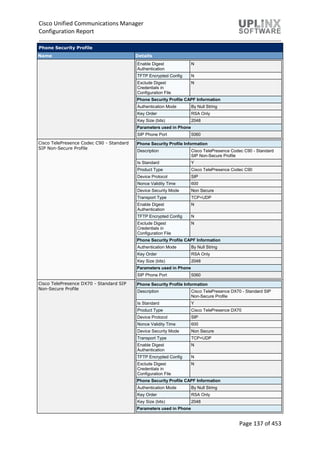
E.164 transformations do not impact call routing or digit analysis in Cisco Unified Communications Manager. The
transformations allow the following actions to occur:
 Send UploadVCRs to the Cisco Intercompany Media Engine server for unlearned direct inward dialing numbers
(DIDs).
 Reroute calls to the Cisco IME trunk if the DID exists in the learned table.
You associate Cisco IME E.164 transformations with a PSTN access trunk. If the transformation does not yield valid calling
and called numbers on the incoming and outgoing sides of the call, no VCR upload takes place, and Cisco IME processing
stops for that call.
E.164 Transformation
Name Details
E164Transformation01 E.164 Transformation
Description Test transfo
Outgoing Calling Party Settings
Outgoing Party E.164 Transformation
CSS
INFORMACAST_CSS
Apply On Routing Transformed Number
Outgoing Called Party Settings
Outgoing Party E.164 Transformation
CSS
INFORMACAST_CSS
Apply On Original Number
Incoming Transformation Profile Settings
Incoming Calling Party Transformation
Profile
TransProfInoTest
Incoming Called Party Transformation
Profile
TransProfInoTest
5.5.10 Learned Route
Learned routes specify lists of all +E.164 numbers that the system has learned through Cisco Intercompany Media Engine
(Cisco IME). You can enable or disable a particular route. You can disable if you are having problems with a particular
route and you need to disable to troubleshoot.
The following is a list of the Intercompany Media Services learned routes:
< No records found >
5.5.11 Firewall
Use the Intercompany Media Services Firewall Configuration window to configure the IP address and port of the ASA
mapping service. You need to configure this information if you have implemented an off-path deployment model in which
normal Internet-facing traffic does not flow through the same adaptive security appliance (ASA) as the Cisco Intercompany
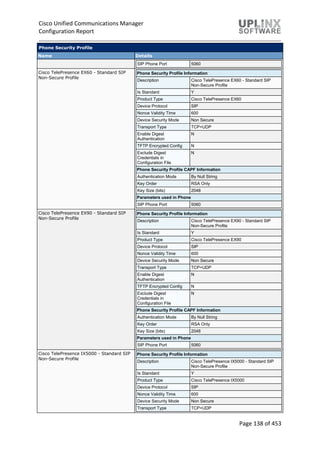
Media Engine (Cisco IME) traffic.
During an outbound call attempt, the SIP invite message must be routed to the offpath Cisco IME enabled ASA. Cisco
Unified Communications Manager sends a request to the ASA for a mapping of the global IP/port of the remote enterprise
(found in the Cisco IME learned route) to an internal IP/port on the Cisco IME enabled ASA. Cisco Unified Communications
Manager then initiates a SIP Invite that routes to this internal IP/port. The Cisco IME enabled ASA performs NAT, mapping
Cisco Unified Communications Manager
Configuration Report
Page 245 of 453
to the global IP/port of the remote enterprise from the IME learned route. The offpath Cisco IME enabled ASA proxies this
signaling session and initiates a TLS session to this global IP/port (the Cisco IME enabled ASA of the remote enterprise).
Intercompany Media Services Firewall Information
Name Description IP Address Port
IMSFirewallInfo Obviously Spurious 10.5.1.167 8060
5.5.12 Intercompany Media Services Feature Configuration
The following values are configured for the Intercompany Media Services feature parameters.
Fallback Parameters
Parameter Name Parameter Value Suggested Value
Allow IME Calls through MGCP FXS/FXO False False
Enable Intradomain IME False False
Allow MWI via IME Learned Routes True True
SIP Trunk IME Connection Timer for Destination
Enterprise
2 2
Firewall Connection Request Timer For IME Calls 2 2
Firewall Mapping Response Timer For IME Calls 2 2
Firewall Mapping Connection Idle Timer For IME calls 10 10
IME Failed Call Attempt Threshold 50 50
IME Call Fallback Attempt Threshold 50 50
IME Quality Alert Evaluation Interval 120 120
Use IME For Outbound Call False True
5.6 Fallback
This section configures parameters that apply to mid-call fallback of Cisco Intercompany Media Engine (Cisco IME) calls to
the PSTN.
If you configure mid-call fallback information, the system detects voice quality issues based on the threshold that you set,
and switches the audio path to a different bearer channel, most likely the PSTN. You must configure fallback on both the
originating and terminating sides of the call in order for fallback to work.
5.6.1 Fallback Profile
The fallback profile defines several values that the Cisco Unified Communications Manager uses to fallback Cisco IME
calls to the PSTN. The fallback profile defines the level of quality of service at which Cisco Unified Communications
Manager attempts a mid-call fallback as well as the fallback number that the Cisco Unified Communications Manager uses
to invoke the PSTN call.
When a user makes a call to a number that is linked to a fallback profile, the Cisco Unified Communications Manager of the
calling party receives a fallback directory number that is configured on the Cisco Unified Communications Manager of the
called party. The Cisco Unified Communications Manager uses the fallback number for the PSTN call when the ASA
triggers a fallback to the PSTN.
Fallback Profile
Name Details
Fallback Profile Fallback Profile Information
Description Desc FallbackProfile1
Call Setup Fallback Settings
Advertised Fallback Directory E.164
Number
+999765
Call Fallback Trigger Settings
Fallback QOS Sensitivity Level Utility (Lowest tolerable quality, not for extended duration calls)
Fallback Call Settings
Fallback Call CSS Calling device AAR Calling Search Space
Cisco Unified Communications Manager
Configuration Report
Page 246 of 453
Fallback Profile
Name Details
Fallback Call Answer Timer 6
Fallback Call Handling Settings
Fallback Directory Number Partition P_1
Fallback Directory Number +9997633
Number of Digits for Caller ID Partial
Match
5
Fallback Profile2 Fallback Profile Information
Description Desc FallbackProfile2
Call Setup Fallback Settings
Advertised Fallback Directory E.164
Number
+2223337
Call Fallback Trigger Settings
Fallback QOS Sensitivity Level Disable Fallback (No PSTN fallback option)
Fallback Call Settings
Fallback Call CSS Trunk ReRoute Calling Search Space
Fallback Call Answer Timer 2
Fallback Call Handling Settings
Fallback Directory Number Partition P_2
Fallback Directory Number +222226
Number of Digits for Caller ID Partial
Match
14
5.6.2 Fallback Feature Configuration
The following Fallback feature parameters apply to mid-call fallback of Cisco Intercompany Media Engine:
Fallback Parameters
Parameter Name Parameter Value Suggested Value
Enable Fallback for IME calls True True
Fallback QOS Sensitivity Level Nominal (Default sensitivity, almost all enterprise
deployments qualify)
Nominal (Default sensitivity, almost all enterprise
deployments qualify)
Fallback Number Of DTMF
Correlation Digits
4 4
Fallback DTMF Collection Timer 5 5
Fallback Call Answer Timer 6 6
Clear IME Call Delay Timer 5 5
DTMF Interdigit Delay Timer 500 500
Post Connect Fallback Delay
Timer
3 3
Fallback Split Delay Timer 500 500
Fallback Call CSS AAR CSS AAR CSS
5.7 VPN
The Cisco Unified Communications Manager over Virtual Private Network (VPN) features allow the phone using the in-built
VPN client to use SSL to register with ASA or IOS device and function remotely.
The Cisco VPN Client for Cisco Unified IP Phones adds another option for customers attempting to solve the remote
telecommuter problem by complementing other Cisco remote telecommuting offerings.
 All settings configured via CUCM administration.
 After configuring the phone within the Enterprise, the user can take it home and plug it into their broadband router for
instant connectivity, without any difficult menus to configure.
 Phones can receive firmware updates and configuration changes remotely.
Cisco Unified Communications Manager
Configuration Report
Page 247 of 453
 VPN tunnel only applies to voice and IP phone services. A PC connected to the PC port is responsible for
authenticating and establishing its own tunnel with VPN client software.
The VPN Feature Configuration window contains the common configuration settings for the VPN feature that the system
uses when you do not associate a VPN Profile with a Common Phone Profile. If you define a VPN Profile as part of
configuring a Common Phone Profile, the VPN Profile settings take precedence over the VPN Feature Configuration
settings.
5.7.1 VPN Profile
The VPN Profile settings are assigned to the Cisco Unified IP Phone by using the Common Phone Profile Configuration
window. This is the list of configured VPN profiles.
VPN Profile
Name Details
VPNProfile1 VPN Profile Information
Description Desc VPNProfile1
Enable Auto Network Detect Y
Tunnel Parameters
MTU 1290
Fail to Connect 30
Enable Host ID Check Y
Client Authentication
Client Authentication Method User and Password
Enable Password Persistence N
VPNProfile2 VPN Profile Information
Description Desc VPNProfile2
Enable Auto Network Detect Y
Tunnel Parameters
MTU 1290
Fail to Connect 30
Enable Host ID Check N
Client Authentication
Client Authentication Method User and Password
Enable Password Persistence N
5.7.2 VPN Group
A VPN Group contains VPN gateways which are used to create the VPN connection.
You can add up to a maximum of three VPN gateways to a VPN group. The total number of certificates in the VPN group
cannot exceed 10.
< No records found >
5.7.3 VPN Gateway
The following VPN gateways (Cisco Adaptive Security Appliance (ASA)) are configured on CUCM.
The VPN Gateway URL is the URL for the main VPN concentrator in the gateway. Note : You must configure the VPN
concentrator with a group-URL and use this URL as the gateway URL.
You can assign up to 10 certificates to a VPN Gateway, and you must assign at least one certificate to each gateway. Only
certificates that are associated with the Phone-VPN-trust role display in the available VPN certificates list. To configure a
VPN gateway, you must first upload the VPN concentrator certificates and then configure the VPN gateway.
< No records found >
Cisco Unified Communications Manager
Configuration Report
Page 248 of 453
5.7.4 VPN Feature Configuration
VPN Feature Configuration contains default settings for the VPN feature, used when a VPN Profile is not associated a
Common Phone Profile. If a VPN Profile is associated with a Common Phone Profile, the VPN Feature Configuration
settings will not be used.
VPN Parameters
Parameter Name Parameter Value Suggested Value
Enable Auto Network Detect False False
MTU 1290 1290
Fail to Connect 30 30
Client Authentication Method User And Password User And Password
Enable Password Persistence False False
Enable Host ID Check True True
5.8 Called Party Tracing List
Called Party Tracing allows you to configure a directory number or list of directory numbers that you want to trace. You can
request on-demand tracing of calls using the Session Trace Tool.
Called Party Tracing List
Called Party Number Ends With Description
336798
5.9 ILS Configuration
When the Intercluster Lookup Service (ILS) is configured on multiple Unified CM clusters, ILS updates Cisco Unified
Communications Manager with the current status of remote clusters in the ILS network. The ILS cluster discovery service
allows Cisco Unified Communications Manager to learn about remote clusters without the need for an administrator to
manually configure connections between each cluster.
The ILS URI Replication feature enables ILS to exchange directory URI catalogs with the other clusters in an ILS network.
URI Replication provides support for intercluster URI dialing.
Although ILS is activated and runs on individual cluster nodes, the configuration settings are applied on a cluster-wide
basis. After ILS is configured on a cluster node, those settings are propagated out to the other cluster nodes. The length of
time that it takes for ILS settings to be propagated to other cluster nodes depends on the synchronization value that you
enter.
ILS Configuration
Intercluster Lookup Service Configuration
Role Stand Alone Cluster
Exchange Global Dial Plan Replication Data with
Remote Clusters
N
Advertised Route String
Synchronize Clusters Interval (minutes) 10
ILS Authentication
Use TLS Certificates Y
5.10 Call Control Agent Profile
When you associate a Call Control Agent (CCA) profile to a directory number and if ESN and E164 masks are configured
on that directory number, then the directory number will be synchronized to the corresponding fields in the external LDAP
server that you have configured.
Call Control Agent Profile Configuration
Call Control
Agent Profile
ID
Primary Softswitch ID Secondary
Softswitch ID
Object Class Subscriber Type SIP Alias
Suffix
SIP User
Name
Suffix
CCAPID01 PrimarySoftswitchID01 ObjectClass01
Cisco Unified Communications Manager
Configuration Report
Page 249 of 453
5.11 Directory Number Alias Lookup And Sync
The Directory Number Alias Lookup and Sync setup enables you to route the commercial calls to an alternate number.
Routing the commercial calls to an alternate number reduces the commercial cost of calling an external number. You must
configure the LDAP server for Directory Number Alias Sync (sync server) if you need to synchronize users from Cisco
Unified Communications Manager database to the sync server. You must configure the LDAP server for Directory Number
Alias Lookup (lookup server) if you need to route the commercial calls to an alternate number.
Directory Number Alias Server
LDAP Configuration Name Details
LDAP2013 LDAP Directory Information
LDAP Manager Distinguished Name CN=Administrator,CN=Users,DC=lab,DC=test
LDAP User Search Base DC=lab,DC=test
LDAP Directory Server Usage DN Alias Sync and Lookup
Directory Number Alias Sync And Lookup Server Configuration
Keepalive Search User Distinguished Name
Keepalive Time Interval in Minutes 5
SIP Alias Suffix
Enable Caching of records for Directory
Number Alias Lookup
N
Record Cache Size 3000
Record Cache Age in Hours 0
LDAP Server Information
LDAP Server 1 Host Name or IP Address 10.5.1.166
LDAP Port 389
Use TLS N
5.12 Device Location Tracking Services
The Device Location Tracking Services section contains the following configuration sections:
 Switches and Access Points
 Wireless Access Points Controllers
5.12.1 Switches and Access Points
The Switches and Access Points section shows a list of tracked switches and wireless access points in your network and
their settings.
< No records found >
5.12.2 Wireless Access Points Controllers
Wireless Access Point Controllers section shows the configuration of wireless access point controllers in your network.
Wireless Access Point Controller
Name Wireless Access Point Controller Information
10.5.1.120 Wireless Access Controller Details
Name 10.5.1.120
Description A Wireless Access Controller
SNMP Version 2C
SNMP Community String NewCommunityString
Wireless Access Point Controller Synchronization Schedule
Enable scheduled synchronization to
discover Infrastructure Devices
N
Last Sync Attempt(Status) Never Synced
Cisco Unified Communications Manager
Configuration Report
Page 250 of 453
6 Device
Cisco Unified Communications Manager (CUCM) allows you to configure the following devices in your telephony network:
 CTI route points
 Gatekeepers
 Gateways
 Phones including CTI ports and Voicemail ports
 Trunks
 Device settings, with many settings pertaining to devices, including device profiles, phone button templates, softkey
templates, firmware load info and more
Cisco Unified Communications Manager
Configuration Report
Page 251 of 453
6.1 CTI Route Point
A CTI route point virtual device can receive multiple, simultaneous calls for application-controlled redirection. You can configure one or more lines on a CTI route point that users
can call to access the application. Applications can answer calls at a route point and can also be redirected to a CTI port or IP phone.
CTI Route Point
Name Device Information Details
crs-
55000
Description AA-55000
Device Pool Default
Common Device
Configuration
< None >
Calling Search
Space
< None >
Location Hub_None
User Locale < None >
MRGL < None >
Network MOH
Audio Source
< None >
User MOH Audio
Source
< None >
Use Trusted
Relay Point
Default
Calling Party
Transformation
CSS
< None >
Geolocation < None >
Use DP Calling
Party Trans. CSS
Y
# Number Partition CSS Linetext Alerting
Name
External
Mask
Pickup
Group
Max / Busy VM Profile CF All CF Busy CF No
Answer
CFNA
(sec)
1 55000 < None > < None > 5000/4500 < None > / < None > / < None > / < None >
crs-
55001
Description AA on 55001
Device Pool Default
Common Device
Configuration
< None >
Calling Search
Space
< None >
Location Hub_None
User Locale < None >
MRGL < None >
# Number Partition CSS Linetext Alerting
Name
External
Mask
Pickup
Group
Max / Busy VM Profile CF All CF Busy CF No
Answer
CFNA
(sec)
1 55001 P_LoggedOut CSS_Perth 5000/4500 < None > / < None > / < None > / < None >
Cisco Unified Communications Manager
Configuration Report
Page 252 of 453
CTI Route Point
Name Device Information Details
Network MOH
Audio Source
< None >
User MOH
Audio Source
< None >
Use Trusted
Relay Point
Default
Calling Party
Transformation
CSS
< None >
Geolocation < None >
Use DP Calling
Party Trans.
CSS
Y
Cisco Unified Communications Manager
Configuration Report
Page 253 of 453
6.2 Gatekeeper
An endpoint gatekeeper is configured to manage all RAS procedures for calls to, from, and between H.323 clients, MCUs,
and H.320 video gateways. The endpoint gatekeeper directs all such calls to the appropriate Cisco Unified
Communications Manager (CUCM) cluster so that Cisco Unified Communications Manager (CUCM) can perform all of the
H.225 call routing and H.245 media negotiations.
An infrastructure gatekeeper is configured to manage all dial plan resolution and bandwidth restrictions (call admission
control) between CUCM clusters, between a CUCM cluster and a network of H.323 VoIP gateways, or between a CUCM
cluster and a service provider's H.323 VoIP transport network.
Gatekeeper
Host Name/IP Address Description Registration Request Time to Live Registration Retry Timeout Enabled
10.5.1.120 10.5.1.120 60 300 Y
6.3 Gateway
Cisco Unified Communications gateways enable Cisco Unified Communications Manager (CUCM) to communicate with
non-IP telecommunications devices. CUCM supports several types of voice gateways.
This section contains the following gateway devices:
 H.323 Gateway
 MGCP Gateway
 Analog Gateway
6.3.1 Gateway Overview
Cisco Unified Communications Manager (CUCM) supports several types of voice gateways.
The following gateway devices are present:
Gateway Overview
Device Name Protocol Description Device Pool CSS Device Type
SKIGW1234123410 SCCP SKIGW1234123410 < None > < None > VG224
SKIGWA1B2C3D4E5 SCCP SKIGWA1B2C3D4E5 < None > < None > Cisco 1861
uplinx.com MGCP uplinx.com < None > < None > Cisco 26XX
6.3.2 MGCP Gateway
Cisco IP telephony gateways enable Cisco Unified Communications Manager (CUCM) to communicate with non-IP
telecommunications devices.
MGCP gateways provide full support for the hold, transfer, and conference features through the MGCP protocol. Because
MGCP is a master/slave protocol with CUCM controlling all session intelligence, CUCM can easily manipulate MGCP
gateway voice connections.
MGCP Gateways
Name Device Info Configured Slots, VICs and Endpoints
uplinx.com Gateway Details
Product Cisco 26XX
Protocol MGCP
Description uplinx.com
CUCM Group CMG_ForTesting
Product Specific Configuration
Switchback Timing Graceful
Switchback uptime-
delay (min)
10
Switchback schedule
(hh:mm)
12:00
Slot: 0/0/0
Module in Slot 0 : AIM-VOICE-30 (2 subunits)
Subunit 0 : VWIC-2MFT-T1
Port 0
End-Point S0/DS1-0@uplinx.com
Slot: 0/1/0
Module in Slot 0 : AIM-VOICE-30 (2 subunits)
Subunit 1 : VIC2-2MFT-T1E1-T1
Cisco Unified Communications Manager
Configuration Report
Page 254 of 453
6.3.2.1 MGCP Gateway Endpoints
MGCP Gateway Endpoints are the line interfaces of the MGCP gateways.
This section is linked to the previous section MGCP gateway. The gateway, module and slot configurations are
documented there.
MGCP Gateways - Digital Endpoints
Name Device Info
S0/DS1-0@uplinx.com End-Point: S0/DS1-0@uplinx.com (Digital Access T1)
Device Information
Product Cisco MGCP T1 Port
Gateway uplinx.com
Gateway Slot 0/0/0
Device Protocol Digital Access T1
Description S0/DS1-0@uplinx.com
Device Pool DP_1
Common Device Configuration < None >
Call Classification Use System Default
Media Resource Group List < None >
Packet Capture Mode None
Packet Capture Duration 0
Calling Search Space < None >
AAR Calling Search Space < None >
Location Hub_None
AAR Group < None >
MLPP Domain < None >
MLPP Indication Default
MLPP Preemption Default
Confidential Access Mode < None >
Confidential Access Level < None >
Handle DTMF Precedence Signals N
Encode Voice Route Class N
Load Information
Port Selection Order Top Down
Digit Sending DTMF
Network Locale United States
SMDI Base Port 0
Use Trusted Relay Point Default
Route Class Signaling Enabled Off
V150 (subset) N
Called Party Transformation CSS < None >
Use Device Pool Called Party Transformation
CSS
Y
PSTN Access N
Intercompany Media Engine (IME)
E.164 Transformation Profile < None >
Incoming Called Party Settings
Incoming Number Default / / < None > / Y
Product Specific Configuration
Line Coding B8ZS
Framing ESF
Clock External
Input Gain (-6..14 db) 0
Output Attenuation (-6..14 db) 0
Cisco Unified Communications Manager
Configuration Report
Page 255 of 453
MGCP Gateways - Digital Endpoints
Name Device Info
Echo Cancellation Enable Enable
Echo Cancellation Coverage (ms) 128
Geolocation Configuration
Geolocation < None >
Geolocation Filter < None >
Ports
Port Details: 12 (EANDM)
Port Direction Inbound
Calling Party Selection Originator
Caller ID Type ANI
Caller ID DN
Prefix DN
Num Digits 4
Expected Digits 4
Unattended Port N
Port Details: 12 (EANDM): Product Specific Configuration
Signaling Type Wink Start
Port Details: 13 (EANDM)
Port Direction Inbound
Calling Party Selection Originator
Caller ID Type ANI
Caller ID DN
Prefix DN
Num Digits 4
Expected Digits 4
Unattended Port N
Port Details: 13 (EANDM): Product Specific Configuration
Signaling Type Wink Start
Port Details: 14 (EANDM)
Port Direction Inbound
Calling Party Selection Originator
Caller ID Type ANI
Caller ID DN
Prefix DN
Num Digits 4
Expected Digits 4
Unattended Port N
Port Details: 14 (EANDM): Product Specific Configuration
Signaling Type Wink Start
6.3.3 H.323 Gateway
Cisco IP telephony gateways enable Cisco Unified Communications Manager (CUCM) to communicate with non-IP
telecommunications devices.
Cisco IOS H.323 gateways must be configured by using the Cisco IOS command-line interface (CLI). Compared to MGCP
gateways, H.323 gateways maintain the dial plan and route pattern and can perform number translations autonomously.
< No records found >
Cisco Unified Communications Manager
Configuration Report
Page 256 of 453
6.3.4 Analog Gateway
Cisco IP telephony gateways enable Cisco Unified Communications Manager (CUCM) to communicate with non-IP telecommunications devices.
The Cisco Analog Phone Gateways allow on-premise analog telephones, fax machines, modems, voice-messaging systems, and speakerphones to register with one Cisco Unified
Communications Manager (CUCM) cluster.
Analog Gateways
Name Device Info Slot Info
SKIGW1234123410 Gateway Details
Product VG224
Protocol SCCP
Description SKIGW1234123410
MAC Address
(last 10 chars)
1234123410
CallManagerGroup CMG_ForTesting
Product Specific Configuration
Type Of DTMF
Relay
Current GW Config
Modem
Passthrough
Enable
Cisco Fax Relay Disable
T38 Fax Relay Disable
RTP Package
Capability
Enable
MT Package
Capability
Disable
RES Package
Capability
Disable
PRE Package
Capability
Enable
SST Package
Capability
Enable
RTP Unreachable
OnOff
Enable
RTP Unreachable
timeout (ms)
1000
RTCP Report 0
Ports
Port Device Name Description Extension Partition External
Mask
CSS Alerting
Name
Display Max/Busy
Calls
VM
Profile
VM
CFB
2/0/0 AN1234123410400 AN1234123410400 999900 P_1 CSS_1 1/1 N
Cisco Unified Communications Manager
Configuration Report
Page 257 of 453
Analog Gateways
Name Device Info Slot Info
Interval (secs)
Simple SDP Enable
SKIGWA1B2C3D4E5 Gateway Details
Product Cisco 1861
Protocol SCCP
Description SKIGWA1B2C3D4E5
MAC Address
(last 10 chars)
A1B2C3D4E5
CallManagerGroup CMG_ForTesting
Product Specific Configuration
Global ISDN
Switch Type
4ESS
Switchback Timing Graceful
Switchback
uptime-delay (min)
10
Switchback
schedule (hh:mm)
12:00
Type Of DTMF
Relay
Current GW Config
Modem
Passthrough
Enable
Cisco Fax Relay Disable
T38 Fax Relay Disable
RTP Package
Capability
Enable
MT Package
Capability
Disable
RES Package
Capability
Disable
PRE Package
Capability
Enable
SST Package
Capability
Enable
RTP Unreachable
OnOff
Enable
< No records found >
Cisco Unified Communications Manager
Configuration Report
Page 258 of 453
Analog Gateways
Name Device Info Slot Info
RTP Unreachable
timeout (ms)
1000
RTCP Report
Interval (secs)
0
Simple SDP Enable
uplinx.com Gateway Details
Product Cisco 26XX
Protocol MGCP
Description uplinx.com
CallManagerGroup CMG_ForTesting
Product Specific Configuration
Switchback Timing Graceful
Switchback uptime-
delay (min)
10
Switchback
schedule (hh:mm)
12:00
< No records found >
6.4 Phone
The list of phones, physical or virtual. This section contains the following phone configurations:
 Phones and lines (extensions and intercoms)
 Subscribed Services
 Speed Dials
 Busy Lamp Field Speed Dials
 Busy Lamp Field Directed Call Parks
Cisco Unified Communications Manager
Configuration Report
Page 259 of 453
6.4.1 Phone Filter
This report has been generated with the following filter applied.If there is a filter configured, not all objects may be be listed.
Phone filter(s)
Filter No Filter defined
6.4.2 Analog Phone (1)
Analog Phone
Phone Base settings Lines
AN1234123410400 Model Analog Phone
Description AN1234123410400
Protocol SCCP
Device
Pool
DP_Sydney
CSS < None >
MRGL < None >
Location Hub_None
AAR Group
Button
Template
Standard Analog
Softkey
Template
< None >
Owner
User ID
< None >
# Extension Partition CSS Linetext Alerting
Name
External
Mask
Pickup
Grp
max/busy VM
Profile
CF All CF Busy CF
NoAnswer
CFNA
[secs]
Line
1
999900 P_1 CSS_1 1/1 < None > /
< None >
/
< None >
/ < None >
6.4.3 Cisco 7832 (1)
Cisco 7832
Phone Base settings Lines
SEP00727849DA40 Model Cisco 7832
Description Auto 10006
Protocol SIP
Device Pool DP_1
# Extension Partition CSS Linetext Alerting
Name
External
Mask
Pickup
Grp
max/busy VM
Profile
CF All CF Busy CF
NoAnswer
CFNA
[secs]
Line
1
783201 P_1 CSS_1 7832 on
120 new
4/2 < None > /
< None >
/
< None >
/ < None >
Cisco Unified Communications Manager
Configuration Report
Page 260 of 453
Cisco 7832
Phone Base settings Lines
CSS CSS_1
MRGL < None >
Location Hub_None
AAR Group
Button
Template
Universal
Device
Template
Button
Layout
Softkey
Template
< None >
Owner User
ID
< None >
6.4.4 Cisco 7841 (1)
Cisco 7841
Phone Base settings Lines
SEP002F5C615751 Model Cisco 7841
Description 7841 SIP
Protocol SIP
Device
Pool
DP_1
CSS CSS_1
MRGL < None >
Location Hub_None
AAR Group AARGroupTest
Button
Template
Standard 7841
SIP
Softkey
Template
< None >
Owner
User ID
< None >
# Extension Partition CSS Linetext Alerting
Name
External
Mask
Pickup
Grp
max/busy VM
Profile
CF All CF Busy CF
NoAnswer
CFNA
[secs]
Line
1
10004 P_1 < None > 7841 on
120
4/2 < None > /
< None >
/
< None >
/ < None >
Cisco Unified Communications Manager
Configuration Report
Page 261 of 453
6.4.5 Cisco 7861 (1)
Cisco 7861
Phone Base settings Lines
SEP6CFA8902CFE1 Model Cisco 7861
Description 7861 SIP
Protocol SIP
Device Pool DP_1
CSS CSS_1
MRGL < None >
Location Hub_None
AAR Group
Button
Template
Standard
7961 SIP
Softkey
Template
< None >
Owner User
ID
< None >
# Extension Partition CSS Linetext Alerting
Name
External
Mask
Pickup
Grp
max/busy VM
Profile
CF All CF Busy CF
NoAnswer
CFNA
[secs]
Line
1
10003 P_1 < None > 7861 on
new 120
4/2 < None > /
< None >
/
< None >
/ < None >
6.4.6 Cisco 7941 (1)
Cisco 7941
Phone Base settings Lines
SEP00070E16C0
C7
Model Cisco 7941
Descripti
on
7941 SCCP
Protocol SCCP
Device
Pool
Default
CSS CSS_1
MRGL < None >
Location Hub_None
AAR
Group
Button
Template
SEP00070E16C0
C7-SCCP-
# Extensio
n
Partition CSS Linetex
t
Alertin
g
Name
Extern
al
Mask
Picku
p Grp
max/bu
sy
VM
Profile
CF All CF Busy CF
NoAnsw
er
CFNA
[secs
]
Line 1 794101 P_1 CSS_1 7941
on new
120
4/2 < None
>
/
< None
>
/
< None
>
/
< None
>
Interco
m 1
5559550 IntercomPartitio
n_1
IntercomPartition_1_
GEN
Interco
m
555955
0
1/1 < None
>
/
< None
>
/
< None
>
/
< None
>
Cisco Unified Communications Manager
Configuration Report
Page 262 of 453
Cisco 7941
Phone Base settings Lines
Individual
Template
Softkey
Template
< None >
Owner
User ID
< None >
6.4.7 Cisco 7945 (1)
Cisco 7945
Phone Base settings Lines
SEP999988887770 Model Cisco 7945
Description 7945 MK desk
Protocol SCCP
Device Pool DP_1
CSS < None >
MRGL MRGL1
Location Hub_None
AAR Group
Button Template Universal Device Template Button Layout
Softkey Template < None >
Owner User ID < None >
< No records found >
6.4.8 Cisco 7975 (1)
Cisco 7975
Phone Base settings Lines
SEPD824BDBBEC
46
Model Cisco 7975
Descriptio
n
7975 SCCP
Protocol SCCP
Device
Pool
DP_1
# Extensio
n
Partition CSS Linetex
t
Alertin
g
Name
Extern
al
Mask
Picku
p Grp
max/bus
y
VM
Profile
CF All CF Busy CF
NoAnsw
er
CFNA
[secs
]
Interco
m 1
5559551 IntercomPartition
_1
IntercomPartition_1_
GEN
Interco
m
1/1 < None
>
/
< None
>
/
< None
>
/
< None >
Cisco Unified Communications Manager
Configuration Report
Page 263 of 453
Cisco 7975
Phone Base settings Lines
CSS CSS_1
MRGL MRGL1
Location Hub_None
AAR
Group
AARGroupTe
st
Button
Template
Standard
7975 SCCP
with intercom
button
Softkey
Template
< None >
Owner
User ID
< None >
Line 1 797500 < None > < None > 7975
on 120
new
4/2 < None
>
/
< None
>
/
< None
>
/
< None >
6.4.9 Cisco 8841 (1)
Cisco 8841
Phone Base settings Lines
SEP3C5EC30DCC2D Model Cisco 8841
Description 8841 SIP
Protocol SIP
Device Pool Default
CSS CSS_1
MRGL < None >
Location Hub_None
AAR Group
Button
Template
Standard
8941 SIP
Softkey
Template
< None >
Owner User
ID
< None >
# Extension Partition CSS Linetext Alerting
Name
External
Mask
Pickup
Grp
max/busy VM Profile CF All CF Busy CF
NoAnswer
CFNA
[secs]
Line
1
10005 P_1 CSS_1 8841 on
120
QUALITY
CONTROL
4/2 VMP_Sydney /
< None >
/
< None >
/ < None >
Cisco Unified Communications Manager
Configuration Report
Page 264 of 453
6.4.10 Cisco 8941 (1)
Cisco 8941
Phone Base settings Lines
SEP503DE57D60
60
Model Cisco
8941
Descriptio
n
8941
SCCP
Protocol SCCP
Device
Pool
DP_1
CSS < None >
MRGL < None >
Location Hub_Non
e
AAR
Group
Button
Template
Standard
8941 SIP
with
intercom
button
test
Softkey
Template
< None >
Owner
User ID
< None >
# Extensio
n
Partition CSS Linetex
t
Alertin
g
Name
Extern
al Mask
Picku
p Grp
max/bus
y
VM
Profile
CF All CF Busy CF
NoAnsw
er
CFNA
[secs
]
Line 1 894100 P_1 CSS_1 8941
on new
120
4/2 < None
>
/
< None
>
/
< None
>
/
< None >
Interco
m 1
5559552 IntercomPartition
_1
IntercomPartition_1_G
EN
Int 1/1 < None
>
/
< None
>
/
< None
>
/
< None >
6.4.11 Subscribed Services
The following table lists the subscribed IP services and parameters for each phone:
< No records found >
Cisco Unified Communications Manager
Configuration Report
Page 265 of 453
6.4.12 Speed Dials
The following Speed Dials are configured per phone:
Speed Dials
Device Name Button Number Index Number Label ASCII Label
SEP00070E16C0C7 1 12540 Magda
SEP00070E16C0C7 2 12542 John
SEP00070E16C0C7 3 12543 Bruce
SEP002F5C615751 5 1 69080 Sales
SEP002F5C615751 6 2 69081 Returns
SEP002F5C615751 7 3 69082 Disposal
SEP002F5C615751 8 4 69083 Recycling
SEP002F5C615751 9 5 69084 Resources
SEP00727849DA40 1 62092 Security
SEP3C5EC30DCC2D 5 1 595901 Paul
SEP3C5EC30DCC2D 6 2 595902 Ana
SEP3C5EC30DCC2D 7 3 595903 Emma
SEP3C5EC30DCC2D 8 4 595904 Adam
SEP3C5EC30DCC2D 9 5 595905 Mafalda
SEP503DE57D6060 5 1 595901 SD1
SEP503DE57D6060 6 2 595902 SD2
SEP6CFA8902CFE1 3 1 797500 The 7975
SEPD824BDBBEC46 3 1 794101
SEPD824BDBBEC46 5 2 786101
Cisco Unified Communications Manager
Configuration Report
Page 266 of 453
6.4.13 Busy Lamp Field Speed Dials
The following Busy Lamp Field Speed Dials are configured per phone:
< No records found >
Cisco Unified Communications Manager
Configuration Report
Page 267 of 453
6.4.14 Busy Lamp Field Directed Call Parks
The following Busy Lamp Field Directed Call Parks are configured per phone:
BLF Directed Call Parks
Device Name Button Number Index Directory Number Label ASCII Label
SEP00070E16C0C7 1 6905 in P_1 The 6905
SEP002F5C615751 1 6905 in P_1 The BLF call park
SEP503DE57D6060 1 6905 in P_1
Cisco Unified Communications Manager
Configuration Report
Page 268 of 453
Cisco Unified Communications Manager
Configuration Report
Page 269 of 453
6.5 Trunk
A trunk device configures a logical route to a gatekeeper, being the wholesale network or an
intercluster trunk with gatekeeper control, to an intercluster trunk without a gatekeeper, or to a SIP
network. The following tables available:
 Overview
 Detailed trunk information
6.5.1 Trunk - Overview
The following is an overview of the configured trunks on this system.
Click on the name (leftmost column in the overview) for detailed information.
Trunk
Name Description Trunk Type CSS Device Pool SIP
Trunk
Security
Profile
CallCntrolDiscSIP01 Just for call control
discovery purposes
SIP Trunk < None > DP_1 Non
Secure
SIP
Trunk
Profile
INFORMACAST_SIP_TRUNK INFORMACAST_SIP_TRUNK SIP Trunk < None > INFORMACAST_DP Non
Secure
SIP
Trunk
Profile
InterclusterTestTrunk a test Inter-
Cluster
Trunk (Non-
Gatekeeper
Controlled)
< None > DP_1
SIP-CCD SIP-CCD Call Control
Discovery
SIP Trunk < None > DP_1 Non
Secure
SIP
Trunk
Profile
SIPTrunkCIME Intercompany media server
trunk test
SIP Trunk < None > DP_3 Non
Secure
SIP
Trunk
Profile
TrunkTest_H.225 H.225 Trunk
(Gatekeeper
Controlled)
< None > DP_3
VOHServer01-SIPTrunk VOHServer01-SIPTrunk SIP Trunk < None > DP_3 Non
Secure
SIP
Trunk
Profile
6.5.2 Trunk - Detailed
A trunk device configures a logical route to a gatekeeper (that is, the wholesale network or an
intercluster trunk with gatekeeper control), to an intercluster trunk without a gatekeeper, or to a SIP
network. The following trunk types are available:
 H.225 trunk (gatekeeper controlled)
 Inter-Cluster trunk (gatekeeper controlled)
 Inter-Cluster trunk (non-gatekeeper controlled)
 SIP trunk
Cisco Unified Communications Manager
Configuration Report
Page 270 of 453
Trunk (Detailed)
Name Trunk Info
CallCntrolDiscSIP01 Device Information
Product SIP Trunk
Device Protocol SIP
Description Just for call control discovery purposes
Device Pool DP_1
Common Device Configuration < None >
Call Classification Use System Default
Media Resource Group List < None >
Location Hub_None
AAR Group < None >
Trunk Service Type Call Control Discovery
Tunneled Protocol None
QSIG Variant No Changes
ASN.1 ROSE OID Encoding No Changes
Packet Capture Mode None
Packet Capture Duration 0
Media Termination Point
Required
N
Retry Video Call as Audio Y
Path Replacement Support N
Transmit UTF-8 for Calling Party
Name
N
Transmit UTF-8 Names in QSIG
APDU
N
Unattended Port N
SRTP Allowed N
Consider Traffic on This Trunk
Secure
When using both sRTP and TLS
Route Class Signaling Enabled Default
Use Trusted Relay Point Default
PSTN Access N
Intercompany Media Engine
E.164 Transformation Profile < None >
MLPP and Confidential Access Level Information
MLPP Domain < None >
Confidential Access Mode < None >
Confidential Access Level < None >
Call Routing Information
Remote-Party-Id Y
Asserted-Identity Y
Asserted-Type Default
SIP Privacy Default
Call Routing Information - Inbound Calls
Significant Digits All
Connected Line ID Presentation Default
Connected Name Presentation Default
Calling Search Space < None >
AAR Calling Search Space < None >
Prefix DN
Redirecting Diversion Header
Delivery - Inbound
N
Incoming Calling Party Settings
Cisco Unified Communications Manager
Configuration Report
Page 271 of 453
Trunk (Detailed)
Name Trunk Info
Incoming Number Default / / < None > / Y
Incoming Called Party Settings
Incoming Number Default / / < None > / Y
Connected Party Settings
Connected Party
Transformation CSS
< None >
Use Device Pool Connected
Party Transformation CSS
Y
Call Routing Information - Outbound Calls
Called Party Transformation
CSS
< None >
Use Device Pool Called Party
Transformation CSS
Y
Calling Party Transformation
CSS
< None >
Use Device Pool Calling Party
Transformation CSS
Y
Calling Party Selection Originator
Calling Line ID Presentation Default
Calling Name Presentation Default
Calling and Connected Party
Info Format
Deliver DN only in connected party
Redirecting Diversion Header
Delivery - Outbound
N
Redirecting Party
Transformation CSS
< None >
Use Device Pool Redirecting
Party Transformation CSS
Y
Call Routing Information - Outbound Calls - Caller Information
Caller ID DN
Caller Name
Maintain Original Caller ID DN
and Caller Name in Identity
Headers
N
SIP Information
Destination < No records found >
MTP Preferred Originating
Codec
711ulaw
BLF Presence Group Standard Presence group
SIP Trunk Security Profile Non Secure SIP Trunk Profile
Rerouting Calling Search Space < None >
Out-Of-Dialog Refer Calling
Search Space
< None >
SUBSCRIBE Calling Search
Space
< None >
SIP Profile Standard SIP Profile
DTMF Signaling Method No Preference
Normalization Script Info
Script < None >
Enable Trace N
Parameters < No records found >
Recording Information
Recording Information < None >
Geolocation Configuration
Cisco Unified Communications Manager
Configuration Report
Page 272 of 453
Trunk (Detailed)
Name Trunk Info
Geolocation < None >
Geolocation Filter < None >
Send Geolocation Information N
INFORMACAST_SIP_TRUNK Device Information
Product SIP Trunk
Device Protocol SIP
Description INFORMACAST_SIP_TRUNK
Device Pool INFORMACAST_DP
Common Device
Configuration
< None >
Call Classification Use System Default
Media Resource Group
List
< None >
Location Hub_None
AAR Group < None >
Trunk Service Type None(Default)
Tunneled Protocol None
QSIG Variant No Changes
ASN.1 ROSE OID
Encoding
No Changes
Packet Capture Mode None
Packet Capture
Duration
0
Media Termination
Point Required
N
Retry Video Call as
Audio
Y
Path Replacement
Support
N
Transmit UTF-8 for
Calling Party Name
N
Transmit UTF-8
Names in QSIG APDU
N
Unattended Port N
SRTP Allowed N
Consider Traffic on
This Trunk Secure
When using both sRTP and TLS
Route Class Signaling
Enabled
Default
Use Trusted Relay
Point
Default
PSTN Access N
Run On All Active
Unified CM Nodes
Y
Intercompany Media Engine
E.164 Transformation
Profile
< None >
MLPP and Confidential Access Level Information
MLPP Domain < None >
Confidential Access
Mode
< None >
Confidential Access
Level
< None >
Call Routing Information
Cisco Unified Communications Manager
Configuration Report
Page 273 of 453
Trunk (Detailed)
Name Trunk Info
Remote-Party-Id Y
Asserted-Identity Y
Asserted-Type Default
SIP Privacy Default
Call Routing Information - Inbound Calls
Significant Digits All
Connected Line ID
Presentation
Default
Connected Name
Presentation
Default
Calling Search Space < None >
AAR Calling Search
Space
< None >
Prefix DN
Redirecting Diversion
Header Delivery -
Inbound
N
Incoming Calling Party Settings
Incoming Number Default / / < None > / Y
Incoming Called Party Settings
Incoming Number Default / / < None > / Y
Connected Party Settings
Connected Party
Transformation CSS
< None >
Use Device Pool
Connected Party
Transformation CSS
Y
Call Routing Information - Outbound Calls
Called Party
Transformation CSS
< None >
Use Device Pool
Called Party
Transformation CSS
Y
Calling Party
Transformation CSS
< None >
Use Device Pool
Calling Party
Transformation CSS
Y
Calling Party Selection Originator
Calling Line ID
Presentation
Default
Calling Name
Presentation
Default
Calling and Connected
Party Info Format
Deliver DN only in connected party
Redirecting Diversion
Header Delivery -
Outbound
N
Redirecting Party
Transformation CSS
< None >
Use Device Pool
Redirecting Party
Transformation CSS
Y
Call Routing Information - Outbound Calls - Caller Information
Caller ID DN
Caller Name
Cisco Unified Communications Manager
Configuration Report
Page 274 of 453
Trunk (Detailed)
Name Trunk Info
Maintain Original
Caller ID DN and
Caller Name in Identity
Headers
N
SIP Information
Destination Address is
an SRV
N
Destination
Destination
Address Address IPv6 Port
10.5.1.157 5060
MTP Preferred
Originating Codec
711ulaw
BLF Presence Group Standard Presence group
SIP Trunk Security
Profile
Non Secure SIP Trunk Profile
Rerouting Calling
Search Space
< None >
Out-Of-Dialog Refer
Calling Search Space
< None >
SUBSCRIBE Calling
Search Space
< None >
SIP Profile Standard SIP Profile
DTMF Signaling
Method
No Preference
Normalization Script Info
Script < None >
Enable Trace N
Parameters < No records found >
Recording Information
Recording Information < None >
Geolocation Configuration
Geolocation < None >
Geolocation Filter < None >
Send Geolocation
Information
N
InterclusterTestTrunk Device Information
Product Inter-Cluster Trunk (Non-Gatekeeper Controlled)
Device Protocol Inter-Cluster Trunk
Description a test
Device Pool DP_1
Common Device Configuration < None >
Call Classification Use System Default
Media Resource Group List MRGL1
Location Hub_None
AAR Group < None >
Tunneled Protocol None
QSIG Variant No Changes
ASN.1 ROSE OID Encoding No Changes
Packet Capture Mode None
Packet Capture Duration 0
Media Termination Point
Required
N
Cisco Unified Communications Manager
Configuration Report
Page 275 of 453
Trunk (Detailed)
Name Trunk Info
Retry Video Call as Audio Y
Path Replacement Support N
Transmit UTF-8 for Calling
Party Name
N
Unattended Port N
SRTP Allowed N
H.235 Pass Through Allowed N
Enable SAF N
Use Trusted Relay Point Default
PSTN Access N
Run On All Active Unified CM
Nodes
N
Intercompany Media Engine
E.164 Transformation Profile < None >
Incoming Calling Party Settings
National Number (Prefix/Strip
Digits/CSS/Use Device Pool
CSS)
Default / 0 / < None > / Y
International Number
(Prefix/Strip Digits/CSS/Use
Device Pool CSS)
Default / 0 / < None > / Y
Unknown Number (Prefix/Strip
Digits/CSS/Use Device Pool
CSS)
Default / 0 / < None > / Y
Subscriber Number (Prefix/Strip
Digits/CSS/Use Device Pool
CSS)
Default / 0 / < None > / Y
Incoming Called Party Settings
National Number (Prefix/Strip
Digits/CSS/Use Device Pool
CSS)
Default / 0 / < None > / Y
International Number
(Prefix/Strip Digits/CSS/Use
Device Pool CSS)
Default / 0 / < None > / Y
Unknown Number (Prefix/Strip
Digits/CSS/Use Device Pool
CSS)
Default / 0 / < None > / Y
Subscriber Number (Prefix/Strip
Digits/CSS/Use Device Pool
CSS)
Default / 0 / < None > / Y
MLPP and Confidential Access Level Information
MLPP Domain < None >
MLPP Indication Default
Confidential Access Mode < None >
Confidential Access Level < None >
Call Routing Information - Inbound Calls
Significant Digits All
Calling Search Space < None >
AAR Calling Search Space < None >
Prefix DN
Redirecting Number IE Delivery
- Inbound
Y
Enable Inbound FastStart N
Connected Party Settings
Connected Party
Transformation CSS
< None >
Cisco Unified Communications Manager
Configuration Report
Page 276 of 453
Trunk (Detailed)
Name Trunk Info
Use Device Pool Connected
Party Transformation CS
Y
Call Routing Information - Outbound Calls
Called Party Transformation
CSS
< None >
Use Device Pool Called Party
Transformation CSS
Y
Calling Party Transformation
CSS
< None >
Use Device Pool Calling Party
Transformation CSS
Y
Calling Party Selection Originator
Calling Line ID Presentation Default
Called Party IE Number Type
Unknown
Cisco CallManager
Calling Party IE Number Type
Unknown
Cisco CallManager
Called Numbering Plan Cisco CallManager
Calling Numbering Plan Cisco CallManager
Caller ID DN
Display IE Delivery Y
Redirecting Number IE Delivery
- Outbound
Y
Redirecting Party
Transformation CSS
< None >
Use Device Pool Redirecting
Party Transformation CSS
Y
Enable Outbound FastStart N
Codec For Outbound FastStart G711 u-law 64K
Remote Cisco Unified Communications Manager Information
Server 1 IP Address/Host Name 10.5.1.120
UUIE Configuration
Passing Precedence Level
Through UUIE
N
Security Access Level 2
Geolocation Configuration
Geolocation < None >
Geolocation Filter < None >
Send Geolocation Information N
SIP-CCD Device Information
Product SIP Trunk
Device Protocol SIP
Description SIP-CCD Call Control Discovery
Device Pool DP_1
Common Device Configuration < None >
Call Classification Use System Default
Media Resource Group List MRGL1
Location Hub_None
AAR Group AARGroupTest
Trunk Service Type Call Control Discovery
Tunneled Protocol None
QSIG Variant No Changes
ASN.1 ROSE OID Encoding No Changes
Cisco Unified Communications Manager
Configuration Report
Page 277 of 453
Trunk (Detailed)
Name Trunk Info
Packet Capture Mode None
Packet Capture Duration 0
Media Termination Point
Required
N
Retry Video Call as Audio Y
Path Replacement Support N
Transmit UTF-8 for Calling
Party Name
N
Transmit UTF-8 Names in
QSIG APDU
N
Unattended Port N
SRTP Allowed N
Consider Traffic on This Trunk
Secure
When using both sRTP and TLS
Route Class Signaling Enabled Default
Use Trusted Relay Point Default
PSTN Access N
Intercompany Media Engine
E.164 Transformation Profile < None >
MLPP and Confidential Access Level Information
MLPP Domain < None >
Confidential Access Mode < None >
Confidential Access Level < None >
Call Routing Information
Remote-Party-Id Y
Asserted-Identity Y
Asserted-Type Default
SIP Privacy Default
Call Routing Information - Inbound Calls
Significant Digits All
Connected Line ID Presentation Default
Connected Name Presentation Default
Calling Search Space < None >
AAR Calling Search Space < None >
Prefix DN
Redirecting Diversion Header
Delivery - Inbound
N
Incoming Calling Party Settings
Incoming Number Default / / < None > / Y
Incoming Called Party Settings
Incoming Number Default / / < None > / Y
Connected Party Settings
Connected Party
Transformation CSS
< None >
Use Device Pool Connected
Party Transformation CSS
Y
Call Routing Information - Outbound Calls
Called Party Transformation
CSS
< None >
Use Device Pool Called Party
Transformation CSS
Y
Calling Party Transformation
CSS
< None >
Cisco Unified Communications Manager
Configuration Report
Page 278 of 453
Trunk (Detailed)
Name Trunk Info
Use Device Pool Calling Party
Transformation CSS
Y
Calling Party Selection Originator
Calling Line ID Presentation Default
Calling Name Presentation Default
Calling and Connected Party
Info Format
Deliver DN only in connected party
Redirecting Diversion Header
Delivery - Outbound
N
Redirecting Party
Transformation CSS
< None >
Use Device Pool Redirecting
Party Transformation CSS
Y
Call Routing Information - Outbound Calls - Caller Information
Caller ID DN
Caller Name
Maintain Original Caller ID DN
and Caller Name in Identity
Headers
N
SIP Information
Destination < No records found >
MTP Preferred Originating
Codec
711ulaw
BLF Presence Group Standard Presence group
SIP Trunk Security Profile Non Secure SIP Trunk Profile
Rerouting Calling Search
Space
< None >
Out-Of-Dialog Refer Calling
Search Space
< None >
SUBSCRIBE Calling Search
Space
< None >
SIP Profile Standard SIP Profile For TelePresence Conferencing
DTMF Signaling Method No Preference
Normalization Script Info
Script < None >
Enable Trace N
Parameters < No records found >
Recording Information
Recording Information < None >
Geolocation Configuration
Geolocation < None >
Geolocation Filter < None >
Send Geolocation Information N
SIPTrunkCIME Device Information
Product SIP Trunk
Device Protocol SIP
Description Intercompany media server trunk test
Device Pool DP_3
Common Device Configuration < None >
Call Classification Use System Default
Media Resource Group List < None >
Location Hub_None
AAR Group < None >
Cisco Unified Communications Manager
Configuration Report
Page 279 of 453
Trunk (Detailed)
Name Trunk Info
Trunk Service Type Cisco Intercompany Media Engine
Tunneled Protocol QSIG
QSIG Variant No Changes
ASN.1 ROSE OID Encoding No Changes
Packet Capture Mode None
Packet Capture Duration 0
Media Termination Point
Required
N
Retry Video Call as Audio Y
Path Replacement Support Y
Transmit UTF-8 for Calling
Party Name
N
Transmit UTF-8 Names in
QSIG APDU
N
Unattended Port N
SRTP Allowed N
Consider Traffic on This Trunk
Secure
When using both sRTP and TLS
Route Class Signaling Enabled Default
Use Trusted Relay Point Default
MLPP and Confidential Access Level Information
MLPP Domain < None >
Confidential Access Mode < None >
Confidential Access Level < None >
Call Routing Information
Remote-Party-Id Y
Asserted-Identity Y
Asserted-Type Default
SIP Privacy Default
Call Routing Information - Inbound Calls
Significant Digits All
Connected Line ID Presentation Default
Connected Name Presentation Default
Calling Search Space < None >
AAR Calling Search Space < None >
Prefix DN
Redirecting Diversion Header
Delivery - Inbound
N
Incoming Calling Party Settings
Incoming Number Default / / < None > / Y
Incoming Called Party Settings
Incoming Number Default / / < None > / Y
Connected Party Settings
Connected Party
Transformation CSS
< None >
Use Device Pool Connected
Party Transformation CSS
Y
Call Routing Information - Outbound Calls
Called Party Transformation
CSS
< None >
Use Device Pool Called Party
Transformation CSS
Y
Calling Party Transformation < None >
Cisco Unified Communications Manager
Configuration Report
Page 280 of 453
Trunk (Detailed)
Name Trunk Info
CSS
Use Device Pool Calling Party
Transformation CSS
Y
Calling Party Selection Originator
Calling Line ID Presentation Default
Calling Name Presentation Default
Calling and Connected Party
Info Format
Deliver DN only in connected party
Redirecting Diversion Header
Delivery - Outbound
N
Redirecting Party
Transformation CSS
< None >
Use Device Pool Redirecting
Party Transformation CSS
Y
Call Routing Information - Outbound Calls - Caller Information
Caller ID DN
Caller Name
Maintain Original Caller ID DN
and Caller Name in Identity
Headers
N
SIP Information
Destination < No records found >
MTP Preferred Originating
Codec
711ulaw
BLF Presence Group Standard Presence group
SIP Trunk Security Profile Non Secure SIP Trunk Profile
Rerouting Calling Search Space < None >
Out-Of-Dialog Refer Calling
Search Space
< None >
SUBSCRIBE Calling Search
Space
< None >
SIP Profile Standard SIP Profile
DTMF Signaling Method No Preference
Normalization Script Info
Script < None >
Enable Trace N
Parameters < No records found >
Recording Information
Recording Information < None >
Geolocation Configuration
Geolocation < None >
Geolocation Filter < None >
Send Geolocation Information N
TrunkTest_H.225 Device Information
Product H.225 Trunk (Gatekeeper Controlled)
Device Protocol H.225
Description
Device Pool DP_3
Common Device Configuration < None >
Call Classification Use System Default
Media Resource Group List < None >
Location Hub_None
AAR Group < None >
Cisco Unified Communications Manager
Configuration Report
Page 281 of 453
Trunk (Detailed)
Name Trunk Info
Tunneled Protocol None
QSIG Variant No Changes
ASN.1 ROSE OID Encoding No Changes
Packet Capture Mode None
Packet Capture Duration 0
Media Termination Point
Required
N
Retry Video Call as Audio Y
Wait for Far End H.245
Terminal Capability Set
Y
Path Replacement Support N
Transmit UTF-8 for Calling
Party Name
N
Unattended Port N
SRTP Allowed N
H.235 Pass Through Allowed N
Use Trusted Relay Point Default
PSTN Access N
Intercompany Media Engine
E.164 Transformation Profile < None >
Incoming Calling Party Settings
National Number (Prefix/Strip
Digits/CSS/Use Device Pool
CSS)
Default / 0 / < None > / Y
International Number
(Prefix/Strip Digits/CSS/Use
Device Pool CSS)
Default / 0 / < None > / Y
Unknown Number (Prefix/Strip
Digits/CSS/Use Device Pool
CSS)
Default / 0 / < None > / Y
Subscriber Number (Prefix/Strip
Digits/CSS/Use Device Pool
CSS)
Default / 0 / < None > / Y
Incoming Called Party Settings
National Number (Prefix/Strip
Digits/CSS/Use Device Pool
CSS)
Default / 0 / < None > / Y
International Number
(Prefix/Strip Digits/CSS/Use
Device Pool CSS)
Default / 0 / < None > / Y
Unknown Number (Prefix/Strip
Digits/CSS/Use Device Pool
CSS)
Default / 0 / < None > / Y
Subscriber Number (Prefix/Strip
Digits/CSS/Use Device Pool
CSS)
Default / 0 / < None > / Y
MLPP and Confidential Access Level Information
MLPP Domain < None >
Confidential Access Mode < None >
Confidential Access Level < None >
Call Routing Information - Inbound Calls
Significant Digits All
Calling Search Space < None >
AAR Calling Search Space < None >
Prefix DN
Redirecting Number IE Delivery Y
Cisco Unified Communications Manager
Configuration Report
Page 282 of 453
Trunk (Detailed)
Name Trunk Info
- Inbound
Enable Inbound FastStart N
Connected Party Settings
Connected Party
Transformation CSS
< None >
Use Device Pool Connected
Party Transformation CS
Y
Call Routing Information - Outbound Calls
Called Party Transformation
CSS
< None >
Use Device Pool Called Party
Transformation CSS
Y
Calling Party Transformation
CSS
< None >
Use Device Pool Calling Party
Transformation CSS
Y
Calling Party Selection Originator
Calling Line ID Presentation Default
Called Party IE Number Type
Unknown
Cisco CallManager
Calling Party IE Number Type
Unknown
Cisco CallManager
Called Numbering Plan Cisco CallManager
Calling Numbering Plan Cisco CallManager
Caller ID DN
Display IE Delivery Y
Redirecting Number IE Delivery
- Outbound
Y
Redirecting Party
Transformation CSS
< None >
Use Device Pool Redirecting
Party Transformation CSS
Y
Enable Outbound FastStart N
Codec For Outbound FastStart G711 u-law 64K
Gatekeeper Information
Gatekeeper Name 10.5.1.120
Terminal Type Gateway
Technology Prefix
Zone
Geolocation Configuration
Geolocation < None >
Geolocation Filter < None >
VOHServer01-SIPTrunk Device Information
Product SIP Trunk
Device Protocol SIP
Description VOHServer01-SIPTrunk
Device Pool DP_3
Common Device
Configuration
< None >
Call Classification Use System Default
Media Resource Group
List
< None >
Location Hub_None
Cisco Unified Communications Manager
Configuration Report
Page 283 of 453
Trunk (Detailed)
Name Trunk Info
AAR Group < None >
Trunk Service Type None(Default)
Tunneled Protocol None
QSIG Variant No Changes
ASN.1 ROSE OID
Encoding
No Changes
Packet Capture Mode None
Packet Capture
Duration
0
Media Termination
Point Required
N
Retry Video Call as
Audio
Y
Path Replacement
Support
N
Transmit UTF-8 for
Calling Party Name
N
Transmit UTF-8
Names in QSIG APDU
N
Unattended Port N
SRTP Allowed N
Consider Traffic on
This Trunk Secure
When using both sRTP and TLS
Route Class Signaling
Enabled
Default
Use Trusted Relay
Point
Default
PSTN Access N
Run On All Active
Unified CM Nodes
N
Intercompany Media Engine
E.164 Transformation
Profile
< None >
MLPP and Confidential Access Level Information
MLPP Domain < None >
Confidential Access
Mode
< None >
Confidential Access
Level
< None >
Call Routing Information
Remote-Party-Id Y
Asserted-Identity Y
Asserted-Type Default
SIP Privacy Default
Call Routing Information - Inbound Calls
Significant Digits All
Connected Line ID
Presentation
Default
Connected Name
Presentation
Default
Calling Search Space < None >
AAR Calling Search
Space
< None >
Prefix DN
Redirecting Diversion N
Cisco Unified Communications Manager
Configuration Report
Page 284 of 453
Trunk (Detailed)
Name Trunk Info
Header Delivery -
Inbound
Incoming Calling Party Settings
Incoming Number Default / / < None > / Y
Incoming Called Party Settings
Incoming Number Default / / < None > / Y
Connected Party Settings
Connected Party
Transformation CSS
< None >
Use Device Pool
Connected Party
Transformation CSS
Y
Call Routing Information - Outbound Calls
Called Party
Transformation CSS
< None >
Use Device Pool
Called Party
Transformation CSS
Y
Calling Party
Transformation CSS
< None >
Use Device Pool
Calling Party
Transformation CSS
Y
Calling Party Selection Originator
Calling Line ID
Presentation
Default
Calling Name
Presentation
Default
Calling and Connected
Party Info Format
Deliver DN only in connected party
Redirecting Diversion
Header Delivery -
Outbound
N
Redirecting Party
Transformation CSS
< None >
Use Device Pool
Redirecting Party
Transformation CSS
Y
Call Routing Information - Outbound Calls - Caller Information
Caller ID DN
Caller Name
Maintain Original
Caller ID DN and
Caller Name in Identity
Headers
N
SIP Information
Destination Address is
an SRV
N
Destination
Destination
Address Address IPv6 Port
10.1.5.120 34567
MTP Preferred
Originating Codec
711ulaw
BLF Presence Group Standard Presence group
SIP Trunk Security
Profile
Non Secure SIP Trunk Profile
Cisco Unified Communications Manager
Configuration Report
Page 285 of 453
Trunk (Detailed)
Name Trunk Info
Rerouting Calling
Search Space
< None >
Out-Of-Dialog Refer
Calling Search Space
< None >
SUBSCRIBE Calling
Search Space
< None >
SIP Profile Standard SIP Profile For TelePresence Conferencing
DTMF Signaling
Method
No Preference
Normalization Script Info
Script cisco-meeting-server-interop
Enable Trace N
Parameters
Parameters
Order Parameter Name Parameter Value
1 MyParameter 1
Recording Information
Recording Information < None >
Geolocation Configuration
Geolocation < None >
Geolocation Filter < None >
Send Geolocation
Information
N
6.6 Remote Destination
Remote destinations represent the cellular (or other phones) that are able to accept transfers from
the user's desktop phone and can be used to initiate calls using Mobile Voice Access.
< No records found >
6.7 Device Settings
Cisco Unified Communications Manager (CUCM) allows you to configure the following device
settings in your telephony system:
 Device Defaults
 Firware Load Information
 Default Device Profile
 Device Profile and subsequent settings
 Common Profile
 Phone Button Template
 Softkey Template
 Phone Services
 SIP Profile
 Common Device Configuration
 Common Phone Profile
 Remote Destinatin Profile
 Feature Control Policy
 Recording Profile
 SIP Normalization Script
 SDP Transparency
 Network Access Profile
 Wireless LAN Profile
 Wireless LAN PRofile Group
 Wi-Fi Hotspot Profile
Cisco Unified Communications Manager
Configuration Report
Page 286 of 453
6.7.1 Device Defaults
Device defaults set the default characteristics of each type of device that registers with a Cisco
Unified Communications Manager (CUCM). The device defaults for a device type apply to all auto-
registered devices of that type within a CUCM cluster.
When a device auto-registers with a Cisco Unified Communications Manager, it acquires the device
default settings for its device type. After a device registers, you can update its configuration
individually to change the device settings.
Device Defaults
Device Type Protocol Load Device
Pool
Phone Template
7914 14-Button Line
Expansion Module
SCCP S00105000400 Default
7915 12-Button Line
Expansion Module
Protocol Not
Specified
B015-1-0-4-2 Default
7915 24-Button Line
Expansion Module
Protocol Not
Specified
B015-1-0-4-2 Default
7916 12-Button Line
Expansion Module
Protocol Not
Specified
B016-1-0-4-2 Default
7916 24-Button Line
Expansion Module
Protocol Not
Specified
B016-1-0-4-2 Default
Analog Access Protocol Not
Specified
A001C030 Default
Analog Access WS-
X6624
Protocol Not
Specified
A00204000013 Default
Analog Phone SCCP Default Standard Analog
CKEM 36-Button Line
Expansion Module
Protocol Not
Specified
Default
CTI Remote Device CTI Remote
Device
Default
Carrier-integrated
Mobile
SIP Default Standard Carrier-integrated Mobile
Cisco 12 S SCCP Default Standard 12 S
Cisco 12 SP SCCP Default Standard 12 SP
Cisco 12 SP+ SCCP Default Standard 12 SP+
Cisco 30 SP+ SCCP Default Standard 30 SP+
Cisco 30 VIP SCCP Default Standard 30 VIP
Cisco 3905 SIP CP3905.9-4-1SR2-2 Default Standard 3905 SIP
Cisco 3911 SIP SIP3951.8-1-4a Default Standard 3911 SIP
Cisco 3951 SIP SIP3951.8-1-4a Default Standard 3951 SIP
Cisco 6901 SIP SIP6901.9-3-1-SR2-3 Default Standard 6901 SIP
Cisco 6901 SCCP SCCP6901.9-3-1-SR2-2 Default Standard 6901 SCCP
Cisco 6911 SCCP SCCP6911.9-3-1-SR2-3 Default Standard 6911 SCCP
Cisco 6911 SIP SIP6911.9-3-1-SR2-4 Default Standard 6911 SIP
Cisco 6921 SIP SIP69xx.9-4-1-3SR3 Default Standard 6921 SIP
Cisco 6921 SCCP SCCP69xx.9-4-1-3SR3 Default Standard 6921 SCCP
Cisco 6941 SCCP SCCP69xx.9-4-1-3SR3 Default Standard 6941 SCCP
Cisco 6941 SIP SIP69xx.9-4-1-3SR3 Default Standard 6941 SIP
Cisco 6945 SIP SIP6945.9-4-1-3SR3 Default Standard 6945 SIP
Cisco 6945 SCCP SCCP6945.9-4-1-3SR3 Default Standard 6945 SCCP
Cisco 6961 SCCP SCCP69xx.9-4-1-3SR3 Default Standard 6961 SCCP
Cisco 6961 SIP SIP69xx.9-4-1-3SR3 Default Standard 6961 SIP
Cisco 7811 SIP sip78xx.12-1-1SR1-4 Default Standard 7811 SIP
Cisco 7821 SIP sip78xx.12-1-1SR1-4 Default Standard 7821 SIP
Cisco Unified Communications Manager
Configuration Report
Page 287 of 453
Device Defaults
Device Type Protocol Load Device
Pool
Phone Template
Cisco 7832 SIP sip7832.12-1-1-12 Default Standard 7832 SIP
Cisco 7841 SIP sip78xx.12-1-1SR1-4 Default Standard 7841 SIP
Cisco 7861 SIP sip78xx.12-1-1SR1-4 Default Standard 7861 SIP
Cisco 7902 SCCP Default Standard 7902
Cisco 7905 SCCP Default Standard 7905 SCCP
Cisco 7905 SIP Default Standard 7905 SIP
Cisco 7906 SIP SIP11.9-4-2SR3-1S Default Standard 7906 SIP
Cisco 7906 SCCP SCCP11.9-4-2SR3-1S Default Standard 7906
Cisco 7910 SCCP Default Standard 7910
Cisco 7911 SCCP SCCP11.9-4-2SR3-1S Default Standard 7911
Cisco 7911 SIP SIP11.9-4-2SR3-1S Default Standard 7911 SIP
Cisco 7912 SCCP Default Standard 7912 SCCP
Cisco 7912 SIP Default Standard 7912 SIP
Cisco 7920 SCCP Default Standard 7920
Cisco 7921 SCCP Default Standard 7921 SCCP
Cisco 7925 SCCP CP7925G-1.4.8SR1.5 Default Standard 7925 SCCP
Cisco 7926 SCCP CP7926G-1.4.8SR1.5 Default Standard 7926 SCCP
Cisco 7931 SIP SIP31.9-4-2SR2-2S Default Standard 7931 SIP
Cisco 7931 SCCP SCCP31.9-4-2SR2-2S Default Standard 7931 SCCP
Cisco 7935 SCCP Default Standard 7935
Cisco 7936 SCCP cmterm_7936.3-3-21-0 Default Standard 7936
Cisco 7937 SCCP apps37sccp.1-4-5-7 Default Standard 7937
Cisco 7940 SIP P0S3-8-12-00 Default Standard 7940 SIP
Cisco 7940 SCCP P0030801SR02 Default Standard 7940 SCCP
Cisco 7941 SCCP SCCP41.9-4-2SR3-1S Default Standard 7941 SCCP
Cisco 7941 SIP SIP41.9-4-2SR3-1S Default Standard 7941 SIP
Cisco 7941G-GE SCCP SCCP41.9-4-2SR3-1S Default Standard 7941G-GE SCCP
Cisco 7941G-GE SIP SIP41.9-4-2SR3-1S Default Standard 7941G-GE SIP
Cisco 7942 SCCP SCCP42.9-4-2SR3-1S Default Standard 7942G SCCP
Cisco 7942 SIP SIP42.9-4-2SR3-1S Default Standard 7942G SIP
Cisco 7945 SCCP SCCP45.9-4-2SR3-1S Default Standard 7945 SCCP
Cisco 7945 SIP SIP45.9-4-2SR3-1S Default Standard 7945 SIP
Cisco 7960 SIP P0S3-8-12-00 Default Standard 7960 SIP
Cisco 7960 SCCP P0030801SR02 Default Standard 7960 SCCP
Cisco 7961 SIP SIP41.9-4-2SR3-1S Default Standard 7961 SIP
Cisco 7961 SCCP SCCP41.9-4-2SR3-1S Default Standard 7961 SCCP
Cisco 7961G-GE SIP SIP41.9-4-2SR3-1S Default Standard 7961G-GE SIP
Cisco 7961G-GE SCCP SCCP41.9-4-2SR3-1S Default Standard 7961G-GE SCCP
Cisco 7962 SIP SIP42.9-4-2SR3-1S Default Standard 7962G SIP
Cisco 7962 SCCP SCCP42.9-4-2SR3-1S Default Standard 7962G SCCP
Cisco 7965 SIP SIP45.9-4-2SR3-1S Default Standard 7965 SIP
Cisco 7965 SCCP SCCP45.9-4-2SR3-1S Default Standard 7965 SCCP
Cisco 7970 SIP Default Standard 7970 SIP
Cisco 7970 SCCP Default Standard 7970 SCCP
Cisco 7971 SCCP Default Standard 7971 SCCP
Cisco 7971 SIP Default Standard 7971 SIP
Cisco 7975 SCCP SCCP75.9-4-2SR3-1S Default Standard 7975 SCCP
Cisco 7975 SIP SIP75.9-4-2SR3-1S Default Standard 7975 SIP
Cisco Unified Communications Manager
Configuration Report
Page 288 of 453
Device Defaults
Device Type Protocol Load Device
Pool
Phone Template
Cisco 7985 SCCP cmterm_7985.4-1-7-0 Default Standard 7985
Cisco 8811 SIP sip88xx.12-1-1SR1-4 Default Standard 8811 SIP
Cisco 8821 SIP sip8821.11-0-4SR2-15 Default Standard 8821 SIP
Cisco 8831 SIP sip8831.10-3-1SR4b-1 Default Standard 8831 SIP
Cisco 8832 SIP sip8832.12-1-1-23 Default Standard 8832 SIP
Cisco 8832NR SIP sip8832.12-1-1-23 Default Standard 8832NR SIP
Cisco 8841 SIP sip88xx.12-1-1SR1-4 Default Standard 8841 SIP
Cisco 8845 SIP sip8845_65.12-1-1SR1-4 Default Standard 8845 SIP
Cisco 8851 SIP sip88xx.12-1-1SR1-4 Default Standard 8851 SIP
Cisco 8851NR SIP sip88xx.12-1-1SR1-4 Default Standard 8851NR SIP
Cisco 8861 SIP sip88xx.12-1-1SR1-4 Default Standard 8861 SIP
Cisco 8865 SIP sip8845_65.12-1-1SR1-4 Default Standard 8865 SIP
Cisco 8865NR SIP sip8845_65.12-1-1SR1-4 Default Standard 8865NR SIP
Cisco 8941 SCCP SCCP894x.9-4-2SR3-1 Default Standard 8941 SCCP
Cisco 8941 SIP SIP894x.9-4-2SR3-1 Default Standard 8941 SIP
Cisco 8945 SCCP SCCP894x.9-4-2SR3-1 Default Standard 8945 SCCP
Cisco 8945 SIP SIP894x.9-4-2SR3-1 Default Standard 8945 SIP
Cisco 8961 SIP sip8961.9-4-2SR4-1 Default Standard 8961 SIP
Cisco 9951 SIP sip9951.9-4-2SR4-1 Default Standard 9951 SIP
Cisco 9971 SIP sip9971.9-4-2SR4-1 Default Standard 9971 SIP
Cisco ATA 186 SCCP ATA030204SCCP090202A Default Standard ATA 186
Cisco ATA 187 SIP ATA187.9-2-3-1 Default Standard ATA 187 SIP
Cisco ATA 190 SIP ATA190.1-2-2-003 Default Standard ATA 190 SIP
Cisco ATA 191 SIP ATA191.12-0-1-29 Default Standard ATA 191 SIP
Cisco Cius SIP Default Standard Cius SIP
Cisco Cius SP SIP Default Standard Cius SP SIP
Cisco Collaboration
Mobile Convergence
CTI Remote
Device
Default
Cisco DX650 SIP Default Cisco DX650 SIP
Cisco DX70 SIP Default Cisco DX70 SIP
Cisco DX80 SIP Default Cisco DX80 SIP
Cisco Dual Mode for
Android
SIP Default Standard Dual Mode for Android
Cisco Dual Mode for
iPhone
SIP Default Standard Dual Mode for iPhone
Cisco E20 SIP Default Standard E20
Cisco IP
Communicator
SCCP Default Standard CIPC SCCP
Cisco IP
Communicator
SIP Default Standard CIPC SIP
Cisco Jabber for
Tablet
SIP Default Standard Jabber for Tablet
Cisco Spark Remote
Device
CTI Remote
Device
Default
Cisco TelePresence SIP Default Standard_Cisco_TelePresence
Cisco TelePresence
1000
SIP Default Standard_Cisco_TelePresence_1000
Cisco TelePresence
1100
SIP Default Standard_Cisco_TelePresence_1100
Cisco TelePresence SIP Default Standard_Cisco_TelePresence_1300-
Cisco Unified Communications Manager
Configuration Report
Page 289 of 453
Device Defaults
Device Type Protocol Load Device
Pool
Phone Template
1300-47 47
Cisco TelePresence
1300-65
SIP Default Standard_Cisco_TelePresence_1300
Cisco TelePresence
200
SIP Default Standard_Cisco_TelePresence_200
Cisco TelePresence
3000
SIP Default Standard_Cisco_TelePresence_3000
Cisco TelePresence
3200
SIP Default Standard_Cisco_TelePresence_3200
Cisco TelePresence
400
SIP Default Standard_Cisco_TelePresence_400
Cisco TelePresence
500-32
SIP Default Standard_Cisco_TelePresence_500-32
Cisco TelePresence
500-37
SIP Default Standard_Cisco_TelePresence_500
Cisco TelePresence
Codec C40
SIP Default Standard Cisco TelePresence Codec
C40
Cisco TelePresence
Codec C60
SIP Default Standard Cisco TelePresence C60
Codec
Cisco TelePresence
Codec C90
SIP Default Standard Cisco TelePresence Codec
C90
Cisco TelePresence
DX70
SIP Default Standard Cisco TelePresence DX70
Cisco TelePresence
EX60
SIP Default Standard Cisco TelePresence EX60
Cisco TelePresence
EX90
SIP Default Standard Cisco TelePresence EX90
Cisco TelePresence
IX5000
SIP Default Cisco_TelePresence_IX5000
Cisco TelePresence
MX200
SIP Default Standard Cisco TelePresence MX200
Cisco TelePresence
MX200 G2
SIP Default Standard Cisco TelePresence MX200
G2
Cisco TelePresence
MX300
SIP Default Standard Cisco TelePresence MX300
Cisco TelePresence
MX300 G2
SIP Default Standard Cisco TelePresence MX300
G2
Cisco TelePresence
MX700
SIP Default Standard Cisco TelePresence MX700
Cisco TelePresence
MX800
SIP Default Standard Cisco TelePresence MX800
Cisco TelePresence
MX800 Dual
SIP Default Standard Cisco TelePresence MX800
Dual
Cisco TelePresence
Profile 42 (C20)
SIP Default Standard Cisco TelePresence Profile
42 (C20)
Cisco TelePresence
Profile 42 (C40)
SIP Default Standard Cisco TelePresence Profile
42 (C40)
Cisco TelePresence
Profile 42 (C60)
SIP Default Standard Cisco TelePresence Profile
42 (C60)
Cisco TelePresence
Profile 52 (C40)
SIP Default Standard Cisco TelePresence Profile
52 (C40)
Cisco TelePresence
Profile 52 (C60)
SIP Default Standard Cisco TelePresence Profile
52 (C60)
Cisco TelePresence
Profile 52 Dual (C60)
SIP Default Standard Cisco TelePresence Profile
52 Dual (C60)
Cisco Unified Communications Manager
Configuration Report
Page 290 of 453
Device Defaults
Device Type Protocol Load Device
Pool
Phone Template
Cisco TelePresence
Profile 65 (C60)
SIP Default Standard Cisco TelePresence Profile
65 (C60)
Cisco TelePresence
Profile 65 Dual (C90)
SIP Default Standard Cisco TelePresence Profile
65 Dual (C90)
Cisco TelePresence
Quick Set C20
SIP Default Standard Cisco TelePresence Quick
Set C20
Cisco TelePresence
SX10
SIP Default Standard Cisco TelePresence SX10
Cisco TelePresence
SX20
SIP Default Standard Cisco TelePresence SX20
Cisco TelePresence
SX80
SIP Default Standard Cisco TelePresence SX80
Cisco TelePresence
TX1310-65
SIP Default Standard_Cisco_TelePresence_1310-
65
Cisco TelePresence
TX9000
SIP Default Standard_Cisco_TelePresence_TX9000
Cisco TelePresence
TX9200
SIP Default Standard_Cisco_TelePresence_TX9200
Cisco Unified Client
Services Framework
SIP Default Standard Client Services Framework
Cisco Unified
Communications for
RTX
SIP Default Standard Communications for RTX
Cisco Unified Mobile
Communicator
Mobile Smart
Client
Default Standard Cisco Unified Mobile
Communicator
Cisco Unified Personal
Communicator
SIP Default Standard Unified Communicator SIP
Cisco VGC Phone SCCP Default Standard VGC Phone
Cisco VGC Virtual
Phone
SCCP Default Default VGC Virtual Phone Template
Cisco VXC 6215 SIP Default Standard Cisco VXC 6215
Cisco Webex DX80 SIP Default Standard Cisco Webex DX80
Cisco Webex Room
55
SIP Default Standard Cisco Webex Room 55
Cisco Webex Room
55 Dual
SIP Default Standard Cisco Webex Room 55 Dual
Cisco Webex Room
70 Dual
SIP Default Standard Cisco Webex Room 70 Dual
Cisco Webex Room
70 Dual G2
SIP Default Standard Cisco Webex Room 70 Dual
G2
Cisco Webex Room
70 Single
SIP Default Standard Cisco Webex Room 70
Single
Cisco Webex Room
70 Single G2
SIP Default Standard Cisco Webex Room 70
Single G2
Cisco Webex Room
Kit
SIP Default Standard Cisco Webex Room Kit
Cisco Webex Room
Kit Mini
SIP Default Standard Webex Room Kit Mini SIP
Cisco Webex Room
Kit Plus
SIP Default Standard Cisco Webex Room Kit Plus
Cisco Webex Room
Kit Pro
SIP Default Standard Cisco Webex Room Kit Pro
Conference Bridge Protocol Not
Specified
Default
Conference Bridge Protocol Not C00104000003 Default
Cisco Unified Communications Manager
Configuration Report
Page 291 of 453
Device Defaults
Device Type Protocol Load Device
Pool
Phone Template
WS-X6608 Specified
Digital Access Protocol Not
Specified
D001M022 Default
Digital Access WS-
X6608
Protocol Not
Specified
D00404000032 Default
Digital Access+ Protocol Not
Specified
D00303010033 Default
Generic Desktop
Video Endpoint
SIP Default Generic Desktop Video Endpoint
Generic Multiple
Screen Room System
SIP Default Generic Multiple Screen Room System
Generic Single Screen
Room System
SIP Default Generic Single Screen Room System
H.323 Phone SCCP Default
IMS-integrated
Mobile (Basic)
SIP Default Standard IMS-integrated Mobile
(Basic)
IP-STE SCCP Default Standard IP-STE
ISDN BRI Phone SCCP Default ISDN BRI Phone
Load Simulator Protocol Not
Specified
Default
MGCP Station Protocol Not
Specified
Default
MGCP Trunk Protocol Not
Specified
Default
Media Termination
Point
Protocol Not
Specified
Default
Media Termination
Point Hardware
Protocol Not
Specified
M00104000006 Default
Motorola CN622 Static SIP
Mobile
Subscriber
Default StandardCN622
Nokia S60 SCCP Default Standard Nokia S60 SCCP
SCCP gateway virtual
phone
Protocol Not
Specified
Default
Third-party AS-SIP
Endpoint
SIP Default Third-party AS-SIP Endpoint
Third-party SIP
Device (Advanced)
SIP Default Third-party SIP Device (Advanced)
Third-party SIP
Device (Basic)
SIP Default Third-party SIP Device (Basic)
Transnova S3 SIP Default Standard S3
Universal Device
Template
SIP Default Universal Device Template Button
Layout
VKEM 36-Button Line
Expansion Module
Protocol Not
Specified
Default
6.7.2 Firmware Load Information
The Firmware Load Information in Cisco Unified Communications Manager locates devices that are
not using the default firmware load for their device type.
Each device can have an individually assigned firmware load that overrides the default.
Firmware Load Information
Device Type Device Not Using Default Load
Cisco Unified Communications Manager
Configuration Report
Page 292 of 453
Firmware Load Information
Device Type Device Not Using Default Load
7914 14-Button Line Expansion Module < None >
7915 12-Button Line Expansion Module < None >
7915 24-Button Line Expansion Module < None >
7916 12-Button Line Expansion Module < None >
7916 24-Button Line Expansion Module < None >
Analog Access < None >
Analog Access WS-X6624 < None >
Analog Phone < None >
CTI Remote Device < None >
Carrier-integrated Mobile < None >
Cisco 12 S < None >
Cisco 12 SP < None >
Cisco 12 SP+ < None >
Cisco 30 SP+ < None >
Cisco 30 VIP < None >
Cisco 3905 < None >
Cisco 3911 < None >
Cisco 3951 < None >
Cisco 6901 < None >
Cisco 6911 < None >
Cisco 6921 < None >
Cisco 6941 < None >
Cisco 6945 < None >
Cisco 6961 < None >
Cisco 7811 < None >
Cisco 7821 < None >
Cisco 7832 < None >
Cisco 7841 < None >
Cisco 7861 < None >
Cisco 7902 < None >
Cisco 7905 < None >
Cisco 7906 < None >
Cisco 7910 < None >
Cisco 7911 < None >
Cisco 7912 < None >
Cisco 7920 < None >
Cisco 7921 < None >
Cisco 7925 < None >
Cisco 7926 < None >
Cisco 7931 < None >
Cisco 7935 < None >
Cisco 7936 < None >
Cisco 7937 < None >
Cisco 7940 < None >
Cisco 7941 < None >
Cisco 7941G-GE < None >
Cisco 7942 < None >
Cisco 7945 < None >
Cisco Unified Communications Manager
Configuration Report
Page 293 of 453
Firmware Load Information
Device Type Device Not Using Default Load
Cisco 7960 < None >
Cisco 7961 < None >
Cisco 7961G-GE < None >
Cisco 7962 < None >
Cisco 7965 < None >
Cisco 7970 < None >
Cisco 7971 < None >
Cisco 7975 < None >
Cisco 7985 < None >
Cisco 8811 < None >
Cisco 8821 < None >
Cisco 8831 < None >
Cisco 8832 < None >
Cisco 8832NR < None >
Cisco 8841 < None >
Cisco 8845 < None >
Cisco 8851 < None >
Cisco 8851NR < None >
Cisco 8861 < None >
Cisco 8865 < None >
Cisco 8865NR < None >
Cisco 8941 < None >
Cisco 8945 < None >
Cisco 8961 < None >
Cisco 9951 < None >
Cisco 9971 < None >
Cisco ATA 186 < None >
Cisco ATA 187 < None >
Cisco ATA 190 < None >
Cisco ATA 191 < None >
Cisco Cius < None >
Cisco Cius SP < None >
Cisco Collaboration Mobile Convergence < None >
Cisco Conference Bridge (WS-SVC-CMM) < None >
Cisco DX650 < None >
Cisco DX70 < None >
Cisco DX80 < None >
Cisco Dual Mode for Android < None >
Cisco Dual Mode for iPhone < None >
Cisco E20 < None >
Cisco IOS Conference Bridge (HDV2) < None >
Cisco IOS Guaranteed Audio Video Conference Bridge < None >
Cisco IOS Heterogeneous Video Conference Bridge < None >
Cisco IOS Homogeneous Video Conference Bridge < None >
Cisco IOS Media Termination Point (HDV2) < None >
Cisco IOS Software Media Termination Point (HDV2) < None >
Cisco IP Communicator < None >
Cisco Jabber for Tablet < None >
Cisco Unified Communications Manager
Configuration Report
Page 294 of 453
Firmware Load Information
Device Type Device Not Using Default Load
Cisco Media Server (WS-SVC-CMM-MS) < None >
Cisco Media Termination Point (WS-SVC-CMM) < None >
Cisco Spark Remote Device < None >
Cisco TelePresence 1000 < None >
Cisco TelePresence 1100 < None >
Cisco TelePresence 1300-47 < None >
Cisco TelePresence 1300-65 < None >
Cisco TelePresence 3000 < None >
Cisco TelePresence 3200 < None >
Cisco TelePresence 500-32 < None >
Cisco TelePresence 500-37 < None >
Cisco TelePresence Codec C40 < None >
Cisco TelePresence Codec C60 < None >
Cisco TelePresence Codec C90 < None >
Cisco TelePresence DX70 < None >
Cisco TelePresence EX60 < None >
Cisco TelePresence EX90 < None >
Cisco TelePresence IX5000 < None >
Cisco TelePresence MX200 < None >
Cisco TelePresence MX200 G2 < None >
Cisco TelePresence MX300 < None >
Cisco TelePresence MX300 G2 < None >
Cisco TelePresence MX700 < None >
Cisco TelePresence MX800 < None >
Cisco TelePresence MX800 Dual < None >
Cisco TelePresence Profile 42 (C20) < None >
Cisco TelePresence Profile 42 (C40) < None >
Cisco TelePresence Profile 42 (C60) < None >
Cisco TelePresence Profile 52 (C40) < None >
Cisco TelePresence Profile 52 (C60) < None >
Cisco TelePresence Profile 52 Dual (C60) < None >
Cisco TelePresence Profile 65 (C60) < None >
Cisco TelePresence Profile 65 Dual (C90) < None >
Cisco TelePresence Quick Set C20 < None >
Cisco TelePresence SX10 < None >
Cisco TelePresence SX20 < None >
Cisco TelePresence SX80 < None >
Cisco TelePresence TX1310-65 < None >
Cisco TelePresence TX9000 < None >
Cisco TelePresence TX9200 < None >
Cisco Unified Client Services Framework < None >
Cisco Unified Communications for RTX < None >
Cisco Unified Mobile Communicator < None >
Cisco Unified Personal Communicator < None >
Cisco VGC Phone < None >
Cisco VGC Virtual Phone < None >
Cisco VXC 6215 < None >
Cisco Video Conference Bridge (IPVC-35xx) < None >
Cisco Unified Communications Manager
Configuration Report
Page 295 of 453
Firmware Load Information
Device Type Device Not Using Default Load
Cisco Webex DX80 < None >
Cisco Webex Room 55 < None >
Cisco Webex Room 55 Dual < None >
Cisco Webex Room 70 Dual < None >
Cisco Webex Room 70 Dual G2 < None >
Cisco Webex Room 70 Single < None >
Cisco Webex Room 70 Single G2 < None >
Cisco Webex Room Kit < None >
Cisco Webex Room Kit Mini < None >
Cisco Webex Room Kit Plus < None >
Cisco Webex Room Kit Pro < None >
Conference Bridge < None >
Conference Bridge WS-X6608 < None >
Digital Access < None >
Digital Access WS-X6608 < None >
Generic Desktop Video Endpoint < None >
Generic Multiple Screen Room System < None >
Generic Single Screen Room System < None >
H.323 Phone < None >
IMS-integrated Mobile (Basic) < None >
IP-STE < None >
ISDN BRI Phone < None >
Load Simulator < None >
MGCP Station < None >
MGCP Trunk < None >
Media Termination Point < None >
Media Termination Point Hardware < None >
Motorola CN622 < None >
SCCP gateway virtual phone < None >
Third-party AS-SIP Endpoint < None >
Transnova S3 < None >
6.7.3 Default Device Profile
Use the default device profile for whenever a user logs on to a phone model for which no user
device profile exists. To create a default device profile for each phone model that supports Cisco
Extension Mobility, use the Default Device Profile Configuration window. The maximum number of
default device profiles cannot exceed the number of phone models that support Cisco Extension
Mobility.
For example, a user logs on to a Cisco Unified IP Phone 7960, for which there is a user device
profile. The user device profile for the user gets downloaded to the phone to which the user logged
on. Later, the same user logs on to a Cisco Unified IP Phone 7940, for which he does not have a
user device profile. In this case, the default device profile for the 7940 gets downloaded to the
phone.
A default device profile comprises the set of attributes (services and/or features) that are associated
with a particular device. Device profiles include device type, user locale, phone button template,
softkey template, multilevel precedence and preemption (MLPP) information, and IP phone services.
Default Device Configuration
Model Protocol Details
Cisco Unified Communications Manager
Configuration Report
Page 296 of 453
Default Device Configuration
Model Protocol Details
Cisco 7821 SIP Default Device Profile Information
Name Cisco 7821 SIP
Description The defaults for the 7821
User MOH Audio Source 1-SampleAudioSource
User Locale English United States
Phone Button Template Standard 7821 SIP
Softkey Template Standard User
Privacy Off
Always Use Prime Line Default
Always Use Prime Line for
Voice Message
Default
Ignore Presentation Indicators N
Do Not Disturb N
DND Option Use Common Phone Profile Setting
DND Incoming Call Alert < None >
Extension Mobility Cross
Cluster CSS
< None >
MLPP and Confidential Access Level Information
MLPP Domain < None >
MLPP Indication Default
MLPP Preemption Default
Cisco 7861 SIP Default Device Profile Information
Name Cisco 7861 SIP
Description
User MOH Audio Source < None >
User Locale < None >
Phone Button Template Standard 7861 SIP
Softkey Template < None >
Privacy Default
Always Use Prime Line Default
Always Use Prime Line for
Voice Message
Default
Ignore Presentation Indicators N
Do Not Disturb N
DND Option Use Common Phone Profile Setting
DND Incoming Call Alert < None >
Extension Mobility Cross Cluster
CSS
< None >
MLPP and Confidential Access Level Information
MLPP Domain < None >
MLPP Indication Default
MLPP Preemption Default
Cisco 7931 SCCP Default Device Profile Information
Name Cisco 7931 SCCP
Description
User MOH Audio Source < None >
User Locale < None >
Phone Button Template Standard 7931 SCCP
Softkey Template < None >
Privacy Default
Single Button Barge Default
Cisco Unified Communications Manager
Configuration Report
Page 297 of 453
Default Device Configuration
Model Protocol Details
Join Across Lines Default
Always Use Prime Line Default
Always Use Prime Line for
Voice Message
Default
Ignore Presentation Indicators N
Do Not Disturb N
DND Option Use Common Phone Profile Setting
DND Incoming Call Alert < None >
Extension Mobility Cross Cluster
CSS
< None >
MLPP and Confidential Access Level Information
MLPP Domain < None >
MLPP Indication Default
MLPP Preemption Default
Cisco 7940 SCCP Default Device Profile Information
Name Cisco 7940 SCCP
Description
User MOH Audio Source < None >
User Locale < None >
Phone Button Template Standard 7940 SCCP
Softkey Template < None >
Privacy Default
Join Across Lines Default
Always Use Prime Line Default
Always Use Prime Line for
Voice Message
Default
Ignore Presentation Indicators N
Do Not Disturb N
DND Option Ringer Off
DND Incoming Call Alert < None >
Extension Mobility Cross Cluster
CSS
< None >
MLPP and Confidential Access Level Information
MLPP Domain < None >
MLPP Indication Default
MLPP Preemption Default
Cisco 7942 SCCP Default Device Profile Information
Name Cisco 7942 SCCP
Description
User MOH Audio Source < None >
User Locale < None >
Phone Button Template Standard 7942G SCCP
Softkey Template Cisco Manager with Feature Hardkeys
Privacy Default
Single Button Barge Default
Join Across Lines Default
Always Use Prime Line Default
Always Use Prime Line for
Voice Message
Default
Ignore Presentation Indicators N
Do Not Disturb N
Cisco Unified Communications Manager
Configuration Report
Page 298 of 453
Default Device Configuration
Model Protocol Details
DND Option Use Common Phone Profile Setting
DND Incoming Call Alert < None >
Extension Mobility Cross Cluster
CSS
< None >
MLPP and Confidential Access Level Information
MLPP Domain < None >
MLPP Indication Default
MLPP Preemption Default
Cisco 7945 SCCP Default Device Profile Information
Name ModelProfileForcf85ca08-0888-3704-4b8a-565abc96f2e
Description
User MOH Audio Source < None >
User Locale < None >
Phone Button Template Universal Device Template Button Layout
Softkey Template < None >
Privacy Default
Single Button Barge Default
Join Across Lines Default
Always Use Prime Line Default
Always Use Prime Line for
Voice Message
Default
Ignore Presentation Indicators N
Do Not Disturb N
DND Option Ringer Off
DND Incoming Call Alert < None >
Extension Mobility Cross
Cluster CSS
< None >
MLPP and Confidential Access Level Information
MLPP Domain < None >
MLPP Indication Default
MLPP Preemption Default
Cisco 7965 SCCP Default Device Profile Information
Name Cisco 7965 SCCP
Description
User MOH Audio Source < None >
User Locale < None >
Phone Button Template Standard 7965 SCCP
Softkey Template Standard User
Privacy Default
Single Button Barge Default
Join Across Lines Default
Always Use Prime Line Default
Always Use Prime Line for
Voice Message
Default
Ignore Presentation Indicators N
Do Not Disturb N
DND Option Use Common Phone Profile Setting
DND Incoming Call Alert < None >
Extension Mobility Cross Cluster
CSS
< None >
MLPP and Confidential Access Level Information
Cisco Unified Communications Manager
Configuration Report
Page 299 of 453
Default Device Configuration
Model Protocol Details
MLPP Domain < None >
MLPP Indication Default
MLPP Preemption Default
Cisco 8841 SIP Default Device Profile Information
Name Cisco 8841 SIP
Description
User MOH Audio Source 1-SampleAudioSource
User Locale English United States
Phone Button Template Standard 8841 SIP
Softkey Template < None >
Privacy Default
Always Use Prime Line Default
Always Use Prime Line for
Voice Message
Default
Ignore Presentation Indicators N
Do Not Disturb N
DND Option Use Common Phone Profile Setting
DND Incoming Call Alert < None >
Extension Mobility Cross
Cluster CSS
< None >
MLPP and Confidential Access Level Information
MLPP Domain < None >
MLPP Indication Default
MLPP Preemption Default
Cisco 9971 SIP Default Device Profile Information
Name Cisco 9971 SIP
Description
User MOH Audio Source < None >
User Locale < None >
Phone Button Template Standard 9971 SIP
Softkey Template < None >
Privacy Default
Always Use Prime Line Default
Always Use Prime Line for
Voice Message
Default
Ignore Presentation Indicators N
Do Not Disturb N
DND Option Use Common Phone Profile Setting
DND Incoming Call Alert < None >
Extension Mobility Cross Cluster
CSS
< None >
MLPP and Confidential Access Level Information
MLPP Domain < None >
MLPP Indication Default
MLPP Preemption Default
6.7.4 Device Profile
Device profiles contain phone settings which are applied to a phone when a user logs into a phone
with the Cisco Extension Mobility feature. The Cisco Extension Mobility feature dynamically
configures a phone according to the current user.
Cisco Unified Communications Manager
Configuration Report
Page 300 of 453
After a user logs in, the phone adopts the individual user default device profile information, including
line numbers, speed dials, services links, and other user-specific properties of a phone.
Cisco Unified Communications Manager
Configuration Report
Page 301 of 453
6.7.4.1 Device Profile Filter
This report has been generated with the following filter applied.If there is a filter configured, not all objects may be be listed.
Device Profile filter(s)
Filter No Filter is defined
6.7.4.2 Cisco 7965 (1)
Cisco 7965
Device Profile Base settings Lines
UDP_bwayne7965 Description
Model Cisco
7965
Protocol SCCP
Button
Template
Standard
7965
SCCP
Softkey
Template
< None >
# Extension Partition CSS Linetext Alerting
Name
External
Mask
Pickup
Grp
max/busy VM
Profile
CF All CF Busy CF
NoAnswer
CFNA
[secs]
Line
1
7965 P_1 CSS_1 4/2 < None > /
< None >
/
< None >
/ < None >
6.7.4.3 Cisco 8865 (1)
Cisco 8865
Device
Profile
Base settings Lines
dp_gclooney Description
Model Cisco
8865
Protocol SIP
Button
Template
Standard
8865 SIP
Softkey
Template
< None >
# Extension Partition CSS Linetext Alerting
Name
External
Mask
Pickup
Grp
max/busy VM Profile CF All CF Busy CF
NoAnswer
CFNA
[secs]
Line
1
886599 < None > < None > 6/2 < None > /
< None >
/
< None >
/ < None >
Cisco Unified Communications Manager
Configuration Report
Page 302 of 453
6.7.4.4 Cisco 9971 (2)
Cisco 9971
Device Profile Base settings Lines
UDP_9971 Description
Model Cisco
9971
Protocol SIP
Button
Template
Standard
9971 SIP
Softkey
Template
< None >
# Extension Partition CSS Linetext Alerting
Name
External
Mask
Pickup
Grp
max/busy VM
Profile
CF All CF Busy CF
NoAnswer
CFNA
[secs]
Line
1
997100 < None > < None > 4/2 < None > /
< None >
/
< None >
/ < None >
Line
2
997101 < None > < None > 4/2 < None > /
< None >
/
< None >
/ < None >
UDP_bwayne9971 Description
Model Cisco
9971
Protocol SIP
Button
Template
Standard
9971 SIP
Softkey
Template
< None >
# Extension Partition CSS Linetext Alerting
Name
External
Mask
Pickup
Grp
max/busy VM Profile CF All CF Busy CF
NoAnswer
CFNA
[secs]
Line
1
9971 P_1 CSS_1 9971 on
120 EM
Bruce
4/2 < None > /
< None >
/
< None >
/ < None >
6.7.4.5 Subscribed Services
The following table lists the subscribed IP services and parameters for each Device Profile:
< No records found >
Cisco Unified Communications Manager
Configuration Report
Page 303 of 453
6.7.4.6 Speed Dials
The following Speed Dials are configured per Device Profile:
Speed Dials
Device Name Button Number Index Number Label ASCII Label
UDP_bwayne7965 3 1 7941 Try 7941
UDP_bwayne7965 4 2 7975 Try 7975
6.7.4.7 Busy Lamp Field Speed Dials
The following Busy Lamp Field Speed Dials are configured per Device Profile:
< No records found >
6.7.4.8 Busy Lamp Field Directed Call Parks
The following Busy Lamp Field Directed Call Parks are configured per Device Profile:
< No records found >
Cisco Unified Communications Manager
Configuration Report
Page 304 of 453
6.7.5 Phone Button Template
Cisco Unified Communications Manager (CUCM) includes several default phone button templates. When adding phones,
you can assign one of these templates to the phones or create a new template.
Creating and using templates provides a fast way to assign a common button configuration to a large number of phones.
For example, if users in your company do not use the conference feature, you can create a template that reassigns this
button to a different feature, such as speed dial.
Phone Button Template
Name Model IsStandard Protocol Button Information
Cisco DX650 SIP Cisco DX650 Y SIP Button Feature Label
1 Line Line1
2 Line Line2
3 Redial Redial
4 Speed Dial Speed Dial2
5 Speed Dial Speed Dial3
6 Speed Dial Speed Dial4
7 Speed Dial Speed Dial5
8 Speed Dial Speed Dial6
9 Speed Dial Speed Dial7
10 Speed Dial Speed Dial8
11 Speed Dial Speed Dial9
12 Speed Dial Speed Dial10
13 Speed Dial Speed Dial11
14 Speed Dial Speed Dial12
15 Speed Dial Speed Dial13
Cisco DX70 SIP Cisco DX70 Y SIP Button Feature Label
1 Line Line1
2 Line Line2
3 Redial Redial
4 Speed Dial Speed Dial1
5 Speed Dial Speed Dial2
6 Speed Dial Speed Dial3
7 Speed Dial Speed Dial4
8 Speed Dial Speed Dial5
9 Speed Dial Speed Dial6
10 Speed Dial Speed Dial7
11 Speed Dial Speed Dial8
12 Speed Dial Speed Dial9
13 Speed Dial Speed Dial10
14 Speed Dial Speed Dial11
15 Speed Dial Speed Dial12
Cisco DX80 SIP Cisco DX80 Y SIP Button Feature Label
1 Line Line1
2 Line Line2
3 Redial Redial
4 Speed Dial Speed Dial1
5 Speed Dial Speed Dial2
6 Speed Dial Speed Dial3
7 Speed Dial Speed Dial4
8 Speed Dial Speed Dial5
Cisco Unified Communications Manager
Configuration Report
Page 305 of 453
Phone Button Template
Name Model IsStandard Protocol Button Information
9 Speed Dial Speed Dial6
10 Speed Dial Speed Dial7
11 Speed Dial Speed Dial8
12 Speed Dial Speed Dial9
13 Speed Dial Speed Dial10
14 Speed Dial Speed Dial11
15 Speed Dial Speed Dial12
Cisco_TelePresence_IX5000 Cisco
TelePresence
IX5000
Y SIP Button Feature Label
1 Line Line
2 Line Line
3 Speed Dial Speed Dial 1
4 Speed Dial Speed Dial 2
5 Speed Dial Speed Dial 3
6 Speed Dial Speed Dial 4
7 Speed Dial Speed Dial 5
8 Speed Dial Speed Dial 6
9 Speed Dial Speed Dial 7
10 Speed Dial Speed Dial 8
11 Speed Dial Speed Dial 9
12 Speed Dial Speed Dial 10
13 Speed Dial Speed Dial 11
14 Speed Dial Speed Dial 12
15 Speed Dial Speed Dial 13
16 Speed Dial Speed Dial 14
17 Speed Dial Speed Dial 15
18 Speed Dial Speed Dial 16
19 Speed Dial Speed Dial 17
20 Speed Dial Speed Dial 18
21 Speed Dial Speed Dial 19
22 Speed Dial Speed Dial 20
23 Speed Dial Speed Dial 21
24 Speed Dial Speed Dial 22
25 Speed Dial Speed Dial 23
26 Speed Dial Speed Dial 24
27 Speed Dial Speed Dial 25
28 Speed Dial Speed Dial 26
29 Speed Dial Speed Dial 27
30 Speed Dial Speed Dial 28
31 Speed Dial Speed Dial 29
32 Speed Dial Speed Dial 30
33 Speed Dial Speed Dial 31
34 Speed Dial Speed Dial 32
35 Speed Dial Speed Dial 33
36 Speed Dial Speed Dial 34
37 Speed Dial Speed Dial 35
38 Speed Dial Speed Dial 36
39 Speed Dial Speed Dial 37
40 Speed Dial Speed Dial 38
Cisco Unified Communications Manager
Configuration Report
Page 306 of 453
Phone Button Template
Name Model IsStandard Protocol Button Information
41 Speed Dial Speed Dial 39
42 Speed Dial Speed Dial 40
Default VGC Virtual Phone Template Cisco VGC
Virtual Phone
Y SCCP Button Feature Label
1 Line Line 1
Generic Desktop Video Endpoint Generic Desktop
Video Endpoint
Y SIP Button Feature Label
1 Line Line
2 Line Line
3 Line Line
4 Line Line
5 Line Line
6 Line Line
7 Line Line
8 Line Line
Generic Multiple Screen Room System Generic Multiple
Screen Room
System
Y SIP Button Feature Label
1 Line Line
2 Line Line
3 Line Line
4 Line Line
5 Line Line
6 Line Line
7 Line Line
8 Line Line
Generic Single Screen Room System Generic Single
Screen Room
System
Y SIP Button Feature Label
1 Line Line
2 Line Line
3 Line Line
4 Line Line
5 Line Line
6 Line Line
7 Line Line
8 Line Line
ISDN BRI Phone ISDN BRI Phone Y SCCP Button Feature Label
1 Line Line
Standard 12 S Cisco 12 S Y SCCP Button Feature Label
1 Line Line 1
2 Line Line 2
3 Redial Redial
4 Speed Dial Speed Dial 1
5 Speed Dial Speed Dial 2
6 Speed Dial Speed Dial 3
7 Hold Hold
8 Transfer Transfer
9 Forward All Forward All
10 Call Park Call Park
11 Message Waiting Message Waiting
12 Conference Conference
Cisco Unified Communications Manager
Configuration Report
Page 307 of 453
Phone Button Template
Name Model IsStandard Protocol Button Information
Standard 12 SP Cisco 12 SP Y SCCP Button Feature Label
1 Line Line 1
2 Line Line 2
3 Redial Redial
4 Speed Dial Speed Dial 1
5 Speed Dial Speed Dial 2
6 Speed Dial Speed Dial 3
7 Hold Hold
8 Transfer Transfer
9 Forward All Forward All
10 Call Park Call Park
11 Message Waiting Message Waiting
12 Conference Conference
Standard 12 SP+ Cisco 12 SP+ Y SCCP Button Feature Label
1 Line Line 1
2 Line Line 2
3 Redial Redial
4 Speed Dial Speed Dial 1
5 Speed Dial Speed Dial 2
6 Speed Dial Speed Dial 3
7 Hold Hold
8 Transfer Transfer
9 Forward All Forward All
10 Call Park Call Park
11 Message Waiting Message Waiting
12 Conference Conference
Standard 30 SP+ Cisco 30 SP+ Y SCCP Button Feature Label
1 Line Line 1
2 Line Line 2
3 Line Line 3
4 Line Line 4
5 Call Park Call Park
6 None None
7 None None
8 None None
9 Speed Dial Speed Dial 1
10 Speed Dial Speed Dial 2
11 Speed Dial Speed Dial 3
12 Speed Dial Speed Dial 4
13 Speed Dial Speed Dial 5
14 Message Waiting Message Waiting
15 Forward All Forward All
16 Conference Conference
17 None None
18 None None
19 None None
20 None None
21 None None
Cisco Unified Communications Manager
Configuration Report
Page 308 of 453
Phone Button Template
Name Model IsStandard Protocol Button Information
22 Speed Dial Speed Dial 6
23 Speed Dial Speed Dial 7
24 Speed Dial Speed Dial 8
25 Speed Dial Speed Dial 9
26 AEC AEC
Standard 30 VIP Cisco 30 VIP Y SCCP Button Feature Label
1 Line Line 1
2 Line Line 2
3 Line Line 3
4 Line Line 4
5 Call Park Call Park
6 None None
7 None None
8 None None
9 Speed Dial Speed Dial 1
10 Speed Dial Speed Dial 2
11 Speed Dial Speed Dial 3
12 Speed Dial Speed Dial 4
13 Speed Dial Speed Dial 5
14 Message Waiting Message Waiting
15 Forward All Forward All
16 Conference Conference
17 None None
18 None None
19 None None
20 None None
21 None None
22 Speed Dial Speed Dial 6
23 Speed Dial Speed Dial 7
24 Speed Dial Speed Dial 8
25 Speed Dial Speed Dial 9
26 Speed Dial Speed Dial 10
Standard 3905 SIP Cisco 3905 Y SIP Button Feature Label
1 Line Line
Standard 3911 SIP Cisco 3911 Y SIP Button Feature Label
1 Line Line
2 None None
Standard 3951 SIP Cisco 3951 Y SIP Button Feature Label
1 Line Line 1
2 Line Line 2
Standard 6901 SCCP Cisco 6901 Y SCCP Button Feature Label
1 Line Line
Standard 6901 SIP Cisco 6901 Y SIP Button Feature Label
1 Line Line
Standard 6911 SCCP Cisco 6911 Y SCCP Button Feature Label
1 Line Line
Cisco Unified Communications Manager
Configuration Report
Page 309 of 453
Phone Button Template
Name Model IsStandard Protocol Button Information
2 Speed Dial Speed Dial
3 Speed Dial Speed Dial
4 Speed Dial Speed Dial
5 Speed Dial Speed Dial
6 Speed Dial Speed Dial
7 Speed Dial Speed Dial
8 Speed Dial Speed Dial
9 Speed Dial Speed Dial
10 Speed Dial Speed Dial
Standard 6911 SIP Cisco 6911 Y SIP Button Feature Label
1 Line Line
2 Speed Dial Speed Dial
3 Speed Dial Speed Dial
4 Speed Dial Speed Dial
5 Speed Dial Speed Dial
6 Speed Dial Speed Dial
7 Speed Dial Speed Dial
8 Speed Dial Speed Dial
9 Speed Dial Speed Dial
10 Speed Dial Speed Dial
Standard 6921 SCCP Cisco 6921 Y SCCP Button Feature Label
1 Line Line
2 Line Line
3 Speed Dial Speed Dial
4 Speed Dial Speed Dial
5 Speed Dial Speed Dial
6 Speed Dial Speed Dial
7 Speed Dial Speed Dial
8 Speed Dial Speed Dial
Standard 6921 SIP Cisco 6921 Y SIP Button Feature Label
1 Line Line
2 Line Line
3 Speed Dial Speed Dial
4 Speed Dial Speed Dial
5 Speed Dial Speed Dial
6 Speed Dial Speed Dial
7 Speed Dial Speed Dial
8 Speed Dial Speed Dial
Standard 6941 SCCP Cisco 6941 Y SCCP Button Feature Label
1 Line Line
2 Line Line
3 Line Line
4 Line Line
5 Speed Dial Speed Dial
6 Speed Dial Speed Dial
7 Speed Dial Speed Dial
8 Speed Dial Speed Dial
Cisco Unified Communications Manager
Configuration Report
Page 310 of 453
Phone Button Template
Name Model IsStandard Protocol Button Information
9 Speed Dial Speed Dial
10 Speed Dial Speed Dial
Standard 6941 SIP Cisco 6941 Y SIP Button Feature Label
1 Line Line
2 Line Line
3 Line Line
4 Line Line
5 Speed Dial Speed Dial
6 Speed Dial Speed Dial
7 Speed Dial Speed Dial
8 Speed Dial Speed Dial
9 Speed Dial Speed Dial
10 Speed Dial Speed Dial
Standard 6945 SCCP Cisco 6945 Y SCCP Button Feature Label
1 Line Line
2 Line Line
3 Line Line
4 Line Line
5 Speed Dial Speed Dial
6 Speed Dial Speed Dial
7 Speed Dial Speed Dial
8 Speed Dial Speed Dial
9 Speed Dial Speed Dial
10 Speed Dial Speed Dial
Standard 6945 SIP Cisco 6945 Y SIP Button Feature Label
1 Line Line
2 Line Line
3 Line Line
4 Line Line
5 Speed Dial Speed Dial
6 Speed Dial Speed Dial
7 Speed Dial Speed Dial
8 Speed Dial Speed Dial
9 Speed Dial Speed Dial
10 Speed Dial Speed Dial
Standard 6961 SCCP Cisco 6961 Y SCCP Button Feature Label
1 Line Line
2 Line Line
3 Line Line
4 Line Line
5 Line Line
6 Line Line
7 Line Line
8 Line Line
9 Line Line
10 Line Line
11 Line Line
Cisco Unified Communications Manager
Configuration Report
Page 311 of 453
Phone Button Template
Name Model IsStandard Protocol Button Information
12 Line Line
13 Speed Dial Speed Dial
14 Speed Dial Speed Dial
15 Speed Dial Speed Dial
16 Speed Dial Speed Dial
17 Speed Dial Speed Dial
18 Speed Dial Speed Dial
Standard 6961 SIP Cisco 6961 Y SIP Button Feature Label
1 Line Line
2 Line Line
3 Line Line
4 Line Line
5 Line Line
6 Line Line
7 Line Line
8 Line Line
9 Line Line
10 Line Line
11 Line Line
12 Line Line
13 Speed Dial Speed Dial
14 Speed Dial Speed Dial
15 Speed Dial Speed Dial
16 Speed Dial Speed Dial
17 Speed Dial Speed Dial
18 Speed Dial Speed Dial
Standard 7811 SIP Cisco 7811 Y SIP Button Feature Label
1 Line Line
2 Speed Dial Speed Dial
3 Speed Dial Speed Dial
4 Speed Dial Speed Dial
5 Speed Dial Speed Dial
6 Speed Dial Speed Dial
7 Speed Dial Speed Dial
Standard 7821 SIP Cisco 7821 Y SIP Button Feature Label
1 Line Line
2 Line Line
3 Speed Dial Speed Dial
4 Speed Dial Speed Dial
5 Speed Dial Speed Dial
6 Speed Dial Speed Dial
7 Speed Dial Speed Dial
8 Speed Dial Speed Dial
Standard 7832 SIP Cisco 7832 Y SIP Button Feature Label
1 Line Line1
2 Speed Dial Speed Dial
3 Speed Dial Speed Dial
Cisco Unified Communications Manager
Configuration Report
Page 312 of 453
Phone Button Template
Name Model IsStandard Protocol Button Information
4 Speed Dial Speed Dial
5 Speed Dial Speed Dial
6 Speed Dial Speed Dial
7 Speed Dial Speed Dial
Standard 7841 SIP Cisco 7841 Y SIP Button Feature Label
1 Line Line
2 Line Line
3 Line Line
4 Line Line
5 Speed Dial Speed Dial
6 Speed Dial Speed Dial
7 Speed Dial Speed Dial
8 Speed Dial Speed Dial
9 Speed Dial Speed Dial
10 Speed Dial Speed Dial
Standard 7861 SIP Cisco 7861 Y SIP Button Feature Label
1 Line Line
2 Line Line
3 Line Line
4 Line Line
5 Line Line
6 Line Line
7 Line Line
8 Line Line
9 Line Line
10 Line Line
11 Line Line
12 Line Line
13 Line Line
14 Line Line
15 Line Line
16 Line Line
17 Speed Dial Speed Dial
18 Speed Dial Speed Dial
19 Speed Dial Speed Dial
20 Speed Dial Speed Dial
21 Speed Dial Speed Dial
22 Speed Dial Speed Dial
Standard 7902 Cisco 7902 Y SCCP Button Feature Label
1 Line Line 1
2 Speed Dial Speed Dial
3 Speed Dial Speed Dial
4 Speed Dial Speed Dial
5 Speed Dial Speed Dial
6 Hold Hold
7 Settings Settings
Standard 7905 SCCP Cisco 7905 Y SCCP Button Feature Label
Cisco Unified Communications Manager
Configuration Report
Page 313 of 453
Phone Button Template
Name Model IsStandard Protocol Button Information
1 Line Line 1
2 Speed Dial Speed Dial
3 Speed Dial Speed Dial
4 Speed Dial Speed Dial
5 Speed Dial Speed Dial
Standard 7905 SIP Cisco 7905 Y SIP Button Feature Label
1 Line Line 1
Standard 7906 Cisco 7906 Y SCCP Button Feature Label
1 Line Line 1
2 None None
3 Speed Dial Speed Dial
4 Speed Dial Speed Dial
5 Speed Dial Speed Dial
6 Speed Dial Speed Dial
Standard 7906 SIP Cisco 7906 Y SIP Button Feature Label
1 Line Line 1
2 None None
3 Speed Dial Speed Dial
4 Speed Dial Speed Dial
5 Speed Dial Speed Dial
6 Speed Dial Speed Dial
Standard 7910 Cisco 7910 Y SCCP Button Feature Label
1 Line Line 1
2 Hold Hold
3 Transfer Transfer
4 Settings Settings
5 Message Waiting Message Waiting
6 Conference Conference
7 Forward All Forward All
8 Speed Dial Speed Dial 1
9 Speed Dial Speed Dial 2
10 Redial Redial
Standard 7911 Cisco 7911 Y SCCP Button Feature Label
1 Line Line 1
2 None None
3 Speed Dial Speed Dial
4 Speed Dial Speed Dial
5 Speed Dial Speed Dial
6 Speed Dial Speed Dial
Standard 7911 SIP Cisco 7911 Y SIP Button Feature Label
1 Line Line 1
2 None None
3 Speed Dial Speed Dial
4 Speed Dial Speed Dial
5 Speed Dial Speed Dial
6 Speed Dial Speed Dial
Cisco Unified Communications Manager
Configuration Report
Page 314 of 453
Phone Button Template
Name Model IsStandard Protocol Button Information
Standard 7912 SCCP Cisco 7912 Y SCCP Button Feature Label
1 Line Line 1
2 Speed Dial Speed Dial
3 Speed Dial Speed Dial
4 Speed Dial Speed Dial
5 Speed Dial Speed Dial
Standard 7912 SIP Cisco 7912 Y SIP Button Feature Label
1 Line Line 1
Standard 7920 Cisco 7920 Y SCCP Button Feature Label
1 Line Line 1
2 Line Line 2
3 Speed Dial Speed Dial 1
4 Speed Dial Speed Dial 2
5 Speed Dial Speed Dial 3
6 Speed Dial Speed Dial 4
Standard 7921 SCCP Cisco 7921 Y SCCP Button Feature Label
1 Line Line
2 Line Line
3 Speed Dial Speed Dial
4 Speed Dial Speed Dial
5 Speed Dial Speed Dial
6 Speed Dial Speed Dial
Standard 7925 SCCP Cisco 7925 Y SCCP Button Feature Label
1 Line Line
2 Line Line
3 Speed Dial Speed Dial
4 Speed Dial Speed Dial
5 Speed Dial Speed Dial
6 Speed Dial Speed Dial
Standard 7926 SCCP Cisco 7926 Y SCCP Button Feature Label
1 Line Line
2 Line Line
3 Speed Dial Speed Dial
4 Speed Dial Speed Dial
5 Speed Dial Speed Dial
6 Speed Dial Speed Dial
Standard 7931 SCCP Cisco 7931 Y SCCP Button Feature Label
1 Line Line 1
2 Line Line 2
3 Line Line 3
4 Line Line 4
5 Line Line 5
6 Line Line 6
7 Line Line 7
8 Line Line 8
9 Speed Dial Speed Dial 1
10 Speed Dial Speed Dial 2
Cisco Unified Communications Manager
Configuration Report
Page 315 of 453
Phone Button Template
Name Model IsStandard Protocol Button Information
11 Speed Dial Speed Dial 3
12 Speed Dial Speed Dial 4
13 Speed Dial BLF Speed Dial BLF 1
14 Speed Dial BLF Speed Dial BLF 2
15 Speed Dial BLF Speed Dial BLF 3
16 Speed Dial BLF Speed Dial BLF 4
17 None None
18 None None
19 None None
20 None None
21 Messages Messages
22 Directories Directories
23 Headset Headset
24 Application Menu Application Menu
Standard 7931 SIP Cisco 7931 Y SIP Button Feature Label
1 Line Line 1
2 Line Line 2
3 Line Line 3
4 Line Line 4
5 Line Line 5
6 Line Line 6
7 Line Line 7
8 Line Line 8
9 Speed Dial Speed Dial 1
10 Speed Dial Speed Dial 2
11 Speed Dial Speed Dial 3
12 Speed Dial Speed Dial 4
13 Speed Dial BLF Speed Dial BLF 1
14 Speed Dial BLF Speed Dial BLF 2
15 Speed Dial BLF Speed Dial BLF 3
16 Speed Dial BLF Speed Dial BLF 4
17 None None
18 None None
19 None None
20 None None
21 Messages Messages
22 Directories Directories
23 Headset Headset
24 Application Menu Application Menu
Standard 7935 Cisco 7935 Y SCCP Button Feature Label
1 Line Line 1
Standard 7936 Cisco 7936 Y SCCP Button Feature Label
1 Line Line 1
Standard 7937 Cisco 7937 Y SCCP Button Feature Label
1 Line Line
2 None None
3 Speed Dial Speed Dial
Cisco Unified Communications Manager
Configuration Report
Page 316 of 453
Phone Button Template
Name Model IsStandard Protocol Button Information
4 Speed Dial Speed Dial
5 Speed Dial Speed Dial
6 Speed Dial Speed Dial
7 Speed Dial Speed Dial
8 Speed Dial Speed Dial
9 Speed Dial Speed Dial
10 Speed Dial Speed Dial
11 Speed Dial Speed Dial
12 Speed Dial Speed Dial
Standard 7940 SCCP Cisco 7940 Y SCCP Button Feature Label
1 Line Line 1
2 Speed Dial Speed Dial
Standard 7940 SIP Cisco 7940 Y SIP Button Feature Label
1 Line Line 1
2 Line Line 2
Standard 7941 SCCP Cisco 7941 Y SCCP Button Feature Label
1 Line Line
2 Line Line
Standard 7941 SIP Cisco 7941 Y SIP Button Feature Label
1 Line Line
2 Line Line
Standard 7941G-GE SCCP Cisco 7941G-GE Y SCCP Button Feature Label
1 Line Line
2 Line Line
Standard 7941G-GE SIP Cisco 7941G-GE Y SIP Button Feature Label
1 Line Line
2 Line Line
Standard 7942G SCCP Cisco 7942 Y SCCP Button Feature Label
1 Line Line
2 Line Line
Standard 7942G SIP Cisco 7942 Y SIP Button Feature Label
1 Line Line
2 Line Line
Standard 7945 SCCP Cisco 7945 Y SCCP Button Feature Label
1 Line Line
2 Line Line
Standard 7945 SIP Cisco 7945 Y SIP Button Feature Label
1 Line Line
2 Line Line
Standard 7960 SCCP Cisco 7960 Y SCCP Button Feature Label
1 Line Line 1
2 Line Line 2
3 Speed Dial Speed Dial 1
4 Speed Dial Speed Dial 2
5 Speed Dial Speed Dial 3
Cisco Unified Communications Manager
Configuration Report
Page 317 of 453
Phone Button Template
Name Model IsStandard Protocol Button Information
6 Speed Dial Speed Dial 4
Standard 7960 SIP Cisco 7960 Y SIP Button Feature Label
1 Line Line 1
2 Line Line 2
3 Line Line 3
4 Line Line 4
5 Line Line 5
6 Line Line 6
Standard 7961 SCCP Cisco 7961 Y SCCP Button Feature Label
1 Line Line
2 Line Line
3 Speed Dial Speed Dial1
4 Speed Dial Speed Dial2
5 Speed Dial Speed Dial3
6 Speed Dial Speed Dial4
Standard 7961 SIP Cisco 7961 Y SIP Button Feature Label
1 Line Line
2 Line Line
3 Speed Dial Speed Dial1
4 Speed Dial Speed Dial2
5 Speed Dial Speed Dial3
6 Speed Dial Speed Dial4
Standard 7961G-GE SCCP Cisco 7961G-GE Y SCCP Button Feature Label
1 Line Line
2 Line Line
3 Speed Dial Speed Dial1
4 Speed Dial Speed Dial2
5 Speed Dial Speed Dial3
6 Speed Dial Speed Dial4
Standard 7961G-GE SIP Cisco 7961G-GE Y SIP Button Feature Label
1 Line Line
2 Line Line
3 Speed Dial Speed Dial1
4 Speed Dial Speed Dial2
5 Speed Dial Speed Dial3
6 Speed Dial Speed Dial4
Standard 7962G SCCP Cisco 7962 Y SCCP Button Feature Label
1 Line Line
2 Line Line
3 Speed Dial Speed Dial1
4 Speed Dial Speed Dial2
5 Speed Dial Speed Dial3
6 Speed Dial Speed Dial4
Standard 7962G SIP Cisco 7962 Y SIP Button Feature Label
1 Line Line
2 Line Line
Cisco Unified Communications Manager
Configuration Report
Page 318 of 453
Phone Button Template
Name Model IsStandard Protocol Button Information
3 Speed Dial Speed Dial1
4 Speed Dial Speed Dial2
5 Speed Dial Speed Dial3
6 Speed Dial Speed Dial4
Standard 7965 SCCP Cisco 7965 Y SCCP Button Feature Label
1 Line Line
2 Line Line
3 Speed Dial Speed Dial1
4 Speed Dial Speed Dial2
5 Speed Dial Speed Dial3
6 Speed Dial Speed Dial4
Standard 7965 SIP Cisco 7965 Y SIP Button Feature Label
1 Line Line
2 Line Line
3 Speed Dial Speed Dial1
4 Speed Dial Speed Dial2
5 Speed Dial Speed Dial3
6 Speed Dial Speed Dial4
Standard 7970 SCCP Cisco 7970 Y SCCP Button Feature Label
1 Line Line1
2 Line Line2
3 Speed Dial Speed Dial 1
4 Speed Dial Speed Dial 2
5 Speed Dial Speed Dial 3
6 Speed Dial Speed Dial 4
7 Speed Dial Speed Dial 5
8 Speed Dial Speed Dial 6
Standard 7970 SIP Cisco 7970 Y SIP Button Feature Label
1 Line Line1
2 Line Line2
3 Speed Dial Speed Dial 1
4 Speed Dial Speed Dial 2
5 Speed Dial Speed Dial 3
6 Speed Dial Speed Dial 4
7 Speed Dial Speed Dial 5
8 Speed Dial Speed Dial 6
Standard 7971 SCCP Cisco 7971 Y SCCP Button Feature Label
1 Line Line 1
2 Line Line 2
3 Speed Dial Speed Dial 1
4 Speed Dial Speed Dial 2
5 Speed Dial Speed Dial 3
6 Speed Dial Speed Dial 4
7 Speed Dial Speed Dial 5
8 Speed Dial Speed Dial 6
Standard 7971 SIP Cisco 7971 Y SIP Button Feature Label
1 Line Line 1
Cisco Unified Communications Manager
Configuration Report
Page 319 of 453
Phone Button Template
Name Model IsStandard Protocol Button Information
2 Line Line 2
3 Speed Dial Speed Dial 1
4 Speed Dial Speed Dial 2
5 Speed Dial Speed Dial 3
6 Speed Dial Speed Dial 4
7 Speed Dial Speed Dial 5
8 Speed Dial Speed Dial 6
Standard 7975 SCCP Cisco 7975 Y SCCP Button Feature Label
1 Line Line 1
2 Line Line 2
3 Speed Dial Speed Dial 1
4 Speed Dial Speed Dial 2
5 Speed Dial Speed Dial 3
6 Speed Dial Speed Dial 4
7 Speed Dial Speed Dial 5
8 Speed Dial Speed Dial 6
Standard 7975 SIP Cisco 7975 Y SIP Button Feature Label
1 Line Line 1
2 Line Line 2
3 Speed Dial Speed Dial 1
4 Speed Dial Speed Dial 2
5 Speed Dial Speed Dial 3
6 Speed Dial Speed Dial 4
7 Speed Dial Speed Dial 5
8 Speed Dial Speed Dial 6
Standard 7985 Cisco 7985 Y SCCP Button Feature Label
1 Line Line1
2 Line Line
3 Speed Dial Speed Dial
4 Speed Dial Speed Dial
5 Speed Dial Speed Dial
6 Speed Dial Speed Dial
7 Speed Dial Speed Dial
8 Speed Dial Speed Dial
Standard 8811 SIP Cisco 8811 Y SIP Button Feature Label
1 Line Line
2 Line Line
3 Speed Dial Speed Dial
4 Speed Dial Speed Dial
5 Speed Dial Speed Dial
6 Speed Dial Speed Dial
7 Speed Dial Speed Dial
8 Speed Dial Speed Dial
9 Speed Dial Speed Dial
10 Speed Dial Speed Dial
Standard 8821 SIP Cisco 8821 Y SIP Button Feature Label
1 Line Line
Cisco Unified Communications Manager
Configuration Report
Page 320 of 453
Phone Button Template
Name Model IsStandard Protocol Button Information
2 Line Line
3 Speed Dial Speed Dial
4 Speed Dial Speed Dial
5 Speed Dial Speed Dial
6 Speed Dial Speed Dial
Standard 8831 SIP Cisco 8831 Y SIP Button Feature Label
1 Line Line 1
2 None None
3 Speed Dial Speed Dial
4 Speed Dial Speed Dial
5 Speed Dial Speed Dial
6 Speed Dial Speed Dial
7 Speed Dial Speed Dial
8 Speed Dial Speed Dial
9 Speed Dial Speed Dial
10 Speed Dial Speed Dial
11 Speed Dial Speed Dial
12 Speed Dial Speed Dial
Standard 8832 SIP Cisco 8832 Y SIP Button Feature Label
1 Line Line
2 Speed Dial Speed Dial
3 Speed Dial Speed Dial
4 Speed Dial Speed Dial
5 Speed Dial Speed Dial
6 Speed Dial Speed Dial
7 Speed Dial Speed Dial
Standard 8832NR SIP Cisco 8832NR Y SIP Button Feature Label
1 Line Line
2 Speed Dial Speed Dial
3 Speed Dial Speed Dial
4 Speed Dial Speed Dial
5 Speed Dial Speed Dial
6 Speed Dial Speed Dial
7 Speed Dial Speed Dial
Standard 8841 SIP Cisco 8841 Y SIP Button Feature Label
1 Line Line
2 Line Line
3 Speed Dial Speed Dial
4 Speed Dial Speed Dial
5 Speed Dial Speed Dial
6 Speed Dial Speed Dial
7 Speed Dial Speed Dial
8 Speed Dial Speed Dial
9 Speed Dial Speed Dial
10 Speed Dial Speed Dial
Standard 8845 SIP Cisco 8845 Y SIP Button Feature Label
1 Line Line
Cisco Unified Communications Manager
Configuration Report
Page 321 of 453
Phone Button Template
Name Model IsStandard Protocol Button Information
2 Line Line
3 Speed Dial Speed Dial
4 Speed Dial Speed Dial
5 Speed Dial Speed Dial
6 Speed Dial Speed Dial
7 Speed Dial Speed Dial
8 Speed Dial Speed Dial
9 Speed Dial Speed Dial
10 Speed Dial Speed Dial
Standard 8851 SIP Cisco 8851 Y SIP Button Feature Label
1 Line Line
2 Line Line
3 Speed Dial Speed Dial
4 Speed Dial Speed Dial
5 Speed Dial Speed Dial
6 Speed Dial Speed Dial
7 Speed Dial Speed Dial
8 Speed Dial Speed Dial
9 Speed Dial Speed Dial
10 Speed Dial Speed Dial
Standard 8851NR SIP Cisco 8851NR Y SIP Button Feature Label
1 Line Line
2 Line Line
3 Speed Dial Speed Dial
4 Speed Dial Speed Dial
5 Speed Dial Speed Dial
6 Speed Dial Speed Dial
7 Speed Dial Speed Dial
8 Speed Dial Speed Dial
9 Speed Dial Speed Dial
10 Speed Dial Speed Dial
Standard 8861 SIP Cisco 8861 Y SIP Button Feature Label
1 Line Line
2 Line Line
3 Speed Dial Speed Dial
4 Speed Dial Speed Dial
5 Speed Dial Speed Dial
6 Speed Dial Speed Dial
7 Speed Dial Speed Dial
8 Speed Dial Speed Dial
9 Speed Dial Speed Dial
10 Speed Dial Speed Dial
Standard 8865 SIP Cisco 8865 Y SIP Button Feature Label
1 Line Line
2 Line Line
3 Speed Dial Speed Dial
4 Speed Dial Speed Dial
Cisco Unified Communications Manager
Configuration Report
Page 322 of 453
Phone Button Template
Name Model IsStandard Protocol Button Information
5 Speed Dial Speed Dial
6 Speed Dial Speed Dial
7 Speed Dial Speed Dial
8 Speed Dial Speed Dial
9 Speed Dial Speed Dial
10 Speed Dial Speed Dial
Standard 8865NR SIP Cisco 8865NR Y SIP Button Feature Label
1 Line Line
2 Line Line
3 Speed Dial Speed Dial
4 Speed Dial Speed Dial
5 Speed Dial Speed Dial
6 Speed Dial Speed Dial
7 Speed Dial Speed Dial
8 Speed Dial Speed Dial
9 Speed Dial Speed Dial
10 Speed Dial Speed Dial
Standard 8941 SCCP Cisco 8941 Y SCCP Button Feature Label
1 Line Line
2 Line Line
3 Line Line
4 Line Line
5 Speed Dial Speed Dial
6 Speed Dial Speed Dial
7 Speed Dial Speed Dial
8 Speed Dial Speed Dial
9 Speed Dial Speed Dial
10 Speed Dial Speed Dial
Standard 8941 SIP Cisco 8941 Y SIP Button Feature Label
1 Line Line
2 Line Line
3 Line Line
4 Line Line
5 Speed Dial Speed Dial
6 Speed Dial Speed Dial
7 Speed Dial Speed Dial
8 Speed Dial Speed Dial
9 Speed Dial Speed Dial
10 Speed Dial Speed Dial
Standard 8945 SCCP Cisco 8945 Y SCCP Button Feature Label
1 Line Line
2 Line Line
3 Line Line
4 Line Line
5 Speed Dial Speed Dial
6 Speed Dial Speed Dial
7 Speed Dial Speed Dial
Cisco Unified Communications Manager
Configuration Report
Page 323 of 453
Phone Button Template
Name Model IsStandard Protocol Button Information
8 Speed Dial Speed Dial
9 Speed Dial Speed Dial
10 Speed Dial Speed Dial
Standard 8945 SIP Cisco 8945 Y SIP Button Feature Label
1 Line Line
2 Line Line
3 Line Line
4 Line Line
5 Speed Dial Speed Dial
6 Speed Dial Speed Dial
7 Speed Dial Speed Dial
8 Speed Dial Speed Dial
9 Speed Dial Speed Dial
10 Speed Dial Speed Dial
Standard 8961 SIP Cisco 8961 Y SIP Button Feature Label
1 Line Line1
2 Line Line2
3 Speed Dial Speed Dial 1
4 Speed Dial Speed Dial 2
5 Speed Dial Speed Dial 3
Standard 9951 SIP Cisco 9951 Y SIP Button Feature Label
1 Line Line1
2 Line Line2
3 Speed Dial Speed Dial 1
4 Speed Dial Speed Dial 2
5 Speed Dial Speed Dial 3
Standard 9971 SIP Cisco 9971 Y SIP Button Feature Label
1 Line Line1
2 Line Line2
3 Speed Dial Speed Dial 1
4 Speed Dial Speed Dial 2
5 Speed Dial Speed Dial 3
6 Speed Dial Speed Dial 4
Standard ATA 186 Cisco ATA 186 Y SCCP Button Feature Label
1 Line Line 1
2 Speed Dial Speed Dial 1
3 Speed Dial Speed Dial 2
4 Speed Dial Speed Dial 3
5 Speed Dial Speed Dial 4
6 Speed Dial Speed Dial 5
7 Speed Dial Speed Dial 6
8 Speed Dial Speed Dial 7
9 Speed Dial Speed Dial 8
10 Speed Dial Speed Dial 9
Standard ATA 187 SIP Cisco ATA 187 Y SIP Button Feature Label
1 Line Line
2 Speed Dial Speed Dial
Cisco Unified Communications Manager
Configuration Report
Page 324 of 453
Phone Button Template
Name Model IsStandard Protocol Button Information
3 Speed Dial Speed Dial 1
4 Speed Dial Speed Dial 2
5 Speed Dial Speed Dial 3
6 Speed Dial Speed Dial 4
7 Speed Dial Speed Dial 5
8 Speed Dial Speed Dial 6
9 Speed Dial Speed Dial 7
10 Speed Dial Speed Dial 8
Standard ATA 190 SIP Cisco ATA 190 Y SIP Button Feature Label
1 Line Line
2 Speed Dial Speed Dial
3 Speed Dial Speed Dial 1
4 Speed Dial Speed Dial 2
5 Speed Dial Speed Dial 3
6 Speed Dial Speed Dial 4
7 Speed Dial Speed Dial 5
8 Speed Dial Speed Dial 6
9 Speed Dial Speed Dial 7
10 Speed Dial Speed Dial 8
Standard ATA 191 SIP Cisco ATA 191 Y SIP Button Feature Label
1 Line Line
2 Speed Dial Speed Dial
3 Speed Dial Speed Dial 1
4 Speed Dial Speed Dial 2
5 Speed Dial Speed Dial 3
6 Speed Dial Speed Dial 4
7 Speed Dial Speed Dial 5
8 Speed Dial Speed Dial 6
9 Speed Dial Speed Dial 7
10 Speed Dial Speed Dial 8
Standard Analog Analog Phone Y SCCP Button Feature Label
1 Line Line
Standard CIPC SCCP Cisco IP
Communicator
Y SCCP Button Feature Label
1 Line Line 1
2 Line Line 2
3 Speed Dial Speed Dial 1
4 Speed Dial Speed Dial 2
5 Speed Dial Speed Dial 3
6 Speed Dial Speed Dial 4
7 Speed Dial Speed Dial 5
8 Speed Dial Speed Dial 6
Standard CIPC SIP Cisco IP
Communicator
Y SIP Button Feature Label
1 Line Line 1
2 Line Line 2
3 Speed Dial Speed Dial 1
4 Speed Dial Speed Dial 2
5 Speed Dial Speed Dial 3
Cisco Unified Communications Manager
Configuration Report
Page 325 of 453
Phone Button Template
Name Model IsStandard Protocol Button Information
6 Speed Dial Speed Dial 4
7 Speed Dial Speed Dial 5
8 Speed Dial Speed Dial 6
Standard Carrier-integrated Mobile Carrier-
integrated
Mobile
Y SIP Button Feature Label
1 Line Line
Standard Cisco TelePresence C60
Codec
Cisco
TelePresence
Codec C60
Y SIP Button Feature Label
1 Line Line
Standard Cisco TelePresence Codec
C40
Cisco
TelePresence
Codec C40
Y SIP Button Feature Label
1 Line Line
Standard Cisco TelePresence Codec
C90
Cisco
TelePresence
Codec C90
Y SIP Button Feature Label
1 Line Line
Standard Cisco TelePresence DX70 Cisco
TelePresence
DX70
Y SIP Button Feature Label
1 Line Line
Standard Cisco TelePresence EX60 Cisco
TelePresence
EX60
Y SIP Button Feature Label
1 Line Line
Standard Cisco TelePresence EX90 Cisco
TelePresence
EX90
Y SIP Button Feature Label
1 Line Line
Standard Cisco TelePresence MX200 Cisco
TelePresence
MX200
Y SIP Button Feature Label
1 Line Line
Standard Cisco TelePresence MX200
G2
Cisco
TelePresence
MX200 G2
Y SIP Button Feature Label
1 Line Line
Standard Cisco TelePresence MX300 Cisco
TelePresence
MX300
Y SIP Button Feature Label
1 Line Line
Standard Cisco TelePresence MX300
G2
Cisco
TelePresence
MX300 G2
Y SIP Button Feature Label
1 Line Line
Standard Cisco TelePresence MX700 Cisco
TelePresence
MX700
Y SIP Button Feature Label
1 Line Line
Standard Cisco TelePresence MX800 Cisco
TelePresence
MX800
Y SIP Button Feature Label
1 Line Line
Standard Cisco TelePresence MX800
Dual
Cisco
TelePresence
MX800 Dual
Y SIP Button Feature Label
1 Line Line
Standard Cisco TelePresence Profile
42 (C20)
Cisco
TelePresence
Profile 42 (C20)
Y SIP Button Feature Label
1 Line Line
Standard Cisco TelePresence Profile
42 (C40)
Cisco
TelePresence
Profile 42 (C40)
Y SIP Button Feature Label
1 Line Line
Standard Cisco TelePresence Profile
42 (C60)
Cisco
TelePresence
Profile 42 (C60)
Y SIP Button Feature Label
1 Line Line
Standard Cisco TelePresence Profile
52 (C40)
Cisco
TelePresence
Profile 52 (C40)
Y SIP Button Feature Label
1 Line Line
Standard Cisco TelePresence Profile
52 (C60)
Cisco
TelePresence
Y SIP Button Feature Label
Cisco Unified Communications Manager
Configuration Report
Page 326 of 453
Phone Button Template
Name Model IsStandard Protocol Button Information
Profile 52 (C60) 1 Line Line
Standard Cisco TelePresence Profile
52 Dual (C60)
Cisco
TelePresence
Profile 52 Dual
(C60)
Y SIP Button Feature Label
1 Line Line
Standard Cisco TelePresence Profile
65 (C60)
Cisco
TelePresence
Profile 65 (C60)
Y SIP Button Feature Label
1 Line Line
Standard Cisco TelePresence Profile
65 Dual (C90)
Cisco
TelePresence
Profile 65 Dual
(C90)
Y SIP Button Feature Label
1 Line Line
Standard Cisco TelePresence Quick
Set C20
Cisco
TelePresence
Quick Set C20
Y SIP Button Feature Label
1 Line Line
Standard Cisco TelePresence SX10 Cisco
TelePresence
SX10
Y SIP Button Feature Label
1 Line Line
Standard Cisco TelePresence SX20 Cisco
TelePresence
SX20
Y SIP Button Feature Label
1 Line Line
Standard Cisco TelePresence SX80 Cisco
TelePresence
SX80
Y SIP Button Feature Label
1 Line Line
Standard Cisco Unified Mobile
Communicator
Cisco Unified
Mobile
Communicator
Y Mobile
Smart
Client
Button Feature Label
1 Line Line 1
2 Line Line 2
Standard Cisco VXC 6215 Cisco VXC 6215 Y SIP Button Feature Label
1 Line Line
Standard Cisco Webex DX80 Cisco Webex
DX80
Y SIP Button Feature Label
1 Line Line
Standard Cisco Webex Room 55 Cisco Webex
Room 55
Y SIP Button Feature Label
1 Line Line
Standard Cisco Webex Room 55 Dual Cisco Webex
Room 55 Dual
Y SIP Button Feature Label
1 Line Line
Standard Cisco Webex Room 70 Dual Cisco Webex
Room 70 Dual
Y SIP Button Feature Label
1 Line Line
Standard Cisco Webex Room 70 Dual
G2
Cisco Webex
Room 70 Dual
G2
Y SIP Button Feature Label
1 Line Line
Standard Cisco Webex Room 70
Single
Cisco Webex
Room 70 Single
Y SIP Button Feature Label
1 Line Line
Standard Cisco Webex Room 70
Single G2
Cisco Webex
Room 70 Single
G2
Y SIP Button Feature Label
1 Line Line
Standard Cisco Webex Room Kit Cisco Webex
Room Kit
Y SIP Button Feature Label
1 Line Line
Standard Cisco Webex Room Kit Plus Cisco Webex
Room Kit Plus
Y SIP Button Feature Label
1 Line Line
Standard Cisco Webex Room Kit Pro Cisco Webex
Room Kit Pro
Y SIP Button Feature Label
1 Line Line
Cisco Unified Communications Manager
Configuration Report
Page 327 of 453
Phone Button Template
Name Model IsStandard Protocol Button Information
Standard Cius SIP Cisco Cius Y SIP Button Feature Label
1 Line Line1
2 Line Line2
3 Speed Dial Speed Dial 1
4 Speed Dial Speed Dial 2
5 Speed Dial Speed Dial 3
6 Speed Dial Speed Dial 4
Standard Cius SP SIP Cisco Cius SP Y SIP Button Feature Label
1 Line Line1
2 Line Line2
3 Speed Dial Speed Dial 1
4 Speed Dial Speed Dial 2
5 Speed Dial Speed Dial 3
6 Speed Dial Speed Dial 4
Standard Client Services Framework Cisco Unified
Client Services
Framework
Y SIP Button Feature Label
1 Line Line
2 Line Line
3 Line Line
4 Line Line
5 Line Line
6 Line Line
7 Line Line
8 Line Line
Standard Communications for RTX Cisco Unified
Communications
for RTX
Y SIP Button Feature Label
1 Line Line
Standard Dual Mode for Android Cisco Dual Mode
for Android
Y SIP Button Feature Label
1 Line Line
Standard Dual Mode for iPhone Cisco Dual Mode
for iPhone
Y SIP Button Feature Label
1 Line Line
Standard E20 Cisco E20 Y SIP Button Feature Label
1 Line Line
Standard IMS-integrated Mobile
(Basic)
IMS-integrated
Mobile (Basic)
Y SIP Button Feature Label
1 Line Line
Standard IP-STE IP-STE Y SCCP Button Feature Label
1 Line Line
2 None None
Standard Jabber for Tablet Cisco Jabber for
Tablet
Y SIP Button Feature Label
1 Line Line
Standard Nokia S60 SCCP Nokia S60 Y SCCP Button Feature Label
1 Line Line
2 Line Line
Standard S3 Transnova S3 Y SIP Button Feature Label
1 Line Line
2 Line Line
3 Line Line
Cisco Unified Communications Manager
Configuration Report
Page 328 of 453
Phone Button Template
Name Model IsStandard Protocol Button Information
4 Line Line
Standard Unified Communicator SIP Cisco Unified
Personal
Communicator
Y SIP Button Feature Label
1 Line Line
Standard Usage Profile Usage Profile Y SCCP Button Feature Label
1 Line Line 1
2 Line Line 2
3 Speed Dial Speed Dial 1
4 Speed Dial Speed Dial 2
5 Speed Dial Speed Dial 3
6 Speed Dial Speed Dial 4
7 Speed Dial Speed Dial 5
8 Speed Dial Speed Dial 6
9 Speed Dial Speed Dial 7
10 Speed Dial Speed Dial 8
11 Speed Dial Speed Dial 9
12 Speed Dial Speed Dial 10
Standard VGC Phone Cisco VGC
Phone
Y SCCP Button Feature Label
1 Line Line 1
2 Speed Dial Speed Dial 1
3 Speed Dial Speed Dial 2
4 Speed Dial Speed Dial 3
5 Speed Dial Speed Dial 4
6 Speed Dial Speed Dial 5
7 Speed Dial Speed Dial 6
8 Speed Dial Speed Dial 7
9 Speed Dial Speed Dial 8
10 Speed Dial Speed Dial 9
Standard Webex Room Kit Mini SIP Cisco Webex
Room Kit Mini
Y SIP Button Feature Label
1 Line Line
StandardCN622 Motorola CN622 Y Static SIP
Mobile
Subscriber
Button Feature Label
1 None None
2 None None
3 None None
4 None None
5 None None
6 None None
Standard_Cisco_TelePresence Cisco
TelePresence
Y SIP Button Feature Label
1 Line Line
2 Line Line
3 Speed Dial Speed Dial 1
4 Speed Dial Speed Dial 2
5 Speed Dial Speed Dial 3
6 Speed Dial Speed Dial 4
7 Speed Dial Speed Dial 5
8 Speed Dial Speed Dial 6
9 Speed Dial Speed Dial 7
10 Speed Dial Speed Dial 8
Cisco Unified Communications Manager
Configuration Report
Page 329 of 453
Phone Button Template
Name Model IsStandard Protocol Button Information
11 Speed Dial Speed Dial 9
12 Speed Dial Speed Dial 10
13 Speed Dial Speed Dial 11
14 Speed Dial Speed Dial 12
15 Speed Dial Speed Dial 13
16 Speed Dial Speed Dial 14
17 Speed Dial Speed Dial 15
18 Speed Dial Speed Dial 16
19 Speed Dial Speed Dial 17
20 Speed Dial Speed Dial 18
21 Speed Dial Speed Dial 19
22 Speed Dial Speed Dial 20
23 Speed Dial Speed Dial 21
24 Speed Dial Speed Dial 22
25 Speed Dial Speed Dial 23
26 Speed Dial Speed Dial 24
27 Speed Dial Speed Dial 25
28 Speed Dial Speed Dial 26
29 Speed Dial Speed Dial 27
30 Speed Dial Speed Dial 28
31 Speed Dial Speed Dial 29
32 Speed Dial Speed Dial 30
33 Speed Dial Speed Dial 31
34 Speed Dial Speed Dial 32
35 Speed Dial Speed Dial 33
36 Speed Dial Speed Dial 34
37 Speed Dial Speed Dial 35
38 Speed Dial Speed Dial 36
39 Speed Dial Speed Dial 37
40 Speed Dial Speed Dial 38
41 Speed Dial Speed Dial 39
42 Speed Dial Speed Dial 40
Standard_Cisco_TelePresence_1000 Cisco
TelePresence
1000
Y SIP Button Feature Label
1 Line Line
2 Line Line
3 Speed Dial Speed Dial 1
4 Speed Dial Speed Dial 2
5 Speed Dial Speed Dial 3
6 Speed Dial Speed Dial 4
7 Speed Dial Speed Dial 5
8 Speed Dial Speed Dial 6
9 Speed Dial Speed Dial 7
10 Speed Dial Speed Dial 8
11 Speed Dial Speed Dial 9
12 Speed Dial Speed Dial 10
13 Speed Dial Speed Dial 11
14 Speed Dial Speed Dial 12
15 Speed Dial Speed Dial 13
Cisco Unified Communications Manager
Configuration Report
Page 330 of 453
Phone Button Template
Name Model IsStandard Protocol Button Information
16 Speed Dial Speed Dial 14
17 Speed Dial Speed Dial 15
18 Speed Dial Speed Dial 16
19 Speed Dial Speed Dial 17
20 Speed Dial Speed Dial 18
21 Speed Dial Speed Dial 19
22 Speed Dial Speed Dial 20
23 Speed Dial Speed Dial 21
24 Speed Dial Speed Dial 22
25 Speed Dial Speed Dial 23
26 Speed Dial Speed Dial 24
27 Speed Dial Speed Dial 25
28 Speed Dial Speed Dial 26
29 Speed Dial Speed Dial 27
30 Speed Dial Speed Dial 28
31 Speed Dial Speed Dial 29
32 Speed Dial Speed Dial 30
33 Speed Dial Speed Dial 31
34 Speed Dial Speed Dial 32
35 Speed Dial Speed Dial 33
36 Speed Dial Speed Dial 34
37 Speed Dial Speed Dial 35
38 Speed Dial Speed Dial 36
39 Speed Dial Speed Dial 37
40 Speed Dial Speed Dial 38
41 Speed Dial Speed Dial 39
42 Speed Dial Speed Dial 40
Standard_Cisco_TelePresence_1100 Cisco
TelePresence
1100
Y SIP Button Feature Label
1 Line Line
2 Line Line
3 Speed Dial Speed Dial 1
4 Speed Dial Speed Dial 2
5 Speed Dial Speed Dial 3
6 Speed Dial Speed Dial 4
7 Speed Dial Speed Dial 5
8 Speed Dial Speed Dial 6
9 Speed Dial Speed Dial 7
10 Speed Dial Speed Dial 8
11 Speed Dial Speed Dial 9
12 Speed Dial Speed Dial 10
13 Speed Dial Speed Dial 11
14 Speed Dial Speed Dial 12
15 Speed Dial Speed Dial 13
16 Speed Dial Speed Dial 14
17 Speed Dial Speed Dial 15
18 Speed Dial Speed Dial 16
19 Speed Dial Speed Dial 17
20 Speed Dial Speed Dial 18
Cisco Unified Communications Manager
Configuration Report
Page 331 of 453
Phone Button Template
Name Model IsStandard Protocol Button Information
21 Speed Dial Speed Dial 19
22 Speed Dial Speed Dial 20
23 Speed Dial Speed Dial 21
24 Speed Dial Speed Dial 22
25 Speed Dial Speed Dial 23
26 Speed Dial Speed Dial 24
27 Speed Dial Speed Dial 25
28 Speed Dial Speed Dial 26
29 Speed Dial Speed Dial 27
30 Speed Dial Speed Dial 28
31 Speed Dial Speed Dial 29
32 Speed Dial Speed Dial 30
33 Speed Dial Speed Dial 31
34 Speed Dial Speed Dial 32
35 Speed Dial Speed Dial 33
36 Speed Dial Speed Dial 34
37 Speed Dial Speed Dial 35
38 Speed Dial Speed Dial 36
39 Speed Dial Speed Dial 37
40 Speed Dial Speed Dial 38
41 Speed Dial Speed Dial 39
42 Speed Dial Speed Dial 40
Standard_Cisco_TelePresence_1300 Cisco
TelePresence
1300-65
Y SIP Button Feature Label
1 Line Line
2 Line Line
3 Speed Dial Speed Dial 1
4 Speed Dial Speed Dial 2
5 Speed Dial Speed Dial 3
6 Speed Dial Speed Dial 4
7 Speed Dial Speed Dial 5
8 Speed Dial Speed Dial 6
9 Speed Dial Speed Dial 7
10 Speed Dial Speed Dial 8
11 Speed Dial Speed Dial 9
12 Speed Dial Speed Dial 10
13 Speed Dial Speed Dial 11
14 Speed Dial Speed Dial 12
15 Speed Dial Speed Dial 13
16 Speed Dial Speed Dial 14
17 Speed Dial Speed Dial 15
18 Speed Dial Speed Dial 16
19 Speed Dial Speed Dial 17
20 Speed Dial Speed Dial 18
21 Speed Dial Speed Dial 19
22 Speed Dial Speed Dial 20
23 Speed Dial Speed Dial 21
24 Speed Dial Speed Dial 22
25 Speed Dial Speed Dial 23
Cisco Unified Communications Manager
Configuration Report
Page 332 of 453
Phone Button Template
Name Model IsStandard Protocol Button Information
26 Speed Dial Speed Dial 24
27 Speed Dial Speed Dial 25
28 Speed Dial Speed Dial 26
29 Speed Dial Speed Dial 27
30 Speed Dial Speed Dial 28
31 Speed Dial Speed Dial 29
32 Speed Dial Speed Dial 30
33 Speed Dial Speed Dial 31
34 Speed Dial Speed Dial 32
35 Speed Dial Speed Dial 33
36 Speed Dial Speed Dial 34
37 Speed Dial Speed Dial 35
38 Speed Dial Speed Dial 36
39 Speed Dial Speed Dial 37
40 Speed Dial Speed Dial 38
41 Speed Dial Speed Dial 39
42 Speed Dial Speed Dial 40
Standard_Cisco_TelePresence_1300-
47
Cisco
TelePresence
1300-47
Y SIP Button Feature Label
1 Line Line
2 Line Line
3 Speed Dial Speed Dial 1
4 Speed Dial Speed Dial 2
5 Speed Dial Speed Dial 3
6 Speed Dial Speed Dial 4
7 Speed Dial Speed Dial 5
8 Speed Dial Speed Dial 6
9 Speed Dial Speed Dial 7
10 Speed Dial Speed Dial 8
11 Speed Dial Speed Dial 9
12 Speed Dial Speed Dial 10
13 Speed Dial Speed Dial 11
14 Speed Dial Speed Dial 12
15 Speed Dial Speed Dial 13
16 Speed Dial Speed Dial 14
17 Speed Dial Speed Dial 15
18 Speed Dial Speed Dial 16
19 Speed Dial Speed Dial 17
20 Speed Dial Speed Dial 18
21 Speed Dial Speed Dial 19
22 Speed Dial Speed Dial 20
23 Speed Dial Speed Dial 21
24 Speed Dial Speed Dial 22
25 Speed Dial Speed Dial 23
26 Speed Dial Speed Dial 24
27 Speed Dial Speed Dial 25
28 Speed Dial Speed Dial 26
29 Speed Dial Speed Dial 27
30 Speed Dial Speed Dial 28
Cisco Unified Communications Manager
Configuration Report
Page 333 of 453
Phone Button Template
Name Model IsStandard Protocol Button Information
31 Speed Dial Speed Dial 29
32 Speed Dial Speed Dial 30
33 Speed Dial Speed Dial 31
34 Speed Dial Speed Dial 32
35 Speed Dial Speed Dial 33
36 Speed Dial Speed Dial 34
37 Speed Dial Speed Dial 35
38 Speed Dial Speed Dial 36
39 Speed Dial Speed Dial 37
40 Speed Dial Speed Dial 38
41 Speed Dial Speed Dial 39
42 Speed Dial Speed Dial 40
Standard_Cisco_TelePresence_1310-
65
Cisco
TelePresence
TX1310-65
Y SIP Button Feature Label
1 Line Line
2 Line Line
3 Speed Dial Speed Dial 1
4 Speed Dial Speed Dial 2
5 Speed Dial Speed Dial 3
6 Speed Dial Speed Dial 4
7 Speed Dial Speed Dial 5
8 Speed Dial Speed Dial 6
9 Speed Dial Speed Dial 7
10 Speed Dial Speed Dial 8
11 Speed Dial Speed Dial 9
12 Speed Dial Speed Dial 10
13 Speed Dial Speed Dial 11
14 Speed Dial Speed Dial 12
15 Speed Dial Speed Dial 13
16 Speed Dial Speed Dial 14
17 Speed Dial Speed Dial 15
18 Speed Dial Speed Dial 16
19 Speed Dial Speed Dial 17
20 Speed Dial Speed Dial 18
21 Speed Dial Speed Dial 19
22 Speed Dial Speed Dial 20
23 Speed Dial Speed Dial 21
24 Speed Dial Speed Dial 22
25 Speed Dial Speed Dial 23
26 Speed Dial Speed Dial 24
27 Speed Dial Speed Dial 25
28 Speed Dial Speed Dial 26
29 Speed Dial Speed Dial 27
30 Speed Dial Speed Dial 28
31 Speed Dial Speed Dial 29
32 Speed Dial Speed Dial 30
33 Speed Dial Speed Dial 31
34 Speed Dial Speed Dial 32
35 Speed Dial Speed Dial 33
Cisco Unified Communications Manager
Configuration Report
Page 334 of 453
Phone Button Template
Name Model IsStandard Protocol Button Information
36 Speed Dial Speed Dial 34
37 Speed Dial Speed Dial 35
38 Speed Dial Speed Dial 36
39 Speed Dial Speed Dial 37
40 Speed Dial Speed Dial 38
41 Speed Dial Speed Dial 39
42 Speed Dial Speed Dial 40
Standard_Cisco_TelePresence_200 Cisco
TelePresence
200
Y SIP Button Feature Label
1 Line Line
2 Line Line
3 Speed Dial Speed Dial 1
4 Speed Dial Speed Dial 2
5 Speed Dial Speed Dial 3
6 Speed Dial Speed Dial 4
7 Speed Dial Speed Dial 5
8 Speed Dial Speed Dial 6
9 Speed Dial Speed Dial 7
10 Speed Dial Speed Dial 8
11 Speed Dial Speed Dial 9
12 Speed Dial Speed Dial 10
13 Speed Dial Speed Dial 11
14 Speed Dial Speed Dial 12
15 Speed Dial Speed Dial 13
16 Speed Dial Speed Dial 14
17 Speed Dial Speed Dial 15
18 Speed Dial Speed Dial 16
19 Speed Dial Speed Dial 17
20 Speed Dial Speed Dial 18
21 Speed Dial Speed Dial 19
22 Speed Dial Speed Dial 20
23 Speed Dial Speed Dial 21
24 Speed Dial Speed Dial 22
25 Speed Dial Speed Dial 23
26 Speed Dial Speed Dial 24
27 Speed Dial Speed Dial 25
28 Speed Dial Speed Dial 26
29 Speed Dial Speed Dial 27
30 Speed Dial Speed Dial 28
31 Speed Dial Speed Dial 29
32 Speed Dial Speed Dial 30
33 Speed Dial Speed Dial 31
34 Speed Dial Speed Dial 32
35 Speed Dial Speed Dial 33
36 Speed Dial Speed Dial 34
37 Speed Dial Speed Dial 35
38 Speed Dial Speed Dial 36
39 Speed Dial Speed Dial 37
40 Speed Dial Speed Dial 38
Cisco Unified Communications Manager
Configuration Report
Page 335 of 453
Phone Button Template
Name Model IsStandard Protocol Button Information
41 Speed Dial Speed Dial 39
42 Speed Dial Speed Dial 40
Standard_Cisco_TelePresence_3000 Cisco
TelePresence
3000
Y SIP Button Feature Label
1 Line Line
2 Line Line
3 Speed Dial Speed Dial 1
4 Speed Dial Speed Dial 2
5 Speed Dial Speed Dial 3
6 Speed Dial Speed Dial 4
7 Speed Dial Speed Dial 5
8 Speed Dial Speed Dial 6
9 Speed Dial Speed Dial 7
10 Speed Dial Speed Dial 8
11 Speed Dial Speed Dial 9
12 Speed Dial Speed Dial 10
13 Speed Dial Speed Dial 11
14 Speed Dial Speed Dial 12
15 Speed Dial Speed Dial 13
16 Speed Dial Speed Dial 14
17 Speed Dial Speed Dial 15
18 Speed Dial Speed Dial 16
19 Speed Dial Speed Dial 17
20 Speed Dial Speed Dial 18
21 Speed Dial Speed Dial 19
22 Speed Dial Speed Dial 20
23 Speed Dial Speed Dial 21
24 Speed Dial Speed Dial 22
25 Speed Dial Speed Dial 23
26 Speed Dial Speed Dial 24
27 Speed Dial Speed Dial 25
28 Speed Dial Speed Dial 26
29 Speed Dial Speed Dial 27
30 Speed Dial Speed Dial 28
31 Speed Dial Speed Dial 29
32 Speed Dial Speed Dial 30
33 Speed Dial Speed Dial 31
34 Speed Dial Speed Dial 32
35 Speed Dial Speed Dial 33
36 Speed Dial Speed Dial 34
37 Speed Dial Speed Dial 35
38 Speed Dial Speed Dial 36
39 Speed Dial Speed Dial 37
40 Speed Dial Speed Dial 38
41 Speed Dial Speed Dial 39
42 Speed Dial Speed Dial 40
Standard_Cisco_TelePresence_3200 Cisco
TelePresence
3200
Y SIP Button Feature Label
1 Line Line
2 Line Line
Cisco Unified Communications Manager
Configuration Report
Page 336 of 453
Phone Button Template
Name Model IsStandard Protocol Button Information
3 Speed Dial Speed Dial 1
4 Speed Dial Speed Dial 2
5 Speed Dial Speed Dial 3
6 Speed Dial Speed Dial 4
7 Speed Dial Speed Dial 5
8 Speed Dial Speed Dial 6
9 Speed Dial Speed Dial 7
10 Speed Dial Speed Dial 8
11 Speed Dial Speed Dial 9
12 Speed Dial Speed Dial 10
13 Speed Dial Speed Dial 11
14 Speed Dial Speed Dial 12
15 Speed Dial Speed Dial 13
16 Speed Dial Speed Dial 14
17 Speed Dial Speed Dial 15
18 Speed Dial Speed Dial 16
19 Speed Dial Speed Dial 17
20 Speed Dial Speed Dial 18
21 Speed Dial Speed Dial 19
22 Speed Dial Speed Dial 20
23 Speed Dial Speed Dial 21
24 Speed Dial Speed Dial 22
25 Speed Dial Speed Dial 23
26 Speed Dial Speed Dial 24
27 Speed Dial Speed Dial 25
28 Speed Dial Speed Dial 26
29 Speed Dial Speed Dial 27
30 Speed Dial Speed Dial 28
31 Speed Dial Speed Dial 29
32 Speed Dial Speed Dial 30
33 Speed Dial Speed Dial 31
34 Speed Dial Speed Dial 32
35 Speed Dial Speed Dial 33
36 Speed Dial Speed Dial 34
37 Speed Dial Speed Dial 35
38 Speed Dial Speed Dial 36
39 Speed Dial Speed Dial 37
40 Speed Dial Speed Dial 38
41 Speed Dial Speed Dial 39
42 Speed Dial Speed Dial 40
Standard_Cisco_TelePresence_400 Cisco
TelePresence
400
Y SIP Button Feature Label
1 Line Line
2 Line Line
3 Speed Dial Speed Dial 1
4 Speed Dial Speed Dial 2
5 Speed Dial Speed Dial 3
6 Speed Dial Speed Dial 4
7 Speed Dial Speed Dial 5
Cisco Unified Communications Manager
Configuration Report
Page 337 of 453
Phone Button Template
Name Model IsStandard Protocol Button Information
8 Speed Dial Speed Dial 6
9 Speed Dial Speed Dial 7
10 Speed Dial Speed Dial 8
11 Speed Dial Speed Dial 9
12 Speed Dial Speed Dial 10
13 Speed Dial Speed Dial 11
14 Speed Dial Speed Dial 12
15 Speed Dial Speed Dial 13
16 Speed Dial Speed Dial 14
17 Speed Dial Speed Dial 15
18 Speed Dial Speed Dial 16
19 Speed Dial Speed Dial 17
20 Speed Dial Speed Dial 18
21 Speed Dial Speed Dial 19
22 Speed Dial Speed Dial 20
23 Speed Dial Speed Dial 21
24 Speed Dial Speed Dial 22
25 Speed Dial Speed Dial 23
26 Speed Dial Speed Dial 24
27 Speed Dial Speed Dial 25
28 Speed Dial Speed Dial 26
29 Speed Dial Speed Dial 27
30 Speed Dial Speed Dial 28
31 Speed Dial Speed Dial 29
32 Speed Dial Speed Dial 30
33 Speed Dial Speed Dial 31
34 Speed Dial Speed Dial 32
35 Speed Dial Speed Dial 33
36 Speed Dial Speed Dial 34
37 Speed Dial Speed Dial 35
38 Speed Dial Speed Dial 36
39 Speed Dial Speed Dial 37
40 Speed Dial Speed Dial 38
41 Speed Dial Speed Dial 39
42 Speed Dial Speed Dial 40
Standard_Cisco_TelePresence_500 Cisco
TelePresence
500-37
Y SIP Button Feature Label
1 Line Line
2 Line Line
3 Speed Dial Speed Dial 1
4 Speed Dial Speed Dial 2
5 Speed Dial Speed Dial 3
6 Speed Dial Speed Dial 4
7 Speed Dial Speed Dial 5
8 Speed Dial Speed Dial 6
9 Speed Dial Speed Dial 7
10 Speed Dial Speed Dial 8
11 Speed Dial Speed Dial 9
12 Speed Dial Speed Dial 10
Cisco Unified Communications Manager
Configuration Report
Page 338 of 453
Phone Button Template
Name Model IsStandard Protocol Button Information
13 Speed Dial Speed Dial 11
14 Speed Dial Speed Dial 12
15 Speed Dial Speed Dial 13
16 Speed Dial Speed Dial 14
17 Speed Dial Speed Dial 15
18 Speed Dial Speed Dial 16
19 Speed Dial Speed Dial 17
20 Speed Dial Speed Dial 18
21 Speed Dial Speed Dial 19
22 Speed Dial Speed Dial 20
23 Speed Dial Speed Dial 21
24 Speed Dial Speed Dial 22
25 Speed Dial Speed Dial 23
26 Speed Dial Speed Dial 24
27 Speed Dial Speed Dial 25
28 Speed Dial Speed Dial 26
29 Speed Dial Speed Dial 27
30 Speed Dial Speed Dial 28
31 Speed Dial Speed Dial 29
32 Speed Dial Speed Dial 30
33 Speed Dial Speed Dial 31
34 Speed Dial Speed Dial 32
35 Speed Dial Speed Dial 33
36 Speed Dial Speed Dial 34
37 Speed Dial Speed Dial 35
38 Speed Dial Speed Dial 36
39 Speed Dial Speed Dial 37
40 Speed Dial Speed Dial 38
41 Speed Dial Speed Dial 39
42 Speed Dial Speed Dial 40
Standard_Cisco_TelePresence_500-32 Cisco
TelePresence
500-32
Y SIP Button Feature Label
1 Line Line
2 Line Line
3 Speed Dial Speed Dial 1
4 Speed Dial Speed Dial 2
5 Speed Dial Speed Dial 3
6 Speed Dial Speed Dial 4
7 Speed Dial Speed Dial 5
8 Speed Dial Speed Dial 6
9 Speed Dial Speed Dial 7
10 Speed Dial Speed Dial 8
11 Speed Dial Speed Dial 9
12 Speed Dial Speed Dial 10
13 Speed Dial Speed Dial 11
14 Speed Dial Speed Dial 12
15 Speed Dial Speed Dial 13
16 Speed Dial Speed Dial 14
17 Speed Dial Speed Dial 15
Cisco Unified Communications Manager
Configuration Report
Page 339 of 453
Phone Button Template
Name Model IsStandard Protocol Button Information
18 Speed Dial Speed Dial 16
19 Speed Dial Speed Dial 17
20 Speed Dial Speed Dial 18
21 Speed Dial Speed Dial 19
22 Speed Dial Speed Dial 20
23 Speed Dial Speed Dial 21
24 Speed Dial Speed Dial 22
25 Speed Dial Speed Dial 23
26 Speed Dial Speed Dial 24
27 Speed Dial Speed Dial 25
28 Speed Dial Speed Dial 26
29 Speed Dial Speed Dial 27
30 Speed Dial Speed Dial 28
31 Speed Dial Speed Dial 29
32 Speed Dial Speed Dial 30
33 Speed Dial Speed Dial 31
34 Speed Dial Speed Dial 32
35 Speed Dial Speed Dial 33
36 Speed Dial Speed Dial 34
37 Speed Dial Speed Dial 35
38 Speed Dial Speed Dial 36
39 Speed Dial Speed Dial 37
40 Speed Dial Speed Dial 38
41 Speed Dial Speed Dial 39
42 Speed Dial Speed Dial 40
Standard_Cisco_TelePresence_TX9000 Cisco
TelePresence
TX9000
Y SIP Button Feature Label
1 Line Line
2 Line Line
3 Speed Dial Speed Dial 1
4 Speed Dial Speed Dial 2
5 Speed Dial Speed Dial 3
6 Speed Dial Speed Dial 4
7 Speed Dial Speed Dial 5
8 Speed Dial Speed Dial 6
9 Speed Dial Speed Dial 7
10 Speed Dial Speed Dial 8
11 Speed Dial Speed Dial 9
12 Speed Dial Speed Dial 10
13 Speed Dial Speed Dial 11
14 Speed Dial Speed Dial 12
15 Speed Dial Speed Dial 13
16 Speed Dial Speed Dial 14
17 Speed Dial Speed Dial 15
18 Speed Dial Speed Dial 16
19 Speed Dial Speed Dial 17
20 Speed Dial Speed Dial 18
21 Speed Dial Speed Dial 19
22 Speed Dial Speed Dial 20
Cisco Unified Communications Manager
Configuration Report
Page 340 of 453
Phone Button Template
Name Model IsStandard Protocol Button Information
23 Speed Dial Speed Dial 21
24 Speed Dial Speed Dial 22
25 Speed Dial Speed Dial 23
26 Speed Dial Speed Dial 24
27 Speed Dial Speed Dial 25
28 Speed Dial Speed Dial 26
29 Speed Dial Speed Dial 27
30 Speed Dial Speed Dial 28
31 Speed Dial Speed Dial 29
32 Speed Dial Speed Dial 30
33 Speed Dial Speed Dial 31
34 Speed Dial Speed Dial 32
35 Speed Dial Speed Dial 33
36 Speed Dial Speed Dial 34
37 Speed Dial Speed Dial 35
38 Speed Dial Speed Dial 36
39 Speed Dial Speed Dial 37
40 Speed Dial Speed Dial 38
41 Speed Dial Speed Dial 39
42 Speed Dial Speed Dial 40
Standard_Cisco_TelePresence_TX9200 Cisco
TelePresence
TX9200
Y SIP Button Feature Label
1 Line Line
2 Line Line
3 Speed Dial Speed Dial 1
4 Speed Dial Speed Dial 2
5 Speed Dial Speed Dial 3
6 Speed Dial Speed Dial 4
7 Speed Dial Speed Dial 5
8 Speed Dial Speed Dial 6
9 Speed Dial Speed Dial 7
10 Speed Dial Speed Dial 8
11 Speed Dial Speed Dial 9
12 Speed Dial Speed Dial 10
13 Speed Dial Speed Dial 11
14 Speed Dial Speed Dial 12
15 Speed Dial Speed Dial 13
16 Speed Dial Speed Dial 14
17 Speed Dial Speed Dial 15
18 Speed Dial Speed Dial 16
19 Speed Dial Speed Dial 17
20 Speed Dial Speed Dial 18
21 Speed Dial Speed Dial 19
22 Speed Dial Speed Dial 20
23 Speed Dial Speed Dial 21
24 Speed Dial Speed Dial 22
25 Speed Dial Speed Dial 23
26 Speed Dial Speed Dial 24
27 Speed Dial Speed Dial 25
Cisco Unified Communications Manager
Configuration Report
Page 341 of 453
Phone Button Template
Name Model IsStandard Protocol Button Information
28 Speed Dial Speed Dial 26
29 Speed Dial Speed Dial 27
30 Speed Dial Speed Dial 28
31 Speed Dial Speed Dial 29
32 Speed Dial Speed Dial 30
33 Speed Dial Speed Dial 31
34 Speed Dial Speed Dial 32
35 Speed Dial Speed Dial 33
36 Speed Dial Speed Dial 34
37 Speed Dial Speed Dial 35
38 Speed Dial Speed Dial 36
39 Speed Dial Speed Dial 37
40 Speed Dial Speed Dial 38
41 Speed Dial Speed Dial 39
42 Speed Dial Speed Dial 40
Third-party AS-SIP Endpoint Third-party AS-
SIP Endpoint
Y SIP Button Feature Label
1 Line Line
2 Line Line
Third-party SIP Device (Advanced) Third-party SIP
Device
(Advanced)
Y SIP Button Feature Label
1 Line Line
2 Line Line
3 Line Line
4 Line Line
5 Line Line
6 Line Line
7 Line Line
8 Line Line
Third-party SIP Device (Basic) Third-party SIP
Device (Basic)
Y SIP Button Feature Label
1 Line Line 1
Universal Device Template Button
Layout
Universal
Device
Template
Y SIP Button Feature Label
1 Line Line
7965 SIP with KEM 79XX Cisco 7965 N SIP Button Feature Label
1 Line Line
2 Line Line
3 Speed Dial Speed Dial1
4 Speed Dial Speed Dial2
5 Speed Dial Speed Dial3
6 Speed Dial Speed Dial4
7 Redial Redial
8 Speed Dial Speed Dial
9 Hold Hold
10 Transfer Transfer
11 Forward All Forward All
12 Privacy Privacy
13 Call Park BLF Call Park BLF
14 Intercom Intercom
15 Malicious Call Malicious Call
Cisco Unified Communications Manager
Configuration Report
Page 342 of 453
Phone Button Template
Name Model IsStandard Protocol Button Information
Identification Identification
16 Meet Me Conference Meet Me Conference
17 Conference Conference
18 Call Park Call Park
19 Call Pickup Call Pickup
20 Do Not Disturb Do Not Disturb
21 None
22 None
23 None
24 None
25 None
26 None
27 None
28 None
29 None
30 None
31 None
32 None
33 None
34 None
35 None
36 None
37 None
38 None
39 None
40 None
41 None
42 None
43 None
44 None
45 None
46 None
47 None
48 None
49 None
50 None
51 None
52 None
53 None
54 None
7975 SIP with KEM 79XX Cisco 7965 N SIP Button Feature Label
1 Line Line
2 Line Line
3 Speed Dial Speed Dial1
4 Speed Dial Speed Dial2
5 Speed Dial Speed Dial3
6 Speed Dial Speed Dial4
7 Redial Redial
Cisco Unified Communications Manager
Configuration Report
Page 343 of 453
Phone Button Template
Name Model IsStandard Protocol Button Information
8 Speed Dial Speed Dial
9 Hold Hold
10 Transfer Transfer
11 Forward All Forward All
12 Privacy Privacy
13 Call Park BLF Call Park BLF
14 Intercom Intercom
15 Malicious Call
Identification
Malicious Call
Identification
16 Meet Me Conference Meet Me Conference
17 Conference Conference
18 Call Park Call Park
19 Call Pickup Call Pickup
20 Do Not Disturb Do Not Disturb
21 None
22 None
23 None
24 None
25 None
26 None
27 None
28 None
29 None
30 None
31 None
32 None
33 None
34 None
35 None
36 None
37 None
38 None
39 None
40 None
41 None
42 None
43 None
44 None
45 None
46 None
47 None
48 None
49 None
50 None
51 None
52 None
53 None
54 None
8851 SIP with KEM Cisco 8851 N SIP Button Feature Label
Cisco Unified Communications Manager
Configuration Report
Page 344 of 453
Phone Button Template
Name Model IsStandard Protocol Button Information
1 Line Line
2 Line Line
3 Line Line
4 Line Line
5 Speed Dial Speed Dial
6 Speed Dial Speed Dial
7 Speed Dial Speed Dial
8 Speed Dial Speed Dial
9 Speed Dial Speed Dial
10 Speed Dial Speed Dial
11 None
12 Privacy Privacy
13 Service URL Service URL
14 Speed Dial BLF Speed Dial BLF
15 Call Park BLF Call Park BLF
16 Intercom Intercom
17 Malicious Call
Identification
Malicious Call
Identification
18 Meet Me Conference Meet Me Conference
19 Call Park Call Park
20 Call Pickup Call Pickup
21 Group Call Pickup Group Call Pickup
22 Mobility Mobility
23 Do Not Disturb Do Not Disturb
24 Quality Reporting
Tool
Quality Reporting
Tool
25 CallBack CallBack
26 Other Pickup Other Pickup
27 Hunt Group Logout Hunt Group Logout
28 None
29 None
30 None
31 None
32 None
33 None
34 None
35 None
36 None
37 None
38 None
39 None
40 None
41 None
42 None
43 None
44 None
45 Queue Status Queue Status
46 None
47 None
Cisco Unified Communications Manager
Configuration Report
Page 345 of 453
Phone Button Template
Name Model IsStandard Protocol Button Information
48 None
49 None
50 None
51 None
52 None
53 None
54 None
55 None
56 None
57 None
58 None
59 None
60 None
61 None
62 None
63 None
64 None
65 None
66 None
67 None
68 None
69 None
70 None
71 None
72 None
73 None
74 None
75 None
76 None
77 None
78 None
79 None
80 None
81 None
82 None
8865 SIP with Video KEM Cisco 8865 N SIP Button Feature Label
1 Line Line
2 Line Line
3 Speed Dial Speed Dial
4 Speed Dial Speed Dial
5 Speed Dial Speed Dial
6 Speed Dial Speed Dial
7 Speed Dial Speed Dial
8 Speed Dial Speed Dial
9 Speed Dial Speed Dial
10 Speed Dial Speed Dial
11 None
12 None
Cisco Unified Communications Manager
Configuration Report
Page 346 of 453
Phone Button Template
Name Model IsStandard Protocol Button Information
13 None
14 Call Park Call Park
15 Call Pickup Call Pickup
16 Do Not Disturb Do Not Disturb
17 CallBack CallBack
18 Speed Dial Speed Dial
19 None
20 None
21 None
22 None
23 None
24 None
25 None
26 None
27 None
28 None
29 None
30 None
31 None
32 None
33 None
34 Quality Reporting
Tool
Quality Reporting
Tool
35 None
36 None
37 None
38 None
39 Meet Me Conference Meet Me Conference
40 None
41 None
42 None
43 None
44 None
45 None
46 None
47 None
48 None
49 None
50 Speed Dial Speed Dial
51 All Calls All Calls
52 None
53 None
54 None
55 None
56 None
57 None
58 None
59 None
60 None
Cisco Unified Communications Manager
Configuration Report
Page 347 of 453
Phone Button Template
Name Model IsStandard Protocol Button Information
61 None
62 Speed Dial Speed Dial
63 None
64 None
65 None
66 None
67 None
68 None
69 None
70 None
71 None
72 None
73 None
74 None
75 None
76 None
77 None
78 None
79 None
80 None
81 None
82 None
83 None
84 None
85 None
86 None
87 None
88 None
89 None
90 None
91 None
92 None
93 None
94 None
95 None
96 None
97 None
98 None
99 None
100 None
101 None
102 None
103 None
104 None
105 None
106 None
107 None
108 None
109 None
Cisco Unified Communications Manager
Configuration Report
Page 348 of 453
Phone Button Template
Name Model IsStandard Protocol Button Information
110 None
111 None
112 None
113 None
114 None
115 None
116 None
117 None
118 None
9971 SIP with C-KEM Cisco 9971 N SIP Button Feature Label
1 Line Line1
2 Line Line2
3 Speed Dial Speed Dial 1
4 Speed Dial Speed Dial 2
5 Speed Dial Speed Dial 3
6 Speed Dial Speed Dial 4
7 None
8 None
9 None
10 None
11 Meet Me Conference Meet Me Conference
12 Call Park Call Park
13 Call Pickup Call Pickup
14 None
15 None
16 None
17 None
18 None
19 None
20 Speed Dial Speed Dial
21 Speed Dial Speed Dial
22 None
23 None
24 Speed Dial Speed Dial
25 None
26 None
27 None
28 None
29 None
30 Answer Oldest Answer Oldest
31 All Calls All Calls
32 CallBack CallBack
33 None
34 None
35 None
36 None
37 None
38 None
Cisco Unified Communications Manager
Configuration Report
Page 349 of 453
Phone Button Template
Name Model IsStandard Protocol Button Information
39 None
40 Speed Dial Speed Dial
41 None
42 None
43 None
44 None
45 None
46 None
47 None
48 None
49 None
50 None
51 None
52 None
53 None
54 None
55 None
56 None
57 Other Pickup Other Pickup
58 None
59 None
60 None
61 None
62 None
63 None
64 None
65 None
66 None
67 None
68 Do Not Disturb Do Not Disturb
69 None
70 None
71 None
72 None
73 None
74 None
75 None
76 None
77 None
78 None
79 None
80 None
81 None
82 None
83 None
84 Queue Status Queue Status
85 None
86 None
87 None
Cisco Unified Communications Manager
Configuration Report
Page 350 of 453
Phone Button Template
Name Model IsStandard Protocol Button Information
88 None
89 None
90 None
91 None
92 None
93 None
94 None
95 None
96 None
97 None
98 None
99 None
100 None
101 None
102 None
103 None
104 None
105 None
106 None
107 None
108 None
109 None
110 None
111 None
112 None
113 None
114 None
SEP00070E16C0C7-SCCP-Individual
Template
Cisco 7941 N SCCP Button Feature Label
1 Line Line 1
2 Intercom Intercom 1
SEP08CC6830C21C-SIP-Individual
Template
Cisco 9971 N SIP Button Feature Label
1 Line Line1
2 Line Line2
3 Speed Dial Speed Dial 1
4 Speed Dial Speed Dial 2
5 Speed Dial Speed Dial 3
6 Speed Dial Speed Dial 4
7 None
8 None
9 None
10 None
11 None
12 None
13 None
14 None
15 None
16 None
17 None
Cisco Unified Communications Manager
Configuration Report
Page 351 of 453
Phone Button Template
Name Model IsStandard Protocol Button Information
18 None
19 None
20 None
21 None
22 None
23 None
24 None
25 None
26 None
27 None
28 None
29 None
30 None
31 None
32 None
33 None
34 None
35 None
36 None
37 None
38 None
39 None
40 None
41 None
42 None
43 None
44 None
45 None
46 None
47 None
48 None
49 None
50 None
51 None
52 None
53 None
54 None
55 None
56 None
57 None
58 None
59 None
60 None
61 None
62 None
63 None
64 None
65 None
66 None
Cisco Unified Communications Manager
Configuration Report
Page 352 of 453
Phone Button Template
Name Model IsStandard Protocol Button Information
67 None
68 None
69 None
70 None
71 None
72 None
73 None
74 None
75 None
76 None
77 None
78 None
79 None
80 None
81 None
82 None
83 None
84 None
85 None
86 None
87 None
88 None
89 None
90 None
91 None
92 None
93 None
94 None
95 None
96 None
97 None
98 None
99 None
100 None
101 None
102 None
103 None
104 None
105 None
106 None
107 None
108 None
109 None
110 None
111 None
112 None
113 None
114 None
Cisco Unified Communications Manager
Configuration Report
Page 353 of 453
Phone Button Template
Name Model IsStandard Protocol Button Information
SEP6CFA8902CFE1-SIP-Individual
Template
Cisco 7861 N SIP Button Feature Label
1 Line Line
2 Line Line
3 Line Line
4 Line Line
5 Line Line
6 Line Line
7 Line Line
8 Line Line
9 Line Line
10 Line Line
11 Line Line
12 Line Line
13 Line Line
14 Line Line
15 Line Line
16 Line Line
17 Speed Dial Speed Dial
18 Speed Dial Speed Dial
19 Speed Dial Speed Dial
20 Speed Dial Speed Dial
21 Speed Dial Speed Dial
22 Speed Dial Speed Dial
SEPB000B4BB3F54-SIP-Individual
Template
Cisco 8851 N SIP Button Feature Label
1 Line Line
2 Line Line
3 Line Line
4 Line Line
5 Speed Dial Speed Dial
6 Speed Dial Speed Dial
7 Line Line
8 Speed Dial Speed Dial
9 Speed Dial Speed Dial
10 Speed Dial Speed Dial
11 Line Line
12 Privacy Privacy
13 Service URL Service URL
14 Speed Dial BLF Speed Dial BLF
15 Call Park BLF Call Park BLF
16 Intercom Intercom
17 Malicious Call
Identification
Malicious Call
Identification
18 Meet Me Conference Meet Me Conference
19 Call Park Call Park
20 Call Pickup Call Pickup
21 Group Call Pickup Group Call Pickup
22 Mobility Mobility
23 Do Not Disturb Do Not Disturb
24 Quality Reporting Quality Reporting
Cisco Unified Communications Manager
Configuration Report
Page 354 of 453
Phone Button Template
Name Model IsStandard Protocol Button Information
Tool Tool
25 CallBack CallBack
26 Other Pickup Other Pickup
27 Hunt Group Logout Hunt Group Logout
28 All Calls All Calls
29 None
30 None
31 None
32 None
33 None
34 None
35 None
36 None
37 None
38 None
39 None
40 None
41 None
42 None
43 None
44 None
45 None
46 None
47 None
48 None
49 None
50 None
51 None
52 None
53 None
54 None
55 None
56 None
57 None
58 None
59 None
60 None
61 None
62 None
63 None
64 None
65 None
66 None
67 None
68 None
69 None
70 None
71 None
72 None
Cisco Unified Communications Manager
Configuration Report
Page 355 of 453
Phone Button Template
Name Model IsStandard Protocol Button Information
73 None
74 None
75 None
76 None
77 None
78 None
79 None
80 None
81 None
82 None
SEPD824BDBBEC46-SCCP-Individual
Template
Cisco 7975 N SCCP Button Feature Label
1 Line Line 1
2 Line Line 2
3 Speed Dial Speed Dial 1
4 Speed Dial Speed Dial 2
5 Speed Dial Speed Dial 3
6 Intercom Intercom 1
7 None None
8 None None
9 None None
10 None None
11 None None
12 None None
13 None None
14 None None
15 None None
16 None None
17 None None
18 None None
19 None None
20 None None
21 None None
22 None None
23 None None
24 None None
25 None None
26 None None
27 None None
28 None None
29 None None
30 None None
31 None None
32 None None
33 None None
34 None None
35 None None
36 None None
37 None None
Cisco Unified Communications Manager
Configuration Report
Page 356 of 453
Phone Button Template
Name Model IsStandard Protocol Button Information
38 None None
39 None None
40 None None
41 None None
42 None None
43 None None
44 None None
45 None None
46 None None
47 None None
48 None None
49 None None
50 None None
51 None None
52 None None
53 None None
54 None None
55 None None
56 None None
Standard 7975 SCCP with intercom
button
Cisco 7975 N SCCP Button Feature Label
1 Line Line 1
2 Line Line 2
3 Speed Dial Speed Dial 1
4 Intercom Intercom
5 Speed Dial Speed Dial 3
6 Speed Dial Speed Dial 4
7 Speed Dial Speed Dial 5
8 Speed Dial Speed Dial 6
9 None
10 None
11 None
12 None
13 None
14 None
15 None
16 None
17 None
18 None
19 None
20 None
21 None
22 None
23 None
24 None
25 None
26 None
27 None
28 None
Cisco Unified Communications Manager
Configuration Report
Page 357 of 453
Phone Button Template
Name Model IsStandard Protocol Button Information
29 None
30 None
31 None
32 None
33 None
34 None
35 None
36 None
37 None
38 None
39 None
40 None
41 None
42 None
43 None
44 None
45 None
46 None
47 None
48 None
49 None
50 None
51 None
52 None
53 None
54 None
55 None
56 None
Standard 8941 SIP with intercom
button test
Cisco 8941 N SIP Button Feature Label
1 Line Line
2 Line Line
3 Line Line
4 Intercom Intercom
5 Speed Dial Speed Dial
6 Speed Dial Speed Dial
7 Speed Dial Speed Dial
8 Speed Dial Speed Dial
9 Speed Dial Speed Dial
10 Speed Dial Speed Dial
6.7.6 Softkey Template
Softkey templates include softkey settings that are associated with applications such as Cisco Unified Communications
Manager Assistant or call-processing features such as Cisco Call Back on the Cisco Unified IP Phones.
Cisco Unified Communications Manager (CUCM) supports two types of softkey templates: standard and nonstandard.
Standard softkey templates in the Cisco Unified Communications Manager (CUCM) database contain the recommended
selection and positioning of the softkeys for an application.
Softkey Template
Cisco Unified Communications Manager
Configuration Report
Page 358 of 453
Template Name Description Selected Softkeys (ordered by
position)
Cisco Protected Phone with
Feature Hardkeys
(S)
Standard template for Protected Phone - features (Hold,
Transfer, etc.) on hardkeys
Connected
0 Undefined
1 End Call
Connected Conference
0 Undefined
1 End Call
2 Conference
Connected No Feature
0 Undefined
1 End Call
Connected Transfer
0 Undefined
1 End Call
2 Transfer
Digits After First
0 Backward
1 End Call
Off Hook
0 Redial
1 End Call
2 Forward All
Off Hook With Feature
0 Redial
1 End Call
On Hold
0 Resume
On Hook
0 Redial
1 NewCall
2 Forward All
Remote In Use
0 Undefined
1 NewCall
Ring In
0 Answer
Ring Out
0 Undefined
1 End Call
Cisco Chaperone Phone with
Feature Hardkeys
(S)
Standard template for Chaperone Phone - features (Hold,
Transfer, etc.) on hardkeys
Connected
0 Undefined
1 End Call
2 Record
Connected Conference
0 Undefined
1 End Call
2 Conference
Connected No Feature
0 Undefined
1 End Call
Connected Transfer
0 Undefined
Cisco Unified Communications Manager
Configuration Report
Page 359 of 453
Softkey Template
Template Name Description Selected Softkeys (ordered by
position)
1 End Call
2 Transfer
Digits After First
0 Backward
1 End Call
Off Hook
0 Redial
1 End Call
Off Hook With Feature
0 Redial
1 End Call
On Hold
0 Resume
1 NewCall
On Hook
0 Redial
1 NewCall
Remote In Use
0 Barge
1 NewCall
Ring In
0 Answer
Ring Out
0 Undefined
1 End Call
Cisco Feature with Feature
Hardkeys
(S)
Standard template for CM Combined Feature phones - features
(Hold, Transfer, etc.) on hardkeys
Connected
0 Undefined
1 End Call
2 Park
3 Conference List
4 Toggle Malicious Call Trace
Connected Conference
0 Undefined
1 End Call
2 Conference
Connected No Feature
0 Undefined
1 End Call
Connected Transfer
0 Undefined
1 End Call
2 Transfer
Digits After First
0 Backward
1 End Call
Off Hook
0 Redial
1 End Call
2 Forward All
3 Pick Up
Cisco Unified Communications Manager
Configuration Report
Page 360 of 453
Softkey Template
Template Name Description Selected Softkeys (ordered by
position)
4 Group Pick Up
5 Meet Me
Off Hook With Feature
0 Redial
1 End Call
On Hold
0 Resume
1 NewCall
On Hook
0 Redial
1 NewCall
2 Forward All
Remote In Use
0 Barge
1 NewCall
Ring In
0 Answer
Ring Out
0 Undefined
1 End Call
Cisco User with Feature
Hardkeys
(S)
Standard template for phones - features (Hold, Transfer, etc.)
on hardkeys
Connected
0 Undefined
1 End Call
2 Park
3 Conference List
Connected Conference
0 Undefined
1 End Call
2 Conference
Connected No Feature
0 Undefined
1 End Call
Connected Transfer
0 Undefined
1 End Call
2 Transfer
Digits After First
0 Backward
1 End Call
Off Hook
0 Redial
1 End Call
2 Forward All
3 Pick Up
4 Group Pick Up
5 Meet Me
Off Hook With Feature
0 Redial
1 End Call
On Hold
Cisco Unified Communications Manager
Configuration Report
Page 361 of 453
Softkey Template
Template Name Description Selected Softkeys (ordered by
position)
0 Resume
1 NewCall
On Hook
0 Redial
1 NewCall
2 Forward All
Remote In Use
0 Barge
1 NewCall
Ring In
0 Answer
Ring Out
0 Undefined
1 End Call
Standard User
(S)
Standard template for phones - features (Hold, Transfer, etc.)
on softkeys
Connected
0 Hold
1 End Call
2 Transfer
3 Park
4 Conference
5 Conference List
6 Select
7 Join
8 Direct Transfer
9 Video Mode Command
Connected Conference
0 Undefined
1 End Call
2 Conference
Connected No Feature
0 Undefined
1 End Call
Connected Transfer
0 Undefined
1 End Call
2 Transfer
Digits After First
0 Backward
1 End Call
Off Hook
0 Redial
1 End Call
2 Forward All
3 Pick Up
4 Group Pick Up
5 Meet Me
Off Hook With Feature
0 Redial
1 End Call
On Hold
Cisco Unified Communications Manager
Configuration Report
Page 362 of 453
Softkey Template
Template Name Description Selected Softkeys (ordered by
position)
0 Resume
1 NewCall
2 Direct Transfer
3 Select
4 Join
On Hook
0 Redial
1 NewCall
2 Forward All
Remote In Use
0 Barge
1 NewCall
Ring In
0 Answer
Ring Out
0 Undefined
1 End Call
Public Conference User
(S)
Standard template for public conference rooms – (Recents,
Favorites, Contacts) on idle softkeys
Connected
0 Hold
1 End Call
2 Conference
3 Conference List
4 Transfer
5 Settings
Connected Conference
0 Undefined
1 End Call
2 Conference
Connected No Feature
0 Undefined
1 End Call
2 Settings
Connected Transfer
0 Undefined
1 End Call
2 Transfer
Digits After First
0 Backward
1 End Call
Off Hook
0 Recents
1 End Call
2 Favorites
3 Contacts
Off Hook With Feature
0 Recents
1 End Call
2 Favorites
On Hold
0 Resume
Cisco Unified Communications Manager
Configuration Report
Page 363 of 453
Softkey Template
Template Name Description Selected Softkeys (ordered by
position)
1 NewCall
2 Settings
On Hook
0 Recents
1 NewCall
2 Favorites
3 Contacts
4 Applications
5 Settings
Remote In Use
0 NewCall
1 Conference Barge
2 Recents
3 Favorites
4 Contacts
5 Applications
6 Settings
Ring In
0 Answer
Ring Out
0 Undefined
1 End Call
Personal Conference User
(S)
Standard template for personal office – public conference
features + (Redial, DND, forward all, etc) on idle softkeys
Connected
0 Hold
1 End Call
2 Conference
3 Conference List
4 Transfer
5 Settings
Connected Conference
0 Undefined
1 End Call
2 Conference
Connected No Feature
0 Undefined
1 End Call
2 Settings
Connected Transfer
0 Undefined
1 End Call
2 Transfer
Digits After First
0 Backward
1 End Call
Off Hook
0 Recents
1 End Call
2 Favorites
3 Contacts
Off Hook With Feature
Cisco Unified Communications Manager
Configuration Report
Page 364 of 453
Softkey Template
Template Name Description Selected Softkeys (ordered by
position)
0 Recents
1 End Call
2 Favorites
On Hold
0 Resume
1 NewCall
2 Settings
On Hook
0 Redial
1 NewCall
2 Favorites
3 Recents
4 Contacts
5 Messages
6 Forward All
7 Toggle Do Not Disturb
8 Applications
9 Settings
Remote In Use
0 NewCall
1 Conference Barge
2 Favorites
3 Recents
4 Contacts
5 Messages
6 Applications
7 Settings
Ring In
0 Answer
1 Toggle Do Not Disturb
Ring Out
0 Undefined
1 End Call
Cisco Manager with Feature
Hardkeys
(S)
Standard template for proxy mode manager phones - features
(Hold, Transfer, etc.) on hardkeys
Connected
0 Undefined
1 End Call
2 Intercept
3 Redirect
4 Conference List
5 Transfer to Voice Mail
6 Toggle Do Not Disturb
7 Park
8 Toggle Send All Calls
9 Toggle Watch On/Off
Connected Conference
0 Intercept
1 End Call
2 Conference
Connected No Feature
0 Undefined
Cisco Unified Communications Manager
Configuration Report
Page 365 of 453
Softkey Template
Template Name Description Selected Softkeys (ordered by
position)
1 End Call
Connected Transfer
0 Intercept
1 End Call
2 Transfer
Digits After First
0 Backward
1 End Call
2 Intercept
Off Hook
0 Redial
1 End Call
2 Intercept
3 Pick Up
4 Group Pick Up
5 Forward All
6 Meet Me
Off Hook With Feature
0 Redial
1 End Call
2 Intercept
On Hold
0 Resume
1 NewCall
2 Intercept
3 Transfer to Voice Mail
4 Redirect
5 Toggle Do Not Disturb
6 Toggle Watch On/Off
On Hook
0 Redial
1 NewCall
2 Intercept
3 Toggle Do Not Disturb
4 Forward All
5 Toggle Send All Calls
6 Toggle Watch On/Off
Remote In Use
0 Barge
1 NewCall
Ring In
0 Answer
1 Redirect
2 Intercept
3 Transfer to Voice Mail
4 Toggle Send All Calls
5 Toggle Do Not Disturb
6 Toggle Watch On/Off
Ring Out
0 Undefined
Cisco Unified Communications Manager
Configuration Report
Page 366 of 453
Softkey Template
Template Name Description Selected Softkeys (ordered by
position)
1 End Call
2 Intercept
Cisco Assistant with Feature
Hardkeys
(S)
Standard template for assistant phones - features (Hold,
Transfer, etc.) on hardkeys
Connected
0 Undefined
1 End Call
2 Redirect
3 Conference List
4 Transfer to Voice Mail
5 Park
Connected Conference
0 Undefined
1 End Call
2 Conference
Connected No Feature
0 Undefined
1 End Call
Connected Transfer
0 Undefined
1 End Call
2 Transfer
Digits After First
0 Backward
1 End Call
Off Hook
0 Redial
1 End Call
2 Forward All
3 Pick Up
4 Group Pick Up
5 Meet Me
Off Hook With Feature
0 Redial
1 End Call
On Hold
0 Resume
1 NewCall
2 Redirect
3 Transfer to Voice Mail
On Hook
0 Redial
1 NewCall
2 Forward All
Remote In Use
0 Barge
1 NewCall
Ring In
0 Answer
1 Redirect
2 Transfer to Voice Mail
Ring Out
Cisco Unified Communications Manager
Configuration Report
Page 367 of 453
Softkey Template
Template Name Description Selected Softkeys (ordered by
position)
0 Undefined
1 End Call
Cisco Shared Mode Manager with
Feature Hardkeys
(S)
Standard template for shared mode manager phones -
features (Hold, Transfer, etc.) on hardkeys
Connected
0 Undefined
1 End Call
2 Redirect
3 Conference List
4 Transfer to Voice Mail
5 Toggle Do Not Disturb
6 Park
Connected Conference
0 Undefined
1 End Call
2 Conference
Connected No Feature
0 Undefined
1 End Call
Connected Transfer
0 Undefined
1 End Call
2 Transfer
Digits After First
0 Backward
1 End Call
Off Hook
0 Redial
1 End Call
2 Pick Up
3 Group Pick Up
4 Forward All
5 Meet Me
Off Hook With Feature
0 Redial
1 End Call
On Hold
0 Resume
1 NewCall
2 Transfer to Voice Mail
3 Redirect
4 Toggle Do Not Disturb
On Hook
0 Redial
1 NewCall
2 Toggle Do Not Disturb
3 Forward All
Remote In Use
0 Barge
1 NewCall
Ring In
0 Answer
Cisco Unified Communications Manager
Configuration Report
Page 368 of 453
Softkey Template
Template Name Description Selected Softkeys (ordered by
position)
1 Redirect
2 Transfer to Voice Mail
3 Toggle Do Not Disturb
Ring Out
0 Undefined
1 End Call
6.7.7 Phone Services
Cisco Unified IP Phone Services comprise XML applications that enable the display of interactive content with text and
graphics on Cisco Unified IP Phones.
IP Phone Services are either statically assigned by the administrator to phones or device profiles or users can subscribe to
IP Phone Services on the CCM user pages.
Phone Services
Name Service Information Service Parameter Information
Australia Directory Service Information
Service Description
Service URL http://10.5.1.169/webgui/directory.aspx?dg=Australia
Secure-Service URL
Service Category XML Service
Service Type Standard IP Phone Service
Service Vendor
Service Version
Enterprise Subscription N
Enabled Y
< No records found >
Australia Directory
localhost
Service Information
Service Description
Service URL http://localhost/directory.aspx?dg=Australia
Secure-Service URL
Service Category XML Service
Service Type Standard IP Phone Service
Service Vendor
Service Version
Enterprise
Subscription
N
Enabled Y
< No records found >
Corporate
Directory
Service Information
Service Description Corporate Directory
Service URL Application:Cisco/CorporateDirectory
Secure-Service URL
Service Category XML Service
Service Type Directories
Service Vendor
Service Version
Enterprise Subscription Y
Enabled Y
< No records found >
EM Login Service Information
Service
Description
< No records found >
Cisco Unified Communications Manager
Configuration Report
Page 369 of 453
Phone Services
Name Service Information Service Parameter Information
Service
URL
http://10.5.1.120/emapp/EMAppServlet?device=#DEVICENAME#
Secure-
Service
URL
Service
Category
XML Service
Service
Type
Standard IP Phone Service
Service
Vendor
Service
Version
Enterprise
Subscription
N
Enabled Y
EM Logout Service Information
Service
Description
Service
URL
http://10.5.1.120/emapp/EMAppServlet?device=#DEVICENAME#
Secure-
Service
URL
Service
Category
XML Service
Service
Type
Standard IP Phone Service
Service
Vendor
Service
Version
Enterprise
Subscription
N
Enabled N
< No records found >
Intercom Calls Service Information
Service Description Intercom Calls
Service URL Application:Cisco/IntercomCalls
Secure-Service URL
Service Category XML Service
Service Type Directories
Service Vendor
Service Version
Enterprise Subscription N
Enabled Y
< No records found >
Missed Calls Service Information
Service Description Missed Calls
Service URL Application:Cisco/MissedCalls
Secure-Service URL
Service Category XML Service
Service Type Directories
Service Vendor
Service Version
Enterprise Subscription Y
Enabled Y
< No records found >
Cisco Unified Communications Manager
Configuration Report
Page 370 of 453
Phone Services
Name Service Information Service Parameter Information
Personal Directory Service Information
Service Description Personal Directory
Service URL Application:Cisco/PersonalDirectory
Secure-Service URL
Service Category XML Service
Service Type Directories
Service Vendor
Service Version
Enterprise Subscription Y
Enabled Y
< No records found >
Placed Calls Service Information
Service Description Placed Calls
Service URL Application:Cisco/PlacedCalls
Secure-Service URL
Service Category XML Service
Service Type Directories
Service Vendor
Service Version
Enterprise Subscription Y
Enabled Y
< No records found >
Received Calls Service Information
Service Description Received Calls
Service URL Application:Cisco/ReceivedCalls
Secure-Service URL
Service Category XML Service
Service Type Directories
Service Vendor
Service Version
Enterprise Subscription Y
Enabled Y
< No records found >
Uplinx Enterprise
Directory Info
Service Information
Service Description
Service URL http://10.5.1.169/webgui/directory.aspx?dg=89
Secure-Service URL
Service Category XML Service
Service Type Standard IP Phone Service
Service Vendor
Service Version
Enterprise
Subscription
N
Enabled Y
< No records found >
Voicemail Service Information
Service Description Voicemail
Service URL Application:Cisco/Voicemail
Secure-Service URL
Service Category XML Service
Service Type Messages
Service Vendor
Service Version
Enterprise Subscription Y
< No records found >
Cisco Unified Communications Manager
Configuration Report
Page 371 of 453
Phone Services
Name Service Information Service Parameter Information
Enabled Y
6.7.8 SIP Profile
A SIP profile comprises the set of SIP attributes that are associated with SIP trunks and SIP endpoints. SIP profiles include
information such as name, description, timing, retry, call pickup URI, and so on. The profiles contain some standard entries
that cannot be deleted or changed.
SIP Profile
SIP Profile Name Details
Standard SIP Profile
(S)
SIP Profile Information
Description Default SIP Profile
Default MTP Telephony Event
Payload Type
101
Early Offer for G.Clear Calls Disabled
User-Agent and Server header
information
Send Unified CM Version Information as User-Agent Header
Version in User Agent and
Server Header
Major And Minor
Dial String Interpretation Phone number consists of characters 0-9, *, #, and + (others
treated as URI addresses)
Confidential Access Level
Headers
Disabled
Redirect by Application N
Disable Early Media on 180 N
Outgoing T.38 INVITE include
audio mline
N
Use Fully Qualified Domain
Name in SIP Requests
N
Assured Services SIP
conformance
N
Offer valid IP and Send/Receive
mode only for T.38 Fax Relay
N
Enable External QoS N
SIP Profile Information - SDP Information
SDP Session-level Bandwidth
Modifier for Early Offer and Re-
invites
TIAS and AS
SDP Transparency Profile < None >
Accept Audio Codec
Preferences in Received Offer
Default
Require SDP Inactive
Exchange for Mid-Call Media
Change
N
Allow RR/RS bandwidth
modifier (RFC 3556)
N
Parameters used in Phone
Timer Invite Expires (seconds) 180
Timer Register Delta (seconds) 5
Timer Register Expires
(seconds)
3600
Timer T1 (msec) 500
Timer T2 (msec) 4000
Retry INVITE 6
Retry Non-INVITE 10
Media Port Ranges Common Port Range for Audio and Video
Cisco Unified Communications Manager
Configuration Report
Page 372 of 453
SIP Profile
SIP Profile Name Details
Start Media Port 16384
Stop Media Port 32766
DSCP for Audio Calls Use System Default
DSCP for Video Calls Use System Default
DSCP for Audio Portion of
Video Calls
Use System Default
DSCP for TelePresence Calls Use System Default
DSCP for Audio Portion of
TelePresence Calls
Use System Default
Call Pickup URI x-cisco-serviceuri-pickup
Call Pickup Group Other URI x-cisco-serviceuri-opickup
Call Pickup Group URI x-cisco-serviceuri-gpickup
Meet Me Service URI x-cisco-serviceuri-meetme
User Info None
DTMF DB Level Nominal
Call Hold Ring Back Off
Anonymous Call Block Off
Caller ID Blocking Off
Do Not Disturb Control User
Telnet Level for 7940 and 7960 Disabled
Resource Priority Namespace < None >
Timer Keep Alive Expires
(seconds)
120
Timer Subscribe Expires
(seconds)
120
Timer Subscribe Delta
(seconds)
5
Maximum Redirections 70
Off Hook To First Digit Timer
(milliseconds)
15000
Call Forward URI x-cisco-serviceuri-cfwdall
Abbreviated Dial URI x-cisco-serviceuri-abbrdial
Conference Join Enabled Y
RFC 2543 Hold N
Semi Attended Transfer Y
Enable VAD N
Stutter Message Waiting N
MLPP User Authorization N
Normalization Script
Normalization Script < None >
Enable Trace N
Incoming Requests FROM URI Settings
Caller ID DN
Caller Name
Trunk Specific Configuration
Reroute Incoming Request to
new Trunk based on
Never
RSVP Over SIP Local RSVP
Resource Priority Namespace
List
< None >
Fall back to local RSVP Y
SIP Rel1XX Options Disabled
Video Call Traffic Class Mixed
Cisco Unified Communications Manager
Configuration Report
Page 373 of 453
SIP Profile
SIP Profile Name Details
Calling Line Identification
Presentation
Default
Session Refresh Method Invite
Enable ANAT N
Deliver Conference Bridge
Identifier
N
Early Offer support for voice
and video calls (insert MTP if
needed)
Y
Allow Passthrough of
Configured Line Device Caller
Information
N
Reject Anonymous Incoming
Calls
N
Reject Anonymous Outgoing
Calls
N
Send ILS Learned Destination
Route String
N
SIP OPTIONS Ping
Enable OPTIONS Ping to
monitor destination status for
Trunks with Service Type
"None (Default)"
N
Ping Interval for In-service and
Partially In-service Trunks
(seconds)
60
Ping Interval for Out-of-service
Trunks (seconds)
120
Ping Retry Timer (milliseconds) 500
Ping Retry Count 6
SDP Information
Send send-receive SDP in mid-
call INVITE
N
Allow Presentation Sharing
using BFCP
N
Allow iX Application Media N
Allow multiple codecs in answer
SDP
N
Connect Inbound Call before
Playing Queuing
Announcement
N
Standard SIP Profile For Cisco VCS
(S)
SIP Profile Information
Description Default SIP Profile For Cisco Video Communication Server
Default MTP Telephony Event
Payload Type
101
Early Offer for G.Clear Calls Disabled
User-Agent and Server header
information
Send Unified CM Version Information as User-Agent Header
Version in User Agent and
Server Header
Major And Minor
Dial String Interpretation Phone number consists of characters 0-9, *, #, and + (others
treated as URI addresses)
Confidential Access Level
Headers
Disabled
Redirect by Application Y
Disable Early Media on 180 N
Outgoing T.38 INVITE include
audio mline
N
Cisco Unified Communications Manager
Configuration Report
Page 374 of 453
SIP Profile
SIP Profile Name Details
Use Fully Qualified Domain
Name in SIP Requests
Y
Assured Services SIP
conformance
N
Offer valid IP and
Send/Receive mode only for
T.38 Fax Relay
N
Enable External QoS N
SIP Profile Information - SDP Information
SDP Session-level Bandwidth
Modifier for Early Offer and
Re-invites
TIAS and AS
SDP Transparency Profile Pass all unknown SDP attributes
Accept Audio Codec
Preferences in Received Offer
Default
Require SDP Inactive
Exchange for Mid-Call Media
Change
N
Allow RR/RS bandwidth
modifier (RFC 3556)
N
Parameters used in Phone
Timer Invite Expires (seconds) 180
Timer Register Delta
(seconds)
5
Timer Register Expires
(seconds)
3600
Timer T1 (msec) 500
Timer T2 (msec) 4000
Retry INVITE 6
Retry Non-INVITE 10
Media Port Ranges Common Port Range for Audio and Video
Start Media Port 16384
Stop Media Port 32766
DSCP for Audio Calls Use System Default
DSCP for Video Calls Use System Default
DSCP for Audio Portion of
Video Calls
Use System Default
DSCP for TelePresence Calls Use System Default
DSCP for Audio Portion of
TelePresence Calls
Use System Default
Call Pickup URI x-cisco-serviceuri-pickup
Call Pickup Group Other URI x-cisco-serviceuri-opickup
Call Pickup Group URI x-cisco-serviceuri-gpickup
Meet Me Service URI x-cisco-serviceuri-meetme
User Info None
DTMF DB Level Nominal
Call Hold Ring Back Off
Anonymous Call Block Off
Caller ID Blocking Off
Do Not Disturb Control User
Telnet Level for 7940 and
7960
Disabled
Resource Priority Namespace < None >
Timer Keep Alive Expires
(seconds)
120
Cisco Unified Communications Manager
Configuration Report
Page 375 of 453
SIP Profile
SIP Profile Name Details
Timer Subscribe Expires
(seconds)
120
Timer Subscribe Delta
(seconds)
5
Maximum Redirections 70
Off Hook To First Digit Timer
(milliseconds)
15000
Call Forward URI x-cisco-serviceuri-cfwdall
Abbreviated Dial URI x-cisco-serviceuri-abbrdial
Conference Join Enabled Y
RFC 2543 Hold N
Semi Attended Transfer Y
Enable VAD N
Stutter Message Waiting N
MLPP User Authorization N
Normalization Script
Normalization Script < None >
Enable Trace N
Incoming Requests FROM URI Settings
Caller ID DN
Caller Name
Trunk Specific Configuration
Reroute Incoming Request to
new Trunk based on
Never
RSVP Over SIP Local RSVP
Resource Priority Namespace
List
< None >
Fall back to local RSVP Y
SIP Rel1XX Options Disabled
Video Call Traffic Class Immersive
Calling Line Identification
Presentation
Default
Session Refresh Method Invite
Enable ANAT N
Deliver Conference Bridge
Identifier
N
Early Offer support for voice
and video calls (insert MTP if
needed)
Y
Allow Passthrough of
Configured Line Device Caller
Information
N
Reject Anonymous Incoming
Calls
N
Reject Anonymous Outgoing
Calls
N
Send ILS Learned Destination
Route String
N
SIP OPTIONS Ping
Enable OPTIONS Ping to
monitor destination status for
Trunks with Service Type
"None (Default)"
Y
Ping Interval for In-service and
Partially In-service Trunks
(seconds)
60
Cisco Unified Communications Manager
Configuration Report
Page 376 of 453
SIP Profile
SIP Profile Name Details
Ping Interval for Out-of-service
Trunks (seconds)
120
Ping Retry Timer
(milliseconds)
500
Ping Retry Count 6
SDP Information
Send send-receive SDP in
mid-call INVITE
N
Allow Presentation Sharing
using BFCP
Y
Allow iX Application Media Y
Allow multiple codecs in
answer SDP
Y
Connect Inbound Call before
Playing Queuing
Announcement
N
Standard SIP Profile For TelePresence
Conferencing
(S)
SIP Profile Information
Description Default SIP Profile For Cisco TelePresence Conferencing
Default MTP Telephony Event
Payload Type
101
Early Offer for G.Clear Calls Disabled
User-Agent and Server header
information
Pass Through Received Information as User-Agent and Server
H
Version in User Agent and
Server Header
Major And Minor
Dial String Interpretation Phone number consists of characters 0-9, *, #, and + (others
treated as URI addresses)
Confidential Access Level
Headers
Disabled
Redirect by Application N
Disable Early Media on 180 N
Outgoing T.38 INVITE include
audio mline
N
Use Fully Qualified Domain
Name in SIP Requests
Y
Assured Services SIP
conformance
N
Offer valid IP and
Send/Receive mode only for
T.38 Fax Relay
N
Enable External QoS N
SIP Profile Information - SDP Information
SDP Session-level Bandwidth
Modifier for Early Offer and
Re-invites
TIAS and AS
SDP Transparency Profile Pass all unknown SDP attributes
Accept Audio Codec
Preferences in Received Offer
Default
Require SDP Inactive
Exchange for Mid-Call Media
Change
N
Allow RR/RS bandwidth
modifier (RFC 3556)
N
Parameters used in Phone
Timer Invite Expires (seconds) 180
Timer Register Delta
(seconds)
5
Cisco Unified Communications Manager
Configuration Report
Page 377 of 453
SIP Profile
SIP Profile Name Details
Timer Register Expires
(seconds)
3600
Timer T1 (msec) 500
Timer T2 (msec) 4000
Retry INVITE 6
Retry Non-INVITE 10
Media Port Ranges Common Port Range for Audio and Video
Start Media Port 16384
Stop Media Port 32766
DSCP for Audio Calls Use System Default
DSCP for Video Calls Use System Default
DSCP for Audio Portion of
Video Calls
Use System Default
DSCP for TelePresence Calls Use System Default
DSCP for Audio Portion of
TelePresence Calls
Use System Default
Call Pickup URI x-cisco-serviceuri-pickup
Call Pickup Group Other URI x-cisco-serviceuri-opickup
Call Pickup Group URI x-cisco-serviceuri-gpickup
Meet Me Service URI x-cisco-serviceuri-meetme
User Info None
DTMF DB Level Nominal
Call Hold Ring Back Off
Anonymous Call Block Off
Caller ID Blocking Off
Do Not Disturb Control User
Telnet Level for 7940 and
7960
Disabled
Resource Priority Namespace < None >
Timer Keep Alive Expires
(seconds)
120
Timer Subscribe Expires
(seconds)
120
Timer Subscribe Delta
(seconds)
5
Maximum Redirections 70
Off Hook To First Digit Timer
(milliseconds)
15000
Call Forward URI x-cisco-serviceuri-cfwdall
Abbreviated Dial URI x-cisco-serviceuri-abbrdial
Conference Join Enabled Y
RFC 2543 Hold N
Semi Attended Transfer Y
Enable VAD N
Stutter Message Waiting N
MLPP User Authorization N
Normalization Script
Normalization Script < None >
Enable Trace N
Incoming Requests FROM URI Settings
Caller ID DN
Caller Name
Trunk Specific Configuration
Cisco Unified Communications Manager
Configuration Report
Page 378 of 453
SIP Profile
SIP Profile Name Details
Reroute Incoming Request to
new Trunk based on
Never
RSVP Over SIP Local RSVP
Resource Priority Namespace
List
< None >
Fall back to local RSVP Y
SIP Rel1XX Options Disabled
Video Call Traffic Class Desktop
Calling Line Identification
Presentation
Default
Session Refresh Method Invite
Enable ANAT N
Deliver Conference Bridge
Identifier
Y
Early Offer support for voice
and video calls (insert MTP if
needed)
Y
Allow Passthrough of
Configured Line Device Caller
Information
N
Reject Anonymous Incoming
Calls
N
Reject Anonymous Outgoing
Calls
N
Send ILS Learned Destination
Route String
N
SIP OPTIONS Ping
Enable OPTIONS Ping to
monitor destination status for
Trunks with Service Type
"None (Default)"
Y
Ping Interval for In-service and
Partially In-service Trunks
(seconds)
60
Ping Interval for Out-of-service
Trunks (seconds)
120
Ping Retry Timer
(milliseconds)
500
Ping Retry Count 6
SDP Information
Send send-receive SDP in
mid-call INVITE
N
Allow Presentation Sharing
using BFCP
Y
Allow iX Application Media Y
Allow multiple codecs in
answer SDP
Y
Connect Inbound Call before
Playing Queuing
Announcement
N
Standard SIP Profile For TelePresence Endpoint
(S)
SIP Profile Information
Description Default SIP Profile For Cisco TelePresence Endpoint
Default MTP Telephony Event
Payload Type
101
Early Offer for G.Clear Calls Disabled
User-Agent and Server header
information
Pass Through Received Information as User-Agent and Server
H
Version in User Agent and Major And Minor
Cisco Unified Communications Manager
Configuration Report
Page 379 of 453
SIP Profile
SIP Profile Name Details
Server Header
Dial String Interpretation Phone number consists of characters 0-9, *, #, and + (others
treated as URI addresses)
Confidential Access Level
Headers
Disabled
Redirect by Application N
Disable Early Media on 180 N
Outgoing T.38 INVITE include
audio mline
N
Use Fully Qualified Domain
Name in SIP Requests
Y
Assured Services SIP
conformance
N
Offer valid IP and
Send/Receive mode only for
T.38 Fax Relay
N
Enable External QoS N
SIP Profile Information - SDP Information
SDP Session-level Bandwidth
Modifier for Early Offer and
Re-invites
TIAS and AS
SDP Transparency Profile Pass all unknown SDP attributes
Accept Audio Codec
Preferences in Received Offer
Default
Require SDP Inactive
Exchange for Mid-Call Media
Change
N
Allow RR/RS bandwidth
modifier (RFC 3556)
N
Parameters used in Phone
Timer Invite Expires (seconds) 180
Timer Register Delta
(seconds)
5
Timer Register Expires
(seconds)
3600
Timer T1 (msec) 500
Timer T2 (msec) 4000
Retry INVITE 6
Retry Non-INVITE 10
Media Port Ranges Common Port Range for Audio and Video
Start Media Port 16384
Stop Media Port 32766
DSCP for Audio Calls Use System Default
DSCP for Video Calls Use System Default
DSCP for Audio Portion of
Video Calls
Use System Default
DSCP for TelePresence Calls Use System Default
DSCP for Audio Portion of
TelePresence Calls
Use System Default
Call Pickup URI x-cisco-serviceuri-pickup
Call Pickup Group Other URI x-cisco-serviceuri-opickup
Call Pickup Group URI x-cisco-serviceuri-gpickup
Meet Me Service URI x-cisco-serviceuri-meetme
User Info None
DTMF DB Level Nominal
Call Hold Ring Back Off
Cisco Unified Communications Manager
Configuration Report
Page 380 of 453
SIP Profile
SIP Profile Name Details
Anonymous Call Block Off
Caller ID Blocking Off
Do Not Disturb Control User
Telnet Level for 7940 and
7960
Disabled
Resource Priority Namespace < None >
Timer Keep Alive Expires
(seconds)
120
Timer Subscribe Expires
(seconds)
120
Timer Subscribe Delta
(seconds)
5
Maximum Redirections 70
Off Hook To First Digit Timer
(milliseconds)
15000
Call Forward URI x-cisco-serviceuri-cfwdall
Abbreviated Dial URI x-cisco-serviceuri-abbrdial
Conference Join Enabled Y
RFC 2543 Hold N
Semi Attended Transfer Y
Enable VAD N
Stutter Message Waiting N
MLPP User Authorization N
Normalization Script
Normalization Script < None >
Enable Trace N
Incoming Requests FROM URI Settings
Caller ID DN
Caller Name
Trunk Specific Configuration
Reroute Incoming Request to
new Trunk based on
Never
RSVP Over SIP Local RSVP
Resource Priority Namespace
List
< None >
Fall back to local RSVP Y
SIP Rel1XX Options Disabled
Video Call Traffic Class Desktop
Calling Line Identification
Presentation
Default
Session Refresh Method Invite
Enable ANAT N
Deliver Conference Bridge
Identifier
Y
Early Offer support for voice
and video calls (insert MTP if
needed)
Y
Allow Passthrough of
Configured Line Device Caller
Information
N
Reject Anonymous Incoming
Calls
N
Reject Anonymous Outgoing
Calls
N
Send ILS Learned Destination N
Cisco Unified Communications Manager
Configuration Report
Page 381 of 453
SIP Profile
SIP Profile Name Details
Route String
SIP OPTIONS Ping
Enable OPTIONS Ping to
monitor destination status for
Trunks with Service Type
"None (Default)"
Y
Ping Interval for In-service and
Partially In-service Trunks
(seconds)
60
Ping Interval for Out-of-service
Trunks (seconds)
120
Ping Retry Timer
(milliseconds)
500
Ping Retry Count 6
SDP Information
Send send-receive SDP in
mid-call INVITE
N
Allow Presentation Sharing
using BFCP
Y
Allow iX Application Media Y
Allow multiple codecs in
answer SDP
Y
Connect Inbound Call before
Playing Queuing
Announcement
N
Standard SIP Profile for Mobile Device
(S)
SIP Profile Information
Description Default SIP Profile for Mobile Device
Default MTP Telephony Event
Payload Type
101
Early Offer for G.Clear Calls Disabled
User-Agent and Server header
information
Send Unified CM Version Information as User-Agent Header
Version in User Agent and
Server Header
Major And Minor
Dial String Interpretation Phone number consists of characters 0-9, *, #, and + (others
treated as URI addresses)
Confidential Access Level
Headers
Disabled
Redirect by Application N
Disable Early Media on 180 N
Outgoing T.38 INVITE include
audio mline
N
Use Fully Qualified Domain
Name in SIP Requests
N
Assured Services SIP
conformance
N
Offer valid IP and
Send/Receive mode only for
T.38 Fax Relay
N
Enable External QoS N
SIP Profile Information - SDP Information
SDP Session-level Bandwidth
Modifier for Early Offer and
Re-invites
TIAS and AS
SDP Transparency Profile < None >
Accept Audio Codec
Preferences in Received Offer
Default
Require SDP Inactive N
Cisco Unified Communications Manager
Configuration Report
Page 382 of 453
SIP Profile
SIP Profile Name Details
Exchange for Mid-Call Media
Change
Allow RR/RS bandwidth
modifier (RFC 3556)
N
Parameters used in Phone
Timer Invite Expires (seconds) 180
Timer Register Delta
(seconds)
120
Timer Register Expires
(seconds)
720
Timer T1 (msec) 500
Timer T2 (msec) 4000
Retry INVITE 6
Retry Non-INVITE 10
Media Port Ranges Common Port Range for Audio and Video
Start Media Port 16384
Stop Media Port 32766
DSCP for Audio Calls Use System Default
DSCP for Video Calls Use System Default
DSCP for Audio Portion of
Video Calls
Use System Default
DSCP for TelePresence Calls Use System Default
DSCP for Audio Portion of
TelePresence Calls
Use System Default
Call Pickup URI x-cisco-serviceuri-pickup
Call Pickup Group Other URI x-cisco-serviceuri-opickup
Call Pickup Group URI x-cisco-serviceuri-gpickup
Meet Me Service URI x-cisco-serviceuri-meetme
User Info None
DTMF DB Level Nominal
Call Hold Ring Back Off
Anonymous Call Block Off
Caller ID Blocking Off
Do Not Disturb Control User
Telnet Level for 7940 and
7960
Disabled
Resource Priority Namespace < None >
Timer Keep Alive Expires
(seconds)
720
Timer Subscribe Expires
(seconds)
21600
Timer Subscribe Delta
(seconds)
15
Maximum Redirections 70
Off Hook To First Digit Timer
(milliseconds)
15000
Call Forward URI x-cisco-serviceuri-cfwdall
Abbreviated Dial URI x-cisco-serviceuri-abbrdial
Conference Join Enabled Y
RFC 2543 Hold N
Semi Attended Transfer Y
Enable VAD N
Stutter Message Waiting N
MLPP User Authorization N
Cisco Unified Communications Manager
Configuration Report
Page 383 of 453
SIP Profile
SIP Profile Name Details
Normalization Script
Normalization Script < None >
Enable Trace N
Incoming Requests FROM URI Settings
Caller ID DN
Caller Name
Trunk Specific Configuration
Reroute Incoming Request to
new Trunk based on
Never
RSVP Over SIP Local RSVP
Resource Priority Namespace
List
< None >
Fall back to local RSVP Y
SIP Rel1XX Options Disabled
Video Call Traffic Class Mixed
Calling Line Identification
Presentation
Default
Session Refresh Method Invite
Enable ANAT N
Deliver Conference Bridge
Identifier
N
Early Offer support for voice
and video calls (insert MTP if
needed)
Y
Allow Passthrough of
Configured Line Device Caller
Information
N
Reject Anonymous Incoming
Calls
N
Reject Anonymous Outgoing
Calls
N
Send ILS Learned Destination
Route String
N
SIP OPTIONS Ping
Enable OPTIONS Ping to
monitor destination status for
Trunks with Service Type
"None (Default)"
N
Ping Interval for In-service and
Partially In-service Trunks
(seconds)
60
Ping Interval for Out-of-service
Trunks (seconds)
120
Ping Retry Timer
(milliseconds)
500
Ping Retry Count 6
SDP Information
Send send-receive SDP in
mid-call INVITE
N
Allow Presentation Sharing
using BFCP
N
Allow iX Application Media N
Allow multiple codecs in
answer SDP
N
Connect Inbound Call before
Playing Queuing
Announcement
N
Cisco Unified Communications Manager
Configuration Report
Page 384 of 453
6.7.9 Common Device Configuration
A common device configuration comprises user-specific service and feature attributes. Ensure that each device is
associated with a common device configuration for user-oriented information.
Note: The Device Pool window now contains only location-related information. The Common Device Configuration window
records all the user-oriented information.
Common Device Configuration
Common Device Name Details
CommonDeviceProf01 Common Device Configuration Information
Softkey Template Standard User
User MOH Audio Source < None >
Network MOH Audio Source < None >
User Locale < None >
IP Addressing Mode IPv4 and IPv6
IP Addressing Mode Preference for
Signaling
Use System Default
Use Trusted Relay Point N
Use Intercompany Media Services (IMS)
for Outbound Calls
Off
IPv6 for Phones
Allow Auto-Configuration for Phones Default
Allow Duplicate Address Detection Default
Accept Redirect Messages Default
Reply Multicast Echo Request Default
Multilevel Precedence and Preemption Information
MLPP Indication Default
MLPP Preemption Default
MLPP Domain < None >
Confidential Access Mode < None >
Confidential Access Level < None >
6.7.10 Common Phone Profile
Cisco Unified Communications Manager uses common phone profiles to define phone attributes that are associated with
Cisco Unified IP Phones. Having these attributes in a profile instead of adding them individually to every phone decreases
the amount of time that administrators spend configuring phones and allows the administrator to change the values for a
group of phones.
Common Phone Profile
Common
Phone
Profile
Name
Details
Standard
Common
Phone
Profile
(S)
Common Phone Profile Information
Description Standard Common Phone Profile
DND Option Ringer Off
DND Incoming
Call Alert
Beep Only
Feature Control
Policy
< None >
Wi-Fi Hotspot
Profile
< None >
Enable User
Access to
Phone
Background
Image
Y
Cisco Unified Communications Manager
Configuration Report
Page 385 of 453
Common Phone Profile
Common
Phone
Profile
Name
Details
Secure Shell Information
Secure Shell
User
Phone Personalization Information
Phone
Personalization
Default
Always Use
Prime Line
Default
Always Use
Prime Line for
Voice Message
Default
Services
Provisioning
Default
VPN Information
VPN Group < None >
VPN Profile < None >
Product Specific
Configuration
Layout
Parameter Name Parameter Value Override
Disable USB Disabled N
Back USB Port Enabled N
Side USB Port Enabled N
Enable/Disable USB Classes Audio Class N
SDIO Disabled N
Bluetooth Enabled N
Bluetooth Profiles Handsfree N
Allow Bluetooth Contacts Import Enabled N
Allow Bluetooth Mobile Handsfree Mode Enabled N
Cisco Camera Disabled N
Console Access Disabled N
Enable Power Save Plus N
Enable Audible Alert Disabled N
Allow EnergyWise Overrides Disabled N
EnergyWise Domain 1 N
Phone On Time 00:00 N
Phone Off Time 24:00 N
Phone Off Idle Timeout 60 N
Days Display Not Active Sunday N
Display On Time 07:30 N
Display On Duration 10:30 N
Display Idle Timeout 01:00 N
Display On When Incoming Call Enabled N
Incoming Call Toast Timer 5 N
Enable Mute Feature Disabled N
Join And Direct Transfer Policy Same line, accross line enabled N
Medianet Statistics Interval 15 N
RTCP Disabled N
Enable Wideband Codecs Use System Default N
Video Calling Enabled N
Wi-Fi Enabled N
Wi-Fi Hotspot Disabled N
Cisco Unified Communications Manager
Configuration Report
Page 386 of 453
Common Phone Profile
Common
Phone
Profile
Name
Details
PC Port Enabled N
Span to PC Port Disabled N
PC Voice VLAN Access Enabled N
PC Port Remote Configuration Disabled N
Switch Port Remote Configuration Disabled N
Automatic Port Synchronization Disabled N
Cisco Discovery Protocol (CDP): Switch Port Enabled N
Cisco Discovery Protocol (CDP): PC Port Enabled N
Link Layer Discovery Protocol (LLDP-MED):
Switch Port
Enabled N
Link Layer Discovery Protocol (LLDP): PC
Port
Enabled N
LLDP Asset ID N
LLDP Power Priority Unknown N
Power Negotiation Enabled N
802.1x Authentication User Controlled N
FIPS Mode Disabled N
80-bit SRTCP Disabled N
Require Screen Lock PIN N
Maximum Screen Lock Timeout 600 N
Enforce Screen Lock During Display-On Time Enabled N
Lock Device During Audio Call Disabled N
Kerberos Server N
Kerberos Realm N
TLS Resumption Timer 3600 N
User Credentials Persistent for Expressway
Sign in
Disabled N
WLAN SCEP Server N
WLAN Root CA Fingerprint (SHA256 or
SHA1)
N
Outbound Rollover Disabled N
Detect Unified CM Connection Failure Normal N
Time to Wait for Seamless Reconnect
(seconds)
5 N
Load Server N
IPv6 Load Server N
Log Server N
IPv6 Log Server N
Remote Log Disabled N
Log Profile N
HTTPS Server http and https Enabled
Web Access Enabled Y
Settings Access Enabled N
SSH Access Enabled Y
Ring Locale Default Y
Android Debug Bridge (ADB) Disabled N
Customer support upload URL N
Allow Applications from Unknown Sources Disabled N
Cisco Unified Communications Manager
Configuration Report
Page 387 of 453
Common Phone Profile
Common
Phone
Profile
Name
Details
Allow Applications from Android Market Disabled N
Allow Applications from Cisco AppHQ Disabled N
AppHQ Domain N
Enable Cisco UCM App Client Disabled N
Company Photo Directory N
Voicemail Server (Primary) N
Voicemail Server (Backup) N
Alternate phone book server type UDS N
Alternate phone book server address N
Presence and Chat Server (Primary) N
Presence and Chat Server Type Cisco WebEx Connect N
Presence and Chat Single Sign-On (SSO)
Domain
N
Device UI Profile Simple N
Multi-User Disabled N
Multi-User URL N
Email address for customer support N
PSTN Mode Disabled N
Background Image N
Simplified New Call UI Disabled N
Revert to All Calls Disabled N
RTCP for Video Enabled N
Provide Dial Tone from Release Button Disabled N
Hide Video By Default Disabled N
VXC Challenge Challenge N
VXC-M Servers N
Record Call Log from Shared Line Disabled N
Show Call History for Selected Line Only Disabled N
Actionable Incoming Call Alert Disabled N
DF bit 0 N
Separate Audio and Video Mute Disabled N
Softkey Control Feature Control Policy N
Start Video Port N
Stop Video Port N
Lowest Alerting Line State Priority Disabled N
One Column Display for KEM Disabled N
Audio EQ Default: Default N
Customer Support Use N
Energy Efficient Ethernet(EEE): PC Port Disabled N
Energy Efficient Ethernet(EEE): SW Port Disabled N
WLAN Authentication Attempts 2 N
WLAN Profile 1 Prompt Mode Enabled N
Line Mode Enhanced Line Mode N
Admin Configurable Ringer Disabled N
Disable TLS Ciphers None N
Interactive
Connectivity
Parameter Name Parameter Value Override
Cisco Unified Communications Manager
Configuration Report
Page 388 of 453
Common Phone Profile
Common
Phone
Profile
Name
Details
Establishment
(ICE)
ICE Enabled N
Default Candidate Type Host N
Server Reflexive Address Enabled N
Primary TURN Server Host Name Or IP
Address
N
Secondary TURN Server Host Name Or
IP Address
N
TURN Server Transport Type Auto N
TURN Server Username N
Instant
Messaging
Parameter Name Parameter Value Override
File Types To Block In File
Transfer
N
URLs To Block In File Transfer N
Desktop Client
Settings
Parameter Name Parameter Value Override
Desktop Client Settings
Automatically Start In Phone Control Disabled N
Automatically Control Tethered Desk
Phone
Disabled N
Extend And Connect Capability Enabled N
Display Contact Photos Enabled N
Number Lookups On Directory Enabled N
Jabber For Windows Software Update
Server URL
N
Problem Report Server URL N
Analytics Collection Disabled N
Analytics Server URL N
Cisco Support Field N
Standard
Common
Phone
Profile 02
Common Phone Profile Information
Description Standard Common Phone Profile alternative
DND Option Ringer Off
DND Incoming Call
Alert
Beep Only
Feature Control Policy < None >
Wi-Fi Hotspot Profile < None >
Enable User Access to
Phone Background
Image
Y
Secure Shell Information
Secure Shell User
Phone Personalization Information
Phone Personalization Enabled
Always Use Prime Line Default
Always Use Prime Line
for Voice Message
Default
Services Provisioning Default
VPN Information
VPN Group < None >
VPN Profile < None >
Cisco Unified Communications Manager
Configuration Report
Page 389 of 453
Common Phone Profile
Common
Phone
Profile
Name
Details
Product Specific
Configuration Layout
Parameter Name Parameter Value Override
Disable USB Disabled N
Back USB Port Enabled N
Side USB Port Enabled N
Enable/Disable USB Classes Audio Class N
SDIO Disabled N
Bluetooth Enabled N
Bluetooth Profiles Handsfree N
Allow Bluetooth Contacts Import Enabled N
Allow Bluetooth Mobile Handsfree Mode Enabled N
Cisco Camera Disabled N
Console Access Disabled N
Enable Power Save Plus N
Enable Audible Alert Disabled N
Allow EnergyWise Overrides Disabled N
EnergyWise Domain 1 N
Phone On Time 00:00 N
Phone Off Time 24:00 N
Phone Off Idle Timeout 60 N
Days Display Not Active Sunday N
Display On Time 07:30 N
Display On Duration 10:30 N
Display Idle Timeout 01:00 N
Display On When Incoming Call Enabled N
Incoming Call Toast Timer 5 N
Enable Mute Feature Disabled N
Join And Direct Transfer Policy Same line, accross line enabled N
Medianet Statistics Interval 15 N
RTCP Disabled N
Enable Wideband Codecs Use System Default N
Video Calling Enabled N
Wi-Fi Enabled N
Wi-Fi Hotspot Disabled N
PC Port Enabled N
Span to PC Port Disabled N
PC Voice VLAN Access Enabled N
PC Port Remote Configuration Disabled N
Switch Port Remote Configuration Disabled N
Automatic Port Synchronization Disabled N
Cisco Discovery Protocol (CDP): Switch
Port
Enabled N
Cisco Discovery Protocol (CDP): PC Port Enabled N
Link Layer Discovery Protocol (LLDP-
MED): Switch Port
Enabled N
Link Layer Discovery Protocol (LLDP): PC
Port
Enabled N
LLDP Asset ID N
Cisco Unified Communications Manager
Configuration Report
Page 390 of 453
Common Phone Profile
Common
Phone
Profile
Name
Details
LLDP Power Priority Unknown N
Power Negotiation Enabled N
802.1x Authentication User Controlled N
FIPS Mode Disabled N
80-bit SRTCP Disabled N
Require Screen Lock PIN N
Maximum Screen Lock Timeout 600 N
Enforce Screen Lock During Display-On
Time
Enabled N
Lock Device During Audio Call Disabled N
Kerberos Server N
Kerberos Realm N
TLS Resumption Timer 3600 N
User Credentials Persistent for
Expressway Sign in
Disabled N
WLAN SCEP Server N
WLAN Root CA Fingerprint (SHA256 or
SHA1)
N
Outbound Rollover Disabled N
Detect Unified CM Connection Failure Normal N
Time to Wait for Seamless Reconnect
(seconds)
5 N
Load Server N
IPv6 Load Server N
Log Server N
IPv6 Log Server N
Remote Log Disabled N
Log Profile N
HTTPS Server http and https Enabled
Web Access Enabled Y
Settings Access Enabled N
SSH Access Enabled Y
Ring Locale Default Y
Android Debug Bridge (ADB) Disabled N
Customer support upload URL N
Allow Applications from Unknown Sources Disabled N
Allow Applications from Android Market Disabled N
Allow Applications from Cisco AppHQ Disabled N
AppHQ Domain N
Enable Cisco UCM App Client Disabled N
Company Photo Directory N
Voicemail Server (Primary) N
Voicemail Server (Backup) N
Alternate phone book server type UDS N
Alternate phone book server address N
Presence and Chat Server (Primary) N
Presence and Chat Server Type Cisco WebEx Connect N
Cisco Unified Communications Manager
Configuration Report
Page 391 of 453
Common Phone Profile
Common
Phone
Profile
Name
Details
Presence and Chat Single Sign-On (SSO)
Domain
N
Device UI Profile Simple N
Multi-User Disabled N
Multi-User URL N
Email address for customer support N
PSTN Mode Disabled N
Background Image N
Simplified New Call UI Disabled N
Revert to All Calls Disabled N
RTCP for Video Enabled N
Provide Dial Tone from Release Button Disabled N
Hide Video By Default Disabled N
VXC Challenge Challenge N
VXC-M Servers N
Record Call Log from Shared Line Disabled N
Show Call History for Selected Line Only Disabled N
Actionable Incoming Call Alert Disabled N
DF bit 0 N
Separate Audio and Video Mute Disabled N
Softkey Control Feature Control Policy N
Start Video Port N
Stop Video Port N
Lowest Alerting Line State Priority Disabled N
One Column Display for KEM Disabled N
Audio EQ Default: Default N
Customer Support Use N
Energy Efficient Ethernet(EEE): PC Port Disabled N
Energy Efficient Ethernet(EEE): SW Port Disabled N
WLAN Authentication Attempts 2 N
WLAN Profile 1 Prompt Mode Enabled N
Line Mode Enhanced Line Mode N
Admin Configurable Ringer Disabled N
Disable TLS Ciphers None N
Interactive Connectivity
Establishment (ICE)
Parameter Name Parameter Value Override
ICE Enabled N
Default Candidate Type Host N
Server Reflexive Address Enabled N
Primary TURN Server Host Name Or
IP Address
N
Secondary TURN Server Host Name
Or IP Address
N
TURN Server Transport Type Auto N
TURN Server Username N
Instant Messaging Parameter Name Parameter Value Override
File Types To Block In File
Transfer
N
Cisco Unified Communications Manager
Configuration Report
Page 392 of 453
Common Phone Profile
Common
Phone
Profile
Name
Details
URLs To Block In File Transfer N
Desktop Client Settings Parameter Name Parameter Value Override
Desktop Client Settings
Automatically Start In Phone Control Disabled N
Automatically Control Tethered Desk
Phone
Disabled N
Extend And Connect Capability Enabled N
Display Contact Photos Enabled N
Number Lookups On Directory Enabled N
Jabber For Windows Software Update
Server URL
N
Problem Report Server URL N
Analytics Collection Disabled N
Analytics Server URL N
Cisco Support Field N
Cisco Unified Communications Manager
Configuration Report
Page 393 of 453
6.7.11 Remote Destination Profile
Remote destination profiles (RDPs) are associated with directory numbers (for example, the DN of a user's IP phone) and with remote destinations (for example, the mobile phone
number of a user). The RDP controls the interaction between the IP phone and the external numbers (for example, a mobile phone) configured as remote destinations.
Note: Remote destinations cannot be configured with on-cluster DNs as destination numbers.
Remote Destination Profile
Name Remote Destination Profile Associated Lines
RDP_template RemoteDestinationProfile
Description
User ID User_template
Device Pool DP_1
Calling Search
Space
CSS_1
AAR Calling
Search Space
< None >
User Hold Audio
Source
< None >
Network Hold
MOH Audio
Source
< None >
Privacy Default
Rerouting
Calling Search
Space
< None >
Calling Party
Transformation
CSS
< None >
Use DP Calling
Party Trans
CSS
Y
User Locale < None >
Network Locale < None >
Ignore
Presentation
Indicators
N
Associated Remote
Destinations
Lines
# Extension Partition CSS Linetext Alerting
Name
External
Mask
Pickup
Grp
max/busy VM
Profile
CF All CF Busy CF
NoAnswer
CFNA
[secs]
1 40000 < None > < None > 2/2 < None > /
< None >
/
< None >
/ < None >
Cisco Unified Communications Manager
Configuration Report
Page 394 of 453
Remote Destination Profile
Name Remote Destination Profile Associated Lines
Associated
Remote
Destinations
Do Not Disturb
Do Not Disturb N
DND Option Call Reject
Cisco Unified Communications Manager
Configuration Report
Page 395 of 453
6.7.12 Feature Control Policy
Feature Control Policies allows you to enable or disable a particular feature and thereby control the appearance of certain
features and softkeys that display on the phone. You can configure multiple policies on Cisco Unified Communications
Manager Administration. After you configure a Feature Control Policy, you must associate that policy to an individual
phone, a group of phones, or to all phones in the system.
The appearance of softkeys on Cisco Unified IP Phones is customized by using softkey templates. When you disable a
feature by using Feature Control Policies, the softkeys for the disabled feature do not appear in any call state.
Cisco Unified Communications Manager uses the following order of precedence (Device Configuration has the highest
precedence) for Feature Control Policies settings: Device Configuration, Common Phone Profile, Enterprise Parameter
Configuration.
Feature Control Policy
Name Description Feature Control Section
FeatureCtrlPolic01 A feature ctrl pol. Override
Default
Feature Name Enable
Setting
Default
Value
N Barge Y Enabled
N Call Back Y Enabled
N Call PickUp N Disabled
N Conference List Y Enabled
N Divert (Alerting) N Disabled
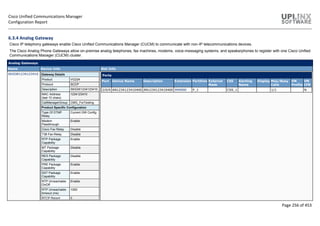
N Divert
(Connected)
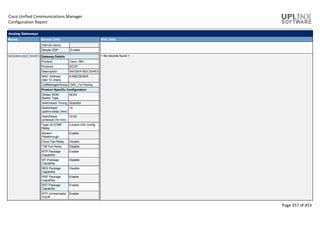
N Disabled
N Forward All Y Enabled
N Group Call
PickUp
N Disabled
N Meet Me N Disabled
N Mobility N Disabled
N Other Call
PickUp
N Disabled
N Park N Disabled
N Redial Y Enabled
N Report Caller N Disabled
N Report Quality N Disabled
N Speed Dial Y Enabled
6.7.13 Recording Profile
To provision line appearances of agents for call recording, administrators create one or more call recording profiles. The
administrator then selects a recording profile for a line appearance.
Recording Profile
Name Details
Recording Profile1 Recording Profile Information
Recording Calling Search Space CSS_1
Recording Destination Address 10.5.1.1
Recording Profile2 Recording Profile Information
Recording Calling Search Space CSS_2
Recording Destination Address 10.5.1.1
6.7.14 SIP Normalization Script
This section defines SIP normalization and transparency scripts.
Cisco Unified Communications Manager
Configuration Report
Page 396 of 453
SIP trunks can connect to a variety of endpoints, including PBXs, gateways, and service providers. Each of these
endpoints implements the SIP protocol a bit differently, causing a unique set of interoperability issues. To normalize
messages per trunk, Cisco Unified Communications Manager allows you to add or update scripts to the system and then
associate them with one or more SIP trunks. The normalization scripts that you create allow you to preserve, remove, or
change the contents of any SIP headers or content bodies, known or unknown.
Transparency refers to the ability to pass information from one call leg to the other. REFER transparency allows Cisco
Unified Communications Manager to pass on REFER requests to another endpoint rather than acting on them. REFER
transparency is key in call center applications, where the agent sending the REFER (initiating the transfer) resides in a
geographic area remote from both of the other call parties.
After you configure a script in Cisco Unified Communications Manager, you associate the script with a SIP trunk by
configuring the Normalization Script fields in the Trunk Configuration window. You can only associate one script per trunk,
but you can associate the same script to multiple trunks.
SIP Normalization Script Configuration
Name Details
refer-passthrough SIP Normalization Script Configuration
Description Remove Unified CM from the call due to a blind
transfer between SIP trunks
Script Execution Error Recovery Action Message Rollback Only
System Resource Error Recovery
Action
Disable Script
Memory Threshold 50
Lua Instruction Threshold 1000
HCS-PCV-PAI-passthrough SIP Normalization Script Configuration
Description Cisco HCS platform integration with Enterprise IMS
Script Execution Error Recovery Action Message Rollback Only
System Resource Error Recovery
Action
Disable Script
Memory Threshold 50
Lua Instruction Threshold 1000
vcs-interop SIP Normalization Script Configuration
Description Provides interoperability for endpoints registered to
the Video Communications Server (VCS)
Script Execution Error Recovery Action Message Rollback Only
System Resource Error Recovery
Action
Disable Script
Memory Threshold 1000
Lua Instruction Threshold 2000
diversion-counter SIP Normalization Script Configuration
Description Provide capability to adjust the diversion counter
Script Execution Error Recovery Action Message Rollback Only
System Resource Error Recovery
Action
Disable Script
Memory Threshold 50
Lua Instruction Threshold 1000
cisco-telepresence-conductor-interop SIP Normalization Script Configuration
Description Provides interoperability for endpoints registered to
the TelePresence Conductor
Script Execution Error Recovery Action Message Rollback Only
System Resource Error Recovery
Action
Disable Script
Memory Threshold 1000
Lua Instruction Threshold 2000
cisco-telepresence-mcu-ts-direct-interop SIP Normalization Script Configuration
Cisco Unified Communications Manager
Configuration Report
Page 397 of 453
SIP Normalization Script Configuration
Name Details
Description Provides interoperability between Unified
Communications Manager (UCM) and Cisco
TelePresence MCU, and between UCM and Cisco
TelePresece Server
Script Execution Error Recovery Action Message Rollback Only
System Resource Error Recovery
Action
Disable Script
Memory Threshold 1000
Lua Instruction Threshold 2000
cisco-meeting-server-interop SIP Normalization Script Configuration
Description Provides interoperability between Unified
Communication Manager (UCM) and Cisco Meeting
Server
Script Execution Error Recovery Action Message Rollback Only
System Resource Error Recovery
Action
Disable Script
Memory Threshold 1000
Lua Instruction Threshold 2000
att-header-passthrough SIP Normalization Script Configuration
Description Provides passthrough of header x-att-loop
Script Execution Error Recovery Action Message Rollback Only
System Resource Error Recovery
Action
Disable Script
Memory Threshold 100
Lua Instruction Threshold 1000
6.7.15 SDP Transparency Profile
The Session Description Protocol Transparency for Declarative Parameters allows the administrator to specify declarative
SDP attributes that are not natively supported by Cisco Unified Communications Manager to be passed from the ingress
call leg to the egress call leg.
If the Unified Communications Manager receives attributes that are not explicitly identified by the administrator to send to
the egress leg, Unified Communications Manager drops the attribute from the outgoing SDP similar to previous versions of
Unified Communications Manager.
SDP Transparency Profile
Name Description Attributes
Pass all unknown SDP attributes Default SDP Transparency Profile to pass all unknown SDP attributes < None >
6.7.16 Network Access Profile
A Network Access Profile contains information about VPN connectivity and HTTP proxy settings. It is assigned to a
Wireless LAN Profile.
Network Access Profile
Name Details
NetworkAccessProf Network Access Profile Information
Description A profile
VPN Required Off
HTTP Proxy Settings
Proxy Settings None
Proxy Settings None
Cisco Unified Communications Manager
Configuration Report
Page 398 of 453
6.7.17 Wireless LAN Profile
The Wireless LAN Profile feature removes the need for users to configure Wi-Fi parameters on their phones by allowing the
administrator to configure Wi-Fi profiles for them. The user devices can automatically download the Wi-Fi configuration
from the Cisco Unified Communications Manager TFTP server, and the configuration is then applied to these devices.
The following Wireless LAN Profiles are configured:
Wireless LAN Profile
Name Info
WifiLanProf01 Wireless LAN Profile Information
Description A profile
User Modifiable Allowed
Wireless Settings
SSID (Network Name) uplinx
Frequency Band Auto
Authentication Settings
Authentication Method EAP-FAST
Provide Shared Credentials Y
Username admin
Password Description
Network Access Settings
Network Access Profile NetworkAccessProf
WifiLanProf02 Wireless LAN Profile Information
Description A profile two
User Modifiable Allowed
Wireless Settings
SSID (Network Name) uplinx2
Frequency Band Auto
Authentication Settings
Authentication Method EAP-FAST
Provide Shared Credentials Y
Username admin
Password Description
Network Access Settings
Network Access Profile NetworkAccessProf
6.7.18 Wireless LAN Profile Group
After you create one or more Wireless LAN Profiles, you can add them to a Wireless LAN Profile Group.
A Wireless LAN Profile Group can be added to a device pool or device-level configuration.
Wireless LAN Profile Group
Name Description Selected Profiles
WifiLANProfGroup01 < None > WifiLanProf01
WifiLanProf02
6.7.19 Wifi Hotspot Profile
The Wi-Fi Hotspot Profile feature allows users to use their desk phones to provide a Wi-Fi Hotspot, so that they can
connect a Wi-Fi device such as a tablet or a mobile phone to the network through the desk phone. The desk phones can
automatically download the Wi-Fi Hotspot configuration from the Cisco Unified Communications Manager, and the
configuration is then applied to these devices.
The following Wi-Fi Hotspot Profiles are configured:
Wifi Hotspot Profile
Cisco Unified Communications Manager
Configuration Report
Page 399 of 453
Name Info
WifiHotspotProf01 Wi-Fi Hotspot Profile Information
Description < None >
User Modifiable Allowed
Wireless Settings
SSID Prefix uplinx
Frequency Band Auto
Authentication Settings
Authentication Method None
7 User Management
The following chapters contain the configuration of application- and end- users and its related settings such as roles and
security settings:
 Application User
 End User
 SIP realms
 User Settings
 Self-Provisioning
7.1 Application User
Application users are all users associated with other Cisco IP Communications features or applications, such as Cisco
Attendant Console, Cisco IP Contact Center Express, or Cisco Unified Communications Manager Assistant. These
applications need to authenticate with Cisco Unified Communications Manager (CUCM), but these internal "users" do not
have an interactive login and serve purely for internal communications between applications.
Application User
User ID Information
admin Application User Information
BLF Presence Group Standard Presence group
User Rank 1
Accept Presence Subscription N
Accept Out-of-dialog REFER N
Accept Unsolicited Notification N
Accept Replaces Header N
Device Information
Controlled Devices
CTI Controlled Device Profiles
CAPF Information
Associated CAPF Profiles
Permissions Information
Groups Standard Audit Users
Standard CCM Super Users
Roles Standard Admin Rep Tool Admin
Standard Audit Log Administration
Standard AXL API Access
Standard CCM Admin Users
Standard CCMADMIN Administration
Standard CUReporting
Standard CUReporting Authentication
Standard EM Authentication Proxy Rights
Standard SERVICEABILITY Administration
Standard SSO Config Admin
CCMQRTSecureSysUser Application User Information
BLF Presence Group Standard Presence group
User Rank 1
Cisco Unified Communications Manager
Configuration Report
Page 400 of 453
Application User
User ID Information
Accept Presence Subscription N
Accept Out-of-dialog REFER N
Accept Unsolicited Notification N
Accept Replaces Header N
Device Information
Controlled Devices
CTI Controlled Device Profiles
CAPF Information
Associated CAPF Profiles
Permissions Information
Groups Standard CTI Allow Control of All Devices
Standard CTI Allow Control of Phones supporting Connected Xfer and conf
Standard CTI Allow Control of Phones supporting Rollover Mode
Standard CTI Enabled
Standard CTI Secure Connection
Standard EM Authentication Proxy Rights
Roles Standard CTI Allow Control of All Devices
Standard CTI Allow Control of Phones supporting Connected Xfer and conf
Standard CTI Allow Control of Phones supporting Rollover Mode
Standard CTI Enabled
Standard CTI Secure Connection
Standard EM Authentication Proxy Rights
CCMQRTSysUser Application User Information
BLF Presence Group Standard Presence group
User Rank 1
Accept Presence Subscription N
Accept Out-of-dialog REFER N
Accept Unsolicited Notification N
Accept Replaces Header N
Device Information
Controlled Devices
CTI Controlled Device Profiles
CAPF Information
Associated CAPF Profiles
Permissions Information
Groups Standard CTI Allow Control of All Devices
Standard CTI Allow Control of Phones supporting Connected Xfer and conf
Standard CTI Allow Control of Phones supporting Rollover Mode
Standard CTI Enabled
Standard EM Authentication Proxy Rights
Roles Standard CTI Allow Control of All Devices
Standard CTI Allow Control of Phones supporting Connected Xfer and conf
Standard CTI Allow Control of Phones supporting Rollover Mode
Standard CTI Enabled
Standard EM Authentication Proxy Rights
CCMSysUser Application User Information
BLF Presence Group Standard Presence group
User Rank 1
Accept Presence Subscription N
Accept Out-of-dialog REFER N
Accept Unsolicited Notification N
Accept Replaces Header N
Device Information
Controlled Devices
CTI Controlled Device Profiles
Cisco Unified Communications Manager
Configuration Report
Page 401 of 453
Application User
User ID Information
CAPF Information
Associated CAPF Profiles
Permissions Information
Groups Standard CTI Allow Control of All Devices
Standard CTI Enabled
Standard EM Authentication Proxy Rights
Roles Standard CTI Allow Control of All Devices
Standard CTI Enabled
Standard EM Authentication Proxy Rights
CUCService Application User Information
BLF Presence Group Standard Presence group
User Rank 1
Accept Presence Subscription N
Accept Out-of-dialog REFER N
Accept Unsolicited Notification N
Accept Replaces Header N
Device Information
Controlled Devices
CTI Controlled Device Profiles
CAPF Information
Associated CAPF Profiles
Permissions Information
Groups Standard CCM Admin Users
Standard RealtimeAndTraceCollection
Roles Standard CCM Admin Users
Standard CUReporting
Standard CUReporting Authentication
Standard RealtimeAndTraceCollection
IPMASecureSysUser Application User Information
BLF Presence Group Standard Presence group
User Rank 1
Accept Presence Subscription N
Accept Out-of-dialog REFER N
Accept Unsolicited Notification N
Accept Replaces Header N
Device Information
Controlled Devices
CTI Controlled Device Profiles
CAPF Information
Associated CAPF Profiles
Permissions Information
Groups Standard CTI Allow Control of All Devices
Standard CTI Enabled
Standard CTI Secure Connection
Standard EM Authentication Proxy Rights
Roles Standard CTI Allow Control of All Devices
Standard CTI Enabled
Standard CTI Secure Connection
Standard EM Authentication Proxy Rights
IPMASysUser Application User Information
BLF Presence Group Standard Presence group
User Rank 1
Accept Presence Subscription N
Accept Out-of-dialog REFER N
Cisco Unified Communications Manager
Configuration Report
Page 402 of 453
Application User
User ID Information
Accept Unsolicited Notification N
Accept Replaces Header N
Device Information
Controlled Devices
CTI Controlled Device Profiles
CAPF Information
Associated CAPF Profiles
Permissions Information
Groups Standard CTI Allow Control of All Devices
Standard CTI Allow Control of Phones supporting Connected Xfer and conf
Standard CTI Enabled
Standard EM Authentication Proxy Rights
Roles Standard CTI Allow Control of All Devices
Standard CTI Allow Control of Phones supporting Connected Xfer and conf
Standard CTI Enabled
Standard EM Authentication Proxy Rights
presencevieweradmin Application User Information
BLF Presence Group Standard Presence group
User Rank 1
Accept Presence Subscription N
Accept Out-of-dialog REFER N
Accept Unsolicited Notification N
Accept Replaces Header N
Device Information
Controlled Devices
CTI Controlled Device Profiles
CAPF Information
Associated CAPF Profiles
Permissions Information
Groups Admin-3rd Party API
Roles
TabSyncSysUser Application User Information
BLF Presence Group Standard Presence group
User Rank 1
Accept Presence Subscription N
Accept Out-of-dialog REFER N
Accept Unsolicited Notification N
Accept Replaces Header N
Device Information
Controlled Devices
CTI Controlled Device Profiles
CAPF Information
Associated CAPF Profiles
Permissions Information
Groups Standard TabSync User
Roles Standard AXL API Access
WDSecureSysUser Application User Information
BLF Presence Group Standard Presence group
User Rank 1
Accept Presence Subscription N
Accept Out-of-dialog REFER N
Cisco Unified Communications Manager
Configuration Report
Page 403 of 453
Application User
User ID Information
Accept Unsolicited Notification N
Accept Replaces Header N
Device Information
Controlled Devices
CTI Controlled Device Profiles
CAPF Information
Associated CAPF Profiles
Permissions Information
Groups Standard CTI Allow Control of All Devices
Standard CTI Allow Control of Phones supporting Connected Xfer and conf
Standard CTI Allow Control of Phones supporting Rollover Mode
Standard CTI Enabled
Standard CTI Secure Connection
Standard EM Authentication Proxy Rights
Roles Standard CTI Allow Control of All Devices
Standard CTI Allow Control of Phones supporting Connected Xfer and conf
Standard CTI Allow Control of Phones supporting Rollover Mode
Standard CTI Enabled
Standard CTI Secure Connection
Standard EM Authentication Proxy Rights
WDSysUser Application User Information
BLF Presence Group Standard Presence group
User Rank 1
Accept Presence Subscription N
Accept Out-of-dialog REFER N
Accept Unsolicited Notification N
Accept Replaces Header N
Device Information
Controlled Devices
CTI Controlled Device Profiles
CAPF Information
Associated CAPF Profiles
Permissions Information
Groups Standard CTI Allow Control of All Devices
Standard CTI Allow Control of Phones supporting Connected Xfer and conf
Standard CTI Allow Control of Phones supporting Rollover Mode
Standard CTI Enabled
Standard EM Authentication Proxy Rights
Roles Standard CTI Allow Control of All Devices
Standard CTI Allow Control of Phones supporting Connected Xfer and conf
Standard CTI Allow Control of Phones supporting Rollover Mode
Standard CTI Enabled
Standard EM Authentication Proxy Rights
app1 Application User Information
BLF Presence Group Standard Presence group
User Rank 1
Accept Presence Subscription N
Accept Out-of-dialog REFER N
Accept Unsolicited Notification N
Accept Replaces Header N
Device Information
Controlled Devices
CTI Controlled Device Profiles
CAPF Information
Associated CAPF Profiles
Cisco Unified Communications Manager
Configuration Report
Page 404 of 453
Application User
User ID Information
Permissions Information
Groups
Roles
app2 Application User Information
BLF Presence Group Standard Presence group
User Rank 1
Accept Presence Subscription N
Accept Out-of-dialog REFER N
Accept Unsolicited Notification N
Accept Replaces Header N
Device Information
Controlled Devices
CTI Controlled Device Profiles
CAPF Information
Associated CAPF Profiles 2
Permissions Information
Groups
Roles
AXL_User Application User Information
BLF Presence Group Standard Presence group
User Rank 1
Accept Presence Subscription N
Accept Out-of-dialog REFER N
Accept Unsolicited Notification N
Accept Replaces Header N
Device Information
Controlled Devices
CTI Controlled Device Profiles
CAPF Information
Associated CAPF Profiles
Permissions Information
Groups AXL Group
Standard CCM Server Monitoring
Roles Standard AXL API Users
Standard AXL Read Only API Access
Standard CCM Admin Users
Standard CCMADMIN Read Only
Standard SERVICEABILITY
INFORMACAST Application User Information
BLF Presence Group Standard Presence group
User Rank 1
Accept Presence Subscription N
Accept Out-of-dialog REFER N
Accept Unsolicited Notification N
Accept Replaces Header N
Device Information
Controlled Devices
CTI Controlled Device Profiles
CAPF Information
Associated CAPF Profiles
Permissions Information
Cisco Unified Communications Manager
Configuration Report
Page 405 of 453
Application User
User ID Information
Groups InformaCast AXL User Group
Standard CTI Allow Control of All Devices
Standard CTI Allow Control of Phones supporting Connected Xfer and conf
Standard CTI Allow Control of Phones supporting Rollover Mode
Standard CTI Enabled
Roles Standard AXL API Access
Standard CTI Allow Control of All Devices
Standard CTI Allow Control of Phones supporting Connected Xfer and conf
Standard CTI Allow Control of Phones supporting Rollover Mode
Standard CTI Enabled
uplinx_pct-mkunz Application User Information
BLF Presence Group Standard Presence group
User Rank 1
Accept Presence Subscription N
Accept Out-of-dialog REFER N
Accept Unsolicited Notification N
Accept Replaces Header N
Device Information
Controlled Devices
CTI Controlled Device Profiles
CAPF Information
Associated CAPF Profiles
Permissions Information
Groups Standard CCM Admin Users
Standard CCM Server Monitoring
Standard CTI Allow Call Monitoring
Standard CTI Allow Call Park Monitoring
Standard CTI Allow Call Recording
Standard CTI Allow Control of All Devices
Standard CTI Allow Control of Phones supporting Connected Xfer and conf
Standard CTI Allow Control of Phones supporting Rollover Mode
Standard CTI Enabled
Standard EM Authentication Proxy Rights
Roles Standard CCM Admin Users
Standard CCMADMIN Read Only
Standard CTI Allow Call Monitoring
Standard CTI Allow Call Park Monitoring
Standard CTI Allow Call Recording
Standard CTI Allow Control of All Devices
Standard CTI Allow Control of Phones supporting Connected Xfer and conf
Standard CTI Allow Control of Phones supporting Rollover Mode
Standard CTI Enabled
Standard CUReporting
Standard CUReporting Authentication
Standard EM Authentication Proxy Rights
Standard SERVICEABILITY
Cisco Unified Communications Manager
Configuration Report
Page 406 of 453
7.2 End User (Condensed)
End users are all users associated with a physical person and an interactive login. This category includes all IP Telephony users as well as Cisco Unified Communications
Manager (CUCM) administrators when using the User Groups and Roles configuration (equivalent to the Cisco Multilevel Administration feature in prior Cisco Unified
Communications Manager (CUCM) versions). The following is a condensed table with the most important end user settings.
End User (Condensed)
User ID First name Last name Telephone
Number
Department User Status Controlled
Devices
Controlled
Profiles
Primary
Extension
Groups Roles
1300.ORANGE 1300 ORANGE Active LDAP
Synchronized
User
aberg Alec Berg +61290025003 Active LDAP
Synchronized
User
agent1 agent1 UCCX Active LDAP
Synchronized
User
agent2 agent2 UCCX Active LDAP
Synchronized
User
ajolie Angelina Jolie +61890008000 Active LDAP
Synchronized
User
akutcher Ashton Kutcher 4001 Actors Active LDAP
Synchronized
User
aps_user_template APS UserTemplate Active LDAP
Synchronized
User
aps01 aps 01 +61290004176 Active LDAP
Synchronized
User
aps02 aps 02 +61290004017 Active LDAP
Synchronized
User
aps03 aps 03 +61290004018 Active LDAP
Synchronized
User
Cisco Unified Communications Manager
Configuration Report
Page 407 of 453
End User (Condensed)
User ID First name Last name Telephone
Number
Department User Status Controlled
Devices
Controlled
Profiles
Primary
Extension
Groups Roles
aps04 aps 04 4004 Active LDAP
Synchronized
User
aps05 aps 05 +61290004021 Active LDAP
Synchronized
User
apstest1 Test1 APS Active LDAP
Synchronized
User
asterix Asterix TheGaulois +8900015011 Active LDAP
Synchronized
User
bbreu Beat Breu +61290005005 Active LDAP
Synchronized
User
bpitt Brad Pitt 61890008005 BradPitts Active LDAP
Synchronized
User
bwayne Bruce Wayne Fictional Active LDAP
Synchronized
User
bwillis Bruce Willis +442070877600 Active LDAP
Synchronized
User
ceastwood Clint Eastwood +61255780093 Active LDAP
Synchronized
User
crsadmin crsadmin UCCX Active LDAP
Synchronized
User
cttest01 ct test01 98777777 Active LDAP
Synchronized
User
cttest03 ct test03 Active LDAP
Synchronized
User
dmoore Demi Moore 0340003005 Active LDAP
Cisco Unified Communications Manager
Configuration Report
Page 408 of 453
End User (Condensed)
User ID First name Last name Telephone
Number
Department User Status Controlled
Devices
Controlled
Profiles
Primary
Extension
Groups Roles
Synchronized
User
dotfirst dotfirst . Active LDAP
Synchronized
User
ebachman Erlich Bachman +61290005011 Fictional Active LDAP
Synchronized
User
eldee El Ess Active LDAP
Synchronized
User
elled Elle Diess 4005 Active LDAP
Synchronized
User
emauto_Friday1 emauto Friday 8533 Active LDAP
Synchronized
User
emauto_Monday1 emautoFirst Monday1 38600 Active LDAP
Synchronized
User
emauto_Tuesday emauto Tuesday +61890008004 Active LDAP
Synchronized
User
emauto_Wed Emauto Wed Active LDAP
Synchronized
User
emauto15 emauto15 LAST 8000 Active LDAP
Synchronized
User
emauto16 emauto16 LAST2 Active LDAP
Synchronized
User
epage Ellen Page +6129004002 Actors Active LDAP
Synchronized
User
FMG_Last First Last Active LDAP
Synchronized
Cisco Unified Communications Manager
Configuration Report
Page 409 of 453
End User (Condensed)
User ID First name Last name Telephone
Number
Department User Status Controlled
Devices
Controlled
Profiles
Primary
Extension
Groups Roles
User
FMG_SiteNotExists FMG_SiteNotExists Last Active LDAP
Synchronized
User
FMG10 FMG10 Last10 +18474307003 Active LDAP
Synchronized
User
fmg16 fmg16XX testZZ 4402 Active LDAP
Synchronized
User
fmg17 fmg17 last Active LDAP
Synchronized
User
FMG25 FMG25 LAst Active LDAP
Synchronized
User
fmg4 FMG4 Last5 81554405 Active LDAP
Synchronized
User
fmg6 fmg6 test 7004 Active LDAP
Synchronized
User
FMG7 FMG7 TEST 1044565456 Active LDAP
Synchronized
User
fmg9 fmg9 Last 7966 Active LDAP
Synchronized
User
FMGconsole1 Console1 FMG Active LDAP
Synchronized
User
gclooney George Clooney 55000 Active LDAP
Synchronized
User
gdepardieu Gerard Depardieu 4014 Active LDAP
Synchronized
User
Cisco Unified Communications Manager
Configuration Report
Page 410 of 453
End User (Condensed)
User ID First name Last name Telephone
Number
Department User Status Controlled
Devices
Controlled
Profiles
Primary
Extension
Groups Roles
gpaltrow Gwyneth Paltrow 4012 Active LDAP
Synchronized
User
harold Harold Xie 4005 Active LDAP
Synchronized
User
hford Harrison Ford Active LDAP
Synchronized
User
jacktheripper Jack TheRipper Active LDAP
Synchronized
User
jcarrey Jim Carrey Active LDAP
Synchronized
User
jdelpotro Juan Martin Del Potrooooooooooooooooooooooo Active LDAP
Synchronized
User
jdunn Jared Dunn Fictional Active LDAP
Synchronized
User
jhoward John Howard 3000 Research Active LDAP
Synchronized
User
jjones James Earl Jones 55000 Active LDAP
Synchronized
User
jlemmon Jack Lemmon 9100 Admin Active LDAP
Synchronized
User
jmorrison Jim Morrison +61890008000 Active LDAP
Synchronized
User
jnicholson Jack Nicholson 7766 Admin Active LDAP
Synchronized
User
john.smith John Smith Active LDAP
Cisco Unified Communications Manager
Configuration Report
Page 411 of 453
End User (Condensed)
User ID First name Last name Telephone
Number
Department User Status Controlled
Devices
Controlled
Profiles
Primary
Extension
Groups Roles
Synchronized
User
jparsons Jim Parsons Actors Active LDAP
Synchronized
User
jroberts Julia Roberts +61290025013 Active LDAP
Synchronized
User
jseinfield Jerry Seinfield +61290025024 Active LDAP
Synchronized
User
kcostner Kevin Costner 4566 Research Active LDAP
Synchronized
User
kspacey Kevin Spacey Active LDAP
Synchronized
User
kwatanabe Ken Watanabe +61290025003 Actors Active LDAP
Synchronized
User
ldicaprio Leonardo DiCaprio Active LDAP
Synchronized
User
lds01 lds ohone Active LDAP
Synchronized
User
ldstest01 LDS Test01 Active LDAP
Synchronized
User
ldstest02 lds test02 newuser Active LDAP
Synchronized
User
ldstest03 lds test03 newuser Active LDAP
Synchronized
User
ldstest04 lds test04 newuser Active LDAP
Synchronized
Cisco Unified Communications Manager
Configuration Report
Page 412 of 453
End User (Condensed)
User ID First name Last name Telephone
Number
Department User Status Controlled
Devices
Controlled
Profiles
Primary
Extension
Groups Roles
User
ldstest06 lds test06 Active LDAP
Synchronized
User
ldstest07 lds test07 Active LDAP
Synchronized
User
ldstest08 lds test08 Active LDAP
Synchronized
User
ldstest09 lds test09 Active LDAP
Synchronized
User
ldstest10 lds test10 Active LDAP
Synchronized
User
ldstest11 lds test11 LDSDept33 Active LDAP
Synchronized
User
ldstest12 lds test12 TESTDEPT Active LDAP
Synchronized
User
ldstest13 lds test13 ATEST Active LDAP
Synchronized
User
ldstest14 lds test14 Active LDAP
Synchronized
User
mbuser1 mbuser1 Test Active LDAP
Synchronized
User
mbuser18 mbuser18 last +17707773610 Active LDAP
Synchronized
User
mbuser19 mbuser19XX LastYY 7022 Active LDAP
Synchronized
User
Cisco Unified Communications Manager
Configuration Report
Page 413 of 453
End User (Condensed)
User ID First name Last name Telephone
Number
Department User Status Controlled
Devices
Controlled
Profiles
Primary
Extension
Groups Roles
mbuser2 mbuser2 Last Active LDAP
Synchronized
User
mdouglas Michael Douglas Active LDAP
Synchronized
User
mfreeman Morgan Freeman Active LDAP
Synchronized
User
mgibson Mel Gibson 7089 Sales Active LDAP
Synchronized
User
mkadmin Michael Admin Active LDAP
Synchronized
User
mkunz Michael Kunz Active LDAP
Synchronized
User
pdinklage Peter Dinklage +61386127601 Research Active LDAP
Synchronized
User
phoneadmin phoneadmin Admin Active LDAP
Synchronized
User
ps Provisioning System Active LDAP
Synchronized
User
putin Vladimir Putin Active LDAP
Synchronized
User
rdeniro Robert DeNiro Active LDAP
Synchronized
User
rdstestuserA rdstest userA Active LDAP
Synchronized
User
rdstestuserB rdstest userB Active LDAP
Cisco Unified Communications Manager
Configuration Report
Page 414 of 453
End User (Condensed)
User ID First name Last name Telephone
Number
Department User Status Controlled
Devices
Controlled
Profiles
Primary
Extension
Groups Roles
Synchronized
User
rredford Robert Redford Active LDAP
Synchronized
User
rsnow Ramsay Snow +61290005017 Fictional Active LDAP
Synchronized
User
sconnery Sean Connery Active LDAP
Synchronized
User
specialchars Dávid Trüber 4011 Dep€uro Active LDAP
Synchronized
User
specialchars2 中文 test Active LDAP
Synchronized
User
spenn Sean Penn 4200 Active LDAP
Synchronized
User
sturner Sophie Turner +61790003000 Actors Active LDAP
Synchronized
User
supervisor1 supervisor1 UCCX Active LDAP
Synchronized
User
test1em test1 em Active LDAP
Synchronized
User
test20aps Test20 APS Active LDAP
Synchronized
User
testem test em Active LDAP
Synchronized
User
testlast test last +61290005018 Active LDAP
Synchronized
Cisco Unified Communications Manager
Configuration Report
Page 415 of 453
End User (Condensed)
User ID First name Last name Telephone
Number
Department User Status Controlled
Devices
Controlled
Profiles
Primary
Extension
Groups Roles
User
testuser01 test user01 55590387 Active LDAP
Synchronized
User
testuser02 test user02 65577783 IT Active LDAP
Synchronized
User
testuser03 test user03 55593872 Finance Active LDAP
Synchronized
User
testuser04 test user04 777877787 Active LDAP
Synchronized
User
testuser05 test user05 76767676 Risk Active LDAP
Synchronized
User
thanks Tom Hanks Active LDAP
Synchronized
User
uptest01 up uptest01 40404590 Active LDAP
Synchronized
User
uptest02 up uptest02 80803002 Active LDAP
Synchronized
User
User_template User Template Active LDAP
Synchronized
User
User_templateNoMob User TemplateNoMob Active LDAP
Synchronized
User
Cisco Unified Communications Manager
Configuration Report
Page 416 of 453
7.3 SIP Realm
The SIP Realm provides the trunk-side credentials when Cisco Unified Communications Manager gets challenged by a
trunk peer.
When you configure digest authentication for SIP trunks, Cisco Unified Communications Manager challenges the identity of
the SIP user agent that connects to the trunk every time the trunk sends a SIP request to Cisco Unified Communications
Manager; the SIP user agent, in turn, can challenge the identity of Cisco Unified Communications Manager. For CUCM to
respond to a challenge from the SIP user agent, you must configure the SIP realm for Cisco Unified Communications
Manager.
SIP Realm
Realm User
Realm1 admin
7.4 User Settings
The following chapters contain the configuration of user settings:
 Credential Policy Default
 Credential Policy
 Role
 Access Control Group
 Application User CAPF Profile
 End User CAPF Profile
 UC Service (for CUCM 9.0 and later)
 Service Profile (for CUCM 9.0 and later)
 User Profile (for CUCM 10.0 and later)
 User Rank
 User Group
7.4.1 Credential Policy Default
The Credential Policy Default window provides options to change the default credential policy assignment for a user and
credential type (for example, end user PINs).
At installation, Cisco Unified Communications Manager assigns the system Default Credential Policy to end user
passwords, end user PINS, and application user passwords. The system applies the application password that you
configured at installation to all application users. You can assign a new default credential policy and configure new default
credentials after installation.
Credential Policy Default
Name Credential User Credential Type Info
Default Credential Policy Application User Password Credential Policy Default Information
User Cannot Change N
User Must Change at Next Login Y
Does Not Expire N
Default Credential Policy End User Password Credential Policy Default Information
User Cannot Change N
User Must Change at Next Login Y
Does Not Expire N
Default Credential Policy End User PIN Credential Policy Default Information
User Cannot Change N
User Must Change at Next Login Y
Does Not Expire N
Cisco Unified Communications Manager
Configuration Report
Page 417 of 453
7.4.2 Credential Policy
A Credential Policy comprises a set of rules that controls access to a system or network resource. A credential policy
defines password requirements and account lockouts for user accounts. Credential policies that are assigned to user
accounts control the authentication process in Cisco Unified Communications Manager. After you add a credential policy,
you can assign the new policy as the default policy for a credential type or to an individual application or end user.
Credential Policy
Display Name Credential Policy Information
uplinx_pct_credential_policy Failed Logon 5
Reset Failed Logon Attempts Every (minutes) 30
Lockout Duration (minutes) 30
Minimum Duration Between Credential
Changes (minutes)
0
Credential Expires After (days) 0 (Never Expires)
Minimum Credential Length 1
Stored Number of Previous Credentials 0
Inactive Days Allowed 0
Expiry Warning Days 0
Check for Trivial Passwords N
Default Credential Policy
(S)
Failed Logon 5
Reset Failed Logon Attempts Every (minutes) 30
Lockout Duration (minutes) 30
Minimum Duration Between Credential
Changes (minutes)
0
Credential Expires After (days) 0 (Never Expires)
Minimum Credential Length 1
Stored Number of Previous Credentials 0
Inactive Days Allowed 0
Expiry Warning Days 0
Check for Trivial Passwords N
Enhanced Security Credential Policy
(S)
Failed Logon 3
Reset Failed Logon Attempts Every (minutes) 15
Lockout Duration (minutes)n 0 (Administrator Must Unlock)
Minimum Duration Between Credential
Changes (minutes)
1440
Credential Expires After (days) 60
Minimum Credential Length 12
Stored Number of Previous Credentials 12
Inactive Days Allowed 0
Expiry Warning Days 0
Check for Trivial Passwords Y
7.4.3 Role
Roles allow to configure end users and application users with different levels of privilege. Administrators with full
administration privilege configure roles and user groups. In general, full-access administration users configure the privilege
of other administration users and end users to Cisco Unified Communications Manager Administration and to other
applications.
Roles comprise groups of resources for an application. At installation, default standard roles get created for various
administrative functions. You may, however, create custom roles that comprise custom groupings of resources for an
application.
Different levels of privilege exist for each application. For the Cisco Unified Communications Manager Administration
application, two levels of privilege exist: read privilege and update privilege.
Cisco Unified Communications Manager
Configuration Report
Page 418 of 453
Role
Name Description Is Standard Application Role Assignment
Standard AXL API Access Access the AXL APIs Y Cisco Call Manager
AXL Database
AXL Database API (Allow to use API)
Standard AXL API Users All users with access
to AXL APIs
Y
Standard AXL Read Only API Access Access the AXL Read
Only APIs
Y Cisco Call Manager
AXL Database Read
Only
Execute SQL Query (Allow to use API)
Get Api (Allow to use API)
List Api (Allow to use API)
Standard Admin Rep Tool Admin Administer CAR Y
Standard Audit Log Administration Serviceability Audit
Log Administration
Y Cisco Call Manager
Serviceability
Audit Configuration (read, update)
Audit Trace (read, update)
Control Center - Network Services web
page (read, update)
RTMT->Alert Config (read, update)
RTMT->Profile Saving (read, update)
Real Time Monitoring Tool (read,
update)
SOAP Control Center APIs (read,
update)
SOAP Realtime Informations and
Control Center APIs (read, update)
SOAP Realtime Informations and
Control Center APIs 2 (read, update)
Trace Collection Tool (read, update)
Standard CCM Admin Users All users with access
to CCM web site
Y Cisco Call Manager
Administration
Advanced Role Setting (read, update)
Standard CCM End Users Access to CCM User
Option Pages
Y
Standard CCM Feature Management Standard CCM
Feature
Management
Y Cisco Call Manager
Administration
Bulk Delete Call Pickup Group (read,
update)
Bulk Delete Client Matter Codes (read,
update)
Bulk Delete Forced Authorization
Codes (read, update)
Bulk Infrastructure Device Insert
(insert, update)
Bulk Insert Call Pickup Group (read,
update)
Bulk Insert Client Matter Codes (read,
update)
Bulk Insert Forced Authorization Codes
(read, update)
CMC Info (read, update)
Call Park web pages (read, update)
Call Pickup web pages (read, update)
Conference Now web pages (read,
update)
ELIN Group Web Pages (read, update)
Emergency Location Configuration
Web Pages (read, update)
Fac Info (read, update)
Meet Me web pages (read, update)
Message Waiting web pages (read,
update)
Phone Services web pages (read,
update)
Self Provisioning Configuration (read,
update)
Voice Mail Pilot web pages (read,
update)
Voice Mail Port Wizard web pages
(read, update)
Voice Mail Port web pages (read,
update)
Voice Mail Profile web pages (read,
update)
Cisco Unified Communications Manager
Configuration Report
Page 419 of 453
Role
Name Description Is Standard Application Role Assignment
Standard CCM Gateway Management Standard CCM
Gateway
Management
Y Cisco Call Manager
Administration
Gate Keeper web pages (read, update)
Gateway web pages (read, update)
Trunk web pages (read, update)
Standard CCM Phone Management Standard CCM
Phone Management
Y Cisco Call Manager
Administration
BLF Speeddial (read, update)
Bulk Export Phones (read, update)
Bulk Insert UDP (read, update)
CTI Route Point web pages (read,
update)
Default Device Profile web pages
(read, update)
Device Profile web pages (read,
update)
Directory Number web pages (read,
update)
Firmware Load web pages (read,
update)
Line Appearance web pages (read,
update)
Phone Activation Code Page (read)
Phone Button Template web pages
(read, update)
Phone web pages (read, update)
Reorder Info (read, update)
Softkey Template web pages (read,
update)
Standard CCM Route Plan
Management
Standard CCM Route
Plan Management
Y Cisco Call Manager
Administration
Application Dial Rules web pages
(read, update)
Calling Search Space web pages (read,
update)
Dial Rule Pattern Info (read, update)
Dial Rules Info (read, update)
Hunt List (read, update)
Hunt Pilot (read, update)
Line Group web pages (read, update)
Local Route Group (read, update)
Pattern Parameter Info (read, update)
Route Filter web pages (read, update)
Route Group web pages (read,
update)
Route List (read, update)
Route Partition web pages (read,
update)
Route Pattern web pages (read,
update)
Route Pattern2 (read, update)
Route Plan Report web pages (read,
update)
SIP Route Pattern (read, update)
Time Period (read, update)
Time Schedule (read, update)
Translation Pattern web pages (read,
update)
Standard CCM Service Management Standard CCM
Service Management
Y Cisco Call Manager
Administration
Annunciator web pages (read, update)
Bulk Delete IPMA Managers (read,
update)
Bulk Delete IPMA Managers/Assistants
(read, update)
Bulk Insert IPMA Managers/Assistants
(read, update)
Conference Bridge web pages (read,
update)
IPMA Wizard web pages (read,
update)
IVR Source web pages (read, update)
MOH Audio Source web pages (read,
update)
MOH Server web pages (read, update)
Cisco Unified Communications Manager
Configuration Report
Page 420 of 453
Role
Name Description Is Standard Application Role Assignment
Media Resource Group List web pages
(read, update)
Media Resource Group web pages
(read, update)
Media Termination Point web pages
(read, update)
Transcoder web pages (read, update)
Standard CCM System Management Standard CCM
System
Management
Y Cisco Call Manager
Administration
AAR Group web pages (read, update)
Bulk Job Scheduler pages (read,
update)
CallManager Group web pages (read,
update)
CallManager web pages (read, update)
Date/Time Group web pages (read,
update)
Device Default web pages (read,
update)
Device Pool web pages (read, update)
Enterprise Parameters web pages
(read, update)
Enterprise Phone Configuration (read,
update)
Location web pages (read, update)
NTP Server (read, update)
Presence Group (read, update)
SCCP Security Profile (read, update)
SIP Phone Security Profile (read,
update)
SIP Trunk Security Profile (read,
update)
SRST web pages (read, update)
Server web pages (read, update)
Standard CCM User Management Standard CCM User
Management
Y Cisco Call Manager
Administration
Access Control for Permissions
Information (read, update)
Access Control for User Rank (read,
update)
Bulk Delete Users (read, update)
Bulk Insert Users (read, update)
Bulk Update Users (read, update)
User can Add New Users (read,
update)
User can set User Passwords (read,
update)
User web pages (read, update)
Standard CCM User Privilege
Management
Standard CCM User
Privilege
Management
Y Cisco Call Manager
Administration
Access Control Group web pages
(read, update)
Access Control for Permissions
Information (read, read, update,
update)
Access Control for User Rank (read,
read, update, update)
Advanced Role Setting (read, update)
Application User Web Pages (read,
update)
Cloud Onboarding Page (read, update)
LDAP Search Configuration Page
(read, update)
Ldap Sync UserGroup (read, update)
Line Template Page (read, update)
Phone Add Page (read, update)
Role web pages (read, update)
User Rank web pages (read, update)
User can Add New Users (read, read,
update, update)
User can set User Passwords (read,
read, update, update)
User web pages (read, update)
Cisco Unified Communications Manager
Configuration Report
Page 421 of 453
Role
Name Description Is Standard Application Role Assignment
Standard CCMADMIN Administration Administer all
aspects of
CCMAdmin system
Y Cisco Call Manager
Administration
AAR Group web pages (read, update)
ALL License Device Usage Report
(read, update)
Access Control Group web pages
(read, update)
Access Control for Permissions
Information (read, read, update,
update)
Access Control for User Rank (read,
read, update, update)
Access List (read, update)
Add Unity User (read, update)
Advanced License Device Usage
Report (read, update)
Advanced License User Usage Report
(read, update)
Advanced Presence Settings (read,
update)
Advanced Role Setting (read, update)
Advertised Route Pattern (read,
update)
All License User Usage Report (read,
update)
Announcement (read, update)
Annunciator web pages (read, update)
Application Dial Rules web pages
(read, update)
Application Server (read, update)
Application User CAPF (read, update)
Application User Web Pages (read,
update)
Applications Listeners (read, update)
Audio Codec Preference List (read,
update)
BLF Directed Call Park (read, update)
BLF Speeddial (read, update)
Basic License Device Usage Report
(read, update)
Basic License User Usage Report
(read, update)
Blocked Learned Pattern (read,
update)
Blocked Learned Patterns (read,
update)
Blocked Patterns (read, update)
Bulk Add/Update Lines (read, update)
Bulk Add/Update Phones (read,
update)
Bulk CUPS User Page (read, update)
Bulk Config Tool Export (read, update)
Bulk Config Tool Import (read, update)
Bulk Config Tool Import Validation
(read, update)
Bulk Contact List Export (read,
update)
Bulk Contact List Update (read,
update)
Bulk Contacts Rename (read, update)
Bulk Delete Access List (read, update)
Bulk Delete Call Pickup Group (read,
update)
Bulk Delete Client Matter Codes (read,
update)
Bulk Delete Fallback Profile (read,
update)
Bulk Delete Forced Authorization
Codes (read, update)
Bulk Delete Gateways (read, update)
Cisco Unified Communications Manager
Configuration Report
Page 422 of 453
Role
Name Description Is Standard Application Role Assignment
Bulk Delete IPMA Assistants (read,
update)
Bulk Delete IPMA Managers (read,
update)
Bulk Delete IPMA Managers/Assistants
(read, update)
Bulk Delete Mobility Profiles (read,
update)
Bulk Delete Phones (read, update)
Bulk Delete Remote Destination (read,
update)
Bulk Delete Remote Destination Profile
(read, update)
Bulk Delete UDP (read, update)
Bulk Delete Users (read, update)
Bulk Delete Vipr Enrolled DID Pattern
Group (read, update)
Bulk Delete Vipr Exclusion Number
Group (read, update)
Bulk Delete Vipr Route Filter Element
(read, update)
Bulk Delete Vipr Route Filter Group
(read, update)
Bulk EMCC Delete (read, update)
Bulk EMCC Insert/Update (read,
update)
Bulk EMCC Template (read, update)
Bulk Export Access List (read, update)
Bulk Export Line Appearance (read,
update)
Bulk Export Mobility Profiles (read,
update)
Bulk Export Phones (read, update)
Bulk Export Remote Destination (read,
update)
Bulk Export Remote Destination Profile
(read, update)
Bulk Export UDP (read, update)
Bulk Export Users (read, update)
Bulk File Upload Pages (read, read,
update, update)
Bulk Gateway File Format (read,
update)
Bulk Gateway Template (read, update)
Bulk Generate Gateway Reports (read,
update)
Bulk Generate IPMA Assistant Reports
(read, update)
Bulk Generate IPMA Manager Reports
(read, update)
Bulk Generate Phone Reports (read,
update)
Bulk Generate UDP Reports (read,
update)
Bulk Generate User Reports (read,
update)
Bulk Infrastructure Device Insert
(insert, update)
Bulk Insert Access List (read, update)
Bulk Insert Call Pickup Group (read,
update)
Bulk Insert Client Matter Codes (read,
update)
Bulk Insert Fallback Profile (read,
update)
Bulk Insert Forced Authorization Codes
(read, update)
Bulk Insert Gateways (read, update)
Cisco Unified Communications Manager
Configuration Report
Page 423 of 453
Role
Name Description Is Standard Application Role Assignment
Bulk Insert IPMA Managers/Assistants
(read, update)
Bulk Insert Imported Directory URI
(read, update)
Bulk Insert Intercom (read, update)
Bulk Insert Mobility Profiles (read,
update)
Bulk Insert Phones (read, update)
Bulk Insert Phones with Users (read,
update)
Bulk Insert Remote Destination (read,
update)
Bulk Insert Remote Destination Profile
(read, update)
Bulk Insert UDP (read, update)
Bulk Insert Users (read, update)
Bulk Insert Vipr Enrolled DID Pattern
Group (read, update)
Bulk Insert Vipr Exclusion Number
Group (read, update)
Bulk Insert Vipr Route Filter Element
(read, update)
Bulk Insert Vipr Route Filter Group
(read, update)
Bulk Intercom DN Template (read,
update)
Bulk Job Scheduler pages (read, read,
update, update)
Bulk Legacy Clients/Microsoft RCC
(read, update)
Bulk Migrate Phones (read, update)
Bulk Phone & Users File Format (read,
update)
Bulk Phone File Format (read, update)
Bulk Phone Migration (read, update)
Bulk Phone Template (read, update)
Bulk Region Matrix (read, update)
Bulk Remote Destination Profile Add
File Format (read, update)
Bulk Remote Destination Profile Create
File Format (read, update)
Bulk Remote Destination Profile
Template (read, update)
Bulk Reset Password/PIN (read,
update)
Bulk Reset/Restart Phones (read,
update)
Bulk Secure TAPS (read, update)
Bulk UDP File Format (read, update)
Bulk UDP Intercom DN Add (read,
update)
Bulk UDP Intercom DN Update (read,
update)
Bulk UDP Template (read, update)
Bulk Update Intercom (read, update)
Bulk Update Line Appearance (read,
update)
Bulk Update Phones (read, update)
Bulk Update UDP (read, update)
Bulk Update Users (read, update)
Bulk User CAPF Delete (read, update)
Bulk User CAPF Export (read, update)
Bulk User CAPF Insert (read, update)
Bulk User Locales for TAPS (read,
update)
Bulk User Template (read, update)
Bulk Validate Phones (read, update)
Bulk Validate Phones/Users (read,
Cisco Unified Communications Manager
Configuration Report
Page 424 of 453
Role
Name Description Is Standard Application Role Assignment
update)
Bulk Validate UDP (read, update)
Bulk View TAPS Log File (read,
update)
Bulk Wipe/Lock Phones (read, update)
CCD Advertising Service Profile (read,
update)
CCD Feature Configuration (read,
update)
CCD Requesting Service Profile (read,
update)
CCMCIP Profile (read, update)
CMC Info (read, update)
CTI Route Point web pages (read,
update)
CUMA Server Security Profile (read,
update)
Call Control Agent Profile (read,
update)
Call Control Discovery Partition (read,
update)
Call Park web pages (read, update)
Call Pickup web pages (read, update)
CallManager Group web pages (read,
update)
CallManager web pages (read, update)
Called Party Tracing (read, read,
update, update)
Called Party Transformation Pattern
(read, update)
Calling Search Space web pages (read,
update)
Centralized Deployment (read,
update)
Certificate Import Tool (read, update)
Certificate web pages (read, update)
Client Types (read, update)
Cloud Onboarding Page (read, update)
Common Device Mobility Profile (read,
update)
Common Phone Profile (read, update)
Compliance (read, update)
Compliance Change Password (read,
update)
Compliance Disable Encryption (read,
update)
Compliance Download Encryption
(read, update)
Compliance Profile (read, update)
Compliance Profile Routing Priority
(read, update)
Conference Bridge web pages (read,
update)
Conference Now web pages (read,
update)
Confidential Access Level (read,
update)
Credential (read, update)
Credential Policy (read, update)
Credential Policy Default (read,
update)
Cross-Origin Resource Sharing (read,
update)
DHCP Server Web Pages (read,
update)
DHCP Subnet Web Pages (read,
update)
DNA Analyser (read, update)
Cisco Unified Communications Manager
Configuration Report
Page 425 of 453
Role
Name Description Is Standard Application Role Assignment
DNA Control Center (read, update)
DNA Dump Da Information (read,
update)
DNA Gateways (read, update)
DNA Multiple Analyser (read, update)
DNA Phones (read, update)
DNA Trunks (read, update)
DNA View Files (read, update)
DRF Restore Warning Page (read,
update)
DRF Schedule Page (read, update)
DRF Show Dependency Page (read,
update)
DRF Show Status Page (read, update)
Dashboard (read, update)
Date/Time Group web pages (read,
update)
Default Device Profile web pages
(read, update)
Delete Unassigned DN (read, update)
Device Default web pages (read,
update)
Device Mobility Group (read, update)
Device Mobility Info (read, update)
Device Pool web pages (read, update)
Device Profile web pages (read,
update)
Dial Plan (read, update)
Dial Rule Pattern Info (read, update)
Dial Rules Info (read, update)
Directed Call Park (read, update)
Directory Dial Rules pages (read,
update)
Directory Number web pages (read,
update)
Download Local Directory URI (read,
update)
E911 Messages (read, update)
ELIN Group Web Pages (read, update)
EMCC Feature Config (read, update)
EMCC Intercluster Service Profile
(read, update)
EMCC Remote Cluster (read, update)
EMCC Remote Cluster Service Override
(read, update)
Email Federated Domains (read,
update)
Emergency Location Configuration
Web Pages (read, update)
Emergency Notification Page (read,
update)
End User CAPF (read, update)
Enhanced License Device Usage
Report (read, update)
Enhanced License User Usage Report
(read, update)
Enterprise Parameters web pages
(read, read, update, update)
Enterprise Phone Configuration (read,
update)
Essential License Device Usage Report
(read, update)
Essential License User Usage Report
(read, update)
Exchange Certificate Config (read,
update)
Exchange Certificate Detail (read,
update)
Cisco Unified Communications Manager
Configuration Report
Page 426 of 453
Role
Name Description Is Standard Application Role Assignment
Export Local URIs (read, update)
Export Non-presence Contact List
(read, update)
External Call Control Profile (read,
update)
External Database Jobs (read, update)
External Database Settings (read,
update)
External File Server (read, update)
Fac Info (read, update)
FallBack Feature Configuration Page
(read, update)
Fallback Profile Web Pages (read,
update)
Feature Control Policy (read, update)
Feature Group Template web pages
(read, update)
Federated Domains (read, update)
File Transfer (read, update)
Firmware Load web pages (read,
update)
Fixed MOH Audio Source (read,
update)
Fusion Registration Page (
Gate Keeper web pages (read, update)
Gateway Security Profile (read,
update)
Gateway web pages (read, update)
General Certificate Config (read,
update)
Geolocation (read, update)
Geolocation Filter (read, update)
Geolocation Policy (read, update)
Global Security Settings (read,
update)
Group Chat and Persistent Chat
Settings (read, update)
H323 Security Profile (read, update)
HTTP Profile (read, update)
Handoff Mobility Setup (read, update)
Hosted DN Group (read, update)
Hosted DN Patterns (read, update)
Hunt List (read, update)
Hunt Pilot (read, update)
ILS Cluster View page (read, update)
ILS web pages (read, update)
IME Enrolled Group Web Pages (read,
update)
IME Enrolled Pattern Web Pages (read,
update)
IME Exclusion Group Web Pages (read,
update)
IME Exclusion Number Web Pages
(read, update)
IME Feature Configuration Page (read,
update)
IME Firewall Web Pages (read, update)
IME Learned Route Web Pages (read,
update)
IME Server Web Pages (read, update)
IME Service Web Pages (read, update)
IME Transformation Web Pages (read,
update)
IME Trusted Element Web Pages
(read, update)
IME Trusted Group Web Pages (read,
update)
IME UCM External Address List Web
Cisco Unified Communications Manager
Configuration Report
Page 427 of 453
Role
Name Description Is Standard Application Role Assignment
Page (read, update)
IPMA Wizard web pages (read,
update)
IVR Source web pages (read, update)
Import Non-presence Contact List
(read, update)
Imported Directory URI (read, update)
Imported Directory URI Catalog (read,
update)
Imported Pattern (read, update)
Incoming SIP Proxy ACL (read,
update)
Inter-Clustering (read, update)
Intercluster Directory URI
Configuration (read, update)
IntercomCallingSearchSpace (read,
update)
IntercomDirectoryNumber (read,
update)
IntercomRoutePartition (read, update)
IntercomTranslation (read, update)
Intradomian Federation Setup (read,
update)
LDAP Authentication Configuration
Page (read, update)
LDAP Custom Filter Configuration
(read, update)
LDAP Directory Configuration Pages
(read, update)
LDAP Hosts for Third Party Client
Contact Search (read, update)
LDAP Search Configuration Page
(read, update)
LDAP Settings for Third Party Client
Contact Search (read, update)
LDAP System Configuration Page
(read, update)
Ldap Sync UserGroup (read, update)
Learned Alternate Numbers (read,
update)
Learned Directory URIs (read, update)
Learned Object (read, update)
Learned Patterns (read, update)
Legacy Client Settings (read, update)
License Device Usage Report (read,
update)
License User Usage Report (read,
update)
License User View Details (read,
update)
Licensing (read, update)
Licensing Report (read, update)
Line Appearance web pages (read,
update)
Line Group web pages (read, update)
Line Template Page (read, update)
Local Route Group (read, update)
Location Bandwidth Manager Group
(read, update)
Location Bandwidth Manager(LBM)
Intercluster Replication Group (read,
update)
Location web pages (read, update)
MLPP Domain web pages (read,
update)
MOC Troubleshooter (read, update)
MOH Audio Source Management web
pages (read, update)
Cisco Unified Communications Manager
Configuration Report
Page 428 of 453
Role
Name Description Is Standard Application Role Assignment
MOH Audio Source web pages (read,
update)
MOH Server web pages (read, update)
Media Resource Group List web pages
(read, update)
Media Resource Group web pages
(read, update)
Media Termination Point web pages
(read, update)
Meet Me web pages (read, update)
Message Waiting web pages (read,
update)
Messaging Settings (read, update)
Method/Event Routing (read, update)
Microsoft RCC Settings (read, update)
Microsoft RCC User Assignment (read,
update)
Mobile Voice Access (read, update)
Mobility Configuration (read, update)
Mobility Enterprise Feature Access
(read, update)
Mobility Profile (read, update)
NTP Server (read, update)
Network Access Profile (read, update)
Notifications (read, update)
Number Expansion (read, update)
Outgoing SIP Proxy ACL (read,
update)
Page Layout Preference web pages
(read, update)
Panic Button Popup Page (read, read,
update, update)
Pattern Parameter Info (read, update)
Phone Activation Code Page (read)
Phone Add Page (read, update)
Phone Button Layout web pages (read,
update)
Phone Button Template web pages
(read, update)
Phone Device Profile Page (read,
update)
Phone Migration (read, update)
Phone Security Profile (read, update)
Phone Service Subscribe Page (read,
update)
Phone Services web pages (read,
update)
Phone web pages (read, update)
Physical Location (read, update)
Plugin web pages (read, read, update,
update)
Premium License Device Usage Report
(read, update)
Premium License User Usage Report
(read, update)
Presence Domains (read, update)
Presence Gateways (read, update)
Presence Group (read, update)
Presence License User Usage Report
(read, update)
Presence Redundancy Group (read,
read, update, update)
Presence Routing Settings (read,
update)
Presence Search (read, update)
Presence Server Status (read, update)
Presence Settings (read, update)
Presence User Assignment (read, read,
Cisco Unified Communications Manager
Configuration Report
Page 429 of 453
Role
Name Description Is Standard Application Role Assignment
update, update)
Professional License User Usage
Report (read, update)
Recording Profile (read, update)
Region web pages (read, update)
RemoteDestination (read, update)
RemoteDestinationTemplate (read,
read, update, update)
Reorder Info (read, update)
Resource Priority Namespace (read,
update)
Resource Priority Namespace List
(read, update)
Role web pages (read, update)
Route Filter web pages (read, update)
Route Group web pages (read,
update)
Route List (read, update)
Route Partition web pages (read,
update)
Route Partitions For Learned Patterns
(read, update)
Route Pattern Popup Page (read, read,
update, update)
Route Pattern web pages (read,
update)
Route Pattern2 (read, update)
Route Plan Report web pages (read,
update)
SAF Forwarder (read, update)
SAF Security Profile (read, update)
SAML Single Sign-On (read, update)
SCCP Security Profile (read, update)
SDP Transparency Profile (read,
update)
SIP Normalization Script (read,
update)
SIP Phone Security Profile (read,
update)
SIP Profile (read, update)
SIP Realm (read, update)
SIP Route Pattern (read, update)
SIP Trunk Security Profile (read,
update)
SOAP Performance Informations APIs
2 (read, update)
SRST Certificate (read, update)
SRST web pages (read, update)
SSO Wizard web pages (read, update)
Search Documentation (read, update)
Security Setting web pages (read,
update)
Self Provisioning Configuration (read,
update)
Server web pages (read, update)
Service Parameter web pages (read,
read, update, update)
Service Profile web pages (read,
update)
Service Url Page (read, update)
Softkey Template web pages (read,
update)
Speed Dial Page (read, update)
Static Routes (read, update)
Super Copy Info (read, update)
Switches and Access Point Web Pages
(read, update)
TC Sysadmins (read, update)
Cisco Unified Communications Manager
Configuration Report
Page 430 of 453
Role
Name Description Is Standard Application Role Assignment
TLS Context (read, update)
TLS Peer Subjects (read, update)
Telepresence License Device Usage
Report (read, update)
Telepresence License User Usage
Report (read, update)
Text Chat Node Alias (read, update)
Third Party Compliance Server (read,
update)
Time Period (read, update)
Time Schedule (read, update)
Topology (read, update)
Transcoder web pages (read, update)
Transformation Pattern (read, update)
Transformation Profile Web Pages
(read, update)
Translation Pattern web pages (read,
update)
Troubleshooter (read, update)
Trunk web pages (read, update)
UC Service web pages (read, update)
Universal Device Template web pages
(read, update)
Universal Line Template web pages
(read, update)
User Profile (read, update)
User Rank web pages (read, update)
User can Add New Users (read, read,
update, update)
User can set User Passwords (read,
read, update, update)
User web pages (read, update)
VOH Server web pages (read, update)
VPN Feature Config (read, update)
VPN Gateway web pages (read,
update)
VPN Group web pages (read, update)
VPN Profile (read, update)
Voice Mail Pilot web pages (read,
update)
Voice Mail Port Wizard web pages
(read, update)
Voice Mail Port web pages (read,
update)
Voice Mail Profile web pages (read,
update)
Voice Mail web pages (read, update)
Whats New (read, update)
Wi-Fi Hotspot Profile (read, update)
Wireless Access Point Controller Web
Pages (read, update)
Wireless LAN Profile (read, update)
Wireless LAN Profile Group (read,
update)
XMPP Federation Policy (read, update)
XMPP Federation Settings (read,
update)
Standard CCMADMIN Read Only Read access to all
CCMAdmin
resources
Y Cisco Call Manager
Administration
AAR Group web pages (read, update)
ALL License Device Usage Report
(read, update)
Access Control Group web pages
(read, update)
Access Control for Permissions
Information (read, read, update,
update)
Access Control for User Rank (read,
read, update, update)
Cisco Unified Communications Manager
Configuration Report
Page 431 of 453
Role
Name Description Is Standard Application Role Assignment
Access List (read, update)
Add Unity User (read, update)
Advanced License Device Usage
Report (read, update)
Advanced License User Usage Report
(read, update)
Advanced Presence Settings (read,
update)
Advanced Role Setting (read, update)
Advertised Route Pattern (read,
update)
All License User Usage Report (read,
update)
Announcement (read, update)
Annunciator web pages (read, update)
Application Dial Rules web pages
(read, update)
Application Server (read, update)
Application User CAPF (read, update)
Application User Web Pages (read,
update)
Applications Listeners (read, update)
Audio Codec Preference List (read,
update)
BLF Directed Call Park (read, update)
BLF Speeddial (read, update)
Basic License Device Usage Report
(read, update)
Basic License User Usage Report
(read, update)
Blocked Learned Pattern (read,
update)
Blocked Learned Patterns (read,
update)
Blocked Patterns (read, update)
Bulk Add/Update Lines (read, update)
Bulk Add/Update Phones (read,
update)
Bulk CUPS User Page (read, update)
Bulk Config Tool Export (read, update)
Bulk Config Tool Import (read, update)
Bulk Config Tool Import Validation
(read, update)
Bulk Contact List Export (read,
update)
Bulk Contact List Update (read,
update)
Bulk Contacts Rename (read, update)
Bulk Delete Access List (read, update)
Bulk Delete Call Pickup Group (read,
update)
Bulk Delete Client Matter Codes (read,
update)
Bulk Delete Fallback Profile (read,
update)
Bulk Delete Forced Authorization
Codes (read, update)
Bulk Delete Gateways (read, update)
Bulk Delete IPMA Assistants (read,
update)
Bulk Delete IPMA Managers (read,
update)
Bulk Delete IPMA Managers/Assistants
(read, update)
Bulk Delete Mobility Profiles (read,
update)
Bulk Delete Phones (read, update)
Bulk Delete Remote Destination (read,
Cisco Unified Communications Manager
Configuration Report
Page 432 of 453
Role
Name Description Is Standard Application Role Assignment
update)
Bulk Delete Remote Destination Profile
(read, update)
Bulk Delete UDP (read, update)
Bulk Delete Users (read, update)
Bulk Delete Vipr Enrolled DID Pattern
Group (read, update)
Bulk Delete Vipr Exclusion Number
Group (read, update)
Bulk Delete Vipr Route Filter Element
(read, update)
Bulk Delete Vipr Route Filter Group
(read, update)
Bulk EMCC Delete (read, update)
Bulk EMCC Insert/Update (read,
update)
Bulk EMCC Template (read, update)
Bulk Export Access List (read, update)
Bulk Export Line Appearance (read,
update)
Bulk Export Mobility Profiles (read,
update)
Bulk Export Phones (read, update)
Bulk Export Remote Destination (read,
update)
Bulk Export Remote Destination Profile
(read, update)
Bulk Export UDP (read, update)
Bulk Export Users (read, update)
Bulk File Upload Pages (read, read,
update, update)
Bulk Gateway File Format (read,
update)
Bulk Gateway Template (read, update)
Bulk Generate Gateway Reports (read,
update)
Bulk Generate IPMA Assistant Reports
(read, update)
Bulk Generate IPMA Manager Reports
(read, update)
Bulk Generate Phone Reports (read,
update)
Bulk Generate UDP Reports (read,
update)
Bulk Generate User Reports (read,
update)
Bulk Infrastructure Device Insert
(insert, update)
Bulk Insert Access List (read, update)
Bulk Insert Call Pickup Group (read,
update)
Bulk Insert Client Matter Codes (read,
update)
Bulk Insert Fallback Profile (read,
update)
Bulk Insert Forced Authorization Codes
(read, update)
Bulk Insert Gateways (read, update)
Bulk Insert IPMA Managers/Assistants
(read, update)
Bulk Insert Imported Directory URI
(read, update)
Bulk Insert Intercom (read, update)
Bulk Insert Mobility Profiles (read,
update)
Bulk Insert Phones (read, update)
Bulk Insert Phones with Users (read,
update)
Cisco Unified Communications Manager
Configuration Report
Page 433 of 453
Role
Name Description Is Standard Application Role Assignment
Bulk Insert Remote Destination (read,
update)
Bulk Insert Remote Destination Profile
(read, update)
Bulk Insert UDP (read, update)
Bulk Insert Users (read, update)
Bulk Insert Vipr Enrolled DID Pattern
Group (read, update)
Bulk Insert Vipr Exclusion Number
Group (read, update)
Bulk Insert Vipr Route Filter Element
(read, update)
Bulk Insert Vipr Route Filter Group
(read, update)
Bulk Intercom DN Template (read,
update)
Bulk Job Scheduler pages (read, read,
update, update)
Bulk Legacy Clients/Microsoft RCC
(read, update)
Bulk Migrate Phones (read, update)
Bulk Phone & Users File Format (read,
update)
Bulk Phone File Format (read, update)
Bulk Phone Migration (read, update)
Bulk Phone Template (read, update)
Bulk Region Matrix (read, update)
Bulk Remote Destination Profile Add
File Format (read, update)
Bulk Remote Destination Profile Create
File Format (read, update)
Bulk Remote Destination Profile
Template (read, update)
Bulk Reset Password/PIN (read,
update)
Bulk Reset/Restart Phones (read,
update)
Bulk Secure TAPS (read, update)
Bulk UDP File Format (read, update)
Bulk UDP Intercom DN Add (read,
update)
Bulk UDP Intercom DN Update (read,
update)
Bulk UDP Template (read, update)
Bulk Update Intercom (read, update)
Bulk Update Line Appearance (read,
update)
Bulk Update Phones (read, update)
Bulk Update UDP (read, update)
Bulk Update Users (read, update)
Bulk User CAPF Delete (read, update)
Bulk User CAPF Export (read, update)
Bulk User CAPF Insert (read, update)
Bulk User Locales for TAPS (read,
update)
Bulk User Template (read, update)
Bulk Validate Phones (read, update)
Bulk Validate Phones/Users (read,
update)
Bulk Validate UDP (read, update)
Bulk View TAPS Log File (read,
update)
Bulk Wipe/Lock Phones (read, update)
CCD Advertising Service Profile (read,
update)
CCD Feature Configuration (read,
update)
CCD Requesting Service Profile (read,
Cisco Unified Communications Manager
Configuration Report
Page 434 of 453
Role
Name Description Is Standard Application Role Assignment
update)
CCMCIP Profile (read, update)
CMC Info (read, update)
CTI Route Point web pages (read,
update)
CUMA Server Security Profile (read,
update)
Call Control Agent Profile (read,
update)
Call Control Discovery Partition (read,
update)
Call Park web pages (read, update)
Call Pickup web pages (read, update)
CallManager Group web pages (read,
update)
CallManager web pages (read, update)
Called Party Tracing (read, read,
update, update)
Called Party Transformation Pattern
(read, update)
Calling Search Space web pages (read,
update)
Centralized Deployment (read,
update)
Certificate Import Tool (read, update)
Certificate web pages (read, update)
Client Types (read, update)
Cloud Onboarding Page (read, update)
Common Device Mobility Profile (read,
update)
Common Phone Profile (read, update)
Compliance (read, update)
Compliance Change Password (read,
update)
Compliance Disable Encryption (read,
update)
Compliance Download Encryption
(read, update)
Compliance Profile (read, update)
Compliance Profile Routing Priority
(read, update)
Conference Bridge web pages (read,
update)
Conference Now web pages (read,
update)
Confidential Access Level (read,
update)
Credential (read, update)
Credential Policy (read, update)
Credential Policy Default (read,
update)
Cross-Origin Resource Sharing (read,
update)
DHCP Server Web Pages (read,
update)
DHCP Subnet Web Pages (read,
update)
DNA Analyser (read, update)
DNA Control Center (read, update)
DNA Dump Da Information (read,
update)
DNA Gateways (read, update)
DNA Multiple Analyser (read, update)
DNA Phones (read, update)
DNA Trunks (read, update)
DNA View Files (read, update)
DRF Restore Warning Page (read,
update)
Cisco Unified Communications Manager
Configuration Report
Page 435 of 453
Role
Name Description Is Standard Application Role Assignment
DRF Schedule Page (read, update)
DRF Show Dependency Page (read,
update)
DRF Show Status Page (read, update)
Dashboard (read, update)
Date/Time Group web pages (read,
update)
Default Device Profile web pages
(read, update)
Delete Unassigned DN (read, update)
Device Default web pages (read,
update)
Device Mobility Group (read, update)
Device Mobility Info (read, update)
Device Pool web pages (read, update)
Device Profile web pages (read,
update)
Dial Plan (read, update)
Dial Rule Pattern Info (read, update)
Dial Rules Info (read, update)
Directed Call Park (read, update)
Directory Dial Rules pages (read,
update)
Directory Number web pages (read,
update)
Download Local Directory URI (read,
update)
E911 Messages (read, update)
ELIN Group Web Pages (read, update)
EMCC Feature Config (read, update)
EMCC Intercluster Service Profile
(read, update)
EMCC Remote Cluster (read, update)
EMCC Remote Cluster Service Override
(read, update)
Email Federated Domains (read,
update)
Emergency Location Configuration
Web Pages (read, update)
Emergency Notification Page (read,
update)
End User CAPF (read, update)
Enhanced License Device Usage
Report (read, update)
Enhanced License User Usage Report
(read, update)
Enterprise Parameters web pages
(read, read, update, update)
Enterprise Phone Configuration (read,
update)
Essential License Device Usage Report
(read, update)
Essential License User Usage Report
(read, update)
Exchange Certificate Config (read,
update)
Exchange Certificate Detail (read,
update)
Export Local URIs (read, update)
Export Non-presence Contact List
(read, update)
External Call Control Profile (read,
update)
External Database Jobs (read, update)
External Database Settings (read,
update)
External File Server (read, update)
Fac Info (read, update)
Cisco Unified Communications Manager
Configuration Report
Page 436 of 453
Role
Name Description Is Standard Application Role Assignment
FallBack Feature Configuration Page
(read, update)
Fallback Profile Web Pages (read,
update)
Feature Control Policy (read, update)
Feature Group Template web pages
(read, update)
Federated Domains (read, update)
File Transfer (read, update)
Firmware Load web pages (read,
update)
Fixed MOH Audio Source (read,
update)
Fusion Registration Page (
Gate Keeper web pages (read, update)
Gateway Security Profile (read,
update)
Gateway web pages (read, update)
General Certificate Config (read,
update)
Geolocation (read, update)
Geolocation Filter (read, update)
Geolocation Policy (read, update)
Global Security Settings (read,
update)
Group Chat and Persistent Chat
Settings (read, update)
H323 Security Profile (read, update)
HTTP Profile (read, update)
Handoff Mobility Setup (read, update)
Hosted DN Group (read, update)
Hosted DN Patterns (read, update)
Hunt List (read, update)
Hunt Pilot (read, update)
ILS Cluster View page (read, update)
ILS web pages (read, update)
IME Enrolled Group Web Pages (read,
update)
IME Enrolled Pattern Web Pages (read,
update)
IME Exclusion Group Web Pages (read,
update)
IME Exclusion Number Web Pages
(read, update)
IME Feature Configuration Page (read,
update)
IME Firewall Web Pages (read, update)
IME Learned Route Web Pages (read,
update)
IME Server Web Pages (read, update)
IME Service Web Pages (read, update)
IME Transformation Web Pages (read,
update)
IME Trusted Element Web Pages
(read, update)
IME Trusted Group Web Pages (read,
update)
IME UCM External Address List Web
Page (read, update)
IPMA Wizard web pages (read,
update)
IVR Source web pages (read, update)
Import Non-presence Contact List
(read, update)
Imported Directory URI (read, update)
Imported Directory URI Catalog (read,
update)
Imported Pattern (read, update)
Cisco Unified Communications Manager
Configuration Report
Page 437 of 453
Role
Name Description Is Standard Application Role Assignment
Incoming SIP Proxy ACL (read,
update)
Inter-Clustering (read, update)
Intercluster Directory URI
Configuration (read, update)
IntercomCallingSearchSpace (read,
update)
IntercomDirectoryNumber (read,
update)
IntercomRoutePartition (read, update)
IntercomTranslation (read, update)
Intradomian Federation Setup (read,
update)
LDAP Authentication Configuration
Page (read, update)
LDAP Custom Filter Configuration
(read, update)
LDAP Directory Configuration Pages
(read, update)
LDAP Hosts for Third Party Client
Contact Search (read, update)
LDAP Search Configuration Page
(read, update)
LDAP Settings for Third Party Client
Contact Search (read, update)
LDAP System Configuration Page
(read, update)
Ldap Sync UserGroup (read, update)
Learned Alternate Numbers (read,
update)
Learned Directory URIs (read, update)
Learned Object (read, update)
Learned Patterns (read, update)
Legacy Client Settings (read, update)
License Device Usage Report (read,
update)
License User Usage Report (read,
update)
License User View Details (read,
update)
Licensing (read, update)
Licensing Report (read, update)
Line Appearance web pages (read,
update)
Line Group web pages (read, update)
Line Template Page (read, update)
Local Route Group (read, update)
Location Bandwidth Manager Group
(read, update)
Location Bandwidth Manager(LBM)
Intercluster Replication Group (read,
update)
Location web pages (read, update)
MLPP Domain web pages (read,
update)
MOC Troubleshooter (read, update)
MOH Audio Source Management web
pages (read, update)
MOH Audio Source web pages (read,
update)
MOH Server web pages (read, update)
Media Resource Group List web pages
(read, update)
Media Resource Group web pages
(read, update)
Media Termination Point web pages
(read, update)
Meet Me web pages (read, update)
Cisco Unified Communications Manager
Configuration Report
Page 438 of 453
Role
Name Description Is Standard Application Role Assignment
Message Waiting web pages (read,
update)
Messaging Settings (read, update)
Method/Event Routing (read, update)
Microsoft RCC Settings (read, update)
Microsoft RCC User Assignment (read,
update)
Mobile Voice Access (read, update)
Mobility Configuration (read, update)
Mobility Enterprise Feature Access
(read, update)
Mobility Profile (read, update)
NTP Server (read, update)
Network Access Profile (read, update)
Notifications (read, update)
Number Expansion (read, update)
Outgoing SIP Proxy ACL (read,
update)
Page Layout Preference web pages
(read, update)
Pattern Parameter Info (read, update)
Phone Activation Code Page (read)
Phone Add Page (read, update)
Phone Button Layout web pages (read,
update)
Phone Button Template web pages
(read, update)
Phone Device Profile Page (read,
update)
Phone Migration (read, update)
Phone Security Profile (read, update)
Phone Service Subscribe Page (read,
update)
Phone Services web pages (read,
update)
Phone web pages (read, update)
Physical Location (read, update)
Plugin web pages (read, read, update,
update)
Premium License Device Usage Report
(read, update)
Premium License User Usage Report
(read, update)
Presence Domains (read, update)
Presence Gateways (read, update)
Presence Group (read, update)
Presence License User Usage Report
(read, update)
Presence Routing Settings (read,
update)
Presence Search (read, update)
Presence Server Status (read, update)
Presence Settings (read, update)
Professional License User Usage
Report (read, update)
Recording Profile (read, update)
Region web pages (read, update)
RemoteDestination (read, update)
RemoteDestinationTemplate (read,
read, update, update)
Reorder Info (read, update)
Resource Priority Namespace (read,
update)
Resource Priority Namespace List
(read, update)
Role web pages (read, update)
Route Filter web pages (read, update)
Route Group web pages (read,
Cisco Unified Communications Manager
Configuration Report
Page 439 of 453
Role
Name Description Is Standard Application Role Assignment
update)
Route List (read, update)
Route Partition web pages (read,
update)
Route Partitions For Learned Patterns
(read, update)
Route Pattern web pages (read,
update)
Route Pattern2 (read, update)
Route Plan Report web pages (read,
update)
SAF Forwarder (read, update)
SAF Security Profile (read, update)
SAML Single Sign-On (read, update)
SCCP Security Profile (read, update)
SDP Transparency Profile (read,
update)
SIP Normalization Script (read,
update)
SIP Phone Security Profile (read,
update)
SIP Profile (read, update)
SIP Realm (read, update)
SIP Route Pattern (read, update)
SIP Trunk Security Profile (read,
update)
SOAP Performance Informations APIs
2 (read, update)
SRST Certificate (read, update)
SRST web pages (read, update)
SSO Wizard web pages (read, update)
Search Documentation (read, update)
Security Setting web pages (read,
update)
Self Provisioning Configuration (read,
update)
Server web pages (read, update)
Service Parameter web pages (read,
read, update, update)
Service Profile web pages (read,
update)
Service Url Page (read, update)
Softkey Template web pages (read,
update)
Speed Dial Page (read, update)
Static Routes (read, update)
Super Copy Info (read, update)
Switches and Access Point Web Pages
(read, update)
TC Sysadmins (read, update)
TLS Context (read, update)
TLS Peer Subjects (read, update)
Telepresence License Device Usage
Report (read, update)
Telepresence License User Usage
Report (read, update)
Text Chat Node Alias (read, update)
Third Party Compliance Server (read,
update)
Time Period (read, update)
Time Schedule (read, update)
Topology (read, update)
Transcoder web pages (read, update)
Transformation Pattern (read, update)
Transformation Profile Web Pages
(read, update)
Translation Pattern web pages (read,
update)
Cisco Unified Communications Manager
Configuration Report
Page 440 of 453
Role
Name Description Is Standard Application Role Assignment
Troubleshooter (read, update)
Trunk web pages (read, update)
UC Service web pages (read, update)
Universal Device Template web pages
(read, update)
Universal Line Template web pages
(read, update)
User Profile (read, update)
User Rank web pages (read, update)
User can Add New Users (read, read,
update, update)
User can set User Passwords (read,
read, update, update)
User web pages (read, update)
VOH Server web pages (read, update)
VPN Feature Config (read, update)
VPN Gateway web pages (read,
update)
VPN Group web pages (read, update)
VPN Profile (read, update)
Voice Mail Pilot web pages (read,
update)
Voice Mail Port Wizard web pages
(read, update)
Voice Mail Port web pages (read,
update)
Voice Mail Profile web pages (read,
update)
Voice Mail web pages (read, update)
Whats New (read, update)
Wi-Fi Hotspot Profile (read, update)
Wireless Access Point Controller Web
Pages (read, update)
Wireless LAN Profile (read, update)
Wireless LAN Profile Group (read,
update)
XMPP Federation Policy (read, update)
XMPP Federation Settings (read,
update)
Standard CCMUSER Administration Administer all
aspects of CCMUser
system
Y Cisco Call Manager
End User
CCMUser: Device (read, update)
CCMUser: Directory (read, update)
CCMUser: IP Phone Services (read,
update)
CCMUser: Line Settings (read, update)
CCMUser: Plugins (read, update)
CCMUser: Service URL (read, update)
CCMUser: Speed Dial User (read,
update)
CCMUser: User Settings (read,
update)
Standard CTI Allow Call Monitoring Allow monitoring of
calls
Y Cisco Computer
Telephone Interface
(CTI)
CTI Call Monitoring (allow monitoring)
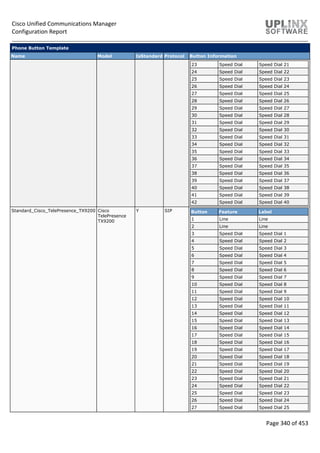
Standard CTI Allow Call Park
Monitoring
Allow monitoring of
call park DNs
Y Cisco Computer
Telephone Interface
(CTI)
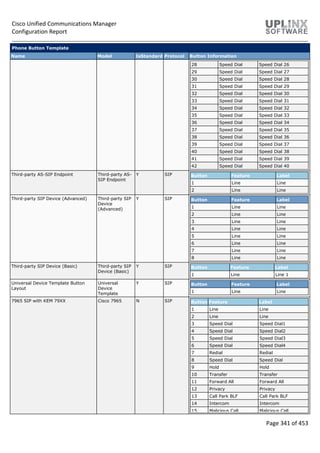
CTI Call Park (allow retrieval)
Standard CTI Allow Call Recording Allow recording of
calls
Y Cisco Computer
Telephone Interface
(CTI)
CTI Call Recording (allow recording)
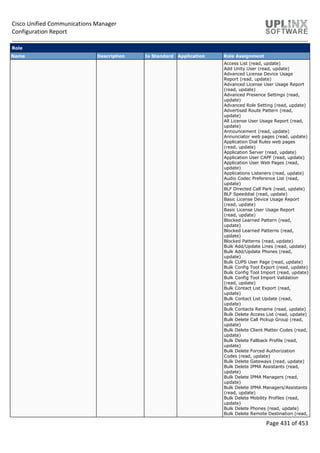
Standard CTI Allow Calling Number
Modification
Allow calling number
modification
Y Cisco Computer
Telephone Interface
(CTI)
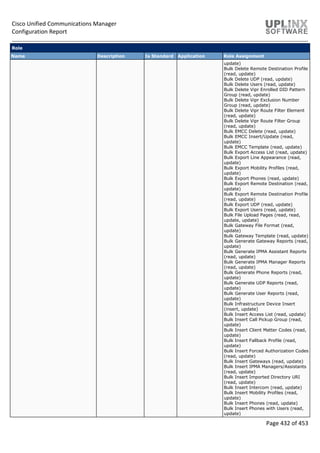
CTI Calling Number (allow
modification)
Standard CTI Allow Control of All
Devices
Allow control of all
CTI controllable
devices
Y Cisco Computer
Telephone Interface
(CTI)
CTI All Devices (allow control of all
devices)
Cisco Unified Communications Manager
Configuration Report
Page 441 of 453
Role
Name Description Is Standard Application Role Assignment
Standard CTI Allow Control of Phones
supporting Connected Xfer and conf
Standard CTI Allow
Control of Phones
supporting
Connected Xfer and
conf
Y Cisco Computer
Telephone Interface
(CTI)
Standard CTI Allow Control of Phones
supporting Connected Xfer and conf
(Allow Control)
Standard CTI Allow Control of Phones
supporting Rollover Mode
Standard CTI Allow
Control of Phones
supporting Rollover
Mode
Y Cisco Computer
Telephone Interface
(CTI)
CTI Control of Phones supporting
Rollover Mode (Allow Control)
Standard CTI Allow Reception of SRTP
Key Material
Allows access to
SRTP key material
Y Cisco Computer
Telephone Interface
(CTI)
CTI Application (enable CTI SRTP key
distribution, enable CTI security,
enabled)
Standard CTI Enabled Enable CTI
application control
Y Cisco Computer
Telephone Interface
(CTI)
CTI Application (enable CTI SRTP key
distribution, enable CTI security,
enabled)
Standard CTI Secure Connection Application
connection to
CTI/CM must be
secure
Y Cisco Computer
Telephone Interface
(CTI)
CTI Application (enable CTI SRTP key
distribution, enable CTI security,
enabled)
Standard CUReporting Allows application
users to generate
reports from various
sources
Y Cisco Unified
Reporting
Download Report (read, read, update,
update)
Generate Report (read, read, update,
update)
Search Documentation (read, read,
update, update)
Show Report (read, read, update,
update)
System Reports (read, read, update,
update)
Upload Report (read, read, update,
update)
Standard CUReporting Authentication Allows users to
authenticate to
Cisco Unified
Reporting page
Y Cisco Unified
Reporting
Download Report (read, read, update,
update)
Generate Report (read, read, update,
update)
Search Documentation (read, read,
update, update)
Show Report (read, read, update,
update)
System Reports (read, read, update,
update)
Upload Report (read, read, update,
update)
Standard Confidential Access Level
Users
All access to
Confidential Access
Level Pages only
Y Cisco Call Manager
Administration
Confidential Access Level (read,
update)
Standard EM Authentication Proxy
Rights
Manages EM
Authentication
Rights
Y Cisco Extension
Mobility
EM Proxy Rights (allow)
Standard Packet Sniffing Access to CCM
Pages for Enabling
Sniffing
Y Cisco Call Manager
Administration
Enterprise Parameters web pages
(read, update)
Phone web pages (read, update)
Service Parameter web pages (read,
update)
Standard RealtimeAndTraceCollection Realtime and Trace
Collection
Y Cisco Call Manager
Serviceability
Audit Trace (read, update)
Real Time Monitoring Tool (read,
update)
SOAP Backup and Restore APIs (read,
update)
SOAP CDR on Demand APIs (read,
update)
SOAP CDR on Demand APIs 2 (read,
update)
SOAP Control Center APIs (read,
Cisco Unified Communications Manager
Configuration Report
Page 442 of 453
Role
Name Description Is Standard Application Role Assignment
update)
SOAP Control Center APIs 2 (read,
update)
SOAP Log Collection APIs (read,
update)
SOAP Log Collection APIs 2 (read,
update)
SOAP Performance Informations APIs
(read, update)
SOAP Performance Informations APIs
2 (read, update)
SOAP Realtime Informations and
Control Center APIs (read, update)
SOAP Realtime Informations and
Control Center APIs 2 (read, update)
SOAP SNMP Config API (read, update)
Trace Collection Tool (read, update)
Standard SERVICEABILITY Standard
Serviceability
Y Cisco Call Manager
Serviceability
Alarm Configuration web page (read,
update)
Alarm Definition web page (read,
update)
CDR Management (read, update)
Call Home Configuration web page
(read, update)
Locations Assertions Detail web page
(read, update)
Locations Disconnected Groups web
page (read, update)
Locations Discrepancy web page
(read, update)
Locations Effective Path web page
(read, update)
Locations Topology web page (read,
update)
Log Partition Monitoring-
>Configuration web page (read,
update)
RTMT->Alert Config (read, update)
RTMT->Profile Saving (read, update)
Real Time Monitoring Tool (read,
update)
SNMP->V1/V2c->Configuration-
>Community String web page (read,
update)
SNMP->V1/V2c->Configuration-
>Notification Destination web page
(read, update)
SNMP->V3 Configuration->Notification
Destination web page (read, update)
SNMP->V3 Configuration->User web
page (read, update)
SNMP->system Group Configuration-
>MIB2 System Group Configuration
web page (read, update)
SOAP Backup and Restore APIs (read,
update)
SOAP CDR on Demand APIs (read,
update)
SOAP CDR on Demand APIs 2 (read,
update)
SOAP Call Record APIs (read, update)
SOAP Control Center APIs (read,
update)
SOAP Control Center APIs 2 (read,
update)
SOAP Diagnostic Portal Database
Service (read, update)
Cisco Unified Communications Manager
Configuration Report
Page 443 of 453
Role
Name Description Is Standard Application Role Assignment
SOAP Log Collection APIs (read,
update)
SOAP Log Collection APIs 2 (read,
update)
SOAP Performance Informations APIs
(read, update)
SOAP Performance Informations APIs
2 (read, update)
SOAP Realtime Informations and
Control Center APIs (read, update)
SOAP Realtime Informations and
Control Center APIs 2 (read, update)
SOAP SNMP Config API (read, update)
Serviceability Report Archive (read,
update)
Trace Configuration web page (read,
update)
Troubleshoot Trace Settings web page
(read, update)
Standard SERVICEABILITY
Administration
Administer all
aspects of
Serviceability
system
Y Cisco Call Manager
Serviceability
Alarm Configuration web page (read,
update)
Alarm Definition web page (read,
update)
Audit Trace (read, update)
CDR Management (read, update)
Call Home Configuration web page
(read, update)
Control Center - Feature Services web
page (read, update)
Control Center - Network Services web
page (read, update)
DNA Analyser (read, update)
DNA Control Center (read, update)
DNA Dump Da Information (read,
update)
DNA Gateways (read, update)
DNA Multiple Analyser (read, update)
DNA Phones (read, update)
DNA Trunks (read, update)
DNA View Files (read, update)
Locations Assertions Detail web page
(read, update)
Locations Disconnected Groups web
page (read, update)
Locations Discrepancy web page
(read, update)
Locations Effective Path web page
(read, update)
Locations Topology web page (read,
update)
Log Partition Monitoring-
>Configuration web page (read,
update)
Plugin web pages (read, update)
RTMT->Alert Config (read, update)
RTMT->Profile Saving (read, update)
Real Time Monitoring Tool (read,
update)
SNMP->V1/V2c->Configuration-
>Community String web page (read,
update)
SNMP->V1/V2c->Configuration-
>Notification Destination web page
(read, update)
SNMP->V3 Configuration->Notification
Destination web page (read, update)
SNMP->V3 Configuration->User web
Cisco Unified Communications Manager
Configuration Report
Page 444 of 453
Role
Name Description Is Standard Application Role Assignment
page (read, update)
SNMP->system Group Configuration-
>MIB2 System Group Configuration
web page (read, update)
SOAP Backup and Restore APIs (read,
update)
SOAP CDR on Demand APIs (read,
update)
SOAP CDR on Demand APIs 2 (read,
update)
SOAP Call Record APIs (read, update)
SOAP Control Center APIs (read,
update)
SOAP Control Center APIs 2 (read,
update)
SOAP Diagnostic Portal Database
Service (read, update)
SOAP Log Collection APIs (read,
update)
SOAP Log Collection APIs 2 (read,
update)
SOAP Performance Informations APIs
(read, update)
SOAP Performance Informations APIs
2 (read, update)
SOAP Realtime Informations and
Control Center APIs (read, update)
SOAP Realtime Informations and
Control Center APIs 2 (read, update)
SOAP SNMP Config API (read, update)
SOAP Troubleshooter API (read,
update)
Service Activation web page (read,
update)
Serviceability Report Archive (read,
update)
Trace Collection Tool (read, update)
Trace Configuration web page (read,
update)
Troubleshoot Trace Settings web page
(read, update)
Standard SERVICEABILITY Read Only Read access to all
Serviceability
resources
Y Cisco Call Manager
Serviceability
Alarm Configuration web page (read,
update)
Alarm Definition web page (read,
update)
Audit Trace (read, update)
CDR Management (read, update)
Call Home Configuration web page
(read, update)
Control Center - Feature Services web
page (read, update)
Control Center - Network Services web
page (read, update)
DNA Analyser (read, update)
DNA Control Center (read, update)
DNA Dump Da Information (read,
update)
DNA Gateways (read, update)
DNA Multiple Analyser (read, update)
DNA Phones (read, update)
DNA Trunks (read, update)
DNA View Files (read, update)
Locations Assertions Detail web page
(read, update)
Locations Disconnected Groups web
page (read, update)
Locations Discrepancy web page
Cisco Unified Communications Manager
Configuration Report
Page 445 of 453
Role
Name Description Is Standard Application Role Assignment
(read, update)
Locations Effective Path web page
(read, update)
Locations Topology web page (read,
update)
Log Partition Monitoring-
>Configuration web page (read,
update)
RTMT->Alert Config (read, update)
RTMT->Profile Saving (read, update)
Real Time Monitoring Tool (read,
update)
SNMP->V1/V2c->Configuration-
>Community String web page (read,
update)
SNMP->V1/V2c->Configuration-
>Notification Destination web page
(read, update)
SNMP->V3 Configuration->Notification
Destination web page (read, update)
SNMP->V3 Configuration->User web
page (read, update)
SNMP->system Group Configuration-
>MIB2 System Group Configuration
web page (read, update)
SOAP Backup and Restore APIs (read,
update)
SOAP CDR on Demand APIs (read,
update)
SOAP CDR on Demand APIs 2 (read,
update)
SOAP Call Record APIs (read, update)
SOAP Control Center APIs (read,
update)
SOAP Control Center APIs 2 (read,
update)
SOAP Diagnostic Portal Database
Service (read, update)
SOAP Log Collection APIs (read,
update)
SOAP Log Collection APIs 2 (read,
update)
SOAP Performance Informations APIs
(read, update)
SOAP Performance Informations APIs
2 (read, update)
SOAP Realtime Informations and
Control Center APIs (read, update)
SOAP Realtime Informations and
Control Center APIs 2 (read, update)
SOAP SNMP Config API (read, update)
SOAP Troubleshooter API (read,
update)
Service Activation web page (read,
update)
Serviceability Report Archive (read,
update)
Trace Collection Tool (read, update)
Trace Configuration web page (read,
update)
Troubleshoot Trace Settings web page
(read, update)
Standard SSO Config Admin Administers SAML
SSO configuration
Y
Standard System Service
Management
Standard System
Service Management
Y Cisco Call Manager
Serviceability
Control Center - Feature Services web
page (read, update)
Control Center - Network Services web
Cisco Unified Communications Manager
Configuration Report
Page 446 of 453
Role
Name Description Is Standard Application Role Assignment
page (read, update)
Service Activation web page (read,
update)
7.4.4 Access Control Group
User groups comprise lists of application users and end users. A user may belong to multiple user groups. After you add a
user group, you then add users to a user group. Afterward, you may proceed to assign roles to a user group. If a user
belongs to multiple user groups, the MLA permission enterprise parameter determines the effective privilege of the user.
Users with full access configure roles, user groups, and access privileges for roles. In general, full-access users configure
the access of other users to Cisco Unified Communications Manager Administration. User groups comprise lists of
application users and end users. A user may belong to multiple user groups. After you add a user group, you then add
users to a user group. Afterward, you may proceed to assign roles to a user group. If a user belongs to multiple user
groups, the MLA permission enterprise parameter determines the effective privilege of the user.
Access Control Group
Name Is
Standard
Min
User
Rank
Role Assignment Assigned Application
Users
Assigned End
Users
AXL Group N 1 Standard AXL API Users
Standard AXL Read Only API Access
AXL_User
InformaCast AXL User Group N 1 Standard AXL API Access INFORMACAST
Admin-3rd Party API Y 1 presencevieweradmin
(S)
Application Client Users Y 1
Standard Audit Users Y 1 Standard Audit Log Administration admin (S)
Standard CAR Admin Users Y 1 Standard Admin Rep Tool Admin
Standard CCM Admin Users Y 1 Standard CCM Admin Users
Standard CUReporting
Authentication
uplinx_pct-mkunz
CUCService (S)
Standard CCM End Users Y 1 Standard CCM End Users
Standard CCMUSER Administration
Standard CCM Gateway
Administration
Y 1 Standard CCM Admin Users
Standard CCM Gateway
Management
Standard CCMADMIN Read Only
Standard CCM Phone Administration Y 1 Standard CCM Admin Users
Standard CCM Phone Management
Standard CCMADMIN Read Only
Standard CCM Read Only Y 1 Standard CCM Admin Users
Standard CCMADMIN Read Only
Standard SERVICEABILITY Read
Only
Standard CCM Server Maintenance Y 1 Standard CCM Admin Users
Standard CCM Feature Management
Standard CCM Service Management
Standard CCM System Management
Standard CCMADMIN Read Only
Standard System Service
Management
Standard CCM Server Monitoring Y 1 Standard CCM Admin Users
Standard CCMADMIN Read Only
Standard SERVICEABILITY
AXL_User
uplinx_pct-mkunz
Standard CCM Super Users Y 1 Standard AXL API Access
Standard Admin Rep Tool Admin
Standard CCM Admin Users
Standard CCMADMIN Administration
Standard CUReporting
admin (S)
Cisco Unified Communications Manager
Configuration Report
Page 447 of 453
Access Control Group
Name Is
Standard
Min
User
Rank
Role Assignment Assigned Application
Users
Assigned End
Users
Standard CUReporting
Authentication
Standard EM Authentication Proxy
Rights
Standard SERVICEABILITY
Administration
Standard SSO Config Admin
Standard CTI Allow Call Monitoring Y 1 Standard CTI Allow Call Monitoring uplinx_pct-mkunz
Standard CTI Allow Call Park
Monitoring
Y 1 Standard CTI Allow Call Park
Monitoring
uplinx_pct-mkunz
Standard CTI Allow Call Recording Y 1 Standard CTI Allow Call Recording uplinx_pct-mkunz
Standard CTI Allow Calling Number
Modification
Y 1 Standard CTI Allow Calling Number
Modification
Standard CTI Allow Control of All
Devices
Y 1 Standard CTI Allow Control of All
Devices
INFORMACAST
uplinx_pct-mkunz
CCMQRTSecureSysUser
(S)
CCMQRTSysUser (S)
CCMSysUser (S)
IPMASecureSysUser
(S)
IPMASysUser (S)
WDSecureSysUser (S)
WDSysUser (S)
Standard CTI Allow Control of
Phones supporting Connected Xfer
and conf
Y 1 Standard CTI Allow Control of
Phones supporting Connected Xfer
and conf
INFORMACAST
uplinx_pct-mkunz
CCMQRTSecureSysUser
(S)
CCMQRTSysUser (S)
IPMASysUser (S)
WDSecureSysUser (S)
WDSysUser (S)
Standard CTI Allow Control of
Phones supporting Rollover Mode
Y 1 Standard CTI Allow Control of
Phones supporting Rollover Mode
INFORMACAST
uplinx_pct-mkunz
CCMQRTSecureSysUser
(S)
CCMQRTSysUser (S)
WDSecureSysUser (S)
WDSysUser (S)
Standard CTI Allow Reception of
SRTP Key Material
Y 1 Standard CTI Allow Reception of
SRTP Key Material
Standard CTI Enabled Y 1 Standard CTI Enabled INFORMACAST
uplinx_pct-mkunz
CCMQRTSecureSysUser
(S)
CCMQRTSysUser (S)
CCMSysUser (S)
IPMASecureSysUser
(S)
IPMASysUser (S)
WDSecureSysUser (S)
WDSysUser (S)
Standard CTI Secure Connection Y 1 Standard CTI Secure Connection CCMQRTSecureSysUser
(S)
IPMASecureSysUser
(S)
WDSecureSysUser (S)
Standard Confidential Access Level
Users
Y 1 Standard CCM Admin Users
Standard Confidential Access Level
Users
Standard EM Authentication Proxy Y 1 Standard EM Authentication Proxy uplinx_pct-mkunz
Cisco Unified Communications Manager
Configuration Report
Page 448 of 453
Access Control Group
Name Is
Standard
Min
User
Rank
Role Assignment Assigned Application
Users
Assigned End
Users
Rights Rights CCMQRTSecureSysUser
(S)
CCMQRTSysUser (S)
CCMSysUser (S)
IPMASecureSysUser
(S)
IPMASysUser (S)
WDSecureSysUser (S)
WDSysUser (S)
Standard EM Roaming Across
Clusters Super Users
Y 1 Standard CCM End Users
Standard CCMUSER Administration
Standard Packet Sniffer Users Y 1 Standard CCM Admin Users
Standard Packet Sniffing
Standard
RealtimeAndTraceCollection
Y 1 Standard
RealtimeAndTraceCollection
CUCService (S)
Standard TabSync User Y 1 Standard AXL API Access TabSyncSysUser (S)
Third Party Application Users Y 1
7.4.5 End User CAPF Profile
The End User CAPF Profile Configuration window in Cisco Unified Communications Manager Administration allows you to
issue locally significant certificates to CTI clients. After you issue the certificate and perform other security-related tasks,
the CTI client communicates with the CTIManager service via a TLS connection.
< No records found >
7.4.6 UC Service
Unified Communications (UC) services contain settings for voicemail, conferencing, CTI, and IM and Presence which are
grouped into service profiles that are associated with end users. UC service settings are then downloaded by devices of
users for seamless integration with the configured UC services.
The following Unified Communications (UC) services are configured:
UC Service
Name Details
UCVoiceMail UC Service Configuration
UC Service Type Voicemail
Product Type Unity Connection
Description
Host Name/IP Address 10.5.1.121
Port 443
Protocol HTTP
7.4.7 Service Profile
Service Profiles that are associated with end users and are deployed to user devices. Each Service Profiles contains
several Unified Communications (UC) services which defines settings for voicemail, conferencing, CTI, and IM and
Presence. UC service settings are downloaded by devices of users for seamless integration with the configured UC
services.
The following Service Profiles are configured:
Service Profile Configuration
Name Details
UCserviceProfile1 UC Service Configuration
Description UCserviceProfile1
Cisco Unified Communications Manager
Configuration Report
Page 449 of 453
Service Profile Configuration
Name Details
Make this the default service profile for the system N
Voicemail Profile
Primary < None >
Secondary < None >
Tertiary < None >
Credentials Source Not set
MailStore Profile
Primary < None >
Secondary < None >
Tertiary < None >
Inbox Folder INBOX
Trash Folder Deleted Items
Polling Interval (in seconds) 60
Allow dual folder mode Y
Conferencing Profile
Primary < None >
Secondary < None >
Tertiary < None >
Server Certificate Verification Any Certificate
Credentials Source Not set
Directory Profile
Primary < None >
Secondary < None >
Tertiary < None >
Use UDS for Contact Resolution Y
Use Logged On User Credential Y
Username
Search Base 1
Search Base 2
Search Base 3
Recursive Search on All Search Bases Y
Search Timeout (seconds) 5
Base Filter (Only used for Advance Directory)
Predictive Search Filter (Only used for Advance
Directory)
Allow Jabber to Search and Add Security Groups N
IM and Presence Profile
Primary < None >
Secondary < None >
Tertiary < None >
CTI Profile
Primary < None >
Secondary < None >
Tertiary < None >
Video Conference Scheduling Portal Profile
Primary < None >
Secondary < None >
Tertiary < None >
UCserviceProfile2 UC Service Configuration
Description UCserviceProfile2
Make this the default service profile for the system N
Cisco Unified Communications Manager
Configuration Report
Page 450 of 453
Service Profile Configuration
Name Details
Voicemail Profile
Primary < None >
Secondary < None >
Tertiary < None >
Credentials Source Not set
MailStore Profile
Primary < None >
Secondary < None >
Tertiary < None >
Inbox Folder INBOX
Trash Folder Deleted Items
Polling Interval (in seconds) 60
Allow dual folder mode Y
Conferencing Profile
Primary < None >
Secondary < None >
Tertiary < None >
Server Certificate Verification Any Certificate
Credentials Source Not set
Directory Profile
Primary < None >
Secondary < None >
Tertiary < None >
Use UDS for Contact Resolution Y
Use Logged On User Credential Y
Username
Search Base 1
Search Base 2
Search Base 3
Recursive Search on All Search Bases Y
Search Timeout (seconds) 5
Base Filter (Only used for Advance Directory)
Predictive Search Filter (Only used for Advance
Directory)
Allow Jabber to Search and Add Security Groups N
IM and Presence Profile
Primary < None >
Secondary < None >
Tertiary < None >
CTI Profile
Primary < None >
Secondary < None >
Tertiary < None >
Video Conference Scheduling Portal Profile
Primary < None >
Secondary < None >
Tertiary < None >
Cisco Unified Communications Manager
Configuration Report
Page 451 of 453
7.4.8 User Profile
The Self-Provisioning feature allows an end user or administrator to add an unprovisioned phone to a Cisco Unified
Communications Manager system with minimal administrative effort. A phone can be added by plugging it into the network
and following a few prompts to identify the user.
With appropriately configured User Profiles, end users can provision their own devices. These User Profiles may be shared
by a group of users that share the same characteristics. The User Profile contains the following settings:
 Universal Device Templates
 Universal Line Template
 End user Self-Provisioning settings
User Profile
Name Details
Standard (Factory Default) User Profile User Profile
Description Standard (Factory Default) User Profile
Default User Profle for the System Y
Universal Device Template
Desk Phones < None >
Mobile and Desktop Devices < None >
Remote Destination/Device Profiles < None >
Universal Line Template
Universal Line Template < None >
Self-Provisioning
Allow End User to Provision their own phones N
Limit Provisioning once End User has this many phones 10
Mobile and Remote Access Policy
Enable Mobile and Remote Access Y
Jabber Desktop Client Policy IM & Presence, Voice and Video calls
Jabber Mobile Client Policy IM & Presence, Voice and Video calls
Allow End User to set their Extension Mobility maximum
login time
N
7.4.9 User Group
WhenEnterpriseGroupsis configured,CiscoUnifiedCommunicationsManagerincludesuser groups when it synchronizes its
database with an external LDAP directory. In Cisco Unified CM Administration, you can view synced groups in the User
Groups window. With Cisco Unified Communications Manager Release 11.0, Cisco Jabber users can search for groups in
Microsoft Active Directory and add them to their contact lists. If a group that is already added to the contact list is updated,
the contact list gets automatically updated. Cisco Unified Communications Manager synchronizes its database with
Microsoft Active Directory groups at specified intervals. The interval at which Cisco Unified Communications Manager
synchronizes the groups is determined by LDAP Directory Synchronization Schedule parameters in the LDAP Directory
Configuration window.
Currently, the Enterprise Groups feature is supported only on Microsoft Active Directory server. It is not supported on other
corporate directories. If a Cisco Jabber user wants to add a group to the contact list while the Enterprise Groups feature is
enabled, the Cisco Jabber client sends a group request to the IM and Presence Service node. The IM and Presence
Service node provides the following information for each group member:
Display Name
User ID
Title
Phone number
Mail ID
Only the group members that are assigned to the IM and Presence Service nodes can be added to the contact list. Other
group members are discarded.
Cisco Unified Communications Manager
Configuration Report
Page 452 of 453
If you disable the Enterprise Groups feature, Cisco Jabber users will not be able to search Microsoft Active Directory
groups or see the groups that they already added to their contact lists. If a user is already logged in when you disable the
Enterprise Groups feature, the group will be visible until the user logs out. When the user logs in again, the group will not
be visible. Maximum Allowed Entries
The maximum number of entries that are allowed in a contact list is the sum of the number of entries in the contact list and
the number of entries in groups that are already added to the contact list.
Maximum entries in contact list = (number of entries in contact list)+(number of entries in groups)
When the Enterprise Groups feature is enabled, Cisco Jabber users can add the groups to the contact list as long as the
number of entries in the contact list is less than the maximum allowed entries. If the maximum allowed entries is exceeded
while the feature is disabled, the users are allowed to have excess entries until the feature is enabled. If the user continues
to be logged in after the feature is enabled, no error message is displayed. When the user logs out and logs in again, an
error message is displayed that asks the users to clear the excess entries.
< No records found >
7.4.10 User Rank
User Ranks can be assign to end users, application users and access control groups. You can configure up to 10 different
ranks. The highest rank is 1, the lowest is 10. To be permitted to join an access control group, a user must meet the
minimum user rank threshold set by the access control group. The highest rank is 1, the lowest is 10.
User Rank
Rank Name Description
1 Default User Rank This is the
default user
rank for
application
and end
users.
2 OtherUserRank Another User
rank
7.5 Self-Provisioning
The Self-Provisioning feature allows an end user or administrator to add an unprovisioned phone to a Cisco Unified
Communications Manager system with minimal administrative effort. A phone can be added by plugging it into the network
and following a few prompts to identify the user.
This feature enhances the out-of-box experience for end users by allowing them to directly add their desk phone or soft
client without contacting the administrator. It simplifies administrator deployments by allowing them to add desk phones on
behalf of an end user. The feature lets administrators and users deploy a large number of devices without interacting
directly with the Cisco Unified Communications Manager Administration GUI, but from the device itself. The feature relies
on the administrator preconfiguring a number of templates and profiles, so that when the phone attempts to self-provision,
the necessary information is available in the system for it to create a new device.
< Not available >
Cisco Unified Communications Manager
Configuration Report
Page 453 of 453

Cucm configuration and setep guide for a site

  • 1.
    October 3, 2019 CiscoUnified Communications Manager Configuration Report CustomerA As-Built Documentation for project
  • 2.
    Cisco Unified CommunicationsManager Configuration Report Page 2 of 453 Table of Content 1 Report Information .........................................................................................................................................8 1.1 Report Generation ...................................................................................................................................8 2 System.............................................................................................................................................................8 2.1 Server.......................................................................................................................................................9 2.2 Services ....................................................................................................................................................9 2.3 Cisco Unified CM....................................................................................................................................12 2.4 Cisco Unified CM Group.........................................................................................................................12 2.5 Presence Redundancy Groups...............................................................................................................13 2.6 Phone NTP Reference ............................................................................................................................13 2.7 Date/Time Group ...................................................................................................................................13 2.8 BLF Presence Group...............................................................................................................................13 2.9 Region Information................................................................................................................................14 2.9.1 Audio Codec Preference Lists .........................................................................................................14 2.9.2 Region .............................................................................................................................................15 2.10 Device Pool...........................................................................................................................................16 2.11 Device Mobility ....................................................................................................................................29 2.11.1 Device Mobility Group..................................................................................................................29 2.11.2 Device Mobility Info......................................................................................................................29 2.12 DHCP ....................................................................................................................................................29 2.12.1 DHCP Server..................................................................................................................................30 2.12.2 DHCP Subnet.................................................................................................................................30 2.13 LDAP.....................................................................................................................................................30 2.13.1 LDAP System .................................................................................................................................31 2.13.2 LDAP Directory..............................................................................................................................31 2.13.3 LDAP Authentication.....................................................................................................................32 2.13.4 LDAP Custom Filter .......................................................................................................................33 2.13.5 LDAP Search ..................................................................................................................................33 2.14 SAML Single Sign-On............................................................................................................................34 2.15 Cross-Origin Resource Sharing (CORS).................................................................................................34 2.16 Location Information ...........................................................................................................................34 2.16.1 Location.........................................................................................................................................34 2.16.2 Location Bandwidth Manager Group ...........................................................................................35 2.16.3 Location Bandwidth Manager Intercluster Replication Group.....................................................35 2.17 Physical Location..................................................................................................................................36 2.18 SRST......................................................................................................................................................36 2.19 MLPP ....................................................................................................................................................36 2.19.1 MLPP Domain................................................................................................................................36 2.19.2 Resource Priority Namespace Network Domain ..........................................................................37 2.19.3 Resource Priority Namespace List ................................................................................................37 2.20 Enterprise Parameters.........................................................................................................................37 2.21 Enterprise Phone Configuration ..........................................................................................................41 2.22 Service Parameters ..............................................................................................................................44 2.23 Security ................................................................................................................................................71 2.23.1 Certificate......................................................................................................................................72 2.23.2 Phone Security Profile.................................................................................................................100
  • 3.
    Cisco Unified CommunicationsManager Configuration Report Page 3 of 453 2.23.3 SIP Trunk Security Profile............................................................................................................156 2.23.4 CUMA Server Security Profile .....................................................................................................157 2.24 Application Server..............................................................................................................................157 2.25 Geolocation........................................................................................................................................157 2.26 Geolocation Filter ..............................................................................................................................158 2.27 E911 Messages...................................................................................................................................160 3 Call Routing .................................................................................................................................................160 3.1 AAR Group............................................................................................................................................161 3.2 Dial Rules..............................................................................................................................................161 3.2.1 Application Dial Rules ...................................................................................................................161 3.2.2 Directory Lookup Dial Rules..........................................................................................................162 3.2.3 SIP Dial Rules.................................................................................................................................162 3.3 Route Filter...........................................................................................................................................162 3.4 Route / Hunt ........................................................................................................................................163 3.4.1 Route List and Route Group..........................................................................................................163 3.4.2 Route Group..................................................................................................................................164 3.4.3 Local Route Group Names ............................................................................................................164 3.4.4 Route List ......................................................................................................................................164 3.4.5 Route Pattern (Condensed) ..........................................................................................................165 3.4.6 Hunt Pilot - List and Group............................................................................................................166 3.4.7 Line Group.....................................................................................................................................166 3.4.8 Hunt List........................................................................................................................................167 3.4.9 Hunt Pilot ......................................................................................................................................168 3.5 SIP Route Pattern (Condensed) ...........................................................................................................170 3.6 Class of Control ....................................................................................................................................171 3.6.1 Access List .....................................................................................................................................171 3.6.2 Time Schedule and Period ............................................................................................................171 3.6.3 Partition ........................................................................................................................................171 3.6.4 Calling Search Space .....................................................................................................................172 3.7 Intercom...............................................................................................................................................179 3.7.1 Intercom Route Partition..............................................................................................................179 3.7.2 Intercom Calling Search Space......................................................................................................179 3.7.3 Intercom Directory Number .........................................................................................................180 3.7.4 Intercom Translation Pattern .......................................................................................................180 3.8 Client Matter Codes.............................................................................................................................181 3.9 Forced Authorization Code..................................................................................................................181 3.10 Emergency Location...........................................................................................................................181 3.10.1 Emergency Location Configuration.............................................................................................182 3.10.2 Emergency Location (ELIN) Groups ............................................................................................182 3.11 Translation Pattern (Condensed).......................................................................................................183 3.12 Call Park..............................................................................................................................................184 3.13 Directed Call Park...............................................................................................................................184 3.14 Call Pickup Group...............................................................................................................................184 3.14.1 Call Pickup Group - Group Members..........................................................................................185 3.15 Directory Number (Condensed).........................................................................................................186 3.15.1 Directory Numbers - Unallocated (Condensed) .........................................................................201 3.16 Meet-Me Number..............................................................................................................................214 3.17 Conference Now ................................................................................................................................214
  • 4.
    Cisco Unified CommunicationsManager Configuration Report Page 4 of 453 3.18 Route Plan Report..............................................................................................................................214 3.19 Transformation ..................................................................................................................................219 3.19.1 Transformation Pattern ..............................................................................................................219 3.19.2 Transformation Profile................................................................................................................220 3.20 Mobility..............................................................................................................................................220 3.20.1 Mobility Enterprise Feature Access Number..............................................................................221 3.20.2 Handoff Configuration ................................................................................................................221 3.20.3 Mobility Profile ...........................................................................................................................221 3.21 Logical Partitioning Policy..................................................................................................................221 3.22 External Call Control Profile...............................................................................................................222 3.23 HTTP Profile........................................................................................................................................223 3.24 Call Control Discovery........................................................................................................................223 3.24.1 Hosted DN Group........................................................................................................................223 3.24.2 Hosted DN Pattern......................................................................................................................223 3.24.3 Advertising Service......................................................................................................................224 3.24.4 Partition ......................................................................................................................................224 3.24.5 Requesting Service......................................................................................................................224 3.24.6 Blocked Learned Pattern.............................................................................................................224 3.24.7 Feature Configuration.................................................................................................................225 3.25 Global Dial Plan Replication...............................................................................................................225 3.25.1 Advertised Patterns ....................................................................................................................225 3.25.2 Blocked Learned Numbers and Patterns ....................................................................................226 3.25.3 Partitions for Learned Numbers and Patterns............................................................................226 3.25.4 Learned Numbers .......................................................................................................................226 3.25.5 Learned Patterns.........................................................................................................................226 3.25.6 Learned Directory URIs...............................................................................................................227 3.25.7 Imported Global Dial Plan Catalogs ............................................................................................227 3.25.8 Imported Directory URIs.............................................................................................................227 3.25.9 Imported Patterns.......................................................................................................................227 4 Media Resources.........................................................................................................................................227 4.1 Annunciator .........................................................................................................................................227 4.2 Interactive Voice Responses................................................................................................................228 4.3 Conference Bridge ...............................................................................................................................228 4.4 Media Termination Point.....................................................................................................................229 4.5 Music On Hold Audio Source ...............................................................................................................229 4.6 Music On Hold Server ..........................................................................................................................230 4.7 Video On Hold Server...........................................................................................................................230 4.8 Transcoder ...........................................................................................................................................231 4.9 Media Resource Groups and Lists........................................................................................................232 4.10 Mobile Voice Access ..........................................................................................................................232 4.11 Announcements.................................................................................................................................232 5 Advanced Features......................................................................................................................................236 5.1 Voice Mail ............................................................................................................................................236 5.1.1 Cisco Voice Mail Port ....................................................................................................................236 5.1.2 Message Waiting...........................................................................................................................237 5.1.3 Voice Mail Profile and Pilot...........................................................................................................238 5.2 SAF........................................................................................................................................................238 5.2.1 SAF Security Profile.......................................................................................................................239
  • 5.
    Cisco Unified CommunicationsManager Configuration Report Page 5 of 453 5.2.2 SAF Forwarder...............................................................................................................................239 5.3 EMCC....................................................................................................................................................240 5.3.1 EMCC Feature Configuration ........................................................................................................240 5.3.2 EMCC Intercluster Service Profile.................................................................................................240 5.4 Cluster View .........................................................................................................................................240 5.5 Intercompany Media Services .............................................................................................................241 5.5.1 Server Connection.........................................................................................................................241 5.5.2 Enrolled Group..............................................................................................................................242 5.5.3 Enrolled Pattern............................................................................................................................242 5.5.4 Exclusion Group ............................................................................................................................242 5.5.5 Exclusion Number .........................................................................................................................243 5.5.6 Trust Group...................................................................................................................................243 5.5.7 Trust Element................................................................................................................................243 5.5.8 Service...........................................................................................................................................243 5.5.9 E.164 Transformation ...................................................................................................................244 5.5.10 Learned Route.............................................................................................................................244 5.5.11 Firewall........................................................................................................................................244 5.5.12 Intercompany Media Services Feature Configuration................................................................245 5.6 Fallback ................................................................................................................................................245 5.6.1 Fallback Profile..............................................................................................................................245 5.6.2 Fallback Feature Configuration.....................................................................................................246 5.7 VPN.......................................................................................................................................................246 5.7.1 VPN Profile....................................................................................................................................247 5.7.2 VPN Group ....................................................................................................................................247 5.7.3 VPN Gateway ................................................................................................................................247 5.7.4 VPN Feature Configuration...........................................................................................................248 5.8 Called Party Tracing List.......................................................................................................................248 5.9 ILS Configuration..................................................................................................................................248 5.10 Call Control Agent Profile...................................................................................................................248 5.11 Directory Number Alias Lookup And Sync.........................................................................................249 5.12 Device Location Tracking Services .....................................................................................................249 5.12.1 Switches and Access Points ........................................................................................................249 5.12.2 Wireless Access Points Controllers.............................................................................................249 6 Device..........................................................................................................................................................250 6.1 CTI Route Point ....................................................................................................................................251 6.2 Gatekeeper ..........................................................................................................................................253 6.3 Gateway ...............................................................................................................................................253 6.3.1 Gateway Overview........................................................................................................................253 6.3.2 MGCP Gateway.............................................................................................................................253 6.3.3 H.323 Gateway..............................................................................................................................255 6.3.4 Analog Gateway............................................................................................................................256 6.4 Phone ...................................................................................................................................................258 6.4.1 Phone Filter...................................................................................................................................259 6.4.2 Analog Phone (1)...........................................................................................................................259 6.4.3 Cisco 7832 (1)................................................................................................................................259 6.4.4 Cisco 7841 (1)................................................................................................................................260 6.4.5 Cisco 7861 (1)................................................................................................................................261 6.4.6 Cisco 7941 (1)................................................................................................................................261
  • 6.
    Cisco Unified CommunicationsManager Configuration Report Page 6 of 453 6.4.7 Cisco 7945 (1)................................................................................................................................262 6.4.8 Cisco 7975 (1)................................................................................................................................262 6.4.9 Cisco 8841 (1)................................................................................................................................263 6.4.10 Cisco 8941 (1)..............................................................................................................................264 6.4.11 Subscribed Services.....................................................................................................................264 6.4.12 Speed Dials..................................................................................................................................265 6.4.13 Busy Lamp Field Speed Dials.......................................................................................................266 6.4.14 Busy Lamp Field Directed Call Parks ...........................................................................................267 6.5 Trunk ....................................................................................................................................................269 6.5.1 Trunk - Overview...........................................................................................................................269 6.5.2 Trunk - Detailed ............................................................................................................................269 6.6 Remote Destination.............................................................................................................................285 6.7 Device Settings.....................................................................................................................................285 6.7.1 Device Defaults .............................................................................................................................286 6.7.2 Firmware Load Information..........................................................................................................291 6.7.3 Default Device Profile ...................................................................................................................295 6.7.4 Device Profile................................................................................................................................299 6.7.5 Phone Button Template................................................................................................................304 6.7.6 Softkey Template..........................................................................................................................357 6.7.7 Phone Services..............................................................................................................................368 6.7.8 SIP Profile......................................................................................................................................371 6.7.9 Common Device Configuration.....................................................................................................384 6.7.10 Common Phone Profile...............................................................................................................384 6.7.11 Remote Destination Profile.........................................................................................................393 6.7.12 Feature Control Policy ................................................................................................................395 6.7.13 Recording Profile.........................................................................................................................395 6.7.14 SIP Normalization Script .............................................................................................................395 6.7.15 SDP Transparency Profile............................................................................................................397 6.7.16 Network Access Profile ...............................................................................................................397 6.7.17 Wireless LAN Profile....................................................................................................................398 6.7.18 Wireless LAN Profile Group ........................................................................................................398 6.7.19 Wifi Hotspot Profile ....................................................................................................................398 7 User Management ......................................................................................................................................399 7.1 Application User...................................................................................................................................399 7.2 End User (Condensed) .........................................................................................................................406 7.3 SIP Realm..............................................................................................................................................416 7.4 User Settings ........................................................................................................................................416 7.4.1 Credential Policy Default ..............................................................................................................416 7.4.2 Credential Policy ...........................................................................................................................417 7.4.3 Role ...............................................................................................................................................417 7.4.4 Access Control Group....................................................................................................................446 7.4.5 End User CAPF Profile ...................................................................................................................448 7.4.6 UC Service .....................................................................................................................................448 7.4.7 Service Profile ...............................................................................................................................448 7.4.8 User Profile ...................................................................................................................................451 7.4.9 User Group....................................................................................................................................451 7.4.10 User Rank....................................................................................................................................452 7.5 Self-Provisioning ..................................................................................................................................452
  • 7.
    Cisco Unified CommunicationsManager Configuration Report Page 7 of 453
  • 8.
    Cisco Unified CommunicationsManager Configuration Report Page 8 of 453 1 Report Information 1.1 Report Generation This configuration report for the Cisco Unified Communications Manager (CUCM) cluster has the following details: Report Info Report Date 3/10/2019 10:01:26 Report generated for CustomerA Description As-Built Documentation for project Server Info CUCM version 12.5.1.10000(22) CUCM IP 10.5.1.120 Report Settings Report Type Direct Report Visual Style Blu Light.css Report Content Most Complete Template HTML CCMreportTemplate.htm Template Word Gears-Blue-universal.doc Report Tool Info Report Tool Version 12.0.18 / 23 Aug 2019 Report Tool License Licensed [Prof all] 2 System The following chapters describe the configuration items in the Cisco Unified Communications Manager Administration System menu:  Server  Service Status  Cisco Unified Communications Manager  Cisco Unified Communications Manager Group  Presence Redundancy Groups (in CUCM 10.0 and later)  Phone NTP Reference  Date-Time Group  Presence Group  Regions  Audio Codec Preference (in CUCM 9.0 and later)  Device Pool  Device Mobility Group  Device Mobility Info  DHCP Server  DHCP Subnet  Location (in CUCM 9.0 and later)  Location Bandwidth Manager Group (in CUCM 9.0 and later)  Location Bandwidth Manager Hub Group (in CUCM 9.0 and later)  LDAP System  LDAP Directory  LDAP Authentication  LDAP Custom Filter (in CUCM 9.0 and later)  Presence Redundancy Groups (in CUCM 10.0 and later)  Location  Physical Location  Survivable Remote Site Telephony
  • 9.
    Cisco Unified CommunicationsManager Configuration Report Page 9 of 453  MLPP Domain  Enterprise Parameters  Enterprise Phone Configuration (in CUCM 8.0 and later)  Service Parameters  Certificate  Phone Security Profile  SIP Trunk Security Profile  Application Server  License Unit Report  Geo Location (in CUCM 9.0 and later)  E911 (in CUCM 9.0 and later) 2.1 Server The following Cisco Unified servers are present in the cluster: Server Configuration Host Name/IP Address Server Type Database Replication IPv6 Address MAC Address Description LBM Intercluster Replication Group 10.5.1.120 CUCM Voice/Video Publisher LBMInterclusterReplicGroupConfig01 10.5.1.122 CUCM IM and Presence Publisher 2.2 Services The following services are present on this server: Services Server Name Node Type Service Name Status Activation Status Start Time 10.5.1.120 Publisher A Cisco DB Started Activated Mon Sep 16 00:26:02 2019 10.5.1.120 Publisher A Cisco DB Replicator Started Activated Mon Sep 16 00:26:03 2019 10.5.1.120 Publisher Cisco AMC Service Started Activated Mon Sep 16 00:26:33 2019 10.5.1.120 Publisher Cisco AXL Web Service Started Activated Mon Sep 16 00:38:29 2019 10.5.1.120 Publisher Cisco Audit Event Service Started Activated Mon Sep 16 00:26:36 2019 10.5.1.120 Publisher Cisco Bulk Provisioning Service Started Activated Mon Sep 16 00:26:56 2019 10.5.1.120 Publisher Cisco CAR DB Started Activated Mon Sep 16 00:26:48 2019 10.5.1.120 Publisher Cisco CAR Scheduler Started Activated Mon Sep 16 00:26:38 2019 10.5.1.120 Publisher Cisco CDP Started Activated Mon Sep 16 00:26:19 2019 10.5.1.120 Publisher Cisco CDP Agent Started Activated Mon Sep 16 00:26:11 2019 10.5.1.120 Publisher Cisco CDR Agent Started Activated Mon Sep 16 00:26:31 2019 10.5.1.120 Publisher Cisco CDR Repository Manager Started Activated Mon Sep 16 00:26:30 2019 10.5.1.120 Publisher Cisco CTIManager Started Activated Mon Sep 16 00:26:49 2019 10.5.1.120 Publisher Cisco CallManager Started Activated Mon Sep 16
  • 10.
    Cisco Unified CommunicationsManager Configuration Report Page 10 of 453 Services Server Name Node Type Service Name Status Activation Status Start Time 00:26:46 2019 10.5.1.120 Publisher Cisco CallManager Admin Started Activated Mon Sep 16 00:38:29 2019 10.5.1.120 Publisher Cisco CallManager SNMP Service Started Activated Mon Sep 16 00:26:54 2019 10.5.1.120 Publisher Cisco CallManager Serviceability Started Activated Mon Sep 16 00:38:30 2019 10.5.1.120 Publisher Cisco CallManager Serviceability RTMT Started Activated Mon Sep 16 00:37:57 2019 10.5.1.120 Publisher Cisco Certificate Authority Proxy Function Started Activated Mon Sep 16 00:26:50 2019 10.5.1.120 Publisher Cisco Certificate Change Notification Started Activated Mon Sep 16 00:26:26 2019 10.5.1.120 Publisher Cisco Certificate Expiry Monitor Started Activated Mon Sep 16 00:26:25 2019 10.5.1.120 Publisher Cisco Change Credential Application Started Activated Mon Sep 16 00:38:29 2019 10.5.1.120 Publisher Cisco DRF Local Started Activated Mon Sep 16 00:26:24 2019 10.5.1.120 Publisher Cisco DRF Master Started Activated Mon Sep 16 00:26:23 2019 10.5.1.120 Publisher Cisco Database Layer Monitor Started Activated Mon Sep 16 00:26:04 2019 10.5.1.120 Publisher Cisco Device Activation Service Started Activated Mon Sep 16 00:38:30 2019 10.5.1.120 Publisher Cisco Dialed Number Analyzer Server Started Activated Mon Sep 16 00:26:58 2019 10.5.1.120 Publisher Cisco DirSync Started Activated Mon Sep 16 00:26:55 2019 10.5.1.120 Publisher Cisco E911 Started Activated Mon Sep 16 00:38:29 2019 10.5.1.120 Publisher Cisco Extended Functions Started Activated Mon Sep 16 00:26:52 2019 10.5.1.120 Publisher Cisco Extension Mobility Started Activated Mon Sep 16 00:38:29 2019 10.5.1.120 Publisher Cisco Extension Mobility Application Started Activated Mon Sep 16 00:38:29 2019 10.5.1.120 Publisher Cisco Log Partition Monitoring Tool Started Activated Mon Sep 16 00:26:18 2019 10.5.1.120 Publisher Cisco Management Agent Service Started Activated Mon Sep 16 00:26:43 2019 10.5.1.120 Publisher Cisco Push Notification Service Started Activated Mon Sep 16 00:26:42 2019 10.5.1.120 Publisher Cisco RIS Data Collector Started Activated Mon Sep 16 00:26:32 2019 10.5.1.120 Publisher Cisco RTMT Reporter Servlet Started Activated Mon Sep 16 00:37:57 2019 10.5.1.120 Publisher Cisco SOAP - CallRecord Service Started Activated Mon Sep 16 00:38:29 2019 10.5.1.120 Publisher Cisco Serviceability Reporter Started Activated Mon Sep 16 00:26:53 2019 10.5.1.120 Publisher Cisco Smart License Manager Started Activated Mon Sep 16 00:26:45 2019 10.5.1.120 Publisher Cisco Syslog Agent Started Activated Mon Sep 16 00:26:12 2019
  • 11.
    Cisco Unified CommunicationsManager Configuration Report Page 11 of 453 Services Server Name Node Type Service Name Status Activation Status Start Time 10.5.1.120 Publisher Cisco Tftp Started Activated Mon Sep 16 00:26:59 2019 10.5.1.120 Publisher Cisco Tomcat Started Activated Mon Sep 16 00:26:05 2019 10.5.1.120 Publisher Cisco Tomcat Stats Servlet Started Activated Mon Sep 16 00:38:29 2019 10.5.1.120 Publisher Cisco Trace Collection Service Started Activated Mon Sep 16 00:26:28 2019 10.5.1.120 Publisher Cisco Trace Collection Servlet Started Activated Mon Sep 16 00:38:30 2019 10.5.1.120 Publisher Cisco Trust Verification Service Started Activated Mon Sep 16 00:26:06 2019 10.5.1.120 Publisher Cisco UXL Web Service Started Activated Mon Sep 16 00:38:29 2019 10.5.1.120 Publisher Cisco User Data Services Started Activated Mon Sep 16 00:38:30 2019 10.5.1.120 Publisher Host Resources Agent Started Activated Fri Sep 20 06:42:23 2019 10.5.1.120 Publisher MIB2 Agent Started Activated Mon Sep 16 00:26:08 2019 10.5.1.120 Publisher Platform Administrative Web Service Started Activated Mon Sep 16 00:38:29 2019 10.5.1.120 Publisher Platform Communication Web Service Started Activated Mon Sep 16 00:38:29 2019 10.5.1.120 Publisher SNMP Master Agent Started Activated Fri Sep 20 06:42:18 2019 10.5.1.120 Publisher SOAP - Diagnostic Portal Database Service Started Activated Mon Sep 16 00:38:29 2019 10.5.1.120 Publisher SOAP -Log Collection APIs Started Activated Mon Sep 16 00:37:58 2019 10.5.1.120 Publisher SOAP -Performance Monitoring APIs Started Activated Mon Sep 16 00:37:57 2019 10.5.1.120 Publisher SOAP -Real-Time Service APIs Started Activated Mon Sep 16 00:37:57 2019 10.5.1.120 Publisher System Application Agent Started Activated Mon Sep 16 00:26:10 2019 10.5.1.120 Publisher Cisco CAR Web Service Stopped Deactivated < None > 10.5.1.120 Publisher Cisco CTL Provider Stopped Deactivated < None > 10.5.1.120 Publisher Cisco Certificate Enrollment Service Stopped Deactivated < None > 10.5.1.120 Publisher Cisco DHCP Monitor Service Stopped Deactivated < None > 10.5.1.120 Publisher Cisco Dialed Number Analyzer Stopped Deactivated < None > 10.5.1.120 Publisher Cisco Directory Number Alias Lookup Stopped Deactivated < None > 10.5.1.120 Publisher Cisco Directory Number Alias Sync Stopped Deactivated < None > 10.5.1.120 Publisher Cisco IP Manager Assistant Stopped Deactivated < None > 10.5.1.120 Publisher Cisco IP Voice Media Streaming App Stopped Deactivated < None > 10.5.1.120 Publisher Cisco Intercluster Lookup Service Stopped Deactivated < None > 10.5.1.120 Publisher Cisco Location Bandwidth Manager Stopped Deactivated < None > 10.5.1.120 Publisher Cisco SOAP - CDRonDemand Service Stopped Deactivated < None >
  • 12.
    Cisco Unified CommunicationsManager Configuration Report Page 12 of 453 Services Server Name Node Type Service Name Status Activation Status Start Time 10.5.1.120 Publisher Cisco TAPS Service Stopped Deactivated < None > 10.5.1.120 Publisher Cisco Unified Mobile Voice Access Service Stopped Deactivated < None > 10.5.1.120 Publisher Cisco WebDialer Web Service Stopped Deactivated < None > 10.5.1.120 Publisher Cisco Wireless Controller Synchronization Service Stopped Deactivated < None > 10.5.1.120 Publisher Self Provisioning IVR Stopped Deactivated < None > 2.3 Cisco Unified CM The Cisco Unified Communications Manager (CUCM) cluster consists of the following servers: Cisco Unified CM CUCM Server Details 10.5.1.120 Server Information CUCM Name CUCM120 CTI ID 1 Description CUCM120 Location Bandwidth Manager Group < None > Auto-registration Information Universal Device Template Auto-registration Template Universal Line Template Sample Line Template with TAG usage examples Starting Directory Number 10000 Ending Directory Number 11000 Auto-registration active AutoReg enabled TCP Port Settings for this Server Ethernet Phone Port 2000 MGCP Listen Port 2427 MGCP Keep-alive Port 2428 SIP Phone Port 5060 SIP Phone Secure Port 5061 SIP Phone OAuth Port 5090 SIP Mobile and Remote Access OAuth Port 5091 2.4 Cisco Unified CM Group A Cisco Unified Communications Manager (CUCM) group specifies a prioritized list of up to three Cisco Unified Communications Managers (CUCMs). The first Cisco Unified Communications Manager in the list serves as the primary CUCM for that group, and the other members of the group serve as secondary and tertiary (backup) Cisco Unified Communications Managers. Each device pool has one CUCM group assigned to it. When a device registers, it attempts to connect to the primary (first) Cisco Unified Communications Manager in the group that is assigned to its device pool. If the primary CUCM is not available, the device tries to connect to the next CUCM that is listed in the group, and so on. Cisco Unified Communications Manager (CUCM) groups provide important features for your system:  Redundancy: This feature enables you to designate both primary and backup Cisco Unified Communications Managers for each group.  Call processing load balancing: This feature enables you to distribute the control of devices across multiple Cisco Unified Communications Managers. Cisco Unified CM Group
  • 13.
    Cisco Unified CommunicationsManager Configuration Report Page 13 of 453 Name Auto-registration Group Members Default Y CUCM120 CMG_Subs N CUCM120 CMG_ForTesting N CUCM120 2.5 Presence Redundancy Groups A Presence Redundancy Group is comprised of two or more IM and Presence Service nodes from the same cluster and provides both redundancy and recovery for IM and Presence Service clients and applications. The following Presence Redundancy Groups are defined: Presence Redundancy Groups Name Description Presence Servers DefaultCUPSubcluster Default subcluster 10.5.1.122 2.6 Phone NTP Reference This table lists the NTP servers that you want the SIP phone to use to get its date and time. Note: Cisco Unified Communications Manager cannot be configured as Phone NTP References. Phone NTP Reference IP Address IPv6 Address Description Mode 10.5.1.100 Our Time Server Directed Broadcast 2.7 Date/Time Group Date/Time Groups define time zones for the various devices that are connected to Cisco Unified Communications Manager (CUCM). Cisco Unified Communications Manager (CUCM) provides a default Date/Time Group called CMLocal that configures automatically when you install Cisco Unified Communications Manager (CUCM); however, Cisco recommends that you configure a group for each local time zone. CMLocal synchronizes to the active date and time of the operating system on the Cisco Unified Communications Manager (CUCM) server. After installing Cisco Unified Communications Manager (CUCM), you can change the settings for CMLocal as desired. Normally, you adjust the server date/time to the local time zone date and time. Date/Time Group Group Name Time Zone Date Format Time Format Phone NTP References CMLocal Europe/Brussels (GMT+01:00) Brussels, Paris, Madrid, Copenhagen M/D/Y 24-hour 10.5.1.100 2.8 BLF Presence Group Presence groups control the destinations that presence watchers can monitor. To configure a presence group, create the group and assign one or more destinations and watchers to the same group. Note: The system always allows presence requests within the same presence group. You must also specify the relationships to other presence groups by using one of the following permissions: Use System Default: use the Default Inter-Presence Group Subscription service parameter, Allow Subscription, Disallow Subscription. BLF Presence Group Name Description BLF Presence Group Relationship BLFPresenceTest new BLF BLF Presence Group Subscription Permission
  • 14.
    Cisco Unified CommunicationsManager Configuration Report Page 14 of 453 BLF Presence Group Name Description BLF Presence Group Relationship Presence Group Standard Presence group Allow Subscription NOTE: Presence Groups(s) not displayed Use System Default Standard Presence group Standard Presence group BLF Presence Group Subscription Permission NOTE: Presence Groups(s) not displayed Use System Default 2.9 Region Information The following chapters describe the items in the Cisco Unified Communications Manager Administration 'Region Information' menu:  Audio Codec Preference lists  Regions 2.9.1 Audio Codec Preference Lists The Audio Codec Preference settings define the order of audio codec preference, both for calls within a region and for between regions. Unified CM has two default Audio Codec Preference lists, one for lossy regions and another for low- loss regions. These are the Factory Default lossy, and the Factory Default low loss. The following Audio Codec Preference lists are configured: Audio Codec Preference List Information Name Description Codecs in List Factory Default lossy Lossy Codec List OPUS (6k-510k) MP4A-LATM 128k AAC-LD (MP4A Generic) MP4A-LATM 64k MP4A-LATM 56k L16 256k MP4A-LATM 48k ISAC 32k AMR-WB (7k-24k) MP4A-LATM 32k G.722 64k G.722.1 32k G.722 56k G.722.1 24k G.722 48k MP4A-LATM 24k G.711 U-Law 64k G.711 A-Law 64k G.711 U-Law 56k G.711 A-Law 56k ILBC 16k G.728 16k AMR (5k-13k) GSM Enhanced Full Rate 13k GSM Full Rate 13k G.729b 8k G.729ab 8k G.729 8k G.729a 8k GSM Half Rate 6k G.723.1 7k Factory Default low loss Low Loss Codec List MP4A-LATM 128k AAC-LD (MP4A Generic) MP4A-LATM 64k MP4A-LATM 56k L16 256k MP4A-LATM 48k
  • 15.
    Cisco Unified CommunicationsManager Configuration Report Page 15 of 453 Audio Codec Preference List Information Name Description Codecs in List OPUS (6k-510k) G.722 64k ISAC 32k MP4A-LATM 32k AMR-WB (7k-24k) G.722.1 32k G.722 56k G.722.1 24k G.722 48k MP4A-LATM 24k G.711 U-Law 64k G.711 A-Law 64k G.711 U-Law 56k G.711 A-Law 56k ILBC 16k G.728 16k AMR (5k-13k) GSM Enhanced Full Rate 13k GSM Full Rate 13k G.729b 8k G.729ab 8k G.729 8k G.729a 8k GSM Half Rate 6k G.723.1 7k 2.9.2 Region Regions specify the bandwidth that is used for audio and video calls within a region and between existing regions. The audio codec determines the type of compression and the maximum amount of bandwidth that is used per audio call. The video call bandwidth comprises the sum of the audio bandwidth and video bandwidth but does not include overhead. Cisco Unified Communications Manager (CUCM) allows addition of a maximum of 2000 regions. Region Name Region Relationships Default Region Audio Codec Preference List Maximum Audio Bit Rate Maximum Session Bit Rate for Video Calls Maximum Session Bit Rate for Immersive Video Calls Default Use System Default 64 kbps (G.722, G.711) 384 kbps 2147483647 kbps G711 Use System Default 64 kbps (G.722, G.711) Use System Default (384 kbps) Use System Default (2000000000 kbps) INFORMACAST_REGION Use System Default 64 kbps (G.722, G.711) None None NOTE: Regions(s) not displayed Use System Default Use System Default Use System Default Use System Default G711 Region Audio Codec Preference List Maximum Audio Bit Rate Maximum Session Bit Rate for Video Calls Maximum Session Bit Rate for Immersive Video Calls Default Use System Default 64 kbps (G.722, G.711) Use System Default (384 kbps) Use System Default (2000000000 kbps)
  • 16.
    Cisco Unified CommunicationsManager Configuration Report Page 16 of 453 Region Name Region Relationships INFORMACAST_REGION Use System Default 64 kbps (G.722, G.711) None None NOTE: Regions(s) not displayed Use System Default Use System Default Use System Default Use System Default INFORMACAST_REGION Region Audio Codec Preference List Maximum Audio Bit Rate Maximum Session Bit Rate for Video Calls Maximum Session Bit Rate for Immersive Video Calls G711 Use System Default 64 kbps (G.722, G.711) None None Default Use System Default 64 kbps (G.722, G.711) None None NOTE: Regions(s) not displayed Use System Default Use System Default Use System Default Use System Default 2.10 Device Pool Device pools define sets of common characteristics for devices. The device pool structure supports the separation of user and location information. The device pool now contains only device- and location-related information. The Common Profile window records all the user-oriented information. Ensure that each device is associated with a device pool and with a common profile for user- oriented information. Device Pool Name Device Pool Configuration DP_1 Device Pool Settings CUCM Group CMG_Subs Calling Search Space for Auto-registration CSS_Autoreg Adjunct CSS CSS_1 Reverted Call Focus Priority Default Intercompany Media Services Enrolled Group < None > Roaming Sensitive Settings Date/Time Group CMLocal Region G711 Media Resource Group List < None > Location < None > Network Locale < None > SRST Reference Disable Connection Monitor Duration Single Button Barge Default Join Across Lines Default Physical Location < None > Device Mobility Group < None > Wireless LAN Profile Group < None > Emergency Location(ELIN) Group < None > Local Route Group Settings Standard Local Route Group < None > Test Route Group For Testing < None > Device Mobility Related Information
  • 17.
    Cisco Unified CommunicationsManager Configuration Report Page 17 of 453 Device Pool Name Device Pool Configuration Device Mobility Calling Search Space < None > AAR Calling Search Space < None > AAR Group < None > Calling Party Transformation CSS < None > Called Party Transformation CSS < None > Geo Location Configuration Geo Location < None > Geo Location Filter < None > Incoming Calling Party Settings National Number (Prefix/Strip Digits/CSS) Default / 0 / < None > International Number (Prefix/Strip Digits/CSS) Default / 0 / < None > Unknown Number (Prefix/Strip Digits/CSS) Default / 0 / < None > Subscriber Number (Prefix/Strip Digits/CSS) Default / 0 / < None > Incoming Called Party Settings National Number (Prefix/Strip Digits/CSS) Default / 0 / < None > International Number (Prefix/Strip Digits/CSS) Default / 0 / < None > Unknown Number (Prefix/Strip Digits/CSS) Default / 0 / < None > Subscriber Number (Prefix/Strip Digits/CSS) Default / 0 / < None > Caller ID For Calls From This Phone Calling Party Transformation CSS < None > Connected Party Settings Connected Party Transformation CSS < None > Redirecting Party Settings Redirecting Party Transformation CSS < None > DP_2 Device Pool Settings CUCM Group CMG_Subs Calling Search Space for Auto-registration CSS_Autoreg Adjunct CSS CSS_1 Reverted Call Focus Priority Highest Intercompany Media Services Enrolled Group < None > Roaming Sensitive Settings Date/Time Group CMLocal Region G711 Media Resource Group List < None > Location < None > Network Locale < None > SRST Reference Disable Connection Monitor Duration Single Button Barge Default Join Across Lines Default Physical Location < None > Device Mobility Group < None > Wireless LAN Profile Group < None > Emergency Location(ELIN) Group < None > Local Route Group Settings Standard Local Route Group < None > Test Route Group For Testing < None > Device Mobility Related Information Device Mobility Calling Search Space < None > AAR Calling Search Space < None >
  • 18.
    Cisco Unified CommunicationsManager Configuration Report Page 18 of 453 Device Pool Name Device Pool Configuration AAR Group < None > Calling Party Transformation CSS < None > Called Party Transformation CSS < None > Geo Location Configuration Geo Location < None > Geo Location Filter < None > Incoming Calling Party Settings National Number (Prefix/Strip Digits/CSS) Default / 0 / < None > International Number (Prefix/Strip Digits/CSS) Default / 0 / < None > Unknown Number (Prefix/Strip Digits/CSS) Default / 0 / < None > Subscriber Number (Prefix/Strip Digits/CSS) Default / 0 / < None > Incoming Called Party Settings National Number (Prefix/Strip Digits/CSS) Default / 0 / < None > International Number (Prefix/Strip Digits/CSS) Default / 0 / < None > Unknown Number (Prefix/Strip Digits/CSS) Default / 0 / < None > Subscriber Number (Prefix/Strip Digits/CSS) Default / 0 / < None > Caller ID For Calls From This Phone Calling Party Transformation CSS < None > Connected Party Settings Connected Party Transformation CSS < None > Redirecting Party Settings Redirecting Party Transformation CSS < None > DP_3 Device Pool Settings CUCM Group CMG_Subs Calling Search Space for Auto-registration CSS_Autoreg Adjunct CSS CSS_1 Reverted Call Focus Priority Default Intercompany Media Services Enrolled Group < None > Roaming Sensitive Settings Date/Time Group CMLocal Region G711 Media Resource Group List < None > Location < None > Network Locale < None > SRST Reference Disable Connection Monitor Duration Single Button Barge Default Join Across Lines Default Physical Location < None > Device Mobility Group < None > Wireless LAN Profile Group < None > Emergency Location(ELIN) Group < None > Local Route Group Settings Standard Local Route Group < None > Test Route Group For Testing < None > Device Mobility Related Information Device Mobility Calling Search Space < None > AAR Calling Search Space < None > AAR Group < None > Calling Party Transformation CSS < None >
  • 19.
    Cisco Unified CommunicationsManager Configuration Report Page 19 of 453 Device Pool Name Device Pool Configuration Called Party Transformation CSS < None > Geo Location Configuration Geo Location < None > Geo Location Filter < None > Incoming Calling Party Settings National Number (Prefix/Strip Digits/CSS) Default / 0 / < None > International Number (Prefix/Strip Digits/CSS) Default / 0 / < None > Unknown Number (Prefix/Strip Digits/CSS) Default / 0 / < None > Subscriber Number (Prefix/Strip Digits/CSS) Default / 0 / < None > Incoming Called Party Settings National Number (Prefix/Strip Digits/CSS) Default / 0 / < None > International Number (Prefix/Strip Digits/CSS) Default / 0 / < None > Unknown Number (Prefix/Strip Digits/CSS) Default / 0 / < None > Subscriber Number (Prefix/Strip Digits/CSS) Default / 0 / < None > Caller ID For Calls From This Phone Calling Party Transformation CSS < None > Connected Party Settings Connected Party Transformation CSS < None > Redirecting Party Settings Redirecting Party Transformation CSS < None > DP_AutoReg Device Pool Settings CUCM Group CMG_Subs Calling Search Space for Auto-registration CSS_Autoreg Adjunct CSS CSS_1 Reverted Call Focus Priority Default Intercompany Media Services Enrolled Group < None > Roaming Sensitive Settings Date/Time Group CMLocal Region G711 Media Resource Group List < None > Location < None > Network Locale < None > SRST Reference Disable Connection Monitor Duration Single Button Barge Default Join Across Lines Default Physical Location < None > Device Mobility Group < None > Wireless LAN Profile Group < None > Emergency Location(ELIN) Group < None > Local Route Group Settings Standard Local Route Group < None > Test Route Group For Testing < None > Device Mobility Related Information Device Mobility Calling Search Space < None > AAR Calling Search Space < None > AAR Group < None > Calling Party Transformation CSS < None > Called Party Transformation CSS < None > Geo Location Configuration
  • 20.
    Cisco Unified CommunicationsManager Configuration Report Page 20 of 453 Device Pool Name Device Pool Configuration Geo Location < None > Geo Location Filter < None > Incoming Calling Party Settings National Number (Prefix/Strip Digits/CSS) Default / 0 / < None > International Number (Prefix/Strip Digits/CSS) Default / 0 / < None > Unknown Number (Prefix/Strip Digits/CSS) Default / 0 / < None > Subscriber Number (Prefix/Strip Digits/CSS) Default / 0 / < None > Incoming Called Party Settings National Number (Prefix/Strip Digits/CSS) Default / 0 / < None > International Number (Prefix/Strip Digits/CSS) Default / 0 / < None > Unknown Number (Prefix/Strip Digits/CSS) Default / 0 / < None > Subscriber Number (Prefix/Strip Digits/CSS) Default / 0 / < None > Caller ID For Calls From This Phone Calling Party Transformation CSS < None > Connected Party Settings Connected Party Transformation CSS < None > Redirecting Party Settings Redirecting Party Transformation CSS < None > DP_Brisbane Device Pool Settings CUCM Group CMG_Subs Calling Search Space for Auto-registration CSS_Autoreg Adjunct CSS CSS_1 Reverted Call Focus Priority Default Intercompany Media Services Enrolled Group < None > Roaming Sensitive Settings Date/Time Group CMLocal Region G711 Media Resource Group List < None > Location < None > Network Locale < None > SRST Reference Disable Connection Monitor Duration Single Button Barge Default Join Across Lines Default Physical Location < None > Device Mobility Group < None > Wireless LAN Profile Group < None > Emergency Location(ELIN) Group < None > Local Route Group Settings Standard Local Route Group < None > Test Route Group For Testing < None > Device Mobility Related Information Device Mobility Calling Search Space < None > AAR Calling Search Space < None > AAR Group < None > Calling Party Transformation CSS < None > Called Party Transformation CSS < None > Geo Location Configuration Geo Location < None > Geo Location Filter < None >
  • 21.
    Cisco Unified CommunicationsManager Configuration Report Page 21 of 453 Device Pool Name Device Pool Configuration Incoming Calling Party Settings National Number (Prefix/Strip Digits/CSS) Default / 0 / < None > International Number (Prefix/Strip Digits/CSS) Default / 0 / < None > Unknown Number (Prefix/Strip Digits/CSS) Default / 0 / < None > Subscriber Number (Prefix/Strip Digits/CSS) Default / 0 / < None > Incoming Called Party Settings National Number (Prefix/Strip Digits/CSS) Default / 0 / < None > International Number (Prefix/Strip Digits/CSS) Default / 0 / < None > Unknown Number (Prefix/Strip Digits/CSS) Default / 0 / < None > Subscriber Number (Prefix/Strip Digits/CSS) Default / 0 / < None > Caller ID For Calls From This Phone Calling Party Transformation CSS < None > Connected Party Settings Connected Party Transformation CSS < None > Redirecting Party Settings Redirecting Party Transformation CSS < None > DP_G711 Device Pool Settings CUCM Group CMG_Subs Calling Search Space for Auto-registration CSS_Autoreg Adjunct CSS CSS_1 Reverted Call Focus Priority Default Intercompany Media Services Enrolled Group < None > Roaming Sensitive Settings Date/Time Group CMLocal Region G711 Media Resource Group List < None > Location < None > Network Locale < None > SRST Reference Disable Connection Monitor Duration Single Button Barge Default Join Across Lines Default Physical Location < None > Device Mobility Group < None > Wireless LAN Profile Group < None > Emergency Location(ELIN) Group < None > Local Route Group Settings Standard Local Route Group < None > Test Route Group For Testing < None > Device Mobility Related Information Device Mobility Calling Search Space < None > AAR Calling Search Space < None > AAR Group < None > Calling Party Transformation CSS < None > Called Party Transformation CSS < None > Geo Location Configuration Geo Location < None > Geo Location Filter < None > Incoming Calling Party Settings National Number (Prefix/Strip Digits/CSS) Default / 0 / < None >
  • 22.
    Cisco Unified CommunicationsManager Configuration Report Page 22 of 453 Device Pool Name Device Pool Configuration International Number (Prefix/Strip Digits/CSS) Default / 0 / < None > Unknown Number (Prefix/Strip Digits/CSS) Default / 0 / < None > Subscriber Number (Prefix/Strip Digits/CSS) Default / 0 / < None > Incoming Called Party Settings National Number (Prefix/Strip Digits/CSS) Default / 0 / < None > International Number (Prefix/Strip Digits/CSS) Default / 0 / < None > Unknown Number (Prefix/Strip Digits/CSS) Default / 0 / < None > Subscriber Number (Prefix/Strip Digits/CSS) Default / 0 / < None > Caller ID For Calls From This Phone Calling Party Transformation CSS < None > Connected Party Settings Connected Party Transformation CSS < None > Redirecting Party Settings Redirecting Party Transformation CSS < None > DP_LoggedOut Device Pool Settings CUCM Group CMG_Subs Calling Search Space for Auto-registration CSS_Autoreg Adjunct CSS CSS_1 Reverted Call Focus Priority Default Intercompany Media Services Enrolled Group < None > Roaming Sensitive Settings Date/Time Group CMLocal Region G711 Media Resource Group List < None > Location < None > Network Locale < None > SRST Reference Disable Connection Monitor Duration Single Button Barge Default Join Across Lines Default Physical Location < None > Device Mobility Group < None > Wireless LAN Profile Group < None > Emergency Location(ELIN) Group < None > Local Route Group Settings Standard Local Route Group < None > Test Route Group For Testing < None > Device Mobility Related Information Device Mobility Calling Search Space < None > AAR Calling Search Space < None > AAR Group < None > Calling Party Transformation CSS < None > Called Party Transformation CSS < None > Geo Location Configuration Geo Location < None > Geo Location Filter < None > Incoming Calling Party Settings National Number (Prefix/Strip Digits/CSS) Default / 0 / < None > International Number (Prefix/Strip Digits/CSS) Default / 0 / < None > Unknown Number (Prefix/Strip Digits/CSS) Default / 0 / < None >
  • 23.
    Cisco Unified CommunicationsManager Configuration Report Page 23 of 453 Device Pool Name Device Pool Configuration Subscriber Number (Prefix/Strip Digits/CSS) Default / 0 / < None > Incoming Called Party Settings National Number (Prefix/Strip Digits/CSS) Default / 0 / < None > International Number (Prefix/Strip Digits/CSS) Default / 0 / < None > Unknown Number (Prefix/Strip Digits/CSS) Default / 0 / < None > Subscriber Number (Prefix/Strip Digits/CSS) Default / 0 / < None > Caller ID For Calls From This Phone Calling Party Transformation CSS < None > Connected Party Settings Connected Party Transformation CSS < None > Redirecting Party Settings Redirecting Party Transformation CSS < None > DP_MK_Test_Cloned Device Pool Settings CUCM Group Default Calling Search Space for Auto-registration CSS_Autoreg Adjunct CSS CSS_1 Reverted Call Focus Priority Highest Intercompany Media Services Enrolled Group < None > Roaming Sensitive Settings Date/Time Group CMLocal Region G711 Media Resource Group List < None > Location Hub_None Network Locale Greece SRST Reference Disable Connection Monitor Duration Single Button Barge Default Join Across Lines Default Physical Location Physical Location1 Device Mobility Group < None > Wireless LAN Profile Group < None > Emergency Location(ELIN) Group < None > Local Route Group Settings Standard Local Route Group < None > Test Route Group For Testing < None > Device Mobility Related Information Device Mobility Calling Search Space CSS_1 AAR Calling Search Space CSS_2 AAR Group < None > Calling Party Transformation CSS CSS_MK-Test Called Party Transformation CSS CSS_Perth_Local Geo Location Configuration Geo Location < None > Geo Location Filter < None > Incoming Calling Party Settings National Number (Prefix/Strip Digits/CSS) 111 / 0 / CSS_1 International Number (Prefix/Strip Digits/CSS) 112 / 0 / CSS_2 Unknown Number (Prefix/Strip Digits/CSS) 113 / 0 / CSS_3 Subscriber Number (Prefix/Strip Digits/CSS) Default / 0 / CSS_Perth Incoming Called Party Settings
  • 24.
    Cisco Unified CommunicationsManager Configuration Report Page 24 of 453 Device Pool Name Device Pool Configuration National Number (Prefix/Strip Digits/CSS) 21 / 1 / CSS_1 International Number (Prefix/Strip Digits/CSS) 22 / 2 / CSS_2 Unknown Number (Prefix/Strip Digits/CSS) 23 / 3 / CSS_3 Subscriber Number (Prefix/Strip Digits/CSS) 24 / 4 / CSS_Brisbane Caller ID For Calls From This Phone Calling Party Transformation CSS CSS_Sydney Connected Party Settings Connected Party Transformation CSS CSS_Perth Redirecting Party Settings Redirecting Party Transformation CSS CSS_2 DP_Perth Device Pool Settings CUCM Group CMG_Subs Calling Search Space for Auto-registration CSS_Autoreg Adjunct CSS CSS_1 Reverted Call Focus Priority Default Intercompany Media Services Enrolled Group < None > Roaming Sensitive Settings Date/Time Group CMLocal Region G711 Media Resource Group List < None > Location < None > Network Locale < None > SRST Reference Disable Connection Monitor Duration Single Button Barge Default Join Across Lines Default Physical Location < None > Device Mobility Group < None > Wireless LAN Profile Group < None > Emergency Location(ELIN) Group < None > Local Route Group Settings Standard Local Route Group < None > Test Route Group For Testing < None > Device Mobility Related Information Device Mobility Calling Search Space < None > AAR Calling Search Space < None > AAR Group < None > Calling Party Transformation CSS < None > Called Party Transformation CSS < None > Geo Location Configuration Geo Location < None > Geo Location Filter < None > Incoming Calling Party Settings National Number (Prefix/Strip Digits/CSS) Default / 0 / < None > International Number (Prefix/Strip Digits/CSS) Default / 0 / < None > Unknown Number (Prefix/Strip Digits/CSS) Default / 0 / < None > Subscriber Number (Prefix/Strip Digits/CSS) Default / 0 / < None > Incoming Called Party Settings National Number (Prefix/Strip Digits/CSS) Default / 0 / < None > International Number (Prefix/Strip Digits/CSS) Default / 0 / < None >
  • 25.
    Cisco Unified CommunicationsManager Configuration Report Page 25 of 453 Device Pool Name Device Pool Configuration Unknown Number (Prefix/Strip Digits/CSS) Default / 0 / < None > Subscriber Number (Prefix/Strip Digits/CSS) Default / 0 / < None > Caller ID For Calls From This Phone Calling Party Transformation CSS < None > Connected Party Settings Connected Party Transformation CSS < None > Redirecting Party Settings Redirecting Party Transformation CSS < None > DP_Sydney Device Pool Settings CUCM Group CMG_Subs Calling Search Space for Auto-registration CSS_Autoreg Adjunct CSS CSS_1 Reverted Call Focus Priority Default Intercompany Media Services Enrolled Group < None > Roaming Sensitive Settings Date/Time Group CMLocal Region G711 Media Resource Group List < None > Location < None > Network Locale < None > SRST Reference Disable Connection Monitor Duration Single Button Barge Default Join Across Lines Default Physical Location < None > Device Mobility Group < None > Wireless LAN Profile Group < None > Emergency Location(ELIN) Group < None > Local Route Group Settings Standard Local Route Group < None > Test Route Group For Testing < None > Device Mobility Related Information Device Mobility Calling Search Space < None > AAR Calling Search Space < None > AAR Group < None > Calling Party Transformation CSS < None > Called Party Transformation CSS < None > Geo Location Configuration Geo Location < None > Geo Location Filter < None > Incoming Calling Party Settings National Number (Prefix/Strip Digits/CSS) Default / 0 / < None > International Number (Prefix/Strip Digits/CSS) Default / 0 / < None > Unknown Number (Prefix/Strip Digits/CSS) Default / 0 / < None > Subscriber Number (Prefix/Strip Digits/CSS) Default / 0 / < None > Incoming Called Party Settings National Number (Prefix/Strip Digits/CSS) Default / 0 / < None > International Number (Prefix/Strip Digits/CSS) Default / 0 / < None > Unknown Number (Prefix/Strip Digits/CSS) Default / 0 / < None > Subscriber Number (Prefix/Strip Digits/CSS) Default / 0 / < None >
  • 26.
    Cisco Unified CommunicationsManager Configuration Report Page 26 of 453 Device Pool Name Device Pool Configuration Caller ID For Calls From This Phone Calling Party Transformation CSS < None > Connected Party Settings Connected Party Transformation CSS < None > Redirecting Party Settings Redirecting Party Transformation CSS < None > DP_Test Device Pool Settings CUCM Group CMG_Subs Calling Search Space for Auto-registration CSS_Autoreg Adjunct CSS CSS_1 Reverted Call Focus Priority Highest Intercompany Media Services Enrolled Group < None > Roaming Sensitive Settings Date/Time Group CMLocal Region G711 Media Resource Group List MRGL1 Location Phantom Network Locale Denmark SRST Reference Disable Connection Monitor Duration Single Button Barge Barge Join Across Lines Default Physical Location LocalArea Device Mobility Group Device Mobility Group Wireless LAN Profile Group WifiLANProfGroup01 Emergency Location(ELIN) Group < None > Local Route Group Settings Standard Local Route Group RouteGroupTest Test Route Group For Testing RouteGroupTest Device Mobility Related Information Device Mobility Calling Search Space CSS_1 AAR Calling Search Space CSS_2 AAR Group < None > Calling Party Transformation CSS CSS_Brisbane Called Party Transformation CSS CSS_Brisbane_Local Geo Location Configuration Geo Location Local Town Geo Location Filter Country Incoming Calling Party Settings National Number (Prefix/Strip Digits/CSS) 111 / 0 / CSS_1 International Number (Prefix/Strip Digits/CSS) 112 / 0 / CSS_2 Unknown Number (Prefix/Strip Digits/CSS) 113 / 0 / CSS_3 Subscriber Number (Prefix/Strip Digits/CSS) 114 / 0 / CSS_Brisbane Incoming Called Party Settings National Number (Prefix/Strip Digits/CSS) 21 / 1 / CSS_1 International Number (Prefix/Strip Digits/CSS) 22 / 2 / CSS_2 Unknown Number (Prefix/Strip Digits/CSS) 23 / 3 / CSS_3 Subscriber Number (Prefix/Strip Digits/CSS) 24 / 4 / CSS_Brisbane Caller ID For Calls From This Phone Calling Party Transformation CSS CSS_MK-Test
  • 27.
    Cisco Unified CommunicationsManager Configuration Report Page 27 of 453 Device Pool Name Device Pool Configuration Connected Party Settings Connected Party Transformation CSS CSS_MK-Test Redirecting Party Settings Redirecting Party Transformation CSS CSS_Perth Default Device Pool Settings CUCM Group Default Calling Search Space for Auto-registration < None > Adjunct CSS < None > Reverted Call Focus Priority Default Intercompany Media Services Enrolled Group < None > Roaming Sensitive Settings Date/Time Group CMLocal Region Default Media Resource Group List < None > Location < None > Network Locale < None > SRST Reference Disable Connection Monitor Duration Single Button Barge Default Join Across Lines Default Physical Location < None > Device Mobility Group < None > Wireless LAN Profile Group < None > Emergency Location(ELIN) Group < None > Local Route Group Settings Standard Local Route Group < None > Test Route Group For Testing < None > Device Mobility Related Information Device Mobility Calling Search Space < None > AAR Calling Search Space < None > AAR Group < None > Calling Party Transformation CSS < None > Called Party Transformation CSS < None > Geo Location Configuration Geo Location < None > Geo Location Filter < None > Incoming Calling Party Settings National Number (Prefix/Strip Digits/CSS) Default / 0 / < None > International Number (Prefix/Strip Digits/CSS) Default / 0 / < None > Unknown Number (Prefix/Strip Digits/CSS) Default / 0 / < None > Subscriber Number (Prefix/Strip Digits/CSS) Default / 0 / < None > Incoming Called Party Settings National Number (Prefix/Strip Digits/CSS) Default / 0 / < None > International Number (Prefix/Strip Digits/CSS) Default / 0 / < None > Unknown Number (Prefix/Strip Digits/CSS) Default / 0 / < None > Subscriber Number (Prefix/Strip Digits/CSS) Default / 0 / < None > Caller ID For Calls From This Phone Calling Party Transformation CSS < None > Connected Party Settings Connected Party Transformation CSS < None >
  • 28.
    Cisco Unified CommunicationsManager Configuration Report Page 28 of 453 Device Pool Name Device Pool Configuration Redirecting Party Settings Redirecting Party Transformation CSS < None > INFORMACAST_DP Device Pool Settings CUCM Group CMG_Subs Calling Search Space for Auto-registration CSS_Autoreg Adjunct CSS CSS_1 Reverted Call Focus Priority Default Intercompany Media Services Enrolled Group < None > Roaming Sensitive Settings Date/Time Group CMLocal Region INFORMACAST_REGION Media Resource Group List < None > Location < None > Network Locale < None > SRST Reference Disable Connection Monitor Duration Single Button Barge Default Join Across Lines Default Physical Location < None > Device Mobility Group < None > Wireless LAN Profile Group < None > Emergency Location(ELIN) Group < None > Local Route Group Settings Standard Local Route Group < None > Test Route Group For Testing < None > Device Mobility Related Information Device Mobility Calling Search Space < None > AAR Calling Search Space < None > AAR Group < None > Calling Party Transformation CSS < None > Called Party Transformation CSS < None > Geo Location Configuration Geo Location < None > Geo Location Filter < None > Incoming Calling Party Settings National Number (Prefix/Strip Digits/CSS) Default / 0 / < None > International Number (Prefix/Strip Digits/CSS) Default / 0 / < None > Unknown Number (Prefix/Strip Digits/CSS) Default / 0 / < None > Subscriber Number (Prefix/Strip Digits/CSS) Default / 0 / < None > Incoming Called Party Settings National Number (Prefix/Strip Digits/CSS) Default / 0 / < None > International Number (Prefix/Strip Digits/CSS) Default / 0 / < None > Unknown Number (Prefix/Strip Digits/CSS) Default / 0 / < None > Subscriber Number (Prefix/Strip Digits/CSS) Default / 0 / < None > Caller ID For Calls From This Phone Calling Party Transformation CSS < None > Connected Party Settings Connected Party Transformation CSS < None > Redirecting Party Settings Redirecting Party Transformation CSS < None >
  • 29.
    Cisco Unified CommunicationsManager Configuration Report Page 29 of 453 2.11 Device Mobility The Device Mobility feature dynamically changes important location settings, such as calling search space, region, date/time group, and SRST reference, for roaming devices. Cisco Unified Communications Manager uses device pool settings to implement new parameters when the phone roams away from its home location. Administrators no longer need to reconfigure location settings when a phone changes location. The dynamically reconfigured location settings ensure that voice quality and allocation of resources are appropriate for the new phone location:  When a mobile user moves to another location, call admission control (CAC) can ensure video and audio quality with the appropriate bandwidth allocations.  When a mobile user makes a PSTN call, the phone can access the local gateway instead of the home gateway.  When a mobile user calls the home location, Cisco Unified Communications Manager can assign the appropriate codec for the region. 2.11.1 Device Mobility Group Device mobility groups support the device mobility feature. Device mobility groups represent the highest level geographic entities in your network. Depending upon the network size and scope, your device mobility groups could represent countries, regions, states or provinces, cities, or other entities. For example, an enterprise with a worldwide network might choose device mobility groups that represent individual countries, whereas an enterprise with a national or regional network might define device mobility groups that represent states, provinces, or cities. Device Mobility Group Name Description Device Mobility Group Test Device Mobility Group 2.11.2 Device Mobility Info The Device Mobility Info window specifies the subnets and device pools that are used for device mobility. When a phone registers with Cisco Unified Communications Manager, the system compares the IP address of the device to device mobility subnets that are specified in the Device Mobility Info window and associated with one of the device pools. The matching subnet becomes the device's home subnet for the purpose of device mobility. Device Mobility Info Name IPv4 Subnet/Mask IPv6 Subnet/Mask Selected Device Pools DeviceMobility Info test 10.5.1.0/24 /0 Default DP_2 DP_Test DP_Brisbane DP_LoggedOut DP_3 INFORMACAST_DP DP_G711 DP_Perth DP_AutoReg DP_1 DP_Sydney 2.12 DHCP Dynamic Host Configuration Protocol (DHCP) server enables Cisco Unified IP Phones, connected to either the customer's data or voice Ethernet network, to dynamically obtain their IP addresses and configuration information. DHCP uses Domain Name System (DNS) to resolve host names both within and outside the cluster. This section contains:
  • 30.
    Cisco Unified CommunicationsManager Configuration Report Page 30 of 453  DHCP Server  DHCP Subnet 2.12.1 DHCP Server The following Dynamic Host Configuration Protocol (DHCP) servers are configured: DHCP Server Host Server Info 10.5.1.120 DHCP Server Information Primary DNS IPv4 Address 194.158.74.1 Secondary DNS IPv4 Address 194.158.74.2 Primary TFTP Server IPv4 Address(Option 150) 10.5.1.120 Secondary TFTP Server IPv4 Address(Option 150) Bootstrap Server IPv4 Address Domain Name TFTP Server Name(Option 66) ARP Cache Timeout(sec) 0 IP Address Lease Time(sec) 0 Renewal(T1) Time(sec) 0 Rebinding(T2) Time(sec) 0 2.12.2 DHCP Subnet The following Dynamic Host Configuration Protocol (DHCP) subnets are configured: DHCP Subnet Subnet DHCP Server Info 10.5.1.110 10.5.1.120 DHCP Subnet Information Subnet IPv4 Address 10.5.1.110 Primary Start IPv4 Address 10.5.1.60 Primary End IPv4 Address 10.5.1.250 Secondary Start IPv4 Address Secondary End IPv4 Address Primary Router IPv4 Address Secondary Router IPv4 Address IPv4 Subnet Mask 255.255.255.0 Domain Name uplinx.com Primary DNS IPv4 Address Secondary DNS IPv4 Address TFTP Server Name(Option 66) 10.5.1.120 Primary TFTP Server IPv4 Address(Option 150) Secondary TFTP Server IPv4 Address(Option 150) Bootstrap Server IPv4 Address ARP Cache Timeout(sec) 0 IP Address Lease Time(sec) 0 Renewal(T1) Time(sec) 0 Rebinding(T2) Time(sec) 0 2.13 LDAP Directory configuration for synchronization and authentication includes 5 objects:  LDAP System
  • 31.
    Cisco Unified CommunicationsManager Configuration Report Page 31 of 453  LDAP Directory  LDAP Authentication  LDAP Custom Filter (CUCM 8.0 and later)  LDAP Search (CUCM 11.5 and later) The Cisco DirSync service ensures that the Cisco Unified Communications Manager database stores all user information. If you use an integrated corporate directory, for example Microsoft Active Directory or Netscape/iPlanet Directory, with Cisco Unified Communications Manager, the Cisco DirSync service migrates the user data to the Cisco Unified Communications Manager database. The Cisco DirSync service does not synchronize the passwords from the corporate directory. LDAP authentication can be only used if synchronization with the customer LDAP directory is enabled and will then forward authentication requests to the LDAP. Passwords are never synced to the local database. 2.13.1 LDAP System The LDAP system object allows to enable LDAP synchronization and to set up the LDAP server type and the LDAP attribute name for the user ID. LDAP System Name Value Enable Synchronizing from LDAP Server Y LDAP Server Type Microsoft Active Directory LDAP Attribute for User ID sAMAccountName 2.13.2 LDAP Directory Synchronization of Cisco Unified Communications Manager (CUCM) with a corporate LDAP directory allows reuse of user data stored in the LDAP directory and allows the corporate LDAP directory to serve as the central repository for that information. Cisco Unified Communications Manager (CUCM) has an integrated database for storing user data and a web interface within Cisco Unified Communications Manager (CUCM) Administration for creating and managing user data in that database. When synchronization is enabled, that local database is still used, but the Cisco Unified Communications Manager (CUCM) facility to create user accounts becomes disabled. Management of user accounts is then accomplished through the interface of the LDAP directory. The user account information is imported from the LDAP directory into the database located on the Cisco Unified Communications Manager (CUCM) publisher server. Information that is imported from the LDAP directory may not be changed by Cisco Unified Communications Manager (CUCM). Additional user information specific to the Cisco Unified Communications Manager (CUCM) implementation is managed by Cisco Unified Communications Manager (CUCM) and stored only within its local database. For example, device-to-user associations, speed dials, and user PINs are data that are managed by Cisco Unified Communications Manager (CUCM), and they do not exist in the corporate LDAP directory. The user data is then propagated from the Cisco Unified Communications Manager (CUCM) publisher server to the subscribers via the built-in database synchronization. You can make changes to LDAP Directory information and LDAP Authentication settings only if synchronization from the customer LDAP directory is enabled in the Cisco Unified Communications Manager Administration LDAP System. LDAP Directory Name Info LDAP2013 LDAP Directory Information LDAP Manager Distinguished Name CN=Administrator,CN=Users,DC=lab,DC=test LDAP User Search Base DC=lab,DC=test LDAP Custom Filter for Users < None >
  • 32.
    Cisco Unified CommunicationsManager Configuration Report Page 32 of 453 LDAP Directory Name Info Synchronize Users Only LDAP Custom Filter for Groups < None > LDAP Directory Synchronization Schedule Perform Sync Just Once N Perform a Re-sync Every 6 HOUR Next Re-sync Time (YYYY-MM-DD hh:mm) 2019-10-03 04:00 Standard User Fields To Be Synchronized User Fields CUCM User Fields LDAP Attribute UserId sAMAccountName FirstName givenName MiddleName middleName LastName sn Manager manager Department department TelephoneNumber telephoneNumber Mailid mail Title title HomePhone homephone Mobile mobile Pager pager DirectoryURI msRTCSIP-primaryuseraddress DisplayName displayName Custom User Fields To Be Synchronized User Fields < No records found > Group Information Access Control Groups Feature Group Template Apply Mask N Mask < None > Assign New Line N Pool list Values < No records found > LDAP Server Information Server Info Host Name/IP for Server LDAP Port Use TLS 10.5.1.166 389 N 2.13.3 LDAP Authentication The LDAP authentication feature enables Cisco Unified Communications Manager (CUCM) to authenticate end user passwords against a corporate LDAP directory instead of using the embedded database. This authentication is accomplished with an LDAPv3 connection established between the IMS module within Cisco Unified Communications Manager (CUCM) and a corporate directory server. You can make changes to LDAP Directory information and LDAP Authentication settings only if synchronization from the customer LDAP directory is enabled in the Cisco Unified Communications Manager Administration LDAP System.
  • 33.
    Cisco Unified CommunicationsManager Configuration Report Page 33 of 453 The following statements describe Cisco Unified Communications Manager (CUCM)'s behavior when authentication is enabled:  End user passwords are authenticated against the corporate directory.  Application user passwords are authenticated against the Cisco Unified Communications Manager (CUCM) database.  End user PINs are authenticated against the Cisco Unified Communications Manager (CUCM) database. LDAP Authentication LDAP Authentication for End Users Use LDAP Authentication for End Users Y LDAP Manager Distinguished Name CN=Administrator,CN=Users,DC=lab,DC=test LDAP User Search Base DC=lab,DC=test LDAP Server Information Server Info Host Name or IP Address for Server LDAP Port Use TLS 10.5.1.166 389 N 2.13.4 LDAP Custom Filter The LDAP filter filters the results of LDAP searches when Cisco DirSync is in use. LDAP users that match the filter get imported into the Cisco Unified Communications Manager database, while LDAP users that do not match the filter do not get imported. The filter must comply with the regular LDAP search filter standards specified in RFC 4515. Enclose the filter text within parentheses (). It is recommended to verify the LDAP search filter against the LDAP directory-searchbase by using the ldapsearch command. You apply LDAP filters to LDAP directories. Before you can synchronize the LDAP directory, you must activate the Cisco DirSync service. The following LDAP filters are defined: LDAP Custom Filter Filter Name Filter TestFilter (&(objectclass=user)(!(objectclass=Computer))(!(UserAccountControl:1.2.840.113556.1.4.80 3:=2))) 2.13.5 LDAP Search LDAP Search allows the configuration of LDAP search filters for users and groups. LDAP Search LDAP Search for enterprise users through UDS Enable user search to Enterprise Directory Server N LDAP Manager Distinguished Name LDAP User Search Base 1 LDAP User Search Base 2 LDAP User Search Base 3 LDAP Custom Filter for Users < None > Recursive Search on All Search Bases Y UDS Tag to LDAP Attribute Mapping User Fields < No records found >
  • 34.
    Cisco Unified CommunicationsManager Configuration Report Page 34 of 453 UC Service Directory Information Primary Server < None > Secondary Server < None > Tertiary Server < None > 2.14 SAML Single Sign-On The single sign on feature allows end users to log into a Windows client machine on a Windows domain, and to then use certain Cisco Unified Communications Manager applications without having to sign on again. SAML Single Sign-On Name SSO Status Description 10.5.1.120 Disable 10.5.1.122 Disable 2.15 Cross-Origin Resource Sharing (CORS) Cross-Origin Resource Sharing (CORS) is a mechanism to allow code running in a browser (JavaScript for example) to make requests to a domain other than the one from where it originated. The following CORS domains are configured: Cross-Origin Resource Sharing (CORS) Domain Description Type https://domain1.lab.test Desc https://domain1.lab.test Read-Only https://domain2.lab.test Desc https://domain2.lab.test Full-Access 2.16 Location Information Enhanced Location Call Admission Control (CAC) is a model-based CAC mechanism. The administrator creates a model of the network and how the network infrastructure handles the media. Through the Cisco Unified Communications Manager interface the administrator configures the Enhanced Location CAC mechanism based on the network model. The following chapters describe the items in the Cisco Unified Communications Manager Administration 'Location Information' menu:  Location  Location Bandwidth Manager Group  Location Bandwidth Manager Hub Group 2.16.1 Location Locations are used to implement call admission control in a centralized call-processing system. Call admission control enables you to regulate audio quality and video availability by limiting the amount of bandwidth that is available for audio and video calls over links between the locations. If you do not use call admission control to limit the audio and video bandwidth on an IP WAN link, an unlimited number of calls can be active on that link at the same time. This situation can cause the audio quality of each audio call and the video quality of each video call to degrade as the link becomes oversubscribed. In a centralized call-processing system, a single Cisco Unified Communications Manager (CUCM) cluster provides call processing for all locations on the IP telephony network. The Cisco Unified Communications Manager (CUCM) cluster usually resides at the main (or central) location, along with other devices such as phones and gateways. The remote locations contain additional devices, but no Cisco Unified Communications Manager (CUCM). IP WAN links connect the remote locations to the main location. Location
  • 35.
    Cisco Unified CommunicationsManager Configuration Report Page 35 of 453 Name Bandwidth Between Adjacent Locations Audio Bandwidth [kbps] Video Bandwidth [kbps] Immersive Video Bandwidth [kbps] Location RSVP Settings Hub_None (S) < No records found > Unlimited 128 Unlimited Location RSVP Setting Hub_None No Reservation Phantom No Reservation NOTE: Location(s) not displayed Use System Default Phantom (S) < No records found > Unlimited Unlimited Unlimited Location RSVP Setting Phantom No Reservation Hub_None No Reservation NOTE: Location(s) not displayed Use System Default Shadow (S) < No records found > Unlimited Unlimited Unlimited Location RSVP Setting Phantom No Reservation Hub_None No Reservation NOTE: Location(s) not displayed Use System Default 2.16.2 Location Bandwidth Manager Group The Location Bandwidth Manager Groups set the Location Bandwidth Manager (LBM) services that each Cisco Callmanager service communicates with. Each Cisco Callmanager service must communicate with an LBM service to determine the availability of bandwidth for each call, and to deduct bandwidth for the duration of each call that is admitted. The LBM Group Page allows the Cisco Callmanger service to communicate with selected LBM services, instead of communicating with the local LBM service. Location Bandwidth Manager Group Name Description Active Member Standby Member BandwidthmanagergroupTest just a test bmg 10.5.1.120 2.16.3 Location Bandwidth Manager Intercluster Replication Group Location Bandwidth Manager Hub Group configuration enables an LBM service to participate directly in inter-cluster replication of configured and dynamic Location Bandwidth data. LBMs assigned an LBM Hub Group discover each other through their common connections and form a fully-meshed replication network. Other LBM services in a cluster with an LBM Hub participate indirectly in inter- cluster replication through the LBM Hubs in their cluster. Use the LBM Hub Group Page to configure the LBM Hub service to find a location in the remote clusters to establish external communication Location Bandwidth Manager Intercluster Replication Group Name Descriptio n Server 1 Serve r 2 Serve r 3 LBM Services Assigned to Hub Role LBMInterclusterReplicGroupConfi g01 LBM Intercluste r Replication Group test 10.5.255.25 4 10.5.1.120(hub, active) (LBMInterclusterReplicGroupConfig 01)
  • 36.
    Cisco Unified CommunicationsManager Configuration Report Page 36 of 453 2.17 Physical Location Physical locations support the Device Mobility feature. Physical locations provide a means of distinguishing the parameters that relate to a specific geographical location from other parameters. For example, a media resources server may serve a specific office or campus within the enterprise. When a device roams to another office or campus and reregisters with Cisco Unified Communications Manager, you want to have the media resources server at the roaming location serve the device. By defining the physical location according to availability of media services, you can assure efficient and cost-effective reassignment of services as devices move from one physical location to another. Depending upon the network structure and allocation of services, you may define physical locations based upon a city, enterprise campus, or building. Physical Location Name Description LocalArea Australia Physical Location1 Test Location 2.18 SRST A survivable remote site telephony (SRST) reference comprises the gateway that can provide limited Cisco Unified Communications Manager (CUCM) functionality when all other Cisco Unified Communications Manager (CUCM) servers for a device are unreachable. Typically assigned to device pools, SRST references determine the gateways where calling devices search when they attempt to complete a call if Cisco Unified Communications Manager (CUCM) is unavailable. SRST Name Port IP Address SIP Network/IP Address SIP Port SRST Certificate Provider Port SRST is Secure Disable 2000 5060 2445 N Use Default Gateway 2000 5060 2445 N 2.19 MLPP The Multilevel Precedence and Preemption (MLPP) service allows properly validated users to place priority calls. If necessary, users can preempt lower priority phone calls. Precedence designates the priority level that is associated with a call. Preemption designates the process of terminating lower precedence calls that are currently using the target device, so a call of higher precedence can be extended to or through the device. An authenticated user can preempt calls either to targeted stations or through fully subscribed time- division-multiplexing (TDM) trunks. This capability assures high-ranking personnel of communication to critical organizations and personnel during network stress situations, such as a national emergency or degraded network situations. This chapter covers the following topics:  MLPP Domain  Resource Priority Namespace Network Domains  Resource Priority Namespace Lists 2.19.1 MLPP Domain An MLPP domain specifies the collection of devices and resources that are associated with an MLPP subscriber. When an MLPP subscriber that belongs to a particular domain places a precedence call to another MLPP subscriber that belongs to the same domain, MLPP service can
  • 37.
    Cisco Unified CommunicationsManager Configuration Report Page 37 of 453 preempt the existing call that the called MLPP subscriber is on for a higher precedence call. MLPP service availability does not go across different domains. MLPP Domain Domain Name Domain ID 000000 000000 2.19.2 Resource Priority Namespace Network Domain Cisco Unified Communications Manager uses Resource Priority Namespace Network Domains to support Voice over Secured IP (VoSIP) networks by using Multilevel Precedence and Preemption (MLPP) for Session Initiation Protocol (SIP) trunks. MLPP, with configured Resource Priority domains, prioritizes SIP-signaled resources and enables indications related to precedence and preempted calls. End users can establish secure calls when the calls traverse SIP trunks. Resource Priority Namespace Network Domain Name Description Default RPNNDITest Y 2.19.3 Resource Priority Namespace List Cisco Unified Communications Manager uses Resource Priority Namespace Lists to configure a default group of Resource Priority Namespace Network Domains to add to a SIP profile for validating incoming Resource Priority Namespace Network Domains. Resource Priority Namespace List Name Description Selected Resource Priority Namespaces RPNList01 List of Resource Priority Namespaces RPNNDITest 2.20 Enterprise Parameters Enterprise parameters provide default settings that apply to all devices and services in the same cluster. (A cluster comprises a set of Cisco Unified Communications Managers that share the same database.) When you install a new Cisco Unified Communications Manager, it uses the enterprise parameters to set the initial values of its device defaults. You cannot add or delete enterprise parameters, but you can update existing enterprise parameters. Please note that not all parameters are listed as not all parameters can be retrieved. Enterprise Parameters Parameter Value MaxUsers 160000 ClusterID StandAloneCluster MaxNumberDeviceLevelTrace 12 EnableTraceCompression 0 DSCPForSCCPPhoneServices 0 DSCPForSCCPPhoneConfig 96 DSCPForCm2Dvce 96 ConnectionMonitorDuration 120 AutoRegistrationPhoneProtocol 0 AutoRegistrationLegacyMode F PhoneTemplateSelection 1 BLFForCallLists 0
  • 38.
    Cisco Unified CommunicationsManager Configuration Report Page 38 of 453 Enterprise Parameters Parameter Value AdvertiseG722Codec 1 PhonePersonalization 0 PhoneServiceDisplay 0 FeatureControlPolicy WifiHotspotProfile IMSInterOperatorId IMS Inter Operator Identification URILookupPolicy 0 CCMAdminMaxItemsInList 250 CCMAdminMaxItemsInLookup 1000 CCMAdminEnableDependencyRecords T AutoSelectDNOnAnyPartition 0 CCMUserOptionsPortalDefaultServer CCMUserShowSpeedDialSettings T CCMUserShowIPPhoneServicesSettings T CCMUserShowRingSettings F CCMUserShowMessageWaitingLampPolicy T CCMUserShowHistorySettings T CCMUserShowPersonalAddressBook T CCMUserShowLineTextSettings F CCMUserShowOnlineGuide T CCMUserShowMobilityFeatures T CCMUserShowDirectory T CCMUserShowCalendarPreference T CCMUserShowPhoneLocale T CCMUserShowChangePassword T CCMUserShowChangePin T CCMUserShowCallForward 1 CCMUserShowVoicemailIVROption T CCMUserShowConferencingScheduler T CCMUserShowVideoConferencingScheduler 1 CCMUserShowDownload T CCMUserDisplayName T CCMUserShowPhonesReadyToActivate T EndUserDirectoryURIPartitionAlias CDRFlatFileInterval 1 DefaultNetworkLocale 64 DefaultUserLocale 1 MLPPDomainIdentifier c80cafe0-af65-43d6-a1f1-225ad998bd26 MLPPIndicationStatus Off MLPPPreemptionSetting Disabled PrecedenceAlternatePartyTimeout 30 UseStandardVMHandlingForPrecedenceCalls F ConfidentialAccessLevelPolicy F ConfidentialAccessLevelEnforcementLevel 0 ConfidentialAccessLevelValueForWarning 0 ConfidentialAccessLevelWarningMessageText ConfidentialAccessLevelFailureMessageText CAL MISMATCH ClusterSecurityMode 0
  • 39.
    Cisco Unified CommunicationsManager Configuration Report Page 39 of 453 Enterprise Parameters Parameter Value ClusterSIPOAuthMode 0 LBMSecurityMode 0 CAPFPhonePort 3804 CAPFOperationDuration 10 EndpointEncryptionAlgorithms 0 TFTPFileSignatureAlgorithm 1 CacheControl T AuthMethodForBrowserAccess 1 TLSCipherPreference 1 SRTPCipherSelection 0 HTTPSCipherSelection 1 TrustedServers TerminateUserSession 1 CertificateValidityCheck 0 CertificateValidityCheckFrequency 24 RollBackToPreGrayback F URLAuthentication http://10.5.1.120:8080/ccmcip/authenticate.jsp URLDirectories http://10.5.1.120:8080/ccmcip/xmldirectory.jsp URLIdle URLIdleTime URLInformation http://10.5.1.120:8080/ccmcip/GetTelecasterHelpText.js p URLMessages URLProxy URLServices http://10.5.1.120:8080/ccmcip/getservicesmenu.jsp SecureAuthenticationURL SecureDirectoryURL https://10.5.1.120:8443/ccmcip/xmldirectory.jsp SecureUDSUsersAccessURL https://10.5.1.120:8443/cucm-uds/users SecureIdleURL SecureInformationURL https://10.5.1.120:8443/ccmcip/GetTelecasterHelpText.j sp SecureMessagesURL SecureServicesURL https://10.5.1.120:8443/ccmcip/getservicesmenu.jsp EnableAllUserSearch T UserSearchLimit 64 NumberofDigitstoMatch 4 CCMPDSessionTimeout 86400 AllowedPerfmonQueriesPerMinute 50 AllowedRisQueriesPerMinute 15 PerfmonQueueLimit 100 MaximumPerfmonCountersPerSession 100 AllowedCdrGetFileQueriesPerMinute 10 AllowedCdrGetFileListQueriesPerMinute 20 FileCloseThreadFlag T FileCloseThreadQueueWatermark 100 restrictOnUserGroupOverlap 1 restrictNonSuperUser T userAssignmentMode 0 directoryGroupOperationsOnCiscoIMandPresence 0
  • 40.
    Cisco Unified CommunicationsManager Configuration Report Page 40 of 453 Enterprise Parameters Parameter Value groupSizeToLimitPresencePacketsForEnterpriseGrou ps 100 syncingModeForEnterpriseGroups 1 ServerPortNumber 8888 ClientPortNumber 8889 AAInstalledFlag F IAQInstalledFlag F OrganizationDomain ClusterName DoSProtectionFlag T TLSHandshakeTimer 60 TLSResumptionTimer 3600 UnsupportedPickup UserMustChangeCredentialBehavior EnableIPV6 F IPAddressingModePrefMedia 0 IPAddressingModePrefControl 0 AllowAutoConfigurationForPhones 1 AllowDuplicateAddressDetection 1 AcceptRedirectMessages 0 ReplyMulticastEchoRequest 0 RemoteSyslogServerName RemoteSyslogServerName2 RemoteSyslogServerName3 RemoteSyslogServerName4 RemoteSyslogServerName5 RemoteSyslogSeverity 3 GRTSocketConnectTimeout 10 GRTSocketReadTimeout 60 isLogicalPartitioningEnabled F isCustomLogicalPartitioningApplied F defaultGeolocation Unspecified-- logicalPartitioningDefaultPolicy 2 logicalPartitioningDefaultFilter EnableMgcpTraceLog 0 EnableCallTraceLog 1 MaxCallTraceLogFiles 2000 CallTraceLogFileSize 2 neverStartCallWithVideo F DSCPValue None RoutePlanReportMaxIndex 1500000 oauthTokenExpiryTimer 60 refreshTokenExpiryTimer 60 thirdpartyclient_redirecturi SSOLoginBehaviorForIos 0 oAuthWithRefreshLoginFlow 0 UseSSOforRTMT 1 EnableDirectoryPartitionSearch 0 EnableUserSearchWithCustomer 1
  • 41.
    Cisco Unified CommunicationsManager Configuration Report Page 41 of 453 Enterprise Parameters Parameter Value MaxServers 30 MaxPhones 80000 2.21 Enterprise Phone Configuration The Enterprise Phone Configuration defines parameters that will apply to all phones that support these parameters. Parameters that you set in this window may also appear in the Common Phone profile window and the Device Configuration window for various devices. If you set these same parameters in these other windows too, the setting that takes precedence is determined in the following order: 1) Device Configuration window settings, 2) Common Phone Profile window settings, 3) Enterprise Phone Configuration window settings. If the "Override Common Settings" box is not checked for a given setting, the corresponding parameter setting does not take effect. The following Enterprise Phone Configurations are configured: Enterprise Phone Configuration Parameter Name Parameter Value Override Common Settings Disable USB Disabled N Back USB Port Enabled N Side USB Port Enabled N Enable/Disable USB Classes Audio Class N SDIO Disabled N Bluetooth Enabled N Bluetooth Profiles Handsfree N Allow Bluetooth Contacts Import Enabled N Allow Bluetooth Mobile Handsfree Mode Enabled N Cisco Camera Disabled N Console Access Disabled N Enable Power Save Plus N Enable Audible Alert Disabled N Allow EnergyWise Overrides Disabled N EnergyWise Domain 1 N Phone On Time 00:00 N Phone Off Time 24:00 N Phone Off Idle Timeout 60 N Days Display Not Active Sunday N Display On Time 07:30 N Display On Duration 10:30 N Display Idle Timeout 01:00 N Display On When Incoming Call Enabled N Incoming Call Toast Timer 5 N Enable Mute Feature Disabled N Join And Direct Transfer Policy Same line, accross line enabled N Medianet Statistics Interval 15 N RTCP Disabled N Enable Wideband Codecs Use System Default N Video Calling Enabled N
  • 42.
    Cisco Unified CommunicationsManager Configuration Report Page 42 of 453 Enterprise Phone Configuration Parameter Name Parameter Value Override Common Settings Wi-Fi Enabled N Wi-Fi Hotspot Disabled N PC Port Enabled N Span to PC Port Disabled N PC Voice VLAN Access Enabled N PC Port Remote Configuration Disabled N Switch Port Remote Configuration Disabled N Automatic Port Synchronization Disabled N Cisco Discovery Protocol (CDP): Switch Port Enabled N Cisco Discovery Protocol (CDP): PC Port Enabled N Link Layer Discovery Protocol - Media Endpoint Discover (LLDP-MED): Switch Port Enabled N Link Layer Discovery Protocol (LLDP): PC Port Enabled N LLDP Asset ID N LLDP Power Priority Unknown N Power Negotiation Enabled N 802.1x Authentication User Controlled N FIPS Mode Disabled N 80-bit SRTCP Disabled N Always On VPN Disabled N Store VPN Password on Device Disabled N Allow User-Defined VPN Profiles Enabled N Require Screen Lock PIN N Maximum Screen Lock Timeout 600 N Enforce Screen Lock During Display-On Time Enabled N Lock Device During Audio Call Disabled N Kerberos Server N Kerberos Realm N TLS Resumption Timer 3600 N User Credentials Persistent for Expressway Sign in Disabled N Outbound Rollover Disabled N Detect Unified CM Connection Failure Normal N Time to Wait for Seamless Reconnect After TCP Drop or Roaming (seconds) 5 N Load Server N IPv6 Load Server N Peer Firmware Sharing Enabled N Log Server N HTTPS Server http and https Enabled Web Access Disabled N Settings Access Enabled N Android Debug Bridge (ADB) Disabled N Customer support upload URL N Allow Applications from Unknown Sources Disabled N Allow Applications from Android Market Disabled N Allow Applications from Cisco AppHQ Disabled N AppHQ Domain N Enable Cisco UCM App Client Disabled N
  • 43.
    Cisco Unified CommunicationsManager Configuration Report Page 43 of 453 Enterprise Phone Configuration Parameter Name Parameter Value Override Common Settings Company Photo Directory N Voicemail Server (Primary) N Voicemail Server (Backup) N Presence and Chat Server (Primary) N Presence and Chat Server Type Cisco WebEx Connect N Presence and Chat Single Sign-On (SSO) Domain N Device UI Profile Simple N Multi-User Disabled N Multi-User URL N Email address for customer support N PSTN Mode Disabled N Revert to All Calls Disabled N RTCP for Video Enabled N Provide Dial Tone from Release Button Disabled N Hide Video By Default Disabled N VXC VPN Option Dual Tunnel N VXC Challenge Challenge N VXC-M Servers N Record Call Log from Shared Line Disabled N Show Call History for Selected Line Only Disabled N Actionable Incoming Call Alert Disabled N DF bit 0 N Separate Audio and Video Mute Disabled N Softkey Control Feature Control Policy N Start Video Port N Stop Video Port N Lowest Alerting Line State Priority Disabled N One Column Display for KEM Disabled N Customer Support Use N Energy Efficient Ethernet(EEE): PC Port Disabled N Energy Efficient Ethernet(EEE): SW Port Disabled N Interactive Connectivity Establishment (ICE) ICE Enabled N Default Candidate Type Host N Server Reflexive Address Enabled N Primary TURN Server Host Name or IP Address N Secondary TURN Server Host Name or IP Address N TURN Server Transport Type Auto N TURN Server Username N Instant Messaging File Types to Block in File Transfer N URLs to Block in File Transfer N Desktop Client Settings Automatically Start in Phone Control Disabled N Automatically Control Tethered Desk Phone Disabled N Extend and Connect Capability Enabled N Display Contact Photos Enabled N
  • 44.
    Cisco Unified CommunicationsManager Configuration Report Page 44 of 453 Enterprise Phone Configuration Parameter Name Parameter Value Override Common Settings Number Lookups on Directory Enabled N Jabber For Windows Software Update Server URL N Problem Report Server URL N Analytics Collection Disabled N Analytics Server URL N Cisco Support Field N WLAN SCEP Server N WLAN Root CA Fingerprint (SHA256 or SHA1) N Alternate phone book server type UDS N Alternate phone book server address N WLAN Authentication Attempts 2 N WLAN Profile 1 Prompt Mode Enabled N Line Mode Enhanced Line Mode N 2.22 Service Parameters Service parameters provide default settings that apply to all devices and services in the same cluster. A cluster comprises a set of Cisco Unified Communications Managers (CUCMs) that share the same database. When you install a new Cisco Unified Communications Manager (CUCM), it uses the enterprise parameters to set the initial values of its device defaults. If a subscriber parameter is not equal to the publisher parameter, the subscriber value will appear in red. If the value cannot be retrieved (for example the subscriber server is not active but configured in the database, the subscriber value appears as error. Please note that not all parameters are listed as not all parameters can be retrieved. Service Parameters - Clusterwide Parameters (Parameters that apply to all servers) Service Parameter Name Parameter Value Cisco AMC Service Primary Collector a9027b7a-785f-47f0-b8a1-42b0b1e08da9 Cisco AMC Service Failover Collector Cisco AMC Service Amc Collection Enabled T Cisco AMC Service Amc Collection Polling Rate 30 Cisco AMC Service Amc Link Service Sync Up Period 60 Cisco AMC Service RMI Registry Port 1099 Cisco AMC Service RMI Object Port 1090 Cisco AMC Service Alert Mgr Enabled T Cisco AMC Service Logger Enabled T Cisco Bulk Provisioning Service Default BPS Job Processing Option 1 Cisco Bulk Provisioning Service Default BPS Job Processing Time Cisco Bulk Provisioning Service Default BPS Throttling Limit 1000 Cisco Bulk Provisioning Service BPS Log File Location /var/log/active/cm/log/bps/ Cisco Bulk Provisioning Service Stop BPS Job Processing F Cisco CTIManager Application Heartbeat Max Interval 3600
  • 45.
    Cisco Unified CommunicationsManager Configuration Report Page 45 of 453 Service Parameters - Clusterwide Parameters (Parameters that apply to all servers) Service Parameter Name Parameter Value Cisco CTIManager Application Heartbeat Min Interval 5 Cisco CTIManager Hunt Call Clear Delay Timer 200 Cisco CTIManager Max SSO Token Size 8192 Cisco CTIManager Max Devices Per Provider 2000 Cisco CTIManager Max Devices Per Node 800 Cisco CTIManager Require Public Key Encryption F Cisco CTIManager Default IP Addr Mode 2 Cisco CTIManager DSCP For ICCP 96 Cisco CTIManager DSCP For CT I2 Apps 96 Cisco CTIManager Sdl Listening Port 8003 Cisco CTIManager Sdl Max Router Latency 20 Cisco CTIManager Sdl Max Un Handled Exceptions 0 Cisco CallManager Call Diagnostics Enabled 0 Cisco CallManager Display FAC In CDR F Cisco CallManager Show Member D Ninfinal Called Party Number F Cisco CallManager Show Member DN Non Maskinfinal Called Party Number F Cisco CallManager CTI New Call Accept Timeout 4 Cisco CallManager CTI Generate Digits Interval 250 Cisco CallManager CTI Dial Digits Interval 250 Cisco CallManager CTI Await Further Digits F Cisco CallManager CTI Wild Card DN As Called Party F Cisco CallManager CTI Send Fake Ringback On183 SDP T Cisco CallManager Disable Non Registered SCCP Keep Alives F Cisco CallManager Call Forward Notification All Lines F Cisco CallManager Retain Media On Disconnect With PI For Active Call F Cisco CallManager Station2nd Keepalive Interval 60 Cisco CallManager Station Keepalive Interval 30 Cisco CallManager Status Enq Poll Flag F Cisco CallManager Strip Pound Called Party Flag T Cisco CallManager Timer Dusting_sec 10 Cisco CallManager Timer T301_msec 180000 Cisco CallManager Timer T302_msec 15000 Cisco CallManager Timer T303_msec 4000 Cisco CallManager Timer T304_msec 30000 Cisco CallManager Timer T305_msec 30000
  • 46.
    Cisco Unified CommunicationsManager Configuration Report Page 46 of 453 Service Parameters - Clusterwide Parameters (Parameters that apply to all servers) Service Parameter Name Parameter Value Cisco CallManager Timer T306_msec 30000 Cisco CallManager Timer T308_msec 4000 Cisco CallManager Timer T309_msec 90000 Cisco CallManager Timer T310_msec 60000 Cisco CallManager Timer T313_msec 4000 Cisco CallManager Timer T316_msec 120000 Cisco CallManager Timer T317_msec 100000 Cisco CallManager Timer T321_msec 30000 Cisco CallManager Timer T322_msec 4000 Cisco CallManager Tone On Hold Time 10 Cisco CallManager Unknown Caller Id Cisco CallManager Unknown Caller Id Flag T Cisco CallManager Unknown Caller Id Text Cisco CallManager Call Classification 1 Cisco CallManager Always Display Orignal Dialed Number F Cisco CallManager Name Display For Original Dialed Number When Translated T Cisco CallManager Always Use Pis With Original Dialed Number F Cisco CallManager Out Of Bandwidth Cause Value 34 Cisco CallManager Strip Plus For Outgoing Calls Through Gateway F Cisco CallManager Fail Call If TRP Allocation Fails T Cisco CallManager Allow Party ID Display If P Iis NA F Cisco CallManager Transit Counter Enabled For QSIG Trunks F Cisco CallManager Egress Facility IE Count 6 Cisco CallManager Enable Device Mobilityfor Trunks F Cisco CallManager Alway Use Prime Line F Cisco CallManager Alway Use Prime Line For Voice Mail F Cisco CallManager Bib Enable 0 Cisco CallManager Device Mobility Mode 0 Cisco CallManager Display Device Mobility Location 1 Cisco CallManager Timer For Auto Answer 1 Cisco CallManager Extension Display On7910 F Cisco CallManager Alternate Idle Phone Auto Answer Behavior F Cisco CallManager Hold Type F Cisco CallManager Line State Update Enabled T Cisco CallManager Timer_ Offhook_ To_ First_ Digit_msec 15000 Cisco CallManager Override Auto Answer If Disable Speaker Flag T
  • 47.
    Cisco Unified CommunicationsManager Configuration Report Page 47 of 453 Service Parameters - Clusterwide Parameters (Parameters that apply to all servers) Service Parameter Name Parameter Value Cisco CallManager Out Of Bandwidth Text Not Enough Bandwidth Cisco CallManager Enter FAC Text Enter Authorization Code Cisco CallManager Enter CMC Text Enter Client Matter Code Cisco CallManager AAR Network Congestion Re Routing Text Network Congestion. Rerouting. Cisco CallManager Consecutive Ring Option 0 Cisco CallManager Transfer Onhook Enabled F Cisco CallManager Device Ring Setting 5 Cisco CallManager Line Ring Setting 4 Cisco CallManager Call Pickup Ring Setting Idle Station 2 Cisco CallManager Call Pickup Ring Setting Busy Station 2 Cisco CallManager BLF Audible Alert Setting Idle Station 0 Cisco CallManager BLF Audible Alert Setting Busy Station 0 Cisco CallManager Privacy Setting T Cisco CallManager Preserve Privacy Setting On Held Calls F Cisco CallManager SIP Station Keepalive Interval 120 Cisco CallManager SIP Station Realm ccmsipline Cisco CallManager Hunt Group Logoff Notification None Cisco CallManager Speed Dial Await Further Digits F Cisco CallManager Display Cti RP Info Flag F Cisco CallManager Display Original Cgpn On Transfer From Vm F Cisco CallManager URI Dialing Display Preference 1 Cisco CallManager Prefix Apply To 1 Cisco CallManager National Prefix Cisco CallManager International Prefix Cisco CallManager Subscriber Prefix Cisco CallManager Unknown Prefix Cisco CallManager Apply Incoming Prefix To CD Rs F Cisco CallManager Insert Hyphens In12 Digit Numbers F Cisco CallManager Allow Call Waiting During In Progress Outbound Analog Call T Cisco CallManager Treat Foreign Domain Calls As UR Iin Phone Call History F Cisco CallManager Display External Presentation Nameand Number F Cisco CallManager Pause In Speed Dial Inter Digit Interval_msec 60
  • 48.
    Cisco Unified CommunicationsManager Configuration Report Page 48 of 453 Service Parameters - Clusterwide Parameters (Parameters that apply to all servers) Service Parameter Name Parameter Value Cisco CallManager Display Hunt Pilot Name Or DN When Alerting T Cisco CallManager Apply Transformations On Remote Number F Cisco CallManager Asn1 Rose Encoding 0 Cisco CallManager Qsig Variant 0 Cisco CallManager Caller ID Cisco CallManager Calling Name Not Available Timeout 2000 Cisco CallManager Cgpn Screening Indicator 4 Cisco CallManager Enable Outbound Network Trunk Cgpn Restriction F Cisco CallManager Change B Channel Maintenance Status1 Cisco CallManager Change B Channel Maintenance Status2 Cisco CallManager Change B Channel Maintenance Status3 Cisco CallManager Change B Channel Maintenance Status4 Cisco CallManager Change B Channel Maintenance Status5 Cisco CallManager Clear Calls Due To Incompatible Call State F Cisco CallManager Clear Calls When Datalink Goes Down T Cisco CallManager Db MGCP Device Timeout 5 Cisco CallManager Device Status Poll Interval_msec 3000 Cisco CallManager Disable Alerting PI F Cisco CallManager Discard Non Inband Progress F Cisco CallManager Disable Resume From MGCPFXS Shareline T Cisco CallManager Dt Silence Flag F Cisco CallManager Enable Display IE In Codeset6 F Cisco CallManager Enable Pri Ni2 Service Message Support F Cisco CallManager Flash Hook Duration_msec 500 Cisco CallManager Gateway Poll Timeout 10 Cisco CallManager Location In PRI Progress Indicator 16 Cisco CallManager Matching Cgpn With Attendant Flag F Cisco CallManager MGCP Db Query Delay Time_msec 1000 Cisco CallManager Mgcp Fxs Hangup Timeout 3 Cisco CallManager MGCP Resp Timeout 30 Cisco CallManager MGCP Timeout 3
  • 49.
    Cisco Unified CommunicationsManager Configuration Report Page 49 of 453 Service Parameters - Clusterwide Parameters (Parameters that apply to all servers) Service Parameter Name Parameter Value Cisco CallManager MGCP Retry Timeout Handling 0 Cisco CallManager Numbering Plan Info 1 Cisco CallManager Optimize Media Connection Time T Cisco CallManager Overlap Receiving For Pri Flag T Cisco CallManager Outgoing Media Connect Time For Pri 0 Cisco CallManager Port Release Timer 0 Cisco CallManager PR I4 ESSUUIE Device Type 0 Cisco CallManager SMDI Call Delay Timer 0 Cisco CallManager Stable In4 Flag F Cisco CallManager Optimize MGCP Registration T Cisco CallManager Suppress Out Of Chans Events T Cisco CallManager Timer T1 Frame_msec 2000 Cisco CallManager Convert Progress To Disconnect F Cisco CallManager User User IE Status F Cisco CallManager Convert European Progress Messageto Alerting F Cisco CallManager Enable Dms Pri Notify Message From User To Network T Cisco CallManager Audit Oos Channel Timer 10 Cisco CallManager Enable Digit Reset During Hook Flash T Cisco CallManager Incoming Calling Party National Number Prefix MGCP Cisco CallManager Incoming Calling Party International Number Prefix MGCP Cisco CallManager Incoming Calling Party Subscriber Number Prefix MGCP Cisco CallManager Incoming Calling Party Unknown Number Prefix MGCP Cisco CallManager Digital And Analog Ports Enabled T Cisco CallManager Allow Layer1 Info For Pri Bearer Capability F Cisco CallManager Accept Blind TCP Connection F Cisco CallManager Allow TCP Keep Alives For H323 T Cisco CallManager BRQ Enabled F Cisco CallManager Call Present6 Disconn Flag F Cisco CallManager Enable H323 Quiet Clear F
  • 50.
    Cisco Unified CommunicationsManager Configuration Report Page 50 of 453 Service Parameters - Clusterwide Parameters (Parameters that apply to all servers) Service Parameter Name Parameter Value Cisco CallManager Block Connected Number IE F Cisco CallManager Process Inbound H245 Address In H225 Setup F Cisco CallManager Check Progress Indicator Before Establishing Media F Cisco CallManager Convert Progress To Release Complete F Cisco CallManager H225 Block Setup Destination F Cisco CallManager H225 DB Retry Timeout 0 Cisco CallManager H225 Device Connect At Connect Time 0 Cisco CallManager H225 DTMF Duration 100 Cisco CallManager H225 Tsp Req Retry 2 Cisco CallManager Timer H225 ICT Call Throttle 30 Cisco CallManager Timer H225 T301_msec 180000 Cisco CallManager Timer H225 T302_msec 15000 Cisco CallManager Timer H225 T303_msec 4000 Cisco CallManager Timer H225 T304_msec 30000 Cisco CallManager Timer H225 T305_msec 30000 Cisco CallManager Timer H225 T310_msec 60000 Cisco CallManager Timer H225 TCP 5 Cisco CallManager H245 TCS Timeout 10 Cisco CallManager H323 Cgpn Screening Indicator 1 Cisco CallManager Fully Qualified DN For H323 F Cisco CallManager Tone On Connect F Cisco CallManager Timeout Waiting For SD Pwith Recv Mode_sec 3 Cisco CallManager Timer Ras ARQ 3 Cisco CallManager Timer Ras BRQ 3 Cisco CallManager Timer Ras DRQ 3 Cisco CallManager Timer Ras RRQ 3 Cisco CallManager Timer Ras URQ 3 Cisco CallManager Retry Count ARQ 2 Cisco CallManager Retry Count BRQ 2 Cisco CallManager Retry Count DRQ 2 Cisco CallManager Retry Count RRQ 2 Cisco CallManager Retry Count URQ 1 Cisco CallManager Send Product And Version Id F Cisco CallManager Send CUCM Versionas Version Idin H225 Setup F Cisco CallManager Timer Send Progress_msec 3000 Cisco CallManager To Send H225 User Info Msg 1 Cisco CallManager Timer T Status Enq Poll_msec 10000
  • 51.
    Cisco Unified CommunicationsManager Configuration Report Page 51 of 453 Service Parameters - Clusterwide Parameters (Parameters that apply to all servers) Service Parameter Name Parameter Value Cisco CallManager Device Name Of GK Controlled Trunk With Port1720 None Cisco CallManager Host Name IP Address Of GK With RAS Udp Port1719 None Cisco CallManager Fail Call If MTP Allocation Fails F Cisco CallManager Overlap Receiving For H323 Flag F Cisco CallManager Incoming Calling Party National Number Prefix H323 Cisco CallManager Incoming Calling Party International Number Prefix H323 Cisco CallManager Incoming Calling Party Subscriber Number Prefix H323 Cisco CallManager Incoming Calling Party Unknown Number Prefix H323 Cisco CallManager Incoming Called Party National Num Prefix H323 Cisco CallManager Incoming Called Party International Num Prefix H323 Cisco CallManager Incoming Called Party Subscriber Num Prefix H323 Cisco CallManager Incoming Called Party Unknown Num Prefix H323 Cisco CallManager Allocate Transcoder For H323 To EO Call F Cisco CallManager SIP Interoperability Enabled T Cisco CallManager Retry Count SIP Bye 10 Cisco CallManager Retry Count SIP Cancel 10 Cisco CallManager Retry Count SIP Invite 6 Cisco CallManager Retry Count SIPPRACK 6 Cisco CallManager Retry Count SIP Rel1 XX 10 Cisco CallManager Retry Count SIP Publish 6 Cisco CallManager Retry Count SIP Response 6 Cisco CallManager Timer SIP Connect_msec 500 Cisco CallManager Timer SIP Disconnect_msec 500 Cisco CallManager Timer SIP Expires 180000 Cisco CallManager Timer SIPPRAC K_msec 500 Cisco CallManager Timer SIP Rel1 X X_msec 500 Cisco CallManager Timer SIP Trying_msec 500 Cisco CallManager Timer SIP Publish_msec 500
  • 52.
    Cisco Unified CommunicationsManager Configuration Report Page 52 of 453 Service Parameters - Clusterwide Parameters (Parameters that apply to all servers) Service Parameter Name Parameter Value Cisco CallManager SIP Minimum Session Expires Value 1800 Cisco CallManager SIPSURI Handling 0 Cisco CallManager Timer SIP Statistics Periodic Update 2 Cisco CallManager SIP Session Expires Value 1800 Cisco CallManager SIP Call Preservation Expires Value 0 Cisco CallManager SIP Trunk Tsp Req Retry 2 Cisco CallManager SIP Tcp Connection Aging Timer 14 Cisco CallManager SIP Tcp Timer 5 Cisco CallManager SIP Station TCP Port Throttle Rate Threshold 100 Cisco CallManager SIP Trunk TCP Port Throttle Rate Threshold 500 Cisco CallManager SIP Station UDP Port Throttle Rate Threshold 50 Cisco CallManager SIP Trunk UDP Port Throttle Rate Threshold 200 Cisco CallManager SIP V150 Outbound SDP Offer Filtering 0 Cisco CallManager SIP Max Incoming Message Size 18000 Cisco CallManager SIP Max Incoming Message Headers 100 Cisco CallManager Send SIP Multicast TT Lin SDP F Cisco CallManager SIP Publish Timer 3600 Cisco CallManager SIP Publish Min Timer 60 Cisco CallManager SIP Publish Trunk Cisco CallManager Incoming Calling Party Unknown Number Prefix SIP Cisco CallManager Send181 Response For Call Forward F Cisco CallManager Delay Sending181 Message Until18 X T Cisco CallManager Fail SIP Trunk Call If MTP Allocation Fails F Cisco CallManager Enable Call Related Refer Notify Subscribe Logging T Cisco CallManager Get Port Response Timer 2 Cisco CallManager SIP Registration Authorization Enabled T Cisco CallManager Call Park Display Time 10 Cisco CallManager Caller ID Display Priority Enabled T Cisco CallManager Use All Call Park Numbers Once Before Reusing F Cisco CallManager Enable Clusterwide Call Park F
  • 53.
    Cisco Unified CommunicationsManager Configuration Report Page 53 of 453 Service Parameters - Clusterwide Parameters (Parameters that apply to all servers) Service Parameter Name Parameter Value Cisco CallManager Call Park Reversion Timeout 60 Cisco CallManager Park Monitoring Reversion Timeout 60 Cisco CallManager Park Monitoring Periodic Reversion Timeout 30 Cisco CallManager Park Monitoring Forward No Retrieve Timeout 300 Cisco CallManager Use Gcid Of Parked Call Enabled T Cisco CallManager Max Call Duration Timeout 720 Cisco CallManager Max Hold Duration Timeout 360 Cisco CallManager Barge Tone Enable T Cisco CallManager MWL Policy 0 Cisco CallManager Audible MWI Policy 0 Cisco CallManager MWI In Bound Calling Search Space Cisco CallManager Multi Tenant MWI Mode F Cisco CallManager Non Msg Center Timer Value 0 Cisco CallManager MWI Apdu Xlation Calling Search Space Cisco CallManager Block Off Net To Off Net Transfer F Cisco CallManager Fwd Off Net Transfers To External Dest F Cisco CallManager Use Restriction Of Presentation Of Transferring Party T Cisco CallManager Local Route Group For Redirected Calls 0 Cisco CallManager Block Unencrypted Calls F Cisco CallManager Suppress Moh To CB T Cisco CallManager Drop Adhoc Conference 0 Cisco CallManager Max Ad Hoc Conference 4 Cisco CallManager Max Meet Me Conference Unicast 4 Cisco CallManager Advance Adhoc Conference F Cisco CallManager Non Linear Adhoc Conference Linking Enabled F Cisco CallManager Choose Encrypted Instead Of Video T Cisco CallManager Minimum Video Capable Participants 2 Cisco CallManager Allocate Video When Video Bridge Has Higher Priority F Cisco CallManager Enable Click To Conference For Third Party Apps F Cisco CallManager IMS Conference Factory URI cucm-conference-factory@cucm1.company.com
  • 54.
    Cisco Unified CommunicationsManager Configuration Report Page 54 of 453 Service Parameters - Clusterwide Parameters (Parameters that apply to all servers) Service Parameter Name Parameter Value Cisco CallManager MCU Conference Bridge Custom Layout Index 0 Cisco CallManager Cluster Conferencing Prefix Id Cisco CallManager Secure Call Icon Display Policy 0 Cisco CallManager Forward Maximum Hop Count 12 Cisco CallManager Forward No Answer Timeout 12 Cisco CallManager Max Forwards To Dn 12 Cisco CallManager Retain Fwd Info After Offhook F Cisco CallManager Forward By Reroute Enabled Flag F Cisco CallManager Transform Forward By Reroute Dest Flag T Cisco CallManager VMB To Diverting Nr Enabled Flag F Cisco CallManager Copy Qsig Diverting Nr To Redir Nr Flag F Cisco CallManager Copy Qsig Div Reason To Orig Div Reason Flag F Cisco CallManager Always Forward Switch VM Calls Flag T Cisco CallManager Forward By Reroute T1 Timer 10 Cisco CallManager Qsig Orig VM Box Translation F Cisco CallManager Include Orig Called Info QSIG Call Div 0 Cisco CallManager FWD Private Numbering Plan Encoding F Cisco CallManager FWD Private Type Of Number 2 Cisco CallManager Max Forward Un Registereds To Dn 0 Cisco CallManager Cfa Css Activation Policy 1 Cisco CallManager CF Hop Count Exceed SIP Cause Value 31 Cisco CallManager CFA Destination Override F Cisco CallManager Hold Reversion Duration 0 Cisco CallManager Hold Reversion Notification Interval 30 Cisco CallManager Auto Call Pickup Enabled F Cisco CallManager Call Pickup Locating Timer 1 Cisco CallManager Call Pickup No Answer Timer 12 Cisco CallManager Validate Refer To Address 2 Cisco CallManager Block Off Net To Off Net Replaces F Cisco CallManager Redirection RNAR Timer 24
  • 55.
    Cisco Unified CommunicationsManager Configuration Report Page 55 of 453 Service Parameters - Clusterwide Parameters (Parameters that apply to all servers) Service Parameter Name Parameter Value Cisco CallManager Max Redirection Count 70 Cisco CallManager Enable Location MLPP F Cisco CallManager Executive Override Call Preemptable F Cisco CallManager Enforcing Location Maximum Bandwidth 0 Cisco CallManager Non Preemption Pattern CSS Cisco CallManager MLPP Disable Exception Precedence Level 0 Cisco CallManager Path Replacement Enabled Flag F Cisco CallManager Path Replace Tromboned Calls Flag T Cisco CallManager Path Replacement Start Minimum Time 0 Cisco CallManager Path Replacement Start Maximum Time 0 Cisco CallManager Path Replacement T1 Timer 30 Cisco CallManager Path Replacement T2 Timer 15 Cisco CallManager Path Replacement PINX Id Cisco CallManager Path Replacement Calling Search Space Cisco CallManager CBB Enabled Flag T Cisco CallManager CBB Audio File Name CallBack.raw Cisco CallManager CBB Connection Proposal Type 1 Cisco CallManager CBB Connection Response Type 1 Cisco CallManager CBB Request Protection Timer T1 10 Cisco CallManager CBB Recall Timer T3 20 Cisco CallManager CBB Calling Search Space Cisco CallManager CBB Path Reservation Response 1 Cisco CallManager CBB Private Numbering Plan Encoding F Cisco CallManager CBB Private Type Of Number 2 Cisco CallManager CBB Ret Result Operation Value 0 Cisco CallManager CBB Ret Result Optional Param T Cisco CallManager CB Clear Monitoring Call F Cisco CallManager Play Recording Tone To Observed Target F Cisco CallManager Play Recording Tone To Observed Connected Parties F Cisco CallManager Authenticated Phone Recording 0
  • 56.
    Cisco Unified CommunicationsManager Configuration Report Page 56 of 453 Service Parameters - Clusterwide Parameters (Parameters that apply to all servers) Service Parameter Name Parameter Value Cisco CallManager Play Monitoring Tone To Observed Target F Cisco CallManager Play Monitoring Tone To Observed Connected Parties F Cisco CallManager Join Across Lines Policy 0 Cisco CallManager Single Button Barge C Barge Policy 0 Cisco CallManager Allow Barging When Ringing F Cisco CallManager Play Secure Indication Tone F Cisco CallManager MGCPGW Play Tone Delay Timer 0 Cisco CallManager External Call Control Diversion Maximum Hop Count 12 Cisco CallManager External Call Control Diversion Max Hop To Pattern Or DN 12 Cisco CallManager External Call Control Routing Request Timer 2000 Cisco CallManager External Call Control Fully Qualified Role And Resource CISCO:UC:UCMPolicy:VoiceOrVideoCall Cisco CallManager External Call Control Initial Connection Count To PDP 2 Cisco CallManager External Call Control Maximum Connection Count To PDP 4 Cisco CallManager Always Use External Call Control Specified Call Names 1 Cisco CallManager Stop Routing On Out Of Bandwidth Flag F Cisco CallManager Stop Routing On Unallocated Number Flag T Cisco CallManager Stop Routing On User Busy Flag T Cisco CallManager Stop Routing On Q931 Disconnect Cause Values Cisco CallManager Route Class Trunk Signaling Enabled T Cisco CallManager SIP Route Class Naming Authority cisco.com Cisco CallManager SIP Clear Channel Data Route Class Label ccdata Cisco CallManager SIP Satellite Avoidance Route Class Label nosat Cisco CallManager SIP Hotline Voice Route Class Label hotline Cisco CallManager SIP Hotline Data Route Class Label hotline-ccdata Cisco CallManager Stop Routing On Out Of Bandwidth Flag For F
  • 57.
    Cisco Unified CommunicationsManager Configuration Report Page 57 of 453 Service Parameters - Clusterwide Parameters (Parameters that apply to all servers) Service Parameter Name Parameter Value Hunt List Cisco CallManager Use Pickup Group Of Line Group Member DN F Cisco CallManager External Qo S Enabled Flag F Cisco CallManager Default Network Hold MOH Audio Source ID 1 Cisco CallManager Default User Hold MOH Audio Source ID 1 Cisco CallManager Duplex Streaming Enabled F Cisco CallManager Media Exchange Interface Caps Timeout 8 Cisco CallManager Enable New M Mo H Method Over H323 Protocol T Cisco CallManager Media Exchange Timeout 12 Cisco CallManager Media Exchange Stop Streaming Timeout 8 Cisco CallManager Open Video Channel Ack Timeout 500 Cisco CallManager Port Received Timer After Call Connection 500 Cisco CallManager Media Resource Allocation Timeout 12 Cisco CallManager MTP Resource Throttling Percentage 95 Cisco CallManager ICT Capabilities Mismatch Timeout 1000 Cisco CallManager Silence Suppression System Wide F Cisco CallManager Silence Suppression With Gateways F Cisco CallManager Strip Silence Suppression Capabilities F Cisco CallManager Enable Source Verification For Media Devices T Cisco CallManager Always Use Dialtone Setting 1 Cisco CallManager Restart Ccm On Initialization Exception T Cisco CallManager Dialing Forest Dump Enabled F Cisco CallManager SCCP Batch Latency Timer 100 Cisco CallManager Digit Analysis Timer 6 Cisco CallManager Statistics Enabled T Cisco CallManager Device Propagation Queue Depth 25 Cisco CallManager SM Events Debug Enabled F Cisco CallManager Ccm Priority Class 0 Cisco CallManager DSCP For Audio Calls 184 Cisco CallManager DSCP For Video Calls 136
  • 58.
    Cisco Unified CommunicationsManager Configuration Report Page 58 of 453 Service Parameters - Clusterwide Parameters (Parameters that apply to all servers) Service Parameter Name Parameter Value Cisco CallManager DSCP For Audio Portion Of Video Calls 136 Cisco CallManager DSC Pfor Telepresence 128 Cisco CallManager DSCP For Audio Portion Of Telepresence 128 Cisco CallManager DSCP For Priority Audio Calls 180 Cisco CallManager DSCP For Immediate Audio Calls 176 Cisco CallManager DSCP For Flash Audio Calls 164 Cisco CallManager DSCP For Flash Override Audio Calls 168 Cisco CallManager DSCP For Executive Override Audio Calls 168 Cisco CallManager DSCP For Priority Video Calls 156 Cisco CallManager DSCP For Immediate Video Calls 148 Cisco CallManager DSCP For Flash Video Calls 140 Cisco CallManager DSCP For Flash Override Video Calls 132 Cisco CallManager DSCP For Executive Override Video Calls 132 Cisco CallManager DSCP For G Clear Calls 184 Cisco CallManager DSCP For Priority G Clear Calls 180 Cisco CallManager DSCP For Immediate G Clear Calls 176 Cisco CallManager DSCP For Flash G Clear Calls 164 Cisco CallManager DSCP For Flash Override G Clear Calls 168 Cisco CallManager DSCP For Executive Override G Clear Calls 168 Cisco CallManager DSCP For Audio Calls When RSVP Fails 0 Cisco CallManager DSCP For Video Calls When RSVP Fails 0 Cisco CallManager DSC Pfor ICCP 96 Cisco CallManager Sdl Listening Port 8002 Cisco CallManager Sdl Max Router Latency Secs 20 Cisco CallManager Sdl Max Un Handled Exceptions 0 Cisco CallManager Asynchronous SDL Logging Enabled F Cisco CallManager Enforce Millisecond Packet Size T Cisco CallManager Locations Trace Details Flag F Cisco CallManager Preferred G711 Millisecond Packet Size 20 Cisco CallManager Preferred G722 Millisecond Packet Size 20
  • 59.
    Cisco Unified CommunicationsManager Configuration Report Page 59 of 453 Service Parameters - Clusterwide Parameters (Parameters that apply to all servers) Service Parameter Name Parameter Value Cisco CallManager Preferred G723 Millisecond Packet Size 30 Cisco CallManager Preferred G729 Millisecond Packet Size 20 Cisco CallManager Always Use Preferred G729 Packet Size For SIP Trunk Answers F Cisco CallManager Preferred GSMEFR Byte Size 31 Cisco CallManager G711 A Law Codec Enabled 1 Cisco CallManager G711 Mu Law Codec Enabled 1 Cisco CallManager G722 Codec Enabled 1 Cisco CallManager I LBC Codec Enabled 1 Cisco CallManager I SAC Codec Enabled 1 Cisco CallManager Opus Codec Enabled 1 Cisco CallManager Intra Audio Region Default 64 Cisco CallManager Inter Audio Region Default 8 Cisco CallManager Intra Video Region Default 384 Cisco CallManager Inter Video Region Default 384 Cisco CallManager Intra Immersive Video Region Default 2000000000 Cisco CallManager Inter Immersive Video Region Default 2000000000 Cisco CallManager Use Video Bandwidth Pool For Immersive Video Calls T Cisco CallManager Link Loss Type Default 1 Cisco CallManager Inter Audio Region Default Codec List 22910f2b-51ab-4a46-b606-604a28558568 Cisco CallManager Intra Audio Region Default Codec List 22910f2b-51ab-4a46-b606-604a28558568 Cisco CallManager Accept Audio Codec Preferences In Received Offer 0 Cisco CallManager G Clear Bandwidth Override F Cisco CallManager AAR Enable F Cisco CallManager Default RSVP Policy 1 Cisco CallManager RSVP Retry Timer 60 Cisco CallManager Mandatory RSVP Mid Call Retry Counter 1 Cisco CallManager Mandatory RSVP Mid Call Error Handle Option 1 Cisco CallManager RSVP Video Tspec Burst Size Factor 5 Cisco CallManager MLP P_ RSVP Mapping EXECUTIV E_ OVERRIDE 65535 Cisco CallManager MLP P_ RSVP Mapping FLAS H_ OVERRIDE 65534
  • 60.
    Cisco Unified CommunicationsManager Configuration Report Page 60 of 453 Service Parameters - Clusterwide Parameters (Parameters that apply to all servers) Service Parameter Name Parameter Value Cisco CallManager MLP P_ RSVP Mapping FLASH 65533 Cisco CallManager MLP P_ RSVP Mapping IMMEDIATE 65532 Cisco CallManager MLP P_ RSVP Mapping P L_ PRIORITY 65531 Cisco CallManager MLP P_ RSVP Mapping P L_ ROUTINE 65530 Cisco CallManager RSVP Audio App ID AudioStream Cisco CallManager RSVP Video App ID VideoStream Cisco CallManager RSVP Response Timer 2 Cisco CallManager Packetcapture Enable F Cisco CallManager Packetcapture Max File Size 2 Cisco CallManager Presence Subscription Throttling Threshold 60000 Cisco CallManager Presence Subscription Resume Threshold 80 Cisco CallManager Default Presence Subscription Policy 0 Cisco CallManager Include DND Status F Cisco CallManager Dtmf Hold Code *81 Cisco CallManager Dtmf Exclusive Hold Code *82 Cisco CallManager Dtmf Resume Code *83 Cisco CallManager Dtmf Txf Code *84 Cisco CallManager Dtmf Cnf Code *85 Cisco CallManager Dtmf Dusting Code *74 Cisco CallManager Dtmf Start Recording Code *86 Cisco CallManager Dtmf Stop Recording Code *87 Cisco CallManager Hlogin Access Number Cisco CallManager Hlogout Access Number Cisco CallManager Smart Mobile Phone Interdigit Timer 500 Cisco CallManager Regular Mobile Phone Interdigit Timer 2000 Cisco CallManager Cell Pickup User Selection Timer 60 Cisco CallManager SIP Dual Mode Alert Timer 1500 Cisco CallManager Call Screening Timer 4000 Cisco CallManager Redial Await Timer 180 Cisco CallManager Inbound CSS For RD 0 Cisco CallManager Enable Enterprise Feature Access F Cisco CallManager DVOF Service Number Cisco CallManager Enable Mobile Voice Access F Cisco CallManager Mobile Voice Access Number Cisco CallManager Rem Dest Caller ID Match Type 0
  • 61.
    Cisco Unified CommunicationsManager Configuration Report Page 61 of 453 Service Parameters - Clusterwide Parameters (Parameters that apply to all servers) Service Parameter Name Parameter Value Cisco CallManager Rem Dest Caller ID Match Digits 10 Cisco CallManager System Rem Access Blocked Numbers Cisco CallManager Enableuseofpre X Cdpnfor Mobile Terminatedcalls F Cisco CallManager Honor Gw Tr Outbound Cg Pty Selfor Mobile Connect Calls F Cisco CallManager Jabber Dual Mode Push Notification Wait Timer 5 Cisco CallManager Voice Mail Selection Policy 1 Cisco CallManager Dv OR Voice Mail Selection Policy 1 Cisco CallManager VM Select User Control Delayed Announcement Timer 1000 Cisco CallManager VM Select User Control Confirmed Answer Indication Timer 10000 Cisco CallManager Reroute Remote Destination Callsto Enterprise Number F Cisco CallManager Ring All Shared Lines F Cisco CallManager Ignore Call Forward Allon Enterprise DN T Cisco CallManager Legacy I Divert Behavior T Cisco CallManager Qsigize Legacy I Divert F Cisco CallManager I Divert Screen Timeout 5 Cisco CallManager Call Counting CAC Enabled F Cisco CallManager Audio Bandwidth For Call Counting CAC 102 Cisco CallManager Video Bandwidth For Call Counting CAC 500 Cisco CallManager UCM To LBM Periodic Reservation Refresh Timer 5 Cisco CallManager Max Bandwidth Duration 720 Cisco CallManager Call Treatment When No LBM Available 0 Cisco CallManager Locations Media Resource Audio Bit Rate Policy 1 Cisco CallManager Video Call Qo S Marking Policy 0 Cisco CallManager Deduct Audio Bandwidth From Audio Pool For Video Call 0 Cisco CallManager Alternate Emergency Destination Cisco CallManager Alternate Emergency CSS Cisco Config Agent Heart Beat Interval 60
  • 62.
    Cisco Unified CommunicationsManager Configuration Report Page 62 of 453 Service Parameters - Clusterwide Parameters (Parameters that apply to all servers) Service Parameter Name Parameter Value Cisco Config Agent Connect Timeout 30 Cisco Config Agent Max Network Outage 240 Cisco Config Agent Heart Beat Port 8600 Cisco Config Agent Offline Message Heart Beat Interval 60 Cisco Config Agent Max Offline Message Time To Live 14 Cisco Config Agent Roster Heart Beat Interval 60 Cisco Config Agent Max Roster Entry Time To Live 30 Cisco Database Layer Monitor Device Name Validation Enabled T Cisco Database Layer Monitor CDR Purge Time 00:00 Cisco Database Layer Monitor CDR Purge Window 12 Cisco Database Layer Monitor Table Out Of Sync 0 Cisco Database Layer Monitor Sort End User Locale 1 Cisco Database Layer Monitor Axl Change Notification 1 Cisco Database Layer Monitor Axl Change Notification Queue Size 20000 Cisco Database Layer Monitor Valid Namespace T Cisco Database Layer Monitor SPL Trace 1 Cisco Database Layer Monitor SPL App Trace Level 1 Cisco Database Layer Monitor Maintenance Task Trace 0 Cisco Database Layer Monitor Enable AXL Encoding Info F Cisco Database Layer Monitor Check For Namespace In Tag T Cisco Database Layer Monitor Validate Service URL T Cisco Database Layer Monitor Replication Monitor Timeout 1800 Cisco Database Layer Monitor Maximum Inactive Period 0 Cisco Database Layer Monitor Disable User 0 Cisco Device Activation Service Activation Code Expiry 168 Cisco DirSync Max Number Of Agreements 20 Cisco DirSync Max Number Of Host 3 Cisco DirSync Retry Delay On Failure Host 5 Cisco DirSync Retry Delay On Failure Host List 10 Cisco DirSync LDAP Connection Timeout 5
  • 63.
    Cisco Unified CommunicationsManager Configuration Report Page 63 of 453 Service Parameters - Clusterwide Parameters (Parameters that apply to all servers) Service Parameter Name Parameter Value Cisco DirSync Delayed Sync Start 5 Cisco DirSync User Customer Map Audit Time 0000-00-00 00:00 Cisco Directory Number Alias Sync Processuser Thread Sleep Interval 1 Cisco Directory Number Alias Sync Record Size For Update 100 Cisco Directory Number Alias Sync Update Sleep Interval 1 Cisco Directory Number Alias Sync Time Out Threshold Interval Sync 1000 Cisco Directory Number Alias Sync Time Out Threshold Interval For LDAP Retry Sync 5000 Cisco Directory Number Alias Sync Allowed LDAP Retry Count Sync 2 Cisco Directory Number Alias Sync Allowed Keep Alive Retry Count Sync 0 Cisco Directory Number Alias Sync Error Check Enabled Sync F Cisco Directory Number Alias Sync Threshold For Errors Sync 5 Cisco Directory Number Alias Sync PUT Fail Count 0 Cisco Directory Number Alias Sync Timeout For LDAP Context Sync 60 Cisco Directory Number Alias Sync Max Records Per Context Sync 1000 Cisco Extended Functions CTI Connecting Port 2748 Cisco Extended Functions App Provider Open Time Out 30000 Cisco Extended Functions App Hear Beat Interval 30 Cisco Extended Functions App Connect Retry Interval 60000 Cisco Extended Functions App Sync Req Time Out 15000 Cisco Extended Functions CBB Change Notify Port 2552 Cisco Extended Functions Extended Feedback F Cisco Extended Functions Polling Duration -1 Cisco Extended Functions Polling Frequency 30 Cisco Extended Functions Num Files 250 Cisco Extended Functions Num Lines 2000 Cisco Extended Functions QRT Security Flag F Cisco Extension Mobility Max Duration Enable F Cisco Extension Mobility Max Duration 0
  • 64.
    Cisco Unified CommunicationsManager Configuration Report Page 64 of 453 Service Parameters - Clusterwide Parameters (Parameters that apply to all servers) Service Parameter Name Parameter Value Cisco Extension Mobility Emcc Max Login Duration 10:00 Cisco Extension Mobility Max Concurrent Sessions 15 Cisco Extension Mobility Multi Dev Hoteling noLogin Cisco Extension Mobility Alpha User ID T Cisco Extension Mobility Remember User F Cisco Extension Mobility Clear Call Logs F Cisco Extension Mobility Validate IP For Logout F Cisco Extension Mobility Trusted IP List Cisco Extension Mobility Allow Proxy T Cisco Extension Mobility Emcc Allow Proxy T Cisco Extension Mobility Em Dev Cache Size 10000 Cisco IM and Presence Data Monitor Eu Watcher Basic Check Interval 30 Cisco IP Manager Assistant Primary MITRA Server Address Cisco IP Manager Assistant Backup MITRA Server Address Cisco IP Manager Assistant MITRA Server Port 2912 Cisco IP Manager Assistant Heartbeat Interval 30 Cisco IP Manager Assistant Request Timeout Interval 30 Cisco IP Manager Assistant Rna Fwd Flag F Cisco IP Manager Assistant Alpha Numeric Flag T Cisco IP Manager Assistant Rna Timeout 10 Cisco IP Manager Assistant Security Flag 0 Cisco IP Manager Assistant Is Manager Redirect F Cisco IP Manager Assistant Multiple Instances IPMA F Cisco IP Manager Assistant Pool BIPMA Primary Server Cisco IP Manager Assistant Pool BIPMA Backup Server Cisco IP Manager Assistant Pool CIPMA Primary Server Cisco IP Manager Assistant Pool CIPMA Backup Server Cisco IP Manager Assistant Softkey Assistant c5172a6e-da16-876f-74ed-19a91ba1af38
  • 65.
    Cisco Unified CommunicationsManager Configuration Report Page 65 of 453 Service Parameters - Clusterwide Parameters (Parameters that apply to all servers) Service Parameter Name Parameter Value Cisco IP Manager Assistant Softkey Manager 5131abbb-b43f-bd95-8a12-bc5ce85056e5 Cisco IP Manager Assistant Softkey Manager Shared b27df280-e5aa-8691-588b-c82da8b1e196 Cisco IP Manager Assistant Partition Managers Cisco IP Manager Assistant Partition All Users Cisco IP Manager Assistant CSSIE Cisco IP Manager Assistant CSSME Cisco IP Manager Assistant Manager Phone Service Cisco IP Manager Assistant Assistantsecondary Service Cisco IP Manager Assistant Proxy Range Start Cisco IP Manager Assistant Proxy Range End Cisco IP Manager Assistant Trim Manager Line 0 Cisco IP Voice Media Streaming App Default MOH Codec 1 Cisco IP Voice Media Streaming App Default MOH Fixed Audio Performance 2 Cisco IP Voice Media Streaming App Default MOHDB Level -2 Cisco IP Voice Media Streaming App Ip Tos Media Resource2 Cm 0x60 Cisco IP Voice Media Streaming App Mcast MO H_ G711 Pkt Size 20 Cisco IP Voice Media Streaming App Mcast MO H_ G729 Pkt Size 20 Cisco IP Voice Media Streaming App Mcast MO H_ WB Pkt Size 20 Cisco IP Voice Media Streaming App Multicast MO H_ DSCP 184 Cisco IP Voice Media Streaming App DTMF Duration 100 Cisco IP Voice Media Streaming App DTMF Power 9 Cisco IP Voice Media Streaming App MOH Port Assignment Based On Audio Source F Cisco IP Voice Media Streaming App Force AN Ntobe Non Secure F
  • 66.
    Cisco Unified CommunicationsManager Configuration Report Page 66 of 453 Service Parameters - Clusterwide Parameters (Parameters that apply to all servers) Service Parameter Name Parameter Value Cisco IP Voice Media Streaming App Force IV Rtobe Non Secure F Cisco IP Voice Media Streaming App Force MO Htobe Non Secure F Cisco Intercluster Lookup Service Ils Listening Port 7501 Cisco Intercluster Lookup Service Ils Non TLS Listening Port 7502 Cisco Intercluster Lookup Service Ils Sync Throttle 2000 Cisco Intercluster Lookup Service USN Tombstone Max Age 180 Cisco Intercluster Lookup Service Ils Max Number Of Learned Objects Supported 100000 Cisco Intercluster Sync Agent Enable Auto Recovery For IC Peer Periodic Syncing Failure 1 Cisco Location Bandwidth Manager Call Treatment When No Path Is Available 0 Cisco Location Bandwidth Manager DSCP For LBM Links 96 Cisco Location Bandwidth Manager Optimized Reservation Refresh Mechanism Enabled T Cisco Presence Engine Messaging Port 50000 Cisco Presence Engine Aggregate Shared Lines On Cisco Presence Engine Cupc Tuple ID cisco-upc Cisco Presence Engine Client Emulation Resource Name composed Cisco Presence Engine Notify Body Size 180000 Cisco Presence Engine Presence Change Throttle Rate 50 Cisco Presence Engine Calendar Spread 50 Cisco Presence Engine Exchange Timeout 3 Cisco Presence Engine Exchange Queue 2200 Cisco Presence Engine Exchange Threads 60 Cisco Presence Engine EWS Status Frequency 60 Cisco Presence Engine Office365 Calendar Information Pull Interval 60 Cisco RIS Data Collector Ris Cluster Tcp Port 2555 Cisco RIS Data Collector Ris Client Tcp Port 2556 Cisco RIS Data Collector Ris Client Timeout 30
  • 67.
    Cisco Unified CommunicationsManager Configuration Report Page 67 of 453 Service Parameters - Clusterwide Parameters (Parameters that apply to all servers) Service Parameter Name Parameter Value Cisco RIS Data Collector Ris Cleanup Time Ofthe Day 22:00 Cisco RIS Data Collector Ris Unused CM Device Store Period 3 Cisco RIS Data Collector Ris Unused CTI Device Store Period 1 Cisco RIS Data Collector Ris Max Num Unused CTI Records 3000 Cisco RIS Data Collector Ris TLC Throttle Enable T Cisco RIS Data Collector Ris TLCIO Throttle Limit 10 Cisco RIS Data Collector Ris TLCCPU Throttle Limit 80 Cisco RIS Data Collector Ris TLC Throttle Poll Rate 250 Cisco RIS Data Collector Ris TLCSFTP Keepalive Delay 5000 Cisco RIS Data Collector Ris System Access Max Processes Threads 2500 Cisco SIP Proxy Virtual IP Address Cisco SIP Proxy SR V_ Cluster Name Cisco SIP Proxy CUCM Domain lab.test Cisco SIP Proxy Server Name Cisco SIP Proxy Port 8081 Cisco SIP Proxy Stateful Server On Cisco SIP Proxy Server Type Proxy Cisco SIP Proxy Start Servers 20 Cisco SIP Proxy Min Spare Servers 20 Cisco SIP Proxy Max Spare Servers 20 Cisco SIP Proxy Max Clients 20 Cisco SIP Proxy Max Invite Retx Count 3 Cisco SIP Proxy Max Non Invite Retx Count 6 Cisco SIP Proxy Max Requests Per Child 1000000 Cisco SIP Proxy Sip Tcp Max Connect Timeout 10000 Cisco SIP Proxy Sip Tcp Reuse Connection Off Cisco SIP Proxy Persist TCP Connections On Cisco SIP Proxy Shared Memory Size 512000000 Cisco SIP Proxy Proxy Address Resolution Type IP Cisco SIP Proxy Add Record Route On Cisco SIP Proxy Add Transport In Record Route t Cisco SIP Proxy Sip Resolve Local Contacts In Redirect Mode Off Cisco SIP Proxy Recursive On Cisco SIP Proxy Numeric Username Interpretation E164_IP Cisco SIP Proxy Numeric Username Character Set +0123456789.-()#*
  • 68.
    Cisco Unified CommunicationsManager Configuration Report Page 68 of 453 Service Parameters - Clusterwide Parameters (Parameters that apply to all servers) Service Parameter Name Parameter Value Cisco SIP Proxy A Record_ IP Addr On Cisco SIP Proxy Allow NAPT Rlookup On Cisco SIP Proxy Transport Pref Order TLS_TCP_UDP Cisco SIP Proxy Sip Route Hdr Transport Type UDP Cisco SIP Proxy Diff Serv Value 0x60 Cisco SIP Proxy Allow Sip Tls Conversion To Sip On Cisco SIP Proxy Sip Tls Session Timeout 300 Cisco SIP Proxy Max MTU Size 1300 Cisco SIP Proxy Contact Failover_ On All But 481,487 Cisco SIP Proxy Cisco_ Numexpand On Cisco SIP Proxy Num Expand Auth User Name On Cisco SIP Proxy Cisco_ Routing On Cisco SIP Proxy Cisco_ Routing_ Use_ Domain_ Routing On Cisco SIP Proxy Cisco_ Route_ Fail On Cisco SIP Proxy Route Embed Template1 Cisco SIP Proxy Route Embed Template2 Cisco SIP Proxy Route Embed Template3 Cisco SIP Proxy Route Embed Template4 Cisco SIP Proxy Route Embed Template5 Cisco SIP Proxy Privacy On Cisco SIP Proxy Privacy With PAI On Cisco SIP Proxy Privacy With RPID Off Cisco SIP Proxy Privacy With Diversion Off Cisco SIP Proxy Privacy Use PAI Domain On Cisco SIP Proxy Authentication On Cisco SIP Proxy Method List INVITE,REGISTER,MESSAGE,PUBLISH,NOTIFY,SUBSCRIBE Cisco SIP Proxy Sip T1 In Ms 500 Cisco SIP Proxy Sip T2 In Ms 4000 Cisco SIP Proxy Sip T3 In Ms 60000 Cisco SIP Proxy Sip T4 In Ms 32000 Cisco SIP Proxy Federation Routing CUPFQDN IMP122.lab.test-public.lab.test Cisco SIP Proxy Default Federation Routing Domain aol.com Cisco SIP Proxy Microsoft Fed Agent Headers Microsoft,UCCAPI,LCC,RTC,UCCP Cisco SIP Proxy IM Gateway Status On Cisco SIP Proxy IM Gateway Timeout 600 Cisco SIP Proxy IM Gateway Err Msg Your IM could not be delivered. Cisco Server Recovery Manager Service Port 21999 Cisco Server Recovery Manager Admin Rpc Port 20075 Cisco Server Recovery Manager Critical Service Down Delay 90 Cisco Server Recovery Manager Enable Automatic Fallback F
  • 69.
    Cisco Unified CommunicationsManager Configuration Report Page 69 of 453 Service Parameters - Clusterwide Parameters (Parameters that apply to all servers) Service Parameter Name Parameter Value Cisco Server Recovery Manager Init Keep Alive Timeout 120 Cisco Server Recovery Manager Keep Alive Timeout 60 Cisco Server Recovery Manager Keep Alive Interval 15 Cisco Serviceability Reporter RTMT Reporter Node a9027b7a-785f-47f0-b8a1-42b0b1e08da9 Cisco Serviceability Reporter RTMT Report Generation Time 30 Cisco Serviceability Reporter RTMT Report Deletion Age 7 Cisco Sync Agent Forced Sync F Cisco Sync Agent Num Of Rows Grabbed Each Time 2000 Cisco Sync Agent IM Presence Domains Mode Automatic Cisco TAPS Service Configure TAPS 1 Cisco TAPS Service TAPS Log File Location /var/log/active/cm/log/taps/ Cisco Tftp Build CNF Type 1 Cisco Tftp Enable Bin File Caching T Cisco Tftp Exit On Exception T Cisco Tftp Audit Remote Files 1 Cisco Trust Verification Service TVSTTL 24 Cisco Trust Verification Service TVS Port 2445 Cisco WebDialer Web Service List Of Webdialers Cisco WebDialer Web Service Primary CTI Mgr 127.0.0.1 Cisco WebDialer Web Service Sec CTI Manager Cisco WebDialer Web Service User Session Expiry 0 Cisco WebDialer Web Service Max Concurrent Call Requests 3 Cisco WebDialer Web Service Dialog Time 15 Cisco WebDialer Web Service Apply Dialrules On Dial T Cisco WebDialer Web Service Apply Dialrules SOAP F Cisco WebDialer Web Service Security Flag 0 Cisco WebDialer Web Service Make Call Proxy API 0 Cisco Wireless Controller Synchronization Service SNMP Request Timeout 10 Cisco Wireless Controller Synchronization Service SNMP Request Retries 3 Cisco Wireless SNMP Request Query 10
  • 70.
    Cisco Unified CommunicationsManager Configuration Report Page 70 of 453 Service Parameters - Clusterwide Parameters (Parameters that apply to all servers) Service Parameter Name Parameter Value Controller Synchronization Service Size Cisco XCP Connection Manager Connection Byte Limit Option F Cisco XCP Connection Manager Max Accepted Packet Size 20000 Cisco XCP File Transfer Manager Aft-extfs-freespace- lower 10 Cisco XCP File Transfer Manager Aft-extfs-freespace- upper 15 Cisco XCP Message Archiver Max-queue-size 100000 Cisco XCP Router R2 R_routing_enabled t Cisco XCP Router Router-db-poolsize 11 Cisco XCP Router Max-jsmdb-requests 1000 Cisco XCP Router Resume-jsmdb-requests 500 Cisco XCP Router Max-sessions 10 Cisco XCP Router Enable-stream- management t Cisco XCP Router Max-stream- management-timeout 60 Cisco XCP Router Max-stream- management-buffer- size 100 Cisco XCP Router Stream-management- req-ack-rate 5 Cisco XCP Router Enable-multi-device- messaging t Cisco XCP Router Enable-push-ha t Cisco XCP SIP Federation Connection Manager Max-sockets-sip 1000 Cisco XCP SIP Federation Connection Manager Cm-thread-count-sip 3 Cisco XCP SIP Federation Connection Manager Connect-attempts-sip 10 Cisco XCP SIP Federation Connection Manager Connect-attempts- delay-secs-sip 30 Cisco XCP SIP Federation Connection Manager Sipgw-thread-count- xmppout-messages 3 Cisco XCP SIP Federation Connection Manager Sipgw-thread-count-sip- processing 3 Cisco XCP SIP Federation Sipgw-max- subscriptions 200000
  • 71.
    Cisco Unified CommunicationsManager Configuration Report Page 71 of 453 Service Parameters - Clusterwide Parameters (Parameters that apply to all servers) Service Parameter Name Parameter Value Connection Manager Cisco XCP SIP Federation Connection Manager Sipgw-max-im-sessions 25000 Cisco XCP Text Conference Manager Max-db-queue-size 100000 Cisco XCP Web Connection Manager Http-binding-path- handled /httpbinding Cisco XCP XMPP Federation Connection Manager Max-sockets-xmpp 1000 Cisco XCP XMPP Federation Connection Manager Cm-thread-count-xmpp 3 Cisco XCP XMPP Federation Connection Manager Connect-attempts-xmpp 10 Cisco XCP XMPP Federation Connection Manager Connect-attempts- delay-secs-xmpp 30 Cisco XCP XMPP Federation Connection Manager Keepalive 0 Cisco XCP XMPP Federation Connection Manager Keepalive-interval 60 Cisco XCP XMPP Federation Connection Manager Keepalive-text keepalive Cisco XCP XMPP Federation Connection Manager Xmppdin-idle-timeout- secs 3600 Cisco XCP XMPP Federation Connection Manager Dialback-timeout 30 Cisco XCP XMPP Federation Connection Manager Xmppdout-idle-timeout- secs 3600 2.23 Security The Cisco IP telephony network establishes and maintains authenticated communication streams, digitally signs files before transferring the file to the phone, and encrypts media streams and call signaling between Cisco Unified IP Phones and trunks.
  • 72.
    Cisco Unified CommunicationsManager Configuration Report Page 72 of 453 Implementing security mechanisms in the Cisco Unified Communications Manager (formerly Cisco Unified CallManager) system prevents identity theft of the phones and the Cisco Unified Communications Manager server, data tampering, and call-signaling/media-stream tampering. The Cisco IP telephony network establishes and maintains authenticated communication streams, digitally signs files before transferring the file to the phone, and encrypts media streams and call signaling between Cisco Unified IP Phones. This section contains:  Certificates  Phone Security Profile  SIP Trunk Security Profile 2.23.1 Certificate A certificate is a message that contains the certificate holder name, the public key, and the digital signature of the certificate authority that is issuing the certificate. Certificate fields are read only. The following certificates are installed on CUCM: Certificate Serial Number Details 5ff87b282b54dc8d42a315b568 c9adff Certificate Information Subject Name CN=Cisco Root CA 2048, O=Cisco Systems Issuer Name CN=Cisco Root CA 2048, O=Cisco Systems Version 3 Valid From Date 14/05/2004 22:17:12 Valid To Date 14/05/2029 22:25:42 Serial Number 5FF87B282B54DC8D42A315B568C9ADFF Friendly Name RSA Raw Data Length 839 All details [Version] V3 [Subject] CN=Cisco Root CA 2048, O=Cisco Systems Simple Name: Cisco Root CA 2048 DNS Name: Cisco Root CA 2048 [Issuer] CN=Cisco Root CA 2048, O=Cisco Systems Simpl e Name: Cisco Root CA 2048 DNS Name: Cisco Root CA 2048 [Serial Number] 5FF87B282B54DC8D42A 315B568C9ADFF [Not Before] 14/05/2004 22:17:12 [Not After] 14/05/2029 22:25:42 [Thumb print] DE990CED99E0431F60EDC3937E7CD5BF0ED9E5FA [Signature Algorithm] sha1RSA(1.2.840.11354 9.1.1.5) [Public Key] Algorithm: RSA Length: 2048 Key Blob: 30 82 01 08 02 82 01 01 00 b 0 9a b9 ab a7 af 0a 77 a7 e2 71 b6 b4 66 62 94 78 88 47 c6 62 55 84 40 32 bf c0 ab 2e a5 1c 71 d6 bc 6e 7b a8 aa ba 6e d2 15 88 48 45 9d a2 fc 83 d0 cc b9 8c e0 26 68 70 4a 78 df 21 17 9e f4 61 05 c9 15 c8 cf 16 da 35 61 89 94 43 a8 84 a8 31 98 78 9b b9 4e 6f 2c 53 12 6c cd 1d ad 2b 24 bb 31 c4 2b f f 83 44 6f b6 3d 24 77 09 ea bf 2a a8 1f 6a 56 f6 20 0f 11 54 97 81 75 a7 25 ce 59 6a 82 65 ef b7 ea e7 e2 8d 75 8b 6e f2 dd 4f a6 5e 62 9c cf 10 0a 64 d0 4e 6d ce 2b cc 5b f5 60 a5 27 47 8d 69 f4 7f ce 1b 70 de 70 1b 20 d6 6e cd a6 01 a8 3c 12 d2 a9 3f a0 6b 5e bb 8e 20 8b 7a 91 e3 b5 68 ee a0 e7 c 4 01 74 a8 53 0b 2b 4a 9a 0f 65 12 0e 82 4d 8e 63 fd ef eb 9b 1a db 53 a6 13 60 af c2 7d d7 c7 6c 17
  • 73.
    Cisco Unified CommunicationsManager Configuration Report Page 73 of 453 Certificate Serial Number Details 25 d4 73 fb 47 64 50 81 80 94 4c e1 bf ae 4b 1c df 92 ed 2e 05 df 02 01 03 Parameters: 05 00 [Extensions] * Key Usage(2.5.29.15): Digital Signature, Certificate Signing, Off- line CRL Signin g, CRL Signing (86) * Basic Constraints(2.5.29.19): Subject Type=CA Path Length Constraint=No ne * Subject Key Identifier(2.5.29.14): 27f3c8151e6e9a020916ad2ba089605fda7b2faa * CA Versi on(1.3.6.1.4.1.311.21.1): V0.0 Certifica te Text -----BEGIN CERTIFICATE----- MIIDQzCCAiugAwIBAgIQX/h7KCtU3I1CoxW1aMmt/zANBgkqhkiG9w0BAQUF ADA1 MRYwFAYDVQQKEw1DaXNjbyBTeXN0ZW1zMRswGQYDVQQDExJDaXNjb yBSb290IENB IDIwNDgwHhcNMDQwNTE0MjAxNzEyWhcNMjkwNTE0MjAyNTQyWjA1MRY wFAYDVQQK Ew1DaXNjbyBTeXN0ZW1zMRswGQYDVQQDExJDaXNjbyBSb290IENBIDIw NDgwggEg MA0GCSqGSIb3DQEBAQUAA4IBDQAwggEIAoIBAQCwmrmrp68Kd6ficba0Z mKUeIhH xmJVhEAyv8CrLqUccda8bnuoqrpu0hWISEWdovyD0My5jOAmaHBKeN8hF57 0YQXJ FcjPFto1YYmUQ6iEqDGYeJu5Tm8sUxJszR2tKyS7McQr/4NEb7Y9JHcJ6r8qq B9q VvYgDxFUl4F1pyXOWWqCZe+36ufijXWLbvLdT6ZeYpzPEApk0E5tzivMW/Vg pSdH jWn0f84bcN5wGyDWbs2mAag8EtKpP6BrXruOIIt6keO1aO6g58QBdKhTCytK mg9l Eg6CTY5j/e/rmxrbU6YTYK/CfdfHbBcl1HP7R2RQgYCUTOG/rksc35LtLgXfAg ED o1EwTzALBgNVHQ8EBAMCAYYwDwYDVR0TAQH/BAUwAwEB/zAdBgNVH Q4EFgQUJ/PI FR5umgIJFq0roIlgX9p7L6owEAYJKwYBBAGCNxUBBAMCAQAwDQYJKoZIh vcNAQEF BQADggEBAJ2dhISjQal8dwy3U8pORFBi71R803UXHOjgxkhLtv5MOhmBVrB W7hmW Yqpao2TB9k5UM8Z3/sUcuuVdJcr18JOagxEu5sv4dEX+5wW4q+ffy0vhN4Tau YuX cB7w4ovXsNgOnbFp1iqRe6lJT37mjpXYgyc81WhJDtSd9i7rp77rMKSsH0T8la sz Bvt9YAretIpjsJyp8qS5UwGH0GikJ3+r/+n6yUA4iGe0OcaEb1fJU9u6ju7AQ7L4 CYNu/2bPPu8Xs1gYJQk0XuPL1hS27PKSb3TkL4Eq1ZKR4OCXPDJoBYVL0f dX4lId kxpUnwVwwEpxYB5DC2Ae/qPOgRnhCzU= -----END CERTIFICATE----- Related Information IPv4 Address 10.5.1.120 IPv6 Address < None > Duration in Cache System Default Roles Currently Associated Selecte d Roles < None > Services Currently Associated Selecte d Services CallManager-trust CAPF-trust 61096e7d00000000000c Certificate Information Subject Name CN=ACT2 SUDI CA, O=Cisco Issuer Name CN=Cisco Root CA 2048, O=Cisco Systems
  • 74.
    Cisco Unified CommunicationsManager Configuration Report Page 74 of 453 Certificate Serial Number Details Version 3 Valid From Date 30/06/2011 19:56:57 Valid To Date 14/05/2029 22:25:42 Serial Number 61096E7D00000000000C Friendly Name RSA Raw Data Length 1088 All details [Version] V3 [Subject] CN=ACT2 SUDI CA, O=Cisco Simple Name: ACT2 SUDI CA DNS Name: A CT2 SUDI CA [Issuer] CN=Cisco Root CA 2048, O=Cisco Systems Simple Name: Cisco Root CA 2048 DNS Name: Cisco Root CA 2048 [Serial Number] 61096E7D00000000000C [Not Before] 30/06 /2011 19:56:57 [Not After] 14/05/2029 22:25:42 [Thumbprint] F6969BBD48E5F6125B934D01E71F E9C27C6F547E [Signature Algorithm] sha1RSA(1.2.840.113549.1.1.5) [Public Key] Algorithm: RSA Length: 2048 Key Blob: 30 82 01 0a 02 82 01 01 00 d2 6e 65 dd 31 c8 c4 0f 6d 37 f8 52 e6 a4 7f e9 46 51 a5 d7 7e f5 a1 36 25 b1 64 36 38 6d ea 07 c7 29 de 3b ec 09 12 e5 70 2d 52 ce 68 c4 3 6 15 b7 fc c4 6e c9 59 ab 7f 8b 47 aa ab a8 a2 90 56 ee 89 62 f1 f4 e5 46 0b 06 a0 a3 df cb 3b e8 d2 e4 e7 7f 74 e5 6c e9 f6 94 5c 99 10 8f b9 7f 9a ea d1 c5 fe a4 6e 3a 22 78 e2 67 5e 0d 86 68 de a3 c2 a7 1c e9 ad 62 43 3d c9 4c e2 26 0a 1e e9 8c 40 ca a6 82 68 3e c6 08 47 22 8a 16 4b cd 01 39 c7 6 2 ca 71 1b 78 fe 6b 67 ba 91 b9 ec 0a 32 99 75 4e 22 37 59 d0 4d 8d 98 e7 a5 f8 e0 eb a1 7e 3f 84 9a 0e 41 9b 05 77 46 8f 5d e8 55 e1 7e 13 21 56 2e b1 63 8f de df 2f 6f bc a1 ab 95 e3 74 2b be 77 f7 77 f1 9f a9 78 fb 7b 0f b3 fe c5 e5 5e d1 0e 8d 25 c9 51 1b 32 30 48 f9 dd 17 5d f6 d2 70 1e 4c bc 9 d e6 a9 b3 34 be af e9 1d 55 02 03 01 00 01 Parameters: 05 00 [Extensions] * Key Usage(2.5.29 .15): Digital Signature, Non-Repudiation, Certificate Signing, Off-line CRL Signing, CRL Signing (c6) * Subject Key Identifier(2.5.29.14): 48d8f1f1c270d55bbb7c730993afb8b83003f87f * Author ity Key Identifier(2.5.29.35): KeyID=27f3c8151e6e9a020916ad2ba089605fda7b2faa * CRL Distributi on Points(2.5.29.31): [1]CRL Distribution Point Distribution Point Name: Full Na me: URL=http://www.cisco.com/security/pki/crl/crca2048.crl * Authority Informatio n Access(1.3.6.1.5.5.7.1.1): [1]Authority Info Access Access Method=Certification Authority Issuer (1.3.6.1.5.5.7.48.2) Alternative Name: URL=http://www.cisco.com/security/pk i/certs/crca2048.cer * Certificate Policies(2.5.29.32): [1]Certificate Policy: Policy Id entifier=1.3.6.1.4.1.9.21.1.12.0 [1,1]Policy Qualifier Info: Policy Qualifier Id=CP S Qualifier: http://www.cisco.com/security/pki/policies/index.html * B asic Constraints(2.5.29.19): Subject Type=CA Path Length Constraint=0 Certifica te Text -----BEGIN CERTIFICATE----- MIIEPDCCAySgAwIBAgIKYQlufQAAAAAADDANBgkqhkiG9w0BAQUFADA1M RYwFAYD VQQKEw1DaXNjbyBTeXN0ZW1zMRswGQYDVQQDExJDaXNjbyBSb290IEN BIDIwNDgw HhcNMTEwNjMwMTc1NjU3WhcNMjkwNTE0MjAyNTQyWjAnMQ4wDAYDVQ QKEwVDaXNj
  • 75.
    Cisco Unified CommunicationsManager Configuration Report Page 75 of 453 Certificate Serial Number Details bzEVMBMGA1UEAxMMQUNUMiBTVURJIENBMIIBIjANBgkqhkiG9w0BAQEF AAOCAQ8A MIIBCgKCAQEA0m5l3THIxA9tN/hS5qR/6UZRpdd+9aE2JbFkNjht6gfHKd477 AkS 5XAtUs5oxDYVt/zEbslZq3+LR6qrqKKQVu6JYvH05UYLBqCj38s76NLk53905 Wzp 9pRcmRCPuX+a6tHF/qRuOiJ44mdeDYZo3qPCpxzprWJDPclM4iYKHumMQ Mqmgmg+ xghHIooWS80BOcdiynEbeP5rZ7qRuewKMpl1TiI3WdBNjZjnpfjg66F+P4SaDk Gb BXdGj13oVeF+EyFWLrFjj97fL2+8oauV43Qrvnf3d/GfqXj7ew+z/sXlXtEOjSXJ URsyMEj53Rdd9tJwHky8neapszS+r+kdVQIDAQABo4IBWjCCAVYwCwYDVR 0PBAQD AgHGMB0GA1UdDgQWBBRI2PHxwnDVW7t8cwmTr7i4MAP4fzAfBgNVHSM EGDAWgBQn 88gVHm6aAgkWrSugiWBf2nsvqjBDBgNVHR8EPDA6MDigNqA0hjJodHRwOi 8vd3d3 LmNpc2NvLmNvbS9zZWN1cml0eS9wa2kvY3JsL2NyY2EyMDQ4LmNybDBQ BggrBgEF BQcBAQREMEIwQAYIKwYBBQUHMAKGNGh0dHA6Ly93d3cuY2lzY28uY29t L3NlY3Vy aXR5L3BraS9jZXJ0cy9jcmNhMjA0OC5jZXIwXAYDVR0gBFUwUzBRBgorBgE EAQkV AQwAMEMwQQYIKwYBBQUHAgEWNWh0dHA6Ly93d3cuY2lzY28uY29tL3Nl Y3VyaXR5 L3BraS9wb2xpY2llcy9pbmRleC5odG1sMBIGA1UdEwEB/wQIMAYBAf8CAQA wDQYJ KoZIhvcNAQEFBQADggEBAGh1qclr9tx4hzWgDERm371yeuEmqcIfi9b9+GbM SJbi ZHc/CcCl0lJu0a9zTXA9w47H9/t6leduGxb4WeLxcwCiUgvFtCa51Iklt8nNbcKY /4dw1ex+7amATUQO4QggIE67wVIPu6bgAE3Ja/nRS3xKYSnj8H5TehimBSv6 TECi i5jUhOWryAK4dVo8hCjkjEkzu3ufBTJapnv89g9OE+H3VKM4L+/KdkUO+52djF Kn hyl47d7cZR4DY4LIuFM2P1As8YyjzoNpK/urSRI14WdIlplR1nH7KNDl5618yfV P 0IFJZBGrooCRBjOSwFv8cpWCbmWdPaCQT2nwIjTfY8c= -----END CERTIFICATE----- Related Information IPv4 Address 10.5.1.120 IPv6 Address < None > Duration in Cache System Default Roles Currently Associated Selecte d Roles < None > Services Currently Associated Selecte d Services CallManager-trust CAPF-trust 6a6967b3000000000003 Certificate Information Subject Name CN=Cisco Manufacturing CA, O=Cisco Systems Issuer Name CN=Cisco Root CA 2048, O=Cisco Systems Version 3 Valid From Date 11/06/2005 00:16:01 Valid To Date 14/05/2029 22:25:42
  • 76.
    Cisco Unified CommunicationsManager Configuration Report Page 76 of 453 Certificate Serial Number Details Serial Number 6A6967B3000000000003 Friendly Name RSA Raw Data Length 1245 All details [Version] V3 [Subject] CN=Cisco Manufacturing CA, O=Cisco Systems Simple Name: Cisco Man ufacturing CA DNS Name: Cisco Manufacturing CA [Issuer] CN=Cisco Root CA 2048, O=Cisco Syst ems Simple Name: Cisco Root CA 2048 DNS Name: Cisco Root CA 2048 [Serial Number] 6A6967B 3000000000003 [Not Before] 11/06/2005 00:16:01 [Not After] 14/05/2029 22:25:42 [Thumb print] E3E783D3CC9C30AEDEFFCDEB5ECFEE08FF8F1684 [Signature Algorithm] sha1RSA(1.2.840.11354 9.1.1.5) [Public Key] Algorithm: RSA Length: 2048 Key Blob: 30 82 01 08 02 82 01 01 00 a 0 c5 f7 dc 96 94 35 15 f1 f4 99 4e bb 9b 41 e1 7d db 79 16 91 bb f3 54 f2 41 4a 94 32 62 62 c9 23 f7 9a e7 bb 9b 79 e8 07 29 4e 30 f5 ae 1b c5 21 56 46 b0 f8 f4 e6 8e 81 b8 16 cc a8 9b 85 d2 42 81 db 7c cb 94 a9 11 61 12 1c 5c ea 33 20 1c 9a 16 a7 7d db 99 06 6a e2 36 af ec f8 0a ff 98 67 07 f4 30 e e a5 f8 88 1a aa e8 c7 3c 1c ce ee 48 fd cd 5c 37 f1 86 93 9e 3d 71 75 7d 34 ee 4b 14 a9 c0 29 7b 05 10 ef 87 9e 69 31 30 f5 48 36 3f d8 ab ce 15 e2 e8 58 9f 3e 62 71 04 87 26 a4 15 62 01 25 aa d5 df c9 c9 5b b8 c9 a1 07 7b be 68 92 93 93 20 a8 6c bd 15 75 d3 44 5d 45 4b ec a8 da 60 c7 d8 c8 d5 c8 e d 41 e1 f5 5f 57 8e 53 32 93 49 d5 d9 0f f8 36 aa 07 c4 32 41 c5 a7 af 1d 19 ff f6 73 99 39 5a 73 67 62 13 34 0d 1f 5e 95 70 52 64 17 06 ec 53 5c 5c db 6a ea 35 00 41 02 01 03 Parameters: 05 00 [Extensions] * Basic Constraints(2.5.29.19): Subject Type=CA Path Length Constraint=0 * Subj ect Key Identifier(2.5.29.14): d0c52226ab4f4660ecae0591c7dc5ad1b047f76c * Key Usage(2.5.29.15) : Digital Signature, Certificate Signing, Off-line CRL Signing, CRL Signing (86) * CA Version( 1.3.6.1.4.1.311.21.1): V0.0 * Certificate Template Name(1.3.6.1.4.1.311.20.2): SubCA * A uthority Key Identifier(2.5.29.35): KeyID=27f3c8151e6e9a020916ad2ba089605fda7b2faa * CRL Distr ibution Points(2.5.29.31): [1]CRL Distribution Point Distribution Point Name: Fu ll Name: URL=http://www.cisco.com/security/pki/crl/crca2048.crl * Authority Infor mation Access(1.3.6.1.5.5.7.1.1): [1]Authority Info Access Access Method=Certification Auth ority Issuer (1.3.6.1.5.5.7.48.2) Alternative Name: URL=http://www.cisco.com/securi ty/pki/certs/crca2048.cer * Certificate Policies(2.5.29.32): [1]Certificate Policy: Poli cy Identifier=1.3.6.1.4.1.9.21.1.2.0 [1,1]Policy Qualifier Info: Policy Qualifier I d=CPS Qualifier: http://www.cisco.com/security/pki/policies/index.html * Enhanced Key Usage(2.5.29.37): Server Authentication (1.3.6.1.5.5.7.3.1) Client Authenticatio n (1.3.6.1.5.5.7.3.2) IP security end system (1.3.6.1.5.5.7.3.5) IP security tunnel termination (1 .3.6.1.5.5.7.3.6) IP security user (1.3.6.1.5.5.7.3.7) Microsoft Trust List Signing (1.3.6.1.4.1.3 11.10.3.1) Certificate Request Agent (1.3.6.1.4.1.311.20.2.1) Key Recovery Agent (1.3.6.1.4.1.311. 21.6) Certific ate Text -----BEGIN CERTIFICATE----- MIIE2TCCA8GgAwIBAgIKamlnswAAAAAAAzANBgkqhkiG9w0BAQUFADA1M RYwFAYD VQQKEw1DaXNjbyBTeXN0ZW1zMRswGQYDVQQDExJDaXNjbyBSb290IEN
  • 77.
    Cisco Unified CommunicationsManager Configuration Report Page 77 of 453 Certificate Serial Number Details BIDIwNDgw HhcNMDUwNjEwMjIxNjAxWhcNMjkwNTE0MjAyNTQyWjA5MRYwFAYDVQQK Ew1DaXNj byBTeXN0ZW1zMR8wHQYDVQQDExZDaXNjbyBNYW51ZmFjdHVyaW5nIEN BMIIBIDAN BgkqhkiG9w0BAQEFAAOCAQ0AMIIBCAKCAQEAoMX33JaUNRXx9JlOu5tB4 X3beRaR u/NU8kFKlDJiYskj95rnu5t56AcpTjD1rhvFIVZGsPj05o6BuBbMqJuF0kKB23zL lKkRYRIcXOozIByaFqd925kGauI2r+z4Cv+YZwf0MO6l+IgaqujHPBzO7kj9zVw 3 8YaTnj1xdX007ksUqcApewUQ74eeaTEw9Ug2P9irzhXi6FifPmJxBIcmpBViAS Wq 1d/JyVu4yaEHe75okpOTIKhsvRV100RdRUvsqNpgx9jI1cjtQeH1X1eOUzKTSd XZ D/g2qgfEMkHFp68dGf/2c5k5WnNnYhM0DR9elXBSZBcG7FNcXNtq6jUAQQIB A6OC AecwggHjMBIGA1UdEwEB/wQIMAYBAf8CAQAwHQYDVR0OBBYEFNDFIiarT 0Zg7K4F kcfcWtGwR/dsMAsGA1UdDwQEAwIBhjAQBgkrBgEEAYI3FQEEAwIBADAZBg krBgEE AYI3FAIEDB4KAFMAdQBiAEMAQTAfBgNVHSMEGDAWgBQn88gVHm6aAgk WrSugiWBf 2nsvqjBDBgNVHR8EPDA6MDigNqA0hjJodHRwOi8vd3d3LmNpc2NvLmNvbS9 zZWN1 cml0eS9wa2kvY3JsL2NyY2EyMDQ4LmNybDBQBggrBgEFBQcBAQREMEIw QAYIKwYB BQUHMAKGNGh0dHA6Ly93d3cuY2lzY28uY29tL3NlY3VyaXR5L3BraS9jZXJ0 cy9j cmNhMjA0OC5jZXIwXAYDVR0gBFUwUzBRBgorBgEEAQkVAQIAMEMwQQY IKwYBBQUH AgEWNWh0dHA6Ly93d3cuY2lzY28uY29tL3NlY3VyaXR5L3BraS9wb2xpY2llcy 9p bmRleC5odG1sMF4GA1UdJQRXMFUGCCsGAQUFBwMBBggrBgEFBQcDAg YIKwYBBQUH AwUGCCsGAQUFBwMGBggrBgEFBQcDBwYKKwYBBAGCNwoDAQYKKwYB BAGCNxQCAQYJ KwYBBAGCNxUGMA0GCSqGSIb3DQEBBQUAA4IBAQAw8zAtjPLKN0pkmS QpCvKGqkLV I+ii6itvaSN6go4cTAnPpE+rhC836WVg0ZrG2PML9d7QJwBcbx2RvdFOWFEdy eP3 OOfTC9Fovo4ipUsG4eakqjN9GnW6JvNwxmEApcN5JlunGdGTjaubEBEpH6G C/f08 S25l3JNFBemvM2tnIwcGhiLa69yHz1khQhrpz3B1iOAkPV19TpY4gJfVb/Cbcdi 6 YBmlsGGGrd1lZva5J6LuL2GbuqEwYf2+rDUU+bgtlwavw+9tzD0865XpgdOKXr bO +nmka9eiV2TEP0zJ2+iC7AFm1BCIolblPFft6QKoSJFjB6thJksaE5/k3Npf -----END CERTIFICATE----- Related Information IPv4 Addres s 10.5.1.120 IPv6 Addres s < None > Duratio n in Cache System Default Roles Currently Associated Selecte d Roles < None > Services Currently Associated Selecte d Service s CallManager-trust CAPF-trust
  • 78.
    Cisco Unified CommunicationsManager Configuration Report Page 78 of 453 Certificate Serial Number Details 01 Certificate Information Subject Name CN=Cisco Root CA M2, O=Cisco Issuer Name CN=Cisco Root CA M2, O=Cisco Version 3 Valid From Date 12/11/2012 14:00:18 Valid To Date 12/11/2037 14:00:18 Serial Number 01 Friendly Name RSA Raw Data Length 791 All details [Version] V3 [Subject] CN=Cisco Root CA M2, O=Cisco Simple Name: Cisco Root CA M2 DNS Name: Cisco Root CA M2 [Issuer] CN=Cisco Root CA M2, O=Cisco Simple Name: Cisco Root CA M2 DNS Name: Cisco Root CA M2 [Serial Number] 01 [Not Before] 12/11/2012 14:00:18 [N ot After] 12/11/2037 14:00:18 [Thumbprint] 933D633A4E840DA4C28E895D900FD3118886F7A3 [Sig nature Algorithm] sha256RSA(1.2.840.113549.1.1.11) [Public Key] Algorithm: RSA Length: 2 048 Key Blob: 30 82 01 0a 02 82 01 01 00 d8 06 25 21 13 4f 8d 3a 75 7c e9 3d c8 74 41 3b 4d a0 65 f9 c2 bf 94 84 ef 6b 0b 71 87 d4 58 c2 60 32 2c ba cc ba bb 63 34 db b3 12 42 6a 79 85 86 b3 e8 7f c9 92 8b e3 a7 37 45 d3 94 83 68 65 20 db 8a d4 43 41 df ca 4c d4 d7 10 cd 68 27 95 72 4e 74 4a 54 f 5 da 71 e9 a5 af 4d 0c b1 6c 31 fb 0c de 73 82 9a 50 09 5e 0e e3 35 be ba 4e c2 ca e0 6e c8 84 2d 8a b3 ee 92 ec 04 82 e4 c7 6e 4d 18 b5 e9 64 cb 64 86 d2 f0 b8 e1 59 16 3a a6 26 48 05 ee 63 29 1e 15 83 ef 1e 79 c1 82 00 29 d4 56 8f 0a 6d c2 c8 58 39 2d 63 b8 71 80 3a e1 dc eb b3 13 52 22 05 51 47 0 0 88 87 6d ed d1 3c d7 b8 da 85 79 24 c6 2a 5d 1d f2 83 4d 81 1f a7 cd d4 19 8e ab 69 40 e6 fb 07 0a f2 8e 65 3e 6d e5 3d c1 32 ee 06 26 2d ec bb 1e b1 45 62 51 2b f0 59 17 31 72 1a cc 00 74 c3 0c bb 84 ca 73 ad 02 03 01 00 01 Parameters: 05 00 [Extensions] * Key Usage(2.5.29.15): Certific ate Signing, Off-line CRL Signing, CRL Signing (06) * Basic Constraints(2.5.29.19): Subject Ty pe=CA Path Length Constraint=None * Subject Key Identifier(2.5.29.14): c900f91f8a1fc266bda5d2 6d650e222e34c305a0 Certifica te Text -----BEGIN CERTIFICATE----- MIIDEzCCAfugAwIBAgIBATANBgkqhkiG9w0BAQsFADArMQ4wDAYDVQQKE wVDaXNj bzEZMBcGA1UEAxMQQ2lzY28gUm9vdCBDQSBNMjAeFw0xMjExMTIxMzAw MThaFw0z NzExMTIxMzAwMThaMCsxDjAMBgNVBAoTBUNpc2NvMRkwFwYDVQQDEx BDaXNjbyBS b290IENBIE0yMIIBIjANBgkqhkiG9w0BAQEFAAOCAQ8AMIIBCgKCAQEA2AY lIRNP jTp1fOk9yHRBO02gZfnCv5SE72sLcYfUWMJgMiy6zLq7YzTbsxJCanmFhrPof 8mS i+OnN0XTlINoZSDbitRDQd/KTNTXEM1oJ5VyTnRKVPXacemlr00MsWwx+wz ec4Ka UAleDuM1vrpOwsrgbsiELYqz7pLsBILkx25NGLXpZMtkhtLwuOFZFjqmJkgF7 mMp
  • 79.
    Cisco Unified CommunicationsManager Configuration Report Page 79 of 453 Certificate Serial Number Details HhWD7x55wYIAKdRWjwptwshYOS1juHGAOuHc67MTUiIFUUcAiIdt7dE817ja hXkk xipdHfKDTYEfp83UGY6raUDm+wcK8o5lPm3lPcEy7gYmLey7HrFFYlEr8FkX MXIa zAB0wwy7hMpzrQIDAQABo0IwQDAOBgNVHQ8BAf8EBAMCAQYwDwYDVR 0TAQH/BAUw AwEB/zAdBgNVHQ4EFgQUyQD5H4ofwma9pdJtZQ4iLjTDBaAwDQYJKoZIhv cNAQEL BQADggEBAHq+PI0n6M3kkhymizBuwdnWiRrDwJl19061gsiVIlm3oKhQjlkZC2 8W 2Q/yGSdNUE3e9G0M5nRcdPFEf4KSvFxe47N+JaOLuRA8a11dPmk73Khb7a fCuujC 92jLKItwcpHPLD+6dVlzM1IZgpTtcJ7SZxR2MRsmpqn5fnsZtuKnUqLUU+pvhn gz B8Hefd8V0D1soiW8xzLwSXtt8jBmm9kUXbYPpWxbkmuGtBMEh2P1fWmuImJ sdnKS mvMFXmYz5Zcg4A15NG8xHVhezeAlwcOl3RDczn6V9ttEp13GcZLPoYH68I3 pptmS w+Twrdtsr+6t2osJSvvaKp6YFlAHf4c= -----END CERTIFICATE----- Related Information IPv4 Address 10.5.1.120 IPv6 Address < None > Duration in Cache System Default Roles Currently Associated Selecte d Roles < None > Services Currently Associated Selecte d Services CallManager-trust CAPF-trust 02 Certificate Information Subject Name CN=Cisco Manufacturing CA SHA2, O=Cisco Issuer Name CN=Cisco Root CA M2, O=Cisco Version 3 Valid From Date 12/11/2012 14:50:58 Valid To Date 12/11/2037 14:00:17 Serial Number 02 Friendly Name RSA Raw Data Length 1129 All details [Version] V3 [Subject] CN=Cisco Manufacturing CA SHA2, O=Cisco Simple Name: Cisco Manufa cturing CA SHA2 DNS Name: Cisco Manufacturing CA SHA2 [Issuer] CN=Cisco Root CA M2, O=Cisco Simple Name: Cisco Root CA M2 DNS Name: Cisco Root CA M2 [Serial Number] 02 [Not Bef ore] 12/11/2012 14:50:58 [Not After] 12/11/2037 14:00:17 [Thumbprint] 90B2E06B7AD5DAF FCFD431872909F38137471BF8 [Signature Algorithm] sha256RSA(1.2.840.113549.1.1.11) [Public Ke
  • 80.
    Cisco Unified CommunicationsManager Configuration Report Page 80 of 453 Certificate Serial Number Details y] Algorithm: RSA Length: 2048 Key Blob: 30 82 01 0a 02 82 01 01 00 f4 36 4b 42 02 32 67 de 49 3d f2 15 3b c1 45 69 e9 09 4e 16 b9 48 b4 47 1e e8 2a 5b 7d 8a 5e 2d d5 1e 65 db 80 a3 e4 b4 a2 dc d3 94 9c 12 d8 19 4c 85 9b 5a 72 ef 6f 52 97 e6 5b dc 3b 9d 0a 3d cd 54 f7 7b 23 ee 84 5f fa ff d 4 c4 75 50 67 ef 9c db e4 27 d5 f8 4e a5 77 e7 c7 9e e3 e2 17 20 6e f8 70 c3 25 17 77 ef 73 a9 fb de 7b 21 da 16 c8 fb c3 f2 11 d1 d4 72 46 14 9d c9 24 a0 60 d1 44 9c 2f 82 42 c2 57 ae f7 c5 ea ff 23 e5 02 a0 61 13 16 bb 6b 6f df a9 29 99 03 4b d9 20 6d 5b 05 f5 99 63 c6 6d 49 e4 f1 2a 0d de 5b 29 d 5 fb 11 25 69 b1 ea 4c 33 18 59 ff b6 a1 bb 38 60 1e 65 20 d4 db 62 01 f2 44 44 cf e9 3f 17 af a4 ed 0f 48 77 eb 9e 0e 50 77 16 fb 59 9e 06 ef e3 72 d9 6e 30 aa 69 79 28 d5 b6 ba 1f e6 fb 7e a5 b9 02 83 48 90 00 08 ec 2f 4a 9c cd 3d f2 68 d5 ef 02 03 01 00 01 Parameters: 05 00 [Extensions] * Key Usage(2.5.29.15): Certificate Signing, Off-line CRL Signing, CRL Signing (06) * Basic Cons traints(2.5.29.19): Subject Type=CA Path Length Constraint=0 * Certificate Policies(2.5.29.32 ): [1]Certificate Policy: Policy Identifier=1.3.6.1.4.1.9.21.1.18.0 [1,1]Policy Quali fier Info: Policy Qualifier Id=CPS Qualifier: http://www.cisco .com/security/pki/policies/index.html * Subject Key Identifier(2.5.29.14): 7ad77995cabb482bb85 514fda3c00fbca70f9619 * CRL Distribution Points(2.5.29.31): [1]CRL Distribution Point Di stribution Point Name: Full Name: URL=http://www.cisco.com/security/pki/c rl/crcam2.crl * Authority Information Access(1.3.6.1.5.5.7.1.1): [1]Authority Info Access Access Method=Certification Authority Issuer (1.3.6.1.5.5.7.48.2) Alternative Name: URL=http://www.cisco.com/security/pki/certs/crcam2.cer [2]Authority Info Access Access Met hod=On-line Certificate Status Protocol (1.3.6.1.5.5.7.48.1) Alternative Name: URL= https://tools.cisco.com/pki/ocsp * Authority Key Identifier(2.5.29.35): KeyID=c900f91f8a1fc266 bda5d26d650e222e34c305a0 Certifica te Text -----BEGIN CERTIFICATE----- MIIEZTCCA02gAwIBAgIBAjANBgkqhkiG9w0BAQsFADArMQ4wDAYDVQQKE wVDaXNj bzEZMBcGA1UEAxMQQ2lzY28gUm9vdCBDQSBNMjAeFw0xMjExMTIxMzUw NThaFw0z NzExMTIxMzAwMTdaMDYxDjAMBgNVBAoTBUNpc2NvMSQwIgYDVQQDExt DaXNjbyBN YW51ZmFjdHVyaW5nIENBIFNIQTIwggEiMA0GCSqGSIb3DQEBAQUAA4IBD wAwggEK AoIBAQD0NktCAjJn3kk98hU7wUVp6QlOFrlItEce6CpbfYpeLdUeZduAo+S0otz T lJwS2BlMhZtacu9vUpfmW9w7nQo9zVT3eyPuhF/6/9TEdVBn75zb5CfV+E6ld+ fH nuPiFyBu+HDDJRd373Op+957IdoWyPvD8hHR1HJGFJ3JJKBg0UScL4JCwle u98Xq /yPlAqBhExa7a2/fqSmZA0vZIG1bBfWZY8ZtSeTxKg3eWynV+xElabHqTDMY Wf+2 obs4YB5lINTbYgHyRETP6T8Xr6TtD0h3654OUHcW+1meBu/jctluMKppeSjVtr of 5vt+pbkCg0iQAAjsL0qczT3yaNXvAgMBAAGjggGHMIIBgzAOBgNVHQ8BAf8E BAMC AQYwEgYDVR0TAQH/BAgwBgEB/wIBADBcBgNVHSAEVTBTMFEGCisGAQ QBCRUBEgAw QzBBBggrBgEFBQcCARY1aHR0cDovL3d3dy5jaXNjby5jb20vc2VjdXJpdHkvc Gtp L3BvbGljaWVzL2luZGV4Lmh0bWwwHQYDVR0OBBYEFHrXeZXKu0gruFUU/ aPAD7yn D5YZMEEGA1UdHwQ6MDgwNqA0oDKGMGh0dHA6Ly93d3cuY2lzY28uY29t L3NlY3Vy aXR5L3BraS9jcmwvY3JjYW0yLmNybDB8BggrBgEFBQcBAQRwMG4wPgYIK
  • 81.
    Cisco Unified CommunicationsManager Configuration Report Page 81 of 453 Certificate Serial Number Details wYBBQUH MAKGMmh0dHA6Ly93d3cuY2lzY28uY29tL3NlY3VyaXR5L3BraS9jZXJ0cy9jc mNh bTIuY2VyMCwGCCsGAQUFBzABhiBodHRwczovL3Rvb2xzLmNpc2NvLmNvb S9wa2kv b2NzcDAfBgNVHSMEGDAWgBTJAPkfih/CZr2l0m1lDiIuNMMFoDANBgkqhkiG 9w0B AQsFAAOCAQEAc1k2rH6YT4juFxs9q7ObzfcKbNvOyDsaU7av4IHFXmn/Jxfn BmUv YxAI2Hx3xRb0KtG1JGkffQjVAtBboTXynLaQso/jj46ZOubIF8y6Ho3nTAv7Q6V H kqSCdZClVu91zbHV9FFYQzJxjw1QgB0a4ItS4yhdmgl3oDNEcb3trQezrQ3/85 7/ ISqBGVLEbKHOu8H6zOLhxAgZ08ae1oQQQJowki0Ibd+LRLGovtEwLg8yyqiT IGve 7VFL2sRa8Z3rK9tlwKVH2kpFKNAeN3rfKFqr0/weR0cyKpmLMrSBTBZcxQcJ CYF4 X6FO/32KOqcxJFIOKGVIUjvAvioOqoducw== -----END CERTIFICATE----- Related Information IPv4 Address 10.5.1.120 IPv6 Address < None > Duration in Cache System Default Roles Currently Associated Selecte d Roles < None > Services Currently Associated Selecte d Service s CallManager-trust CAPF-trust 6ecc7aa5a7032009b8cebcf4e9 52d491 Certificate Information Subject Name CN=VeriSign Class 3 Secure Server CA - G3, OU=Terms of use at https://www.verisign.com/rpa (c)10, OU=VeriSign Trust Network, O="VeriSign, Inc.", C=US Issuer Name CN=VeriSign Class 3 Public Primary Certification Authority - G5, OU="(c) 2006 VeriSign, Inc. - For authorized use only", OU=VeriSign Trust Network, O="VeriSign, Inc.", C=US Version 3 Valid From Date 8/02/2010 01:00:00 Valid To Date 8/02/2020 00:59:59 Serial Number 6ECC7AA5A7032009B8CEBCF4E952D491 Friendly Name RSA Raw Data Length 1520 All details [Version] V3 [Subject] CN=VeriSign Class 3 Secure Server CA - G3, OU=Terms of use at https: //www.verisign.com/rpa (c)10, OU=VeriSign Trust Network, O="VeriSign, Inc.", C=US Simple Name: Ve riSign Class 3 Secure Server CA - G3 DNS Name: VeriSign Class 3 Secure Server CA - G3 [Issuer] CN=VeriSign Class 3 Public Primary Certification Authority - G5, OU="(c) 2006 VeriSign, Inc. - F
  • 82.
    Cisco Unified CommunicationsManager Configuration Report Page 82 of 453 Certificate Serial Number Details or authorized use only", OU=VeriSign Trust Network, O="VeriSign, Inc.", C=US Simple Name: VeriSig n Class 3 Public Primary Certification Authority - G5 DNS Name: VeriSign Class 3 Public Primary C ertification Authority - G5 [Serial Number] 6ECC7AA5A7032009B8CEBCF4E952D491 [Not Before] 8/02/2010 01:00:00 [Not After] 8/02/2020 00:59:59 [Thumbprint] 5DEB8F339E264C19F6686F5 F8F32B54A4C46B476 [Signature Algorithm] sha1RSA(1.2.840.113549.1.1.5) [Public Key] Algor ithm: RSA Length: 2048 Key Blob: 30 82 01 0a 02 82 01 01 00 b1 87 84 1f c2 0c 45 f5 bc ab 25 9 7 a7 ad a2 3e 9c ba f6 c1 39 b8 8b ca c2 ac 56 c6 e5 bb 65 8e 44 4f 4d ce 6f ed 09 4a d4 af 4e 10 9c 68 8b 2e 95 7b 89 9b 13 ca e2 34 34 c1 f3 5b f3 49 7b 62 83 48 81 74 d1 88 78 6c 02 53 f9 bc 7f 43 26 57 58 33 83 3b 33 0a 17 b0 d0 4e 91 24 ad 86 7d 64 12 dc 74 4a 34 a1 1d 0a ea 96 1d 0b 15 fc a3 4 b 3b ce 63 88 d0 f8 2d 0c 94 86 10 ca b6 9a 3d ca eb 37 9c 00 48 35 86 29 50 78 e8 45 63 cd 19 41 4f f5 95 ec 7b 98 d4 c4 71 b3 50 be 28 b3 8f a0 b9 53 9c f5 ca 2c 23 a9 fd 14 06 e8 18 b4 9a e8 3c 6e 81 fd e4 cd 35 36 b3 51 d3 69 ec 12 ba 56 6e 6f 9b 57 c5 8b 14 e7 0e c7 9c ed 4a 54 6a c9 4d c5 bf 1 1 b1 ae 1c 67 81 cb 44 55 33 99 7f 24 9b 3f 53 45 7f 86 1a f3 3c fa 6d 7f 81 f5 b8 4a d3 f5 85 37 1c b5 a6 d0 09 e4 18 7b 38 4e fa 0f 02 03 01 00 01 Parameters: 05 00 [Extensions] * Authority I nformation Access(1.3.6.1.5.5.7.1.1): [1]Authority Info Access Access Method=On-line Certif icate Status Protocol (1.3.6.1.5.5.7.48.1) Alternative Name: URL=http://ocsp.verisi gn.com * Basic Constraints(2.5.29.19): Subject Type=CA Path Length Constraint=0 * Certific ate Policies(2.5.29.32): [1]Certificate Policy: Policy Identifier=2.16.840.1.113733.1.7.23. 3 [1,1]Policy Qualifier Info: Policy Qualifier Id=CPS Qualifier: https://www.verisign.com/cps [1,2]Policy Qualifier Info: Policy Qualifier Id=User Notice Qualifier: Notice Text=https://www.verisign.com/rpa * C RL Distribution Points(2.5.29.31): [1]CRL Distribution Point Distribution Point Name: Full Name: URL=http://crl.verisign.com/pca3-g5.crl * Key Usage(2.5.29.15): Certificate Signing, Off-line CRL Signing, CRL Signing (06) * Logotype(1.3.6.1.5.5.7.1.12): 30 5f a1 5d a0 5b 30 59 30 57 30 55 16 09 69 6d 61 67 65 2f 67 69 66 30 21 30 1f 30 07 06 05 2b 0e 03 02 1a 04 14 8f e5 d3 1a 86 ac 8d 8e 6b c3 cf 80 6a d4 48 18 2c 7b 19 2e 30 25 16 23 68 74 74 70 3 a 2f 2f 6c 6f 67 6f 2e 76 65 72 69 73 69 67 6e 2e 63 6f 6d 2f 76 73 6c 6f 67 6f 2e 67 69 66 * Subje ct Alternative Name(2.5.29.17): Directory Address: CN=VeriSignMPKI-2-6 * Subject Key Iden tifier(2.5.29.14): 0d445c165344c1827e1d20ab25f40163d8be79a5 * Authority Key Identifier(2.5.29. 35): KeyID=7fd365a7c2ddecbbf03009f34339fa02af333133 Certifica te Text -----BEGIN CERTIFICATE----- MIIF7DCCBNSgAwIBAgIQbsx6pacDIAm4zrz06VLUkTANBgkqhkiG9w0BAQU FADCB yjELMAkGA1UEBhMCVVMxFzAVBgNVBAoTDlZlcmlTaWduLCBJbmMuMR8w HQYDVQQL ExZWZXJpU2lnbiBUcnVzdCBOZXR3b3JrMTowOAYDVQQLEzEoYykgMjAwN iBWZXJp U2lnbiwgSW5jLiAtIEZvciBhdXRob3JpemVkIHVzZSBvbmx5MUUwQwYDVQQ DEzxW ZXJpU2lnbiBDbGFzcyAzIFB1YmxpYyBQcmltYXJ5IENlcnRpZmljYXRpb24gQ XV0 aG9yaXR5IC0gRzUwHhcNMTAwMjA4MDAwMDAwWhcNMjAwMjA3MjM1OT U5WjCBtTEL MAkGA1UEBhMCVVMxFzAVBgNVBAoTDlZlcmlTaWduLCBJbmMuMR8wHQ YDVQQLExZW
  • 83.
    Cisco Unified CommunicationsManager Configuration Report Page 83 of 453 Certificate Serial Number Details ZXJpU2lnbiBUcnVzdCBOZXR3b3JrMTswOQYDVQQLEzJUZXJtcyBvZiB1c2U gYXQg aHR0cHM6Ly93d3cudmVyaXNpZ24uY29tL3JwYSAoYykxMDEvMC0GA1UEA xMmVmVy aVNpZ24gQ2xhc3MgMyBTZWN1cmUgU2VydmVyIENBIC0gRzMwggEiMA0G CSqGSIb3 DQEBAQUAA4IBDwAwggEKAoIBAQCxh4QfwgxF9byrJZenraI+nLr2wTm4i8rC rFbG 5btljkRPTc5v7QlK1K9OEJxoiy6Ve4mbE8riNDTB81vzSXtig0iBdNGIeGwCU/m 8 f0MmV1gzgzszChew0E6RJK2GfWQS3HRKNKEdCuqWHQsV/KNLO85jiND4L QyUhhDK tpo9yus3nABINYYpUHjoRWPNGUFP9ZXse5jUxHGzUL4os4+guVOc9cosI6n9 FAbo GLSa6Dxugf3kzTU2s1HTaewSulZub5tXxYsU5w7HnO1KVGrJTcW/EbGuHGe By0RV M5l/JJs/U0V/hhrzPPptf4H1uErT9YU3HLWm0AnkGHs4TvoPAgMBAAGjggHfM IIB 2zA0BggrBgEFBQcBAQQoMCYwJAYIKwYBBQUHMAGGGGh0dHA6Ly9vY3 NwLnZlcmlz aWduLmNvbTASBgNVHRMBAf8ECDAGAQH/AgEAMHAGA1UdIARpMGcwZ QYLYIZIAYb4 RQEHFwMwVjAoBggrBgEFBQcCARYcaHR0cHM6Ly93d3cudmVyaXNpZ24u Y29tL2Nw czAqBggrBgEFBQcCAjAeGhxodHRwczovL3d3dy52ZXJpc2lnbi5jb20vcnBhMD QG A1UdHwQtMCswKaAnoCWGI2h0dHA6Ly9jcmwudmVyaXNpZ24uY29tL3BjYT MtZzUu Y3JsMA4GA1UdDwEB/wQEAwIBBjBtBggrBgEFBQcBDARhMF+hXaBbMFkw VzBVFglp bWFnZS9naWYwITAfMAcGBSsOAwIaBBSP5dMahqyNjmvDz4Bq1EgYLHsZL jAlFiNo dHRwOi8vbG9nby52ZXJpc2lnbi5jb20vdnNsb2dvLmdpZjAoBgNVHREEITAfpB 0w GzEZMBcGA1UEAxMQVmVyaVNpZ25NUEtJLTItNjAdBgNVHQ4EFgQUDUR cFlNEwYJ+ HSCrJfQBY9i+eaUwHwYDVR0jBBgwFoAUf9Nlp8Ld7LvwMAnzQzn6Aq8zMT MwDQYJ KoZIhvcNAQEFBQADggEBAAyDJO/dwwzZWJz+NrbrioBL0aP3nfPMU++Cnq Oh5pfB WJ11bOAdG0z60cEtBcDqbrIicFXZIDNAMwfCZYP6j0M3m+oOmmxw7vacgDv ZN/R6 bezQGH1JSsqZxxkoor7YdyT3hSaGbYcFQEFn0Sc67dxIHSLNCwuLvPSxe/20 majp dirhGi2HbnTTiN0eIsbfFrYrghQKlFzyUOyvzv9iNw2tZdMGQVPtAhTItVgooazg W+yzf5VK+wPIrSbb5mZ4EkrZn0L74ZjmQoObj49nJOhhGbXdzbULJgWOw27 EyHW4 Rs/iGAZeqa6ogZpHFt4MKGwlJ7net4RYxh84HqTEy2Y= -----END CERTIFICATE----- Related Information IPv4 Address 10.5.1.120 IPv6 Address < None > Duration in Cache System Default Roles Currently Associated Selecte d Roles Application Server Services Currently Associated Selecte d Service s tomcat-trust 66d0ba70cada832052416305d 24ba30c Certificate Information
  • 84.
    Cisco Unified CommunicationsManager Configuration Report Page 84 of 453 Certificate Serial Number Details Subject Name L=test, S=test, CN=CAPF-b0e62bc6, OU=test, O=test, C=US Issuer Name L=test, S=test, CN=CAPF-b0e62bc6, OU=test, O=test, C=US Version 3 Valid From Date 14/09/2019 17:00:41 Valid To Date 12/09/2024 17:00:40 Serial Number 66D0BA70CADA832052416305D24BA30C Friendly Name RSA Raw Data Length 935 All details [Version] V3 [Subject] L=test, S=test, CN=CAPF-b0e62bc6, OU=test, O=test, C=US Simple Na me: CAPF-b0e62bc6 DNS Name: CAPF-b0e62bc6 [Issuer] L=test, S=test, CN=CAPF-b0e62bc6, OU=tes t, O=test, C=US Simple Name: CAPF-b0e62bc6 DNS Name: CAPF-b0e62bc6 [Serial Number] 66D0B A70CADA832052416305D24BA30C [Not Before] 14/09/2019 17:00:41 [Not After] 12/09/2024 17:0 0:40 [Thumbprint] D3297E71E54D6CA2913CB462BF2EE188A0B8E381 [Signature Algorithm] sha256R SA(1.2.840.113549.1.1.11) [Public Key] Algorithm: RSA Length: 2048 Key Blob: 30 82 01 0a 02 82 01 01 00 ce c6 35 df 72 d7 b5 d1 ef 90 c5 6d 41 63 dc 65 be 27 d1 f2 16 79 0a ed 5e e5 4f 1a d3 ec 2f d9 f0 35 e4 5a 1c 25 55 a9 8f a4 d7 dd d2 6f 3c 7f 2f 5e cf ae 8a 3c d3 44 cf b0 d9 ef 04 7 1 04 25 be 85 81 ff f8 f1 6e 61 57 9c 57 28 91 94 b4 ca 93 e1 a9 a7 e0 c5 87 8f e1 66 30 81 48 df 3c 87 b7 74 c6 db e0 04 f7 ef 70 5c bd 9c 00 26 21 df 67 a7 31 22 cb 05 7e 57 7a 40 af 7c 1b ab 5d d7 b9 f7 72 c0 c8 97 b8 9f 83 60 cf 1c cd 6b 27 76 12 eb bb ea 32 ac 34 fa 3f b7 1f 25 9b c2 30 62 9d 5 3 5b ce ed f0 b0 b8 4f ad 54 2d 1e 43 3f 0b 0d b5 b0 61 ea d4 1f 27 67 56 8a f0 9f fa 50 18 52 00 a4 8a aa 0c 29 68 30 c0 c0 99 45 08 70 03 7a eb 46 c8 2a ee 6e e2 1f 34 26 34 a8 4b aa 83 31 cc 10 0a 10 e4 cf a0 17 72 5a 9c 2a 88 07 e1 97 0c 06 8c 69 74 eb 26 51 5c 6f ed 84 da 4e 1f 02 03 01 00 01 Parameters: 05 00 [Extensions] * Key Usage(2.5.29.15): Digital Signature, Key Encipherment, Certificate Signing (a4) * Enhanced Key Usage(2.5.29.37): Server Authentication (1.3.6.1.5.5. 7.3.1) * Subject Key Identifier(2.5.29.14): c48bcbbcf90b5b82e85a08bebf0a5c6eb7bc1ae6 * Basi c Constraints(2.5.29.19): Subject Type=CA Path Length Constraint=0 Certific ate Text -----BEGIN CERTIFICATE----- MIIDozCCAougAwIBAgIQZtC6cMragyBSQWMF0kujDDANBgkqhkiG9w0BAQs FADBh MQswCQYDVQQGEwJVUzENMAsGA1UECgwEdGVzdDENMAsGA1UECww EdGVzdDEWMBQG A1UEAwwNQ0FQRi1iMGU2MmJjNjENMAsGA1UECAwEdGVzdDENMAsGA1 UEBwwEdGVz dDAeFw0xOTA5MTQxNTAwNDFaFw0yNDA5MTIxNTAwNDBaMGExCzAJBg NVBAYTAlVT MQ0wCwYDVQQKDAR0ZXN0MQ0wCwYDVQQLDAR0ZXN0MRYwFAYDVQ QDDA1DQVBGLWIw ZTYyYmM2MQ0wCwYDVQQIDAR0ZXN0MQ0wCwYDVQQHDAR0ZXN0MIIBIj ANBgkqhkiG 9w0BAQEFAAOCAQ8AMIIBCgKCAQEAzsY133LXtdHvkMVtQWPcZb4n0fIWe QrtXuVP
  • 85.
    Cisco Unified CommunicationsManager Configuration Report Page 85 of 453 Certificate Serial Number Details GtPsL9nwNeRaHCVVqY+k193Sbzx/L17Proo800TPsNnvBHEEJb6Fgf/48W5h V5xX KJGUtMqT4amn4MWHj+FmMIFI3zyHt3TG2+AE9+9wXL2cACYh32enMSLLBX 5XekCv fBurXde593LAyJe4n4NgzxzNayd2Euu76jKsNPo/tx8lm8IwYp1TW87t8LC4T61 U LR5DPwsNtbBh6tQfJ2dWivCf+lAYUgCkiqoMKWgwwMCZRQhwA3rrRsgq7m7i HzQm NKhLqoMxzBAKEOTPoBdyWpwqiAfhlwwGjGl06yZRXG/thNpOHwIDAQABo1c wVTAL BgNVHQ8EBAMCAqQwEwYDVR0lBAwwCgYIKwYBBQUHAwEwHQYDVR0O BBYEFMSLy7z5 C1uC6FoIvr8KXG63vBrmMBIGA1UdEwEB/wQIMAYBAf8CAQAwDQYJKoZIhv cNAQEL BQADggEBAIZhIZaUPvh7VObxfFZ6WKuP1ubb2Tbk0OSbrtcIUZcp61PY6a89 C9sN 5wqlslVAax+4MT5nGac2opCKtKtKEQmqbwxJWJVHLtcUlnIcWYnNdVwiy1c8i7 p5 sz3P0lk9mZSOYT5aMJk7emGU3PuG0Aj5mvI5Aw09/+QtSVvblU7fE6UnjIYB3 KLs /S/8cgQb3jM0FPTRonyG5rHsZw4kYfRjzy3C8MDZ+hpL/M8Vew9rGkEU6J0w5 t2r 7yqMW1XQKqRYn2Mvgim4WYA5LUUFrK2V1GooPMNEqpRYT9tnCWPDxm MXKXA2dh66 LO4nqY3HxYV9SrM91/gloGf1sTtXFLU= -----END CERTIFICATE----- Related Information IPv4 Addres s 10.5.1.120 IPv6 Addres s < None > Duratio n in Cache System Default Roles Currently Associated Selecte d Roles CAPF Services Currently Associated Selecte d Service s CallManager-trust CAPF CAPF-trust 49c9e9d693967498272f13d27 e93c6a9 Certificate Information Subject Name L=test, S=test, CN=CUCM120, OU=test, O=test, C=US Issuer Name L=test, S=test, CN=CUCM120, OU=test, O=test, C=US Version 3 Valid From Date 14/09/2019 17:06:00 Valid To Date 12/09/2024 17:05:59 Serial Number 49C9E9D693967498272F13D27E93C6A9 Friendly Name RSA Raw Data Length 933 All [Version] V3 [Subject] L=test, S=test, CN=CUCM120, OU=test, O=test, C=US
  • 86.
    Cisco Unified CommunicationsManager Configuration Report Page 86 of 453 Certificate Serial Number Details details Simple Name: CU CM120 DNS Name: CUCM120 [Issuer] L=test, S=test, CN=CUCM120, OU=test, O=test, C=US Simpl e Name: CUCM120 DNS Name: CUCM120 [Serial Number] 49C9E9D693967498272F13D27E93C6A9 [Not Before] 14/09/2019 17:06:00 [Not After] 12/09/2024 17:05:59 [Thumbprint] 82E4D68A3CEB 254814B0C971DBF8A0B0FFEB7BA2 [Signature Algorithm] sha256RSA(1.2.840.113549.1.1.11) [Public Key] Algorithm: RSA Length: 2048 Key Blob: 30 82 01 0a 02 82 01 01 00 a1 79 e7 d1 05 c1 f4 66 f6 f2 4d 66 87 99 e2 c0 10 10 12 70 1f 7e 19 03 a0 9b 09 4a 90 36 d1 4e bf 0a e2 52 5f e5 61 e0 4c f0 a2 2f cc 57 00 73 93 cc 72 c1 22 be 92 40 af f9 20 a7 6b eb 80 79 e1 95 07 4a 4d 10 88 09 89 f 1 6f d3 8d 83 01 f7 31 84 58 b8 98 2e bb 27 1e 38 31 1e b9 5b 18 28 c4 f4 28 1f e9 8a 33 10 b2 d6 84 65 4b 10 4c 95 09 eb 2d b5 f0 3b b6 71 3e 43 9a 37 9f 4a 14 88 14 2d 3b bd 3a 4b 81 d0 94 d6 7c 1b 21 dc 20 18 2d 38 d2 3c de 2d 24 dd 1b 84 44 fc 27 80 03 0f 28 5b 0e dd f9 24 38 1e b0 22 d2 ae 7c e e 4e 01 bf 65 02 10 84 89 a8 d0 86 9e 1e c7 de 10 89 4d 33 7e a6 d4 ab 4b 8b 7f 28 54 ed 8f 70 22 60 18 42 27 f7 f6 81 a7 48 23 6f 6b c5 c9 bf 98 6c 26 8c f5 9b 73 a2 4b 33 ab 69 13 20 c5 19 60 96 b0 e1 5a 64 76 e0 dd e1 65 cf 71 5f 35 c7 f8 bc 93 02 03 01 00 01 Parameters: 05 00 [Extensions] * Key Usage(2.5.29.15): Digital Signature, Key Encipherment, Data Encipherment, Certificate Sign ing (b4) * Enhanced Key Usage(2.5.29.37): Server Authentication (1.3.6.1.5.5.7.3.1) Client Au thentication (1.3.6.1.5.5.7.3.2) * Subject Key Identifier(2.5.29.14): 82aa1d3800b133955ea309c1 d1d5e6658a5f648a * Basic Constraints(2.5.29.19): Subject Type=CA Path Length Constraint=0 Certific ate Text -----BEGIN CERTIFICATE----- MIIDoTCCAomgAwIBAgIQScnp1pOWdJgnLxPSfpPGqTANBgkqhkiG9w0BAQs FADBb MQswCQYDVQQGEwJVUzENMAsGA1UECgwEdGVzdDENMAsGA1UECww EdGVzdDEQMA4G A1UEAwwHQ1VDTTEyMDENMAsGA1UECAwEdGVzdDENMAsGA1UEBwwE dGVzdDAeFw0x OTA5MTQxNTA2MDBaFw0yNDA5MTIxNTA1NTlaMFsxCzAJBgNVBAYTAlVT MQ0wCwYD VQQKDAR0ZXN0MQ0wCwYDVQQLDAR0ZXN0MRAwDgYDVQQDDAdDVUN NMTIwMQ0wCwYD VQQIDAR0ZXN0MQ0wCwYDVQQHDAR0ZXN0MIIBIjANBgkqhkiG9w0BAQEF AAOCAQ8A MIIBCgKCAQEAoXnn0QXB9Gb28k1mh5niwBAQEnAffhkDoJsJSpA20U6/CuJ SX+Vh 4Ezwoi/MVwBzk8xywSK+kkCv+SCna+uAeeGVB0pNEIgJifFv042DAfcxhFi4mC 67 Jx44MR65WxgoxPQoH+mKMxCy1oRlSxBMlQnrLbXwO7ZxPkOaN59KFIgULT u9OkuB 0JTWfBsh3CAYLTjSPN4tJN0bhET8J4ADDyhbDt35JDgesCLSrnzuTgG/ZQIQh Imo 0IaeHsfeEIlNM36m1KtLi38oVO2PcCJgGEIn9/aBp0gjb2vFyb+YbCaM9Ztzoksz q2kTIMUZYJaw4VpkduDd4WXPcV81x/i8kwIDAQABo2EwXzALBgNVHQ8EBA MCArQw HQYDVR0lBBYwFAYIKwYBBQUHAwEGCCsGAQUFBwMCMB0GA1UdDgQW BBSCqh04ALEz lV6jCcHR1eZlil9kijASBgNVHRMBAf8ECDAGAQH/AgEAMA0GCSqGSIb3DQE BCwUA A4IBAQA0b+iQ9UhP7h9nBuIJE73FAtbCZ0R5DCEw2fc/pbH/zMwm8fYi35MZw 1dx 6FAK7jGLRh5n1UjhawrY+6eWJhlrd424pNjZcG5pka2XSJoaiFiTg03ZIgRzJqyF U9iIQUgJif90oI4ljQnLa9SIMKFn+sfSS1xtYo03CDm0pdaiYASx/BMYyu8mU0w F fs6MCO/Vu+nEmCwC8wr3Mjw4/SZd2R9fhSpm1Z2i2rg4icVpAzm4GtLNc8cHP QiI
  • 87.
    Cisco Unified CommunicationsManager Configuration Report Page 87 of 453 Certificate Serial Number Details 4naHBzSv9cEXdiDFXDWCwTfDJZx7HXdbXHKGobi3DRf1oNPuhPIKacVcp2rp bOpa DyM9WiOnu+qqnduOZGay0YS3CPYb -----END CERTIFICATE----- Related Information IPv4 Addres s 10.5.1.120 IPv6 Addres s < None > Duratio n in Cache System Default Roles Currently Associated Selecte d Roles Application Server Services Currently Associated Selecte d Service s tomcat tomcat-trust 5b93a55c3bbc20013953b9ab9 2ef6e31 Certificate Information Subject Name L=test, S=test, CN=CUCM120, OU=test, O=test, C=US Issuer Name L=test, S=test, CN=CUCM120, OU=test, O=test, C=US Version 3 Valid From Date 14/09/2019 17:00:34 Valid To Date 12/09/2024 17:00:33 Serial Number 5B93A55C3BBC20013953B9AB92EF6E31 Friendly Name RSA Raw Data Length 933 All details [Version] V3 [Subject] L=test, S=test, CN=CUCM120, OU=test, O=test, C=US Simple Name: CU CM120 DNS Name: CUCM120 [Issuer] L=test, S=test, CN=CUCM120, OU=test, O=test, C=US Simpl e Name: CUCM120 DNS Name: CUCM120 [Serial Number] 5B93A55C3BBC20013953B9AB92EF6E31 [Not Before] 14/09/2019 17:00:34 [Not After] 12/09/2024 17:00:33 [Thumbprint] 8DEED64D81E9 999C78B7A555FDC183CF397853E7 [Signature Algorithm] sha256RSA(1.2.840.113549.1.1.11) [Public Key] Algorithm: RSA Length: 2048 Key Blob: 30 82 01 0a 02 82 01 01 00 db 9b c1 45 70 ce 39 af 55 41 92 ab 4e c8 27 7a 51 6f 69 cc b9 a4 e3 c3 42 b1 75 0c de 09 7f 39 c7 17 ec d0 87 7d 70 19 8d 2c 99 5c 51 13 19 7b e1 73 73 a0 b5 d0 cf 02 cb 2e aa d0 f4 37 c0 7e db 7c e2 59 fb dd 2a b0 dc 2 d 9b fd f3 56 d4 23 17 08 56 22 ce c9 b0 9a 9c a9 f7 7c 43 a6 d4 a7 1a 92 2c 5d 01 91 8c 6a 7c 49 28 57 63 4d 02 20 01 5f 9b 97 f9 31 84 86 32 1c 64 6a 5d ac aa 61 34 e4 49 b7 06 c5 e4 61 c9 e1 25 e7 77 1e 97 b9 64 ea f9 31 6f 26 c0 4f 48 6b 3e 83 f6 91 58 36 80 11 a1 15 4f af 96 98 1c 76 3f fd 8b 1 e ee 1d 04 05 93 2f e3 47 ca f1 50 f7 e3 af 63 89 25 07 a5 5b 3a 88 17 3f 58
  • 88.
    Cisco Unified CommunicationsManager Configuration Report Page 88 of 453 Certificate Serial Number Details 5e 19 2f 65 6e c7 b0 df a2 07 08 e8 11 aa 8a f0 03 0b 8c ee 68 f5 49 1f 06 36 f3 68 a3 bc 20 df 2d 5a 43 e8 2b 02 a2 1f 36 d0 e5 46 37 c6 78 6b 13 fb 41 76 38 09 f0 a0 0d 02 03 01 00 01 Parameters: 05 00 [Extensions] * Key Usage(2.5.29.15): Digital Signature, Key Encipherment, Data Encipherment, Certificate Sign ing (b4) * Enhanced Key Usage(2.5.29.37): Server Authentication (1.3.6.1.5.5.7.3.1) Client Au thentication (1.3.6.1.5.5.7.3.2) * Subject Key Identifier(2.5.29.14): f32c36f326c3fb66627492e0 19e5a11f50044268 * Basic Constraints(2.5.29.19): Subject Type=CA Path Length Constraint=0 Certific ate Text -----BEGIN CERTIFICATE----- MIIDoTCCAomgAwIBAgIQW5OlXDu8IAE5U7mrku9uMTANBgkqhkiG9w0BAQ sFADBb MQswCQYDVQQGEwJVUzENMAsGA1UECgwEdGVzdDENMAsGA1UECww EdGVzdDEQMA4G A1UEAwwHQ1VDTTEyMDENMAsGA1UECAwEdGVzdDENMAsGA1UEBwwE dGVzdDAeFw0x OTA5MTQxNTAwMzRaFw0yNDA5MTIxNTAwMzNaMFsxCzAJBgNVBAYTAlV TMQ0wCwYD VQQKDAR0ZXN0MQ0wCwYDVQQLDAR0ZXN0MRAwDgYDVQQDDAdDVUN NMTIwMQ0wCwYD VQQIDAR0ZXN0MQ0wCwYDVQQHDAR0ZXN0MIIBIjANBgkqhkiG9w0BAQEF AAOCAQ8A MIIBCgKCAQEA25vBRXDOOa9VQZKrTsgnelFvacy5pOPDQrF1DN4JfznHF+z Qh31w GY0smVxRExl74XNzoLXQzwLLLqrQ9DfAftt84ln73Sqw3C2b/fNW1CMXCFYiz smw mpyp93xDptSnGpIsXQGRjGp8SShXY00CIAFfm5f5MYSGMhxkal2sqmE05Em 3BsXk YcnhJed3Hpe5ZOr5MW8mwE9Iaz6D9pFYNoARoRVPr5aYHHY//Yse7h0EBZ Mv40fK 8VD3469jiSUHpVs6iBc/WF4ZL2Vux7DfogcI6BGqivADC4zuaPVJHwY282ijvCD f LVpD6CsCoh820OVGN8Z4axP7QXY4CfCgDQIDAQABo2EwXzALBgNVHQ8E BAMCArQw HQYDVR0lBBYwFAYIKwYBBQUHAwEGCCsGAQUFBwMCMB0GA1UdDgQW BBTzLDbzJsP7 ZmJ0kuAZ5aEfUARCaDASBgNVHRMBAf8ECDAGAQH/AgEAMA0GCSqGSIb 3DQEBCwUA A4IBAQC1EBzO4KawhDvjmXwyfWZGyBbTGo37injXRH7c8NqngOkD9HbEvW N9IftD u/GaFhJ8pr86EB4JON+qXk48S2nFreqmNF0kmFbYVc8pUqF02OFo/aYUN5D XzkeE bjtGUJfmuoWWqV30JOY+cGYC9nIvuYgzL+OdlLLgPqMzmrGHXrRJoSbr3MK P6PHW eD8xK8yj4OqfF+Ju9sJs3h9BokvQrGL7C8MDkPPfHTM2IXbnNk2dUtRW5kIAg boq tEcOw0Qk9G74vR+z7ZDph2UVYj9qzTVA+0ha9TI3Exm/hDmcVrLWtx9lQONa/ Wht RxdldTjwHTtJnaLdV0IXc7X6IX6I -----END CERTIFICATE----- Related Information IPv4 Addres s 10.5.1.120 IPv6 Addres s < None > Duratio n in Cache System Default Roles Currently Associated Selecte d Roles CallManagerTFTP SAST
  • 89.
    Cisco Unified CommunicationsManager Configuration Report Page 89 of 453 Certificate Serial Number Details Services Currently Associated Selecte d Service s CallManager 6441adef5a173b330ebe6e8b6c 505b53 Certificate Information Subject Name L=test, S=test, CN=CUCM120, OU=test, O=test, C=US Issuer Name L=test, S=test, CN=CUCM120, OU=test, O=test, C=US Version 3 Valid From Date 14/09/2019 17:00:45 Valid To Date 12/09/2024 17:00:44 Serial Number 6441ADEF5A173B330EBE6E8B6C505B53 Friendly Name RSA Raw Data Length 933 All details [Version] V3 [Subject] L=test, S=test, CN=CUCM120, OU=test, O=test, C=US Simple Name: CU CM120 DNS Name: CUCM120 [Issuer] L=test, S=test, CN=CUCM120, OU=test, O=test, C=US Simpl e Name: CUCM120 DNS Name: CUCM120 [Serial Number] 6441ADEF5A173B330EBE6E8B6C505B53 [Not Before] 14/09/2019 17:00:45 [Not After] 12/09/2024 17:00:44 [Thumbprint] A45F25A5F859 7EBA21AEAB82DB094D87104D5588 [Signature Algorithm] sha256RSA(1.2.840.113549.1.1.11) [Public Key] Algorithm: RSA Length: 2048 Key Blob: 30 82 01 0a 02 82 01 01 00 a7 3e 27 08 33 1d ed 5f e4 d7 b5 81 10 e7 d7 32 31 98 03 eb fb 05 9f 94 36 6f 5a 19 b8 1d 5c 88 25 da 67 80 ea 03 95 63 c0 31 bc 0e 4f 8d 96 6a 4e 3d 38 9e 37 0f bb 66 7e c8 05 6a 70 23 12 dc 33 44 85 8b 18 9c 3f 16 a6 c 0 78 79 d1 a8 bd b4 64 b4 e1 f7 d0 aa 87 15 e8 52 90 d1 ca 04 ef 4c 18 34 9d 33 f5 ff 65 bd 4d b9 fc 96 60 e7 58 2c 13 3e b8 e7 2d 39 2c 4b d0 84 3b c0 8f a4 e7 aa 53 a1 de b5 c4 5b 48 34 aa f3 19 a1 23 18 86 a2 53 ab 22 fc 78 f5 b9 2b a2 fb 0f 7b 70 a4 f5 ac 36 9f 40 91 52 c8 79 c2 aa fb d8 96 4b 0 a 81 77 14 f7 e1 a1 15 9f a8 f2 e1 da 81 f6 19 f6 46 07 bb ff 3e c3 77 d4 c5 cf 25 1b f0 12 3d 0a 2d 7b c4 47 7c ef 85 78 15 c7 1c 8f 11 4b d8 f8 97 8e ad 01 64 e3 17 fd 04 94 c3 f6 6b 36 4a 08 af 48 ef 3d c8 46 9f 5d ce 55 f1 26 42 62 7b 2f 6e 0d 02 03 01 00 01 Parameters: 05 00 [Extensions] * Key Usage(2.5.29.15): Digital Signature, Key Encipherment, Data Encipherment, Certificate Sign ing (b4) * Enhanced Key Usage(2.5.29.37): Server Authentication (1.3.6.1.5.5.7.3.1) Client Au thentication (1.3.6.1.5.5.7.3.2) * Subject Key Identifier(2.5.29.14): 186ebbe924245925819f1570 9df370e99ef64173 * Basic Constraints(2.5.29.19): Subject Type=CA Path Length Constraint=0 Certific ate Text -----BEGIN CERTIFICATE----- MIIDoTCCAomgAwIBAgIQZEGt71oXOzMOvm6LbFBbUzANBgkqhkiG9w0BAQ sFADBb MQswCQYDVQQGEwJVUzENMAsGA1UECgwEdGVzdDENMAsGA1UECww EdGVzdDEQMA4G A1UEAwwHQ1VDTTEyMDENMAsGA1UECAwEdGVzdDENMAsGA1UEBwwE
  • 90.
    Cisco Unified CommunicationsManager Configuration Report Page 90 of 453 Certificate Serial Number Details dGVzdDAeFw0x OTA5MTQxNTAwNDVaFw0yNDA5MTIxNTAwNDRaMFsxCzAJBgNVBAYTAlV TMQ0wCwYD VQQKDAR0ZXN0MQ0wCwYDVQQLDAR0ZXN0MRAwDgYDVQQDDAdDVUN NMTIwMQ0wCwYD VQQIDAR0ZXN0MQ0wCwYDVQQHDAR0ZXN0MIIBIjANBgkqhkiG9w0BAQEF AAOCAQ8A MIIBCgKCAQEApz4nCDMd7V/k17WBEOfXMjGYA+v7BZ+UNm9aGbgdXIgl2m eA6gOV Y8AxvA5PjZZqTj04njcPu2Z+yAVqcCMS3DNEhYsYnD8WpsB4edGovbRktOH 30KqH FehSkNHKBO9MGDSdM/X/Zb1NufyWYOdYLBM+uOctOSxL0IQ7wI+k56pTod 61xFtI NKrzGaEjGIaiU6si/Hj1uSui+w97cKT1rDafQJFSyHnCqvvYlksKgXcU9+GhFZ+o 8uHagfYZ9kYHu/8+w3fUxc8lG/ASPQote8RHfO+FeBXHHI8RS9j4l46tAWTjF/0 E lMP2azZKCK9I7z3IRp9dzlXxJkJiey9uDQIDAQABo2EwXzALBgNVHQ8EBAM CArQw HQYDVR0lBBYwFAYIKwYBBQUHAwEGCCsGAQUFBwMCMB0GA1UdDgQW BBQYbrvpJCRZ JYGfFXCd83DpnvZBczASBgNVHRMBAf8ECDAGAQH/AgEAMA0GCSqGSIb3 DQEBCwUA A4IBAQAF4gGQg9hBDh1aFYGZ4hv6bVcRr7Rz0ASjjXQ/fVl6lW601jatCeYHU 6Cw n2zV3c2WwmHM5zX3IYqtVRq4SNkfHTh6Uv74OincqCbVr3SySPsfn+OnRs0N byau itXo6QUafziClRejmmMT+GtgP4Is180uwF6A2gBytwz683qKr7FmKM9CV+H6/r V7 ++bo4yyVndAMlNJT5NO9JYIftGYZrsnEWDvhn4f0ZW/a/Nhsw0hR4YtuuvU5dX LB f67gePvJZhpWaWAymXXueMxvdYE7KLT+8Px/rHzThqujy46VhoBsojdxjmfFO mY2 QgzTnZao+Ky5Pg+HQqj2Y6JGsr9Q -----END CERTIFICATE----- Related Information IPv4 Addres s 10.5.1.120 IPv6 Addres s < None > Duratio n in Cache System Default Roles Currently Associated Selecte d Roles Authentication and Authorization Services Currently Associated Selecte d Service s TVS 746fc6b05c912f2691523b5af5 3910df Certificate Information Subject Name L=test, S=test, CN=CUCM120, OU=test, O=test, C=US Issuer Name L=test, S=test, CN=CUCM120, OU=test, O=test, C=US Version 3 Valid From Date 23/09/2019 14:23:54 Valid To Date 21/09/2024 14:23:53 Serial 746FC6B05C912F2691523B5AF53910DF
  • 91.
    Cisco Unified CommunicationsManager Configuration Report Page 91 of 453 Certificate Serial Number Details Number Friendly Name RSA Raw Data Length 1199 All details [Version] V3 [Subject] L=test, S=test, CN=CUCM120, OU=test, O=test, C=US Simple Name: CU CM120 DNS Name: CUCM120 [Issuer] L=test, S=test, CN=CUCM120, OU=test, O=test, C=US Simpl e Name: CUCM120 DNS Name: CUCM120 [Serial Number] 746FC6B05C912F2691523B5AF53910DF [Not Before] 23/09/2019 14:23:54 [Not After] 21/09/2024 14:23:53 [Thumbprint] ABCD7A0943CF 1511BCB1326323A40E77F9ECAADD [Signature Algorithm] sha256RSA(1.2.840.113549.1.1.11) [Public Key] Algorithm: RSA Length: 3072 Key Blob: 30 82 01 8a 02 82 01 81 00 bd 4e 72 c6 bd 14 14 02 b3 ca a8 eb 46 f5 ee 17 8b b4 0e c0 d2 af 3d 71 c5 0c ab e7 4e 98 72 91 9d 16 86 84 65 59 d9 0b 4f 50 81 79 2b 36 03 57 49 ce 34 a4 1b e5 b1 5b 0a d9 7e 1e 41 3d c7 bc 47 35 37 68 59 28 0b 62 c4 2 5 d4 36 b5 e6 b6 8a 3d c5 8e 35 11 48 d8 c2 8b 74 53 ad 14 58 08 e6 aa 4a 90 a9 09 22 e7 46 a8 a2 cc ba 88 3c 54 19 96 cd 05 d8 0b c1 b6 42 6d 15 cb 4c 7c 20 66 16 d4 b9 81 92 44 45 64 04 26 90 d0 12 25 20 08 61 c2 0d 8b 6d aa 7b c3 57 20 d3 1e 89 16 bf f2 75 50 60 79 70 ae e7 0e 3e 70 f6 4f 64 28 d c db 3b e7 eb f5 18 e1 15 0c 42 2d 3c 4d cd b2 2c 2a 40 f4 c5 02 37 89 4f f7 af ad 24 bd e3 e1 87 bb 5a 9f 16 8a 33 77 79 c5 b4 71 73 47 dd f1 70 bc e1 56 0d c8 53 2e 30 22 75 d7 62 02 f5 c5 26 cb 6f a8 b3 1d 6d 19 85 49 82 a4 73 ac 5e 1c ad 2d d9 65 ff 45 b9 56 07 6d da b9 48 4d 35 74 c1 5e c8 af 5 3 ca 92 f1 d3 9b 4b 04 34 f8 2b 5e 73 89 5d 56 7a be 49 30 5b 09 3c 5e cb 4b 26 d8 97 ae 95 01 ca 18 71 ac f1 d6 81 4a 2c 55 89 9a cf 9f 15 d4 94 dd 33 c8 20 8f e5 dc 25 31 83 df 15 ae be 89 a2 ce 03 12 85 95 d8 15 7d 00 a8 2f bb 21 16 af 9c 5a 62 f6 76 4b 59 b6 e4 c4 ab da b5 51 bb ea 65 4e 17 74 b a 65 65 73 d8 b8 a5 57 af ff 2f 02 03 01 00 01 Parameters: 05 00 [Extensions] * Key Usage(2.5 .29.15): Digital Signature, Key Encipherment, Data Encipherment, Certificate Signing (b4) * En hanced Key Usage(2.5.29.37): Server Authentication (1.3.6.1.5.5.7.3.1) Client Authentication (1. 3.6.1.5.5.7.3.2) IP security end system (1.3.6.1.5.5.7.3.5) * Subject Key Identifier(2.5.29.14): 2db2a477849b087952f8ffcc0449ef5b3c924207 * Basic Constraints(2.5.29.19): Subject Type=CA Path Length Constraint=0 Certific ate Text -----BEGIN CERTIFICATE----- MIIEqzCCAxOgAwIBAgIQdG/GsFyRLyaRUjta9TkQ3zANBgkqhkiG9w0BAQsF ADBb MQswCQYDVQQGEwJVUzENMAsGA1UECgwEdGVzdDENMAsGA1UECww EdGVzdDEQMA4G A1UEAwwHQ1VDTTEyMDENMAsGA1UECAwEdGVzdDENMAsGA1UEBwwE dGVzdDAeFw0x OTA5MjMxMjIzNTRaFw0yNDA5MjExMjIzNTNaMFsxCzAJBgNVBAYTAlVTMQ 0wCwYD VQQKDAR0ZXN0MQ0wCwYDVQQLDAR0ZXN0MRAwDgYDVQQDDAdDVUN NMTIwMQ0wCwYD VQQIDAR0ZXN0MQ0wCwYDVQQHDAR0ZXN0MIIBojANBgkqhkiG9w0BAQE FAAOCAY8A MIIBigKCAYEAvU5yxr0UFAKzyqjrRvXuF4u0DsDSrz1xxQyr506YcpGdFoaEZV nZ C09QgXkrNgNXSc40pBvlsVsK2X4eQT3HvEc1N2hZKAtixCXUNrXmtoo9xY41 EUjY wot0U60UWAjmqkqQqQki50aoosy6iDxUGZbNBdgLwbZCbRXLTHwgZhbUuY
  • 92.
    Cisco Unified CommunicationsManager Configuration Report Page 92 of 453 Certificate Serial Number Details GSREVk BCaQ0BIlIAhhwg2Lbap7w1cg0x6JFr/ydVBgeXCu5w4+cPZPZCjc2zvn6/UY4R UM Qi08Tc2yLCpA9MUCN4lP96+tJL3j4Ye7Wp8WijN3ecW0cXNH3fFwvOFWDchT LjAi dddiAvXFJstvqLMdbRmFSYKkc6xeHK0t2WX/RblWB23auUhNNXTBXsivU8qS 8dOb SwQ0+Ctec4ldVnq+STBbCTxey0sm2JeulQHKGHGs8daBSixViZrPnxXUlN0zy CCP 5dwlMYPfFa6+iaLOAxKFldgVfQCoL7shFq+cWmL2dktZtuTEq9q1UbvqZU4Xd Lpl ZXPYuKVXr/8vAgMBAAGjazBpMAsGA1UdDwQEAwICtDAnBgNVHSUEIDAeB ggrBgEF BQcDAQYIKwYBBQUHAwIGCCsGAQUFBwMFMB0GA1UdDgQWBBQtsqR3h JsIeVL4/8wE Se9bPJJCBzASBgNVHRMBAf8ECDAGAQH/AgEAMA0GCSqGSIb3DQEBCw UAA4IBgQBE rb6u+QLExCMt6n6YBIDdOlMTeApGiUUTnaTq94hfaB2uA8Xh+PThRiI8UQVm Vq02 Gi1pUnM4NN1ntr5qBoSd1eMX8qLymHXFHtlnL59bkb3jxKkmnQDwVrcw8XaZ Vcnx yvgdMFAbst46Kzmr+/isFjhN8jKgmCCrQjVZKVyuiKV9EpnNA4K5BmVsagAOm 0jd bRxWYssApZLWbQntj8f4LA/wHbMyT8rsjRqKdvXJJq6q930CZ9f8Q6Vhqh9ZR YQR ICnB8L+8cO/2o/PcrR6YmAtVnHs5qVPN3M6Z09l/N5k9yMR+eYjDhnQ2KOn0 DmGc qXNWksfcr505G67Bzqd6/SmBJ4ft8CyCLZGpc7aWx16bX74zn8eW1UANmvmj hxU8 ZtZRgi0nQkXRZEC40qWAL+sc23gttAUh4s+OntynmHgXdq/QjOT7rkjntQ/lvGr D AsW8KVYmcWPRV5PwvXKI/y7jKD/YhCavEXi/xFhWrk5XTeA0i2QYW7L3cQR pC4Y= -----END CERTIFICATE----- Related Information IPv4 Addres s 10.5.1.120 IPv6 Addres s < None > Duratio n in Cache System Default Roles Currently Associated Selecte d Roles Application Server Services Currently Associated Selecte d Service s ipsec ipsec-trust 5f4a74fa9aec138da7715b6860 7b17b0 Certificate Information Subject Name L=test, S=test, CN=CUCM120-EC, OU=test, O=test, C=US Issuer Name L=test, S=test, CN=CUCM120-EC, OU=test, O=test, C=US Version 3 Valid From Date 14/09/2019 17:06:04 Valid To Date 12/09/2024 17:06:03 Serial 5F4A74FA9AEC138DA7715B68607B17B0
  • 93.
    Cisco Unified CommunicationsManager Configuration Report Page 93 of 453 Certificate Serial Number Details Number Friendly Name ECC Raw Data Length 623 All details [Version] V3 [Subject] L=test, S=test, CN=CUCM120-EC, OU=test, O=test, C=US Simple Name: CUCM120-EC DNS Name: CUCM120 [Issuer] L=test, S=test, CN=CUCM120- EC, OU=test, O=test, C=US Simple Name: CUCM120-EC DNS Name: CUCM120-EC [Serial Number] 5F4A74FA9AEC138DA7715B6860 7B17B0 [Not Before] 14/09/2019 17:06:04 [Not After] 12/09/2024 17:06:03 [Thumbprint] FABE3E65EED5AF7E0F4C57304290A0711C72CBBC [Signature Algorithm] sha384ECDSA(1.2.840.10045.4. 3.3) [Public Key] Algorithm: ECC Key Blob: 04 b7 51 c6 d5 0e 92 85 9b d4 cc 94 cf 06 f8 9a 8b 52 bd 4b e4 87 1d fd ed f8 43 1e a8 5f 6c 8c fc cd 4c f2 1e 3d 09 6a ea f8 8b de dd 4c cb 89 53 f 8 1d af 7a 00 98 be 36 40 a4 36 22 cf 67 15 41 a9 87 80 58 51 82 e6 74 a0 d5 ab c6 f9 7b 23 f9 6f c4 50 a8 0c ae 5b 20 13 03 52 da 97 fe d3 79 Parameters: 06 05 2b 81 04 00 22 [Extensions] * Ke y Usage(2.5.29.15): Digital Signature, Key Encipherment, Data Encipherment, Certificate Signing ( b4) * Enhanced Key Usage(2.5.29.37): Server Authentication (1.3.6.1.5.5.7.3.1) Client Authent ication (1.3.6.1.5.5.7.3.2) * Subject Key Identifier(2.5.29.14): 558e150c78e3d7e01d37bca081da4 f4c02e0c71f * Basic Constraints(2.5.29.19): Subject Type=CA Path Length Constraint=0 * Sub ject Alternative Name(2.5.29.17): DNS Name=CUCM120 Certific ate Text -----BEGIN CERTIFICATE----- MIICazCCAfKgAwIBAgIQX0p0+prsE42ncVtoYHsXsDAKBggqhkjOPQQDAzBe MQsw CQYDVQQGEwJVUzENMAsGA1UECgwEdGVzdDENMAsGA1UECwwEdGVz dDETMBEGA1UE AwwKQ1VDTTEyMC1FQzENMAsGA1UECAwEdGVzdDENMAsGA1UEBwwE dGVzdDAeFw0x OTA5MTQxNTA2MDRaFw0yNDA5MTIxNTA2MDNaMF4xCzAJBgNVBAYTAlV TMQ0wCwYD VQQKDAR0ZXN0MQ0wCwYDVQQLDAR0ZXN0MRMwEQYDVQQDDApDVU NNMTIwLUVDMQ0w CwYDVQQIDAR0ZXN0MQ0wCwYDVQQHDAR0ZXN0MHYwEAYHKoZIzj0CA QYFK4EEACID YgAEt1HG1Q6ShZvUzJTPBviai1K9S+SHHf3t+EMeqF9sjPzNTPIePQlq6viL3t1 M y4lT+B2vegCYvjZApDYiz2cVQamHgFhRguZ0oNWrxvl7I/lvxFCoDK5bIBMDUt qX /tN5o3UwczALBgNVHQ8EBAMCArQwHQYDVR0lBBYwFAYIKwYBBQUHAwE GCCsGAQUF BwMCMB0GA1UdDgQWBBRVjhUMeOPX4B03vKCB2k9MAuDHHzASBgNVH RMBAf8ECDAG AQH/AgEAMBIGA1UdEQQLMAmCB0NVQ00xMjAwCgYIKoZIzj0EAwMDZwA wZAIwKUe/ 99Yuizqi0Gfzb3bvNrkeSRe040jythtO1aRmzk8Na/8aDOvSiCATQ7SbwgngAjA b lbn5xjcDzE2ubogP6RpDPLXwktLML0BNkeMUQhlqxubfsIEAqhTpyhN8M5SHU hs= -----END CERTIFICATE----- Related Information IPv4 Addres s 10.5.1.120
  • 94.
    Cisco Unified CommunicationsManager Configuration Report Page 94 of 453 Certificate Serial Number Details IPv6 Addres s < None > Duratio n in Cache System Default Roles Currently Associated Selecte d Roles Application Server Services Currently Associated Selecte d Service s tomcat-ECDSA tomcat-trust 693c4f6396bd7863cdca8923ff1 19cc5 Certificate Information Subject Name L=test, S=test, CN=CUCM120-EC, OU=test, O=test, C=US Issuer Name L=test, S=test, CN=CUCM120-EC, OU=test, O=test, C=US Version 3 Valid From Date 14/09/2019 17:00:38 Valid To Date 12/09/2024 17:00:37 Serial Number 693C4F6396BD7863CDCA8923FF119CC5 Friendly Name ECC Raw Data Length 625 All details [Version] V3 [Subject] L=test, S=test, CN=CUCM120-EC, OU=test, O=test, C=US Simple Name: CUCM120-EC DNS Name: CUCM120 [Issuer] L=test, S=test, CN=CUCM120- EC, OU=test, O=test, C=US Simple Name: CUCM120-EC DNS Name: CUCM120-EC [Serial Number] 693C4F6396BD7863CDCA8923FF 119CC5 [Not Before] 14/09/2019 17:00:38 [Not After] 12/09/2024 17:00:37 [Thumbprint] 9C9DAE91B669D9FCB3F78C4C9702C49C802BEE53 [Signature Algorithm] sha384ECDSA(1.2.840.10045.4. 3.3) [Public Key] Algorithm: ECC Key Blob: 04 47 98 82 20 a9 36 47 bd db 66 9f 47 6a de 69 17 62 8f f4 7f 6b cb 7d 13 84 06 48 c0 af 64 91 e6 4b 30 df ca 1f c6 75 80 99 77 c3 03 7b 27 0c 17 8 1 0c 1d 81 b5 f0 0d 59 81 87 c2 4b 35 db 3d ae 18 f0 da 62 7a 27 34 f7 e3 a5 73 70 64 cf d6 4c b0 de 00 12 c7 3d a5 84 66 ea 9d 1f 1b d6 a2 de Parameters: 06 05 2b 81 04 00 22 [Extensions] * Ke y Usage(2.5.29.15): Digital Signature, Key Encipherment, Data Encipherment, Certificate Signing ( b4) * Enhanced Key Usage(2.5.29.37): Server Authentication (1.3.6.1.5.5.7.3.1) Client Authent ication (1.3.6.1.5.5.7.3.2) * Subject Key Identifier(2.5.29.14): 1a91ceb0def29553cb766bac2cfd4 8954bed7b52 * Basic Constraints(2.5.29.19): Subject Type=CA Path Length Constraint=0 * Sub ject Alternative Name(2.5.29.17): DNS Name=CUCM120 Certific ate Text -----BEGIN CERTIFICATE----- MIICbTCCAfKgAwIBAgIQaTxPY5a9eGPNyokj/xGcxTAKBggqhkjOPQQDAzBe MQsw CQYDVQQGEwJVUzENMAsGA1UECgwEdGVzdDENMAsGA1UECwwEdGVz
  • 95.
    Cisco Unified CommunicationsManager Configuration Report Page 95 of 453 Certificate Serial Number Details dDETMBEGA1UE AwwKQ1VDTTEyMC1FQzENMAsGA1UECAwEdGVzdDENMAsGA1UEBwwE dGVzdDAeFw0x OTA5MTQxNTAwMzhaFw0yNDA5MTIxNTAwMzdaMF4xCzAJBgNVBAYTAlVT MQ0wCwYD VQQKDAR0ZXN0MQ0wCwYDVQQLDAR0ZXN0MRMwEQYDVQQDDApDVU NNMTIwLUVDMQ0w CwYDVQQIDAR0ZXN0MQ0wCwYDVQQHDAR0ZXN0MHYwEAYHKoZIzj0CA QYFK4EEACID YgAER5iCIKk2R73bZp9Hat5pF2KP9H9ry30ThAZIwK9kkeZLMN/KH8Z1gJl3w wN7 JwwXgQwdgbXwDVmBh8JLNds9rhjw2mJ6JzT346VzcGTP1kyw3gASxz2lhGb qnR8b 1qLeo3UwczALBgNVHQ8EBAMCArQwHQYDVR0lBBYwFAYIKwYBBQUHAw EGCCsGAQUF BwMCMB0GA1UdDgQWBBQakc6w3vKVU8t2a6ws/UiVS+17UjASBgNVHRMB Af8ECDAG AQH/AgEAMBIGA1UdEQQLMAmCB0NVQ00xMjAwCgYIKoZIzj0EAwMDaQA wZgIxAMGl 53L6gQzHhd5AtDIs1kdoDA5WZKOaSCQUyDAYFg4wxKfQBW7iCdObu4Bsh QZAhAIx AJmlg1P6pxl/JSZB+dyt1XacnUzXkmLCG8rV0IIVAm7LO7sQhyqxp5BDvO9de eXz jA== -----END CERTIFICATE----- Related Information IPv4 Addres s 10.5.1.120 IPv6 Addres s < None > Duratio n in Cache System Default Roles Currently Associated Selecte d Roles < None > Services Currently Associated Selecte d Service s CallManager-ECDSA 44db448c98790240c76e1a660 4ddb906 Certificate Information Subject Name L=test, S=test, CN=IMP122-EC.lab.test, OU=test, O=test, C=US Issuer Name L=test, S=test, CN=IMP122-EC.lab.test, OU=test, O=test, C=US Version 3 Valid From Date 14/09/2019 19:24:25 Valid To Date 12/09/2024 19:24:24 Serial Number 44DB448C98790240C76E1A6604DDB906 Friendly Name ECC Raw Data Length 649 All details [Version] V3 [Subject] L=test, S=test, CN=IMP122-EC.lab.test, OU=test, O=test, C=US Simp
  • 96.
    Cisco Unified CommunicationsManager Configuration Report Page 96 of 453 Certificate Serial Number Details le Name: IMP122-EC.lab.test DNS Name: IMP122.lab.test [Issuer] L=test, S=test, CN=IMP122-EC .lab.test, OU=test, O=test, C=US Simple Name: IMP122-EC.lab.test DNS Name: IMP122-EC.lab.test [Serial Number] 44DB448C98790240C76E1A6604DDB906 [Not Before] 14/09/2019 19:24:25 [No t After] 12/09/2024 19:24:24 [Thumbprint] 61E8E32A42A52226696E8C0F31C8B322EE20F11A [Sign ature Algorithm] sha384ECDSA(1.2.840.10045.4.3.3) [Public Key] Algorithm: ECC Key Blob: 04 c1 63 82 d6 0a 4f 57 7d 94 cc 2d d9 65 c2 13 29 68 ad 01 5c 16 29 51 dc c2 4c 0f 63 a0 1f 97 ba f a f9 48 51 c0 4f 23 da 71 2a 9c 5f 48 24 77 35 97 14 c8 49 ac 2e 9c 70 f8 c6 da 57 1a 02 93 83 6c 21 d9 ba d9 f8 48 fc 81 67 cb ad e4 7b cc 38 ab e4 a6 b6 1a 20 05 8a fe 05 7a e6 08 e9 8b 35 Parame ters: 06 05 2b 81 04 00 22 [Extensions] * Key Usage(2.5.29.15): Digital Signature, Key Enciph erment, Data Encipherment, Certificate Signing (b4) * Enhanced Key Usage(2.5.29.37): Server Au thentication (1.3.6.1.5.5.7.3.1) Client Authentication (1.3.6.1.5.5.7.3.2) * Subject Key Identif ier(2.5.29.14): 586088ee9189370a9a4a0702fff0d490499e22c4 * Basic Constraints(2.5.29.19): Su bject Type=CA Path Length Constraint=0 * Subject Alternative Name(2.5.29.17): DNS Name=IMP122 .lab.test Certifica te Text -----BEGIN CERTIFICATE----- MIIChTCCAgqgAwIBAgIQRNtEjJh5AkDHbhpmBN25BjAKBggqhkjOPQQDAzB mMQsw CQYDVQQGEwJVUzENMAsGA1UECgwEdGVzdDENMAsGA1UECwwEdGVz dDEbMBkGA1UE AwwSSU1QMTIyLUVDLmxhYi50ZXN0MQ0wCwYDVQQIDAR0ZXN0MQ0wC wYDVQQHDAR0 ZXN0MB4XDTE5MDkxNDE3MjQyNVoXDTI0MDkxMjE3MjQyNFowZjELMAkG A1UEBhMC VVMxDTALBgNVBAoMBHRlc3QxDTALBgNVBAsMBHRlc3QxGzAZBgNVBAM MEklNUDEy Mi1FQy5sYWIudGVzdDENMAsGA1UECAwEdGVzdDENMAsGA1UEBwwEdG VzdDB2MBAG ByqGSM49AgEGBSuBBAAiA2IABMFjgtYKT1d9lMwt2WXCEylorQFcFilR3MJM D2Og H5e6+vlIUcBPI9pxKpxfSCR3NZcUyEmsLpxw+MbaVxoCk4NsIdm62fhI/IFny63 k e8w4q+SmthogBYr+BXrmCOmLNaN9MHswCwYDVR0PBAQDAgK0MB0GA1 UdJQQWMBQG CCsGAQUFBwMBBggrBgEFBQcDAjAdBgNVHQ4EFgQUWGCI7pGJNwqaSg cC//DUkEme IsQwEgYDVR0TAQH/BAgwBgEB/wIBADAaBgNVHREEEzARgg9JTVAxMjIub GFiLnRl c3QwCgYIKoZIzj0EAwMDaQAwZgIxAMjpJ78KO7eNKINrdtiCxdeVHdznemrpO THK R7S+6XaBOXt8g+fJt0AgXPz5rPrzmwIxAJR3xWfD8xjEpJ4C6ufHhHftdzluY22s b7wc1PFmOMzS9/6j37XyJkdDd2ut//TNLQ== -----END CERTIFICATE----- Related Information IPv4 Address 10.5.1.120 IPv6 Address < None > Duratio n in Cache System Default Roles Currently Associated Selecte d Roles Application Server Services Currently Associated
  • 97.
    Cisco Unified CommunicationsManager Configuration Report Page 97 of 453 Certificate Serial Number Details Selecte d Service s tomcat-trust 529845c69f546b0e5f473da5be b56202 Certificate Information Subject Name L=test, S=test, CN=IMP122.lab.test, OU=test, O=test, C=US Issuer Name L=test, S=test, CN=IMP122.lab.test, OU=test, O=test, C=US Version 3 Valid From Date 14/09/2019 19:24:23 Valid To Date 12/09/2024 19:24:22 Serial Number 529845C69F546B0E5F473DA5BEB56202 Friendly Name RSA Raw Data Length 949 All details [Version] V3 [Subject] L=test, S=test, CN=IMP122.lab.test, OU=test, O=test, C=US Simple Name: IMP122.lab.test DNS Name: IMP122.lab.test [Issuer] L=test, S=test, CN=IMP122.lab.test , OU=test, O=test, C=US Simple Name: IMP122.lab.test DNS Name: IMP122.lab.test [Serial Numb er] 529845C69F546B0E5F473DA5BEB56202 [Not Before] 14/09/2019 19:24:23 [Not After] 12/ 09/2024 19:24:22 [Thumbprint] BE6F0C9AD2A8716D5C20DB9534F9CDE468A4C777 [Signature Algorithm ] sha256RSA(1.2.840.113549.1.1.11) [Public Key] Algorithm: RSA Length: 2048 Key Blob: 30 82 01 0a 02 82 01 01 00 b8 49 bb 20 a8 fc b6 71 33 c9 b7 2a 1f 34 07 25 4f df 49 72 28 c7 5e e3 55 71 d4 1a 6e c1 37 7f 33 0b dc 29 d4 31 63 6b a6 8a ee 5d 51 3c be 30 1e 06 f5 ee 1c 57 95 02 69 c c 6d ba 19 f9 91 78 fa be 2f 53 94 33 a9 6d 73 e0 b6 bf 88 c6 30 61 7a 4e 35 7c 9e bb 28 ed 77 59 06 b5 19 9a df 6a 53 e0 1e ef 22 c3 9f 32 1b 3d 6c 5c 91 5a ae 6a 54 74 ce 2e 8d 7b cf 48 d2 45 ca 0c bd 69 51 f5 75 85 48 06 02 a3 e0 f8 8e f3 8c 61 6e 08 ce 3c 93 5c de 75 50 fe 3d 7d 00 bd 34 43 44 f 5 5c 33 fd 72 20 53 28 c4 4a 3a 49 e5 be 0e 92 dc ae 3b 6b b1 64 33 c2 ee f4 dd d8 5e f4 fa b5 9a 7a a7 6c 3f 92 bb 6e ee 30 2e 3b 88 7d 62 66 49 1c 58 77 01 78 eb 76 e4 27 cb 73 7a 85 61 91 81 43 56 40 e7 18 3a 26 5c ce 28 5d cf 20 ce 55 da a0 05 3a 9b 8a a0 73 b9 5f e8 56 85 5a d9 a7 02 1c cf 02 0 3 01 00 01 Parameters: 05 00 [Extensions] * Key Usage(2.5.29.15): Digital Signature, Key E ncipherment, Data Encipherment, Certificate Signing (b4) * Enhanced Key Usage(2.5.29.37): Serv er Authentication (1.3.6.1.5.5.7.3.1) Client Authentication (1.3.6.1.5.5.7.3.2) * Subject Key Id entifier(2.5.29.14): 50f8e7cf3798a236443e10aa07687e85da405a9b * Basic Constraints(2.5.29.19): Subject Type=CA Path Length Constraint=0 Certific ate Text -----BEGIN CERTIFICATE----- MIIDsTCCApmgAwIBAgIQUphFxp9Uaw5fRz2lvrViAjANBgkqhkiG9w0BAQsFA DBj MQswCQYDVQQGEwJVUzENMAsGA1UECgwEdGVzdDENMAsGA1UECww EdGVzdDEYMBYG A1UEAwwPSU1QMTIyLmxhYi50ZXN0MQ0wCwYDVQQIDAR0ZXN0MQ0wCw
  • 98.
    Cisco Unified CommunicationsManager Configuration Report Page 98 of 453 Certificate Serial Number Details YDVQQHDAR0 ZXN0MB4XDTE5MDkxNDE3MjQyM1oXDTI0MDkxMjE3MjQyMlowYzELMAkG A1UEBhMC VVMxDTALBgNVBAoMBHRlc3QxDTALBgNVBAsMBHRlc3QxGDAWBgNVBA MMD0lNUDEy Mi5sYWIudGVzdDENMAsGA1UECAwEdGVzdDENMAsGA1UEBwwEdGVzdD CCASIwDQYJ KoZIhvcNAQEBBQADggEPADCCAQoCggEBALhJuyCo/LZxM8m3Kh80ByVP3 0lyKMde 41Vx1BpuwTd/MwvcKdQxY2umiu5dUTy+MB4G9e4cV5UCacxtuhn5kXj6vi9Tl DOp bXPgtr+IxjBhek41fJ67KO13WQa1GZrfalPgHu8iw58yGz1sXJFarmpUdM4ujXv P SNJFygy9aVH1dYVIBgKj4PiO84xhbgjOPJNc3nVQ/j19AL00Q0T1XDP9ciBTK MRK Oknlvg6S3K47a7FkM8Lu9N3YXvT6tZp6p2w/krtu7jAuO4h9YmZJHFh3AXjrdu Qn y3N6hWGRgUNWQOcYOiZczihdzyDOVdqgBTqbiqBzuV/oVoVa2acCHM8CAw EAAaNh MF8wCwYDVR0PBAQDAgK0MB0GA1UdJQQWMBQGCCsGAQUFBwMBBgg rBgEFBQcDAjAd BgNVHQ4EFgQUUPjnzzeYojZEPhCqB2h+hdpAWpswEgYDVR0TAQH/BAgw BgEB/wIB ADANBgkqhkiG9w0BAQsFAAOCAQEAB/QmIK+c5v3CdZ5joyS5mQ7eyFp8vv O+1le2 vfC06yqIGDrY+Owk1krNUb7JPv0PSWS6SVUfjggwA2n+RDI2Ad2/tqGSiZNJm dGB FEdeEHEXG3b2NfndaziPeNc5yinyiCA+hQIFN7Sp7FgLN5d+SxqOQ8ASsuG8 QW7S CdmvtiYBG9Buvn49XyVx8eIB+D/pyDFemyIvSaZ4Ejij8SOpciyAPnadwGtSI6w E ZCwoRPEA031GHVQuZ2LTSE8USaxEcV1sEkvHWz/+bGYFYJSrt5jHBo8BK7 2qKG5+ bOigzL3VQvIzT9yZjpCadmef6ZxUHL9XJYfGnWi7HYB1zwU67Q== -----END CERTIFICATE----- Related Information IPv4 Addres s 10.5.1.120 IPv6 Addres s < None > Duratio n in Cache System Default Roles Currently Associated Selecte d Roles Application Server Services Currently Associated Selecte d Service s tomcat-trust 527f6ce1c4e94b2ef49ba0d3e9f bb2c2 Certificate Information Subject Name L=test, S=test, CN=ITLRECOVERY_CUCM120, OU=test, O=test, C=US Issuer Name L=test, S=test, CN=ITLRECOVERY_CUCM120, OU=test, O=test, C=US Version 3 Valid From Date 14/09/2019 17:06:07 Valid To Date 9/09/2039 17:06:06
  • 99.
    Cisco Unified CommunicationsManager Configuration Report Page 99 of 453 Certificate Serial Number Details Serial Number 527F6CE1C4E94B2EF49BA0D3E9FBB2C2 Friendly Name RSA Raw Data Length 937 All details [Version] V3 [Subject] L=test, S=test, CN=ITLRECOVERY_CUCM120, OU=test, O=test, C=US Sim ple Name: ITLRECOVERY_CUCM120 DNS Name: ITLRECOVERY_CUCM120 [Issuer] L=test, S=test, CN=ITL RECOVERY_CUCM120, OU=test, O=test, C=US Simple Name: ITLRECOVERY_CUCM120 DNS Name: ITLRECOVERY _CUCM120 [Serial Number] 527F6CE1C4E94B2EF49BA0D3E9FBB2C2 [Not Before] 14/09/2019 17:06: 07 [Not After] 9/09/2039 17:06:06 [Thumbprint] 02DD9DD1611D6434F483D44169A235AB8F0FB70E [Signature Algorithm] sha256RSA(1.2.840.113549.1.1.11) [Public Key] Algorithm: RSA Le ngth: 2048 Key Blob: 30 82 01 0a 02 82 01 01 00 8b 95 49 01 3e 57 93 5d 77 46 74 88 0e 02 b1 1f 6 c 18 26 11 0b 63 a4 40 d2 8b 0d ce c2 cd d2 c5 5a ac b7 10 8a 8f 98 8c 7b 10 55 fa d6 42 81 f5 04 3c 85 f0 4d 2c 55 96 70 e7 ca df 55 1a a1 10 c3 da 84 3e 29 38 6d 6e e0 99 6a a5 19 dd 32 52 63 be 28 bd 5c 9e 92 ba 76 8d 49 67 3a d6 51 57 3e 5e 86 cd b7 3f e5 7b b3 ca 56 ff cb 9c 09 80 30 fe 10 c9 7 3 b7 f2 68 2c de 3a f0 91 4e e9 59 5e 2c c5 82 c0 92 3b 2f bf e9 47 24 5a 90 ca 8d fa e2 7a 64 41 71 a2 e2 90 a1 43 da 33 a0 69 c7 72 38 66 f4 74 b1 fb 0e 8d cc a6 83 25 56 49 b8 e7 53 19 b7 a0 f0 6a 4a 8a 47 a3 c3 00 a1 00 83 d1 75 97 05 a1 e7 2e e6 67 60 f3 bf ba 12 07 f6 4e 82 d0 b9 26 88 a2 4d 1 a 2b e7 4d 1d 01 46 21 24 0b 9f c1 6c bc ad 6f 8b 97 f0 72 a6 1d ea 93 36 99 f0 c7 c0 35 8b bf 0e f4 93 05 f3 9f 31 ad 02 03 01 00 01 Parameters: 05 00 [Extensions] * Key Usage(2.5.29.15): D igital Signature, Key Encipherment, Data Encipherment (b0) * Enhanced Key Usage(2.5.29.37): Se rver Authentication (1.3.6.1.5.5.7.3.1) Client Authentication (1.3.6.1.5.5.7.3.2) * Subject Key Identifier(2.5.29.14): 54bdf0973484f77039d8eda112bc7e92f734f5da Certific ate Text -----BEGIN CERTIFICATE----- MIIDpTCCAo2gAwIBAgIQUn9s4cTpSy70m6DT6fuywjANBgkqhkiG9w0BAQsF ADBn MQswCQYDVQQGEwJVUzENMAsGA1UECgwEdGVzdDENMAsGA1UECww EdGVzdDEcMBoG A1UEAwwTSVRMUkVDT1ZFUllfQ1VDTTEyMDENMAsGA1UECAwEdGVzdD ENMAsGA1UE BwwEdGVzdDAeFw0xOTA5MTQxNTA2MDdaFw0zOTA5MDkxNTA2MDZaMG cxCzAJBgNV BAYTAlVTMQ0wCwYDVQQKDAR0ZXN0MQ0wCwYDVQQLDAR0ZXN0MRw wGgYDVQQDDBNJ VExSRUNPVkVSWV9DVUNNMTIwMQ0wCwYDVQQIDAR0ZXN0MQ0wCwYD VQQHDAR0ZXN0 MIIBIjANBgkqhkiG9w0BAQEFAAOCAQ8AMIIBCgKCAQEAi5VJAT5Xk113RnS IDgKx H2wYJhELY6RA0osNzsLN0sVarLcQio+YjHsQVfrWQoH1BDyF8E0sVZZw58rf VRqh EMPahD4pOG1u4JlqpRndMlJjvii9XJ6SunaNSWc61lFXPl6Gzbc/5Xuzylb/y5wJ gDD+EMlzt/JoLN468JFO6VleLMWCwJI7L7/pRyRakMqN+uJ6ZEFxouKQoUPa M6Bp x3I4ZvR0sfsOjcymgyVWSbjnUxm3oPBqSopHo8MAoQCD0XWXBaHnLuZnYP O/uhIH 9k6C0LkmiKJNGivnTR0BRiEkC5/BbLytb4uX8HKmHeqTNpnwx8A1i78O9JMF 858x rQIDAQABo00wSzALBgNVHQ8EBAMCBLAwHQYDVR0lBBYwFAYIKwYBBQ UHAwEGCCsG AQUFBwMCMB0GA1UdDgQWBBRUvfCXNIT3cDnY7aESvH6S9zT12jANBgkq
  • 100.
    Cisco Unified CommunicationsManager Configuration Report Page 100 of 453 Certificate Serial Number Details hkiG9w0B AQsFAAOCAQEAecMrkI5ryypLXSFx0yCNxSzF3sRBnF6aPSjB/xReyranG9dO Dnj1 hCJPc4ilsFKch+2Rb31cmJbaVk+Sku4yQXFEaMemRUWKr/zRv+xs2TAsXktPx kdl nmykmmqGo8NKAD1fF+5jmJaC7ObvdGJbVkvl4Q8ky4N/oS/zfWPin+UFc+TE h1xC sMiuMbF8TErgWaLY2LEgArC2o4RMNwRUPYqsZh1XSWNFB9e6uE0+b48ukr 8ufOOO eoTpuXC6PTf0KdEN7A522Gox5raNe7OH157pa34wS7UwyZxI+btZnhjwBMdiy BaC ogToDCh3HgaQgYF6gAlQiMuM5l08NvkNfg== -----END CERTIFICATE----- Related Information IPv4 Addres s 10.5.1.120 IPv6 Addres s < None > Duratio n in Cache System Default Roles Currently Associated Selecte d Roles CallManagerTFTP SAST Services Currently Associated Selecte d Service s ITLRecovery 2.23.2 Phone Security Profile Cisco Unified Communications Manager Administration groups security-related settings for a phone type and protocol into security profiles to allow you to assign a single security profile to multiple phones. Security-related settings include device security mode, digest authentication, and some CAPF settings. You apply the configured settings to a phone when you choose the security profile in the Phone Configuration window. Installing Cisco Unified Communications Manager provides a set of predefined, nonsecure security profiles for auto-registration. To enable security features for a phone, you must configure a new security profile for the device type and protocol and apply it to the phone. Phone Security Profile Name Details Analog Phone - Standard SCCP Non-Secure Profile Phone Security Profile Information Description Analog Phone - Standard SCCP Non-Secure Profile Is Standard Y Product Type Analog Phone Device Protocol SCCP TFTP Encrypted Config N Carrier-integrated Mobile - Standard SIP Non-Secure Profile Phone Security Profile Information Description Carrier-integrated Mobile - Standard SIP Non- Secure Profile Is Standard Y Product Type Carrier-integrated Mobile Device Protocol SIP
  • 101.
    Cisco Unified CommunicationsManager Configuration Report Page 101 of 453 Phone Security Profile Name Details Nonce Validity Time 600 Transport Type TCP+UDP Enable Digest Authentication N TFTP Encrypted Config N Exclude Digest Credentials in Configuration File N Parameters used in Phone SIP Phone Port 5060 Cisco 12 S - Standard SCCP Non-Secure Profile Phone Security Profile Information Description Cisco 12 S - Standard SCCP Non-Secure Profile Is Standard Y Product Type Cisco 12 S Device Protocol SCCP Cisco 12 SP - Standard SCCP Non-Secure Profile Phone Security Profile Information Description Cisco 12 SP - Standard SCCP Non-Secure Profile Is Standard Y Product Type Cisco 12 SP Device Protocol SCCP Cisco 12 SP PLUS - Standard SCCP Non- Secure Profile Phone Security Profile Information Description Cisco 12 SP+ - Standard SCCP Non-Secure Profile Is Standard Y Product Type Cisco 12 SP+ Device Protocol SCCP Cisco 30 SP PLUS - Standard SCCP Non- Secure Profile Phone Security Profile Information Description Cisco 30 SP+ - Standard SCCP Non-Secure Profile Is Standard Y Product Type Cisco 30 SP+ Device Protocol SCCP Cisco 30 VIP - Standard SCCP Non-Secure Profile Phone Security Profile Information Description Cisco 30 VIP - Standard SCCP Non-Secure Profile Is Standard Y Product Type Cisco 30 VIP Device Protocol SCCP Cisco 3905 - Standard SIP Non-Secure Profile Phone Security Profile Information Description Cisco 3905 - Standard SIP Non-Secure Profile Is Standard Y Product Type Cisco 3905 Device Protocol SIP Nonce Validity Time 600 Transport Type TCP+UDP Enable Digest Authentication N Exclude Digest Credentials in Configuration File N
  • 102.
    Cisco Unified CommunicationsManager Configuration Report Page 102 of 453 Phone Security Profile Name Details Parameters used in Phone SIP Phone Port 5060 Cisco 3911 - Standard SIP Non-Secure Profile Phone Security Profile Information Description Cisco 3911 - Standard SIP Non-Secure Profile Is Standard Y Product Type Cisco 3911 Device Protocol SIP Nonce Validity Time 600 Transport Type UDP Enable Digest Authentication N Exclude Digest Credentials in Configuration File N Parameters used in Phone SIP Phone Port 5060 Cisco 3951 - Standard SIP Non-Secure Profile Phone Security Profile Information Description Cisco 3951 - Standard SIP Non-Secure Profile Is Standard Y Product Type Cisco 3951 Device Protocol SIP Nonce Validity Time 600 Transport Type UDP Enable Digest Authentication N Exclude Digest Credentials in Configuration File N Parameters used in Phone SIP Phone Port 5060 Cisco 6901 - Standard SCCP Non-Secure Profile Phone Security Profile Information Description Cisco 6901 - Standard SCCP Non-Secure Profile Is Standard Y Product Type Cisco 6901 Device Protocol SCCP Device Security Mode Non Secure TFTP Encrypted Config N Phone Security Profile CAPF Information Authentication Mode By Null String Key Order RSA Only Key Size (bits) 2048 Cisco 6901 - Standard SIP Non-Secure Profile Phone Security Profile Information Description Cisco 6901 - Standard SIP Non-Secure Profile Is Standard Y Product Type Cisco 6901 Device Protocol SIP Nonce Validity Time 600 Device Security Mode Non Secure Transport Type TCP+UDP
  • 103.
    Cisco Unified CommunicationsManager Configuration Report Page 103 of 453 Phone Security Profile Name Details Enable Digest Authentication N TFTP Encrypted Config N Exclude Digest Credentials in Configuration File N Phone Security Profile CAPF Information Authentication Mode By Null String Key Order RSA Only Key Size (bits) 2048 Parameters used in Phone SIP Phone Port 5060 Cisco 6911 - Standard SCCP Non-Secure Profile Phone Security Profile Information Description Cisco 6911 - Standard SCCP Non-Secure Profile Is Standard Y Product Type Cisco 6911 Device Protocol SCCP Device Security Mode Non Secure TFTP Encrypted Config N Phone Security Profile CAPF Information Authentication Mode By Null String Key Order RSA Only Key Size (bits) 2048 Cisco 6911 - Standard SIP Non-Secure Profile Phone Security Profile Information Description Cisco 6911 - Standard SIP Non-Secure Profile Is Standard Y Product Type Cisco 6911 Device Protocol SIP Nonce Validity Time 600 Device Security Mode Non Secure Transport Type TCP+UDP Enable Digest Authentication N TFTP Encrypted Config N Exclude Digest Credentials in Configuration File N Phone Security Profile CAPF Information Authentication Mode By Null String Key Order RSA Only Key Size (bits) 2048 Parameters used in Phone SIP Phone Port 5060 Cisco 6921 - Standard SCCP Non-Secure Profile Phone Security Profile Information Description Cisco 6921 - Standard SCCP Non-Secure Profile Is Standard Y Product Type Cisco 6921 Device Protocol SCCP Device Security Mode Non Secure TFTP Encrypted Config N
  • 104.
    Cisco Unified CommunicationsManager Configuration Report Page 104 of 453 Phone Security Profile Name Details Phone Security Profile CAPF Information Authentication Mode By Null String Key Order RSA Only Key Size (bits) 2048 Cisco 6921 - Standard SIP Non-Secure Profile Phone Security Profile Information Description Cisco 6921 - Standard SIP Non-Secure Profile Is Standard Y Product Type Cisco 6921 Device Protocol SIP Nonce Validity Time 600 Device Security Mode Non Secure Transport Type TCP+UDP Enable Digest Authentication N TFTP Encrypted Config N Exclude Digest Credentials in Configuration File N Phone Security Profile CAPF Information Authentication Mode By Null String Key Order RSA Only Key Size (bits) 2048 Parameters used in Phone SIP Phone Port 5060 Cisco 6941 - Standard SCCP Non-Secure Profile Phone Security Profile Information Description Cisco 6941 - Standard SCCP Non-Secure Profile Is Standard Y Product Type Cisco 6941 Device Protocol SCCP Device Security Mode Non Secure TFTP Encrypted Config N Phone Security Profile CAPF Information Authentication Mode By Null String Key Order RSA Only Key Size (bits) 2048 Cisco 6941 - Standard SIP Non-Secure Profile Phone Security Profile Information Description Cisco 6941 - Standard SIP Non-Secure Profile Is Standard Y Product Type Cisco 6941 Device Protocol SIP Nonce Validity Time 600 Device Security Mode Non Secure Transport Type TCP+UDP Enable Digest Authentication N TFTP Encrypted Config N Exclude Digest Credentials in Configuration File N Phone Security Profile CAPF Information
  • 105.
    Cisco Unified CommunicationsManager Configuration Report Page 105 of 453 Phone Security Profile Name Details Authentication Mode By Null String Key Order RSA Only Key Size (bits) 2048 Parameters used in Phone SIP Phone Port 5060 Cisco 6945 - Standard SCCP Non-Secure Profile Phone Security Profile Information Description Cisco 6945 - Standard SCCP Non-Secure Profile Is Standard Y Product Type Cisco 6945 Device Protocol SCCP Device Security Mode Non Secure TFTP Encrypted Config N Phone Security Profile CAPF Information Authentication Mode By Null String Key Order RSA Only Key Size (bits) 2048 Cisco 6945 - Standard SIP Non-Secure Profile Phone Security Profile Information Description Cisco 6945 - Standard SIP Non-Secure Profile Is Standard Y Product Type Cisco 6945 Device Protocol SIP Nonce Validity Time 600 Device Security Mode Non Secure Transport Type TCP+UDP Enable Digest Authentication N TFTP Encrypted Config N Exclude Digest Credentials in Configuration File N Phone Security Profile CAPF Information Authentication Mode By Null String Key Order RSA Only Key Size (bits) 2048 Parameters used in Phone SIP Phone Port 5060 Cisco 6961 - Standard SCCP Non-Secure Profile Phone Security Profile Information Description Cisco 6961 - Standard SCCP Non-Secure Profile Is Standard Y Product Type Cisco 6961 Device Protocol SCCP Device Security Mode Non Secure TFTP Encrypted Config N Phone Security Profile CAPF Information Authentication Mode By Null String Key Order RSA Only Key Size (bits) 2048 Cisco 6961 - Standard SIP Non-Secure Profile Phone Security Profile Information
  • 106.
    Cisco Unified CommunicationsManager Configuration Report Page 106 of 453 Phone Security Profile Name Details Description Cisco 6961 - Standard SIP Non-Secure Profile Is Standard Y Product Type Cisco 6961 Device Protocol SIP Nonce Validity Time 600 Device Security Mode Non Secure Transport Type TCP+UDP Enable Digest Authentication N TFTP Encrypted Config N Exclude Digest Credentials in Configuration File N Phone Security Profile CAPF Information Authentication Mode By Null String Key Order RSA Only Key Size (bits) 2048 Parameters used in Phone SIP Phone Port 5060 Cisco 7811 - Standard SIP Non-Secure Profile Phone Security Profile Information Description Cisco 7811 - Standard SIP Non-Secure Profile Is Standard Y Product Type Cisco 7811 Device Protocol SIP Nonce Validity Time 600 Device Security Mode Non Secure Transport Type TCP+UDP Enable Digest Authentication N Exclude Digest Credentials in Configuration File N Phone Security Profile CAPF Information Authentication Mode By Null String Key Order RSA Only Key Size (bits) 2048 Parameters used in Phone SIP Phone Port 5060 Cisco 7821 - Standard SIP Non-Secure Profile Phone Security Profile Information Description Cisco 7821 - Standard SIP Non-Secure Profile Is Standard Y Product Type Cisco 7821 Device Protocol SIP Nonce Validity Time 600 Device Security Mode Non Secure Transport Type TCP+UDP Enable Digest Authentication N Exclude Digest Credentials in Configuration File N Phone Security Profile CAPF Information
  • 107.
    Cisco Unified CommunicationsManager Configuration Report Page 107 of 453 Phone Security Profile Name Details Authentication Mode By Null String Key Order RSA Only Key Size (bits) 2048 Parameters used in Phone SIP Phone Port 5060 Cisco 7832 - Standard SIP Non-Secure Profile Phone Security Profile Information Description Cisco 7832 - Standard SIP Non-Secure Profile Is Standard Y Product Type Cisco 7832 Device Protocol SIP Nonce Validity Time 600 Device Security Mode Non Secure Transport Type TCP+UDP Enable Digest Authentication N Exclude Digest Credentials in Configuration File N Phone Security Profile CAPF Information Authentication Mode By Null String Key Order RSA Only Key Size (bits) 2048 Parameters used in Phone SIP Phone Port 5060 Cisco 7841 - Standard SIP Non-Secure Profile Phone Security Profile Information Description Cisco 7841 - Standard SIP Non-Secure Profile Is Standard Y Product Type Cisco 7841 Device Protocol SIP Nonce Validity Time 600 Device Security Mode Non Secure Transport Type TCP+UDP Enable Digest Authentication N Exclude Digest Credentials in Configuration File N Phone Security Profile CAPF Information Authentication Mode By Null String Key Order RSA Only Key Size (bits) 2048 Parameters used in Phone SIP Phone Port 5060 Cisco 7861 - Standard SIP Non-Secure Profile Phone Security Profile Information Description Cisco 7861 - Standard SIP Non-Secure Profile Is Standard Y Product Type Cisco 7861 Device Protocol SIP Nonce Validity Time 600 Device Security Mode Non Secure
  • 108.
    Cisco Unified CommunicationsManager Configuration Report Page 108 of 453 Phone Security Profile Name Details Transport Type TCP+UDP Enable Digest Authentication N Exclude Digest Credentials in Configuration File N Phone Security Profile CAPF Information Authentication Mode By Null String Key Order RSA Only Key Size (bits) 2048 Parameters used in Phone SIP Phone Port 5060 Cisco 7902 - Standard SCCP Non-Secure Profile Phone Security Profile Information Description Cisco 7902 - Standard SCCP Non-Secure Profile Is Standard Y Product Type Cisco 7902 Device Protocol SCCP Cisco 7905 - Standard SCCP Non-Secure Profile Phone Security Profile Information Description Cisco 7905 - Standard SCCP Non-Secure Profile Is Standard Y Product Type Cisco 7905 Device Protocol SCCP Cisco 7905 - Standard SIP Non-Secure Profile Phone Security Profile Information Description Cisco 7905 - Standard SIP Non-Secure Profile Is Standard Y Product Type Cisco 7905 Device Protocol SIP Nonce Validity Time 600 Transport Type UDP Enable Digest Authentication N Exclude Digest Credentials in Configuration File N Parameters used in Phone SIP Phone Port 5060 Cisco 7906 - Standard SCCP Non-Secure Profile Phone Security Profile Information Description Cisco 7906 - Standard SCCP Non-Secure Profile Is Standard Y Product Type Cisco 7906 Device Protocol SCCP Device Security Mode Non Secure Phone Security Profile CAPF Information Authentication Mode By Null String Key Order RSA Only Key Size (bits) 2048 Cisco 7906 - Standard SIP Non-Secure Profile Phone Security Profile Information Description Cisco 7906 - Standard SIP Non-Secure Profile
  • 109.
    Cisco Unified CommunicationsManager Configuration Report Page 109 of 453 Phone Security Profile Name Details Is Standard Y Product Type Cisco 7906 Device Protocol SIP Nonce Validity Time 600 Device Security Mode Non Secure Transport Type TCP+UDP Enable Digest Authentication N Exclude Digest Credentials in Configuration File N Phone Security Profile CAPF Information Authentication Mode By Null String Key Order RSA Only Key Size (bits) 2048 Parameters used in Phone SIP Phone Port 5060 Cisco 7910 - Standard SCCP Non-Secure Profile Phone Security Profile Information Description Cisco 7910 - Standard SCCP Non-Secure Profile Is Standard Y Product Type Cisco 7910 Device Protocol SCCP Cisco 7911 - Standard SCCP Non-Secure Profile Phone Security Profile Information Description Cisco 7911 - Standard SCCP Non-Secure Profile Is Standard Y Product Type Cisco 7911 Device Protocol SCCP Device Security Mode Non Secure Phone Security Profile CAPF Information Authentication Mode By Null String Key Order RSA Only Key Size (bits) 2048 Cisco 7911 - Standard SIP Non-Secure Profile Phone Security Profile Information Description Cisco 7911 - Standard SIP Non-Secure Profile Is Standard Y Product Type Cisco 7911 Device Protocol SIP Nonce Validity Time 600 Device Security Mode Non Secure Transport Type TCP+UDP Enable Digest Authentication N Exclude Digest Credentials in Configuration File N Phone Security Profile CAPF Information Authentication Mode By Null String Key Order RSA Only Key Size (bits) 2048 Parameters used in Phone
  • 110.
    Cisco Unified CommunicationsManager Configuration Report Page 110 of 453 Phone Security Profile Name Details SIP Phone Port 5060 Cisco 7912 - Standard SCCP Non-Secure Profile Phone Security Profile Information Description Cisco 7912 - Standard SCCP Non-Secure Profile Is Standard Y Product Type Cisco 7912 Device Protocol SCCP Cisco 7912 - Standard SIP Non-Secure Profile Phone Security Profile Information Description Cisco 7912 - Standard SIP Non-Secure Profile Is Standard Y Product Type Cisco 7912 Device Protocol SIP Nonce Validity Time 600 Transport Type UDP Enable Digest Authentication N Exclude Digest Credentials in Configuration File N Parameters used in Phone SIP Phone Port 5060 Cisco 7920 - Standard SCCP Non-Secure Profile Phone Security Profile Information Description Cisco 7920 - Standard SCCP Non-Secure Profile Is Standard Y Product Type Cisco 7920 Device Protocol SCCP Cisco 7921 - Standard SCCP Non-Secure Profile Phone Security Profile Information Description Cisco 7921 - Standard SCCP Non-Secure Profile Is Standard Y Product Type Cisco 7921 Device Protocol SCCP Device Security Mode Non Secure Phone Security Profile CAPF Information Authentication Mode By Null String Key Order RSA Only Key Size (bits) 2048 Cisco 7925 - Standard SCCP Non-Secure Profile Phone Security Profile Information Description Cisco 7925 - Standard SCCP Non-Secure Profile Is Standard Y Product Type Cisco 7925 Device Protocol SCCP Device Security Mode Non Secure TFTP Encrypted Config N Phone Security Profile CAPF Information Authentication Mode By Null String Key Order RSA Only Key Size (bits) 2048
  • 111.
    Cisco Unified CommunicationsManager Configuration Report Page 111 of 453 Phone Security Profile Name Details Cisco 7926 - Standard SCCP Non-Secure Profile Phone Security Profile Information Description Cisco 7926 - Standard SCCP Non-Secure Profile Is Standard Y Product Type Cisco 7926 Device Protocol SCCP Device Security Mode Non Secure TFTP Encrypted Config N Phone Security Profile CAPF Information Authentication Mode By Null String Key Order RSA Only Key Size (bits) 2048 Cisco 7931 - Standard SCCP Non-Secure Profile Phone Security Profile Information Description Cisco 7931 - Standard SCCP Non-Secure Profile Is Standard Y Product Type Cisco 7931 Device Protocol SCCP Device Security Mode Non Secure Phone Security Profile CAPF Information Authentication Mode By Null String Key Order RSA Only Key Size (bits) 2048 Cisco 7931 - Standard SIP Non-Secure Profile Phone Security Profile Information Description Cisco 7931 - Standard SIP Non-Secure Profile Is Standard Y Product Type Cisco 7931 Device Protocol SIP Nonce Validity Time 600 Device Security Mode Non Secure Transport Type TCP+UDP Enable Digest Authentication N Exclude Digest Credentials in Configuration File N Phone Security Profile CAPF Information Authentication Mode By Null String Key Order RSA Only Key Size (bits) 2048 Parameters used in Phone SIP Phone Port 5060 Cisco 7935 - Standard SCCP Non-Secure Profile Phone Security Profile Information Description Cisco 7935 - Standard SCCP Non-Secure Profile Is Standard Y Product Type Cisco 7935 Device Protocol SCCP Cisco 7936 - Standard SCCP Non-Secure Profile Phone Security Profile Information Description Cisco 7936 - Standard SCCP Non-Secure Profile
  • 112.
    Cisco Unified CommunicationsManager Configuration Report Page 112 of 453 Phone Security Profile Name Details Is Standard Y Product Type Cisco 7936 Device Protocol SCCP TFTP Encrypted Config N Cisco 7937 - Standard SCCP Non-Secure Profile Phone Security Profile Information Description Cisco 7937 - Standard SCCP Non-Secure Profile Is Standard Y Product Type Cisco 7937 Device Protocol SCCP Cisco 7940 - Standard SCCP Non-Secure Profile Phone Security Profile Information Description Cisco 7940 - Standard SCCP Non-Secure Profile Is Standard Y Product Type Cisco 7940 Device Protocol SCCP Device Security Mode Non Secure TFTP Encrypted Config N Phone Security Profile CAPF Information Authentication Mode By Null String Key Order RSA Only Key Size (bits) 2048 Cisco 7940 - Standard SIP Non-Secure Profile Phone Security Profile Information Description Cisco 7940 - Standard SIP Non-Secure Profile Is Standard Y Product Type Cisco 7940 Device Protocol SIP Nonce Validity Time 600 Transport Type UDP Enable Digest Authentication N Exclude Digest Credentials in Configuration File N Parameters used in Phone SIP Phone Port 5060 Cisco 7941 - Standard SCCP Non-Secure Profile Phone Security Profile Information Description Cisco 7941 - Standard SCCP Non-Secure Profile Is Standard Y Product Type Cisco 7941 Device Protocol SCCP Device Security Mode Non Secure Phone Security Profile CAPF Information Authentication Mode By Null String Key Order RSA Only Key Size (bits) 2048 Cisco 7941 - Standard SIP Non-Secure Profile Phone Security Profile Information Description Cisco 7941 - Standard SIP Non-Secure Profile
  • 113.
    Cisco Unified CommunicationsManager Configuration Report Page 113 of 453 Phone Security Profile Name Details Is Standard Y Product Type Cisco 7941 Device Protocol SIP Nonce Validity Time 600 Device Security Mode Non Secure Transport Type TCP+UDP Enable Digest Authentication N Exclude Digest Credentials in Configuration File N Phone Security Profile CAPF Information Authentication Mode By Null String Key Order RSA Only Key Size (bits) 2048 Parameters used in Phone SIP Phone Port 5060 Cisco 7941G-GE - Standard SCCP Non- Secure Profile Phone Security Profile Information Description Cisco 7941G-GE - Standard SCCP Non- Secure Profile Is Standard Y Product Type Cisco 7941G-GE Device Protocol SCCP Device Security Mode Non Secure Phone Security Profile CAPF Information Authentication Mode By Null String Key Order RSA Only Key Size (bits) 2048 Cisco 7941G-GE - Standard SIP Non- Secure Profile Phone Security Profile Information Description Cisco 7941G-GE - Standard SIP Non-Secure Profile Is Standard Y Product Type Cisco 7941G-GE Device Protocol SIP Nonce Validity Time 600 Device Security Mode Non Secure Transport Type TCP+UDP Enable Digest Authentication N Exclude Digest Credentials in Configuration File N Phone Security Profile CAPF Information Authentication Mode By Null String Key Order RSA Only Key Size (bits) 2048 Parameters used in Phone SIP Phone Port 5060 Cisco 7942 - Standard SCCP Non-Secure Profile Phone Security Profile Information Description Cisco 7942 - Standard SCCP Non-Secure Profile Is Standard Y Product Type Cisco 7942
  • 114.
    Cisco Unified CommunicationsManager Configuration Report Page 114 of 453 Phone Security Profile Name Details Device Protocol SCCP Nonce Validity Time 600 Device Security Mode Non Secure Enable Digest Authentication N Exclude Digest Credentials in Configuration File N Phone Security Profile CAPF Information Authentication Mode By Null String Key Order RSA Only Key Size (bits) 2048 Cisco 7942 - Standard SIP Non-Secure Profile Phone Security Profile Information Description Cisco 7942 - Standard SIP Non-Secure Profile Is Standard Y Product Type Cisco 7942 Device Protocol SIP Nonce Validity Time 600 Device Security Mode Non Secure Transport Type TCP+UDP Enable Digest Authentication N Exclude Digest Credentials in Configuration File N Phone Security Profile CAPF Information Authentication Mode By Null String Key Order RSA Only Key Size (bits) 2048 Parameters used in Phone SIP Phone Port 5060 Cisco 7945 - Standard SCCP Non-Secure Profile Phone Security Profile Information Description Cisco 7945 - Standard SCCP Non-Secure Profile Is Standard Y Product Type Cisco 7945 Device Protocol SCCP Device Security Mode Non Secure Phone Security Profile CAPF Information Authentication Mode By Null String Key Order RSA Only Key Size (bits) 2048 Cisco 7945 - Standard SIP Non-Secure Profile Phone Security Profile Information Description Cisco 7945 - Standard SIP Non-Secure Profile Is Standard Y Product Type Cisco 7945 Device Protocol SIP Nonce Validity Time 600 Device Security Mode Non Secure Transport Type TCP+UDP Enable Digest N
  • 115.
    Cisco Unified CommunicationsManager Configuration Report Page 115 of 453 Phone Security Profile Name Details Authentication Exclude Digest Credentials in Configuration File N Phone Security Profile CAPF Information Authentication Mode By Null String Key Order RSA Only Key Size (bits) 2048 Parameters used in Phone SIP Phone Port 5060 Cisco 7960 - Standard SCCP Non-Secure Profile Phone Security Profile Information Description Cisco 7960 - Standard SCCP Non-Secure Profile Is Standard Y Product Type Cisco 7960 Device Protocol SCCP Device Security Mode Non Secure TFTP Encrypted Config N Phone Security Profile CAPF Information Authentication Mode By Null String Key Order RSA Only Key Size (bits) 2048 Cisco 7960 - Standard SIP Non-Secure Profile Phone Security Profile Information Description Cisco 7960 - Standard SIP Non-Secure Profile Is Standard Y Product Type Cisco 7960 Device Protocol SIP Nonce Validity Time 600 Transport Type UDP Enable Digest Authentication N Exclude Digest Credentials in Configuration File N Parameters used in Phone SIP Phone Port 5060 Cisco 7961 - Standard SCCP Non-Secure Profile Phone Security Profile Information Description Cisco 7961 - Standard SCCP Non-Secure Profile Is Standard Y Product Type Cisco 7961 Device Protocol SCCP Device Security Mode Non Secure Phone Security Profile CAPF Information Authentication Mode By Null String Key Order RSA Only Key Size (bits) 2048 Cisco 7961 - Standard SIP Non-Secure Profile Phone Security Profile Information Description Cisco 7961 - Standard SIP Non-Secure Profile Is Standard Y Product Type Cisco 7961
  • 116.
    Cisco Unified CommunicationsManager Configuration Report Page 116 of 453 Phone Security Profile Name Details Device Protocol SIP Nonce Validity Time 600 Device Security Mode Non Secure Transport Type TCP+UDP Enable Digest Authentication N Exclude Digest Credentials in Configuration File N Phone Security Profile CAPF Information Authentication Mode By Null String Key Order RSA Only Key Size (bits) 2048 Parameters used in Phone SIP Phone Port 5060 Cisco 7961G-GE - Standard SCCP Non- Secure Profile Phone Security Profile Information Description Cisco 7961G-GE - Standard SCCP Non- Secure Profile Is Standard Y Product Type Cisco 7961G-GE Device Protocol SCCP Device Security Mode Non Secure Phone Security Profile CAPF Information Authentication Mode By Null String Key Order RSA Only Key Size (bits) 2048 Cisco 7961G-GE - Standard SIP Non- Secure Profile Phone Security Profile Information Description Cisco 7961G-GE - Standard SIP Non-Secure Profile Is Standard Y Product Type Cisco 7961G-GE Device Protocol SIP Nonce Validity Time 600 Device Security Mode Non Secure Transport Type TCP+UDP Enable Digest Authentication N Exclude Digest Credentials in Configuration File N Phone Security Profile CAPF Information Authentication Mode By Null String Key Order RSA Only Key Size (bits) 2048 Parameters used in Phone SIP Phone Port 5060 Cisco 7962 - Standard SCCP Non-Secure Profile Phone Security Profile Information Description Cisco 7962 - Standard SCCP Non-Secure Profile Is Standard Y Product Type Cisco 7962 Device Protocol SCCP Device Security Mode Non Secure
  • 117.
    Cisco Unified CommunicationsManager Configuration Report Page 117 of 453 Phone Security Profile Name Details Phone Security Profile CAPF Information Authentication Mode By Null String Key Order RSA Only Key Size (bits) 2048 Cisco 7962 - Standard SIP Non-Secure Profile Phone Security Profile Information Description Cisco 7962 - Standard SIP Non-Secure Profile Is Standard Y Product Type Cisco 7962 Device Protocol SIP Nonce Validity Time 600 Device Security Mode Non Secure Transport Type TCP+UDP Enable Digest Authentication N Exclude Digest Credentials in Configuration File N Phone Security Profile CAPF Information Authentication Mode By Null String Key Order RSA Only Key Size (bits) 2048 Parameters used in Phone SIP Phone Port 5060 Cisco 7965 - Standard SCCP Non-Secure Profile Phone Security Profile Information Description Cisco 7965 - Standard SCCP Non-Secure Profile Is Standard Y Product Type Cisco 7965 Device Protocol SCCP Device Security Mode Non Secure Phone Security Profile CAPF Information Authentication Mode By Null String Key Order RSA Only Key Size (bits) 2048 Cisco 7965 - Standard SIP Non-Secure Profile Phone Security Profile Information Description Cisco 7965 - Standard SIP Non-Secure Profile Is Standard Y Product Type Cisco 7965 Device Protocol SIP Nonce Validity Time 600 Device Security Mode Non Secure Transport Type TCP+UDP Enable Digest Authentication N Exclude Digest Credentials in Configuration File N Phone Security Profile CAPF Information Authentication Mode By Null String Key Order RSA Only Key Size (bits) 2048
  • 118.
    Cisco Unified CommunicationsManager Configuration Report Page 118 of 453 Phone Security Profile Name Details Parameters used in Phone SIP Phone Port 5060 Cisco 7970 - Standard SCCP Non-Secure Profile Phone Security Profile Information Description Cisco 7970 - Standard SCCP Non-Secure Profile Is Standard Y Product Type Cisco 7970 Device Protocol SCCP Device Security Mode Non Secure Phone Security Profile CAPF Information Authentication Mode By Null String Key Order RSA Only Key Size (bits) 2048 Cisco 7970 - Standard SIP Non-Secure Profile Phone Security Profile Information Description Cisco 7970 - Standard SIP Non-Secure Profile Is Standard Y Product Type Cisco 7970 Device Protocol SIP Nonce Validity Time 600 Device Security Mode Non Secure Transport Type TCP+UDP Enable Digest Authentication N Exclude Digest Credentials in Configuration File N Phone Security Profile CAPF Information Authentication Mode By Null String Key Order RSA Only Key Size (bits) 2048 Parameters used in Phone SIP Phone Port 5060 Cisco 7971 - Standard SCCP Non-Secure Profile Phone Security Profile Information Description Cisco 7971 - Standard SCCP Non-Secure Profile Is Standard Y Product Type Cisco 7971 Device Protocol SCCP Device Security Mode Non Secure Phone Security Profile CAPF Information Authentication Mode By Null String Key Order RSA Only Key Size (bits) 2048 Cisco 7971 - Standard SIP Non-Secure Profile Phone Security Profile Information Description Cisco 7971 - Standard SIP Non-Secure Profile Is Standard Y Product Type Cisco 7971 Device Protocol SIP Nonce Validity Time 600
  • 119.
    Cisco Unified CommunicationsManager Configuration Report Page 119 of 453 Phone Security Profile Name Details Device Security Mode Non Secure Transport Type TCP+UDP Enable Digest Authentication N Exclude Digest Credentials in Configuration File N Phone Security Profile CAPF Information Authentication Mode By Null String Key Order RSA Only Key Size (bits) 2048 Parameters used in Phone SIP Phone Port 5060 Cisco 7975 - Standard SCCP Non-Secure Profile Phone Security Profile Information Description Cisco 7975 - Standard SCCP Non-Secure Profile Is Standard Y Product Type Cisco 7975 Device Protocol SCCP Device Security Mode Non Secure Phone Security Profile CAPF Information Authentication Mode By Null String Key Order RSA Only Key Size (bits) 2048 Cisco 7975 - Standard SIP Non-Secure Profile Phone Security Profile Information Description Cisco 7975 - Standard SIP Non-Secure Profile Is Standard Y Product Type Cisco 7975 Device Protocol SIP Nonce Validity Time 600 Device Security Mode Non Secure Transport Type TCP+UDP Enable Digest Authentication N Exclude Digest Credentials in Configuration File N Phone Security Profile CAPF Information Authentication Mode By Null String Key Order RSA Only Key Size (bits) 2048 Parameters used in Phone SIP Phone Port 5060 Cisco 7985 - Standard SCCP Non-Secure Profile Phone Security Profile Information Description Cisco 7985 - Standard SCCP Non-Secure Profile Is Standard Y Product Type Cisco 7985 Device Protocol SCCP TFTP Encrypted Config N Cisco 8811 - Standard SIP Non-Secure Profile Phone Security Profile Information Description Cisco 8811 - Standard SIP Non-Secure
  • 120.
    Cisco Unified CommunicationsManager Configuration Report Page 120 of 453 Phone Security Profile Name Details Profile Is Standard Y Product Type Cisco 8811 Device Protocol SIP Nonce Validity Time 600 Device Security Mode Non Secure Transport Type TCP+UDP Enable Digest Authentication N Exclude Digest Credentials in Configuration File N Phone Security Profile CAPF Information Authentication Mode By Null String Key Order RSA Only Key Size (bits) 2048 Parameters used in Phone SIP Phone Port 5060 Cisco 8821 - Standard SIP Non-Secure Profile Phone Security Profile Information Description Cisco 8821 - Standard SIP Non-Secure Profile Is Standard Y Product Type Cisco 8821 Device Protocol SIP Nonce Validity Time 600 Device Security Mode Non Secure Transport Type TCP+UDP Enable Digest Authentication N Exclude Digest Credentials in Configuration File N Phone Security Profile CAPF Information Authentication Mode By Null String Key Order RSA Only Key Size (bits) 2048 Parameters used in Phone SIP Phone Port 5060 Cisco 8831 - Standard SIP Non-Secure Profile Phone Security Profile Information Description Cisco 8831 - Standard SIP Non-Secure Profile Is Standard Y Product Type Cisco 8831 Device Protocol SIP Nonce Validity Time 600 Device Security Mode Non Secure Transport Type TCP+UDP Enable Digest Authentication N Exclude Digest Credentials in Configuration File N Phone Security Profile CAPF Information Authentication Mode By Null String Key Order RSA Only
  • 121.
    Cisco Unified CommunicationsManager Configuration Report Page 121 of 453 Phone Security Profile Name Details Key Size (bits) 2048 Parameters used in Phone SIP Phone Port 5060 Cisco 8832 - Standard SIP Non-Secure Profile Phone Security Profile Information Description Cisco 8832 - Standard SIP Non-Secure Profile Is Standard Y Product Type Cisco 8832 Device Protocol SIP Nonce Validity Time 600 Device Security Mode Non Secure Transport Type TCP+UDP Enable Digest Authentication N Exclude Digest Credentials in Configuration File N Phone Security Profile CAPF Information Authentication Mode By Null String Key Order RSA Only Key Size (bits) 2048 Parameters used in Phone SIP Phone Port 5060 Cisco 8832NR - Standard SIP Non-Secure Profile Phone Security Profile Information Description Cisco 8832NR - Standard SIP Non-Secure Profile Is Standard Y Product Type Cisco 8832NR Device Protocol SIP Nonce Validity Time 600 Device Security Mode Non Secure Transport Type TCP+UDP Enable Digest Authentication N Exclude Digest Credentials in Configuration File N Phone Security Profile CAPF Information Authentication Mode By Null String Key Order RSA Only Key Size (bits) 2048 Parameters used in Phone SIP Phone Port 5060 Cisco 8841 - Standard SIP Non-Secure Profile Phone Security Profile Information Description Cisco 8841 - Standard SIP Non-Secure Profile Is Standard Y Product Type Cisco 8841 Device Protocol SIP Nonce Validity Time 600 Device Security Mode Non Secure Transport Type TCP+UDP Enable Digest N
  • 122.
    Cisco Unified CommunicationsManager Configuration Report Page 122 of 453 Phone Security Profile Name Details Authentication Exclude Digest Credentials in Configuration File N Phone Security Profile CAPF Information Authentication Mode By Null String Key Order RSA Only Key Size (bits) 2048 Parameters used in Phone SIP Phone Port 5060 Cisco 8845 - Standard SIP Non-Secure Profile Phone Security Profile Information Description Cisco 8845 - Standard SIP Non-Secure Profile Is Standard Y Product Type Cisco 8845 Device Protocol SIP Nonce Validity Time 600 Device Security Mode Non Secure Transport Type TCP+UDP Enable Digest Authentication N Exclude Digest Credentials in Configuration File N Phone Security Profile CAPF Information Authentication Mode By Null String Key Order RSA Only Key Size (bits) 2048 Parameters used in Phone SIP Phone Port 5060 Cisco 8851 - Standard SIP Non-Secure Profile Phone Security Profile Information Description Cisco 8851 - Standard SIP Non-Secure Profile Is Standard Y Product Type Cisco 8851 Device Protocol SIP Nonce Validity Time 600 Device Security Mode Non Secure Transport Type TCP+UDP Enable Digest Authentication N Exclude Digest Credentials in Configuration File N Phone Security Profile CAPF Information Authentication Mode By Null String Key Order RSA Only Key Size (bits) 2048 Parameters used in Phone SIP Phone Port 5060 Cisco 8851NR - Standard SIP Non-Secure Profile Phone Security Profile Information Description Cisco 8851NR - Standard SIP Non-Secure Profile Is Standard Y
  • 123.
    Cisco Unified CommunicationsManager Configuration Report Page 123 of 453 Phone Security Profile Name Details Product Type Cisco 8851NR Device Protocol SIP Nonce Validity Time 600 Device Security Mode Non Secure Transport Type TCP+UDP Enable Digest Authentication N Exclude Digest Credentials in Configuration File N Phone Security Profile CAPF Information Authentication Mode By Null String Key Order RSA Only Key Size (bits) 2048 Parameters used in Phone SIP Phone Port 5060 Cisco 8861 - Standard SIP Non-Secure Profile Phone Security Profile Information Description Cisco 8861 - Standard SIP Non-Secure Profile Is Standard Y Product Type Cisco 8861 Device Protocol SIP Nonce Validity Time 600 Device Security Mode Non Secure Transport Type TCP+UDP Enable Digest Authentication N Exclude Digest Credentials in Configuration File N Phone Security Profile CAPF Information Authentication Mode By Null String Key Order RSA Only Key Size (bits) 2048 Parameters used in Phone SIP Phone Port 5060 Cisco 8865 - Standard SIP Non-Secure Profile Phone Security Profile Information Description Cisco 8865 - Standard SIP Non-Secure Profile Is Standard Y Product Type Cisco 8865 Device Protocol SIP Nonce Validity Time 600 Device Security Mode Non Secure Transport Type TCP+UDP Enable Digest Authentication N Exclude Digest Credentials in Configuration File N Phone Security Profile CAPF Information Authentication Mode By Null String Key Order RSA Only Key Size (bits) 2048 Parameters used in Phone
  • 124.
    Cisco Unified CommunicationsManager Configuration Report Page 124 of 453 Phone Security Profile Name Details SIP Phone Port 5060 Cisco 8865NR - Standard SIP Non-Secure Profile Phone Security Profile Information Description Cisco 8865NR - Standard SIP Non-Secure Profile Is Standard Y Product Type Cisco 8865NR Device Protocol SIP Nonce Validity Time 600 Device Security Mode Non Secure Transport Type TCP+UDP Enable Digest Authentication N Exclude Digest Credentials in Configuration File N Phone Security Profile CAPF Information Authentication Mode By Null String Key Order RSA Only Key Size (bits) 2048 Parameters used in Phone SIP Phone Port 5060 Cisco 8941 - Standard SCCP Non-Secure Profile Phone Security Profile Information Description Cisco 8941 - Standard SCCP Non-Secure Profile Is Standard Y Product Type Cisco 8941 Device Protocol SCCP Device Security Mode Non Secure Phone Security Profile CAPF Information Authentication Mode By Null String Key Order RSA Only Key Size (bits) 2048 Cisco 8941 - Standard SIP Non-Secure Profile Phone Security Profile Information Description Cisco 8941 - Standard SIP Non-Secure Profile Is Standard Y Product Type Cisco 8941 Device Protocol SIP Nonce Validity Time 600 Device Security Mode Non Secure Transport Type TCP+UDP Enable Digest Authentication N Exclude Digest Credentials in Configuration File N Phone Security Profile CAPF Information Authentication Mode By Null String Key Order RSA Only Key Size (bits) 2048 Parameters used in Phone SIP Phone Port 5060 Cisco 8945 - Standard SCCP Non-Secure Phone Security Profile Information
  • 125.
    Cisco Unified CommunicationsManager Configuration Report Page 125 of 453 Phone Security Profile Name Details Profile Description Cisco 8945 - Standard SCCP Non-Secure Profile Is Standard Y Product Type Cisco 8945 Device Protocol SCCP Device Security Mode Non Secure Phone Security Profile CAPF Information Authentication Mode By Null String Key Order RSA Only Key Size (bits) 2048 Cisco 8945 - Standard SIP Non-Secure Profile Phone Security Profile Information Description Cisco 8945 - Standard SIP Non-Secure Profile Is Standard Y Product Type Cisco 8945 Device Protocol SIP Nonce Validity Time 600 Device Security Mode Non Secure Transport Type TCP+UDP Enable Digest Authentication N Exclude Digest Credentials in Configuration File N Phone Security Profile CAPF Information Authentication Mode By Null String Key Order RSA Only Key Size (bits) 2048 Parameters used in Phone SIP Phone Port 5060 Cisco 8961 - Standard SIP Non-Secure Profile Phone Security Profile Information Description Cisco 8961 - Standard SIP Non-Secure Profile Is Standard Y Product Type Cisco 8961 Device Protocol SIP Nonce Validity Time 600 Device Security Mode Non Secure Transport Type TCP+UDP Enable Digest Authentication N Exclude Digest Credentials in Configuration File N Phone Security Profile CAPF Information Authentication Mode By Null String Key Order RSA Only Key Size (bits) 2048 Parameters used in Phone SIP Phone Port 5060 Cisco 9951 - Standard SIP Non-Secure Profile Phone Security Profile Information Description Cisco 9951 - Standard SIP Non-Secure Profile
  • 126.
    Cisco Unified CommunicationsManager Configuration Report Page 126 of 453 Phone Security Profile Name Details Is Standard Y Product Type Cisco 9951 Device Protocol SIP Nonce Validity Time 600 Device Security Mode Non Secure Transport Type TCP+UDP Enable Digest Authentication N Exclude Digest Credentials in Configuration File N Phone Security Profile CAPF Information Authentication Mode By Null String Key Order RSA Only Key Size (bits) 2048 Parameters used in Phone SIP Phone Port 5060 Cisco 9971 - Standard SIP Non-Secure Profile Phone Security Profile Information Description Cisco 9971 - Standard SIP Non-Secure Profile Is Standard Y Product Type Cisco 9971 Device Protocol SIP Nonce Validity Time 600 Device Security Mode Non Secure Transport Type TCP+UDP Enable Digest Authentication N Exclude Digest Credentials in Configuration File N Phone Security Profile CAPF Information Authentication Mode By Null String Key Order RSA Only Key Size (bits) 2048 Parameters used in Phone SIP Phone Port 5060 Cisco ATA 186 - Standard SCCP Non- Secure Profile Phone Security Profile Information Description Cisco ATA 186 - Standard SCCP Non-Secure Profile Is Standard Y Product Type Cisco ATA 186 Device Protocol SCCP TFTP Encrypted Config N Cisco ATA 187 - Standard SIP Non-Secure Profile Phone Security Profile Information Description Cisco ATA 187 - Standard SIP Non-Secure Profile Is Standard Y Product Type Cisco ATA 187 Device Protocol SIP Nonce Validity Time 600 Device Security Mode Non Secure Transport Type TCP+UDP
  • 127.
    Cisco Unified CommunicationsManager Configuration Report Page 127 of 453 Phone Security Profile Name Details Enable Digest Authentication N TFTP Encrypted Config N Exclude Digest Credentials in Configuration File N Phone Security Profile CAPF Information Authentication Mode By Null String Key Order RSA Only Key Size (bits) 2048 Parameters used in Phone SIP Phone Port 5060 Cisco ATA 190 - Standard SIP Non-Secure Profile Phone Security Profile Information Description Cisco ATA 190 - Standard SIP Non-Secure Profile Is Standard Y Product Type Cisco ATA 190 Device Protocol SIP Nonce Validity Time 600 Device Security Mode Non Secure Transport Type TCP+UDP Enable Digest Authentication N TFTP Encrypted Config N Exclude Digest Credentials in Configuration File N Phone Security Profile CAPF Information Authentication Mode By Null String Key Order RSA Only Key Size (bits) 2048 Parameters used in Phone SIP Phone Port 5060 Cisco ATA 191 - Standard SIP Non-Secure Profile Phone Security Profile Information Description Cisco ATA 191 - Standard SIP Non-Secure Profile Is Standard Y Product Type Cisco ATA 191 Device Protocol SIP Nonce Validity Time 600 Device Security Mode Non Secure Transport Type TCP+UDP Enable Digest Authentication N TFTP Encrypted Config N Exclude Digest Credentials in Configuration File N Phone Security Profile CAPF Information Authentication Mode By Null String Key Order RSA Only Key Size (bits) 2048 Parameters used in Phone SIP Phone Port 5060
  • 128.
    Cisco Unified CommunicationsManager Configuration Report Page 128 of 453 Phone Security Profile Name Details Cisco CTI Port - Standard SCCP Non- Secure Profile Phone Security Profile Information Description Cisco CTI Port - Standard SCCP Non-Secure Profile Is Standard Y Product Type CTI Port Device Protocol SCCP Cisco Cius - Standard SIP Non-Secure Profile Phone Security Profile Information Description Cisco Cius - Standard SIP Non-Secure Profile Is Standard Y Product Type Cisco Cius Device Protocol SIP Nonce Validity Time 600 Device Security Mode Non Secure Transport Type TCP+UDP Enable Digest Authentication N Exclude Digest Credentials in Configuration File N Phone Security Profile CAPF Information Authentication Mode By Null String Key Order RSA Only Key Size (bits) 2048 Parameters used in Phone SIP Phone Port 5060 Cisco Cius SP - Standard SIP Non-Secure Profile Phone Security Profile Information Description Cisco Cius SP - Standard SIP Non-Secure Profile Is Standard Y Product Type Cisco Cius SP Device Protocol SIP Nonce Validity Time 600 Device Security Mode Non Secure Transport Type TCP+UDP Enable Digest Authentication N Exclude Digest Credentials in Configuration File N Phone Security Profile CAPF Information Authentication Mode By Null String Key Order RSA Only Key Size (bits) 2048 Parameters used in Phone SIP Phone Port 5060 Cisco DX650 - Standard SIP Non-Secure Profile Phone Security Profile Information Description Cisco DX650 - Standard SIP Non-Secure Profile Is Standard Y Product Type Cisco DX650 Device Protocol SIP Nonce Validity Time 600 Device Security Mode Non Secure
  • 129.
    Cisco Unified CommunicationsManager Configuration Report Page 129 of 453 Phone Security Profile Name Details Transport Type TCP+UDP Enable Digest Authentication N Exclude Digest Credentials in Configuration File N Phone Security Profile CAPF Information Authentication Mode By Null String Key Order RSA Only Key Size (bits) 2048 Parameters used in Phone SIP Phone Port 5060 Cisco DX70 - Standard SIP Non-Secure Profile Phone Security Profile Information Description Cisco DX70 - Standard SIP Non-Secure Profile Is Standard Y Product Type Cisco DX70 Device Protocol SIP Nonce Validity Time 600 Device Security Mode Non Secure Transport Type TCP+UDP Enable Digest Authentication N Exclude Digest Credentials in Configuration File N Phone Security Profile CAPF Information Authentication Mode By Null String Key Order RSA Only Key Size (bits) 2048 Parameters used in Phone SIP Phone Port 5060 Cisco DX80 - Standard SIP Non-Secure Profile Phone Security Profile Information Description Cisco DX80 - Standard SIP Non-Secure Profile Is Standard Y Product Type Cisco DX80 Device Protocol SIP Nonce Validity Time 600 Device Security Mode Non Secure Transport Type TCP+UDP Enable Digest Authentication N Exclude Digest Credentials in Configuration File N Phone Security Profile CAPF Information Authentication Mode By Null String Key Order RSA Only Key Size (bits) 2048 Parameters used in Phone SIP Phone Port 5060 Cisco Dual Mode for Android - Standard SIP Non-Secure Profile Phone Security Profile Information Description Cisco Dual Mode for Android - Standard SIP Non-Secure Profile
  • 130.
    Cisco Unified CommunicationsManager Configuration Report Page 130 of 453 Phone Security Profile Name Details Is Standard Y Product Type Cisco Dual Mode for Android Device Protocol SIP Nonce Validity Time 600 Device Security Mode Non Secure Transport Type TCP+UDP Enable Digest Authentication N TFTP Encrypted Config N Exclude Digest Credentials in Configuration File N Phone Security Profile CAPF Information Authentication Mode By Null String Key Order RSA Only Key Size (bits) 2048 Parameters used in Phone SIP Phone Port 5060 Cisco Dual Mode for iPhone - Standard SIP Non-Secure Profile Phone Security Profile Information Description Cisco Dual Mode for iPhone - Standard SIP Non-Secure Profile Is Standard Y Product Type Cisco Dual Mode for iPhone Device Protocol SIP Nonce Validity Time 600 Device Security Mode Non Secure Transport Type TCP+UDP Enable Digest Authentication N TFTP Encrypted Config N Exclude Digest Credentials in Configuration File N Phone Security Profile CAPF Information Authentication Mode By Null String Key Order RSA Only Key Size (bits) 2048 Parameters used in Phone SIP Phone Port 5060 Cisco E20 - Standard SIP Non-Secure Profile Phone Security Profile Information Description Cisco E20 - Standard SIP Non-Secure Profile Is Standard Y Product Type Cisco E20 Device Protocol SIP Nonce Validity Time 600 Device Security Mode Non Secure Transport Type TCP+UDP Enable Digest Authentication N TFTP Encrypted Config N Exclude Digest Credentials in Configuration File N Phone Security Profile CAPF Information
  • 131.
    Cisco Unified CommunicationsManager Configuration Report Page 131 of 453 Phone Security Profile Name Details Authentication Mode By Null String Key Order RSA Only Key Size (bits) 2048 Parameters used in Phone SIP Phone Port 5060 Cisco EMCC Base Phone - Standard Non- Secure Profile Phone Security Profile Information Description Cisco EMCC Base Phone - Standard Non- Secure Profile Is Standard Y Product Type EMCC Base Phone Device Protocol Protocol Not Specified Cisco IP Communicator - Standard SCCP Non-Secure Profile Phone Security Profile Information Description Cisco IP Communicator - Standard SCCP Non-Secure Profile Is Standard Y Product Type Cisco IP Communicator Device Protocol SCCP Device Security Mode Non Secure TFTP Encrypted Config N Phone Security Profile CAPF Information Authentication Mode By Null String Key Order RSA Only Key Size (bits) 2048 Cisco IP Communicator - Standard SIP Non-Secure Profile Phone Security Profile Information Description Cisco IP Communicator - Standard SIP Non- Secure Profile Is Standard Y Product Type Cisco IP Communicator Device Protocol SIP Nonce Validity Time 600 Device Security Mode Non Secure Transport Type TCP+UDP Enable Digest Authentication N Exclude Digest Credentials in Configuration File N Phone Security Profile CAPF Information Authentication Mode By Null String Key Order RSA Only Key Size (bits) 2048 Parameters used in Phone SIP Phone Port 5060 Cisco Jabber for Tablet - Standard SIP Non- Secure Profile Phone Security Profile Information Description Cisco Jabber for Tablet - Standard SIP Non- Secure Profile Is Standard Y Product Type Cisco Jabber for Tablet Device Protocol SIP Nonce Validity Time 600 Device Security Mode Non Secure
  • 132.
    Cisco Unified CommunicationsManager Configuration Report Page 132 of 453 Phone Security Profile Name Details Transport Type TCP+UDP Enable Digest Authentication N TFTP Encrypted Config N Exclude Digest Credentials in Configuration File N Phone Security Profile CAPF Information Authentication Mode By Null String Key Order RSA Only Key Size (bits) 2048 Parameters used in Phone SIP Phone Port 5060 Cisco TelePresence - Standard SIP Non- Secure Profile Phone Security Profile Information Description Cisco TelePresence - Standard SIP Non- Secure Profile Is Standard Y Product Type Cisco TelePresence Device Protocol SIP Nonce Validity Time 600 Device Security Mode Non Secure Transport Type TCP+UDP Enable Digest Authentication N Exclude Digest Credentials in Configuration File N Phone Security Profile CAPF Information Authentication Mode By Null String Key Order RSA Only Key Size (bits) 2048 Parameters used in Phone SIP Phone Port 5060 Cisco TelePresence 1000 - Standard SIP Non-Secure Profile Phone Security Profile Information Description Cisco TelePresence 1000 - Standard SIP Non- Secure Profile Is Standard Y Product Type Cisco TelePresence 1000 Device Protocol SIP Nonce Validity Time 600 Device Security Mode Non Secure Transport Type TCP+UDP Enable Digest Authentication N Exclude Digest Credentials in Configuration File N Phone Security Profile CAPF Information Authentication Mode By Null String Key Order RSA Only Key Size (bits) 2048 Parameters used in Phone SIP Phone Port 5060
  • 133.
    Cisco Unified CommunicationsManager Configuration Report Page 133 of 453 Phone Security Profile Name Details Cisco TelePresence 1100 - Standard SIP Non-Secure Profile Phone Security Profile Information Description Cisco TelePresence 1100 - Standard SIP Non- Secure Profile Is Standard Y Product Type Cisco TelePresence 1100 Device Protocol SIP Nonce Validity Time 600 Device Security Mode Non Secure Transport Type TCP+UDP Enable Digest Authentication N Exclude Digest Credentials in Configuration File N Phone Security Profile CAPF Information Authentication Mode By Null String Key Order RSA Only Key Size (bits) 2048 Parameters used in Phone SIP Phone Port 5060 Cisco TelePresence 1300-47 - Standard SIP Non-Secure Profile Phone Security Profile Information Description Cisco TelePresence 1300-47 - Standard SIP Non-Secure Profile Is Standard Y Product Type Cisco TelePresence 1300-47 Device Protocol SIP Nonce Validity Time 600 Device Security Mode Non Secure Transport Type TCP+UDP Enable Digest Authentication N Exclude Digest Credentials in Configuration File N Phone Security Profile CAPF Information Authentication Mode By Null String Key Order RSA Only Key Size (bits) 2048 Parameters used in Phone SIP Phone Port 5060 Cisco TelePresence 1300-65 - Standard SIP Non-Secure Profile Phone Security Profile Information Description Cisco TelePresence 1300-65 - Standard SIP Non-Secure Profile Is Standard Y Product Type Cisco TelePresence 1300-65 Device Protocol SIP Nonce Validity Time 600 Device Security Mode Non Secure Transport Type TCP+UDP Enable Digest Authentication N Exclude Digest Credentials in N
  • 134.
    Cisco Unified CommunicationsManager Configuration Report Page 134 of 453 Phone Security Profile Name Details Configuration File Phone Security Profile CAPF Information Authentication Mode By Null String Key Order RSA Only Key Size (bits) 2048 Parameters used in Phone SIP Phone Port 5060 Cisco TelePresence 200 - Standard SIP Non-Secure Profile Phone Security Profile Information Description Cisco TelePresence 200 - Standard SIP Non- Secure Profile Is Standard Y Product Type Cisco TelePresence 200 Device Protocol SIP Nonce Validity Time 600 Device Security Mode Non Secure Transport Type TCP+UDP Enable Digest Authentication N Exclude Digest Credentials in Configuration File N Phone Security Profile CAPF Information Authentication Mode By Null String Key Order RSA Only Key Size (bits) 2048 Parameters used in Phone SIP Phone Port 5060 Cisco TelePresence 3000 - Standard SIP Non-Secure Profile Phone Security Profile Information Description Cisco TelePresence 3000 - Standard SIP Non- Secure Profile Is Standard Y Product Type Cisco TelePresence 3000 Device Protocol SIP Nonce Validity Time 600 Device Security Mode Non Secure Transport Type TCP+UDP Enable Digest Authentication N Exclude Digest Credentials in Configuration File N Phone Security Profile CAPF Information Authentication Mode By Null String Key Order RSA Only Key Size (bits) 2048 Parameters used in Phone SIP Phone Port 5060 Cisco TelePresence 3200 - Standard SIP Non-Secure Profile Phone Security Profile Information Description Cisco TelePresence 3200 - Standard SIP Non- Secure Profile Is Standard Y Product Type Cisco TelePresence 3200
  • 135.
    Cisco Unified CommunicationsManager Configuration Report Page 135 of 453 Phone Security Profile Name Details Device Protocol SIP Nonce Validity Time 600 Device Security Mode Non Secure Transport Type TCP+UDP Enable Digest Authentication N Exclude Digest Credentials in Configuration File N Phone Security Profile CAPF Information Authentication Mode By Null String Key Order RSA Only Key Size (bits) 2048 Parameters used in Phone SIP Phone Port 5060 Cisco TelePresence 400 - Standard SIP Non-Secure Profile Phone Security Profile Information Description Cisco TelePresence 400 - Standard SIP Non- Secure Profile Is Standard Y Product Type Cisco TelePresence 400 Device Protocol SIP Nonce Validity Time 600 Device Security Mode Non Secure Transport Type TCP+UDP Enable Digest Authentication N Exclude Digest Credentials in Configuration File N Phone Security Profile CAPF Information Authentication Mode By Null String Key Order RSA Only Key Size (bits) 2048 Parameters used in Phone SIP Phone Port 5060 Cisco TelePresence 500-32 - Standard SIP Non-Secure Profile Phone Security Profile Information Description Cisco TelePresence 500-32 - Standard SIP Non-Secure Profile Is Standard Y Product Type Cisco TelePresence 500-32 Device Protocol SIP Nonce Validity Time 600 Device Security Mode Non Secure Transport Type TCP+UDP Enable Digest Authentication N Exclude Digest Credentials in Configuration File N Phone Security Profile CAPF Information Authentication Mode By Null String Key Order RSA Only Key Size (bits) 2048
  • 136.
    Cisco Unified CommunicationsManager Configuration Report Page 136 of 453 Phone Security Profile Name Details Parameters used in Phone SIP Phone Port 5060 Cisco TelePresence 500-37 - Standard SIP Non-Secure Profile Phone Security Profile Information Description Cisco TelePresence 500-37 - Standard SIP Non-Secure Profile Is Standard Y Product Type Cisco TelePresence 500-37 Device Protocol SIP Nonce Validity Time 600 Device Security Mode Non Secure Transport Type TCP+UDP Enable Digest Authentication N Exclude Digest Credentials in Configuration File N Phone Security Profile CAPF Information Authentication Mode By Null String Key Order RSA Only Key Size (bits) 2048 Parameters used in Phone SIP Phone Port 5060 Cisco TelePresence Codec C40 - Standard SIP Non-Secure Profile Phone Security Profile Information Description Cisco TelePresence Codec C40 - Standard SIP Non-Secure Profile Is Standard Y Product Type Cisco TelePresence Codec C40 Device Protocol SIP Nonce Validity Time 600 Device Security Mode Non Secure Transport Type TCP+UDP Enable Digest Authentication N TFTP Encrypted Config N Exclude Digest Credentials in Configuration File N Phone Security Profile CAPF Information Authentication Mode By Null String Key Order RSA Only Key Size (bits) 2048 Parameters used in Phone SIP Phone Port 5060 Cisco TelePresence Codec C60 - Standard SIP Non-Secure Profile Phone Security Profile Information Description Cisco TelePresence Codec C60 - Standard SIP Non-Secure Profile Is Standard Y Product Type Cisco TelePresence Codec C60 Device Protocol SIP Nonce Validity Time 600 Device Security Mode Non Secure Transport Type TCP+UDP
  • 137.
    Cisco Unified CommunicationsManager Configuration Report Page 137 of 453 Phone Security Profile Name Details Enable Digest Authentication N TFTP Encrypted Config N Exclude Digest Credentials in Configuration File N Phone Security Profile CAPF Information Authentication Mode By Null String Key Order RSA Only Key Size (bits) 2048 Parameters used in Phone SIP Phone Port 5060 Cisco TelePresence Codec C90 - Standard SIP Non-Secure Profile Phone Security Profile Information Description Cisco TelePresence Codec C90 - Standard SIP Non-Secure Profile Is Standard Y Product Type Cisco TelePresence Codec C90 Device Protocol SIP Nonce Validity Time 600 Device Security Mode Non Secure Transport Type TCP+UDP Enable Digest Authentication N TFTP Encrypted Config N Exclude Digest Credentials in Configuration File N Phone Security Profile CAPF Information Authentication Mode By Null String Key Order RSA Only Key Size (bits) 2048 Parameters used in Phone SIP Phone Port 5060 Cisco TelePresence DX70 - Standard SIP Non-Secure Profile Phone Security Profile Information Description Cisco TelePresence DX70 - Standard SIP Non-Secure Profile Is Standard Y Product Type Cisco TelePresence DX70 Device Protocol SIP Nonce Validity Time 600 Device Security Mode Non Secure Transport Type TCP+UDP Enable Digest Authentication N TFTP Encrypted Config N Exclude Digest Credentials in Configuration File N Phone Security Profile CAPF Information Authentication Mode By Null String Key Order RSA Only Key Size (bits) 2048 Parameters used in Phone
  • 138.
    Cisco Unified CommunicationsManager Configuration Report Page 138 of 453 Phone Security Profile Name Details SIP Phone Port 5060 Cisco TelePresence EX60 - Standard SIP Non-Secure Profile Phone Security Profile Information Description Cisco TelePresence EX60 - Standard SIP Non-Secure Profile Is Standard Y Product Type Cisco TelePresence EX60 Device Protocol SIP Nonce Validity Time 600 Device Security Mode Non Secure Transport Type TCP+UDP Enable Digest Authentication N TFTP Encrypted Config N Exclude Digest Credentials in Configuration File N Phone Security Profile CAPF Information Authentication Mode By Null String Key Order RSA Only Key Size (bits) 2048 Parameters used in Phone SIP Phone Port 5060 Cisco TelePresence EX90 - Standard SIP Non-Secure Profile Phone Security Profile Information Description Cisco TelePresence EX90 - Standard SIP Non-Secure Profile Is Standard Y Product Type Cisco TelePresence EX90 Device Protocol SIP Nonce Validity Time 600 Device Security Mode Non Secure Transport Type TCP+UDP Enable Digest Authentication N TFTP Encrypted Config N Exclude Digest Credentials in Configuration File N Phone Security Profile CAPF Information Authentication Mode By Null String Key Order RSA Only Key Size (bits) 2048 Parameters used in Phone SIP Phone Port 5060 Cisco TelePresence IX5000 - Standard SIP Non-Secure Profile Phone Security Profile Information Description Cisco TelePresence IX5000 - Standard SIP Non-Secure Profile Is Standard Y Product Type Cisco TelePresence IX5000 Device Protocol SIP Nonce Validity Time 600 Device Security Mode Non Secure Transport Type TCP+UDP
  • 139.
    Cisco Unified CommunicationsManager Configuration Report Page 139 of 453 Phone Security Profile Name Details Enable Digest Authentication N TFTP Encrypted Config N Exclude Digest Credentials in Configuration File N Phone Security Profile CAPF Information Authentication Mode By Null String Key Order RSA Only Key Size (bits) 2048 Parameters used in Phone SIP Phone Port 5060 Cisco TelePresence MX200 - Standard SIP Non-Secure Profile Phone Security Profile Information Description Cisco TelePresence MX200 - Standard SIP Non-Secure Profile Is Standard Y Product Type Cisco TelePresence MX200 Device Protocol SIP Nonce Validity Time 600 Device Security Mode Non Secure Transport Type TCP+UDP Enable Digest Authentication N TFTP Encrypted Config N Exclude Digest Credentials in Configuration File N Phone Security Profile CAPF Information Authentication Mode By Null String Key Order RSA Only Key Size (bits) 2048 Parameters used in Phone SIP Phone Port 5060 Cisco TelePresence MX200 G2 - Standard SIP Non-Secure Profile Phone Security Profile Information Description Cisco TelePresence MX200 G2 - Standard SIP Non-Secure Profile Is Standard Y Product Type Cisco TelePresence MX200 G2 Device Protocol SIP Nonce Validity Time 600 Device Security Mode Non Secure Transport Type TCP+UDP Enable Digest Authentication N TFTP Encrypted Config N Exclude Digest Credentials in Configuration File N Phone Security Profile CAPF Information Authentication Mode By Null String Key Order RSA Only Key Size (bits) 2048 Parameters used in Phone
  • 140.
    Cisco Unified CommunicationsManager Configuration Report Page 140 of 453 Phone Security Profile Name Details SIP Phone Port 5060 Cisco TelePresence MX300 - Standard SIP Non-Secure Profile Phone Security Profile Information Description Cisco TelePresence MX300 - Standard SIP Non-Secure Profile Is Standard Y Product Type Cisco TelePresence MX300 Device Protocol SIP Nonce Validity Time 600 Device Security Mode Non Secure Transport Type TCP+UDP Enable Digest Authentication N TFTP Encrypted Config N Exclude Digest Credentials in Configuration File N Phone Security Profile CAPF Information Authentication Mode By Null String Key Order RSA Only Key Size (bits) 2048 Parameters used in Phone SIP Phone Port 5060 Cisco TelePresence MX300 G2 - Standard SIP Non-Secure Profile Phone Security Profile Information Description Cisco TelePresence MX300 G2 - Standard SIP Non-Secure Profile Is Standard Y Product Type Cisco TelePresence MX300 G2 Device Protocol SIP Nonce Validity Time 600 Device Security Mode Non Secure Transport Type TCP+UDP Enable Digest Authentication N TFTP Encrypted Config N Exclude Digest Credentials in Configuration File N Phone Security Profile CAPF Information Authentication Mode By Null String Key Order RSA Only Key Size (bits) 2048 Parameters used in Phone SIP Phone Port 5060 Cisco TelePresence MX700 - Standard SIP Non-Secure Profile Phone Security Profile Information Description Cisco TelePresence MX700 - Standard SIP Non-Secure Profile Is Standard Y Product Type Cisco TelePresence MX700 Device Protocol SIP Nonce Validity Time 600 Device Security Mode Non Secure Transport Type TCP+UDP
  • 141.
    Cisco Unified CommunicationsManager Configuration Report Page 141 of 453 Phone Security Profile Name Details Enable Digest Authentication N TFTP Encrypted Config N Exclude Digest Credentials in Configuration File N Phone Security Profile CAPF Information Authentication Mode By Null String Key Order RSA Only Key Size (bits) 2048 Parameters used in Phone SIP Phone Port 5060 Cisco TelePresence MX800 - Standard SIP Non-Secure Profile Phone Security Profile Information Description Cisco TelePresence MX800 - Standard SIP Non-Secure Profile Is Standard Y Product Type Cisco TelePresence MX800 Device Protocol SIP Nonce Validity Time 600 Device Security Mode Non Secure Transport Type TCP+UDP Enable Digest Authentication N TFTP Encrypted Config N Exclude Digest Credentials in Configuration File N Phone Security Profile CAPF Information Authentication Mode By Null String Key Order RSA Only Key Size (bits) 2048 Parameters used in Phone SIP Phone Port 5060 Cisco TelePresence MX800 Dual - Standard SIP Non-Secure Profile Phone Security Profile Information Description Cisco TelePresence MX800 Dual - Standard SIP Non-Secure Profile Is Standard Y Product Type Cisco TelePresence MX800 Dual Device Protocol SIP Nonce Validity Time 600 Device Security Mode Non Secure Transport Type TCP+UDP Enable Digest Authentication N TFTP Encrypted Config N Exclude Digest Credentials in Configuration File N Phone Security Profile CAPF Information Authentication Mode By Null String Key Order RSA Only Key Size (bits) 2048 Parameters used in Phone
  • 142.
    Cisco Unified CommunicationsManager Configuration Report Page 142 of 453 Phone Security Profile Name Details SIP Phone Port 5060 Cisco TelePresence Profile 42 C20 - Standard SIP Non-Secure Profile Phone Security Profile Information Description Cisco TelePresence Profile 42 (C20) - Standard SIP Non-Secure Profile Is Standard Y Product Type Cisco TelePresence Profile 42 (C20) Device Protocol SIP Nonce Validity Time 600 Device Security Mode Non Secure Transport Type TCP+UDP Enable Digest Authentication N TFTP Encrypted Config N Exclude Digest Credentials in Configuration File N Phone Security Profile CAPF Information Authentication Mode By Null String Key Order RSA Only Key Size (bits) 2048 Parameters used in Phone SIP Phone Port 5060 Cisco TelePresence Profile 42 C40 - Standard SIP Non-Secure Profile Phone Security Profile Information Description Cisco TelePresence Profile 42 (C40) - Standard SIP Non-Secure Profile Is Standard Y Product Type Cisco TelePresence Profile 42 (C40) Device Protocol SIP Nonce Validity Time 600 Device Security Mode Non Secure Transport Type TCP+UDP Enable Digest Authentication N TFTP Encrypted Config N Exclude Digest Credentials in Configuration File N Phone Security Profile CAPF Information Authentication Mode By Null String Key Order RSA Only Key Size (bits) 2048 Parameters used in Phone SIP Phone Port 5060 Cisco TelePresence Profile 42 C60 - Standard SIP Non-Secure Profile Phone Security Profile Information Description Cisco TelePresence Profile 42 (C60) - Standard SIP Non-Secure Profile Is Standard Y Product Type Cisco TelePresence Profile 42 (C60) Device Protocol SIP Nonce Validity Time 600 Device Security Mode Non Secure Transport Type TCP+UDP
  • 143.
    Cisco Unified CommunicationsManager Configuration Report Page 143 of 453 Phone Security Profile Name Details Enable Digest Authentication N TFTP Encrypted Config N Exclude Digest Credentials in Configuration File N Phone Security Profile CAPF Information Authentication Mode By Null String Key Order RSA Only Key Size (bits) 2048 Parameters used in Phone SIP Phone Port 5060 Cisco TelePresence Profile 52 C40 - Standard SIP Non-Secure Profile Phone Security Profile Information Description Cisco TelePresence Profile 52 (C40) - Standard SIP Non-Secure Profile Is Standard Y Product Type Cisco TelePresence Profile 52 (C40) Device Protocol SIP Nonce Validity Time 600 Device Security Mode Non Secure Transport Type TCP+UDP Enable Digest Authentication N TFTP Encrypted Config N Exclude Digest Credentials in Configuration File N Phone Security Profile CAPF Information Authentication Mode By Null String Key Order RSA Only Key Size (bits) 2048 Parameters used in Phone SIP Phone Port 5060 Cisco TelePresence Profile 52 C60 - Standard SIP Non-Secure Profile Phone Security Profile Information Description Cisco TelePresence Profile 52 (C60) - Standard SIP Non-Secure Profile Is Standard Y Product Type Cisco TelePresence Profile 52 (C60) Device Protocol SIP Nonce Validity Time 600 Device Security Mode Non Secure Transport Type TCP+UDP Enable Digest Authentication N TFTP Encrypted Config N Exclude Digest Credentials in Configuration File N Phone Security Profile CAPF Information Authentication Mode By Null String Key Order RSA Only Key Size (bits) 2048 Parameters used in Phone
  • 144.
    Cisco Unified CommunicationsManager Configuration Report Page 144 of 453 Phone Security Profile Name Details SIP Phone Port 5060 Cisco TelePresence Profile 52 Dual C60 - Standard SIP Non-Secure Profile Phone Security Profile Information Description Cisco TelePresence Profile 52 Dual (C60) - Standard SIP Non-Secure Profile Is Standard Y Product Type Cisco TelePresence Profile 52 Dual (C60) Device Protocol SIP Nonce Validity Time 600 Device Security Mode Non Secure Transport Type TCP+UDP Enable Digest Authentication N TFTP Encrypted Config N Exclude Digest Credentials in Configuration File N Phone Security Profile CAPF Information Authentication Mode By Null String Key Order RSA Only Key Size (bits) 2048 Parameters used in Phone SIP Phone Port 5060 Cisco TelePresence Profile 65 C60 - Standard SIP Non-Secure Profile Phone Security Profile Information Description Cisco TelePresence Profile 65 (C60) - Standard SIP Non-Secure Profile Is Standard Y Product Type Cisco TelePresence Profile 65 (C60) Device Protocol SIP Nonce Validity Time 600 Device Security Mode Non Secure Transport Type TCP+UDP Enable Digest Authentication N TFTP Encrypted Config N Exclude Digest Credentials in Configuration File N Phone Security Profile CAPF Information Authentication Mode By Null String Key Order RSA Only Key Size (bits) 2048 Parameters used in Phone SIP Phone Port 5060 Cisco TelePresence Profile 65 Dual C90 - Standard SIP Non-Secure Profile Phone Security Profile Information Description Cisco TelePresence Profile 65 Dual (C90) - Standard SIP Non-Secure Profile Is Standard Y Product Type Cisco TelePresence Profile 65 Dual (C90) Device Protocol SIP Nonce Validity Time 600 Device Security Mode Non Secure Transport Type TCP+UDP
  • 145.
    Cisco Unified CommunicationsManager Configuration Report Page 145 of 453 Phone Security Profile Name Details Enable Digest Authentication N TFTP Encrypted Config N Exclude Digest Credentials in Configuration File N Phone Security Profile CAPF Information Authentication Mode By Null String Key Order RSA Only Key Size (bits) 2048 Parameters used in Phone SIP Phone Port 5060 Cisco TelePresence Quick Set C20 - Standard SIP Non-Secure Profile Phone Security Profile Information Description Cisco TelePresence Quick Set C20 - Standard SIP Non-Secure Profile Is Standard Y Product Type Cisco TelePresence Quick Set C20 Device Protocol SIP Nonce Validity Time 600 Device Security Mode Non Secure Transport Type TCP+UDP Enable Digest Authentication N TFTP Encrypted Config N Exclude Digest Credentials in Configuration File N Phone Security Profile CAPF Information Authentication Mode By Null String Key Order RSA Only Key Size (bits) 2048 Parameters used in Phone SIP Phone Port 5060 Cisco TelePresence SX10 - Standard SIP Non-Secure Profile Phone Security Profile Information Description Cisco TelePresence SX10 - Standard SIP Non-Secure Profile Is Standard Y Product Type Cisco TelePresence SX10 Device Protocol SIP Nonce Validity Time 600 Device Security Mode Non Secure Transport Type TCP+UDP Enable Digest Authentication N TFTP Encrypted Config N Exclude Digest Credentials in Configuration File N Phone Security Profile CAPF Information Authentication Mode By Null String Key Order RSA Only Key Size (bits) 2048 Parameters used in Phone
  • 146.
    Cisco Unified CommunicationsManager Configuration Report Page 146 of 453 Phone Security Profile Name Details SIP Phone Port 5060 Cisco TelePresence SX20 - Standard SIP Non-Secure Profile Phone Security Profile Information Description Cisco TelePresence SX20 - Standard SIP Non-Secure Profile Is Standard Y Product Type Cisco TelePresence SX20 Device Protocol SIP Nonce Validity Time 600 Device Security Mode Non Secure Transport Type TCP+UDP Enable Digest Authentication N TFTP Encrypted Config N Exclude Digest Credentials in Configuration File N Phone Security Profile CAPF Information Authentication Mode By Null String Key Order RSA Only Key Size (bits) 2048 Parameters used in Phone SIP Phone Port 5060 Cisco TelePresence SX80 - Standard SIP Non-Secure Profile Phone Security Profile Information Description Cisco TelePresence SX80 - Standard SIP Non-Secure Profile Is Standard Y Product Type Cisco TelePresence SX80 Device Protocol SIP Nonce Validity Time 600 Device Security Mode Non Secure Transport Type TCP+UDP Enable Digest Authentication N TFTP Encrypted Config N Exclude Digest Credentials in Configuration File N Phone Security Profile CAPF Information Authentication Mode By Null String Key Order RSA Only Key Size (bits) 2048 Parameters used in Phone SIP Phone Port 5060 Cisco TelePresence TX1310-65 - Standard SIP Non-Secure Profile Phone Security Profile Information Description Cisco TelePresence TX1310-65 - Standard SIP Non-Secure Profile Is Standard Y Product Type Cisco TelePresence TX1310-65 Device Protocol SIP Nonce Validity Time 600 Device Security Mode Non Secure Transport Type TCP+UDP
  • 147.
    Cisco Unified CommunicationsManager Configuration Report Page 147 of 453 Phone Security Profile Name Details Enable Digest Authentication N TFTP Encrypted Config N Exclude Digest Credentials in Configuration File N Phone Security Profile CAPF Information Authentication Mode By Null String Key Order RSA Only Key Size (bits) 2048 Parameters used in Phone SIP Phone Port 5060 Cisco TelePresence TX9000 - Standard SIP Non-Secure Profile Phone Security Profile Information Description Cisco TelePresence TX9000 - Standard SIP Non-Secure Profile Is Standard Y Product Type Cisco TelePresence TX9000 Device Protocol SIP Nonce Validity Time 600 Device Security Mode Non Secure Transport Type TCP+UDP Enable Digest Authentication N TFTP Encrypted Config N Exclude Digest Credentials in Configuration File N Phone Security Profile CAPF Information Authentication Mode By Null String Key Order RSA Only Key Size (bits) 2048 Parameters used in Phone SIP Phone Port 5060 Cisco TelePresence TX9200 - Standard SIP Non-Secure Profile Phone Security Profile Information Description Cisco TelePresence TX9200 - Standard SIP Non-Secure Profile Is Standard Y Product Type Cisco TelePresence TX9200 Device Protocol SIP Nonce Validity Time 600 Device Security Mode Non Secure Transport Type TCP+UDP Enable Digest Authentication N TFTP Encrypted Config N Exclude Digest Credentials in Configuration File N Phone Security Profile CAPF Information Authentication Mode By Null String Key Order RSA Only Key Size (bits) 2048 Parameters used in Phone
  • 148.
    Cisco Unified CommunicationsManager Configuration Report Page 148 of 453 Phone Security Profile Name Details SIP Phone Port 5060 Cisco UC for RTX - Standard SIP Non- Secure Profile Phone Security Profile Information Description Cisco Unified Communications for RTX - Standard SIP Non-Secure Profile Is Standard Y Product Type Cisco Unified Communications for RTX Device Protocol SIP Device Security Mode Non Secure Transport Type TCP+UDP TFTP Encrypted Config N Phone Security Profile CAPF Information Authentication Mode By Null String Key Order RSA Only Key Size (bits) 2048 Parameters used in Phone SIP Phone Port 5060 Cisco Unified Client Services Framework - Standard SIP Non-Secure Profile Phone Security Profile Information Description Cisco Unified Client Services Framework - Standard SIP Non-Secure Profile Is Standard Y Product Type Cisco Unified Client Services Framework Device Protocol SIP Device Security Mode Non Secure Transport Type TCP+UDP TFTP Encrypted Config N Phone Security Profile CAPF Information Authentication Mode By Null String Key Order RSA Only Key Size (bits) 2048 Parameters used in Phone SIP Phone Port 5060 Cisco Unified Personal Communicator - Standard SIP Non-Secure Profile Phone Security Profile Information Description Cisco Unified Personal Communicator - Standard SIP Non-Secure Profile Is Standard Y Product Type Cisco Unified Personal Communicator Device Protocol SIP Transport Type TCP+UDP Parameters used in Phone SIP Phone Port 5060 Cisco VGC Phone - Standard SCCP Non- Secure Profile Phone Security Profile Information Description Cisco VGC Phone - Standard SCCP Non- Secure Profile Is Standard Y Product Type Cisco VGC Phone Device Protocol SCCP TFTP Encrypted Config N Cisco VGC Virtual Phone - Standard SCCP Non-Secure Profile Phone Security Profile Information Description Cisco VGC Virtual Phone - Standard SCCP Non-Secure Profile
  • 149.
    Cisco Unified CommunicationsManager Configuration Report Page 149 of 453 Phone Security Profile Name Details Is Standard Y Product Type Cisco VGC Virtual Phone Device Protocol SCCP TFTP Encrypted Config N Cisco VXC 6215 - Standard SIP Non-Secure Profile Phone Security Profile Information Description Cisco VXC 6215 - Standard SIP Non-Secure Profile Is Standard Y Product Type Cisco VXC 6215 Device Protocol SIP Device Security Mode Non Secure Transport Type TCP+UDP TFTP Encrypted Config N Phone Security Profile CAPF Information Authentication Mode By Null String Key Order RSA Only Key Size (bits) 2048 Parameters used in Phone SIP Phone Port 5060 Cisco Webex DX80 - Standard SIP Non- Secure Profile Phone Security Profile Information Description Cisco Webex DX80 - Standard SIP Non- Secure Profile Is Standard Y Product Type Cisco Webex DX80 Device Protocol SIP Nonce Validity Time 600 Device Security Mode Non Secure Transport Type TCP+UDP Enable Digest Authentication N TFTP Encrypted Config N Exclude Digest Credentials in Configuration File N Phone Security Profile CAPF Information Authentication Mode By Null String Key Order RSA Only Key Size (bits) 2048 Parameters used in Phone SIP Phone Port 5060 Cisco Webex Room 55 - Standard SIP Non- Secure Profile Phone Security Profile Information Description Cisco Webex Room 55 - Standard SIP Non- Secure Profile Is Standard Y Product Type Cisco Webex Room 55 Device Protocol SIP Nonce Validity Time 600 Device Security Mode Non Secure Transport Type TCP+UDP Enable Digest Authentication N TFTP Encrypted Config N
  • 150.
    Cisco Unified CommunicationsManager Configuration Report Page 150 of 453 Phone Security Profile Name Details Exclude Digest Credentials in Configuration File N Phone Security Profile CAPF Information Authentication Mode By Null String Key Order RSA Only Key Size (bits) 2048 Parameters used in Phone SIP Phone Port 5060 Cisco Webex Room 55 Dual - Standard SIP Non-Secure Profile Phone Security Profile Information Description Cisco Webex Room 55 Dual - Standard SIP Non-Secure Profile Is Standard Y Product Type Cisco Webex Room 55 Dual Device Protocol SIP Nonce Validity Time 600 Device Security Mode Non Secure Transport Type TCP+UDP Enable Digest Authentication N TFTP Encrypted Config N Exclude Digest Credentials in Configuration File N Phone Security Profile CAPF Information Authentication Mode By Null String Key Order RSA Only Key Size (bits) 2048 Parameters used in Phone SIP Phone Port 5060 Cisco Webex Room 70 Dual - Standard SIP Non-Secure Profile Phone Security Profile Information Description Cisco Webex Room 70 Dual - Standard SIP Non-Secure Profile Is Standard Y Product Type Cisco Webex Room 70 Dual Device Protocol SIP Nonce Validity Time 600 Device Security Mode Non Secure Transport Type TCP+UDP Enable Digest Authentication N TFTP Encrypted Config N Exclude Digest Credentials in Configuration File N Phone Security Profile CAPF Information Authentication Mode By Null String Key Order RSA Only Key Size (bits) 2048 Parameters used in Phone SIP Phone Port 5060 Cisco Webex Room 70 Dual G2 - Standard SIP Non-Secure Profile Phone Security Profile Information Description Cisco Webex Room 70 Dual G2 - Standard SIP Non-Secure Profile
  • 151.
    Cisco Unified CommunicationsManager Configuration Report Page 151 of 453 Phone Security Profile Name Details Is Standard Y Product Type Cisco Webex Room 70 Dual G2 Device Protocol SIP Nonce Validity Time 600 Device Security Mode Non Secure Transport Type TCP+UDP Enable Digest Authentication N TFTP Encrypted Config N Exclude Digest Credentials in Configuration File N Phone Security Profile CAPF Information Authentication Mode By Null String Key Order RSA Only Key Size (bits) 2048 Parameters used in Phone SIP Phone Port 5060 Cisco Webex Room 70 Single - Standard SIP Non-Secure Profile Phone Security Profile Information Description Cisco Webex Room 70 Single - Standard SIP Non-Secure Profile Is Standard Y Product Type Cisco Webex Room 70 Single Device Protocol SIP Nonce Validity Time 600 Device Security Mode Non Secure Transport Type TCP+UDP Enable Digest Authentication N TFTP Encrypted Config N Exclude Digest Credentials in Configuration File N Phone Security Profile CAPF Information Authentication Mode By Null String Key Order RSA Only Key Size (bits) 2048 Parameters used in Phone SIP Phone Port 5060 Cisco Webex Room 70 Single G2 - Standard SIP Non-Secure Profile Phone Security Profile Information Description Cisco Webex Room 70 Single G2 - Standard SIP Non-Secure Profile Is Standard Y Product Type Cisco Webex Room 70 Single G2 Device Protocol SIP Nonce Validity Time 600 Device Security Mode Non Secure Transport Type TCP+UDP Enable Digest Authentication N TFTP Encrypted Config N Exclude Digest Credentials in Configuration File N Phone Security Profile CAPF Information
  • 152.
    Cisco Unified CommunicationsManager Configuration Report Page 152 of 453 Phone Security Profile Name Details Authentication Mode By Null String Key Order RSA Only Key Size (bits) 2048 Parameters used in Phone SIP Phone Port 5060 Cisco Webex Room Kit - Standard SIP Non- Secure Profile Phone Security Profile Information Description Cisco Webex Room Kit - Standard SIP Non- Secure Profile Is Standard Y Product Type Cisco Webex Room Kit Device Protocol SIP Nonce Validity Time 600 Device Security Mode Non Secure Transport Type TCP+UDP Enable Digest Authentication N TFTP Encrypted Config N Exclude Digest Credentials in Configuration File N Phone Security Profile CAPF Information Authentication Mode By Null String Key Order RSA Only Key Size (bits) 2048 Parameters used in Phone SIP Phone Port 5060 Cisco Webex Room Kit Mini - Standard SIP Non-Secure Profile Phone Security Profile Information Description Cisco Webex Room Kit Mini - Standard SIP Non-Secure Profile Is Standard Y Product Type Cisco Webex Room Kit Mini Device Protocol SIP Nonce Validity Time 600 Device Security Mode Non Secure Transport Type TCP+UDP Enable Digest Authentication N TFTP Encrypted Config N Exclude Digest Credentials in Configuration File N Phone Security Profile CAPF Information Authentication Mode By Null String Key Order RSA Only Key Size (bits) 2048 Parameters used in Phone SIP Phone Port 5060 Cisco Webex Room Kit Plus - Standard SIP Non-Secure Profile Phone Security Profile Information Description Cisco Webex Room Kit Plus - Standard SIP Non-Secure Profile Is Standard Y Product Type Cisco Webex Room Kit Plus Device Protocol SIP
  • 153.
    Cisco Unified CommunicationsManager Configuration Report Page 153 of 453 Phone Security Profile Name Details Nonce Validity Time 600 Device Security Mode Non Secure Transport Type TCP+UDP Enable Digest Authentication N TFTP Encrypted Config N Exclude Digest Credentials in Configuration File N Phone Security Profile CAPF Information Authentication Mode By Null String Key Order RSA Only Key Size (bits) 2048 Parameters used in Phone SIP Phone Port 5060 Cisco Webex Room Kit Pro - Standard SIP Non-Secure Profile Phone Security Profile Information Description Cisco Webex Room Kit Pro - Standard SIP Non-Secure Profile Is Standard Y Product Type Cisco Webex Room Kit Pro Device Protocol SIP Nonce Validity Time 600 Device Security Mode Non Secure Transport Type TCP+UDP Enable Digest Authentication N TFTP Encrypted Config N Exclude Digest Credentials in Configuration File N Phone Security Profile CAPF Information Authentication Mode By Null String Key Order RSA Only Key Size (bits) 2048 Parameters used in Phone SIP Phone Port 5060 Generic Desktop Video Endpoint - Standard SIP Non-Secure Profile Phone Security Profile Information Description Generic Desktop Video Endpoint - Standard SIP Non-Secure Profile Is Standard Y Product Type Generic Desktop Video Endpoint Device Protocol SIP Nonce Validity Time 600 Device Security Mode Non Secure Transport Type TCP+UDP Enable Digest Authentication N Exclude Digest Credentials in Configuration File N Parameters used in Phone SIP Phone Port 5060 Generic Multiple Screen Room System - Standard SIP Non-Secure Profile Phone Security Profile Information Description Generic Multiple Screen Room System - Standard SIP Non-Secure Profile
  • 154.
    Cisco Unified CommunicationsManager Configuration Report Page 154 of 453 Phone Security Profile Name Details Is Standard Y Product Type Generic Multiple Screen Room System Device Protocol SIP Nonce Validity Time 600 Device Security Mode Non Secure Transport Type TCP+UDP Enable Digest Authentication N Exclude Digest Credentials in Configuration File N Parameters used in Phone SIP Phone Port 5060 Generic Single Screen Room System - Standard SIP Non-Secure Profile Phone Security Profile Information Description Generic Single Screen Room System - Standard SIP Non-Secure Profile Is Standard Y Product Type Generic Single Screen Room System Device Protocol SIP Nonce Validity Time 600 Device Security Mode Non Secure Transport Type TCP+UDP Enable Digest Authentication N Exclude Digest Credentials in Configuration File N Parameters used in Phone SIP Phone Port 5060 IMS-integrated Mobile Basic - Standard SIP Non-Secure Profile Phone Security Profile Information Description IMS-integrated Mobile (Basic) - Standard SIP Non-Secure Profile Is Standard Y Product Type IMS-integrated Mobile (Basic) Device Protocol SIP Nonce Validity Time 600 Transport Type TCP+UDP Enable Digest Authentication N TFTP Encrypted Config N Exclude Digest Credentials in Configuration File N Parameters used in Phone SIP Phone Port 5060 IP-STE - Standard SCCP Non-Secure Profile Phone Security Profile Information Description IP-STE - Standard SCCP Non-Secure Profile Is Standard Y Product Type IP-STE Device Protocol SCCP ISDN BRI Phone - Standard SCCP Non- Secure Profile Phone Security Profile Information Description ISDN BRI Phone - Standard SCCP Non- Secure Profile Is Standard Y
  • 155.
    Cisco Unified CommunicationsManager Configuration Report Page 155 of 453 Phone Security Profile Name Details Product Type ISDN BRI Phone Device Protocol SCCP TFTP Encrypted Config N Nokia S60 - Standard SCCP Non-Secure Profile Phone Security Profile Information Description Nokia S60 - Standard SCCP Non-Secure Profile Is Standard Y Product Type Nokia S60 Device Protocol SCCP Device Security Mode Non Secure Standard Non-secure SCCP Gateway Virtual Phone Security Profile Phone Security Profile Information Description Standard Non-secure SCCP Gateway Virtual Phone Security Profile Is Standard Y Product Type SCCP gateway virtual phone Device Protocol SCCP Third-party AS-SIP Endpoint - Standard SIP Non-Secure Profile Phone Security Profile Information Description Third-party AS-SIP Endpoint - Standard SIP Non-Secure Profile Is Standard Y Product Type Third-party AS-SIP Endpoint Device Protocol SIP Nonce Validity Time 600 Device Security Mode Non Secure Transport Type TCP+UDP Enable Digest Authentication N Exclude Digest Credentials in Configuration File N Parameters used in Phone SIP Phone Port 5060 Third-party SIP Device Advanced - Standard SIP Non-Secure Profile Phone Security Profile Information Description Third-party SIP Device (Advanced) - Standard SIP Non-Secure Profile Is Standard Y Product Type Third-party SIP Device (Advanced) Device Protocol SIP Nonce Validity Time 600 Transport Type TCP+UDP Enable Digest Authentication N Exclude Digest Credentials in Configuration File N Parameters used in Phone SIP Phone Port 5060 Third-party SIP Device Basic - Standard SIP Non-Secure Profile Phone Security Profile Information Description Third-party SIP Device (Basic) - Standard SIP Non-Secure Profile Is Standard Y Product Type Third-party SIP Device (Basic) Device Protocol SIP
  • 156.
    Cisco Unified CommunicationsManager Configuration Report Page 156 of 453 Phone Security Profile Name Details Nonce Validity Time 600 Transport Type TCP+UDP Enable Digest Authentication N Exclude Digest Credentials in Configuration File N Parameters used in Phone SIP Phone Port 5060 Transnova S3 - Standard SIP Non-Secure Profile Phone Security Profile Information Description Transnova S3 - Standard SIP Non-Secure Profile Is Standard Y Product Type Transnova S3 Device Protocol SIP Nonce Validity Time 600 Device Security Mode Non Secure Transport Type TCP+UDP Enable Digest Authentication N Exclude Digest Credentials in Configuration File N Parameters used in Phone SIP Phone Port 5060 2.23.3 SIP Trunk Security Profile The SIP Trunk Security Profile object includes security-related settings such as transport type, device security mode, digest authentication settings, and authorization settings for incoming SIP messages. Security profiles must be applied to all SIP trunks that are configured. SIP Trunk Security Profile Name Details Non Secure SIP Conference Bridge (S) SIP Profile Information Description Non Secure SIP Conference Bridge Device Security Mode Non Secure Incoming Transport Type TCP+UDP Outgoing Transport Type TCP Enable Digest Authentication N Nonce Validity Time (mins) 600 X.509 Subject Name Incoming Port 5060 Enable Application Level Authorization N Accept Presence Subscription N Accept Out-of-Dialog REFER N Accept Unsolicited Notification N Accept Replaces Header N Transmit Security Status N
  • 157.
    Cisco Unified CommunicationsManager Configuration Report Page 157 of 453 SIP Trunk Security Profile Name Details Allow charging header N SIP V.150 Outbound SDP Offer Filtering Use Default Filter Non Secure SIP Trunk Profile SIP Profile Information Description Non Secure SIP Trunk Profile authenticated by null String Device Security Mode Non Secure Incoming Transport Type TCP+UDP Outgoing Transport Type TCP Enable Digest Authentication N Nonce Validity Time (mins) 600 X.509 Subject Name Incoming Port 5060 Enable Application Level Authorization N Accept Presence Subscription N Accept Out-of-Dialog REFER N Accept Unsolicited Notification N Accept Replaces Header N Transmit Security Status N Allow charging header N SIP V.150 Outbound SDP Offer Filtering Use Default Filter 2.23.4 CUMA Server Security Profile Cisco Unified Communications Manager Administration groups security-related settings to allow you to assign a single security profile to multiple Cisco Unified Mobile Communicator clients. Security- related settings include device security mode, incoming transport type, and X.509 subject name. Configuring a Cisco Unified Mobility Advantage server security profile in Cisco Unified Communications Manager Administration automatically applies this profile to all configured Cisco Unified Mobile Communicator clients on that Cisco Unified Communications Manager. < No records found > 2.24 Application Server The following Cisco application servers are known to the cluster: Application Server Hostname or IP Address Details CUCService Application Server Type Cisco Unity Voice Mail 4.x or later IP Address 10.5.1.121 Selected Application Users CUCService 2.25 Geolocation Geographical location information, or geolocation, describes a physical position in the world that may correspond to the past, present, or future location of a person, event, or device. Cisco Unified Communications Manager Administration allows you to specify a geolocation for every device.
  • 158.
    Cisco Unified CommunicationsManager Configuration Report Page 158 of 453 The Request for Comments (RFC) 4119 standard provides the basis for geolocations. Geolocations use the civic location format that specifies the following fields: country, A1, A2, A3, A4, A5, A6, PRD, POD, STS, HNO, HNS, LMK, LOC, FLR, NAM, and PC. You assign these geolocations to VoIP phones, VoIP gateways, IP trunks, device pools, and enterprise parameters. You can define geolocation filters that select a subset of fields from geolocation and associate with VoIP gateways, IP trunks, device pools, and enterprise parameters Geolocation Name Details Local Town Description Around here Country using the two-letter abbreviation ad State, Region, or Province (A1) My State or region County or Parish (A2) My County or Parish City or Township (A3) Borough or City District (A4) Neighborhood (A5) Street (A6) Main Street Leading Street Direction, such as N or W (PRD) Trailing Street Suffix, such as SW (POD) Address Suffix, such as Avenue, Platz (STS) Avenue Numeric house number (HNO) 26 House Number Suffix, such as A, 1/2 (HNS) Landmark (LMK) Additional Location Information, such as Room Number (LOC) 1 Floor (FLR) 1 Name of Business or Resident (NAM) Zip or Postal Code (PC) X2Z555 Unspecified Description Country using the two-letter abbreviation State, Region, or Province (A1) County or Parish (A2) City or Township (A3) Borough or City District (A4) Neighborhood (A5) Street (A6) Leading Street Direction, such as N or W (PRD) Trailing Street Suffix, such as SW (POD) Address Suffix, such as Avenue, Platz (STS) Numeric house number (HNO) House Number Suffix, such as A, 1/2 (HNS) Landmark (LMK) Additional Location Information, such as Room Number (LOC) Floor (FLR) Name of Business or Resident (NAM) Zip or Postal Code (PC) 2.26 Geolocation Filter Geolocation filters allow selection of specific fields from the 17 geolocation fields for the purpose of creating an identifier from the selected fields. Geolocation filters get configured manually and are assigned to devices.
  • 159.
    Cisco Unified CommunicationsManager Configuration Report Page 159 of 453 The following logic determines the geolocation filter value:  For phone device that is in roaming, read the geolocation filter value from DP in roaming configuration. For phone device that is not in roaming, read the geolocation filter value from DP in device configuration.  For trunk, intercluster trunk, or MGCP port device, read geolocation filter value from device window. If no value is configured, read from DP.  If DP is not configured with a geolocation filter value, use blank value.  If available filter is blank, call processing uses the value that the Default Geolocation Filter enterprise parameter specifies. Geolocation Name Details Country Description Filter by Country and More Match geolocations using the following criteria: Country using the two-letter abbreviation Y State, Region, or Province (A1) N County or Parish (A2) N City or Township (A3) N Borough or City District (A4) N Neighborhood (A5) N Street (A6) N Leading Street Direction, such as N or W (PRD) N Trailing Street Suffix, such as SW (POD) N Address Suffix, such as Avenue, Platz (STS) Y Numeric house number (HNO) N House Number Suffix, such as A, 1/2 (HNS) Y Landmark (LMK) N Additional Location Information, such as Room Number (LOC) N Floor (FLR) Y Name of Business or Resident (NAM) N Zip or Postal Code (PC) Y FilterByCity Description Match geolocations using the following criteria: Country using the two-letter abbreviation N State, Region, or Province (A1) N County or Parish (A2) N City or Township (A3) Y Borough or City District (A4) N Neighborhood (A5) N Street (A6) N Leading Street Direction, such as N or W (PRD) N Trailing Street Suffix, such as SW (POD) N Address Suffix, such as Avenue, Platz (STS) N Numeric house number (HNO) N House Number Suffix, such as A, 1/2 (HNS) N Landmark (LMK) N Additional Location Information, such as Room Number (LOC) N Floor (FLR) N Name of Business or Resident (NAM) N Zip or Postal Code (PC) N
  • 160.
    Cisco Unified CommunicationsManager Configuration Report Page 160 of 453 2.27 E911 Messages The E911 Messages Configuration page displays the Agreement, Disclaimer, and Error messages. Optionally, you can edit the E911 messages to be displayed on off-premises devices. E911 Messages Language Type Message English, United States Agreement Dialing emergency numbers (e.g. 911, 122, etc.) may not work on an enterprise c lass IP telephony network like that used for this phone. Correct location info rmation may not be passed on to emergency responders. Your network administrat or can advise you about the capabilities of your network, including the dialing sequence you will need to use when on or off the enterprise premises. Select Next to acknowledge this Information. English, United States Disclaimer You have chosen not to update your current location. If you select Continue, y ou acknowledge that your administrator may restrict calls from this phone until you decide to make your location known. English, United States Error There was an error updating your location. Correct location information may not be passed on to emergency responders. 3 Call Routing Cisco Unified Communications Manager (CUCM) uses route plans to route internal calls within a Cisco Unified Communications Manager (CUCM) cluster, and external calls to a private network or the public switched telephone network (PSTN). Route patterns, route filters, route lists, route groups, line groups, hunt lists, and hunt pilots provide flexibility in network design. Route patterns work in conjunction with route filters to direct calls to specific devices and to include or exclude specific digit patterns. Use route patterns to include and exclude digit patterns. Use route filters primarily to include digit patterns. Route lists control the selection order of the route groups. Route groups set the selection order of the gateway devices. You can assign route patterns to gateways, to trunks, or to a route list that contains one or more route groups. Route groups determine the order of preference for gateway and trunk usage. Route groups allow overflows from busy or failed devices to alternate devices. Route lists determine the order of preference for route group usage. If a route list is configured, you must configure at least one route group. One or more route lists can point to one or more route groups. Route filters may restrict certain numbers that are otherwise allowed by a route pattern from being routed. Tags, or clauses, provide the core component of route filters. A tag applies a name to a portion of the dialed digits. For example, the North American Numbering Plan (NANP) number 972- 555-1234 contains the LOCAL-AREA-CODE (972), OFFICE-CODE (555), and SUBSCRIBER (1234) tags. Route patterns represent all valid digit strings. Cisco Analog Access Trunk Gateways, Cisco Digital Access Trunk Gateways, Cisco MGCP gateways, H.323-compliant gateways, and trunks also use route patterns. Cisco gateways can route ranges of numbers with complex restrictions and manipulate directory numbers before the Cisco Unified Communications Manager (CUCM) passes them on to an adjacent system. The adjacent system can include a central office (CO), a private branch exchange (PBX), or a gateway on another Cisco Unified Communications Manager (CUCM) system. Line groups comprise a list of DNs. Line groups specify a distribution algorithm (such as Top Down) for the members of the line group. Line groups also specify the hunt options to use in cases where
  • 161.
    Cisco Unified CommunicationsManager Configuration Report Page 161 of 453 the line group members do not answer, are busy, or are not available. A directory number may belong to more than one line group. Hunt lists comprise ordered groupings of line groups. A line group may belong to more than one hunt list. A hunt list must specify at least one line group before the hunt list can accept calls. Hunt pilots represent route patterns that are used for hunting. A hunt pilot can specify a partition, numbering plan, route filter, and hunt forward settings. A hunt pilot must specify a hunt list. 3.1 AAR Group Automated alternate routing (AAR) provides a mechanism to reroute calls through the PSTN when a call is blocked due to insufficient location bandwidth. With automated alternate routing, the caller does not need to hang up and redial the called party. Cisco Unified Communications Manager (CUCM) automatically attempts to reroute calls, due to insufficient bandwidth, through the PSTN or other network only when the AAREnable enterprise parameter is set to true. Cisco Unified Communications Manager (CUCM) uses the device-based AAR calling search space, which is assigned to Cisco IP Phone station devices and gateway devices, when it attempts to route the call to the gateway device that connects to the PSTN or other network. Cisco Unified Communications Manager (CUCM) retrieves the prefix digits from the AAR dial prefix matrix table based on the AAR group value of the originating line/DN and gateway device and the AAR group value of the terminating line, and Cisco voice-mail port, to transform the derived alternate number. AAR Group From Group to Destination Group Prefix Digits AARGroupTest to AARGroupTest 159159 3.2 Dial Rules Cisco Unified Communications Manager (CUCM) supports different types of dial rules: Application Dial Rules, Directory Lookup Dial Rules, and SIP Dial Rules. The administrator uses Application Dial Rules to add and sort the priority of dialing rules for applications such as Cisco WebDialer, Cisco IPMA, and Cisco Unified Communications Manager (CUCM) Attendant Console. Application Dial Rules automatically strip numbers from or add numbers to telephone numbers that the user dials. For example, the dial rules automatically add the digit 9 in front of a 7-digit telephone number to provide access to an outside line. Cisco Unified Communications Manager (CUCM) Attendant Console uses directory lookup rules to transform caller identification numbers into numbers that can be looked up in the directory. If Cisco Unified Communications Manager (CUCM) Attendant Console can match the number with a user in the speed-dial entries of the attendant or in the directory, the attendant console displays the name in the Call Detail window. Cisco Unified Communications Manager (CUCM) performs system digit analysis and routing; however, the Cisco SIP IP Phone needs to know when enough digits are collected before call processing takes place, so the administrator configures SIP Dial Rules and adds the SIP dial rule to the phone. This section contains:  Application Dial Rules  Directory Lookup Dial Rules  SIP Dial Rules 3.2.1 Application Dial Rules The administrator uses dial rules configuration to add and sort the priority of dialing rules. Dial rules for applications such as Cisco Unified Communications Manager Assistant automatically strip numbers from or add numbers to telephone numbers that a user dials. For example, the dial rules
  • 162.
    Cisco Unified CommunicationsManager Configuration Report Page 162 of 453 can automatically add the digit 9 in front of a 7-digit telephone number to provide access to an outside line. For example, in Cisco Unified Communications Manager Assistant, the assistant can perform a directory search from the assistant console. The assistant can drag and drop the directory entry to the My Calls panel on the assistant console, which invokes a call to the number that is listed in the entry. The dial rules apply to the number that is listed in the entry before the call gets made. Application Dial Rules Priority Name Description Number Begins With Number of Digits Total Digits to be Removed Prefix With Pattern 1 AppDialRuleTestFrance 0* 10 0 0033 3.2.2 Directory Lookup Dial Rules Directory lookup rules transform caller identification numbers into numbers that can be looked up in the directory. Each rule specifies which numbers to transform based on the beginning digits and length of the number. For example, you can create a directory lookup rule that automatically removes the area code and 2 prefix digits from a 10-digit telephone, which would transform 4085551212 into 51212. If Cisco Unified Communications Manager Attendant Console can match the number with a user in the speed-dial entries of the attendant or in the directory, the attendant console displays the name in the Call Detail window. Directory Lookup Dial Rules Priority Name Description Number Begins With Number of Digits Total Digits to be Removed Prefix With Pattern 1 DirLookupDialRuleTest 987 7 3 987 3.2.3 SIP Dial Rules SIP dial rules are used to configure SIP phone dial plans and associate them with SIP phones. Without SIP dial rules, the user must press the Dial softkey unless the phone supports KPML. SIP dial rules must get associated with a SIP phone, so the dial plans get sent to the device. Pattern recognition is concerned only with automating the collection of user digit input, to be forwarded automatically to Cisco Unified Communications Manager (CUCM) without requiring inter- digit timeout or pressing the Dial key. All enforcement of class of service is handled by the various calling search spaces chosen from within Cisco Unified Communications Manager (CUCM). SIP Dial Rules Name Description Dial Pattern Pattern Information SIPDialRuleTest 7940_7960_OTHER ID Description Dial Parameter and Value 0 LongDistance Button : 4 Timeout : 2 3.3 Route Filter Route filters, along with route patterns/hunt pilots, use dialed-digit strings to determine how a call is handled. Route filters only apply when you configure a pattern that contains the at (@) wildcard. When the route pattern-hunt pilot contains the @ wildcard, Cisco Unified Communications Manager routes calls according to the numbering plan that is specified in the Numbering Plan drop-down list box. Route filters allow you to determine which route patterns/hunt pilots your users can dial; for example, whether your users can manually choose a long-distance carrier (by dialing 101 plus a carrier access code). Route Filter Dialplan Name Clause NANP RouteFilterTest (AREA-CODE EXISTS AND COUNTRY-CODE EXISTS AND END-OF-DIALING
  • 163.
    Cisco Unified CommunicationsManager Configuration Report Page 163 of 453 Route Filter Dialplan Name Clause DOES-NOT-EXIST) OR (SATELLITE-SERVICE DOES-NOT-EXIST) 3.4 Route / Hunt The system uses route plans to determine how to route calls between clusters, and how to route external calls to a private network or to the Public Switched Telephone Network (PSTN). The route plan that you configure specifies the path that the system uses to route each type of call. For example, you can create a route plan that uses the IP network for on-net calls, or that uses one carrier for local PSTN calls and another for international calls. The Route/Hunt section contains the following items:  Route Group  Route List  Route Pattern  Line Group  Hunt Pilot - List and Group  Hunt List  Hunt Pilot 3.4.1 Route List and Route Group A route group allows you to designate the order in which gateways and trunks are selected. It allows you to prioritize a list of gateways and ports for outgoing trunk selection. A Route Group can be added to any number of Route Lists. A route list associates a set of route groups in a specified priority order. A route list then associates with one or more route patterns and determines the order in which those route groups are accessed. The order controls the progress of the search for available devices for outgoing calls. A route list can only contain route groups. Each route list should have at least one route group. Each route group includes at least one available device, such as a gateway. Route List Name Route List Information Route List Member Information RouteListTest Description CUCM Group CMG_ForTesting Enabled Y Run On All Active Unified CM Nodes N Route Group Members Test Route Group For Testing Route Group Name Details Test Route Group For Testing Calling Party Transformations Use Calling Party's External Mask Default Calling Party Transform Mask Prefix Digits (Outgoing Calls) Calling Party Number Type Cisco CallManager Calling Party Numbering Plan Cisco CallManager Called Party Transformations Discard Digits < None > Called Party Transform Mask Prefix Digits (Outgoing Calls) Called Party Number Type Cisco CallManager Called Party Numbering Plan Cisco CallManager
  • 164.
    Cisco Unified CommunicationsManager Configuration Report Page 164 of 453 Route List Name Route List Information Route List Member Information Route Group Information Distribution Algorithm Circular Members 3.4.2 Route Group A route group allows you to designate the order in which gateways and trunks are selected. It allows you to prioritize a list of gateways and ports for outgoing trunk selection. For example, if you use two long-distance carriers, you could add a route group, so that long- distance calls to the less expensive carrier are given priority. Calls route to the more expensive carrier only if the first trunk is unavailable. Route Group Name Details RouteGroupTest Distribution Algorithm Circular Route Group Members TrunkTest_H.225 (All Ports) 3.4.3 Local Route Group Names A route list associates a set of route groups oredered by priority. A route list then associates with one or more route patterns and determines the order in which those route groups are accessed. The order controls the progress of the search for available devices for outgoing calls. A route list can contain only route groups. Each route list should have at least one route group. Each route group includes at least one available device, such as a gateway. Based on device type, Cisco Unified Communications Manager can choose some, or all, ports as resources in each route group. Some devices, such as digital access, only allow you to choose all ports. Local Route Group Names Name Description Standard Local Route Group 1568471832 Test Route Group For Testing 1568881563 3.4.4 Route List A route list associates a set of route groups in order of priority. A route list then associates with one or more route patterns and determines the order in which those route groups are accessed. The order controls the progress of the search for available devices for outgoing calls. A route list can contain only route groups. Each route list should have at least one route group. Each route group includes at least one device, such as a gateway, that is available. Based on device type, Cisco Unified Communications Manager can choose some, or all, ports as resources in each route group. Some devices, such as digital access, only allow you to choose all ports. Route List Name Details RouteListTest Description CUCM Group CMG_ForTesting Enabled Y Run On All Active Unified CM Nodes N Route Group Members Test Route Group For Testing
  • 165.
    Cisco Unified CommunicationsManager Configuration Report Page 165 of 453 3.4.5 Route Pattern (Condensed) A route pattern comprises a string of digits (an address) and a set of associated digit manipulations that route calls to a route list or a gateway. Route patterns provide flexibility in network design. They work in conjunction with route filters and route lists to direct calls to specific devices and to include, exclude, or modify specific digit patterns. If a gateway does not have a route pattern, it cannot place calls to the PSTN or to a PBX. To assign a route pattern to an individual port on a gateway, you must assign a route list and a route group to that port. Route Pattern (Short) Pattern Definition Calling Party Transformations Connected Party Transformations Called Party Transformations Patter n Partition Route Filter Rout e / Block Gateway/Route List Descriptio n Use Ext.Mas k Transfor m Mask Prefi x Digit s Line Presentatio n Name Presentatio n Line Presentatio n Name Presentatio n Discard Digits Transfor m Mask Prefi x Digit s 90909 0 P_1 < None > Route RouteListTest Route Pattern Test N Default Default Default Default < None > 99887 7 INFORMACAST_P T < None > Route INFORMACAST_SIP_TRU NK N Default Default Default Default < None >
  • 166.
    Cisco Unified CommunicationsManager Configuration Report Page 166 of 453 3.4.6 Hunt Pilot - List and Group Hunt lists comprise ordered groupings of line groups. A line group may belong to more than one hunt list. Hunt pilots associate with hunt lists. A hunt list may associate with more than one hunt pilot. A hunt pilot comprises a string of digits (an address) and a set of associated digit manipulations that route calls to a hunt list. They represent the start of the hunt process. Hunt pilots provide flexibility in network design. They work in conjunction with route filters and hunt lists to direct calls to specific devices and to include, exclude, or modify specific digit patterns. A hunt pilot can specify a partition, numbering plan, route filter, and hunt forward settings. A hunt pilot must specify a hunt list. Pilot Point, Hunt List and Line Groups Pilot Point Hunt List Information Line Group(s) 908070 / P_3 Name HL_Perth_Test Description Hunt List for Tests CUCM Group CMG_ForTesting Enable this Hunt List Y For Voice Mail Usage N Line Group Members LG_Perth LG_Sydney Name Details LG_Perth RNA Reversion Timeout 10 Distribution Algorithm Longest Idle Time Hunt Options No Answer Try next member; then, try next group in Hunt List Busy Try next member; then, try next group in Hunt List Not Available Try next member; then, try next group in Hunt List Members LG_Sydney RNA Reversion Timeout 10 Distribution Algorithm Longest Idle Time Hunt Options No Answer Try next member; then, try next group in Hunt List Busy Try next member; then, try next group in Hunt List Not Available Try next member; then, try next group in Hunt List Members 0877601 / P_Perth 0877606 / P_Perth 0877605 / P_Perth 9800 / P_1 Name HL_CUC Description CUCM Group CMG_Subs Enable this Hunt List Y For Voice Mail Usage Y Line Group Members LG_CUC Name Details LG_CUC RNA Reversion Timeout 10 Distribution Algorithm Top Down Hunt Options No Answer Try next member; then, try next group in Hunt List Busy Try next member; then, try next group in Hunt List Not Available Try next member; then, try next group in Hunt List Members 9801 / P_1 9802 / P_1 3.4.7 Line Group A line group allows you to designate the order in which directory numbers are chosen. Cisco Unified Communications Manager distributes a call to idle or available members of a line group based on a call distribution algorithm and on the Ring No Answer Reversion (RNAR) Timeout setting. Line Group Name Details LG_Brisbane RNA Reversion Timeout 10
  • 167.
    Cisco Unified CommunicationsManager Configuration Report Page 167 of 453 Line Group Name Details Distribution Algorithm Longest Idle Time Hunt Options No Answer Try next member; then, try next group in Hunt List Busy Try next member; then, try next group in Hunt List Not Available Try next member; then, try next group in Hunt List Members LG_CUC RNA Reversion Timeout 10 Distribution Algorithm Top Down Hunt Options No Answer Try next member; then, try next group in Hunt List Busy Try next member; then, try next group in Hunt List Not Available Try next member; then, try next group in Hunt List Members 9801 / P_1 9802 / P_1 LG_Perth RNA Reversion Timeout 10 Distribution Algorithm Longest Idle Time Hunt Options No Answer Try next member; then, try next group in Hunt List Busy Try next member; then, try next group in Hunt List Not Available Try next member; then, try next group in Hunt List Members LG_Sydney RNA Reversion Timeout 10 Distribution Algorithm Longest Idle Time Hunt Options No Answer Try next member; then, try next group in Hunt List Busy Try next member; then, try next group in Hunt List Not Available Try next member; then, try next group in Hunt List Members 0877601 / P_Perth 0877606 / P_Perth 0877605 / P_Perth 3.4.8 Hunt List A Hunt List lists a set of Line groups in a specific order. A hunt list then associates with one or more hunt pilots and determines the order in which those line groups are accessed. The order controls the progress of the search for available directory numbers for incoming calls. Hunt List Name Hunt List Information HL_CUC Description CUCM Group CMG_Subs Enable this Hunt List Y For Voice Mail Usage Y Hunt List Members LG_CUC HL_Perth_Test Description Hunt List for Tests CUCM Group CMG_ForTesting Enable this Hunt List Y For Voice Mail Usage N Hunt List Members LG_Perth LG_Sydney
  • 168.
    Cisco Unified CommunicationsManager Configuration Report Page 168 of 453 3.4.9 Hunt Pilot Hunt pilots comprise sets of digits. They comprise lists of route patterns that are used for hunting. A hunt pilot can specify a partition, numbering plan, route filter, and hunt forward settings. A hunt pilot must specify a hunt list. Hunt Pilot (Details) Hunt Pilot / Partition Details 908070 / P_3 Pattern Definition Description Test Hunt Pilot Numbering Plan < None > Route Filter < None > MLPP Precedence Default Hunt List HL_Perth_Test Call Pickup Group PG_1 in P_Sydney Alerting Name ASCII Alerting Name Route Option Route this pattern Provide Outside Dial Tone Y Urgent Priority N Hunt Call Treatment Settings Forward Hunt No Answer Use Forward Settings of Line Group Member Maximum Hunt Timer Forward Hunt Busy Do Not Forward Unanswered Calls Queueing Queue Calls N Park Monitoring Destination Calling Search Space Calling Party Transformations Use Calling Party's External Mask N Calling Party Transform Mask Prefix Digits (Outgoing Calls) Calling Line ID Presentation Default Calling Name Presentation Default Calling Party Number Type Cisco CallManager Calling Party Numbering Plan Cisco CallManager Connected Party Transformations Connected Line ID Presentation Default Display Line Group Member DN as Connected Party N Connected Name Presentation Default Called Party Transformations Discard Digits < None > Called Party Transform Mask Prefix Digits (Outgoing Calls) Called Party Number Type Cisco CallManager Called Party Numbering Plan Cisco CallManager AAR Group Settings AAR Group < None > External Number Mask 9800 / P_1 Pattern Definition Description Voicemail CUC Numbering Plan < None > Route Filter < None >
  • 169.
    Cisco Unified CommunicationsManager Configuration Report Page 169 of 453 Hunt Pilot (Details) Hunt Pilot / Partition Details MLPP Precedence Default Hunt List HL_CUC Call Pickup Group < None > Alerting Name ASCII Alerting Name Route Option Route this pattern Provide Outside Dial Tone Y Urgent Priority N Hunt Call Treatment Settings Forward Hunt No Answer Do Not Forward Unanswered Calls Maximum Hunt Timer Forward Hunt Busy Do Not Forward Unanswered Calls Queueing Queue Calls N Park Monitoring Destination Calling Search Space Calling Party Transformations Use Calling Party's External Mask N Calling Party Transform Mask Prefix Digits (Outgoing Calls) Calling Line ID Presentation Default Calling Name Presentation Default Calling Party Number Type Cisco CallManager Calling Party Numbering Plan Cisco CallManager Connected Party Transformations Connected Line ID Presentation Default Display Line Group Member DN as Connected Party N Connected Name Presentation Default Called Party Transformations Discard Digits < None > Called Party Transform Mask Prefix Digits (Outgoing Calls) Called Party Number Type Cisco CallManager Called Party Numbering Plan Cisco CallManager AAR Group Settings AAR Group < None > External Number Mask
  • 170.
    Cisco Unified CommunicationsManager Configuration Report Page 170 of 453 3.5 SIP Route Pattern (Condensed) Cisco Unified Communications Manager uses SIP route patterns to route or block both internal and external calls. The domain name or IP address provides the basis for routing. The administrator can add domains, IP addresses, and IP network (subnet) addresses and associate them to SIP trunks (only). This method allows requests that are destined for these domains to be routed through particular SIP trunk interfaces. SIP Route Pattern (Short) Pattern Definition Calling Party Transformations Connected Party Transformations Pattern Partition Pattern Usage Route / Block SIP Trunk Description Use Ext.Mask Transform Mask Prefix Digits Line Presentation Name Presentation Line Presentation Name Presentation 10.5.255.0/24 P_3 IPAddress Routing N RouteListTest Purely a test with non functional ip range N Default Default Default Default
  • 171.
    Cisco Unified CommunicationsManager Configuration Report Page 171 of 453 3.6 Class of Control This section contains the settings for Class of Control. The Class of Control is a way to determine what destinations a given d3evice can reach, and comprises primarily Partitions and Call Search Spaces. The Class of Control contains access to settings for:  Access Lsit  Time Schedule and Period  Partition  Calling Search Space 3.6.1 Access List An access list, which supports Cisco Unified Mobility, specifies a list that determines the phone numbers that the system can pass or block from being passed to remote destinations. Access List Name Description Owner Allowed/Blocked Selected Filters AL_Test Test Access List Blocked Directory Number 99876654* 3.6.2 Time Schedule and Period A time schedule comprises a group of time periods. Time schedules get assigned to partitions. Time schedules determine the partitions where calling devices search when they are attempting to complete a call during a particular time of day. A time period comprises a time range that is defined by a start time and end time. Time periods also specify a repetition interval either as days of the week or a specified date on the yearly calendar. Administrators define time periods and then associate the time periods with time schedules. Time Schedule and Period Time Schedule Time Period All the time Time Period Information Name Time Of Day Start Time Of Day End Repeat Every All the time 00:00 24:00 Week from Sun through Sat TimeScheduleTest Time Period Information Name Time Of Day Start Time Of Day End Repeat Every Wednesdays 00:00 24:00 Week from Wed through Wed 3.6.3 Partition A partition comprises a logical grouping of directory numbers (DNs) and route patterns with similar reachability characteristics. Devices that are typically placed in partitions include DNs and route patterns. These entities associate with DNs that users dial. Partition Name Description Time Schedule Time Zone Directory URI < None > Originating Device Global Learned E164 Numbers Created 2019-09-14 07:40:21 < None > Originating Device Global Learned E164 Patterns Created 2019-09-14 07:40:21 < None > Originating Device Global Learned Enterprise Numbers Created 2019-09-14 07:40:21 < None > Originating Device Global Learned Enterprise Patterns Created 2019-09-14 07:40:21 < None > Originating Device INFORMACAST_PT INFORMACAST_PT < None > Originating Device P_1 P_1 < None > Originating Device P_11 P_11 < None > Originating Device P_12 P_12 < None > Originating Device P_2 P_2 < None > Originating Device
  • 172.
    Cisco Unified CommunicationsManager Configuration Report Page 172 of 453 Partition Name Description Time Schedule Time Zone P_3 P_3 < None > Originating Device P_4 P_4 < None > Originating Device P_5 P_5 < None > Originating Device P_AutoReg P_AutoReg < None > Originating Device P_Brisbane P_Brisbane < None > Originating Device P_Brisbane_1 P_Brisbane_1 < None > Originating Device P_Brisbane_2 P_Brisbane_2 < None > Originating Device P_Brisbane_3 P_Brisbane_3 < None > Originating Device P_LoggedOut P_LoggedOut < None > Originating Device P_Perth P_Perth < None > Originating Device P_Perth_1 P_Perth_1 < None > Originating Device P_Perth_2 P_Perth_2 < None > Originating Device P_Perth_3 P_Perth_3 < None > Originating Device P_Sydney P_Sydney < None > Originating Device P_Sydney_1 P_Sydney_1 < None > Originating Device P_Sydney_2 P_Sydney_2 < None > Originating Device P_Sydney_3 P_Sydney_3 < None > Originating Device 3.6.4 Calling Search Space A calling search space (CSS) comprises an ordered list of route partitions that are typically assigned to devices. Calling search spaces determine the partitions that calling devices search when they are attempting to complete a call. When a calling search space is assigned to a device, the list of partitions in the calling search space determine the partitions that the device is allowed to reach. Calling Search Space Name Description Route Partitions for this Calling Search Space CSS_1 Directory URI Global Learned E164 Numbers Global Learned E164 Patterns Global Learned Enterprise Numbers Global Learned Enterprise Patterns P_1 P_2 P_3 P_4 P_5 P_AutoReg P_Brisbane P_Brisbane_1 P_Brisbane_2 P_Brisbane_3 P_LoggedOut P_Perth P_Perth_1 P_Perth_2 P_Perth_3 P_Sydney P_Sydney_1 P_Sydney_2 P_Sydney_3 CSS_2 Directory URI Global Learned E164 Numbers Global Learned E164 Patterns Global Learned Enterprise Numbers Global Learned Enterprise Patterns P_1 P_2 P_3
  • 173.
    Cisco Unified CommunicationsManager Configuration Report Page 173 of 453 Calling Search Space Name Description Route Partitions for this Calling Search Space P_4 P_5 P_AutoReg P_Brisbane P_Brisbane_1 P_Brisbane_2 P_Brisbane_3 P_LoggedOut P_Perth P_Perth_1 P_Perth_2 P_Perth_3 P_Sydney P_Sydney_1 P_Sydney_2 P_Sydney_3 CSS_3 Directory URI Global Learned E164 Numbers Global Learned E164 Patterns Global Learned Enterprise Numbers Global Learned Enterprise Patterns P_1 P_2 P_3 P_4 P_5 P_AutoReg P_Brisbane P_Brisbane_1 P_Brisbane_2 P_Brisbane_3 P_LoggedOut P_Perth P_Perth_1 P_Perth_2 P_Perth_3 P_Sydney P_Sydney_1 P_Sydney_2 P_Sydney_3 CSS_Autoreg Directory URI Global Learned E164 Numbers Global Learned E164 Patterns Global Learned Enterprise Numbers Global Learned Enterprise Patterns P_1 P_2 P_3 P_4 P_5 P_AutoReg P_Brisbane P_Brisbane_1 P_Brisbane_2 P_Brisbane_3 P_LoggedOut P_Perth P_Perth_1 P_Perth_2 P_Perth_3 P_Sydney P_Sydney_1 P_Sydney_2 P_Sydney_3 CSS_Brisbane Directory URI Global Learned E164 Numbers Global Learned E164 Patterns
  • 174.
    Cisco Unified CommunicationsManager Configuration Report Page 174 of 453 Calling Search Space Name Description Route Partitions for this Calling Search Space Global Learned Enterprise Numbers Global Learned Enterprise Patterns P_1 P_2 P_3 P_4 P_5 P_AutoReg P_Brisbane P_Brisbane_1 P_Brisbane_2 P_Brisbane_3 P_LoggedOut P_Perth P_Perth_1 P_Perth_2 P_Perth_3 P_Sydney P_Sydney_1 P_Sydney_2 P_Sydney_3 CSS_Brisbane_InternNat Directory URI Global Learned E164 Numbers Global Learned E164 Patterns Global Learned Enterprise Numbers Global Learned Enterprise Patterns P_1 P_2 P_3 P_4 P_5 P_AutoReg P_Brisbane P_Brisbane_1 P_Brisbane_2 P_Brisbane_3 P_LoggedOut P_Perth P_Perth_1 P_Perth_2 P_Perth_3 P_Sydney P_Sydney_1 P_Sydney_2 P_Sydney_3 CSS_Brisbane_Local Directory URI Global Learned E164 Numbers Global Learned E164 Patterns Global Learned Enterprise Numbers Global Learned Enterprise Patterns P_1 P_2 P_3 P_4 P_5 P_AutoReg P_Brisbane P_Brisbane_1 P_Brisbane_2 P_Brisbane_3 P_LoggedOut P_Perth P_Perth_1 P_Perth_2 P_Perth_3 P_Sydney P_Sydney_1
  • 175.
    Cisco Unified CommunicationsManager Configuration Report Page 175 of 453 Calling Search Space Name Description Route Partitions for this Calling Search Space P_Sydney_2 P_Sydney_3 CSS_Brisbane_National Directory URI Global Learned E164 Numbers Global Learned E164 Patterns Global Learned Enterprise Numbers Global Learned Enterprise Patterns P_1 P_2 P_3 P_4 P_5 P_AutoReg P_Brisbane P_Brisbane_1 P_Brisbane_2 P_Brisbane_3 P_LoggedOut P_Perth P_Perth_1 P_Perth_2 P_Perth_3 P_Sydney P_Sydney_1 P_Sydney_2 P_Sydney_3 CSS_LoggedOut Directory URI Global Learned E164 Numbers Global Learned E164 Patterns Global Learned Enterprise Numbers Global Learned Enterprise Patterns INFORMACAST_PT P_1 P_2 P_3 P_4 P_5 P_AutoReg P_Brisbane P_Brisbane_1 P_Brisbane_2 P_Brisbane_3 P_LoggedOut P_Perth P_Perth_1 P_Perth_2 P_Perth_3 P_Sydney P_Sydney_1 P_Sydney_2 P_Sydney_3 CSS_MK-Test Directory URI Global Learned E164 Numbers Global Learned E164 Patterns Global Learned Enterprise Numbers Global Learned Enterprise Patterns P_1 P_2 P_3 P_4 P_5 P_AutoReg P_Brisbane P_Brisbane_1 P_Brisbane_2 P_Brisbane_3 P_LoggedOut
  • 176.
    Cisco Unified CommunicationsManager Configuration Report Page 176 of 453 Calling Search Space Name Description Route Partitions for this Calling Search Space P_Perth P_Perth_1 P_Perth_2 P_Perth_3 P_Sydney P_Sydney_1 P_Sydney_2 P_Sydney_3 CSS_Perth Directory URI Global Learned E164 Numbers Global Learned E164 Patterns Global Learned Enterprise Numbers Global Learned Enterprise Patterns P_1 P_2 P_3 P_4 P_5 P_AutoReg P_Brisbane P_Brisbane_1 P_Brisbane_2 P_Brisbane_3 P_LoggedOut P_Perth P_Perth_1 P_Perth_2 P_Perth_3 P_Sydney P_Sydney_1 P_Sydney_2 P_Sydney_3 CSS_Perth_InternNat Directory URI Global Learned E164 Numbers Global Learned E164 Patterns Global Learned Enterprise Numbers Global Learned Enterprise Patterns P_1 P_2 P_3 P_4 P_5 P_AutoReg P_Brisbane P_Brisbane_1 P_Brisbane_2 P_Brisbane_3 P_LoggedOut P_Perth P_Perth_1 P_Perth_2 P_Perth_3 P_Sydney P_Sydney_1 P_Sydney_2 P_Sydney_3 CSS_Perth_Local Directory URI Global Learned E164 Numbers Global Learned E164 Patterns Global Learned Enterprise Numbers Global Learned Enterprise Patterns P_1 P_2 P_3 P_4 P_5 P_AutoReg
  • 177.
    Cisco Unified CommunicationsManager Configuration Report Page 177 of 453 Calling Search Space Name Description Route Partitions for this Calling Search Space P_Brisbane P_Brisbane_1 P_Brisbane_2 P_Brisbane_3 P_LoggedOut P_Perth P_Perth_1 P_Perth_2 P_Perth_3 P_Sydney P_Sydney_1 P_Sydney_2 P_Sydney_3 CSS_Perth_National Directory URI Global Learned E164 Numbers Global Learned E164 Patterns Global Learned Enterprise Numbers Global Learned Enterprise Patterns P_1 P_2 P_3 P_4 P_5 P_AutoReg P_Brisbane P_Brisbane_1 P_Brisbane_2 P_Brisbane_3 P_LoggedOut P_Perth P_Perth_1 P_Perth_2 P_Perth_3 P_Sydney P_Sydney_1 P_Sydney_2 P_Sydney_3 CSS_Sydney Directory URI Global Learned E164 Numbers Global Learned E164 Patterns Global Learned Enterprise Numbers Global Learned Enterprise Patterns P_1 P_2 P_3 P_4 P_5 P_AutoReg P_Brisbane P_Brisbane_1 P_Brisbane_2 P_Brisbane_3 P_LoggedOut P_Perth P_Perth_1 P_Perth_2 P_Perth_3 P_Sydney P_Sydney_1 P_Sydney_2 P_Sydney_3 CSS_Sydney_InternNat Directory URI Global Learned E164 Numbers Global Learned E164 Patterns Global Learned Enterprise Numbers Global Learned Enterprise Patterns INFORMACAST_PT
  • 178.
    Cisco Unified CommunicationsManager Configuration Report Page 178 of 453 Calling Search Space Name Description Route Partitions for this Calling Search Space P_1 P_2 P_3 P_4 P_5 P_AutoReg P_Brisbane P_Brisbane_1 P_Brisbane_2 P_Brisbane_3 P_LoggedOut P_Perth P_Perth_1 P_Perth_2 P_Perth_3 P_Sydney P_Sydney_1 P_Sydney_2 P_Sydney_3 CSS_Sydney_Local Directory URI Global Learned E164 Numbers Global Learned E164 Patterns Global Learned Enterprise Numbers Global Learned Enterprise Patterns INFORMACAST_PT P_1 P_2 P_3 P_4 P_5 P_AutoReg P_Brisbane P_Brisbane_1 P_Brisbane_2 P_Brisbane_3 P_LoggedOut P_Perth P_Perth_1 P_Perth_2 P_Perth_3 P_Sydney P_Sydney_1 P_Sydney_2 P_Sydney_3 CSS_Sydney_National Directory URI Global Learned E164 Numbers Global Learned E164 Patterns Global Learned Enterprise Numbers Global Learned Enterprise Patterns INFORMACAST_PT P_1 P_2 P_3 P_4 P_5 P_AutoReg P_Brisbane P_Brisbane_1 P_Brisbane_2 P_Brisbane_3 P_LoggedOut P_Perth P_Perth_1 P_Perth_2 P_Perth_3 P_Sydney P_Sydney_1
  • 179.
    Cisco Unified CommunicationsManager Configuration Report Page 179 of 453 Calling Search Space Name Description Route Partitions for this Calling Search Space P_Sydney_2 P_Sydney_3 INFORMACAST_CSS Directory URI INFORMACAST_PT P_1 P_2 P_3 P_4 P_5 P_AutoReg P_Brisbane P_Brisbane_1 P_Brisbane_2 P_Brisbane_3 P_LoggedOut P_Perth P_Perth_1 P_Perth_2 P_Perth_3 P_Sydney P_Sydney_1 P_Sydney_2 P_Sydney_3 3.7 Intercom Intercom combines the functionality of a traditional line and a speed dial. With an intercom line, a user can call the intercom line of another user, which auto-answers to one-way audio whisper. The recipient can then acknowledge the whispered call and initiate a two-way intercom call. Users can use an intercom line to dial any other intercom line in the intercom partition, or the administrator can preconfigure the line to target an intercom line outside the intercom partition. Note: Users can use an intercom line only to dial other intercom lines. Intercom allows a user to place a call to a predefined target. The called destination auto-answers the call in speakerphone mode with mute activated. This sets up a one-way voice path between the initiator and the destination, so the initiator can deliver a short message, regardless of whether the called party is busy or idle. To ensure that the voice of the called party does not get sent back to the caller when the intercom call is automatically answered, Cisco Unified Communications Manager implements whisper intercom. Whisper intercom means that only one- way audio exists from the caller to the called party. The called party must manually press a key to talk to the caller. 3.7.1 Intercom Route Partition An intercom partition contains a list of route patterns [directory number (DN) and route patterns]. Partitions facilitate call routing by dividing the route plan into logical subsets that are based on organization, location, and call type. The following intercom route partitions are configured: Intercom Partition Name Description Time Schedule Time Zone IntercomPartition_1 IntercomPartition_1 All the time Originating Device IntercomPartition_2 IntercomPartition_2 < None > Originating Device 3.7.2 Intercom Calling Search Space An intercom calling search space comprises an ordered list of intercom route partitions that are typically assigned to devices. Intercom calling search spaces determine the partitions that calling devices search when they are attempting to complete a call. The following intercom calling search spaces are configured: Intercom Calling Search Space
  • 180.
    Cisco Unified CommunicationsManager Configuration Report Page 180 of 453 Name Description Intercom Route Partitions for this Calling Search Space IntercomPartition_1_GEN IntercomPartition_1_GEN IntercomPartition_1 IntercomPartition_2_GEN IntercomPartition_2_GEN IntercomPartition_2 3.7.3 Intercom Directory Number The following table lists all intercom lines, both assigned and not assigned to any phones. Intercom Directory Number (Summary) Interco m Director y Number Partition CSS Descriptio n Auto Answer Device Alertin g Name ASCII Alertin g Name Presenc e Group 5559550 IntercomPartition_ 1 IntercomPartition_1_GE N 5559550 Intercom Auto Answer with Speakerphon e SEP00070E16C0C7 Standard Presence group 5559551 IntercomPartition_ 1 IntercomPartition_1_GE N 5559551 Intercom Auto Answer with Speakerphon e SEPD824BDBBEC4 6 Standard Presence group 5559552 IntercomPartition_ 1 IntercomPartition_1_GE N 5559552 Intercom Auto Answer with Speakerphon e SEP503DE57D6060 Standard Presence group 3.7.3.1 Intercom Directory Number - Unassigned The following table lists all unassigned intercom lines. < No records found > 3.7.4 Intercom Translation Pattern Cisco Unified Communications Manager uses intercom translation patterns to manipulate dialed digits before it routes a call. In some cases, the system might not use the actual dialed number. In other cases, a public switched telephone network (PSTN) might not recognize the dialed number so it needs translatng. The following intercom translation patterns are configured: Intercom Translation Pattern (Details) Pattern / Partition Details 5559### / IntercomPartition_1 Pattern Definition Description Numbering Plan < None > Route Filter < None > Calling Search Space IntercomPartition_1_GEN Route Option Route this pattern Provide Outside Dial Tone Y Urgent Priority Y Calling Party Transformations Use Calling Party's External Mask N Calling Party Transform Mask Prefix Digits (Outgoing Calls) Calling Line ID Presentation Default Calling Name Presentation Default Connected Party Transformations Connected Line ID Presentation Default
  • 181.
    Cisco Unified CommunicationsManager Configuration Report Page 181 of 453 Intercom Translation Pattern (Details) Pattern / Partition Details Connected Name Presentation Default Called Party Transformations Discard Digits < None > Called Party Transform Mask Prefix Digits (Outgoing Calls) 3.8 Client Matter Codes Client matter codes (CMC) allow an organization to manage call access and accounting. CMC assists with call accounting and billing for billable clients by forcing the user to enter a code to specify that the call relates to a specific client matter. You can assign client matter codes to customers, students, or other populations for call accounting and billing purposes. To use the Client Matter Codes feature, users must enter a client matter code to reach certain dialed numbers. CMCs are enabled or disabled through route patterns. Multiple Client Matter Codes can be configured. When a user dials a number that is routed through a CMC-enabled route pattern, a tone prompts the user for the client matter code. When the user enters a valid CMC, the call occurs. If the user enters an invalid code, reorder occurs. The CMC writes to the CDR, so you can collect the information by using Cisco Unified Communications Manager (CUCM) CDR Analysis and Reporting (CAR), which generates reports for client accounting and billing. You can implement CMCs and Forced Authorization Codes (FACs) separately or together. For example, you may authorize users to place certain classes of calls, such as long distance calls, and also assign the class of calls to a specific client. If you implement CMC and FAC together, the user dials a number, enters the user-specific authorization code when prompted to do so, and then enters the client matter code at the next prompt. CMC and FAC tones sound the same to the user, so the feature tells the user to enter the authorization code after the first tone and enter the CMC after the second tone. The CMC and FAC features work with all Cisco Unified IP Phone models and MGCP-controlled analog gateways. Client Matter Codes Client Matter Code Description 858585851 Government Matters 3.9 Forced Authorization Code When Forced Authorization Codes (FACs) are enabled through route patterns, users must enter an authorization code to reach the intended recipient of the call. When a user dials a number that is routed through a FAC-enabled route pattern, the system plays a tone that prompts for the authorization code. In Cisco Unified Communications Manager (CUCM) Administration, it is possible to configure various levels of authorization. If the user authorization code does not meet or exceed the level of authorization that is specified to route the dialed number, the user receives a reorder tone. If the authorization is accepted, the call occurs. Forced Authorization Codes Authorization Code Name Authorization Code Authorization Level AuthorizationCode01 123555 1 3.10 Emergency Location Emergency Location (ELIN) features. Emergency Location Identification Number (ELIN) is the phone number (Caller ID) that is presented to the PSAP so they can match the caller ID number to the ALI Information (Caller's Address) and provide a call back number to the PSAP in case of a call disconnect. Do not enable this feature if you are already using an external emergency calling solution such as Cisco Emergency Responder. If you decide to enable this feature, make sure you disable the external one. This section contains:  Emergency Location Configuration  Emergency Location (ELIN) Groups
  • 182.
    Cisco Unified CommunicationsManager Configuration Report Page 182 of 453 3.10.1 Emergency Location Configuration Enable Emergency Location (ELIN) Support. Do not enable this feature if you are already using an external emergency calling solution such as Cisco Emergency Responder. Related settings:  Configure Route Patterns to enable the Emergency Location Services  Translation Pattern has the Emergency Location Service Enabled  Emergency Location (ELIN) Groups are configured  Configure Device Pools to use an Emergency Location (ELIN) Group  Configure Devices to use an Emergency Location (ELIN) Group Emergency Location Configuration Name Value Enable Emergency Location (ELIN) Support Y 3.10.2 Emergency Location (ELIN) Groups Emergency Location (ELIN) Groups contain ELIN numbers. These are a pool of Direct Inward Dial (DID) numbers registered in the Public Safety Answering Point (PSAP) database that identify the location of the caller and can be used for an emergency services operator to call back someone who contacted emergency services. Please make sure you contact your local PSAP provider to register the number used and location details for this ELIN Group. Emergency Location (ELIN) Groups are configured: < No records found >
  • 183.
    Cisco Unified CommunicationsManager Configuration Report Page 183 of 453 3.11 Translation Pattern (Condensed) The Cisco Unified Communications Manager (CUCM) uses translation patterns to manipulate dialed digits before it routes a call. In some cases, the system does not use the dialed number. In other cases, the public switched telephone network (PSTN) does not recognize the dialed number. The following list is the condensed version of translation patterns: Translation Pattern (Short) Pattern Definition Calling Party Transformations Connected Party Transformati ons Called Party Transformations Pat ter n Part itio n Route Filter Descr iption Num berin g Plan MLPP Prece denc e Netw ork Dom ain Ro ute Cla ss CS S Use Origi nator' s CSS Ext. Call Cont rol Prof ile Ro ute Opt ion Pro vid e Out sid e Dial Ton e Urg ent Pri orit y Do Not Wait For Inte rdigi t T/O Ro ut e Ne xt Ho p Emer genc y Servi ces Num ber Use Ext. Mas k Tran sfor m Mask Pr efi x Di git s Line Prese ntatio n Name Prese ntatio n Num ber Type Num ber Plan Line Prese ntatio n Name Prese ntatio n Disc ard Digi ts Tran sfor m Mask Pref ix Digi ts Num ber Type Num ber Plan 9.@ P_3 RouteF ilterTes t Test Transl ation Patter n NANP Priorit y RPNN DITes t Def aul t CS S_ 3 N < N one > Ro ute thi s pat ter n Y Y N N N Y 9900 67* 2 Defaul t Defaul t Cisco CallM anage r Cisco CallM anage r Defaul t Defaul t < N one > < No ne > < N one > Cisco CallM anage r Cisco CallM anage r
  • 184.
    Cisco Unified CommunicationsManager Configuration Report Page 184 of 453 3.12 Call Park The Call Park feature allows you to place a call on hold, so it can be retrieved from another phone in the Cisco Unified Communications Manager (CUCM) system (for example, a phone in another office or in a conference room). If you are on an active call at your phone, you can park the call to a call park extension by pressing the Park softkey or the Call Park button. Someone on another phone in your system can then dial the call park extension to retrieve that call. Call Park Call Park Number-Range / Partition Description Cisco Unified Communications Manager 70XX / P_1 CUCM120 71XX / P_1 CUCM120 3.13 Directed Call Park Directed Call Park allows a user to transfer a call to a specific user-selected directed call park number. Configure directed call park numbers in the Cisco Unified Communications Manager Directed Call Park Configuration window. Configured directed call park numbers exist cluster wide. You can configure phones that support the directed call park Busy Lamp Field (BLF) to monitor the busy/idle status of specific directed call park numbers. Users can also use the BLF to speed dial a directed call park number. A user can retrieve a parked call by dialing a configured retrieval prefix followed by the directed call park number where the call is parked Directed Call Park Number / Partition Description Reversion Number Reversion Calling Search Space Retrieval Prefix #69XX / P_1 CSS_1 # 6905 / P_1 single number not range 21 3.14 Call Pickup Group Call Pickup allows you to answer a call that comes in on a directory number other than your own. When you hear an incoming call ringing on another phone, you can redirect the call to your phone by using this feature. Cisco Unified IP Phones provide three types of call pickup:  Call pickup allows users to pick up incoming calls within their own call pickup group. The Cisco Unified Communications Manager (CUCM) automatically dials the appropriate call pickup group number when a user activates this feature on a phone.  Group call pickup allows users to pick up incoming calls in another group. Users must dial the appropriate call pickup group number when they activate this feature on a phone.  Other group call pickup allow users to pick up incoming calls in a group that is associated with their own group without having to dial (or even know) the call pickup group number. When a phone rings in a group that is associated with the user's group and the user activates this feature on a phone, the Cisco Unified Communications Manager (CUCM) automatically searches for the incoming call in the associated groups. Call Pickup Group Name Number / Partition Details PG_1 50501 / P_Sydney Call Pickup Group Information Description Call Pickup Group Notification Settings Call Pickup Group Notification Policy No Alert Call Pickup Group Notification Timer (seconds) 6 Call Information Display For CPG Notification Calling Party Information N Called Party Information N Current Associated Call Pickup Groups Selected Call Pickup Groups 50501 / P_Sydney (PG_1)
  • 185.
    Cisco Unified CommunicationsManager Configuration Report Page 185 of 453 Call Pickup Group Name Number / Partition Details PG_2 50502 / P_1 Call Pickup Group Information Description Call Pickup Group Notification Settings Call Pickup Group Notification Policy No Alert Call Pickup Group Notification Timer (seconds) 6 Call Information Display For CPG Notification Calling Party Information N Called Party Information N Current Associated Call Pickup Groups Selected Call Pickup Groups 50502 / P_1 (PG_2) PG_60000 50006 / P_Sydney_1 Call Pickup Group Information Description Call Pickup Group Notification Settings Call Pickup Group Notification Policy No Alert Call Pickup Group Notification Timer (seconds) 6 Call Information Display For CPG Notification Calling Party Information N Called Party Information N Current Associated Call Pickup Groups Selected Call Pickup Groups 50006 / P_Sydney_1 (PG_60000) 3.14.1 Call Pickup Group - Group Members This section lists the members of each Call Pickup Group. Call Pickup Group - Dependency Records Name Number / Partition Members PG_1 50501 / P_Sydney Directory Number / Partition Device 0877600 / P_Perth 0877601 / P_Perth 908070 / P_3 HL_Perth_Test PG_2 50502 / P_1 Directory Number / Partition Device 4002 / P_Sydney_1 4005 / P_Sydney_1 4803 / P_Sydney 5000 / P_Sydney_2 5003 / P_Sydney_2 5004 / P_Sydney_2 5006 / P_Sydney_2 PG_60000 50006 / P_Sydney_1 < No records found >
  • 186.
    Cisco Unified CommunicationsManager Configuration Report Page 186 of 453 3.15 Directory Number (Condensed) This section lists all Directory numbers configured (associated and unassigned directory numbers). Directory numbers may be associated with devices such as phones, route points, CTI ports, and H.323 clients. Directory Number (166) Number Partition CSS Description Associated Devices Voicemail Pickup Group CSS Policy CFA / CSS_CFA CFB / CSS_CFB CFNA / CSS_CFNA NA Duration 0877600 P_Perth CSS_Perth VMP_Perth PG_1 Use System Default 794101 / < None > VM VM 0877601 P_Perth CSS_Perth < None > PG_1 Use System Default / < None > VM VM 0877605 P_Perth < None > < None > < None > Use System Default / < None > / < None > / < None > 0877606 P_Perth < None > < None > < None > Use System Default / < None > / < None > / < None > 0877608 P_Perth < None > < None > < None > Use System Default / < None > / < None > / < None > 0877609 P_Perth < None > < None > < None > Use System Default / < None > / < None > / < None > 0877610 P_Perth < None > < None > < None > Use System Default / < None > / < None > / < None > 0877611 P_Perth < None > < None > < None > Use System Default / < None > / < None > / < None > 0877612 P_Perth < None > < None > < None > Use System Default / < None > / < None > / < None > 0877613 P_Perth < None > < None > < None > Use System Default / < None > / < None > / < None > 0877614 P_Perth < None > < None > < None > Use / < None > / < None > / < None >
  • 187.
    Cisco Unified CommunicationsManager Configuration Report Page 187 of 453 Directory Number (166) Number Partition CSS Description Associated Devices Voicemail Pickup Group CSS Policy CFA / CSS_CFA CFB / CSS_CFB CFNA / CSS_CFNA NA Duration System Default 0877615 P_Perth < None > < None > < None > Use System Default / < None > / < None > / < None > 0877616 P_Perth CSS_Perth < None > < None > Use System Default / < None > / < None > / < None > 10000 < None > < None > < None > < None > Use System Default / < None > / < None > / < None > 10001 < None > < None > < None > < None > Use System Default / < None > / < None > / < None > 10002 < None > < None > < None > < None > Use System Default / < None > / < None > / < None > 10003 P_1 < None > SEP6CFA8902CFE1 < None > < None > Use System Default / < None > / < None > / < None > 10004 P_1 < None > SEP002F5C615751 < None > < None > Use System Default / < None > / < None > / < None > 10005 P_1 CSS_1 SEP3C5EC30DCC2D VMP_Sydney < None > Use System Default / < None > / < None > / < None > 10006 P_1 < None > < None > < None > Use System Default / < None > / < None > / < None > 10006 < None > < None > < None > < None > Use System Default / < None > / < None > / < None > 10007 P_1 < None > < None > < None > Use System Default / < None > / < None > / < None > 10008 P_1 < None > < None > < None > Use System / < None > / < None > / < None >
  • 188.
    Cisco Unified CommunicationsManager Configuration Report Page 188 of 453 Directory Number (166) Number Partition CSS Description Associated Devices Voicemail Pickup Group CSS Policy CFA / CSS_CFA CFB / CSS_CFB CFNA / CSS_CFNA NA Duration Default 10009 P_1 < None > < None > < None > Use System Default / < None > / < None > / < None > 10010 P_1 < None > < None > < None > Use System Default / < None > / < None > / < None > 10011 P_1 < None > < None > < None > Use System Default / < None > / < None > / < None > 10012 P_1 < None > < None > < None > Use System Default / < None > / < None > / < None > 10013 P_1 < None > < None > < None > Use System Default / < None > / < None > / < None > 10014 P_1 < None > < None > < None > Use System Default / < None > / < None > / < None > 10015 P_1 < None > < None > < None > Use System Default / < None > / < None > / < None > 10016 P_1 < None > < None > < None > Use System Default / < None > / < None > / < None > 10017 P_1 < None > < None > < None > Use System Default / < None > / < None > / < None > 10018 P_1 < None > < None > < None > Use System Default / < None > / < None > / < None > 10019 P_1 < None > < None > < None > Use System Default / < None > / < None > / < None > 10020 P_1 < None > < None > < None > Use System Default / < None > / < None > / < None >
  • 189.
    Cisco Unified CommunicationsManager Configuration Report Page 189 of 453 Directory Number (166) Number Partition CSS Description Associated Devices Voicemail Pickup Group CSS Policy CFA / CSS_CFA CFB / CSS_CFB CFNA / CSS_CFNA NA Duration 40000 < None > < None > RDP_template < None > < None > Use System Default / < None > / < None > / < None > 4001 P_Sydney_1 CSS_Sydney_InternNat Shared #4001 on SEP0012 UnityConnection < None > Use System Default / < None > / < None > / < None > 4002 P_Sydney_1 CSS_Sydney_National VMP_Sydney PG_2 Use System Default / < None > VM VM 4003 P_Sydney_1 CSS_Sydney Brad Pitt UnityConnection < None > Use System Default / < None > / < None > / < None > 4004 P_Sydney_1 CSS_Sydney_InternNat UnityConnection < None > Use System Default / < None > / < None > / < None > 4005 P_Sydney_1 CSS_Sydney VMP_Sydney PG_2 Use System Default / < None > VM VM 45345345 P_1 < None > < None > < None > Use System Default / < None > / < None > / < None > 4803 P_Sydney CSS_Sydney VMP_Sydney PG_2 Use System Default / < None > VM VM 4931 P_Sydney CSS_Sydney 4931 shared desc VMP_Sydney < None > Use System Default / < None > VM VM 5000 P_Sydney_2 CSS_Sydney VMP_Sydney PG_2 Use System Default / < None > VM VM 5001 P_Sydney_2 CSS_Sydney VMP_Sydney < None > Use System Default / < None > / < None > / < None > 5002 P_Sydney_2 CSS_Sydney < None > < None > Use System Default / < None > VM VM 5003 P_Sydney_2 CSS_Sydney VMP_Sydney PG_2 Use / < None > VM VM
  • 190.
    Cisco Unified CommunicationsManager Configuration Report Page 190 of 453 Directory Number (166) Number Partition CSS Description Associated Devices Voicemail Pickup Group CSS Policy CFA / CSS_CFA CFB / CSS_CFB CFNA / CSS_CFNA NA Duration System Default 5004 P_Sydney_2 CSS_Sydney VMP_Sydney PG_2 Use System Default / < None > VM VM 5005 P_Sydney_2 CSS_Sydney VMP_Sydney < None > Use System Default / < None > VM VM 5006 P_Sydney_2 CSS_Sydney VMP_Sydney PG_2 Use System Default / < None > VM VM 55000 < None > < None > CRS Line description crs-55000 < None > < None > Use System Default / < None > / < None > / < None > 55001 P_LoggedOut CSS_Perth CRS Line description crs-55001 < None > < None > Use System Default / < None > / < None > / < None > 55800 P_1 < None > < None > < None > Use System Default / < None > / < None > / < None > 55801 P_1 < None > < None > < None > Use System Default / < None > / < None > / < None > 55802 P_1 < None > < None > < None > Use System Default / < None > / < None > / < None > 55803 P_1 < None > < None > < None > Use System Default / < None > / < None > / < None > 55804 P_1 < None > < None > < None > Use System Default / < None > / < None > / < None > 55805 P_1 < None > < None > < None > Use System Default / < None > / < None > / < None > 55806 P_1 < None > < None > < None > Use System / < None > / < None > / < None >
  • 191.
    Cisco Unified CommunicationsManager Configuration Report Page 191 of 453 Directory Number (166) Number Partition CSS Description Associated Devices Voicemail Pickup Group CSS Policy CFA / CSS_CFA CFB / CSS_CFB CFNA / CSS_CFNA NA Duration Default 55807 P_1 < None > < None > < None > Use System Default / < None > / < None > / < None > 55808 P_1 < None > < None > < None > Use System Default / < None > / < None > / < None > 55809 P_1 < None > < None > < None > Use System Default / < None > / < None > / < None > 55810 P_1 < None > < None > < None > Use System Default / < None > / < None > / < None > 55811 P_1 < None > < None > < None > Use System Default / < None > / < None > / < None > 55812 P_1 < None > < None > < None > Use System Default / < None > / < None > / < None > 55813 P_1 < None > < None > < None > Use System Default / < None > / < None > / < None > 55814 P_1 < None > < None > < None > Use System Default / < None > / < None > / < None > 55815 P_1 < None > < None > < None > Use System Default / < None > / < None > / < None > 55816 P_1 < None > < None > < None > Use System Default / < None > / < None > / < None > 55817 P_1 < None > < None > < None > Use System Default / < None > / < None > / < None > 55818 P_1 < None > < None > < None > Use System Default / < None > / < None > / < None >
  • 192.
    Cisco Unified CommunicationsManager Configuration Report Page 192 of 453 Directory Number (166) Number Partition CSS Description Associated Devices Voicemail Pickup Group CSS Policy CFA / CSS_CFA CFB / CSS_CFB CFNA / CSS_CFNA NA Duration 55819 P_1 < None > < None > < None > Use System Default / < None > / < None > / < None > 55820 P_1 < None > < None > < None > Use System Default / < None > / < None > / < None > 55821 P_1 < None > < None > < None > Use System Default / < None > / < None > / < None > 55822 P_1 < None > < None > < None > Use System Default / < None > / < None > / < None > 55823 P_1 < None > < None > < None > Use System Default / < None > / < None > / < None > 55824 P_1 < None > < None > < None > Use System Default / < None > / < None > / < None > 55825 P_1 < None > < None > < None > Use System Default / < None > / < None > / < None > 55826 P_1 < None > < None > < None > Use System Default / < None > / < None > / < None > 55827 P_1 < None > < None > < None > Use System Default / < None > / < None > / < None > 55828 P_1 < None > < None > < None > Use System Default / < None > / < None > / < None > 55829 P_1 < None > < None > < None > Use System Default / < None > / < None > / < None > 55830 P_1 < None > < None > < None > Use System Default / < None > / < None > / < None > 55831 P_1 < None > < None > < None > Use / < None > / < None > / < None >
  • 193.
    Cisco Unified CommunicationsManager Configuration Report Page 193 of 453 Directory Number (166) Number Partition CSS Description Associated Devices Voicemail Pickup Group CSS Policy CFA / CSS_CFA CFB / CSS_CFB CFNA / CSS_CFNA NA Duration System Default 55832 P_1 < None > < None > < None > Use System Default / < None > / < None > / < None > 55833 P_1 < None > < None > < None > Use System Default / < None > / < None > / < None > 55834 P_1 < None > < None > < None > Use System Default / < None > / < None > / < None > 55835 P_1 < None > < None > < None > Use System Default / < None > / < None > / < None > 55836 P_1 < None > < None > < None > Use System Default / < None > / < None > / < None > 55837 P_1 < None > < None > < None > Use System Default / < None > / < None > / < None > 55838 P_1 < None > < None > < None > Use System Default / < None > / < None > / < None > 55839 P_1 < None > < None > < None > Use System Default / < None > / < None > / < None > 55840 P_1 < None > < None > < None > Use System Default / < None > / < None > / < None > 55841 P_1 < None > < None > < None > Use System Default / < None > / < None > / < None > 55842 P_1 < None > < None > < None > Use System Default / < None > / < None > / < None > 55843 P_1 < None > < None > < None > Use System / < None > / < None > / < None >
  • 194.
    Cisco Unified CommunicationsManager Configuration Report Page 194 of 453 Directory Number (166) Number Partition CSS Description Associated Devices Voicemail Pickup Group CSS Policy CFA / CSS_CFA CFB / CSS_CFB CFNA / CSS_CFNA NA Duration Default 55844 P_1 < None > < None > < None > Use System Default / < None > / < None > / < None > 55845 P_1 < None > < None > < None > Use System Default / < None > / < None > / < None > 55846 P_1 < None > < None > < None > Use System Default / < None > / < None > / < None > 55847 P_1 < None > < None > < None > Use System Default / < None > / < None > / < None > 55848 P_1 < None > < None > < None > Use System Default / < None > / < None > / < None > 55849 P_1 < None > < None > < None > Use System Default / < None > / < None > / < None > 55850 P_1 < None > < None > < None > Use System Default / < None > / < None > / < None > 55851 P_1 < None > < None > < None > Use System Default / < None > / < None > / < None > 55852 P_1 < None > < None > < None > Use System Default / < None > / < None > / < None > 55853 P_1 < None > < None > < None > Use System Default / < None > / < None > / < None > 55854 P_1 < None > < None > < None > Use System Default / < None > / < None > / < None > 55855 P_1 < None > < None > < None > Use System Default / < None > / < None > / < None >
  • 195.
    Cisco Unified CommunicationsManager Configuration Report Page 195 of 453 Directory Number (166) Number Partition CSS Description Associated Devices Voicemail Pickup Group CSS Policy CFA / CSS_CFA CFB / CSS_CFB CFNA / CSS_CFNA NA Duration 55856 P_1 < None > < None > < None > Use System Default / < None > / < None > / < None > 55857 P_1 < None > < None > < None > Use System Default / < None > / < None > / < None > 55858 P_1 < None > < None > < None > Use System Default / < None > / < None > / < None > 55859 P_1 < None > < None > < None > Use System Default / < None > / < None > / < None > 55860 P_1 < None > < None > < None > Use System Default / < None > / < None > / < None > 55861 P_1 < None > < None > < None > Use System Default / < None > / < None > / < None > 55862 P_1 < None > < None > < None > Use System Default / < None > / < None > / < None > 55863 P_1 < None > < None > < None > Use System Default / < None > / < None > / < None > 55864 P_1 < None > < None > < None > Use System Default / < None > / < None > / < None > 55865 P_1 < None > < None > < None > Use System Default / < None > / < None > / < None > 55866 P_1 < None > < None > < None > Use System Default / < None > / < None > / < None > 55867 P_1 < None > < None > < None > Use System Default / < None > / < None > / < None > 55868 P_1 < None > < None > < None > Use / < None > / < None > / < None >
  • 196.
    Cisco Unified CommunicationsManager Configuration Report Page 196 of 453 Directory Number (166) Number Partition CSS Description Associated Devices Voicemail Pickup Group CSS Policy CFA / CSS_CFA CFB / CSS_CFB CFNA / CSS_CFNA NA Duration System Default 55869 P_1 < None > < None > < None > Use System Default / < None > / < None > / < None > 55870 P_1 < None > < None > < None > Use System Default / < None > / < None > / < None > 55871 P_1 < None > < None > < None > Use System Default / < None > / < None > / < None > 55872 P_1 < None > < None > < None > Use System Default / < None > / < None > / < None > 55873 P_1 < None > < None > < None > Use System Default / < None > / < None > / < None > 55874 P_1 < None > < None > < None > Use System Default / < None > / < None > / < None > 55875 P_1 < None > < None > < None > Use System Default / < None > / < None > / < None > 55876 P_1 < None > < None > < None > Use System Default / < None > / < None > / < None > 55877 P_1 < None > < None > < None > Use System Default / < None > / < None > / < None > 55878 P_1 < None > < None > < None > Use System Default / < None > / < None > / < None > 55879 P_1 < None > < None > < None > Use System Default / < None > / < None > / < None > 55880 P_1 < None > < None > < None > Use System / < None > / < None > / < None >
  • 197.
    Cisco Unified CommunicationsManager Configuration Report Page 197 of 453 Directory Number (166) Number Partition CSS Description Associated Devices Voicemail Pickup Group CSS Policy CFA / CSS_CFA CFB / CSS_CFB CFNA / CSS_CFNA NA Duration Default 55881 P_1 < None > < None > < None > Use System Default / < None > / < None > / < None > 55882 P_1 < None > < None > < None > Use System Default / < None > / < None > / < None > 55883 P_1 < None > < None > < None > Use System Default / < None > / < None > / < None > 55884 P_1 < None > < None > < None > Use System Default / < None > / < None > / < None > 55885 P_1 < None > < None > < None > Use System Default / < None > / < None > / < None > 55886 P_1 < None > < None > < None > Use System Default / < None > / < None > / < None > 55887 P_1 < None > < None > < None > Use System Default / < None > / < None > / < None > 55888 P_1 < None > < None > < None > Use System Default / < None > / < None > / < None > 55889 P_1 < None > < None > < None > Use System Default / < None > / < None > / < None > 55890 P_1 < None > < None > < None > Use System Default / < None > / < None > / < None > 55891 P_1 < None > < None > < None > Use System Default / < None > / < None > / < None > 55892 P_1 < None > < None > < None > Use System Default / < None > / < None > / < None >
  • 198.
    Cisco Unified CommunicationsManager Configuration Report Page 198 of 453 Directory Number (166) Number Partition CSS Description Associated Devices Voicemail Pickup Group CSS Policy CFA / CSS_CFA CFB / CSS_CFB CFNA / CSS_CFNA NA Duration 55893 P_1 < None > < None > < None > Use System Default / < None > / < None > / < None > 55894 P_1 < None > < None > < None > Use System Default / < None > / < None > / < None > 55895 P_1 < None > < None > < None > Use System Default / < None > / < None > / < None > 55896 P_1 < None > < None > < None > Use System Default / < None > / < None > / < None > 55897 P_1 < None > < None > < None > Use System Default / < None > / < None > / < None > 55898 P_1 < None > < None > < None > Use System Default / < None > / < None > / < None > 55899 P_1 < None > < None > < None > Use System Default / < None > / < None > / < None > 55900 P_1 < None > < None > < None > Use System Default / < None > / < None > / < None > 55901 P_1 < None > < None > < None > Use System Default / < None > / < None > / < None > 783201 P_1 CSS_1 SEP00727849DA40 < None > < None > Use System Default / < None > / < None > / < None > 794100 P_1 CSS_1 < None > < None > Use System Default / < None > / < None > / < None > 794101 P_1 CSS_1 SEP00070E16C0C7 < None > < None > Use System Default / < None > / < None > / < None > 7965 P_1 CSS_1 UDP_bwayne7965 < None > < None > Use / < None > / < None > / < None >
  • 199.
    Cisco Unified CommunicationsManager Configuration Report Page 199 of 453 Directory Number (166) Number Partition CSS Description Associated Devices Voicemail Pickup Group CSS Policy CFA / CSS_CFA CFB / CSS_CFB CFNA / CSS_CFNA NA Duration System Default 797500 < None > < None > SEPD824BDBBEC46 < None > < None > Use System Default / < None > / < None > / < None > 886599 < None > < None > dp_gclooney < None > < None > Use System Default / < None > / < None > / < None > 894100 P_1 CSS_1 SEP503DE57D6060 < None > < None > Use System Default / < None > / < None > / < None > 9971 P_1 CSS_1 UDP_bwayne9971 < None > < None > Use System Default / < None > / < None > / < None > 997100 < None > < None > UDP_9971 < None > < None > Use System Default / < None > / < None > / < None > 997101 < None > < None > UDP_9971 < None > < None > Use System Default / < None > / < None > / < None > 999900 P_1 CSS_1 AN1234123410400 < None > < None > Use System Default / < None > / < None > / < None >
  • 200.
    Cisco Unified CommunicationsManager Configuration Report Page 200 of 453
  • 201.
    Cisco Unified CommunicationsManager Configuration Report Page 201 of 453 3.15.1 Directory Numbers - Unallocated (Condensed) This section lists all Directory numbers configured which are not assigned to any device. Directory numbers may be associated with devices such as phones, route points, CTI ports, and H.323 clients. Directory Number (150) Numb er Partitio n CSS Descrip tion Associa ted Device s Voicemail Picku p Group CSS Polic y CFA / CSS_C FA CFB / CSS_C FB CFNA / CSS_C FNA NA Durat ion 08776 00 P_Perth CSS_Perth VMP_Perth PG_1 Use Syst em Defa ult 79410 1 / < Non e > VM VM 08776 01 P_Perth CSS_Perth < None > PG_1 Use Syst em Defa ult / < Non e > VM VM 08776 05 P_Perth < None > < None > < Non e > Use Syst em Defa ult / < Non e > / < Non e > / < None > 08776 06 P_Perth < None > < None > < Non e > Use Syst em Defa ult / < Non e > / < Non e > / < None > 08776 08 P_Perth < None > < None > < Non e > Use Syst em Defa ult / < Non e > / < Non e > / < None > 08776 09 P_Perth < None > < None > < Non e > Use Syst em Defa ult / < Non e > / < Non e > / < None > 08776 10 P_Perth < None > < None > < Non e > Use Syst em Defa ult / < Non e > / < Non e > / < None > 08776 11 P_Perth < None > < None > < Non e > Use Syst em Defa ult / < Non e > / < Non e > / < None > 08776 12 P_Perth < None > < None > < Non e > Use Syst em Defa ult / < Non e > / < Non e > / < None > 08776 13 P_Perth < None > < None > < Non e > Use Syst em Defa ult / < Non e > / < Non e > / < None > 08776 14 P_Perth < None > < None > < Non e > Use Syst / < Non / < Non / < None
  • 202.
    Cisco Unified CommunicationsManager Configuration Report Page 202 of 453 Directory Number (150) Numb er Partitio n CSS Descrip tion Associa ted Device s Voicemail Picku p Group CSS Polic y CFA / CSS_C FA CFB / CSS_C FB CFNA / CSS_C FNA NA Durat ion em Defa ult e > e > > 08776 15 P_Perth < None > < None > < Non e > Use Syst em Defa ult / < Non e > / < Non e > / < None > 08776 16 P_Perth CSS_Perth < None > < Non e > Use Syst em Defa ult / < Non e > / < Non e > / < None > 10000 < None > < None > < None > < Non e > Use Syst em Defa ult / < Non e > / < Non e > / < None > 10001 < None > < None > < None > < Non e > Use Syst em Defa ult / < Non e > / < Non e > / < None > 10002 < None > < None > < None > < Non e > Use Syst em Defa ult / < Non e > / < Non e > / < None > 10006 P_1 < None > < None > < Non e > Use Syst em Defa ult / < Non e > / < Non e > / < None > 10006 < None > < None > < None > < Non e > Use Syst em Defa ult / < Non e > / < Non e > / < None > 10007 P_1 < None > < None > < Non e > Use Syst em Defa ult / < Non e > / < Non e > / < None > 10008 P_1 < None > < None > < Non e > Use Syst em Defa ult / < Non e > / < Non e > / < None > 10009 P_1 < None > < None > < Non e > Use Syst em Defa ult / < Non e > / < Non e > / < None > 10010 P_1 < None > < None > < Non e > Use Syst em Defa ult / < Non e > / < Non e > / < None > 10011 P_1 < None > < None > < Non Use / / /
  • 203.
    Cisco Unified CommunicationsManager Configuration Report Page 203 of 453 Directory Number (150) Numb er Partitio n CSS Descrip tion Associa ted Device s Voicemail Picku p Group CSS Polic y CFA / CSS_C FA CFB / CSS_C FB CFNA / CSS_C FNA NA Durat ion e > Syst em Defa ult < Non e > < Non e > < None > 10012 P_1 < None > < None > < Non e > Use Syst em Defa ult / < Non e > / < Non e > / < None > 10013 P_1 < None > < None > < Non e > Use Syst em Defa ult / < Non e > / < Non e > / < None > 10014 P_1 < None > < None > < Non e > Use Syst em Defa ult / < Non e > / < Non e > / < None > 10015 P_1 < None > < None > < Non e > Use Syst em Defa ult / < Non e > / < Non e > / < None > 10016 P_1 < None > < None > < Non e > Use Syst em Defa ult / < Non e > / < Non e > / < None > 10017 P_1 < None > < None > < Non e > Use Syst em Defa ult / < Non e > / < Non e > / < None > 10018 P_1 < None > < None > < Non e > Use Syst em Defa ult / < Non e > / < Non e > / < None > 10019 P_1 < None > < None > < Non e > Use Syst em Defa ult / < Non e > / < Non e > / < None > 10020 P_1 < None > < None > < Non e > Use Syst em Defa ult / < Non e > / < Non e > / < None > 4001 P_Sydn ey_1 CSS_Sydney_In ternNat Shared #4001 on SEP001 2 UnityConn ection < Non e > Use Syst em Defa ult / < Non e > / < Non e > / < None > 4002 P_Sydn ey_1 CSS_Sydney_N ational VMP_Sydn ey PG_2 Use Syst em Defa ult / < Non e > VM VM
  • 204.
    Cisco Unified CommunicationsManager Configuration Report Page 204 of 453 Directory Number (150) Numb er Partitio n CSS Descrip tion Associa ted Device s Voicemail Picku p Group CSS Polic y CFA / CSS_C FA CFB / CSS_C FB CFNA / CSS_C FNA NA Durat ion 4003 P_Sydn ey_1 CSS_Sydney Brad Pitt UnityConn ection < Non e > Use Syst em Defa ult / < Non e > / < Non e > / < None > 4004 P_Sydn ey_1 CSS_Sydney_In ternNat UnityConn ection < Non e > Use Syst em Defa ult / < Non e > / < Non e > / < None > 4005 P_Sydn ey_1 CSS_Sydney VMP_Sydn ey PG_2 Use Syst em Defa ult / < Non e > VM VM 45345 345 P_1 < None > < None > < Non e > Use Syst em Defa ult / < Non e > / < Non e > / < None > 4803 P_Sydn ey CSS_Sydney VMP_Sydn ey PG_2 Use Syst em Defa ult / < Non e > VM VM 4931 P_Sydn ey CSS_Sydney 4931 shared desc VMP_Sydn ey < Non e > Use Syst em Defa ult / < Non e > VM VM 5000 P_Sydn ey_2 CSS_Sydney VMP_Sydn ey PG_2 Use Syst em Defa ult / < Non e > VM VM 5001 P_Sydn ey_2 CSS_Sydney VMP_Sydn ey < Non e > Use Syst em Defa ult / < Non e > / < Non e > / < None > 5002 P_Sydn ey_2 CSS_Sydney < None > < Non e > Use Syst em Defa ult / < Non e > VM VM 5003 P_Sydn ey_2 CSS_Sydney VMP_Sydn ey PG_2 Use Syst em Defa ult / < Non e > VM VM 5004 P_Sydn ey_2 CSS_Sydney VMP_Sydn ey PG_2 Use Syst em Defa ult / < Non e > VM VM 5005 P_Sydn ey_2 CSS_Sydney VMP_Sydn ey < Non e > Use Syst em Defa ult / < Non e > VM VM
  • 205.
    Cisco Unified CommunicationsManager Configuration Report Page 205 of 453 Directory Number (150) Numb er Partitio n CSS Descrip tion Associa ted Device s Voicemail Picku p Group CSS Polic y CFA / CSS_C FA CFB / CSS_C FB CFNA / CSS_C FNA NA Durat ion 5006 P_Sydn ey_2 CSS_Sydney VMP_Sydn ey PG_2 Use Syst em Defa ult / < Non e > VM VM 55800 P_1 < None > < None > < Non e > Use Syst em Defa ult / < Non e > / < Non e > / < None > 55801 P_1 < None > < None > < Non e > Use Syst em Defa ult / < Non e > / < Non e > / < None > 55802 P_1 < None > < None > < Non e > Use Syst em Defa ult / < Non e > / < Non e > / < None > 55803 P_1 < None > < None > < Non e > Use Syst em Defa ult / < Non e > / < Non e > / < None > 55804 P_1 < None > < None > < Non e > Use Syst em Defa ult / < Non e > / < Non e > / < None > 55805 P_1 < None > < None > < Non e > Use Syst em Defa ult / < Non e > / < Non e > / < None > 55806 P_1 < None > < None > < Non e > Use Syst em Defa ult / < Non e > / < Non e > / < None > 55807 P_1 < None > < None > < Non e > Use Syst em Defa ult / < Non e > / < Non e > / < None > 55808 P_1 < None > < None > < Non e > Use Syst em Defa ult / < Non e > / < Non e > / < None > 55809 P_1 < None > < None > < Non e > Use Syst em Defa ult / < Non e > / < Non e > / < None > 55810 P_1 < None > < None > < Non e > Use Syst em Defa ult / < Non e > / < Non e > / < None >
  • 206.
    Cisco Unified CommunicationsManager Configuration Report Page 206 of 453 Directory Number (150) Numb er Partitio n CSS Descrip tion Associa ted Device s Voicemail Picku p Group CSS Polic y CFA / CSS_C FA CFB / CSS_C FB CFNA / CSS_C FNA NA Durat ion 55811 P_1 < None > < None > < Non e > Use Syst em Defa ult / < Non e > / < Non e > / < None > 55812 P_1 < None > < None > < Non e > Use Syst em Defa ult / < Non e > / < Non e > / < None > 55813 P_1 < None > < None > < Non e > Use Syst em Defa ult / < Non e > / < Non e > / < None > 55814 P_1 < None > < None > < Non e > Use Syst em Defa ult / < Non e > / < Non e > / < None > 55815 P_1 < None > < None > < Non e > Use Syst em Defa ult / < Non e > / < Non e > / < None > 55816 P_1 < None > < None > < Non e > Use Syst em Defa ult / < Non e > / < Non e > / < None > 55817 P_1 < None > < None > < Non e > Use Syst em Defa ult / < Non e > / < Non e > / < None > 55818 P_1 < None > < None > < Non e > Use Syst em Defa ult / < Non e > / < Non e > / < None > 55819 P_1 < None > < None > < Non e > Use Syst em Defa ult / < Non e > / < Non e > / < None > 55820 P_1 < None > < None > < Non e > Use Syst em Defa ult / < Non e > / < Non e > / < None > 55821 P_1 < None > < None > < Non e > Use Syst em Defa ult / < Non e > / < Non e > / < None > 55822 P_1 < None > < None > < Non e > Use Syst em Defa ult / < Non e > / < Non e > / < None >
  • 207.
    Cisco Unified CommunicationsManager Configuration Report Page 207 of 453 Directory Number (150) Numb er Partitio n CSS Descrip tion Associa ted Device s Voicemail Picku p Group CSS Polic y CFA / CSS_C FA CFB / CSS_C FB CFNA / CSS_C FNA NA Durat ion 55823 P_1 < None > < None > < Non e > Use Syst em Defa ult / < Non e > / < Non e > / < None > 55824 P_1 < None > < None > < Non e > Use Syst em Defa ult / < Non e > / < Non e > / < None > 55825 P_1 < None > < None > < Non e > Use Syst em Defa ult / < Non e > / < Non e > / < None > 55826 P_1 < None > < None > < Non e > Use Syst em Defa ult / < Non e > / < Non e > / < None > 55827 P_1 < None > < None > < Non e > Use Syst em Defa ult / < Non e > / < Non e > / < None > 55828 P_1 < None > < None > < Non e > Use Syst em Defa ult / < Non e > / < Non e > / < None > 55829 P_1 < None > < None > < Non e > Use Syst em Defa ult / < Non e > / < Non e > / < None > 55830 P_1 < None > < None > < Non e > Use Syst em Defa ult / < Non e > / < Non e > / < None > 55831 P_1 < None > < None > < Non e > Use Syst em Defa ult / < Non e > / < Non e > / < None > 55832 P_1 < None > < None > < Non e > Use Syst em Defa ult / < Non e > / < Non e > / < None > 55833 P_1 < None > < None > < Non e > Use Syst em Defa ult / < Non e > / < Non e > / < None > 55834 P_1 < None > < None > < Non e > Use Syst em Defa ult / < Non e > / < Non e > / < None >
  • 208.
    Cisco Unified CommunicationsManager Configuration Report Page 208 of 453 Directory Number (150) Numb er Partitio n CSS Descrip tion Associa ted Device s Voicemail Picku p Group CSS Polic y CFA / CSS_C FA CFB / CSS_C FB CFNA / CSS_C FNA NA Durat ion 55835 P_1 < None > < None > < Non e > Use Syst em Defa ult / < Non e > / < Non e > / < None > 55836 P_1 < None > < None > < Non e > Use Syst em Defa ult / < Non e > / < Non e > / < None > 55837 P_1 < None > < None > < Non e > Use Syst em Defa ult / < Non e > / < Non e > / < None > 55838 P_1 < None > < None > < Non e > Use Syst em Defa ult / < Non e > / < Non e > / < None > 55839 P_1 < None > < None > < Non e > Use Syst em Defa ult / < Non e > / < Non e > / < None > 55840 P_1 < None > < None > < Non e > Use Syst em Defa ult / < Non e > / < Non e > / < None > 55841 P_1 < None > < None > < Non e > Use Syst em Defa ult / < Non e > / < Non e > / < None > 55842 P_1 < None > < None > < Non e > Use Syst em Defa ult / < Non e > / < Non e > / < None > 55843 P_1 < None > < None > < Non e > Use Syst em Defa ult / < Non e > / < Non e > / < None > 55844 P_1 < None > < None > < Non e > Use Syst em Defa ult / < Non e > / < Non e > / < None > 55845 P_1 < None > < None > < Non e > Use Syst em Defa ult / < Non e > / < Non e > / < None > 55846 P_1 < None > < None > < Non e > Use Syst em Defa ult / < Non e > / < Non e > / < None >
  • 209.
    Cisco Unified CommunicationsManager Configuration Report Page 209 of 453 Directory Number (150) Numb er Partitio n CSS Descrip tion Associa ted Device s Voicemail Picku p Group CSS Polic y CFA / CSS_C FA CFB / CSS_C FB CFNA / CSS_C FNA NA Durat ion 55847 P_1 < None > < None > < Non e > Use Syst em Defa ult / < Non e > / < Non e > / < None > 55848 P_1 < None > < None > < Non e > Use Syst em Defa ult / < Non e > / < Non e > / < None > 55849 P_1 < None > < None > < Non e > Use Syst em Defa ult / < Non e > / < Non e > / < None > 55850 P_1 < None > < None > < Non e > Use Syst em Defa ult / < Non e > / < Non e > / < None > 55851 P_1 < None > < None > < Non e > Use Syst em Defa ult / < Non e > / < Non e > / < None > 55852 P_1 < None > < None > < Non e > Use Syst em Defa ult / < Non e > / < Non e > / < None > 55853 P_1 < None > < None > < Non e > Use Syst em Defa ult / < Non e > / < Non e > / < None > 55854 P_1 < None > < None > < Non e > Use Syst em Defa ult / < Non e > / < Non e > / < None > 55855 P_1 < None > < None > < Non e > Use Syst em Defa ult / < Non e > / < Non e > / < None > 55856 P_1 < None > < None > < Non e > Use Syst em Defa ult / < Non e > / < Non e > / < None > 55857 P_1 < None > < None > < Non e > Use Syst em Defa ult / < Non e > / < Non e > / < None > 55858 P_1 < None > < None > < Non e > Use Syst em Defa ult / < Non e > / < Non e > / < None >
  • 210.
    Cisco Unified CommunicationsManager Configuration Report Page 210 of 453 Directory Number (150) Numb er Partitio n CSS Descrip tion Associa ted Device s Voicemail Picku p Group CSS Polic y CFA / CSS_C FA CFB / CSS_C FB CFNA / CSS_C FNA NA Durat ion 55859 P_1 < None > < None > < Non e > Use Syst em Defa ult / < Non e > / < Non e > / < None > 55860 P_1 < None > < None > < Non e > Use Syst em Defa ult / < Non e > / < Non e > / < None > 55861 P_1 < None > < None > < Non e > Use Syst em Defa ult / < Non e > / < Non e > / < None > 55862 P_1 < None > < None > < Non e > Use Syst em Defa ult / < Non e > / < Non e > / < None > 55863 P_1 < None > < None > < Non e > Use Syst em Defa ult / < Non e > / < Non e > / < None > 55864 P_1 < None > < None > < Non e > Use Syst em Defa ult / < Non e > / < Non e > / < None > 55865 P_1 < None > < None > < Non e > Use Syst em Defa ult / < Non e > / < Non e > / < None > 55866 P_1 < None > < None > < Non e > Use Syst em Defa ult / < Non e > / < Non e > / < None > 55867 P_1 < None > < None > < Non e > Use Syst em Defa ult / < Non e > / < Non e > / < None > 55868 P_1 < None > < None > < Non e > Use Syst em Defa ult / < Non e > / < Non e > / < None > 55869 P_1 < None > < None > < Non e > Use Syst em Defa ult / < Non e > / < Non e > / < None > 55870 P_1 < None > < None > < Non e > Use Syst em Defa ult / < Non e > / < Non e > / < None >
  • 211.
    Cisco Unified CommunicationsManager Configuration Report Page 211 of 453 Directory Number (150) Numb er Partitio n CSS Descrip tion Associa ted Device s Voicemail Picku p Group CSS Polic y CFA / CSS_C FA CFB / CSS_C FB CFNA / CSS_C FNA NA Durat ion 55871 P_1 < None > < None > < Non e > Use Syst em Defa ult / < Non e > / < Non e > / < None > 55872 P_1 < None > < None > < Non e > Use Syst em Defa ult / < Non e > / < Non e > / < None > 55873 P_1 < None > < None > < Non e > Use Syst em Defa ult / < Non e > / < Non e > / < None > 55874 P_1 < None > < None > < Non e > Use Syst em Defa ult / < Non e > / < Non e > / < None > 55875 P_1 < None > < None > < Non e > Use Syst em Defa ult / < Non e > / < Non e > / < None > 55876 P_1 < None > < None > < Non e > Use Syst em Defa ult / < Non e > / < Non e > / < None > 55877 P_1 < None > < None > < Non e > Use Syst em Defa ult / < Non e > / < Non e > / < None > 55878 P_1 < None > < None > < Non e > Use Syst em Defa ult / < Non e > / < Non e > / < None > 55879 P_1 < None > < None > < Non e > Use Syst em Defa ult / < Non e > / < Non e > / < None > 55880 P_1 < None > < None > < Non e > Use Syst em Defa ult / < Non e > / < Non e > / < None > 55881 P_1 < None > < None > < Non e > Use Syst em Defa ult / < Non e > / < Non e > / < None > 55882 P_1 < None > < None > < Non e > Use Syst em Defa ult / < Non e > / < Non e > / < None >
  • 212.
    Cisco Unified CommunicationsManager Configuration Report Page 212 of 453 Directory Number (150) Numb er Partitio n CSS Descrip tion Associa ted Device s Voicemail Picku p Group CSS Polic y CFA / CSS_C FA CFB / CSS_C FB CFNA / CSS_C FNA NA Durat ion 55883 P_1 < None > < None > < Non e > Use Syst em Defa ult / < Non e > / < Non e > / < None > 55884 P_1 < None > < None > < Non e > Use Syst em Defa ult / < Non e > / < Non e > / < None > 55885 P_1 < None > < None > < Non e > Use Syst em Defa ult / < Non e > / < Non e > / < None > 55886 P_1 < None > < None > < Non e > Use Syst em Defa ult / < Non e > / < Non e > / < None > 55887 P_1 < None > < None > < Non e > Use Syst em Defa ult / < Non e > / < Non e > / < None > 55888 P_1 < None > < None > < Non e > Use Syst em Defa ult / < Non e > / < Non e > / < None > 55889 P_1 < None > < None > < Non e > Use Syst em Defa ult / < Non e > / < Non e > / < None > 55890 P_1 < None > < None > < Non e > Use Syst em Defa ult / < Non e > / < Non e > / < None > 55891 P_1 < None > < None > < Non e > Use Syst em Defa ult / < Non e > / < Non e > / < None > 55892 P_1 < None > < None > < Non e > Use Syst em Defa ult / < Non e > / < Non e > / < None > 55893 P_1 < None > < None > < Non e > Use Syst em Defa ult / < Non e > / < Non e > / < None > 55894 P_1 < None > < None > < Non e > Use Syst em Defa ult / < Non e > / < Non e > / < None >
  • 213.
    Cisco Unified CommunicationsManager Configuration Report Page 213 of 453 Directory Number (150) Numb er Partitio n CSS Descrip tion Associa ted Device s Voicemail Picku p Group CSS Polic y CFA / CSS_C FA CFB / CSS_C FB CFNA / CSS_C FNA NA Durat ion 55895 P_1 < None > < None > < Non e > Use Syst em Defa ult / < Non e > / < Non e > / < None > 55896 P_1 < None > < None > < Non e > Use Syst em Defa ult / < Non e > / < Non e > / < None > 55897 P_1 < None > < None > < Non e > Use Syst em Defa ult / < Non e > / < Non e > / < None > 55898 P_1 < None > < None > < Non e > Use Syst em Defa ult / < Non e > / < Non e > / < None > 55899 P_1 < None > < None > < Non e > Use Syst em Defa ult / < Non e > / < Non e > / < None > 55900 P_1 < None > < None > < Non e > Use Syst em Defa ult / < Non e > / < Non e > / < None > 55901 P_1 < None > < None > < Non e > Use Syst em Defa ult / < Non e > / < Non e > / < None > 79410 0 P_1 CSS_1 < None > < Non e > Use Syst em Defa ult / < Non e > / < Non e > / < None >
  • 214.
    Cisco Unified CommunicationsManager Configuration Report Page 214 of 453 3.16 Meet-Me Number Users can use Meet-Me Conferencing to set up or join conferences. A user that sets up a conference is called the conference controller. A user that joins a conference is called a participant. Meet-Me conferences require an allocation of directory numbers. Cisco Unified Communications Manager (CUCM) Administration provides the Meet-Me conference directory number range to users, so they can access the feature. Cisco Unified Communications Manager (CUCM) supports a maximum of 100 simultaneous meet-me conferences for each Cisco Unified Communications Manager (CUCM) server. Meet-Me Number Directory Number or Pattern / Partition Description Minimum Security Level 65[0-9]0 / P_1 Meet-Me Number 65XX Non Secure 3.17 Conference Now Conference Now feature allows both external and internal callers to join a conference by dialing a Conference Now IVR Directory Number which is a centralized conference assistant number. An IVR application guides the caller to join the conference by playing announcements. A conference is established using a Meeting Number, which is the same as the Self-Service User ID. The meeting number can be configured by the administrator in the End User's page. The Self-Service User ID is usually the same as the user's primary extension number. The host (End User) informs of the Meeting Number, Time slot, and Attendees Access Code to all the participants. The host requires a PIN to join the conference, but the participants do not require it. If a participant dials into the meeting before the host, the participant is placed on Music on Hold (MOH). After the host enters both Meeting Number and PIN correctly, a conference bridge is allocated based on the MRGL(Media Resource Group List) of the host. Participants who join before the start of the meeting are redirected to the same conference bridge. The host can set the Attendees Access Code for a secure conference call. Conference Now Name Details Conference Now IVR Directory Number 6350 Route Partition P_1 Description Conference Now Desc. Maximum Wait Time For Host Until Participant is Disconnected (Minutes) 15 MOH Source While Participant is Waiting 1-SampleAudioSource 3.18 Route Plan Report The route plan report comprises a list of directory numbers and other numbersin the system. This includes unassigned directory numbers (DN), call park numbers, call pickup numbers, conference numbers (Meet-Me numbers), directory numbers, route patterns, translation patterns, voice-mail ports, hunt pilots, Directed Call Park numbers, Intercom directory numbers, message-waiting indicators, attendant console numbers and other numbers in the system. Route Plan Report Pattern Partition Usage Device Device Type Description #69XX P_1 Directed Call Park 0877600 P_Perth Device 0877601 P_Perth Device 0877605 P_Perth Device 0877606 P_Perth Device 0877608 P_Perth Device 0877609 P_Perth Device
  • 215.
    Cisco Unified CommunicationsManager Configuration Report Page 215 of 453 Route Plan Report Pattern Partition Usage Device Device Type Description 0877610 P_Perth Device 0877611 P_Perth Device 0877612 P_Perth Device 0877613 P_Perth Device 0877614 P_Perth Device 0877615 P_Perth Device 0877616 P_Perth Device 10.5.255.0/24 P_3 IPAddress Routing RouteListTest Route List 10000 Device 10001 Device 10002 Device 10003 P_1 Device SEP6CFA8902CFE1 Cisco 7861 7861 SIP 10004 P_1 Device SEP002F5C615751 Cisco 7841 7841 SIP 10005 P_1 Device SEP3C5EC30DCC2D Cisco 8841 8841 SIP 10006 Device 10006 P_1 Device 10007 P_1 Device 10008 P_1 Device 10009 P_1 Device 10010 P_1 Device 10011 P_1 Device 10012 P_1 Device 10013 P_1 Device 10014 P_1 Device 10015 P_1 Device 10016 P_1 Device 10017 P_1 Device 10018 P_1 Device 10019 P_1 Device 10020 P_1 Device 216905 P_1 Directed Call Park 40000 Device RDP_template Remote Destination Profile 4001 P_Sydney_1 Device 4002 P_Sydney_1 Device 4003 P_Sydney_1 Device 4004 P_Sydney_1 Device 4005 P_Sydney_1 Device 45345345 P_1 Device 4803 P_Sydney Device 4931 P_Sydney Device 5000 P_Sydney_2 Device 50006 P_Sydney_1 Call Pick Up Group 5001 P_Sydney_2 Device 5002 P_Sydney_2 Device 5003 P_Sydney_2 Device 5004 P_Sydney_2 Device
  • 216.
    Cisco Unified CommunicationsManager Configuration Report Page 216 of 453 Route Plan Report Pattern Partition Usage Device Device Type Description 5005 P_Sydney_2 Device 5006 P_Sydney_2 Device 50501 P_Sydney Call Pick Up Group 50502 P_1 Call Pick Up Group 55000 Device crs-55000 CTI Route Point AA-55000 55001 P_LoggedOut Device crs-55001 CTI Route Point AA on 55001 5559550 IntercomPartition_1 Device Intercom SEP00070E16C0C7 Cisco 7941 7941 SCCP 5559551 IntercomPartition_1 Device Intercom SEPD824BDBBEC46 Cisco 7975 7975 SCCP 5559552 IntercomPartition_1 Device Intercom SEP503DE57D6060 Cisco 8941 8941 SCCP 55800 P_1 Device 55801 P_1 Device 55802 P_1 Device 55803 P_1 Device 55804 P_1 Device 55805 P_1 Device 55806 P_1 Device 55807 P_1 Device 55808 P_1 Device 55809 P_1 Device 55810 P_1 Device 55811 P_1 Device 55812 P_1 Device 55813 P_1 Device 55814 P_1 Device 55815 P_1 Device 55816 P_1 Device 55817 P_1 Device 55818 P_1 Device 55819 P_1 Device 55820 P_1 Device 55821 P_1 Device 55822 P_1 Device 55823 P_1 Device 55824 P_1 Device 55825 P_1 Device 55826 P_1 Device 55827 P_1 Device 55828 P_1 Device 55829 P_1 Device 55830 P_1 Device 55831 P_1 Device 55832 P_1 Device 55833 P_1 Device 55834 P_1 Device
  • 217.
    Cisco Unified CommunicationsManager Configuration Report Page 217 of 453 Route Plan Report Pattern Partition Usage Device Device Type Description 55835 P_1 Device 55836 P_1 Device 55837 P_1 Device 55838 P_1 Device 55839 P_1 Device 55840 P_1 Device 55841 P_1 Device 55842 P_1 Device 55843 P_1 Device 55844 P_1 Device 55845 P_1 Device 55846 P_1 Device 55847 P_1 Device 55848 P_1 Device 55849 P_1 Device 55850 P_1 Device 55851 P_1 Device 55852 P_1 Device 55853 P_1 Device 55854 P_1 Device 55855 P_1 Device 55856 P_1 Device 55857 P_1 Device 55858 P_1 Device 55859 P_1 Device 55860 P_1 Device 55861 P_1 Device 55862 P_1 Device 55863 P_1 Device 55864 P_1 Device 55865 P_1 Device 55866 P_1 Device 55867 P_1 Device 55868 P_1 Device 55869 P_1 Device 55870 P_1 Device 55871 P_1 Device 55872 P_1 Device 55873 P_1 Device 55874 P_1 Device 55875 P_1 Device 55876 P_1 Device 55877 P_1 Device 55878 P_1 Device 55879 P_1 Device 55880 P_1 Device 55881 P_1 Device 55882 P_1 Device 55883 P_1 Device
  • 218.
    Cisco Unified CommunicationsManager Configuration Report Page 218 of 453 Route Plan Report Pattern Partition Usage Device Device Type Description 55884 P_1 Device 55885 P_1 Device 55886 P_1 Device 55887 P_1 Device 55888 P_1 Device 55889 P_1 Device 55890 P_1 Device 55891 P_1 Device 55892 P_1 Device 55893 P_1 Device 55894 P_1 Device 55895 P_1 Device 55896 P_1 Device 55897 P_1 Device 55898 P_1 Device 55899 P_1 Device 55900 P_1 Device 55901 P_1 Device 65[0-9]0 P_1 Conference 6905 P_1 Directed Call Park 70XX P_1 CallPark 71XX P_1 CallPark 783201 P_1 Device SEP00727849DA40 Cisco 7832 Auto 10006 794100 P_1 Device 794101 P_1 Device SEP00070E16C0C7 Cisco 7941 7941 SCCP 7965 P_1 Device UDP_bwayne7965 Cisco 7965 797500 Device SEPD824BDBBEC46 Cisco 7975 7975 SCCP 886599 Device dp_gclooney Cisco 8865 894100 P_1 Device SEP503DE57D6060 Cisco 8941 8941 SCCP 9.@ P_3 Translation 908070 P_3 Hunt Pilot HL_Perth_Test Route List Hunt List for Tests 909090 P_1 Route RouteListTest Route List 9800 P_1 Hunt Pilot HL_CUC Route List 9801 P_1 Voice Mail Port CiscoUM1-VI1 Voice Mail Port VM CUC port 9802 P_1 Voice Mail Port CiscoUM1-VI2 Voice Mail Port VM CUC port 9971 P_1 Device UDP_bwayne9971 Cisco 9971 997100 Device UDP_9971 Cisco 9971 997101 Device UDP_9971 Cisco 9971 998877 INFORMACAST_PT Route INFORMACAST_SIP_TRUNK SIP Trunk INFORMACAST_SIP_TRUNK 9997 P_1 Message Waiting 9998 P_1 Message Waiting 999900 P_1 Device AN1234123410400 Analog Phone AN1234123410400
  • 219.
    Cisco Unified CommunicationsManager Configuration Report Page 219 of 453 3.19 Transformation Cisco Unified Communications Manager Administration allows you to manipulate the calling party number and the called party number that Cisco Unified Communications Manager sends with each call setup message. The following topics provide information on these settings:  Transformation Pattern (CUCM manipulate presentation)  Transformation Profile (Cisco IME) 3.19.1 Transformation Pattern Cisco Unified Communications Manager Administration allows you to manipulate the calling party number and the called party number that Cisco Unified Communications Manager sends with each call setup message. Calling and called party transformation patterns are set to provide context-sensitive modifications to a calling or called party; Cisco Unified Communications Manager does not use these patterns for routing calls. The following topics provide information on these settings:  Calling Party Number Transformations Settings  Called Party Number Transformations Settings 3.19.1.1 Calling Party Transformation Pattern The parameters in the Calling Party Transformation Patterns provide appropriate caller information using the Calling Party Transformation calling search space on the destination device. Be aware that calls through transformation patterns are not routable. When this pattern is matched, the call does not route to any device. You use calling party transformation patterns with the calling party normalization feature. Configuring calling party normalization alleviates issues with toll bypass where the call is routed to multiple locations over the IP WAN. In addition, it allows Cisco Unified Communications Manager to distinguish the origin of the call to globalize or localize the calling party number for the phone user. Calling Party Transformation Pattern Pattern / Partition Details 7XXX / P_1 Pattern Definition Description Change all 7XXX to 832483 Numbering Plan < None > Route Filter < None > Urgent Priority Y MLPP Preemption Disabled N Calling Party Transformations Use Calling Party's External Mask N Discard Digit Instructions < None > Calling Party Transform Mask 832483 Prefix Digits (Outgoing Calls) Calling Line ID Presentation Default Calling Party Number Type Cisco CallManager Calling Party Numbering Plan Cisco CallManager 3.19.1.2 Called Party Transformation Pattern The parameters in the Called Party Transformation Patterns provide appropriate caller information by using the Called Party Transformation calling search space on the destination device. Be aware that calls through transformation patterns are not routable. When this pattern is matched, the call does not route to any device. Called party transformations settings allow you to manipulate the dialed digits, or called party number, for outgoing calls. Examples of manipulating called numbers include appending or removing prefix digits (outgoing calls), appending area codes to calls dialed as seven-digit numbers, appending area codes and office codes to interoffice calls dialed as four- or five-digit extensions, and suppressing carrier access codes for equal access calls.
  • 220.
    Cisco Unified CommunicationsManager Configuration Report Page 220 of 453 Configuration of called party transformations settings that are used in route lists occurs in the individual route groups that comprise the list. The called party transformations settings that are assigned to the route groups in a route list override any called party transformations settings that are assigned to a route pattern or translation pattern that is associated with that route list. Called Party Transformation Pattern Pattern / Partition Details 8XXX / P_1 Pattern Definition Description Numbering Plan < None > Route Filter < None > Urgent Priority Y MLPP Preemption Disabled N Called Party Transformations Discard Digits < None > Called Party Transform Mask 832483 Prefix Digits Called Party Number Type National Called Party Numbering Plan Cisco CallManager 3.19.2 Transformation Profile Transformation profiles allow the system to convert the calling and called party numbers for outgoing calls to a fully qualified +E.164 number format. The system includes the transformed numbers in the voice call records (VCRs) that Cisco Intercompany Media Engine (Cisco IME) uses to validate PSTN calls. The number transformation takes place after normal call routing processing. Cisco Unified Communications Manager does not use transformation profiles for call routing. Transformation Profile Name Details TransProfInoTest Profile Information Description Testng Transformation Profile Info Incoming Party Settings Settings Number Type Prefix Strip Digits Calling Search Space National Number Default 0 CSS_1 International Number Default 0 CSS_Sydney Unknown Number Default 0 CSS_1 Subscriber Number Default 0 CSS_1 3.20 Mobility Cisco Unified Mobility extends the rich call control capabilities of Cisco Unified Communications Manager from the primary workplace desk phone of a mobile worker to any location or device of their choosing. For example, Cisco Unified Mobility associates a user mobile phone number with the user business IP phone number. Cisco Unified Mobility then directs incoming calls to ring on a user mobile phone as well as the business phone, thus providing a single number for callers to reach the user. Calls that go unanswered on all the designated devices get redirected to the enterprise voice mailbox of the user (not to the mobile voice mailbox). The following topics provide information on these settings:  Mobility Enterprise Feature Access Number  Handoff Configuration  Mobility Profile Administrators can configure Cisco Unified Mobility by using the Cisco Unified Communications Manager Administration windows to configure the setup for end users. End users can use Cisco Unified CM User Options windows to configure their own personal settings.
  • 221.
    Cisco Unified CommunicationsManager Configuration Report Page 221 of 453 3.20.1 Mobility Enterprise Feature Access Number The Mobility Enterprise Feature Configuration defines mobility enterprise feature access (EFA) numbers. These numbers can then be associated with mobility profiles for use. The DID number defines enterprise feature access and supports transfer, conference, resume, and two-stage dialing from smartphones. Each DID number must be unique. Mobility Enterprise Feature Access Number Number Route Partition Description Default 123234345 P_1 MEFANC Number Test N 3.20.2 Handoff Configuration The Handoff Mobility Configuration defines a handoff number and/or partition for dual-mode phones between the Wi-Fi and Global System for Mobile communication (GSM) or Code Division Multiple Access (CDMA) networks. The handoff feature requires this number. Handoff Configuration Information Handoff Number Route Partition 123234346 P_1 3.20.3 Mobility Profile Mobility profiles specify profiles that configure Dial-via-Office Forward (DVO-F) or Dial-via-Office Reverse (DVO-R) settings for a mobile client. A mobility profile is then assigned to a user or to a group of users, such as the users in a region or location. Mobility profiles can associate with a standalone Cisco Unified Mobile Communicator mobile identity or with a Cisco Unified Mobile Communicator-enabled dual-mode mobile identity. Standard, single-mode remote destinations cannot associate with a mobility profile. Mobility profiles settings can only be changed by administrators: users cannot change the settings in a mobility profile. The following mobility profiles are defined: Mobility Profile Name Details Mobility Profile Info Test Mobility Profile Information Description Test MPI Mobile Client Calling Option Dial via Office Reverse Dial-via-Office Forward Configuration Service Access Number 234345 Enterprise Feature Access Number 123234345 Enterprise Feature Access Partition P_1 Dial-via-Office Reverse Callback Configuration Callback Caller ID 3.21 Logical Partitioning Policy Logical partitioning specifies a call control feature in Cisco Unified Communications Manager that provides functionality, so communication between the following pairs of VoIP entities can be controlled:  A VoIP phone and a VoIP gateway  A VoIP gateway and another VoIP gateway  An intercluster trunk and a VoIP phone  An intercluster trunk and a VoIP gateway No logical partitioning policy logic exists on endpoints. Be aware that logical partitioning is required to control such communication, not only during basic call establishment but also mid-call as a result of midcall features.
  • 222.
    Cisco Unified CommunicationsManager Configuration Report Page 222 of 453 The Cisco Unified Communications Manager basic routing policy constructs of calling search spaces and partitions are enough to prevent forbidden basic calls from being established but are not sufficient to prevent forbidden calls from being created as a result of midcall features. In Cisco Unified Communications Manager, such midcall features are often termed Join and Redirect features, because these primitives often get used internally to affect these features. Logical partitioning enhances Cisco Unified Communications Manager to handle such midcall scenarios. Configuration for logical partitioning remains independent of supplementary features, where the policy checking gets performed based on devices being joined or redirected to a supplementary feature. Logical Partitioning Policy Name Details LogPartPolicy01 Description Test Policy Country US State, Region, or Province (A1) Our Town County or Parish (A2) < None > City or Township (A3) < None > Borough or City District (A4) < None > Neighborhood (A5) < None > Street (A6) Big Street Leading Street Direction, such as N or W (PRD) < None > Trailing Street Suffix, such as SW (POD) < None > Address Suffix, such as Avenue, Platz (STS) Av. Numeric house number (HNO) 26 House Number Suffix, such as A, 1/2 (HNS) < None > Landmark (LMK) < None > Additional Location Information, such as Room Number (LOC) < None > Floor (FLR) < None > Name of Business or Resident (NAM) < None > Zip or Postal Code (PC) < None > Relationship to other Geo Location Policies < No records found > 3.22 External Call Control Profile Cisco Unified Communications Manager supports the external call control feature, which enables an adjunct route server to make call-routing decisions for Cisco Unified Communications Manager by using the Cisco Unified Routing Rules Interface. When you configure external call control, CUCM issues a route request that contains the calling party and called party information to the adjunct route server. The adjunct route server receives the request, applies appropriate business logic, and returns a route response that instructs Cisco Unified Communications Manager on how the call should get routed, along with any additional call treatment that should get applied. The adjunct route server can instruct Cisco Unified Communications Manager to allow, divert, or deny the call, modify calling and called party information, play announcements to callers, reset call history so adjunct voicemail and IVR servers can properly interpret calling/called party information, and log reason codes that indicate why calls were diverted or denied. External Call Control Name Details ExternalCallControl01 Primary Web Service http://10.5.1.150:8443/pdp/AuthenticationEndPoint Secondary Web Service < None > Enable Load Balancing N Routing Request Timer < None > Diversion Rerouting Calling Search Space < None > Call Treatment on Failures Allow Calls
  • 223.
    Cisco Unified CommunicationsManager Configuration Report Page 223 of 453 3.23 HTTP Profile The Video Quality of Service (QoS) Reservation feature reserves bandwidth in a mobile network, through a third party HTTP service, when a mobile device makes a call. This reservation is only for VoIP calls made through Cisco Unified Communications Manager, not for other voice calls already classified by the mobile network as voice calls. HTTP Profile Name ExternalHTTPProfile User Name admin Request Timeout (msecs) 60000 Maximum Request Retries 4 Web Service Root URI 10.5.1.150 3.24 Call Control Discovery The call control discovery feature leverages the Service Advertisement Framework (SAF) network service, a proprietary Cisco service, to facilitate dynamic provisioning of inter-call agent information. By adopting the SAF network service, the call control discovery feature allows Cisco Unified Communications Manager to advertise itself along with other key attributes, such as directory number patterns that are configured in Cisco Unified Communications Manager Administration, so other call control entities that also use SAF network can use the advertised information to dynamically configure and adapt their routing behaviors. Likewise, all entities that use SAF advertise the directory number patterns that they own along with other key information, so other remote call-control entities can learn the information and adapt the routing behavior of the call. A SAF forwarder, which is a Cisco IOS router configured for SAF, handles the publishing requests for the local Cisco Unified Communications Manager cluster and the service advertisements from remote call-control entities. The Call control discovery (CCD) advertising service resides in Cisco Unified Communications Manager and advertises the PSTN failover configuration and hosted DN patterns along with the SAF trunk access information for the local Cisco Unified Communications Manager cluster to the remote call-control entities that use the SAF network. Call control discovery (CCD) requesting service resides in Cisco Unified Communications Manager and allows the local Cisco Unified Communications Manager to listen for advertisements from remote call-control entities that use the SAF network. Learned patterns (hosted DN patterns from remote call-control entities) get inserted into digit analysis on the local Cisco Unified Communications Manager. It performs load balancing for calls to learned patterns and handles withdrawals for Cisco Unified Communications Manager from the SAF network 3.24.1 Hosted DN Group Each hosted DN group covers one geophysical location advertising DN range. Each hosted DN pattern must be unique. Each hosted DN pattern can only exist in one hosted DN group. The following hosted DN groups are configured: Hosted DN Group Name Description PSTN Failover Strip Digits PSTN Failover Prepend Digits Use HostedDN as PSTN Failover HostedDNGroup01 Test DN Group 1 Y 3.24.2 Hosted DN Pattern Hosted DN patterns are directory number patterns that belong to the local call-control entity. Hosted DN patterns are directory number pattern ranges for the local Cisco Unified Communications Manager cluster that you want to advertise to remote call-control entities. It is published by the CCD advertising service to the SAF forwarder. The following Hosted DN patterns are configured: Hosted DN Pattern
  • 224.
    Cisco Unified CommunicationsManager Configuration Report Page 224 of 453 Hosted Pattern Description Hosted DN Group PSTN Failover Strip Digits PSTN Failover Prepend Digits Use HostedDN as PSTN Failover 5XXXXX A test Hosted DN pattern info HostedDNGroup01 Y 3.24.3 Advertising Service The Call Control Discovery (CCD) advertising service resides in Cisco Unified Communications Manager and advertises the PSTN failover configuration and hosted DN patterns along with the SAF trunk access information for the local Cisco Unified Communications Manager cluster to the remote call-control entities that use the SAF network. You must enable SAF on the trunk in Cisco Unified Communications Manager Administration and assign SAF-enabled trunks to the CCD advertising and requesting services. You can configure as many CCD advertising services as you want. Only one hosted DN group can be associated with one CCD advertising service. CCD Advertising Service Name Description SAF SIP Trunk SAF H323 Trunk HostedDN Group Activated Feature CCDAdvertisingService01 Test CCD advertising CallCntrolDiscSIP01 < None > HostedDNGroup01 Y 3.24.4 Partition The Call Control Discovery feature relies on a route partition, configured in this section. This route partition gets used exclusively by Call Control Discovery to ensure that all learned patterns get placed in digit analysis under the route partition. You assign this partition to the CCD requesting service. If you want a user to make outbound calls to learned patterns that are advertised by remote call-control entities, ensure that the calling search space that you assign to the device contains the route partition that is assigned to the CCD requesting service. Call Control Discovery Partition Name Description Time Schedule Time Zone CCDPartition CCD Partition as Test All the time Originating Device 3.24.5 Requesting Service Call control discovery (CCD) requesting service resides in Cisco Unified Communications Manager and allows the local Cisco Unified Communications Manager to listen for advertisements from remote call-control entities that use the SAF network. Learned patterns (hosted DN patterns from remote call-control entities) get inserted into digit analysis on the local Cisco Unified Communications Manager. It performs load balancing for calls to learned patterns and handles withdrawals for Cisco Unified Communications Manager from the SAF network . CCD Requesting Service Name Details CCDRequestService01 Description Test request service for CCD Route Partition CCDPartition Learned Pattern Prefix PSTN Prefix Selected SAF Trunks CallCntrolDiscSIP01 Activated Feature Y 3.24.6 Blocked Learned Pattern Blocked patterns that remote call-control entities send to the local Cisco Unified Communications Manager: Purge and Block SAF CCD Learned Routes Learned Pattern Learned Pattern Prefix Remote Call Control Identity Remote IP
  • 225.
    Cisco Unified CommunicationsManager Configuration Report Page 225 of 453 Purge and Block SAF CCD Learned Routes Learned Pattern Learned Pattern Prefix Remote Call Control Identity Remote IP 25829xx 3.24.7 Feature Configuration The following table contains all Call Control Discovery feature parameters: Call Control Discovery Parameters Parameter Name Parameter Value Suggested Value CCD Maximum Numbers of Learned Patterns 20000 20000 CCD Learned Pattern IP Reachable Duration 60 60 CCD PSTN Failover Duration 2880 2880 Issue Alarm for Duplicate Learned Patterns False False CCD Stop Routing On Unallocated Unassigned Number True True Set Urgent Priority for Fixed-Length CCD Learned Patterns False False Set Urgent Priority for Variable-Length CCD Learned Patterns False False 3.25 Global Dial Plan Replication Cisco Unified Communications Manager uses the Intercluster Lookup Service (ILS) to support the Global Dial Plan Replication feature. When Global Dial Plan Replication is enabled across an ILS network, remote clusters in an ILS network share global dial plan data, including the following:  Directory URIs  Alternate numbers  Alternate number patterns  Route strings  PSTN failover numbers Global Dial Plan Replication allows you to create a global dial plan including intercluster dialing of directory URIs and alternate numbers that span across an ILS network. Global Dial Plan Replication allows you to quickly configure the global dial plan across the ILS network without the need to configure each dial plan component on each cluster separately. After enabling Global Dial Plan Replication across the network, you can simply configure the dial plan component on one cluster, and ILS replicates that information throughout the ILS network. The following chapters describe the configuration items in the Cisco Unified Communications Manager Administration 'Global Dial Replication' menu:  Advertised Patterns  Blocked Learned Numbers and Patterns  Partitions for Learned Numbers and Patterns  Learned Numbers  Learned Patterns  Learned Directory URIs  Imported Global Dial Plan Catalogues  Imported Director URIs  Imported Patterns 3.25.1 Advertised Patterns Advertised patterns create summarized routing instructions for a range of enterprise alternate numbers or +E.164 alternate numbers and replicate that pattern throughout an ILS network such that all clusters within the ILS network know the pattern. Advertised patterns save you from having to configure routing information for each alternate number on an individual basis. Advertised patterns are never used by the local cluster on which they are configured. They are only used by remote clusters that learn the pattern through ILS. Advertised Patterns Pattern Pattern Type Description Failover Settings 2343458XX Enterprise Number Test ILS Apply Strip Digits and Prepend Digits to Pattern and Use for PSTN Failover
  • 226.
    Cisco Unified CommunicationsManager Configuration Report Page 226 of 453 Advertised Patterns Pattern Pattern Type Description Failover Settings PSTN Failover Strip Digits 0 PSTN Failover Prepend Digits < None > 3.25.2 Blocked Learned Numbers and Patterns The Blocked Learned Pattern Configuration window supports the call control discovery feature by allowing you to purge and block learned patterns, for example, learned patterns that you no longer want to use. Any subsequent notifications with this information gets blocked and ignored. To block or purge a pattern, the learned pattern must match all data that is configured. Blocked Learned Numbers and Patterns Pattern Pattern Type Prefix Cluster ID Description 234345456X Any < None > < None > Test Block 3.25.3 Partitions for Learned Numbers and Patterns Learned numbers and learned patterns must be assigned to a partition which cannot be the NULL partition. Define your own partitions or use the predefined default partitions. Cisco Unified Communications Manager comes installed with the following predefined partitions for learned alternate numbers and number patterns:  Global Learned Enterprise Numbers  Global Learned E.164 Numbers  Global Learned Enterprise Patterns  Global Learned E.164 Patterns The following partitions are defined: Partitions for Learned Numbers and Patterns Type Partition Details Partition for Enterprise Alternate Numbers Global Learned Enterprise Numbers NMark Learned Numbers as Urgent Partition for +E.164 Alternate Numbers Global Learned E164 Numbers NMark Learned Numbers as Urgent Partition for Enterprise Patterns Global Learned Enterprise Patterns NMark Fixed Length Patterns as Urgent NMark Variable Length as Urgent Partition for +E.164 Patterns Global Learned E164 Patterns NMark Fixed Length Patterns as Urgent NMark Variable Length as Urgent 3.25.4 Learned Numbers Global dial plan data that Cisco Unified Communications Manager learns via ILS is stored in the local database. In addition to replicating locally configured data, ILS also replicates learned global dial plan data to the rest of the ILS network so that all data learned by one cluster is learned by all clusters in the ILS network. The following numbers have been learned: < No records found > 3.25.5 Learned Patterns Global dial plan data that Cisco Unified Communications Manager learns via ILS is stored in the local database. In addition to replicating locally configured data, ILS also replicates learned global dial plan data to the rest of the ILS network so that all data learned by one cluster is learned by all clusters in the ILS network. The following patterns have been learned: < No records found >
  • 227.
    Cisco Unified CommunicationsManager Configuration Report Page 227 of 453 3.25.6 Learned Directory URIs Global dial plan data that Cisco Unified Communications Manager learns via ILS is stored in the local database. In addition to replicating locally configured data, ILS also replicates learned global dial plan data to the rest of the ILS network so that all data learned by one cluster is learned by all clusters in the ILS network. The following Directory URIs have been learned: < No records found > 3.25.7 Imported Global Dial Plan Catalogs Cisco Unified Communications Manager allows you to import global dial plan data from a CSV file into any hub cluster in an ILS network. ILS replicates the imported global dial plan data throughout the ILS network allowing you to interoperate Cisco Unified Communications Manager with a Cisco TelePresence Video Communications Server or a third-party call control system. Imported data includes only global dial plan data that is imported manually into Cisco Unified Communications Manager. Imported global dial plan data does not include data that was learned through ILS. The following global dial plan data has been imported: < No records found > 3.25.8 Imported Directory URIs Cisco Unified Communications Manager allows you to import Directory URIs from a CSV file into any hub cluster in an ILS network and ILS replicates the imported data throughout the ILS network allowing you to interoperate Cisco Unified Communications Manager with a Cisco TelePresence Video Communications Server or a third-party call control system. Imported data includes only data that is imported manually into Cisco Unified Communications Manager. Imported data does not include data that was learned through ILS. The following Directory URIs have been imported: < No records found > 3.25.9 Imported Patterns Cisco Unified Communications Manager allows you to import patterns from a CSV file into any hub cluster in an ILS network and ILS replicates the imported data throughout the ILS network allowing you to interoperate Cisco Unified Communications Manager with a Cisco TelePresence Video Communications Server or a third-party call control system. Imported data includes only data that is imported manually into Cisco Unified Communications Manager. Imported data does not include data that was learned through ILS. The following patterns have been imported: < No records found > 4 Media Resources Media resource management provides access to media resources for all Cisco Unified Communications Manager (CUCM)s in a cluster. Every Cisco Unified Communications Manager (CUCM) contains a software component called a media resource manager. The media resource manager locates the media resource that is necessary to connect media streams to complete a feature. The media resource manager manages the following media resource types:  Music On Hold (MOH) server  Unicast conference bridge (CFB)  Media termination point (media streaming application server)  Transcoder (XCODE)  Annunciator (ANN) 4.1 Annunciator An annunciator, an SCCP device that uses the Cisco Media Streaming Application service, enables Cisco Unified Communications Manager to play prerecorded announcements (.wav files) and tones to Cisco Unified IP Phones and
  • 228.
    Cisco Unified CommunicationsManager Configuration Report Page 228 of 453 gateways. The annunciator, which works with Cisco Multilevel Precedence and Preemption (MLPP), enables Cisco Unified Communications Manager to alert callers as to why the call fails. Annunciator can also play tones for some transferred calls and some conferences. Annunciator Name Annunciator Information ANN_2 Server 10.5.1.120 Description ANN_CUCM120 Device Pool Default Location Hub_None Use Trusted Relay Point Off 4.2 Interactive Voice Responses The Interactive Voice Response (IVR) device enables Cisco Unified Communications Manager to play prerecorded feature announcements (.wav files) to devices such as Cisco Unified IP Phones and Gateways. These announcements play on devices that use features which require IVR announcements like Conference Now. When you add a node, an IVR device is automatically added to that node. The IVR device remains inactive until the Cisco IP Voice Media Streaming Application service is activated on that node. An IVR supports 48 simultaneous callers by default. You can change the number of IVR callers using the Cisco IP Voice Media Streaming Application service parameter; however, we recommend that you do not exceed 48 IVR callers on a node. You can configure the number of callers for IVR based on expected simultaneous calls to IVR for joining Conference Now. Interactive Voice Response Name Interactive Voice Response(IVR) Information IVR_2 Server 10.5.1.120 Description IVR_CUCM120 Device Pool Default Location Hub_None Use Trusted Relay Point Default 4.3 Conference Bridge A conference bridge is a resource that joins multiple participants into a single call. It can accept any number of connections for a given conference, up to the maximum number of streams allowed for a single conference on that device. There is a one-to-one correspondence between media streams connected to a conference and participants connected to the conference. The conference bridge mixes the streams together and creates a unique output stream for each connected party. The output stream for a given party is the composite of the streams from all connected parties minus their own input stream. Some conference bridges mix only the three loudest talkers on the conference and distribute that composite stream to each participant (minus their own input stream if they are one of the talkers). Software conference bridges automatically get added when a Cisco Unified Communications Manager server gets added. You can update software conference bridges, but you cannot delete them. A hardware conference bridge has all the capabilities of a software conference bridge. In addition, some hardware conference bridges can support multiple low bit-rate (LBR) stream types such as G.729, GSM, or G.723. This capability enables some hardware conference bridges to handle mixed-mode conferences. In a mixed-mode conference, the hardware conference bridge transcodes G.729, GSM, and G.723 streams into G.711 streams, mixes them, and then encodes the resulting stream into the appropriate stream type for transmission back to the user. Some hardware conference bridges support only G.711 conferences. All conference bridges that are under the control of Cisco Unified Communications Manager (CUCM) use Skinny Client Control Protocol (SCCP) to communicate with CUCM. Cisco Unified Communications Manager allocates a conference bridge from a conferencing resource that is registered with the (CUCM) cluster. Both hardware and software conferencing resources can register with Cisco Unified Communications Manager at the same time, and CUCM can allocate and use conference bridges from either resource. Cisco Unified Communications Manager does not distinguish between these types of conference bridges when it processes a conference allocation request.
  • 229.
    Cisco Unified CommunicationsManager Configuration Report Page 229 of 453 Conference Bridge Name Conference Bridge Info CFB_2 Conference Bridge Type Cisco Conference Bridge Software Description CFB_CUCM120 Device Pool Default Common Device Configuration < None > Location Hub_None Use Trusted Relay Point Default CMSbridge Conference Bridge Type Cisco Meeting Server Description Test CMSbridge Conference Bridge Prefix 88 SIP Trunk INFORMACAST_SIP_TRUNK Allow Control of Call Security Icon Y HTTP Interface Info Override SIP Trunk Destination as HTTP Address N Username admin Use HTTPS Y HTTP Port 443 4.4 Media Termination Point A Media Termination Point software device allows Cisco Unified Communications Manager to relay calls that are routed through SIP or H.323 endpoints or gateways. You can allocate a media termination point device because of DTMF or RSVP requirements. When a media termination point is allocated for RSVP, you can insert it between any type of endpoint device, including SIP or H.323 devices. Media termination point, a Cisco software application, is installed on a server during the software installation process. You must activate and start the Cisco IP Voice Media Streaming App service on the server on which you configure the media termination point device. Media Termination Point Name Media Termination Point Information MTP_2 Media Termination Point Type Cisco Media Termination Point Software Host Server 10.5.1.120 Description MTP_CUCM120 Device Pool Default Trusted Relay Point N 4.5 Music On Hold Audio Source The integrated Music On Hold (MOH) feature allows users to place on-net and off-net users on hold with music that is streamed from a streaming source. The Music On Hold feature allows two types of hold:  End-user hold  Network hold, which includes transfer hold, conference hold, and call park hold Music On Hold also supports other scenarios where recorded or live audio is needed. Music On Hold Audio Source Configuration MOH Audio Stream Number Details 1 Music On Hold Server Audio Source Information MOH Audio Source File SampleAudioSource MOH Audio Source Name SampleAudioSource Allow Multi-casting N MOH Audio Source Type Use MOH WAV file source
  • 230.
    Cisco Unified CommunicationsManager Configuration Report Page 230 of 453 Music On Hold Audio Source Configuration MOH Audio Stream Number Details MOH Audio Source File SampleAudioSource Announcement Settings for Held and Hunt Pilot Calls Initial Announcement < None > Initial Announcement for queuing- enabled Hunt Pilot calls Play announcement before routing to Hunt Member Periodic Announcement < None > Periodic Announcement Interval 30 Locale Announcement English United States 4.6 Music On Hold Server The music on hold server uses the Station Stimulus (Skinny Client) messaging protocol for communication with Cisco Unified Communications Manager. A music on hold server registers with the Cisco Unified Communications Manager as a single device and reports the number of simplex, unicast audio streams that it can support. The music on hold server advertises its media type capabilities to the Cisco Unified Communications Manager as G.711 mu-law and a-law, G.729a, and wideband. Cisco Unified Communications Manager starts and stops Music On Hold unicast streams by sending skinny client messages to the music on hold server. A music on hold server handles up to 500 simplex, unicast audio streams. A media resource group includes one or more music on hold servers. A music on hold server supports 51 audio sources, with one audio source that is sourced from a fixed device that uses the local computer audio driver, and the rest sourced from files on the local music on hold server. Music On Hold (MOH) Server Name Device Information Selected Multicast Audio Sources MOH_2 Host Server 10.5.1.120 Description MOH_CUCM120 Device Pool Default Location Hub_None Maximum Half Duplex Streams 250 Maximum Multicast Connections 250000 Fixed Audio Source Device Use Trusted Relay Point Off Run Flag Y Multicast Audio Source Information Enable Multicast Audio Sources on this MOH Server N Base Multicast IP Address 0.0.0.0 Base Multicast Port Number 0 Increment Multicast on Port Number No Audio Source Name Repeat Max Hops Codec (IP:port) No multicast sources selected 4.7 Video On Hold Server The Video on Hold feature is for video contact centres where customers calling into the video contact centre are able to watch a specific video after initial consultation with the agent at the contact centre. In this case, the agent selects the video stream that gets played to the customer while the customer is on hold.
  • 231.
    Cisco Unified CommunicationsManager Configuration Report Page 231 of 453 The media content server is an external device that can store and stream audio and video content under Unified Communications Manager control using SIP as the signal protocol. VOH Server Name Device Information VOHServer01 VoH Server Description First VOH server Default Video Content Identifier SampleVideo SIP Trunk VOHServer01-SIPTrunk Associated SIP Trunk Device Name VOHServer01-SIPTrunk Description VOHServer01-SIPTrunk Device Pool DP_3 Location Hub_None SIP Trunk Security Profile Non Secure SIP Trunk Profile SIP Profile Standard SIP Profile For TelePresence Conferencing SRTP Allowed N Run On All Active Unified CM Nodes N Destinations Destination Address is an SRV N Destinations Destination Address Destination Address IPv6 Destination Port 10.1.5.120 34567 Normalization Script Normalization Script cisco-meeting-server-interop Enable Trace N Parameters Parameter Name Parameter Value MyParameter 1 4.8 Transcoder The Cisco Unified Communications Manager invokes a transcoder on behalf of endpoint devices when the two devices are using different codecs and would normally not be able to communicate. When inserted into a call, the transcoder converts the data streams between the two disparate codecs to enable communications between them. The Media Resource Manager (MRM) is responsible for resource registration and resource reservation of transcoders within a Cisco Unified Communications Manager cluster. Cisco Unified Communications Manager simultaneously supports registration of both the Media Termination Point (MTP) and transcoder and concurrent MTP and transcoder functionality within a single call. Transcoder Name Device Information MTP123412341234 Transcoder Type Cisco Media Termination Point Hardware Description MTP123412341234 MAC Address 123412341234 Device Pool DP_1 Common Device Configuration CommonDeviceProf01 Special Load Information Trusted Relay Point Y
  • 232.
    Cisco Unified CommunicationsManager Configuration Report Page 232 of 453 4.9 Media Resource Groups and Lists Media resource group lists specify a list of prioritized media resource groups. An application can select required media resources from among the available resources according to the priority order that is defined in the media resource group list. Media resource group lists, associated with devices, provide media resource group redundancy. Media resource groups define logical groupings of media servers. You can associate a media resource group with a geographical location or a site as desired. You can also form media resource groups to control the usage of servers or the type of service (unicast or multicast) that is desired. Media Resource Groups and Lists Media Resource List Media Resource Groups MRGL1 Media Resource Group Description Multicast Members MRG1 N ANN_2 (ANN) CFB_2 (CFB) CMSbridge (CFB) IVR_2 (IVR) MOH_2 (MOH) MTP_2 (MTP) MTP123412341234 (MTP) 4.10 Mobile Voice Access Mobile Connect allows users to manage business calls using a single phone number and pick up in-progress calls on the desktop phone and cellular phone. Mobile Voice Access is the associated integrated voice response (IVR) system, which allows users to turn Mobile Connect on or off and to initiate calls from a cellular phone or other remote phone as if the call were initiated from the desktop phone. The Mobile Voice Access window contains settings for localized user IVR prompts. Mobile Voice Access Mobile Voice Access Directory Number Mobile Voice Access Partition Selected Locales 55599899 English United States 4.11 Announcements When you install Cisco Unified Communications Manager, Cisco-provided announcements and tones are included. The Find and List Announcements window in Cisco Unified Communications Manager Administration displays these announcements and tones, used for basic calls, external call control, or MLPP, depending on the announcement. Cisco Unified Communications Manager allows you to use the Cisco-provided announcements as is, insert customized announcement .wav files, assign a locale for the announcement, change the description for the announcement, or change the message or tone that you want an announcement to play. The following announcements and tones are installed: Announcements Announcement Identifier Description Default Announcement Is System AttemptsExceeded MVA- You have exceeded the maximum number of attempts. Try again later or contact the system administrator. AttemptsExceeded Y CallPrompt MVA- To make a call press 1. To turn on cisco unified mobility press 2. To turn off cisco unified mobility press 3. To exit or return to the previous menu at any time press *. CallPrompt Y ConferenceNowAccessCodeFailed Conference Now feature- Access code failed. Goodbye. ConferenceNowAccessCodeFailed Y ConferenceNowAccessCodeInvalid Conference Now feature- ConferenceNowAccessCodeInvalid Y
  • 233.
    Cisco Unified CommunicationsManager Configuration Report Page 233 of 453 Announcements Announcement Identifier Description Default Announcement Is System Access code invalid. Retry. ConferenceNowCFBFailed Conference Now feature- CFB capacity exceeded. Goodbye. ConferenceNowCFBFailed Y ConferenceNowEnterAccessCode Conference Now feature- Enter access code prompt. ConferenceNowEnterAccessCode Y ConferenceNowEnterPIN Conference Now feature- Enter PIN prompt. ConferenceNowEnterPin Y ConferenceNowFailedPIN Conference Now feature- Failed PIN. Goodbye. ConferenceNowFailedPin Y ConferenceNowGreeting Conference Now feature greeting prompt. ConferenceNowGreeting Y ConferenceNowInvalidPIN Conference Now feature- Invalid PIN. Retry. ConferenceNowInvalidPin Y ConferenceNowNumberFailed Conference Now feature- Meeting number failed. Goodbye. ConferenceNowNumberFailure Y ConferenceNowNumberInvalid Conference Now feature- Meeting number invalid. Retry. ConferenceNowNumberInvalid Y ConfigError MVA- Cisco unified communications manager has encountered a configuration error. Contact the system administrator. ConfigError Y ContactAdmin MVA- Contact the system administrator. ContactAdmin Y Eight MVA- eight Eight Y EnterNumber MVA- Enter the number you wish to call followed by the pound key. EnterNumber Y EnterPin MVA- Enter your pin followed by the pound key. Press star pound if you wish to enter another remote destination number. Press star star pound if you wish to select another language. EnterPin Y EnterRemote MVA- Enter your remote destination number followed by the pound key EnterRemote Y EnterRemoteOff MVA- Enter the remote destination you wish to turn off followed by the pound key. EnterRemoteOff Y EnterRemoteOn MVA- Enter the remote destination you wish to turn on followed by the pound key. EnterRemoteOn Y ExtensionInUse MVA- This extension is already in use. Try another extension or try again later. ExtensionInUse Y Five MVA- five Five Y Four MVA- four Four Y Gone_00126 System- Gone ReorderTone Y Goodbye MVA- Good bye. Goodbye Y Goodbye2 MVA- Good bye. Goodbye2 Y InternalError MVA- Cisco unified communications manager has encountered an internal InternalError Y
  • 234.
    Cisco Unified CommunicationsManager Configuration Report Page 234 of 453 Announcements Announcement Identifier Description Default Announcement Is System error. InvalidKey MVA- You have pressed an invalid key. InvalidKey Y Language MVA- Language Language Y LoggedOut MVA- You have been logged out. Try again later or contact system administrator. LoggedOut Y MLPP-BNEA_00123 System- MLPP Busy not equipped MLPP-BNEA Y MLPP-BPA_00122 System- MLPP Higher precedence MLPP-BPA Y MLPP-ICA_00120 System- MLPP Service disruption MLPP-ICA Y MLPP-PALA_00119 System- MLPP Precedence access limit MLPP-PALA Y MLPP-UPA_00124 System- MLPP Unauthorized precedence MLPP-UPA Y MobilityFailed MVA- Sorry, turning on cisco unified mobility for this remote destination failed. Try again or contact the system administrator. MobilityFailed Y MobilityFailedAll MVA- Sorry, turning on cisco unified mobility for all remote destinations failed. Try again or contact the system administrator. MobilityFailedAll Y MobilityOff MVA- Cisco unified mobility is now off for this remote destination. MobilityOff Y MobilityOffAll MVA- Cisco unified mobility is now off for all remote destinations. MobilityOffAll Y MobilityOffAllFailed MVA- Sorry, turning off cisco unified mobility for all remote destinations failed. Try again or contact the system administrator. MobilityOffAllFailed Y MobilityOffFailed MVA- Sorry, turning off cisco unified mobility for this remote destination failed. Try again or contact the system administrator. MobilityOffFailed Y MobilityOn MVA- Cisco unified mobility is now on for this remote destination. MobilityOn Y MobilityOnAll MVA- Cisco unified mobility is now on for all remote destinations. MobilityOnAll Y MonitoringWarning_00055 System- Monitoring or Recording MonitoringWarning Y Nine MVA- nine Nine Y NoDestinations MVA- There are no remote destinations configured in your cisco unified communications manager account for this user. Contact the system administrator. NoDestinations Y NoExtensions MVA- There are no NoExtensions Y
  • 235.
    Cisco Unified CommunicationsManager Configuration Report Page 235 of 453 Announcements Announcement Identifier Description Default Announcement Is System extensions configured in your cisco unified communications manager account for this user. Please contact the system administrator. NotAuthorized MVA- You are not authorised to make a call. Please contact the system administrator. NotAuthorized Y One MVA- one One Y OtherRemote MVA- To turn on cisco unified mobility for another remote destination press 1. Press start to return to the previous menu. OtherRemote Y OtherRemoteOff MVA- To turn off cisco unified mobility for another remote destination press 1. Press * o return to the previous menu. OtherRemoteOff Y PinExpired MVA- Your pin has expired. Go to the cisco unified communications manager user page to reset your pin. PinExpired Y Press1 MVA- Press 1 to select Press1 Y Press2 MVA- Press 2 to select Press2 Y Press3 MVA- Press 3 to select Press3 Y Press4 MVA- Press 4 to select Press4 Y Press5 MVA- Press 5 to select Press5 Y Press6 MVA- Press 6 to select Press6 Y Press7 MVA- Press 7 to select Press7 Y Press8 MVA- Press 8 to select Press8 Y Press9 MVA- Press 9 to select Press9 Y RecordingWarning_00038 System- Recording RecordingWarning Y ReenterPinUnrecognized MVA- This is not a recognised pin. Enter your pin followed by the pound key. ReenterPinUnrecognized Y ReenterRemoteUnknown MVA- This is not a recognised remote destination number. Enter your remote destination number followed by the pound key ReenterRemoteUnknown Y ResourcesUnavailable MVA- System resources are unavailable. Please try again later. ResourcesUnavailable Y ReturnPrevious MVA- Press * to return to the previous menu. ReturnPrevious Y SelectExtension MVA- You have multiple extensions in your account. Enter the extension you wish to use followed by the pound key. SelectExtension Y Seven MVA- seven Seven Y Six MVA- six Six Y TemporaryUnavailable_00125 System- Temporarily unavailable ReorderTone Y ThankYou MVA- Thank you. ThankYou Y Three MVA- three Three Y ToggleOn MVA- To turn on cisco unified ToggleOn Y
  • 236.
    Cisco Unified CommunicationsManager Configuration Report Page 236 of 453 Announcements Announcement Identifier Description Default Announcement Is System mobility press 2. To turn off cisco unified mobility press 3. To exit or return to the previous menu at any time press *. TurnOffMobility MVA- To turn off cisco unified mobility for one remote destination press 1. For all remote destinations press 2. TurnOffMobility Y TurnOnMobility MVA- To turn on cisco unified mobility for one remote destination press 1. For all remote destinations press 2. TurnOnMobility Y Two MVA- two Two Y Unavailable MVA- Cisco unified communications manager system is unavailable. Try again later. Unavailable Y VCA_00121 System- Vacant number / invalid number dialed VCA Y Wait In Queue Sample System- Sample queued caller periodic announcement Wait In Queue Sample Y Welcome MVA- Welcome to cisco unified communications Welcome Y Welcome Greeting Sample System- Sample caller greeting Welcome Greeting Sample Y Zero MVA- zero Zero Y ZipTone System- Exit CFB Zip tone ExitCfbTone Y ZipZipTone System- Enter CFB ZipZip Tone EnterCfbTone Y 5 Advanced Features The Advanced Features section contains the following configuration sections:  Voice Mail  Service Advertisement Framework (SAF) network service  Extension Mobility Cross Cluster feature (EMCC)  Cisco Intercompany Media Engine (Cisco IME)  Fallback of Cisco Intercompany Media Engine  Virtual Private Network (VPN) features  Device Location Tracking Services (CUCM 11.5 and later) 5.1 Voice Mail This section describes the objects that provide voice-messaging capability for users when they are unavailable to answer calls.  Cisco Voice Mail Port  Voice Mail Profile and Pilot  MWI  MWI on extensions 5.1.1 Cisco Voice Mail Port The optional Cisco Unity (Connection) software, available as part of Cisco Unified Communications Solutions, provides voice-messaging capability for users when they are unavailable to answer calls. This section contains the Cisco Unity voice-mail ports which are setup as virtual phones for the Cisco for the Cisco Unity (Connection) server.
  • 237.
    Cisco Unified CommunicationsManager Configuration Report Page 237 of 453 Cisco Voicemail Port Device Name Extension Detail CiscoUM1-VI1 9801 Device Information Description VM CUC port Device Pool DP_1 Common Device Configuration < None > Calling Search Space CSS_1 AAR Calling Search Space < None > Location Hub_None Device Security Mode Non Secure Voice Mail Port Use Trusted Relay Point Default Geolocation < None > Directory Number Information Directory Number 9801 Partition P_1 Calling Search Space CSS_1 AAR Group < None > Internal Caller ID Display VoiceMail Internal Caller ID Display (ASCII) VoiceMail External Number Mask CiscoUM1-VI2 9802 Device Information Description VM CUC port Device Pool DP_1 Common Device Configuration < None > Calling Search Space CSS_1 AAR Calling Search Space < None > Location Hub_None Device Security Mode Non Secure Voice Mail Port Use Trusted Relay Point Default Geolocation < None > Directory Number Information Directory Number 9802 Partition P_1 Calling Search Space CSS_1 AAR Group < None > Internal Caller ID Display VoiceMail Internal Caller ID Display (ASCII) VoiceMail External Number Mask 5.1.2 Message Waiting The Message Waiting Configuration defines a "message waiting on" or "message waiting off" directory number that a directory-connected based voice-messaging system uses to determine whether to set or clear a message waiting indication for a particular Cisco Unified IP Phone. Message Waiting Message Waiting Number Partition MWI Description Calling Search Space 9997 P_1 MWI Off MWI OFF CSS_1 9998 P_1 MWI On MWI ON CSS_1
  • 238.
    Cisco Unified CommunicationsManager Configuration Report Page 238 of 453 5.1.3 Voice Mail Profile and Pilot Voicemail profiles contain the Pilot extension and MWI settings for any voicemail system and are assigned to phone extensions. The pilot extension is used to forward a call to the voicemail system and can be an individual extension or the pilot point of a hunt-list which contains voicemail extensions. Voice Mail Profiles and Pilot Voice Mail Profile Description Mask Default Pilot Number Voice Messaging Pilot Default Default voice messaging profile Y Voice Mail Pilot Information Pilot Number Description Default CSS < None > Default Voice Mail Pilot Y Exch2010 N 9999 Voice Mail Pilot Information Pilot Number 9999 Description Exchange CSS CSS_1 Default Voice Mail Pilot N NoVoiceMail No Voice Mail N Voice Mail Pilot Information Pilot Number Description No Voice Mail CSS < None > Default Voice Mail Pilot N UnityConnection N 9800 Voice Mail Pilot Information Pilot Number 9800 Description Voicemail CUC CSS CSS_1 Default Voice Mail Pilot N VMP_Brisbane N 9800 Voice Mail Pilot Information Pilot Number 9800 Description Voicemail CUC CSS CSS_1 Default Voice Mail Pilot N VMP_Perth N 9800 Voice Mail Pilot Information Pilot Number 9800 Description Voicemail CUC CSS CSS_1 Default Voice Mail Pilot N VMP_Sydney N 9800 Voice Mail Pilot Information Pilot Number 9800 Description Voicemail CUC CSS CSS_1 Default Voice Mail Pilot N 5.2 SAF The call control discovery feature leverages the Service Advertisement Framework (SAF) network service, a proprietary Cisco service, to facilitate dynamic provisioning of inter-call agent information. By adopting the SAF network service, the
  • 239.
    Cisco Unified CommunicationsManager Configuration Report Page 239 of 453 call control discovery feature allows Cisco Unified Communications Manager to advertise itself along with other key attributes, such as directory number patterns that are configured in Cisco Unified Communications Manager Administration, so other call control entities that also use SAF network can use the advertised information to dynamically configure and adapt their routing behaviors; likewise, all entities that use SAF advertise the directory number patterns that they own along with other key information, so other remote call-control entities can learn the information and adapt the routing behavior of the call. The call control discovery feature eliminates the need for redundant SIP proxies or complex gatekeeper configurations, which provide dial plan resolution and reachability status of remote call-control entities in the network. With the Call Control Discovery feature, each local Cisco Unified Communications Manager cluster can perform the following tasks:  Establish an authenticated connection with the SAF network  Advertise the cluster to the SAF network by providing the IPv4 address or hostname of the server, the signaling protocol and port numbers that the SAF network uses to contact the cluster, and the directory number patterns that are configured in Cisco Unified Communications Manager Administration for the cluster  Register with the SAF network to listen for requests that are coming from other remote call-control entities that also use the SAF-related network  Use the information that is learned from the advertisements to dynamically add patterns to its master routing table, which allows Cisco Unified Communications Manager to route and set up calls to these destinations by using the associated IP address and signaling protocol information.  When connectivity to a remote call-control entity gets lost, the SAF network notifies Cisco Unified Communications Manager to mark the learned information as IP unreachable. The call then goes through the PSTN.  Provide redundancy to advertise and listen for information, so if a server loses connectivity to its primary SAF forwarder for any reason, another backup SAF router can be selected to advertise and listen for information. 5.2.1 SAF Security Profile In the SAF Security Profile Configuration window, you configure a SAF security profile so that a secure connection occurs between the SAF forwarder and the Cisco Unified Communications Manager. When you configure a SAF forwarder in the SAF Forwarder Configuration window, you must choose a SAF security profile to apply to the SAF forwarder. Cisco Unified Communications Manager uses digest authentication (SHA1) to communicate with the SAF forwarder. The call control discovery feature leverages the Service Advertisement Framework (SAF) network service, a proprietary Cisco service, to facilitate dynamic provisioning of inter-call agent information. SAF Security Profile Name Description Device Security Mode User Name SAFSecurityProfile1 SAFProf Desc 01 Authenticated admin SAFSecurityProfile2 SAFProf Desc 02 Authenticated admin 5.2.2 SAF Forwarder A SAF forwarder, a Cisco router that you configure for Call Control Discovery/SAF, handles the publishing requests from Cisco Unified Communications Manager for the call control discovery feature. In addition, the SAF forwarder handles advertising requests from remote call-control entities for the Call Control Discovery feature. SAF Forwarder Name Details SAFForwarder1 Description Desc SAFForwarder1 Client label Client_Label SAF Security Profile SAFSecurityProfile1 SAF Forwarder Address 99.67.67.22 SAF Forwarder Port 5050 Enable TCP Keep Alive Y SAF Reconnect Interval 21 SAF Notifications Window Size 7 Selected Cisco Unified Communications Managers CUCM120
  • 240.
    Cisco Unified CommunicationsManager Configuration Report Page 240 of 453 5.3 EMCC The Cisco Extension Mobility Cross Cluster feature (EMCC) allows an enterprise user of one Cisco Unified Communications Manager cluster (the home cluster) to log in to a Cisco Unified IP Phone of another Cisco Unified Communications Manager cluster (the visiting cluster) during travel as if the user is using the IP phone at the home office. If a user remains in a single cluster, configuration of the Cisco Extension Mobility feature suffices to provide the user with extension mobility capabilities. The solution to address the problem of extension mobility across clusters specifies cross-registration. Cross-registration implies the following characteristics:  User from home cluster logs in to a phone at visiting cluster.  Login procedure conveys the device information to the home cluster database.  Home cluster database builds a temporary device with user device profile.  Home cluster TFTP server builds the phone configuration file.  After login, visiting cluster directs the phone to home cluster TFTP server.  Phone downloads its TFTP configuration from home cluster (HC) TFTP server and then cross-registers with home cluster Cisco Unified Communications Manager. Note : Clusters are designated as home or visiting relative to the login user. 5.3.1 EMCC Feature Configuration The following table contains all EMCC feature parameters: Fallback Parameters Parameter Name Parameter Value Suggested Value Default TFTP Server for EMCC Login Device None Backup TFTP Server for EMCC Login Device None Default Interval for Expired EMCC Device Maintenance 1440 1440 Enable All Remote Cluster Services When Adding A New Remote Cluster False False CSS for PSTN Access SIP Trunk Use trunk CSS Use trunk CSS EMCC Geolocation Filter None EMCC Region Max Audio Bit Rate 8 kbps (G.729) 8 kbps (G.729) EMCC Region Max Video Call Bit Rate (Includes Audio) 384 384 EMCC Region Link Loss Type Factory Default low loss Factory Default low loss RSVP SIP Trunk KeepAlive Timer 15 15 Default Server For Remote Cluster Update None Backup Server For Remote Cluster Update None Remote Cluster Update Interval 30 30 5.3.2 EMCC Intercluster Service Profile EMCC intercluster service profile allows activation of the Cisco Extension Mobility Cross Cluster feature, activation of PSTN access and assigned SIP trunk, and activation of the RSVP agent and assigned SIP trunk. EMCC Intercluster Service Profile Name Active SIP Trunk EMCC N < None > PSTN Access N < None > RSVP Agent N < None > 5.4 Cluster View This section defines the EMCC Remote Clusters. EMCC Remote Clusters are used to allow users from this home cluster to roam to the remote cluster as visitors and login with Extension Mobility. Cluster ID: Ensure that this cluster ID matches the enterprise parameter value of the cluster ID of the other clusters.
  • 241.
    Cisco Unified CommunicationsManager Configuration Report Page 241 of 453 Fully Qualified Name: Use the IP address of the remote cluster or a domain name that can resolve to any node on the remote cluster. Remote Cluster Cluster Id Details ClusterViewTest Remote Cluster Information Description < None > Fully Qualified Name uplinxothercluster Version < None > Remote Cluster Service Information Remote Cluster Service Information Enable Service Remote Activated Address-1 Address-2 Address-3 N EMCC N < None > < None > < None > N PSTN Access N < None > < None > < None > N RSVP Agent N < None > < None > < None > Y TFTP N < None > < None > < None > N LBM N < None > < None > < None > N UDS N < None > < None > < None > 5.5 Intercompany Media Services Cisco Intercompany Media Engine (Cisco IME) provides a technique for establishing direct IP connectivity between enterprises by combining peer-to-peer technologies with the existing public switched telephone network (PSTN) infrastructure. Cisco IME allows companies that have deployed Cisco Unified Communications Manager to communicate over the Internet rather than the PSTN by creating dynamic Session Initiation Protocol (SIP) trunks between the enterprises. By enabling traffic outside of the enterprise to travel over the Internet, Cisco IME extends features and functionality to external calls that have previously worked exclusively within the enterprise, such as video enabled calls, wideband audio support, rich caller ID, presence, and others. Cisco Intercompany Media Engine (Cisco IME) requires the following components: the Cisco IME server, the Cisco Unified Communications Manager server, the Cisco Intercompany Media Engine-enabled ASA, and certificates from the GoDaddy.com website. The Cisco IME server resides in the demilitarized zone (DMZ) at the customer premise and functions as an automated provisioning service. The server learns VoIP routes to particular phone numbers and pushes those routes to the Cisco Unified Communications Manager. The Cisco Unified Communications Manager server connects to the Cisco IME server through a proprietary protocol called the Validation Access Protocol (VAP). The Cisco Unified Communications Manager performs all call processing functions as in a standard Cisco Unified Communications Manager deployment. The Cisco Intercompany Media Engine-enabled ASA provides perimeter security for the Cisco Intercompany Media Engine solution. The GoDaddy.com website allows you to obtain certificates that are needed to participate in the peer-to-peer network that the ring of Cisco IME servers create. 5.5.1 Server Connection Use the Intercompany Media Engine Server Connection Configuration window to specify information about the Cisco Intercompany Media Engine (Cisco IME) server to which Cisco Unified Communications Manager connects. This information enables Cisco Unified Communications Manager to connect to the Cisco IME server to initiate VAP messaging. The interface between servers allows Cisco Unified Communications Manager to publish its configured direct inward dialing (DID) patterns and to learn new routes. After Cisco Unified Communications Manager establishes a connection, CUCM sends a VAP Register message to the Cisco IME server. This message contains the username that associates with the application user that the Application User field specifies. The Cisco IME server checks the credentials against the configured VAP username and password. Server Connections Name Details IMEServrConnTest Intercompany Media Engine Server Connection Information Description < None >
  • 242.
    Cisco Unified CommunicationsManager Configuration Report Page 242 of 453 Server Connections Name Details IP Address 10.5.1.120 Port 5620 Authentication Information Application User admin Server Security Mode Authenticated Server Reconnect/VAP Retry Interval 120 5.5.2 Enrolled Group The numbers selected to participate in Cisco Intercompany Media Engine (Cisco IME) are set by creating enrolled groups and patterns. Enrolled groups are a collection of enrolled patterns. These patterns define the set of +E.164 numbers that make and receive Cisco IME calls. Cisco IME publishes these numbers to the IME distributed cache. By doing so, Cisco IME makes these numbers available for other enterprises to learn through Cisco IME. Numbers within your enterprise must also match a pattern in an enrolled group in order to make Cisco IME calls. You can create an enrolled group for each of your campuses or sites to facilitate incremental deployment of Cisco IME, starting with certain sites or campuses and extending the deployment as usage grows. After creating the enrolled group, create the enrolled patterns, assign the patterns to a group, and associate the group with a Cisco IME service. If you want to disable Cisco IME for certain phones in the enterprise, you can unassign the enrolled group for those phones from the Cisco IME service. Intercompany Media Services Enrolled Group Information Group Name Description Fallback Profile All Patterns in Group Are Aliases IMSEnrolledGrpTest < None > < None > N 5.5.3 Enrolled Pattern Cisco Intercompany Media Engine (Cisco IME) enrolled patterns define the set of +E.164 numbers that make and receive Cisco IME calls. Cisco IME publishes these numbers to the IME distributed cache. By doing so, Cisco IME makes these numbers available for other enterprises to learn through Cisco IME. The patterns must specify valid direct inward dialing numbers (DIDs) that the enterprise owns. Numbers within your enterprise must match a pattern that is found in an enrolled group in order to make Cisco IME calls. To eliminate the need for day-to-day provisioning of specific numbers, as individual phones are added to and removed from the system, you can add a pattern that represents a large group of numbers for a given site. The enrolled pattern can include numbers that you have not assigned to a phone. Numbers that are not associated to a phone cannot be validated. After you create enrolled patterns, you associate them to an enrolled group and assign the enrolled group to a Cisco Intercompany Media Engine service. You can disable or enable Cisco IME from calling certain phones in the enterprise by disassociating or associating the enrolled group to the Cisco IME service. Intercompany Media Services Enrolled Pattern Information Pattern Description Enrolled Group +14089021XXX Solo Testing IMSEnrolledGrpTest 5.5.4 Exclusion Group Exclusion groups contain a list of numbers that you want to prevent from using Cisco Intercompany Media Engine (Cisco IME), including numbers of analog devices and fax machines. First the exclusion group is created, then exclusion numbers are created that are then associated with a particular exclusion group. Finally, you associate the exclusion group to the Cisco IME service. Intercompany Media Services Exclusion Group Information Name Description IMSEExclusionGrp Not these guys
  • 243.
    Cisco Unified CommunicationsManager Configuration Report Page 243 of 453 5.5.5 Exclusion Number Use the Intercompany Media Services Exclusion Number Configuration window to define numbers, sets of numbers, prefixes, or sets of prefixes that you do not want to use Cisco Intercompany Media Engine (Cisco IME), even if these numbers occur within a list of numbers that are included in the Cisco IME enrolled pattern. Intercompany Media Services Exclusion Number Information Pattern Description Exclusion Group +7941 Not for the 7941 IMSEExclusionGrp +7975 Not for the 7975 IMSEExclusionGrp +7976 Not for the 7976 IMSEExclusionGrp 5.5.6 Trust Group Cisco Intercompany Media Engine (Cisco IME) trust groups contain a list of domains and prefixes that are trusted (or not trusted) by the Cisco IME service that associates with the trust group. Cisco Unified Communications Manager can only place Cisco IME calls to domains or prefixes that are trusted. Configuration of trust groups is optional. If you do not create trust groups, Cisco IME trusts all calls by default. Intercompany Media Services Trust Group Information Name Description Trusted IMSTrustGrp We trust these groups for IME Y IMSTrustGrpNoped We DONT trust these groups for IME N 5.5.7 Trust Element Cisco Intercompany Media Engine (Cisco IME) trust elements specify prefixes or domains that you want to trust or not trust. You include the trust elements in a trust group. Cisco Unified Communications Manager can only place Cisco IME calls to domains or prefixes that are trusted. You cannot receive Cisco IME calls from a number whose prefix or domain is specified in an untrusted element. Intercompany Media Services Trust Element Information Name Description Element Type Trust Group IMSTrustElement01 An element Domain IMSTrustGrp 5.5.8 Service Use the Intercompany Media Service Configuration window to configure and activate the Cisco Intercompany Media Engine (Cisco IME) service. To configure the Cisco IME service in Cisco Unified Communications Manager Administration, you associate various components that you have already configured, including trusted groups, enrolled groups, and exclusion groups. You indicate the Cisco IME server with which you want Cisco Unified Communications Manager to communicate. Communications between the Cisco Unified Communications Manager and the Cisco IME servers begin after you configure and activate the Cisco IME service. To begin load balancing so that the system work spreads across multiple Cisco Intercompany Media Engine servers, create more than one Cisco Intercompany Media Engine service with different Cisco Intercompany Media Engine servers and move some of the enrolled groups from the old Cisco Intercompany Media Engine service to the new service. Service Name Details IMSInfoTest Intercompany Media Service Information Description Testing this for RT Domain uplinx.com SIP Trunk SIPTrunkCIME Trust Group < None > Exclusion Group < None > Firewall < None > Selected Enrolled Groups < None >
  • 244.
    Cisco Unified CommunicationsManager Configuration Report Page 244 of 453 Service Name Details Activated N Server Information Primary IME Server IMEServrConnTest Secondary IME Server < None > 5.5.9 E.164 Transformation Cisco Intercompany Media Engine (Cisco IME) E.164 transformations convert calling numbers and called numbers on both the originating and terminating (incoming and outgoing) sides to +E.164 format after a PSTN call terminates. Cisco IME E.164 transformations do not impact call routing or digit analysis in Cisco Unified Communications Manager. The transformations allow the following actions to occur:  Send UploadVCRs to the Cisco Intercompany Media Engine server for unlearned direct inward dialing numbers (DIDs).  Reroute calls to the Cisco IME trunk if the DID exists in the learned table. You associate Cisco IME E.164 transformations with a PSTN access trunk. If the transformation does not yield valid calling and called numbers on the incoming and outgoing sides of the call, no VCR upload takes place, and Cisco IME processing stops for that call. E.164 Transformation Name Details E164Transformation01 E.164 Transformation Description Test transfo Outgoing Calling Party Settings Outgoing Party E.164 Transformation CSS INFORMACAST_CSS Apply On Routing Transformed Number Outgoing Called Party Settings Outgoing Party E.164 Transformation CSS INFORMACAST_CSS Apply On Original Number Incoming Transformation Profile Settings Incoming Calling Party Transformation Profile TransProfInoTest Incoming Called Party Transformation Profile TransProfInoTest 5.5.10 Learned Route Learned routes specify lists of all +E.164 numbers that the system has learned through Cisco Intercompany Media Engine (Cisco IME). You can enable or disable a particular route. You can disable if you are having problems with a particular route and you need to disable to troubleshoot. The following is a list of the Intercompany Media Services learned routes: < No records found > 5.5.11 Firewall Use the Intercompany Media Services Firewall Configuration window to configure the IP address and port of the ASA mapping service. You need to configure this information if you have implemented an off-path deployment model in which normal Internet-facing traffic does not flow through the same adaptive security appliance (ASA) as the Cisco Intercompany Media Engine (Cisco IME) traffic. During an outbound call attempt, the SIP invite message must be routed to the offpath Cisco IME enabled ASA. Cisco Unified Communications Manager sends a request to the ASA for a mapping of the global IP/port of the remote enterprise (found in the Cisco IME learned route) to an internal IP/port on the Cisco IME enabled ASA. Cisco Unified Communications Manager then initiates a SIP Invite that routes to this internal IP/port. The Cisco IME enabled ASA performs NAT, mapping
  • 245.
    Cisco Unified CommunicationsManager Configuration Report Page 245 of 453 to the global IP/port of the remote enterprise from the IME learned route. The offpath Cisco IME enabled ASA proxies this signaling session and initiates a TLS session to this global IP/port (the Cisco IME enabled ASA of the remote enterprise). Intercompany Media Services Firewall Information Name Description IP Address Port IMSFirewallInfo Obviously Spurious 10.5.1.167 8060 5.5.12 Intercompany Media Services Feature Configuration The following values are configured for the Intercompany Media Services feature parameters. Fallback Parameters Parameter Name Parameter Value Suggested Value Allow IME Calls through MGCP FXS/FXO False False Enable Intradomain IME False False Allow MWI via IME Learned Routes True True SIP Trunk IME Connection Timer for Destination Enterprise 2 2 Firewall Connection Request Timer For IME Calls 2 2 Firewall Mapping Response Timer For IME Calls 2 2 Firewall Mapping Connection Idle Timer For IME calls 10 10 IME Failed Call Attempt Threshold 50 50 IME Call Fallback Attempt Threshold 50 50 IME Quality Alert Evaluation Interval 120 120 Use IME For Outbound Call False True 5.6 Fallback This section configures parameters that apply to mid-call fallback of Cisco Intercompany Media Engine (Cisco IME) calls to the PSTN. If you configure mid-call fallback information, the system detects voice quality issues based on the threshold that you set, and switches the audio path to a different bearer channel, most likely the PSTN. You must configure fallback on both the originating and terminating sides of the call in order for fallback to work. 5.6.1 Fallback Profile The fallback profile defines several values that the Cisco Unified Communications Manager uses to fallback Cisco IME calls to the PSTN. The fallback profile defines the level of quality of service at which Cisco Unified Communications Manager attempts a mid-call fallback as well as the fallback number that the Cisco Unified Communications Manager uses to invoke the PSTN call. When a user makes a call to a number that is linked to a fallback profile, the Cisco Unified Communications Manager of the calling party receives a fallback directory number that is configured on the Cisco Unified Communications Manager of the called party. The Cisco Unified Communications Manager uses the fallback number for the PSTN call when the ASA triggers a fallback to the PSTN. Fallback Profile Name Details Fallback Profile Fallback Profile Information Description Desc FallbackProfile1 Call Setup Fallback Settings Advertised Fallback Directory E.164 Number +999765 Call Fallback Trigger Settings Fallback QOS Sensitivity Level Utility (Lowest tolerable quality, not for extended duration calls) Fallback Call Settings Fallback Call CSS Calling device AAR Calling Search Space
  • 246.
    Cisco Unified CommunicationsManager Configuration Report Page 246 of 453 Fallback Profile Name Details Fallback Call Answer Timer 6 Fallback Call Handling Settings Fallback Directory Number Partition P_1 Fallback Directory Number +9997633 Number of Digits for Caller ID Partial Match 5 Fallback Profile2 Fallback Profile Information Description Desc FallbackProfile2 Call Setup Fallback Settings Advertised Fallback Directory E.164 Number +2223337 Call Fallback Trigger Settings Fallback QOS Sensitivity Level Disable Fallback (No PSTN fallback option) Fallback Call Settings Fallback Call CSS Trunk ReRoute Calling Search Space Fallback Call Answer Timer 2 Fallback Call Handling Settings Fallback Directory Number Partition P_2 Fallback Directory Number +222226 Number of Digits for Caller ID Partial Match 14 5.6.2 Fallback Feature Configuration The following Fallback feature parameters apply to mid-call fallback of Cisco Intercompany Media Engine: Fallback Parameters Parameter Name Parameter Value Suggested Value Enable Fallback for IME calls True True Fallback QOS Sensitivity Level Nominal (Default sensitivity, almost all enterprise deployments qualify) Nominal (Default sensitivity, almost all enterprise deployments qualify) Fallback Number Of DTMF Correlation Digits 4 4 Fallback DTMF Collection Timer 5 5 Fallback Call Answer Timer 6 6 Clear IME Call Delay Timer 5 5 DTMF Interdigit Delay Timer 500 500 Post Connect Fallback Delay Timer 3 3 Fallback Split Delay Timer 500 500 Fallback Call CSS AAR CSS AAR CSS 5.7 VPN The Cisco Unified Communications Manager over Virtual Private Network (VPN) features allow the phone using the in-built VPN client to use SSL to register with ASA or IOS device and function remotely. The Cisco VPN Client for Cisco Unified IP Phones adds another option for customers attempting to solve the remote telecommuter problem by complementing other Cisco remote telecommuting offerings.  All settings configured via CUCM administration.  After configuring the phone within the Enterprise, the user can take it home and plug it into their broadband router for instant connectivity, without any difficult menus to configure.  Phones can receive firmware updates and configuration changes remotely.
  • 247.
    Cisco Unified CommunicationsManager Configuration Report Page 247 of 453  VPN tunnel only applies to voice and IP phone services. A PC connected to the PC port is responsible for authenticating and establishing its own tunnel with VPN client software. The VPN Feature Configuration window contains the common configuration settings for the VPN feature that the system uses when you do not associate a VPN Profile with a Common Phone Profile. If you define a VPN Profile as part of configuring a Common Phone Profile, the VPN Profile settings take precedence over the VPN Feature Configuration settings. 5.7.1 VPN Profile The VPN Profile settings are assigned to the Cisco Unified IP Phone by using the Common Phone Profile Configuration window. This is the list of configured VPN profiles. VPN Profile Name Details VPNProfile1 VPN Profile Information Description Desc VPNProfile1 Enable Auto Network Detect Y Tunnel Parameters MTU 1290 Fail to Connect 30 Enable Host ID Check Y Client Authentication Client Authentication Method User and Password Enable Password Persistence N VPNProfile2 VPN Profile Information Description Desc VPNProfile2 Enable Auto Network Detect Y Tunnel Parameters MTU 1290 Fail to Connect 30 Enable Host ID Check N Client Authentication Client Authentication Method User and Password Enable Password Persistence N 5.7.2 VPN Group A VPN Group contains VPN gateways which are used to create the VPN connection. You can add up to a maximum of three VPN gateways to a VPN group. The total number of certificates in the VPN group cannot exceed 10. < No records found > 5.7.3 VPN Gateway The following VPN gateways (Cisco Adaptive Security Appliance (ASA)) are configured on CUCM. The VPN Gateway URL is the URL for the main VPN concentrator in the gateway. Note : You must configure the VPN concentrator with a group-URL and use this URL as the gateway URL. You can assign up to 10 certificates to a VPN Gateway, and you must assign at least one certificate to each gateway. Only certificates that are associated with the Phone-VPN-trust role display in the available VPN certificates list. To configure a VPN gateway, you must first upload the VPN concentrator certificates and then configure the VPN gateway. < No records found >
  • 248.
    Cisco Unified CommunicationsManager Configuration Report Page 248 of 453 5.7.4 VPN Feature Configuration VPN Feature Configuration contains default settings for the VPN feature, used when a VPN Profile is not associated a Common Phone Profile. If a VPN Profile is associated with a Common Phone Profile, the VPN Feature Configuration settings will not be used. VPN Parameters Parameter Name Parameter Value Suggested Value Enable Auto Network Detect False False MTU 1290 1290 Fail to Connect 30 30 Client Authentication Method User And Password User And Password Enable Password Persistence False False Enable Host ID Check True True 5.8 Called Party Tracing List Called Party Tracing allows you to configure a directory number or list of directory numbers that you want to trace. You can request on-demand tracing of calls using the Session Trace Tool. Called Party Tracing List Called Party Number Ends With Description 336798 5.9 ILS Configuration When the Intercluster Lookup Service (ILS) is configured on multiple Unified CM clusters, ILS updates Cisco Unified Communications Manager with the current status of remote clusters in the ILS network. The ILS cluster discovery service allows Cisco Unified Communications Manager to learn about remote clusters without the need for an administrator to manually configure connections between each cluster. The ILS URI Replication feature enables ILS to exchange directory URI catalogs with the other clusters in an ILS network. URI Replication provides support for intercluster URI dialing. Although ILS is activated and runs on individual cluster nodes, the configuration settings are applied on a cluster-wide basis. After ILS is configured on a cluster node, those settings are propagated out to the other cluster nodes. The length of time that it takes for ILS settings to be propagated to other cluster nodes depends on the synchronization value that you enter. ILS Configuration Intercluster Lookup Service Configuration Role Stand Alone Cluster Exchange Global Dial Plan Replication Data with Remote Clusters N Advertised Route String Synchronize Clusters Interval (minutes) 10 ILS Authentication Use TLS Certificates Y 5.10 Call Control Agent Profile When you associate a Call Control Agent (CCA) profile to a directory number and if ESN and E164 masks are configured on that directory number, then the directory number will be synchronized to the corresponding fields in the external LDAP server that you have configured. Call Control Agent Profile Configuration Call Control Agent Profile ID Primary Softswitch ID Secondary Softswitch ID Object Class Subscriber Type SIP Alias Suffix SIP User Name Suffix CCAPID01 PrimarySoftswitchID01 ObjectClass01
  • 249.
    Cisco Unified CommunicationsManager Configuration Report Page 249 of 453 5.11 Directory Number Alias Lookup And Sync The Directory Number Alias Lookup and Sync setup enables you to route the commercial calls to an alternate number. Routing the commercial calls to an alternate number reduces the commercial cost of calling an external number. You must configure the LDAP server for Directory Number Alias Sync (sync server) if you need to synchronize users from Cisco Unified Communications Manager database to the sync server. You must configure the LDAP server for Directory Number Alias Lookup (lookup server) if you need to route the commercial calls to an alternate number. Directory Number Alias Server LDAP Configuration Name Details LDAP2013 LDAP Directory Information LDAP Manager Distinguished Name CN=Administrator,CN=Users,DC=lab,DC=test LDAP User Search Base DC=lab,DC=test LDAP Directory Server Usage DN Alias Sync and Lookup Directory Number Alias Sync And Lookup Server Configuration Keepalive Search User Distinguished Name Keepalive Time Interval in Minutes 5 SIP Alias Suffix Enable Caching of records for Directory Number Alias Lookup N Record Cache Size 3000 Record Cache Age in Hours 0 LDAP Server Information LDAP Server 1 Host Name or IP Address 10.5.1.166 LDAP Port 389 Use TLS N 5.12 Device Location Tracking Services The Device Location Tracking Services section contains the following configuration sections:  Switches and Access Points  Wireless Access Points Controllers 5.12.1 Switches and Access Points The Switches and Access Points section shows a list of tracked switches and wireless access points in your network and their settings. < No records found > 5.12.2 Wireless Access Points Controllers Wireless Access Point Controllers section shows the configuration of wireless access point controllers in your network. Wireless Access Point Controller Name Wireless Access Point Controller Information 10.5.1.120 Wireless Access Controller Details Name 10.5.1.120 Description A Wireless Access Controller SNMP Version 2C SNMP Community String NewCommunityString Wireless Access Point Controller Synchronization Schedule Enable scheduled synchronization to discover Infrastructure Devices N Last Sync Attempt(Status) Never Synced
  • 250.
    Cisco Unified CommunicationsManager Configuration Report Page 250 of 453 6 Device Cisco Unified Communications Manager (CUCM) allows you to configure the following devices in your telephony network:  CTI route points  Gatekeepers  Gateways  Phones including CTI ports and Voicemail ports  Trunks  Device settings, with many settings pertaining to devices, including device profiles, phone button templates, softkey templates, firmware load info and more
  • 251.
    Cisco Unified CommunicationsManager Configuration Report Page 251 of 453 6.1 CTI Route Point A CTI route point virtual device can receive multiple, simultaneous calls for application-controlled redirection. You can configure one or more lines on a CTI route point that users can call to access the application. Applications can answer calls at a route point and can also be redirected to a CTI port or IP phone. CTI Route Point Name Device Information Details crs- 55000 Description AA-55000 Device Pool Default Common Device Configuration < None > Calling Search Space < None > Location Hub_None User Locale < None > MRGL < None > Network MOH Audio Source < None > User MOH Audio Source < None > Use Trusted Relay Point Default Calling Party Transformation CSS < None > Geolocation < None > Use DP Calling Party Trans. CSS Y # Number Partition CSS Linetext Alerting Name External Mask Pickup Group Max / Busy VM Profile CF All CF Busy CF No Answer CFNA (sec) 1 55000 < None > < None > 5000/4500 < None > / < None > / < None > / < None > crs- 55001 Description AA on 55001 Device Pool Default Common Device Configuration < None > Calling Search Space < None > Location Hub_None User Locale < None > MRGL < None > # Number Partition CSS Linetext Alerting Name External Mask Pickup Group Max / Busy VM Profile CF All CF Busy CF No Answer CFNA (sec) 1 55001 P_LoggedOut CSS_Perth 5000/4500 < None > / < None > / < None > / < None >
  • 252.
    Cisco Unified CommunicationsManager Configuration Report Page 252 of 453 CTI Route Point Name Device Information Details Network MOH Audio Source < None > User MOH Audio Source < None > Use Trusted Relay Point Default Calling Party Transformation CSS < None > Geolocation < None > Use DP Calling Party Trans. CSS Y
  • 253.
    Cisco Unified CommunicationsManager Configuration Report Page 253 of 453 6.2 Gatekeeper An endpoint gatekeeper is configured to manage all RAS procedures for calls to, from, and between H.323 clients, MCUs, and H.320 video gateways. The endpoint gatekeeper directs all such calls to the appropriate Cisco Unified Communications Manager (CUCM) cluster so that Cisco Unified Communications Manager (CUCM) can perform all of the H.225 call routing and H.245 media negotiations. An infrastructure gatekeeper is configured to manage all dial plan resolution and bandwidth restrictions (call admission control) between CUCM clusters, between a CUCM cluster and a network of H.323 VoIP gateways, or between a CUCM cluster and a service provider's H.323 VoIP transport network. Gatekeeper Host Name/IP Address Description Registration Request Time to Live Registration Retry Timeout Enabled 10.5.1.120 10.5.1.120 60 300 Y 6.3 Gateway Cisco Unified Communications gateways enable Cisco Unified Communications Manager (CUCM) to communicate with non-IP telecommunications devices. CUCM supports several types of voice gateways. This section contains the following gateway devices:  H.323 Gateway  MGCP Gateway  Analog Gateway 6.3.1 Gateway Overview Cisco Unified Communications Manager (CUCM) supports several types of voice gateways. The following gateway devices are present: Gateway Overview Device Name Protocol Description Device Pool CSS Device Type SKIGW1234123410 SCCP SKIGW1234123410 < None > < None > VG224 SKIGWA1B2C3D4E5 SCCP SKIGWA1B2C3D4E5 < None > < None > Cisco 1861 uplinx.com MGCP uplinx.com < None > < None > Cisco 26XX 6.3.2 MGCP Gateway Cisco IP telephony gateways enable Cisco Unified Communications Manager (CUCM) to communicate with non-IP telecommunications devices. MGCP gateways provide full support for the hold, transfer, and conference features through the MGCP protocol. Because MGCP is a master/slave protocol with CUCM controlling all session intelligence, CUCM can easily manipulate MGCP gateway voice connections. MGCP Gateways Name Device Info Configured Slots, VICs and Endpoints uplinx.com Gateway Details Product Cisco 26XX Protocol MGCP Description uplinx.com CUCM Group CMG_ForTesting Product Specific Configuration Switchback Timing Graceful Switchback uptime- delay (min) 10 Switchback schedule (hh:mm) 12:00 Slot: 0/0/0 Module in Slot 0 : AIM-VOICE-30 (2 subunits) Subunit 0 : VWIC-2MFT-T1 Port 0 End-Point S0/DS1-0@uplinx.com Slot: 0/1/0 Module in Slot 0 : AIM-VOICE-30 (2 subunits) Subunit 1 : VIC2-2MFT-T1E1-T1
  • 254.
    Cisco Unified CommunicationsManager Configuration Report Page 254 of 453 6.3.2.1 MGCP Gateway Endpoints MGCP Gateway Endpoints are the line interfaces of the MGCP gateways. This section is linked to the previous section MGCP gateway. The gateway, module and slot configurations are documented there. MGCP Gateways - Digital Endpoints Name Device Info S0/DS1-0@uplinx.com End-Point: S0/DS1-0@uplinx.com (Digital Access T1) Device Information Product Cisco MGCP T1 Port Gateway uplinx.com Gateway Slot 0/0/0 Device Protocol Digital Access T1 Description S0/DS1-0@uplinx.com Device Pool DP_1 Common Device Configuration < None > Call Classification Use System Default Media Resource Group List < None > Packet Capture Mode None Packet Capture Duration 0 Calling Search Space < None > AAR Calling Search Space < None > Location Hub_None AAR Group < None > MLPP Domain < None > MLPP Indication Default MLPP Preemption Default Confidential Access Mode < None > Confidential Access Level < None > Handle DTMF Precedence Signals N Encode Voice Route Class N Load Information Port Selection Order Top Down Digit Sending DTMF Network Locale United States SMDI Base Port 0 Use Trusted Relay Point Default Route Class Signaling Enabled Off V150 (subset) N Called Party Transformation CSS < None > Use Device Pool Called Party Transformation CSS Y PSTN Access N Intercompany Media Engine (IME) E.164 Transformation Profile < None > Incoming Called Party Settings Incoming Number Default / / < None > / Y Product Specific Configuration Line Coding B8ZS Framing ESF Clock External Input Gain (-6..14 db) 0 Output Attenuation (-6..14 db) 0
  • 255.
    Cisco Unified CommunicationsManager Configuration Report Page 255 of 453 MGCP Gateways - Digital Endpoints Name Device Info Echo Cancellation Enable Enable Echo Cancellation Coverage (ms) 128 Geolocation Configuration Geolocation < None > Geolocation Filter < None > Ports Port Details: 12 (EANDM) Port Direction Inbound Calling Party Selection Originator Caller ID Type ANI Caller ID DN Prefix DN Num Digits 4 Expected Digits 4 Unattended Port N Port Details: 12 (EANDM): Product Specific Configuration Signaling Type Wink Start Port Details: 13 (EANDM) Port Direction Inbound Calling Party Selection Originator Caller ID Type ANI Caller ID DN Prefix DN Num Digits 4 Expected Digits 4 Unattended Port N Port Details: 13 (EANDM): Product Specific Configuration Signaling Type Wink Start Port Details: 14 (EANDM) Port Direction Inbound Calling Party Selection Originator Caller ID Type ANI Caller ID DN Prefix DN Num Digits 4 Expected Digits 4 Unattended Port N Port Details: 14 (EANDM): Product Specific Configuration Signaling Type Wink Start 6.3.3 H.323 Gateway Cisco IP telephony gateways enable Cisco Unified Communications Manager (CUCM) to communicate with non-IP telecommunications devices. Cisco IOS H.323 gateways must be configured by using the Cisco IOS command-line interface (CLI). Compared to MGCP gateways, H.323 gateways maintain the dial plan and route pattern and can perform number translations autonomously. < No records found >
  • 256.
    Cisco Unified CommunicationsManager Configuration Report Page 256 of 453 6.3.4 Analog Gateway Cisco IP telephony gateways enable Cisco Unified Communications Manager (CUCM) to communicate with non-IP telecommunications devices. The Cisco Analog Phone Gateways allow on-premise analog telephones, fax machines, modems, voice-messaging systems, and speakerphones to register with one Cisco Unified Communications Manager (CUCM) cluster. Analog Gateways Name Device Info Slot Info SKIGW1234123410 Gateway Details Product VG224 Protocol SCCP Description SKIGW1234123410 MAC Address (last 10 chars) 1234123410 CallManagerGroup CMG_ForTesting Product Specific Configuration Type Of DTMF Relay Current GW Config Modem Passthrough Enable Cisco Fax Relay Disable T38 Fax Relay Disable RTP Package Capability Enable MT Package Capability Disable RES Package Capability Disable PRE Package Capability Enable SST Package Capability Enable RTP Unreachable OnOff Enable RTP Unreachable timeout (ms) 1000 RTCP Report 0 Ports Port Device Name Description Extension Partition External Mask CSS Alerting Name Display Max/Busy Calls VM Profile VM CFB 2/0/0 AN1234123410400 AN1234123410400 999900 P_1 CSS_1 1/1 N
  • 257.
    Cisco Unified CommunicationsManager Configuration Report Page 257 of 453 Analog Gateways Name Device Info Slot Info Interval (secs) Simple SDP Enable SKIGWA1B2C3D4E5 Gateway Details Product Cisco 1861 Protocol SCCP Description SKIGWA1B2C3D4E5 MAC Address (last 10 chars) A1B2C3D4E5 CallManagerGroup CMG_ForTesting Product Specific Configuration Global ISDN Switch Type 4ESS Switchback Timing Graceful Switchback uptime-delay (min) 10 Switchback schedule (hh:mm) 12:00 Type Of DTMF Relay Current GW Config Modem Passthrough Enable Cisco Fax Relay Disable T38 Fax Relay Disable RTP Package Capability Enable MT Package Capability Disable RES Package Capability Disable PRE Package Capability Enable SST Package Capability Enable RTP Unreachable OnOff Enable < No records found >
  • 258.
    Cisco Unified CommunicationsManager Configuration Report Page 258 of 453 Analog Gateways Name Device Info Slot Info RTP Unreachable timeout (ms) 1000 RTCP Report Interval (secs) 0 Simple SDP Enable uplinx.com Gateway Details Product Cisco 26XX Protocol MGCP Description uplinx.com CallManagerGroup CMG_ForTesting Product Specific Configuration Switchback Timing Graceful Switchback uptime- delay (min) 10 Switchback schedule (hh:mm) 12:00 < No records found > 6.4 Phone The list of phones, physical or virtual. This section contains the following phone configurations:  Phones and lines (extensions and intercoms)  Subscribed Services  Speed Dials  Busy Lamp Field Speed Dials  Busy Lamp Field Directed Call Parks
  • 259.
    Cisco Unified CommunicationsManager Configuration Report Page 259 of 453 6.4.1 Phone Filter This report has been generated with the following filter applied.If there is a filter configured, not all objects may be be listed. Phone filter(s) Filter No Filter defined 6.4.2 Analog Phone (1) Analog Phone Phone Base settings Lines AN1234123410400 Model Analog Phone Description AN1234123410400 Protocol SCCP Device Pool DP_Sydney CSS < None > MRGL < None > Location Hub_None AAR Group Button Template Standard Analog Softkey Template < None > Owner User ID < None > # Extension Partition CSS Linetext Alerting Name External Mask Pickup Grp max/busy VM Profile CF All CF Busy CF NoAnswer CFNA [secs] Line 1 999900 P_1 CSS_1 1/1 < None > / < None > / < None > / < None > 6.4.3 Cisco 7832 (1) Cisco 7832 Phone Base settings Lines SEP00727849DA40 Model Cisco 7832 Description Auto 10006 Protocol SIP Device Pool DP_1 # Extension Partition CSS Linetext Alerting Name External Mask Pickup Grp max/busy VM Profile CF All CF Busy CF NoAnswer CFNA [secs] Line 1 783201 P_1 CSS_1 7832 on 120 new 4/2 < None > / < None > / < None > / < None >
  • 260.
    Cisco Unified CommunicationsManager Configuration Report Page 260 of 453 Cisco 7832 Phone Base settings Lines CSS CSS_1 MRGL < None > Location Hub_None AAR Group Button Template Universal Device Template Button Layout Softkey Template < None > Owner User ID < None > 6.4.4 Cisco 7841 (1) Cisco 7841 Phone Base settings Lines SEP002F5C615751 Model Cisco 7841 Description 7841 SIP Protocol SIP Device Pool DP_1 CSS CSS_1 MRGL < None > Location Hub_None AAR Group AARGroupTest Button Template Standard 7841 SIP Softkey Template < None > Owner User ID < None > # Extension Partition CSS Linetext Alerting Name External Mask Pickup Grp max/busy VM Profile CF All CF Busy CF NoAnswer CFNA [secs] Line 1 10004 P_1 < None > 7841 on 120 4/2 < None > / < None > / < None > / < None >
  • 261.
    Cisco Unified CommunicationsManager Configuration Report Page 261 of 453 6.4.5 Cisco 7861 (1) Cisco 7861 Phone Base settings Lines SEP6CFA8902CFE1 Model Cisco 7861 Description 7861 SIP Protocol SIP Device Pool DP_1 CSS CSS_1 MRGL < None > Location Hub_None AAR Group Button Template Standard 7961 SIP Softkey Template < None > Owner User ID < None > # Extension Partition CSS Linetext Alerting Name External Mask Pickup Grp max/busy VM Profile CF All CF Busy CF NoAnswer CFNA [secs] Line 1 10003 P_1 < None > 7861 on new 120 4/2 < None > / < None > / < None > / < None > 6.4.6 Cisco 7941 (1) Cisco 7941 Phone Base settings Lines SEP00070E16C0 C7 Model Cisco 7941 Descripti on 7941 SCCP Protocol SCCP Device Pool Default CSS CSS_1 MRGL < None > Location Hub_None AAR Group Button Template SEP00070E16C0 C7-SCCP- # Extensio n Partition CSS Linetex t Alertin g Name Extern al Mask Picku p Grp max/bu sy VM Profile CF All CF Busy CF NoAnsw er CFNA [secs ] Line 1 794101 P_1 CSS_1 7941 on new 120 4/2 < None > / < None > / < None > / < None > Interco m 1 5559550 IntercomPartitio n_1 IntercomPartition_1_ GEN Interco m 555955 0 1/1 < None > / < None > / < None > / < None >
  • 262.
    Cisco Unified CommunicationsManager Configuration Report Page 262 of 453 Cisco 7941 Phone Base settings Lines Individual Template Softkey Template < None > Owner User ID < None > 6.4.7 Cisco 7945 (1) Cisco 7945 Phone Base settings Lines SEP999988887770 Model Cisco 7945 Description 7945 MK desk Protocol SCCP Device Pool DP_1 CSS < None > MRGL MRGL1 Location Hub_None AAR Group Button Template Universal Device Template Button Layout Softkey Template < None > Owner User ID < None > < No records found > 6.4.8 Cisco 7975 (1) Cisco 7975 Phone Base settings Lines SEPD824BDBBEC 46 Model Cisco 7975 Descriptio n 7975 SCCP Protocol SCCP Device Pool DP_1 # Extensio n Partition CSS Linetex t Alertin g Name Extern al Mask Picku p Grp max/bus y VM Profile CF All CF Busy CF NoAnsw er CFNA [secs ] Interco m 1 5559551 IntercomPartition _1 IntercomPartition_1_ GEN Interco m 1/1 < None > / < None > / < None > / < None >
  • 263.
    Cisco Unified CommunicationsManager Configuration Report Page 263 of 453 Cisco 7975 Phone Base settings Lines CSS CSS_1 MRGL MRGL1 Location Hub_None AAR Group AARGroupTe st Button Template Standard 7975 SCCP with intercom button Softkey Template < None > Owner User ID < None > Line 1 797500 < None > < None > 7975 on 120 new 4/2 < None > / < None > / < None > / < None > 6.4.9 Cisco 8841 (1) Cisco 8841 Phone Base settings Lines SEP3C5EC30DCC2D Model Cisco 8841 Description 8841 SIP Protocol SIP Device Pool Default CSS CSS_1 MRGL < None > Location Hub_None AAR Group Button Template Standard 8941 SIP Softkey Template < None > Owner User ID < None > # Extension Partition CSS Linetext Alerting Name External Mask Pickup Grp max/busy VM Profile CF All CF Busy CF NoAnswer CFNA [secs] Line 1 10005 P_1 CSS_1 8841 on 120 QUALITY CONTROL 4/2 VMP_Sydney / < None > / < None > / < None >
  • 264.
    Cisco Unified CommunicationsManager Configuration Report Page 264 of 453 6.4.10 Cisco 8941 (1) Cisco 8941 Phone Base settings Lines SEP503DE57D60 60 Model Cisco 8941 Descriptio n 8941 SCCP Protocol SCCP Device Pool DP_1 CSS < None > MRGL < None > Location Hub_Non e AAR Group Button Template Standard 8941 SIP with intercom button test Softkey Template < None > Owner User ID < None > # Extensio n Partition CSS Linetex t Alertin g Name Extern al Mask Picku p Grp max/bus y VM Profile CF All CF Busy CF NoAnsw er CFNA [secs ] Line 1 894100 P_1 CSS_1 8941 on new 120 4/2 < None > / < None > / < None > / < None > Interco m 1 5559552 IntercomPartition _1 IntercomPartition_1_G EN Int 1/1 < None > / < None > / < None > / < None > 6.4.11 Subscribed Services The following table lists the subscribed IP services and parameters for each phone: < No records found >
  • 265.
    Cisco Unified CommunicationsManager Configuration Report Page 265 of 453 6.4.12 Speed Dials The following Speed Dials are configured per phone: Speed Dials Device Name Button Number Index Number Label ASCII Label SEP00070E16C0C7 1 12540 Magda SEP00070E16C0C7 2 12542 John SEP00070E16C0C7 3 12543 Bruce SEP002F5C615751 5 1 69080 Sales SEP002F5C615751 6 2 69081 Returns SEP002F5C615751 7 3 69082 Disposal SEP002F5C615751 8 4 69083 Recycling SEP002F5C615751 9 5 69084 Resources SEP00727849DA40 1 62092 Security SEP3C5EC30DCC2D 5 1 595901 Paul SEP3C5EC30DCC2D 6 2 595902 Ana SEP3C5EC30DCC2D 7 3 595903 Emma SEP3C5EC30DCC2D 8 4 595904 Adam SEP3C5EC30DCC2D 9 5 595905 Mafalda SEP503DE57D6060 5 1 595901 SD1 SEP503DE57D6060 6 2 595902 SD2 SEP6CFA8902CFE1 3 1 797500 The 7975 SEPD824BDBBEC46 3 1 794101 SEPD824BDBBEC46 5 2 786101
  • 266.
    Cisco Unified CommunicationsManager Configuration Report Page 266 of 453 6.4.13 Busy Lamp Field Speed Dials The following Busy Lamp Field Speed Dials are configured per phone: < No records found >
  • 267.
    Cisco Unified CommunicationsManager Configuration Report Page 267 of 453 6.4.14 Busy Lamp Field Directed Call Parks The following Busy Lamp Field Directed Call Parks are configured per phone: BLF Directed Call Parks Device Name Button Number Index Directory Number Label ASCII Label SEP00070E16C0C7 1 6905 in P_1 The 6905 SEP002F5C615751 1 6905 in P_1 The BLF call park SEP503DE57D6060 1 6905 in P_1
  • 268.
    Cisco Unified CommunicationsManager Configuration Report Page 268 of 453
  • 269.
    Cisco Unified CommunicationsManager Configuration Report Page 269 of 453 6.5 Trunk A trunk device configures a logical route to a gatekeeper, being the wholesale network or an intercluster trunk with gatekeeper control, to an intercluster trunk without a gatekeeper, or to a SIP network. The following tables available:  Overview  Detailed trunk information 6.5.1 Trunk - Overview The following is an overview of the configured trunks on this system. Click on the name (leftmost column in the overview) for detailed information. Trunk Name Description Trunk Type CSS Device Pool SIP Trunk Security Profile CallCntrolDiscSIP01 Just for call control discovery purposes SIP Trunk < None > DP_1 Non Secure SIP Trunk Profile INFORMACAST_SIP_TRUNK INFORMACAST_SIP_TRUNK SIP Trunk < None > INFORMACAST_DP Non Secure SIP Trunk Profile InterclusterTestTrunk a test Inter- Cluster Trunk (Non- Gatekeeper Controlled) < None > DP_1 SIP-CCD SIP-CCD Call Control Discovery SIP Trunk < None > DP_1 Non Secure SIP Trunk Profile SIPTrunkCIME Intercompany media server trunk test SIP Trunk < None > DP_3 Non Secure SIP Trunk Profile TrunkTest_H.225 H.225 Trunk (Gatekeeper Controlled) < None > DP_3 VOHServer01-SIPTrunk VOHServer01-SIPTrunk SIP Trunk < None > DP_3 Non Secure SIP Trunk Profile 6.5.2 Trunk - Detailed A trunk device configures a logical route to a gatekeeper (that is, the wholesale network or an intercluster trunk with gatekeeper control), to an intercluster trunk without a gatekeeper, or to a SIP network. The following trunk types are available:  H.225 trunk (gatekeeper controlled)  Inter-Cluster trunk (gatekeeper controlled)  Inter-Cluster trunk (non-gatekeeper controlled)  SIP trunk
  • 270.
    Cisco Unified CommunicationsManager Configuration Report Page 270 of 453 Trunk (Detailed) Name Trunk Info CallCntrolDiscSIP01 Device Information Product SIP Trunk Device Protocol SIP Description Just for call control discovery purposes Device Pool DP_1 Common Device Configuration < None > Call Classification Use System Default Media Resource Group List < None > Location Hub_None AAR Group < None > Trunk Service Type Call Control Discovery Tunneled Protocol None QSIG Variant No Changes ASN.1 ROSE OID Encoding No Changes Packet Capture Mode None Packet Capture Duration 0 Media Termination Point Required N Retry Video Call as Audio Y Path Replacement Support N Transmit UTF-8 for Calling Party Name N Transmit UTF-8 Names in QSIG APDU N Unattended Port N SRTP Allowed N Consider Traffic on This Trunk Secure When using both sRTP and TLS Route Class Signaling Enabled Default Use Trusted Relay Point Default PSTN Access N Intercompany Media Engine E.164 Transformation Profile < None > MLPP and Confidential Access Level Information MLPP Domain < None > Confidential Access Mode < None > Confidential Access Level < None > Call Routing Information Remote-Party-Id Y Asserted-Identity Y Asserted-Type Default SIP Privacy Default Call Routing Information - Inbound Calls Significant Digits All Connected Line ID Presentation Default Connected Name Presentation Default Calling Search Space < None > AAR Calling Search Space < None > Prefix DN Redirecting Diversion Header Delivery - Inbound N Incoming Calling Party Settings
  • 271.
    Cisco Unified CommunicationsManager Configuration Report Page 271 of 453 Trunk (Detailed) Name Trunk Info Incoming Number Default / / < None > / Y Incoming Called Party Settings Incoming Number Default / / < None > / Y Connected Party Settings Connected Party Transformation CSS < None > Use Device Pool Connected Party Transformation CSS Y Call Routing Information - Outbound Calls Called Party Transformation CSS < None > Use Device Pool Called Party Transformation CSS Y Calling Party Transformation CSS < None > Use Device Pool Calling Party Transformation CSS Y Calling Party Selection Originator Calling Line ID Presentation Default Calling Name Presentation Default Calling and Connected Party Info Format Deliver DN only in connected party Redirecting Diversion Header Delivery - Outbound N Redirecting Party Transformation CSS < None > Use Device Pool Redirecting Party Transformation CSS Y Call Routing Information - Outbound Calls - Caller Information Caller ID DN Caller Name Maintain Original Caller ID DN and Caller Name in Identity Headers N SIP Information Destination < No records found > MTP Preferred Originating Codec 711ulaw BLF Presence Group Standard Presence group SIP Trunk Security Profile Non Secure SIP Trunk Profile Rerouting Calling Search Space < None > Out-Of-Dialog Refer Calling Search Space < None > SUBSCRIBE Calling Search Space < None > SIP Profile Standard SIP Profile DTMF Signaling Method No Preference Normalization Script Info Script < None > Enable Trace N Parameters < No records found > Recording Information Recording Information < None > Geolocation Configuration
  • 272.
    Cisco Unified CommunicationsManager Configuration Report Page 272 of 453 Trunk (Detailed) Name Trunk Info Geolocation < None > Geolocation Filter < None > Send Geolocation Information N INFORMACAST_SIP_TRUNK Device Information Product SIP Trunk Device Protocol SIP Description INFORMACAST_SIP_TRUNK Device Pool INFORMACAST_DP Common Device Configuration < None > Call Classification Use System Default Media Resource Group List < None > Location Hub_None AAR Group < None > Trunk Service Type None(Default) Tunneled Protocol None QSIG Variant No Changes ASN.1 ROSE OID Encoding No Changes Packet Capture Mode None Packet Capture Duration 0 Media Termination Point Required N Retry Video Call as Audio Y Path Replacement Support N Transmit UTF-8 for Calling Party Name N Transmit UTF-8 Names in QSIG APDU N Unattended Port N SRTP Allowed N Consider Traffic on This Trunk Secure When using both sRTP and TLS Route Class Signaling Enabled Default Use Trusted Relay Point Default PSTN Access N Run On All Active Unified CM Nodes Y Intercompany Media Engine E.164 Transformation Profile < None > MLPP and Confidential Access Level Information MLPP Domain < None > Confidential Access Mode < None > Confidential Access Level < None > Call Routing Information
  • 273.
    Cisco Unified CommunicationsManager Configuration Report Page 273 of 453 Trunk (Detailed) Name Trunk Info Remote-Party-Id Y Asserted-Identity Y Asserted-Type Default SIP Privacy Default Call Routing Information - Inbound Calls Significant Digits All Connected Line ID Presentation Default Connected Name Presentation Default Calling Search Space < None > AAR Calling Search Space < None > Prefix DN Redirecting Diversion Header Delivery - Inbound N Incoming Calling Party Settings Incoming Number Default / / < None > / Y Incoming Called Party Settings Incoming Number Default / / < None > / Y Connected Party Settings Connected Party Transformation CSS < None > Use Device Pool Connected Party Transformation CSS Y Call Routing Information - Outbound Calls Called Party Transformation CSS < None > Use Device Pool Called Party Transformation CSS Y Calling Party Transformation CSS < None > Use Device Pool Calling Party Transformation CSS Y Calling Party Selection Originator Calling Line ID Presentation Default Calling Name Presentation Default Calling and Connected Party Info Format Deliver DN only in connected party Redirecting Diversion Header Delivery - Outbound N Redirecting Party Transformation CSS < None > Use Device Pool Redirecting Party Transformation CSS Y Call Routing Information - Outbound Calls - Caller Information Caller ID DN Caller Name
  • 274.
    Cisco Unified CommunicationsManager Configuration Report Page 274 of 453 Trunk (Detailed) Name Trunk Info Maintain Original Caller ID DN and Caller Name in Identity Headers N SIP Information Destination Address is an SRV N Destination Destination Address Address IPv6 Port 10.5.1.157 5060 MTP Preferred Originating Codec 711ulaw BLF Presence Group Standard Presence group SIP Trunk Security Profile Non Secure SIP Trunk Profile Rerouting Calling Search Space < None > Out-Of-Dialog Refer Calling Search Space < None > SUBSCRIBE Calling Search Space < None > SIP Profile Standard SIP Profile DTMF Signaling Method No Preference Normalization Script Info Script < None > Enable Trace N Parameters < No records found > Recording Information Recording Information < None > Geolocation Configuration Geolocation < None > Geolocation Filter < None > Send Geolocation Information N InterclusterTestTrunk Device Information Product Inter-Cluster Trunk (Non-Gatekeeper Controlled) Device Protocol Inter-Cluster Trunk Description a test Device Pool DP_1 Common Device Configuration < None > Call Classification Use System Default Media Resource Group List MRGL1 Location Hub_None AAR Group < None > Tunneled Protocol None QSIG Variant No Changes ASN.1 ROSE OID Encoding No Changes Packet Capture Mode None Packet Capture Duration 0 Media Termination Point Required N
  • 275.
    Cisco Unified CommunicationsManager Configuration Report Page 275 of 453 Trunk (Detailed) Name Trunk Info Retry Video Call as Audio Y Path Replacement Support N Transmit UTF-8 for Calling Party Name N Unattended Port N SRTP Allowed N H.235 Pass Through Allowed N Enable SAF N Use Trusted Relay Point Default PSTN Access N Run On All Active Unified CM Nodes N Intercompany Media Engine E.164 Transformation Profile < None > Incoming Calling Party Settings National Number (Prefix/Strip Digits/CSS/Use Device Pool CSS) Default / 0 / < None > / Y International Number (Prefix/Strip Digits/CSS/Use Device Pool CSS) Default / 0 / < None > / Y Unknown Number (Prefix/Strip Digits/CSS/Use Device Pool CSS) Default / 0 / < None > / Y Subscriber Number (Prefix/Strip Digits/CSS/Use Device Pool CSS) Default / 0 / < None > / Y Incoming Called Party Settings National Number (Prefix/Strip Digits/CSS/Use Device Pool CSS) Default / 0 / < None > / Y International Number (Prefix/Strip Digits/CSS/Use Device Pool CSS) Default / 0 / < None > / Y Unknown Number (Prefix/Strip Digits/CSS/Use Device Pool CSS) Default / 0 / < None > / Y Subscriber Number (Prefix/Strip Digits/CSS/Use Device Pool CSS) Default / 0 / < None > / Y MLPP and Confidential Access Level Information MLPP Domain < None > MLPP Indication Default Confidential Access Mode < None > Confidential Access Level < None > Call Routing Information - Inbound Calls Significant Digits All Calling Search Space < None > AAR Calling Search Space < None > Prefix DN Redirecting Number IE Delivery - Inbound Y Enable Inbound FastStart N Connected Party Settings Connected Party Transformation CSS < None >
  • 276.
    Cisco Unified CommunicationsManager Configuration Report Page 276 of 453 Trunk (Detailed) Name Trunk Info Use Device Pool Connected Party Transformation CS Y Call Routing Information - Outbound Calls Called Party Transformation CSS < None > Use Device Pool Called Party Transformation CSS Y Calling Party Transformation CSS < None > Use Device Pool Calling Party Transformation CSS Y Calling Party Selection Originator Calling Line ID Presentation Default Called Party IE Number Type Unknown Cisco CallManager Calling Party IE Number Type Unknown Cisco CallManager Called Numbering Plan Cisco CallManager Calling Numbering Plan Cisco CallManager Caller ID DN Display IE Delivery Y Redirecting Number IE Delivery - Outbound Y Redirecting Party Transformation CSS < None > Use Device Pool Redirecting Party Transformation CSS Y Enable Outbound FastStart N Codec For Outbound FastStart G711 u-law 64K Remote Cisco Unified Communications Manager Information Server 1 IP Address/Host Name 10.5.1.120 UUIE Configuration Passing Precedence Level Through UUIE N Security Access Level 2 Geolocation Configuration Geolocation < None > Geolocation Filter < None > Send Geolocation Information N SIP-CCD Device Information Product SIP Trunk Device Protocol SIP Description SIP-CCD Call Control Discovery Device Pool DP_1 Common Device Configuration < None > Call Classification Use System Default Media Resource Group List MRGL1 Location Hub_None AAR Group AARGroupTest Trunk Service Type Call Control Discovery Tunneled Protocol None QSIG Variant No Changes ASN.1 ROSE OID Encoding No Changes
  • 277.
    Cisco Unified CommunicationsManager Configuration Report Page 277 of 453 Trunk (Detailed) Name Trunk Info Packet Capture Mode None Packet Capture Duration 0 Media Termination Point Required N Retry Video Call as Audio Y Path Replacement Support N Transmit UTF-8 for Calling Party Name N Transmit UTF-8 Names in QSIG APDU N Unattended Port N SRTP Allowed N Consider Traffic on This Trunk Secure When using both sRTP and TLS Route Class Signaling Enabled Default Use Trusted Relay Point Default PSTN Access N Intercompany Media Engine E.164 Transformation Profile < None > MLPP and Confidential Access Level Information MLPP Domain < None > Confidential Access Mode < None > Confidential Access Level < None > Call Routing Information Remote-Party-Id Y Asserted-Identity Y Asserted-Type Default SIP Privacy Default Call Routing Information - Inbound Calls Significant Digits All Connected Line ID Presentation Default Connected Name Presentation Default Calling Search Space < None > AAR Calling Search Space < None > Prefix DN Redirecting Diversion Header Delivery - Inbound N Incoming Calling Party Settings Incoming Number Default / / < None > / Y Incoming Called Party Settings Incoming Number Default / / < None > / Y Connected Party Settings Connected Party Transformation CSS < None > Use Device Pool Connected Party Transformation CSS Y Call Routing Information - Outbound Calls Called Party Transformation CSS < None > Use Device Pool Called Party Transformation CSS Y Calling Party Transformation CSS < None >
  • 278.
    Cisco Unified CommunicationsManager Configuration Report Page 278 of 453 Trunk (Detailed) Name Trunk Info Use Device Pool Calling Party Transformation CSS Y Calling Party Selection Originator Calling Line ID Presentation Default Calling Name Presentation Default Calling and Connected Party Info Format Deliver DN only in connected party Redirecting Diversion Header Delivery - Outbound N Redirecting Party Transformation CSS < None > Use Device Pool Redirecting Party Transformation CSS Y Call Routing Information - Outbound Calls - Caller Information Caller ID DN Caller Name Maintain Original Caller ID DN and Caller Name in Identity Headers N SIP Information Destination < No records found > MTP Preferred Originating Codec 711ulaw BLF Presence Group Standard Presence group SIP Trunk Security Profile Non Secure SIP Trunk Profile Rerouting Calling Search Space < None > Out-Of-Dialog Refer Calling Search Space < None > SUBSCRIBE Calling Search Space < None > SIP Profile Standard SIP Profile For TelePresence Conferencing DTMF Signaling Method No Preference Normalization Script Info Script < None > Enable Trace N Parameters < No records found > Recording Information Recording Information < None > Geolocation Configuration Geolocation < None > Geolocation Filter < None > Send Geolocation Information N SIPTrunkCIME Device Information Product SIP Trunk Device Protocol SIP Description Intercompany media server trunk test Device Pool DP_3 Common Device Configuration < None > Call Classification Use System Default Media Resource Group List < None > Location Hub_None AAR Group < None >
  • 279.
    Cisco Unified CommunicationsManager Configuration Report Page 279 of 453 Trunk (Detailed) Name Trunk Info Trunk Service Type Cisco Intercompany Media Engine Tunneled Protocol QSIG QSIG Variant No Changes ASN.1 ROSE OID Encoding No Changes Packet Capture Mode None Packet Capture Duration 0 Media Termination Point Required N Retry Video Call as Audio Y Path Replacement Support Y Transmit UTF-8 for Calling Party Name N Transmit UTF-8 Names in QSIG APDU N Unattended Port N SRTP Allowed N Consider Traffic on This Trunk Secure When using both sRTP and TLS Route Class Signaling Enabled Default Use Trusted Relay Point Default MLPP and Confidential Access Level Information MLPP Domain < None > Confidential Access Mode < None > Confidential Access Level < None > Call Routing Information Remote-Party-Id Y Asserted-Identity Y Asserted-Type Default SIP Privacy Default Call Routing Information - Inbound Calls Significant Digits All Connected Line ID Presentation Default Connected Name Presentation Default Calling Search Space < None > AAR Calling Search Space < None > Prefix DN Redirecting Diversion Header Delivery - Inbound N Incoming Calling Party Settings Incoming Number Default / / < None > / Y Incoming Called Party Settings Incoming Number Default / / < None > / Y Connected Party Settings Connected Party Transformation CSS < None > Use Device Pool Connected Party Transformation CSS Y Call Routing Information - Outbound Calls Called Party Transformation CSS < None > Use Device Pool Called Party Transformation CSS Y Calling Party Transformation < None >
  • 280.
    Cisco Unified CommunicationsManager Configuration Report Page 280 of 453 Trunk (Detailed) Name Trunk Info CSS Use Device Pool Calling Party Transformation CSS Y Calling Party Selection Originator Calling Line ID Presentation Default Calling Name Presentation Default Calling and Connected Party Info Format Deliver DN only in connected party Redirecting Diversion Header Delivery - Outbound N Redirecting Party Transformation CSS < None > Use Device Pool Redirecting Party Transformation CSS Y Call Routing Information - Outbound Calls - Caller Information Caller ID DN Caller Name Maintain Original Caller ID DN and Caller Name in Identity Headers N SIP Information Destination < No records found > MTP Preferred Originating Codec 711ulaw BLF Presence Group Standard Presence group SIP Trunk Security Profile Non Secure SIP Trunk Profile Rerouting Calling Search Space < None > Out-Of-Dialog Refer Calling Search Space < None > SUBSCRIBE Calling Search Space < None > SIP Profile Standard SIP Profile DTMF Signaling Method No Preference Normalization Script Info Script < None > Enable Trace N Parameters < No records found > Recording Information Recording Information < None > Geolocation Configuration Geolocation < None > Geolocation Filter < None > Send Geolocation Information N TrunkTest_H.225 Device Information Product H.225 Trunk (Gatekeeper Controlled) Device Protocol H.225 Description Device Pool DP_3 Common Device Configuration < None > Call Classification Use System Default Media Resource Group List < None > Location Hub_None AAR Group < None >
  • 281.
    Cisco Unified CommunicationsManager Configuration Report Page 281 of 453 Trunk (Detailed) Name Trunk Info Tunneled Protocol None QSIG Variant No Changes ASN.1 ROSE OID Encoding No Changes Packet Capture Mode None Packet Capture Duration 0 Media Termination Point Required N Retry Video Call as Audio Y Wait for Far End H.245 Terminal Capability Set Y Path Replacement Support N Transmit UTF-8 for Calling Party Name N Unattended Port N SRTP Allowed N H.235 Pass Through Allowed N Use Trusted Relay Point Default PSTN Access N Intercompany Media Engine E.164 Transformation Profile < None > Incoming Calling Party Settings National Number (Prefix/Strip Digits/CSS/Use Device Pool CSS) Default / 0 / < None > / Y International Number (Prefix/Strip Digits/CSS/Use Device Pool CSS) Default / 0 / < None > / Y Unknown Number (Prefix/Strip Digits/CSS/Use Device Pool CSS) Default / 0 / < None > / Y Subscriber Number (Prefix/Strip Digits/CSS/Use Device Pool CSS) Default / 0 / < None > / Y Incoming Called Party Settings National Number (Prefix/Strip Digits/CSS/Use Device Pool CSS) Default / 0 / < None > / Y International Number (Prefix/Strip Digits/CSS/Use Device Pool CSS) Default / 0 / < None > / Y Unknown Number (Prefix/Strip Digits/CSS/Use Device Pool CSS) Default / 0 / < None > / Y Subscriber Number (Prefix/Strip Digits/CSS/Use Device Pool CSS) Default / 0 / < None > / Y MLPP and Confidential Access Level Information MLPP Domain < None > Confidential Access Mode < None > Confidential Access Level < None > Call Routing Information - Inbound Calls Significant Digits All Calling Search Space < None > AAR Calling Search Space < None > Prefix DN Redirecting Number IE Delivery Y
  • 282.
    Cisco Unified CommunicationsManager Configuration Report Page 282 of 453 Trunk (Detailed) Name Trunk Info - Inbound Enable Inbound FastStart N Connected Party Settings Connected Party Transformation CSS < None > Use Device Pool Connected Party Transformation CS Y Call Routing Information - Outbound Calls Called Party Transformation CSS < None > Use Device Pool Called Party Transformation CSS Y Calling Party Transformation CSS < None > Use Device Pool Calling Party Transformation CSS Y Calling Party Selection Originator Calling Line ID Presentation Default Called Party IE Number Type Unknown Cisco CallManager Calling Party IE Number Type Unknown Cisco CallManager Called Numbering Plan Cisco CallManager Calling Numbering Plan Cisco CallManager Caller ID DN Display IE Delivery Y Redirecting Number IE Delivery - Outbound Y Redirecting Party Transformation CSS < None > Use Device Pool Redirecting Party Transformation CSS Y Enable Outbound FastStart N Codec For Outbound FastStart G711 u-law 64K Gatekeeper Information Gatekeeper Name 10.5.1.120 Terminal Type Gateway Technology Prefix Zone Geolocation Configuration Geolocation < None > Geolocation Filter < None > VOHServer01-SIPTrunk Device Information Product SIP Trunk Device Protocol SIP Description VOHServer01-SIPTrunk Device Pool DP_3 Common Device Configuration < None > Call Classification Use System Default Media Resource Group List < None > Location Hub_None
  • 283.
    Cisco Unified CommunicationsManager Configuration Report Page 283 of 453 Trunk (Detailed) Name Trunk Info AAR Group < None > Trunk Service Type None(Default) Tunneled Protocol None QSIG Variant No Changes ASN.1 ROSE OID Encoding No Changes Packet Capture Mode None Packet Capture Duration 0 Media Termination Point Required N Retry Video Call as Audio Y Path Replacement Support N Transmit UTF-8 for Calling Party Name N Transmit UTF-8 Names in QSIG APDU N Unattended Port N SRTP Allowed N Consider Traffic on This Trunk Secure When using both sRTP and TLS Route Class Signaling Enabled Default Use Trusted Relay Point Default PSTN Access N Run On All Active Unified CM Nodes N Intercompany Media Engine E.164 Transformation Profile < None > MLPP and Confidential Access Level Information MLPP Domain < None > Confidential Access Mode < None > Confidential Access Level < None > Call Routing Information Remote-Party-Id Y Asserted-Identity Y Asserted-Type Default SIP Privacy Default Call Routing Information - Inbound Calls Significant Digits All Connected Line ID Presentation Default Connected Name Presentation Default Calling Search Space < None > AAR Calling Search Space < None > Prefix DN Redirecting Diversion N
  • 284.
    Cisco Unified CommunicationsManager Configuration Report Page 284 of 453 Trunk (Detailed) Name Trunk Info Header Delivery - Inbound Incoming Calling Party Settings Incoming Number Default / / < None > / Y Incoming Called Party Settings Incoming Number Default / / < None > / Y Connected Party Settings Connected Party Transformation CSS < None > Use Device Pool Connected Party Transformation CSS Y Call Routing Information - Outbound Calls Called Party Transformation CSS < None > Use Device Pool Called Party Transformation CSS Y Calling Party Transformation CSS < None > Use Device Pool Calling Party Transformation CSS Y Calling Party Selection Originator Calling Line ID Presentation Default Calling Name Presentation Default Calling and Connected Party Info Format Deliver DN only in connected party Redirecting Diversion Header Delivery - Outbound N Redirecting Party Transformation CSS < None > Use Device Pool Redirecting Party Transformation CSS Y Call Routing Information - Outbound Calls - Caller Information Caller ID DN Caller Name Maintain Original Caller ID DN and Caller Name in Identity Headers N SIP Information Destination Address is an SRV N Destination Destination Address Address IPv6 Port 10.1.5.120 34567 MTP Preferred Originating Codec 711ulaw BLF Presence Group Standard Presence group SIP Trunk Security Profile Non Secure SIP Trunk Profile
  • 285.
    Cisco Unified CommunicationsManager Configuration Report Page 285 of 453 Trunk (Detailed) Name Trunk Info Rerouting Calling Search Space < None > Out-Of-Dialog Refer Calling Search Space < None > SUBSCRIBE Calling Search Space < None > SIP Profile Standard SIP Profile For TelePresence Conferencing DTMF Signaling Method No Preference Normalization Script Info Script cisco-meeting-server-interop Enable Trace N Parameters Parameters Order Parameter Name Parameter Value 1 MyParameter 1 Recording Information Recording Information < None > Geolocation Configuration Geolocation < None > Geolocation Filter < None > Send Geolocation Information N 6.6 Remote Destination Remote destinations represent the cellular (or other phones) that are able to accept transfers from the user's desktop phone and can be used to initiate calls using Mobile Voice Access. < No records found > 6.7 Device Settings Cisco Unified Communications Manager (CUCM) allows you to configure the following device settings in your telephony system:  Device Defaults  Firware Load Information  Default Device Profile  Device Profile and subsequent settings  Common Profile  Phone Button Template  Softkey Template  Phone Services  SIP Profile  Common Device Configuration  Common Phone Profile  Remote Destinatin Profile  Feature Control Policy  Recording Profile  SIP Normalization Script  SDP Transparency  Network Access Profile  Wireless LAN Profile  Wireless LAN PRofile Group  Wi-Fi Hotspot Profile
  • 286.
    Cisco Unified CommunicationsManager Configuration Report Page 286 of 453 6.7.1 Device Defaults Device defaults set the default characteristics of each type of device that registers with a Cisco Unified Communications Manager (CUCM). The device defaults for a device type apply to all auto- registered devices of that type within a CUCM cluster. When a device auto-registers with a Cisco Unified Communications Manager, it acquires the device default settings for its device type. After a device registers, you can update its configuration individually to change the device settings. Device Defaults Device Type Protocol Load Device Pool Phone Template 7914 14-Button Line Expansion Module SCCP S00105000400 Default 7915 12-Button Line Expansion Module Protocol Not Specified B015-1-0-4-2 Default 7915 24-Button Line Expansion Module Protocol Not Specified B015-1-0-4-2 Default 7916 12-Button Line Expansion Module Protocol Not Specified B016-1-0-4-2 Default 7916 24-Button Line Expansion Module Protocol Not Specified B016-1-0-4-2 Default Analog Access Protocol Not Specified A001C030 Default Analog Access WS- X6624 Protocol Not Specified A00204000013 Default Analog Phone SCCP Default Standard Analog CKEM 36-Button Line Expansion Module Protocol Not Specified Default CTI Remote Device CTI Remote Device Default Carrier-integrated Mobile SIP Default Standard Carrier-integrated Mobile Cisco 12 S SCCP Default Standard 12 S Cisco 12 SP SCCP Default Standard 12 SP Cisco 12 SP+ SCCP Default Standard 12 SP+ Cisco 30 SP+ SCCP Default Standard 30 SP+ Cisco 30 VIP SCCP Default Standard 30 VIP Cisco 3905 SIP CP3905.9-4-1SR2-2 Default Standard 3905 SIP Cisco 3911 SIP SIP3951.8-1-4a Default Standard 3911 SIP Cisco 3951 SIP SIP3951.8-1-4a Default Standard 3951 SIP Cisco 6901 SIP SIP6901.9-3-1-SR2-3 Default Standard 6901 SIP Cisco 6901 SCCP SCCP6901.9-3-1-SR2-2 Default Standard 6901 SCCP Cisco 6911 SCCP SCCP6911.9-3-1-SR2-3 Default Standard 6911 SCCP Cisco 6911 SIP SIP6911.9-3-1-SR2-4 Default Standard 6911 SIP Cisco 6921 SIP SIP69xx.9-4-1-3SR3 Default Standard 6921 SIP Cisco 6921 SCCP SCCP69xx.9-4-1-3SR3 Default Standard 6921 SCCP Cisco 6941 SCCP SCCP69xx.9-4-1-3SR3 Default Standard 6941 SCCP Cisco 6941 SIP SIP69xx.9-4-1-3SR3 Default Standard 6941 SIP Cisco 6945 SIP SIP6945.9-4-1-3SR3 Default Standard 6945 SIP Cisco 6945 SCCP SCCP6945.9-4-1-3SR3 Default Standard 6945 SCCP Cisco 6961 SCCP SCCP69xx.9-4-1-3SR3 Default Standard 6961 SCCP Cisco 6961 SIP SIP69xx.9-4-1-3SR3 Default Standard 6961 SIP Cisco 7811 SIP sip78xx.12-1-1SR1-4 Default Standard 7811 SIP Cisco 7821 SIP sip78xx.12-1-1SR1-4 Default Standard 7821 SIP
  • 287.
    Cisco Unified CommunicationsManager Configuration Report Page 287 of 453 Device Defaults Device Type Protocol Load Device Pool Phone Template Cisco 7832 SIP sip7832.12-1-1-12 Default Standard 7832 SIP Cisco 7841 SIP sip78xx.12-1-1SR1-4 Default Standard 7841 SIP Cisco 7861 SIP sip78xx.12-1-1SR1-4 Default Standard 7861 SIP Cisco 7902 SCCP Default Standard 7902 Cisco 7905 SCCP Default Standard 7905 SCCP Cisco 7905 SIP Default Standard 7905 SIP Cisco 7906 SIP SIP11.9-4-2SR3-1S Default Standard 7906 SIP Cisco 7906 SCCP SCCP11.9-4-2SR3-1S Default Standard 7906 Cisco 7910 SCCP Default Standard 7910 Cisco 7911 SCCP SCCP11.9-4-2SR3-1S Default Standard 7911 Cisco 7911 SIP SIP11.9-4-2SR3-1S Default Standard 7911 SIP Cisco 7912 SCCP Default Standard 7912 SCCP Cisco 7912 SIP Default Standard 7912 SIP Cisco 7920 SCCP Default Standard 7920 Cisco 7921 SCCP Default Standard 7921 SCCP Cisco 7925 SCCP CP7925G-1.4.8SR1.5 Default Standard 7925 SCCP Cisco 7926 SCCP CP7926G-1.4.8SR1.5 Default Standard 7926 SCCP Cisco 7931 SIP SIP31.9-4-2SR2-2S Default Standard 7931 SIP Cisco 7931 SCCP SCCP31.9-4-2SR2-2S Default Standard 7931 SCCP Cisco 7935 SCCP Default Standard 7935 Cisco 7936 SCCP cmterm_7936.3-3-21-0 Default Standard 7936 Cisco 7937 SCCP apps37sccp.1-4-5-7 Default Standard 7937 Cisco 7940 SIP P0S3-8-12-00 Default Standard 7940 SIP Cisco 7940 SCCP P0030801SR02 Default Standard 7940 SCCP Cisco 7941 SCCP SCCP41.9-4-2SR3-1S Default Standard 7941 SCCP Cisco 7941 SIP SIP41.9-4-2SR3-1S Default Standard 7941 SIP Cisco 7941G-GE SCCP SCCP41.9-4-2SR3-1S Default Standard 7941G-GE SCCP Cisco 7941G-GE SIP SIP41.9-4-2SR3-1S Default Standard 7941G-GE SIP Cisco 7942 SCCP SCCP42.9-4-2SR3-1S Default Standard 7942G SCCP Cisco 7942 SIP SIP42.9-4-2SR3-1S Default Standard 7942G SIP Cisco 7945 SCCP SCCP45.9-4-2SR3-1S Default Standard 7945 SCCP Cisco 7945 SIP SIP45.9-4-2SR3-1S Default Standard 7945 SIP Cisco 7960 SIP P0S3-8-12-00 Default Standard 7960 SIP Cisco 7960 SCCP P0030801SR02 Default Standard 7960 SCCP Cisco 7961 SIP SIP41.9-4-2SR3-1S Default Standard 7961 SIP Cisco 7961 SCCP SCCP41.9-4-2SR3-1S Default Standard 7961 SCCP Cisco 7961G-GE SIP SIP41.9-4-2SR3-1S Default Standard 7961G-GE SIP Cisco 7961G-GE SCCP SCCP41.9-4-2SR3-1S Default Standard 7961G-GE SCCP Cisco 7962 SIP SIP42.9-4-2SR3-1S Default Standard 7962G SIP Cisco 7962 SCCP SCCP42.9-4-2SR3-1S Default Standard 7962G SCCP Cisco 7965 SIP SIP45.9-4-2SR3-1S Default Standard 7965 SIP Cisco 7965 SCCP SCCP45.9-4-2SR3-1S Default Standard 7965 SCCP Cisco 7970 SIP Default Standard 7970 SIP Cisco 7970 SCCP Default Standard 7970 SCCP Cisco 7971 SCCP Default Standard 7971 SCCP Cisco 7971 SIP Default Standard 7971 SIP Cisco 7975 SCCP SCCP75.9-4-2SR3-1S Default Standard 7975 SCCP Cisco 7975 SIP SIP75.9-4-2SR3-1S Default Standard 7975 SIP
  • 288.
    Cisco Unified CommunicationsManager Configuration Report Page 288 of 453 Device Defaults Device Type Protocol Load Device Pool Phone Template Cisco 7985 SCCP cmterm_7985.4-1-7-0 Default Standard 7985 Cisco 8811 SIP sip88xx.12-1-1SR1-4 Default Standard 8811 SIP Cisco 8821 SIP sip8821.11-0-4SR2-15 Default Standard 8821 SIP Cisco 8831 SIP sip8831.10-3-1SR4b-1 Default Standard 8831 SIP Cisco 8832 SIP sip8832.12-1-1-23 Default Standard 8832 SIP Cisco 8832NR SIP sip8832.12-1-1-23 Default Standard 8832NR SIP Cisco 8841 SIP sip88xx.12-1-1SR1-4 Default Standard 8841 SIP Cisco 8845 SIP sip8845_65.12-1-1SR1-4 Default Standard 8845 SIP Cisco 8851 SIP sip88xx.12-1-1SR1-4 Default Standard 8851 SIP Cisco 8851NR SIP sip88xx.12-1-1SR1-4 Default Standard 8851NR SIP Cisco 8861 SIP sip88xx.12-1-1SR1-4 Default Standard 8861 SIP Cisco 8865 SIP sip8845_65.12-1-1SR1-4 Default Standard 8865 SIP Cisco 8865NR SIP sip8845_65.12-1-1SR1-4 Default Standard 8865NR SIP Cisco 8941 SCCP SCCP894x.9-4-2SR3-1 Default Standard 8941 SCCP Cisco 8941 SIP SIP894x.9-4-2SR3-1 Default Standard 8941 SIP Cisco 8945 SCCP SCCP894x.9-4-2SR3-1 Default Standard 8945 SCCP Cisco 8945 SIP SIP894x.9-4-2SR3-1 Default Standard 8945 SIP Cisco 8961 SIP sip8961.9-4-2SR4-1 Default Standard 8961 SIP Cisco 9951 SIP sip9951.9-4-2SR4-1 Default Standard 9951 SIP Cisco 9971 SIP sip9971.9-4-2SR4-1 Default Standard 9971 SIP Cisco ATA 186 SCCP ATA030204SCCP090202A Default Standard ATA 186 Cisco ATA 187 SIP ATA187.9-2-3-1 Default Standard ATA 187 SIP Cisco ATA 190 SIP ATA190.1-2-2-003 Default Standard ATA 190 SIP Cisco ATA 191 SIP ATA191.12-0-1-29 Default Standard ATA 191 SIP Cisco Cius SIP Default Standard Cius SIP Cisco Cius SP SIP Default Standard Cius SP SIP Cisco Collaboration Mobile Convergence CTI Remote Device Default Cisco DX650 SIP Default Cisco DX650 SIP Cisco DX70 SIP Default Cisco DX70 SIP Cisco DX80 SIP Default Cisco DX80 SIP Cisco Dual Mode for Android SIP Default Standard Dual Mode for Android Cisco Dual Mode for iPhone SIP Default Standard Dual Mode for iPhone Cisco E20 SIP Default Standard E20 Cisco IP Communicator SCCP Default Standard CIPC SCCP Cisco IP Communicator SIP Default Standard CIPC SIP Cisco Jabber for Tablet SIP Default Standard Jabber for Tablet Cisco Spark Remote Device CTI Remote Device Default Cisco TelePresence SIP Default Standard_Cisco_TelePresence Cisco TelePresence 1000 SIP Default Standard_Cisco_TelePresence_1000 Cisco TelePresence 1100 SIP Default Standard_Cisco_TelePresence_1100 Cisco TelePresence SIP Default Standard_Cisco_TelePresence_1300-
  • 289.
    Cisco Unified CommunicationsManager Configuration Report Page 289 of 453 Device Defaults Device Type Protocol Load Device Pool Phone Template 1300-47 47 Cisco TelePresence 1300-65 SIP Default Standard_Cisco_TelePresence_1300 Cisco TelePresence 200 SIP Default Standard_Cisco_TelePresence_200 Cisco TelePresence 3000 SIP Default Standard_Cisco_TelePresence_3000 Cisco TelePresence 3200 SIP Default Standard_Cisco_TelePresence_3200 Cisco TelePresence 400 SIP Default Standard_Cisco_TelePresence_400 Cisco TelePresence 500-32 SIP Default Standard_Cisco_TelePresence_500-32 Cisco TelePresence 500-37 SIP Default Standard_Cisco_TelePresence_500 Cisco TelePresence Codec C40 SIP Default Standard Cisco TelePresence Codec C40 Cisco TelePresence Codec C60 SIP Default Standard Cisco TelePresence C60 Codec Cisco TelePresence Codec C90 SIP Default Standard Cisco TelePresence Codec C90 Cisco TelePresence DX70 SIP Default Standard Cisco TelePresence DX70 Cisco TelePresence EX60 SIP Default Standard Cisco TelePresence EX60 Cisco TelePresence EX90 SIP Default Standard Cisco TelePresence EX90 Cisco TelePresence IX5000 SIP Default Cisco_TelePresence_IX5000 Cisco TelePresence MX200 SIP Default Standard Cisco TelePresence MX200 Cisco TelePresence MX200 G2 SIP Default Standard Cisco TelePresence MX200 G2 Cisco TelePresence MX300 SIP Default Standard Cisco TelePresence MX300 Cisco TelePresence MX300 G2 SIP Default Standard Cisco TelePresence MX300 G2 Cisco TelePresence MX700 SIP Default Standard Cisco TelePresence MX700 Cisco TelePresence MX800 SIP Default Standard Cisco TelePresence MX800 Cisco TelePresence MX800 Dual SIP Default Standard Cisco TelePresence MX800 Dual Cisco TelePresence Profile 42 (C20) SIP Default Standard Cisco TelePresence Profile 42 (C20) Cisco TelePresence Profile 42 (C40) SIP Default Standard Cisco TelePresence Profile 42 (C40) Cisco TelePresence Profile 42 (C60) SIP Default Standard Cisco TelePresence Profile 42 (C60) Cisco TelePresence Profile 52 (C40) SIP Default Standard Cisco TelePresence Profile 52 (C40) Cisco TelePresence Profile 52 (C60) SIP Default Standard Cisco TelePresence Profile 52 (C60) Cisco TelePresence Profile 52 Dual (C60) SIP Default Standard Cisco TelePresence Profile 52 Dual (C60)
  • 290.
    Cisco Unified CommunicationsManager Configuration Report Page 290 of 453 Device Defaults Device Type Protocol Load Device Pool Phone Template Cisco TelePresence Profile 65 (C60) SIP Default Standard Cisco TelePresence Profile 65 (C60) Cisco TelePresence Profile 65 Dual (C90) SIP Default Standard Cisco TelePresence Profile 65 Dual (C90) Cisco TelePresence Quick Set C20 SIP Default Standard Cisco TelePresence Quick Set C20 Cisco TelePresence SX10 SIP Default Standard Cisco TelePresence SX10 Cisco TelePresence SX20 SIP Default Standard Cisco TelePresence SX20 Cisco TelePresence SX80 SIP Default Standard Cisco TelePresence SX80 Cisco TelePresence TX1310-65 SIP Default Standard_Cisco_TelePresence_1310- 65 Cisco TelePresence TX9000 SIP Default Standard_Cisco_TelePresence_TX9000 Cisco TelePresence TX9200 SIP Default Standard_Cisco_TelePresence_TX9200 Cisco Unified Client Services Framework SIP Default Standard Client Services Framework Cisco Unified Communications for RTX SIP Default Standard Communications for RTX Cisco Unified Mobile Communicator Mobile Smart Client Default Standard Cisco Unified Mobile Communicator Cisco Unified Personal Communicator SIP Default Standard Unified Communicator SIP Cisco VGC Phone SCCP Default Standard VGC Phone Cisco VGC Virtual Phone SCCP Default Default VGC Virtual Phone Template Cisco VXC 6215 SIP Default Standard Cisco VXC 6215 Cisco Webex DX80 SIP Default Standard Cisco Webex DX80 Cisco Webex Room 55 SIP Default Standard Cisco Webex Room 55 Cisco Webex Room 55 Dual SIP Default Standard Cisco Webex Room 55 Dual Cisco Webex Room 70 Dual SIP Default Standard Cisco Webex Room 70 Dual Cisco Webex Room 70 Dual G2 SIP Default Standard Cisco Webex Room 70 Dual G2 Cisco Webex Room 70 Single SIP Default Standard Cisco Webex Room 70 Single Cisco Webex Room 70 Single G2 SIP Default Standard Cisco Webex Room 70 Single G2 Cisco Webex Room Kit SIP Default Standard Cisco Webex Room Kit Cisco Webex Room Kit Mini SIP Default Standard Webex Room Kit Mini SIP Cisco Webex Room Kit Plus SIP Default Standard Cisco Webex Room Kit Plus Cisco Webex Room Kit Pro SIP Default Standard Cisco Webex Room Kit Pro Conference Bridge Protocol Not Specified Default Conference Bridge Protocol Not C00104000003 Default
  • 291.
    Cisco Unified CommunicationsManager Configuration Report Page 291 of 453 Device Defaults Device Type Protocol Load Device Pool Phone Template WS-X6608 Specified Digital Access Protocol Not Specified D001M022 Default Digital Access WS- X6608 Protocol Not Specified D00404000032 Default Digital Access+ Protocol Not Specified D00303010033 Default Generic Desktop Video Endpoint SIP Default Generic Desktop Video Endpoint Generic Multiple Screen Room System SIP Default Generic Multiple Screen Room System Generic Single Screen Room System SIP Default Generic Single Screen Room System H.323 Phone SCCP Default IMS-integrated Mobile (Basic) SIP Default Standard IMS-integrated Mobile (Basic) IP-STE SCCP Default Standard IP-STE ISDN BRI Phone SCCP Default ISDN BRI Phone Load Simulator Protocol Not Specified Default MGCP Station Protocol Not Specified Default MGCP Trunk Protocol Not Specified Default Media Termination Point Protocol Not Specified Default Media Termination Point Hardware Protocol Not Specified M00104000006 Default Motorola CN622 Static SIP Mobile Subscriber Default StandardCN622 Nokia S60 SCCP Default Standard Nokia S60 SCCP SCCP gateway virtual phone Protocol Not Specified Default Third-party AS-SIP Endpoint SIP Default Third-party AS-SIP Endpoint Third-party SIP Device (Advanced) SIP Default Third-party SIP Device (Advanced) Third-party SIP Device (Basic) SIP Default Third-party SIP Device (Basic) Transnova S3 SIP Default Standard S3 Universal Device Template SIP Default Universal Device Template Button Layout VKEM 36-Button Line Expansion Module Protocol Not Specified Default 6.7.2 Firmware Load Information The Firmware Load Information in Cisco Unified Communications Manager locates devices that are not using the default firmware load for their device type. Each device can have an individually assigned firmware load that overrides the default. Firmware Load Information Device Type Device Not Using Default Load
  • 292.
    Cisco Unified CommunicationsManager Configuration Report Page 292 of 453 Firmware Load Information Device Type Device Not Using Default Load 7914 14-Button Line Expansion Module < None > 7915 12-Button Line Expansion Module < None > 7915 24-Button Line Expansion Module < None > 7916 12-Button Line Expansion Module < None > 7916 24-Button Line Expansion Module < None > Analog Access < None > Analog Access WS-X6624 < None > Analog Phone < None > CTI Remote Device < None > Carrier-integrated Mobile < None > Cisco 12 S < None > Cisco 12 SP < None > Cisco 12 SP+ < None > Cisco 30 SP+ < None > Cisco 30 VIP < None > Cisco 3905 < None > Cisco 3911 < None > Cisco 3951 < None > Cisco 6901 < None > Cisco 6911 < None > Cisco 6921 < None > Cisco 6941 < None > Cisco 6945 < None > Cisco 6961 < None > Cisco 7811 < None > Cisco 7821 < None > Cisco 7832 < None > Cisco 7841 < None > Cisco 7861 < None > Cisco 7902 < None > Cisco 7905 < None > Cisco 7906 < None > Cisco 7910 < None > Cisco 7911 < None > Cisco 7912 < None > Cisco 7920 < None > Cisco 7921 < None > Cisco 7925 < None > Cisco 7926 < None > Cisco 7931 < None > Cisco 7935 < None > Cisco 7936 < None > Cisco 7937 < None > Cisco 7940 < None > Cisco 7941 < None > Cisco 7941G-GE < None > Cisco 7942 < None > Cisco 7945 < None >
  • 293.
    Cisco Unified CommunicationsManager Configuration Report Page 293 of 453 Firmware Load Information Device Type Device Not Using Default Load Cisco 7960 < None > Cisco 7961 < None > Cisco 7961G-GE < None > Cisco 7962 < None > Cisco 7965 < None > Cisco 7970 < None > Cisco 7971 < None > Cisco 7975 < None > Cisco 7985 < None > Cisco 8811 < None > Cisco 8821 < None > Cisco 8831 < None > Cisco 8832 < None > Cisco 8832NR < None > Cisco 8841 < None > Cisco 8845 < None > Cisco 8851 < None > Cisco 8851NR < None > Cisco 8861 < None > Cisco 8865 < None > Cisco 8865NR < None > Cisco 8941 < None > Cisco 8945 < None > Cisco 8961 < None > Cisco 9951 < None > Cisco 9971 < None > Cisco ATA 186 < None > Cisco ATA 187 < None > Cisco ATA 190 < None > Cisco ATA 191 < None > Cisco Cius < None > Cisco Cius SP < None > Cisco Collaboration Mobile Convergence < None > Cisco Conference Bridge (WS-SVC-CMM) < None > Cisco DX650 < None > Cisco DX70 < None > Cisco DX80 < None > Cisco Dual Mode for Android < None > Cisco Dual Mode for iPhone < None > Cisco E20 < None > Cisco IOS Conference Bridge (HDV2) < None > Cisco IOS Guaranteed Audio Video Conference Bridge < None > Cisco IOS Heterogeneous Video Conference Bridge < None > Cisco IOS Homogeneous Video Conference Bridge < None > Cisco IOS Media Termination Point (HDV2) < None > Cisco IOS Software Media Termination Point (HDV2) < None > Cisco IP Communicator < None > Cisco Jabber for Tablet < None >
  • 294.
    Cisco Unified CommunicationsManager Configuration Report Page 294 of 453 Firmware Load Information Device Type Device Not Using Default Load Cisco Media Server (WS-SVC-CMM-MS) < None > Cisco Media Termination Point (WS-SVC-CMM) < None > Cisco Spark Remote Device < None > Cisco TelePresence 1000 < None > Cisco TelePresence 1100 < None > Cisco TelePresence 1300-47 < None > Cisco TelePresence 1300-65 < None > Cisco TelePresence 3000 < None > Cisco TelePresence 3200 < None > Cisco TelePresence 500-32 < None > Cisco TelePresence 500-37 < None > Cisco TelePresence Codec C40 < None > Cisco TelePresence Codec C60 < None > Cisco TelePresence Codec C90 < None > Cisco TelePresence DX70 < None > Cisco TelePresence EX60 < None > Cisco TelePresence EX90 < None > Cisco TelePresence IX5000 < None > Cisco TelePresence MX200 < None > Cisco TelePresence MX200 G2 < None > Cisco TelePresence MX300 < None > Cisco TelePresence MX300 G2 < None > Cisco TelePresence MX700 < None > Cisco TelePresence MX800 < None > Cisco TelePresence MX800 Dual < None > Cisco TelePresence Profile 42 (C20) < None > Cisco TelePresence Profile 42 (C40) < None > Cisco TelePresence Profile 42 (C60) < None > Cisco TelePresence Profile 52 (C40) < None > Cisco TelePresence Profile 52 (C60) < None > Cisco TelePresence Profile 52 Dual (C60) < None > Cisco TelePresence Profile 65 (C60) < None > Cisco TelePresence Profile 65 Dual (C90) < None > Cisco TelePresence Quick Set C20 < None > Cisco TelePresence SX10 < None > Cisco TelePresence SX20 < None > Cisco TelePresence SX80 < None > Cisco TelePresence TX1310-65 < None > Cisco TelePresence TX9000 < None > Cisco TelePresence TX9200 < None > Cisco Unified Client Services Framework < None > Cisco Unified Communications for RTX < None > Cisco Unified Mobile Communicator < None > Cisco Unified Personal Communicator < None > Cisco VGC Phone < None > Cisco VGC Virtual Phone < None > Cisco VXC 6215 < None > Cisco Video Conference Bridge (IPVC-35xx) < None >
  • 295.
    Cisco Unified CommunicationsManager Configuration Report Page 295 of 453 Firmware Load Information Device Type Device Not Using Default Load Cisco Webex DX80 < None > Cisco Webex Room 55 < None > Cisco Webex Room 55 Dual < None > Cisco Webex Room 70 Dual < None > Cisco Webex Room 70 Dual G2 < None > Cisco Webex Room 70 Single < None > Cisco Webex Room 70 Single G2 < None > Cisco Webex Room Kit < None > Cisco Webex Room Kit Mini < None > Cisco Webex Room Kit Plus < None > Cisco Webex Room Kit Pro < None > Conference Bridge < None > Conference Bridge WS-X6608 < None > Digital Access < None > Digital Access WS-X6608 < None > Generic Desktop Video Endpoint < None > Generic Multiple Screen Room System < None > Generic Single Screen Room System < None > H.323 Phone < None > IMS-integrated Mobile (Basic) < None > IP-STE < None > ISDN BRI Phone < None > Load Simulator < None > MGCP Station < None > MGCP Trunk < None > Media Termination Point < None > Media Termination Point Hardware < None > Motorola CN622 < None > SCCP gateway virtual phone < None > Third-party AS-SIP Endpoint < None > Transnova S3 < None > 6.7.3 Default Device Profile Use the default device profile for whenever a user logs on to a phone model for which no user device profile exists. To create a default device profile for each phone model that supports Cisco Extension Mobility, use the Default Device Profile Configuration window. The maximum number of default device profiles cannot exceed the number of phone models that support Cisco Extension Mobility. For example, a user logs on to a Cisco Unified IP Phone 7960, for which there is a user device profile. The user device profile for the user gets downloaded to the phone to which the user logged on. Later, the same user logs on to a Cisco Unified IP Phone 7940, for which he does not have a user device profile. In this case, the default device profile for the 7940 gets downloaded to the phone. A default device profile comprises the set of attributes (services and/or features) that are associated with a particular device. Device profiles include device type, user locale, phone button template, softkey template, multilevel precedence and preemption (MLPP) information, and IP phone services. Default Device Configuration Model Protocol Details
  • 296.
    Cisco Unified CommunicationsManager Configuration Report Page 296 of 453 Default Device Configuration Model Protocol Details Cisco 7821 SIP Default Device Profile Information Name Cisco 7821 SIP Description The defaults for the 7821 User MOH Audio Source 1-SampleAudioSource User Locale English United States Phone Button Template Standard 7821 SIP Softkey Template Standard User Privacy Off Always Use Prime Line Default Always Use Prime Line for Voice Message Default Ignore Presentation Indicators N Do Not Disturb N DND Option Use Common Phone Profile Setting DND Incoming Call Alert < None > Extension Mobility Cross Cluster CSS < None > MLPP and Confidential Access Level Information MLPP Domain < None > MLPP Indication Default MLPP Preemption Default Cisco 7861 SIP Default Device Profile Information Name Cisco 7861 SIP Description User MOH Audio Source < None > User Locale < None > Phone Button Template Standard 7861 SIP Softkey Template < None > Privacy Default Always Use Prime Line Default Always Use Prime Line for Voice Message Default Ignore Presentation Indicators N Do Not Disturb N DND Option Use Common Phone Profile Setting DND Incoming Call Alert < None > Extension Mobility Cross Cluster CSS < None > MLPP and Confidential Access Level Information MLPP Domain < None > MLPP Indication Default MLPP Preemption Default Cisco 7931 SCCP Default Device Profile Information Name Cisco 7931 SCCP Description User MOH Audio Source < None > User Locale < None > Phone Button Template Standard 7931 SCCP Softkey Template < None > Privacy Default Single Button Barge Default
  • 297.
    Cisco Unified CommunicationsManager Configuration Report Page 297 of 453 Default Device Configuration Model Protocol Details Join Across Lines Default Always Use Prime Line Default Always Use Prime Line for Voice Message Default Ignore Presentation Indicators N Do Not Disturb N DND Option Use Common Phone Profile Setting DND Incoming Call Alert < None > Extension Mobility Cross Cluster CSS < None > MLPP and Confidential Access Level Information MLPP Domain < None > MLPP Indication Default MLPP Preemption Default Cisco 7940 SCCP Default Device Profile Information Name Cisco 7940 SCCP Description User MOH Audio Source < None > User Locale < None > Phone Button Template Standard 7940 SCCP Softkey Template < None > Privacy Default Join Across Lines Default Always Use Prime Line Default Always Use Prime Line for Voice Message Default Ignore Presentation Indicators N Do Not Disturb N DND Option Ringer Off DND Incoming Call Alert < None > Extension Mobility Cross Cluster CSS < None > MLPP and Confidential Access Level Information MLPP Domain < None > MLPP Indication Default MLPP Preemption Default Cisco 7942 SCCP Default Device Profile Information Name Cisco 7942 SCCP Description User MOH Audio Source < None > User Locale < None > Phone Button Template Standard 7942G SCCP Softkey Template Cisco Manager with Feature Hardkeys Privacy Default Single Button Barge Default Join Across Lines Default Always Use Prime Line Default Always Use Prime Line for Voice Message Default Ignore Presentation Indicators N Do Not Disturb N
  • 298.
    Cisco Unified CommunicationsManager Configuration Report Page 298 of 453 Default Device Configuration Model Protocol Details DND Option Use Common Phone Profile Setting DND Incoming Call Alert < None > Extension Mobility Cross Cluster CSS < None > MLPP and Confidential Access Level Information MLPP Domain < None > MLPP Indication Default MLPP Preemption Default Cisco 7945 SCCP Default Device Profile Information Name ModelProfileForcf85ca08-0888-3704-4b8a-565abc96f2e Description User MOH Audio Source < None > User Locale < None > Phone Button Template Universal Device Template Button Layout Softkey Template < None > Privacy Default Single Button Barge Default Join Across Lines Default Always Use Prime Line Default Always Use Prime Line for Voice Message Default Ignore Presentation Indicators N Do Not Disturb N DND Option Ringer Off DND Incoming Call Alert < None > Extension Mobility Cross Cluster CSS < None > MLPP and Confidential Access Level Information MLPP Domain < None > MLPP Indication Default MLPP Preemption Default Cisco 7965 SCCP Default Device Profile Information Name Cisco 7965 SCCP Description User MOH Audio Source < None > User Locale < None > Phone Button Template Standard 7965 SCCP Softkey Template Standard User Privacy Default Single Button Barge Default Join Across Lines Default Always Use Prime Line Default Always Use Prime Line for Voice Message Default Ignore Presentation Indicators N Do Not Disturb N DND Option Use Common Phone Profile Setting DND Incoming Call Alert < None > Extension Mobility Cross Cluster CSS < None > MLPP and Confidential Access Level Information
  • 299.
    Cisco Unified CommunicationsManager Configuration Report Page 299 of 453 Default Device Configuration Model Protocol Details MLPP Domain < None > MLPP Indication Default MLPP Preemption Default Cisco 8841 SIP Default Device Profile Information Name Cisco 8841 SIP Description User MOH Audio Source 1-SampleAudioSource User Locale English United States Phone Button Template Standard 8841 SIP Softkey Template < None > Privacy Default Always Use Prime Line Default Always Use Prime Line for Voice Message Default Ignore Presentation Indicators N Do Not Disturb N DND Option Use Common Phone Profile Setting DND Incoming Call Alert < None > Extension Mobility Cross Cluster CSS < None > MLPP and Confidential Access Level Information MLPP Domain < None > MLPP Indication Default MLPP Preemption Default Cisco 9971 SIP Default Device Profile Information Name Cisco 9971 SIP Description User MOH Audio Source < None > User Locale < None > Phone Button Template Standard 9971 SIP Softkey Template < None > Privacy Default Always Use Prime Line Default Always Use Prime Line for Voice Message Default Ignore Presentation Indicators N Do Not Disturb N DND Option Use Common Phone Profile Setting DND Incoming Call Alert < None > Extension Mobility Cross Cluster CSS < None > MLPP and Confidential Access Level Information MLPP Domain < None > MLPP Indication Default MLPP Preemption Default 6.7.4 Device Profile Device profiles contain phone settings which are applied to a phone when a user logs into a phone with the Cisco Extension Mobility feature. The Cisco Extension Mobility feature dynamically configures a phone according to the current user.
  • 300.
    Cisco Unified CommunicationsManager Configuration Report Page 300 of 453 After a user logs in, the phone adopts the individual user default device profile information, including line numbers, speed dials, services links, and other user-specific properties of a phone.
  • 301.
    Cisco Unified CommunicationsManager Configuration Report Page 301 of 453 6.7.4.1 Device Profile Filter This report has been generated with the following filter applied.If there is a filter configured, not all objects may be be listed. Device Profile filter(s) Filter No Filter is defined 6.7.4.2 Cisco 7965 (1) Cisco 7965 Device Profile Base settings Lines UDP_bwayne7965 Description Model Cisco 7965 Protocol SCCP Button Template Standard 7965 SCCP Softkey Template < None > # Extension Partition CSS Linetext Alerting Name External Mask Pickup Grp max/busy VM Profile CF All CF Busy CF NoAnswer CFNA [secs] Line 1 7965 P_1 CSS_1 4/2 < None > / < None > / < None > / < None > 6.7.4.3 Cisco 8865 (1) Cisco 8865 Device Profile Base settings Lines dp_gclooney Description Model Cisco 8865 Protocol SIP Button Template Standard 8865 SIP Softkey Template < None > # Extension Partition CSS Linetext Alerting Name External Mask Pickup Grp max/busy VM Profile CF All CF Busy CF NoAnswer CFNA [secs] Line 1 886599 < None > < None > 6/2 < None > / < None > / < None > / < None >
  • 302.
    Cisco Unified CommunicationsManager Configuration Report Page 302 of 453 6.7.4.4 Cisco 9971 (2) Cisco 9971 Device Profile Base settings Lines UDP_9971 Description Model Cisco 9971 Protocol SIP Button Template Standard 9971 SIP Softkey Template < None > # Extension Partition CSS Linetext Alerting Name External Mask Pickup Grp max/busy VM Profile CF All CF Busy CF NoAnswer CFNA [secs] Line 1 997100 < None > < None > 4/2 < None > / < None > / < None > / < None > Line 2 997101 < None > < None > 4/2 < None > / < None > / < None > / < None > UDP_bwayne9971 Description Model Cisco 9971 Protocol SIP Button Template Standard 9971 SIP Softkey Template < None > # Extension Partition CSS Linetext Alerting Name External Mask Pickup Grp max/busy VM Profile CF All CF Busy CF NoAnswer CFNA [secs] Line 1 9971 P_1 CSS_1 9971 on 120 EM Bruce 4/2 < None > / < None > / < None > / < None > 6.7.4.5 Subscribed Services The following table lists the subscribed IP services and parameters for each Device Profile: < No records found >
  • 303.
    Cisco Unified CommunicationsManager Configuration Report Page 303 of 453 6.7.4.6 Speed Dials The following Speed Dials are configured per Device Profile: Speed Dials Device Name Button Number Index Number Label ASCII Label UDP_bwayne7965 3 1 7941 Try 7941 UDP_bwayne7965 4 2 7975 Try 7975 6.7.4.7 Busy Lamp Field Speed Dials The following Busy Lamp Field Speed Dials are configured per Device Profile: < No records found > 6.7.4.8 Busy Lamp Field Directed Call Parks The following Busy Lamp Field Directed Call Parks are configured per Device Profile: < No records found >
  • 304.
    Cisco Unified CommunicationsManager Configuration Report Page 304 of 453 6.7.5 Phone Button Template Cisco Unified Communications Manager (CUCM) includes several default phone button templates. When adding phones, you can assign one of these templates to the phones or create a new template. Creating and using templates provides a fast way to assign a common button configuration to a large number of phones. For example, if users in your company do not use the conference feature, you can create a template that reassigns this button to a different feature, such as speed dial. Phone Button Template Name Model IsStandard Protocol Button Information Cisco DX650 SIP Cisco DX650 Y SIP Button Feature Label 1 Line Line1 2 Line Line2 3 Redial Redial 4 Speed Dial Speed Dial2 5 Speed Dial Speed Dial3 6 Speed Dial Speed Dial4 7 Speed Dial Speed Dial5 8 Speed Dial Speed Dial6 9 Speed Dial Speed Dial7 10 Speed Dial Speed Dial8 11 Speed Dial Speed Dial9 12 Speed Dial Speed Dial10 13 Speed Dial Speed Dial11 14 Speed Dial Speed Dial12 15 Speed Dial Speed Dial13 Cisco DX70 SIP Cisco DX70 Y SIP Button Feature Label 1 Line Line1 2 Line Line2 3 Redial Redial 4 Speed Dial Speed Dial1 5 Speed Dial Speed Dial2 6 Speed Dial Speed Dial3 7 Speed Dial Speed Dial4 8 Speed Dial Speed Dial5 9 Speed Dial Speed Dial6 10 Speed Dial Speed Dial7 11 Speed Dial Speed Dial8 12 Speed Dial Speed Dial9 13 Speed Dial Speed Dial10 14 Speed Dial Speed Dial11 15 Speed Dial Speed Dial12 Cisco DX80 SIP Cisco DX80 Y SIP Button Feature Label 1 Line Line1 2 Line Line2 3 Redial Redial 4 Speed Dial Speed Dial1 5 Speed Dial Speed Dial2 6 Speed Dial Speed Dial3 7 Speed Dial Speed Dial4 8 Speed Dial Speed Dial5
  • 305.
    Cisco Unified CommunicationsManager Configuration Report Page 305 of 453 Phone Button Template Name Model IsStandard Protocol Button Information 9 Speed Dial Speed Dial6 10 Speed Dial Speed Dial7 11 Speed Dial Speed Dial8 12 Speed Dial Speed Dial9 13 Speed Dial Speed Dial10 14 Speed Dial Speed Dial11 15 Speed Dial Speed Dial12 Cisco_TelePresence_IX5000 Cisco TelePresence IX5000 Y SIP Button Feature Label 1 Line Line 2 Line Line 3 Speed Dial Speed Dial 1 4 Speed Dial Speed Dial 2 5 Speed Dial Speed Dial 3 6 Speed Dial Speed Dial 4 7 Speed Dial Speed Dial 5 8 Speed Dial Speed Dial 6 9 Speed Dial Speed Dial 7 10 Speed Dial Speed Dial 8 11 Speed Dial Speed Dial 9 12 Speed Dial Speed Dial 10 13 Speed Dial Speed Dial 11 14 Speed Dial Speed Dial 12 15 Speed Dial Speed Dial 13 16 Speed Dial Speed Dial 14 17 Speed Dial Speed Dial 15 18 Speed Dial Speed Dial 16 19 Speed Dial Speed Dial 17 20 Speed Dial Speed Dial 18 21 Speed Dial Speed Dial 19 22 Speed Dial Speed Dial 20 23 Speed Dial Speed Dial 21 24 Speed Dial Speed Dial 22 25 Speed Dial Speed Dial 23 26 Speed Dial Speed Dial 24 27 Speed Dial Speed Dial 25 28 Speed Dial Speed Dial 26 29 Speed Dial Speed Dial 27 30 Speed Dial Speed Dial 28 31 Speed Dial Speed Dial 29 32 Speed Dial Speed Dial 30 33 Speed Dial Speed Dial 31 34 Speed Dial Speed Dial 32 35 Speed Dial Speed Dial 33 36 Speed Dial Speed Dial 34 37 Speed Dial Speed Dial 35 38 Speed Dial Speed Dial 36 39 Speed Dial Speed Dial 37 40 Speed Dial Speed Dial 38
  • 306.
    Cisco Unified CommunicationsManager Configuration Report Page 306 of 453 Phone Button Template Name Model IsStandard Protocol Button Information 41 Speed Dial Speed Dial 39 42 Speed Dial Speed Dial 40 Default VGC Virtual Phone Template Cisco VGC Virtual Phone Y SCCP Button Feature Label 1 Line Line 1 Generic Desktop Video Endpoint Generic Desktop Video Endpoint Y SIP Button Feature Label 1 Line Line 2 Line Line 3 Line Line 4 Line Line 5 Line Line 6 Line Line 7 Line Line 8 Line Line Generic Multiple Screen Room System Generic Multiple Screen Room System Y SIP Button Feature Label 1 Line Line 2 Line Line 3 Line Line 4 Line Line 5 Line Line 6 Line Line 7 Line Line 8 Line Line Generic Single Screen Room System Generic Single Screen Room System Y SIP Button Feature Label 1 Line Line 2 Line Line 3 Line Line 4 Line Line 5 Line Line 6 Line Line 7 Line Line 8 Line Line ISDN BRI Phone ISDN BRI Phone Y SCCP Button Feature Label 1 Line Line Standard 12 S Cisco 12 S Y SCCP Button Feature Label 1 Line Line 1 2 Line Line 2 3 Redial Redial 4 Speed Dial Speed Dial 1 5 Speed Dial Speed Dial 2 6 Speed Dial Speed Dial 3 7 Hold Hold 8 Transfer Transfer 9 Forward All Forward All 10 Call Park Call Park 11 Message Waiting Message Waiting 12 Conference Conference
  • 307.
    Cisco Unified CommunicationsManager Configuration Report Page 307 of 453 Phone Button Template Name Model IsStandard Protocol Button Information Standard 12 SP Cisco 12 SP Y SCCP Button Feature Label 1 Line Line 1 2 Line Line 2 3 Redial Redial 4 Speed Dial Speed Dial 1 5 Speed Dial Speed Dial 2 6 Speed Dial Speed Dial 3 7 Hold Hold 8 Transfer Transfer 9 Forward All Forward All 10 Call Park Call Park 11 Message Waiting Message Waiting 12 Conference Conference Standard 12 SP+ Cisco 12 SP+ Y SCCP Button Feature Label 1 Line Line 1 2 Line Line 2 3 Redial Redial 4 Speed Dial Speed Dial 1 5 Speed Dial Speed Dial 2 6 Speed Dial Speed Dial 3 7 Hold Hold 8 Transfer Transfer 9 Forward All Forward All 10 Call Park Call Park 11 Message Waiting Message Waiting 12 Conference Conference Standard 30 SP+ Cisco 30 SP+ Y SCCP Button Feature Label 1 Line Line 1 2 Line Line 2 3 Line Line 3 4 Line Line 4 5 Call Park Call Park 6 None None 7 None None 8 None None 9 Speed Dial Speed Dial 1 10 Speed Dial Speed Dial 2 11 Speed Dial Speed Dial 3 12 Speed Dial Speed Dial 4 13 Speed Dial Speed Dial 5 14 Message Waiting Message Waiting 15 Forward All Forward All 16 Conference Conference 17 None None 18 None None 19 None None 20 None None 21 None None
  • 308.
    Cisco Unified CommunicationsManager Configuration Report Page 308 of 453 Phone Button Template Name Model IsStandard Protocol Button Information 22 Speed Dial Speed Dial 6 23 Speed Dial Speed Dial 7 24 Speed Dial Speed Dial 8 25 Speed Dial Speed Dial 9 26 AEC AEC Standard 30 VIP Cisco 30 VIP Y SCCP Button Feature Label 1 Line Line 1 2 Line Line 2 3 Line Line 3 4 Line Line 4 5 Call Park Call Park 6 None None 7 None None 8 None None 9 Speed Dial Speed Dial 1 10 Speed Dial Speed Dial 2 11 Speed Dial Speed Dial 3 12 Speed Dial Speed Dial 4 13 Speed Dial Speed Dial 5 14 Message Waiting Message Waiting 15 Forward All Forward All 16 Conference Conference 17 None None 18 None None 19 None None 20 None None 21 None None 22 Speed Dial Speed Dial 6 23 Speed Dial Speed Dial 7 24 Speed Dial Speed Dial 8 25 Speed Dial Speed Dial 9 26 Speed Dial Speed Dial 10 Standard 3905 SIP Cisco 3905 Y SIP Button Feature Label 1 Line Line Standard 3911 SIP Cisco 3911 Y SIP Button Feature Label 1 Line Line 2 None None Standard 3951 SIP Cisco 3951 Y SIP Button Feature Label 1 Line Line 1 2 Line Line 2 Standard 6901 SCCP Cisco 6901 Y SCCP Button Feature Label 1 Line Line Standard 6901 SIP Cisco 6901 Y SIP Button Feature Label 1 Line Line Standard 6911 SCCP Cisco 6911 Y SCCP Button Feature Label 1 Line Line
  • 309.
    Cisco Unified CommunicationsManager Configuration Report Page 309 of 453 Phone Button Template Name Model IsStandard Protocol Button Information 2 Speed Dial Speed Dial 3 Speed Dial Speed Dial 4 Speed Dial Speed Dial 5 Speed Dial Speed Dial 6 Speed Dial Speed Dial 7 Speed Dial Speed Dial 8 Speed Dial Speed Dial 9 Speed Dial Speed Dial 10 Speed Dial Speed Dial Standard 6911 SIP Cisco 6911 Y SIP Button Feature Label 1 Line Line 2 Speed Dial Speed Dial 3 Speed Dial Speed Dial 4 Speed Dial Speed Dial 5 Speed Dial Speed Dial 6 Speed Dial Speed Dial 7 Speed Dial Speed Dial 8 Speed Dial Speed Dial 9 Speed Dial Speed Dial 10 Speed Dial Speed Dial Standard 6921 SCCP Cisco 6921 Y SCCP Button Feature Label 1 Line Line 2 Line Line 3 Speed Dial Speed Dial 4 Speed Dial Speed Dial 5 Speed Dial Speed Dial 6 Speed Dial Speed Dial 7 Speed Dial Speed Dial 8 Speed Dial Speed Dial Standard 6921 SIP Cisco 6921 Y SIP Button Feature Label 1 Line Line 2 Line Line 3 Speed Dial Speed Dial 4 Speed Dial Speed Dial 5 Speed Dial Speed Dial 6 Speed Dial Speed Dial 7 Speed Dial Speed Dial 8 Speed Dial Speed Dial Standard 6941 SCCP Cisco 6941 Y SCCP Button Feature Label 1 Line Line 2 Line Line 3 Line Line 4 Line Line 5 Speed Dial Speed Dial 6 Speed Dial Speed Dial 7 Speed Dial Speed Dial 8 Speed Dial Speed Dial
  • 310.
    Cisco Unified CommunicationsManager Configuration Report Page 310 of 453 Phone Button Template Name Model IsStandard Protocol Button Information 9 Speed Dial Speed Dial 10 Speed Dial Speed Dial Standard 6941 SIP Cisco 6941 Y SIP Button Feature Label 1 Line Line 2 Line Line 3 Line Line 4 Line Line 5 Speed Dial Speed Dial 6 Speed Dial Speed Dial 7 Speed Dial Speed Dial 8 Speed Dial Speed Dial 9 Speed Dial Speed Dial 10 Speed Dial Speed Dial Standard 6945 SCCP Cisco 6945 Y SCCP Button Feature Label 1 Line Line 2 Line Line 3 Line Line 4 Line Line 5 Speed Dial Speed Dial 6 Speed Dial Speed Dial 7 Speed Dial Speed Dial 8 Speed Dial Speed Dial 9 Speed Dial Speed Dial 10 Speed Dial Speed Dial Standard 6945 SIP Cisco 6945 Y SIP Button Feature Label 1 Line Line 2 Line Line 3 Line Line 4 Line Line 5 Speed Dial Speed Dial 6 Speed Dial Speed Dial 7 Speed Dial Speed Dial 8 Speed Dial Speed Dial 9 Speed Dial Speed Dial 10 Speed Dial Speed Dial Standard 6961 SCCP Cisco 6961 Y SCCP Button Feature Label 1 Line Line 2 Line Line 3 Line Line 4 Line Line 5 Line Line 6 Line Line 7 Line Line 8 Line Line 9 Line Line 10 Line Line 11 Line Line
  • 311.
    Cisco Unified CommunicationsManager Configuration Report Page 311 of 453 Phone Button Template Name Model IsStandard Protocol Button Information 12 Line Line 13 Speed Dial Speed Dial 14 Speed Dial Speed Dial 15 Speed Dial Speed Dial 16 Speed Dial Speed Dial 17 Speed Dial Speed Dial 18 Speed Dial Speed Dial Standard 6961 SIP Cisco 6961 Y SIP Button Feature Label 1 Line Line 2 Line Line 3 Line Line 4 Line Line 5 Line Line 6 Line Line 7 Line Line 8 Line Line 9 Line Line 10 Line Line 11 Line Line 12 Line Line 13 Speed Dial Speed Dial 14 Speed Dial Speed Dial 15 Speed Dial Speed Dial 16 Speed Dial Speed Dial 17 Speed Dial Speed Dial 18 Speed Dial Speed Dial Standard 7811 SIP Cisco 7811 Y SIP Button Feature Label 1 Line Line 2 Speed Dial Speed Dial 3 Speed Dial Speed Dial 4 Speed Dial Speed Dial 5 Speed Dial Speed Dial 6 Speed Dial Speed Dial 7 Speed Dial Speed Dial Standard 7821 SIP Cisco 7821 Y SIP Button Feature Label 1 Line Line 2 Line Line 3 Speed Dial Speed Dial 4 Speed Dial Speed Dial 5 Speed Dial Speed Dial 6 Speed Dial Speed Dial 7 Speed Dial Speed Dial 8 Speed Dial Speed Dial Standard 7832 SIP Cisco 7832 Y SIP Button Feature Label 1 Line Line1 2 Speed Dial Speed Dial 3 Speed Dial Speed Dial
  • 312.
    Cisco Unified CommunicationsManager Configuration Report Page 312 of 453 Phone Button Template Name Model IsStandard Protocol Button Information 4 Speed Dial Speed Dial 5 Speed Dial Speed Dial 6 Speed Dial Speed Dial 7 Speed Dial Speed Dial Standard 7841 SIP Cisco 7841 Y SIP Button Feature Label 1 Line Line 2 Line Line 3 Line Line 4 Line Line 5 Speed Dial Speed Dial 6 Speed Dial Speed Dial 7 Speed Dial Speed Dial 8 Speed Dial Speed Dial 9 Speed Dial Speed Dial 10 Speed Dial Speed Dial Standard 7861 SIP Cisco 7861 Y SIP Button Feature Label 1 Line Line 2 Line Line 3 Line Line 4 Line Line 5 Line Line 6 Line Line 7 Line Line 8 Line Line 9 Line Line 10 Line Line 11 Line Line 12 Line Line 13 Line Line 14 Line Line 15 Line Line 16 Line Line 17 Speed Dial Speed Dial 18 Speed Dial Speed Dial 19 Speed Dial Speed Dial 20 Speed Dial Speed Dial 21 Speed Dial Speed Dial 22 Speed Dial Speed Dial Standard 7902 Cisco 7902 Y SCCP Button Feature Label 1 Line Line 1 2 Speed Dial Speed Dial 3 Speed Dial Speed Dial 4 Speed Dial Speed Dial 5 Speed Dial Speed Dial 6 Hold Hold 7 Settings Settings Standard 7905 SCCP Cisco 7905 Y SCCP Button Feature Label
  • 313.
    Cisco Unified CommunicationsManager Configuration Report Page 313 of 453 Phone Button Template Name Model IsStandard Protocol Button Information 1 Line Line 1 2 Speed Dial Speed Dial 3 Speed Dial Speed Dial 4 Speed Dial Speed Dial 5 Speed Dial Speed Dial Standard 7905 SIP Cisco 7905 Y SIP Button Feature Label 1 Line Line 1 Standard 7906 Cisco 7906 Y SCCP Button Feature Label 1 Line Line 1 2 None None 3 Speed Dial Speed Dial 4 Speed Dial Speed Dial 5 Speed Dial Speed Dial 6 Speed Dial Speed Dial Standard 7906 SIP Cisco 7906 Y SIP Button Feature Label 1 Line Line 1 2 None None 3 Speed Dial Speed Dial 4 Speed Dial Speed Dial 5 Speed Dial Speed Dial 6 Speed Dial Speed Dial Standard 7910 Cisco 7910 Y SCCP Button Feature Label 1 Line Line 1 2 Hold Hold 3 Transfer Transfer 4 Settings Settings 5 Message Waiting Message Waiting 6 Conference Conference 7 Forward All Forward All 8 Speed Dial Speed Dial 1 9 Speed Dial Speed Dial 2 10 Redial Redial Standard 7911 Cisco 7911 Y SCCP Button Feature Label 1 Line Line 1 2 None None 3 Speed Dial Speed Dial 4 Speed Dial Speed Dial 5 Speed Dial Speed Dial 6 Speed Dial Speed Dial Standard 7911 SIP Cisco 7911 Y SIP Button Feature Label 1 Line Line 1 2 None None 3 Speed Dial Speed Dial 4 Speed Dial Speed Dial 5 Speed Dial Speed Dial 6 Speed Dial Speed Dial
  • 314.
    Cisco Unified CommunicationsManager Configuration Report Page 314 of 453 Phone Button Template Name Model IsStandard Protocol Button Information Standard 7912 SCCP Cisco 7912 Y SCCP Button Feature Label 1 Line Line 1 2 Speed Dial Speed Dial 3 Speed Dial Speed Dial 4 Speed Dial Speed Dial 5 Speed Dial Speed Dial Standard 7912 SIP Cisco 7912 Y SIP Button Feature Label 1 Line Line 1 Standard 7920 Cisco 7920 Y SCCP Button Feature Label 1 Line Line 1 2 Line Line 2 3 Speed Dial Speed Dial 1 4 Speed Dial Speed Dial 2 5 Speed Dial Speed Dial 3 6 Speed Dial Speed Dial 4 Standard 7921 SCCP Cisco 7921 Y SCCP Button Feature Label 1 Line Line 2 Line Line 3 Speed Dial Speed Dial 4 Speed Dial Speed Dial 5 Speed Dial Speed Dial 6 Speed Dial Speed Dial Standard 7925 SCCP Cisco 7925 Y SCCP Button Feature Label 1 Line Line 2 Line Line 3 Speed Dial Speed Dial 4 Speed Dial Speed Dial 5 Speed Dial Speed Dial 6 Speed Dial Speed Dial Standard 7926 SCCP Cisco 7926 Y SCCP Button Feature Label 1 Line Line 2 Line Line 3 Speed Dial Speed Dial 4 Speed Dial Speed Dial 5 Speed Dial Speed Dial 6 Speed Dial Speed Dial Standard 7931 SCCP Cisco 7931 Y SCCP Button Feature Label 1 Line Line 1 2 Line Line 2 3 Line Line 3 4 Line Line 4 5 Line Line 5 6 Line Line 6 7 Line Line 7 8 Line Line 8 9 Speed Dial Speed Dial 1 10 Speed Dial Speed Dial 2
  • 315.
    Cisco Unified CommunicationsManager Configuration Report Page 315 of 453 Phone Button Template Name Model IsStandard Protocol Button Information 11 Speed Dial Speed Dial 3 12 Speed Dial Speed Dial 4 13 Speed Dial BLF Speed Dial BLF 1 14 Speed Dial BLF Speed Dial BLF 2 15 Speed Dial BLF Speed Dial BLF 3 16 Speed Dial BLF Speed Dial BLF 4 17 None None 18 None None 19 None None 20 None None 21 Messages Messages 22 Directories Directories 23 Headset Headset 24 Application Menu Application Menu Standard 7931 SIP Cisco 7931 Y SIP Button Feature Label 1 Line Line 1 2 Line Line 2 3 Line Line 3 4 Line Line 4 5 Line Line 5 6 Line Line 6 7 Line Line 7 8 Line Line 8 9 Speed Dial Speed Dial 1 10 Speed Dial Speed Dial 2 11 Speed Dial Speed Dial 3 12 Speed Dial Speed Dial 4 13 Speed Dial BLF Speed Dial BLF 1 14 Speed Dial BLF Speed Dial BLF 2 15 Speed Dial BLF Speed Dial BLF 3 16 Speed Dial BLF Speed Dial BLF 4 17 None None 18 None None 19 None None 20 None None 21 Messages Messages 22 Directories Directories 23 Headset Headset 24 Application Menu Application Menu Standard 7935 Cisco 7935 Y SCCP Button Feature Label 1 Line Line 1 Standard 7936 Cisco 7936 Y SCCP Button Feature Label 1 Line Line 1 Standard 7937 Cisco 7937 Y SCCP Button Feature Label 1 Line Line 2 None None 3 Speed Dial Speed Dial
  • 316.
    Cisco Unified CommunicationsManager Configuration Report Page 316 of 453 Phone Button Template Name Model IsStandard Protocol Button Information 4 Speed Dial Speed Dial 5 Speed Dial Speed Dial 6 Speed Dial Speed Dial 7 Speed Dial Speed Dial 8 Speed Dial Speed Dial 9 Speed Dial Speed Dial 10 Speed Dial Speed Dial 11 Speed Dial Speed Dial 12 Speed Dial Speed Dial Standard 7940 SCCP Cisco 7940 Y SCCP Button Feature Label 1 Line Line 1 2 Speed Dial Speed Dial Standard 7940 SIP Cisco 7940 Y SIP Button Feature Label 1 Line Line 1 2 Line Line 2 Standard 7941 SCCP Cisco 7941 Y SCCP Button Feature Label 1 Line Line 2 Line Line Standard 7941 SIP Cisco 7941 Y SIP Button Feature Label 1 Line Line 2 Line Line Standard 7941G-GE SCCP Cisco 7941G-GE Y SCCP Button Feature Label 1 Line Line 2 Line Line Standard 7941G-GE SIP Cisco 7941G-GE Y SIP Button Feature Label 1 Line Line 2 Line Line Standard 7942G SCCP Cisco 7942 Y SCCP Button Feature Label 1 Line Line 2 Line Line Standard 7942G SIP Cisco 7942 Y SIP Button Feature Label 1 Line Line 2 Line Line Standard 7945 SCCP Cisco 7945 Y SCCP Button Feature Label 1 Line Line 2 Line Line Standard 7945 SIP Cisco 7945 Y SIP Button Feature Label 1 Line Line 2 Line Line Standard 7960 SCCP Cisco 7960 Y SCCP Button Feature Label 1 Line Line 1 2 Line Line 2 3 Speed Dial Speed Dial 1 4 Speed Dial Speed Dial 2 5 Speed Dial Speed Dial 3
  • 317.
    Cisco Unified CommunicationsManager Configuration Report Page 317 of 453 Phone Button Template Name Model IsStandard Protocol Button Information 6 Speed Dial Speed Dial 4 Standard 7960 SIP Cisco 7960 Y SIP Button Feature Label 1 Line Line 1 2 Line Line 2 3 Line Line 3 4 Line Line 4 5 Line Line 5 6 Line Line 6 Standard 7961 SCCP Cisco 7961 Y SCCP Button Feature Label 1 Line Line 2 Line Line 3 Speed Dial Speed Dial1 4 Speed Dial Speed Dial2 5 Speed Dial Speed Dial3 6 Speed Dial Speed Dial4 Standard 7961 SIP Cisco 7961 Y SIP Button Feature Label 1 Line Line 2 Line Line 3 Speed Dial Speed Dial1 4 Speed Dial Speed Dial2 5 Speed Dial Speed Dial3 6 Speed Dial Speed Dial4 Standard 7961G-GE SCCP Cisco 7961G-GE Y SCCP Button Feature Label 1 Line Line 2 Line Line 3 Speed Dial Speed Dial1 4 Speed Dial Speed Dial2 5 Speed Dial Speed Dial3 6 Speed Dial Speed Dial4 Standard 7961G-GE SIP Cisco 7961G-GE Y SIP Button Feature Label 1 Line Line 2 Line Line 3 Speed Dial Speed Dial1 4 Speed Dial Speed Dial2 5 Speed Dial Speed Dial3 6 Speed Dial Speed Dial4 Standard 7962G SCCP Cisco 7962 Y SCCP Button Feature Label 1 Line Line 2 Line Line 3 Speed Dial Speed Dial1 4 Speed Dial Speed Dial2 5 Speed Dial Speed Dial3 6 Speed Dial Speed Dial4 Standard 7962G SIP Cisco 7962 Y SIP Button Feature Label 1 Line Line 2 Line Line
  • 318.
    Cisco Unified CommunicationsManager Configuration Report Page 318 of 453 Phone Button Template Name Model IsStandard Protocol Button Information 3 Speed Dial Speed Dial1 4 Speed Dial Speed Dial2 5 Speed Dial Speed Dial3 6 Speed Dial Speed Dial4 Standard 7965 SCCP Cisco 7965 Y SCCP Button Feature Label 1 Line Line 2 Line Line 3 Speed Dial Speed Dial1 4 Speed Dial Speed Dial2 5 Speed Dial Speed Dial3 6 Speed Dial Speed Dial4 Standard 7965 SIP Cisco 7965 Y SIP Button Feature Label 1 Line Line 2 Line Line 3 Speed Dial Speed Dial1 4 Speed Dial Speed Dial2 5 Speed Dial Speed Dial3 6 Speed Dial Speed Dial4 Standard 7970 SCCP Cisco 7970 Y SCCP Button Feature Label 1 Line Line1 2 Line Line2 3 Speed Dial Speed Dial 1 4 Speed Dial Speed Dial 2 5 Speed Dial Speed Dial 3 6 Speed Dial Speed Dial 4 7 Speed Dial Speed Dial 5 8 Speed Dial Speed Dial 6 Standard 7970 SIP Cisco 7970 Y SIP Button Feature Label 1 Line Line1 2 Line Line2 3 Speed Dial Speed Dial 1 4 Speed Dial Speed Dial 2 5 Speed Dial Speed Dial 3 6 Speed Dial Speed Dial 4 7 Speed Dial Speed Dial 5 8 Speed Dial Speed Dial 6 Standard 7971 SCCP Cisco 7971 Y SCCP Button Feature Label 1 Line Line 1 2 Line Line 2 3 Speed Dial Speed Dial 1 4 Speed Dial Speed Dial 2 5 Speed Dial Speed Dial 3 6 Speed Dial Speed Dial 4 7 Speed Dial Speed Dial 5 8 Speed Dial Speed Dial 6 Standard 7971 SIP Cisco 7971 Y SIP Button Feature Label 1 Line Line 1
  • 319.
    Cisco Unified CommunicationsManager Configuration Report Page 319 of 453 Phone Button Template Name Model IsStandard Protocol Button Information 2 Line Line 2 3 Speed Dial Speed Dial 1 4 Speed Dial Speed Dial 2 5 Speed Dial Speed Dial 3 6 Speed Dial Speed Dial 4 7 Speed Dial Speed Dial 5 8 Speed Dial Speed Dial 6 Standard 7975 SCCP Cisco 7975 Y SCCP Button Feature Label 1 Line Line 1 2 Line Line 2 3 Speed Dial Speed Dial 1 4 Speed Dial Speed Dial 2 5 Speed Dial Speed Dial 3 6 Speed Dial Speed Dial 4 7 Speed Dial Speed Dial 5 8 Speed Dial Speed Dial 6 Standard 7975 SIP Cisco 7975 Y SIP Button Feature Label 1 Line Line 1 2 Line Line 2 3 Speed Dial Speed Dial 1 4 Speed Dial Speed Dial 2 5 Speed Dial Speed Dial 3 6 Speed Dial Speed Dial 4 7 Speed Dial Speed Dial 5 8 Speed Dial Speed Dial 6 Standard 7985 Cisco 7985 Y SCCP Button Feature Label 1 Line Line1 2 Line Line 3 Speed Dial Speed Dial 4 Speed Dial Speed Dial 5 Speed Dial Speed Dial 6 Speed Dial Speed Dial 7 Speed Dial Speed Dial 8 Speed Dial Speed Dial Standard 8811 SIP Cisco 8811 Y SIP Button Feature Label 1 Line Line 2 Line Line 3 Speed Dial Speed Dial 4 Speed Dial Speed Dial 5 Speed Dial Speed Dial 6 Speed Dial Speed Dial 7 Speed Dial Speed Dial 8 Speed Dial Speed Dial 9 Speed Dial Speed Dial 10 Speed Dial Speed Dial Standard 8821 SIP Cisco 8821 Y SIP Button Feature Label 1 Line Line
  • 320.
    Cisco Unified CommunicationsManager Configuration Report Page 320 of 453 Phone Button Template Name Model IsStandard Protocol Button Information 2 Line Line 3 Speed Dial Speed Dial 4 Speed Dial Speed Dial 5 Speed Dial Speed Dial 6 Speed Dial Speed Dial Standard 8831 SIP Cisco 8831 Y SIP Button Feature Label 1 Line Line 1 2 None None 3 Speed Dial Speed Dial 4 Speed Dial Speed Dial 5 Speed Dial Speed Dial 6 Speed Dial Speed Dial 7 Speed Dial Speed Dial 8 Speed Dial Speed Dial 9 Speed Dial Speed Dial 10 Speed Dial Speed Dial 11 Speed Dial Speed Dial 12 Speed Dial Speed Dial Standard 8832 SIP Cisco 8832 Y SIP Button Feature Label 1 Line Line 2 Speed Dial Speed Dial 3 Speed Dial Speed Dial 4 Speed Dial Speed Dial 5 Speed Dial Speed Dial 6 Speed Dial Speed Dial 7 Speed Dial Speed Dial Standard 8832NR SIP Cisco 8832NR Y SIP Button Feature Label 1 Line Line 2 Speed Dial Speed Dial 3 Speed Dial Speed Dial 4 Speed Dial Speed Dial 5 Speed Dial Speed Dial 6 Speed Dial Speed Dial 7 Speed Dial Speed Dial Standard 8841 SIP Cisco 8841 Y SIP Button Feature Label 1 Line Line 2 Line Line 3 Speed Dial Speed Dial 4 Speed Dial Speed Dial 5 Speed Dial Speed Dial 6 Speed Dial Speed Dial 7 Speed Dial Speed Dial 8 Speed Dial Speed Dial 9 Speed Dial Speed Dial 10 Speed Dial Speed Dial Standard 8845 SIP Cisco 8845 Y SIP Button Feature Label 1 Line Line
  • 321.
    Cisco Unified CommunicationsManager Configuration Report Page 321 of 453 Phone Button Template Name Model IsStandard Protocol Button Information 2 Line Line 3 Speed Dial Speed Dial 4 Speed Dial Speed Dial 5 Speed Dial Speed Dial 6 Speed Dial Speed Dial 7 Speed Dial Speed Dial 8 Speed Dial Speed Dial 9 Speed Dial Speed Dial 10 Speed Dial Speed Dial Standard 8851 SIP Cisco 8851 Y SIP Button Feature Label 1 Line Line 2 Line Line 3 Speed Dial Speed Dial 4 Speed Dial Speed Dial 5 Speed Dial Speed Dial 6 Speed Dial Speed Dial 7 Speed Dial Speed Dial 8 Speed Dial Speed Dial 9 Speed Dial Speed Dial 10 Speed Dial Speed Dial Standard 8851NR SIP Cisco 8851NR Y SIP Button Feature Label 1 Line Line 2 Line Line 3 Speed Dial Speed Dial 4 Speed Dial Speed Dial 5 Speed Dial Speed Dial 6 Speed Dial Speed Dial 7 Speed Dial Speed Dial 8 Speed Dial Speed Dial 9 Speed Dial Speed Dial 10 Speed Dial Speed Dial Standard 8861 SIP Cisco 8861 Y SIP Button Feature Label 1 Line Line 2 Line Line 3 Speed Dial Speed Dial 4 Speed Dial Speed Dial 5 Speed Dial Speed Dial 6 Speed Dial Speed Dial 7 Speed Dial Speed Dial 8 Speed Dial Speed Dial 9 Speed Dial Speed Dial 10 Speed Dial Speed Dial Standard 8865 SIP Cisco 8865 Y SIP Button Feature Label 1 Line Line 2 Line Line 3 Speed Dial Speed Dial 4 Speed Dial Speed Dial
  • 322.
    Cisco Unified CommunicationsManager Configuration Report Page 322 of 453 Phone Button Template Name Model IsStandard Protocol Button Information 5 Speed Dial Speed Dial 6 Speed Dial Speed Dial 7 Speed Dial Speed Dial 8 Speed Dial Speed Dial 9 Speed Dial Speed Dial 10 Speed Dial Speed Dial Standard 8865NR SIP Cisco 8865NR Y SIP Button Feature Label 1 Line Line 2 Line Line 3 Speed Dial Speed Dial 4 Speed Dial Speed Dial 5 Speed Dial Speed Dial 6 Speed Dial Speed Dial 7 Speed Dial Speed Dial 8 Speed Dial Speed Dial 9 Speed Dial Speed Dial 10 Speed Dial Speed Dial Standard 8941 SCCP Cisco 8941 Y SCCP Button Feature Label 1 Line Line 2 Line Line 3 Line Line 4 Line Line 5 Speed Dial Speed Dial 6 Speed Dial Speed Dial 7 Speed Dial Speed Dial 8 Speed Dial Speed Dial 9 Speed Dial Speed Dial 10 Speed Dial Speed Dial Standard 8941 SIP Cisco 8941 Y SIP Button Feature Label 1 Line Line 2 Line Line 3 Line Line 4 Line Line 5 Speed Dial Speed Dial 6 Speed Dial Speed Dial 7 Speed Dial Speed Dial 8 Speed Dial Speed Dial 9 Speed Dial Speed Dial 10 Speed Dial Speed Dial Standard 8945 SCCP Cisco 8945 Y SCCP Button Feature Label 1 Line Line 2 Line Line 3 Line Line 4 Line Line 5 Speed Dial Speed Dial 6 Speed Dial Speed Dial 7 Speed Dial Speed Dial
  • 323.
    Cisco Unified CommunicationsManager Configuration Report Page 323 of 453 Phone Button Template Name Model IsStandard Protocol Button Information 8 Speed Dial Speed Dial 9 Speed Dial Speed Dial 10 Speed Dial Speed Dial Standard 8945 SIP Cisco 8945 Y SIP Button Feature Label 1 Line Line 2 Line Line 3 Line Line 4 Line Line 5 Speed Dial Speed Dial 6 Speed Dial Speed Dial 7 Speed Dial Speed Dial 8 Speed Dial Speed Dial 9 Speed Dial Speed Dial 10 Speed Dial Speed Dial Standard 8961 SIP Cisco 8961 Y SIP Button Feature Label 1 Line Line1 2 Line Line2 3 Speed Dial Speed Dial 1 4 Speed Dial Speed Dial 2 5 Speed Dial Speed Dial 3 Standard 9951 SIP Cisco 9951 Y SIP Button Feature Label 1 Line Line1 2 Line Line2 3 Speed Dial Speed Dial 1 4 Speed Dial Speed Dial 2 5 Speed Dial Speed Dial 3 Standard 9971 SIP Cisco 9971 Y SIP Button Feature Label 1 Line Line1 2 Line Line2 3 Speed Dial Speed Dial 1 4 Speed Dial Speed Dial 2 5 Speed Dial Speed Dial 3 6 Speed Dial Speed Dial 4 Standard ATA 186 Cisco ATA 186 Y SCCP Button Feature Label 1 Line Line 1 2 Speed Dial Speed Dial 1 3 Speed Dial Speed Dial 2 4 Speed Dial Speed Dial 3 5 Speed Dial Speed Dial 4 6 Speed Dial Speed Dial 5 7 Speed Dial Speed Dial 6 8 Speed Dial Speed Dial 7 9 Speed Dial Speed Dial 8 10 Speed Dial Speed Dial 9 Standard ATA 187 SIP Cisco ATA 187 Y SIP Button Feature Label 1 Line Line 2 Speed Dial Speed Dial
  • 324.
    Cisco Unified CommunicationsManager Configuration Report Page 324 of 453 Phone Button Template Name Model IsStandard Protocol Button Information 3 Speed Dial Speed Dial 1 4 Speed Dial Speed Dial 2 5 Speed Dial Speed Dial 3 6 Speed Dial Speed Dial 4 7 Speed Dial Speed Dial 5 8 Speed Dial Speed Dial 6 9 Speed Dial Speed Dial 7 10 Speed Dial Speed Dial 8 Standard ATA 190 SIP Cisco ATA 190 Y SIP Button Feature Label 1 Line Line 2 Speed Dial Speed Dial 3 Speed Dial Speed Dial 1 4 Speed Dial Speed Dial 2 5 Speed Dial Speed Dial 3 6 Speed Dial Speed Dial 4 7 Speed Dial Speed Dial 5 8 Speed Dial Speed Dial 6 9 Speed Dial Speed Dial 7 10 Speed Dial Speed Dial 8 Standard ATA 191 SIP Cisco ATA 191 Y SIP Button Feature Label 1 Line Line 2 Speed Dial Speed Dial 3 Speed Dial Speed Dial 1 4 Speed Dial Speed Dial 2 5 Speed Dial Speed Dial 3 6 Speed Dial Speed Dial 4 7 Speed Dial Speed Dial 5 8 Speed Dial Speed Dial 6 9 Speed Dial Speed Dial 7 10 Speed Dial Speed Dial 8 Standard Analog Analog Phone Y SCCP Button Feature Label 1 Line Line Standard CIPC SCCP Cisco IP Communicator Y SCCP Button Feature Label 1 Line Line 1 2 Line Line 2 3 Speed Dial Speed Dial 1 4 Speed Dial Speed Dial 2 5 Speed Dial Speed Dial 3 6 Speed Dial Speed Dial 4 7 Speed Dial Speed Dial 5 8 Speed Dial Speed Dial 6 Standard CIPC SIP Cisco IP Communicator Y SIP Button Feature Label 1 Line Line 1 2 Line Line 2 3 Speed Dial Speed Dial 1 4 Speed Dial Speed Dial 2 5 Speed Dial Speed Dial 3
  • 325.
    Cisco Unified CommunicationsManager Configuration Report Page 325 of 453 Phone Button Template Name Model IsStandard Protocol Button Information 6 Speed Dial Speed Dial 4 7 Speed Dial Speed Dial 5 8 Speed Dial Speed Dial 6 Standard Carrier-integrated Mobile Carrier- integrated Mobile Y SIP Button Feature Label 1 Line Line Standard Cisco TelePresence C60 Codec Cisco TelePresence Codec C60 Y SIP Button Feature Label 1 Line Line Standard Cisco TelePresence Codec C40 Cisco TelePresence Codec C40 Y SIP Button Feature Label 1 Line Line Standard Cisco TelePresence Codec C90 Cisco TelePresence Codec C90 Y SIP Button Feature Label 1 Line Line Standard Cisco TelePresence DX70 Cisco TelePresence DX70 Y SIP Button Feature Label 1 Line Line Standard Cisco TelePresence EX60 Cisco TelePresence EX60 Y SIP Button Feature Label 1 Line Line Standard Cisco TelePresence EX90 Cisco TelePresence EX90 Y SIP Button Feature Label 1 Line Line Standard Cisco TelePresence MX200 Cisco TelePresence MX200 Y SIP Button Feature Label 1 Line Line Standard Cisco TelePresence MX200 G2 Cisco TelePresence MX200 G2 Y SIP Button Feature Label 1 Line Line Standard Cisco TelePresence MX300 Cisco TelePresence MX300 Y SIP Button Feature Label 1 Line Line Standard Cisco TelePresence MX300 G2 Cisco TelePresence MX300 G2 Y SIP Button Feature Label 1 Line Line Standard Cisco TelePresence MX700 Cisco TelePresence MX700 Y SIP Button Feature Label 1 Line Line Standard Cisco TelePresence MX800 Cisco TelePresence MX800 Y SIP Button Feature Label 1 Line Line Standard Cisco TelePresence MX800 Dual Cisco TelePresence MX800 Dual Y SIP Button Feature Label 1 Line Line Standard Cisco TelePresence Profile 42 (C20) Cisco TelePresence Profile 42 (C20) Y SIP Button Feature Label 1 Line Line Standard Cisco TelePresence Profile 42 (C40) Cisco TelePresence Profile 42 (C40) Y SIP Button Feature Label 1 Line Line Standard Cisco TelePresence Profile 42 (C60) Cisco TelePresence Profile 42 (C60) Y SIP Button Feature Label 1 Line Line Standard Cisco TelePresence Profile 52 (C40) Cisco TelePresence Profile 52 (C40) Y SIP Button Feature Label 1 Line Line Standard Cisco TelePresence Profile 52 (C60) Cisco TelePresence Y SIP Button Feature Label
  • 326.
    Cisco Unified CommunicationsManager Configuration Report Page 326 of 453 Phone Button Template Name Model IsStandard Protocol Button Information Profile 52 (C60) 1 Line Line Standard Cisco TelePresence Profile 52 Dual (C60) Cisco TelePresence Profile 52 Dual (C60) Y SIP Button Feature Label 1 Line Line Standard Cisco TelePresence Profile 65 (C60) Cisco TelePresence Profile 65 (C60) Y SIP Button Feature Label 1 Line Line Standard Cisco TelePresence Profile 65 Dual (C90) Cisco TelePresence Profile 65 Dual (C90) Y SIP Button Feature Label 1 Line Line Standard Cisco TelePresence Quick Set C20 Cisco TelePresence Quick Set C20 Y SIP Button Feature Label 1 Line Line Standard Cisco TelePresence SX10 Cisco TelePresence SX10 Y SIP Button Feature Label 1 Line Line Standard Cisco TelePresence SX20 Cisco TelePresence SX20 Y SIP Button Feature Label 1 Line Line Standard Cisco TelePresence SX80 Cisco TelePresence SX80 Y SIP Button Feature Label 1 Line Line Standard Cisco Unified Mobile Communicator Cisco Unified Mobile Communicator Y Mobile Smart Client Button Feature Label 1 Line Line 1 2 Line Line 2 Standard Cisco VXC 6215 Cisco VXC 6215 Y SIP Button Feature Label 1 Line Line Standard Cisco Webex DX80 Cisco Webex DX80 Y SIP Button Feature Label 1 Line Line Standard Cisco Webex Room 55 Cisco Webex Room 55 Y SIP Button Feature Label 1 Line Line Standard Cisco Webex Room 55 Dual Cisco Webex Room 55 Dual Y SIP Button Feature Label 1 Line Line Standard Cisco Webex Room 70 Dual Cisco Webex Room 70 Dual Y SIP Button Feature Label 1 Line Line Standard Cisco Webex Room 70 Dual G2 Cisco Webex Room 70 Dual G2 Y SIP Button Feature Label 1 Line Line Standard Cisco Webex Room 70 Single Cisco Webex Room 70 Single Y SIP Button Feature Label 1 Line Line Standard Cisco Webex Room 70 Single G2 Cisco Webex Room 70 Single G2 Y SIP Button Feature Label 1 Line Line Standard Cisco Webex Room Kit Cisco Webex Room Kit Y SIP Button Feature Label 1 Line Line Standard Cisco Webex Room Kit Plus Cisco Webex Room Kit Plus Y SIP Button Feature Label 1 Line Line Standard Cisco Webex Room Kit Pro Cisco Webex Room Kit Pro Y SIP Button Feature Label 1 Line Line
  • 327.
    Cisco Unified CommunicationsManager Configuration Report Page 327 of 453 Phone Button Template Name Model IsStandard Protocol Button Information Standard Cius SIP Cisco Cius Y SIP Button Feature Label 1 Line Line1 2 Line Line2 3 Speed Dial Speed Dial 1 4 Speed Dial Speed Dial 2 5 Speed Dial Speed Dial 3 6 Speed Dial Speed Dial 4 Standard Cius SP SIP Cisco Cius SP Y SIP Button Feature Label 1 Line Line1 2 Line Line2 3 Speed Dial Speed Dial 1 4 Speed Dial Speed Dial 2 5 Speed Dial Speed Dial 3 6 Speed Dial Speed Dial 4 Standard Client Services Framework Cisco Unified Client Services Framework Y SIP Button Feature Label 1 Line Line 2 Line Line 3 Line Line 4 Line Line 5 Line Line 6 Line Line 7 Line Line 8 Line Line Standard Communications for RTX Cisco Unified Communications for RTX Y SIP Button Feature Label 1 Line Line Standard Dual Mode for Android Cisco Dual Mode for Android Y SIP Button Feature Label 1 Line Line Standard Dual Mode for iPhone Cisco Dual Mode for iPhone Y SIP Button Feature Label 1 Line Line Standard E20 Cisco E20 Y SIP Button Feature Label 1 Line Line Standard IMS-integrated Mobile (Basic) IMS-integrated Mobile (Basic) Y SIP Button Feature Label 1 Line Line Standard IP-STE IP-STE Y SCCP Button Feature Label 1 Line Line 2 None None Standard Jabber for Tablet Cisco Jabber for Tablet Y SIP Button Feature Label 1 Line Line Standard Nokia S60 SCCP Nokia S60 Y SCCP Button Feature Label 1 Line Line 2 Line Line Standard S3 Transnova S3 Y SIP Button Feature Label 1 Line Line 2 Line Line 3 Line Line
  • 328.
    Cisco Unified CommunicationsManager Configuration Report Page 328 of 453 Phone Button Template Name Model IsStandard Protocol Button Information 4 Line Line Standard Unified Communicator SIP Cisco Unified Personal Communicator Y SIP Button Feature Label 1 Line Line Standard Usage Profile Usage Profile Y SCCP Button Feature Label 1 Line Line 1 2 Line Line 2 3 Speed Dial Speed Dial 1 4 Speed Dial Speed Dial 2 5 Speed Dial Speed Dial 3 6 Speed Dial Speed Dial 4 7 Speed Dial Speed Dial 5 8 Speed Dial Speed Dial 6 9 Speed Dial Speed Dial 7 10 Speed Dial Speed Dial 8 11 Speed Dial Speed Dial 9 12 Speed Dial Speed Dial 10 Standard VGC Phone Cisco VGC Phone Y SCCP Button Feature Label 1 Line Line 1 2 Speed Dial Speed Dial 1 3 Speed Dial Speed Dial 2 4 Speed Dial Speed Dial 3 5 Speed Dial Speed Dial 4 6 Speed Dial Speed Dial 5 7 Speed Dial Speed Dial 6 8 Speed Dial Speed Dial 7 9 Speed Dial Speed Dial 8 10 Speed Dial Speed Dial 9 Standard Webex Room Kit Mini SIP Cisco Webex Room Kit Mini Y SIP Button Feature Label 1 Line Line StandardCN622 Motorola CN622 Y Static SIP Mobile Subscriber Button Feature Label 1 None None 2 None None 3 None None 4 None None 5 None None 6 None None Standard_Cisco_TelePresence Cisco TelePresence Y SIP Button Feature Label 1 Line Line 2 Line Line 3 Speed Dial Speed Dial 1 4 Speed Dial Speed Dial 2 5 Speed Dial Speed Dial 3 6 Speed Dial Speed Dial 4 7 Speed Dial Speed Dial 5 8 Speed Dial Speed Dial 6 9 Speed Dial Speed Dial 7 10 Speed Dial Speed Dial 8
  • 329.
    Cisco Unified CommunicationsManager Configuration Report Page 329 of 453 Phone Button Template Name Model IsStandard Protocol Button Information 11 Speed Dial Speed Dial 9 12 Speed Dial Speed Dial 10 13 Speed Dial Speed Dial 11 14 Speed Dial Speed Dial 12 15 Speed Dial Speed Dial 13 16 Speed Dial Speed Dial 14 17 Speed Dial Speed Dial 15 18 Speed Dial Speed Dial 16 19 Speed Dial Speed Dial 17 20 Speed Dial Speed Dial 18 21 Speed Dial Speed Dial 19 22 Speed Dial Speed Dial 20 23 Speed Dial Speed Dial 21 24 Speed Dial Speed Dial 22 25 Speed Dial Speed Dial 23 26 Speed Dial Speed Dial 24 27 Speed Dial Speed Dial 25 28 Speed Dial Speed Dial 26 29 Speed Dial Speed Dial 27 30 Speed Dial Speed Dial 28 31 Speed Dial Speed Dial 29 32 Speed Dial Speed Dial 30 33 Speed Dial Speed Dial 31 34 Speed Dial Speed Dial 32 35 Speed Dial Speed Dial 33 36 Speed Dial Speed Dial 34 37 Speed Dial Speed Dial 35 38 Speed Dial Speed Dial 36 39 Speed Dial Speed Dial 37 40 Speed Dial Speed Dial 38 41 Speed Dial Speed Dial 39 42 Speed Dial Speed Dial 40 Standard_Cisco_TelePresence_1000 Cisco TelePresence 1000 Y SIP Button Feature Label 1 Line Line 2 Line Line 3 Speed Dial Speed Dial 1 4 Speed Dial Speed Dial 2 5 Speed Dial Speed Dial 3 6 Speed Dial Speed Dial 4 7 Speed Dial Speed Dial 5 8 Speed Dial Speed Dial 6 9 Speed Dial Speed Dial 7 10 Speed Dial Speed Dial 8 11 Speed Dial Speed Dial 9 12 Speed Dial Speed Dial 10 13 Speed Dial Speed Dial 11 14 Speed Dial Speed Dial 12 15 Speed Dial Speed Dial 13
  • 330.
    Cisco Unified CommunicationsManager Configuration Report Page 330 of 453 Phone Button Template Name Model IsStandard Protocol Button Information 16 Speed Dial Speed Dial 14 17 Speed Dial Speed Dial 15 18 Speed Dial Speed Dial 16 19 Speed Dial Speed Dial 17 20 Speed Dial Speed Dial 18 21 Speed Dial Speed Dial 19 22 Speed Dial Speed Dial 20 23 Speed Dial Speed Dial 21 24 Speed Dial Speed Dial 22 25 Speed Dial Speed Dial 23 26 Speed Dial Speed Dial 24 27 Speed Dial Speed Dial 25 28 Speed Dial Speed Dial 26 29 Speed Dial Speed Dial 27 30 Speed Dial Speed Dial 28 31 Speed Dial Speed Dial 29 32 Speed Dial Speed Dial 30 33 Speed Dial Speed Dial 31 34 Speed Dial Speed Dial 32 35 Speed Dial Speed Dial 33 36 Speed Dial Speed Dial 34 37 Speed Dial Speed Dial 35 38 Speed Dial Speed Dial 36 39 Speed Dial Speed Dial 37 40 Speed Dial Speed Dial 38 41 Speed Dial Speed Dial 39 42 Speed Dial Speed Dial 40 Standard_Cisco_TelePresence_1100 Cisco TelePresence 1100 Y SIP Button Feature Label 1 Line Line 2 Line Line 3 Speed Dial Speed Dial 1 4 Speed Dial Speed Dial 2 5 Speed Dial Speed Dial 3 6 Speed Dial Speed Dial 4 7 Speed Dial Speed Dial 5 8 Speed Dial Speed Dial 6 9 Speed Dial Speed Dial 7 10 Speed Dial Speed Dial 8 11 Speed Dial Speed Dial 9 12 Speed Dial Speed Dial 10 13 Speed Dial Speed Dial 11 14 Speed Dial Speed Dial 12 15 Speed Dial Speed Dial 13 16 Speed Dial Speed Dial 14 17 Speed Dial Speed Dial 15 18 Speed Dial Speed Dial 16 19 Speed Dial Speed Dial 17 20 Speed Dial Speed Dial 18
  • 331.
    Cisco Unified CommunicationsManager Configuration Report Page 331 of 453 Phone Button Template Name Model IsStandard Protocol Button Information 21 Speed Dial Speed Dial 19 22 Speed Dial Speed Dial 20 23 Speed Dial Speed Dial 21 24 Speed Dial Speed Dial 22 25 Speed Dial Speed Dial 23 26 Speed Dial Speed Dial 24 27 Speed Dial Speed Dial 25 28 Speed Dial Speed Dial 26 29 Speed Dial Speed Dial 27 30 Speed Dial Speed Dial 28 31 Speed Dial Speed Dial 29 32 Speed Dial Speed Dial 30 33 Speed Dial Speed Dial 31 34 Speed Dial Speed Dial 32 35 Speed Dial Speed Dial 33 36 Speed Dial Speed Dial 34 37 Speed Dial Speed Dial 35 38 Speed Dial Speed Dial 36 39 Speed Dial Speed Dial 37 40 Speed Dial Speed Dial 38 41 Speed Dial Speed Dial 39 42 Speed Dial Speed Dial 40 Standard_Cisco_TelePresence_1300 Cisco TelePresence 1300-65 Y SIP Button Feature Label 1 Line Line 2 Line Line 3 Speed Dial Speed Dial 1 4 Speed Dial Speed Dial 2 5 Speed Dial Speed Dial 3 6 Speed Dial Speed Dial 4 7 Speed Dial Speed Dial 5 8 Speed Dial Speed Dial 6 9 Speed Dial Speed Dial 7 10 Speed Dial Speed Dial 8 11 Speed Dial Speed Dial 9 12 Speed Dial Speed Dial 10 13 Speed Dial Speed Dial 11 14 Speed Dial Speed Dial 12 15 Speed Dial Speed Dial 13 16 Speed Dial Speed Dial 14 17 Speed Dial Speed Dial 15 18 Speed Dial Speed Dial 16 19 Speed Dial Speed Dial 17 20 Speed Dial Speed Dial 18 21 Speed Dial Speed Dial 19 22 Speed Dial Speed Dial 20 23 Speed Dial Speed Dial 21 24 Speed Dial Speed Dial 22 25 Speed Dial Speed Dial 23
  • 332.
    Cisco Unified CommunicationsManager Configuration Report Page 332 of 453 Phone Button Template Name Model IsStandard Protocol Button Information 26 Speed Dial Speed Dial 24 27 Speed Dial Speed Dial 25 28 Speed Dial Speed Dial 26 29 Speed Dial Speed Dial 27 30 Speed Dial Speed Dial 28 31 Speed Dial Speed Dial 29 32 Speed Dial Speed Dial 30 33 Speed Dial Speed Dial 31 34 Speed Dial Speed Dial 32 35 Speed Dial Speed Dial 33 36 Speed Dial Speed Dial 34 37 Speed Dial Speed Dial 35 38 Speed Dial Speed Dial 36 39 Speed Dial Speed Dial 37 40 Speed Dial Speed Dial 38 41 Speed Dial Speed Dial 39 42 Speed Dial Speed Dial 40 Standard_Cisco_TelePresence_1300- 47 Cisco TelePresence 1300-47 Y SIP Button Feature Label 1 Line Line 2 Line Line 3 Speed Dial Speed Dial 1 4 Speed Dial Speed Dial 2 5 Speed Dial Speed Dial 3 6 Speed Dial Speed Dial 4 7 Speed Dial Speed Dial 5 8 Speed Dial Speed Dial 6 9 Speed Dial Speed Dial 7 10 Speed Dial Speed Dial 8 11 Speed Dial Speed Dial 9 12 Speed Dial Speed Dial 10 13 Speed Dial Speed Dial 11 14 Speed Dial Speed Dial 12 15 Speed Dial Speed Dial 13 16 Speed Dial Speed Dial 14 17 Speed Dial Speed Dial 15 18 Speed Dial Speed Dial 16 19 Speed Dial Speed Dial 17 20 Speed Dial Speed Dial 18 21 Speed Dial Speed Dial 19 22 Speed Dial Speed Dial 20 23 Speed Dial Speed Dial 21 24 Speed Dial Speed Dial 22 25 Speed Dial Speed Dial 23 26 Speed Dial Speed Dial 24 27 Speed Dial Speed Dial 25 28 Speed Dial Speed Dial 26 29 Speed Dial Speed Dial 27 30 Speed Dial Speed Dial 28
  • 333.
    Cisco Unified CommunicationsManager Configuration Report Page 333 of 453 Phone Button Template Name Model IsStandard Protocol Button Information 31 Speed Dial Speed Dial 29 32 Speed Dial Speed Dial 30 33 Speed Dial Speed Dial 31 34 Speed Dial Speed Dial 32 35 Speed Dial Speed Dial 33 36 Speed Dial Speed Dial 34 37 Speed Dial Speed Dial 35 38 Speed Dial Speed Dial 36 39 Speed Dial Speed Dial 37 40 Speed Dial Speed Dial 38 41 Speed Dial Speed Dial 39 42 Speed Dial Speed Dial 40 Standard_Cisco_TelePresence_1310- 65 Cisco TelePresence TX1310-65 Y SIP Button Feature Label 1 Line Line 2 Line Line 3 Speed Dial Speed Dial 1 4 Speed Dial Speed Dial 2 5 Speed Dial Speed Dial 3 6 Speed Dial Speed Dial 4 7 Speed Dial Speed Dial 5 8 Speed Dial Speed Dial 6 9 Speed Dial Speed Dial 7 10 Speed Dial Speed Dial 8 11 Speed Dial Speed Dial 9 12 Speed Dial Speed Dial 10 13 Speed Dial Speed Dial 11 14 Speed Dial Speed Dial 12 15 Speed Dial Speed Dial 13 16 Speed Dial Speed Dial 14 17 Speed Dial Speed Dial 15 18 Speed Dial Speed Dial 16 19 Speed Dial Speed Dial 17 20 Speed Dial Speed Dial 18 21 Speed Dial Speed Dial 19 22 Speed Dial Speed Dial 20 23 Speed Dial Speed Dial 21 24 Speed Dial Speed Dial 22 25 Speed Dial Speed Dial 23 26 Speed Dial Speed Dial 24 27 Speed Dial Speed Dial 25 28 Speed Dial Speed Dial 26 29 Speed Dial Speed Dial 27 30 Speed Dial Speed Dial 28 31 Speed Dial Speed Dial 29 32 Speed Dial Speed Dial 30 33 Speed Dial Speed Dial 31 34 Speed Dial Speed Dial 32 35 Speed Dial Speed Dial 33
  • 334.
    Cisco Unified CommunicationsManager Configuration Report Page 334 of 453 Phone Button Template Name Model IsStandard Protocol Button Information 36 Speed Dial Speed Dial 34 37 Speed Dial Speed Dial 35 38 Speed Dial Speed Dial 36 39 Speed Dial Speed Dial 37 40 Speed Dial Speed Dial 38 41 Speed Dial Speed Dial 39 42 Speed Dial Speed Dial 40 Standard_Cisco_TelePresence_200 Cisco TelePresence 200 Y SIP Button Feature Label 1 Line Line 2 Line Line 3 Speed Dial Speed Dial 1 4 Speed Dial Speed Dial 2 5 Speed Dial Speed Dial 3 6 Speed Dial Speed Dial 4 7 Speed Dial Speed Dial 5 8 Speed Dial Speed Dial 6 9 Speed Dial Speed Dial 7 10 Speed Dial Speed Dial 8 11 Speed Dial Speed Dial 9 12 Speed Dial Speed Dial 10 13 Speed Dial Speed Dial 11 14 Speed Dial Speed Dial 12 15 Speed Dial Speed Dial 13 16 Speed Dial Speed Dial 14 17 Speed Dial Speed Dial 15 18 Speed Dial Speed Dial 16 19 Speed Dial Speed Dial 17 20 Speed Dial Speed Dial 18 21 Speed Dial Speed Dial 19 22 Speed Dial Speed Dial 20 23 Speed Dial Speed Dial 21 24 Speed Dial Speed Dial 22 25 Speed Dial Speed Dial 23 26 Speed Dial Speed Dial 24 27 Speed Dial Speed Dial 25 28 Speed Dial Speed Dial 26 29 Speed Dial Speed Dial 27 30 Speed Dial Speed Dial 28 31 Speed Dial Speed Dial 29 32 Speed Dial Speed Dial 30 33 Speed Dial Speed Dial 31 34 Speed Dial Speed Dial 32 35 Speed Dial Speed Dial 33 36 Speed Dial Speed Dial 34 37 Speed Dial Speed Dial 35 38 Speed Dial Speed Dial 36 39 Speed Dial Speed Dial 37 40 Speed Dial Speed Dial 38
  • 335.
    Cisco Unified CommunicationsManager Configuration Report Page 335 of 453 Phone Button Template Name Model IsStandard Protocol Button Information 41 Speed Dial Speed Dial 39 42 Speed Dial Speed Dial 40 Standard_Cisco_TelePresence_3000 Cisco TelePresence 3000 Y SIP Button Feature Label 1 Line Line 2 Line Line 3 Speed Dial Speed Dial 1 4 Speed Dial Speed Dial 2 5 Speed Dial Speed Dial 3 6 Speed Dial Speed Dial 4 7 Speed Dial Speed Dial 5 8 Speed Dial Speed Dial 6 9 Speed Dial Speed Dial 7 10 Speed Dial Speed Dial 8 11 Speed Dial Speed Dial 9 12 Speed Dial Speed Dial 10 13 Speed Dial Speed Dial 11 14 Speed Dial Speed Dial 12 15 Speed Dial Speed Dial 13 16 Speed Dial Speed Dial 14 17 Speed Dial Speed Dial 15 18 Speed Dial Speed Dial 16 19 Speed Dial Speed Dial 17 20 Speed Dial Speed Dial 18 21 Speed Dial Speed Dial 19 22 Speed Dial Speed Dial 20 23 Speed Dial Speed Dial 21 24 Speed Dial Speed Dial 22 25 Speed Dial Speed Dial 23 26 Speed Dial Speed Dial 24 27 Speed Dial Speed Dial 25 28 Speed Dial Speed Dial 26 29 Speed Dial Speed Dial 27 30 Speed Dial Speed Dial 28 31 Speed Dial Speed Dial 29 32 Speed Dial Speed Dial 30 33 Speed Dial Speed Dial 31 34 Speed Dial Speed Dial 32 35 Speed Dial Speed Dial 33 36 Speed Dial Speed Dial 34 37 Speed Dial Speed Dial 35 38 Speed Dial Speed Dial 36 39 Speed Dial Speed Dial 37 40 Speed Dial Speed Dial 38 41 Speed Dial Speed Dial 39 42 Speed Dial Speed Dial 40 Standard_Cisco_TelePresence_3200 Cisco TelePresence 3200 Y SIP Button Feature Label 1 Line Line 2 Line Line
  • 336.
    Cisco Unified CommunicationsManager Configuration Report Page 336 of 453 Phone Button Template Name Model IsStandard Protocol Button Information 3 Speed Dial Speed Dial 1 4 Speed Dial Speed Dial 2 5 Speed Dial Speed Dial 3 6 Speed Dial Speed Dial 4 7 Speed Dial Speed Dial 5 8 Speed Dial Speed Dial 6 9 Speed Dial Speed Dial 7 10 Speed Dial Speed Dial 8 11 Speed Dial Speed Dial 9 12 Speed Dial Speed Dial 10 13 Speed Dial Speed Dial 11 14 Speed Dial Speed Dial 12 15 Speed Dial Speed Dial 13 16 Speed Dial Speed Dial 14 17 Speed Dial Speed Dial 15 18 Speed Dial Speed Dial 16 19 Speed Dial Speed Dial 17 20 Speed Dial Speed Dial 18 21 Speed Dial Speed Dial 19 22 Speed Dial Speed Dial 20 23 Speed Dial Speed Dial 21 24 Speed Dial Speed Dial 22 25 Speed Dial Speed Dial 23 26 Speed Dial Speed Dial 24 27 Speed Dial Speed Dial 25 28 Speed Dial Speed Dial 26 29 Speed Dial Speed Dial 27 30 Speed Dial Speed Dial 28 31 Speed Dial Speed Dial 29 32 Speed Dial Speed Dial 30 33 Speed Dial Speed Dial 31 34 Speed Dial Speed Dial 32 35 Speed Dial Speed Dial 33 36 Speed Dial Speed Dial 34 37 Speed Dial Speed Dial 35 38 Speed Dial Speed Dial 36 39 Speed Dial Speed Dial 37 40 Speed Dial Speed Dial 38 41 Speed Dial Speed Dial 39 42 Speed Dial Speed Dial 40 Standard_Cisco_TelePresence_400 Cisco TelePresence 400 Y SIP Button Feature Label 1 Line Line 2 Line Line 3 Speed Dial Speed Dial 1 4 Speed Dial Speed Dial 2 5 Speed Dial Speed Dial 3 6 Speed Dial Speed Dial 4 7 Speed Dial Speed Dial 5
  • 337.
    Cisco Unified CommunicationsManager Configuration Report Page 337 of 453 Phone Button Template Name Model IsStandard Protocol Button Information 8 Speed Dial Speed Dial 6 9 Speed Dial Speed Dial 7 10 Speed Dial Speed Dial 8 11 Speed Dial Speed Dial 9 12 Speed Dial Speed Dial 10 13 Speed Dial Speed Dial 11 14 Speed Dial Speed Dial 12 15 Speed Dial Speed Dial 13 16 Speed Dial Speed Dial 14 17 Speed Dial Speed Dial 15 18 Speed Dial Speed Dial 16 19 Speed Dial Speed Dial 17 20 Speed Dial Speed Dial 18 21 Speed Dial Speed Dial 19 22 Speed Dial Speed Dial 20 23 Speed Dial Speed Dial 21 24 Speed Dial Speed Dial 22 25 Speed Dial Speed Dial 23 26 Speed Dial Speed Dial 24 27 Speed Dial Speed Dial 25 28 Speed Dial Speed Dial 26 29 Speed Dial Speed Dial 27 30 Speed Dial Speed Dial 28 31 Speed Dial Speed Dial 29 32 Speed Dial Speed Dial 30 33 Speed Dial Speed Dial 31 34 Speed Dial Speed Dial 32 35 Speed Dial Speed Dial 33 36 Speed Dial Speed Dial 34 37 Speed Dial Speed Dial 35 38 Speed Dial Speed Dial 36 39 Speed Dial Speed Dial 37 40 Speed Dial Speed Dial 38 41 Speed Dial Speed Dial 39 42 Speed Dial Speed Dial 40 Standard_Cisco_TelePresence_500 Cisco TelePresence 500-37 Y SIP Button Feature Label 1 Line Line 2 Line Line 3 Speed Dial Speed Dial 1 4 Speed Dial Speed Dial 2 5 Speed Dial Speed Dial 3 6 Speed Dial Speed Dial 4 7 Speed Dial Speed Dial 5 8 Speed Dial Speed Dial 6 9 Speed Dial Speed Dial 7 10 Speed Dial Speed Dial 8 11 Speed Dial Speed Dial 9 12 Speed Dial Speed Dial 10
  • 338.
    Cisco Unified CommunicationsManager Configuration Report Page 338 of 453 Phone Button Template Name Model IsStandard Protocol Button Information 13 Speed Dial Speed Dial 11 14 Speed Dial Speed Dial 12 15 Speed Dial Speed Dial 13 16 Speed Dial Speed Dial 14 17 Speed Dial Speed Dial 15 18 Speed Dial Speed Dial 16 19 Speed Dial Speed Dial 17 20 Speed Dial Speed Dial 18 21 Speed Dial Speed Dial 19 22 Speed Dial Speed Dial 20 23 Speed Dial Speed Dial 21 24 Speed Dial Speed Dial 22 25 Speed Dial Speed Dial 23 26 Speed Dial Speed Dial 24 27 Speed Dial Speed Dial 25 28 Speed Dial Speed Dial 26 29 Speed Dial Speed Dial 27 30 Speed Dial Speed Dial 28 31 Speed Dial Speed Dial 29 32 Speed Dial Speed Dial 30 33 Speed Dial Speed Dial 31 34 Speed Dial Speed Dial 32 35 Speed Dial Speed Dial 33 36 Speed Dial Speed Dial 34 37 Speed Dial Speed Dial 35 38 Speed Dial Speed Dial 36 39 Speed Dial Speed Dial 37 40 Speed Dial Speed Dial 38 41 Speed Dial Speed Dial 39 42 Speed Dial Speed Dial 40 Standard_Cisco_TelePresence_500-32 Cisco TelePresence 500-32 Y SIP Button Feature Label 1 Line Line 2 Line Line 3 Speed Dial Speed Dial 1 4 Speed Dial Speed Dial 2 5 Speed Dial Speed Dial 3 6 Speed Dial Speed Dial 4 7 Speed Dial Speed Dial 5 8 Speed Dial Speed Dial 6 9 Speed Dial Speed Dial 7 10 Speed Dial Speed Dial 8 11 Speed Dial Speed Dial 9 12 Speed Dial Speed Dial 10 13 Speed Dial Speed Dial 11 14 Speed Dial Speed Dial 12 15 Speed Dial Speed Dial 13 16 Speed Dial Speed Dial 14 17 Speed Dial Speed Dial 15
  • 339.
    Cisco Unified CommunicationsManager Configuration Report Page 339 of 453 Phone Button Template Name Model IsStandard Protocol Button Information 18 Speed Dial Speed Dial 16 19 Speed Dial Speed Dial 17 20 Speed Dial Speed Dial 18 21 Speed Dial Speed Dial 19 22 Speed Dial Speed Dial 20 23 Speed Dial Speed Dial 21 24 Speed Dial Speed Dial 22 25 Speed Dial Speed Dial 23 26 Speed Dial Speed Dial 24 27 Speed Dial Speed Dial 25 28 Speed Dial Speed Dial 26 29 Speed Dial Speed Dial 27 30 Speed Dial Speed Dial 28 31 Speed Dial Speed Dial 29 32 Speed Dial Speed Dial 30 33 Speed Dial Speed Dial 31 34 Speed Dial Speed Dial 32 35 Speed Dial Speed Dial 33 36 Speed Dial Speed Dial 34 37 Speed Dial Speed Dial 35 38 Speed Dial Speed Dial 36 39 Speed Dial Speed Dial 37 40 Speed Dial Speed Dial 38 41 Speed Dial Speed Dial 39 42 Speed Dial Speed Dial 40 Standard_Cisco_TelePresence_TX9000 Cisco TelePresence TX9000 Y SIP Button Feature Label 1 Line Line 2 Line Line 3 Speed Dial Speed Dial 1 4 Speed Dial Speed Dial 2 5 Speed Dial Speed Dial 3 6 Speed Dial Speed Dial 4 7 Speed Dial Speed Dial 5 8 Speed Dial Speed Dial 6 9 Speed Dial Speed Dial 7 10 Speed Dial Speed Dial 8 11 Speed Dial Speed Dial 9 12 Speed Dial Speed Dial 10 13 Speed Dial Speed Dial 11 14 Speed Dial Speed Dial 12 15 Speed Dial Speed Dial 13 16 Speed Dial Speed Dial 14 17 Speed Dial Speed Dial 15 18 Speed Dial Speed Dial 16 19 Speed Dial Speed Dial 17 20 Speed Dial Speed Dial 18 21 Speed Dial Speed Dial 19 22 Speed Dial Speed Dial 20
  • 340.
    Cisco Unified CommunicationsManager Configuration Report Page 340 of 453 Phone Button Template Name Model IsStandard Protocol Button Information 23 Speed Dial Speed Dial 21 24 Speed Dial Speed Dial 22 25 Speed Dial Speed Dial 23 26 Speed Dial Speed Dial 24 27 Speed Dial Speed Dial 25 28 Speed Dial Speed Dial 26 29 Speed Dial Speed Dial 27 30 Speed Dial Speed Dial 28 31 Speed Dial Speed Dial 29 32 Speed Dial Speed Dial 30 33 Speed Dial Speed Dial 31 34 Speed Dial Speed Dial 32 35 Speed Dial Speed Dial 33 36 Speed Dial Speed Dial 34 37 Speed Dial Speed Dial 35 38 Speed Dial Speed Dial 36 39 Speed Dial Speed Dial 37 40 Speed Dial Speed Dial 38 41 Speed Dial Speed Dial 39 42 Speed Dial Speed Dial 40 Standard_Cisco_TelePresence_TX9200 Cisco TelePresence TX9200 Y SIP Button Feature Label 1 Line Line 2 Line Line 3 Speed Dial Speed Dial 1 4 Speed Dial Speed Dial 2 5 Speed Dial Speed Dial 3 6 Speed Dial Speed Dial 4 7 Speed Dial Speed Dial 5 8 Speed Dial Speed Dial 6 9 Speed Dial Speed Dial 7 10 Speed Dial Speed Dial 8 11 Speed Dial Speed Dial 9 12 Speed Dial Speed Dial 10 13 Speed Dial Speed Dial 11 14 Speed Dial Speed Dial 12 15 Speed Dial Speed Dial 13 16 Speed Dial Speed Dial 14 17 Speed Dial Speed Dial 15 18 Speed Dial Speed Dial 16 19 Speed Dial Speed Dial 17 20 Speed Dial Speed Dial 18 21 Speed Dial Speed Dial 19 22 Speed Dial Speed Dial 20 23 Speed Dial Speed Dial 21 24 Speed Dial Speed Dial 22 25 Speed Dial Speed Dial 23 26 Speed Dial Speed Dial 24 27 Speed Dial Speed Dial 25
  • 341.
    Cisco Unified CommunicationsManager Configuration Report Page 341 of 453 Phone Button Template Name Model IsStandard Protocol Button Information 28 Speed Dial Speed Dial 26 29 Speed Dial Speed Dial 27 30 Speed Dial Speed Dial 28 31 Speed Dial Speed Dial 29 32 Speed Dial Speed Dial 30 33 Speed Dial Speed Dial 31 34 Speed Dial Speed Dial 32 35 Speed Dial Speed Dial 33 36 Speed Dial Speed Dial 34 37 Speed Dial Speed Dial 35 38 Speed Dial Speed Dial 36 39 Speed Dial Speed Dial 37 40 Speed Dial Speed Dial 38 41 Speed Dial Speed Dial 39 42 Speed Dial Speed Dial 40 Third-party AS-SIP Endpoint Third-party AS- SIP Endpoint Y SIP Button Feature Label 1 Line Line 2 Line Line Third-party SIP Device (Advanced) Third-party SIP Device (Advanced) Y SIP Button Feature Label 1 Line Line 2 Line Line 3 Line Line 4 Line Line 5 Line Line 6 Line Line 7 Line Line 8 Line Line Third-party SIP Device (Basic) Third-party SIP Device (Basic) Y SIP Button Feature Label 1 Line Line 1 Universal Device Template Button Layout Universal Device Template Y SIP Button Feature Label 1 Line Line 7965 SIP with KEM 79XX Cisco 7965 N SIP Button Feature Label 1 Line Line 2 Line Line 3 Speed Dial Speed Dial1 4 Speed Dial Speed Dial2 5 Speed Dial Speed Dial3 6 Speed Dial Speed Dial4 7 Redial Redial 8 Speed Dial Speed Dial 9 Hold Hold 10 Transfer Transfer 11 Forward All Forward All 12 Privacy Privacy 13 Call Park BLF Call Park BLF 14 Intercom Intercom 15 Malicious Call Malicious Call
  • 342.
    Cisco Unified CommunicationsManager Configuration Report Page 342 of 453 Phone Button Template Name Model IsStandard Protocol Button Information Identification Identification 16 Meet Me Conference Meet Me Conference 17 Conference Conference 18 Call Park Call Park 19 Call Pickup Call Pickup 20 Do Not Disturb Do Not Disturb 21 None 22 None 23 None 24 None 25 None 26 None 27 None 28 None 29 None 30 None 31 None 32 None 33 None 34 None 35 None 36 None 37 None 38 None 39 None 40 None 41 None 42 None 43 None 44 None 45 None 46 None 47 None 48 None 49 None 50 None 51 None 52 None 53 None 54 None 7975 SIP with KEM 79XX Cisco 7965 N SIP Button Feature Label 1 Line Line 2 Line Line 3 Speed Dial Speed Dial1 4 Speed Dial Speed Dial2 5 Speed Dial Speed Dial3 6 Speed Dial Speed Dial4 7 Redial Redial
  • 343.
    Cisco Unified CommunicationsManager Configuration Report Page 343 of 453 Phone Button Template Name Model IsStandard Protocol Button Information 8 Speed Dial Speed Dial 9 Hold Hold 10 Transfer Transfer 11 Forward All Forward All 12 Privacy Privacy 13 Call Park BLF Call Park BLF 14 Intercom Intercom 15 Malicious Call Identification Malicious Call Identification 16 Meet Me Conference Meet Me Conference 17 Conference Conference 18 Call Park Call Park 19 Call Pickup Call Pickup 20 Do Not Disturb Do Not Disturb 21 None 22 None 23 None 24 None 25 None 26 None 27 None 28 None 29 None 30 None 31 None 32 None 33 None 34 None 35 None 36 None 37 None 38 None 39 None 40 None 41 None 42 None 43 None 44 None 45 None 46 None 47 None 48 None 49 None 50 None 51 None 52 None 53 None 54 None 8851 SIP with KEM Cisco 8851 N SIP Button Feature Label
  • 344.
    Cisco Unified CommunicationsManager Configuration Report Page 344 of 453 Phone Button Template Name Model IsStandard Protocol Button Information 1 Line Line 2 Line Line 3 Line Line 4 Line Line 5 Speed Dial Speed Dial 6 Speed Dial Speed Dial 7 Speed Dial Speed Dial 8 Speed Dial Speed Dial 9 Speed Dial Speed Dial 10 Speed Dial Speed Dial 11 None 12 Privacy Privacy 13 Service URL Service URL 14 Speed Dial BLF Speed Dial BLF 15 Call Park BLF Call Park BLF 16 Intercom Intercom 17 Malicious Call Identification Malicious Call Identification 18 Meet Me Conference Meet Me Conference 19 Call Park Call Park 20 Call Pickup Call Pickup 21 Group Call Pickup Group Call Pickup 22 Mobility Mobility 23 Do Not Disturb Do Not Disturb 24 Quality Reporting Tool Quality Reporting Tool 25 CallBack CallBack 26 Other Pickup Other Pickup 27 Hunt Group Logout Hunt Group Logout 28 None 29 None 30 None 31 None 32 None 33 None 34 None 35 None 36 None 37 None 38 None 39 None 40 None 41 None 42 None 43 None 44 None 45 Queue Status Queue Status 46 None 47 None
  • 345.
    Cisco Unified CommunicationsManager Configuration Report Page 345 of 453 Phone Button Template Name Model IsStandard Protocol Button Information 48 None 49 None 50 None 51 None 52 None 53 None 54 None 55 None 56 None 57 None 58 None 59 None 60 None 61 None 62 None 63 None 64 None 65 None 66 None 67 None 68 None 69 None 70 None 71 None 72 None 73 None 74 None 75 None 76 None 77 None 78 None 79 None 80 None 81 None 82 None 8865 SIP with Video KEM Cisco 8865 N SIP Button Feature Label 1 Line Line 2 Line Line 3 Speed Dial Speed Dial 4 Speed Dial Speed Dial 5 Speed Dial Speed Dial 6 Speed Dial Speed Dial 7 Speed Dial Speed Dial 8 Speed Dial Speed Dial 9 Speed Dial Speed Dial 10 Speed Dial Speed Dial 11 None 12 None
  • 346.
    Cisco Unified CommunicationsManager Configuration Report Page 346 of 453 Phone Button Template Name Model IsStandard Protocol Button Information 13 None 14 Call Park Call Park 15 Call Pickup Call Pickup 16 Do Not Disturb Do Not Disturb 17 CallBack CallBack 18 Speed Dial Speed Dial 19 None 20 None 21 None 22 None 23 None 24 None 25 None 26 None 27 None 28 None 29 None 30 None 31 None 32 None 33 None 34 Quality Reporting Tool Quality Reporting Tool 35 None 36 None 37 None 38 None 39 Meet Me Conference Meet Me Conference 40 None 41 None 42 None 43 None 44 None 45 None 46 None 47 None 48 None 49 None 50 Speed Dial Speed Dial 51 All Calls All Calls 52 None 53 None 54 None 55 None 56 None 57 None 58 None 59 None 60 None
  • 347.
    Cisco Unified CommunicationsManager Configuration Report Page 347 of 453 Phone Button Template Name Model IsStandard Protocol Button Information 61 None 62 Speed Dial Speed Dial 63 None 64 None 65 None 66 None 67 None 68 None 69 None 70 None 71 None 72 None 73 None 74 None 75 None 76 None 77 None 78 None 79 None 80 None 81 None 82 None 83 None 84 None 85 None 86 None 87 None 88 None 89 None 90 None 91 None 92 None 93 None 94 None 95 None 96 None 97 None 98 None 99 None 100 None 101 None 102 None 103 None 104 None 105 None 106 None 107 None 108 None 109 None
  • 348.
    Cisco Unified CommunicationsManager Configuration Report Page 348 of 453 Phone Button Template Name Model IsStandard Protocol Button Information 110 None 111 None 112 None 113 None 114 None 115 None 116 None 117 None 118 None 9971 SIP with C-KEM Cisco 9971 N SIP Button Feature Label 1 Line Line1 2 Line Line2 3 Speed Dial Speed Dial 1 4 Speed Dial Speed Dial 2 5 Speed Dial Speed Dial 3 6 Speed Dial Speed Dial 4 7 None 8 None 9 None 10 None 11 Meet Me Conference Meet Me Conference 12 Call Park Call Park 13 Call Pickup Call Pickup 14 None 15 None 16 None 17 None 18 None 19 None 20 Speed Dial Speed Dial 21 Speed Dial Speed Dial 22 None 23 None 24 Speed Dial Speed Dial 25 None 26 None 27 None 28 None 29 None 30 Answer Oldest Answer Oldest 31 All Calls All Calls 32 CallBack CallBack 33 None 34 None 35 None 36 None 37 None 38 None
  • 349.
    Cisco Unified CommunicationsManager Configuration Report Page 349 of 453 Phone Button Template Name Model IsStandard Protocol Button Information 39 None 40 Speed Dial Speed Dial 41 None 42 None 43 None 44 None 45 None 46 None 47 None 48 None 49 None 50 None 51 None 52 None 53 None 54 None 55 None 56 None 57 Other Pickup Other Pickup 58 None 59 None 60 None 61 None 62 None 63 None 64 None 65 None 66 None 67 None 68 Do Not Disturb Do Not Disturb 69 None 70 None 71 None 72 None 73 None 74 None 75 None 76 None 77 None 78 None 79 None 80 None 81 None 82 None 83 None 84 Queue Status Queue Status 85 None 86 None 87 None
  • 350.
    Cisco Unified CommunicationsManager Configuration Report Page 350 of 453 Phone Button Template Name Model IsStandard Protocol Button Information 88 None 89 None 90 None 91 None 92 None 93 None 94 None 95 None 96 None 97 None 98 None 99 None 100 None 101 None 102 None 103 None 104 None 105 None 106 None 107 None 108 None 109 None 110 None 111 None 112 None 113 None 114 None SEP00070E16C0C7-SCCP-Individual Template Cisco 7941 N SCCP Button Feature Label 1 Line Line 1 2 Intercom Intercom 1 SEP08CC6830C21C-SIP-Individual Template Cisco 9971 N SIP Button Feature Label 1 Line Line1 2 Line Line2 3 Speed Dial Speed Dial 1 4 Speed Dial Speed Dial 2 5 Speed Dial Speed Dial 3 6 Speed Dial Speed Dial 4 7 None 8 None 9 None 10 None 11 None 12 None 13 None 14 None 15 None 16 None 17 None
  • 351.
    Cisco Unified CommunicationsManager Configuration Report Page 351 of 453 Phone Button Template Name Model IsStandard Protocol Button Information 18 None 19 None 20 None 21 None 22 None 23 None 24 None 25 None 26 None 27 None 28 None 29 None 30 None 31 None 32 None 33 None 34 None 35 None 36 None 37 None 38 None 39 None 40 None 41 None 42 None 43 None 44 None 45 None 46 None 47 None 48 None 49 None 50 None 51 None 52 None 53 None 54 None 55 None 56 None 57 None 58 None 59 None 60 None 61 None 62 None 63 None 64 None 65 None 66 None
  • 352.
    Cisco Unified CommunicationsManager Configuration Report Page 352 of 453 Phone Button Template Name Model IsStandard Protocol Button Information 67 None 68 None 69 None 70 None 71 None 72 None 73 None 74 None 75 None 76 None 77 None 78 None 79 None 80 None 81 None 82 None 83 None 84 None 85 None 86 None 87 None 88 None 89 None 90 None 91 None 92 None 93 None 94 None 95 None 96 None 97 None 98 None 99 None 100 None 101 None 102 None 103 None 104 None 105 None 106 None 107 None 108 None 109 None 110 None 111 None 112 None 113 None 114 None
  • 353.
    Cisco Unified CommunicationsManager Configuration Report Page 353 of 453 Phone Button Template Name Model IsStandard Protocol Button Information SEP6CFA8902CFE1-SIP-Individual Template Cisco 7861 N SIP Button Feature Label 1 Line Line 2 Line Line 3 Line Line 4 Line Line 5 Line Line 6 Line Line 7 Line Line 8 Line Line 9 Line Line 10 Line Line 11 Line Line 12 Line Line 13 Line Line 14 Line Line 15 Line Line 16 Line Line 17 Speed Dial Speed Dial 18 Speed Dial Speed Dial 19 Speed Dial Speed Dial 20 Speed Dial Speed Dial 21 Speed Dial Speed Dial 22 Speed Dial Speed Dial SEPB000B4BB3F54-SIP-Individual Template Cisco 8851 N SIP Button Feature Label 1 Line Line 2 Line Line 3 Line Line 4 Line Line 5 Speed Dial Speed Dial 6 Speed Dial Speed Dial 7 Line Line 8 Speed Dial Speed Dial 9 Speed Dial Speed Dial 10 Speed Dial Speed Dial 11 Line Line 12 Privacy Privacy 13 Service URL Service URL 14 Speed Dial BLF Speed Dial BLF 15 Call Park BLF Call Park BLF 16 Intercom Intercom 17 Malicious Call Identification Malicious Call Identification 18 Meet Me Conference Meet Me Conference 19 Call Park Call Park 20 Call Pickup Call Pickup 21 Group Call Pickup Group Call Pickup 22 Mobility Mobility 23 Do Not Disturb Do Not Disturb 24 Quality Reporting Quality Reporting
  • 354.
    Cisco Unified CommunicationsManager Configuration Report Page 354 of 453 Phone Button Template Name Model IsStandard Protocol Button Information Tool Tool 25 CallBack CallBack 26 Other Pickup Other Pickup 27 Hunt Group Logout Hunt Group Logout 28 All Calls All Calls 29 None 30 None 31 None 32 None 33 None 34 None 35 None 36 None 37 None 38 None 39 None 40 None 41 None 42 None 43 None 44 None 45 None 46 None 47 None 48 None 49 None 50 None 51 None 52 None 53 None 54 None 55 None 56 None 57 None 58 None 59 None 60 None 61 None 62 None 63 None 64 None 65 None 66 None 67 None 68 None 69 None 70 None 71 None 72 None
  • 355.
    Cisco Unified CommunicationsManager Configuration Report Page 355 of 453 Phone Button Template Name Model IsStandard Protocol Button Information 73 None 74 None 75 None 76 None 77 None 78 None 79 None 80 None 81 None 82 None SEPD824BDBBEC46-SCCP-Individual Template Cisco 7975 N SCCP Button Feature Label 1 Line Line 1 2 Line Line 2 3 Speed Dial Speed Dial 1 4 Speed Dial Speed Dial 2 5 Speed Dial Speed Dial 3 6 Intercom Intercom 1 7 None None 8 None None 9 None None 10 None None 11 None None 12 None None 13 None None 14 None None 15 None None 16 None None 17 None None 18 None None 19 None None 20 None None 21 None None 22 None None 23 None None 24 None None 25 None None 26 None None 27 None None 28 None None 29 None None 30 None None 31 None None 32 None None 33 None None 34 None None 35 None None 36 None None 37 None None
  • 356.
    Cisco Unified CommunicationsManager Configuration Report Page 356 of 453 Phone Button Template Name Model IsStandard Protocol Button Information 38 None None 39 None None 40 None None 41 None None 42 None None 43 None None 44 None None 45 None None 46 None None 47 None None 48 None None 49 None None 50 None None 51 None None 52 None None 53 None None 54 None None 55 None None 56 None None Standard 7975 SCCP with intercom button Cisco 7975 N SCCP Button Feature Label 1 Line Line 1 2 Line Line 2 3 Speed Dial Speed Dial 1 4 Intercom Intercom 5 Speed Dial Speed Dial 3 6 Speed Dial Speed Dial 4 7 Speed Dial Speed Dial 5 8 Speed Dial Speed Dial 6 9 None 10 None 11 None 12 None 13 None 14 None 15 None 16 None 17 None 18 None 19 None 20 None 21 None 22 None 23 None 24 None 25 None 26 None 27 None 28 None
  • 357.
    Cisco Unified CommunicationsManager Configuration Report Page 357 of 453 Phone Button Template Name Model IsStandard Protocol Button Information 29 None 30 None 31 None 32 None 33 None 34 None 35 None 36 None 37 None 38 None 39 None 40 None 41 None 42 None 43 None 44 None 45 None 46 None 47 None 48 None 49 None 50 None 51 None 52 None 53 None 54 None 55 None 56 None Standard 8941 SIP with intercom button test Cisco 8941 N SIP Button Feature Label 1 Line Line 2 Line Line 3 Line Line 4 Intercom Intercom 5 Speed Dial Speed Dial 6 Speed Dial Speed Dial 7 Speed Dial Speed Dial 8 Speed Dial Speed Dial 9 Speed Dial Speed Dial 10 Speed Dial Speed Dial 6.7.6 Softkey Template Softkey templates include softkey settings that are associated with applications such as Cisco Unified Communications Manager Assistant or call-processing features such as Cisco Call Back on the Cisco Unified IP Phones. Cisco Unified Communications Manager (CUCM) supports two types of softkey templates: standard and nonstandard. Standard softkey templates in the Cisco Unified Communications Manager (CUCM) database contain the recommended selection and positioning of the softkeys for an application. Softkey Template
  • 358.
    Cisco Unified CommunicationsManager Configuration Report Page 358 of 453 Template Name Description Selected Softkeys (ordered by position) Cisco Protected Phone with Feature Hardkeys (S) Standard template for Protected Phone - features (Hold, Transfer, etc.) on hardkeys Connected 0 Undefined 1 End Call Connected Conference 0 Undefined 1 End Call 2 Conference Connected No Feature 0 Undefined 1 End Call Connected Transfer 0 Undefined 1 End Call 2 Transfer Digits After First 0 Backward 1 End Call Off Hook 0 Redial 1 End Call 2 Forward All Off Hook With Feature 0 Redial 1 End Call On Hold 0 Resume On Hook 0 Redial 1 NewCall 2 Forward All Remote In Use 0 Undefined 1 NewCall Ring In 0 Answer Ring Out 0 Undefined 1 End Call Cisco Chaperone Phone with Feature Hardkeys (S) Standard template for Chaperone Phone - features (Hold, Transfer, etc.) on hardkeys Connected 0 Undefined 1 End Call 2 Record Connected Conference 0 Undefined 1 End Call 2 Conference Connected No Feature 0 Undefined 1 End Call Connected Transfer 0 Undefined
  • 359.
    Cisco Unified CommunicationsManager Configuration Report Page 359 of 453 Softkey Template Template Name Description Selected Softkeys (ordered by position) 1 End Call 2 Transfer Digits After First 0 Backward 1 End Call Off Hook 0 Redial 1 End Call Off Hook With Feature 0 Redial 1 End Call On Hold 0 Resume 1 NewCall On Hook 0 Redial 1 NewCall Remote In Use 0 Barge 1 NewCall Ring In 0 Answer Ring Out 0 Undefined 1 End Call Cisco Feature with Feature Hardkeys (S) Standard template for CM Combined Feature phones - features (Hold, Transfer, etc.) on hardkeys Connected 0 Undefined 1 End Call 2 Park 3 Conference List 4 Toggle Malicious Call Trace Connected Conference 0 Undefined 1 End Call 2 Conference Connected No Feature 0 Undefined 1 End Call Connected Transfer 0 Undefined 1 End Call 2 Transfer Digits After First 0 Backward 1 End Call Off Hook 0 Redial 1 End Call 2 Forward All 3 Pick Up
  • 360.
    Cisco Unified CommunicationsManager Configuration Report Page 360 of 453 Softkey Template Template Name Description Selected Softkeys (ordered by position) 4 Group Pick Up 5 Meet Me Off Hook With Feature 0 Redial 1 End Call On Hold 0 Resume 1 NewCall On Hook 0 Redial 1 NewCall 2 Forward All Remote In Use 0 Barge 1 NewCall Ring In 0 Answer Ring Out 0 Undefined 1 End Call Cisco User with Feature Hardkeys (S) Standard template for phones - features (Hold, Transfer, etc.) on hardkeys Connected 0 Undefined 1 End Call 2 Park 3 Conference List Connected Conference 0 Undefined 1 End Call 2 Conference Connected No Feature 0 Undefined 1 End Call Connected Transfer 0 Undefined 1 End Call 2 Transfer Digits After First 0 Backward 1 End Call Off Hook 0 Redial 1 End Call 2 Forward All 3 Pick Up 4 Group Pick Up 5 Meet Me Off Hook With Feature 0 Redial 1 End Call On Hold
  • 361.
    Cisco Unified CommunicationsManager Configuration Report Page 361 of 453 Softkey Template Template Name Description Selected Softkeys (ordered by position) 0 Resume 1 NewCall On Hook 0 Redial 1 NewCall 2 Forward All Remote In Use 0 Barge 1 NewCall Ring In 0 Answer Ring Out 0 Undefined 1 End Call Standard User (S) Standard template for phones - features (Hold, Transfer, etc.) on softkeys Connected 0 Hold 1 End Call 2 Transfer 3 Park 4 Conference 5 Conference List 6 Select 7 Join 8 Direct Transfer 9 Video Mode Command Connected Conference 0 Undefined 1 End Call 2 Conference Connected No Feature 0 Undefined 1 End Call Connected Transfer 0 Undefined 1 End Call 2 Transfer Digits After First 0 Backward 1 End Call Off Hook 0 Redial 1 End Call 2 Forward All 3 Pick Up 4 Group Pick Up 5 Meet Me Off Hook With Feature 0 Redial 1 End Call On Hold
  • 362.
    Cisco Unified CommunicationsManager Configuration Report Page 362 of 453 Softkey Template Template Name Description Selected Softkeys (ordered by position) 0 Resume 1 NewCall 2 Direct Transfer 3 Select 4 Join On Hook 0 Redial 1 NewCall 2 Forward All Remote In Use 0 Barge 1 NewCall Ring In 0 Answer Ring Out 0 Undefined 1 End Call Public Conference User (S) Standard template for public conference rooms – (Recents, Favorites, Contacts) on idle softkeys Connected 0 Hold 1 End Call 2 Conference 3 Conference List 4 Transfer 5 Settings Connected Conference 0 Undefined 1 End Call 2 Conference Connected No Feature 0 Undefined 1 End Call 2 Settings Connected Transfer 0 Undefined 1 End Call 2 Transfer Digits After First 0 Backward 1 End Call Off Hook 0 Recents 1 End Call 2 Favorites 3 Contacts Off Hook With Feature 0 Recents 1 End Call 2 Favorites On Hold 0 Resume
  • 363.
    Cisco Unified CommunicationsManager Configuration Report Page 363 of 453 Softkey Template Template Name Description Selected Softkeys (ordered by position) 1 NewCall 2 Settings On Hook 0 Recents 1 NewCall 2 Favorites 3 Contacts 4 Applications 5 Settings Remote In Use 0 NewCall 1 Conference Barge 2 Recents 3 Favorites 4 Contacts 5 Applications 6 Settings Ring In 0 Answer Ring Out 0 Undefined 1 End Call Personal Conference User (S) Standard template for personal office – public conference features + (Redial, DND, forward all, etc) on idle softkeys Connected 0 Hold 1 End Call 2 Conference 3 Conference List 4 Transfer 5 Settings Connected Conference 0 Undefined 1 End Call 2 Conference Connected No Feature 0 Undefined 1 End Call 2 Settings Connected Transfer 0 Undefined 1 End Call 2 Transfer Digits After First 0 Backward 1 End Call Off Hook 0 Recents 1 End Call 2 Favorites 3 Contacts Off Hook With Feature
  • 364.
    Cisco Unified CommunicationsManager Configuration Report Page 364 of 453 Softkey Template Template Name Description Selected Softkeys (ordered by position) 0 Recents 1 End Call 2 Favorites On Hold 0 Resume 1 NewCall 2 Settings On Hook 0 Redial 1 NewCall 2 Favorites 3 Recents 4 Contacts 5 Messages 6 Forward All 7 Toggle Do Not Disturb 8 Applications 9 Settings Remote In Use 0 NewCall 1 Conference Barge 2 Favorites 3 Recents 4 Contacts 5 Messages 6 Applications 7 Settings Ring In 0 Answer 1 Toggle Do Not Disturb Ring Out 0 Undefined 1 End Call Cisco Manager with Feature Hardkeys (S) Standard template for proxy mode manager phones - features (Hold, Transfer, etc.) on hardkeys Connected 0 Undefined 1 End Call 2 Intercept 3 Redirect 4 Conference List 5 Transfer to Voice Mail 6 Toggle Do Not Disturb 7 Park 8 Toggle Send All Calls 9 Toggle Watch On/Off Connected Conference 0 Intercept 1 End Call 2 Conference Connected No Feature 0 Undefined
  • 365.
    Cisco Unified CommunicationsManager Configuration Report Page 365 of 453 Softkey Template Template Name Description Selected Softkeys (ordered by position) 1 End Call Connected Transfer 0 Intercept 1 End Call 2 Transfer Digits After First 0 Backward 1 End Call 2 Intercept Off Hook 0 Redial 1 End Call 2 Intercept 3 Pick Up 4 Group Pick Up 5 Forward All 6 Meet Me Off Hook With Feature 0 Redial 1 End Call 2 Intercept On Hold 0 Resume 1 NewCall 2 Intercept 3 Transfer to Voice Mail 4 Redirect 5 Toggle Do Not Disturb 6 Toggle Watch On/Off On Hook 0 Redial 1 NewCall 2 Intercept 3 Toggle Do Not Disturb 4 Forward All 5 Toggle Send All Calls 6 Toggle Watch On/Off Remote In Use 0 Barge 1 NewCall Ring In 0 Answer 1 Redirect 2 Intercept 3 Transfer to Voice Mail 4 Toggle Send All Calls 5 Toggle Do Not Disturb 6 Toggle Watch On/Off Ring Out 0 Undefined
  • 366.
    Cisco Unified CommunicationsManager Configuration Report Page 366 of 453 Softkey Template Template Name Description Selected Softkeys (ordered by position) 1 End Call 2 Intercept Cisco Assistant with Feature Hardkeys (S) Standard template for assistant phones - features (Hold, Transfer, etc.) on hardkeys Connected 0 Undefined 1 End Call 2 Redirect 3 Conference List 4 Transfer to Voice Mail 5 Park Connected Conference 0 Undefined 1 End Call 2 Conference Connected No Feature 0 Undefined 1 End Call Connected Transfer 0 Undefined 1 End Call 2 Transfer Digits After First 0 Backward 1 End Call Off Hook 0 Redial 1 End Call 2 Forward All 3 Pick Up 4 Group Pick Up 5 Meet Me Off Hook With Feature 0 Redial 1 End Call On Hold 0 Resume 1 NewCall 2 Redirect 3 Transfer to Voice Mail On Hook 0 Redial 1 NewCall 2 Forward All Remote In Use 0 Barge 1 NewCall Ring In 0 Answer 1 Redirect 2 Transfer to Voice Mail Ring Out
  • 367.
    Cisco Unified CommunicationsManager Configuration Report Page 367 of 453 Softkey Template Template Name Description Selected Softkeys (ordered by position) 0 Undefined 1 End Call Cisco Shared Mode Manager with Feature Hardkeys (S) Standard template for shared mode manager phones - features (Hold, Transfer, etc.) on hardkeys Connected 0 Undefined 1 End Call 2 Redirect 3 Conference List 4 Transfer to Voice Mail 5 Toggle Do Not Disturb 6 Park Connected Conference 0 Undefined 1 End Call 2 Conference Connected No Feature 0 Undefined 1 End Call Connected Transfer 0 Undefined 1 End Call 2 Transfer Digits After First 0 Backward 1 End Call Off Hook 0 Redial 1 End Call 2 Pick Up 3 Group Pick Up 4 Forward All 5 Meet Me Off Hook With Feature 0 Redial 1 End Call On Hold 0 Resume 1 NewCall 2 Transfer to Voice Mail 3 Redirect 4 Toggle Do Not Disturb On Hook 0 Redial 1 NewCall 2 Toggle Do Not Disturb 3 Forward All Remote In Use 0 Barge 1 NewCall Ring In 0 Answer
  • 368.
    Cisco Unified CommunicationsManager Configuration Report Page 368 of 453 Softkey Template Template Name Description Selected Softkeys (ordered by position) 1 Redirect 2 Transfer to Voice Mail 3 Toggle Do Not Disturb Ring Out 0 Undefined 1 End Call 6.7.7 Phone Services Cisco Unified IP Phone Services comprise XML applications that enable the display of interactive content with text and graphics on Cisco Unified IP Phones. IP Phone Services are either statically assigned by the administrator to phones or device profiles or users can subscribe to IP Phone Services on the CCM user pages. Phone Services Name Service Information Service Parameter Information Australia Directory Service Information Service Description Service URL http://10.5.1.169/webgui/directory.aspx?dg=Australia Secure-Service URL Service Category XML Service Service Type Standard IP Phone Service Service Vendor Service Version Enterprise Subscription N Enabled Y < No records found > Australia Directory localhost Service Information Service Description Service URL http://localhost/directory.aspx?dg=Australia Secure-Service URL Service Category XML Service Service Type Standard IP Phone Service Service Vendor Service Version Enterprise Subscription N Enabled Y < No records found > Corporate Directory Service Information Service Description Corporate Directory Service URL Application:Cisco/CorporateDirectory Secure-Service URL Service Category XML Service Service Type Directories Service Vendor Service Version Enterprise Subscription Y Enabled Y < No records found > EM Login Service Information Service Description < No records found >
  • 369.
    Cisco Unified CommunicationsManager Configuration Report Page 369 of 453 Phone Services Name Service Information Service Parameter Information Service URL http://10.5.1.120/emapp/EMAppServlet?device=#DEVICENAME# Secure- Service URL Service Category XML Service Service Type Standard IP Phone Service Service Vendor Service Version Enterprise Subscription N Enabled Y EM Logout Service Information Service Description Service URL http://10.5.1.120/emapp/EMAppServlet?device=#DEVICENAME# Secure- Service URL Service Category XML Service Service Type Standard IP Phone Service Service Vendor Service Version Enterprise Subscription N Enabled N < No records found > Intercom Calls Service Information Service Description Intercom Calls Service URL Application:Cisco/IntercomCalls Secure-Service URL Service Category XML Service Service Type Directories Service Vendor Service Version Enterprise Subscription N Enabled Y < No records found > Missed Calls Service Information Service Description Missed Calls Service URL Application:Cisco/MissedCalls Secure-Service URL Service Category XML Service Service Type Directories Service Vendor Service Version Enterprise Subscription Y Enabled Y < No records found >
  • 370.
    Cisco Unified CommunicationsManager Configuration Report Page 370 of 453 Phone Services Name Service Information Service Parameter Information Personal Directory Service Information Service Description Personal Directory Service URL Application:Cisco/PersonalDirectory Secure-Service URL Service Category XML Service Service Type Directories Service Vendor Service Version Enterprise Subscription Y Enabled Y < No records found > Placed Calls Service Information Service Description Placed Calls Service URL Application:Cisco/PlacedCalls Secure-Service URL Service Category XML Service Service Type Directories Service Vendor Service Version Enterprise Subscription Y Enabled Y < No records found > Received Calls Service Information Service Description Received Calls Service URL Application:Cisco/ReceivedCalls Secure-Service URL Service Category XML Service Service Type Directories Service Vendor Service Version Enterprise Subscription Y Enabled Y < No records found > Uplinx Enterprise Directory Info Service Information Service Description Service URL http://10.5.1.169/webgui/directory.aspx?dg=89 Secure-Service URL Service Category XML Service Service Type Standard IP Phone Service Service Vendor Service Version Enterprise Subscription N Enabled Y < No records found > Voicemail Service Information Service Description Voicemail Service URL Application:Cisco/Voicemail Secure-Service URL Service Category XML Service Service Type Messages Service Vendor Service Version Enterprise Subscription Y < No records found >
  • 371.
    Cisco Unified CommunicationsManager Configuration Report Page 371 of 453 Phone Services Name Service Information Service Parameter Information Enabled Y 6.7.8 SIP Profile A SIP profile comprises the set of SIP attributes that are associated with SIP trunks and SIP endpoints. SIP profiles include information such as name, description, timing, retry, call pickup URI, and so on. The profiles contain some standard entries that cannot be deleted or changed. SIP Profile SIP Profile Name Details Standard SIP Profile (S) SIP Profile Information Description Default SIP Profile Default MTP Telephony Event Payload Type 101 Early Offer for G.Clear Calls Disabled User-Agent and Server header information Send Unified CM Version Information as User-Agent Header Version in User Agent and Server Header Major And Minor Dial String Interpretation Phone number consists of characters 0-9, *, #, and + (others treated as URI addresses) Confidential Access Level Headers Disabled Redirect by Application N Disable Early Media on 180 N Outgoing T.38 INVITE include audio mline N Use Fully Qualified Domain Name in SIP Requests N Assured Services SIP conformance N Offer valid IP and Send/Receive mode only for T.38 Fax Relay N Enable External QoS N SIP Profile Information - SDP Information SDP Session-level Bandwidth Modifier for Early Offer and Re- invites TIAS and AS SDP Transparency Profile < None > Accept Audio Codec Preferences in Received Offer Default Require SDP Inactive Exchange for Mid-Call Media Change N Allow RR/RS bandwidth modifier (RFC 3556) N Parameters used in Phone Timer Invite Expires (seconds) 180 Timer Register Delta (seconds) 5 Timer Register Expires (seconds) 3600 Timer T1 (msec) 500 Timer T2 (msec) 4000 Retry INVITE 6 Retry Non-INVITE 10 Media Port Ranges Common Port Range for Audio and Video
  • 372.
    Cisco Unified CommunicationsManager Configuration Report Page 372 of 453 SIP Profile SIP Profile Name Details Start Media Port 16384 Stop Media Port 32766 DSCP for Audio Calls Use System Default DSCP for Video Calls Use System Default DSCP for Audio Portion of Video Calls Use System Default DSCP for TelePresence Calls Use System Default DSCP for Audio Portion of TelePresence Calls Use System Default Call Pickup URI x-cisco-serviceuri-pickup Call Pickup Group Other URI x-cisco-serviceuri-opickup Call Pickup Group URI x-cisco-serviceuri-gpickup Meet Me Service URI x-cisco-serviceuri-meetme User Info None DTMF DB Level Nominal Call Hold Ring Back Off Anonymous Call Block Off Caller ID Blocking Off Do Not Disturb Control User Telnet Level for 7940 and 7960 Disabled Resource Priority Namespace < None > Timer Keep Alive Expires (seconds) 120 Timer Subscribe Expires (seconds) 120 Timer Subscribe Delta (seconds) 5 Maximum Redirections 70 Off Hook To First Digit Timer (milliseconds) 15000 Call Forward URI x-cisco-serviceuri-cfwdall Abbreviated Dial URI x-cisco-serviceuri-abbrdial Conference Join Enabled Y RFC 2543 Hold N Semi Attended Transfer Y Enable VAD N Stutter Message Waiting N MLPP User Authorization N Normalization Script Normalization Script < None > Enable Trace N Incoming Requests FROM URI Settings Caller ID DN Caller Name Trunk Specific Configuration Reroute Incoming Request to new Trunk based on Never RSVP Over SIP Local RSVP Resource Priority Namespace List < None > Fall back to local RSVP Y SIP Rel1XX Options Disabled Video Call Traffic Class Mixed
  • 373.
    Cisco Unified CommunicationsManager Configuration Report Page 373 of 453 SIP Profile SIP Profile Name Details Calling Line Identification Presentation Default Session Refresh Method Invite Enable ANAT N Deliver Conference Bridge Identifier N Early Offer support for voice and video calls (insert MTP if needed) Y Allow Passthrough of Configured Line Device Caller Information N Reject Anonymous Incoming Calls N Reject Anonymous Outgoing Calls N Send ILS Learned Destination Route String N SIP OPTIONS Ping Enable OPTIONS Ping to monitor destination status for Trunks with Service Type "None (Default)" N Ping Interval for In-service and Partially In-service Trunks (seconds) 60 Ping Interval for Out-of-service Trunks (seconds) 120 Ping Retry Timer (milliseconds) 500 Ping Retry Count 6 SDP Information Send send-receive SDP in mid- call INVITE N Allow Presentation Sharing using BFCP N Allow iX Application Media N Allow multiple codecs in answer SDP N Connect Inbound Call before Playing Queuing Announcement N Standard SIP Profile For Cisco VCS (S) SIP Profile Information Description Default SIP Profile For Cisco Video Communication Server Default MTP Telephony Event Payload Type 101 Early Offer for G.Clear Calls Disabled User-Agent and Server header information Send Unified CM Version Information as User-Agent Header Version in User Agent and Server Header Major And Minor Dial String Interpretation Phone number consists of characters 0-9, *, #, and + (others treated as URI addresses) Confidential Access Level Headers Disabled Redirect by Application Y Disable Early Media on 180 N Outgoing T.38 INVITE include audio mline N
  • 374.
    Cisco Unified CommunicationsManager Configuration Report Page 374 of 453 SIP Profile SIP Profile Name Details Use Fully Qualified Domain Name in SIP Requests Y Assured Services SIP conformance N Offer valid IP and Send/Receive mode only for T.38 Fax Relay N Enable External QoS N SIP Profile Information - SDP Information SDP Session-level Bandwidth Modifier for Early Offer and Re-invites TIAS and AS SDP Transparency Profile Pass all unknown SDP attributes Accept Audio Codec Preferences in Received Offer Default Require SDP Inactive Exchange for Mid-Call Media Change N Allow RR/RS bandwidth modifier (RFC 3556) N Parameters used in Phone Timer Invite Expires (seconds) 180 Timer Register Delta (seconds) 5 Timer Register Expires (seconds) 3600 Timer T1 (msec) 500 Timer T2 (msec) 4000 Retry INVITE 6 Retry Non-INVITE 10 Media Port Ranges Common Port Range for Audio and Video Start Media Port 16384 Stop Media Port 32766 DSCP for Audio Calls Use System Default DSCP for Video Calls Use System Default DSCP for Audio Portion of Video Calls Use System Default DSCP for TelePresence Calls Use System Default DSCP for Audio Portion of TelePresence Calls Use System Default Call Pickup URI x-cisco-serviceuri-pickup Call Pickup Group Other URI x-cisco-serviceuri-opickup Call Pickup Group URI x-cisco-serviceuri-gpickup Meet Me Service URI x-cisco-serviceuri-meetme User Info None DTMF DB Level Nominal Call Hold Ring Back Off Anonymous Call Block Off Caller ID Blocking Off Do Not Disturb Control User Telnet Level for 7940 and 7960 Disabled Resource Priority Namespace < None > Timer Keep Alive Expires (seconds) 120
  • 375.
    Cisco Unified CommunicationsManager Configuration Report Page 375 of 453 SIP Profile SIP Profile Name Details Timer Subscribe Expires (seconds) 120 Timer Subscribe Delta (seconds) 5 Maximum Redirections 70 Off Hook To First Digit Timer (milliseconds) 15000 Call Forward URI x-cisco-serviceuri-cfwdall Abbreviated Dial URI x-cisco-serviceuri-abbrdial Conference Join Enabled Y RFC 2543 Hold N Semi Attended Transfer Y Enable VAD N Stutter Message Waiting N MLPP User Authorization N Normalization Script Normalization Script < None > Enable Trace N Incoming Requests FROM URI Settings Caller ID DN Caller Name Trunk Specific Configuration Reroute Incoming Request to new Trunk based on Never RSVP Over SIP Local RSVP Resource Priority Namespace List < None > Fall back to local RSVP Y SIP Rel1XX Options Disabled Video Call Traffic Class Immersive Calling Line Identification Presentation Default Session Refresh Method Invite Enable ANAT N Deliver Conference Bridge Identifier N Early Offer support for voice and video calls (insert MTP if needed) Y Allow Passthrough of Configured Line Device Caller Information N Reject Anonymous Incoming Calls N Reject Anonymous Outgoing Calls N Send ILS Learned Destination Route String N SIP OPTIONS Ping Enable OPTIONS Ping to monitor destination status for Trunks with Service Type "None (Default)" Y Ping Interval for In-service and Partially In-service Trunks (seconds) 60
  • 376.
    Cisco Unified CommunicationsManager Configuration Report Page 376 of 453 SIP Profile SIP Profile Name Details Ping Interval for Out-of-service Trunks (seconds) 120 Ping Retry Timer (milliseconds) 500 Ping Retry Count 6 SDP Information Send send-receive SDP in mid-call INVITE N Allow Presentation Sharing using BFCP Y Allow iX Application Media Y Allow multiple codecs in answer SDP Y Connect Inbound Call before Playing Queuing Announcement N Standard SIP Profile For TelePresence Conferencing (S) SIP Profile Information Description Default SIP Profile For Cisco TelePresence Conferencing Default MTP Telephony Event Payload Type 101 Early Offer for G.Clear Calls Disabled User-Agent and Server header information Pass Through Received Information as User-Agent and Server H Version in User Agent and Server Header Major And Minor Dial String Interpretation Phone number consists of characters 0-9, *, #, and + (others treated as URI addresses) Confidential Access Level Headers Disabled Redirect by Application N Disable Early Media on 180 N Outgoing T.38 INVITE include audio mline N Use Fully Qualified Domain Name in SIP Requests Y Assured Services SIP conformance N Offer valid IP and Send/Receive mode only for T.38 Fax Relay N Enable External QoS N SIP Profile Information - SDP Information SDP Session-level Bandwidth Modifier for Early Offer and Re-invites TIAS and AS SDP Transparency Profile Pass all unknown SDP attributes Accept Audio Codec Preferences in Received Offer Default Require SDP Inactive Exchange for Mid-Call Media Change N Allow RR/RS bandwidth modifier (RFC 3556) N Parameters used in Phone Timer Invite Expires (seconds) 180 Timer Register Delta (seconds) 5
  • 377.
    Cisco Unified CommunicationsManager Configuration Report Page 377 of 453 SIP Profile SIP Profile Name Details Timer Register Expires (seconds) 3600 Timer T1 (msec) 500 Timer T2 (msec) 4000 Retry INVITE 6 Retry Non-INVITE 10 Media Port Ranges Common Port Range for Audio and Video Start Media Port 16384 Stop Media Port 32766 DSCP for Audio Calls Use System Default DSCP for Video Calls Use System Default DSCP for Audio Portion of Video Calls Use System Default DSCP for TelePresence Calls Use System Default DSCP for Audio Portion of TelePresence Calls Use System Default Call Pickup URI x-cisco-serviceuri-pickup Call Pickup Group Other URI x-cisco-serviceuri-opickup Call Pickup Group URI x-cisco-serviceuri-gpickup Meet Me Service URI x-cisco-serviceuri-meetme User Info None DTMF DB Level Nominal Call Hold Ring Back Off Anonymous Call Block Off Caller ID Blocking Off Do Not Disturb Control User Telnet Level for 7940 and 7960 Disabled Resource Priority Namespace < None > Timer Keep Alive Expires (seconds) 120 Timer Subscribe Expires (seconds) 120 Timer Subscribe Delta (seconds) 5 Maximum Redirections 70 Off Hook To First Digit Timer (milliseconds) 15000 Call Forward URI x-cisco-serviceuri-cfwdall Abbreviated Dial URI x-cisco-serviceuri-abbrdial Conference Join Enabled Y RFC 2543 Hold N Semi Attended Transfer Y Enable VAD N Stutter Message Waiting N MLPP User Authorization N Normalization Script Normalization Script < None > Enable Trace N Incoming Requests FROM URI Settings Caller ID DN Caller Name Trunk Specific Configuration
  • 378.
    Cisco Unified CommunicationsManager Configuration Report Page 378 of 453 SIP Profile SIP Profile Name Details Reroute Incoming Request to new Trunk based on Never RSVP Over SIP Local RSVP Resource Priority Namespace List < None > Fall back to local RSVP Y SIP Rel1XX Options Disabled Video Call Traffic Class Desktop Calling Line Identification Presentation Default Session Refresh Method Invite Enable ANAT N Deliver Conference Bridge Identifier Y Early Offer support for voice and video calls (insert MTP if needed) Y Allow Passthrough of Configured Line Device Caller Information N Reject Anonymous Incoming Calls N Reject Anonymous Outgoing Calls N Send ILS Learned Destination Route String N SIP OPTIONS Ping Enable OPTIONS Ping to monitor destination status for Trunks with Service Type "None (Default)" Y Ping Interval for In-service and Partially In-service Trunks (seconds) 60 Ping Interval for Out-of-service Trunks (seconds) 120 Ping Retry Timer (milliseconds) 500 Ping Retry Count 6 SDP Information Send send-receive SDP in mid-call INVITE N Allow Presentation Sharing using BFCP Y Allow iX Application Media Y Allow multiple codecs in answer SDP Y Connect Inbound Call before Playing Queuing Announcement N Standard SIP Profile For TelePresence Endpoint (S) SIP Profile Information Description Default SIP Profile For Cisco TelePresence Endpoint Default MTP Telephony Event Payload Type 101 Early Offer for G.Clear Calls Disabled User-Agent and Server header information Pass Through Received Information as User-Agent and Server H Version in User Agent and Major And Minor
  • 379.
    Cisco Unified CommunicationsManager Configuration Report Page 379 of 453 SIP Profile SIP Profile Name Details Server Header Dial String Interpretation Phone number consists of characters 0-9, *, #, and + (others treated as URI addresses) Confidential Access Level Headers Disabled Redirect by Application N Disable Early Media on 180 N Outgoing T.38 INVITE include audio mline N Use Fully Qualified Domain Name in SIP Requests Y Assured Services SIP conformance N Offer valid IP and Send/Receive mode only for T.38 Fax Relay N Enable External QoS N SIP Profile Information - SDP Information SDP Session-level Bandwidth Modifier for Early Offer and Re-invites TIAS and AS SDP Transparency Profile Pass all unknown SDP attributes Accept Audio Codec Preferences in Received Offer Default Require SDP Inactive Exchange for Mid-Call Media Change N Allow RR/RS bandwidth modifier (RFC 3556) N Parameters used in Phone Timer Invite Expires (seconds) 180 Timer Register Delta (seconds) 5 Timer Register Expires (seconds) 3600 Timer T1 (msec) 500 Timer T2 (msec) 4000 Retry INVITE 6 Retry Non-INVITE 10 Media Port Ranges Common Port Range for Audio and Video Start Media Port 16384 Stop Media Port 32766 DSCP for Audio Calls Use System Default DSCP for Video Calls Use System Default DSCP for Audio Portion of Video Calls Use System Default DSCP for TelePresence Calls Use System Default DSCP for Audio Portion of TelePresence Calls Use System Default Call Pickup URI x-cisco-serviceuri-pickup Call Pickup Group Other URI x-cisco-serviceuri-opickup Call Pickup Group URI x-cisco-serviceuri-gpickup Meet Me Service URI x-cisco-serviceuri-meetme User Info None DTMF DB Level Nominal Call Hold Ring Back Off
  • 380.
    Cisco Unified CommunicationsManager Configuration Report Page 380 of 453 SIP Profile SIP Profile Name Details Anonymous Call Block Off Caller ID Blocking Off Do Not Disturb Control User Telnet Level for 7940 and 7960 Disabled Resource Priority Namespace < None > Timer Keep Alive Expires (seconds) 120 Timer Subscribe Expires (seconds) 120 Timer Subscribe Delta (seconds) 5 Maximum Redirections 70 Off Hook To First Digit Timer (milliseconds) 15000 Call Forward URI x-cisco-serviceuri-cfwdall Abbreviated Dial URI x-cisco-serviceuri-abbrdial Conference Join Enabled Y RFC 2543 Hold N Semi Attended Transfer Y Enable VAD N Stutter Message Waiting N MLPP User Authorization N Normalization Script Normalization Script < None > Enable Trace N Incoming Requests FROM URI Settings Caller ID DN Caller Name Trunk Specific Configuration Reroute Incoming Request to new Trunk based on Never RSVP Over SIP Local RSVP Resource Priority Namespace List < None > Fall back to local RSVP Y SIP Rel1XX Options Disabled Video Call Traffic Class Desktop Calling Line Identification Presentation Default Session Refresh Method Invite Enable ANAT N Deliver Conference Bridge Identifier Y Early Offer support for voice and video calls (insert MTP if needed) Y Allow Passthrough of Configured Line Device Caller Information N Reject Anonymous Incoming Calls N Reject Anonymous Outgoing Calls N Send ILS Learned Destination N
  • 381.
    Cisco Unified CommunicationsManager Configuration Report Page 381 of 453 SIP Profile SIP Profile Name Details Route String SIP OPTIONS Ping Enable OPTIONS Ping to monitor destination status for Trunks with Service Type "None (Default)" Y Ping Interval for In-service and Partially In-service Trunks (seconds) 60 Ping Interval for Out-of-service Trunks (seconds) 120 Ping Retry Timer (milliseconds) 500 Ping Retry Count 6 SDP Information Send send-receive SDP in mid-call INVITE N Allow Presentation Sharing using BFCP Y Allow iX Application Media Y Allow multiple codecs in answer SDP Y Connect Inbound Call before Playing Queuing Announcement N Standard SIP Profile for Mobile Device (S) SIP Profile Information Description Default SIP Profile for Mobile Device Default MTP Telephony Event Payload Type 101 Early Offer for G.Clear Calls Disabled User-Agent and Server header information Send Unified CM Version Information as User-Agent Header Version in User Agent and Server Header Major And Minor Dial String Interpretation Phone number consists of characters 0-9, *, #, and + (others treated as URI addresses) Confidential Access Level Headers Disabled Redirect by Application N Disable Early Media on 180 N Outgoing T.38 INVITE include audio mline N Use Fully Qualified Domain Name in SIP Requests N Assured Services SIP conformance N Offer valid IP and Send/Receive mode only for T.38 Fax Relay N Enable External QoS N SIP Profile Information - SDP Information SDP Session-level Bandwidth Modifier for Early Offer and Re-invites TIAS and AS SDP Transparency Profile < None > Accept Audio Codec Preferences in Received Offer Default Require SDP Inactive N
  • 382.
    Cisco Unified CommunicationsManager Configuration Report Page 382 of 453 SIP Profile SIP Profile Name Details Exchange for Mid-Call Media Change Allow RR/RS bandwidth modifier (RFC 3556) N Parameters used in Phone Timer Invite Expires (seconds) 180 Timer Register Delta (seconds) 120 Timer Register Expires (seconds) 720 Timer T1 (msec) 500 Timer T2 (msec) 4000 Retry INVITE 6 Retry Non-INVITE 10 Media Port Ranges Common Port Range for Audio and Video Start Media Port 16384 Stop Media Port 32766 DSCP for Audio Calls Use System Default DSCP for Video Calls Use System Default DSCP for Audio Portion of Video Calls Use System Default DSCP for TelePresence Calls Use System Default DSCP for Audio Portion of TelePresence Calls Use System Default Call Pickup URI x-cisco-serviceuri-pickup Call Pickup Group Other URI x-cisco-serviceuri-opickup Call Pickup Group URI x-cisco-serviceuri-gpickup Meet Me Service URI x-cisco-serviceuri-meetme User Info None DTMF DB Level Nominal Call Hold Ring Back Off Anonymous Call Block Off Caller ID Blocking Off Do Not Disturb Control User Telnet Level for 7940 and 7960 Disabled Resource Priority Namespace < None > Timer Keep Alive Expires (seconds) 720 Timer Subscribe Expires (seconds) 21600 Timer Subscribe Delta (seconds) 15 Maximum Redirections 70 Off Hook To First Digit Timer (milliseconds) 15000 Call Forward URI x-cisco-serviceuri-cfwdall Abbreviated Dial URI x-cisco-serviceuri-abbrdial Conference Join Enabled Y RFC 2543 Hold N Semi Attended Transfer Y Enable VAD N Stutter Message Waiting N MLPP User Authorization N
  • 383.
    Cisco Unified CommunicationsManager Configuration Report Page 383 of 453 SIP Profile SIP Profile Name Details Normalization Script Normalization Script < None > Enable Trace N Incoming Requests FROM URI Settings Caller ID DN Caller Name Trunk Specific Configuration Reroute Incoming Request to new Trunk based on Never RSVP Over SIP Local RSVP Resource Priority Namespace List < None > Fall back to local RSVP Y SIP Rel1XX Options Disabled Video Call Traffic Class Mixed Calling Line Identification Presentation Default Session Refresh Method Invite Enable ANAT N Deliver Conference Bridge Identifier N Early Offer support for voice and video calls (insert MTP if needed) Y Allow Passthrough of Configured Line Device Caller Information N Reject Anonymous Incoming Calls N Reject Anonymous Outgoing Calls N Send ILS Learned Destination Route String N SIP OPTIONS Ping Enable OPTIONS Ping to monitor destination status for Trunks with Service Type "None (Default)" N Ping Interval for In-service and Partially In-service Trunks (seconds) 60 Ping Interval for Out-of-service Trunks (seconds) 120 Ping Retry Timer (milliseconds) 500 Ping Retry Count 6 SDP Information Send send-receive SDP in mid-call INVITE N Allow Presentation Sharing using BFCP N Allow iX Application Media N Allow multiple codecs in answer SDP N Connect Inbound Call before Playing Queuing Announcement N
  • 384.
    Cisco Unified CommunicationsManager Configuration Report Page 384 of 453 6.7.9 Common Device Configuration A common device configuration comprises user-specific service and feature attributes. Ensure that each device is associated with a common device configuration for user-oriented information. Note: The Device Pool window now contains only location-related information. The Common Device Configuration window records all the user-oriented information. Common Device Configuration Common Device Name Details CommonDeviceProf01 Common Device Configuration Information Softkey Template Standard User User MOH Audio Source < None > Network MOH Audio Source < None > User Locale < None > IP Addressing Mode IPv4 and IPv6 IP Addressing Mode Preference for Signaling Use System Default Use Trusted Relay Point N Use Intercompany Media Services (IMS) for Outbound Calls Off IPv6 for Phones Allow Auto-Configuration for Phones Default Allow Duplicate Address Detection Default Accept Redirect Messages Default Reply Multicast Echo Request Default Multilevel Precedence and Preemption Information MLPP Indication Default MLPP Preemption Default MLPP Domain < None > Confidential Access Mode < None > Confidential Access Level < None > 6.7.10 Common Phone Profile Cisco Unified Communications Manager uses common phone profiles to define phone attributes that are associated with Cisco Unified IP Phones. Having these attributes in a profile instead of adding them individually to every phone decreases the amount of time that administrators spend configuring phones and allows the administrator to change the values for a group of phones. Common Phone Profile Common Phone Profile Name Details Standard Common Phone Profile (S) Common Phone Profile Information Description Standard Common Phone Profile DND Option Ringer Off DND Incoming Call Alert Beep Only Feature Control Policy < None > Wi-Fi Hotspot Profile < None > Enable User Access to Phone Background Image Y
  • 385.
    Cisco Unified CommunicationsManager Configuration Report Page 385 of 453 Common Phone Profile Common Phone Profile Name Details Secure Shell Information Secure Shell User Phone Personalization Information Phone Personalization Default Always Use Prime Line Default Always Use Prime Line for Voice Message Default Services Provisioning Default VPN Information VPN Group < None > VPN Profile < None > Product Specific Configuration Layout Parameter Name Parameter Value Override Disable USB Disabled N Back USB Port Enabled N Side USB Port Enabled N Enable/Disable USB Classes Audio Class N SDIO Disabled N Bluetooth Enabled N Bluetooth Profiles Handsfree N Allow Bluetooth Contacts Import Enabled N Allow Bluetooth Mobile Handsfree Mode Enabled N Cisco Camera Disabled N Console Access Disabled N Enable Power Save Plus N Enable Audible Alert Disabled N Allow EnergyWise Overrides Disabled N EnergyWise Domain 1 N Phone On Time 00:00 N Phone Off Time 24:00 N Phone Off Idle Timeout 60 N Days Display Not Active Sunday N Display On Time 07:30 N Display On Duration 10:30 N Display Idle Timeout 01:00 N Display On When Incoming Call Enabled N Incoming Call Toast Timer 5 N Enable Mute Feature Disabled N Join And Direct Transfer Policy Same line, accross line enabled N Medianet Statistics Interval 15 N RTCP Disabled N Enable Wideband Codecs Use System Default N Video Calling Enabled N Wi-Fi Enabled N Wi-Fi Hotspot Disabled N
  • 386.
    Cisco Unified CommunicationsManager Configuration Report Page 386 of 453 Common Phone Profile Common Phone Profile Name Details PC Port Enabled N Span to PC Port Disabled N PC Voice VLAN Access Enabled N PC Port Remote Configuration Disabled N Switch Port Remote Configuration Disabled N Automatic Port Synchronization Disabled N Cisco Discovery Protocol (CDP): Switch Port Enabled N Cisco Discovery Protocol (CDP): PC Port Enabled N Link Layer Discovery Protocol (LLDP-MED): Switch Port Enabled N Link Layer Discovery Protocol (LLDP): PC Port Enabled N LLDP Asset ID N LLDP Power Priority Unknown N Power Negotiation Enabled N 802.1x Authentication User Controlled N FIPS Mode Disabled N 80-bit SRTCP Disabled N Require Screen Lock PIN N Maximum Screen Lock Timeout 600 N Enforce Screen Lock During Display-On Time Enabled N Lock Device During Audio Call Disabled N Kerberos Server N Kerberos Realm N TLS Resumption Timer 3600 N User Credentials Persistent for Expressway Sign in Disabled N WLAN SCEP Server N WLAN Root CA Fingerprint (SHA256 or SHA1) N Outbound Rollover Disabled N Detect Unified CM Connection Failure Normal N Time to Wait for Seamless Reconnect (seconds) 5 N Load Server N IPv6 Load Server N Log Server N IPv6 Log Server N Remote Log Disabled N Log Profile N HTTPS Server http and https Enabled Web Access Enabled Y Settings Access Enabled N SSH Access Enabled Y Ring Locale Default Y Android Debug Bridge (ADB) Disabled N Customer support upload URL N Allow Applications from Unknown Sources Disabled N
  • 387.
    Cisco Unified CommunicationsManager Configuration Report Page 387 of 453 Common Phone Profile Common Phone Profile Name Details Allow Applications from Android Market Disabled N Allow Applications from Cisco AppHQ Disabled N AppHQ Domain N Enable Cisco UCM App Client Disabled N Company Photo Directory N Voicemail Server (Primary) N Voicemail Server (Backup) N Alternate phone book server type UDS N Alternate phone book server address N Presence and Chat Server (Primary) N Presence and Chat Server Type Cisco WebEx Connect N Presence and Chat Single Sign-On (SSO) Domain N Device UI Profile Simple N Multi-User Disabled N Multi-User URL N Email address for customer support N PSTN Mode Disabled N Background Image N Simplified New Call UI Disabled N Revert to All Calls Disabled N RTCP for Video Enabled N Provide Dial Tone from Release Button Disabled N Hide Video By Default Disabled N VXC Challenge Challenge N VXC-M Servers N Record Call Log from Shared Line Disabled N Show Call History for Selected Line Only Disabled N Actionable Incoming Call Alert Disabled N DF bit 0 N Separate Audio and Video Mute Disabled N Softkey Control Feature Control Policy N Start Video Port N Stop Video Port N Lowest Alerting Line State Priority Disabled N One Column Display for KEM Disabled N Audio EQ Default: Default N Customer Support Use N Energy Efficient Ethernet(EEE): PC Port Disabled N Energy Efficient Ethernet(EEE): SW Port Disabled N WLAN Authentication Attempts 2 N WLAN Profile 1 Prompt Mode Enabled N Line Mode Enhanced Line Mode N Admin Configurable Ringer Disabled N Disable TLS Ciphers None N Interactive Connectivity Parameter Name Parameter Value Override
  • 388.
    Cisco Unified CommunicationsManager Configuration Report Page 388 of 453 Common Phone Profile Common Phone Profile Name Details Establishment (ICE) ICE Enabled N Default Candidate Type Host N Server Reflexive Address Enabled N Primary TURN Server Host Name Or IP Address N Secondary TURN Server Host Name Or IP Address N TURN Server Transport Type Auto N TURN Server Username N Instant Messaging Parameter Name Parameter Value Override File Types To Block In File Transfer N URLs To Block In File Transfer N Desktop Client Settings Parameter Name Parameter Value Override Desktop Client Settings Automatically Start In Phone Control Disabled N Automatically Control Tethered Desk Phone Disabled N Extend And Connect Capability Enabled N Display Contact Photos Enabled N Number Lookups On Directory Enabled N Jabber For Windows Software Update Server URL N Problem Report Server URL N Analytics Collection Disabled N Analytics Server URL N Cisco Support Field N Standard Common Phone Profile 02 Common Phone Profile Information Description Standard Common Phone Profile alternative DND Option Ringer Off DND Incoming Call Alert Beep Only Feature Control Policy < None > Wi-Fi Hotspot Profile < None > Enable User Access to Phone Background Image Y Secure Shell Information Secure Shell User Phone Personalization Information Phone Personalization Enabled Always Use Prime Line Default Always Use Prime Line for Voice Message Default Services Provisioning Default VPN Information VPN Group < None > VPN Profile < None >
  • 389.
    Cisco Unified CommunicationsManager Configuration Report Page 389 of 453 Common Phone Profile Common Phone Profile Name Details Product Specific Configuration Layout Parameter Name Parameter Value Override Disable USB Disabled N Back USB Port Enabled N Side USB Port Enabled N Enable/Disable USB Classes Audio Class N SDIO Disabled N Bluetooth Enabled N Bluetooth Profiles Handsfree N Allow Bluetooth Contacts Import Enabled N Allow Bluetooth Mobile Handsfree Mode Enabled N Cisco Camera Disabled N Console Access Disabled N Enable Power Save Plus N Enable Audible Alert Disabled N Allow EnergyWise Overrides Disabled N EnergyWise Domain 1 N Phone On Time 00:00 N Phone Off Time 24:00 N Phone Off Idle Timeout 60 N Days Display Not Active Sunday N Display On Time 07:30 N Display On Duration 10:30 N Display Idle Timeout 01:00 N Display On When Incoming Call Enabled N Incoming Call Toast Timer 5 N Enable Mute Feature Disabled N Join And Direct Transfer Policy Same line, accross line enabled N Medianet Statistics Interval 15 N RTCP Disabled N Enable Wideband Codecs Use System Default N Video Calling Enabled N Wi-Fi Enabled N Wi-Fi Hotspot Disabled N PC Port Enabled N Span to PC Port Disabled N PC Voice VLAN Access Enabled N PC Port Remote Configuration Disabled N Switch Port Remote Configuration Disabled N Automatic Port Synchronization Disabled N Cisco Discovery Protocol (CDP): Switch Port Enabled N Cisco Discovery Protocol (CDP): PC Port Enabled N Link Layer Discovery Protocol (LLDP- MED): Switch Port Enabled N Link Layer Discovery Protocol (LLDP): PC Port Enabled N LLDP Asset ID N
  • 390.
    Cisco Unified CommunicationsManager Configuration Report Page 390 of 453 Common Phone Profile Common Phone Profile Name Details LLDP Power Priority Unknown N Power Negotiation Enabled N 802.1x Authentication User Controlled N FIPS Mode Disabled N 80-bit SRTCP Disabled N Require Screen Lock PIN N Maximum Screen Lock Timeout 600 N Enforce Screen Lock During Display-On Time Enabled N Lock Device During Audio Call Disabled N Kerberos Server N Kerberos Realm N TLS Resumption Timer 3600 N User Credentials Persistent for Expressway Sign in Disabled N WLAN SCEP Server N WLAN Root CA Fingerprint (SHA256 or SHA1) N Outbound Rollover Disabled N Detect Unified CM Connection Failure Normal N Time to Wait for Seamless Reconnect (seconds) 5 N Load Server N IPv6 Load Server N Log Server N IPv6 Log Server N Remote Log Disabled N Log Profile N HTTPS Server http and https Enabled Web Access Enabled Y Settings Access Enabled N SSH Access Enabled Y Ring Locale Default Y Android Debug Bridge (ADB) Disabled N Customer support upload URL N Allow Applications from Unknown Sources Disabled N Allow Applications from Android Market Disabled N Allow Applications from Cisco AppHQ Disabled N AppHQ Domain N Enable Cisco UCM App Client Disabled N Company Photo Directory N Voicemail Server (Primary) N Voicemail Server (Backup) N Alternate phone book server type UDS N Alternate phone book server address N Presence and Chat Server (Primary) N Presence and Chat Server Type Cisco WebEx Connect N
  • 391.
    Cisco Unified CommunicationsManager Configuration Report Page 391 of 453 Common Phone Profile Common Phone Profile Name Details Presence and Chat Single Sign-On (SSO) Domain N Device UI Profile Simple N Multi-User Disabled N Multi-User URL N Email address for customer support N PSTN Mode Disabled N Background Image N Simplified New Call UI Disabled N Revert to All Calls Disabled N RTCP for Video Enabled N Provide Dial Tone from Release Button Disabled N Hide Video By Default Disabled N VXC Challenge Challenge N VXC-M Servers N Record Call Log from Shared Line Disabled N Show Call History for Selected Line Only Disabled N Actionable Incoming Call Alert Disabled N DF bit 0 N Separate Audio and Video Mute Disabled N Softkey Control Feature Control Policy N Start Video Port N Stop Video Port N Lowest Alerting Line State Priority Disabled N One Column Display for KEM Disabled N Audio EQ Default: Default N Customer Support Use N Energy Efficient Ethernet(EEE): PC Port Disabled N Energy Efficient Ethernet(EEE): SW Port Disabled N WLAN Authentication Attempts 2 N WLAN Profile 1 Prompt Mode Enabled N Line Mode Enhanced Line Mode N Admin Configurable Ringer Disabled N Disable TLS Ciphers None N Interactive Connectivity Establishment (ICE) Parameter Name Parameter Value Override ICE Enabled N Default Candidate Type Host N Server Reflexive Address Enabled N Primary TURN Server Host Name Or IP Address N Secondary TURN Server Host Name Or IP Address N TURN Server Transport Type Auto N TURN Server Username N Instant Messaging Parameter Name Parameter Value Override File Types To Block In File Transfer N
  • 392.
    Cisco Unified CommunicationsManager Configuration Report Page 392 of 453 Common Phone Profile Common Phone Profile Name Details URLs To Block In File Transfer N Desktop Client Settings Parameter Name Parameter Value Override Desktop Client Settings Automatically Start In Phone Control Disabled N Automatically Control Tethered Desk Phone Disabled N Extend And Connect Capability Enabled N Display Contact Photos Enabled N Number Lookups On Directory Enabled N Jabber For Windows Software Update Server URL N Problem Report Server URL N Analytics Collection Disabled N Analytics Server URL N Cisco Support Field N
  • 393.
    Cisco Unified CommunicationsManager Configuration Report Page 393 of 453 6.7.11 Remote Destination Profile Remote destination profiles (RDPs) are associated with directory numbers (for example, the DN of a user's IP phone) and with remote destinations (for example, the mobile phone number of a user). The RDP controls the interaction between the IP phone and the external numbers (for example, a mobile phone) configured as remote destinations. Note: Remote destinations cannot be configured with on-cluster DNs as destination numbers. Remote Destination Profile Name Remote Destination Profile Associated Lines RDP_template RemoteDestinationProfile Description User ID User_template Device Pool DP_1 Calling Search Space CSS_1 AAR Calling Search Space < None > User Hold Audio Source < None > Network Hold MOH Audio Source < None > Privacy Default Rerouting Calling Search Space < None > Calling Party Transformation CSS < None > Use DP Calling Party Trans CSS Y User Locale < None > Network Locale < None > Ignore Presentation Indicators N Associated Remote Destinations Lines # Extension Partition CSS Linetext Alerting Name External Mask Pickup Grp max/busy VM Profile CF All CF Busy CF NoAnswer CFNA [secs] 1 40000 < None > < None > 2/2 < None > / < None > / < None > / < None >
  • 394.
    Cisco Unified CommunicationsManager Configuration Report Page 394 of 453 Remote Destination Profile Name Remote Destination Profile Associated Lines Associated Remote Destinations Do Not Disturb Do Not Disturb N DND Option Call Reject
  • 395.
    Cisco Unified CommunicationsManager Configuration Report Page 395 of 453 6.7.12 Feature Control Policy Feature Control Policies allows you to enable or disable a particular feature and thereby control the appearance of certain features and softkeys that display on the phone. You can configure multiple policies on Cisco Unified Communications Manager Administration. After you configure a Feature Control Policy, you must associate that policy to an individual phone, a group of phones, or to all phones in the system. The appearance of softkeys on Cisco Unified IP Phones is customized by using softkey templates. When you disable a feature by using Feature Control Policies, the softkeys for the disabled feature do not appear in any call state. Cisco Unified Communications Manager uses the following order of precedence (Device Configuration has the highest precedence) for Feature Control Policies settings: Device Configuration, Common Phone Profile, Enterprise Parameter Configuration. Feature Control Policy Name Description Feature Control Section FeatureCtrlPolic01 A feature ctrl pol. Override Default Feature Name Enable Setting Default Value N Barge Y Enabled N Call Back Y Enabled N Call PickUp N Disabled N Conference List Y Enabled N Divert (Alerting) N Disabled N Divert (Connected) N Disabled N Forward All Y Enabled N Group Call PickUp N Disabled N Meet Me N Disabled N Mobility N Disabled N Other Call PickUp N Disabled N Park N Disabled N Redial Y Enabled N Report Caller N Disabled N Report Quality N Disabled N Speed Dial Y Enabled 6.7.13 Recording Profile To provision line appearances of agents for call recording, administrators create one or more call recording profiles. The administrator then selects a recording profile for a line appearance. Recording Profile Name Details Recording Profile1 Recording Profile Information Recording Calling Search Space CSS_1 Recording Destination Address 10.5.1.1 Recording Profile2 Recording Profile Information Recording Calling Search Space CSS_2 Recording Destination Address 10.5.1.1 6.7.14 SIP Normalization Script This section defines SIP normalization and transparency scripts.
  • 396.
    Cisco Unified CommunicationsManager Configuration Report Page 396 of 453 SIP trunks can connect to a variety of endpoints, including PBXs, gateways, and service providers. Each of these endpoints implements the SIP protocol a bit differently, causing a unique set of interoperability issues. To normalize messages per trunk, Cisco Unified Communications Manager allows you to add or update scripts to the system and then associate them with one or more SIP trunks. The normalization scripts that you create allow you to preserve, remove, or change the contents of any SIP headers or content bodies, known or unknown. Transparency refers to the ability to pass information from one call leg to the other. REFER transparency allows Cisco Unified Communications Manager to pass on REFER requests to another endpoint rather than acting on them. REFER transparency is key in call center applications, where the agent sending the REFER (initiating the transfer) resides in a geographic area remote from both of the other call parties. After you configure a script in Cisco Unified Communications Manager, you associate the script with a SIP trunk by configuring the Normalization Script fields in the Trunk Configuration window. You can only associate one script per trunk, but you can associate the same script to multiple trunks. SIP Normalization Script Configuration Name Details refer-passthrough SIP Normalization Script Configuration Description Remove Unified CM from the call due to a blind transfer between SIP trunks Script Execution Error Recovery Action Message Rollback Only System Resource Error Recovery Action Disable Script Memory Threshold 50 Lua Instruction Threshold 1000 HCS-PCV-PAI-passthrough SIP Normalization Script Configuration Description Cisco HCS platform integration with Enterprise IMS Script Execution Error Recovery Action Message Rollback Only System Resource Error Recovery Action Disable Script Memory Threshold 50 Lua Instruction Threshold 1000 vcs-interop SIP Normalization Script Configuration Description Provides interoperability for endpoints registered to the Video Communications Server (VCS) Script Execution Error Recovery Action Message Rollback Only System Resource Error Recovery Action Disable Script Memory Threshold 1000 Lua Instruction Threshold 2000 diversion-counter SIP Normalization Script Configuration Description Provide capability to adjust the diversion counter Script Execution Error Recovery Action Message Rollback Only System Resource Error Recovery Action Disable Script Memory Threshold 50 Lua Instruction Threshold 1000 cisco-telepresence-conductor-interop SIP Normalization Script Configuration Description Provides interoperability for endpoints registered to the TelePresence Conductor Script Execution Error Recovery Action Message Rollback Only System Resource Error Recovery Action Disable Script Memory Threshold 1000 Lua Instruction Threshold 2000 cisco-telepresence-mcu-ts-direct-interop SIP Normalization Script Configuration
  • 397.
    Cisco Unified CommunicationsManager Configuration Report Page 397 of 453 SIP Normalization Script Configuration Name Details Description Provides interoperability between Unified Communications Manager (UCM) and Cisco TelePresence MCU, and between UCM and Cisco TelePresece Server Script Execution Error Recovery Action Message Rollback Only System Resource Error Recovery Action Disable Script Memory Threshold 1000 Lua Instruction Threshold 2000 cisco-meeting-server-interop SIP Normalization Script Configuration Description Provides interoperability between Unified Communication Manager (UCM) and Cisco Meeting Server Script Execution Error Recovery Action Message Rollback Only System Resource Error Recovery Action Disable Script Memory Threshold 1000 Lua Instruction Threshold 2000 att-header-passthrough SIP Normalization Script Configuration Description Provides passthrough of header x-att-loop Script Execution Error Recovery Action Message Rollback Only System Resource Error Recovery Action Disable Script Memory Threshold 100 Lua Instruction Threshold 1000 6.7.15 SDP Transparency Profile The Session Description Protocol Transparency for Declarative Parameters allows the administrator to specify declarative SDP attributes that are not natively supported by Cisco Unified Communications Manager to be passed from the ingress call leg to the egress call leg. If the Unified Communications Manager receives attributes that are not explicitly identified by the administrator to send to the egress leg, Unified Communications Manager drops the attribute from the outgoing SDP similar to previous versions of Unified Communications Manager. SDP Transparency Profile Name Description Attributes Pass all unknown SDP attributes Default SDP Transparency Profile to pass all unknown SDP attributes < None > 6.7.16 Network Access Profile A Network Access Profile contains information about VPN connectivity and HTTP proxy settings. It is assigned to a Wireless LAN Profile. Network Access Profile Name Details NetworkAccessProf Network Access Profile Information Description A profile VPN Required Off HTTP Proxy Settings Proxy Settings None Proxy Settings None
  • 398.
    Cisco Unified CommunicationsManager Configuration Report Page 398 of 453 6.7.17 Wireless LAN Profile The Wireless LAN Profile feature removes the need for users to configure Wi-Fi parameters on their phones by allowing the administrator to configure Wi-Fi profiles for them. The user devices can automatically download the Wi-Fi configuration from the Cisco Unified Communications Manager TFTP server, and the configuration is then applied to these devices. The following Wireless LAN Profiles are configured: Wireless LAN Profile Name Info WifiLanProf01 Wireless LAN Profile Information Description A profile User Modifiable Allowed Wireless Settings SSID (Network Name) uplinx Frequency Band Auto Authentication Settings Authentication Method EAP-FAST Provide Shared Credentials Y Username admin Password Description Network Access Settings Network Access Profile NetworkAccessProf WifiLanProf02 Wireless LAN Profile Information Description A profile two User Modifiable Allowed Wireless Settings SSID (Network Name) uplinx2 Frequency Band Auto Authentication Settings Authentication Method EAP-FAST Provide Shared Credentials Y Username admin Password Description Network Access Settings Network Access Profile NetworkAccessProf 6.7.18 Wireless LAN Profile Group After you create one or more Wireless LAN Profiles, you can add them to a Wireless LAN Profile Group. A Wireless LAN Profile Group can be added to a device pool or device-level configuration. Wireless LAN Profile Group Name Description Selected Profiles WifiLANProfGroup01 < None > WifiLanProf01 WifiLanProf02 6.7.19 Wifi Hotspot Profile The Wi-Fi Hotspot Profile feature allows users to use their desk phones to provide a Wi-Fi Hotspot, so that they can connect a Wi-Fi device such as a tablet or a mobile phone to the network through the desk phone. The desk phones can automatically download the Wi-Fi Hotspot configuration from the Cisco Unified Communications Manager, and the configuration is then applied to these devices. The following Wi-Fi Hotspot Profiles are configured: Wifi Hotspot Profile
  • 399.
    Cisco Unified CommunicationsManager Configuration Report Page 399 of 453 Name Info WifiHotspotProf01 Wi-Fi Hotspot Profile Information Description < None > User Modifiable Allowed Wireless Settings SSID Prefix uplinx Frequency Band Auto Authentication Settings Authentication Method None 7 User Management The following chapters contain the configuration of application- and end- users and its related settings such as roles and security settings:  Application User  End User  SIP realms  User Settings  Self-Provisioning 7.1 Application User Application users are all users associated with other Cisco IP Communications features or applications, such as Cisco Attendant Console, Cisco IP Contact Center Express, or Cisco Unified Communications Manager Assistant. These applications need to authenticate with Cisco Unified Communications Manager (CUCM), but these internal "users" do not have an interactive login and serve purely for internal communications between applications. Application User User ID Information admin Application User Information BLF Presence Group Standard Presence group User Rank 1 Accept Presence Subscription N Accept Out-of-dialog REFER N Accept Unsolicited Notification N Accept Replaces Header N Device Information Controlled Devices CTI Controlled Device Profiles CAPF Information Associated CAPF Profiles Permissions Information Groups Standard Audit Users Standard CCM Super Users Roles Standard Admin Rep Tool Admin Standard Audit Log Administration Standard AXL API Access Standard CCM Admin Users Standard CCMADMIN Administration Standard CUReporting Standard CUReporting Authentication Standard EM Authentication Proxy Rights Standard SERVICEABILITY Administration Standard SSO Config Admin CCMQRTSecureSysUser Application User Information BLF Presence Group Standard Presence group User Rank 1
  • 400.
    Cisco Unified CommunicationsManager Configuration Report Page 400 of 453 Application User User ID Information Accept Presence Subscription N Accept Out-of-dialog REFER N Accept Unsolicited Notification N Accept Replaces Header N Device Information Controlled Devices CTI Controlled Device Profiles CAPF Information Associated CAPF Profiles Permissions Information Groups Standard CTI Allow Control of All Devices Standard CTI Allow Control of Phones supporting Connected Xfer and conf Standard CTI Allow Control of Phones supporting Rollover Mode Standard CTI Enabled Standard CTI Secure Connection Standard EM Authentication Proxy Rights Roles Standard CTI Allow Control of All Devices Standard CTI Allow Control of Phones supporting Connected Xfer and conf Standard CTI Allow Control of Phones supporting Rollover Mode Standard CTI Enabled Standard CTI Secure Connection Standard EM Authentication Proxy Rights CCMQRTSysUser Application User Information BLF Presence Group Standard Presence group User Rank 1 Accept Presence Subscription N Accept Out-of-dialog REFER N Accept Unsolicited Notification N Accept Replaces Header N Device Information Controlled Devices CTI Controlled Device Profiles CAPF Information Associated CAPF Profiles Permissions Information Groups Standard CTI Allow Control of All Devices Standard CTI Allow Control of Phones supporting Connected Xfer and conf Standard CTI Allow Control of Phones supporting Rollover Mode Standard CTI Enabled Standard EM Authentication Proxy Rights Roles Standard CTI Allow Control of All Devices Standard CTI Allow Control of Phones supporting Connected Xfer and conf Standard CTI Allow Control of Phones supporting Rollover Mode Standard CTI Enabled Standard EM Authentication Proxy Rights CCMSysUser Application User Information BLF Presence Group Standard Presence group User Rank 1 Accept Presence Subscription N Accept Out-of-dialog REFER N Accept Unsolicited Notification N Accept Replaces Header N Device Information Controlled Devices CTI Controlled Device Profiles
  • 401.
    Cisco Unified CommunicationsManager Configuration Report Page 401 of 453 Application User User ID Information CAPF Information Associated CAPF Profiles Permissions Information Groups Standard CTI Allow Control of All Devices Standard CTI Enabled Standard EM Authentication Proxy Rights Roles Standard CTI Allow Control of All Devices Standard CTI Enabled Standard EM Authentication Proxy Rights CUCService Application User Information BLF Presence Group Standard Presence group User Rank 1 Accept Presence Subscription N Accept Out-of-dialog REFER N Accept Unsolicited Notification N Accept Replaces Header N Device Information Controlled Devices CTI Controlled Device Profiles CAPF Information Associated CAPF Profiles Permissions Information Groups Standard CCM Admin Users Standard RealtimeAndTraceCollection Roles Standard CCM Admin Users Standard CUReporting Standard CUReporting Authentication Standard RealtimeAndTraceCollection IPMASecureSysUser Application User Information BLF Presence Group Standard Presence group User Rank 1 Accept Presence Subscription N Accept Out-of-dialog REFER N Accept Unsolicited Notification N Accept Replaces Header N Device Information Controlled Devices CTI Controlled Device Profiles CAPF Information Associated CAPF Profiles Permissions Information Groups Standard CTI Allow Control of All Devices Standard CTI Enabled Standard CTI Secure Connection Standard EM Authentication Proxy Rights Roles Standard CTI Allow Control of All Devices Standard CTI Enabled Standard CTI Secure Connection Standard EM Authentication Proxy Rights IPMASysUser Application User Information BLF Presence Group Standard Presence group User Rank 1 Accept Presence Subscription N Accept Out-of-dialog REFER N
  • 402.
    Cisco Unified CommunicationsManager Configuration Report Page 402 of 453 Application User User ID Information Accept Unsolicited Notification N Accept Replaces Header N Device Information Controlled Devices CTI Controlled Device Profiles CAPF Information Associated CAPF Profiles Permissions Information Groups Standard CTI Allow Control of All Devices Standard CTI Allow Control of Phones supporting Connected Xfer and conf Standard CTI Enabled Standard EM Authentication Proxy Rights Roles Standard CTI Allow Control of All Devices Standard CTI Allow Control of Phones supporting Connected Xfer and conf Standard CTI Enabled Standard EM Authentication Proxy Rights presencevieweradmin Application User Information BLF Presence Group Standard Presence group User Rank 1 Accept Presence Subscription N Accept Out-of-dialog REFER N Accept Unsolicited Notification N Accept Replaces Header N Device Information Controlled Devices CTI Controlled Device Profiles CAPF Information Associated CAPF Profiles Permissions Information Groups Admin-3rd Party API Roles TabSyncSysUser Application User Information BLF Presence Group Standard Presence group User Rank 1 Accept Presence Subscription N Accept Out-of-dialog REFER N Accept Unsolicited Notification N Accept Replaces Header N Device Information Controlled Devices CTI Controlled Device Profiles CAPF Information Associated CAPF Profiles Permissions Information Groups Standard TabSync User Roles Standard AXL API Access WDSecureSysUser Application User Information BLF Presence Group Standard Presence group User Rank 1 Accept Presence Subscription N Accept Out-of-dialog REFER N
  • 403.
    Cisco Unified CommunicationsManager Configuration Report Page 403 of 453 Application User User ID Information Accept Unsolicited Notification N Accept Replaces Header N Device Information Controlled Devices CTI Controlled Device Profiles CAPF Information Associated CAPF Profiles Permissions Information Groups Standard CTI Allow Control of All Devices Standard CTI Allow Control of Phones supporting Connected Xfer and conf Standard CTI Allow Control of Phones supporting Rollover Mode Standard CTI Enabled Standard CTI Secure Connection Standard EM Authentication Proxy Rights Roles Standard CTI Allow Control of All Devices Standard CTI Allow Control of Phones supporting Connected Xfer and conf Standard CTI Allow Control of Phones supporting Rollover Mode Standard CTI Enabled Standard CTI Secure Connection Standard EM Authentication Proxy Rights WDSysUser Application User Information BLF Presence Group Standard Presence group User Rank 1 Accept Presence Subscription N Accept Out-of-dialog REFER N Accept Unsolicited Notification N Accept Replaces Header N Device Information Controlled Devices CTI Controlled Device Profiles CAPF Information Associated CAPF Profiles Permissions Information Groups Standard CTI Allow Control of All Devices Standard CTI Allow Control of Phones supporting Connected Xfer and conf Standard CTI Allow Control of Phones supporting Rollover Mode Standard CTI Enabled Standard EM Authentication Proxy Rights Roles Standard CTI Allow Control of All Devices Standard CTI Allow Control of Phones supporting Connected Xfer and conf Standard CTI Allow Control of Phones supporting Rollover Mode Standard CTI Enabled Standard EM Authentication Proxy Rights app1 Application User Information BLF Presence Group Standard Presence group User Rank 1 Accept Presence Subscription N Accept Out-of-dialog REFER N Accept Unsolicited Notification N Accept Replaces Header N Device Information Controlled Devices CTI Controlled Device Profiles CAPF Information Associated CAPF Profiles
  • 404.
    Cisco Unified CommunicationsManager Configuration Report Page 404 of 453 Application User User ID Information Permissions Information Groups Roles app2 Application User Information BLF Presence Group Standard Presence group User Rank 1 Accept Presence Subscription N Accept Out-of-dialog REFER N Accept Unsolicited Notification N Accept Replaces Header N Device Information Controlled Devices CTI Controlled Device Profiles CAPF Information Associated CAPF Profiles 2 Permissions Information Groups Roles AXL_User Application User Information BLF Presence Group Standard Presence group User Rank 1 Accept Presence Subscription N Accept Out-of-dialog REFER N Accept Unsolicited Notification N Accept Replaces Header N Device Information Controlled Devices CTI Controlled Device Profiles CAPF Information Associated CAPF Profiles Permissions Information Groups AXL Group Standard CCM Server Monitoring Roles Standard AXL API Users Standard AXL Read Only API Access Standard CCM Admin Users Standard CCMADMIN Read Only Standard SERVICEABILITY INFORMACAST Application User Information BLF Presence Group Standard Presence group User Rank 1 Accept Presence Subscription N Accept Out-of-dialog REFER N Accept Unsolicited Notification N Accept Replaces Header N Device Information Controlled Devices CTI Controlled Device Profiles CAPF Information Associated CAPF Profiles Permissions Information
  • 405.
    Cisco Unified CommunicationsManager Configuration Report Page 405 of 453 Application User User ID Information Groups InformaCast AXL User Group Standard CTI Allow Control of All Devices Standard CTI Allow Control of Phones supporting Connected Xfer and conf Standard CTI Allow Control of Phones supporting Rollover Mode Standard CTI Enabled Roles Standard AXL API Access Standard CTI Allow Control of All Devices Standard CTI Allow Control of Phones supporting Connected Xfer and conf Standard CTI Allow Control of Phones supporting Rollover Mode Standard CTI Enabled uplinx_pct-mkunz Application User Information BLF Presence Group Standard Presence group User Rank 1 Accept Presence Subscription N Accept Out-of-dialog REFER N Accept Unsolicited Notification N Accept Replaces Header N Device Information Controlled Devices CTI Controlled Device Profiles CAPF Information Associated CAPF Profiles Permissions Information Groups Standard CCM Admin Users Standard CCM Server Monitoring Standard CTI Allow Call Monitoring Standard CTI Allow Call Park Monitoring Standard CTI Allow Call Recording Standard CTI Allow Control of All Devices Standard CTI Allow Control of Phones supporting Connected Xfer and conf Standard CTI Allow Control of Phones supporting Rollover Mode Standard CTI Enabled Standard EM Authentication Proxy Rights Roles Standard CCM Admin Users Standard CCMADMIN Read Only Standard CTI Allow Call Monitoring Standard CTI Allow Call Park Monitoring Standard CTI Allow Call Recording Standard CTI Allow Control of All Devices Standard CTI Allow Control of Phones supporting Connected Xfer and conf Standard CTI Allow Control of Phones supporting Rollover Mode Standard CTI Enabled Standard CUReporting Standard CUReporting Authentication Standard EM Authentication Proxy Rights Standard SERVICEABILITY
  • 406.
    Cisco Unified CommunicationsManager Configuration Report Page 406 of 453 7.2 End User (Condensed) End users are all users associated with a physical person and an interactive login. This category includes all IP Telephony users as well as Cisco Unified Communications Manager (CUCM) administrators when using the User Groups and Roles configuration (equivalent to the Cisco Multilevel Administration feature in prior Cisco Unified Communications Manager (CUCM) versions). The following is a condensed table with the most important end user settings. End User (Condensed) User ID First name Last name Telephone Number Department User Status Controlled Devices Controlled Profiles Primary Extension Groups Roles 1300.ORANGE 1300 ORANGE Active LDAP Synchronized User aberg Alec Berg +61290025003 Active LDAP Synchronized User agent1 agent1 UCCX Active LDAP Synchronized User agent2 agent2 UCCX Active LDAP Synchronized User ajolie Angelina Jolie +61890008000 Active LDAP Synchronized User akutcher Ashton Kutcher 4001 Actors Active LDAP Synchronized User aps_user_template APS UserTemplate Active LDAP Synchronized User aps01 aps 01 +61290004176 Active LDAP Synchronized User aps02 aps 02 +61290004017 Active LDAP Synchronized User aps03 aps 03 +61290004018 Active LDAP Synchronized User
  • 407.
    Cisco Unified CommunicationsManager Configuration Report Page 407 of 453 End User (Condensed) User ID First name Last name Telephone Number Department User Status Controlled Devices Controlled Profiles Primary Extension Groups Roles aps04 aps 04 4004 Active LDAP Synchronized User aps05 aps 05 +61290004021 Active LDAP Synchronized User apstest1 Test1 APS Active LDAP Synchronized User asterix Asterix TheGaulois +8900015011 Active LDAP Synchronized User bbreu Beat Breu +61290005005 Active LDAP Synchronized User bpitt Brad Pitt 61890008005 BradPitts Active LDAP Synchronized User bwayne Bruce Wayne Fictional Active LDAP Synchronized User bwillis Bruce Willis +442070877600 Active LDAP Synchronized User ceastwood Clint Eastwood +61255780093 Active LDAP Synchronized User crsadmin crsadmin UCCX Active LDAP Synchronized User cttest01 ct test01 98777777 Active LDAP Synchronized User cttest03 ct test03 Active LDAP Synchronized User dmoore Demi Moore 0340003005 Active LDAP
  • 408.
    Cisco Unified CommunicationsManager Configuration Report Page 408 of 453 End User (Condensed) User ID First name Last name Telephone Number Department User Status Controlled Devices Controlled Profiles Primary Extension Groups Roles Synchronized User dotfirst dotfirst . Active LDAP Synchronized User ebachman Erlich Bachman +61290005011 Fictional Active LDAP Synchronized User eldee El Ess Active LDAP Synchronized User elled Elle Diess 4005 Active LDAP Synchronized User emauto_Friday1 emauto Friday 8533 Active LDAP Synchronized User emauto_Monday1 emautoFirst Monday1 38600 Active LDAP Synchronized User emauto_Tuesday emauto Tuesday +61890008004 Active LDAP Synchronized User emauto_Wed Emauto Wed Active LDAP Synchronized User emauto15 emauto15 LAST 8000 Active LDAP Synchronized User emauto16 emauto16 LAST2 Active LDAP Synchronized User epage Ellen Page +6129004002 Actors Active LDAP Synchronized User FMG_Last First Last Active LDAP Synchronized
  • 409.
    Cisco Unified CommunicationsManager Configuration Report Page 409 of 453 End User (Condensed) User ID First name Last name Telephone Number Department User Status Controlled Devices Controlled Profiles Primary Extension Groups Roles User FMG_SiteNotExists FMG_SiteNotExists Last Active LDAP Synchronized User FMG10 FMG10 Last10 +18474307003 Active LDAP Synchronized User fmg16 fmg16XX testZZ 4402 Active LDAP Synchronized User fmg17 fmg17 last Active LDAP Synchronized User FMG25 FMG25 LAst Active LDAP Synchronized User fmg4 FMG4 Last5 81554405 Active LDAP Synchronized User fmg6 fmg6 test 7004 Active LDAP Synchronized User FMG7 FMG7 TEST 1044565456 Active LDAP Synchronized User fmg9 fmg9 Last 7966 Active LDAP Synchronized User FMGconsole1 Console1 FMG Active LDAP Synchronized User gclooney George Clooney 55000 Active LDAP Synchronized User gdepardieu Gerard Depardieu 4014 Active LDAP Synchronized User
  • 410.
    Cisco Unified CommunicationsManager Configuration Report Page 410 of 453 End User (Condensed) User ID First name Last name Telephone Number Department User Status Controlled Devices Controlled Profiles Primary Extension Groups Roles gpaltrow Gwyneth Paltrow 4012 Active LDAP Synchronized User harold Harold Xie 4005 Active LDAP Synchronized User hford Harrison Ford Active LDAP Synchronized User jacktheripper Jack TheRipper Active LDAP Synchronized User jcarrey Jim Carrey Active LDAP Synchronized User jdelpotro Juan Martin Del Potrooooooooooooooooooooooo Active LDAP Synchronized User jdunn Jared Dunn Fictional Active LDAP Synchronized User jhoward John Howard 3000 Research Active LDAP Synchronized User jjones James Earl Jones 55000 Active LDAP Synchronized User jlemmon Jack Lemmon 9100 Admin Active LDAP Synchronized User jmorrison Jim Morrison +61890008000 Active LDAP Synchronized User jnicholson Jack Nicholson 7766 Admin Active LDAP Synchronized User john.smith John Smith Active LDAP
  • 411.
    Cisco Unified CommunicationsManager Configuration Report Page 411 of 453 End User (Condensed) User ID First name Last name Telephone Number Department User Status Controlled Devices Controlled Profiles Primary Extension Groups Roles Synchronized User jparsons Jim Parsons Actors Active LDAP Synchronized User jroberts Julia Roberts +61290025013 Active LDAP Synchronized User jseinfield Jerry Seinfield +61290025024 Active LDAP Synchronized User kcostner Kevin Costner 4566 Research Active LDAP Synchronized User kspacey Kevin Spacey Active LDAP Synchronized User kwatanabe Ken Watanabe +61290025003 Actors Active LDAP Synchronized User ldicaprio Leonardo DiCaprio Active LDAP Synchronized User lds01 lds ohone Active LDAP Synchronized User ldstest01 LDS Test01 Active LDAP Synchronized User ldstest02 lds test02 newuser Active LDAP Synchronized User ldstest03 lds test03 newuser Active LDAP Synchronized User ldstest04 lds test04 newuser Active LDAP Synchronized
  • 412.
    Cisco Unified CommunicationsManager Configuration Report Page 412 of 453 End User (Condensed) User ID First name Last name Telephone Number Department User Status Controlled Devices Controlled Profiles Primary Extension Groups Roles User ldstest06 lds test06 Active LDAP Synchronized User ldstest07 lds test07 Active LDAP Synchronized User ldstest08 lds test08 Active LDAP Synchronized User ldstest09 lds test09 Active LDAP Synchronized User ldstest10 lds test10 Active LDAP Synchronized User ldstest11 lds test11 LDSDept33 Active LDAP Synchronized User ldstest12 lds test12 TESTDEPT Active LDAP Synchronized User ldstest13 lds test13 ATEST Active LDAP Synchronized User ldstest14 lds test14 Active LDAP Synchronized User mbuser1 mbuser1 Test Active LDAP Synchronized User mbuser18 mbuser18 last +17707773610 Active LDAP Synchronized User mbuser19 mbuser19XX LastYY 7022 Active LDAP Synchronized User
  • 413.
    Cisco Unified CommunicationsManager Configuration Report Page 413 of 453 End User (Condensed) User ID First name Last name Telephone Number Department User Status Controlled Devices Controlled Profiles Primary Extension Groups Roles mbuser2 mbuser2 Last Active LDAP Synchronized User mdouglas Michael Douglas Active LDAP Synchronized User mfreeman Morgan Freeman Active LDAP Synchronized User mgibson Mel Gibson 7089 Sales Active LDAP Synchronized User mkadmin Michael Admin Active LDAP Synchronized User mkunz Michael Kunz Active LDAP Synchronized User pdinklage Peter Dinklage +61386127601 Research Active LDAP Synchronized User phoneadmin phoneadmin Admin Active LDAP Synchronized User ps Provisioning System Active LDAP Synchronized User putin Vladimir Putin Active LDAP Synchronized User rdeniro Robert DeNiro Active LDAP Synchronized User rdstestuserA rdstest userA Active LDAP Synchronized User rdstestuserB rdstest userB Active LDAP
  • 414.
    Cisco Unified CommunicationsManager Configuration Report Page 414 of 453 End User (Condensed) User ID First name Last name Telephone Number Department User Status Controlled Devices Controlled Profiles Primary Extension Groups Roles Synchronized User rredford Robert Redford Active LDAP Synchronized User rsnow Ramsay Snow +61290005017 Fictional Active LDAP Synchronized User sconnery Sean Connery Active LDAP Synchronized User specialchars Dávid Trüber 4011 Dep€uro Active LDAP Synchronized User specialchars2 中文 test Active LDAP Synchronized User spenn Sean Penn 4200 Active LDAP Synchronized User sturner Sophie Turner +61790003000 Actors Active LDAP Synchronized User supervisor1 supervisor1 UCCX Active LDAP Synchronized User test1em test1 em Active LDAP Synchronized User test20aps Test20 APS Active LDAP Synchronized User testem test em Active LDAP Synchronized User testlast test last +61290005018 Active LDAP Synchronized
  • 415.
    Cisco Unified CommunicationsManager Configuration Report Page 415 of 453 End User (Condensed) User ID First name Last name Telephone Number Department User Status Controlled Devices Controlled Profiles Primary Extension Groups Roles User testuser01 test user01 55590387 Active LDAP Synchronized User testuser02 test user02 65577783 IT Active LDAP Synchronized User testuser03 test user03 55593872 Finance Active LDAP Synchronized User testuser04 test user04 777877787 Active LDAP Synchronized User testuser05 test user05 76767676 Risk Active LDAP Synchronized User thanks Tom Hanks Active LDAP Synchronized User uptest01 up uptest01 40404590 Active LDAP Synchronized User uptest02 up uptest02 80803002 Active LDAP Synchronized User User_template User Template Active LDAP Synchronized User User_templateNoMob User TemplateNoMob Active LDAP Synchronized User
  • 416.
    Cisco Unified CommunicationsManager Configuration Report Page 416 of 453 7.3 SIP Realm The SIP Realm provides the trunk-side credentials when Cisco Unified Communications Manager gets challenged by a trunk peer. When you configure digest authentication for SIP trunks, Cisco Unified Communications Manager challenges the identity of the SIP user agent that connects to the trunk every time the trunk sends a SIP request to Cisco Unified Communications Manager; the SIP user agent, in turn, can challenge the identity of Cisco Unified Communications Manager. For CUCM to respond to a challenge from the SIP user agent, you must configure the SIP realm for Cisco Unified Communications Manager. SIP Realm Realm User Realm1 admin 7.4 User Settings The following chapters contain the configuration of user settings:  Credential Policy Default  Credential Policy  Role  Access Control Group  Application User CAPF Profile  End User CAPF Profile  UC Service (for CUCM 9.0 and later)  Service Profile (for CUCM 9.0 and later)  User Profile (for CUCM 10.0 and later)  User Rank  User Group 7.4.1 Credential Policy Default The Credential Policy Default window provides options to change the default credential policy assignment for a user and credential type (for example, end user PINs). At installation, Cisco Unified Communications Manager assigns the system Default Credential Policy to end user passwords, end user PINS, and application user passwords. The system applies the application password that you configured at installation to all application users. You can assign a new default credential policy and configure new default credentials after installation. Credential Policy Default Name Credential User Credential Type Info Default Credential Policy Application User Password Credential Policy Default Information User Cannot Change N User Must Change at Next Login Y Does Not Expire N Default Credential Policy End User Password Credential Policy Default Information User Cannot Change N User Must Change at Next Login Y Does Not Expire N Default Credential Policy End User PIN Credential Policy Default Information User Cannot Change N User Must Change at Next Login Y Does Not Expire N
  • 417.
    Cisco Unified CommunicationsManager Configuration Report Page 417 of 453 7.4.2 Credential Policy A Credential Policy comprises a set of rules that controls access to a system or network resource. A credential policy defines password requirements and account lockouts for user accounts. Credential policies that are assigned to user accounts control the authentication process in Cisco Unified Communications Manager. After you add a credential policy, you can assign the new policy as the default policy for a credential type or to an individual application or end user. Credential Policy Display Name Credential Policy Information uplinx_pct_credential_policy Failed Logon 5 Reset Failed Logon Attempts Every (minutes) 30 Lockout Duration (minutes) 30 Minimum Duration Between Credential Changes (minutes) 0 Credential Expires After (days) 0 (Never Expires) Minimum Credential Length 1 Stored Number of Previous Credentials 0 Inactive Days Allowed 0 Expiry Warning Days 0 Check for Trivial Passwords N Default Credential Policy (S) Failed Logon 5 Reset Failed Logon Attempts Every (minutes) 30 Lockout Duration (minutes) 30 Minimum Duration Between Credential Changes (minutes) 0 Credential Expires After (days) 0 (Never Expires) Minimum Credential Length 1 Stored Number of Previous Credentials 0 Inactive Days Allowed 0 Expiry Warning Days 0 Check for Trivial Passwords N Enhanced Security Credential Policy (S) Failed Logon 3 Reset Failed Logon Attempts Every (minutes) 15 Lockout Duration (minutes)n 0 (Administrator Must Unlock) Minimum Duration Between Credential Changes (minutes) 1440 Credential Expires After (days) 60 Minimum Credential Length 12 Stored Number of Previous Credentials 12 Inactive Days Allowed 0 Expiry Warning Days 0 Check for Trivial Passwords Y 7.4.3 Role Roles allow to configure end users and application users with different levels of privilege. Administrators with full administration privilege configure roles and user groups. In general, full-access administration users configure the privilege of other administration users and end users to Cisco Unified Communications Manager Administration and to other applications. Roles comprise groups of resources for an application. At installation, default standard roles get created for various administrative functions. You may, however, create custom roles that comprise custom groupings of resources for an application. Different levels of privilege exist for each application. For the Cisco Unified Communications Manager Administration application, two levels of privilege exist: read privilege and update privilege.
  • 418.
    Cisco Unified CommunicationsManager Configuration Report Page 418 of 453 Role Name Description Is Standard Application Role Assignment Standard AXL API Access Access the AXL APIs Y Cisco Call Manager AXL Database AXL Database API (Allow to use API) Standard AXL API Users All users with access to AXL APIs Y Standard AXL Read Only API Access Access the AXL Read Only APIs Y Cisco Call Manager AXL Database Read Only Execute SQL Query (Allow to use API) Get Api (Allow to use API) List Api (Allow to use API) Standard Admin Rep Tool Admin Administer CAR Y Standard Audit Log Administration Serviceability Audit Log Administration Y Cisco Call Manager Serviceability Audit Configuration (read, update) Audit Trace (read, update) Control Center - Network Services web page (read, update) RTMT->Alert Config (read, update) RTMT->Profile Saving (read, update) Real Time Monitoring Tool (read, update) SOAP Control Center APIs (read, update) SOAP Realtime Informations and Control Center APIs (read, update) SOAP Realtime Informations and Control Center APIs 2 (read, update) Trace Collection Tool (read, update) Standard CCM Admin Users All users with access to CCM web site Y Cisco Call Manager Administration Advanced Role Setting (read, update) Standard CCM End Users Access to CCM User Option Pages Y Standard CCM Feature Management Standard CCM Feature Management Y Cisco Call Manager Administration Bulk Delete Call Pickup Group (read, update) Bulk Delete Client Matter Codes (read, update) Bulk Delete Forced Authorization Codes (read, update) Bulk Infrastructure Device Insert (insert, update) Bulk Insert Call Pickup Group (read, update) Bulk Insert Client Matter Codes (read, update) Bulk Insert Forced Authorization Codes (read, update) CMC Info (read, update) Call Park web pages (read, update) Call Pickup web pages (read, update) Conference Now web pages (read, update) ELIN Group Web Pages (read, update) Emergency Location Configuration Web Pages (read, update) Fac Info (read, update) Meet Me web pages (read, update) Message Waiting web pages (read, update) Phone Services web pages (read, update) Self Provisioning Configuration (read, update) Voice Mail Pilot web pages (read, update) Voice Mail Port Wizard web pages (read, update) Voice Mail Port web pages (read, update) Voice Mail Profile web pages (read, update)
  • 419.
    Cisco Unified CommunicationsManager Configuration Report Page 419 of 453 Role Name Description Is Standard Application Role Assignment Standard CCM Gateway Management Standard CCM Gateway Management Y Cisco Call Manager Administration Gate Keeper web pages (read, update) Gateway web pages (read, update) Trunk web pages (read, update) Standard CCM Phone Management Standard CCM Phone Management Y Cisco Call Manager Administration BLF Speeddial (read, update) Bulk Export Phones (read, update) Bulk Insert UDP (read, update) CTI Route Point web pages (read, update) Default Device Profile web pages (read, update) Device Profile web pages (read, update) Directory Number web pages (read, update) Firmware Load web pages (read, update) Line Appearance web pages (read, update) Phone Activation Code Page (read) Phone Button Template web pages (read, update) Phone web pages (read, update) Reorder Info (read, update) Softkey Template web pages (read, update) Standard CCM Route Plan Management Standard CCM Route Plan Management Y Cisco Call Manager Administration Application Dial Rules web pages (read, update) Calling Search Space web pages (read, update) Dial Rule Pattern Info (read, update) Dial Rules Info (read, update) Hunt List (read, update) Hunt Pilot (read, update) Line Group web pages (read, update) Local Route Group (read, update) Pattern Parameter Info (read, update) Route Filter web pages (read, update) Route Group web pages (read, update) Route List (read, update) Route Partition web pages (read, update) Route Pattern web pages (read, update) Route Pattern2 (read, update) Route Plan Report web pages (read, update) SIP Route Pattern (read, update) Time Period (read, update) Time Schedule (read, update) Translation Pattern web pages (read, update) Standard CCM Service Management Standard CCM Service Management Y Cisco Call Manager Administration Annunciator web pages (read, update) Bulk Delete IPMA Managers (read, update) Bulk Delete IPMA Managers/Assistants (read, update) Bulk Insert IPMA Managers/Assistants (read, update) Conference Bridge web pages (read, update) IPMA Wizard web pages (read, update) IVR Source web pages (read, update) MOH Audio Source web pages (read, update) MOH Server web pages (read, update)
  • 420.
    Cisco Unified CommunicationsManager Configuration Report Page 420 of 453 Role Name Description Is Standard Application Role Assignment Media Resource Group List web pages (read, update) Media Resource Group web pages (read, update) Media Termination Point web pages (read, update) Transcoder web pages (read, update) Standard CCM System Management Standard CCM System Management Y Cisco Call Manager Administration AAR Group web pages (read, update) Bulk Job Scheduler pages (read, update) CallManager Group web pages (read, update) CallManager web pages (read, update) Date/Time Group web pages (read, update) Device Default web pages (read, update) Device Pool web pages (read, update) Enterprise Parameters web pages (read, update) Enterprise Phone Configuration (read, update) Location web pages (read, update) NTP Server (read, update) Presence Group (read, update) SCCP Security Profile (read, update) SIP Phone Security Profile (read, update) SIP Trunk Security Profile (read, update) SRST web pages (read, update) Server web pages (read, update) Standard CCM User Management Standard CCM User Management Y Cisco Call Manager Administration Access Control for Permissions Information (read, update) Access Control for User Rank (read, update) Bulk Delete Users (read, update) Bulk Insert Users (read, update) Bulk Update Users (read, update) User can Add New Users (read, update) User can set User Passwords (read, update) User web pages (read, update) Standard CCM User Privilege Management Standard CCM User Privilege Management Y Cisco Call Manager Administration Access Control Group web pages (read, update) Access Control for Permissions Information (read, read, update, update) Access Control for User Rank (read, read, update, update) Advanced Role Setting (read, update) Application User Web Pages (read, update) Cloud Onboarding Page (read, update) LDAP Search Configuration Page (read, update) Ldap Sync UserGroup (read, update) Line Template Page (read, update) Phone Add Page (read, update) Role web pages (read, update) User Rank web pages (read, update) User can Add New Users (read, read, update, update) User can set User Passwords (read, read, update, update) User web pages (read, update)
  • 421.
    Cisco Unified CommunicationsManager Configuration Report Page 421 of 453 Role Name Description Is Standard Application Role Assignment Standard CCMADMIN Administration Administer all aspects of CCMAdmin system Y Cisco Call Manager Administration AAR Group web pages (read, update) ALL License Device Usage Report (read, update) Access Control Group web pages (read, update) Access Control for Permissions Information (read, read, update, update) Access Control for User Rank (read, read, update, update) Access List (read, update) Add Unity User (read, update) Advanced License Device Usage Report (read, update) Advanced License User Usage Report (read, update) Advanced Presence Settings (read, update) Advanced Role Setting (read, update) Advertised Route Pattern (read, update) All License User Usage Report (read, update) Announcement (read, update) Annunciator web pages (read, update) Application Dial Rules web pages (read, update) Application Server (read, update) Application User CAPF (read, update) Application User Web Pages (read, update) Applications Listeners (read, update) Audio Codec Preference List (read, update) BLF Directed Call Park (read, update) BLF Speeddial (read, update) Basic License Device Usage Report (read, update) Basic License User Usage Report (read, update) Blocked Learned Pattern (read, update) Blocked Learned Patterns (read, update) Blocked Patterns (read, update) Bulk Add/Update Lines (read, update) Bulk Add/Update Phones (read, update) Bulk CUPS User Page (read, update) Bulk Config Tool Export (read, update) Bulk Config Tool Import (read, update) Bulk Config Tool Import Validation (read, update) Bulk Contact List Export (read, update) Bulk Contact List Update (read, update) Bulk Contacts Rename (read, update) Bulk Delete Access List (read, update) Bulk Delete Call Pickup Group (read, update) Bulk Delete Client Matter Codes (read, update) Bulk Delete Fallback Profile (read, update) Bulk Delete Forced Authorization Codes (read, update) Bulk Delete Gateways (read, update)
  • 422.
    Cisco Unified CommunicationsManager Configuration Report Page 422 of 453 Role Name Description Is Standard Application Role Assignment Bulk Delete IPMA Assistants (read, update) Bulk Delete IPMA Managers (read, update) Bulk Delete IPMA Managers/Assistants (read, update) Bulk Delete Mobility Profiles (read, update) Bulk Delete Phones (read, update) Bulk Delete Remote Destination (read, update) Bulk Delete Remote Destination Profile (read, update) Bulk Delete UDP (read, update) Bulk Delete Users (read, update) Bulk Delete Vipr Enrolled DID Pattern Group (read, update) Bulk Delete Vipr Exclusion Number Group (read, update) Bulk Delete Vipr Route Filter Element (read, update) Bulk Delete Vipr Route Filter Group (read, update) Bulk EMCC Delete (read, update) Bulk EMCC Insert/Update (read, update) Bulk EMCC Template (read, update) Bulk Export Access List (read, update) Bulk Export Line Appearance (read, update) Bulk Export Mobility Profiles (read, update) Bulk Export Phones (read, update) Bulk Export Remote Destination (read, update) Bulk Export Remote Destination Profile (read, update) Bulk Export UDP (read, update) Bulk Export Users (read, update) Bulk File Upload Pages (read, read, update, update) Bulk Gateway File Format (read, update) Bulk Gateway Template (read, update) Bulk Generate Gateway Reports (read, update) Bulk Generate IPMA Assistant Reports (read, update) Bulk Generate IPMA Manager Reports (read, update) Bulk Generate Phone Reports (read, update) Bulk Generate UDP Reports (read, update) Bulk Generate User Reports (read, update) Bulk Infrastructure Device Insert (insert, update) Bulk Insert Access List (read, update) Bulk Insert Call Pickup Group (read, update) Bulk Insert Client Matter Codes (read, update) Bulk Insert Fallback Profile (read, update) Bulk Insert Forced Authorization Codes (read, update) Bulk Insert Gateways (read, update)
  • 423.
    Cisco Unified CommunicationsManager Configuration Report Page 423 of 453 Role Name Description Is Standard Application Role Assignment Bulk Insert IPMA Managers/Assistants (read, update) Bulk Insert Imported Directory URI (read, update) Bulk Insert Intercom (read, update) Bulk Insert Mobility Profiles (read, update) Bulk Insert Phones (read, update) Bulk Insert Phones with Users (read, update) Bulk Insert Remote Destination (read, update) Bulk Insert Remote Destination Profile (read, update) Bulk Insert UDP (read, update) Bulk Insert Users (read, update) Bulk Insert Vipr Enrolled DID Pattern Group (read, update) Bulk Insert Vipr Exclusion Number Group (read, update) Bulk Insert Vipr Route Filter Element (read, update) Bulk Insert Vipr Route Filter Group (read, update) Bulk Intercom DN Template (read, update) Bulk Job Scheduler pages (read, read, update, update) Bulk Legacy Clients/Microsoft RCC (read, update) Bulk Migrate Phones (read, update) Bulk Phone & Users File Format (read, update) Bulk Phone File Format (read, update) Bulk Phone Migration (read, update) Bulk Phone Template (read, update) Bulk Region Matrix (read, update) Bulk Remote Destination Profile Add File Format (read, update) Bulk Remote Destination Profile Create File Format (read, update) Bulk Remote Destination Profile Template (read, update) Bulk Reset Password/PIN (read, update) Bulk Reset/Restart Phones (read, update) Bulk Secure TAPS (read, update) Bulk UDP File Format (read, update) Bulk UDP Intercom DN Add (read, update) Bulk UDP Intercom DN Update (read, update) Bulk UDP Template (read, update) Bulk Update Intercom (read, update) Bulk Update Line Appearance (read, update) Bulk Update Phones (read, update) Bulk Update UDP (read, update) Bulk Update Users (read, update) Bulk User CAPF Delete (read, update) Bulk User CAPF Export (read, update) Bulk User CAPF Insert (read, update) Bulk User Locales for TAPS (read, update) Bulk User Template (read, update) Bulk Validate Phones (read, update) Bulk Validate Phones/Users (read,
  • 424.
    Cisco Unified CommunicationsManager Configuration Report Page 424 of 453 Role Name Description Is Standard Application Role Assignment update) Bulk Validate UDP (read, update) Bulk View TAPS Log File (read, update) Bulk Wipe/Lock Phones (read, update) CCD Advertising Service Profile (read, update) CCD Feature Configuration (read, update) CCD Requesting Service Profile (read, update) CCMCIP Profile (read, update) CMC Info (read, update) CTI Route Point web pages (read, update) CUMA Server Security Profile (read, update) Call Control Agent Profile (read, update) Call Control Discovery Partition (read, update) Call Park web pages (read, update) Call Pickup web pages (read, update) CallManager Group web pages (read, update) CallManager web pages (read, update) Called Party Tracing (read, read, update, update) Called Party Transformation Pattern (read, update) Calling Search Space web pages (read, update) Centralized Deployment (read, update) Certificate Import Tool (read, update) Certificate web pages (read, update) Client Types (read, update) Cloud Onboarding Page (read, update) Common Device Mobility Profile (read, update) Common Phone Profile (read, update) Compliance (read, update) Compliance Change Password (read, update) Compliance Disable Encryption (read, update) Compliance Download Encryption (read, update) Compliance Profile (read, update) Compliance Profile Routing Priority (read, update) Conference Bridge web pages (read, update) Conference Now web pages (read, update) Confidential Access Level (read, update) Credential (read, update) Credential Policy (read, update) Credential Policy Default (read, update) Cross-Origin Resource Sharing (read, update) DHCP Server Web Pages (read, update) DHCP Subnet Web Pages (read, update) DNA Analyser (read, update)
  • 425.
    Cisco Unified CommunicationsManager Configuration Report Page 425 of 453 Role Name Description Is Standard Application Role Assignment DNA Control Center (read, update) DNA Dump Da Information (read, update) DNA Gateways (read, update) DNA Multiple Analyser (read, update) DNA Phones (read, update) DNA Trunks (read, update) DNA View Files (read, update) DRF Restore Warning Page (read, update) DRF Schedule Page (read, update) DRF Show Dependency Page (read, update) DRF Show Status Page (read, update) Dashboard (read, update) Date/Time Group web pages (read, update) Default Device Profile web pages (read, update) Delete Unassigned DN (read, update) Device Default web pages (read, update) Device Mobility Group (read, update) Device Mobility Info (read, update) Device Pool web pages (read, update) Device Profile web pages (read, update) Dial Plan (read, update) Dial Rule Pattern Info (read, update) Dial Rules Info (read, update) Directed Call Park (read, update) Directory Dial Rules pages (read, update) Directory Number web pages (read, update) Download Local Directory URI (read, update) E911 Messages (read, update) ELIN Group Web Pages (read, update) EMCC Feature Config (read, update) EMCC Intercluster Service Profile (read, update) EMCC Remote Cluster (read, update) EMCC Remote Cluster Service Override (read, update) Email Federated Domains (read, update) Emergency Location Configuration Web Pages (read, update) Emergency Notification Page (read, update) End User CAPF (read, update) Enhanced License Device Usage Report (read, update) Enhanced License User Usage Report (read, update) Enterprise Parameters web pages (read, read, update, update) Enterprise Phone Configuration (read, update) Essential License Device Usage Report (read, update) Essential License User Usage Report (read, update) Exchange Certificate Config (read, update) Exchange Certificate Detail (read, update)
  • 426.
    Cisco Unified CommunicationsManager Configuration Report Page 426 of 453 Role Name Description Is Standard Application Role Assignment Export Local URIs (read, update) Export Non-presence Contact List (read, update) External Call Control Profile (read, update) External Database Jobs (read, update) External Database Settings (read, update) External File Server (read, update) Fac Info (read, update) FallBack Feature Configuration Page (read, update) Fallback Profile Web Pages (read, update) Feature Control Policy (read, update) Feature Group Template web pages (read, update) Federated Domains (read, update) File Transfer (read, update) Firmware Load web pages (read, update) Fixed MOH Audio Source (read, update) Fusion Registration Page ( Gate Keeper web pages (read, update) Gateway Security Profile (read, update) Gateway web pages (read, update) General Certificate Config (read, update) Geolocation (read, update) Geolocation Filter (read, update) Geolocation Policy (read, update) Global Security Settings (read, update) Group Chat and Persistent Chat Settings (read, update) H323 Security Profile (read, update) HTTP Profile (read, update) Handoff Mobility Setup (read, update) Hosted DN Group (read, update) Hosted DN Patterns (read, update) Hunt List (read, update) Hunt Pilot (read, update) ILS Cluster View page (read, update) ILS web pages (read, update) IME Enrolled Group Web Pages (read, update) IME Enrolled Pattern Web Pages (read, update) IME Exclusion Group Web Pages (read, update) IME Exclusion Number Web Pages (read, update) IME Feature Configuration Page (read, update) IME Firewall Web Pages (read, update) IME Learned Route Web Pages (read, update) IME Server Web Pages (read, update) IME Service Web Pages (read, update) IME Transformation Web Pages (read, update) IME Trusted Element Web Pages (read, update) IME Trusted Group Web Pages (read, update) IME UCM External Address List Web
  • 427.
    Cisco Unified CommunicationsManager Configuration Report Page 427 of 453 Role Name Description Is Standard Application Role Assignment Page (read, update) IPMA Wizard web pages (read, update) IVR Source web pages (read, update) Import Non-presence Contact List (read, update) Imported Directory URI (read, update) Imported Directory URI Catalog (read, update) Imported Pattern (read, update) Incoming SIP Proxy ACL (read, update) Inter-Clustering (read, update) Intercluster Directory URI Configuration (read, update) IntercomCallingSearchSpace (read, update) IntercomDirectoryNumber (read, update) IntercomRoutePartition (read, update) IntercomTranslation (read, update) Intradomian Federation Setup (read, update) LDAP Authentication Configuration Page (read, update) LDAP Custom Filter Configuration (read, update) LDAP Directory Configuration Pages (read, update) LDAP Hosts for Third Party Client Contact Search (read, update) LDAP Search Configuration Page (read, update) LDAP Settings for Third Party Client Contact Search (read, update) LDAP System Configuration Page (read, update) Ldap Sync UserGroup (read, update) Learned Alternate Numbers (read, update) Learned Directory URIs (read, update) Learned Object (read, update) Learned Patterns (read, update) Legacy Client Settings (read, update) License Device Usage Report (read, update) License User Usage Report (read, update) License User View Details (read, update) Licensing (read, update) Licensing Report (read, update) Line Appearance web pages (read, update) Line Group web pages (read, update) Line Template Page (read, update) Local Route Group (read, update) Location Bandwidth Manager Group (read, update) Location Bandwidth Manager(LBM) Intercluster Replication Group (read, update) Location web pages (read, update) MLPP Domain web pages (read, update) MOC Troubleshooter (read, update) MOH Audio Source Management web pages (read, update)
  • 428.
    Cisco Unified CommunicationsManager Configuration Report Page 428 of 453 Role Name Description Is Standard Application Role Assignment MOH Audio Source web pages (read, update) MOH Server web pages (read, update) Media Resource Group List web pages (read, update) Media Resource Group web pages (read, update) Media Termination Point web pages (read, update) Meet Me web pages (read, update) Message Waiting web pages (read, update) Messaging Settings (read, update) Method/Event Routing (read, update) Microsoft RCC Settings (read, update) Microsoft RCC User Assignment (read, update) Mobile Voice Access (read, update) Mobility Configuration (read, update) Mobility Enterprise Feature Access (read, update) Mobility Profile (read, update) NTP Server (read, update) Network Access Profile (read, update) Notifications (read, update) Number Expansion (read, update) Outgoing SIP Proxy ACL (read, update) Page Layout Preference web pages (read, update) Panic Button Popup Page (read, read, update, update) Pattern Parameter Info (read, update) Phone Activation Code Page (read) Phone Add Page (read, update) Phone Button Layout web pages (read, update) Phone Button Template web pages (read, update) Phone Device Profile Page (read, update) Phone Migration (read, update) Phone Security Profile (read, update) Phone Service Subscribe Page (read, update) Phone Services web pages (read, update) Phone web pages (read, update) Physical Location (read, update) Plugin web pages (read, read, update, update) Premium License Device Usage Report (read, update) Premium License User Usage Report (read, update) Presence Domains (read, update) Presence Gateways (read, update) Presence Group (read, update) Presence License User Usage Report (read, update) Presence Redundancy Group (read, read, update, update) Presence Routing Settings (read, update) Presence Search (read, update) Presence Server Status (read, update) Presence Settings (read, update) Presence User Assignment (read, read,
  • 429.
    Cisco Unified CommunicationsManager Configuration Report Page 429 of 453 Role Name Description Is Standard Application Role Assignment update, update) Professional License User Usage Report (read, update) Recording Profile (read, update) Region web pages (read, update) RemoteDestination (read, update) RemoteDestinationTemplate (read, read, update, update) Reorder Info (read, update) Resource Priority Namespace (read, update) Resource Priority Namespace List (read, update) Role web pages (read, update) Route Filter web pages (read, update) Route Group web pages (read, update) Route List (read, update) Route Partition web pages (read, update) Route Partitions For Learned Patterns (read, update) Route Pattern Popup Page (read, read, update, update) Route Pattern web pages (read, update) Route Pattern2 (read, update) Route Plan Report web pages (read, update) SAF Forwarder (read, update) SAF Security Profile (read, update) SAML Single Sign-On (read, update) SCCP Security Profile (read, update) SDP Transparency Profile (read, update) SIP Normalization Script (read, update) SIP Phone Security Profile (read, update) SIP Profile (read, update) SIP Realm (read, update) SIP Route Pattern (read, update) SIP Trunk Security Profile (read, update) SOAP Performance Informations APIs 2 (read, update) SRST Certificate (read, update) SRST web pages (read, update) SSO Wizard web pages (read, update) Search Documentation (read, update) Security Setting web pages (read, update) Self Provisioning Configuration (read, update) Server web pages (read, update) Service Parameter web pages (read, read, update, update) Service Profile web pages (read, update) Service Url Page (read, update) Softkey Template web pages (read, update) Speed Dial Page (read, update) Static Routes (read, update) Super Copy Info (read, update) Switches and Access Point Web Pages (read, update) TC Sysadmins (read, update)
  • 430.
    Cisco Unified CommunicationsManager Configuration Report Page 430 of 453 Role Name Description Is Standard Application Role Assignment TLS Context (read, update) TLS Peer Subjects (read, update) Telepresence License Device Usage Report (read, update) Telepresence License User Usage Report (read, update) Text Chat Node Alias (read, update) Third Party Compliance Server (read, update) Time Period (read, update) Time Schedule (read, update) Topology (read, update) Transcoder web pages (read, update) Transformation Pattern (read, update) Transformation Profile Web Pages (read, update) Translation Pattern web pages (read, update) Troubleshooter (read, update) Trunk web pages (read, update) UC Service web pages (read, update) Universal Device Template web pages (read, update) Universal Line Template web pages (read, update) User Profile (read, update) User Rank web pages (read, update) User can Add New Users (read, read, update, update) User can set User Passwords (read, read, update, update) User web pages (read, update) VOH Server web pages (read, update) VPN Feature Config (read, update) VPN Gateway web pages (read, update) VPN Group web pages (read, update) VPN Profile (read, update) Voice Mail Pilot web pages (read, update) Voice Mail Port Wizard web pages (read, update) Voice Mail Port web pages (read, update) Voice Mail Profile web pages (read, update) Voice Mail web pages (read, update) Whats New (read, update) Wi-Fi Hotspot Profile (read, update) Wireless Access Point Controller Web Pages (read, update) Wireless LAN Profile (read, update) Wireless LAN Profile Group (read, update) XMPP Federation Policy (read, update) XMPP Federation Settings (read, update) Standard CCMADMIN Read Only Read access to all CCMAdmin resources Y Cisco Call Manager Administration AAR Group web pages (read, update) ALL License Device Usage Report (read, update) Access Control Group web pages (read, update) Access Control for Permissions Information (read, read, update, update) Access Control for User Rank (read, read, update, update)
  • 431.
    Cisco Unified CommunicationsManager Configuration Report Page 431 of 453 Role Name Description Is Standard Application Role Assignment Access List (read, update) Add Unity User (read, update) Advanced License Device Usage Report (read, update) Advanced License User Usage Report (read, update) Advanced Presence Settings (read, update) Advanced Role Setting (read, update) Advertised Route Pattern (read, update) All License User Usage Report (read, update) Announcement (read, update) Annunciator web pages (read, update) Application Dial Rules web pages (read, update) Application Server (read, update) Application User CAPF (read, update) Application User Web Pages (read, update) Applications Listeners (read, update) Audio Codec Preference List (read, update) BLF Directed Call Park (read, update) BLF Speeddial (read, update) Basic License Device Usage Report (read, update) Basic License User Usage Report (read, update) Blocked Learned Pattern (read, update) Blocked Learned Patterns (read, update) Blocked Patterns (read, update) Bulk Add/Update Lines (read, update) Bulk Add/Update Phones (read, update) Bulk CUPS User Page (read, update) Bulk Config Tool Export (read, update) Bulk Config Tool Import (read, update) Bulk Config Tool Import Validation (read, update) Bulk Contact List Export (read, update) Bulk Contact List Update (read, update) Bulk Contacts Rename (read, update) Bulk Delete Access List (read, update) Bulk Delete Call Pickup Group (read, update) Bulk Delete Client Matter Codes (read, update) Bulk Delete Fallback Profile (read, update) Bulk Delete Forced Authorization Codes (read, update) Bulk Delete Gateways (read, update) Bulk Delete IPMA Assistants (read, update) Bulk Delete IPMA Managers (read, update) Bulk Delete IPMA Managers/Assistants (read, update) Bulk Delete Mobility Profiles (read, update) Bulk Delete Phones (read, update) Bulk Delete Remote Destination (read,
  • 432.
    Cisco Unified CommunicationsManager Configuration Report Page 432 of 453 Role Name Description Is Standard Application Role Assignment update) Bulk Delete Remote Destination Profile (read, update) Bulk Delete UDP (read, update) Bulk Delete Users (read, update) Bulk Delete Vipr Enrolled DID Pattern Group (read, update) Bulk Delete Vipr Exclusion Number Group (read, update) Bulk Delete Vipr Route Filter Element (read, update) Bulk Delete Vipr Route Filter Group (read, update) Bulk EMCC Delete (read, update) Bulk EMCC Insert/Update (read, update) Bulk EMCC Template (read, update) Bulk Export Access List (read, update) Bulk Export Line Appearance (read, update) Bulk Export Mobility Profiles (read, update) Bulk Export Phones (read, update) Bulk Export Remote Destination (read, update) Bulk Export Remote Destination Profile (read, update) Bulk Export UDP (read, update) Bulk Export Users (read, update) Bulk File Upload Pages (read, read, update, update) Bulk Gateway File Format (read, update) Bulk Gateway Template (read, update) Bulk Generate Gateway Reports (read, update) Bulk Generate IPMA Assistant Reports (read, update) Bulk Generate IPMA Manager Reports (read, update) Bulk Generate Phone Reports (read, update) Bulk Generate UDP Reports (read, update) Bulk Generate User Reports (read, update) Bulk Infrastructure Device Insert (insert, update) Bulk Insert Access List (read, update) Bulk Insert Call Pickup Group (read, update) Bulk Insert Client Matter Codes (read, update) Bulk Insert Fallback Profile (read, update) Bulk Insert Forced Authorization Codes (read, update) Bulk Insert Gateways (read, update) Bulk Insert IPMA Managers/Assistants (read, update) Bulk Insert Imported Directory URI (read, update) Bulk Insert Intercom (read, update) Bulk Insert Mobility Profiles (read, update) Bulk Insert Phones (read, update) Bulk Insert Phones with Users (read, update)
  • 433.
    Cisco Unified CommunicationsManager Configuration Report Page 433 of 453 Role Name Description Is Standard Application Role Assignment Bulk Insert Remote Destination (read, update) Bulk Insert Remote Destination Profile (read, update) Bulk Insert UDP (read, update) Bulk Insert Users (read, update) Bulk Insert Vipr Enrolled DID Pattern Group (read, update) Bulk Insert Vipr Exclusion Number Group (read, update) Bulk Insert Vipr Route Filter Element (read, update) Bulk Insert Vipr Route Filter Group (read, update) Bulk Intercom DN Template (read, update) Bulk Job Scheduler pages (read, read, update, update) Bulk Legacy Clients/Microsoft RCC (read, update) Bulk Migrate Phones (read, update) Bulk Phone & Users File Format (read, update) Bulk Phone File Format (read, update) Bulk Phone Migration (read, update) Bulk Phone Template (read, update) Bulk Region Matrix (read, update) Bulk Remote Destination Profile Add File Format (read, update) Bulk Remote Destination Profile Create File Format (read, update) Bulk Remote Destination Profile Template (read, update) Bulk Reset Password/PIN (read, update) Bulk Reset/Restart Phones (read, update) Bulk Secure TAPS (read, update) Bulk UDP File Format (read, update) Bulk UDP Intercom DN Add (read, update) Bulk UDP Intercom DN Update (read, update) Bulk UDP Template (read, update) Bulk Update Intercom (read, update) Bulk Update Line Appearance (read, update) Bulk Update Phones (read, update) Bulk Update UDP (read, update) Bulk Update Users (read, update) Bulk User CAPF Delete (read, update) Bulk User CAPF Export (read, update) Bulk User CAPF Insert (read, update) Bulk User Locales for TAPS (read, update) Bulk User Template (read, update) Bulk Validate Phones (read, update) Bulk Validate Phones/Users (read, update) Bulk Validate UDP (read, update) Bulk View TAPS Log File (read, update) Bulk Wipe/Lock Phones (read, update) CCD Advertising Service Profile (read, update) CCD Feature Configuration (read, update) CCD Requesting Service Profile (read,
  • 434.
    Cisco Unified CommunicationsManager Configuration Report Page 434 of 453 Role Name Description Is Standard Application Role Assignment update) CCMCIP Profile (read, update) CMC Info (read, update) CTI Route Point web pages (read, update) CUMA Server Security Profile (read, update) Call Control Agent Profile (read, update) Call Control Discovery Partition (read, update) Call Park web pages (read, update) Call Pickup web pages (read, update) CallManager Group web pages (read, update) CallManager web pages (read, update) Called Party Tracing (read, read, update, update) Called Party Transformation Pattern (read, update) Calling Search Space web pages (read, update) Centralized Deployment (read, update) Certificate Import Tool (read, update) Certificate web pages (read, update) Client Types (read, update) Cloud Onboarding Page (read, update) Common Device Mobility Profile (read, update) Common Phone Profile (read, update) Compliance (read, update) Compliance Change Password (read, update) Compliance Disable Encryption (read, update) Compliance Download Encryption (read, update) Compliance Profile (read, update) Compliance Profile Routing Priority (read, update) Conference Bridge web pages (read, update) Conference Now web pages (read, update) Confidential Access Level (read, update) Credential (read, update) Credential Policy (read, update) Credential Policy Default (read, update) Cross-Origin Resource Sharing (read, update) DHCP Server Web Pages (read, update) DHCP Subnet Web Pages (read, update) DNA Analyser (read, update) DNA Control Center (read, update) DNA Dump Da Information (read, update) DNA Gateways (read, update) DNA Multiple Analyser (read, update) DNA Phones (read, update) DNA Trunks (read, update) DNA View Files (read, update) DRF Restore Warning Page (read, update)
  • 435.
    Cisco Unified CommunicationsManager Configuration Report Page 435 of 453 Role Name Description Is Standard Application Role Assignment DRF Schedule Page (read, update) DRF Show Dependency Page (read, update) DRF Show Status Page (read, update) Dashboard (read, update) Date/Time Group web pages (read, update) Default Device Profile web pages (read, update) Delete Unassigned DN (read, update) Device Default web pages (read, update) Device Mobility Group (read, update) Device Mobility Info (read, update) Device Pool web pages (read, update) Device Profile web pages (read, update) Dial Plan (read, update) Dial Rule Pattern Info (read, update) Dial Rules Info (read, update) Directed Call Park (read, update) Directory Dial Rules pages (read, update) Directory Number web pages (read, update) Download Local Directory URI (read, update) E911 Messages (read, update) ELIN Group Web Pages (read, update) EMCC Feature Config (read, update) EMCC Intercluster Service Profile (read, update) EMCC Remote Cluster (read, update) EMCC Remote Cluster Service Override (read, update) Email Federated Domains (read, update) Emergency Location Configuration Web Pages (read, update) Emergency Notification Page (read, update) End User CAPF (read, update) Enhanced License Device Usage Report (read, update) Enhanced License User Usage Report (read, update) Enterprise Parameters web pages (read, read, update, update) Enterprise Phone Configuration (read, update) Essential License Device Usage Report (read, update) Essential License User Usage Report (read, update) Exchange Certificate Config (read, update) Exchange Certificate Detail (read, update) Export Local URIs (read, update) Export Non-presence Contact List (read, update) External Call Control Profile (read, update) External Database Jobs (read, update) External Database Settings (read, update) External File Server (read, update) Fac Info (read, update)
  • 436.
    Cisco Unified CommunicationsManager Configuration Report Page 436 of 453 Role Name Description Is Standard Application Role Assignment FallBack Feature Configuration Page (read, update) Fallback Profile Web Pages (read, update) Feature Control Policy (read, update) Feature Group Template web pages (read, update) Federated Domains (read, update) File Transfer (read, update) Firmware Load web pages (read, update) Fixed MOH Audio Source (read, update) Fusion Registration Page ( Gate Keeper web pages (read, update) Gateway Security Profile (read, update) Gateway web pages (read, update) General Certificate Config (read, update) Geolocation (read, update) Geolocation Filter (read, update) Geolocation Policy (read, update) Global Security Settings (read, update) Group Chat and Persistent Chat Settings (read, update) H323 Security Profile (read, update) HTTP Profile (read, update) Handoff Mobility Setup (read, update) Hosted DN Group (read, update) Hosted DN Patterns (read, update) Hunt List (read, update) Hunt Pilot (read, update) ILS Cluster View page (read, update) ILS web pages (read, update) IME Enrolled Group Web Pages (read, update) IME Enrolled Pattern Web Pages (read, update) IME Exclusion Group Web Pages (read, update) IME Exclusion Number Web Pages (read, update) IME Feature Configuration Page (read, update) IME Firewall Web Pages (read, update) IME Learned Route Web Pages (read, update) IME Server Web Pages (read, update) IME Service Web Pages (read, update) IME Transformation Web Pages (read, update) IME Trusted Element Web Pages (read, update) IME Trusted Group Web Pages (read, update) IME UCM External Address List Web Page (read, update) IPMA Wizard web pages (read, update) IVR Source web pages (read, update) Import Non-presence Contact List (read, update) Imported Directory URI (read, update) Imported Directory URI Catalog (read, update) Imported Pattern (read, update)
  • 437.
    Cisco Unified CommunicationsManager Configuration Report Page 437 of 453 Role Name Description Is Standard Application Role Assignment Incoming SIP Proxy ACL (read, update) Inter-Clustering (read, update) Intercluster Directory URI Configuration (read, update) IntercomCallingSearchSpace (read, update) IntercomDirectoryNumber (read, update) IntercomRoutePartition (read, update) IntercomTranslation (read, update) Intradomian Federation Setup (read, update) LDAP Authentication Configuration Page (read, update) LDAP Custom Filter Configuration (read, update) LDAP Directory Configuration Pages (read, update) LDAP Hosts for Third Party Client Contact Search (read, update) LDAP Search Configuration Page (read, update) LDAP Settings for Third Party Client Contact Search (read, update) LDAP System Configuration Page (read, update) Ldap Sync UserGroup (read, update) Learned Alternate Numbers (read, update) Learned Directory URIs (read, update) Learned Object (read, update) Learned Patterns (read, update) Legacy Client Settings (read, update) License Device Usage Report (read, update) License User Usage Report (read, update) License User View Details (read, update) Licensing (read, update) Licensing Report (read, update) Line Appearance web pages (read, update) Line Group web pages (read, update) Line Template Page (read, update) Local Route Group (read, update) Location Bandwidth Manager Group (read, update) Location Bandwidth Manager(LBM) Intercluster Replication Group (read, update) Location web pages (read, update) MLPP Domain web pages (read, update) MOC Troubleshooter (read, update) MOH Audio Source Management web pages (read, update) MOH Audio Source web pages (read, update) MOH Server web pages (read, update) Media Resource Group List web pages (read, update) Media Resource Group web pages (read, update) Media Termination Point web pages (read, update) Meet Me web pages (read, update)
  • 438.
    Cisco Unified CommunicationsManager Configuration Report Page 438 of 453 Role Name Description Is Standard Application Role Assignment Message Waiting web pages (read, update) Messaging Settings (read, update) Method/Event Routing (read, update) Microsoft RCC Settings (read, update) Microsoft RCC User Assignment (read, update) Mobile Voice Access (read, update) Mobility Configuration (read, update) Mobility Enterprise Feature Access (read, update) Mobility Profile (read, update) NTP Server (read, update) Network Access Profile (read, update) Notifications (read, update) Number Expansion (read, update) Outgoing SIP Proxy ACL (read, update) Page Layout Preference web pages (read, update) Pattern Parameter Info (read, update) Phone Activation Code Page (read) Phone Add Page (read, update) Phone Button Layout web pages (read, update) Phone Button Template web pages (read, update) Phone Device Profile Page (read, update) Phone Migration (read, update) Phone Security Profile (read, update) Phone Service Subscribe Page (read, update) Phone Services web pages (read, update) Phone web pages (read, update) Physical Location (read, update) Plugin web pages (read, read, update, update) Premium License Device Usage Report (read, update) Premium License User Usage Report (read, update) Presence Domains (read, update) Presence Gateways (read, update) Presence Group (read, update) Presence License User Usage Report (read, update) Presence Routing Settings (read, update) Presence Search (read, update) Presence Server Status (read, update) Presence Settings (read, update) Professional License User Usage Report (read, update) Recording Profile (read, update) Region web pages (read, update) RemoteDestination (read, update) RemoteDestinationTemplate (read, read, update, update) Reorder Info (read, update) Resource Priority Namespace (read, update) Resource Priority Namespace List (read, update) Role web pages (read, update) Route Filter web pages (read, update) Route Group web pages (read,
  • 439.
    Cisco Unified CommunicationsManager Configuration Report Page 439 of 453 Role Name Description Is Standard Application Role Assignment update) Route List (read, update) Route Partition web pages (read, update) Route Partitions For Learned Patterns (read, update) Route Pattern web pages (read, update) Route Pattern2 (read, update) Route Plan Report web pages (read, update) SAF Forwarder (read, update) SAF Security Profile (read, update) SAML Single Sign-On (read, update) SCCP Security Profile (read, update) SDP Transparency Profile (read, update) SIP Normalization Script (read, update) SIP Phone Security Profile (read, update) SIP Profile (read, update) SIP Realm (read, update) SIP Route Pattern (read, update) SIP Trunk Security Profile (read, update) SOAP Performance Informations APIs 2 (read, update) SRST Certificate (read, update) SRST web pages (read, update) SSO Wizard web pages (read, update) Search Documentation (read, update) Security Setting web pages (read, update) Self Provisioning Configuration (read, update) Server web pages (read, update) Service Parameter web pages (read, read, update, update) Service Profile web pages (read, update) Service Url Page (read, update) Softkey Template web pages (read, update) Speed Dial Page (read, update) Static Routes (read, update) Super Copy Info (read, update) Switches and Access Point Web Pages (read, update) TC Sysadmins (read, update) TLS Context (read, update) TLS Peer Subjects (read, update) Telepresence License Device Usage Report (read, update) Telepresence License User Usage Report (read, update) Text Chat Node Alias (read, update) Third Party Compliance Server (read, update) Time Period (read, update) Time Schedule (read, update) Topology (read, update) Transcoder web pages (read, update) Transformation Pattern (read, update) Transformation Profile Web Pages (read, update) Translation Pattern web pages (read, update)
  • 440.
    Cisco Unified CommunicationsManager Configuration Report Page 440 of 453 Role Name Description Is Standard Application Role Assignment Troubleshooter (read, update) Trunk web pages (read, update) UC Service web pages (read, update) Universal Device Template web pages (read, update) Universal Line Template web pages (read, update) User Profile (read, update) User Rank web pages (read, update) User can Add New Users (read, read, update, update) User can set User Passwords (read, read, update, update) User web pages (read, update) VOH Server web pages (read, update) VPN Feature Config (read, update) VPN Gateway web pages (read, update) VPN Group web pages (read, update) VPN Profile (read, update) Voice Mail Pilot web pages (read, update) Voice Mail Port Wizard web pages (read, update) Voice Mail Port web pages (read, update) Voice Mail Profile web pages (read, update) Voice Mail web pages (read, update) Whats New (read, update) Wi-Fi Hotspot Profile (read, update) Wireless Access Point Controller Web Pages (read, update) Wireless LAN Profile (read, update) Wireless LAN Profile Group (read, update) XMPP Federation Policy (read, update) XMPP Federation Settings (read, update) Standard CCMUSER Administration Administer all aspects of CCMUser system Y Cisco Call Manager End User CCMUser: Device (read, update) CCMUser: Directory (read, update) CCMUser: IP Phone Services (read, update) CCMUser: Line Settings (read, update) CCMUser: Plugins (read, update) CCMUser: Service URL (read, update) CCMUser: Speed Dial User (read, update) CCMUser: User Settings (read, update) Standard CTI Allow Call Monitoring Allow monitoring of calls Y Cisco Computer Telephone Interface (CTI) CTI Call Monitoring (allow monitoring) Standard CTI Allow Call Park Monitoring Allow monitoring of call park DNs Y Cisco Computer Telephone Interface (CTI) CTI Call Park (allow retrieval) Standard CTI Allow Call Recording Allow recording of calls Y Cisco Computer Telephone Interface (CTI) CTI Call Recording (allow recording) Standard CTI Allow Calling Number Modification Allow calling number modification Y Cisco Computer Telephone Interface (CTI) CTI Calling Number (allow modification) Standard CTI Allow Control of All Devices Allow control of all CTI controllable devices Y Cisco Computer Telephone Interface (CTI) CTI All Devices (allow control of all devices)
  • 441.
    Cisco Unified CommunicationsManager Configuration Report Page 441 of 453 Role Name Description Is Standard Application Role Assignment Standard CTI Allow Control of Phones supporting Connected Xfer and conf Standard CTI Allow Control of Phones supporting Connected Xfer and conf Y Cisco Computer Telephone Interface (CTI) Standard CTI Allow Control of Phones supporting Connected Xfer and conf (Allow Control) Standard CTI Allow Control of Phones supporting Rollover Mode Standard CTI Allow Control of Phones supporting Rollover Mode Y Cisco Computer Telephone Interface (CTI) CTI Control of Phones supporting Rollover Mode (Allow Control) Standard CTI Allow Reception of SRTP Key Material Allows access to SRTP key material Y Cisco Computer Telephone Interface (CTI) CTI Application (enable CTI SRTP key distribution, enable CTI security, enabled) Standard CTI Enabled Enable CTI application control Y Cisco Computer Telephone Interface (CTI) CTI Application (enable CTI SRTP key distribution, enable CTI security, enabled) Standard CTI Secure Connection Application connection to CTI/CM must be secure Y Cisco Computer Telephone Interface (CTI) CTI Application (enable CTI SRTP key distribution, enable CTI security, enabled) Standard CUReporting Allows application users to generate reports from various sources Y Cisco Unified Reporting Download Report (read, read, update, update) Generate Report (read, read, update, update) Search Documentation (read, read, update, update) Show Report (read, read, update, update) System Reports (read, read, update, update) Upload Report (read, read, update, update) Standard CUReporting Authentication Allows users to authenticate to Cisco Unified Reporting page Y Cisco Unified Reporting Download Report (read, read, update, update) Generate Report (read, read, update, update) Search Documentation (read, read, update, update) Show Report (read, read, update, update) System Reports (read, read, update, update) Upload Report (read, read, update, update) Standard Confidential Access Level Users All access to Confidential Access Level Pages only Y Cisco Call Manager Administration Confidential Access Level (read, update) Standard EM Authentication Proxy Rights Manages EM Authentication Rights Y Cisco Extension Mobility EM Proxy Rights (allow) Standard Packet Sniffing Access to CCM Pages for Enabling Sniffing Y Cisco Call Manager Administration Enterprise Parameters web pages (read, update) Phone web pages (read, update) Service Parameter web pages (read, update) Standard RealtimeAndTraceCollection Realtime and Trace Collection Y Cisco Call Manager Serviceability Audit Trace (read, update) Real Time Monitoring Tool (read, update) SOAP Backup and Restore APIs (read, update) SOAP CDR on Demand APIs (read, update) SOAP CDR on Demand APIs 2 (read, update) SOAP Control Center APIs (read,
  • 442.
    Cisco Unified CommunicationsManager Configuration Report Page 442 of 453 Role Name Description Is Standard Application Role Assignment update) SOAP Control Center APIs 2 (read, update) SOAP Log Collection APIs (read, update) SOAP Log Collection APIs 2 (read, update) SOAP Performance Informations APIs (read, update) SOAP Performance Informations APIs 2 (read, update) SOAP Realtime Informations and Control Center APIs (read, update) SOAP Realtime Informations and Control Center APIs 2 (read, update) SOAP SNMP Config API (read, update) Trace Collection Tool (read, update) Standard SERVICEABILITY Standard Serviceability Y Cisco Call Manager Serviceability Alarm Configuration web page (read, update) Alarm Definition web page (read, update) CDR Management (read, update) Call Home Configuration web page (read, update) Locations Assertions Detail web page (read, update) Locations Disconnected Groups web page (read, update) Locations Discrepancy web page (read, update) Locations Effective Path web page (read, update) Locations Topology web page (read, update) Log Partition Monitoring- >Configuration web page (read, update) RTMT->Alert Config (read, update) RTMT->Profile Saving (read, update) Real Time Monitoring Tool (read, update) SNMP->V1/V2c->Configuration- >Community String web page (read, update) SNMP->V1/V2c->Configuration- >Notification Destination web page (read, update) SNMP->V3 Configuration->Notification Destination web page (read, update) SNMP->V3 Configuration->User web page (read, update) SNMP->system Group Configuration- >MIB2 System Group Configuration web page (read, update) SOAP Backup and Restore APIs (read, update) SOAP CDR on Demand APIs (read, update) SOAP CDR on Demand APIs 2 (read, update) SOAP Call Record APIs (read, update) SOAP Control Center APIs (read, update) SOAP Control Center APIs 2 (read, update) SOAP Diagnostic Portal Database Service (read, update)
  • 443.
    Cisco Unified CommunicationsManager Configuration Report Page 443 of 453 Role Name Description Is Standard Application Role Assignment SOAP Log Collection APIs (read, update) SOAP Log Collection APIs 2 (read, update) SOAP Performance Informations APIs (read, update) SOAP Performance Informations APIs 2 (read, update) SOAP Realtime Informations and Control Center APIs (read, update) SOAP Realtime Informations and Control Center APIs 2 (read, update) SOAP SNMP Config API (read, update) Serviceability Report Archive (read, update) Trace Configuration web page (read, update) Troubleshoot Trace Settings web page (read, update) Standard SERVICEABILITY Administration Administer all aspects of Serviceability system Y Cisco Call Manager Serviceability Alarm Configuration web page (read, update) Alarm Definition web page (read, update) Audit Trace (read, update) CDR Management (read, update) Call Home Configuration web page (read, update) Control Center - Feature Services web page (read, update) Control Center - Network Services web page (read, update) DNA Analyser (read, update) DNA Control Center (read, update) DNA Dump Da Information (read, update) DNA Gateways (read, update) DNA Multiple Analyser (read, update) DNA Phones (read, update) DNA Trunks (read, update) DNA View Files (read, update) Locations Assertions Detail web page (read, update) Locations Disconnected Groups web page (read, update) Locations Discrepancy web page (read, update) Locations Effective Path web page (read, update) Locations Topology web page (read, update) Log Partition Monitoring- >Configuration web page (read, update) Plugin web pages (read, update) RTMT->Alert Config (read, update) RTMT->Profile Saving (read, update) Real Time Monitoring Tool (read, update) SNMP->V1/V2c->Configuration- >Community String web page (read, update) SNMP->V1/V2c->Configuration- >Notification Destination web page (read, update) SNMP->V3 Configuration->Notification Destination web page (read, update) SNMP->V3 Configuration->User web
  • 444.
    Cisco Unified CommunicationsManager Configuration Report Page 444 of 453 Role Name Description Is Standard Application Role Assignment page (read, update) SNMP->system Group Configuration- >MIB2 System Group Configuration web page (read, update) SOAP Backup and Restore APIs (read, update) SOAP CDR on Demand APIs (read, update) SOAP CDR on Demand APIs 2 (read, update) SOAP Call Record APIs (read, update) SOAP Control Center APIs (read, update) SOAP Control Center APIs 2 (read, update) SOAP Diagnostic Portal Database Service (read, update) SOAP Log Collection APIs (read, update) SOAP Log Collection APIs 2 (read, update) SOAP Performance Informations APIs (read, update) SOAP Performance Informations APIs 2 (read, update) SOAP Realtime Informations and Control Center APIs (read, update) SOAP Realtime Informations and Control Center APIs 2 (read, update) SOAP SNMP Config API (read, update) SOAP Troubleshooter API (read, update) Service Activation web page (read, update) Serviceability Report Archive (read, update) Trace Collection Tool (read, update) Trace Configuration web page (read, update) Troubleshoot Trace Settings web page (read, update) Standard SERVICEABILITY Read Only Read access to all Serviceability resources Y Cisco Call Manager Serviceability Alarm Configuration web page (read, update) Alarm Definition web page (read, update) Audit Trace (read, update) CDR Management (read, update) Call Home Configuration web page (read, update) Control Center - Feature Services web page (read, update) Control Center - Network Services web page (read, update) DNA Analyser (read, update) DNA Control Center (read, update) DNA Dump Da Information (read, update) DNA Gateways (read, update) DNA Multiple Analyser (read, update) DNA Phones (read, update) DNA Trunks (read, update) DNA View Files (read, update) Locations Assertions Detail web page (read, update) Locations Disconnected Groups web page (read, update) Locations Discrepancy web page
  • 445.
    Cisco Unified CommunicationsManager Configuration Report Page 445 of 453 Role Name Description Is Standard Application Role Assignment (read, update) Locations Effective Path web page (read, update) Locations Topology web page (read, update) Log Partition Monitoring- >Configuration web page (read, update) RTMT->Alert Config (read, update) RTMT->Profile Saving (read, update) Real Time Monitoring Tool (read, update) SNMP->V1/V2c->Configuration- >Community String web page (read, update) SNMP->V1/V2c->Configuration- >Notification Destination web page (read, update) SNMP->V3 Configuration->Notification Destination web page (read, update) SNMP->V3 Configuration->User web page (read, update) SNMP->system Group Configuration- >MIB2 System Group Configuration web page (read, update) SOAP Backup and Restore APIs (read, update) SOAP CDR on Demand APIs (read, update) SOAP CDR on Demand APIs 2 (read, update) SOAP Call Record APIs (read, update) SOAP Control Center APIs (read, update) SOAP Control Center APIs 2 (read, update) SOAP Diagnostic Portal Database Service (read, update) SOAP Log Collection APIs (read, update) SOAP Log Collection APIs 2 (read, update) SOAP Performance Informations APIs (read, update) SOAP Performance Informations APIs 2 (read, update) SOAP Realtime Informations and Control Center APIs (read, update) SOAP Realtime Informations and Control Center APIs 2 (read, update) SOAP SNMP Config API (read, update) SOAP Troubleshooter API (read, update) Service Activation web page (read, update) Serviceability Report Archive (read, update) Trace Collection Tool (read, update) Trace Configuration web page (read, update) Troubleshoot Trace Settings web page (read, update) Standard SSO Config Admin Administers SAML SSO configuration Y Standard System Service Management Standard System Service Management Y Cisco Call Manager Serviceability Control Center - Feature Services web page (read, update) Control Center - Network Services web
  • 446.
    Cisco Unified CommunicationsManager Configuration Report Page 446 of 453 Role Name Description Is Standard Application Role Assignment page (read, update) Service Activation web page (read, update) 7.4.4 Access Control Group User groups comprise lists of application users and end users. A user may belong to multiple user groups. After you add a user group, you then add users to a user group. Afterward, you may proceed to assign roles to a user group. If a user belongs to multiple user groups, the MLA permission enterprise parameter determines the effective privilege of the user. Users with full access configure roles, user groups, and access privileges for roles. In general, full-access users configure the access of other users to Cisco Unified Communications Manager Administration. User groups comprise lists of application users and end users. A user may belong to multiple user groups. After you add a user group, you then add users to a user group. Afterward, you may proceed to assign roles to a user group. If a user belongs to multiple user groups, the MLA permission enterprise parameter determines the effective privilege of the user. Access Control Group Name Is Standard Min User Rank Role Assignment Assigned Application Users Assigned End Users AXL Group N 1 Standard AXL API Users Standard AXL Read Only API Access AXL_User InformaCast AXL User Group N 1 Standard AXL API Access INFORMACAST Admin-3rd Party API Y 1 presencevieweradmin (S) Application Client Users Y 1 Standard Audit Users Y 1 Standard Audit Log Administration admin (S) Standard CAR Admin Users Y 1 Standard Admin Rep Tool Admin Standard CCM Admin Users Y 1 Standard CCM Admin Users Standard CUReporting Standard CUReporting Authentication uplinx_pct-mkunz CUCService (S) Standard CCM End Users Y 1 Standard CCM End Users Standard CCMUSER Administration Standard CCM Gateway Administration Y 1 Standard CCM Admin Users Standard CCM Gateway Management Standard CCMADMIN Read Only Standard CCM Phone Administration Y 1 Standard CCM Admin Users Standard CCM Phone Management Standard CCMADMIN Read Only Standard CCM Read Only Y 1 Standard CCM Admin Users Standard CCMADMIN Read Only Standard SERVICEABILITY Read Only Standard CCM Server Maintenance Y 1 Standard CCM Admin Users Standard CCM Feature Management Standard CCM Service Management Standard CCM System Management Standard CCMADMIN Read Only Standard System Service Management Standard CCM Server Monitoring Y 1 Standard CCM Admin Users Standard CCMADMIN Read Only Standard SERVICEABILITY AXL_User uplinx_pct-mkunz Standard CCM Super Users Y 1 Standard AXL API Access Standard Admin Rep Tool Admin Standard CCM Admin Users Standard CCMADMIN Administration Standard CUReporting admin (S)
  • 447.
    Cisco Unified CommunicationsManager Configuration Report Page 447 of 453 Access Control Group Name Is Standard Min User Rank Role Assignment Assigned Application Users Assigned End Users Standard CUReporting Authentication Standard EM Authentication Proxy Rights Standard SERVICEABILITY Administration Standard SSO Config Admin Standard CTI Allow Call Monitoring Y 1 Standard CTI Allow Call Monitoring uplinx_pct-mkunz Standard CTI Allow Call Park Monitoring Y 1 Standard CTI Allow Call Park Monitoring uplinx_pct-mkunz Standard CTI Allow Call Recording Y 1 Standard CTI Allow Call Recording uplinx_pct-mkunz Standard CTI Allow Calling Number Modification Y 1 Standard CTI Allow Calling Number Modification Standard CTI Allow Control of All Devices Y 1 Standard CTI Allow Control of All Devices INFORMACAST uplinx_pct-mkunz CCMQRTSecureSysUser (S) CCMQRTSysUser (S) CCMSysUser (S) IPMASecureSysUser (S) IPMASysUser (S) WDSecureSysUser (S) WDSysUser (S) Standard CTI Allow Control of Phones supporting Connected Xfer and conf Y 1 Standard CTI Allow Control of Phones supporting Connected Xfer and conf INFORMACAST uplinx_pct-mkunz CCMQRTSecureSysUser (S) CCMQRTSysUser (S) IPMASysUser (S) WDSecureSysUser (S) WDSysUser (S) Standard CTI Allow Control of Phones supporting Rollover Mode Y 1 Standard CTI Allow Control of Phones supporting Rollover Mode INFORMACAST uplinx_pct-mkunz CCMQRTSecureSysUser (S) CCMQRTSysUser (S) WDSecureSysUser (S) WDSysUser (S) Standard CTI Allow Reception of SRTP Key Material Y 1 Standard CTI Allow Reception of SRTP Key Material Standard CTI Enabled Y 1 Standard CTI Enabled INFORMACAST uplinx_pct-mkunz CCMQRTSecureSysUser (S) CCMQRTSysUser (S) CCMSysUser (S) IPMASecureSysUser (S) IPMASysUser (S) WDSecureSysUser (S) WDSysUser (S) Standard CTI Secure Connection Y 1 Standard CTI Secure Connection CCMQRTSecureSysUser (S) IPMASecureSysUser (S) WDSecureSysUser (S) Standard Confidential Access Level Users Y 1 Standard CCM Admin Users Standard Confidential Access Level Users Standard EM Authentication Proxy Y 1 Standard EM Authentication Proxy uplinx_pct-mkunz
  • 448.
    Cisco Unified CommunicationsManager Configuration Report Page 448 of 453 Access Control Group Name Is Standard Min User Rank Role Assignment Assigned Application Users Assigned End Users Rights Rights CCMQRTSecureSysUser (S) CCMQRTSysUser (S) CCMSysUser (S) IPMASecureSysUser (S) IPMASysUser (S) WDSecureSysUser (S) WDSysUser (S) Standard EM Roaming Across Clusters Super Users Y 1 Standard CCM End Users Standard CCMUSER Administration Standard Packet Sniffer Users Y 1 Standard CCM Admin Users Standard Packet Sniffing Standard RealtimeAndTraceCollection Y 1 Standard RealtimeAndTraceCollection CUCService (S) Standard TabSync User Y 1 Standard AXL API Access TabSyncSysUser (S) Third Party Application Users Y 1 7.4.5 End User CAPF Profile The End User CAPF Profile Configuration window in Cisco Unified Communications Manager Administration allows you to issue locally significant certificates to CTI clients. After you issue the certificate and perform other security-related tasks, the CTI client communicates with the CTIManager service via a TLS connection. < No records found > 7.4.6 UC Service Unified Communications (UC) services contain settings for voicemail, conferencing, CTI, and IM and Presence which are grouped into service profiles that are associated with end users. UC service settings are then downloaded by devices of users for seamless integration with the configured UC services. The following Unified Communications (UC) services are configured: UC Service Name Details UCVoiceMail UC Service Configuration UC Service Type Voicemail Product Type Unity Connection Description Host Name/IP Address 10.5.1.121 Port 443 Protocol HTTP 7.4.7 Service Profile Service Profiles that are associated with end users and are deployed to user devices. Each Service Profiles contains several Unified Communications (UC) services which defines settings for voicemail, conferencing, CTI, and IM and Presence. UC service settings are downloaded by devices of users for seamless integration with the configured UC services. The following Service Profiles are configured: Service Profile Configuration Name Details UCserviceProfile1 UC Service Configuration Description UCserviceProfile1
  • 449.
    Cisco Unified CommunicationsManager Configuration Report Page 449 of 453 Service Profile Configuration Name Details Make this the default service profile for the system N Voicemail Profile Primary < None > Secondary < None > Tertiary < None > Credentials Source Not set MailStore Profile Primary < None > Secondary < None > Tertiary < None > Inbox Folder INBOX Trash Folder Deleted Items Polling Interval (in seconds) 60 Allow dual folder mode Y Conferencing Profile Primary < None > Secondary < None > Tertiary < None > Server Certificate Verification Any Certificate Credentials Source Not set Directory Profile Primary < None > Secondary < None > Tertiary < None > Use UDS for Contact Resolution Y Use Logged On User Credential Y Username Search Base 1 Search Base 2 Search Base 3 Recursive Search on All Search Bases Y Search Timeout (seconds) 5 Base Filter (Only used for Advance Directory) Predictive Search Filter (Only used for Advance Directory) Allow Jabber to Search and Add Security Groups N IM and Presence Profile Primary < None > Secondary < None > Tertiary < None > CTI Profile Primary < None > Secondary < None > Tertiary < None > Video Conference Scheduling Portal Profile Primary < None > Secondary < None > Tertiary < None > UCserviceProfile2 UC Service Configuration Description UCserviceProfile2 Make this the default service profile for the system N
  • 450.
    Cisco Unified CommunicationsManager Configuration Report Page 450 of 453 Service Profile Configuration Name Details Voicemail Profile Primary < None > Secondary < None > Tertiary < None > Credentials Source Not set MailStore Profile Primary < None > Secondary < None > Tertiary < None > Inbox Folder INBOX Trash Folder Deleted Items Polling Interval (in seconds) 60 Allow dual folder mode Y Conferencing Profile Primary < None > Secondary < None > Tertiary < None > Server Certificate Verification Any Certificate Credentials Source Not set Directory Profile Primary < None > Secondary < None > Tertiary < None > Use UDS for Contact Resolution Y Use Logged On User Credential Y Username Search Base 1 Search Base 2 Search Base 3 Recursive Search on All Search Bases Y Search Timeout (seconds) 5 Base Filter (Only used for Advance Directory) Predictive Search Filter (Only used for Advance Directory) Allow Jabber to Search and Add Security Groups N IM and Presence Profile Primary < None > Secondary < None > Tertiary < None > CTI Profile Primary < None > Secondary < None > Tertiary < None > Video Conference Scheduling Portal Profile Primary < None > Secondary < None > Tertiary < None >
  • 451.
    Cisco Unified CommunicationsManager Configuration Report Page 451 of 453 7.4.8 User Profile The Self-Provisioning feature allows an end user or administrator to add an unprovisioned phone to a Cisco Unified Communications Manager system with minimal administrative effort. A phone can be added by plugging it into the network and following a few prompts to identify the user. With appropriately configured User Profiles, end users can provision their own devices. These User Profiles may be shared by a group of users that share the same characteristics. The User Profile contains the following settings:  Universal Device Templates  Universal Line Template  End user Self-Provisioning settings User Profile Name Details Standard (Factory Default) User Profile User Profile Description Standard (Factory Default) User Profile Default User Profle for the System Y Universal Device Template Desk Phones < None > Mobile and Desktop Devices < None > Remote Destination/Device Profiles < None > Universal Line Template Universal Line Template < None > Self-Provisioning Allow End User to Provision their own phones N Limit Provisioning once End User has this many phones 10 Mobile and Remote Access Policy Enable Mobile and Remote Access Y Jabber Desktop Client Policy IM & Presence, Voice and Video calls Jabber Mobile Client Policy IM & Presence, Voice and Video calls Allow End User to set their Extension Mobility maximum login time N 7.4.9 User Group WhenEnterpriseGroupsis configured,CiscoUnifiedCommunicationsManagerincludesuser groups when it synchronizes its database with an external LDAP directory. In Cisco Unified CM Administration, you can view synced groups in the User Groups window. With Cisco Unified Communications Manager Release 11.0, Cisco Jabber users can search for groups in Microsoft Active Directory and add them to their contact lists. If a group that is already added to the contact list is updated, the contact list gets automatically updated. Cisco Unified Communications Manager synchronizes its database with Microsoft Active Directory groups at specified intervals. The interval at which Cisco Unified Communications Manager synchronizes the groups is determined by LDAP Directory Synchronization Schedule parameters in the LDAP Directory Configuration window. Currently, the Enterprise Groups feature is supported only on Microsoft Active Directory server. It is not supported on other corporate directories. If a Cisco Jabber user wants to add a group to the contact list while the Enterprise Groups feature is enabled, the Cisco Jabber client sends a group request to the IM and Presence Service node. The IM and Presence Service node provides the following information for each group member: Display Name User ID Title Phone number Mail ID Only the group members that are assigned to the IM and Presence Service nodes can be added to the contact list. Other group members are discarded.
  • 452.
    Cisco Unified CommunicationsManager Configuration Report Page 452 of 453 If you disable the Enterprise Groups feature, Cisco Jabber users will not be able to search Microsoft Active Directory groups or see the groups that they already added to their contact lists. If a user is already logged in when you disable the Enterprise Groups feature, the group will be visible until the user logs out. When the user logs in again, the group will not be visible. Maximum Allowed Entries The maximum number of entries that are allowed in a contact list is the sum of the number of entries in the contact list and the number of entries in groups that are already added to the contact list. Maximum entries in contact list = (number of entries in contact list)+(number of entries in groups) When the Enterprise Groups feature is enabled, Cisco Jabber users can add the groups to the contact list as long as the number of entries in the contact list is less than the maximum allowed entries. If the maximum allowed entries is exceeded while the feature is disabled, the users are allowed to have excess entries until the feature is enabled. If the user continues to be logged in after the feature is enabled, no error message is displayed. When the user logs out and logs in again, an error message is displayed that asks the users to clear the excess entries. < No records found > 7.4.10 User Rank User Ranks can be assign to end users, application users and access control groups. You can configure up to 10 different ranks. The highest rank is 1, the lowest is 10. To be permitted to join an access control group, a user must meet the minimum user rank threshold set by the access control group. The highest rank is 1, the lowest is 10. User Rank Rank Name Description 1 Default User Rank This is the default user rank for application and end users. 2 OtherUserRank Another User rank 7.5 Self-Provisioning The Self-Provisioning feature allows an end user or administrator to add an unprovisioned phone to a Cisco Unified Communications Manager system with minimal administrative effort. A phone can be added by plugging it into the network and following a few prompts to identify the user. This feature enhances the out-of-box experience for end users by allowing them to directly add their desk phone or soft client without contacting the administrator. It simplifies administrator deployments by allowing them to add desk phones on behalf of an end user. The feature lets administrators and users deploy a large number of devices without interacting directly with the Cisco Unified Communications Manager Administration GUI, but from the device itself. The feature relies on the administrator preconfiguring a number of templates and profiles, so that when the phone attempts to self-provision, the necessary information is available in the system for it to create a new device. < Not available >
  • 453.
    Cisco Unified CommunicationsManager Configuration Report Page 453 of 453