CSS - Backgrounds
This chapter teaches you how to set backgrounds of various HTML
elements. You can set the following background properties of an
element −
•The background-color property is used to set the background color of an element.
•The background-image property is used to set the background image of an
element.
•The background-repeat property is used to control the repetition of an image in
the background.
•The background-position property is used to control the position of an image in
the background.
•The background-attachment property is used to control the scrolling of an image
in the background.
•The background property is used as a shorthand to specify a number of other
background properties.
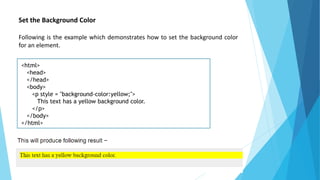
Set the Background Color
Following is the example which demonstrates how to set the background color
for an element.
<html>
<head>
</head>
<body>
<p style = "background-color:yellow;">
This text has a yellow background color.
</p>
</body>
</html>
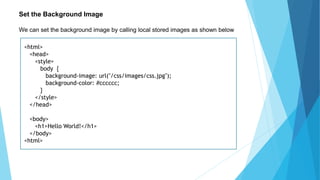
Set the Background Image
We can set the background image by calling local stored images as shown below
<html>
<head>
<style>
body {
background-image: url("/css/images/css.jpg");
background-color: #cccccc;
}
</style>
</head>
<body>
<h1>Hello World!</h1>
</body>
<html>
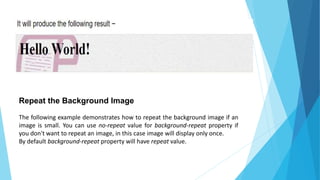
Repeat the Background Image
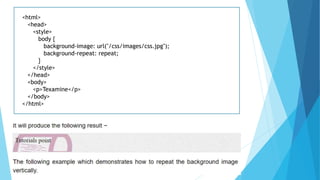
The following example demonstrates how to repeat the background image if an
image is small. You can use no-repeat value for background-repeat property if
you don't want to repeat an image, in this case image will display only once.
By default background-repeat property will have repeat value.
<html>
<head>
<style>
body {
background-image: url("/css/images/css.jpg");
background-repeat: repeat;
}
</style>
</head>
<body>
<p>Texamine</p>
</body>
</html>
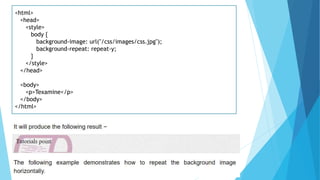
<html>
<head>
<style>
body {
background-image: url("/css/images/css.jpg");
background-repeat: repeat-y;
}
</style>
</head>
<body>
<p>Texamine</p>
</body>
</html>
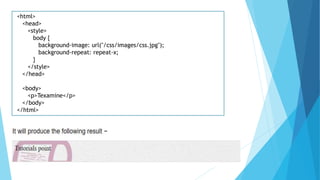
<html>
<head>
<style>
body {
background-image: url("/css/images/css.jpg");
background-repeat: repeat-x;
}
</style>
</head>
<body>
<p>Texamine</p>
</body>
</html>
Set the Background Image Position
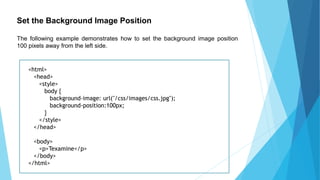
The following example demonstrates how to set the background image position
100 pixels away from the left side.
<html>
<head>
<style>
body {
background-image: url("/css/images/css.jpg");
background-position:100px;
}
</style>
</head>
<body>
<p>Texamine</p>
</body>
</html>
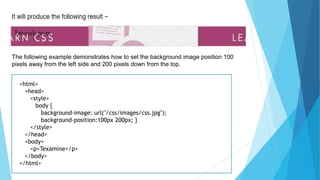
The following example demonstrates how to set the background image position 100
pixels away from the left side and 200 pixels down from the top.
<html>
<head>
<style>
body {
background-image: url("/css/images/css.jpg");
background-position:100px 200px; }
</style>
</head>
<body>
<p>Texamine</p>
</body>
</html>
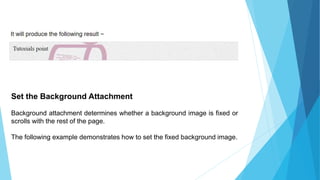
Set the Background Attachment
Background attachment determines whether a background image is fixed or
scrolls with the rest of the page.
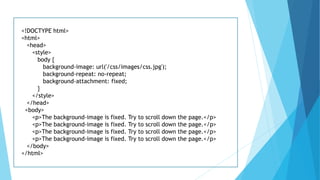
The following example demonstrates how to set the fixed background image.
<!DOCTYPE html>
<html>
<head>
<style>
body {
background-image: url('/css/images/css.jpg');
background-repeat: no-repeat;
background-attachment: fixed;
}
</style>
</head>
<body>
<p>The background-image is fixed. Try to scroll down the page.</p>
</body>
</html>
Css   backgrounds

Css backgrounds

  • 1.
  • 2.
    This chapter teachesyou how to set backgrounds of various HTML elements. You can set the following background properties of an element − •The background-color property is used to set the background color of an element. •The background-image property is used to set the background image of an element. •The background-repeat property is used to control the repetition of an image in the background. •The background-position property is used to control the position of an image in the background. •The background-attachment property is used to control the scrolling of an image in the background. •The background property is used as a shorthand to specify a number of other background properties.
  • 3.
    Set the BackgroundColor Following is the example which demonstrates how to set the background color for an element. <html> <head> </head> <body> <p style = "background-color:yellow;"> This text has a yellow background color. </p> </body> </html>
  • 4.
    Set the BackgroundImage We can set the background image by calling local stored images as shown below <html> <head> <style> body { background-image: url("/css/images/css.jpg"); background-color: #cccccc; } </style> </head> <body> <h1>Hello World!</h1> </body> <html>
  • 5.
    Repeat the BackgroundImage The following example demonstrates how to repeat the background image if an image is small. You can use no-repeat value for background-repeat property if you don't want to repeat an image, in this case image will display only once. By default background-repeat property will have repeat value.
  • 6.
    <html> <head> <style> body { background-image: url("/css/images/css.jpg"); background-repeat:repeat; } </style> </head> <body> <p>Texamine</p> </body> </html>
  • 7.
    <html> <head> <style> body { background-image: url("/css/images/css.jpg"); background-repeat:repeat-y; } </style> </head> <body> <p>Texamine</p> </body> </html>
  • 8.
    <html> <head> <style> body { background-image: url("/css/images/css.jpg"); background-repeat:repeat-x; } </style> </head> <body> <p>Texamine</p> </body> </html>
  • 9.
    Set the BackgroundImage Position The following example demonstrates how to set the background image position 100 pixels away from the left side. <html> <head> <style> body { background-image: url("/css/images/css.jpg"); background-position:100px; } </style> </head> <body> <p>Texamine</p> </body> </html>
  • 10.
    The following exampledemonstrates how to set the background image position 100 pixels away from the left side and 200 pixels down from the top. <html> <head> <style> body { background-image: url("/css/images/css.jpg"); background-position:100px 200px; } </style> </head> <body> <p>Texamine</p> </body> </html>
  • 11.
    Set the BackgroundAttachment Background attachment determines whether a background image is fixed or scrolls with the rest of the page. The following example demonstrates how to set the fixed background image.
  • 12.
    <!DOCTYPE html> <html> <head> <style> body { background-image:url('/css/images/css.jpg'); background-repeat: no-repeat; background-attachment: fixed; } </style> </head> <body> <p>The background-image is fixed. Try to scroll down the page.</p> <p>The background-image is fixed. Try to scroll down the page.</p> <p>The background-image is fixed. Try to scroll down the page.</p> <p>The background-image is fixed. Try to scroll down the page.</p> </body> </html>