DREAMWEAVER
Prepared by
Mrs.P.Anusha M.Sc(IT).,M.Phil.,D.P.T.T.,(Ph.D).,
Assistant professor,
Department of Information Technology,
Bon secours college for women,
Thanjavur.
INTRODUCTION TO CSS
CSS
CSS stands for Cascading Style Sheets. It is the language for
describing the presentation of Web pages, including colours,
layout, and fonts, thus making our web pages presentable to the
users.
The basic task of CSS is to control how the content appears on a
web page.
AP ELEMENTS
• CSS positions elements with in a webpage by using
rectangular boxes Known as Absolutely positioned elements.
• AP elements are used to hold and place the content of the
webpage.
• Ap elements act as a container for text, images and tables and
occupies a certain area on the webpage.
ADVANTAGES OF CSS
• Easier to maintain and update.
• Greater consistency in design.
• More formatting options.
• Lightweight code.
• Faster download times.
• Search engine optimization benefits.
• Ease of presenting different styles to different viewers.
• Greater accessibility
CSS RULES
• CSS rules are the styles that are applied on the HTML
elements , such as font, images and tables of a webpage.
• CSS is a combination of CSS rules that determines how a
browser will display a web page.
• A CSS rule is a grouping of one or more CSS
properties which are to be applied to one or more target
HTML elements
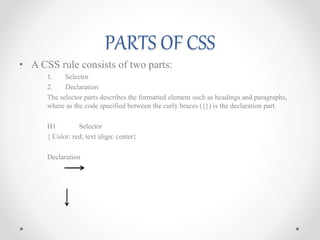
PARTS OF CSS
• A CSS rule consists of two parts:
1. Selector
2. Declaration
The selector parts describes the formatted element such as headings and paragraphs,
where as the code specified between the curly braces ({}) is the declaration part.
H1 Selector
{ Color: red; text align: center}
Declaration
CSS Properties
• The CSS properties specifies what to style of the targeted
HTML elements
Some examples are:
• Border (including border-style, border-color, and border-
width)
• Padding (including padding-top, padding-right, padding-
bottom, and padding-left)
• Margins (including margin-top, margin-right, margin-bottom,
and margin-left)
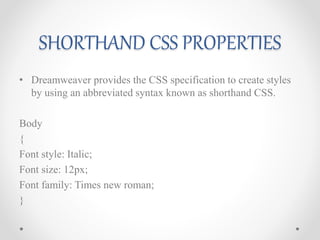
SHORTHAND CSS PROPERTIES
• Dreamweaver provides the CSS specification to create styles
by using an abbreviated syntax known as shorthand CSS.
Body
{
Font style: Italic;
Font size: 12px;
Font family: Times new roman;
}
CSS STYLE PANEL
• CSS style panel is used to modify the CSS properties of web
page.
1. CSS styles panel modes
2. CSS styles Panel buttons
3. CSS styles preferences
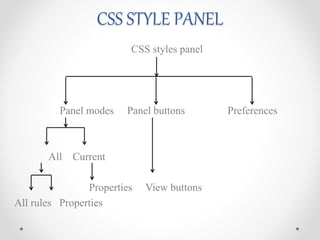
CSS STYLE PANEL
CSS styles panel
Panel modes Panel buttons Preferences
All Current
Properties View buttons
All rules Properties
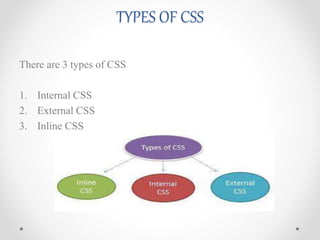
TYPES OF CSS
There are 3 types of CSS
1. Internal CSS
2. External CSS
3. Inline CSS
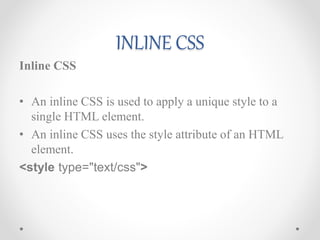
INLINE CSS
Inline CSS
• An inline CSS is used to apply a unique style to a
single HTML element.
• An inline CSS uses the style attribute of an HTML
element.
<style type="text/css">
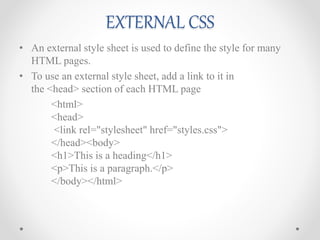
EXTERNAL CSS
• An external style sheet is used to define the style for many
HTML pages.
• To use an external style sheet, add a link to it in
the <head> section of each HTML page
<html>
<head>
<link rel="stylesheet" href="styles.css">
</head><body>
<h1>This is a heading</h1>
<p>This is a paragraph.</p>
</body></html>
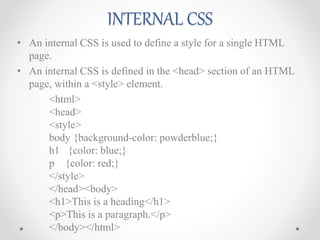
INTERNAL CSS
• An internal CSS is used to define a style for a single HTML
page.
• An internal CSS is defined in the <head> section of an HTML
page, within a <style> element.
<html>
<head>
<style>
body {background-color: powderblue;}
h1 {color: blue;}
p {color: red;}
</style>
</head><body>
<h1>This is a heading</h1>
<p>This is a paragraph.</p>
</body></html>
CSS

CSS

  • 1.
  • 2.
    Prepared by Mrs.P.Anusha M.Sc(IT).,M.Phil.,D.P.T.T.,(Ph.D)., Assistantprofessor, Department of Information Technology, Bon secours college for women, Thanjavur.
  • 3.
  • 4.
    CSS CSS stands forCascading Style Sheets. It is the language for describing the presentation of Web pages, including colours, layout, and fonts, thus making our web pages presentable to the users. The basic task of CSS is to control how the content appears on a web page.
  • 5.
    AP ELEMENTS • CSSpositions elements with in a webpage by using rectangular boxes Known as Absolutely positioned elements. • AP elements are used to hold and place the content of the webpage. • Ap elements act as a container for text, images and tables and occupies a certain area on the webpage.
  • 6.
    ADVANTAGES OF CSS •Easier to maintain and update. • Greater consistency in design. • More formatting options. • Lightweight code. • Faster download times. • Search engine optimization benefits. • Ease of presenting different styles to different viewers. • Greater accessibility
  • 7.
    CSS RULES • CSSrules are the styles that are applied on the HTML elements , such as font, images and tables of a webpage. • CSS is a combination of CSS rules that determines how a browser will display a web page. • A CSS rule is a grouping of one or more CSS properties which are to be applied to one or more target HTML elements
  • 8.
    PARTS OF CSS •A CSS rule consists of two parts: 1. Selector 2. Declaration The selector parts describes the formatted element such as headings and paragraphs, where as the code specified between the curly braces ({}) is the declaration part. H1 Selector { Color: red; text align: center} Declaration
  • 9.
    CSS Properties • TheCSS properties specifies what to style of the targeted HTML elements Some examples are: • Border (including border-style, border-color, and border- width) • Padding (including padding-top, padding-right, padding- bottom, and padding-left) • Margins (including margin-top, margin-right, margin-bottom, and margin-left)
  • 10.
    SHORTHAND CSS PROPERTIES •Dreamweaver provides the CSS specification to create styles by using an abbreviated syntax known as shorthand CSS. Body { Font style: Italic; Font size: 12px; Font family: Times new roman; }
  • 11.
    CSS STYLE PANEL •CSS style panel is used to modify the CSS properties of web page. 1. CSS styles panel modes 2. CSS styles Panel buttons 3. CSS styles preferences
  • 12.
    CSS STYLE PANEL CSSstyles panel Panel modes Panel buttons Preferences All Current Properties View buttons All rules Properties
  • 13.
    TYPES OF CSS Thereare 3 types of CSS 1. Internal CSS 2. External CSS 3. Inline CSS
  • 14.
    INLINE CSS Inline CSS •An inline CSS is used to apply a unique style to a single HTML element. • An inline CSS uses the style attribute of an HTML element. <style type="text/css">
  • 15.
    EXTERNAL CSS • Anexternal style sheet is used to define the style for many HTML pages. • To use an external style sheet, add a link to it in the <head> section of each HTML page <html> <head> <link rel="stylesheet" href="styles.css"> </head><body> <h1>This is a heading</h1> <p>This is a paragraph.</p> </body></html>
  • 16.
    INTERNAL CSS • Aninternal CSS is used to define a style for a single HTML page. • An internal CSS is defined in the <head> section of an HTML page, within a <style> element. <html> <head> <style> body {background-color: powderblue;} h1 {color: blue;} p {color: red;} </style> </head><body> <h1>This is a heading</h1> <p>This is a paragraph.</p> </body></html>