CS6006 - CLOUD COMPUTING
Module 2 - SERVICE-ORIENTED ARCHITECTURE FOR CLOUD
Presented By
Dr. S. Muthurajkumar,
Assistant Professor,
Dept. of CT, MIT Campus,
Anna University, Chennai
2
SERVICE-ORIENTED ARCHITECTURE FOR
CLOUD
 Introduction to Services and Service Oriented Architecture
 SOAP
 REST and Systems of Systems
 Services and Web Services
 Event Driven SOA
 SOA Communication
3
INTRODUCTION TO SERVICES AND SERVICE
ORIENTED ARCHITECTURE
 SOA, or service-oriented architecture, defines a way to make software
components reusable via service interfaces.
 These interfaces utilize common communication standards in such a way that
they can be rapidly incorporated into new applications without having to perform
deep integration each time.
 Service-Oriented Architecture (SOA) is a stage in the evolution of application
development and/or integration.
 It defines a way to make software components reusable using the interfaces.
 Formally, SOA is an architectural approach in which applications make use of
services available in the network.
 In this architecture, services are provided to form applications, through a network
call over the internet.
4
INTRODUCTION TO SERVICES AND SERVICE
ORIENTED ARCHITECTURE
 It uses common communication standards to speed up and streamline the
service integrations in applications.
 Each service in SOA is a complete business function in itself.
 The services are published in such a way that it makes it easy for the developers
to assemble their apps using those services. Note that SOA is different from
microservice architecture.
 SOA allows users to combine a large number of facilities from existing services to
form applications.
 SOA encompasses a set of design principles that structure system development
and provide means for integrating components into a coherent and decentralized
system.
 SOA-based computing packages functionalities into a set of interoperable
services, which can be integrated into different software systems belonging to
separate business domains.
5
INTRODUCTION TO SERVICES AND SERVICE
ORIENTED ARCHITECTURE
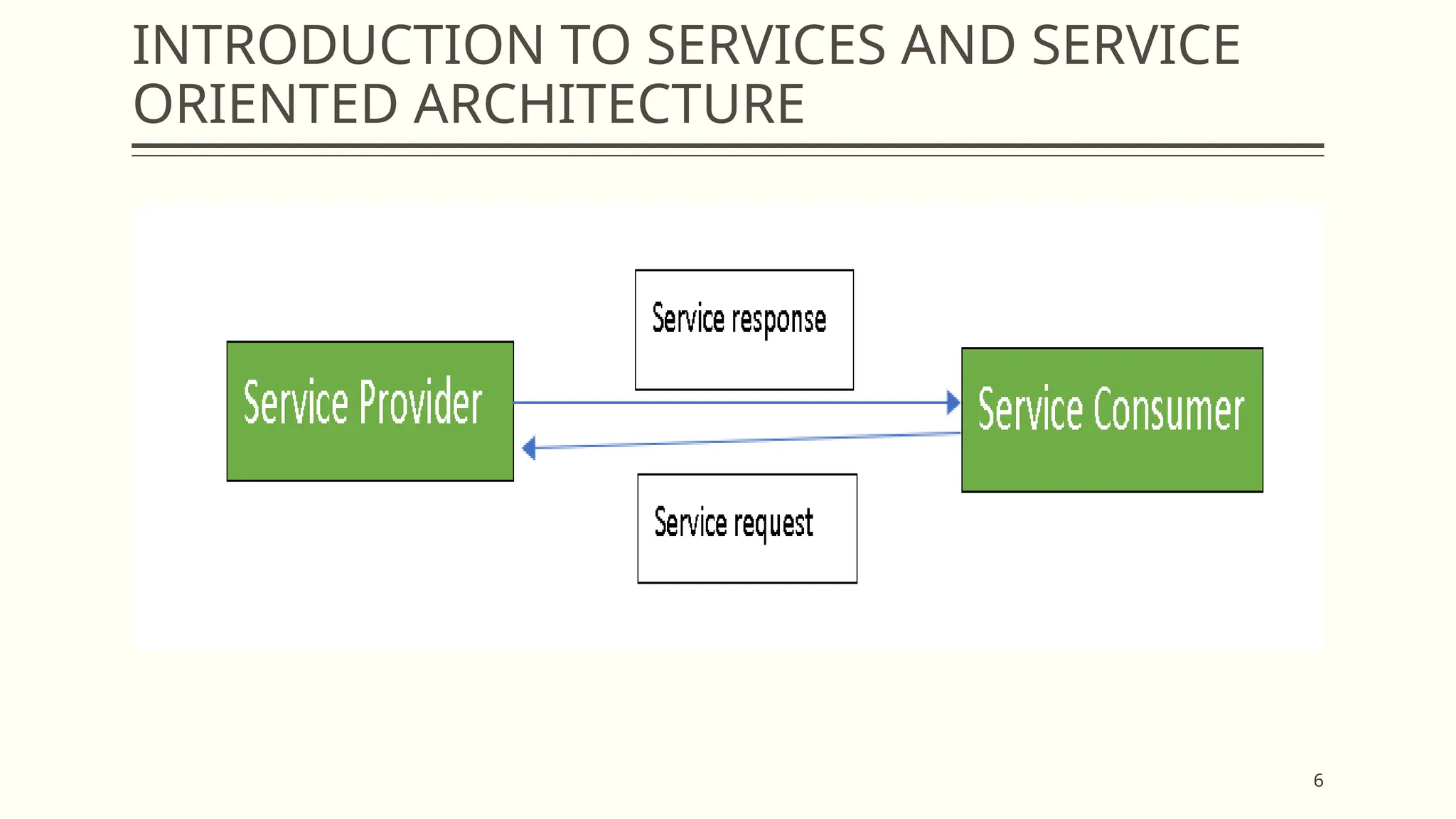
 There are two major roles within Service-oriented Architecture:
 Service Provider
 The service provider is the maintainer of the service and the organization that
makes available one or more services for others to use.
 To advertise services, the provider can publish them in a registry, together with a
service contract that specifies the nature of the service, how to use it, the
requirements for the service, and the fees charged.
 Service Consumer
 The service consumer can locate the service metadata in the registry and develop
the required client components to bind and use the service.
6
INTRODUCTION TO SERVICES AND SERVICE
ORIENTED ARCHITECTURE
7
INTRODUCTION TO SERVICES AND SERVICE
ORIENTED ARCHITECTURE
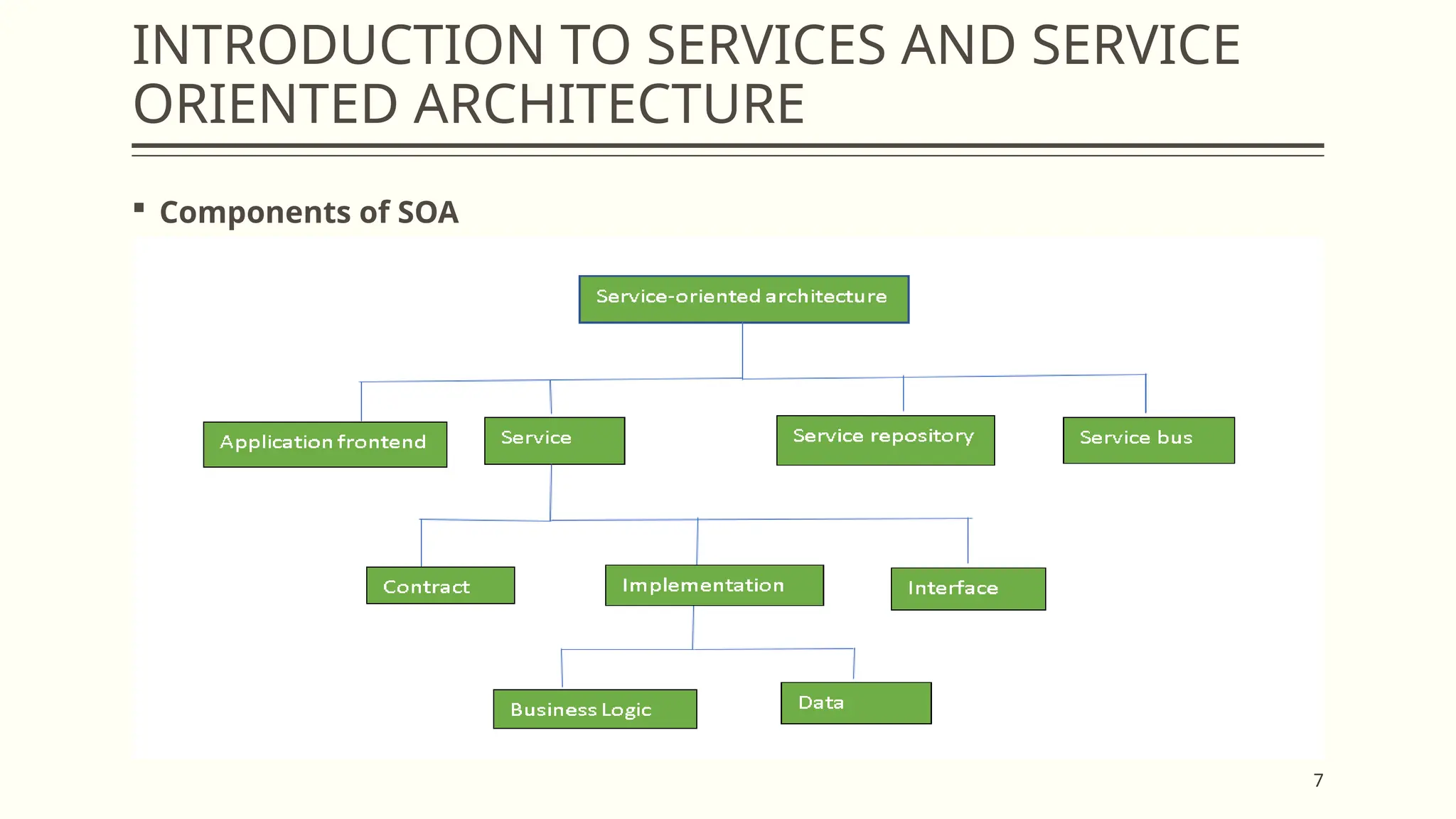
 Components of SOA
8
INTRODUCTION TO SERVICES AND SERVICE
ORIENTED ARCHITECTURE
 Guiding Principles of SOA
 Standardized service contract: Specified through one or more service
description documents.
 Loose coupling: Services are designed as self-contained components, maintain
relationships that minimize dependencies on other services.
 Abstraction: A service is completely defined by service contracts and description
documents. They hide their logic, which is encapsulated within their
implementation.
 Reusability: Designed as components, services can be reused more effectively,
thus reducing development time and the associated costs.
 Autonomy: Services have control over the logic they encapsulate and, from a
service consumer point of view, there is no need to know about their
implementation.
9
INTRODUCTION TO SERVICES AND SERVICE
ORIENTED ARCHITECTURE
 Guiding Principles of SOA
 Discoverability: Services are defined by description documents that constitute
supplemental metadata through which they can be effectively discovered. Service
discovery provides an effective means for utilizing third-party resources.
 Composability: Using services as building blocks, sophisticated and complex
operations can be implemented. Service orchestration and choreography provide
a solid support for composing services and achieving business goals
10
INTRODUCTION TO SERVICES AND SERVICE
ORIENTED ARCHITECTURE
 Advantages of SOA
 Service reusability: In SOA, applications are made from existing services. Thus,
services can be reused to make many applications.
 Easy maintenance: As services are independent of each other they can be
updated and modified easily without affecting other services.
 Platform independent: SOA allows making a complex application by combining
services picked from different sources, independent of the platform.
 Availability: SOA facilities are easily available to anyone on request.
 Reliability: SOA applications are more reliable because it is easy to debug small
services rather than huge codes
 Scalability: Services can run on different servers within an environment, this
increases scalability
11
INTRODUCTION TO SERVICES AND SERVICE
ORIENTED ARCHITECTURE
 Disadvantages of SOA
 High overhead: A validation of input parameters of services is done whenever
services interact this decreases performance as it increases load and response
time.
 High investment: A huge initial investment is required for SOA.
 Complex service management: When services interact they exchange messages
to tasks. the number of messages may go in millions. It becomes a cumbersome
task to handle a large number of messages.
12
INTRODUCTION TO SERVICES AND SERVICE
ORIENTED ARCHITECTURE
 Practical applications of SOA: SOA is used in many ways around us whether it is
mentioned or not.
 SOA infrastructure is used by many armies and air forces to deploy situational
awareness systems.
 SOA is used to improve healthcare delivery.
 Nowadays many apps are games and they use inbuilt functions to run. For
example, an app might need GPS so it uses the inbuilt GPS functions of the
device. This is SOA in mobile solutions.
 SOA helps maintain museums a virtualized storage pool for their information and
content.
13
SOAP - SIMPLE OBJECT ACCESS PROTOCOL
 Simple Object Access Protocol(SOAP) is a network protocol for exchanging
structured data between nodes.
 It uses XML format to transfer messages.
 It works on top of application layer protocols like HTML and SMTP for notations
and transmission.
 SOAP allows processes to communicate throughout platforms, languages and
operating systems, since protocols like HTTP are already installed on all
platforms.
 SOAP was designed by Bob Atkinson, Don Box, Dave Winer, and Mohsen Al-
Ghosein at Microsoft in 1998.
 SOAP was maintained by the XML Protocol Working Group of the World Wide Web
Consortium until 2009.
14
SOAP - SIMPLE OBJECT ACCESS PROTOCOL
 Message Format
 SOAP message transmits some basic information as given below
 Information about message structure and instructions on processing it.
 Encoding instructions for application defined data types.
 Information about Remote Procedure Calls and their responses.
15
SOAP - SIMPLE OBJECT ACCESS PROTOCOL
 The message in XML format contains three parts
 Envelope
 It specifies that the XML message is a SOAP message.
 A SOAP message can be defined as an XML document containing header and
body encapsulated in the envelope.
 The fault is within the body of the message.
 Header
 This part is not mandatory. But when it is present it can provide crucial
information about the applications.
16
SOAP - SIMPLE OBJECT ACCESS PROTOCOL
 The message in XML format contains three parts
 Body
 It contains the actual message that is being transmitted.
 Fault is contained within the body tags.
 Fault
 This section contains the status of the application and also contains errors in the
application. This section is also optional. It should not appear more than once in a
SOAP message.
17
REST AND SYSTEMS OF SYSTEMS
 REST (Representational State Transfer) is usually referred as an architectural style
rather than a protocol, which is used to build web services.
 REST architecture allows the communication between two software programs,
wherein one program can request and manipulate resources from the other one.
 REST request for accessing resources on target program uses HTTP verbs: GET,
POST, PUT, and DELETE.
 These requests can use data format including XML, HTML and JSON.
 JSON is most preferred as it is most compatible and easy to use. most REST APIs
are based on URIs (Uniform Resource Identifier) and are specific to HTTP
protocol.
 REST is developer-friendly because its simpler style makes it easier to implement
and use than SOAP.
 REST is less verbose, and less volume of data is sent when communicating
between two endpoints.
18
REST AND SYSTEMS OF SYSTEMS
 While SOAP is like using an envelope that contains lots of processing information
inside it, REST can be considered a postcard that has an URI as destination
address, is lightweight, and can be cached.
 REST is data-driven and is primary used to access a resource (URI) for certain
data; SOAP is a protocol that is function-driven.
 REST provides flexibility in choosing data format (plain text, HTML, XML, or JSON)
while SOAP only uses XML.
19
SERVICES AND WEB SERVICES
 A web service is a standardized method for propagating messages between client
and server applications on the World Wide Web.
 A web service is a software module that aims to accomplish a specific set of tasks.
Web services can be found and implemented over a network in cloud computing.
 The web service would be able to provide the functionality to the client that
invoked the web service.
 A web service is a set of open protocols and standards that allow data exchange
between different applications or systems.
 Web services can be used by software programs written in different
programming languages and on different platforms to exchange data through
computer networks such as the Internet.
 In the same way, communication on a computer can be inter-processed.
20
SERVICES AND WEB SERVICES
 Any software, application, or cloud technology that uses a standardized Web
protocol (HTTP or HTTPS) to connect, interoperate, and exchange data messages
over the Internet-usually XML (Extensible Markup Language) is considered a Web
service.
 Web services allow programs developed in different languages to be connected
between a client and a server by exchanging data over a web service.
 A client invokes a web service by submitting an XML request, to which the service
responds with an XML response.
 Web services functions
 It is possible to access it via the Internet or intranet network.
 XML messaging protocol that is standardized.
 Operating system or programming language independent.
 Using the XML standard is self-describing.
21
SERVICES AND WEB SERVICES
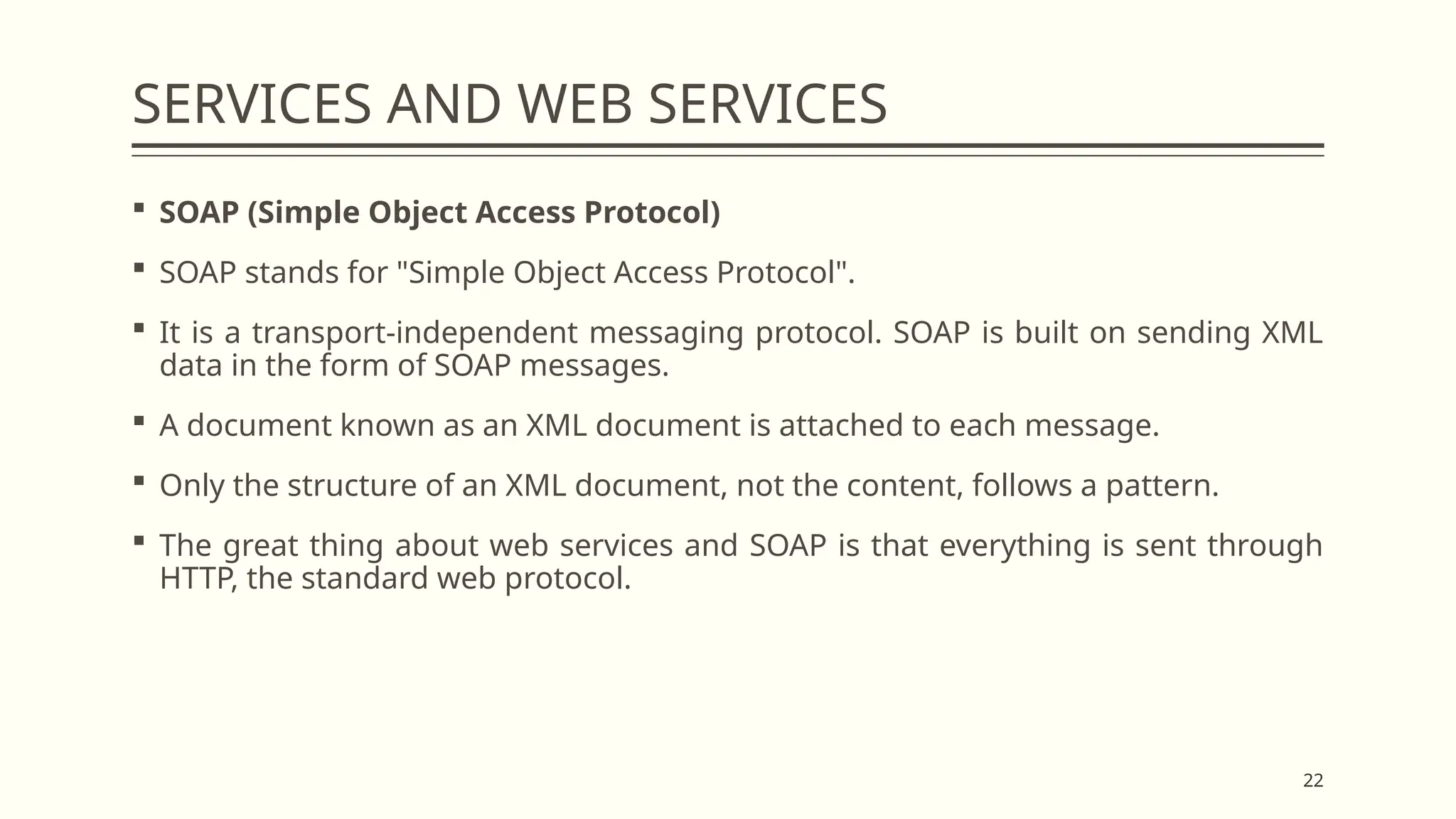
 Web Service Components
 SOAP (Simple Object Access Protocol)
 UDDI (Universal Description, Search, and Integration)
 WSDL (Web Services Description Language)
22
SERVICES AND WEB SERVICES
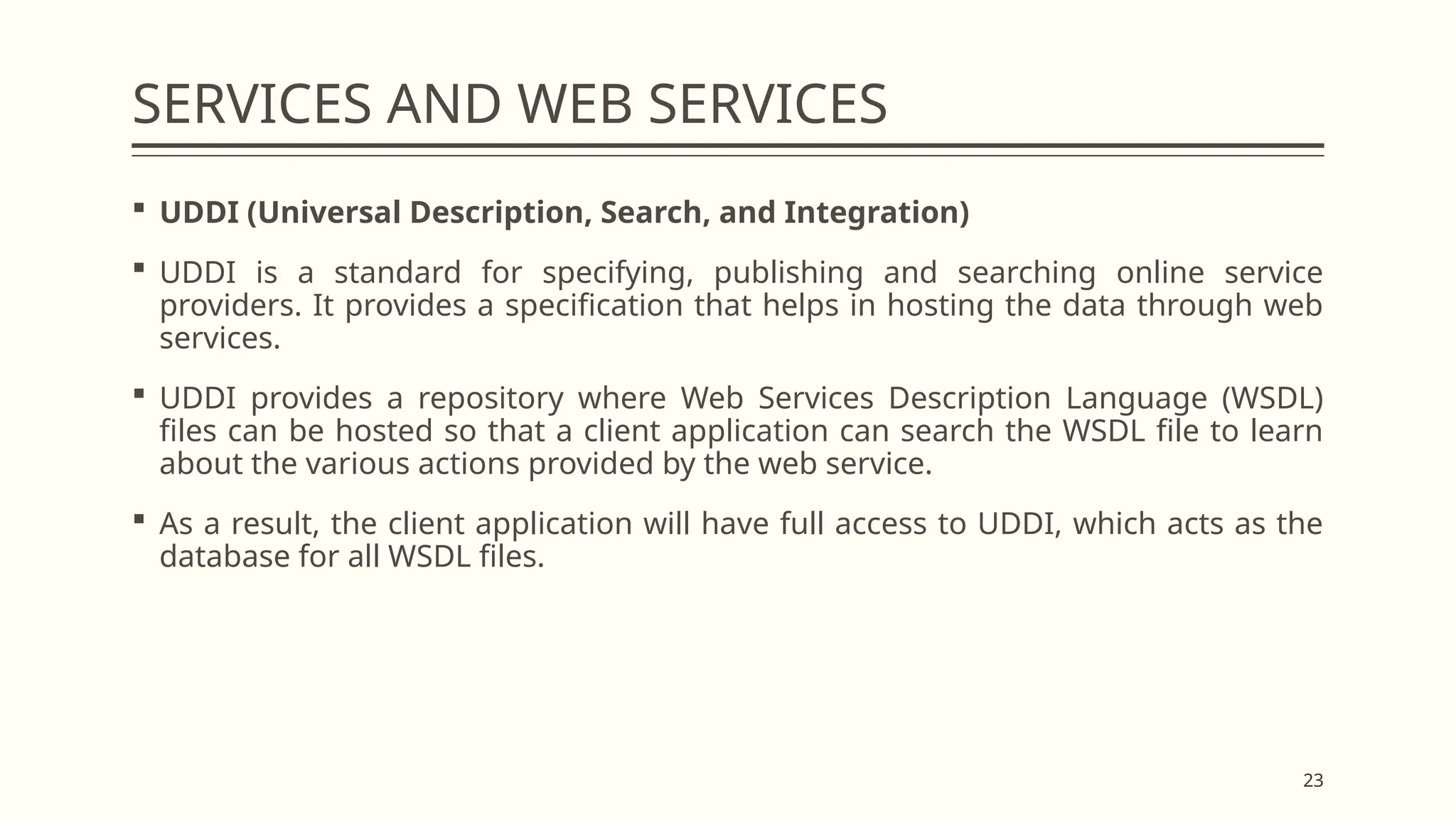
 SOAP (Simple Object Access Protocol)
 SOAP stands for "Simple Object Access Protocol".
 It is a transport-independent messaging protocol. SOAP is built on sending XML
data in the form of SOAP messages.
 A document known as an XML document is attached to each message.
 Only the structure of an XML document, not the content, follows a pattern.
 The great thing about web services and SOAP is that everything is sent through
HTTP, the standard web protocol.
23
SERVICES AND WEB SERVICES
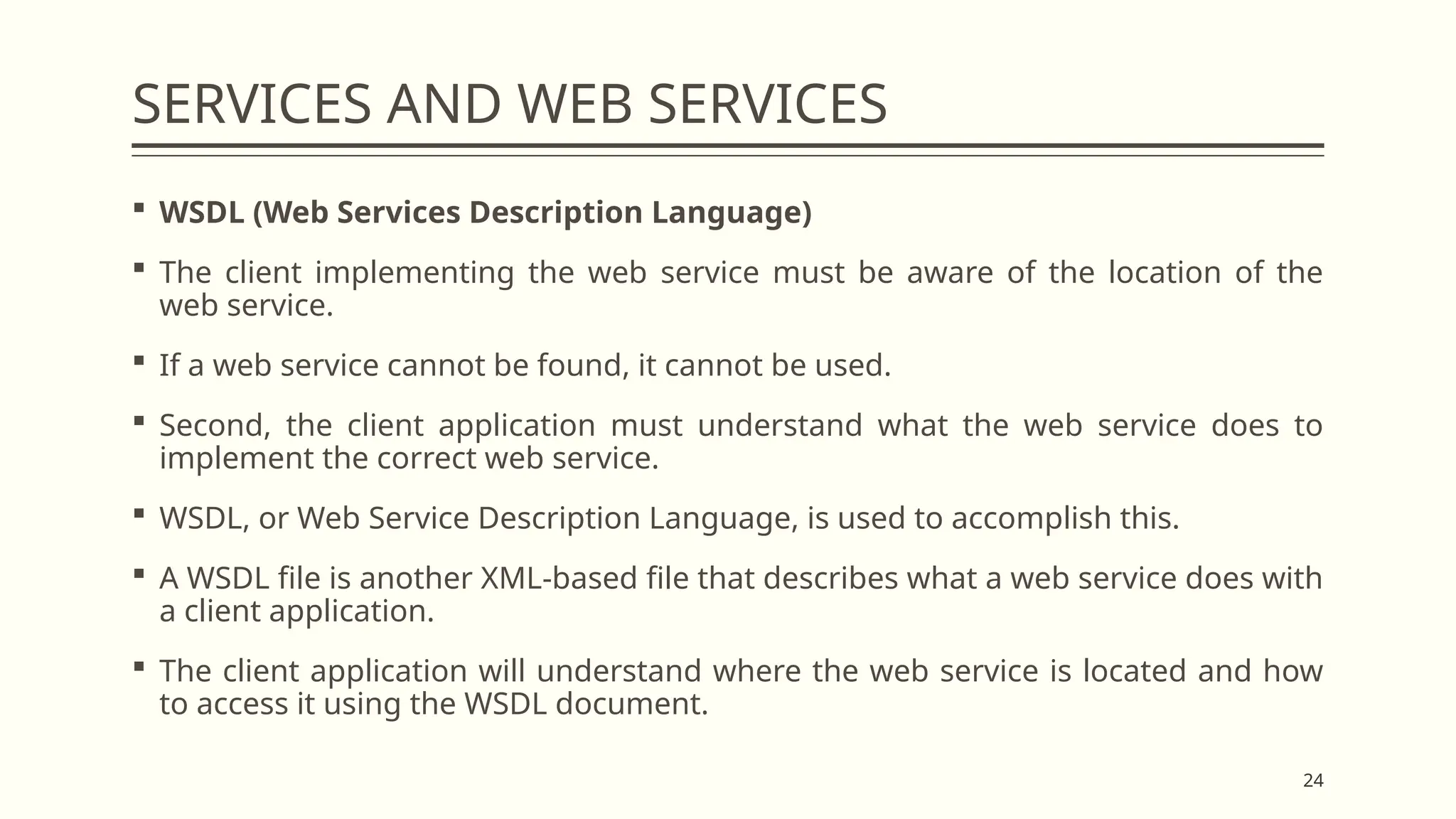
 UDDI (Universal Description, Search, and Integration)
 UDDI is a standard for specifying, publishing and searching online service
providers. It provides a specification that helps in hosting the data through web
services.
 UDDI provides a repository where Web Services Description Language (WSDL)
files can be hosted so that a client application can search the WSDL file to learn
about the various actions provided by the web service.
 As a result, the client application will have full access to UDDI, which acts as the
database for all WSDL files.
24
SERVICES AND WEB SERVICES
 WSDL (Web Services Description Language)
 The client implementing the web service must be aware of the location of the
web service.
 If a web service cannot be found, it cannot be used.
 Second, the client application must understand what the web service does to
implement the correct web service.
 WSDL, or Web Service Description Language, is used to accomplish this.
 A WSDL file is another XML-based file that describes what a web service does with
a client application.
 The client application will understand where the web service is located and how
to access it using the WSDL document.
25
SERVICES AND WEB SERVICES
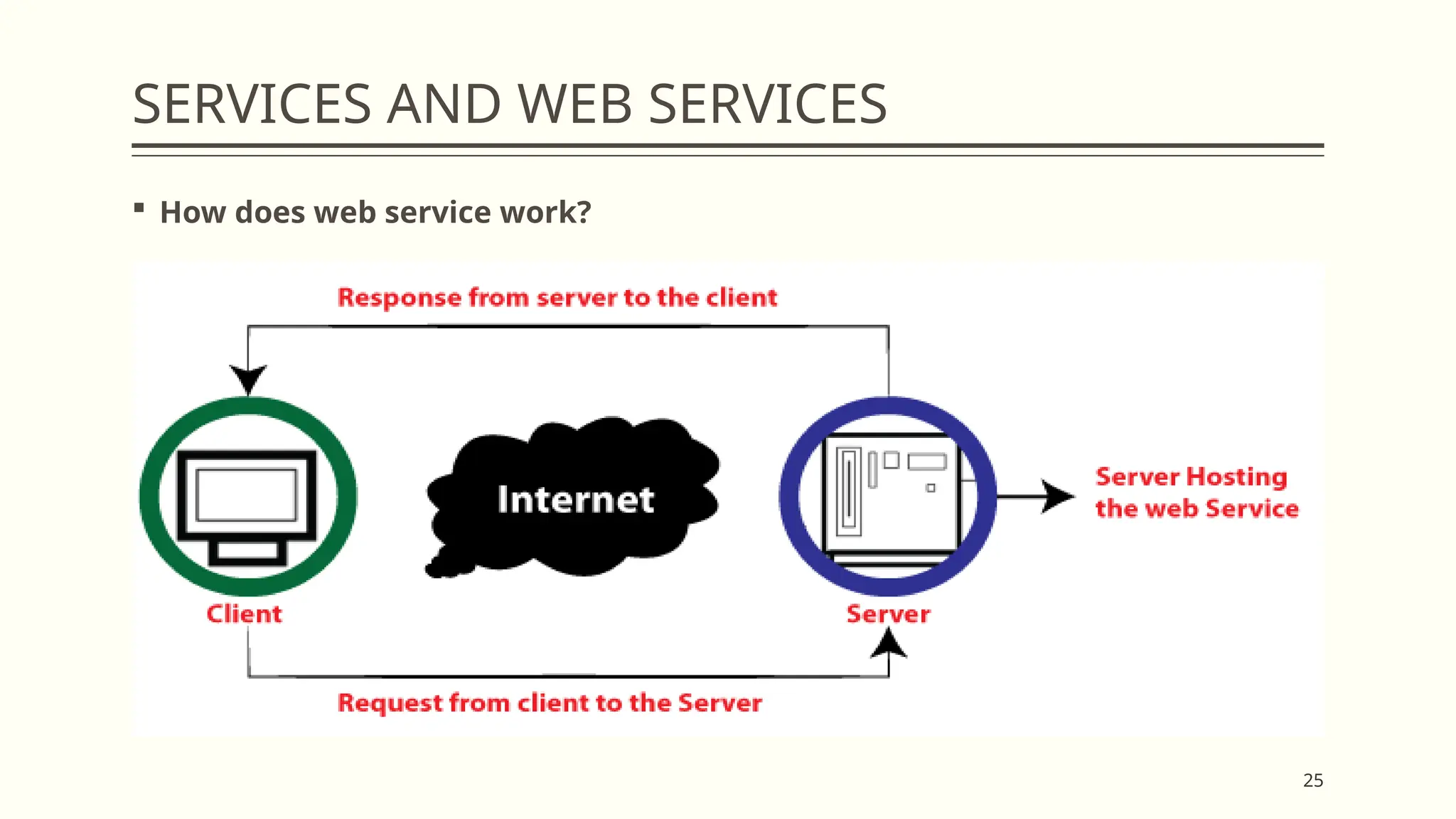
 How does web service work?
26
SERVICES AND WEB SERVICES
 How does web service work?
 The client will use requests to send a sequence of web service calls to the server
hosting the actual web service.
 Remote procedure calls are used to perform these requests.
 The calls to the methods hosted by the respective web service are known as
Remote Procedure Calls (RPC).
 Flipkart provides a web service that displays the prices of items offered on
Flipkart.com.
 The front end or presentation layer can be written in .NET or Java, but the web
service can be communicated using a programming language.
27
SERVICES AND WEB SERVICES
 How does web service work?
 The data exchanged between the client and the server, XML, is the most
important part of web service design.
 XML (Extensible Markup Language) is a simple, intermediate language
understood by various programming languages. It is the equivalent of HTML.
 As a result, when programs communicate with each other, they use XML. It forms
a common platform for applications written in different programming languages
to communicate with each other.
 Web services employ SOAP (Simple Object Access Protocol) to transmit XML data
between applications.
 The data is sent using standard HTTP. A SOAP message is data sent from a web
service to an application. An XML document is all that is contained in a SOAP
message. The client application that calls the web service can be built in any
programming language as the content is written in XML.
28
SERVICES AND WEB SERVICES
 Features of Web Service
 XML-based
 Loosely Coupled
 Ability to be synchronous or asynchronous
 Supports remote procedural calls
 Supports document exchanges
29
EVENT DRIVEN SOA
 An event-driven architecture is a software design pattern in which microservices
react to changes in state, called events.
 Events can either carry a state (such as the price of an item or a delivery address)
or events can be identifiers (a notification that an order was received or shipped,
for example).
 The events trigger microservices that work together to achieve a common goal,
but do not have to know anything about each other except the event format.
 Although operating together, each microservice can apply a different business
logic, and emit its own output events.
30
EVENT DRIVEN SOA
 An event has the following characteristics:
 It is a record of something that has happened.
 It captures an immutable fact that cannot be changed or deleted.
 It occurs whether or not a service applies any logic upon consuming it.
 It can be persisted indefinitely, at a large scale, and consumed as many times as
necessary.
31
EVENT DRIVEN SOA
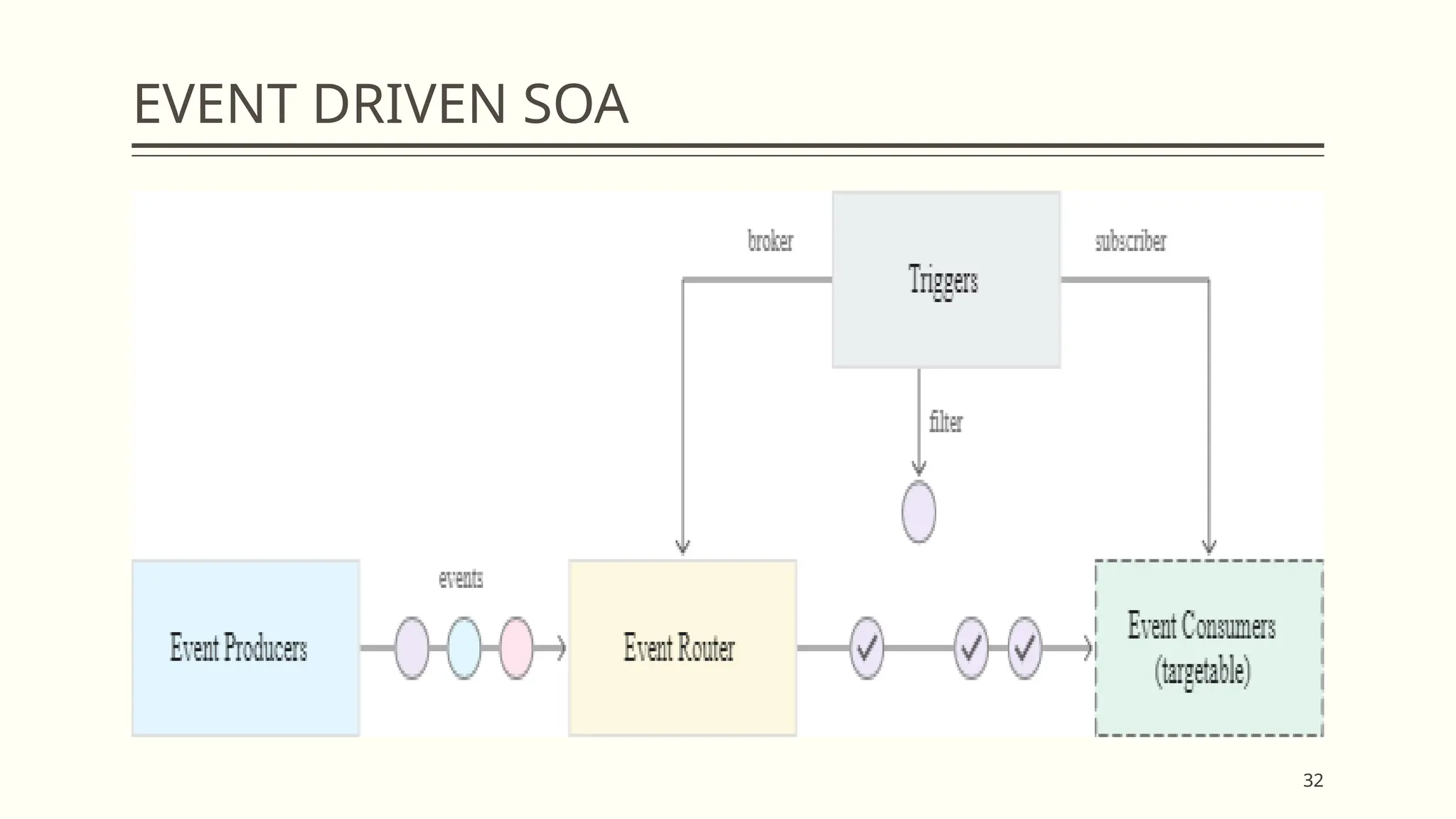
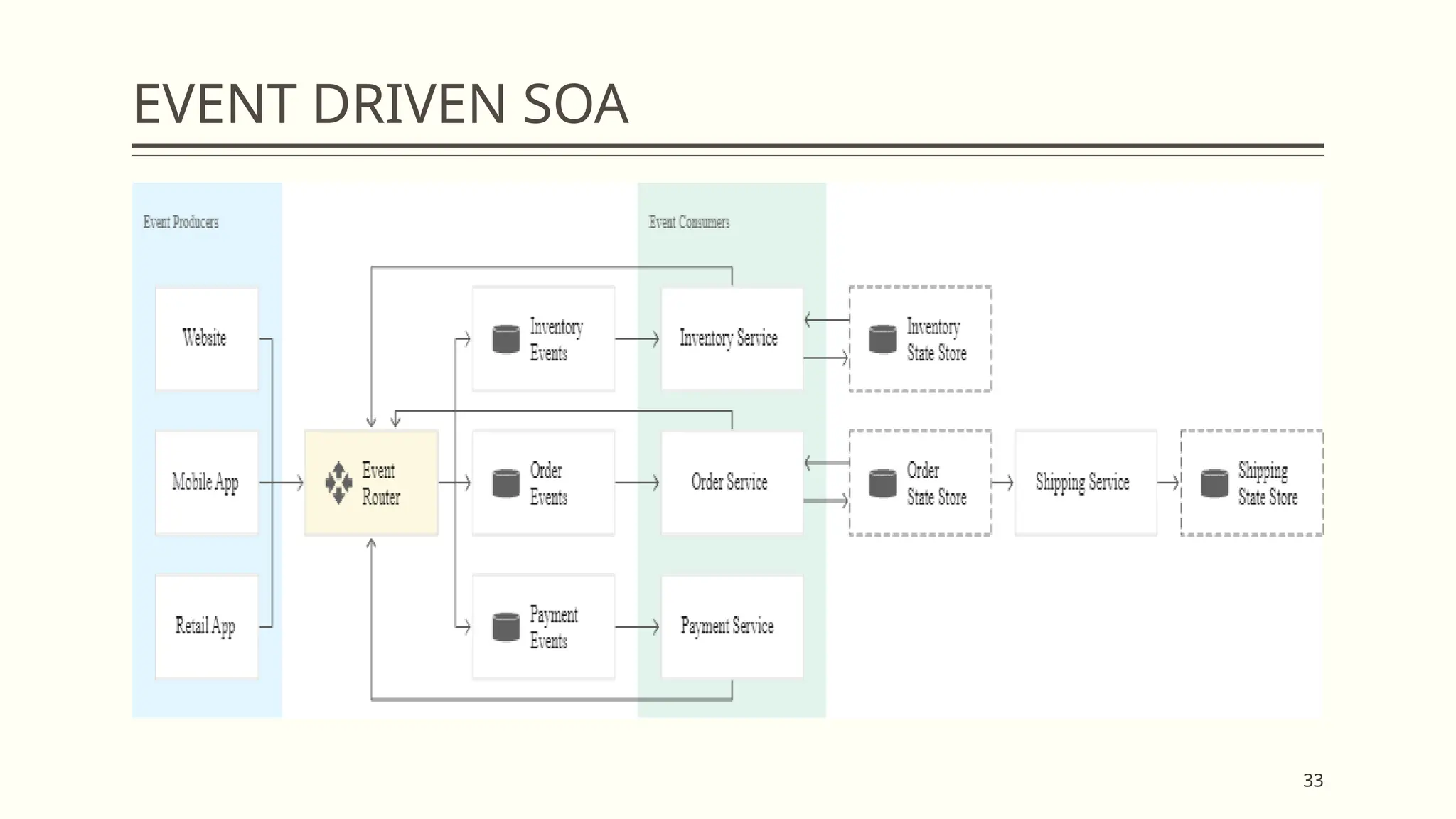
 In an event-driven system, events are generated by event producers, ingested
and filtered by an event router (or broker), and then fanned out to the
appropriate event consumers (or sinks).
 The events are forwarded to subscribers defined by one or more matching
triggers.
 These three components—event producers, event router, event consumers—are
decoupled and can be independently deployed, updated, and scaled:
 The event router links the different services and is the medium through which
messages are sent and received.
 It executes a response to the original event generated by an event producer and
sends this response downstream to the appropriate consumers.
 Events are handled asynchronously and their outcomes are decided when a
service reacts to an event or is impacted by it, as in the following diagram of a
very simplified event flow:
32
EVENT DRIVEN SOA
33
EVENT DRIVEN SOA
34
EVENT DRIVEN SOA - WHEN TO USE EVENT-
DRIVEN ARCHITECTURES
 To monitor and receive alerts for any anomalies or changes to storage buckets,
database tables, virtual machines, or other resources.
 To fan out a single event to multiple consumers.
 The event router will push the event to all the appropriate consumers, without you
having to write customized code.
 Each service can then process the event in parallel, yet differently.
 To provide interoperability between different technology stacks while maintaining
the independence of each stack.
 To coordinate systems and teams operating in and deploying across different
regions and accounts. You can easily reorganize ownership of microservices.
 There are fewer cross-team dependencies and you can react more quickly to
changes that would otherwise be impeded by barriers to data access.
35
EVENT DRIVEN SOA - WHEN TO USE EVENT-
DRIVEN ARCHITECTURES
 Benefits of event-driven architectures
 These are some of the advantages when building an event-driven architecture.
 Loose coupling and improved developer agility
 Event producers are logically separated from event consumers.
 This decoupling between the production and consumption of events means that
services are interoperable but can be scaled, updated, and deployed
independently of each other.
 Loose coupling reduces dependencies and allows you to implement services in
different languages and frameworks.
 You can add or remove event producers and receivers without having to change
the logic in any one service.
 You do not need to write custom code to poll, filter, and route events.
36
EVENT DRIVEN SOA - WHEN TO USE EVENT-
DRIVEN ARCHITECTURES
 Asynchronous eventing and resiliency
 In an event-driven system, events are generated asynchronously, and can be
issued as they happen without waiting for a response. Loosely coupled
components means that if one service fails, the others are unaffected. If
necessary, you can log events so that the receiving service can resume from the
point of failure, or replay past events.
 Push-based messaging, real-time event streams, and lower costs
 Event-driven systems allow for easy push-based messaging and clients can
receive updates without needing to continuously poll remote services for state
changes. These pushed messages can be used for on-the-fly data processing
and transformation, and real-time analysis. Moreover, with less polling, there is
a reduction in network I/O, and decreased costs.
37
EVENT DRIVEN SOA - WHEN TO USE EVENT-
DRIVEN ARCHITECTURES
 Simplified auditing and event sourcing
 The centralized location of the event router simplifies auditing, and allows you
to control who can interact with a router, and which users and resources have
access to your data. You can also encrypt your data both in transit and at rest.
 Additionally, you can make use of event sourcing, an architectural pattern that
records all changes made to an application's state, in the same sequence that
they were originally applied. Event sourcing provides a log of immutable events
which can be kept for auditing purposes, to recreate historic states, or as a
canonical narrative to explain a business-driven decision.
38
EVENT DRIVEN SOA - WHEN TO USE EVENT-
DRIVEN ARCHITECTURES
 Architectural considerations
 An event-driven architecture might require that you approach your application
design in a new way. Although well suited for applications that make use of
microservices or decoupled components, you should also consider the
following:
 Can your event source guarantee delivery if you need to process every single
event?
 It should be a durable and reliable event source.
 Can your application handle multiple asynchronous requests?
 Your system performance should not rely on global scope or inelastic
databases.
 How do you want to track your event flow?
 An event-driven architecture supports dynamic tracking using monitoring
39
SOA COMMUNICATION
 Service-oriented architecture (SOA) is a method of software development that
uses software components called services to create business applications.
 Each service provides a business capability, and services can also communicate
with each other across platforms and languages.
 Developers use SOA to reuse services in different systems or combine several
independent services to perform complex tasks.
40
SOA COMMUNICATION - BENEFITS
 Service-oriented architecture (SOA) has several benefits over the traditional
monolithic architectures in which all processes run as a single unit.
 Some major benefits of SOA include the following:
 Faster time to market
 Developers reuse services across different business processes to save time and
costs. They can assemble applications much faster with SOA than by writing code
and performing integrations from scratch.
 Efficient maintenance
 It’s easier to create, update, and debug small services than large code blocks in
monolithic applications. Modifying any service in SOA does not impact the overall
functionality of the business process.
41
SOA COMMUNICATION - BENEFITS
 Greater adaptability
 SOA is more adaptable to advances in technology.
 You can modernize your applications efficiently and cost effectively.
 For example, healthcare organizations can use the functionality of older
electronic health record systems in newer cloud-based applications.
42
SOA COMMUNICATION - BASIC PRINCIPLES
 Interoperability
 Each service in SOA includes description documents that specify the functionality
of the service and the related terms and conditions. Any client system can run a
service, regardless of the underlying platform or programming language. For
instance, business processes can use services written in both C# and Python.
Since there are no direct interactions, changes in one service do not affect other
components using the service.
 Loose coupling
 Services in SOA should be loosely coupled, having as little dependency as
possible on external resources such as data models or information systems. They
should also be stateless without retaining any information from past sessions or
transactions. This way, if you modify a service, it won’t significantly impact the
client applications and other services using the service.
43
SOA COMMUNICATION - BASIC PRINCIPLES
 Abstraction
 Clients or service users in SOA need not know the service's code logic or
implementation details. To them, services should appear like a black box. Clients
get the required information about what the service does and how to use it
through service contracts and other service description documents.
 Granularity
 Services in SOA should have an appropriate size and scope, ideally packing one
discrete
 business function per service. Developers can then use multiple services to create
a composite service for performing complex operations.
44
SOA COMMUNICATION - COMPONENTS
 Service
 Services are the basic building blocks of SOA. They can be private—available only
to internal users of an organization—or public—accessible over the internet to all.
Individually, each service has three main features.
 Service implementation
 The service implementation is the code that builds the logic for performing the
specific service function, such as user authentication or bill calculation.
 Service contract
 The service contract defines the nature of the service and its associated terms
and conditions, such as the prerequisites for using the service, service cost, and
quality of service provided.
45
SOA COMMUNICATION - COMPONENTS
 Service interface
 In SOA, other services or systems communicate with a service through its service
interface. The interface defines how you can invoke the service to perform
activities or exchange data. It reduces dependencies between services and the
service requester. For example, even users with little or no understanding of the
underlying code logic can use a service through its interface.
 Service provider
 The service provider creates, maintains, and provides one or more services that
others can use. Organizations can create their own services or purchase them
from third-party service vendors.
46
SOA COMMUNICATION - COMPONENTS
 Service consumer
 The service consumer requests the service provider to run a specific service. It
can be an entire system, application, or other service. The service contract
specifies the rules that the service provider and consumer must follow when
interacting with each other. Service providers and consumers can belong to
different departments, organizations, and even industries.
 Service registry
 A service registry, or service repository, is a network-accessible directory of
available services. It stores service description documents from service providers.
The description documents contain information about the service and how to
communicate with it. Service consumers can easily discover the services they
need by using the service registry.
47
SOA COMMUNICATION - COMMUNICATION
PROTOCOLS
 Services communicate using established rules that determine data transmission
over a network.
 These rules are called communication protocols.
 Some standard protocols to implement SOA include the following:
 Simple Object Access Protocol (SOAP)
 RESTful HTTP
 Apache Thrift
 Apache ActiveMQ
 Java Message Service (JMS)
48
REFERENCES
1. Kai Hwang, Geoffrey C Fox and Jack G Dongarra, "Distributed and Cloud
Computing, From Parallel Processing to the Internet of Things", Morgan
Kaufmann Publishers, 2012.
2. Barrie Sosinky,"Cloud Computing Bible”, Wiley Publishing Inc,2011
3. Buyya R., Broberg J. and Goscinski A., "Cloud Computing: Principles and
Paradigm”, First Edition, John Wiley & Sons, 2011.
4. Rajkumar Buyya, Christian Vecchiola, S. ThamaraiSelvi,"Mastering the Cloud
Computing”, Morgan Kaufmann,2013
5. John W. Rittinghouse and James F. Ransome, "Cloud Computing:
Implementation "Management, and Security", CRC Press, 2016.
6. David Bernstein, "Containers and Cloud: From LXC to Docker to Kubernetes”,
IEEE Cloud Computing, Volume: 1 , Issue: 3 , 2014.
7. VMware (white paper),"Understanding Full Virtualization, Paravirtualization,
and Hardware Assist
":www.vmware.com/files/pdf/VMware_paravirtualization.pdf.
49
Thank You…

CS6006 - CLOUD COMPUTING - Module - 2.pptx

  • 1.
    CS6006 - CLOUDCOMPUTING Module 2 - SERVICE-ORIENTED ARCHITECTURE FOR CLOUD Presented By Dr. S. Muthurajkumar, Assistant Professor, Dept. of CT, MIT Campus, Anna University, Chennai
  • 2.
    2 SERVICE-ORIENTED ARCHITECTURE FOR CLOUD Introduction to Services and Service Oriented Architecture  SOAP  REST and Systems of Systems  Services and Web Services  Event Driven SOA  SOA Communication
  • 3.
    3 INTRODUCTION TO SERVICESAND SERVICE ORIENTED ARCHITECTURE  SOA, or service-oriented architecture, defines a way to make software components reusable via service interfaces.  These interfaces utilize common communication standards in such a way that they can be rapidly incorporated into new applications without having to perform deep integration each time.  Service-Oriented Architecture (SOA) is a stage in the evolution of application development and/or integration.  It defines a way to make software components reusable using the interfaces.  Formally, SOA is an architectural approach in which applications make use of services available in the network.  In this architecture, services are provided to form applications, through a network call over the internet.
  • 4.
    4 INTRODUCTION TO SERVICESAND SERVICE ORIENTED ARCHITECTURE  It uses common communication standards to speed up and streamline the service integrations in applications.  Each service in SOA is a complete business function in itself.  The services are published in such a way that it makes it easy for the developers to assemble their apps using those services. Note that SOA is different from microservice architecture.  SOA allows users to combine a large number of facilities from existing services to form applications.  SOA encompasses a set of design principles that structure system development and provide means for integrating components into a coherent and decentralized system.  SOA-based computing packages functionalities into a set of interoperable services, which can be integrated into different software systems belonging to separate business domains.
  • 5.
    5 INTRODUCTION TO SERVICESAND SERVICE ORIENTED ARCHITECTURE  There are two major roles within Service-oriented Architecture:  Service Provider  The service provider is the maintainer of the service and the organization that makes available one or more services for others to use.  To advertise services, the provider can publish them in a registry, together with a service contract that specifies the nature of the service, how to use it, the requirements for the service, and the fees charged.  Service Consumer  The service consumer can locate the service metadata in the registry and develop the required client components to bind and use the service.
  • 6.
    6 INTRODUCTION TO SERVICESAND SERVICE ORIENTED ARCHITECTURE
  • 7.
    7 INTRODUCTION TO SERVICESAND SERVICE ORIENTED ARCHITECTURE  Components of SOA
  • 8.
    8 INTRODUCTION TO SERVICESAND SERVICE ORIENTED ARCHITECTURE  Guiding Principles of SOA  Standardized service contract: Specified through one or more service description documents.  Loose coupling: Services are designed as self-contained components, maintain relationships that minimize dependencies on other services.  Abstraction: A service is completely defined by service contracts and description documents. They hide their logic, which is encapsulated within their implementation.  Reusability: Designed as components, services can be reused more effectively, thus reducing development time and the associated costs.  Autonomy: Services have control over the logic they encapsulate and, from a service consumer point of view, there is no need to know about their implementation.
  • 9.
    9 INTRODUCTION TO SERVICESAND SERVICE ORIENTED ARCHITECTURE  Guiding Principles of SOA  Discoverability: Services are defined by description documents that constitute supplemental metadata through which they can be effectively discovered. Service discovery provides an effective means for utilizing third-party resources.  Composability: Using services as building blocks, sophisticated and complex operations can be implemented. Service orchestration and choreography provide a solid support for composing services and achieving business goals
  • 10.
    10 INTRODUCTION TO SERVICESAND SERVICE ORIENTED ARCHITECTURE  Advantages of SOA  Service reusability: In SOA, applications are made from existing services. Thus, services can be reused to make many applications.  Easy maintenance: As services are independent of each other they can be updated and modified easily without affecting other services.  Platform independent: SOA allows making a complex application by combining services picked from different sources, independent of the platform.  Availability: SOA facilities are easily available to anyone on request.  Reliability: SOA applications are more reliable because it is easy to debug small services rather than huge codes  Scalability: Services can run on different servers within an environment, this increases scalability
  • 11.
    11 INTRODUCTION TO SERVICESAND SERVICE ORIENTED ARCHITECTURE  Disadvantages of SOA  High overhead: A validation of input parameters of services is done whenever services interact this decreases performance as it increases load and response time.  High investment: A huge initial investment is required for SOA.  Complex service management: When services interact they exchange messages to tasks. the number of messages may go in millions. It becomes a cumbersome task to handle a large number of messages.
  • 12.
    12 INTRODUCTION TO SERVICESAND SERVICE ORIENTED ARCHITECTURE  Practical applications of SOA: SOA is used in many ways around us whether it is mentioned or not.  SOA infrastructure is used by many armies and air forces to deploy situational awareness systems.  SOA is used to improve healthcare delivery.  Nowadays many apps are games and they use inbuilt functions to run. For example, an app might need GPS so it uses the inbuilt GPS functions of the device. This is SOA in mobile solutions.  SOA helps maintain museums a virtualized storage pool for their information and content.
  • 13.
    13 SOAP - SIMPLEOBJECT ACCESS PROTOCOL  Simple Object Access Protocol(SOAP) is a network protocol for exchanging structured data between nodes.  It uses XML format to transfer messages.  It works on top of application layer protocols like HTML and SMTP for notations and transmission.  SOAP allows processes to communicate throughout platforms, languages and operating systems, since protocols like HTTP are already installed on all platforms.  SOAP was designed by Bob Atkinson, Don Box, Dave Winer, and Mohsen Al- Ghosein at Microsoft in 1998.  SOAP was maintained by the XML Protocol Working Group of the World Wide Web Consortium until 2009.
  • 14.
    14 SOAP - SIMPLEOBJECT ACCESS PROTOCOL  Message Format  SOAP message transmits some basic information as given below  Information about message structure and instructions on processing it.  Encoding instructions for application defined data types.  Information about Remote Procedure Calls and their responses.
  • 15.
    15 SOAP - SIMPLEOBJECT ACCESS PROTOCOL  The message in XML format contains three parts  Envelope  It specifies that the XML message is a SOAP message.  A SOAP message can be defined as an XML document containing header and body encapsulated in the envelope.  The fault is within the body of the message.  Header  This part is not mandatory. But when it is present it can provide crucial information about the applications.
  • 16.
    16 SOAP - SIMPLEOBJECT ACCESS PROTOCOL  The message in XML format contains three parts  Body  It contains the actual message that is being transmitted.  Fault is contained within the body tags.  Fault  This section contains the status of the application and also contains errors in the application. This section is also optional. It should not appear more than once in a SOAP message.
  • 17.
    17 REST AND SYSTEMSOF SYSTEMS  REST (Representational State Transfer) is usually referred as an architectural style rather than a protocol, which is used to build web services.  REST architecture allows the communication between two software programs, wherein one program can request and manipulate resources from the other one.  REST request for accessing resources on target program uses HTTP verbs: GET, POST, PUT, and DELETE.  These requests can use data format including XML, HTML and JSON.  JSON is most preferred as it is most compatible and easy to use. most REST APIs are based on URIs (Uniform Resource Identifier) and are specific to HTTP protocol.  REST is developer-friendly because its simpler style makes it easier to implement and use than SOAP.  REST is less verbose, and less volume of data is sent when communicating between two endpoints.
  • 18.
    18 REST AND SYSTEMSOF SYSTEMS  While SOAP is like using an envelope that contains lots of processing information inside it, REST can be considered a postcard that has an URI as destination address, is lightweight, and can be cached.  REST is data-driven and is primary used to access a resource (URI) for certain data; SOAP is a protocol that is function-driven.  REST provides flexibility in choosing data format (plain text, HTML, XML, or JSON) while SOAP only uses XML.
  • 19.
    19 SERVICES AND WEBSERVICES  A web service is a standardized method for propagating messages between client and server applications on the World Wide Web.  A web service is a software module that aims to accomplish a specific set of tasks. Web services can be found and implemented over a network in cloud computing.  The web service would be able to provide the functionality to the client that invoked the web service.  A web service is a set of open protocols and standards that allow data exchange between different applications or systems.  Web services can be used by software programs written in different programming languages and on different platforms to exchange data through computer networks such as the Internet.  In the same way, communication on a computer can be inter-processed.
  • 20.
    20 SERVICES AND WEBSERVICES  Any software, application, or cloud technology that uses a standardized Web protocol (HTTP or HTTPS) to connect, interoperate, and exchange data messages over the Internet-usually XML (Extensible Markup Language) is considered a Web service.  Web services allow programs developed in different languages to be connected between a client and a server by exchanging data over a web service.  A client invokes a web service by submitting an XML request, to which the service responds with an XML response.  Web services functions  It is possible to access it via the Internet or intranet network.  XML messaging protocol that is standardized.  Operating system or programming language independent.  Using the XML standard is self-describing.
  • 21.
    21 SERVICES AND WEBSERVICES  Web Service Components  SOAP (Simple Object Access Protocol)  UDDI (Universal Description, Search, and Integration)  WSDL (Web Services Description Language)
  • 22.
    22 SERVICES AND WEBSERVICES  SOAP (Simple Object Access Protocol)  SOAP stands for "Simple Object Access Protocol".  It is a transport-independent messaging protocol. SOAP is built on sending XML data in the form of SOAP messages.  A document known as an XML document is attached to each message.  Only the structure of an XML document, not the content, follows a pattern.  The great thing about web services and SOAP is that everything is sent through HTTP, the standard web protocol.
  • 23.
    23 SERVICES AND WEBSERVICES  UDDI (Universal Description, Search, and Integration)  UDDI is a standard for specifying, publishing and searching online service providers. It provides a specification that helps in hosting the data through web services.  UDDI provides a repository where Web Services Description Language (WSDL) files can be hosted so that a client application can search the WSDL file to learn about the various actions provided by the web service.  As a result, the client application will have full access to UDDI, which acts as the database for all WSDL files.
  • 24.
    24 SERVICES AND WEBSERVICES  WSDL (Web Services Description Language)  The client implementing the web service must be aware of the location of the web service.  If a web service cannot be found, it cannot be used.  Second, the client application must understand what the web service does to implement the correct web service.  WSDL, or Web Service Description Language, is used to accomplish this.  A WSDL file is another XML-based file that describes what a web service does with a client application.  The client application will understand where the web service is located and how to access it using the WSDL document.
  • 25.
    25 SERVICES AND WEBSERVICES  How does web service work?
  • 26.
    26 SERVICES AND WEBSERVICES  How does web service work?  The client will use requests to send a sequence of web service calls to the server hosting the actual web service.  Remote procedure calls are used to perform these requests.  The calls to the methods hosted by the respective web service are known as Remote Procedure Calls (RPC).  Flipkart provides a web service that displays the prices of items offered on Flipkart.com.  The front end or presentation layer can be written in .NET or Java, but the web service can be communicated using a programming language.
  • 27.
    27 SERVICES AND WEBSERVICES  How does web service work?  The data exchanged between the client and the server, XML, is the most important part of web service design.  XML (Extensible Markup Language) is a simple, intermediate language understood by various programming languages. It is the equivalent of HTML.  As a result, when programs communicate with each other, they use XML. It forms a common platform for applications written in different programming languages to communicate with each other.  Web services employ SOAP (Simple Object Access Protocol) to transmit XML data between applications.  The data is sent using standard HTTP. A SOAP message is data sent from a web service to an application. An XML document is all that is contained in a SOAP message. The client application that calls the web service can be built in any programming language as the content is written in XML.
  • 28.
    28 SERVICES AND WEBSERVICES  Features of Web Service  XML-based  Loosely Coupled  Ability to be synchronous or asynchronous  Supports remote procedural calls  Supports document exchanges
  • 29.
    29 EVENT DRIVEN SOA An event-driven architecture is a software design pattern in which microservices react to changes in state, called events.  Events can either carry a state (such as the price of an item or a delivery address) or events can be identifiers (a notification that an order was received or shipped, for example).  The events trigger microservices that work together to achieve a common goal, but do not have to know anything about each other except the event format.  Although operating together, each microservice can apply a different business logic, and emit its own output events.
  • 30.
    30 EVENT DRIVEN SOA An event has the following characteristics:  It is a record of something that has happened.  It captures an immutable fact that cannot be changed or deleted.  It occurs whether or not a service applies any logic upon consuming it.  It can be persisted indefinitely, at a large scale, and consumed as many times as necessary.
  • 31.
    31 EVENT DRIVEN SOA In an event-driven system, events are generated by event producers, ingested and filtered by an event router (or broker), and then fanned out to the appropriate event consumers (or sinks).  The events are forwarded to subscribers defined by one or more matching triggers.  These three components—event producers, event router, event consumers—are decoupled and can be independently deployed, updated, and scaled:  The event router links the different services and is the medium through which messages are sent and received.  It executes a response to the original event generated by an event producer and sends this response downstream to the appropriate consumers.  Events are handled asynchronously and their outcomes are decided when a service reacts to an event or is impacted by it, as in the following diagram of a very simplified event flow:
  • 32.
  • 33.
  • 34.
    34 EVENT DRIVEN SOA- WHEN TO USE EVENT- DRIVEN ARCHITECTURES  To monitor and receive alerts for any anomalies or changes to storage buckets, database tables, virtual machines, or other resources.  To fan out a single event to multiple consumers.  The event router will push the event to all the appropriate consumers, without you having to write customized code.  Each service can then process the event in parallel, yet differently.  To provide interoperability between different technology stacks while maintaining the independence of each stack.  To coordinate systems and teams operating in and deploying across different regions and accounts. You can easily reorganize ownership of microservices.  There are fewer cross-team dependencies and you can react more quickly to changes that would otherwise be impeded by barriers to data access.
  • 35.
    35 EVENT DRIVEN SOA- WHEN TO USE EVENT- DRIVEN ARCHITECTURES  Benefits of event-driven architectures  These are some of the advantages when building an event-driven architecture.  Loose coupling and improved developer agility  Event producers are logically separated from event consumers.  This decoupling between the production and consumption of events means that services are interoperable but can be scaled, updated, and deployed independently of each other.  Loose coupling reduces dependencies and allows you to implement services in different languages and frameworks.  You can add or remove event producers and receivers without having to change the logic in any one service.  You do not need to write custom code to poll, filter, and route events.
  • 36.
    36 EVENT DRIVEN SOA- WHEN TO USE EVENT- DRIVEN ARCHITECTURES  Asynchronous eventing and resiliency  In an event-driven system, events are generated asynchronously, and can be issued as they happen without waiting for a response. Loosely coupled components means that if one service fails, the others are unaffected. If necessary, you can log events so that the receiving service can resume from the point of failure, or replay past events.  Push-based messaging, real-time event streams, and lower costs  Event-driven systems allow for easy push-based messaging and clients can receive updates without needing to continuously poll remote services for state changes. These pushed messages can be used for on-the-fly data processing and transformation, and real-time analysis. Moreover, with less polling, there is a reduction in network I/O, and decreased costs.
  • 37.
    37 EVENT DRIVEN SOA- WHEN TO USE EVENT- DRIVEN ARCHITECTURES  Simplified auditing and event sourcing  The centralized location of the event router simplifies auditing, and allows you to control who can interact with a router, and which users and resources have access to your data. You can also encrypt your data both in transit and at rest.  Additionally, you can make use of event sourcing, an architectural pattern that records all changes made to an application's state, in the same sequence that they were originally applied. Event sourcing provides a log of immutable events which can be kept for auditing purposes, to recreate historic states, or as a canonical narrative to explain a business-driven decision.
  • 38.
    38 EVENT DRIVEN SOA- WHEN TO USE EVENT- DRIVEN ARCHITECTURES  Architectural considerations  An event-driven architecture might require that you approach your application design in a new way. Although well suited for applications that make use of microservices or decoupled components, you should also consider the following:  Can your event source guarantee delivery if you need to process every single event?  It should be a durable and reliable event source.  Can your application handle multiple asynchronous requests?  Your system performance should not rely on global scope or inelastic databases.  How do you want to track your event flow?  An event-driven architecture supports dynamic tracking using monitoring
  • 39.
    39 SOA COMMUNICATION  Service-orientedarchitecture (SOA) is a method of software development that uses software components called services to create business applications.  Each service provides a business capability, and services can also communicate with each other across platforms and languages.  Developers use SOA to reuse services in different systems or combine several independent services to perform complex tasks.
  • 40.
    40 SOA COMMUNICATION -BENEFITS  Service-oriented architecture (SOA) has several benefits over the traditional monolithic architectures in which all processes run as a single unit.  Some major benefits of SOA include the following:  Faster time to market  Developers reuse services across different business processes to save time and costs. They can assemble applications much faster with SOA than by writing code and performing integrations from scratch.  Efficient maintenance  It’s easier to create, update, and debug small services than large code blocks in monolithic applications. Modifying any service in SOA does not impact the overall functionality of the business process.
  • 41.
    41 SOA COMMUNICATION -BENEFITS  Greater adaptability  SOA is more adaptable to advances in technology.  You can modernize your applications efficiently and cost effectively.  For example, healthcare organizations can use the functionality of older electronic health record systems in newer cloud-based applications.
  • 42.
    42 SOA COMMUNICATION -BASIC PRINCIPLES  Interoperability  Each service in SOA includes description documents that specify the functionality of the service and the related terms and conditions. Any client system can run a service, regardless of the underlying platform or programming language. For instance, business processes can use services written in both C# and Python. Since there are no direct interactions, changes in one service do not affect other components using the service.  Loose coupling  Services in SOA should be loosely coupled, having as little dependency as possible on external resources such as data models or information systems. They should also be stateless without retaining any information from past sessions or transactions. This way, if you modify a service, it won’t significantly impact the client applications and other services using the service.
  • 43.
    43 SOA COMMUNICATION -BASIC PRINCIPLES  Abstraction  Clients or service users in SOA need not know the service's code logic or implementation details. To them, services should appear like a black box. Clients get the required information about what the service does and how to use it through service contracts and other service description documents.  Granularity  Services in SOA should have an appropriate size and scope, ideally packing one discrete  business function per service. Developers can then use multiple services to create a composite service for performing complex operations.
  • 44.
    44 SOA COMMUNICATION -COMPONENTS  Service  Services are the basic building blocks of SOA. They can be private—available only to internal users of an organization—or public—accessible over the internet to all. Individually, each service has three main features.  Service implementation  The service implementation is the code that builds the logic for performing the specific service function, such as user authentication or bill calculation.  Service contract  The service contract defines the nature of the service and its associated terms and conditions, such as the prerequisites for using the service, service cost, and quality of service provided.
  • 45.
    45 SOA COMMUNICATION -COMPONENTS  Service interface  In SOA, other services or systems communicate with a service through its service interface. The interface defines how you can invoke the service to perform activities or exchange data. It reduces dependencies between services and the service requester. For example, even users with little or no understanding of the underlying code logic can use a service through its interface.  Service provider  The service provider creates, maintains, and provides one or more services that others can use. Organizations can create their own services or purchase them from third-party service vendors.
  • 46.
    46 SOA COMMUNICATION -COMPONENTS  Service consumer  The service consumer requests the service provider to run a specific service. It can be an entire system, application, or other service. The service contract specifies the rules that the service provider and consumer must follow when interacting with each other. Service providers and consumers can belong to different departments, organizations, and even industries.  Service registry  A service registry, or service repository, is a network-accessible directory of available services. It stores service description documents from service providers. The description documents contain information about the service and how to communicate with it. Service consumers can easily discover the services they need by using the service registry.
  • 47.
    47 SOA COMMUNICATION -COMMUNICATION PROTOCOLS  Services communicate using established rules that determine data transmission over a network.  These rules are called communication protocols.  Some standard protocols to implement SOA include the following:  Simple Object Access Protocol (SOAP)  RESTful HTTP  Apache Thrift  Apache ActiveMQ  Java Message Service (JMS)
  • 48.
    48 REFERENCES 1. Kai Hwang,Geoffrey C Fox and Jack G Dongarra, "Distributed and Cloud Computing, From Parallel Processing to the Internet of Things", Morgan Kaufmann Publishers, 2012. 2. Barrie Sosinky,"Cloud Computing Bible”, Wiley Publishing Inc,2011 3. Buyya R., Broberg J. and Goscinski A., "Cloud Computing: Principles and Paradigm”, First Edition, John Wiley & Sons, 2011. 4. Rajkumar Buyya, Christian Vecchiola, S. ThamaraiSelvi,"Mastering the Cloud Computing”, Morgan Kaufmann,2013 5. John W. Rittinghouse and James F. Ransome, "Cloud Computing: Implementation "Management, and Security", CRC Press, 2016. 6. David Bernstein, "Containers and Cloud: From LXC to Docker to Kubernetes”, IEEE Cloud Computing, Volume: 1 , Issue: 3 , 2014. 7. VMware (white paper),"Understanding Full Virtualization, Paravirtualization, and Hardware Assist ":www.vmware.com/files/pdf/VMware_paravirtualization.pdf.
  • 49.

Editor's Notes

  • #1 NOTE: To change the image on this slide, select the picture and delete it. Then click the Pictures icon in the placeholder to insert your own image.