Control structures in java object oriented programming.pptx
1.
ROHINI COLLEGE OFENGINEERING
AND TECHNOLOGY
24CS302-OBJECT ORIENTED PROGRAMMING USING
JAVA
YEAR/SEM: II/S3
PRESENTED BY : A.HASEENA BEEVI
2.
24CS302-OBJECT ORIENTED PROGRAMMING
USINGJAVA
UNIT I
INTRODUCTION TO JAVA PROGRAMMING & FUNDAMENTALS
PART 3: Control Structures
Prepared by
A.HASEENA BEEVI
AP/ AI&DS
ROHINI COLLEGE OF ENGINEERING AND TECHNOLOGY
3.
CONTROL STRUCTURES
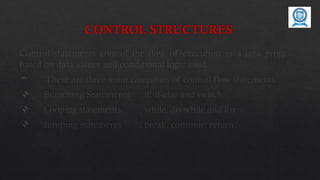
Control statementscontrol the flow of execution in a java program,
based on data values and conditional logic used.
There are three main categories of control flow statements;
Branching Statements : if, if-else and switch.
Looping statements : while, do-while and for.
Jumping statements : break, continue, return.
4.
If Statement
Theselection statements checks the condition only once for the program
execution.
If Statement:
The if statement executes a block of code only if the specified expression is
true.
If the value is false, then the if block is skipped and execution continues
with the rest of the program.
The simple if statement has the following syntax: if (<conditional
expression>)
<statement action>
5.
If Statement
The followingprogram explains the if statement.
public class programIF
{
public static void main(String[] args)
{
int a = 10, b = 20;
if (a > b)
System.out.println(“a > b”);
if (a < b)
System.out.println(“a < b”);
}
6.
If –else Statement
TheIf-else Statement
The if/else statement is an extension of the if statement.
If the condition in the if statement fails, the statements in the else block are executed.
The if-else statement has the following syntax:
if (<conditional expression>)
<statement action>
else
<statement action>
7.
The following programexplains the if-else statement.
public class ProgramIfElse
{
public static void main(String[] args)
{
int a = 10, b = 20;
if (a > b)
{
System.out.println(“a > b”);
}
else
{
System.out.println(“a < b”);
} }}
If - else Statement
8.
Switch Case Statement
SwitchCase Statement
The switch case statement is also called as multi-way branching statement
with several choices.
The switch statement begins with a keyword, followed by an expression that
equates to a no long integral value.
After the controlling expression, there is a code block that contains zero or
more labeled cases.
Each label must equate to an integer constant and each must be unique.
When the switch statement executes, it compares the value of the
controlling expression to the values of each case label.
9.
Switch Case Statement
The program will select the value of the case label that equals the value of
the controlling expression and branch down that path to the end of the code
block.
If none of the case label values match, then none of the codes within the
switch statement code block will be executed.
Java includes a default label to use in cases where there are no matches.
A nested switch within a case block of an outer switch is also allowed.
When executing a switch statement, the flow of the program falls through to
the next case.
10.
Switch Case Statement
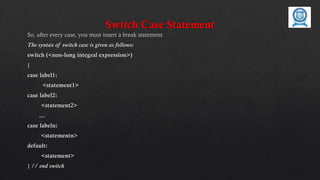
So,after every case, you must insert a break statement.
The syntax of switch case is given as follows:
switch (<non-long integral expression>)
{
case label1:
<statement1>
case label2:
<statement2>
…
case labeln:
<statementn>
default:
<statement>
} // end switch
11.
WHILE STATEMENT
Iterationstatements execute a block of code for several numbers of times
until the condition is true.
While Statement
The while statement is one of the looping constructs control statement that
executes a block of code while a condition is true.
The loop will stop the execution if the testing expres- sion evaluates to false.
The loop condition must be a boolean expression.
The syntax of the while loop is
while (<loop condition>)
<statements>
12.
WHILE STATEMENT
Example program
publicclass ProgramWhile
{
public static void main(String[] args)
{
int count = 1;
System.out.println(“Printing Numbers from 1 to 10”);
while (count <= 10)
{
System.out.println(count++);}
} }}
13.
Do-while Loop Statement
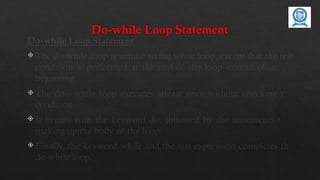
Do-whileLoop Statement
The do-while loop is similar to the while loop, except that the test
condition is performed at the end of the loop instead of at the
beginning.
The do—while loop executes atleast once without checking the
condition.
It begins with the keyword do, followed by the statements that
making up the body of the loop.
Finally, the keyword while and the test expression completes the
do-while loop.
14.
Do-while Loop Statement
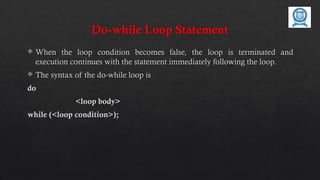
When the loop condition becomes false, the loop is terminated and
execution continues with the statement immediately following the loop.
The syntax of the do-while loop is
do
<loop body>
while (<loop condition>);
15.
Do-while Loop Statement
Thefollowing program explains the do--while statement.
public class DoWhileLoopDemo
{
public static void main(String[] args)
{
int count = 1;
System.out.println(“Printing Numbers from 1 to 10”);
do
{
System.out.println(count++);
} while (count <= 10);
}}
16.
For Loop
For Loop
The for loop is a looping construct which can execute a set of instructions
for a specified number of times. It’s a counter controlled loop.
The syntax of the loop is as follows:
for (<initialization>; <loop condition>; <increment expression>)
<loop body>
17.
For Loop
initializationstatement executes once before the loop begins.
As long as the loop condition is true, the loop will continue. If
condition is evaluated as false the first time, the loop will never be
executed.
Increment (Update) expression that automatically executes after
each repetition of the loop body.
All the sections in the for-header are optional. Any one of them
can be left empty, but the two semicolons are mandatory.
18.
For Loop
The followingprogram explains the for statement.
public class ProgramFor
{
public static void main(String[] args)
{
System.out.println(“Printing Numbers from 1 to 10”);
for (int count = 1; count <= 10; count++)
{
System.out.println(count);
} }}
19.
Jumping Statements
Jumping Statements:
Jumbing statements are used to transfer the flow of execution from one
statement to another.
Continue Statement:
A continue statement stops the current iteration of a loop (while, do or for)
and causes execution to resume at the top of the nearest enclosing loop.
The continue statement can be used when you do not want to execute the
remaining statements in the loop, but you do not want to exit the loop itself.
The syntax of the continue statement is
continue; // the unlabeled form
continue <label>; // the labeled form
20.
Continue Statement
The followingprogram explains the continue statement.
public class ProgramContinue
{
public static void main(String[] args)
{
System.out.println(“Odd Numbers”);
for (int i = 1; i <= 10; ++i)
{
if (i % 2 == 0)
continue;
System.out.println(i + “t”);
} }}
21.
Break Statement
Break Statement:
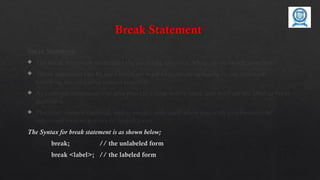
The break statement terminates the enclosing loop (for, while, do or switch statement).
Break statement can be used when we want to jump immediately to the statement
following the enclosing control structure.
As continue statement, can also provide a loop with a label, and then use the label in break
statement.
The label name is optional, and is usually only used when you wish to terminate the
outermost loop in a series of nested loops.
The Syntax for break statement is as shown below;
break; // the unlabeled form
break <label>; // the labeled form
22.
Break Statement
Example Program:
public class ProgramBreak
{
public static void main(String[] args)
{
System.out.println(“Numbers 1 - 10”);
for (int i = 1;; ++i)
{
if (i == 11)
break;
// Rest of loop body skipped when i is even System.out.println(i + “t”);
} }}
![If Statement
The following program explains the if statement.
public class programIF
{
public static void main(String[] args)
{
int a = 10, b = 20;
if (a > b)
System.out.println(“a > b”);
if (a < b)
System.out.println(“a < b”);
}](https://image.slidesharecdn.com/controlstructures-251219110551-5096198b/85/Control-structures-in-java-object-oriented-programming-pptx-5-320.jpg)
![The following program explains the if-else statement.
public class ProgramIfElse
{
public static void main(String[] args)
{
int a = 10, b = 20;
if (a > b)
{
System.out.println(“a > b”);
}
else
{
System.out.println(“a < b”);
} }}
If - else Statement](https://image.slidesharecdn.com/controlstructures-251219110551-5096198b/85/Control-structures-in-java-object-oriented-programming-pptx-7-320.jpg)

![WHILE STATEMENT
Example program
public class ProgramWhile
{
public static void main(String[] args)
{
int count = 1;
System.out.println(“Printing Numbers from 1 to 10”);
while (count <= 10)
{
System.out.println(count++);}
} }}](https://image.slidesharecdn.com/controlstructures-251219110551-5096198b/85/Control-structures-in-java-object-oriented-programming-pptx-12-320.jpg)
![Do-while Loop Statement
The following program explains the do--while statement.
public class DoWhileLoopDemo
{
public static void main(String[] args)
{
int count = 1;
System.out.println(“Printing Numbers from 1 to 10”);
do
{
System.out.println(count++);
} while (count <= 10);
}}](https://image.slidesharecdn.com/controlstructures-251219110551-5096198b/85/Control-structures-in-java-object-oriented-programming-pptx-15-320.jpg)


![For Loop
The following program explains the for statement.
public class ProgramFor
{
public static void main(String[] args)
{
System.out.println(“Printing Numbers from 1 to 10”);
for (int count = 1; count <= 10; count++)
{
System.out.println(count);
} }}](https://image.slidesharecdn.com/controlstructures-251219110551-5096198b/85/Control-structures-in-java-object-oriented-programming-pptx-18-320.jpg)

![Continue Statement
The following program explains the continue statement.
public class ProgramContinue
{
public static void main(String[] args)
{
System.out.println(“Odd Numbers”);
for (int i = 1; i <= 10; ++i)
{
if (i % 2 == 0)
continue;
System.out.println(i + “t”);
} }}](https://image.slidesharecdn.com/controlstructures-251219110551-5096198b/85/Control-structures-in-java-object-oriented-programming-pptx-20-320.jpg)
![Break Statement
Example Program :
public class ProgramBreak
{
public static void main(String[] args)
{
System.out.println(“Numbers 1 - 10”);
for (int i = 1;; ++i)
{
if (i == 11)
break;
// Rest of loop body skipped when i is even System.out.println(i + “t”);
} }}](https://image.slidesharecdn.com/controlstructures-251219110551-5096198b/85/Control-structures-in-java-object-oriented-programming-pptx-22-320.jpg)


