Step By Step
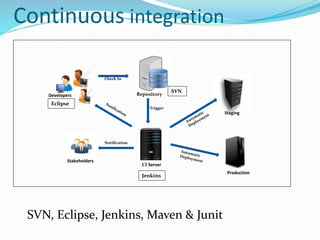
Continuous integration
Trigger
Check In
Notification
Stakeholders
Staging
Production
CI Server
RepositoryDevelopers
Eclipse
SVN
Jenkins
SVN, Eclipse, Jenkins, Maven & Junit
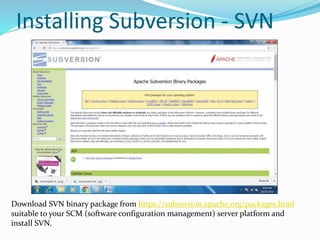
Installing Subversion - SVN
Download SVN binary package from https://subversion.apache.org/packages.html
suitable to your SCM (software configuration management) server platform and
install SVN.
SVN Server Configuration
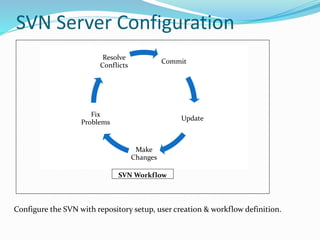
Configure the SVN with repository setup, user creation & workflow definition.
Commit
Update
Make
Changes
Fix
Problems
Resolve
Conflicts
SVN Workflow
Eclipse - SVN
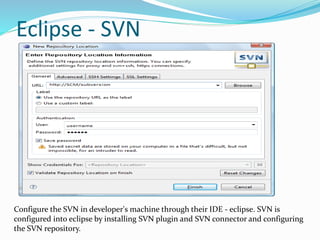
Configure the SVN in developer's machine through their IDE - eclipse. SVN is
configured into eclipse by installing SVN plugin and SVN connector and configuring
the SVN repository.
Installing Jenkins
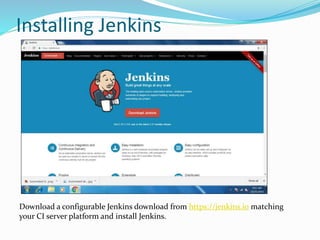
Download a configurable Jenkins download from https://jenkins.io matching
your CI server platform and install Jenkins.
User Control - Jenkins
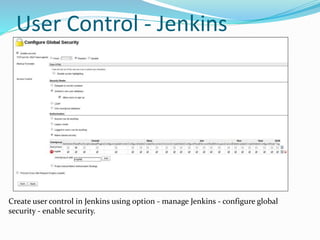
Create user control in Jenkins using option - manage Jenkins - configure global
security - enable security.
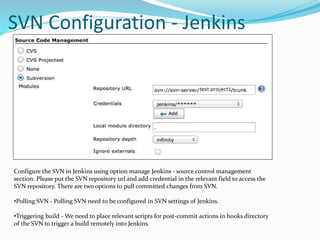
SVN Configuration - Jenkins
Configure the SVN in Jenkins using option manage Jenkins - source control management
section. Please put the SVN repository url and add credential in the relevant field to access the
SVN repository. There are two options to pull committed changes from SVN.
•Polling SVN - Polling SVN need to be configured in SVN settings of Jenkins.
•Triggering build - We need to place relevant scripts for post-commit actions in hooks directory
of the SVN to trigger a build remotely into Jenkins.
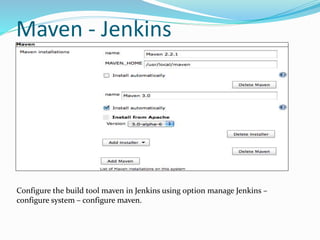
Maven - Jenkins
Configure the build tool maven in Jenkins using option manage Jenkins –
configure system – configure maven.
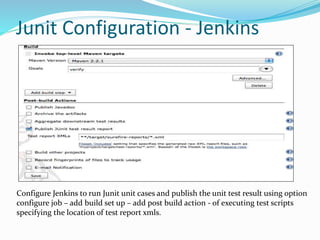
Junit Configuration - Jenkins
Configure Jenkins to run Junit unit cases and publish the unit test result using option
configure job – add build set up – add post build action - of executing test scripts
specifying the location of test report xmls.
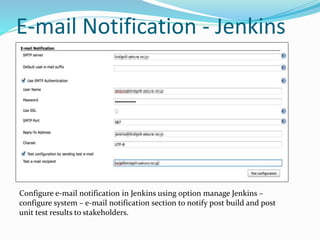
E-mail Notification - Jenkins
Configure e-mail notification in Jenkins using option manage Jenkins –
configure system – e-mail notification section to notify post build and post
unit test results to stakeholders.
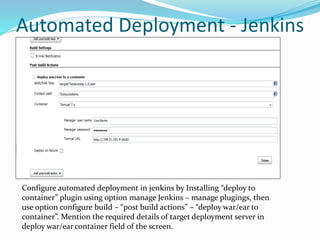
Automated Deployment - Jenkins
Configure automated deployment in jenkins by Installing “deploy to
container” plugin using option manage Jenkins – manage plugings, then
use option configure build – “post build actions” – “deploy war/ear to
container”. Mention the required details of target deployment server in
deploy war/ear container field of the screen.
http://solutionframework.blogspot.in/

Continuous Integration Step by Step

  • 1.
  • 2.
    Continuous integration Trigger Check In Notification Stakeholders Staging Production CIServer RepositoryDevelopers Eclipse SVN Jenkins SVN, Eclipse, Jenkins, Maven & Junit
  • 3.
    Installing Subversion -SVN Download SVN binary package from https://subversion.apache.org/packages.html suitable to your SCM (software configuration management) server platform and install SVN.
  • 4.
    SVN Server Configuration Configurethe SVN with repository setup, user creation & workflow definition. Commit Update Make Changes Fix Problems Resolve Conflicts SVN Workflow
  • 5.
    Eclipse - SVN Configurethe SVN in developer's machine through their IDE - eclipse. SVN is configured into eclipse by installing SVN plugin and SVN connector and configuring the SVN repository.
  • 6.
    Installing Jenkins Download aconfigurable Jenkins download from https://jenkins.io matching your CI server platform and install Jenkins.
  • 7.
    User Control -Jenkins Create user control in Jenkins using option - manage Jenkins - configure global security - enable security.
  • 8.
    SVN Configuration -Jenkins Configure the SVN in Jenkins using option manage Jenkins - source control management section. Please put the SVN repository url and add credential in the relevant field to access the SVN repository. There are two options to pull committed changes from SVN. •Polling SVN - Polling SVN need to be configured in SVN settings of Jenkins. •Triggering build - We need to place relevant scripts for post-commit actions in hooks directory of the SVN to trigger a build remotely into Jenkins.
  • 9.
    Maven - Jenkins Configurethe build tool maven in Jenkins using option manage Jenkins – configure system – configure maven.
  • 10.
    Junit Configuration -Jenkins Configure Jenkins to run Junit unit cases and publish the unit test result using option configure job – add build set up – add post build action - of executing test scripts specifying the location of test report xmls.
  • 11.
    E-mail Notification -Jenkins Configure e-mail notification in Jenkins using option manage Jenkins – configure system – e-mail notification section to notify post build and post unit test results to stakeholders.
  • 12.
    Automated Deployment -Jenkins Configure automated deployment in jenkins by Installing “deploy to container” plugin using option manage Jenkins – manage plugings, then use option configure build – “post build actions” – “deploy war/ear to container”. Mention the required details of target deployment server in deploy war/ear container field of the screen.
  • 13.