CONTINUOUS DELIVERY
WITH
TEAM FOUNDATION SERVER
February 24, 2015
DANIEL ȘTEFĂNESCU
WHAT'S IN A NAME?
CI, CD and CD
• Continuous Integration
Every code change integrates, builds, and tests within the
development environment.
• Continuous Deployment
Every code change that passes the automated tests is deployed to
production automatically.
• Continuous Delivery
Keeps the deployment decision as a manual step.
TITLE PRESENTATION February 24, 2015
WHAT'S IN A NAME?
Difference between
Continuous Delivery
Continuous Deployment
TITLE PRESENTATION February 24, 2015
Code Done Auto Unit Tests Auto Integrate Auto
Acceptance
Test
Auto
Deploy To
PROD
Continuous Delivery thumb rule:
Every checkin should be a release candidate but the release should be a political
decision and done manually
Code Done Auto Unit Tests Auto Integrate Auto
Acceptance
Test
Manual
Deploy To
PROD
WHY CONTINUOUS DELIVERY?
• What is the cost for your production system to be down due to
a rogue release or change?
• What is the cost of wait-time for Operations to release a new
feature into production?
• What is the cost of not having transparency of which software
version has been deployed to an environment?
• What is the risk factor of manual steps for a release?
TITLE PRESENTATION February 24, 2015
QUICK TEST
Question:
If a stakeholder requests that the current development version
of the software can be deployed into production at a moment's
notice what would be the reaction?
CD enabled answer:
Nobody would bat an eyelid.
Non-CD enabled answer:
Panic mode on.
TITLE PRESENTATION February 24, 2015
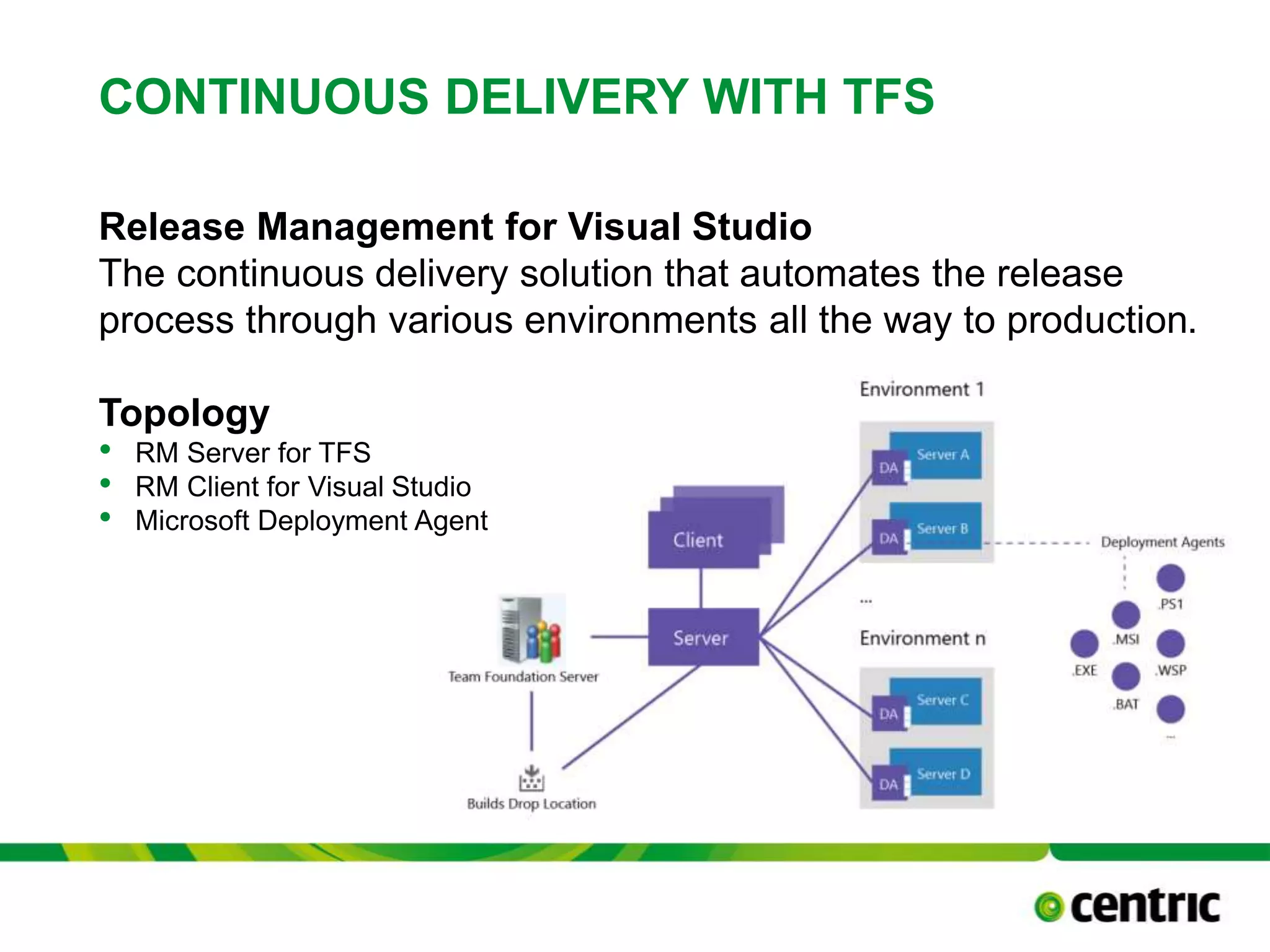
CONTINUOUS DELIVERY WITH TFS
Release Management for Visual Studio
The continuous delivery solution that automates the release
process through various environments all the way to production.
Topology
• RM Server for TFS
• RM Client for Visual Studio
• Microsoft Deployment Agent
TITLE PRESENTATION February 24, 2015
CONTINUOUS DELIVERY WITH TFS
Release Management Concepts
• Release Template
TITLE PRESENTATION February 24, 2015
Release Template
Release
Path
Workflow TFS Build
CONTINUOUS DELIVERY WITH TFS
Release Management Concepts
• Release Path
TITLE PRESENTATION February 24, 2015
Release Path
Stage
Environment
Approval
Workflow
CONTINUOUS DELIVERY WITH TFS
Release Management Concepts
• Workflow
TITLE PRESENTATION February 24, 2015
Workflow
Component
Release
Input
Tools
Actions
Tools
RELEASE MANAGEMENT - LICENSING
• Each person using the Release Management Client for Visual
Studio 2013 for creating, updating, or deleting a release
pipeline sequence must be licensed for either Visual Studio
Ultimate with MSDN, Visual Studio Premium with MSDN,
Visual Studio Test Professional with MSDN, or MSDN
Platforms.
• A user who only approves stages or signs off on a release
does not need to be licensed
• Target servers receiving automated deployment from Release
Management Server no longer require a Visual Studio
Deployment license.
February 24, 2015TITLE PRESENTATION
RELEASE MANAGEMENT
• DEMO
– Setup
February 24, 2015TITLE PRESENTATION
Team Foundation
Server
Build
Controller/Agent
Release
Management
Server
Release
Management
Client
DEV
Web
• IIS
• RM Deployment
Agent
Database
• MS SQL
• RM Deployment
Agent
QA
Web
• IIS
• RM Deployment
Agent
Database
• MS SQL
• RM Deployment
Agent
Test AgentTest Controller
WRAP-UP
February 24, 2015TITLE PRESENTATION
We’ll Never Get To Space on Horseback
QUESTIONS?
Daniel Ștefănescu
+32 (50) 833333
daniel.stefanescu@centric.eu

Continuous Delivery With Team Foundation Server

  • 1.
    CONTINUOUS DELIVERY WITH TEAM FOUNDATIONSERVER February 24, 2015 DANIEL ȘTEFĂNESCU
  • 2.
    WHAT'S IN ANAME? CI, CD and CD • Continuous Integration Every code change integrates, builds, and tests within the development environment. • Continuous Deployment Every code change that passes the automated tests is deployed to production automatically. • Continuous Delivery Keeps the deployment decision as a manual step. TITLE PRESENTATION February 24, 2015
  • 3.
    WHAT'S IN ANAME? Difference between Continuous Delivery Continuous Deployment TITLE PRESENTATION February 24, 2015 Code Done Auto Unit Tests Auto Integrate Auto Acceptance Test Auto Deploy To PROD Continuous Delivery thumb rule: Every checkin should be a release candidate but the release should be a political decision and done manually Code Done Auto Unit Tests Auto Integrate Auto Acceptance Test Manual Deploy To PROD
  • 4.
    WHY CONTINUOUS DELIVERY? •What is the cost for your production system to be down due to a rogue release or change? • What is the cost of wait-time for Operations to release a new feature into production? • What is the cost of not having transparency of which software version has been deployed to an environment? • What is the risk factor of manual steps for a release? TITLE PRESENTATION February 24, 2015
  • 5.
    QUICK TEST Question: If astakeholder requests that the current development version of the software can be deployed into production at a moment's notice what would be the reaction? CD enabled answer: Nobody would bat an eyelid. Non-CD enabled answer: Panic mode on. TITLE PRESENTATION February 24, 2015
  • 6.
    CONTINUOUS DELIVERY WITHTFS Release Management for Visual Studio The continuous delivery solution that automates the release process through various environments all the way to production. Topology • RM Server for TFS • RM Client for Visual Studio • Microsoft Deployment Agent TITLE PRESENTATION February 24, 2015
  • 7.
    CONTINUOUS DELIVERY WITHTFS Release Management Concepts • Release Template TITLE PRESENTATION February 24, 2015 Release Template Release Path Workflow TFS Build
  • 8.
    CONTINUOUS DELIVERY WITHTFS Release Management Concepts • Release Path TITLE PRESENTATION February 24, 2015 Release Path Stage Environment Approval Workflow
  • 9.
    CONTINUOUS DELIVERY WITHTFS Release Management Concepts • Workflow TITLE PRESENTATION February 24, 2015 Workflow Component Release Input Tools Actions Tools
  • 10.
    RELEASE MANAGEMENT -LICENSING • Each person using the Release Management Client for Visual Studio 2013 for creating, updating, or deleting a release pipeline sequence must be licensed for either Visual Studio Ultimate with MSDN, Visual Studio Premium with MSDN, Visual Studio Test Professional with MSDN, or MSDN Platforms. • A user who only approves stages or signs off on a release does not need to be licensed • Target servers receiving automated deployment from Release Management Server no longer require a Visual Studio Deployment license. February 24, 2015TITLE PRESENTATION
  • 11.
    RELEASE MANAGEMENT • DEMO –Setup February 24, 2015TITLE PRESENTATION Team Foundation Server Build Controller/Agent Release Management Server Release Management Client DEV Web • IIS • RM Deployment Agent Database • MS SQL • RM Deployment Agent QA Web • IIS • RM Deployment Agent Database • MS SQL • RM Deployment Agent Test AgentTest Controller
  • 12.
    WRAP-UP February 24, 2015TITLEPRESENTATION We’ll Never Get To Space on Horseback
  • 13.
    QUESTIONS? Daniel Ștefănescu +32 (50)833333 daniel.stefanescu@centric.eu

Editor's Notes

  • #7 Deployment Agent: only for Agent-based environments
  • #8 introduces a new set of concepts and terminology that (may) require some introduction, so let’s start by quickly introducing the most important ones; Release Template: same as a build template; A release created by defining a Release Template which consists of a Release Path, Workflow and TFS Build output, while not required it is the most likely scenario to be TFS Build driven.
  • #9 Release Path: Defines the process to be used, that is, the order in which the application should be deployed to the different Environments, and who (if anyone) should give their approval before the next step in the Release path may be executed. Stage: Basically this is a phase in the release process such as Test, Acceptance or Production, through which a Release transitions. The possible stages are defined as a simple list of names (a so-called picklist) without any properties Environment: An Environment forms a collection of related Servers where RM Deployment Agent installed to which the application as a whole can be deployed. You’ll often see that the available Environments mirror the defined Stages, i.e. that there exists a Test, an Acceptance and a Production environment. RM Deployment Agent installed Approval Workflow: The approval workflow is used to inform users / groups on activities taken place during the release.
  • #10 Workflow: The deployment workflow consists of a Deployment Sequence, per stage. This is a workflow defined out of Components and Actions. The workflow also has context of a build. Component: A part of the application to be deployed, such as a database, a web application or a windows service. A component consists of one or more files that are retrieved from either TFS as part of a build result, or from a local folder or network share. Like an Action, a Component relies on a Tool to have its files deployed correctly, and like Actions they can have parameters Actions: Represents a more specific operation that is performed as part of a deployment, such as Restore SQL Database or Start Windows Service. Usually, an Action depends on a Tool to perform its work, and just like a Tool, an Action can have parameters that can be specified by the caller to be passed on to the Tool. Unlike a Tool however, Actions do not have any files or resources – they can only control how the underlying Tool is invoked. Tool: Represents a generic low-level program or script that can be used to perform part of a deployment, such as the XCopy Deployer, the DACPAC Database Deployer or the Windows Services Manager. A tool is executed locally by the Deployment Agent, and is characterized by the fact that it must be invokable from a commandline, possibly with parameters that can be specified by the caller of the tool and that are passed to it as its commandline arguments. A tool can optionally have one or more resources, which are the files on which the tool depends when it is invoked. Usually, this is the script file or executable being invoked, including any dll’s or other files on which it depends.