V I K A S G U P T A
Continuos Integration Patterns
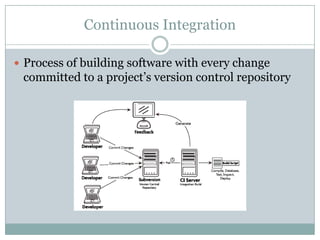
Continuous Integration
 Process of building software with every change
committed to a project’s version control repository
Build Patterns
Common Build Patterns
 Automated Build
 Binary Integrity
 Dependency Management
 Consistent Directories
 Staged Builds
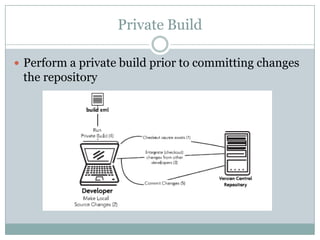
Private Build
 Perform a private build prior to committing changes
the repository
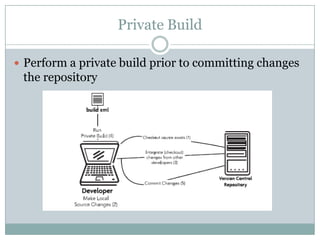
Private Build
 Perform a private build prior to committing changes
the repository
Integration Build
 Periodically run the integration build
 WOMM
Continuous Feedback
 Send automatic feedback from CI server to
development team
 Prevent spam
Expeditious Fixes
 Fix build errors as soon as they come
 If the build is failing, don’t update
Developer Documentation
 Generate documentation from build
Build Configuration Patterns
Independent build
 Separate build from IDE
 Build should run from command line
Single Command
 All build and deployment should be run from single
command
 Should not need multiple commands to deploy
Dedicated Machine
 Separate Machine for builds
 WOMM
Externalize Configuration
 Use build-time properties
Database
Externalize Configuration
 Script all database actions
 Late and manual migration is painful
 Add database configuration scripts to SCM tool
Database Sandbox
 Create a lightweight version of your database
 Use lightweight database on developer machines
 Don’t use shared database for development
Database Upgrade
 Use scripts to upgrade the database in each
environment
 Don’t manually apply changes in each target
environment
Testing and Code Quality
Database Upgrade
 Automated Tests
 Categorize Tests
 Continuous Inspection
 Build threshold
Deployment
Deployment Patterns
 Scripted Deployment
 Headless Execution
 Unified Deployment
 Disposable Container
 Environment rollback
Thanks

Continuos integration patterns

Editor's Notes

  • #5 Binary Integrity: Same package should be deployed on each environment. Separate build process should not be deployment on each environment.Consistent Directories: Create a simple, yet well-defined directory structure to optimize software builds and increase cross-project knowledge transfer. Anti-Patterns Putting code, documentation and large files in the same parent directory structure, leading to long-running builds.
  • #7 Private Workspace : Develop software in private workspace to isolate changesRepository: Commit all files to a version control repositoryMainline:
  • #8 WOMM: Works on my machine
  • #9 WOMM: Works on my machine
  • #10 WOMM: Works on my machine
  • #11 WOMM: Works on my machine
  • #13 WOMM: Works on my machine
  • #14 WOMM: Works on my machine
  • #15 WOMM: Works on my machine
  • #16 WOMM: Works on my machine
  • #18 WOMM: Works on my machine
  • #19 WOMM: Works on my machine
  • #20 WOMM: Works on my machine
  • #22 Categorize: Categorize into unit, integrate, UI, etc. Helps in having targeted builds.Build Threshold: Notify team members of code aberrations such as low code coverage or high cyclomatic complexity. Fail a build when a project rule is violated. Use continuous feedback mechanisms to notify team members.
  • #24 Headless ExecutionPattern Securely interface with multiple machines without typing a command. Anti-Patterns People manually access machines by logging into each of the machines as different users; then they copy files, configure values, and so on. Unified DeploymentPattern Create a single deployment script capable of running on different platforms and target environments. Anti-Patterns Some may use a different deployment script for each target environment or even for a specific machine. Disposable ContainerAutomate the installation and configuration of Web and database containers by decoupling installation and configuration. Anti-Patterns Manually install and configure containers into each target environment. Remote DeploymentUse a centralized machine or cluster to deploy software to multiple target environments. Anti-Patterns Manually applying deployments locally in each target environment. Environment RollbackProvide an automated Single Command rollback of changes after an unsuccessful deployment. Anti-Patterns Manually rolling back application and database changes.