Containerized IDEs, and other
Local As Code techniques
Jan Van Bruggen
Developer Relations @ itopia
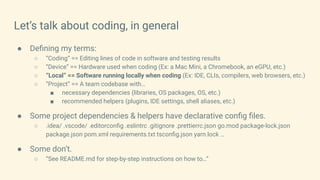
Let’s talk about coding, in general
● Defining my terms:
○ “Coding” == Editing lines of code in software and testing results
○ “Device” == Hardware used when coding (Ex: a Mac Mini, a Chromebook, an eGPU, etc.)
○ “Local” == Software running locally when coding (Ex: IDE, CLIs, compilers, web browsers, etc.)
○ “Project” == A team codebase with…
■ necessary dependencies (libraries, OS packages, OS, etc.)
■ recommended helpers (plugins, IDE settings, shell aliases, etc.)
● Some project dependencies & helpers have declarative config files.
○ .idea/ .vscode/ .editorconfig .eslintrc .gitignore .prettierrc.json go.mod package-lock.json
package.json pom.xml requirements.txt tsconfig.json yarn.lock …
● Some don’t.
○ “See README.md for step-by-step instructions on how to…”
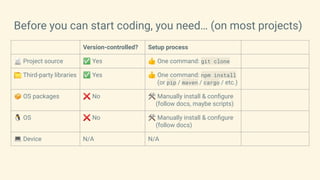
Before you can start coding, you need… (on most projects)
Version-controlled? Setup process
📄 Project source ✅ Yes 👍 One command: git clone
📁 Third-party libraries ✅ Yes 👍 One command: npm install
(or pip / maven / cargo / etc.)
📦 OS packages ❌ No 🛠 Manually install & configure
(follow docs, maybe scripts)
🐧 OS ❌ No 🛠 Manually install & configure
(follow docs)
💻 Device N/A N/A
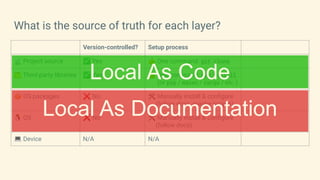
What is the source of truth for each layer?
Version-controlled? Setup process
📄 Project source ✅ Yes 👍 One command: git clone
📁 Third-party libraries ✅ Yes 👍 One command: npm install
(or pip / maven / cargo / etc.)
📦 OS packages ❌ No 🛠 Manually install & configure
(follow docs, maybe scripts)
🐧 OS ❌ No 🛠 Manually install & configure
(follow docs)
💻 Device N/A N/A
Local As Documentation
Local As Code
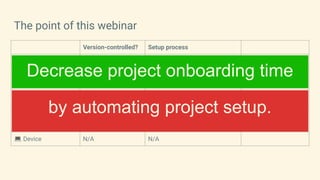
The point of this webinar
Version-controlled? Setup process
📄 Project source ✅ Yes 👍 One command: git clone
📁 Third-party libraries ✅ Yes 👍 One command: npm install
(or pip / maven / cargo / etc.)
📦 OS packages ❌ No 🛠 Manually install & configure
(follow docs, maybe scripts)
🐧 OS ❌ No 🛠 Manually install & configure
(follow docs)
💻 Device N/A N/A
by automating project setup.
Decrease project onboarding time
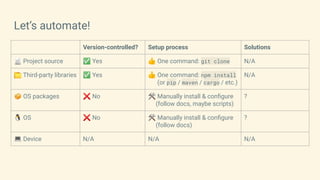
Let’s automate!
Version-controlled? Setup process Solutions
📄 Project source ✅ Yes 👍 One command: git clone N/A
📁 Third-party libraries ✅ Yes 👍 One command: npm install
(or pip / maven / cargo / etc.)
N/A
📦 OS packages ❌ No 🛠 Manually install & configure
(follow docs, maybe scripts)
?
🐧 OS ❌ No 🛠 Manually install & configure
(follow docs)
?
💻 Device N/A N/A N/A
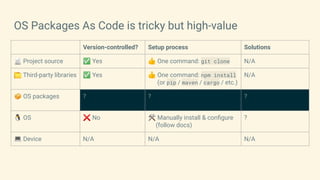
OS Packages As Code is tricky but high-value
Version-controlled? Setup process Solutions
📄 Project source ✅ Yes 👍 One command: git clone N/A
📁 Third-party libraries ✅ Yes 👍 One command: npm install
(or pip / maven / cargo / etc.)
N/A
📦 OS packages ? ? ?
🐧 OS ❌ No 🛠 Manually install & configure
(follow docs)
?
💻 Device N/A N/A N/A
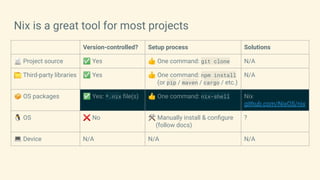
Nix is a great tool for most projects
Version-controlled? Setup process Solutions
📄 Project source ✅ Yes 👍 One command: git clone N/A
📁 Third-party libraries ✅ Yes 👍 One command: npm install
(or pip / maven / cargo / etc.)
N/A
📦 OS packages ✅ Yes: *.nix file(s) 👍 One command: nix-shell Nix
github.com/NixOS/nix
🐧 OS ❌ No 🛠 Manually install & configure
(follow docs)
?
💻 Device N/A N/A N/A
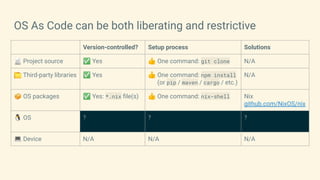
OS As Code can be both liberating and restrictive
Version-controlled? Setup process Solutions
📄 Project source ✅ Yes 👍 One command: git clone N/A
📁 Third-party libraries ✅ Yes 👍 One command: npm install
(or pip / maven / cargo / etc.)
N/A
📦 OS packages ✅ Yes: *.nix file(s) 👍 One command: nix-shell Nix
github.com/NixOS/nix
🐧 OS ? ? ?
💻 Device N/A N/A N/A
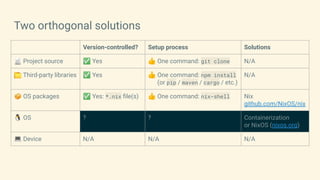
Two orthogonal solutions
Version-controlled? Setup process Solutions
📄 Project source ✅ Yes 👍 One command: git clone N/A
📁 Third-party libraries ✅ Yes 👍 One command: npm install
(or pip / maven / cargo / etc.)
N/A
📦 OS packages ✅ Yes: *.nix file(s) 👍 One command: nix-shell Nix
github.com/NixOS/nix
🐧 OS ? ? Containerization
or NixOS (nixos.org)
💻 Device N/A N/A N/A
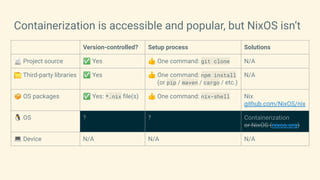
Containerization is accessible and popular, but NixOS isn’t
Version-controlled? Setup process Solutions
📄 Project source ✅ Yes 👍 One command: git clone N/A
📁 Third-party libraries ✅ Yes 👍 One command: npm install
(or pip / maven / cargo / etc.)
N/A
📦 OS packages ✅ Yes: *.nix file(s) 👍 One command: nix-shell Nix
github.com/NixOS/nix
🐧 OS ? ? Containerization
or NixOS (nixos.org)
💻 Device N/A N/A N/A
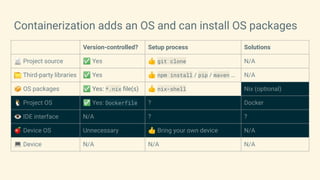
Containerization adds an OS and can install OS packages
Version-controlled? Setup process Solutions
📄 Project source ✅ Yes 👍 git clone N/A
📁 Third-party libraries ✅ Yes 👍 npm install / pip / maven … N/A
📦 OS packages ✅ Yes: *.nix file(s) 👍 nix-shell Nix (optional)
🐧 Project OS ✅ Yes: Dockerfile ? Docker
👁 IDE interface N/A ? ?
🍎 Device OS Unnecessary 👍 Bring your own device N/A
💻 Device N/A N/A N/A
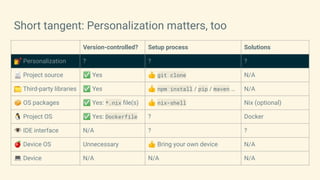
Short tangent: Personalization matters, too
Version-controlled? Setup process Solutions
💅 Personalization ? ? ?
📄 Project source ✅ Yes 👍 git clone N/A
📁 Third-party libraries ✅ Yes 👍 npm install / pip / maven … N/A
📦 OS packages ✅ Yes: *.nix file(s) 👍 nix-shell Nix (optional)
🐧 Project OS ✅ Yes: Dockerfile ? Docker
👁 IDE interface N/A ? ?
🍎 Device OS Unnecessary 👍 Bring your own device N/A
💻 Device N/A N/A N/A
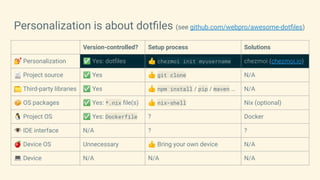
Personalization is about dotfiles (see github.com/webpro/awesome-dotfiles)
Version-controlled? Setup process Solutions
💅 Personalization ✅ Yes: dotfiles 👍 chezmoi init myusername chezmoi (chezmoi.io)
📄 Project source ✅ Yes 👍 git clone N/A
📁 Third-party libraries ✅ Yes 👍 npm install / pip / maven … N/A
📦 OS packages ✅ Yes: *.nix file(s) 👍 nix-shell Nix (optional)
🐧 Project OS ✅ Yes: Dockerfile ? Docker
👁 IDE interface N/A ? ?
🍎 Device OS Unnecessary 👍 Bring your own device N/A
💻 Device N/A N/A N/A
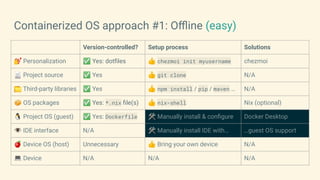
Containerized OS approach #1: Offline (easy)
Version-controlled? Setup process Solutions
💅 Personalization ✅ Yes: dotfiles 👍 chezmoi init myusername chezmoi
📄 Project source ✅ Yes 👍 git clone N/A
📁 Third-party libraries ✅ Yes 👍 npm install / pip / maven … N/A
📦 OS packages ✅ Yes: *.nix file(s) 👍 nix-shell Nix (optional)
🐧 Project OS (guest) ✅ Yes: Dockerfile 🛠 Manually install & configure Docker Desktop
👁 IDE interface N/A 🛠 Manually install IDE with… …guest OS support
🍎 Device OS (host) Unnecessary 👍 Bring your own device N/A
💻 Device N/A N/A N/A
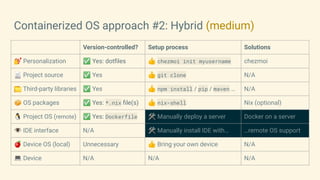
Containerized OS approach #2: Hybrid (medium)
Version-controlled? Setup process Solutions
💅 Personalization ✅ Yes: dotfiles 👍 chezmoi init myusername chezmoi
📄 Project source ✅ Yes 👍 git clone N/A
📁 Third-party libraries ✅ Yes 👍 npm install / pip / maven … N/A
📦 OS packages ✅ Yes: *.nix file(s) 👍 nix-shell Nix (optional)
🐧 Project OS (remote) ✅ Yes: Dockerfile 🛠 Manually deploy a server Docker on a server
👁 IDE interface N/A 🛠 Manually install IDE with… …remote OS support
🍎 Device OS (local) Unnecessary 👍 Bring your own device N/A
💻 Device N/A N/A N/A
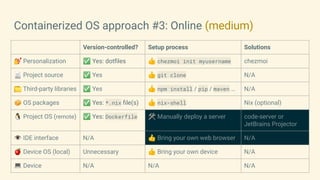
Containerized OS approach #3: Online (medium)
Version-controlled? Setup process Solutions
💅 Personalization ✅ Yes: dotfiles 👍 chezmoi init myusername chezmoi
📄 Project source ✅ Yes 👍 git clone N/A
📁 Third-party libraries ✅ Yes 👍 npm install / pip / maven … N/A
📦 OS packages ✅ Yes: *.nix file(s) 👍 nix-shell Nix (optional)
🐧 Project OS (remote) ✅ Yes: Dockerfile 🛠 Manually deploy a server code-server or
JetBrains Projector
👁 IDE interface N/A 👍 Bring your own web browser N/A
🍎 Device OS (local) Unnecessary 👍 Bring your own device N/A
💻 Device N/A N/A N/A
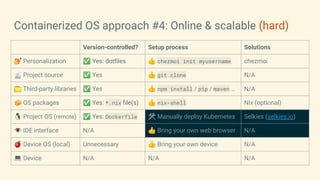
Containerized OS approach #4: Online & scalable (hard)
Version-controlled? Setup process Solutions
💅 Personalization ✅ Yes: dotfiles 👍 chezmoi init myusername chezmoi
📄 Project source ✅ Yes 👍 git clone N/A
📁 Third-party libraries ✅ Yes 👍 npm install / pip / maven … N/A
📦 OS packages ✅ Yes: *.nix file(s) 👍 nix-shell Nix (optional)
🐧 Project OS (remote) ✅ Yes: Dockerfile 🛠 Manually deploy Kubernetes Selkies (selkies.io)
👁 IDE interface N/A 👍 Bring your own web browser N/A
🍎 Device OS (local) Unnecessary 👍 Bring your own device N/A
💻 Device N/A N/A N/A
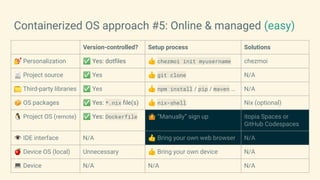
Containerized OS approach #5: Online & managed (easy)
Version-controlled? Setup process Solutions
💅 Personalization ✅ Yes: dotfiles 👍 chezmoi init myusername chezmoi
📄 Project source ✅ Yes 👍 git clone N/A
📁 Third-party libraries ✅ Yes 👍 npm install / pip / maven … N/A
📦 OS packages ✅ Yes: *.nix file(s) 👍 nix-shell Nix (optional)
🐧 Project OS (remote) ✅ Yes: Dockerfile 🤷 “Manually” sign up itopia Spaces or
GitHub Codespaces
👁 IDE interface N/A 👍 Bring your own web browser N/A
🍎 Device OS (local) Unnecessary 👍 Bring your own device N/A
💻 Device N/A N/A N/A
Thanks for watching!
👋
JVanBruggen@itopia.com
JanCVanB@ on GitHub & Twitter
⛅
itopiaSpaces.com
github.com/itopia-inc
🦭
github.com/selkies-project
discord.com/invite/wDNGDeSW5F

Containerized IDEs.pdf

  • 1.
    Containerized IDEs, andother Local As Code techniques Jan Van Bruggen Developer Relations @ itopia
  • 2.
    Let’s talk aboutcoding, in general ● Defining my terms: ○ “Coding” == Editing lines of code in software and testing results ○ “Device” == Hardware used when coding (Ex: a Mac Mini, a Chromebook, an eGPU, etc.) ○ “Local” == Software running locally when coding (Ex: IDE, CLIs, compilers, web browsers, etc.) ○ “Project” == A team codebase with… ■ necessary dependencies (libraries, OS packages, OS, etc.) ■ recommended helpers (plugins, IDE settings, shell aliases, etc.) ● Some project dependencies & helpers have declarative config files. ○ .idea/ .vscode/ .editorconfig .eslintrc .gitignore .prettierrc.json go.mod package-lock.json package.json pom.xml requirements.txt tsconfig.json yarn.lock … ● Some don’t. ○ “See README.md for step-by-step instructions on how to…”
  • 3.
    Before you canstart coding, you need… (on most projects) Version-controlled? Setup process 📄 Project source ✅ Yes 👍 One command: git clone 📁 Third-party libraries ✅ Yes 👍 One command: npm install (or pip / maven / cargo / etc.) 📦 OS packages ❌ No 🛠 Manually install & configure (follow docs, maybe scripts) 🐧 OS ❌ No 🛠 Manually install & configure (follow docs) 💻 Device N/A N/A
  • 4.
    What is thesource of truth for each layer? Version-controlled? Setup process 📄 Project source ✅ Yes 👍 One command: git clone 📁 Third-party libraries ✅ Yes 👍 One command: npm install (or pip / maven / cargo / etc.) 📦 OS packages ❌ No 🛠 Manually install & configure (follow docs, maybe scripts) 🐧 OS ❌ No 🛠 Manually install & configure (follow docs) 💻 Device N/A N/A Local As Documentation Local As Code
  • 5.
    The point ofthis webinar Version-controlled? Setup process 📄 Project source ✅ Yes 👍 One command: git clone 📁 Third-party libraries ✅ Yes 👍 One command: npm install (or pip / maven / cargo / etc.) 📦 OS packages ❌ No 🛠 Manually install & configure (follow docs, maybe scripts) 🐧 OS ❌ No 🛠 Manually install & configure (follow docs) 💻 Device N/A N/A by automating project setup. Decrease project onboarding time
  • 6.
    Let’s automate! Version-controlled? Setupprocess Solutions 📄 Project source ✅ Yes 👍 One command: git clone N/A 📁 Third-party libraries ✅ Yes 👍 One command: npm install (or pip / maven / cargo / etc.) N/A 📦 OS packages ❌ No 🛠 Manually install & configure (follow docs, maybe scripts) ? 🐧 OS ❌ No 🛠 Manually install & configure (follow docs) ? 💻 Device N/A N/A N/A
  • 7.
    OS Packages AsCode is tricky but high-value Version-controlled? Setup process Solutions 📄 Project source ✅ Yes 👍 One command: git clone N/A 📁 Third-party libraries ✅ Yes 👍 One command: npm install (or pip / maven / cargo / etc.) N/A 📦 OS packages ? ? ? 🐧 OS ❌ No 🛠 Manually install & configure (follow docs) ? 💻 Device N/A N/A N/A
  • 8.
    Nix is agreat tool for most projects Version-controlled? Setup process Solutions 📄 Project source ✅ Yes 👍 One command: git clone N/A 📁 Third-party libraries ✅ Yes 👍 One command: npm install (or pip / maven / cargo / etc.) N/A 📦 OS packages ✅ Yes: *.nix file(s) 👍 One command: nix-shell Nix github.com/NixOS/nix 🐧 OS ❌ No 🛠 Manually install & configure (follow docs) ? 💻 Device N/A N/A N/A
  • 9.
    OS As Codecan be both liberating and restrictive Version-controlled? Setup process Solutions 📄 Project source ✅ Yes 👍 One command: git clone N/A 📁 Third-party libraries ✅ Yes 👍 One command: npm install (or pip / maven / cargo / etc.) N/A 📦 OS packages ✅ Yes: *.nix file(s) 👍 One command: nix-shell Nix github.com/NixOS/nix 🐧 OS ? ? ? 💻 Device N/A N/A N/A
  • 10.
    Two orthogonal solutions Version-controlled?Setup process Solutions 📄 Project source ✅ Yes 👍 One command: git clone N/A 📁 Third-party libraries ✅ Yes 👍 One command: npm install (or pip / maven / cargo / etc.) N/A 📦 OS packages ✅ Yes: *.nix file(s) 👍 One command: nix-shell Nix github.com/NixOS/nix 🐧 OS ? ? Containerization or NixOS (nixos.org) 💻 Device N/A N/A N/A
  • 11.
    Containerization is accessibleand popular, but NixOS isn’t Version-controlled? Setup process Solutions 📄 Project source ✅ Yes 👍 One command: git clone N/A 📁 Third-party libraries ✅ Yes 👍 One command: npm install (or pip / maven / cargo / etc.) N/A 📦 OS packages ✅ Yes: *.nix file(s) 👍 One command: nix-shell Nix github.com/NixOS/nix 🐧 OS ? ? Containerization or NixOS (nixos.org) 💻 Device N/A N/A N/A
  • 12.
    Containerization adds anOS and can install OS packages Version-controlled? Setup process Solutions 📄 Project source ✅ Yes 👍 git clone N/A 📁 Third-party libraries ✅ Yes 👍 npm install / pip / maven … N/A 📦 OS packages ✅ Yes: *.nix file(s) 👍 nix-shell Nix (optional) 🐧 Project OS ✅ Yes: Dockerfile ? Docker 👁 IDE interface N/A ? ? 🍎 Device OS Unnecessary 👍 Bring your own device N/A 💻 Device N/A N/A N/A
  • 13.
    Short tangent: Personalizationmatters, too Version-controlled? Setup process Solutions 💅 Personalization ? ? ? 📄 Project source ✅ Yes 👍 git clone N/A 📁 Third-party libraries ✅ Yes 👍 npm install / pip / maven … N/A 📦 OS packages ✅ Yes: *.nix file(s) 👍 nix-shell Nix (optional) 🐧 Project OS ✅ Yes: Dockerfile ? Docker 👁 IDE interface N/A ? ? 🍎 Device OS Unnecessary 👍 Bring your own device N/A 💻 Device N/A N/A N/A
  • 14.
    Personalization is aboutdotfiles (see github.com/webpro/awesome-dotfiles) Version-controlled? Setup process Solutions 💅 Personalization ✅ Yes: dotfiles 👍 chezmoi init myusername chezmoi (chezmoi.io) 📄 Project source ✅ Yes 👍 git clone N/A 📁 Third-party libraries ✅ Yes 👍 npm install / pip / maven … N/A 📦 OS packages ✅ Yes: *.nix file(s) 👍 nix-shell Nix (optional) 🐧 Project OS ✅ Yes: Dockerfile ? Docker 👁 IDE interface N/A ? ? 🍎 Device OS Unnecessary 👍 Bring your own device N/A 💻 Device N/A N/A N/A
  • 15.
    Containerized OS approach#1: Offline (easy) Version-controlled? Setup process Solutions 💅 Personalization ✅ Yes: dotfiles 👍 chezmoi init myusername chezmoi 📄 Project source ✅ Yes 👍 git clone N/A 📁 Third-party libraries ✅ Yes 👍 npm install / pip / maven … N/A 📦 OS packages ✅ Yes: *.nix file(s) 👍 nix-shell Nix (optional) 🐧 Project OS (guest) ✅ Yes: Dockerfile 🛠 Manually install & configure Docker Desktop 👁 IDE interface N/A 🛠 Manually install IDE with… …guest OS support 🍎 Device OS (host) Unnecessary 👍 Bring your own device N/A 💻 Device N/A N/A N/A
  • 16.
    Containerized OS approach#2: Hybrid (medium) Version-controlled? Setup process Solutions 💅 Personalization ✅ Yes: dotfiles 👍 chezmoi init myusername chezmoi 📄 Project source ✅ Yes 👍 git clone N/A 📁 Third-party libraries ✅ Yes 👍 npm install / pip / maven … N/A 📦 OS packages ✅ Yes: *.nix file(s) 👍 nix-shell Nix (optional) 🐧 Project OS (remote) ✅ Yes: Dockerfile 🛠 Manually deploy a server Docker on a server 👁 IDE interface N/A 🛠 Manually install IDE with… …remote OS support 🍎 Device OS (local) Unnecessary 👍 Bring your own device N/A 💻 Device N/A N/A N/A
  • 17.
    Containerized OS approach#3: Online (medium) Version-controlled? Setup process Solutions 💅 Personalization ✅ Yes: dotfiles 👍 chezmoi init myusername chezmoi 📄 Project source ✅ Yes 👍 git clone N/A 📁 Third-party libraries ✅ Yes 👍 npm install / pip / maven … N/A 📦 OS packages ✅ Yes: *.nix file(s) 👍 nix-shell Nix (optional) 🐧 Project OS (remote) ✅ Yes: Dockerfile 🛠 Manually deploy a server code-server or JetBrains Projector 👁 IDE interface N/A 👍 Bring your own web browser N/A 🍎 Device OS (local) Unnecessary 👍 Bring your own device N/A 💻 Device N/A N/A N/A
  • 18.
    Containerized OS approach#4: Online & scalable (hard) Version-controlled? Setup process Solutions 💅 Personalization ✅ Yes: dotfiles 👍 chezmoi init myusername chezmoi 📄 Project source ✅ Yes 👍 git clone N/A 📁 Third-party libraries ✅ Yes 👍 npm install / pip / maven … N/A 📦 OS packages ✅ Yes: *.nix file(s) 👍 nix-shell Nix (optional) 🐧 Project OS (remote) ✅ Yes: Dockerfile 🛠 Manually deploy Kubernetes Selkies (selkies.io) 👁 IDE interface N/A 👍 Bring your own web browser N/A 🍎 Device OS (local) Unnecessary 👍 Bring your own device N/A 💻 Device N/A N/A N/A
  • 19.
    Containerized OS approach#5: Online & managed (easy) Version-controlled? Setup process Solutions 💅 Personalization ✅ Yes: dotfiles 👍 chezmoi init myusername chezmoi 📄 Project source ✅ Yes 👍 git clone N/A 📁 Third-party libraries ✅ Yes 👍 npm install / pip / maven … N/A 📦 OS packages ✅ Yes: *.nix file(s) 👍 nix-shell Nix (optional) 🐧 Project OS (remote) ✅ Yes: Dockerfile 🤷 “Manually” sign up itopia Spaces or GitHub Codespaces 👁 IDE interface N/A 👍 Bring your own web browser N/A 🍎 Device OS (local) Unnecessary 👍 Bring your own device N/A 💻 Device N/A N/A N/A
  • 20.
    Thanks for watching! 👋 JVanBruggen@itopia.com JanCVanB@on GitHub & Twitter ⛅ itopiaSpaces.com github.com/itopia-inc 🦭 github.com/selkies-project discord.com/invite/wDNGDeSW5F