Introduction to Conditionals
•Today, we're going to explore one of the most fundamental
concepts in programming - conditionals. This is where our programs
start making decisions, just like we do in our daily lives.
• So, like when we decide what to wear based on the weather?
• Exactly! Let me give you a real-world example. When you wake up in
the morning, you might think: "If it's raining outside, then I will take
my umbrella. Otherwise, I'll just wear sunglasses." This decision-
making process is exactly what conditionals do in programming.
• In programming terms, we call this an "if-else" statement. The
computer evaluates a condition, and based on whether that
condition is true or false, it executes different blocks of code.
3.
If Statements -The Foundation
Let's start with the most basic conditional statement - the "if" statement.
Syntax of If Statement
if condition:
# Code to execute if condition is True
statement1
statement2
# More statements
There are several important things to notice here. First, we use the keyword if followed
by a condition. Second, and this is crucial in Python, we use a colon : at the end of the
condition. Third, all the code that should execute if the condition is true must be
indented.
4.
Why is
indentation
so
important
in Python?
•In many other programming languages, like Java or C++, they use curly
braces {} to define code blocks. But in Python, we use indentation. This means
the amount of space at the beginning of a line determines which code block it
belongs to. Typically, we use 4 spaces for each level of indentation.
• practical example:
• explanation:
1. number = 10 - We're creating a variable called number and assigning it the
value 10
2. if number > 0: - This is our condition. We're asking: "Is number greater
than 0?"
3. print("This number is positive!") - This line will only execute if the condition
is True
4. print("Thank you for choosing a positive number!") - This will also execute
if the condition is True
• Since 10 is indeed greater than 0, both print statements will execute.
5.
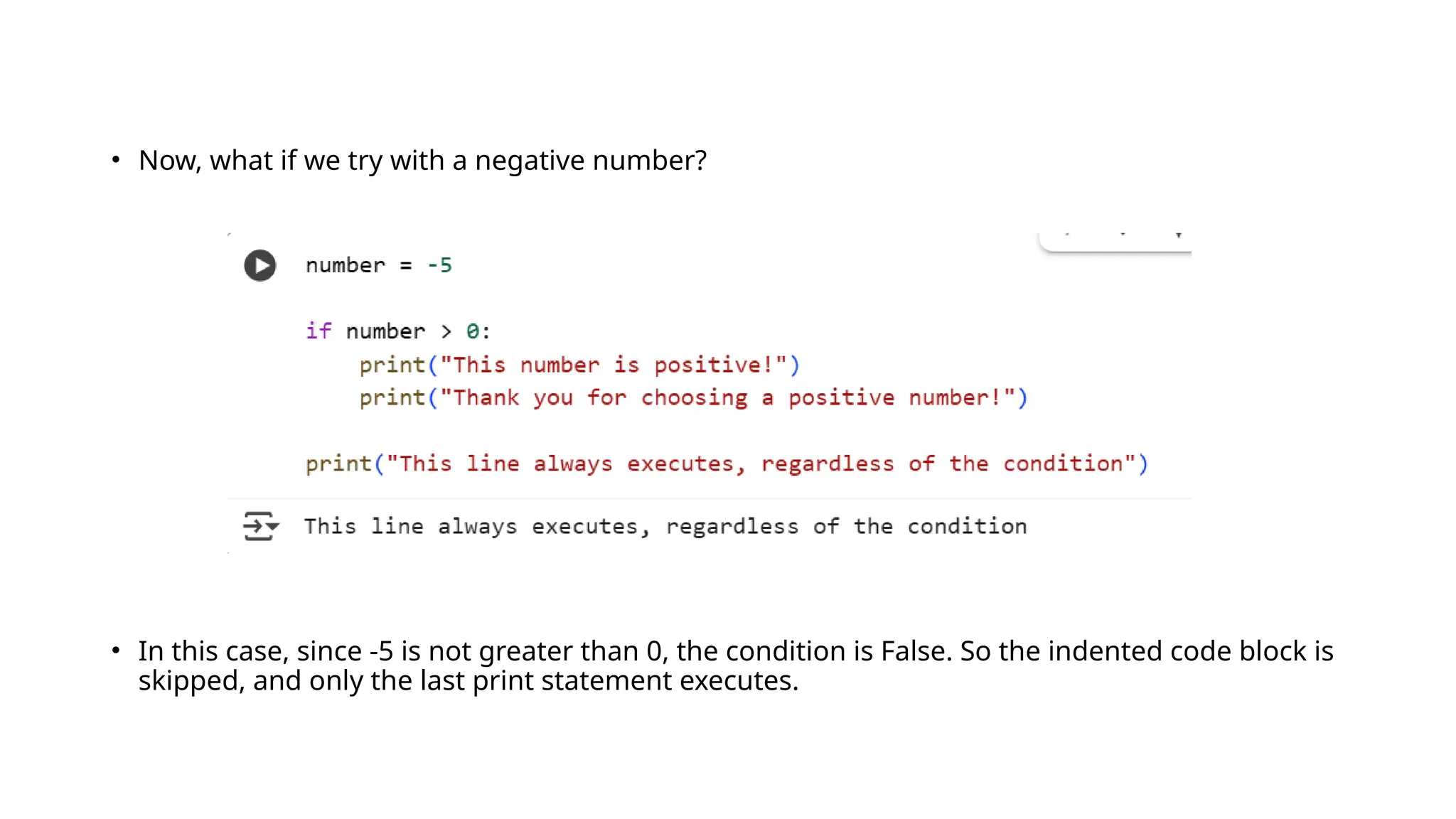
• Now, whatif we try with a negative number?
• In this case, since -5 is not greater than 0, the condition is False. So the indented code block is
skipped, and only the last print statement executes.
6.
Understanding Truthy andFalsy Values
an important concept in Python: truthy and falsy values. Conditions aren't limited to just comparison
operations. In Python, we can use any value in a condition, and Python will interpret it as either True or
False.
Values that are considered False
(falsy values):
Values that are considered True
(truthy values):
Let me show you some examples:
• False (the boolean False)
• None (represents no value)
• 0 (integer zero)
• 0.0 (float zero)
• "" (empty string)
• [] (empty list)
• () (empty tuple)
• {} (empty dictionary)
• Everything else!
• True (the boolean True)
• Any non-zero number
• Any non-empty string
• Any non-empty collection (list, tuple,
dictionary)
7.
• explanation:
1. shopping_list= ["apples", "bananas", "milk"] - We create a list with three items
2. if shopping_list: - We check if shopping_list is truthy (not empty)
3. Since the list has items, it's truthy, so both print statements execute
8.
• What ifwe have an empty list?
• In this case, since empty_list is falsy (empty), the code would print "This list is
empty!"
9.
If-Else Statements
• Nowthat we understand basic if statements, let's add the "else" part. The "else"
statement allows us to specify what should happen when the condition is False.
• Syntax of If-Else Statement
if condition:
# Code to execute if condition is True
else:
# Code to execute if condition is False
• Let's see a practical example:
10.
• explanation:
1. age= 17 - We set the age to 17
2. if age >= 18: - We check if age is greater than or equal to 18
3. Since 17 is not >= 18, the condition is False
4. So we skip the first code block and execute the else block
5. We print "You are not old enough to vote yet."
6. We calculate how many years are left until the person can vote
7. We print a message showing how many years are left
11.
• If wechange the age to 20, what would happen?
• Now the condition is True (20 >= 18), so the first code block executes, and we never
reach the else block.
12.
If-Elif-Else Statements
• Whatif we have more than two possibilities? That's where "elif" (short
for "else if") comes in handy.
• Syntax of If-Elif-Else Statement
if condition1:
# Code if condition1 is True
elif condition2:
# Code if condition2 is True
elif condition3:
# Code if condition3 is True
else:
# Code if all conditions are False
• Let's see a practical example with grade calculation:
13.
• explanation:
1. score= 85 - We set the score to 85
2. if score >= 90: - Check if 85 >= 90
(False)
3. elif score >= 80: - Check if 85 >= 80
(True!)
4. Since this condition is True, we
execute this block
5. We print "Grade: B" and "Good job!"
6. We skip all remaining elif and else
blocks
• It's important to understand that Python
checks these conditions in order, and once it
finds one that's True, it executes that block and
skips the rest.
14.
What if wehave a score of 95?
• Since 95 >= 90 is True, we would execute the first block and skip all the others.
15.
Nested Conditionals
Sometimes, weneed to check conditions within conditions. This is called nesting. Let me show
you an example:
• explanation:
1. age = 16 and is_student = True - We set our
variables
2. if age < 12: - Check if age is less than 12 (16
< 12 is False)
3. So we go to the else block
4. Inside the else block, we have another if: if
age < 18: (16 < 18 is True)
5. So we go inside this if block
6. Now we check if is_student: (which is True)
7. So we print "Student ticket: $8"
• While nesting can be powerful, it can also make
code harder to read if overused. Sometimes, we
can use logical operators to simplify nested
conditionals.
16.
Logical Operators
• Pythonprovides three logical operators that allow us to combine multiple
conditions:
1. and - True only if both conditions are True
2. or - True if at least one condition is True
3. not - Reverses the truth value (True becomes False, False becomes
True)
• Let me show you some examples:
18.
We can alsocombine these operators to create more
complex conditions:
19.
Ternary Operator (ConditionalExpression)
For very simple conditions, Python offers a shorthand syntax called the ternary operator. It allows us to write an
if-else statement in a single line.
• Syntax of Ternary Operator
value_if_true if condition else value_if_false
: Let me show you an example:
20.
We can rewritethis using the ternary operator:
• explanation:
• age = 20 - Set age to 20
• status = "Adult" if age >= 18 else "Minor" - This is our ternary operation
• It checks if age >= 18
• If True, it assigns "Adult" to status
• If False, it assigns "Minor" to status
• print(status) - Prints "Adult"
• While ternary operators can make code more concise, they can also make it harder to read if
overused or if the condition is complex. Use them judiciously!
21.
Practice Exercises
Now, let'spractice what we've learned with some exercises. Try to solve these on your
own first, then we'll go through the solutions together.
Exercise 1: Even or Odd
Write a program that checks if a
number is even or odd.
Exercise 2: Voting Eligibility
Write a program that checks if a person
is eligible to vote.
22.
Exercise 4: LeapYear Checker
Write a program that checks if a year is a leap year.
Exercise 3: Temperature Advisor
Write a program that gives advice based on
temperature.
23.
Conclusion
• Today, we'velearned how to make our programs smarter by using conditional statements. We
covered:
• Basic if statements
1. If-else statements for handling both cases
2. If-elif-else statements for multiple conditions
3. Nested conditionals for complex decision trees
4. Logical operators (and, or, not) for combining conditions
5. Ternary operators for concise conditional expressions
• Conditionals are fundamental to programming because they allow our code to adapt to different
situations. As you practice, you'll find yourself using these patterns in almost every program you
write.
• Remember, the key to mastering conditionals is practice. Try creating your own programs that make
decisions based on user input or other variables.
• Tomorrow, we'll learn about loops, which allow us to repeat actions multiple times. But for now,
focus on practicing these conditional statements until they feel natural.
24.
• Homework: Createa program that:
1. Asks the user for their age
2. Checks if they're eligible to drive (assuming driving age is 16)
3. If they're eligible, ask if they have a license
4. Based on both conditions, tell them if they can drive
• This will combine everything we learned today about
conditionals!
If and OrLogical Operators
The or operator returns True if at least one of the conditions is True. Let me explain this in detail.
The OR Operator
The or operator is used when we want to check if at least one of multiple conditions is true.
Syntax:
if condition1 or condition2:
# Code executes if either condition1 OR condition2 is True
Let me show you a practical example:
27.
• explanation:
1. username= "james" - We set the username to "james"
2. access_level = 3 - We set the access level to 3
3. if username == "admin" or access_level >= 4: - We check two conditions:
• Is username equal to "admin"? ("james" == "admin" False)
→
• Is access_level >= 4? (3 >= 4 False)
→
4. Since both conditions are False, the or operator returns False
5. So we execute the else block: "Access denied! Insufficient privileges."
28.
Now let's seewhat happens if we change the values:
• explanation:
1. username = "admin" - Username is now "admin"
2. access_level = 3 - Access level is still 3
3. if username == "admin" or access_level >= 4: - Check:
• Is username equal to "admin"? ("admin" == "admin" True)
→
• Is access_level >= 4? (3 >= 4 False)
→
4. Since at least one condition is True (the first one), the or operator returns True
5. So we print: "Access granted to sensitive data!"
29.
One more exampleto make sure this is clear:
• explanation:
1. username = "james" - Username is "james"
2. access_level = 5 - Access level is now 5
3. if username == "admin" or access_level >= 4: - Check:
• Is username equal to "admin"? ("james" == "admin" False)
→
• Is access_level >= 4? (5 >= 4 True)
→
4. Since at least one condition is True (the second one), the or operator returns True
5. So we print: "Access granted to sensitive data!"
30.
Combining AND andOR Operators
• We can also combine and and or operators to create more
complex conditions. However, we need to be careful about
operator precedence or use parentheses to make our
intentions clear.
• Let me show you an example:
31.
• explanation:
1. username= "james", access_level = 3, is_employee = True
2. if (username == "admin" or access_level >= 4) and
is_employee:
• First, evaluate what's in parentheses:
• username == "admin" False
→
• access_level >= 4 False
→
• False or False False
→
• Then: False and is_employee → False and True False
→
3. So we execute the else block: "Limited or no access."
32.
Now let's seehow parentheses change the meaning:
• Line-by-line explanation:
1. Same variable values
2. if username == "admin" or (access_level >= 4 and is_employee):
• First, evaluate what's in parentheses:
• access_level >= 4 False
→
• is_employee True
→
• False and True False
→
• Then: username == "admin" or False → False or False False
→
3. So we still execute the else block
• This shows why it's important to use parentheses to make your intentions clear
and ensure the conditions are evaluated in the order you want.
33.
Truthy and FalsyValues - Deep Dive
Now let's take a deeper look at truthy and falsy values in Python. This is an important concept
because it allows us to write more concise and Pythonic code.
In Python, every value has an inherent Boolean value - it's either "truthy" (evaluates to True) or
"falsy" (evaluates to False).
Falsy Values (Evaluate to False): Truthy Values (Evaluate to True):
• False (the boolean False)
• None (represents the absence of a value)
• 0 (integer zero)
• 0.0 (float zero)
• 0j (complex zero)
• "" (empty string)
• [] (empty list)
• () (empty tuple)
• {} (empty dictionary)
• set() (empty set)
• Everything else!
• True (the boolean True)
• Any non-zero number (1, -1, 0.1, etc.)
• Any non-empty string ("hello", " ", "0")
• Any non-empty collection ([1], [0], (1,),
{1: "a"}, etc.)
34.
Let me showyou some practical examples:
• Line-by-line explanation:
1. name = "" - Empty string
2. if name: - Check if name is truthy (empty string is falsy)
3. So we execute the else block: "Please enter your name."
35.
Now with anon-empty string:
• This pattern is very common in Python
for checking if containers have items:
• explanation:
1. name = "Alice" - Non-empty string
2. if name: - Check if name is truthy (non-empty
string is truthy)
3. So we print: "Hello, Alice!"
36.
Comparison Operators Review
:Let's do a quick review of comparison operators, as they're essential for writing
conditions.
Comparison Operators: Here are some examples:
# Equality checks
x = 5
y = 10
print(x == y) # False
print(x != y) # True
print(x > y) # False
print(x < y) # True
print(x >= 5) # True
print(y <= 10) # True
• == Equal to
• != Not equal to
• > Greater than
• < Less than
• >= Greater than or equal to
• <= Less than or equal to
Conditional Expressions
Conditional expressions(also called ternary operators) allow us to assign values based
on conditions in a concise way.
• Syntax:
variable = value_if_true if condition else value_if_false
• Let me show you some examples:
39.
We can rewritethis using a
conditional expression:
• Line-by-line explanation:
1. age = 20 - Set age to 20
2. status = "Adult" if age >= 18 else "Minor"
• Check if age >= 18 (20 >= 18 True)
→
• Since True, assign "Adult" to status
3. print(status) - Prints "Adult"
Here's another example:
40.
The PASS Statement
•Sometimes, we need to write a conditional structure but we're not ready to
implement the code yet. That's where the pass statement comes in handy.
• The pass statement is a null operation - it does nothing. It's useful as a
placeholder when syntax requires a statement but you don't want to execute
any code.
• Let me show you an example:
41.
• Line-by-line explanation:
1.user_role = "admin" - Set user role to "admin"
2. if user_role == "admin": - Check if role is "admin" (True)
3. pass - Do nothing (placeholder for future code)
4. We skip the elif and else blocks
• Without the pass statements, this code would cause a syntax error because Python expects
indented code after the conditional statements.
42.
Match Case Statements(Python 3.10+)
• : Starting from Python 3.10, we have a new feature called structural pattern matching, which
provides a more powerful alternative to long if-elif-else chains.
• : The match statement allows us to compare a value against multiple patterns and execute
code based on which pattern matches.
•
• Syntax:
match value:
case pattern1:
# code for pattern1
case pattern2:
# code for pattern2
case _:
# default case
43.
Let me showyou an example
• Line-by-line explanation:
1. http_status = 404 - Set HTTP status to 404
2. match http_status: - Start matching against
http_status
3. case 200: - Check if value is 200 (404 ≠ 200 →
skip)
4. case 404: - Check if value is 404 (404 = 404 →
match!)
5. print("Not found!") - Execute this code
6. We skip the remaining cases
Conclusion
• Today we'vecovered some advanced topics in conditionals:
1. The or operator and how to combine it with and
2. Truthy and falsy values in depth
3. Comparison operators review
4. Conditional expressions (ternary operator)
5. The pass statement as a placeholder
6. Structural pattern matching with match statements (Python 3.10+)
• The match statement seems really powerful! Is it better than long if-elif-else
chains?
48.
• For simpleconditions, if-elif-else is often sufficient and more familiar to
programmers from other languages. But for complex pattern matching, especially
with structured data, match statements can be much cleaner and more expressive.
• Remember that the key to writing good conditional code is:
1. Making your conditions clear and readable
2. Using parentheses to clarify operator precedence when needed
3. Taking advantage of truthy/falsy values for concise code
4. Choosing the right tool (if-else vs match) for each situation
• Homework: Write a program that:
1. Asks the user for a number
2. Uses a conditional expression to check if it's positive, negative, or zero
3. Uses a match statement to handle different string commands (like "add",
"subtract", etc.)
4. Uses truthy/falsy checking to validate user input



![Understanding Truthy and Falsy Values
an important concept in Python: truthy and falsy values. Conditions aren't limited to just comparison
operations. In Python, we can use any value in a condition, and Python will interpret it as either True or
False.
Values that are considered False
(falsy values):
Values that are considered True
(truthy values):
Let me show you some examples:
• False (the boolean False)
• None (represents no value)
• 0 (integer zero)
• 0.0 (float zero)
• "" (empty string)
• [] (empty list)
• () (empty tuple)
• {} (empty dictionary)
• Everything else!
• True (the boolean True)
• Any non-zero number
• Any non-empty string
• Any non-empty collection (list, tuple,
dictionary)](https://image.slidesharecdn.com/conditionalspresentation-madhuki-250926115404-7f7406c0/75/Conditionals-Presentation-Madhuki-pptx-6-2048.jpg)
![• explanation:
1. shopping_list = ["apples", "bananas", "milk"] - We create a list with three items
2. if shopping_list: - We check if shopping_list is truthy (not empty)
3. Since the list has items, it's truthy, so both print statements execute](https://image.slidesharecdn.com/conditionalspresentation-madhuki-250926115404-7f7406c0/75/Conditionals-Presentation-Madhuki-pptx-7-2048.jpg)


![Truthy and Falsy Values - Deep Dive
Now let's take a deeper look at truthy and falsy values in Python. This is an important concept
because it allows us to write more concise and Pythonic code.
In Python, every value has an inherent Boolean value - it's either "truthy" (evaluates to True) or
"falsy" (evaluates to False).
Falsy Values (Evaluate to False): Truthy Values (Evaluate to True):
• False (the boolean False)
• None (represents the absence of a value)
• 0 (integer zero)
• 0.0 (float zero)
• 0j (complex zero)
• "" (empty string)
• [] (empty list)
• () (empty tuple)
• {} (empty dictionary)
• set() (empty set)
• Everything else!
• True (the boolean True)
• Any non-zero number (1, -1, 0.1, etc.)
• Any non-empty string ("hello", " ", "0")
• Any non-empty collection ([1], [0], (1,),
{1: "a"}, etc.)](https://image.slidesharecdn.com/conditionalspresentation-madhuki-250926115404-7f7406c0/75/Conditionals-Presentation-Madhuki-pptx-33-2048.jpg)


