Communication Plan Template 3
State Personnel Director Dashboard Content
Submit draft dashboards for
approval
Electronic and Print Quarterly Team Leader
Project Management Team Dashboard Content
Submit draft dashboards for
coordination with other projects
Print Quarterly Team Leader
HR Metrics Advisory Group Dashboard Content Submit draft dashboards for input Electronic and Print Quarterly Team Leader
Project Management Team Weekly Reports
To update PMT on project
progress
Written Report Weekly Team Leader
Project Management Team Submission of Website Content
To deliver agreed upon content
for HR innovations website
Final Content Per Project plan (est. 7-1-07) Team Leader
Project Management Team Submission of Draft Deliverables
To present deliverables for
approval and coordination with
other teams’ deliverables
Actual Deliverables Per Project plan Team Leader
State Personnel Director Submission of strategic
To present deliverables for
approval and coordination with
other agencies’ related initiatives
(e.g. OSBM)
Actual Deliverables Prior to OSP implementation All Team Members
Sponsors
Overview of the Strategic
Planning Process
To educate the sponsors on the
process and the associated
deliverables
Presentation
Late fall, possibly before the
October conference
All Team Members
Audience
(Who)
Message
(What)
Intent
(Why)
Media
(How)
Frequency Person(s)
Responsible
Project Name: HR metrics Project Leader: Gerry Fisher
Instructions To Edit This Slide
This slide has been made in PowerPoint using basic PowerPoint shapes, and all graphics are 100%
editable in PowerPoint.
You can change color, size and orientation of any element to your liking, and add/edit any piece of text
anywhere.
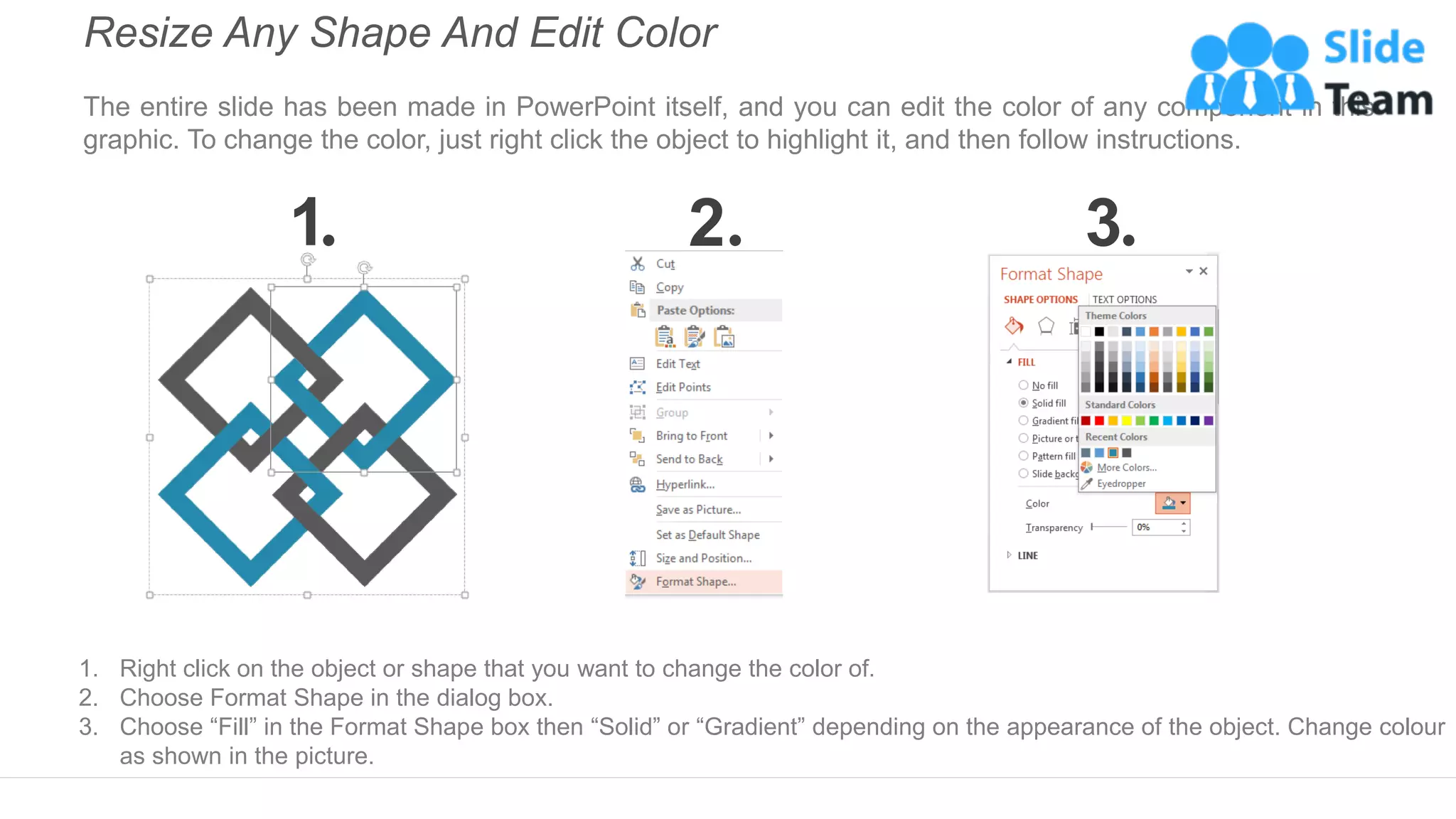
Resize Any Shape And Edit Color
The entire slide has been made in PowerPoint itself, and you can edit the color of any component in this
graphic. To change the color, just right click the object to highlight it, and then follow instructions.
1 2 3
1. Right click on the object or shape that you want to change the color of.
2. Choose Format Shape in the dialog box.
3. Choose “Fill” in the Format Shape box then “Solid” or “Gradient” depending on the appearance of the object. Change colour
as shown in the picture.
Use Your Own Icons In Any Slide
You can replace the icons in this slide with any icons you like from our site, or completely remove them if
required.
1 2 3
The icons we have shown are just for demo purposes. You can replace these icons with the correct icons to suit your
message. We have a large collection of icons to choose from.
1. To replace any icon, double click on it and select it, and then right click it to ungroup it.
2. Delete the icon and replace it with any icon or graphic from our site.
Select From Thousands Of Editable Icons On Every Topic
These icons are available at the Icons section on www.slideteam.net

Communication Plan Template 3 Ppt Examples Slides

  • 1.
    Communication Plan Template3 State Personnel Director Dashboard Content Submit draft dashboards for approval Electronic and Print Quarterly Team Leader Project Management Team Dashboard Content Submit draft dashboards for coordination with other projects Print Quarterly Team Leader HR Metrics Advisory Group Dashboard Content Submit draft dashboards for input Electronic and Print Quarterly Team Leader Project Management Team Weekly Reports To update PMT on project progress Written Report Weekly Team Leader Project Management Team Submission of Website Content To deliver agreed upon content for HR innovations website Final Content Per Project plan (est. 7-1-07) Team Leader Project Management Team Submission of Draft Deliverables To present deliverables for approval and coordination with other teams’ deliverables Actual Deliverables Per Project plan Team Leader State Personnel Director Submission of strategic To present deliverables for approval and coordination with other agencies’ related initiatives (e.g. OSBM) Actual Deliverables Prior to OSP implementation All Team Members Sponsors Overview of the Strategic Planning Process To educate the sponsors on the process and the associated deliverables Presentation Late fall, possibly before the October conference All Team Members Audience (Who) Message (What) Intent (Why) Media (How) Frequency Person(s) Responsible Project Name: HR metrics Project Leader: Gerry Fisher
  • 2.
    Instructions To EditThis Slide This slide has been made in PowerPoint using basic PowerPoint shapes, and all graphics are 100% editable in PowerPoint. You can change color, size and orientation of any element to your liking, and add/edit any piece of text anywhere.
  • 3.
    Resize Any ShapeAnd Edit Color The entire slide has been made in PowerPoint itself, and you can edit the color of any component in this graphic. To change the color, just right click the object to highlight it, and then follow instructions. 1 2 3 1. Right click on the object or shape that you want to change the color of. 2. Choose Format Shape in the dialog box. 3. Choose “Fill” in the Format Shape box then “Solid” or “Gradient” depending on the appearance of the object. Change colour as shown in the picture.
  • 4.
    Use Your OwnIcons In Any Slide You can replace the icons in this slide with any icons you like from our site, or completely remove them if required. 1 2 3 The icons we have shown are just for demo purposes. You can replace these icons with the correct icons to suit your message. We have a large collection of icons to choose from. 1. To replace any icon, double click on it and select it, and then right click it to ungroup it. 2. Delete the icon and replace it with any icon or graphic from our site.
  • 5.
    Select From ThousandsOf Editable Icons On Every Topic These icons are available at the Icons section on www.slideteam.net