



CODE REVIEW TOOL
AND PROCESS
KNOWLEDGE SHARING
_by Oleksii Prohonnyi
Motivation
It was decided to perform code review procedure permanently before QA
testing to:
 review design solutions
 discover bugs and issues beforehand
 improve code quality
 achieve consistency in code style
 perform additional check in guidelines following
JETBRAIN UPSOURCE
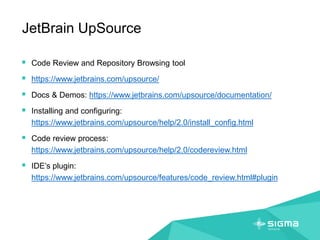
JetBrain UpSource
 Code Review and Repository Browsing tool
 https://www.jetbrains.com/upsource/
 Docs & Demos: https://www.jetbrains.com/upsource/documentation/
 Installing and configuring:
https://www.jetbrains.com/upsource/help/2.0/install_config.html
 Code review process:
https://www.jetbrains.com/upsource/help/2.0/codereview.html
 IDE’s plugin:
https://www.jetbrains.com/upsource/features/code_review.html#plugin
JetBrain UpSource: Revisions timeline
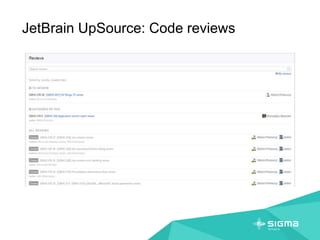
JetBrain UpSource: Code reviews
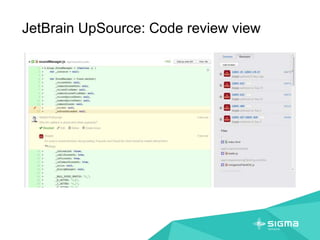
JetBrain UpSource: Code review view
JetBrain UpSource: Analysis
HOW WE WORK:
DEVELOPER (INITIAL)
How we work: Developer (Initial)
FINISH WORK ON ISSUE
CREATE CODE REVIEW
ASSIGN ISSUE ON REVIEWER
NOTIFY REVIEWER
CREATE NEW REVIEW
ADD ALL REVISIONS
ADD REVIEWERS
ADD WATCHERS
How we work: Developer (Initial)
1. Developer finishes his/her work on the issue, check code style (running grunt-build process) and
commit all new code into project SVN repository.
2. Developer change JIRA issues status to "Resolved" (features) / "Fixed" (bugs) / "Closed" (sub-
task).
a. Developer should create a new review in Upsource tool for his/her feature/bug/sub-task.
b. Go to Upsource tool
c. Press "Create review" on the latest issue commit.
d. Add to review all commits related to the issue.
e. Add reviewer to "Reviewers" section of review.
f. Add watcher to "Watchers" section of review.
3. Add link to code review page in Upsource to JIRA issue as comment "Please review:
http://path_to_upsource_tool/review/<CR ID>".
4. Assign JIRA issue to Reviewer.
5. Wait for code review results.
HOW WE WORK:
REVIEWER
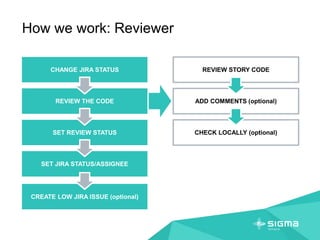
How we work: Reviewer
CHANGE JIRA STATUS
REVIEW THE CODE
SET REVIEW STATUS
SET JIRA STATUS/ASSIGNEE
REVIEW STORY CODE
ADD COMMENTS (optional)
CHECK LOCALLY (optional)
CREATE LOW JIRA ISSUE (optional)
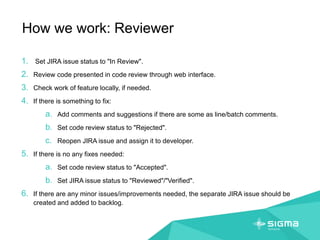
How we work: Reviewer
1. Set JIRA issue status to "In Review".
2. Review code presented in code review through web interface.
3. Check work of feature locally, if needed.
4. If there is something to fix:
a. Add comments and suggestions if there are some as line/batch comments.
b. Set code review status to "Rejected".
c. Reopen JIRA issue and assign it to developer.
5. If there is no any fixes needed:
a. Set code review status to "Accepted".
b. Set JIRA issue status to "Reviewed"/"Verified".
6. If there are any minor issues/improvements needed, the separate JIRA issue should be
created and added to backlog.
HOW WE WORK:
DEVELOPER (AFTER REVIEW)
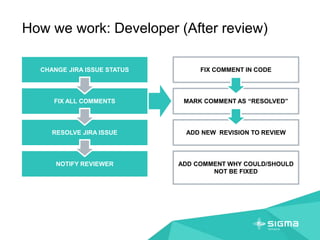
How we work: Developer (After review)
CHANGE JIRA ISSUE STATUS
FIX ALL COMMENTS
RESOLVE JIRA ISSUE
NOTIFY REVIEWER
FIX COMMENT IN CODE
MARK COMMENT AS “RESOLVED”
ADD NEW REVISION TO REVIEW
ADD COMMENT WHY COULD/SHOULD
NOT BE FIXED
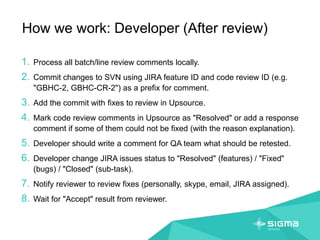
How we work: Developer (After review)
1. Process all batch/line review comments locally.
2. Commit changes to SVN using JIRA feature ID and code review ID (e.g.
"GBHC-2, GBHC-CR-2") as a prefix for comment.
3. Add the commit with fixes to review in Upsource.
4. Mark code review comments in Upsource as "Resolved" or add a response
comment if some of them could not be fixed (with the reason explanation).
5. Developer should write a comment for QA team what should be retested.
6. Developer change JIRA issues status to "Resolved" (features) / "Fixed"
(bugs) / "Closed" (sub-task).
7. Notify reviewer to review fixes (personally, skype, email, JIRA assigned).
8. Wait for "Accept" result from reviewer.
References
 How we work - HTML client
 JetBrains UpSource
 GBHC UpSource
 GBHC JIRA
Oleksii Prohonnyi
facebook.com/oprohonnyi
linkedin.com/in/oprohonnyi

Code review process with JetBrains UpSource

  • 1.
    CODE REVIEW TOOL ANDPROCESS KNOWLEDGE SHARING _by Oleksii Prohonnyi
  • 2.
    Motivation It was decidedto perform code review procedure permanently before QA testing to:  review design solutions  discover bugs and issues beforehand  improve code quality  achieve consistency in code style  perform additional check in guidelines following
  • 3.
  • 4.
    JetBrain UpSource  CodeReview and Repository Browsing tool  https://www.jetbrains.com/upsource/  Docs & Demos: https://www.jetbrains.com/upsource/documentation/  Installing and configuring: https://www.jetbrains.com/upsource/help/2.0/install_config.html  Code review process: https://www.jetbrains.com/upsource/help/2.0/codereview.html  IDE’s plugin: https://www.jetbrains.com/upsource/features/code_review.html#plugin
  • 5.
  • 6.
  • 7.
  • 8.
  • 9.
  • 10.
    How we work:Developer (Initial) FINISH WORK ON ISSUE CREATE CODE REVIEW ASSIGN ISSUE ON REVIEWER NOTIFY REVIEWER CREATE NEW REVIEW ADD ALL REVISIONS ADD REVIEWERS ADD WATCHERS
  • 11.
    How we work:Developer (Initial) 1. Developer finishes his/her work on the issue, check code style (running grunt-build process) and commit all new code into project SVN repository. 2. Developer change JIRA issues status to "Resolved" (features) / "Fixed" (bugs) / "Closed" (sub- task). a. Developer should create a new review in Upsource tool for his/her feature/bug/sub-task. b. Go to Upsource tool c. Press "Create review" on the latest issue commit. d. Add to review all commits related to the issue. e. Add reviewer to "Reviewers" section of review. f. Add watcher to "Watchers" section of review. 3. Add link to code review page in Upsource to JIRA issue as comment "Please review: http://path_to_upsource_tool/review/<CR ID>". 4. Assign JIRA issue to Reviewer. 5. Wait for code review results.
  • 12.
  • 13.
    How we work:Reviewer CHANGE JIRA STATUS REVIEW THE CODE SET REVIEW STATUS SET JIRA STATUS/ASSIGNEE REVIEW STORY CODE ADD COMMENTS (optional) CHECK LOCALLY (optional) CREATE LOW JIRA ISSUE (optional)
  • 14.
    How we work:Reviewer 1. Set JIRA issue status to "In Review". 2. Review code presented in code review through web interface. 3. Check work of feature locally, if needed. 4. If there is something to fix: a. Add comments and suggestions if there are some as line/batch comments. b. Set code review status to "Rejected". c. Reopen JIRA issue and assign it to developer. 5. If there is no any fixes needed: a. Set code review status to "Accepted". b. Set JIRA issue status to "Reviewed"/"Verified". 6. If there are any minor issues/improvements needed, the separate JIRA issue should be created and added to backlog.
  • 15.
    HOW WE WORK: DEVELOPER(AFTER REVIEW)
  • 16.
    How we work:Developer (After review) CHANGE JIRA ISSUE STATUS FIX ALL COMMENTS RESOLVE JIRA ISSUE NOTIFY REVIEWER FIX COMMENT IN CODE MARK COMMENT AS “RESOLVED” ADD NEW REVISION TO REVIEW ADD COMMENT WHY COULD/SHOULD NOT BE FIXED
  • 17.
    How we work:Developer (After review) 1. Process all batch/line review comments locally. 2. Commit changes to SVN using JIRA feature ID and code review ID (e.g. "GBHC-2, GBHC-CR-2") as a prefix for comment. 3. Add the commit with fixes to review in Upsource. 4. Mark code review comments in Upsource as "Resolved" or add a response comment if some of them could not be fixed (with the reason explanation). 5. Developer should write a comment for QA team what should be retested. 6. Developer change JIRA issues status to "Resolved" (features) / "Fixed" (bugs) / "Closed" (sub-task). 7. Notify reviewer to review fixes (personally, skype, email, JIRA assigned). 8. Wait for "Accept" result from reviewer.
  • 18.
    References  How wework - HTML client  JetBrains UpSource  GBHC UpSource  GBHC JIRA
  • 19.