
Cluster-Enabling Sakai
               with Terracotta
                                                                                             Cris J. Holdorph
                                                                                                 Software Architect
                                                                                                       Unicon, Inc.

                                                                                                 Sakai Conference
                                                                                                   Cambridge, MA
                                                                                                     July 9, 2009


© Copyright Unicon, Inc., 2009. Some rights reserved. This work is licensed under a
Creative Commons Attribution-Noncommercial-Share Alike 3.0 United States License.
To view a copy of this license, visit http://creativecommons.org/licenses/by-nc-sa/3.0/us/
Agenda
1. Why Terracotta?
2. Current Status
3. Design and Development
4. Running Terracotta-Enabled Sakai
5. Terracotta-Cluster Enabling a Tool
6. Demo
7. Resources
                                        2
Why Terracotta?


                  3
Why Terracotta
●
    Clustering / Session Failover problem
●
    What options were explored?
    –   Container Managed Sessions
    –   Shared Session Server
         ●
             Ehcache
         ●
             Database
    –   REST style (no session data) web architecture
●
    What problems were uncovered?
    –   Custom Classloaders
    –   Performance
                                                        4
    –   Serializable Objects
Enter Terracotta
●
    Semi-shared Session Server
    –   Don't share everything
●
    Reduced Communication Between Nodes
    –   “Partitioned Data” feature of Terracotta
●
    Less Invasive Sakai Changes
    –   Not every object in Terracotta has to be
        Serializable
    –   Many changes can be done in a Terracotta
        configuration file (tc-config.xml)
●
    Provides a Custom Classloader Solution
                                                   5
Current Status


                 6
Current Status
●
    John Wiley & Sons sponsored Unicon to
    develop Terracotta integration with Sakai
●
    Documentation is in Sakai Confluence
●
    Original Work done as a feature branch
    against Sakai 2.5.x, ported forward to 2.6.x
●
    Migrated into Sakai Trunk / Kernel Trunk
    –   This will be Sakai 2.7.x / Kernel 1.1.x if released
●
    Feature branch (only) contains 2 cluster
    enabled tools
    –   Custom Worksite Setup
                                                              7
    –   Resources / Citations
Design and Development


                         8
Component Manager
●
    Create Custom Classloader
●
    Detecting “sakai.cluster.terracotta” System
    Property
●
    Using Custom Classloader if property is set


                                                  9
Code sample
https://source.sakaiproject.org/svn/kernel/trunk/component-manager/src/
main/java/org/sakaiproject/util/TerracottaClassLoader.java


  ...
  class TerracottaClassLoader extends URLClassLoader {
        private String classLoaderName;
        public TerracottaClassLoader(URL[] urls, ClassLoader
  parent, String classLoaderName) { ... }
      public String __tc_getClassLoaderName() {
            return classLoaderName;
      }
  ...
  }

                                                                  10
SessionManager
●
    Make m_sessions a Terracotta Root
●
    Make MySession and MyLittleSession top level
    classes
    –   Did not want Outer class, SessionManager,
        brought into the Terracotta cluster


                                                    11
Partial Session Sharing
●
    Not all data will be shared
●
    Original Idea, catch NonPortableException
    –   Did not work
●
    New Idea, Tool whitelist
    –   Only tools in the whitelist will be shared
    –   Tools not in the whitelist will not be shared
●
    Final solution, enables gradually enabling
    clustering on a tool-by-tool basis
●
    Even if a tool supports clustering, a system
    administrator can turn clustering off for that
    tool                                         12
Session Maintenance
●
    SessionManager class has an inner
    class/thread called Maintenance
    –   Responsible for removing expired sessions
●
    Need to make sure this behavior still works
●
    Need to make sure this thread/class does not
    violate the Terracotta “Partitioned Data”
    principle
●
    Solution: Create a parallel data structure to
    loosely track session timeout times along with
    session identifiers
                                                    13
UsageSession
●
    UsageSession tracks which user is on which
    server
●
    UsageSession is both a JVM object and
    database record
●
    Need to detect when a user has failed over to
    a new server and update the users
    UsageSession object and database record


                                              14
RequestFilter
●
    Terracotta requires a lock (transaction) be
    obtained to change any data in the cluster
●
    Original design tried to automatically lock any
    clustered object before changing data on that
    object
●
    New design uses a Course Grained lock on
    the Session object, obtained and released in
    the Sakai RequstFilter


                                                  15
Unit Tests
●
    Unit Tests for Component Manager before
    Component Manager changes were made
●
    Unit Tests for Session Manager before Session
    Manager changes were made


                                              16
Session Logging
●
    Code was added to Session Manager to
    enable logging of which tools put which
    objects into a Sakai Session
●
    This helps identify
    –   Heavy users of the Session
    –   Relative size of a Session
    –   Which tools are more self referencing
    –   Which tools tend to reference many other
        tools/components


                                                   17
Worksite Setup
●
    Customized Worksite Setup Tool for John
    Wiley & Sons
●
    Multi-page wizard
●
    Old Sakai / Velocity based tool
●
    Lots of inner classes
●
    Feature branch – Terracotta cluster enabled


                                                  18
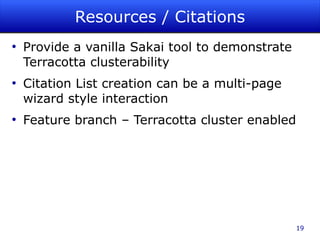
Resources / Citations
●
    Provide a vanilla Sakai tool to demonstrate
    Terracotta clusterability
●
    Citation List creation can be a multi-page
    wizard style interaction
●
    Feature branch – Terracotta cluster enabled


                                                  19
Running a Terracotta-
   Enabled Sakai


                        20
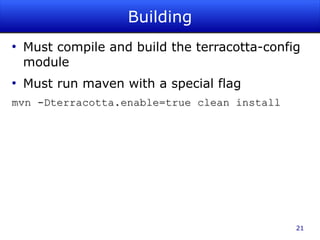
Building
●
    Must compile and build the terracotta-config
    module
●
    Must run maven with a special flag
mvn -Dterracotta.enable=true clean install


                                               21
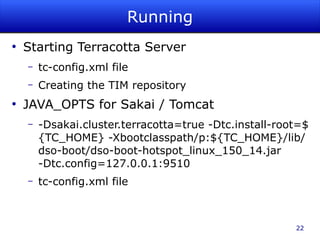
Running
●
    Starting Terracotta Server
    –   tc-config.xml file
    –   Creating the TIM repository
●
    JAVA_OPTS for Sakai / Tomcat
    –   -Dsakai.cluster.terracotta=true -Dtc.install-root=$
        {TC_HOME} -Xbootclasspath/p:${TC_HOME}/lib/
        dso-boot/dso-boot-hotspot_linux_150_14.jar
        -Dtc.config=127.0.0.1:9510
    –   tc-config.xml file


                                                        22
Administration
●
    Terracotta Administration Console
●
    Shutting down Sakai / Tomcat
●
    Shutting down Terracotta Server
●
    Clearing out the Terracotta Object
    “repository”


                                         23
Terracotta-Cluster Enabling a
          Sakai Tool


                            24
Terracotta Enabling a Tool
●
    Add the tool to the clusterableTools property
●
    Create a new TIM (Terracotta Integration
    Module) for the tool
●
    Modify the terracotta-config module to know
    about the new TIM that was created


                                                25
Creating a TIM
●
    Classes for instrumentation
    –   Any class that will be stored in Terracotta
    –   Any class that will modify a class stored in
        Terracotta
●
    Determine transient fields for any classes that
    will be stored in Terracotta
●
    Create a mechanism for resolving transient
    fields
    –   Beanshell
    –   Java method
●
    Promote inner classes to top level classes         26
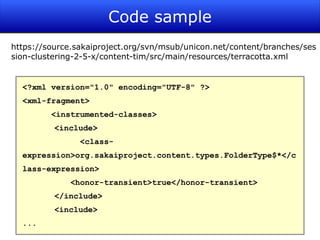
Code sample
https://source.sakaiproject.org/svn/msub/unicon.net/content/branches/ses
sion-clustering-2-5-x/content-tim/src/main/resources/terracotta.xml


  <?xml version="1.0" encoding="UTF-8" ?>
  <xml-fragment>
         <instrumented-classes>
          <include>
                <class-
  expression>org.sakaiproject.content.types.FolderType$*</c
  lass-expression>
             <honor-transient>true</honor-transient>
          </include>
          <include>
  ...
                                                                   27
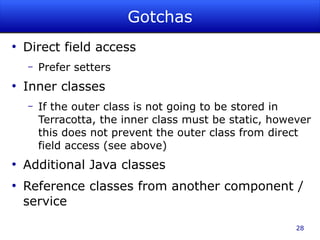
Gotchas
●
    Direct field access
    –   Prefer setters
●
    Inner classes
    –   If the outer class is not going to be stored in
        Terracotta, the inner class must be static, however
        this does not prevent the outer class from direct
        field access (see above)
●
    Additional Java classes
●
    Reference classes from another component /
    service

                                                        28
Resources


            29
Resources (1)
●
    Introduction to Terracotta
     –   Monday, 11:30 am
●
    Websites
     –   Open Source http://www.terracotta.org/
     –   Commercial http://www.terracottatech.com/
●
    Website Resources
     –   Downloads
     –   Documentation
     –   Forums
●
    Book
     –   The Definitive Guide to Terracotta, ISBN-13: 978-
         1590599860
                                                             30
Resources (2)
●
    Sakai Confluence Terracotta link
http://confluence.sakaiproject.org/confluence/display/TERRA/Home


●
    Feature Branch subversion link
https://source.sakaiproject.org/svn/msub/unicon.net/distros/branches/session-clustering-2-5-x/


                                                                                       31
Questions & Answers


          Cris J. Holdorph
          Software Architect
          Unicon, Inc.

          holdorph@unicon.net
          www.unicon.net


                                32

Clustering Sakai with Terracotta

  • 1.
    Cluster-Enabling Sakai with Terracotta Cris J. Holdorph Software Architect Unicon, Inc. Sakai Conference Cambridge, MA July 9, 2009 © Copyright Unicon, Inc., 2009. Some rights reserved. This work is licensed under a Creative Commons Attribution-Noncommercial-Share Alike 3.0 United States License. To view a copy of this license, visit http://creativecommons.org/licenses/by-nc-sa/3.0/us/
  • 2.
    Agenda 1. Why Terracotta? 2.Current Status 3. Design and Development 4. Running Terracotta-Enabled Sakai 5. Terracotta-Cluster Enabling a Tool 6. Demo 7. Resources 2
  • 3.
  • 4.
    Why Terracotta ● Clustering / Session Failover problem ● What options were explored? – Container Managed Sessions – Shared Session Server ● Ehcache ● Database – REST style (no session data) web architecture ● What problems were uncovered? – Custom Classloaders – Performance 4 – Serializable Objects
  • 5.
    Enter Terracotta ● Semi-shared Session Server – Don't share everything ● Reduced Communication Between Nodes – “Partitioned Data” feature of Terracotta ● Less Invasive Sakai Changes – Not every object in Terracotta has to be Serializable – Many changes can be done in a Terracotta configuration file (tc-config.xml) ● Provides a Custom Classloader Solution 5
  • 6.
  • 7.
    Current Status ● John Wiley & Sons sponsored Unicon to develop Terracotta integration with Sakai ● Documentation is in Sakai Confluence ● Original Work done as a feature branch against Sakai 2.5.x, ported forward to 2.6.x ● Migrated into Sakai Trunk / Kernel Trunk – This will be Sakai 2.7.x / Kernel 1.1.x if released ● Feature branch (only) contains 2 cluster enabled tools – Custom Worksite Setup 7 – Resources / Citations
  • 8.
  • 9.
    Component Manager ● Create Custom Classloader ● Detecting “sakai.cluster.terracotta” System Property ● Using Custom Classloader if property is set 9
  • 10.
    Code sample https://source.sakaiproject.org/svn/kernel/trunk/component-manager/src/ main/java/org/sakaiproject/util/TerracottaClassLoader.java ... class TerracottaClassLoader extends URLClassLoader { private String classLoaderName; public TerracottaClassLoader(URL[] urls, ClassLoader parent, String classLoaderName) { ... } public String __tc_getClassLoaderName() { return classLoaderName; } ... } 10
  • 11.
    SessionManager ● Make m_sessions a Terracotta Root ● Make MySession and MyLittleSession top level classes – Did not want Outer class, SessionManager, brought into the Terracotta cluster 11
  • 12.
    Partial Session Sharing ● Not all data will be shared ● Original Idea, catch NonPortableException – Did not work ● New Idea, Tool whitelist – Only tools in the whitelist will be shared – Tools not in the whitelist will not be shared ● Final solution, enables gradually enabling clustering on a tool-by-tool basis ● Even if a tool supports clustering, a system administrator can turn clustering off for that tool 12
  • 13.
    Session Maintenance ● SessionManager class has an inner class/thread called Maintenance – Responsible for removing expired sessions ● Need to make sure this behavior still works ● Need to make sure this thread/class does not violate the Terracotta “Partitioned Data” principle ● Solution: Create a parallel data structure to loosely track session timeout times along with session identifiers 13
  • 14.
    UsageSession ● UsageSession tracks which user is on which server ● UsageSession is both a JVM object and database record ● Need to detect when a user has failed over to a new server and update the users UsageSession object and database record 14
  • 15.
    RequestFilter ● Terracotta requires a lock (transaction) be obtained to change any data in the cluster ● Original design tried to automatically lock any clustered object before changing data on that object ● New design uses a Course Grained lock on the Session object, obtained and released in the Sakai RequstFilter 15
  • 16.
    Unit Tests ● Unit Tests for Component Manager before Component Manager changes were made ● Unit Tests for Session Manager before Session Manager changes were made 16
  • 17.
    Session Logging ● Code was added to Session Manager to enable logging of which tools put which objects into a Sakai Session ● This helps identify – Heavy users of the Session – Relative size of a Session – Which tools are more self referencing – Which tools tend to reference many other tools/components 17
  • 18.
    Worksite Setup ● Customized Worksite Setup Tool for John Wiley & Sons ● Multi-page wizard ● Old Sakai / Velocity based tool ● Lots of inner classes ● Feature branch – Terracotta cluster enabled 18
  • 19.
    Resources / Citations ● Provide a vanilla Sakai tool to demonstrate Terracotta clusterability ● Citation List creation can be a multi-page wizard style interaction ● Feature branch – Terracotta cluster enabled 19
  • 20.
    Running a Terracotta- Enabled Sakai 20
  • 21.
    Building ● Must compile and build the terracotta-config module ● Must run maven with a special flag mvn -Dterracotta.enable=true clean install 21
  • 22.
    Running ● Starting Terracotta Server – tc-config.xml file – Creating the TIM repository ● JAVA_OPTS for Sakai / Tomcat – -Dsakai.cluster.terracotta=true -Dtc.install-root=$ {TC_HOME} -Xbootclasspath/p:${TC_HOME}/lib/ dso-boot/dso-boot-hotspot_linux_150_14.jar -Dtc.config=127.0.0.1:9510 – tc-config.xml file 22
  • 23.
    Administration ● Terracotta Administration Console ● Shutting down Sakai / Tomcat ● Shutting down Terracotta Server ● Clearing out the Terracotta Object “repository” 23
  • 24.
  • 25.
    Terracotta Enabling aTool ● Add the tool to the clusterableTools property ● Create a new TIM (Terracotta Integration Module) for the tool ● Modify the terracotta-config module to know about the new TIM that was created 25
  • 26.
    Creating a TIM ● Classes for instrumentation – Any class that will be stored in Terracotta – Any class that will modify a class stored in Terracotta ● Determine transient fields for any classes that will be stored in Terracotta ● Create a mechanism for resolving transient fields – Beanshell – Java method ● Promote inner classes to top level classes 26
  • 27.
    Code sample https://source.sakaiproject.org/svn/msub/unicon.net/content/branches/ses sion-clustering-2-5-x/content-tim/src/main/resources/terracotta.xml <?xml version="1.0" encoding="UTF-8" ?> <xml-fragment> <instrumented-classes> <include> <class- expression>org.sakaiproject.content.types.FolderType$*</c lass-expression> <honor-transient>true</honor-transient> </include> <include> ... 27
  • 28.
    Gotchas ● Direct field access – Prefer setters ● Inner classes – If the outer class is not going to be stored in Terracotta, the inner class must be static, however this does not prevent the outer class from direct field access (see above) ● Additional Java classes ● Reference classes from another component / service 28
  • 29.
  • 30.
    Resources (1) ● Introduction to Terracotta – Monday, 11:30 am ● Websites – Open Source http://www.terracotta.org/ – Commercial http://www.terracottatech.com/ ● Website Resources – Downloads – Documentation – Forums ● Book – The Definitive Guide to Terracotta, ISBN-13: 978- 1590599860 30
  • 31.
    Resources (2) ● Sakai Confluence Terracotta link http://confluence.sakaiproject.org/confluence/display/TERRA/Home ● Feature Branch subversion link https://source.sakaiproject.org/svn/msub/unicon.net/distros/branches/session-clustering-2-5-x/ 31
  • 32.
    Questions & Answers Cris J. Holdorph Software Architect Unicon, Inc. holdorph@unicon.net www.unicon.net 32