Clearing Password Check and BIOS
Recovery
This section provides users with the standard operating procedures of
clearing password
and BIOS recovery for the Aspire E1-431/E1-431G & E1-471/E1-471G. The
machine
provides one Hardware Open Gap on main board for clearing password
check, and one
hot key for enabling BIOS Recovery.
Clearing Password Check
NOTE:
NOTE:
The following procedure is only for clearing BIOS Password (Supervisor
Password
and User Password).
Steps for Clearing BIOS Password Check
If users set BIOS Password (Supervisor Password and/or User Password)
for a security
reason, BIOS will ask the password during systems POST or when systems
enter to BIOS
Setup menu. However, once it is necessary to bypass the password check,
users need to
clear the password by the following steps:
Power
1. Press
button.
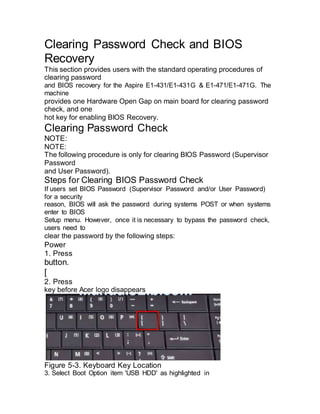
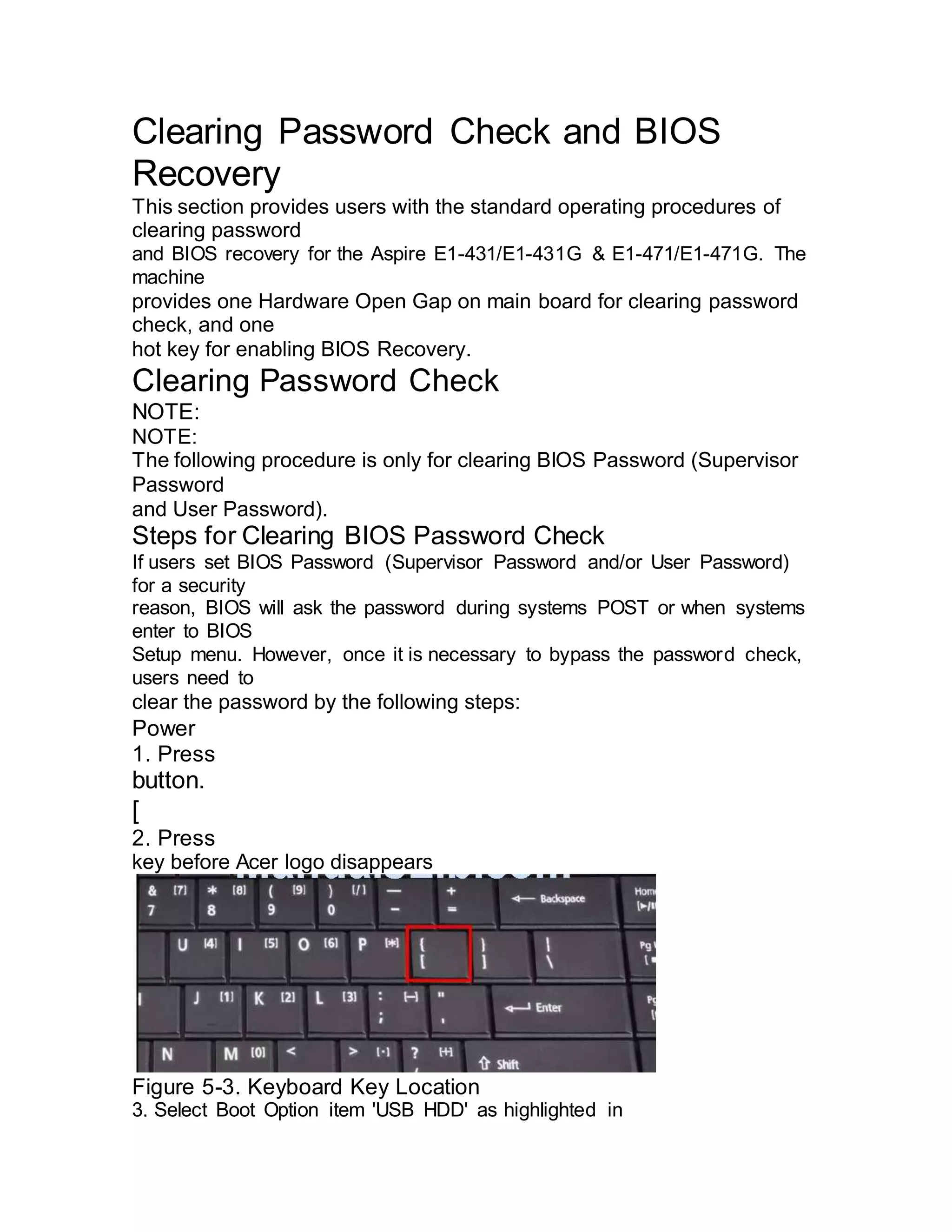
[
2. Press
key before Acer logo disappears
Figure 5-3. Keyboard Key Location
3. Select Boot Option item 'USB HDD' as highlighted in
the BIOS Boot Option menu.
4. Execute ClearPwd.EXE under the DOS mode.
5. When message Clear the SU Pws completely is displayed,
supervisor password
has been cleared.
6. Restart the system. Press
7. If there is no Password request, BIOS Password is cleared up.
8. If a password is requested, repeat Steps 1 through 5.

Clearing password check and bios recovery

  • 1.
    Clearing Password Checkand BIOS Recovery This section provides users with the standard operating procedures of clearing password and BIOS recovery for the Aspire E1-431/E1-431G & E1-471/E1-471G. The machine provides one Hardware Open Gap on main board for clearing password check, and one hot key for enabling BIOS Recovery. Clearing Password Check NOTE: NOTE: The following procedure is only for clearing BIOS Password (Supervisor Password and User Password). Steps for Clearing BIOS Password Check If users set BIOS Password (Supervisor Password and/or User Password) for a security reason, BIOS will ask the password during systems POST or when systems enter to BIOS Setup menu. However, once it is necessary to bypass the password check, users need to clear the password by the following steps: Power 1. Press button. [ 2. Press key before Acer logo disappears Figure 5-3. Keyboard Key Location 3. Select Boot Option item 'USB HDD' as highlighted in
  • 2.
    the BIOS BootOption menu. 4. Execute ClearPwd.EXE under the DOS mode. 5. When message Clear the SU Pws completely is displayed, supervisor password has been cleared. 6. Restart the system. Press 7. If there is no Password request, BIOS Password is cleared up. 8. If a password is requested, repeat Steps 1 through 5.