GANDHINAGAR INSTITUTE OF TECHNOLGY
Information Technology Department
Classical Cyphers
Presented By
Name: Shaishav Shah
8-IT-B1
Enrollment no: 170120116094
Guided By
Prof. Swapnil Panchal
Python Programming(2180703)
Classical Cypher
• Classical cryptography and stenography are very fun to
program. They are often used in various capture the flag
programmer events. Classical substitution ciphers, like Caesar
Cipher, are particularly fun, because they are simple enough to
understand and crack with just a little bit of knowledge. One
can often find puzzles, called Cryptograms or Cryptoquotes, in
newspapers or online that challenge the user to figure out a
popular phrase given the ciphertext version of it.
Cryptography
• Cryptography deals with encrypting or encoding a piece of
information (in a plain text) into a form that looks gibberish and
makes little sense in ordinary language.
• This encoded message(also called ciphertext) can then be
decoded back into a plain text by the intended recipient using a
decoding technique (often along with a private key)
communicated to the end-user.
Caesar cypher
• Although Caesar Cipher is a very weak encryption
technique and is rarely used today, we are doing this tutorial
to introduce our readers, especially the newcomers, to
encryption.
• Caesar Cipher is a type of substitution, in which each letter in
the plain text is replaced by another letter at some fixed
positions from the current letter in the alphabet.
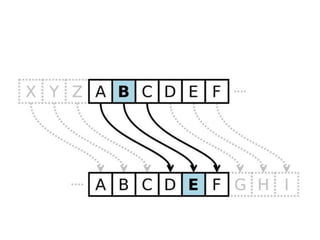
• For example, if we shift each letter by three positions to the
right, each of the letters in our plain text will be replaced by a
letter at three positions to the right of the letter in the plain
text.
• Let us see this in action – let’s encrypt the text “HELLO
WORLD” using a right shift of 3.
• So the letter H will be replaced by K, E will be replaced by H,
and so on. The final encrypted message for HELLO
WORLD will be KHOOR ZRUOG.
• Note that the letters on edge i.e., X, Y, Z wrap around and are
replaced by A, B, C respectively, in case of the right shift.
Similarly, the letters in the beginning – A, B, C, etc. will be
wrapped around in case of left shifts.
• The Caesar Cipher encryption rule can be expressed
mathematically as:
•
c= (x+n) %26
• Where c is the encoded character, x is the actual character, and
n is the number of positions we want to shift the character x
by. We’re taking mod with 26 because there are 26 letters in
the English alphabet.
Caesar Cipher in Python
• Caesar Cipher in Python, we’ll first look at two important
functions that we’ll use extensively during the process –
chr() and ord().
It is important to realize that the alphabet as we know them, is
stored differently in a computer’s memory. The computer
doesn’t understand any of our English language’s alphabet or
other characters by itself.
• Each of these characters is represented in computer memory
using a number called ASCII code (or its extension – the
Unicode) of the character, which is an 8-bit number and
encodes almost all the English language’s characters, digits,
and punctuations.
For instance, the uppercase ‘A’ is represented by the number
65, ‘B’ by 66, and so on. Similarly, lowercase characters’
representation begins with the number 97.
• As the need to incorporate more symbols and characters of
other languages arose, the 8 bit was not sufficient, so a new
standard – Unicode – was adopted, which represents all the
characters used in the world using 16 bits.
• ASCII is a subset of Unicode, so the ASCII encoding of
characters remains the same in Unicode. That means ‘A’ will
still be represented using the number 65 in Unicode.
Note that the special characters like space ” “, tabs “t”,
newlines “n”, etc. are also represented in memory by their
Unicode.
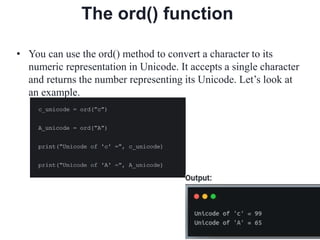
The ord() function
• You can use the ord() method to convert a character to its
numeric representation in Unicode. It accepts a single character
and returns the number representing its Unicode. Let’s look at
an example.
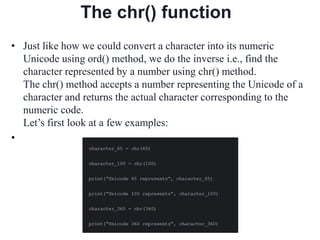
The chr() function
• Just like how we could convert a character into its numeric
Unicode using ord() method, we do the inverse i.e., find the
character represented by a number using chr() method.
The chr() method accepts a number representing the Unicode of a
character and returns the actual character corresponding to the
numeric code.
Let’s first look at a few examples:
•
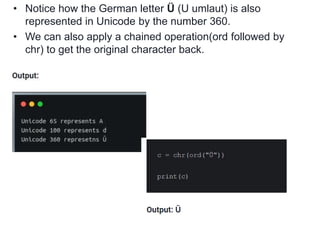
• Notice how the German letter Ü (U umlaut) is also
represented in Unicode by the number 360.
• We can also apply a chained operation(ord followed by
chr) to get the original character back.
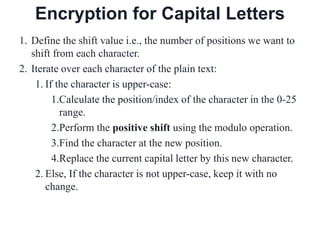
Encryption for Capital Letters
1. Define the shift value i.e., the number of positions we want to
shift from each character.
2. Iterate over each character of the plain text:
1. If the character is upper-case:
1.Calculate the position/index of the character in the 0-25
range.
2.Perform the positive shift using the modulo operation.
3.Find the character at the new position.
4.Replace the current capital letter by this new character.
2. Else, If the character is not upper-case, keep it with no
change.
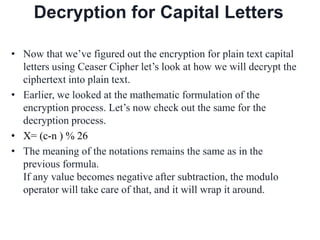
Decryption for Capital Letters
• Now that we’ve figured out the encryption for plain text capital
letters using Ceaser Cipher let’s look at how we will decrypt the
ciphertext into plain text.
• Earlier, we looked at the mathematic formulation of the
encryption process. Let’s now check out the same for the
decryption process.
• X= (c-n ) % 26
• The meaning of the notations remains the same as in the
previous formula.
If any value becomes negative after subtraction, the modulo
operator will take care of that, and it will wrap it around.
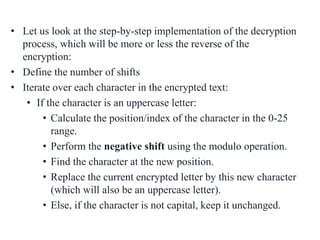
• Let us look at the step-by-step implementation of the decryption
process, which will be more or less the reverse of the
encryption:
• Define the number of shifts
• Iterate over each character in the encrypted text:
• If the character is an uppercase letter:
• Calculate the position/index of the character in the 0-25
range.
• Perform the negative shift using the modulo operation.
• Find the character at the new position.
• Replace the current encrypted letter by this new character
(which will also be an uppercase letter).
• Else, if the character is not capital, keep it unchanged.
Thank You...!!!

Classical cyphers python programming

  • 1.
    GANDHINAGAR INSTITUTE OFTECHNOLGY Information Technology Department Classical Cyphers Presented By Name: Shaishav Shah 8-IT-B1 Enrollment no: 170120116094 Guided By Prof. Swapnil Panchal Python Programming(2180703)
  • 2.
    Classical Cypher • Classicalcryptography and stenography are very fun to program. They are often used in various capture the flag programmer events. Classical substitution ciphers, like Caesar Cipher, are particularly fun, because they are simple enough to understand and crack with just a little bit of knowledge. One can often find puzzles, called Cryptograms or Cryptoquotes, in newspapers or online that challenge the user to figure out a popular phrase given the ciphertext version of it.
  • 3.
    Cryptography • Cryptography dealswith encrypting or encoding a piece of information (in a plain text) into a form that looks gibberish and makes little sense in ordinary language. • This encoded message(also called ciphertext) can then be decoded back into a plain text by the intended recipient using a decoding technique (often along with a private key) communicated to the end-user.
  • 4.
    Caesar cypher • AlthoughCaesar Cipher is a very weak encryption technique and is rarely used today, we are doing this tutorial to introduce our readers, especially the newcomers, to encryption. • Caesar Cipher is a type of substitution, in which each letter in the plain text is replaced by another letter at some fixed positions from the current letter in the alphabet. • For example, if we shift each letter by three positions to the right, each of the letters in our plain text will be replaced by a letter at three positions to the right of the letter in the plain text. • Let us see this in action – let’s encrypt the text “HELLO WORLD” using a right shift of 3.
  • 6.
    • So theletter H will be replaced by K, E will be replaced by H, and so on. The final encrypted message for HELLO WORLD will be KHOOR ZRUOG. • Note that the letters on edge i.e., X, Y, Z wrap around and are replaced by A, B, C respectively, in case of the right shift. Similarly, the letters in the beginning – A, B, C, etc. will be wrapped around in case of left shifts. • The Caesar Cipher encryption rule can be expressed mathematically as: • c= (x+n) %26 • Where c is the encoded character, x is the actual character, and n is the number of positions we want to shift the character x by. We’re taking mod with 26 because there are 26 letters in the English alphabet.
  • 7.
    Caesar Cipher inPython • Caesar Cipher in Python, we’ll first look at two important functions that we’ll use extensively during the process – chr() and ord(). It is important to realize that the alphabet as we know them, is stored differently in a computer’s memory. The computer doesn’t understand any of our English language’s alphabet or other characters by itself.
  • 8.
    • Each ofthese characters is represented in computer memory using a number called ASCII code (or its extension – the Unicode) of the character, which is an 8-bit number and encodes almost all the English language’s characters, digits, and punctuations. For instance, the uppercase ‘A’ is represented by the number 65, ‘B’ by 66, and so on. Similarly, lowercase characters’ representation begins with the number 97. • As the need to incorporate more symbols and characters of other languages arose, the 8 bit was not sufficient, so a new standard – Unicode – was adopted, which represents all the characters used in the world using 16 bits. • ASCII is a subset of Unicode, so the ASCII encoding of characters remains the same in Unicode. That means ‘A’ will still be represented using the number 65 in Unicode. Note that the special characters like space ” “, tabs “t”, newlines “n”, etc. are also represented in memory by their Unicode.
  • 9.
    The ord() function •You can use the ord() method to convert a character to its numeric representation in Unicode. It accepts a single character and returns the number representing its Unicode. Let’s look at an example.
  • 10.
    The chr() function •Just like how we could convert a character into its numeric Unicode using ord() method, we do the inverse i.e., find the character represented by a number using chr() method. The chr() method accepts a number representing the Unicode of a character and returns the actual character corresponding to the numeric code. Let’s first look at a few examples: •
  • 11.
    • Notice howthe German letter Ü (U umlaut) is also represented in Unicode by the number 360. • We can also apply a chained operation(ord followed by chr) to get the original character back.
  • 12.
    Encryption for CapitalLetters 1. Define the shift value i.e., the number of positions we want to shift from each character. 2. Iterate over each character of the plain text: 1. If the character is upper-case: 1.Calculate the position/index of the character in the 0-25 range. 2.Perform the positive shift using the modulo operation. 3.Find the character at the new position. 4.Replace the current capital letter by this new character. 2. Else, If the character is not upper-case, keep it with no change.
  • 13.
    Decryption for CapitalLetters • Now that we’ve figured out the encryption for plain text capital letters using Ceaser Cipher let’s look at how we will decrypt the ciphertext into plain text. • Earlier, we looked at the mathematic formulation of the encryption process. Let’s now check out the same for the decryption process. • X= (c-n ) % 26 • The meaning of the notations remains the same as in the previous formula. If any value becomes negative after subtraction, the modulo operator will take care of that, and it will wrap it around.
  • 14.
    • Let uslook at the step-by-step implementation of the decryption process, which will be more or less the reverse of the encryption: • Define the number of shifts • Iterate over each character in the encrypted text: • If the character is an uppercase letter: • Calculate the position/index of the character in the 0-25 range. • Perform the negative shift using the modulo operation. • Find the character at the new position. • Replace the current encrypted letter by this new character (which will also be an uppercase letter). • Else, if the character is not capital, keep it unchanged.
  • 15.