CI/CD with GitHub, Travis CI,
SonarCloud and Docker Hub
How to include CICD into your GitHub project
This work is licensed under the Creative Commons Attribution Non Commercial Share Alike 3.0 License. To view a copy of this license, visit
https://creativecommons.org/licenses/by-nc-sa/3.0/ or send a letter to Creative Commons, 171 Second Street, Suite 300, San Francisco,
California, 94105, USA.
Hands-on
Preparation
,
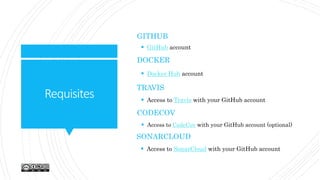
Requisites
GITHUB
 Docker Hub account
TRAVIS
 Access to Travis with your GitHub account
DOCKER
 GitHub account
CODECOV
 Access to CodeCov with your GitHub account (optional)
SONARCLOUD
 Access to SonarCloud with your GitHub account
Requisites
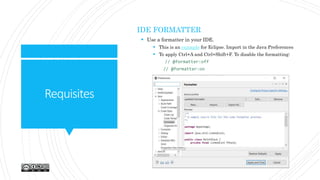
IDE FORMATTER
 Use a formatter in your IDE.
 This is an example for Eclipse. Import in the Java Preferences
 To apply Ctrl+A and Ctrl+Shift+F. To disable the formatting:
// @formatter:off
// @formatter:on
Requisites
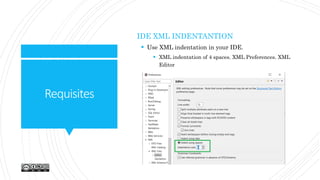
IDE XML INDENTANTION
 Use XML indentation in your IDE.
 XML indentation of 4 spaces. XML Preferences. XML
Editor
Steps
FROM THE BEGINNING
 Fork spring-boot-template repository
 Carefully read the README file and the slides
 Check all the files to be changed mentioned in the Initial
Configuration and use the same value to replace the same
strings
 Use a useful formatter and XML indentation 4.
Initial Configuration
Variables to configure
Variablesto
configure
GITHUB
 Modify the repo badges and description in README
 Create a new branch “release” starting from “master”
 Modify DISCLAIMER and LICENSE-AGREEMENT (EULA)
(Substitute **Spring Template** string by your project).
Check the license and terms
TRAVIS
 Modify the GitHub repo in .travis/prepare.sh script. Find
and replace spring-boot-template string
 Have a look at .travis/push.sh and settings.xml to know
the environment variables used
Variablesto
configure
POM (BEFORE IMPORTING IN THE IDE)
 Find and replace spring-boot-template string
 SCM section. Include the proper GitHub repo
 ArtifactId and version (if applicable)
 Name, description and final name
CHANGELOG
 Add the proper title and description of the repo
CHANGELOG.md and changelog.mustache
 Modify the GitHub Api in changelog.json file. Find and
replace spring-boot-template string
DOCKER
 Find and replace spring-boot-template string
GitHub
Source Code Management
GitHub
Configuration
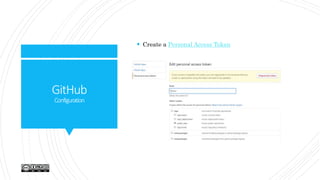
 Create a Personal Access Token
GitHub
Configuration
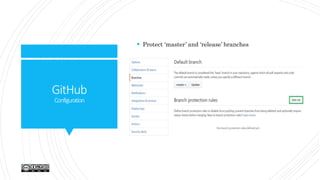
 Protect ‘master’ and ‘release’ branches
GitHub
MasterConfiguration
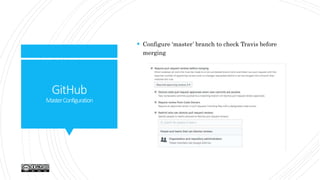
 Configure ‘master’ branch to check Travis before
merging
GitHub
MasterConfiguration
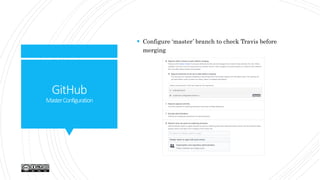
 Configure ‘master’ branch to check Travis before
merging
GitHub
MasterConfiguration
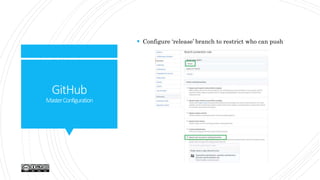
 Configure ‘release’ branch to restrict who can push
Travis CI
Automation Server
TravisCI
Whatis
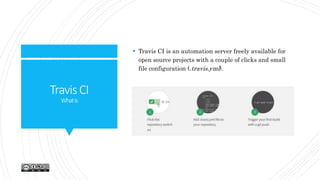
 Travis CI is an automation server freely available for
open source projects with a couple of clicks and small
file configuration (.travis.yml).
TravisCI
.travis.yml
 Travis CI runs the CI (clean, test, package and sonar goals) when we merge features into master
and runs the CD (release) when push to release.
 A complete .travis.yml example is here:
language: java
sudo: false # faster builds
cache:
directories:
- $HOME/.m2
env:
global:
- secure: “
addons:
sonarcloud:
organization: "arihealth“
token:
secure: xxxx=
script:
- if [ "$TRAVIS_PULL_REQUEST" = "true" ]; then mvn clean test; mvn package -
Dmaven.test.skip=true; mvn sonar:sonar; fi
- if [ "$TRAVIS_BRANCH" = "master" ]; then mvn clean test; mvn sonar:sonar; fi
- if [ "$TRAVIS_BRANCH" = "release" ]; then chmod +x .travis/prepare.sh &&
.travis/prepare.sh; mvn -s .travis/settings.xml -B release:clean release:prepare; git
push --tags; mvn -s .travis/settings.xml -B release:perform; chmod +x .travis/push.sh &&
.travis/push.sh; fi
TravisCI
EnablingCI
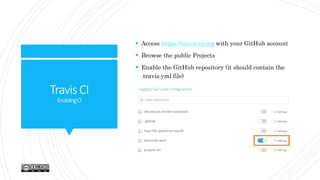
 Access https://travis-ci.org with your GitHub account
 Browse the public Projects
 Enable the GitHub repository (it should contain the
.travis.yml file)
TravisCI
Configuringthehooks
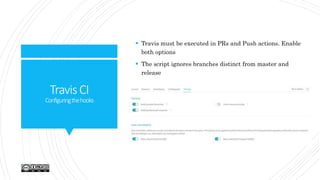
 Travis must be executed in PRs and Push actions. Enable
both options
 The script ignores branches distinct from master and
release
TravisCI
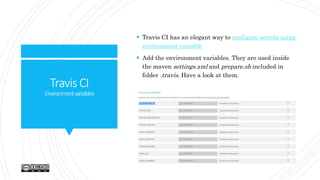
Environmentvariables
 Travis CI has an elegant way to configure secrets using
environment variable
 Add the environment variables. They are used inside
the maven settings.xml and prepare.sh included in
folder .travis. Have a look at them.
TravisCI
Encryptingvariables
 With Travis CI we can encrypt the environment variables
 Please note that encrypted environment variables are not
available for pull requests from forks.
 The encrypted values can be added by anyone, but are only
readable by Travis CI
 This way we can reuse them inside the .travis.yml file
 For Windows Ruby gem can be downloaded from rubyinstaller
 To include encrypted variables into .travis.yml
 gem install travis
 travis encrypt SOMEVAR=“secretvalue” –add
 Further information here
 Remember that encryption is done at repository level, so you need
to encrypt again your variables
CodeCov
Code Coverage
CodeCov
 Open source code test coverage
 Access https://codecov.io/ using your GitHub credentials
 No need to enable the GitHub repo as Travis CI, but
Jacoco (or similar enabled)
 Add the following snippet to your .travis.yml
after_success:
- bash <(curl -s https://codecov.io/bash)
SonarCloud
Quality Analysis
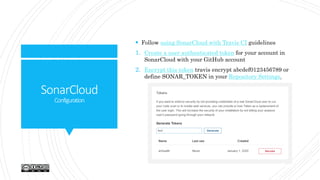
SonarCloud
Configuration
 Follow using SonarCloud with Travis CI guidelines
1. Create a user authenticated token for your account in
SonarCloud with your GitHub account
2. Encrypt this token travis encrypt abcdef0123456789 or
define SONAR_TOKEN in your Repository Settings.
SonarCloud
EnableGitHubrepos
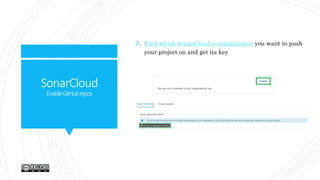
3. Find which SonarCloud.io organization you want to push
your project on and get its key
SonarCloud
EnableGitHubrepos
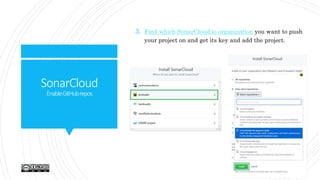
3. Find which SonarCloud.io organization you want to push
your project on and get its key and add the project.
SonarCloud
EnableGitHubrepos
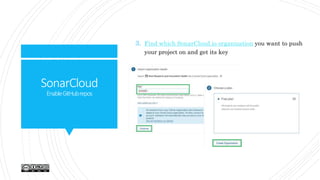
3. Find which SonarCloud.io organization you want to push
your project on and get its key
SonarCloud
EnableGitHubrepos
4. Add this snippet to your .travis.yml file:
addons:
sonarcloud:
organization: "arihealth"
token:
secure: “***********”
 script:
 - if [ "$TRAVIS_BRANCH" = "master" &&
"$TRAVIS_PULL_REQUEST" = true ]; then mvn clean
 test; mvn package -Dmaven.test.skip=true; mvn sonar:sonar
–Dsonar.projectKey=arihealth_spring-boot-template;
Docker Hub
Public Docker Registry
DockerHub
Whatis
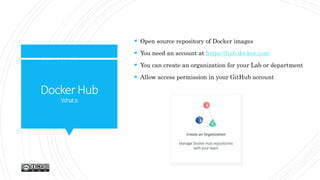
 Open source repository of Docker images
 You need an account at https://hub.docker.com/
 You can create an organization for your Lab or department
 Allow access permission in your GitHub account
DockerHub
Configuration
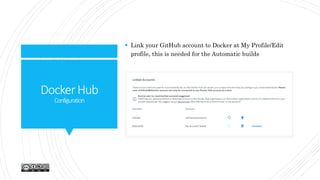
 Link your GitHub account to Docker at My Profile/Edit
profile, this is needed for the Automatic builds
DockerHub
GitHub–AuthorizedOauthApps
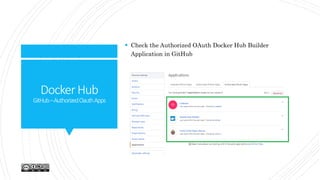
 Check the Authorized OAuth Docker Hub Builder
Application in GitHub
DockerHub
Createanewrepository
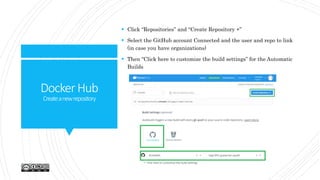
 Click “Repositories” and “Create Repository +”
 Select the GitHub account Connected and the user and repo to link
(in case you have organizations)
 Then “Click here to customize the build settings” for the Automatic
Builds
 In “Build Rules”
 Generate a Docker Tag “{sourceref}” version from Source
Type “Tag” and the Source is “/^[0-9.]+$/” (any semver
version). Which means when a new tag is generated in
GitHub (during the Continuous Delivery workflow)
 Generate a Docker Tag “latest” version from Source Type
“Branch” and Source “release”
 Release branch receives pushes only when a new version is
generated
DockerHub
Createanewrepository
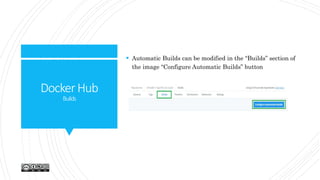
 Automatic Builds can be modified in the “Builds” section of
the image “Configure Automatic Builds” button
DockerHub
Builds
Material
 https://github.com/AriHealth/spring-boot-template
 https://dzone.com/articles/applying-cicd-to-java-apps-
using-spring-boot
 https://docs.travis-ci.com/user/languages/java/
 https://coderwall.com/p/9b_lfq/deploying-maven-artifacts-
from-travis
 https://github.blog/2013-05-16-personal-api-tokens/
 https://github.com/settings/tokens/
 https://docs.travis-ci.com/user/sonarcloud/
 https://stackoverflow.com/questions/58821867/how-to-
share-credentials-used-in-travis-ci
 https://docs.travis-ci.com/user/environment-variables/
 https://docs.travis-ci.com/user/encryption-keys/#usage
Thanks!
For more information please contact:
carlos.cavero@atos.net

CICD With GitHub, Travis, SonarCloud and Docker Hub

  • 1.
    CI/CD with GitHub,Travis CI, SonarCloud and Docker Hub How to include CICD into your GitHub project This work is licensed under the Creative Commons Attribution Non Commercial Share Alike 3.0 License. To view a copy of this license, visit https://creativecommons.org/licenses/by-nc-sa/3.0/ or send a letter to Creative Commons, 171 Second Street, Suite 300, San Francisco, California, 94105, USA.
  • 2.
  • 3.
    Requisites GITHUB  Docker Hubaccount TRAVIS  Access to Travis with your GitHub account DOCKER  GitHub account CODECOV  Access to CodeCov with your GitHub account (optional) SONARCLOUD  Access to SonarCloud with your GitHub account
  • 4.
    Requisites IDE FORMATTER  Usea formatter in your IDE.  This is an example for Eclipse. Import in the Java Preferences  To apply Ctrl+A and Ctrl+Shift+F. To disable the formatting: // @formatter:off // @formatter:on
  • 5.
    Requisites IDE XML INDENTANTION Use XML indentation in your IDE.  XML indentation of 4 spaces. XML Preferences. XML Editor
  • 6.
    Steps FROM THE BEGINNING Fork spring-boot-template repository  Carefully read the README file and the slides  Check all the files to be changed mentioned in the Initial Configuration and use the same value to replace the same strings  Use a useful formatter and XML indentation 4.
  • 7.
  • 8.
    Variablesto configure GITHUB  Modify therepo badges and description in README  Create a new branch “release” starting from “master”  Modify DISCLAIMER and LICENSE-AGREEMENT (EULA) (Substitute **Spring Template** string by your project). Check the license and terms TRAVIS  Modify the GitHub repo in .travis/prepare.sh script. Find and replace spring-boot-template string  Have a look at .travis/push.sh and settings.xml to know the environment variables used
  • 9.
    Variablesto configure POM (BEFORE IMPORTINGIN THE IDE)  Find and replace spring-boot-template string  SCM section. Include the proper GitHub repo  ArtifactId and version (if applicable)  Name, description and final name CHANGELOG  Add the proper title and description of the repo CHANGELOG.md and changelog.mustache  Modify the GitHub Api in changelog.json file. Find and replace spring-boot-template string DOCKER  Find and replace spring-boot-template string
  • 10.
  • 11.
    GitHub Configuration  Create aPersonal Access Token
  • 12.
  • 13.
    GitHub MasterConfiguration  Configure ‘master’branch to check Travis before merging
  • 14.
    GitHub MasterConfiguration  Configure ‘master’branch to check Travis before merging
  • 15.
  • 16.
  • 17.
    TravisCI Whatis  Travis CIis an automation server freely available for open source projects with a couple of clicks and small file configuration (.travis.yml).
  • 18.
    TravisCI .travis.yml  Travis CIruns the CI (clean, test, package and sonar goals) when we merge features into master and runs the CD (release) when push to release.  A complete .travis.yml example is here: language: java sudo: false # faster builds cache: directories: - $HOME/.m2 env: global: - secure: “ addons: sonarcloud: organization: "arihealth“ token: secure: xxxx= script: - if [ "$TRAVIS_PULL_REQUEST" = "true" ]; then mvn clean test; mvn package - Dmaven.test.skip=true; mvn sonar:sonar; fi - if [ "$TRAVIS_BRANCH" = "master" ]; then mvn clean test; mvn sonar:sonar; fi - if [ "$TRAVIS_BRANCH" = "release" ]; then chmod +x .travis/prepare.sh && .travis/prepare.sh; mvn -s .travis/settings.xml -B release:clean release:prepare; git push --tags; mvn -s .travis/settings.xml -B release:perform; chmod +x .travis/push.sh && .travis/push.sh; fi
  • 19.
    TravisCI EnablingCI  Access https://travis-ci.orgwith your GitHub account  Browse the public Projects  Enable the GitHub repository (it should contain the .travis.yml file)
  • 20.
    TravisCI Configuringthehooks  Travis mustbe executed in PRs and Push actions. Enable both options  The script ignores branches distinct from master and release
  • 21.
    TravisCI Environmentvariables  Travis CIhas an elegant way to configure secrets using environment variable  Add the environment variables. They are used inside the maven settings.xml and prepare.sh included in folder .travis. Have a look at them.
  • 22.
    TravisCI Encryptingvariables  With TravisCI we can encrypt the environment variables  Please note that encrypted environment variables are not available for pull requests from forks.  The encrypted values can be added by anyone, but are only readable by Travis CI  This way we can reuse them inside the .travis.yml file  For Windows Ruby gem can be downloaded from rubyinstaller  To include encrypted variables into .travis.yml  gem install travis  travis encrypt SOMEVAR=“secretvalue” –add  Further information here  Remember that encryption is done at repository level, so you need to encrypt again your variables
  • 23.
  • 24.
    CodeCov  Open sourcecode test coverage  Access https://codecov.io/ using your GitHub credentials  No need to enable the GitHub repo as Travis CI, but Jacoco (or similar enabled)  Add the following snippet to your .travis.yml after_success: - bash <(curl -s https://codecov.io/bash)
  • 25.
  • 26.
    SonarCloud Configuration  Follow usingSonarCloud with Travis CI guidelines 1. Create a user authenticated token for your account in SonarCloud with your GitHub account 2. Encrypt this token travis encrypt abcdef0123456789 or define SONAR_TOKEN in your Repository Settings.
  • 27.
    SonarCloud EnableGitHubrepos 3. Find whichSonarCloud.io organization you want to push your project on and get its key
  • 28.
    SonarCloud EnableGitHubrepos 3. Find whichSonarCloud.io organization you want to push your project on and get its key and add the project.
  • 29.
    SonarCloud EnableGitHubrepos 3. Find whichSonarCloud.io organization you want to push your project on and get its key
  • 30.
    SonarCloud EnableGitHubrepos 4. Add thissnippet to your .travis.yml file: addons: sonarcloud: organization: "arihealth" token: secure: “***********”  script:  - if [ "$TRAVIS_BRANCH" = "master" && "$TRAVIS_PULL_REQUEST" = true ]; then mvn clean  test; mvn package -Dmaven.test.skip=true; mvn sonar:sonar –Dsonar.projectKey=arihealth_spring-boot-template;
  • 31.
  • 32.
    DockerHub Whatis  Open sourcerepository of Docker images  You need an account at https://hub.docker.com/  You can create an organization for your Lab or department  Allow access permission in your GitHub account
  • 33.
    DockerHub Configuration  Link yourGitHub account to Docker at My Profile/Edit profile, this is needed for the Automatic builds
  • 34.
    DockerHub GitHub–AuthorizedOauthApps  Check theAuthorized OAuth Docker Hub Builder Application in GitHub
  • 35.
    DockerHub Createanewrepository  Click “Repositories”and “Create Repository +”  Select the GitHub account Connected and the user and repo to link (in case you have organizations)  Then “Click here to customize the build settings” for the Automatic Builds
  • 36.
     In “BuildRules”  Generate a Docker Tag “{sourceref}” version from Source Type “Tag” and the Source is “/^[0-9.]+$/” (any semver version). Which means when a new tag is generated in GitHub (during the Continuous Delivery workflow)  Generate a Docker Tag “latest” version from Source Type “Branch” and Source “release”  Release branch receives pushes only when a new version is generated DockerHub Createanewrepository
  • 37.
     Automatic Buildscan be modified in the “Builds” section of the image “Configure Automatic Builds” button DockerHub Builds
  • 38.
    Material  https://github.com/AriHealth/spring-boot-template  https://dzone.com/articles/applying-cicd-to-java-apps- using-spring-boot https://docs.travis-ci.com/user/languages/java/  https://coderwall.com/p/9b_lfq/deploying-maven-artifacts- from-travis  https://github.blog/2013-05-16-personal-api-tokens/  https://github.com/settings/tokens/  https://docs.travis-ci.com/user/sonarcloud/  https://stackoverflow.com/questions/58821867/how-to- share-credentials-used-in-travis-ci  https://docs.travis-ci.com/user/environment-variables/  https://docs.travis-ci.com/user/encryption-keys/#usage
  • 39.
    Thanks! For more informationplease contact: carlos.cavero@atos.net